䇴䇗
'(6,*1
ᶞ
ᇍฯ
㺷⧤
ṗሯ
&2%<
ഴ⢟ᯏ㕌⸷3$5712
ḽ
67$1'$5'
ഴ㓮〦3$571$0(
ѐࣗ
VHOOHU
ഴṭḽ䇦
5(/
⡾ᵢ
5(912
䠃䠅J
:(,*+7
∊ׁ
VFDOH
ᶆᯏ0$7(5,$/
J䬒⡾㓮
$87+25,
=(
ާ享
727$/6+((76
ㅢ享
122)6+((76
㗄ⲺߦӁѐ䜞
0,'($5()5,*(5$7,21
',9,6,21
ḷ䇠
0
$5.(5
ᴪᇯ
㠠02䇘ঋᔶခᴪ᭯3ተሮḽ⌞ᶞ
ؤ᭯ᰛᵕ ㆴ
ተሮφ%
দ仒㢨φሷ䶘ᖟ㢨享ঋ㢨χ
ㅜ㗄ⲺߦӁѐⲺᴶ᯦⡾Ʌ40%*&ᴿᇩ⢟䍞㇗⨼㿺ᇐɆⲺ䲆ٲ㾷≸χ
ṭᶵ䴶䘷䇴䇗䜞䰞ሷṭȾ
Ƚᵠḽ⌞ޢᐤ*%7Y㓝
Ԭᗻ亱┗䏩40%-ӝ䈪᱄Ҝެᆹ㊱ղদԬᢶᵥ㿺㤹χ
ᢶᵥ㾷≸
$
726+,%$ࣖ㓩*556:(301>@䈪᱄Ҝ
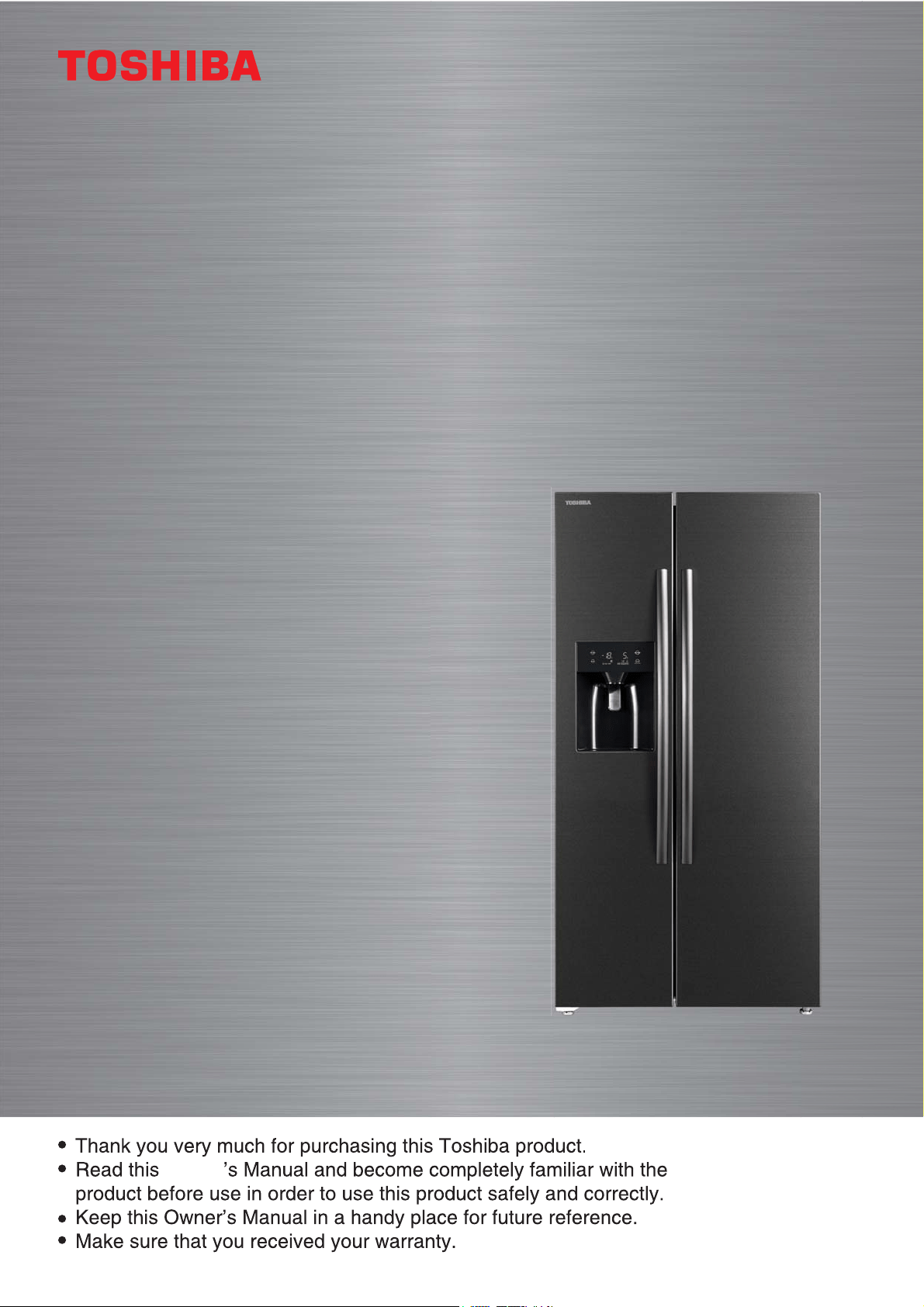
Owner’s Manual
Owner
REFRIGERATOR FREEZER
For Home Use Only
GR-RS508WE-PMN [06]

CONTENTS
1. Safety warnings
...........................................................................................................................2
1.1 Warning
.....................................................................................................................................................2
1.2 Meaning of safety warning symbols
........................................................................6
1.3 Electricity related warnings
................................................................................................6
1.4 Warnings for using
........................................................................................................................7
1.5 Warnings for placement
.........................................................................................................8
1.6 Warnings for energy
..................................................................................................................9
1.7 Warnings for disposal
................................................................................................................9
2. Proper use of refrigerators
.........................................................................................10
2.1 Placement
...............................................................................................................................................10
2.2 Leveling feet
.........................................................................................................................................11
2.3 Leveling door
......................................................................................................................................12
2.4 Changing the Light
......................................................................................................................13
2.5 Starting
.....................................................................................................................................................13
3.
Structure and functions
............................................................................................................14
3.1 Key components
..............................................................................................................................14
3.2 Functions
................................................................................................................................................16
3.3 Fetching water and Ice
.............................................................................................................19
4. Maintenance and care of the appliance
...................................................21
4.1 Overall cleaning
...............................................................................................................................21
4.2 Cleaning of door tray
..................................................................................................................21
4.3 Clean the Ice Container
...........................................................................................................22
4.4 Cleaning of Glass shelf
..............................................................................................................22
4.5 Defrosting
..............................................................................................................................................23
4.6 Out of operation
..............................................................................................................................23
5. Trouble shooting
.......................................................................................................................24
6. Disposal of your appliance
......................................................................................................25
2
READ SAFETY PRECAUTIONS BEFORE INSTALLATION
To prevent injury to the user or other people and property damage,
the following instructions must be followed. Incorrect operation due
to ignoring of instructions may cause harm or damage.
1.1 Warning
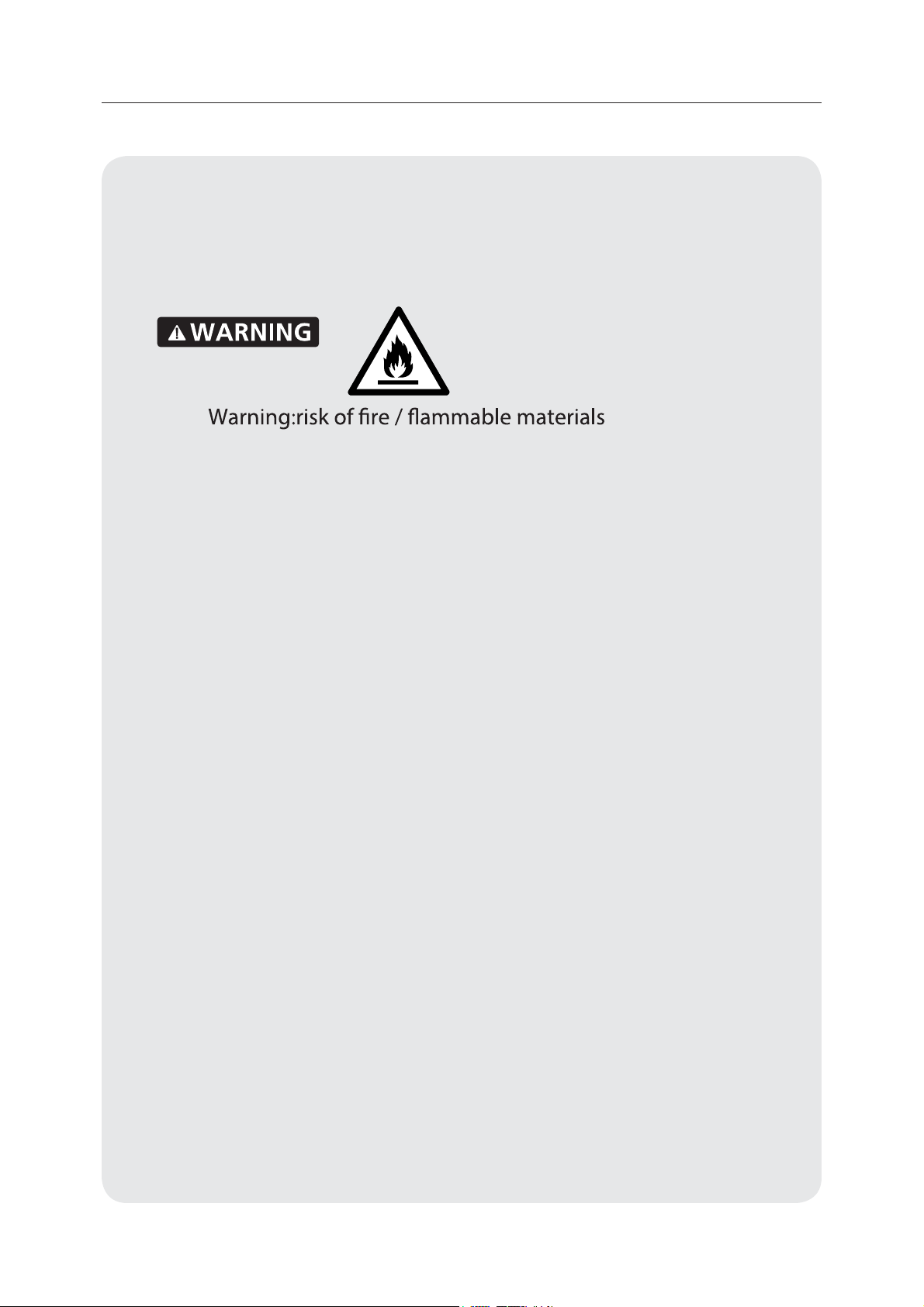
• WARNING: Risk of re disaster and explosion
The refrigerant of the appliance is ammable, please be care not to
damange the cooling pipes during installation and transportation.if
gas leakage happens, please contact the distributor or local service
agent, and the following precautions should be always taken:
1. Open the windows for ensuring good ventilation.
2. No re around and please do not use other electric appliance.
• This appliance is intended to be used in household and similar
applications such as sta kitchen areas in shops, oces and other
working environments; farm houses and by clients in hotels, motels
and other residential type environments; bed and breakfast type
environments; catering and similar non-retail applications.
• Children should be supervised to ensure that they do not play with
the appliance.
• WARNING: Risk of re disaster and electric shock
The power cord should be replaced when it has been damaged.
please contact the distributor or local service agent for
replacement.
• Please unplug the power plug from socket when clean the
appliance or leave the appliance nonuse for a long time.
• Do not use extension cord or ungrounded (two prong) adapters.
• WARNING: Keep ventilation openings, in the appliance enclosure or
in the built-in structure, clear of obstruction.
1. Safety warnings

3
• WARNING: Do not use mechanical devices or other means to
accelerate the defrosting process, other than those recommended
by the manufacturer.
• WARNING: Do not damage the refrigerant circuit.
• WARNING: Do not use electrical appliances inside the food storage
compartments of the appliance, unless they are of the type
recommended by the manufacturer.
• WARNING:Please abandon the refrigerator according to local
regulators for it use ammable blowing gas and refrigerant.
• WARNING: When positioning the appliance, ensure the supply cord
is not trapped or damaged.
• WARNING: Do not locate multiple portable socket-outlets or
portable power supplies at the rear of the appliance.
• DANGER: Risk of child entrapment. Before you throw away your old
refrigerator or freezer:
-Take o the doors.
-Leave the shelves in place so that children may not easily climb
inside.
• The refrigerator must be disconnected from the source of electrical
supply before attempting the installation of accessory.
• Refrigerant and cyclopentane foaming material used for the
refrigerator are ammable.Therefore, when the refrigerator is
scraped, it shall be kept away from any re source and be recovered
by a special recovering company with corresponding qualication
other than be disposed by combustion, so as to prevent damage to
the environment or any other harm.
4
• For EN standard: This appliance can be used by children aged from
8 years and above and persons with reduce physical sensory or
mental capabilities or lack of experience and knowledge if they
have been given supervision or instruction concerning use of the
appliance in a safe way and understand the hazards involved.
Children shall not play with the appliance. Cleaning and user
maintenance shall not be made by children without supervision.
• For IEC standard: This appliance is not intended for use by persons
(including children) with reduced physical, sensory or mental
capabilities, or lack of experience and knowledge, unless they
have been given supervision or instruction concerning use of the
appliance by a person responsible for their safety.)
• Please do not use the appliance on trac means(such as ship and
so on).
• If noise, odor and smoking happens, please unplug the power plug
immediately,and contact the distributor or local service agent.
• Please do not put your hands under or behind the appliance to
prevent from being hurt.
• Please leave the packing materials and other parts out of the reach
of children to prevent from risk of suocation.
• To avoid contamination of food, please respect the following
instructions:
• – Opening the door for long periods can cause a signicant
increase of the temperature in the compartments of the appliance.
• – Clean regularly surfaces that can come in contact with food and
accessible drainage systems.
• – Store raw meat and sh in suitable containers in the refrigerator,
so that it is not in contact with or drip onto other food.
• – Two-star frozen-food compartments are suitable for
storing pre-frozen food, storing or making ice-cream and making
ice cubes. (note 1)
5
• – One -,two -and three-star compartments are
not suitable for the freezing of fresh food. (note 2)
• – If the refrigerating appliance is left empty for long periods,
switch o, defrost, clean, dry, and leave the door open to prevent
mould developing within the appliance.
• Note 1,2 : Please conrm whether it is applicable according to you
product compartment type.
6
1.2 Meaning of safety warning symbols
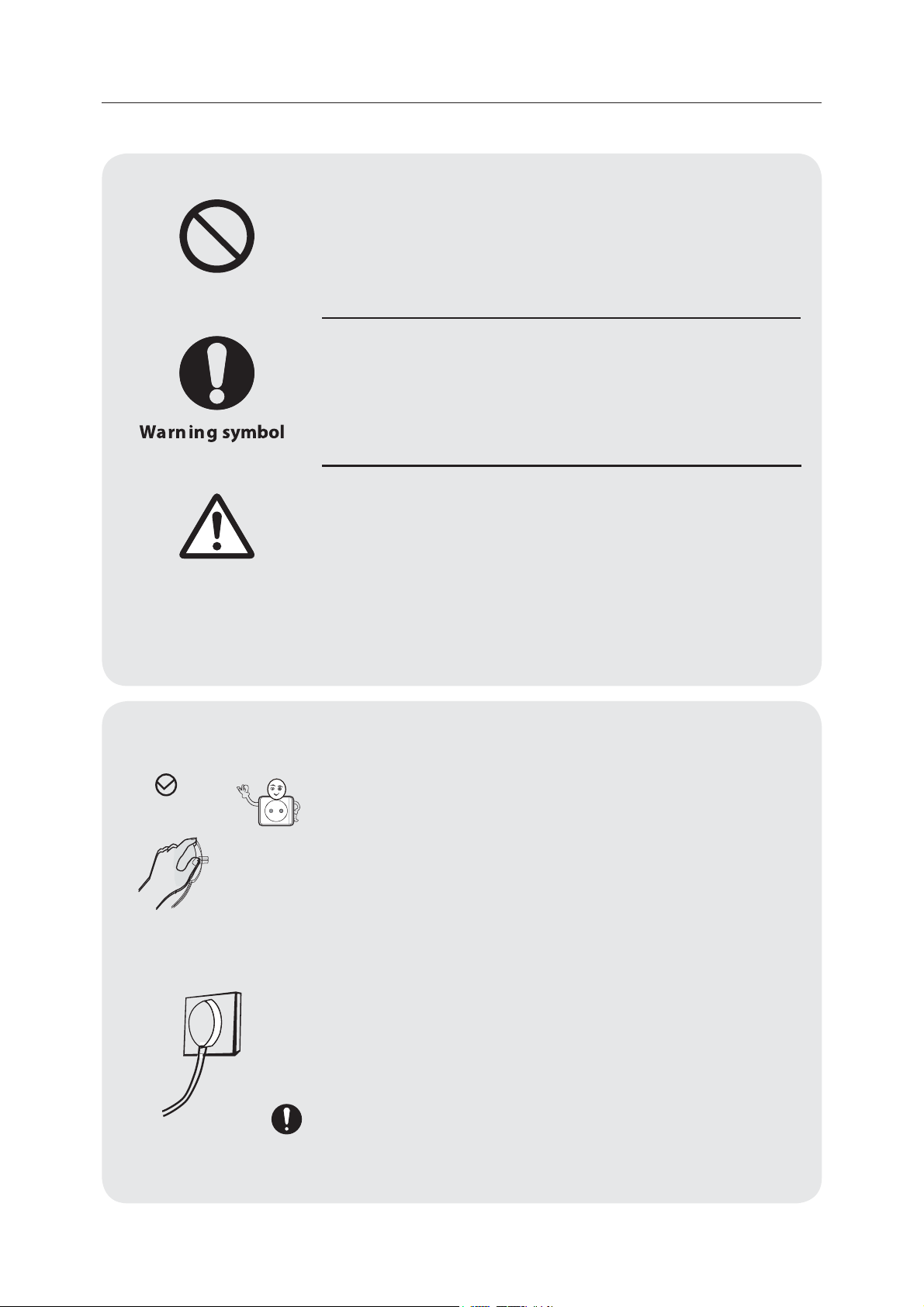
This is a prohibition symbol.
Any incompliance with instructions marked with
this symbol may result in damage to the product
or endanger the personal safety of the user.
This is a warning symbol.
It is required to operate in strict observance
of instructions marked with this symbol; or
otherwise damage to the product or personal
injury may be caused.
This is a cautioning symbol.
Instructions marked with this symbol require
special caution. Insucient caution may result
in slight or moderate injury, or damage to the
product.
This manual contains lots of important safety information which
shall be observed by the users.
1.3 Electricity related warnings
• Do not pull the power cord when pulling
the power plug of the refrigerator. Please
rmly grasp the plug and pull out it from
the socket directly.
• To ensure safe use, do not damage the
power cord or use the power cord when it is
damaged or worn.
• Please do not touch the power plug with
wet hand to prevent from electric shock.
• Please use a dedicated power socket and
the power socket shall not be shared with
other electrical appliances. The power plug
should be rmly contacted with the socket
or else res might be caused.
Cautioning symbol
Prohibition symbol
7
• Please ensure that the grounding electrode
of the power socket is equipped with a
reliable grounding line.
• Please ask for help from persons with
professional qualication to examine
whether the socket is with reliable grounding
line or not.
• It is the end-consumers' responsibility
to change the ungrounded socket into
grounded socket.
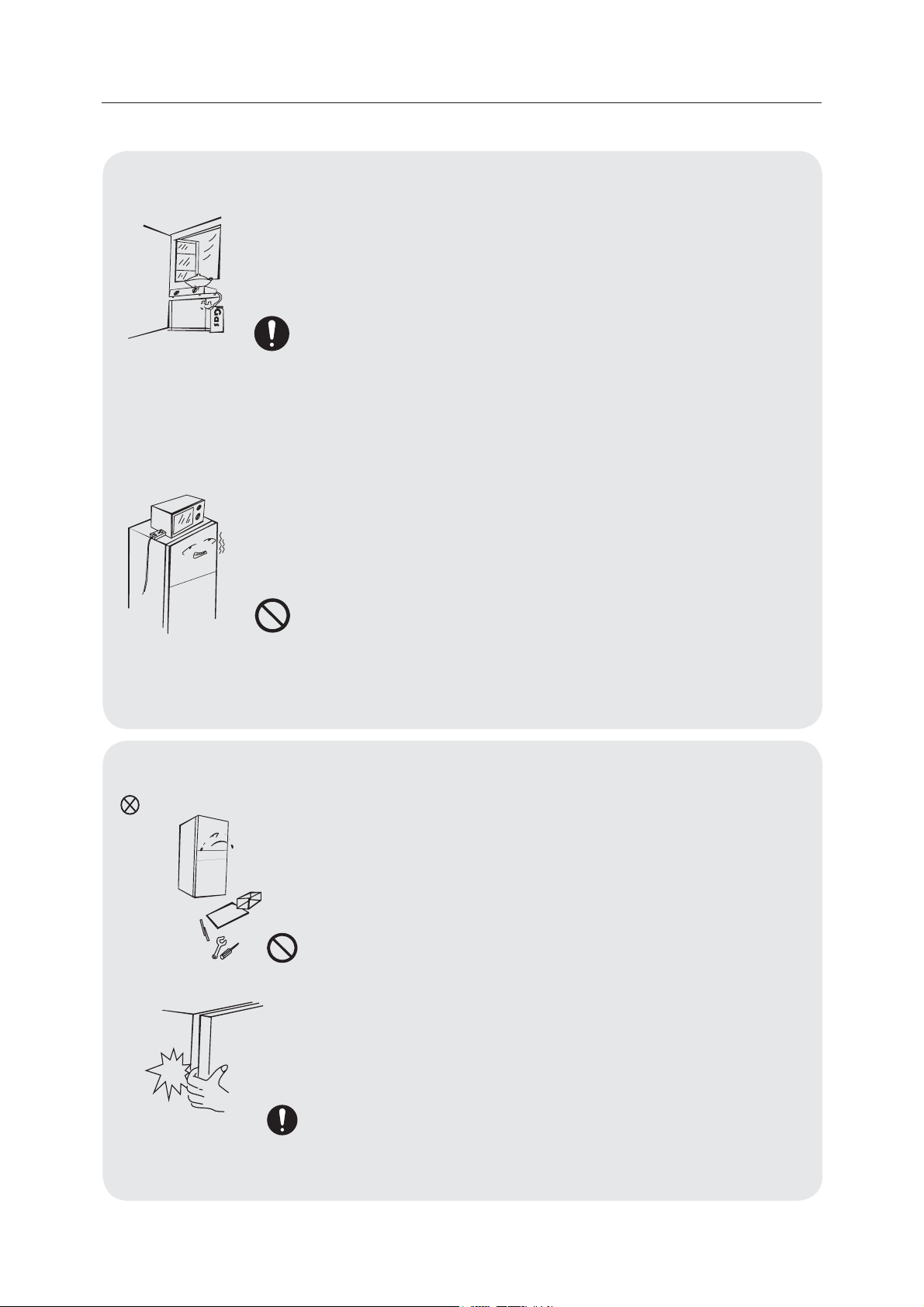
• Please turn o the valve of the leaking gas
and then open the doors and windows in
case of leakage of gas and other ammable
gases. Do not unplug the refrigerator and
other electrical appliances considering that
spark may cause a re.
• Do not use electrical appliances on the top
of the appliance, unless they are of the type
recommended by the manufacturer.
1.4 Warnings for using
• Do not arbitrarily disassemble or reconstruct
the refrigerator, nor damage the refrigerant
circuit; maintenance of the appliance must
be conducted by a specialist.
• Damaged power cord must be replaced
by the manufacturer, its maintenance
department or related professionals in order
to avoid danger.
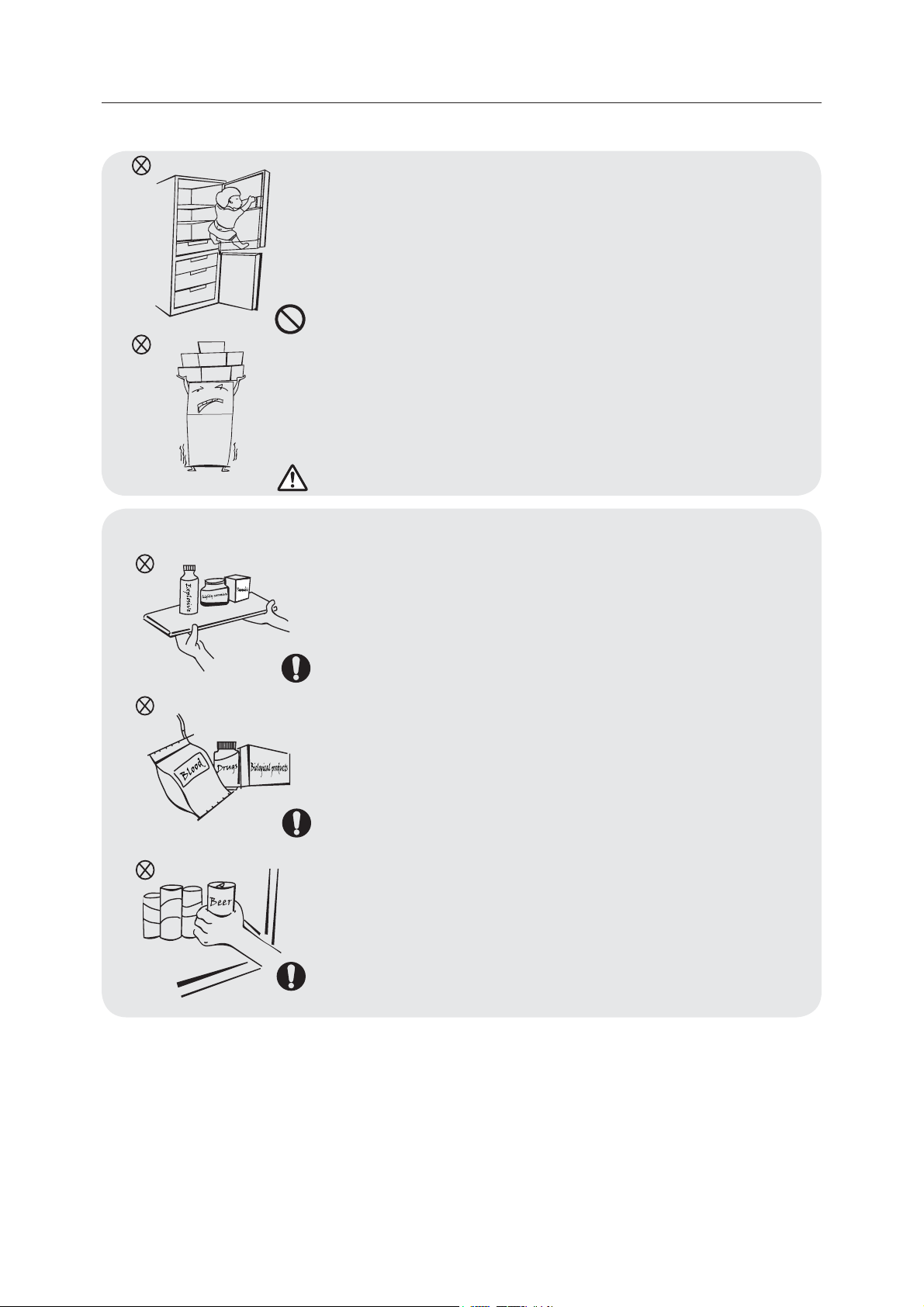
• The gaps between refrigerator doors and
between doors and refrigerator body are
small, be noted not to put your hand in these
areas to prevent from squeezing the nger.
Please be gentle when close the refrigerator
door to avoid falling articles.
8
• Do not pick foods or containers with wet
hands in the freezing chamber when the
refrigerator is running, especially metal
containers in order to avoid frostbite.
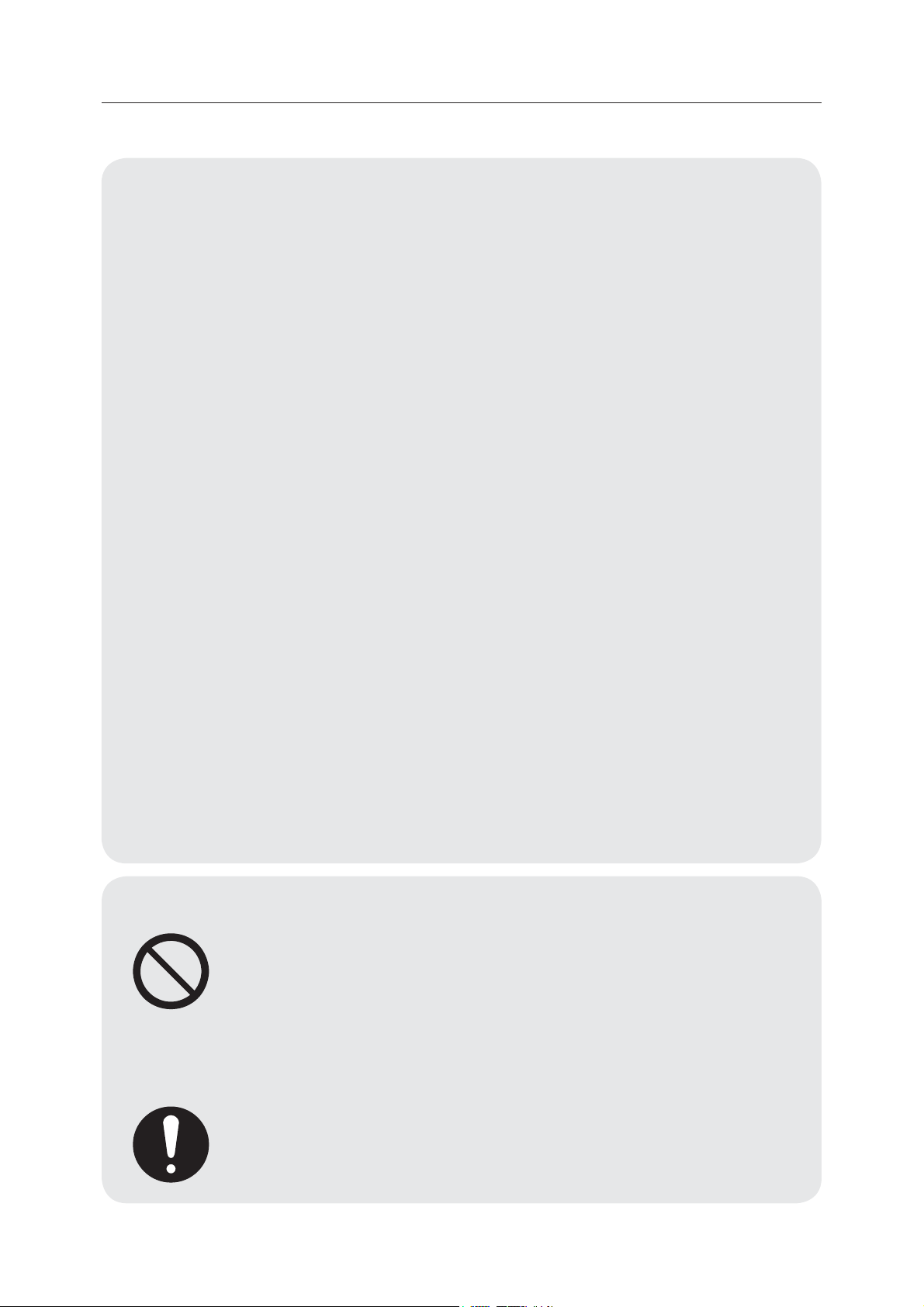
• Do not allow any child to get into or climb
the refrigerator; otherwise suocation or
falling injury of the child may be caused.
•
Please do not put heavy or dangerous objects
on top of the appliance(bottles,tableware,or
something containing liquid)
1.5 Warnings for placement
• Do not put ammable, explosive, volatile
and highly corrosive items in the refrigerator
to prevent damages to the product or re
accidents.
• Do not place ammable items near the
refrigerator to avoid res.
• The refrigerator is intended for household
use, such as storage of foods; it shall not be
used for other purposes, such as storage of
blood, drugs or biological products, etc.
• Do not store beer, beverage or other uid
contained in bottles or enclosed containers
in the freezing chamber of the refrigerator; or
otherwise the bottles or enclosed containers
may crack due to freezing to cause damages.
Freezing chamber
9
1.6 Warnings for energy
• Refrigerating appliances might not operate consistently
(possibility of defrosting of contents or temperature becoming
too warm in the frozen food compartment) when sited for an
extended period of time below the cold end of the range of
temperatures for which the refrigerating appliance is designed.
• The fact that eervescent drinks should not be stored in food
freezer compartments or cabinets or in low-temperature
compartments or cabinets, and that some products such as water
ices should not be consumed too cold;
• The need to not exceed the storage time(s) recommended by
the food manufacturers for any kind of food and particularly for
commercially quick-frozen food in food-freezer and frozen-food
storage compartments or cabinets;
• The precautions necessary to prevent an undue rise in the
temperature of the frozen food while defrosting the refrigerating
appliance, such as wrapping the frozen food in several layers of
newspaper.
• The fact that a rise in temperature of the frozen food during
manual defrosting, maintenance or cleaning could shorten the
storage life.
• The necessity that, for doors or lids tted with locks and keys, the
keys be kept out of the reach of children and not in the vicinity
of the refrigerating appliance, in order to prevent children from
being locked inside.
1.7 Warnings for disposal
• Refrigerant and cyclopentane foaming material used
for the refrigerator are ammable. Therefore, when the
refrigerator is scrapped, it shall be kept away from any
re source and be recovered by a special recovering
company with corresponding qualication other than
be disposed by combustion, so as to prevent damage
to the environment or any other harm.
• When the refrigerator is scrapped, disassemble the
doors, and remove gasket of door and shelves; put the
doors and shelves in a proper place, so as to prevent
trapping of any child.
10
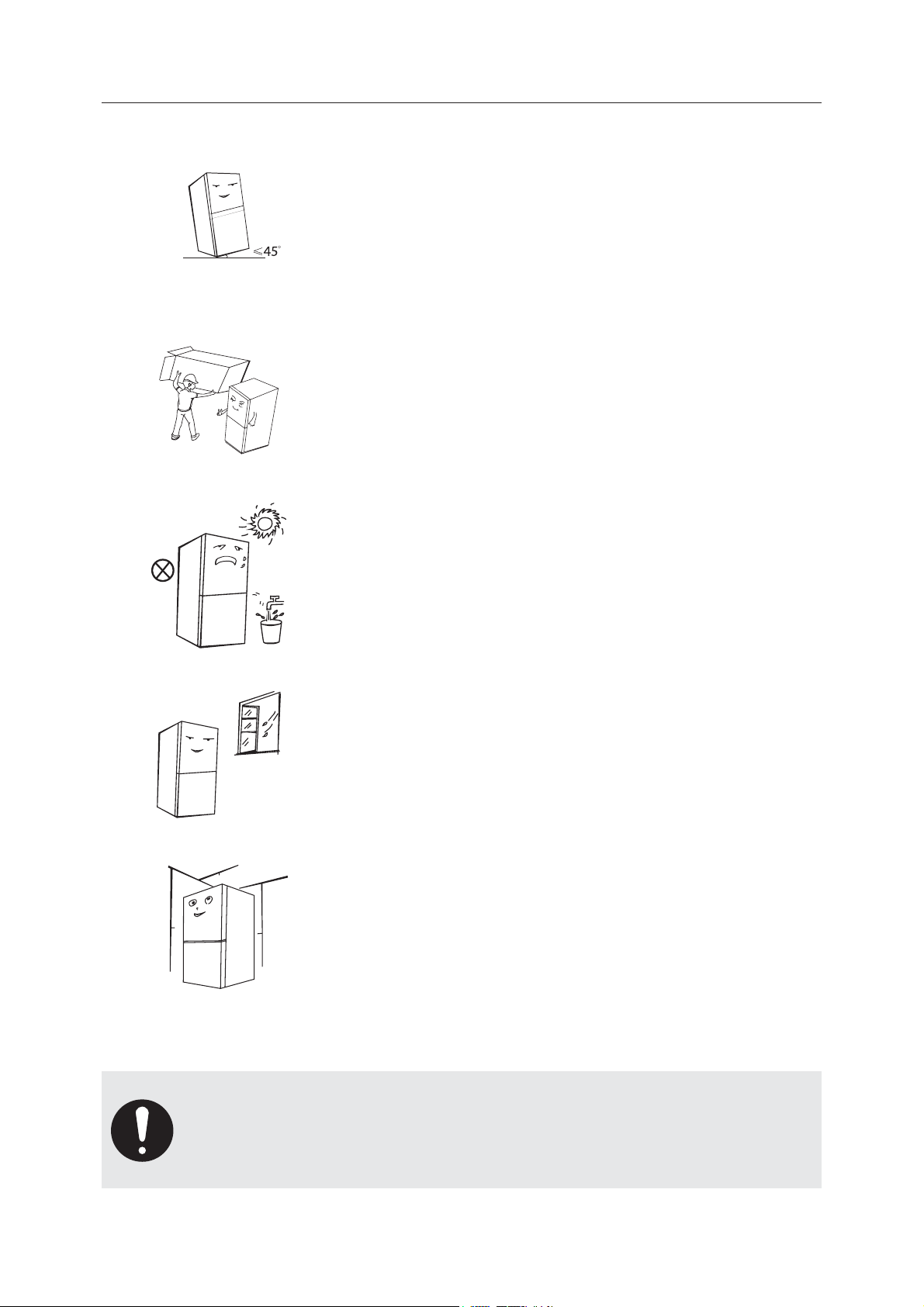
2.1 Placement
•
Before initial start, keep the refrigerator still for half an hour
before connecting it to power supply.
•
Before the refrigerator is moved, take all objects inside out,
x the glass partitions, vegetable holder, freezing chamber
drawers and etc. with tape, and tighten the leveling feet;
close the doors and seal them with tape. During moving, the
appliance shall not be laid upside down or horizontally, or be
vibrated; the inclination during movement shall be no more
than 45°.
•
Before use, remove all packing materials, including bottom
cushions, foam pads and tapes inside of the refrigerator;
tear o the protective lm on the doors and the refrigerator
body. Keep away from heat and avoid direct sunlight. Do not
place the freezer in moist or watery places to prevent rust or
reduction of insulating eect.
•
Do not spray or wash the refrigerator; do not put the
refrigerator in moist places easy to be splashed with water
so as not to aect the electrical insulation properties of the
refrigerator.
•
The refrigerator is placed in a well-ventilated indoor place; the
ground shall be at, and sturdy (rotate left or right to adjust
the wheel for leveling if unstable).
•
The top space of the refrigerator shall be greater than 30cm,
and the refrigerator should be placed against a wall with a
free distance more than 10cm to facilitate heat dissipation.
Precautions before installation:
Before installation or adjusting of accessories, it shall be ensured
that the refrigerator is disconnected from power. Precautions shall
be taken to prevent fall of the handle from causing any personal
injury.
2. Proper use of refrigerators
30cm
10cm
10cm
11
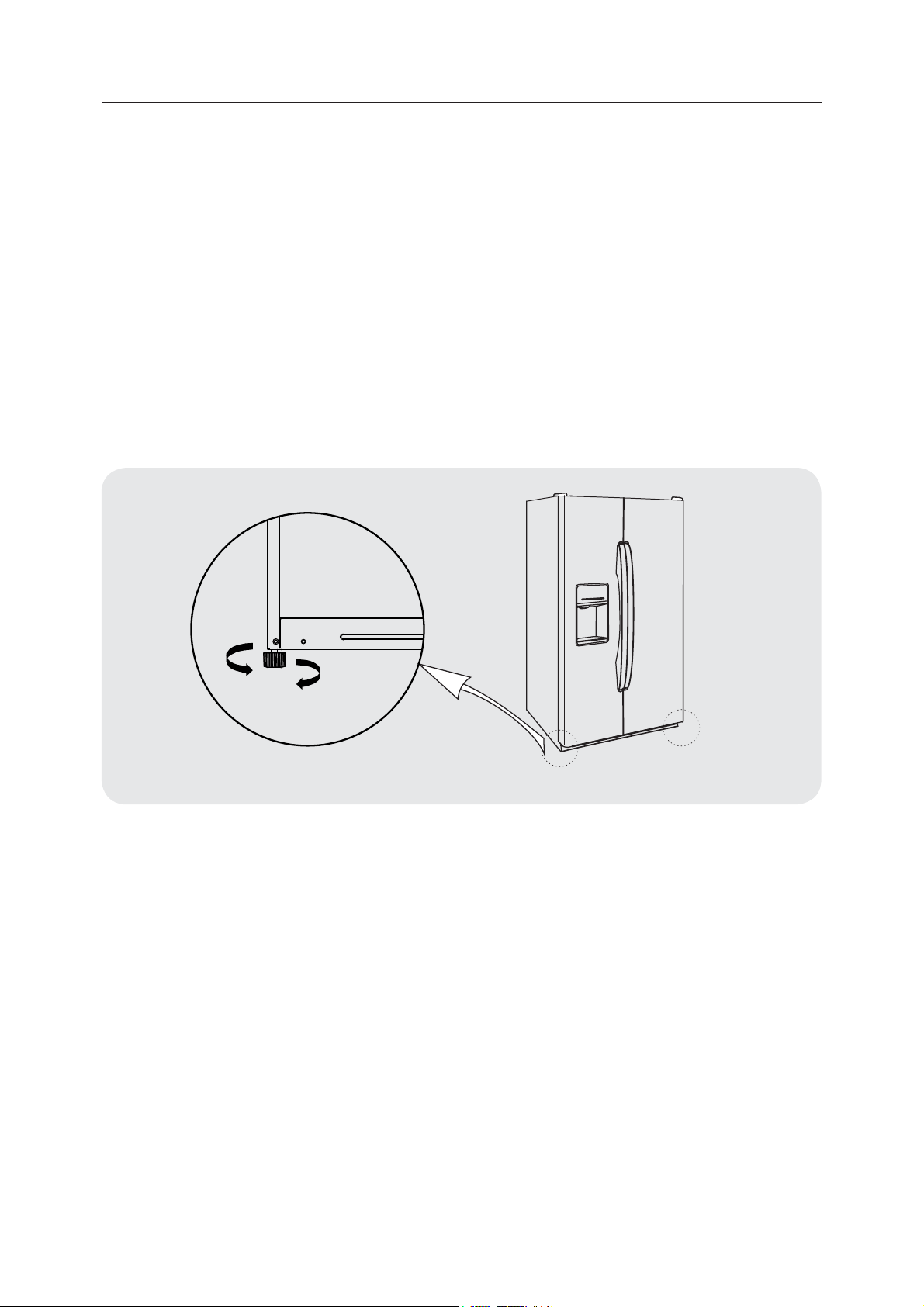
2.2 Leveling feet
1. Precautions before operation:
Before operation of accessories, it shall be ensured that the refrigerator is disconnected from
power.
2. Schematic diagram of the levelling feet:
Before adjusting the leveling feet, precautions shall be taken to prevent any personal injury.
3. Adjusting procedures:
a. Turn the feet clockwise to raise the refrigerator;
b. Turn the feet counterclockwise to lower the refrigerator;
c. Adjust the right and left feet based on the procedures above to a horizontal level.
(The picture above is only for reference.The actual configuration will depend on the physical
product or statement by the distributor)
L
H
12
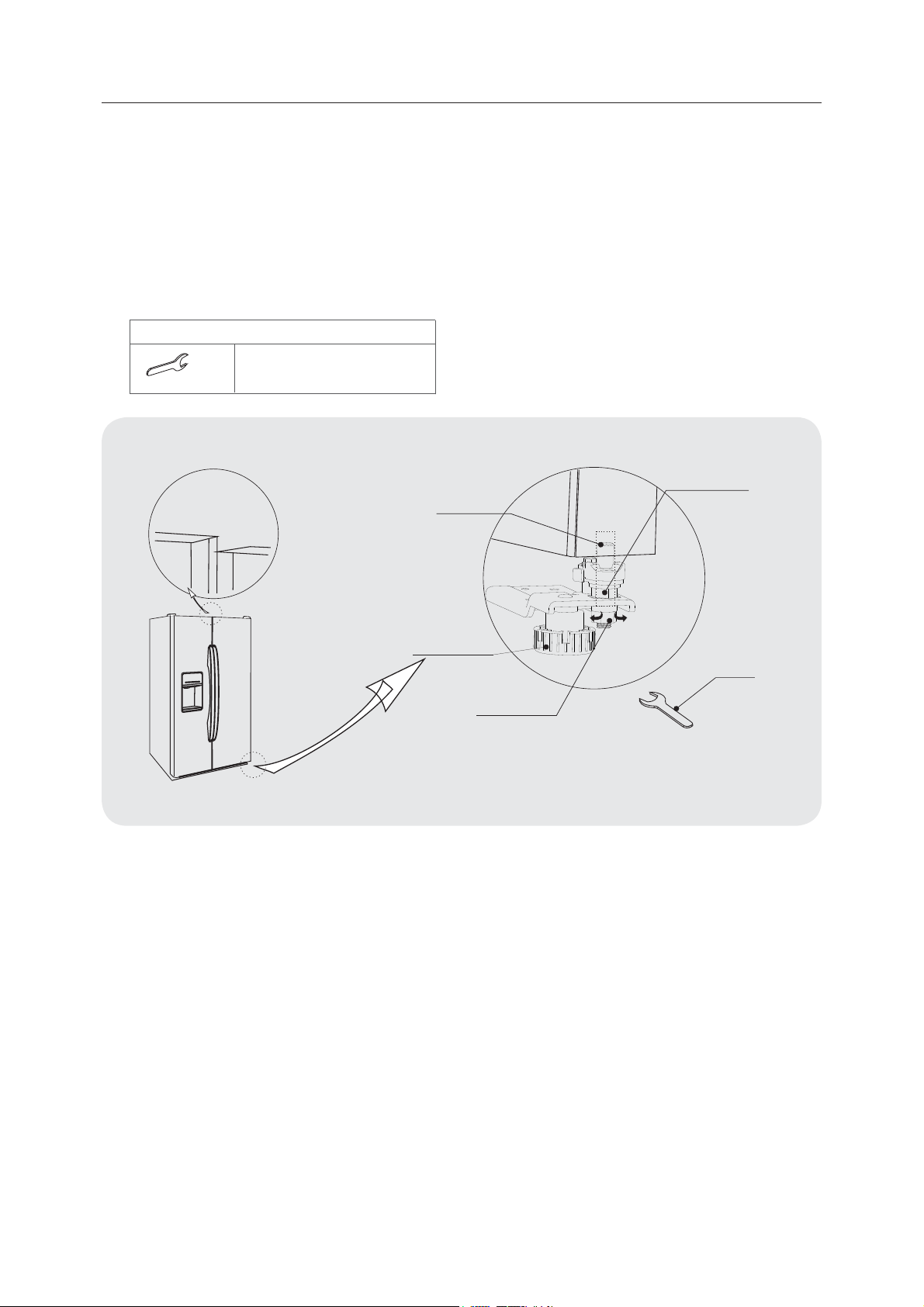
2.3 Leveling door
1. Precautions before operation:
Before operation of accessories, it shall be ensured that the refrigerator is disconnected from
power. Before adjusting the door , precautions shall be taken to prevent any personal injury.
2. Schematic diagram of levelling the door body.
(The picture above is only for reference.The actual configuration will depend on the physical
product or statement by the distributor)
When the fridge door is low:
•
Open the door, use a wrench to loosen the locking nut and to rotate the adjusting nut
anti-clockwise to raise the height of the door. Once the doors are aligned, then tighten the
locking nut by rotating it anti-clockwise.
When the fridge door is high:
•
Open the door, use a wrench to rotate the adjusting nut clockwise to lower the height of the
door. Once the doors are aligned, then tighten the locking nut by rotating it anti-clockwise.
Fixed shaft
Adjusting nut
Wrench
Locking nut
Left
Right
Levelling feet
Not level
Wrench
List of tools to be provided by the user
M10
13
2.4 Changing the Light
Any replacement or maintenance of the LED lamps is intended to be made by the manufacturer,
2.5 Starting
t
Before putting any fresh or frozen foods, the refrigerator shall
have run for 2-3 hours, or for above 4 hours in summer when
the ambient temperature is high.
t
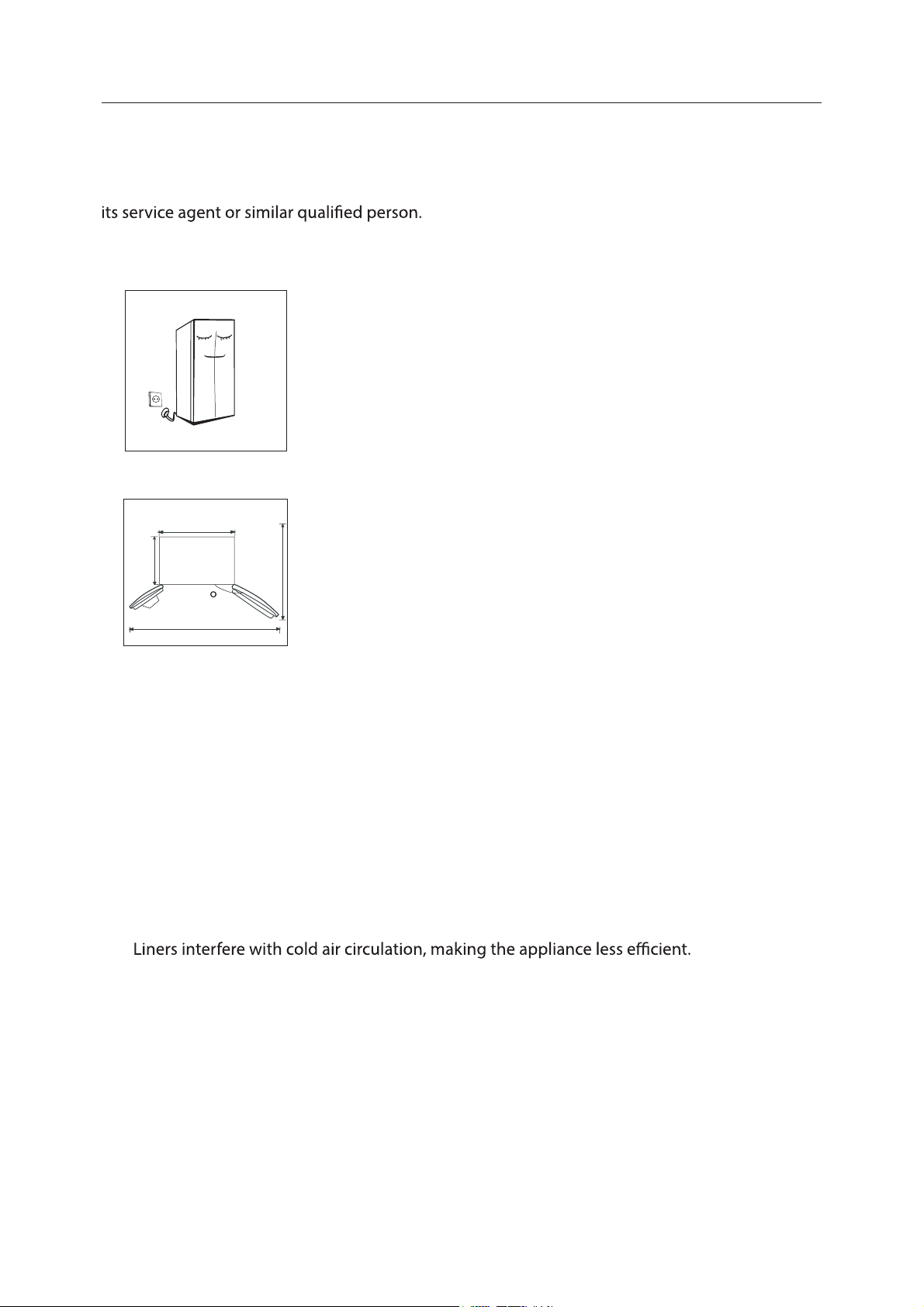
Spare enough space for convenient opening of the doors and
drawers or statement by the distributor.
2.6 Energy saving tips
t
The appliance should be located in the coolest area of the room, away from heat producing
appliances or heating ducts, and out of the direct sunlight.
t
Let hot foods cool to room temperature before placing in the appliance. Overloading the
appliance forces the compressor to run longer. Foods that freeze too slowly may lose quality,
or spoil.
t
Be sure to wrap foods properly, and wipe containers dry before placing them in the
appliance.This cuts down on frost build-up inside the appliance.
t
Appliance storage bin should not be lined with aluminum foil, wax paper, or paper toweling.
t
Organize and label food to reduce door openings and extended searches. Remove as many
items as needed at one time, and close the door as soon as possible.
895mm
1490mm
130
740mm
1065mm
14
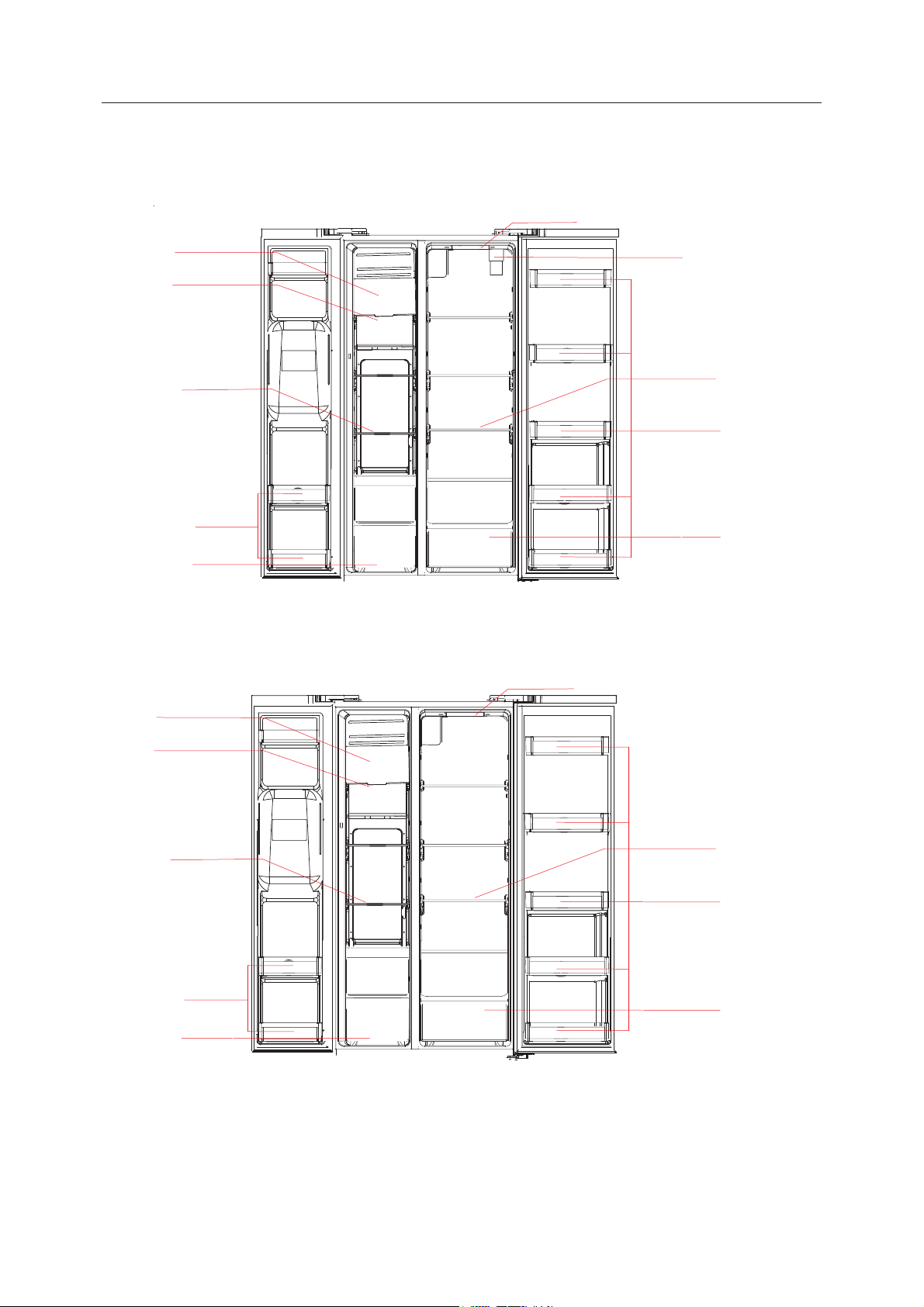
3.1 Key components
(The picture above is only for reference.The actual configuration will depend on the physical
product or statement by the distributor)
3. Structure and functions
Ice maker and
Ice storage bin
LED lighting
LED lighting
Filter assembly
Glass shelf
Glass shelf
Door tray
Door tray
Fruits and
vegetables box
LED lighting
Glass shelf
Door tray
Fruits and
vegetables bo
x
Drawer
Ice maker and
Ice storage bin
LED lighting
Glass shelf
Door tray
Drawer
( Filter internal )
( Filter External )

15
Refrigerating chamber
•
The Refrigerating Chamber is suitable for storage of a variety of fruits, vegetables, beverages
and other food consumed in the short term.
•
Cooking foods shall not be put in the refrigerating chamber until cooled to room
temperature.
•
Foods are recommended to be sealed up before putting into the refrigerator.
•
The glass shelves can be adjusted up or down for a reasonable amount of storage space and
easy use.
Freezing chamber
•
The low temperature freezing chamber may keep food fresh for a long time and it is mainly
used to store frozen foods and making ice.
•
The freezing chamber is suitable for storage of meat, sh, rice balls and other foods not to
be consumed in short term.
•
Chunks of meat are preferably to be divided into small pieces for easy access. Please be
noted food shall be consumed within the shelf time.
Note: Storage of too much food during operation after the initial
connection to power may adversely aect the freezing eect of the
refrigerator. Foods stored shall not block the air outlet; or otherwise the
freezing eect will also be adversely aected.
16
3.2 Functions
(The picture above is only for reference.The actual configuration will depend on the physical
product or statement by the distributor)
Operation instructions
1. The rst time the power was turn on for the refrigerator, the display screen will total display for
3 seconds. Meanwhile the starting up bell rings and then the screen enters the normal display
of the operation.The rst time for using the refrigerator, temperatures of refrigerating chamber,
temperature and freezing chamber should be set at 5° C/-18 °C respectively.
When the error occurs, the display shows the error code in refrigerating temperature displaying
area (see next page); during normal operation, the display shows the set temperature of the
cooling compartment.
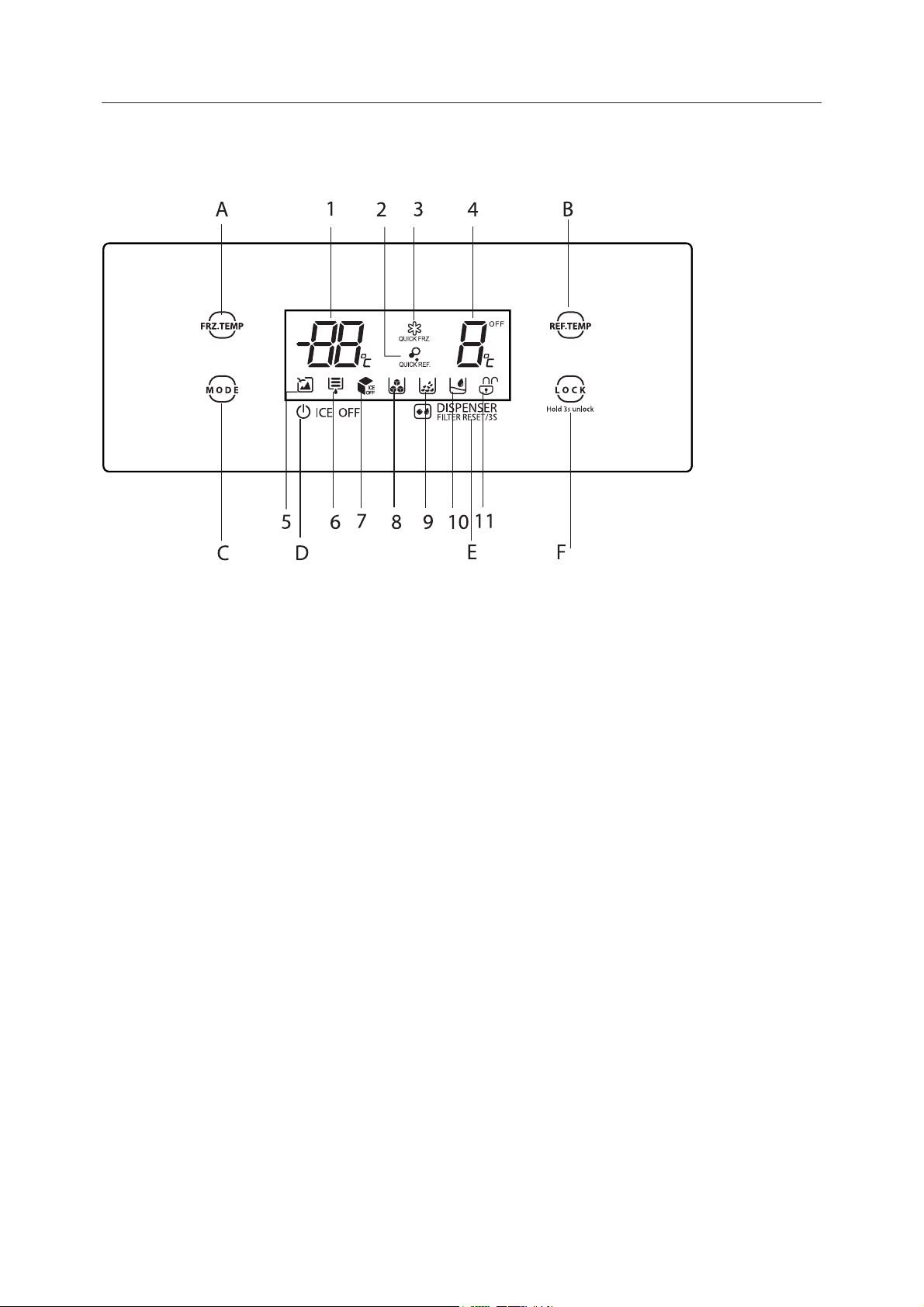
Display screen
1. Freezer compartment temperature
2. Super REF.
3. Super FRZ
4. Refrigerate compartment temperature
5. Vacation icon
6. Water Filter
7. Ice o
8. Fetching ice cubes
9. Fetching crushed ice
10. Fetching cold water
11. Lock/unlock icon
Button operation
A. Freezer compartment temperature
adjustment
B. Refrigerate compartment temperature
adjustment
C. Mode setting
E. Fetching ice/ Fetching water/Filter set
D. Ice OFF/ON botton
F. Lock/unlock controls
17
Under normal circumstances, if there is no any manual operation on refrigerator last for 30
seconds, the control panel will lock itself automatically,and in locked state, the display light will
go out after 30 seconds.
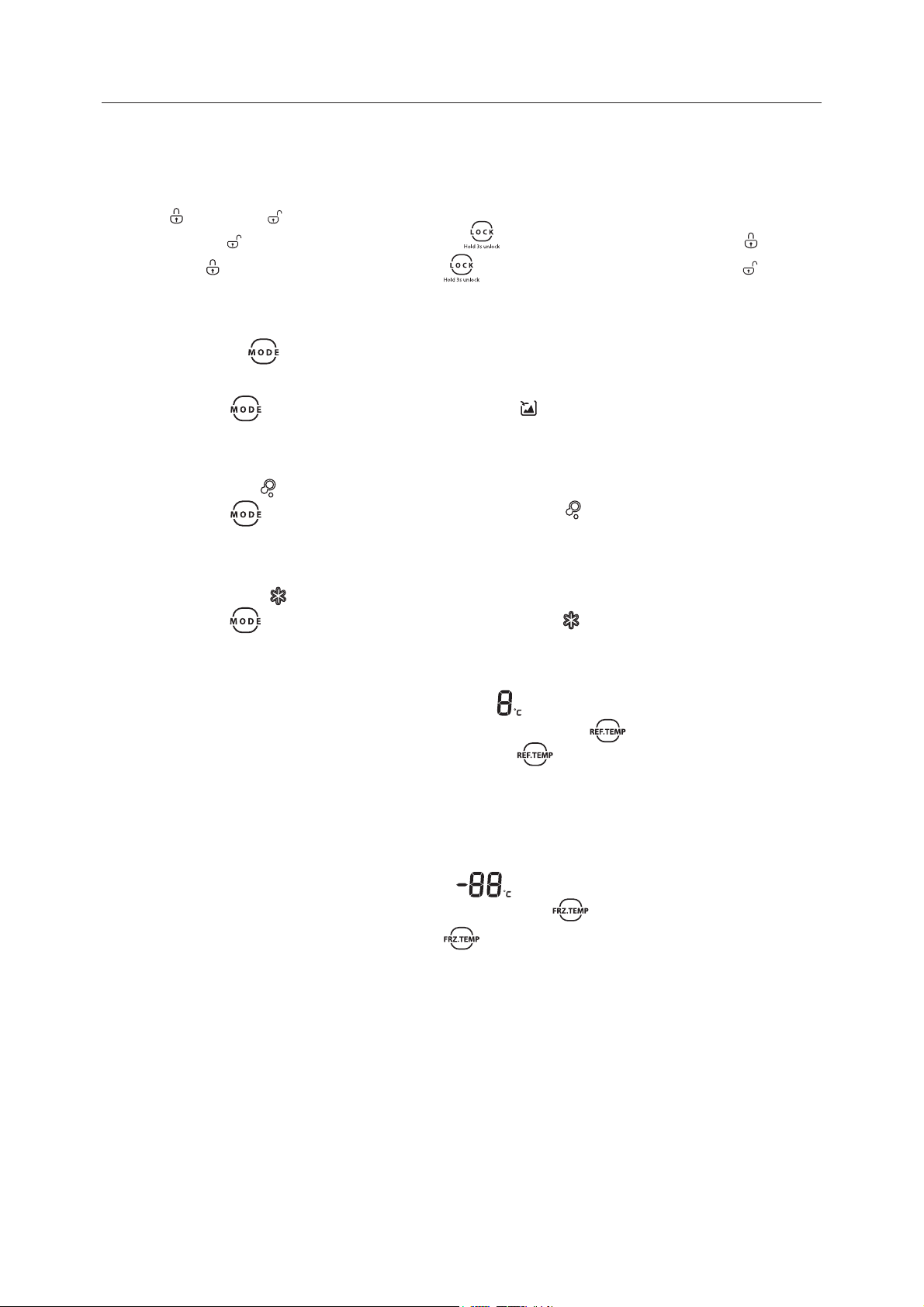
2. Lock / unlock
In the unlocked state, long press the button for 3 seconds, enter the locked state;
In the locked state, long press the button for 3 seconds, enter the unlocked state.
All the following functions must be operated in the unlocked status.
3. Mode setting
Press mode button to select dierent control mode.
4. Vacation mode
Press the button to enter the vacation mode. Icon lights up, the vacation mode will will
take eect after panel locked.
Press the button FRZ.TEMP. or REF.TEMP. to exit the vacation mode.
5. Super REF.mode
Press the button to enter the quick cooling mode. Icon lights up, the quick cooling
mode will take eect after panel locked.
Press the button REF.TEMP. to exit the Quick cooling mode.
6. Super FRZ. mode
Press the button to enter the quick freezing mode. Icon lights up, the quick freezing
mode will take eect after panel locked.
Press the button FRZ.TEMP. to exit the Quick freezing mode.
7. Temperature setting of refrigerating chamber
Press temperature adjusting button of the refrigerating chamber , the refrigerating
temperature displaying will blink,Then press the button again to set the temperature, it
will has beeps when do temperature adjustment.temperature setting range is between 2°C
and 8°C.Every time you press the button,the temperature will change 1°C. After adjusting,the
refrigerating temperature will blink for 5 seconds. -New temperature setting will take eect after
panel locked.
8. Temperature setting of freezing chamber
Press temperature adjusting button of the freezing chamber , the freezing temperature
displaying will blink. Then press the button again to set the temperature, it will have
beeps when do temperature adjustment. Temperature setting range is between -16°C and -24°C.
Every timeyou press the button, the temperature will change 1°C. After adjusting, the freezing
temperature will blink for 5 seconds.New temperature setting will take eect after panel locked.
9. Quick-freeze time setting
In quick-freeze mode, long press the "FRZ.TEMP" button for 3 seconds,the refrigerating
temperature area will display the existing quick-freeze time,click the "FRZ.TEMP" button again to
set the quick-freeze time, the setting circulates as "26-48-26-48..",lock the panel or long press the
"FRZ.TEMP" button for 3seconds to exit the quick-freeze time setting.
The 48 hours quick- freeze time is mainly for laboratory testing, not recommended for end-
18
consumers.
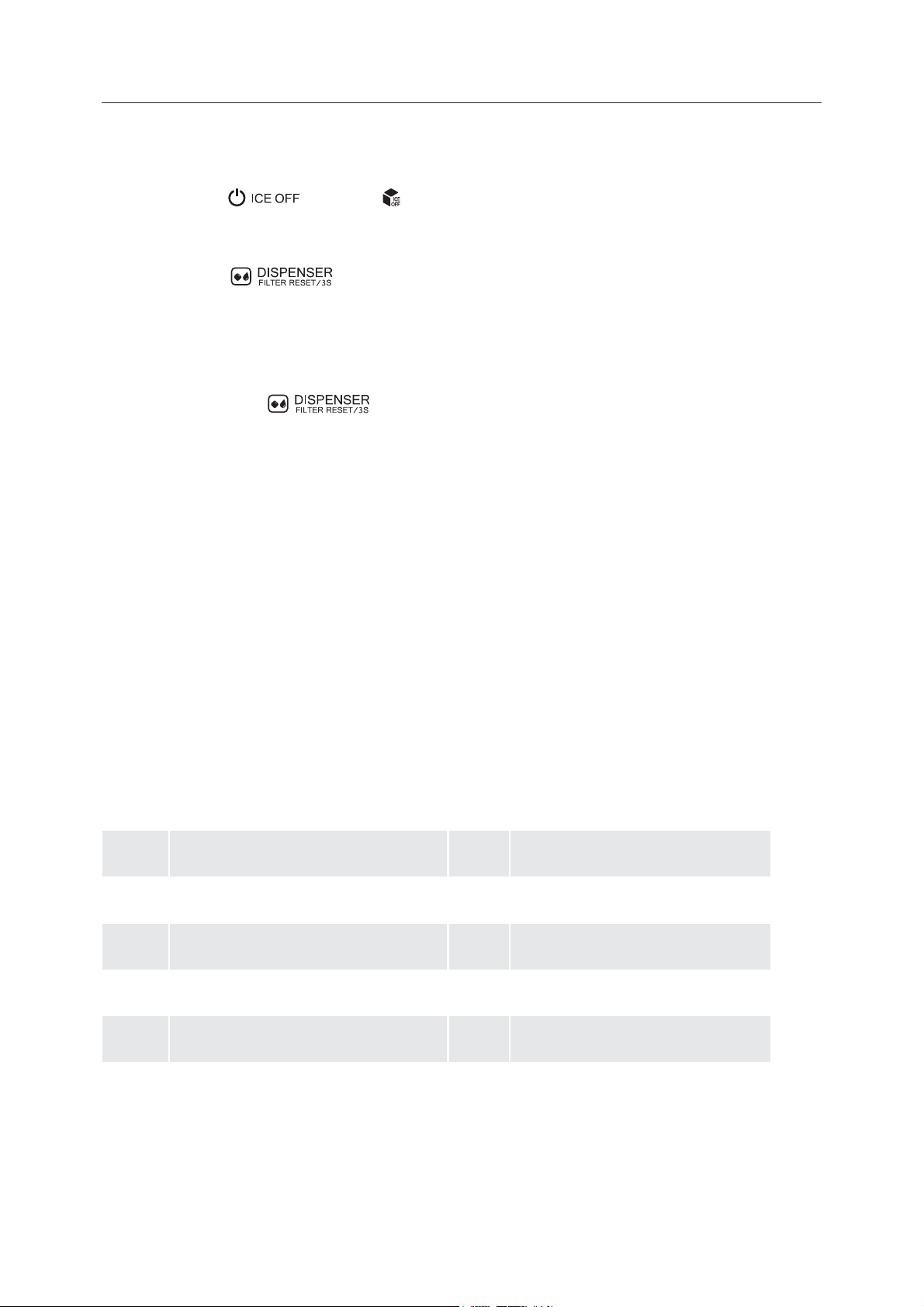
10. ICE OFF
Press the button , the icon will shine or go out, what means the switching o/on
of ice maker.
11. DISPERNSER
Press the button to enter the ice/water selection condition; the selection
circulation will show as “Fetching ice cubes /Fetching crushed ice/ Fetching water / none”, and
then the corresponding icon on the panel will shine successively.
when the refrigerator is running, the working time of the water lter will be accumulated; after
150 days, the water lter icon will shine. when it reaches 180days, the water lter icon will blink;
long press the button for 3s to reset the service time of water lter.
12. Storage upon power failure
In case of power failure, the instant working state will be memorized and maintained till re-
electrication.
13. Opening warning and alarm control
When the refrigerator chamber door gets open, the warning tone will play. If the door is not
closed in two minutes, the buzzer will sound once every second until the door is closed.
14. Fault indication
The following warnings appearing on the display indicate corresponding faults of the refrigerator.
Though the refrigerator may still have refrigerator and freezing function with the following faults,
the user shall contact a maintenance specialist for maintenance, so as to ensure normal use of
the refrigerator.
Error
Code
Error Description
Error
Code
Error Description
E0
E1
E2
E5
E6
E7
EE
EH
icemaker error
Temperature sensor detection circuit
error of refrigerating chamber
Temperature sensor detection
circuit error of freezing chamber
Freezing defrost sensor detection
circuit error
Communication error
Circulation of ambient temperature
sensor detection circuit error
Icemaker sensor circuit
error
Moisture sensor error
19
3.3 Fetching water and Ice
•
Sounds will be produced during making ice cubes and crushed ice: Water valve will produce
buzzing sounds; water's flowing into ice vessel will produce sounds; grinding machine's
grinding ice into small pieces or product ice's falling into the container will produce sounds.
The sounds are normal.
•
Scratching noises may be produced when taking out the ice cubes. Nothing to worry about
this. The ice in the container may be stuck together. In such cases, please take out the ice
container and separate stuck ice into pieces by means of, for instance, using plastic or
wooden spoons to push hard on the ice carefully.
•
Other possibilities are illustrated in the chapter “ice container cleaning”To avoid overheating
of the ice-making machine's engine, please fetch ice about 1 minute after the stopping.
Please wait for a while until the engine's temperature reaches working temperature. Please
fetch the ice from the ice container if you need a lot of ice.
•
The chapter “ice container cleaning” explains how to remove ice container from freezer
compartment. If there is no enough ice in the ice container, the ice cannot be taken out.
Please wait for a while until new ice is made.To prevent ice smell or bad taste of the ice,
please clean the ice container regularly.
•
Ice and water can only be fetched when the door of freezer compartment is closed. In
the process of fetching water and ice, if you open the freezer door, that process will
automatically end.
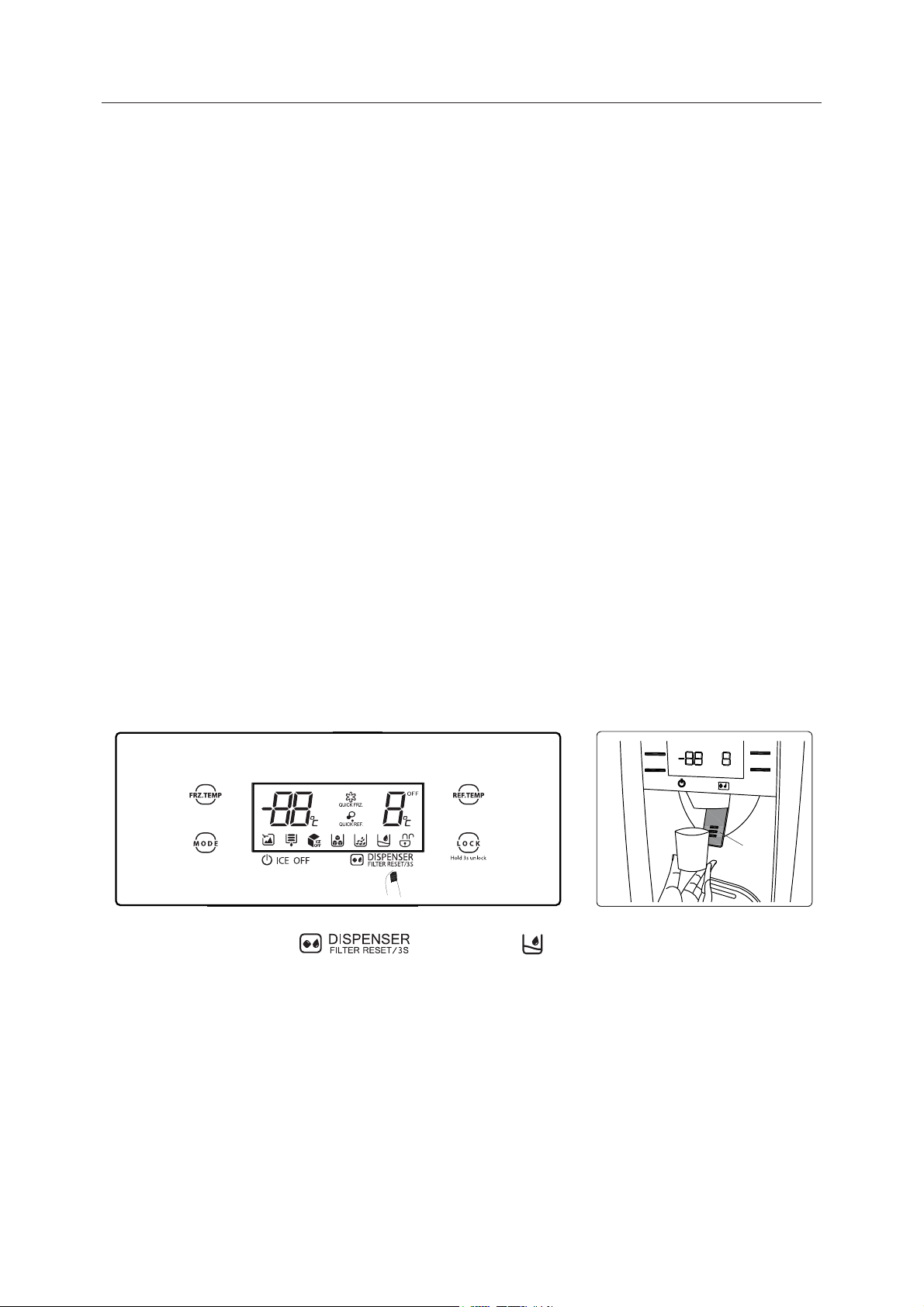
1) Fetching cold water
Keep clicking the buttons until the icon turns on.
Push the container in the direction of fetching water cushion,Cold water starts to ow into the
container.
Remove the container from fetching water cushion and end the exporting of water.
cushion
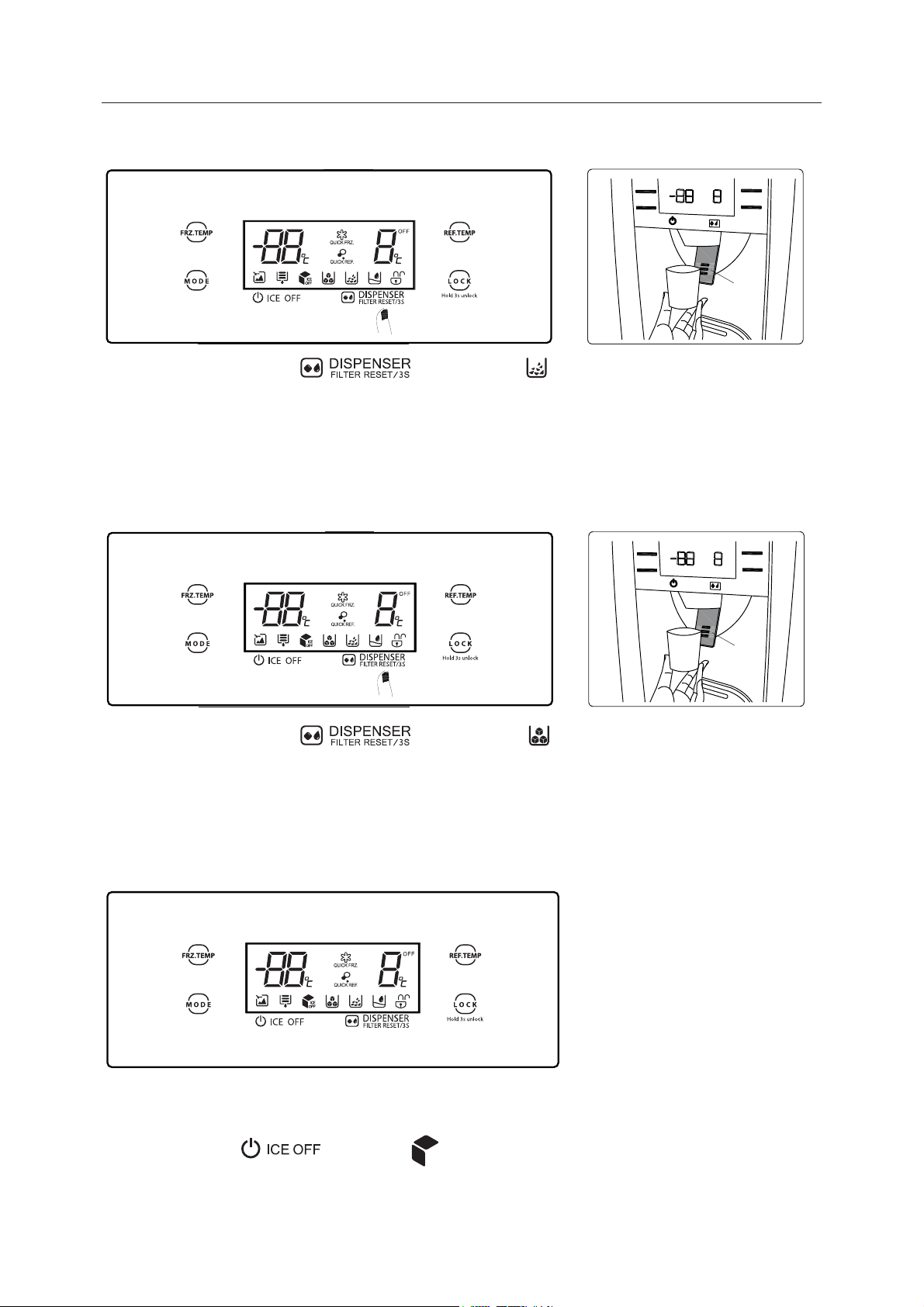
20
2. Fetching crushed ice
Keep clicking the buttons until the icon turns on.
Make the container tight with mouth of dispenser to prevent the side jet.
Press the container in the direction of fetching water cushion . Fill the container with crushed ice.
Remove the container from fetching water cushion and end the exporting of crushed ice.
3.Fetching ice cubes
Keep clicking the buttons until the icon turns on.
Push the container in the direction of fetching water cushion.
Ice cubes start to fall into the container.
Remove the container from fetching water cushion and end the exporting of ice cubes.
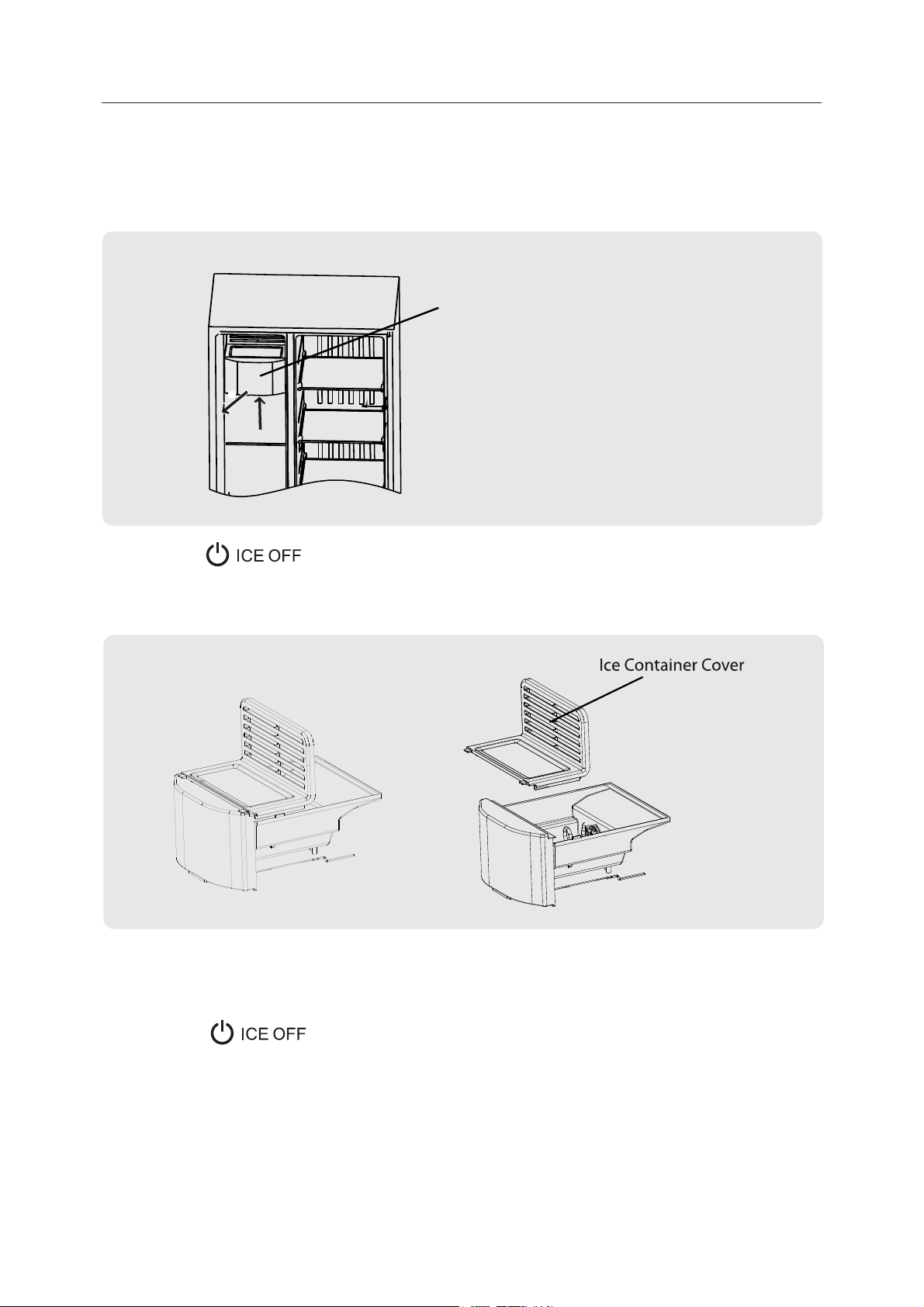
4. Cancel the function of ice-making
If the function of fetching water and ice is not used for long time, you can cancel the function of
ice-making.
Press the button , the icon turns on.
cushion
cushion
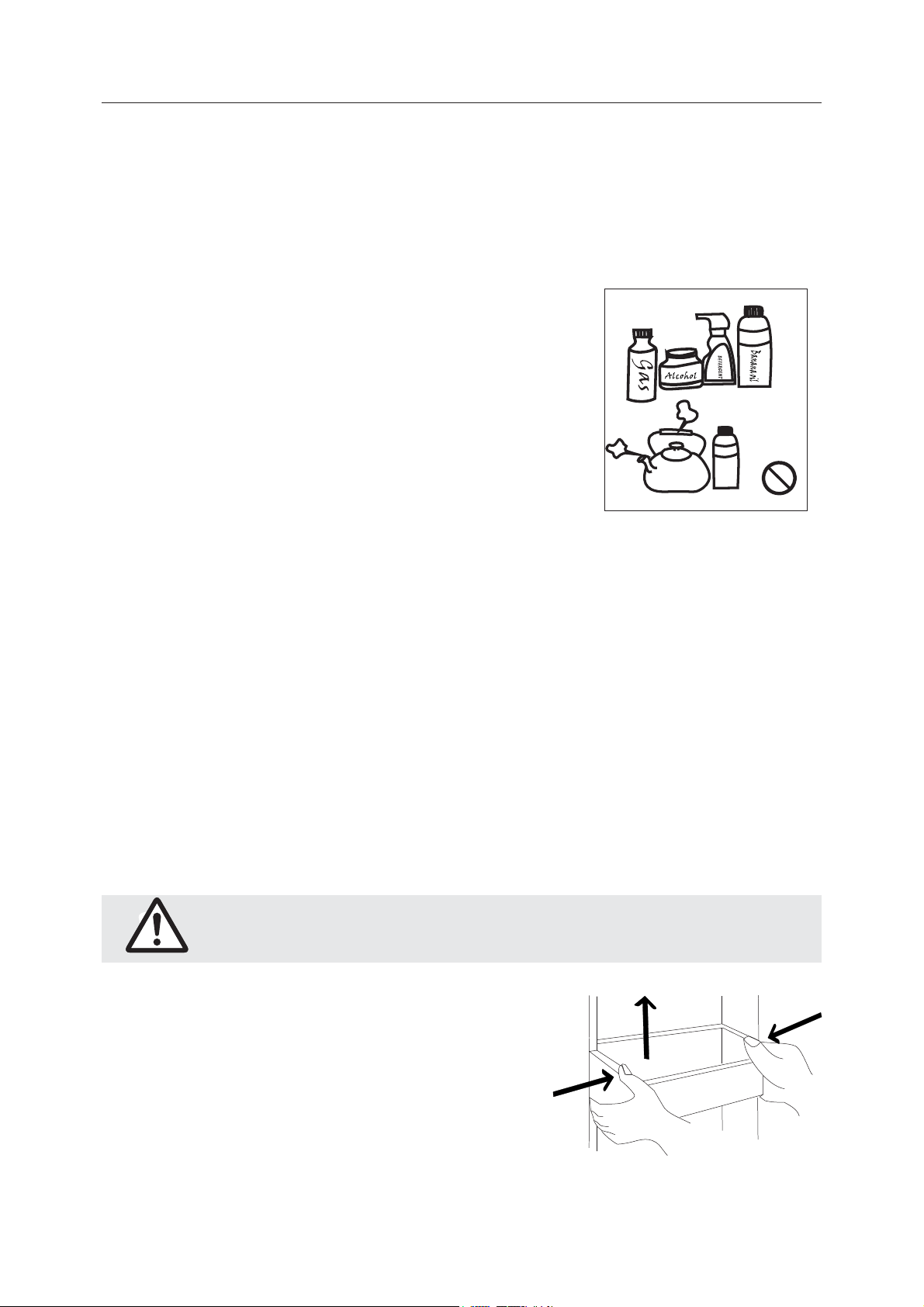
21
4. Maintenance and care of the appliance
4.1 Overall cleaning
•
Dusts behind the refrigerator and on the ground shall be timely cleaned to improve the
cooling eect andenergy saving.
•
Check the door gasket regularly to make sure there are no debris. Clean the door gasket with
a soft cloth dampened with soapy water or diluted detergent.
•
The interior of the refrigerator should be cleaned regularly to avoid odor.
•
Please turn o the power before cleaning interior, remove
all foods, drinks ,shelves, drawers, etc.
•
Use a soft cloth or sponge to clean the inside of the
refrigerator, with two tablespoons of baking soda and
a quart of warm water. Then rinse with water and wipe
clean. After cleaning, open the door and let it dry naturally
before turning on the power.
•
For areas that are dicult to clean in the refrigerator (such
as narrow sandwiches, gaps or corners), it is recommended
to wipe them regularly with a soft rag, soft brush, etc.
and when necessary, combined with some auxiliary tools (such as thin sticks) to ensure no
contaminants or bacterials accumulation in these areas.
•
Do not use soap, detergent, scrub powder, spray cleaner, etc., as these may cause odors in
the interior of the refrigerator or contaminated food.
•
Clean the bottle frame, shelves and drawers with a soft cloth dampened with soapy water or
diluted detergent. Dry with a soft cloth or dry naturally.
•
Wipe the outer surface of the refrigerator with a soft cloth dampened with soapy water,
detergent, etc., and then wipe dry.
•
Do not use hard brushes, clean steel balls, wire brushes, abrasives (such as toothpastes),
organic solvents (such as alcohol, acetone, banana oil, etc.), boiling water, acid or alkaline
items, which may damage the fridge surface and interior. Boiling water and organic solvents
such as benzene may deform or damage plastic parts.
•
Do not rinse directly with water or other liquids during cleaning to avoid short circuits or
aect electrical insulation after immersion.
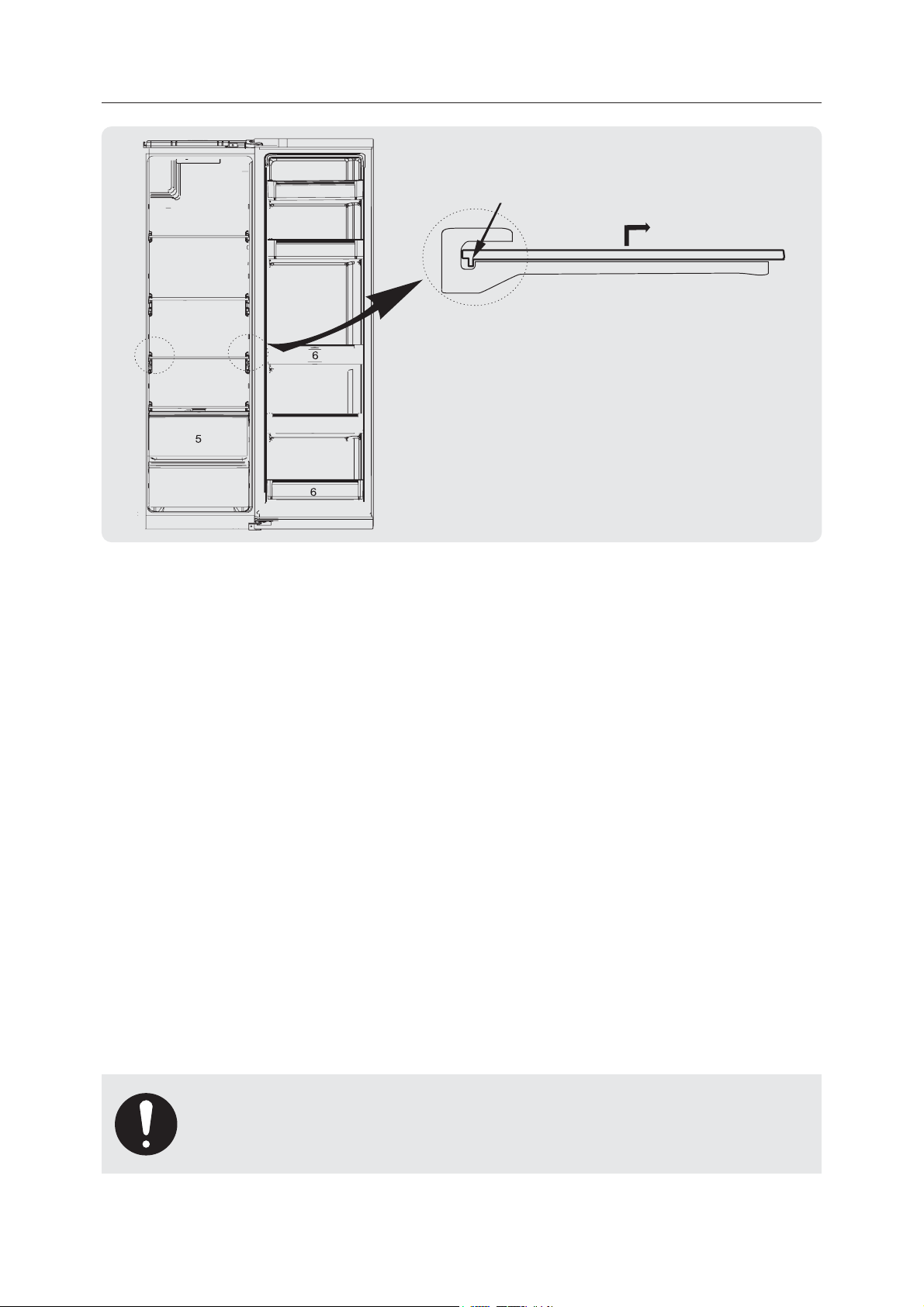
4.2 Cleaning of door tray
•
According to the direction arrow in the gure below,
use both hands to squeeze the tray, and push it
upward, then you can take it out.
•
After washing the tray having been taken out, you
can adjust its installing height in accordance with
your requirement.
Please unplug the refrigerator for defrost and cleaning.
22
4.3 Clean the Ice Container
•
Ice in the ice container may block the outlet because of lumping or other reasons. In this
case the ice container needs cleaning or eliminating block.
1.
Press the button to cancel the function of ice-making and power o the
refrigerator(unplug from the socket). Hold the components of ice storage box by both hands
and pull them upwards (1) and outwards horizontally (2).
2.
Please dismantle Ice Container cover and clean Ice Container. The reverse operation is for
assembly.
3.
Close the door of freezer compartment. Insert the plug again.
Press the button to activate the function of ice-making.
4.4 Cleaning of Glass shelf
•
As the innermost part of the refrigerator liner where contacting the shelves hasZ a backstop,
you shall raise the shelves upward, then you can be able to take it out.
•
Adjust or clean the shelves according to your requirement.
Ice Container
(2)
(1)
23
4.5 Defrosting
•
The refrigerator is made based on the air-cooling principle and thus has automatic
defrosting function. Frost formed due to change of season or temperature may also be
manually removed by disconnection of the appliance from power supply or by wiping with a
dry towel.
4.6 Out of operation
•
Power failure: In case of power failure, even if it is in summer, foods inside the appliance
can be kept for several hours; during the power failure, the times of door opening shall be
reduced, and no more fresh food shall be put into the appliance.
•
Long-time nonuse: The appliance shall be unplugged and then cleaned; then the doors are
left open to prevent odor.
•
Moving: Before the refrigerator is moved, take all objects inside out, x the glass partitions,
vegetable holder, freezing chamber drawers and etc. with tape, and tighten the leveling feet;
close the doors and x them with tape. During moving, the appliance shall not be laid upside
down or horizontally, or be vibrated; the inclination during movement shall be no more than
45°.
backstop
raise the glass shelf upwardsk,
then pull it out
The appliance shall run continuously once it is started.
Generally, the operation of the appliance shall not be
interrupted;otherwise the service life may be impaired.
24
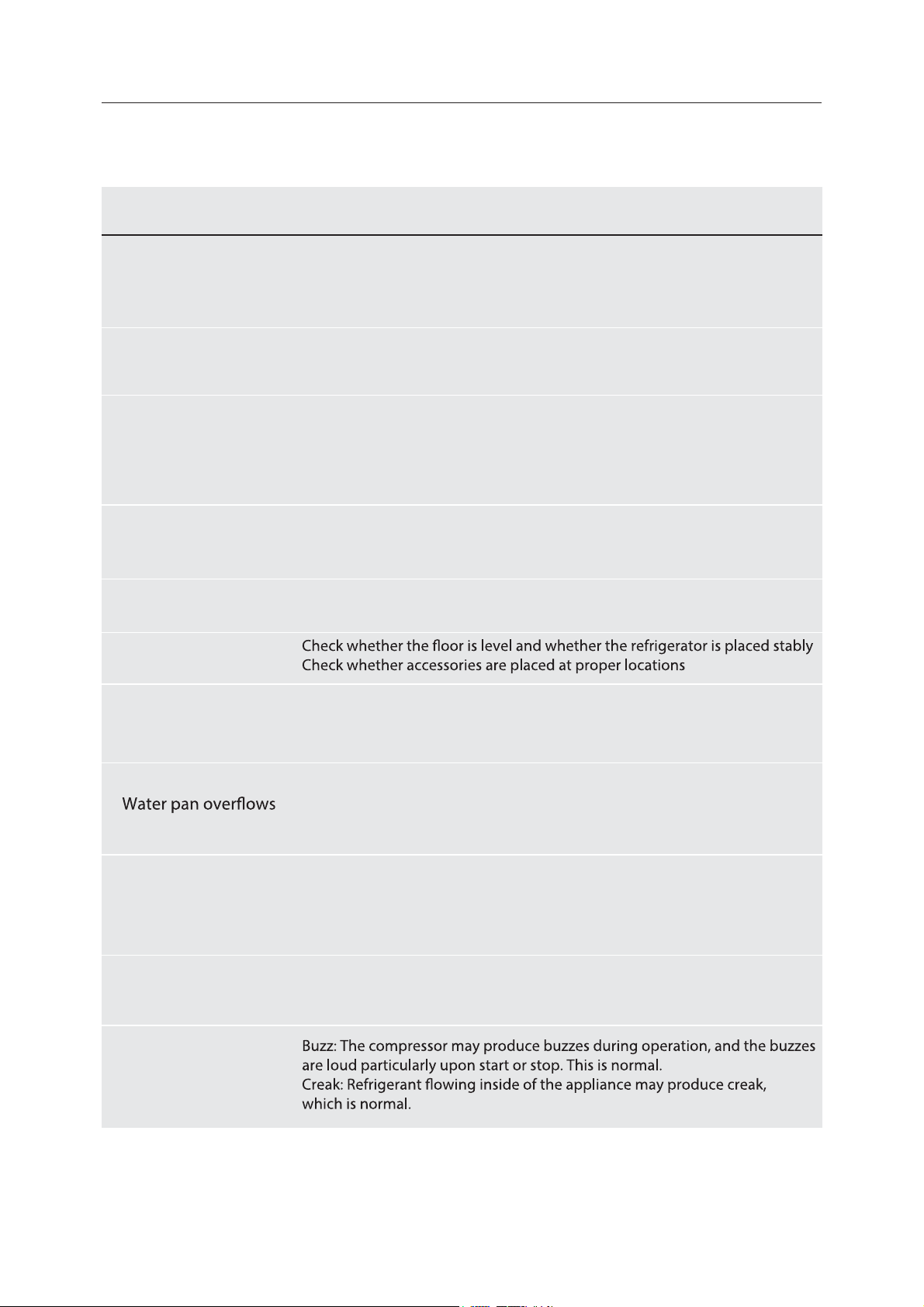
5. Trouble shooting
•
You may try to solve the following simple problems by yourself. If them cannot be solved,
please contact the after-sales department.
Failed operation
Check whether the appliance is connected to power or
whether the plug is in well contact
Check whether the voltage is too low
Check whether there is a power failure or partial circuits have tripped
Odor
Odorous foods shall be tightly wrapped
Check whether there is any rotten food
Clean the inside of the refrigerator
Long-time operation
of the compressor
Long operation of the refrigerator is normal in summer
when the ambient temperature is high
It is not suggestible having too much food in the appliance at the same time
Food shall get cool before being put into the appliance
The doors are opened too frequently
Light fails to get lit
Check whether the refrigerator is connected to power supply and
whether the illuminating light is damaged
Have the light replaced by a specialist
Doors cannot be
properly closed
The door is stuck by food packages Too much food is placed
The refrigerator is tilted
Loud noise
Door seal fails to
be tight
Remove foreign matters on the door seal
Heat the door seal and then cool it for restoration
(or blow it with an electrical drier or use a hot towel for heating)
There is too much food in the chamber or food stored contains
too much water,resulting in heavy defrosting
The doors are not closed properly, resulting in frosting due to entry
of air and increased water due to defrosting
Hot housing
Heat dissipation of the built-in condenser via the housing, which is normal
When housing becomes hot due to high ambient temperature,
storage of too much food or shutdown of the compressor is shut down,
provide sound ventilation to facilitate heat dissipation
Surface condensation
Condensation on the exterior surface and door seals of the refrigerator
is normal when the ambient humidity is too high. Just wipe the condensate
with a clean towel.
Abnormal noise
Occurrence Possible cause/inspection items
25
6. Disposal of your appliance
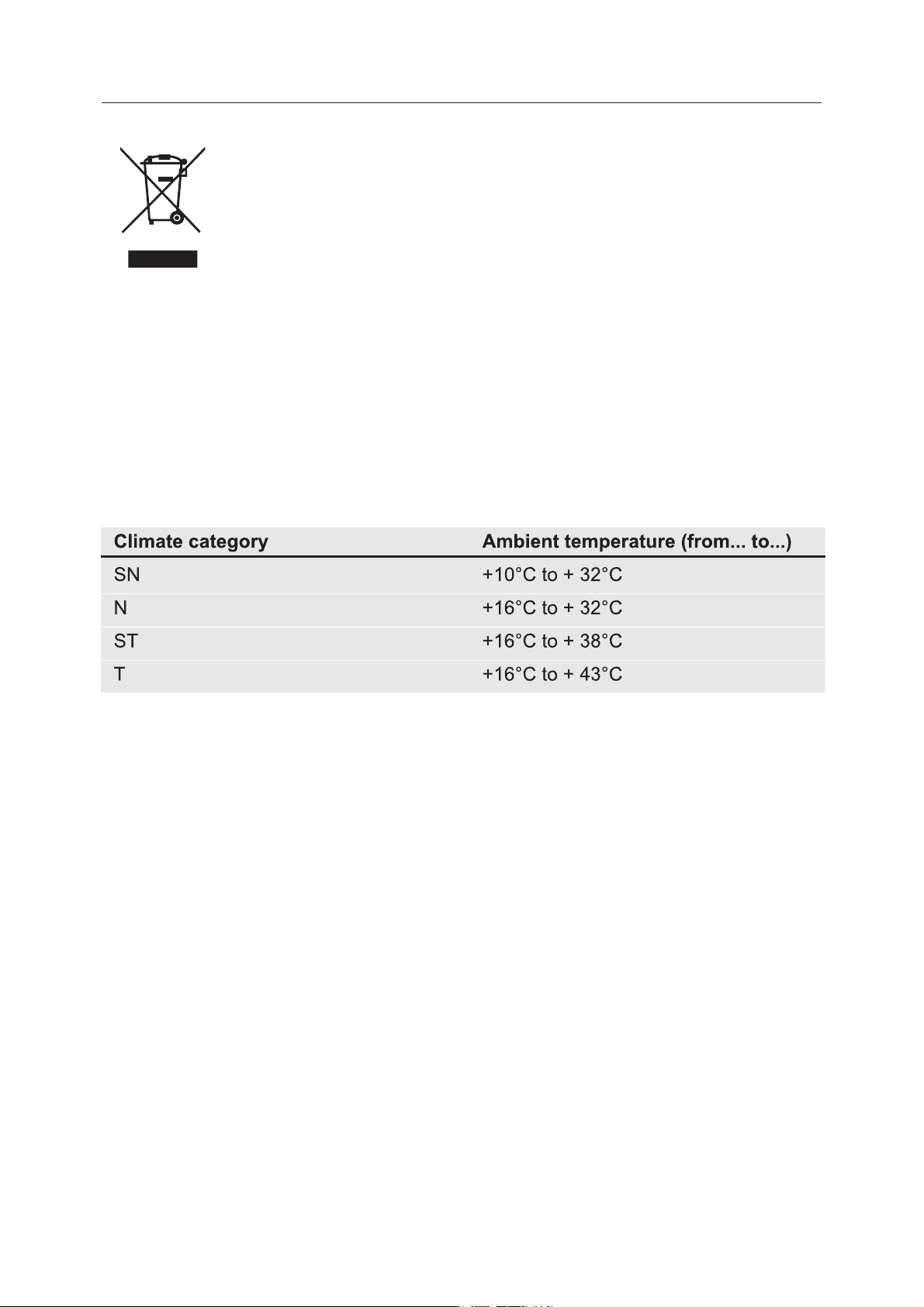
AMBIENT TEMPERATURE
This appliance is designed to operate in ambient temperature specied by its category marked
on the rating plate.
Correct Disposal of this product:
This marking indicates that this product should not be disposed with other
household wastes throughout the EU. To prevent possible harm to the
environment or human health from uncontrolled waste disposal, recycle it
responsibly to promote the sustainable reuse of material resources. To return
your used device, please use the return and collection systems or contact
the retailer where the product was purchased. They can take this product for
environmental safe recycling.
Hefei Hualing Co.,Ltd.
176 Jin Xiu Road, Hefei Economic and Technological Development
MADE IN CHINA