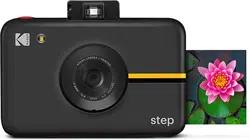

User Guide
KODAK STEP
INSTANT PRINT DIGITAL CAMERA
Cámara digital de impresión instantánea
Sofortdruck-Digitalkamera
Appareil photo numérique à impression instantanée
Fotocamera digitale a stampa istantanea
Guía del usuario
Benutzerhandbuch
Guide de l'utilisateur
Guida utente

EN | 3
SAFETY PRECAUTIONS
• Seizure warning: This device utilizes
flashing strobe lights which may
potentially trigger seizures for people
with photosensitive epilepsy and/or
other seizure disorders. User discretion
is advised.
• Do not attempt to disassemble this
device for any reason.
• Never leave your camera or the KODAK
ZINK photo paper in an area that might
become extremely hot or where it will
be exposed to direct sunlight for a long
time. This can cause your camera to
overheat or suer other problems.
• Don’t get it wet! If you need to clean
your camera, use a soft cloth that’s been
slightly dampened with water or rubbing
alcohol, and gently wipe away any dirty
spots. Don’t submerge the whole thing
in water, ever.
• Be careful with your camera. Try not to
drop it, or shake it violently. The inside
of the camera has a lot of very small
parts that could break if they are jostled
around too much.
• Do not use products such as alcohol,
gasoline, diluent, or any other organic
solvent when cleaning or attempting to
clean this product.
• Do not use this device in an environment
English
Español
Deutsche
Français
Italiana
TABLE OF CONTENTS
TABLA DE CONTENIDO | INHALTSVERZEICHNIS | TABLE DES MATIÈRES | INDICE
58
76
3
22
40

EN | 3
SAFETY PRECAUTIONS
• Seizure warning: This device utilizes
flashing strobe lights which may
potentially trigger seizures for people
with photosensitive epilepsy and/or
other seizure disorders. User discretion
is advised.
• Do not attempt to disassemble this
device for any reason.
• Never leave your camera or the KODAK
ZINK photo paper in an area that might
become extremely hot or where it will
be exposed to direct sunlight for a long
time. This can cause your camera to
overheat or suer other problems.
• Don’t get it wet! If you need to clean
your camera, use a soft cloth that’s been
slightly dampened with water or rubbing
alcohol, and gently wipe away any dirty
spots. Don’t submerge the whole thing
in water, ever.
• Be careful with your camera. Try not to
drop it, or shake it violently. The inside
of the camera has a lot of very small
parts that could break if they are jostled
around too much.
• Do not use products such as alcohol,
gasoline, diluent, or any other organic
solvent when cleaning or attempting to
clean this product.
• Do not use this device in an environment
English
Español
Deutsche
Français
Italiana
TABLE OF CONTENTS
TABLA DE CONTENIDO | INHALTSVERZEICHNIS | TABLE DES MATIÈRES | INDICE
58
76
3
22
40

4 | EN EN | 5
where it will be exposed to heavy dust or
humidity/moisture.
• Do not use this camera while bathing or
in a shower.
• Do not place or charge the camera
where it can fall or be pulled into a tub
or sink.
• Do not place, drop, or submerge the
camera in water or any other liquid.
• Take care that objects do not fall and
liquids are not spilled onto the camera.
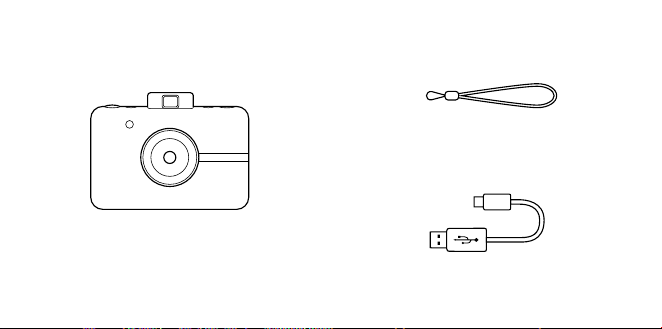
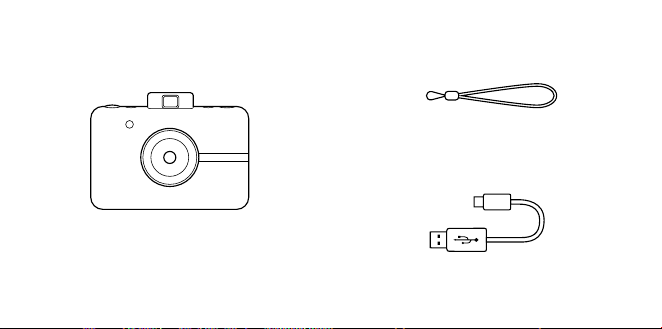
BOX CONTENTS
Camera Strap
Instant Print Digital Camera
Micro USB Cable
4 | EN EN | 5
where it will be exposed to heavy dust or
humidity/moisture.
• Do not use this camera while bathing or
in a shower.
• Do not place or charge the camera
where it can fall or be pulled into a tub
or sink.
• Do not place, drop, or submerge the
camera in water or any other liquid.
• Take care that objects do not fall and
liquids are not spilled onto the camera.
BOX CONTENTS
Camera Strap
Instant Print Digital Camera
Micro USB Cable
6 | EN EN | 7
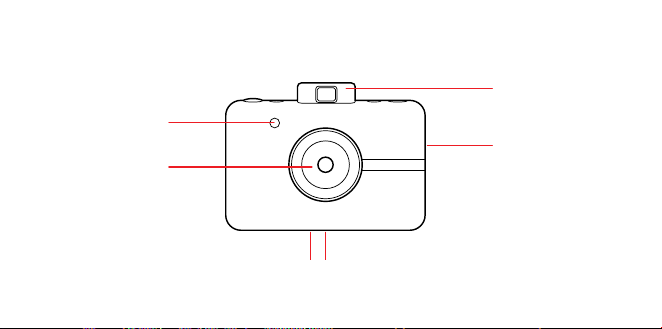
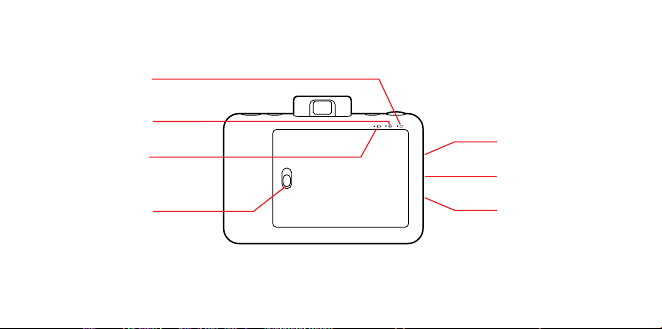
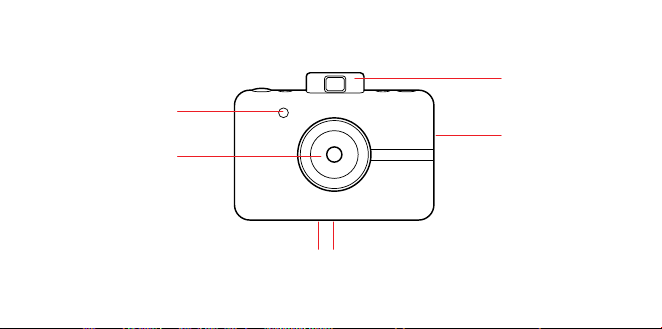
PRODUCT OVERVIEW
Print Slot
Lens with
Magnetic Cap
Flash
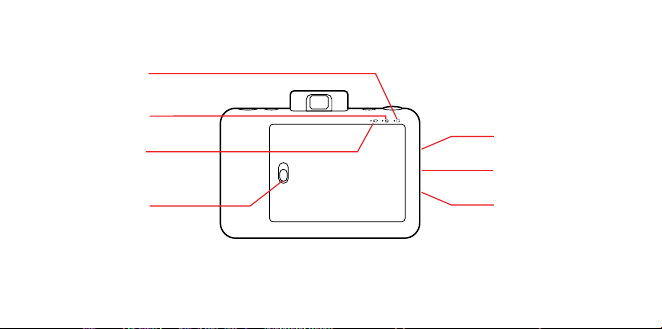
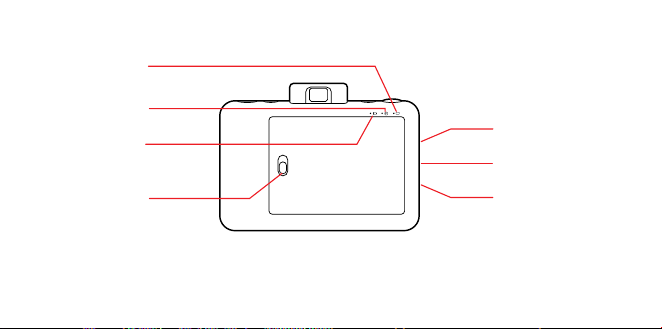
microSD™ Card
Slot
Wrist Strap Anchor
Micro USB
Connector
Battery Status
LED
Paper Status
LED
microSD™ Card
Status LED
Paper Door
Latch
Pop-Up
Viewfinder
Tripod connectorSpeaker
6 | EN EN | 7
PRODUCT OVERVIEW
Print Slot
Lens with
Magnetic Cap
Flash
microSD™ Card
Slot
Wrist Strap Anchor
Micro USB
Connector
Battery Status
LED
Paper Status
LED
microSD™ Card
Status LED
Paper Door
Latch
Pop-Up
Viewfinder
Tripod connectorSpeaker
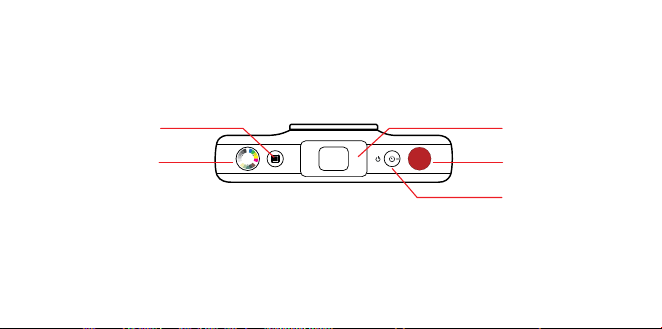
8 | EN EN | 9
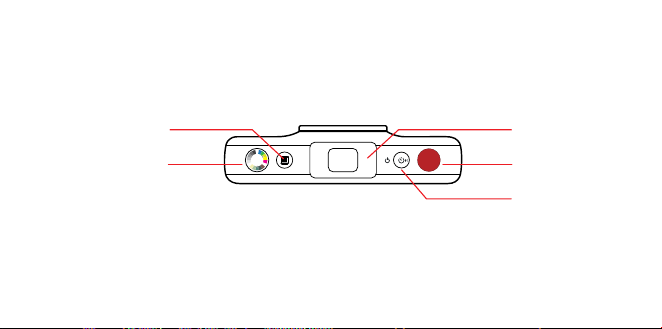
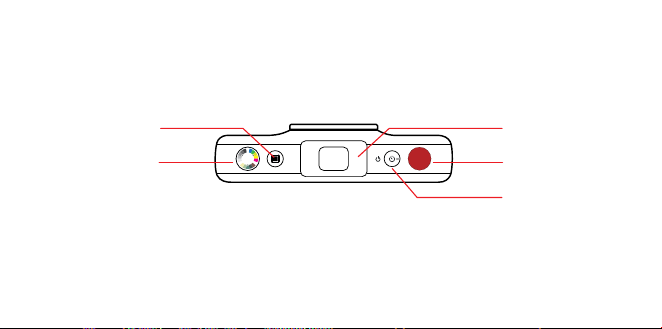
Border Selector
Color Mode
Selector
Pop-Up
Viewfinder
Shutter Button
Self-Timer/
Power Button
Turning On
To turn on your camera, press the self-timer/
power button. Your viewfinder will pop up
and your camera will turn on.
Turning O
Gently push the viewfinder back to a closed
position. Your camera is now o.
Firmware Update
For best results, update the camera firmware
before you start snapping and printing.
Go to kodakphotoplus.com/pages/
kodak-step-instant-print-digital-camera-
support to take care of this quick and easy
update. A microSD™ card is required.
Taking Photos
Is the lens cap o? Good! Press and release
the shutter button and voilà! You’ve taken
a photo.
USING YOUR CAMERA

8 | EN EN | 9
Border Selector
Color Mode
Selector
Pop-Up
Viewfinder
Shutter Button
Self-Timer/
Power Button
Turning On
To turn on your camera, press the self-timer/
power button. Your viewfinder will pop up
and your camera will turn on.
Turning O
Gently push the viewfinder back to a closed
position. Your camera is now o.
Firmware Update
For best results, update the camera firmware
before you start snapping and printing.
Go to kodakphotoplus.com/pages/
kodak-step-instant-print-digital-camera-
support to take care of this quick and easy
update. A microSD™ card is required.
Taking Photos
Is the lens cap o? Good! Press and release
the shutter button and voilà! You’ve taken
a photo.
USING YOUR CAMERA

10 | EN EN | 11
Your camera will automatically flash and
auto focus for every photo. A lens cap has
been included to keep your lens clean and
scratchfree. Don’t forget to use it!
Printing
The camera instantly prints every photo for
you when photo paper is loaded. You can
take up to three photos while the camera is
printing. After three pictures, your camera
will not capture any more photos until
printing is finished.
Reprinting
– To reprint the last photo taken,
press and hold both the shutter button
and color mode selector for three
seconds. You’ll hear a beep; the LED will
blink white; then your reprint will emerge
from the photo slot.
Photo Paper
Inserting Photo Paper
1. Slide the latch on the paper tray and open
the door.
2. Slide the entire pack of KODAK ZINK
Photo Paper into the paper tray. Make
sure the KODAK ZINK Color Calibration
Sheet is placed and loaded with the bar
code face down. Shiny side of paper
faces up.
3. Close the paper tray door.
The KODAK ZINK Color Calibration Sheet
will eject when you take a picture, then your
photo will print.
For bright, sharp instant photos that come
out dry to the touch and ready to peel and
stick, we recommend KODAK ZINK Photo
Paper.
Refilling Photo Paper
– When the last photo paper sheet is used,
the LED next to the paper icon on the
back of your camera will glow red. You
can now safely reload printing paper into
your camera.
Paper Do’s & Don’ts
– Don’t add more paper if the paper
compartment is not completely empty.
– Don’t fill the paper compartment with
more than one 10-pack of KODAK ZINK
Photo Paper. Filling over 10 sheets can
damage the printer.
– Do avoid bending the KODAK ZINK Photo
Paper.
– Do hold the paper by its edges. Avoid
touching the surface with your fingers.
If there is a paper jam, if you insert the

10 | EN EN | 11
Your camera will automatically flash and
auto focus for every photo. A lens cap has
been included to keep your lens clean and
scratchfree. Don’t forget to use it!
Printing
The camera instantly prints every photo for
you when photo paper is loaded. You can
take up to three photos while the camera is
printing. After three pictures, your camera
will not capture any more photos until
printing is finished.
Reprinting
– To reprint the last photo taken,
press and hold both the shutter button
and color mode selector for three
seconds. You’ll hear a beep; the LED will
blink white; then your reprint will emerge
from the photo slot.
Photo Paper
Inserting Photo Paper
1. Slide the latch on the paper tray and open
the door.
2. Slide the entire pack of KODAK ZINK
Photo Paper into the paper tray. Make
sure the KODAK ZINK Color Calibration
Sheet is placed and loaded with the bar
code face down. Shiny side of paper
faces up.
3. Close the paper tray door.
The KODAK ZINK Color Calibration Sheet
will eject when you take a picture, then your
photo will print.
For bright, sharp instant photos that come
out dry to the touch and ready to peel and
stick, we recommend KODAK ZINK Photo
Paper.
Refilling Photo Paper
– When the last photo paper sheet is used,
the LED next to the paper icon on the
back of your camera will glow red. You
can now safely reload printing paper into
your camera.
Paper Do’s & Don’ts
– Don’t add more paper if the paper
compartment is not completely empty.
– Don’t fill the paper compartment with
more than one 10-pack of KODAK ZINK
Photo Paper. Filling over 10 sheets can
damage the printer.
– Do avoid bending the KODAK ZINK Photo
Paper.
– Do hold the paper by its edges. Avoid
touching the surface with your fingers.
If there is a paper jam, if you insert the

12 | EN EN | 13
wrong type of paper, or there is some other
printing/paper related error, all indicators
will blink red. Open your camera and correct
the error (clear jam, replace paper, etc.) then
restart your camera.
Memory
Your camera is built with enough memory to
capture and print one 5MP image at a time.
Inserting a microSD™ Card
Your camera comes with a microSD™ card
slot for images that you’d like to save, as well
as print. To insert a memory card, gently
push the a microSD™ card into the slot on
the side of your camera. You’ll feel a slight
click when the card is fully inserted and the
microSD™ card status LED will glow white.
The camera is compatible with microSD™
cards up to 32GB.
Removing a microSD™ Card
Give a light push to the top of the card and
the microSD™ card will pop out. Pull to fully
remove from your camera.
microSD™ Card Memory Indicator
When the memory on your microSD™ card
dips below 1GB, the LED on the back of your
camera will glow red. When the memory
reaches zero, or if there is an error reading
the microSD™ card, the LED will blink red.
Transferring Files
Via USB Cable
– Using the included micro USB cable,
connect your camera to a computer.
Doubleclick the microSD™ card when it
appears on your computer desktop to
view and save your images to a photo roll
or other location.
Via microSD™ Card
– Remove the microSD™ card per the
previous directions then insert the card
into your card reader.
Battery & Charging
When the battery power dips below 10%, the
battery LED will glow red. At 2% power, your
camera will automatically shut down.
To charge your camera, plug it into either a
wall outlet or computer, using the included
micro USB cable. The battery LED will blink
red until the battery is fully charged.
Auto Sleep
To help save battery power, your camera
will automatically go into sleep mode after
several minutes of no use. To turn your
camera back on, close and re-open the
viewfinder.

12 | EN EN | 13
wrong type of paper, or there is some other
printing/paper related error, all indicators
will blink red. Open your camera and correct
the error (clear jam, replace paper, etc.) then
restart your camera.
Memory
Your camera is built with enough memory to
capture and print one 5MP image at a time.
Inserting a microSD™ Card
Your camera comes with a microSD™ card
slot for images that you’d like to save, as well
as print. To insert a memory card, gently
push the a microSD™ card into the slot on
the side of your camera. You’ll feel a slight
click when the card is fully inserted and the
microSD™ card status LED will glow white.
The camera is compatible with microSD™
cards up to 32GB.
Removing a microSD™ Card
Give a light push to the top of the card and
the microSD™ card will pop out. Pull to fully
remove from your camera.
microSD™ Card Memory Indicator
When the memory on your microSD™ card
dips below 1GB, the LED on the back of your
camera will glow red. When the memory
reaches zero, or if there is an error reading
the microSD™ card, the LED will blink red.
Transferring Files
Via USB Cable
– Using the included micro USB cable,
connect your camera to a computer.
Doubleclick the microSD™ card when it
appears on your computer desktop to
view and save your images to a photo roll
or other location.
Via microSD™ Card
– Remove the microSD™ card per the
previous directions then insert the card
into your card reader.
Battery & Charging
When the battery power dips below 10%, the
battery LED will glow red. At 2% power, your
camera will automatically shut down.
To charge your camera, plug it into either a
wall outlet or computer, using the included
micro USB cable. The battery LED will blink
red until the battery is fully charged.
Auto Sleep
To help save battery power, your camera
will automatically go into sleep mode after
several minutes of no use. To turn your
camera back on, close and re-open the
viewfinder.

14 | EN EN | 15
Self-Timer
Your camera comes with a ten-second
self-timer. To set it, press the timer button
(located on the top of the camera), then
press the shutter button. The timer button
will blink white while the timer counts down
and in ten seconds, your photo will be
captured.
Adding Eects
Photo Frames
– To add a border to your print, press the
frame button located on top of your
camera.
Filters
– To give your print a sepia or black-and-
white treatment, press the color button
(located on the top of your camera) to
select the color tint for your next print.
Photo Booth
– To take photos with a photo booth eect,
press and hold the shutter button for
three seconds. The timer button will blink
and the camera will take four photos in a
row, capturing a photo every four
seconds. The photos will print on one
sheet with these four consecutive images.
Notes on Battery Usage
Carefully read and strictly observe the safety
instructions and the notes described below:
– Use only the included, non-removable
battery (7.4V).
– Avoid extremely cold environments, as
low temperatures can shorten the battery
life and reduce camera performance.
– When you are using a KODAK
STEP that has not been used for
an extended period of time, it may aect
the battery life and the number of images
that can be captured. To maximize its
battery performance and lifetime, we
recommend that you fully charge the
battery and discharge it for at least one
complete cycle before use.
– Properly dispose of the battery when
disposing of the camera.
– Do not disassemble the camera or
remove the battery at any time. The
battery is not designed to be removed
from the camera, nor charged outside the
camera.
Extended Use
During extended use, your KODAK STEP

14 | EN EN | 15
Self-Timer
Your camera comes with a ten-second
self-timer. To set it, press the timer button
(located on the top of the camera), then
press the shutter button. The timer button
will blink white while the timer counts down
and in ten seconds, your photo will be
captured.
Adding Eects
Photo Frames
– To add a border to your print, press the
frame button located on top of your
camera.
Filters
– To give your print a sepia or black-and-
white treatment, press the color button
(located on the top of your camera) to
select the color tint for your next print.
Photo Booth
– To take photos with a photo booth eect,
press and hold the shutter button for
three seconds. The timer button will blink
and the camera will take four photos in a
row, capturing a photo every four
seconds. The photos will print on one
sheet with these four consecutive images.
Notes on Battery Usage
Carefully read and strictly observe the safety
instructions and the notes described below:
– Use only the included, non-removable
battery (7.4V).
– Avoid extremely cold environments, as
low temperatures can shorten the battery
life and reduce camera performance.
– When you are using a KODAK
STEP that has not been used for
an extended period of time, it may aect
the battery life and the number of images
that can be captured. To maximize its
battery performance and lifetime, we
recommend that you fully charge the
battery and discharge it for at least one
complete cycle before use.
– Properly dispose of the battery when
disposing of the camera.
– Do not disassemble the camera or
remove the battery at any time. The
battery is not designed to be removed
from the camera, nor charged outside the
camera.
Extended Use
During extended use, your KODAK STEP

16 | EN EN | 17
camera may feel warm to the touch. This is
a normal operating occurrence and does
not indicate any product defect or reason to
slow down the fun.
That’s it!
CUSTOMER SERVICE CONTACT
INFORMATION
Should you experience any problems with
your product, please contact us before
returning the item to the place of purchase.
WE’RE HERE TO HELP!
U.S. Support:
kodak@camarketing.com
844-516-1539
International Support:
kodakintl@camarketing.com
844-516-1540
WARRANTY INFORMATION
LIMITED WARRANTY ON KODAK STEP
INSTANT PRINT DIGITAL CAMERA
THIS LIMITED WARRANTY GIVES YOU
SPECIFIC LEGAL RIGHTS AND YOU MAY
ALSO HAVE OTHER RIGHTS, WHICH VARY
FROM STATE TO STATE.
WE WARRANT THAT DURING THE
WARRANTY PERIOD, THE PRODUCT WILL
BE FREE FROM DEFECTS IN MATERIALS AND
WORKMANSHIP.
LIMITATION OF LIABILITY
TO THE EXTENT NOT PROHIBITED BY LAW,
THIS WARRANTY IS EXCLUSIVE AND IN
LIEU OF ALL OTHER WARRANTIES, ORAL,
WRITTEN, STATUTORY, EXPRESS OR IMPLIED.
EXCEPT FOR THE EXPRESS WARRANTIES
CONTAINED IN THIS LIMITED WARRANTY
STATEMENT AND TO THE EXTENT NOT
PROHIBITED BY LAW, WE DISCLAIM ALL
OTHER WARRANTIES, EXPRESSED OR
IMPLIED, STATUTORY OR OTHERWISE,
INCLUDING WITHOUT LIMITATION, THE
WARRANTIES OF MERCHANTABILITY
AND FITNESS FOR A PARTICULAR
PURPOSE. SOME STATES DO NOT ALLOW
DISCLAIMERS OF IMPLIED WARRANTIES,
SO THIS DISCLAIMER MAY NOT APPLY TO
YOU. TO THE EXTENT SUCH WARRANTIES
CANNOT BE DISCLAIMED UNDER THE
LAWS OF YOUR JURISDICTION, WE LIMIT
THE DURATION AND REMEDIES OF SUCH
WARRANTIES TO THE DURATION OF THIS

16 | EN EN | 17
camera may feel warm to the touch. This is
a normal operating occurrence and does
not indicate any product defect or reason to
slow down the fun.
That’s it!
CUSTOMER SERVICE CONTACT
INFORMATION
Should you experience any problems with
your product, please contact us before
returning the item to the place of purchase.
WE’RE HERE TO HELP!
U.S. Support:
kodak@camarketing.com
844-516-1539
International Support:
kodakintl@camarketing.com
844-516-1540
WARRANTY INFORMATION
LIMITED WARRANTY ON KODAK STEP
INSTANT PRINT DIGITAL CAMERA
THIS LIMITED WARRANTY GIVES YOU
SPECIFIC LEGAL RIGHTS AND YOU MAY
ALSO HAVE OTHER RIGHTS, WHICH VARY
FROM STATE TO STATE.
WE WARRANT THAT DURING THE
WARRANTY PERIOD, THE PRODUCT WILL
BE FREE FROM DEFECTS IN MATERIALS AND
WORKMANSHIP.
LIMITATION OF LIABILITY
TO THE EXTENT NOT PROHIBITED BY LAW,
THIS WARRANTY IS EXCLUSIVE AND IN
LIEU OF ALL OTHER WARRANTIES, ORAL,
WRITTEN, STATUTORY, EXPRESS OR IMPLIED.
EXCEPT FOR THE EXPRESS WARRANTIES
CONTAINED IN THIS LIMITED WARRANTY
STATEMENT AND TO THE EXTENT NOT
PROHIBITED BY LAW, WE DISCLAIM ALL
OTHER WARRANTIES, EXPRESSED OR
IMPLIED, STATUTORY OR OTHERWISE,
INCLUDING WITHOUT LIMITATION, THE
WARRANTIES OF MERCHANTABILITY
AND FITNESS FOR A PARTICULAR
PURPOSE. SOME STATES DO NOT ALLOW
DISCLAIMERS OF IMPLIED WARRANTIES,
SO THIS DISCLAIMER MAY NOT APPLY TO
YOU. TO THE EXTENT SUCH WARRANTIES
CANNOT BE DISCLAIMED UNDER THE
LAWS OF YOUR JURISDICTION, WE LIMIT
THE DURATION AND REMEDIES OF SUCH
WARRANTIES TO THE DURATION OF THIS

18 | EN EN | 19
EXPRESS LIMITED WARRANTY.
OUR RESPONSIBILITY FOR DEFECTIVE
GOODS IS LIMITED TO REPAIR,
REPLACEMENT OR REFUND AS DESCRIBED
BELOW IN THIS WARRANTY STATEMENT.
WHO MAY USE THIS WARRANTY? C&A
Marketing, Inc. located at 114 Tived Lane
East, Edison, NJ (“we”) extend this limited
warranty only to the consumer who originally
purchased the product (“you”). It does not
extend to any subsequent owner or other
transferee of the product.
WHAT DOES THIS WARRANTY COVER? This
limited warranty covers defects in materials
and workmanship of the KODAK STEP Instant
Print Digital Camera (the “product”) for the
Warranty Period as defined below.
WHAT DOES THIS WARRANTY NOT COVER?
This limited warranty does not cover any
damage due to: (a) transportation; (b)
storage; (c) improper use; (d) failure to follow
the product instructions or to perform any
preventive maintenance; (e) modifications;
(f) unauthorized repair; (g) normal wear and
tear; or (h) external causes such as accidents,
abuse, or other actions or events beyond our
reasonable control.
WHAT IS THE PERIOD OF COVERAGE?
This limited warranty starts on the date of
your purchase and lasts for one year (the
“Warranty Period”). The Warranty Period is not
extended if we repair or replace the product.
We may change the availability of this limited
warranty at our discretion, but any changes
will not be retroactive.
WHAT ARE YOUR REMEDIES UNDER THIS
WARRANTY? With respect to any defective
product during the Warranty Period, we will, at
our sole discretion, either: (a) repair or replace
such product (or the defective part) free of
charge or (b) refund the purchase price of
such product if an exchange unit cannot be
provided.
HOW DO YOU OBTAIN WARRANTY SERVICE?
To obtain warranty service, you must contact
us at 844-516-1539 or by email at kodak@
camarketing.com during the Warranty
Period to obtain a Defective Merchandise
Authorization (“DMA”) number. No warranty
service will be provided without a DMA
number and return shipping costs to our
facilities shall be assumed by you, the
purchaser. Shipping costs of the replacement
unit to you shall be assumed by us.

18 | EN EN | 19
EXPRESS LIMITED WARRANTY.
OUR RESPONSIBILITY FOR DEFECTIVE
GOODS IS LIMITED TO REPAIR,
REPLACEMENT OR REFUND AS DESCRIBED
BELOW IN THIS WARRANTY STATEMENT.
WHO MAY USE THIS WARRANTY? C&A
Marketing, Inc. located at 114 Tived Lane
East, Edison, NJ (“we”) extend this limited
warranty only to the consumer who originally
purchased the product (“you”). It does not
extend to any subsequent owner or other
transferee of the product.
WHAT DOES THIS WARRANTY COVER? This
limited warranty covers defects in materials
and workmanship of the KODAK STEP Instant
Print Digital Camera (the “product”) for the
Warranty Period as defined below.
WHAT DOES THIS WARRANTY NOT COVER?
This limited warranty does not cover any
damage due to: (a) transportation; (b)
storage; (c) improper use; (d) failure to follow
the product instructions or to perform any
preventive maintenance; (e) modifications;
(f) unauthorized repair; (g) normal wear and
tear; or (h) external causes such as accidents,
abuse, or other actions or events beyond our
reasonable control.
WHAT IS THE PERIOD OF COVERAGE?
This limited warranty starts on the date of
your purchase and lasts for one year (the
“Warranty Period”). The Warranty Period is not
extended if we repair or replace the product.
We may change the availability of this limited
warranty at our discretion, but any changes
will not be retroactive.
WHAT ARE YOUR REMEDIES UNDER THIS
WARRANTY? With respect to any defective
product during the Warranty Period, we will, at
our sole discretion, either: (a) repair or replace
such product (or the defective part) free of
charge or (b) refund the purchase price of
such product if an exchange unit cannot be
provided.
HOW DO YOU OBTAIN WARRANTY SERVICE?
To obtain warranty service, you must contact
us at 844-516-1539 or by email at kodak@
camarketing.com during the Warranty
Period to obtain a Defective Merchandise
Authorization (“DMA”) number. No warranty
service will be provided without a DMA
number and return shipping costs to our
facilities shall be assumed by you, the
purchaser. Shipping costs of the replacement
unit to you shall be assumed by us.

20 | EN EN | 21
kodakphotoplus.com
The Kodak trademark, logo, and trade dress
are used under license from Eastman Kodak
Company.
ZINK, ZERO INK, and the ZINK logo are
trademarks of ZINK Holdings, LLC.
Android is a trademark of Google, LLC.
IOS is a trademark of Cisco in the U.S. and other
countries and is used under license.
Bluetooth is a registered trademark of Bluetooth
SIG, Inc. USA.
MicroSD is a trademark or registered trademark
of SD-3C LLC in the United States, other
countries or both.
All other products, brand names, company
names, and logos are trademarks of their
respective owners, used merely to identify
their respective products, and are not meant
to connote any sponsorship, endorsement or
approval.
Distributed by: C&A Marketing, Inc., 114 Tived
Lane East, Edison, NJ 08837, USA
C&A Marketing UK LTD, 167 Hermitage Road,
Crusader Industrial Estate, London N4 1LZ, UK
©2020. All Rights Reserved. Made in Vietnam.

20 | EN EN | 21
kodakphotoplus.com
The Kodak trademark, logo, and trade dress
are used under license from Eastman Kodak
Company.
ZINK, ZERO INK, and the ZINK logo are
trademarks of ZINK Holdings, LLC.
Android is a trademark of Google, LLC.
IOS is a trademark of Cisco in the U.S. and other
countries and is used under license.
Bluetooth is a registered trademark of Bluetooth
SIG, Inc. USA.
MicroSD is a trademark or registered trademark
of SD-3C LLC in the United States, other
countries or both.
All other products, brand names, company
names, and logos are trademarks of their
respective owners, used merely to identify
their respective products, and are not meant
to connote any sponsorship, endorsement or
approval.
Distributed by: C&A Marketing, Inc., 114 Tived
Lane East, Edison, NJ 08837, USA
C&A Marketing UK LTD, 167 Hermitage Road,
Crusader Industrial Estate, London N4 1LZ, UK
©2020. All Rights Reserved. Made in Vietnam.

22 | ES ES | 23
PRECAUCIONES DE SEGURIDAD
• Riesgo de convulsión: Este dispositivo
utiliza luces estroboscópicas
parpadeantes que pueden
desencadenar posibles convulsiones
en personas con epilepsia fotosensible
y/u otros trastornos convulsivos. Se
aconseja la discreción del usuario.
• No intente desarmar este dispositivo por
ningún motivo.
• Nunca deje su cámara o el papel
fotográfico KODAK ZINK en un área
que pueda calentarse mucho o que se
exponga a la luz solar directa durante
mucho tiempo. Esto puede hacer que
su cámara sobrecaliente o sufra otros
problemas.
• ¡No permita que se moje! Si necesita
limpiar su cámara, use un trapo suave
humedecido ligeramente con agua
o alcohol de uso externo y frote
suavemente cualquier mancha. No
sumerja el aparato entero en agua
nunca.
• Tenga cuidado con su cámara.
Intente que no se le caiga ni la agite
violentamente. El interior de la cámara
tiene muchas piezas muy pequeñas
que podrían romperse si se mueven
fuertemente demasiado.
• No use productos como alcohol,
gasolina, disolvente o cualquier otro
solvente orgánico al limpiar o intentar
limpiar este producto.
• No use este dispositivo en un entorno en
el que estará expuesto a mucho polvo o
humedad.
• No use esta cámara cuando esté en la
bañera o en la ducha.
• No coloque ni cargue la cámara en
un lugar en el que pueda caerse o
empujarse a una bañera o lavabo.
• No coloque, deje caer ni sumerja la
cámara en agua ni en ningún otro
líquido.
• Tenga cuidado de que no caigan objetos
ni se derramen líquidos sobre la cámara

22 | ES ES | 23
PRECAUCIONES DE SEGURIDAD
• Riesgo de convulsión: Este dispositivo
utiliza luces estroboscópicas
parpadeantes que pueden
desencadenar posibles convulsiones
en personas con epilepsia fotosensible
y/u otros trastornos convulsivos. Se
aconseja la discreción del usuario.
• No intente desarmar este dispositivo por
ningún motivo.
• Nunca deje su cámara o el papel
fotográfico KODAK ZINK en un área
que pueda calentarse mucho o que se
exponga a la luz solar directa durante
mucho tiempo. Esto puede hacer que
su cámara sobrecaliente o sufra otros
problemas.
• ¡No permita que se moje! Si necesita
limpiar su cámara, use un trapo suave
humedecido ligeramente con agua
o alcohol de uso externo y frote
suavemente cualquier mancha. No
sumerja el aparato entero en agua
nunca.
• Tenga cuidado con su cámara.
Intente que no se le caiga ni la agite
violentamente. El interior de la cámara
tiene muchas piezas muy pequeñas
que podrían romperse si se mueven
fuertemente demasiado.
• No use productos como alcohol,
gasolina, disolvente o cualquier otro
solvente orgánico al limpiar o intentar
limpiar este producto.
• No use este dispositivo en un entorno en
el que estará expuesto a mucho polvo o
humedad.
• No use esta cámara cuando esté en la
bañera o en la ducha.
• No coloque ni cargue la cámara en
un lugar en el que pueda caerse o
empujarse a una bañera o lavabo.
• No coloque, deje caer ni sumerja la
cámara en agua ni en ningún otro
líquido.
• Tenga cuidado de que no caigan objetos
ni se derramen líquidos sobre la cámara
24 | ES ES | 25
CONTENIDO DE LA CAJA
Correa de la cámara
Cámara digital de impresión
instantánea
Cable micro USB
DESCRIPCIÓN DEL PRODUCTO
Ranura de
impresión
Lente con tapa
magnética
Flash
Interruptor del
visor emergente
Adaptador para
trípode
Altavoz
24 | ES ES | 25
CONTENIDO DE LA CAJA
Correa de la cámara
Cámara digital de impresión
instantánea
Cable micro USB
DESCRIPCIÓN DEL PRODUCTO
Ranura de
impresión
Lente con tapa
magnética
Flash
Interruptor del
visor emergente
Adaptador para
trípode
Altavoz
26 | ES ES | 27
Slot per
scheda microSD™
Anclaje de correa de
muñeca
Conector micro
USB
LED de estado
da bateria
LED de estado
del papel
LED di stato
della scheda
microSD™
Pestillo de la
cubierta del
papel
Selector de bordes
Selector de modo
de color
Interruptor del
visor emergente
Botón del
bturador
Temporizador/
Botón de
encendido
26 | ES ES | 27
Slot per
scheda microSD™
Anclaje de correa de
muñeca
Conector micro
USB
LED de estado
da bateria
LED de estado
del papel
LED di stato
della scheda
microSD™
Pestillo de la
cubierta del
papel
Selector de bordes
Selector de modo
de color
Interruptor del
visor emergente
Botón del
bturador
Temporizador/
Botón de
encendido

28 | ES ES | 29
Encendido
Para encender su cámara, presione el
disparador automático / botón de encendido.
El visor emergerá y la cámara se encenderá.
Apagado
Empuje suavemente el visor hacia su posición
de cierre. Ahora la cámara está apagada.
Actualización de firmware
Para lograr mejores resultados, actualice
el firmware de la cámara antes de
comenzar a tomar fotos e imprimir. Vaya a
kodakphotoplus.com/pages/kodak-step-
instant-print-digital-camera-support para
realizar esta rápida y sencilla actualización. Se
requiere una tarjeta microSD™ .
Tomando fotos
¿Quitó la tapa de la lente? ¡Bien! Presione y
suelte el botón del obturador y ¡listo! Ha
USING YOUR CAMERA hecho una foto.
Su cámara usará automáticamente el flash y el
enfoque automático en cada foto. Se incluye
una tapa para la lente para mantenerla limpia y
sin rayaduras. ¡No olvide usarla!
Impresión
La cámara imprime las fotos de forma
instantánea cuando el papel fotográfico
está cargado. Puede tomar hasta tres fotos
mientras la cámara esté imprimiendo. Tras
haber tomado tres fotos, la cámara no
hará más fotos hasta que la impresión esté
finalizada.
Reimprimiendo
– Para reimprimir la última foto tomada,
presione y mantenga presionado el botón
del disparador y el botón del selector de
modo de color durante tres segundos. Oirá
un pitido y el LED parpadeará en blanco
y a continuación tendrá una impresión
para compartir.
Papel fotográfico
Insertando el papel fotográfico
1. Deslice el pestillo de la bandeja de papel y
abra la cubierta.
2. Coloque el paquete entero de papel
fotográfico de ZINK de KODAK en la
bandeja de papel. Asegúrese de que la hoja

28 | ES ES | 29
Encendido
Para encender su cámara, presione el
disparador automático / botón de encendido.
El visor emergerá y la cámara se encenderá.
Apagado
Empuje suavemente el visor hacia su posición
de cierre. Ahora la cámara está apagada.
Actualización de firmware
Para lograr mejores resultados, actualice
el firmware de la cámara antes de
comenzar a tomar fotos e imprimir. Vaya a
kodakphotoplus.com/pages/kodak-step-
instant-print-digital-camera-support para
realizar esta rápida y sencilla actualización. Se
requiere una tarjeta microSD™ .
Tomando fotos
¿Quitó la tapa de la lente? ¡Bien! Presione y
suelte el botón del obturador y ¡listo! Ha
USING YOUR CAMERA hecho una foto.
Su cámara usará automáticamente el flash y el
enfoque automático en cada foto. Se incluye
una tapa para la lente para mantenerla limpia y
sin rayaduras. ¡No olvide usarla!
Impresión
La cámara imprime las fotos de forma
instantánea cuando el papel fotográfico
está cargado. Puede tomar hasta tres fotos
mientras la cámara esté imprimiendo. Tras
haber tomado tres fotos, la cámara no
hará más fotos hasta que la impresión esté
finalizada.
Reimprimiendo
– Para reimprimir la última foto tomada,
presione y mantenga presionado el botón
del disparador y el botón del selector de
modo de color durante tres segundos. Oirá
un pitido y el LED parpadeará en blanco
y a continuación tendrá una impresión
para compartir.
Papel fotográfico
Insertando el papel fotográfico
1. Deslice el pestillo de la bandeja de papel y
abra la cubierta.
2. Coloque el paquete entero de papel
fotográfico de ZINK de KODAK en la
bandeja de papel. Asegúrese de que la hoja

30 | ES ES | 31
de calibrado de color de ZINK de KODAK
esté colocada y cargada con el código de
barras hacia abajo. El lado brillante de papel
ha de estar bocarriba.
3. Cierre la cubierta de la bandeja de papel.
La hoja de calibrado de color de ZINK de
KODAK se expulsará cuando tome una foto,
después la foto se imprimirá.
Para unas fotos luminosas y nítidas que salen
secas y listas para usar, recomendamos papel
fotográfico de ZINK de KODAK.
Recargando el papel fotográfico
– Cuando se use la última hoja de papel
fotográfico, el piloto LED al lado del icono
de papel en la parte trasera de la cámara
se iluminará en rojo. En este momento
podrá recargar de forma segura el papel de
impresión en la cámara.
Reglas de uso del papel fotográfico
– No agregue más papel si el compartimiento
de papel no está completamente vacío.
– No cargue el compartimento de papel con
más de un paquete de 10 hojas de papel
fotográfico de ZINC de KODAK. Cargar más
de 10 hojas puede dañar la impresora.
– Evite doblar el papel fotográfico de ZINK
de KODAK.
– Sujete el papel por los bordes. Evite tocar
la superficie con sus dedos.
Si se produce un atasco de papel, si inserta el
tipo incorrecto de papel, o si existe algún otro
tipo de error relacionado con la impresión/
papel, todos los indicadores parpadearán
en rojo. Abra su cámara y resuelva el error
(despeje el atasco, reemplace papel, etc.) y
luego reinicie su cámara.
Memoria
La cámara tiene suficiente memoria para
tomar e imprimir una imagen de 5MP a la vez.
Insertar la tarjeta microSD™
La cámara dispone de una ranura para tarjeta
microSD™ para imágenes que quiera guardar
e imprimir. Para insertar la tarjeta de memoria,
empuje suavemente la tarjeta microSD™ a
la ranura situada en el lateral de la cámara.
Sentirá un suave clic cuando la tarjeta esté
completamente insertada y el indicador
LED de la tarjeta microSD™ se iluminará en
blanco. La cámara es compatible con tarjetas
microSD™ de hasta 32GB.
Retirar la tarjeta microSD™
Dé un suave toque a la parte superior de la
tarjeta y la tarjeta microSD™ saldrá. Ahora
puede retirar la tarjeta completamente de la

30 | ES ES | 31
de calibrado de color de ZINK de KODAK
esté colocada y cargada con el código de
barras hacia abajo. El lado brillante de papel
ha de estar bocarriba.
3. Cierre la cubierta de la bandeja de papel.
La hoja de calibrado de color de ZINK de
KODAK se expulsará cuando tome una foto,
después la foto se imprimirá.
Para unas fotos luminosas y nítidas que salen
secas y listas para usar, recomendamos papel
fotográfico de ZINK de KODAK.
Recargando el papel fotográfico
– Cuando se use la última hoja de papel
fotográfico, el piloto LED al lado del icono
de papel en la parte trasera de la cámara
se iluminará en rojo. En este momento
podrá recargar de forma segura el papel de
impresión en la cámara.
Reglas de uso del papel fotográfico
– No agregue más papel si el compartimiento
de papel no está completamente vacío.
– No cargue el compartimento de papel con
más de un paquete de 10 hojas de papel
fotográfico de ZINC de KODAK. Cargar más
de 10 hojas puede dañar la impresora.
– Evite doblar el papel fotográfico de ZINK
de KODAK.
– Sujete el papel por los bordes. Evite tocar
la superficie con sus dedos.
Si se produce un atasco de papel, si inserta el
tipo incorrecto de papel, o si existe algún otro
tipo de error relacionado con la impresión/
papel, todos los indicadores parpadearán
en rojo. Abra su cámara y resuelva el error
(despeje el atasco, reemplace papel, etc.) y
luego reinicie su cámara.
Memoria
La cámara tiene suficiente memoria para
tomar e imprimir una imagen de 5MP a la vez.
Insertar la tarjeta microSD™
La cámara dispone de una ranura para tarjeta
microSD™ para imágenes que quiera guardar
e imprimir. Para insertar la tarjeta de memoria,
empuje suavemente la tarjeta microSD™ a
la ranura situada en el lateral de la cámara.
Sentirá un suave clic cuando la tarjeta esté
completamente insertada y el indicador
LED de la tarjeta microSD™ se iluminará en
blanco. La cámara es compatible con tarjetas
microSD™ de hasta 32GB.
Retirar la tarjeta microSD™
Dé un suave toque a la parte superior de la
tarjeta y la tarjeta microSD™ saldrá. Ahora
puede retirar la tarjeta completamente de la

32 | ES ES | 33
cámara.
Indicador de tarjeta de memoria microSD™
Cuando la memoria de la tarjeta microSD™
esté por debajo de 1GB, el indicador LED
por detrás de la cámara se iluminará en rojo.
Cuando la memoria esté a cero o si hay
error en la lectura de la tarjeta microSD™, el
indicador LED parpadeará en rojo.
Transfiriendo archivos
A través del cable USB
– Conecte la cámara al ordenador mediante
un cable micro USB incluido. Haga doble
clic en la tarjeta microSD™ cuando esta
aparezca en el escritorio de su ordenador
para ver y guardar las imágenes en la
carpeta de fotos u otra ubicación.
Mediante la tarjeta microSD™
– Retire la tarjeta microSD™ siguiendo las
indicaciones anteriores, después inserte la
tarjeta en un lector de tarjetas
Batería y Carga
Cuando la energía de la batería caiga por
debajo del 10% el LED de la batería se iluminará
en rojo. Al 2% de energía, su cámara se
apagará automáticamente.
Para cargar la cámara, enchúfele ya sea en
una toma de corriente o al ordenador usando
el cable micro USB incluido. El indicador LED
de la batería parpadeará en rojo hasta que la
cámara esté completamente cargada.
Reposo automático
Para ahorrar la energía, la cámara entrará
automáticamente en modo reposo tras varios
minutos sin uso. Para volver a encender la
cámara, cierre y vuelva a abrir el visor.
Temporizador
La cámara viene con un temporizador
automático de diez segundos. Para
configurarlo, pulse el botón de temporizador
(ubicado en la parte superior de la cámara),
después pulse el disparador. El temporizador
parpadeará en blanco durante la cuenta atrás y
en diez segundos, se realizará la foto.
Agregando efectos
Marcos de foto
– Para añadir un borde a la impresión, pulse el
botón del marco situado en la parte superior
de la cámara.
Filtros
– Para aplicar a la foto un efecto sepia o
de blanco y negro, pulse el botón de color
(situado en la parte superior de la cámara)
para seleccionar el color para la siguiente
impresión.

32 | ES ES | 33
cámara.
Indicador de tarjeta de memoria microSD™
Cuando la memoria de la tarjeta microSD™
esté por debajo de 1GB, el indicador LED
por detrás de la cámara se iluminará en rojo.
Cuando la memoria esté a cero o si hay
error en la lectura de la tarjeta microSD™, el
indicador LED parpadeará en rojo.
Transfiriendo archivos
A través del cable USB
– Conecte la cámara al ordenador mediante
un cable micro USB incluido. Haga doble
clic en la tarjeta microSD™ cuando esta
aparezca en el escritorio de su ordenador
para ver y guardar las imágenes en la
carpeta de fotos u otra ubicación.
Mediante la tarjeta microSD™
– Retire la tarjeta microSD™ siguiendo las
indicaciones anteriores, después inserte la
tarjeta en un lector de tarjetas
Batería y Carga
Cuando la energía de la batería caiga por
debajo del 10% el LED de la batería se iluminará
en rojo. Al 2% de energía, su cámara se
apagará automáticamente.
Para cargar la cámara, enchúfele ya sea en
una toma de corriente o al ordenador usando
el cable micro USB incluido. El indicador LED
de la batería parpadeará en rojo hasta que la
cámara esté completamente cargada.
Reposo automático
Para ahorrar la energía, la cámara entrará
automáticamente en modo reposo tras varios
minutos sin uso. Para volver a encender la
cámara, cierre y vuelva a abrir el visor.
Temporizador
La cámara viene con un temporizador
automático de diez segundos. Para
configurarlo, pulse el botón de temporizador
(ubicado en la parte superior de la cámara),
después pulse el disparador. El temporizador
parpadeará en blanco durante la cuenta atrás y
en diez segundos, se realizará la foto.
Agregando efectos
Marcos de foto
– Para añadir un borde a la impresión, pulse el
botón del marco situado en la parte superior
de la cámara.
Filtros
– Para aplicar a la foto un efecto sepia o
de blanco y negro, pulse el botón de color
(situado en la parte superior de la cámara)
para seleccionar el color para la siguiente
impresión.

34 | ES ES | 35
Fotomatón
– Para tomar fotos con un efecto de
fotomatón, presione y mantenga el botón
del obturador durante tres segundos.
El botón del temporizador parpadeará y la
cámara tomará cuatro fotos en secuencia,
capturando una foto cada cuatro segundos.
Las fotos se imprimirán en una hoja con
estas cuatro imágenes consecutivas.
Notas sobre el uso de la batería
Lea atentamente y observe rigurosamente las
indicaciones de seguridad y las notas descritas
a continuación:
– Utilice sólo la batería incluida no
extraíble (7,4V).
– Evite los ambientes extremadamente fríos
ya que las bajas temperaturas pueden
acortar la vida de la batería y reducir el
rendimiento de la cámara..
– Cuando usa una KODAK STEP que no se usó
durante un período de tiempo prolongado,
eso puedo afectar la duración de la batería
y el número de fotos que puedan ser
tomadas. Para maximizar el rendimiento
de la batería y su duración, le
recomendamos cargarla completamente y
descargar por completo, realizando al
menos un ciclo completo antes del uso.
– Deseche adecuadamente la batería cuando
deseche la cámara.
– En ningún momento desmonte la cámara
ni retire la batería. La batería no está
diseñada para ser retirada de la cámara ni
ser recargada fuera de la misma.
Uso prolongado
Durante un uso prolongado, su cámara KODAK
STEP puede estar caliente al tacto. Es un efecto
de uso normal y no indica ningún defecto en el
producto ni es motivo para frenar la diversión.
¡Eso es todo!
INFORMACIÓN DE CONTACTO
DE ATENCIÓN AL CLIENTE
En caso de experimentar problemas con su
producto, comuníquese con nosotros antes
de devolver el artículo al lugar de compra.
¡ESTAMOS AQUÍ PARA AYUDARLE!
Soporte en EE. UU.:
kodak@camarketing.com
844-516-1539
Soporte internacional:
kodakintl@camarketing.com
844-516-1540

34 | ES ES | 35
Fotomatón
– Para tomar fotos con un efecto de
fotomatón, presione y mantenga el botón
del obturador durante tres segundos.
El botón del temporizador parpadeará y la
cámara tomará cuatro fotos en secuencia,
capturando una foto cada cuatro segundos.
Las fotos se imprimirán en una hoja con
estas cuatro imágenes consecutivas.
Notas sobre el uso de la batería
Lea atentamente y observe rigurosamente las
indicaciones de seguridad y las notas descritas
a continuación:
– Utilice sólo la batería incluida no
extraíble (7,4V).
– Evite los ambientes extremadamente fríos
ya que las bajas temperaturas pueden
acortar la vida de la batería y reducir el
rendimiento de la cámara..
– Cuando usa una KODAK STEP que no se usó
durante un período de tiempo prolongado,
eso puedo afectar la duración de la batería
y el número de fotos que puedan ser
tomadas. Para maximizar el rendimiento
de la batería y su duración, le
recomendamos cargarla completamente y
descargar por completo, realizando al
menos un ciclo completo antes del uso.
– Deseche adecuadamente la batería cuando
deseche la cámara.
– En ningún momento desmonte la cámara
ni retire la batería. La batería no está
diseñada para ser retirada de la cámara ni
ser recargada fuera de la misma.
Uso prolongado
Durante un uso prolongado, su cámara KODAK
STEP puede estar caliente al tacto. Es un efecto
de uso normal y no indica ningún defecto en el
producto ni es motivo para frenar la diversión.
¡Eso es todo!
INFORMACIÓN DE CONTACTO
DE ATENCIÓN AL CLIENTE
En caso de experimentar problemas con su
producto, comuníquese con nosotros antes
de devolver el artículo al lugar de compra.
¡ESTAMOS AQUÍ PARA AYUDARLE!
Soporte en EE. UU.:
kodak@camarketing.com
844-516-1539
Soporte internacional:
kodakintl@camarketing.com
844-516-1540

36 | ES ES | 37
INFORMACIÓN DE GARANTÍA
GARANTÍA LIMITADA DE LA CÁMARA DIGITAL
INSTANTÁNEA KODAK STEP
ESTA GARANTÍA LIMITADA LE OTORGA
DERECHOS LEGALES ESPECÍFICOS Y ES
POSIBLE QUE TAMBIÉN TENGA OTROS
DERECHOS, QUE VARÍAN DE UN ESTADO A
OTRO.
GARANTIZAMOS QUE, DURANTE EL PERÍODO
DE LA GARANTÍA, EL PRODUCTO NO
PRESENTARÁ FALLAS DE MATERIALES O DE
MANO DE OBRA.
LIMITACIÓN DE LA RESPONSABILIDAD
EN LA MEDIDA EN QUE NO LO PROHÍBA LA LEY,
ESTA GARANTÍA ES EXCLUSIVA Y REEMPLAZA
TODA OTRA GARANTÍA, SEA VERBAL,
ESCRITA, LEGAL, EXPRESA O IMPLÍCITA. CON
EXCEPCIÓN DE LAS GARANTÍAS EXPRESAS
QUE FIGURAN EN ESTA DECLARACIÓN DE
GARANTÍA LIMITADA Y EN LA MEDIDA EN
QUE NO LO PROHÍBA LA LEY, NOS EXIMIMOS
DE TODA OTRA GARANTÍA, EXPRESA O
IMPLÍCITA, LEGAL O DE OTRA ÍNDOLE,
INCLUIDAS ENTRE OTRAS, LAS GARANTÍAS
DE COMERCIABILIDAD E IDONEIDAD PARA UN
FIN DETERMINADO. ALGUNOS ESTADOS NO
PERMITEN DESCARGOS DE RESPONSABILIDAD
DE GARANTÍAS IMPLÍCITAS, DE MODO QUE
ES POSIBLE QUE ESTE DESCARGO NO SEA
APLICABLE EN SU CASO. EN LA MEDIDA
EN QUE DICHAS GARANTÍAS NO PUEDAN
EXIMIRSE CONFORME A LAS LEYES DE SU
JURISDICCIÓN, LIMITAMOS LA DURACIÓN
Y LOS RECURSOS DE DICHAS GARANTÍAS A
LA DURACIÓN DE ESTA GARANTÍA LIMITADA
EXPRESA.
NUESTRA RESPONSABILIDAD POR
PRODUCTOS DEFECTUOSOS SE LIMITA
A LA REPARACIÓN, LA SUSTITUCIÓN O
EL REEMBOLSO SEGÚN SE DESCRIBE A
CONTINUACIÓN EN ESTA DECLARACIÓN DE
GARANTÍA.
¿QUIÉN PUEDE USAR ESTA GARANTÍA? C&A
Marketing, Inc., ubicado en 114 Tived Lane East,
Edison, Nueva Jersey (“nosotros”) extendemos
la presente garantía limitada únicamente
al consumidor que adquirió originalmente
el producto (“usted”). No abarca a ningún
propietario posterior u a otra persona a quien se
le transfiera el producto.
¿QUÉ CUBRE ESTA GARANTÍA? Esta garantía
limitada cubre los defectos en los materiales y
en el acabado de la cámara digital instantánea
de KODAK STEP (el “producto”) durante el
período de la garantía tal como se define abajo.
¿QUÉ NO CUBRE ESTA GARANTÍA? Esta
garantía limitada no cubre ningún daño que
se deba a: (a) transporte; (b) almacenamiento;
(c) uso inadecuado; (d) incumplimiento de
las instrucciones del producto o falta de
mantenimiento preventivo; (e) modificaciones;
(f) reparación no autorizada; (g) uso y desgaste
normales; o (h) causas externas, como
accidentes, uso indebido u otras acciones o
sucesos más allá de nuestro control razonable.
¿CUÁL ES EL PERÍODO DE COBERTURA?
La garantía limitada comienza en la fecha de

36 | ES ES | 37
INFORMACIÓN DE GARANTÍA
GARANTÍA LIMITADA DE LA CÁMARA DIGITAL
INSTANTÁNEA KODAK STEP
ESTA GARANTÍA LIMITADA LE OTORGA
DERECHOS LEGALES ESPECÍFICOS Y ES
POSIBLE QUE TAMBIÉN TENGA OTROS
DERECHOS, QUE VARÍAN DE UN ESTADO A
OTRO.
GARANTIZAMOS QUE, DURANTE EL PERÍODO
DE LA GARANTÍA, EL PRODUCTO NO
PRESENTARÁ FALLAS DE MATERIALES O DE
MANO DE OBRA.
LIMITACIÓN DE LA RESPONSABILIDAD
EN LA MEDIDA EN QUE NO LO PROHÍBA LA LEY,
ESTA GARANTÍA ES EXCLUSIVA Y REEMPLAZA
TODA OTRA GARANTÍA, SEA VERBAL,
ESCRITA, LEGAL, EXPRESA O IMPLÍCITA. CON
EXCEPCIÓN DE LAS GARANTÍAS EXPRESAS
QUE FIGURAN EN ESTA DECLARACIÓN DE
GARANTÍA LIMITADA Y EN LA MEDIDA EN
QUE NO LO PROHÍBA LA LEY, NOS EXIMIMOS
DE TODA OTRA GARANTÍA, EXPRESA O
IMPLÍCITA, LEGAL O DE OTRA ÍNDOLE,
INCLUIDAS ENTRE OTRAS, LAS GARANTÍAS
DE COMERCIABILIDAD E IDONEIDAD PARA UN
FIN DETERMINADO. ALGUNOS ESTADOS NO
PERMITEN DESCARGOS DE RESPONSABILIDAD
DE GARANTÍAS IMPLÍCITAS, DE MODO QUE
ES POSIBLE QUE ESTE DESCARGO NO SEA
APLICABLE EN SU CASO. EN LA MEDIDA
EN QUE DICHAS GARANTÍAS NO PUEDAN
EXIMIRSE CONFORME A LAS LEYES DE SU
JURISDICCIÓN, LIMITAMOS LA DURACIÓN
Y LOS RECURSOS DE DICHAS GARANTÍAS A
LA DURACIÓN DE ESTA GARANTÍA LIMITADA
EXPRESA.
NUESTRA RESPONSABILIDAD POR
PRODUCTOS DEFECTUOSOS SE LIMITA
A LA REPARACIÓN, LA SUSTITUCIÓN O
EL REEMBOLSO SEGÚN SE DESCRIBE A
CONTINUACIÓN EN ESTA DECLARACIÓN DE
GARANTÍA.
¿QUIÉN PUEDE USAR ESTA GARANTÍA? C&A
Marketing, Inc., ubicado en 114 Tived Lane East,
Edison, Nueva Jersey (“nosotros”) extendemos
la presente garantía limitada únicamente
al consumidor que adquirió originalmente
el producto (“usted”). No abarca a ningún
propietario posterior u a otra persona a quien se
le transfiera el producto.
¿QUÉ CUBRE ESTA GARANTÍA? Esta garantía
limitada cubre los defectos en los materiales y
en el acabado de la cámara digital instantánea
de KODAK STEP (el “producto”) durante el
período de la garantía tal como se define abajo.
¿QUÉ NO CUBRE ESTA GARANTÍA? Esta
garantía limitada no cubre ningún daño que
se deba a: (a) transporte; (b) almacenamiento;
(c) uso inadecuado; (d) incumplimiento de
las instrucciones del producto o falta de
mantenimiento preventivo; (e) modificaciones;
(f) reparación no autorizada; (g) uso y desgaste
normales; o (h) causas externas, como
accidentes, uso indebido u otras acciones o
sucesos más allá de nuestro control razonable.
¿CUÁL ES EL PERÍODO DE COBERTURA?
La garantía limitada comienza en la fecha de

38 | ES ES | 39
compra y se extiende por un año (el “Período de
garantía”). El período de garantía no se extiende
si reparamos o sustituimos el producto. Es
posible que cambiemos la disponibilidad de
esta garantía limitada a nuestro criterio, pero
ningún cambio se aplicará de modo retroactivo.
¿CUÁLES SON LOS RECURSOS
DISPONIBLES CONFORME A ESTA
GARANTÍA? En lo que respecta a cualquier
producto que resulte defectuoso durante
el período de la garantía, aplicaremos, a
nuestro criterio exclusivo, una de las siguientes
opciones: (a) reparar o sustituir el producto (o
la pieza defectuosa) sin cargo o (b) reembolsar
el precio de compra del producto si no se
proporciona una unidad de cambio.
¿CÓMO SE OBTIENE EL SERVICIO POR
LA GARANTÍA? Para obtener el servicio por
la garantía, debe comunicarse con nosotros
al 844-516-1539 o por correo electrónico a
kodak@camarketing.com durante el Período
de la garantía para obtener un número de
Autorización de producto defectuoso (“DMA”,
por sus siglas en inglés). No se brindará servicio
alguno por la garantía si no tiene un número de
DMA y será usted, el comprador, quien deba
asumir los costos de envío por devolución a
nuestras instalaciones. Nosotros asumiremos
los costos de envío de la unidad de sustitución.
kodakphotoplus.com
La marca registrada Kodak, el logotipo y la
presentación del producto se usan bajo licencia
de Eastman Kodak Company.
ZINK, ZERO INK, y las marcas registradas de ZINK
son propiedad de ZINK Holdings LLC.
Android es una marca registrada de Google, LLC.
IOS es una marca comercial de Cisco en los EE.
UU. Y otros países y se utiliza bajo licencia.
Bluetooth es una marca comercial de Bluetooth
SIG, Inc. USA.
MicroSD es una marca comercial o una marca
comercial registrada de SD-3C LLC en los
Estados Unidos, en otros países o en ambos.
Todos los otros productos, nombres de marcas,
nombres de compañías y logotipos son marca
registrada de sus respectivos propietarios, se utilizan
solo para identificar sus correspondientes productos
y no pretenden connotar patrocinio, aprobación o
autorización.
Distribuido por: C&A Marketing, Inc., 114 Tived
Lane East, Edison, NJ 08837, USA
C&A Marketing UK LTD, 167 Hermitage Road,
Crusader Industrial Estate, London N4 1LZ, UK
©2020. Todos los derechos reservados.
FABRICADO EN VIETNAM

38 | ES ES | 39
compra y se extiende por un año (el “Período de
garantía”). El período de garantía no se extiende
si reparamos o sustituimos el producto. Es
posible que cambiemos la disponibilidad de
esta garantía limitada a nuestro criterio, pero
ningún cambio se aplicará de modo retroactivo.
¿CUÁLES SON LOS RECURSOS
DISPONIBLES CONFORME A ESTA
GARANTÍA? En lo que respecta a cualquier
producto que resulte defectuoso durante
el período de la garantía, aplicaremos, a
nuestro criterio exclusivo, una de las siguientes
opciones: (a) reparar o sustituir el producto (o
la pieza defectuosa) sin cargo o (b) reembolsar
el precio de compra del producto si no se
proporciona una unidad de cambio.
¿CÓMO SE OBTIENE EL SERVICIO POR
LA GARANTÍA? Para obtener el servicio por
la garantía, debe comunicarse con nosotros
al 844-516-1539 o por correo electrónico a
kodak@camarketing.com durante el Período
de la garantía para obtener un número de
Autorización de producto defectuoso (“DMA”,
por sus siglas en inglés). No se brindará servicio
alguno por la garantía si no tiene un número de
DMA y será usted, el comprador, quien deba
asumir los costos de envío por devolución a
nuestras instalaciones. Nosotros asumiremos
los costos de envío de la unidad de sustitución.
kodakphotoplus.com
La marca registrada Kodak, el logotipo y la
presentación del producto se usan bajo licencia
de Eastman Kodak Company.
ZINK, ZERO INK, y las marcas registradas de ZINK
son propiedad de ZINK Holdings LLC.
Android es una marca registrada de Google, LLC.
IOS es una marca comercial de Cisco en los EE.
UU. Y otros países y se utiliza bajo licencia.
Bluetooth es una marca comercial de Bluetooth
SIG, Inc. USA.
MicroSD es una marca comercial o una marca
comercial registrada de SD-3C LLC en los
Estados Unidos, en otros países o en ambos.
Todos los otros productos, nombres de marcas,
nombres de compañías y logotipos son marca
registrada de sus respectivos propietarios, se utilizan
solo para identificar sus correspondientes productos
y no pretenden connotar patrocinio, aprobación o
autorización.
Distribuido por: C&A Marketing, Inc., 114 Tived
Lane East, Edison, NJ 08837, USA
C&A Marketing UK LTD, 167 Hermitage Road,
Crusader Industrial Estate, London N4 1LZ, UK
©2020. Todos los derechos reservados.
FABRICADO EN VIETNAM

40 | DE DE | 41
SICHERHEITSMASSNAHMEN
• Anfallwarnung: Dieses Gerät verwendet
blitzende Stroboskoplichter, was
möglicherweise Anfälle auslösen kann
bei Personen mit fotosensitiver Epilepsie
und/oder anderen Anfallerkrankungen.
Es empfiehlt sich daher ein
angemessener Umgang.
• Versuchen Sie aus keinem Grund, dieses
Gerät zu zerlegen.
• Lassen Sie Ihre Kamera oder das KODAK
ZINK Fotopapier nie in einem Bereich,
der extrem heiß werden könnte oder
wo die Kamera oder das Papier für
eine lange Zeit direktem Sonnenlicht
ausgesetzt sein werden. Dies kann dazu
führen, dass Ihre Kamera überhitzt oder
andere Probleme erleidet.
• Lassen Sie sie nicht nass werden!
Wenn Sie Ihre Kamera reinigen
müssen, verwenden Sie ein weiches
Tuch, das leicht mit Wasser oder
Reinigungsalkohol angefeuchtet
worden ist, und wischen Sie sanft alle
schmutzigen Flecken weg. Tauchen Sie
niemals das ganze Gerät in Wasser.
• Gehen Sie behutsam mit Ihrer Kamera
um. Bemühen Sie sich, sie nicht
fallenzulassen oder gewaltsam zu
schütteln. Das Innere der Kamera
enthält viele kleine Teile, die
kaputtgehen könnten, wenn sie zu sehr
umhergestoßen werden.
• Verwenden Sie keine Produkte wie
Alkohol, Benzin, Verdünner oder
irgendein anderes organisches
Lösungsmittel, wenn Sie dieses Produkt
reinigen oder versuchen, es zu reinigen.
• Verwenden Sie dieses Gerät nicht in
einer Umgebung, wo es starkem Staub
oder Feuchtigkeit/Nässe ausgesetzt
sein wird.
• Verwenden Sie diese Kamera nicht beim
Baden oder Duschen.
• Platzieren oder laden Sie die Kamera
nicht dort auf, wo sie in eine Badewanne
oder ein Waschbecken fallen oder
gezogen werden kann.
• Die Kamera nicht in Wasser oder einer
anderen Flüssigkeit platzieren, fallen
lassen oder eintauchen.
• Achten Sie darauf, dass keine Objekte
auf die Kamera fallen und keine
Flüssigkeiten darauf verschüttet werden.

40 | DE DE | 41
SICHERHEITSMASSNAHMEN
• Anfallwarnung: Dieses Gerät verwendet
blitzende Stroboskoplichter, was
möglicherweise Anfälle auslösen kann
bei Personen mit fotosensitiver Epilepsie
und/oder anderen Anfallerkrankungen.
Es empfiehlt sich daher ein
angemessener Umgang.
• Versuchen Sie aus keinem Grund, dieses
Gerät zu zerlegen.
• Lassen Sie Ihre Kamera oder das KODAK
ZINK Fotopapier nie in einem Bereich,
der extrem heiß werden könnte oder
wo die Kamera oder das Papier für
eine lange Zeit direktem Sonnenlicht
ausgesetzt sein werden. Dies kann dazu
führen, dass Ihre Kamera überhitzt oder
andere Probleme erleidet.
• Lassen Sie sie nicht nass werden!
Wenn Sie Ihre Kamera reinigen
müssen, verwenden Sie ein weiches
Tuch, das leicht mit Wasser oder
Reinigungsalkohol angefeuchtet
worden ist, und wischen Sie sanft alle
schmutzigen Flecken weg. Tauchen Sie
niemals das ganze Gerät in Wasser.
• Gehen Sie behutsam mit Ihrer Kamera
um. Bemühen Sie sich, sie nicht
fallenzulassen oder gewaltsam zu
schütteln. Das Innere der Kamera
enthält viele kleine Teile, die
kaputtgehen könnten, wenn sie zu sehr
umhergestoßen werden.
• Verwenden Sie keine Produkte wie
Alkohol, Benzin, Verdünner oder
irgendein anderes organisches
Lösungsmittel, wenn Sie dieses Produkt
reinigen oder versuchen, es zu reinigen.
• Verwenden Sie dieses Gerät nicht in
einer Umgebung, wo es starkem Staub
oder Feuchtigkeit/Nässe ausgesetzt
sein wird.
• Verwenden Sie diese Kamera nicht beim
Baden oder Duschen.
• Platzieren oder laden Sie die Kamera
nicht dort auf, wo sie in eine Badewanne
oder ein Waschbecken fallen oder
gezogen werden kann.
• Die Kamera nicht in Wasser oder einer
anderen Flüssigkeit platzieren, fallen
lassen oder eintauchen.
• Achten Sie darauf, dass keine Objekte
auf die Kamera fallen und keine
Flüssigkeiten darauf verschüttet werden.

42 | DE DE | 43
LIEFERUMFANG
Trageschlaufe
Sofortdruck-Digitalkamera
Micro USB-Kabel
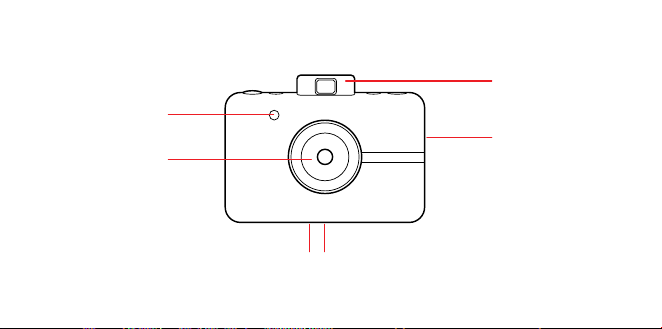
PRODUKTÜBERSICHT
Druckerschacht
Objektiv mit
Magnetkappe
Blitz
Popup-Sucher
StativanschlussLautsprecher
42 | DE DE | 43
LIEFERUMFANG
Trageschlaufe
Sofortdruck-Digitalkamera
Micro USB-Kabel
PRODUKTÜBERSICHT
Druckerschacht
Objektiv mit
Magnetkappe
Blitz
Popup-Sucher
StativanschlussLautsprecher
44 | DE DE | 45
Rahmen-
Auswahltaste
Farbmodi-
Auswahltaste
Popup-Sucher
Auslöser
Selbstauslöser/
Ein-Aus-Taste
microSD™-
Kartensteckplatz
Öse für
Handgelenksschlaufe
Micro USB-
Anschluss
Akku-Status-LED
Papier-Status-
LED
microSD™
Kartenstatus-
LED-Anzeige
Papierfachverrieglung
44 | DE DE | 45
Rahmen-
Auswahltaste
Farbmodi-
Auswahltaste
Popup-Sucher
Auslöser
Selbstauslöser/
Ein-Aus-Taste
microSD™-
Kartensteckplatz
Öse für
Handgelenksschlaufe
Micro USB-
Anschluss
Akku-Status-LED
Papier-Status-
LED
microSD™
Kartenstatus-
LED-Anzeige
Papierfachverrieglung

46 | DE DE | 47
Einschalten
Drücken Sie den Selbstauslöser / die Ein / Aus-
Taste, um die Kamera einzuschalten. Daraufhin
wird sich Ihr Sucher önen und Ihre Kamera
einschalten.
Ausschalten
Schieben Sie den Sucher vorsichtig in die
geschlossene Position zurück. Ihre Kamera ist
jetzt ausgeschaltet.
Firmware-Aktualisierung
Um optimale Ergebnisse zu erzielen, sollten
Sie zuerst die Kamera-Firmware aktualisieren,
bevor Sie mit der Aufnahme von Bildern
bzw. dem Drucken beginnen. Gehen Sie auf
kodakphotoplus.com/pages/kodak-step-
instant-print-digital-camera-support um
diese schnelle und einfache Aktualisierung
durchzuführen. Es ist eine microSD™-Karte
erforderlich.
Fotos schießen
Ist der Objektivdeckel ab? Gut! Drücke
BEDIENUNG IHRER KAMERA kurzauf den Auslöser und voilà! Du hast ein
Foto gemacht.
Die Kamera wird automatisch Blitz und
Autofokus für jedes Foto verwenden. Der
Objektivdeckel wurde hinzugefügt, um das
Objektiv sauber zu halten und vor Kratzern zu
schützen. Vergiss nicht, ihn zu benutzen!
Drucken
Sobald Fotopapier eingelegt ist, kann die
Kamera jedes Foto sofort für Sie ausdrucken.
Sie können bis zu drei Fotos aufnehmen,
während die Kamera druckt. Nach drei Bildern
nimmt Ihre Kamera keine Fotos mehr auf, bis
der Druckvorgang abgeschlossen ist.
Erneut drucken
– Um das letzte Foto nochmals zu drucken,
halte den Auslöser und die Farbwahl-Taste
für 3 Sekunden gedrückt. Ein Piepton wird
ertönen und die LED wird weiß blinken und
dann hast Du einen Druck, den Du mit
anderen teilen kannst.
Fotopapier
Fotopapier einlegen
1. Schiebe die Verriegelung an der
Papierkassette auf und öne die Tür.
2. Schieben Sie die gesamte „KODAK ZINK“-
Fotopapierpackung in das Papierfach.
Stellen Sie sicher, dass das „KODAK ZINK“-
Farbkalibrierungsblatt mit dem Barcode

46 | DE DE | 47
Einschalten
Drücken Sie den Selbstauslöser / die Ein / Aus-
Taste, um die Kamera einzuschalten. Daraufhin
wird sich Ihr Sucher önen und Ihre Kamera
einschalten.
Ausschalten
Schieben Sie den Sucher vorsichtig in die
geschlossene Position zurück. Ihre Kamera ist
jetzt ausgeschaltet.
Firmware-Aktualisierung
Um optimale Ergebnisse zu erzielen, sollten
Sie zuerst die Kamera-Firmware aktualisieren,
bevor Sie mit der Aufnahme von Bildern
bzw. dem Drucken beginnen. Gehen Sie auf
kodakphotoplus.com/pages/kodak-step-
instant-print-digital-camera-support um
diese schnelle und einfache Aktualisierung
durchzuführen. Es ist eine microSD™-Karte
erforderlich.
Fotos schießen
Ist der Objektivdeckel ab? Gut! Drücke
BEDIENUNG IHRER KAMERA kurzauf den Auslöser und voilà! Du hast ein
Foto gemacht.
Die Kamera wird automatisch Blitz und
Autofokus für jedes Foto verwenden. Der
Objektivdeckel wurde hinzugefügt, um das
Objektiv sauber zu halten und vor Kratzern zu
schützen. Vergiss nicht, ihn zu benutzen!
Drucken
Sobald Fotopapier eingelegt ist, kann die
Kamera jedes Foto sofort für Sie ausdrucken.
Sie können bis zu drei Fotos aufnehmen,
während die Kamera druckt. Nach drei Bildern
nimmt Ihre Kamera keine Fotos mehr auf, bis
der Druckvorgang abgeschlossen ist.
Erneut drucken
– Um das letzte Foto nochmals zu drucken,
halte den Auslöser und die Farbwahl-Taste
für 3 Sekunden gedrückt. Ein Piepton wird
ertönen und die LED wird weiß blinken und
dann hast Du einen Druck, den Du mit
anderen teilen kannst.
Fotopapier
Fotopapier einlegen
1. Schiebe die Verriegelung an der
Papierkassette auf und öne die Tür.
2. Schieben Sie die gesamte „KODAK ZINK“-
Fotopapierpackung in das Papierfach.
Stellen Sie sicher, dass das „KODAK ZINK“-
Farbkalibrierungsblatt mit dem Barcode

48 | DE DE | 49
nach unten eingelegt und eingezogen wird.
Die glänzende Seite des Papiers sollte nach
oben zeigen.
3. Schließe das Papierfach.
Beim Aufnehmen eines Fotos wird zunächst
das „KODAK ZINK“-Farbkalibrierungsblatt
ausgeworfen, danach das Foto gedruckt.
Wenn Sie helle, scharfe Sofortbilder erzielen
möchten, die sich trocken anfühlen und direkt
abgezogen und aufgeklebt werden können,
empfehlen wir „KODAK ZINK“-Fotopapier.
Fotopapier nachfüllen
– Wenn das letzte Fotopapierblatt verwendet
wird, leuchtet die LED-Anzeige neben dem
Papiersymbol auf der Rückseite Ihrer Kamera
rot auf. Sie können jetzt sicher Druckpapier
in Ihre Kamera einlegen.
Papierhandhabung
– Lege erst Papier nach, wenn das Papierfach
vollkommen leer ist.
– Füllen Sie das Papierfach nicht mit mehr als
einem 10er-Pack „KODAK ZINK“-Fotopapier.
Wenn Sie mehr als 10 Blätter einlegen, kann
der Drucker beschädigt werden.
– Das „KODAK ZINK“-Fotopapier sollte
nicht gebogen werden.
– Halte das Papier nicht an den Kanten
und berühre die Oberfläche nicht mit
den Fingern.
Wenn es einen Papierstau gibt, wenn Du den
falschen Papiertyp eingelegt hast oder es
einen anderen Fehler bzgl. Druck bzw. Papier
gibt, blinken alle Kontrolllampen rot. Öne
die Kamera und behebe den Fehler (Stau
beheben, Papier nachfüllen, etc.), starte Deine
Kamera dann neu.
Speicher
Ihre Kamera verfügt über genügend
Speicherplatz, um jeweils ein 5-Megapixel-Bild
aufzunehmen und zu drucken.
Einsetzen einer microSD™-Karte
Ihre Kamera verfügt über einen microSD™-
Kartensteckplatz für Bilder, die Sie speichern
und drucken möchten. Schieben Sie die
microSD™-Speicherkarte vorsichtig in den
Schlitz an der Seite Ihrer Kamera. Wenn die
Karte vollständig eingesetzt ist, werden Sie
ein leises Klicken hören und die microSD™-
Kartenstatus-LED-Anzeige leuchtet weiß
auf. Die Kamera ist mit microSD™-Karten mit
einer Speicherkapazität von bis zu 32 GB
kompatibel.
Entfernen einer microSD™-Karte
Drücken Sie leicht auf die Oberseite der Karte
und die microSD™-Karte springt heraus. Ziehen

48 | DE DE | 49
nach unten eingelegt und eingezogen wird.
Die glänzende Seite des Papiers sollte nach
oben zeigen.
3. Schließe das Papierfach.
Beim Aufnehmen eines Fotos wird zunächst
das „KODAK ZINK“-Farbkalibrierungsblatt
ausgeworfen, danach das Foto gedruckt.
Wenn Sie helle, scharfe Sofortbilder erzielen
möchten, die sich trocken anfühlen und direkt
abgezogen und aufgeklebt werden können,
empfehlen wir „KODAK ZINK“-Fotopapier.
Fotopapier nachfüllen
– Wenn das letzte Fotopapierblatt verwendet
wird, leuchtet die LED-Anzeige neben dem
Papiersymbol auf der Rückseite Ihrer Kamera
rot auf. Sie können jetzt sicher Druckpapier
in Ihre Kamera einlegen.
Papierhandhabung
– Lege erst Papier nach, wenn das Papierfach
vollkommen leer ist.
– Füllen Sie das Papierfach nicht mit mehr als
einem 10er-Pack „KODAK ZINK“-Fotopapier.
Wenn Sie mehr als 10 Blätter einlegen, kann
der Drucker beschädigt werden.
– Das „KODAK ZINK“-Fotopapier sollte
nicht gebogen werden.
– Halte das Papier nicht an den Kanten
und berühre die Oberfläche nicht mit
den Fingern.
Wenn es einen Papierstau gibt, wenn Du den
falschen Papiertyp eingelegt hast oder es
einen anderen Fehler bzgl. Druck bzw. Papier
gibt, blinken alle Kontrolllampen rot. Öne
die Kamera und behebe den Fehler (Stau
beheben, Papier nachfüllen, etc.), starte Deine
Kamera dann neu.
Speicher
Ihre Kamera verfügt über genügend
Speicherplatz, um jeweils ein 5-Megapixel-Bild
aufzunehmen und zu drucken.
Einsetzen einer microSD™-Karte
Ihre Kamera verfügt über einen microSD™-
Kartensteckplatz für Bilder, die Sie speichern
und drucken möchten. Schieben Sie die
microSD™-Speicherkarte vorsichtig in den
Schlitz an der Seite Ihrer Kamera. Wenn die
Karte vollständig eingesetzt ist, werden Sie
ein leises Klicken hören und die microSD™-
Kartenstatus-LED-Anzeige leuchtet weiß
auf. Die Kamera ist mit microSD™-Karten mit
einer Speicherkapazität von bis zu 32 GB
kompatibel.
Entfernen einer microSD™-Karte
Drücken Sie leicht auf die Oberseite der Karte
und die microSD™-Karte springt heraus. Ziehen

50 | DE DE | 51
Sie an ihr, um sie vollständig aus Ihrer Kamera
zu entfernen.
microSD™-Kartenspeicheranzeige
Wenn der Speicher Ihrer microSD™-Karte
unter 1 GB sinkt, leuchtet die LED-Anzeige auf
der Rückseite Ihrer Kamera rot auf. Wenn der
Speicherplatz Null erreicht oder beim Lesen
der microSD™-Karte ein Fehler auftritt, blinkt
die LED-Anzeige rot.
Dateien übertragen
Via USB-Kabe
– Schließen Sie Ihre Kamera mit dem
mitgelieferten Micro-USB-Kabel an einen
Computer an. Doppelklicken Sie auf die
microSD™-Karte, wenn sie auf dem Desktop
Ihres Computers angezeigt wird, um Ihre Bilder
anzuzeigen und auf einer Kamerarolle oder an
einem anderen Ort zu speichern.
Über die microSD™-Karte
– Entfernen Sie die microSD™-Karte gemäß
den vorherigen Anweisungen und legen Sie
sie in den Kartenleser ein.
Akku & Laden
Wenn die Akku-Kapazität unter 10% fällt,
leuchtet die LED rot. Bei 2% Kapazität schaltet
sich Deine Kamera automatisch aus.
Schließen Sie die Kamera mit dem
mitgelieferten Micro-USB-Kabel an eine
Wandsteckdose oder einen Computer an, um
sie aufzuladen. Die Akku-LED-Anzeige blinkt
rot, bis der Akku vollständig aufgeladen ist.
Auto-Schlaf-Funktion
Um Akkustrom zu sparen, wechselt die Kamera
nach einigen Minuten der Nichtverwendung
automatisch in den Ruhemodus. Schließen Sie
den Sucher und önen Sie ihn erneut, um die
Kamera wieder einzuschalten.
Selbstauslöser
Ihre Kamera ist mit einem Zehn-Sekunden-
Selbstauslöser ausgestattet. Betätigen Sie
die Zeitschaltuhrtaste (an der Oberseite der
Kamera) und dann den Auslöser, um diesen
einzustellen. Die Zeitschaltuhrtaste blinkt
weiß, während die Zeitschaltuhr abwärts
zählt, und nach zehn Sekunden wird Ihr Foto
aufgenommen.
Eekte hinzufügen
Fotorahmen
– Betätigen Sie die Rahmentaste an der
Oberseite der Kamera, um Ihrem
gedruckten Bild einen Rand hinzuzufügen.
Filter
– Wenn Sie Ihrem ausgedruckten Foto einen
Sepia- oder Schwarzweiß-Ton verleihen
möchten, betätigen Sie die Farbtaste (an der

50 | DE DE | 51
Sie an ihr, um sie vollständig aus Ihrer Kamera
zu entfernen.
microSD™-Kartenspeicheranzeige
Wenn der Speicher Ihrer microSD™-Karte
unter 1 GB sinkt, leuchtet die LED-Anzeige auf
der Rückseite Ihrer Kamera rot auf. Wenn der
Speicherplatz Null erreicht oder beim Lesen
der microSD™-Karte ein Fehler auftritt, blinkt
die LED-Anzeige rot.
Dateien übertragen
Via USB-Kabe
– Schließen Sie Ihre Kamera mit dem
mitgelieferten Micro-USB-Kabel an einen
Computer an. Doppelklicken Sie auf die
microSD™-Karte, wenn sie auf dem Desktop
Ihres Computers angezeigt wird, um Ihre Bilder
anzuzeigen und auf einer Kamerarolle oder an
einem anderen Ort zu speichern.
Über die microSD™-Karte
– Entfernen Sie die microSD™-Karte gemäß
den vorherigen Anweisungen und legen Sie
sie in den Kartenleser ein.
Akku & Laden
Wenn die Akku-Kapazität unter 10% fällt,
leuchtet die LED rot. Bei 2% Kapazität schaltet
sich Deine Kamera automatisch aus.
Schließen Sie die Kamera mit dem
mitgelieferten Micro-USB-Kabel an eine
Wandsteckdose oder einen Computer an, um
sie aufzuladen. Die Akku-LED-Anzeige blinkt
rot, bis der Akku vollständig aufgeladen ist.
Auto-Schlaf-Funktion
Um Akkustrom zu sparen, wechselt die Kamera
nach einigen Minuten der Nichtverwendung
automatisch in den Ruhemodus. Schließen Sie
den Sucher und önen Sie ihn erneut, um die
Kamera wieder einzuschalten.
Selbstauslöser
Ihre Kamera ist mit einem Zehn-Sekunden-
Selbstauslöser ausgestattet. Betätigen Sie
die Zeitschaltuhrtaste (an der Oberseite der
Kamera) und dann den Auslöser, um diesen
einzustellen. Die Zeitschaltuhrtaste blinkt
weiß, während die Zeitschaltuhr abwärts
zählt, und nach zehn Sekunden wird Ihr Foto
aufgenommen.
Eekte hinzufügen
Fotorahmen
– Betätigen Sie die Rahmentaste an der
Oberseite der Kamera, um Ihrem
gedruckten Bild einen Rand hinzuzufügen.
Filter
– Wenn Sie Ihrem ausgedruckten Foto einen
Sepia- oder Schwarzweiß-Ton verleihen
möchten, betätigen Sie die Farbtaste (an der

52 | DE DE | 53
Oberseite der Kamera), um den Farbton für
den nächsten Ausdruck auszuwählen.
Fotoautomat
– Um Fotos mit einem Fotoautomaten-Eekt
zu machen, halte den Auslöser für drei
Sekunden gedrückt. Der Selbstauslöser
wird blinken und die Kamera macht vier
Fotos nacheinander, jeweils ein Foto alle
vier Sekunden. Die Fotos werden auf
einem Blatt zusammen gedruckt.
Hinweise zur Verwendung des Akkus
Lese und beachte unbedingt die nachfolgend
beschriebenen Sicherheitshinweise und
Anmerkungen:
– Verwende nur den mitgelieferten, nicht
auswechselbaren Akku (7,4V).
– Vermeide extrem kalte Umgebungen, da
niedrige Temperaturen die Akklebensdauer
sowie in Folge dessen die Kameraleistung
verringern können.
– Wenn Sie einen „KODAK STEP“ verwenden,
der längere Zeit nicht verwendet wurde,
kann dies die Akkulaufzeit und die Anzahl
der aufnehmbaren Bilder beeinträchtigen.
Um die Akkuleistung und -lebensdauer zu
maximieren, empfehlen wir, den Akku vor
dem Gebrauch für mindestens einen
kompletten Zyklus vollständig aufzuladen
bzw. zu entladen.
– Entsorge den Akku ordnungsgemäß, wenn
die Kamera entsorgt wird.
– Sie sollten keinesfalls die Kamera
demontieren oder den Akku entnehmen.
Der Akku darf weder aus der Kamera
entfernt noch außerhalb der Kamera
aufgeladen werden.
Hinweis bei längerem Gebrauch
Nach längerem Gebrauch fühlt sich Ihre
„KODAK STEP“ Kamera möglicherweise warm
an. Das ist eine normale Erscheinung während
des Betriebs und weist nicht auf einen
Produktfehler oder einen Grund hin, den Spaß
einzuschränken.
Das ist alles!

52 | DE DE | 53
Oberseite der Kamera), um den Farbton für
den nächsten Ausdruck auszuwählen.
Fotoautomat
– Um Fotos mit einem Fotoautomaten-Eekt
zu machen, halte den Auslöser für drei
Sekunden gedrückt. Der Selbstauslöser
wird blinken und die Kamera macht vier
Fotos nacheinander, jeweils ein Foto alle
vier Sekunden. Die Fotos werden auf
einem Blatt zusammen gedruckt.
Hinweise zur Verwendung des Akkus
Lese und beachte unbedingt die nachfolgend
beschriebenen Sicherheitshinweise und
Anmerkungen:
– Verwende nur den mitgelieferten, nicht
auswechselbaren Akku (7,4V).
– Vermeide extrem kalte Umgebungen, da
niedrige Temperaturen die Akklebensdauer
sowie in Folge dessen die Kameraleistung
verringern können.
– Wenn Sie einen „KODAK STEP“ verwenden,
der längere Zeit nicht verwendet wurde,
kann dies die Akkulaufzeit und die Anzahl
der aufnehmbaren Bilder beeinträchtigen.
Um die Akkuleistung und -lebensdauer zu
maximieren, empfehlen wir, den Akku vor
dem Gebrauch für mindestens einen
kompletten Zyklus vollständig aufzuladen
bzw. zu entladen.
– Entsorge den Akku ordnungsgemäß, wenn
die Kamera entsorgt wird.
– Sie sollten keinesfalls die Kamera
demontieren oder den Akku entnehmen.
Der Akku darf weder aus der Kamera
entfernt noch außerhalb der Kamera
aufgeladen werden.
Hinweis bei längerem Gebrauch
Nach längerem Gebrauch fühlt sich Ihre
„KODAK STEP“ Kamera möglicherweise warm
an. Das ist eine normale Erscheinung während
des Betriebs und weist nicht auf einen
Produktfehler oder einen Grund hin, den Spaß
einzuschränken.
Das ist alles!

54 | DE DE | 55
KUNDENDIENST-
KONTAKTINFORMATIONEN
Sollten Sie Probleme mit Ihrem Produkt
haben, setzen Sie sich bitte mit uns in
Verbindung, bevor Sie den Artikel an die
Verkaufsstelle zurücksenden. WIR SIND
HIER UM ZU HELFEN!
US-Unterstützung:
kodak@camarketing.com
844-516-1539
Internationale Unterstützung:
kodakintl@camarketing.com
844-516-1540
GARANTIEINFORMATIONEN
BESCHRÄNKTE GARANTIE FÜR DIE SOFORTDRUCK-
DIGITALKAMERA „KODAK STEPINSTANT“
DIESE BESCHRÄNKTE GARANTIE GIBT IHNEN
BESTIMMTE RECHTE UND SIE KÖNNTEN AUCH
WEITERE RECHTE HABEN, DIE VON LAND ZU LAND
UNTERSCHIEDLICH AUSFALLEN.
WIR GARANTIEREN, DASS DAS PRODUKT WÄHREND
DER GARANTIEZEIT FREI VON MATERIAL- UND
HERSTELLUNGSMÄNGELN IST.
HAFTUNGSBEGRENZUNGEN
SOWEIT ES NICHT GESETZLICH VERBOTEN IST, IST
DIESE GARANTIE EXKLUSIV UND ERSETZT ALLE
ANDEREN GARANTIEN, SEIEN SIE MÜNDLICH,
SCHRIFTLICH, GESETZLICH, AUSDRÜCKLICH
ODER STILLSCHWEIGEND. MIT AUSNAHME DER IN
DIESER BESCHRÄNKTEN GARANTIEERKLÄRUNG
ENTHALTENEN AUSDRÜCKLICHEN GARANTIEN
UND SOWEIT NICHT GESETZLICH VERBOTEN,
LEHNEN WIR ALLE ANDEREN AUSDRÜCKLICHEN
ODER STILLSCHWEIGENDEN, GESETZLICHEN ODER
SONSTIGEN GARANTIEN AB, EINSCHLIESSLICH
UND OHNE EINSCHRÄNKUNG AUCH DIE
GEWÄHRLEISTUNG DER MARKTGÄNGIGKEIT
UND EIGNUNG FÜR EINEN BESTIMMTEN
ZWECK. EINIGE LÄNDER ERLAUBEN
KEINE HAFTUNGSAUSSCHLÜSSE FÜR
STILLSCHWEIGENDE GARANTIEN, SODASS DIESER
HAFTUNGSAUSSCHLUSS MÖGLICHERWEISE
NICHT FÜR SIE GILT. SOWEIT SOLCHE GARANTIEN
NACH DEN GESETZEN IHRER RECHTSORDNUNG
NICHT AUSGESCHLOSSEN WERDEN KÖNNEN,
BEGRENZEN WIR DIE DAUER UND DIE
RECHTSMITTEL SOLCHER GARANTIEN AUF DIE
DAUER DIESER AUSDRÜCKLICH BEGRENZTEN
GARANTIE.
UNSERE VERANTWORTUNG FÜR FEHLERHAFTE
WAREN BESCHRÄNKT SICH AUF REPARATUR,
ERSATZ ODER RÜCKERSTATTUNG, WIE UNTEN IN
DIESER GARANTIEERKLÄRUNG BESCHRIEBEN.
WER DARF DIESE GARANTIE NUTZEN? C&A
Marketing, Inc. mit Sitz in 114 Tived Lane East, Edison,
NJ („wir“), erstreckt diese beschränkte Garantie nur
auf den Verbraucher, der das Produkt ursprünglich
gekauft hat („Sie“).
Diese erstreckt sich nicht auf einen späteren
Eigentümer oder sonstigen Übernehmer des
Produkts.
WAS DECKT DIESE GARANTIE? Diese
eingeschränkte Garantie deckt Material- und

54 | DE DE | 55
KUNDENDIENST-
KONTAKTINFORMATIONEN
Sollten Sie Probleme mit Ihrem Produkt
haben, setzen Sie sich bitte mit uns in
Verbindung, bevor Sie den Artikel an die
Verkaufsstelle zurücksenden. WIR SIND
HIER UM ZU HELFEN!
US-Unterstützung:
kodak@camarketing.com
844-516-1539
Internationale Unterstützung:
kodakintl@camarketing.com
844-516-1540
GARANTIEINFORMATIONEN
BESCHRÄNKTE GARANTIE FÜR DIE SOFORTDRUCK-
DIGITALKAMERA „KODAK STEPINSTANT“
DIESE BESCHRÄNKTE GARANTIE GIBT IHNEN
BESTIMMTE RECHTE UND SIE KÖNNTEN AUCH
WEITERE RECHTE HABEN, DIE VON LAND ZU LAND
UNTERSCHIEDLICH AUSFALLEN.
WIR GARANTIEREN, DASS DAS PRODUKT WÄHREND
DER GARANTIEZEIT FREI VON MATERIAL- UND
HERSTELLUNGSMÄNGELN IST.
HAFTUNGSBEGRENZUNGEN
SOWEIT ES NICHT GESETZLICH VERBOTEN IST, IST
DIESE GARANTIE EXKLUSIV UND ERSETZT ALLE
ANDEREN GARANTIEN, SEIEN SIE MÜNDLICH,
SCHRIFTLICH, GESETZLICH, AUSDRÜCKLICH
ODER STILLSCHWEIGEND. MIT AUSNAHME DER IN
DIESER BESCHRÄNKTEN GARANTIEERKLÄRUNG
ENTHALTENEN AUSDRÜCKLICHEN GARANTIEN
UND SOWEIT NICHT GESETZLICH VERBOTEN,
LEHNEN WIR ALLE ANDEREN AUSDRÜCKLICHEN
ODER STILLSCHWEIGENDEN, GESETZLICHEN ODER
SONSTIGEN GARANTIEN AB, EINSCHLIESSLICH
UND OHNE EINSCHRÄNKUNG AUCH DIE
GEWÄHRLEISTUNG DER MARKTGÄNGIGKEIT
UND EIGNUNG FÜR EINEN BESTIMMTEN
ZWECK. EINIGE LÄNDER ERLAUBEN
KEINE HAFTUNGSAUSSCHLÜSSE FÜR
STILLSCHWEIGENDE GARANTIEN, SODASS DIESER
HAFTUNGSAUSSCHLUSS MÖGLICHERWEISE
NICHT FÜR SIE GILT. SOWEIT SOLCHE GARANTIEN
NACH DEN GESETZEN IHRER RECHTSORDNUNG
NICHT AUSGESCHLOSSEN WERDEN KÖNNEN,
BEGRENZEN WIR DIE DAUER UND DIE
RECHTSMITTEL SOLCHER GARANTIEN AUF DIE
DAUER DIESER AUSDRÜCKLICH BEGRENZTEN
GARANTIE.
UNSERE VERANTWORTUNG FÜR FEHLERHAFTE
WAREN BESCHRÄNKT SICH AUF REPARATUR,
ERSATZ ODER RÜCKERSTATTUNG, WIE UNTEN IN
DIESER GARANTIEERKLÄRUNG BESCHRIEBEN.
WER DARF DIESE GARANTIE NUTZEN? C&A
Marketing, Inc. mit Sitz in 114 Tived Lane East, Edison,
NJ („wir“), erstreckt diese beschränkte Garantie nur
auf den Verbraucher, der das Produkt ursprünglich
gekauft hat („Sie“).
Diese erstreckt sich nicht auf einen späteren
Eigentümer oder sonstigen Übernehmer des
Produkts.
WAS DECKT DIESE GARANTIE? Diese
eingeschränkte Garantie deckt Material- und

56 | DE DE | 57
Verarbeitungsfehler der digitalen Sofortdruckkamera
„KODAK STEP“ (das „Produkt“) für den nachfolgend
definierten Garantiezeitraum ab.
WAS WIRD DIESE GARANTIE NICHT DECKEN?
Diese beschränkte Garantie deckt keine Schäden,
die durch: (a) Transport; (b) Lagerung; (c)
unsachgemäße Verwendung; (d) Nichteinhaltung
der Produkthinweise oder vorbeugende Wartung; (e)
Modifikationen; (f) nicht autorisierte Reparaturen; (g)
normale Abnutzung; oder (h) äußere Ursachen wie
Unfälle, Missbrauch oder andere Handlungen oder
Ereignisse verursacht wurden, und die außerhalb
unserer angemessenen Kontrolle liegen.
WIE LANGE IST DIE GELTUNGSDAUER? Diese
beschränkte Garantie beginnt mit dem Datum Ihres
Kaufs und dauert ein Jahr (die „Garantiezeit“). Die
Gewährleistungsfrist verlängert sich nicht, wenn wir
das Produkt reparieren oder ersetzen. Wir können die
Verfügbarkeit dieser eingeschränkten Garantie nach
unserem Ermessen ändern, aber alle Änderungen
werden nicht rückwirkend gültig sein.
WELCHE RECHTSMITTEL STEHEN IHNEN
UNTER DIESER GARANTIE ZUR VERFÜGUNG?
With respect to any defective product during
tIn Bezug auf ein defektes Produkt während der
Garantiezeit werden wir nach eigenem Ermessen
entweder (a) dieses Produkt (oder das defekte Teil)
kostenlos reparieren oder ersetzen oder (b) den
Kaufpreis dieses Produkts erstatten, wenn keine
Austauscheinheit bereitgestellt werden kann.
WIE ERHALTEN SIE DEN GARANTIE-SERVICE?
Um den Garantie-Service in Anspruch zu nehmen,
müssen Sie sich innerhalb der Garantiezeit unter 844-
516-1539 oder per E-Mail an kodak@camarketing.
com wenden, um eine Nummer für defekte
Warenautorisierung („DMA“) zu erhalten. Ohne
DMA-Nummer wird keine Garantieleistung erbracht
und die Rücksendekosten an unsere Einrichtungen
werden von Ihnen, dem Käufer, übernommen. Die
Versandkosten des Ersatzgerätes an Sie werden von
uns übernommen.
kodakphotoplus.com
Die Marke, das Logo und die Handelskleidung von
Kodak werden unter Lizenz der Eastman Kodak
Company verwendet.
ZINK, ZERO INK, und die ZINK Markenzeichen sind
Eigentum der ZINK Holdings LLC.
Android ist eine Marke von Google LLC.
IOS ist eine Marke von Cisco in den USA und
anderen Ländern und wird unter Lizenz verwendet.
Bluetooth ist eine Marke von Bluetooth SIG, Inc. USA.
MicroSD ist eine Marke oder eingetragene Marke
von SD-3C LLC in den USA und / oder anderen
Ländern.
Alle anderen Produkte, Markennamen,
Firmennamen und Logos sind Warenzeichen der
jeweiligen Eigentümer. Sie dienen lediglich zur
Identifizierung der jeweiligen Produkte und sind nicht
als Sponsoring, Bestätigung oder Genehmigung zu
verstehen.
Vertrieben von: C&A Marketing, Inc., 114 Tived Lane
East, Edison, NJ 08837, USA
C&A Marketing UK LTD, 167 Hermitage Road,
Crusader Industrial Estate, London N4 1LZ, UK
©2020. Alle Rechte vorbehalten.
IN VIETNAM HERGESTELLT

56 | DE DE | 57
Verarbeitungsfehler der digitalen Sofortdruckkamera
„KODAK STEP“ (das „Produkt“) für den nachfolgend
definierten Garantiezeitraum ab.
WAS WIRD DIESE GARANTIE NICHT DECKEN?
Diese beschränkte Garantie deckt keine Schäden,
die durch: (a) Transport; (b) Lagerung; (c)
unsachgemäße Verwendung; (d) Nichteinhaltung
der Produkthinweise oder vorbeugende Wartung; (e)
Modifikationen; (f) nicht autorisierte Reparaturen; (g)
normale Abnutzung; oder (h) äußere Ursachen wie
Unfälle, Missbrauch oder andere Handlungen oder
Ereignisse verursacht wurden, und die außerhalb
unserer angemessenen Kontrolle liegen.
WIE LANGE IST DIE GELTUNGSDAUER? Diese
beschränkte Garantie beginnt mit dem Datum Ihres
Kaufs und dauert ein Jahr (die „Garantiezeit“). Die
Gewährleistungsfrist verlängert sich nicht, wenn wir
das Produkt reparieren oder ersetzen. Wir können die
Verfügbarkeit dieser eingeschränkten Garantie nach
unserem Ermessen ändern, aber alle Änderungen
werden nicht rückwirkend gültig sein.
WELCHE RECHTSMITTEL STEHEN IHNEN
UNTER DIESER GARANTIE ZUR VERFÜGUNG?
With respect to any defective product during
tIn Bezug auf ein defektes Produkt während der
Garantiezeit werden wir nach eigenem Ermessen
entweder (a) dieses Produkt (oder das defekte Teil)
kostenlos reparieren oder ersetzen oder (b) den
Kaufpreis dieses Produkts erstatten, wenn keine
Austauscheinheit bereitgestellt werden kann.
WIE ERHALTEN SIE DEN GARANTIE-SERVICE?
Um den Garantie-Service in Anspruch zu nehmen,
müssen Sie sich innerhalb der Garantiezeit unter 844-
516-1539 oder per E-Mail an kodak@camarketing.
com wenden, um eine Nummer für defekte
Warenautorisierung („DMA“) zu erhalten. Ohne
DMA-Nummer wird keine Garantieleistung erbracht
und die Rücksendekosten an unsere Einrichtungen
werden von Ihnen, dem Käufer, übernommen. Die
Versandkosten des Ersatzgerätes an Sie werden von
uns übernommen.
kodakphotoplus.com
Die Marke, das Logo und die Handelskleidung von
Kodak werden unter Lizenz der Eastman Kodak
Company verwendet.
ZINK, ZERO INK, und die ZINK Markenzeichen sind
Eigentum der ZINK Holdings LLC.
Android ist eine Marke von Google LLC.
IOS ist eine Marke von Cisco in den USA und
anderen Ländern und wird unter Lizenz verwendet.
Bluetooth ist eine Marke von Bluetooth SIG, Inc. USA.
MicroSD ist eine Marke oder eingetragene Marke
von SD-3C LLC in den USA und / oder anderen
Ländern.
Alle anderen Produkte, Markennamen,
Firmennamen und Logos sind Warenzeichen der
jeweiligen Eigentümer. Sie dienen lediglich zur
Identifizierung der jeweiligen Produkte und sind nicht
als Sponsoring, Bestätigung oder Genehmigung zu
verstehen.
Vertrieben von: C&A Marketing, Inc., 114 Tived Lane
East, Edison, NJ 08837, USA
C&A Marketing UK LTD, 167 Hermitage Road,
Crusader Industrial Estate, London N4 1LZ, UK
©2020. Alle Rechte vorbehalten.
IN VIETNAM HERGESTELLT

58 | FR FR | 59
PRÉCAUTIONS DE SÉCURITÉ
• Avertissement épilepsie : Cet appareil
utilise des lampes flash stroboscopiques
susceptibles de provoquer des crises
chez les personnes sourant d’épilepsie
photosensible ou d’autres troubles
similaires. L’utilisateur est invité à faire
preuve de discernement.
• Ne pas essayer de démonter l’appareil,
quelle qu’en soit la raison.
• Ne pas laisser l’appareil photo ou le
papier photo KODAK ZINK dans un
lieu qui pourrait devenir extrêmement
chaud ou où il sera exposé pendant un
long moment à la lumière du soleil. Cela
pourrait, entre autres, provoquer une
surchaue de votre appareil.
• Tenir à l’écart de l’eau ! Si vous devez
nettoyer votre appareil photo, utilisez un
chion doux légèrement humecté d’eau
ou d’alcool, et frottez doucement les
taches de saleté. Ne jamais – au grand
jamais – plonger l’appareil entier dans
l’eau.
• Traiter l’appareil photo avec soin. Ne pas
le faire tomber ni le secouer violemment.
L’intérieur de l’appareil est rempli de très
petites pièces qui pourraient se casser
en cas de heurts brusques.
• Ne pas utiliser de produits tels que de
l’alcool, de l’essence, du white spirit
ou tout autre solvant organique pour
nettoyer ou tenter de nettoyer ce
produit.
• Ne pas utiliser cet appareil dans un
environnement où il sera exposé à
de fortes poussières ou à une forte
humidité.
• Ne pas utiliser cet appareil pendant que
vous vous lavez ou dans la douche.
• Ne pas placer ou recharger cet appareil
à un endroit où il pourrait tomber ou être
entrainé dans un évier ou une baignoire.
• Ne pas placer, jeter ou plonger l’appareil
dans de l’eau ou tout autre liquide.
• Veiller à ce que rien ne tombe sur
l’appareil et à ce qu’il ne soit pas
éclaboussé par le moindre liquide.

58 | FR FR | 59
PRÉCAUTIONS DE SÉCURITÉ
• Avertissement épilepsie : Cet appareil
utilise des lampes flash stroboscopiques
susceptibles de provoquer des crises
chez les personnes sourant d’épilepsie
photosensible ou d’autres troubles
similaires. L’utilisateur est invité à faire
preuve de discernement.
• Ne pas essayer de démonter l’appareil,
quelle qu’en soit la raison.
• Ne pas laisser l’appareil photo ou le
papier photo KODAK ZINK dans un
lieu qui pourrait devenir extrêmement
chaud ou où il sera exposé pendant un
long moment à la lumière du soleil. Cela
pourrait, entre autres, provoquer une
surchaue de votre appareil.
• Tenir à l’écart de l’eau ! Si vous devez
nettoyer votre appareil photo, utilisez un
chion doux légèrement humecté d’eau
ou d’alcool, et frottez doucement les
taches de saleté. Ne jamais – au grand
jamais – plonger l’appareil entier dans
l’eau.
• Traiter l’appareil photo avec soin. Ne pas
le faire tomber ni le secouer violemment.
L’intérieur de l’appareil est rempli de très
petites pièces qui pourraient se casser
en cas de heurts brusques.
• Ne pas utiliser de produits tels que de
l’alcool, de l’essence, du white spirit
ou tout autre solvant organique pour
nettoyer ou tenter de nettoyer ce
produit.
• Ne pas utiliser cet appareil dans un
environnement où il sera exposé à
de fortes poussières ou à une forte
humidité.
• Ne pas utiliser cet appareil pendant que
vous vous lavez ou dans la douche.
• Ne pas placer ou recharger cet appareil
à un endroit où il pourrait tomber ou être
entrainé dans un évier ou une baignoire.
• Ne pas placer, jeter ou plonger l’appareil
dans de l’eau ou tout autre liquide.
• Veiller à ce que rien ne tombe sur
l’appareil et à ce qu’il ne soit pas
éclaboussé par le moindre liquide.
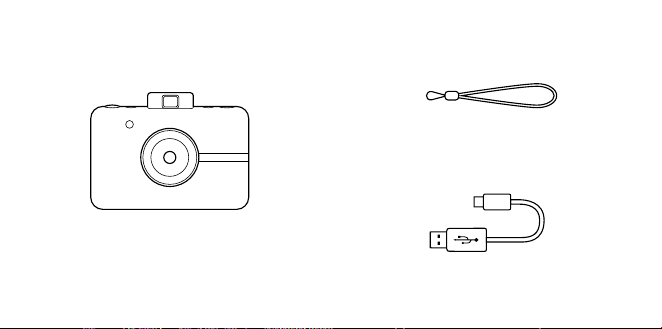
60 | FR FR | 61
CONTENU DE LA BOÎTE
Dragonne
Appareil photo numérique à
impression instantanée
Câble micro USB
APERÇU DU PRODUIT
Fente
d’impression
Lentille
avec cache
magnétique
Flash
Viseur rabattable
Connecteur pour
tripode
Haut-parleur
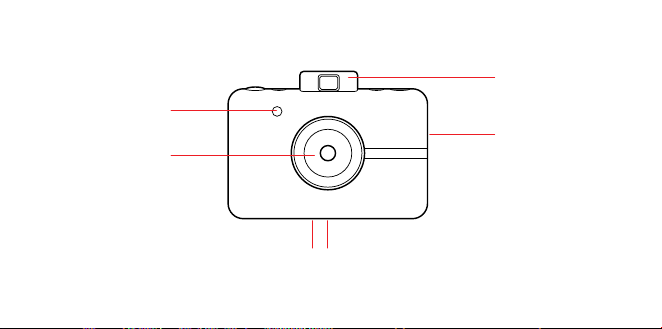
60 | FR FR | 61
CONTENU DE LA BOÎTE
Dragonne
Appareil photo numérique à
impression instantanée
Câble micro USB
APERÇU DU PRODUIT
Fente
d’impression
Lentille
avec cache
magnétique
Flash
Viseur rabattable
Connecteur pour
tripode
Haut-parleur
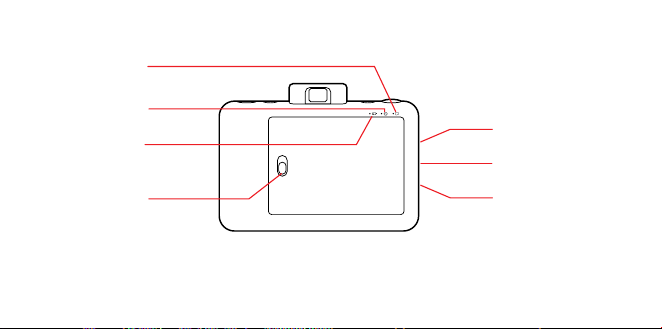
62 | FR FR | 63
Sélecteur de
bordure
Sélecteur du mode
de couleur
Viseur rabattable
Bouton
déclencheur
Retardateur/
Bouton
d’alimentation
Fente pour carte
microSD™
Accroche de la
dragonne
Port micro USB
Voyant LED
de l’état de la
batterie
Voyant LED de
l’état du papier
LED d’état de la
carte microSD™
Verrou trappe
papier
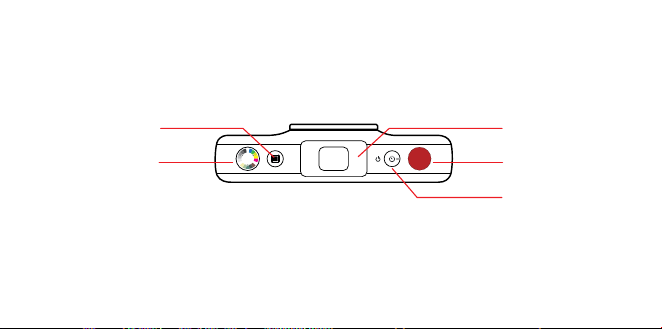
62 | FR FR | 63
Sélecteur de
bordure
Sélecteur du mode
de couleur
Viseur rabattable
Bouton
déclencheur
Retardateur/
Bouton
d’alimentation
Fente pour carte
microSD™
Accroche de la
dragonne
Port micro USB
Voyant LED
de l’état de la
batterie
Voyant LED de
l’état du papier
LED d’état de la
carte microSD™
Verrou trappe
papier

64 | FR FR | 65
Mise en marche
Pour allumer votre appareil photo, appuyez
sur le bouton retardateur / alimentation.
Votre viseur surgira et votre appareil photo
s’allumera.
Extinction
Poussez délicatement le viseur vers sa position
fermée. Votre appareil photo est éteint.
Mise à jour du firmware
Pour des résultats optimaux, mettez à
jour le firmware de votre appareil avant de
commencer à prendre et imprimer des photos.
Rendez-vous sur kodakphotoplus.com/
pages/kodak-step-instant-print-digital-
camera-support pour le mettre rapidement
et facilement à jour. Une carte microSD™ est
requise.
Prise de photos
Le cache de la lentille est-il rentré ? Bien !
Pressez et relachez le déclencheur et voilà !
UTILISATION DE VOTRE APPAREIL PHOTO Vous avez pris une photo.
Le flash ainsi que l’autofocus se déclencheront
automatiquement à chaque photo. Un cache
a été inclus pour garder votre lentille propre
et à l’abris de toute rayure. N’oubliez pas de
l’utiliser !
Impression
L’appareil photo imprime instantanément
vos photos lorsqu’il contient du papier. Vous
pouvez prendre jusqu’à trois photos lorsque
l’appareil imprime. Après ces trois photos, votre
appareil ne prendra plus de photos avant de
les avoir toutes imprimées.
Réimpression
– Pour réimprimer la dernière photo prise,
maintenez appuyé le bouton déclencheur et
le sélecteur du mode de couleur pendant
trois secondes. Vous entendrez un bip, le
témoin LED brillera en blanc et vous aurez
une photo à partager.
Papier photo
Insertion du papier photo
1. Faîtes glisser le loquet du bac papier et
ouvrez la trappe.
2. Glissez tout le paquet de papier photo
KODAK ZINK dans le bac papier. Assurez-
vous que la feuille de calibrage des couleurs
KODAK ZINK est placée et chargée avec le

64 | FR FR | 65
Mise en marche
Pour allumer votre appareil photo, appuyez
sur le bouton retardateur / alimentation.
Votre viseur surgira et votre appareil photo
s’allumera.
Extinction
Poussez délicatement le viseur vers sa position
fermée. Votre appareil photo est éteint.
Mise à jour du firmware
Pour des résultats optimaux, mettez à
jour le firmware de votre appareil avant de
commencer à prendre et imprimer des photos.
Rendez-vous sur kodakphotoplus.com/
pages/kodak-step-instant-print-digital-
camera-support pour le mettre rapidement
et facilement à jour. Une carte microSD™ est
requise.
Prise de photos
Le cache de la lentille est-il rentré ? Bien !
Pressez et relachez le déclencheur et voilà !
UTILISATION DE VOTRE APPAREIL PHOTO Vous avez pris une photo.
Le flash ainsi que l’autofocus se déclencheront
automatiquement à chaque photo. Un cache
a été inclus pour garder votre lentille propre
et à l’abris de toute rayure. N’oubliez pas de
l’utiliser !
Impression
L’appareil photo imprime instantanément
vos photos lorsqu’il contient du papier. Vous
pouvez prendre jusqu’à trois photos lorsque
l’appareil imprime. Après ces trois photos, votre
appareil ne prendra plus de photos avant de
les avoir toutes imprimées.
Réimpression
– Pour réimprimer la dernière photo prise,
maintenez appuyé le bouton déclencheur et
le sélecteur du mode de couleur pendant
trois secondes. Vous entendrez un bip, le
témoin LED brillera en blanc et vous aurez
une photo à partager.
Papier photo
Insertion du papier photo
1. Faîtes glisser le loquet du bac papier et
ouvrez la trappe.
2. Glissez tout le paquet de papier photo
KODAK ZINK dans le bac papier. Assurez-
vous que la feuille de calibrage des couleurs
KODAK ZINK est placée et chargée avec le

66 | FR FR | 67
code-barres vers le bas et le côté brillant du
papier vers le haut.
3. Fermez la trappe du bac papier. La ZINK
Smart Sheet™ s’ejectera quand vous
prendrez une photo, puis votre photo
s’imprimera.
La feuille de calibrage des couleurs KODAK
ZINK sera éjectée lorsque vous prendrez la
première photo. Celle-ci sera ensuite imprimée.
Pour des photos instantanées, lumineuses et
nettes, qui sont prêtes à être collées et sèches
au toucher lorsqu’elles sortent de l’appareil et ,
nous vous recommandons le papier photo
KODAK ZINK.
Recharge du papier photo
– Lorsque la dernière feuille de papier photo
est utilisée, la LED à côté de l’icône de papier
au dos de votre appareil s’allume en rouge.
Vous pouvez alors recharger le papier
d’impression dans votre appareil photo en
toute sécurité.
Règles d’utilisation du papier
– N’ajoutez pas plus de papier si le
compartiment papier n’est pas
complètement vide..
– Ne remplissez pas le compartiment à papier
avec plus d’un paquet de 10 feuilles de
papier photo KODAK ZINK, car cela pourrait
endommager l’imprimante.
– Évitez de plier le papier photo KODAK ZINK.
– Tenez le papier par les bords. Évitez de
toucher la surface avec vos doigts.
S’il y a un bourrage papier, si vous insérez le
mauvais type de papier, où s’il y a une autre
erreur liée à l’impression, tous les voyants
s’allumerons en rouge. Ouvrez votre appareil
photo et corrigez les erreurs (rectifier le
bourrage, changer le papier, etc.) puis
redémarrez votre appareil photo.
Mémoire
Votre appareil photo intègre suisamment de
mémoire pour capturer et imprimer une image
de 5 Mpx à la fois.
Insertion d’une carte microSD™
Votre appareil photo est équipé d’une fente
pour carte microSD™ pour les images que
vous souhaitez enregistrer et imprimer.
Pour insérer une carte mémoire, poussez
doucement la carte microSD™ dans la fente
située sur le côté de votre appareil photo.
Vous sentirez un léger déclic lorsque la carte
sera complètement insérée et la LED d’état
de la carte microSD™ s’allumera en blanc.
L’appareil photo est compatible avec les cartes

66 | FR FR | 67
code-barres vers le bas et le côté brillant du
papier vers le haut.
3. Fermez la trappe du bac papier. La ZINK
Smart Sheet™ s’ejectera quand vous
prendrez une photo, puis votre photo
s’imprimera.
La feuille de calibrage des couleurs KODAK
ZINK sera éjectée lorsque vous prendrez la
première photo. Celle-ci sera ensuite imprimée.
Pour des photos instantanées, lumineuses et
nettes, qui sont prêtes à être collées et sèches
au toucher lorsqu’elles sortent de l’appareil et ,
nous vous recommandons le papier photo
KODAK ZINK.
Recharge du papier photo
– Lorsque la dernière feuille de papier photo
est utilisée, la LED à côté de l’icône de papier
au dos de votre appareil s’allume en rouge.
Vous pouvez alors recharger le papier
d’impression dans votre appareil photo en
toute sécurité.
Règles d’utilisation du papier
– N’ajoutez pas plus de papier si le
compartiment papier n’est pas
complètement vide..
– Ne remplissez pas le compartiment à papier
avec plus d’un paquet de 10 feuilles de
papier photo KODAK ZINK, car cela pourrait
endommager l’imprimante.
– Évitez de plier le papier photo KODAK ZINK.
– Tenez le papier par les bords. Évitez de
toucher la surface avec vos doigts.
S’il y a un bourrage papier, si vous insérez le
mauvais type de papier, où s’il y a une autre
erreur liée à l’impression, tous les voyants
s’allumerons en rouge. Ouvrez votre appareil
photo et corrigez les erreurs (rectifier le
bourrage, changer le papier, etc.) puis
redémarrez votre appareil photo.
Mémoire
Votre appareil photo intègre suisamment de
mémoire pour capturer et imprimer une image
de 5 Mpx à la fois.
Insertion d’une carte microSD™
Votre appareil photo est équipé d’une fente
pour carte microSD™ pour les images que
vous souhaitez enregistrer et imprimer.
Pour insérer une carte mémoire, poussez
doucement la carte microSD™ dans la fente
située sur le côté de votre appareil photo.
Vous sentirez un léger déclic lorsque la carte
sera complètement insérée et la LED d’état
de la carte microSD™ s’allumera en blanc.
L’appareil photo est compatible avec les cartes

68 | FR FR | 69
microSD™ jusqu’à 32 Go.
Retrait d’une carte microSD™
Appuyez légèrement sur la carte microSD™
pour qu’elle apparaisse. Tirez dessus pour la
retirer complètement de votre appareil photo.
Indicateur de mémoire de la carte
microSD™
Lorsque la mémoire de votre carte microSD™
descend en dessous de 1 Go, la LED au dos
de votre appareil photo s’allume en rouge.
Lorsque la mémoire est pleine ou en cas
d’erreur de lecture de la carte microSD™, la LED
clignote en rouge.
Transfert de fichiers
Via câble USB
– À l’aide du câble micro USB fourni,
connectez votre appareil photo à un
ordinateur. Double-cliquez sur la carte
microSD™ lorsqu’elle apparaît sur le bureau
de votre ordinateur pour visualiser et
enregistrer vos photos dans un dossier de
photos ou à un autre endroit.
Avec carte microSD™
– Retirez la carte microSD™ selon les
instructions précédentes, puis insérez la
carte dans votre lecteur de carte.
Batterie et Chargement
Quand la charge de la batterie tombe sous
les 10%, le voyant LED de la batterie brillera en
rouge. À 2%, votre appareil photo s’éteindra
automatiquement.
Pour recharger votre appareil photo, branchez-
le sur une prise murale ou sur un ordinateur à
l’aide du câble micro USB fourni. La LED de la
batterie clignotera en rouge jusqu’à ce que la
batterie soit complètement chargée.
Veille auto
Pour économiser la batterie, votre appareil
photo se met automatiquement en mode
veille après plusieurs minutes d’inutilisation.
Pour rallumer votre appareil photo, fermez et
rouvrez le viseur.
Retardateur
Votre appareil photo est équipé d’un
retardateur de dix secondes. Pour l’utiliser,
appuyez sur le bouton du retardateur (situé
sur le dessus de l’appareil), puis sur le bouton
de prise de vue. Le bouton du retardateur
clignotera en blanc pendant le décompte et
l’appareil prendra votre photo dix secondes
après.
Ajout d’eets
Cadres photo
– Pour ajouter une bordure à votre photo,

68 | FR FR | 69
microSD™ jusqu’à 32 Go.
Retrait d’une carte microSD™
Appuyez légèrement sur la carte microSD™
pour qu’elle apparaisse. Tirez dessus pour la
retirer complètement de votre appareil photo.
Indicateur de mémoire de la carte
microSD™
Lorsque la mémoire de votre carte microSD™
descend en dessous de 1 Go, la LED au dos
de votre appareil photo s’allume en rouge.
Lorsque la mémoire est pleine ou en cas
d’erreur de lecture de la carte microSD™, la LED
clignote en rouge.
Transfert de fichiers
Via câble USB
– À l’aide du câble micro USB fourni,
connectez votre appareil photo à un
ordinateur. Double-cliquez sur la carte
microSD™ lorsqu’elle apparaît sur le bureau
de votre ordinateur pour visualiser et
enregistrer vos photos dans un dossier de
photos ou à un autre endroit.
Avec carte microSD™
– Retirez la carte microSD™ selon les
instructions précédentes, puis insérez la
carte dans votre lecteur de carte.
Batterie et Chargement
Quand la charge de la batterie tombe sous
les 10%, le voyant LED de la batterie brillera en
rouge. À 2%, votre appareil photo s’éteindra
automatiquement.
Pour recharger votre appareil photo, branchez-
le sur une prise murale ou sur un ordinateur à
l’aide du câble micro USB fourni. La LED de la
batterie clignotera en rouge jusqu’à ce que la
batterie soit complètement chargée.
Veille auto
Pour économiser la batterie, votre appareil
photo se met automatiquement en mode
veille après plusieurs minutes d’inutilisation.
Pour rallumer votre appareil photo, fermez et
rouvrez le viseur.
Retardateur
Votre appareil photo est équipé d’un
retardateur de dix secondes. Pour l’utiliser,
appuyez sur le bouton du retardateur (situé
sur le dessus de l’appareil), puis sur le bouton
de prise de vue. Le bouton du retardateur
clignotera en blanc pendant le décompte et
l’appareil prendra votre photo dix secondes
après.
Ajout d’eets
Cadres photo
– Pour ajouter une bordure à votre photo,

70 | FR FR | 71
appuyez sur le bouton de bordure situé sur le
dessus de votre appareil photo.
Filtres
– Pour donner à votre tirage une teinte sépia
ou noir et blanc, appuyez sur le bouton de
couleur (situé sur le dessus de votre appareil
photo) pour sélectionner le traitement de
votre prochain tirage.
Photomaton
– Pour prendre des photos avec un eet
photomaton, pressez et maintenez le
déclencheur pendant trois secondes. Le
bouton du retardateur s’allumera et l’appareil
photo prendra quatre photos à la suite, une
photo toutes les quatre secondes. Les
photos s’imprimerons sur une feuille avec
les quatres images consécutives.
Notes sur l’utilisation de la baterie
Lisez attentivement et observez
scrupuleusement les instructions de sécurité
précisées ci-dessous :
– Utilisez uniquement la batterie incluse,
inamovible (7,4V).
– Évitez les environnements extrêmement
froid. En eet, des températures basses
peuvent raccourcir la durée de vie de la
batterie et réduire les performances de
l’appareil photo.
– Lorsque vous utilisez un KODAK STEP qui n’a
pas été mis en marche depuis longtemps,
cela peut aecter la durée de vie de la
batterie et le nombre d’images pouvant être
capturées. Pour optimiser les performances
et la durée de vie de la batterie, nous vous
recommandons d’eectuer un cycle
complet de charge/décharge avant d’utiliser
l’appareil.
– Veillez à vous débarrasser de votre batterie
conformément à la réglementation quand
vous vous débarrasserez de l’appareil photo.
– Ne démontez jamais l’appareil photo et ne
retirez pas sa batterie. La batterie n’est pas
conçue pour être retirée de l’appareil photo,
ni pour être chargée à l’extérieur de l’appareil
photo.
Utilisation prolongée
Lors d’une utilisation prolongée, votre appareil
photo KODAK STEP peut devenir chaud au
toucher. Il s’agit d’un phénomène normal qui
n’indique aucun défaut du produit et vous ne
devriez pas vous arrêter de vous amuser.
C’est tout !

70 | FR FR | 71
appuyez sur le bouton de bordure situé sur le
dessus de votre appareil photo.
Filtres
– Pour donner à votre tirage une teinte sépia
ou noir et blanc, appuyez sur le bouton de
couleur (situé sur le dessus de votre appareil
photo) pour sélectionner le traitement de
votre prochain tirage.
Photomaton
– Pour prendre des photos avec un eet
photomaton, pressez et maintenez le
déclencheur pendant trois secondes. Le
bouton du retardateur s’allumera et l’appareil
photo prendra quatre photos à la suite, une
photo toutes les quatre secondes. Les
photos s’imprimerons sur une feuille avec
les quatres images consécutives.
Notes sur l’utilisation de la baterie
Lisez attentivement et observez
scrupuleusement les instructions de sécurité
précisées ci-dessous :
– Utilisez uniquement la batterie incluse,
inamovible (7,4V).
– Évitez les environnements extrêmement
froid. En eet, des températures basses
peuvent raccourcir la durée de vie de la
batterie et réduire les performances de
l’appareil photo.
– Lorsque vous utilisez un KODAK STEP qui n’a
pas été mis en marche depuis longtemps,
cela peut aecter la durée de vie de la
batterie et le nombre d’images pouvant être
capturées. Pour optimiser les performances
et la durée de vie de la batterie, nous vous
recommandons d’eectuer un cycle
complet de charge/décharge avant d’utiliser
l’appareil.
– Veillez à vous débarrasser de votre batterie
conformément à la réglementation quand
vous vous débarrasserez de l’appareil photo.
– Ne démontez jamais l’appareil photo et ne
retirez pas sa batterie. La batterie n’est pas
conçue pour être retirée de l’appareil photo,
ni pour être chargée à l’extérieur de l’appareil
photo.
Utilisation prolongée
Lors d’une utilisation prolongée, votre appareil
photo KODAK STEP peut devenir chaud au
toucher. Il s’agit d’un phénomène normal qui
n’indique aucun défaut du produit et vous ne
devriez pas vous arrêter de vous amuser.
C’est tout !

72 | FR FR | 73
INFORMATIONS DE CONTACT
DE SERVICE À LA CLIENTÈLE
Si vous rencontrez des problèmes avec
votre produit, veuillez nous contacter avant
de ramener le produit au point de vente.
NOUS SOMMES LÀ POUR VOUS AIDER!
Support technique aux USA :
kodak@camarketing.com
844-516-1539
Support technique international :
kodakintl@camarketing.com
844-516-1540
INFORMATIONS DE GARANTIE
GARANTIE LIMITÉE SUR L’APPAREIL PHOTO
NUMÉRIQUE KODAK STEP À IMPRESSION
INSTANTANÉE
CETTE GARANTIE LIMITÉE VOUS CONFÈRE
DES DROITS SPÉCIFIQUES RECONNUS PAR LA
LOI. VOUS POURRIEZ DISPOSER DE DROITS
SUPPLÉMENTAIRES QUI VARIENT D’UN PAYS À
UN AUTRE.
NOUS GARANTISSONS QUE CE PRODUIT SERA
EXEMPT DE TOUT DÉFAUT DE FABRICATION
ET DE MATÉRIAUX PENDANT LA PÉRIODE DE
GARANTIE.
LIMITATION DE RESPONSABILITÉ
Dans la mesure où le droit ne l’interdit pas, cette
garantie est exclusive et vient en lieu et place
de toute autre garantie écrite, orale, légale,
expresse ou implicite. À L’EXCEPTION DES
GARANTIES EXPRESSES CONTENUES DANS
LA DÉCLARATION DE GARANTIE LIMITÉE ET
DANS LA MESURE OÙ CELA NE CONTREVIENT
PAS À LA LOI, NOUS DÉCLINONS TOUTES LES
AUTRES GARANTIES, EXPLICITES OU IMPLICITES,
LÉGALES OU AUTRES, INCLUANT SANS
LIMITATION, LES GARANTIES COMMERCIALES
ET D’USAGE POUR UN BUT PARTICULIER. DANS
LA MESURE OÙ CERTAINES JURIDICTIONS
N’AUTORISENT PAS LA LIMITATION DES
GARANTIES TACITES, CES INFORMATIONS
PEUVENT NE PAS S’APPLIQUER À VOTRE CAS.
DANS LA MESURE OÙ DE TELLES GARANTIES NE
PEUVENT ÊTRE EN CONTRADICTION AVEC LES
LOIS EN VIGUEUR SOUS VOTRE JURIDICTION,
NOUS LIMITONS LA DURÉE ET LA PRISE EN
CHARGE À LA DURÉE DE CETTE GARANTIE
LIMITÉE EXPRESSE.
NOTRE RESPONSABILITÉ QUANT AUX ARTICLES
DÉFECTUEUX SE LIMITE À LA RÉPARATION, AU
REMPLACEMENT OU AU REMBOURSEMENT
COMME DÉCRIT CI-DESSOUS DANS LA
DÉCLARATION DE GARANTIE.
QUI PEUT BÉNÉFICIER DE CETTE GARANTIE?
C&A Marketing, Inc., situé 114 Tived Lane East,
Edison, NJ, USA (« nous ») n’accorde cette garantie
limitée qu’au client d’origine du produit (« vous »).
Elle ne s’étend pas au propriétaire suivant ou à un
bénéficiaire du transfert du produit.
QUE COUVRE CETTE GARANTIE? Cette
garantie limitée couvre les défauts de matériaux
et de fabrication de l’appareil photo numérique à
impression instantanée KODAK STEP (le « produit »)
pendant la période de garantie définie ci-dessous.

72 | FR FR | 73
INFORMATIONS DE CONTACT
DE SERVICE À LA CLIENTÈLE
Si vous rencontrez des problèmes avec
votre produit, veuillez nous contacter avant
de ramener le produit au point de vente.
NOUS SOMMES LÀ POUR VOUS AIDER!
Support technique aux USA :
kodak@camarketing.com
844-516-1539
Support technique international :
kodakintl@camarketing.com
844-516-1540
INFORMATIONS DE GARANTIE
GARANTIE LIMITÉE SUR L’APPAREIL PHOTO
NUMÉRIQUE KODAK STEP À IMPRESSION
INSTANTANÉE
CETTE GARANTIE LIMITÉE VOUS CONFÈRE
DES DROITS SPÉCIFIQUES RECONNUS PAR LA
LOI. VOUS POURRIEZ DISPOSER DE DROITS
SUPPLÉMENTAIRES QUI VARIENT D’UN PAYS À
UN AUTRE.
NOUS GARANTISSONS QUE CE PRODUIT SERA
EXEMPT DE TOUT DÉFAUT DE FABRICATION
ET DE MATÉRIAUX PENDANT LA PÉRIODE DE
GARANTIE.
LIMITATION DE RESPONSABILITÉ
Dans la mesure où le droit ne l’interdit pas, cette
garantie est exclusive et vient en lieu et place
de toute autre garantie écrite, orale, légale,
expresse ou implicite. À L’EXCEPTION DES
GARANTIES EXPRESSES CONTENUES DANS
LA DÉCLARATION DE GARANTIE LIMITÉE ET
DANS LA MESURE OÙ CELA NE CONTREVIENT
PAS À LA LOI, NOUS DÉCLINONS TOUTES LES
AUTRES GARANTIES, EXPLICITES OU IMPLICITES,
LÉGALES OU AUTRES, INCLUANT SANS
LIMITATION, LES GARANTIES COMMERCIALES
ET D’USAGE POUR UN BUT PARTICULIER. DANS
LA MESURE OÙ CERTAINES JURIDICTIONS
N’AUTORISENT PAS LA LIMITATION DES
GARANTIES TACITES, CES INFORMATIONS
PEUVENT NE PAS S’APPLIQUER À VOTRE CAS.
DANS LA MESURE OÙ DE TELLES GARANTIES NE
PEUVENT ÊTRE EN CONTRADICTION AVEC LES
LOIS EN VIGUEUR SOUS VOTRE JURIDICTION,
NOUS LIMITONS LA DURÉE ET LA PRISE EN
CHARGE À LA DURÉE DE CETTE GARANTIE
LIMITÉE EXPRESSE.
NOTRE RESPONSABILITÉ QUANT AUX ARTICLES
DÉFECTUEUX SE LIMITE À LA RÉPARATION, AU
REMPLACEMENT OU AU REMBOURSEMENT
COMME DÉCRIT CI-DESSOUS DANS LA
DÉCLARATION DE GARANTIE.
QUI PEUT BÉNÉFICIER DE CETTE GARANTIE?
C&A Marketing, Inc., situé 114 Tived Lane East,
Edison, NJ, USA (« nous ») n’accorde cette garantie
limitée qu’au client d’origine du produit (« vous »).
Elle ne s’étend pas au propriétaire suivant ou à un
bénéficiaire du transfert du produit.
QUE COUVRE CETTE GARANTIE? Cette
garantie limitée couvre les défauts de matériaux
et de fabrication de l’appareil photo numérique à
impression instantanée KODAK STEP (le « produit »)
pendant la période de garantie définie ci-dessous.

74 | FR FR | 75
QU’EST-CE QUI N’EST PAS COUVERT PAR
CETTE GARANTIE? Cette garantie limitée ne
couvre pas les dégâts dus aux cas suivants : (a)
transport ; (b) entreposage ; (c) mauvaise
utilisation ; (d) non-respect des consignes
d’utilisation du produit ou omission des opérations
d’entretien préventif ; (e) modifications; (f)
réparation non autorisée ; (g) usure normale ; ou
(h) causes externes comme des accidents, usage
abusif ou toute autre action ou événement au-delà
de notre contrôle.
QUELLE EST LA PÉRIODE DE COUVERTURE?
Cette garantie limitée commence le jour de votre
achat et dure pendant un an (la « Période de
garantie »). La Période de garantie ne se prolonge
pas si nous réparons ou remplaçons le produit.
Nous pouvons changer à notre discrétion la
disponibilité de cette garantie limitée, mais les
changements ne seront pas rétroactifs.
QUELS SONT VOS RECOURS SOUS CETTE
GARANTIE? En cas de défectuosité du produit
pendant la période de garantie, nous pourrons, à
notre entière discrétion : (a) réparer ou remplacer
le produit (ou la pièce défectueuse) gratuitement
ou (b) rembourser le prix d’achat du produit si une
unité de remplacement ne peut être fournie.
COMMENT BÉNÉFICIER DE LA GARANTIE?
Pour bénéficier du service de garantie, vous devez
nous contacter au +1 844-516-1539 ou par courriel
à l’adresse kodak@camarketing.com pendant
la Période de garantie pour obtenir un numéro
d’autorisation de marchandise défectueuse («
DMA », Defective Marchandise Authorization).
Aucun service de garantie ne sera eectué
sans numéro DMA et les frais de retour vers nos
installations doivent être pris en charge par vous,
l’acheteur. Nous prendrons à notre charge les frais
d’expédition de l’unité de remplacement.
kodakphotoplus.com
La marque commerciale Kodak, le logo et l’habillage
sont utilisés sous licence de Eastman Kodak
Company.
ZINK, ZERO INK, et les marques déposées de ZINK
sont la propriété de ZINK Holdings LLC.
Android est une marque commerciale de Google
LLC.
IOS est une marque commerciale de Cisco aux
États-Unis et dans d’autres pays et est utilisée sous
licence.
Bluetooth est une marque commerciale de
Bluetooth SIG, Inc. USA.
MicroSD est une marque commerciale ou une
marque déposée de SD-3C LLC aux États-Unis, dans
d’autres pays ou les deux.
Tous les autres produits, noms de produits, noms
de sociétés ainsi que les logos sont des marques
de commerce ou des marques déposées de
leur détenteur respectif, et ne signifient aucun
parrainage, autorisation ou approbation.
Distribué par : C&A Marketing, Inc., 114 Tived Lane
East, Edison, NJ 08837, USA
C&A Marketing UK LTD, 167 Hermitage Road,
Crusader Industrial Estate, London N4 1LZ, UK
©2020. Tous droits réservés.
FABRIQUÉ EN VIETNAM

74 | FR FR | 75
QU’EST-CE QUI N’EST PAS COUVERT PAR
CETTE GARANTIE? Cette garantie limitée ne
couvre pas les dégâts dus aux cas suivants : (a)
transport ; (b) entreposage ; (c) mauvaise
utilisation ; (d) non-respect des consignes
d’utilisation du produit ou omission des opérations
d’entretien préventif ; (e) modifications; (f)
réparation non autorisée ; (g) usure normale ; ou
(h) causes externes comme des accidents, usage
abusif ou toute autre action ou événement au-delà
de notre contrôle.
QUELLE EST LA PÉRIODE DE COUVERTURE?
Cette garantie limitée commence le jour de votre
achat et dure pendant un an (la « Période de
garantie »). La Période de garantie ne se prolonge
pas si nous réparons ou remplaçons le produit.
Nous pouvons changer à notre discrétion la
disponibilité de cette garantie limitée, mais les
changements ne seront pas rétroactifs.
QUELS SONT VOS RECOURS SOUS CETTE
GARANTIE? En cas de défectuosité du produit
pendant la période de garantie, nous pourrons, à
notre entière discrétion : (a) réparer ou remplacer
le produit (ou la pièce défectueuse) gratuitement
ou (b) rembourser le prix d’achat du produit si une
unité de remplacement ne peut être fournie.
COMMENT BÉNÉFICIER DE LA GARANTIE?
Pour bénéficier du service de garantie, vous devez
nous contacter au +1 844-516-1539 ou par courriel
à l’adresse kodak@camarketing.com pendant
la Période de garantie pour obtenir un numéro
d’autorisation de marchandise défectueuse («
DMA », Defective Marchandise Authorization).
Aucun service de garantie ne sera eectué
sans numéro DMA et les frais de retour vers nos
installations doivent être pris en charge par vous,
l’acheteur. Nous prendrons à notre charge les frais
d’expédition de l’unité de remplacement.
kodakphotoplus.com
La marque commerciale Kodak, le logo et l’habillage
sont utilisés sous licence de Eastman Kodak
Company.
ZINK, ZERO INK, et les marques déposées de ZINK
sont la propriété de ZINK Holdings LLC.
Android est une marque commerciale de Google
LLC.
IOS est une marque commerciale de Cisco aux
États-Unis et dans d’autres pays et est utilisée sous
licence.
Bluetooth est une marque commerciale de
Bluetooth SIG, Inc. USA.
MicroSD est une marque commerciale ou une
marque déposée de SD-3C LLC aux États-Unis, dans
d’autres pays ou les deux.
Tous les autres produits, noms de produits, noms
de sociétés ainsi que les logos sont des marques
de commerce ou des marques déposées de
leur détenteur respectif, et ne signifient aucun
parrainage, autorisation ou approbation.
Distribué par : C&A Marketing, Inc., 114 Tived Lane
East, Edison, NJ 08837, USA
C&A Marketing UK LTD, 167 Hermitage Road,
Crusader Industrial Estate, London N4 1LZ, UK
©2020. Tous droits réservés.
FABRIQUÉ EN VIETNAM

76 | IT IT | 77
NORME DI SICUREZZA
• Pericolo di svenimento: Questo
dispositivo usa un flash a luce
stroboscopica, che potrebbe scatenare
una crisi in persone aette da epilessia
fotosensibile e/o altre patologie. Si
consiglia agli utenti di fare attenzione.
• Non tentare di smontare questo
dispositivo per alcun motivo.
• Non lasciare mai la fotocamera o la carta
fotografica KODAK ZINK in aree soggette
a temperature estremamente elevate,
o in luoghi esposti alla luce solare
diretta per lunghi periodi di tempo. Ciò
può comportare il surriscaldamento
della fotocamera, o il verificarsi di altri
problemi.
• Evitare il contatto con l’umidità! Se devi
pulire la tua fotocamera, usa un panno
morbido leggermente inumidito con
acqua o alcol denaturato e strofinalo
delicatamente sui punti sporchi. Non
immergere mai il dispositivo in acqua.
• Abbi cura della tua fotocamera.
Non provare a lasciarla cadere o a
scuoterla violentemente. L’interno della
fotocamera è costituito da minuscole
componenti che potrebbero rompersi a
causa di scuotimenti continui.
• Non usare prodotti come alcol, benzina,
diluenti o altri solventi organici per pulire,
o provare a pulire, questo prodotto.
• Non usare questo dispositivo in
ambienti che comportino l’esposizione
a condizioni di eccessiva polvere o
umidità.
• Non usare questa fotocamera sotto la
doccia o durante il bagno.
• Non lasciare o ricaricare la fotocamera
su punti da cui possa cadere o essere
trascinata accidentalmente in una vasca
o un lavello
• Non posare, far cadere o immergere la
fotocamera in acqua o altre sostanze
liquide.
• Accertarsi che sulla fotocamera non
cadano oggetti, o che sostanze liquide
penetrino nella stessa.

76 | IT IT | 77
NORME DI SICUREZZA
• Pericolo di svenimento: Questo
dispositivo usa un flash a luce
stroboscopica, che potrebbe scatenare
una crisi in persone aette da epilessia
fotosensibile e/o altre patologie. Si
consiglia agli utenti di fare attenzione.
• Non tentare di smontare questo
dispositivo per alcun motivo.
• Non lasciare mai la fotocamera o la carta
fotografica KODAK ZINK in aree soggette
a temperature estremamente elevate,
o in luoghi esposti alla luce solare
diretta per lunghi periodi di tempo. Ciò
può comportare il surriscaldamento
della fotocamera, o il verificarsi di altri
problemi.
• Evitare il contatto con l’umidità! Se devi
pulire la tua fotocamera, usa un panno
morbido leggermente inumidito con
acqua o alcol denaturato e strofinalo
delicatamente sui punti sporchi. Non
immergere mai il dispositivo in acqua.
• Abbi cura della tua fotocamera.
Non provare a lasciarla cadere o a
scuoterla violentemente. L’interno della
fotocamera è costituito da minuscole
componenti che potrebbero rompersi a
causa di scuotimenti continui.
• Non usare prodotti come alcol, benzina,
diluenti o altri solventi organici per pulire,
o provare a pulire, questo prodotto.
• Non usare questo dispositivo in
ambienti che comportino l’esposizione
a condizioni di eccessiva polvere o
umidità.
• Non usare questa fotocamera sotto la
doccia o durante il bagno.
• Non lasciare o ricaricare la fotocamera
su punti da cui possa cadere o essere
trascinata accidentalmente in una vasca
o un lavello
• Non posare, far cadere o immergere la
fotocamera in acqua o altre sostanze
liquide.
• Accertarsi che sulla fotocamera non
cadano oggetti, o che sostanze liquide
penetrino nella stessa.
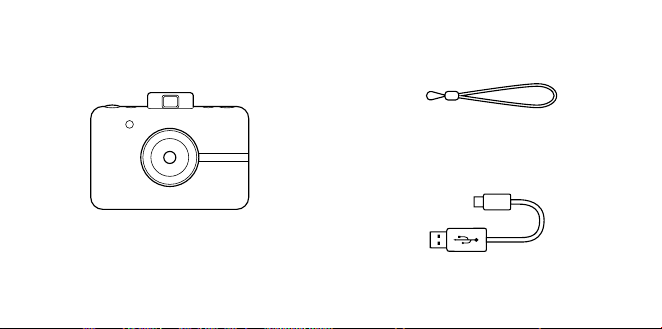
78 | IT IT | 79
CONTENUTO DELLA CONFEZIONE
Camera Strap
Fotocamera digitale a stampa
istantanea
Micro USB Cable
INFORMAZIONI SUL PRODOTTO
Slot di stampa
Lenti con tappo
magnetico
Flash
Mirino a
comparsa
Connettore per
treppiede
Altoparlante
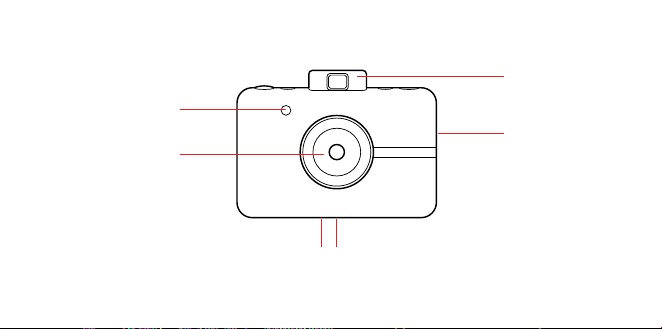
78 | IT IT | 79
CONTENUTO DELLA CONFEZIONE
Camera Strap
Fotocamera digitale a stampa
istantanea
Micro USB Cable
INFORMAZIONI SUL PRODOTTO
Slot di stampa
Lenti con tappo
magnetico
Flash
Mirino a
comparsa
Connettore per
treppiede
Altoparlante
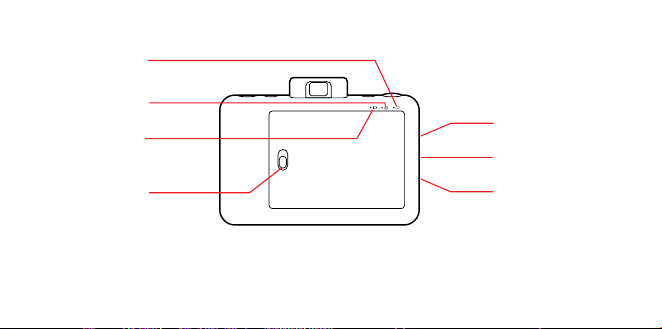
80 | IT IT | 81
Selettore bordo
Selettore della
modalità colore
Mirino a
comparsa
Pulsante
d’otturazione
Autoscatto/
Pulsante di
accensione
Slot per scheda
microSD™
Cinghia da polso di
sicurezza
Connettore micro
USB
LED di stato della
batteria
LED di stato della
carta
LED di stato
della scheda
microSD™
Serratura
d’ingresso della
carta
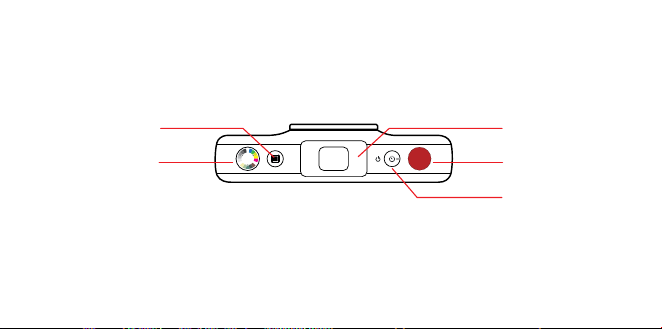
80 | IT IT | 81
Selettore bordo
Selettore della
modalità colore
Mirino a
comparsa
Pulsante
d’otturazione
Autoscatto/
Pulsante di
accensione
Slot per scheda
microSD™
Cinghia da polso di
sicurezza
Connettore micro
USB
LED di stato della
batteria
LED di stato della
carta
LED di stato
della scheda
microSD™
Serratura
d’ingresso della
carta

82 | IT IT | 83
Accensione
Pour allumer votre appareil photo, appuyez
sur le bouton retardateur / alimentation. Il
tuo mirino si aprirà e la tua fotocamera si
accenderà.
Spegnimento
Spingi delicatamente il mirino nella posizione
chiusa. La tua fotocamera è ora spenta.
Aggiornamento firmware
Per i migliori risultati, aggiorna il firmware
della fotocamera prima di iniziare a scattare
e stampare foto. Vai su kodakphotoplus.
com/pages/kodak-step-instant-print-
digital-camera-support per eseguire questo
aggiornamento semplice e veloce.È richiesta
una scheda microSD™.
Scattare foto
Il tappo per le lenti è rimosso? Bene! Premi e
rilascia il pulsante d’otturazione e voila!
UTILIZZO DELLA TUA FOTOCAMERA La tua fotocamera farà il flash e l’auto focus in
automatico per ogni foto. Un tappo per lenti è
stato incluso per mantenere le tue lenti pulite e
senza grai. Non dimenticare di usarlo!
Come stampare
Quando la carta fotografica è caricata, la
fotocamera stampa istantaneamente per
te tutte le foto. Puoi scattare fino a tre foto
mentre la fotocamera sta stampando. Dopo
tre immagini, la tua fotocamera non scatterà
ulteriori foto fino a che la stampa non sarà
terminata.
Ristampare
– Per ristampare l’ultima foto scattata, premi e
mantieni premuto sia il pulsante
d’otturazione che il selettore della modalità
colore per tre secondi. Sentirai un beep ed il
LED lampeggerà in bianco, quindi avrai una
stampa da condividere.
Carta per foto
Inserire carta per foto
1. Fai scorrere la chiusura sul vassoio porta
carta ed apri la porta.
2. Inserisci l’intero pacchetto di carta
fotografica KODAK ZINK nel vassoio della
carta. Assicurati che il foglio KODAK ZINK di
calibrazione colore sia inserito e caricato
con il codice a barre a faccia in giù. La parte
lucida della carta deve essere rivolta verso l’alto.

82 | IT IT | 83
Accensione
Pour allumer votre appareil photo, appuyez
sur le bouton retardateur / alimentation. Il
tuo mirino si aprirà e la tua fotocamera si
accenderà.
Spegnimento
Spingi delicatamente il mirino nella posizione
chiusa. La tua fotocamera è ora spenta.
Aggiornamento firmware
Per i migliori risultati, aggiorna il firmware
della fotocamera prima di iniziare a scattare
e stampare foto. Vai su kodakphotoplus.
com/pages/kodak-step-instant-print-
digital-camera-support per eseguire questo
aggiornamento semplice e veloce.È richiesta
una scheda microSD™.
Scattare foto
Il tappo per le lenti è rimosso? Bene! Premi e
rilascia il pulsante d’otturazione e voila!
UTILIZZO DELLA TUA FOTOCAMERA La tua fotocamera farà il flash e l’auto focus in
automatico per ogni foto. Un tappo per lenti è
stato incluso per mantenere le tue lenti pulite e
senza grai. Non dimenticare di usarlo!
Come stampare
Quando la carta fotografica è caricata, la
fotocamera stampa istantaneamente per
te tutte le foto. Puoi scattare fino a tre foto
mentre la fotocamera sta stampando. Dopo
tre immagini, la tua fotocamera non scatterà
ulteriori foto fino a che la stampa non sarà
terminata.
Ristampare
– Per ristampare l’ultima foto scattata, premi e
mantieni premuto sia il pulsante
d’otturazione che il selettore della modalità
colore per tre secondi. Sentirai un beep ed il
LED lampeggerà in bianco, quindi avrai una
stampa da condividere.
Carta per foto
Inserire carta per foto
1. Fai scorrere la chiusura sul vassoio porta
carta ed apri la porta.
2. Inserisci l’intero pacchetto di carta
fotografica KODAK ZINK nel vassoio della
carta. Assicurati che il foglio KODAK ZINK di
calibrazione colore sia inserito e caricato
con il codice a barre a faccia in giù. La parte
lucida della carta deve essere rivolta verso l’alto.

84 | IT IT | 85
3. Chiudi la porta del vassoio porta carta.
Il foglio KODAK ZINK di calibrazione colore
verrà espulso quando scatti una foto, poi la tua
foto verrà stampata.
Ainché foto brillanti e precise escano asciutte
al tocco e pronte per essere attaccate, dopo
aver rimosso la pellicola adesiva, consigliamo
la carta fotografica KODAK ZINK.
Riempire carta per foto
– Quando viene usato l’ultimo foglio di carta
fotografica, il LED vicino all’icona della carta
sul retro della tua fotocamera diventerà di
colore rosso. Puoi ora caricare in sicurezza
altra carta fotografica nella tua fotocamera.
Cosa fare e non fare con la carta
– Non aggiungere altra carta se lo scomparto
della carta non è completamente vuoto.
– Non riempire lo scomparto della carta con
più di un pacchetto da 10 pezzi di carta
fotografica KODAK ZINK. Inserire più di 10
fogli può danneggiare la stampante.
– Evita accuratamente di piegare la carta
fotografica KODAK ZINK.
– Tieni la carta dai bordi. Evita di toccare la
superficie con le tue dita.
Se la carta si è inceppata, se hai inserito il
tipo sbagliato di carta o se c’è un qualunque
altro errore correlato alla stampa/carta, tutti
gli indicatori lampeggeranno di rosso. Apri
la tua fotocamera e correggi l’errore (rimuovi
l’ingorgo, sostituisci la carta, ecc.), quindi
riavvia la tua fotocamera.
Memoria
La tua fotocamera ha suiciente memoria per
scattare e stampare una immagine da 5MP
alla volta.
Inserimento di una scheda microSD™
La tua fotocamera è dotata di uno slot per
scheda microSD™ per le immagini che
desideri salvare, oltre che stampare. Per
inserire una scheda di memoria, premi
delicatamente la scheda microSD™ dentro lo
slot posto lateralmente sulla tua fotocamera.
Sentirai un leggero clic quando la scheda
si inserisce completamente e il LED di stato
della scheda microSD™ diventerà di colore
bianco. La fotocamera è compatibile con
schedemicroSD™ fino a 32GB.
Rimozione di una scheda microSD™
Premi leggermente la parte superiore della
scheda e la scheda microSD™ verrà fuori.
Tira per rimuoverla completamente dalla tua
fotocamera.

84 | IT IT | 85
3. Chiudi la porta del vassoio porta carta.
Il foglio KODAK ZINK di calibrazione colore
verrà espulso quando scatti una foto, poi la tua
foto verrà stampata.
Ainché foto brillanti e precise escano asciutte
al tocco e pronte per essere attaccate, dopo
aver rimosso la pellicola adesiva, consigliamo
la carta fotografica KODAK ZINK.
Riempire carta per foto
– Quando viene usato l’ultimo foglio di carta
fotografica, il LED vicino all’icona della carta
sul retro della tua fotocamera diventerà di
colore rosso. Puoi ora caricare in sicurezza
altra carta fotografica nella tua fotocamera.
Cosa fare e non fare con la carta
– Non aggiungere altra carta se lo scomparto
della carta non è completamente vuoto.
– Non riempire lo scomparto della carta con
più di un pacchetto da 10 pezzi di carta
fotografica KODAK ZINK. Inserire più di 10
fogli può danneggiare la stampante.
– Evita accuratamente di piegare la carta
fotografica KODAK ZINK.
– Tieni la carta dai bordi. Evita di toccare la
superficie con le tue dita.
Se la carta si è inceppata, se hai inserito il
tipo sbagliato di carta o se c’è un qualunque
altro errore correlato alla stampa/carta, tutti
gli indicatori lampeggeranno di rosso. Apri
la tua fotocamera e correggi l’errore (rimuovi
l’ingorgo, sostituisci la carta, ecc.), quindi
riavvia la tua fotocamera.
Memoria
La tua fotocamera ha suiciente memoria per
scattare e stampare una immagine da 5MP
alla volta.
Inserimento di una scheda microSD™
La tua fotocamera è dotata di uno slot per
scheda microSD™ per le immagini che
desideri salvare, oltre che stampare. Per
inserire una scheda di memoria, premi
delicatamente la scheda microSD™ dentro lo
slot posto lateralmente sulla tua fotocamera.
Sentirai un leggero clic quando la scheda
si inserisce completamente e il LED di stato
della scheda microSD™ diventerà di colore
bianco. La fotocamera è compatibile con
schedemicroSD™ fino a 32GB.
Rimozione di una scheda microSD™
Premi leggermente la parte superiore della
scheda e la scheda microSD™ verrà fuori.
Tira per rimuoverla completamente dalla tua
fotocamera.

86 | IT IT | 87
Indicatore di memoria della scheda
microSD™
Quando la memoria della tua scheda
microSD™ va al di sotto di 1GB, il LED sul retro
della tua fotocamera diventerà di colore rosso.
Quando la memoria raggiunge lo zero, o se
si verifica un errore durante la lettura della
scheda microSD™, Il LED lampeggerà con
colore rosso.
Trasferire file
Via cavo USB
– Usando il cavo micro USB incluso, collega la
tua fotocamera a un computer. Fai doppio
clic sulla scheda microSD™ quando appare
sul desktop del tuo computer per vedere e
salvare le tue immagini su un rullino, o in
qualche altra posizione.
Tramite scheda microSD™
– Rimuovi la scheda microSD™ secondo le
istruzioni date in precedenza, poi inserisci la
scheda nel tuo lettore di schede
Batteria & Caricamento
Quando il livello di batteria scende sotto al
10%, il LED della batteria brillerà in rosso. Al
2% di batteria, la tua fotocamera si spegnerà
automaticamente.
Per caricare la tua fotocamera, puoi collegarla
sia a una presa a muro oppure a un computer,
usando il cavo micro USB incluso. Il LED della
batteria lampeggerà con colore rosso fino a
che la batteria non sarà completamente carica.
Sospensione automatica
Per risparmiare la carica della batteria, la
tua fotocamera entrerà automaticamente
in modalità risparmio dopo alcuni minuti di
inutilizzo. Per riaccendere la tua fotocamera,
chiudi e riapri il mirino.
Autoscatto
La tua fotocamera è dotata di un auto-timer
di dieci secondi. Per impostarlo, premi il
pulsante timer (situato sulla parte superiore
della fotocamera), poi premi il pulsante dello
scatto. Il pulsante timer lampeggerà con colore
bianco mentre il timer esegue il conto alla
rovescia di dieci secondi. Poi, la tua foto verrà
scattata.
Aggiungere eetti
Cornici per foto
– Per aggiungere un bordo alla tua stampa,
premi il pulsante cornice situato sulla parte
superiore della tua fotocamera.
Filtri
– Per dare alla tua stampa un trattamento
seppia o bianco e nero, premi il pulsante
colore (situato sulla parte posteriore della tua
fotocamera) per selezionare la tinta di colore

86 | IT IT | 87
Indicatore di memoria della scheda
microSD™
Quando la memoria della tua scheda
microSD™ va al di sotto di 1GB, il LED sul retro
della tua fotocamera diventerà di colore rosso.
Quando la memoria raggiunge lo zero, o se
si verifica un errore durante la lettura della
scheda microSD™, Il LED lampeggerà con
colore rosso.
Trasferire file
Via cavo USB
– Usando il cavo micro USB incluso, collega la
tua fotocamera a un computer. Fai doppio
clic sulla scheda microSD™ quando appare
sul desktop del tuo computer per vedere e
salvare le tue immagini su un rullino, o in
qualche altra posizione.
Tramite scheda microSD™
– Rimuovi la scheda microSD™ secondo le
istruzioni date in precedenza, poi inserisci la
scheda nel tuo lettore di schede
Batteria & Caricamento
Quando il livello di batteria scende sotto al
10%, il LED della batteria brillerà in rosso. Al
2% di batteria, la tua fotocamera si spegnerà
automaticamente.
Per caricare la tua fotocamera, puoi collegarla
sia a una presa a muro oppure a un computer,
usando il cavo micro USB incluso. Il LED della
batteria lampeggerà con colore rosso fino a
che la batteria non sarà completamente carica.
Sospensione automatica
Per risparmiare la carica della batteria, la
tua fotocamera entrerà automaticamente
in modalità risparmio dopo alcuni minuti di
inutilizzo. Per riaccendere la tua fotocamera,
chiudi e riapri il mirino.
Autoscatto
La tua fotocamera è dotata di un auto-timer
di dieci secondi. Per impostarlo, premi il
pulsante timer (situato sulla parte superiore
della fotocamera), poi premi il pulsante dello
scatto. Il pulsante timer lampeggerà con colore
bianco mentre il timer esegue il conto alla
rovescia di dieci secondi. Poi, la tua foto verrà
scattata.
Aggiungere eetti
Cornici per foto
– Per aggiungere un bordo alla tua stampa,
premi il pulsante cornice situato sulla parte
superiore della tua fotocamera.
Filtri
– Per dare alla tua stampa un trattamento
seppia o bianco e nero, premi il pulsante
colore (situato sulla parte posteriore della tua
fotocamera) per selezionare la tinta di colore

88 | IT IT | 89
per la tua prossima stampa.
Cabina fotografica
– Per scattare foto con un eetto da cabina,
premi e mantieni il pulsante d’otturazione
per tre secondi. Il pulsante del timer
lampeggerà e la fotocamera scatterà
quattro foto di fila, scattandone una ogni
quattro secondi. Le foto verranno stampate
su un foglio solo con queste quattro
immagini consecutive.
Note sull’uso della batteria
Leggi con attenzione e segui le istruzioni di
sicurezza e le note descritte qui sotto:
– Usa solo la batteria non rimovibile inclusa
(7,4V).
– Evita ambienti estremamente freddi, in
quanto le temperature basse potrebbero
abbassare la durata di vita della batteria e
ridurre le prestazioni della fotocamera.
– Quando stai usando una KODAK STEP che
non è stata usata per un periodo prolungato
di tempo, la durata della batteria potrebbe
essere compromessa così come il numero
delle immagini che possono essere scattate.
Per massimizzare le prestazioni e la durata
della batteria, consigliamo di caricare e
scaricare la batteria per almeno un ciclo
completo prima dell’utilizzo.
– Quando getti la fotocamera, getta la batteria
in maniera appropriata.
– Non smontare mai la fotocamera né
rimuovere la batteria. La batteria non è
progettata per essere rimossa dalla
fotocamera, né per essere caricata in
maniera separata dalla fotocamera.
Uso prolungato
Durante l’utilizzo esteso, la tua fotocamera
KODAK STEP potrebbe risultare calda al tocco.
Questo è un normale comportamento legato
all’operatività e non indica nessun difetto di
prodotto o motivo per rallentare il divertimento.
Ecco tutto!

88 | IT IT | 89
per la tua prossima stampa.
Cabina fotografica
– Per scattare foto con un eetto da cabina,
premi e mantieni il pulsante d’otturazione
per tre secondi. Il pulsante del timer
lampeggerà e la fotocamera scatterà
quattro foto di fila, scattandone una ogni
quattro secondi. Le foto verranno stampate
su un foglio solo con queste quattro
immagini consecutive.
Note sull’uso della batteria
Leggi con attenzione e segui le istruzioni di
sicurezza e le note descritte qui sotto:
– Usa solo la batteria non rimovibile inclusa
(7,4V).
– Evita ambienti estremamente freddi, in
quanto le temperature basse potrebbero
abbassare la durata di vita della batteria e
ridurre le prestazioni della fotocamera.
– Quando stai usando una KODAK STEP che
non è stata usata per un periodo prolungato
di tempo, la durata della batteria potrebbe
essere compromessa così come il numero
delle immagini che possono essere scattate.
Per massimizzare le prestazioni e la durata
della batteria, consigliamo di caricare e
scaricare la batteria per almeno un ciclo
completo prima dell’utilizzo.
– Quando getti la fotocamera, getta la batteria
in maniera appropriata.
– Non smontare mai la fotocamera né
rimuovere la batteria. La batteria non è
progettata per essere rimossa dalla
fotocamera, né per essere caricata in
maniera separata dalla fotocamera.
Uso prolungato
Durante l’utilizzo esteso, la tua fotocamera
KODAK STEP potrebbe risultare calda al tocco.
Questo è un normale comportamento legato
all’operatività e non indica nessun difetto di
prodotto o motivo per rallentare il divertimento.
Ecco tutto!

90 | IT IT | 91
INFORMAZIONI DI CONTATTO
DEL SERVIZIO CLIENTI
In caso di problemi con il prodotto, si prega
di contattarci prima di restituire l’articolo
al luogo di acquisto. SIAMO QUI PER
AIUTARE!
Supporto USA:
kodak@camarketing.com
844-516-1539
Supporto internazionale:
kodakintl@camarketing.com
844-516-1540
INFORMAZIONI SULLA
GARANZIA
GARANZIA LIMITATA SULLA FOTOCAMERA DIGITALE
A STAMPA ISTANTANEA KODAK STEP
QUESTA GARANZIA LIMITATA CONFERISCE
ALL’UTENTE DIRITTI LEGITTIMI E SPECIALI, OLTRE AI
DIRITTI CHE POSSONO ESSERE RICONOSCIUTI A
SECONDA DELLO STATO.
NOI GARANTIAMO CHE, NEL CORSO DEL PERIODO
DI GARANZIA, IL PRODOTTO NON PRESENTERÀ
DIFETTI DI FABBRICAZIONE O NEI MATERIALI.
LIMITAZIONE DELLA RESPONSABILITÀ
NELLA MISURA NON VIETATA DALLA LEGGE,
QUESTA GARANZIA È DA INTENDERSI ESCLUSIVA
E SOSTITUTIVA DI TUTTE LE ALTRE GARANZIE,
SIANO ESSE VERBALI, SCRITTE, OBBLIGATORIE,
ESPRESSE O IMPLICITE, FATTE SALVE LE
GARANZIE ESPRESSE CONTEMPLATE IN QUESTA
DICHIARAZIONE DI GARANZIA LIMITATA. NELLA
MISURA NON VIETATA DALLA LEGGE, NOI NON
RICONOSCIAMO TUTTE LE ALTRE GARANZIE,
SIANO ESSE ESPRESSE O IMPLICITE, OBBLIGATORIE
O ALTRO, INCLUSE, SENZA LIMITAZIONI, LE
GARANZIE DI COMMERCIABILITÀ E ADEGUATEZZA
A PARTICOLARI FINALITÀ. ALCUNI STATI NON
AMMETTONO IL DISCONOSCIMENTO DI GARANZIE
IMPLICITE, PERTANTO QUESTO DOCUMENTO
POTREBBE NON ESSERE APPLICABILE A OGNI
UTENTE. NELLA MISURA IN CUI TALI GARANZIE NON
POSSONO ESSERE DISCONOSCIUTE IN VIRTÙ DI
LEGGI VIGENTI NELLA SUA GIURISDIZIONE, NOI
LIMITIAMO LA VALIDITÀ E I RIMEDI SANCITI DALLE
STESSE ALLA VALIDITÀ DI QUESTA GARANZIA
ESPRESSA E LIMITATA.
LA NOSTRA RESPONSABILITÀ IN MERITO
A PRODOTTI DIFETTOSI È LIMITATA ALLA
RIPARAZIONE, SOSTITUIZIONE O AL RIMBORSO,
NELLE MODALITÀ DESCRITTE A PIÈ DI PAGINA DI
QUESTA DICHIARAZIONE DI GARANZIA.
CHI PUÒ RICORRERE A QUESTA GARANZIA? C&A
Marketing, Inc. domiciliata in 114 Tived Lane East,
Edison, NJ (in prosieguo la “Società”) estende questa
garanzia limitata solo al cliente che ha eettivamente
acquistato il prodotto (in prosieguo il “Cliente”).
Questa garanzia non
viene estesa ai proprietari successivi o agli altri
destinatari del prodotto.
COSA COPRE QUESTA GARANZIA? Questa
garanzia limitata copre i difetti nei materiali e di
fabbricazione della fotocamera digitale a stampa
istantanea KODAK STEP (il “prodotto”) per il periodo di

90 | IT IT | 91
INFORMAZIONI DI CONTATTO
DEL SERVIZIO CLIENTI
In caso di problemi con il prodotto, si prega
di contattarci prima di restituire l’articolo
al luogo di acquisto. SIAMO QUI PER
AIUTARE!
Supporto USA:
kodak@camarketing.com
844-516-1539
Supporto internazionale:
kodakintl@camarketing.com
844-516-1540
INFORMAZIONI SULLA
GARANZIA
GARANZIA LIMITATA SULLA FOTOCAMERA DIGITALE
A STAMPA ISTANTANEA KODAK STEP
QUESTA GARANZIA LIMITATA CONFERISCE
ALL’UTENTE DIRITTI LEGITTIMI E SPECIALI, OLTRE AI
DIRITTI CHE POSSONO ESSERE RICONOSCIUTI A
SECONDA DELLO STATO.
NOI GARANTIAMO CHE, NEL CORSO DEL PERIODO
DI GARANZIA, IL PRODOTTO NON PRESENTERÀ
DIFETTI DI FABBRICAZIONE O NEI MATERIALI.
LIMITAZIONE DELLA RESPONSABILITÀ
NELLA MISURA NON VIETATA DALLA LEGGE,
QUESTA GARANZIA È DA INTENDERSI ESCLUSIVA
E SOSTITUTIVA DI TUTTE LE ALTRE GARANZIE,
SIANO ESSE VERBALI, SCRITTE, OBBLIGATORIE,
ESPRESSE O IMPLICITE, FATTE SALVE LE
GARANZIE ESPRESSE CONTEMPLATE IN QUESTA
DICHIARAZIONE DI GARANZIA LIMITATA. NELLA
MISURA NON VIETATA DALLA LEGGE, NOI NON
RICONOSCIAMO TUTTE LE ALTRE GARANZIE,
SIANO ESSE ESPRESSE O IMPLICITE, OBBLIGATORIE
O ALTRO, INCLUSE, SENZA LIMITAZIONI, LE
GARANZIE DI COMMERCIABILITÀ E ADEGUATEZZA
A PARTICOLARI FINALITÀ. ALCUNI STATI NON
AMMETTONO IL DISCONOSCIMENTO DI GARANZIE
IMPLICITE, PERTANTO QUESTO DOCUMENTO
POTREBBE NON ESSERE APPLICABILE A OGNI
UTENTE. NELLA MISURA IN CUI TALI GARANZIE NON
POSSONO ESSERE DISCONOSCIUTE IN VIRTÙ DI
LEGGI VIGENTI NELLA SUA GIURISDIZIONE, NOI
LIMITIAMO LA VALIDITÀ E I RIMEDI SANCITI DALLE
STESSE ALLA VALIDITÀ DI QUESTA GARANZIA
ESPRESSA E LIMITATA.
LA NOSTRA RESPONSABILITÀ IN MERITO
A PRODOTTI DIFETTOSI È LIMITATA ALLA
RIPARAZIONE, SOSTITUIZIONE O AL RIMBORSO,
NELLE MODALITÀ DESCRITTE A PIÈ DI PAGINA DI
QUESTA DICHIARAZIONE DI GARANZIA.
CHI PUÒ RICORRERE A QUESTA GARANZIA? C&A
Marketing, Inc. domiciliata in 114 Tived Lane East,
Edison, NJ (in prosieguo la “Società”) estende questa
garanzia limitata solo al cliente che ha eettivamente
acquistato il prodotto (in prosieguo il “Cliente”).
Questa garanzia non
viene estesa ai proprietari successivi o agli altri
destinatari del prodotto.
COSA COPRE QUESTA GARANZIA? Questa
garanzia limitata copre i difetti nei materiali e di
fabbricazione della fotocamera digitale a stampa
istantanea KODAK STEP (il “prodotto”) per il periodo di

92 | IT IT | 93
garanzia come descritto sotto.
COSA NON COPRE QUESTA GARANZIA? Questa
garanzia limitata non copre danni dovuti a: (a)
trasporto; (b) stivaggio/ immagazzinamento; (c) uso
improprio; (d) mancato rispetto delle istruzioni del
prodotto o mancata manutenzione preventiva; (e)
modifiche; (f) riparazioni non autorizzate; (g) normale
usura; (h) cause esterne, come incidenti, abusi o
altre azioni o eventi al di fuori del nostro ragionevole
controllo.
QUAL È IL PERIODO DI COPERTURA? La validità di
questa garanzia limitata decorre dalla data di acquisto
e ha la durata di un anno (in prosieguo “Periodo di
garanzia”). Il Periodo di garanzia non viene prorogato
a seguito di interventi di riparazione o sostituzione del
prodotto. Noi ci riserviamo la facoltà di modificare
la disponibilità di questa garanzia limitata a nostra
discrezione; le modifiche non avranno eetto
retroattivo.
QUALI SONO I RIMEDI PREVISTI DA QUESTA
GARANZIA? Relativamente ai prodotti che
presentino difetti nel corso del Periodo di garanzia,
a nostra esclusiva discrezione provvederemo a: (a)
riparare o sostituire il prodotto difettoso (o la parte
difettosa) gratuitamente; (b) rimborsare il prezzo di
acquisto del prodotto difettoso, nel caso non fosse
possibile sostituirlo con un altro.
COME È POSSIBILE OTTENERE INTERVENTI IN
GARANZIA? Per ottenere interventi in garanzia, è
necessario contattarci telefonicamente al numero
844-516-1539 o via email all’indirizzo kodak@
camarketing.com durante il Periodo di garanzia, e
richiedere il numero di autorizzazione alla restituzione
della merce (ossia il numero “DMA”). In assenza di
un numero DMA non verrà erogato alcun servizio di
garanzia e le spese di restituzione saranno a carico del
Cliente, ossia dell’acquirente. La Società si farà carico
delle spese di spedizione dei prodotti sostitutivi.
kodakphotoplus.com
Il marchio, il logo e il vestito commerciale Kodak
sono utilizzati su licenza di Eastman Kodak
Company.
ZINK, ZERO INK, e i marchi commerciali ZINK sono di
proprietà di ZINK Holdings LLC.
Android è un marchio di Google LLC.
IOS è un marchio di Cisco negli Stati Uniti e in altri
paesi e viene utilizzato su licenza.
Bluetooth è un marchio di Bluetooth SIG, Inc. USA.
MicroSD è un marchio o marchio registrato di SD-3C
LLC negli Stati Uniti, in altri Paesi o in entrambi.
Tutti gli altri prodotti, nomi di marchi, nomi di società
e loghi sono marchi dei rispettivi proprietari, utilizzati
solo per identificare i loro rispettivi prodotti e non
intendono connotare alcuna sponsorizzazione,
approvazione o approvazione.
Distribuito da: C&A Marketing, Inc., 114 Tived Lane
East, Edison, NJ 08837, USA
C&A Marketing UK LTD, 167 Hermitage Road,
Crusader Industrial Estate, London N4 1LZ, UK
©2020. Tutti i diritti riservati.
PRODOTTO IN VIETNAM

92 | IT IT | 93
garanzia come descritto sotto.
COSA NON COPRE QUESTA GARANZIA? Questa
garanzia limitata non copre danni dovuti a: (a)
trasporto; (b) stivaggio/ immagazzinamento; (c) uso
improprio; (d) mancato rispetto delle istruzioni del
prodotto o mancata manutenzione preventiva; (e)
modifiche; (f) riparazioni non autorizzate; (g) normale
usura; (h) cause esterne, come incidenti, abusi o
altre azioni o eventi al di fuori del nostro ragionevole
controllo.
QUAL È IL PERIODO DI COPERTURA? La validità di
questa garanzia limitata decorre dalla data di acquisto
e ha la durata di un anno (in prosieguo “Periodo di
garanzia”). Il Periodo di garanzia non viene prorogato
a seguito di interventi di riparazione o sostituzione del
prodotto. Noi ci riserviamo la facoltà di modificare
la disponibilità di questa garanzia limitata a nostra
discrezione; le modifiche non avranno eetto
retroattivo.
QUALI SONO I RIMEDI PREVISTI DA QUESTA
GARANZIA? Relativamente ai prodotti che
presentino difetti nel corso del Periodo di garanzia,
a nostra esclusiva discrezione provvederemo a: (a)
riparare o sostituire il prodotto difettoso (o la parte
difettosa) gratuitamente; (b) rimborsare il prezzo di
acquisto del prodotto difettoso, nel caso non fosse
possibile sostituirlo con un altro.
COME È POSSIBILE OTTENERE INTERVENTI IN
GARANZIA? Per ottenere interventi in garanzia, è
necessario contattarci telefonicamente al numero
844-516-1539 o via email all’indirizzo kodak@
camarketing.com durante il Periodo di garanzia, e
richiedere il numero di autorizzazione alla restituzione
della merce (ossia il numero “DMA”). In assenza di
un numero DMA non verrà erogato alcun servizio di
garanzia e le spese di restituzione saranno a carico del
Cliente, ossia dell’acquirente. La Società si farà carico
delle spese di spedizione dei prodotti sostitutivi.
kodakphotoplus.com
Il marchio, il logo e il vestito commerciale Kodak
sono utilizzati su licenza di Eastman Kodak
Company.
ZINK, ZERO INK, e i marchi commerciali ZINK sono di
proprietà di ZINK Holdings LLC.
Android è un marchio di Google LLC.
IOS è un marchio di Cisco negli Stati Uniti e in altri
paesi e viene utilizzato su licenza.
Bluetooth è un marchio di Bluetooth SIG, Inc. USA.
MicroSD è un marchio o marchio registrato di SD-3C
LLC negli Stati Uniti, in altri Paesi o in entrambi.
Tutti gli altri prodotti, nomi di marchi, nomi di società
e loghi sono marchi dei rispettivi proprietari, utilizzati
solo per identificare i loro rispettivi prodotti e non
intendono connotare alcuna sponsorizzazione,
approvazione o approvazione.
Distribuito da: C&A Marketing, Inc., 114 Tived Lane
East, Edison, NJ 08837, USA
C&A Marketing UK LTD, 167 Hermitage Road,
Crusader Industrial Estate, London N4 1LZ, UK
©2020. Tutti i diritti riservati.
PRODOTTO IN VIETNAM
94 | IT IT | 95
SPECIFICATIONS ESPECIFICACIONES SPÉCIFICATIONSTECHNISCHE DATEN SPECIFICHE
NOTE: all specifications are subject to change
without notice
NOTA: Todas las especificaciones están sujetas a
cambios sin previo aviso
HINWEIS: Alle Spezifikationen können ohne
Vorankündigung geändert werden.
NOTE : toutes les caractéristiques sont sujettes à
changement sans préavis
NOTA: tutte le specifiche sono suscettibili di
modifiche senza alcun preavviso
Paper 2″ x 3″ (50 x 76 mm) ZINK
Photo Paper
Power Source Internal Rechargeable
Battery
Battery 700 mAh/7.4 V (Li-
Polymer)
Operating
Temperature (Printing)
41° ~ 104°F(5°~40°C)
Operating Humidity <70% RH
Recommended
Operating and
Charging Temperature
59°~90°F (15°~32°C)
Recommended
Operating Humidity
40~55% RH
LED Indicator Printer Status/ SD Slot/
Color Select/ Frame
Select/ Timer/ Battery &
Charging Status
Dimension 4.8″ W x 3.1″ H x 1.2″ D
(122 x 78 x 29.85 mm)
Weight 7.53 oz (213.5 g)
Papel 50 x 76 (mm) papel ZINK
Alimentación Batería recargable interna
Batería 700 mAh/7.4 V (polímero
de litio)
Temperatura de
funcionamiento
(impresión)
41 °F~104 °F (5°~40 °C)
Humedad de
funcionamiento
<70 % RH
Temperatura de
funcionamiento y carga
recomendada
59 °F~90 °F (15 °C~32 °C)
Humedad de
funcionamiento
recomendada
40~55 % RH
Indicador LED Estado de impresora/
Ranura SD/ Selección
de color/ Selección de
fotograma/ Temporizador/
Estado de batería y carga
Tamaño 122 (ancho) x 78 (alto) x
29.85 (largo) mm
Peso 7.53 oz (213.5 g)
Papier 50 x 76 mm papier de ZINK
Source d’alimentation Batterie interne rechargeable
Batterie 500 mAh / 7,4 V (Li-Polymer)
Température de
fonctionnement
(impression)
5~40 °C (41~104 °F)
Taux d’humidité de
fonctionnement
< 70 % RH
Température de charge
et de fonctionnement
recommandées
15~32 °C (59~90 °F)
Taux d’humidité de
fonctionnement
recommandé
40~55 % RH
Voyant LED État de l’imprimante / Fente carte
SD / Sélection de la couleur /
Sélection du cadre / Retardateur /
Batterie et chargement
Dimensions 122 x 78 x 29.85 mm
Poids 213,5 g
Papier 50 x 76 mm Zinkpapier
Stromquelle Interne wiederaufladbare
Batterie
Batterie 700 mAh/7,4V (Li-
Polymer)
Betriebstemperatur
(Druck)
41° ~ 104° F (5°~40° C)
Betriebs-
Luftfeuchtigkeit
< 70 %RF
Empfohlene Betriebs-
und
Aufladetemperatur
59°~90° F (15°~32° C)
Empfohlene
Betriebsluftfeuchtigkeit
40~55 %RF
LED-Anzeige Druckerstatus/ SD-
Steckplatz/Farbauswahl/
Rahmenauswahl / Timer/
Batterie- und Ladestatus
Abmesseungen 122 (B) x 78 (H) x 29,85
(T) mm
Gewicht 213.5 g
Carta 50 x 76 (mm) carta ZINK
Alimentazione Batteria interna ricaricabile
Batteria 700mAh/7,4V (litio-polimero)
Temperatura di
funzionamento
(stampa)
41° ~ 104°F (5°~40°C)
Umidità di
funzionamento
<70%RH
Funzionamento
consigliato e
temperatura di carica
59°~90°F (15°~32°C)
Umidità di
funzionamento
consigliata
40~55%RH
Indicazione LED Stato della stampante/ Slot SD /
Selezione colore /
Selezione cornice / Timer/ Stato
della batteria e della carica
Dimensione 122 (L) x 78 (H) x 29,85 (P) mm
Peso 7,53 oz (213,5 g)
94 | IT IT | 95
SPECIFICATIONS ESPECIFICACIONES SPÉCIFICATIONSTECHNISCHE DATEN SPECIFICHE
NOTE: all specifications are subject to change
without notice
NOTA: Todas las especificaciones están sujetas a
cambios sin previo aviso
HINWEIS: Alle Spezifikationen können ohne
Vorankündigung geändert werden.
NOTE : toutes les caractéristiques sont sujettes à
changement sans préavis
NOTA: tutte le specifiche sono suscettibili di
modifiche senza alcun preavviso
Paper 2″ x 3″ (50 x 76 mm) ZINK
Photo Paper
Power Source Internal Rechargeable
Battery
Battery 700 mAh/7.4 V (Li-
Polymer)
Operating
Temperature (Printing)
41° ~ 104°F(5°~40°C)
Operating Humidity <70% RH
Recommended
Operating and
Charging Temperature
59°~90°F (15°~32°C)
Recommended
Operating Humidity
40~55% RH
LED Indicator Printer Status/ SD Slot/
Color Select/ Frame
Select/ Timer/ Battery &
Charging Status
Dimension 4.8″ W x 3.1″ H x 1.2″ D
(122 x 78 x 29.85 mm)
Weight 7.53 oz (213.5 g)
Papel 50 x 76 (mm) papel ZINK
Alimentación Batería recargable interna
Batería 700 mAh/7.4 V (polímero
de litio)
Temperatura de
funcionamiento
(impresión)
41 °F~104 °F (5°~40 °C)
Humedad de
funcionamiento
<70 % RH
Temperatura de
funcionamiento y carga
recomendada
59 °F~90 °F (15 °C~32 °C)
Humedad de
funcionamiento
recomendada
40~55 % RH
Indicador LED Estado de impresora/
Ranura SD/ Selección
de color/ Selección de
fotograma/ Temporizador/
Estado de batería y carga
Tamaño 122 (ancho) x 78 (alto) x
29.85 (largo) mm
Peso 7.53 oz (213.5 g)
Papier 50 x 76 mm papier de ZINK
Source d’alimentation Batterie interne rechargeable
Batterie 500 mAh / 7,4 V (Li-Polymer)
Température de
fonctionnement
(impression)
5~40 °C (41~104 °F)
Taux d’humidité de
fonctionnement
< 70 % RH
Température de charge
et de fonctionnement
recommandées
15~32 °C (59~90 °F)
Taux d’humidité de
fonctionnement
recommandé
40~55 % RH
Voyant LED État de l’imprimante / Fente carte
SD / Sélection de la couleur /
Sélection du cadre / Retardateur /
Batterie et chargement
Dimensions 122 x 78 x 29.85 mm
Poids 213,5 g
Papier 50 x 76 mm Zinkpapier
Stromquelle Interne wiederaufladbare
Batterie
Batterie 700 mAh/7,4V (Li-
Polymer)
Betriebstemperatur
(Druck)
41° ~ 104° F (5°~40° C)
Betriebs-
Luftfeuchtigkeit
< 70 %RF
Empfohlene Betriebs-
und
Aufladetemperatur
59°~90° F (15°~32° C)
Empfohlene
Betriebsluftfeuchtigkeit
40~55 %RF
LED-Anzeige Druckerstatus/ SD-
Steckplatz/Farbauswahl/
Rahmenauswahl / Timer/
Batterie- und Ladestatus
Abmesseungen 122 (B) x 78 (H) x 29,85
(T) mm
Gewicht 213.5 g
Carta 50 x 76 (mm) carta ZINK
Alimentazione Batteria interna ricaricabile
Batteria 700mAh/7,4V (litio-polimero)
Temperatura di
funzionamento
(stampa)
41° ~ 104°F (5°~40°C)
Umidità di
funzionamento
<70%RH
Funzionamento
consigliato e
temperatura di carica
59°~90°F (15°~32°C)
Umidità di
funzionamento
consigliata
40~55%RH
Indicazione LED Stato della stampante/ Slot SD /
Selezione colore /
Selezione cornice / Timer/ Stato
della batteria e della carica
Dimensione 122 (L) x 78 (H) x 29,85 (P) mm
Peso 7,53 oz (213,5 g)