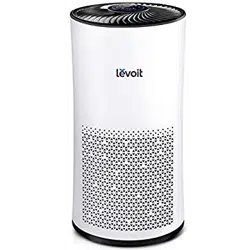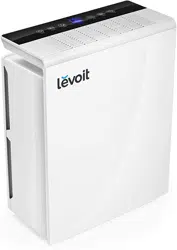

True HEPA Air Purifier
Model: Vista 200
Questions or Concerns?
Please contact us Mon–Fri, 9:00 am–5:00 pm PST/PDT
at [email protected] or at (888) 726-8520.
USER MANUAL

2
Thank you for purchasing the
VISTA 200 TRUE
HEPA AIR PURIFIER
BY LEVOIT.
If you have any questions or concerns, please
reach out to us at [email protected].
We hope you enjoy your new air purifier!
Share the Levoit Love
Find @LevoitLifestyle on social media for
wellness + style inspiration. We make every
space mindful and chic.
@LevoitLifestyle
#LevoitLove • #LevoitLifestyle

3
Table of Contents
Package Contents
Specifications
Safety Information
Getting to Know Your Air Purifier
Controls
Getting Started
Using Your Purifier
About the Filter
Keeping Things Clean
Troubleshooting
Warranty Information
Customer Support
3
3
4
5
6
6
7
8
9
11
13
14
Package Contents
1 x Air Purifier
1 x True HEPA Filter (Pre-Installed)
1 x AC Power Adapter
1 x User Manual
Specifications
Power Supply Input: AC 100–240V,
50/60Hz, 0.5A
Output: DC 12V, 1.5A
Rated Power 15W
Eective Range ≤ 161 ft² / 15 m²
Operating
Conditions
Temperature:
14°F–104°F /
-10°C–40°C
Humidity: < 85% RH
Noise Level 26–52 dB
Standby Power < 0.5W
Dimensions 7.9 x 7.9 x 12.9 in /
20 x 20 x 33 cm
Weight 3.3 lb / 1.5 kg

4
SAFETY INFORMATION
• Only use your air purifier as described in
this manual.
• Do not use without removing the plastic
wrap from the filter. The purifier will not
filter air, and may overheat, causing a fire
hazard.
• Do not use your air purifier outdoors.
• Keep your air purifier away from water,
and wet or damp areas. Never place in
water or liquid.
• Do not use in excessively humid areas.
• Keep your air purifier away from heat
sources.
• Do not use where combustible gases,
vapors, metallic dust, aerosol (spray)
products, or fumes from industrial oil are
present.
• Keep 5 feet away from where oxygen is
being administered.
• Supervise children when they are near
the air purifier.
• Do not place anything into any opening
on the air purifier.
• Do not sit or place heavy objects on the
air purifier.
To reduce the risk of fire, electric shock, or other injury, follow all instructions and
safety guidelines.
General Safety
• Keep air purifier near the outlet it is
plugged into.
• Never place the cord near any heat
source.
• Do not cover the cord with a rug, carpet,
or other covering. Do not place the cord
under furniture or appliances.
• Keep the cord out of areas where people
walk often. Place the cord where it will
not be tripped over.
AC Adapter and Cord
READ AND SAVE THESE
INSTRUCTIONS
• Keep the inside of the air purifier dry. To
prevent moisture buildup, avoid placing
in rooms with major temperature changes
or underneath air conditioners.
• Always unplug your air purifier before
servicing (such as changing the air filter).
• Do not use your air purifier if it is
damaged or not working correctly, or if
the cord or plug is damaged. Do not try
to repair it yourself. Contact Customer
Support (see page 14).
• Not for commercial use. Household use
only.
5
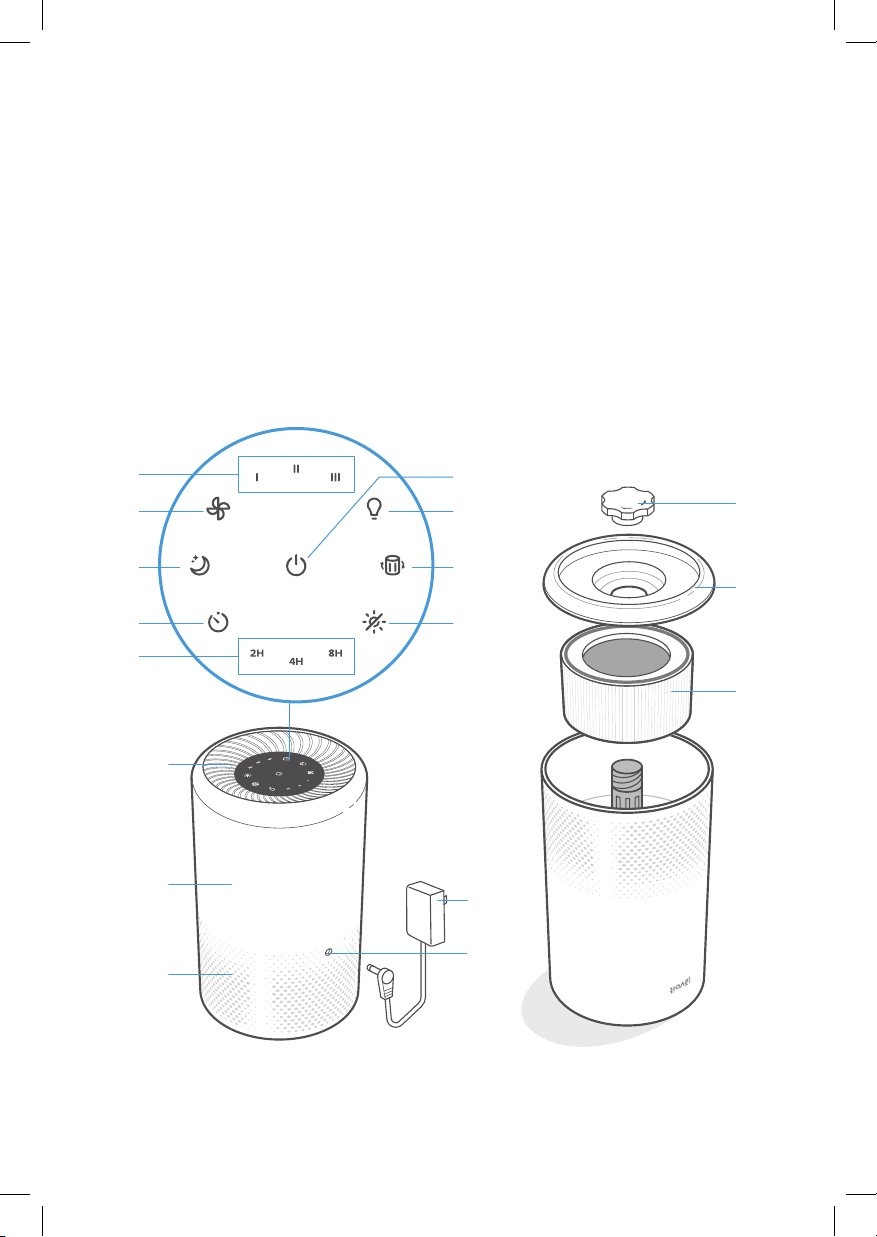
GETTING TO KNOW YOUR AIR PURIFIER
A. Fan Speed Indicators
B. Fan Speed Button
C. Sleep Mode Indicator/Button
D. Timer Button
E. Timer Indicators
F. On/O Button
G. Night Light Button
H. Check Filter Indicator
I. Display O Button
Front, upside downBack
J. Air Outlet
K. Housing
L. Air Inlet
M. AC Power Adapter
N. AC Power Adapter Input
O. Filter Cover Cap
P. Filter Cover
Q. True HEPA Filter
K
J
L
B
C
D
G
H
I
O
P
Q
A
E
F
M
N
6
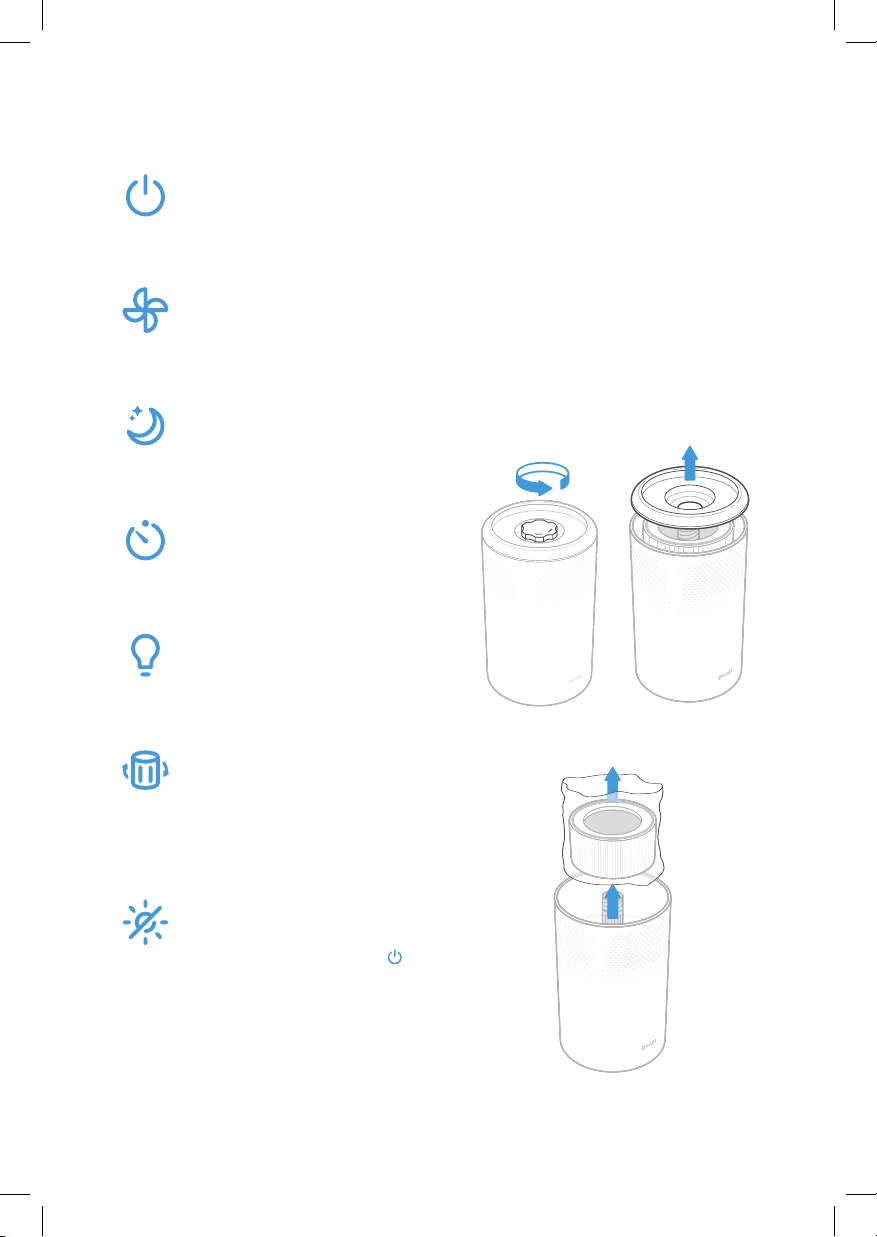
CONTROLS
On/O Button
• Turns the air purifier on/o.
Fan Speed Button
• Cycles through fan speeds:
I (low), II (medium), and III
(high).
Sleep Mode Button
• Turns Sleep Mode on/o
(see page 8).
Timer Button
• Cycles through timer
options (see page 8).
Night Light Button
• Turns the night light on/o
(see page 8).
Check Filter Indicator
• Lights up when the air filter
should be checked (see
Check Filter Indicator,
page 10).
Display O Button
• Turns the display o.
• Tap any button (except
)
to turn the display back on.
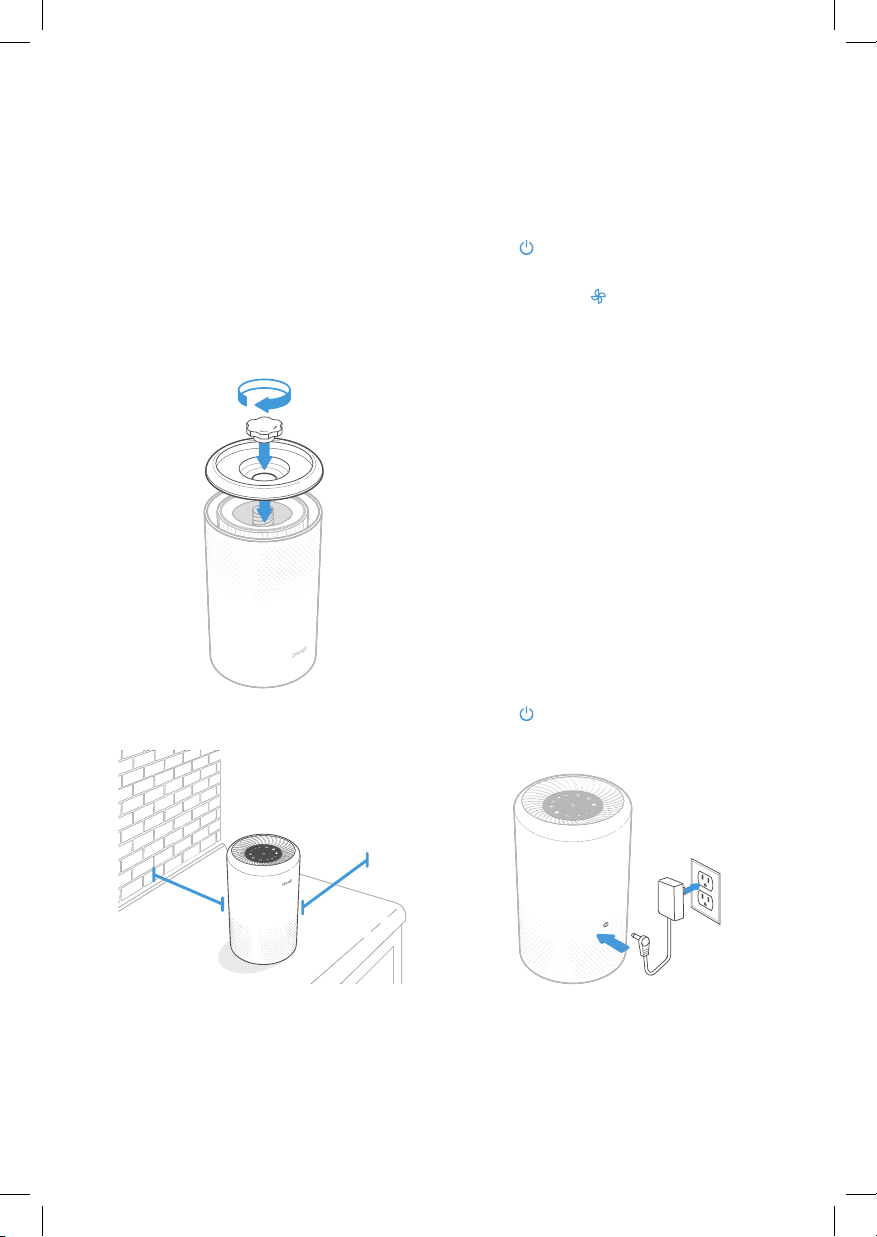
GETTING STARTED
1. Flip over the air purifier. Twist the filter
cover cap counterclockwise to remove it
and set it aside. [Figure 1.1]
2. Lift the filter cover o the purifier.
[Figure 1.2]
3. Remove the filter from its plastic
packaging and place the filter back into
the purifier. [Figure 1.3]
Figure 1.1 Figure 1.2
Figure 1.3
Note: The filter does not have a top or
bottom and can be installed either way.
7
USING YOUR
PURIFIER
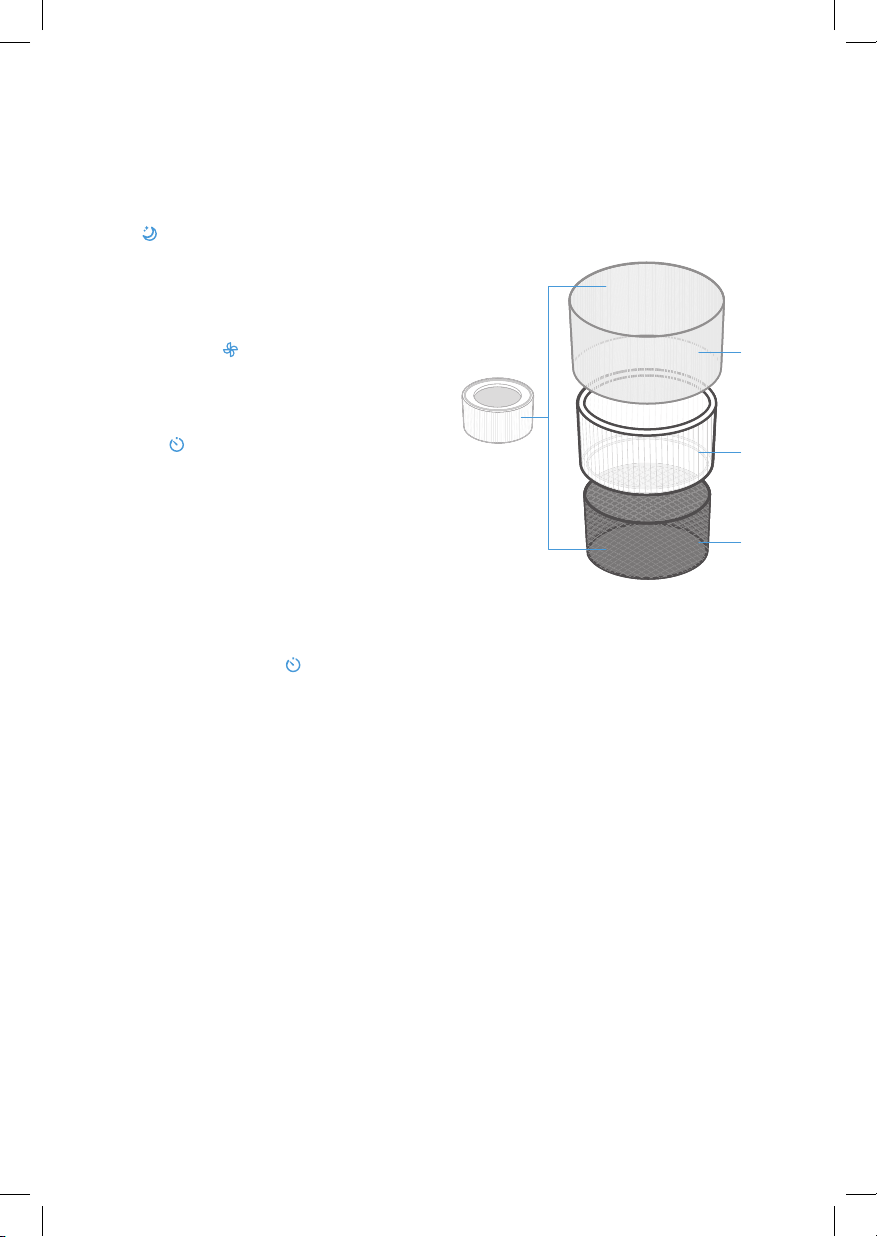
1. Connect the AC power adapter to the air
purifier. Plug into an outlet. [Figure 2.1]
2. Tap
to turn on the purifier. The fan will
start on level I.
3. Optionally, tap
to change fan speed
between I, II, and III.
GETTING STARTED (CONT.)
4. Replace the filter cover and the cap. Twist
the cap clockwise to lock. [Figure 1.4]
5. Place the purifier on a flat, stable surface
with the display facing up. Allow at least
15 in / 38 cm of clearance on all sides of
the purifier. Keep away from anything that
would block air flow, such as curtains.
[Figure 1.5]
Note:
• The indicators are not buttons and
cannot be used to change the fan
speed.
• The fan speed indicators will light up
when activated.
• Fan speed III is the loudest, but cleans
air the quickest.
• For best results, or to address a specific
air quality issue such as smoke, run the
air purifier at maximum speed (level III)
for 15–20 minutes before using a lower
speed.
• To eectively clean air, keep windows
and doors closed while the air purifier
is on.
4. Tap to turn o the air purifier.
Figure 2.1
Figure 1.4
Figure 1.5
15 in /
38 cm
15 in /
38 cm
Memory Function
When the air purifier is plugged in, it will
remember its previous fan speed setting.
8
Sleep Mode
Sleep Mode operates quietly by using the
lowest possible fan speed.
Tap
to turn Sleep Mode on/o.
Timer
You can set a timer for 2, 4, or 8 hours.
1. Tap
repeatedly to select a time.
USING YOUR PURIFIER (CONT.)
Night Light
Use 1 of 2 brightness levels.
1. Tap once to turn on the light.
2. Tap a second time to dim the brightness
to half.
3. Tap a third time to turn o the light.
Note:
• You can change the fan speed at any
time while the timer is on.
• The timer will restart if it is changed.
Note:
• The night light can be used any time the air
purifier is plugged in, even if it is not on.
• The night light will remain on, even if you
turn the display o.
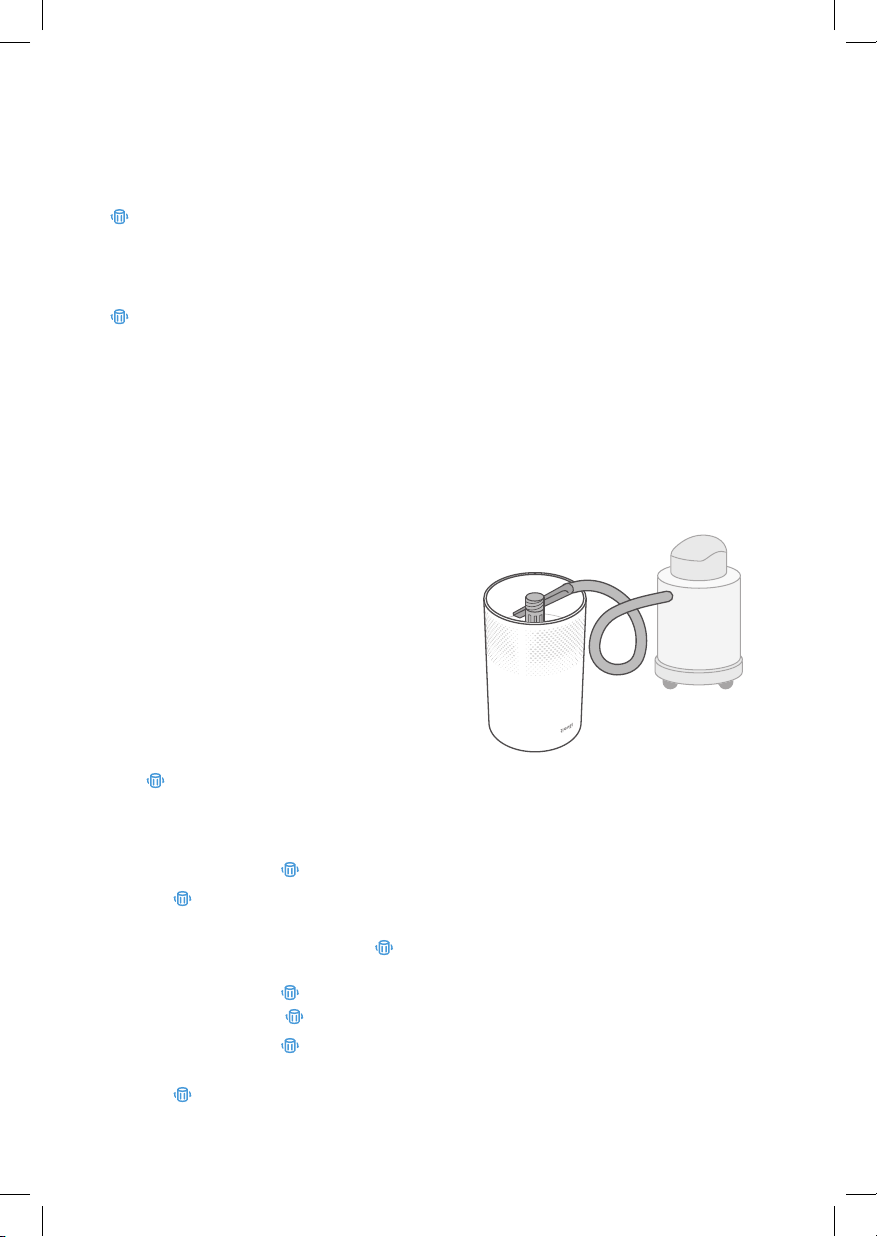
ABOUT THE FILTER
The air purifier uses a 3-stage filtration
system to purify air.
A. Nylon Pre-Filter
• Captures large particles such as dust,
lint, fibers, hair, and pet fur.
• Maximizes the filter’s life.
B. True HEPA Filter
• Removes at least 99.97% of airborne
particles 0.3 micrometers (µm) in
diameter.
• Filters small particles such as smoke,
tiny dust particles, mold spores,
bacteria, viruses, and allergens such
as pollen, dander, and mites.
C. High-Eciency Activated Carbon Filter
• Physically absorbs unwanted odors
and fumes.
• Filters compounds such as
formaldehyde, benzene, ammonia,
hydrogen sulfide, and volatile organic
compounds (VOCs).
A
B
C
2. The air purifier will automatically power
o once the timer is finished.
3. To cancel a timer, tap
until all timer
indicators are o.
Note:
• The indicators are not buttons and
cannot be used to select a time.
• The timer indicators will light up blue
when activated.
Note:
• All indicators lower their brightness by
⅓ when Sleep Mode is on.
• Tapping will exit Sleep Mode.

9
Do not add essential oils to the air purifier
or air filter. The filter will become damaged
by the oil and will eventually release an
unpleasant smell. Do not use oil diusers
near the purifier.
Essential Oils
ABOUT THE FILTER (CONT.)
Moisture may damage the air filters. This
air purifier should be used in an area with a
humidity level below 85% RH. If you use the
air purifier in excessively humid areas, the
surface of the filter will become moldy.
Humidity
Note: Water or moisture will allow mold to
grow. Air purifiers cannot solve an existing
mold problem, only remove mold spores
and reduce odors.
The filter should be replaced every 5–7
months. You may need to replace your filter
sooner or later depending on how often you
use your air purifier. Using your air purifier in
an environment with relatively high pollution
may mean you will need to replace the filter
more often, even if
is o.
You may need to replace your filter if you
notice:
• Increased noise when the air purifier
is on
• Decreased airflow
• Unusual odors
• A visibly clogged filter
When Should I Replace the
Air Filter?
Note: To avoid shortening the life of your
air purifier, only use a genuine Levoit Vista
200 True HEPA Replacement Filter. Visit
levoit.com to purchase more filters for your
air purifier.
• If your home has high air pollution, you
may need to change your filter before
lights up.
• Remember to reset after changing
the filter.
KEEPING THINGS
CLEAN
Cleaning the Air Purifier
• Unplug before cleaning.
• Wipe the outside of the air purifier with
a soft, dry cloth. If necessary, wipe
the housing with a damp cloth, then
immediately dry.
• Vacuum the inside of the air purifier.
• Do not clean with abrasive chemicals or
flammable cleaning agents.
10
Resetting the Check Filter
Indicator
Reset the Check Filter Indicator when:
•
lights up.
1. Replace the air filter.
2. Turn on the air purifier.
3. Press and hold
for 3 seconds.
4.
will turn o when successfully
reset.
• The air filter was changed before
lit up.
1. Press and hold
for 3 seconds.
This will turn on
.
2. Press and hold
again for 3
seconds.
3.
will turn o when successfully
reset.
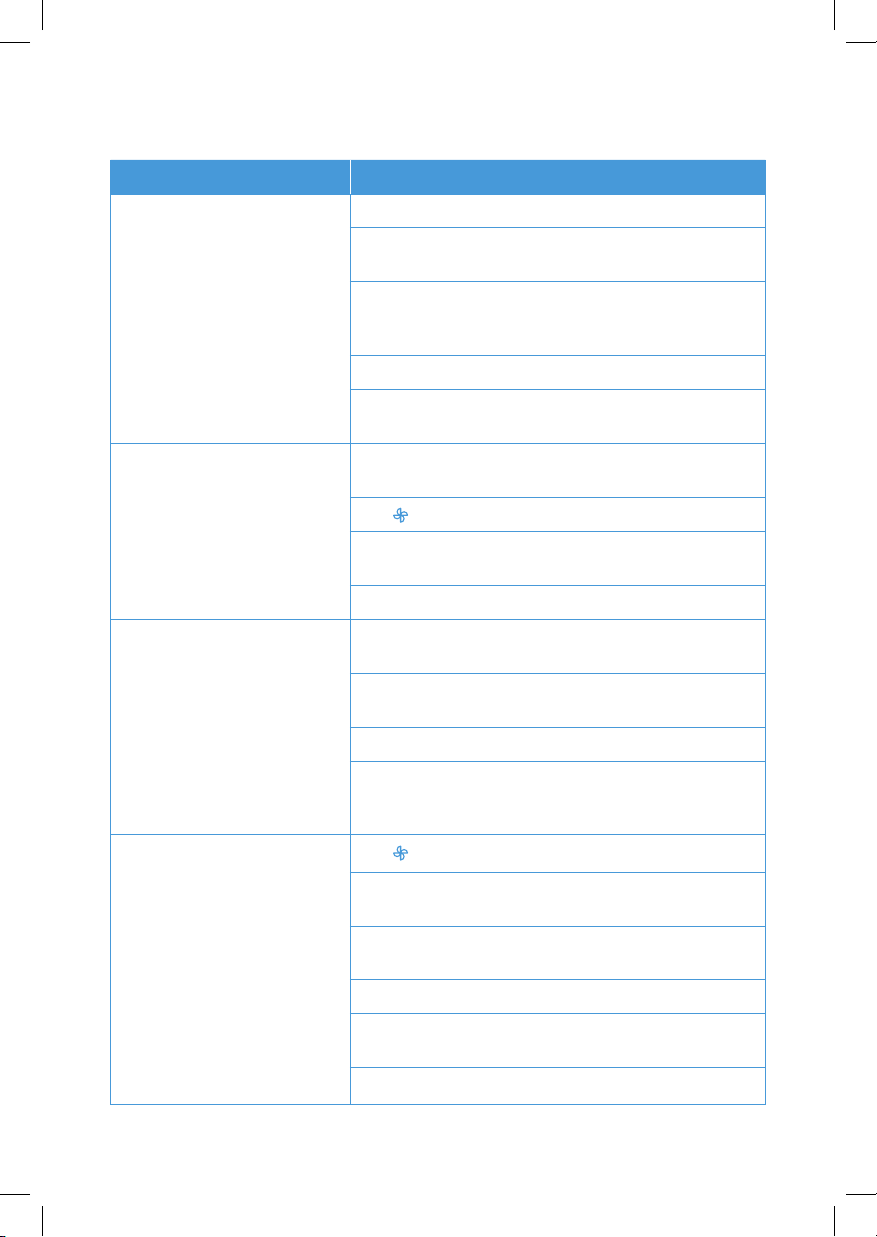
1. Unplug the air purifier. Flip the air purifier
over and remove the filter cover cap and
filter cover (see Getting Started, page 6).
2. Remove the old air filter.
3. Clean any remaining dust or hair inside
the purifier using a vacuum hose. Do not
use water or liquids to clean the purifier.
[Figure 3.1]
4. Unwrap the new air filter and place it
into the housing (see Getting Started,
page 6).
5. Replace the cover and cap. Plug in the
air purifier.
6. Reset the Check Filter Indicator.
Replacing the Air Filter
Figure 3.1
will light up as a reminder to check the air
filter. Depending on how much you use the
air purifier, the indicator should turn on within
5–7 months. You may not need to replace
your filter yet, but you should check it when
turns on.
Check Filter Indicator
The True HEPA Filter should be cleaned
once a month to increase the eciency and
extend the life of your filter. Clean the inside
and outside of the filter using a soft brush or
vacuum hose to remove hair, dust, and large
particles. Do not clean the filter with water or
other liquids.
Cleaning the Air Filter
If not using the air purifier for an extended
period of time, wrap both the purifier and the
filter in plastic packaging and store in a dry
place to avoid moisture damage.
Storage
KEEPING THINGS CLEAN (CONT.)
11
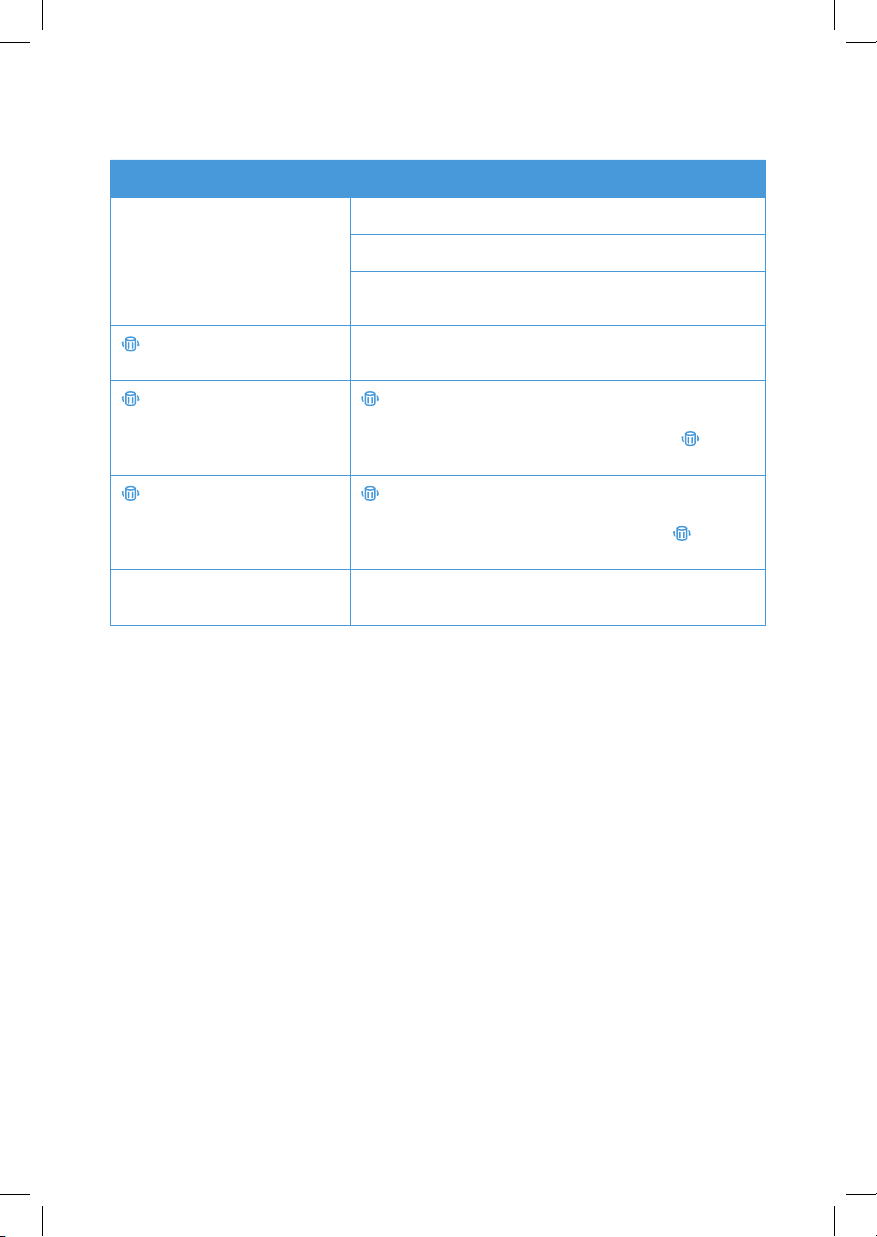
Problem Possible Solution
Air purifier will not turn on or
respond to button controls.
Plug in the air purifier.
Disconnect the AC power adapter from the air purifier and
reconnect it.
Check to see if the AC power adapter is damaged. If so,
stop using the air purifier and contact Customer Support
(see page 14).
Plug the air purifier into a dierent outlet.
Air purifier is malfunctioning. Contact Customer Support
(see page 14).
Airflow is significantly reduced. Make sure the filter is removed from its packaging and
properly in place (see page 6).
Tap
to increase the fan speed.
Make sure there are at least 15 inches / 38 cm of clearance
on all sides of the air purifier.
Replace the air filter (see page 10).
Air purifier makes an unusual
noise while the fan is on.
Make sure the air filter is properly in place with plastic
packaging removed (see page 6).
Make sure the air purifier is operating on a hard, flat, even
surface.
Replace the air filter (see page 10).
The air purifier may be damaged, or a foreign object may
be inside. Stop using the air purifier and contact Customer
Support (see page 14). Do not try to repair the air purifier.
Poor air purification quality.
Tap
to increase the fan speed.
Make sure no objects are blocking the sides or top of the
air purifier (the inlet or outlet).
Make sure the filter is removed from its packaging and
properly in place (see page 6).
Close doors and windows while using the air purifier.
Make sure the room is smaller than 161 ft² / 15 m². The air
purifier may not be as eective in larger rooms.
Replace the filter (see page 10).
TROUBLESHOOTING
12
If your problem is not listed, please contact Customer Support (see page 14).
TROUBLESHOOTING (CONT.)
Problem Possible Solution
Strange smell coming from the
purifier.
Clean the filter or replace if necessary.
Contact Customer Support (see page 14).
Make sure not to use your purifier in an area with high
humidity or while diusing essential oils.
is still on after replacing the
air filter.
Reset the Check Filter Indicator (see page 10).
has not turned on within 7
months.
is a reminder for you to check the air filter and will light
up based on how long the air purifier has been used (see
page 10). If you don’t use your air purifier often,
will
take longer to turn on.
turned on before 5 months. is a reminder for you to check the air filter and will light
up based on how long the air purifier has been used (see
page 10). If you run your air purifier frequently,
will turn
on sooner.
Air does not flow evenly out of
the air purifier.
This is due to the design of the air purifier. This is normal
and will not aect the air purifier’s eciency.

13
Terms & Policy
Levoit warrants all products to be of the highest
quality in material, craftsmanship, and service,
eective from the date of purchase to the end of
the warranty period.
Levoit will replace any product found to be
defective due to manufacturer flaws based on
eligibility. Refunds are available within the first
30 days of purchase. Refunds are only available
to the original purchaser of the product. This
warranty extends only to personal use and does
not extend to any product that has been used
for commercial, rental, or any other use in which
the product is not intended for. There are no
warranties other than the warranties expressly set
forth with each product.
This warranty is non-transferrable. Levoit is not
responsible in any way for any damages, losses,
or inconveniences caused by equipment failure
by user negligence, abuse, or use noncompliant
with the user manual or any additional safety, use,
or warnings included in the product packaging
and manual.
This warranty does not apply to the following:
• Damage due to abuse, accident, alteration,
misuse, tampering, or vandalism.
• Improper or inadequate maintenance.
• Damage in return transit.
• Unsupervised use by children under 18 years
of age.
Levoit and its subsidiaries assume no liability for
damage caused by the use of the product other
than for its intended use or as instructed in the user
manual. Some states do not allow this exclusion or
limitation of incidental or consequential losses so
the foregoing disclaimer may not apply to you. This
warranty gives you specific legal rights and you may
also have other rights which may vary from state to
state.
ALL EXPRESSED AND IMPLIED WARRANTIES,
INCLUDING THE WARRANTY OF
MERCHANTABILITY, ARE LIMITED TO THE
PERIOD OF THE LIMITED WARRANTY.
Additional 1-Year Warranty
You can extend your 1-year warranty by an additional
year. Log onto www.levoit.com/warranty and enter
your order number (for example, from Amazon
or Houzz) to register your new product for the
extended warranty.
If you are unable to provide the order number for
your product, please type a short note in the order
number field along with the date you received your
product.
Defective Products & Returns
If your product proves defective within the specified
warranty period, please contact Customer Support
via [email protected] with your order number. Do
not dispose of your product before contacting us.
Once Customer Support has approved your request,
please return the unit with a copy of the invoice or
your order number.
Product Name True HEPA Air Purifier
Model Vista 200
Default Warranty
Period
1 year
For your own reference, we strongly recommend
that you record your order number and date of
purchase.
Date of Purchase
Order Number
WARRANTY INFORMATION

14
CUSTOMER SUPPORT
If you encounter any issues or have any
questions regarding your new product, feel
free to contact our helpful Customer Support
Team. Your satisfaction is our goal!
Arovast Corporation
1202 N. Miller St., Suite A
Anaheim, CA 92806
Email: [email protected]
Toll-Free: (888) 726-8520
Customer Support
Mon–Fri, 9:00 am–5:00 pm PST/PDT
Support Hours
*Please have your order invoice and order
number ready before contacting Customer
Support.

15
Connect with us @LevoitLifestyle

Levoit.com
v01.04