
User Guide
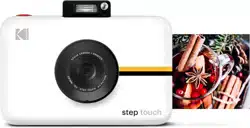
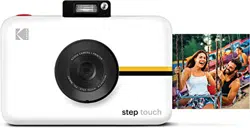
KODAK STEP Touch
INSTANT PRINT DIGITAL CAMERA
Cámara digital con impresión instantánea
Digitale Sofortdruckkamera
Appareil photo numérique à
impression instantanée
Fotocamera digitale a stampa istantanea
Guía del usuario
Benutzerhandbuch
Guide de l'utilisateur
Guida utente

3
EN Download the detailed user manual at kodakphotoplus.com.
To enhance your experience, download the free KODAK STEP Prints app for iOS and Android.
ES Descargue el manual para el usuario detallado en kodakphotoplus.com.
Para mejorar su experiencia, descargue la aplicación móvil gratuita para iOS y Android.
DE Laden Sie die ausführliche Bedienungsanleitung unter kodakphotoplus.com herunter.
Um das Meiste aus Ihrem Gerät herauszuholen, laden Sie sich die kostenlose mobile App für
iOS und Android herunter.
FR Téléchargez la version complète du manuel de l’utilisateur sur kodakphotoplus.com.
Pour améliorer l’expérience, téléchargez l’app gratuite mobile pour iOS et Android.
IT Scaricate il manuale utente dettagliato su kodakphotoplus.com.
Per migliorare la vostra esperienza, scaricate l’app gratuita per iOS e Android.
English
Español
Deutsche
Français
Italiana
TABLE OF CONTENTS
TABLA DE CONTENIDO | INHALTSVERZEICHNIS | TABLE DES MATIÈRES | INDICE
50
65
4
22
36

3
EN Download the detailed user manual at kodakphotoplus.com.
To enhance your experience, download the free KODAK STEP Prints app for iOS and Android.
ES Descargue el manual para el usuario detallado en kodakphotoplus.com.
Para mejorar su experiencia, descargue la aplicación móvil gratuita para iOS y Android.
DE Laden Sie die ausführliche Bedienungsanleitung unter kodakphotoplus.com herunter.
Um das Meiste aus Ihrem Gerät herauszuholen, laden Sie sich die kostenlose mobile App für
iOS und Android herunter.
FR Téléchargez la version complète du manuel de l’utilisateur sur kodakphotoplus.com.
Pour améliorer l’expérience, téléchargez l’app gratuite mobile pour iOS et Android.
IT Scaricate il manuale utente dettagliato su kodakphotoplus.com.
Per migliorare la vostra esperienza, scaricate l’app gratuita per iOS e Android.
English
Español
Deutsche
Français
Italiana
TABLE OF CONTENTS
TABLA DE CONTENIDO | INHALTSVERZEICHNIS | TABLE DES MATIÈRES | INDICE
50
65
4
22
36

4 | EN EN | 5
SAFETY PRECAUTIONS
• WARNING: To avoid creating a fire
hazard, make sure to only connect
your KODAK STEP TOUCH camera to
a power supply whose output is less
than 15W, in compliance with the PS1
requirements defined in the IEC/EN/
UL 62368 standards.
• Seizure warning: This device utilizes
flashing strobe lights which may
potentially trigger seizures for people
with photosensitive epilepsy and/or
other seizure disorders. User discretion
is advised.
• Do not attempt to disassemble this
device for any reason.
• Never leave your camera or the KODAK
ZINK photo paper in an area that might
become extremely hot or where it will
be exposed to direct sunlight for a long
time. This can cause your camera to
overheat or suer other problems.
• Don’t get it wet! If you need to clean
your camera, use a soft cloth that’s been
slightly dampened with water or rubbing
alcohol, and gently wipe away any dirty
spots. Don’t submerge the whole thing
in water, ever.
• Be careful with your camera. Try not to
drop it, or shake it violently. The inside
of the camera has a lot of very small
parts that could break if they are jostled
around too much.
• Do not use products such as alcohol,
gasoline, diluent, or any other organic
solvent when cleaning or attempting to
clean this product.
• Do not use this device in an environment
where it will be exposed to heavy dust or
humidity/moisture.
• Do not use this camera while bathing or
in a shower.
• Do not place or charge the camera
where it can fall or be pulled into a tub
or sink.
• Do not place, drop, or submerge the
camera in water or any other liquid.
• Take care that objects do not fall and
liquids are not spilled onto the camera.

4 | EN EN | 5
SAFETY PRECAUTIONS
• WARNING: To avoid creating a fire
hazard, make sure to only connect
your KODAK STEP TOUCH camera to
a power supply whose output is less
than 15W, in compliance with the PS1
requirements defined in the IEC/EN/
UL 62368 standards.
• Seizure warning: This device utilizes
flashing strobe lights which may
potentially trigger seizures for people
with photosensitive epilepsy and/or
other seizure disorders. User discretion
is advised.
• Do not attempt to disassemble this
device for any reason.
• Never leave your camera or the KODAK
ZINK photo paper in an area that might
become extremely hot or where it will
be exposed to direct sunlight for a long
time. This can cause your camera to
overheat or suer other problems.
• Don’t get it wet! If you need to clean
your camera, use a soft cloth that’s been
slightly dampened with water or rubbing
alcohol, and gently wipe away any dirty
spots. Don’t submerge the whole thing
in water, ever.
• Be careful with your camera. Try not to
drop it, or shake it violently. The inside
of the camera has a lot of very small
parts that could break if they are jostled
around too much.
• Do not use products such as alcohol,
gasoline, diluent, or any other organic
solvent when cleaning or attempting to
clean this product.
• Do not use this device in an environment
where it will be exposed to heavy dust or
humidity/moisture.
• Do not use this camera while bathing or
in a shower.
• Do not place or charge the camera
where it can fall or be pulled into a tub
or sink.
• Do not place, drop, or submerge the
camera in water or any other liquid.
• Take care that objects do not fall and
liquids are not spilled onto the camera.
6 | EN EN | 7
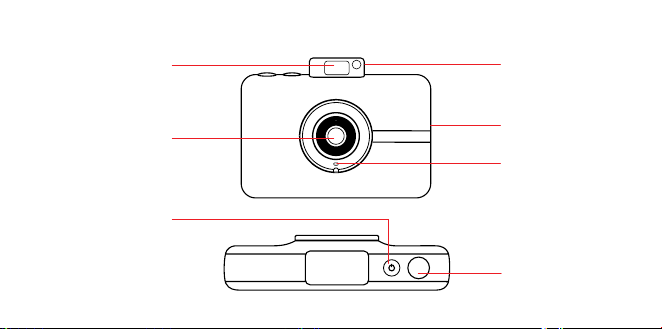
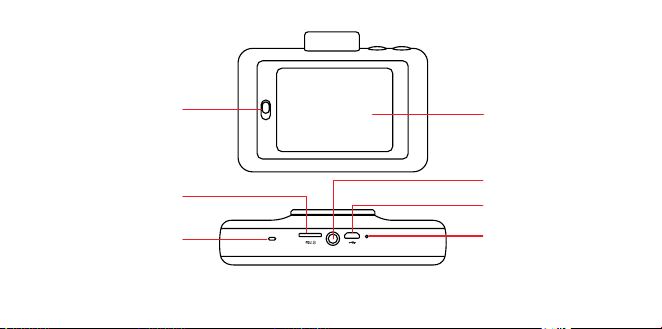
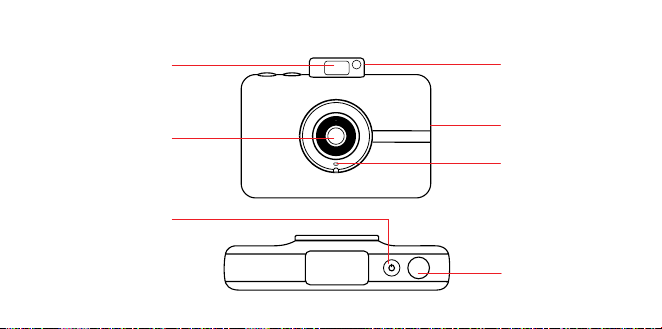
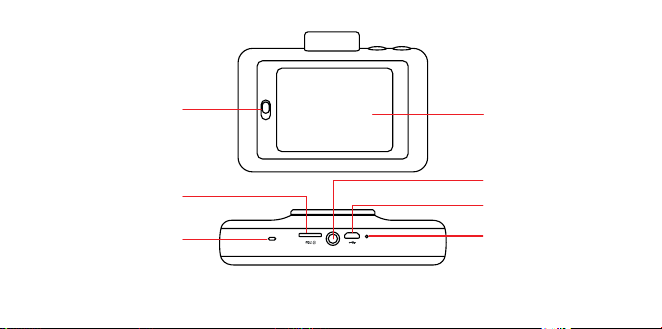
Pop-up flash
Paper
compartment
door latch
Reset button*
Micro USB port
Tripod connector
Selfie mirror
Touchscreen
LCD
viewfinder
Speaker
MicroSD™ card slot
Microphone
Photo print
exit slot
Shutter button
Power button
Lens
* To reset camera, insert a pin and hold for about 2 seconds.
PRODUCT OVERVIEW
6 | EN EN | 7
Pop-up flash
Paper
compartment
door latch
Reset button*
Micro USB port
Tripod connector
Selfie mirror
Touchscreen
LCD
viewfinder
Speaker
MicroSD™ card slot
Microphone
Photo print
exit slot
Shutter button
Power button
Lens
* To reset camera, insert a pin and hold for about 2 seconds.
PRODUCT OVERVIEW
8 | EN EN | 9
Turning On & O
Press the power button. If the flash mechanism
is in the closed position, it will open and the
camera will power on.
To turn the camera o, press down the flash
mechanism.
To wake the camera from sleep mode, press
the power button. The camera will turn on.
Memory Storage
The camera’s internal memory can hold
up to 10 images and can accommodate a
microSD™ card up to 256GB.
Loading Photo Printing Paper
The KODAK STEP Touch camera uses only
ZINK® ZERO INK® Technology to print 2x3”
photos on adhesive-backed paper.
1. Slide the lever on the left side of the LCD
screen. The screen will pop up.
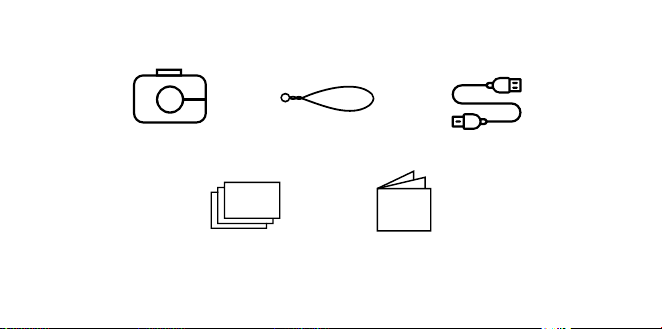
USING YOUR CAMERABOX CONTENTS
Instant Print Camera Camera strap
KODAK Photo Paper using
ZINK® Zero Ink® Technology
starter pack
Quick start guide
& warranty
Micro USB cable

8 | EN EN | 9
Turning On & O
Press the power button. If the flash mechanism
is in the closed position, it will open and the
camera will power on.
To turn the camera o, press down the flash
mechanism.
To wake the camera from sleep mode, press
the power button. The camera will turn on.
Memory Storage
The camera’s internal memory can hold
up to 10 images and can accommodate a
microSD™ card up to 256GB.
Loading Photo Printing Paper
The KODAK STEP Touch camera uses only
ZINK® ZERO INK® Technology to print 2x3”
photos on adhesive-backed paper.
1. Slide the lever on the left side of the LCD
screen. The screen will pop up.
USING YOUR CAMERABOX CONTENTS
Instant Print Camera Camera strap
KODAK Photo Paper using
ZINK® Zero Ink® Technology
starter pack
Quick start guide
& warranty
Micro USB cable

10 | EN EN | 11
2. Remove paper from packet and insert
entire stack of paper, making sure the blue
ZINK® Color Calibration Sheet is on the
bottom, barcode facing down.
3. Close the paper compartment.
4. The blue ZINK® Color Calibration Sheet
will be processed and ejected before you
print, calibrating your printer.
First-Time Setup
Turn the camera on to begin setup. Follow the
screen prompts.
Taking Pictures and Video
Press the shutter button to take still images
or to start and stop recording in Video mode.
Holding down the shutter button in the photo
capture mode will take burst shots (rapid
succession of still shots.)
Press the shutter button halfway down to
focus.
Note: Pressing the shutter button in screens
other than the live viewfinder will return you to
the live viewfinder.
Touchscreen Controls
Tap anywhere on the viewfinder to hide/show
controls.
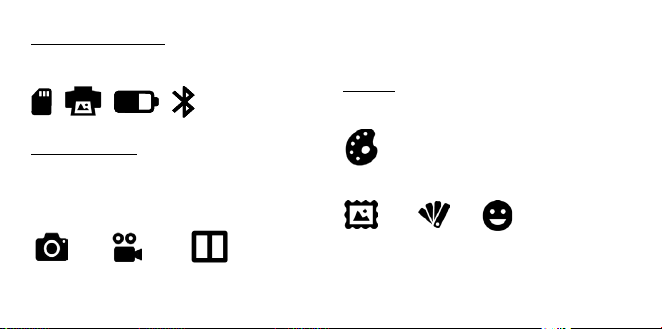
STATUS INDICATORS
Displays the SD card, printing, battery, and
Bluetooth® connection status.
CAPTURE MODE
Your KODAK STEP Touch is automatically in
Photo mode and on your screen you will see
a camera icon. Click on the icon to change to
Video or Photobooth mode.
Photo mode Video mode Photobooth mode
Photobooth Mode allows you to take shots for
a 2-, 3-, or 4-photo layout.
EXTRAS
You can personalize your photos with
borders, filters, and digital stickers.
Extras
Borders Filters Stickers
10 | EN EN | 11
2. Remove paper from packet and insert
entire stack of paper, making sure the blue
ZINK® Color Calibration Sheet is on the
bottom, barcode facing down.
3. Close the paper compartment.
4. The blue ZINK® Color Calibration Sheet
will be processed and ejected before you
print, calibrating your printer.
First-Time Setup
Turn the camera on to begin setup. Follow the
screen prompts.
Taking Pictures and Video
Press the shutter button to take still images
or to start and stop recording in Video mode.
Holding down the shutter button in the photo
capture mode will take burst shots (rapid
succession of still shots.)
Press the shutter button halfway down to
focus.
Note: Pressing the shutter button in screens
other than the live viewfinder will return you to
the live viewfinder.
Touchscreen Controls
Tap anywhere on the viewfinder to hide/show
controls.
STATUS INDICATORS
Displays the SD card, printing, battery, and
Bluetooth® connection status.
CAPTURE MODE
Your KODAK STEP Touch is automatically in
Photo mode and on your screen you will see
a camera icon. Click on the icon to change to
Video or Photobooth mode.
Photo mode Video mode Photobooth mode
Photobooth Mode allows you to take shots for
a 2-, 3-, or 4-photo layout.
EXTRAS
You can personalize your photos with
borders, filters, and digital stickers.
Extras
Borders Filters Stickers
12 | EN EN | 13
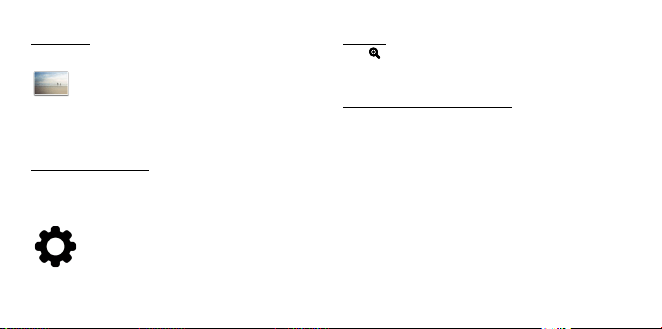
GALLERY
Tap to go to the gallery.
Note: You can also add extras, rotate your
photo, and crop your photo in the Gallery.
DEVICE SETTINGS
Tap icon to open camera and capture
settings such as screen brightness, flash,
video resolution, volume, and Bluetooth®.
ZOOM
Tap
to zoom in and out in the live
viewfinder.
TAP AND HOLD TO FOCUS
Press and hold the screen to set the focus
area.
Note: Check the app for firmware updates.
Mobile App
To unlock more ways to use the KODAK STEP
Touch, download the free KODAK STEP Prints
app for iOS and Android™ here:
For more detailed information, downloadable
manual, FAQs, and technical support, please
visit www.kodakphotoplus.com.
CUSTOMER SERVICE CONTACT
INFORMATION
Should you experience any problems with
your product, please contact us before
returning the item to the place of purchase.
WE’RE HERE TO HELP!
U.S. Support:
kodak@camarketing.com
844-516-1539
International Support:
kodakintl@camarketing.com
844-516-1540
12 | EN EN | 13
GALLERY
Tap to go to the gallery.
Note: You can also add extras, rotate your
photo, and crop your photo in the Gallery.
DEVICE SETTINGS
Tap icon to open camera and capture
settings such as screen brightness, flash,
video resolution, volume, and Bluetooth®.
ZOOM
Tap
to zoom in and out in the live
viewfinder.
TAP AND HOLD TO FOCUS
Press and hold the screen to set the focus
area.
Note: Check the app for firmware updates.
Mobile App
To unlock more ways to use the KODAK STEP
Touch, download the free KODAK STEP Prints
app for iOS and Android™ here:
For more detailed information, downloadable
manual, FAQs, and technical support, please
visit www.kodakphotoplus.com.
CUSTOMER SERVICE CONTACT
INFORMATION
Should you experience any problems with
your product, please contact us before
returning the item to the place of purchase.
WE’RE HERE TO HELP!
U.S. Support:
kodak@camarketing.com
844-516-1539
International Support:
kodakintl@camarketing.com
844-516-1540

14 | EN EN | 15
WARRANTY INFORMATION
LIMITED WARRANTY ON KODAK STEP Touch
INSTANT PRINT DIGITAL CAMERA
THIS LIMITED WARRANTY GIVES YOU SPECIFIC
LEGAL RIGHTS AND YOU MAY ALSO HAVE
OTHER RIGHTS, WHICH VARY FROM STATE
TO STATE.
WE WARRANT THAT DURING THE WARRANTY
PERIOD, THE PRODUCT WILL BE FREE FROM
DEFECTS IN MATERIALS AND WORKMANSHIP.
LIMITATION OF LIABILITY
TO THE EXTENT NOT PROHIBITED BY LAW,
THIS WARRANTY IS EXCLUSIVE AND IN
LIEU OF ALL OTHER WARRANTIES, ORAL,
WRITTEN, STATUTORY, EXPRESS OR IMPLIED.
EXCEPT FOR THE EXPRESS WARRANTIES
CONTAINED IN THIS LIMITED WARRANTY
STATEMENT AND TO THE EXTENT NOT
PROHIBITED BY LAW, WE DISCLAIM ALL
OTHER WARRANTIES, EXPRESSED OR IMPLIED,
STATUTORY OR OTHERWISE, INCLUDING
WITHOUT LIMITATION, THE WARRANTIES
OF MERCHANTABILITY AND FITNESS FOR
A PARTICULAR PURPOSE. SOME STATES
DO NOT ALLOW DISCLAIMERS OF IMPLIED
WARRANTIES, SO THIS DISCLAIMER MAY
NOT APPLY TO YOU. TO THE EXTENT SUCH
WARRANTIES CANNOT BE DISCLAIMED
UNDER THE LAWS OF YOUR JURISDICTION,
WE LIMIT THE DURATION AND REMEDIES OF
SUCH WARRANTIES TO THE DURATION OF
THIS EXPRESS LIMITED WARRANTY.
OUR RESPONSIBILITY FOR DEFECTIVE GOODS
IS LIMITED TO REPAIR, REPLACEMENT OR
REFUND AS DESCRIBED BELOW IN THIS
WARRANTY STATEMENT.
WHO MAY USE THIS WARRANTY? C&A
Marketing, Inc. located at 114 Tived Lane East,
Edison, NJ (“we”) extend this limited warranty
only to the consumer who originally purchased
the product (“you”). It does not extend to any
subsequent owner or other transferee of the
product.
WHAT DOES THIS WARRANTY COVER? This
limited warranty covers defects in materials and
workmanship of the KODAK STEP Touch Instant
Digital Camera (the “product”) for the Warranty
Period as defined below.
WHAT DOES THIS WARRANTY NOT
COVER? This limited warranty does not cover
any damage due to: (a) transportation; (b)
storage; (c) improper use; (d) failure to follow
the product instructions or to perform any
preventive maintenance; (e) modifications; (f)
unauthorized repair; (g) normal wear and tear; or
(h) external causes such as accidents, abuse, or
other actions or events beyond our reasonable
control.
WHAT IS THE PERIOD OF COVERAGE? This
limited warranty starts on the date of your
purchase and lasts for one year (the “Warranty
Period”). The Warranty Period is not extended
if we repair or replace the product. We may
change the availability of this limited warranty
at our discretion, but any changes will not be

14 | EN EN | 15
WARRANTY INFORMATION
LIMITED WARRANTY ON KODAK STEP Touch
INSTANT PRINT DIGITAL CAMERA
THIS LIMITED WARRANTY GIVES YOU SPECIFIC
LEGAL RIGHTS AND YOU MAY ALSO HAVE
OTHER RIGHTS, WHICH VARY FROM STATE
TO STATE.
WE WARRANT THAT DURING THE WARRANTY
PERIOD, THE PRODUCT WILL BE FREE FROM
DEFECTS IN MATERIALS AND WORKMANSHIP.
LIMITATION OF LIABILITY
TO THE EXTENT NOT PROHIBITED BY LAW,
THIS WARRANTY IS EXCLUSIVE AND IN
LIEU OF ALL OTHER WARRANTIES, ORAL,
WRITTEN, STATUTORY, EXPRESS OR IMPLIED.
EXCEPT FOR THE EXPRESS WARRANTIES
CONTAINED IN THIS LIMITED WARRANTY
STATEMENT AND TO THE EXTENT NOT
PROHIBITED BY LAW, WE DISCLAIM ALL
OTHER WARRANTIES, EXPRESSED OR IMPLIED,
STATUTORY OR OTHERWISE, INCLUDING
WITHOUT LIMITATION, THE WARRANTIES
OF MERCHANTABILITY AND FITNESS FOR
A PARTICULAR PURPOSE. SOME STATES
DO NOT ALLOW DISCLAIMERS OF IMPLIED
WARRANTIES, SO THIS DISCLAIMER MAY
NOT APPLY TO YOU. TO THE EXTENT SUCH
WARRANTIES CANNOT BE DISCLAIMED
UNDER THE LAWS OF YOUR JURISDICTION,
WE LIMIT THE DURATION AND REMEDIES OF
SUCH WARRANTIES TO THE DURATION OF
THIS EXPRESS LIMITED WARRANTY.
OUR RESPONSIBILITY FOR DEFECTIVE GOODS
IS LIMITED TO REPAIR, REPLACEMENT OR
REFUND AS DESCRIBED BELOW IN THIS
WARRANTY STATEMENT.
WHO MAY USE THIS WARRANTY? C&A
Marketing, Inc. located at 114 Tived Lane East,
Edison, NJ (“we”) extend this limited warranty
only to the consumer who originally purchased
the product (“you”). It does not extend to any
subsequent owner or other transferee of the
product.
WHAT DOES THIS WARRANTY COVER? This
limited warranty covers defects in materials and
workmanship of the KODAK STEP Touch Instant
Digital Camera (the “product”) for the Warranty
Period as defined below.
WHAT DOES THIS WARRANTY NOT
COVER? This limited warranty does not cover
any damage due to: (a) transportation; (b)
storage; (c) improper use; (d) failure to follow
the product instructions or to perform any
preventive maintenance; (e) modifications; (f)
unauthorized repair; (g) normal wear and tear; or
(h) external causes such as accidents, abuse, or
other actions or events beyond our reasonable
control.
WHAT IS THE PERIOD OF COVERAGE? This
limited warranty starts on the date of your
purchase and lasts for one year (the “Warranty
Period”). The Warranty Period is not extended
if we repair or replace the product. We may
change the availability of this limited warranty
at our discretion, but any changes will not be

16 | EN EN | 17
retroactive.
WHAT ARE YOUR REMEDIES UNDER THIS
WARRANTY? With respect to any defective
product during the Warranty Period, we will, at
our sole discretion, either: (a) repair or replace
such product (or the defective part) free of
charge or (b) refund the purchase price of such
product if an exchange unit cannot be provided.
HOW DO YOU OBTAIN WARRANTY
SERVICE? To obtain warranty service, you
must contact us at 844-516-1539 or by email at
kodak@camarketing.com during the Warranty
Period to obtain a Defective Merchandise
Authorization (“DMA”) number. No warranty
service will be provided without a DMA number
and return shipping costs to our facilities shall
be assumed by you, the purchaser. Shipping
costs of the replacement unit to you shall be
assumed by us.
FEDERAL COMMUNICATION
COMMISSION INTERFERENCE
STATEMENT
This device complies with Part 15 of the FCC
Rules. Operation is subject to the following
two conditions: (1) This device may not cause
harmful interference, and (2) this device must
accept any interference received, including
interference that may cause undesired
operation.
This equipment has been tested and found
to comply with the limits for a Class B digital
device, pursuant to Part 15 of the FCC Rules.
These limits are designed to provide reasonable
protection against harmful interference in
a residential installation. This equipment
generates, uses and can radiate radio frequency
energy and, if not installed and used in
accordance with the instructions, may cause
harmful interference to radio communications.
However, there is no guarantee that interference
will not occur in a particular installation. If this
equipment does cause harmful interference
to radio or television reception, which can be
determined by turning the equipment o and
on, the user is encouraged to try to correct the
interference by one of the following measures:
• Reorient or relocate the receiving antenna.
• Increase the separation between the
equipment and receiver.
• Connect the equipment into an outlet on
a circuit dierent from that to which the
receiver is connected.
• Consult the dealer or an experienced radio/
TV technician for help.
FCC Caution: Any changes or modifications not

16 | EN EN | 17
retroactive.
WHAT ARE YOUR REMEDIES UNDER THIS
WARRANTY? With respect to any defective
product during the Warranty Period, we will, at
our sole discretion, either: (a) repair or replace
such product (or the defective part) free of
charge or (b) refund the purchase price of such
product if an exchange unit cannot be provided.
HOW DO YOU OBTAIN WARRANTY
SERVICE? To obtain warranty service, you
must contact us at 844-516-1539 or by email at
kodak@camarketing.com during the Warranty
Period to obtain a Defective Merchandise
Authorization (“DMA”) number. No warranty
service will be provided without a DMA number
and return shipping costs to our facilities shall
be assumed by you, the purchaser. Shipping
costs of the replacement unit to you shall be
assumed by us.
FEDERAL COMMUNICATION
COMMISSION INTERFERENCE
STATEMENT
This device complies with Part 15 of the FCC
Rules. Operation is subject to the following
two conditions: (1) This device may not cause
harmful interference, and (2) this device must
accept any interference received, including
interference that may cause undesired
operation.
This equipment has been tested and found
to comply with the limits for a Class B digital
device, pursuant to Part 15 of the FCC Rules.
These limits are designed to provide reasonable
protection against harmful interference in
a residential installation. This equipment
generates, uses and can radiate radio frequency
energy and, if not installed and used in
accordance with the instructions, may cause
harmful interference to radio communications.
However, there is no guarantee that interference
will not occur in a particular installation. If this
equipment does cause harmful interference
to radio or television reception, which can be
determined by turning the equipment o and
on, the user is encouraged to try to correct the
interference by one of the following measures:
• Reorient or relocate the receiving antenna.
• Increase the separation between the
equipment and receiver.
• Connect the equipment into an outlet on
a circuit dierent from that to which the
receiver is connected.
• Consult the dealer or an experienced radio/
TV technician for help.
FCC Caution: Any changes or modifications not

18 | EN EN | 19
expressly approved by the party responsible for
compliance could void the user's authority to
operate this equipment.
This transmitter must not be co-located or
operating in conjunction with any other antenna
or transmitter.
Radiation Exposure Statement:
This equipment complies with FCC radiation
exposure limits set forth for an uncontrolled
environment. This equipment should be
installed and operated with minimum distance
20 cm between the radiator & your body.
IC Statement
This device complies with RSS247 of Industry
Canada. Cet appareil se conforme à RSS247
de Canada d'Industrie. This device complies
with Industry Canada license-exempt RSS
standard(s). Operation is subject to the following
two conditions: (1) this device may not cause
interference, and (2) this device must accept
any interference, including interference that
may cause undesired operation of the device.
appareils radio exempts de licence. Son
fonctionnement est sujet aux deux conditions
suivantes: (1) le dispositif ne doit pas produire
de brouillage prejudiciable, et (2) ce dispositif
doit accepter tout brouillage recu, y compris
un brouillage susceptible de provoquer un
fonctionnement indesirable.
The device must not be co-located or operating
in conjunction with any other antenna or
transmitter.
Radiation Exposure Statement: The product
complies with the Canada portable RF exposure
limit set forth for an uncontrolled environment
and are safe for intended operation as described
in this manual.
Déclaration d'exposition aux radiations : Le
produit est conforme aux limites d'expossition
pour les appareils portable RF pour les
Etats-Unis et le Canada établies pour un
environnement non contrôlé.
18 | EN EN | 19
expressly approved by the party responsible for
compliance could void the user's authority to
operate this equipment.
This transmitter must not be co-located or
operating in conjunction with any other antenna
or transmitter.
Radiation Exposure Statement:
This equipment complies with FCC radiation
exposure limits set forth for an uncontrolled
environment. This equipment should be
installed and operated with minimum distance
20 cm between the radiator & your body.
IC Statement
This device complies with RSS247 of Industry
Canada. Cet appareil se conforme à RSS247
de Canada d'Industrie. This device complies
with Industry Canada license-exempt RSS
standard(s). Operation is subject to the following
two conditions: (1) this device may not cause
interference, and (2) this device must accept
any interference, including interference that
may cause undesired operation of the device.
appareils radio exempts de licence. Son
fonctionnement est sujet aux deux conditions
suivantes: (1) le dispositif ne doit pas produire
de brouillage prejudiciable, et (2) ce dispositif
doit accepter tout brouillage recu, y compris
un brouillage susceptible de provoquer un
fonctionnement indesirable.
The device must not be co-located or operating
in conjunction with any other antenna or
transmitter.
Radiation Exposure Statement: The product
complies with the Canada portable RF exposure
limit set forth for an uncontrolled environment
and are safe for intended operation as described
in this manual.
Déclaration d'exposition aux radiations : Le
produit est conforme aux limites d'expossition
pour les appareils portable RF pour les
Etats-Unis et le Canada établies pour un
environnement non contrôlé.

20 | EN EN | 21
kodakphotoplus.com
The Kodak trademark, logo, and trade dress
are used under license from Eastman Kodak
Company.
ZINK, ZERO INK, and the ZINK logo are
trademarks of ZINK Holdings, LLC.
“Made for iPhone” means that an electronic
accessory has been designed to connect
specifically to iPhone and has been certified
by the developer to meet Apple performance
standards. Apple is not responsible for the
operation of this device or its compliance with
safety and regulatory standards. Please note that
the use of this accessory with iPhone may aect
wireless performance.
Android is a trademark of Google, LLC.
IOS is a trademark of Cisco in the U.S. and other
countries and is used under license.
Bluetooth is a registered trademark of Bluetooth
SIG, Inc. USA.
MicroSD is a trademark or registered trademark
of SD-3C LLC in the United States, other
countries or both.
All other products, brand names, company names,
and logos are trademarks of their respective owners,
used merely to identify their respective products,
and are not meant to connote any sponsorship,
endorsement or approval.
Distributed by: C&A Marketing, Inc., 114 Tived
Lane East, Edison, NJ 08837, USA
C&A Marketing UK LTD, 167 Hermitage Road,
Crusader Industrial Estate, London N4 1LZ, UK
©2020. All Rights Reserved. Made in China.

20 | EN EN | 21
kodakphotoplus.com
The Kodak trademark, logo, and trade dress
are used under license from Eastman Kodak
Company.
ZINK, ZERO INK, and the ZINK logo are
trademarks of ZINK Holdings, LLC.
“Made for iPhone” means that an electronic
accessory has been designed to connect
specifically to iPhone and has been certified
by the developer to meet Apple performance
standards. Apple is not responsible for the
operation of this device or its compliance with
safety and regulatory standards. Please note that
the use of this accessory with iPhone may aect
wireless performance.
Android is a trademark of Google, LLC.
IOS is a trademark of Cisco in the U.S. and other
countries and is used under license.
Bluetooth is a registered trademark of Bluetooth
SIG, Inc. USA.
MicroSD is a trademark or registered trademark
of SD-3C LLC in the United States, other
countries or both.
All other products, brand names, company names,
and logos are trademarks of their respective owners,
used merely to identify their respective products,
and are not meant to connote any sponsorship,
endorsement or approval.
Distributed by: C&A Marketing, Inc., 114 Tived
Lane East, Edison, NJ 08837, USA
C&A Marketing UK LTD, 167 Hermitage Road,
Crusader Industrial Estate, London N4 1LZ, UK
©2020. All Rights Reserved. Made in China.

22 | ES ES | 23
PRECAUCIONES DE SEGURIDAD
• ATENCIÓN: Para evitar crear un
peligro de incendio, asegúrese de
conectar su cámara KODAK STEP
TOUCH solamente a una toma de
corriente cuya potencia de salida
sea inferior a 15 W, conforme a los
requisitos PS1 definidos en la norma
IEC/EN/UL 62368.
• Riesgo de convulsión: Este dispositivo
utiliza luces de LED parpadeantes
de manera repetida que pueden
desencadenar posibles convulsiones
en personas con epilepsia fotosensible
y/u otros trastornos convulsivos. Se
aconseja la discreción del usuario.
• No intente desarmar este dispositivo por
ningún motivo.
• Nunca deje su cámara o el papel ZINK®
en un área que pueda calentarse mucho
o que se exponga a la luz solar directa
durante mucho tiempo. Esto puede
hacer que su cámara se sobrecaliente o
sufra otros problemas.
• Nunca manipule la cámara con las
manos húmedas o mojadas. Esto podría
dañar la cámara o hacerle correr el
riesgo de descarga eléctrica.
• No use productos como alcohol,
gasolina, disolvente o cualquier otro
solvente orgánico al limpiar o intentar
limpiar este producto.
• No use este dispositivo en un entorno
en el que estará expuesto a polvo
pesado o humedad.
• Nunca deje caer ni agite la cámara,
ya que esto podría hacer que no
funcione bien o podría dañar de forma
permanente las partes internas.
• No use esta cámara cuando esté en la
bañera o en la ducha.
• No coloque ni almacene la cámara en
un lugar en el que pueda caerse o caer
a una bañera o lavabo.
• No coloque, deje caer ni sumerja la
cámara en agua ni en ningún otro
líquido.
• Tenga cuidado de que no caigan
objetos ni se derramen líquidos sobre
la cámara.

22 | ES ES | 23
PRECAUCIONES DE SEGURIDAD
• ATENCIÓN: Para evitar crear un
peligro de incendio, asegúrese de
conectar su cámara KODAK STEP
TOUCH solamente a una toma de
corriente cuya potencia de salida
sea inferior a 15 W, conforme a los
requisitos PS1 definidos en la norma
IEC/EN/UL 62368.
• Riesgo de convulsión: Este dispositivo
utiliza luces de LED parpadeantes
de manera repetida que pueden
desencadenar posibles convulsiones
en personas con epilepsia fotosensible
y/u otros trastornos convulsivos. Se
aconseja la discreción del usuario.
• No intente desarmar este dispositivo por
ningún motivo.
• Nunca deje su cámara o el papel ZINK®
en un área que pueda calentarse mucho
o que se exponga a la luz solar directa
durante mucho tiempo. Esto puede
hacer que su cámara se sobrecaliente o
sufra otros problemas.
• Nunca manipule la cámara con las
manos húmedas o mojadas. Esto podría
dañar la cámara o hacerle correr el
riesgo de descarga eléctrica.
• No use productos como alcohol,
gasolina, disolvente o cualquier otro
solvente orgánico al limpiar o intentar
limpiar este producto.
• No use este dispositivo en un entorno
en el que estará expuesto a polvo
pesado o humedad.
• Nunca deje caer ni agite la cámara,
ya que esto podría hacer que no
funcione bien o podría dañar de forma
permanente las partes internas.
• No use esta cámara cuando esté en la
bañera o en la ducha.
• No coloque ni almacene la cámara en
un lugar en el que pueda caerse o caer
a una bañera o lavabo.
• No coloque, deje caer ni sumerja la
cámara en agua ni en ningún otro
líquido.
• Tenga cuidado de que no caigan
objetos ni se derramen líquidos sobre
la cámara.
24 | ES ES | 25
Flash emergente
Espejo para
autofotos (selfies)
Micrófono
Ranura de salida
deimpresión de
fotografía
Botón del
obturador
Botón de
encendido
Lente
DESCRIPCIÓN DEL PRODUCTO
Traba de la puerta
del compartimiento
para papel
Botón de reinicio*
Puerto micro USB
Adaptador para
trípode
Visor LCD táctil
Altavoz
Ranura para
tarjeta microSD™
* Para reiniciar la cámara, inserte un alfiler y sostenga durante 2 segundos aproximadamente.
24 | ES ES | 25
Flash emergente
Espejo para
autofotos (selfies)
Micrófono
Ranura de salida
deimpresión de
fotografía
Botón del
obturador
Botón de
encendido
Lente
DESCRIPCIÓN DEL PRODUCTO
Traba de la puerta
del compartimiento
para papel
Botón de reinicio*
Puerto micro USB
Adaptador para
trípode
Visor LCD táctil
Altavoz
Ranura para
tarjeta microSD™
* Para reiniciar la cámara, inserte un alfiler y sostenga durante 2 segundos aproximadamente.
26 | ES ES | 27
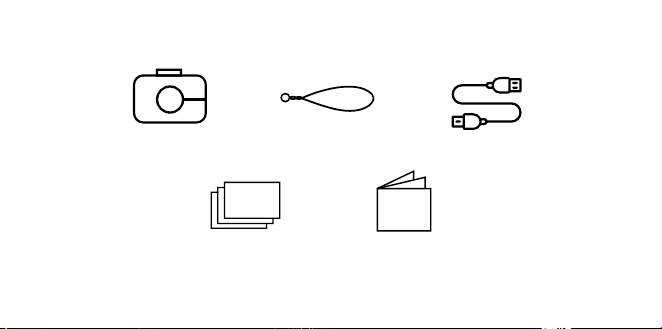
CONTENIDO DE LA CAJA
Cámara de impresión
instantánea
Correa de la
cámara
Papel de fotografía KODAK
usando el paquete de inicio de
tecnología ZINK® Zero Ink®
Guía para el
usuario y garantía
Cable micro USB
Turning On & O
Press the power button. If the flash mechanism
is in the closed position, it will open and the
camera will power on.
To turn the camera o, press down the flash
mechanism.
To wake the camera from sleep mode, press
the power button. The camera will turn on.
Memory Storage
The camera’s internal memory can hold
up to 10 images and can accommodate a
microSD™ card up to 256GB.
Loading Photo Printing Paper
La cámara KODAK STEP Touch solo utiliza
tecnología ZINK® ZERO INK® para imprimir
fotos en papel adhesivo de 2x3"
1. Deslice la palanca del lado izquierdo de la
pantalla LCD. Aparecerá la pantalla.
CÓMO USAR SU CÁMARA

26 | ES ES | 27
CONTENIDO DE LA CAJA
Cámara de impresión
instantánea
Correa de la
cámara
Papel de fotografía KODAK
usando el paquete de inicio de
tecnología ZINK® Zero Ink®
Guía para el
usuario y garantía
Cable micro USB
Turning On & O
Press the power button. If the flash mechanism
is in the closed position, it will open and the
camera will power on.
To turn the camera o, press down the flash
mechanism.
To wake the camera from sleep mode, press
the power button. The camera will turn on.
Memory Storage
The camera’s internal memory can hold
up to 10 images and can accommodate a
microSD™ card up to 256GB.
Loading Photo Printing Paper
La cámara KODAK STEP Touch solo utiliza
tecnología ZINK® ZERO INK® para imprimir
fotos en papel adhesivo de 2x3"
1. Deslice la palanca del lado izquierdo de la
pantalla LCD. Aparecerá la pantalla.
CÓMO USAR SU CÁMARA

28 | ES ES | 29
2. Retire el papel del paquete e inserte la pila
completa de papel, asegurándose de que
la hoja de calibración ZINK de color azul
esté en la parte inferior con el código de
barras hacia abajo.
3. Cierre el compartimiento.
4. La hoja de calibración de color azul
ZINK® se procesará y expulsará antes de
imprimir, calibrando tu impresora.
Configuración por primera vez
Encienda la cámara para comenzar con la
configuración. Siga las instrucciones en
pantalla.
Cómo tomar fotografías y grabar videos
Presione el botón disparador para tomar
imágenes fijas o para iniciar o detener las
grabaciones en modo video. Al mantener
presionado el botón disparador en el modo
de captura de imágenes, se emitirá un
disparo contínuo de capturas (sucesión de
imágenes fijas).
Presione el botón disparador hasta la mitad
para hacer foco.
Nota: Presionar el botón disparador en
pantallas que no sean el visor directo volverá
de nuevo al visor directo.
Controles de la pantalla táctil
Toque en cualquier parte del visor para
ocultar o mostrar los controles.
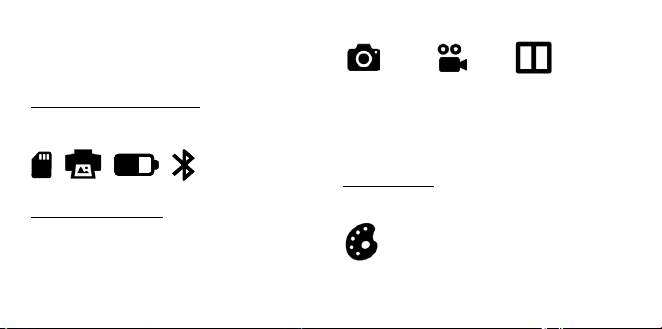
INDICADORES DE ESTADO
Muestran el estado de impresión, batería y
conexión Bluetooth®.
MODO DE CAPTURA
Tu STEP Touch está automáticamente en
modo Photo y en tu pantalla verás un icono
de cámara. Haz clic en el icono para cambiar
a modo de vídeo o cabina de fotos.
Modo de fotografía Modo de video Modo de cabina de fotos
El modo de cabina de fotos le permite tomar
capturas para armar un diseño de 2, 3 o 4
fotos.
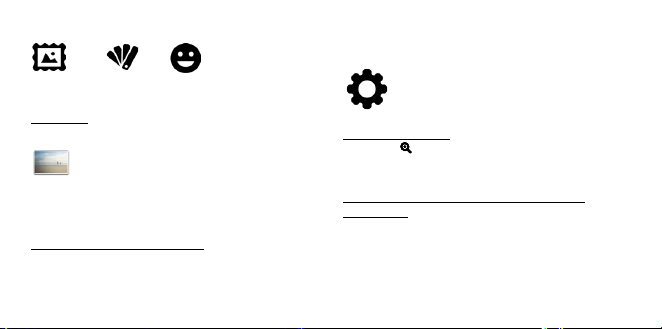
ADICIONALES
Puede personalizar sus fotos con bordes,
filtros y etiquetas digitales
Opciones adicionales
28 | ES ES | 29
2. Retire el papel del paquete e inserte la pila
completa de papel, asegurándose de que
la hoja de calibración ZINK de color azul
esté en la parte inferior con el código de
barras hacia abajo.
3. Cierre el compartimiento.
4. La hoja de calibración de color azul
ZINK® se procesará y expulsará antes de
imprimir, calibrando tu impresora.
Configuración por primera vez
Encienda la cámara para comenzar con la
configuración. Siga las instrucciones en
pantalla.
Cómo tomar fotografías y grabar videos
Presione el botón disparador para tomar
imágenes fijas o para iniciar o detener las
grabaciones en modo video. Al mantener
presionado el botón disparador en el modo
de captura de imágenes, se emitirá un
disparo contínuo de capturas (sucesión de
imágenes fijas).
Presione el botón disparador hasta la mitad
para hacer foco.
Nota: Presionar el botón disparador en
pantallas que no sean el visor directo volverá
de nuevo al visor directo.
Controles de la pantalla táctil
Toque en cualquier parte del visor para
ocultar o mostrar los controles.
INDICADORES DE ESTADO
Muestran el estado de impresión, batería y
conexión Bluetooth®.
MODO DE CAPTURA
Tu STEP Touch está automáticamente en
modo Photo y en tu pantalla verás un icono
de cámara. Haz clic en el icono para cambiar
a modo de vídeo o cabina de fotos.
Modo de fotografía Modo de video Modo de cabina de fotos
El modo de cabina de fotos le permite tomar
capturas para armar un diseño de 2, 3 o 4
fotos.
ADICIONALES
Puede personalizar sus fotos con bordes,
filtros y etiquetas digitales
Opciones adicionales
30 | ES ES | 31
Bordes Filtros Calcomanías
GALERÍA
Toque para acceder a la galería.
Nota: También puede añadir extras, girar su
foto y recortar su foto en la galería.
AJUSTES DEL DISPOSITIVO
Toque el icono para abrir la cámara y capturar
configuraciones como el brillo de la pantalla,
flash, resolución de video, volumen y
Bluetooth®.
ACERCAMIENTO
Presione
para agregar o quitar zoom en el
visor directo.
TOCAR Y MANTENER PULSADO PARA
ENFOCAR
Presione y mantenga pulsada la pantalla para
definir el área de enfoque.
Nota: Verificar la aplicación de
actualizaciones de firmware.
APLICACIÓN MÓVIL
Para desbloquear más formas de usar la
KODAK STEP Touch, descarga la aplicación
de KODAK STEP Prints gratis para iOS y
Android™ aquí:
Para obtener información más detallada,
manual descargable, preguntas frecuentes y
servicio técnico, visita
www.kodakphotoplus.com.
INFORMACIÓN DE CONTACTO
DE ATENCIÓN AL CLIENTE
En caso de experimentar problemas con su
producto, comuníquese con nosotros antes
de devolver el artículo al lugar de compra.
¡ESTAMOS AQUÍ PARA AYUDARLE!
Soporte en EE. UU.:
kodak@camarketing.com
844-516-1539
Soporte internacional:
kodakintl@camarketing.com
844-516-1540
30 | ES ES | 31
Bordes Filtros Calcomanías
GALERÍA
Toque para acceder a la galería.
Nota: También puede añadir extras, girar su
foto y recortar su foto en la galería.
AJUSTES DEL DISPOSITIVO
Toque el icono para abrir la cámara y capturar
configuraciones como el brillo de la pantalla,
flash, resolución de video, volumen y
Bluetooth®.
ACERCAMIENTO
Presione
para agregar o quitar zoom en el
visor directo.
TOCAR Y MANTENER PULSADO PARA
ENFOCAR
Presione y mantenga pulsada la pantalla para
definir el área de enfoque.
Nota: Verificar la aplicación de
actualizaciones de firmware.
APLICACIÓN MÓVIL
Para desbloquear más formas de usar la
KODAK STEP Touch, descarga la aplicación
de KODAK STEP Prints gratis para iOS y
Android™ aquí:
Para obtener información más detallada,
manual descargable, preguntas frecuentes y
servicio técnico, visita
www.kodakphotoplus.com.
INFORMACIÓN DE CONTACTO
DE ATENCIÓN AL CLIENTE
En caso de experimentar problemas con su
producto, comuníquese con nosotros antes
de devolver el artículo al lugar de compra.
¡ESTAMOS AQUÍ PARA AYUDARLE!
Soporte en EE. UU.:
kodak@camarketing.com
844-516-1539
Soporte internacional:
kodakintl@camarketing.com
844-516-1540

32 | ES ES | 33
INFORMACIÓN DE GARANTÍA
GARANTÍA LIMITADA EN KODAK STEP
Touch CÁMARA DIGITAL DE IMPRESIÓN
INSTANTÁNEA
ESTA GARANTÍA LIMITADA LE OTORGA
DERECHOS LEGALES ESPECÍFICOS Y ES
POSIBLE QUE TAMBIÉN TENGA OTROS
DERECHOS, QUE VARÍAN DE UN ESTADO A
OTRO.
GARANTIZAMOS QUE, DURANTE EL PERÍODO
DE LA GARANTÍA, EL PRODUCTO NO
PRESENTARÁ FALLAS DE MATERIALES O DE
MANO DE OBRA.
LIMITACIÓN DE LA RESPONSABILIDAD
EN LA MEDIDA EN QUE NO LO PROHÍBA
LA LEY, ESTA GARANTÍA ES EXCLUSIVA
Y REEMPLAZA TODA OTRA GARANTÍA,
SEA VERBAL, ESCRITA, LEGAL, EXPRESA
O IMPLÍCITA. CON EXCEPCIÓN DE LAS
GARANTÍAS EXPRESAS QUE FIGURAN EN
ESTA DECLARACIÓN DE GARANTÍA LIMITADA
Y EN LA MEDIDA EN QUE NO LO PROHÍBA
LA LEY, NOS EXIMIMOS DE TODA OTRA
GARANTÍA, EXPRESA O IMPLÍCITA, LEGAL O
DE OTRA ÍNDOLE, INCLUIDAS ENTRE OTRAS,
LAS GARANTÍAS DE COMERCIABILIDAD E
IDONEIDAD PARA UN FIN DETERMINADO.
ALGUNOS ESTADOS NO PERMITEN
DESCARGOS DE RESPONSABILIDAD DE
GARANTÍAS IMPLÍCITAS, DE MODO QUE
ES POSIBLE QUE ESTE DESCARGO NO SEA
APLICABLE EN SU CASO. EN LA MEDIDA
EN QUE DICHAS GARANTÍAS NO PUEDAN
EXIMIRSE CONFORME A LAS LEYES DE SU
JURISDICCIÓN, LIMITAMOS LA DURACIÓN
Y LOS RECURSOS DE DICHAS GARANTÍAS A
LA DURACIÓN DE ESTA GARANTÍA LIMITADA
EXPRESA.
NUESTRA RESPONSABILIDAD POR
PRODUCTOS DEFECTUOSOS SE LIMITA
A LA REPARACIÓN, LA SUSTITUCIÓN O
EL REEMBOLSO SEGÚN SE DESCRIBE A
CONTINUACIÓN EN ESTA DECLARACIÓN DE
GARANTÍA.
¿QUIÉN PUEDE USAR ESTA GARANTÍA? C&A
Marketing, Inc., ubicado en 114 Tived Lane East,
Edison, Nueva Jersey (“nosotros”) extendemos
la presente garantía limitada únicamente
al consumidor que adquirió originalmente
el producto (“usted”). No abarca a ningún
propietario posterior u a otra persona a quien se
le transfiera el producto.
¿QUÉ CUBRE ESTA GARANTÍA? Esta garantía
limitada cubre defectos en materiales y calidad
de la cámara digital instantánea KODAK STEP
Touch (el ""producto"") durante el período de
garantía indicado a continuación.
¿QUÉ NO CUBRE ESTA GARANTÍA? Esta
garantía limitada no cubre ningún daño que
se deba a: (a) transporte; (b) almacenamiento;
(c) uso inadecuado; (d) incumplimiento de
las instrucciones del producto o falta de
mantenimiento preventivo; (e) modificaciones;
(f) reparación no autorizada; (g) uso y desgaste
normales; o (h) causas externas, como
accidentes, uso indebido u otras acciones o
sucesos más allá de nuestro control razonable.

32 | ES ES | 33
INFORMACIÓN DE GARANTÍA
GARANTÍA LIMITADA EN KODAK STEP
Touch CÁMARA DIGITAL DE IMPRESIÓN
INSTANTÁNEA
ESTA GARANTÍA LIMITADA LE OTORGA
DERECHOS LEGALES ESPECÍFICOS Y ES
POSIBLE QUE TAMBIÉN TENGA OTROS
DERECHOS, QUE VARÍAN DE UN ESTADO A
OTRO.
GARANTIZAMOS QUE, DURANTE EL PERÍODO
DE LA GARANTÍA, EL PRODUCTO NO
PRESENTARÁ FALLAS DE MATERIALES O DE
MANO DE OBRA.
LIMITACIÓN DE LA RESPONSABILIDAD
EN LA MEDIDA EN QUE NO LO PROHÍBA
LA LEY, ESTA GARANTÍA ES EXCLUSIVA
Y REEMPLAZA TODA OTRA GARANTÍA,
SEA VERBAL, ESCRITA, LEGAL, EXPRESA
O IMPLÍCITA. CON EXCEPCIÓN DE LAS
GARANTÍAS EXPRESAS QUE FIGURAN EN
ESTA DECLARACIÓN DE GARANTÍA LIMITADA
Y EN LA MEDIDA EN QUE NO LO PROHÍBA
LA LEY, NOS EXIMIMOS DE TODA OTRA
GARANTÍA, EXPRESA O IMPLÍCITA, LEGAL O
DE OTRA ÍNDOLE, INCLUIDAS ENTRE OTRAS,
LAS GARANTÍAS DE COMERCIABILIDAD E
IDONEIDAD PARA UN FIN DETERMINADO.
ALGUNOS ESTADOS NO PERMITEN
DESCARGOS DE RESPONSABILIDAD DE
GARANTÍAS IMPLÍCITAS, DE MODO QUE
ES POSIBLE QUE ESTE DESCARGO NO SEA
APLICABLE EN SU CASO. EN LA MEDIDA
EN QUE DICHAS GARANTÍAS NO PUEDAN
EXIMIRSE CONFORME A LAS LEYES DE SU
JURISDICCIÓN, LIMITAMOS LA DURACIÓN
Y LOS RECURSOS DE DICHAS GARANTÍAS A
LA DURACIÓN DE ESTA GARANTÍA LIMITADA
EXPRESA.
NUESTRA RESPONSABILIDAD POR
PRODUCTOS DEFECTUOSOS SE LIMITA
A LA REPARACIÓN, LA SUSTITUCIÓN O
EL REEMBOLSO SEGÚN SE DESCRIBE A
CONTINUACIÓN EN ESTA DECLARACIÓN DE
GARANTÍA.
¿QUIÉN PUEDE USAR ESTA GARANTÍA? C&A
Marketing, Inc., ubicado en 114 Tived Lane East,
Edison, Nueva Jersey (“nosotros”) extendemos
la presente garantía limitada únicamente
al consumidor que adquirió originalmente
el producto (“usted”). No abarca a ningún
propietario posterior u a otra persona a quien se
le transfiera el producto.
¿QUÉ CUBRE ESTA GARANTÍA? Esta garantía
limitada cubre defectos en materiales y calidad
de la cámara digital instantánea KODAK STEP
Touch (el ""producto"") durante el período de
garantía indicado a continuación.
¿QUÉ NO CUBRE ESTA GARANTÍA? Esta
garantía limitada no cubre ningún daño que
se deba a: (a) transporte; (b) almacenamiento;
(c) uso inadecuado; (d) incumplimiento de
las instrucciones del producto o falta de
mantenimiento preventivo; (e) modificaciones;
(f) reparación no autorizada; (g) uso y desgaste
normales; o (h) causas externas, como
accidentes, uso indebido u otras acciones o
sucesos más allá de nuestro control razonable.

34 | ES ES | 35
¿CUÁL ES EL PERÍODO DE COBERTURA?
La garantía limitada comienza en la fecha de
compra y se extiende por un año (el “Período de
garantía”). El período de garantía no se extiende
si reparamos o sustituimos el producto. Es
posible que cambiemos la disponibilidad de
esta garantía limitada a nuestro criterio, pero
ningún cambio se aplicará de modo retroactivo.
¿CUÁLES SON LOS RECURSOS
DISPONIBLES CONFORME A ESTA
GARANTÍA? En lo que respecta a cualquier
producto que resulte defectuoso durante
el período de la garantía, aplicaremos, a
nuestro criterio exclusivo, una de las siguientes
opciones: (a) reparar o sustituir el producto (o
la pieza defectuosa) sin cargo o (b) reembolsar
el precio de compra del producto si no se
proporciona una unidad de cambio.
¿CÓMO SE OBTIENE EL SERVICIO POR
LA GARANTÍA? Para obtener el servicio por
la garantía, debe comunicarse con nosotros
al 844-516-1539 o por correo electrónico a
kodak@camarketing.com durante el Período
de la garantía para obtener un número de
Autorización de producto defectuoso (“DMA”,
por sus siglas en inglés). No se brindará servicio
alguno por la garantía si no tiene un número de
DMA y será usted, el comprador, quien deba
asumir los costos de envío por devolución a
nuestras instalaciones. Nosotros asumiremos
los costos de envío de la unidad de sustitución.
kodakphotoplus.com
La marca registrada Kodak, el logotipo y la
presentación del producto se usan bajo licencia
de Eastman Kodak Company.
ZINK, ZERO INK, y las marcas registradas de ZINK
son propiedad de ZINK Holdings LLC.
Android es una marca registrada de Google, LLC.
IOS es una marca comercial de Cisco en los EE.
UU. Y otros países y se utiliza bajo licencia.
Bluetooth es una marca comercial de Bluetooth
SIG, Inc. USA.
MicroSD es una marca comercial o una marca
comercial registrada de SD-3C LLC en los
Estados Unidos, en otros países o en ambos.
Todos los otros productos, nombres de marcas,
nombres de compañías y logotipos son marca
registrada de sus respectivos propietarios, se utilizan
solo para identificar sus correspondientes productos
y no pretenden connotar patrocinio, aprobación o
autorización.
Distribuido por: C&A Marketing, Inc., 114 Tived
Lane East, Edison, NJ 08837, USA
C&A Marketing UK LTD, 167 Hermitage Road,
Crusader Industrial Estate, London N4 1LZ, UK
©2020. Todos los derechos reservados.
HECHO EN CHINA

34 | ES ES | 35
¿CUÁL ES EL PERÍODO DE COBERTURA?
La garantía limitada comienza en la fecha de
compra y se extiende por un año (el “Período de
garantía”). El período de garantía no se extiende
si reparamos o sustituimos el producto. Es
posible que cambiemos la disponibilidad de
esta garantía limitada a nuestro criterio, pero
ningún cambio se aplicará de modo retroactivo.
¿CUÁLES SON LOS RECURSOS
DISPONIBLES CONFORME A ESTA
GARANTÍA? En lo que respecta a cualquier
producto que resulte defectuoso durante
el período de la garantía, aplicaremos, a
nuestro criterio exclusivo, una de las siguientes
opciones: (a) reparar o sustituir el producto (o
la pieza defectuosa) sin cargo o (b) reembolsar
el precio de compra del producto si no se
proporciona una unidad de cambio.
¿CÓMO SE OBTIENE EL SERVICIO POR
LA GARANTÍA? Para obtener el servicio por
la garantía, debe comunicarse con nosotros
al 844-516-1539 o por correo electrónico a
kodak@camarketing.com durante el Período
de la garantía para obtener un número de
Autorización de producto defectuoso (“DMA”,
por sus siglas en inglés). No se brindará servicio
alguno por la garantía si no tiene un número de
DMA y será usted, el comprador, quien deba
asumir los costos de envío por devolución a
nuestras instalaciones. Nosotros asumiremos
los costos de envío de la unidad de sustitución.
kodakphotoplus.com
La marca registrada Kodak, el logotipo y la
presentación del producto se usan bajo licencia
de Eastman Kodak Company.
ZINK, ZERO INK, y las marcas registradas de ZINK
son propiedad de ZINK Holdings LLC.
Android es una marca registrada de Google, LLC.
IOS es una marca comercial de Cisco en los EE.
UU. Y otros países y se utiliza bajo licencia.
Bluetooth es una marca comercial de Bluetooth
SIG, Inc. USA.
MicroSD es una marca comercial o una marca
comercial registrada de SD-3C LLC en los
Estados Unidos, en otros países o en ambos.
Todos los otros productos, nombres de marcas,
nombres de compañías y logotipos son marca
registrada de sus respectivos propietarios, se utilizan
solo para identificar sus correspondientes productos
y no pretenden connotar patrocinio, aprobación o
autorización.
Distribuido por: C&A Marketing, Inc., 114 Tived
Lane East, Edison, NJ 08837, USA
C&A Marketing UK LTD, 167 Hermitage Road,
Crusader Industrial Estate, London N4 1LZ, UK
©2020. Todos los derechos reservados.
HECHO EN CHINA

36 | DE DE | 37
SICHERHEITSVORKEHRUNGEN
• WARNUNG: Um eine Brandgefahr zu
vermeiden, schließen Sie Ihre KODAK
STEP TOUCH Kamera nur an eine
Stromversorgung mit einer Leistung
von weniger als 15 W an, die den PS1-
Anforderungen der Normen IEC/EN/UL
62368 entspricht.
• Warnung vor Anfällen In diesem Gerät
werden immer wieder blinkende
LED-Leuchten eingesetzt. Blitz- oder
Flackereekte können bei Menschen mit
fotosensitiver Epilepsie oder anderen
Anfallserkrankungen zu Anfällen führen. Es
empfiehlt sich daher ein angemessener
Umgang.
• Versuchen Sie keinesfalls, dieses
Gerät aus irgendwelchen Gründen
auseinanderzubauen.
• Lassen Sie Ihre Kamera oder das ZINK®-
Papier niemals in Bereichen, wo es extrem
heiß werden kann oder wo sie längere Zeit
direktem Sonnenlicht ausgesetzt sind.
Dies kann dazu führen, dass Ihre Kamera
überhitzt oder anderweitig Probleme
macht.
• Fassen Sie die Kamera niemals mit feuchten
oder nassen Händen an. Dadurch kann
die Kamera beschädigt werden oder ein
Stromschlag kann eintreten.
• Verwenden Sie bei der Reinigung
keine Produkte wie Alkohol, Benzin,
Verdünnungsmittel oder andere organische
Lösungsmittel.
• Verwenden Sie dieses Gerät nicht in
Bereichen, wo es starker Staubentwicklung
oder Feuchtigkeit ausgesetzt ist.
• Lassen Sie die Kamera niemals fallen
und schütteln Sie sie nicht, da dies zu
Fehlfunktionen führen oder die inneren
Komponenten dauerhaft beschädigen
könnte.
• Verwenden Sie diese Kamera nicht beim
Baden oder unter der Dusche.
• Stellen oder platzieren Sie die Kamera
niemals so, dass sie herunterfallen oder in
eine Wanne oder Spüle gezogen werden
kann.
• Achten Sie darauf, dass die Kamera nicht
in Wasser oder andere Flüssigkeiten
eingetaucht wird.
• Achten Sie darauf, dass keine Objekte auf
die Kamera fallen und keine Flüssigkeiten
auf die Kamera gelangen.

36 | DE DE | 37
SICHERHEITSVORKEHRUNGEN
• WARNUNG: Um eine Brandgefahr zu
vermeiden, schließen Sie Ihre KODAK
STEP TOUCH Kamera nur an eine
Stromversorgung mit einer Leistung
von weniger als 15 W an, die den PS1-
Anforderungen der Normen IEC/EN/UL
62368 entspricht.
• Warnung vor Anfällen In diesem Gerät
werden immer wieder blinkende
LED-Leuchten eingesetzt. Blitz- oder
Flackereekte können bei Menschen mit
fotosensitiver Epilepsie oder anderen
Anfallserkrankungen zu Anfällen führen. Es
empfiehlt sich daher ein angemessener
Umgang.
• Versuchen Sie keinesfalls, dieses
Gerät aus irgendwelchen Gründen
auseinanderzubauen.
• Lassen Sie Ihre Kamera oder das ZINK®-
Papier niemals in Bereichen, wo es extrem
heiß werden kann oder wo sie längere Zeit
direktem Sonnenlicht ausgesetzt sind.
Dies kann dazu führen, dass Ihre Kamera
überhitzt oder anderweitig Probleme
macht.
• Fassen Sie die Kamera niemals mit feuchten
oder nassen Händen an. Dadurch kann
die Kamera beschädigt werden oder ein
Stromschlag kann eintreten.
• Verwenden Sie bei der Reinigung
keine Produkte wie Alkohol, Benzin,
Verdünnungsmittel oder andere organische
Lösungsmittel.
• Verwenden Sie dieses Gerät nicht in
Bereichen, wo es starker Staubentwicklung
oder Feuchtigkeit ausgesetzt ist.
• Lassen Sie die Kamera niemals fallen
und schütteln Sie sie nicht, da dies zu
Fehlfunktionen führen oder die inneren
Komponenten dauerhaft beschädigen
könnte.
• Verwenden Sie diese Kamera nicht beim
Baden oder unter der Dusche.
• Stellen oder platzieren Sie die Kamera
niemals so, dass sie herunterfallen oder in
eine Wanne oder Spüle gezogen werden
kann.
• Achten Sie darauf, dass die Kamera nicht
in Wasser oder andere Flüssigkeiten
eingetaucht wird.
• Achten Sie darauf, dass keine Objekte auf
die Kamera fallen und keine Flüssigkeiten
auf die Kamera gelangen.
38 | DE DE | 39
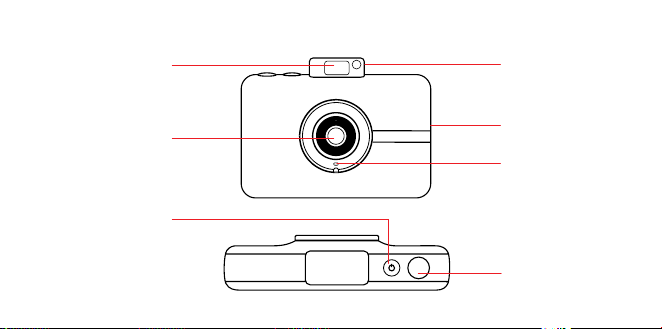
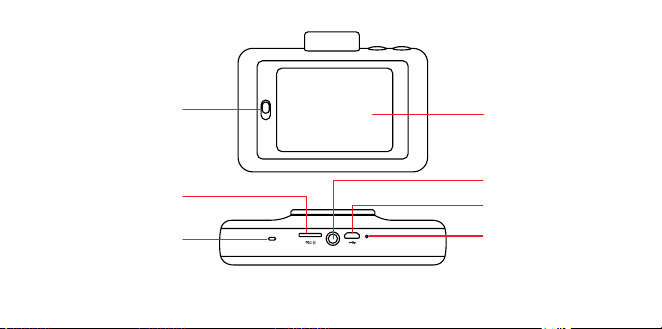
Ausklappbares
Blitzlicht
Selfie-Spiegel
Mikrofon
Ausgabeschacht für
gedruckte Fotos
Auslöser
Ein-Aus-Taste
Objektiv
Verschlusskappe
PRODUKTÜBERSICHT
Papierfach-
verriegelung
Reset-Taste*
Micro-USB-Port
Stativanschluss
Touchscreen
LCDSucher
Lautsprecher
MicroSD™-
Kartensteckplatz
* Um die Kamera auf die Voreinstellungen zurückzusetzen, führen Sie einen Stift ein
und drücken Sie ihn etwa 2 Sekunden lang herunter.
38 | DE DE | 39
Ausklappbares
Blitzlicht
Selfie-Spiegel
Mikrofon
Ausgabeschacht für
gedruckte Fotos
Auslöser
Ein-Aus-Taste
Objektiv
Verschlusskappe
PRODUKTÜBERSICHT
Papierfach-
verriegelung
Reset-Taste*
Micro-USB-Port
Stativanschluss
Touchscreen
LCDSucher
Lautsprecher
MicroSD™-
Kartensteckplatz
* Um die Kamera auf die Voreinstellungen zurückzusetzen, führen Sie einen Stift ein
und drücken Sie ihn etwa 2 Sekunden lang herunter.
40 | DE DE | 41
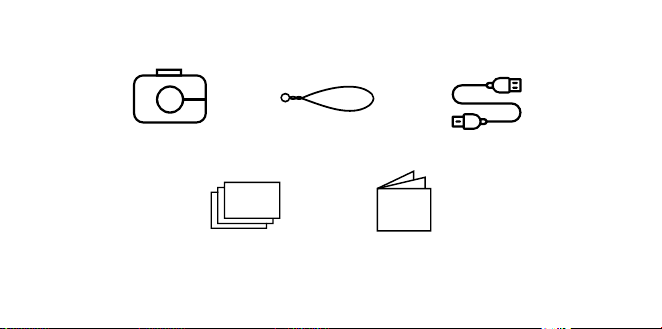
LIEFERUMFANG
Sofortbildkamera Kamerariemen
KODAK Fotopapier mit
ZINK® Zero Ink®-
Technologie Starterpaket
Bedienungsanleitung
& Garantie
Micro-USB-Kabel
Ein- und Ausschalten
Drücken Sie die Ein-Aus-Taste. Wenn der
Blitzmechanismus in der geschlossenen
Stellung ist, önet er sich, und die Kamera
schaltet sich ein.
Um die Kamera auszuschalten, drücken Sie
den Blitzmechanismus herunter.
Um die Kamera aus dem Schlafmodus
hochzufahren, drücken Sie die Ein-Aus-Taste.
Die Kamera schaltet sich ein.
Speicher
Der interne Speicher der Kamera fasst bis zu
10 Bilder. Es kann eine MicroSD™-Karte mit bis
zu 256 GB eingelegt werden.
Fotodruckpapier einlegen
Die KODAK STEP Touch-Kamera verwendet nur
ZINK® ZERO INK®-Technologie für den Druck
von 2x3" Fotos auf selbstklebendem Papier.
1. Schieben Sie den Hebel auf der linken Seite
des LCD-Bildschirms. Der Bildschirm klappt
auf.
VERWENDUNG IHRER KAMERA

40 | DE DE | 41
LIEFERUMFANG
Sofortbildkamera Kamerariemen
KODAK Fotopapier mit
ZINK® Zero Ink®-
Technologie Starterpaket
Bedienungsanleitung
& Garantie
Micro-USB-Kabel
Ein- und Ausschalten
Drücken Sie die Ein-Aus-Taste. Wenn der
Blitzmechanismus in der geschlossenen
Stellung ist, önet er sich, und die Kamera
schaltet sich ein.
Um die Kamera auszuschalten, drücken Sie
den Blitzmechanismus herunter.
Um die Kamera aus dem Schlafmodus
hochzufahren, drücken Sie die Ein-Aus-Taste.
Die Kamera schaltet sich ein.
Speicher
Der interne Speicher der Kamera fasst bis zu
10 Bilder. Es kann eine MicroSD™-Karte mit bis
zu 256 GB eingelegt werden.
Fotodruckpapier einlegen
Die KODAK STEP Touch-Kamera verwendet nur
ZINK® ZERO INK®-Technologie für den Druck
von 2x3" Fotos auf selbstklebendem Papier.
1. Schieben Sie den Hebel auf der linken Seite
des LCD-Bildschirms. Der Bildschirm klappt
auf.
VERWENDUNG IHRER KAMERA

42 | DE DE | 43
2. Nehmen Sie das Papier aus der Packung
und stecken Sie den gesamten Stapel Papier
hinein. Stellen Sie dabei sicher, dass das
blaue ZINK Farbenkalibrierungsblatt unten ist
und der Strichcode nach unten zeigt.
3. Schließen Sie das Papierfach.
4. Das blaue ZINK®-Farbkalibrierungsblatt wird
zur Kalibrierung Ihres Druckers vor dem
Drucken verarbeitet und ausgeworfen.
Erstmalige Einrichtung
Schalten Sie die Kamera ein, um mit der
Einrichtung zu beginnen. Befolgen Sie die
Anweisungen auf dem Bildschirm.
Fotos und Videos machen
Drücken Sie den Auslöser, um weiterhin
Bilder zu machen oder um anzufangen oder
aufzuhören, im Videomodus aufzuzeichnen.
Wenn der Auslöser im Fotoaufnahme-
Modus gedrückt gehalten wird, werden
Serienbilder gemacht (schnelle Serie von
Standaufnahmen).
Drücken Sie den Auslöser bis zur Mitte
hinunter, um zu fokussieren.
Anmerkung: Wenn Sie den Auslöser bei
Bildschirmen, die nicht den live Bildsucher
darstellen, drücken, wird es Sie zurück zum
dem live Bildsucher bringen.
Touchscreen-Steuerungen
Tippen Sie irgendwo auf den Sucher, um die
Steuerungen ein- und auszublenden.
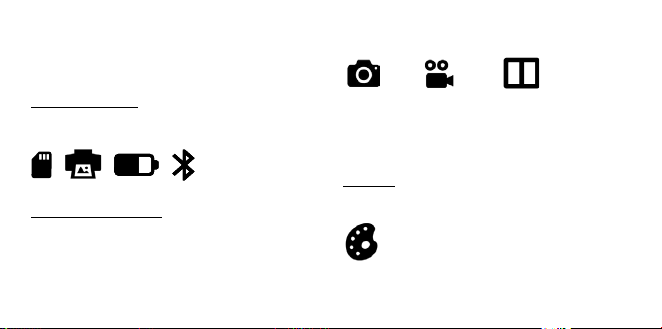
STATUSANZEIGE
Zeigt den Druck-, Akku- und Bluetooth®-
Verbindungsstatus an.
AUFNAHME MODUS
Ihr STEP Touch ist automatisch im Foto-
Modus und auf Ihrem Bildschirm sehen
Sie ein Kamera-Symbol. Klicken Sie
auf das Symbol, um zum Video- oder
Fotoautomaten-Modus zu wechseln.
Fotomodus Videomodus Fotokabinenmodus
Der Photobooth-Modus ermöglicht Ihnen, Fotos
für einen 2-, 3- oder 4-Foto Layout zu machen.
EXTRAS
Sie können Ihre Fotos mit Umrahmungen, Filter
und digitale Sticker persönlich gestalten.
Extras
42 | DE DE | 43
2. Nehmen Sie das Papier aus der Packung
und stecken Sie den gesamten Stapel Papier
hinein. Stellen Sie dabei sicher, dass das
blaue ZINK Farbenkalibrierungsblatt unten ist
und der Strichcode nach unten zeigt.
3. Schließen Sie das Papierfach.
4. Das blaue ZINK®-Farbkalibrierungsblatt wird
zur Kalibrierung Ihres Druckers vor dem
Drucken verarbeitet und ausgeworfen.
Erstmalige Einrichtung
Schalten Sie die Kamera ein, um mit der
Einrichtung zu beginnen. Befolgen Sie die
Anweisungen auf dem Bildschirm.
Fotos und Videos machen
Drücken Sie den Auslöser, um weiterhin
Bilder zu machen oder um anzufangen oder
aufzuhören, im Videomodus aufzuzeichnen.
Wenn der Auslöser im Fotoaufnahme-
Modus gedrückt gehalten wird, werden
Serienbilder gemacht (schnelle Serie von
Standaufnahmen).
Drücken Sie den Auslöser bis zur Mitte
hinunter, um zu fokussieren.
Anmerkung: Wenn Sie den Auslöser bei
Bildschirmen, die nicht den live Bildsucher
darstellen, drücken, wird es Sie zurück zum
dem live Bildsucher bringen.
Touchscreen-Steuerungen
Tippen Sie irgendwo auf den Sucher, um die
Steuerungen ein- und auszublenden.
STATUSANZEIGE
Zeigt den Druck-, Akku- und Bluetooth®-
Verbindungsstatus an.
AUFNAHME MODUS
Ihr STEP Touch ist automatisch im Foto-
Modus und auf Ihrem Bildschirm sehen
Sie ein Kamera-Symbol. Klicken Sie
auf das Symbol, um zum Video- oder
Fotoautomaten-Modus zu wechseln.
Fotomodus Videomodus Fotokabinenmodus
Der Photobooth-Modus ermöglicht Ihnen, Fotos
für einen 2-, 3- oder 4-Foto Layout zu machen.
EXTRAS
Sie können Ihre Fotos mit Umrahmungen, Filter
und digitale Sticker persönlich gestalten.
Extras
44 | DE DE | 45
Rahmen Filter Sticker
GALERIE
Tippen Sie hier, um zur Galerie zu gelangen.
Anmerkung: Sie können in der Galerie auch
Extras hinzufügen, Ihr Foto drehen und Ihr
Foto zurechtschneiden.
GERÄTEEINSTELLUNGEN
Drücken Sie auf das Symbol, um die Kamera
zu önen und Einstellungen wie
Bildschirmhelligkeit, Blitz, Videoauflösung,
Lautstärke und Bluetooth® zu erfassen.
ZOOM
Drücken Sie
um in dem live Bildsucher
heran- und wegzuzoomen.
TIPPEN UND HALTEN UM SCHARFZUSTELLEN
Drücken Sie den Bildschirm und halten Sie ihn
gedrückt, um den Fokusbereich festzulegen.
Anmerkung: Überprüfen Sie die App auf
Updates der Firmware.
Mobile App
Um weitere Möglichkeiten zur Nutzung von
KODAK STEP Touch freizuschalten,
können Sie die kostenlose KODAK STEP-Druck-
App für iOS und Android™ hier herunterladen:
ür ausführlichere Informationen, ein
herunterladbares Handbuch, FAQs und
technischen Support, besuchen Sie bitte
www.kodakphotoplus.com.
KUNDENDIENST-
KONTAKTINFORMATIONEN
Sollten Sie Probleme mit Ihrem Produkt
haben, setzen Sie sich bitte mit uns in
Verbindung, bevor Sie den Artikel an die
Verkaufsstelle zurücksenden. WIR SIND
HIER UM ZU HELFEN!
US-Unterstützung:
kodak@camarketing.com
844-516-1539
Internationale Unterstützung:
kodakintl@camarketing.com
844-516-1540
44 | DE DE | 45
Rahmen Filter Sticker
GALERIE
Tippen Sie hier, um zur Galerie zu gelangen.
Anmerkung: Sie können in der Galerie auch
Extras hinzufügen, Ihr Foto drehen und Ihr
Foto zurechtschneiden.
GERÄTEEINSTELLUNGEN
Drücken Sie auf das Symbol, um die Kamera
zu önen und Einstellungen wie
Bildschirmhelligkeit, Blitz, Videoauflösung,
Lautstärke und Bluetooth® zu erfassen.
ZOOM
Drücken Sie
um in dem live Bildsucher
heran- und wegzuzoomen.
TIPPEN UND HALTEN UM SCHARFZUSTELLEN
Drücken Sie den Bildschirm und halten Sie ihn
gedrückt, um den Fokusbereich festzulegen.
Anmerkung: Überprüfen Sie die App auf
Updates der Firmware.
Mobile App
Um weitere Möglichkeiten zur Nutzung von
KODAK STEP Touch freizuschalten,
können Sie die kostenlose KODAK STEP-Druck-
App für iOS und Android™ hier herunterladen:
ür ausführlichere Informationen, ein
herunterladbares Handbuch, FAQs und
technischen Support, besuchen Sie bitte
www.kodakphotoplus.com.
KUNDENDIENST-
KONTAKTINFORMATIONEN
Sollten Sie Probleme mit Ihrem Produkt
haben, setzen Sie sich bitte mit uns in
Verbindung, bevor Sie den Artikel an die
Verkaufsstelle zurücksenden. WIR SIND
HIER UM ZU HELFEN!
US-Unterstützung:
kodak@camarketing.com
844-516-1539
Internationale Unterstützung:
kodakintl@camarketing.com
844-516-1540

46 | DE DE | 47
GARANTIEINFORMATIONEN
EINGESCHRÄNKTE GARANTIE AUF KODAK
STEP Touch-SOFORTBILD-DIGITALKAMERA
DIESE BESCHRÄNKTE GARANTIE GIBT IHNEN
BESTIMMTE RECHTE UND SIE KÖNNTEN AUCH
WEITERE RECHTE HABEN, DIE VON LAND ZU
LAND UNTERSCHIEDLICH AUSFALLEN.
WIR GARANTIEREN, DASS DAS PRODUKT
WÄHREND DER GARANTIEZEIT FREI VON
MATERIAL- UND HERSTELLUNGSMÄNGELN IST.
HAFTUNGSBEGRENZUNGEN
SOWEIT ES NICHT GESETZLICH VERBOTEN
IST, IST DIESE GARANTIE EXKLUSIV UND
ERSETZT ALLE ANDEREN GARANTIEN,
SEIEN SIE MÜNDLICH, SCHRIFTLICH,
GESETZLICH, AUSDRÜCKLICH ODER
STILLSCHWEIGEND. MIT AUSNAHME
DER IN DIESER BESCHRÄNKTEN
GARANTIEERKLÄRUNG ENTHALTENEN
AUSDRÜCKLICHEN GARANTIEN UND SOWEIT
NICHT GESETZLICH VERBOTEN, LEHNEN
WIR ALLE ANDEREN AUSDRÜCKLICHEN
ODER STILLSCHWEIGENDEN,
GESETZLICHEN ODER SONSTIGEN
GARANTIEN AB, EINSCHLIESSLICH UND
OHNE EINSCHRÄNKUNG AUCH DIE
GEWÄHRLEISTUNG DER MARKTGÄNGIGKEIT
UND EIGNUNG FÜR EINEN BESTIMMTEN
ZWECK. EINIGE LÄNDER ERLAUBEN
KEINE HAFTUNGSAUSSCHLÜSSE FÜR
STILLSCHWEIGENDE GARANTIEN,
SODASS DIESER HAFTUNGSAUSSCHLUSS
MÖGLICHERWEISE NICHT FÜR SIE GILT.
SOWEIT SOLCHE GARANTIEN NACH DEN
GESETZEN IHRER RECHTSORDNUNG NICHT
AUSGESCHLOSSEN WERDEN KÖNNEN,
BEGRENZEN WIR DIE DAUER UND DIE
RECHTSMITTEL SOLCHER GARANTIEN AUF DIE
DAUER DIESER AUSDRÜCKLICH BEGRENZTEN
GARANTIE.
UNSERE VERANTWORTUNG FÜR
FEHLERHAFTE WAREN BESCHRÄNKT
SICH AUF REPARATUR, ERSATZ ODER
RÜCKERSTATTUNG, WIE UNTEN IN DIESER
GARANTIEERKLÄRUNG BESCHRIEBEN.
WER DARF DIESE GARANTIE NUTZEN? C&A
Marketing, Inc. mit Sitz in 114 Tived Lane East,
Edison, NJ („wir“), erstreckt diese beschränkte
Garantie nur auf den Verbraucher, der das
Produkt ursprünglich gekauft hat („Sie“).
Diese erstreckt sich nicht auf einen späteren
Eigentümer oder sonstigen Übernehmer des
Produkts.
WAS DECKT DIESE GARANTIE? Diese
eingeschränkte Garantie deckt Material- und
Verarbeitungsfehler der KODAK STEP Touch-
Sofortbild-Digitalkamera (das „Produkt“) für den
weiter unten festgelegten Garantiezeitraum.
WAS WIRD DIESE GARANTIE NICHT
DECKEN? Diese beschränkte Garantie deckt
keine Schäden, die durch: (a) Transport; (b)
Lagerung; (c) unsachgemäße Verwendung;
(d) Nichteinhaltung der Produkthinweise oder
vorbeugende Wartung; (e) Modifikationen;
(f) nicht autorisierte Reparaturen; (g) normale
Abnutzung; oder (h) äußere Ursachen wie
Unfälle, Missbrauch oder andere Handlungen

46 | DE DE | 47
GARANTIEINFORMATIONEN
EINGESCHRÄNKTE GARANTIE AUF KODAK
STEP Touch-SOFORTBILD-DIGITALKAMERA
DIESE BESCHRÄNKTE GARANTIE GIBT IHNEN
BESTIMMTE RECHTE UND SIE KÖNNTEN AUCH
WEITERE RECHTE HABEN, DIE VON LAND ZU
LAND UNTERSCHIEDLICH AUSFALLEN.
WIR GARANTIEREN, DASS DAS PRODUKT
WÄHREND DER GARANTIEZEIT FREI VON
MATERIAL- UND HERSTELLUNGSMÄNGELN IST.
HAFTUNGSBEGRENZUNGEN
SOWEIT ES NICHT GESETZLICH VERBOTEN
IST, IST DIESE GARANTIE EXKLUSIV UND
ERSETZT ALLE ANDEREN GARANTIEN,
SEIEN SIE MÜNDLICH, SCHRIFTLICH,
GESETZLICH, AUSDRÜCKLICH ODER
STILLSCHWEIGEND. MIT AUSNAHME
DER IN DIESER BESCHRÄNKTEN
GARANTIEERKLÄRUNG ENTHALTENEN
AUSDRÜCKLICHEN GARANTIEN UND SOWEIT
NICHT GESETZLICH VERBOTEN, LEHNEN
WIR ALLE ANDEREN AUSDRÜCKLICHEN
ODER STILLSCHWEIGENDEN,
GESETZLICHEN ODER SONSTIGEN
GARANTIEN AB, EINSCHLIESSLICH UND
OHNE EINSCHRÄNKUNG AUCH DIE
GEWÄHRLEISTUNG DER MARKTGÄNGIGKEIT
UND EIGNUNG FÜR EINEN BESTIMMTEN
ZWECK. EINIGE LÄNDER ERLAUBEN
KEINE HAFTUNGSAUSSCHLÜSSE FÜR
STILLSCHWEIGENDE GARANTIEN,
SODASS DIESER HAFTUNGSAUSSCHLUSS
MÖGLICHERWEISE NICHT FÜR SIE GILT.
SOWEIT SOLCHE GARANTIEN NACH DEN
GESETZEN IHRER RECHTSORDNUNG NICHT
AUSGESCHLOSSEN WERDEN KÖNNEN,
BEGRENZEN WIR DIE DAUER UND DIE
RECHTSMITTEL SOLCHER GARANTIEN AUF DIE
DAUER DIESER AUSDRÜCKLICH BEGRENZTEN
GARANTIE.
UNSERE VERANTWORTUNG FÜR
FEHLERHAFTE WAREN BESCHRÄNKT
SICH AUF REPARATUR, ERSATZ ODER
RÜCKERSTATTUNG, WIE UNTEN IN DIESER
GARANTIEERKLÄRUNG BESCHRIEBEN.
WER DARF DIESE GARANTIE NUTZEN? C&A
Marketing, Inc. mit Sitz in 114 Tived Lane East,
Edison, NJ („wir“), erstreckt diese beschränkte
Garantie nur auf den Verbraucher, der das
Produkt ursprünglich gekauft hat („Sie“).
Diese erstreckt sich nicht auf einen späteren
Eigentümer oder sonstigen Übernehmer des
Produkts.
WAS DECKT DIESE GARANTIE? Diese
eingeschränkte Garantie deckt Material- und
Verarbeitungsfehler der KODAK STEP Touch-
Sofortbild-Digitalkamera (das „Produkt“) für den
weiter unten festgelegten Garantiezeitraum.
WAS WIRD DIESE GARANTIE NICHT
DECKEN? Diese beschränkte Garantie deckt
keine Schäden, die durch: (a) Transport; (b)
Lagerung; (c) unsachgemäße Verwendung;
(d) Nichteinhaltung der Produkthinweise oder
vorbeugende Wartung; (e) Modifikationen;
(f) nicht autorisierte Reparaturen; (g) normale
Abnutzung; oder (h) äußere Ursachen wie
Unfälle, Missbrauch oder andere Handlungen

48 | DE DE | 49
oder Ereignisse verursacht wurden, und die
außerhalb unserer angemessenen Kontrolle
liegen.
WIE LANGE IST DIE GELTUNGSDAUER?
Diese beschränkte Garantie beginnt mit
dem Datum Ihres Kaufs und dauert ein Jahr
(die „Garantiezeit“). Die Gewährleistungsfrist
verlängert sich nicht, wenn wir das Produkt
reparieren oder ersetzen. Wir können die
Verfügbarkeit dieser eingeschränkten Garantie
nach unserem Ermessen ändern, aber alle
Änderungen werden nicht rückwirkend gültig
sein.
WELCHE RECHTSMITTEL STEHEN
IHNEN UNTER DIESER GARANTIE ZUR
VERFÜGUNG? With respect to any defective
product during tIn Bezug auf ein defektes
Produkt während der Garantiezeit werden wir
nach eigenem Ermessen entweder (a) dieses
Produkt (oder das defekte Teil) kostenlos
reparieren oder ersetzen oder (b) den Kaufpreis
dieses Produkts erstatten, wenn keine
Austauscheinheit bereitgestellt werden kann.
WIE ERHALTEN SIE DEN GARANTIE-
SERVICE? Um den Garantie-Service in
Anspruch zu nehmen, müssen Sie sich
innerhalb der Garantiezeit unter 844-516-1539
oder per E-Mail an kodak@camarketing.
com wenden, um eine Nummer für defekte
Warenautorisierung („DMA“) zu erhalten. Ohne
DMA-Nummer wird keine Garantieleistung
erbracht und die Rücksendekosten an unsere
Einrichtungen werden von Ihnen, dem
Käufer, übernommen. Die Versandkosten
des Ersatzgerätes an Sie werden von uns
übernommen.
kodakphotoplus.com
Die Marke, das Logo und die Handelskleidung von
Kodak werden unter Lizenz der Eastman Kodak
Company verwendet.
ZINK, ZERO INK, und die ZINK Markenzeichen sind
Eigentum der ZINK Holdings LLC.
Android ist eine Marke von Google LLC.
IOS ist eine Marke von Cisco in den USA und
anderen Ländern und wird unter Lizenz verwendet.
Bluetooth ist eine Marke von Bluetooth SIG, Inc. USA.
MicroSD ist eine Marke oder eingetragene Marke
von SD-3C LLC in den USA und / oder anderen
Ländern.
Alle anderen Produkte, Markennamen,
Firmennamen und Logos sind Warenzeichen
der jeweiligen Eigentümer. Sie dienen lediglich
zur Identifizierung der jeweiligen Produkte und
sind nicht als Sponsoring, Bestätigung oder
Genehmigung zu verstehen.
Vertrieben von: C&A Marketing, Inc., 114 Tived Lane
East, Edison, NJ 08837, USA
C&A Marketing UK LTD, 167 Hermitage Road,
Crusader Industrial Estate, London N4 1LZ, UK
©2020. Alle Rechte vorbehalten. HERGESTELLT
IN CHINA

48 | DE DE | 49
oder Ereignisse verursacht wurden, und die
außerhalb unserer angemessenen Kontrolle
liegen.
WIE LANGE IST DIE GELTUNGSDAUER?
Diese beschränkte Garantie beginnt mit
dem Datum Ihres Kaufs und dauert ein Jahr
(die „Garantiezeit“). Die Gewährleistungsfrist
verlängert sich nicht, wenn wir das Produkt
reparieren oder ersetzen. Wir können die
Verfügbarkeit dieser eingeschränkten Garantie
nach unserem Ermessen ändern, aber alle
Änderungen werden nicht rückwirkend gültig
sein.
WELCHE RECHTSMITTEL STEHEN
IHNEN UNTER DIESER GARANTIE ZUR
VERFÜGUNG? With respect to any defective
product during tIn Bezug auf ein defektes
Produkt während der Garantiezeit werden wir
nach eigenem Ermessen entweder (a) dieses
Produkt (oder das defekte Teil) kostenlos
reparieren oder ersetzen oder (b) den Kaufpreis
dieses Produkts erstatten, wenn keine
Austauscheinheit bereitgestellt werden kann.
WIE ERHALTEN SIE DEN GARANTIE-
SERVICE? Um den Garantie-Service in
Anspruch zu nehmen, müssen Sie sich
innerhalb der Garantiezeit unter 844-516-1539
oder per E-Mail an kodak@camarketing.
com wenden, um eine Nummer für defekte
Warenautorisierung („DMA“) zu erhalten. Ohne
DMA-Nummer wird keine Garantieleistung
erbracht und die Rücksendekosten an unsere
Einrichtungen werden von Ihnen, dem
Käufer, übernommen. Die Versandkosten
des Ersatzgerätes an Sie werden von uns
übernommen.
kodakphotoplus.com
Die Marke, das Logo und die Handelskleidung von
Kodak werden unter Lizenz der Eastman Kodak
Company verwendet.
ZINK, ZERO INK, und die ZINK Markenzeichen sind
Eigentum der ZINK Holdings LLC.
Android ist eine Marke von Google LLC.
IOS ist eine Marke von Cisco in den USA und
anderen Ländern und wird unter Lizenz verwendet.
Bluetooth ist eine Marke von Bluetooth SIG, Inc. USA.
MicroSD ist eine Marke oder eingetragene Marke
von SD-3C LLC in den USA und / oder anderen
Ländern.
Alle anderen Produkte, Markennamen,
Firmennamen und Logos sind Warenzeichen
der jeweiligen Eigentümer. Sie dienen lediglich
zur Identifizierung der jeweiligen Produkte und
sind nicht als Sponsoring, Bestätigung oder
Genehmigung zu verstehen.
Vertrieben von: C&A Marketing, Inc., 114 Tived Lane
East, Edison, NJ 08837, USA
C&A Marketing UK LTD, 167 Hermitage Road,
Crusader Industrial Estate, London N4 1LZ, UK
©2020. Alle Rechte vorbehalten. HERGESTELLT
IN CHINA

50 | FR FR | 51
PRÉCAUTIONS DE SÉCURITÉ
• ATTENTION : afin d'éviter tout
risque d'incendie, assurez-vous
de ne connecter votre appareil
photo KODAK STEP TOUCH qu'à
une alimentation dont la puissance
de sortie est inférieure à 15 W,
conformément aux exigences PS1
définies dans les normes CEI / EN / UL
62368.
• Avertissement contre les troubles
convulsifs : Cet appareil utilise de façon
répétée des voyants LED clignotants qui
peuvent potentiellement déclencher
des crises chez les personnes sourant
d'épilepsie photosensible ou d'autres
troubles convulsifs. La discrétion de
l'utilisateur est conseillée.
• N'essayez pas de démonter cet appareil
pour quelque raison que ce soit.
• Ne laissez jamais votre appareil photo ou le
papier ZINK® dans un endroit qui pourrait
devenir extrêmement chaud ou exposé
à la lumière directe du soleil pendant une
longue période. Cela peut entraîner une
surchaue de votre appareil photo ou
causer d'autres problèmes.
• Ne manipulez jamais l'appareil photo avec
des mains humides ou mouillées. Cela
pourrait endommager l'appareil photo ou
créer un risque de choc électrique.
• N'utilisez pas de produits tels que de
l'alcool, de l'essence, un diluant ou tout
autre solvant organique lorsque vous
nettoyez ou essayez de nettoyer ce produit.
• N'utilisez pas cet appareil dans un
environnement où il sera exposé à
beaucoup de poussière ou à l'humidité.
• Ne laissez jamais tomber et ne secouez
jamais l'appareil photo, car cela pourrait
entraîner un dysfonctionnement ou
endommager de façon permanente les
parties internes.
• N'utilisez pas cet appareil photo pendant le
bain ou sous la douche.
• Ne placez pas ou ne rangez pas l'appareil
photo dans un endroit où il pourrait tomber
ou être tiré dans une baignoire ou un évier.
• Ne placez pas, ne laissez pas tomber ou ne
plongez pas l'appareil photo dans l'eau ou
tout autre liquide.
• Veillez à ce qu'aucun objet ne tombe
sur l'appareil et qu'aucun liquide ne soit
renversé dessus.

50 | FR FR | 51
PRÉCAUTIONS DE SÉCURITÉ
• ATTENTION : afin d'éviter tout
risque d'incendie, assurez-vous
de ne connecter votre appareil
photo KODAK STEP TOUCH qu'à
une alimentation dont la puissance
de sortie est inférieure à 15 W,
conformément aux exigences PS1
définies dans les normes CEI / EN / UL
62368.
• Avertissement contre les troubles
convulsifs : Cet appareil utilise de façon
répétée des voyants LED clignotants qui
peuvent potentiellement déclencher
des crises chez les personnes sourant
d'épilepsie photosensible ou d'autres
troubles convulsifs. La discrétion de
l'utilisateur est conseillée.
• N'essayez pas de démonter cet appareil
pour quelque raison que ce soit.
• Ne laissez jamais votre appareil photo ou le
papier ZINK® dans un endroit qui pourrait
devenir extrêmement chaud ou exposé
à la lumière directe du soleil pendant une
longue période. Cela peut entraîner une
surchaue de votre appareil photo ou
causer d'autres problèmes.
• Ne manipulez jamais l'appareil photo avec
des mains humides ou mouillées. Cela
pourrait endommager l'appareil photo ou
créer un risque de choc électrique.
• N'utilisez pas de produits tels que de
l'alcool, de l'essence, un diluant ou tout
autre solvant organique lorsque vous
nettoyez ou essayez de nettoyer ce produit.
• N'utilisez pas cet appareil dans un
environnement où il sera exposé à
beaucoup de poussière ou à l'humidité.
• Ne laissez jamais tomber et ne secouez
jamais l'appareil photo, car cela pourrait
entraîner un dysfonctionnement ou
endommager de façon permanente les
parties internes.
• N'utilisez pas cet appareil photo pendant le
bain ou sous la douche.
• Ne placez pas ou ne rangez pas l'appareil
photo dans un endroit où il pourrait tomber
ou être tiré dans une baignoire ou un évier.
• Ne placez pas, ne laissez pas tomber ou ne
plongez pas l'appareil photo dans l'eau ou
tout autre liquide.
• Veillez à ce qu'aucun objet ne tombe
sur l'appareil et qu'aucun liquide ne soit
renversé dessus.
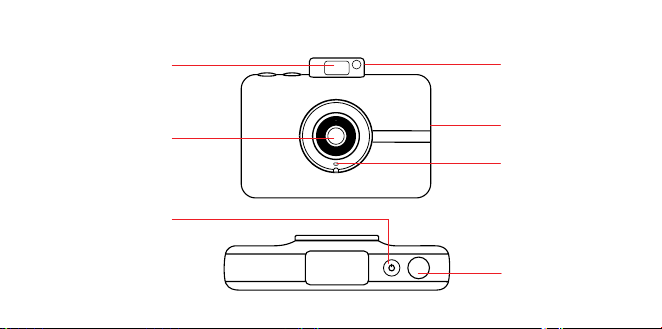
52 | FR FR | 53
Flash
escamotable
Miroir à selfie
Microphone
Fente de sortie
de l’impression
Bouton du
déclencheur
Bouton
d’alimentation
Objectif
APERÇU DU PRODUIT
Loquet de
protection du
compartiment à
papier
Bouton de
réinitialisation*
Port micro USB
Connecteur pour
tripode
Viseur LCD à
écran tactile
Haut-parleur
Port pour carte
MicroSD™
* Pour réinitialiser la caméra, utilisez une aiguille et maintenez appuyé
pendant environ deux secondes.
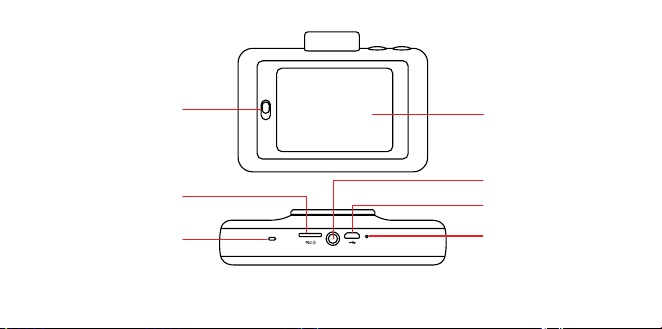
52 | FR FR | 53
Flash
escamotable
Miroir à selfie
Microphone
Fente de sortie
de l’impression
Bouton du
déclencheur
Bouton
d’alimentation
Objectif
APERÇU DU PRODUIT
Loquet de
protection du
compartiment à
papier
Bouton de
réinitialisation*
Port micro USB
Connecteur pour
tripode
Viseur LCD à
écran tactile
Haut-parleur
Port pour carte
MicroSD™
* Pour réinitialiser la caméra, utilisez une aiguille et maintenez appuyé
pendant environ deux secondes.
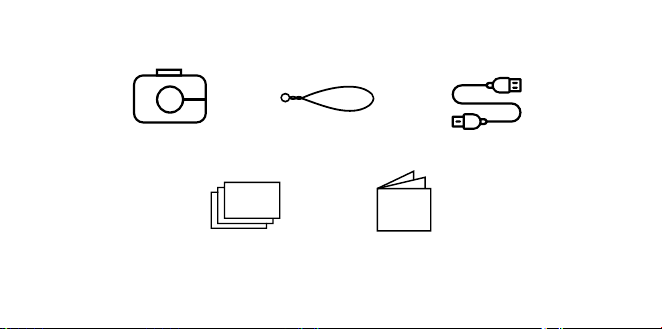
54 | FR FR | 55
CONTENU DE LA BOÎTE
Appareil photo numérique
avec impression
instantanée
Sangle
Papier photo KODAK utilisant
le pack de démarrage avec la
technologie ZINK® Zero Ink®
Manuel de
l'utilisateur &
garantie
Micro câble USB
Marche/arrêt
Appuyez sur le bouton d’alimentation. Si le
mécanisme de flash est en position fermée, il se
déploiera et l’appareil se mettra en marche.
Pour éteindre la caméra, appuyez sur le
mécanisme de flash.
Pour sortir l’appareil du mode veille, appuyez
sur le bouton d’alimentation. L’appareil photo se
mettra en marche.
Stockage de la mémoire
La mémoire interne de l'appareil photo peut
contenir jusqu'à 10 images et peut accueillir
une carte MicroSD™ d'une capacité allant
jusqu'à 256 Go.
Chargement du papier d'impression photo
L'appareil photo KODAK STEP Touch utilise
uniquement la technologie ZINK® ZERO INK®
pour imprimer des photos 2x3” sur du papier
adhésif.
1. Faites glisser le curseur se trouvant sur
COMMENT UTILISER VOTRE APPAREIL PHOTO

54 | FR FR | 55
CONTENU DE LA BOÎTE
Appareil photo numérique
avec impression
instantanée
Sangle
Papier photo KODAK utilisant
le pack de démarrage avec la
technologie ZINK® Zero Ink®
Manuel de
l'utilisateur &
garantie
Micro câble USB
Marche/arrêt
Appuyez sur le bouton d’alimentation. Si le
mécanisme de flash est en position fermée, il se
déploiera et l’appareil se mettra en marche.
Pour éteindre la caméra, appuyez sur le
mécanisme de flash.
Pour sortir l’appareil du mode veille, appuyez
sur le bouton d’alimentation. L’appareil photo se
mettra en marche.
Stockage de la mémoire
La mémoire interne de l'appareil photo peut
contenir jusqu'à 10 images et peut accueillir
une carte MicroSD™ d'une capacité allant
jusqu'à 256 Go.
Chargement du papier d'impression photo
L'appareil photo KODAK STEP Touch utilise
uniquement la technologie ZINK® ZERO INK®
pour imprimer des photos 2x3” sur du papier
adhésif.
1. Faites glisser le curseur se trouvant sur
COMMENT UTILISER VOTRE APPAREIL PHOTO

56 | FR FR | 57
le côté gauche de l'écran LCD. L'écran
apparaîtra.
2. Retirez le papier du paquet et insérez une
pile de papier entière, en vous assurant
que la feuille d’étalonnage de couleur
bleue ZINK soit en bas, avec le code à
barres vers le bas.
3. Fermez le compartiment à papier.
4. La feuille ZINK® bleue de calibrage
sera analysée, puis éjectée avant votre
impression pour calibrer votre imprimante.
Réglages de la première mise en marche
Mettez l'appareil photo en marche pour
commencer les réglages. Suivez les
indications à l'écran.
Prendre des photos et des vidéos
Appuyez sur le bouton du démarrage pour
prendre des photos fixes ou pour démarrer
et arrêter l’enregistrement en mode Vidéo.
Maintenir le bouton du démarrage enfoncé
en mode de capture de photo, permet de
prendre une série de captures (succession
rapide de photos fixes).
Appuyez à mi-course sur le bouton du
démarrage pour la mise au point.
Remarque : Appuyer sur le bouton du
démarrage en étant sur des écrans autres
que le viseur en direct, vous renvoie au viseur
en direct.
Commandes de l'écran tactile
Appuyez n'importe où sur l’écran du viseur
numérique pour aicher/masquer les
commandes.
INDICATEURS D'ÉTAT
Aiche l'état de l'impression, de la batterie, de
la carte SD et de la connexion Bluetooth®.
MODE DE CAPTURE
Votre STEP Touch est automatiquement en
mode Photo et vous verrez sur votre écran
une icône en forme d'appareil photo. Cliquez
dessus pour passer en mode Vidéo ou
Cabine photo
Mode Photo Mode Vidéo Mode Photomaton
Le mode Photobooth vous permet de
prendre des photos pour une mise en page
de 2, 3 ou 4 photos.
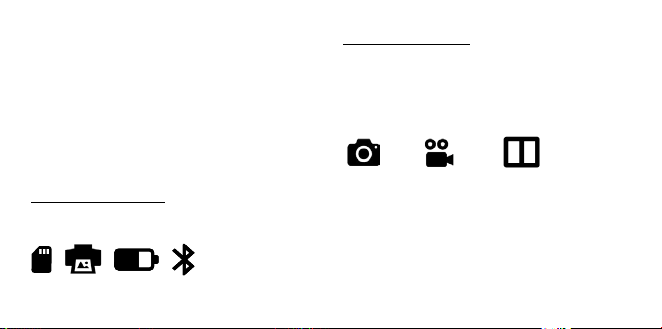
56 | FR FR | 57
le côté gauche de l'écran LCD. L'écran
apparaîtra.
2. Retirez le papier du paquet et insérez une
pile de papier entière, en vous assurant
que la feuille d’étalonnage de couleur
bleue ZINK soit en bas, avec le code à
barres vers le bas.
3. Fermez le compartiment à papier.
4. La feuille ZINK® bleue de calibrage
sera analysée, puis éjectée avant votre
impression pour calibrer votre imprimante.
Réglages de la première mise en marche
Mettez l'appareil photo en marche pour
commencer les réglages. Suivez les
indications à l'écran.
Prendre des photos et des vidéos
Appuyez sur le bouton du démarrage pour
prendre des photos fixes ou pour démarrer
et arrêter l’enregistrement en mode Vidéo.
Maintenir le bouton du démarrage enfoncé
en mode de capture de photo, permet de
prendre une série de captures (succession
rapide de photos fixes).
Appuyez à mi-course sur le bouton du
démarrage pour la mise au point.
Remarque : Appuyer sur le bouton du
démarrage en étant sur des écrans autres
que le viseur en direct, vous renvoie au viseur
en direct.
Commandes de l'écran tactile
Appuyez n'importe où sur l’écran du viseur
numérique pour aicher/masquer les
commandes.
INDICATEURS D'ÉTAT
Aiche l'état de l'impression, de la batterie, de
la carte SD et de la connexion Bluetooth®.
MODE DE CAPTURE
Votre STEP Touch est automatiquement en
mode Photo et vous verrez sur votre écran
une icône en forme d'appareil photo. Cliquez
dessus pour passer en mode Vidéo ou
Cabine photo
Mode Photo Mode Vidéo Mode Photomaton
Le mode Photobooth vous permet de
prendre des photos pour une mise en page
de 2, 3 ou 4 photos.
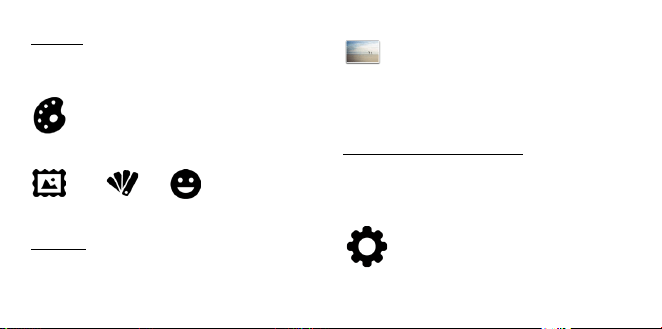
58 | FR FR | 59
EXTRAS
Vous pouvez personnaliser vos photos avec
des bordures, des filtres et des autocollants
numériques.
Extras
Bordures Filtres Autocollants
GALERIE
Appuyez pour aller dans la galerie.
Remarque : Vous pouvez également ajouter
des extras, faire pivoter votre photo et
recadrer votre photo dans la Galerie.
PARAMÈTRES DE L’APPAREIL
Appuyez sur l'icône pour ouvrir l'appareil
photo et capturer les paramètres tels que la
luminosité de l'écran, le flash, la résolution
vidéo, le volume et Bluetooth®.
ZOOM
Appuyez sur
pour faire un zoom avant et
arrière dans le viseur en direct.
MAINTENEZ APPUYÉ POUR LA MISE AU
POINT
Appuyez et maintenez appuyé l'écran pour
définir la zone de mise au point.
Remarque : Vérifiez l’application des mises à
jour de Firmware.
APPLICATION POUR MOBILE
Pour débloquer d’autres façons d’utiliser
KODAK STEP Touch, téléchargez l’application
gratuite KODAK STEP Prints pour iOS et
Android™ ici :
Pour des informations plus détaillées, un
manuel téléchargeable, une FAQ et une
assistance technique, consultez
www.kodakphotoplus.com.
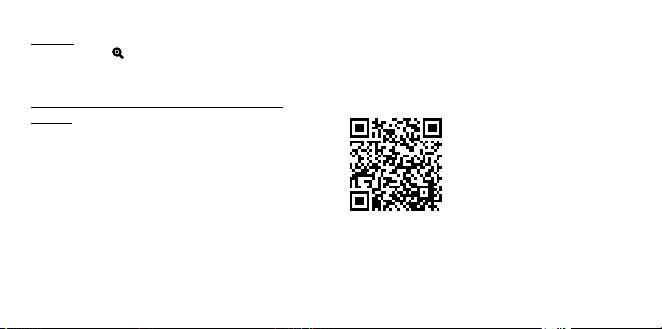
58 | FR FR | 59
EXTRAS
Vous pouvez personnaliser vos photos avec
des bordures, des filtres et des autocollants
numériques.
Extras
Bordures Filtres Autocollants
GALERIE
Appuyez pour aller dans la galerie.
Remarque : Vous pouvez également ajouter
des extras, faire pivoter votre photo et
recadrer votre photo dans la Galerie.
PARAMÈTRES DE L’APPAREIL
Appuyez sur l'icône pour ouvrir l'appareil
photo et capturer les paramètres tels que la
luminosité de l'écran, le flash, la résolution
vidéo, le volume et Bluetooth®.
ZOOM
Appuyez sur
pour faire un zoom avant et
arrière dans le viseur en direct.
MAINTENEZ APPUYÉ POUR LA MISE AU
POINT
Appuyez et maintenez appuyé l'écran pour
définir la zone de mise au point.
Remarque : Vérifiez l’application des mises à
jour de Firmware.
APPLICATION POUR MOBILE
Pour débloquer d’autres façons d’utiliser
KODAK STEP Touch, téléchargez l’application
gratuite KODAK STEP Prints pour iOS et
Android™ ici :
Pour des informations plus détaillées, un
manuel téléchargeable, une FAQ et une
assistance technique, consultez
www.kodakphotoplus.com.

60 | FR FR | 61
INFORMATIONS DE CONTACT
DE SERVICE À LA CLIENTÈLE
Si vous rencontrez des problèmes avec
votre produit, veuillez nous contacter avant
de ramener le produit au point de vente.
NOUS SOMMES LÀ POUR VOUS AIDER!
Support technique aux USA :
kodak@camarketing.com
844-516-1539
Support technique international :
kodakintl@camarketing.com
844-516-1540
INFORMATIONS DE GARANTIE
GARANTIE LIMITÉE SUR KODAK STEP Touch
APPAREIL PHOTO NUMÉRIQUE À IMPRESSION
INSTANTANÉE
CETTE GARANTIE LIMITÉE VOUS CONFÈRE
DES DROITS SPÉCIFIQUES RECONNUS PAR LA
LOI. VOUS POURRIEZ DISPOSER DE DROITS
SUPPLÉMENTAIRES QUI VARIENT D'UN PAYS À
UN AUTRE.
NOUS GARANTISSONS QUE CE PRODUIT SERA
EXEMPT DE TOUT DÉFAUT DE FABRICATION
ET DE MATÉRIAUX PENDANT LA PÉRIODE DE
GARANTIE.
LIMITATION DE RESPONSABILITÉ
Dans la mesure où le droit ne l'interdit pas, cette
garantie est exclusive et vient en lieu et place
de toute autre garantie écrite, orale, légale,
expresse ou implicite. À L'EXCEPTION DES
GARANTIES EXPRESSES CONTENUES DANS
LA DÉCLARATION DE GARANTIE LIMITÉE ET
DANS LA MESURE OÙ CELA NE CONTREVIENT
PAS À LA LOI, NOUS DÉCLINONS TOUTES LES
AUTRES GARANTIES, EXPLICITES OU IMPLICITES,
LÉGALES OU AUTRES, INCLUANT SANS
LIMITATION, LES GARANTIES COMMERCIALES
ET D'USAGE POUR UN BUT PARTICULIER. DANS
LA MESURE OÙ CERTAINES JURIDICTIONS
N'AUTORISENT PAS LA LIMITATION DES
GARANTIES TACITES, CES INFORMATIONS
PEUVENT NE PAS S’APPLIQUER À VOTRE CAS.
DANS LA MESURE OÙ DE TELLES GARANTIES NE
PEUVENT ÊTRE EN CONTRADICTION AVEC LES
LOIS EN VIGUEUR SOUS VOTRE JURIDICTION,
NOUS LIMITONS LA DURÉE ET LA PRISE EN
CHARGE À LA DURÉE DE CETTE GARANTIE
LIMITÉE EXPRESSE.
NOTRE RESPONSABILITÉ QUANT AUX ARTICLES
DÉFECTUEUX SE LIMITE À LA RÉPARATION, AU
REMPLACEMENT OU AU REMBOURSEMENT
COMME DÉCRIT CI-DESSOUS DANS LA
DÉCLARATION DE GARANTIE.
QUI PEUT BÉNÉFICIER DE CETTE GARANTIE?
C&A Marketing, Inc., situé 114 Tived Lane East,
Edison, NJ, USA (« nous ») n'accorde cette garantie
limitée qu'au client d'origine du produit (« vous »).
Elle ne s'étend pas au propriétaire suivant ou à un
bénéficiaire du transfert du produit.
QUE COUVRE CETTE GARANTIE? Cette
garantie limitée couvre les défauts de matériaux
et de fabrication de l'appareil photo numérique
instantané KODAK STEP Touch (le « produit »)
pendant la durée de garantie indiquée ci-dessous.

60 | FR FR | 61
INFORMATIONS DE CONTACT
DE SERVICE À LA CLIENTÈLE
Si vous rencontrez des problèmes avec
votre produit, veuillez nous contacter avant
de ramener le produit au point de vente.
NOUS SOMMES LÀ POUR VOUS AIDER!
Support technique aux USA :
kodak@camarketing.com
844-516-1539
Support technique international :
kodakintl@camarketing.com
844-516-1540
INFORMATIONS DE GARANTIE
GARANTIE LIMITÉE SUR KODAK STEP Touch
APPAREIL PHOTO NUMÉRIQUE À IMPRESSION
INSTANTANÉE
CETTE GARANTIE LIMITÉE VOUS CONFÈRE
DES DROITS SPÉCIFIQUES RECONNUS PAR LA
LOI. VOUS POURRIEZ DISPOSER DE DROITS
SUPPLÉMENTAIRES QUI VARIENT D'UN PAYS À
UN AUTRE.
NOUS GARANTISSONS QUE CE PRODUIT SERA
EXEMPT DE TOUT DÉFAUT DE FABRICATION
ET DE MATÉRIAUX PENDANT LA PÉRIODE DE
GARANTIE.
LIMITATION DE RESPONSABILITÉ
Dans la mesure où le droit ne l'interdit pas, cette
garantie est exclusive et vient en lieu et place
de toute autre garantie écrite, orale, légale,
expresse ou implicite. À L'EXCEPTION DES
GARANTIES EXPRESSES CONTENUES DANS
LA DÉCLARATION DE GARANTIE LIMITÉE ET
DANS LA MESURE OÙ CELA NE CONTREVIENT
PAS À LA LOI, NOUS DÉCLINONS TOUTES LES
AUTRES GARANTIES, EXPLICITES OU IMPLICITES,
LÉGALES OU AUTRES, INCLUANT SANS
LIMITATION, LES GARANTIES COMMERCIALES
ET D'USAGE POUR UN BUT PARTICULIER. DANS
LA MESURE OÙ CERTAINES JURIDICTIONS
N'AUTORISENT PAS LA LIMITATION DES
GARANTIES TACITES, CES INFORMATIONS
PEUVENT NE PAS S’APPLIQUER À VOTRE CAS.
DANS LA MESURE OÙ DE TELLES GARANTIES NE
PEUVENT ÊTRE EN CONTRADICTION AVEC LES
LOIS EN VIGUEUR SOUS VOTRE JURIDICTION,
NOUS LIMITONS LA DURÉE ET LA PRISE EN
CHARGE À LA DURÉE DE CETTE GARANTIE
LIMITÉE EXPRESSE.
NOTRE RESPONSABILITÉ QUANT AUX ARTICLES
DÉFECTUEUX SE LIMITE À LA RÉPARATION, AU
REMPLACEMENT OU AU REMBOURSEMENT
COMME DÉCRIT CI-DESSOUS DANS LA
DÉCLARATION DE GARANTIE.
QUI PEUT BÉNÉFICIER DE CETTE GARANTIE?
C&A Marketing, Inc., situé 114 Tived Lane East,
Edison, NJ, USA (« nous ») n'accorde cette garantie
limitée qu'au client d'origine du produit (« vous »).
Elle ne s'étend pas au propriétaire suivant ou à un
bénéficiaire du transfert du produit.
QUE COUVRE CETTE GARANTIE? Cette
garantie limitée couvre les défauts de matériaux
et de fabrication de l'appareil photo numérique
instantané KODAK STEP Touch (le « produit »)
pendant la durée de garantie indiquée ci-dessous.

62 | FR FR | 63
QU'EST-CE QUI N'EST PAS COUVERT PAR
CETTE GARANTIE? Cette garantie limitée ne
couvre pas les dégâts dus aux cas suivants : (a)
transport ; (b) entreposage ; (c) mauvaise utilisation
; (d) non-respect des consignes d'utilisation du
produit ou omission des opérations d'entretien
préventif ; (e) modifications; (f) réparation non
autorisée ; (g) usure normale ; ou (h) causes
externes comme des accidents, usage abusif ou
toute autre action ou événement au-delà de notre
contrôle.
QUELLE EST LA PÉRIODE DE COUVERTURE?
Cette garantie limitée commence le jour de votre
achat et dure pendant un an (la « Période de
garantie »). La Période de garantie ne se prolonge
pas si nous réparons ou remplaçons le produit.
Nous pouvons changer à notre discrétion la
disponibilité de cette garantie limitée, mais les
changements ne seront pas rétroactifs.
QUELS SONT VOS RECOURS SOUS CETTE
GARANTIE? En cas de défectuosité du produit
pendant la période de garantie, nous pourrons, à
notre entière discrétion : (a) réparer ou remplacer
le produit (ou la pièce défectueuse) gratuitement
ou (b) rembourser le prix d'achat du produit si une
unité de remplacement ne peut être fournie.
COMMENT BÉNÉFICIER DE LA GARANTIE?
Pour bénéficier du service de garantie, vous devez
nous contacter au +1 844-516-1539 ou par courriel
à l'adresse kodak@camarketing.com pendant
la Période de garantie pour obtenir un numéro
d'autorisation de marchandise défectueuse («
DMA », Defective Marchandise Authorization).
Aucun service de garantie ne sera eectué
sans numéro DMA et les frais de retour vers nos
installations doivent être pris en charge par vous,
l'acheteur. Nous prendrons à notre charge les frais
d'expédition de l'unité de remplacement.
kodakphotoplus.com
La marque commerciale Kodak, le logo et l'habillage
sont utilisés sous licence de Eastman Kodak
Company.
ZINK, ZERO INK, et les marques déposées de ZINK
sont la propriété de ZINK Holdings LLC.
Android est une marque commerciale de Google
LLC.
IOS est une marque commerciale de Cisco aux
États-Unis et dans d’autres pays et est utilisée sous
licence.
Bluetooth est une marque commerciale de
Bluetooth SIG, Inc. USA.
MicroSD est une marque commerciale ou une
marque déposée de SD-3C LLC aux États-Unis,
dans d'autres pays ou les deux.
Tous les autres produits, noms de produits, noms
de sociétés ainsi que les logos sont des marques
de commerce ou des marques déposées de
leur détenteur respectif, et ne signifient aucun
parrainage, autorisation ou approbation.
Distribué par : C&A Marketing, Inc., 114 Tived Lane
East, Edison, NJ 08837, USA
C&A Marketing UK LTD, 167 Hermitage Road,
Crusader Industrial Estate, London N4 1LZ, UK
©2020. Tous droits réservés.
FABRIQUÉ EN CHINE

62 | FR FR | 63
QU'EST-CE QUI N'EST PAS COUVERT PAR
CETTE GARANTIE? Cette garantie limitée ne
couvre pas les dégâts dus aux cas suivants : (a)
transport ; (b) entreposage ; (c) mauvaise utilisation
; (d) non-respect des consignes d'utilisation du
produit ou omission des opérations d'entretien
préventif ; (e) modifications; (f) réparation non
autorisée ; (g) usure normale ; ou (h) causes
externes comme des accidents, usage abusif ou
toute autre action ou événement au-delà de notre
contrôle.
QUELLE EST LA PÉRIODE DE COUVERTURE?
Cette garantie limitée commence le jour de votre
achat et dure pendant un an (la « Période de
garantie »). La Période de garantie ne se prolonge
pas si nous réparons ou remplaçons le produit.
Nous pouvons changer à notre discrétion la
disponibilité de cette garantie limitée, mais les
changements ne seront pas rétroactifs.
QUELS SONT VOS RECOURS SOUS CETTE
GARANTIE? En cas de défectuosité du produit
pendant la période de garantie, nous pourrons, à
notre entière discrétion : (a) réparer ou remplacer
le produit (ou la pièce défectueuse) gratuitement
ou (b) rembourser le prix d'achat du produit si une
unité de remplacement ne peut être fournie.
COMMENT BÉNÉFICIER DE LA GARANTIE?
Pour bénéficier du service de garantie, vous devez
nous contacter au +1 844-516-1539 ou par courriel
à l'adresse kodak@camarketing.com pendant
la Période de garantie pour obtenir un numéro
d'autorisation de marchandise défectueuse («
DMA », Defective Marchandise Authorization).
Aucun service de garantie ne sera eectué
sans numéro DMA et les frais de retour vers nos
installations doivent être pris en charge par vous,
l'acheteur. Nous prendrons à notre charge les frais
d'expédition de l'unité de remplacement.
kodakphotoplus.com
La marque commerciale Kodak, le logo et l'habillage
sont utilisés sous licence de Eastman Kodak
Company.
ZINK, ZERO INK, et les marques déposées de ZINK
sont la propriété de ZINK Holdings LLC.
Android est une marque commerciale de Google
LLC.
IOS est une marque commerciale de Cisco aux
États-Unis et dans d’autres pays et est utilisée sous
licence.
Bluetooth est une marque commerciale de
Bluetooth SIG, Inc. USA.
MicroSD est une marque commerciale ou une
marque déposée de SD-3C LLC aux États-Unis,
dans d'autres pays ou les deux.
Tous les autres produits, noms de produits, noms
de sociétés ainsi que les logos sont des marques
de commerce ou des marques déposées de
leur détenteur respectif, et ne signifient aucun
parrainage, autorisation ou approbation.
Distribué par : C&A Marketing, Inc., 114 Tived Lane
East, Edison, NJ 08837, USA
C&A Marketing UK LTD, 167 Hermitage Road,
Crusader Industrial Estate, London N4 1LZ, UK
©2020. Tous droits réservés.
FABRIQUÉ EN CHINE
IT | 6564 | FR
AVVERTENZE PER LA SICUREZZA
• ATTENZIONE: per evitare il pericolo
di incendio, assicurarsi di collegare
la telecamera KODAK STEP TOUCH
solo ad un alimentatore con potenza
inferiore a 15W, in conformità con i
requisiti PS1 definiti nelle norme IEC/
EN/UL 62368.
• Pericolo di attacchi epilettici: Questo
dispositivo utilizza ripetutamente
luci LED lampeggianti, che possono
potenzialmente provocarecrisi
epilettiche a persone aette da epilessia
fotosensibile e/o altri disturbi epilettici.
Si consiglia agli utenti di fare attenzione
• Non tentare di smontare il dispositivo
per nessun motivo.
• Non lasciare mai la fotocamera o la carta
ZINK® in un ambiente che potrebbe
diventare estremamente caldo o dove
potrebbero essere esposti alla luce
diretta del sole per un lungo periodo di
tempo. In caso contrario, la fotocamera
potrebbe surriscaldarsi o sorire di altri
problemi.
• Non utilizzare la fotocamera con le mani
umide o bagnate. In caso contrario, si
potrebbe danneggiare la fotocamera o
causare scosse elettriche.
IC Statement
This device complies with RSS247 of Industry Canada.
Cet appareil se conforme à RSS247 de Canada
d'Industrie. This device complies with Industry Canada
license-exempt RSS standard(s). Operation is subject
to the following two conditions: (1) this device may not
cause interference, and (2) this device must accept any
interference, including interference that may cause
undesired operation of the device. appareils radio
exempts de licence. Son fonctionnement est sujet aux
deux conditions suivantes: (1) le dispositif ne doit pas
produire de brouillage prejudiciable, et (2) ce dispositif
doit accepter tout brouillage recu, y compris un brouillage
susceptible de provoquer un fonctionnement indesirable.
The device must not be co-located or operating in
conjunction with any other antenna or transmitter.
Radiation Exposure Statement: The product complies
with the Canada portable RF exposure limit set forth for
an uncontrolled environment and are safe for intended
operation as described in this manual.
Déclaration d'exposition aux radiations : Le produit est
conforme aux limites d'expossition pour les appareils
portable RF pour les Etats-Unis et le Canada établies pour
un environnement non contrôlé.

IT | 6564 | FR
AVVERTENZE PER LA SICUREZZA
• ATTENZIONE: per evitare il pericolo
di incendio, assicurarsi di collegare
la telecamera KODAK STEP TOUCH
solo ad un alimentatore con potenza
inferiore a 15W, in conformità con i
requisiti PS1 definiti nelle norme IEC/
EN/UL 62368.
• Pericolo di attacchi epilettici: Questo
dispositivo utilizza ripetutamente
luci LED lampeggianti, che possono
potenzialmente provocarecrisi
epilettiche a persone aette da epilessia
fotosensibile e/o altri disturbi epilettici.
Si consiglia agli utenti di fare attenzione
• Non tentare di smontare il dispositivo
per nessun motivo.
• Non lasciare mai la fotocamera o la carta
ZINK® in un ambiente che potrebbe
diventare estremamente caldo o dove
potrebbero essere esposti alla luce
diretta del sole per un lungo periodo di
tempo. In caso contrario, la fotocamera
potrebbe surriscaldarsi o sorire di altri
problemi.
• Non utilizzare la fotocamera con le mani
umide o bagnate. In caso contrario, si
potrebbe danneggiare la fotocamera o
causare scosse elettriche.
IC Statement
This device complies with RSS247 of Industry Canada.
Cet appareil se conforme à RSS247 de Canada
d'Industrie. This device complies with Industry Canada
license-exempt RSS standard(s). Operation is subject
to the following two conditions: (1) this device may not
cause interference, and (2) this device must accept any
interference, including interference that may cause
undesired operation of the device. appareils radio
exempts de licence. Son fonctionnement est sujet aux
deux conditions suivantes: (1) le dispositif ne doit pas
produire de brouillage prejudiciable, et (2) ce dispositif
doit accepter tout brouillage recu, y compris un brouillage
susceptible de provoquer un fonctionnement indesirable.
The device must not be co-located or operating in
conjunction with any other antenna or transmitter.
Radiation Exposure Statement: The product complies
with the Canada portable RF exposure limit set forth for
an uncontrolled environment and are safe for intended
operation as described in this manual.
Déclaration d'exposition aux radiations : Le produit est
conforme aux limites d'expossition pour les appareils
portable RF pour les Etats-Unis et le Canada établies pour
un environnement non contrôlé.

66 | IT IT | 67
• Non utilizzare prodotti come alcool,
benzina, diluenti o altri solventi organici
per pulire o provare a pulire questo
prodotto.
• Non utilizzare questo dispositivo in un
ambiente in cui possa essere esposto a
polveri pesanti o umidità.
• Non far cadere o scuotere la fotocamera,
perché questo potrebbe causare
malfunzionamenti o danneggiare
permanentemente le parti interne.
• Non utilizzare questa fotocamera mentre
si fa il bagno o si è sotto la doccia.
• Non riporre la fotocamera in un luogo in
cui possa cadere o essere spinta in una
vasca o in un lavandino.
• Non mettere, far cadere o immergere
la fotocamera in acqua o liquidi di altro
tipo.
• Accertarsi che sulla fotocamera non
cadano oggetti e non vengano versati
liquidi.
Flash ad uscita
Specchio per
selfie
Microfono
Fessura di
uscita delle foto
stampate
Pulsante
dell’otturatore
Pulsante di
accensione
Obiettivo
INFORMAZIONI SUL PRODOTTO
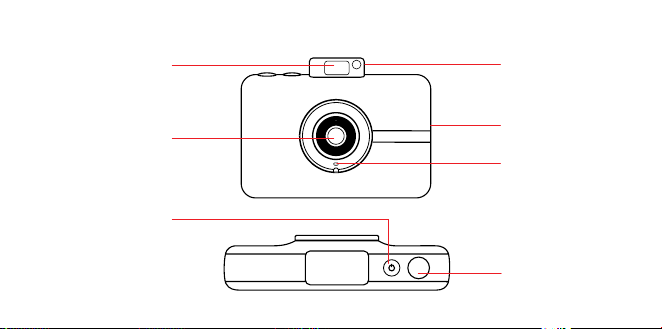
66 | IT IT | 67
• Non utilizzare prodotti come alcool,
benzina, diluenti o altri solventi organici
per pulire o provare a pulire questo
prodotto.
• Non utilizzare questo dispositivo in un
ambiente in cui possa essere esposto a
polveri pesanti o umidità.
• Non far cadere o scuotere la fotocamera,
perché questo potrebbe causare
malfunzionamenti o danneggiare
permanentemente le parti interne.
• Non utilizzare questa fotocamera mentre
si fa il bagno o si è sotto la doccia.
• Non riporre la fotocamera in un luogo in
cui possa cadere o essere spinta in una
vasca o in un lavandino.
• Non mettere, far cadere o immergere
la fotocamera in acqua o liquidi di altro
tipo.
• Accertarsi che sulla fotocamera non
cadano oggetti e non vengano versati
liquidi.
Flash ad uscita
Specchio per
selfie
Microfono
Fessura di
uscita delle foto
stampate
Pulsante
dell’otturatore
Pulsante di
accensione
Obiettivo
INFORMAZIONI SUL PRODOTTO
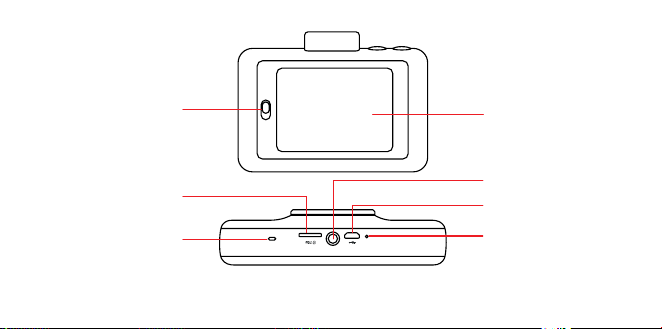
68 | IT IT | 69
Pulsante dello
sportello dello
scomparto per la
carta
Pulsante di reset*
Porta micro USB
Connettore per
treppiede
Schermo di
visualizzazione
touchscreen LCD
Altoparlante
Vano per scheda
MicroSD™
* Per resettare la fotocamera, inserire uno spillo e tenere premuto per circa 2 secondi.
CONTENUTO DELLA CONFEZIONE
Fotocamera a stampa
istantanea
Tracolla della
fotocamera
Carta fotografica KODAK che
utilizza la tecnologia ZINK®
Zero Ink® pacchetto starter
Manuale
dell'utente
e garanzia
Cavo micro USB
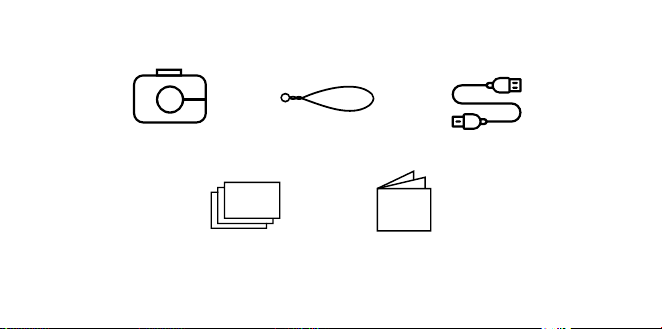
68 | IT IT | 69
Pulsante dello
sportello dello
scomparto per la
carta
Pulsante di reset*
Porta micro USB
Connettore per
treppiede
Schermo di
visualizzazione
touchscreen LCD
Altoparlante
Vano per scheda
MicroSD™
* Per resettare la fotocamera, inserire uno spillo e tenere premuto per circa 2 secondi.
CONTENUTO DELLA CONFEZIONE
Fotocamera a stampa
istantanea
Tracolla della
fotocamera
Carta fotografica KODAK che
utilizza la tecnologia ZINK®
Zero Ink® pacchetto starter
Manuale
dell'utente
e garanzia
Cavo micro USB

70 | IT IT | 71
Accensione e spegnimento
Premere il pulsante di accensione. Se il
meccanismo del flash è in posizione chiusa si
aprirà e la fotocamera si accenderà.
Per spegnere la fotocamera, premere verso il
basso il meccanismo del flash.
Per riattivare la fotocamra, premere il pulsante
di accensione. La fotocamera si accenderà.
Memoria di archiviazione
La memoria interna della fotocamera può
contenere fino a 10 immagini e può ospitare
una scheda microSD™ fino a 256GB.
Caricare la carta per la stampa delle foto
La fotocamera KODAK STEP Touch usa solo
la tecnologia ZINK® ZERO INK® per stampare
foto 2x3’’ su carta dal retro adesivo.
1. Muovere la levetta sulla parte sinistra dello
schermo LCD. Lo schermo si solleverà.
UTILIZZO DELLA FOTOCAMERA 2. Rimuovere la carta dalla confezione
ed inserire una risma intera di carta,
assicurandovi che il Foglio di Calibrazione
Colorato blu ZINK sia sul fondo, col codice
a barre rivolto in basso.
3. Chiudere lo scomparto per la carta.
4. Il foglio blu di calibrazione colore ZINK®
verrà elaborato ed espulso prima che tu
stampi, calibrando la tua stampante.
Impostazione per il primo utilizzo
Accendere la fotocamera per iniziare
l'impostazione. Seguire le istruzioni a
schermo.
Scattare foto e registrare video
Premere il pulsante a scatto per fare dei
fermo immagini o per far partire e fermare
le registrazioni in modalità Video e premere
il pulsante a scatto in modalità cattura foto
ed essa eettuerà una serie di scatti (rapida
successione di fermo immagini.)
Premere il pulsante a scatto a metà in basso
per mettere a fuoco.
Nota: Premendo il pulsante di scatto su
schermi che non siano il visore dal vivo vi farà
tornare al visore dal vivo.

70 | IT IT | 71
Accensione e spegnimento
Premere il pulsante di accensione. Se il
meccanismo del flash è in posizione chiusa si
aprirà e la fotocamera si accenderà.
Per spegnere la fotocamera, premere verso il
basso il meccanismo del flash.
Per riattivare la fotocamra, premere il pulsante
di accensione. La fotocamera si accenderà.
Memoria di archiviazione
La memoria interna della fotocamera può
contenere fino a 10 immagini e può ospitare
una scheda microSD™ fino a 256GB.
Caricare la carta per la stampa delle foto
La fotocamera KODAK STEP Touch usa solo
la tecnologia ZINK® ZERO INK® per stampare
foto 2x3’’ su carta dal retro adesivo.
1. Muovere la levetta sulla parte sinistra dello
schermo LCD. Lo schermo si solleverà.
UTILIZZO DELLA FOTOCAMERA 2. Rimuovere la carta dalla confezione
ed inserire una risma intera di carta,
assicurandovi che il Foglio di Calibrazione
Colorato blu ZINK sia sul fondo, col codice
a barre rivolto in basso.
3. Chiudere lo scomparto per la carta.
4. Il foglio blu di calibrazione colore ZINK®
verrà elaborato ed espulso prima che tu
stampi, calibrando la tua stampante.
Impostazione per il primo utilizzo
Accendere la fotocamera per iniziare
l'impostazione. Seguire le istruzioni a
schermo.
Scattare foto e registrare video
Premere il pulsante a scatto per fare dei
fermo immagini o per far partire e fermare
le registrazioni in modalità Video e premere
il pulsante a scatto in modalità cattura foto
ed essa eettuerà una serie di scatti (rapida
successione di fermo immagini.)
Premere il pulsante a scatto a metà in basso
per mettere a fuoco.
Nota: Premendo il pulsante di scatto su
schermi che non siano il visore dal vivo vi farà
tornare al visore dal vivo.
72 | IT IT | 73
Controlli del touchscreen
Toccare in qualsiasi punto sullo schermo
per visualizzare/nascondere i comandi di
controllo.
INDICATORI DI STATO
Mostrano lo stato della stampante, della
batteria, e della connessione Bluetooth®.
MODALITA’ CATTUR A
La tua STEP Touch è automaticamente settata
in modalità Foto e sul tuo schermo vedrai
l’icona di una fotocamera. Clicca sull’icona
per passare alla modalità Video o Cabina per
fototessere
Modalità foto Modalità video Modalità fototessera
La Modalità Photobooth vi permette di fare
degli scatti con una configurazione da 2-, 3-, o
4-foto.
EXTRA
Potete anche personalizzare le vostro foto
con dei margini, filtri e con etichette digitali.
Extras
Bordi Filtri Adesivi
GALLERIA
Toccare per andare alla galleria.
Nota: Potete anche aggiungere degli extra,
ruotare la vostra foto, e ritagliare la vostra
foto nella Galleria.
IMPOSTAZIONI DEL DISPOSITIVO
Toccate l'icona per aprire la fotocamera e
acquisire impostazioni quali luminosità dello
schermo, flash, risoluzione video, volume e
Bluetooth®.
ZOOM
Toccate
per zoomare nel visore dal viv
72 | IT IT | 73
Controlli del touchscreen
Toccare in qualsiasi punto sullo schermo
per visualizzare/nascondere i comandi di
controllo.
INDICATORI DI STATO
Mostrano lo stato della stampante, della
batteria, e della connessione Bluetooth®.
MODALITA’ CATTUR A
La tua STEP Touch è automaticamente settata
in modalità Foto e sul tuo schermo vedrai
l’icona di una fotocamera. Clicca sull’icona
per passare alla modalità Video o Cabina per
fototessere
Modalità foto Modalità video Modalità fototessera
La Modalità Photobooth vi permette di fare
degli scatti con una configurazione da 2-, 3-, o
4-foto.
EXTRA
Potete anche personalizzare le vostro foto
con dei margini, filtri e con etichette digitali.
Extras
Bordi Filtri Adesivi
GALLERIA
Toccare per andare alla galleria.
Nota: Potete anche aggiungere degli extra,
ruotare la vostra foto, e ritagliare la vostra
foto nella Galleria.
IMPOSTAZIONI DEL DISPOSITIVO
Toccate l'icona per aprire la fotocamera e
acquisire impostazioni quali luminosità dello
schermo, flash, risoluzione video, volume e
Bluetooth®.
ZOOM
Toccate
per zoomare nel visore dal viv
74 | IT IT | 75
TOCCARE E TENERE PREMUTO PER
METTERE A FUOCO
Toccare lo schermo e tenere premuto per
impostare l'area di messa a fuoco.
Nota: Controllate le app per gli
aggiornamenti del firmware.
APP MOBILE
Per sbloccare altri modi per utilizzare Polaroid
Snap Touch™, scaricare l’app mobile gratuita
per iOS e Android™ da qui:
Per ulteriori informazioni dettagliate, manuale
scaricabile, domande frequenti e supporto
tecnico, visita www.kodakphotoplus.com.
INFORMAZIONI DI CONTATTO
DEL SERVIZIO CLIENTI
In caso di problemi con il prodotto, si prega
di contattarci prima di restituire l'articolo
al luogo di acquisto. SIAMO QUI PER
AIUTARE!
Supporto USA:
kodak@camarketing.com
844-516-1539
Supporto internazionale:
kodakintl@camarketing.com
844-516-1540
INFORMAZIONI SULLA
GARANZIA
GARANZIA LIMITATA SU KODAK STEP Touch
FOTOCAMERA DIGITALE CON STAMPA
ISTANTANEA
QUESTA GARANZIA LIMITATA CONFERISCE
ALL’UTENTE DIRITTI LEGITTIMI E SPECIALI,
OLTRE AI DIRITTI CHE POSSONO ESSERE
RICONOSCIUTI A SECONDA DELLO STATO.
NOI GARANTIAMO CHE, NEL CORSO DEL
PERIODO DI GARANZIA, IL PRODOTTO NON
PRESENTERÀ DIFETTI DI FABBRICAZIONE O NEI
MATERIALI.
LIMITAZIONE DELLA RESPONSABILITÀ
NELLA MISURA NON VIETATA DALLA LEGGE,

74 | IT IT | 75
TOCCARE E TENERE PREMUTO PER
METTERE A FUOCO
Toccare lo schermo e tenere premuto per
impostare l'area di messa a fuoco.
Nota: Controllate le app per gli
aggiornamenti del firmware.
APP MOBILE
Per sbloccare altri modi per utilizzare Polaroid
Snap Touch™, scaricare l’app mobile gratuita
per iOS e Android™ da qui:
Per ulteriori informazioni dettagliate, manuale
scaricabile, domande frequenti e supporto
tecnico, visita www.kodakphotoplus.com.
INFORMAZIONI DI CONTATTO
DEL SERVIZIO CLIENTI
In caso di problemi con il prodotto, si prega
di contattarci prima di restituire l'articolo
al luogo di acquisto. SIAMO QUI PER
AIUTARE!
Supporto USA:
kodak@camarketing.com
844-516-1539
Supporto internazionale:
kodakintl@camarketing.com
844-516-1540
INFORMAZIONI SULLA
GARANZIA
GARANZIA LIMITATA SU KODAK STEP Touch
FOTOCAMERA DIGITALE CON STAMPA
ISTANTANEA
QUESTA GARANZIA LIMITATA CONFERISCE
ALL’UTENTE DIRITTI LEGITTIMI E SPECIALI,
OLTRE AI DIRITTI CHE POSSONO ESSERE
RICONOSCIUTI A SECONDA DELLO STATO.
NOI GARANTIAMO CHE, NEL CORSO DEL
PERIODO DI GARANZIA, IL PRODOTTO NON
PRESENTERÀ DIFETTI DI FABBRICAZIONE O NEI
MATERIALI.
LIMITAZIONE DELLA RESPONSABILITÀ
NELLA MISURA NON VIETATA DALLA LEGGE,

76 | IT IT | 77
QUESTA GARANZIA È DA INTENDERSI
ESCLUSIVA E SOSTITUTIVA DI TUTTE LE ALTRE
GARANZIE, SIANO ESSE VERBALI, SCRITTE,
OBBLIGATORIE, ESPRESSE O IMPLICITE, FATTE
SALVE LE GARANZIE ESPRESSE CONTEMPLATE
IN QUESTA DICHIARAZIONE DI GARANZIA
LIMITATA. NELLA MISURA NON VIETATA DALLA
LEGGE, NOI NON RICONOSCIAMO TUTTE
LE ALTRE GARANZIE, SIANO ESSE ESPRESSE
O IMPLICITE, OBBLIGATORIE O ALTRO,
INCLUSE, SENZA LIMITAZIONI, LE GARANZIE
DI COMMERCIABILITÀ E ADEGUATEZZA A
PARTICOLARI FINALITÀ. ALCUNI STATI NON
AMMETTONO IL DISCONOSCIMENTO DI
GARANZIE IMPLICITE, PERTANTO QUESTO
DOCUMENTO POTREBBE NON ESSERE
APPLICABILE A OGNI UTENTE. NELLA MISURA
IN CUI TALI GARANZIE NON POSSONO ESSERE
DISCONOSCIUTE IN VIRTÙ DI LEGGI VIGENTI
NELLA SUA GIURISDIZIONE, NOI LIMITIAMO
LA VALIDITÀ E I RIMEDI SANCITI DALLE
STESSE ALLA VALIDITÀ DI QUESTA GARANZIA
ESPRESSA E LIMITATA.
LA NOSTRA RESPONSABILITÀ IN MERITO
A PRODOTTI DIFETTOSI È LIMITATA ALLA
RIPARAZIONE, SOSTITUIZIONE O AL
RIMBORSO, NELLE MODALITÀ DESCRITTE A
PIÈ DI PAGINA DI QUESTA DICHIARAZIONE DI
GARANZIA.
CHI PUÒ RICORRERE A QUESTA GARANZIA?
C&A Marketing, Inc. domiciliata in 114 Tived
Lane East, Edison, NJ (in prosieguo la “Società”)
estende questa garanzia limitata solo al cliente
che ha eettivamente acquistato il prodotto (in
prosieguo il “Cliente”). Questa garanzia non
viene estesa ai proprietari successivi o agli altri
destinatari del prodotto.
COSA COPRE QUESTA GARANZIA? Questa
garanzia limitata copre i difetti di materiale e
di fabbricazione della fotocamera digitale
istantanea KODAK STEP Touch (il “prodotto”) per
il periodo di garanzia come sotto definito.
COSA NON COPRE QUESTA GARANZIA?
Questa garanzia limitata non copre
danni dovuti a: (a) trasporto; (b) stivaggio/
immagazzinamento; (c) uso improprio; (d)
mancato rispetto delle istruzioni del prodotto
o mancata manutenzione preventiva; (e)
modifiche; (f) riparazioni non autorizzate;
(g) normale usura; (h) cause esterne, come
incidenti, abusi o altre azioni o eventi al di fuori
del nostro ragionevole controllo.
QUAL È IL PERIODO DI COPERTURA? La
validità di questa garanzia limitata decorre
dalla data di acquisto e ha la durata di un anno
(in prosieguo “Periodo di garanzia”). Il Periodo
di garanzia non viene prorogato a seguito
di interventi di riparazione o sostituzione
del prodotto. Noi ci riserviamo la facoltà di
modificare la disponibilità di questa garanzia
limitata a nostra discrezione; le modifiche non
avranno eetto retroattivo.
QUALI SONO I RIMEDI PREVISTI DA QUESTA
GARANZIA? Relativamente ai prodotti
che presentino difetti nel corso del Periodo
di garanzia, a nostra esclusiva discrezione
provvederemo a: (a) riparare o sostituire
il prodotto difettoso (o la parte difettosa)
gratuitamente; (b) rimborsare il prezzo di

76 | IT IT | 77
QUESTA GARANZIA È DA INTENDERSI
ESCLUSIVA E SOSTITUTIVA DI TUTTE LE ALTRE
GARANZIE, SIANO ESSE VERBALI, SCRITTE,
OBBLIGATORIE, ESPRESSE O IMPLICITE, FATTE
SALVE LE GARANZIE ESPRESSE CONTEMPLATE
IN QUESTA DICHIARAZIONE DI GARANZIA
LIMITATA. NELLA MISURA NON VIETATA DALLA
LEGGE, NOI NON RICONOSCIAMO TUTTE
LE ALTRE GARANZIE, SIANO ESSE ESPRESSE
O IMPLICITE, OBBLIGATORIE O ALTRO,
INCLUSE, SENZA LIMITAZIONI, LE GARANZIE
DI COMMERCIABILITÀ E ADEGUATEZZA A
PARTICOLARI FINALITÀ. ALCUNI STATI NON
AMMETTONO IL DISCONOSCIMENTO DI
GARANZIE IMPLICITE, PERTANTO QUESTO
DOCUMENTO POTREBBE NON ESSERE
APPLICABILE A OGNI UTENTE. NELLA MISURA
IN CUI TALI GARANZIE NON POSSONO ESSERE
DISCONOSCIUTE IN VIRTÙ DI LEGGI VIGENTI
NELLA SUA GIURISDIZIONE, NOI LIMITIAMO
LA VALIDITÀ E I RIMEDI SANCITI DALLE
STESSE ALLA VALIDITÀ DI QUESTA GARANZIA
ESPRESSA E LIMITATA.
LA NOSTRA RESPONSABILITÀ IN MERITO
A PRODOTTI DIFETTOSI È LIMITATA ALLA
RIPARAZIONE, SOSTITUIZIONE O AL
RIMBORSO, NELLE MODALITÀ DESCRITTE A
PIÈ DI PAGINA DI QUESTA DICHIARAZIONE DI
GARANZIA.
CHI PUÒ RICORRERE A QUESTA GARANZIA?
C&A Marketing, Inc. domiciliata in 114 Tived
Lane East, Edison, NJ (in prosieguo la “Società”)
estende questa garanzia limitata solo al cliente
che ha eettivamente acquistato il prodotto (in
prosieguo il “Cliente”). Questa garanzia non
viene estesa ai proprietari successivi o agli altri
destinatari del prodotto.
COSA COPRE QUESTA GARANZIA? Questa
garanzia limitata copre i difetti di materiale e
di fabbricazione della fotocamera digitale
istantanea KODAK STEP Touch (il “prodotto”) per
il periodo di garanzia come sotto definito.
COSA NON COPRE QUESTA GARANZIA?
Questa garanzia limitata non copre
danni dovuti a: (a) trasporto; (b) stivaggio/
immagazzinamento; (c) uso improprio; (d)
mancato rispetto delle istruzioni del prodotto
o mancata manutenzione preventiva; (e)
modifiche; (f) riparazioni non autorizzate;
(g) normale usura; (h) cause esterne, come
incidenti, abusi o altre azioni o eventi al di fuori
del nostro ragionevole controllo.
QUAL È IL PERIODO DI COPERTURA? La
validità di questa garanzia limitata decorre
dalla data di acquisto e ha la durata di un anno
(in prosieguo “Periodo di garanzia”). Il Periodo
di garanzia non viene prorogato a seguito
di interventi di riparazione o sostituzione
del prodotto. Noi ci riserviamo la facoltà di
modificare la disponibilità di questa garanzia
limitata a nostra discrezione; le modifiche non
avranno eetto retroattivo.
QUALI SONO I RIMEDI PREVISTI DA QUESTA
GARANZIA? Relativamente ai prodotti
che presentino difetti nel corso del Periodo
di garanzia, a nostra esclusiva discrezione
provvederemo a: (a) riparare o sostituire
il prodotto difettoso (o la parte difettosa)
gratuitamente; (b) rimborsare il prezzo di

78 | IT IT | 79
acquisto del prodotto difettoso, nel caso non
fosse possibile sostituirlo con un altro.
COME È POSSIBILE OTTENERE INTERVENTI
IN GARANZIA? Per ottenere interventi
in garanzia, è necessario contattarci
telefonicamente al numero 844-516-1539 o via
email all’indirizzo [email protected]
durante il Periodo di garanzia, e richiedere il
numero di autorizzazione alla restituzione della
merce (ossia il numero “DMA”). In assenza di un
numero DMA non verrà erogato alcun servizio
di garanzia e le spese di restituzione saranno
a carico del Cliente, ossia dell’acquirente. La
Società si farà carico delle spese di spedizione
dei prodotti sostitutivi.
kodakphotoplus.com
Il marchio, il logo e il vestito commerciale Kodak
sono utilizzati su licenza di Eastman Kodak
Company.
ZINK, ZERO INK, e i marchi commerciali ZINK
sono di proprietà di ZINK Holdings LLC.
Android è un marchio di Google LLC.
IOS è un marchio di Cisco negli Stati Uniti e in altri
paesi e viene utilizzato su licenza.
Bluetooth è un marchio di Bluetooth SIG, Inc.
USA.
MicroSD è un marchio o marchio registrato di
SD-3C LLC negli Stati Uniti, in altri Paesi o in
entrambi.
Tutti gli altri prodotti, nomi di marchi, nomi di società
e loghi sono marchi dei rispettivi
proprietari, utilizzati solo per identificare i loro
rispettivi prodotti e non intendono connotare
alcuna sponsorizzazione, approvazione o
approvazione.
Distribuito da: C&A Marketing, Inc., 114 Tived Lane
East, Edison, NJ 08837, USA
C&A Marketing UK LTD, 167 Hermitage Road,
Crusader Industrial Estate, London N4 1LZ, UK
©2020. Tutti i diritti riservati.
FABBRICATO IN CINA

78 | IT IT | 79
acquisto del prodotto difettoso, nel caso non
fosse possibile sostituirlo con un altro.
COME È POSSIBILE OTTENERE INTERVENTI
IN GARANZIA? Per ottenere interventi
in garanzia, è necessario contattarci
telefonicamente al numero 844-516-1539 o via
email all’indirizzo kodak@camarketing.com
durante il Periodo di garanzia, e richiedere il
numero di autorizzazione alla restituzione della
merce (ossia il numero “DMA”). In assenza di un
numero DMA non verrà erogato alcun servizio
di garanzia e le spese di restituzione saranno
a carico del Cliente, ossia dell’acquirente. La
Società si farà carico delle spese di spedizione
dei prodotti sostitutivi.
kodakphotoplus.com
Il marchio, il logo e il vestito commerciale Kodak
sono utilizzati su licenza di Eastman Kodak
Company.
ZINK, ZERO INK, e i marchi commerciali ZINK
sono di proprietà di ZINK Holdings LLC.
Android è un marchio di Google LLC.
IOS è un marchio di Cisco negli Stati Uniti e in altri
paesi e viene utilizzato su licenza.
Bluetooth è un marchio di Bluetooth SIG, Inc.
USA.
MicroSD è un marchio o marchio registrato di
SD-3C LLC negli Stati Uniti, in altri Paesi o in
entrambi.
Tutti gli altri prodotti, nomi di marchi, nomi di società
e loghi sono marchi dei rispettivi
proprietari, utilizzati solo per identificare i loro
rispettivi prodotti e non intendono connotare
alcuna sponsorizzazione, approvazione o
approvazione.
Distribuito da: C&A Marketing, Inc., 114 Tived Lane
East, Edison, NJ 08837, USA
C&A Marketing UK LTD, 167 Hermitage Road,
Crusader Industrial Estate, London N4 1LZ, UK
©2020. Tutti i diritti riservati.
FABBRICATO IN CINA