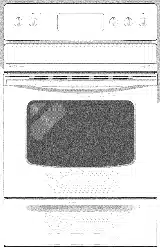
Owner Guide Electric Range
Features At A Glance
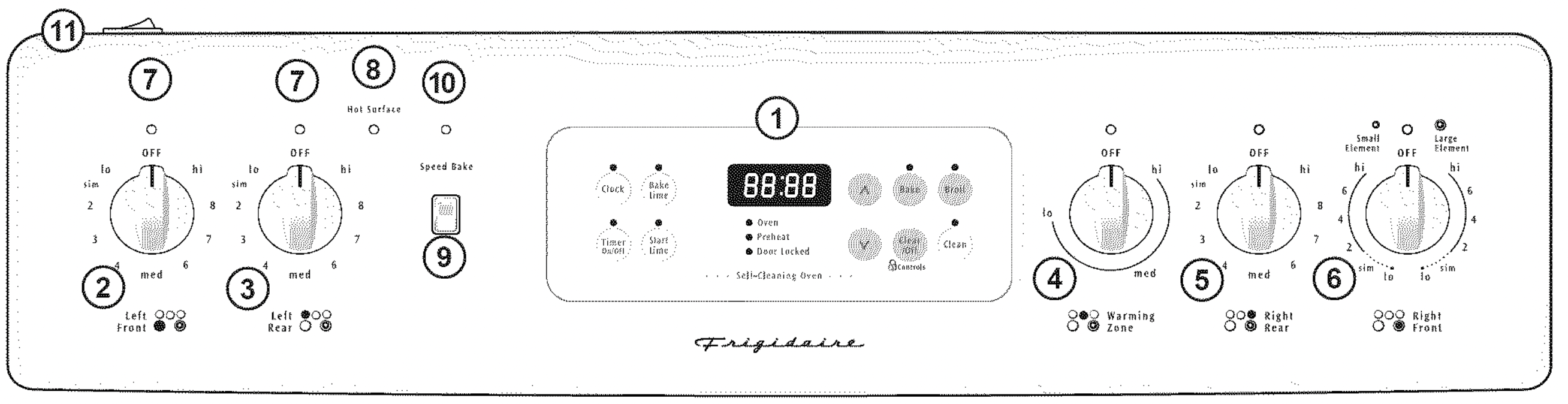
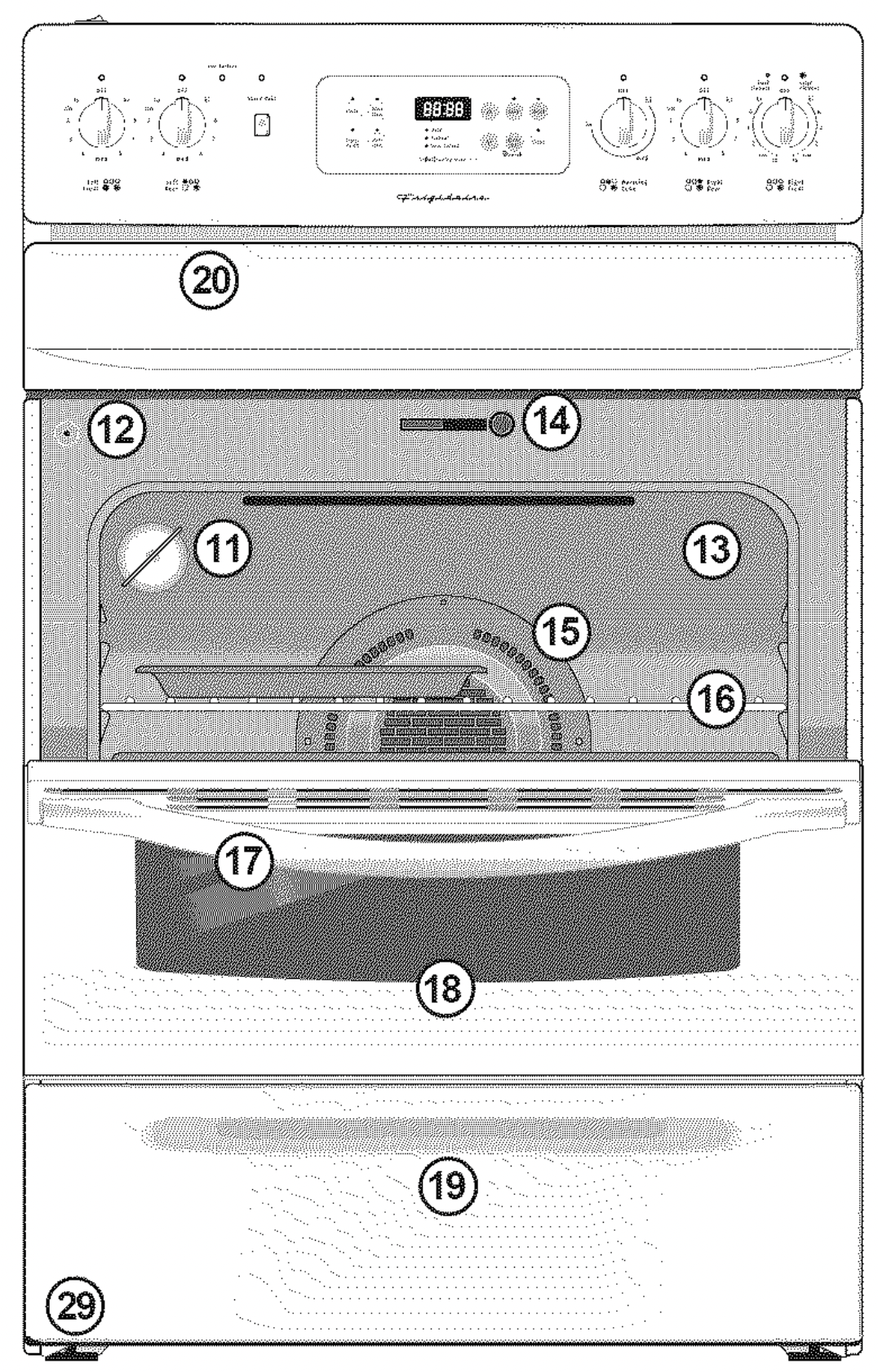
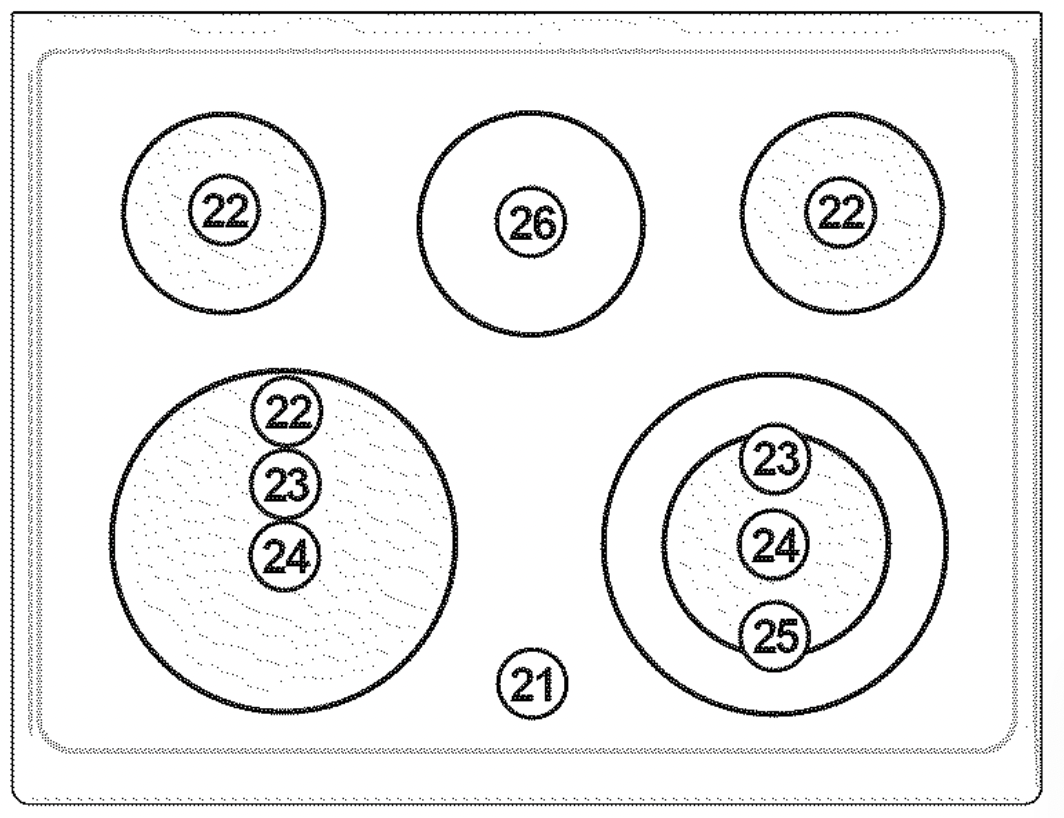
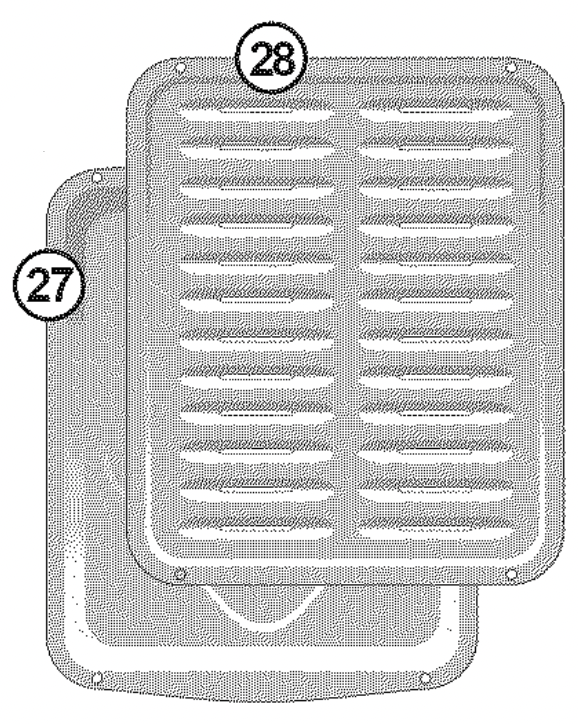
Your Electric Range Features Include:
- Electronic Oven Control with Kitchen Timer.
- Left Front Single Radiant Element Control (some models) or Dual Radiant Element Control (some models).
- Left Rear Single Radiant Element Control.
- Warming Zone Radiant Element Control (some models).
- Right Rear Single Radiant Element Control.
- Right Front Single Radiant Element Control (some models) or Dual Radiant Element Control (some models).
- Element ON Indicator Light(s).
- HOT SURFACE Indicator Light(s).
- Speed-Bake TM Cooking System Switch (some models).
- Speed-Bake TM Cooking System Indicator Light (some models).
- Oven Interior Light & Switch (oven light has removable Cover).
- Automatic Oven Door Light Switch (some models).
- Self-Cleaning Oven interior.
- Self-Clean Door Latch.
- Speed-Bake TM Cooking System Fan (some models).
- Adjustable Interior Oven Rack(s).
- Large 1 piece Oven Door Handle.
- Full width Oven Door with Window.
- Storage Drawer with Integrated Handle (some models) or lower cover panel (some models).
- Easy to clean upswept Cooktop.
- Ceramic Smoothtop (elements, styles and color will vary by model).
- 6" or 8" Single Radiant Element(s).
- 9" Single Radiant Element (some models).
- 6-9" Dual Radiant Element (some models).
- 12" Single Radiant Element (some models).
- Warming Zone Radiant Element (some models).
- Broil Pan (some models).
- Broil Pan Insert (some models).
- Leveling Legs and Anti-tip Bracket (included).
NOTE: The features of you r range may vary according to model type & color.
Setting Surface Controls
Cookware Material Types
The cookware material determines how evenly & quickly heat is transferred from the surface element to the pan bottom. The most popular materials available are:
ALUMINUM - Excellent heat conductor. Some types of food will cause itto darken (Anodized aluminum cookware resists staining & pitting). If aluminum pans slide across the ceramic cooktop, they may leave metal marks which will resemble scratches. Remove these marks immediately.
COPPER - Excellent heat conductor but discolors easily. May leave metal marks on ceramic glass (see Aluminum).
STAIN LESS STEEL - Slow heat conductor with uneven cooking results, is durable, easy to clean & resists staining.
CAST IRON - A poor heat conductor however will retain heat very well. Cooks evenly once cooking temperature is reached. Not recommended for use on ceramic cooktops.
PORCELAIN-ENAMEL on METAL- Heating characteristics will vary depending on base material. Porcelain-enamel coating must be smooth to avoid scratching ceramic cooktops.
GLASS - Slow heat conductor. Not recommended for ceramic cooktop surfaces because it may scratch the glass.
Using proper cookware
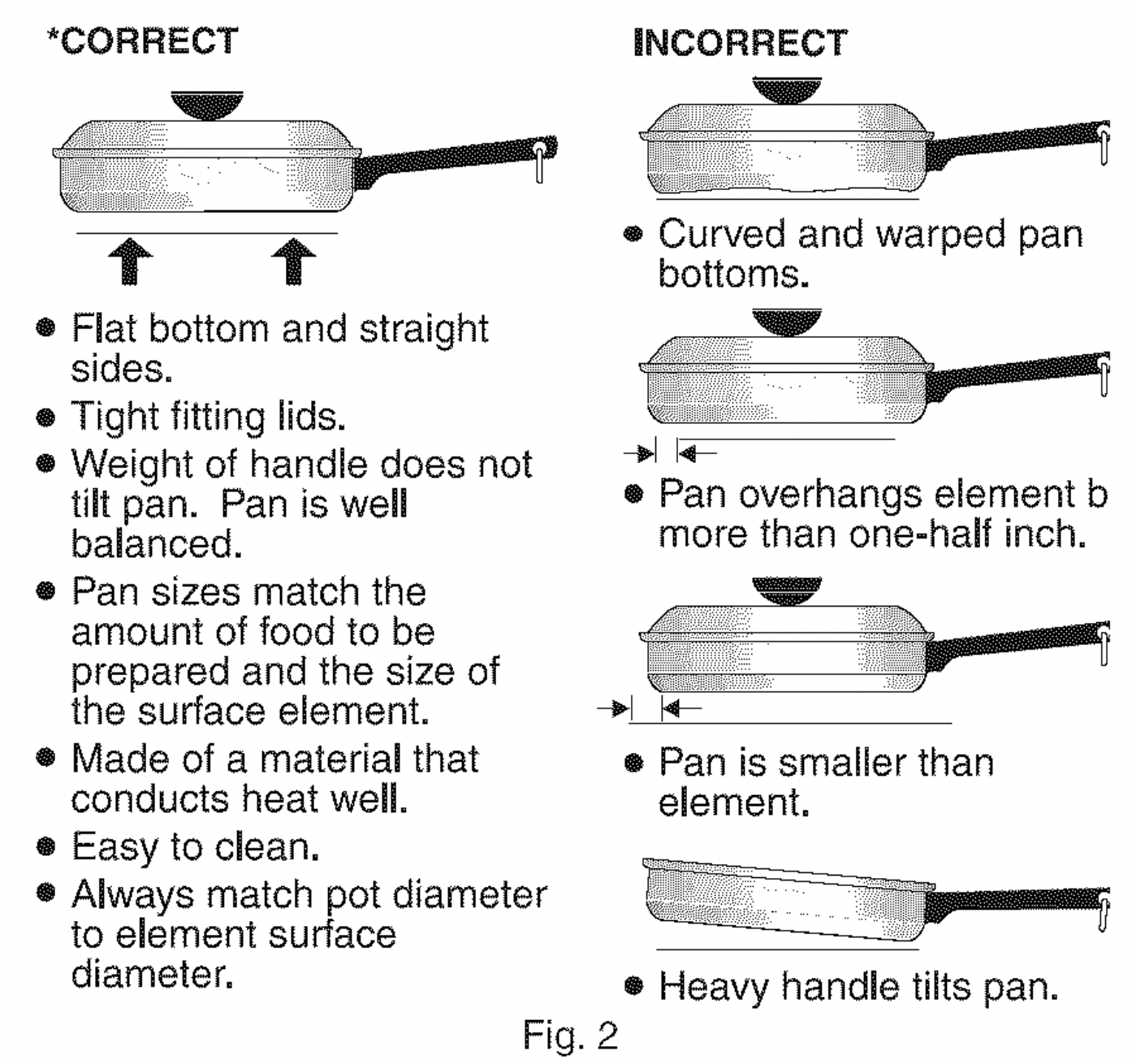
The size and type of cookware used will influence the setting needed for best cooking results. Cookware should have flat bottoms that make good contact with the entire surface heating element (See Fig. 2). Check for flatness by rotating a ruler across the bottom of the cookware (See Fig. 1).
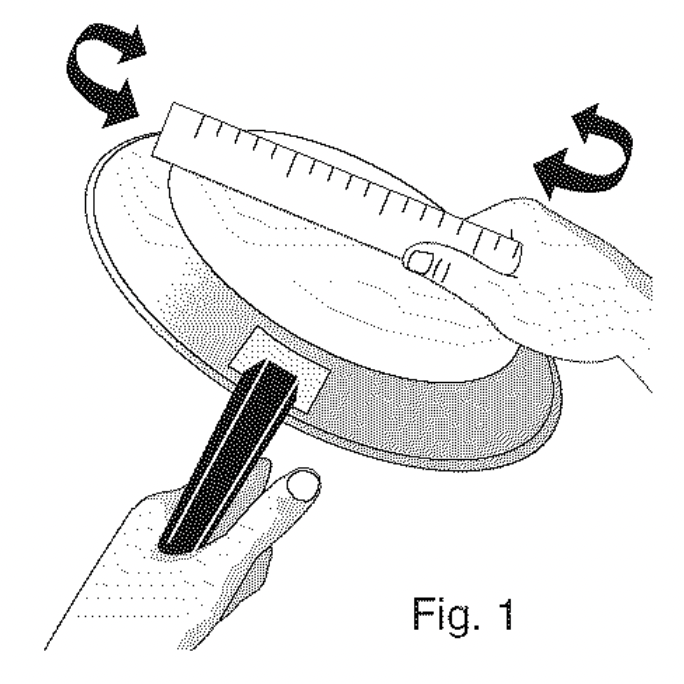
Be sure to follow the recommendations for using propercookware as illustrated in Figs. 1 & 2. For more information about the ceramic cooktop see Cooktop Cleaning & Maintenance in the General Care & Cleaning section.
About the Ceramic Glass Cooktop
The ceramic cooktop has radiant surface elements located below the surface of the glass. The design of the ceramic cooktop outlines the area of the surface element underneath. Be sure to match the pan size with the diameter of the element outline on the cooktop. Heat is transferred up through the surface of the cooktop to the cookware. Only flat-bottomed cookware should be used.
The type and size of cookware, the number of surface elements in use and their settings, are all factors that will affect the amount of heat that will spread to areas beyond the surface elements. The areas surrounding the elements may become hot enough to cause burns.
Suggested Radiant Surface Element Settings Table
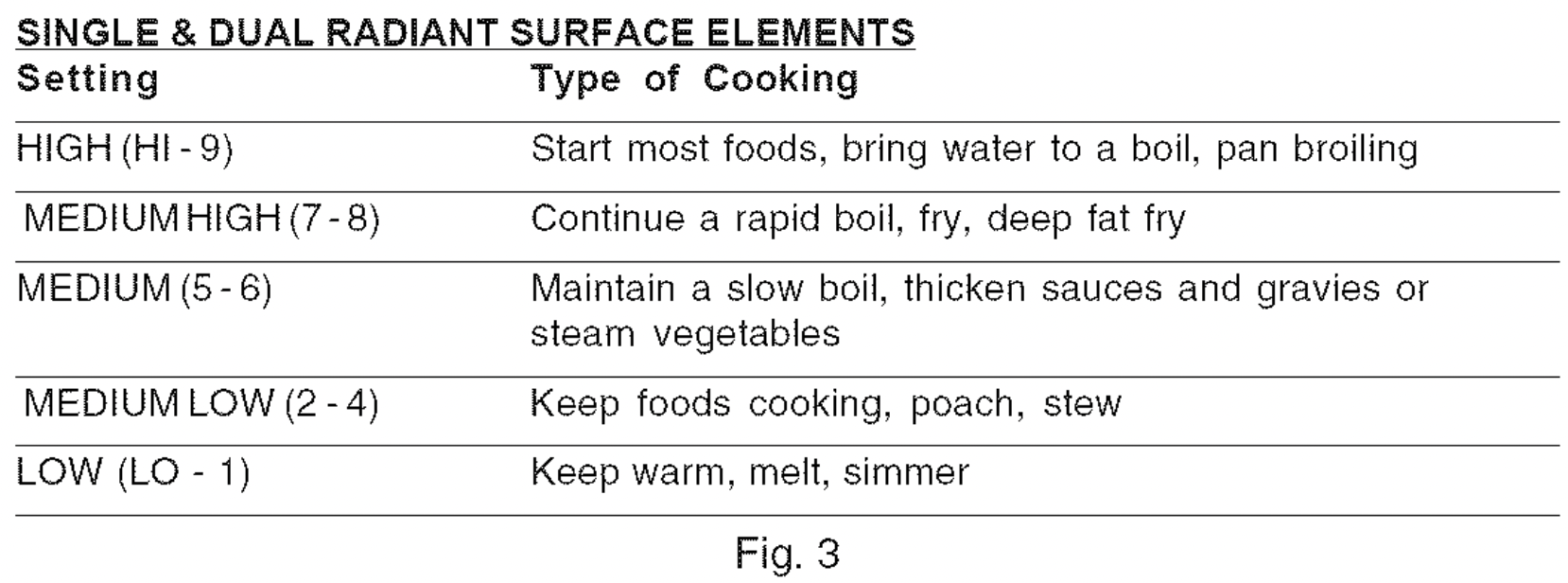
The suggested settings found in Fig. 3 are based when cooking with medium-weight aluminum pans with lids. Settings may vary when using other types of pans.
Note: The size and type of utensil used, and the amount and type of food being cooked will influence the setting needed for best cooking results.
Setting Surface Controls (cont'd)
About the Radiant Surface Elements
The element temperature rises gradually and evenly. As the temperature rises, the element will glow red. To maintain the selected setting, the element will cycle ON and OFF. The heating element retains enough heat to provide a uniform and consistent heat during the off cycle.
For efficient cooking, turn OFF the element several minutes before cooking is complete. This will allow residual heat to complete the cooking process.
NOTE: Please read detailed instructions for ceramic glass cooktop cleaning in the General Care & Cleaning and Before You Call checklist sections of this Use & Care Manual.
Element ON & Hot Surface Indicator Lights
Your range is equipped with two different types of radiant surface control indicator lights that will glow on your range-- the Element ON indicator light and the Hot Surface indicator lights (Refer to Fig. 2).
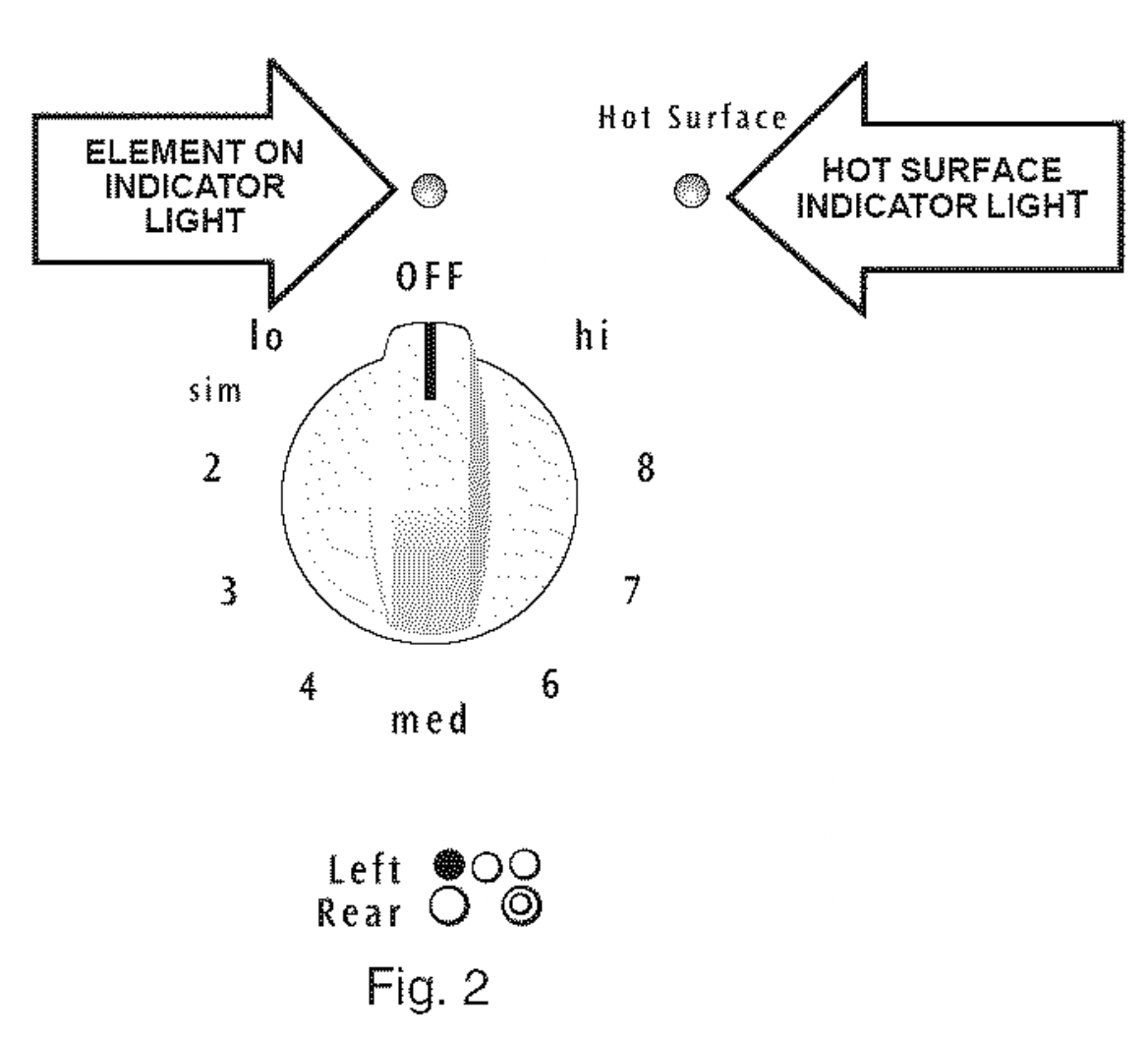
The Element ON indicator lights are located on the control panel above each radiant element control knob and will glow when a surface element is turned ON. A quick glance at this indicator light after cooking is an easy check to be sure ALL surface controls are turned OFF. The Hot Surface indicator light located on the control panel will glow when any surface cooking area heats up and will REMAIN ON until the glass cooktop has cooled to a MODERATE level.
NOTE: Radiant elements have a limiter that allows the element to cycle ON & OFF, even at the Hi setting. This helps to prevent damage to the ceramic smoothtop. Cycling at the Hi setting is normal and will occur more often if the cookware is too small for the radiant element or if the cookware bottom is not flat.
Single Radiant Surface Elements (all models)
To Operate a Single Radiant Element:
- Place correctly sized cookware on radiant surface element.
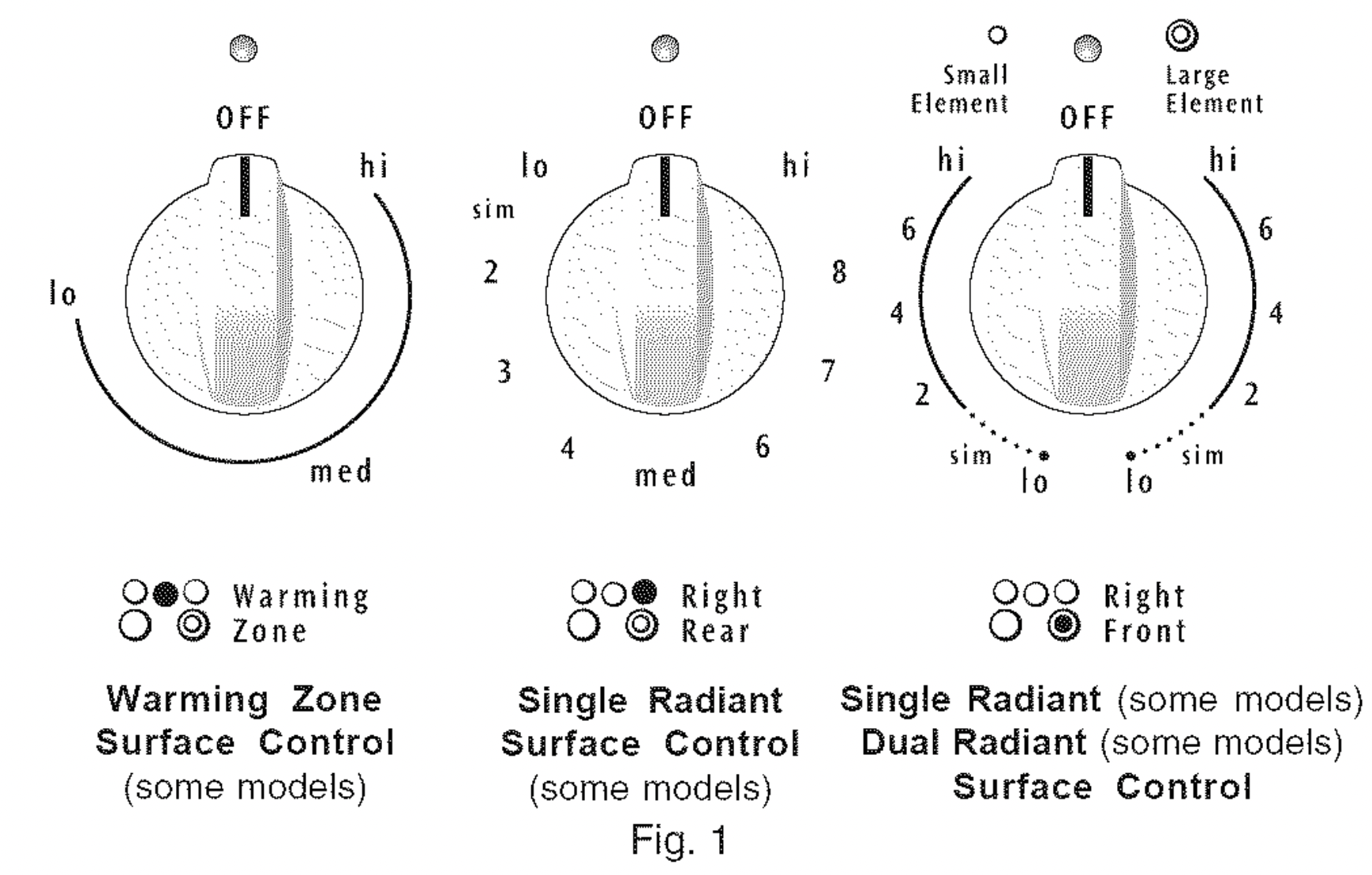
- Push in & turn the surface control knob in either direction to the desired setting (Refer to the Suggested Radiant Surface Element Settings Table & Fig. 3). Start most cooking operations on a higher setting and then turn to a lower setting to finish cooking. The surface control knobs do not have to be set exactly on a particular mark. Use the marks as a guide and adjust the control knob as needed. Each surface element provides a constant amount of heat at each setting. A glowing red surface heating area extending beyond the bottom edge of the cookware indicates the cookware is too small for the surface heating area.
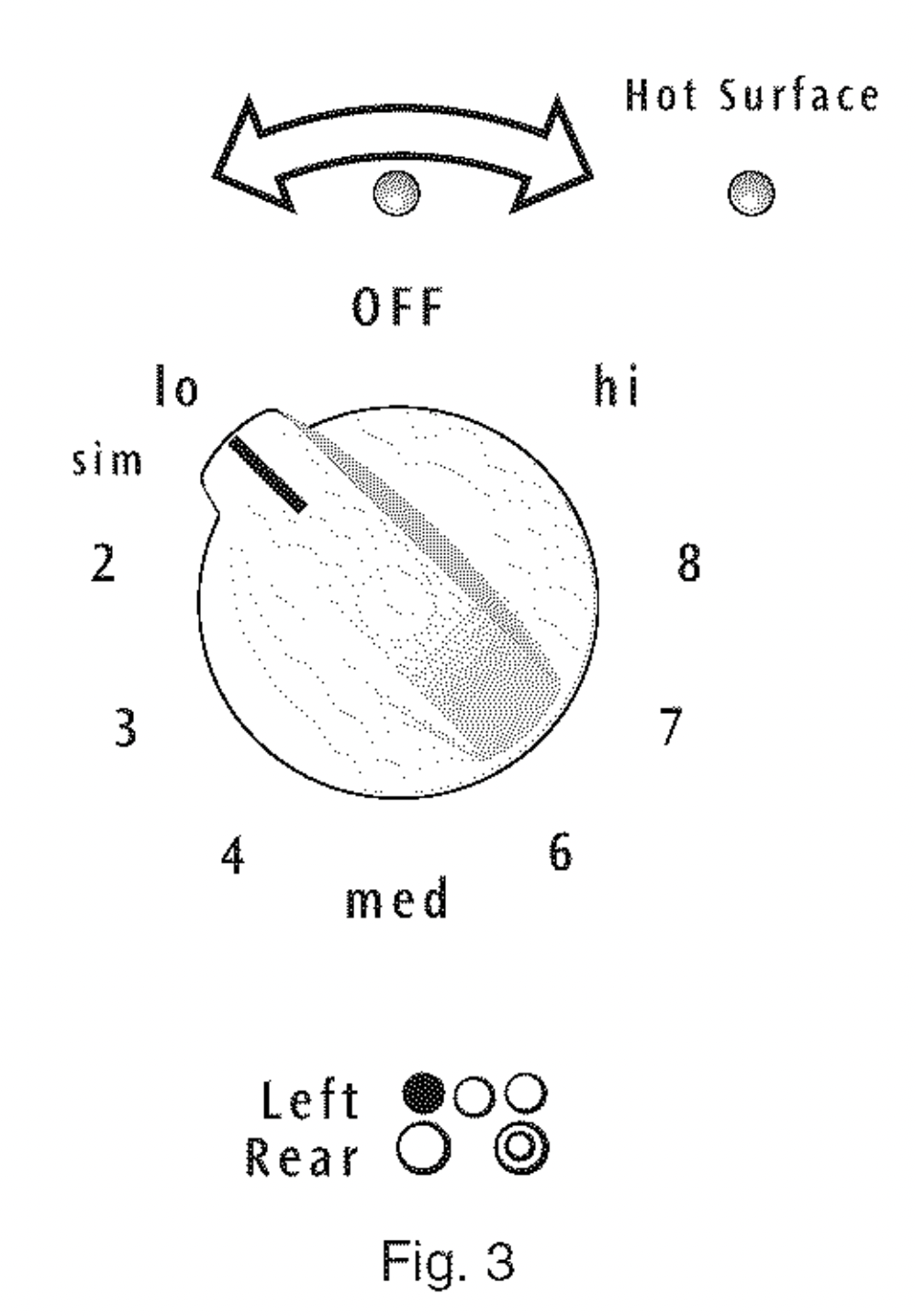
- When cooking is complete turn the surface element OFF before removing the cookware.
Note: The Element ON indicator lights will glow when one or more of the surface elements are turned ON. A quick glance at these indicator lights when cooking is finished is an easy check to be sure all control knobs are turned OFF. The Hot Surface indicator light will continue to glow AFTER the control knob is turned to the OFF position & will glow until the heating surface area has cooled sufficiently.
Caution: Radiant surface elements may appear to have cooled after they have been turned OFF. The glass surface may still be hot and burns may occur if the glass surface is touched before it has cooled sufficiently.
Caution: DO NOT place plastic items such as salt & pepper shakers, spoon holders or plastic wrappings on top of the range when it is in use. These items could melt or ignite. Potholders, towels or wooden spoons could catch fire if placed too close to the surface elements.
To Operate Dual Radiant Surface Elements (some models)
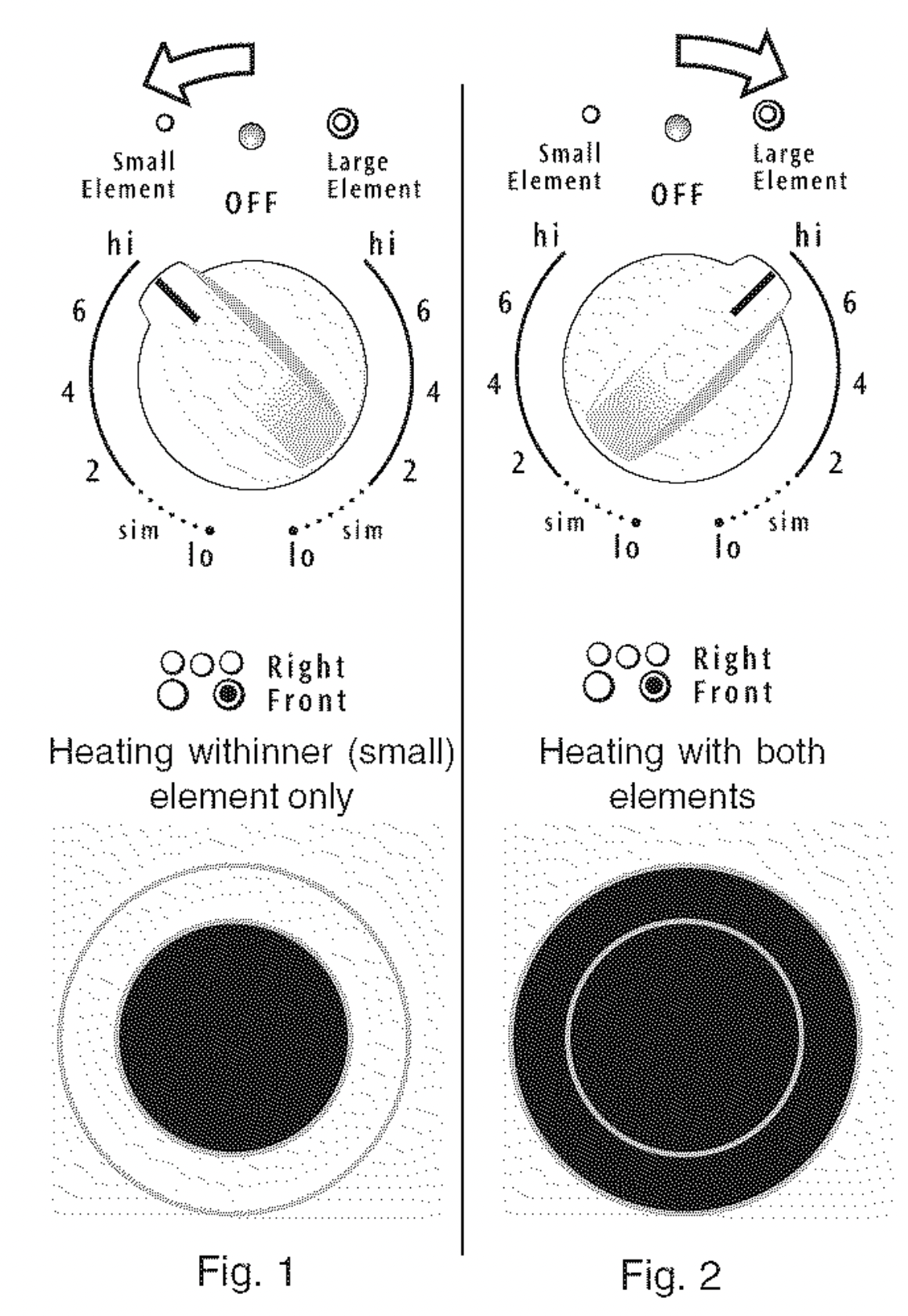
Symbols on the backguard are used to indicate which coil of the Dual Radiant element will heat. The o symbol indicates the inner coil only. The @ symbol indicates both inner and outer coils will heat (See Figs. 1,2 & Suggested Radiant Surface Element Settings Table). You may switch from either coil setting at any time during cooking. Push in & turn the control knob in either direction to the desired setting as instructed above. Note: Surface areas that heat are shown in black.
Caution: Radiant surface elements may appear to have cooled after they have been turned off. The glass surface may still be hot and burns may occur if the glass surface is touched before it has cooled sufficiently.
Caution: DO NOT place plastic items such as salt & pepper shakers, spoon holders or plastic wrappings on top of the range when it is in use. These items could melt or ignite. Potholders, towels or wooden spoons could catch fire if placed too close to the surface elements.
Caution: DO NOT allow aluminum foil, or ANY material that can melt to make contact with the ceramic glass cooktop. If these items melt on the cooktop they will damage the ceramic cooktop.
Setting the Warming Zone (some models)
The purpose of the Warming Zone is to keep hot cooked foods at serving temperature. Always start with hot food. It is not recommended to heat cold food on the Warming Zone.
All food placed on the Warming Zone should be covered with a lid or aluminum foil to maintain quality. For best results, when warming pastries or breads, the cover should have an opening to allow moisture to escape. Do not use plastic wrap to cover food. Plastic may melt onto the surface and be very difficult to clean from the cooktop surface.
Use only dishware, utensils & cookware recommended for oven and ceramic cooktop use on the Warming Zone.
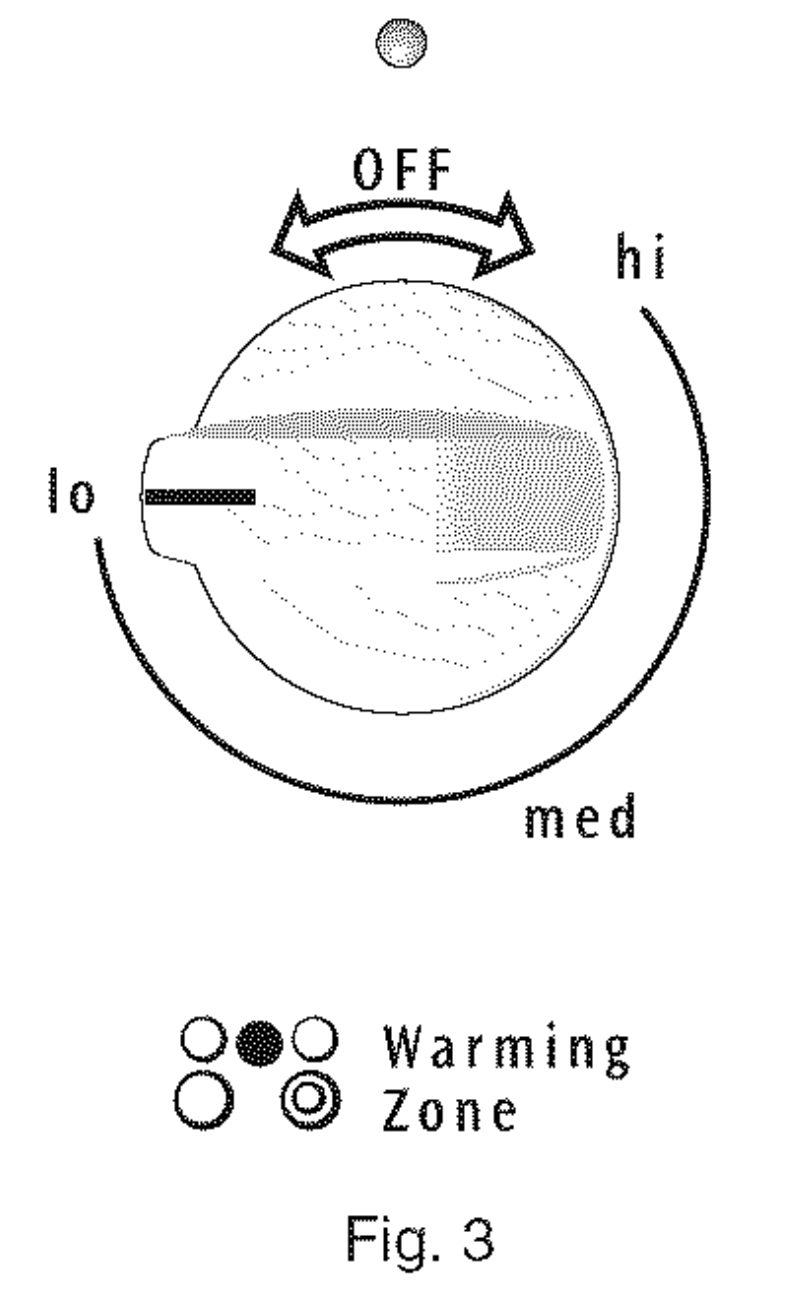
Setting the Warming Zone Control:
- Push in either direction and turn the knob (See Fig. 3). The temperatures are approximate, and are designated by HI, MED & LO.
However, the control can be set at any position between Hi and LO for different levels of warming.
- When ready to serve, turn the control to OFF. The Warming Zone will remain warm until the indicator light goes OFF.
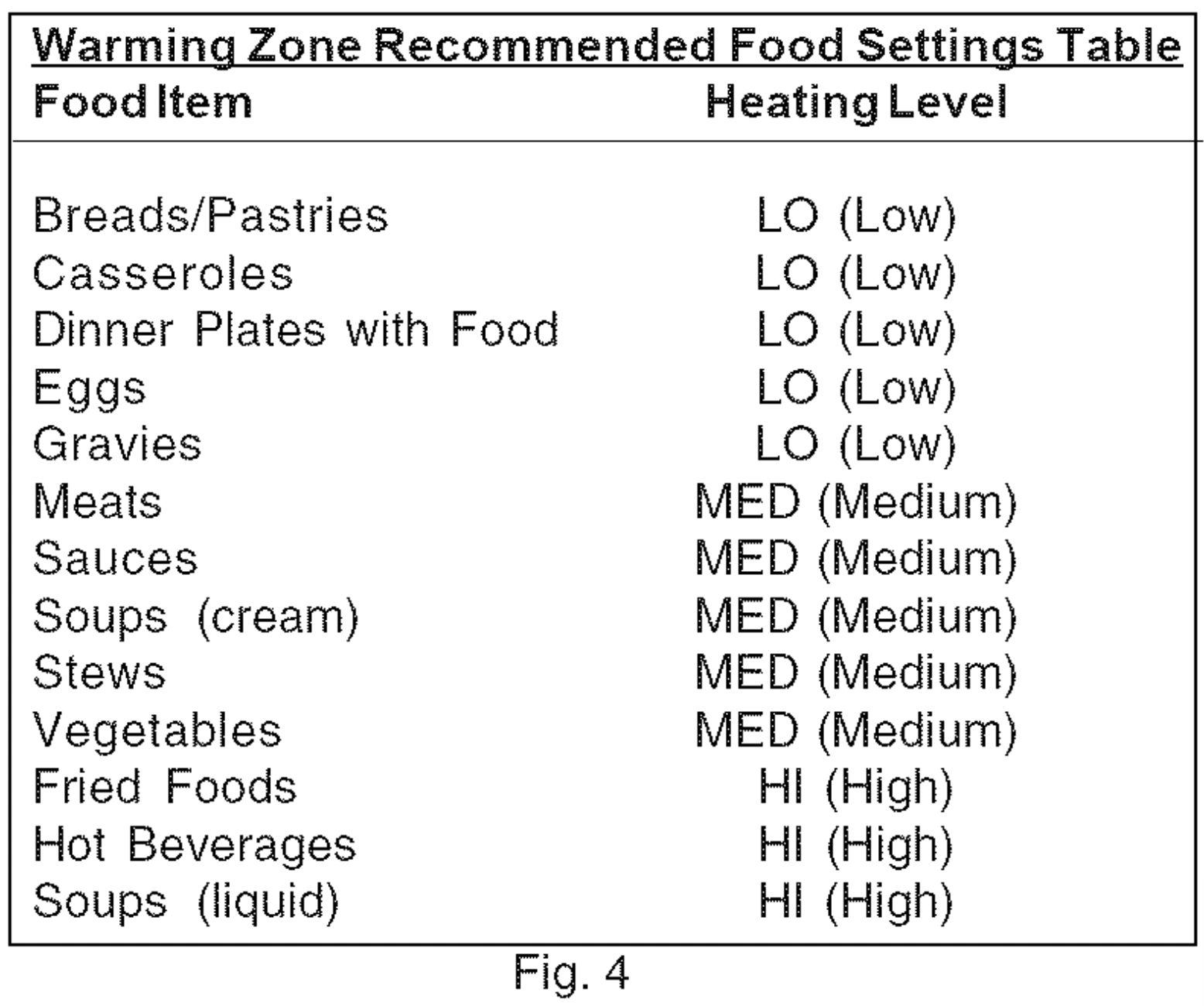
Temperature Selection - Refer to the Warming Zone Recommended Food Settings Table (See Fig. 4). If a particular food is not listed, start with the medium level, and adjust as needed. Most foods can be kept at serving temperatures by using the medium level.
Caution: Unlike the surface elements, the Warming Zone will not glow red when it is HOT.
Caution: Always use potholders or oven mitts when removing food from the Warming Zone as cookware and plates will be HOT.
Note: Use the Warming Zone to keep cooked foods hot such as; vegetables, gravies; Casseroles, soups, stewsl breads, pastries and even,safe dinner plates.
Oven Control Fuctions
READ THE INSTRUCTIONS CAREFULLY BEFORE USING THE OVEN. For satisfactory use of your oven, become familiar with the various pad functions of the oven as described below.
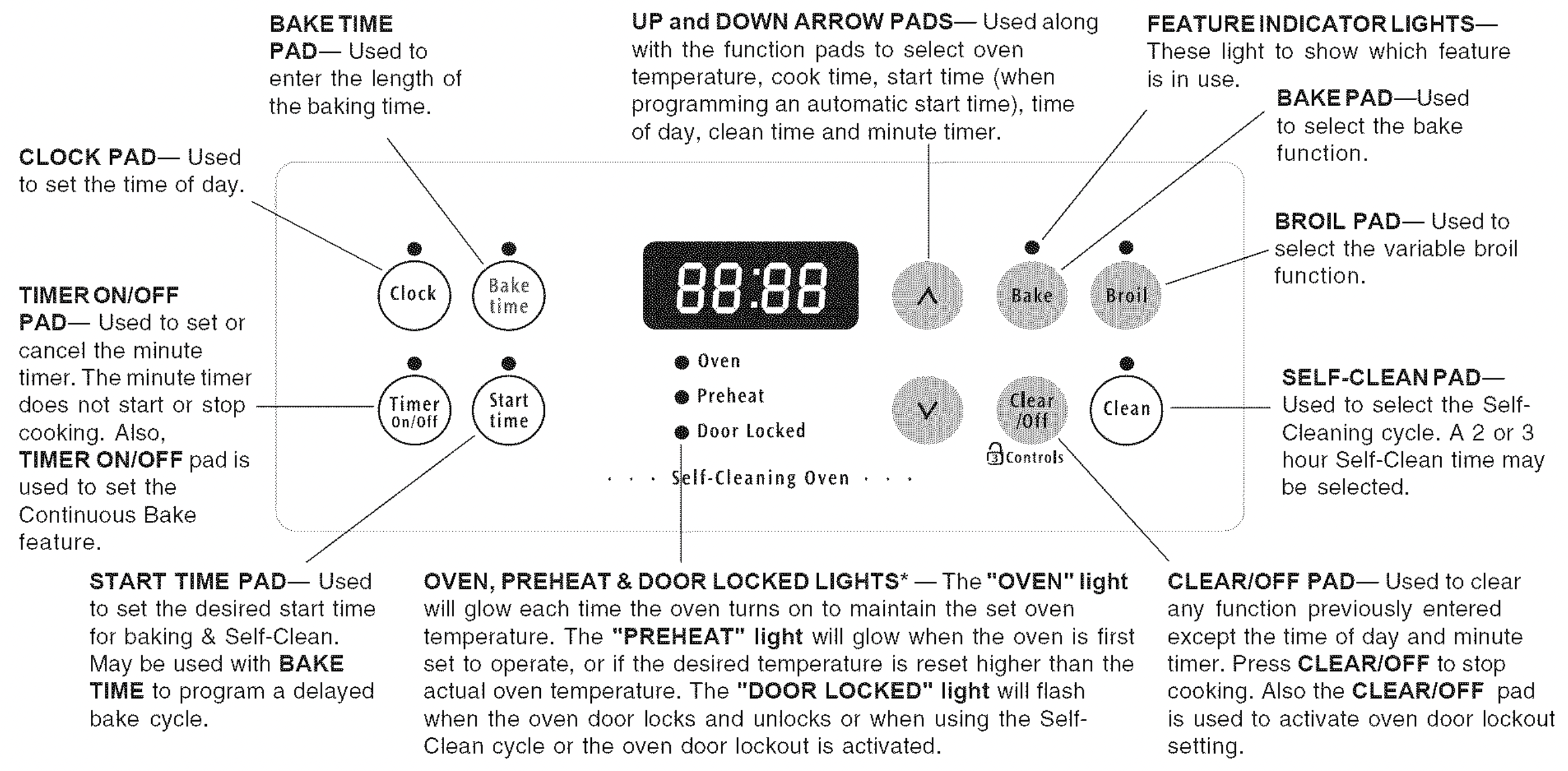
*Note: The OVEN indicato r light on the electronic display wi!l turn ON & OFF when using the Bake feature &during Preheat. This is normal & indicates that the oven is cyc!ing tOmaintain the se!ected baking te rope ratu re, When the preheat indicator light turns OFF, your oven is ready.
For a silent control panel
When choosing a function, a beep will be heard each time a pad is pressed. If desired, the control can be programmed for silent operation. Press and hold  . After 7 seconds, the control will beep once. This will block the controls from sounding when a pad is pressed. To return the sound, press and hold
  again for 7 seconds until the control beeps once.
Temperature conversion
The electronic oven control is set to operate in °F (Fahrenheit) when shipped from the factory. The oven can be programmed for any temperature from 170°F to 550°F (77°C to 287°C).
To change the temperature to °C (Celsius) or from °C to °F (control should not be in a Bake or Clean mode):
- Press
 . "----" appears in the display.
- Press and hold the
 until "HI" appears in the display.
- Press and hold
 until °F or °C appears in the display.
- Press the
 or
or  to change °F to °C or °Cto
- Press any control pad to return to normal operating mode.
Setting Ovem Controls
Note: The time of day must first be set in order to operate the oven.
NOTE: To turn the time of day display OFF or ON in the display press  and hold for 15 seconds (the control will beep once) and then release. This feature does not remove the set time of day from the memory of the control. When the display is turned OFF the time of day will re-appear for a few seconds any time the
  pad is touched.
Setting Oven Controls (cont'd)
To Set the Clock
When the range is first plugged in or when the power supply to the appliance has been interrupted, the display will flash "12:00".
- Press
 once (do not hold pad down).
- Within 5 seconds press & hold the
 or
or  until the correct time of day appears in the display.
Note: The clock cannot be changed during any timed bake or Self-Clean cycle.
To Set the Minute Timer:
- Press
 .
.
- Press the
 to increase the time in one minute increments. Press & hold the
  to increase the time in 10 minute increments. The timer can be set for any amount of time from 1 minute to 11 hours & 59 minutes.
Note: If the  pad is pressed first, the timer will advance to 11 hours & 59 minutes.
- The display shows the timer countdown in minutes until 1 minute remains. Then the display will countdown in seconds.
- When the set time has run out, the timer will beep 3 times & will continue to beep 3 times every 60 seconds until
 is pressed.
NOTE: The indicator light located above the  pad will glow while the minute timer is active. The minute timer does not start or stop cooking. It serves as an extra timer in the kitchen that will beep when the set time has run out. The minute timer can be used alone or during any of the other oven functions. When the minute timer is in use with any other function, the minute timer will be shown in the display. To view other functions, press the pad for that function.
To Change the Minute Timer while it is in use:
While the timer is active and shows in the display, press & hold the  or
or  to increase or decrease the time.
To Cancel the Minute Timer before the set time has run out: Press 
To Set or Change the Temperature for Baking
The oven can be programmed to bake at any temperature from 170°F to 550℉ (77°C to 287℃).
To Set the Controls for Baking:
- Press
 ."---"appears in the display.
- Within 5 seconds,press the
 or
or  .The display will show "350℉ (177°C)." By pressing & holding the
  or
or  , the temperature can then be adjusted in 5°F increments (1°C if the control is set to display Celsius).
- As soon as the
 or
or  pad is released, the oven will begin heating to the selected temperature. When the displayed temperature reaches the desired baking temperature, the preheat indicator light will turn OFF & the control will beep 3 times.
- To cancel baking, press
 .
.
To Change the Oven Temperature after Baking has Started:
- Press
 and make sure the bake temperature is displayed.
- Press the
 or
or  pad to increase or decrease the set temperature.
To Set Control for Continuous Bake or 12 Hour Energy Saving
The oven control has a built-in 12 Hour Energy Saving feature that will shut OFF the oven if the control is left ON for more than 11 hours & 59 minutes. The oven can be programmed to override this feature for continuous baking.
To set control for continuous baking:
- Press & hold
 down for 5 seconds until tone is heard,"--hr" will appear in display for continuous cooking. The current time of day will return to the display.
- To cancel the Continuous Bake function, press & hold
 for 5 seconds until a tone is heard. "12hr" will appear in display indicating that the control has returned to the 12 Hour Energy Saving feature.
Oven Lockout Lock 
The control can be programmed to lock the oven door &lockout the oven control pads.
To set Control for Oven Lockout feature:
- Press
 and hold for 3 seconds. "Loc" will appear in display, the "Door Locked" indicator light will flash & the motor driven door lock will begin to close automatically. DO NOT open the oven door while the indicator light is flashing. Allow about 15 seconds for the oven door to lock. Once the oven door is locked, the current time of day will appear in the display.
- To cancel the Oven Lockout feature, press
 & hold for 3 seconds. The control will unlock the oven door & resume normal operation.
Note: If any control pad is pressed while in the Oven Lockout mode, “Loc” will appear in the display until the control pad is released.
To Set Timed Bake with Delay Start
The  BAKE TIME and
  START TIME pads operate the features that will turn the oven ON & OFF at the times you select in advance. The oven may be programmed to start immediately & shut off automatically (Timed Bake) or to begin baking at a later time with a delayed start time.
To Program the Oven to Begin Baking Immediately & to Shut Off Automatically (Timed Bake):
- Be sure that the clock shows the correct time of day.
- Place the food in the oven.
- Press
 ."---°"appears in the display.
- Within 5 seconds, press the or . The display will show "350℉ (177°C)". By holding the or , the temperature can then be adjusted in 5°F increments (1°C if the control is set to display Celsius).
- Press . "0:00" will flash in the display (HR:MIN).
- Press the or until the desired baking time appears in the display.
- The oven will tum ON & begin heating.
To Program Oven for a Delayed Start Time & to Shut-Off Automatically (Delayed Timed Bake):
- Be sure that the clock shows the correct time of day.
- Place the food in the oven.
- Press . "---°"appears in the display.
- Within 5 seconds, press the or . The display will show "350℉ (177°C)". By holding the or the temperature can then be adjusted in 5°F increments (1°C if the control is set to display Celsius).
- Press . "0:00" will flash in the display (HR:MIN).
- Press the or until the desired baking time appears.
- Press . The earliest possible start time will appear in the display.
- Press the or until the desired start time appears in the display.
- Once the controls are set, the control calculates the time when baking will stop in order to start at the time you have set.
- The oven will turn ON at the delayed start time and begin heating.
When the Set Bake Time Runs Out:
a. "END" will appear in the display window and the oven will shut-off automatically.
b. The control will beep 3 times every 60 seconds until is pressed.
To Change the Oven Temperature or Bake Time after Baking has Started:
- Press the function pad you want to change.
- Press the or to adjust the setting.
NOTE: During Timed Bake the preheat indicator light will not function.
CAUTION: Use caution with the Timed Bake & Delayed Start (Delayed Timed Bake) features. Foods that can easily spoil such as milk, eggs, fish, meat or poultry, should be chilled in the refrigerator first. Even when chilled, they should not stand in the oven for more than 1 hour before cooking begins & should be removed promptly when cooking is completed.
Speed BakeTM Cooking System (some models)
Benefits of Speed BakeTM Cooking System:
- Foods cook up to 25 to 30% faster, saving time & energy.
- Multiple rack baking.
- No special pans or bakeware needed.
How Speed BakeTM Cooking System works
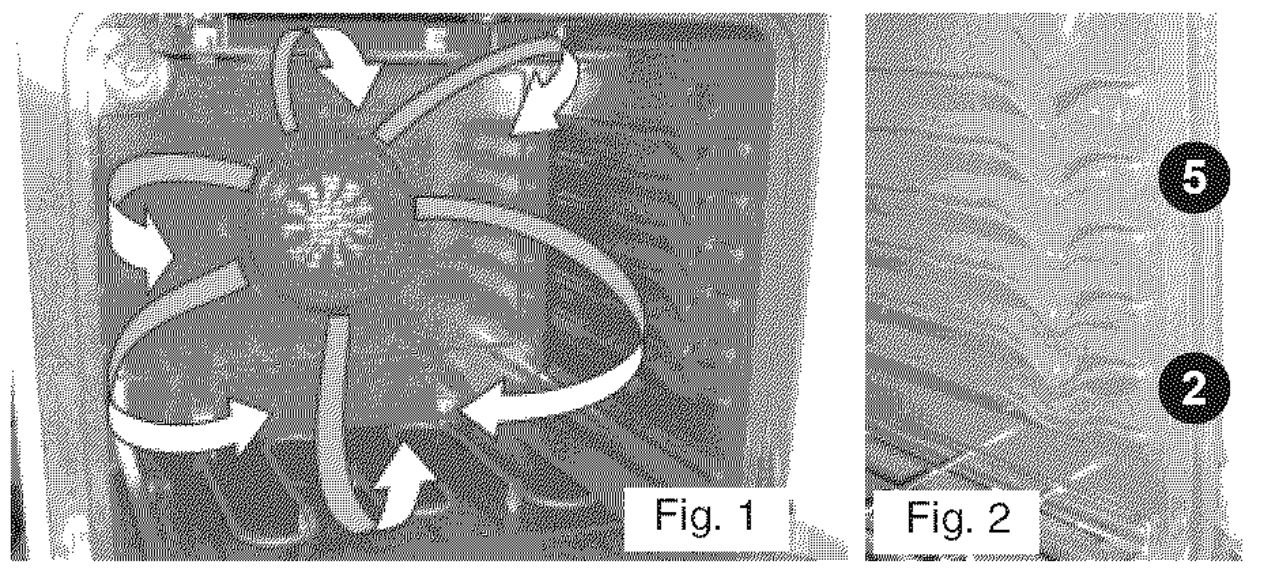
The Speed BakeTM Cooking System uses a fan to circulate the oven's heat uniformly and continuously around the oven (See Fig. 1). This improved heat distribution allows for fast, even cooking & browning results. It also gives better baking results when using 2 racks at the same time.
Heated air flows around the food from all sides, sealing in juices & flavors. Meats cooked with Speed BakeTM Cooking System are juicer. Poultry is crisp on the outside while staying tender & moist on the inside. Breads & pastry brown more evenly. Most foods baked in a standard oven can be cooked faster & more evenly with the Speed BakeTM Cooking System.
Speed BakeTM Cooking Instructions:
For Baking:
- For optimum cooking results it is recommended to preheat the oven when baking foods such as cookies, biscuits & breads.
- Reduce oven temperature 25°F from recipe's recommended oven temperature. Follow the remainder of the recipe's instructions using the minimum recommended cook time.
- When using 2 oven racks at the same time, place in positions 2 & 5 for best results (See Fig. 2).
Note: Layer cakes will have better results using the normal Bake feature.
For Roasting:
- Preheating is not necessary when roasting foods withSpeed BakeTM Cooking System.
- Since Speed Bake cooks food faster, reduce the cook time by 25% from the recommended cook time of your recipe. Increase the time until the desired doneness is obtained.
Note: Cook time reductions will vary depending on the amount and type of food being cooked.
To Set Speed BakeTM Cooking System:
- Program the oven as you normally would to bake. Speed Bake may be used with Bake, Timed Bake and Delayed Time Bake features.
- Press and release Speed Bake switch. The indicator light located above the Speed Bake switch will glow and the fan will come on. The fan stays on when the oven door is closed and shuts off while the oven door is opened. The fan will continue to operate until cooking is complete.
- To cancel Speed Bake, press on the oven control as you would to stop any baking function.
NOTE: The Speed Bake feature will not work during a Self-Cleaning cycle.
Broiling
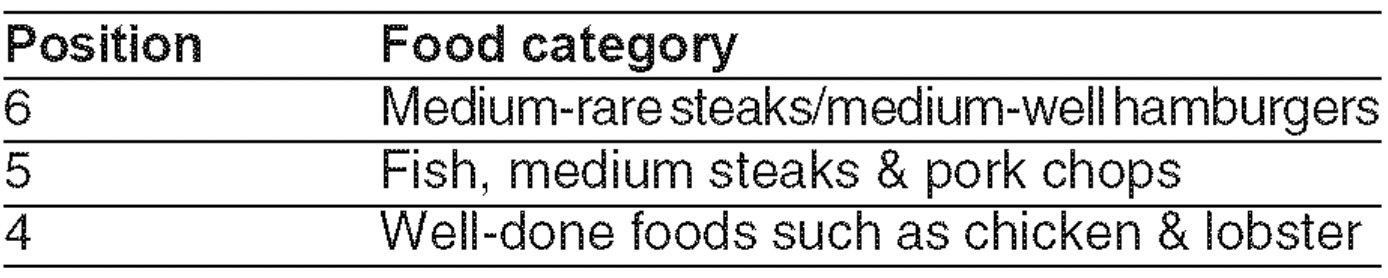
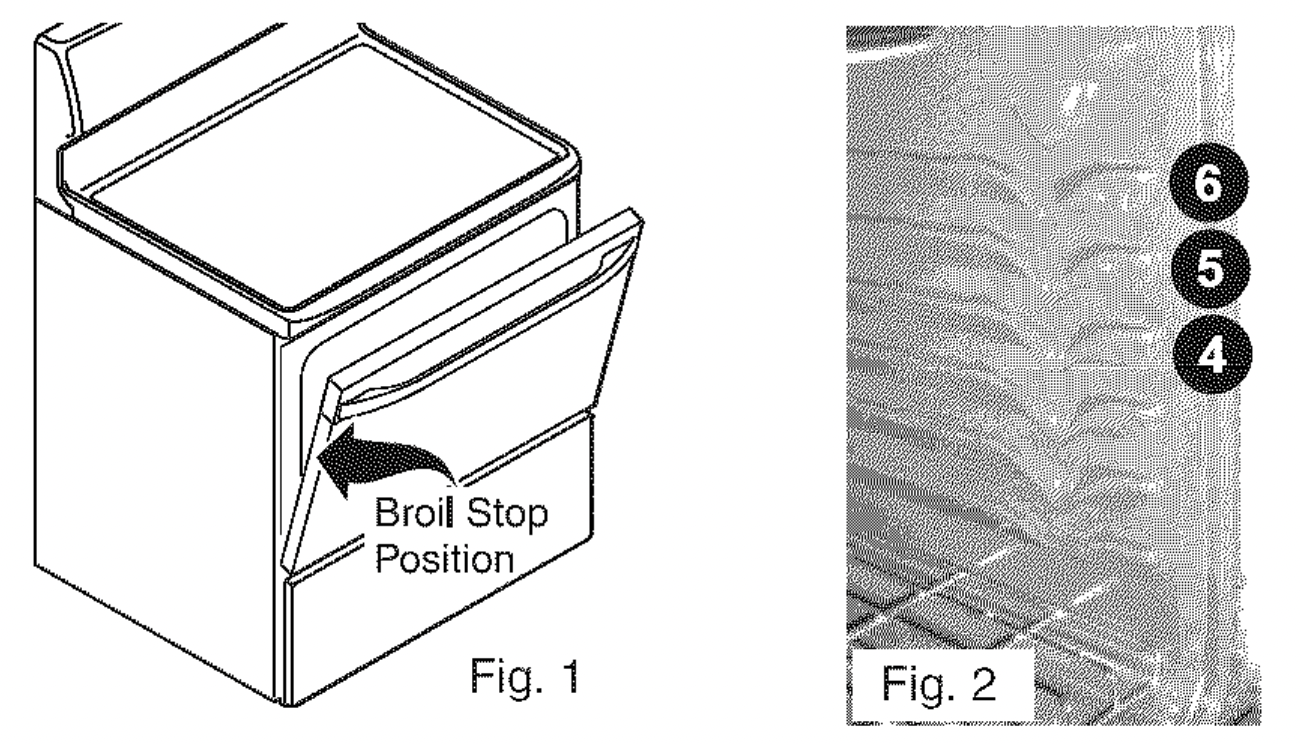
- Arrange the oven rack while oven is still cool. Position the oven rack as suggested in the Broil Oven Rack Position Table.
- Press
 ."--" will appear in display.
- Press & hold the or until the desired broil setting level appears in the display. Press the for Hl broil or the for LO broil. Most foods may be broiled at the Hl broil setting. Select the LO broil setting to avoid excess browning or drying of foods that should be cooked to the well-done stage.
- For optimum browning, preheat broil element for 3 or 4 minutes before adding food.
- Place the insert on the broil pan (some models), then place the food on the insert.
- Place the broiler pan & insert on the oven rack(some models). Open the oven door to the broil stop position when broiling (See Fig 1).
- Broil on one side until food is browned. Turn & broil food on 2nd side.
Note: Always pull the oven rack out to the stop position before tuming or removing the food.
- When broiling is finished press .
Broil Oven Rack Position Table (Refer to Fig.2)
The broiler pan & the insert (some models) allows grease to drain & be kept away from the high heat of the broiler. DONOT use the pan without the insert. DO NOT cover the insert with foil; the exposed grease could ignite. DO NOT use the broil pan without the insert or cover the insert with aluminum foil.The exposed fat could ignite.
CAUTION: To insure proper results when broiling use ONLY Electrolux Home Products, Inc.approved Broil Pan & Insert (some models).
CAUTION: Should an oven fire occur, close the oven door and turn the oven OFF. If the fire continues, use a fire extinguisher. DO NOT put water or flour on the fire. Flour may be explosive.
Self-Cleaning
CAUTION: During the Self-Cleaning cycle, the outside of the range can become very hot to the touch. DO NOT leave small children unattended near the appliance.
CAUTION: The health of some birds is extremely sensitive to the fumes given off during the Self-Cleaning cycle of any range. Move birds to another well-ventilated room.
CAUTION: DO NOT line the oven walls, racks, oven bottom or any other part of the range with aluminum foil. Doing so will destroy heat distribution, produce poor baking results and cause permanent damage to the oven interior (aluminum foil will melt to the interior surface of the oven).
CAUTION: DO NOT force the oven door open. This can damage the automatic door locking system. Use caution when opening the door after the Self-Cleaning cycle is completed. The oven may still be VERY HOT.
Preparing for a Self-Clean Cycle
A Self-Cleaning oven cleans itself with high temperatures (well above cooking temperatures) which eliminate soils completely or reduces them to a fine powdered ash you can wipe away with a damp cloth.
Adhere to the following cleaning precautions:
- DO NOT use oven cleaners or oven protective coatings in or around any part of the Self-Cleaning oven.
- DO NOT clean the oven door gasket. The woven material of the oven door gasket is essential for a good seal. Care should be taken not to rub, damage or remove the gasket.
- DO NOT use any cleaning materials on the oven door gasket. Doing so could cause damage.
- Remove the broiler pan & insert (some models), all utensils & ANY aluminum foil. These items cannot withstand high cleaning temperatures.
- Remove racks. See "Removing & Replacing Oven Racks" under Before Betting Oven Controls. If they are not removed during the Self-Clean cycle their color will turn slightly blue and the finish will be dull. After the cycle is complete and the oven has cooled rub the sides of the oven racks with wax paper or a cloth containing a small amount of salad oil (this will make the racks glide easier into the rack position).
- Remove any excessive spillovers in the oven cavity before starting the Self-Cleaning cycle. To clean, use hot, soapy water and a cloth. Large spillovers can cause heavy smoke or fire when subjected to high temperatures. DO NOT allow food spills with a high sugar or acid content (such as milk, tomatoes, sauerkraut, fruit juices or pie filling) to remain on the surface as they may leave a dull spot even after cleaning.
- Hand clean any soil from the oven frame, the door liner outside the oven door gasket and the small area at the front center of the oven bottom. These areas heat sufficiently to burn soil on. Clean with soap & water.
- Prior to setting the Self-Clean cycle, any spills remaining on the oven bottom should be removed.
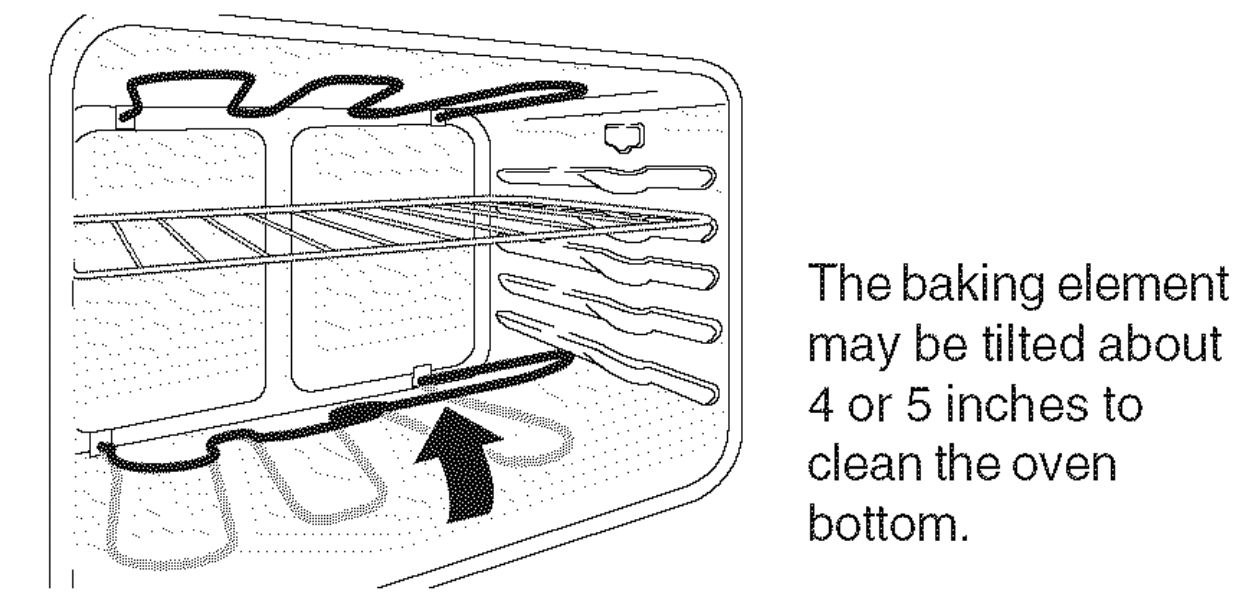
CAUTION: The oven bake & broil elements may appear to have cooled after they have been turned OFF. The elements may still be hot and burns may occur if these elements are touched before they have cooled sufficiently.
The Bake element is located in the lower oven cavity (See illustration).The bake element is designed to be tilted up using your hand from the front of the bake element. This will allow easier access to the oven bottom for cleaning.
Remove the bottom oven rack before raising the element. Be careful not to raise the element more than 4 or 5 inches from the resting position.
Starting the Self-Clean Cycle or a Delayed Start Self-Clean Cycle
For satisfactory results, use a 2 hour Self-Clean cycle for light soils or a 3 hour cycle for heavier soils.
NOTE: The kitchen area should be well ventilated using an open window, ventitlation fan or exhaust hood during the 1st Self-Clean cycle.This will help eliminate the normal odors associated with the 1st Self-Clean cycle.
To Set the Controls for a Self-Clean Cycle or a Delayed Start Self-Clean Cycle:
(Note: If you do not want to start a Delayed Self-Clean Cycle, skips steps 2&3).
- Be sure the clock shows the correct time of day.
- Press . The ":" in the time of day will flash.
- Press and hold the pad to scroll to the time to start the delayed Self-Clean cycle. Release the pad when the desired time is displayed.
- Press
 . "---" appears in the display.
- Press the or once. "3:00" appears in the display for a 3 hour cycle. To change to a 2 hour cycle press . "2:00" appears in the display.
As soon as the controls are set, the motor driven lock will begin to close automatically and the "LOCK" indicator light will flash. DO NOT open the oven door while the light is flashing (it takes about 15 seconds for the oven door to lock).
- "CLn" will appear in the display during the Self-Clean cycle and the "LOCK" light will glow until the Self-Cleaning cycle is complete or cancelled and the oven temperature has cooled.
When the Self-Clean Cycle has Completed:
- The time of day or "End" will appear in the display window and the “Clean" and "LOCK" light will continue to glow.
- Once the oven has cooled down for about 1 HOUR and the "LOCK" light has gone out, the oven door can be opened.
- If "End" is in the display and the Clean indicator light remains ON, press . The time of day will appear in the display.
NOTE: When the oven is cool, wipe away any residue or powdered ash with a damp cloth or paper towel.
Stopping or Interrupting a Self-Cleaning Cycle
If it becomes necessary to stop or interrupt a Self-Cleaning cycle:
- Press .
- Once the oven has cooled down for about 1 HOUR and the "LOCK" light has gone out, the oven door can be opened.
- Restart the Self-Clean cycle once all conditions have been corrected.
CAUTION: To avoid possible bu ms use care when opening the oven door after the Self-Cleaning cycle. Stand to the side of the oven when opening the door to allow hot air or steam to escape.
CAUTION: DO NOT force the oven door open. This can damage the automatic door locking system. Use caution & avoid possible burns when opening the door after the Self-Cleaning cycle has completed. The oven may still be VERY HOT.
General Care & Cleaning
| Surfaces |
How to Clean
|
|
Glass, Painted Plastic Body Parts & Control Knobs
|
For general cleaning, use a soft cloth, clean with mild dish detergent & water or a 50/50 solution of vinegar & water. Follow by rinsing the area with clean water; dry & polish with a soft cloth. Glass cleaners may be used if sprayed on a soft cloth 1st. DO NOT spray liquids directly on the control pad and display areas. DO NOT use large amounts of water on the control panel - excess water on the control area may cause damage to the appliance. DO NOT use other liquid cleaners, abrasive cleaners, scouring pads, or some paper towels - they will damage the finish.
|
|
Painted Control Panels & Display areas
|
Before cleaning the control panel, turn all controls to OFF & remove the control knobs. To remove, pull each knob straight off the shaft. Use the general cleaning instructions provided in the paragraph above.
|
|
Porcelain Enamel Burner Grates, Cooktop Surface, Below Cooktop, Broiler Pan & Insert, Broiler Drawer, Door Liner & Oven Bottom
|
Clean burner grates, broiler pan & insert in the dishwasher and dry upon removal. If soils are not removed, follow the cooktop cleaning instructions below.
Gentle scouring with a soapy scouring pad will remove most spots. Rinse with a 1:1 solution of clean water & ammonia. If necessary, cover difficult spots with an ammonia-soaked paper towel for 30 to 40 minutes. Rinse with clean water and a damp cloth, then scrub with a soap-filled scouring pad. Rinse & wipe dry with a clean cloth. Remove all cleaners or the porcelain may become damaged during future heating. DO NOT use spray oven cleaners on the range top.
|
|
Oven Racks
|
Remove racks. See "Removing & Replacing Oven Racks" under Before Setting Oven Controls. Use a mild, abrasive cleaner, following the cleaner's recommendations. Rinse with clean water & let dry. After cleaning the racks, rub the sides of the racks with wax paper or a cloth containing a small amount of baby oil or salad oil (this will make the racks glide easier into the oven rack positions).Use soap & water to thoroughly clean the top, sides & front of the oven door. Rinse well. You may use a glass cleaner on the outside glass of the oven door. DO NOT immerse the door in water. DO NOT spray or allow water or the glass cleaner to enter the door vents. DO NOT use oven cleaners, cleaning powders or any harsh abrasive cleaning materials on the outside of the oven door. DO NOT clean the oven door gasket. The oven door gasket is made of a woven material, on Self-Cleaning models, which is essential for a good seal. Care should be taken not to rub, damage or remove this gasket.
|
|
Oven Door
|
Use soap & water to thoroughly clean the top, sides & front of the oven door. Rinse well. You may use a glass cleaner on the outside glass of the oven door. DO NOT immerse the door in water. DO NOT spray or allow water or the glass cleaner to enter the door vents. DO NOT use oven cleaners, cleaning powders or any harsh abrasive cleaning materials on the outside of the oven door. DO NOT clean the oven door gasket. The oven door gasket is made of a woven material, on Self-Cleaning models, which is essential for a good seal. Care should be taken not to rub, damage or remove this gasket.
|
| Stainless Steel |
Clean stainless steel with hot soapy water & a dishcloth. Rinse with clean water and a cloth. DO NOT use cleaners with high conecentrations of chlorides or chlorines. DO NOT use harsh scrubbing cleaners. Only use kitchen cleaners that are especially made for cleaning stainless steel. Always be sure to rinse the cleaners form the surface as bluish stains may occur during heating that cannot be removed.
|
Cooktop Cleaning & Maintenance
Consistent and proper cleaning is essential to maintaining your ceramic glass cooktop.
Prior to using your cooktop for the first time, apply some of the cooktop cleaning cream supplied with your new range. Buff with a non-abrasive cloth or no-scratch cleaning pad. This will make cleaning easier when soiled from cooking. The special cook top cleaning cream leaves a protective finish on the glass to help prevent scratches and abrasions.
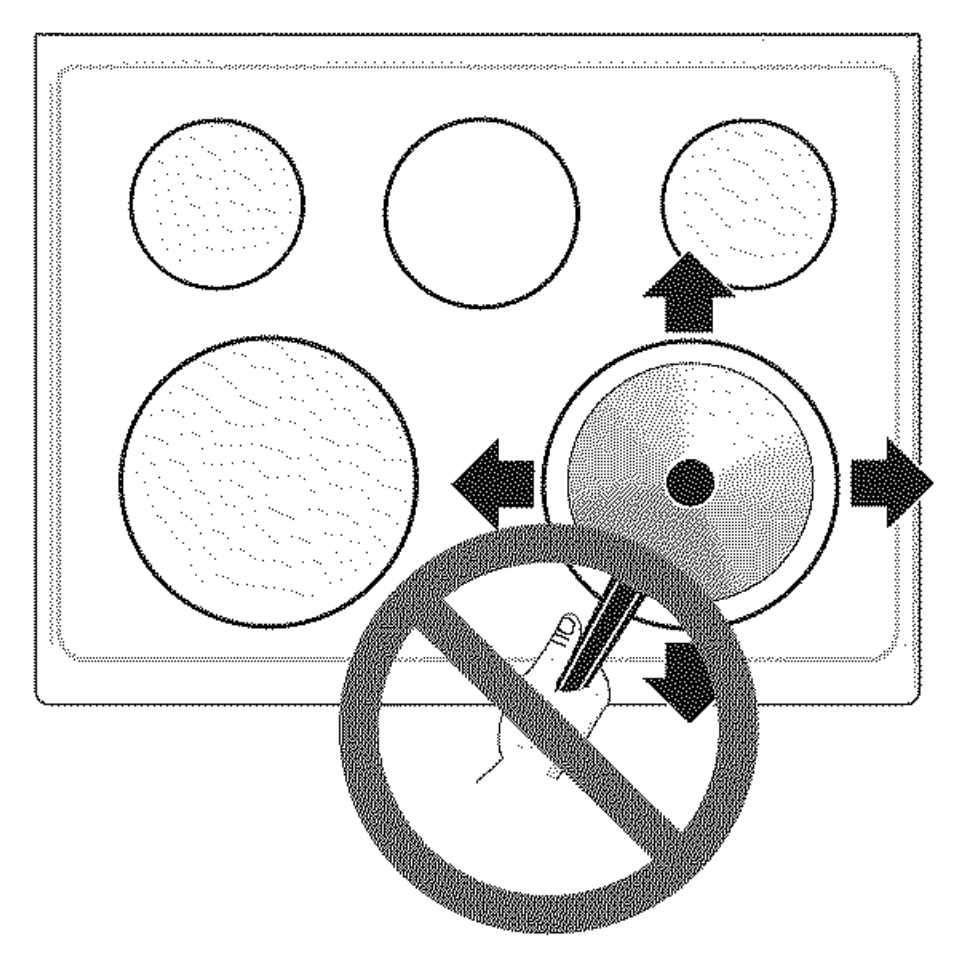
Sliding aluminum or copper clad bottom pans on the cooktop can cause metal markings on the cooktop surface. These marks should be removed immediately after the cooktop has cooled using the cooktop cleaning cream. Metal marks can become permanent if not removed prior to future use.
Cookware (cast iron, metal, ceramic or glass) with rough or dirty bottoms can mark or scratch the cooktop surface. Do not slide anything metal or glass across the cooktop. Do not use cookware with dirt or dirt build up on bottom; replace with clean cookware before using. Do not use your cooktop as a cutting board or work surface in the kitchen. Do not cook foods directly on the cooktop surface without a pan. Do not drop heavy or hard objects on the ceramic glass cooktop, they may cause it to crack.
CAUTION: Before cleaning the cooktop, be sure the controls are turned to OFF and the cooktop is COOL.
WARNING: DO NOT use a cooktop cleaner on a hot cooktop. The fumes can be hazardous to your health, and can chemically damage the ceramic-glass surface.
Cleaning Recommendations for the Ceramic Glass Cooktop
For light to moderate soil:
Apply a few drops of CookTop® Cleaning Creme directly to the cooktop. Use a paper towel or use a non-abrasive plastic type no-scratch cleaning pad to clean the entire cooktop surface. Make sure the cooktop is cleaned thoroughly, leaving no residue.
For heavy, burned on soil:
Apply a few drops of CookTop® Cleaning Creme directly to the soiled area. Rub the soiled area using a non-abrasive plastic type no-scratch cleaning pad, applying pressure as needed. Do not use the pad you use to clean the cooktop for any other purpose.
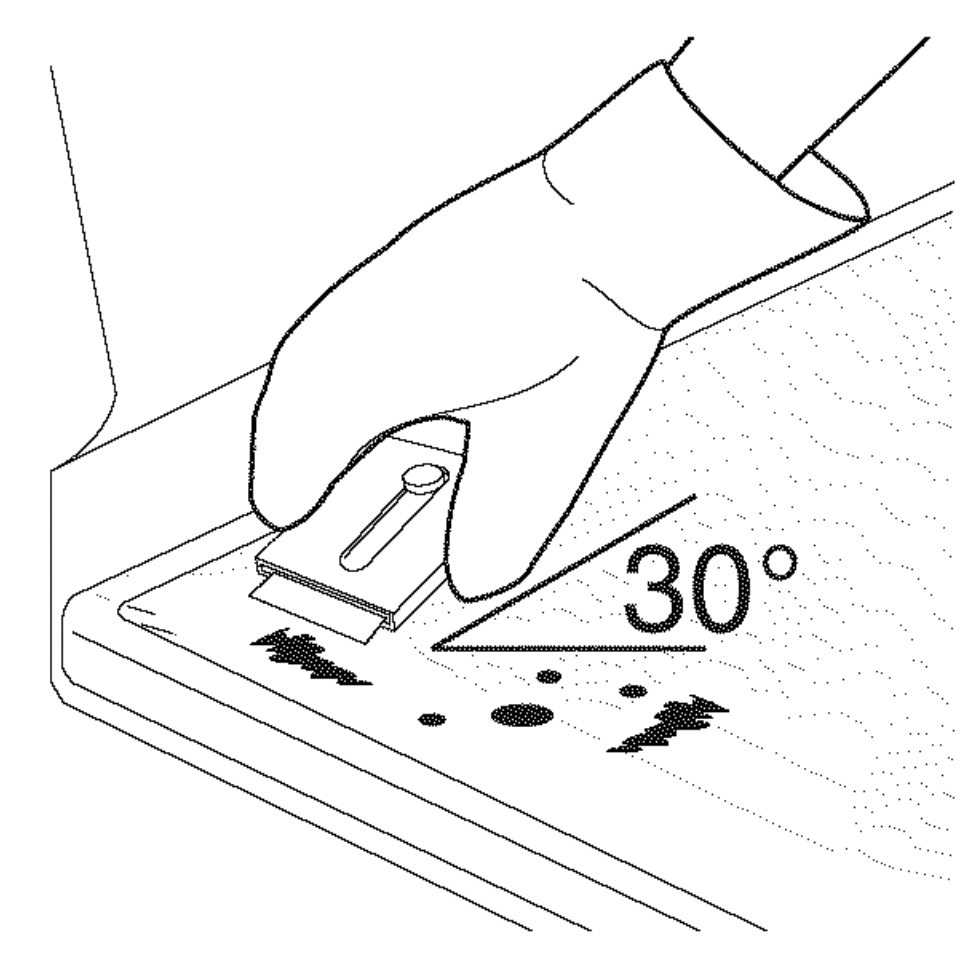
If soils remain, carefully scrape soils with a metal razor blade scraper, holding scraper at a 30 degree angle to the surface. Remove loosened soils with cooktop cleaning cream and buff surface clean.
IMPORTANT NOTE: Damage to the ceramic glass cooktop may occur if you use an abrasive type cleaning pad. Only use cleaning products that have been specifically designed for ceramic glass cooktops.
Plastic or foods with a high sugar content:
These types of soils need be removed immediately if spilled or melted onto the ceramic cooktop surface. Permanent damage (such as pitting of the cooktop surface) may occur if not removed immediately. After turning the surface elements OFF, use a razor blade scraper or a metal spatula with a mitt and scrape the soil from the hot surface (as illustrated). Allow the cooktop to cool, and use the same method for heavy or burned on soils.
Cleaning Precautions for the Ceramic Glass Cooktop
Do not use the following on the ceramic glass cooktop:
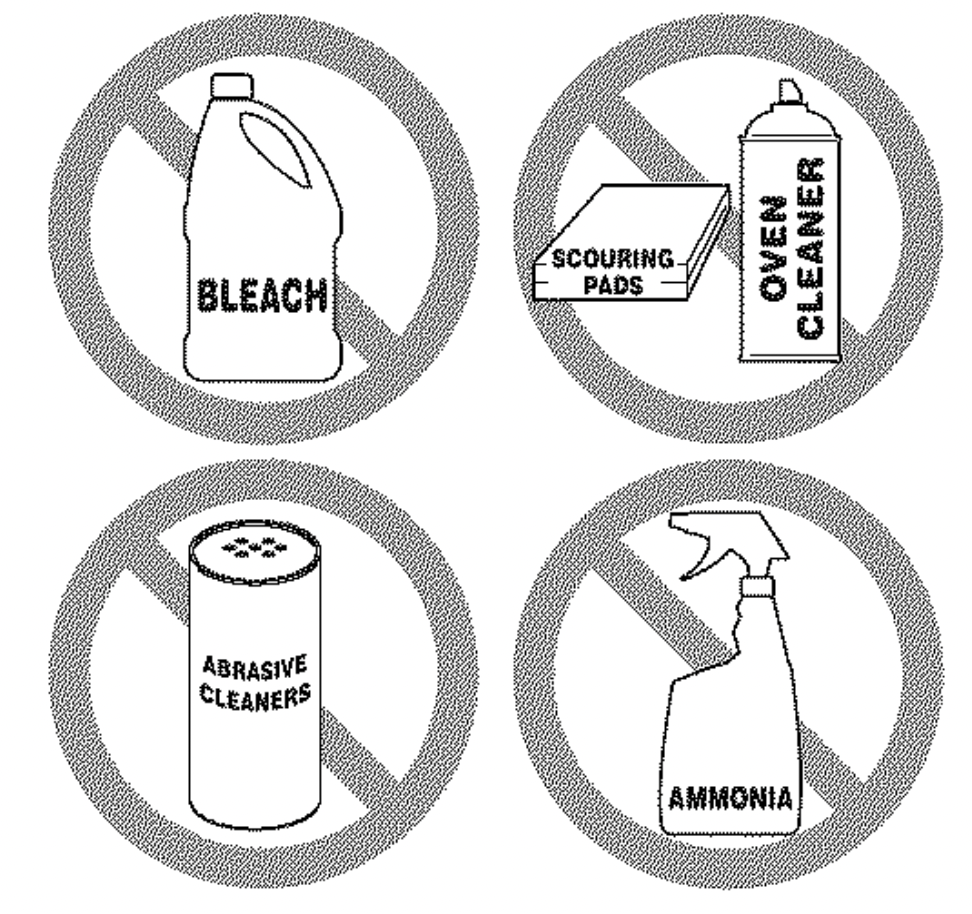
- Do not use abrasive cleaners and scouring pads, such as metal and some nylon pads. They may scratch the cooktop, making it more difficult to clean.
- Do not use harsh cleaners, such as chlorine bleach, ammonia or oven cleaners, as they may etch or discolor the cooktop.
- Do not use dirty sponges, cloths or paper towels, as they can leave soil or lint on the cooktop which can burn and cause discoloration.
Special Caution for Aluminum Use on the Ceramic Cooktop
- Aluminum Foil - Use of aluminum foil on a hot cooktop will damage the ceramic cooktop. Do not use thin aluminum cooking utensils or allow aluminum foil to touch the ceramic cooktop under ANY circumstances.
- Aluminum utensils - The melting point of aluminum is much lower than that of other metals. Care must be taken when aluminum pots or pans are used on the cooktop. If allowed to boil dry, not only will the utensil be destroyed, but it may fuse to break or mark the ceramic glass surface, permanently damaging the cooktop surface.
Removing & Replacing the Lift-Off Oven Door
CAUTION: The door is heavy. For safe, temporary storage, lay the door flat with the inside of the door facing down.
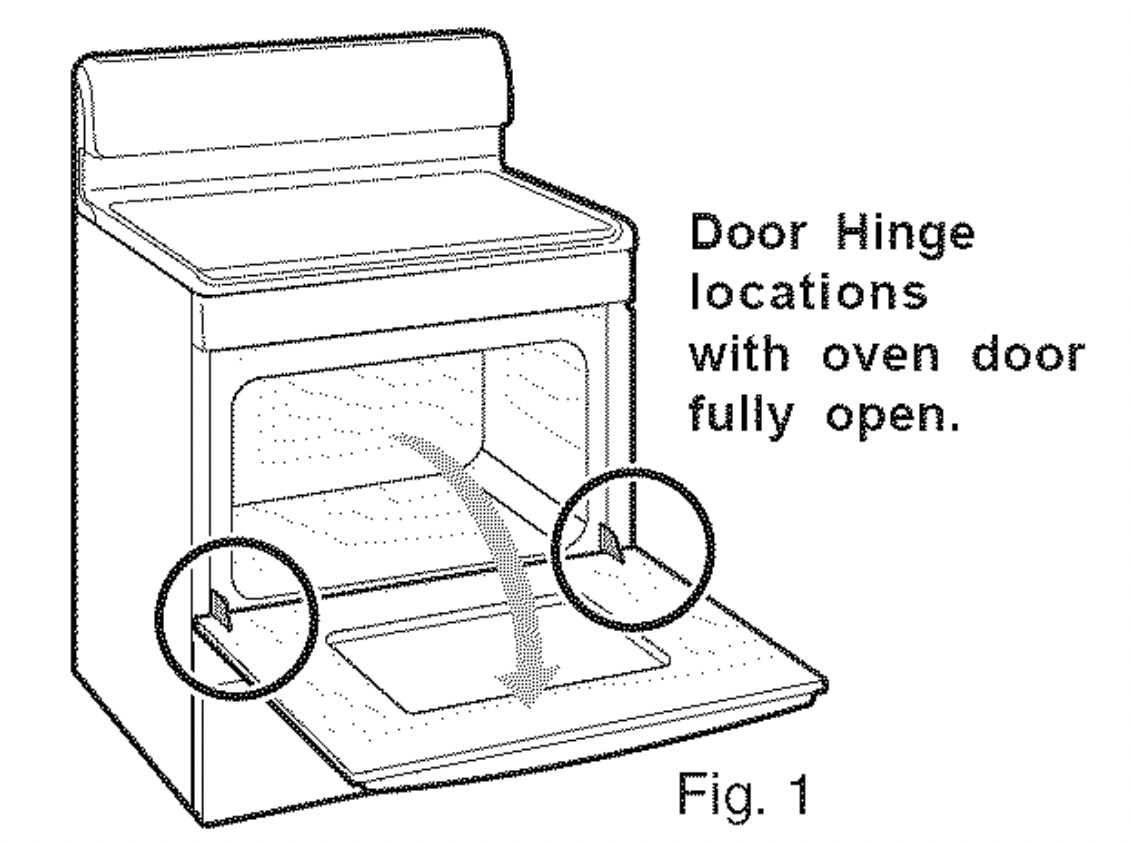
To Remove Oven Door:
- Open oven door completely (horizontal with floor- See Fig. 1).
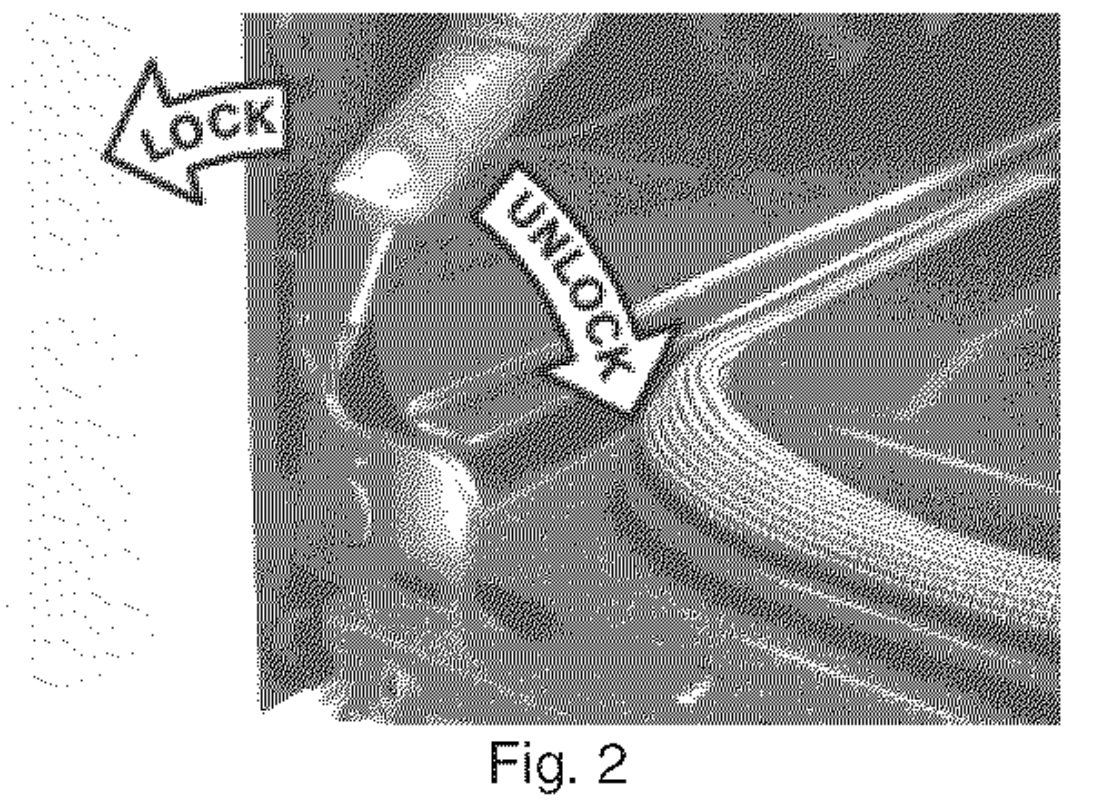
- Pull the door hinge locks on both left and right door hinges down from the oven frame completely towards the oven door (See Fig. 2). A tool such as a small flat-blade screw driver maybe required.
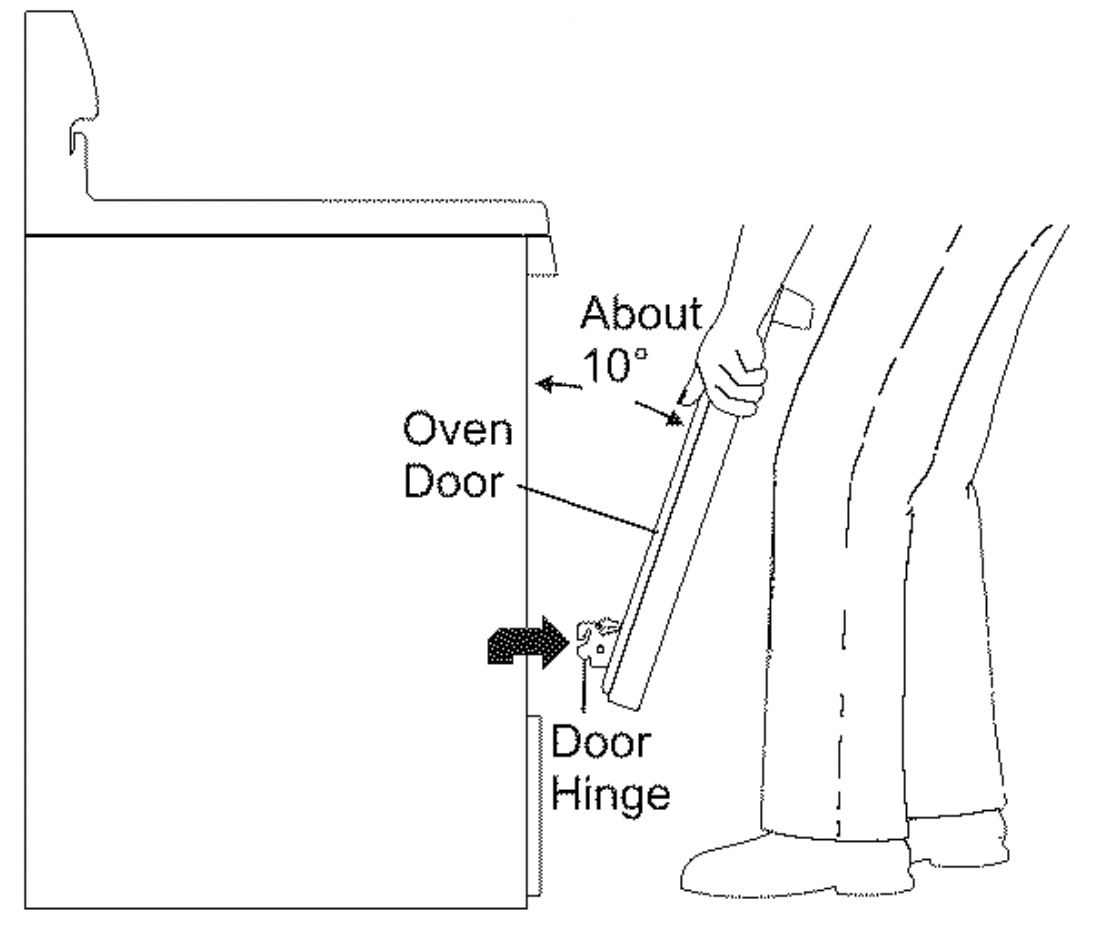
- Firmly grasp both sides of oven door along the door sides (Do not use the oven door handle - See Fig.3).
- Close the door to the broil stop position (the oven door will stop into this position just before fully closing).
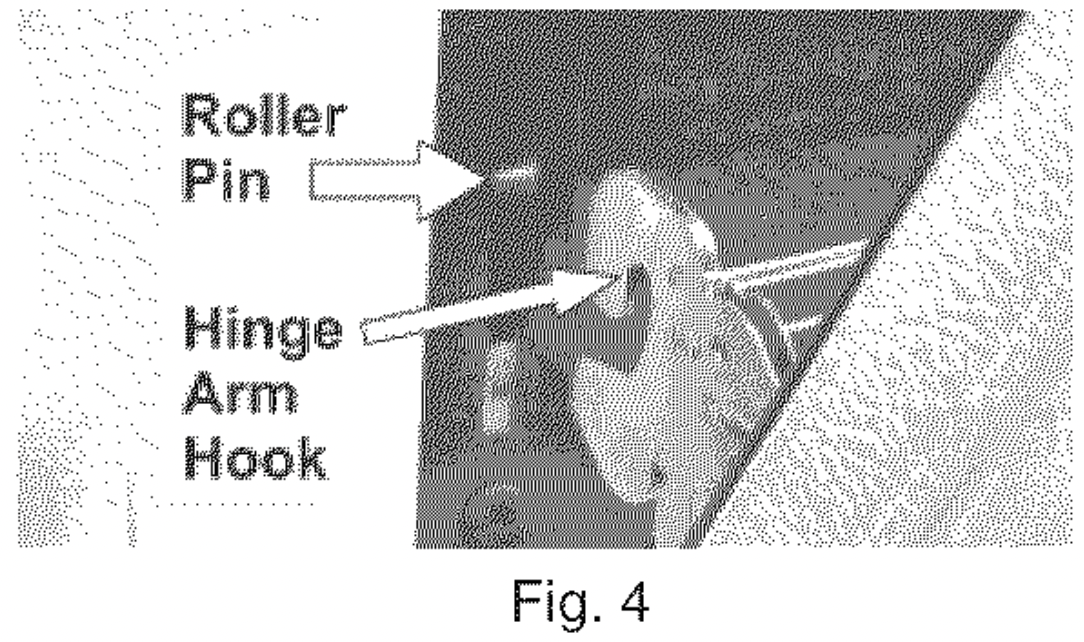
- With the oven door in the broil stop position, lift the oven door hinge arms over the roller pins located on each side of the oven frame (See Fig.4).
To Replace Oven Door:
- Firmly grasp both sides of oven door along the door sides (Do not use the oven door handle - See Fig.3).
- Holding the oven door at the same angle as the removal position, seat the hook of the hinge arm over the roller pins located on each side of the oven door frame (See Fig. 4). The hook of the hinge arms must be fully seated onto the roller pins.
- Fully open the oven door (horizontal with floor- See Fig. 1).
- Push the door hinge locks up towards and into the oven frame on both left and right oven door hinges (See Fig. 2) to the locked position.
- Close the oven door.
Special Door Care Instructions - Most oven doors contain glass that can break. Read the following recommendations:
- Do not close the oven door until all the oven racks are fully in place.
- Do not hit the glass with pots, pans, or any other object.
- Scratching, hitting, jarring or stressing the glass may weaken its structure causing an increased risk of breakage at a later time.
Changing the Oven Light (some models)
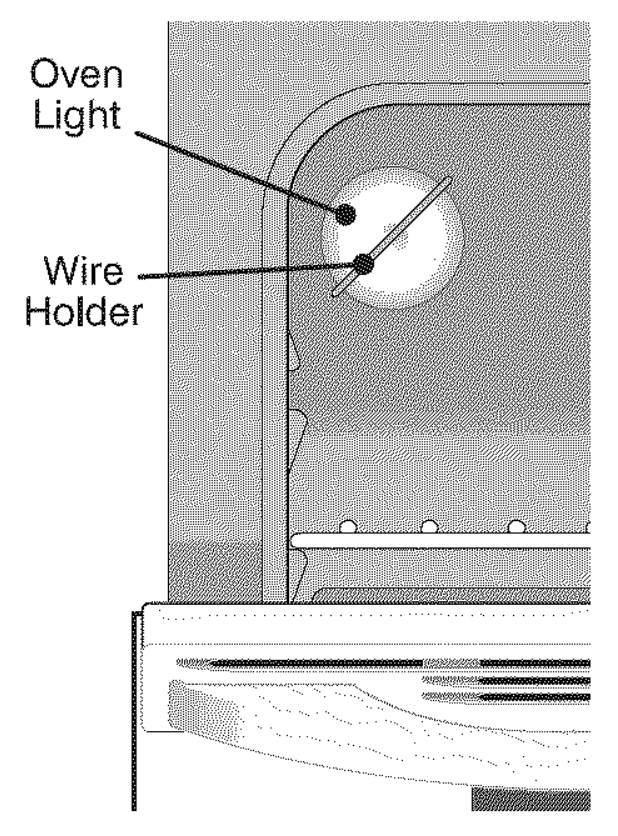
The oven light automatically tums ON when the door is opened. The oven light may also be manually operated by pressing the oven light switch located on top of the control panel. The oven light bulb is located at the rear of the oven and is covered with a glass shield held by a wire holder. The glass shield must be in place whenever the oven is in use.
To replace the oven light bulb:
- Turn electrical power off at the main source or unplug the range.
- Press wire holder to one side to release the glass shield.
- Replace bulb with a new 40 watt appliance bulb.
- Replace glass shield over bulb and snap wire holder into place.
- Turn power back on again at the main source (or plug the range back in).
- The clock will then need to be reset. To reset, see Setting the Clock and Minute Timer in this Use & Care Manual.
CAUTION: Be sure the range is unplugged and all parts are COOL before replacing oven light. Wear a leather-faced glove for protection against possible broken glass.
Care & Cleaning of Stainless Steel (some models)
Some models are equipped with stainless steel exterior parts. Special care and cleaning are required for maintaining the appearance of stainless parts. Refer to the Cleaning Table at the beginning of this section for detailed cleaning instructions.
Adjusting Your Oven Temperature
Your oven control has been precisely set at the factory. This setting may differ from your previous oven however, so your recipe times may not give you the results you expect. If you think that the oven is cooking too hot or too cool for your recipe times, you can adjust the control so that the oven cooks hotter or cooler than the temperature displayed.
To Adjust Oven Temperature:
- Press .
- Set the temperature to 550°F (287°C) by pressing and holding the .
- Within 2 seconds, press and hold until the 2 digit display appears. Release . The display now indicates the amount of degrees offset between the original factory temperature setting and the current temperature setting. If the oven control has the original factory calibration, the display will read "0."
- The temperature can now be adjusted up or down 35°F (17°C), in 5°F steps by pressing and holding the or . Adjust until the desired amount of offset appears in the display. When lowering the oven temperature, a minus sign (-) will appear before the number to indicate that the oven will be cooler by the displayed amount of degrees.
- When you have made the desired adjustment, press to go back to the time of day display.
Note: Oven temperature adjustments made will not change the Self-Cleaning feature temperature.
Troubleshooting
Before you call for service, review the following list. It may save you time & expense. The list includes common occurrences (shown in bold) that are not the result of defective workmanship or materials in this appliance. The possible corrections to these problems are provided with the problem listed:
Range is not level
- Poor installation. Place oven rack incenter of oven. Place a level on the oven rack. Adjust leveling legs at base of range until the oven rack is level.
- Be sure floor is level, strong & stable enough to adequately support range.
- If floor is sagging or sloping, contact a carpenter to correct the situation.(4)Kitchen cabinet alignment may make range appear not level. Be sure cabinets are square & have sufficient room for range clearance.
Cannot move appliance easily. Appliance must be accessible for service
- Cabinets not square or are built in too tightly.Contact builder or installer to make appliance accessible.
- Carpet interferes with range. Provide sufficient space so range can be lifted over carpet.
Surface element too hot or not hot enough - Incorrect control setting. Be sure the correct control is ON for the element to be used.
Surface element does not heat
- Lightweight or warped pans used. Use only flat, evenly balanced, medium or heavy weight cookware. Flat pans heat better than warped pans. Cookware materials and weight of the material affect heating. Heavy & medium-weight pans heat evenly. Because lightweight pans heat unevenly, foods may burn easily.
- No power to the appliance. Check steps under "Entire Appliance Does Not Operate" in this checklist.
- Incorrect control setting. Make sure the correct control is ON for the surface element to be used.
Entire appliance does not operate
- The time of day is not set. The time of day must first be set in order to operate the oven. See"To Set the Clock" in the Setting Oven Controls section.
- Make sure cord/plug is plugged correctly into outlet.
- Service wiring is not complete. Contact your authorized service agent.
- Electrical power outage.Check house lights to be sure. Call your local electric company for service.
Oven does not operate - Be sure the oven controls are set properly for the desired function. See Setting Oven Controls in this Use & Care Manual or read the instructions "Entire appliance does not operate" in this checklist.
Oven light does not work (some models) - Replace or tighten bulb. See Changing Oven Light section in this Use & Care Manual.
Oven control beeps & displays any F code error (for example F11) - Electronic control has detected a fault condition. PressCLEAR/OFF to clear the display & stop beeping. Reprogram oven. If fault recurs, record fault number. Press CLEAR/OFF & contact an authorized service agent.
Flames inside oven or smoking from oven vent - Excessive spillovers in oven. For example this will happen for pie spillovers or large amounts of grease left on the oven bottom. Wipe up excessive spillovers before starting oven. If flames or excessive smoke are present see "Broiling" in the Setting Oven Controls section.
Oven smokes excessively during broiling
- Control(s) not set properly. Follow Broil instructions under Setting Oven Controls.
- Make sure oven door is opened to broil stop position.
- Meat too close to the broil element. Reposition the broil rack to provide proper clearance between the meat & the element. Preheat the broil element for searing.
- Meat not properly prepared.Remove excess fat from meat.Cut fatty edges to prevent curling, but do not cut into lean.
- Insert on broiler pan wrong side up & grease not draining. Always place grid on the broiler pan with ribs up & slots down to allow grease to drip into pan (some models).
- Grease has built up on oven surfaces. Regular cleaning is necessary when broiling frequently. Old grease or food spatters cause excessive smoking.
Poor baking results - Many factors affect baking results. Make sure the proper oven rack position is used. Center food in the oven & space pans to allow air to circulate. Allow the oven to preheat to the set temperature before placing food in the oven. Try adjusting the recipe's recommended temperature or baking time. If you feel the oven is too hot or cool, see Adjusting Your Oven Temperature in this Use & Care Manual.
Soil not completely removed after Self-Cleaning cycle - Failure to clean bottom, front top of oven, frame of oven or door area outside oven seal. These areas are not in the Self-Cleaning area, but get hot enough to burn on residue. Clean these areas before the Self-Cleaning cycle is started. Burned-on residue can be cleaned with a stiff nylon brush and water or a nylon scrubber. Be careful not to damage the oven gasket.
Self-Cleaning cycle does not work
- Oven control not set properly. Follow instructions under Self-Cleaning.
- Self-Cleaning cycle was interrupted. Follow steps under "Stopping or Interrupting a Self-Cleaning Cycle" under Self-Cleaning.
Metal marks (Ceramic Cooktop models) - Sliding or scraping of metal utensils on cooktop surface. Do not slide metal utensils on cooktop surface. Use a ceramic-glass cooktop cleaning creme to remove the marks. See "Cooktop Cleaning and Maintenance" in the Care & Cleaning section.
Scratches or abrasions on cooktop surface (Ceramic Cooktop models)
- Coarse particles such as salt or sand between cooktop and utensils can cause scratches. Be sure cooktop surface and bottoms of utensils are clean before usage. Small scratches do not affect cooking and will become less visible with time.
- Cleaning materials not recommended for ceramic-glass cooktop have been used. See Cooktop Cleaning & Maintenance".
- Cookware with rough bottom has been used. Use smooth, flat-bottomed cookware.
Brown streaks or specks on cooktop surface (Ceramic Cooktop models) - Boilovers are cooked onto surface. Use razor blade scraper to remove soil. See "Cooktop Cleaning and Maintenance" in the Care & Cleaning section.
Areas of discoloration with metallic sheen (Ceramic Cooktop models) - Mineral deposits from water and food. Remove using a ceramic-glass cooktop cleaning creme.Use cookware with clean, dry bottoms.