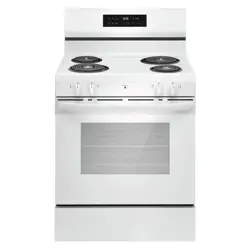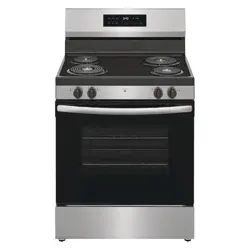
EN User Manual | Electric Range
Welcome to our family
Thank you for bringing Frigidaire into your home! We see your purchase as the beginning of a long relationship together.
This manual is your resource for the use and care of your product. Please read it before using your appliance. Keep it handy for quick
reference. If something doesn’t seem right, the troubleshooting section will help you with common issues.
FAQ, helpful tips and videos, cleaning products, and kitchen and home accessories are available at http://www.frigidaire.com.
We are here for you! Visit our website, chat with an agent, or call us if you need help. We may be able to help you avoid a service visit. If
you do need service, we can get that started for you.
Let’s make it official! Be sure to register your product.
CONTENTS
1. IMPORTANT SAFETY INFORMATION....................................................................................................................................... 2
2. COOKING RECOMMENDATIONS.............................................................................................................................................. 5
3. BEFORE SETTING SURFACE CONTROLS...............................................................................................................................6
4. SETTING SURFACE CONTROLS...............................................................................................................................................7
5. BEFORE USING THE OVEN.......................................................................................................................................................8
6. SETTING OVEN CONTROLS......................................................................................................................................................8
7. CARE AND CLEANING............................................................................................................................................................. 12
8. TROUBLESHOOTING............................................................................................................................................................... 15
9. LIMITED WARRANTY................................................................................................................................................................17
1. IMPORTANT SAFETY INFORMATION
1.1 Keep a record for quick reference
Model number
..........................................................
Serial number
..........................................................
Purchase date
..........................................................
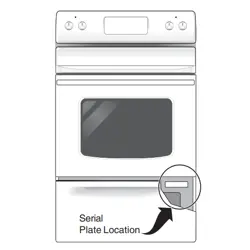
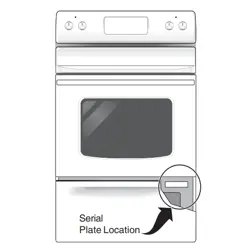
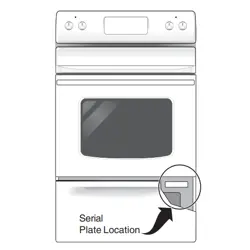
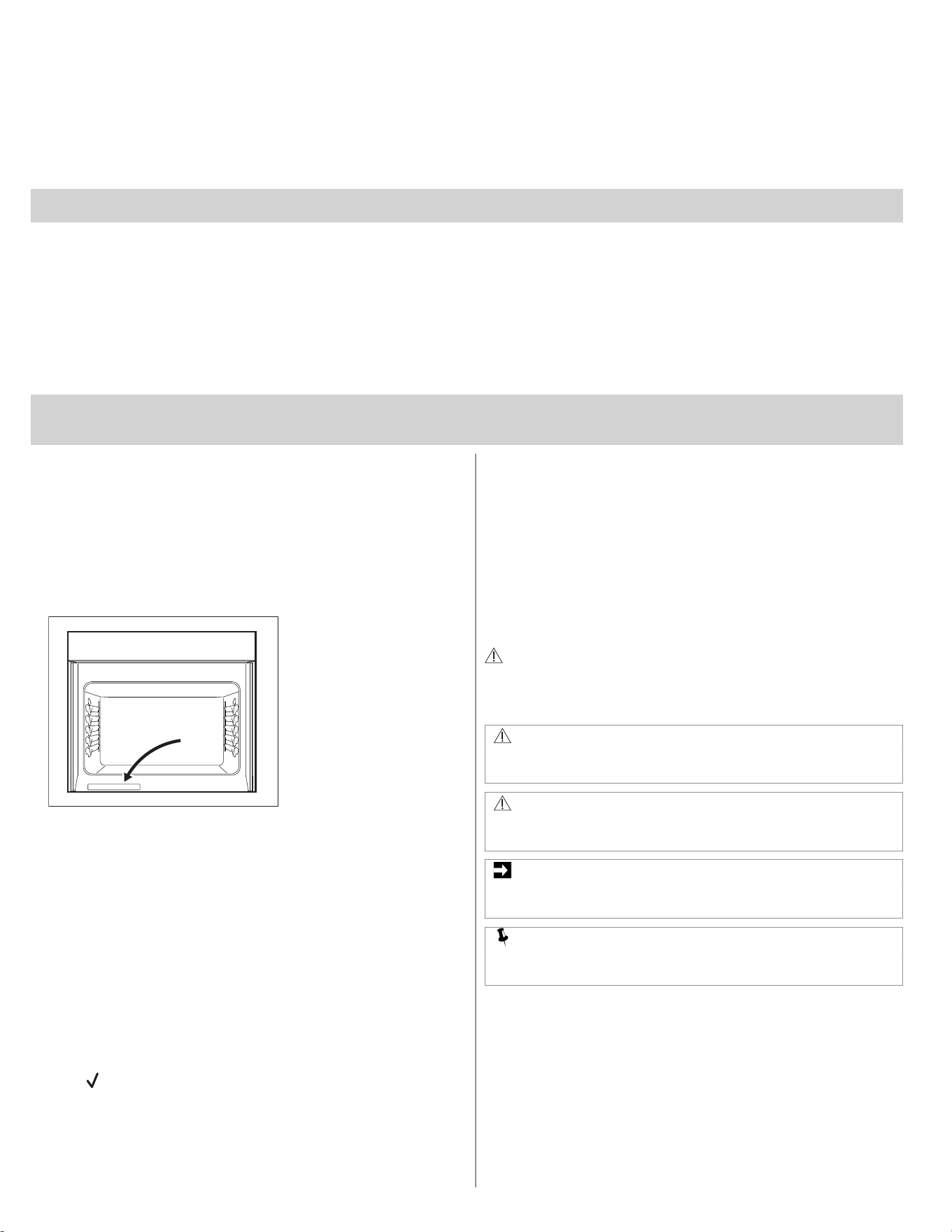
Serial Number Location
Read all instructions before using this appliance.
This manual contains important safety symbols and
instructions. Please pay attention to these symbols and
follow all instructions given.
Read safety precautions in this manual before installing or
using your appliance. Safety items throughout this manual
are labeled with a WARNING or CAUTION statement based
on the risk type.
Warnings and important instructions appearing in this guide
are not meant to cover all possible conditions and situations
that may occur. Common sense, caution, and care must be
exercised with installing, maintaining, or operating your
appliance.
1.2 Installation checklist
❐ Read all the safety instructions in the front of your user manual.
❐ Remove all packaging materials from your appliance before
cooking.
❐ Confirm that the electrical power to the appliance is turned on.
❐ Wipe out the inside of the oven cavity with a damp cloth.
❐ Apply a thin layer of cooking oil to the sides of the oven racks to
keep them gliding smoothly.
❐ Set the clock. Refer to the Setting Oven Controls chapter.
❐ Test all surface elements/burners to make sure they are working
properly.
❐ Before cooking, set the oven to bake at 350°F (177°C) for 30
minutes. Some noise and odors are normal on the first cooking
cycle.
❐ Remember to complete your product registration.
1.3 Safety definitions
This is the safety alert symbol. It is used to alert of potential
personal injury hazards. Follow all safety messages that
follow this symbol to avoid possible injury or death.
WARNING!
Indicates a potentially hazardous situation which, if not avoided,
may result in death or serious injury.
CAUTION!
Indicates a potentially hazardous situation which, if not avoided,
may result in minor or moderate injury.
IMPORTANT
Indicates installation, operation, or maintenance information which
is important but not hazard-related.
NOTE
Indicates a short, informal reference – something written down to
assist the memory or for future reference.
2 ENGLISH
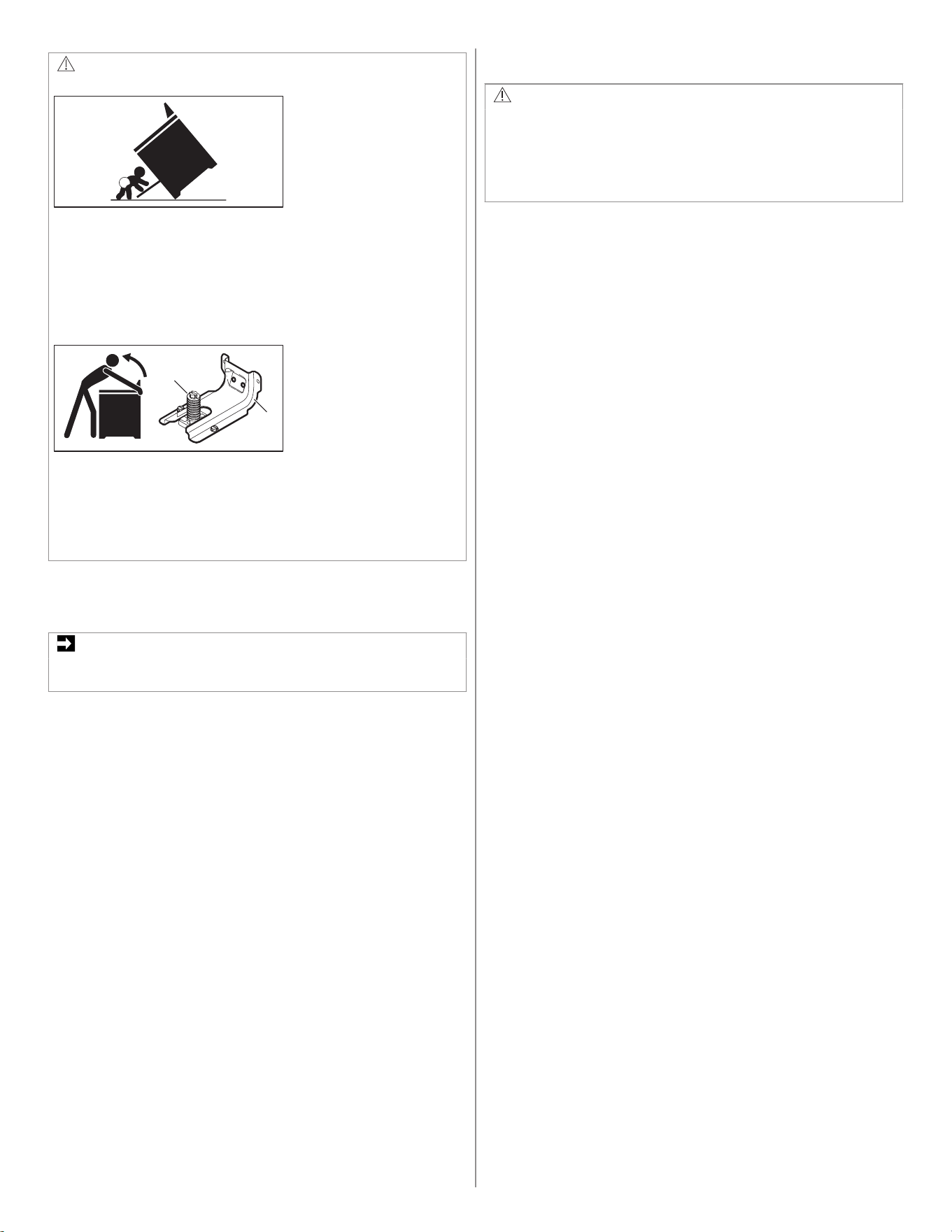
WARNING!
Tip over hazard
• A child or adult can tip the oven and be killed.
• Install the anti-tip device to oven and/or structure per installation
instructions.
• Ensure the anti-tip device is re-engaged when the oven is
moved.
• Do not operate the oven without the anti-tip device in place and
engaged.
• Failure to follow these instructions can result in death or serious
burns to children and adults.
1
2
1. Range leveling leg / 2. Anti-tip bracket
To check if the anti-tip bracket is installed properly, use both arms
to grasp the rear edge of the range back. Carefully attempt to tilt
range forward. When properly installed, the range should not tilt
forward.
Refer to the anti-tip bracket installation instructions supplied with
your range for proper installation.
1.4 Important instructions for unpacking
and installation
IMPORTANT
Read and follow the below instructions and precautions for
unpacking, installing, and servicing your appliance.
Remove all tape and packaging before using the appliance.
Destroy the carton and plastic bags after unpacking the
appliance. Never allow children to play with packaging
material. Do not remove the wiring label and other literature
attached to the appliance. Do not remove model/serial
number plate.
Cold temperatures can damage the electronic control. When
using this appliance for the first time, or when the appliance
has not been used for an extended period of time, be sure
the appliance has been in temperatures above 32ºF (0ºC)
for at least 3 hours before turning on the power to the
appliance.
All materials used in construction of cabinets, enclosures,
and supports surrounding the product must have a
temperature rating above 200°F (94°C).
Never modify or alter the construction of the appliance by
removing the leveling legs, panels, wire covers, anti-tip
brackets/ screws, or any other part of the appliance.
Be sure to have an appropriate foam-type fire extinguisher
available, visible, and easily accessible located near the
appliance.
1.5 Grounding instructions
WARNING!
• Avoid fire hazard or electrical shock. Failure to follow this
warning may cause serious injury, fire, or death.
• Avoid fire hazard or electrical shock. Do not use an adapter
plug, use an extension cord, or remove grounding prong from
the power cord. Failure to follow this warning may cause serious
injury, fire, or death.
Proper Installation - Be sure your appliance is properly
installed and grounded by a qualified technician. In the
United States, install in accordance with the National Fuel
Gas Code ANSI Z223.1/NPFA No. 54, latest edition and
National Electrical Code NFPA No. 70 latest edition, and
local electrical code requirements. In Canada, install in
accordance with CAN/CGA B149.1 and CAN/CGA B149.2
and CSA Standard C22.1, Canadian Electrical code, Part 1-
latest editions and local electrical code requirements. Install
only per installation instructions provided in the literature
package for this appliance.
For personal safety, this appliance must be properly
grounded. For maximum safety, the power cord must be
securely connected to an electrical outlet or junction box that
is the correct voltage, is correctly polarized and properly
grounded, and protected by a circuit breaker in accordance
with local codes.
It is the personal responsibility of the consumer to have the
appropriate outlet or junction box with the correct, properly
grounded wall receptacle installed by a qualified electrician.
Contact a qualified installer to assure that the electrical
installation is adequate and is in conformance with all local
codes and ordinances.
See the installation instructions packaged with this appliance
for complete installation and grounding instructions.
ENGLISH 3

1.6 Important instructions for using the
appliance
WARNING!
• Do not store flammable materials in ovens, microwaves, near
surface burners or elements, or in the storage or warming
drawer (if equipped). This includes paper, plastic, and cloth
items, such as cookbooks, plastic ware, and towels, as well as
flammable liquids. Do not store explosives, such as aerosol
cans, on or near the appliance.
• Do not leave children alone - Children should not be left alone
or unattended in the area where appliance is in use. They
should never be allowed to sit or stand on any part of the
appliance, including the storage drawer, lower broiler drawer,
warmer drawer, or lower double oven.
• Do not store items of interest to children in the cabinets above
the appliance or on the backguards of ranges. Children climbing
on or near the appliance to reach items could be seriously
injured.
• Do not allow children to climb or play around the appliance. The
weight of a child on an open oven door may cause the
appliance to tip, resulting in serious burns or other injury. An
open drawer when hot may cause burns.
• Stepping, leaning, or sitting on the door or drawers of this
appliance can result in serious injuries and also cause damage
to the appliance.
• Never cover any slots, holes, or passages in the oven bottom or
cover an entire rack with materials such as aluminum foil. Doing
so blocks airflow through the oven and may cause carbon
monoxide poisoning. Aluminum foil linings may also trap heat,
causing a fire hazard.
• Do not use oven or warmer drawer (if equipped) for storage.
• Never use your appliance as a space heater to heat or warm
the room. Doing so may result in carbon monoxide poisoning
and overheating of the appliance.
CAUTION!
• When heating fat or grease, watch it closely. Grease may catch
fire if it becomes too hot.
• Do not use water or flour on grease fires. Smother fire or flame
or use dry chemical or foam-type extinguisher. Cover the fire
with a pan lid or use baking soda.
• Use dry potholders. Moist or damp potholders on hot surfaces
may result in burns from steam. Do not let potholders touch hot
cooking areas. Do not use towels or other bulky cloths.
• Do not heat unopened food containers - Build-up of pressure
may cause container to burst and result in injury.
• Wear proper apparel - Loose-fitting or hanging garments should
never be worn while using the appliance. Do not let clothing or
other flammable materials contact hot surfaces.
• Do not touch surface burners or elements, or areas near these
burners or elements, interior surfaces of the oven, or the
warmer drawer (if equipped). Surface burners and elements
may be hot even though they appear cool. Areas near surface
burners and elements may become hot enough to cause burns.
During and after use, do not touch, or let clothing or other
flammable materials touch these areas until they are cool.
These areas may include the cooktop, surfaces facing the
cooktop, oven vent areas, oven door, and oven window.
• Do not attempt to operate the appliance during a power failure.
If the power fails, always turn off the appliance. If the appliance
is not turned off and the power resumes, electric surface
elements may resume operation when power is restored. Once
the power resumes, reset the clock and the oven function.
1.7 Important instructions for using
radiant cooktops
Know which knob or key controls each surface heating area.
Place cookware with food on the cooking area before turning
it on. Turn the cooking area off before removing the
cookware.
Cookware handles should be turned inward and not extend
over adjacent surface elements. To reduce the risk of burns,
ignition of flammable materials, and spillage due to
unintentional contact with the utensil, the handle of the
cookware should be positioned so that it is turned inward,
and does not extend over other cooking areas.
Use proper pan size - This appliance is equipped with one or
more surface units of different sizes. Select cookware with
flat bottoms that match the surface unit size. Using the
proper cookware on the cooking area will improve efficiency.
Glazed cooking utensils - Only certain types of cookware are
suitable for cook top service and must be magnetic to work
properly on the induction zones. Check the manufacturer's
recommendations for cooktop use to ensure that the
cookware is compatible with induction cooking.
Improper cookware may break due to sudden changes in
temperature. Check the cookware manufacturer’s
recommendations for cooktop use.
Never leave surface elements unattended. Boil-overs may
cause smoking and greasy spills that may ignite. A pan that
has boiled dry could be damaged and may damage the
cooktop.
Do not use a searing grill meant for use with a broiler pan on
the cooktop. The searing grill is not designed for use on the
cooktop. Doing so may result in a fire.
When you are flaming foods under a ventilating hood, turn
on the fan.
1.8 Important instructions for using coil
cooktops
Make sure reflector pans or drip bowls are in place -
absence of these pans or bowls during cooking may subject
wiring or components underneath to damage.
Carefully check the reflector pans, drip bowls, and coils for
packaging material. Remove all packaging material before
using the cooktop.on the cooking zone will improve
efficiency.
Protective Liners - Do not use aluminum foil to line surface
drip bowls. Improper use of these liners may result in a risk
of electric shock or fire.
Do not immerse or soak removable heating elements-
Heating elements should never be immersed in water.
Heating elements clean themselves during normal
operation.
Do not use decorative surface burner covers. If an element
is accidentally turned on, the decorative cover will become
hot and possibly melt. Burns will occur if the hot covers are
touched. Damage may also be done to the cooktop.
Do not allow grease to accumulate around surface burners
and drip bowls.
1.9 Important instructions for using
your oven
Protective liners: Do not use aluminum foil, aftermarket oven
liners, or any other materials or devices to line oven bottom,
oven racks, or any other part of the appliance. Only use
aluminum as recommended for baking, such as lining
cookware or as a cover placed on food. Any other use of
4 ENGLISH
protective liners or aluminum foil may result in a risk of
electric shock or fire or a short circuit.
Use care when opening oven door, lower oven door, or
warmer drawer (some models). Stand to the side of the
appliance when opening the door of a hot oven. Let hot air
or steam escape before you remove or replace food in the
oven.
Keep oven vent ducts unobstructed. Touching surfaces in
this area when the oven is on may cause severe burns. Do
not place plastic or heat-sensitive items on or near the oven
vent. These items can melt or ignite.
Placement of oven racks: Always place oven racks in
desired location while oven is cool. If rack must be moved
while oven is hot, do not let potholder contact hot burner or
element in oven. Use potholders and grasp the rack with
both hands to reposition. Remove all cookware and utensils
before moving the rack.
Do not use a broiler pan without its insert. Broiler pans and
inserts allow dripping fat to drain away from the high heat of
the broiler. Do not cover the broiler insert with aluminum foil;
exposed fat and grease could ignite.
Do not cook food on the oven bottom. Always cook in proper
cookware and always use the oven racks.
1.10 Important instructions for cleaning
the appliance
CAUTION!
Before manually cleaning any part of the appliance, be sure all
controls are turned off and the appliance is cool. Cleaning a hot
appliance can cause burns.
Clean the appliance regularly to keep all parts free of grease
that could catch fire. Do not allow grease to accumulate.
Greasy deposits in the fan could catch fire.
Always follow the manufacturer's recommended directions
for use of kitchen cleaners and aerosols. Be aware that
excess residue from cleaners and aerosols may ignite
causing damage and injury.
Clean ventilating hoods frequently - Grease should not be
allowed to accumulate on hood or filter. Follow the
manufacturer's instructions for cleaning vent hoods.
1.11 Important instructions for self
cleaning the appliance
CAUTION!
Before using self clean, remove the broiler pan, any food, utensils,
and cookware from the oven, storage drawer or warming drawer (if
equipped). Remove oven racks unless otherwise instructed.
Do not clean the oven door gasket. The door gasket is
essential for a good seal. Care should be taken not to rub,
damage, or move the gasket.
Do not use oven cleaners. No commercial oven cleaner or
oven liner protective coating of any kind should be used in or
around any part of the appliance.
Use the self clean cycle to clean only the parts listed in this
manual.
Some birds are extremely sensitive to the fumes given off
during the self clean cycle of any oven. Move birds to
another well-ventilated room.
1.12 Important instructions for service
and maintenance
Do not repair or replace any part of the appliance unless
specifically recommended in the manuals. All other servicing
should be done only by a qualified technician. This reduces
the risk of personal injury and damage to the appliance.
Always contact your dealer, distributor, service agent, or
manufacturer about problems or conditions you do not
understand.
Ask your dealer to recommend a qualified technician and an
authorized repair service. Know how to disconnect the
power to the appliance at the circuit breaker or fuse box in
case of an emergency.
Remove the oven door from any unused oven if it is to be
stored or discarded.
Do not touch a hot oven light bulb with a damp cloth. Doing
so could cause the bulb to break. Handle halogen lights (if
equipped) with paper towels or soft gloves. Disconnect the
appliance or shut off the power to the appliance before
removing and replacing the bulb.
WARNING!
California Residents: for cancer and reproductive harm information,
visit www.P65Warnings.ca.gov
2. COOKING RECOMMENDATIONS
2.1 Bakeware
The material of bakeware affects how evenly and quickly it transfers
heat from the pan to the food.
ENGLISH 5
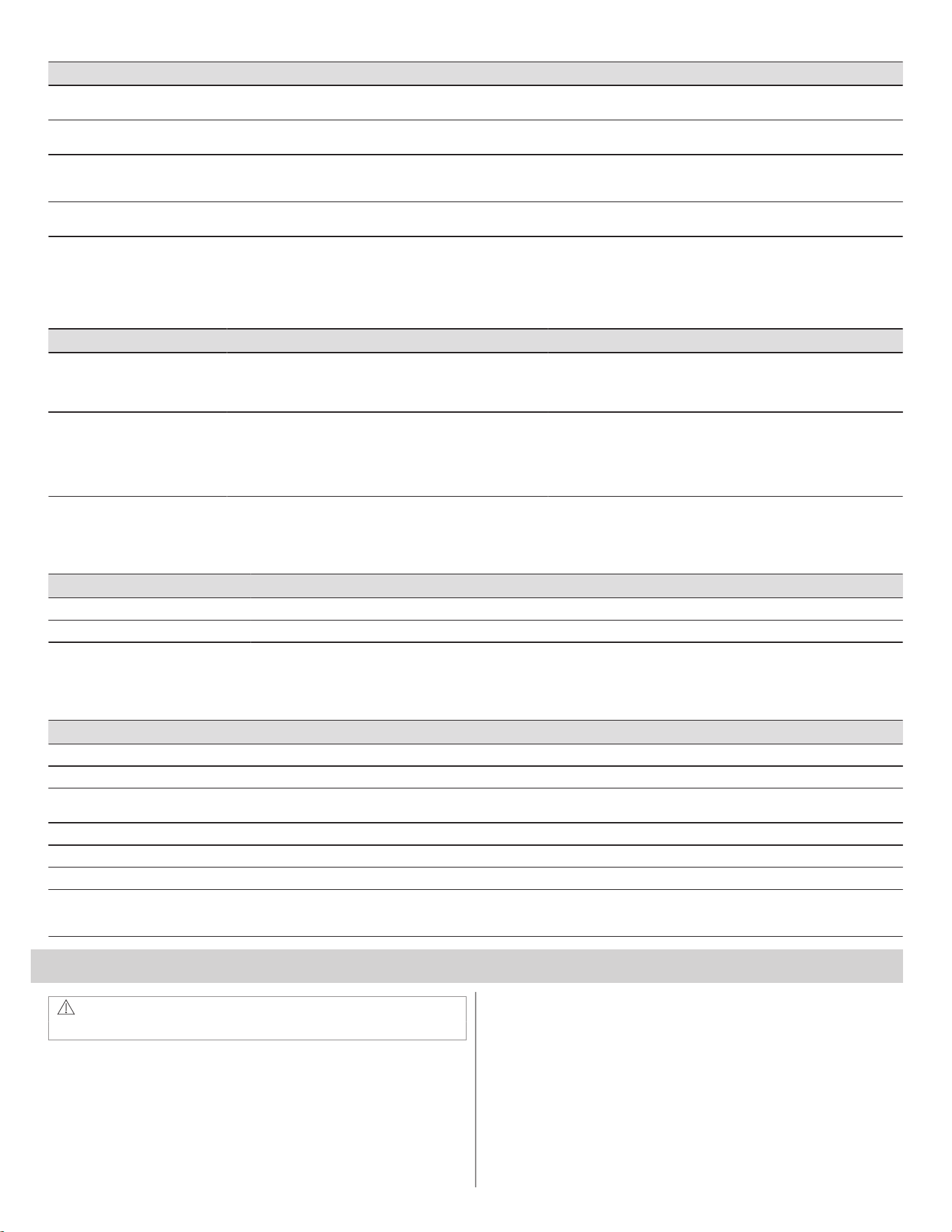
Material Attributes Recommendation
Shiny metal bakeware Shiny, aluminum, and non-coated bakeware is the best for even
heating. It is suitable for all baked goods.
Recommended cooking temperatures and times are based on shi‐
ny metal bakeware.
Dark metal bakeware Dark bakeware cooks hotter than shiny bakeware. Reduce the cooking temperature by 25°F / 13-14°C when you use
a dark bakeware.
Glass bakeware Glass bakeware cooks hotter than shiny bakeware.
Glass is convenient, you can use the same piece of bakeware for
cooking, serving, and storing food.
Reduce the cooking temperature by 25°F / 13-14°C when you use
a glass bakeware.
Insulated bakeware Insulated bakeware cooks cooler than shiny bakeware.
Insulated bakeware is designed for baking in gas oven.
When you use insulated bakeware, the recipe baking time may be
longer than usual.
2.2 Cooking Conditions
Conditions in your kitchen can affect the performance of your appliance
when cooking food.
Condition Attributes Recommendation
Aging cookware As pans age and become discolored, you may need to slightly
reduce a cooking time.
If food is too dark or overcooked, use the minimum cook time in the rec‐
ipe or packaging.
If food is too light or undercooked, use the middle to maximum cook
time recommended in the recipe or on the packaging.
High altitude Air is drier and air pressure is lower.
Water boils at a lower temperature, and liquids evaporate faster.
Foods may take longer to bake.
Doughs may rise faster.
Adjust cooking temperature, cooking time or recipes as needed.
Increase amount of liquid in baking recipes.
Increase cook time on cooktop. Cover dishes to reduce evaporation.
Increase bake time or oven temperature.
Reduce the amount of baking soda or baking powder in recipe. Reduce
rising time or punch down dough and allow it to rise twice.
2.3 Cooking Results
Small adjustments may help you achieve the best results.
Result Recommendation
Food too light Use the middle to maximum cook time recommended on packaging or recipe.
Food too dark Use the minimum cook time recommended on packaging or recipe.
2.4 Cooking Tips
Use these additional tips to get the best results from your appliance.
Situation Recommendation
Baking
Rack placement Refer to Setting Oven Controls.
Preheat Insert food immediately after the beep.
Fully preheat the oven before baking items like cookies, cakes, biscuits, and breads.
Checking food Use the window and oven light when you check the food. Opening the door may reduce baking performance.
Food placement Allow at least 2 inches / 5 cm of space between bakeware for proper air circulation.
Broiling / Roasting
Broiling pan If the accessory is not included with your appliance, you can purchase it on the website www.frigidaire.com.
For best results when broiling, use a broil pan with an insert designed to drain the fat from the food, help avoid spatter,
and reduce smoke. The broiler pan catches grease spills, and insert helps prevent grease splatters.
3. BEFORE SETTING SURFACE CONTROLS
WARNING!
Refer to Safety chapters.
3.1 About the Radiant Surface Elements
The element temperature rises gradually and evenly. As the
temperature rises, the element glows red. To maintain the selected
setting, the element cycles on and off. The heating element retains
enough heat to provide uniform and consistent heat during the off
cycle.
For efficient cooking, turn the element off several minutes before
cooking is complete. This allows residual heat to complete the cooking
process.
6 ENGLISH
CAUTION!
Surface elements may appear to have cooled after they are turned
off. The element surface may still be hot, and burns may occur if
the element or surrounding area is touched before it cools to a safe
temperature.
Do not place flammable items such as plastic salt and pepper
shakers, spoon holders, or plastic wrapping on top of the range
when it is in use. These items could melt or ignite. Potholders,
towels, or wooden spoons could catch fire if placed too close to the
surface elements.
Do not use aluminum foil to line surface drip bowls or reflector
pans. Improper installation of these liners may result in a risk of
electric shock or fire.
IMPORTANT
Do not allow aluminum foil or any material that can melt to make
contact with the cooking element. If these items melt on the
cooktop, they damage the cooktop.
NOTE
• Radiant elements have a limiter that allows the element to cycle
on and off, even at the HI setting.
• Read the detailed instructions for coil cooktop cleaning in the
Care and Cleaning section and the Troubleshooting checklist
section of this User Manual.
3.2 Using Proper Cookware
The size and type of cookware used will influence the heat setting
needed for best cooking results.
Correct cookware:
• Flat bottom and straight sides.
• Tight fitting lids.
• Weight of handle does not tilt pan. Pan is well balanced.
• Made of material that conducts heat well.
• Easy to clean.
• Cookware size matches the amount of food to be prepared.
• Cookware diameter matches the size of the Cooking Zone.
Incorrect cookware:
• Bottom curved or warped.
• Cookware larger than the Cooking Zone by more than 0,5 inch (12
mm).
• Heavy handle tilts pan.
• Pan is much smaller than the Cooking Zone.
Cookware material types:
• Aluminum - excellent heat conductor. Some types of food will cause
it to darken (Anodized aluminum cookware resists staining and
pitting).
• Copper - excellent heat conductor but discolors easily (see
Aluminum).
• Stainless - slow heat conductor with uneven cooking results.
Durable, easy to clean, and resists staining.
• Cast Iron - a slow heat conductor, but will retain heat very well.
Cooks evenly once cooking temperature is reached.
• Porcelain-enamel on metal - heating characteristics may vary
depending on base material.
• Glass - slow heat conductor
IMPORTANT
Do not place empty aluminum, glass, or porcelain- enamel coated
cookware on the element. The melting point of cookware made
with these materials may be reached quickly, especially if left
empty. If the cookware melts it will damage the cooktop. Follow all
the cookware manufacturer’s recommendations for use and care of
cookware.
IMPORTANT
Never place or straddle a cooking utensil over two different surface
cooking areas at the same time. Incorrect use may damage the
cooktop.
3.3 ELEMENT ON Indicator
The ELEMENT ON indicator light will turn on when one or more
elements are turned on. A quick glance at this indicator light when
cooking is finished is an easy check to be sure all surface elements are
turned off.
4. SETTING SURFACE CONTROLS
WARNING!
Refer to Safety chapters.
4.1 Setting Radiant Surface Elements
Start most cooking operations on a higher setting and then turn to a
lower setting to finish cooking. The surface control knobs do not have
to be set exactly on a particular spot. Use the prints as a guide and
adjust the control knob as needed.
A glowing red surface heating area extending beyond the bottom edge
of the cookware indicates the cookware is too small for the surface
heating area.
Suggested settings for radiant elements
Settings Type of Cooking
High (HI - 9) Start most foods, bring water to a boil,
pan broiling.
Medium (7 - 8) Continue a rapid boil, fry, deep fat fry.
Medium (5 - 6) Maintain a slow boil, thicken sauces and
gravies or steam vegetables.
Medium Low (2 - 4) Keep foods cooking, poach, stew.
Low (1) Low temperature cooking.
Low (LO) Keep warm, melt.
The suggested settings are based on cooking with medium-weight
aluminum pans with lids. Settings may vary when using other types of
pans.
The size and type of utensil used and the amount and type of food
being cooked will influence the setting needed for best cooking results.
CAUTION!
Radiant surface elements may appear to have cooled after they
have been turned off . The element may still be hot and burns may
occur if the element is touched before it has cooled sufficiently.
Do not place flammable items such as plastic salt and pepper
shakers, spoon holders, or plastic wrappings on top of the range
when it is in use. These items could melt or ignite. Potholders,
towels, or wooden spoons could catch fire if placed too close to the
surface elements.
Do not use aluminum foil to line surface drip bowls or reflector
pans. Improper installation of these liners may result in risk of
electric shock or fire.
IMPORTANT
Do not allow aluminum foil, or any material that can melt, to make
contact with the ceramic glass cooktop. If these items melt on the
cooktop, they will damage it.
Never place a cooking utensil over two different surface cooking
areas at the same time, unless the cooktop has a bridge element
and the cookware is specifically designed for the purpose.
Incorrect use may cause the ceramic cooktop to fracture.
Setting Radiant Surface Element
1. Place correctly sized cookware on surface element.
2. Push in and turn the surface control knob in either direction to the
desired setting (refer to the “Suggested settings for radiant
elements” table.
ENGLISH 7
3. When cooking is complete, turn the radiant surface element OFF
before removing the cookware.
4.2 Home Canning
Be sure to read and observe all the following points when home
canning with your appliance. Check with the USDA (United States
Department of Agriculture) Web site and be sure to read all the
information available as well as follow recommendations for home
canning procedures.
Canning recommendations:
• Use only a completely flat bottom canner with no ridges that radiate
from the bottom center when home canning. Heat is spread more
evenly when the bottom surface is flat. Use a straight-edge to check
canner bottom.
• Make sure the diameter of the canner does not exceed 1 inch
beyond the surface element markings or burner.
• It is recommended to use smaller diameter canners on electric coil
and ceramic glass cooktops, and to center canners on the burner
grates.
• Start with hot tap water to bring water to boil more quickly.
• Use the highest heat setting when first bringing the water to a boil.
Once boiling is achieved, reduce heat to lowest possible setting to
maintain that boil.
• Use tested recipes and follow instructions carefully. Check with your
local Cooperative Agricultural Extension Service or a manufacturer
of glass jars for the latest canning information.
• It is best to can small amounts and light loads.
CAUTION!
Do not leave water bath or pressure canners on high heat for an
extended amount of time.
5. BEFORE USING THE OVEN
WARNING!
Refer to Safety chapters.
5.1 Oven Vent Location
The oven air vents are located in the rear side of the cooktop. When
the oven is on, warm air is released through the vent. This venting is
necessary for proper air circulation in the oven and good baking
results.
Steam or moisture may appear near the oven vent. This is normal.
IMPORTANT
Do not block oven vent or cover the openings with aluminium foil or
any other material.
WARNING!
Protective Liners — Do not use aluminum foil (or any other
material) or liners to line the oven bottom, walls, racks or any other
part of the range. Doing so will alter the heat distribution, produce
poor baking results, and possibly cause permanent damage to the
oven interior. Improper installation of these liners may result in risk
of electric shock or fire. During self clean, temperatures in the oven
will be hot enough to melt foil.
CAUTION!
Always use pot holders or oven mitts when using the oven. When
cooking, the oven interior, oven exterior, oven racks, and cooktop
will become very hot which can cause burns.
Remove all oven racks before starting a self clean cycle. If oven
racks are left inside the oven during a cleaning cycle, the slide
ability of the oven racks may be damaged and all of the oven racks
will lose their shiny finish.
To prevent possible damage to the oven, do not attempt to close
the oven door until all the oven racks are fully positioned back
inside the oven cavity.
5.2 Types of Oven Rack
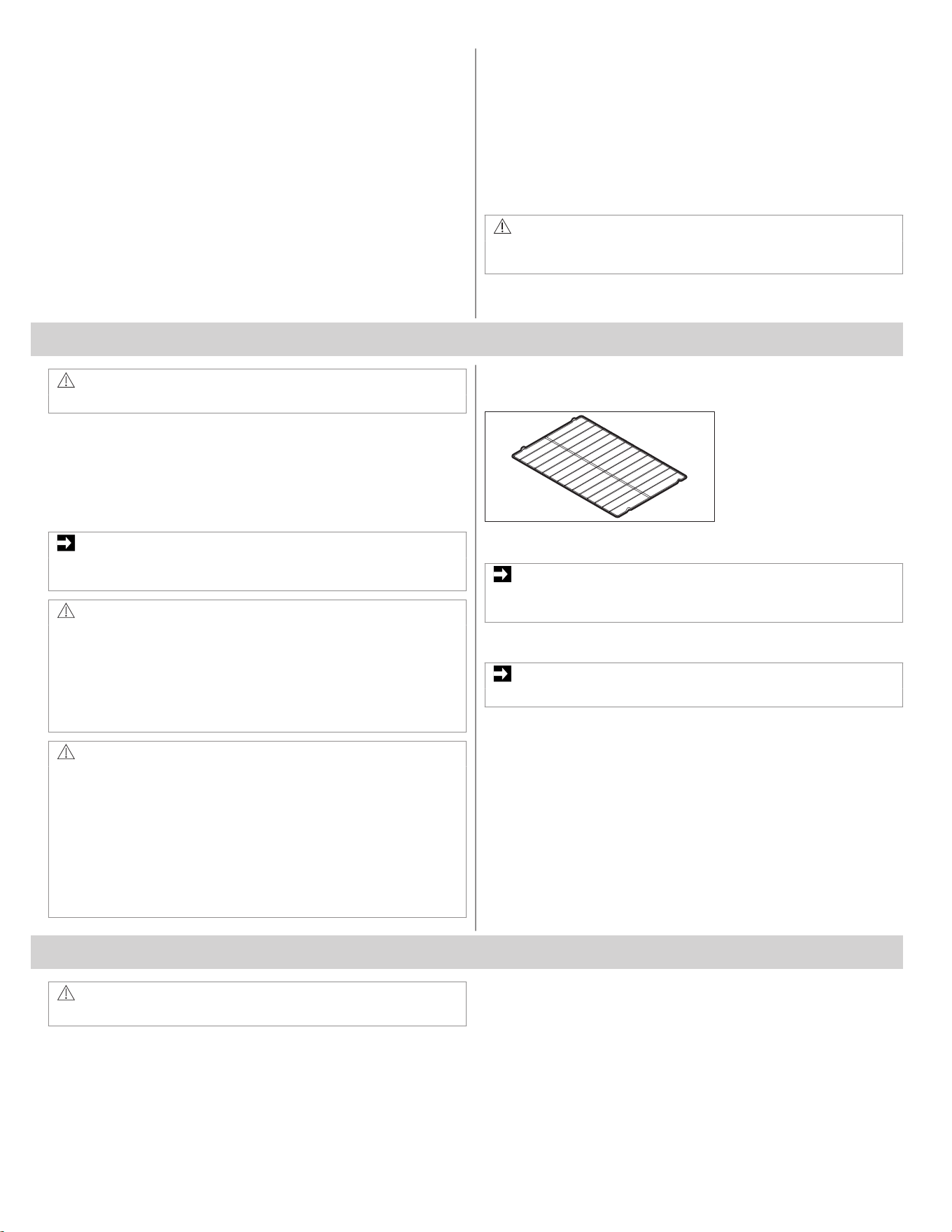
Flat Oven Rack
Flat oven racks may be used for most cooking needs and may be
placed in most oven rack positions.
IMPORTANT
Before using the accessories, remove and clean them according to
the instructions in the chapter: "Care and Cleaning".
5.3 Removing and Arranging Oven Racks
IMPORTANT
Always arrange the oven racks when the oven is cool.
To remove oven racks
1. Pull the rack straight forward until it reaches the stop position.
2. Slightly lift up front of the oven rack and slide it out.
To replace oven racks
1. Place oven rack on the rack guides on both sides of oven walls.
2. Lift the front of the oven rack slightly upward and slide it back into
place.
Ensure that oven rack is level before using it.
6. SETTING OVEN CONTROLS
WARNING!
Refer to Safety chapters.
8 ENGLISH
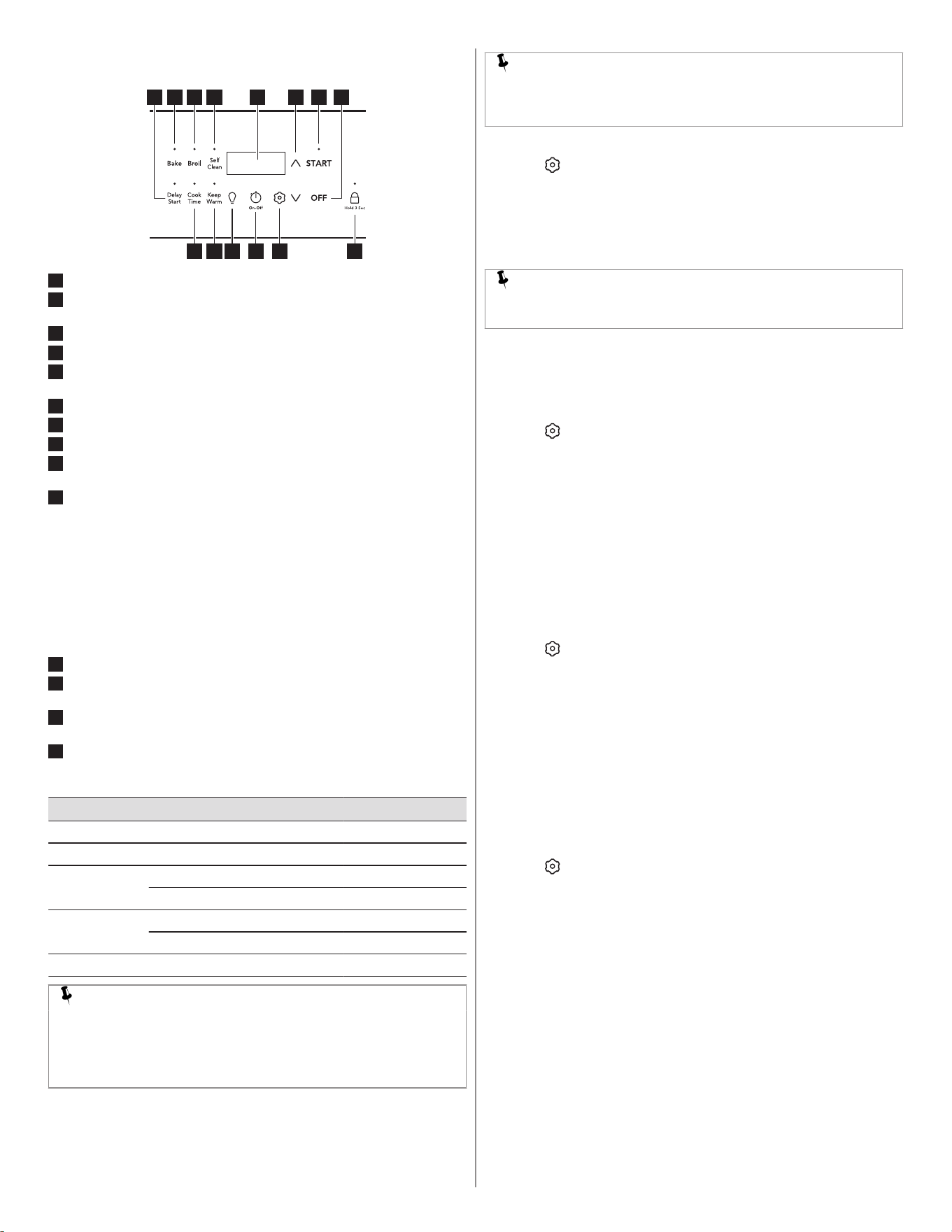
6.1 Oven Controls
1 852 3 4
9
10
11121314
6 7
1
Delay Start - to postpone the start of the oven cooking.
2
Bake - for delicate foods that need heat to rise and move gently in
the oven.
3
Broil - for broiling and grilling foods under direct, high heat.
4
Self Clean - starts a self-cleaning cycle.
5
Display - shows the countdown time, temperature and important
messages.
6
Up/Down Arrows to scroll to temperature and time settings.
7
START - starts cooking functions and sets the clock.
8
OFF- turns off all cooking functions.
9
Lock - deactivates the control panel to prevent accidental operation
of the appliance.
10
Settings - to set user preferences for various control functions,
including:
• CLoC: to set clock to 12-hour or 24-hour mode.
• Hour: to switch between the 12-hour energy saving feature or
Continuous Bake.
• Aud: to set the volume of control keys or to operate in silent
mode.
• F-C: display temperatures in Fahrenheit or Celcius.
• rSEt: to reset all user preferences to original factory settings.
• uPo: to adjust the oven temperature settings.
• E-SA: to turn the 12-hour energy savings feature on or off .
11
Timer On/Off - to set or cancel the minute timer.
12
Oven Light - to turn the interior light on and off. The oven light also
turns on automatically when you open the door.
13
Keep Warm - to keep cooked foods at serving temperature in the
oven.
14
Cook Time - sets the oven to run for a period of time and then turn
off .
Oven modes:
Feature Mode Min.Temp/Time Max.Temp/Time
Bake 170°F (77°C) 550°F (288°C)
Broil LO HI
Keep Warm Min 140°F (60°C) 1:00 Hr.
Max 170°F (77°C) 1:00 Hr.
Clock 12 Hr. 1:00 Hr./Min. 12:59 Hr./Min.
24 Hr. 0:00 Min 23:59 Hr./Min.
Timer On/Off 0:01 Min. 11:59 Hr./Min.
NOTE
An entry acceptance tone (1 beep) will sound each time a key is
touched (the oven lock key is delayed 3 seconds). An entry error
tone (3 short beeps) will sound if the entry of the temperature or
time is below the minimum or above the maximum settings for the
feature.
6.2 Setting the Clock
Set the clock to the correct time of day before using the appliance.
NOTE
When the appliance is first plugged in or if the power supply is
interrupted, the display will flash 12:00. In this case, skip to Step 4
of the instructions below.
To set the clock:
1. Press .
2. Press the Up or Down arrow until "CloC" appears on the display.
3. Press START.
4. Press the Up or Down arrow until the correct time appears on the
display. You can press and hold the Up or Down arrow to change
the time faster.
5. Press START.
NOTE
You cannot change the clock when the oven is set for cooking or
self clean is active.
6.3 Setting 12 hr or 24 hr Display Mode ("Hour")
The clock display mode allows you to select 12 hr or 24 hr modes. The
factory pre-set clock display mode is 12 hours.
To set display mode:
1. Press
.
2. Press the Up or Down arrow until "Hour" appears on the display.
3. Press START.
4. Press Up or Down arrow key to switch between 12 hr and 24 hr
setting.
5. Press START to confirm the desired clock setting.
Display will return to the settings menu. After a few seconds, it will
return to the time of day.
6.4 Setting a Silent Control Panel Mode ("Aud")
When selecting a function, an audible tone is heard each time a key is
pressed. You can set the control to silent operation, if needed.
To set the controls for silent mode:
1. Press .
2. Press the Up or Down arrow until "Aud" appears on the display.
3. Press START.
4. Press Up or Down arrow key to switch between "oFF" and "on".
5. Press START to confirm the desired setting.
Display will return to the settings menu. After a few seconds, it will
return to the time of day.
6.5 Setting Temperature Display ("F-C")
The default unit in which temperature is displayed is Fahrenheit (°F).
You can change the unit to Celsius (°C). You can set the oven to
operate at any temperature from 170°F (77°C) to 550°F (287°C).
To change the temperature unit:
1. Press
.
2. Press the Up or Down arrow until “F-C” appears on the display.
3. Press START.
4. Press Up or Down arrow key to switch between "F" and "C".
5. Press START to confirm the desired setting.
Display will return to the settings menu. After a few seconds, it will
return to the time of day.
6.6 Adjust Oven Temperature ("UPO")
Your appliance has been factory calibrated and tested to ensure an
accurate baking temperature. For the first few uses, follow your recipe
times and temperature recommendations carefully. If you think the
oven is cooking too hot or too cool for your recipe times, you can adjust
the control so the oven cooks hotter or cooler than the temperature
displayed.
ENGLISH 9
IMPORTANT
Do not use oven thermometers such as those found in grocery
stores to check the temperature settings inside your oven. These
oven thermometers may vary by 20 to 40 degrees from actual
temperatures.
To increase or decrease the oven temperature by 20°F:
1. Press .
2. Press the Up or Down arrow until “UPO” appears on the display.
3. Press START.
4. Press the Up or Down arrow until the desired temperature
adjustment appears in the display.
The oven temperature may be changed by +/-35°F from the factory
settings. You can also adjust the temperature if the control is set to
display temperatures in Celsius (+/-19°C).
5. Press START to confirm the desired setting.
NOTE
Oven temperature adjustments will not change for the functions:
Broil, Self Clean or Keep Warm.
6.7 Restore Factory Settings (“rSEt”)
Your appliance was set with default oven control settings. You can
change the following settings while using the appliance over time:
• 12 hr or 24 hr display mode
• Continuous bake or 12-hour energy savings mode
• Silent or audible controls
• Oven temperature display (Fahrenheit or Celsius)
• Oven temperature adjustments ("UPO")
To restore oven control to factory default settings:
1. Press
.
2. Press the Up or Down arrow until “rSEt” appears on the display.
3. Press and hold START for 3 seconds. The control has been reset
with the default settings.
6.8 Continuous Bake Setting or 12-hour Energy Saving
Feature ("E-SA")
The oven control has a built-in 12-hour energy saving feature that will
shut off the oven if the oven is left on for more than 12 hours. The oven
control can be programmed to override this feature for continuous
baking.
To change the continuous bake setting:
1. Press
.
2. Press the Up or Down arrow until “E-SA” appears on the display.
3. Press START.
4. Press the Up or Down arrow to switch between “12Hr” and
“Cont.".
5. Press START to confirm the desired setting.
6.9 Setting the Minute Timer
The timer can be set for any amount of time from 1 minute to 11 hours
and 59 minutes. The minute timer can be used alone or while using any
of the other oven features. If another feature is active when the minute
timer is active, the minute timer will show in the display. To view
information about other active features, press the key for that feature.
NOTE
The Minute Timer does not start or stop the cooking process.
Example: Setting timer for 15 minutes.
1. Press .
2. Press Up or Down arrows until the desired time appears in the
display. You can press and hold the Up or Down arrow to change
the time faster.
3. Press START. The timer will begin to countdown.
When the set time ends, the display will show "End".
To turn the timer off at any time, press
.
The timer will beep three times and will continue to beep three times
every minute until is pressed.
6.10 Operating Oven Light
The interior oven light will automatically turn on when the oven door is
opened.
Press
to turn the interior oven light on and off whenever the oven
door is closed.
For best baking results, do not leave oven light on while baking.
To change the interior oven light, refer to Care and Cleaning.
6.11 Oven Lock
The appliance can be programmed to lockout: cooktop surface, oven
control keys.
To activate the lockout feature:
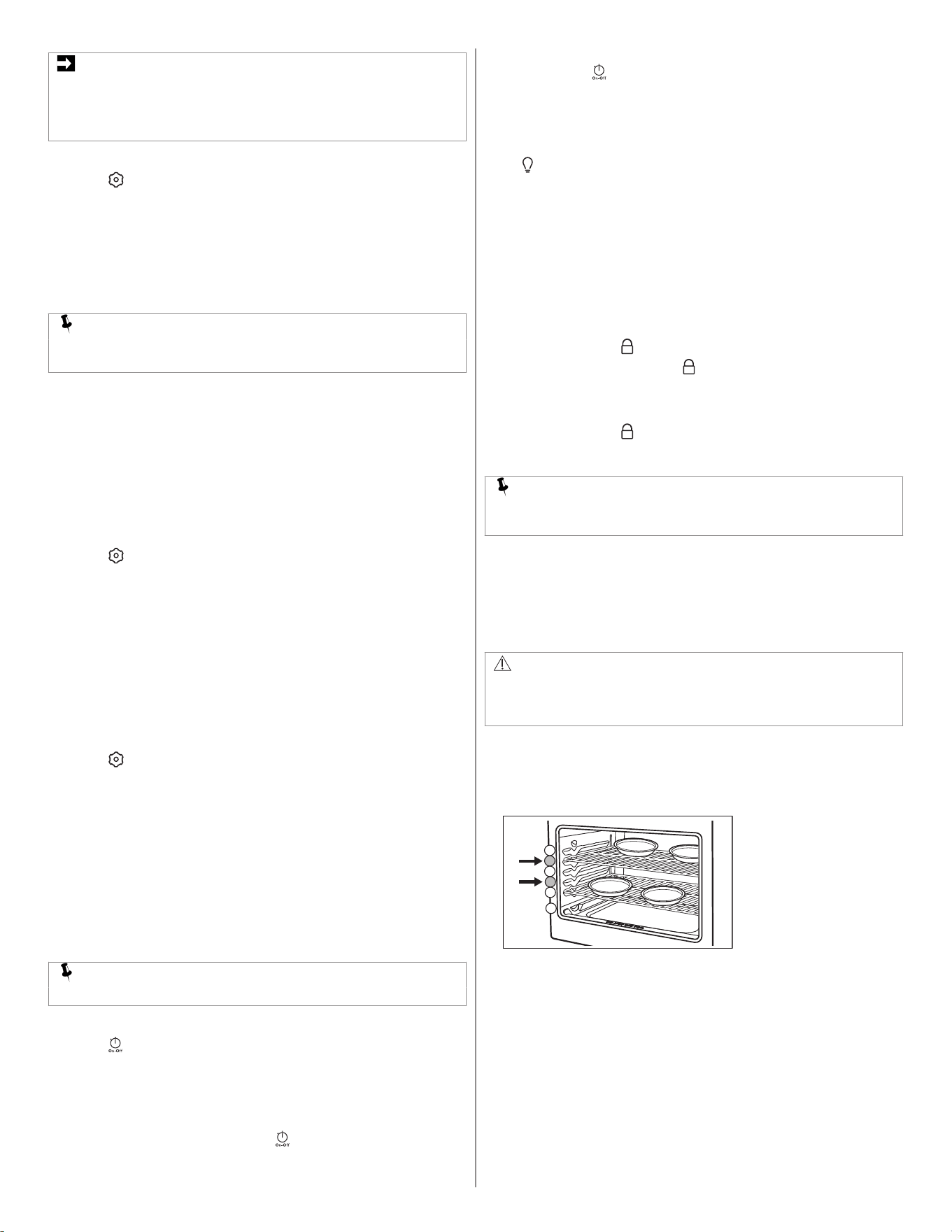
1. Press and hold the key for 3 seconds.
2. Once the controls are locked, will appear on the display.
To cancel the oven lockout feature:
1. Press and hold the key for 3 seconds.
2. When the lock icon no longer displays, the oven control keypad is
available for use.
NOTE
If you press any key when the oven lockout is active, the control
will triple beep, indicating the action is not possible.
6.12 Setting Bake
Bake cooks with heat that rises from the oven bottom. The heat and air
circulate naturally in the oven. A tone will sound indicating when the set
bake temperature is reached and to place the food in the oven. Bake
may be set for any oven temperature between 170°F (77°C) to 550°F
(288°C).
CAUTION!
Always use pot holders or oven gloves when using the oven. When
cooking the oven interior, oven racks, and cooktop will become
very hot. There is a risk of burns!
Baking tips:
• Insert the food in the oven after preheat tone beep. Fully preheat the
oven before baking items like cookies, cakes, biscuits and breads.
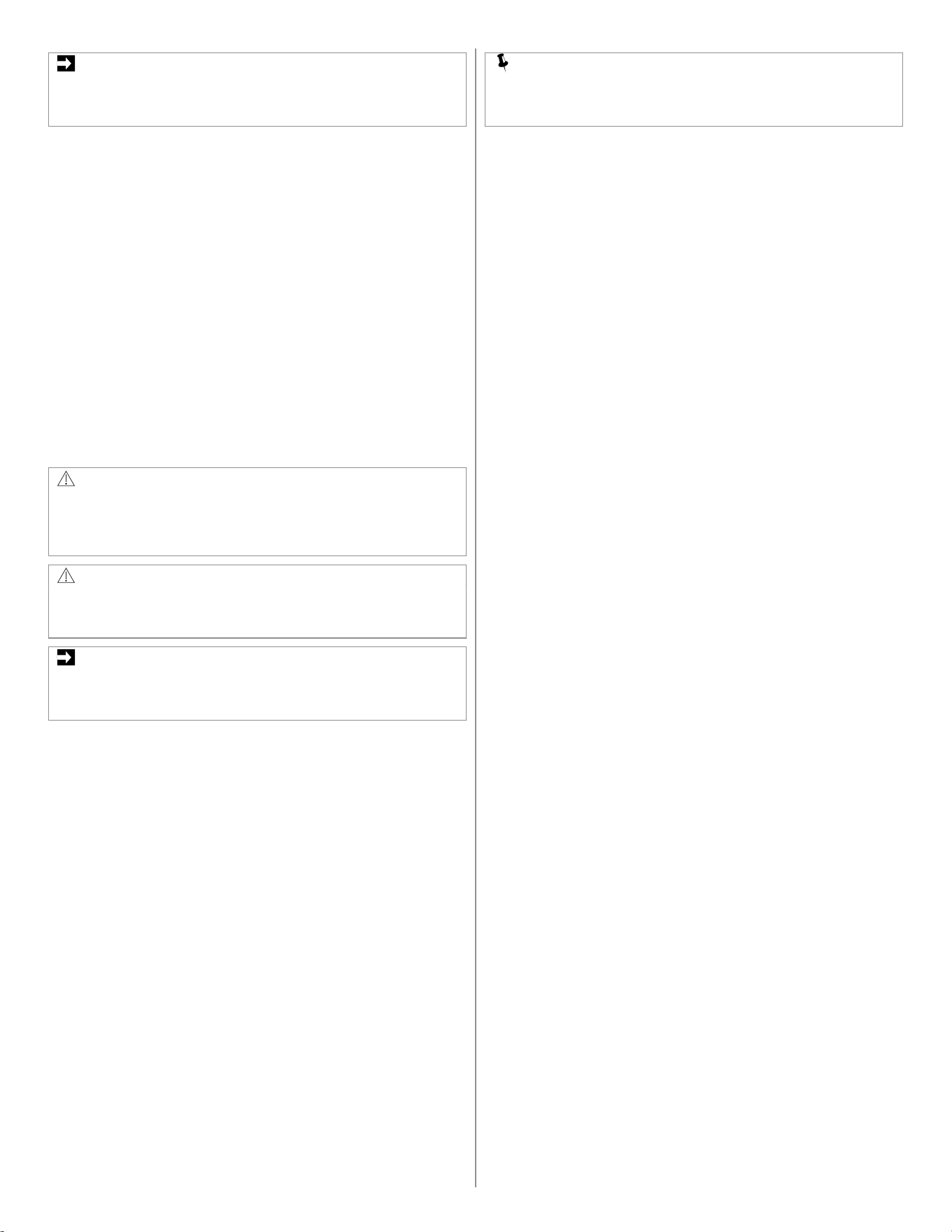
• For best results when baking layer cakes using two oven racks,
place racks like shown on the picture below.
1
2
3
4
5
6
• When using any single rack for baking cookies, cakes, biscuits, or
muffins use rack position 4.
• Allow at least 2 inches (5 cm) of space between bakeware for
proper air circulation.
• Dark or dull bakeware absorbs more heat than shiny bakeware,
resulting in dark or overbrowned foods. It may be necessary to
reduce oven temperature or cook time to prevent overbrowning of
some foods.
• Dark pans are recommended for pies. Shiny pans are
recommended for cakes, cookies, and muffins.
• Do not open oven door often. Opening the door will reduce the
temperature in the oven and may increase cook time.
• Do not leave oven light on while baking.
10 ENGLISH
IMPORTANT
The oven will bake no longer than 12 hours. If you wish to bake for
a longer period, see “Continuous Bake Setting or 12-hour Energy
Saving Feature (E-SA)” section for detailed information.
To set Bake for (default) oven temperature of 350°F:
1. Press Bake. "Bake" and 350° will appear on the display.
2. Press START.
To cancel Bake at any time, press OFF.
To change the oven temperature to 425°F when the oven is
baking:
1. Press Up arrow to scroll to new temperature of 425° and release
the arrow key.
2. Press START. If you do not press the START, the temperature will
return to the previous setting.
To cancel Bake at any time, press OFF.
6.13 Setting Broil
Use the Broil function to cook foods that require direct exposure to
radiant heat for optimum browning results. Broiling may produce
smoke. If smoke is excessive, place food further away from the heating
element.
This function has two settings: HI and Lo.
WARNING!
Should an oven fire occur, leave the oven door closed and turn off
the oven. If the fire continues, use a fire extinguisher. Do not put
water or flour on the fire. Flour may be explosive and water can
cause a grease fire to spread and cause personal injury.
CAUTION!
Always use pot holders or oven gloves when using the oven. When
cooking the oven interior, oven racks, and cooktop will become
very hot. There is a risk of burns!
IMPORTANT
Broiler pans and inserts allow the grease to drain away from the
high heat of the broiler. Do not use the pan without the insert. Do
not cover the insert with foil – the exposed grease could ignite.
OPEN DOOR BROIL SHUTOFF: If the oven door is left open during
Broil for more than 3 minutes, an alarm will sound to notify the user to
close the oven door. If the door is not closed within 30 seconds from
the start of the alarm, the oven will turn off.
To set broil with the default broil setting of HI:
1. Place the racks in the oven while they are still cold.
2. For optimum browning results, preheat oven for 5 min before
adding food. Broil with oven door closed.
3. Place the bakeware in the oven.
4. Press Broil. “HI” will show on the display.
5. Press Up or Down arrows to select HI or Lo.
6. Press START.
7. Broil on one side until food is browned; turn and broil other side
until done to your satisfaction.
8. When finished broiling, press OFF.
To cancel Broil at any time, press OFF.
6.14 Notes for Broiling
• Always arrange oven racks when the oven is cool.
• Broil with oven door closed. If broiling with door open, an alarm will
sound alerting you to close the door. If left open, the Broil function
will be canceled.
• For best results, use a broil pan with broil pan insert designed to
drain the fat from the food, help avoid spatter and reduce smoking.
• When broiling, always pull the oven rack out to the stop position
before turning or removing food.
• If a broiler pan and insert are not supplied with this appliance, they
may be purchased from www.frigidaire.com.
NOTE
Broiling is direct heat cooking and will produce some smoke. If
smoke is excessive, place food further away from element. Always
watch foods carefully to prevent burning.
6.15 Cook Time
Use Cook Time to set the amount of time needed for cooking. This
function can be set with most oven functions. The oven will turn on
immediately (or after a specified delay) and stop automatically after the
set cook time ends.
To set Cook Time:
1. Select a cooking function and set the temperature.
2. Press Cook Time. The display will show 0:00 (0 hours and 00
minutes).
3. Press Up or Down arrows until the desired time shows on the
display. You can press and hold the Up or Down arrow to change
the time faster.
4. Press START.
The timer will start counting down.
To turn off the oven before the time runs out, press OFF.
6.16 Delay Start
Delay Start allows you to delay the start of cooking by the desired
amount of time. It can be used only with the Bake function. Prior to
setting a delay start, be sure the time of day is set correctly. The
maximum delay for a Delay Start is one hour.
To set Delay Start:
1. Choose the Bake function and set the temperature.
2. Set a Cook Time if desired.
3. Press Delay Start.
The display will show 0:00 (0 hours and 00 minutes).
4. Press Up or Down arrows until the desired time delay shows in the
display. You can press and hold the Up or Down arrow to change
the time faster.
5. Press START. The timer will start counting down.
6. When the time runs out, the chosen cooking function will start. If a
Cook Time was set, the remaining cook time will show in the
display.
To stop the Delay Start timer at any time, press OFF.
6.17 Keep Warm
Keep Warm should only be used with foods that are fully cooked and at
serving temperatures. Keep Warm will keep foods warm and ready for
serving at default temperature of 170° F (77°C). If needed, arrange
oven racks and place cooked food in oven.
To set Keep Warm:
1. Press Keep Warm.
If no other keys are touched within 25 seconds, the request for Warm
will clear.
2. Press START.
Keep Warm will automatically turn on and remain on for 1 hour or until
cancelled.
To turn off Keep Warm at any time, press OFF.
6.18 Self Clean
This function cleans the oven interior with very high temperatures (well
above normal cooking temperatures), eliminating soils completely or
reducing them to very fine powdered ashes you can wipe away
afterwards with a damp cloth.
A self clean cycle runs for 2-4 hours.
Before starting a Self Clean cycle, read all following caution and
important statements.
ENGLISH 11
CAUTION!
• Do not leave small children unattended near appliance. During
Self Clean cycle, the outside of the oven can become very hot
and cause burns if touched.
• Do not line the oven walls, racks, oven bottom, or any part of
the appliance with aluminum foil. It will melt causing permanent
damage to the oven interior and disrupt heat distribution.
• Do not force the oven door open. This will damage the
automatic door locking system. Be careful when opening the
oven door after the Self Clean cycle ends. The oven may still be
very hot and cause burns. To avoid possible burns, stand to
side of oven when opening door to allow steam or hot air to
escape.
• The health of some birds is extremely sensitive to fumes given
off during the Self Clean cycle of any range. Move birds to a
well ventilated room.
IMPORTANT
• Completely remove all oven racks and any accessories from
oven cavity to avoid damage to oven racks. If the oven racks
are not removed they may discolor.
• Aluminum foil will melt when exposed to very hot temperatures.
• Do not spray oven cleaners or oven protective coatings in or
around any part of the oven interior. Clean any soil from the
oven frame, the door liner outside the oven door gasket, and
the small area at the front center of the oven bottom. These
areas heat sufficiently to burn soil on. Clean using soap and
water prior to starting Self Clean.
• Remove any excessive spills. Any spills on the oven bottom
should be wiped up and removed before starting a Self Clean
cycle. To clean use hot, soapy water and a cloth. Large spills
can cause heavy smoke or fire when subjected to high
temperatures.
• Do not allow food spills with high sugar or acid content (such as
milk, tomatoes, sauerkraut, fruit juices, or pie fillings) to remain
on the surface, as they may leave a dull spot, even after
cleaning.
• Do not clean the oven door gasket. The woven material in the
gasket is essential for a good seal. Do not rub, damage, or
remove the oven door gasket. This may compromise the
performance of the oven.
• The kitchen area should be well ventilated using an open
window, ventilation fan, or exhaust hood during the first Self
Clean cycle. This will help eliminate the odors typical for Self
Clean.
• Do not attempt to open the oven door when light is flashing.
Allow about 15 seconds for the motorized door latch mechanism
to completely lock or unlock the oven door.
• Wait one hour before opening the oven door.
6.19 Setting Self Clean
Remove all items from the oven, including oven racks. Be sure oven
door is completely closed.
To set the function:
1. Press Self Clean. The warning "RACKS" will flash on the display,
to remind you that oven racks should be removed before starting
the Self Clean (option available for selected models). The default 3
hour clean time will appear on the display.
2. Press START.
3. The message "RACKS"on the display will be replaced with
"CLEAN" and Self Clean will start.
An icon appears on the display and the oven door will be locked
within 15 seconds. Do not attempt to open the door. This can damage
the automatic door-locking system.
4. When Self Clean is finished, "CLEAN" message will disappear,
and "Hot" will appear.
5. Once the oven has cooled down and "Hot" is no longer displayed,
you can open the oven door.
CAUTION!
Be careful when opening the oven door after the Self Clean cycle.
There is a risk of burns! Stand to the side of the oven when
opening the door to allow hot steam and air to escape.
When the oven interior has completely cooled, wipe away any residue
or powdered ash with a damp cloth or paper towel.
7. CARE AND CLEANING
WARNING!
Refer to Safety chapters.
7.1 General Information
Remove spills and any heavy soiling as soon as possible. Regular
cleaning reduces the difficulty of major cleaning later.
CAUTION!
Before cleaning any part of the appliance, make sure all controls
are turned off and the appliance is cool.
If you use ammonia or appliance cleaners, remove them and
thoroughly rinse the appliance before operating. Follow
manufacturer's instructions and provide adequate ventilation.
WARNING!
Do not use bleach to clean the appliance.
CAUTION!
Use scouring pads, oven cleaners, abrasive cleaners and
ammonia with special caution while cleaning the appliance.
12 ENGLISH
Surface or Area Cleaning Recommendation
Aluminum and vinyl Use a soft cloth and clean with mild dish detergent and water. Rinse with clean water, dry and polish with a
soft, clean cloth.
Painted and plastic control knobs
Painted body parts
Painted decorative trims
Use a soft cloth and clean with mild dish detergent and water or a 50/50 solution of vinegar and water.
Rinse with clean water, dry and polish with a soft, clean cloth. Do not apply glass cleaners directly to the
surface, spray onto cloth and wipe.
Control panel Use a soft cloth and clean with mild dish detergent and water or a 50/50 solution of vinegar and water.
Do not spray liquids directly on the oven control and display area.
Do not use large amounts of water on the control panel. Excess water on the control area may cause dam‐
age to the appliance.
Do not use other liquid cleaners, abrasive cleaners, scouring pads, or paper towels, they damage the finish.
Control knobs Use a soft cloth and clean with mild dish detergent and water or a 50/50 solution of vinegar and water. To
remove control knobs, turn the knob to the OFF position, grasp firmly, and pull off the shaft. To replace
knobs after cleaning, line up the OFF markings and push the knobs into place.
Stainless Steel Use a soft cloth and clean with mild dish detergent and water or a 50/50 solution of vinegar and water.
Rinse with clean water, and dry with a soft clean cloth.
Do not use abrasive cleaners such as chlorides, chlorines, or ammonia.
Porcelain-enameled broiler pan and insert
Porcelain door liner
Porcelain body parts
Rinse with clean water and a damp cloth. Scrub gently with a soapy non-abrasive scouring pad to remove
most spots. Rinse with a 50/50 solution of clean water and ammonia. If necessary, cover difficult spots with
an ammonia soaked paper towel for 30 to 40 minutes. Rinse and wipe dry with a clean cloth. Remove all
cleaners to avoid damage to the porcelain caused by heating.
Do not allow food spills with a high sugar or acid content such as milk, tomatoes, sauerkraut, fruit juices, or
pie filling to remain on porcelain surfaces. They may cause a dull spot even after cleaning.
Manual clean oven interior The interior of the oven is porcelain coated and safe to clean with oven cleaner. Always follow manufactur‐
er's instructions for cleaners. After cleaning, remove all cleaners to avoid damage to the porcelain caused
by heating.
Do not spray oven cleaner on any electrical controls or switches.
Do not spray cleaner on oven door trim, door gasket, plastic drawer glides, handles or any exterior surfaces
of the appliance.
Self-cleaning oven interior Before setting a self-clean cycle, clean soils from the oven frame, areas outside the oven door gasket, and
the small area at the front center of the oven bottom.
Oven door Use mild dish detergent and water or a 50/50 solution of vinegar and water to clean the top, sides, and front
of the oven door and rinse well. You can use a glass cleaner on the outside glass of the door. You can use
ceramic smoothtop cleaner or polish on the interior door glass.
Do not immerse the door in water. Do not spray or allow water or cleaners to enter the door vents.
Do not use oven cleaners, cleaning powders, or any harsh abrasive cleaning materials on the outside of the
oven door.
Do not clean the oven door gasket. The oven door gasket is made of a woven material which is essential
for a good seal.
Do not rub, damage, or remove oven door gasket.
Coil surface elements and drip bowls Refer to Surface Elements and Drip Bowls.
7.2 Surface Elements and Drip Bowls
CAUTION!
• Make sure drip bowls are in place. Absence of these bowls
during cooking may subject wiring or components underneath to
damage.
• Never immerse a surface element in water.
• Be sure the range is cool before removing surface elements or
drip bowls. Be careful not to bend terminal ends when replacing
surface elements after cleaning.
• Protective liners. Do not use aluminum foil to line surface drip
bowls or reflector pans. Improper installation of these liners may
result in risk of electric shock or fire.
Surface elements may be unplugged and removed to make cleaning
the drip pans easier. The surface elements clean themselves when
they are turned on. Food spilled on a hot element will burn off. Food
spilled on a cool element may be cleaned with a damp cloth. Any
remaining soil will burn off the next time the element is used.
NOTE
Your cooking product includes a new generation of electric coil
element. This electric coil element design follows/supports a
change made to the UL Standard for Household Electric Ranges
related to cooktop surface temperature detection. If ordering
replacement electric coil elements, you must refer to the parts
catalog to obtain the correct part number for the electric coil
element that was designed to function with the specific model that
was purchased.
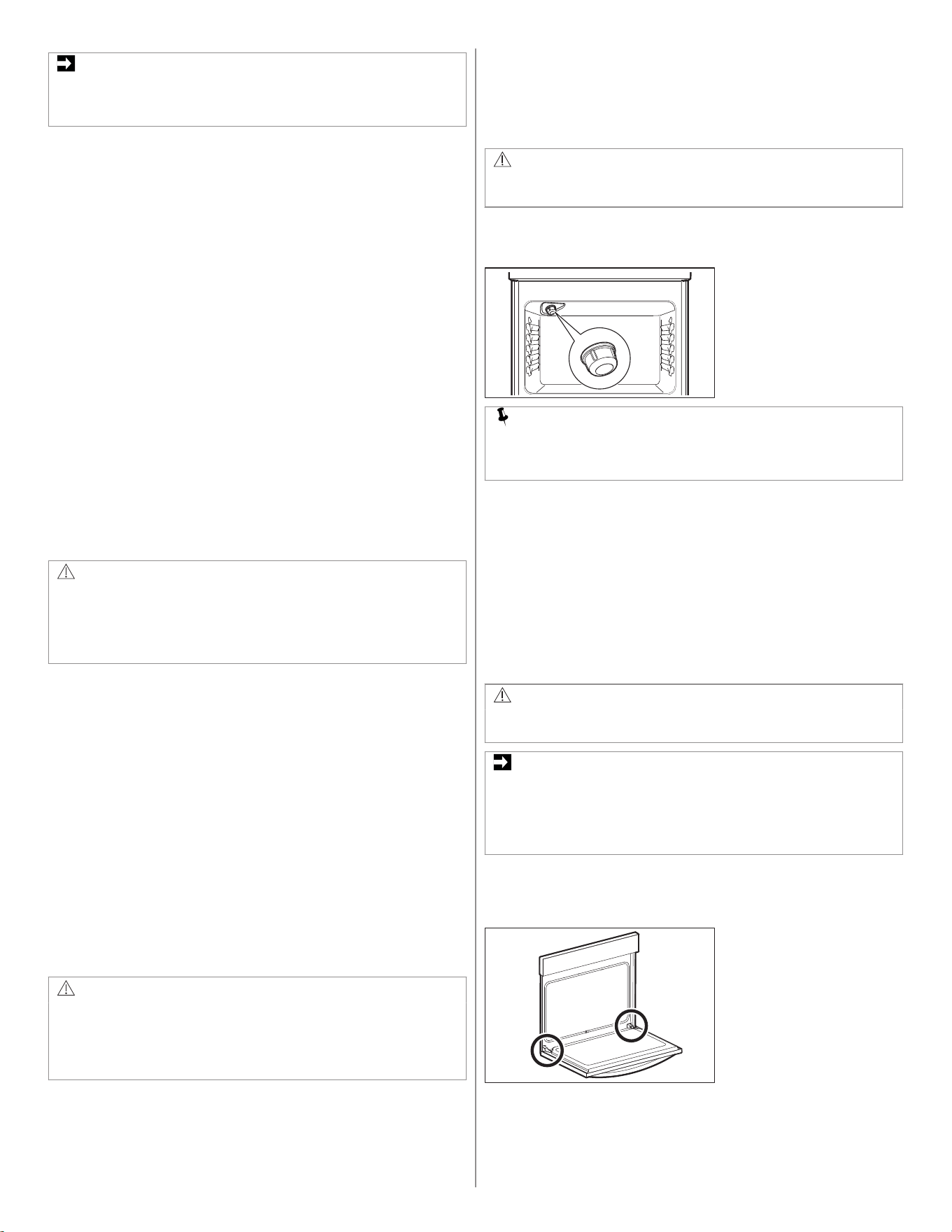
To remove the surface elements and drip bowls:
1. Lift the edge of the drip bowl across from the terminal end (A).
2. Lift the surface element (B) and drip bowl (C) together just enough
to clear the cooktop.
3. While holding the drip bowl and surface element, gently pull the
terminal end (A) out from terminal plug (D). If the hold-down clip (E)
is equipped in your appliance, do not remove it from the drip bowl
(C).
A
F
D
E
G
Cleaning Drip Bowls
Wash the drip bowls in hot, soapy water. Rinse and dry while they are
still warm.
Hard to remove, burned-on soil can be removed by soaking the drip
bowls for about 20 minutes in a lightly diluted liquid cleanser or a
solution of ammonia and water (1/2 cup ammonia to 1 gallon of water).
A nylon scrubber may be used after soaking.
ENGLISH 13
IMPORTANT
Do not use abrasive cleaners or steel wool, they will scratch the
surface. Always rinse with clean water and polish dry with a soft
cloth.
To replace drip bowls and surface elements:
1. Slide the terminal end (A) on the element through the opening in
the drip bowl.
2. Align the element support (F) to rest on the rim inside the drip bowl
(G). If your drip bowl is equipped with a hold-down clip (E), align
the element support (F) opposite the terminal end with the slot in
the hold-down clip (E), and snap into place.
3. After the element is positioned in the drip bowl, line up the terminal
end (A) with the terminal plug (D), as shown on the picture.
4. Hold the surface element (B) and drip bowl (C) together, as level as
possible, and firmly push the terminal end (A) into the terminal plug
(D). Make sure element terminal is seated properly into terminal
plug. Make sure the surface element is level to reduce the hazard
of cookware sliding off the element.
7.3 General Cleaning
Refer to the table at the beginning of this chapter for more information
about cleaning specific parts of the oven.
Follow these cleaning precautions:
• Allow the oven to cool before cleaning.
• Wear rubber gloves when cleaning the appliance manually.
Remove soils using hot, soapy water. Do not allow food spills with a
high sugar or acid content (such as milk, tomatoes, sauerkraut, fruit
juices or pie filling) to remain on the surface as they may cause a dull
spot even after cleaning. Remove spillovers and heavy soiling as soon
as possible. Regular cleaning will reduce the effort required for major
cleaning later.
CAUTION!
Before manually cleaning any part of the oven, be sure all controls
are turned off and the oven is cool. The oven may be hot and can
cause burns. Remove all racks and accessories from the oven
before cleaning. Ammonia must be rinsed before operating the
oven. Provide adequate ventilation.
Cleaning Porcelain Enamel Oven
The oven interior is porcelain on steel.
To clean the interior use oven cleaners.
To remove heavy soil:
1. Place the dish of ammonia in the oven.
Let it sit overnight or for several hours with the oven door closed.
Clean softened dirt spots using hot, soapy water.
Rinse thoroughly with water and a clean cloth.
2. If soil remains, use a nonabrasive scouring pad or nonabrasive
cleaner.
If necessary, apply an oven cleaner following the manufacturer's
instructions.
Do not mix ammonia with other cleaners.
3. Clean any soil from the oven frame, the door liner outside the oven
door gasket, and the small area at the front center of the oven
bottom.
Use hot, soapy water for cleaning.
Rinse well with clean water and a cloth.
Aluminum Foil, Aluminum Utensils, and Oven Liners
WARNING!
Never cover any slots, holes, or passages in the oven bottom or
cover an entire oven rack with materials such as aluminum foil.
Doing so blocks airflow through the oven and may cause carbon
monoxide poisoning. Aluminum foil linings may trap heat, causing
a fire hazard.
• Protective liners- Do not use aluminum foil to line the oven bottom.
High heat can melt it, damaging the oven and reducing air
circulation, leading to poor baking results. Only use aluminum foil as
recommended in the manual to avoid electric shock or fire risks
• Aluminum utensils- Aluminum utensils have a lower melting point
than other metals. Use aluminum pots and pans with care.
• Oven racks- Do not cover oven racks with aluminum foil. It restricts
heat and airflow, affecting cooking results.
7.4 Replacing the Oven Light
CAUTION!
Be sure the oven is unplugged and all parts are cool before
replacing the oven light.
The interior oven light is located at the rear of the oven cavity and is
covered by a glass shield. The glass shield must be in place whenever
the oven is in use.
NOTE
Wear a cotton glove or use a paper towel when installing a new
bulb. Do not touch the new bulb with your fingers when replacing.
This will shorten the life of the bulb.
To replace the oven interior light bulb:
1. Turn electrical power off at the main source or unplug the
appliance.
2. Remove interior oven light shield by turning a quarter turn counter-
clockwise.
3. Replace bulb with a new T-4 type Halogen 25 watt appliance bulb.
4. Replace glass oven light shield by rotating clockwise.
5. Turn power back on again at the main source (or plug the
appliance back in).
Be sure to reset the time of day on the clock.
7.5 Removing and Replacing the Oven Door
CAUTION!
The door is heavy. For safe, temporary storage, lay the door flat
with the inside of the door facing down.
IMPORTANT
Most oven doors contain glass that can break. Do not hit the glass
with pots, pans, or any other object. Scratching, hitting, jarring, or
stressing the glass may weaken its structure, causing an increased
risk of breakage at a later time. Do not close the oven door until all
of the oven racks are fully in place.
To remove the oven door
1. Open oven door completely, horizontal with floor.
Figure A
2. Pull up the lock located on each hinge support toward front of the
oven until the lock stops. You may have to apply a little upward
pressure on the lock to pull it up.
14 ENGLISH
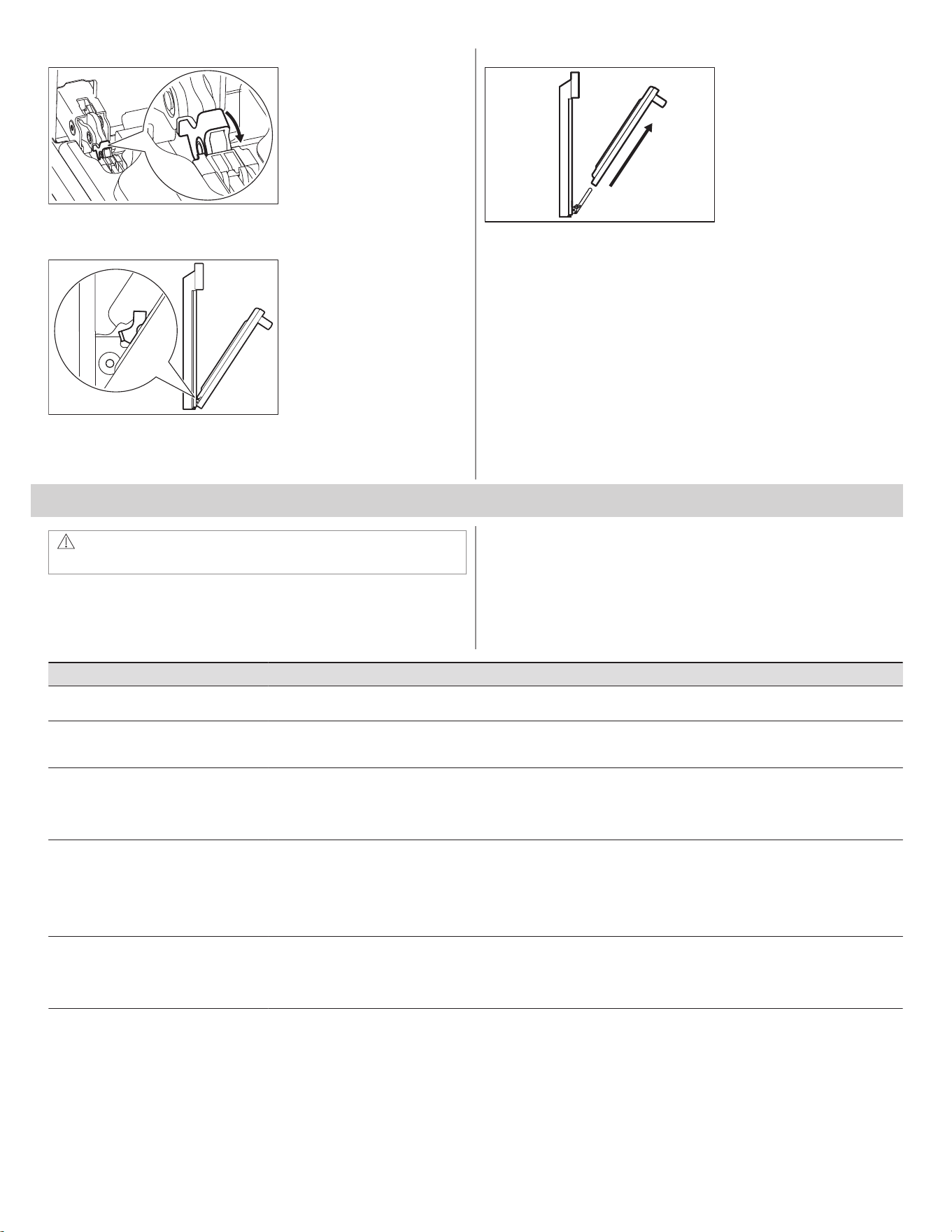
Figure B
3. Grasp the door by the sides, and close the door until the door
frame makes contact with the unlocked hinges.
Figure C
4. Pull the bottom of the door toward you while rotating the top of the
door toward the appliance to completely disengage the hinge
levers.
Figure D
To replace the oven door
1. Firmly grasp both sides of oven door along the door sides. Do not
use the oven door handle (Figure D).
2. Hold the oven door at the same angle as the removal position
(Figure C). Carefully insert the hinge levers into the oven frame
until you feel the hinge levers are seated into the hinge notches.
The hinge arms must be fully seated into the hinge notches before
the oven door can be fully opened.
3. Fully open the oven door, horizontal with floor (Figure A).
4. Push the door hinge locks up toward and into the oven frame on
both left and right oven door hinges to the locked position (Figure
B).
5. Close the oven door.
8. TROUBLESHOOTING
WARNING!
Refer to Safety chapters.
8.1 Oven Baking
For best cooking results, preheat the oven before baking cookies,
breads, cakes, pies, pastries, etc.
There is no need to preheat the oven for roasting meat or baking
casseroles.
The cooking time and temperature need to bake a product may vary
from the previously owned appliance.
Baking Problems Possible Cause Solution
Cookies and biscuits burn on the bottom. Cookies and biscuits put into oven before oven is
preheated.
Allow oven to preheat to desired temperature before placing food in oven.
Choose pan size that permits at least 2'' of air space.
Cakes too dark on top or bottom. Cakes put in oven before oven is preheated.
Rack position too high or too low.
Oven too hot.
Allow oven to preheat to selected temperature before placing food in the oven.
Use proper rack position for baking needs.
Set oven temperature 25°F / 13°C lower than recommended.
Cakes not done in center. Oven too hot.
Incorrect pan size.
Pan not centered in oven.
Glass cookware slow heat conductor.
Set oven temperature 25°F / 13°C lower than recommended.
Use pan size suggested in recipe.
Use proper rack position and place pan with the space on all sides of pan at
least 2'' / 5.1 cm.
Reduce temperature and increase cook time or use shiny bakeware.
Cakes not level. Oven not level.
Pan too close to oven wall or rack overcrowded.
Pan warped.
Oven light left on while baking.
Place a marked glass measuring cup filled with water on the center of the
oven rack. If the level is uneven, refer to installation instructions for leveling
the oven.
Use proper rack position and place pan with the space on all sides of pan at
least 2'' / 5.1 cm.
Do not use dented or warped pans.
Do not leave the oven light on while baking.
Foods not done when cooking time is over. Oven too cool.
Oven overcrowded.
Oven door opened too frequently.
Set oven temperature 25°F / 13°C higher than suggested and bake for the
recommended time.
Make sure to remove all pans from the oven except the ones that you use for
baking.
Open oven door only after the shortest recommended baking time.
8.2 Before you Call (Solutions to Common Problems)
Let us help you troubleshoot your concern! This section will help you with common issues. If you need us, visit our website, chat with an agent, or call us.
We may be able to help you avoid a service visit. If you do need service, we can get that started for you!
Frigidaire.com (United States)
1-800-374-4432
Frigidaire.ca (Canada)
1-800-265-8352
ENGLISH 15
Occurrence Possible cause Solution
Entire appliance does not operate. Appliance not connected. Make sure power cord is plugged properly into outlet. Check your fuse box or breaker box
to make sure the circuit is active.
Electrical power outage. Check the house light to be sure. Call your local electric company for service outage infor‐
mation.
Oven Problems
Occurrence Possible cause Solution
Poor baking results. Many factors affect baking results. Use proper oven rack position. Center food in the oven and space pans to allow air to cir‐
culate. Preheat the oven to the set temperature before placing food in the oven. Adjust the
temperature and baking time recommended in the recipe.
Flames inside oven or smoking from
oven vent.
Excessive spills in oven.
Grease of food spilled onto the oven bot‐
tom or oven cavity.
Wipe up excessive spills before turning on the oven.
If flames or excessive smoke are present when using broil, refer to Setting Oven Controls.
Oven smokes excessively when boil‐
ing.
Incorrect setting. Refer to Setting Oven Controls.
Meat to close to the broil element or burn‐
er.
Reposition the broil pan to provide proper clearance between the meat and broil element
or burner. Remove excess fat from meat. Cut remaining fatty edges to prevent curling, do
not cut into lean.
Grease build up on oven surfaces. Regular cleaning is necessary when you broil frequently. Grease or food splatters cause
excessive smoking.
Oven control panel beeps and dis‐
plays any F or E code error.
Oven control detected a fault or error con‐
dition.
To clear the error press the OFF key on the control panel. Once you clear the error code,
try the bake or broil function. If the F or E code error repeats, turn off the power to the ap‐
pliance and wait 5 minutes, and then repower the appliance. Set the clock with the correct
time of day, and try the bake or broil function again. If the fault recurs, press the OFF key
to clear.
Oven portion of appliance does not
operate.
The regulator gas is OFF. Make sure the regulator gas is turned ON. Refer to Installation Instructions.
The time of day is not set. The clock must be set in order to operate the oven. Refer to Setting Oven Controls.
Desired function is not set. Make sure the oven controls are set properly for the desired function. Refer to Setting
Oven Controls and this checklist.
Cooktop Problems
Occurrence Possible cause Solution
Surface element is too hot or not hot
enough.
Incorrect surface control setting. Adjust power level setting.
Surface element does not heat or
does not heat evenly.
Incorrect surface control knob is used for
the element needed.
Make sure that you use correct surface control knob for the element needed.
Cookware is light weight or warped. Use only flat, evenly balanced, medium or heavyweight cookware. Lightweight pans heat
unevenly and food may burn easily.
Drip bowls are pitting or rusting. Foods with acids, such as tomatoes, will
cause corrosion if allowed to stand in/on
bowls.
When cool, remove and wash drip bowls as soon as possible after a spill.
This is normal. Houses located along sea coasts are exposed to salt air. Protect bowls as
much as possible from direct exposure to salt air.
Drip bowls have changing or distort‐
ing colors.
Bottom of hot cookware extends beyond
surface element and touches cooktop sur‐
face, causing the drip bowl to discolor.
Pan size should match the size of the surface element.
Replacement drip bowls may be purchased from your appliance dealer.
Self-Clean Problems
Occurrence Possible cause Solution
Self-clean does not work. Oven control not set properly. Refer to Setting Oven Controls.
Oven racks discolored or do not slide
properly.
Oven racks left in oven during self-clean. Remove oven racks from the oven cavity before starting self-clean cycle. Clean by using a
mild abrasive cleaner following manufacturer's instructions. Rinse with clean water, dry,
and replace in oven.
Soil not completely removed after
self-clean.
Self-clean cycle interrupted. Refer to Setting Oven Controls.
Excessive spills on oven bottom. Remove excessive spills before starting self-clean.
Areas such as oven frame, the door liner
outside the oven door gasket, and the
small area at the front center of the oven
bottom are not in the self-clean area, but
get hot enough to burn on residue.
Clean these areas before starting self-clean cycle. Clean burned-on residue with a stiff ny‐
lon brush and water or a nylon scrubber. Be careful not to damage the oven gasket.
16 ENGLISH

Other Problems
Occurrence Possible cause Solution
Appliance is not level. Poor installation. Place the oven rack in the center of the oven. Place a level on the oven rack. Adjust the
leveling legs at the base of the appliance until the rack is level.
Kitchen cabinet alignment may make
range appear not level.
Make sure cabinets are square and have sufficient room for appliance clearance.
Appliance is not level. The floor is sagging or sloping. Make sure the floor is level, strong, and stable enough to adequately support the range.
Contact a carpenter to resolve the situation.
Cannot move appliance easily. Appli‐
ance must be accessible for service.
Cabinets not square or built in too tightly.
Carpet interferes with appliance.
Contact the builder or installer to make the appliance accessible.
Provide sufficient space so the appliance can be lifted over carpet. Installation over carpet
is not advised. Refer to Installation Instructions for guidelines specific to your appliance.
Oven light does not work. The oven light is not secured in the socket. Make sure the oven light is secure in the socket. Refer to Care and Cleaning.
9. LIMITED WARRANTY
Your appliance is covered by a one year limited warranty. For one year
from your original date of purchase, Electrolux will pay all costs for
repairing or replacing any parts of this appliance that prove to be
defective in materials or workmanship when such appliance is installed,
used and maintained in accordance with the provided instructions.
Exclusions
This warranty does not cover the following:
1. Products with original serial numbers that have been removed,
altered or cannot be readily determined.
2. Product that has been transferred from its original owner to another
party or removed outside the USA or Canada.
3. Rust on the interior or exterior of the unit.
4. Products purchased “as-is” are not covered by this warranty.
5. Food loss due to any refrigerator or freezer failures.
6. Products used in a commercial setting.
7. Service calls which do not involve malfunction or defects in
materials or workmanship, or for appliances not in ordinary
household use or used other than in accordance with the provided
instructions.
8. Service calls to correct the installation of your appliance or to
instruct you how to use your appliance.
9. Expenses for making the appliance accessible for servicing, such
as removal of trim, cupboards, shelves, etc., which are not a part of
the appliance when it is shipped from the factory.
10. Service calls to repair or replace appliance light bulbs, air filters,
water filters, other consumables, or knobs, handles, or other
cosmetic parts.
11. Surcharges including, but not limited to, any after hour, weekend,
or holiday service calls, tolls, ferry trip charges, or mileage expense
for service calls to remote areas, including the state of Alaska.
12. Damages to the finish of appliance or home incurred during
installation, including but not limited to floors, cabinets, walls, etc.
13. Damages caused by: services performed by unauthorized service
companies; use of parts other than genuine Electrolux parts or
parts obtained from persons other than authorized service
companies; or external causes such as abuse, misuse, inadequate
power supply, accidents, fires, or acts of God.
Disclaimer of implied warranties; Limitation of remedies
CUSTOMER'S SOLE AND EXCLUSIVE REMEDY UNDER THIS
LIMITED WARRANTY SHALL BE PRODUCT REPAIR OR
REPLACEMENT AS PROVIDED HEREIN. CLAIMS BASED ON
IMPLIED WARRANTIES, INCLUDING WARRANTIES OF
MERCHANTABILITY OR FITNESS FOR A PARTICULAR PURPOSE,
ARE LIMITED TO ONE YEAR OR THE SHORTEST PERIOD
ALLOWED BY LAW, BUT NOT LESS THAN ONE YEAR.
ELECTROLUX SHALL NOT BE LIABLE FOR CONSEQUENTIAL OR
INCIDENTAL DAMAGES SUCH AS PROPERTY DAMAGE AND
INCIDENTAL EXPENSES RESULTING FROM ANY BREACH OF
THIS WRITTEN LIMITED WARRANTY OR ANY IMPLIED
WARRANTY. SOME STATES AND PROVINCES DO NOT ALLOW
THE EXCLUSION OR LIMITATION OF INCIDENTAL OR
CONSEQUENTIAL DAMAGES, OR LIMITATIONS ON THE
DURATION OF IMPLIED WARRANTIES, SO THESE LIMITATIONS
OR EXCLUSIONS MAY NOT APPLY TO YOU. THIS WRITTEN
WARRANTY GIVES YOU SPECIFIC LEGAL RIGHTS. YOU MAY
ALSO HAVE OTHER RIGHTS THAT VARY FROM STATE TO STATE.
If You Need Service
Keep your receipt, delivery slip, or some other appropriate payment
record to establish the warranty period should service be required. If
service is performed, it is in your best interest to obtain and keep all
receipts. Service under this warranty must be obtained by contacting
Electrolux at the addresses or phone numbers below.
This warranty only applies in the USA and Canada. In the USA, your
appliance is warranted by Electrolux Major Appliances North America,
a division of Electrolux Home Products, Inc. In Canada, your appliance
is warranted by Electrolux Canada Corp. Electrolux authorizes no
person to change or add to any obligations under this warranty.
Obligations for service and parts under this warranty must be
performed by Electrolux or an authorized service company. Product
features or specifications as described or illustrated are subject to
change without notice.
USA
1-800-374-4432
Frigidaire
10200 David Taylor Drive
Charlotte, NC 28262
Canada
1-800-265-8352
Electrolux Canada Corp.
5855 Terry Fox Way
Mississauga, Ontario, Canada L5V 3E4
ENGLISH 17
*



A27534705/A (04/2025)