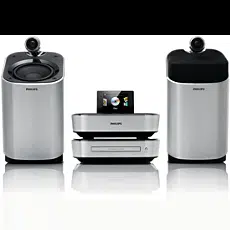
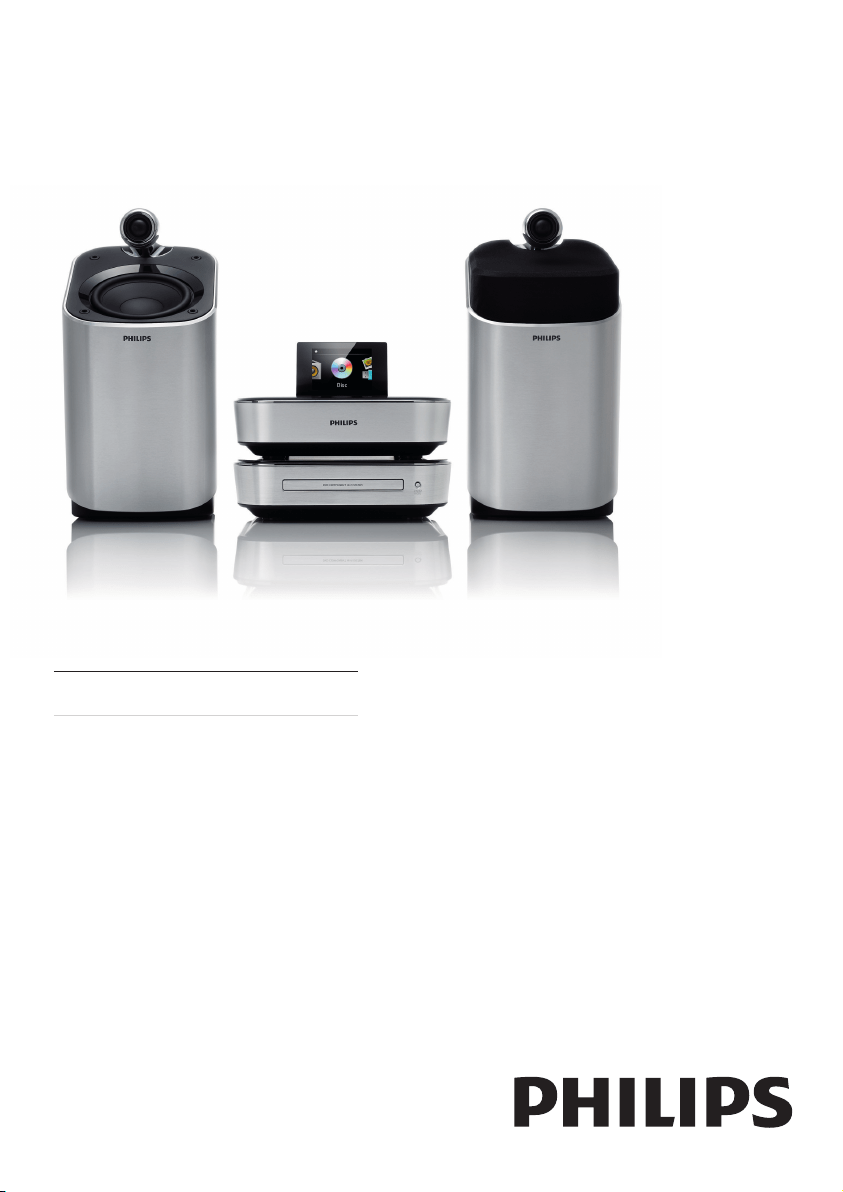
MCD900
Register your product and get support at
www.philips.com/welcome
EN User manual


3
English
EN
8 Play from an external audio device
(AUX) 18
Play from an external audio device 18
9 Settings 19
Play modes 19
Sound settings 19
Display settings 19
Slideshow settings 20
Album art (in the USB mode) 20
Clicker sound 20
Clock settings 20
Language 22
Demo mode 22
Restore factory settings 22
10 Maintenance 22
Cleaning 22
11 Technical data 22
12 Troubleshooting 24
Contents
1 Important 4
Safety 4
Environmental notices 5
Trademark notice 5
2 Your MCD900 6
Introduction 6
What’s in the box 6
Overview 6
3 Prepare 10
Place the Soundsphere speakers 10
Install batteries into the remote control 11
4 Connect 11
Connect the main unit and CD/DVD unit 1 1
Connect speakers 11
Connect for disc play 11
Connect the FM antenna 12
Connect external audio devices 13
Turn on/off 13
5 Play music CDs/movie DVDs 14
Basic operations 14
Use the disc menu 14
Play movie discs(DVD/DivX/VCD) 14
Program favorite chapters/tracks 15
Select play options 15
6 PlayfromaUSBashdevice 16
Connect a USB ash device 16
Library on the USB ash device 16
Play from the USB ash device 16
Search for music/pictures 16
7 Play FM radio 17
Tune to FM radio stations 17
Edit preset stations 18
Listen to FM radio 18
RDS (Radio Data System) 18
4
o This product may contain lead and mercury.
Disposal of these materials may be regulated
due to environmental considerations. Please
refer to disposal instructions in this user
manual.
Caution
Use of controls or adjustments or performance •
of procedures other than herein may result in
hazardous radiation exposure or other unsafe
operation.
Warning
Never remove the casing of this apparatus. •
Never lubricate any part of this apparatus. •
Never place this apparatus on other electrical •
equipment.
Keep this apparatus away from direct sunlight,
•
naked ames or heat.
Never look into the laser beam inside this
•
apparatus.
Ensure that you always have easy access to the
•
power cord, plug or adaptor to disconnect this
apparatus from the power.
Where the mains plug or an appliance coupler
•
is used as the disconnect device, the disconnect
device shall remain readily operable.
Risk of overheating! Never install this apparatus in a
conned space. Always leave a space of at least four
inches around this apparatus for ventilation. Ensure
curtains or other objects never cover the ventilation
slots on this apparatus.
Hearing Safety
Listen at a moderate volume:
Using headphones at a high volume can
impair your hearing. This product can
produce sounds in decibel ranges that
may cause hearing loss for a normal person, even
for exposure less than a minute. The higher decibel
ranges are offered for those that may have already
experienced some hearing loss.
Sound can be deceiving. Over time your hearing
‘comfort level’ adapts to higher volumes of sound. So
after prolonged listening, what sounds ‘normal’ can
actually be loud and harmful to your hearing. To guard
against this, set your volume to a safe level before your
hearing adapts and leave it there.
To establish a safe volume level:
Set your volume control at a low setting.
Slowly increase the sound until you can hear it
comfortably and clearly, without distortion.
Listen for reasonable periods of time:
Prolonged exposure to sound, even at normally ‘safe’
levels, can also cause hearing loss.
Be sure to use your equipment reasonably and take
appropriate breaks.
Be sure to observe the following guidelines when using
your headphones.
1 Important
Safety
Information for Europe:
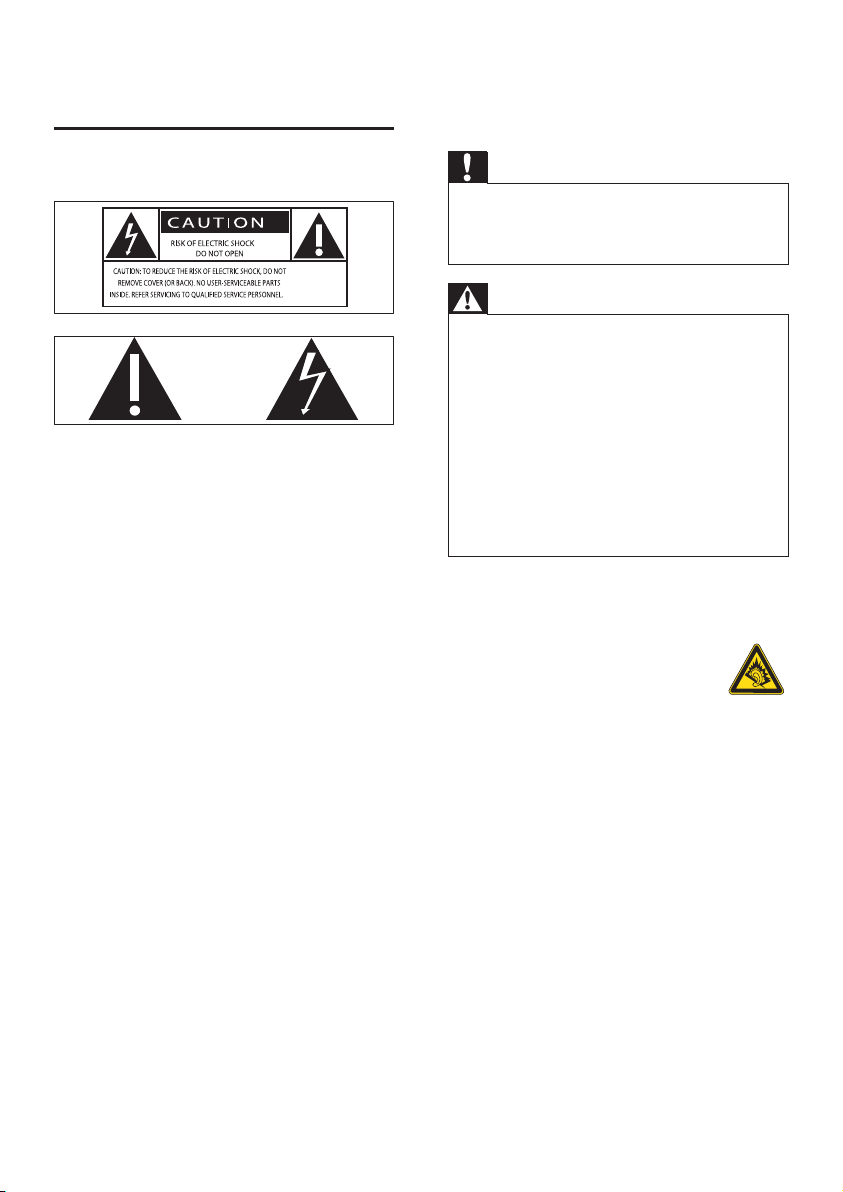
Know these safety symbols
The ‘exclamation mark’ calls attention to features for
which you s
hould carefully read the supplied literature
to prevent operating and maintenance problems.
The ‘lightening bolt’ symbol indicates uninsulated
components within the product that can cause an
electric shock.
To reduce the risk of re or electric shock, do not
expose the product to rain or moisture and do not
place any ojects lled with liquids, such as vases, on the
product.
a Read these instructions.
b Keep these instructions.
c Heed all warnings.
d Follow all instructions.
e Do not use this product near water.
f Clean only with dry cloth.
g Do not block any ventilation openings.
Install in accordance with the manufacturer’s
instructions.
h Do not remove the casing of this product.
i Only use this product indoors. Do not expose
the product to dripping / splashing water, rain
or high humidity.
j Keep this product away from direct sunlight,
nakedamesorheat.
k Do not install near any heat sources such as
radiators, heat registers, stoves, or other
electricalequipment(includingampliers).
l Do not place any other electrical equipment on
the product.
m Do not place any sources of danger on the
product (e.g. objects containing liquids, burning
candles).
n This product may include batteries. Please refer
to safety and disposal instructions for batteries
in this user manual.
EN
5
English
EN
Battery disposal information:
Your product contains batteries covered by the
European Directive 2006/66/EC, which cannot
be disposed of with normal household waste.
Please inform yourself about the local rules on
separate collection of batteries. The correct disposal
of batteries helps prevent potentially negative
consequences on the environment and human health.
Trademark notice
HDMI, and HDMI logo and High-
Denition Multimedia Interface are trademarks or
registered trademarks of HDMI licensing LLC.
Manufactured under license from
Dolby Laboratories. Dolby and the
double-D symbol are trademarks of
Dolby Laboratories.
DivX® and DivX Ultra® are
registered trademarks of DivX, Inc.
and are used under license. DivX
Ultra® Certied to play DivX® video
with advanced features and premium content.
ABOUT DIVX VIDEO: DivX® is a digital video format
created by DivX, Inc. This is an ofcial DivX Certied
device that plays DivX video. Visit www.divx.com for
more information and software tools to convert your
les into DivX video.
ABOUT DIVX VIDEO-ON-DEMAND: This DivX
Certied® device must be registered in order to play
DivX Video-on-Demand (VOD) content. To generate
the registration code, locate the DivX VOD section in
the device setup menu. Go to vod.divx.com with this
code to complete the registration process and learn
more
about DivX VOD.
‘DVD Video’ is a trademark of DVD
Format/Logo Licensing Corporation.
Windows Media and the Windows
logo are trademarks, or registered
trademarks of Microsoft Corporation
in the United States and/or other
countries.
The making of
unauthorized
copies of copy-
protected material, including computer programs, les,
broadcasts and sound recordings, may be an infringement
of copyrights and constitute a criminal offence. This
equipment should not be used for such purposes.
This product incorporates copyright protection
technology that is protected by U.S. patents and
other intellectual property rights. Use of this
copyright protection technology must be authorized
by Macrovision, and is intended for home and other
limited viewing uses only unless otherwise authorized
by Macrovision. Reserve engineering or disassembly is
prohibited.
Listen at reasonable volumes for reasonable periods
of time.
Be careful not to adjust the volume as your hearing
adapts.
Do not turn up the volume so high that you can’t hear
what’s around you.
You should use caution or temporarily discontinue use
in potentially hazardous situations.
Environmental notices
This product complies with the radio
interference requirements of the European
Community.
This apparatus includes this label:
Modications
Modications not
authorized by the
manufacturer may void
user’s authority to
operate this product.
Recycling
Your product is designed and manufactured
with high quality materials and components,
which can be recycled and reused.
When you see the crossed-out wheel bin symbol
attached to a product, it means the product is covered
by the European Directive 2002/96/EC:
Never dispose of your product with other
household waste. Please inform yourself about
the local rules on the separate collection of
electrical and electronic products. The correct
disposal of your old product helps prevent potentially
negative consequences on the environment and human
health.
Information about the use of batteries:
Caution
Risk of leakage: Only use the specied type of •
batteries. Do not mix new and used batteries.
Do not mix different brands of batteries.
Observe correct polarity. Remove batteries
from products that are not in use for a longer
period of time. Store batteries in a dry place.
Risk of injury: Wear gloves when handling
•
leaking batteries. Keep batteries out of reach
of children and pets.
Risk of explosion: Do not short circuit
•
batteries. Do not expose batteries to
excessive heat. Do not throw batteries into
the re. Do not damage or disassemble
batteries. Do not recharge non-rechargeable
batteries.
6
The DVD player on MCD900 supports these disc
formats:
What’s in the box
Check and identify the contents of your package:
Main unit and CD/DVD unit
•
2 SoundSphere speakers (with connection •
cables)
Remote control with batteries
•
Composite audio/video cables•
FM antenna•
AC power cord•
Quick Start Guide•
User Manual•
2 Your MCD900
Congratulations on your purchase, and welcome to
Philips! To fully benet from the support that Philips
offers, register your product at www.philips.com/
welcome.
Introduction
MCD900 can
Connect a USB ash device;
•
Connect the existing home audio/video •
systems, including TV, audio systems and
MP3 players.
With such connections, you can
Play music stored on a USB ash device
•
through the Soundsphere speakers;
Play movie DVDs on a TV;
•
Play music from an external audio system/•
portable media player through the
Soundsphere speakers.
EN
Overview
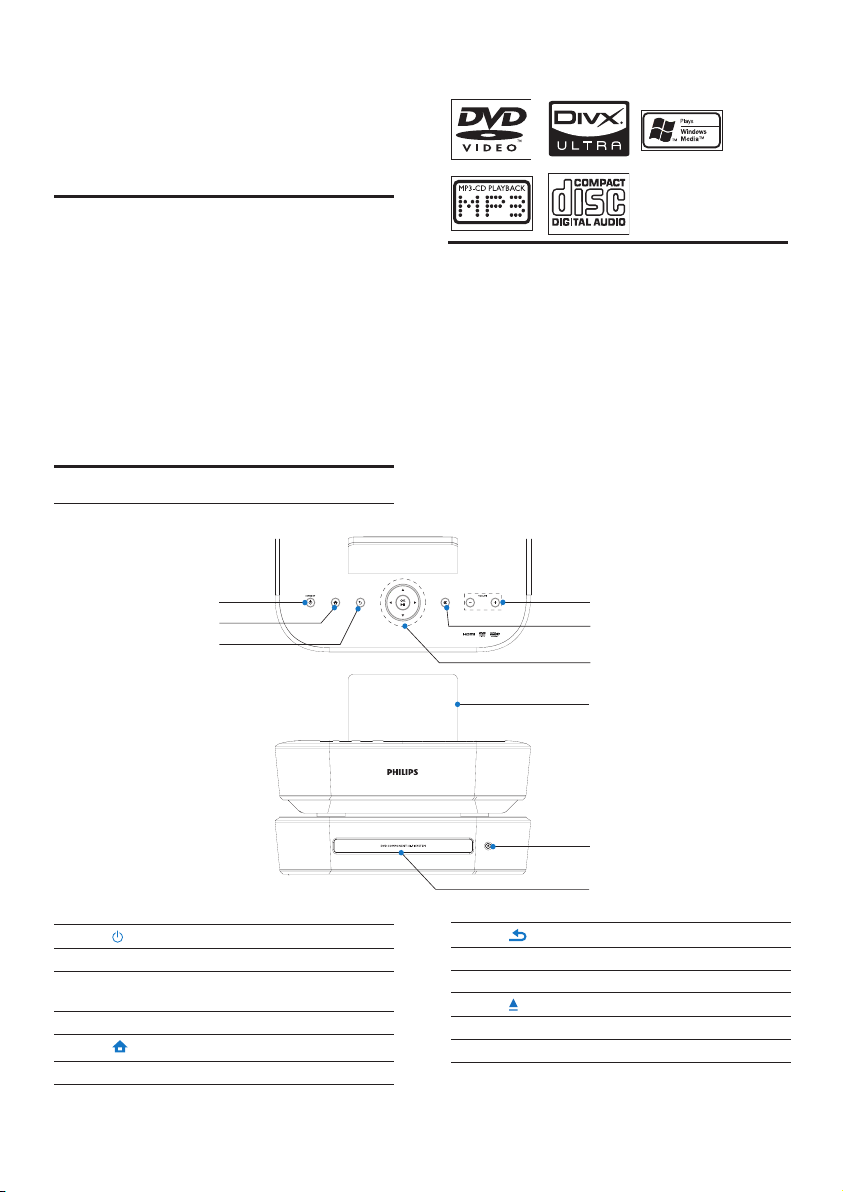
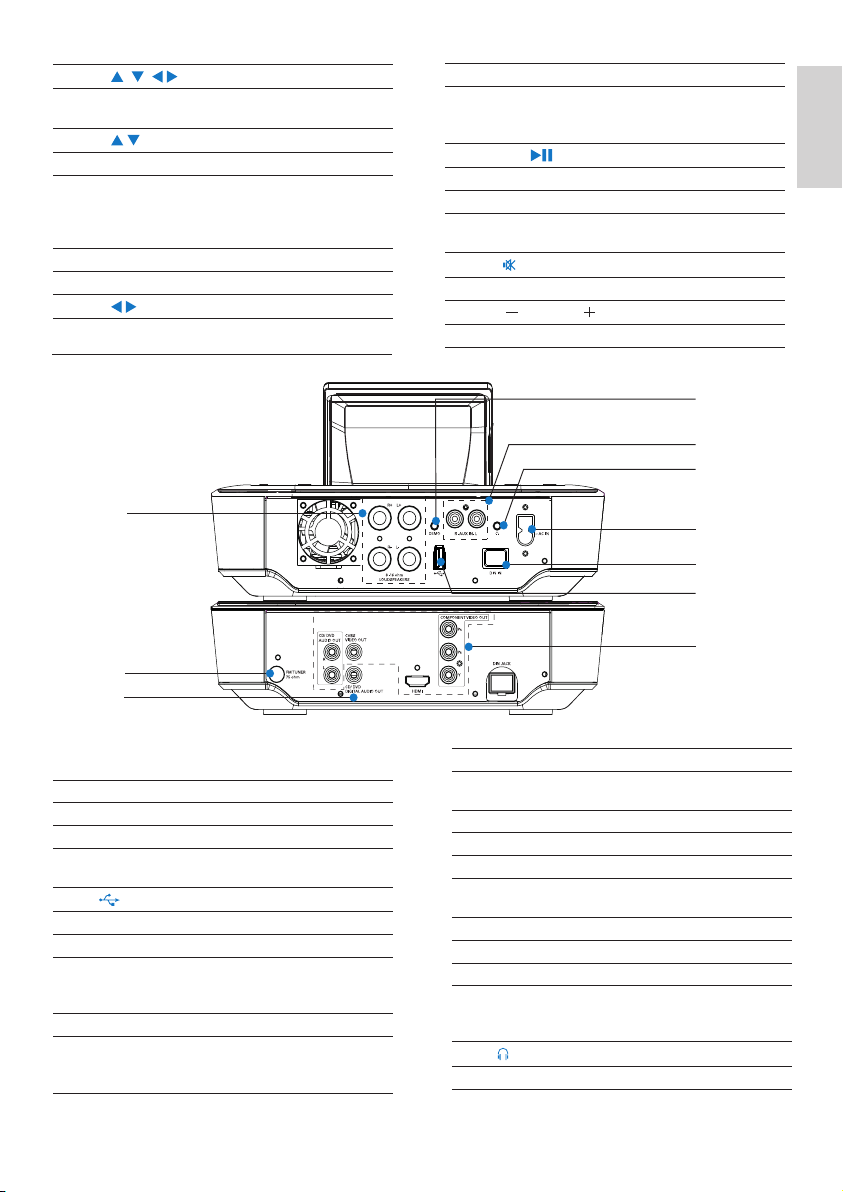
Top and front view
i
e
a
b
c
h
g
f
d
1.
Press to turn on the set;
To turn off, press to switch to active standby;
or, press and hold to switch to Eco standby.
Exit Demo mode.
2.
Return to Home screen (main menu).
3.
Go back to the previous screen.
4. Disc compartment
5.
Open or close the disc compartment.
6. LCD display
7
English
EN
7.
/ / /
Navigation buttons
Press to navigate through menus.
/
In USB mode:
Superscroll:In a long list of options, press and
hold to start Superscroll. Release to jump to
the rst item starting with current alphabet/
number.
In DISC mode:
Select an album (for MP3/WMA CDs).
/
In FM RADIO mode:
Press and hold to start the auto tuning to the
next available station;
Press repeatedly for ne tuning.
OK/
Conrm selection.
Start/pause/resume play.
In USB: Start to play the entire le
folder(SuperPlay™).
8.
Mute/ unmute sound.
9.
VOLUME
Increase/decrease volume.
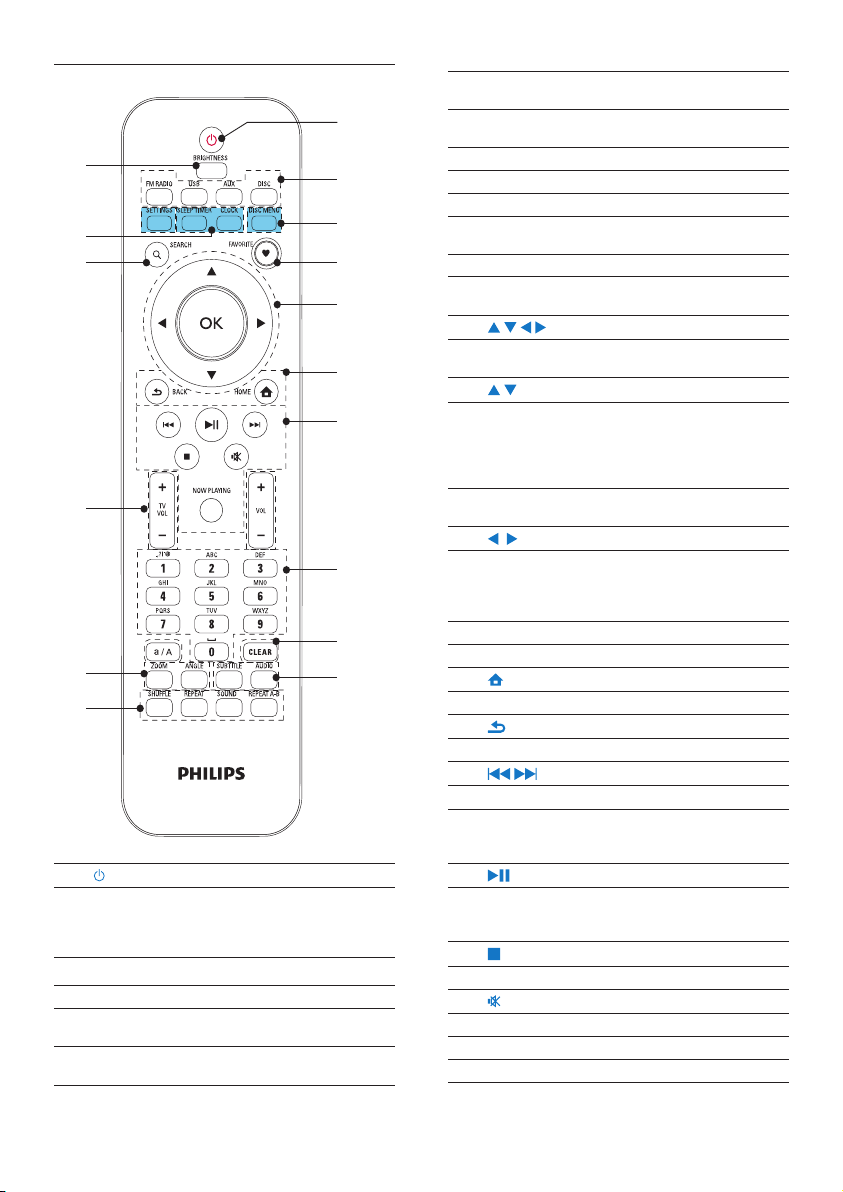
Rear view
i
c
h
j
a
b
g
e
f
d
see ‘Connect’ on page 11
1. ~ AC IN
for AC power cord
2. DIN IN
socket for the connection between the main
unit and CD/DVD unit
3.
USB port for the USB ash device
4. CVBS VIDEO OUT, CD/DVD AUDIO OUT
for the supplied composite audio/video cable
that connects the disc player and a standard
TV
HDMI
for the HDMI cable (not supplied) that
connects the disc player and a high-denition
TV (HDTV)
5. CD/DVD DIGITAL AUDIO OUT
Digital audio output socket for the disc play
through an external speaker system
6. FM TUNER
for the supplied FM antenna
7. LOUDSPEAKERS
for connection cables that connect the
supplied Soundsphere speakers
8. DEMO
for the use by dealers only
9. AUX IN L / R
Audio input sockets for an external audio
system/portable media player to play through
the speakers on MCD900
10.
3.5 mm headphone jack
8
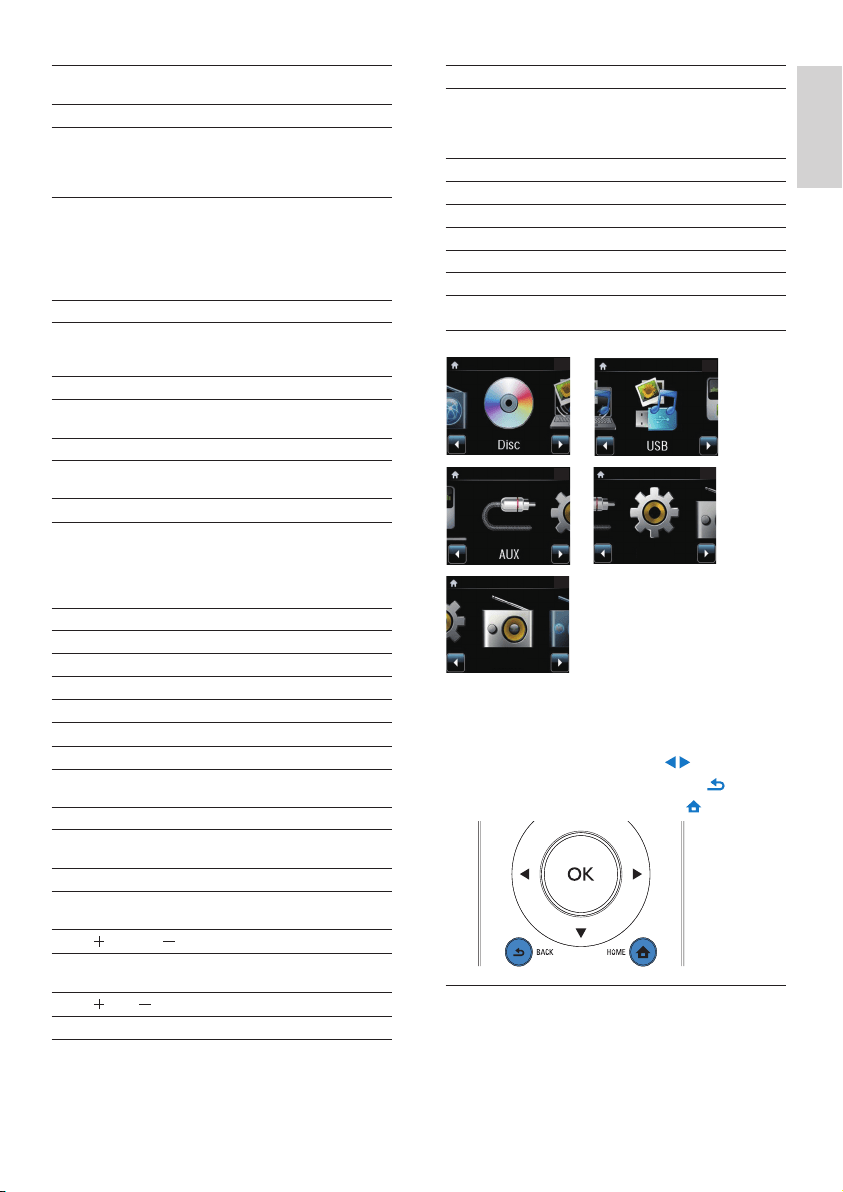
AUX: Connected external audio device (e.g. an
MP3 player or other portable music players);
DISC: DVDs, DivX/MP3/WMA les on discs,
and audio CDs.
3. SETTINGS
Enter the settings menus.
DISC MENU
In DISC mode:
Enter or exit the disc menu.
4. FAVORITE
In DISC mode:
Program favorite chapters/tracks
5.
/ / / /OK
Navigation buttons
Press to navigate through menus.
/
In USB mode:
Superscroll: In a long list of options, press and
hold to start Superscroll. Release to jump to
the rst item starting with current alphabet/
number.
In DISC mode:
Select an album (for MP3/WMA CDs).
/
In FM RADIO mode:
Press and hold to start the auto tuning to the
next available station;
Press repeatedly for ne tuning.
OK
Conrm selection.
6.
HOME: Return to Home screen (main menu).
BACK: Go back to previous screen.
7.
/
Search buttons on the play screen
In USB/DISC mode:
Press to skip to the previous/ next chapter/
track;
Start/pause/resume play;
In USB mode: Start to play the entire le
folder(SuperPlay™).
Stop play.
Mute/ unmute sound.
NOW PLAYING
Return to play screen.
EN
Remote control
1.
Press to turn on the unit;
To turn off, press to switch to active standby; or,
press and hold to switch to Eco standby.
Exit Demo mode.
2. Source selector
Select a media source:
FM RADIO: FM radio stations, with RDS (Radio
Data System) supported;
USB: Songs/photos on the USB mass storage
device connected to the unit;
b
d
e
f
g
h
i
j
n
l
k
a
o
c
p
m
9
English
EN
14. SEARCH
In USB mode: Press to start the search/
browsing by alphanumeric entry.
In DISC mode: During disc play, press to start
the search by time, or chapter/track.
15. SLEEP TIMER
Set the sleep timer.
CLOCK
Display the clock time.
16. BRIGHTNESS
Select brightness options for the LCD display.
Home screen
From Home screen, you can select your desired music
source, or enter [Settings] menu. To do so, do the
following:
1 On the remote control, press the Source selector,
or use the Navigation buttons
/ and OK.
2 To go back to previous screen, press BACK.
3 To return to Home screen, press HOME.
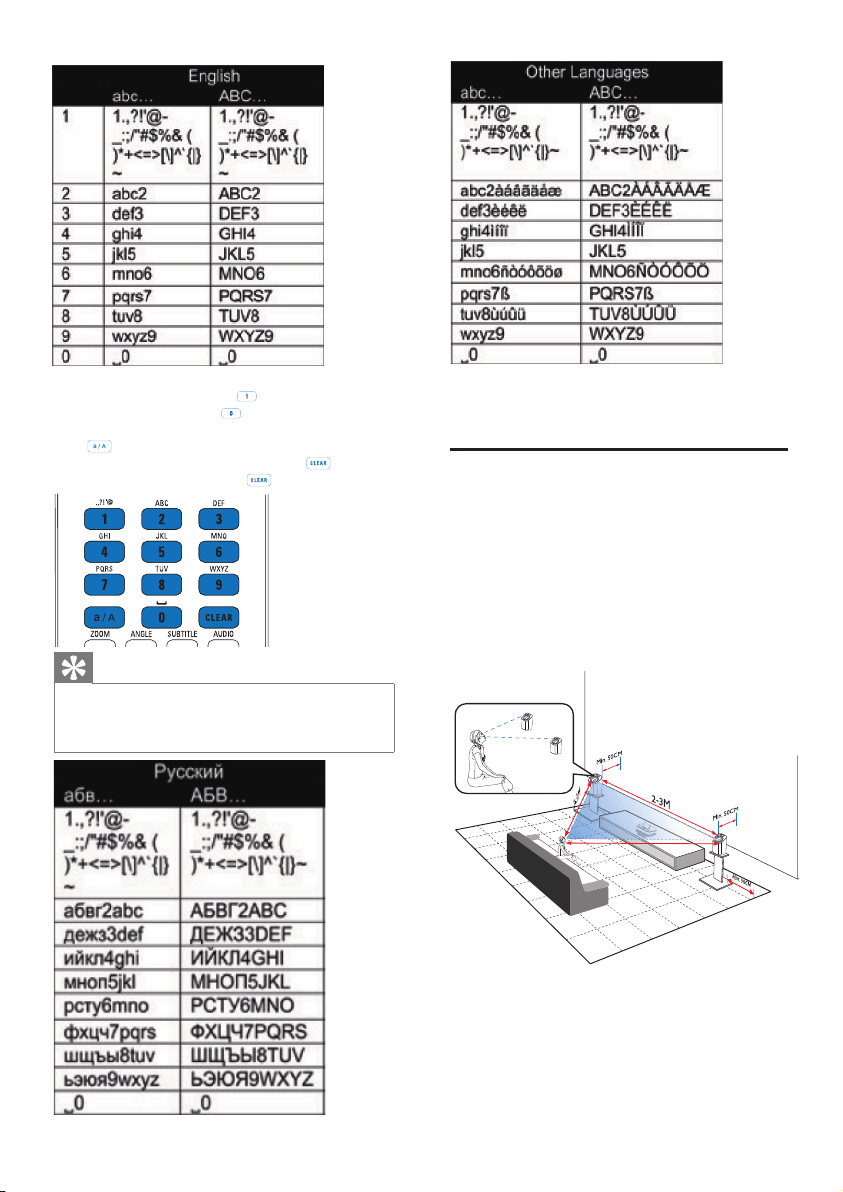
Text entry
To enter text and symbols, press corresponding
alphanumeric buttons on the remote control.
To enter letters/numbers/symbols corresponding
•
to the same alphanumeric button, briey and
repeatedly press the button.
FM radio
Settings
8. Alphanumeric
buttons
For text entry
In FM RADIO mode:
On the radio play screen, press and hold a
numeric button to store current station in the
location as a preset station.
In USB mode:
Quickjump: In a long list of options that are
sorted in an alphabetical order, press once or
repeatedly to select an alphabet, and jump
to the rst item that starts with the selected
alphabet.
9. a/A
Press to switch between lower and upper cases;
In FM RADIO mode, press in the list of presets
to start editing station name.
CLEAR
Press to delete the previous entry;
Press and hold to delete all entries.
10. SUBTITLE
In DISC mode: Select a subtitle language (for
video discs only).
AUDIO
In DISC mode:
Select stereo, mono-left, mono-right, or mix-
mono channel (for VCD discs only);
Select an audio language (for DVD and DivX
discs only).
11. SHUFFLE
Activate/deactivate random order play.
REPEAT
Toggle through repeat play options.
SOUND
Select sound settings.
REPEAT A-B
In DISC mode: Repeat a specic section within
a track/disc.
12. ZOOM
In DISC mode: Zoom in/out (for video discs and
picture les on CDs).
ANGLE
In DISC mode: Select a camera angle (for video
discs).
13.
TVVOL
Increase/decrease the volume of a connected
Philips TV.
VOL
Increase/decrease the volume of the unit.
10
To enter symbols, press • repeatedly.
To enter space, press
• .
To switch between lower and upper cases, press
•
.
To delete previous character, press
• . To delete
all entries, press and hold
.
Tip
For languages other than English, letters that •
an alphanumeric button corresponds to may
vary.
EN
3 Prepare
Place the Soundsphere speakers
About Soundsphere speakers
The supplied Soundsphere speakers can produce
full-frequency sounds throughout the area of coverage.
Unlike conventional speakers, Soundsphere speakers
are much less sensitive to exact positioning. The
mid- and high-frequency sounds from Soundsphere
speakers are retained, even if you move away from
the Soundsphere speakers. Thus, the authentic
sound experience can be extended to all sides of the
speakers.
How to place the soundsphere speakers
For the best listening experience:
Place the speakers with the tweeters at the
•
ear height, and at least 50 cm away from
the rear wall.
Place the speakers on speaker stands to get
•
the best result.
2-3M
11
English
EN
Place the speakers 2 to 3 meters away from •
each other, with the two speakers and your
preferred listening position forming an
equilateral triangle.
Place the speakers with the tweeters facing
•
your preferred listening area.
To keep the tweeters unobstructed, never
•
place the speakers in between shelves.
Tip
Alternatively, you can place the Soundsphere •
speakers on the oor or on top of shelves,
though not preferable.
By placing the speakers at least 50 cm away
•
from the rear wall, you can make the bass
tighter and improve your listening experience.
Install batteries into the remote
control
Caution
Risk of explosion! Keep batteries away from •
heat, sunshine or re. Never discard batteries
in re.
Risk of decreased battery life! Never mix
•
different brands or types of batteries.
Risk of product damage! When the remote
•
control is not used for long periods, remove
the batteries.
a Open the battery compartment.
b Insert 2 AAA R03 batteries with correct
polarity (+/-) as indicated.
c Close the battery compartment.
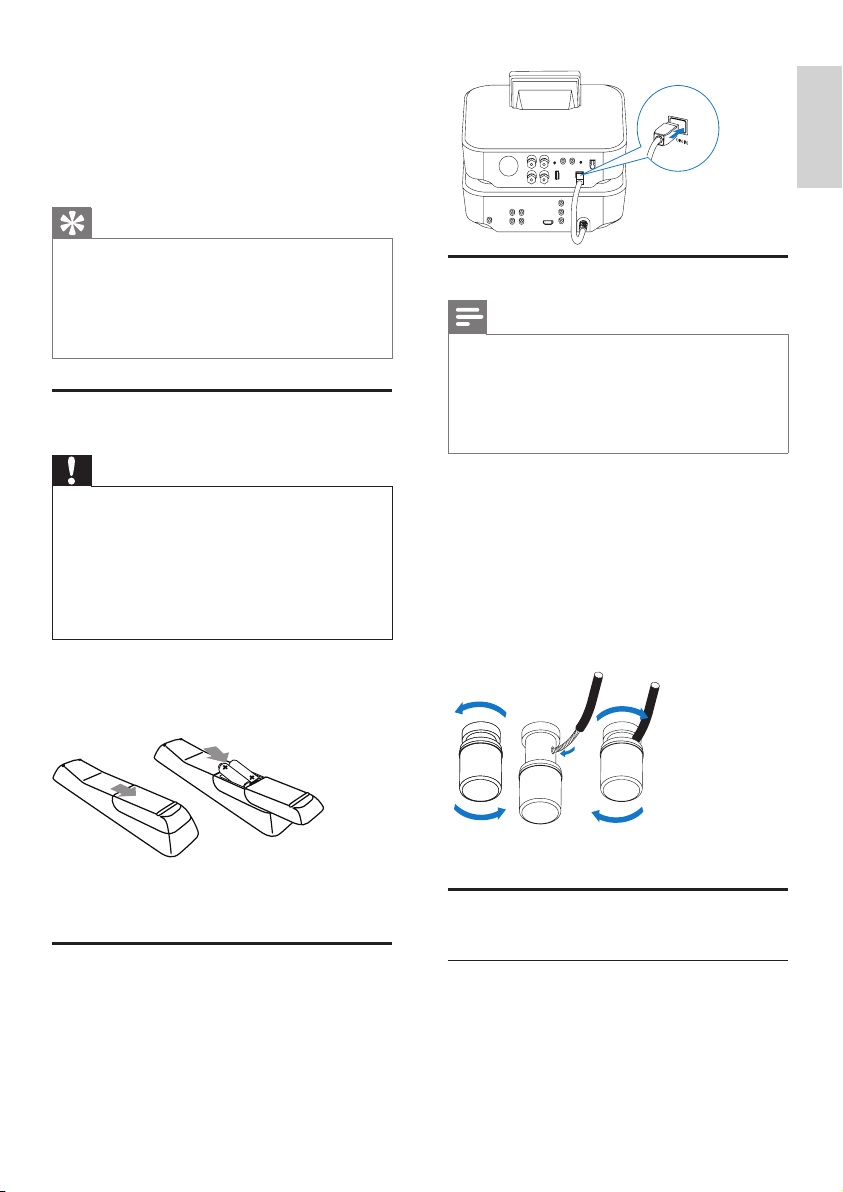
4 Connect
Connect the main unit and CD/
DVD unit
As shown, plug the cable into • DIN IN.
Connect speakers
Note
Always connect the speakers before you •
connect MCD900 to an AC power outlet.
By doing so, you can avoid the big noise that
may be caused during speaker installation by
the speaker wires on the metallic surface of
MCD900.
1 On MCD900, ensure that you connect the left
speaker to LOUDSPEAKERS L+, L- and right
speaker to LOUDSPEAKERS R+, R-.
2 To connect the speakers,
As shown, unscrew to loosen the
•
connectors;
Fully insert the ends of speaker wires, red
•
end into the red connector, and silver end
into the black connector;
Screw the connectors until the speaker
•
wires are securely fastened.
Connect for disc play
For disc play, make audio/video connections.
Connect a TV
On MCD900, you can connect a TV through one of
the two video jacks.
Select the video jack that your TV supports:
Composite video (CVBS): for a standard
•
TV;
acb
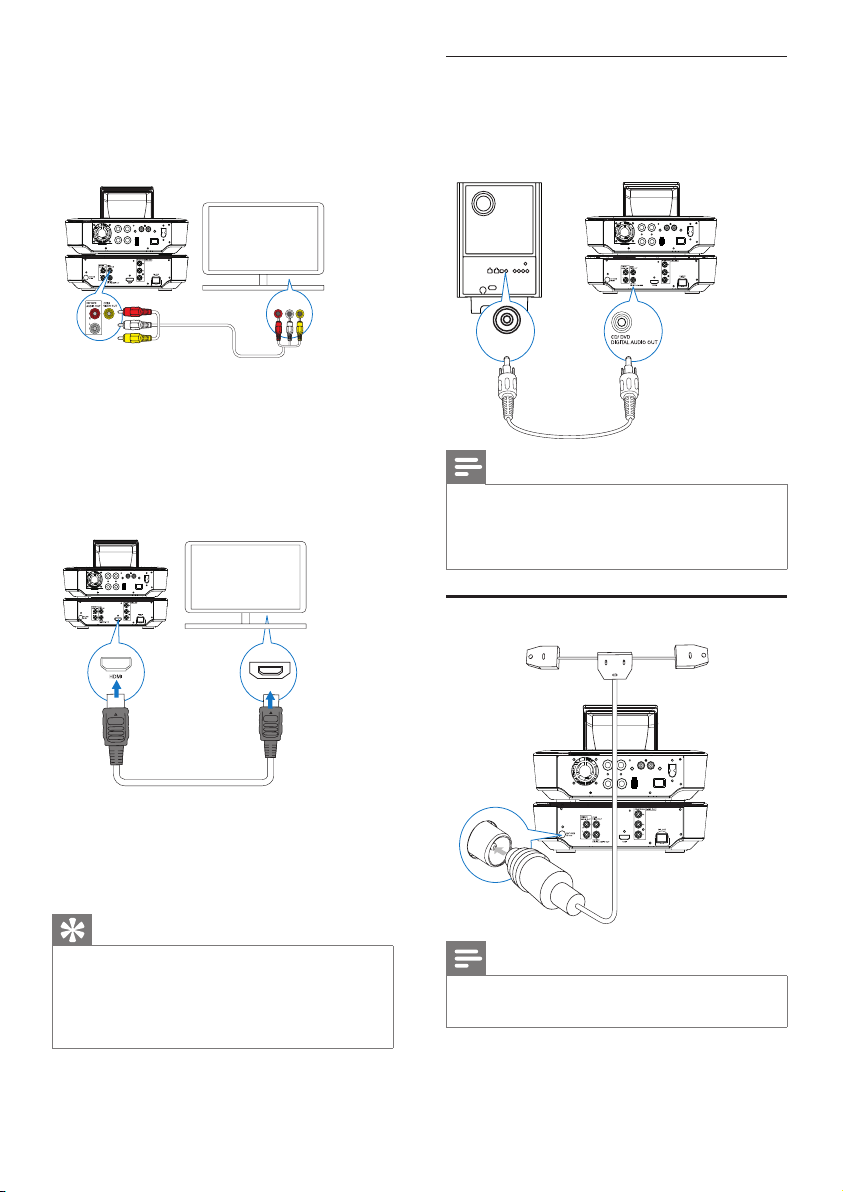
12
Play from another speaker system
To play from another speaker system, connect an
digital audio cable (not supplied) to:
the
• CD/DVD DIGITAL AUDIO OUT socket on
MCD900;
the digital audio input on an external speaker system.•
Note
Ensure that the external audio system is •
switched to the Aux-in mode, if you are
playing sounds from the speaker system on an
external audio system.
Connect the FM antenna
Note
Always plug in the FM antenna before tuning •
to an FM radio station.
Connect the supplied FM T-type antenna to the •
FM TUNER socket on the unit;
Stretch the antenna to its full length, and x it on
•
the wall.
DIGITAL IN
COAXIAL
EN
HDMI jack: for a high-denition TV •
compliant with HDMI (High Denition
Multimedia Interface)/DVI (Digital Visual
Interface), and HDCP (High-bandwidth
Digital Contents Protection).
Using the CVBS jack
As shown, plug the supplied composite audio/•
video cable into the corresponding sockets.
Using the HDMI jack (HDMI cable sold separately)
Use the HDMI jack to connect a high-denition
TV (HDTV), which is equipped with HDMI (High
Denition Multimedia Interface) or DVI (Digital Visual
Interface), and compliant with HDCP (High-bandwidth
Digital Contents Protection).
As shown, connect an HDMI cable (not supplied) to:•
the • HDMI socket on this unit, and
the
• HDMI input socket on the TV.
For TV/ monitor with a DVI jack only, use a DVI-
•
to-HDMI adapter.
Tip
As a compact audio/video interface, HDMI •
transmits uncompressed digital data. With the
HDMI connection, high-denition video/audio
contents can present optimum video and
audio quality on a HDTV.
TV
TV
HDMI IN
13
English
EN
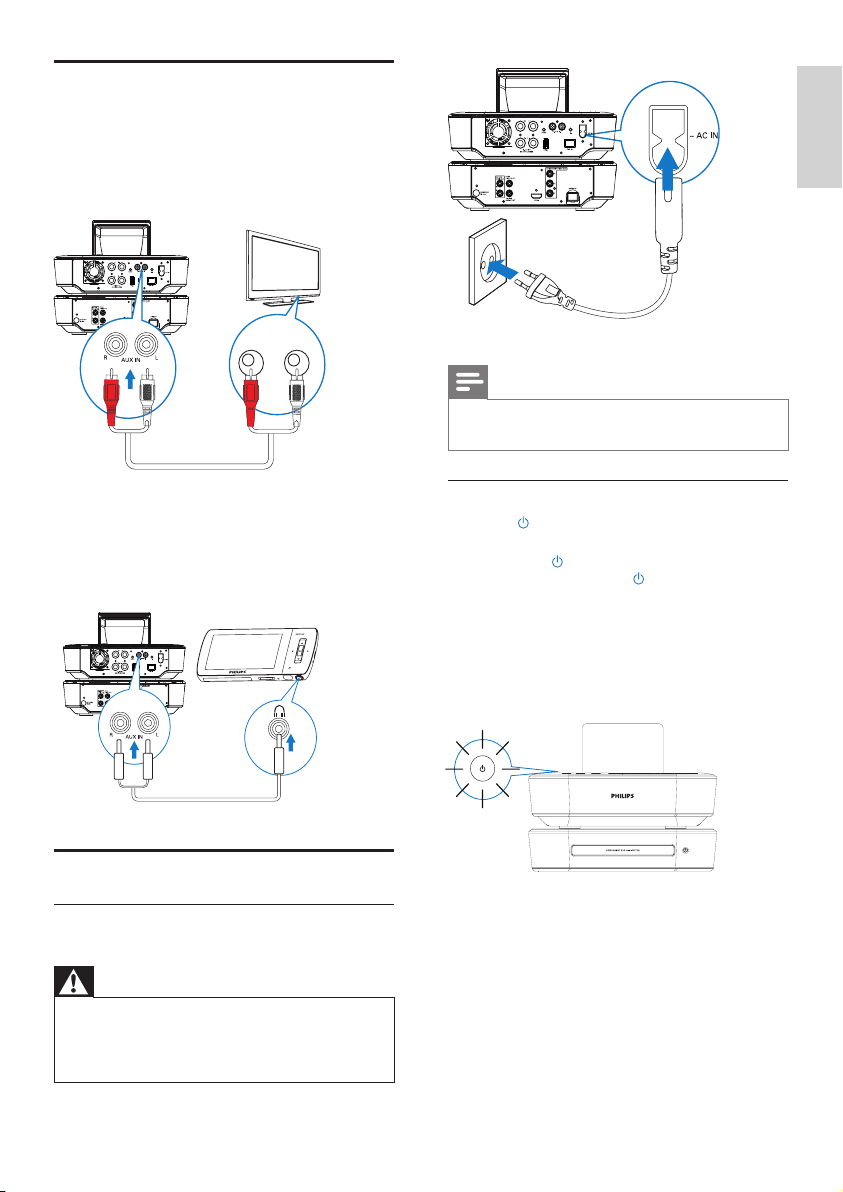
Connect • MCD900 to the power supply.
Note
The type plate information is located at the •
back or at the underside of the product.
Turn on/off
1 Press or a source selector to turn on the unit.
2 To turn off the unit,
Press
• to switch to active standby;
Or, press and hold
• to switch to Eco
standby (energy-saving mode).
Active standby
When in active standby, some functions of MCD900
remain in the normal state of power consumption, e.g.
clock display.
In active standby,
The power indicator lights up red;
•
Clock time is displayed if you have set clock. •
Auto active standby
If no activity happens on MCD900 for 10 minutes,
MCD900 can switch to active standby automatically.
Eco standby
Eco standby is an energy-saving mode. In Eco standby,
all major functions are switched to a low-power state
or off, e.g. micro-processor and display.
Connect external audio devices
You can listen to an external audio device through
the speakers on MCD900. To do so, do the following
connections, and then, select the AUX mode on MCD900.
Connect audio cables (red/white - not supplied) to:
the
• AUX IN L / R sockets on this unit, and
the audio output sockets on the external
•
audio device.
Or, to play from a portable media player
with 3.5mm headphone jack
Connect a headphone to RCA cable (not
supplied) to:
the
• AUX IN L / R sockets on this unit, and
the 3.5mm headphone jack on the portable
•
media player.
Turn on/off
Connect power supply
Warning
Risk of product damage! Ensure that the •
power supply voltage corresponds to the
voltage printed on the back or the underside
of the product.
-
-
TV
R AUX OUT L
14
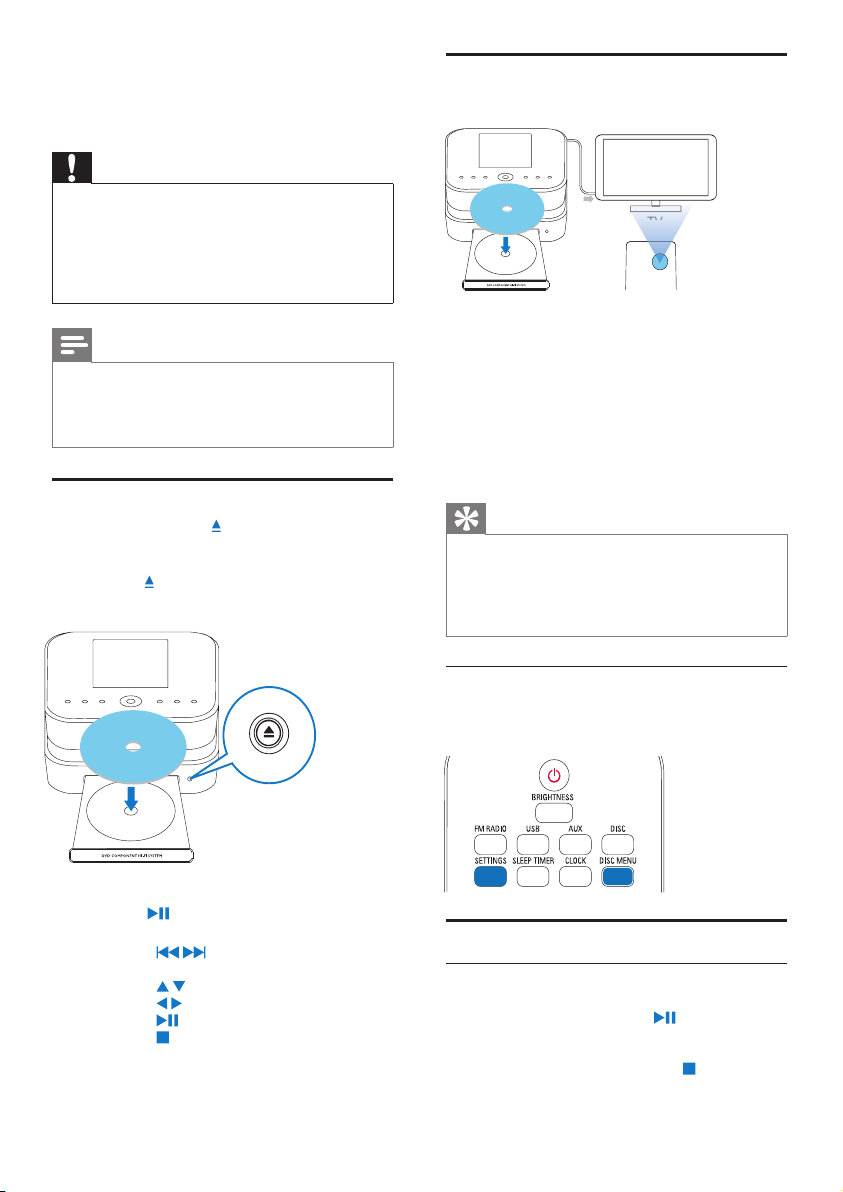
Use the disc menu
After loading a disc onto the tray, you can see the disc
settings on the TV screen.
1 On MCD900, load a disc onto the tray.
2 Turn on the TV and switch to the correct video-
in channel in one of the following ways:
On the remote control of your TV, press
•
the AV/TV button repeatedly until you see
the Philips screen, or the video disc screen.
Go to the lowest channel on your TV, then
•
press the Channel Down button until you see
the Philips screen, or the video disc screen.
Press the source button repeatedly on the
•
remote control of your TV.
Tip
The video-in channel is between the lowest •
and highest channels and may be called
FRONT, A/V IN, VIDEO etc. See the TV user
manual on how to select the correct input on
the TV.
Access the disc menu
To access the menu manually
In the
• DISC mode, press DISC MENU or
SETTINGS on the remote control.
Play movie discs(DVD/DivX/VCD)
Pause/Resume/Stop
To pause
During disc play, press
• to pause.
The TV screen shows the scenes where »
you stop play.
Or, during DVD play, press
• .
The TV screen shows the Philips screen. »
Printed side
TV
AV/TV
TV
TV
TV
5 Play music CDs/
movie DVDs
Caution
Never look at the laser beam inside the unit. •
Risk of product damage! Never play discs with •
accessories such as disc stabilizer rings or disc
treatment sheets.
Never put any objects other than discs into
•
the disc compartment.
Note
Ensure that you have made connections for disc •
play (see ‘Connect for disc play’ on page 11).
For the supported disc formats, see
•
‘Introduction’ on page 6.
Basic operations
1 On MCD900, press .
The disc tray opens. »
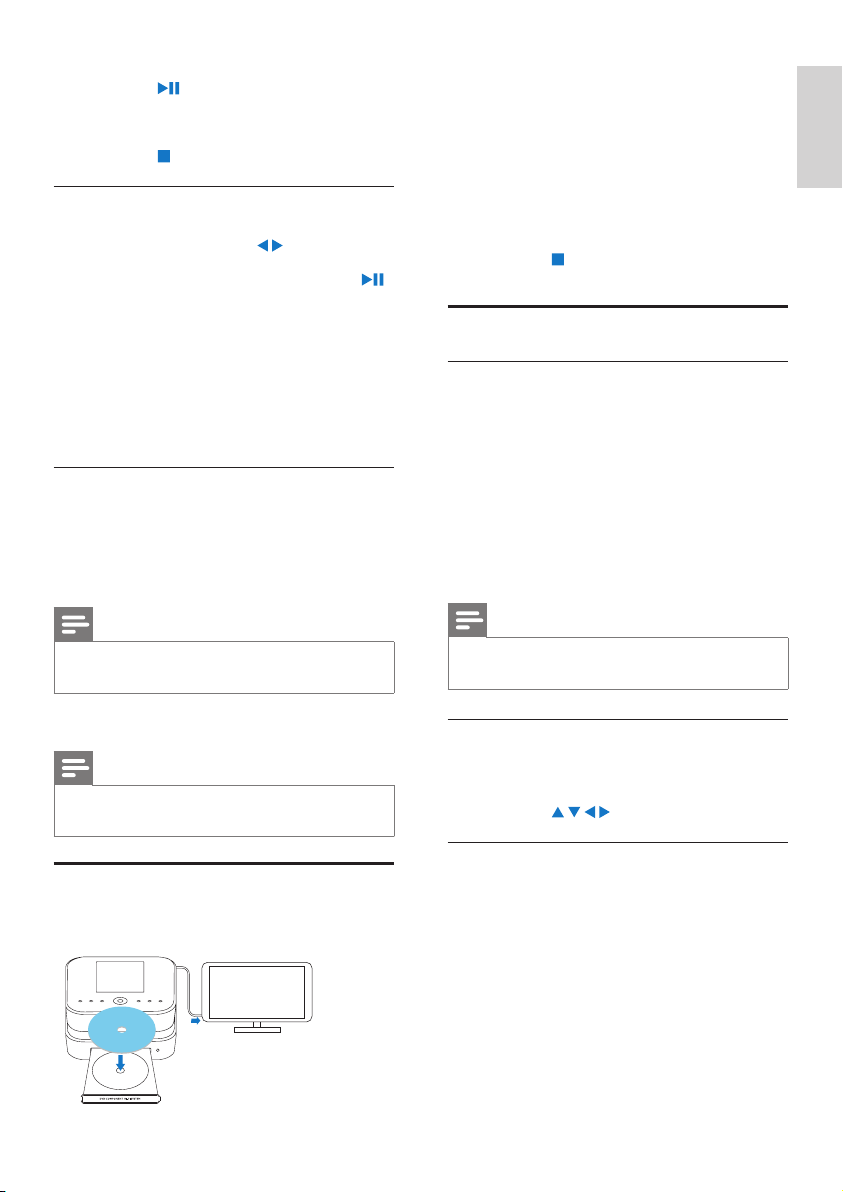
2 Load a disc onto the tray, the printed side facing
up. Press
.
Play starts automatically after disc reading is »
complete.
3 If necessary, press DISC on the remote control,
and then,
to start play.
4 During disc play,
Press
• / repeatedly to select a track/
chapter. For WMA/MP3 les on a disc,
press
/ to select a le folder.
Press
• / to search forward/backward.
Press
• to pause or resume.
Press
• to stop.
Printed side
EN
15
English
EN
1 In the DISC mode, ensure that the disc play
stops.
2 Press FAVORITE on the remote control.
On the TV screen, you can see a menu for you »
to program desired chapters/tracks.
3 Use the remote control to enter the desired
chapters/tracks.
To play the program
On the TV screen, select [Start].
•
To erase the program
Press
• ;
Or, remove the disc from the disc tray.
•
Select play options
SelectRepeat/Shufeoptions
During disc play, you can repeatedly play a chapter/
track, or a le or les in a folder. You can also play
tracks or les in a folder in a random order.
Toturnonorofftherepeat/shufeoptions
Press
• REPEAT or/and SHUFFLE repeatedly.
To repeatedly play a section in a disc
1 During music or video play, press REPEAT A-B at
the start point.
2 Press REPEAT A-B at the end point.
The selected section starts to play repeatedly. »
To cancel repeat play, press » REPEAT A-B again.
Note
The section A and B can be set only within the •
same track/title.
Zoom in/out image
1 During video/picture play, press ZOOM
repeatedly to zoom in/out the image.
When the image is zoomed in, you can
•
press / / / to pan through the image.
Change a camera angle
Some DVDs contain alternate scenes, such as scenes
recorded from different camera angles. For such DVDs,
you can select from the available alternate scenes.
1 During DVD play, press ANGLE repeatedly to
switch between camera angles.
To resume
Press
• .
The disc play resumes from the last stop »
point.
To stop
Press
• again.
Search
Fast search forward/backward
1 During play, press and hold / to select a search
speed.
To resume play at normal speed, press
• .
Search by time or chapter/track
1 During disc play, press SEARCH until a time eld
or chapter/track eld is displayed.
For the time eld, enter the play position in
•
hours, minutes and seconds.
For the chapter/track eld, enter the
•
chapter/track.
Play starts automatically at your selected »
point.
Select languages for disc play
Select an audio language
You can select an audio language on DVDs or DivX discs.
1 During disc play, press AUDIO.
The language options appear. If the selected »
audio channels is unavailable, the default disc
audio channel is used.
Note
For some DVDs, the language can only be •
changed from the disc menu.
Select a subtitle language
You can select a subtitle language on DVDs.
During disc play, press
• SUBTITLE.
Note
For some DVDs, the language can only be •
changed from the disc menu.
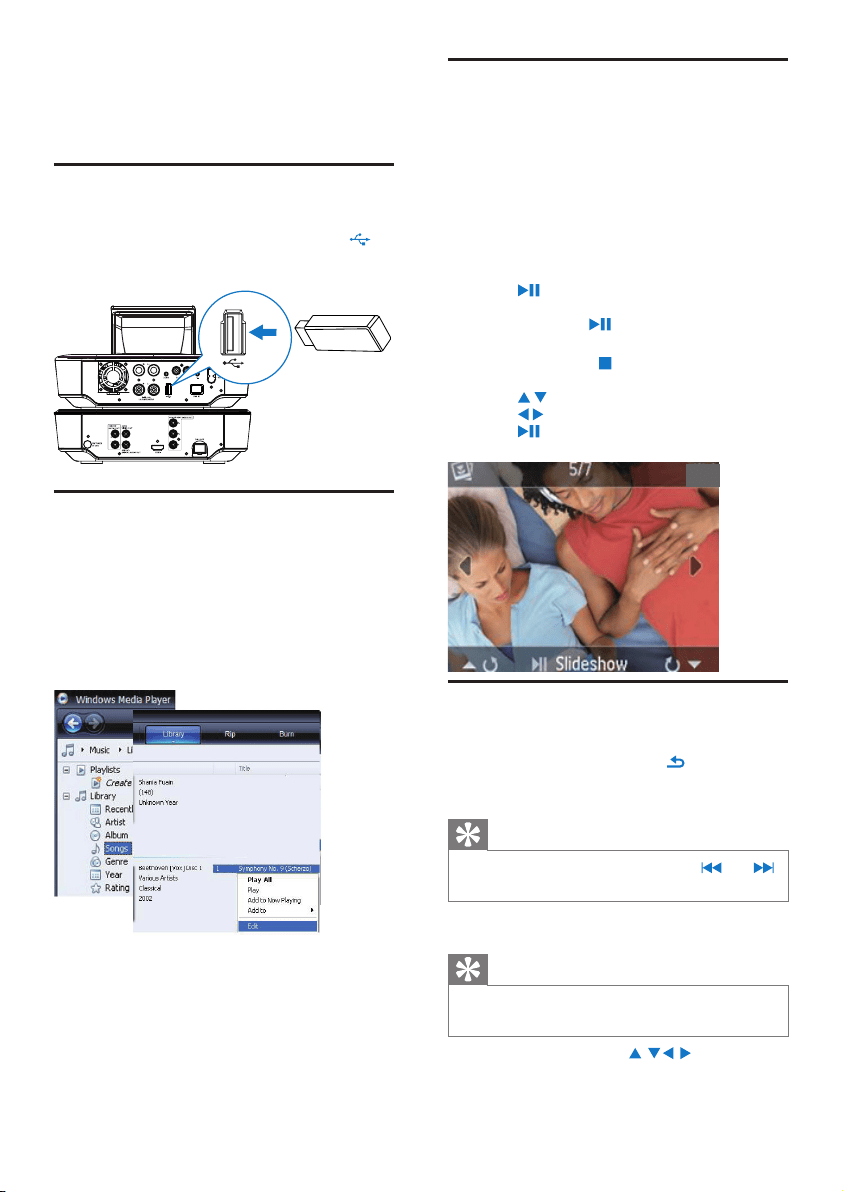
Program favorite chapters/tracks
You can play certain chapters/tracks on a disc. Program
the chapters/tracks as desired on the TV screen.
Printed side
TV
16
PlayfromtheUSBashdevice
1 On MCD900, ensure that the USB mass storage
device is properly connected.
2 On the remote control, press USB.
The le sorting process may take some time. »
During le sorting, the le folders are displayed.
Audio les are displayed under different »
categories (e.g. Artist, Album, Genre), if meta/
ID3 tags are edited for the les.
Picture les are also organized. »
3 Select your desired track or album.
4 Press to start play.
Play starts from the beginning of the album,
•
if you press on an album.
Play screen appears when play starts. »
5 To stop play, press .
Play photos
Press
• / to rotate the picture;
Press
• / to move to previous/next picture;
Press
• to start playing all pictures in slideshow
mode.
Search for music/pictures
To navigate through menus during music play, do the
following:
1 On the remote control, press and then, use
the Navigation buttons.
2 To return to Play screen, press NOW PLAYING.
Tip
On Play screen, you can also press • and
repeatedly to select songs.
In a list of options, you can do one of the following to
search for what you need:
Tip
When doing searching in the following ways, •
ensure that MCD900 is in the mode of USB.
Use the navigation keys • , , , .
Start quick search by using the
• alphanumeric
search, Superscroll, and Quickjump.
6 Play from a USB
flash device
ConnectaUSBashdevice
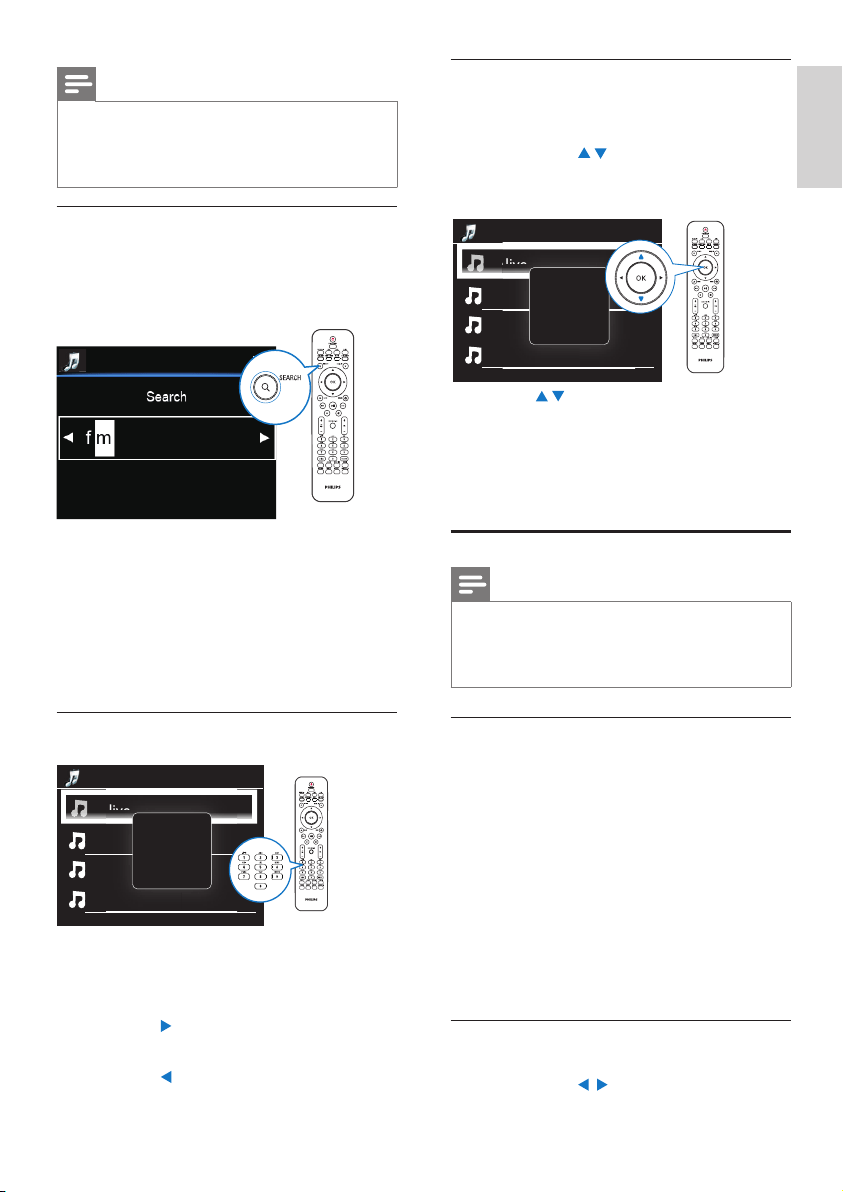
On MCD900, you can play music/photos
stored on a USB ash device. To do so, do the following:
Connect the USB ash device to the
•
socket on MCD900;
Select the
• [USB] mode on MCD900.
LibraryontheUSBashdevice
OrganizelesontheUSBashdevice
Audio les:
•
If the les contain le information (meta tag or ID3
tag), the les can be sorted automatically by the le
information, like Artist, Album, Genre, and others.
Launch media management software to check
or edit the le information. For example, click as
shown in Windows Media Player 11. Select the
desired song, and then, double click it to edit.
If necessary, you can also organize audio les in
different folders as desired.
Picture les:
•
Organize les in different folders as desired. The
folders are sorted in an alphabetical order.
EN
17
English
EN
Superscroll
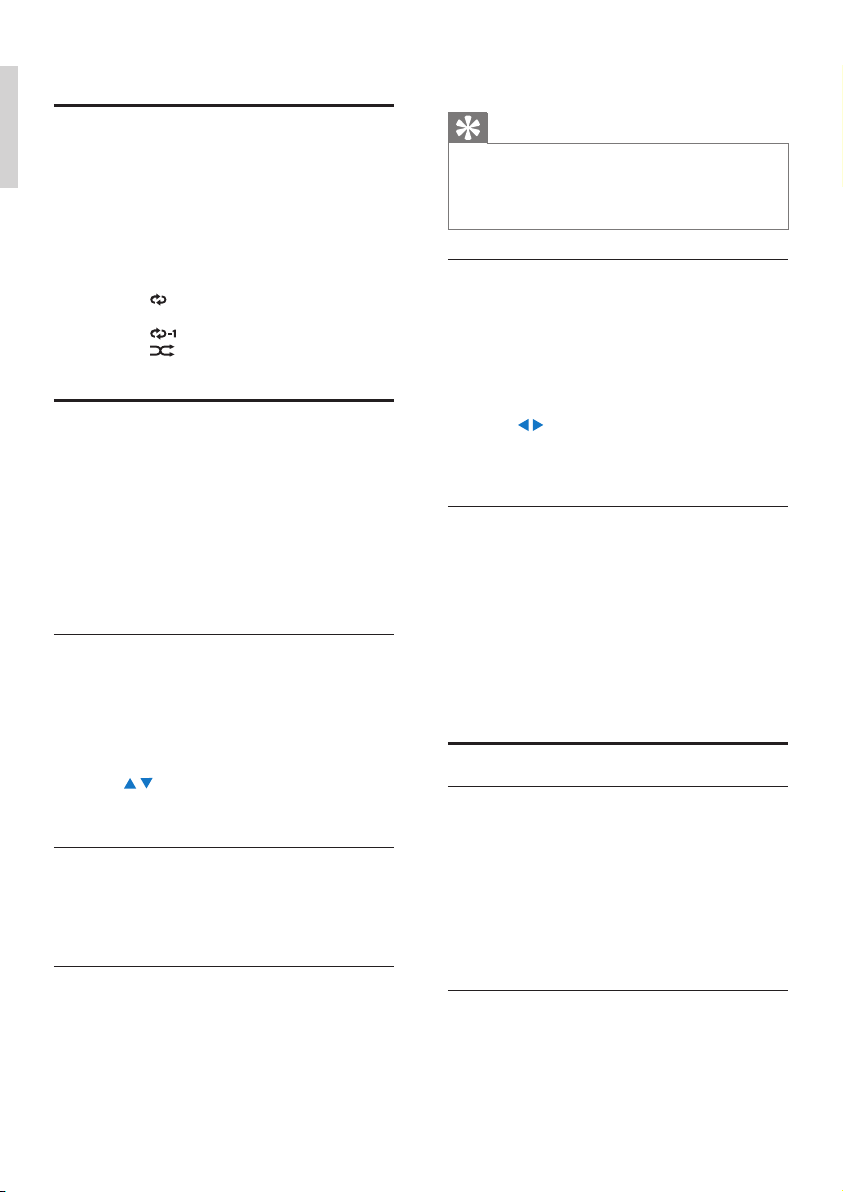
In a long list of options, Superscroll allows you to start
a search in an alphabetical order. You can quickly reach
the rst item that starts with the selected alphabet.
1 Press and hold / to start Superscroll.
A pop-up text box appears. Letters are »
displayed repeatedly in an alphabetical order,
starting from current letter.
2 Release / when you reach the desired letter.
You reach the rst item that starts with the letter. »
7 Play FM radio
Tune to FM radio stations
Note
Before you tune to FM radio stations, ensure •
that you have properly installed the supplied
FM antenna (see ‘Connect the FM antenna’ on
page 12).
Autostore
1 On MCD900, press FM RADIO on the remote
control.
Or, from Home screen, select
• [FM radio].
2 The rst time you tune to FM radio stations,
select [Auto store] in [FM radio].
MCD900 starts to search for available stations »
automatically.
Radio play starts and a maximum of 60 »
stations are stored as presets when the auto
tune is complete.
The preset stations are listed in the order of »
reception strength, with the RDS stations at
the top.
3 To select a preset station, go to [Presets].
Manual tuning
1 In [FM radio], select [Manual tuning].
2 Press and hold / to start auto tuning.
1/6
Alive
All Of Your Life
Argentina
Avril Lavigne
Alive
Alive
A
ll O
f
Your Li
fe
A
rgentina
A
vril Lavigne
A
Note
•
Alphanumeric search, Superscroll and
Quickjump are available only when you enter
a long sorted list of options (excluding the
home screen and lists of menus).
Alphanumeric search
In a long list of options, start alphanumeric search by
entering characters that an item starts with or contains.
1 Press SEARCH on the remote control, if
necessary.
A text box appears. »
2 Enter characters by using the remote control (see
‘Text entry’ on page 9).
3 Press OK after completing text entry.
Search starts. »
You can nd a list of items that contain the »
characters.
You can nd a close match if there is no item »
that contains the character.
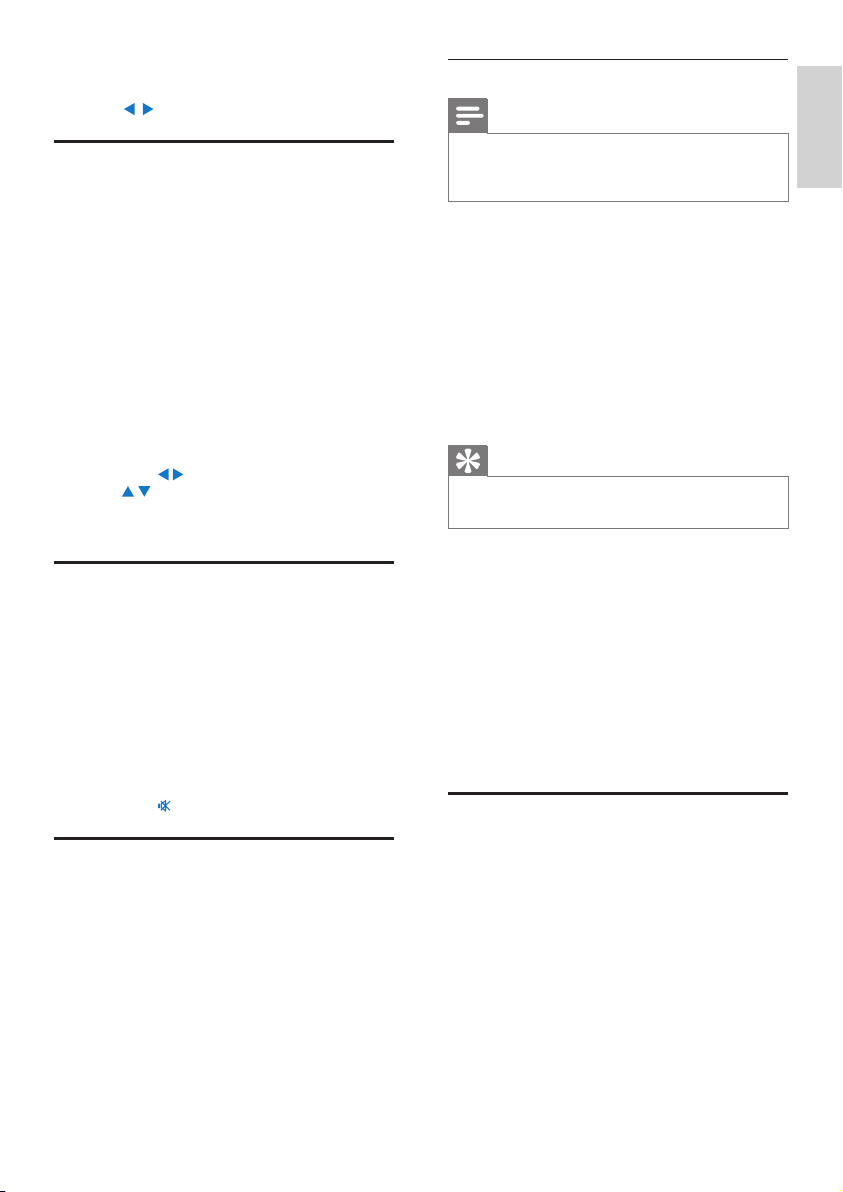
Quickjump
You can also use Quickjump for alphanumeric search.
Toreachtherstitemthatstartswithacertainletter
On the button corresponding to the letter,
•
press once or repeatedly until the letter
appears.
Toreachtherstitemthatstartswiththenextletter
Press
• .
Toreachtherstitemthatstartswiththeprevious
letter
Press
• .
1/6
Alive
All Of Your Life
Argentina
Avril Lavigne
Alive
Alive
Al
l
O
f
Your L
if
e
A
rgentin
a
A
vril Lavigne
A
18
Use the RDS for clock setting
Note
When you use an RDS station for clock •
setting, ensure that the RDS station broadcasts
time signals.
1 From Home screen, select [Settings] > [Clock
settings] > [Date and time].
To enter
• [Settings], you can also press
SETTINGSon the remote control.
2 In [Date and time], select [Current date and
time] > [Automatic (RDS)].
The unit searches for the rst preset station »
automatically.
The time is set according to time signals from »
the station.
3 To use another RDS station for clock setting, tune
to the RDS station immediately.
Tip
To use an RDS station for regular clock setting, •
store the station as the rst preset station.
8 Play from an
external audio
device (AUX)
With the AUX IN L / R socket and AUX mode,
MCD900 allows you to play an external audio device
(e.g. a portable media player) through the speakers of
MCD900.
Play from an external audio
device
1 Ensure that the external audio device is properly
connected to MCD900 (see ‘Connect external
audio devices’ on page 13) .
2 On MCD900, select the AUX mode.
From Home screen, select
• [AUX].
Or, press
• AUX on the remote control.
3 On the external audio device, start music play.
For the music play, you can use the sound
•
settings on MCD900.
You tune to the next available station with »
sufcient reception.
3 Press / repeatedly for ne tuning.
Edit preset stations
Store current station to a location
When listening to a radio station, you can store
current station to a desired location (0-9) in the preset
list. The numeric buttons (0-9) on the remote control
correspond to the locations (0-9) in the preset list.
1 Tune to your desired station.
2 On the radio play screen, press and hold a
numeric button.
If necessary, press
• NOW PLAYING to
return to the radio play screen.
Current station is stored to the location.
•
Edit station information
1 In the FM RADIO mode, go to [Presets].
2 In the list of preset stations,
Select the station to be edited;
•
Press • a/A to start editing;
Press
• / to select the entry location; press
/ repeatedly to select desired letters.
3 Press OK to conrm. Press BACK to discard the
changes.
Listen to FM radio
1 On MCD900, press FM RADIO on the remote
control.
Or, from Home screen, select
• [FM radio].
2 Tune to your desired station (see ‘Tune to FM
radio stations’ on page 17).
• To select a preset station:
Go to [FM radio] > [Presets];
Or, press the corresponding numeric
button on the radio play screen (for the rst
10 preset stations only).
3 To mute/unmute the radio play
Press
• .
RDS (Radio Data System)
RDS (Radio Data System) is a service that allows FM
stations to show additional information.
During Autostore, RDS stations are automatically stored
at the top of the list of preset stations.
When tuning to an RDS station, you can see the
following information on the screen:
Station name;
•
Program type, such as news, sports, and •
pop music;
Frequency;
•
Scrolling text (RDS text), if available. •
English
EN
19
English
Turn on or off • [Direct source] in [Settings]
> [Sound settings].
Tip
When • [Direct source] is on, you can still
adjust the volume and [Balance].
The sound effect settings are retained and
•
enabled when [Direct source] is off.
Audio balance
With [Balance], you can improve listening experience
by adjusting difference between the left and right audio
channels.
1 From Home screen, go to [Settings] > [Sound
settings] > [Balance].
Or, press
• SOUND on the remote control
to enter the menu of sound settings.
2 Press / repeatedly to increase/decrease the
output from left/right audio channels.
Press
• CLEAR for equal output from left/
right audio channels.
Set the volume from the external audio
device
With [AUX in volume], you can set the volume from
the connected external device (see ‘Connect external
audio devices’ on page 13).
1 From Home screen, go to [Settings] > [Sound
settings].
Or, press
• SOUND on the remote control
to enter the menu of sound settings.
2 Go to [AUX in volume]. Select the desired
volume level.
Display settings
Brightness
On MCD900, you can adjust the brightness of the
display. As desired, the display lights up, dims or turns
off when MCD900 is turned on or switched to active
standby.
In
• [Settings] > [Display settings] > [Brightness
when on] or[Brightness when standby], select an
option and press OK.
Or, on the remote control, press
• BRIGHTNESS
to select the brightness options for the display.
Wallpaper
For menus on MCD900, you can set the background
display (wallpaper).
To set wallpaper
1 On MCD900, select and play a photo.
9 Settings
Play modes
When playing music, you can choose to play repeatedly,
play in random order, or play one by one. Select a play
mode as desired.
To select a play mode for music play
Before or during music play,
From Home screen, go to
• [Settings] > [Play
mode]; Or,
Press
• REPEAT or SHUFFLE repeatedly on
the remote control.
»
- Play all songs in current folder
repeatedly;
»
- Play current song repeatedly;
»
- Play all songs in current folder
randomly.
Sound settings
On MCD900, you can select different sound settings in
[Settings] > [Sound settings].
1 From Home screen, go to [Settings] > [Sound
settings].
Or, press
• SETTINGS on the remote control
to enter [Settings].
2 Select the option. Press OK to turn it on or off.
Or,
On the remote control, press SOUND to enter the
menu of sound settings.
Bass and treble
Use [Bass / Treble] to adjust the low (bass) or high
(treble) range of musical notes.
1 From Home screen, go to [Settings] > [Sound
settings] > [Bass / Treble].
Or, press
• SOUND on the remote control
to enter the menu of sound settings.
2 Press / repeatedly to increase/decrease the
level.
Press
• CLEAR to select neutral level.
Full sound
[FullSound] restores the sonic details that music
compression loses (e.g. MP3, WMA).
Turn on or off [FullSound] in [Settings] >[Sound
settings].
Direct Source
With [Direct source], you can turn off the settings of
sound effects on MCD900, including [FullSound] and
[Bass / Treble].
Thus, music plays in an original way, without the sound
effects from MCD900.
EN
20
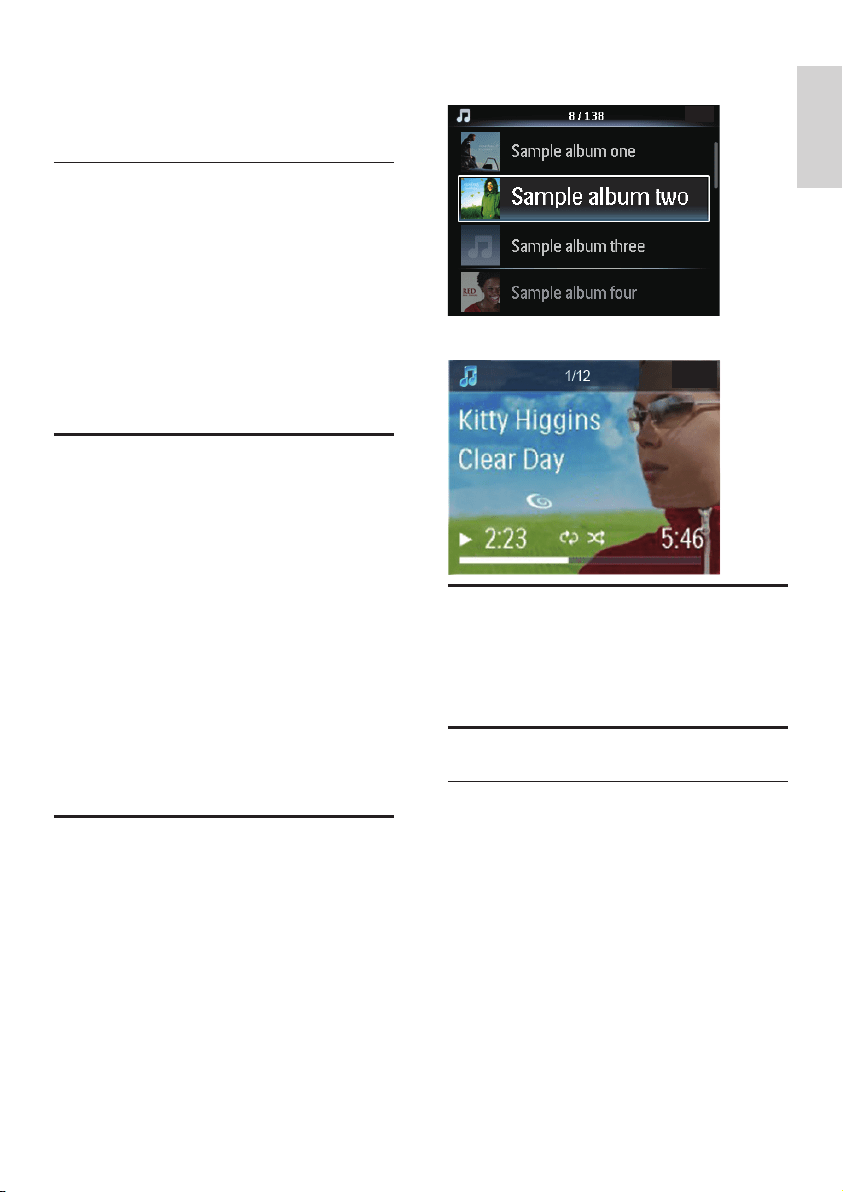
In the list of songs, the album art appears as »
thumbnail along with the corresponding song.
During the song play, the album art is displayed »
in full screen as the background.
Clicker sound
MCD900 can give you an audible feedback (clicker
sound) every time you press a button on the remote
control.
You can turn the clicker sound on or off in [Settings]
>[Clicker sound].
Clock settings
Alarm
Set the alarm
1 Ensure that you have set the clock (see ‘Date and
time’ on page 21).
2 From Home screen, go to [Settings] > [Clock
settings] >[Alarm].
3 To set the source of alarm sound,
Select • [Music];
At the set alarm time, last played song »
sounds, or you tune to the last played
FM radio station.
Select • [Buzzer];
At the set alarm time, the buzzer »
sounds.
4 To set the alarm time,
2 Press SETTINGS on the remote control to select
[Settings] > [Display settings] > [Wallpaper].
3 In [Wallpaper], select [Current picture].
Current picture is set as wallpaper. »
Screensaver
On MCD900, the screensaver is turned on when
MCD900 is switched to active standby.
When turned on, the selected screensaver appears.
The clock is shown on the lower right corner of the
screen.
By default, clock display appears as the screensaver.
To set screensaver
1 On MCD900, select and play a picture.
2 Press SETTINGS on the remote control to select
[Settings] > [Display settings] > [Screen saver].
3 In [Screen saver], select [Current picture].
Current picture is set as screensaver. »
Slideshow settings
When in the slideshow mode, you can view pictures one
by one.
To select a play mode for slideshow
1 From the home screen, go to [Settings] >
[Slideshow settings].
Or, press SETTINGS on the remote control to
enter [Settings].
2 Select one of the following play modes. Press OK
to turn it on or off.
» [Repeat]: Play all pictures repeatedly;
» [Shufe]: Play all pictures randomly.
To set the play time of each picture
1 From Home screen, go to [Settings] >
[Slideshow settings] > [Time per slide].
Or, press
• SETTINGS on the remote control
to enter [Settings].
2 In [Time per slide], select the desired time
duration.
Album art (in the USB mode)
Album art (the picture of CD/album cover) is sometimes
available for music downloads. With some media
management software, album art can be inserted for the
songs. By turning [Album art] on or off, you can choose
whether to show the picture of CD/album cover for
corresponding songs.
To turn on [Album art]
1 From the home screen, go to [Settings] >
[Album art].
Or, press SETTINGS on the remote control to
enter [Settings].
2 Select [Album art]. Press OK to turn it on or off.
If [Album art] is on,
English
EN
21
English
To set the time duration
1 From the home screen, go to [Settings] > [Clock
settings] > [Sleep timer].
Or, press
• SETTINGS on the remote control
to enter [Settings].
2 Select an option. Press OK to turn it on.
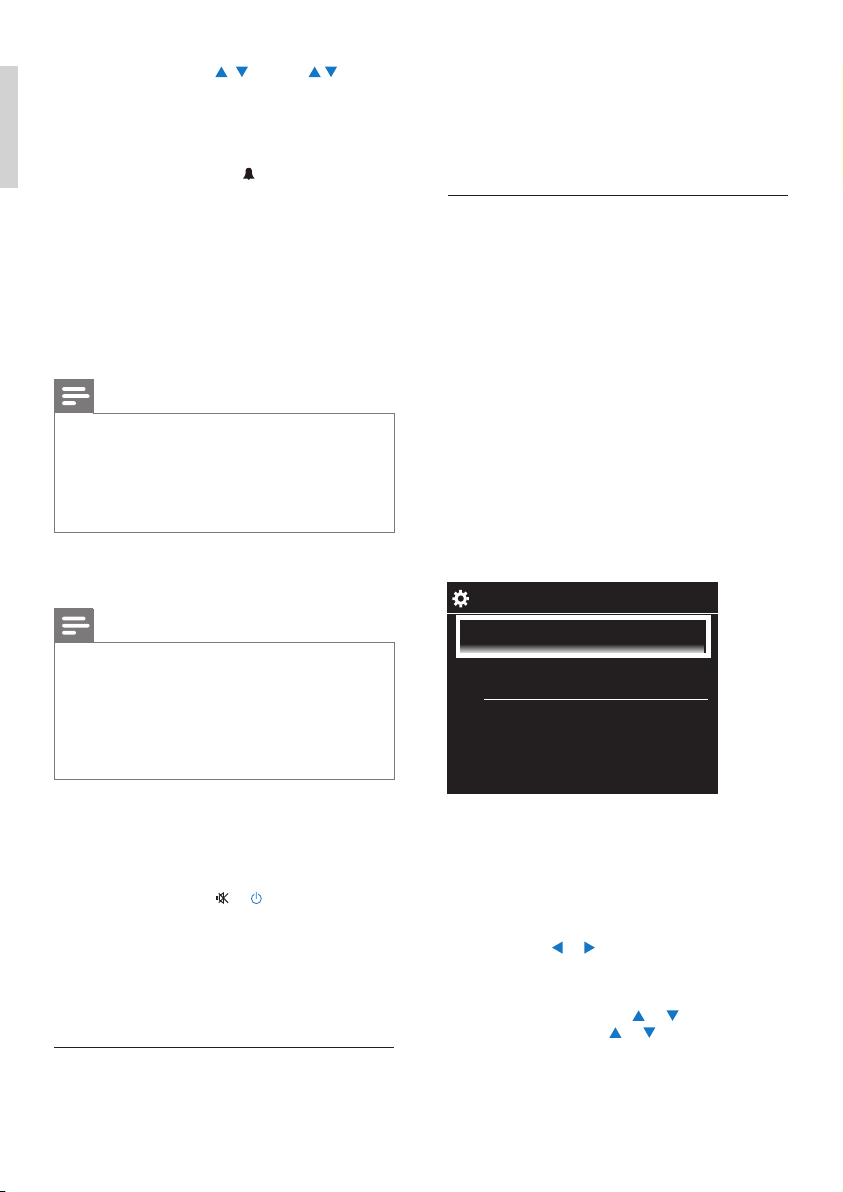
Date and time
The date and time can be set automatically or manually.
Automatic setting
For automatic clock setting, use the time signal from
FM RDS radio.
Through time signals from FM RDS radio
1 On the unit, turn on the FM radio, if necessary.
Ensure that the FM antenna is connected
•
properly (see ‘Connect the FM antenna’ on
page 12).
2 On the rst location for preset stations, store an
FM RDS station that transmits time signals.
3 From Home screen, select [Settings] > [Clock
settings] > [Date and time].
4 In [Date and time], select [Current date and
time] > [Automatic (RDS)].
The unit searches for the rst preset station »
automatically.
The time is set according to time signals from »
the station.
Manual setting
1 Turn on the unit, if necessary.
2 From Home screen, select [Settings] > [Clock
settings] >[Date and time].
3 In [Date and time], select [Current date and
time] > [Manual].
4 To enter date and time,
Press
• or to select the entry location;
Use the alphanumeric buttons to enter
•
desired digits;
Press
• OK to conrm.
You can also press
• or repeatedly, or
press and hold
or until the desired
digit appears.
Set date/time format
Select how date and time are displayed in the clock.
1/2
Automatic (RDS)
Manual
Press and hold • / , or press /
repeatedly until you reach the desired digits.
Press OK to conrm.
Or, enter the desired digits by using the
•
alphanumeric buttons on the remote
control.
The alarm icon »
appears on the screen.
To play a song or FM radio station as the next alarm
sound
1 Ensure that you have selected [Music] in the Step
3 above;
2 Before you turn off MCD900, or switch MCD900
to active standby,
Go to
• [USB], and select and play the
desired song;
Or, go to
• [FM radio], and tune to the
desired station.
Note
Keep the USB ash device connected to •
MCD900, if you select a song as the alarm
sound.
Tune to an FM radio station that is in service
•
at the set alarm time, if you select FM radio as
the alarm sound.
Use the alarm
At the set alarm time, music/FM radio plays as desired,
or the buzzer sounds.
Note
The alarm sounds even if you have switched •
MCD900 to active standby or Eco standby.
The buzzer sounds instead, if MCD900 fails to
•
detect a USB ash device.
MCD900 is unmuted if it has been muted.
•
The alarm sounds in a higher volume if the •
volume level is lower than minimum.
To snooze the alarm
Press any button on the unit or the remote
•
control (except for the volume buttons).
The alarm sounds again 15 minutes later. »
The alarm icon remains.
To stop the alarm
Press and hold
• or .
The alarm is stopped. The alarm icon »
disappears.
The alarm sounds again next day. »
To turn off the alarm
Go to
• [Settings] > [Clock settings] >
[Alarm]. Select [Alarm off] and press OK
on the remote control.
Sleep timer
With the sleep timer, you can have MCD900 turned
off automatically after the set timer duration.
EN
22
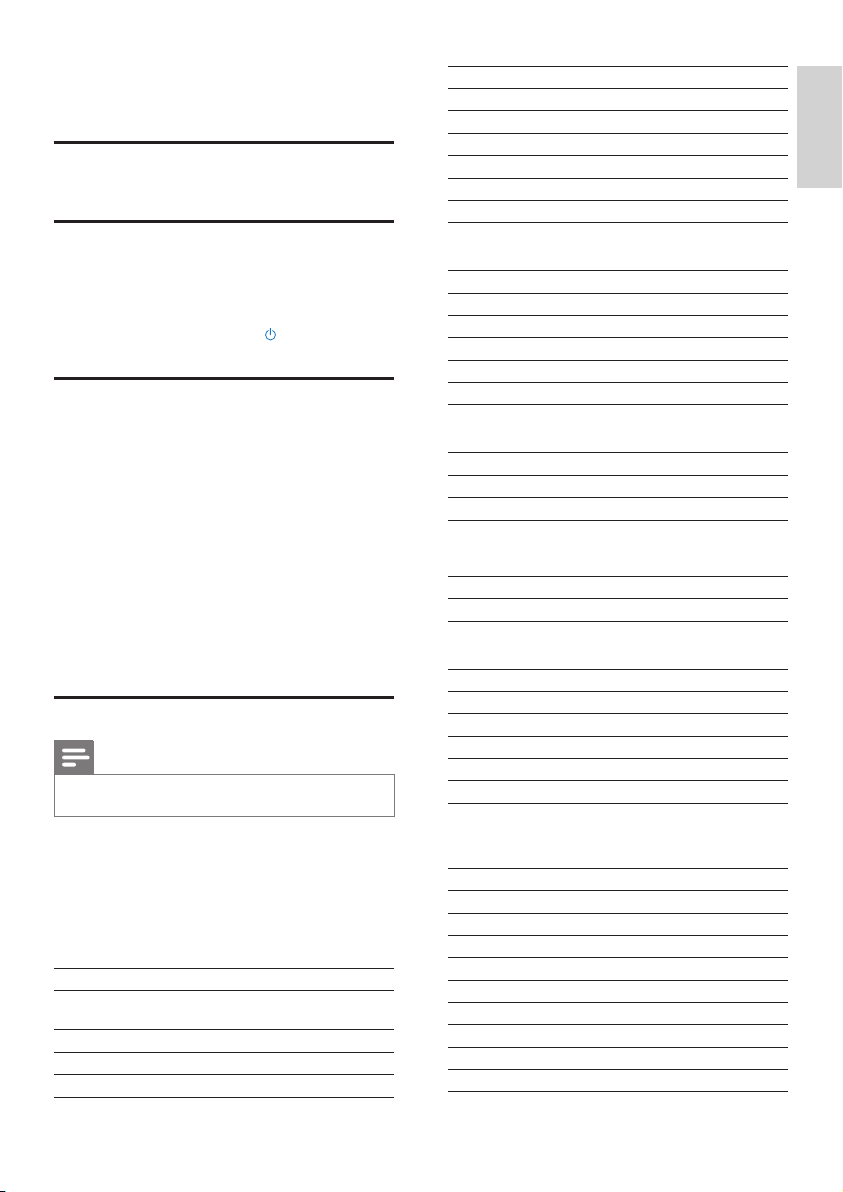
5V USB power, 900mA (Provided by Main unit)¹
Dimensions
Main unit: 251 x 251 x 133mm (including LCD)
DVD unit: 251 x 251 x 69mm
Speaker box: 175 x 202 x 354mm
Weight (net)
12.50kg (all items)
Power consumption
Active (On)
< 45W (according to IEC60065)
(Active) Standby
< 11W (HDD-spun down)
ECO (Passive) Standby
< 0.8W
Audio inputs
Aux in (Line in)
2x Cinch
Input sensitivity
0.5V: Position High
0.8V: Position Medium
1.55V: Position Low
Input impedance
> 10kΩ (Ohms)
Audio outputs
Headphones
1 x 3.5mm jack, 30 – 18000Hz, 16 - 150Ω (Ohms)
Signal to noise ratio (Headphones)
typically 90dBA (IEC)
Distortion (Headphones)
< 0.10%
Audio / Video outputs (only provide output during disc
playback)
SPDIF
1 x Cinch (Coax), 0.5V, 75 Ohm
Line out
2 x Cinch, 20 – 20000Hz, 1.5V
Signal to noise ratio (Line out)
typically 98dBA (IEC)
CVBS
1 x Cinch, 1Vpp, 75 Ohm
Composite Video output (PbPrY)
3 x Cinch, 75 Ohm, Pb/Pr: 0.7Vpp, Y: 1Vpp
1 Follow Step 1-2 under “Manual setting”.
2 In [Date and time], go to [Time format] or [Date
format] to select options.
Language
After the rst-time setup, you can change the language
selection in [Settings] > [Language].
Demo mode
You can view the demo to learn major functions on MCD900.
1 From Home screen, go to [Settings] > [Demo
mode].
Demo play starts. »
2 To exit the demo play, press .
The unit is switched to Eco standby. »
Restore factory settings
You can restore MCD900 to factory settings. All your
settings are removed, including the settings of network, sound,
display, clock, alarm and language.
1 Go to [Settings] > [Restore factory settings].
2 As prompted, select [Yes].
The unit is turned off. »
The unit is turned on again automatically when »
the factory settings are restored.
Start the rst-time setup. »
10 Maintenance
This chapter tells you how to care for MCD900.
Cleaning
Note
Avoid moisture and abrasion. •
1 Clean MCD900 only with a soft dry cloth.
11 Technical data
General
AC Power (Main unit)
220-240V, ~ 50-60Hz (for /12, /05 /79)
120V, ~ 60Hz (for /37)
DC Power (DVD unit)
DIN connector (Output provided by Main unit)
DCPower(USBashdeviceunit)
English
EN

23
English
AAC (M4A)
16 - 320kbps (CBR / VBR)
PCM/ WAV
1x (1.4Mbps)
FLAC
Yes, supported
Ogg Vorbis
Yes, supported
eACC
Yes, supported
JPEG
Yes, supported (Maximum size: 7MB)
Playlist support (excluding the disc player)
*.m3u, *.wpl
Yes
FM Tuner
Frequency range
87.50 to 108.00MHz
No. of Presets
60
Signal noise ratio (Mono)
≥ 62dB
Tuning grid
50kHz
RDS
Yes; PTY, PS, Text including RDS clock setting
Antenna connector
IEC (75 Ohm)
DISC player
Supported discs
DVD, VCD, SVCD, DVD+RW, DVD-RW, DVD+R,
DVD-R, Picture (JPEG) CD, DivX (Ultra) Disc MP3 /
WMA CDR / CDRW, CD (CDDA)
Disc size support
8cm/ 12cm
Video decoding
MPEG 1, MPEG 2, DivX, JPEG
Audio decoding
MP3: 112 to 320kbps (Sampling rate: 32,44.1,48kHz)
WMA: 48 to 192kbps (Sampling rate: 44.1, 48kHz)
HDMI Audio support
Yes
HDMI
480i, 480p, 576i, 576p, 1080i, 1080p
Video system
PAL / NTSC
Video format
4:3 / 16:9
Audioamplier(Digital)
Output power
2 x 50W (RMS) (= total power 100W)
Frequency response
20Hz to 20000Hz (±0.5dB)
Signal to noise ratio
typically 92dB
Speakers
Power handling
50W (RMS) / 60W (MPO)
Impedance
8Ω (Ohms)
Sensitivity
86dB/ 1m/ W
Dimensions
Woofer: 5.00 inches
Tweeter: 1.50 inches
Frequency response
45 to 20000Hz
Sound features
FullSound®
Yes (on/ off )
Bass/ Treble control
+/ - 10 steps
Balance control
+/ - 10 steps
Direct Source (Flat)
Yes (on/ off )
Decoding capabilities (excluding the disc player)
MP3
8 - 320kbps (CBR / VBR)
WMA
32 - 192kbps (CBR / VBR)
WMT DRM - ND (WMA DRM - 10)
No
EN
24
12 Troubleshooting
Caution
Never remove the casing of this unit. •
To keep the warranty valid, never try to repair the system
yourself.
If you encounter problems when using this unit, check the
following points before requesting service.
If the problem remains unsolved, go to the Philips web
site (www.philips.com/support). When you contact Philips,
ensure that your unit is nearby and the model number
and serial number are available.
Remote control does not work
Before pressing any function button, rst select •
the correct source with the remote control
instead of the main unit.
Reduce the distance between the remote control •
and the apparatus.
Insert the battery with its polarities (+/– signs) •
aligned as indicated.
Replace the battery. •
Aim the remote control directly at the sensor on •
the front of the apparatus.
Poor radio reception
Increase the distance between the apparatus and •
your TV or VCR.
Fully extend the FM antenna. •
Connect an outdoor FM antenna instead. •
Audio or subtitle languages cannot be set
The disc is not recorded with sound or subtitles •
in multiple languages.
The audio or subtitle language setting is •
prohibited on the disc.
CannotdisplaysomelesinaUSBmassstoragedevice
The number of folders or les in the USB mass •
storage device has exceeded the limit.
The formats of these les are not supported. •
USB
USB port type
Type A, Host
Supported media
FAT, FAT-32, NTFS
Supported class
MSC only (no MTP support)
Multi-partition support
No, only rst readable partition
Database support
Up to 40000 songs
Display/Clock
Resolution
Dotmatrix, 320 x 240 dots (QVGA), Color TFT
Size
3.5 inches
Backlight
Can be turned on/ off and can be dimmed
Clock/ Date display
Yes
Wallpaper/ Screensaver
Yes
Automatic time setting via RDS
Yes, enabled
Sleep timer
Yes
Internal (key) clicker
Yes
Note
Specications and external appearance are •
subject to changes without notice.
English
EN

Written Offer
Philips Electronics Hong Kong Ltd. hereby offers to deliver, upon request, a copy of the corresponding source code for the open source software
packages used in this product for which such offer is requested by the respective licenses. This offer is valid up to three years after product
purchase.To obtain source code, please contact [email protected]. If you prefer not to use email or if you do not receive conrmation
receipt within a week after mailing to this email address, please write to Open Source Team, Philips Intellectual Property & Standards, P.O. Box 220,
5600 AE Eindhoven,The Netherlands. If you do not receive timely conrmation of your letter, please email to the email address above.
This product uses the following open source software:
uClinux for Blackn 2009R1 Release <http://blackn.uclinux.org/>, licensed under GPL V2, BusyBox R1.13.4 <http://www.busybox.net/>, licensed
under GPL V2, Samba r3.0.25a <http://samba.org/samba/>, licensed under GPL V2, Wireless Tools for Linux v29 <http://www.hpl.hp.com/personal/
Jean_Tourrilhes/ Linux/Tools.html>, licensed under GPL V2, NTFS-3G driver r2009.11.14 <http://www.tuxera.com/community/>, licensed under
GPL V2, Das U-Boot r1.1.6 <http://www.denx.de/wiki/U-Boot>, with exclusions for user programs.
NOTE! This copyright does *not* cover the so-called "standalone" applications that use U-Boot services by means of the jump table provided by
U-Boot exactly for this purpose - this is merely considered normal use of U-Boot, and does *not* fall under the heading of "derived work".
The header les "include/image.h" and "include/asm-*/u-boot.h" dene interfaces to U-Boot. Including these (unmodied) header les in another
le is considered normal use of U-Boot, and does *not* fall under the heading of "derived work".
Also note that the GPL below is copyrighted by the Free Software Foundation, but the instance of code that it refers to (the U-Boot source code)
is copyrighted by me and others who actually wrote it. --Wolfgang Denk
Linux kernel release 2.6.xx <http://kernel.org/>, licensed under GPL V2 with exclusions for user programs.
NOTE! This copyright does *not* cover user programs that use kernel services by normal system calls - this is merely considered normal use of
the kernel, and does *not* fall under the heading of "derived work". Also note that the GPL below is copyrighted by the Free Software
Foundation, but the instance of code that it refers to (the Linux kernel) is copyrighted by me and others who actually wrote it.
Also note that the only valid version of the GPL as far as the kernel is concerned is _this_ particular version of the license (ie v2, not v2.2 or v3.x
or whatever), unless explicitly otherwise stated.
Linus Torvalds
GPL V2
GNU GENERAL PUBLIC LICENSE Version 2, June 1991 Copyright (C) 1989, 1991 Free Software Foundation, Inc. 51 Franklin St, Fifth Floor,
Boston, MA 02110-1301 USA Everyone is permitted to copy and distribute verbatim copies of this license document, but changing it is not
allowed.
Preamble
The licenses for most software are designed to take away your freedom to share and change it. By contrast, the GNU General Public License
is intended to guarantee your freedom to share and change free software--to make sure the software is free for all its users. This General Public
License applies to most of the Free Software Foundation's software and to any other program whose authors commit to using it. (Some other
Free Software Foundation software is covered by the GNU Library General Public License instead.) You can apply it to your programs, too. When
we speak of free software, we are referring to freedom, not price. Our General Public Licenses are designed to make sure that you have the
freedom to distribute copies of free software (and charge for this service if you wish), that you receive source code or can get it if you want it,
that you can change the software or use pieces of it in new free programs; and that you know you can do these things. To protect your rights, we
need to make restrictions that forbid anyone to deny you these rights or to ask you to surrender the rights. These restrictions translate to certain
responsibilities for you if you distribute copies of the software, or if you modify it.
For example, if you distribute copies of such a program, whether gratis or for a fee, you must give the recipients all the rights that you have. You
must make sure that they, too, receive or can get the source code. And you must show them these terms so they know their rights.
We protect your rights with two steps: (1) copyright the software, and (2) offer you this license which gives you legal permission to copy, distribute
and/or modify the software. Also, for each author's protection and ours, we want to make certain that everyone understands that there is no
warranty for this free software. If the software is modied by someone else and passed on, we want its recipients to know that what they have is
not the original, so that any problems introduced by others will not reect on the original authors' reputations.
Finally, any free program is threatened constantly by software patents. We wish to avoid the danger that redistributors of a free program will
individually obtain patent licenses, in effect making the program proprietary. To prevent this, we have made it clear that any patent must be licensed
for everyone's free use or not licensed at all. The precise terms and conditions for copying, distribution and modication follow.
GNU GENERAL PUBLIC LICENSE TERMS AND CONDITIONS FOR COPYING, DISTRIBUTION AND MODIFICATION
0.This License applies to any program or other work which contains a notice placed by the copyright holder saying it may be distributed under
the terms of this General Public License. The "Program", below, refers to any such program or work, and a "work based on the Program" means
either the Program or any derivative work under copyright law: that is to say, a work containing the Program or a portion of it, either verbatim or
with modications and/or translated into another language. (Hereinafter, translation is included without limitation in the term "modication".) Each
licensee is addressed as "you". Activities other than copying, distribution and modication are not covered by this License; they are outside its scope.
The act of running the Program is not restricted, and the output from the Program is covered only if its contents constitute a work based on the
Program (independent of having been made by running the Program). Whether that is true depends on what the Program does.
1.You may copy and distribute verbatim copies of the Program's source code as you receive it, in any medium, provided that you conspicuously
and appropriately publish on each copy an appropriate copyright notice and disclaimer of warranty; keep intact all the notices that refer to this
License and to the absence of any warranty; and give any other recipients of the Program a copy of this License along with the Program. You may
charge a fee for the physical act of transferring a copy, and you may at your option offer warranty protection in exchange for a fee.
2.You may modify your copy or copies of the Program or any portion of it, thus forming a work based on the Program, and copy and
distribute such modications or work under the terms of Section 1 above, provided that you also meet all of these conditions:
a) You must cause the modied les to carry prominent notices stating that you changed the les and the date of any change.
b) You must cause any work that you distribute or publish, that in whole or in part contains or is derived from the Program or any part thereof,
to be licensed as a whole at no charge to all third parties under the terms of this License.
c) If the modied program normally reads commands interactively when run, you must cause it, when started running for such interactive use
in the most ordinary way, to print or display an announcement including an appropriate copyright notice and a notice that there is no warranty
(or else, saying that you provide a warranty) and that users may redistribute the program under these conditions, and telling the user how to view
a copy of this License. (Exception: if the Program itself is interactive but does not normally print such an announcement, your work based on the
Program is not required to print an announcement.)
These requirements apply to the modied work as a whole. If identiable sections of that work are not derived from the Program, and can be
reasonably considered independent and separate works in themselves, then this License, and its terms, do not apply to those sections when you
distribute them as separate works. But when you distribute the same sections as part of a whole which is a work based on the Program, the
distribution of the whole must be on the terms of this License, whose permissions for other licensees extend to the entire whole, and thus to each
and every part regardless of who wrote it. Thus, it is not the intent of this section to claim rights or contest your rights to work written entirely by
you; rather, the intent is to exercise the right to control the distribution of derivative or collective works based on the Program. In addition, mere
aggregation of another work not based on the Program with the Program (or with a work based on the Program) on a volume of a storage or
distribution medium does not bring the other work under the scope of this License.
3.You may copy and distribute the Program (or a work based on it, under Section 2) in object code or executable form under the terms of
Sections 1 and 2 above provided that you also do one of the following:
a) Accompany it with the complete corresponding machine-readable source code, which must be distributed under the terms of Sections 1 and
2 above on a medium customarily used for software interchange; or,
b) Accompany it with a written offer, valid for at least three years, to give any third party, for a charge no more than your cost of physically
performing source distribution, a complete machine-readable copy of the corresponding source code, to be distributed under the terms of
Sections 1 and 2 above on a medium customarily used for software interchange; or,

c) Accompany it with the information you received as to the offer to distribute corresponding source code. (This alternative is allowed only for
noncommercial distribution and only if you received the program in object code or executable form with such an offer, in accord with Subsection
b above.) The source code for a work means the preferred form of the work for making modications to it. For an executable work, complete
source code means all the source code for all modules it contains, plus any associated interface denition les, plus the scripts used to control
compilation and installation of the executable. However, as a special exception, the source code distributed need not include anything that is
normally distributed (in either source or binary form) with the major components (compiler, kernel, and so on) of the operating system on which
the executable runs, unless that component itself accompanies the executable. If distribution of executable or object code is made by offering
access to copy from a designated place, then offering equivalent access to copy the source code from the same place counts as distribution of the
source code, even though third parties are not compelled to copy the source along with the object code.
4.You may not copy, modify, sublicense, or distribute the Program except as expressly provided under this License. Any attempt otherwise to copy,
modify, sublicense or distribute the Program is void, and will automatically terminate your rights under this License. However, parties who have
received copies, or rights, from you under this License will not have their licenses terminated so long as such parties remain in full compliance.
5.You are not required to accept this License, since you have not signed it. However, nothing else grants you permission to modify or distribute
the Program or its derivative works. These actions are prohibited by law if you do not accept this License. Therefore, by modifying or distributing
the Program (or any work based on the Program), you indicate your acceptance of this License to do so, and all its terms and conditions for
copying, distributing or modifying the Program or works based on it.
6. Each time you redistribute the Program (or any work based on the Program), the recipient automatically receives a license from the original
licensor to copy, distribute or modify the Program subject to these terms and conditions. You may not impose any further restrictions on the
recipients' exercise of the rights granted herein. You are not responsible for enforcing compliance by third parties to this License.
7. If, as a consequence of a court judgment or allegation of patent infringement or for any other reason (not limited to patent issues), conditions
are imposed on you (whether by court order, agreement or otherwise) that contradict the conditions of this License, they do not excuse you from
the conditions of this License. If you cannot distribute so as to satisfy simultaneously your obligations under this License and any other pertinent
obligations, then as a consequence you may not distribute the Program at all. For example, if a patent license would not permit royalty-free
redistribution of the Program by all those who receive copies directly or indirectly through you, then the only way you could satisfy both it and
this License would be to refrain entirely from distribution of the Program. If any portion of this section is held invalid or unenforceable under any
particular circumstance, the balance of the section is intended to apply and the section as a whole is intended to apply in other circumstances. It
is not the purpose of this section to induce you to infringe any patents or other property right claims or to contest validity of any such claims; this
section has the sole purpose of protecting the integrity of the free software distribution system, which is implemented by public license practices.
Many people have made generous contributions to the wide range of software distributed through that system in reliance on consistent application
of that system; it is up to the author/donor to decide if he or she is willing to distribute software through any other system and a licensee cannot
impose that choice. This section is intended to make thoroughly clear what is believed to be a consequence of the rest of this License.
8. If the distribution and/or use of the Program is restricted in certain countries either by patents or by copyrighted interfaces, the original
copyright holder who places the Program under this License may add an explicit geographical distribution limitation excluding those countries, so
that distribution is permitted only in or among countries not thus excluded. In such case, this License incorporates the limitation as if written in
the body of this License.
9.The Free Software Foundation may publish revised and/or new versions of the General Public License from time to time. Such new versions
will be similar in spirit to the present version, but may differ in detail to address new problems or concerns. Each version is given a distinguishing
version number. If the Program species a version number of this License which applies to it and "any later version", you have the option of
following the terms and conditions either of that version or of any later version published by the Free Software Foundation. If the Program does
not specify a version number of this License, you may choose any version ever published by the Free Software Foundation.
10. If you wish to incorporate parts of the Program into other free programs whose distribution conditions are different, write to the author to
ask for permission. For software which is copyrighted by the Free Software Foundation, write to the Free Software Foundation; we sometimes
make exceptions for this. Our decision will be guided by the two goals of preserving the free status of all derivatives of our free software and of
promoting the sharing and reuse of software generally.
NO WARRANTY
11. BECAUSE THE PROGRAM IS LICENSED FREE OF CHARGE,THERE IS NO WARRANTY FOR THE PROGRAM,TO THE EXTENT
PERMITTED BY APPLICABLE LAW. EXCEPT WHEN OTHERWISE STATED IN WRITING THE COPYRIGHT HOLDERS AND/OR OTHER
PARTIES PROVIDE THE PROGRAM "AS IS" WITHOUT WARRANTY OF ANY KIND, EITHER EXPRESSED OR IMPLIED, INCLUDING, BUT
NOT LIMITED TO,THE IMPLIED WARRANTIES OF MERCHANTABILITY AND FITNESS FOR A PARTICULAR PURPOSE. THE ENTIRE RISK AS
TO THE QUALITY AND PERFORMANCE OF THE PROGRAM IS WITH YOU. SHOULD THE PROGRAM PROVE DEFECTIVE,YOU ASSUME
THE COST OF ALL NECESSARY SERVICING, REPAIR OR CORRECTION.
12. IN NO EVENT UNLESS REQUIRED BY APPLICABLE LAW OR AGREED TO IN WRITING WILL ANY COPYRIGHT HOLDER, OR ANY
OTHER PARTY WHO MAY MODIFY AND/OR REDISTRIBUTE THE PROGRAM AS PERMITTED ABOVE, BE LIABLE TO YOU FOR DAMAGES,
INCLUDING ANY GENERAL, SPECIAL, INCIDENTAL OR CONSEQUENTIAL DAMAGES ARISING OUT OF THE USE OR INABILITY TO
USE THE PROGRAM (INCLUDING BUT NOT LIMITED TO LOSS OF DATA OR DATA BEING RENDERED INACCURATE OR LOSSES
SUSTAINED BY YOU OR THIRD PARTIES OR A FAILURE OF THE PROGRAM TO OPERATE WITH ANY OTHER PROGRAMS), EVEN IF
SUCH HOLDER OR OTHER PARTY HAS BEEN ADVISED OF THE POSSIBILITY OF SUCH DAMAGES.
END OF TERMS AND CONDITIONS
How to Apply These Terms to Your New Programs
If you develop a new program, and you want it to be of the greatest possible use to the public, the best way to achieve this is to make it free
software which everyone can redistribute and change under these terms. To do so, attach the following notices to the program. It is safest to
attach them to the start of each source le to most effectively convey the exclusion of warranty; and each le should have at least the "copyright"
line and a pointer to where the full notice is found.
<one line to give the program's name and a brief idea of what it does.> Copyright (C) <year> <name of author>
This program is free software; you can redistribute it and/or modify it under the terms of the GNU General Public License as published by the
Free Software Foundation; either version 2 of the License, or (at your option) any later version.
This program is distributed in the hope that it will be useful, but WITHOUT ANY WARRANTY; without even the implied warranty of
MERCHANTABILITY or FITNESS FOR A PARTICULAR PURPOSE. See the GNU General Public License for more details. You should have
received a copy of the GNU General Public License along with this program; if not, write to the Free Software Foundation, Inc., 51 Franklin St, Fifth
Floor, Boston, MA 02110-1301 USA Also add information on how to contact you by electronic and paper mail. If the program is interactive, make
it output a short notice like this when it starts in an interactive mode:
Gnomovision version 69, Copyright (C) year name of author Gnomovision comes with ABSOLUTELY NO WARRANTY; for details type
`show w'. This is free software, and you are welcome to redistribute it under certain conditions; type `show c' for details. The hypothetical
commands `show w' and `show c' should show the appropriatepartsoftheGeneralPublicLicense. Of course,thecommandsyou use may be called
something other than `show w' and `show c'; they could even be mouse-clicks or menu items--whatever suits your program. You should also get
your employer (if you work as a programmer) or your school, if any, to sign a "copyright disclaimer" for the program, if necessary. Here is a sample;
alter the names: Yoyodyne, Inc., hereby disclaims all copyright interest in the program `Gnomovision' (which makes passes at compilers) written by
James Hacker.
<signature of Ty Coon>, 1 April 1989 Ty Coon, President of Vice
This General Public License does not permit incorporating your program into proprietary programs. If your program is a subroutine library, you
may consider it more useful to permit linking proprietary applications with the library. If this is what you want to do, use the GNU Library General
Public License instead of this License.
uClibc r0.9 <http://www.uclibc.org/>, , licensed under LGPL V2,
LGPL V2

GNU LIBRARY GENERAL PUBLIC LICENSE Version 2, June 1991 Copyright (C) 1991 Free Software Foundation, Inc. 675 Mass Ave, Cambridge,
MA 02139, USA Everyone is permitted to copy and distribute verbatim copies of this license document, but changing it is not allowed. [This is the
rst released version of the library GPL. It is numbered 2 because it goes with version 2 of the ordinary GPL.]
Preamble
The licenses for most software are designed to take away your freedom to share and change it. By contrast, the GNU General Public Licenses are
intended to guarantee your freedom to share and change free software--to make sure the software is free for all its users.
This license, the Library General Public License, applies to some specially designated Free Software Foundation software, and to any other libraries
whose authors decide to use it. You can use it for your libraries, too. When we speak of free software, we are referring to freedom, not price. Our
General Public Licenses are designed to make sure that you have the freedom to distribute copies of free software (and charge for this service if
you wish), that you receive source code or can get it if you want it, that you can change the software or use pieces of it in new free programs; and
that you know you can do these things. To protect your rights, we need to make restrictions that forbid anyone to deny you these rights or to ask
you to surrender the rights. These restrictions translate to certain responsibilities for you if you distribute copies of the library, or if you modify it.
For example, if you distribute copies of the library, whether gratis or for a fee, you must give the recipients all the rights that we gave you. You
must make sure that they, too, receive or can get the source code. If you link a program with the library, you must provide complete object les to
the recipients so that they can relink them with the library, after making changes to the library and recompiling it. And you must show them these
terms so they know their rights.
Our method of protecting your rights has two steps: (1) copyright the library, and (2) offer you this license which gives you legal permission to
copy, distribute and/or modify the library. Also, for each distributor's protection, we want to make certain that everyone understands that there is
no warranty for this free library. If the library is modied by someone else and passed on, we want its recipients to know that what they have is
not the original version, so that any problems introduced by others will not reect on the original authors' reputations.
Finally, any free program is threatened constantly by software patents. We wish to avoid the danger that companies distributing free software will
individually obtain patent licenses, thus in effect transforming the program into proprietary software. To prevent this, we have made it clear that any
patent must be licensed for everyone's free use or not licensed at all.
Most GNU software, including some libraries, is covered by the ordinary GNU General Public License, which was designed for utility programs.
This license, the GNU Library General Public License, applies to certain designated libraries. This license is quite different from the ordinary one; be
sure to read it in full, and don't assume that anything in it is the same as in the ordinary license. The reason we have a separate public license for
some libraries is that they blur the distinction we usually make between modifying or adding to a program and simply using it. Linking a program
with a library, without changing the library, is in some sense simply using the library, and is analogous to running a utility program or application
program. However, in a textual and legal sense, the linked executable is a combined work, a derivative of the original library, and the ordinary
General Public License treats it as such.
Because of this blurred distinction, using the ordinary General Public License for libraries did not effectively promote software sharing, because
most developers did not use the libraries. We concluded that weaker conditions might promote sharing better.
However, unrestricted linking of non-free programs would deprive the users of those programs of all benet from the free status of the libraries
themselves. This Library General Public License is intended to permit developers of non-free programs to use free libraries, while preserving
your freedom as a user of such programs to change the free libraries that are incorporated in them. (We have not seen how to achieve this as
regards changes in header les, but we have achieved it as regards changes in the actual functions of the Library.) The hope is that this will lead to
faster development of free libraries. The precise terms and conditions for copying, distribution and modication follow. Pay close attention to the
difference between a "work based on the library" and a "work that uses the library". The former contains code derived from the library, while the
latter only works together with the library. Note that it is possible for a library to be covered by the ordinary General Public License rather than
by this special one.
GNU LIBRARY GENERAL PUBLIC LICENSE TERMS AND CONDITIONS FOR COPYING, DISTRIBUTION AND MODIFICATION
0.This License Agreement applies to any software library which contains a notice placed by the copyright holder or other authorized party
saying it may be distributed under the terms of this Library General Public License (also called "this License"). Each licensee is addressed as "you". A
"library" means a collection of software functions and/or data prepared so as to be conveniently linked with application programs (which use some
of those functions and data) to form executables. The "Library", below, refers to any such software library or work which has been distributed
under these terms. A "work based on the Library" means either the Library or any derivative work under copyright law: that is to say, a work
containing the Library or a portion of it, either verbatim or with modications and/or translated straightforwardly into another language. (Hereinafter,
translation is included without limitation in the term "modication".)
"Source code" for a work means the preferred form of the work for making modications to it. For a library, complete source code means
all the source code for all modules it contains, plus any associated interface denition les, plus the scripts used to control compilation and
installation of the library. Activities other than copying, distribution and modication are not covered by this License; they are outside its scope. The
act of running a program using the Library is not restricted, and output from such a program is covered only if its contents constitute a work based
on the Library (independent of the use of the Library in a tool for writing it). Whether that is true depends on what the Library does and what
the program that uses the Library does.
1.You may copy and distribute verbatim copies of the Library's complete source code as you receive it, in any medium, provided that you
conspicuously and appropriately publish on each copy an appropriate copyright notice and disclaimer of warranty; keep intact all the notices that
refer to this License and to the absence of any warranty; and distribute a copy of this License along with the Library. You may charge a fee for the
physical act of transferring a copy, and you may at your option offer warranty protection in exchange for a fee.
2.You may modify your copy or copies of the Library or any portion of it, thus forming a work based on the Library, and copy and distribute such
modications or work under the terms of Section 1 above, provided that you also meet all of these conditions:
a) The modied work must itself be a software library.
b) You must cause the les modied to carry prominent notices stating that you changed the les and the date of any change.
c) You must cause the whole of the work to be licensed at no charge to all third parties under the terms of this License.
d) If a facility in the modied Library refers to a function or a table of data to be supplied by an application program that uses the facility, other
than as an argument passed when the facility is invoked, then you must make a good faith effort to ensure that, in the event an application does
not supply such function or table, the facility still operates, and performs whatever part of its purpose remains meaningful. (For example, a function
in a library to compute square roots has a purpose that is entirely well-dened independent of the application. Therefore, Subsection 2d requires
that any application-supplied function or table used by this function must be optional: if the application does not supply it, the square root
function must still compute square roots.)
These requirements apply to the modied work as a whole. If identiable sections of that work are not derived from the Library, and can be
reasonably considered independent and separate works in themselves, then this License, and its terms, do not apply to those sections when
you distribute them as separate works. But when you distribute the same sections as part of a whole which is a work based on the Library, the
distribution of the whole must be on the terms of this License, whose permissions for other licensees extend to the entire whole, and thus to each
and every part regardless of who wrote it. Thus, it is not the intent of this section to claim rights or contest your rights to work written entirely by
you; rather, the intent is to exercise the right to control the distribution of derivative or collective works based on the Library.
In addition, mere aggregation of another work not based on the Library with the Library (or with a work based on the Library) on a volume of
a storage or distribution medium does not bring the other work under the scope of this License.
3.You may opt to apply the terms of the ordinary GNU General Public License instead of this License to a given copy of the Library. To do this,
you must alter all the notices that refer to this License, so that they refer to the ordinary GNU General Public License, version 2, instead of to this
License. (If a newer version than version 2 of the ordinary GNU General Public License has appeared, then you can specify that version instead if
you wish.) Do not make any other change in these notices.
Once this change is made in a given copy, it is irreversible for that copy, so the ordinary GNU General Public License applies to all subsequent
copies and derivative works made from that copy. This option is useful when you wish to copy part of the code of the Library into a program that
is not a library.

4.You may copy and distribute the Library (or a portion or derivative of it, under Section 2) in object code or executable form under the terms
of Sections 1 and 2 above provided that you accompany it with the complete corresponding machine-readable source code, which must be
distributed under the terms of Sections 1 and 2 above on a medium customarily used for software interchange.
If distribution of object code is made by offering access to copy from a designated place, then offering equivalent access to copy the source code
from the same place satises the requirement to distribute the source code, even though third parties are not compelled to copy the source along
with the object code.
5.A program that contains no derivative of any portion of the Library, but is designed to work with the Library by being compiled or linked with
it, is called a "work that uses the Library". Such a work, in isolation, is not a derivative work of the Library, and therefore falls outside the scope of
this License.
However, linking a "work that uses the Library" with the Library creates an executable that is a derivative of the Library (because it contains
portions of the Library), rather than a "work that uses the library". The executable is therefore covered by this License. Section 6 states terms for
distribution of such executables. When a "work that uses the Library" uses material from a header le that is part of the Library, the object code
for the work may be a derivative work of the Library even though the source code is not. Whether this is true is especially signicant if the work
can be linked without the Library, or if the work is itself a library. The threshold for this to be true is not precisely dened by law.
If such an object le uses only numerical parameters, data structure layouts and accessors, and small macros and small inline functions (ten lines
or less in length), then the use of the object le is unrestricted, regardless of whether it is legally a derivative work. (Executables containing this
object code plus portions of the Library will still fall under Section 6.)
Otherwise, if the work is a derivative of the Library, you may distribute the object code for the work under the terms of Section 6. Any
executables containing that work also fall under Section 6, whether or not they are linked directly with the Library itself.
6. As an exception to the Sections above, you may also compile or link a "work that uses the Library" with the Library to produce a work
containing portions of the Library, and distribute that work under terms of your choice, provided that the terms permit modication of the work
for the customer's own use and reverse engineering for debugging such modications. You must give prominent notice with each copy of the work
that the Library is used in it and that the Library and its use are covered by this License. You must supply a copy of this License. If the work
during execution displays copyright notices, you must include the copyright notice for the Library among them, as well as a reference directing the
user to the copy of this License. Also, you must do one of these things:
a) Accompany the work with the complete corresponding machine-readable source code for the Library including whatever changes were used
in the work (which must be distributed under Sections 1 and 2 above); and, if the work is an executable linked with the Library, with the complete
machine-readable "work that uses the Library", as object code and/or source code, so that the user can modify the Library and then relink to
produce a modied executable containing the modied Library. (It is understood that the user who changes the contents of denitions les in
the Library will not necessarily be able to recompile the application to use the modied denitions.)
b) Accompany the work with a written offer, valid for at least three years, to give the same user the materials specied in Subsection 6a, above,
for a charge no more than the cost of performing this distribution.
c) If distribution of the work is made by offering access to copy from a designated place, offer equivalent access to copy the above specied
materials from the same place.
d) Verify that the user has already received a copy of these materials or that you have already sent this user a copy. For an executable, the
required form of the "work that uses the Library" must include any data and utility programs needed for reproducing the executable from it.
However, as a special exception, the source code distributed need not include anything that is normally distributed (in either source or binary
form) with the major components (compiler, kernel, and so on) of the operating system on which the executable runs, unless that component
itself accompanies the executable.
It may happen that this requirement contradicts the license restrictions of other proprietary libraries that do not normally accompany the
operating system. Such a contradiction means you cannot use both them and the Library together in an executable that you distribute.
7.You may place library facilities that are a work based on the Library side-by-side in a single library together with other library facilities not
covered by this License, and distribute such a combined library, provided that the separate distribution of the work based on the Library and of
the other library facilities is otherwise permitted, and provided that you do these two things:
a) Accompany the combined library with a copy of the same work based on the Library, uncombined with any other library facilities. This must
be distributed under the terms of the Sections above.
b) Give prominent notice with the combined library of the fact that part of it is a work based on the Library, and explaining where to nd the
accompanying uncombined form of the same work.
8.You may not copy, modify, sublicense, link with, or distribute the Library except as expressly provided under this License. Any attempt otherwise
to copy, modify, sublicense, link with, or distribute the Library is void, and will automatically terminate your rights under this License. However,
parties who have received copies, or rights, from you under this License will not have their licenses terminated so long as such parties remain in full
compliance.
9.You are not required to accept this License, since you have not signed it. However, nothing else grants you permission to modify or distribute
the Library or its derivative works. These actions are prohibited by law if you do not accept this License. Therefore, by modifying or distributing
the Library (or any work based on the Library), you indicate your acceptance of this License to do so, and all its terms and conditions for copying,
distributing or modifying the Library or works based on it.
10. Each time you redistribute the Library (or any work based on the Library), the recipient automatically receives a license from the original
licensor to copy, distribute, link with or modify the Library subject to these terms and conditions. You may not impose any further restrictions on
the recipients' exercise of the rights granted herein. You are not responsible for enforcing compliance by third parties to this License.
11. If, as a consequence of a court judgment or allegation of patent infringement or for any other reason (not limited to patent issues), conditions
are imposed on you (whether by court order, agreement or otherwise) that contradict the conditions of this License, they do not excuse you
from the conditions of this License. If you cannot distribute so as to satisfy simultaneously your obligations under this License and any other
pertinent obligations, then as a consequence you may not distribute the Library at all. For example, if a patent license would not permit royalty-
free redistribution of the Library by all those who receive copies directly or indirectly through you, then the only way you could satisfy both it and
this License would be to refrain entirely from distribution of the Library. If any portion of this section is held invalid or unenforceable under any
particular circumstance, the balance of the section is intended to apply, and the section as a whole is intended to apply in other circumstances.
It is not the purpose of this section to induce you to infringe any patents or other property right claims or to contest validity of any such claims;
this section has the sole purpose of protecting the integrity of the free software distribution system which is implemented by public license
practices. Many people have made generous contributions to the wide range of software distributed through that system in reliance on consistent
application of that system; it is up to the author/donor to decide if he or she is willing to distribute software through any other system and a
licensee cannot impose that choice. This section is intended to make thoroughly clear what is believed to be a consequence of the rest of this
License.
12. If the distribution and/or use of the Library is restricted in certain countries either by patents or by copyrighted interfaces, the original
copyright holder who places the Library under this License may add an explicit geographical distribution limitation excluding those countries, so
that distribution is permitted only in or among countries not thus excluded. In such case, this License incorporates the limitation as if written in
the body of this License.
13.The Free Software Foundation may publish revised and/or new versions of the Library General Public License from time to time. Such
new versions will be similar in spirit to the present version, but may differ in detail to address new problems or concerns. Each version is given
a distinguishing version number. If the Library species a version number of this License which applies to it and "any later version", you have the
option of following the terms and conditions either of that version or of any later version published by the Free Software Foundation. If the
Library does not specify a license version number, you may choose any version ever published by the Free Software Foundation.
14. If you wish to incorporate parts of the Library into other free programs whose distribution conditions are incompatible with these, write
to the author to ask for permission. For software which is copyrighted by the Free Software Foundation, write to the Free Software Foundation;
we sometimes make exceptions for this. Our decision will be guided by the two goals of preserving the free status of all derivatives of our free

software and of promoting the sharing and reuse of software generally.
NO WARRANTY
15. BECAUSE THE LIBRARY IS LICENSED FREE OF CHARGE,THERE IS NO WARRANTY FOR THE LIBRARY,TO THE EXTENT PERMITTED
BY APPLICABLE LAW. EXCEPT WHEN OTHERWISE STATED IN WRITING THE COPYRIGHT HOLDERS AND/OR OTHER PARTIES
PROVIDE THE LIBRARY "AS IS" WITHOUT WARRANTY OF ANY KIND, EITHER EXPRESSED OR IMPLIED, INCLUDING, BUT NOT LIMITED
TO,THE IMPLIED WARRANTIES OF MERCHANTABILITY AND FITNESS FOR A PARTICULAR PURPOSE. THE ENTIRE RISK AS TO THE
QUALITY AND PERFORMANCE OF THE LIBRARY IS WITH YOU. SHOULD THE LIBRARY PROVE DEFECTIVE,YOU ASSUME THE COST OF
ALL NECESSARY SERVICING, REPAIR OR CORRECTION.
16. IN NO EVENT UNLESS REQUIRED BY APPLICABLE LAW OR AGREED TO IN WRITING WILL ANY COPYRIGHT HOLDER, OR ANY
OTHER PARTY WHO MAY MODIFY AND/OR REDISTRIBUTE THE LIBRARY AS PERMITTED ABOVE, BE LIABLE TO YOU FOR DAMAGES,
INCLUDING ANY GENERAL, SPECIAL, INCIDENTAL OR CONSEQUENTIAL DAMAGES ARISING OUT OF THE USE OR INABILITY TO USE
THE LIBRARY (INCLUDING BUT NOT LIMITED TO LOSS OF DATA OR DATA BEING RENDERED INACCURATE OR LOSSES SUSTAINED
BY YOU OR THIRD PARTIES OR A FAILURE OF THE LIBRARY TO OPERATE WITH ANY OTHER SOFTWARE), EVEN IF SUCH HOLDER OR
OTHER PARTY HAS BEEN ADVISED OF THE POSSIBILITY OF SUCH DAMAGES.
END OF TERMS AND CONDITIONS
Appendix: How to Apply These Terms to Your New Libraries
If you develop a new library, and you want it to be of the greatest possible use to the public, we recommend making it free software that
everyone can redistribute and change. You can do so by permitting redistribution under these terms (or, alternatively, under the terms of the
ordinary General Public License). To apply these terms, attach the following notices to the library. It is safest to attach them to the start of each
source le to most effectively convey the exclusion of warranty; and each le should have at least the "copyright" line and a pointer to where the
full notice is found.
<one line to give the library's name and a brief idea of what it does.>
Copyright (C) <year> <name of author>
This library is free software; you can redistribute it and/or modify it under the terms of the GNU Library General Public License as published by
the Free Software Foundation; either version 2 of the License, or (at your option) any later version.
This library is distributed in the hope that it will be useful, but WITHOUT ANY WARRANTY; without even the implied warranty of
MERCHANTABILITY or FITNESS FOR A PARTICULAR PURPOSE. See the GNU Library General Public License for more details.
You should have received a copy of the GNU Library General Public License along with this library; if not, write to the Free Software Foundation,
Inc., 675 Mass Ave, Cambridge, MA 02139, USA. Also add information on how to contact you by electronic and paper mail.
You should also get your employer (if you work as a programmer) or your school, if any, to sign a "copyright disclaimer" for the library, if necessary.
Here is a sample; alter the names:
Yoyodyne, Inc., hereby disclaims all copyright interest in the library `Frob' (a library for tweaking knobs) written by James Random Hacker.
<signature of Ty Coon>, 1 April 1990
Ty Coon, President of Vice
That's all there is to it!
Curl and libcurl 7.19.7 <http://curl.haxx.se/>, licensed under a MIT/X derivate license,
COPYRIGHT AND PERMISSION NOTICE
Copyright (c) 1996 - 2009, Daniel Stenberg, <[email protected]>. All rights reserved.
Permission to use, copy, modify, and distribute this software for any purpose with or without fee is hereby granted, provided that the above
copyright notice and this permission notice appear in all copies.
THE SOFTWARE IS PROVIDED "AS IS",WITHOUT WARRANTY OF ANY KIND, EXPRESS OR IMPLIED, INCLUDING BUT NOT LIMITED
TO THE WARRANTIES OF MERCHANTABILITY, FITNESS FOR A PARTICULAR PURPOSE AND NONINFRINGEMENT OF THIRD PARTY
RIGHTS. IN NO EVENT SHALL THE AUTHORS OR COPYRIGHT HOLDERS BE LIABLE FOR ANY CLAIM, DAMAGES OR OTHER
LIABILITY,WHETHER IN AN ACTION OF CONTRACT,TORT OR OTHERWISE, ARISING FROM, OUT OF OR IN CONNECTION WITH THE
SOFTWARE OR THE USE OR OTHER DEALINGS IN THE SOFTWARE.
Except as contained in this notice, the name of a copyright holder shall not be used in advertising or otherwise to promote the sale, use or other
dealings in this Software without prior written authorization of the copyright holder.
OpenSSL 1.0.0 <http://www.openssl.org/>, licensed under both OpenSSL
License and Original SSLeay license,
OpenSSL License
Copyright (c) 1998-2008 The OpenSSL Project. All rights reserved. Redistribution and use in source and binary forms, with or without
modication, are permitted provided that the following conditions are met:
1. Redistributions of source code must retain the above copyright notice, this list of conditions and the following disclaimer.
2. Redistributions in binary form must reproduce the above copyright notice, this list of conditions and the following disclaimer in the
documentation and/or other materials provided with the distribution.
3.All advertising materials mentioning features or use of this software must display the following acknowledgment:
"This product includes software developed by the OpenSSL Project for use in the OpenSSL Toolkit. (http://www.openssl.org/)"
4.The names "OpenSSL Toolkit" and "OpenSSL Project" must not be used to endorse or promote products derived from this software without
prior written permission. For written permission, please contact [email protected].
5. Products derived from this software may not be called "OpenSSL" nor may "OpenSSL" appear in their names without prior written permission
of the OpenSSL Project.
6. Redistributions of any form whatsoever must retain the following acknowledgment: "This product includes software developed by the OpenSSL
Project for use in the OpenSSL Toolkit (http://www.openssl.org/)"
*THIS SOFTWARE IS PROVIDED BYTHE OpenSSL PROJECT ``AS IS'' AND ANY EXPRESSED OR IMPLIED WARRANTIES, INCLUDING, BUT
NOT LIMITED TO,THE IMPLIED WARRANTIES OF MERCHANTABILITY AND FITNESS FOR A PARTICULAR PURPOSE ARE DISCLAIMED.
IN NO EVENT SHALL THE OpenSSL PROJECT OR ITS CONTRIBUTORS BE LIABLE FOR ANY DIRECT, INDIRECT, INCIDENTAL, SPECIAL,
EXEMPLARY, OR CONSEQUENTIAL DAMAGES (INCLUDING, BUT NOT LIMITED TO, PROCUREMENT OF SUBSTITUTE GOODS
OR SERVICES; LOSS OF USE, DATA, OR PROFITS; OR BUSINESS INTERRUPTION) HOWEVER CAUSED AND ON ANY THEORY OF
LIABILITY,WHETHER IN CONTRACT, STRICT LIABILITY, OR TORT (INCLUDING NEGLIGENCE OR OTHERWISE) ARISING IN ANY WAY
OUT OF THE USE OF THIS SOFTWARE, EVEN IF ADVISED OF THE POSSIBILITY OF SUCH DAMAGE.
This product includes cryptographic software written by Eric Young (eay@cryptsoft.com). This product includes software written by Tim Hudson
(tjh@cryptsoft.com). Original SSLeay License Copyright (C) 1995-1998 Eric Young (eay@cryptsoft.com) All rights reserved.
This package is an SSL implementation written by Eric Young (eay@cryptsoft.com). The implementation was written so as to conform with
Netscapes SSL.
This library is free for commercial and non-commercial use as long as the following conditions are aheared to. The following conditions apply
to all code found in this distribution, be it the RC4, RSA, lhash, DES, etc., code; not just the SSL code. The SSL documentation included with this
distribution is covered by the same copyright terms except that the holder is Tim Hudson (tjh@cryptsoft.com). Copyright remains Eric Young's, and
as such any Copyright notices in the code are not to be removed. If this package is used in a product, Eric Young should be given attribution as the
author of the parts of the library used. This can be in the form of a textual message at program startup or in documentation (online or textual)
provided with the package. Redistribution and use in source and binary forms, with or without modication, are permitted provided that the
following conditions are met:
1. Redistributions of source code must retain the copyright notice, this list of conditions and the following disclaimer.
2. Redistributions in binary form must reproduce the above copyright notice, this list of conditions and the following disclaimer in the
documentation and/or other materials provided with the distribution.

3.All advertising materials mentioning features or use of this software must display the following acknowledgement: "This product includes
cryptographic software written by Eric Young (eay@cryptsoft.com)" The word 'cryptographic' can be left out if the rouines from the library being
used are not cryptographic related :-).
4. If you include any Windows specic code (or a derivative thereof) from the apps directory (application code) you must include an
acknowledgement: "This product includes software written by Tim Hudson (tjh@cryptsoft. com)"
THIS SOFTWARE IS PROVIDED BY ERIC YOUNG ``AS IS'' AND ANY EXPRESS OR IMPLIED WARRANTIES, INCLUDING, BUT NOT
LIMITED TO,THE IMPLIED WARRANTIES OF MERCHANTABILITY AND FITNESS FOR A PARTICULAR PURPOSE ARE DISCLAIMED. IN
NO EVENT SHALL THE AUTHOR OR CONTRIBUTORS BE LIABLE FOR ANY DIRECT, INDIRECT, INCIDENTAL, SPECIAL, EXEMPLARY,
OR CONSEQUENTIAL DAMAGES (INCLUDING, BUT NOT LIMITED TO, PROCUREMENT OF SUBSTITUTE GOODS OR SERVICES; LOSS
OF USE, DATA, OR PROFITS; OR BUSINESS INTERRUPTION) HOWEVER CAUSED AND ON ANY THEORY OF LIABILITY,WHETHER IN
CONTRACT, STRICT LIABILITY, OR TORT (INCLUDING NEGLIGENCE OR OTHERWISE) ARISING IN ANY WAY OUT OF THE USE OF THIS
SOFTWARE, EVEN IF ADVISED OF THE POSSIBILITY OF SUCH DAMAGE.
The licence and distribution terms for any publically available version or derivative of this code cannot be changed. i.e. this code cannot simply
be copied and put under another distribution licence [including the GNU Public Licence.] Ogg Vorbis <http://xiph.org/vorbis/>, licensed as below,
Copyright (c) 2002, Xiph.org Foundation
Redistribution and use in source and binary forms, with or without modication, are permitted provided that the following conditions are met:
- Redistributions of source code must retain the above copyright notice, this list of conditions and the following disclaimer.
- Redistributions in binary form must reproduce the above copyright notice, this list of conditions and the following disclaimer in the
documentation and/or other materials provided with the distribution.
- Neither the name of the Xiph.org Foundation nor the names of its contributors may be used to endorse or promote products derived from this
software without specic prior written permission.
THIS SOFTWARE IS PROVIDED BY THE COPYRIGHT HOLDERS AND CONTRIBUTORS ``AS IS'' AND ANY EXPRESS OR IMPLIED
WARRANTIES, INCLUDING, BUT NOT LIMITED TO,THE IMPLIED WARRANTIES OF MERCHANTABILITY AND FITNESS FOR A
PARTICULAR PURPOSE ARE DISCLAIMED. IN NO EVENT SHALL THE FOUNDATION OR CONTRIBUTORS BE LIABLE FOR ANY DIRECT,
INDIRECT, INCIDENTAL, SPECIAL, EXEMPLARY, OR CONSEQUENTIAL DAMAGES (INCLUDING, BUT NOT LIMITED TO, PROCUREMENT
OF SUBSTITUTE GOODS OR SERVICES; LOSS OF USE, DATA, OR PROFITS; OR BUSINESS INTERRUPTION) HOWEVER CAUSED AND
ON ANY THEORY OF LIABILITY,WHETHER IN CONTRACT, STRICT LIABILITY, OR TORT (INCLUDING NEGLIGENCE OR OTHERWISE)
ARISING IN ANY WAY OUT OF THE USE OF THIS SOFTWARE, EVEN IF ADVISED OF THE POSSIBILITY OF SUCH DAMAGE.
FLAC <http://ac.sourceforge.net/index.html>, licensed as below, Copyright (C) 2000,2001,2002,2003,2004,2005,2006,2007,2008,2009 Josh
Coalson
Redistribution and use in source and binary forms, with or without modication, are permitted provided that the following conditions are met:
- Redistributions of source code must retain the above copyright notice, this list of conditions and the following disclaimer.
- Redistributions in binary form must reproduce the above copyright notice, this list of conditions and the following disclaimer in the
documentation and/or other materials provided with the distribution.
- Neither the name of the Xiph.org Foundation nor the names of its contributors may be used to endorse or promote products derived from this
software without specic prior written permission.
THIS SOFTWARE IS PROVIDED BY THE COPYRIGHT HOLDERS AND CONTRIBUTORS ``AS IS'' AND ANY EXPRESS OR IMPLIED
WARRANTIES, INCLUDING, BUT NOT LIMITED TO,THE IMPLIED WARRANTIES OF MERCHANTABILITY AND FITNESS FOR A
PARTICULAR PURPOSE ARE DISCLAIMED. IN NO EVENT SHALL THE FOUNDATION OR CONTRIBUTORS BE LIABLE FOR ANY DIRECT,
INDIRECT, INCIDENTAL, SPECIAL, EXEMPLARY, OR CONSEQUENTIAL DAMAGES (INCLUDING, BUT NOT LIMITED TO, PROCUREMENT
OF SUBSTITUTE GOODS OR SERVICES; LOSS OF USE, DATA, OR PROFITS; OR BUSINESS INTERRUPTION) HOWEVER CAUSED AND
ON ANY THEORY OF LIABILITY,WHETHER IN CONTRACT, STRICT LIABILITY, OR TORT (INCLUDING NEGLIGENCE OR OTHERWISE)
ARISING IN ANY WAY OUT OF THE USE OF THIS SOFTWARE, EVEN IF ADVISED OF THE POSSIBILITY OF SUCH DAMAGE.


© 2010 Koninklijke Philips Electronics N.V.
All rights reserved.
MCD900_UM_12_Book
wk1015.5