User manual
SV12 JN.00000 PN.000000-00-00
00.00.00 VERSION NO.01
Contents
Assembling your machine
Getting started
Connecting to the Dyson Link app
Connecting to your smart home
Power and continuous monitoring
Information menu
Auto mode
Airflow speed and direction
Oscillation
Night mode and Sleep timer
Changing your HEPA+Carbon filter
Resetting your HEPA+Carbon filter life
Changing your HEPA and carbon filters
Resetting your HEPA and carbon filter life
Changing your HEPA+Carbon filters
with a catalytic filter
Resetting your HEPA+Carbon filter life
Looking after your machine
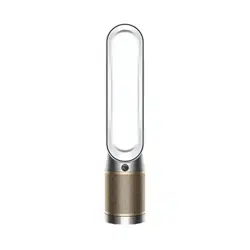
Front view of the Dyson Purifier
Cool air purifier fan, showing
the amplifier loop and mesh
filter cover.
Dyson Purifier Cool™
Assembling your machine
Use both hands to lift your machine out of the box, by its base.
Do not lift out by the loop amplifier.
Assemble your machine with the filters that are supplied.
Dyson Purifier Cool
Supplied with a HEPA+Carbon filter.
Push your HEPA+Carbon filter into the outer cover and position onto
the base. Push firmly until both outer covers click securely into place.
Clik
Clik
Dyson Purifier Cool
Supplied with separate HEPA and carbon filters.
Push the carbon filters into place on the machine.
Push the HEPA filter into the outer cover. Put the outer covers into position
on the base and push firmly until they both click securely into place.
Clik
Clik
Dyson Purifier Cool Formaldehyde/Dyson HEPA Cool Formaldehyde
Your machine comes with a permanent catalytic filter and a HEPA+Carbon
filter.
Push the catalytic filter into position on the machine.
Push the HEPA+Carbon filter into the outer cover and position on the base.
Push firmly until both outer covers click into place.
Clik
Clik
Getting started
Place the remote control on top
of the machine with the buttons
facing down.
Plug in and switch on.
Standby on/off
Remote control
Standby on/off
Airflow speed
Oscillation on/off
Information menu
Auto mode
Airflow direction
Night mode
Clik
Clik
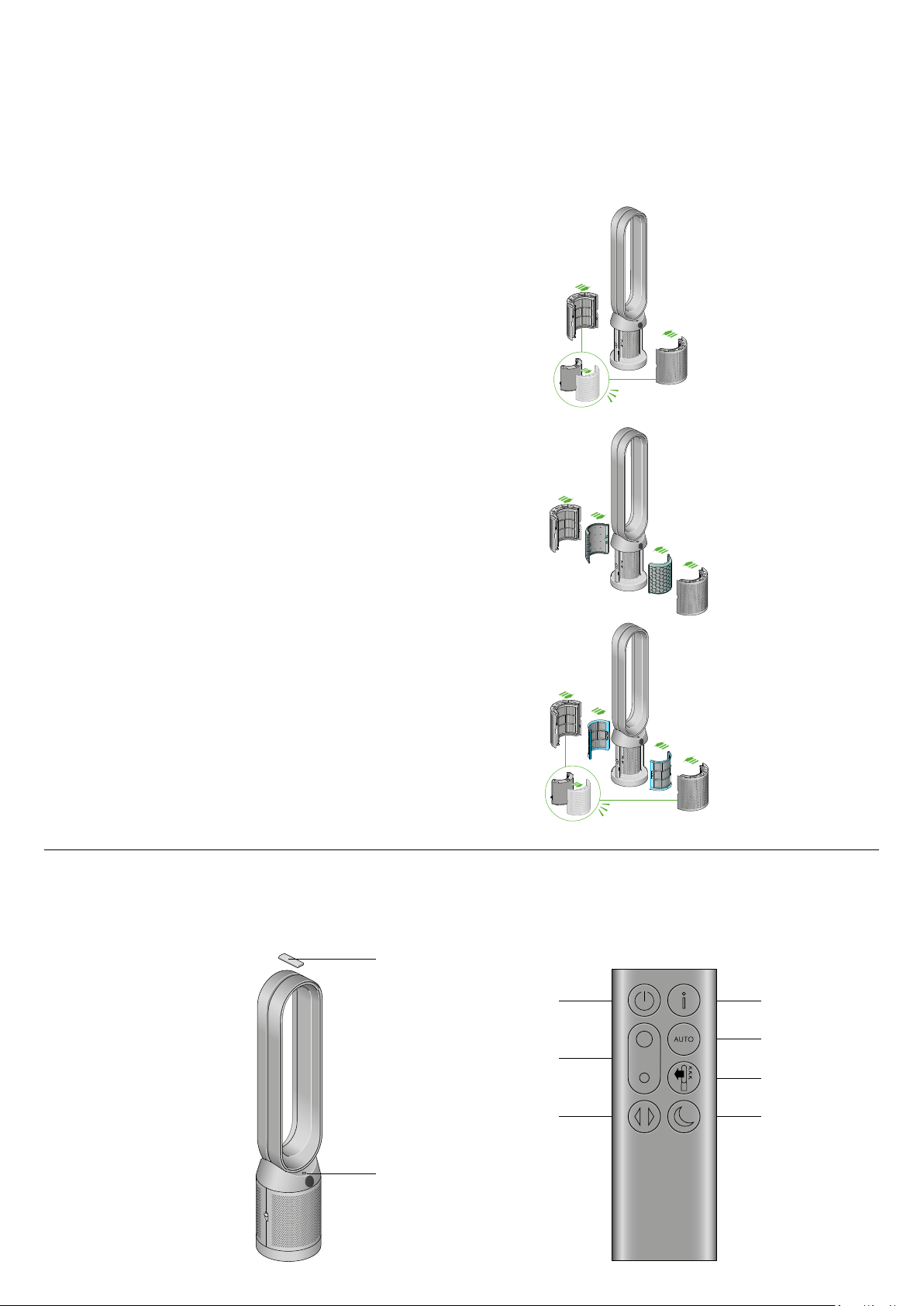
The air purifier fan with the
filter covers open showing
a HEPA filter located in the
filter covers and a carbon
filter. Arrows demonstrate
that the carbon filter is
fitted directly to the base
of the machine and the
filter covers will need to be
assembled onto the base
of the machine.
The air purifier fan with
the filter covers open
showing a HEPA plus
carbon filter located in the
filter covers and a catalytic
filter. Arrows demonstrate
that the catalytic filter is
fitted directly to the base
of the machine and the
filter covers will need to be
assembled onto the base
of the machine.
An image of the air purifier fan with
the remote placed on the top of the
loop amplifier and the location of the
standby on/off button on the top of
the base of the machine.
The layout of the remote control with the power button on the top left, the
airflow speed toggle button in the middle left and the oscillation button on
the bottom left. On the top right-hand side is the Information menu button,
then going downwards is the Auto mode button, Airflow direction and then
the Night mode button at the bottom.
The air purifier fan with
the filter covers open
showing a HEPA plus
carbon filter located in
the filter covers. Arrows
demonstrate that the filter
covers will need to be
assembled onto the base
of the machine.
Connecting to the Dyson Link app
Take full control with the Dyson Link app and access step-by-step setup and
support, control how and when your Dyson purifying fan operates, monitor
air quality with visual updates and automatically keep up to date with the
latest software updates.
Download the Dyson Link app from the App Store or Google Play.
Open the app and follow the on-screen instructions to create a new account.
Apple and the Apple logo are trademarks of Apple Inc., registered in the U.S. and other countries.
App Store is a service mark of Apple Inc., registered in the U.S. and other countries.
Google Play and the Google Play logo are trademarks of Google Inc.
The Android robot is reproduced or modified from work created and shared by Google and used
according to terms described in the Creative Commons 3.0 Attribution License.
Connecting to your smart home
Using Amazon Alexa
Ask Alexa to enable the Dyson skill, to control your Dyson purifier or purifier
humidifier. And set a routine that automates how your machine works with
other devices in your home.
Using Google Assistant
Control all of your connected purifiers with Google or set a routine to
automate how your machine works with other devices in your home. Just say
“Hey Google” to get started.
Using Siri
Connect your Dyson machines to Siri Shortcuts and you’ll be able
to control them with your voice, on your Apple device.
Available on
Android™ stores

Power and continuous monitoring
Standby on/off
Press the Standby on/off button on your Dyson purifying fan or remote
control to stop your machine. It will continue to monitor the air quality.
Continuous monitoring
Continuous monitoring is turned off by default. Once turned on, it will always
be active until you turn it off again.
With continuous monitoring turned on, your Dyson purifying fan will gather
air quality, temperature and humidity information, which is displayed on the
LCD screen and in the Dyson Link app.
Continuous monitoring
Press and hold the Auto mode button on the remote control for 5 seconds
to turn it on. The LCD screen will indicate when continuous monitoring is
on or off.
Wi-Fi Connectivity
Wi-Fi is on by default. To turn the Wi-Fi on or off, press and hold the Standby
on/off button on your machine for 5 seconds.
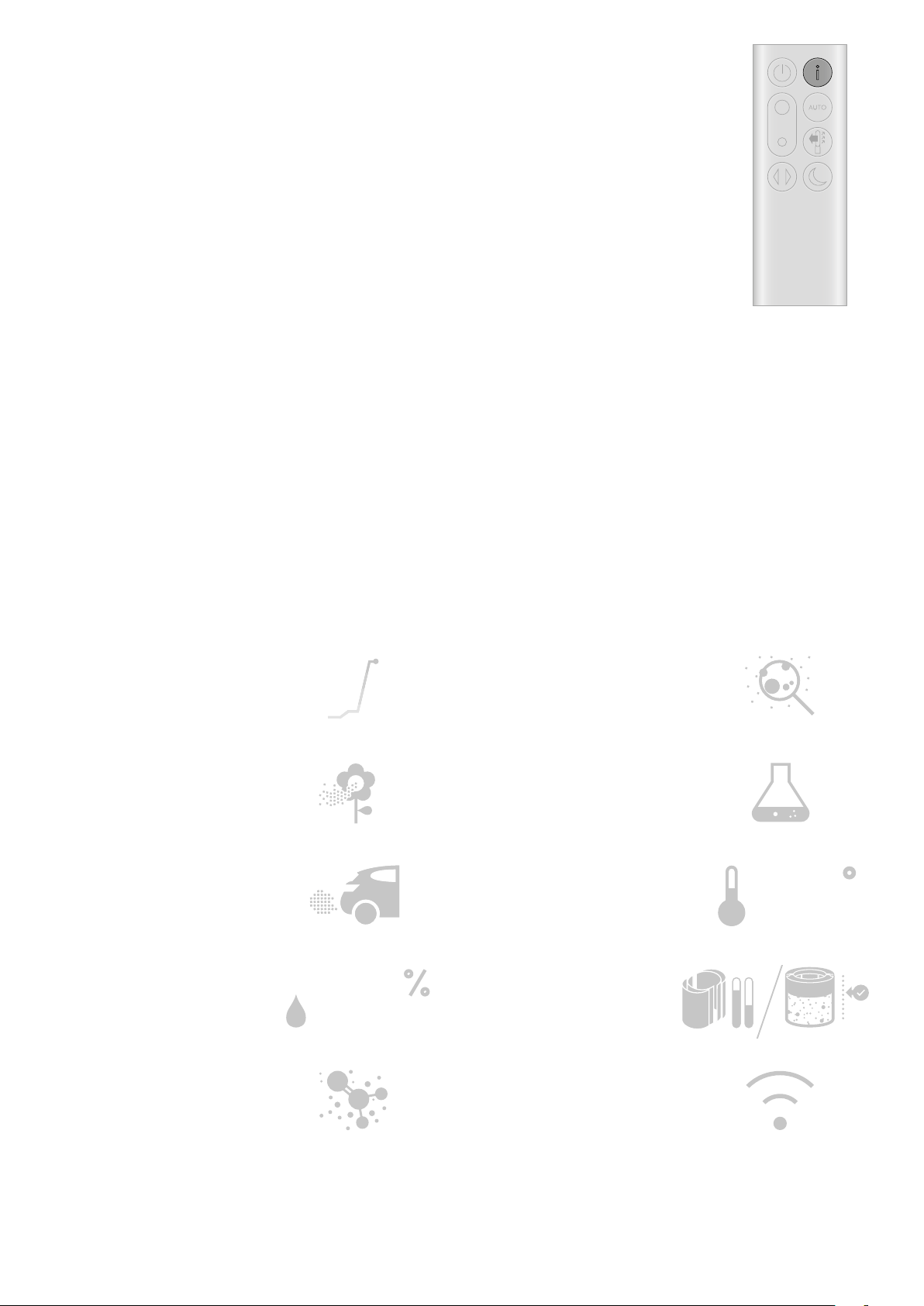
Information menu
Press this button to scroll through the information being monitored by your
Dyson purifying fan.
Information about air quality, temperature, humidity and filter levels is shown
on the LCD screen.
When a particular type of pollutant causes air quality to decrease, a symbol
for the pollutant will show on the LCD screen.
Indoor air quality - 12 seconds
Monitor the current air quality with a graph
showing the last 12 seconds of data.
Particulate matter (PM10)
Larger microscopic particles up to 10 microns
in size, suspended in the air we breathe. These
include dust, mold and pollen.
Nitrogen dioxide and other oxidizing gases
These potentially harmful gases are released
into the air by combustion, for example, the
burning gas when cooking and in vehicle
exhaust emissions.
Indoor humidity
The amount of water vapour in the air,
shown as a percentage.
Formaldehyde (HCHO)
A common indoor pollutant. It can be
released for many years from furnishings,
floorings and glue.
Particulate matter (PM2.5)
Microscopic particles up to 2.5 microns in size,
suspended in the air we breathe. These include
smoke, bacteria and allergens.
Volatile organic compounds
VOCs are typically odors that may be potentially
harmful. These can be found in cleaning
products, paints and furnishings.
Indoor temperature
Monitor the ambient temperature to help
maintain a comfortable environment.
Filters
The remaining filter life is shown
on the LCD screen and will
indicate when your filters need
replacing
Wi-Fi
The current status of connection to
the Wi-Fi network.
4868
F
4868
F
The remote control with
the information button
on the top right.

Auto mode
Set your Dyson purifying fan to Auto mode and the on-board sensors will
intelligently adjust the settings of the machine according to the air quality.
Air quality: your machine will pause when the target air quality has been
reached, switching on again when the air quality levels drop.
Airflow speed: the airflow speed will increase until the target air quality and
temperature have been reached.
Airflow speed and direction
Press the Airflow speed button to increase and decrease the airflow speed.
Press the Airflow direction button to change the direction of airflow from front
to back.
Change the airflow direction for your personal comfort.
Select the Airflow direction to Fan mode for airflow from the front for
purifying and cooling.
Oscillation
Press the Oscillation button to circulate the air around the room and scroll
through the oscillation settings from 0°to 350°.
Customize your oscillation setting in the Dyson Link app.
Night mode and Sleep timer
In Night mode, your Dyson purifying fan will continue to monitor and
respond to changes in air quality, but only using its quietest settings –
and with its LCD screen dimmed.
Press the Night mode and Sleep timer button to scroll through the
timer options.
The remote control with
the Auto mode button
below the Information
button on the right.
The remote control
with the Airflow speed
toggle button on the
left hand side, in the
middle. The Airflow
direction button is on
the right below the Auto
mode button.
The remote control with
the oscillation button
on the bottom left.
The remote control with
the Night mode and
sleep timer button on
the bottom right.
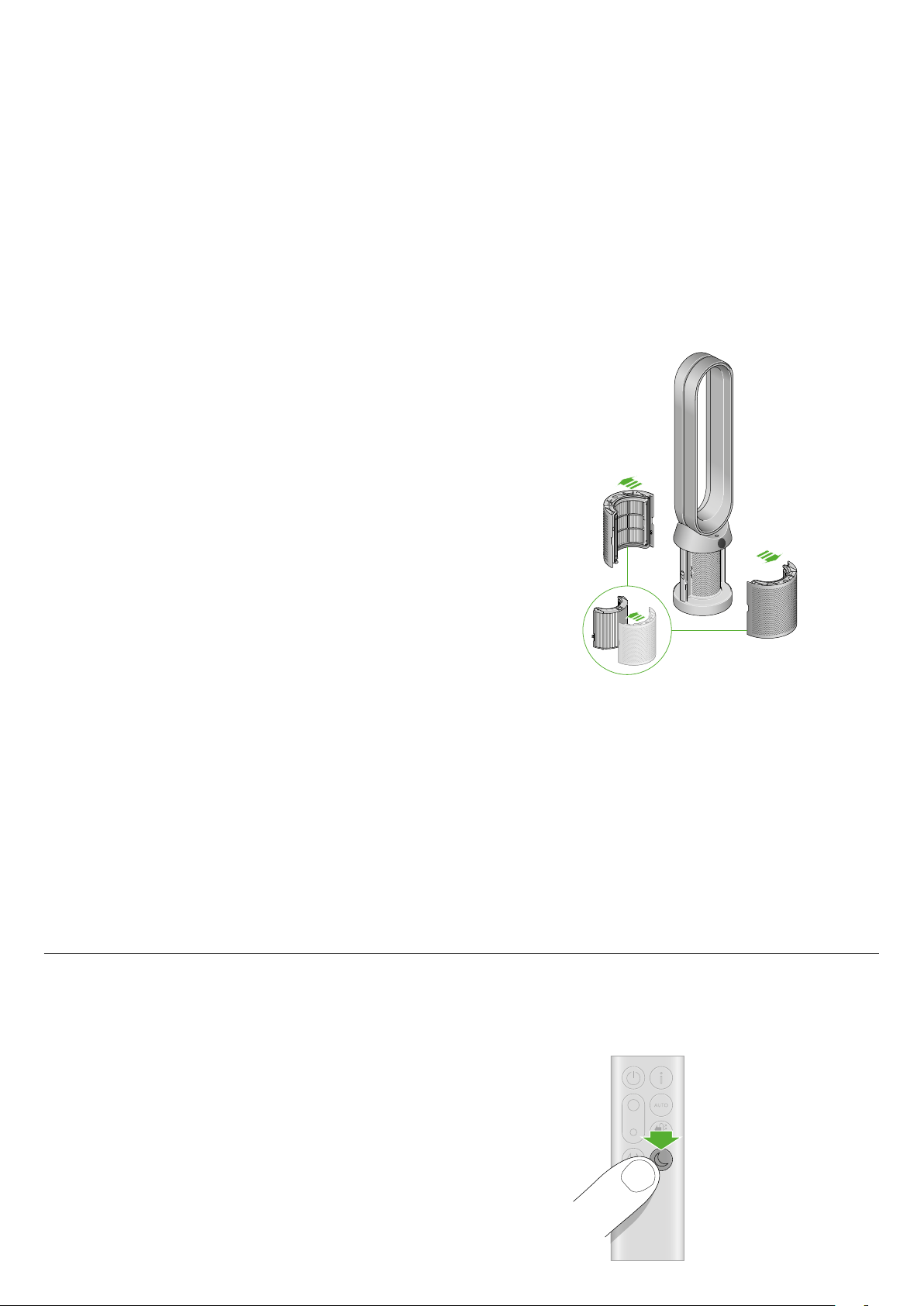
Changing your HEPA+Carbon filter
Before changing your filter, switch off and unplug your Dyson purifying fan.
The remaining filter life is displayed on the screen and will indicate when your
non-washable filters need replacing. Press the Information button on your
remote or check on the Dyson Link app.
You’ll need to reset the filter life on your machine.
Dyson Purifier Cool
Supplied with a HEPA+Carbon filter.
To change your HEPA+Carbon filter, push down on the buttons either side
of your machine to release the outer cover. Push down on the tabs to remove
the filter.
Push the replacement filter into the outer cover and make sure the tabs click
into place.
Put the outer covers into position on your machine and push firmly until they
both click securely into position.
Plug in and switch your machine, and reset your filter life.
Resetting your HEPA+Carbon filter life
It’s important to reset your filter life after you have replaced your filter.
Resetting your HEPA+Carbon filter life
Press and hold the Night mode button on your remote control.
The display on your machine will countdown from five, the filter life will
be reset and your machine is ready to use.
5
sec
The air purifier fan with the filter covers open
showing a HEPA plus carbon filter located in the
filter covers. Arrows demonstrate that the filter
covers will need to be assembled onto the base
of the machine.
Pressing the night mode
and sleep timer button
on the bottom right of
the remote control for 5
seconds.
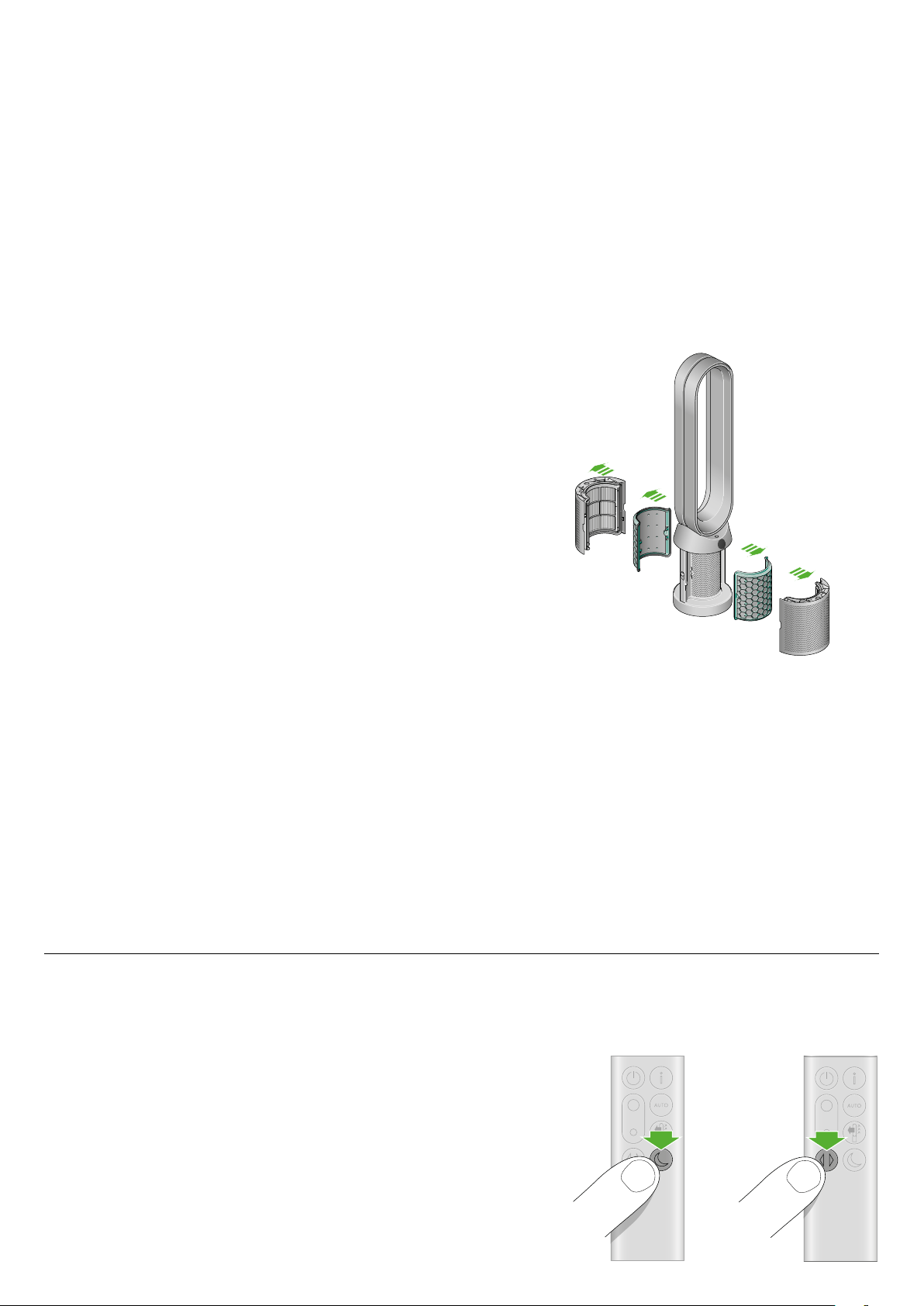
Changing your HEPA and carbon filters
Before changing your filter, switch off and unplug your Dyson purifying fan.
The remaining filter life is displayed on the screen and will indicate when your
non-washable filters need replacing. Press the Information button on your
remote or check on the Dyson Link app.
You’ll need to reset the filter life on your machine.
Dyson Purifier Cool
Supplied with separate HEPA and carbon filters.
To change your HEPA filter, push down on the buttons either side of your
machine to release the filter covers. Push down on the tabs to remove the
HEPA filter.
Push the replacement filter into the outer cover and make sure the tabs click
into place.
To change the carbon filter from your machine, remove the filter from the
base of your machine and insert the replacement filter.
Put the outer covers into position on your machine and push firmly until they
both click securely into position.
Plug in and switch your machine, and reset your filter life.
Resetting your HEPA and carbon filter life
It’s important to reset your filter life after you have replaced your filter.
Resetting your HEPA filter life
Press and hold the Night mode button on your remote control.
The display on your machine will countdown from five, the filter life will
be reset and your machine is ready to use.
Resetting your carbon filter life
Press and hold the Oscillation button on your remote control.
The display on your machine will countdown from five, the filter life will
be reset and your machine is ready to use.
5
sec
5
sec
The air purifier fan with the filter covers open
showing a HEPA filter located in the filter covers
and a carbon filter. Arrows demonstrate that
the carbon filter is fitted directly to the base of
the machine and the filter covers will need to be
assembled onto the base of the machine.
Pressing the Oscillation
button on the bottom
left of the remote control
for 5 seconds.
Pressing the night
mode and sleep timer
button on the bottom
right of the remote
control for 5 seconds.
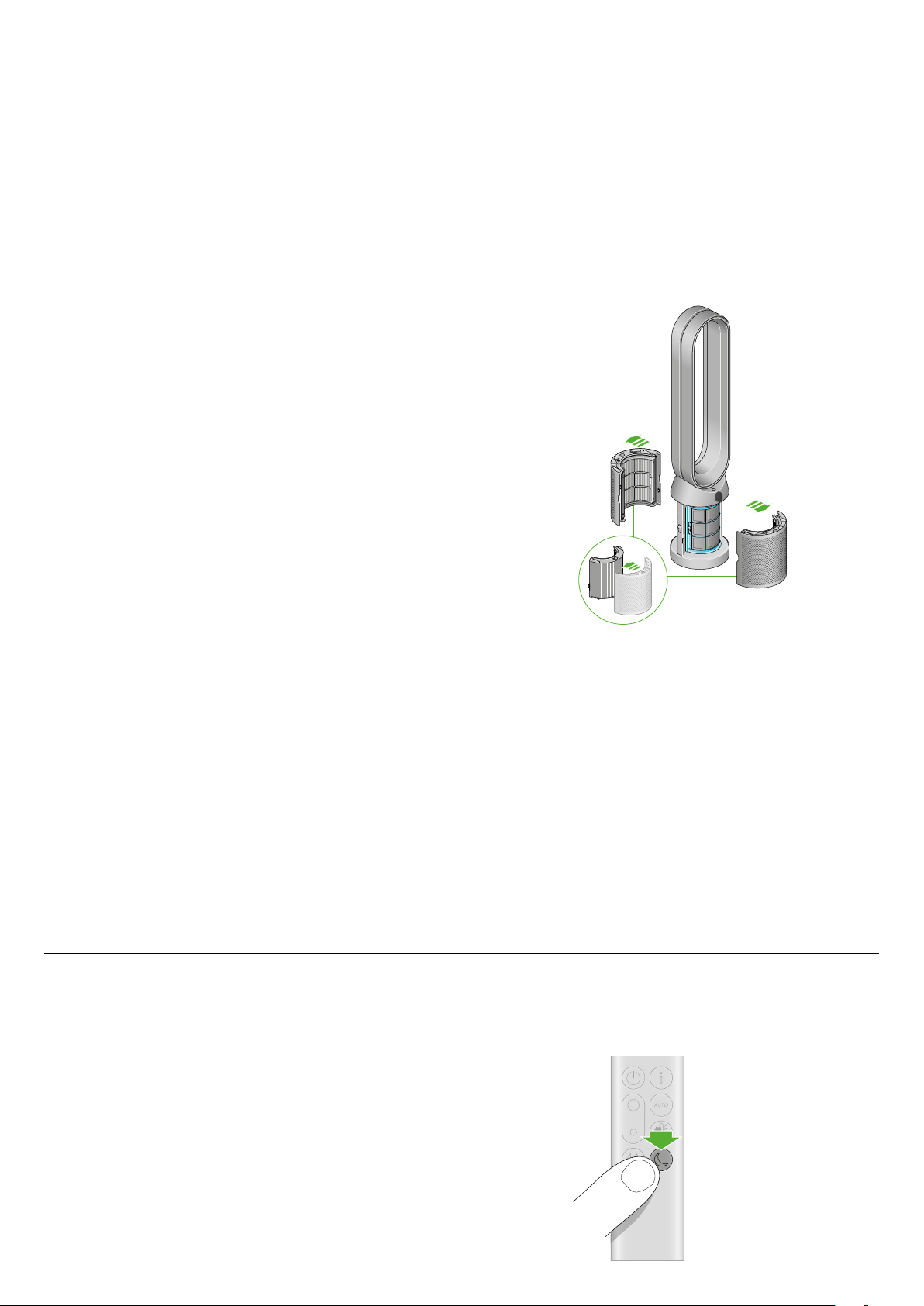
Changing your HEPA+Carbon filters with a catalytic filter
Before changing your filter, switch off and unplug your Dyson purifying fan.
The remaining filter life is displayed on the screen and will indicate when your
non-washable filters need replacing. Press the Information button on your
remote or check on the Dyson Link app.
You’ll need to reset the filter life on your machine.
Dyson Purifier Cool Formaldehyde
Your machine comes with a permanent catalytic filter and a HEPA+Carbon filter.
You won’t need to change your catalytic filter.
To change your HEPA+Carbon filter, push down on the buttons either side of your
machine to release the outer cover. Push down on the tabs to remove the filter.
Push the replacement filter into the outer cover and make sure the tabs click into
place.
Put the outer covers into position on your machine and push firmly until they both
click securely into position.
Plug in and switch your machine, and reset your filter life.
Resetting your HEPA+Carbon filter life
It’s important to reset your filter life after you have replaced your filter.
Resetting your HEPA+Carbon filter life
Press and hold the Night mode button on your remote control.
The display on your machine will countdown from five, the filter life will
be reset and your machine is ready to use.
5
sec
The air purifier fan with the filter
covers open showing a HEPA filter
located in the filter covers and
a carbon filter. Arrows demonstrate
that the carbon filter is fitted directly
to the base of the machine and
the filter covers will need to be
assembled onto the base of the
machine.
Pressing the night mode
and sleep timer button
on the bottom right of
the remote control for
5 seconds.

Looking after your machine
To always get the best performance from your Dyson purifying fan,
it’s important to regularly clean it and check for blockages.
Cleaning your machine
If your machine is dusty, wipe with a damp lint-free cloth.
Look for blockages in the air inlet holes on the filter and the small
aperture inside the loop amplifier.
Use a soft brush to remove dust and debris.
Don’t use detergents or polishes to clean your machine.
Error codes
If your machine shows an error code, try turning it off and then on again.
If this doesn’t clear the e-rror code contact Dyson Customer Care.
For more information and support for your machine go to the Dyson Link
app or online: www.dyson.com/support
