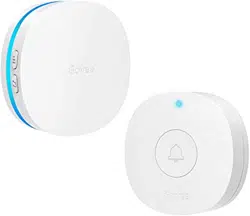
User manual Wireless Doorbell
At a glance
Specifications
| Receiver |
| Voltage |
AC 110 - 240V 50/60HZ |
| Decibel |
0~100dB |
| Transmitter |
| Voltage |
12V |
| Working Frequency |
433MHz |
| Waterproof Rating |
IP66 |
| Operating Temperature |
-20°C - 60°C |
Installing Your Devices
- Plug the receiver into the socket.
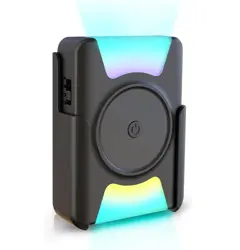
- Install the transmitter.
a. Set up the bracket. (By two ways)
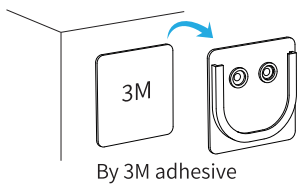

b. Insert the transmitter into the bracket.
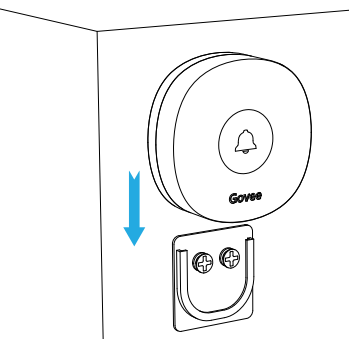
Using Your Devices
1. How to adjust the volume?
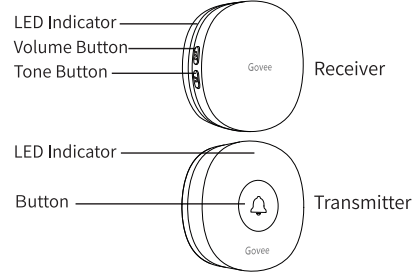
a. Press the Volume Button to adjust the volume in a 5-level cycle.
b. When it is in mute level, the receiver turns to be silent while the indicator flickers blue.
2. How to change the tone?
a. Put the transmitter beside the receiver;
b. Press the Volume Button and Tone Button simultaneously and hold for 5s until the indicator of receiver flashes blue rapidly;
c. Press the Tone Button to switch the tone you want;
d. Press the Button on transmitter.
Notice: Please check the above steps and try again if tone changing fails.
3. How to pair the transmitter to receiver?
a. Put the transmitter beside the receiver;
b. Press the Volume Button and Tone Button simultaneously and hold for 5s until the indicator of receiver flashes blue rapidly;
c. Press the Button on transmitter.
Notice:
a. Please check the above steps and try again if pairing fails.
b. One transmitter can be paired to more than one receivers and vice versa.
4. Replace the battery of transmitter.
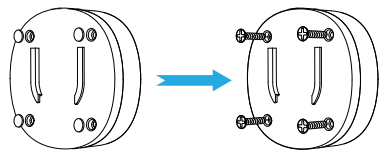
Troubleshooting
1. The receiver doesn’ twork or rings abnormally.
a. Please replace the battery of transmitter.
b. Re-plug the receiver into socket.
c. Do not install the transmitter on the metal door/window.
d. Keep the transmitter within the working distance of receiver.
e. Keep obstacles between the device and router as less as possible.
f. More than 2m between the devices and medium/large household appliances is suggested.
g. Pair the receiver to the transmitter once again.
2. The indicator of transmitter doesn’t work. Please replace the battery of transmitter.
Warning
- The receiver is not waterproof. Please keep it away from the water.
- Do not soak the transmitter in the water.
- Water resistance may become poor gradually during using.