
Questions? We're here to help! Visit: www.maxi-matic.com for support on this product.
1

IMPORTANT SAFEGUARDS
When using electrical appliances, basic safety precautions should be followed to reduce the risk of
fire, electric shock, and injury to persons or property. Read all instructions before using any
appliance.
Do not operate this or any other appliance with a damaged cord.
Connect to properly polarized outlets only. No other appliance should be plugged into the
same outlet. Be sure that the plug is fully inserted into the receptacle.
Do not run cord over carpeting or other heat insulators. Do not cover the cord. Keep cord
away from traffic areas, and do not submerge in water.
We do not recommend the use of an extension cord, as it may overheat and become a risk of
fire. If you must use an extension cord, use No.14 AWG minimum size and rated no less than
1875 watts.
Unplug the ice maker before cleaning or making repairs.
Exercise caution and use reasonable supervision when appliance is used near children.
Do not clean your ice maker with flammable fluids. The fumes can create a fire hazard or
explosion.
Do not tip over.
If the ice maker is brought indoors from outdoors during the wintertime, give it a few hours
to warm up to room temperature before plugging it in.
It is strongly recommended that any servicing be done by a qualified individual.
Do not leave this appliance in places of either extreme cold or warm temperatures.
Do not place the appliance near any sources of heat or open flame.
Do not place heavy items on top of this appliance.
Never install or place the ice maker where there is a lot of moisture or where water can splash
on it.
Use extreme caution when appliance is used near children
Do not let children operate this device.
Do not operate the appliance after either the side or back panels have been removed.
Do not operate any appliance with a damaged cord or plug or after the appliance
malfunctions or has been damaged in any manner. Return the appliance to the nearest
authorized service facility for examination, repair or adjustment.
Remove all packaging plastics and other materials from the unit before operating.
Wash all removable accessories before using for the first time.
To protect against electrical shock, do not immerse cord, plug or appliance itself in water or
other liquids.
The use of accessory attachments not recommended by the appliance manufacturer may
cause injuries.
Questions? We're here to help! Visit: www.maxi-matic.com for support on this product.
2

WARNING
IMPORTANT SAFEGUARDS (CONT.)
Always attach plug to appliance first, then plug cord into wall outlet. To disconnect, turn all
controls to the OFF position, grasp plug body and remove from the electrical outlet. Do not
pull by the cord.
appliance when it is not in use.
Do not use the appliance for other than its intended use.
SAVE THESE INSTRUCTIONS
THIS PRODUCT IS FOR HOUSEHOLD USE ONLY!
DO NOT TOUCH THE EVAPORATOR WHILE THE UNIT IS IN USE OR DURING THE ICE MAKING PROCESS.
IT MAY CAUSE SEVERE BURNING.
DO NOT MODIFY THE POWER CORD UNDER ANY CIRCUMSTANCES TO ALLOW THE UNIT TO BE
PLUGGED INTO A NON-GROUNDED OUTLET.
THE ICE MAKER SHOULD NOT BE INSTALLED NEAR ANY HEAT SOURCE OR WHERE IT WILL COME IN
DIRECT CONTACT WITH THE SUNLIGHT.
!
Questions? We're here to help! Visit: www.maxi-matic.com for support on this product.
3
PARTS IDENTIFICATION
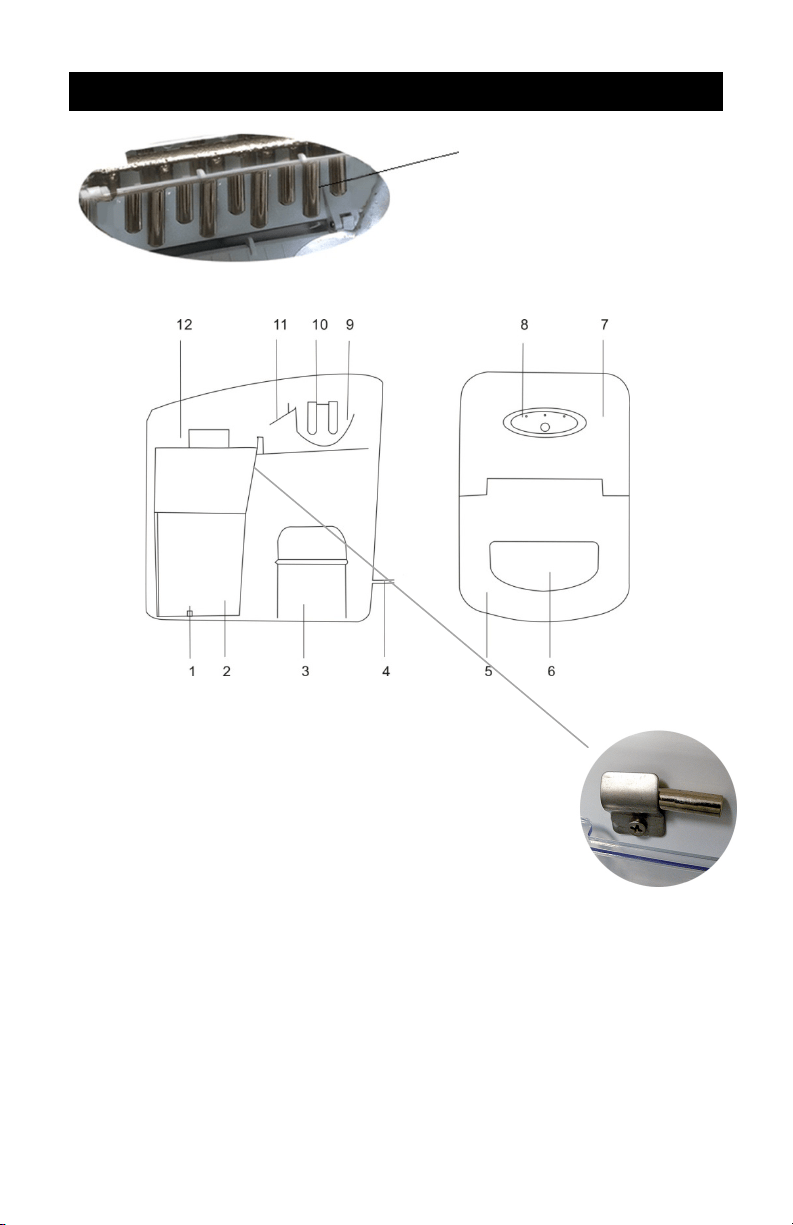
1. Silicon Water Drain Stopper - For draining water from the water
reservoir.
2. Water Reservoir - holds up to 1.7L of water.
3. Compressor
4. Power Cord
5. Top Lid
6. Viewing Window
7. Back Top Cover
8. Control Panel - Easy to use, visible functions and 1-touch display
setting.
9. Water Tray
10. Evaporator Rods
11. Ice Case Panel - The panel that pushes already formed ice into the Ice Basket.
12. Ice Basket - Sits above the Water Reservoir and holds already formed ice.
13. Ice Sensor - Ice Sensor determines when the Ice Basket is full.
Evaporator Rods
13
Questions? We're here to help! Visit: www.maxi-matic.com for support on this product.
4
PARTS IDENTIFICATION (CONT.)
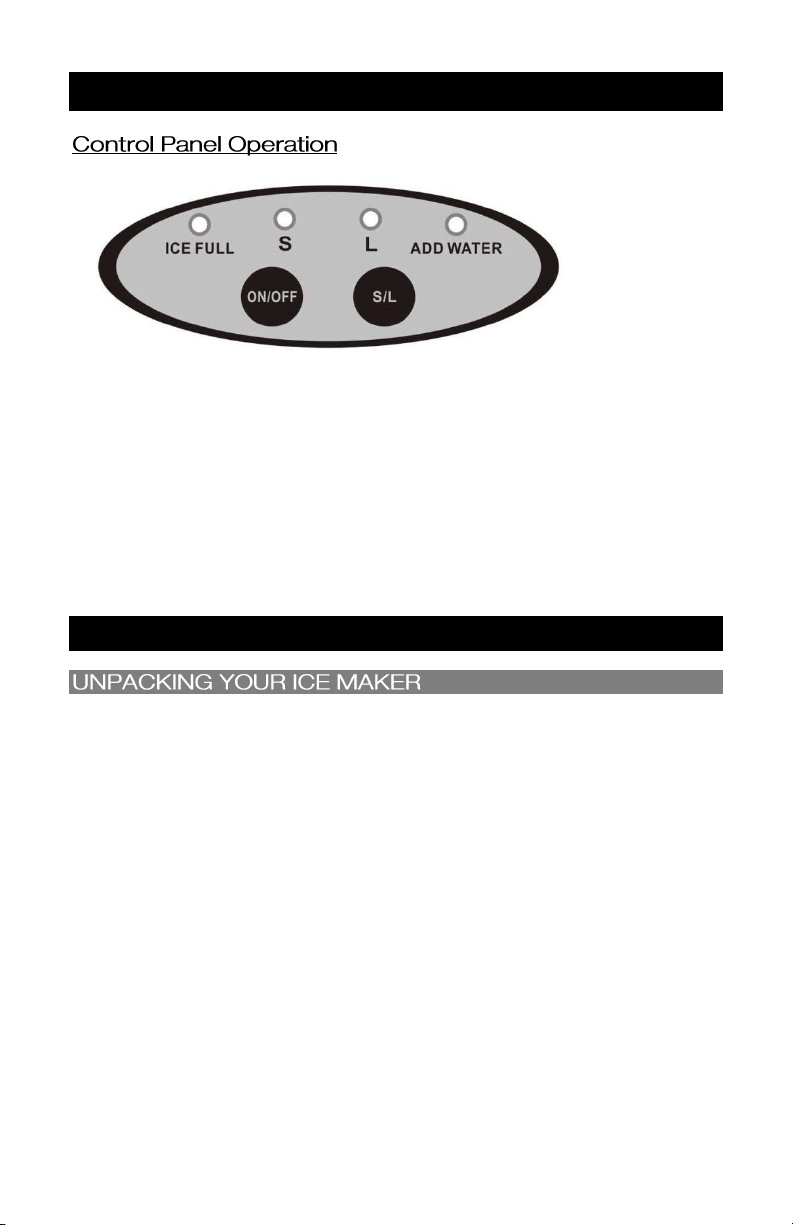
SIZE S (SMALL) or L (LARGE): Press to select the size of ice to make. Choose between size Small and
Large.
ON/OFF: Press to power unit on or off.
ADD WATER: This light will turn on along with a beep indicator when the water level is too low. You
‟ button twice to restart the ice
maker.
ICE FULL: This light will turn on with a beep indicator when the ice has reached the maximum
‟ button twice to restart the ice maker after some
of the ice has been removed from the Ice Bucket.
OPERATING PROCEDURES AND MAINTENANCE
1. Remove all exterior and interior packaging. Check that the ice basket and ice scoop are
included. If any part or accessory is missing, please contact our customer service department.
(Contact information on p. 11)
2. Clean the interior with lukewarm water and a soft cloth. Remove the ice basket and wash it in
warm water.
3. Wipe the evaporator rods clean using a water/vinegar solution.
4. Find a location for your ice maker that is protected from direct sunlight and other sources of
heat (i.e. stove, furnace, radiator, etc...). Place the ice maker on a level surface and make sure
that there is at least 5 inches of space between the back and sides of your ice maker and the
wall.
5. Allow the refrigerant fluid to settle for several hours before plugging in the unit.
6. The appliance must be positioned so that the plug is accessible.
Questions? We're here to help! Visit: www.maxi-matic.com for support on this product.
5
OPERATING PROCEDURES AND MAINTENANCE (CONT.)
1. This unit should be properly grounded for your safety. The power cord of this appliance is
equipped with a three-prong plug which plugs into a standard three prong wall outlet to
minimize the possibility of electric shock.
2. Plug your appliance into its own, properly installed, grounded wall outlet. Do not under any
circumstances cut or remove the third (ground) prong from the power cord. Any questions
concerning power and/or grounding should be directed toward a certified electrician.
3. This appliance requires a standard 120 volt, 60Hz electrical outlet with three-prong ground.
* BEFORE USING YOUR ICE MAKER, IT IS STRONGLY RECOMMENDED TO CLEAN IT
THOROUGHLY.
1. Remove the ice basket.
2. Unplug the Drain Stopper to drain out all water inside.
3. Clean the interior with diluted detergent, warm water and a soft cloth.
4. Clean the exterior of the ice maker regularly with a mild detergent solution and warm water.
5. Dry the interior and exterior with a soft cloth.
Note: Make sure all parts are thoroughly dry before reassembling your unit. Insert the Drain
Stopper back into the Ice Maker.
6. When the machine is not in use, unplug the Drain Stopper to drain water completely from water
reservoir.
MOLD FORMATION CAN OCCUR IF MOISTURE GETS TRAPPED INSIDE OF THE UNIT. DRAIN ALL
WATER FROM THE UNIT AFTER EVERY USE AND DRY THOROUGHLY BEFORE STORING.
!
Questions? We're here to help! Visit: www.maxi-matic.com for support on this product.
6

OPERATING PROCEDURES AND MAINTENANCE (CONT.)
6)
It is necessary to have an adequate ventilation space around the ice maker in order to sustain
proper performance, dissipation of heat, maintain efficiency, and low power consumption.
Clearance of a minimum of 5 inches should be maintained at the rear and sides of the unit,
and 8 inches at the top of the unit.
To attain proper performance, be sure to plug the appliance into a properly grounded
120/60Hz outlet.
To avoid heat damage to the power cord, please ensure that it does not come in proximity or
in direct contact with the compressor of the ice maker.
Please avoid installing the ice maker in a location where the appliance will come in contact
with water or moisture, to minimize the buildup of rust on the metal parts.
ONLY FRESH, CLEAN WATER CAN BE USED ON THIS APPLIANCE. THE USE OF JUICES, MILK,
SODA, AND THE LIKE MAY DAMAGE THE UNIT.
USING YOUR ICE MAKER
1. Clean your ice maker before using. Make sure the unit is off and unplugged from the outlet.
2. Open the cover and pour water into the tank.
NOTE: Make sure the water level in the water reservoir is not over the Ice Basket.
NOTE: Use distilled water for best results.
3. Close the lid.
4. Plug the unit into the electrical outlet. When the Ice Maker is first plugged in, it will default to the
Small (S) ice setting which will be flashing.
5. Select the ice size you wish by pressing the S/L button to cycle between Small or Large ice.
6. Once the size has been selected, press ON/OFF to begin the ice making cycle. The indicator light for
the size button will become solid.
NOTE: For the first three cycles, the ice may be small and irregular in size.
7.
right up to the bottom of the Ice Basket. Allow
3 minutes for the refrigerant to settle.
again to restart the ice making cycle.
NOTE: If no water is pumped up to the water tray over two cycles but there is enough water in the
water tank, please unplug the silicon stopper and let several drops of water run out. Restart the
unit.
8. turn on. At this point, you can remove
some of the ice with the scoop or you can allow the ice to remain in the Ice Maker.
9.
Please note: This unit is not a freezer, it will not keep the Ice frozen permanently. The ice will
eventually melt and as it melts, the internal temperature of the unit will rise and the Ice Maker will
begin making ice once again. You have the option of removing the ice as it is formed and bagging
it to store inside your freezer.
Questions? We're here to help! Visit: www.maxi-matic.com for support on this product.
7
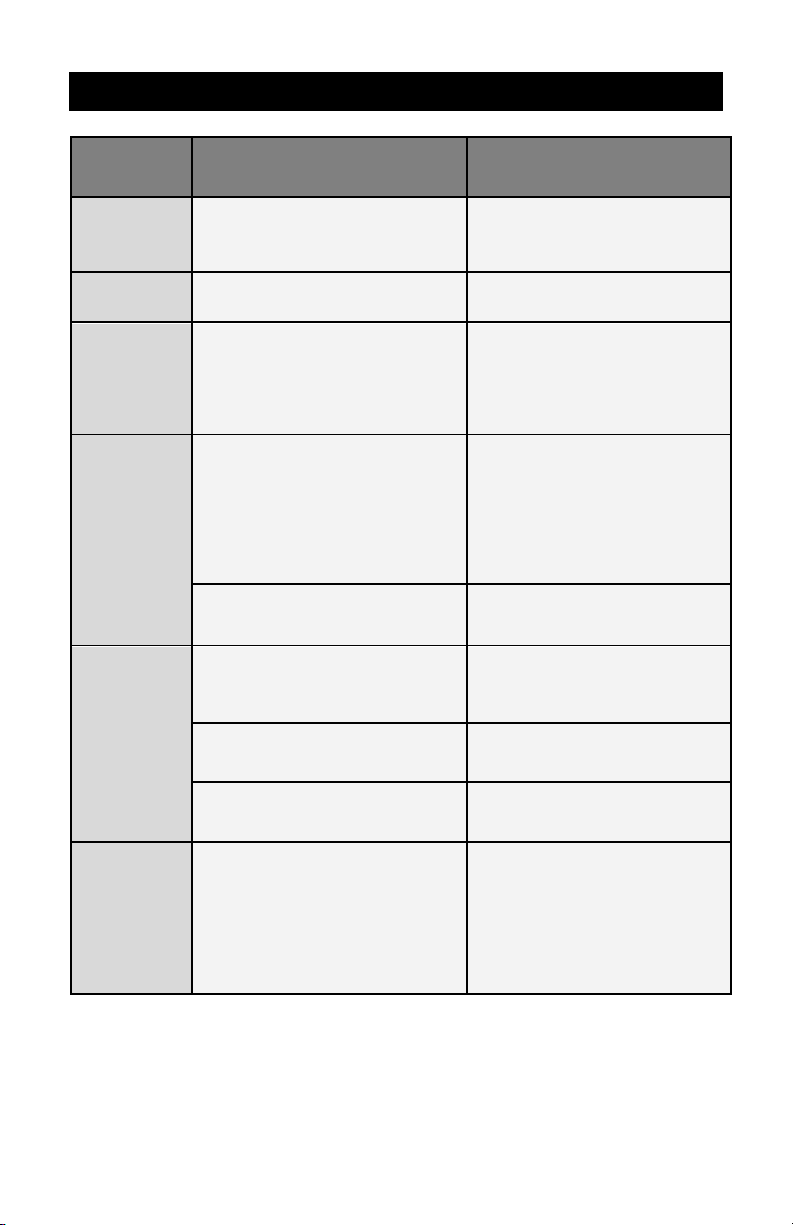
TROUBLESHOOTING
PROBLEM
POSSIBLE CAUSE
SOLUTION
Indicator lights
are on but
display is not
on.
Blown fuse/ No power.
Replace fuse/ Turn power on.
indicator is on.
Ice basket is full.
Remove ice from ice basket.
The
compressor
works
abnormally
with a buzzing
noise
The voltage is lower than
recommended.
Stop the ice maker and do not
restart until the voltage is normal.
indicator light
is on.
Water is low.
Press the OFF button, fill with water,
wait for 3 minutes and press ON to
restart. When the water has reached
the fill line the ice maker will restart
automatically.
The pump is full of air.
Unplug the silicon stopper and let
several drops of water run out.
The ice made
is too large
and cubes are
sticking
together.
Ice from previous cycles were left in
the water tray.
Stop the unit right away. Restart the
unit after the ice in water tray melts
down.
The evaporator rods are too low.
Shift the evaporator rods up a little.
Water temperature in inner tank is too
low.
Change the water in the reservoir.
Use water between 45°F-80°F.
indicators both
light up.
Water tray/Ice Case Panel are blocked
by ice cubes.
Clear the ice cubes under the ice
case panel, pull out the power plug
from wall outlet and then plug back
a few minutes for the machine to
restart automatically.
Questions? We're here to help! Visit: www.maxi-matic.com for support on this product.
8
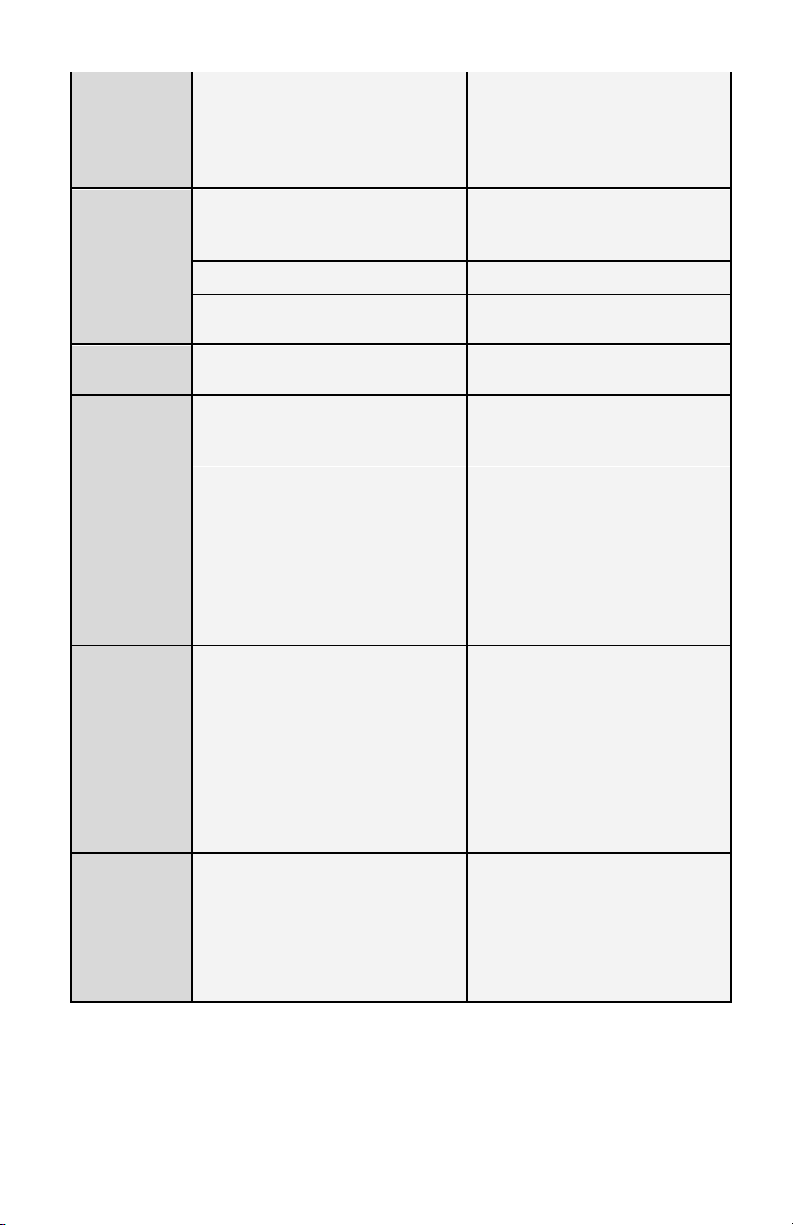
Machine keeps
running but
the water is
warmer than
the normal
temperature.
The magnetic valve is broken.
Replace the magnetic valve.
Ice making
cycle is normal
but no ice is
made.
Ambient temperature or water
temperature in inner tank is too high.
Please operate the ice maker below
ambient temperature of 90°F and
use cold water.
Refrigerant liquid leakage.
Consult a qualified technician.
Pipe in the cooling system is blocked.
Consult a qualified technician.
Ice Maker is
leaking water
The drain stopper may be not be
inserted properly.
Check the drain stopper.
The ice cubes
are melting.
Location of appliance may cause
temperature changes.
Make sure the appliance is always
placed in a temperature regulated
area.
Also constant opening and shutting of
the lid may also cause variable
temperature fluctuations.
Avoid leaving the lid open.
Leaving ice in the appliance for an
extended period of time may also
result in the appliance recycling the
ice by melting it down and making a
new batch.
Transfer ready-made ice to another
container and store in a cooler or
freezer to avoid recycling.
There is not
enough ice
cubes in the
ice basket, but
the indicator
on.
The room temperature may be too
low.
Make sure the unit is in an area
where the temperature is above
65°F regulated.
The ice cubes being formed may be
touching the sensor occasionally when
the ice case panel pushes the ice cubes
into the ice basket.
Remove the ice cubes; wait for a few
minutes to let the unit restart again.
Humming or
knocking
sound heard
from the back
side of the
unit.
Sound is normal and occurs as water is
being pumped from the water tank.
Normal
Questions? We're here to help! Visit: www.maxi-matic.com for support on this product.
9
MORE SPECIAL TIPS AND GUIDES
Leaking Water:
Rubber Drain Stopper may be missing or not inserted properly. If missing, please
contact customer service for a replacement rubber insert.
Check if unit still leaks water when power is unplugged. If unit does not leak water
when power is unplugged then the water is leaking from the water pump. Please
contact customer service for a replacement water pump.
Unit is not producing ice even though there is water inside the main tank:
Make sure the main tank has been filled all the way up to the water level line
which is right beneath the basket.
Check and make sure Ice Case Panel is not stuck or loose. If panel looks like it is at
an odd angle or struggling to move back and forth please contact customer
service for a replacement Ice Panel.
ank is full, please see
troubleshooting section regarding this problem.
First, make sure main tank has been filled all the way up to the water level line
which is right beneath the basket.
If red light comes on immediately after pushing power and no water is drawn up
to the ice making compartment (located by evaporator rods), then water pump
may be stuck and is pumping only air. (You should be able to hear the water being
drawn up it will sound like a faucet running.)
Please contact customer service and they can walk you through the procedure of
troubleshooting the water pump.
Ice-making process is extremely slow:
When the machine is brand new, it may sometimes take a few hours for the
machine to adjust and get used to producing ice at a faster rate and producing
larger cubes of ice. This is considered normal.
Unit can start off slow and may take between 30 minutes up to 2 hours of
continuous use before ice production cycles become shorter. After approximately
2-3 hours of continuous use, you should see each batch (9 ice cubes) being
produced between 7-9 minutes.
Unit has unusual smell:
The Ice Maker has excess manufacturer lubricants that are being blown off by the
motor fan located in the back of the unit. Please contact customer service if the
problem persists.
Ice has unusual smell or taste:
Add one to two cups of lemon juice or vinegar to full tank of water and completely
cycle through. This may take a few hours. If problem persists, repeat same
procedure call customer service.
For all other questions or issues please contact our customer service department.
(Contact information found on p.11)
Questions? We're here to help! Visit: www.maxi-matic.com for support on this product.
10

LIMITED WARRANTY* ONE (1) YEAR
WARRANTY IS ONLY VALID WITH A DATED PROOF OF PURCHASE
PLEASE DO NOT RETURN TO STORE OF PURCHASE.
If you have any problems with this unit, contact Customer Service for support.
1. Your small kitchen appliance is warranted to the original purchaser to be free from any
manufacturing defects under normal use and conditions for one (1) year, cord excluded. This
Warranty applies only to the original purchaser of this product.
2. Retail stores/merchants selling this product do not have the right to alter, modify, or in any way
revise the terms and conditions of the warranty.
3. If you use your appliance for household use and according to instructions, it should give you years
of satisfactory service.
4. At its sole discretion, Maxi-Matic USA will either repair or replace the product found to be defective
during the warranty period.
5. The repaired or replacement product will be in warranty for the remaining balance of the one-year
warranty period and an additional one-month period.
6. ason to return a product to our Service Center.
7. This limited warranty covers appliances purchased and used within the 50 U.S. states plus the
District of Columbia and does NOT cover normal wear of parts or:
- Damages caused by unreasonable use, neglect, normal wear and tear, commercial use, improper
assembly or installation of product.
- Damages caused in shipping.
- Damages caused by replacement or resetting of house fuses or circuit breakers.
- Defects other than manufacturing defects.
- Breakage caused by misuse, abuse, accident, alteration, lack of proper care and maintenance, or
incorrect current or voltage.
- Lost or missing parts of the product. Parts will need to be purchased separately.
- Damages of parts that are not electrical; i.e. cracked or broken plastic/glass, scratched/dented inner
pots.
- Damage from service or repair by unauthorized personnel.
- Extended warranties purchased via a separate company or reseller.
- Acts of God such as fire, floods, hurricanes, tornadoes, etc.
8. This warranty does not apply to re-manufactured merchandise.
Maxi-Matic, USA shall not be liable for any incidental or consequential damages caused by the breach of any
express or implied warranty. Apart from the extent prohibited by applicable law, any implied warranty of
merchantability or fitness for a particular purpose is limited in time to the duration of the warranty.
*One Year Limited Warranty valid only in the 50 U.S. states plus the District of Columbia, excluding Puerto Rico
and the Virgin Islands.
This warranty is effective only if the product is purchased and operated in the USA; product usage which is in
violation of the written instructions provided with the unit will void this warranty.
For international warranty, please contact the local distributor.
This warranty gives you special legal rights and you may also have other rights to which you are entitled which
may vary by state, province, and/or jurisdiction.
**Any instruction or policy included in this manual may be subject to change at any time.
MAXI-MATIC, USA
18401 E. Arenth Ave. City of Industry, CA 91748
Customer Support Hours of Operation MON-FRI 8:30 AM - 5:00 PM PST
(800) 365-6133 Ext: 120/107/105; (626) 912-9877 Ext: 120/107/105
Visit: www.maxi-matic.com for Live Chat Support and Contact Us Form
Questions? We're here to help! Visit: www.maxi-matic.com for support on this product.
11