Guía del Usuario
ESPAÑOL
Printed in Korea
User Guide
MFL67700201 (1.1) W www.lg.com
ENGLISH
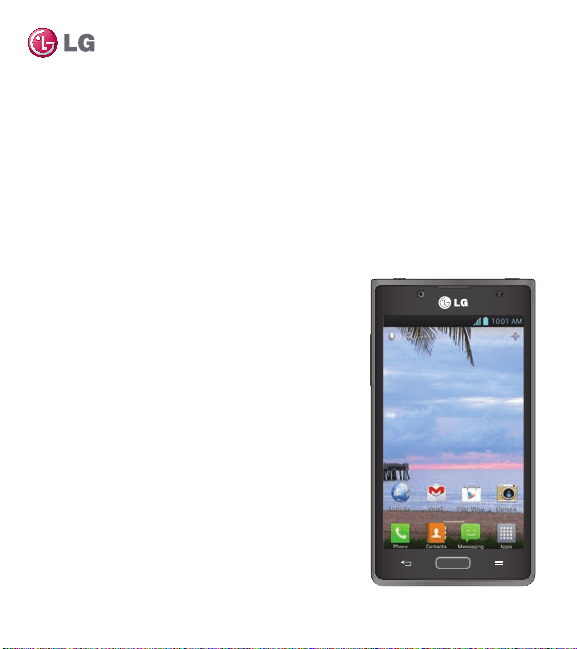
LG OPTIMUS
SHOWTIME
TM
User Guide
This guide helps you to get started using your phone.
• Someofthecontentsofthismanualmay
notapplytoyourphone,dependingonthe
softwareandyourserviceprovider.
• Thisphoneisnotsuitableforpeoplewho
haveavisualimpairmentduetothetouch
screenkeyboard.
• Google™,GoogleMaps™,Gmail™,
YouTube™,GoogleTalk™andPlayStore™are
trademarksofGoogle,Inc.
• Copyright
©
2012LGElectronics,Inc.All
rightsreserved.LGandtheLGlogoare
registeredtrademarksofLGGroupandits
relatedentities.Allothertrademarksarethe
propertyoftheirrespectiveowners.
ENGLISH

Contents
2 L86C|UserGuide
Important Safety Precautions ........................................................................ 3
Important notice .............................................................................................. 7
Getting to know your phone ..........................................................................14
Your Home screen .........................................................................................23
Google account Setup ..................................................................................33
Connecting to Networks and Devices .........................................................34
Calls .................................................................................................................41
Contacts .........................................................................................................45
Messaging ...................................................................................................... 47
Email ...............................................................................................................49
Camera ...........................................................................................................52
Video camera .................................................................................................56
Multimedia .....................................................................................................59
Utilities............................................................................................................62
The web ..........................................................................................................66
Settings ..........................................................................................................68
Phone software update ................................................................................. 76
Accessories .................................................................................................... 77
FAQ .................................................................................................................78
For Your Safety ...............................................................................................88
3
Important Safety Precautions
Violationoftheinstructionsmaycauseseriousinjuryor
death.
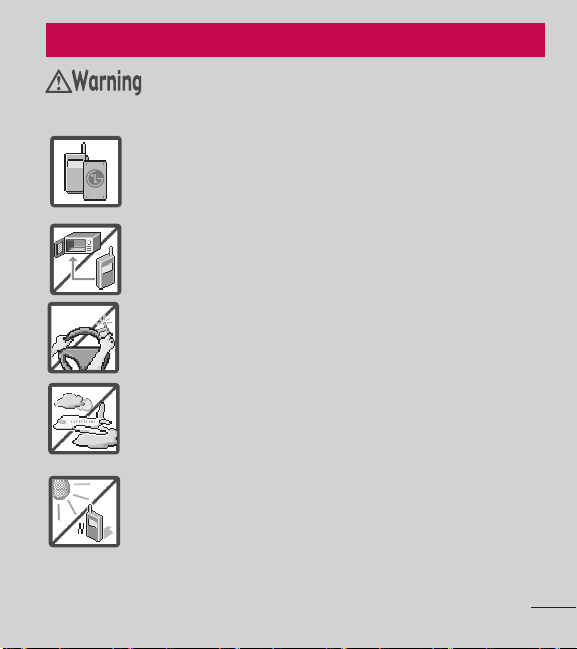
• Neveruseanunapprovedbatterysincethiscould
damagethephoneand/orbatteryandcouldcausethe
batterytoexplode.
• Neverplaceyourphoneinamicrowaveovenasitwill
causethebatterytoexplode.
• Neverstoreyourphoneintemperatureslessthan-4°For
greaterthan122°F.
• Donotdisposeofyourbatterynearreorwithhazardous
orammablematerials.
• Whenridinginacar,donotleaveyourphoneorsetup
thehands-freekitneartheairbag.Ifwirelessequipment
isimproperlyinstalledandtheairbagisdeployed,you
maybeseriouslyinjured.
• Donotusethephoneinareaswhereitsuseisprohibited.
(Forexample:aircraft)
• Donotexposethebatterychargeroradaptertodirect
sunlightoruseitinplaceswithhighhumidity,suchasa
bathroom.
Caution
4 L86C|UserGuide
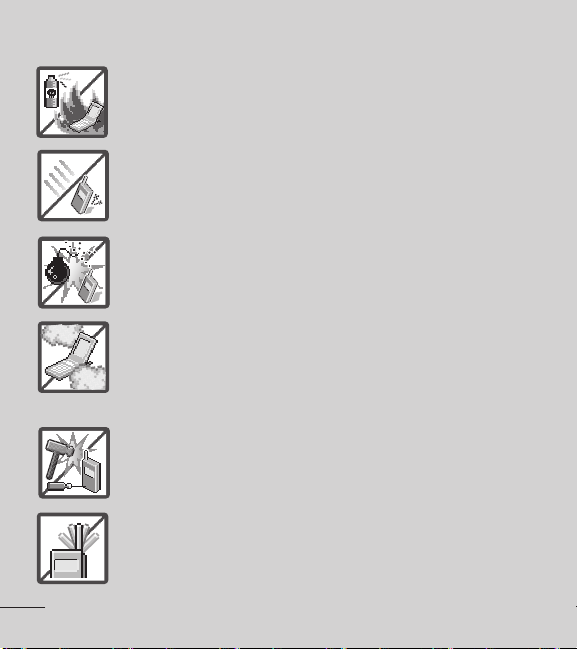
• Donotuseharshchemicals(suchasalcohol,benzene,
thinners,etc.)ordetergentstocleanyourphone.This
couldcauseare.
• Donotdrop,strike,orshakeyourphoneseverely.Itmay
harmtheinternalcircuitboardsofthephone.
• Donotuseyourphoneinhighexplosiveareasasthe
phonemaygeneratesparks.
• Donotdamagethepowercordbybending,twisting,
pulling,orheating.Donotusetheplugifitislooseasit
maycauseelectricshockorre.
• Donotplaceanyheavyitemsonthepowercord.Do
notallowthepowercordtobecrimpedasitmaycause
electricshockorre.
• Donothandlethephonewithwethandswhileitisbeing
charged.Itmaycauseanelectricshockorseriously
damageyourphone.
• Donotdisassemblethephone.
• Donotplaceoranswercallswhilechargingthephoneas
itmayshort-circuitthephoneand/orcauseelectricshock
orre.
• Donotholdorlettheantennacomeincontactwithyour
bodyduringacall.
5
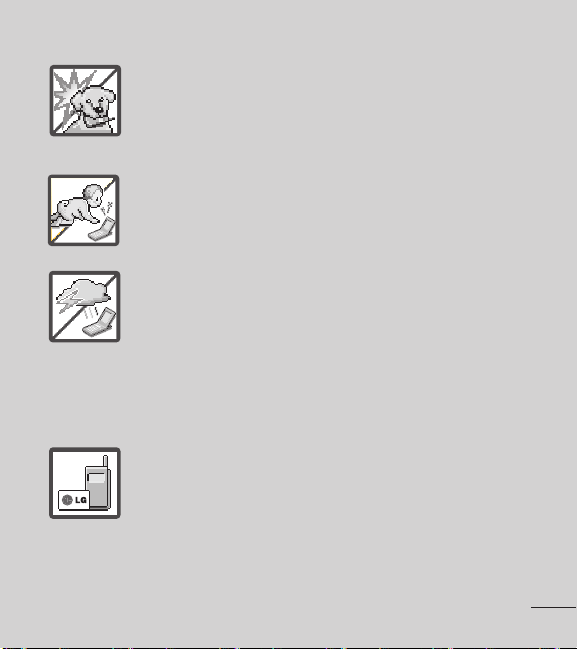
• Makesurethatnosharp-edgeditems,suchasanimal’s
teethornails,comeintocontactwiththebattery.This
couldcauseare.
• Storethebatteryoutofreachofchildren.
• Becarefulthatchildrendonotswallowanyparts(suchas
earphone,connectionpartsofthephone,etc.)Thiscould
causeasphyxiationorsuffocationresultinginserious
injuryordeath.
• Unplugthepowercordandchargerduringlightning
stormstoavoidelectricshockorre.
• OnlyusethebatteriesandchargersprovidedbyLG.The
warrantywillnotbeappliedtoproductsprovidedbyother
suppliers.
• Onlyauthorizedpersonnelshouldservicethephoneand
itsaccessories.Faultyinstallationorservicemayresultin
accidentsandconsequentlyinvalidatethewarranty.
• Anemergencycallcanbemadeonlywithinaservice
area.Foranemergencycall,makesurethatyouarewithin
aserviceareaandthatthephoneisturnedon.

6 L86C|UserGuide
• Yourphoneisanelectronicdevicethatgeneratesheat
duringnormaloperation.Extremelyprolonged,direct
skincontactintheabsenceofadequateventilationmay
resultindiscomfortorminorburns.Therefore,usecare
whenhandlingyourphoneduringorimmediatelyafter
operation.

7
Important notice
Pleasechecktoseewhetheranyproblemsyouencounteredwithyour
phonearedescribedinthissectionbeforetakingthephoneinforservice
orcallingaservicerepresentative.
1. Phone memory
Whenthereislessthan10%ofspaceavailableinyourphonememory,
yourphonecannotreceivenewmessages.You needtocheckyourphone
memoryanddeletesomedata,suchasapplicationsormessages,tomake
morememoryavailable.
To uninstall applications:
1. OntheHomescreen,touch
>Appstab>Settings >Apps
(DEVICEcategory).
2. Onceallapplicationsappear,scrolltoandselecttheapplicationyou
wanttouninstall.
3. TouchUninstall>OKtoconrm.
2. Optimizing battery life
Extendyourbattery'slifebetweenchargesbyturningofffeaturesthat
youdon'tneedtohavingrunningconstantlyinthebackground.Yo u can
monitorhowapplicationsandsystemresourcesconsumebatterypower.
Extending your phone's battery life:
• Turnoffradiocommunicationsyouarenotusing.Ifyouarenotusing

8 L86C|UserGuide
Wi-Fi,BluetoothorGPS,turnthemoff.
• Reducescreenbrightnessandsetashorterscreentimeout.
• TurnoffautomaticsyncingforGmail™,Calendar,Contactsandother
applications.
• Someapplicationsyouhavedownloadedmayreducebatterypower.
To check the battery power level:
• OntheHomescreen,touch
>Appstab>Settings > About
phone(SYSTEMcategory)>Battery
Thebatterystatus(chargingordischarging)andlevel(percentage
charged)isdisplayedatthetopofthescreen.
To monitor and control how battery power is being used:
• OntheHomescreen,touch
>Appstab > Settings
> About
phone (SYSTEMcategory)>Battery > Battery use.
Batteryusagetimeisdisplayedonthescreen.Ittellsyouhowlongithas
beensinceyoulastconnectedyourphonetoapowersourceor,ifcurrently
connected,howlongthephonewaslastrunningonbatterypower.The
screenshowstheapplicationsorservicesusingbatterypower,listedin
orderfromthegreatesttosmallestamountused.
9
3. Using folders
Youcancombineseveralappiconsinafolder.Droponeappiconover
anotheronaHomescreenpanelortheApplicationsscreenandthetwo
iconswillbecombined.
NOTE:
You cancustomizecontentsandpropertiesofeachfolder.To change
thefoldernameandcolor,touchthefolder,thentouch .Toaddmoreapps
tothefolder,simplydraganddroptheiconsintothedesiredfolder.
4. Before installing an open source application and
operating system(OS)
WARNING
IfyouinstallanduseanOSotherthantheoneprovidedbythe
manufactureritmaycauseyourphonetomalfunction.Inaddition,your
phonewillnolongerbecoveredbythewarranty.
WARNING
To protectyourphoneandpersonaldata,onlydownloadapplications
fromtrustedsources,suchasGooglePlayStore™.Ifthereareimproperly
installedapplicationsonyourphone,itmaynotworknormallyoraserious
errormayoccur.You mustuninstallthoseapplicationsandallassociated
dataandsettingsfromthephone.
10 L86C|UserGuide
5. Using the hard reset (Factory reset)
Ifyourphoneneedstoberestoredtoitsoriginalcondition,performahard
resettorebootyourphone.
1. Turnthepoweroff
2. Pressandholdthefollowingkeysatthesametime:Volume Down Key
+ Home Key + Power/Lock Key .
3. Releaseallofthekeyswhenyouseethescreenmessage
"PermanentlyEraseUserData&ResetSettings?PressPowerkey
toconrmandanyotherkeytocancel."Therstmessagewillbe
displayedin10to12seconds.
4. PressthePower/Lock Key
toconrm(orpressanyotherkeyto
cancel).WhenyoupressthePower/Lock Key
toconrm,apop-
upappearsasking"Areyousureyouwanttocontinuewitherase?".
5. PressthePower/Lock Key
andyourphonewillberestoredtothe
factorysettings.To cancel,pressanyotherkey.
Leaveyourphoneforatleastaminutewhilethehardresetiscarriedout.
Yourphonewillrebootautomatically.
CAUTION:Ifyouperformahardreset,alluserapplicationsanduser
datawillbedeleted.Thiscannotbereversed.Remembertobackupany
importantdatabeforeperformingahardreset.

11
6. Opening and switching applications
MultitaskingiseasywithAndroidbecauseyoucankeepmorethan
oneapplicationrunningatthesametime.There'snoneedtoquitan
applicationbeforeopeninganother.Useandswitchbetweenseveralopen
applications.Androidmanageseachapplication,stoppingandstarting
themasneededtoensurethatidleapplicationsdon'tconsumeresources
unnecessarily.
To view a list of recently used applications:
SimplytouchandholdtheHomeKey
.
To stop applications:
1. OntheHomescreen,touch
>Appstab>Settings
>Apps
(DEVICEcategory)>Runningtab.
2. ScrollandtouchthedesiredapplicationandtouchStopandOKto
conrm.
7. Connecting Your Phone to Your Computer
Beforeusingyourphone’smassstoragecapabilities,youneedtoprepare
yourphone’sdataservicestosynchronizewithyourdesktoporlaptop
computer.Onceyouhaveconnectedthephonetothecomputer,youcan
transferyourdatatoorfromthephonememory.

12 L86C|UserGuide
To connect your phone to a computer via USB:
1. UsetheUSBcablethatcamewithyourphonetoconnectthephone
toaUSBportonyourcomputer.
2. OpentheStatusBarandthentouchUSB connected.
3. TouchtheconnectionmodeyouwanttousetoconnecttothePC.
Choosefromthefollowingoptions:Charge only, Media sync (MTP),
LG software.
Using Media sync (MTP) mode
WhenyouconnectthephoneandPCusingaUSBcableandsetyour
phone’sUSBconnectionmodetoMediasync(MTP),youwillseeone
PortableDeviceonthePC.Yo u cancopylesto/fromtheremovableSD
card.
NOTE:
IfyouusingMicrosoftWindowsXPandsynchronizeyourphonewith
yourPCusingtheUSBcable,youneedtoinstallMicrosoftWindowsMedia
Player11.PleaserefertoMicrosoft'sWindowsMediaPlayerdownloadsite.
8. Internal antenna
Holdyourmobilephonevertically,asyouwouldaregularphone.TheLG
OPTIMUS
SHOWTIME
TM
hasaninternalantenna.Becarefulnottoscratchor
damagethebackofthephone,asthismayaffectperformance.
Whilemaking/receivingcallsorsending/receivingdata,avoidholdingthe
lowerpartofthephonewheretheantennaislocated.Doingsomayaffect
callquality.

13
9. When the screen freezes
If the screen freezes or the phone does not respond when you try to
operate it:
Removethebattery,reinsertit,thenturnthephoneon.
OR
PressandholdthePower/LockKey
for10secondstoturnitoff.
Ifitstilldoesnotwork,pleasecontacttheservicecenter.
14 L86C|UserGuide
Getting to know your phone
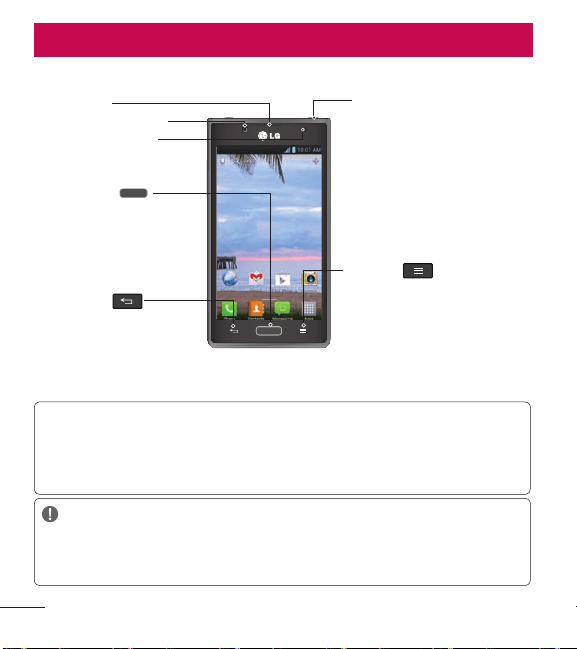
Device components
NOTE: Proximity sensor
Whenreceivingandmakingcalls,theproximitysensorautomaticallyturns
thebacklightoffandlocksthetouchkeypadbysensingwhenthephoneis
nearyourear.Thisextendsbatterylifeandpreventsyoufromunintentionally
activatingthetouchscreenduringcalls.
WARNING:
PlacingaheavyobjectonthephoneorsittingonitcandamagetheLCDand
touchscreenfunctions.DonotcovertheLCDproximitysensorwithprotective
film.Thiscouldcausethesensortomalfunction.
Back Key
Returntotheprevious
screen.
Home Key
•ReturntotheHome
screenfromanyscreen.
•Pressandholdto
viewalistofthemost
recentlyusedapps.
Earpiece
Front Camera Lens
Proximity Sensor
Menu Key
•Displaysavailableoptionsfor
thecurrentscreenor
applications.
•Pressandholdlightlyto
performaGoogleSearch™
ofyourdevicecontentsand
theweb.
Power/Lock Key
•Pressandholdtoturn
thephoneoff,restart
it,orenable/disable
Airplanemode.
•Presstolock/unlockthe
screen.
15
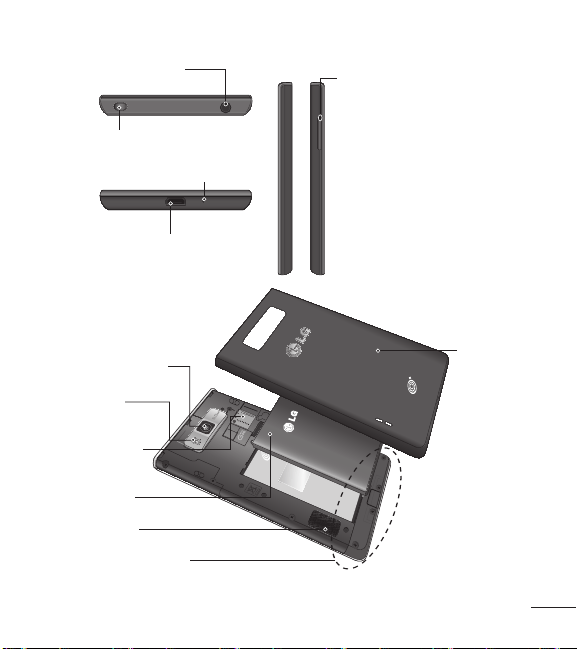
Back Cover
Battery
microSD
Card Slot
Back Camera
Lens
Flash
Internal Antenna
Speaker
Charger/USB Port
Volume Keys
• In the Home screen: Control
ringervolume.
• During a call: Controlyour
earpiecevolume.
• When playing media: Control
volumecontinuously.
TIP!: PressandholdbothVolume
Keysforonesecondtoaccessthe
QuickMemofunction.
Earphone Jack
Power/Lock Key
Microphone
16 L86C|UserGuide
Installing the battery
Beforeyoucanstartexploringyournewphone,you'llneedtosetitup.
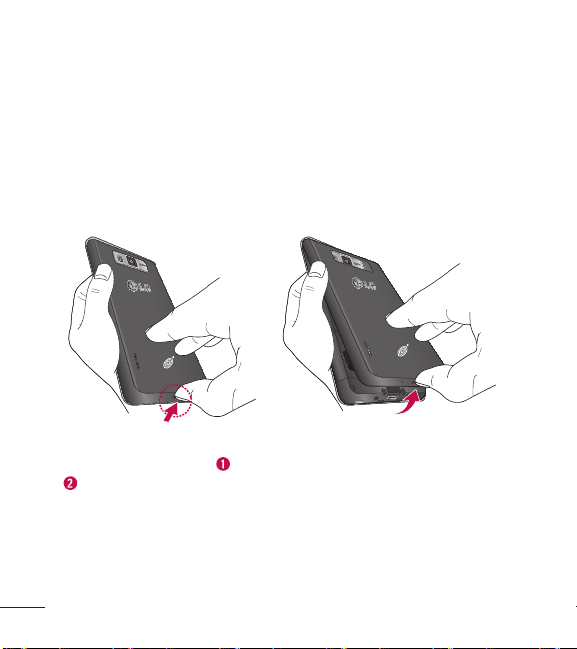
1. To removethebackcover,holdthephonermlyinonehand.With
yourotherhand,liftoffthebackcoverwithyourthumbnailasshown
ingure.
NOTE: PutyourthumbnailintotheCharger/USBPortholeandliftoffthe
backcover.
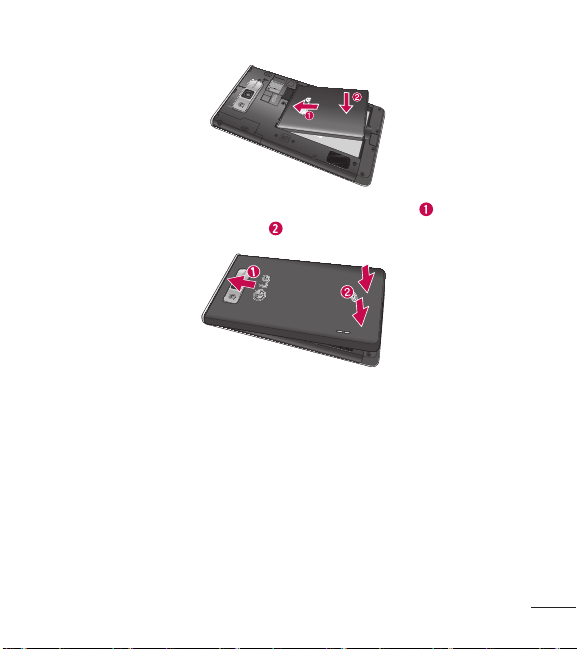
2. Insertthebatteryintoplacebyaligningthegoldcontactsonthe
phoneandthebattery
andpressingitdownuntilitclicksintoplace
.
17
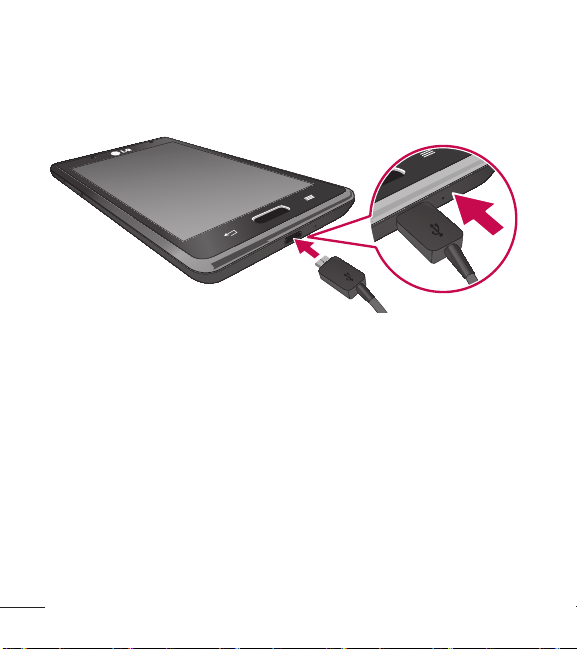
3. Alignthebackcoveroverthebatterycompartment andpressit
downuntilitclicksintoplace
.
18 L86C|UserGuide
Charging your phone
TheCharger/USBPortisatthebottomofthephone.Insertthecharger
andplugitintoanelectricaloutlet.
NOTE: Thebatterymustbefullychargedinitiallytoimprovebatterylifetime.
NOTE: Donotopenthebackcoverduringthechargingyourphone.
Using the memory card
To insert the memory card:
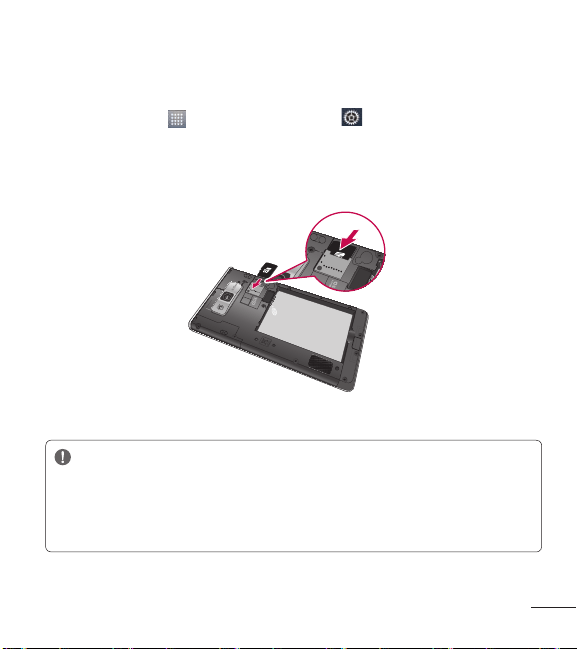
1. RemovethebackcoverandlocatethemicroSDcardslot.
2. HoldthemicroSDcardwiththegoldcontactareafacingdownand
gentlyslideitintotheslot.
19
To remove the memory card safely:
1. To removethemicroSDcard,youmustrstunmountit.OntheHome
screen,touch
>Appstab > Settings
>Storage(DEVICE
category)>Unmount SD card>OK.
2. RemovethebackcoverandlocatethemicroSDcardslot.
3. GentlypullthemicroSDcardouttoremoveit.
NOTE: TheLG OPTIMUS
SHOWTIME
TM
supportsmemorycardsupto32GB.
WARNING
Donotinsertorremovethememorycardwhenthephoneison.
Doingsomaydamagethememorycardaswellasyourphoneand
thedatastoredonthememorycardmaygetcorrupted.

20 L86C|UserGuide
To format the memory card:
Yourmemorycardmayalreadybeformatted.Ifitisn't,youmustformatit
beforeyoucanuseit.
NOTE: Allfilesonyourmemorycardaredeletedwhenitisformatted.
1. OntheHomescreen,touch >Appstab>Settings
>Storage.
2. TouchUnmount SD cardandtouchOKtoconrmit.
3. TouchErase SD cardandthenErase SD cardonemoretimeto
conrmyourchoice.
4. Ifyouhavesetapatternlock,enterthepatternlockandtouchErase
Everything.
NOTE: Ifthereiscontentonyourmemorycard,thefolderstructuremaybe
differentafterformattingasallthefileswillbedeleted.
Locking and unlocking the screen
Ifyoudonotusethephoneforawhile,thescreenisturnedoffandlocked
automatically.Thishelpstopreventaccidentaltouchesandsavesbattery
power.
WhenyouarenotusingtheLG OPTIMUS
SHOWTIME
™
,pressthePower/Lock
Key
tolockyourphone.
Ifthereareanyprogramsrunningwhenyousetlockscreen,theymaybe
stillrunninginLockmode.Itisrecommendedthatyouexitallprograms
beforeenteringLockmodetoavoidunnecessarycharges(e.g.phonecalls,
webaccessanddatacommunications).
21
To wakeupyourphone,pressthePower/Lock Key .Thelockscreen
willappear.Touchandslidethelockscreeninanydirectiontounlockyour
Homescreen.Thelastscreenyouviewedwillopen.
Secure your lock screen
Youcanlockyourscreensothatonlyyoucanunlockittoaccessyourphone.
To set Swipe, Face Unlock, Pattern, PIN or Password:
1. OntheHomescreen,touch
>Appstab>Settings
>Lock
screen(DEVICEcategory)>Select screen lock.
2. Choosefromthefollowingoptions:None, Swipe, Face Unlock, Pattern,
PINorPassword.
NOTE: Precautions to take when using an unlock sequence
Itisveryimportanttoremembertheunlocksequenceyouset.You willnot
beabletoaccessyourphoneifyouenteritincorrectly5times.Ifyouhave
usedall5opportunities,youcantryagainafter30secondsorusethe
BackupPINorPassword.
When you cannot recall your unlock sequence:
IfyouloggedintoyourGoogleaccountonthephonebutfailedtoenter
thecorrectpattern5times,touchForgot pattern?.You arethenrequiredto
loginwithyourGoogleaccounttounlockyourphoneorenteryourBackup
PIN.
IfyouhavenotcreatedaGoogleaccountonthephoneoryouforgotit,you
havetoperformahardreset.

22 L86C|UserGuide
For moreinformation,referto"Usingthehardreset(Factoryreset)"onpage
10.
To adjust the volume
OntheHomescreen,touchtheMenu Key >System settings>Sound
>Volumes.
YoucanadjustPhone ringtone, Notification sound, Touch feedback &
system, Music, video, games and other media and Alarms volume.
JustscrolleachvolumebuttontotherightorlefttoadjustthentouchOK.

23
Your Home screen
Touch screen tips
Herearesometipsonhowtonavigatearoundyourphone.
Touch–To chooseamenu/optionoropenanapplication,touchit.
Touch and hold–To openanoptionsmenuorgrabanobjectyouwantto
move,touchandholdit.
Drag–To scrollthroughalistormoveslowly,dragacrossthetouchscreen.
Flick–To scrollthroughalistormovequickly,ickacrossthetouchscreen
(dragquicklyandrelease).
NOTE:
•To selectanitem,touchthecenteroftheicon.
•Donottopresstoohard;thetouchscreenissensitiveenoughtopickup
alight,rmtouch.
•Usethetipofyourngertotouchtheoptionyouwant.Becarefulnoto
touchanyotherkeys.

24 L86C|UserGuide
Home screen
SimplyswipeyourngertotheleftorrighttoviewtheHomescreen
canvases.You cancustomizeeachcanvaswithapps,downloads,widgets
andwallpapers.
NOTE: Somescreenimagesmaybedifferentdependingonyourphone
provider.
OnyourHomescreen,youcanviewquickkeysatthebottomofthe
screen.Quickkeysprovideeasy,one-touchaccesstothefunctionsyou
usethemost.
TouchthePhoneicontobringupthetouchscreendialpadtomakea
call.
TouchtheContactsicontoopenyourcontacts.
TouchtheMessagingicontoviewandcreatetextandmultimedia
messages.
TouchtheAppsicontoviewallofyourinstalledapplications.To open
anyapplication,simplytouchtheiconoftheapplicationyouwanttoopen.

25
Customizing the Home screen
YoucancustomizeyourHomescreenbyaddingapplicationiconsand
widgetstoanyHomescreencanvas.Youcanalsochangethewallpaper.
To add items on your Home screen:
1. GototheHomescreencanvaswhereyouwanttoaddtheitem.Then
touchandholdtheemptyareaortouch
.
NOTE: IfspaceisnotavailableonaparticularHomescreencanvas,youmust
deleteorremoveanitembeforeyoucanaddanotheritem.Orswitchto
anotherHomescreencanvas.
2. Touchthedesiredtabatthebottomofthescreenandselecttheitem
youwanttoadd.YouwillthenseeaddeditemsontheHomescreen.
3. Dragittothelocationyouwantandliftyournger.
To remove an item from the Home screen:
• OntheHomescreen,touchandholdtheiconyouwanttoremove,
thendragitto
TIP!:To addanapplicationicontotheHomescreenfromtheApplications
screen,touchandholdtheapplicationyouwanttoadd.TheApplications
screenclosesandtheHomescreenwillbedisplayed.
26 L86C|UserGuide
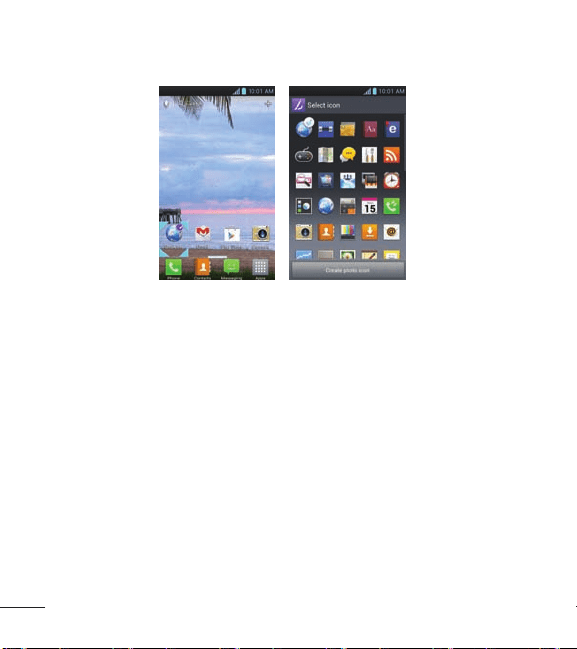
Customizing an application icon from the Home screen
YoucanfurtherpersonalizetheHomescreenbyeditingapplicationicons
usingtheimagesinyourGallery.
1. Touchandholdaniconuntilthecanvasgridisdisplayed,thenrelease
theicon.Aneditingiconappearsattheupperrightsideofthe
applicationicon.
2. Touchtheiconandselectthedesiredicondesign.
3. TouchCreate photo iconandselectTake phototoopentheCamera
applicationandtakeapictureorSelect from Gallerytochooseoneof
theavailablepicturesinyourGallery.
27
Returning to recently-used applications
1. TouchandholdtheHomeKey .Thescreendisplaysapop-up
withiconsofapplicationsyouusedrecently.
2. Touchanicontoopentheapplication.OrtouchtheBackKey
to
returntoyourcurrentapplication.
NOTE:Swipetheapplicationpreviewstotheleftorrighttoremovethemfrom
therecentlyusedapplicationslist.
Status Bar
TheStatusBarrunsacrossthetopofyourscreen.
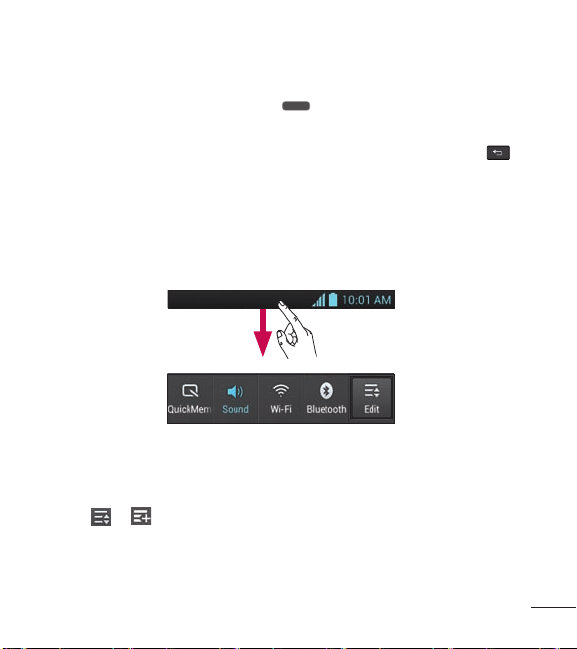
TouchandslidetheStatusBardownwithyourngertodisplaythe
NoticationsPanel.TheNoticationsPaneldisplaysallofyournotications
alongwiththeQuickSettingsatthetop.
Touch
> tomanageyourQuickSettings.Hereyoucanenableand
disableQuickMemo,Soundprole,Wi-Fi,Bluetooth,Accounts&sync,
Airplanemode,Auto-rotatescreen,Brightness,Dataenabled,GPSand
Powersaver.
28 L86C|UserGuide
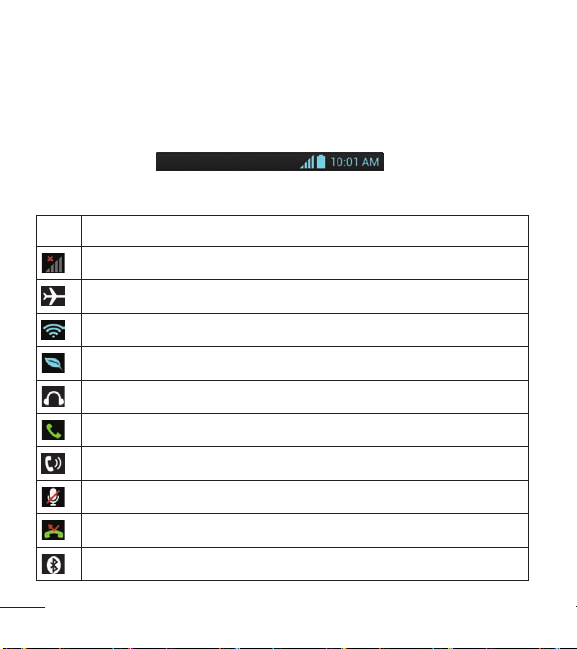
Viewing the Status Bar
TheStatusBarusesdifferenticonstodisplayphoneinformationsuch
assignalstrength,newmessages,batterylife,activeBluetoothanddata
connections.
Belowisatableexplainingthemeaningoficons you'relikelytoseeinthe
StatusBar.
Icon Description
Nosignal
Airplanemode
ConnectedtoaWi-Finetwork
Powersaverison
Wiredheadsetconnected
Callinprogress
Speakerphone
Phonemicrophoneismuted
Missedcall
Bluetoothison
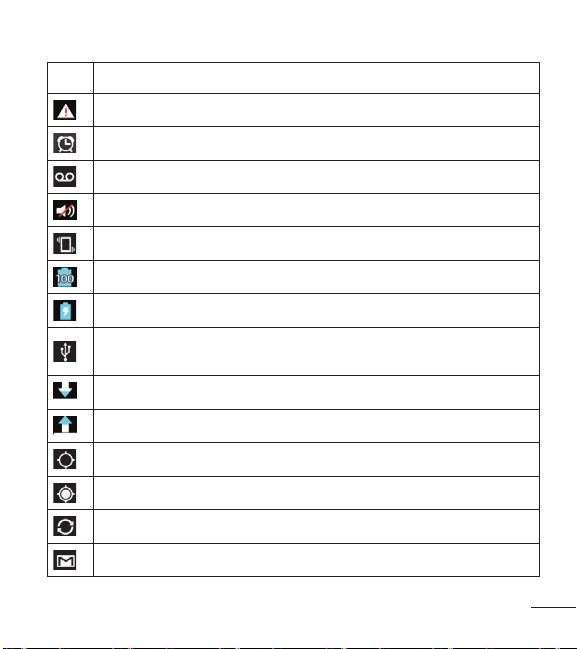
29
Icon Description
Systemwarning
Alarmisset
Newvoicemail
Ringerissilenced
Vibratemode
Batteryfullycharged
Batteryischarging
PhoneisconnectedtoPCviaUSBcable
Downloadingdata
Uploadingdata
GPSisacquiring
ReceivinglocationdatafromGPS
Dataissyncing
NewGmailmessage
30 L86C|UserGuide
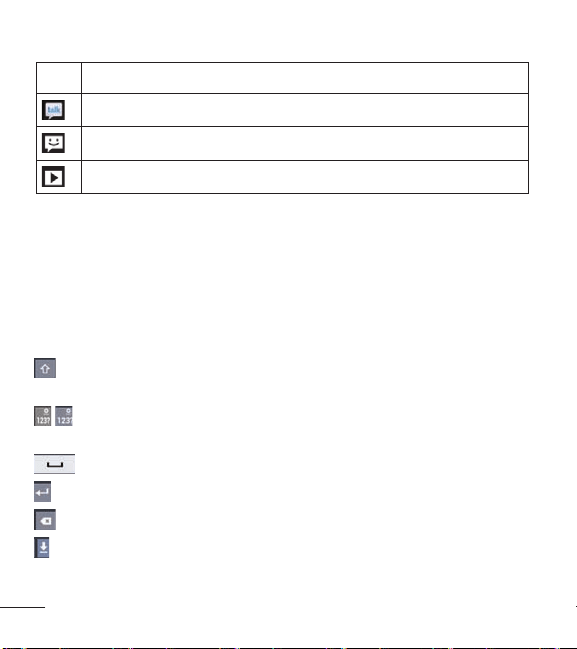
Icon Description
NewGoogleTalkmessage
Newtextormultimediamessage
Songisplaying
On-screen keyboard
Youcanentertextusingtheon-screenkeyboard.Theon-screenkeyboard
appearsautomaticallyonthescreenwhenyouneedtoentertext.To
manuallydisplaythekeyboard,simplytouchatexteldwhereyouwantto
entertext.
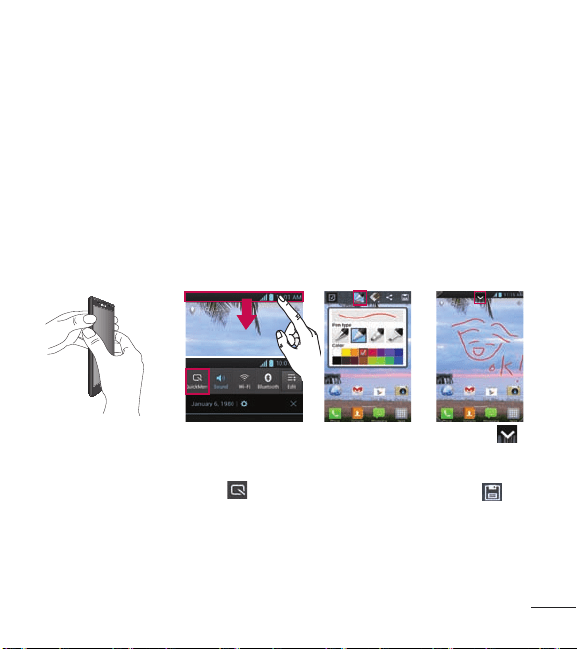
Using the keypad & entering text
Touchoncetocapitalizethenextletteryoutype.Double-tapforall
caps.
Touchtoswitchtothenumbersandsymbolskeyboard.Youcanalso
touchandholdthistabtoviewtheSettingsmenu.
Touchtoenteraspace.
Touchtocreateanewlineinthemessageeld.
Touchtodeletethepreviouscharacter.
Touchtohidetheon-screenkeyboard.
31
Entering special characters
Theon-screenkeyboardallowsyoutoenterspecialcharacters(e.g."á").
For example,toinput"á",touchandholdthe"a"keyuntilthezoom-in
keygrowsbiggeranddisplaysspecialcharacters.Thenselectthespecial
characteryouwant.
QuickMemo
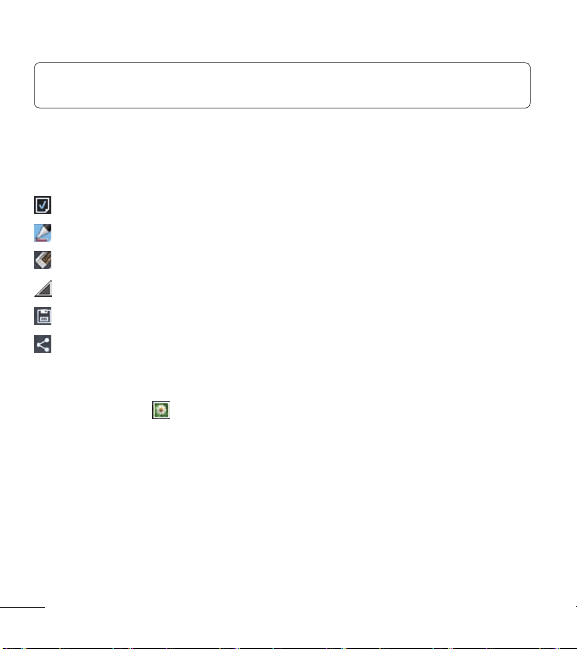
TheQuickMemofeatureallowsyoutocreatememosandcapturescreen
shots.You canuseQuickMemotoeasilyandefcientlycreatememos
duringacall,withasavedpictureoronthecurrentphonescreen.
1 Access the
QuickMemo feature
by pressing both
Volume Keys for
one second on the
screen you want to
capture.
Or touch and slide
the Status Bar
downwards and
touch
.
2 Select the
desired menu
option from
Pen type, Color
and Eraser.
Then create a
memo on the
screen.
3 Touch
from the Edit
menu and
select
to
save the memo.
32 L86C|UserGuide
NOTE: PleaseuseafingertipwhileusingtheQuickMemofeature.Donot
useyourfingernail.
Using the QuickMemo options
WhileusingtheQuickMemofeature,thefollowingoptionsareavailable:
-Selectifyouwanttousethebackgroundscreenornotuseit.
-Selectthepentypeandthecolor.
-Erasethememothatyoucreated.
-Cropthescreencapturetothedesiredsize.
-SavethememotoyourGallery.
-Sharethememowithothers.
Viewing the saved QuickMemo
OpentheGallery
andtouchtheQuickMemoalbum.

33
Google account Setup
Whenyourstturnonyourphone,youhavetheopportunitytoactivatethe
network,tosignintoyourGoogleaccountandhowyouwanttousesome
Googleservices.
To set up your Google account:
• SignintoaGoogleaccountfromthepromptedsetupscreen.
OR
• OntheHomescreen,touch
>Appstab>selectaGoogle
application,suchasGmail
>selectNewtocreateanewaccount.
IfyouhaveaGoogleaccount,touchExisting,enteryouremailaddressand
password,thentouchSign in.
OnceyouhavesetupyourGoogleaccountonyourphone,yourphone
automaticallysynchronizeswithyourGoogleaccountontheweb.
Yourcontacts,Gmailmessages,calendareventsandotherinformation
fromtheseapplicationsandservicesonthewebaresynchronizedwith
yourphone.(Thisdependsonyoursynchronizationsettings.)
Aftersigningin,youcanuseGmail™andtakeadvantageofGoogle
servicesonyourphone.

34 L86C|UserGuide
Connecting to Networks and Devices
Wi-Fi
WithWi-Fi,youcanusehigh-speedInternetaccesswithinthecoverageof
thewirelessaccesspoint(AP).EnjoywirelessInternetusingWi-Fi,without
extracharges.
Connecting to Wi-Fi networks
To useWi-Fionyourphone,youneedtoaccessawirelessaccesspointor
"hotspot".Someaccesspointsareopenandyoucansimplyconnectto
them.Othersarehiddenorusesecurityfeatures;youmustcongureyour
phonetobeabletoconnecttothem.
TurnoffWi-Fiwhenyou'renotusingittoextendthelifeofyourbattery.
NOTE: IfyouareoutoftheWi-FizoneorsetWi-FitoOFF,additionalcharges
maybeappliedbyyourmobileoperatorformobiledatause.
Turning Wi-Fi on and connecting to a Wi-Fi network
1. OntheHomescreen,touch
>Appstab>Settings >Wi-Fi
fromtheWIRELESS&NETWORKScategory.
2. Slide
totherighttoturnWi-Fionandstartscanningforavailable
Wi-Finetworks.
3. Alistofactiveandin-rangeWi-Finetworkswillbedisplayed.
• Securednetworksareindicatedbyalockicon.

35
4. Touchanetworktoconnecttoit.
• Ifthenetworkisopen,youareaskedtoconrmthatyouwantto
connecttothatnetworkbytouchingConnect.
• Ifthenetworkissecured,youarepromptedtoenterapasswordor
othercredentials.(Askyournetworkadministratorfordetails)
5. TheStatusBardisplaysaniconthatindicatestheWi-Fistatus.
Bluetooth
YoucanuseBluetoothtosenddatabyrunningacorresponding
application,notfromtheBluetoothmenuasonmostothermobilephones.
Turning on Bluetooth and pairing up your phone with a Bluetooth device
Youmustpairyourdevicewithanotherdevicebeforeyouconnecttoit.
1. OntheHomescreen,touch
>Appstab>Settings >Bluetooth
fromtheWIRELESS&NETWORKScategory.
2. Slide
totherighttoturnBluetoothon.
3. TouchSearch for devicesatthebottomofthescreen.Yourphonewill
scanforanddisplaytheIDsofallavailableBluetoothin-rangedevices.
Ifthedeviceyouwanttopairwithisn'tonthelist,makesurethetarget
deviceissettobediscoverable,thentapSearch for devicesagain.
4. Choosethedeviceyouwanttopairupwithfromthelist.
36 L86C|UserGuide
Oncetheparingissuccessful,yourdevicewillconnecttothedevice.
Sending pictures using Bluetooth
1. OpentheGallery
andtouchapicture,thentouch >Bluetooth
2. CheckwhetherBluetoothisON,thenselectSearch for devices.
3. Choosethedeviceyouwanttosenddatatofromthelist.
Using Wi-Fi Direct
Youcanshareyourmusic,pictureandvideocontentbetweenuserswho
useAndroidphonesconnectedviathesameWi-Fi&Wi-FiDirected
network.
CheckyourWi-Fi&Wi-FiDirectednetworkinadvanceandmakesurethe
usersareconnectedtothesamenetwork.
1. OntheHomescreen,touch
>Appstab>Settings >More
fromtheWIRELESS&NETWORKScategory > Wi-Fi Direct
2. TouchtheWi-Fi DirectcheckboxtoturnWi-FiDirecton.
3. Selectadevicetoconnectfromthescanneddevicelist.
4. TouchConnect.
Wi-FiDirectcannotbeenabledwhileusingotherWi-Fifunctions.
CREATE GROUP–Touchtoactivategroupownermode,whichenables
thelegacyWi-Fidevicestoconnectbyscanningyourphone.Inthiscase
youmustenterthepasswordthatissetinthePasswordsection.
37
NOTE: Whenyourphonebecomesagroupowner,itwillconsumemore
batterypowerthanwhenitisaclient.Wi-FiDirectconnectiondoesnot
provideInternetservice.Additionalcostsmaybeincurredwhenconnecting
andusingonlineservices.Checkdatachargeswithyournetworkprovider.
Enabling Wi-Fi Direct to share through SmartShare
Wi-FiDirectautomaticallyscansnearbyWi-FiDirectdevicesandthe
searcheddevicesarelistedastheyarefound.You canselectaspecic
devicetosharemultimediadatathroughSmartShare.
Using SmartShare
SmartShareusesDLNA(DigitalLivingNetworkAlliance)technologyto
sharedigitalcontentthroughawirelessnetwork.
BothdevicesmustbeDLNAcertiedtosupportthisfeature.
To turn SmartShare on and allow sharing contents
1. OntheHomescreen,touch
>SmartShare
2. TouchtheMenu Key >Settings.
3. TouchDiscoverabletoallowyourdevicetobedetectedbyother
devices.
• TouchAlways accept requestsifyouwouldliketoautomatically
acceptsharingrequestsfromotherdevices.

38 L86C|UserGuide
• TouchReceive filesifyouwouldliketoallowtheotherdevicesto
uploadmedialestoyourphone.
4. UndertheSHAREDCONTENTSsection,touchtocheckmarkthe
typesofcontentyouwouldliketoshare.ChoosefromPhotos,Videos
andMusic.
5. SmartShareisnowactivatedandreadytosharecontents.
To control your renderer devices
Letyourrendererdevice(e.g.TV)playmultimediacontentsfromyour
remotecontentlibrary(e.g.PC).
NOTE: MakesurethattheDLNAfunctionalityofyourdevicesisproperly
configured(e.g.TVandPC).
1. OntheHomescreen,touch >SmartShare
2. TouchtheTo icon andselectthedevicefromtherendererdevice
list.
3. TouchtheFromicon
andselectthedeviceoftheremotecontent
library.
4. Yo ucanbrowsethecontentlibrarytondthecontent(s)youwant.
5. TouchandholdacontentthumbnailortouchtheMenu Key
,then
touchPlay.
39
To share contents from your phone to your renderer device(e.g. TV)
NOTE: Makesurethatyourrendererdeviceisproperlyconfigured.
1. WhilewatchingyourpicturesorvideosusingtheGalleryapplication,
touchoneoftheicons
/ / atthetopofthescreen.
2. Selectthedevicefromrendererdevicelisttoplaytheles.
NOTE: FollowthesimilarstepstousetheVideoplayertosharecontents
:Needtobeconnectedtonetwork.
:Selectthedeviceonthenetwork.
:ContentiscurrentlybeingsharedthroughSmartShare.
Notice: Checkthatyourdeviceisconnectedwithyourhomenetworkusing
Wi-FiconnectiontousethisapplicationSomeDLNAenableddevices
(e.g.TV)supportonlytheDMPfeatureofDLNAandwillnotappearinthe
rendererdevicelist.Yourdevicemightnotbeabletoplaysomecontents.
To download contents from remote content library
1. OntheHomescreen,touch
>SmartShare
2. TouchtheFromicon andselectthedevicefromtheremote
contentlibrary.
3. Yo ucanbrowsethecontentlibrary.
4. TouchandholdacontentthumbnailandthentouchDownload.
40 L86C|UserGuide
Notice: Afewtypesofcontentsarenotsupported.
To upload contents from my phone to remote content library
NOTE: MakesurethatthemicroSDcardiscorrectlymountedandtheReceive
filesoptionintheSettingsmenuischecked.
1. OntheHomescreen,touch >SmartShare
2. TouchtheFromicon andselectMy phone.
3. Yo ucanbrowsethecontentlibrary.
4. TouchandholdacontentthumbnailandthentouchUpload.
5. Selectthedevicefromtheremotecontentlibrarytobeuploaded.
Notice: SomeDLNAenableddevicesdonotsupporttheDMSupload
functionalityandwillnotuploadfiles.Afewtypesofcontentsarenot
supported.
41
Calls
Making a call
1. OntheHomescreen,touch toopenthekeypad.
2. Enterthenumberusingthekeypad.To deleteadigit,touch
.
3. Touch
tomakeacall.
4. To endacall,touch
.
TIP!:To enter"+"tomakeinternationalcalls,touchandhold .
Calling your contacts
1. OntheHomescreen,touch toopenyourcontacts.
2. Scrollthroughthecontactlistorentertherstfewlettersofthe
contactyouwanttocallbytouchingtheSearch contacts eld.Youcan
alsotouchthelettersalongtherightsideofthescreen.
3. Inthelist,touchthecontactyouwanttocall.
4. Touchthephonenumberyouwanttodial.
Answering and rejecting a call
Locked screen
•
Swipe
inanydirectiontoansweranincomingcall.
•
Swipe
inanydirectiontodeclineanincomingcall.
42 L86C|UserGuide
Unlocked screen
•
Touch
toansweranincomingcall.
•
Touch
todeclineanincomingcall.
TIP!:Quick msg
You cansendamessagequicklyusingthisfunction.Thisisusefulifyou
needtoreplythemessageduringameeting.
Adjusting call volume
To adjustthein-callvolumeduringacall,usetheVolumeKeysontheleft
sideofthephone.
Adding a call during conversation
1. Duringyourrstcall,touchMenu Key >Add call.
2. Dialthenumber.You canalsogotoyourrecentlydialedlistby
touching
orsearchcontactsbytouching andselectthe
numberyouwanttocall.
3. Touch
tomakethecall.
4. Yourrstcallwillbeputonholdwhilethesecondcallisactive.
5. Touch
tomergeallcallsandstartaconferencecall.
6. To endactivecalls,touch
.
43
NOTE: Youarechargedforeachcallyoumake.
Viewing your call logs
OntheHomescreen,touch andchoosetheCall logstab .
Viewacompletelistofalldialed,receivedandmissedvoicecalls.
TIP!:Touchanycalllogentrytoviewthedate,timeanddurationofthecall.
TIP!:TouchtheMenuKey ,thentouchDelete all > OKtodeleteallthe
recordeditems.
Call settings
Usethismenutocongurephonecallsettings.
1. OntheHomescreen,touch
.
2. Touchthe Menu Key
.
3. TouchCall settingsandchoosetheoptionsthatyouwanttoadjust.
Voicemail service–Allowsyoutoselectyourcarrier’svoicemailservice.
Voicemail settings–Ifyouareusingyourcarrier’svoicemailservice,this
optionallowsyoutoenterthephonenumbertouseforlisteningtoand
managingyourvoicemail.
Save unknown numbers–Displayapop-uptoaddunsavednumbersto
contactsafteracall.

44 L86C|UserGuide
Quick messages–Addoreditquickmessages.
Auto retry–Automaticallyredialthecallifthecallfailstoconnect.
TTY mode–AllowsyoutosetTTYmodetocommunicatewithotherTTY
devices.
DTMF tones–SetthelengthofDTMFtones.
Auto answer–Enableautoanswerwithhandsfree.
Call restrictions–Restrictincomingoroutgoingcall.
Call duration–Viewthedurationofcallsincludinglastcall,allcalls,dialed
callsandreceivedcalls.
Voice privacy–Enableenhancedprivacymode.

45
Contacts
Addcontactstoyourphoneandsynchronizethemwiththecontactsin
yourGoogleaccountorotheraccountsthatsupportcontactsyncing.
Searching for a contact
1. OntheHomescreen,touch toopenyourcontacts.
2. TouchtheSearch contactseldandenterthecontactnameusingthe
keyboardortouchthelettersalongtherightsideofthescreenand
scrolltothecontact.
Adding a new contact
1. OntheHomescreen,touch ,enterthenewcontact'snumber,then
touchtheMenuKey
>Add to Contacts>Create new contact.
2. Ifyouwanttoaddapicturetothenewcontact,touch
andchoose
fromTake photoorSelect from Gallery.
3. Selectthecontacttypebytouching
.
4. Touchacategoryofcontactinformationandenterthedetailsabout
yourcontact.
5. TouchSavetosavethecontact.
NOTE:IfyoutouchtheMenu Key fromthecontactscreen,youcan
choosefromDelete, Share, Join, ExportorAdd to home screen.

46 L86C|UserGuide
Editing Contacts
1. OpentheContactsapplication.
2. TouchtheContactentryyouwanttoedit.
3. TouchtheEditicon
atthetopofthescreen.
4. Makethechangestotheentryasneeded.
5. TouchSave.
Favorite contacts
Youcanclassifyfrequentlycalledcontactsasfavorites.
Adding a contact to your favorites
1. OntheHomescreen,touch
toopenyourcontacts.
2. Touchacontacttoviewtheirdetails.
3. Touchthestartotherightofthecontact'sname.Thestarturnsyellow.
Removing a contact from your favorites list
1. OntheHomescreen,touch
toopenyourcontacts.
2. TouchtheFavoritestab
andchooseacontacttoviewitsdetails.
3. Touchtheyellowstartotherightofthecontact'sname.Thestarturns
grayandthecontactisremovedfromyourfavorites.
47
Messaging
YourLG OPTIMUS
SHOWTIME
TM
combinestextandmultimediamessagesinto
oneintuitive,easy-to-usemenu.
Sending a message
1. OntheHomescreen,touch ,thentouch tocreateanew
message.
2. EnteracontactnameorcontactnumberintheTo eld.Asyou
enterthecontactname,matchingcontactsappear.Youcantoucha
suggestedrecipient.Youcanaddmultiplecontacts.
NOTE: Youwillbechargedforatextmessageforeverypersonyousendthe
messageto.
3. Touchthetexteldandcomposeyourmessage.
4. Touch
toselectfromthefollowingattachmentoptions:Picture,
Capture picture, Video, Capture video, Audio, Record voice, Slideshow
orContact (vCard).
5. TouchtheMenu Key
toopentheOptionsmenu.Choosefromany
oftheavailableoptions.
6. TouchSend (or Send MMS)tosendyourmessage.
WARNING
The160-characterlimitmayvaryfromcountrytocountrydependingonthe
languageandhowthetextmessageiscoded.
48 L86C|UserGuide
WARNING
Ifanimage,videooraudiofileisaddedtoatextmessage,itis
automaticallyconvertedintoamultimediamessageandyouarecharged
accordingly.
Message view
Messagesexchangedwithanotherpartyaredisplayedinchronological
ordersothatyoucanconvenientlyseeanoverviewofyourconversation.
Using Smilies
LivenupyourmessagesusingSmilies.
Whenwritinganewmessage,touchtheMenuKey
,thenchooseInsert
smiley.
Changing your message settings
YourLG OPTIMUS
SHOWTIME
TM
messagesettingsarepredened,soyoucan
sendmessagesimmediately.Youcanchangethesettingsbasedonyour
preferences.
OntheHomescreen,touch
,thentouchtheMenuKey >Settings.
Setyoupreferencesasdesired.

49
Email
YoucanusetheEmailapplicationtoreademailsfromservicesotherthan
Gmail.TheEmailapplicationsupportsthefollowingaccounttypes:POP3,
IMAPandExchange.
Yourserviceproviderorsystemadministratorcanprovidetheaccount
settingsyouneed.
Managing an email account
ThersttimeyouopentheEmailapplication,asetupwizardopenstohelp
youtosetupanemailaccount.
To add another email account:
• OntheHomescreen,touch
>Appstab>Email
>Menu Key
>Settings>ADD ACCOUNT.
Aftertheinitialsetup,Emaildisplaysthecontentsofyourinbox.Ifyouhave
addedmorethanoneaccount,youcanswitchamongaccounts.
To change an email account's setting:
• OntheHomescreen,touch
>Appstab>Email
>Menu Key
>Settings. Thentouchthedesiredemailaccountandcongure
anysettingsyouwant.
To delete an email account:
• OntheHomescreen,touch
>Appstab>Email
>Menu Key
>Settings. Thenselectanaccountyouwanttodeleteandtouch
Remove account > OK.

50 L86C|UserGuide
Email account screen
ThefollowingoptionsareavailableforyourInbox.
–Touchtoswitchtoanotheraccount.
–Touchtocomposeanewmessage.
–Touchtosearchyouraccount.
–Touchtoopentheaccountfolders.
–Touchtorefreshthecontentofyouraccount.
Onlythemostrecentemailsinyouraccountaredownloadedtoyour
phone.
Working with account folders
EachaccounthasanInbox,Outbox,SentandDraftsfolder.Dependingon
thefeaturessupportedbyyouraccount'sserviceprovider,youmayhave
additionalfolders.
Composing and sending email
To compose and send a message
1. OpentheEmailapplicationandtouch
.
2. Enteranaddressforthemessage'sintendedrecipient.Asyouenter
text,matchingaddressesareofferedfromyourContacts.Separate
multipleaddresseswithcommas.
51
3. TouchtheMenu Key toaddCc/Bccandaddattachmentlesif
required.
4. Enterthetextofthemessage.
5. Touch
tosendthemessage.
Ifyouaren'tconnectedtoanetwork,forexample,ifyou'reworkingin
airplanemode,themessagesthatyousendarestoredinyourOutbox
folderuntilyou'reconnectedtoanetworkagain.Ifitcontainsany
pendingmessages,theOutboxisdisplayedontheAccountsscreen.
TIP!:WhenanewemailarrivesintheInbox,youwillreceiveanotification
bysoundorvibration(dependingonyoursettings).You willalsoreceivea
notificationintheStatusBar.
52 L86C|UserGuide
Camera
Getting to know the viewfinder
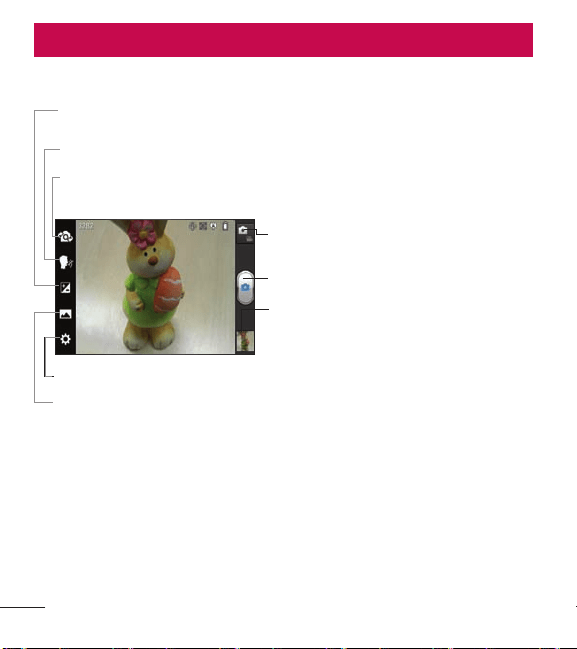
Switch lenses–Switchbetweentherear–facingcameralensandthefront–
facingcameralens.
Settings–TouchthisicontoopentheSettingsmenu.
Shot mode–ChoosefromNormal, PanoramaorContinuous shot.
Mode switch-Allowsyoutoswitch
betweencameramodeandvideomode.
Capture-Tak es aphoto.
Gallery
- Allowsyoutoviewthelast
photoyoucaptured.Thisenablesyou
toaccessyourGalleryandviewsaved
photoswithincameramode.
Brightness–Thisdenesandcontrolstheamountofsunlightenteringthe
image.
Cheese shutter–Tak ephotowithvoicecommand.
Taking a quick photo
1. OpentheCameraapplication.
2. Holdthephoneandpointthelenstowardsthesubjectyouwantto
photograph.
3. Touchthesubjectonthescreentofocusonit.
53
4. Whenthefocusboxturnsgreen,thecamerahasfocusedonyour
subject.
5. Touch
tocapturetheimage.
Once you've taken the photo
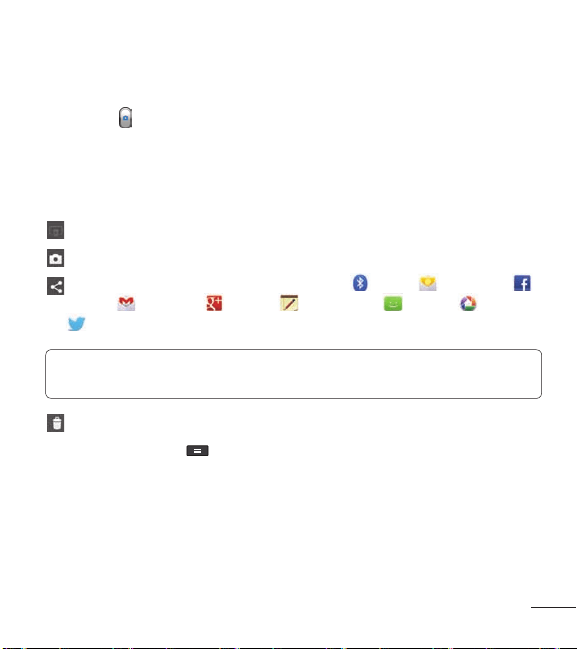
Touchtheimagepreviewatthebottomofthescreentoviewthelastphoto
youcaptured.
TouchtoshareviaSmartShare.
TouchtoreturntoCameramodetotakeanotherpicture.
TouchtoshareyourphotousingBluetooth , Email , Facebook
, Gmail , Google+ , Memo , Messaging , Picasa , Twitter
,oranyotherdownloadedapplicationthatsupportssharing.
TIP!: Ifyouhaveansocialnetworkingaccountandsetituponyourphone,
youcanshareyourphotowiththesocialnetworkingcommunity.
Touchtodeletetheimage.
TouchtheMenu Key
toopenthefollowingoptions.
Set image as–TouchtosettheimageasaContact photo,Home screen
wallpaperorLockscreen Wallpaper.
Move–Touchtomovetheimagetootheralbum.
Rename–Touchtoeditthenameoftheselectedpicture.
54 L86C|UserGuide
Rotate left/right–Touchtorotatetheimagetotheleftorright.
Crop–Cropyourphoto.Moveyourngeracrossthescreentoselectthe
area.
Edit–Viewandeditthepicture.
Improvescolorqualitiesindifferentlightingconditions.
Appliesartisticeffectstothepictures.
Appliescoloreffectstothepictures.
Appliesadditionaloptionsforpictures.
Slideshow–Displaysyourimagesinaslideshow.
Details–Displaysthepictureinformation.
Using the advanced settings
Intheviewnder,touch toopenalladvancedoptions.
–Allowsyoutoturnontheashwhentakingaphotoindark
conditions.
–EnableAutoorFacetrackingfocusmode.
–Selecttheimageresolution.Ifyouchoosethehighresolution,the
lesizewillincrease,whichmeansyouwillbeabletostorefewerphotosin
thememory.
–Findsthecolorandlightsettingsappropriateforthecurrent
environment.ChoosefromNormal,Portrait,Landscape,Sports,Sunset
55
andNight.
–TheISOratingdeterminesthesensitivityofthecamera'slight
sensor.ThehighertheISO,themoresensitivethecamerais.Thisisuseful
indarkerconditionswhenyoucannotusetheash.
–Improvescolorqualitiesindifferentlightingconditions.
–Appliescoloreffectstothepictures.
–SetadelayaftertheCapturebuttonispressed.Thisisidealifyou
wanttobeinthephoto.
–Activatetouseyourphone'slocation-basedservices.Takepictures
whereveryouareandtagthemwiththelocation.Ifyouuploadtagged
picturestoablogthatsupportsgeotagging,youcanseethepictures
displayedonamap.
NOTE: ThisfunctionisonlyavailablewhenGPSisactive.
–Selectoneofthefourshuttersoundsorturnitoff.
–Automaticallydisplaysthepictureaftertakingit.
–Restoreallcameradefaultsettings.
–Provideshelpinformationsonsomeofthecamerafeatures.
TIP!:Whenyouexitthecamera,somesettingsreturntotheirdefaults,
suchaswhitebalance,coloreffect,timerandscenemode.Checkthese
beforeyoutakeyournextphoto.
Video camera
56 L86C|UserGuide
Video camera
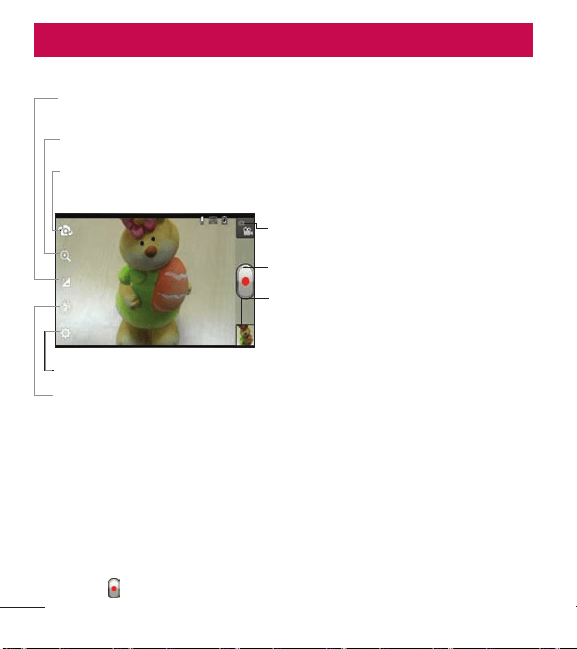
Getting to know the viewfinder
Switch lenses–Switchbetweentherear–facingcameralensandthefront-
facingcameralens.
Settings–TouchthisicontoopentheSettingsmenu.
Flash–Allowsyoutoturnontheashwhenrecordingavideoindark
conditions.
Mode switch-Allowsyoutoswitch
betweenvideomodeandcameramode.
Record-Touchtostartrecordingavideo.
Gallery
- Touchtoviewthelastvideoyou
recorded.Thisenablesyoutoaccessyour
Galleryandviewyoursavedvideosfrom
withinvideomode.
Brightness–Thisdenesandcontrolstheamountofsunlightenteringthe
video.
Zoom–Zoominorzoomout.AlternativelyyoucanusetheVolumeKeys.
Recording a video
1. OpentheCameraapplicationandtouchtheMode switchbutton.
2. Thevideocameraviewnderappearsonthescreen.
3. Holdingthephone,pointthelenstowardsthesubjectyouwantto
captureinyourvideo.
4. Touch
oncetostartrecording.
57
5. Aredlightappearsatthetopcorneroftheviewnderwithatimer
showingthelengthofthevideo.
6. Touch
onthescreentostoprecording.
After recording a video
Touchtheimagepreviewatthebottomofthescreentoviewthelastvideo
yourecorded.
Touchtoplaythevideo.
TouchtoshareviaSmartShare.
TouchtoreturntoCameramodetotakeanotherpictureorrecorda
video.
TouchtosharethevideoviaBluetooth , Email , Facebook ,
Gmail
, Google+ , Messaging ,YouTube ,oranyother
downloadedapplicationthatsupportssharing.
Touchtodeletethevideoviayoujustmade.ConrmbytouchingOK.
Theviewnderreappears.
TouchtheMenu Key
toopenthefollowingoptions.
Move–Touchtomovethevideotoanotheralbum.
Rename–Touchtoeditthenameoftheselectedvideo.
Details–Touchtoseeadetailedinformation,suchasthetitle,time,type,
resolution,duration,sizeandpath.
58 L86C|UserGuide
Using the advanced settings
Usingtheviewnder,touch toopentheadvancedoptions.
–Touchtosetthesize(inpixels)ofthevideoyouarerecording.
–Improvescolorqualitiesindifferentlightingconditions.
–Appliescoloreffectstothevideos.
–Activatetouseyourphone'slocation-basedservices.Takevideos
whereveryouareandtagthemwiththelocation.Ifyouuploadedtagged
videostoablogthatsupportsgeotagging,youcanseethevideosona
map.
NOTE: ThisfunctionisonlyavailablewhenGPSisactive.
–Choosetorecordavideowithorwithoutsound.
–Automaticallydisplaysthevideoyoujustrecorded.
–Restoreallvideodefaultsettings.
Adjusting the volume when viewing a video
To adjustthevolumeofavideowhileitisplaying,usetheVolumeKeyson
theleftsideofthephone.

59
Multimedia
Youcanstoremultimedialesonamemorycardforeasyaccesstoall
yourimageandvideoles.
Gallery
OntheHomescreen,touch >Appstab>Gallery .Openanalbum
toviewallyourimageandvideoles.
Music Player
YourLG OPTIMUS
SHOWTIME
TM
hasamusicplayerthatletsyouplayallyour
favoritetracks.To accessthemusicplayer,ontheHomescreen,touch
>
Appstab>Music Player
.
Transferring music files using Media sync (MTP) devices
1. ConnecttheLG OPTIMUS
SHOWTIME
TM
toaPCusingaUSBcable.
2. OpentheNoticationsPanel,touchUSB connected,thenselectMedia
sync (MTP).
3. YoucanviewtheportabledeviceonyourPCandtransfertheles.
NOTE: IfyouusingMicrosoftWindowsXPandsynchronizeyourphonewith
yourPCusingtheUSBcable,youneedtoinstallMicrosoftWindowsMedia
Player11.PleaserefertoMicrosoft'sWindowsMediaPlayerdownloadsite.
60 L86C|UserGuide
Playing a song
1. OntheHomescreen,touch >Appstab>Music Player .
2. TouchtheSongstab.
3. Selectthesongyouwanttoplay.
Touchtopauseplayback.
Touchtoresumeplayback.
Touchtoskiptothenextsongortouchandholdittofast-forward.
Touchtogobacktothebeginningofthesongortouchandholditto
rewind.Youcanalsotouchtwicetoreturntotheprevioussong.
Touchtomanagethemusicvolume.
Touchtoplaythecurrentplaylistinshufflemode.
Touchtosetrepeatmode.
Touchtoseelyrics.Thisoptionisononlyifthesongincludesthelyrics.
Touchtoseethecurrentplaylist.
TouchtogotoyourLibrary.
To changethevolumewhilelisteningtomusic,presstheVolumeKeyson
theleftsideofthephone.
Touchandholdanysonginthelistforthefollowingoptions:Play,Add to
playlist,Set as ringtone,Delete,Share,SearchandDetails.
61
NOTE: Musicfilecopyrightsmaybeprotectedbyinternationaltreatiesand
nationalcopyrightlaws.Therefore,itmaybenecessarytoobtainpermission
oralicencetoreproduceorcopymusic.
Insomecountries,nationallawsprohibitprivatecopyingofcopyrighted
material.Beforedownloadingorcopyingthefile,checkthenationallawsof
therelevantcountryconcerningtheuseofsuchmaterial.
62 L86C|UserGuide
Utilities
Setting your alarm
1. OntheHomescreen,touch >Appstab>Alarm/Clock .
2. Touch
toaddanewalarmandenterthedesiredtime.
3. SetRepeat, Snooze duration,Vibration,Alarm sound,Puzzle lock and
Memo.
4. TouchSavetosavethealarm.
Using your calculator
1. OntheHomescreen,touch >Appstab>Calculator .
2. Touchthenumberkeystoenternumbers.
3. For simplecalculations,touchthefunctionyouwant(
, , or
)followedby .
4. For morecomplexcalculations,touchtheMenu Key
,select
Advancedpanel,thenchoosethedesiredfunction.
Adding an event to your calendar
1. OntheHomescreen,touch >Appstab>Calendar .
2. Touch
toselectfromthefollowingCalendarviews:Day, Week,
Month, Agenda.
3. Touchthedateyouwanttoaddaneventon.
4. Touch
tocreateanewevent.

63
5. TouchtheEvent nameeldandentertheeventname.
6. TouchtheLocationeldandenterthelocation.Checkthedateand
enterthetimeyouwantyoureventtostartandnish.
7. Ifyouwanttoaddanotetoyourevent,touchtheDescriptionseld
andenterthedetails.
8. Ifyouwanttorepeatthealarm,setREPEAT,andsetREMINDERS,if
necessary.
9. TouchSavetosavetheeventinthecalendar.
Polaris Office
PolarisOfceisaprofessionalmobileofcesolutionthatletsusers
convenientlyviewvarioustypesofofcedocuments,includingWord,Excel
andPowerPointles,anywhere,anytime,usingtheirmobiledevices.
OntheHomescreen,touch
>Appstab>Polaris Office .
Managing files
PolarisOfceprovidesmobileuserswithconvenientlemanagement
features,includingcopying,movingandpasting,anddeletinglesand
foldersrightonthedevice.
Viewing files
Mobileuserscannoweasilyviewawidevarietyofletypes,including
MicrosoftOfcedocumentsandAdobePDF,rightontheirmobiledevices.
WhenviewingdocumentsusingPolarisOfce,theobjectsandlayout
remainthesameasintheiroriginaldocuments.
64 L86C|UserGuide
Play Store
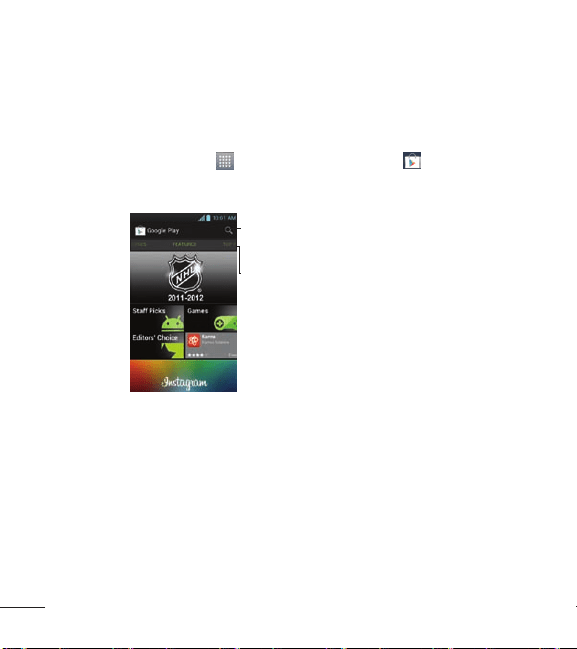
PlayStoreallowsyoutobrowseandsearchforfreeandpaidapplications.
To open the Play Store application
OntheHomescree,touch
>Apps tab > Play Store
.Whenyou
openthePlay Storeapplicationforthersttime,youmustreadand
acceptthetermsofservicetocontinue.
Scrolltotheleftandright
toviewandexploresub-
categories.
Touchheretosearchforapps.
To download applications
NOTE: Beforeyoucandownloadapaidapplication,youmustsetupabilling
arrangement.
1. Findanapplicationyouwantandopenitsdetailsscreen.
2. TouchtheInstallbutton(freeapps)orPricebutton(paidapps).The
screenwilldisplayiftheapplicationrequiresaccesstoyourdataor
controlofanyfunctionsonyourphone.ThePlayStoreapplicationtells
youwhatitcanaccessifyoucontinuewiththedownload.

65
3. Ifyouagreetotheapplications'saccessrequirements,touch
Accept & download(forfreeapplications)orAccept & buy(forpaid
applications).
To get help with Play Store
PlayStoreHelpwebpagesareavailablefromallPlayStorescreens.
TouchtheMenu Key
>Help.
TheBrowserapplicationopenstothePlayStoreHelppage,withlinksto
manyhelptopics.
66 L86C|UserGuide
The web
Browser
Browsergivesyouafast,full-colorworldofgames,music,news,sport,
entertainmentandmuchmore,rightonyourmobilephone.Whereveryou
areandwhateveryouenjoy.
NOTE: Additionalchargesapplywhenconnectingtotheseservicesand
downloadingcontent.Checkdatachargeswithyournetworkprovider.
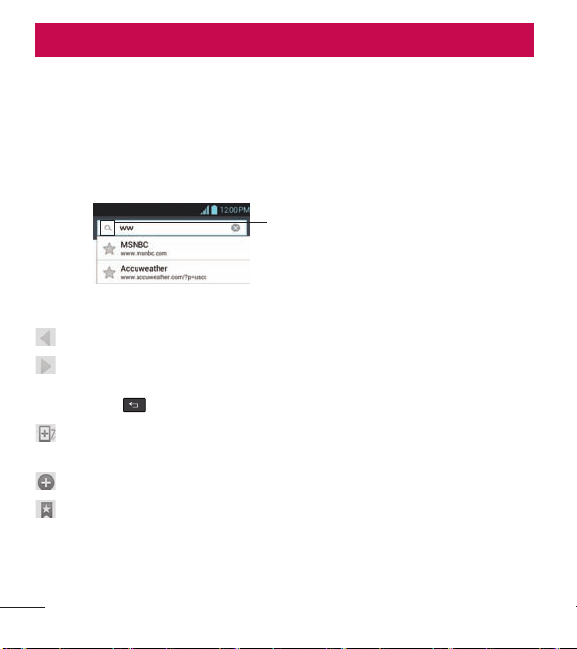
EntertheURLandtouchhere
tosearch.
Using the web toolbar
Touchtogobackapage.
Touchtogoforwardsapage,tothepageyouconnectedtoafterthe
currentone.Thisistheoppositeofwhathappenswhenyoutouchthe
BackKey
,whichgoestothepreviouspage.
Touchandholdthisiconandtiltthedeviceupanddowntozoominor
out.
Touchtoaddanewwindow.
Touchtoopenalistofsavedbookmarks.

67
Using options
TouchtheMenu Key toviewthefollowingoptions.
Refresh–Updatethecurrentwebpagecontent.
Save to bookmarks–Addthecurrentwebpageasbookmark.
Go to Homepage–Allowsyoutogotothehomepage.
Share page–Allowsyoutosharethewebpagewithothers.
Find on page–Allowsyoutondlettersorwordsonthecurrentwebpage.
Request desktop site–Allowsyoutoviewthewebpageindesktopview.
Save for offline reading–Allowsyoutosavecurrentpageofinesoyou
canreaditlater.
Brightness–Adjuststhebrightnesslevelforcomfortablebrowsing.
Settings–DisplaysBrowsersettings.
Exit–ExitsthewebpageandclosestheBrowser.

68 L86C|UserGuide
Settings
OntheHomescreen,touch >Appstab>Settings .
OR
OntheHomescreen,touchtheMenu Key
,thentouchSystem
settings.
WIRELESS & NETWORKS
Here,youcanmanageWi-FiandBluetooth.You canalsosetupmobile
networksandswitchtoairplanemode.
< Wi-Fi >
Slide
totherighttoturnonWi-FitoconnecttoavailableWi-Fi
networks.
TIP!:How to obtain the MAC address
To setupaconnectioninsomewirelessnetworkswithMACfilters,youmay
needtoentertheMACaddressofyourLG OPTIMUS
SHOWTIME
TM
intotherouter.
You canfindtheMACaddressinthefollowinguserinterface:OntheHome
screen,touchtheMenu Key >Apps tab>Settings >Wi-Fi>Menu
Key >Advanced>MAC Address.
< Bluetooth >
Slide
totherighttoturnonBluetoothtoconnecttoBluetooth
devices.
< Data usage >
Displaysthedatausageandsetmobiledatalimit.

69
< Call >
Usethismenutocongurephonecallsettings.
< More >
Airplane mode–AllowsyoutoturnAirplanemodeOntodisablewireless
networks.
Wi-Fi Direct–MakeaconnectiondirectlywithWi-Fideviceswithoutany
AccessPoint.
VPN–DisplaysthelistofVirtualPrivateNetworks(VPNs)thatyou've
previouslycongured.AllowsyoutoadddifferenttypesofVPN.
Mobile networks–Allowsyoutoenable/disabledataanddataroaming.
DEVICE
< Sound >
Sound profile–YoucanchoosefromSound, Vibrate onlyorSilent.
Volumes–Yo u canmanagethevolumesforvariousphonesettings.
Phone ringtone–Allowsyoutosetyourdefaultincomingcallringtone.
Notification sound–Allowsyoutosetyourdefaultnoticationringtone.
Ringtone with vibration–Vibrationfeedbackforcallsandnotications.
Quiet time–Settimestoturnoffallsoundsexceptalarmandmedia.
Dial pad touch tones–Allowsyoutosetthephonetoplaytoneswhen
usingthedialpadtodialnumbers.

70 L86C|UserGuide
Touch sounds–Allowsyoutosetyourphonetoplayasoundwhenyou
touchbuttons,iconsandotheron-screenitemsthatreacttoyourtouch.
Screen lock sound–Allowsyoutosetyourphonetoplayasoundwhen
lockingandunlockingthescreen.
Emergency tone–AllowsyoutosetemergencytoneasOff,AlertorVibrate.
< Display >
Brightness–Adjustthescreenbrightness.
Auto-rotate screen–Settoswitchorientationautomaticallywhenyou
rotatethephone.
Screen timeout–Adjustthedelaybeforethescreenautomaticallyturns
off.
Font size–Changethesizeofthedisplayfont.
Front key light–SetthefrontkeyLEDtime.
< Home screen >
Select Home-AllowsyoutoselecttheHometheme.
Animation-Settodisplayanimations.
Screen swipe effect-Yo ucansetthescreeneffectthatisdisplayedwhen
swiping.
Wallpaper-SettheHomescreenwallpaper.
Scroll wallpaper-Allowsthewallpapertoscrollwiththescreen.
Scroll screens circularly-Showrstscreenafterlastscreenwhenscrolling.

71
Home backup & restore-Backupandrestoreapp/widgetconguration
andthetheme.
< Lock screen >
Select screen lock–Setascreenlocktosecureyourphone.Yo u canset
toSwipe, Face Unlock, Pattern,PIN,PasswordorleaveitasNone.
Whenyouturnonyourphoneorwakeupthescreen,you'reaskedtoenter
yourunlocksequencetounlockthescreen.
Wallpaper–Allowsyoutosetthelockscreenwallpaper.
Clocks & shortcuts-Customizeclocksandshortcutsonthelockscreen.
Owner info–Showownerinformationonthelockscreen.
Lock timer -Selectthelocktimerduration.
Power button instantly locks-CheckmarksothatpressingthePower/Lock
Key
instantlylocksthephone.
< Storage >
SYSTEM MEMORY–Viewtheinternalstorageusage.
SD CARD–ChecktotalavailableSDcardspace.TouchUnmount SD card
tounmounttheSDcardforsaferemovaloftheSDcard.TouchErase SD
cardifyouwanttodeletealldatafromtheSDcard.
< Power Saver >
Hereyoucanmanagethebatteryandcheckthepowersavingitems.You
canalsocheckthebatteryuse.

72 L86C|UserGuide
< Apps >
Youcanviewandmanageyourpre-installedanddownloadedapplications.
PERSONAL
< Accounts & sync >
Permitsapplicationstosynchronizedatainthebackground,whetherornot
youareactivelyworkinginthem.Turningthissettingoffcansavebattery
powerandlowers(butdoesnoteliminate)datausage.
< Location services >
Google's location service–Yourphonedeterminesyourapproximate
locationusingWi-Fiandmobilenetworks.Whenyouselectthisoption,
you'reaskedwhetheryouconsenttoallowingGoogletouseyourlocation
whenprovidingtheseservices.
GPS satellites–Yourphonedeterminesyourlocationtostreetlevel
accuracy.
Location & Google search–AllowsGoogletouseyourlocationtoimprove
searchresultsandotherservices.
< Security >
Encrypt phone–EncryptsyourphoneandrequiresanumericPINor
passwordtodecryptyourphoneeachtimeyoupoweriton.
Password typing visible–Showpasswordasyoutype.

73
Phone administrators–Viewordeactivatephoneadministrators.
Unknown sources–Allowsyoutoinstallnon-Marketapplications.
Trusted credentials–DisplaytrustedCAcerticates.
Install from storage–Choosetoinstallencryptedcerticatesfromyour
storage.
Clear credentials–Removeallcerticates.
< Language & input >
UsetheLanguage & inputsettingstoselectthelanguageforthetexton
yourphoneandforconguringtheon-screenkeyboard,includingwords
you'veaddedtoitsdictionary.
< Backup & reset >
Changethesettingsformanagingyoursettingsanddata.
Back up my data–Settobackupyoursettingsandapplicationdatato
theGoogleserver.
Backup account–Settheaccountyouwanttobackupinformationto.
Automatic restore–Settorestoreyoursettingsandapplicationdatawhen
theapplicationsarereinstalledonyourdevice.
Factory data reset–Resetyoursettingstothefactorydefaultvaluesand
deleteallyourdata.Ifyouresetthephoneinthisway,youarepromptedto
reenterthesameinformationaswhenyourststartedyourphone.

74 L86C|UserGuide
SYSTEM
< Date & time >
UseDate & timesettingstosethowthetimeanddatesaredisplayed.
< Accessibility >
UsetheAccessibilitysettingstocongureaccessibilityplug-insyouhave
installedonyourphone.
NOTE: Requiresadditionalplug-ins.
< Connectivity >
USB connection type–Youcansetthedesiredmode(Charge only,Media
sync (MTP)orLG software).
Ask on connection–AskUSBconnectiontypewhenconnectiontoPC
Help-DisplaysinformationabouttheUSBconnectiontypes.
On-Screen Phone–Allowsyoutoactivatethisfeaturetodisplaythe
screenandcontrolthephoneusingthePCviaUSB,BluetoothorWi-Fi
connection.
< Developer options >
Allowsyoutoselectdeveloperoptions.
< About phone >
Viewlegalinformationandcheckphonestatusandsoftwareversion.

75
DivX Mobile
ABOUT DIVX VIDEO:DivX
®
isadigitalvideoformatcreatedbyDivX,LLC,
asubsidiaryofRoviCorporation.ThisisanofcialDivXCertied
®
device
thatplaysDivXvideo.Visitdivx.comformoreinformationandsoftware
toolstoconvertyourlesintoDivXvideos.
ABOUT DIVX VIDEO-ON-DEMAND:ThisDivXCertied
®
devicemust
beregisteredinordertoplaypurchasedDivXVideo-on-Demand(VOD)
movies.To obtainyourregistrationcode,locatetheDivXVODsectionin
yourdevicesetupmenu.Gotovod.divx.comformoreinformationonhow
tocompleteyourregistration.
DivX Certified
®
to play DivX
®
video up to 640x480, including premium
content
DivX
®
, DivX Certified
®
and associated logos are trademarks of Rovi
Corporation or its subsidiaries and are used under license.

76 L86C|UserGuide
Phone software update
LG Mobile Phone software update via Over-the-Air (OTA)
Thisfeatureallowsyoutoupdateyourphone'ssoftwaretoanewerversion
convenientlyviaOTA,withoutconnectingwithaUSBdatacable.This
featurewillonlybeavailableifandwhenLGmakesanewerrmware
versionavailableforyourdevice.
First,youcancheckthesoftwareversiononyourmobilephone:Onthe
Homescreen,touch
> Settings >About phone>Software update
>Check now for update.You canalsodelaytheupdateby1hour,4hours,
8hoursorOneday.Inthiscase,theapplicationwillnotifyyoutoupdate
whenthetimeisup.Youcanalsorearrangeanupdatemanually.
NOTE:Thisfeatureisdependentonyournetworkserviceprovider,regionand
country.
Accessories
77
Accessories
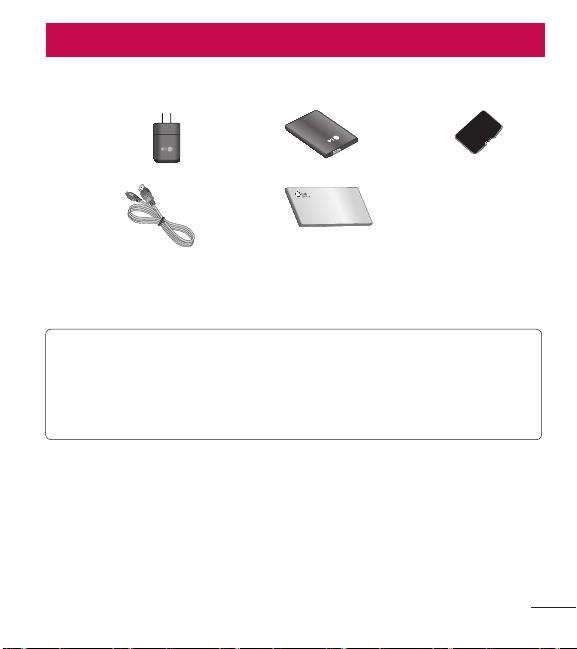
TheseaccessoriesareavailableforusewiththeLG OPTIMUS
SHOWTIME
TM
.(Items
described below may be optional and sold separately.)
Tr a ve l
adapter
Battery SD card
Data cable
Connect
your
LG
OPTIMUS
SHOWTIME
TM
andPC.
User Guide
Learnmore
about
your
LG
OPTIMUS
SHOWTIME
TM
NOTE
•AlwaysusegenuineLGaccessories.Failuretodothismayvoidyour
warranty.
•Accessoriesmayvaryindifferentregions.

78 L86C|UserGuide
FAQ
Pleasechecktoseeifanyproblemsyouhaveencounteredwithyour
phonearedescribedinthissectionbeforetakingthephoneinforservice
orcallingaservicerepresentative.
Category
Sub-Category
Question Answer
BT
Bluetooth
Devices
Whatarethe
functionsavailablevia
Bluetooth?
ConnectingtoStereo/MonoHeadset,
CarKit,FTPserverispossible.Whenit’s
connectedtoanotherphoneviaBluetooth,
youcanreceiveContactsdata.
BT
Bluetooth
Headset
IfmyBluetooth
headsetisconnected,
canIlistentomy
musicthrough
my3.5mmwired
headphones?
WhenaBluetoothheadsetisconnected,all
systemsoundsareplayedovertheheadset.
Asaresult,youwillnotbeabletolistento
musicthroughyourwiredheadphones.
Data
Contacts
Backup
HowcanIbackup
Contacts?
TheContactsdatacanbesynchronized
betweenyourphoneandGmail
TM
.
Data
Synchronization
Isitpossibletoset
upone-waysyncwith
Gmail?
Onlytwo-waysynchronizationisavailable.
Data
Synchronization
Isitpossibleto
synchronizeallthe
Emailfolders?
TheInboxisautomaticallysynchronized.You
canviewotherfoldersbytouching atthe
bottomofthescreen.

79
Category
Sub-Category
Question Answer
Data
Synchronization
Isitpossibletotransfer
Contactsdatafroma
featurephonetoan
Android™phone?
Yes,ifyourcontactscanbeextractedintoa
.CSVfile.Howtotransfer:
1.Create“.CSV”filewiththecontactson
yourcurrentphone.
2.LogintoGmailwithyourPC.
3.ClickContacts.
4.ClickImport.
5.Attachthe“.CSV”file.
6.Yourcontactswillthenbesynchronized
betweenyourAndroidphoneandGmail.
Google
TM
Service
GmailLog-In
ShouldIhaveto
logintoGmail
wheneverIwantto
accessGmail?
OnceyoulogintoGmail,youdon’tneedto
loginGmailagain.
Google Service
GoogleAccount
Isitpossibletofilter
emails?
No,emailfilteringisnotsupportedviathe
phone.
Phone Function
YouTube
TM
Isitpossibletoplay
YouTubevideos?
Yes,YouTubevideosaresupportedbutmay
havetobeviewedthroughtheYouTube
application(andnotthebrowser).
Phone Function
Email
Whathappenswhen
Iexecuteanother
applicationwhile
writinganemail?
Youremailwillautomaticallybesavedas
adraft.
Phone Function
Ringtone
Isthereafilesize
limitationforwhenI
wanttouseaMP3file
asaringtone?
Thereisnofilesizelimitation.

80 L86C|UserGuide
Category
Sub-Category
Question Answer
Phone Function
MessageTime
Myphonedoesnot
displaythetimeof
receiptformessages
olderthan24hrs.
HowcanIchange
this?
Nosettingscanbechangedbutfollowthe
stepsbelowtoviewthetimes.
1.Opentheconversationthatcontainsthe
desiredmessage.
2.Touchandholdthemessage.
3.TouchView message details.
Phone Function
microSDCard
Whatisthemaximum
supportedsizefora
memorycard?
32GBmemorycardsarecompatible.
Phone Function
Navigation
Isitpossibletoinstall
anothernavigation
applicationonmy
phone?
AnyapplicationthatisavailableonPlay
Storeandiscompatiblewiththehardware
canbeinstalledandused.
Phone Function
Synchronization
Isitpossibleto
synchronizemy
contactsfromallmy
emailaccounts?
OnlyGmailandMSExchangeserver
(CompanyEmailServer)contactscanbe
synchronized.

81
Category
Sub-Category
Question Answer
Phone Function
WaitandPause
Isitpossibletosave
acontactwithWait
andPauseinthe
numbers?
IfyoutransferredacontactwiththeWait
&Pausefunctionssavedintothenumber,
thosefunctionswillnotberecognized.You
willneedtore-saveeachnumber.
How to re-save numbers with Wait and
Pause:
1.OntheHomescreen,touch
.
2.Dialthenumber,thentouchtheMenu
Key
.
3.TouchAdd 2-sec pauseorAdd wait.
4.Entertheremainingnumber(s)and
continuesavingthenumberasnecessary.
Phone Function
Security
Whatarethephone’s
securityfunctions?
Youareabletosetthephonetorequirethe
entryofanunlocksequence(Swipe,Face
Unlock,Pattern,PIN,orPassword)before
thephonecanbeaccessedorused.
Phone Function
UnlockSequence
WhatshouldIdoif
IforgettheUnlock
Sequence?
Afterattemptingtheunlocksequence5
times,youcantouchForget Pattern?option
anduseyourGoogleAccountinformation
tounlockyourphone.Inaddtion,ifyou
forgottheunlocksequenceyoucanunlock
withBackupPin.

82 L86C|UserGuide
Category
Sub-Category
Question Answer
Phone Function
UnlockSequence
WhatshouldIdoif
IforgottheUnlock
SequenceandIdidn’t
createaGoogle
Accountonthe
phone?
WithoutenteringtheUnlocksequenceyou
willnotbeabletoaccessyourphone.
Caution:Ifyouperformafactoryreset,
alluserapplicationsanduserdatawillbe
deleted.Pleaseremembertobackupany
importantdatabeforeperformingafactory
reset.
How to perform a factory reset:
1.Turnthepoweroff.
2.Touchandholdthefollowingkeysat
thesametimefor12seconds:Volume
Down Key
+Home Key +
Power/Lock Key .
3.Releaseallofthekeyswhenyousee
thescreenmessage"PermanentlyErase
UserData&ResetSettings?Pressthe
Powerkeytoconfirmandanyotherkey
tocancel.
4.PressthePower/Lock Key
to
confirm(orpresstheVolume Keysto
cancel).WhenyoupressthePower/
Lock Key
toconfirm,apop-up
appearsasking"Areyousureyouwantto
continuewitherase?".
5.PressthePower/Lock Key
andyour
phonewillberestoredtothefactory
settings.To cancel,presstheVolume
Keys .

83
Category
Sub-Category
Question Answer
Phone Function
UnlockPattern
HowdoIcreatethe
UnlockPattern?
1.OntheHomescreen,touchtheMenu
Key
.
2.TouchLock screen settings.
3.TouchSelect screen lock.
4.TouchPattern.Thefirsttimeyoudothis,
ashorttutorialaboutcreatinganunlock
patternappears.
5.Setupbydrawingyourpatternonce>
Continue>drawagain>Confirm.
Phone Function
SpeedDial
IsSpeedDialing
supported?
Yes.You cansetSpeedDialsaswellassave
acontactdirectlyonyourHomescreen.
To set a Speed Dial:
1.OpentheContactsapplication.
2.TouchtheMenu Key
>Speed dials.
3.Touchtheemptyspeeddiallocationand
selectthedesiredcontactandphone
number.
To set a Direct Dial shortcut to your Home
screen:
1.Touchandholdanemptyareaonyour
Homescreen.
2.TouchWidgets > Direct dial.
3.SelectacontactfromyourContactsList.

84 L86C|UserGuide
Category
Sub-Category
Question Answer
Phone Function
Memory
Isitpossibletosavea
picturetotheinternal
memorywhiletakinga
picture?
Pictures,alongwithMusicandVideofiles,
cannotbesavedtotheinternalmemory.
TheyaresavedtoyourmicroSDcard.
Phone Function
Memory
WillIknowwhenmy
memoryisfull?
Yes,youwillreceiveanotification.
Phone Function
LanguageSupport
Isitpossibleto
changethelanguage?
Thephonehasmulti-lingualcapabilities.
To changethelanguage:
1.OntheHomescreen,touchtheMenu
Key
>System settings.
2.TouchLanguage & input > Language.
3.Touchthedesiredlanguage.
Phone Function
LanguageSupport
Whichlanguagesare
supportedwhenusing
PlayStore?
ThePlayStoreapplicationsupportsEnglish
andSpanish.Thirdpartyapplicationsmay
notsupportalllanguages.
Phone Function
VPN
HowdoIsetupa
VPN?
VPNaccessconfigurationisdifferent
accordingtoeachcompany.To configure
VPNaccessfromyourphone,youmust
obtainthedetailsfromyourcompany’s
networkadministrator.
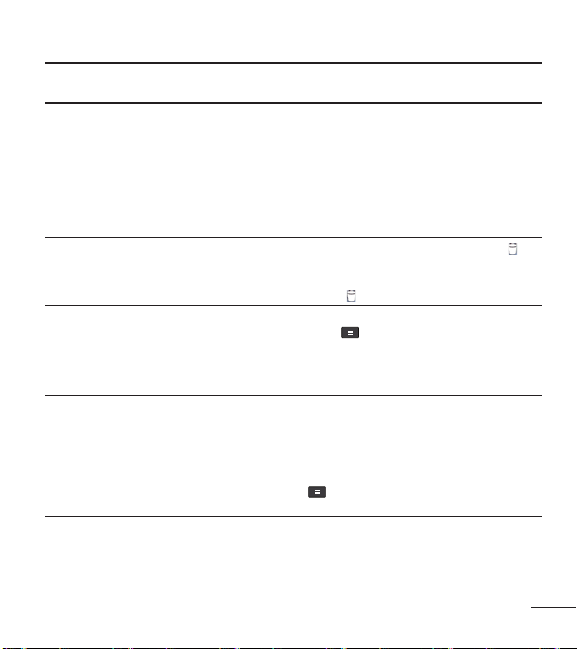
Phone Function
Screentimeout
Myscreenturnsoff
afteronly15seconds.
HowcanIchange
theamountoftime
forthebacklightto
turnoff?
1.OntheHomescreen,touchtheMenu
Key
.
2.TouchSystem settings > Display >
Screen timeout.
3.Touchthepreferredscreenbacklight
timeouttime.
85
Category
Sub-Category
Question Answer
Phone Function
Wi-Fi&3G
WhenWi-Fiand3G
arebothavailable,
whichservicewillmy
phoneuse?
Whenusingdata,yourphonemaydefault
totheWi-Ficonnection(ifWi-Ficonnectivity
onyourphoneissettoOn).However,there
willbenonotificationwhenyourphone
switchesfromonetotheother.
To knowwhichdataconnectionisbeing
used,usethe3GorWi-Fiiconatthetopof
yourscreen.
Phone Function
Homescreen
Isitpossibleto
removeanapplication
fromtheHome
screen?
Yes.Justtouchandholdtheiconuntil
appearsatthetop-centerofthescreen.
Then,withoutliftingyourfinger,dragthe
iconto andreleaseit.
Phone Function
Application
Idownloadedan
applicationandit
causesalotoferrors.
HowdoIremoveit?
1.OntheHomescreen,touchtheMenu
Key
.
2.TouchSystem settings > Apps.
3.Touchtheapplication,thentouch
Uninstall andOKtoconfirm.
Phone Function
Camera
Myphone’scamera
doesnottakepictures
andsays“NoSDCard
orSDcardisnot
ready!”.Whydoesn’t
itwork?
AmicroSDcardmustbeinsertedinorder
tousethephone’scamera.
VerifythatthemicroSDcardismountedon
thedevice.
OntheHomescreen,touchtheMenu Key
>System settings>Storage>Mount
SD card

86 L86C|UserGuide
Category
Sub-Category
Question Answer
Phone Function
Ringtones
CanIusemusicfiles
formyringtone?
Yes.Aftersavingamusicfileyoucanuseit
foryourringtone.
•Touchandholdasonginalibrarylist.In
theContextmenuthatopens,touchSet
as ringtone.
Phone Function
Alarm
Willmyalarmbe
audibleorwillitgo
offifthephoneis
turnedoff?
No,thisisnotsupported.
Phone Function
Alarm
IfmyRingerVolume
issettoOfforVibrate,
willIhearmyalarm?
Youralarmisprogrammedtobeaudible
eveninthesescenarios.
Phone Spec
BatteryTime
Whatisthemaximum
amountoftimemy
phone’sbatterywill
lastbeforeIneedto
rechargeit?
Talktime:Approx.540mins
Standby:Approx.10days
Phone Spec
Band
Whichwirelessbands
aresupportedbythe
phone?
Yourphoneisabletooperateonthe
800Mhzand1900MHzbands.

87
Category
Sub-Category
Question Answer
Recovery Solution
FactoryReset
HowdoIperforma
factoryreset?
1.OntheHomescreen,touchtheMenu
Key
.
2.TouchSystem settings > Backup & reset
> Factory data reset.
NOTETouchthecheckboxtoalsoeraseall
contentsfromyourmicroSDcardwhenthe
phoneisreset.
3.ReadthewarningandtouchReset
phone.
4.TouchErase everything.
Attention: Ifafactoryresetisperformed,
allinstalledapplicationanduserdatawill
beerased.Pleaseremembertobackup
anyimportantdatabeforeperforminga
factoryreset.

88 L86C|UserGuide
For Your Safety
ThehighestSARvalueforthismodelphonewhentestedforuseatthe
earis1.23W/kgandwhenwornonthebody,asdescribedinthisuser
guide,is1.29W/kg(body-wornmeasurementsdifferamongphone
models,dependinguponavailableaccessoriesandFCCrequirements).
WhiletheremaybedifferencesbetweenSARlevelsofvariousphones
andatvariouspositions,theyallmeetthegovernmentrequirementfor
safeexposure.
TheFCChasgrantedanEquipmentAuthorizationforthismodelphone
withallreportedSARlevelsevaluatedasincompliancewiththeFCCRF
emissionguidelines.SARinformationonthismodelphoneisonfilewith
theFCCandcanbefoundundertheDisplayGrantsectionofhttp://www.
fcc.gov/oet/ea/fccid/aftersearchingonFCCIDZNFAS730.