OWNER'S MANUAL
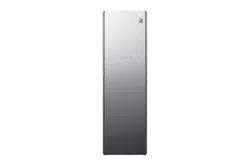
STYLER
Before beginning installation, read these instructions
carefully. This will simplify installation and ensure that the
product is installed correctly and safely. Leave these
instructions near the product after installation for future
reference.
ENGLISH
S5MB
MFL66101290
Rev.00_041221
www.lg.com
Copyright © 2021 LG Electronics Inc. All Rights Reserved.
TABLE OF CONTENTS
This manual may contain images or
content that may be different from the
model you purchased.
This manual is subject to revision by the
manufacturer.
SAFETY INSTRUCTIONS
READ ALL INSTRUCTIONS BEFORE USE...........................................................3
WARNING STATEMENTS....................................................................................3
INSTALLATION
Parts and Specifications ..................................................................................10
Installation Place Requirements ....................................................................12
Unpacking the Appliance ................................................................................13
Levelling the Appliance ...................................................................................14
OPERATION
Operation Overview.........................................................................................17
Preparing Loads ...............................................................................................17
Checking the Items before Every Load .........................................................19
Loading the Appliance.....................................................................................20
Control Panel ....................................................................................................27
Programme Table ............................................................................................29
Option Programmes and Extra Functions ....................................................34
SMART FUNCTIONS
LG ThinQ Application.......................................................................................36
Smart Diagnosis ...............................................................................................38
MAINTENANCE
Regular Cleaning..............................................................................................39
TROUBLESHOOTING
Before Calling for Service................................................................................41
3
SAFETY INSTRUCTIONS
ENGLISH
SAFETY INSTRUCTIONS
READ ALL INSTRUCTIONS BEFORE USE
The following safety guidelines are intended to prevent unforeseen
risks or damage from unsafe or incorrect operation of the appliance.
The guidelines are separated into ‘WARNING’ and ‘CAUTION’ as
described below.
Safety Messages
WARNING STATEMENTS
WARNING
• To reduce the risk of fire or explosion, electric shock, property
damage, injury to persons or death when using this appliance, follow
basic safety precautions, including the following:
Technical Safety
• This appliance is not intended for use by persons (including children)
with reduced physical, sensory or mental capabilities, or lack of
experience and knowledge, unless they have been given supervision
or instruction concerning use of the appliance by a person
responsible for their safety.
This symbol is displayed to indicate matters and operations
that can cause risk.
Read the part with this symbol carefully and follow the
instructions in order to avoid risk.
WARNING
This indicates that the failure to follow the instructions can
cause serious injury or death.
CAUTION
This indicates that the failure to follow the instructions can
cause the minor injury or damage to the appliance.

4
SAFETY INSTRUCTIONS
• Children should be supervised to ensure that they do not play with
the appliance.
• Do not, under any circumstances, cut or remove the ground prong
from the power cord. To prevent personal injury or damage to the
appliance, the electrical power cord must be plugged into a properly
grounded outlet.
• This appliance must be plugged into a 220-240 VAC, 50-Hz grounded
outlet protected by a 15-ampere fuse or circuit breaker. Failure to
follow these instructions can result in fire, explosion, or death.
• This appliance must be plugged into a properly grounded outlet.
Electrical shock can result if the appliance is not properly grounded.
Have the wall outlet and circuit checked by a qualified electrician to
make sure the outlet is properly grounded. Failure to follow these
instructions can create an electric shock hazard and/or a fire hazard.
• Install the appliance where the plug is easily accessible. Unplug the
appliance when not in use to avoid risk of fire or electric shock.
• Unplug the appliance before disassembly or repair to avoid risk of
electric shock.
• The appliance should always be plugged into its own individual
electrical outlet which has a voltage rating that matches the rating
plate. This provides the best performance and also prevents
overloading house wiring circuits which could cause a fire hazard
from overheated wires.
• Do not use an extension cord to connect to an outlet. Doing so could
result in a fire or electric shock.
• Never unplug your appliance by pulling on the power cord. Always
grip the plug firmly and pull straight out from the outlet. The power
cord can be damaged, resulting in a risk of fire and electric shock.
• Contact LG or a qualified repair person immediately to repair or
replace all power cords that have become frayed or otherwise
damaged. Do not use a cord that shows cracks or abrasion damage
along its length or at either end. The power cord can melt, creating
electric shock and/or fire hazard.
5
SAFETY INSTRUCTIONS
ENGLISH
• When installing or moving the appliance, be careful not to pinch,
crush, or damage the power cord. This will prevent injury and
damage to the appliance from fire and electric shock.
WARNING - To avoid a fire
Installation
• When moving the appliance away from the wall, be careful not to roll
over or damage the power cord.
• The appliance is heavy. Two or more people are necessary to move
and install the appliance to prevent damage or injury.
• Prior to use, ensure that you are connecting the appliance to a
dedicated grounded electrical outlet rated for use with the appliance.
It is the user’s responsibility to replace a standard 2-prong wall outlet
with a standard 3-prong wall outlet.
• Before use, the appliance must be properly installed as described in
this manual. Electric shock can result if the appliance is not properly
grounded.
• Do not install the appliance where there may be a danger of the
appliance falling. The appliance is not designed for use on
transportations such as ship and airplane. Check with an authorized
LG service centre for use under other special circumstances.
• Do not tamper with controls.
• Install the appliance where the floor is firm and level. The appliance
may vibrate excessively and eventually fall if installed on an unstable
surface, causing damage or injury.
• Do not truck the appliance from the front side and keep the front side
protected always. Failure to do so the tempered glass on the
appliance may be broken.
Do not wash or dry clothes or items that have any
contaminants of flammable solvents or substances.
Do not clean the product with, or expose it to,
flammable substances.

6
SAFETY INSTRUCTIONS
• Properly ground the appliance to conform with all governing codes
and ordinances. Follow the details in the installation instructions.
• Install and store the appliance where it will not be exposed to
temperatures below freezing or exposed to the weather. Allow the
appliance to warm to room temperature before use if it was delivered
in winter or at sub-zero temperature.
• Do not repair or replace any part of the appliance or attempt any
servicing unless specifically recommended in the user-maintenance
instructions or in published user-repair instructions that you
understand and have the skills to carry out.
• To reduce the risk of electric shock, do not install the appliance in
humid spaces such as a bathroom. Failure to follow this warning can
cause death, serious injury, fire, electric shock, or product
deformation or malfunction.
• Remove all packing items and dispose of all shipping materials
properly.
• Connect to a properly rated, protected, and sized power circuit to
avoid electrical overload. Improper power circuits can melt, creating
electric shock and/or fire hazard.
• If the supply cord is damaged, it must be replaced by the
manufacturer or its service agents or similarly qualified person in
order to avoid a hazard.
• Keep all packaging from children. Packaging material can be
dangerous for children.
• Do not install near another heat source such as a stove, oven or
heater.
• Do not place candles, smoking materials, or other flammables on top
of the appliance.
• Remove all protective vinyl film from the appliance.
• The appliance shall be installed in accordance with national wiring
regulations.

7
SAFETY INSTRUCTIONS
ENGLISH
Operation
• Do not allow children to play on or in the appliance. Close supervision
of children is necessary when the appliance is used near children.
• Do not climb, stand, or hang on the appliance door or on the shelf or
anywhere inside the appliance.
• Do not step on the doors to the water tanks.
• Do not place heavy or dangerous objects on top of the appliance.
• Do not put live animals inside the appliance.
• Do not allow children to climb into the appliance.
• In the event of a gas leak (propane/LPG), ensure adequate ventilation
and contact an authorized service centre before resuming use. Do
not touch or disassemble the electrical outlet of the appliance.
• Do not use or place flammable substances (chemicals, medicine,
cosmetics, etc.) near the appliance or store them inside the appliance.
Do not place the appliance in the vicinity of flammable gas.
• Disconnect the power cord immediately if you hear a noise, smell a
strange odour or detect smoke coming from the appliance.
• In the event of a flood, do not go near the appliance and contact an
authorized service centre.
• Do not use fabric softeners or products to eliminate static unless
recommended by the manufacturer of the fabric softener or product.
• Do not place hands or body near steam nozzle during operation. The
steam is hot and could cause an injury.
• Do not insert objects into the steam nozzle.
• Do not drink the water from the water drain and supply tanks.
• Do not disassemble or modify the appliance.
• Do not put hands, feet, or metal objects below the appliance.
• Do not operate the appliance or touch the power cord with wet
hands.
• Keep fingers out of pinch point areas; clearances between the door
and cabinet are necessarily small. Be careful closing door when
children are nearby.

8
SAFETY INSTRUCTIONS
• Do not place items exposed to cooking oils in the appliance. Items
contaminated with cooking oils may contribute to a chemical reaction
that could cause a load to catch fire.
• Do not dry articles that have been previously cleaned in, washed in,
soaked in, or spotted with gasoline, dry-cleaning solvents, or other
flammable or explosive substances, as they give off vapors that could
ignite or explode.
• Do not use heat to dry articles containing foam rubber or similarly
textured rubber-like materials.
• Do not open door during operation. The performance of the
appliance may be adversely affected. If the appliance is installed on
or near carpet, condensation from escaping hot air or steam may
stain or damage the carpet.
• Damage incurred by using the appliance for purposes other than
those specified in this user manual is not covered by the warranty.
Maintenance
• Wipe foreign objects (such as dust and water) off the prongs of the
power plug and contact areas regularly. Do not use a wet or damp
cloth when cleaning the plug.
• Do not use an appliance to dry the interior. Do not light a candle to
remove interior odours.
• Do not spray water onto the appliance directly when cleaning. A fire
or electric shock may occur.
• Wipe the interior with a dry cloth after use.
• Clean the lint filter before or after each load.
• Do not use a bleaching agent such as oxygen or chlorine-based
bleaches on the exterior of the appliance.
• Do not use sharp objects when cleaning or operating the controls. An
electric shock may occur.
• Avoid hitting the front glass panel with heavy objects. Although it is
made of tempered glass, the panel may break in the event of a strong
impact and cause injury.

9
SAFETY INSTRUCTIONS
ENGLISH
• Keep product free from rodents, insects, and other foreign objects.
They may damage wires, causing fire or electric shock.
Disposal
• Before the appliance is removed from service or discarded, remove
the door to the drying compartment. Cut off the power plug and
destroy the button section to prevent reuse.
Grounding instructions
• Improper connection of the equipment-grounding conductor can
result in a risk of electric shock. Check with a qualified electrician or
service person if you are in doubt that the appliance is properly
grounded.
• This appliance must be grounded. In the event of malfunction or
breakdown, grounding will reduce the risk of electric shock by
providing a path of least resistance for electric current.
• This appliance must be equipped with a cord having an equipment
grounding conductor and a grounding plug. The plug must be
plugged into an appropriate outlet that is properly installed and
grounded in accordance with all local codes and ordinances.
• Do not modify the plug. If it does not fit the outlet, have a proper
outlet installed by a qualified electrician.
• This appliance must be connected to a grounded metal, permanent
wiring system or an equipment-grounding conductor must be run
with the circuit conductors and connected to the equipment
grounding terminal or lead on the appliance. Electric shock can result
if the appliance is not properly grounded.
10
INSTALLATION
INSTALLATION
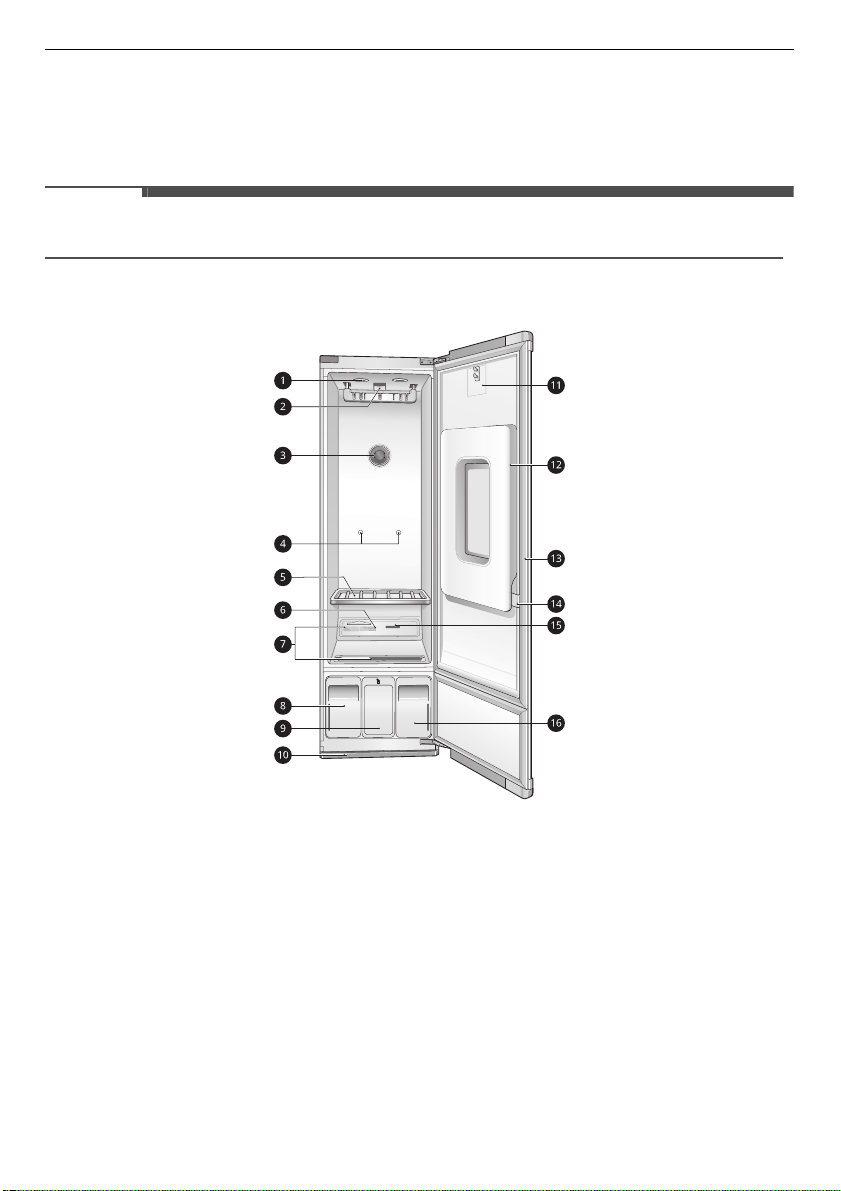
Parts and Specifications
NOTE
• Appearance and specifications may vary without notice to improve the quality of the appliance.
Interior
a
Interior light
b
Moving hanger
c
Interior light
d
Shelf holder
e
Shelf
f
Aroma filter
g
Hot air circulation vent
h
Water drain tank
i
Acceessory case
j
Drip tray
k
Hooks for pants crease care
l
Pants crease care
m
Door
*1
n
Clip
o
Steam nozzle
p
Water supply tank
*1 The door swing can be reversed by the installer
to fit the installation location.
11
INSTALLATION
ENGLISH
Specifications
Asterisk(s) means model variant and can be varied (0-9) or (A-Z).
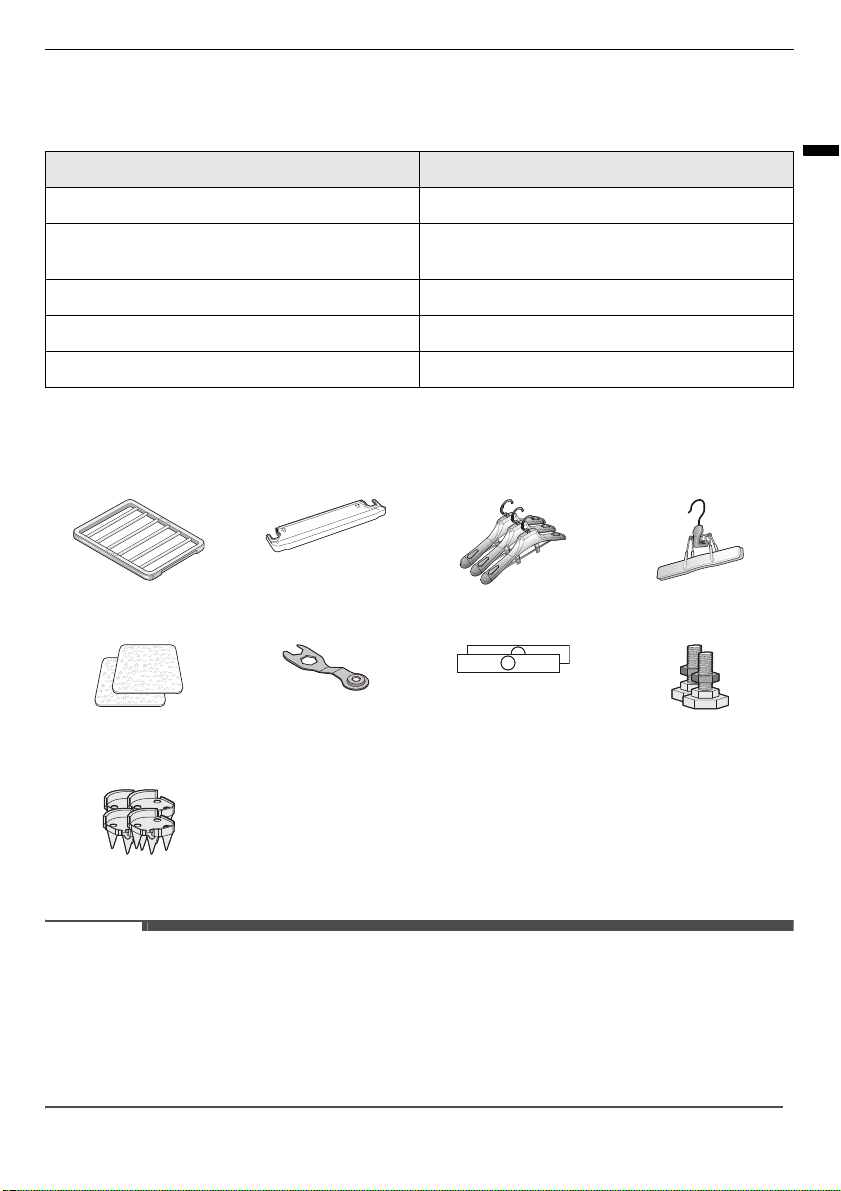
Accessories
NOTE
• The included accessories vary depending on the model you purchased.
• Contact the store where the appliance was purchased or LG customer service if any accessories are
damaged or missing.
• For your safety and for extended product life, use only authorized components. The manufacturer is not
responsible for product malfunction or accidents caused by the use of separately purchased
unauthorized components or parts.
Model S5**
Power Supply 220 - 240 V~, 50 Hz
Dimensions (Width × Depth × Height) 600 mm × 605 mm × 1960 mm, 1190 mm (Depth
with door open)
Product weight 100 kg
Power consumption 1700–1900W
Maximum capacity 6 items
Shelf Drip tray 3 pieces of Hangers Pants Hanger
2 pieces of Anti-Slip
Sheets
Wrench 2 pieces of Hinge
Covers
2 rear Levelling Feets
Carpet Install Spikes
12
INSTALLATION
Installation Place
Requirements
Before installing the appliance, check the following
information to make sure that the appliance
should be installed in a correct place.
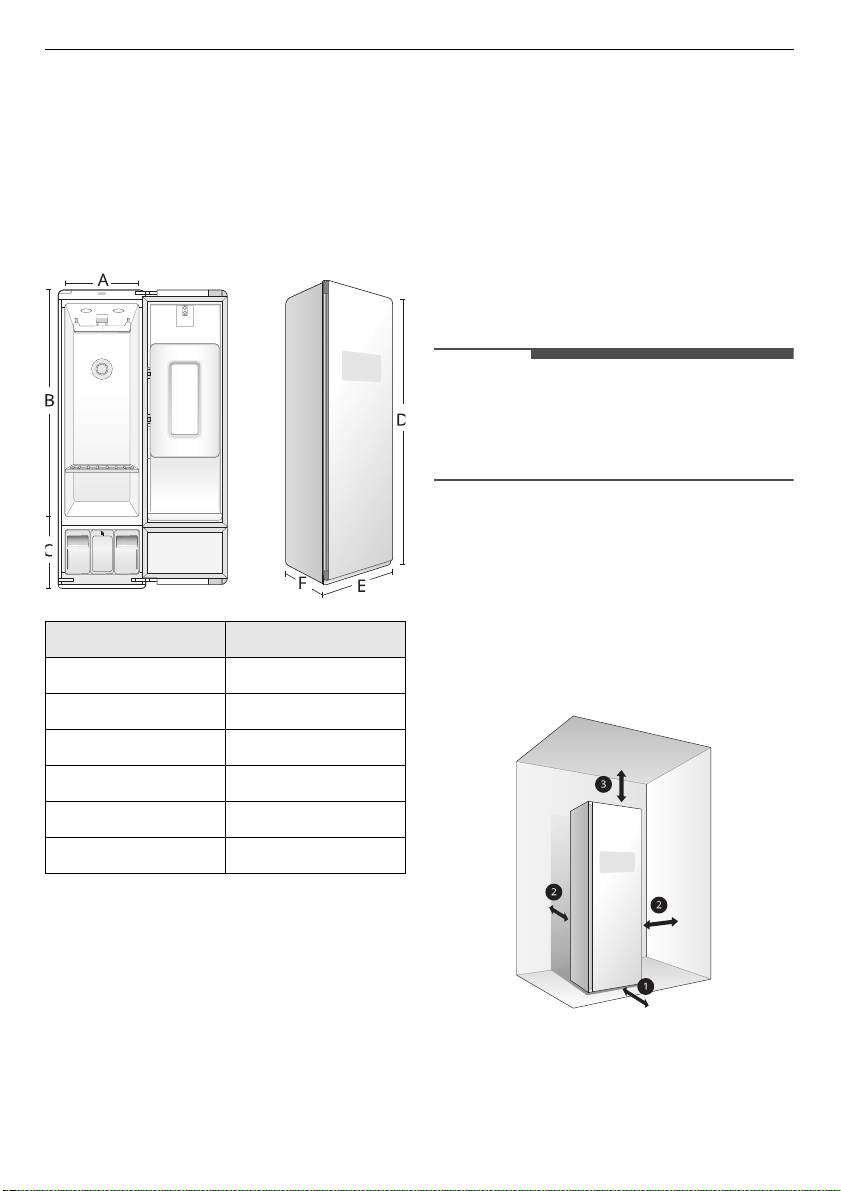
Dimensions
Installation Location
• A grounded electrical outlet should be located
within 61 cm of either side of the appliance.
• Install the appliance on a flat floor. (Allowable
slope under the appliance: 1°)
• The floor must be level, with a maximum slope of
2.5 cm under the appliance. If the slope is
greater than 2.5 cm, the appliance cannot be
levelled properly
• Ensure that when the appliance is installed, it is
easily accessible for an engineer in the event of a
breakdown.
• Do not install the appliance in an area where it
will be exposed to water and/or weather. Failure
to follow this warning could result in risk of
electric shock, injury, or product damage or
malfunction.
• Do not install the appliance on a hollow or
flexible platform. Doing so may cause excessive
noise and vibration and result in damage or
injury if the appliance tips over.
NOTE
• A sturdy floor should support the total appliance
weight of
100 kg
. The combined weight of any
other laundry appliances should also be
considered.
Recommended Installation
Spacing
The following clearances are recommended for the
appliance. Although the appliance has been tested
for clearances of 3 cm on the sides and rear,
recommended clearances should be considered
for the following reasons:
a
Allow at least
46 cm
in front to open the door.
b
Allow at least
5 cm
on both sides and between
the back of the appliance and the wall.
Dimensions (mm)
A520
B1500
C460
D1960
E600
F605
13
INSTALLATION
ENGLISH
c
Allow at least
20 cm
between the top of the
appliance and any overhanging shelves or
cabinets.
NOTE
• If the appliance is too close to adjacent items,
performance may decrease and electricity
consumption may increase.
• Additional space should be considered on all
sides of the appliance to reduce noise transfer.
Ambient Temperature
• Temperature must be between 10 °C and 35 °C.
• If the ambient temperature is too low or high,
performance may be affected.
• Do not install in direct sunlight or where the
temperature may fall below 0 °C.
Electrical Connection
• Do not use an extension cord or double adapter.
• Do not overload the outlet with more than one
appliance.
• Connect the appliance to an earthed socket in
accordance with current wiring regulations.
• The appliance must be positioned a place close
to outlet sockets so that the plug is easily
accessible.
WARNING
• The power plug must be plugged into an
appropriate outlet socket that is installed and
grounded/earthed in accordance with all local
codes and ordinances.
Unpacking the Appliance
WARNING
• Use two or more people to unpack and move the
appliance. Failure to do so can result in serious
injury by tipping the appliance.
Removing carton and shipping
materials
Unpack the appliance from carton then remove
any tapes and temporary labels from the
appliance.
• Do not remove any warning labels, the model
and serial number label, or the technical sheet
label that is located under the front of the
appliance.
CAUTION
• Do not use sharp instruments, rubbing alcohol,
flammable fluids, or abrasive cleaners to remove
tape or glue. These products can damage the
surface of the appliance.
NOTE
• Tape or glue residue can also be easily removed
by rubbing a small amount of liquid dish soap
over the adhesive with your fingers. Wipe with
warm water and dry.
Moving the Appliance
Use the wheels
a
at the bottom of the appliance to
move the appliance. Push the appliance slowly
from about halfway down the front side.

14
INSTALLATION
CAUTION
• Keep the appliance upright when moving it. If
you lay the appliance on its side, refrigerant may
leak and cause the appliance to malfunction.
Levelling the Appliance
Checking the Level
Levelling the appliance prevents unnecessary
noise, vibration and movement. Check whether the
appliance is perfectly level after installation.
Adjusting and Levelling the
appliance
WARNING
• The appliance is heavy. Two or more people are
required when levelling the appliance. Failure to
follow this warning can cause serious injury or
death.
1
Position the appliance in the final location and
check to make sure it is level.
• All levelling feet must rest solidly on the
floor. Gently push on the corners of the
appliance to make sure that it does not rock
from corner to corner. Make sure there are
no gaps between the front levelling feet and
the floor.
2
Use the wrench (packaged with the appliance)
to turn the levelling feet.
• Unscrew the front feet to raise the appliance
or screw in the feet to lower it. If unable to
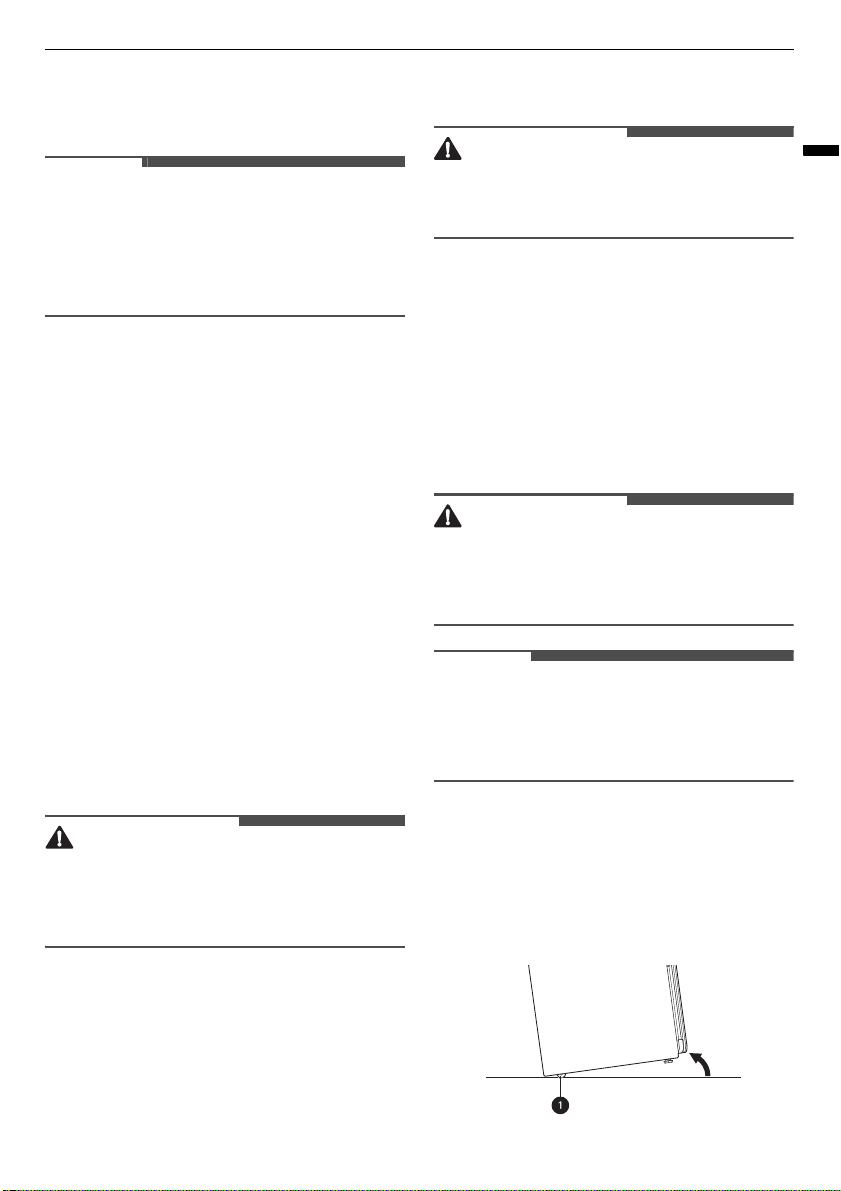
level the appliance using only the front feet,
install the two rear levelling feet by tipping
the appliance. Do not lay the appliance down
to install the levelling feet.
• Raise or lower the appliance using the
levelling feet until the appliance is level from
side to side and front to back.
CAUTION
• Make sure that all levelling feet are in firm
contact with the floor. If the appliance is used
without levelling, it may fall, causing injury,
damage, or product malfunction.
• Adjust the levelling feet only as far as necessary
to level the appliance. Extending the levelling
feet more than necessary can cause the
appliance to vibrate.
3
When the appliance is completely stable and all
levelling feet are resting solidly on the floor,
tighten the locking nuts
a
.
Installing on carpeting
Follow these instructions when installing the
appliance on carpeting.
WARNING
• The appliance is heavy. Two or more people are
necessary to install the rear levelling feet and
carpet spikes. Failure to do so can result in back
injury or other injury.
• Keep the appliance upright when moving and
installing it. If you lay the appliance on its side,
15
INSTALLATION
ENGLISH
refrigerant may leak and cause the appliance to
malfunction.
1
Move the appliance into its final location using
the wheels at the bottom of the appliance.
2
Install the two rear levelling feet at the rear
bottom of the appliance.
• Tip the appliance, do not lay it down, to
install the levelling feet.
3
Level the unit following the instructions in
Levelling the appliance
.
4
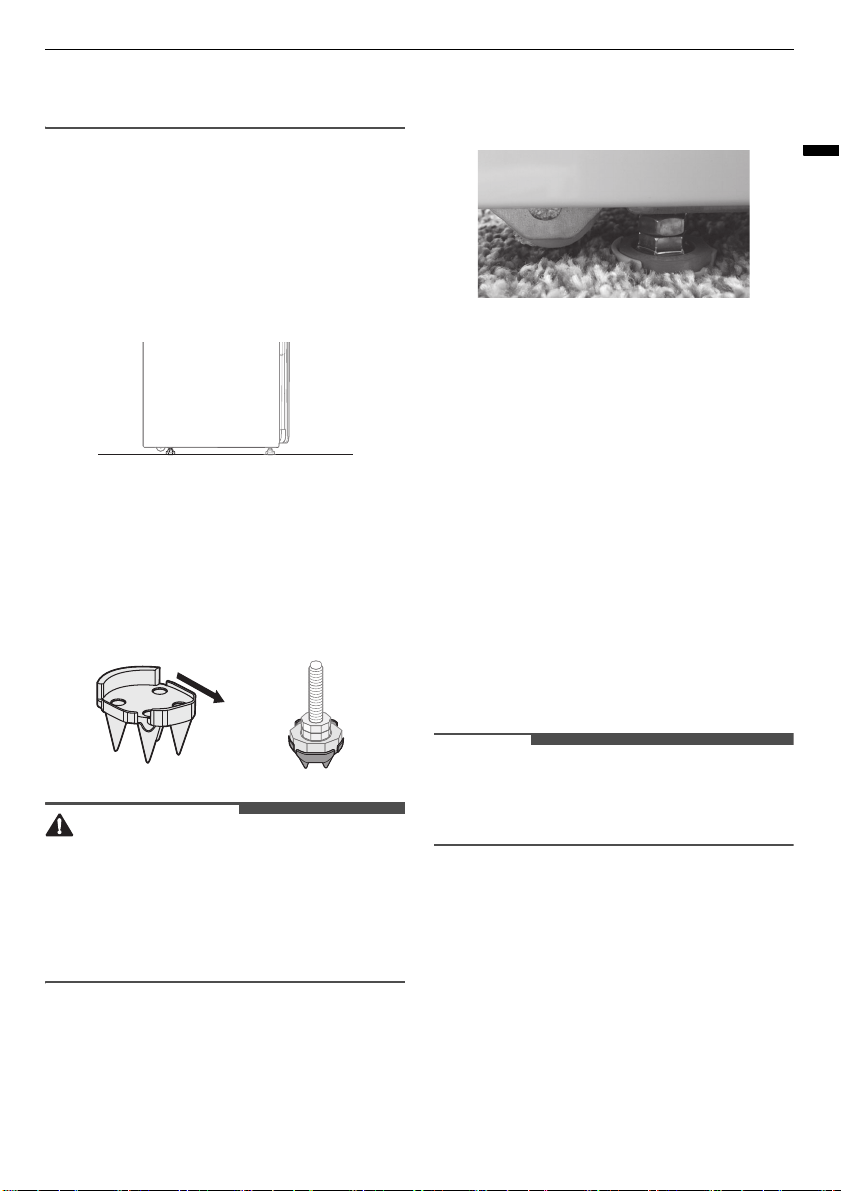
Install the four carpet spikes on the ends of the
levelling feet, with the shorter, octagonal faces
toward the front.
WARNING
• Take care when handling the carpet spikes. They
are designed to pierce through the carpet
backing and pad and are very sharp.
• Keep fingers and hands out from under the
spikes when setting the unit in place to avoid
personal injury or product damage.
5
Level the appliance once more after installing
the spikes.
• If the carpet has very deep pile or padding,
the front feet may need to be extended
slightly to install the drip tray.
Consider followings after installing the
appliance on carpeting.
• Be sure to check and empty the drip tray
often.
• Do not open the unit during operation to
avoid condensation forming on carpet
surface, which may result in surface mold or
mildew.
• Keep the bottom of the cabinet dry when
filling or emptying water tanks. Keep the
outside of the water tanks clean and dry to
discourage growth of mold or mildew.
Reversing the door
It is possible to reverse the direction of the door
swing. This should be done by the installer at the
time of installation, if desired.
NOTE
• If the direction of the door swing needs to be
changed after installation, contact the LG
Customer Information Centre.
Using Anti-Slip Sheets
Anti-slip sheets prevent the appliance from
shaking or shifting when opening or closing the
door.
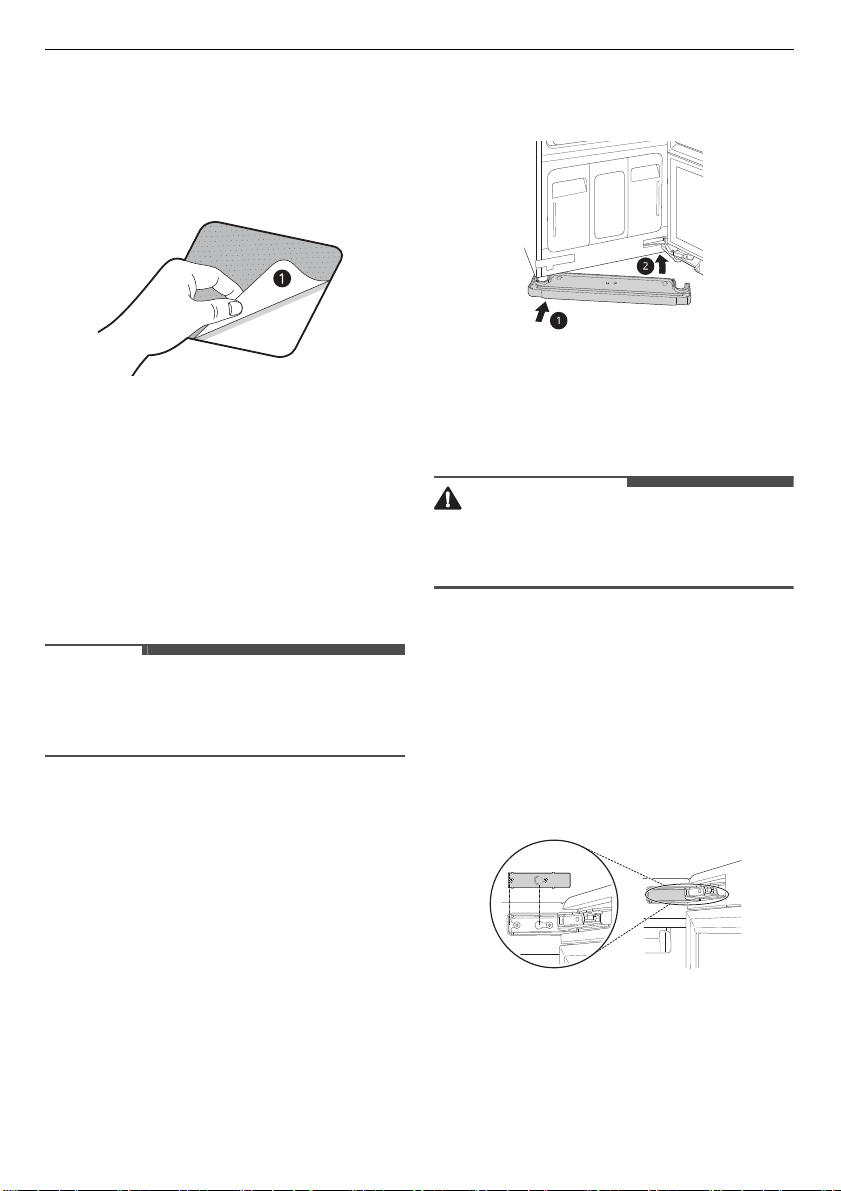
1
Clean the floor to attach the anti-slip sheets.
• Use a dry rag to remove and clean foreign
objects or moisture. If moisture remains, the
anti-slip sheets may slip.
16
INSTALLATION
2
Adjust the level after placing the appliance in
the installation area.
3
Place the adhesive side
a
of the anti-slip
sheets on the floor.
4
Put the appliance on the anti-slip sheets.
• Do not attach the adhesive
a
of anti-slip
sheets to the feet of the appliance.
5
Recheck the appliance’s levelness.
• Push or rock the edges of the appliance
gently to make sure that the appliance does
not rock. If the appliance rocks, level the
appliance again.
NOTE
• The pads may leave a sticky residue when they
are removed. The residue can be removed with
alcohol.
Assembling the drip tray
Before using the appliance, insert the drip tray
onto the bottom of the cabinet.
1
Hold the tray so the arrow and letter on the
front of the tray face up.
2
Insert one side of the tray first, then the other.
Push the tray until it slides completely in.
3
To detach, pull one side out then the other.
• If the tray collects water, detach it and empty
the water. After emptying it, reassemble the
tray.
CAUTION
• Do not operate the appliance without installing
the drip tray. Doing so could lead to water
damage caused by leaking.
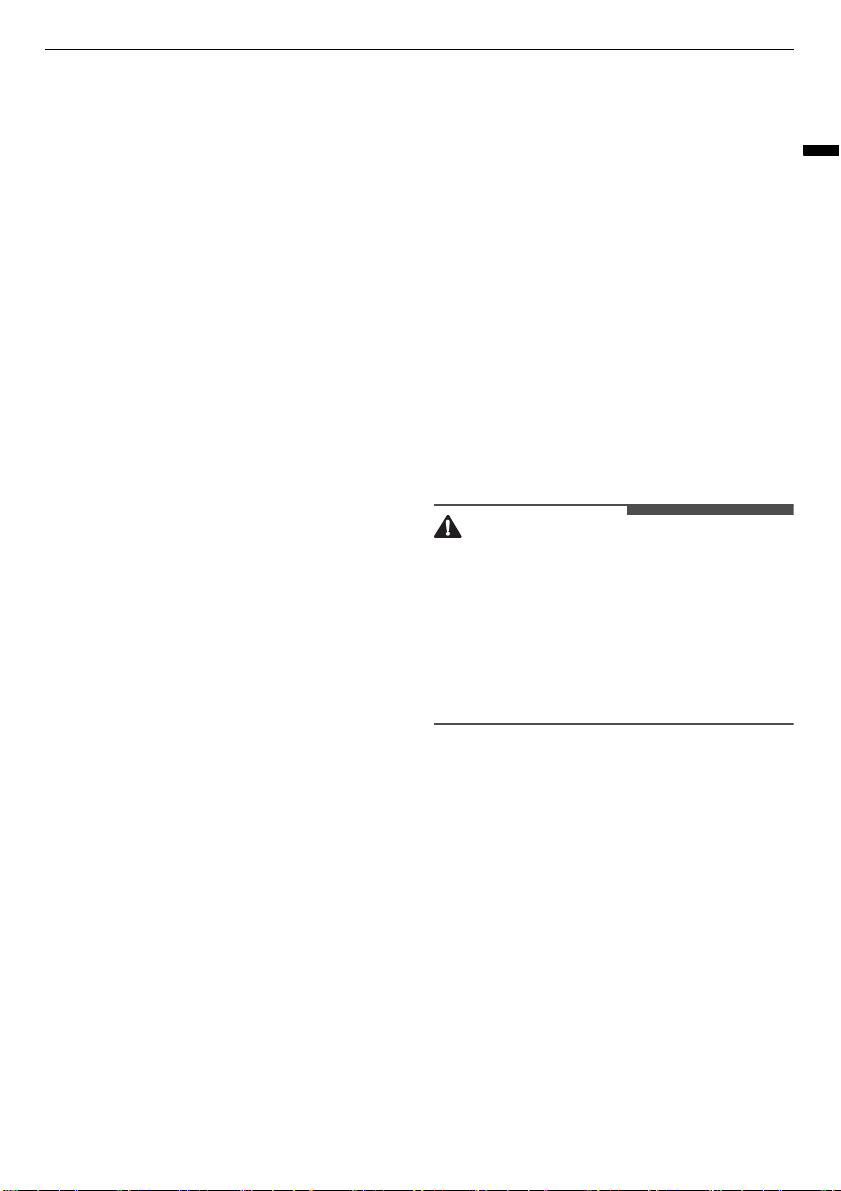
Installing hinge covers
1
Open the appliance door.
2
Snap the hinge cover onto the upper hinge
assembly with the bent edge on the far side
from the hinge.
3
Repeat with the remaining hinge cover on the
lower hinge assembly.
17
OPERATION
ENGLISH
OPERATION
Operation Overview
Using the Appliance
1
Prepare items.
• Wash clothes first, if needed.
• No heat-sensitive items or items that can be
damaged by exposure to water.
• Place items on hangers or the shelf.
• Fasten buttons and close zippers to keep
items on moving hangers and prevent
damage.
2
Clean the lint filter and change the sheet in
the aroma filter.
• Lift out filter and remove lint from last load
for faster and more efficient performance.
Reinstall filter, checking alignment when
closing grill. Do not operate the appliance
without the lint filter in place. If using a fabric
softener sheet in the aroma filter, change it
after every use.
3
Check the water tanks.
• Fill water supply tank if needed. Empty water
drain tank if needed. Use clean tap water in
the supply tank for better product
performance and lifespan. Do not use
distilled water or reuse water from the drain
tank.
4
Load the appliance.
• Pay attention to fabric care labels and
programme choice. If clothing is not
appropriate for the programme selected, it
may shrink or be seriously damaged.
• Remove all empty hangers to avoid noise,
friction, and damage to clothing.
5
Turn on the appliance.
• Touch
Power
button to turn on the
appliance.
6
Choose a desired programme.
• Touch a programme selector button. You
can toggle to one of the settings each time
you pressed the button.
7
Begin a programme.
• Touch and hold
Start/Pause
button to begin
a programme. Pause programme at any
time by touching
Start/Pause
button again.
If the
Start/Pause
button is not pressed
within a certain time, the appliance will shut
off and all settings will be lost.
• Do not open door during programme. If
steam or hot air escapes from open door,
condensation may collect on floor or walls,
resulting in damage or mold.
CAUTION
• Do not open the door during operation. There is
a risk of burns or injury from escaping hot air or
steam.
• Do not allow steam or hot air to escape the
cabinet during operation. Opening the door
during operation also affects performance,
lengthens styling time, and results in water
condensing and collecting on the floor.
8
End of programme.
• Remove items when programme finishes.
Leave door open to let hot air escape.
Interior light shuts off after 1.5 minutes if
door is left open.
Preparing Loads
Checking the Fabric Care Labels
Most articles of clothing feature fabric care labels
that include instructions for proper care. Below are
some of the symbols that are relevant to choosing
appropriate items for the appliance.
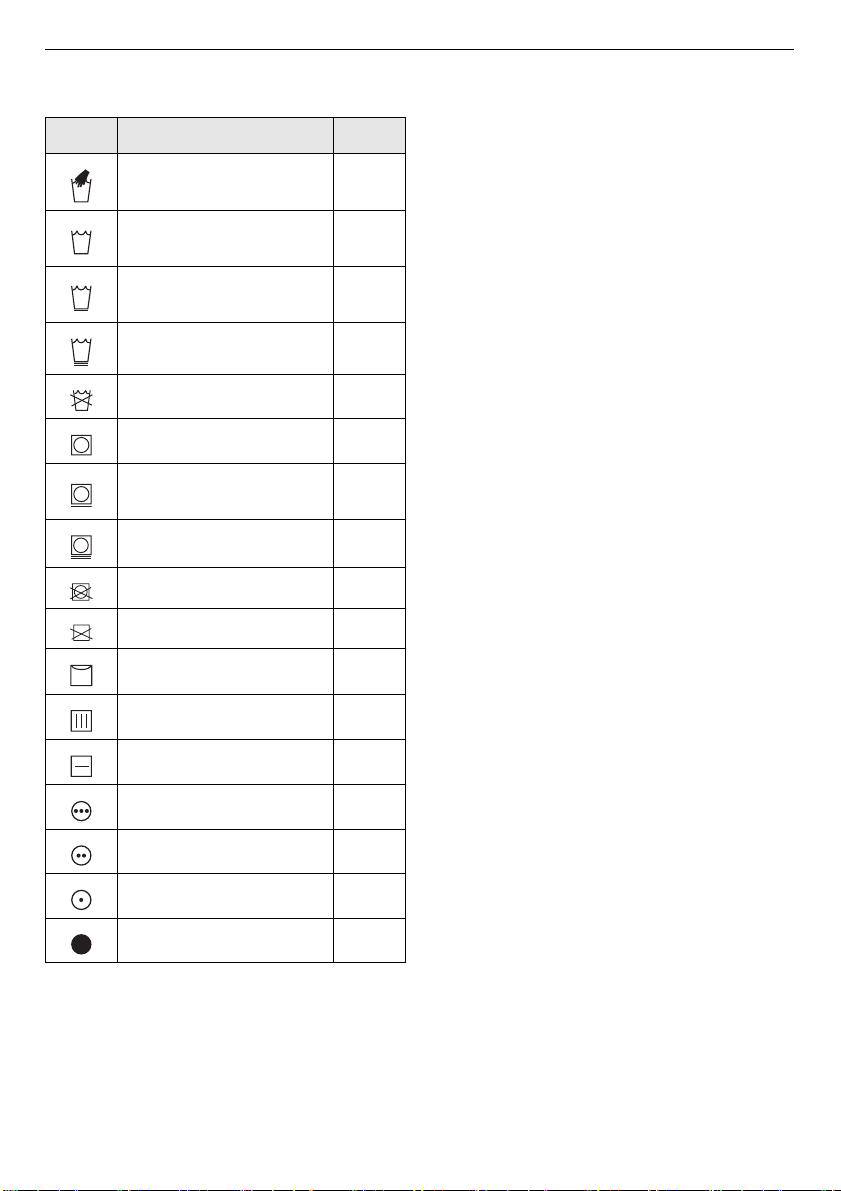
18
OPERATION
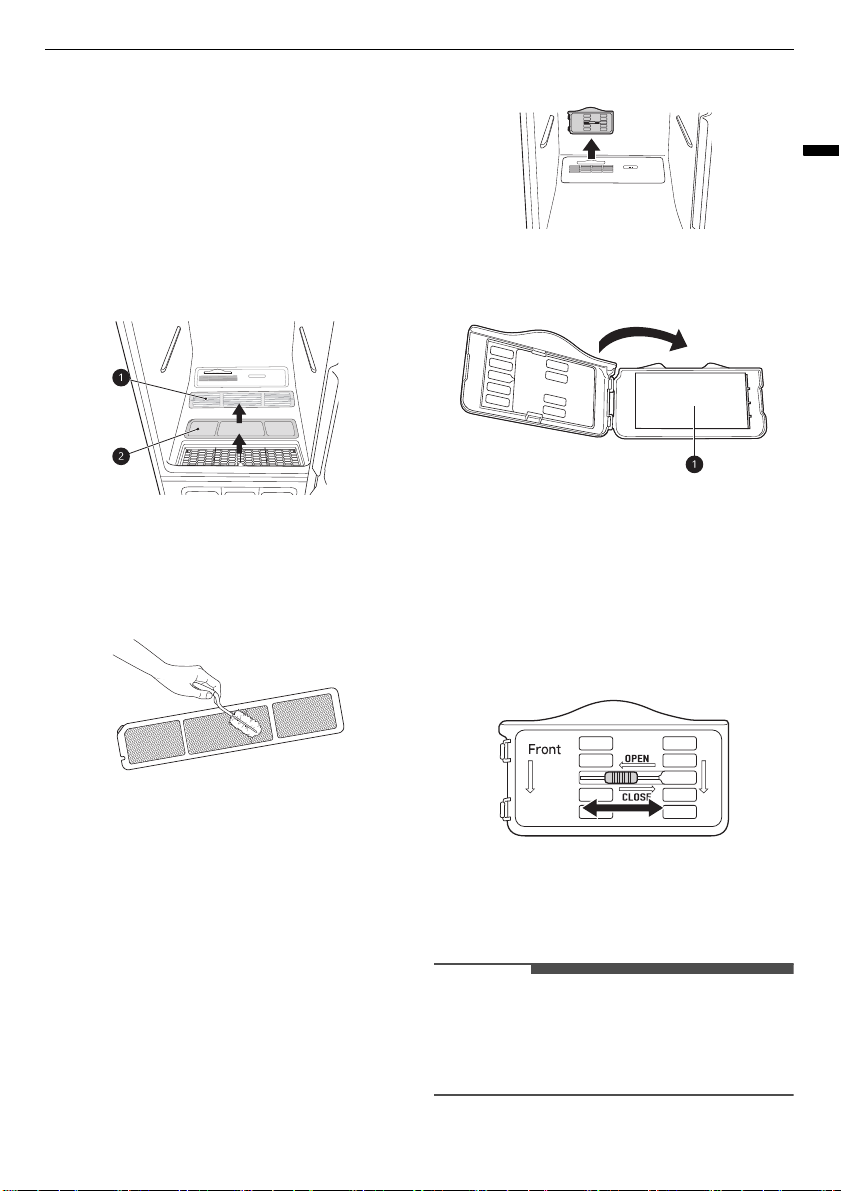
Symbols on the care labels
*1 Some items such as fur and leather, which are
labelled as do not wash, can be used with the
appliance.
Sorting the items
• For best fabric care results, always treat fabrics
with similar care requirements together.
• Different fabrics have different care
requirements, and some fabrics cannot be
treated in certain programmes or should be
treated separately.
Checking the items before
Loading
Some items are not appropriate for use with the
appliance. Using the wrong programme for items
can result in damage to fabrics.
• Check all pockets to make sure that they are
empty. Items such as clips, pens, coins, and keys
can damage both the appliance and your
clothes.
• Do not put items that are sensitive to heat or are
not suitable for washing with water in Styler
programmes that use steam. Use the
Gentle Dry
programme only.
• Fur, leather (only 100% natural leather) should
only be treated with the
Fur/Leather Care
programme. This programme is a downloadable
programme.
• Wash heavily soiled or stained clothes before
putting them in the appliance. The appliance
does not have a washing function. Loose soil or
stains can be transferred between garments
during programmes.
• Treat items with an unpleasant odour in a
separate load. Odours can be transferred
between items during programmes.
• Clothing should be securely fastened, with
zippers and buttons closed, so that it does not
fall off the moving hanger during the
programme.
• Do not put very wet items in the appliance to dry.
Shake off or wring out excess water before
putting items in the cabinet to dry. If a large
amount of water pools in the cabinet, styling
performance may suffer or the appliance may be
damaged.
Label Meaning Check
Hand Wash OK
Machine Wash, Normal
cycle
OK
Perm press/wrinkle
resistant
OK
Gentle/delicate OK
Do not wash
OK
*1
Normal OK
Permanent press/wrinkle
resistant
OK
Gentle/delicate OK
Do not tumble dry OK
Do not dry NO
Line/hang dry OK
Drip dry OK
Dry flat OK
High OK
Medium OK
Low OK
No heat/air dry NO
19
OPERATION
ENGLISH
Checking the Items before
Every Load
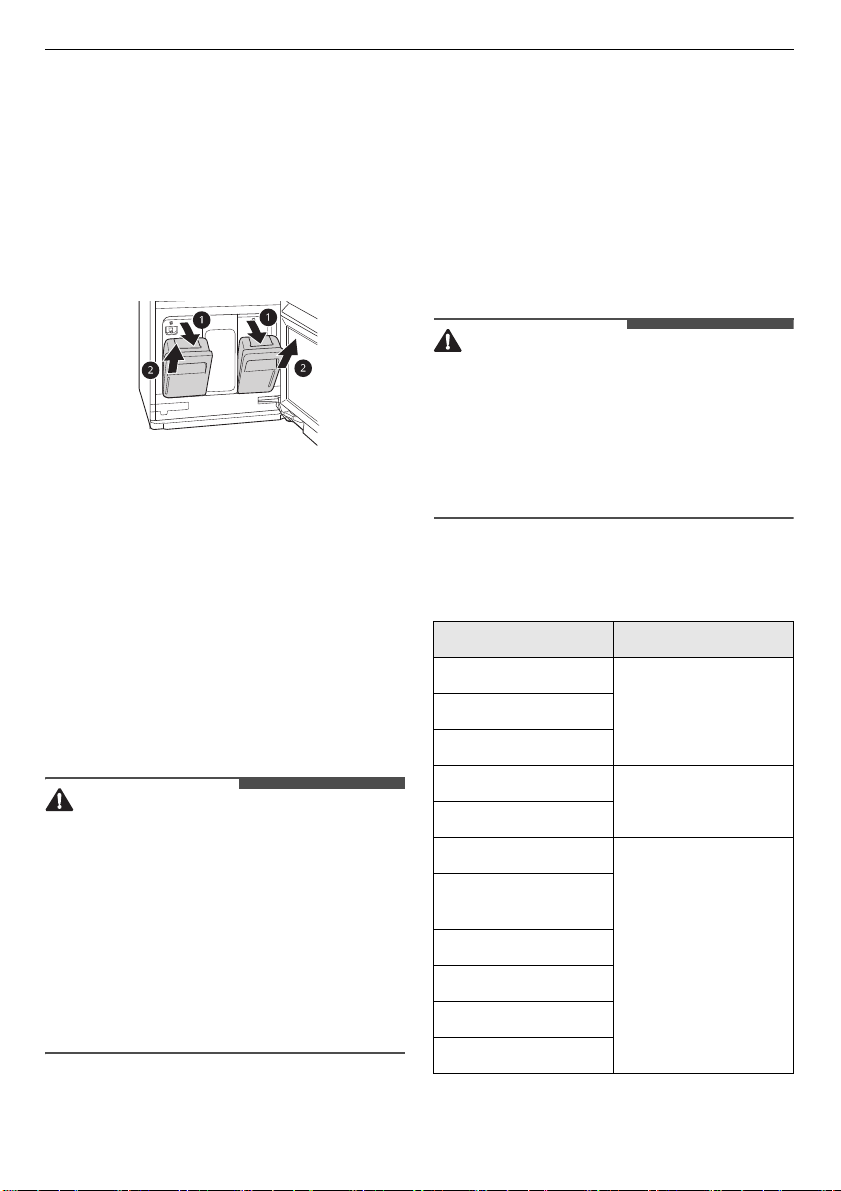
Checking the Lint Filter
Always make sure the lint filter is clean before
starting a new load; a clogged lint filter will
increase styling times.
1
Open the front grill
a
and take out the lint
filter
b
.
2
Brush the lint filter with a soft brush or clean it
with a vacuum cleaner.
• If the lint filter is torn or damaged, replace it
with a new one.
3
Reinstall the filter.
Checking the Aroma Sheet
Use a dryer fabric softener sheet to add a
refreshing aroma to items. Replace the fabric
softener sheet after every use.
1
Remove the aroma filter from the appliance.
2
Open the aroma filter and insert a dryer fabric
softener sheet
a
into it.
3
Close the aroma filter and insert it back in the
appliance.
• Insert the aroma filter in the direction of the
arrow. You can adjust the opening of the
aroma filter using the adjustment lever. The
more open the aroma filter is, the richer the
aroma gets.
4
When the programme is complete, remove the
aroma filter and discard the fabric softener
sheet.
NOTE
• Spray perfume 4–5 times on a cotton pad and
then place it in the Aroma Holder to use.
(However, the fragrance strength can vary
depending on the scent.)
20
OPERATION
Checking the Water tanks
Check the water in the water tanks before use. The
water supply tank must be filled with water before
using the appliance. The appliance does not work
without water. The water drain tank should be
emptied before each use.
1
Pull the handle of the tank forward and then
take the tanks out of the appliance. Check
water level of the tanks.
2
Make sure the water supply tank is filled with
water.
• The full water supply tank can be used
approximately four times, depending on the
programmes used.
• Use clean tap water or bottled water for best
performance and longer product life. Do not
use distilled water or reuse the water from
the drain tank.
• The first time the appliance is used, 2/3 of
the water in the fully filled water supply tank
is used. Less water is used in following
programmes.
CAUTION
• Only use water when filling the water supply
tank. Any other substance, such as detergent or
fabric softener, may damage the appliance.
• Use only clean tap water or bottled water.
Foreign materials in the water may shorten the
lifespan of the appliance.
• Do not use distilled water. The water sensor may
not work.
• Do not reuse the water in the drain tank to fill the
water supply tank.
3
Make sure the water drain tank is empty.
4
The drain tank will be filled after about three
uses. The tank fills more quickly during styling
programmes. The appliance does not work if
the drain tank is full.
• Some discolouration of the water drain tank
may occur over time. This is normal and will
not affect product performance.
Loading the Appliance
WARNING
• Flammable objects such as lighters or matches
could ignite, causing a fire. Remove them from
pockets to avoid fire, explosion, or death.
• Never style clothes that have been exposed to
oil, gasoline, or other flammable substances.
Failure to obey this warning can result in fire,
explosion, or death.
Choosing Styling method
suitable for your items
Item How to style it
Suit coat, blazer
Moving hangerCoat, jacket (short)
Coat (long)
Dress (short)
Moving hanger after
removing shelf
Dress (long)
Skirt
Moving hanger
Lightweight blanket,
throw
Baby blanket
Pants (not creased)
Shorts
Children’s clothes
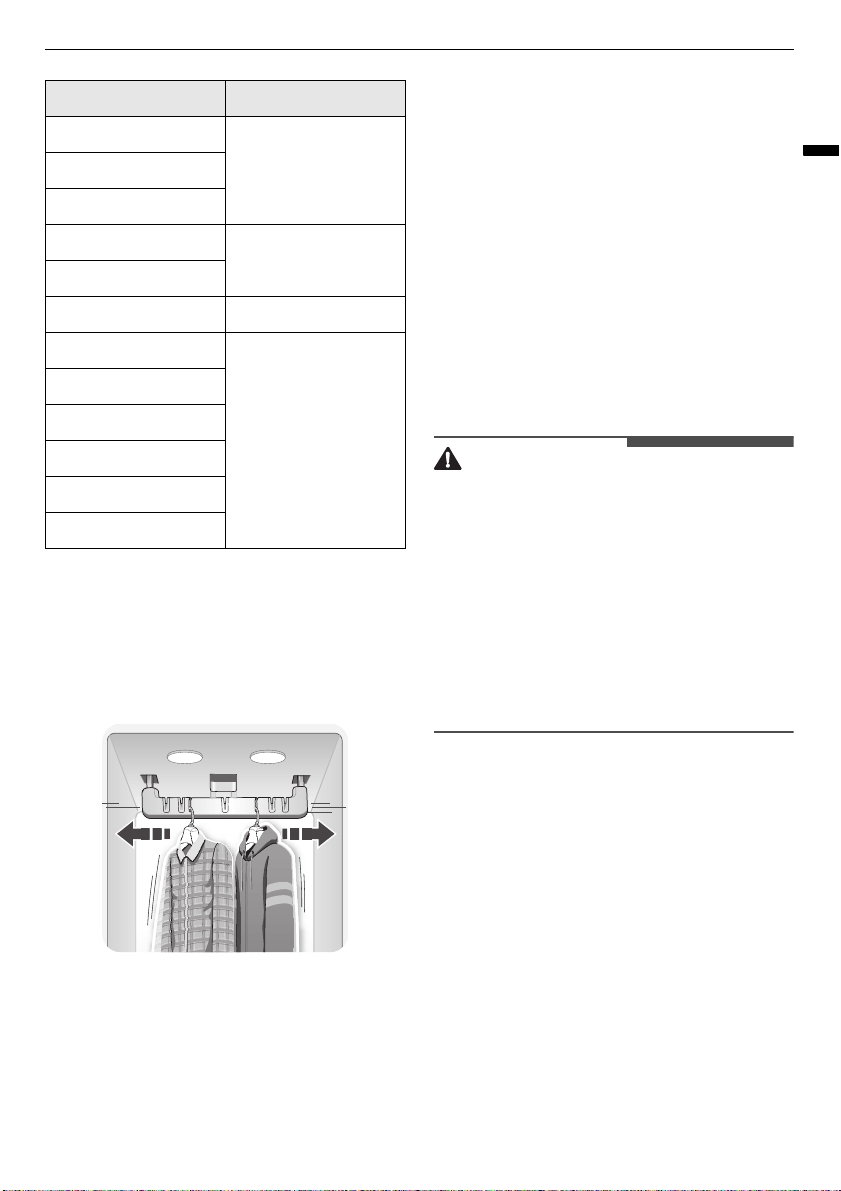
21
OPERATION
ENGLISH
The Moving Hanger
Hang clothes on the moving hanger using the
hangers provided with the appliance, or use any
plastic or metal hanger that hooks snugly into the
indentations in the moving hanger.
• Use the moving hanger for suits, coats, jackets,
blouses, dresses, skirts, and pants that don’t
require a crease. Use the pants crease care to
crease pants.
• Anything that can be securely placed on a
hanger and steamed or dried without retaining
hanger marks or other damage can be placed on
the moving hanger.
• Style sweaters or knits on the shelf to avoid
hanger marks.
• Arrange clothing so it does not touch the sides or
rear of the cabinet, if possible. Condensation
may form on the interior surface of the cabinet,
and items in contact with the surface may
remain damp at the end of the programme.
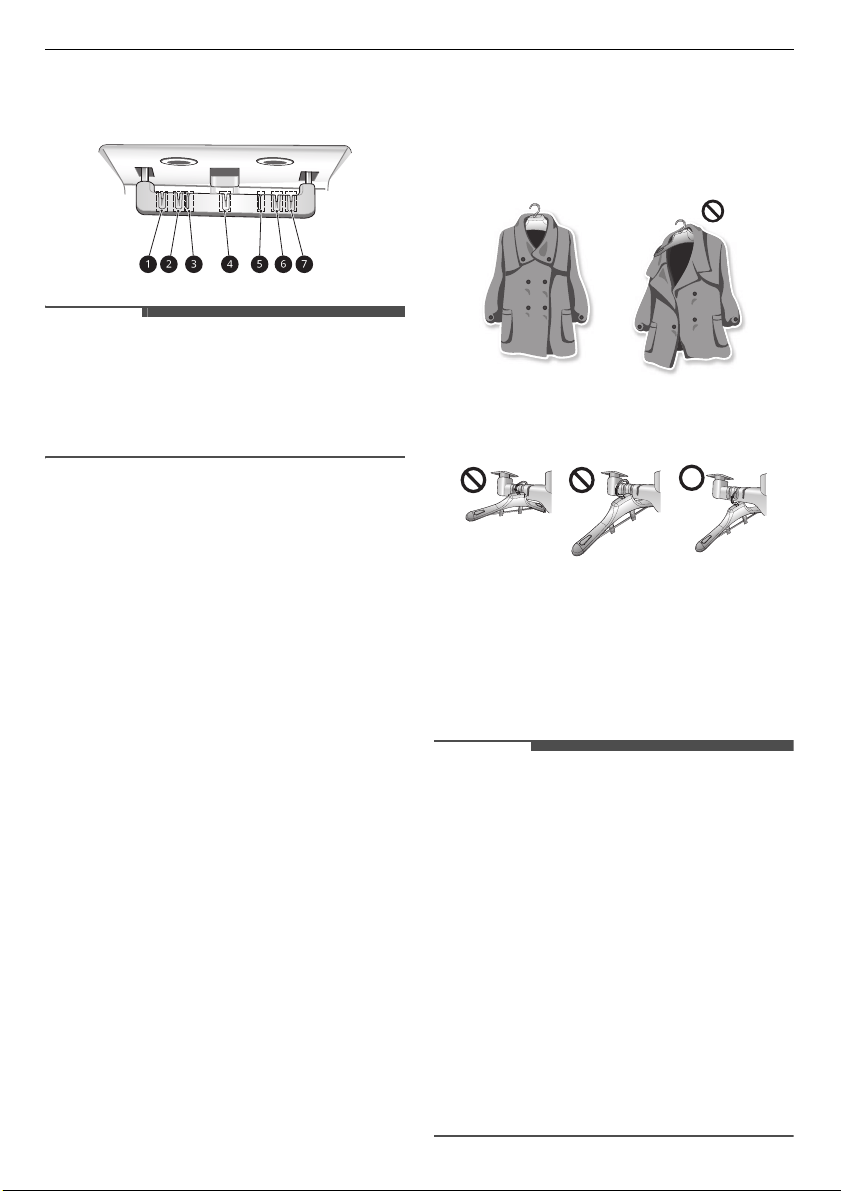
Hang larger items on the diagonal indentations
on the moving hanger.
• The moving hanger will move even when only
the shelf is being used.
• When using an ordinary metal/plastic hanger,
the hook is less than 4 mm thick and the hook
must fit in the indentation in the moving hanger
snugly. If the fit is too lose, it may result in
vibration, noise and damage to clothing.
CAUTION
• Remove empty hangers from the moving hanger
and place them on the shelf before starting the
programme. Empty hangers may cause
unnecessary noise, friction, and damage to
fabrics.
• Do not lean or pull on the moving hanger.
• Hang hangers in the same direction on the
moving hanger to prevent collisions.
• Do not allow children to play with or hang onto
the moving hanger. The appliance could tip,
resulting in damage or injury.
Using the Moving Hanger
1
Insert hangers into slots and pull down to
secure the hook snugly.
• Hooks should fit down in the slots snugly to
prevent noise, vibration, or damage to items
during operation.
2
Use the diagonal slots (
c
,
e
) for bulky items.
• Do not use diagonal slots (
c
,
e
) and
standard slots (
a
,
b
,
d
,
f
,
g
) during the
Scarf
Moving hanger or
shelf
Tie
Shawl
Lingerie
Moving hanger or
shelf (if delicate)
Shirt, blouse
Pants (creased) Pants Crease Care
Cap, hat
Shelf
Stuffed toys
Pillow
Sweater
Knitwear
Infant clothes
Item How to style it
22
OPERATION
same programme. The hangers may knock
into each other and damage clothing.
NOTE
• Do not overcrowd items. The fewer items, the
better the styling performance. Items that touch
the sides of the cabinet may pick up
condensation from the cabinet and fail to style
completely.
How to use Hangers
The hangers that come with the appliance are for
use with the appliance only. Any plastic or metal
hanger that has a hook less than 4 mm thick and
hooks snugly into the indentations in the moving
hanger can be used in the appliance.
• Do not use hangers with wool, knitwear, or
delicate lingerie. The garments may stretch or be
left with hanger marks.
• Wrinkles may appear at the back of the collar on
some garments.
• Use the diagonal hanger grooves in the moving
hanger for large or bulky items.
• Remove empty hangers or store them in the
shelf during operation.
• Fasten buttons and zippers on hanging clothes
to prevent them from falling off hangers during
operation. Fasten the neck area with cotton
string if there is no button or zipper.
• Remove or store the shelf when hanging longer
items so items won’t get wrinkled.
1
Select an appropriate hanger.
• Choose the appliance hanger that fits the
item you are hanging up.
2
Fasten the buttons and zippers on all garments
and hang them on hangers.
• Doing so helps keep the garments from
falling or becoming more wrinkled during
the programme. If a garment has no buttons
or zipper, fasten it with a cotton string
around the collar area.
3
Place the hangers into the slots of the moving
hanger.
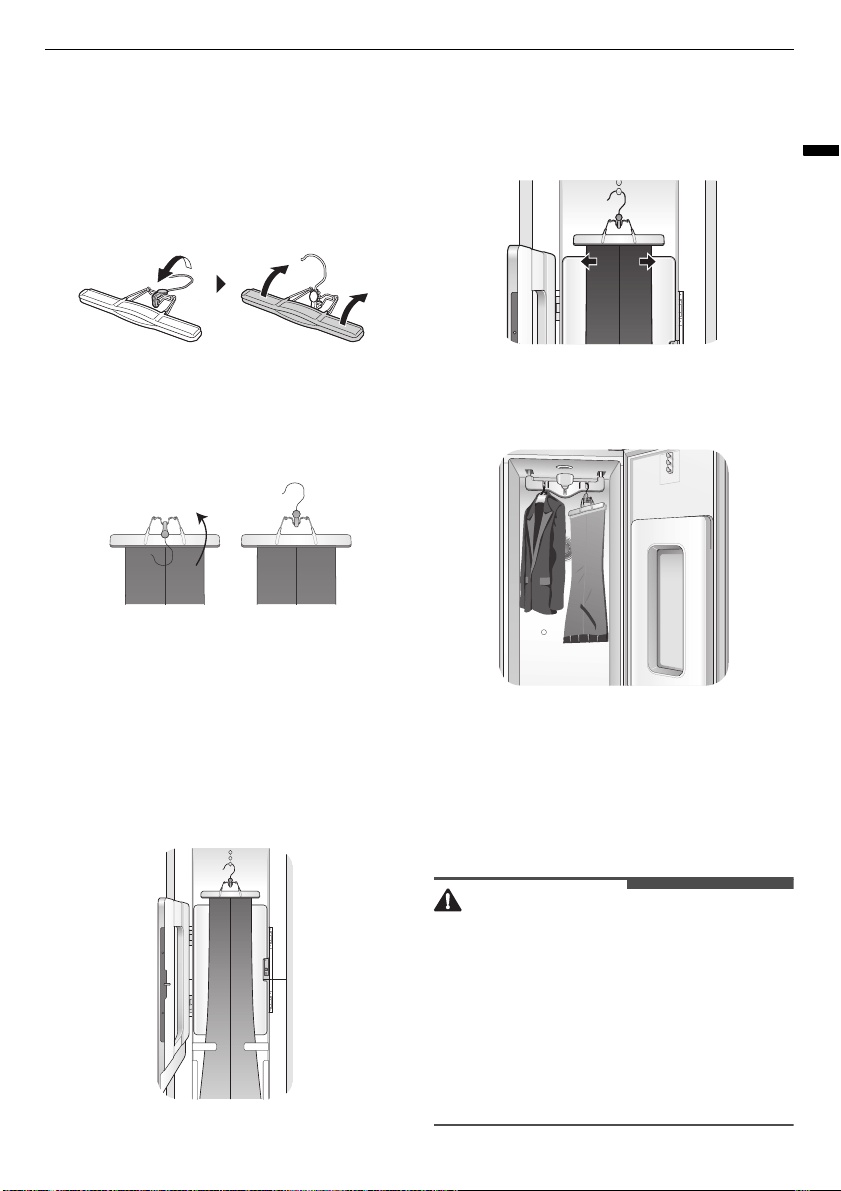
The Pants Hanger
Place pants either on the moving hanger or in the
pants crease care, depending on whether
maintaining the creases on the pants legs is
desired.
NOTE
• Hanging pants on the moving hanger may
reduce the creases on pants legs. To maintain
the creases on pants legs, use the pants crease
care.
• Pants should be no wider than 96 cm or longer
than 110 cm to fit in the pants crease care. Check
the size of the pants before using the pants
crease care. If pants are too large, use the
moving hanger.
• The fabric content of the garments affects how
well wrinkles are reduced.
• For optimum results, use the extra pants care
programme which is designed for use with the
pants crease care feature. This programme can
be downloaded using the
LG ThinQ
and used as
the Downloaded programme.
23
OPERATION
ENGLISH
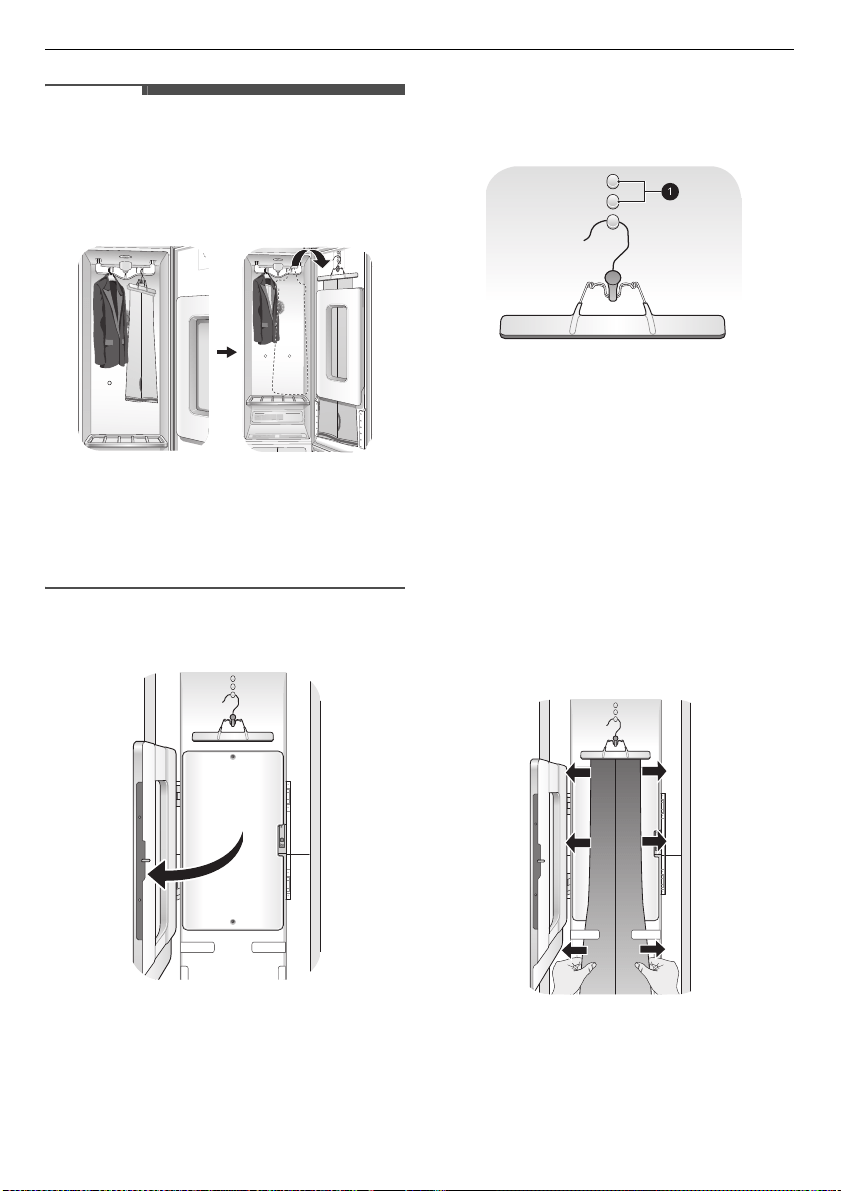
Opening and Closing the Pants
Hanger
1
To open, fold the hook down toward the
hanger blades to unlock and separate the
blades.
2
Once pants are inserted, bring the blades
together and rotate the hook up and away
from the blades to lock them in place.
Hanging Pants On the Pants Hanger
1
Remove all objects from pants pockets and
button the back pockets.
2
Fold pants along crease lines (or where crease
lines would be), and attach the pants hanger at
the ends of the pants legs.
3
Tug gently on the sides of the pants legs. Make
sure pants are stretched tight within the
hanger, with no wrinkles, and will not fall out of
the hanger during the programme.
4
Place the pants hanger on the moving hanger
or in the pants crease care.
The Pants Crease Care
Hang clothes in the pants crease care using the
pants hanger provided with the appliance or any
pants hanger that fits into the hooks above the
door to the pants crease care.
CAUTION
• Do not lean on or hang heavy items on the door
of the pants crease care. The appliance may tip,
resulting in damage or injury.
• Do not allow children to play with or hang onto
the door of the pants crease care. The appliance
may tip, resulting in damage or injury.
• Keep fingers out of pinch point areas when
closing the door of the pants crease care.
Supervise nearby children to prevent injuries.
24
OPERATION
NOTE
• Pants can be pressed while refreshing other
items in the same programme.
• To avoid double creases, run the strong course
with the moving hanger to remove any existing
knife pleats, and then use the pants press.
• For optimum results, use the extra pants care
programme which is designed for use with the
pants crease care feature. This programme can
be downloaded using the
LG ThinQ
and used as
the Downloaded programme.
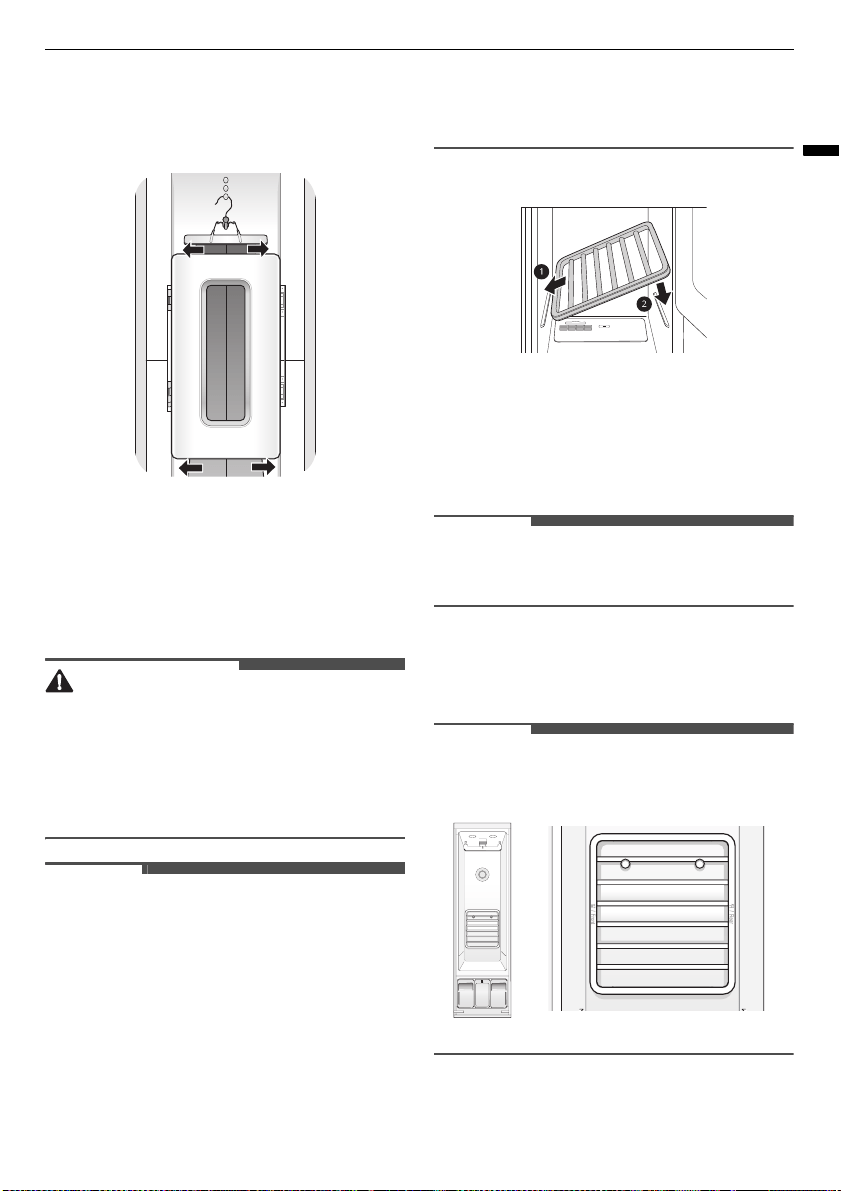
1
Open the pants crease care by pressing on the
icon on the side.
2
Hang the pants hanger on the hook above the
pants crease care that best fits the length of
the pants being pressed.
• If the pants are longer, use the higher hooks
a
to keep the pants from hitting the floor of
the cabinet.
• Pants should be no wider than 96 cm or
longer than 110 cm. Check the size of the
pants before using the pants crease care. If
pants are too large, use the moving hanger.
3
Make sure the pants are hanging straight.
• Check the creases on the legs to make sure
they are lined up. Fix the pants with 2 clips
before closing the pants crease care. If the
pants legs are not aligned properly or the
pants are not hanging straight, double lines
may appear at the pants’ edges, or the pants
may be wrinkled.
4
Close the pants crease care, then straighten
the pants once more.
25
OPERATION
ENGLISH
• Gently tug the edges of the pants to smooth
out any wrinkles. Make sure the pants are
hanging straight in the pants crease care.
The Shelf
Use the shelf when styling clothes or other items
that are difficult to hang or that may be damaged
by hang styling.
CAUTION
• Do not allow children to climb on or hang on the
shelf. The shelf may fall or the appliance may tip,
resulting in damage or injury.
• Do not place heavy objects on the shelf or use it
to store objects. The shelf may fall, resulting in
damage or injury.
NOTE
• Use the shelf for sweaters, knits, lingerie, or
delicate blouses that can show hanger marks,
stretching, or other damage if dried on a hanger.
• For best styling performance, do not stack items
on the shelf. Style single items or place items
side by side with space between.
• When not in use, store the shelf on the shelf
holder knobs in the back of the cabinet.
• Arrange items on the shelf so they do not touch
the sides or rear of the cabinet, if possible.
Condensation may form on the interior surface
of the cabinet, and items in contact with the
surface may remain damp at the end of the
programme.
Assembling the Shelf
1
Hold the shelf so that the grey trim is toward
the front.
2
Insert the left shelf groove into the left shelf
support, then lower the right shelf groove onto
the right shelf support.
NOTE
• The shelf cannot be assembled by sliding it into
the cabinet. It will fall if not assembled properly.
3
To disassemble, lift up the right side of the
shelf, then pull out the left side of the shelf
from the shelf support.
NOTE
• Hang the shelf on the shelf holder when treating
long clothes such as coats or dresses.
26
OPERATION
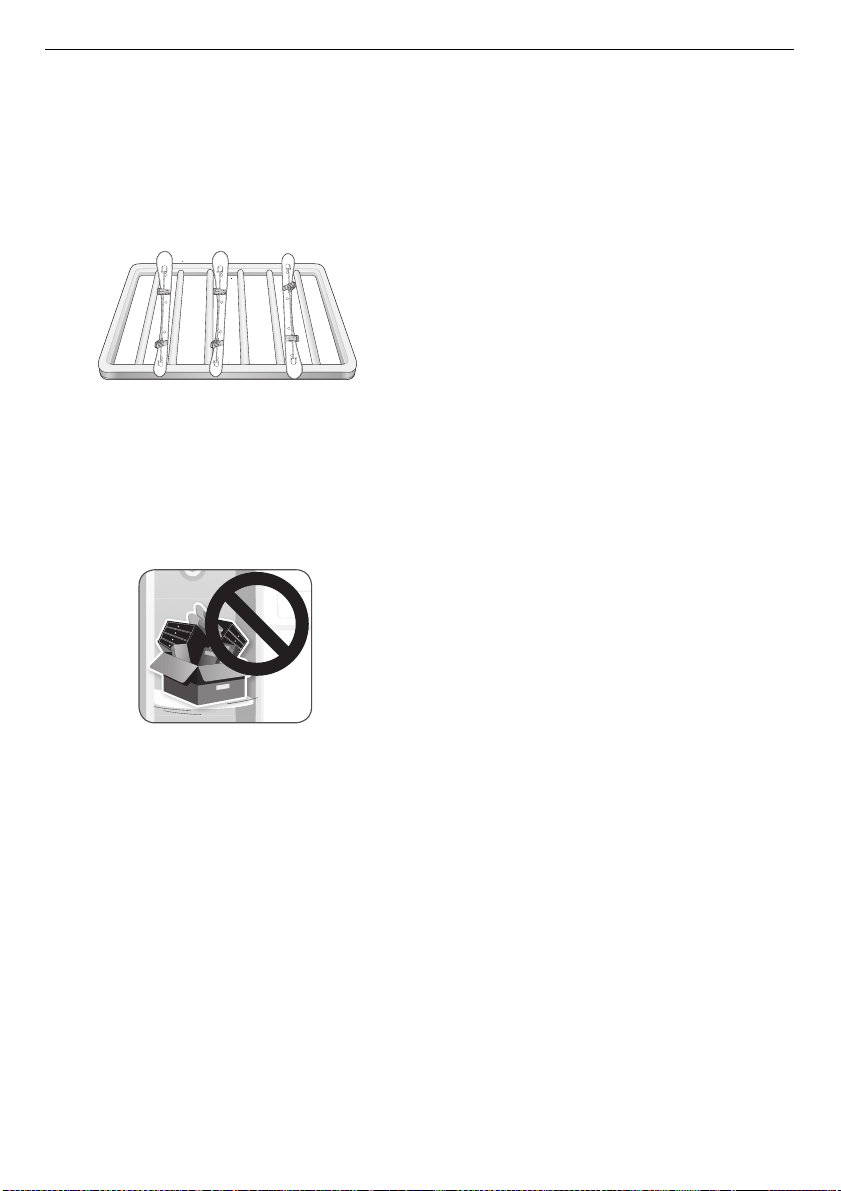
Storing Hangers
Remove unused hangers from the moving hanger
and store them in the shelf during operation. This
prevents noise and damage to clothing.
1
Insert the hangers between the rails of the
shelf.
2
When styling long clothes, if the shelf is stored
on the shelf holder, store the hangers outside
the appliance during operation.
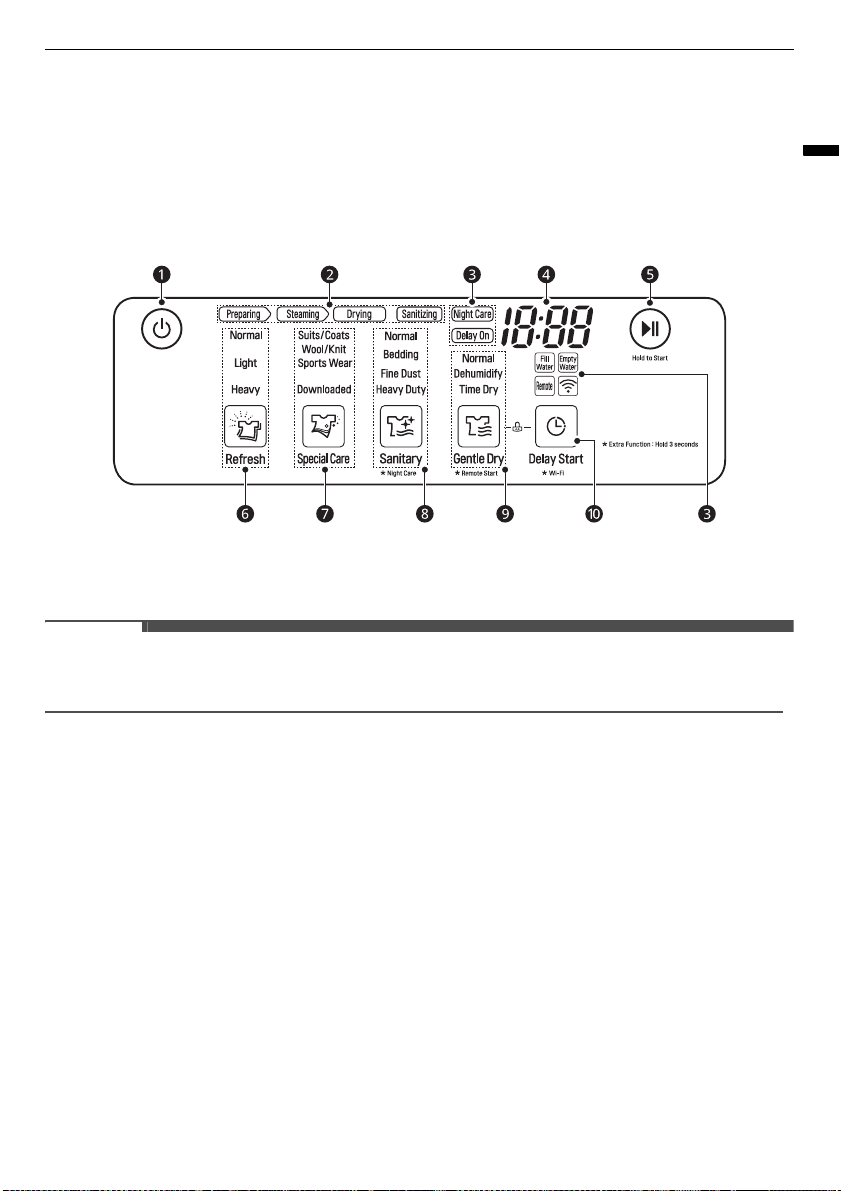
3
Do not use the shelf to store heavy items.
27
OPERATION
ENGLISH
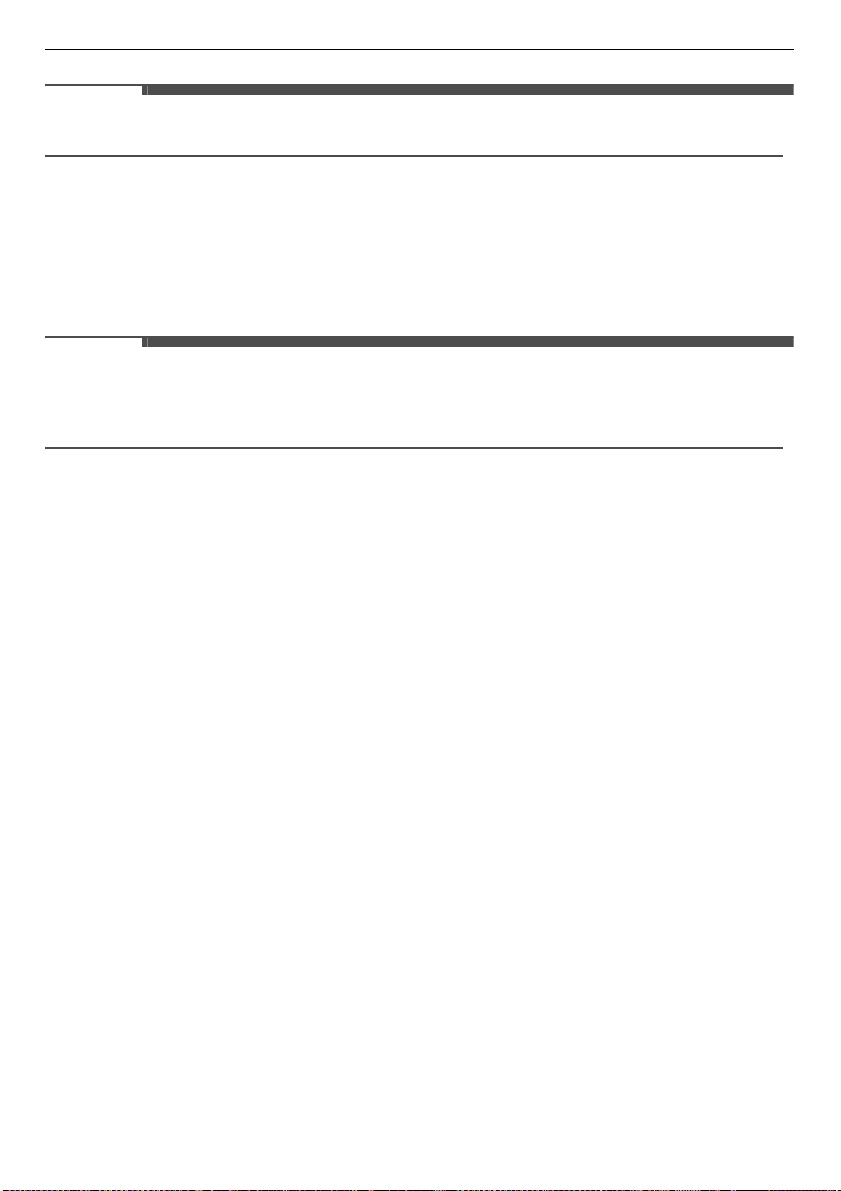
Control Panel
The control panel responds to touch using static electricity. A light touch is enough to operate it. Use a cloth
when cleaning the controls to avoid contacting and activating the buttons. Foreign substances on the
control, wearing gloves, or touching the buttons through cloth may prevent the buttons from activating.
Control Panel Features
Depending on the model, some of the following functions may not be available.
a
Power
Button
Touch
Power
button to turn the appliance On/Off. Once the programme is complete, the appliance
automatically turns off after a few seconds if no buttons are touched.
NOTE
• Touching
Power
button during a programme will cancel that programme and the programme settings
will be lost.
b
Programme Process Indicator
This portion of the display shows which stage of the styling programme is currently underway.
c
Option and Alert Indicators
•
Night Care
lights up to when the appliance is in the
Night Care
mode.
•
Delay On
lights up when the
Delay Start
feature is set.
•
Fill Water
lights up when the water supply tank is missing or empty.
•
Empty Water
lights up when the water drain tank is missing or full.
•
Remote
lights up when the appliance can be controlled remotely.
•
f
: lights up when the appliance is connected to Wi-Fi network at home.
d
LCD Display
The display shows the estimated time remaining and error messages for the appliance. The
programme time may vary by usage conditions.
e
Start/Pause
Button
Touch and hold to start the selected programme. If the appliance is running, touch to pause the
programme without losing the current settings.
28
OPERATION
NOTE
• When in pause, the power is turned off automatically after a certain time for safety reasons.
f
Refresh
Programme
Touch this button to select a
Refresh
programme. You can toggle to one of the settings when you touch
the button repeatedly.
g
Special Care
Programme
Touch this button to select a
Special Care
programme. You can toggle to one of the settings when you
touch the button repeatedly.
NOTE
• When you toggle to the
Downloaded
setting, you can use 5 special programmes which are set as default
on your appliance. It allows you to download a new special programme using
LG ThinQ
application on
a smartphone.
h
Sanitary
Programme
Touch the button to select a
Sanitary
programme. You can toggle to one of the settings when you
touch the button repeatedly.
Night Care
• Touch and hold the
Sanitary
button for 3 seconds to activate/deactivate the
Night Care
function.
i
Gentle Dry
Programme
Touch the button to select a
Gentle Dry
programme. You can toggle to one of the settings when you
touch the button repeatedly.
Remote Start
• With the
LG ThinQ
app, you can use a smartphone to control your appliance remotely.
• In order to use the Remote Start function, refer to
SMART FUNCTIONS
.
j
Delay Start
Touch this button to delay the start time of the programme.
Wi-Fi
• Touch and hold this button for 3 seconds to initiate the connection of the appliance to the
LG ThinQ
application.
29
OPERATION
ENGLISH
Programme Table
The programmes are designed to fit a variety of situations. Select the programme and setting that best
match the load contents and desired results for maximum performance and fabric care.
Styling Programme Guide
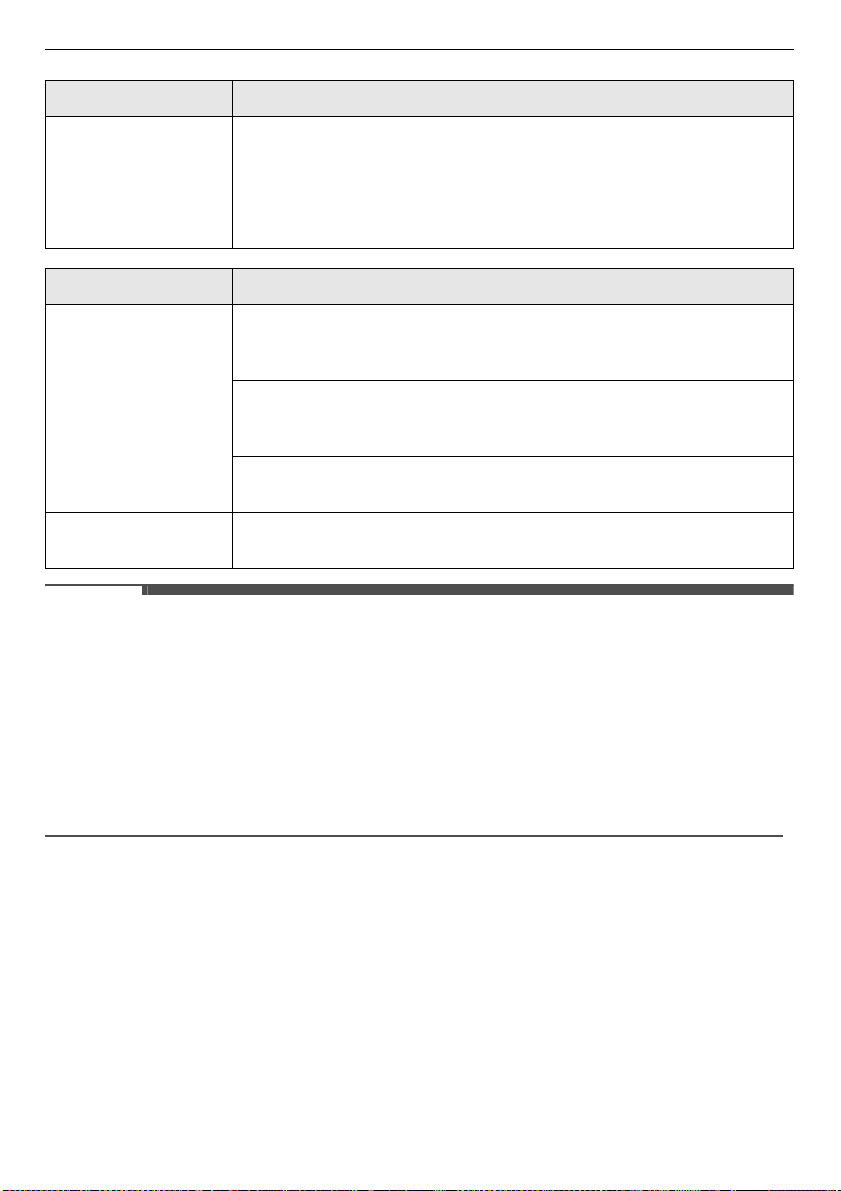
Programme Refresh
Setting Normal
/
Light
/
Heavy
Refresh your clothes with high temperature steam and vibration. The
programme helps you to reduce odours and wrinkles of the clothes.
Fabric / Clothes
Suit, coat, school uniform, scarf, wool, knitwear, outdoor/performance
clothing, towels, underwear, t-shirts, socks, jeans, jean jackets, lingerie,
sportswear, tablecloths
Note
• Only washable items are allowed to use this programme because the
appliance sprays steam to the clothes.
• The appliance smooth out the wrinkles by spraying steam to the clothes.
The wrinkles may remain on the clothes after styling. Iron the clohtes, if
desired.
• The wrinkles care performance depends on the weight and fabric of the
clothes.
Programme Special Care
Setting Suits/Coats
: Refresh the clothes with low temperature steam and vibration.
The setting helps you to care the suits and coats that conatins natural fibers.
Wool/Knit
: Specially designed to relieve wrinkles from wool and knit.
Sports Wear
: Use to protect fabric for sports wear.
Downloaded
: There are 5 special programmes which are set as a default.
You can choose one of special programmes each time the
Special Care
button is touched.
• With
LG ThinQ
application, you can see what a special programme is
selected and download a new special programme.
Programme Sanitary
Setting Normal
/
Bedding
/
Fine Dust
/
Heavy Duty
Use this programme to reduce germs and to dry items. Choose this
programme for clothing, bedding, and children’s clothing and soft toys.
Quilts or blankets should be a single layer and weigh 1.5 kg or less.
Fabric / Clothes
Suit, coat, school uniform, scarf, outdoor/performance clothing, towels,
underwear, t-shirts, socks, jeans, jean jackets, lingerie, sportswear,
tablecloths
30
OPERATION
NOTE
• Check
Fabric Care Guide
in this manual and fabric care labels on garment before styling.
• Wrinkles may remain in some items. Wrinkles caused by extended storage may be difficult to reduce.
Wrinkles in cotton or linen may not be reduced completely. Iron after styling, if desired.
• Some odours can be difficult to remove. Odours from oily substances may be difficult for the steam to
penetrate. Odours from extended storage may also be difficult to remove.
• Programme times may vary depending on the usage environment, including water temperature.
• Very thick clothing may not be dried uniformly at the end of the programme.
• Styling times for the programme may be longer for wet clothes that are not spin dried.
Wrinkle Care
The appliance utilizes high temperature steam and moving hangers to reduce wrinkles without damaging
the garment.
Note
• Do not use this programme for wool or knitwear, because the high
temperatures and steam can cause shrinkage.
• Natural fibers must be marked washable/hand-washable and tumble dry,
to avoid shrinkage.
• Do not use with items containing rubber, foam, or adhesive.
Programme Gentle Dry
Setting Normal
: Dry clothes using warm air and moving hanger without tumbling. It
is suitable for refreshing non-washable fabrics and natural fibers like 100%
wool, cashmere.
Dehumidify
: Use this setting to dehumidify the room where the appliance is
installed. Use while door is open 45º. If door is closed, the setting does not
operate.
Time Dry
: Use this setting to manually select the drying time, from 30 to 120
minutes, in 30-minute increments.
Note
• The wrinkles care performance depends on the weight and fabric of the
clothes.
Programme Sanitary
31
OPERATION
ENGLISH
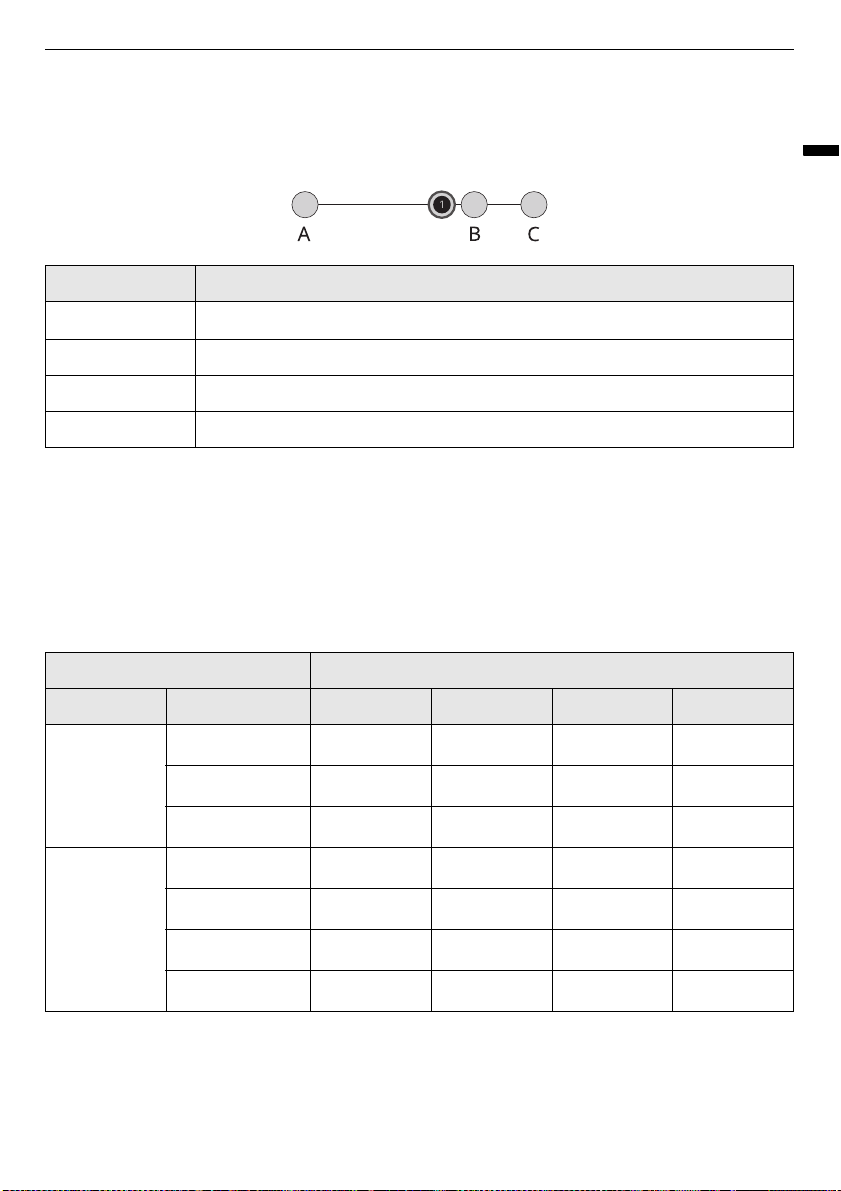
Wrinkle Care Performance Comparison Styler
The appliance uses steam to indirectly ironing, wrinkled clothing may not be fully stretched. At this time,
there may be a difference in wrinkle care performance with depending on the weight and material of the
cloth.
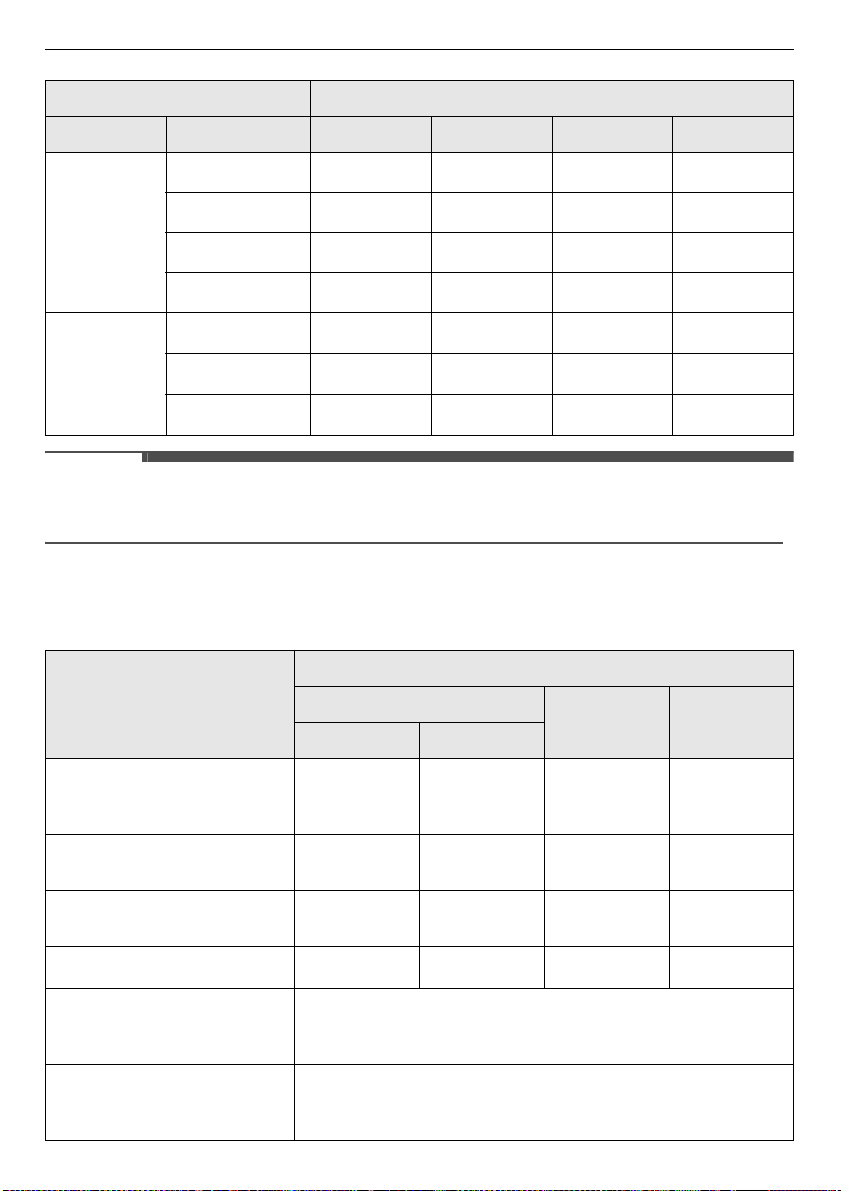
Process Details for Each Styling Programme
•
Preparing
: This process heats the water in the water tank in preparing for supplying steam.
•
Steaming
: This process sprays steam on the clothes.
•
Drying
: This process removes moisture in the clothes.
•
Sanitizing
: This process removes germs from the clothes.
Wrinkle Reduction Level
a
Styler
A Before ironing
BSteam iron
CPress iron
Programme Styling Process
Programme Setting Preparing Steaming Drying Sanitizing
Refresh Normal
###
Light
###
Heavy
###
Special Care Suits/Coats
###
Wool/Knit
###
Sports Wear
###
Downloaded
32
OPERATION
NOTE
• If the
Sanitary
programme are changed to a kind of
Refresh
or
Gentle Dry
programme during
operation, the sanitize process is not performed.
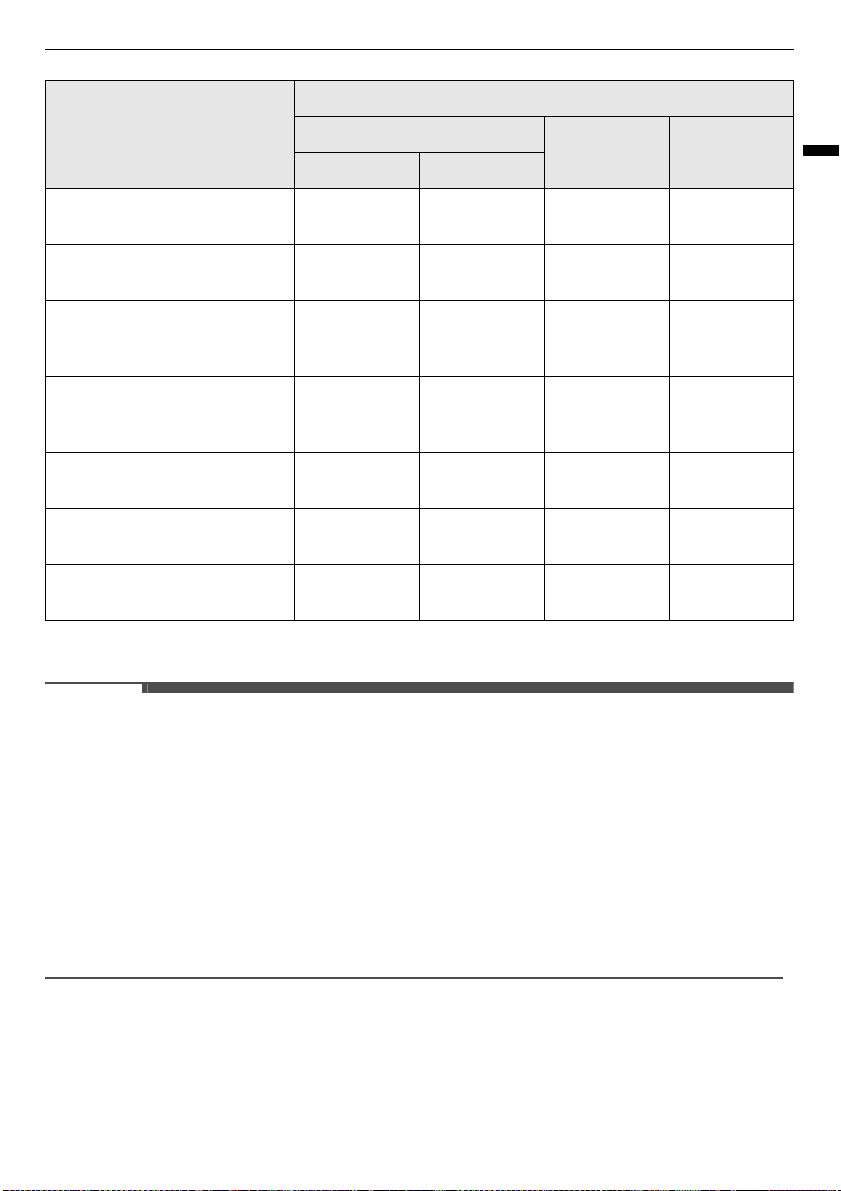
Fabric Care Guide
Sanitary Normal
####
Bedding
####
Fine Dust
####
Heavy Duty
####
Gentle Dry Normal
#
Dehumidify
#
Time Dry
#
Fabric & Clothes
Programme
Refresh
Sanitary Gentle Dry
Wrinkles Odours
Cotton
Towels, socks, underwear, jeans,
sportswear, T-shirts, blankets
###
Linen, hemp, ramie
Summer clothes, tablecloths
###
Alpaca, camel hair, cashmere
Coats, suits
#
*1
#
*1
#
*1
#
*1
Scarves, knitwear
#
*1
#
Fur, leather
Coats, scarves
• Style the fur, leather clothes using a special programme, which is
downloadable from
LG ThinQ
application. But leather is only
100% natural leather (No artificial leather)
Silk
Neckties, ribbons, scarves,
blouses, silk velvet/plush
• Only use downloaded
Silk Care
cycle (low temperature drying).
Programme Styling Process
Programme Setting Preparing Steaming Drying Sanitizing
33
OPERATION
ENGLISH
*1 Check fabric care labels in garments before use.
NOTE
• Fabrics come in a wide variety of weights and finishes and can have different care requirements for each
variety. It is difficult to cover them adequately in this manual. Before using the appliance with any item,
check the care label before proceeding.
• Do not put items that are not colour fast, are heat-sensitive, or are not suitable for washing with water
in the
Refresh
or
Sanitary
programmes. Do a water blot test on a small, inconspicuous spot (an inside
seam) to determine if the fabric is colour fast. For further assistance, consult the clothing manufacturer,
a dry cleaning professional, or a more detailed fabric care guide.
• Using the appliance with items that are very wet or are not colourfast may result in damage to the items
and staining from fabric dyes on the interior of the cabinet. These stains will not affect the operation of
the appliance. Use toothpaste to remove stains from interior of cabinet.
• The appliance does not have a washing function. Wash soiled items before use.
Wool
Sweaters, knitwear
#
*1
#
Winter coats, suits, sportswear,
uniforms
####
Acetate
Suit lining, blouses, neckties,
pajamas
####
Acrylic
Suit lining, blouses, neckties,
pajamas
####
Nylon
Stockings, lingerie
####
Polyurethane (less than 5%)
Stretchable clothing
####
Rayon
Suit Lining
####
Fabric & Clothes
Programme
Refresh
Sanitary Gentle Dry
Wrinkles Odours
34
OPERATION
Option Programmes and
Extra Functions
Child Lock
Use this function to prevent unwanted use of the
appliance or to keep programme settings from
being changed while the appliance is operating.
1
Touch and hold the
Gentle Dry
and
Delay
Start
buttons for 3 seconds to activate or
deactivate the control lock function.
2
CL
appears on the LCD display, and all controls
are disabled except the
Power
button.
NOTE
• The function does not lock the door.
• The function is retained even if there is a power
outage.
• Once set, the function remains active until it is
manually deactivated. The function must be
deactivated to run another programme.
Delay Start
Use this function to delay the start time of the
programme.
1
Touch
Power
button.
2
Choose a programme and setting.
3
Touch
Delay Start
button to set the start time
of the programme.
• The default delay time is 3 hours. Each time
you touch the button, the time increases by
an hour, up to 19 hours.
• Touch and hold the button to increase the
delay time more quickly.
NOTE
• This option cannot be selected when the
appliance is in the
Night Care
mode.
Night Care
Use this function to store items overnight or
anytime, items can’t be removed soon after a
programme ends. The function periodically
produces warm air to prevent condensation,
keeping items warm and dry until they are
removed.
1
Place clothes into the appliance.
2
Choose a programme and setting.
3
Touch and hold
Sanitary
for 3 seconds to
activate the
Night Care
function.
4
Touch
Start/Pause
.
NOTE
• Once set, the function starts after the selected
programme ends. To cancel the function, touch
another programme button.
• The function can’t be set to follow a
Gentle Dry
programme.
• The settings are lost if you touch
Power
button.
• The function runs for a maximum of 24 hours.
• It is safe to open the door at any time during the
function, even when the air is blowing.
• Some noise occurs periodically to produce warm
air.
Dehumidify
Dehumidifies the room where the appliance is
installed. Room dehumidifying time can be set to 2
or 4 hours by touching the
Gentle Dry
button.
Notification icon will be displayed with alarm if
drain tank is full. Empty drain tank and touch
Start/
Pause
button to continue dehumidification.
• The
Night Care
feature cannot be used while
using
Dehumidify
setting.
• Use while door is open 45º. If door is closed, the
course does not operate.
35
OPERATION
ENGLISH
• The drain tank may be filled before end of
Dehumidify
setting depending on the
environment.
• It is possible for room temperature to increase
due to outgoing airflow from the appliance.
36
SMART FUNCTIONS
SMART FUNCTIONS
LG ThinQ Application
The
LG ThinQ
application allows you to
communicate with the appliance using a
smartphone.
LG ThinQ Application Features
Communicate with the appliance from a
smartphone using the convenient smart features.
Push Alerts
When the programme is complete or the appliance
has problems, you have the option of receiving
push notifications on a smartphone. The
notifications are triggered even if the
LG ThinQ
application is off.
Smart Diagnosis
This function provides useful information for
diagnosing and solving issues with the appliance
based on the pattern of use.
Energy Monitoring
This function checks the energy consumption of
the recently used programme and monthly
average.
Settings
Allows you to set various options on the appliance
and in the application.
NOTE
• If you change your wireless router, Internet
service provider, or password, delete the
registered appliance from the
LG ThinQ
application and register it again.
• The application is subject to change for
appliance improvement purposes without notice
to users.
• Functions may vary by model.
Before Using LG ThinQ
Application
1
Check the distance between the appliance and
the wireless router (Wi-Fi network).
• If the distance between the appliance and
the wireless router is too far, the signal
strength becomes weak. It may take a long
time to register or installation may fail.
2
Turn off the
Mobile data
or
Cellular Data
on
your smartphone.
3
Connect your smartphone to the wireless
router.
NOTE
• To verify the Wi-Fi connection, check that
Wi-Fi
or
f
icon on the control panel is lit.
• The appliance supports 2.4 GHz Wi-Fi networks
only. To check your network frequency, contact
your Internet service provider or refer to your
wireless router manual.
•
LG ThinQ
is not responsible for any network
connection problems or any faults,
malfunctions, or errors caused by network
connection.
• If the appliance is having trouble connecting to
the Wi-Fi network, it may be too far from the
router. Purchase a Wi-Fi repeater (range
extender) to improve the Wi-Fi signal strength.
37
SMART FUNCTIONS
ENGLISH
• The Wi-Fi connection may not connect or may be
interrupted because of the home network
environment.
• The network connection may not work properly
depending on the Internet service provider.
• The surrounding wireless environment can
make the wireless network service run slowly.
• The appliance cannot be registered due to
problems with the wireless signal transmission.
Unplug the appliance and wait about a minute
before trying again.
• If the firewall on your wireless router is enabled,
disable the firewall or add an exception to it.
• The wireless network name (SSID) should be a
combination of English letters and numbers. (Do
not use special characters.)
• Smartphone user interface (UI) may vary
depending on the mobile operating system (OS)
and the manufacturer.
• If the security protocol of the router is set to
WEP
, you may fail to set up the network. Please
change it to other security protocols (
WPA2
is
recommended) and register the product again.
Installing the LG ThinQ
Application
Search for the
LG ThinQ
application from the
Google Play Store or Apple App Store on a
smartphone. Follow instructions to download and
install the application.
Using the Appliance Remotely
Remote Start
Use a smartphone to control your appliance
remotely. You can also monitor your programme
operation so you know how much time is left in the
programme.
Using this function
1
Put the clothes into the appliance.
2
Touch the
Power
button.
3
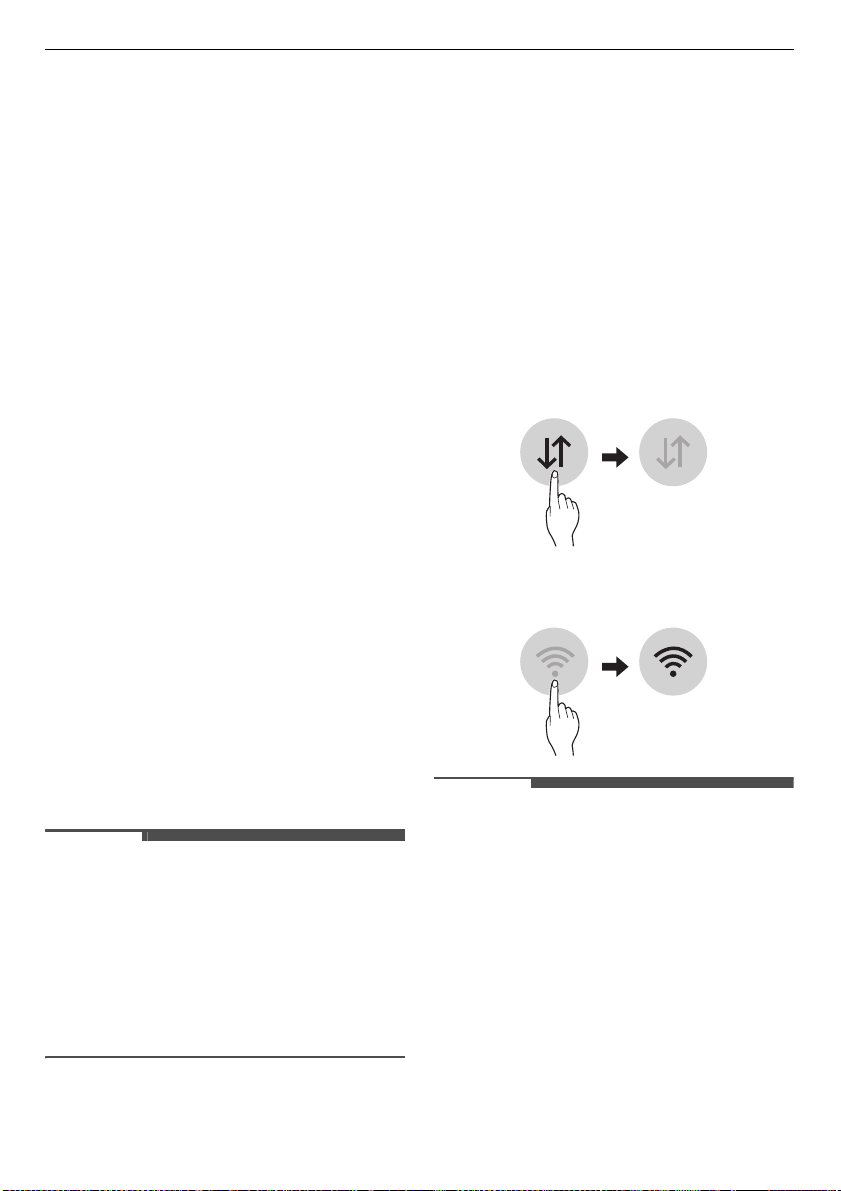
Touch and hold the
Gentle Dry
button for 3
seconds to enable the remote control function.
4
Start a programme from the
LG ThinQ
application on your smartphone.
NOTE
• Once this function is enabled, you can only start
a programme from the
LG ThinQ
smartphone
application. If the programme is not started, the
appliance will wait to start the programme until
it is turned off remotely from the application or
this function is disabled.
• If the door has been opened, you can not start a
programme remotely.
Disable this function manually
When the function is activated, press and hold the
Refresh
button for 3 seconds.
Download programme
Download new and special cycles that are not
included in the basic cycles on the appliance.
Appliances that have been successfully registered
can download a variety of specialty cycles specific
to the appliance.
Once cycle download is completed in the appliance,
the appliance keeps the downloaded cycle until a
new cycle is downloaded.
To operate a downloaded programme on the
appliance, touch the
Special Care
button on the
appliance repeatedly until the
Downloaded
setting
is lit up.
NOTE
• Only one downloaded programme can be stored
on the appliance at a time.
RF Radiation Exposure
Statement
This equipment shall be installed and used at a
minimum distance of 20 cm from the human body.
38
SMART FUNCTIONS
Open Source Software Notice
Information
To obtain the source code under GPL, LGPL, MPL,
and other open source licenses, that is contained in
this product, please visit http://
opensource.lge.com.
In addition to the source code, all referred license
terms, warranty disclaimers and copyright notices
are available for download.
LG Electronics will also provide open source code to
you on CD-ROM for a charge covering the cost of
performing such distribution (such as the cost of
media, shipping, and handling) upon email request
to openso[email protected]. This offer is valid for a
period of three years after our last shipment of this
product. This offer is valid to anyone in receipt of
this information.
Smart Diagnosis
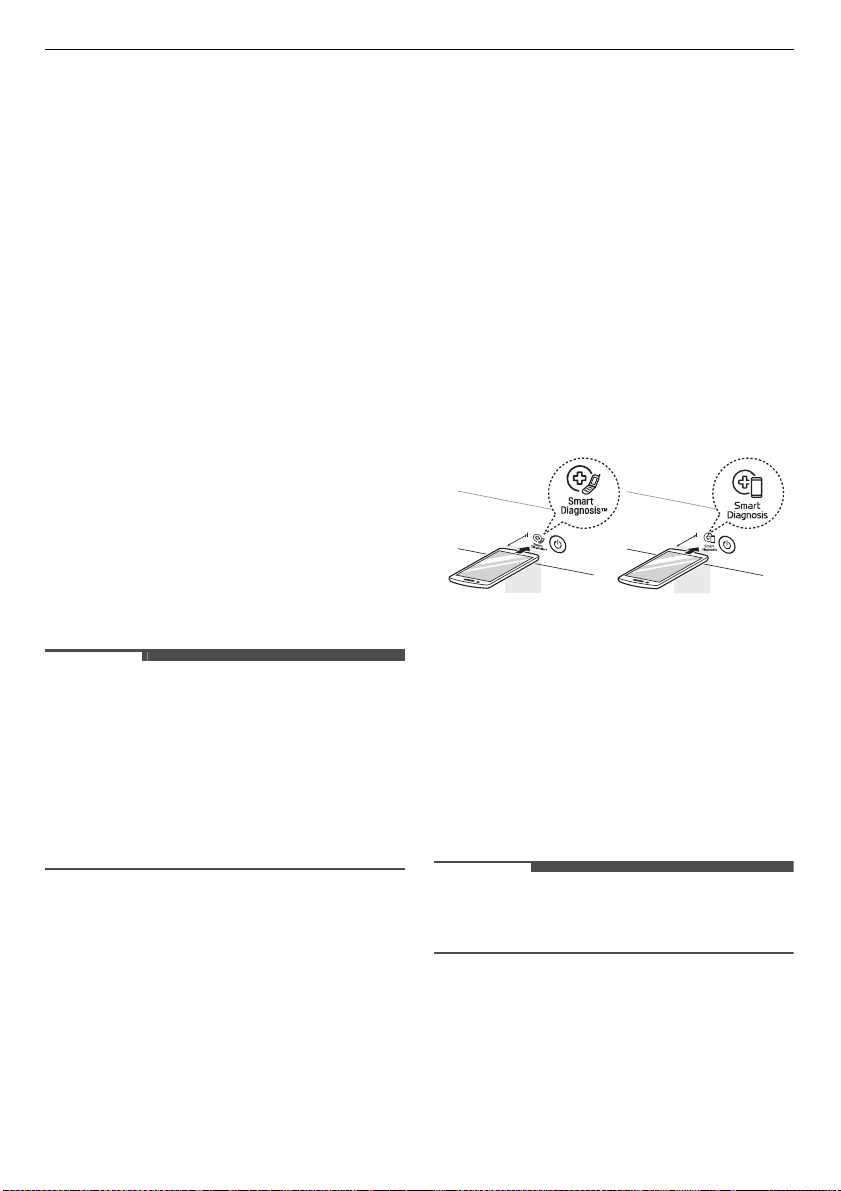
This feature is only available on models with the
c
or
d
logo.
Use this feature to help you diagnose and solve
problems with your appliance.
NOTE
• For reasons not attributable to LGE’s negligence,
the service may not operate due to external
factors such as, but not limited to, Wi-Fi
unavailability, Wi-Fi disconnection, local app
store policy, or app unavailability.
• The feature may be subject to change without
prior notice and may have a different form
depending on where you are located.
Using LG ThinQ to Diagnose
Issues
If you experience a problem with your Wi-Fi
equipped appliance, it can transmit
troubleshooting data to a smartphone using the
LG ThinQ
application.
• Launch the
LG ThinQ
application and select the
Smart Diagnosis
feature in the menu. Follow
the instructions provided in the
LG ThinQ
application.
Using Audible Diagnosis to
Diagnose Issues
Follow the instructions below to use the audible
diagnosis method.
• Launch the
LG ThinQ
application and select the
Smart Diagnosis
feature in the menu. Follow
the instructions for audible diagnosis provided
in the
LG ThinQ
application.
1
Touch the
Power
button to turn the appliance
on.
• Do not touch any other buttons or icons on
the display screen.
2
Place the mouthpiece of your smartphone
close to the
c
or
d
logo.
3
Touch and hold the
Sanitary
and
Gentle Dry
buttons for 3 seconds or longer while holding
the smartphone mouthpiece to the logo until
the data transfer is complete.
• Keep the smartphone in place until the data
transfer has finished. Time remaining for
data transfer is displayed.
4
After the data transfer is complete, the
diagnosis will be displayed in the application.
NOTE
• For best results, do not move the smartphone
while the tones are being transmitted.
Max.
10 mm
Max.
10 mm
39
MAINTENANCE
ENGLISH
MAINTENANCE
WARNING
• Unplug the appliance before cleaning to avoid the risk of electric shock. Failure to follow this warning
can cause serious injury, fire, electrical shock, or death.
• Never use harsh chemicals, abrasive cleaners, or solvents to clean the appliance. They will damage the
finish.
Regular Cleaning
Cleaning the Interior and
Exterior
Proper care of your appliance can extend its life.
1
Clean the inside and outside of the appliance
with a damp cloth.
• Glass cleaner can be used to clean the front
glass panel, but spray it on a cloth and wipe
rather than spraying it directly on the panel.
2
Buff the door dry with a clean, dry cloth to
prevent any water stains.
3
Allow the interior and exterior to dry
completely before plugging in and operating
the appliance.
CAUTION
• Do not spray water directly on the appliance.
• Do not use detergent, methylated spirits,
solvents, or any volatile liquids to clean the
exterior of the appliance.
• Never use steel wool or abrasive cleansers; they
can damage the surface.
• Keep sharp objects away from the exterior of the
appliance. The touch panel may not work if
damaged.
Cleaning the Lint Filter
Always remove the lint from the filter after every
programme. If the lint filter has become very dirty
or clogged, wash the lint filter in warm, soapy
water and allow to dry thoroughly before
reinstalling.
• Never operate the appliance without the lint
filter.
• Never operate the appliance with a wet lint filter.
Cleaning the Aroma Filter
For best results, wash the aroma filter using hot
water and dish soap. After cleaning, wipe the filter
with a clean cloth and allow it to dry thoroughly
before reinstalling it.
The aroma filter can also be cleaned in the top rack
of the dishwasher.
• Never operate the appliance without the aroma
filter.
• Never operate the appliance with a wet aroma
filter.
Cleaning the Water Tanks
The water in the water supply tank contacts the
clothing and items treated in the appliance directly.
Clean both tanks periodically and keep them clean
at all times. If the tanks are not properly cleaned,
they may start to smell or need to be replaced.
• Some discolouration of the water drain tank may
occur over time. This is normal and will not affect
product performance.
40
MAINTENANCE
• Use only clean tap water in the supply tank for
best performance and to prolong the life of the
appliance. Do not use distilled water.
• Do not reuse the water from the water drain tank
in the water supply tank.
1
Clean the exterior of the tanks with a wet cloth.
2
Please clean the inside of the water tanks with
water by using a brush cleaning the water
tanks.
3
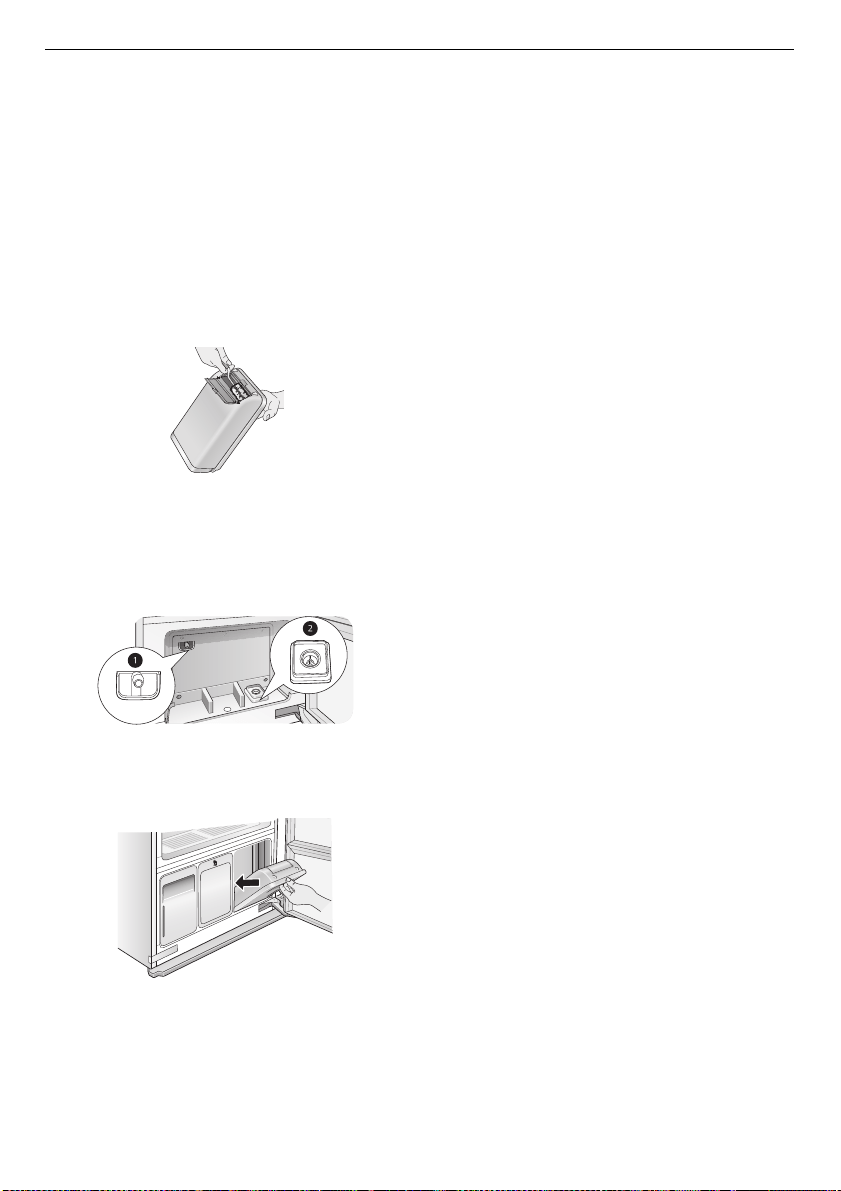
Make sure the drainage nozzle
a
connected to
the water drain tank and the water supply hole
b
connected to the water supply tank are not
clogged.
4
Allow the outsides of the tanks to dry
completely before reinstalling the tanks.
41
TROUBLESHOOTING
ENGLISH
TROUBLESHOOTING
Operation of your appliance can lead to errors and malfunctions. The following tables contain possible
causes and notes for resolving an error message or malfunction. It is recommended to read the tables
carefully below in order to save your time and money that may cost for calling to LG Electronics service
centre.
Before Calling for Service
Your appliance is equipped with an automatic error-monitoring system to detect and diagnose problems
at an early stage. If your appliance does not function properly or does not function at all, check the
following before you call for service.
Error Messages
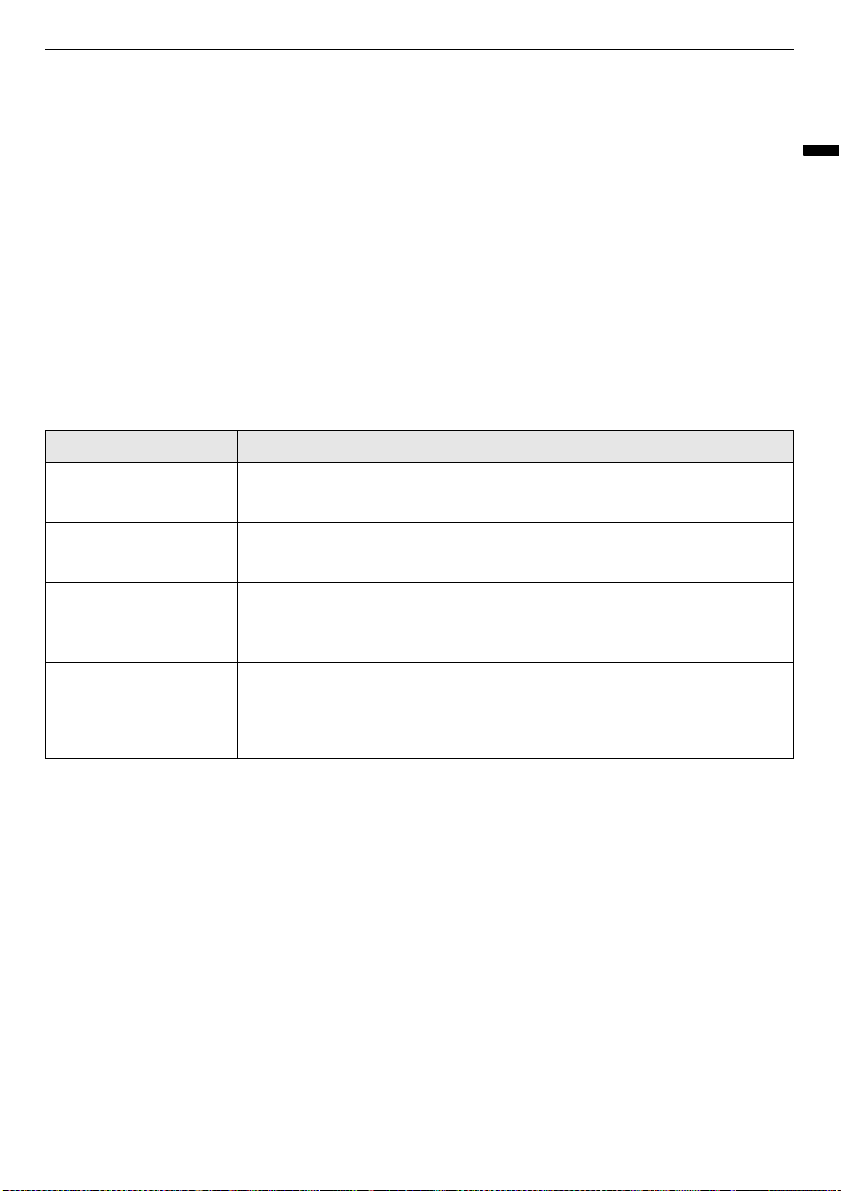
Symptoms Possible Cause & Solution
Fill Water icon is
blinking.
Water supply tank is empty or tank is missing.
• Fill the water supply tank and reinstall it.
Empty Water icon is
blinking.
Water drain tank is full or tank is missing.
• Empty the water drain tank and reinstall it.
dE
error message
shows on the display.
Door is not completely closed.
• Check that items are completely inside the cabinet and that the door is
tightly closed.
AE
,
LE
,
LEz
,
E1
,
E4
,
tE1
,
tEz
,
tE3
or
tEs
error
message shows on the
display.
System error.
• Unplug the appliance and call for service.

42
TROUBLESHOOTING
Operation
Symptoms Possible Cause & Solution
The appliance won’t
operate.
Control panel has powered off due to inactivity.
• This is normal. Touch the
Power
button to turn the appliance on.
Cord is unplugged.
• Make sure cord is plugged securely into a working outlet.
Circuit breaker/fuse is tripped/blown.
• Check house circuit breakers/fuses. Replace fuses or reset breaker. The
appliance should be on a dedicated branch circuit.
Appliance is not connected to 220-240 V socket.
• Make sure the cord is plugged into a grounded socket rated for this
appliance.
The programme won’t
start.
Start/Pause button was not touched after the programme was set.
• Touch
Start/Pause
button.
Programme is producing steam.
• There may be a period of inactivity while steam is produced.
Control panel is locked.
• Disable the locking of the control panel and touch
Start/Pause
button.
Smoke comes out
when the door is
opened.
Door is opened during operation.
• It is normal for steam or hot air to escape if the door is opened during
operation.
Full water supply tank
is empty after just one
use.
Appliance is being used for the first time.
• A larger amount of water is needed the first time the appliance is used to
fill the empty reservoir.
Appliance makes a
loud vibrating noise on
startup.
Moving hanger is balancing load before operation.
• This is normal at the beginning of the programme. If the noise increases
or continues for a long time, call for service.
Styling times are
taking longer than
estimated.
Clothes were extremely wet when loaded.
• Styling times may be longer for very wet or bulky clothing. Dry damp
clothes before putting them in the appliance. The appliance stops
automatically when clothes are dry.
Appliance is moving
from left to right while
operating.
Floor under appliance is not level or is not sturdy enough to support the
weight of the appliance without flexing.
• Install the appliance where the floor is level and sturdy. Compensate for
any slight unevenness in the floor with the levelling legs.
Sound of motor
whirring.
Compressor is running during styling.
• This is normal.
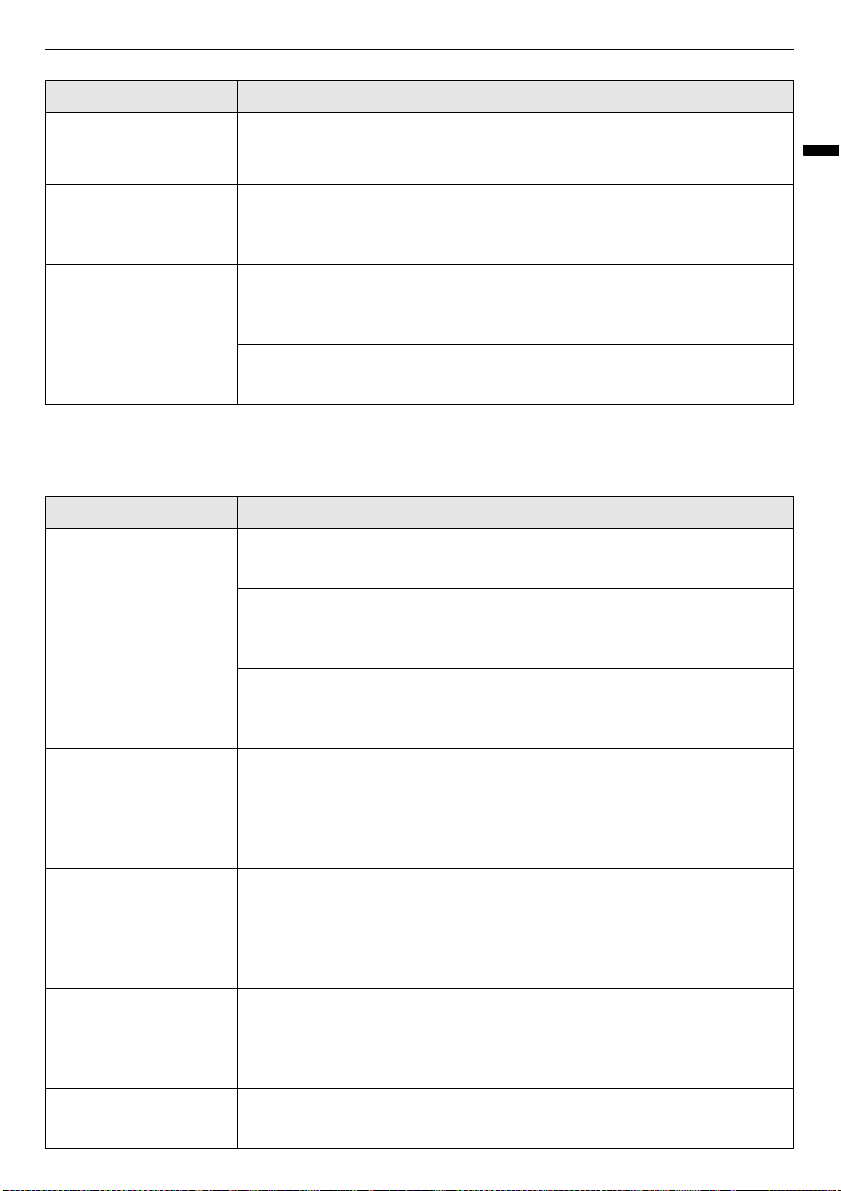
43
TROUBLESHOOTING
ENGLISH
Performance
Sound of water
running, boiling, or
hissing.
Steam is being generated and sprayed onto clothes.
• This is normal.
Steam or hot air leaks
out when the door is
closed.
An item is caught in the door, keeping it slightly open.
• Make sure all items are completely inside the cabinet and nothing is
caught in the door, blocking it from closing completely.
Control panel won’t
respond.
Control panel or button has dirt on it.
• Dirt or foreign objects on the control panel will interfere with the operation
of the buttons. Clean the control panel.
Control panel is locked.
• Disable the locking of the control panel.
Symptoms Possible Cause & Solution
Clothes are wet at the
end of the programme.
Filter is clogged or grill is upside down.
• Clean the lint filter. Insert the grill with the holes on the right side.
Door gasket is damaged.
• If the rubber door gasket is damaged, it leaves a gap in the door seal,
affecting performance of the appliance. Call for service.
Clothes are caught in door.
• Make sure all items are completely in the cabinet and not stuck in the door,
blocking it from closing completely. Run the programme again.
Odour is not removed
at end of programme.
Clothes were stored for a long period of time or are stained with a
strong-smelling substance.
• Odours can be particularly difficult to remove from clothes that have been
stored for long periods or have strong-smelling, oily stains. Wash the
clothes first, before using the appliance.
Wrinkles are not
reduced at end of
programme.
Clothes were stored for a long period of time.
• Wrinkles may be very difficult to reduce if set for a long time, especially in
cotton and linen fabrics. Iron clothes that have been stored for a long
period of time before treating them with the appliance, to reduce wrinkles
more effectively.
Clothes have an
unpleasant odour at
end of programme.
Appliance has not been used for a long time or water tanks and filters
have not been cleaned.
• Check for dirt or foreign objects in the water supply and water drain tanks.
Clean the filters and water tanks.
Functions are not
operating properly.
Detergent or fabric softener put in water supply tank.
• Do not use anything but clean water in the water supply tank.
Symptoms Possible Cause & Solution
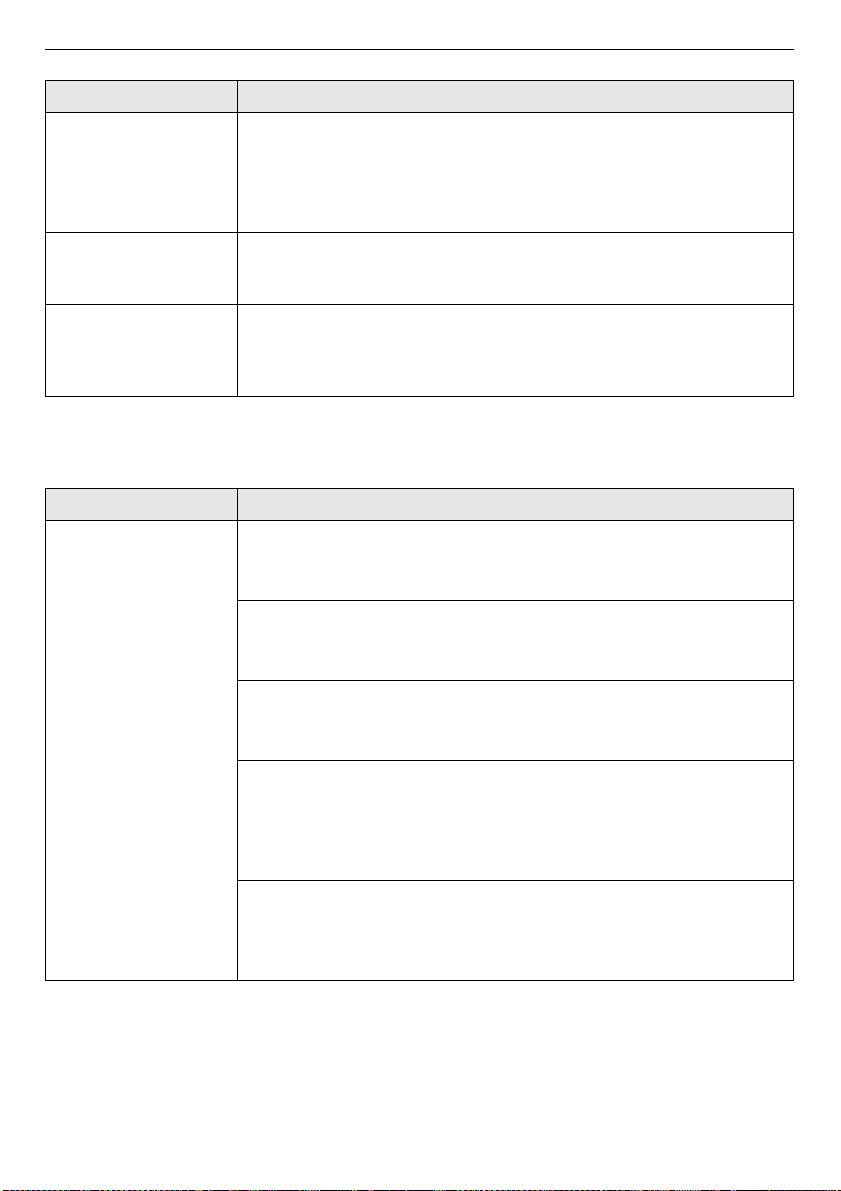
44
TROUBLESHOOTING
Wi-Fi
Wrinkles at back of
neck after programme.
Item too large for hanger or fabric too delicate.
• Use the right size hanger for the item so the fabric won’t bunch up and
cause wrinkles. Some fabrics are delicate and will bunch around the
hanger no matter what you do. Use the shelf for lingerie and other delicate
items.
Creases are gone from
pants after
programme.
Pants were hung on the moving hanger, not in the pants press.
• Hang pants in the pants press to maintain creases at edge of pants legs.
Clothing has water
spots after
programme, colour has
faded or run.
Fabric is not washable, or is not colourfast.
• Check fabric care labels before treating items.
Symptoms Possible Cause & Solution
Your home appliance
and smartphone is not
connected to the Wi-Fi
network.
The password for the Wi-Fi that you are trying to connect to is incorrect.
• Find the Wi-Fi network connected to your smartphone and remove it, then
register your appliance on
LG ThinQ
.
Mobile data for your smartphone is turned on.
• Turn off the Mobile data of your smartphone and register the appliance
using the Wi-Fi network.
The wireless network name (SSID) is set incorrectly.
• The wireless network name (SSID) should be a combination of English
letters and numbers. (Do not use special characters.)
The router frequency is not 2.4 GHz.
• Only a 2.4 GHz router frequency is supported. Set the wireless router to 2.4
GHz and connect the appliance to the wireless router. To check the router
frequency, check with your Internet service provider or the router
manufacturer.
The distance between the appliance and the router is too far.
• If the distance between the appliance and the router is too far, the signal
may be weak and the connection may not be configured correctly. Move
the location of the router so that it is closer to the appliance.
Symptoms Possible Cause & Solution
Memo

Memo
Memo