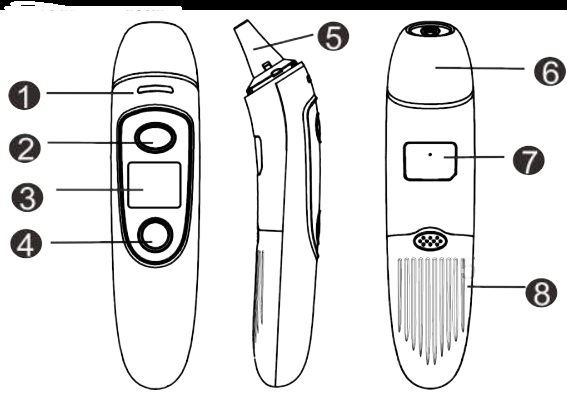
Probe cover (take it off when measuring ear temperature)
Rating label
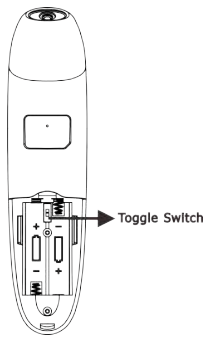
Battery cover
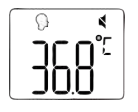
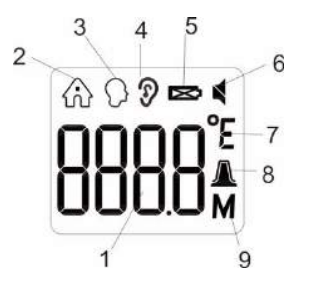
Display Description
Temperature value
Object temperature mode
Forehead temperature mode
Ear temperature mode
Battery level
Mute /Un-mute icon
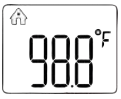
Fahrenheit / Celsius degrees
Ear cover
Memory recall
How to use your thermometer
When using the thermometer for the first time, move the battery's insulating piece away.
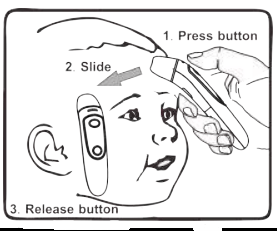
1. Take your forehead temperature
Press the Measure button to power on. Hold the Measure button, scan the forehead from one side to the other and then release the button, the beep is heard, you can now read the value.
NOTE: The forehead measurement is an indicative reading. The measured to 1 °F/0.5 °C from your actual body temperature. Please be aware of the factors that influence the accuracy as described in the section “Temperature taking tips" and ‘WARNINGS AND PRECAUTIONS".
WARNING: If the eyebrow area is covered with hair, sweat or dirt, please clean the area beforehand to improve the reading accuracy. Always check if the lens is clean. Always make sure the user and the thermometer will have been in the same room for at least 30 minutes prior to the measurement.
2. Take your ear temperature
Press the Measure button to power on. Take off the probe cover, fit the probe snuggly into the ear canal. Press and release the Measure button in 1 second, the beep is heard, you can now read the value.
WARNING: Please make sure that the ear is clean, with no earwax or obstructions. The right ear reading may differ from the reading taken at the left ear. Therefore, always take the temperature in the same ear.
WARNING:
Children under 1 year: Pull the ear straight back. Children aged 1 year to adult: Pull the ear up and back.
Do not force the thermometer into the ear canal. Otherwise, the ear canal may get injured
When taking the temperature on an adult, gently pull the ear up and back to make sure the ear canal is straight, so that the temperature probe can receive an infrared ray from the eardrum.
Be careful when taking temperature on a child, whose ear canal is small.
3. Take room/object temperature
When the thermometer is power off, press the Memory/Mute-unmute button for 3 seconds until it shows .Then press the Measure button to measure. Keep the thermometer about 1-5cm away from the object. Press and release the Measure button in 1 second, the beep is heard, you can now read the value.
4. After a measurement
Once the reading has been completed, remove the thermometer away from the forehead/ear and observe temperature. After each measurement, you can enter the recall mode and query earlier temperature readings.
WARNING:
Do not hold the thermometer for a long time, because it is sensitive to the ambient temperature.
After each measurement, clean the temperature probe with a soft cloth, and put the thermometer in a dry and well-ventilated place.
You should wait at least 10 seconds between each measurement.
It is dangerous to make a self-diagnosis or self-treatment based on the obtained measurement results. For such purposes, please consult a doctor.
5. Read your temperature
T indicates a temperature reading. In forehead or ear mode.
If 32°C≤T≤37.3°C(89.6°F≤T≤99.2°F), the green light will last for 3 seconds, with one long beep
If 37.4°C≤T≤37.9°C(99.3°F≤T≤100.3°F), the orange light will last for 3 seconds, with 3 short beeps, and the value in LCD flickers, which is a warning that you may have a light fever.
If 38°C≤T≤42.9°C(100.4°F≤T≤109.2°F), the red light will last for 3 seconds, with 5 short beeps, and the value in LCD flickers, which is a warning that you may have a high fever.
6. Switching between mute and un-mute
When the thermometer is turned on, keep pressing the Memory/Mute-unmute button for 2-3 seconds, to switch from un-mute to mute.
7. Checking 35 sets of memory data
When the thermometer is turned on or power off, by pressing the Memory/Mute-unmute button to go to the memory mode, press this button again to check the 35 sets of memories one by one. If no value, it will display “—M".
8. °C/°F conversion
Open the battery cover, use the toggle switch to change the °C/°F.
9. Temperature compensation adjustment
When the thermometer is turn on, press both the Memory/Mute-unmute button and Measure button for 2-3 seconds to go to the temperature compensation mode. By pressing the Memory/Mute-unmute button to adjust the temperature from ±0.0 to ±2.0.
Note: All the future temperature you are taking will be automatically added the value you are adjusted.
10. To turn off
The unit will shut down automatically after 10 seconds of no use. Or you can keep pressing the Measure button for 5-7 seconds.
Caution
All memory records will loss when uninstall or reinstall the battery.
All settings will come to default when uninstall the battery. If need adjust the settings, please power on and make the new settings.
11. Replace the battery.
Slide the battery cover off along the marked direction. Put two AAA batteries correctly into the compartment. WARNING: Remove the batteries if the thermometer will not be used for more than two months.
Temperature taking tips
It is important to know each individual’s normal temperature when they are well. This is the only way to accurately diagnose a fever. Record readings twice a day (early morning and late afternoon). Take the average of the two temperatures to calculate normal oral equivalent temperature. Always take the temperature in the same location, since the temperature readings may vary from different locations on the forehead.
A child's normal temperature can be as high as 99.9°F (37.7) or as low as 97.0°F (36.11). Please note that this unit reads 0.5°C (0.9°F) lower than a rectal digital thermometer
External factors may influence ear temperatures, including when an individual has:
been lying on one ear or the other
had their ears covered
been exposed to very hot or very cold temperatures
been recently swimming or bathing In these cases, remove the individual from the situation and wait 20 minutes prior to taking a temperature. Use the untreated ear if prescription ear drops or other ear medications have been placed in the ear canal.
Holding the thermometer for too long in the hand before taking a measurement can cause the device to warm up. This means the measurement could be incorrect.
Patients and the thermometer should stay in steady-state room condition for at least 30 minutes.
Before placing the thermometer sensor onto the forehead, remove dirt, hair, or sweat from the forehead area. Wait 10 minutes after cleaning before taking measurement.
Use an alcohol swab to carefully clean the sensor and wait for 5 minutes before taking a measurement on another patient. Wiping the forehead with a warm or cool cloth may impact your reading. It is advised to wait 10 minutes before taking a reading.
In the following situations it is recommended that 3-6 temperatures in the same location be taken and the highest one taken as the reading:
Newborn infants in the first 100 days.
Children under three years of age with a compromised immune system and for whom the presence or absence of fever is critical.
When the user is learning how to use the thermometer for the first time until he/she has familiarized himself/herself with the instrument and obtains consistent readings.
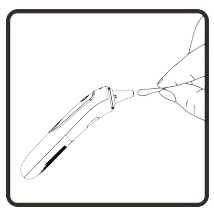
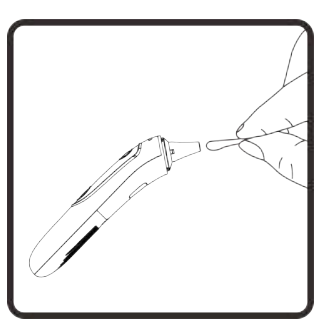
Care and cleaning Use an alcohol swab or cotton swab moistened with 70% alcohol to dean the thermometer casing and the measuring probe. After the alcohol has completely dried out, you can take a new measurement.
Ensure that no liquid enters the interior of the thermometer. Never use abrasive cleaning agents, thinners or benzene for deaning and never immense the instrument in water or other deaning liquids. Take care not to scratch the surface of the LCD screen.
Care and cleaning
Use an alcohol swab or cotton swab moistened with 70% alcohol to clean the thermometer casing and the measuring probe. After the alcohol has completely dried out. you can take a new measurement.
Ensure that no liquid enters the interior of the thermometer. Never use abrasive cleaning agents. thinners or benzene for cleaning and never immerse the instrument in water or other cleaning liquids. Take care not to scratch the surface of the LCD screen.
Error and Troubleshooting
Symptom
Possible Cause
Description & Solution
Failed to power on.
The battery level is too low.
Replace with a new battery
Polarities of the batteries are reversed.
Ensure the batteries are in the right position
The thermometer is damaged
Contact dealer.
The reading is too low
The lens of the probe is dirty.
Clean the lens with a cotton swab.
The distance of the item and target is too far
Keep the thermometer in contact with forehead, or put the probe into the Ear Canal.
You have just come from a cold environment
Stay in a warmer room for at least 30 minutes before taking a reading
The reading is too high
You have just come from a cold environment
Stay in an adequately cool room for at least 30 minutes before taking a reading
The ambient temperature is not in range.
3 short beeps and red backlit for 3 seconds. Take a measurement under an ambient temperature between 10°C (50.0°F) and 40°C (104°F).
Memory Error
3 short beeps and red backlit for 3 seconds. Contact dealer.
In ear or forehead mode, T > 42.9°C (109.2°F)
3 short beeps and red backlit for 3 seconds.
In ear or forehead mode, T < 32°C (89.6°F)
3 short beeps and red backlit for 3 seconds.
2.5V±3% ≤ power voltage ≤2.6V±3%
The battery level is low, it suggests you to replace the battery, but you can continue to use it.
The power voltage is lower than 2.5V± 3%.
It will turn off automatically after 30 seconds. Please replace with a new battery

 .Then press the Measure button to measure. Keep the thermometer about 1-5cm away from the object. Press and release the Measure button in 1 second, the beep is heard, you can now read the value.