1/12
For PlayStation
®4
User Manual
2/12
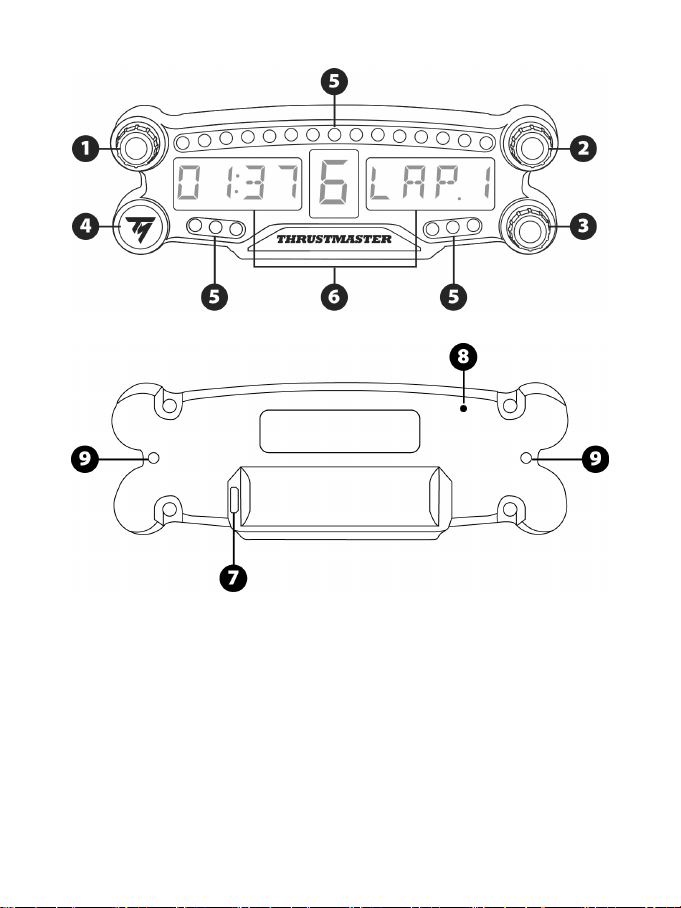
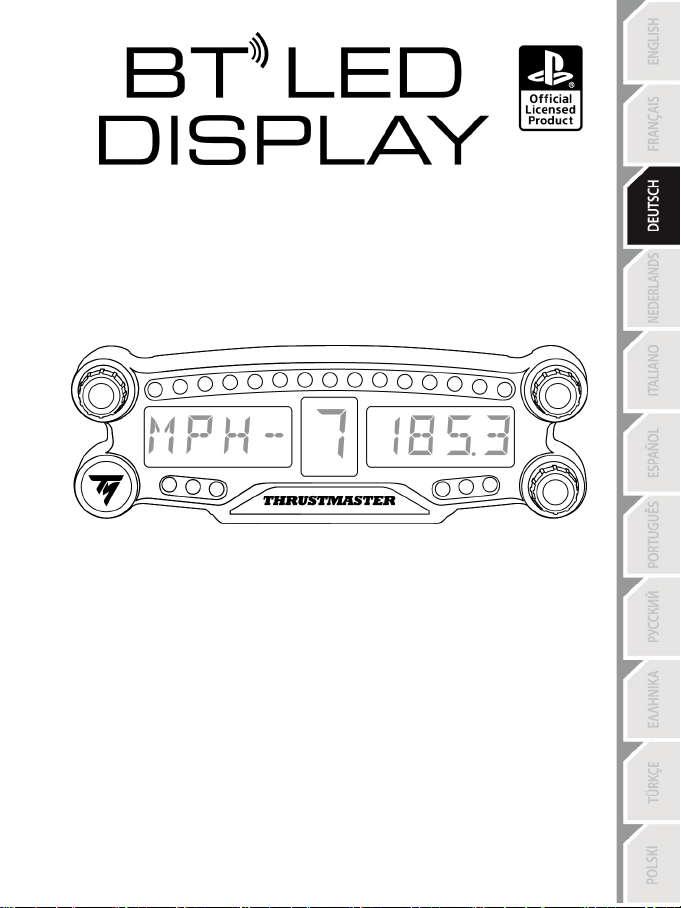
TECHNICAL SPECIFICATIONS
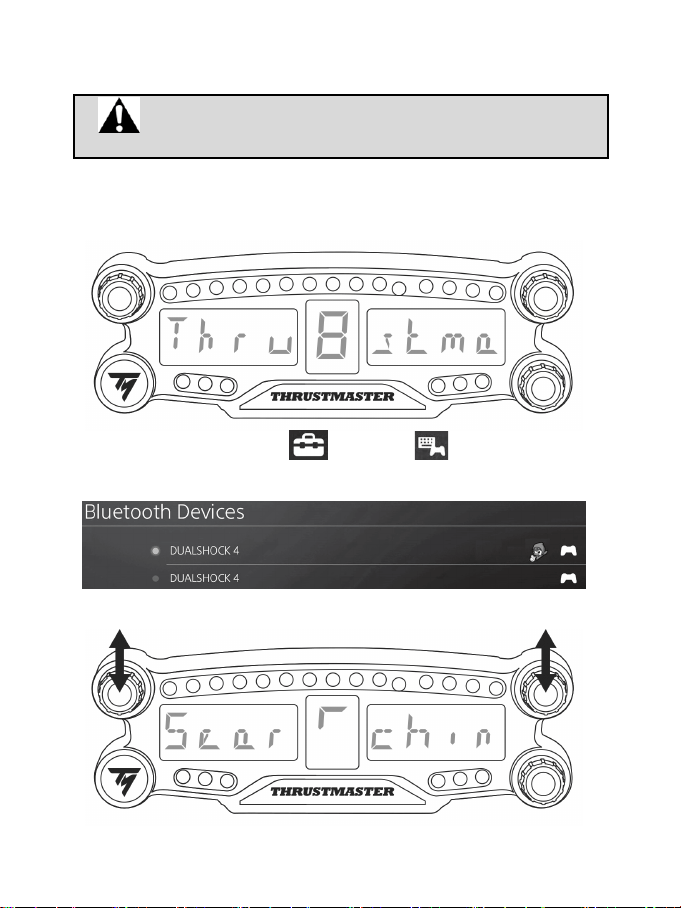
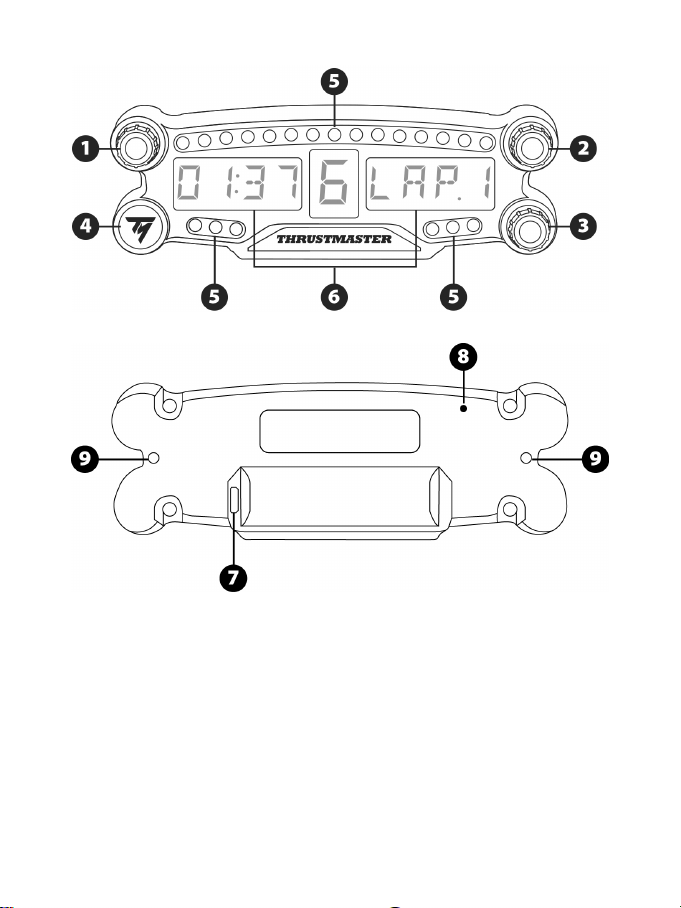
1 Rotary selector no. 1 with push-button feature
2 Rotary selector no. 2 with push-button feature
3 Rotary selector no. 3 with push-button feature
(brightness adjustment control)
4 Power On/Off button
5 21 LEDs
6 Main display
7 Micro USB charging connector
8 Charging indicator
9 Two M3 threaded holes for attaching the
device
3/12
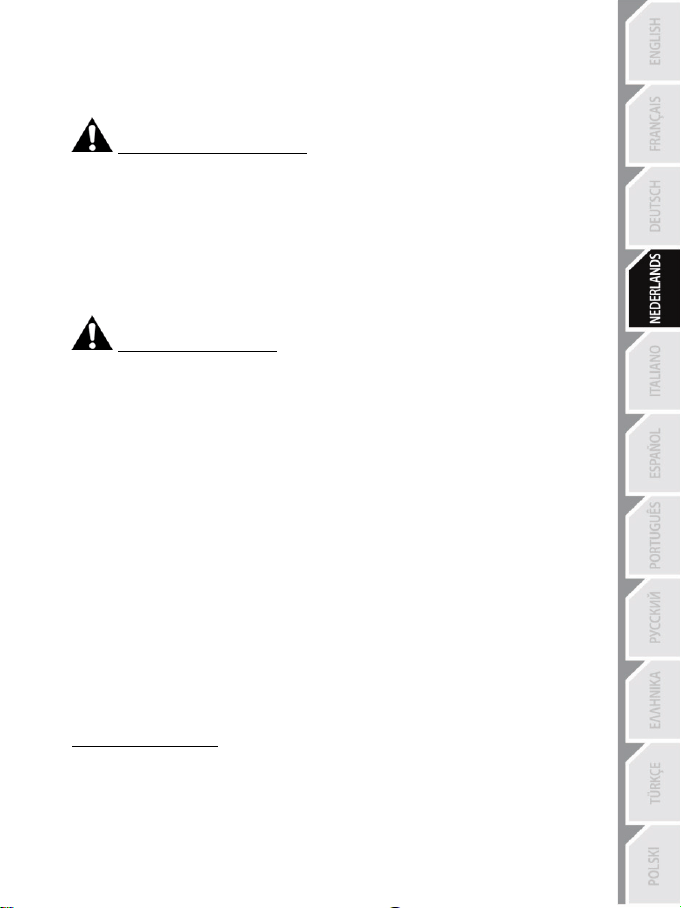
WARNING
Before using this product, please read this manual carefully and save it for later reference.
Warning – Electrical shock
* Keep the product in a dry location and do not expose it to dust or sunlight.
* Do not twist or pull on the connectors and cables.
* Do not spill any liquid on the product or its connectors.
* Do not short-circuit the product.
* Never dismantle the product; do not throw it onto a fire and do not expose it to high temperatures.
* Do not open up the device: there are no user-serviceable parts inside. Any repairs must be carried
out by the manufacturer, its authorized representative or a qualified technician.
Warning – Internal battery
- Fully charge the BT LED DISPLAY before use.
- Do not disassemble the device; this would void its warranty.
- Protect your device from shocks and impacts.
- This device should not be used by children below the age of 14 without an adult’s supervision.
THRUSTMASTER® DISCLAIMS ANY LIABILITY IN THE EVENT OF NON-COMPLIANCE WITH
THESE INSTRUCTIONS.
WARNING: AN EXPLOSION MAY OCCUR IF THE BATTERY IS REPLACED WITH AN
INCORRECT TYPE OF BATTERY.
FOLLOW INSTRUCTIONS REGARDING THE DISPOSAL OF BATTERIES.
CHARGING THE BT LED DISPLAY’S BATTERY
Using a micro USB cable (such as the USB cable supplied with the PS4™ system), connect the BT
LED DISPLAY to one of the PS4™ system’s free USB ports.
The charging connector (7) is located at the back of the BT LED DISPLAY.
The charging indicator (8) lights up in red when the device is charging, and turns off when it is fully
charged.
COMPATIBILITY WITH PS4™ GAMES
A list of PS4™ games compatible with the BT LED DISPLAY is available at http://support.thrustmaster.com.
Select Racing wheels / BT LED DISPLAY / Games settings.
This list will regularly be expanded with the release of new PS4™ games compatible with the BT
LED DISPLAY.
4/12
INSTALLATION ON THE PS4™ SYSTEM
Register the BT LED DISPLAY on the PS4™ system
This operation should only be performed once. It is not required every
time the PS4™ system is restarted.
When using the BT LED DISPLAY for the first time, you must imperatively register it on your PS4™
system; this operation must only be performed once.
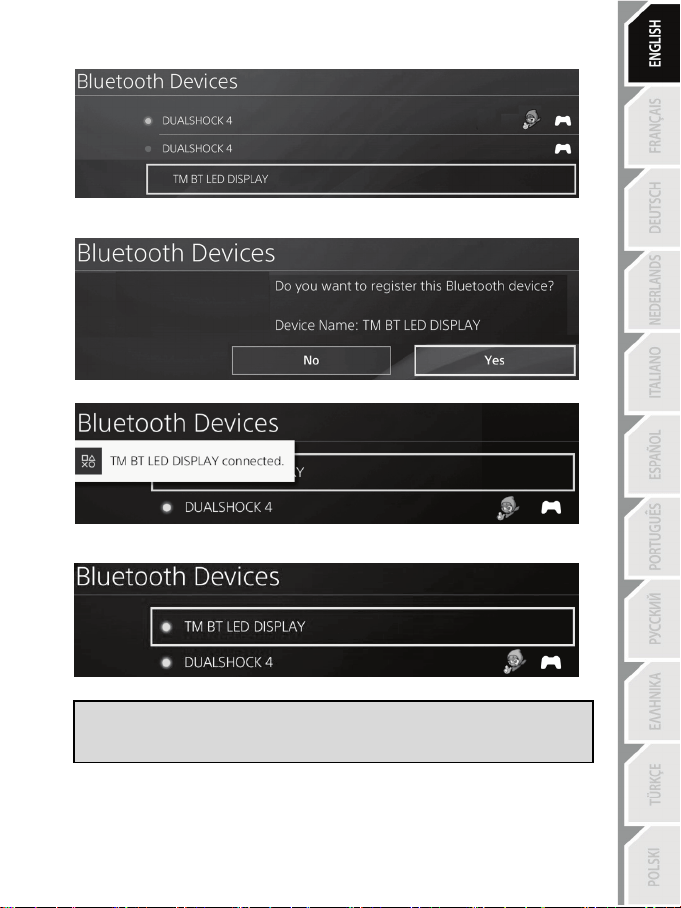
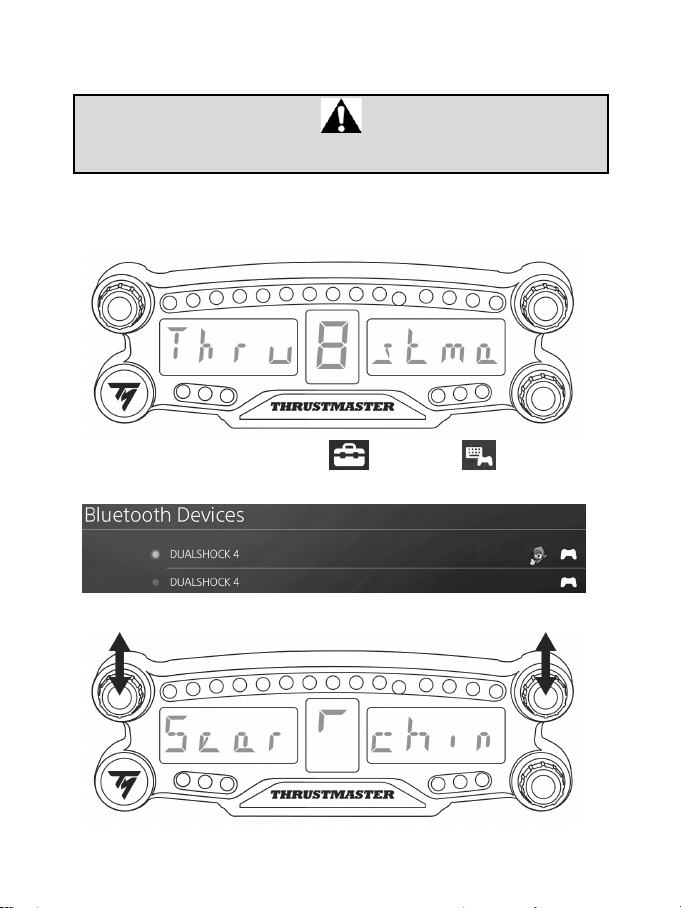
1. Turn on the BT LED DISPLAY by pressing the On/Off button (4)
.
The message Thrustmaster BT Wheel Display scrolls on the main display (6).
2. In the PS4™ system’s menu, select [ Settings ] > [ Devices ] > [ Bluetooth
Devices ] to automatically search for nearby Bluetooth® devices. Paired devices and other
Bluetooth devices will appear in the list.
3. Briefly press and release selectors no. 1 and 2 simultaneously on the BT LED DISPLAY. The
message Searching known devices scrolls on the main display (6).
5/12
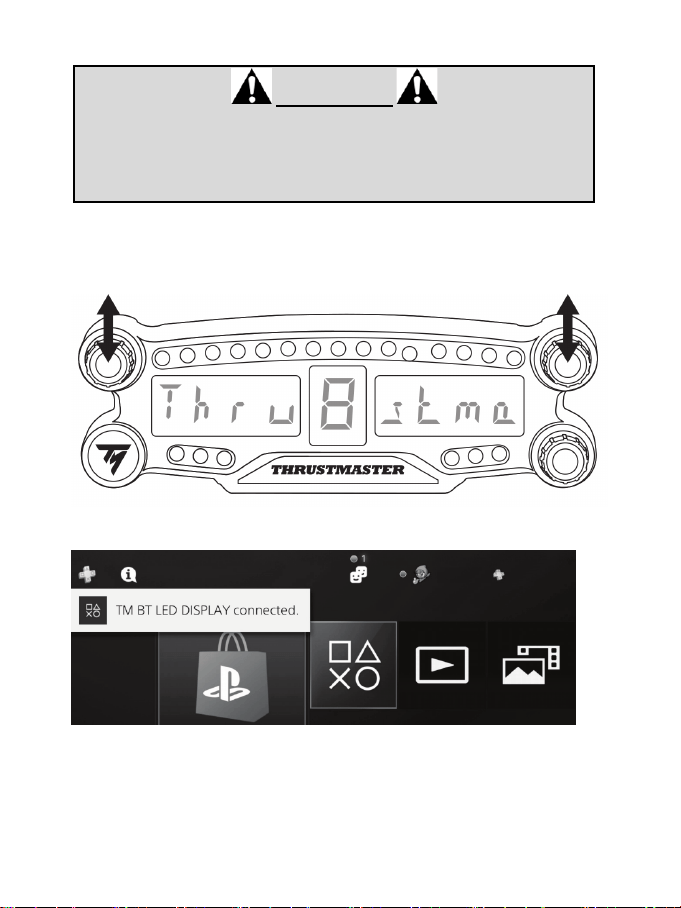
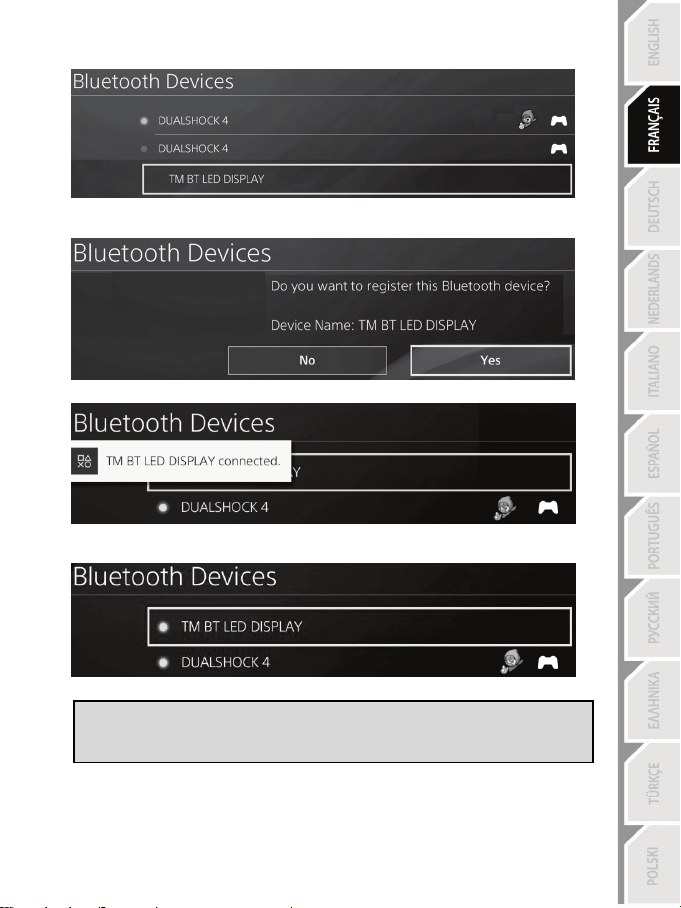
4. After some time, the name TM BT LED DISPLAY should appear on the PS4™ system’s screen.
Using your controller, select it and press the s button.
5. The message Do you want to register this Bluetooth device TM BT LED DISPLAY? appears
on the PS4™ system’s screen. Select YES, then press the s button to confirm.
6. The message TM BT LED DISPLAY connected briefly appears on the PS4™ system’s screen.
On the PS4™ system’s screen, the indicator light located to the left of the TM BT LED DISPLAY
now lights up in green, meaning that the device is correctly connected to the system.
7. You are now ready to play!
If the operation fails, turn off your PS4™ system and disconnect, then reconnect
the system’s power cable. Restart your PS4™ system, then repeat registration
steps 1 to 6.
6/12
Connect the BT LED DISPLAY to the PS4™ system
VERY IMPORTANT
- It is imperative that you perform this operation every time the PS4™ system is
restarted.
- The connection of the BT LED DISPLAY to the PS4™ system will only
function if the previous step (i.e. Register the BT LED DISPLAY on the PS4™
system) has been properly performed at least once.
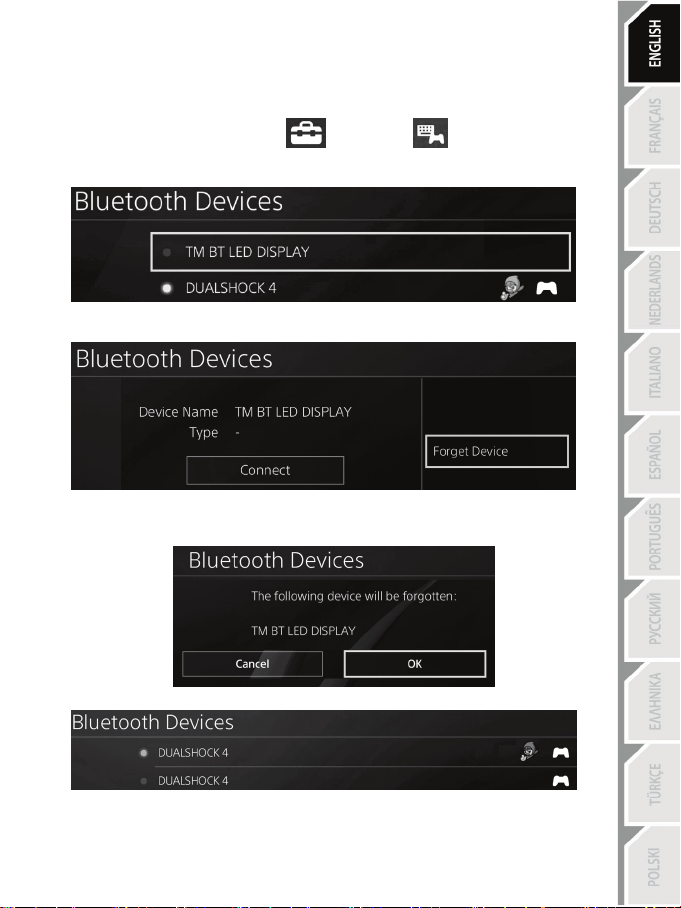
1. Turn on the BT LED DISPLAY by pressing the On/Off button (4).
The message Thrustmaster BT Wheel Display scrolls on the main display (6).
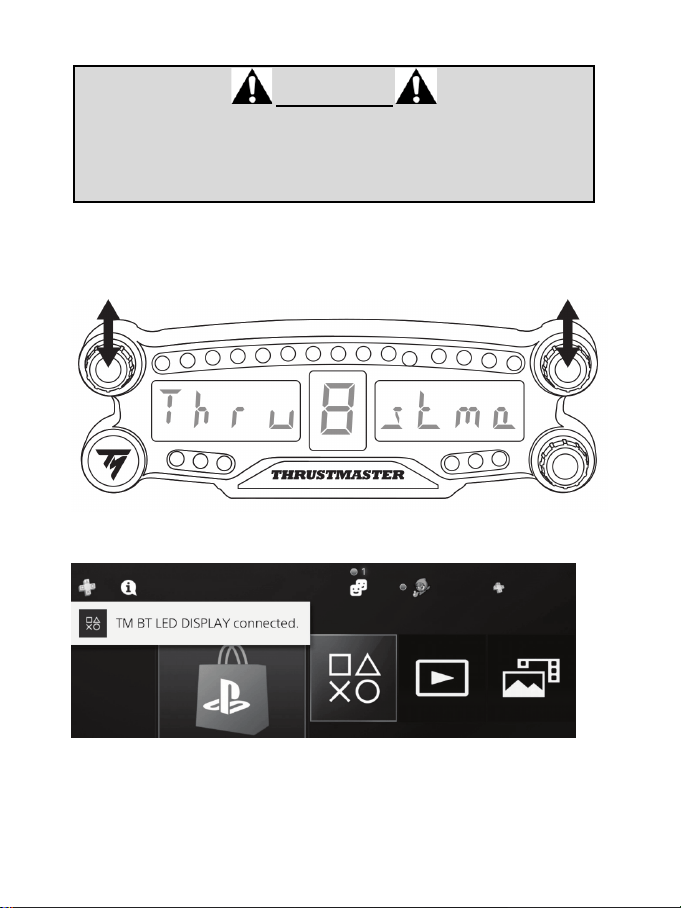
2. Briefly press and release selectors no. 1 and 2 simultaneously on the BT LED DISPLAY.
The message Connected briefly appears on the main display (6).
The message TM BT LED DISPLAY connected briefly appears on the PS4™ system’s screen.
3. You are now ready to play!
7/12
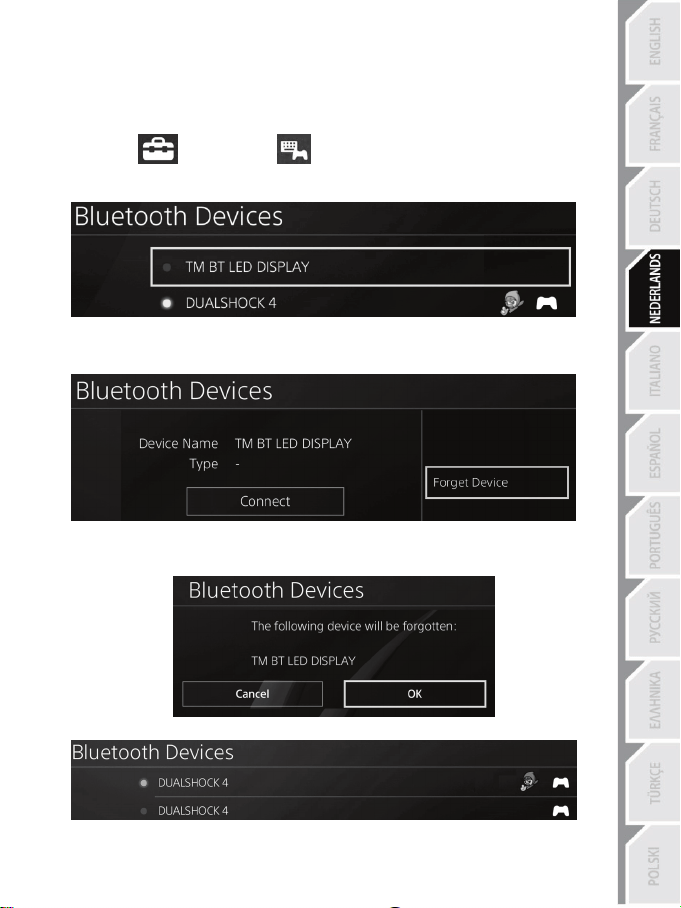
Unregister the BT LED DISPLAY from the PS4™ system
(This operation is only required when troubleshooting, or purchasing a new BT LED DISPLAY.)
1. Turn off the BT LED DISPLAY by pressing the On/Off button (4)
.
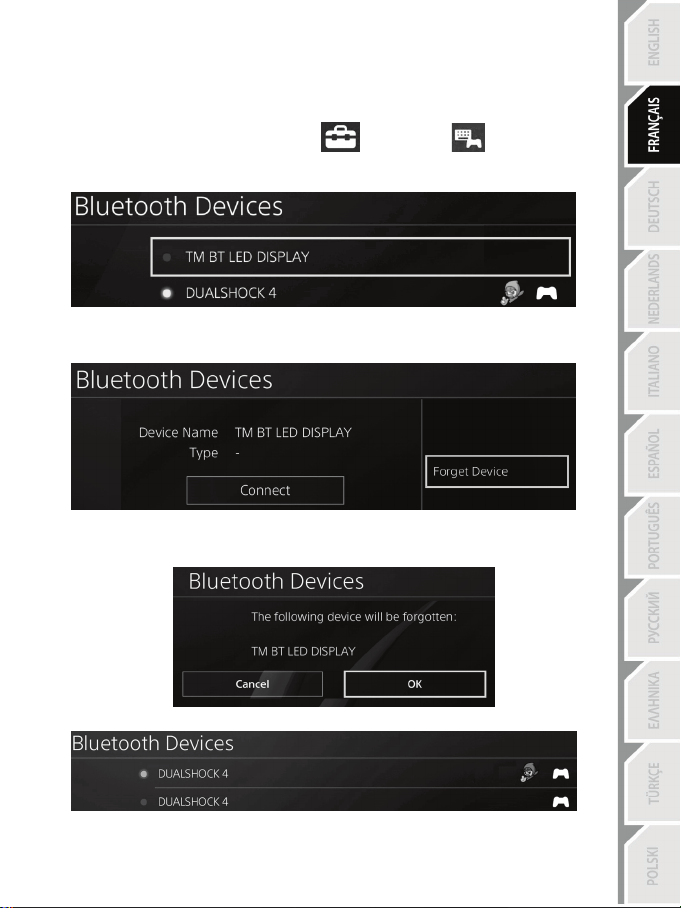
2. In the PS4™ system’s menu, select
[ Settings ] > [ Devices ] > [ Bluetooth
Devices ].
Select TM BT LED DISPLAY, then press the s button to confirm.
3. The message Device Name TM BT LED DISPLAY appears on the screen. Press the OPTIONS
button on your controller, then select Forget Device. Press the s button to confirm.
4. The message The following device will be forgotten: TM BT LED DISPLAY appears on the
screen.
Select OK, then press the s button to confirm.
5. The TM BT LED DISPLAY is now unregistered from your PS4™ system.
8/12
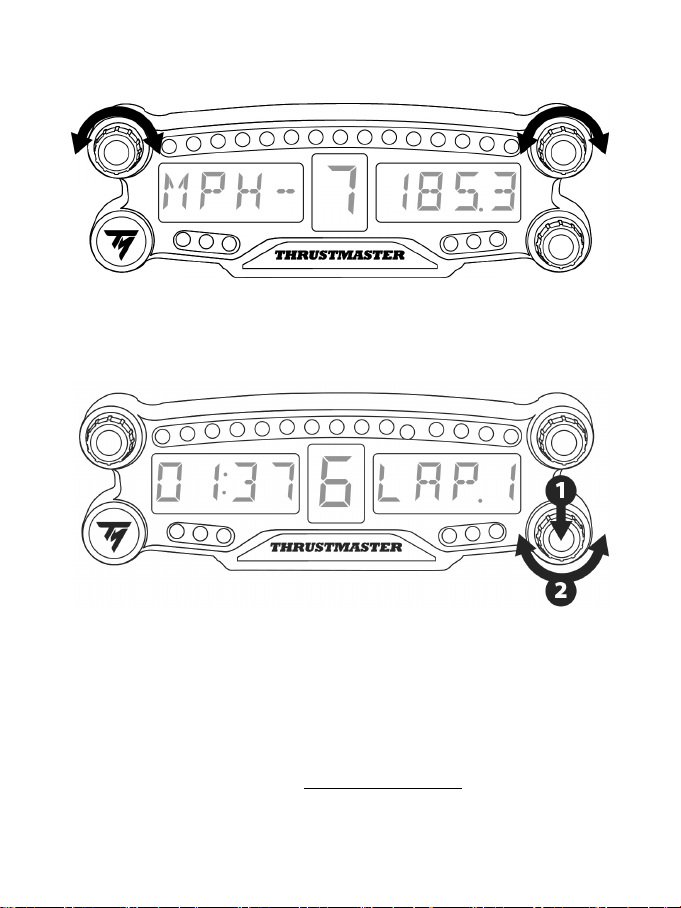
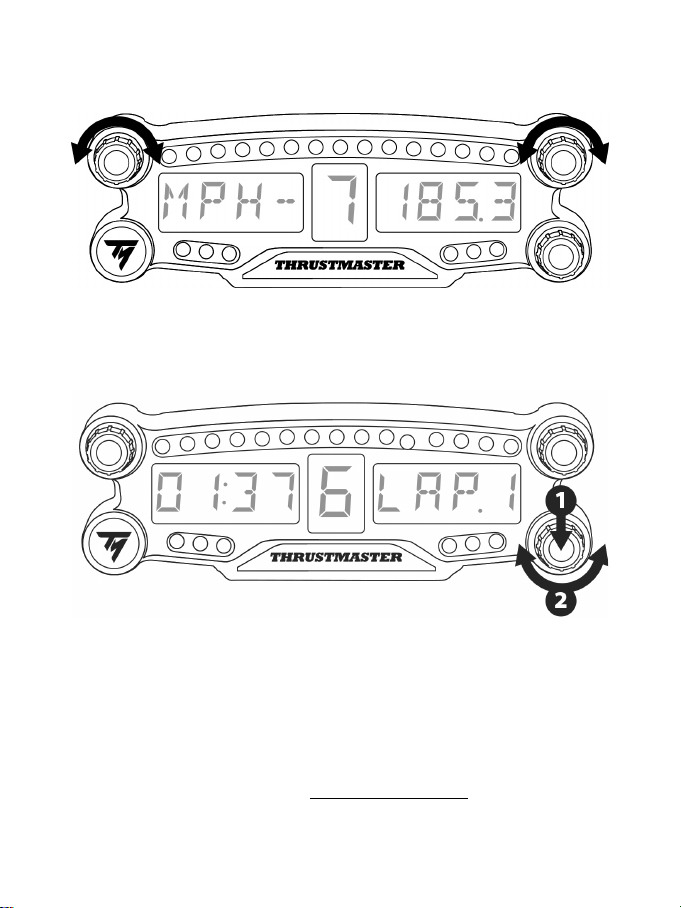
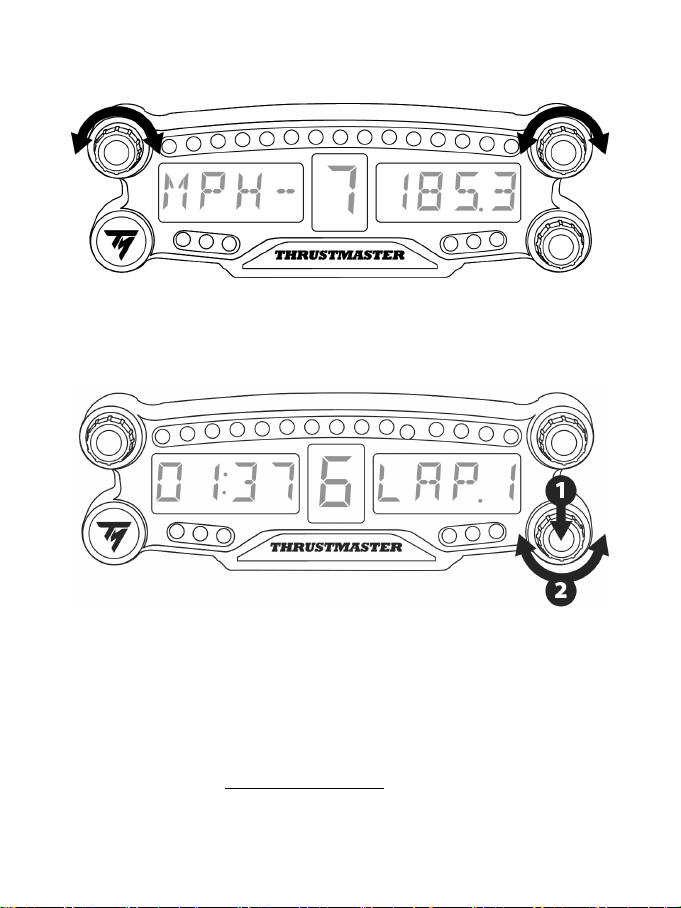
USING THE ROTARY SELECTORS NO.1 AND NO.2
Depending on the PS4™ game, you can turn the selectors no.1 and no. 2 to change the display settings,
and to toggle from one setting to another.
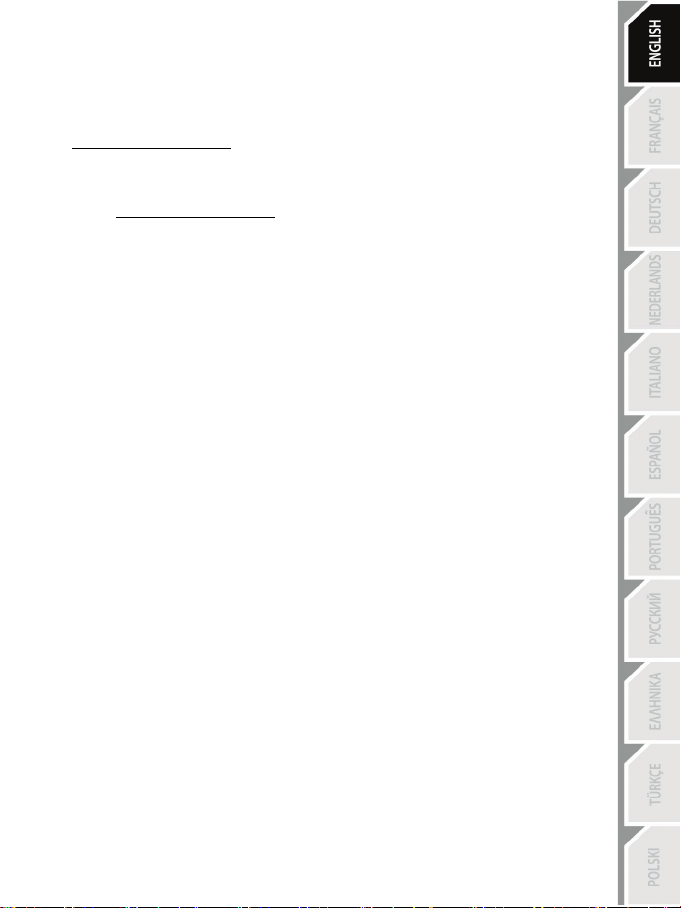
ADJUSTING THE BT LED DISPLAY’S BRIGHTNESS
1) Press and release the selector no. 3 to toggle from setting the brightness of the 21 LEDs (5) to
adjusting the intensity of the main display (6), and conversely.
2) Turn the selector to the left to reduce the intensity or to the right to increase it.
ATTACHING THE BT LED DISPLAY
You can install the BT LED DISPLAY at your convenience within a 10 metre/33 foot radius around the
PS4™ system.
You can also attach the device to various suitable items* or directly to some racing wheels using the two
M3 threaded holes located at the back of the device (9).
* Sold separately
For more information about this, please go to http://support.thrustmaster.com. Select Racing wheels / BT
LED DISPLAY, then User manual or FAQ.
9/12
UPDATING THE BT LED DISPLAY’S FIRMWARE
Both firmware (general firmware and Bluetooth firmware) included in the BT LED DISPLAY can be
updated with more recent versions, featuring product improvements.
To display your BT LED DISPLAY’s firmware versions and update them if required: on a PC, access
http://support.thrustmaster.com, select Racing wheels / BT LED DISPLAY, then select Firmware and
follow the instructions and the download and installation procedure.
HELP, FAQ AND HINTS
Access http://support.thrustmaster.com. Select Racing wheels / BT LED DISPLAY, then User
manual or FAQ.

10/12
CONSUMER WARRANTY INFORMATION
Worldwide, Guillemot Corporation S.A., whose registered office is located at Place du Granier, B.P.
97143, 35571 Chantepie, France (hereinafter “Guillemot”) warrants to the consumer that this
Thrustmaster product shall be free from defects in materials and workmanship, for a warranty period
which corresponds to the time limit to bring an action for conformity with respect to this product. In
the countries of the European Union, this corresponds to a period of two (2) years from delivery of
the Thrustmaster product. In other countries, the warranty period corresponds to the time limit to
bring an action for conformity with respect to the Thrustmaster product according to applicable laws
of the country in which the consumer was domiciled on the date of purchase of the Thrustmaster
product (if no such action exists in the corresponding country, then the warranty period shall be one
(1) year from the original date of purchase of the Thrustmaster product).
Notwithstanding the above, rechargeable batteries are covered by a warranty period of six (6)
months from the date of original purchase.
Should the product appear to be defective during the warranty period, immediately contact
Technical Support, who will indicate the procedure to follow. If the defect is confirmed, the product
must be returned to its place of purchase (or any other location indicated by Technical Support).
Within the context of this warranty, the consumer’s defective product shall, at Technical Support’s
option, be either replaced or returned to working order. If, during the warranty period, the
Thrustmaster product is subject to such reconditioning, any period of at least seven (7) days during
which the product is out of use shall be added to the remaining warranty period (this period runs
from the date of the consumer’s request for intervention or from the date on which the product in
question is made available for reconditioning, if the date on which the product is made available for
reconditioning is subsequent to the date of the request for intervention). If permitted under
applicable law, the full liability of Guillemot and its subsidiaries (including for consequential
damages) is limited to the return to working order or the replacement of the Thrustmaster product. If
permitted under applicable law, Guillemot disclaims all warranties of merchantability or fitness for a
particular purpose.
This warranty shall not apply: (1) if the product has been modified, opened, altered, or has suffered
damage as a result of inappropriate or abusive use, negligence, an accident, normal wear, or any
other cause unrelated to a material or manufacturing defect (including, but not limited to, combining
the Thrustmaster product with any unsuitable element, including in particular power supplies,
rechargeable batteries, chargers, or any other elements not supplied by Guillemot for this product);
(2) if the product has been used for any use other than home use, including for professional or
commercial purposes (game rooms, training, competitions, for example); (3) in the event of failure to
comply with the instructions provided by Technical Support; (4) to software, said software being
subject to a specific warranty; (5) to consumables (elements to be replaced over the product’s
lifespan: disposable batteries, audio headset or headphone ear pads, for example); (6) to
accessories (cables, cases, pouches, bags, wrist-straps, for example); (7) if the product was sold at
public auction.
This warranty is nontransferable.
The consumer’s legal rights with respect to laws applicable to the sale of consumer goods in his or
her country are not affected by this warranty.
11/12
Additional warranty provisions
During the warranty period, Guillemot shall not provide, in principle, any spare parts, as Technical
Support is the only party authorized to open and/or recondition any Thrustmaster product (with the
exception of any reconditioning procedures which Technical Support may request that the
consumer carry out, by way of written instructions – for example, due to the simplicity and the lack
of confidentiality of the reconditioning process – and by providing the consumer with the required
spare part(s), where applicable).
Given its innovation cycles and in order to protect its know-how and trade secrets, Guillemot shall
not provide, in principle, any reconditioning notification or spare parts for any Thrustmaster product
whose warranty period has expired.
Liability
If permitted under applicable law, Guillemot Corporation S.A. (hereinafter “Guillemot”) and its
subsidiaries disclaim all liability for any damages caused by one or more of the following: (1) the
product has been modified, opened or altered; (2) failure to comply with assembly instructions; (3)
inappropriate or abusive use, negligence, an accident (an impact, for example); (4) normal wear; (5)
the use of the product for any use other than home use, including for professional or commercial
purposes (game rooms, training, competitions, for example). If permitted under applicable law,
Guillemot and its subsidiaries disclaim all liability for any damages unrelated to a material or
manufacturing defect with respect to the product (including, but not limited to, any damages caused
directly or indirectly by any software, or by combining the Thrustmaster product with any unsuitable
element, including in particular power supplies, rechargeable batteries, chargers, or any other
elements not supplied by Guillemot for this product).
TECHNICAL SUPPORT
http://support.thrustmaster.com
12/12
STATEMENT OF COMPLIANCE WITH EU REGULATIONS
Guillemot Corporation S.A. hereby declares that the device BT LED DISPLAY complies with the main
requirements and other relevant clauses of Directive 2014/53/UE (RED). The compliance statement
can be viewed at the following site:
http://www.thrustmaster.com/certificates/BT_Led_Display/Doc-BT_Led_Display.pdf
Frequency Band: 2402-2480MHz, RF MAX power: <10dBm
COPYRIGHT
© 2017 Guillemot Corporation S.A. All rights reserved. Thrustmaster® is a registered trademark of
Guillemot Corporation S.A.
Licensed for sale in Europe, Africa, Middle East, Russia, India and Oceania. For use exclusively with
PlayStation
®4.
All other trademarks and brand names are hereby acknowledged and are property of their respective
owners. Illustrations not binding. Contents, designs and specifications are subject to change without
notice and may vary from one country to another. Made in China.
Manufactured and distributed by Guillemot Corporation S.A.
ENVIRONMENTAL PROTECTION RECOMMENDATION
In the European Union and Turkey: At the end of its working life, this product should
not be disposed of with standard household waste, but rather dropped off at a
collection point for the disposal of Waste Electrical and Electronic Equipment
(WEEE) for recycling.
This is confirmed by the symbol found on the product, user manual or packaging.
Depending on their characteristics, the materials may be recycled. Through
recycling and other forms of processing Waste Electrical and Electronic Equipment,
you can make a significant contribution towards helping to protect the environment.
Please contact your local authorities for information on the collection point nearest you.
For all other countries: Please adhere to local recycling laws for electrical and electronic equipment.
Retain this information. Colours and decorations may vary.
Plastic fasteners and adhesives should be removed from the product before it is used.
www.thrustmaster.com
*Applicable to EU and Turkey only
*
*
1/12
Pour PlayStation
®4
Manuel de l’utilisateur
2/12
CARACTERISTIQUES TECHNIQUES
1 Sélecteur n°1 avec fonction bouton poussoir
2 Sélecteur n°2 avec fonction bouton poussoir
3 Sélecteur n°3 avec fonction bouton poussoir
(pour ajuster la luminosité)
4 Bouton Marche/Arrêt
5 21 LEDs
6 Afficheur principal
7 Connecteur de charge micro-USB
8 Témoin de charge
9 Deux pas de vis type M3 pour diverses fixations
3/12
AVERTISSEMENTS
Avant d’utiliser ce produit, lisez attentivement cette documentation et conservez-la pour pouvoir la
consulter ultérieurement.
Avertissement – Choc électrique
* Conservez le produit dans un endroit sec et ne l’exposez ni à la poussière ni au soleil.
* Ne tordez pas et ne tirez pas sur les connecteurs et câbles.
* Ne renversez pas de liquide sur le produit et ses connecteurs.
* Ne mettez pas le produit en court-circuit.
* Ne démontez jamais le produit, ne le jetez pas au feu et ne l’exposez pas à des températures
élevées.
* N’ouvrez pas l’appareil. L’appareil ne contient pas de pièces réparables par l'utilisateur. Confiez
toute réparation au fabricant, à une agence spécifiée ou un technicien qualifié.
Avertissement – Batterie Interne
- Avant d’utiliser le BT LED DISPLAY, effectuez une charge complète.
- Ne désassemblez pas le produit ; cela annulerait sa garantie.
- Protégez votre produit contre les chocs et les impacts.
- Ce produit ne doit pas être utilisé par un enfant de moins de 14 ans sans la supervision d'un
adulte.
THRUSTMASTER® DECLINE TOUTE RESPONSABILITE EN CAS DE NON-RESPECT DE CES
CONSIGNES.
ATTENTION : RISQUE D’EXPLOSION SI LA BATTERIE EST REMPLACÉE PAR UN TYPE DE
BATTERIE INCORRECT.
SUIVEZ LES INSTRUCTIONS CONCERNANT LA MISE AU REBUT DES BATTERIES.
RECHARGER LA BATTERIE DU BT LED DISPLAY
A l’aide d’un câble micro-USB (celui fourni avec votre système PS4™, par exemple), branchez le
BT LED DISPLAY sur l’un des ports USB disponibles sur votre système PS4™.
Le connecteur de charge (7) est situé à l’arrière du BT LED DISPLAY.
Le témoin de charge (8) s’allume en rouge lors du chargement et s’éteint lorsque la charge est
pleine.
COMPATIBILITE DANS LES JEUX PS4™
La liste des jeux PS4™ compatibles avec le BT LED DISPLAY est disponible sur
http://support.thrustmaster.com. Sélectionnez Volants / BT LED DISPLAY puis Paramètres de jeux.
Cette liste s’étoffera régulièrement avec l’arrivée des nouveaux jeux PS4™ compatibles avec le BT
LED DISPLAY.
4/12
INSTALLATION SUR LE SYSTÈME PS4™
Enregistrer le BT LED DISPLAY sur le système PS4™
Cette opération ne doit être effectuée qu'une fois. Elle n'est pas nécessaire après
chaque redémarrage du système PS4™.
La première fois que vous utilisez votre BT LED DISPLAY, vous devez impérativement l'enregistrer sur
votre système PS4™ (cette opération ne doit être effectuée qu’une seule fois).
1. Allumez le BT LED DISPLAY en appuyant sur le bouton Marche/Arrêt (4).
Le texte Thrustmaster BT Wheel Display défile sur l’afficheur principal (6).
2. Dans le menu du système PS4™, sélectionnez [ Paramètres ] > [ Périphériques ] >
[ Périphériques Bluetooth ] pour rechercher automatiquement les périphériques Bluetooth® à
proximité. Les périphériques couplés et les autres périphériques Bluetooth apparaîtront dans la liste.
3. Pressez très rapidement et relâchez simultanément les sélecteurs n°1 et n°2 du BT LED DISPLAY.
Le texte Searching known devices défile sur l’afficheur principal (6).
5/12
4. Au bout de quelque temps, TM BT LED DISPLAY doit apparaître sur l’écran du système PS4™.
Avec votre manette, sélectionnez-le et appuyez sur la touche s.
5. Le message Voulez-vous enregistrer le périphérique Bluetooth TM BT LED DISPLAY ?
s’affiche sur l’écran du système PS4™. Choisissez OUI et appuyez sur la touche s pour valider.
6. Le message TM BT LED DISPLAY connecté apparaît brièvement sur l’écran du système PS4™.
Sur l’écran du système PS4™, le voyant lumineux à gauche de TM BT LED DISPLAY est
désormais allumé en vert pour signifier que l’accessoire est bien connecté au système.
7. Vous êtes maintenant prêt à jouer !
Si l’opération échoue : éteignez complètement votre système PS4™, débranchez
puis rebranchez le câble d’alimentation secteur de la console, redémarrez votre
système PS4™, puis répétez les étapes d'enregistrement 1 à 6.
6/12
Connecter le BT LED DISPLAY au système PS4™
TRES IMPORTANT
- Effectuez impérativement cette opération après chaque redémarrage du
système PS4™.
- La connexion du BT LED DISPLAY au système PS4™ ne fonctionne que si
l’étape précédente (Enregistrer le BT LED DISPLAY sur le PS4™) a été
correctement effectuée au moins une fois.
1. Allumez le BT LED DISPLAY en appuyant sur le bouton Marche/arrêt (4).
Le texte Thrustmaster BT Wheel Display défile sur l’afficheur principal (6).
2. Pressez très rapidement et relâchez simultanément les sélecteurs n°1 et n°2 du BT LED
DISPLAY.
Le texte Connected apparaît brièvement sur l’afficheur principal (6).
Le message TM BT LED DISPLAY connecté apparaît brièvement sur l’écran du système PS4™.
3. Vous êtes maintenant prêt à jouer !
7/12
Désenregistrer le BT LED DISPLAY du système PS4™
(Cette opération n'est nécessaire qu'en cas de dépannage ou d’acquisition d’un nouveau BT LED
DISPLAY)
1. Eteignez le BT LED DISPLAY en appuyant sur le bouton Marche/Arrêt (4).
2. Dans le menu du système PS4™, sélectionnez [ Paramètres ] > [ Périphériques ] >
[ Périphériques Bluetooth ].
Sélectionnez TM BT LED DISPLAY et appuyez sur la touche s pour valider.
3. Le message Nom du périphérique TM BT LED DISPLAY apparaît à l’écran. Appuyez sur la touche
OPTIONS de votre manette, puis sélectionnez Oublier le périphérique. Appuyez sur la touche s
pour valider.
4. Le message Le périphérique ci-dessous va être oublié : TM BT LED DISPLAY apparaît à l’écran.
Sélectionnez OK et appuyez sur la touche s pour valider.
5. Le TM BT LED DISPLAY est désormais désenregistré de votre système PS4™.
8/12
UTILISATION DES SÉLECTEURS N°1 ET N°2
En fonction du jeu PS4™ utilisé, les sélecteurs n° 1 et n°2 vous permettront, en les tournant, de modifier
les paramètres d’affichage et de basculer d’un paramètre à l’autre.
AJUSTER LA LUMINOSITE DU BT LED DISPLAY
1) Pressez puis relâchez le sélecteur n°3 pour basculer du réglage de l’intensité des 21 LEDs (5) au
réglage de l’intensité de l’afficheur principal (6) et inversement.
2) Tournez le sélecteur vers la gauche pour baisser l’intensité ou vers la droite pour l’augmenter.
FIXATION DU BT LED DISPLAY
Le BT LED DISPLAY peut-être être posé partout où vous le souhaitez dans un rayon de 10 mètres/33'
autour du système PS4™.
Il est également possible de fixer le dispositif sur divers supports compatibles* ou sur la roue de certains
volants via les deux pas de vis type M3 situés à l’arrière (9).
* Vendus séparément
Pour plus d'informations sur ce point, allez sur http://support.thrustmaster.com : cliquez sur Volants / BT
LED DISPLAY, puis Manuel utilisateur ou FAQ.
9/12
METTRE A JOUR LE FIRMWARE DU BT LED DISPLAY
Les deux firmwares (un firmware général et un firmware Bluetooth) inclus dans le BT LED DISPLAY
peuvent être mis à jour par des versions plus récentes intégrant des améliorations produits.
Pour afficher les versions de firmware de votre BT LED DISPLAY et les mettre à jour si nécessaire :
sur PC, allez sur http://support.thrustmaster.com. Sélectionnez Volants / BT LED DISPLAY puis
Firmware et suivez les instructions et la procédure de téléchargement et d’installation.
AIDES, FAQ ET ASTUCES DIVERSES
Allez sur http://support.thrustmaster.com. Cliquez sur Volants / BT LED DISPLAY puis Manuel
utilisateur ou FAQ.

10/12
INFORMATIONS RELATIVES A LA GARANTIE AUX CONSOMMATEURS
Dans le monde entier, Guillemot Corporation S.A., ayant son siège social Place du Granier, B.P. 97143, 35571
Chantepie, France (ci-après « Guillemot ») garantit au consommateur que le présent produit Thrustmaster est exempt
de défaut matériel et de vice de fabrication, et ce, pour une période de garantie qui correspond au délai pour intenter
une action en conformité de ce produit. Dans les pays de l’Union Européenne, ce délai est de deux (2) ans à compter de
la délivrance du produit Thrustmaster. Dans les autres pays, la durée de la période de garantie correspond au délai pour
intenter une action en conformité du produit Thrustmaster selon la législation en vigueur dans le pays où le
consommateur avait son domicile lors de l’achat du produit Thrustmaster (si une telle action en conformité n’existe pas
dans ce pays alors la période de garantie est de un (1) an à compter de la date d’achat d’origine du produit
Thrustmaster).
Si, au cours de la période de garantie, le produit semble défectueux, contactez immédiatement le Support Technique
qui vous indiquera la procédure à suivre. Si le défaut est confirmé, le produit devra être retourné à son lieu d’achat (ou
tout autre lieu indiqué par le Support Technique).
Dans le cadre de la garantie, le consommateur bénéficiera, au choix du Support Technique, d'un remplacement ou
d'une remise en état de marche du produit défectueux. Si, pendant la période de garantie, le produit Thrustmaster fait
l'objet d'une telle remise en état, toute période d'immobilisation d'au moins sept jours vient s'ajouter à la durée de la
garantie qui restait à courir (cette période court à compter de la demande d'intervention du consommateur ou de la mise
à disposition pour remise en état du produit en cause, si cette mise à disposition est postérieure à la demande
d'intervention). Lorsque la loi applicable l’autorise, toute responsabilité de Guillemot et ses filiales (y compris pour les
dommages indirects) se limite à la remise en état de marche ou au remplacement du produit Thrustmaster. Lorsque la
loi applicable l’autorise, Guillemot exclut toutes garanties de qualité marchande ou d’adaptation à un usage particulier.
Cette garantie ne s’appliquera pas : (1) si le produit a été modifié, ouvert, altéré, ou a subi des dommages résultant d’une
utilisation inappropriée ou abusive, d’une négligence, d’un accident, de l’usure normale, ou de toute autre cause non liée à un
défaut matériel ou à un vice de fabrication (y compris, mais non limitativement, une combinaison du produit Thrustmaster
avec tout élément inadapté, notamment alimentations électriques, batteries, chargeurs, ou tous autres éléments non-fournis
par Guillemot pour ce produit) ; (2) si le produit a été utilisé en dehors du cadre privé, à des fins professionnelles ou
commerciales (salles de jeu, formations, compétitions, par exemple). (3) en cas de non respect des instructions du Support
Technique ; (4) aux logiciels, lesdits logiciels faisant l’objet d’une garantie spécifique ; (5) aux consommables (éléments à
remplacer pendant la durée de vie du produit : piles, coussinets de casque audio, par exemple) ; (6) aux accessoires (câbles,
étuis, housses, sacs, dragonnes, par exemple) ; (7) si le produit a été vendu aux enchères publiques.
Cette garantie n’est pas transférable.
Les droits légaux du consommateur au titre de la législation applicable dans son pays à la vente de biens de
consommation ne sont pas affectés par la présente garantie.
Par exemple, en France, indépendamment de la présente garantie, le vendeur reste tenu de la garantie légale de
conformité mentionnée aux articles L. 217-4 à L.217-12 du code de la consommation et de celle relative aux défauts
(vices cachés) de la chose vendue, dans les conditions prévues aux articles 1641 à 1648 et 2232 du code civil. La loi
applicable (c'est-à-dire la loi française) impose de reproduire les extraits de la loi française suivants:
Article L. 217-4 du code de la consommation:
Le vendeur livre un bien conforme au contrat et répond des défauts de conformité existant lors de la délivrance.
Il répond également des défauts de conformité résultant de l'emballage, des instructions de montage ou de l'installation
lorsque celle-ci a été mise à sa charge par le contrat ou a été réalisée sous sa responsabilité.
Article L. 217-5 du code de la consommation:
Le bien est conforme au contrat :
1° S'il est propre à l'usage habituellement attendu d'un bien semblable et, le cas échéant :
- s'il correspond à la description donnée par le vendeur et possède les qualités que celui-ci a présentées à l'acheteur
sous forme d'échantillon ou de modèle ;
- s'il présente les qualités qu'un acheteur peut légitimement attendre eu égard aux déclarations publiques faites par le
vendeur, par le producteur ou par son représentant, notamment dans la publicité ou l'étiquetage ;
2° Ou s'il présente les caractéristiques définies d'un commun accord par les parties ou est propre à tout usage spécial
recherché par l'acheteur, porté à la connaissance du vendeur et que ce dernier a accepté.
Article L. 217-12 du code de la consommation:
L'action résultant du défaut de conformité se prescrit par deux ans à compter de la délivrance du bien.
Article L. 217-16 du code de la consommation:
Lorsque l'acheteur demande au vendeur, pendant le cours de la garantie commerciale qui lui a été consentie lors de
l'acquisition ou de la réparation d'un bien meuble, une remise en état couverte par la garantie, toute période
d'immobilisation d'au moins sept jours vient s'ajouter à la durée de la garantie qui restait à courir.
Cette période court à compter de la demande d'intervention de l'acheteur ou de la mise à disposition pour réparation du
bien en cause, si cette mise à disposition est postérieure à la demande d'intervention.
11/12
Article L. 1641 du code civil:
Le vendeur est tenu de la garantie à raison des défauts cachés de la chose vendue qui la rendent impropre à l'usage
auquel on la destine, ou qui diminuent tellement cet usage que l'acheteur ne l'aurait pas acquise, ou n'en aurait donné
qu'un moindre prix, s'il les avait connus.
Article L. 1648 alinéa 1
er
du code civil:
L'action résultant des vices rédhibitoires doit être intentée par l'acquéreur dans un délai de deux ans à compter de la
découverte du vice.
Stipulations additionnelles à la garantie
Pendant la période de garantie, Guillemot ne fournira, en principe, pas de pièce détachée car le Support Technique est
seul habilité tant à ouvrir qu'à remettre en état tout produit Thrustmaster (à l'exception des remises en état que le
Support Technique demanderait, par instructions écrites, au consommateur d'effectuer -par exemple en raison de la
simplicité et de l'absence de confidentialité du processus de remise en état-, en lui fournissant, le cas échéant, la ou les
pièces détachées nécessaires).
Compte tenu de ses cycles d'innovation et pour préserver ses savoir-faire et secrets, Guillemot ne fournira, en principe,
ni notice de remise en état, ni pièce détachée pour tout produit Thrustmaster dont la période de garantie est expirée.
Aux États-Unis d’Amérique et au Canada, la présente garantie est limitée au mécanisme interne et au boîtier externe du produit. En
aucun cas, Guillemot ou ses sociétés affiliées ne sauraient être tenues responsables envers qui que ce soit de tous dommages
indirects ou dommages accessoires résultant du non respect des garanties expresses ou implicites. Certains États/Provinces
n’autorisent pas la limitation sur la durée d’une garantie implicite, ou l’exclusion ou la limitation de responsabilité pour les dommages
indirects ou accessoires, de sorte que les limitations ou exclusions ci-dessus peuvent ne pas vous être applicables. Cette garantie
vous confère des droits spécifiques ; vous pouvez également bénéficier d’autres droits qui peuvent différer d’un État/Province à
l’autre.
Responsabilité
Lorsque la loi applicable l’autorise, Guillemot Corporation S.A. (ci-après « Guillemot ») et ses filiales excluent toute
responsabilité pour tous dommages causés par un ou plusieurs des faits suivants: (1) le produit a été modifié, ouvert, altéré,
(2) l’irrespect des instructions de montage, (3) l’utilisation inappropriée ou abusive, la négligence, l’accident (un choc, par
exemple), (4) l’usure normale du produit, (5) l’utilisation du produit en dehors du cadre privé, à des fins professionnelles ou
commerciales (salles de jeu, formations, compétitions, par exemple). Lorsque la loi applicable l’autorise, Guillemot et ses
filiales excluent toute responsabilité pour tout dommage dont la cause n’est pas liée à un défaut matériel ou à un vice de
fabrication du produit (y compris, mais non limitativement, tout dommage causé directement ou indirectement par tout logiciel,
ou par une combinaison du produit Thrustmaster avec tout élément inadapté, notamment alimentations électriques, batteries,
chargeurs, ou tous autres éléments non-fournis par Guillemot pour ce produit).
SUPPORT TECHNIQUE
http://support.thrustmaster.com
12/12
DECLARATION DE CONFORMITE AUX DIRECTIVES DE L’UE
Par la présente, Guillemot Corporation S.A. déclare que le dispositif BT LED DISPLAY est conforme
aux principales exigences ainsi qu’aux autres clauses pertinentes de la directive européenne
2014/53/UE (RED). La déclaration de conformité peut être consultée à l’adresse suivante :
http://www.thrustmaster.com/certificates/BT_Led_Display/Doc-BT_Led_Display.pdf
Bande de fréquences : 2402-2480 MHz, puissance max RF : <10 dBm
COPYRIGHT
© 2017 Guillemot Corporation S.A. Tous droits réservés. Thrustmaster® est une marque déposée de
Guillemot Corporation S.A.
Licence accordée pour la vente en Europe, Afrique, Moyen-Orient, Inde, Russie et Océanie. A utiliser
exclusivement avec un système PlayStation
®4.
Toutes les autres marques sont la propriété de leurs propriétaires respectifs. Illustrations non
contractuelles. Le contenu, la conception et les spécifications sont susceptibles de changer sans
préavis et de varier selon les pays. Fabriqué en Chine.
Produit et distribué par Guillemot Corporation S.A.
RECOMMANDATION RELATIVE A LA PROTECTION DE L’ENVIRONNEMENT
Dans l’Union Européenne et en Turquie : En fin de vie, ce produit ne doit pas être
éliminé avec les déchets ménagers normaux mais déposé à un point de collecte
des déchets d'équipements électriques et électroniques en vue de son recyclage.
Ceci est confirmé par le symbole figurant sur le produit, le manuel utilisateur ou
l’emballage.
En fonction de leurs caractéristiques, les matériaux peuvent être recyclés. Par le
recyclage et par les autres formes de valorisation des déchets d'équipements
électriques et électroniques, vous contribuez de manière significative à la
protection de l’environnement. Veuillez consulter les autorités locales qui vous indiqueront le point de
collecte concerné.
Dans les autres pays : Veuillez vous reporter aux législations locales relatives au recyclage des
équipements électriques et électroniques.
Informations à conserver. Les couleurs et décorations peuvent varier.
Il est recommandé de retirer les attaches en plastique et les adhésifs avant d’utiliser le produit.
www.thrustmaster.com
*Applicable à l’UE et la Turquie uniquement
*
*
1/12
Für PlayStation
®4
Benutzerhandbuch
2/12
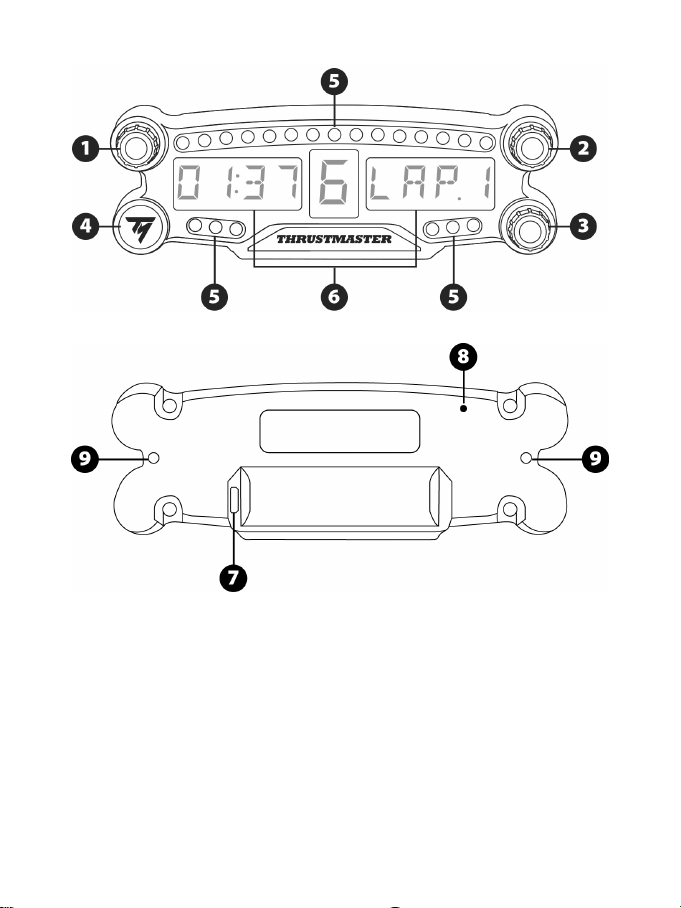
TECHNISCHE FEATURES
1 Drehschalter 1 mit Druckfunktion
2 Drehschalter 2 mit Druckfunktion
3 Drehschalter 3 mit Druckfunktion
(Helligkeitsanpassung)
4 AN/AUS-Schalter
5 21 LED-Lampen
6 Hauptanzeige
7 Micro-USB Ladebuchse
8 Ladekontrollleuchte
9 Zwei M3 Gewindebohrungen zur Befestigung
des Gerätes
3/12
WARNHINWEISE
Bevor Sie dieses Produkt benutzen, lesen Sie bitte diese Dokumentation sorgfältig durch und
bewahren Sie diese sicher auf, falls Sie später etwas nachlesen müssen.
Warnung – elektrischer Schlag
* Lagern Sie das Produkt an einem trockenen Ort und setzen Sie es weder Staub noch direktem
Sonnenlicht aus.
* Verdrehen Sie keine Kabel oder ziehen direkt an deren Steckern.
* Schütten Sie keine Flüssigkeiten auf das Produkt oder dessen Anschlüsse.
* Schließen Sie das Produkt nicht kurz.
* Zerlegen Sie das Produkt niemals, werfen es ins Feuer oder setzen es hohen Temperaturen aus.
* Öffnen Sie niemals das Gerät. Es befinden sich keine vom Benutzer austauschbare Teile im Innern.
Jedwede Reparaturen müssen von einer vom Hersteller angegeben Werkstatt oder einem
qualifizierten Techniker ausgeführt werden.
Warnung – eingebauter Akku
- Laden Sie das BT LED DISPLAY vor der Benutzung vollständig auf.
- Bauen Sie das Gerät niemals auseinander, sonst verfallen sämtliche Gewährleistungsansprüche.
- Schützen Sie das Produkt vor Erschütterungen und Stößen.
- Dieses Produkt sollte niemals von Kindern unter 14 Jahren ohne Aufsicht eines Erwachsenen
benutzt werden.
THRUSTMASTER® LEHNT JEGLICHE HAFTUNG IM FALLE EINER NICHTBEACHTUNG
DIESER ANWEISUNGEN AB.
WARNUNG: BEI EINSETZEN EINES FALSCHEN AKKUS KANN ES ZU EXPLOSIONEN
KOMMEN.
BEFOLGEN SIE BITTE DIE ANWEISUNGEN ZUR KORREKTEN ENTSORGUNG VON
BATTERIEN.
SO LADEN SIE DIE BATTERIE DES BT LED DISPLAY AUF
Benutzen Sie ein Micro-USB Kabel (ähnlich dem Kabel, dass mit Ihrer PS4™ mitgeliefert wird) und
verbinden Sie das BT LED DISPLAY mit einem der freien PS4™ USB-Systemports.
Die Ladebuchse (7) liegt auf der Rückseite des BT LED DISPLAY.
Die Ladekontrollleuchte (8) leuchtet beim Aufladen des Gerätes und erlischt, wenn das Gerät
vollständig aufgeladen ist.
KOMPATIBILITÄT MIT PS4™-SPIELEN
Eine Liste mit PS4™-Spielen, die kompatibel mit dem BT LED DISPLAY sind, finden Sie auf
http://support.thrustmaster.com. Wählen Sie Rennlenkräder / BT LED DISPLAY / Spieleinstellungen aus.
Diese Liste wird fortlaufend mit neu veröffentlichten PS4™-Spielen erweitert, die mit dem BT LED
DISPLAY kompatibel sind.
4/12
INSTALLATION AN IHREM PS4™-SYSTEM
Melden Sie das BT LED DISPLAY an Ihrem PS4™-System an
Führen Sie diesen Vorgang nur einmal aus. Sie müssen dies nicht bei
jedem Neustart Ihres PS4™-Systems durchführen.
Beim ersten Gebrauch des BT LED DISPLAY ist eine Anmeldung an Ihrem PS4™-System zwingend
erforderlich; dieser Vorgang muss lediglich einmal ausgeführt werden.
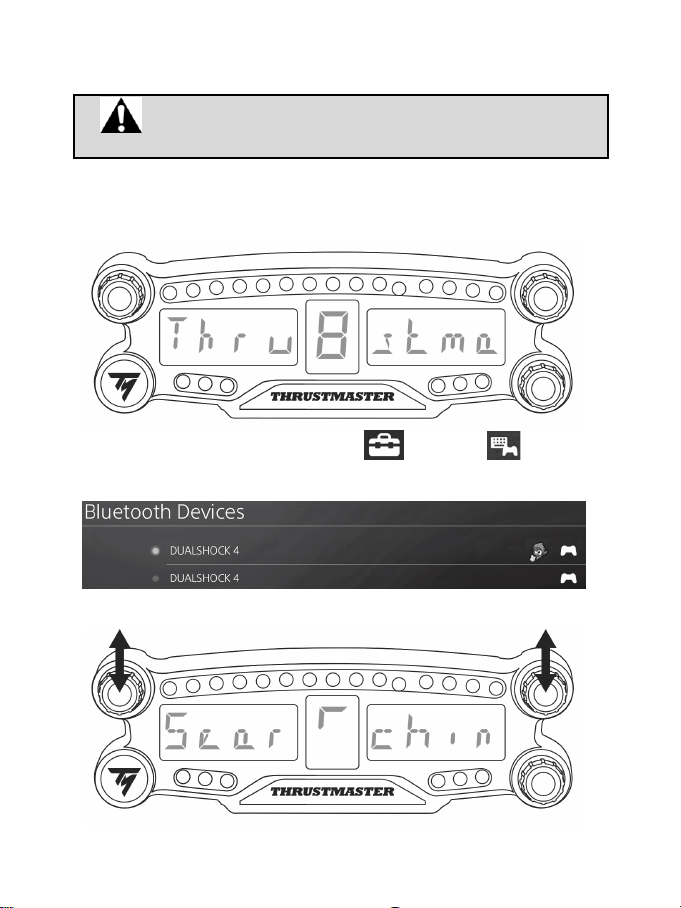
1. Schalten Sie das BT LED DISPLAY durch Drücken des AN/AUS-Knopfes (4 ) an
.
Die Meldung Thrustmaster BT Wheel Display erscheint auf der Hauptanzeige (6).
2. Wählen Sie im Systemmenü Ihres PS4™-Systems [ Settings ] > [ Devices ] >
[ Bluetooth Devices ], um automatisch nach nahegelegenen Bluetooth®-Geräten zu suchen.
Verbundene und andere Bluetooth-Geräte erscheinen nun in der Liste.
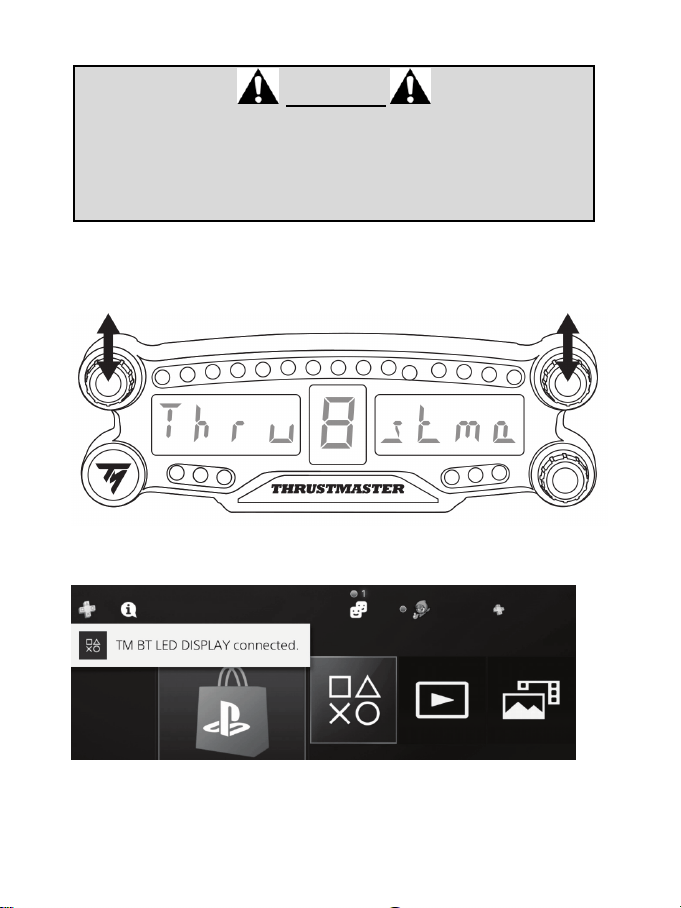
3. Drücken Sie gleichzeitig kurz auf die Drehschalter 1 und 2 auf dem BT LED DISPLAY. Die Meldung
Searching known devices erscheint nun auf der Hauptanzeige (6).
5/12
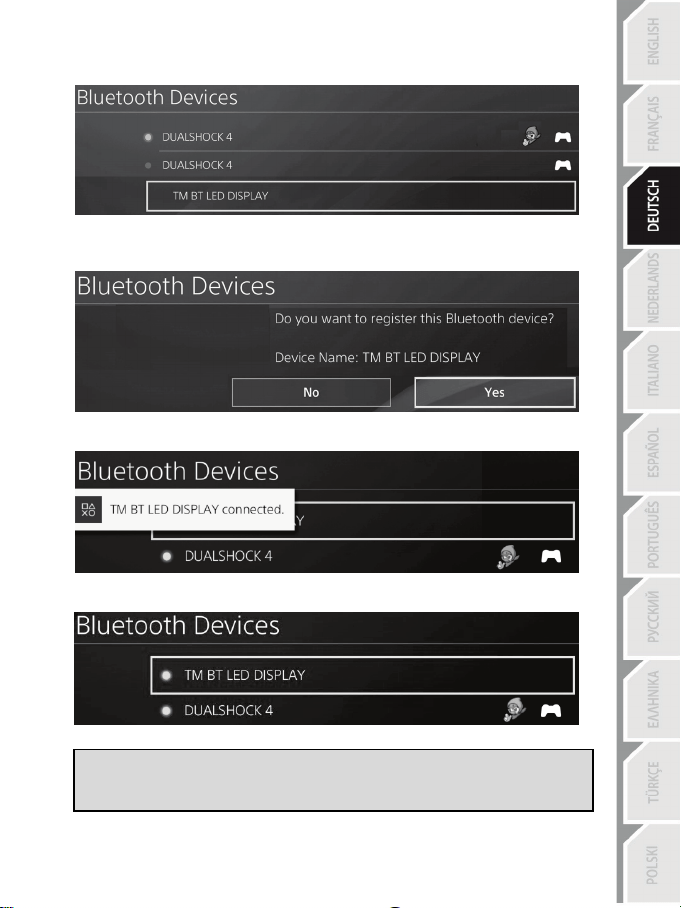
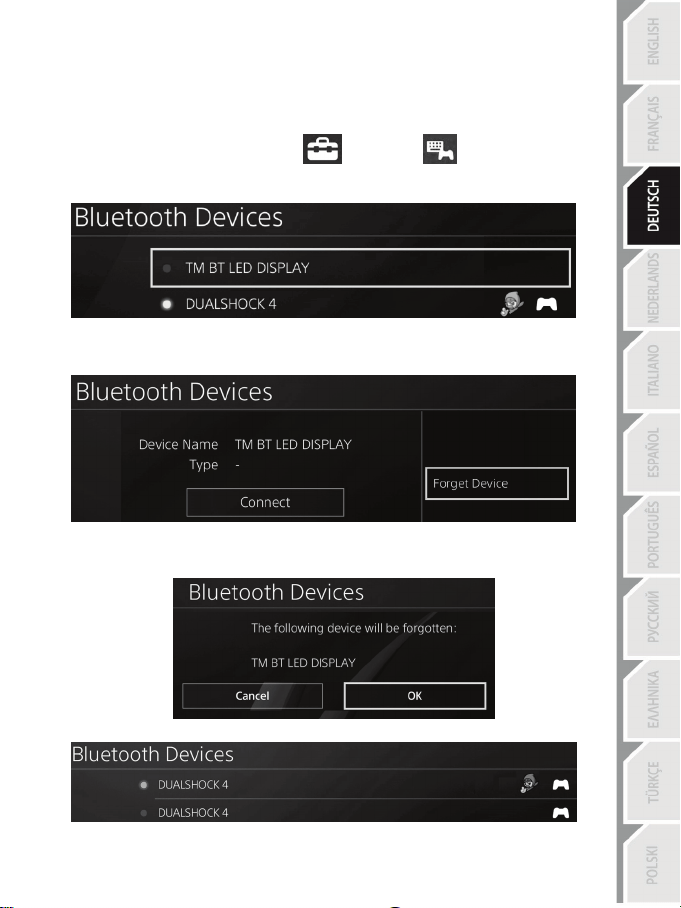
4. Nach kurzer Zeit sollte der Name TM BT LED DISPLAY auf dem Bildschirm erscheinen, der mit
Ihrer PS4™ verbunden ist. Wählen Sie diesen mit Ihrem Controller aus und drücken Sie den s-
Button.
5. Die Meldung Do you want to register this Bluetooth device TM BT LED DISPLAY? erscheint
auf dem Bildschirm, der mit Ihrem PS4™-System verbunden ist. Wählen Sie YES aus und
drücken Sie den s -Button zur Bestätigung.
6. Die Meldung TM BT LED DISPLAY connected erscheint kurz auf dem Bildschirm, der mit Ihrem
PS4™-System verbunden ist.
Auf dem Bildschirm, der mit Ihrem PS4™-System verbunden ist., leuchtet die Anzeige links neben
dem TM BT LED DISPLAY jetzt grün, das Gerät ist nun korrekt mit dem System verbunden.
7. Sie sind nun bereit zu spielen!
Wenn der Vorgang fehlschlägt, schalten Sie Ihr PS4™-System aus, stecken das
Stromkabel aus und wieder ein. Starten Sie Ihr PS4™-System neu und
wiederholen Sie die Anmeldeschritte 1 bis 6.
6/12
Verbinden Sie das BT LED DISPLAY mit dem PS4™-System
SEHR WICHTIG
- Es ist zwingend erforderlich, dass Sie diesen Vorgang bei jedem Neustart
Ihres PS4™-Systems durchführen.
- Die Verbindung des BT LED DISPLAY mit dem PS4™-System wird nur
funktionieren, wenn Sie den vorangegangenen Schritt (d.h. die Anmeldung des
BT LED DISPLAY am PS4™-System) mindestens einmal erfolgreich
durchgeführt haben.
1. Schalten Sie das BT LED DISPLAY durch Drücken des AN/AUS-Knopfes (4) ein.
Die Meldung Thrustmaster BT Wheel Display erscheint auf der Hauptanzeige (6).
2. Drücken Sie kurz gleichzeitig auf die Drehschalter 1 und 2 auf dem BT LED DISPLAY.
Die Meldung Connected erscheint kurz auf der Hauptanzeige (6).
Die Meldung TM BT LED DISPLAY connected erscheint kurz auf dem Bildschirm, der mit Ihrem
PS4™-System verbunden ist.
3. Sie sind nun bereit zu spielen!
7/12
Melden Sie das BT LED DISPLAY von Ihrem PS4™-System ab
(Dieser Vorgang ist nur bei Fehlerbehebung oder beim Kauf eines neuen BT LED DISPLAY
notwendig)
1. Schalten Sie das BT LED DISPLAY durch Drücken des AN/AUS-Knopfes (4) aus
.
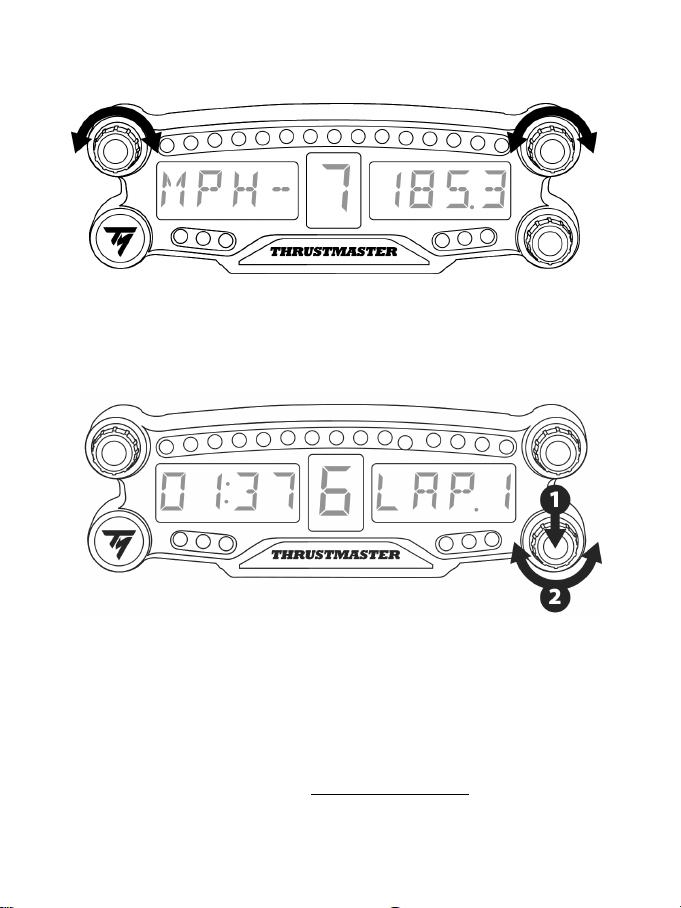
2. Wählen Sie im Systemmenü Ihrer PS4™
[ Settings ] > [ Devices ] > [ Bluetooth
Devices ] aus.
Wählen Sie TM BT LED DISPLAY und bestätigen Sie mit s.
3. Die Meldung Device Name TM BT LED DISPLAY erscheint auf dem Bildschirm. Drücken Sie
OPTIONS auf Ihrem Gamepad und wählen Sie Forget Device. Drücken Sie den s-Button zur
Bestätigung.
4. Die Nachricht The following device will be forgotten: TM BT LED DISPLAY erscheint nun auf
dem Bildschirm.
Wählen Sie OK aus und drücken Sie den s-Button zur Bestätigung.
5. Das TM BT LED DISPLAY ist nun von Ihrem PS4™-System abgemeldet.
8/12
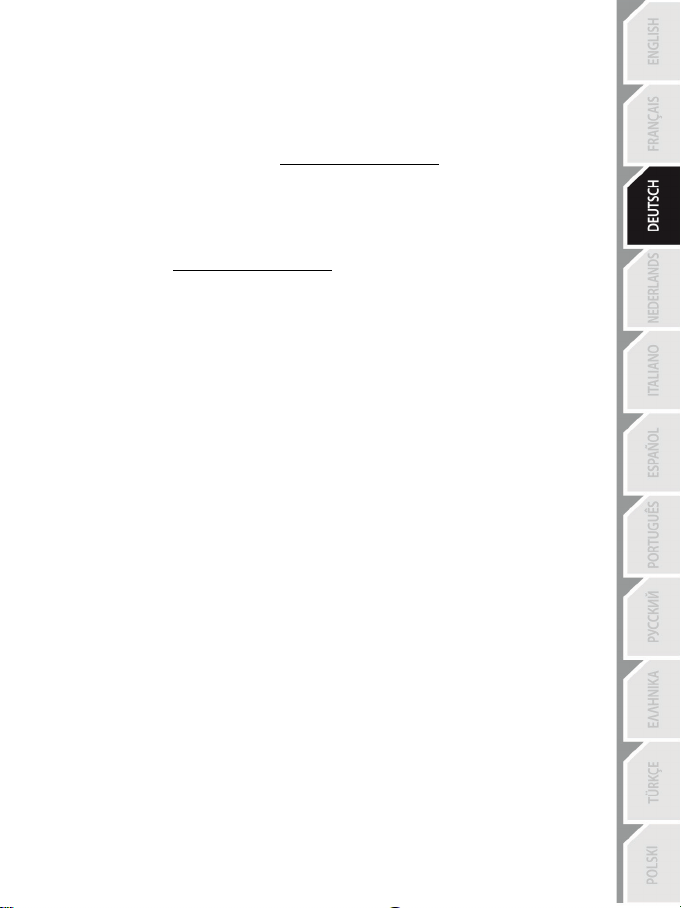
SO BENUTZEN SIE DIE DREHSCHALTER 1 UND 2
Abhängig vom PS4™-Spiel können Sie die Schalter 1 und 2 zum Ändern der Bildschirmeinstellungen und
zum Hin- und Herschalten zwischen einzelnen Einstellungen verwenden.
SO PASSEN SIE DIE HELLIGKEIT DES BT LED DISPLAY AN
1) Drücken Sie kurz auf Schalter 3, um von der Helligkeitssteuerung der 21 LEDs (5) zur Anpassung der
Leuchtstärke der Hauptanzeige (6) zu springen und umgekehrt.
2) Drehen Sie den Schalter nach links, um die Helligkeit zu reduzieren und nach rechts, um diese zu
erhöhen.
SO BRINGEN SIE DAS BT LED DISPLAY AN
Sie können das BT LED DISPLAY nach Ihren Wünschen innerhalb eines Radius von 10 Metern um das
PS4™-System anbringen.
Sie können das Gerät auch an passender Ausrüstung* oder direkt an einigen Rennlenkrädern
anbringen, indem Sie die beiden M3-Gewindebohrungen auf der Rückseite des Gerätes (9) verwenden.
* Separat zu erwerben
Weiterführende Informationen finden Sie unter http://support.thrustmaster.com. Wählen Sie Racing
wheels / BT LED DISPLAY und dann das Benutzerhandbuch oder FAQ aus.
9/12
SO AKTUALISIEREN SIE DIE FIRMWARE DES BT LED DISPLAY
Die jeweilige Firmware (allgemeine Firmware und Bluetooth Firmware), die im BT LED DISPLAY
verwendet werden, können mit neueren Versionen aktualisiert werden und bieten
Produktverbesserungen.
Um die aktuelle Firmware-Version Ihres BT LED DISPLAY anzuzeigen und diese bei Bedarf zu
aktualisieren: rufen Sie auf Ihrem PC http://support.thrustmaster.com auf, wählen Sie dort Racing
wheels / BT LED DISPLAY aus, suchen Sie dort nach der passenden Firmware und folgen Sie den
Anweisungen zum Download und Installationsablauf.
HILFE, HÄUFIG GESTELLTE FRAGEN UND HINWEISE
Bitte besuchen Sie http://support.thrustmaster.com. Wählen Sie Racing wheels / BT LED DISPLAY
aus und gehen Sie auf Benutzerhandbuch oder FAQ.

10/12
Kunden-Garantie-Information
Guillemot Corporation S.A. mit Hauptfirmensitz in Place du Granier, B.P. 97143, 35571 Chantepie,
France (fortfolgend “Guillemot”) garantiert Kunden weltweit, daß dieses Thrustmaster Produkt frei
von Mängeln in Material und Verarbeitung für eine Gewährleistungsfrist ist, die mit der Frist für eine
Mängelrüge bezüglich des Produktes übereinstimmt. In den Ländern der Europäischen Union
entspricht diese einem Zeitraum von zwei (2) Jahren ab Kaufdatum des Thrustmaster Produktes. In
anderen Ländern entspricht die Gewährleistungsfrist der zeitlichen Begrenzung für eine Mängelrüge
bezüglich des Thrustmaster Produktes in Übereinstimmung mit anwendbarem Recht des Landes, in
dem der Kunde zum Zeitpunkt des Erwerbs eines Thrustmaster Produktes wohnhaft ist. Sollte eine
entsprechende Regelung in dem entsprechenden Land nicht existieren, umfasst die
Gewährleistungspflicht einen Zeitraum von einem (1) Jahr ab dem originären Kaufdatum des
Thrustmaster Produktes.
Sollten bei dem Produkt innerhalb der Gewährleistungsfrist Defekte auftreten, kontaktieren Sie
unverzüglich den technischen Kundendienst, der die weitere Vorgehensweise anzeigt. Wurde der
Defekt bestätigt, muss das Produkt an die Verkaufsstelle (oder an eine andere Stelle, je nach
Maßgabe des technischen Kundendienstes) retourniert werden.
Im Rahmen dieser Garantie sollte das defekte Produkt des Kunden, je nach Entscheidung des
technischen Kundendienstes, entweder ausgetauscht oder repariert werden. Sollte während der
Garantiezeit das Thrustmaster Produkt einer derartigen Instandsetzung unterliegen und das
Produkt während eines Zeitraums von mindestens sieben (7) Tagen nicht benutzbar sein, wird
diese Zeit der restlichen Garantiezeit hinzugefügt. Diese Frist läuft ab dem Zeitpunkt, an dem der
Wunsch des Verbrauchers bezüglich einer Intervention vorliegt oder ab dem Tag, an dem das
fragliche Produkt zur Instandsetzung zur Verfügung steht, falls das Datum, an dem das Produkt zur
Instandsetzung zur Verfügung steht, dem Datum des Antrags auf Intervention nachfolgt. Wenn nach
geltendem Recht zulässig, beschränkt sich die volle Haftung von Guillemot und ihrer
Tochtergesellschaften auf die Reparatur oder den Austausch des Thrustmaster Produktes (inklusive
Folgeschäden). Wenn nach geltendem Recht zulässig, lehnt Guillemot alle Gewährleistungen der
Marktgängigkeit oder Eignung für einen bestimmten Zweck ab.
Der Gewährleistungsanspruch verfällt: (1) Falls das Produkt modifiziert, geöffnet, verändert oder ein
Schaden durch unsachgemäßen oder missbräuchlichen Gebrauch hervorgerufen wurde, sowie
durch Fahrlässigkeit, einen Unfall, Verschleiß oder irgendeinem anderen Grund – aber nicht durch
Material- oder Herstellungsfehler (einschließlich, aber nicht beschränkt auf, die Kombination der
Thrustmaster Produkte mit ungeeigneten Elementen, insbesondere Netzteile, Akkus, Ladegeräte,
oder andere Elemente, die von Guillemot für dieses Produkt nicht mitgeliefert wurden); (2) Falls das
Produkt für eine andere Nutzung als zum privaten Hausgebrauch, einschließlich für professionelle
oder kommerzielle Zwecke (z. B. Spielhallen, Training, Wettkämpfe) verwendet wird; (3) Im Falle
der Nichteinhaltung der durch den technischen Support erteilten Anweisungen; (4) Durch Software.
Die besagte Software ist Gegenstand einer speziellen Garantie; (5) Bei Verbrauchsmaterialien
(Elemente, die während der Produktlebensdauer ausgetauscht werden, wie z. B. Einwegbatterien,
Ohrpolster für ein Audioheadset oder für Kopfhörer); (6) Bei Accessoires (z. B. Kabel, Etuis,
Taschen, Beutel, Handgelenk-Riemen); (7) Falls das Produkt in einer öffentlichen Versteigerung
verkauft wurde. Diese Garantie ist nicht übertragbar.
Die Rechte des Kunden in Übereinstimmung mit anwendbarem Recht bezüglich des Verkaufs auf
Konsumgüter im Land der/der Kunden/Kundin wird durch diese Garantie nicht beeinträchtigt.
11/12
Zusätzliche Gewährleistungsbestimmungen
Während der Garantiezeit bietet Guillemot grundsätzlich keine Ersatzteile an, da der technische
Kundendienst der einzige autorisierte Partner zum Öffnen und/oder Instandsetzen jedweden
Thrustmaster-Produkts ist (mit Ausnahme von irgendwelchen Instandsetzungsprozeduren, die der
Kunde nach Maßgabe des technischen Kundendienstes und durch schriftliche Instruktionen sowie
der Zurverfügungstellung des/der eventuell erforderlichen Ersatzteil(s)(e) selbst in der Lage ist
durchzuführen – zum Beispiel aufgrund der Einfachheit und einer nicht erforderlichen
Geheimhaltung des Instandsetzungsverfahrens).
Aufgrund seiner Innovationszyklen und um sein Know-how und seine Geschäftsgeheimnisse zu
schützen, bietet Guillemot grundsätzlich keine Instandsetzungs-Benachrichtigung oder Ersatzteile
für alle Thrustmaster Produkte an, deren Garantiezeit abgelaufen ist.
Haftung
Wenn nach dem anwendbaren Recht zulässig, lehnen Guillemot Corporation S.A. (fortfolgend
"Guillemot") und ihre Tochtergesellschaften jegliche Haftung für Schäden, die auf eine oder mehrere
der folgenden Ursachen zurückzuführen sind, ab: (1) das Produkt wurde modifiziert, geöffnet oder
geändert; (2) Nichtbefolgung der Montageanleitung; (3) unangebrachte Nutzung, Fahrlässigkeit, Unfall
(z. B. ein Aufprall); (4) normalem Verschleiß; (5) Die Verwendung des Produkts für jedwede andere
Nutzung als zum privaten Hausgebrauch, einschließlich professionelle oder kommerzielle Zwecke (z. B.
Spielhallen, Training, Wettkämpfe). Wenn nach anwendbarem Recht zulässig, lehnen Guillemot und
seine Niederlassungen jegliche Haftung für Schäden, die nicht auf einen Material- oder
Herstellungsfehler in Bezug auf das Produkt beruhen (einschließlich, aber nicht beschränkt auf, etwaige
Schäden, die direkt oder indirekt durch Software oder durch die Kombination der Thrustmaster
Produkte mit ungeeigneten Elementen, insbesondere Netzteile, Akkus, Ladegeräte, oder andere
Elemente, die von Guillemot für dieses Produkt nicht geliefert wurden), ab.
TECHNISCHER SUPPORT
http://support.thrustmaster.com
12/12
EINWILLIGUNGSERKLÄRUNG MIT EU-REGULIERUNG
Guillemot Corporation S.A. erklärt hiermit, dass das Produkt BT LED DISPLAY den Hauptanforderungen
und anderen relevanten Klauseln der Direktive 2014/53/UE (RED) entspricht. Die Einwilligungserklärung
kann unter folgendem Link eingesehen werden:
http://www.thrustmaster.com/certificates/BT_Led_Display/Doc-BT_Led_Display.pdf
Frequenzband: 2402-2480MHz, RF MAX Leistung: <10dBm
COPYRIGHT
© 2017 Guillemot Corporation S.A. Alle Rechte vorbehalten. Thrustmaster® ist eine eingetragene Marke
von Guillemot Corporation S.A.
Für den Verkauf in Europa, Afrika, dem Nahen Osten, Russland, Indien und Ozeanien lizenziert. Zur
exklusiven Nutzung mit PlayStation
®4.
Alle anderen Marken sind im Besitz Ihrer jeweiligen Eigentümer. Illustrationen nicht verbindlich. Inhalte,
Designs und Spezifikationen können ohne vorherige Ankündigung geändert werden und können von
Land zu Land unterschiedlich sein. Hergestellt in China.
Hergestellt und vertrieben von Guillemot Corporation S.A.
HINWEISE ZUM UMWELTSCHUTZ
In der Europäischen Union und der Türkei: Dieses Produkt darf nach Ende seiner
Lebensdauer nicht über den Hausmüll entsorgt werden, sondern muss an einem
Sammelpunkt für das Recycling von elektrischen und elektronischen Geräten
abgegeben werden.
Das Symbol auf dem Produkt, der Gebrauchsanleitung oder der Verpackung weist
darauf hin.
Die Werkstoffe sind gemäß ihrer Kennzeichnung wiederverwertbar. Mit der
Wiederverwertung, der stofflichen Verwertung oder anderen Formen von Altgeräten leisten Sie einen
wichtigen Beitrag zum Schutz unserer Umwelt. Bitte erfragen Sie bei der Gemeindeverwaltung die
zuständige Entsorgungsstelle.
Für alle anderen Länder: Bitte beachten Sie die lokalen Entsorgungsrichtlinien/-Gesetze bezüglich
elektrischen und elektronischen Equipments.
Wichtige Informationen. Die Farben und Verzierungen können abweichen.
Plastikhalterungen und Aufkleber bitte vor der Nutzung des Produktes entfernen.
www.thrustmaster.com
* Nur in der EU und der Türkei anwendbar
*
*
1/12
Voor de PlayStation
®4
Handleiding
2/12
TECHNISCHE SPECIFICATIES
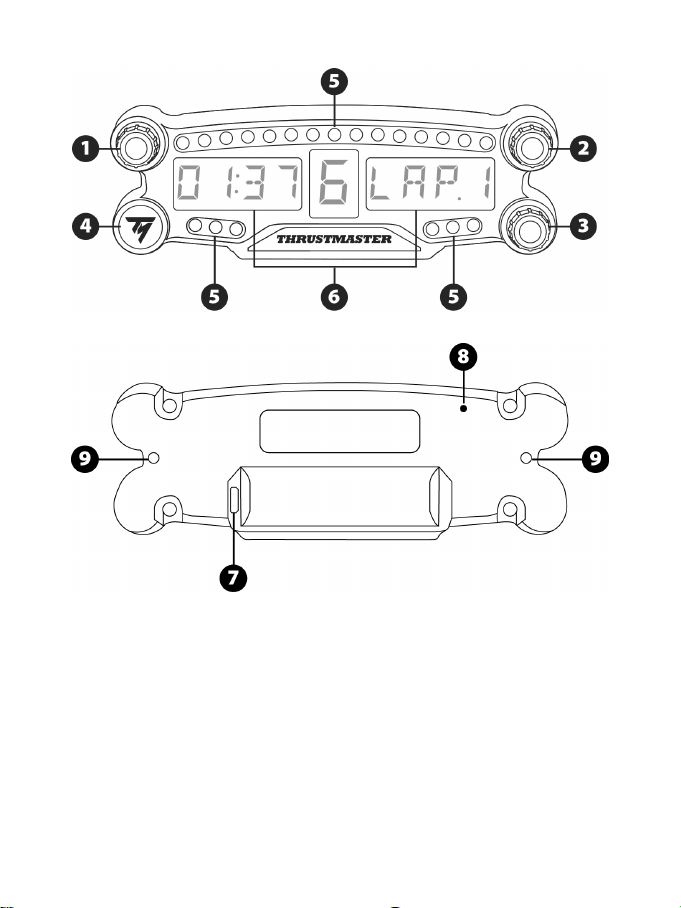
1 Draaiknop nr. 1 met drukknopfunctie
2 Draaiknop nr. 2 met drukknopfunctie
3 Draaiknop nr. 3 met drukknopfunctie
(aanpassen helderheid)
4 Aan/uit-knop
5 21 LED's
6 Hoofddisplay
7 Micro-USB-oplaadconnector
8 Oplaadindicator
9 Twee M3-schroefdraden voor bevestiging
van het apparaat
3/12
WAARSCHUWING
Lees, voordat u dit product gebruikt, deze handleiding zorgvuldig door en bewaar hem om eventueel
op een later tijdstip te kunnen raadplegen.
Waarschuwing - Elektrische schok
* Berg dit product op een droge plek op, uit de zon en stofvrij.
* Trek nooit te hard aan een kabel of connector, en zorg dat er geen knikken in kabels komen.
* Mors geen vloeistoffen op het product of op een connector.
* Veroorzaak geen kortsluiting.
* Haal het product nooit uit elkaar, gooi het niet in het vuur en stel het niet bloot aan hoge
temperaturen.
* Maak het apparaat niet open. In het apparaat bevinden zich geen door de gebruiker te
onderhouden of te repareren onderdelen. Alle reparaties dienen te worden uitgevoerd door de
fabrikant, haar bevoegde vertegenwoordiger of een gekwalificeerd technicus.
Waarschuwing - Interne accu
- Voordat u de BT LED DISPLAY de eerste keer gebruikt, moet u hem volledig opladen.
- Haal dit product niet uit elkaar. Doet u dit toch, dan vervalt de garantie.
- Bescherm het product tegen stoten en vallen.
- Dit product mag zonder toezicht van een volwassene niet worden gebruikt door kinderen jonger
dan 12 jaar.
THRUSTMASTER® WIJST ELKE AANSPRAKELIJKHEID AF INDIEN U ZICH NIET HOUDT AAN
DEZE INSTRUCTIES.
WAARSCHUWING: INDIEN DE ACCU WORDT VERVANGEN DOOR EEN ONJUIST TYPE ACCU
KAN DIT EEN EXPLOSIE TOT GEVOLG HEBBEN.
VOLG DE AANWIJZINGEN VOOR HET MILIEUVRIENDELIJK VERWIJDEREN VAN ACCU'S.
ACCU OPLADEN VAN BT LED DISPLAY
Sluit de BT LED DISPLAY aan op een vrije USB-poort van het PS4™-systeem met behulp van een
micro-USB-kabel (bijvoorbeeld de USB-kabel van het PS4™-systeem).
De oplaadconnector (7) bevindt zich achterop de BT LED DISPLAY.
De oplaadindicator (8) gaat rood branden wanneer het apparaat oplaadt en gaat UIT wanneer het
apparaat volledig is opgeladen.
COMPATIBILITEIT MET PS4™-GAMES
Een lijst met PS4™-games die compatibel zijn met deze BT LED DISPLAY is te vinden op
http://support.thrustmaster.com. Selecteer Racesturen / BT LED DISPLAY / Games-instellingen.
Deze lijst wordt voortdurend uitgebreid wanneer nieuwe PS4™-games worden uitgebracht die
compatibel zijn met de BT LED DISPLAY.
4/12
INSTALLATIE OP HET PS4™-SYSTEEM
Registreer de BT LED DISPLAY op het PS4™-systeem
Deze actie hoeft maar één keer uitgevoerd te worden. Het is niet nodig
deze actie uit te voeren elke keer dat het PS4™-systeem opnieuw wordt gestart.
Wanneer u de BT LED DISPLAY voor de eerste keer gebruikt, is het absoluut nodig dat u het apparaat
registreert op uw PS4™-systeem. Deze registratie is echter eenmalig.
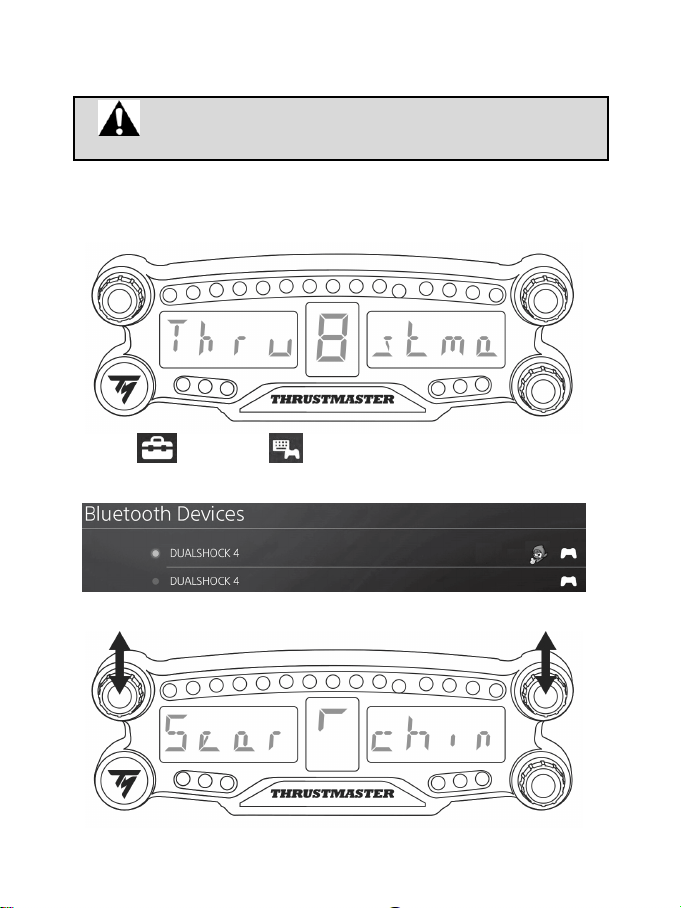
1. Zet de BT LED DISPLAY AAN door op de AAN/UIT-knop (4) te drukken
.
De melding Thrustmaster BT Wheel Display scrollt over het hoofddisplay (6).
2. Selecteer [ Instellingen ] > [ Apparaten ] > [ Bluetooth-apparaten ] in het menu van
het PS4™-systeem om automatisch te zoeken
naar nabije Bluetooth®-apparaten. De lijst geeft
gekoppelde en andere Bluetooth-apparaten.
3. Druk de draaiknoppen nr. 1 en 2 op de BT LED DISPLAY tegelijkertijd kort in en laat ze weer los. De
melding Searching known devices
scrollt over het hoofddisplay (6).
5/12
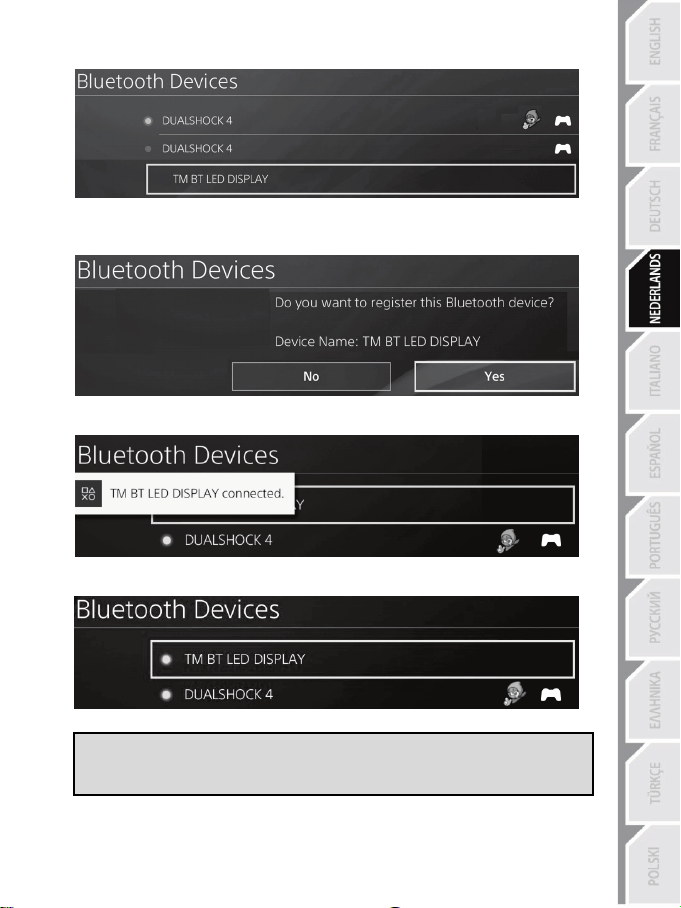
4. Na enige tijd moet de naam TM BT LED DISPLAY op het scherm van het PS4™-systeem
verschijnen. Selecteer deze met uw contoller en druk op de s-knop.
5. Op het scherm van het PS4™-systeem verschijnt de melding Wilt u dit Bluetooth-apparaat TM
BT LED DISPLAY registreren?. Selecteer JA en druk vervolgens op de s-knop om te
bevestigen.
6. De melding TM BT LED DISPLAY connected wordt korte tijd weergegeven op het scherm van
het PS4™-systeem.
Op het scherm van het PS4™-systeem gaat de indicator links van de TM BT LED DISPLAY nu
groen branden ten teken dat het apparaat correct met het systeem is verbonden.
7. Nu kan er gespeeld worden!
Als deze actie mislukt, zet dan het PS4™-systeem UIT en verbreek de verbinding.
Sluit de voedingskabel van het systeem vervolgens opnieuw aan. Herstart het
PS4™-systeem en herhaal de registratiestappen 1 t/m 6.
6/12
Sluit het BT LED DISPLAY aan op het PS4™-systeem
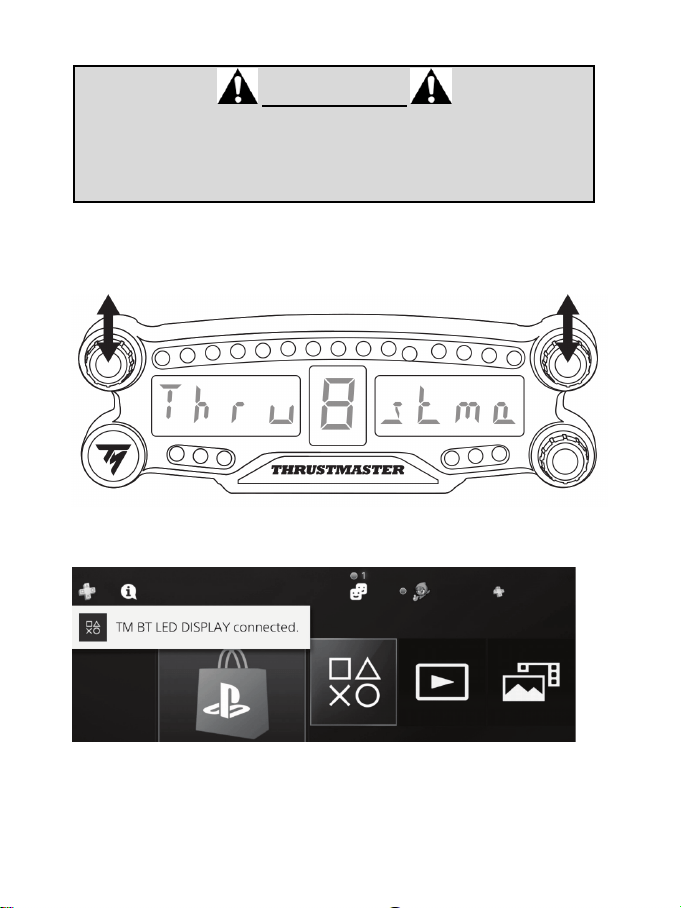
UITERST BELANGRIJK
- U moet deze actie uitvoeren elke keer dat het PS4™-systeem opnieuw wordt
opgestart.
- De verbinding van de BT LED DISPLAY met het PS4™-systeem functioneert
alleen als de vorige stap (d.w.z. registreer de BT LED DISPLAY op het PS4™-
systeem) minstens één keer correct is uitgevoerd.
1. Zet de BT LED DISPLAY AAN door op de AAN/UIT-knop (4) te drukken.
De melding Thrustmaster BT Wheel Display scrollt over het hoofddisplay (6).
2. Druk de draaiknoppen nr. 1 en 2 op de BT LED DISPLAY tegelijkertijd kort in en laat ze weer los.
De melding Connected
wordt korte tijd weergegeven op het hoofdscherm (6).
De melding TM BT LED DISPLAY connected wordt korte tijd weergegeven op het scherm van het
PS4™-systeem.
3. Nu kan er gespeeld worden!
7/12
Deregistreer de BT LED DISPLAY op het PS4™-systeem
(Deze handeling is alleen vereist bij het oplossen van problemen of bij de aanschaf van een nieuwe BT
LED DISPLAY.)
1. Zet de BT LED DISPLAY UIT door op de AAN/UIT-knop (4) te drukken
.
2. Selecteer
[ Instellingen ] > [ Apparaten ] > [ Bluetooth-apparaten ] in het menu
van het PS4™-systeem.
Selecteer TM BT LED DISPLAY en druk daarna op de s-knop om te bevestigen.
3. De melding Apparaatnaam TM BT LED DISPLAY wordt weergegeven op het scherm. Druk op de
OPTIONS-knop op uw controller en selecteer daarna Apparaat vergeten. Druk op de s-knop om
te bevestigen.
4. De melding Het volgende apparaat wordt vergeten: TM BT LED DISPLAY wordt weergegeven op
het scherm.
Selecteer OK en druk vervolgens op de s-knop om te bevestigen.
5. De TM BT LED DISPLAY is nu niet meer geregistreerd op uw PS4™-systeem.
8/12
DRAAIKNOPPEN NR. 1 EN NR. 2 GEBRUIKEN
Afhankelijk van de PS4™-game kunt u de draaiknoppen nr. 1 en nr. 2 gebruiken om de display-
instellingen te wijzigen en te wisselen tussen instellingen.
HELDERHEID INSTELLEN VAN BT LED DISPLAY
1) Druk op knop nr. 3 en laat deze weer los om te wisselen tussen het instellen van de helderheid van de
21 LED's (5) en het instellen van de helderheid van het hoofddisplay (6).
2) Draai de knop naar links om de helderheid te verlagen en naar rechts om de helderheid te verhogen.
BEVESTIGEN VAN BT LED DISPLAY
Tot op een afstand van 10 meter van het PS4™-systeem kunt u de BT LED DISPLAY gemakkelijk
gebruiken.
U kunt de BT LED DISPLAY ook eenvoudig aan daarvoor geschikte items* bevestigen of rechtstreeks
aan bepaalde racesturen met behulp van de twee M3-schroefdraadgaten achterop het apparaat (9).
* Worden apart verkocht
Ga voor meer informatie naar http://support.thrustmaster.com. Selecteer Racesturen / BT LED DISPLAY
en vervolgens Handleiding of FAQ.
9/12
FIRMWARE UPDATEN VAN BT LED DISPLAY
Zowel de algemene firmware als de Bluetooth-firmware van de BT LED DISPLAY kan worden
bijgewerkt naar recentere versies zodat kan worden geprofiteerd van productverbeteringen.
U kunt als volgt de firmwareversies van uw BT LED DISPLAY bekijken en indien gewenst bijwerken:
ga op de PC naar http://support.thrustmaster.com, selecteer Racesturen / BT LED DISPLAY, selecteer
Firmware en volg de instructies en de procedure voor downloaden en installeren.
HELP, FAQ EN TIPS
Ga naar http://support.thrustmaster.com. Selecteer Racesturen / BT LED DISPLAY en vervolgens
Handleiding of FAQ.

10/12
INFORMATIE MET BETREKKING TOT KOPERSGARANTIE
Wereldwijd garandeert Guillemot Corporation S.A., het statutair adres gevestigd aan de Place du
Granier, BP 97143, 35571 Chantepie CEDEX, Frankrijk, (hierna te noemen “Guillemot”) aan de
koper dat dit Thrustmaster-product vrij zal zijn van materiaal- en fabricagefouten gedurende een
garantieperiode gelijk aan de tijd maximaal vereist om een restitutie/vervanging voor dit product te
claimen. In landen van de Europese Unie komt dit overeen met een periode van twee (2) jaar vanaf
het moment van levering van het Thrustmaster-product. In andere landen komt de garantieperiode
overeen met de tijd maximaal vereist om een restitutie/vervanging voor dit Thrustmaster-product te
claimen zoals wettelijk is vastgelegd in het land waarin de koper woonachtig was op de datum van
aankoop van het Thrustmaster-product. Indien een dergelijk claimrecht niet wettelijk is vastgelegd in
het betreffende land, geldt een garantieperiode van één (1) jaar vanaf datum aankoop van het
Thrustmaster-product.
Ongeacht het hierboven gestelde, geldt voor oplaadbare batterijen een garantieperiode van zes (6)
maanden vanaf datum aankoop.
Indien u in de garantieperiode een defect meent te constateren aan dit product, neem dan
onmiddellijk contact op met Technical Support die u zal informeren over de te volgen procedure. Als
het defect wordt bevestigd, dient het product te worden geretourneerd naar de plaats van aankoop
(of een andere locatie die wordt opgegeven door Technical Support).
Binnen het gestelde van deze garantie wordt het defecte product van de koper gerepareerd of
vervangen, zulks ter beoordeling van Technical Support. Indien het Thrustmaster- product tijdens
de garantieperiode is onderworpen aan een dergelijke revisie, wordt elke periode van ten minste
zeven (7) dagen waarin het product niet in gebruik is, opgeteld bij de resterende garantieperiode
(deze periode loopt vanaf de datum van verzoek van de consument voor interventie of vanaf de
datum waarop het product in kwestie beschikbaar is gesteld voor revisie als de datum waarop het
product ter beschikking wordt gesteld voor revisie later is dan de datum van het verzoek om
interventie). Indien toegestaan door van toepassing zijnde wetgeving, beperkt de volledige
aansprakelijkheid van Guillemot en haar dochterondernemingen (inclusief de aansprakelijkheid voor
vervolgschade) zich tot het repareren of vervangen van het Thrustmaster-product. Indien
toegestaan door van toepassing zijnde wetgeving, wijst Guillemot elke garantie af met betrekking
tot verhandelbaarheid of geschiktheid voor enig doel.
Deze garantie is niet van kracht: (1) indien het product aangepast, geopend of gewijzigd is, of
beschadigd is ten gevolge van oneigenlijk of onvoorzichtig gebruik, verwaarlozing, een ongeluk,
normale slijtage, of enige andere oorzaak die niet gerelateerd is aan een materiaal- of fabricagefout
(inclusief maar niet beperkt tot het combineren van het Thrustmaster-product met enig ongeschikt
element waaronder in het bijzonder voedingsadapters, oplaadbare batterijen, opladers of enig
ander element niet geleverd door Guillemot voor dit product); (2) als het product is gebruikt voor
enig ander doel dan thuisgebruik, zoals maar niet exclusief een professioneel of commercieel doel
(bijvoorbeeld game rooms, training, wedstrijden); (3) indien u zich niet houdt aan de instructies
zoals verstrekt door Technical Support; (4) op software die onder een specifieke garantie valt; (5)
op verbruiksartikelen (elementen die tijdens de levensduur van het product worden vervangen zoals
bijvoorbeeld batterijen of pads van een headset of koptelefoon); (6) op accessoires (zoals
bijvoorbeeld kabels, behuizingen, hoesjes, etui's, draagtassen of polsbandjes); (7) indien het
product werd verkocht op een openbare veiling.
Deze garantie is niet overdraagbaar.
De wettelijke rechten van de koper die in zijn/haar land van toepassing zijn op de verkoop van
consumentproducten worden op generlei wijze door deze garantie beperkt.
11/12
Aanvullende garantiebepalingen
Gedurende de garantieperiode zal Guillemot in principe nooit reserveonderdelen leveren omdat
Technical Support de enige partij is die bevoegd is een Thrustmaster-product te openen en/of te
herstellen (met uitzondering van een herstelprocedure die de klant door Technical Support
gevraagd wordt uit te voeren met behulp van schriftelijke instructies - omdat deze procedure
bijvoorbeeld eenvoudig is en het herstelproces niet vertrouwelijk is - en door het verstrekken aan de
consument van de benodigde onderdelen, indien van toepassing).
Gezien de innovatiecycli en om haar knowhow en handelsgeheimen te beschermen, zal Guillemot
in principe nooit een herstelbeschrijving of reserveonderdelen verstrekken voor een Thrustmaster-
product waarvan de garantieperiode is verstreken.
Aansprakelijkheid
Indien toegestaan door van toepassing zijnde wetgeving, wijzen Guillemot Corporation S.A. (hierna
te noemen “Guillemot”) en haar dochterondernemingen alle aansprakelijkheid af voor enige schade
veroorzaakt door één van de volgende oorzaken: (1) indien het product aangepast, geopend of
gewijzigd is; (2) de montage-instructies niet zijn opgevolgd; (3) oneigenlijk of onvoorzichtig gebruik,
verwaarlozing, een ongeluk (bijvoorbeeld stoten); (4) normale slijtage; (5) het gebruik van het
product voor enig ander doel dan thuisgebruik, zoals maar niet exclusief een professioneel of
commercieel doel (bijvoorbeeld game rooms, training, wedstrijden). Indien toegestaan onder van
toepassing zijnde wetgeving, wijzen Guillemot en haar dochterondernemingen alle
aansprakelijkheid af voor enige schade aan dit product niet gerelateerd aan een materiaal- of
fabricagefout (inclusief maar niet beperkt tot enige schade direct of indirect veroorzaakt door enige
software, of door het combineren van het Thrustmaster-product met enig ongeschikt element
waaronder in het bijzonder voedingsadapters, oplaadbare batterijen, opladers of enig ander
element niet geleverd door Guillemot voor dit product).
TECHNISCHE ONDERSTEUNING
http://support.thrustmaster.com/
12/12
VERKLARING VAN CONFORMITEIT MET EU-RICHTLIJNEN
Hierbij verklaart Guillemot Corporation S.A. dat dit BT LED DISPLAY apparaat voldoet aan de
essentiële vereisten en andere relevante bepalingen van richtlijn 2014/53/UE (RED). De
conformiteitsverklaring kunt u vinden op:
http://www.thrustmaster.com/certificates/BT_Led_Display/Doc-BT_Led_Display.pdf
Frequentieband: 2402-2480 MHz, RF MAX vermogen: <10 dBm
COPYRIGHT
© 2017 Guillemot Corporation S.A.. Alle rechten voorbehouden. Thrustmaster® is een geregistreerd
handelsmerk van Guillemot Corporation S.A..
Gelicentieerd voor verkoop in Europa, Afrika, Midden-Oosten, Rusland, India en Oceanië. Uitsluitend
bestemd voor gebruik met de PlayStation®4.
Alle overige handelsmerken en merknamen worden hierbij erkend als zijnde het eigendom van hun
respectieve eigenaren. Afbeeldingen zijn niet bindend. Inhoud, ontwerp en specificaties kunnen zonder
voorafgaande kennisgeving worden gewijzigd en kunnen per land verschillen. Geproduceerd in China.
Gefabriceerd en gedistribueerd door Guillemot Corporation S.A..
AANBEVELINGEN VOOR DE BESCHERMING VAN HET MILIEU
In de Europese Unie en Turkije: Gooi dit product na het einde van de levensduur
niet weg met het normale afval, maar breng het naar het door uw gemeente
aangewezen inzamelpunt voor elektrische en/of computerapparatuur.
Ter herinnering is hiertoe op het product, de gebruikshandleiding of de verpakking
een symbool aangebracht.
De meeste materialen kunnen worden gerecycled. Door recycling en andere
methoden voor verantwoorde verwerking van afgedankte elektrische en
elektronische apparaten kunt u een belangrijke bijdrage leveren aan de bescherming van het milieu.
Neem contact op met uw gemeente voor informatie over een inzamelpunt bij u in de buurt.
In alle andere landen: houd u aan de plaatselijk milieuwetgeving voor elektrische en elektronische
apparaten.
Bewaar deze informatie. Kleuren en bestickering kunnen afwijken.
Plastic bevestigingen en plakband moeten van het product worden verwijderd voordat het wordt
gebruikt.
www.thrustmaster.com
*Alleen van toepassing in de EU en Turkije
*
*
1/12
Per PlayStation
®4
Manuale d’uso
2/12
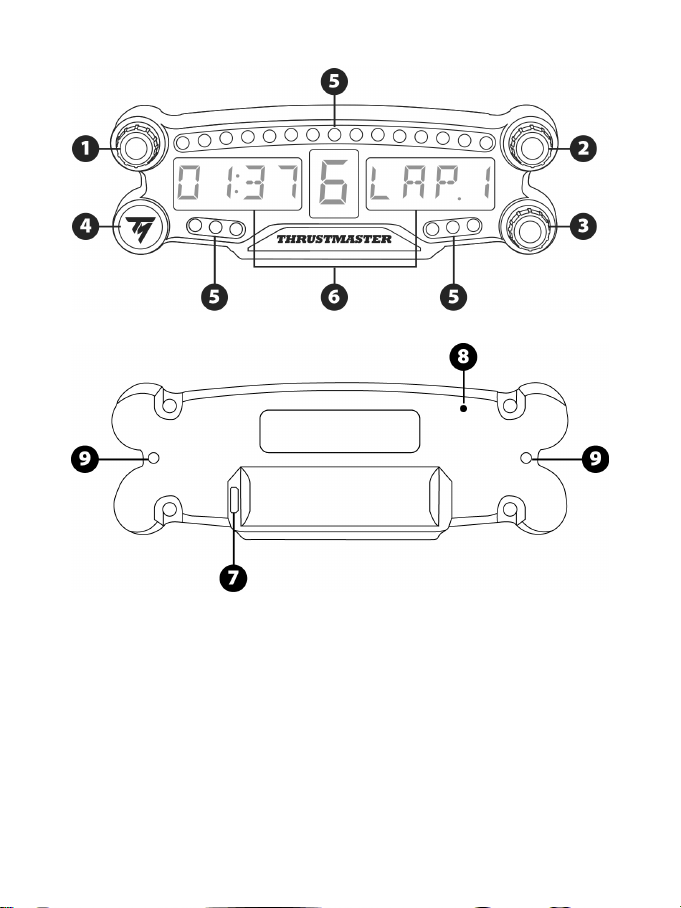
CARATTERISTICHE TECNICHE
1 Selettore rotante n. 1 con funzione pulsante a
pressione
2 Selettore rotante n. 2 con funzione pulsante a
pressione
3 Selettore rotante n. 3 con funzione pulsante a
pressione (controllo regolazione luminosità)
4 Pulsante di accensione On/Off
5 21 LED
6 Display principale
7 Connettore di ricarica micro USB
8 Indicatore di carica
9 Due fori M3 filettati per il fissaggio della
periferica
3/12
ATTENZIONE
Prima di utilizzare questo prodotto, ti invitiamo a leggere con attenzione il presente manuale e a
conservarlo con cura, nel caso in cui avessi bisogno di consultarlo nuovamente.
Attenzione – Shock elettrico
* Conserva questo prodotto in un luogo asciutto e non esporlo alla polvere o alla luce del sole.
* Non torcere e non tirare i connettori e i cavi.
* Non versare alcun liquido sul prodotto o sui relativi connettori.
* Non cortocircuitare il prodotto.
* Non smontare questo prodotto; non gettarlo nel fuoco e non esporlo alle alte temperature.
* Non aprire la periferica: all'interno non vi sono componenti utili all'utente. Qualunque riparazione
dovrà essere effettuata dal produttore, da un suo rappresentante autorizzato o da un tecnico
qualificato.
Attenzione – Batteria interna
- Prima di utilizzare il BT LED DISPLAY, caricalo al massimo.
- Non smontare la periferica: così facendo, annulleresti la garanzia.
- Proteggi la tua periferica da urti e impatti.
- Questa periferica non dovrebbe essere utilizzata da bambini al di sotto dei 14 anni di età senza la
supervisione di un adulto.
THRUSTMASTER® DECLINA OGNI RESPONSABILITÀ IN CASO DI MANCATO RISPETTO
DELLE PRESENTI ISTRUZIONI.
ATTENZIONE: IN CASO DI SOSTITUZIONE DELLA BATTERIA CON UNA BATTERIA DI TIPO
NON CORRETTO, POTREBBE VERIFICARSI UN’ESPLOSIONE.
SEGUI LE ISTRUZIONI RELATIVE ALLO SMALTIMENTO DELLE BATTERIE.
RICARICARE LA BATTERIA DEL BT LED DISPLAY
Utilizzando un cavo micro USB (come il cavo USB fornito assieme al sistema PS4™), collega il BT
LED DISPLAY a una porta USB libera del sistema PS4™.
Il connettore di ricarica (7) si trova sul retro del BT LED DISPLAY.
L’indicatore di carica (8) si illumina di rosso quando la periferica è in ricarica e si spegne quando la
periferica è totalmente carica.
COMPATIBILITÀ CON I GIOCHI PS4™
Un elenco di titoli PS4™ compatibili con il BT LED DISPLAY è disponibile sul sito
http://support.thrustmaster.com. Seleziona Volanti / BT LED DISPLAY / Impostazioni dei giochi.
Questo elenco viene costantemente ampliato in base all’uscita di nuovi giochi PS4™ compatibili con
il BT LED DISPLAY.
4/12
INSTALLAZIONE SUL SISTEMA PS4™
Registrazione del BT LED DISPLAY sul sistema PS4™
Questa operazione è da effettuarsi una sola volta. Non è necessario
eseguirla ogniqualvolta il sistema PS4™ via riavviato.
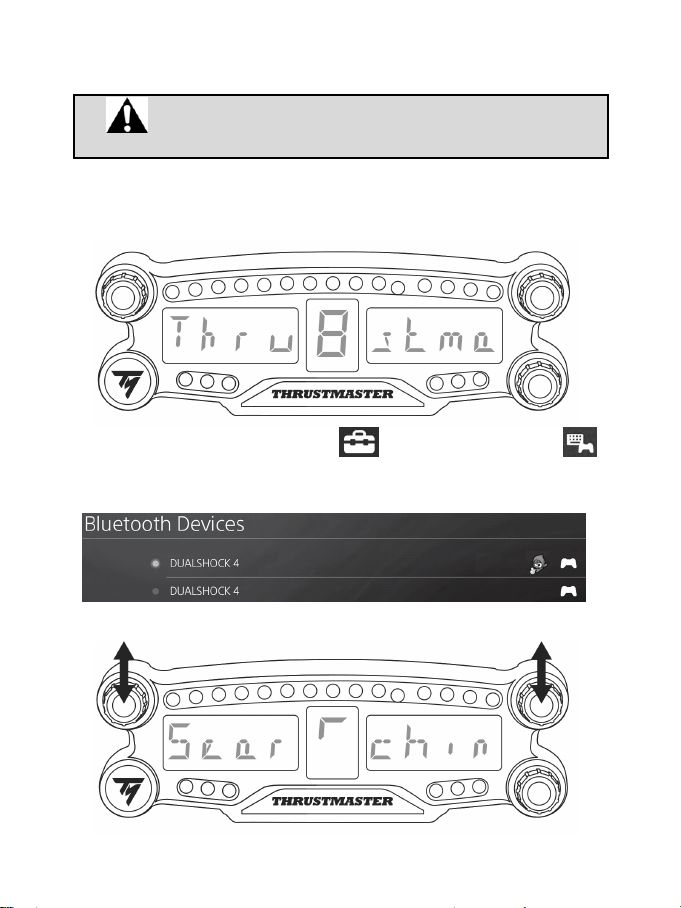
Al momento del primo utilizzo del BT LED DISPLAY, dovrai obbligatoriamente registrare quest’ultimo
nel tuo sistema PS4™: questa operazione dovrà essere effettuata una sola volta.
1. Accendi il BT LED DISPLAY premendo il pulsante On/Off (4)
.
Sul display principale (6) scorrerà il messaggio Thrustmaster BT Wheel Display.
2. Dal menu del sistema PS4™, seleziona [ Settings (Impostazioni) ] >
[ Devices (Dispositivi) ] > [ Bluetooth Devices (Dispositivi Bluetooth) ] per cercare
automaticamente le periferiche Bluetooth® nelle vicinanze. Nell’elenco compariranno i dispositivi
associati e altre periferiche Bluetooth.
3. Premi brevemente e rilascia, simultaneamente, i selettori n. 1 e 2 del BT LED DISPLAY. Sul display
principale (6) scorrerà il messaggio Searching known devices.
5/12
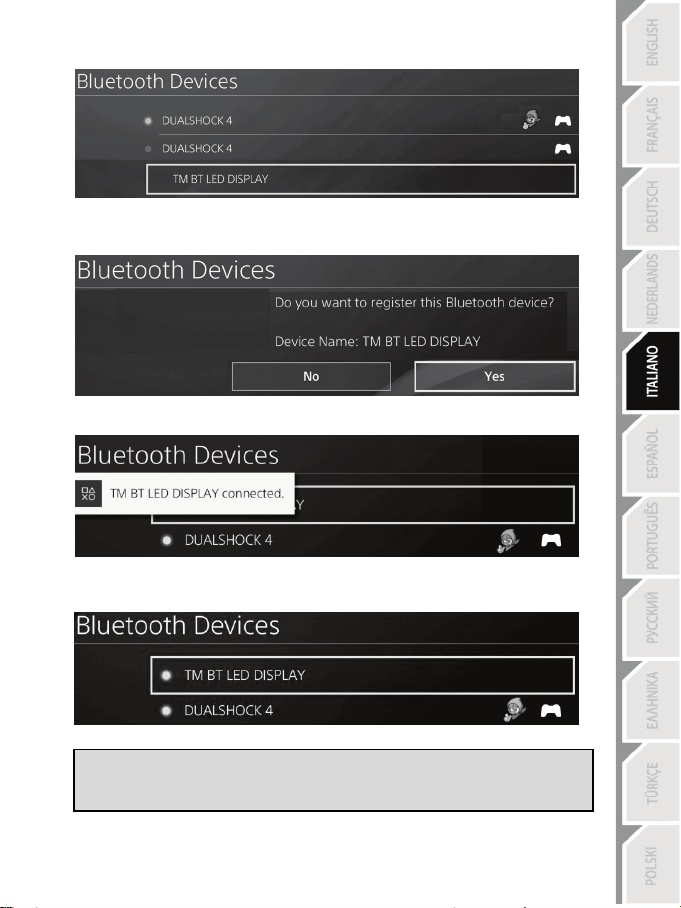
4. Dopo alcuni istanti, sullo schermo del sistema PS4™ dovrebbe comparire il nome TM BT LED
DISPLAY. Utilizzando il tuo controller, selezionalo e premi il pulsante s.
5. Sullo schermo del sistema PS4™ comparirà il messaggio Do you want to register this
Bluetooth device TM BT LED DISPLAY? (Desideri registrare questo dispositivo Bluetooth
TM BT LED DISPLAY?). Scegli YES (SÌ), dopodiché premi il pulsante s per confermare.
6. Sullo schermo del sistema PS4™ comparirà per pochi istanti il messaggio TM BT LED DISPLAY
connected (TM BT LED DISPLAY connesso).
Sullo schermo del sistema PS4™, l’indicatore luminoso alla sinistra di TM BT LED DISPLAY
risulterà ora illuminato in verde, il che significa che il dispositivo risulta correttamente connesso al
sistema.
7. Ora sei pronto/a per giocare!
Se tale procedura non andasse a buon fine, spegni e scollega il tuo sistema
PS4™, dopodiché ricollega il cavo di alimentazione del sistema. Riavvia il tuo
sistema PS4™, quindi ripeti la registrazione dal passo 1 al passo 6.
6/12
Collegamento del BT LED DISPLAY al sistema PS4™
MOLTO IMPORTANTE
- È necessario che tu svolga tale operazione ogniqualvolta viene riavviato il
sistema PS4™.
- Il collegamento del BT LED DISPLAY al sistema PS4™ funzionerà solamente
nel caso in cui il passaggio precedente (ovvero la Registrazione del BT LED
DISPLAY sul sistema PS4™) sia stato eseguito correttamente almeno una
volta.
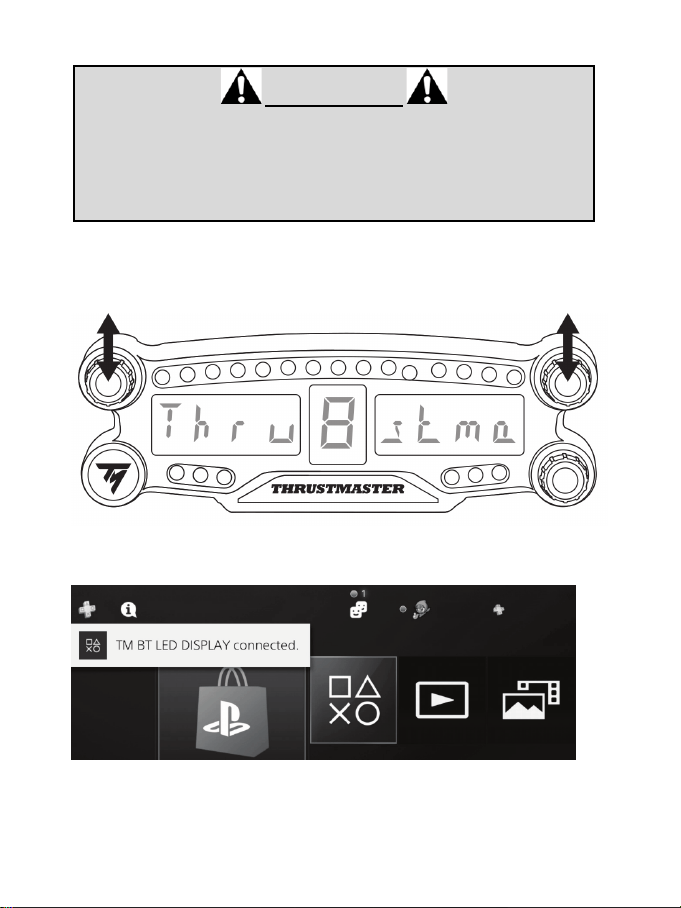
1. Accendi il BT LED DISPLAY premendo il pulsante On/Off (4).
Sul display principale (6) scorrerà il messaggio Thrustmaster BT Wheel Display.
2. Premi brevemente e rilascia, simultaneamente, i selettori n. 1 e 2 del BT LED DISPLAY.
Sul display principale (6) apparirà per pochi istanti il messaggio Connected.
Sullo schermo del sistema PS4™ apparirà brevemente il messaggio TM BT LED DISPLAY
connected (TM BT LED DISPLAY connesso).
3. Ora sei pronto/a per giocare!
7/12
Dissociazione del BT LED DISPLAY dal sistema PS4™
(Questa operazione è necessaria soltanto in caso di problemi o in seguito all’acquisto di un nuovo BT
LED DISPLAY.)
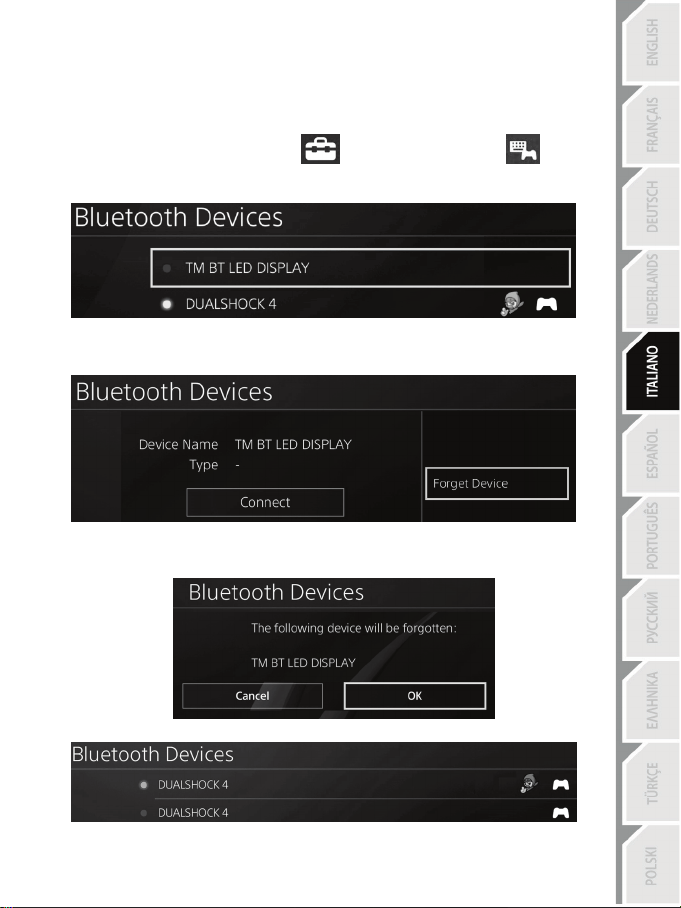
1. Spegni il BT LED DISPLAY premendo il pulsante On/Off (4)
.
2. Nel menu del sistema PS4™, seleziona
[ Settings (Impostazioni) ] > [ Devices
(Dispositivi) ] > [ Bluetooth Devices (Dispositivi Bluetooth) ].
Seleziona TM BT LED DISPLAY, quindi premi il pulsante s per confermare.
3. Sullo schermo apparirà il messaggio Device Name TM BT LED DISPLAY (Nome Dispositivo TM
BT LED DISPLAY). Premi il pulsante OPTIONS del tuo gamepad, quindi scegli Forget Device
(Dimentica Dispositivo). Premi il pulsante s per confermare.
4. Sullo schermo apparirà il messaggio The following device will be forgotten: TM BT LED
DISPLAY (Verrà dimenticato il seguente dispositivo: TM BT LED DISPLAY).
Scegli OK, dopodiché premi il pulsante s per confermare.
5. Il TM BT LED DISPLAY non risulta più associato al tuo sistema PS4™.
8/12
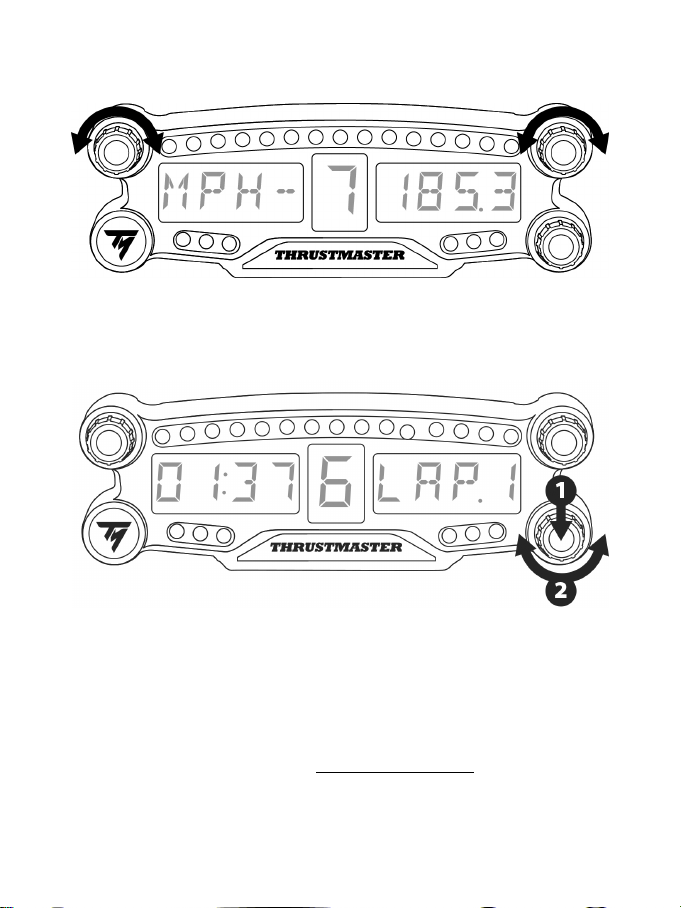
UTILIZZARE I SELETTORI ROTANTI N.1 E N.2
A seconda del gioco per PS4™, potrai ruotare i selettori n.1 e n. 2 per modificare le impostazioni del
display e per passare da una regolazione all’altra.
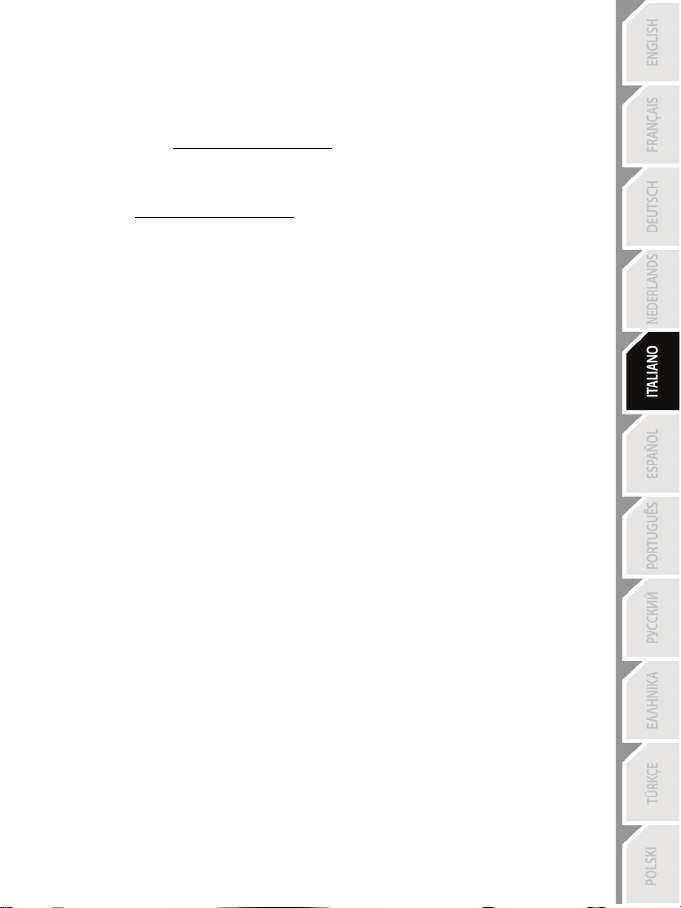
REGOLARE LA LUMINOSITÀ DEL BT LED DISPLAY
1) Premi e rilascia il selettore n.3 per passare dalla regolazione della luminosità dei 21 LED (5) alla
regolazione dell’intensità del display principale (6) e viceversa.
2) Ruota il selettore verso sinistra per ridurre l’intensità o verso destra per aumentarla.
FISSARE IL BT LED DISPLAY
Puoi sistemare il BT LED DISPLAY dove meglio credi, entro un raggio di 10 metri dal sistema PS4™.
Puoi anche fissare la periferica a svariati elementi idonei* o direttamente ad alcuni volanti, utilizzando i
due fori M3 filettati presenti sul retro della periferica (9).
* Venduti separatamente
Per ulteriori informazioni a riguardo, visita il sito http://support.thrustmaster.com. Seleziona Volanti / BT
LED DISPLAY, cliccando poi su Manuale d’uso o FAQ.
9/12
AGGIORNARE IL FIRMWARE DEL BT LED DISPLAY
Entrambi i firmware integrati nel BT LED DISPLAY (il firmware generale e il firmware Bluetooth)
possono essere aggiornati a versioni più recenti, per sfruttare miglioramenti al prodotto.
Per visualizzare le versioni dei firmare del tuo BT LED DISPLAY e, se necessario, aggiornali: con un
PC, accedi al sito http://support.thrustmaster.com, clicca su Volanti / BT LED DISPLAY, seleziona
quindi Firmware e segui le istruzioni per il download e la procedura di installazione.
AIUTO, FAQ E CONSIGLI
Visita il sito http://support.thrustmaster.com. Seleziona Volanti / BT LED DISPLAY, quindi Manuale
d’uso o FAQ.

10/12
Informazioni sulla garanzia al consumatore
A livello mondiale, Guillemot Corporation S.A., avente sede legale in Place du Granier, B.P. 97143,
35571 Chantepie, Francia (d’ora in avanti “Guillemot”) garantisce al consumatore che il presente
prodotto Thrustmaster sarà privo di difetti relativi ai materiali e alla fabbricazione, per un periodo di
garanzia corrispondente al limite temporale stabilito per la presentazione di un reclamo riguardante
la conformità del prodotto in questione. Nei paesi della Comunità Europea, tale periodo equivale a
due (2) anni a partire dalla consegna del prodotto Thrustmaster. In altri paesi, la durata della
garanzia corrisponde al limite temporale stabilito per la presentazione di un reclamo riguardante la
conformità del prodotto Thrustmaster in base alle leggi applicabili nel paese in cui il consumatore
risiedeva alla data di acquisto del prodotto Thrustmaster (qualora nel paese in questione non
esistesse alcuna norma a riguardo, il periodo di garanzia corrisponderà a un (1) anno a partire dalla
data originale di acquisto del prodotto Thrustmaster).
Qualora, durante il periodo di garanzia, il prodotto dovesse apparire difettoso, contatti
immediatamente l’Assistenza Tecnica, che le indicherà la procedura da seguire. Qualora il difetto
dovesse essere confermato, il prodotto dovrà essere riportato al luogo di acquisto (o qualsiasi altro
luogo indicato dall’Assistenza Tecnica).
Nel contesto della presente garanzia, il prodotto difettoso di proprietà del consumatore potrà essere
sostituito o reso nuovamente funzionante, a discrezione dell’Assistenza Tecnica. Se, durante il
periodo coperto dalla garanzia, il prodotto Thrustmaster fosse oggetto di tale rimessa in operatività,
alla rimanente durata della garanzia dovrà essere aggiunto un periodo di almeno sette (7) giorni,
durante il quale il prodotto risulta non utilizzabile (tale periodo intercorre dalla data della richiesta di
intervento da parte del consumatore o dalla data in cui il prodotto in questione è reso disponibile per
la rimessa in operatività, questo nel caso in cui tale data sia successiva alla data di richiesta di
intervento). Qualora le leggi applicabili in materia lo consentano, la totale responsabilità di Guillemot
e delle sue controllate (compresi i danni conseguenti) si limita alla rimessa in operatività o alla
sostituzione del prodotto Thrustmaster. Qualora le leggi applicabili in materia lo consentano,
Guillemot declina ogni garanzia sulla commerciabilità o la conformità a finalità particolari.
La presente garanzia non potrà essere applicata: (1) se il prodotto è stato modificato, aperto,
alterato o ha subito danni derivanti da un uso inappropriato o non autorizzato, da negligenza, da un
incidente, dalla semplice usura, o da qualsiasi altra causa non riconducibile a difetti nei materiali o
nell'assemblaggio (compresi, ma non i soli, prodotti Thrustmaster combinati con elementi inadatti,
tra cui, in particolare, batterie ricaricabili, caricatori o qualsiasi altro elemento non fornito da
Guillemot per questo prodotto); (2) nel caso in cui il prodotto sia stato utilizzato per qualsiasi altro
scopo al di fuori dell’uso domestico, comprese finalità professionali o commerciali (esempio: sale
giochi, allenamenti, concorsi); (3) in caso di mancato rispetto delle istruzioni fornite dall'Assistenza
Tecnica; (4) in caso di software, ovvero software soggetto a una specifica garanzia; (5) ai materiali
di consumo (elementi che richiedono la loro sostituzione al termine della loro durata di esercizio
come, ad esempio, batterie di tipo convenzionale o cuscinetti protettivi per auricolari o cuffie); (6)
agli accessori (ad esempio, cavi, custodie, borsette, borse, cinturini); (7) se il prodotto è stato
venduto ad un'asta pubblica.
La presente garanzia non è trasferibile.
I diritti legali del consumatore, stabiliti dalle leggi vigenti in materia di vendita di beni di consumo nel
relativo paese, non vengono intaccati dalla presente garanzia.
11/12
Disposizioni addizionali sulla garanzia
Per tutta la durata della garanzia, in linea di principio, Guillemot non fornirà alcuna parte di ricambio,
in quanto la sola Assistenza Tecnica è la parte autorizzata ad aprire e/o rimettere in funzionamento
tutti i prodotti Thrustmaster (fatta eccezione per eventuali procedure di rimessa in operatività che
l’Assistenza Tecnica potrebbe richiedere al consumatore, attraverso istruzioni scritte – viste, ad
esempio, la semplicità e la mancanza di riservatezza della procedura di rimessa in operatività – e
fornendo al consumatore le necessarie parti di ricambio, se ve ne fosse l’esigenza).
Considerando i propri cicli di innovazione e per proteggere il proprio know-how e i propri segreti
commerciali, in linea di principio, Guillemot non fornirà alcuna notifica o parte di ricambio finalizzata
alla rimessa in attività di un qualunque prodotto Thrustmaster il cui periodo di garanzia risultasse
scaduto.
Responsabilità
Qualora le leggi applicabili in materia lo consentano, Guillemot Corporation S.A. (d'ora in avanti
“Guillemot”) e le sue controllate declinano ogni responsabilità per qualsiasi danno derivante da
almeno una delle seguenti condizioni: (1) il prodotto è stato modificato, aperto o alterato; (2)
mancato rispetto delle istruzioni di installazione; (3) uso inappropriato o non permesso, negligenza,
incidente (come, ad esempio, un impatto); (4) semplice usura; (5) utilizzo del prodotto per qualsiasi
altro scopo al di fuori dell’uso domestico, comprese finalità professionali o commerciali (esempio:
sale giochi, allenamenti, concorsi). Qualora le leggi applicabili in materia lo consentano, Guillemot e
le sue controllate declinano ogni responsabilità per qualsiasi danno non riconducibile a difetti nei
materiali o nella fabbricazione del prodotto (compresi, ma non i soli, potenziali danni causati
direttamente o indirettamente da un qualunque software, oppure dall’uso del prodotto Thrustmaster
in combinazione con elementi inadatti, tra cui, in particolare, batterie ricaricabili, caricatori o
qualsiasi altro elemento non fornito da Guillemot per questo prodotto).
ASSISTENZA TECNICA
http://support.thrustmaster.com
12/12
DICHIRAZIONE DI CONFORMITÀ AI REGOLAMENTI UE
Con la presente, Guillemot Corporation S.A. dichiara che la periferica BT LED DISPLAY è conforme ai
requisiti principali e ad altre importanti clausole della Direttiva 2014/53/UE (RED). La dichiarazione di
conformità può essere visualizzata al seguente sito web:
http://www.thrustmaster.com/certificates/BT_Led_Display/Doc-BT_Led_Display.pdf
Banda in frequenza: 2402-2480MHz, potenza MASSIMA RF: <10dBm
COPYRIGHT
© 2017 Guillemot Corporation S.A. Tutti i diritti riservati. Thrustmaster® è un marchio registrato da
Guillemot Corporation S.A.
Con licenza di vendita in Europa, Africa, Medio Oriente, Russia, India e Oceania. Utilizzabile
esclusivamente con PlayStation
®4.
Tutti gli altri marchi appartengono ai legittimi proprietari. Illustrazioni puramente indicative. I contenuti, i
design e le caratteristiche possono essere oggetto di modifiche senza preavviso e possono variare da
una nazione all’altra. Fabbricato in Cina.
Prodotto e distribuito da Guillemot Corporation S.A.
RACCOMANDAZIONI SULLA TUTELA DELL’AMBIENTE
Nell’Unione Europea e Turchia: Al termine della sua vita operativa, questo prodotto
non dovrebbe essere gettato assieme ai comuni rifiuti, ma dovrebbe essere portato
ad un apposito punto di raccolta destinato al riciclaggio del Materiale Elettrico ed
Elettronico.
Ciò è confermato dal simbolo riportato sul prodotto, nel manuale d’uso o sulla
confezione.
A seconda delle proprie caratteristiche, i materiali potrebbero essere riciclati.
Tramite il riciclaggio ed altre forme di trattamento del Materiale Elettrico ed
Elettronico, è possibile fornire un importante contributo per la salvaguardia dell’ambiente.
Per conoscere i punti di raccolta più vicini a te, contatta le autorità locali competenti.
In tutti gli altri Paesi: per favore, rispetta le leggi locali sul riciclo dei materiali elettrici ed elettronici.
Informazioni da conservare. I colori e le decorazioni possono variare.
I ganci di plastica e gli adesivi dovrebbero essere rimossi dal prodotto prima che quest’ultimo venga
utilizzato.
www.thrustmaster.com
*Valido solo in UE e Turchia
*
*
1/12
Para PlayStation
®4
Manual del usuario
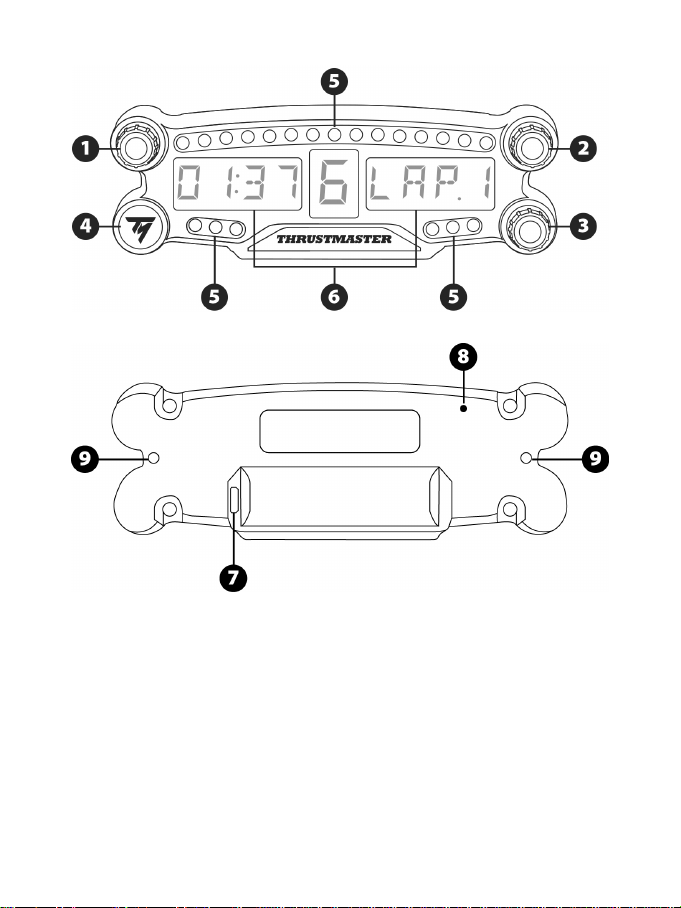
2/12
ESPECIFICACIONES TÉCNICAS
1 Selector giratorio nº 1 con función de botón
pulsador
2 Selector giratorio nº 2 con función de botón
pulsador
3 Selector giratorio nº 3 con función de botón
pulsador (control de ajuste del brillo)
4 Botón de encender/apagar
5 21 LED
6 Pantalla principal
7 Conector de recarga micro USB
8 Indicador de carga
9 Dos agujeros con rosca M3 para fijar el
dispositivo
3/12
ADVERTENCIAS
Antes de utilizar este producto, lee detenidamente este manual y consérvalo para consultarlo
posteriormente.
Advertencia – Descarga eléctrica
* Mantén el producto en un lugar seco y no lo expongas al polvo ni a la luz directa del sol.
* No retuerzas ni tires de los conectores ni de los cables.
* No derrames líquidos en el producto ni en sus conectores.
* No cortocircuites el producto.
* No desmontes nunca el producto ni lo lances al fuego ni lo expongas a temperaturas elevadas.
* No abras el dispositivo: en el interior no hay piezas que el usuario pueda arreglar. Las
reparaciones las debe realizar el fabricante, su representante autorizado o un técnico cualificado.
Advertencia – Batería interna
- Carga por completo el BT LED DISPLAY antes de usarlo.
- No desmontes el dispositivo, ya que invalidarías su garantía.
- Protege el dispositivo de golpes e impactos.
- Este dispositivo no deben usarlo niños menores de 14 años sin la supervisión de un adulto.
THRUSTMASTER® RENUNCIA A CUALQUIER RESPONSABILIDAD EN EL CASO DE
INCUMPLIMIENTO DE ESTAS INSTRUCCIONES.
ADVERTENCIA: SE PUEDE PRODUCIR UNA EXPLOSIÓN SI LA BATERÍA SE SUSTITUYE POR
OTRA DE UN TIPO INCORRECTO.
SIGUE LAS INSTRUCCIONES RELACIONADAS CON LA ELIMINACIÓN DE LAS BATERÍAS.
CÓMO CARGAR LA BATERÍA DEL BT LED DISPLAY
Usando un cable micro USB (como el cable USB suministrado con el sistema PS4™), conecta el
BT LED DISPLAY a uno de los puertos USB alimentados del sistema PS4™.
El conector de carga (7) se encuentra en la parte trasera del BT LED DISPLAY.
El indicador de carga (8) se enciende en rojo cuando el dispositivo está cargando y se apaga
cuando está totalmente cargado.
COMPATIBILIDAD CON JUEGOS DE PS4™
Una lista de juegos de PS4™ compatibles con el BT LED DISPLAY está disponible en
http://support.thrustmaster.com. Selecciona Volantes de carreras / BT LED DISPLAY / Ajustes de los
juegos.
Esta lista se ampliará regularmente con el lanzamiento de nuevos juegos de PS4™ compatibles
con el BT LED DISPLAY.
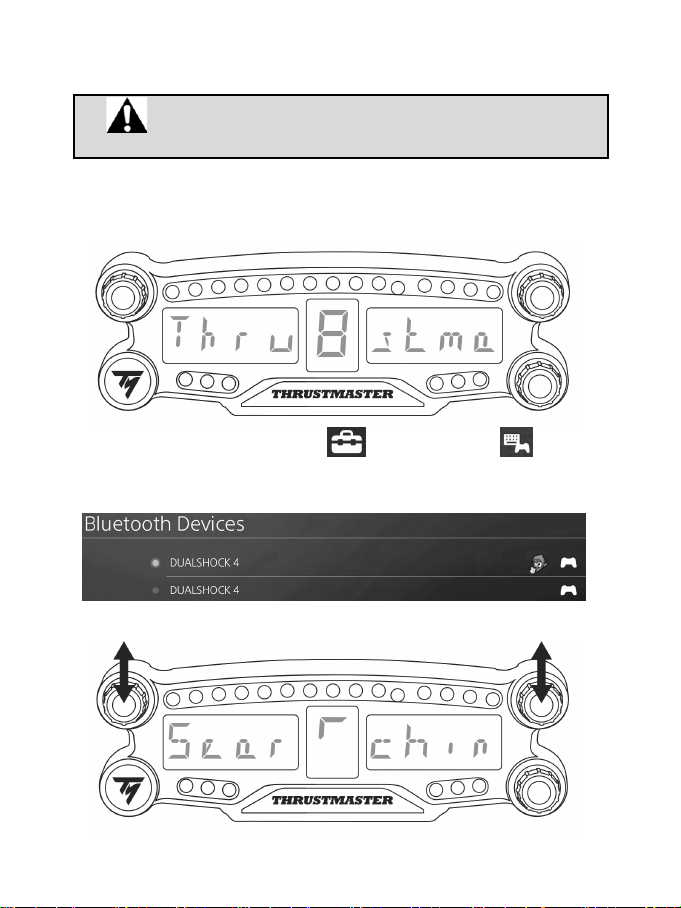
4/12
INSTALACIÓN EN EL SISTEMA PS4™
Registrar el BT LED DISPLAY en el sistema PS4™
Esta operación sólo tendría que realizarse una vez. No es necesario
hacerla cada vez que se reinicie el sistema PS4™.
Al usar el BT LED DISPLAY por primera vez, debes registrarlo obligatoriamente en el sistema PS4™;
esta operación sólo tiene que realizarse una vez.
1. Enciende el BT LED DISPLAY pulsando el botón de encender/apagar (4)
.
Se mostrará el mensaje Thrustmaster BT Wheel Display en la pantalla principal (6).
2. En el menú del sistema PS4™, selecciona [ Settings ] [Ajustes] > [ Devices ]
[Dispositivos] > [ Bluetooth Devices ] [Dispositivos Bluetooth] para buscar automáticamente
dispositivos Bluetooth® cercanos. Aparecerán en la lista los dispositivos emparejados y otros
dispositivos Bluetooth.
3. Pulsa brevemente y suelta los selectores nº 1 y 2 simultáneamente en el BT LED DISPLAY. Se
mostrará el mensaje Searching known devices en la pantalla principal (6).
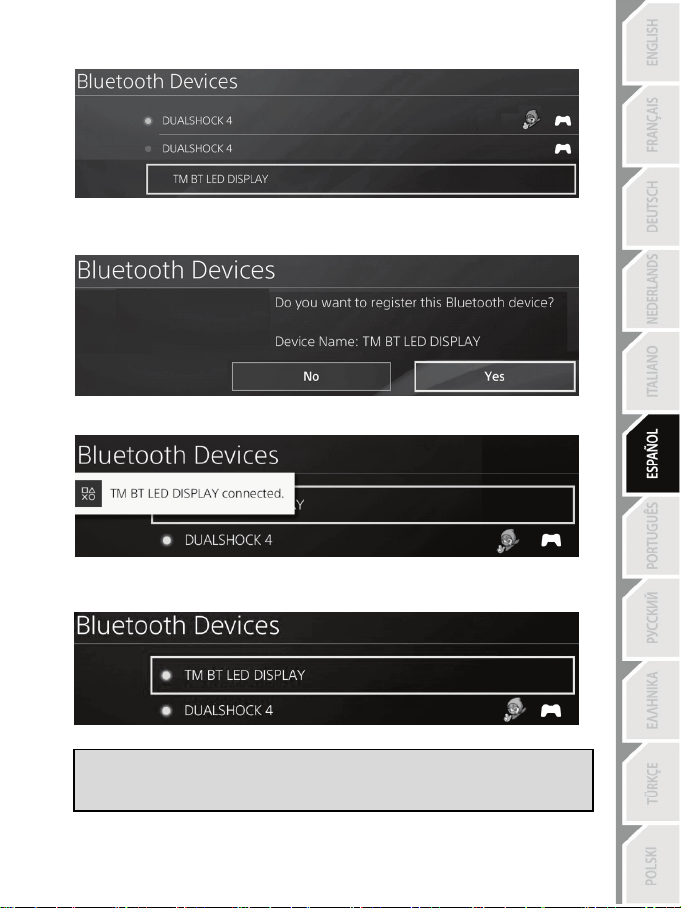
5/12
4. Después de algún tiempo, debe aparecer el nombre TM BT LED DISPLAY en la pantalla del
sistema PS4™. Usando el mando, selecciónalo y pulsa el botón s.
5. El mensaje Do you want to register this Bluetooth device TM BT LED DISPLAY? [¿Deseas
registrar este dispositivo Bluetooth TM BT LED DISPLAY?] aparecerá en la pantalla del sistema
PS4™. Selecciona YES [Sí] y luego pulsa el botón s para confirmar.
6. El mensaje TM BT LED DISPLAY connected [TM BT LED DISPLAY conectado] aparecerá
brevemente en la pantalla del sistema PS4™.
En la pantalla del sistema PS4™, la luz indicadora situada a la izquierda del TM BT LED DISPLAY
se enciende ahora en verde, lo que significa que el dispositivo está conectado correctamente al
sistema.
7. ¡Ya estás preparado para jugar!
Si la operación fallase, apaga el sistema PS4™ y desconecta y luego vuelve a
conectar el cable de alimentación del sistema. Reinicia el sistema PS4™ y luego
repite los pasos de registro del 1 al 6.
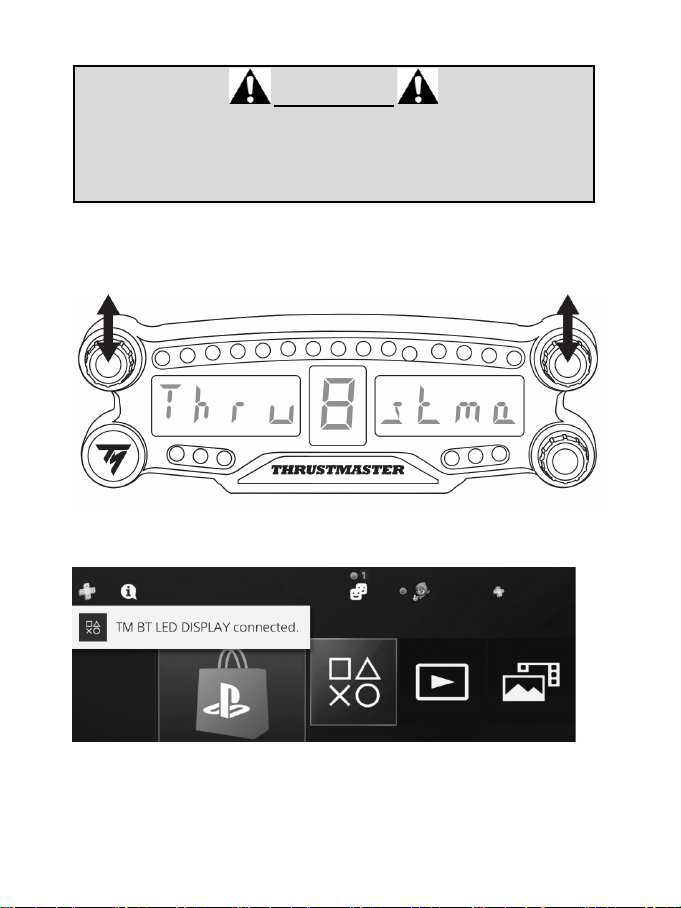
6/12
Conectar el BT LED DISPLAY al sistema PS4™
MUY IMPORTANTE
- Es obligatorio que realices esta operación cada vez que se reinicie el sistema
PS4™.
- La conexión del BT LED DISPLAY al sistema PS4™ sólo funcionará si el paso
anterior (es decir, Registrar el BT LED DISPLAY en el sistema PS4™) se ha
realizado correctamente al menos una vez.
1. Enciende el BT LED DISPLAY pulsando el botón de encender/apagar (4).
Se mostrará el mensaje Thrustmaster BT Wheel Display en la pantalla principal (6).
2. Pulsa brevemente y suelta los selectores nº 1 y 2 simultáneamente en el BT LED DISPLAY.
Aparecerá brevemente el mensaje Connected en la pantalla principal (6).
El mensaje TM BT LED DISPLAY connected [TM BT LED DISPLAY conectado] aparecerá
brevemente en la pantalla del sistema PS4™.
3. ¡Ya estás preparado para jugar!
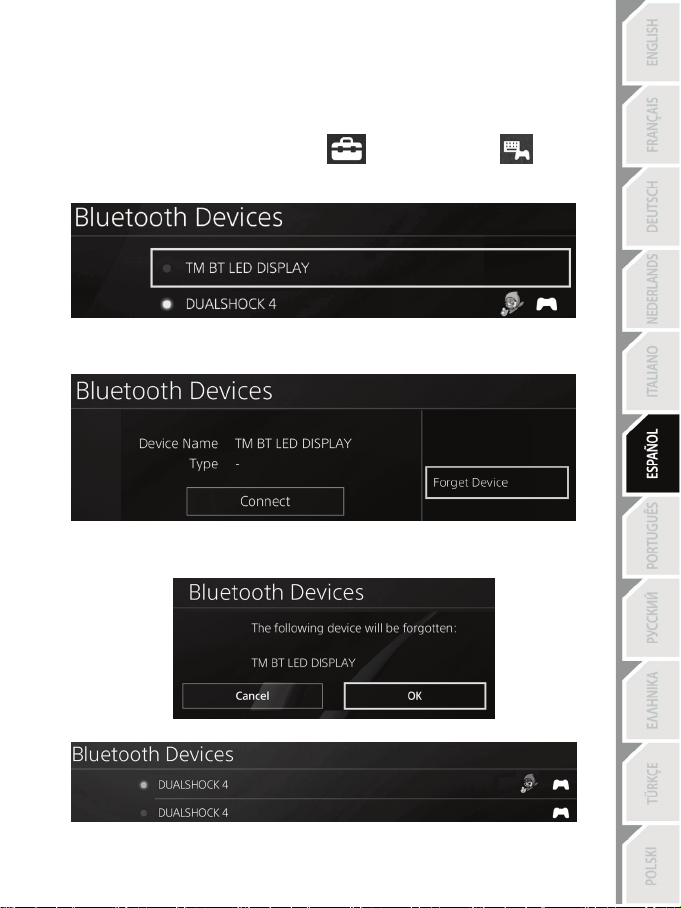
7/12
Quitar el registro del BT LED DISPLAY del sistema PS4™
(Sólo es necesario realizar esta operación al resolver problemas o al comprar un nuevo BT LED
DISPLAY.)
1. Apaga el BT LED DISPLAY pulsando el botón de encender/apagar (4)
.
2. En el menú del sistema PS4™, selecciona
[ Settings ] [Ajustes] > [ Devices ]
[Dispositivos] > [ Bluetooth Devices ] [Dispositivos Bluetooth].
Selecciona TM BT LED DISPLAY y luego pulsa el botón s para confirmar.
3. Aparecerá el mensaje Device Name TM BT LED DISPLAY [Nombre del dispositivo TM BT LED
DISPLAY] en la pantalla. Pulsa el botón OPTIONS en el gamepad y luego selecciona Forget
Device [Olvidar dispositivo]. Pulsa el botón s para confirmar.
4. Aparecerá el mensaje The following device will be forgotten: TM BT LED DISPLAY [Se va a
olvidar el siguiente dispositivo: TM BT LED DISPLAY] en la pantalla.
Selecciona OK [Aceptar] y luego pulsa el botón s para confirmar.
5. Ya se ha quitado el registro del TM BT LED DISPLAY del sistema PS4™.
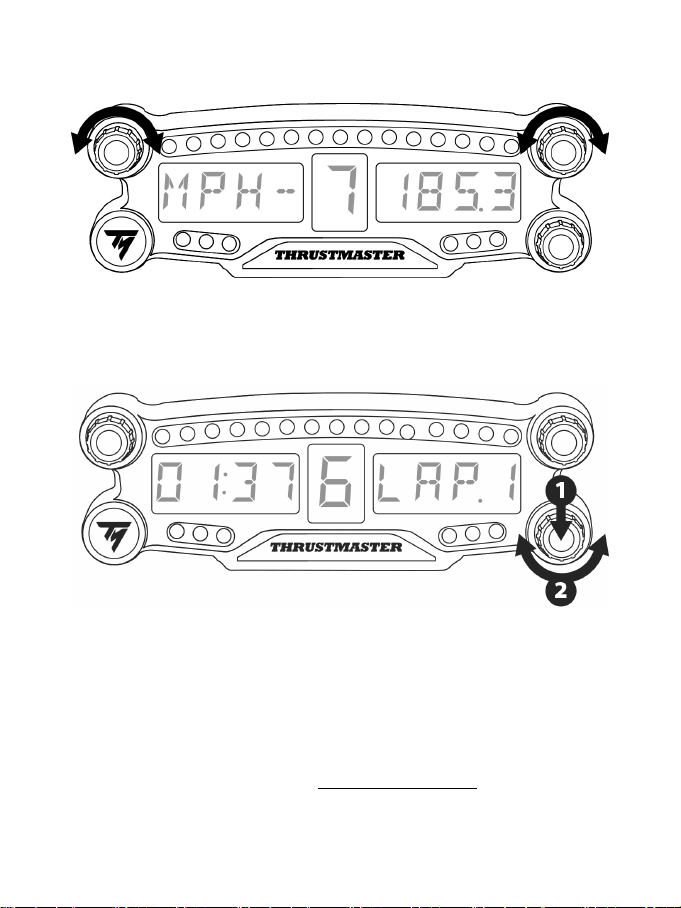
8/12
CÓMO USAR LOS SELECTORES GIRATORIOS Nº 1 Y Nº 2
En función del juego de PS4™, puedes girar los selectores nº 1 y nº 2 para cambiar los ajustes de
visualización y para alternar entre una configuración y otra.
CÓMO AJUSTAR EL BRILLO DEL BT LED DISPLAY
1) Pulsa y suelta el selector nº 3 para cambiar de ajustar el brillo de los 21 LED (5) a ajustar la intensidad
de la pantalla principal (6), y a la inversa.
2) Gira el selector hacia la izquierda para reducir la intensidad o hacia la derecha para aumentarla.
COLOCACIÓN DEL BT LED DISPLAY
Puedes instalar el BT LED DISPLAY a tu conveniencia en un radio de 10 metros alrededor del sistema
PS4™.
También puedes fijar el dispositivo a diversos objetos adecuados* o directamente a algunos volantes de
carreras usando los dos agujeros con rosca M3 situados en la parte trasera del dispositivo (9).
* Se venden por separado
Para obtener más información sobre esto, visita http://support.thrustmaster.com. Selecciona Volantes de
carreras / BT LED DISPLAY, y luego en Manual del usuario o PF.
9/12
ACTUALIZACIÓN DEL FIRMWARE DEL BT LED DISPLAY
Los dos firmwares (general y de Bluetooth) incluidos en el BT LED DISPLAY se pueden actualizar con
versiones más recientes, que incluyen mejoras del producto.
Para mostrar las versiones del firmware del BT LED DISPLAY y actualizarlas de ser necesario: en un
PC, accede a http://support.thrustmaster.com, selecciona Volantes de carreras / BT LED DISPLAY, y
luego selecciona Firmware y sigue las instrucciones y el procedimiento de descarga e instalación.
AYUDA, PF Y CONSEJOS
Visita http://support.thrustmaster.com. Selecciona Volantes de carreras / BT LED DISPLAY, y luego
Manual del usuario o PF.

10/12
INFORMACIÓN DE GARANTÍA AL CONSUMIDOR
En todo el mundo, Guillemot Corporation S.A., cuyo domicilio legal se encuentra en Place du
Granier, B.P. 97143, 35571 Chantepie, Francia (en lo sucesivo “Guillemot”) garantiza al consumidor
que este producto de Thrustmaster estará libre de defectos de materiales y mano de obra, durante
un período de garantía que corresponde al límite de tiempo para interponer una acción legal
referida a la conformidad en relación con este producto. En los países de la Unión Europea, esto
corresponde a un período de dos (2) años a partir de la entrega del producto de Thrustmaster. En
otros países, el período de garantía corresponde al límite de tiempo para interponer una acción
legal referida a la conformidad en relación con este producto de Thrustmaster según las leyes
aplicables del país en el que el consumidor estuviese domiciliado en la fecha de compra del
producto de Thrustmaster (si no existiese una acción similar en el país correspondiente, entonces el
período de garantía será de un (1) año a partir de la fecha de compra original del producto de
Thrustmaster).
Si el producto resultase defectuoso durante el período de garantía, hay que ponerse en contacto
inmediatamente con el Soporte Técnico, que indicará el procedimiento a seguir. Si se confirma el
defecto, el producto debe devolverse a su lugar de compra (o a cualquier otra ubicación indicada
por el Soporte Técnico).
Dentro del contexto de esta garantía, el producto defectuoso del consumidor será sustituido o
restaurado su funcionamiento correcto. Si, durante el período de garantía, el producto de
Thrustmaster fuese sometido a dicho reacondicionamiento, cualquier período de cómo mínimo siete
(7) días durante el que el producto no se pueda usar se añadirá al período de garantía restante
(este período va desde la fecha de petición de intervención del consumidor o desde la fecha en la
que el producto se entrega para el reacondicionamiento, si la fecha en la que el producto se
entrega para el reacondicionamiento fuese posterior a la fecha de la petición de intervención). Si la
ley aplicable lo permite, toda la responsabilidad de Guillemot y sus filiales (incluso por daños
resultantes) se limita a la restauración del funcionamiento correcto o la sustitución del producto de
Thrustmaster. Si la ley aplicable lo permite, Guillemot renuncia a todas las garantías de
comerciabilidad o adecuación para un propósito determinado.
Esta garantía no se aplicará: (1) si el producto ha sido modificado, abierto, alterado o ha sufrido
daños como resultado de un uso inapropiado o abuso, negligencia, accidente, desgaste normal, o
cualquier otra causa no relacionada con un defecto de materiales o fabricación (incluyendo, pero no
de forma exclusiva, la combinación del producto de Thrustmaster con cualquier elemento no
adecuado, incluyendo en particular fuentes de alimentación, baterías recargables, cargadores o
cualquier otro elemento no suministrado por Guillemot para este producto); (2) si el producto se ha
empleado para otro uso distinto del doméstico, incluyendo fines profesionales o comerciales
(salones de juego, entrenamiento, competiciones, por ejemplo); (3) en caso de incumplimiento de
las instrucciones proporcionadas por el Soporte Técnico; (4) a software, es decir software sujeto a
una garantía específica; (5) a consumibles (elementos que se tienen que reemplazar a lo largo de
la vida del producto: por ejemplo, baterías desechables o almohadillas para auriculares de audio);
(6) a accesorios (por ejemplo, cables, cajas, bolsas, bolsos o muñequeras); (7) si el producto se ha
vendido en una subasta pública.
Esta garantía no es transferible.
Los derechos legales del consumidor en relación con las leyes aplicables a la venta de productos
de consumo de su país no se ven afectados por esta garantía.
11/12
Provisiones de garantía adicionales
Durante el período de garantía, Guillemot no proporcionará, en principio, ninguna pieza de
repuesto, ya que el Soporte Técnico es el único autorizado para abrir y/o reacondicionar los
productos de Thrustmaster (con la excepción de los procedimientos de reacondicionamiento que el
Soporte técnico puede solicitar que lleve a cabo el consumidor, mediante instrucciones por escrito –
por ejemplo, debido a la simplicidad y la falta de confidencialidad del proceso de
reacondicionamiento – y suministrando al consumidor las piezas de repuesto necesarias, si hiciese
falta).
Debido a sus ciclos de innovación y para proteger su know-how y secretos comerciales, Guillemot
no proporcionará, en principio, ninguna pieza de repuesto ni instrucciones de reacondicionamiento
para los productos de Thrustmaster cuyo período de garantía haya vencido.
Responsabilidad
Si la ley aplicable lo permite, Guillemot Corporation S.A. (en lo sucesivo “Guillemot”) y sus filiales
renuncian a toda responsabilidad por los daños causados por uno o más de los siguientes motivos:
(1) el producto ha sido modificado, abierto o alterado; (2) incumplimiento de las instrucciones de
montaje; (3) uso inapropiado o abuso, negligencia, accidente (un impacto, por ejemplo); (4)
desgaste normal; (5) el producto se ha empleado para otro uso distinto del doméstico, incluyendo
fines profesionales o comerciales (salones de juego, entrenamiento, competiciones, por ejemplo).
Si la ley aplicable lo permite, Guillemot y sus filiales renuncian a toda responsabilidad por los daños
no relacionados con defectos de materiales o fabricación en relación con el producto (incluyendo,
pero no de forma exclusiva, los daños causados de forma directa o indirecta por cualquier software,
o por combinar el producto de Thrustmaster con cualquier elemento no adecuado, incluyendo en
particular fuentes de alimentación, baterías recargables, cargadores o cualquier otro elemento no
suministrado por Guillemot para este producto).
SOPORTE
TÉCNICO
HTTP://SUPPORT.THRUSTMAS
TER.COM
12/12
DECLARACIÓN DE CONFORMIDAD CON LAS NORMATIVAS DE LA UE
Por la presente, Guillemot Corporation S.A. declara que el dispositivo BT LED DISPLAY cumple con los
requisitos principales y con otras cláusulas pertinentes de la Directiva 2014/53/UE (RED). La declaración
de conformidad se puede ver en el sitio siguiente:
http://www.thrustmaster.com/certificates/BT_Led_Display/Doc-BT_Led_Display.pdf
Banda de frecuencia: 2402-2480 MHz, potencia MÁX. RF: < 10 dBm
COPYRIGHT
© 2017 Guillemot Corporation S.A. Todos los derechos reservados. Thrustmaster® es una marca
comercial registrada de Guillemot Corporation S.A.
Licenciado para la venta en Europa, África, Oriente Medio, Rusia, India y Oceanía. Para usar
exclusivamente con PlayStation
®4.
Todas las demás marcas comerciales son propiedad de sus respectivos dueños. Ilustraciones no
vinculantes. Los contenidos, diseños y especificaciones están sujetos a cambios sin previo aviso y
pueden variar de un país a otro. Fabricado en China.
Fabricado y distribuido por Guillemot Corporation S.A.
RECOMENDACIÓN DE PROTECCIÓN AMBIENTAL
En la Unión Europea y Turquía: Al terminar su vida útil, este producto no debe tirarse
en un contenedor de basuras estándar, sino que debe dejarse en un punto de
recogida de desechos eléctricos y equipamiento electrónico para ser reciclado.
Esto viene confirmado por el símbolo que se encuentra en el producto, manual del
usuario o embalaje.
Dependiendo de sus características, los materiales pueden reciclarse. Mediante el
reciclaje y otras formas de procesamiento de los desechos eléctricos y el
equipamiento electrónico puedes contribuir de forma significativa a ayudar a proteger
el medio ambiente.
Contacta con las autoridades locales para más información sobre el punto de recogida más cercano.
Para los demás países: cumpla las leyes locales sobre reciclaje de equipos eléctricos y electrónicos.
Esta información debe conservarse. Los colores y motivos decorativos pueden variar.
Los adhesivos y los cierres de plástico se deben quitar del producto antes de utilizarlo.
www.thrustmaster.com
*Aplicable únicamente a la UE y Turquía
*
*
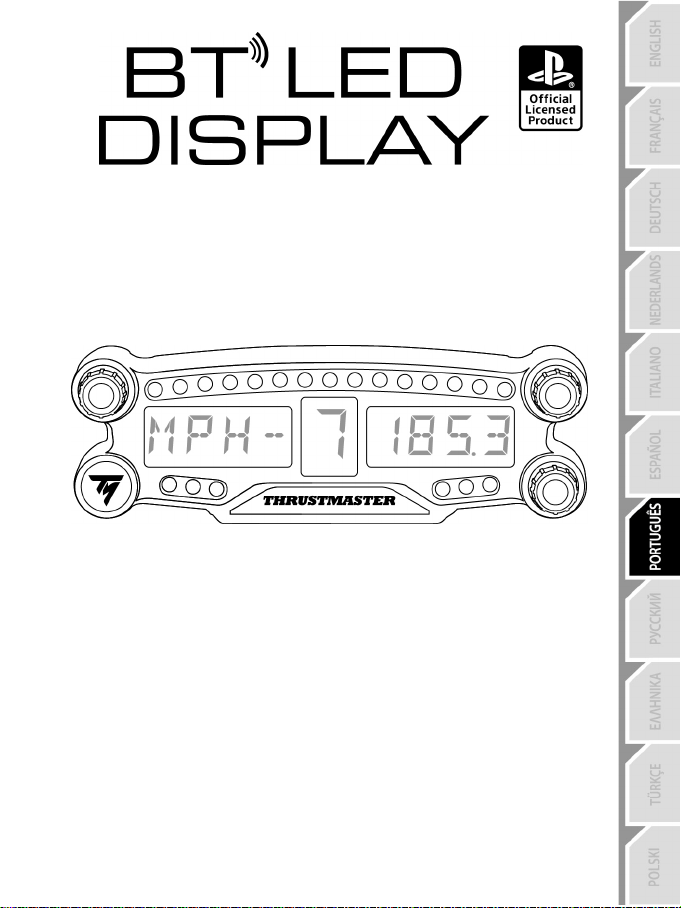
1/12
Para a PlayStation
®4
Manual do Utilizador
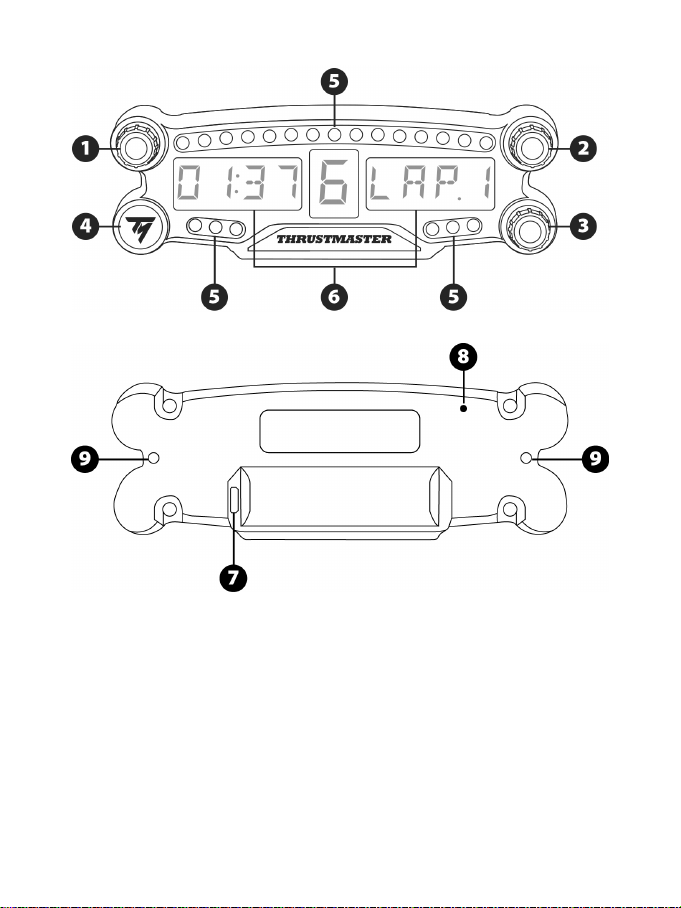
2/12
ESPECIFICAÇÕES TÉCNICAS
1 Seletor giratório n.º 1 com função de botão de
pressão
2 Seletor giratório n.º 2 com função de botão de
pressão
3 Seletor giratório n.º 3 com função de botão de
pressão (controlo de ajuste do brilho)
4 Botão para ligar/desligar
5 21 LED
6 Ecrã principal
7 Conector de carregamento micro-USB
8 Indicador de carregamento
9 Dois orifícios roscados M3 para fixar o
dispositivo
3/12
ATENÇÃO
Antes de utilizar este produto, leia atentamente este manual e guarde-o para posterior consulta.
Atenção – Choque elétrico
* Guarde o produto num local seco e não o exponha ao pó nem à luz do sol.
* Não torça nem puxe os conectores e os cabos.
* Não derrame líquidos sobre o produto ou os respetivos conectores.
* Não provoque um curto-circuito no produto.
* Nunca desmonte o produto, não o atire para o fogo nem o exponha a temperaturas elevadas.
* Não abra o dispositivo: não contém peças reparáveis pelo utilizador no interior. Todas as
reparações devem ser realizadas pelo fabricante, pelo seu representante autorizado ou por um
técnico qualificado.
Atenção – Bateria interna
- Carregue completamente o BT LED DISPLAY antes de utilizá-lo.
- Não desmonte o dispositivo, caso contrário anulará a respetiva garantia.
- Proteja o dispositivo de choques e impactos.
- Este dispositivo não deve ser utilizado por crianças com menos de 14 anos de idade sem a
supervisão de um adulto.
A THRUSTMASTER® REJEITA QUALQUER RESPONSABILIDADE NA EVENTUALIDADE DE
INCUMPRIMENTO DESTAS INSTRUÇÕES.
ATENÇÃO: PODERÁ OCORRER UMA EXPLOSÃO SE A BATERIA FOR SUBSTITUÍDA POR
UMA BATERIA DE TIPO INCORRETO.
SIGA AS INSTRUÇÕES RELATIVAS À ELIMINAÇÃO DE BATERIAS.
CARREGAR A BATERIA DO BT LED DISPLAY
Utilizando um cabo micro-USB cable (tal como o cabo USB fornecido com o sistema PS4™), ligue
o BT LED DISPLAY a uma das portas USB livres do sistema PS4™.
O indicador de carregamento (7) está situado na parte posterior do BT LED DISPLAY.
O indicador de carregamento (8) acende-se a vermelho quando o dispositivo está à carga, e apaga-
se quando está completamente carregado.
COMPATIBILIDADE COM JOGOS PARA A PS4™
Uma lista de jogos para a PS4™ compatíveis com o BT LED DISPLAY está disponível em
http://support.thrustmaster.com. Selecione Volantes / BT LED DISPLAY / Configurações de jogos.
Esta lista será expandida regularmente com o lançamento de novos jogos para a PS4™
compatíveis com o BT LED DISPLAY.
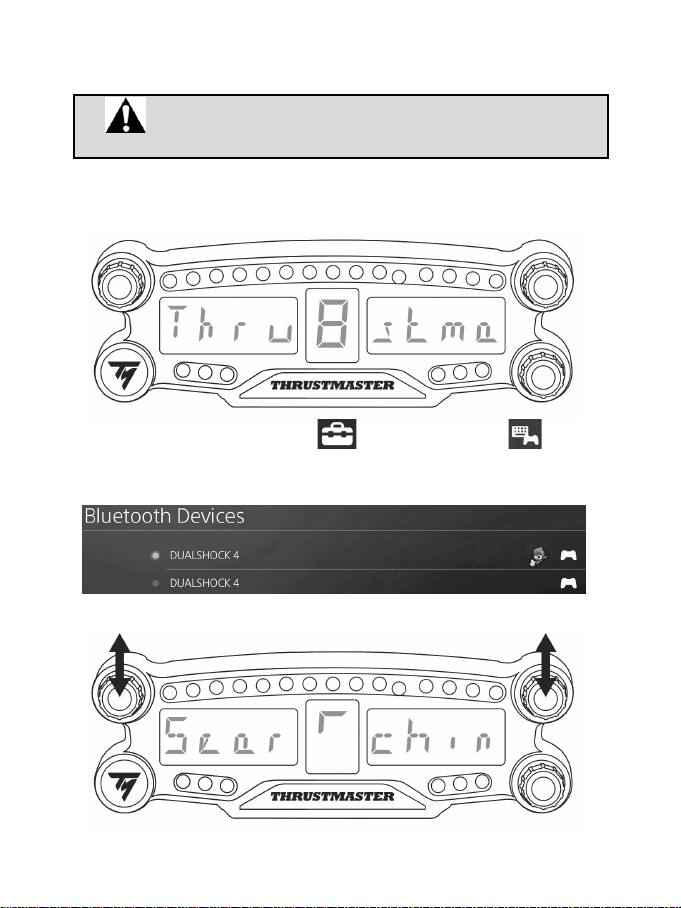
4/12
INSTALAÇÃO NO SISTEMA PS4™
Registar o BT LED DISPLAY no sistema PS4™
Esta operação apenas deve ser realizada uma vez. Não é necessária
sempre que o sistema PS4™ for reiniciado.
Ao utilizar o BT LED DISPLAY pela primeira vez, deve registá-lo obrigatoriamente no seu sistema
PS4™; esta operação apenas deve ser realizada uma vez.
1. Prima o botão para ligar/desligar (4) para ligar o BT LED DISPLAY.
A mensagem Thrustmaster BT Wheel Display é apresentada no ecrã principal (6).
2. No menu do sistema PS4™, selecione [Settings (Definições)] > [Devices
(Dispositivos)] > [Bluetooth Devices (Dispositivos Bluetooth)] para procurar automaticamente
dispositivos Bluetooth® perto de si. Os dispositivos emparelhados e outros dispositivos Bluetooth
são apresentados na lista.
3. Prima brevemente e solte os seletores n.º 1 e 2 em simultâneo no BT LED DISPLAY. A mensagem
Searching known devices é apresentada no ecrã principal (6).
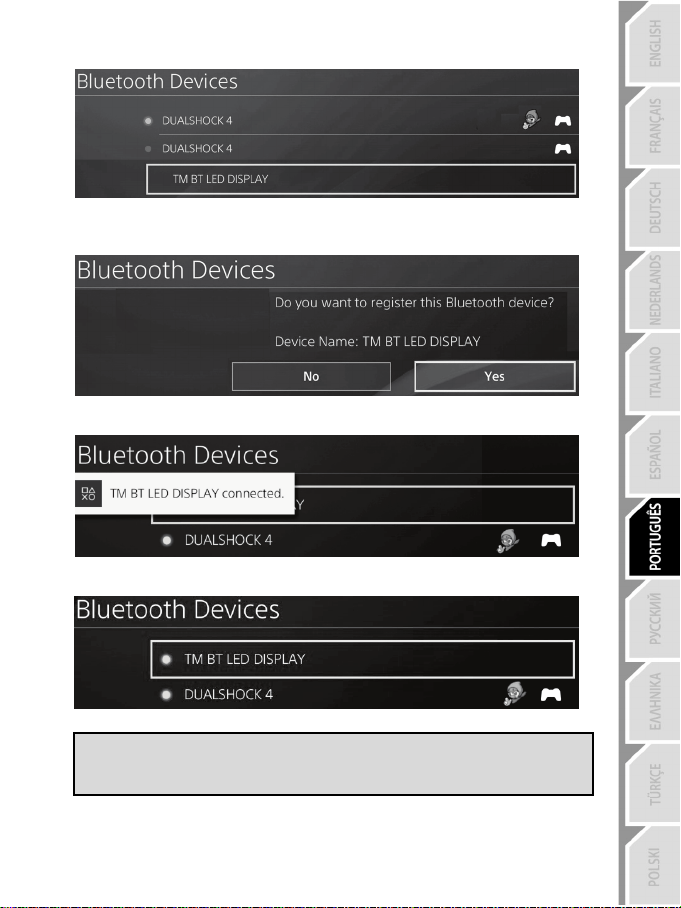
5/12
4. Após algum tempo, o nome TM BT LED DISPLAY deverá aparecer no ecrã do sistema PS4™.
Utilizando o controlador, selecione-o e prima o botão s.
5. A mensagem Do you want to register this Bluetooth device TM BT LED DISPLAY?
(Pretende registar este dispositivo Bluetooth TM BT LED DISPLAY?) é apresentada no ecrã
do sistema PS4™. Selecione YES (SIM) e em seguida prima o botão s para confirmar.
6. A mensagem TM BT LED DISPLAY connected (TM BT LED DISPLAY ligado) surge
brevemente no ecrã do sistema PS4™.
No ecrã do sistema PS4™, a luz indicadora situado à esquerda do TM BT LED DISPLAY aparece
agora acesa a verde, o que significa que o dispositivo está ligado corretamente ao sistema.
7. Está pronto para começar a jogar!
Se a operação falhar, desligue o sistema PS4™ e em seguida desligue e volte a
ligar o cabo de alimentação do sistema. Reinicie o sistema PS4™ e repita os
passos de registo de 1 a 6.
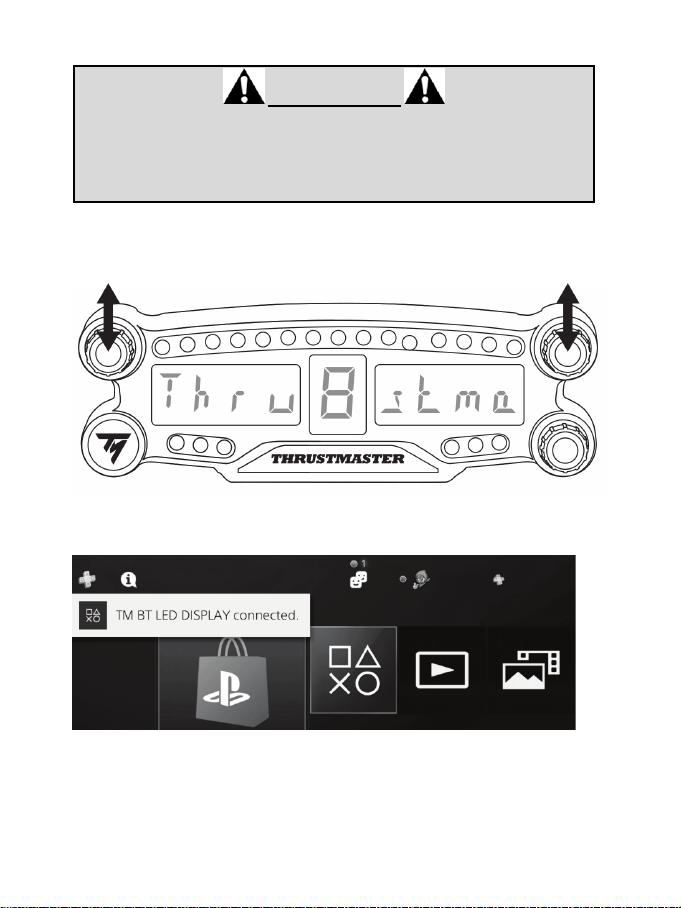
6/12
Ligar o BT LED DISPLAY ao sistema PS4™
MUITO IMPORTANTE
- É imperativo que realize esta operação sempre que o sistema PS4™ for
reiniciado.
- A ligação do BT LED DISPLAY ao sistema PS4™ apenas funcionará se o
passo anterior (ou seja, Registar o BT LED DISPLAY no sistema PS4™) foi
executado corretamente pelo menos uma vez.
1. Prima o botão para ligar/desligar (4) para ligar o BT LED DISPLAY.
A mensagem Thrustmaster BT Wheel Display é apresentada no ecrã principal (6).
2. Prima brevemente e solte os seletores n.º 1 e 2 em simultâneo no BT LED DISPLAY.
A mensagem Connected surge brevemente no ecrã principal (6).
A mensagem TM BT LED DISPLAY connected (TM BT LED DISPLAY ligado) surge brevemente
no ecrã do sistema PS4™.
3. Está pronto para começar a jogar!
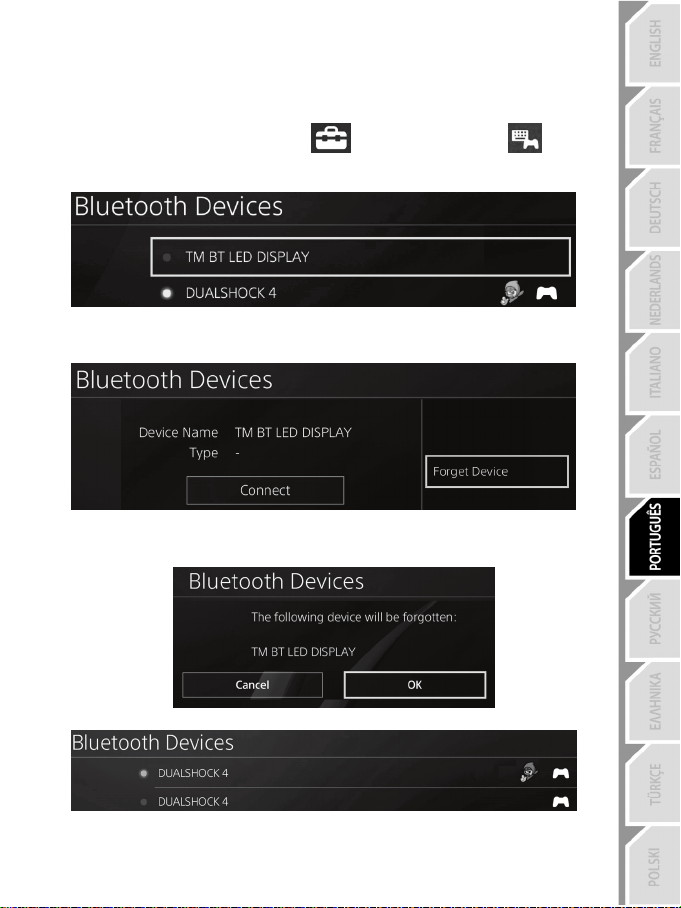
7/12
Anular o registo do BT LED DISPLAY no sistema PS4™
(Esta operação apenas é necessária ao resolver problemas, ou ao comprar um novo BT LED
DISPLAY.)
1. Prima o botão para ligar/desligar (4) para desligar o BT LED DISPLAY.
2. No menu do sistema PS4™, selecione
[Settings (Definições)] > [Devices
(Dispositivos)] > [Bluetooth Devices (Dispositivos Bluetooth)].
Selecione TM BT LED DISPLAY e em seguida prima o botão s para confirmar.
3. A mensagem Device Name TM BT LED DISPLAY (Nome do dispositivo TM BT LED DISPLAY) é
apresentada no ecrã. Prima o botão OPTIONS no gamepad e selecione Forget Device (Esquecer
dispositivo). Prima o botão s para confirmar.
4. A mensagem The following device will be forgotten: TM BT LED DISPLAY (O seguinte
dispositivo será esquecido: TM BT LED DISPLAY) é apresentada no ecrã.
Selecione OK e prima o botão s para confirmar.
5. O registo do TM BT LED DISPLAY encontra-se agora anulado no seu sistema PS4™.
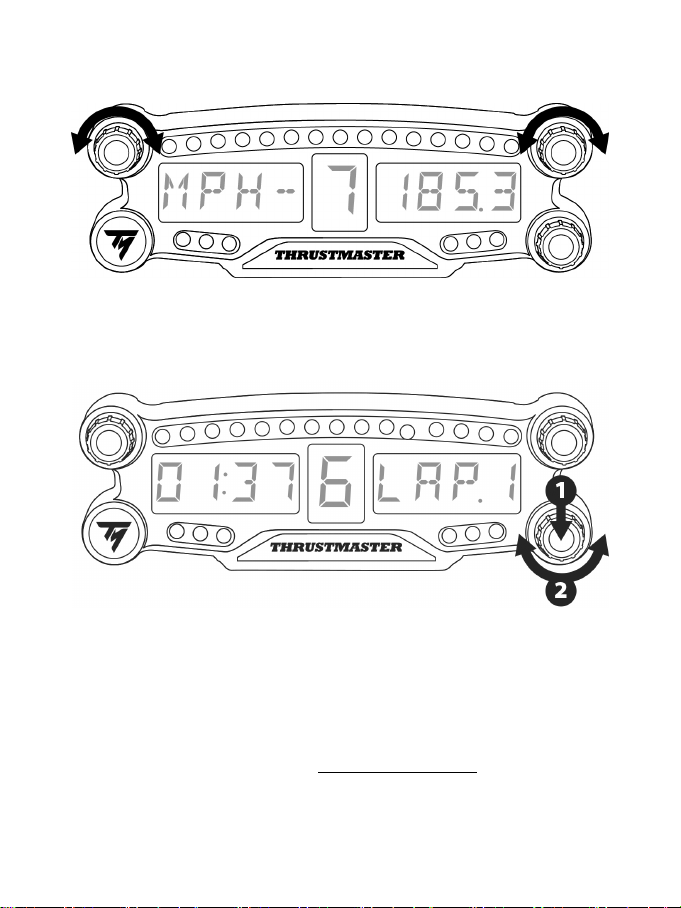
8/12
UTILIZAR OS SELETORES GIRATÓRIOS N.º 1 E 2
Consoante o jogo para a PS4™, pode rodar os seletores n.º 1 e 2 para alterar as definições de
visualização e mudar de uma definição para outra.
AJUSTAR O BRILHO DO BT LED DISPLAY
1) Prima e solte o seletor n.º 3 para alterar o brilho dos 21 LED (5) a fim de ajustar a intensidade do ecrã
principal (6) e vice-versa.
2) Rode o seletor para a esquerda para reduzir a intensidade ou para a direita para aumentá-la.
FIXAR O BT LED DISPLAY
Pode instalar o BT LED DISPLAY ao seu gosto num raio de 10 metros à volta do sistema PS4™.
Pode também fixar o dispositivo a vários objetos adequados* ou diretamente a alguns volantes utilizando
os dois orifícios roscados M3 situados na parte posterior do dispositivo (9).
* Vendido à parte
Para mais informações a este respeito, aceda a http://support.thrustmaster.com. Selecione Volantes / BT
LED DISPLAY, seguido de Manual do utilizador ou FAQ.
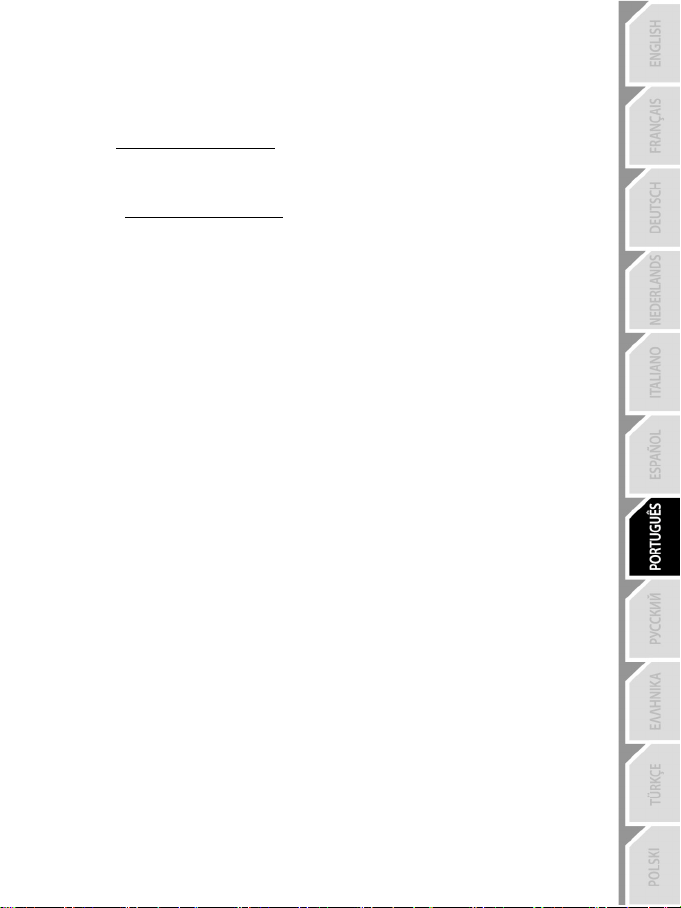
9/12
ATUALIZAR O FIRMWARE DO BT LED DISPLAY
Os dois firmware (firmware geral e firmware Bluetooth) incluídos no BT LED DISPLAY podem ser
atualizados com versões mais recentes, dotadas de melhoramentos do produto.
Para visualizar as versões de firmware do BT LED DISPLAY e atualizá-las, se necessário: num PC,
aceda a http://support.thrustmaster.com, selecione Volantes / BT LED DISPLAY, selecione Firmware e
siga as instruções e o procedimento de transferência e instalação.
AJUDA, FAQ E SUGESTÕES
Aceda a http://support.thrustmaster.com. Selecione Volantes / BT LED DISPLAY, seguido de
Manual do utilizador ou FAQ.

10/12
INFORMAÇÕES SOBRE A GARANTIA PARA O CONSUMIDOR
A Guillemot Corporation S.A., com sede social sita em Place du Granier, B.P. 97143, 35571
Chantepie, França (a seguir designada como “Guillemot”) garante a nível mundial ao consumidor
que este produto Thrustmaster está livre de defeitos em termos de materiais e fabrico durante um
período de garantia que corresponde ao limite de tempo para intentar uma ação de conformidade
relativamente a este produto. Nos países da União Europeia, isto corresponde a um período de
dois (2) anos desde a entrega do produto Thrustmaster. Noutros países, o período de garantia
corresponde ao limite de tempo para intentar uma ação de conformidade relativamente ao produto
Thrustmaster de acordo com a legislação em vigor do país no qual o consumidor residia à data de
compra do produto Thrustmaster (se a dita ação não existir no país correspondente, então o
período de garantia será de um (1) ano a partir da data de compra original do produto
Thrustmaster.
No caso de o produto apresentar algum defeito durante o período da garantia, contacte
imediatamente o Suporte Técnico, que lhe indicará o procedimento a tomar. Se esse defeito se
confirmar, o produto terá de ser devolvido ao respetivo local de compra (ou qualquer outro local
indicado pelo Suporte Técnico).
No âmbito da presente garantia, e por opção do Suporte Técnico, o produto defeituoso do
consumidor será substituído ou reparado. Se, durante o período da garantia, o produto
Thrustmaster for submetido à dita reparação, qualquer período mínimo de (7) dias durante o qual o
produto estiver fora de serviço será adicionado ao período da garantia restante (este período
decorre desde a data do pedido intervenção pelo consumidor ou desde a data em que o produto
em questão é disponibilizado para reparação, se a data em que o produto é disponibilizado para
reparação for posterior à data do pedido de intervenção). Se for permitido pela legislação em vigor,
a responsabilidade total da Guillemot e das respetivas filiais (incluindo para danos indiretos) está
limitada à reparação ou à substituição do produto Thrustmaster. Se for permitido pela legislação
em vigor, a Guillemot rejeita todas as garantias de comercialização ou adequação a um fim
específico.
A presente garantia não se aplicará: (1) se o produto tiver sido modificado, aberto, alterado ou
danificado em resultado de utilização inadequada ou abusiva, negligência, acidente, desgaste
normal ou qualquer outra casa relacionada com um defeito de material ou fabrico (incluindo, mas
sem limitação, combinar o produto Thrustmaster com qualquer elemento inadequado, incluindo, em
particular, fontes de alimentação, baterias recarregáveis, carregadores ou quaisquer outros
elementos não fornecidos pela Guillemot para este produto); (2) se o produto tiver sido utilizado
fora do âmbito da utilização doméstica, incluindo para fins profissionais ou comerciais (salas de
jogos, treino e competições, por exemplo); (3) na eventualidade de incumprimento das instruções
fornecidas pelo Suporte Técnico; (4) a software, estando o mesmo sujeito a uma garantia
específica; (5) a consumíveis (elementos para substituir ao longo da vida útil do produto: baterias
descartáveis, auscultadores de áudio ou auriculares de auscultadores, por exemplo); (6) a
acessórios (cabos, estojos, bolsas, sacos e correias de pulso, por exemplo); (7) se o produto foi
vendido num leilão público.
A presente garantia não é transmissível.
Os direitos legais do consumidor no que concerne à legislação aplicável à venda de bens de
consumo no seu país não são afetados pela presente garantia.
11/12
Disposições de garantia adicionais
Durante o período da garantia, a Guillemot não fornecerá, em princípio, quaisquer peças de
substituição, uma vez que o Suporte Técnico é a única parte autorizada a abrir e/ou reparar
qualquer produto Thrustmaster (à exceção de quaisquer procedimentos de reparação que o
Suporte Técnico possa pedir ao consumidor para realizar, através de instruções por escrito – por
exemplo, devido à simplicidade e à falta de confidencialidade do processo de reparação – e
fornecendo ao consumidor a(s) peça(s) de substituição necessária(s), quando aplicável).
Tendo em conta os seus ciclos de inovação, e a fim de proteger o seu know-how e segredos
comerciais, a Guillemot não fornecerá, em princípio, qualquer notificação de reparação ou peças de
substituição para produtos Thrustmaster cujo período da garantia tenha expirado.
Responsabilidade
Se for permitido ao abrigo da legislação aplicável, a Guillemot Corporation S.A. (a seguir designada
“Guillemot”) e as respetivas filiais rejeitam qualquer responsabilidade por danos resultantes de uma
ou mais das seguintes causas: (1) o produto foi modificado, aberto ou alterado; (2) incumprimento
das instruções de montagem; (3) utilização inadequada ou abusiva, negligência ou acidente (um
impacto, por exemplo); (4) desgaste normal; (5) utilização do produto fora do âmbito além da
utilização doméstica, incluindo para fins profissionais ou comerciais (salas de jogos, treino e
competições, por exemplo). Se for permitido ao abrigo da legislação aplicável, a Guillemot e as
respetivas filiais rejeitam qualquer responsabilidade por danos relacionados com um defeito de
material ou fabrico relativamente ao produto (incluindo, mas sem limitação, quaisquer danos
causados direta ou indiretamente por qualquer software ou por combinar o produto Thrustmaster
com qualquer elemento inadequado, incluindo, em particular, fontes de alimentação, baterias
recarregáveis, carregadores ou quaisquer outros elementos não fornecidos pela Guillemot para
este produto).
SUPORTE TÉCNICO
http://support.thrustmaster.com
12/12
DECLARAÇÃO DE CONFORMIDADE COM AS NORMAS DA UE
A Guillemot Corporation S.A. declara pelo presente que o dispositivo BT LED DISPLAY está em
conformidade com os requisitos principais e outras cláusulas relevantes da Diretiva 2014/53/UE
(Equipamentos de Rádio). A declaração de conformidade pode ser consultada no seguinte endereço:
http://www.thrustmaster.com/certificates/BT_Led_Display/Doc-BT_Led_Display.pdf
Banda de frequência: 2402-2480 MHz, potência máxima de RF: <10 dBm
DIREITOS DE AUTOR
© 2017 Guillemot Corporation S.A. Todos os direitos reservados. Thrustmaster® é uma marca registada
da Guillemot Corporation S.A.
Licenciado para venda na Europa, África, Médio Oriente, Rússia, Índia e Oceânia. Para utilização
exclusiva com a PlayStation
®4.
Todas as outras marcas comerciais pertencem aos respetivos proprietários. As ilustrações não são
vinculativas. Os conteúdos, os desenhos e as especificações estão sujeitos a alteração sem aviso prévio
e podem variar consoante o país. Fabricado na China.
Fabricado e distribuído pela Guillemot Corporation S.A.
RECOMENDAÇÕES DE PROTECÇÃO AMBIENTAL
Na União Europeia e Turquia: Quando este produto chegar ao fim da sua vida útil, não
o elimine juntamente com os resíduos domésticos normais; em vez disso, deixe-o num
ponto de recolha de resíduos de equipamento eléctrico e electrónico (REEE) para
posterior reciclagem.
O símbolo presente no produto, no manual de utilizador ou na caixa confirma-o.
Os materiais podem ser reciclados, dependendo das suas características. Através da
reciclagem e de outras formas de processamento de resíduos de equipamento eléctrico
e electrónico, pode dar um importante contributo no sentido de ajudar a proteger o
ambiente.
Contacte as autoridades locais para saber onde fica o ponto de recolha mais perto da sua área de
residência.
Relativamente a todos os outros países: Respeite a legislação local sobre a reciclagem de equipamento
eléctrico e electrónico.
Informações a reter. As cores e as decorações podem variar.
Os fechos e os adesivos devem ser removidos do produto antes da utilização.
www.thrustmaster.com
*Aplicável apenas à União Europeia e Turquia
*
*
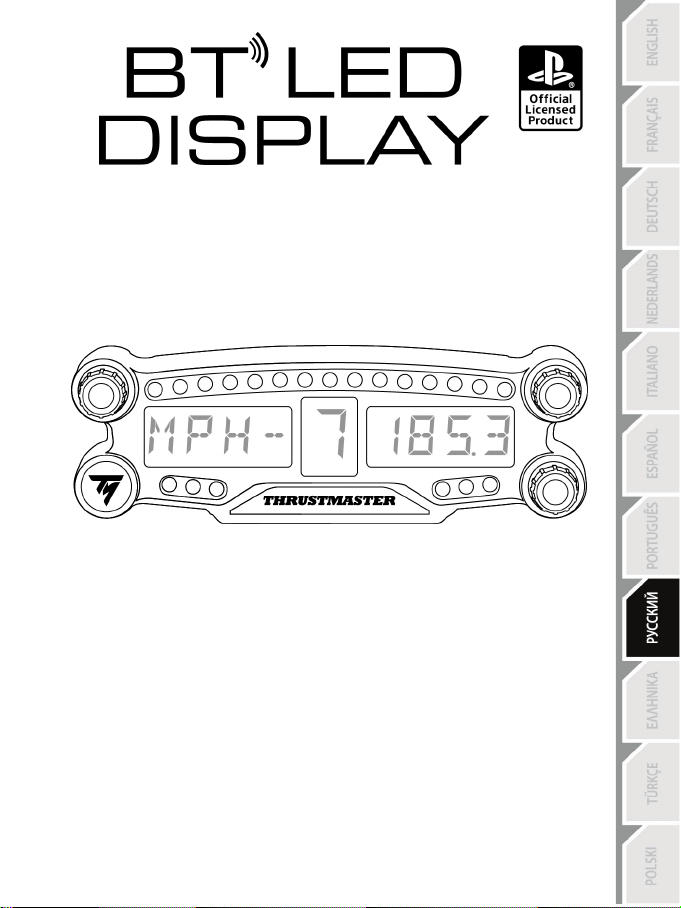
1/12
Для PlayStation
®4
Инструкция по эксплуатации
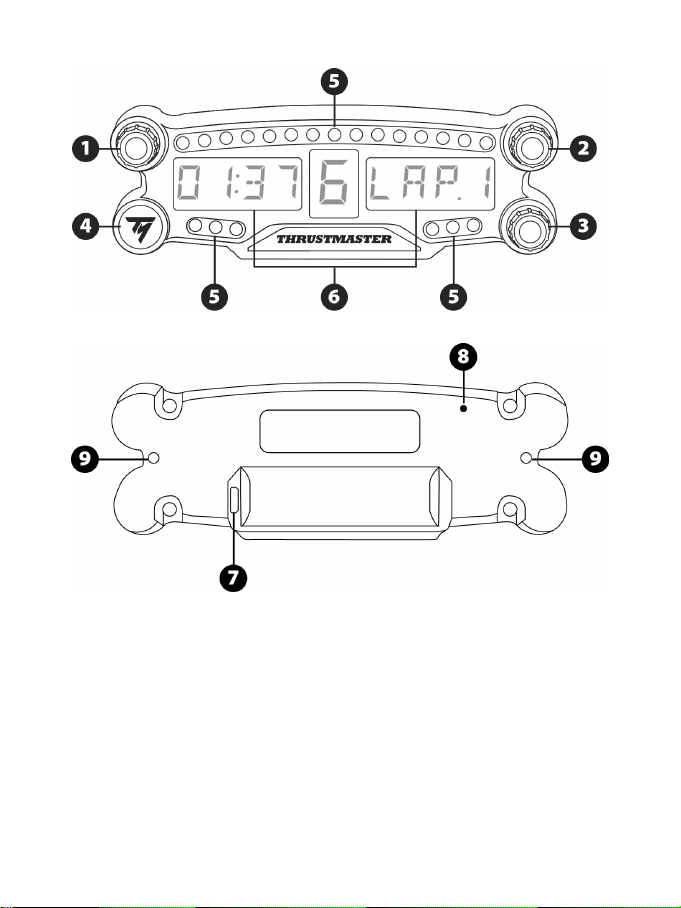
2/12
ТЕХНИЧЕСКИЕ ХАРАКТЕРИСТИКИ
1 Поворотный переключатель 1 с функцией
нажимной кнопки
2 Поворотный переключатель 2 с функцией
нажимной кнопки
3 Поворотный переключатель 3 с функцией
нажимной кнопки
4 Кнопка питания
5 21 индикатор
6 Основной дисплей
7 Разъем микро-USB для зарядки
8 Индикатор зарядки
9 Два резьбовых отверстия M3 для
крепления устройства
3/12
ВНИМАНИЕ!
Перед эксплуатацией данного изделия внимательно ознакомьтесь с настоящей инструкцией и
сохраните ее на будущее.
Внимание — опасность поражения электрическим током!
* Изделие следует хранить в сухом месте, избегая попадания на него пыли и солнечного
света.
* Не допускается перекручивание разъемов и кабелей; кабели нельзя тянуть.
* Не допускается попадание жидкости на изделие и его разъемы.
* Не допускается короткое замыкание в цепи изделия.
* Запрещается разбирать изделие, бросать изделие в огонь и подвергать его воздействию
высоких температур.
* Нельзя вскрывать устройство — в нем нет деталей, которые могут обслуживаться
пользователем. Любой ремонт должен выполняться производителем, его авторизованным
представителем или квалифицированным техническим специалистом.
Внимание — встроенный аккумулятор
- Полностью зарядите устройство BT LED DISPLAY перед использованием.
- Не разбирайте устройство, иначе прекратится действие гарантии.
- Предохраняйте изделие от ударов и других внешних воздействий.
- Устройство может использоваться детьми младше 14 лет только под наблюдением
взрослых.
КОМПАНИЯ THRUSTMASTER® ОТКАЗЫВАЕТСЯ ОТ ЛЮБОЙ ОТВЕТСТВЕННОСТИ В
СЛУЧАЕ НЕСОБЛЮДЕНИЯ ДАННЫХ ИНСТРУКЦИЙ.
ВНИМАНИЕ! ЗАМЕНА АККУМУЛЯТОРА ЭЛЕМЕНТОМ ПИТАНИЯ НЕВЕРНОГО ТИПА МОЖЕТ
ПРИВЕСТИ К ВЗРЫВУ.
ВЫПОЛНЯЙТЕ УКАЗАНИЯ ПО УТИЛИЗАЦИИ ЭЛЕМЕНТОВ ПИТАНИЯ.
ЗАРЯДКА АККУМУЛЯТОРА УСТРОЙСТВА BT LED DISPLAY
С помощью кабеля с разъемом микро-USB (например, USB-кабеля из комплекта системы
PS4™) подключите устройство BT LED DISPLAY к одному из свободных USB-портов системы
PS4™ с питанием.
Разъем для зарядки (7) находится на задней стороне устройства BT LED DISPLAY.
Индикатор зарядки (8) горит красным во время зарядки устройства и выключается после
полной зарядки.
СОВМЕСТИМОСТЬ С ИГРАМИ ДЛЯ PS4™
Список игр для PS4™, совместимых с устройством BT LED DISPLAY, можно найти на
сайте:http://ts.thrustmaster.com. Выберите «Рулевые системы / BT LED DISPLAY / Настройки в играх».
Этот перечень регулярно расширяется по мере выпуска новых игр для PS4™, совместимых с
устройством BT LED DISPLAY.
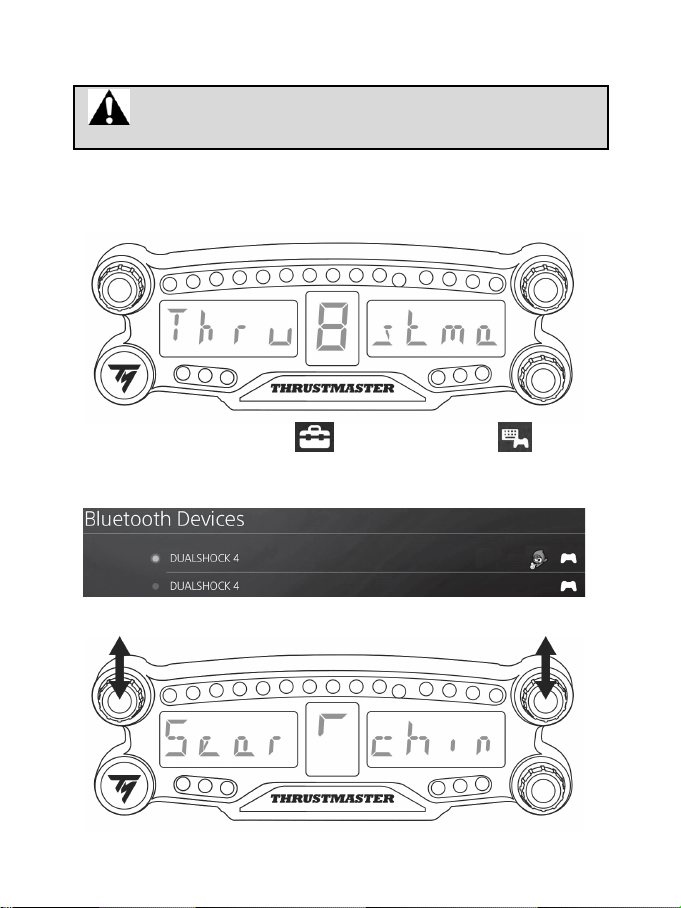
4/12
УСТАНОВКА НА СИСТЕМУ PS4™
Регистрация устройства BT LED DISPLAY в системе PS4™
Эта операция выполняется один раз. Она не требуется после каждой
перезагрузки системы PS4™.
При первом использовании устройства BT LED DISPLAY его следует обязательно
зарегистрировать в системе PS4™; эта операция должна быть выполнена всего один раз.
1. Включите устройство BT LED DISPLAY нажатием кнопки питания (4)
.
На основном дисплее (6) прокручивается сообщение: Thrustmaster BT Wheel Display.
2. В меню системы PS4™ выберите [ Settings ] (Настройки) > [ Devices ]
(Устройства) > [ Bluetooth Devices ] (Устройства Bluetooth) для автоматического поиска
ближайших устройств Bluetooth®. В этом списке отобразятся сопряженные устройства и
другие устройства Bluetooth.
3. Одновременно быстро нажмите и отпустите переключатели 1 и 2 на устройстве BT LED
DISPLAY. На основном дисплее (6) прокручивается сообщение: Searching known devices.
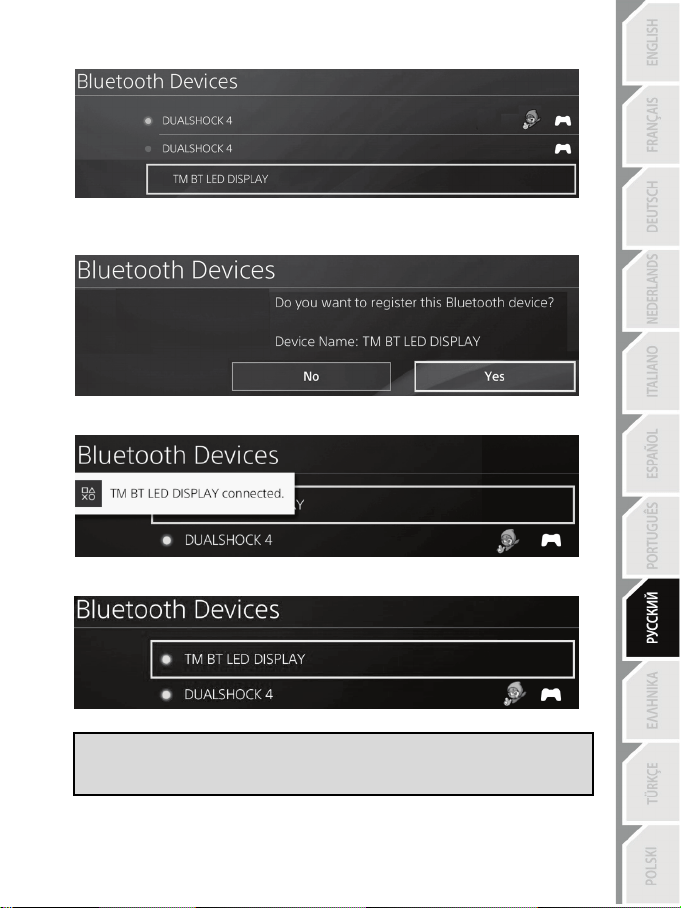
5/12
4. Через некоторое время на дисплее системы PS4™ должно отобразиться имя TM BT LED
DISPLAY. С помощью контроллера выберите его и нажмите кнопку s.
5. На дисплее системы PS4™ отобразится сообщение: Do you want to register this Bluetooth
device TM BT LED DISPLAY? (Зарегистрировать Bluetooth-устройство TM BT LED
DISPLAY). Выберите YES (ДА) и нажмите кнопку s для подтверждения.
6. На дисплее системы PS4™ кратко отобразится сообщение: TM BT LED DISPLAY
connected (Устройство TM BT LED DISPLAY подключено).
На дисплее системы PS4™, слева
от имени TM BT LED DISPLAY загорится зеленый
индикатор, что означает правильное подключение устройства к системе.
7. Теперь все готово для игры!
В случае сбоя операции выключите и отсоедините систему PS4™, затем
снова подключите кабель питания системы. Перезапустите систему PS4™ и
повторите шаги 1—6 процедуры регистрации.
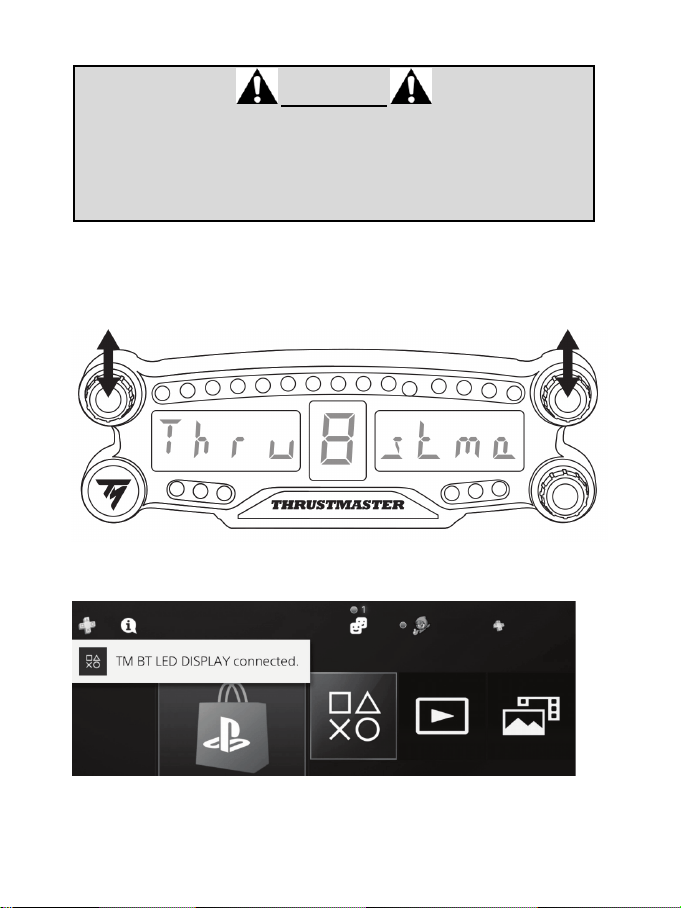
6/12
Подключите устройство BT LED DISPLAY к системе PS4™
ОЧЕНЬ ВАЖНО!
- Эту операцию обязательно следует выполнять после каждой
перезагрузки системы PS4™.
- Подключение устройства BT LED DISPLAY к системе PS4™ будет
работать, только если предыдущее действие (т. е., регистрация
устройства BT LED DISPLAY в системе PS4™) было корректно выполнено
хотя бы один раз.
1. Включите устройство BT LED DISPLAY нажатием кнопки питания (4).
На основном дисплее (6) прокручивается сообщение: Thrustmaster BT Wheel Display.
2. Одновременно быстро нажмите и отпустите переключатели 1 и 2 на устройстве BT LED
DISPLAY.
На основном дисплее (6) быстро отображается сообщение: Connected.
На дисплее системы PS4™ кратко отобразится сообщение: TM BT LED DISPLAY connected
(Устройство TM BT LED DISPLAY подключено).
3. Теперь все готово для игры!
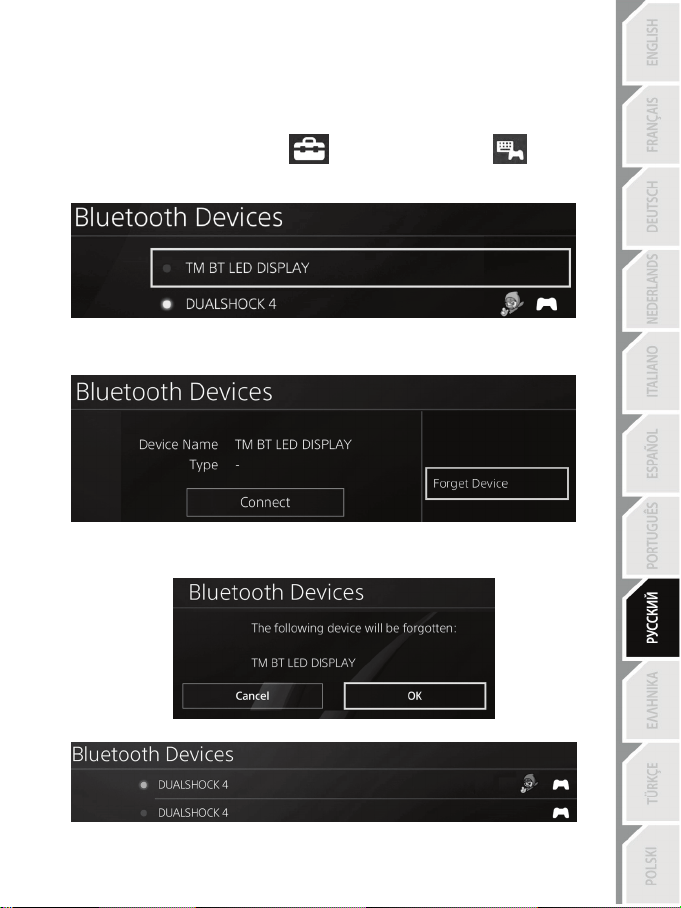
7/12
Отмена регистрации устройства BT LED DISPLAY в системе PS4™
(Эта процедура может потребоваться только при устранении неисправностей или приобретении
нового устройства BT LED DISPLAY.)
1. Выключите устройство BT LED DISPLAY нажатием кнопки питания (4)
.
2. В меню системы PS4™ выберите
[ Settings ] (Настройки) > [ Devices ]
(Устройства) > [ Bluetooth Devices ] (Устройства Bluetooth).
Выберите TM BT LED DISPLAY и нажмите кнопку s для подтверждения.
3. На дисплее отобразится сообщение: Device Name TM BT LED DISPLAY. Нажмите на игровом
пульте кнопку OPTIONS и выберите Forget Device (Забыть устройство). Нажмите кнопку s
для подтверждения.
4. На дисплее отобразится сообщение: The following device will be forgotten: TM BT LED
DISPLAY (Следующее устройство забыто: TM BT LED DISPLAY).
Выберите OK и нажмите кнопку s для подтверждения.
5. Теперь устройство TM BT LED DISPLAY больше не зарегистрировано в системе PS4™.
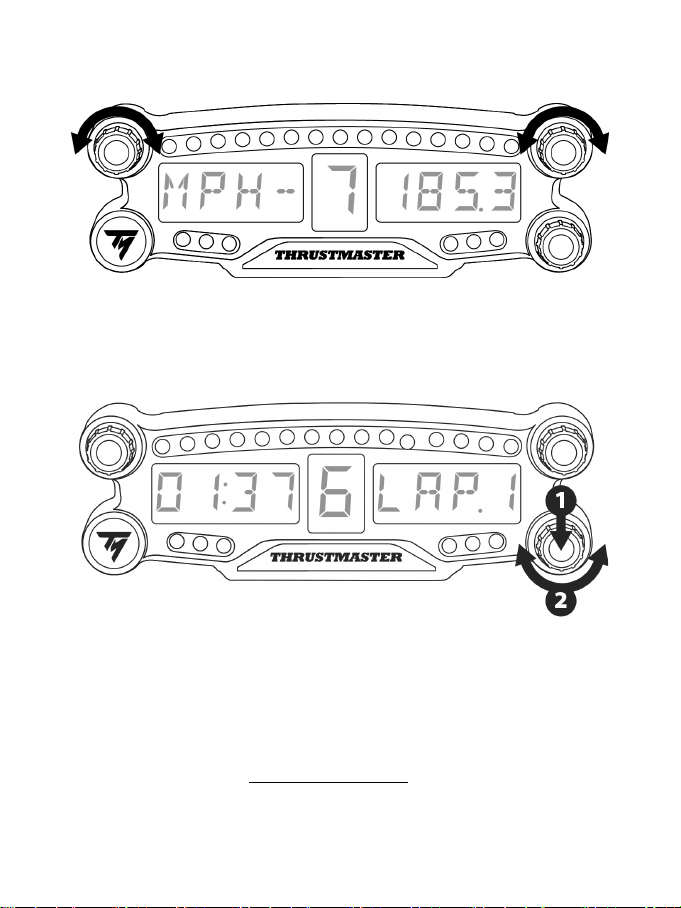
8/12
ИСПОЛЬЗОВАНИЕ ПОВОРОТНЫХ ПЕРЕКЛЮЧАТЕЛЕЙ 1 И 2
В зависимости от игры для PS4™ с помощью переключателей 1 и 2 можно изменять настройки
дисплея, а также переключаться между параметрами.
РЕГУЛИРОВКА ЯРКОСТИ УСТРОЙСТВА BT LED DISPLAY
1) Нажмите и отпустите переключатель 3 для перехода между параметрами яркости 21
индикатора (5) и регулировки уровня подсветки основного дисплея (6).
2) Для уменьшения интенсивности подсветки поверните переключатель влево, два увеличения —
вправо.
КРЕПЛЕНИЕ ДИСПЛЕЯ BT LED DISPLAY
Устройство BT LED DISPLAY можно установить в удобном месте на расстоянии не более 10 м от
системы PS4™.
Кроме того, его можно закрепить на различных подходящих предметах* или непосредственно на
некоторых моделях рулей с помощью двух резьбовых отверстий M3 на задней стороне устройства (9).
* Приобретается отдельно
Подробнее об этом см. на сайте http://support.thrustmaster.com. Выберите «Рулевые системы / BT
LED DISPLAY» и выберите инструкцию по эксплуатации или часто задаваемые вопросы.
9/12
ОБНОВЛЕНИЕ ПРОШИВКИ УСТРОЙСТВА BT LED DISPLAY
Обе прошивки (общая и Bluetooth-прошивка) устройства BT LED DISPLAY можно обновить до
последней версии, включающей исправления и улучшения.
Для просмотра версий прошивок устройства BT LED DISPLAY и, при необходимости,
обновления их: на ПК откройте сайт http://support.thrustmaster.com, выберите «Рулевые системы
/ BT LED DISPLAY», затем выберите «Прошивка» и выполните указания по загрузке и установке.
ПОМОЩЬ, ОТВЕТЫ НА ЧАСТЫЕ ВОПРОСЫ И СОВЕТЫ
Откройте сайт http://support.thrustmaster.com. Выберите «Рулевые системы / BT LED
DISPLAY», затем «Инструкция по эксплуатации» или «Ответы на частые вопросы».

10/12
Сведения о потребительской гарантии
Корпорация Guillemot Corporation S.A., зарегистрированная по адресу Place du Granier, B.P. 97143,
35571 Chantepie, Франция, (далее — «Guillemot») гарантирует своим клиентам во всем мире, что в
данном изделии Thrustmaster не будет выявлено никаких дефектов материалов и производства в
течение гарантийного периода, который равен сроку предъявления претензии по соответствию для
данного изделия. В странах Европейского Союза этот срок соответствует двум (2) годам с момента
поставки изделия Thrustmaster. В других странах гарантийный период равен сроку предъявления
претензии по соответствию для изделия Thrustmaster, определяемому соответствующим
законодательством страны, в которой проживал потребитель на момент приобретения изделия
Thrustmaster (если подобные претензии не действуют в соответствующей стране, гарантийный
период равняется одному (1) году с первоначальной даты приобретения изделия Thrustmaster).
В случае обнаружения дефектов изделия во время гарантийного периода незамедлительно
обратитесь в службу технической поддержки, сотрудники которой определят дальнейшую
процедуру. Если дефект будет подтвержден, изделие следует вернуть по месту приобретения (или
в любое другое место, указанное службой технической поддержки).
В рамках действия гарантии дефектное изделие будет, по усмотрению службы технической
поддержки, заменено или возвращено в рабочее состояние. Если в течение гарантийного срока
изделие Thrustmaster будет подвержено такому восстановлению, к оставшемуся гарантийному сроку
прибавляется период времени, но не менее семи (7) дней, во время которого изделие находилось
вне употребления (началом этого периода считается дата запроса покупателя о вмешательстве или
дата предоставления дефектного изделия для восстановления, если изделие было предоставлено
для восстановления позднее, чем был сделан запрос о вмешательстве). В мере, разрешенной
применимым законодательством, полная ответственность компании Guillemot и ее дочерних
компаний (в том числе косвенный ущерб) ограничивается восстановлением рабочего состояния или
заменой изделия Thrustmaster. В мере, разрешенной применимым законодательством, компания
Guillemot отказывается от любых гарантий коммерческой пригодности или пригодности для
определенной цели.
Настоящая гарантия не распространяется: (1) на ситуации, когда изделие было видоизменено,
открыто, модифицировано или получило повреждения в результате недопустимого или
неправильного использования, небрежности или несчастного случая, естественного износа или
любой другой причины, не связанной с дефектом материалов или производства (включая, помимо
прочего, использование изделия Thrustmaster совместно с любыми неподходящими элементами, в
частности — с блоками питания, аккумуляторами, зарядными устройствами и любыми другими
элементами, не входящими в комплектацию Guillemot для данного изделия); (2) на случаи
использования продукта в любых целях, кроме бытовых, в том числе на случаи профессионального
или коммерческого применения (например, в игровых залах, для проведение обучения и
соревнований); (3) на ситуации, когда указания службы технической поддержки не были выполнены;
(4) на ПО, так как на такое ПО распространяется отдельная гарантия; (5) на расходные материалы
(элементы, предназначенные для замены в течение срока службы изделия: например, батарейки и
ушные подушки для гарнитур или наушников); (6) на аксессуары (например, кабели, чехлы, сумки,
футляры, наручные ремешки); (7) на случаи продажи изделия с открытого аукциона.
Данная гарантия не подлежит передаче.
Настоящая гарантия не ущемляет прав потребителя, предоставляемых ему применимыми
законами в отношении продажи потребительских товаров в соответствующей стране.
11/12
Дополнительные условия гарантии
В течение гарантийного срока компания Guillemot, в общем и целом, не предоставляет никаких
запасных частей, так как вскрытие и/или модификацию любых изделий Thrustmaster вправе
осуществлять только служба технической поддержки (за исключением каких-либо процедур по
модификации, которые служба технической поддержки может предложить выполнить клиенту путем
письменных инструкций и предоставления, при необходимости, требуемых запасных частей:
например, в связи с отсутствием статуса сложности или конфиденциальности у такой
восстановительной процедуры).
С учетом периода освоения новых изделий и в целях защиты своих ноу-хау и коммерческих тайн
компания Guillemot, в общем и целом, не предоставляет каких-либо уведомлений о восстановлении
или запасных частей для любых изделий Thrustmaster с истекшим гарантийным сроком.
Ответственность
В мере, разрешенной применимым законодательством, компания Guillemot Corporation S.A. (далее
— «Guillemot») и ее дочерние предприятия отказываются от любой ответственности за любой
ущерб, вызванный одним или несколькими из следующих факторов: (1) видоизменение, вскрытие
или модификация изделия; (2) несоблюдение инструкций по сборке; (3) недопустимое или
неправильное использование, небрежность, несчастный случай (например, физическое
воздействие); (4) естественный износ; (5) использование продукта в любых целях, кроме бытовых, в
том числе профессиональное или коммерческое применение (например, в игровых залах, для
проведение обучения и соревнований). В мере, разрешенной применимым законодательством,
компания Guillemot и ее дочерние предприятия отказываются от любой ответственности за любой
ущерб, не связанный с дефектами материалов или изготовления, в отношении данного изделия
(включая, помимо прочего, любой ущерб, вызванный прямо или опосредованно любым
программным обеспечением или использованием изделия Thrustmaster с любыми неподходящими
элементами, в частности — блоками питания, аккумуляторами, зарядными устройствами и любыми
другими элементами, не входящими в комплектацию Guillemot для данного изделия).
ТЕХНИЧЕСКАЯ ПОДДЕРЖКА
http://support.thrustmaster.com

12/12
ЗАЯВЛЕНИЕ О СООТВЕТСТВИИ НОРМАТИВАМ ЕС
Настоящим корпорация Guillemot Corporation S.A. заявляет, что устройство BT LED DISPLAY
соответствует основным требованиям и другим соответствующим положениям Директивы
2014/53/UE (RED). С Заявлением о соответствии можно ознакомиться на сайте:
http://www.thrustmaster.com/certificates/BT_Led_Display/Doc-BT_Led_Display.pdf
Полоса частот: 2402—2480 МГц, макс. РЧ-мощность: <10 дБ/мВт
АВТОРСКИЕ ПРАВА
© Корпорация 2017 Guillemot Corporation S.A. Все права защищены. Thrustmaster® является
зарегистрированным товарным знаком корпорации Guillemot Corporation S.A.
Лицензия для продажи в Европе, Африке, на Ближнем Востоке, в России, Индии и Океании. Для
исключительного использования с PlayStation®4.
Все остальные товарные знаки являются собственностью соответствующих владельцев.
Иллюстрации могут не соответствовать внешнему виду/функциям конкретного изделия.
Содержание, конструкция и технические характеристики изделия могут быть изменены без
предварительного уведомления и зависят от страны приобретения. Сделано в Китае.
Произведено и распространяется компанией Guillemot Corporation S.A.
При пользовании изделием учитывайте следующее: цвета и дизайн могут различаться.
Пластиковые стяжки и клейкую ленту следует снять перед использованием изделия.
www.thrustmaster.com
1/12
Για PlayStation
®4
Εγχειρίδιο χρήστη
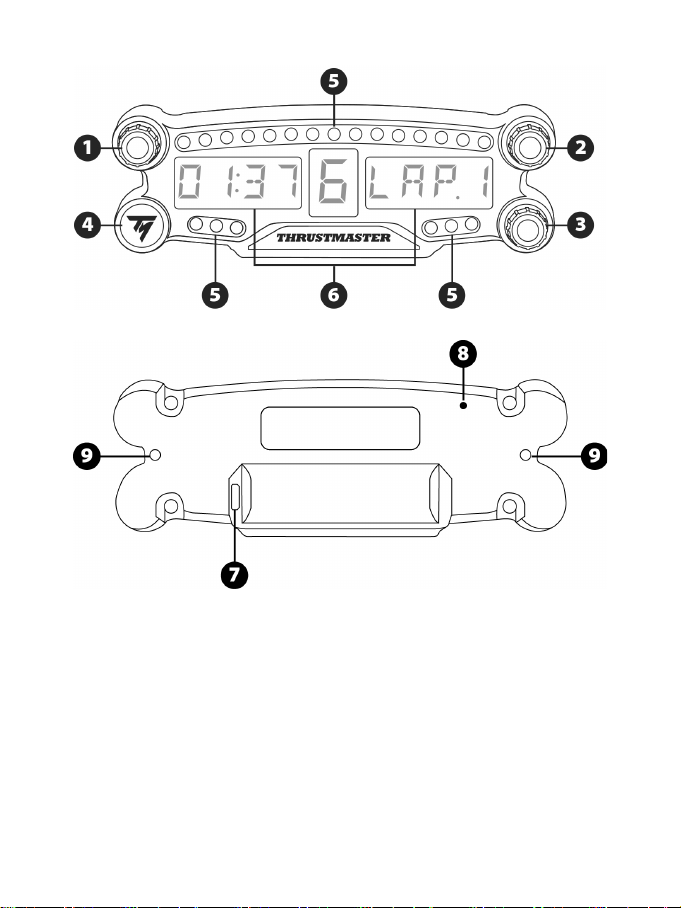
2/12
ΤΕΧΝΙΚΕΣ ΠΡΟΔΙΑΓΡΑΦΕΣ
1 Περιστροφικός επιλογέας αριθ. 1 με
λειτουργία πιεστικού διακόπτη
2 Περιστροφικός επιλογέας αριθ. 2 με
λειτουργία πιεστικού διακόπτη
3 Περιστροφικός επιλογέας αριθ. 3 με
λειτουργία πιεστικού διακόπτη (έλεγχος
ρύθμισης φωτεινότητας)
4 Πλήκτρο ενεργοποίησης/απενεργοποίησης
5 21 LED
6 Κύρια οθόνη
7 Υποδοχή φόρτισης Micro USB
8 Ένδειξη φόρτισης
9 Δύο οπές με σπείρωμα M3 για τη
τοποθέτηση της συσκευής
3/12
ΠΡΟΕΙΔΟΠΟΙΗΣΗ
Πριν χρησιμοποιήσετε αυτό το προϊόν, διαβάστε προσεκτικά αυτό το εγχειρίδιο και αποθηκεύστε
το για μελλοντική αναφορά.
Προειδοποίηση - Ηλεκτροπληξία
* Διατηρήστε το προϊόν σε θέση χωρίς υγρασία και μην το εκθέτετε σε σκόνη ή ηλιακό φως.
* Μην περιστρέφετε ή τραβάτε τις συνδέσεις και τα καλώδια.
* Μη ρίχνετε υγρά στο προϊόν ή στις συνδέσεις του.
* Μη βραχυκυκλώνετε το προϊόν.
* Ποτέ μην αποσυναρμολογείτε το προϊόν. μην το ρίχνετε στη φωτιά και μην το εκθέτετε σε υψηλές
θερμοκρασίες.
* Μην ανοίγετε τη συσκευή: δεν υπάρχουν στο εσωτερικό εξαρτήματα που να μπορούν να
επισκευαστούν από το χρήστη. Οποιεσδήποτε επισκευές πρέπει να πραγματοποιηθούν από τον
κατασκευαστή, τον εξουσιοδοτημένο αντιπρόσωπό του ή εξειδικευμένο τεχνικό.
Προειδοποίηση - Εσωτερική μπαταρία
- Πριν τη χρήση φορτίστε πλήρως το BT LED DISPLAY.
- Μην αποσυναρμολογείτε τη συσκευή, αυτό θα ακυρώσει την εγγύησή της.
- Προστατεύστε τη συσκευή σας από κραδασμούς και κρούσεις.
- Η συσκευή αυτή δεν πρέπει να χρησιμοποιείται από παιδιά ηλικίας κάτω των 14 ετών χωρίς την
επίβλεψη ενήλικα.
Η THRUSTMASTER® ΑΠΟΠΟΙΕΙΤΑΙ ΟΠΟΙΑΔΗΠΟΤΕ ΕΥΘΥΝΗ ΣΕ ΠΕΡΙΠΤΩΣΗ ΜΗ
ΣΥΜΜΟΡΦΩΣΗΣ ΜΕ ΤΙΣ ΟΔΗΓΙΕΣ.
ΠΡΟΕΙΔΟΠΟΙΗΣΗ: ΕΝΔΕΧΕΤΕ ΝΑ ΣΥΜΒΕΙ ΕΚΡΗΞΗ ΕΑΝ Η ΜΠΑΤΑΡΙΑ ΑΝΤΙΚΑΤΑΣΤΑΘΕΙ ΜΕ
ΛΑΝΘΑΣΜΕΝΟ ΤΥΠΟ ΜΠΑΤΑΡΙΑΣ.
ΑΚΟΛΟΥΘΕΙΤΕ ΤΙΣ ΟΔΗΓΙΕΣ ΣΧΕΤΙΚΑ ΜΕ ΤΗΝ ΑΠΟΡΡΙΨΗ ΤΩΝ ΜΠΑΤΑΡΙΩΝ.
ΦΟΡΤΙΣΗ ΤΗΣ ΜΠΑΤΑΡΙΑΣ ΤΟΥ BT LED DISPLAY
Με τη χρήση καλωδίου micro USB (όπως το καλώδιο USB που παρέχεται με το σύστημα PS4™),
συνδέστε το BT LED DISPLAY σε μία από τις ελεύθερες θύρες USB του συστήματος PS4™.
Η υποδοχή φόρτισης (7) βρίσκεται στο πίσω μέρος του BT LED DISPLAY.
Η ένδειξη φόρτισης (8) ανάβει με κόκκινο χρώμα όταν η συσκευή φορτίζεται και σβήνει όταν είναι
πλήρως φορτισμένη.
ΣΥΜΒΑΤΟΤΗΤΑ ΜΕ ΤΑ ΠΑΙΧΝΙΔΙΑ PS4™
Μια λίστα παιχνιδιών PS4™ που είναι συμβατά με το BT LED DISPLAY διατίθεται στη διεύθυνση
http://support.thrustmaster.com
. Επιλέξτε Αγωνιστικά τιμόνια / BT LED DISPLAY / Ρυθμίσεις παιχνιδιών.
Αυτή η λίστα θα επεκτείνεται τακτικά με την κυκλοφορία νέων παιχνιδιών PS4™ συμβατών με το
BT LED DISPLAY.
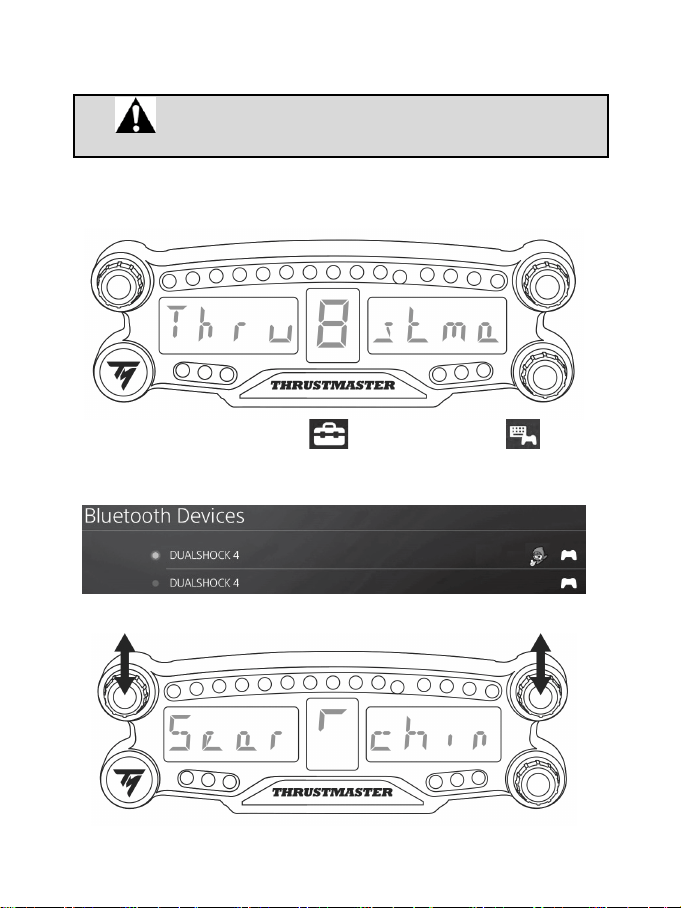
4/12
ΕΓΚΑΤΑΣΤΑΣΗ ΣΤΟ ΣΥΣΤΗΜΑ PS4™
Καταχωρίστε το BT LED DISPLAY στο σύστημα PS4™
Η λειτουργία αυτή πρέπει να εκτελεστεί μόνο μία φορά. Δεν είναι
απαραίτητη κάθε φορά που το σύστημα PS4™ επανεκκινείται.
Όταν χρησιμοποιείτε το BT LED DISPLAY για πρώτη φορά, είναι απολύτως απαραίτητο να το
καταχωρήσετε στο σύστημά PS4™, αυτή η λειτουργία πρέπει να εκτελεστεί μόνο μία φορά.
1. Για να ενεργοποιήσετε το BT LED DISPLAY πατήστε το πλήκτρο ενεργοποίησης/απενεργοποίησης (4).
Το μήνυμα Thrustmaster BT Wheel Display κυλά στην κύρια οθόνη (6).
2. Στο μενού συστήματος PS4™, επιλέξτε [ Settings (Ρυθμίσεις) ] > [ Devices
(Συσκευές) ] > [ Bluetooth Devices (Συσκευές Bluetooth) ] για αυτόματη αναζήτηση συσκευών
Bluetooth® σε κοντινή απόσταση. Οι συζευγμένες συσκευές και άλλες συσκευές Bluetooth θα
εμφανιστούν στη λίστα.
3. Πιέστε σύντομα και αφήστε τους επιλογείς αριθ. 1 και 2 ταυτόχρονα στο BT LED DISPLAY. Το μήνυμα
Searching known devices (Αναζήτηση γνωστών συσκευών) κυλά στην κύρια οθόνη (6).
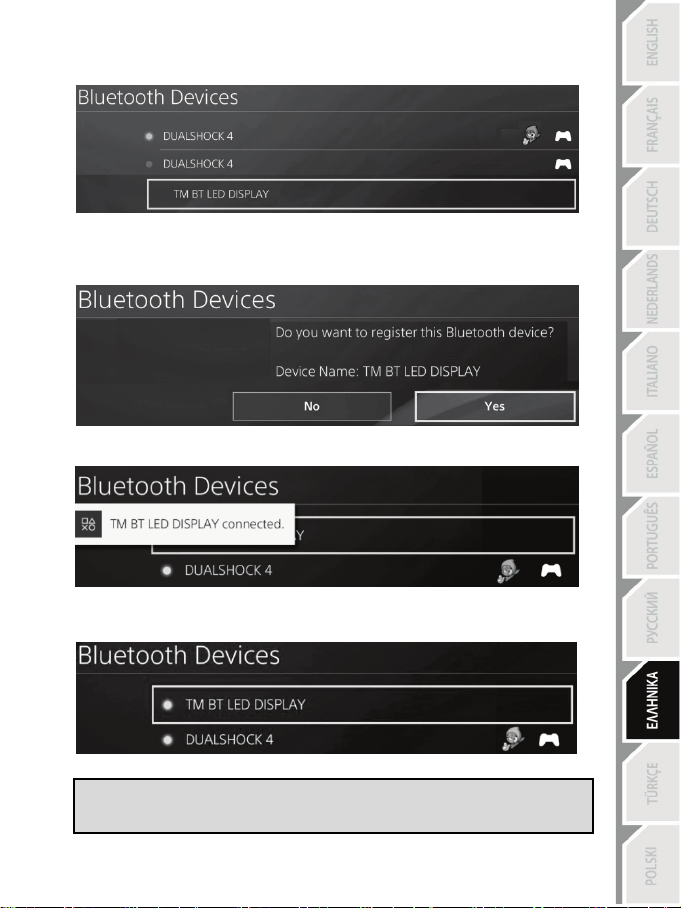
5/12
4. Μετά από κάποιο χρονικό διάστημα, στην οθόνη του συστήματος PS4™ θα πρέπει να εμφανίζεται το
όνομα TM BT LED DISPLAY . Με τη χρήση του συστήματος χειρισμού σας, επιλέξτε το και πατήστε το
κουμπί s.
5. Το μήνυμα Do you want to register this Bluetooth device TM BT LED DISPLAY? (Θέλετε να
καταχωρίσετε αυτή τη συσκευή Bluetooth TM BT LED DISPLAY;) εμφανίζεται στην οθόνη
του συστήματος PS4™. Επιλέξτε YES (ΝΑΙ) και στη συνέχεια πατήστε το κουμπί s για
επιβεβαίωση.
6. Το μήνυμα TM BT LED DISPLAY connected (TM BT LED DISPLAY συνδεδεμένο)
εμφανίζεται για λίγο στην οθόνη συστήματος PS4 ™.
Στην οθόνη του συστήματος PS4™, η ενδεικτική λυχνία που βρίσκεται στα αριστερά του TM BT
LED DISPLAY ανάβει τώρα με πράσινο, πράγμα που σημαίνει ότι η συσκευή είναι σωστά
συνδεδεμένη στο σύστημα.
7. Τώρα είστε έτοιμοι να παίξετε!
Εάν η διαδικασία αποτύχει, απενεργοποιήστε το σύστημα PS4™ και αποσυνδέστε, στη
συνέχεια επανασυνδέστε το καλώδιο τροφοδοσίας του συστήματος. Επανεκκινήστε το
σύστημα PS4™ και, στη συνέχεια, επαναλάβετε τα βήματα καταχώρισης 1 έως 6.
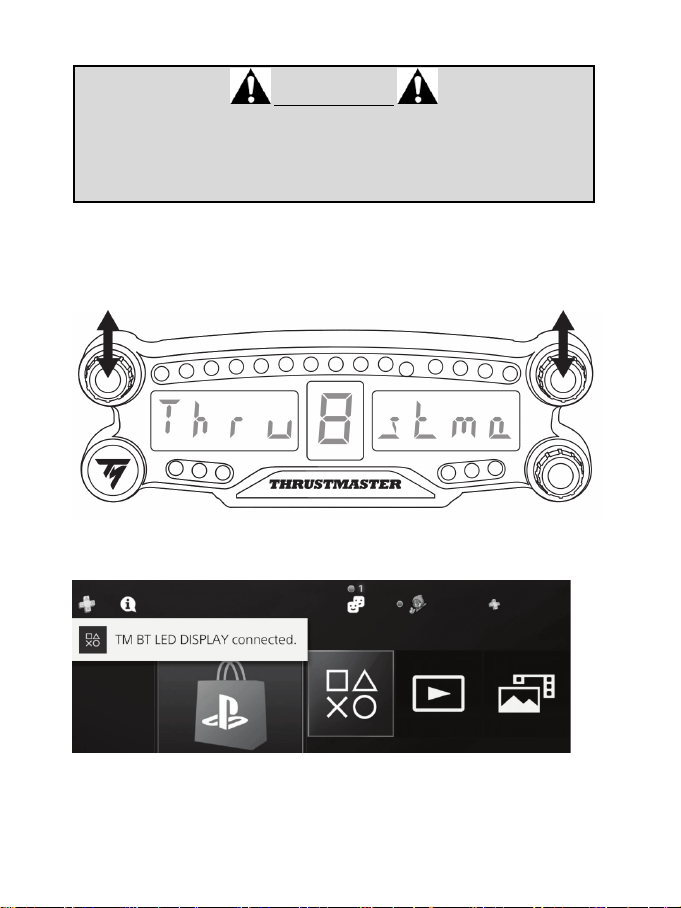
6/12
Συνδέστε το BT LED DISPLAY στο σύστημα PS4™
ΠΟΛΥ ΣΗΜΑΝΤΙΚΟ
- Είναι απολύτως απαραίτητη η εκτέλεση αυτής της διαδικασίας κάθε φορά
που γίνεται επανεκκίνηση του συστήματος PS4™.
- Η σύνδεση του BT LED DISPLAY με το σύστημα PS4™ θα λειτουργήσει μόνο
αν το προηγούμενο βήμα (δηλ. Καταχώρηση του BT LED DISPLAY στο
σύστημα PS4™) έχει εκτελεστεί σωστά τουλάχιστον μία φορά.
1. Για να ενεργοποιήσετε το BT LED DISPLAY πατήστε το πλήκτρο
ενεργοποίησης/απενεργοποίησης (4)
.
Το μήνυμα Thrustmaster BT Wheel Display κυλά στην κύρια οθόνη (6).
2. Πιέστε σύντομα και αφήστε τους επιλογείς αριθ. 1 και 2 ταυτόχρονα στο BT LED DISPLAY.
Το μήνυμα Connectedεμφανίζεται για λίγο στην κύρια οθόνη (6).
Το μήνυμα TM BT LED DISPLAY connected (TM BT LED DISPLAY συνδεδεμένο) εμφανίζεται
για λίγο στην οθόνη συστήματος PS4 ™.
3. Τώρα είστε έτοιμοι να παίξετε!
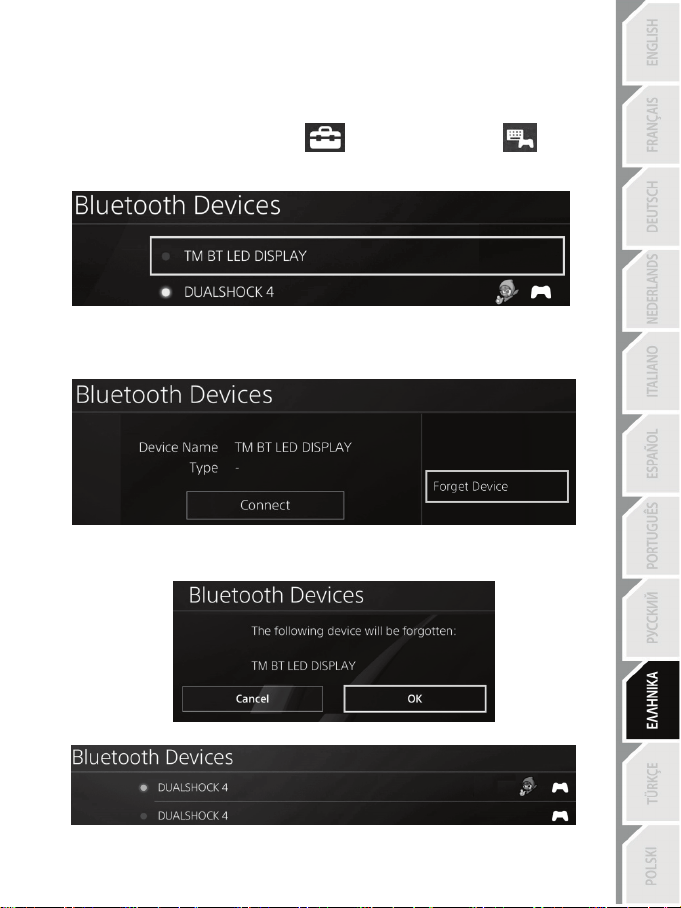
7/12
Καταργήστε την καταχώρηση του BT LED DISPLAY από το σύστημα PS4™
(Αυτή η λειτουργία απαιτείται μόνο όταν επιλύετε προβλήματα ή αγοράσετε ένα νέο BT LED
DISPLAY.)
1. Απενεργοποιήστε το BT LED DISPLAY πατώντας το πλήκτρο ενεργοποίησης/απενεργοποίησης (4).
2. Στο μενού συστήματος PS4™, επιλέξτε
[ Settings (Ρυθμίσεις) ] > [ Devices
(Συσκευές) ] > [ Bluetooth Devices (Συσκευές Bluetooth) ].
Επιλέξτε TM BT LED DISPLAY, στη συνέχεια πατήστε το κουμπί s για επιβεβαίωση.
3. Το μήνυμα Device Name TM BT LED DISPLAY (Όνομα συσκευής TM BT LED DISPLAY)
εμφανίζεται στην οθόνη. Πατήστε το κουμπί OPTIONS στο χειριστήριο παιχνιδιών σας και, στη
συνέχεια, επιλέξτε Forget Device (Παράβλεψη συσκευής). Πατήστε το κουμπί s για
επιβεβαίωση.
4. Το μήνυμα The following device will be forgotten: (Η ακόλουθη συσκευή θα παραβλεφθεί:) TM
BT LED DISPLAY εμφανίζεται στην οθόνη.
Επιλέξτε OK, στη συνέχεια πατήστε το κουμπί s για επιβεβαίωση.
5. Η καταχώριση του TM BT LED DISPLAY έχει πλέον καταργηθεί από το σύστημα PS4™.
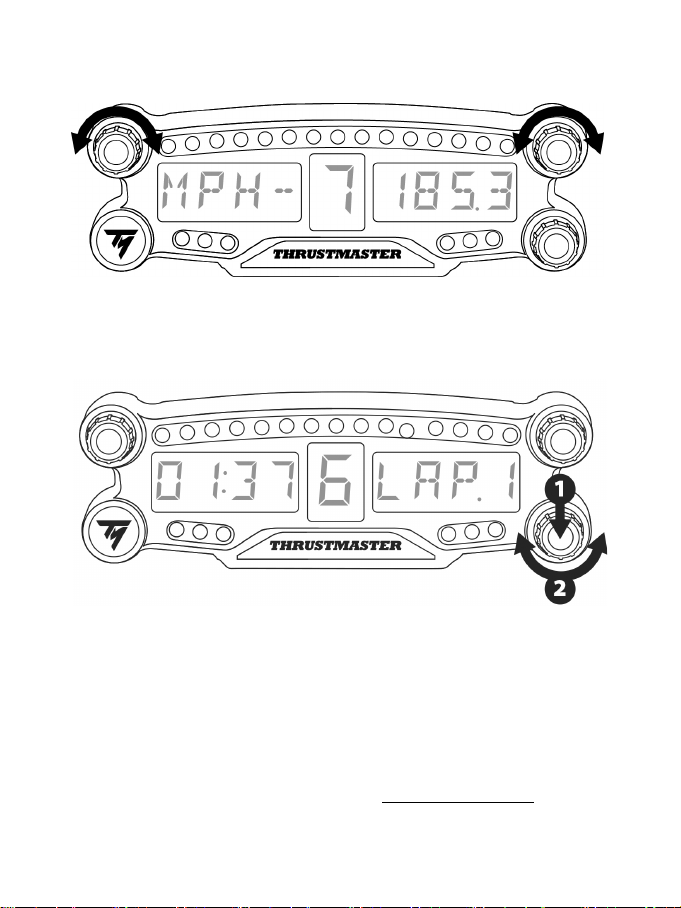
8/12
ΧΡΗΣΗ ΤΩΝ ΠΕΡΙΣΤΡΟΦΙΚΩΝ ΕΠΙΛΟΓΕΩΝ NO.1 ΚΑΙ NO.2
Ανάλογα με το παιχνίδι PS4™, μπορείτε να ενεργοποιήσετε τους επιλογείς αριθμ. 1 και αριθμ. 2 για να
αλλάξετε τις ρυθμίσεις της οθόνης και για εναλλαγή από τη μία ρύθμιση στην άλλη.
ΡΥΘΜΙΣΗ ΦΩΤΕΙΝΟΤΗΤΑΣ ΤΟΥ BT LED DISPLAY
1) Πιέστε και αφήστε το επιλογέα αριθ. 3 για εναλλαγή μεταξύ της ρύθμισης της φωτεινότητας των 21 LED (5) και
της ρύθμισης της έντασης της κύριας οθόνης (6) και αντιστρόφως.
2) Περιστρέψτε τον επιλογέα προς τα αριστερά για να μειώσετε την ένταση ή προς τα δεξιά για να την αυξήσετε.
ΤΟΠΟΘΕΤΗΣΗ ΤΟΥ BT LED DISPLAY
Μπορείτε να εγκαταστήσετε το BT LED DISPLAY όπου σας εξυπηρετεί σε ακτίνα 10 μέτρων γύρω από
το σύστημα PS4™.
Μπορείτε επίσης να τοποθετήσετε τη συσκευή σε διάφορα κατάλληλα αντικείμενα * ή απευθείας σε
ορισμένα αγωνιστικά τιμόνια χρησιμοποιώντας τις δύο οπές με σπείρωμα M3 που βρίσκονται στο πίσω
μέρος της συσκευής (9).
* Πωλείται χωριστά
Για περισσότερες πληροφορίες σχετικά με αυτό, μεταβείτε στο http://support.thrustmaster.com. Επιλέξτε
Αγωνιστικά τιμόνια / BT LED DISPLAY, στη συνέχεια Εγχειρίδιο χρήστη ή Συχνές ερωτήσεις.
9/12
ΕΝΗΜΕΡΩΣΗ ΤΟΥ ΥΛΙΚΟΛΟΓΙΣΜΙΚΟΥ ΤΟΥ BT LED DISPLAY
Και τα δύο υλικολογισμικά (γενικό υλικολογισμικό και υλικολογισμικό Bluetooth) που
περιλαμβάνονται στο BT LED DISPLAY μπορούν να ενημερωθούν με πιο πρόσφατες εκδόσεις, με
βελτιώσεις προϊόντων.
Για να εμφανίσετε τις εκδόσεις υλικολογισμικού BT LED DISPLAY και να τις ενημερώσετε εάν
απαιτείται: σε έναν υπολογιστή, μεταβείτε στο http://support.thrustmaster.com, επιλέξτε Αγωνιστικά
τιμόνια / BT LED DISPLAY, στη συνέχεια επιλέξτε υλικολογισμικό και ακολουθήστε τις οδηγίες και τη
διαδικασία λήψης και εγκατάστασης.
ΒΟΗΘΕΙΑ, ΣΥΧΝΕΣ ΕΡΩΤΗΣΕΙΣ ΚΑΙ ΣΥΜΒΟΥΛΕΣ
Μεταβείτε στη διεύθυνση http://support.thrustmaster.com. Επιλέξτε Αγωνιστικά τιμόνια / BT LED
DISPLAY, στη συνέχεια Εγχειρίδιο χρήστη ή Συχνές ερωτήσεις.

10/12
Πληροφορίες εγγύησης καταναλωτή
Παγκοσμίως, η Guillemot Corporation S.A. της οποίας η εγγεγραμμένη έδρα είναι η οδός Place du
Granier, B.P. 97143, 35571 Chantepie, France (Γαλλία) (εφεξής “Guillemot”) εγγυάται στον καταναλωτή
ότι το προϊόν της Thrustmaster δεν παρουσιάζει ελάττωμα στο υλικό ούτε κατασκευαστικές ατέλειες για
το χρονικό διάστημα της εγγύησης, το οποίο αντιστοιχεί στο χρονικό όριο για άσκηση αγωγής για
συμμόρφωση αναφορικά με αυτό το προϊόν. Στις χώρες της Ε.Ε., αυτό αντιστοιχεί σε διάστημα δύο (2)
ετών από την παράδοση του προϊόντος της Thrustmaster. Σε άλλες χώρες, η περίοδος εγγύησης
αντιστοιχεί στο χρονικό όριο για άσκηση αγωγής για συμμόρφωση αναφορικά το προϊόν της
Thrustmaster σύμφωνα με την ισχύουσα νομοθεσία της χώρας στην οποία ο καταναλωτής διέμενε
κατά την ημερομηνία αγοράς του προϊόντος της Thrustmaster (σε περίπτωση που δεν υπάρχει τέτοια
ενέργεια στην αντίστοιχη χώρα, τότε η εγγύηση θα ισχύει για ένα (1) έτος από την αρχική ημερομηνία
αγοράς του προϊόντος της Thrustmaster).
Σε περίπτωση που το προϊόν σας φαίνεται να είναι ελαττωματικό κατά την περίοδο της εγγύησης,
επικοινωνήστε αμέσως με την Τεχνική υποστήριξη, η οποία θα υποδείξει την διαδικασία που θα
ακολουθήσετε. Αν το ελάττωμα επιβεβαιωθεί, το προϊόν πρέπει να επιστραφεί στο σημείο αγοράς
του (ή σε οποιοδήποτε άλλο σημείο υποδεικνύει η Τεχνική υποστήριξη).
Στα πλαίσια της εγγύησης, το ελαττωματικό προϊόν του καταναλωτή, με επιλογή της Τεχνικής
υποστήριξης, είτε θα αντικατασταθεί είτε θα επιστραφεί και θα είναι σε κατάσταση λειτουργίας. Αν
κατά τη διάρκεια της περιόδου εγγύησης το προϊόν της Thrustmaster υπόκειται σε τέτοιου είδους
μετασκευή, οποιαδήποτε περίοδος τουλάχιστον επτά (7) ημερών κατά την οποία το προϊόν έχει
τεθεί εκτός χρήσης θα προστεθεί στην εναπομένουσα περίοδο εγγύησης (αυτή η περίοδος ισχύει
από την ημερομηνία του αιτήματος του καταναλωτή για παρέμβαση ή από την ημερομηνία κατά την
οποία το εν λόγω προϊόν διατίθεται για μετασκευή, αν η ημερομηνία κατά την οποία το προϊόν
διατίθεται για μετασκευή είναι επακόλουθη της ημερομηνίας του αιτήματος για παρέμβαση). Αν
επιτρέπεται από την ισχύουσα νομοθεσία, η πλήρης ευθύνη της Guillemot και των θυγατρικών της
(περιλαμβάνονται οι επακόλουθες ζημιές) περιορίζεται στην επιστροφή σε κατάσταση λειτουργίας
ή την αντικατάσταση του προϊόντος της Thrustmaster. Αν επιτρέπεται από την ισχύουσα
νομοθεσία, η Guillemot αποποιείται κάθε εγγύηση εμπορευσιμότητας ή καταλληλότητας για τον
συγκεκριμένο σκοπό.
Η παρούσα εγγύηση δεν ισχύει: (1) αν το προϊόν έχει τροποποιηθεί, ανοιχτεί, μεταποιηθεί ή
υποστεί βλάβη ως αποτέλεσμα ακατάλληλης ή κακής χρήσης, αμέλειας, ατυχήματος, φυσιολογικής
φθοράς ή οποιασδήποτε άλλης αιτίας που δεν σχετίζεται με ελάττωμα στο υλικό ή κατασκευαστικό
ελάττωμα (συμπεριλαμβανομένων, ενδεικτικά, συνδυάζοντας το προϊόν της Thrustmaster με
οποιοδήποτε ακατάλληλο στοιχείο, συμπεριλαμβανομένων συγκεκριμένων παροχών ρεύματος,
επαναφορτιζόμενων μπαταριών, φορτιστών ή άλλων στοιχείων που δεν παρέχονται από τη
Guillemot για αυτό το προϊόν), (2) αν το προϊόν έχει χρησιμοποιηθεί για οποιαδήποτε άλλη χρήση
πέρα από την οικιακή χρήση, συμπεριλαμβανομένης χρήσης για επαγγελματικούς ή εμπορικούς
σκοπούς (για παράδειγμα, δωμάτια παιχνιδιών, εκπαίδευση, διαγωνισμοί), (3) σε περίπτωση μη
συμμόρφωσης με τις οδηγίες που παρέχονται από την Τεχνική υποστήριξη, (4) για λογισμικό, το εν
λόγω λογισμικό υπόκειται σε συγκεκριμένη εγγύηση, (5) για αναλώσιμα (στοιχεία που πρόκειται
να αντικατασταθούν από τη διάρκεια ζωής του προϊόντος: για παράδειγμα, μπαταρίες μίας
χρήσης, καλύμματα αυτιών για σετ ακουστικών ή ακουστικά), (6) για αξεσουάρ (για παράδειγμα,
καλώδια, περιβλήματα, θήκες, τσάντες, λουράκια καρπού), (7) αν το προϊόν πωληθεί σε
δημοπρασία.
Η παρούσα εγγύηση δεν μεταβιβάζεται.
Τα νομικά δικαιώματα του καταναλωτή σε σχέση με την ισχύουσα νομοθεσία όσον αφορά την
πώληση των καταναλωτικών ειδών στη χώρα του/της που δεν επηρεάζονται από την παρούσα
εγγύηση.
11/12
Επιπλέον διατάξεις εγγύησης
Κατά την περίοδο εγγύησης, η Guillemot δεν θα διαθέσει, κατά βάση, κανένα ανταλλακτικό, καθώς
Η Τεχνική υποστήριξη είναι ο μόνος συμβαλλόμενος εξουσιοδοτημένος να ανοίξει και/ή να
μετασκευάσει οποιοδήποτε προϊόν της Thrustmaster (με εξαίρεση κάθε διαδικασία μετασκευής, την
οποία η Τεχνική υποστήριξη μπορεί να ζητήσει να διεξάγει ο καταναλωτής, υπό τη μορφή γραπτών
οδηγιών – για παράδειγμα, λόγω της απλούστευσης και της έλλειψης εμπιστευτικότητας της
διαδικασίας μετασκευής – και παρέχοντας στον καταναλωτή το απαιτούμενο(α) ανταλλακτικό(ά),
όπου είναι εφικτό).
Δεδομένου των κύκλων καινοτομιών και με σκοπό την προστασία της τεχνογνωσίας και των
εμπορικών μυστικών, η Guillemot δεν θα παρέχει, κατά βάση, καμία ειδοποίηση περί μετασκευής
ή ανταλλακτικών για κανένα προϊόν της Thrustmaster του οποίου η περίοδος εγγύησης έχει λήξει.
Ευθύνη
Αν επιτρέπεται από την ισχύουσα νομοθεσία, η Guillemot Corporation S.A. (εφεξής “Guillemot”) και
οι θυγατρικές της αποποιούνται κάθε ευθύνης για οποιαδήποτε ζημιά προκαλείται από ένα ή
περισσότερα από τα ακόλουθα: (1) το προϊόν έχει τροποποιηθεί, ανοιχτεί ή μεταποιηθεί, (2)
αποτυχία ως προς τη συμμόρφωση με τις οδηγίες συναρμολόγησης, (3) ακατάλληλη ή κακή χρήση,
αμέλεια, ατύχημα (για παράδειγμα, πρόσκρουση), (4) φυσιολογική φθορά, (5) χρήση του
προϊόντος για οποιαδήποτε άλλη χρήση πέρα από την οικιακή χρήση, συμπεριλαμβανομένης
χρήσης για επαγγελματικούς ή εμπορικούς σκοπούς (για παράδειγμα, δωμάτια παιχνιδιών,
εκπαίδευση, διαγωνισμοί). Αν επιτρέπεται από την ισχύουσα νομοθεσία, η Guillemot και οι
θυγατρικές της αποποιούνται κάθε ευθύνης για οποιαδήποτε ζημιά δεν σχετίζεται με λάθος στο
υλικό ή την κατασκευή αναφορά με το προϊόν (συμπεριλαμβάνεται, ενδεικτικά, οποιαδήποτε ζημιά
προκαλείται άμεσα ή έμμεσα από οποιοδήποτε λογισμικό ή από συνδυασμό του προϊόντος της
Thrustmaster με κάθε ακατάλληλο στοιχείο, συμπεριλαμβανομένων συγκεκριμένων παροχών
ρεύματος, επαναφορτιζόμενων μπαταριών, φορτιστών ή άλλων στοιχείων που δεν παρέχονται από
την Guillemot για αυτό το προϊόν).
ΤΕΧΝΙΚΉΣ ΥΠΟΣΤΉΡΙΞΗΣ
http://support.thrustmaster.com
12/12
STATEMENT OF COMPLIANCE WITH EU REGULATIONS
Guillemot Corporation S.A. hereby declares that the device BT LED DISPLAY complies with the main
requirements and other relevant clauses of Directive 2014/53/UE (RED). The compliance statement can
be viewed at the following site:
http://www.thrustmaster.com/certificates/BT_Led_Display/Doc-BT_Led_Display.pdf
Frequency Band: 2402-2480MHz, RF MAX power: <10dBm
ΠΝΕΥΜΑΤΙΚΑ ΔΙΚΑΙΩΜΑΤΑ
© 2017 Guillemot Corporation S.A. Με την επιφύλαξη παντός δικαιώματος. Η ονομασία Thrustmaster®
είναι εμπορικό σήμα κατατεθέν της Guillemot Corporation S.A.
Με άδεια πώλησης σε Ευρώπη, Αφρική, Μέση Ανατολή, Ρωσία, Ινδία και Ωκεανία. Για χρήση μόνο με
PlayStation
®4.
Όλα τα υπόλοιπα εμπορικά σήματα αποτελούν ιδιοκτησία των αντίστοιχων κατόχων τους. Οι εικόνες
δεν είναι δεσμευτικές. Τα περιεχόμενα, τα σχέδια και οι προδιαγραφές υπόκεινται σε αλλαγές χωρίς
προειδοποίηση και μπορεί να διαφέρουν από χώρα σε χώρα. Κατασκευάζεται στην Κίνα.
Κατασκευάζεται και διανέμεται από τη Guillemot Corporation S.A.
ΣΥΣΤΑΣΗ ΠΡΟΣΤΑΣΙΑΣ ΠΕΡΙΒΑΛΛΟΝΤΟΣ
Στην Ευρωπαϊκή Ένωση και Τουρκία: Στο τέλος της ωφέλιμης διάρκειας ζωής, το
παρόν προϊόν δεν πρέπει να απορρίπτεται με τα τυπικά οικιακά απορρίμματα, αλλά
να απορρίπτεται σε σημείο συλλογής απόρριψης ηλεκτρικού και ηλεκτρονικού
εξοπλισμού για ανακύκλωση.
Το παρόν επιβεβαιώνεται με το σύμβολο που υπάρχει στο προϊόν, στο εγχειρίδιο
χρήσης ή στη συσκευασία.
Ανάλογα με τα χαρακτηριστικά τους, τα υλικά μπορούν να ανακυκλωθούν. Μέσω της
ανακύκλωσης και άλλων μορφών επεξεργασίας απόρριψης ηλεκτρικού και ηλεκτρονικού εξοπλισμού,
μπορείτε να συμβάλετε σημαντικά στην προστασία του περιβάλλοντος. Επικοινωνήστε με τις τοπικές
αρχές για το πλησιέστερο σε εσάς σημείο συλλογής.
Για όλες τις υπόλοιπες χώρες: Να τηρείτε τους τοπικούς νόμους περί ανακύκλωσης του ηλεκτρικού και
ηλεκτρονικού εξοπλισμού.
Κρατήστε αυτές τις πληροφορίες. Τα χρώματα και τα διακοσμητικά ενδέχεται να ποικίλουν.
Τα πλαστικά εξαρτήματα σύνδεσης και τα αυτοκόλλητα υλικά πρέπει να αφαιρούνται από το προϊόν
πριν τη χρήση του.
www.thrustmaster.com
*Ισχύει μόνο σε ΕΕ και Τουρκία
*
*
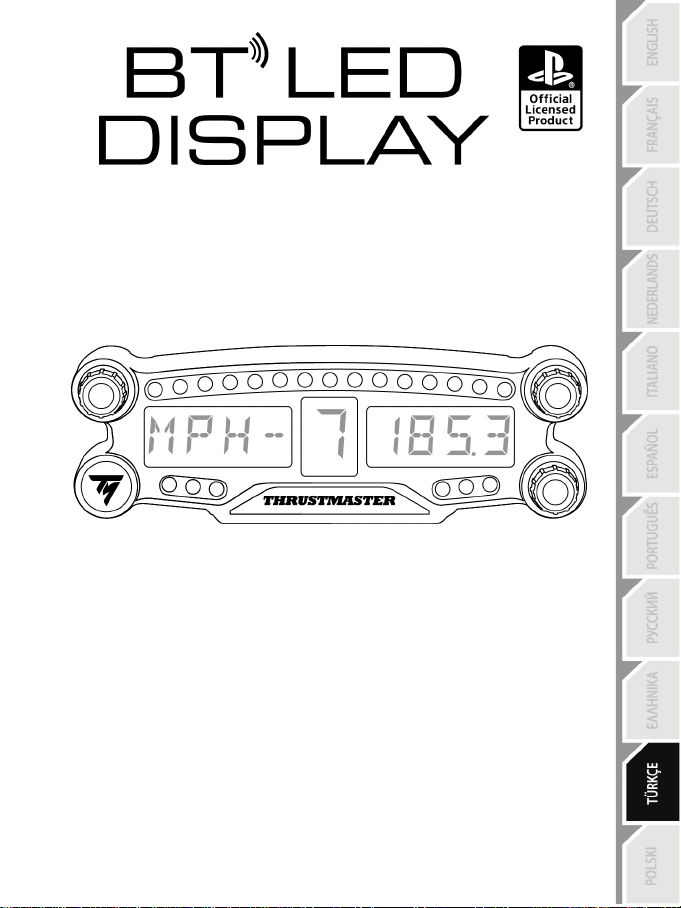
1/12
PlayStation
®4 için
Kullanma Kılavuzu
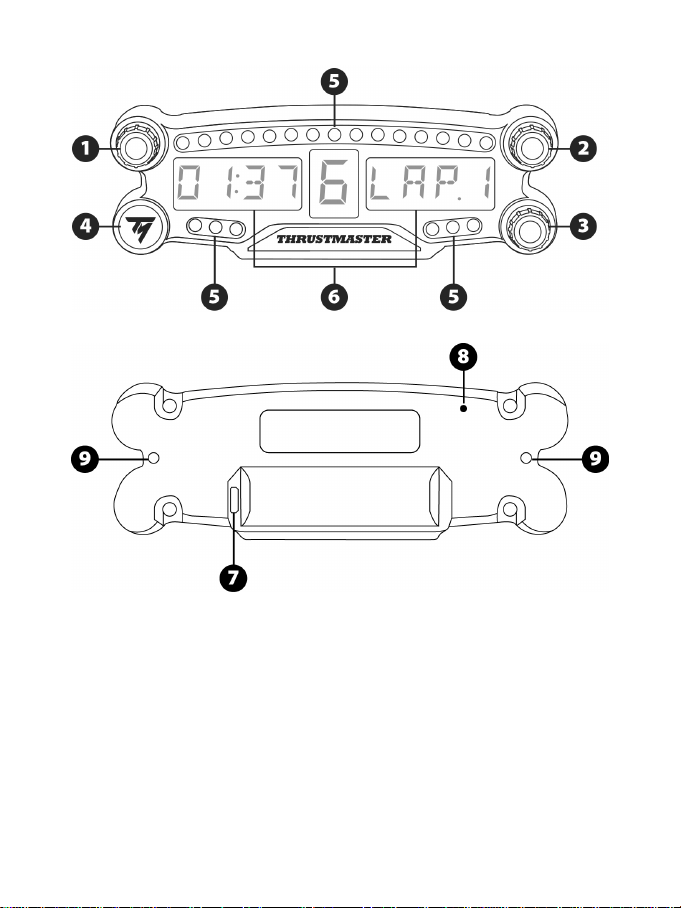
2/12
TEKNİK ÖZELLİKLER
1 Basma buton özellikli döner seçici düğme no. 1
2 Basma buton özellikli döner seçici düğme no. 2
3 Basma buton özellikli döner seçici düğme no. 3
(parlaklık ayar kontrolü)
4. Güç açma/kapama düğmesi
5 21 LED
6 Ana ekran
7 Micro USB şarj konektörü
8 Şarj göstergesi
9 Cihaz takmak için iki M3 dişli delik
3/12
UYARI
Bu ürünü kullanmadan önce lütfen bu kılavuzu dikkatlice okuyun ve daha sonra başvurma ihtiyacı
duymanız halinde kullanmak üzere güvenli bir yerde saklayın.
Uyarı - Elektrik çarpması
* Ürünü kuru bir yerde saklayın ve toza veya güneş ışığına maruz bırakmayın.
* Konektörleri ve kabloları bükmeyin ve çekmeyin.
* Ürünün veya konektörlerinin üzerine herhangi bir sıvı dökmeyin.
* Ürünü kısa devre yapmayın.
* Ürünü asla parçalarına ayırmayın, ateşe atmayın ve yüksek sıcaklıklara maruz bırakmayın.
* Cihazın içini açmayın: İçinde kullanıcı tarafından bakım/onarım yapılabilecek parça yoktur. Tüm
onarım işlemleri üretici firma, yetkili temsilcisi veya kalifiye teknisyen tarafından yapılmalıdır.
Uyarı – Dahili batarya
- Kullanmadan önce BT LED DISPLAY'i tam şarj edin.
- Cihazı parçalarına ayırmayın; ayırırsanız garantisi geçerliliğini yitirir.
- Cihazınızı şok ve darbelerden koruyun.
- Bu ürün, yetişkin gözetimi olmadan 14 yaşından küçük çocuklar tarafından kullanılmamalıdır.
BU TALİMATLARA UYULMAMASI HALİNDE THRUSTMASTER® HİÇBİR SORUMLULUK KABUL
ETMEZ.
UYARI: BATARYA HATALI TİPTE BİR BATARYA İLE DEĞİŞTİRİLİRSE PATLAMA MEYDANA
GELEBİLİR.
PİLLERİN ATILMASINA DAİR TALİMATLARI İZLEYİN.
BT LED DISPLAY'İN BATARYASININ ŞARJ EDİLMESİ
Bir micro USB kablo (örneğin PS4™
sistemi ile verilen USB kablosu) kullanarak BT LED DISPLAY'i
PS4™
sisteminin beslemeli boş USB bağlantı noktalarından birine bağlayın.
Şarj konektörü (7) BT LED DISPLAY'in arka kısmında yer almaktadır.
Şarj olurken şarj göstergesi (8) kırmızı yanar ve tam şarj olduğunda söner.
PS4™ OYUNLARIYLA UYUMLULUK
BT LED DISPLAY ile uyumlu PS4™
oyunlarının listesi için bkz.: http://ts.thrustmaster.com. Racing wheels /
BT LED DISPLAY / Games settings'i seçin.
Bu liste, BT LED DISPLAY ile uyumlu yeni PS4™
oyunlarının çıkması ile birlikte düzenli olarak
genişleyecektir.
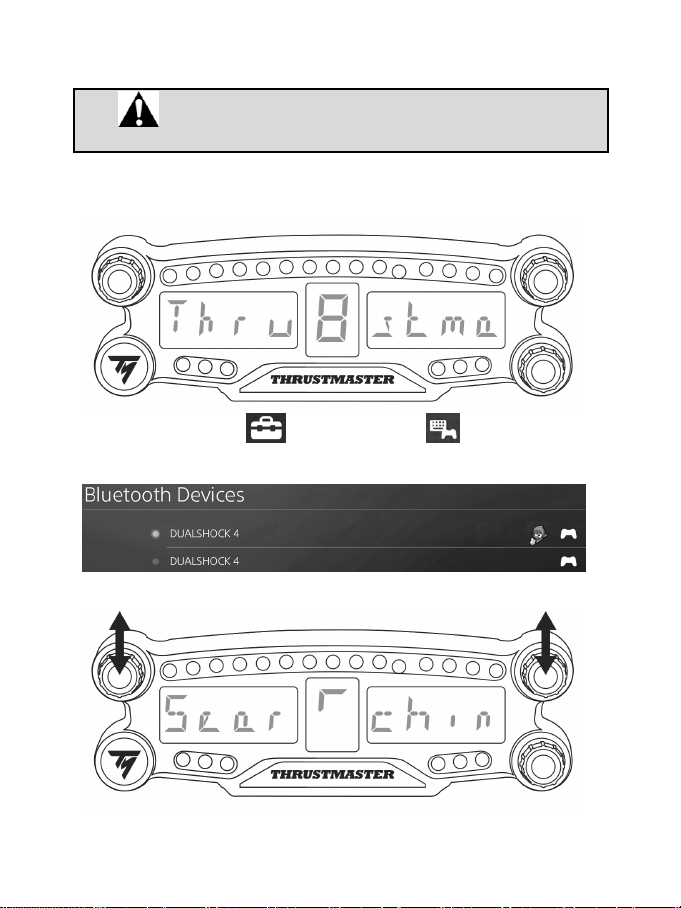
4/12
PS4™ SİSTEMİNDE KURULUM
BT LED DISPLAY'i PS4™ sistemine kayıt edin
Bu işlem sadece bir kez yapılmalıdır. PS4™ sistemi her yeniden
başlatıldığında kayıt gerekmez.
BT LED DISPLAY'i ilk kez kullanırken cihazı PS4™ sistemine zorunlu olarak kaydetmeniz gerekir; bu
işlem sadece bir kez yapılmalıdır.
1. Açma/Kapama düğmesine (4)
basarak BT LED DISPLAY'i açın.
Ana ekranda (6) Thrustmaster BT Wheel Display mesajı geçer.
2. PS4™ sistemi menüsünde, [ Settings ] (Ayarlar) > [ Devices ] (Cihazlar) >
[ Bluetooth Devices ] (Bluetooth Cihazları)'nı seçerek yakındaki Bluetooth® cihazlarını otomatik
olarak arayın. Eşleştirilmiş cihazlar ve diğer Bluetooth cihazlar listede gözükür.
3. BT LED DISPLAY'de seçici düğme no. 1 ve 2'ye aynı anda kısa süreli basıp bırakın. Ana ekranda
(6) Searching known devices mesajı geçer.
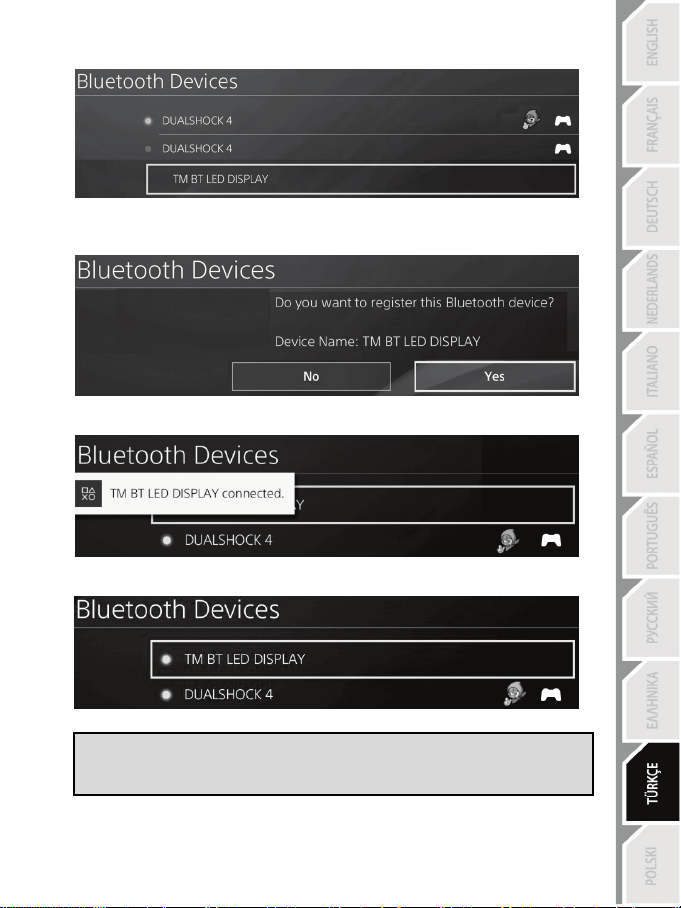
5/12
4. Bir süre sonra PS4™ sisteminin ekranında TM BT LED DISPLAY adı gözükmelidir. Kumanda
biriminiz ile s düğmesini seçerek basın.
5. PS4™
sisteminin ekranında Do you want to register this Bluetooth device TM BT LED
DISPLAY? (Bu Bluetooth cihazını TM BT LED DISPLAY'e kayıt etmen istiyor musunuz?) mesajı
gözükür. YES (Evet)'i seçin, sonra s düğmesine basarak onaylayın.
6. PS4™
sisteminin ekranında kısa süreli olarak TM BT LED DISPLAY connected (TM BT LED
DISPLAY bağlandı) mesajı gözükür.
PS4™
sisteminin ekranında, TM BT LED DISPLAY'in sol tarafında bulunan gösterge ışığı şimdi
yeşil yanarak cihazın sisteme doğru bir şekilde bağlandığını gösterir.
7. Artık oynamaya hazırsınız!
İşlem başarısız olursa PS4™ sistemini kapatın ve ayırın, sonra sistemin güç
kablosunu yeniden bağlayın. PS4™ sisteminizi yeniden başlatın, ardından kayıt
adımları 1 ila 6'yı tekrarlayın.
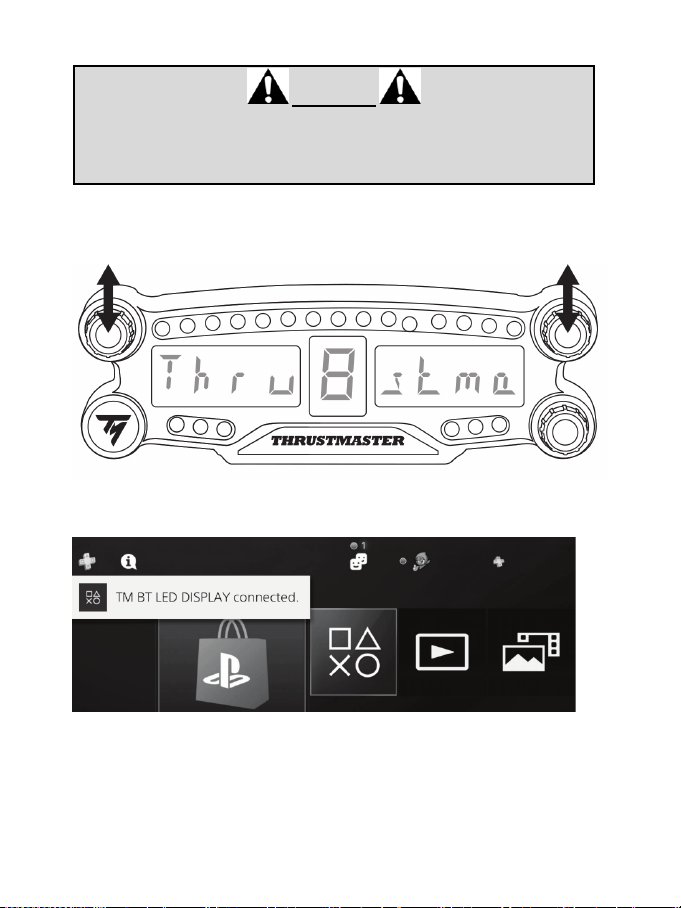
6/12
BT LED DISPLAY'i PS4™ sistemine bağlayın
ÇOK ÖNEMLİ
- PS4™ sistemi her yeniden başlatıldığında bu işlemi yapmanız zorunludur.
- BT LED DISPLAY ile PS4™ sistemi bağlantısı sadece önceki adım (yani BT
LED DISPLAY'i PS4™ sistemine kayıt edin) en az bir kez düzgün bir şekilde
yapılmışsa çalışır.
1. Açma/Kapama düğmesine (4) basarak BT LED DISPLAY'i açın.
Ana ekranda (6) Thrustmaster BT Wheel Display mesajı geçer.
2. BT LED DISPLAY'de seçici düğme no. 1 ve 2'ye aynı anda kısa süreli basıp bırakın.
Ana ekranda (6) Connected mesajı kısa süreliğine gözükür.
PS4™
sisteminin ekranında kısa süreli olarak TM BT LED DISPLAY connected (TM BT LED
DISPLAY bağlandı) mesajı gözükür.
3. Artık oynamaya hazırsınız!
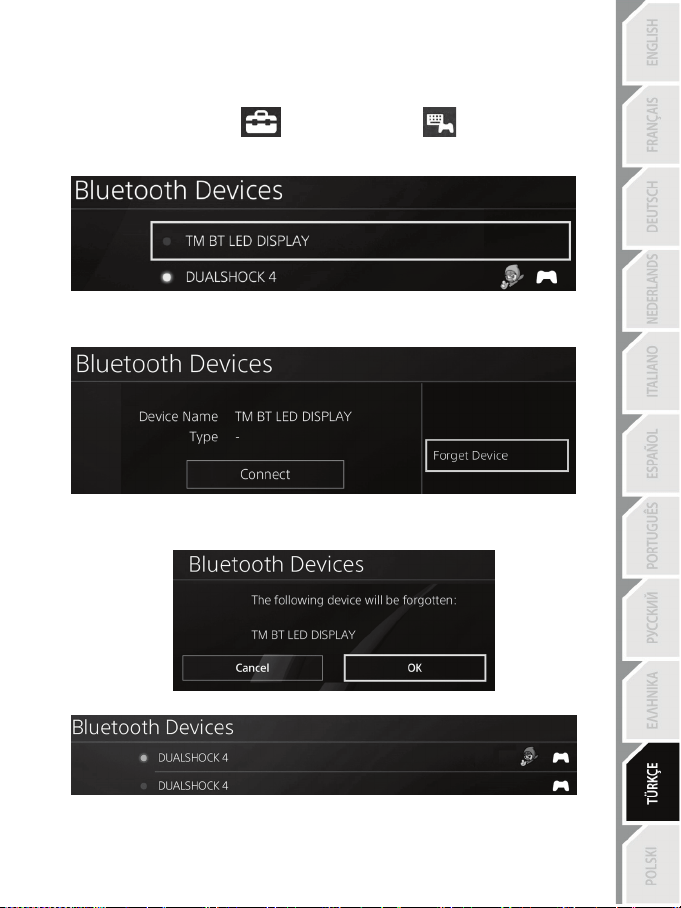
7/12
BT LED DISPLAY'in PS4™ sisteminden kaydının silinmesi
(Bu işlem sadece sorun giderme sırasında veya yeni bir BT LED DISPLAY satın alındığında gerekir.)
1. Açma/Kapama düğmesine (4)
basarak BT LED DISPLAY'i kapatın.
2. PS4™
sistemi menüsünde [ Settings ] (Ayarlar) > [ Devices ] (Cihazlar) >
[ Bluetooth Devices ] (Bluetooth Cihazlar)'ı seçin.
TM BT LED DISPLAY'i seçin, ardından s düğmesine basarak onaylayın.
3. Ekrana Device Name TM BT LED DISPLAY (Cihaz adı TM BT LED DISPALY) gözükür. Oyun
pedinizde OPTIONS düğmesine basın, sonra Forget Device (Cihazı Unut)'u seçin. Onaylamak için
s düğmesine basın.
4. Ekranda The following device will be forgotten: TM BT LED DISPLAY (Şu cihaz unutulacak: TM
BT LED DISPLAY) mesajı gözükür.
OK'i seçin, ardından s düğmesine basarak onaylayın.
5. TM BT LED DISPLAY kaydı artık PS4™
sisteminizden silinmiştir.
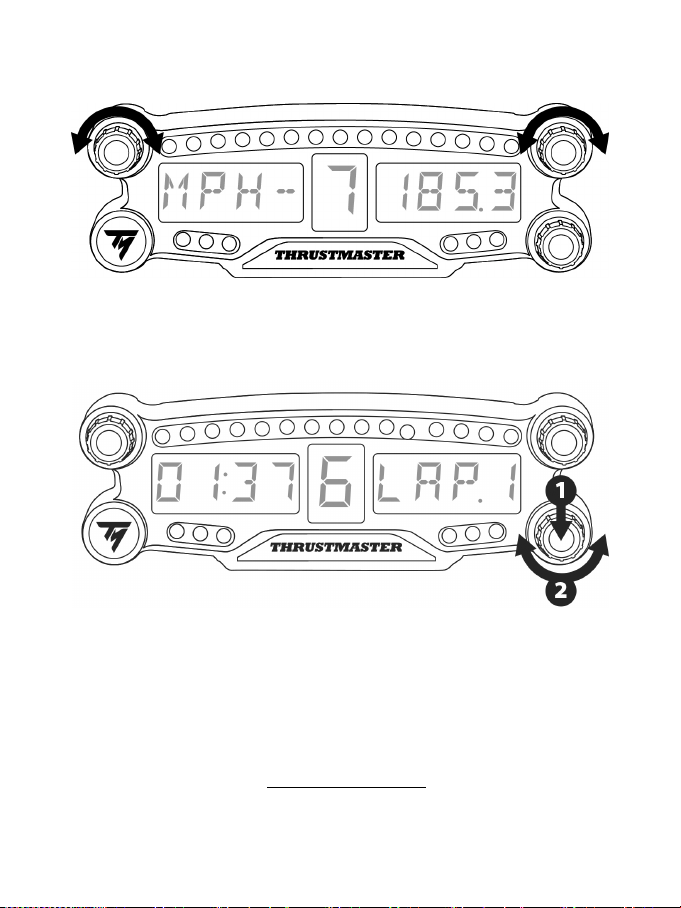
8/12
SEÇİCİ DÜĞMELER NO. 1 VE NO. 2'NİN KULLANILMASI
PS4™
oyununa bağlı olarak seçici düğmeler no. 1 ve no. 2'yi çevirerek ekran ayarlarını değiştirebilir ve
bir ayardan diğerine geçiş yapabilirsiniz.
BT LED DISPLAY'İN PARLAKLIĞININ AYARLANMASI
1) 21 LED'in (5) parlaklık ayarından ana ekranın (6) şiddetini ayarlamaya geçmek veya tersi için seçici
düğme no. 3'e basıp bırakın.
2) Seçici düğmeyi, şiddeti azaltmak için sola veya artırmak için sağa çevirin.
BT LED DISPLAY'İN TAKILMASI
BT LED DISPLAY'i tercihinize göre PS4™
sisteminin etrafında 10 metre yarıçap içinde bir yere monte
edebilirsiniz.
Cihazı çeşitli uygun unsurlara* veya doğrudan bazı yarış direksiyonlarına cihazın (9) arka kısmına
bulunan iki M3 dişli deliği kullanarak takabilirsiniz.
* Ayrı olarak satılır
Bununla ilgili daha fazla bilgi için bkz.: http://support.thrustmaster.com. Racing wheels / BT LED
DISPLAY, ardından User manual veya FAQ'yı seçin.
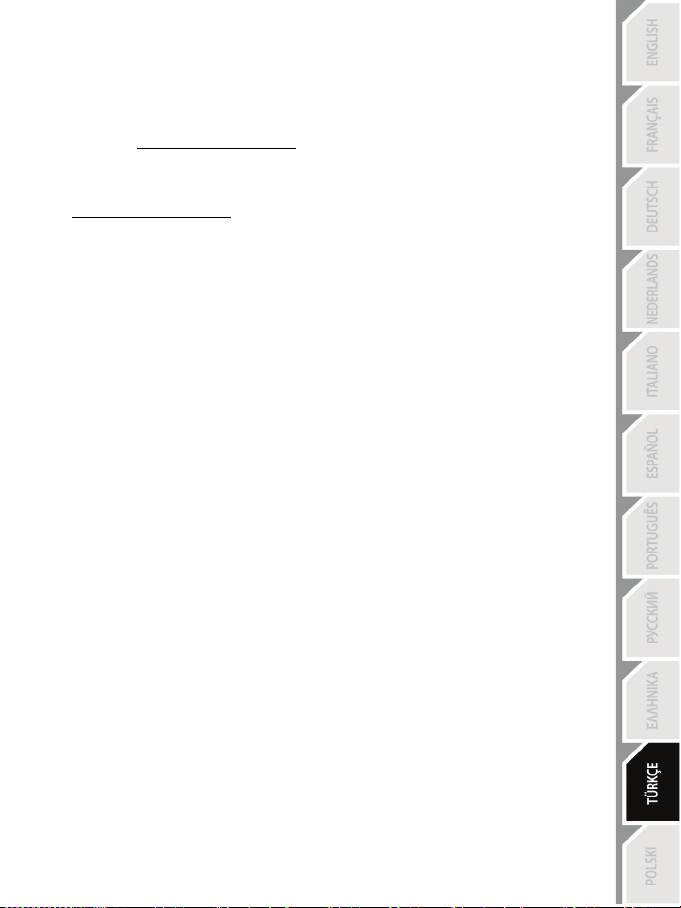
9/12
BT LED DISPLAY'İN DONANIM YAZILIMININ GÜNCELLENMESİ
BT LED DISPLAY'de yer alan her iki donanım yazılımı (genel donanım yazılımı ve Bluetooth donanım
yazılımı) ürün iyileştirmeleri içeren en son sürümlerle güncellenebilir.
BT LED DISPLAY'inizin donanım yazılımı sürümlerini görmek ve gerekirse güncellemek için:
bilgisayarda http://support.thrustmaster.com adresine gidin, Racing wheels / BT LED DISPLAY'i seçin,
ardından Firmware'i seçerek talimatları ve indirme ve yükleme prosedürünü izleyin.
YARDIM, SSS VE İPUÇLARI
http://support.thrustmaster.com adresine gidin. Racing wheels / BT LED DISPLAY'i, ardından User
manual veya FAQ'yu seçin.

10/12
TÜKETİCİ GARANTİ BİLGİSİ
İşbu Thrustmaster ürünü, malzeme ve işçilik hatalarına karşı, müşterinin kusurlu ürünün ücretinin
iade edilmesi veya değiştirilmesi talebinde bulunabileceği süreye karşılık gelen garanti süresince
dünya çapında tescil edilmiş merkezi Place du Granier, B.P. 97143, 35571 Chantepie, Fransa’da
bulunan Guillemot Corporation S.A. (bundan sonra “Guillemot” olarak ifade edilecektir) garantisi
altındadır. Avrupa Birliği ülkelerinde bu süre, Thrustmaster ürününün tesliminden itibaren iki (2)
seneye karşılık gelir. Diğer ülkelerde garanti süresi, Thrustmaster ürünü ile ilgili olarak, Thrustmaster
ürününün satın alındığı tarihte müşterinin ikamet ettiği ülkede geçerli yasalara uygun şekilde,
müşterinin kusurlu ürünün ücretinin iade edilmesi veya değiştirilmesi talebinde bulunabileceği
süreye karşılık gelir (İlgili ülkede bu tür bir düzenleme mevcut değilse garanti süresi Thrustmaster
ürününün satın alındığı asıl tarihten itibaren bir (1) yıl olacaktır).
Garanti süresi içinde üründe hata veya kusur tespit edilmesi durumunda derhal izlenecek yöntem ile
ilgili size bilgi verecek olan Teknik Destek servisimize başvurun. Hata veya kusur onaylanırsa
ürünün satın alındığı yere (ya da Teknik Destek servisi tarafından belirtilen yere) iade edilmesi
gerekmektedir.
İşbu garanti kapsamında müşterinin kusurlu ürünü, Teknik Destek servisinin insiyatifine bağlı olarak,
değiştirilecek veya çalışır hale getirilecektir. Garanti süresince Thrustmaster ürününün onarım
işlemine tabi tutulması durumunda, ürünün kullanım dışı olduğu en az yedi (7) günlük tüm süreler
kalan garanti süresine eklenecektir (bu süre, ürünün onarılması için hazır bulundurulduğu tarih
müdahale edilmesi için talepte bulunduğu tarihi takip ediyor ise müşterinin müdahale edilmesi için
talepte bulunduğu tarihten veya bahse konu ürünün onarılması için hazır bulundurulduğu tarihten
başlar). Yürürlükte olan yasaların izin verdiği durumlarda, Guillemot ve bağlılarının tüm sorumluluğu
(dolaylı hasarlar da dahil olmak üzere) Thrustmaster ürününün çalışır hale getirilmesi veya
değiştirilmesi ile sınırlıdır. Yürürlükte olan yasaların izin vermesi halinde Guillemot, ticarete
elverişlilik veya belirli bir amaca uygunluk ile ilgili tüm garantileri reddeder.
İşbu garanti aşağıdaki durumlar için geçerli değildir: (1) Ürün modifiye edilmişse, açılmışsa, üzerinde
değişiklik yapılmışsa, uygunsuz veya kötü kullanım, ihmal, kaza, normal aşınma ya da malzeme
veya üretim hatası ile ilgili olmayan nedenlerden dolayı hasar görmüşse (ancak bununla sınırlı
kalmamak üzere, Thrustmaster ürününü herhangi uygun bir elemanla birleştirmek, buna dahil olarak
özellikle güç kaynakları, yeniden doldurulabilir piller, şarj cihazları veya bu ürün için Guillemot
tarafından tedarik edilmemiş tüm diğer elemanlar); (2) ürün, evde kullanım dışında, profesyonel
veya ticari maksatlı olanlar da dahil olmak üzere (örneğin oyun salonları, eğitim, yarışlar) başka
maksatlarla kullanılmışsa; (3) Teknik Destek servisi tarafından sağlanan talimatlara uyulmamışsa;
(4) yazılım için, işbu garanti geçerli değildir, söz konusu yazılım için sağlanan özel garanti
hükümlerine tabidir; (5) sarf malzemeleri için (ürünün kullanım süresi içinde değiştirilecek elemanlar:
örneğin; tek kullanımlık piller, kulaklık yastıkları); (6) aksesuarlar için (örneğin; kablolar, kılıflar,
cepler, çantalar, bileklikler); (7) ürün açık artırma ile satılmışsa.
Bu garanti devrolunamaz.
Tüketim mallarının tüketicinin ülkesinde satışına ilişkin tüketicinin yasal hakları işbu garantiden
etkilenmemektedir.
11/12
Ek garanti hükümleri
Garanti süresince, tüm Thrustmaster ürünlerini açmaya ve/veya onarmaya yetkili tek taraf Teknik
Destek Servisi olduğundan prensip olarak Guillemot tarafından hiçbir yedek parça sağlanmayacaktır
(Uygulanabilir olması durumunda yazılı talimatlarla ve müşteriye gerekli yedek parça(lar) sağlanarak
Teknik Destek Servisinin müşteri tarafından yapılmasını isteyebileceği tüm onarım prosedürleri hariç
– örneğin onarım işleminin basit olmasından ve gizlilik içermemesinden dolayı).
İnovasyon döngülerini dikkate almak ve bilgi birikimi ile ticari sırlarını korumak için Guillemot,
prensip olarak garanti süresi dolmuş hiç bir Thrustmaster ürünü için onarım bilgisi veya yedek parça
sağlamayacaktır.
Sorumluluk
Yürürlükte olan yasaların izin vermesi halinde, Guillemot Corporation S.A. (bundan sonra
“Guillemot” olarak ifade edilecektir) ve bağlıları aşağıdakilerin biri veya daha fazlasından
kaynaklanan her türlü hasara karşı tüm sorumluluğu reddeder: (1) Ürün modifiye edilmişse,
açılmışsa, üzerinde değişiklik yapılmışsa; (2) montaj talimatlarına uyulmamışsa; (3) uygunsuz veya
kötü kullanım, ihmal, kaza (örneğin bir darbe); (4) normal aşınma; (5) ürünün, evde kullanım
dışında, profesyonel veya ticari maksatlı olanlar da dahil olmak üzere (örneğin oyun salonları,
eğitim, yarışlar) başka maksatlarla kullanılması. Yürürlükte olan yasaların izin vermesi halinde,
Guillemot ve bağlıları ürünle ilgili malzeme veya üretim hatası ile ilgili olmayan her türlü hasara karşı
tüm sorumluluğu reddeder (ancak bununla sınırlı kalmamak üzere, herhangi bir yazılımdan veya
Thrustmaster ürününün herhangi bir uygun olmayan elemanla birleştirilmesinden doğrudan veya
dolaylı olarak kaynaklanan tüm hasarlar, buna dahil olarak özellikle güç kaynakları, yeniden
doldurulabilir piller, şarj cihazları veya bu ürün için Guillemot tarafından tedarik edilmemiş tüm diğer
elemanlar).
TEKNİK DESTEK
http://support.thrustmaster.com
12/12
AB MEVZUATINA UYGUNLUK BEYANI
Guillemot Corporation S.A., işbu belgede BT LED DISPLAY'in 2014/53/UE (RED) Direktifinin ana
gereklilikleri ve diğer ilgili maddelerine uygun olduğunu beyan eder. Uygunluk beyanını aşağıdaki sitede
görebilirsiniz:
http://www.thrustmaster.com/certificates/BT_Led_Display/Doc-BT_Led_Display.pdf
Frekans Bandı: 2402-2480MHz, RF Maks. güç: <10dBm
TELİF HAKKI
© 2017 Guillemot Corporation S.A. Tüm hakları saklıdır. Thrustmaster® Guillemot Corporation S.A.’nın
tescilli ticari markasıdır.
Avrupa, Afrika, Orta Doğu, Rusya, Hindistan ve Okyanusya’da satılmak üzere lisanslıdır. Yalnızca
PlayStation
®4 ile kullanmak için.
Diğer tüm ticari markalar ilgili sahiplerine aittir. Fotoğraflar bağlayıcı değildir. İçindekiler, tasarım ve teknik
özellikler önceden haber vermeksiniz değiştirilebilir ve ülkeden ülkeye farklılık gösterebilir. Çin'de
üretilmiştir.
Guillemot Corporation S.A. tarafından üretilmekte ve dağıtılmaktadır.
ÇEVRE KORUMA ÖNERİLERİ
Avrupa Birliği ve Türkiye’de: Cihazın kullanım ömrü sona erdiğinde, standart ev atıkları
ile atılmamalı, geri dönüşüm için Atık Elektrikli ve Elektronik Cihazların toplandığı bir
yere bırakılmalıdır.
Bu, ürünün, kullanım kılavuzunun veya paketin üzerinde bulunan sembol ile
onaylanmıştır.
Özelliklerine bağlı olarak malzemeler geri dönüştürülebilir. Atık Elektrik ve Elektronik
Cihazların geri dönüşümü veya diğer işleme yöntemleri sayesinde çevrenin
korunmasına yönelik önemli bir katkıda bulunabilirsiniz. Size en yakın toplama merkezleri hakkında bilgi
almak için lütfen yerel yetkililerle iletişime geçin.
Diğer ülkeler için: Lütfen elektrikli ve elektronik cihazların geri dönüşümü için yerel yasalara uyunuz.
AEEE Yönetmeliğine Uygundur.
Bu belgeyi saklayın. Renkler ve süslemeler değişiklik gösterebilir.
Plastik tutturucular ve bantlar, kullanmadan önce üründen çıkarılmalıdır.
www.thrustmaster.com
*Sadece AB ve Türkiye için geçerlidir
*
*
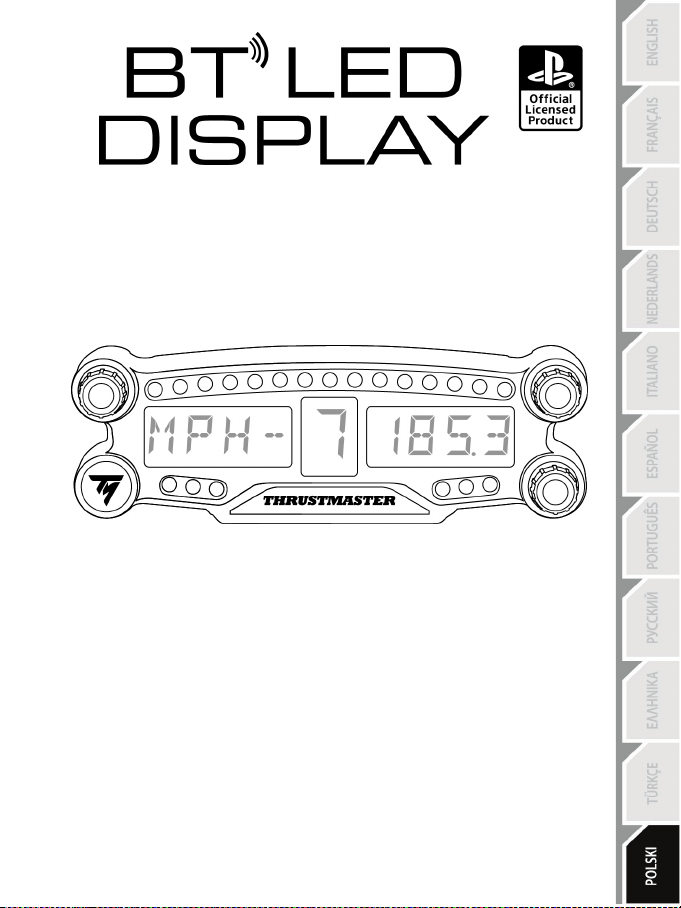
1/12
Dla PlayStation
®4
Instrukcja obsługi
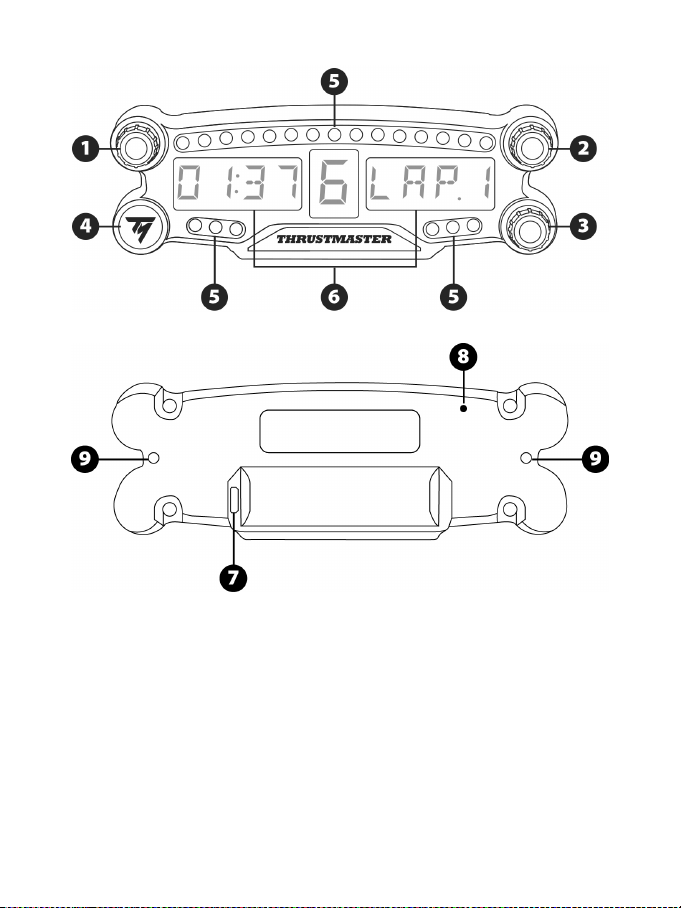
2/12
ELEMENTY
1 Wybierak obrotowy nr 1 z funkcją przycisku
2 Wybierak obrotowy nr 2 z funkcją przycisku
3 Wybierak obrotowy nr 3 z funkcją przycisku
(regulacja jasności)
4 Przycisk zasilania
5 21 diod LED
6 Wyświetlacz główny
7 Złącze ładowania micro USB
8 Kontrolka ładowania
9 Dwa otwory z gwintem M3 do mocowania
urządzenia
3/12
OSTRZEŻENIE
Zanim rozpoczniesz korzystanie z urządzenia, szczegółowo zapoznaj się z niniejszą instrukcją,
a następnie zachowaj ją do wglądu.
Ostrzeżenie — ryzyko porażenia prądem elektrycznym
* Przechowuj urządzenie w suchym miejscu i nie wystawiaj go na działanie kurzu ani światła
słonecznego.
* Nie skręcaj ani nie naciągaj złączy ani kabli.
* Nie wylewaj cieczy na urządzenie ani jego złącza.
* Nie zwieraj urządzenia.
* Nie demontuj urządzenia, nie wrzucaj go do ognia ani nie narażaj na działanie wysokich
temperatur.
* Nie otwieraj urządzenia: w jego wnętrzu nie ma części przeznaczonych do naprawiania przez
użytkownika. Naprawy może wykonywać wyłącznie producent, jego autoryzowany przedstawiciel
lub wykwalifikowany serwisant.
Ostrzeżenie — akumulator wewnętrzny
— Przed rozpoczęciem korzystania z urządzenia BT LED DISPLAY w pełni je naładuj.
— Nie demontuj urządzenia, ponieważ unieważniłoby to jego gwarancję.
— Chroń urządzenie przed wstrząsami i uderzeniami.
— Dzieci poniżej 14 lat mogą korzystać z tego urządzenia wyłącznie pod nadzorem osoby dorosłej.
FIRMA THRUSTMASTER® NIE PONOSI ŻADNEJ ODPOWIEDZIALNOŚCI W RAZIE
NIEPRZESTRZEGANIA NINIEJSZYCH INSTRUKCJI.
OSTRZEŻENIE: WYMIANA AKUMULATORA URZĄDZENIA NA AKUMULATOR
NIEWŁAŚCIWEGO TYPU MOŻE DOPROWADZIĆ DO WYBUCHU.
PRZESTRZEGAJ INSTRUKCJI DOTYCZĄCYCH UTYLIZACJI AKUMULATORÓW.
ŁADOWANIE AKUMULATORA URZĄDZENIA BT LED DISPLAY
Za pomocą kabla micro USB (na przykład kabla USB dostarczonego z systemem PS4™) podłącz
urządzenie BT LED DISPLAY do jednego z wolnych portów USB systemu PS4™.
Złącze ładowania (7) znajduje się z tyłu urządzenia BT LED DISPLAY.
Kontrolka ładowania (8) świeci na czerwono podczas ładowania urządzenia i wyłącza się po jego
całkowitym naładowaniu.
ZGODNOŚĆ Z GRAMI NA PS4™
Listę gier na PS4™ zgodnych z urządzeniem BT LED DISPLAY można znaleźć na stronie
http://support.thrustmaster.com. Wybierz Racing wheels / BT LED DISPLAY / Games settings.
Lista będzie regularnie uzupełniana wraz z wprowadzaniem nowych gier na PS4™ zgodnych
z urządzeniem BT LED DISPLAY.
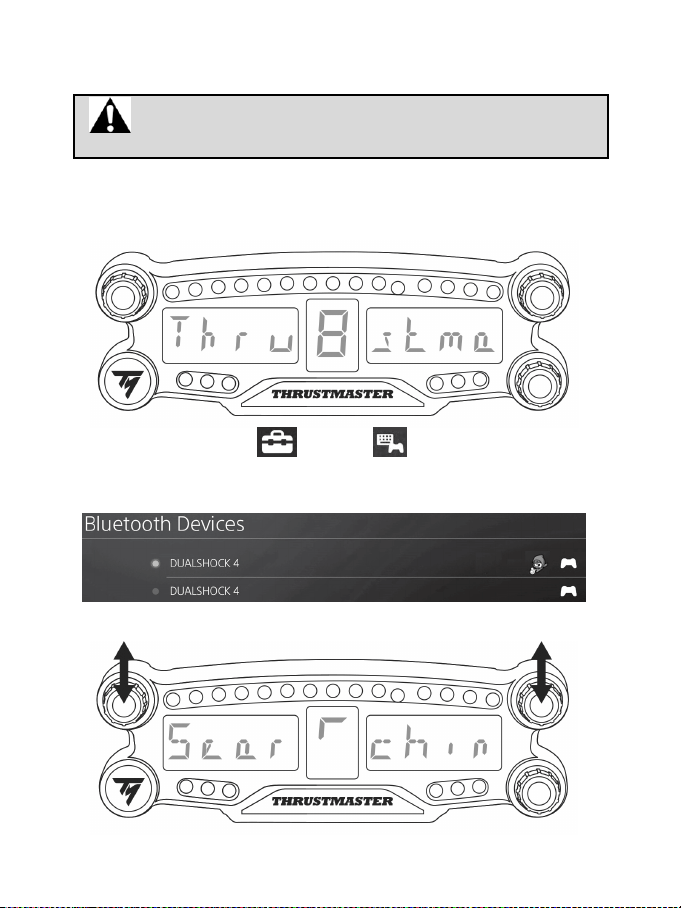
4/12
INSTALACJA W SYSTEMIE PS4™
Rejestrowanie urządzenia BT LED DISPLAY w systemie PS4™
Tę operację należy wykonać tylko raz. Nie trzeba jej ponawiać po każdym
uruchomieniu systemu PS4™.
W przypadku pierwszego korzystania z urządzenia BT LED DISPLAY należy bezwzględnie
zarejestrować je w systemie PS4™. Operację tę wystarczy wykonać tylko raz.
1. Włącz urządzenie BT LED DISPLAY, naciskając przycisk zasilania (4)
.
Na wyświetlaczu głównym (6) przewinie się komunikat Thrustmaster BT Wheel Display.
2. W menu systemu PS4™ wybierz [ Settings ] > [ Devices ] > [ Bluetooth Devices ]
(Ustawienia > Urządzenia > Urządzenia Bluetooth), aby automatycznie wyszukać urządzenia
Bluetooth® znajdujące się w pobliżu. Na liście pojawią się sparowane urządzenia i inne urządzenia
Bluetooth.
3. Jednocześnie krótko naciśnij i zwolnij wybieraki nr 1 i 2 w urządzeniu BT LED DISPLAY. Na
wyświetlaczu głównym (6) przewinie się komunikat Searching known devices.
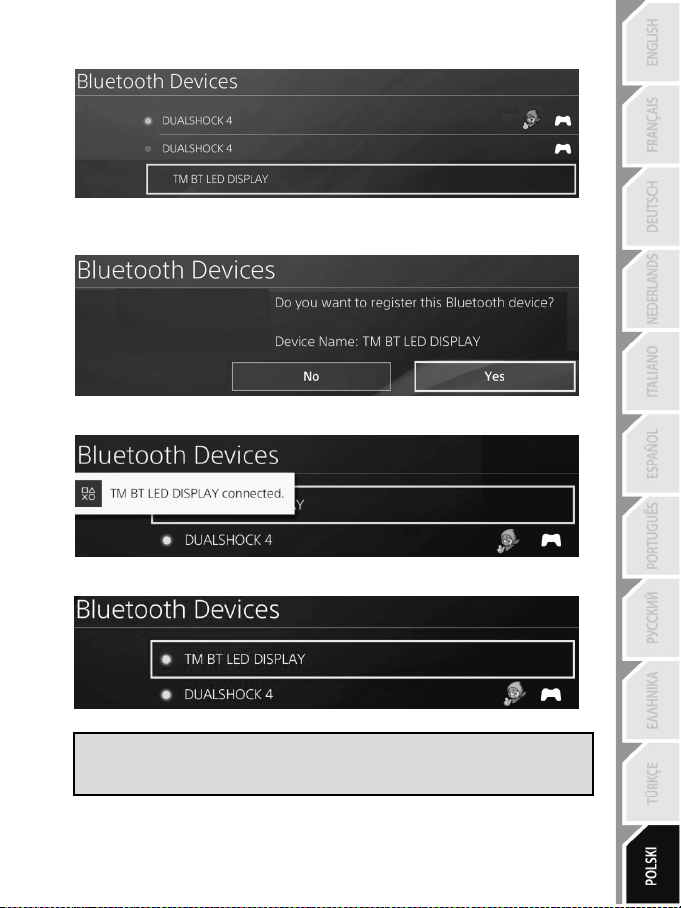
5/12
4. Po pewnym czasie na ekranie systemu PS4™ powinna pojawić się nazwa TM BT LED DISPLAY.
Za pomocą kontrolera wybierz ją i naciśnij przycisk s.
5. Na ekranie systemu PS4™ pojawi się pytanie Do you want to register this Bluetooth device
TM BT LED DISPLAY? (Czy chcesz zarejestrować to urządzenie Bluetooth TM BT LED
DISPLAY?). Wybierz YES (TAK), a następnie naciśnij przycisk s w celu potwierdzenia.
6. Na ekranie systemu PS4™ na krótko pojawi się komunikat TM BT LED DISPLAY connected
(Podłączono TM BT LED DISPLAY).
Na ekranie systemu PS4™ kontrolka znajdująca się z lewej strony nazwy TM BT LED DISPLAY
zacznie świecić na zielono, informując o prawidłowym podłączeniu urządzenia do systemu.
7. Teraz możesz zacząć grać!
Jeśli operacja się nie powiedzie, wyłącz system PS4™ i odłącz, a następnie
ponownie podłącz jego kabel zasilania. Uruchom ponownie system PS4™,
a następnie powtórz kroki rejestracji od 1 do 6.
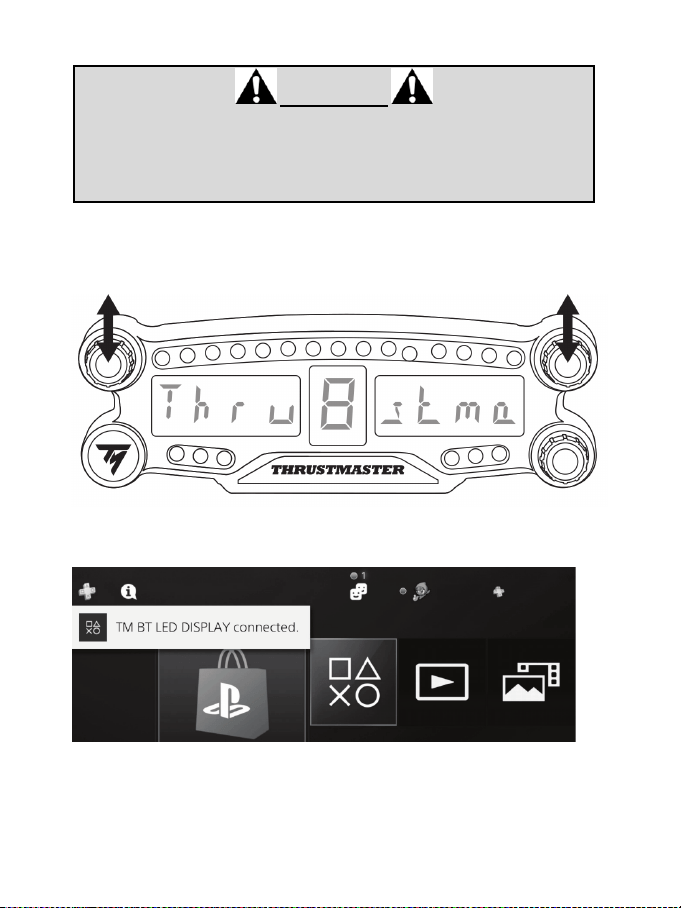
6/12
Podłączanie urządzenia BT LED DISPLAY do systemu PS4™
BARDZO WAŻNE
— Wykonanie tej operacji jest konieczne po każdym ponownym uruchomieniu
systemu PS4™.
— Podłączenie urządzenia BT LED DISPLAY do systemu PS4™ powiedzie się
tylko wówczas, gdy co najmniej raz został prawidłowo wykonany poprzedni
krok (Rejestrowanie urządzenia BT LED DISPLAY w systemie PS4™).
1. Włącz urządzenie BT LED DISPLAY, naciskając przycisk zasilania (4).
Na wyświetlaczu głównym (6) przewinie się komunikat Thrustmaster BT Wheel Display.
2. Jednocześnie krótko naciśnij i zwolnij wybieraki nr 1 i 2 w urządzeniu BT LED DISPLAY.
Na wyświetlaczu głównym (6) na krótko pojawi się komunikat Connected.
Na ekranie systemu PS4™ na krótko pojawi się komunikat TM BT LED DISPLAY connected
(Podłączono TM BT LED DISPLAY).
3. Teraz możesz zacząć grać!
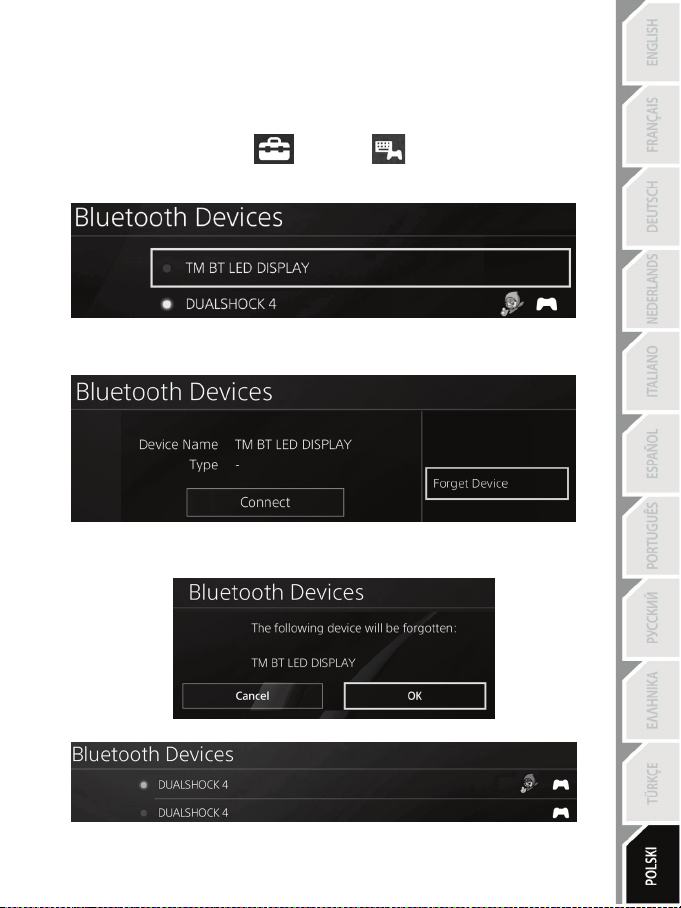
7/12
Wyrejestrowywanie urządzenia BT LED DISPLAY z systemu PS4™
(Ta operacja jest wymagana tylko w przypadku rozwiązywania problemów lub zakupu nowego
urządzenia BT LED DISPLAY).
1. Wyłącz urządzenie BT LED DISPLAY, naciskając przycisk zasilania (4)
.
2. W menu systemu PS4™ wybierz
[ Settings ] > [ Devices ] > [ Bluetooth Devices ]
(Ustawienia > Urządzenia > Urządzenia Bluetooth).
Wybierz TM BT LED DISPLAY, a następnie naciśnij przycisk s w celu potwierdzenia.
3. Na ekranie pojawi się komunikat Device Name TM BT LED DISPLAY (Nazwa urządzenia TM BT
LED DISPLAY). Naciśnij przycisk OPTIONS na kontrolerze, a następnie wybierz Forget Device
(Zapomnij urządzenie). Naciśnij przycisk s w celu potwierdzenia.
4. Na ekranie pojawi się komunikat The following device will be forgotten: TM BT LED DISPLAY
(Następujące urządzenie zostanie zapomniane: TM BT LED DISPLAY).
Wybierz OK, a następnie naciśnij przycisk s w celu potwierdzenia.
5. Urządzenie TM BT LED DISPLAY zostanie wyrejestrowane z systemu PS4™.
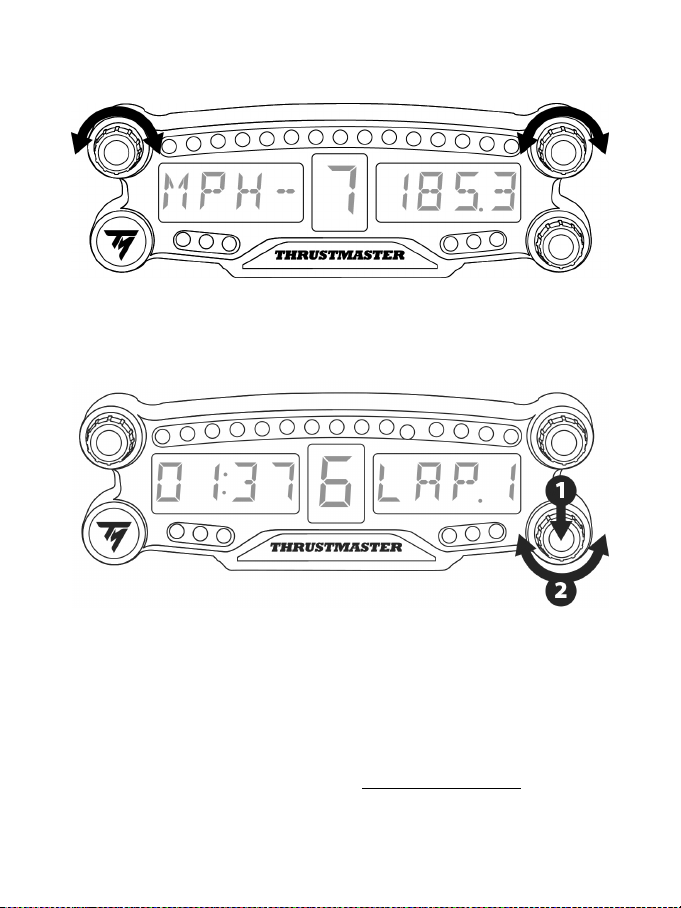
8/12
KORZYSTANIE Z WYBIERAKÓW OBROTOWYCH NR 1 I 2
W zależności od gry na PS4™ przez obracanie wybieraków nr 1 i 2 można zmieniać ustawienia
wyświetlania oraz poruszać się między ustawieniami.
REGULOWANIE JASNOŚCI URZĄDZENIA BT LED DISPLAY
1. Naciśnij i zwolnij wybierak nr 3, aby przejść od ustawiania jasności 21 diod LED (5) do regulowania
natężenia wyświetlacza głównego (6) lub na odwrót.
2. Obróć wybierak w lewo, aby zmniejszyć natężenie, lub w prawo, aby je zwiększyć.
MONTOWANIE URZĄDZENIA BT LED DISPLAY
Dla własnej wygody urządzenie BT LED DISPLAY można zainstalować w promieniu 10 metrów od
systemu PS4™.
Ponadto urządzenie można montować do różnych przedmiotów* lub bezpośrednio do niektórych
kierownic, używając dwóch otworów z gwintem M3 znajdujących się z tyłu urządzenia (9).
* Do nabycia osobno
Więcej informacji na ten temat można znaleźć na stronie http://support.thrustmaster.com. Wybierz Racing
wheels / BT LED DISPLAY, a następnie User manual lub FAQ.
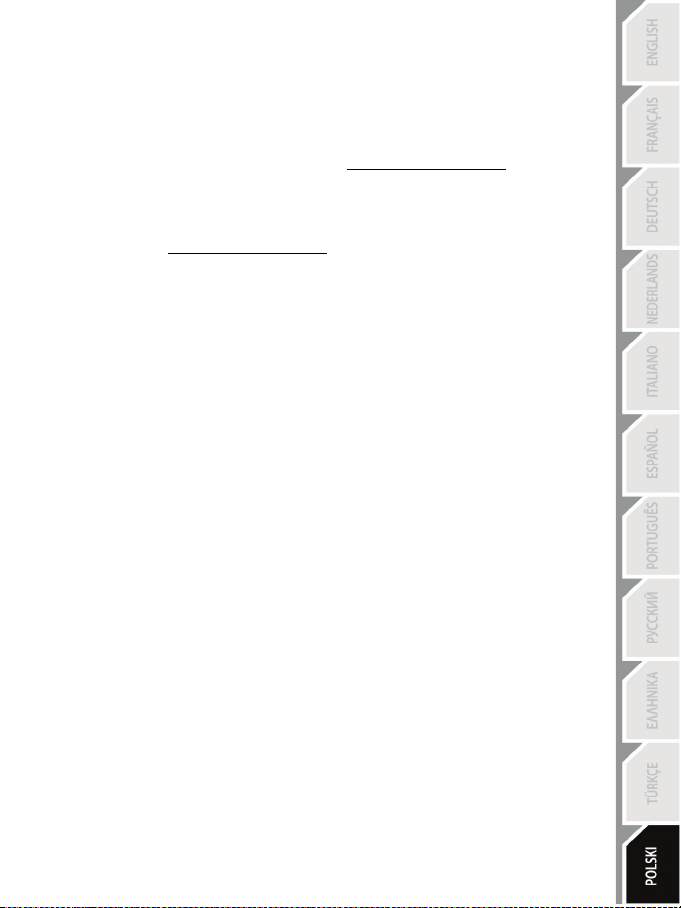
9/12
AKTUALIZOWANIE OPROGRAMOWANIA SPRZĘTOWEGO URZĄDZENIA
BT LED DISPLAY
Oba rodzaje oprogramowania sprzętowego urządzenia BT LED DISPLAY (ogólne i Bluetooth) można
zaktualizować do najnowszej wersji zawierającej ulepszenia produktu.
Aby wyświetlić wersje oprogramowania sprzętowego urządzenia BT LED DISPLAY i w razie potrzeby
je zaktualizować, na komputerze wejdź na stronę http://support.thrustmaster.com, wybierz Racing
wheels / BT LED DISPLAY, wybierz Firmware, a następnie postępuj zgodnie z instrukcją pobierania
i instalacji.
POMOC, CZĘSTO ZADAWANE PYTANIA I WSKAZÓWKI
Wejdź na stronę http://support.thrustmaster.com. Wybierz Racing wheels / BT LED DISPLAY,
a następnie User manual lub FAQ.

10/12
INFORMACJE DOTYCZĄCE GWARANCJI DLA KLIENTA
Firma Guillemot Corporation S.A. z siedzibą pod adresem Place du Granier, B.P. 97143, 35571
Chantepie, Francja („Guillemot”) udziela klientowi obowiązującej na całym świecie gwarancji, że
niniejszy produkt Thrustmaster będzie wolny od wad materiałowych i produkcyjnych przez okres
gwarancji równy limitowi czasu, w którym klient może występować z roszczeniami z tytułu wad
niniejszego produktu. W krajach Unii Europejskiej jest to okres dwóch (2) lat od dostarczenia
produktu Thrustmaster. W innych krajach okres gwarancji jest równy limitowi czasu, w którym klient
może występować z roszczeniami z tytułu wad produktu Thrustmaster zgodnie z przepisami
obowiązującymi w kraju, w którym klient mieszkał w dniu zakupu produktu Thrustmaster. (Jeśli
przepisy danego kraju nie przewidują występowania z takimi roszczeniami, okres gwarancji będzie
wynosić jeden (1) rok od pierwotnej daty zakupu produktu Thrustmaster).
Jeśli w okresie gwarancji wystąpią objawy mogące świadczyć o wadzie produktu, należy
niezwłocznie skontaktować się z działem pomocy technicznej, który wskaże dalszy sposób
postępowania. W razie potwierdzenia wady produkt należy zwrócić w punkcie zakupu (lub innym
miejscu wskazanym przez dział pomocy technicznej).
W ramach niniejszej gwarancji wadliwy produkt zostanie wymieniony lub przywrócony do stanu
sprawności użytkowej, zgodnie z decyzją działu pomocy technicznej. Jeśli w okresie gwarancji
produkt Thrustmaster zostanie poddany czynnościom mającym na celu przywrócenie go do stanu
użytkowego, dowolny okres co najmniej siedmiu (7) dni, podczas których produkt nie jest
użytkowany, zostanie dodany do pozostałego okresu gwarancji (okres ten liczy się od dnia, w
którym klient poprosi o interwencję, lub od dnia, w którym dany produkt zostanie udostępniony
celem przywrócenia do stanu użytkowego, jeśli data udostępnienia celem przywrócenia do stanu
użytkowego następuje po dacie prośby o interwencję). Jeśli zezwala na to obowiązujące prawo,
całkowita odpowiedzialność firmy Guillemot i jej podmiotów zależnych (łącznie z odpowiedzialnością
za szkody wtórne) ogranicza się do przywrócenia do stanu użytkowego lub wymiany produktu
Thrustmaster. Jeśli zezwala na to obowiązujące prawo, firma Guillemot wyłącza wszelkie gwarancje
pokupności i przydatności do określonego celu.
Niniejsza gwarancja nie obowiązuje: (1) w przypadku, gdy produkt został zmodyfikowany, otwarty,
zmieniony albo uszkodzony na skutek nieodpowiedniego lub nadmiernego użytkowania,
niedbałości, wypadku, normalnego zużycia lub z innego powodu niezwiązanego z wadą
materiałową ani produkcyjną (w tym między innymi z powodu połączenia produktu Thrustmaster z
nieodpowiednim elementem, w tym w szczególności z zasilaczem, akumulatorem, ładowarką lub
jakimkolwiek innym elementem niedostarczonym przez firmę Guillemot dla tego produktu); (2) w
przypadku używania produktu w sposób inny niż użytek domowy, w tym do celów zawodowych lub
komercyjnych (na przykład w salonach gier albo do prowadzenia szkoleń lub zawodów); (3) w razie
nieprzestrzegania instrukcji podanych przez dział pomocy technicznej; (4) w odniesieniu do
oprogramowania, jako że oprogramowanie to jest objęte odrębną szczegółową gwarancją; (5) w
odniesieniu do materiałów eksploatacyjnych (elementów wymienianych w czasie eksploatacji
produktu, na przykład baterii jednorazowych, muszli/nakładek na uszy do zestawów słuchawkowych
lub słuchawek); (6) w odniesieniu do akcesoriów (na przykład kabli, pokrowców, etui, torebek,
pasków na rękę); (7) w przypadku sprzedania produktu na aukcji publicznej.
Niniejsza gwarancja nie podlega przeniesieniu.
Niniejsza gwarancja nie wpływa na prawa klienta wynikające z przepisów dotyczących sprzedaży
dóbr konsumenckich w kraju klienta.
11/12
Dodatkowe postanowienia gwarancyjne
W okresie gwarancji firma Guillemot zasadniczo nie udostępnia jakichkolwiek części zamiennych,
ponieważ jedynym podmiotem upoważnionym do otwarcia jakiegokolwiek produktu Thrustmaster
i/lub przywrócenia go do stanu użytkowego jest dział pomocy technicznej (oprócz ewentualnych
procedur przywracania produktu do stanu użytkowego, o wykonanie których dział pomocy
technicznej może poprosić klienta przez przekazanie pisemnych instrukcji — np. ze względu na
prostotę i jawność procesu przywracania do stanu użytkowego — oraz, w razie potrzeby, przez
udostępnienie klientowi wymaganych części zamiennych).
Ze względu na realizowane cykle innowacji oraz konieczność zapewnienia ochrony swojej
specjalistycznej wiedzy i tajemnic handlowych firma Guillemot zasadniczo nie udostępnia
powiadomień dotyczących przywracania do stanu użytkowego ani części zamiennych w przypadku
produktów Thrustmaster, których okres gwarancji upłynął.
Odpowiedzialność
Jeśli zezwala na to obowiązujące prawo, firma Guillemot Corporation S.A. („Guillemot”) i jej
podmioty zależne nie ponoszą żadnej odpowiedzialności za szkody spowodowane przez co
najmniej jeden z następujących czynników: (1) modyfikację lub otwarcie produktu bądź
wprowadzenie w nim zmian; (2) nieprzestrzeganie instrukcji montażu; (3) nieodpowiednie lub
nadmierne użytkowanie, niedbałość, wypadek (na przykład uderzenie); (4) normalne zużycie; (5)
używanie produktu w sposób inny niż użytek domowy, w tym do celów zawodowych lub
komercyjnych (na przykład w salonach gier albo do prowadzenia szkoleń lub zawodów). Jeśli
zezwala na to obowiązujące prawo, firma Guillemot i jej podmioty zależne nie ponoszą żadnej
odpowiedzialności za szkody niezwiązane z wadą materiałową lub produkcyjną produktu (w tym
między innymi za szkody spowodowane bezpośrednio lub pośrednio przez jakiekolwiek
oprogramowanie lub na skutek połączenia produktu Thrustmaster z nieodpowiednim elementem, w
tym w szczególności z zasilaczem, akumulatorem, ładowarką lub jakimkolwiek innym elementem
niedostarczonym przez firmę Guillemot dla tego produktu).
WSPARCIE TECHNICZNE
http://support.thrustmaster.com
12/12
OŚWIADCZENIE O ZGODNOŚCI Z REGULACJAMI UE
Niniejszym firma Guillemot Corporation S.A. oświadcza, że urządzenie BT LED DISPLAY jest zgodne
z istotnymi wymogami i innymi stosownymi postanowieniami dyrektywy 2014/53/UE (RED). Oświadczenie
dotyczące zgodności można znaleźć na następującej stronie:
http://www.thrustmaster.com/certificates/BT_Led_Display/Doc-BT_Led_Display.pdf
Pasmo częstotliwości: 2402–2480 MHz, maks. moc RF: <10 dBm
PRAWA AUTORSKIE
© 2017 Guillemot Corporation S.A. Wszelkie prawa zastrzeżone. Thrustmaster® jest zastrzeżonym
znakiem towarowym firmy Guillemot Corporation S.A.
Produkt licencjonowany do sprzedaży na terenie Europy, Afryki, Bliskiego Wschodu, Rosji, Indii i Oceanii.
Do użytku wyłącznie z systemami PlayStation
®4.
Wszystkie inne znaki towarowe stanowią własność odpowiednich podmiotów. Ilustracje nie są wiążące
prawnie. Treść, wzory i dane techniczne mogą ulec zmianie bez powiadomienia i mogą różnić się w
zależności od kraju. Wyprodukowano w Chinach.
Urządzenie wyprodukowane i dystrybuowane przez firmę Guillemot Corporation S.A.
ZALECENIE DOTYCZĄCE OCHRONY ŚRODOWISKA
Na terenie Unii Europejskiej i Turcji: gdy okres przydatności produktu do eksploatacji
dobiegnie końca, produktu nie należy pozbywać się wraz ze zwykłymi odpadami z
gospodarstwa domowego, ale oddać do recyklingu w punkcie zbiórki zużytego sprzętu
elektrycznego i elektronicznego. Potwierdza to symbol znajdujący się na produkcie, w
instrukcji obsługi lub na opakowaniu.
Zależnie od swoich właściwości materiały zawarte w produkcie mogą nadawać się do
recyklingu. Dzięki recyklingowi i innym formom utylizacji zużytych urządzeń
elektrycznych i elektronicznych klient może w znacznym stopniu przyczynić się do ochrony środowiska.
Aby uzyskać informacje o najbliższych punktach zbiórki odpadów, należy skontaktować z miejscowymi
władzami.
We wszystkich innych krajach: należy przestrzegać miejscowych przepisów dotyczących recyklingu
sprzętu elektrycznego i elektronicznego.
Niniejsze informacje należy zachować. Kolorystyka i elementy ozdobne mogą różnić się od
przedstawionych.
Przed korzystaniem z produktu należy zdjąć z niego plastikowe elementy mocujące oraz naklejki.
www.thrustmaster.com
*Dotyczy wyłącznie UE i Turcji
*
*
12\1
ﺹﺎﺧ ـﺑ PlayStation®4
ﻡﺩﺧﺗﺳﻣﻟﺍ ﻝﻳﻟﺩ
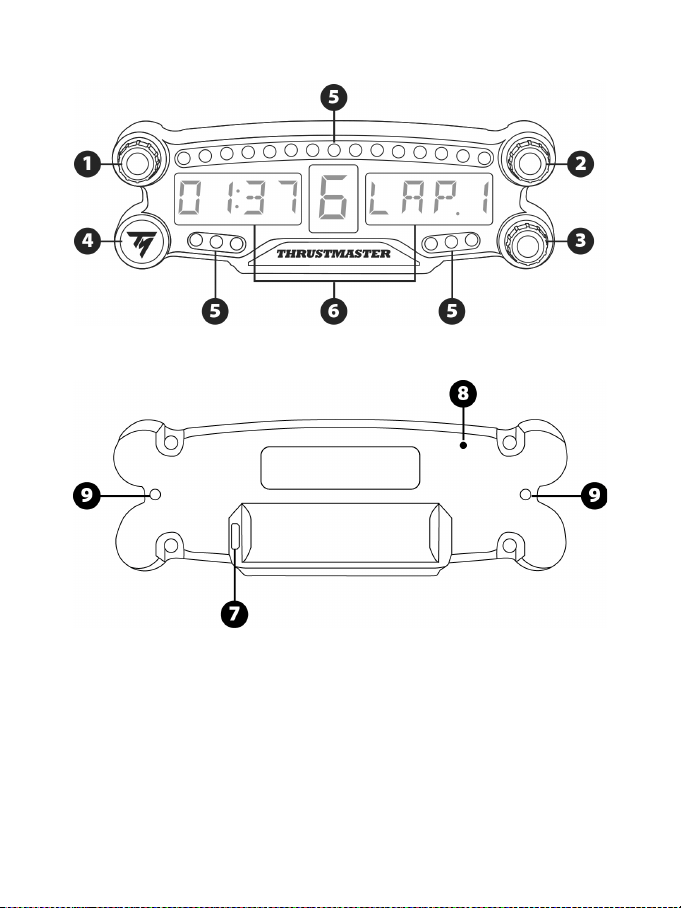
12\2
ﺔﻳﻧﻔﻟﺍ ﺕﺎﻔﺻﺍﻭﻣﻟﺍ
1 ﻡﻗﺭ ﺭﺍﻭﺩ ﺭﺯ1 ﻁﻏﺎﺿﻟﺍ ﺭﺯﻟﺍ ﺓﺯﻳﻣ ﻊﻣ
2 ﻡﻗﺭ ﺭﺍﻭﺩ ﺭﺯ2 ﻁﻏﺎﺿﻟﺍ ﺭﺯﻟﺍ ﺓﺯﻳﻣ ﻊﻣ
3 ﻡﻗﺭ ﺭﺍﻭﺩ ﺭﺯ3 ﻡﻛﺣﺗﻟﺍ) ﻁﻏﺎﺿﻟﺍ ﺭﺯﻟﺍ ﺓﺯﻳﻣ ﻊﻣ
(ﻉﻭﻁﺳﻟﺍ ﻁﺑﺿ ﻲﻓ
4 ﺔﻗﺎﻁﻟﺍ ﻑﺎﻘﻳﺇ /ﻝﻳﻐﺷﺗ ﺭﺯ
5 21 ﻲﻠﻳﻟﺩ ﺡﺎﺑﺻﻣ
6 ﻋ ﺔﺷﺎﺷﺔﻳﺳﻳﺋﺭ ﺽﺭ
7 ﻥﺣﺷ ﻝﺻﻭﻣUSB ﺔﻳﺎﻐﻠﻟ ﺭﻳﻐﺻ
8 ﻥﺣﺷﻟﺍ ﺭﺷﺅﻣ
9 ﻥﺎﺗﺑﻟﻭﻠﻣ ﻥﺎﺗﺣﺗﻓ3ﺯﺎﻬﺟﻟﺍ ﺕﻳﺑﺛﺗﻟ ﻡ
12\3
ﺭﻳﺫﺣﺗ
.ﺩﻌﺑ ﺎﻣﻳﻓ ﻪﻳﻟﺇ ﻉﻭﺟﺭﻠﻟ ﻪﺑ ﻅﺎﻔﺗﺣﻻﺍﻭ ﺔﻳﺎﻧﻌﺑ ﻝﻳﻟﺩﻟﺍ ﺍﺫﻫ ﺓءﺍﺭﻗ ﻰﺟﺭﻳ ،ﺞﺗﻧﻣﻟﺍ ﺍﺫﻫ ﻡﺍﺩﺧﺗﺳﺍ ﻝﺑﻗ
ﺭﻳﺫﺣﺗ– ﺔﻳﺑﺭﻬﻛ ﺔﻘﻌﺻ
* ﻪﺿﻳﺭﻌﺗ ﻡﺩﻋ ﻊﻣ ﻑﺎﺟ ﻥﺎﻛﻣ ﻲﻓ ﺞﺗﻧﻣﻟﺍ ﺩﻭﺟﻭ ﻰﻠﻋ ﻅﻓﺎﺣ.ﺱﻣﺷﻟﺍ ﺔﻌﺷﺃ ﻭﺃ ﺔﺑﺭﺗﻸﻟ
* .ﺎﻬﺑﺣﺳ ﻭﺃ ﺕﻼﺑﺎﻛﻟﺍﻭ ﺕﻼﺻﻭﻣﻟﺍ ﻲﻧﺛ ﺏﻧﺟﺗ
* .ﻪﺗﻼﺻﻭﻣ ﻭﺃ ﺞﺗﻧﻣﻟﺍ ﻰﻠﻋ ﻝﺋﺎﺳ ﻱﺃ ﺏﻛﺳ ﺏﻧﺟﺗ
* .(ﻲﺋﺎﺑﺭﻬﻛ ﺱﺎﻣ) ﺭﺻﻗ ﺓﺭﺍﺩﻟ ﺞﺗﻧﻣﻟﺍ ﺽﻳﺭﻌﺗ ﺏﻧﺟﺗ
* .ﺔﻳﻟﺎﻋ ﺓﺭﺍﺭﺣ ﺕﺎﺟﺭﺩﻟ ﻪﺿﺭﻌﺗ ﻻﻭ ﻖﻳﺭﺣﻟﺍ ﻲﻓ ﻪﺋﺎﻘﻟﺇ ﻡﺩﻋﻭ ؛ﺞﺗﻧﻣﻟﺍ ﻙﻔﺑ
ً
ﺎﻘﻠﻁﻣ ﻡﻘﺗ ﻻ
* :ﺯﺎﻬﺟﻟﺍ ﺢﺗﻔﺗ ﻻ ﻻ ﻝﺧﺍﺩ ﻡﺩﺧﺗﺳﻣﻟﺍ ﺔﻁﺳﺍﻭﺑ ﺎﻬﻳﻠﻋ ﺔﻣﺩﺧﻟﺍ ءﺍﺭﺟﺇ ﻥﻛﻣﻳ ءﺍﺯﺟﺃ ﺩﺟﻭﺗ
.ﺯﺎﻬﺟﻟﺍ ﻭﺃ ﺩﻣﺗﻌﻣﻟﺍ ﺏﻭﺩﻧﻣﻟﺍ ﻭﺃ ﺔﻌﻧﺻﻣﻟﺍ ﺔﻛﺭﺷﻟﺍ ﻖﻳﺭﻁ ﻥﻋ ﺕﺎﺣﻼﺻﺇ ﻱﺃ ﺫﻳﻔﻧﺗ ﺏﺟﻳ
.ﻝﻫﺅﻣﻟﺍ ﻲﻧﻔﻟﺍ
ﺭﻳﺫﺣﺗ– ﺔﻳﻠﺧﺍﺩﻟﺍ ﺔﻳﺭﺎﻁﺑﻟﺍ
- ﺔﻳﺭﺎﻁﺑ ﻥﺣﺷﺍBT LED DISPLAY .ﻡﺍﺩﺧﺗﺳﻻﺍ ﻝﺑﻗ
ً
ﺎﻣﺎﻣﺗ
- ﺇ ﻰﻟﺇ ﻱﺩﺅﻳ ﺍﺫﻬﻓ ،ﺯﺎﻬﺟﻟﺍ ﻙﻛﻔﺗ ﻻ.ﻪﺑ ﺹﺎﺧﻟﺍ ﻥﺎﻣﺿﻟﺍ ﻝﺎﻁﺑ
-.ﺕﺎﻣﺩﺎﺻﺗﻟﺍﻭ ﺕﺎﻣﺩﺻﻟﺍ ﺩﺿ ﻙﺯﺎﻬﺟﻟ ﺔﻳﺎﻣﺣﻟﺍ ﺭﻓﻭ
- ﻥﻋ ﻩﺭﻣﻋ ﻝﻘﻳ ﻝﻔﻁ ﻝﺑﻗ ﻥﻣ ﺯﺎﻬﺟﻟﺍ ﺍﺫﻫ ﻡﺍﺩﺧﺗﺳﺍ ﻡﺩﻋ ﺏﺟﻳ14 .ﻎﻟﺎﺑ ﺹﺧﺷ ﻥﻣ ﻑﺍﺭﺷﺇ ﻥﻭﺩﺑ ﻡﺎﻋ
ﺔﻛﺭﺷ ﺃﺭﺑﺗﺗ®THRUSTMASTER ﻙﻠﺗﺑ ﻡﺍﺯﺗﻟﻻﺍ ﻡﺩﻋ ﻝﺎﺣ ﻲﻓ ﺔﻳﻧﻭﻧﺎﻗ ﺔﻳﻟﻭﺅﺳﻣ ﻱﺃ ﻥﻣ
.ﺕﺎﻣﻳﻠﻌﺗﻟﺍ
:ﺭﻳﺫﺣﺗ ﻓ ﺭﺎﺟﻔﻧﺍ ﺙﺩﺣﻳ ﺩﻗ.ﺏﺳﺎﻧﻣ ﺭﻳﻏ ﻉﻭﻧ ﻥﻣ ﻯﺭﺧﺄﺑ ﺔﻳﺭﺎﻁﺑﻟﺍ ﻝﺍﺩﺑﺗﺳﺍ ﺔﻟﺎﺣ ﻲ
.ﺕﺎﻳﺭﺎﻁﺑﻟﺍ ﻥﻣ ﺹﻠﺧﺗﻟﺎﺑ ﺔﻘﻠﻌﺗﻣﻟﺍ ﺕﺎﻣﻳﻠﻌﺗﻟﺍ ﻊﺑﺗﺍ
ﺽﺭﻌﻟﺍ ﺔﺷﺎﺷ ﺔﻳﺭﺎﻁﺑ ﻥﺣﺷBT LED DISPLAY
ﻝﺑﺎﻛ ﻡﺍﺩﺧﺗﺳﺎﺑUSB ) ﺔﻳﺎﻐﻠﻟ ﺭﻳﻐﺻﻟﺍ ﻝﺑﺎﻛUSB ﻡﺎﻅﻧ ﻲﻓ ﻡﺩﺧﺗﺳﻣﻟﺍ ™PS4ﻝﺎﺛﻣﻟﺍ ﻝﻳﺑﺳ ﻰﻠﻋ ، ،(
ﺽﺭﻋ ﺔﺷﺎﺷ ﻝﻳﺻﻭﺗﺑ ﻡﻗBT LED DISPLAY ﺩﺣﺄﺑ ﺫﻓﺎﻧﻣUSB ﺔﻳﻟﺎﺧﻟﺍ ﻲﻓ ﺔﻗﺎﻁﻟﺎﺑ ﺓﺩﻭﺯﻣﻟﺍ
ﻡﺎﻅﻧPS4.™
ﻥﺣﺷﻟﺍ ﻝﺻﻭﻣ ﺩﺟﻭﻳ)7ﺽﺭﻋ ﺔﺷﺎﺷ ﻥﻣ ﻲﻔﻠﺧﻟﺍ ءﺯﺟﻟﺍ ﻲﻓ ( BT LED DISPLAY.
) ﻥﺣﺷﻟﺍ ﺭﺷﺅﻣ ﺓءﺎﺿﺇ ﻡﺗﺗ8.ﻝﻣﺎﻛﻟﺍ ﻥﺣﺷﻟﺍ ﺩﻧﻋ ﺓءﺎﺿﻹﺍ ﺊﻔﻁﻧﺗﻭ ،ﺯﺎﻬﺟﻟﺍ ﻥﺣﺷ ءﺎﻧﺛﺃ ﺭﻣﺣﻷﺍ ﻥﻭﻠﻟﺎﺑ (
ﺏﺎﻌﻟﺃ ﻊﻣ ﻖﻓﺍﻭﺗﻟﺍPS4™
ﺏﺎﻌﻟﺄﺑ ﺔﻣﺋﺎﻗ ﺭﻓﺍﻭﺗﺗPS4™ ﺗﻣﻟﺍ ﺽﺭﻌﻟﺍ ﺔﺷﺎﺷ ﻊﻣ ﺔﻘﻓﺍﻭBT LED DISPLAY ﻊﻗﻭﻣﻟﺍ ﻰﻠﻋ
http://support.thrustmaster.com. ﺩﺩﺣ ﺽﺭﻋ ﺔﺷﺎﺷ / ﻕﺎﺑﺳﻟﺍ ﺕﻼﺟﻋBT LED
DISPLAY .ﺔﺑﻌﻠﻟﺍ ﺕﺍﺩﺍﺩﻋﺇ /
ﺏﺎﻌﻟﺃ ﻕﻼﻁﺇ ﻊﻣ ﻡﻅﺗﻧﻣ ﻝﻛﺷﺑ ﺔﻣﺋﺎﻘﻟﺍ ﻊﻳﺳﻭﺗ ﻡﺗﻳﺳ™PS4 ﺽﺭﻌﻟﺍ ﺔﺷﺎﺷ ﻊﻣ ﺔﻘﻓﺍﻭﺗﻣ ﺓﺩﻳﺩﺟ
BT LED DISPLAY.
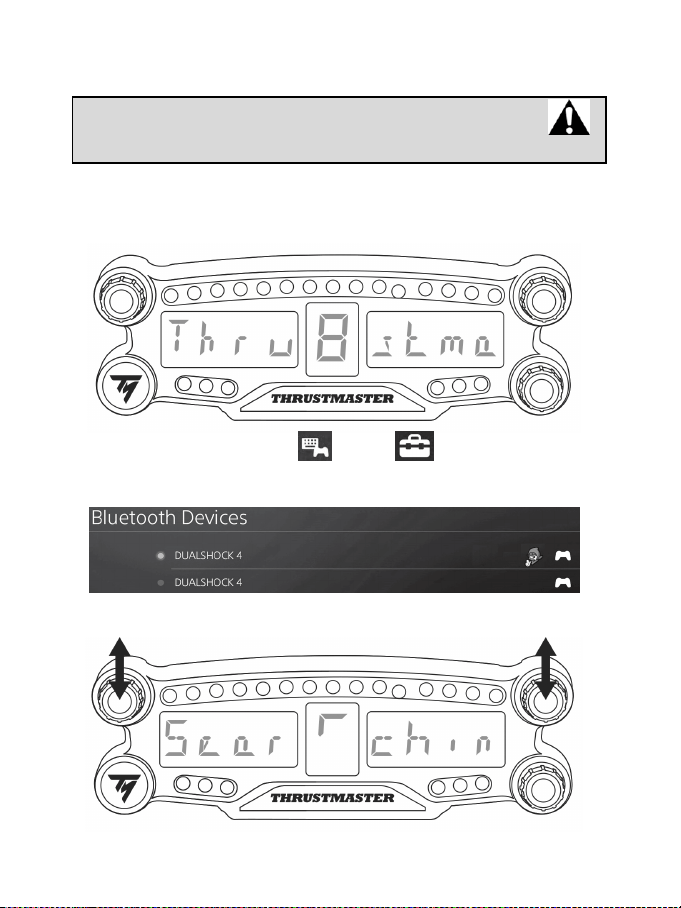
12\4
ﻡﺎﻅﻧ ﻰﻠﻋ ﺕﻳﺑﺛﺗﻟﺍPS4™
ﺽﺭﻌﻟﺍ ﺔﺷﺎﺷ ﻝﺟﺳBT LED DISPLAY ﻡﺎﻅﻧ ﻰﻠﻋPS4™
.ﻁﻘﻓ ﺓﺩﺣﺍﻭ ﺓﺭﻣ ﺔﻳﻠﻣﻌﻟﺍ ﻩﺫﻫ ءﺍﺭﺟﺇ ﺏﺟﻳ ﺓﺭﻣ ﻝﻛ ﺩﻧﻋ ﺔﺑﻭﻠﻁﻣ ﺕﺳﻳﻟ ﺔﻳﻠﻣﻌﻟﺍ ﻩﺫﻫ
ﻡﺎﻅﻧ ءﺩﺑ ﺓﺩﺎﻋﺇ ﺎﻬﻟﻼﺧ ﻡﺗﻳPS4™.
ﺽﺭﻌﻟﺍ ﺔﺷﺎﺷ ﻡﺍﺩﺧﺗﺳﺍ ﺩﻧﻋBT LED DISPLAY ﻡﺎﻅﻧ ﻰﻠﻋ ﻝﻳﺟﺳﺗﻟﺍ ﻙﻳﻠﻋ ﻡﺗﺣﺗﻳ ،ﻰﻟﻭﻷﺍ ﺓﺭﻣﻠﻟ
PS4 ™ﻟﺍ ﻩﺫﻫ ،ﻙﺑ ﺹﺎﺧﻟﺍ.ﻁﻘﻓ ﺓﺩﺣﺍﻭ ﺓﺭﻣ ﺎﻫﺫﻳﻔﻧﺗ ﺏﺟﻳ ﺔﻳﻠﻣﻌ
1. ﺽﺭﻌﻟﺍ ﺔﺷﺎﺷ ﻝﻳﻐﺷﺗﺑ ﻡﻗ BT LED DISPLAY ) ﻑﺎﻘﻳﺇ /ﻝﻳﻐﺷﺗ ﺭﺯ ﻰﻠﻋ ﻁﻐﺿﻟﺎﺑ4.(
ﺔﻟﺎﺳﺭﻟﺍ ﺭﻣﺗThrustmaster BT Wheel Display ) ﺔﻳﺳﻳﺋﺭﻟﺍ ﺔﺷﺎﺷﻟﺍ ﺭﺑﻋ6.(
2. ﻡﺎﻅﻧ ﺔﻣﺋﺎﻗ ﻲﻓPS4™ ﺩﺩﺣ ، ]ﺕﺍﺩﺍﺩﻋﺇ ،[ ]ﺓﺯﻬﺟﺃ] [ﺙﻭﺗﻭﻠﺑ ﺓﺯﻬﺟﺃ ﺙﺣﺑﻟﺍ ﻝﺟﺃ ﻥﻣ [
ﻭﻷﺍ ﺔﻳﻧﻘﺗﺑ ﻝﻣﻌﺗ ﺓﺭﻭﺎﺟﻣ ﺓﺯﻬﺟﺃ ﻥﻋ ﻲﻛﻳﺗﺎﻣﻭﺗBluetooth®. ﺓﺯﻬﺟﺃﻭ ﺔﻧﺭﺗﻘﻣﻟﺍ ﺓﺯﻬﺟﻷﺍ ﺭﻬﻅﺗﺳ
.ﺔﻣﺋﺎﻘﻟﺍ ﻲﻓ ﻯﺭﺧﻷﺍ ﺙﻭﺗﻭﻠﺑ
3. ﻥﻳﺭﺯﻟﺍ ﻰﻠﻋ ﺓﺯﻳﺟﻭ ﺓﺭﺗﻔﻟ ﻁﻐﺿﺍ1ﻭ ،2 ﺽﺭﻌﻟﺍ ﺔﺷﺎﺷ ﻰﻠﻋBT LED DISPLAY ﺕﻗﻭ ﻲﻓ
.ﺎﻣﻫﺭﺭﺣ ﻡﺛ ،ﺩﺣﺍﻭ ﺔﻟﺎﺳﺭﻟﺍ ﺭﻣﺗ Searching known devices ) ﺔﻳﺳﻳﺋﺭﻟﺍ ﺔﺷﺎﺷﻟﺍ ﺭﺑﻋ6.(
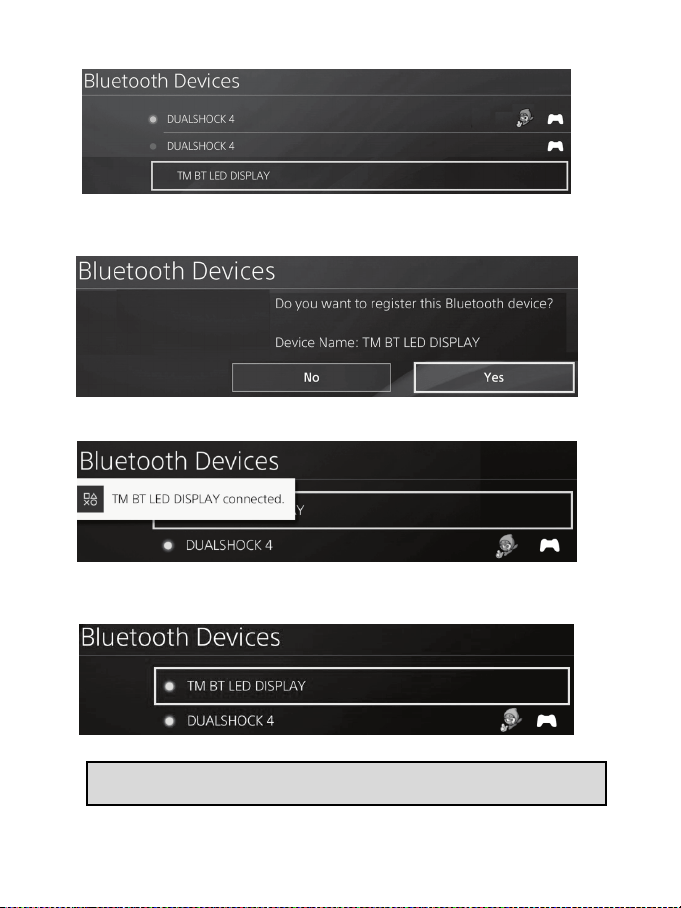
12\5
4 . ،ﺕﻗﻭﻟﺍ ﻥﻣ ﺓﺭﺗﻓ ﺩﻌﺑ ﻥﺃ ﺏﺟﻳﺭﻬﻅﻳ ﺍ ﻡﺳTM BT LED DISPLAY ﺔﺷﺎﺷ ﻰﻠﻋ
ﻡﺎﻅﻧPS4™. ﻡﺍﺩﺧﺗﺳﺎﺑﺭﺻﻧﻋ ﻡﻛﺣﺗﻟﺍﺩﺩﺣ ،ﻩ ﺭﺯﻟﺍ ﻰﻠﻋ ﻁﻐﺿﺍ ﻡﺛs.
5 . ﺔﻟﺎﺳﺭﻟﺍ ﺭﻬﻅﺗDo you want to register this Bluetooth device TM BT
LED DISPLAY? ﺍﺫﻫ ﺙﻭﺗﻭﻠﺑ ﺯﺎﻬﺟ ﻝﻳﺟﺳﺗ ﻲﻓ ﺏﻏﺭﺗ ﻝﻫ)TM BT LED DISPLAY (؟
ﻡﺎﻅﻧ ﺔﺷﺎﺷ ﻰﻠﻋPS4™. ﺩﺩﺣYES ﺭﺯ ﻰﻠﻋ ﻁﻐﺿﺍ ﻡﺛ ،(ﻡﻌﻧ)S .ﺩﻳﻛﺄﺗﻠﻟ
6 . ﺔﻟﺎﺳﺭﻟﺍ ﺭﻬﻅﺗBT LED DISPLAY connected )TM BT LED DISPLAY
(ﺔﻠﺻﺗﻣ ﻡﺎﻅﻧ ﺔﺷﺎﺷ ﻰﻠﻋ ﺓﺯﻳﺟﻭ ﺓﺭﺗﻔﻟPS4™.
ﻡﺎﻅﻧ ﺔﺷﺎﺷ ﻰﻠﻋ™PS4 ﺽﺭﻌﻟﺍ ﺔﺷﺎﺷ ﻥﻣ ﺭﺳﻳﻷﺍ ءﺯﺟﻟﺍ ﻲﻓ ﺩﻭﺟﻭﻣ ﺭﺷﺅﻣ ءﻭﺿ ﺓءﺎﺿﺇ ﻡﺗﺗ ،
TM BT LED DISPLAY ﻡﺎﻅﻧﻟﺍ ﻊﻣ ﺯﺎﻬﺟﻟﺍ ﻝﺎﺻﺗﺍ ﻲﻧﻌﻳ ﺎﻣﺑ ،ﺭﺿﺧﻷﺍ ﻥﻭﻠﻟﺎﺑ ﺓءﺎﺿﻹﺍ ﻥﻭﻛﺗﻭ
.ﺔﺣﻳﺣﺻ ﺔﻘﻳﺭﻁﺑ
7 .ﺏﻌﻠﻟ ﺯﻫﺎﺟ ﻥﻵﺍ ﺕﻧﺃ!
.ﻡﺎﻅﻧﻟﺍ ﺔﻗﺎﻁ ﻝﺑﺎﻛ ﻝﻳﺻﻭﺗ ﺓﺩﺎﻋﺇ ﻡﺛ ،ﻪﻠﺻﻓﻭ ،ﻙﺑ ﺹﺎﺧﻟﺍ ﻡﺎﻅﻧ ﻝﻳﻐﺷﺗ ﻑﺎﻘﻳﺈﺑ ﻡﻗ ،ﺔﻳﻠﻣﻌﻟﺍ ﻝﺷﻓ ﻝﺎﺣ ﻲﻓ
ﻡﺎﻅﻧ ءﺩﺑ ﺩﻋﺃPS4™ ﻥﻣ ﻝﻳﺟﺳﺗﻟﺍ ﺕﺍﻭﻁﺧ ﺭﺭﻛ ﻡﺛ ،ﻙﺑ ﺹﺎﺧﻟﺍ1 ﻰﻟﺇ6.
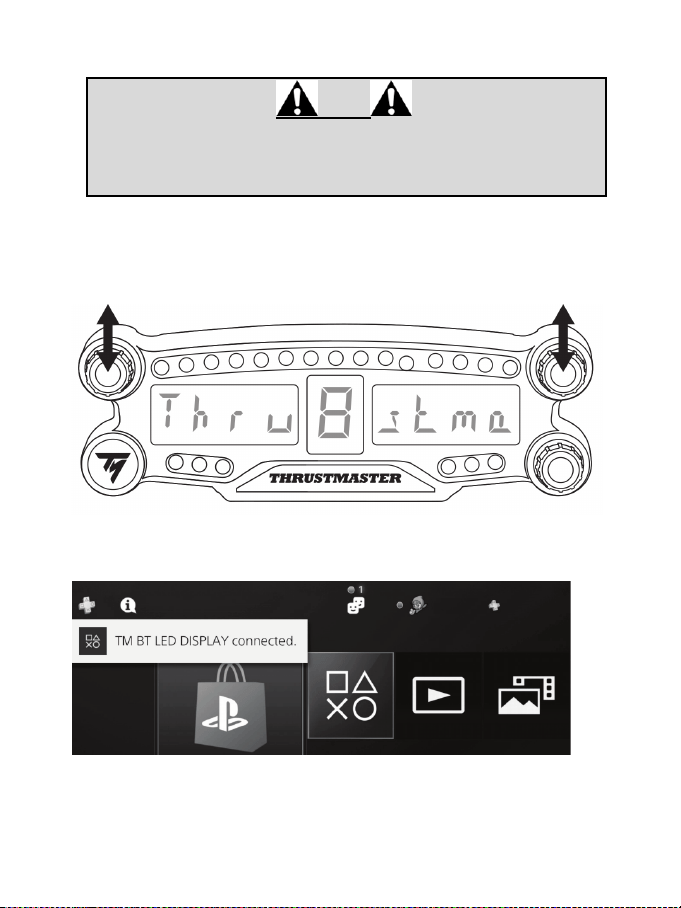
12\6
ﺽﺭﻌﻟﺍ ﺔﺷﺎﺷ ﻝﻳﺻﻭﺗﺑ ﻡﻗBT LED DISPLAY ﻡﺎﻅﻧﺑPS4™
ﺔﻳﺎﻐﻠﻟ ﻡﺎﻫ
- ﻡﺎﻅﻧ ءﺩﺑ ﺓﺩﺎﻋﺇ ﺎﻬﻟﻼﺧ ﻡﺗﻳ ﺓﺭﻣ ﻝﻛ ﻲﻓ ﺔﻳﻠﻣﻌﻟﺍ ﻩﺫﻫ ﺫﻳﻔﻧﺗﺑ ﻡﻭﻘﺗ ﻥﺃ ﻱﺭﻭﺭﺿﻟﺍ ﻥﻣPS4™.
- ﺽﺭﻌﻟﺍ ﺔﺷﺎﺷﻟ ﻝﺎﺻﺗﻻﺍ ﻝﻣﻌﻳﺳBT LED DISPLAY ﻡﺎﻅﻧ ﻊﻣ™PS4 ﻡﺗ ﺩﻗ ﻥﺎﻛ ﺍﺫﺇ ﻁﻘﻓ
ﻱﺃ) ﺔﻘﺑﺎﺳﻟﺍ ﺓﻭﻁﺧﻟﺍ ءﺍﺭﺟﺇ ﻝﻳﺟﺳﺗBT LED DISPLAY ﻡﺎﻅﻧ ﻰﻠﻋ™PS4 ﺔﻘﻳﺭﻁﺑ (
.ﻝﻗﻷﺍ ﻰﻠﻋ ﺓﺩﺣﺍﻭ ﺓﺭﻣ ﺔﺣﻳﺣﺻ
1 .ﺽﺭﻌﻟﺍ ﺔﺷﺎﺷ ﻝﻳﻐﺷﺗﺑ ﻡﻗ BT LED DISPLAY ) ﻑﺎﻘﻳﺇ /ﻝﻳﻐﺷﺗ ﺭﺯ ﻰﻠﻋ ﻁﻐﺿﻟﺎﺑ4.(
ﺔﻟﺎﺳﺭﻟﺍ ﺭﻳﺭﻣﺗThrustmaster BT Wheel Display ) ﺔﻳﺳﻳﺋﺭﻟﺍ ﺔﺷﺎﺷﻟﺍ ﺭﺑﻋ6.(
2 . ﻥﻳﺭﺯﻟﺍ ﻰﻠﻋ ﺓﺯﻳﺟﻭ ﺓﺭﺗﻔﻟ ﻁﻐﺿﺍ1ﻭ ،2 ﺷﺎﺷ ﻰﻠﻋ ﺽﺭﻌﻟﺍ ﺔBT LED DISPLAY ﺕﻗﻭ ﻲﻓ
.ﺎﻣﻫﺭﺭﺣ ﻡﺛ ،ﺩﺣﺍﻭ
ﺔﻟﺎﺳﺭﻟﺍ ﺭﻬﻅﺗConnected ) ﺔﻳﺳﻳﺋﺭﻟﺍ ﺽﺭﻌﻟﺍ ﺔﺷﺎﺷ ﻰﻠﻋ ﺓﺯﻳﺟﻭ ﺓﺭﺗﻔﻟ (ﺔﻠﺻﺗﻣ)6.(
ﺔﻟﺎﺳﺭﻟﺍ ﺭﻬﻅﺗBT LED DISPLAY connected )TM BT LED DISPLAY (ﺔﻠﺻﺗﻣ
ﻡﺎﻅﻧ ﺔﺷﺎﺷ ﻰﻠﻋ ﺓﺯﻳﺟﻭ ﺓﺭﺗﻔﻟPS4™.
3 .ﺏﻌﻠﻟ ﺯﻫﺎﺟ ﻥﻵﺍ ﺕﻧﺃ!
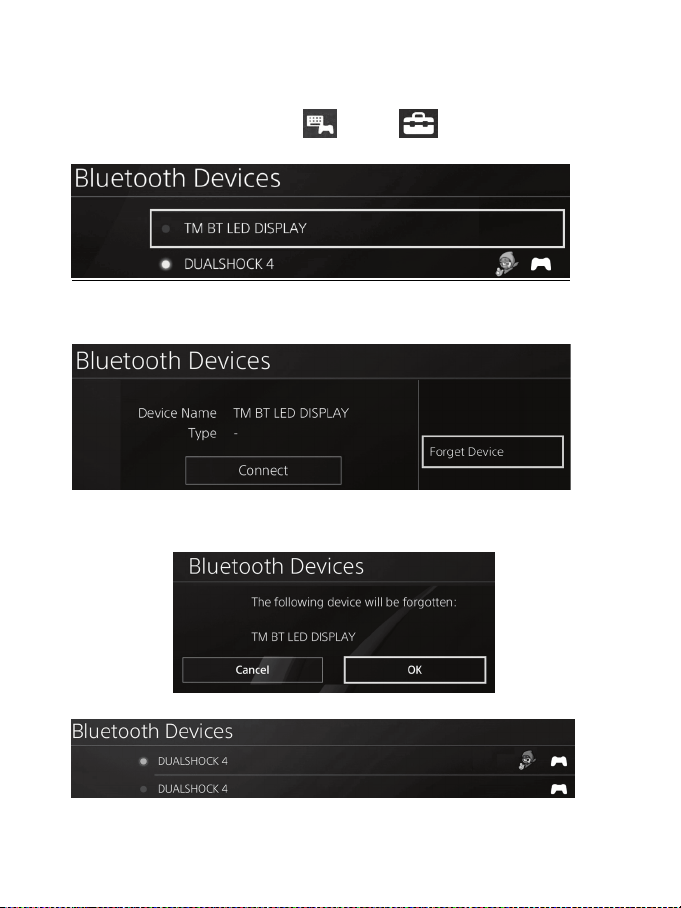
12\7
ﺟﺳﺗ ءﺎﻐﻟﺇ ﺽﺭﻌﻟﺍ ﺔﺷﺎﺷ ﻝﻳBT LED DISPLAY ﻡﺎﻅﻧ ﻥﻣPS4™
ﺔﺷﺎﺷ ءﺍﺭﺷ ﻭﺃ ،ﻪﺣﻼﺻﺇﻭ ﻝﻠﺧﻟﺍ ﻥﻋ ﻑﺷﻛﻟﺍ ﺩﻧﻋ ﻁﻘﻓ ﺔﺑﻭﻠﻁﻣ ﺔﻳﻠﻣﻌﻟﺍ ﻩﺫﻫ)BT LED DISPLAY(.
1. ﺽﺭﻌﻟﺍ ﺔﺷﺎﺷ ﻝﻳﻐﺷﺗ ﻑﻗﻭﺍ BT LED DISPLAY ) ﻑﺎﻘﻳﺇ /ﻝﻳﻐﺷﺗ ﺭﺯ ﻰﻠﻋ ﻁﻐﺿﻟﺎﺑ4.(
2. ﻡﺎﻅﻧ ﺔﻣﺋﺎﻗ ﻲﻓPS4™ ﺩﺩﺣ ، ]ﺕﺍﺩﺍﺩﻋﺇ ،[ ]ﺓﺯﻬﺟﺃ] [ ﺓﺯﻬﺟﺃﺙﻭﺗﻭﻠﺑ.[
ﺩﺩﺣTM BT LED DISPLAYﺭﺯ ﻰﻠﻋ ﻁﻐﺿﺍ ﻡﺛ ،S .ﺩﻳﻛﺄﺗﻠﻟ
3. ﺔﻟﺎﺳﺭﻟﺍ ﺭﻬﻅﺗDevice Name TM BT LED DISPLAY ﺯﺎﻬﺟﻟﺍ ﻡﺳﺍ)TM BT LED
DISPLAY (ﺔﺷﺎﺷﻟﺍ ﻰﻠﻋ. ﺭﺯﻟﺍ ﻰﻠﻋ ﻁﻐﺿﺍOPTIONS ﺩﺩﺣ ﻡﺛ ،ﺏﺎﻌﻟﻷﺍ ﺔﺣﻭﻟ ﻰﻠﻋForget
Device .(ﺯﺎﻬﺟﻟﺍ ﺕﻳﺳﻧ) ﺭﺯ ﻰﻠﻋ ﻁﻐﺿﺍS .ﺩﻳﻛﺄﺗﻠﻟ
4. ﺭﻬﻅﺗ ﺔﻟﺎﺳﺭﻟﺍThe following device will be forgotten:(ﻲﻟﺎﺗﻟﺍ ﺯﺎﻬﺟﻟﺍ ﻥﺎﻳﺳﻧ ﻡﺗﻳﺳ)
TM BT LED DISPLAY ﺽﺭﻋ ﺔﺷﺎﺷ)TM BT LED DISPLAY.(
ﺩﺩﺣOK ﺭﺯ ﻰﻠﻋ ﻁﻐﺿﺍ ﻡﺛ ،(ﻡﻌﻧ)S .ﺩﻳﻛﺄﺗﻠﻟ
5. ﺽﺭﻌﻟﺍ ﺔﺷﺎﺷ ﻝﻳﺟﺳﺗ ءﺎﻐﻟﺇ ﻡﺗﻳTM BT LED DISPLAY ﻡﺎﻅﻧ ﻥﻣPS4™ .ﻥﻵﺍ
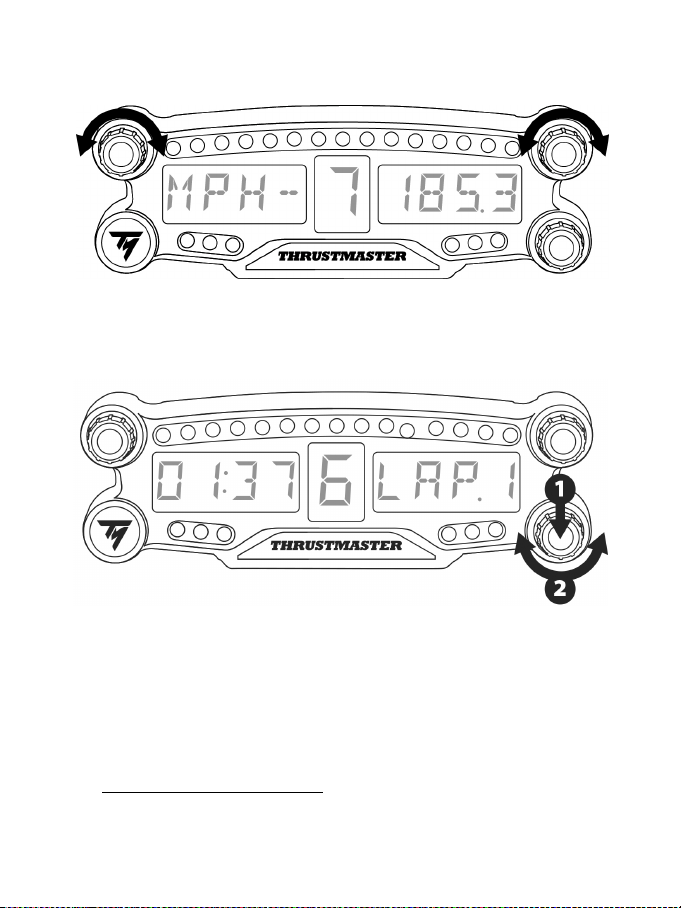
12\8
ﻟﺍ ﺩﻳﺩﺣﺗﻟﺍ ﻱﺯ ﻡﺩﺧﺗﺳﺍ ﻡﻗﺭ ﺔﻳﺭﺋﺍﺩ1 ﻭ2
ﺔﺑﻌﻟ ﺏﺳﺣﺑPS4 ™ ﻡﻗﺭ ﺩﻳﺩﺣﺗﻟﺍ ﻱﺭﺯ ﻑﻟ ﻙﻧﻛﻣﻳ ،1ﻭ ،2 ﺩﺍﺩﻋﺇ ﻥﻣ ﻝﻳﺩﺑﺗﻟﺍﻭ ﺽﺭﻌﻟﺍ ﺕﺍﺩﺍﺩﻋﺇ ﺭﻳﻳﻐﺗﻟ
.ﺭﺧﺁ ﺩﺍﺩﻋﺇ ﻰﻟﺇ ﺩﺣﺍﻭ
ﺽﺭﻌﻟﺍ ﺔﺷﺎﺷ ﻉﻭﻁﺳ ﻁﺑﺿBT LED DISPLAY
1 ﻡﻗﺭ ﺩﻳﺩﺣﺗﻟﺍ ﺭﺯ ﻰﻠﻋ ﻁﻐﺿﺍ (3 ﻉﻭﻁﺳ ﺩﺍﺩﻋﺇ ﻥﻣ ﻝﻳﺩﺑﺗﻠﻟ ﻩﺭﺭﺣ ﻡﺛ21 ) ﻲﻠﻳﻟﺩ ﺡﺎﺑﺻﻣ5 ﻁﺑﺿ ﻝﺟﺃ ﻥﻣ (
ﻓﺎﺛﻛ) ﺔﻳﺳﻳﺋﺭﻟﺍ ﺽﺭﻌﻟﺍ ﺔﺷﺎﺷ ﺔ6.ﺱﻛﻌﻟﺍﻭ ،(
2.ﺎﻬﺗﺩﺎﻳﺯﻟ ﻥﻳﻣﻳﻟﺍ ﺔﻬﺟ ﻭﺃ ،ﺔﻓﺎﺛﻛﻟﺍ ﻝﻳﻠﻘﺗﻟ ﺭﺎﺳﻳﻟﺍ ﺔﻬﺟ ﺩﻳﺩﺣﺗﻟﺍ ﺭﺯ ﺭﺩﺃ (
ﺽﺭﻋ ﺔﺷﺎﺷ ﺕﻳﺑﺛﺗBT LED DISPLAY
ﺽﺭﻋ ﺔﺷﺎﺷ ﺕﻳﺑﺛﺗ ﻙﻧﻛﻣﻳBT LED DISPLAY ﻩﺭﺍﺩﻘﻣ ﺭﻁﻗ ﻑﺻﻧ ﻥﻣﺿ ﻙﺗﺎﺟﺎﻳﺗﺣﺍ ﻊﻣ ﻡءﻼﺗﻳ ﺎﻣﺑ
10 ﻡﺎﻅﻧ ﻝﻭﺣ ﻡPS4™.
ﺍ ﺕﻳﺑﺛﺗ ﻙﻟﺫﻛ ﻙﻧﻛﻣﻳ ﻥﻳﺗﺣﺗﻔﻟﺍ ﻡﺍﺩﺧﺗﺳﺎﺑ ﻕﺎﺑﺳﻟﺍ ﺕﻼﺟﻋ ﺽﻌﺑﺑ ﺓﺭﺷﺎﺑﻣ ﻭﺃ *ﺔﻋﻭﻧﺗﻣ ﺔﻣﺋﻼﻣ ﺭﺻﺎﻧﻌﺑ ﺯﺎﻬﺟﻟ
ﻥﻳﺗﺑﻟﻭﻠﻣﻟﺍM3 ) ﺯﺎﻬﺟﻟﺍ ﻥﻣ ﻲﻔﻠﺧﻟﺍ ءﺯﺟﻟﺍ ﻰﻠﻋ ﻥﻳﺗﺩﻭﺟﻭﻣﻟﺍ9.(
*ﻝﺻﻔﻧﻣ ﻝﻛﺷﺑ ﻉﺎﺑﺗ
ﻰﻟﺇ ﻝﺎﻘﺗﻧﻻﺍ ءﺎﺟﺭﺑ ،ﺭﻣﻷﺍ ﺍﺫﻫ ﻝﻭﺣ ﺕﺎﻣﻭﻠﻌﻣﻟﺍ ﻥﻣ ﺩﻳﺯﻣﻟ/support.thrustmaster.comhttp:/ﺩﺩﺣ .
ﺽﺭﻋ ﺔﺷﺎﺷ / ﻕﺎﺑﺳﻟﺍ ﺕﻼﺟﻋBT LED DISPLAY.ﺔﻟﻭﺍﺩﺗﻣﻟﺍ ﺔﻠﺋﺳﻷﺍ ﻭﺃ ﻡﺩﺧﺗﺳﻣﻟﺍ ﻝﻳﻟﺩ ﻡﺛ ،

12\9
ﺽﺭﻋ ﺔﺷﺎﺷﻟ ﺕﺑﺎﺛﻟﺍ ﺞﻣﺎﻧﺭﺑﻟﺍ ﺙﻳﺩﺣﺗBT LED DISPLAY
ﺿﺗﻣﻟﺍ (ﺙﻭﺗﻭﻠﺑ ﺔﻳﻧﻘﺗﻟ ﺕﺑﺎﺛﻟﺍ ﺞﻣﺎﻧﺭﺑﻟﺍﻭ ﻡﺎﻌﻟﺍ ﺕﺑﺎﺛﻟﺍ ﺞﻣﺎﻧﺭﺑﻟﺍ) ﻥﻳﺗﺑﺎﺛﻟﺍ ﻥﻳﺟﻣﺎﻧﺭﺑﻟﺍ ﺙﻳﺩﺣﺗ ﻥﻛﻣﻣﻟﺍ ﻥﻣ ﻥﻳﻧﻣ
ﻲﻓBT LED DISPLAY .ﺞﺗﻧﻣﻟﺍ ﺕﺎﻧﻳﺳﺣﺗ ﻰﻠﻋ ﻝﻣﺗﺷﺗ ﺔﺛﺍﺩﺣ ﺭﺛﻛﺃ ﺕﺍﺭﺍﺩﺻﺇ ﻊﻣ
ﺽﺭﻋ ﺔﺷﺎﺷﻟ ﺕﺑﺎﺛﻟﺍ ﺞﻣﺎﻧﺭﺑﻟﺍ ﺕﺍﺭﺍﺩﺻﺇ ﺽﺭﻌﻟBT LED DISPLAY ﻙﻟﺫ ﻥﺎﻛ ﺍﺫﺇ ﺎﻬﺛﻳﺩﺣﺗﻭ
:
ً
ﺎﻳﺭﻭﺭﺿ ﻰﻟﺇ ﻝﻭﺻﻭﻟﺎﺑ ﻡﻗ ،ﺭﺗﻭﻳﺑﻣﻛﻟﺍ ﺯﺎﻬﺟ ﻰﻠﻋustmaster.comhttp://support.thr ﺩﺩﺣﻭ ،
ﺽﺭﻋ ﺔﺷﺎﺷ /ﻕﺎﺑﺳﻟﺍ ﺕﻼﺟﻋBT LED DISPLAY ءﺍﺭﺟﺇﻭ ﺕﺎﻣﻳﻠﻌﺗﻟﺍ ﻊﺑﺗﺍﻭ ﺕﺑﺎﺛﻟﺍ ﺞﻣﺎﻧﺭﺑﻟﺍ ﺩﺩﺣ ﻡﺛ ،
.ﺕﻳﺑﺛﺗﻟﺍﻭ ﻝﻳﺯﻧﺗﻟﺍ
ﺢﺋﺎﺻﻧﻭ ﺔﻟﻭﺍﺩﺗﻣ ﺔﻠﺋﺳﺃﻭ ﺕﺎﻣﻳﻠﻌﺗ
ﻊﻗﻭﻣﻟﺍ ﺓﺭﺎﻳﺯﺑ ﻝﺿﻔﺗhttp://support.thrustmaster.com. ﺔﺷﺎﺷ / ﻕﺎﺑﺳﻟﺍ ﺕﻼﺟﻋ ﺩﺩﺣ
ﺽﺭﻋBT LED DISPLAY.ﺔﻟﻭﺍﺩﺗﻣﻟﺍ ﺔﻠﺋﺳﻷﺍ ﻭﺃ ﻡﺩﺧﺗﺳﻣﻟﺍ ﻝﻳﻟﺩ ﻡﺛ ،

12\10
ﻙﻠﻬﺗﺳﻣﻟﺍ ﻥﺎﻣﺿ ﺕﺎﻣﻭﻠﻌﻣ
ﺔﻛﺭﺷ ﻥﻣﺿﺗGuillemot Corporation S.A" ﻡﺳﺎﺑ ﺩﻌﺑ ﺎﻣﻳﻓ ﺎﻬﻳﻟﺇ ﺭﺎﺷﻣﻟﺍ) ﺔﻳﻣﻟﺎﻌﻟﺍ ،Guillemot ("
ﻲﻓ ﻲﺳﻳﺋﺭﻟﺍ ﺎﻫﺭﻘﻣﻭPlace du Granier, B.P. 97143, 35571 Chantepie, France ،
ﺞﺗﻧﻣ ﻥﻭﻛﻳ ﻥﺃ ﻙﻠﻬﺗﺳﻣﻠﻟThrustmaster ﺓﺭﺗﻓ ﺓﺩﻣ ﻝﺍﻭﻁ ،ﻊﻳﻧﺻﺗﻟﺍ ﺏﻭﻳﻋﻭ ﺩﺍﻭﻣﻟﺍ ﺏﻭﻳﻋ ﻥﻣ ﺎ
ً
ﻳﻟﺎﺧ ﺍﺫﻫ
ﻭﺃ ﺞﺗﻧﻣﻟﺍ ﺍﺫﻫ ﺔﻣﻳﻗ ﺩﺍﺩﺭﺗﺳﻻ ﺔﻘﺑﺎﻁﻣﻟﺎﺑ ﺔﺑﻟﺎﻁﻣﻟﺍ ﺎﻬﻟﻼﺧ ﻥﻛﻣﻳ ﻲﺗﻟﺍ ﺓﺩﺩﺣﻣﻟﺍ ﺓﺭﺗﻔﻟﺍ ﻊﻣ ﻖﻓﺍﻭﺗﺗ ﻲﺗﻟﺍ ﻥﺎﻣﺿﻟﺍ
) ﺓﺩﻣﻟ ﺍﺫﻫ ﻱﺭﺳﻳ ،ﻲﺑﻭﺭﻭﻷﺍ ﺩﺎﺣﺗﻻﺍ ﻝﻭﺩ ﻲﻓ .ﻪﻟﺍﺩﺑﺗﺳﺍ2ﻋ ( ﺞﺗﻧﻣﻟﺍ ﻡﻼﺗﺳﺍ ﺦﻳﺭﺎﺗ ﻥﻣ ﻥﻳﻣﺎ
Thrustmaster ﺞﺗﻧﻣﻟﺍ ﺔﻘﺑﺎﻁﻣﺑ ﺔﺑﻟﺎﻁﻣﻠﻟ ﺓﺩﺩﺣﻣﻟﺍ ﺓﺭﺗﻔﻟﺍ ﻊﻣ ﻥﺎﻣﺿﻟﺍ ﺓﺭﺗﻓ ﻖﻓﺍﻭﺗﺗ ،ﻯﺭﺧﺃ ﻝﻭﺩ ﻲﻓﻭ .
Thrustmaster ءﺍﺭﺷ ﺦﻳﺭﺎﺗ ﺩﻧﻋ ﻙﻠﻬﺗﺳﻣﻟﺍ ﺎﻬﺑ ﻥﻁﻘﻳ ﻥﺎﻛ ﻲﺗﻟﺍ ﺔﻟﻭﺩﻟﺍ ﻲﻓ ﺎﻬﺑ ﻝﻭﻣﻌﻣﻟﺍ ﻥﻳﻧﺍﻭﻘﻠﻟ ﺎ
ً
ﻘﻓﻭ
ﺞﺗﻧﻣﻟﺍThrustmaster ﻟﺍ ﻲﻓ ﺔﺑﻟﺎﻁﻣﻟﺍ ﻡﺩﻋ ﺔﻟﺎﺣ ﻲﻓ)) ﻡﺎﻋ ﻥﺎﻣﺿﻟﺍ ﺓﺭﺗﻓ ﻥﻭﻛﺗﺳ ،ﺔ
ّ
ﻳﻧﻌﻣﻟﺍ ﺔﻟﻭﺩ1 ﺩﺣﺍﻭ (
ﺞﺗﻧﻣﻠﻟ ﻲﻠﺻﻷﺍ ءﺍﺭﺷﻟﺍ ﺦﻳﺭﺎﺗ ﻥﻣThrustmaster .(
ﻰﻟﺇ ﻙﺩﺷﺭﻳﺳ ﻱﺫﻟﺍ ﻲﻧﻔﻟﺍ ﻡﻋﺩﻟﺎﺑ ﺭﻭﻔﻟﺍ ﻰﻠﻋ ﻝﺻﺗﺎﻓ ،ﻥﺎﻣﺿﻟﺍ ﺓﺭﺗﻓ ﻝﻼﺧ ﺎ
ً
ﺑﻳﻌﻣ ﺞﺗﻧﻣﻟﺍ ﻥﺃ ﺭﻬﻅ ﺍﺫﺇﻭ
.ﺎﻬﻌﺑﺗﺗ ﻥﺃ ﺏﺟﻳ ﻲﺗﻟﺍ ﺕﺍءﺍﺭﺟﻹﺍ ﻣﻟﺍ ﺓﺩﺎﻋﺇ ﺏﺟﻳﻓ ،ﺏﻳﻌﻟﺍ ﺩﻭﺟﻭ ﻥﻣ ﺩﻛﺄﺗﻟﺍ ﻡﺗ ﺍﺫﺇﻭ ﻱﺃ ﻭﺃ) ﻪﺋﺍﺭﺷ ﻥﺎﻛﻣ ﻰﻟﺇ ﺞﺗﻧ
.(ﻲﻧﻔﻟﺍ ﻡﻋﺩﻟﺍ ﻪﻳﻟﺇ ﺭﻳﺷﻳ ﺭﺧﺁ ﻊﻗﻭﻣ
ﺭﺎﻳﺗﺧﺍ ﺏﺳﺣ ﻙﻟﺫﻭ ،ﻪﺣﻼﺻﺇ ﻭﺃ ﻙﻠﻬﺗﺳﻣﻟﺎﺑ ﺹﺎﺧﻟﺍ ﺏﻳﻌﻣﻟﺍ ﺞﺗﻧﻣﻟﺍ ﻝﺍﺩﺑﺗﺳﺍ ﺏﺟﻳ ،ﻥﺎﻣﺿﻟﺍ ﺍﺫﻫ ﻕﺎﻳﺳ ﻲﻓﻭ
.ﻲﻧﻔﻟﺍ ﻡﻋﺩﻟﺍ ﺞﺗﻧﻣ ﻊﺿﺧ ﺍﺫﺇThrustmaster ﺓﺭﺗﻓ ﻱﺃ ﻥﺈﻓ ،ﺡﻼﺻﺇ ﺔﻳﻠﻣﻋ ﻱﻷ ،ﻥﺎﻣﺿﻟﺍ ﺓﺭﺗﻓ ﻝﻼﺧ ﻲﻓ ،
ﻬﻟﻼﺧ ﺞﺗﻧﻣﻟﺍ ﻥﻭﻛﻳ) ﺔﻌﺑﺳ ﻰﻧﺩﺃ ﺩﺣﺑﻭ ﺔﻣﺩﺧﻟﺍ ﺝﺭﺎﺧ ﺎ7 ﺃﺩﺑﺗ) ﺔﻳﻘﺑﺗﻣﻟﺍ ﻥﺎﻣﺿﻟﺍ ﺓﺭﺗﻓ ﻰﻟﺇ ﻑﺎﺿﺗ ﻑﻭﺳ ﻡﺎﻳﺃ (
ﻡﻳﺩﻘﺗ ﺦﻳﺭﺎﺗ ﻥﺎﻛ ﺍﺫﺇ ،ﺡﻼﺻﻺﻟ ﺭﻭﻛﺫﻣﻟﺍ ﺞﺗﻧﻣﻟﺍ ﻡﻳﺩﻘﺗ ﺦﻳﺭﺎﺗ ﻥﻣ ﻭﺃ ﻝﺧﺩﺗﻠﻟ ﻝﻳﻣﻌﻟﺍ ﺏﻠﻁ ﺦﻳﺭﺎﺗ ﻥﻣ ﺓﺭﺗﻔﻟﺍ ﻩﺫﻫ
ﺔﻛﺭﺷﻟ ﺔﻠﻣﺎﻛﻟﺍ ﺔﻳﻟﻭﺅﺳﻣﻟﺍ ﺭﺻﺗﻘﺗ .(ﻝﺧﺩﺗﻟﺍ ﺏﻠﻁ ﺦﻳﺭﺎﺗﻟ ﺎ
ً
ﻘﺣﻻ ﺡﻼﺻﻺﻟ ﺞﺗﻧﻣﻟﺍGuillemot ﺎﻣﺑ) ﺎﻬﻋﻭﺭﻓﻭ
ﺞﺗﻧﻣﻟﺍ ﺡﻼﺻﺇ ﻰﻠﻋ (ﺔﻳﻌﺑﺗﻟﺍ ﺭﺍﺭﺿﻷﺍ ﻙﻟﺫ ﻲﻓThrustmaster ﺍ
ً
ﺯﺋﺎﺟ ﺍﺫﻫ ﻥﻭﻛﻳ ﺎﻣﺩﻧﻋ ﻙﻟﺫﻭ ،ﻪﻟﺍﺩﺑﺗﺳﺍ ﻭﺃ
ﺔﻛﺭﺷ ﻲﻠﺧﺗ .ﻱﺭﺎﺳﻟﺍ ﻥﻭﻧﺎﻘﻟﺍ ﺏﺟﻭﻣﺑGuillemot ﺔﻣءﻼﻣﻟﺍ ﻭﺃ ﺓﺭﺎﺟﺗﻟﺎﺑ ﺔﺻﺎﺧ ﺕﺎﻧﺎﻣﺿ ﻱﺃ ﻥﻋ ﺎﻬﺗﻳﻟﻭﺅﺳﻣ
ﺍ ﻥﻭﻧﺎﻘﻟﺍ ﺏﺟﻭﻣﺑ ﺍ
ً
ﺯﺋﺎﺟ ﺍﺫﻫ ﻥﻭﻛﻳ ﺎﻣﺩﻧﻋ ﻙﻟﺫﻭ ،ﻥ
ّ
ﻳﻌﻣ ﺽﺭﻐﻟ.ﻱﺭﺎﺳﻟ
:ﻥﺎﻣﺿﻟﺍ ﺍﺫﻫ ﻱﺭﺳﻳ ﻻ )1 ﻡﺍﺩﺧﺗﺳﻼﻟ
ً
ﺔﺟﻳﺗﻧ ﻑﻠﺗﻠﻟ ﺽ
ّ
ﺭﻌﺗ ﺍﺫﺇ ﻭﺃ ﻩﺭﻳﻳﻐﺗ ﻭﺃ ﻪﺣﺗﻓ ﻭﺃ ﺞﺗﻧﻣﻟﺍ ﻝﻳﺩﻌﺗ ﻡﺗ ﺍﺫﺇ (
ﻁﺑﺗﺭﻳ ﻻ ﺭﺧﺁ ﺏﺑﺳ ﻱﺃ ﻭﺃ ،ﻱﺩﺎﻌﻟﺍ ﻝﺎﻣﻌﺗﺳﻻﺍ ﺔﺟﻳﺗﻧ ﻙﻼﻫﻹﺍ ﻭﺃ ﺙﺩﺎﺣ ﻭﺃ ﻝﺎﻣﻫﻹﺍ ﻭﺃ ﻡﺋﻼﻣﻟﺍ ﺭﻳﻏ ﻭﺃ ﺊﻳﺳﻟﺍ
ﻝﻳﺑﺳ ﻰﻠﻋ ،ﻙﻟﺫ ﻲﻓ ﺎﻣﺑ) ﻊﻳﻧﺻﺗﻟﺍ ﻭﺃ ﺩﺍﻭﻣﻟﺍ ﻲﻓ ﺏﻳﻋ ﺩﻭﺟﻭﺑ ﺞﺗﻧﻣ ﻊﻳﻣﺟﺗ ،ﺭﺻﺣﻟﺍ ﻻ ﻝﺎﺛﻣﻟﺍ
Thrustmaster ﺩﺍﺩﻣﻹﺍ ﺕﺍﺩﺣﻭ ﺹﻭﺻﺧﻟﺍ ﻪﺟﻭ ﻰﻠﻋ ﻙﻟﺫ ﻲﻓ ﺎﻣﺑ ،ﺏﺳﺎﻧﻣ ﺭﻳﻏ ﺭﺻﻧﻋ ﻱﺃ ﺔﻁﺳﺍﻭﺑ
ﻝﻼﺧ ﻥﻣ ﺎﻫﺩﻳﺭﻭﺗ ﻡﺗﻳ ﻻ ﻯﺭﺧﺃ ﺭﺻﺎﻧﻋ ﻱﺃ ﻭﺃ ﻥﺣﺍﻭﺷﻟﺍ ﻭﺃ ﻥﺣﺷﻟﺍ ﺓﺩﺎﻋﻹ ﺔﻠﺑﺎﻘﻟﺍ ﺕﺎﻳﺭﺎﻁﺑﻟﺍ ﻭﺃ ﺔﻗﺎﻁﻟﺎﺑ
Guillemot ) ؛(ﺞﺗﻧﻣﻟﺍ ﺍﺫﻬﻟ2ﺧﺁ ﺽﺭﻏ ﻱﻷ ﺞﺗﻧﻣﻟﺍ ﻡﺩﺧﺗﺳﺍ ﺍﺫﺇ ( ﻙﻟﺫ ﻲﻓ ﺎﻣﺑ ،ﻲﻟﺯﻧﻣﻟﺍ ﻡﺍﺩﺧﺗﺳﻻﺍ ﻑﻼﺧﺑ ﺭ
) ؛(ﻝﺎﺛﻣﻟﺍ ﻝﻳﺑﺳ ﻰﻠﻋ ﺕﺎﻘﺑﺎﺳﻣﻟﺍ ﻭﺃ ﺏﻳﺭﺩﺗﻟﺍ ﻭﺃ ﺏﺎﻌﻟﻷﺍ ﻑﺭﻏ) ﺔﻳﺭﺎﺟﺗﻟﺍ ﻭﺃ ﺔﻳﻧﻬﻣﻟﺍ ﺽﺍﺭﻏﻷﺍ3 ﺔﻟﺎﺣ ﻲﻓ (
) ؛ﻲﻧﻔﻟﺍ ﻡﻋﺩﻟﺍ ﻝ
َ
ﺑ
ِ
ﻗ ﻥﻣ ﺔﻣﺩﻘﻣﻟﺍ ﺕﺎﻣﻳﻠﻌﺗﻟﺎﺑ ﻡﺍﺯﺗﻟﻻﺍ ﻡﺩﻋ4 ﻥﺎﻣﺿﻟ ﺞﻣﺍﺭﺑﻟﺍ ﻩﺫﻫ ﻊﺿﺧﺗ ﺙﻳﺣ ،ﺞﻣﺍﺭﺑﻟﺍ ﻰﻠﻋ (
) ؛ﺩﺩﺣﻣ5ﻻﺍ ﺭﺻﺎﻧﻌﻟﺍ ﻰﻠﻋ ( :ﺞﺗﻧﻣﻟﺍ ﺭﻣﻋ ﺓﺭﺗﻓ ﻝﻼﺧ ﺎﻬﻛﻼﻬﺗﺳﺍ ﻡﺗﻳ ﻲﺗﻟﺍ ﺭﺻﺎﻧﻌﻟﺍ) ﺔﻳﻛﻼﻬﺗﺳ ﺕﺎﻳﺭﺎﻁﺑﻟﺎﻛ
) ؛(ﺱﺃﺭﻟﺍ ﺔﻋﺎﻣﺳﺑ ﺔﺻﺎﺧﻟﺍ ﻥﺫﻷﺍ ﺕﺍﺩﺎﺳﻭ ﻭﺃ ﺱﺃﺭﻟﺍ ﺕﺎﻋﺎﻣﺳ ﻭﺃ ﻡﺍﺩﺧﺗﺳﻻﺍ ﺓﺩﺎﻋﻹ ﺔﻠﺑﺎﻘﻟﺍ ﺭﻳﻏ6 ﺕﺎﻘﺣﻠﻣﻟﺍ (
) ؛(ﻡﺻﻌﻣﻟﺍ ﺔﻁﺑﺭﺃﻭ ﺏﺋﺎﻘﺣﻟﺍﻭ ﺕﺎﻅﻓﺎﺣﻟﺍﻭ ﺏﻠﻌﻟﺍﻭ ﺕﻼﺑﺎﻛﻟﺎﻛ)7.ﻲﻧﻠﻋ ﺩﺍﺯﻣ ﻲﻓ ﺞﺗﻧﻣﻟﺍ ﻊﻳﺑ ﻡﺗ ﺍﺫﺇ (
ﻫ.ﻝﻳﻭﺣﺗﻠﻟ ﻝﺑﺎﻗ ﺭﻳﻏ ﻥﺎﻣﺿﻟﺍ ﺍﺫ
ﺔﻳﻛﻼﻬﺗﺳﻻﺍ ﻊﻠﺳﻟﺍ ﻊﻳﺑ ﻰﻠﻋ ﺔﻘ
ّ
ﺑﻁﻣﻟﺍ ﻥﻳﻧﺍﻭﻘﻟﺍ ﻰﺿﺗﻘﻣﺑ ﻙﻠﻬﺗﺳﻣﻠﻟ ﺔﻳﻧﻭﻧﺎﻘﻟﺍ ﻕﻭﻘﺣﻟﺍ ﻰﻠﻋ ﻥﺎﻣﺿﻟﺍ ﺍﺫﻫ ﺭﺛﺅﻳ ﻻ
.ﺎﻫﺩﻠﺑ/ﻩﺩﻠﺑ ﻲﻓ

12\11
ﻯﺭﺧﻷﺍ ﻥﺎﻣﺿﻟﺍ ﻁﻭﺭﺷ
ﺭﻓﻭﺗ ﻥﻟ ،ﻥﺎﻣﺿﻟﺍ ﺓﺭﺗﻓ ﻝﻼﺧGuillemot ، ﻭﻫ ﻲﻧﻔﻟﺍ ﻡﻋﺩﻟﺍ ﻥﺃ ﺙﻳﺣ ،ﺭﺎﻳﻏ ﻊﻁﻗ ﻱﺃ ،ﺃﺩﺑﻣﻟﺍ ﺙﻳﺣ ﻥﻣ
ﻑﺭﻁﻟﺍ ﻥﻣ ﺞﺗﻧﻣ ﻱﺃ ﺡﻼﺻﺇ ﻭﺃ/ﻭ ﺢﺗﻔﺑ ﻝﻭﺧﻣﻟﺍ ﺩﻳﺣﻭﻟﺍThrustmaster ﺡﻼﺻﺇ ﺕﺍءﺍﺭﺟﺇ ﻱﺃ ءﺎﻧﺛﺗﺳﺎﺑ)
ﺔﺑﻭﺗﻛﻣ ﺕﺎﻣﻳﻠﻌﺗ ﻖﻳﺭﻁ ﻥﻋ ،ﻝﻳﻣﻌﻟﺍ ﺔﻁﺳﺍﻭﺑ ﺎﻫﺅﺍﺭﺟﺇ ﻲﻧﻔﻟﺍ ﻡﻋﺩﻟﺍ ﺏﻠﻁﻳ– ﺔﻁﺎﺳﺑﻟ ﺍ
ً
ﺭﻅﻧ ،ﻝﺎﺛﻣﻟﺍ ﻝﻳﺑﺳ ﻰﻠﻋ
ﺎﻬﺗﻳﺭﺳ ﻡﺩﻋﻭ ﺡﻼﺻﻹﺍ ﺔﻠﻣﻋ– ﻥﻛﻣﺃ ﺎﻣﺛﻳﺣ ،ﺔﺑﻭﻠﻁﻣﻟﺍ ﺭﺎﻳﻐﻟﺍ (ﻊﻁﻗ) ﺔﻌﻁﻘﺑ ﻝﻳﻣﻌﻟﺍ ﺩﻳﻭﺯﺗﻭ .ﻙﻟﺫ
ﺭﻓﻭﺗ ﻥﻟ ،ﺔﻳﺭﺎﺟﺗﻟﺍ ﺭﺍﺭﺳﻷﺍﻭ ﺔﻳﻧﻔﻟﺍ ﺔﻓﺭﻌﻣﻟﺍ ﺭﺍﺭﺳﺃ ﺔﻳﺎﻣﺣﻟﻭ ﺔﻳﻋﺍﺩﺑﻹﺍ ﺕﻻﺎﺟﻣﻟﺍ ﻰﺿﺗﻘﻣﻟGuillemot ﻥﻣ ،
ﺞﺗﻧﻣ ﻱﻷ ﺭﺎﻳﻏ ﻊﻁﻗ ﻭﺃ ﺡﻼﺻﻺﻟ ﺕﺍﺭﺎﻌﺷﺇ ﻱﺃ ،ﺃﺩﺑﻣﻟﺍ ﺙﻳﺣThrustmaster ﺔﺻﺎﺧﻟﺍ ﻥﺎﻣﺿﻟﺍ ﺓﺭﺗﻓ ﺕﻬﺗﻧﺍ
.ﻪﺑ
ﺔﻳﻟﻭﺅﺳﻣﻟﺍ
ﺔﻛﺭﺷ ﻲﻠﺧﺗGuillemot Corporation S.A. ﺎﻬﻳﻟﺇ ﺭﺎﺷﻣﻟﺍ) " ﻡﺳﺎﺑ ﺩﻌﺑ ﺎﻣﻳﻓGuillemot"( ﺎﻬﻋﻭﺭﻓﻭ
ﺏﺟﻭﻣﺑ ﺍ
ً
ﺯﺋﺎﺟ ﺍﺫﻫ ﻥﺎﻛ ﺍﺫﺇ ،ﺔﻳﻟﺎﺗﻟﺍ ﺕﻻﺎﺣﻟﺍ ﻥﻣ ﺭﺛﻛﺃ ﻭﺃ ﺔﻟﺎﺣ ﻥﻋ ﺞﺗﻧﺗ ﺭﺍﺭﺿﺃ ﻱﺃ ﻥﻋ ﺔﻠﻣﺎﻛ ﺎﻬﺗﻳﻟﻭﺅﺳﻣ
:ﻱﺭﺎﺳﻟﺍ ﻥﻭﻧﺎﻘﻟﺍ )1) ؛ﻩﺭﻳﻳﻐﺗ ﻭﺃ ﻪﺣﺗﻓ ﻭﺃ ﺞﺗﻧﻣﻟﺍ ﻝﻳﺩﻌﺗ (2) ؛ﺔﻋﻭﻣﺟﻣﻟﺍ ﺕﺎﻣﻳﻠﻌﺗﺑ ﻡﺍﺯﺗﻟﻻﺍ ﻡﺩﻋ (3 ﻡﺍﺩﺧﺗﺳﻻﺍ (
ﻭﺃ ﻡﺋﻼﻣﻟﺍ ﺭﻳﻏ ﻭﺃ ﺊﻳﺳﻟﺍ) ؛(ﻝﺎﺛﻣﻟﺍ ﻝﻳﺑﺳ ﻰﻠﻋ ،ﻡﺩﺎﺻﺗ) ﺙﺩﺎﺣﻟ ﺽ
ّ
ﺭﻌﺗﻟﺍ ﻭﺃ ﻝﺎﻣﻫﻹﺍ4 ﻥﻋ ﺞﺗﺎﻧﻟﺍ ﻙﻼﻫﻹﺍ (
) ؛ﻱﺩﺎﻌﻟﺍ ﻝﺎﻣﻌﺗﺳﻻﺍ5
ﻙﻟﺫ ﻲﻓ ﺎﻣﺑ ،ﻲﻟﺯﻧﻣﻟﺍ ﻡﺍﺩﺧﺗﺳﻻﺍ ﻑﻼﺧﺑ ﺭﺧﺁ ﺽﺭﻏ ﻱﻷ ﺞﺗﻧﻣﻟﺍ ﻡﺩﺧﺗﺳﺍ ﺍﺫﺇ (
.(ﻝﺎﺛﻣﻟﺍ ﻝﻳﺑﺳ ﻰﻠﻋ ﺕﺎﻘﺑﺎﺳﻣﻟﺍ ﻭﺃ ﺏﻳﺭﺩﺗﻟﺍ ﻭﺃ ﺏﺎﻌﻟﻷﺍ ﻑﺭﻏ) ﺔﻳﺭﺎﺟﺗﻟﺍ ﻭﺃ ﺔﻳﻧﻬﻣﻟﺍ ﺽﺍﺭﻏﻷﺍ ﺔﻛﺭﺷ ﻲﻠﺧﺗ
Guillemot ﺞﺗﻧﻣﻟﺎﺑ ﻖﻠﻌﺗﻳ ﻊﻳﻧﺻﺗﻟﺍ ﻭﺃ ﺩﺍﻭﻣﻟﺍ ﻲﻓ ﺏﻳﻌﺑ ﻁﺑﺗﺭﺗ ﻻ ﺭﺍﺭﺿﺃ ﻱﺃ ﻥﻋ ﺎﻬﺗﻳﻟﻭﺅﺳﻣ ﺔﻓﺎﻛ ﺎﻬﻋﻭﺭﻓﻭ
ﻭﺃ ﺞﻣﺎﻧﺭﺑ ﻱﺃ ﺏﺑﺳﺑ ﺭﺷﺎﺑﻣ ﺭﻳﻏ ﻭﺃ ﺭﺷﺎﺑﻣ ﻝﻛﺷﺑ ﺙﺩﺣﺗ ﺭﺍﺭﺿﺃ ﻱﺃ ،ﺭﺻﺣﻟﺍ ﻻ ﻝﺎﺛﻣﻟﺍ ﻝﻳﺑﺳ ﻰﻠﻋ ،ﺎ
ً
ﻧﻣﺿﺗﻣ)
ﺞﺗﻧﻣ ﺞﻣﺩ ﻖﻳﺭﻁ ﻥﻋThrustmaster ﺍ ﻪﺟﻭ ﻰﻠﻋ ﻙﻟﺫ ﻲﻓ ﺎﻣﺑ ،ﺏﺳﺎﻧﻣ ﺭﻳﻏ ﺭﺻﻧﻋ ﻱﺃ ﻊﻣ ﺹﻭﺻﺧﻟ
ﺎﻫﺩﻳﺭﻭﺗ ﻡﺗﻳ ﻻ ﻯﺭﺧﺃ ﺭﺻﺎﻧﻋ ﻱﺃ ﻭﺃ ﻥﺣﺍﻭﺷﻟﺍ ﻭﺃ ﻥﺣﺷﻟﺍ ﺓﺩﺎﻋﻹ ﺔﻠﺑﺎﻘﻟﺍ ﺕﺎﻳﺭﺎﻁﺑﻟﺍ ﻭﺃ ﺔﻗﺎﻁﻟﺎﺑ ﺩﺍﺩﻣﻹﺍ ﺕﺍﺩﺣﻭ
ﻝﻼﺧ ﻥﻣGuillemot .ﻱﺭﺎﺳﻟﺍ ﻥﻭﻧﺎﻘﻟﺍ ﺏﺟﻭﻣﺑ ﺍ
ً
ﺯﺋﺎﺟ ﺍﺫﻫ ﻥﺎﻛ ﺍﺫﺇ ،(ﺞﺗﻧﻣﻟﺍ ﺍﺫﻬﻟ
12\12
ﻲﺑﻭﺭﻭﻷﺍ ﺩﺎﺣﺗﻻﺍ ﻥﻳﻧﺍﻭﻘﺑ ﺹﺎﺧﻟﺍ ﻝﺎﺛﺗﻣﻻﺍ ﻥﺎﻳﺑ
ﺔﻛﺭﺷ ﻥﻠﻌﺗ ،ﻙﻟﺫ ﺏﺟﻭﻣﺑGuillemot Corporation S.A ﺯﺎﻬﺟﻟﺍ ﻥﺄﺑ.BT LED DISPLAY
ﻡﻭﺳﺭﻣﻟ ﺔﻠﺻﻟﺍ ﺕﺍﺫ ﻯﺭﺧﻷﺍ ﺕﺍﺭﻘﻔﻟﺍﻭ ﺔﻳﺳﻳﺋﺭﻟﺍ ﺕﺎﺑﻠﻁﺗﻣﻟﺍ ﻊﻣ ﻖﻓﺍﻭﺗﻳ 2014/53/UE (RED) ﻥﻣ
ﻊﻗﻭﻣﻟﺍ ﻰﻠﻋ ﻝﺎﺛﺗﻣﻻﺍ ﻥﺎﻳﺑ ﺽﺭﻋ ﻥﻛﻣﻣﻟﺍ
:ﻲﻟﺎﺗﻟﺍhttp://www.thrustmaster.com/certificates/BT_Led_Display/Doc-
BT_Led_Display.pdf
ﺩﺩﺭﺗﻟﺍ ﺔﻣﺯﺣ :2404-2480 > :ﺩﺩﺭﺗ ﺔﻗﺎﻁ ﻰﺻﻗﺃ ،ﺯﺗﺭﻫ ﺎﺟﻳﻣ10 ﻡ ﻝﺑﻳﺳﻳﺩ
ﺭﺷﻧﻟﺍ ﻕﻭﻘﺣ
© 2017 Guillemot Corporation S.A. ﺔﻅﻭﻔﺣﻣ ﻕﻭﻘﺣﻟﺍ ﻊﻳﻣﺟ Thrustmaster®. ﻲﻫ
ﺔﻛﺭﺷﻟ ﺔﻠﺟﺳﻣ ﺔﻳﺭﺎﺟﺗ ﺔﻣﻼﻋ.Guillemot Corporation S.A.
.ﻧﺎﻳﻗﻭﺃﻭ ﺩﻧﻬﻟﺍﻭ ﺎﻳﺳﻭﺭﻭ ﻁﺳﻭﻷﺍ ﻕﺭﺷﻟﺍﻭ ﺎﻳﻘﻳﺭﻓﺇﻭ ﺎﺑﻭﺭﻭﺃ ﻲﻓ ﻊﻳﺑﻠﻟ ﺹﺧﺭﻣﺎﻳﺳﻭ
ﻊﻣ ﺎ
ً
ﻳﺭﺻﺣ ﻡﺍﺩﺧﺗﺳﻼﻟ.PlayStation®4
.ﻥﻳﻳﻧﻌﻣﻟﺍ ﺎﻬﺑﺎﺣﺻﻷ ﺔﻛﻭﻠﻣﻣ ﻯﺭﺧﻷﺍ ﺔﻳﺭﺎﺟﺗﻟﺍ ﺕﺎﻣﻼﻌﻟﺍ ﺔﻓﺎﻛ .ﺔﻣﺯﻠﻣ ﺭﻳﻏ ﺔﻳﺣﻳﺿﻭﺗﻟﺍ ﻡﻭﺳﺭﻟﺍ ﻊﺿﺧﺗﻭ
.ﺭﺧﺁ ﻰﻟﺇ ﺩﻠﺑ ﻥﻣ ﻑﻠﺗﺧﺗ ﺩﻗﻭ ﺭﺎﻌﺷﺇ ﻥﻭﺩ ﺭﻳﻳﻐﺗﻠﻟ ﺕﺎﻔﺻﺍﻭﻣﻟﺍﻭ ﺕﺎﻣﻳﻣﺻﺗﻟﺍﻭ ﺕﺎﻳﻭﺗﺣﻣﻟﺍ ﻲﻓ ﻊﻧﺻ
.ﻥﻳﺻﻟﺍ
ﺔﻁﺳﺍﻭﺑ ﻊﻳﺯﻭﺗﻟﺍﻭ ﻊﻳﻧﺻﺗﻟﺍ ﻡﺗ.Guillemot Corporation S.A.
ﺔﻳﺋﻳﺑﻟﺍ ﺔﻳﺎﻣﺣﻟﺍ ﺕﺎﻳﺻﻭﺗ
:ﺎﻳﻛﺭﺗﻭ ﻲﺑﻭﺭﻭﻷﺍ ﺩﺎﺣﺗﻻﺍ ﻲﻓ ﻊﻣ ﻪﻧﻣ ﺹﻠﺧﺗﻟﺍ ﻡﺩﻋ ﺏﺟﻳ ،ﺞﺗﻧﻣﻟﺍ ﺔﻳﺣﻼﺻ ءﺎﻬﺗﻧﺍ ﺩﻧﻋ
ﺕﺎﻳﺎﻔﻧ ﻥﻣ ﺹﻠﺧﺗﻟﺎﺑ ﺔﺻﺎﺧ ﻊﻳﻣﺟﺗ ﺔﻁﻘﻧ ﻲﻓ ﻊﺿﻭﻳ ﻥﻛﻟ ،ﺔﻳﺩﺎﻌﻟﺍ ﺔﻳﻟﺯﻧﻣﻟﺍ ﺕﺎﻳﺎﻔﻧﻟﺍ
) ﺔﻳﻧﻭﺭﺗﻛﻟﻹﺍﻭ ﺔﻳﺑﺭﻬﻛﻟﺍ ﺕﺍﺩﻌﻣﻟﺍWEEE.(
ﻋ ﺩﻭﺟﻭﻣﻟﺍ ﺯﻣﺭﻟﺍ ﻙﻟﺫ ﺩﻛﺅﻳﻭ.ﻑﻼﻐﻟﺍ ﻭﺃ ﻡﺩﺧﺗﺳﻣﻟﺍ ﻝﻳﻟﺩ ﻭﺃ ﺞﺗﻧﻣﻟﺍ ﻰﻠ
.ﺎﻬﺻﺋﺎﺻﺧ ﺏﺳﺣ ﻰﻠﻋ ،ﺩﺍﻭﻣﻟﺍ ﺭﻳﻭﺩﺗ ﺓﺩﺎﻋﺇ ﻥﻛﻣﻳ ﻝﺎﻛﺷﻷﺍﻭ ﺭﻳﻭﺩﺗﻟﺍ ﺓﺩﺎﻋﺇ ﻝﻼﺧ ﻥﻣ
ﻲﻓ ﺔﻳﻟﺎﻌﻔﺑ ﺔﻛﺭﺎﺷﻣﻟﺍ ﻙﻧﻛﻣﻳ ،ﺔﻳﻧﻭﺭﺗﻛﻟﻹﺍﻭ ﺔﻳﺑﺭﻬﻛﻟﺍ ﺕﺍﺩﻌﻣﻟﺍ ﺕﺎﻳﺎﻔﻧ ﺔﺟﻟﺎﻌﻣﻟ ﻯﺭﺧﻷﺍ
.ﺔﺋﻳﺑﻟﺍ ﺔﻳﺎﻣﺣ ﻰﻠﻋ ﺓﺩﻋﺎﺳﻣﻟﺍ
ﻠﻟ ﻙﻳﺩﻟ ﺔﻳﻠﺣﻣﻟﺍ ﺕﺎﻁﻠﺳﻟﺎﺑ ﻝﺎﺻﺗﻻﺍ ﻰﺟﺭﻳ ﻊﻳﻣﺟﺗﻟﺍ ﺔﻁﻘﻧ ﻝﻭﺣ ﺕﺎﻣﻭﻠﻌﻣ ﻰﻠﻋ ﻝﻭﺻﺣ
.ﻙﻳﻟﺇ ﺏﺭﻗﻷﺍ
:ﻯﺭﺧﻷﺍ ﻥﺍﺩﻠﺑﻟﺍ ﺔﻓﺎﻛﻟ ﺔﺑﺳﻧﻟﺎﺑ ﺔﺻﺎﺧﻟﺍ ﺔﻳﻠﺣﻣﻟﺍ ﺭﻳﻭﺩﺗﻟﺍ ﺓﺩﺎﻋﺇ ﻥﻳﻧﺍﻭﻘﺑ ﻡﺍﺯﺗﻟﻻﺍ ﻰﺟﺭﻳ
.ﺔﻳﻧﻭﺭﺗﻛﻟﻹﺍﻭ ﺔﻳﺑﺭﻬﻛﻟﺍ ﺕﺍﺩﻌﻣﻟﺎﺑ
.ﺕﺎﻣﻭﻠﻌﻣﻟﺍ ﻩﺫﻬﺑ ﻅﻔﺗﺣﺍ .ﻑﺭﺎﺧﺯﻟﺍﻭ ﻥﺍﻭﻟﻷﺍ ﻑﻠﺗﺧﺗ ﺩﻗ
ﺑﻗ ﺞﺗﻧﻣﻟﺍ ﻥﻣ ﺔﻘﺻﻼﻟﺍﻭ ﺔﺗﺑﺛﻣﻟﺍ ﺩﺍﻭﻣﻟﺍ ﺔﻟﺍﺯﺇ ﺏﺟﻳ.ﻪﻣﺍﺩﺧﺗﺳﺍ ﻝ
www.thrustmaster.com
ﻁﻘﻓ ﺎﻳﻛﺭﺗﻭ ﻲﺑﻭﺭﻭﻷﺍ ﺩﺎﺣﺗﻻﺍ ﻰﻠﻋ ﻖﺑﻁﻧﻳ*
*
*
1/12
PlayStation
®4
User Manual
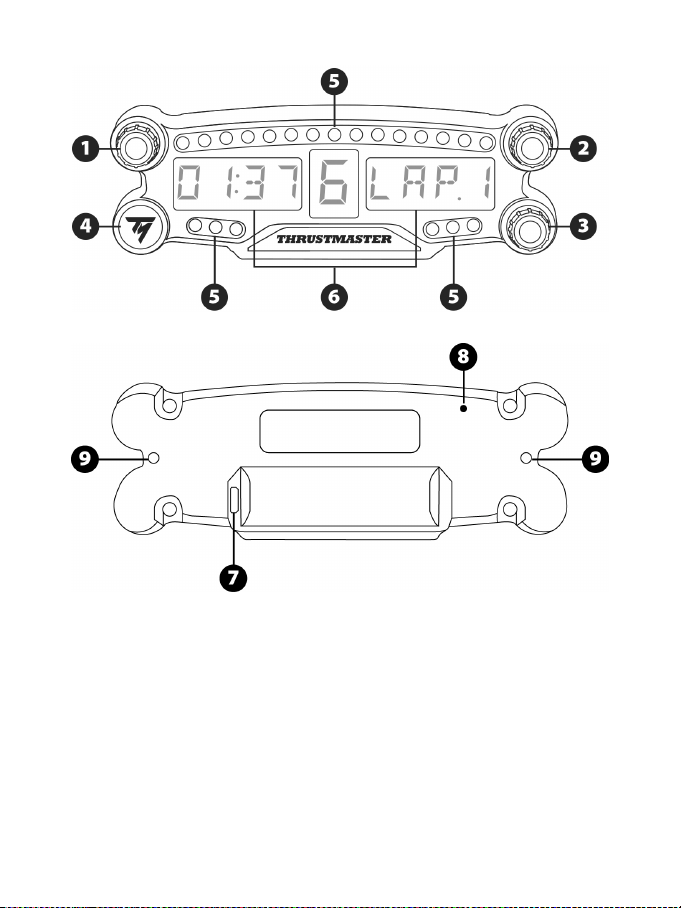
2/12
PRODUCT DESCRIPTION
1 Rotary selector no. 1 with push-button feature
2 Rotary selector no. 2 with push-button feature
3 Rotary selector no. 3 with push-button feature
(brightness adjustment control)
4 Power On/Off button
5 21 LEDs
6 Main display
7 Micro USB charging connector
8 Charging indicator
9 Two M3 threaded holes for attaching the
device
3/12
WARNING
Before using this product, please read this manual carefully and save it for later reference.
Warning – Electrical shock
* Keep the product in a dry location and do not expose it to dust or sunlight.
* Do not twist or pull on the connectors and cables.
* Do not spill any liquid on the product or its connectors.
* Do not short-circuit the product.
* Never dismantle the product; do not throw it onto a fire and do not expose it to high temperatures.
* Do not open up the device: there are no user-serviceable parts inside. Any repairs must be carried
out by the manufacturer, its authorized representative or a qualified technician.
Warning – Internal battery
- Fully charge the BT LED DISPLAY before use.
- Do not disassemble the device; this would void its warranty.
- Protect your device from shocks and impacts.
- This device should not be used by children below the age of 14 without an adult’s supervision.
THRUSTMASTER® DISCLAIMS ANY LIABILITY IN THE EVENT OF NON-COMPLIANCE WITH
THESE INSTRUCTIONS.
WARNING: AN EXPLOSION MAY OCCUR IF THE BATTERY IS REPLACED WITH AN
INCORRECT TYPE OF BATTERY.
FOLLOW INSTRUCTIONS REGARDING THE DISPOSAL OF BATTERIES.
CHARGING THE BT LED DISPLAY’S BATTERY
Using a micro USB cable (the PS4™ system controller’s cable, for instance), connect the BT LED
DISPLAY to one of the PS4™ system’s powered USB ports.
The charging connector (7) is located at the back of the BT LED DISPLAY.
The charging indicator (8) lights up in red when the device is charging, and turns off when it is fully
charged.
COMPATIBILITY WITH PS4™ GAMES
A list of PS4™ games compatible with the BT LED DISPLAY is available at http://support.thrustmaster.com:
Select Racing wheels / BT LED DISPLAY / Games settings.
This list will regularly be expanded with the release of new PS4™ games compatible with the BT
LED DISPLAY.
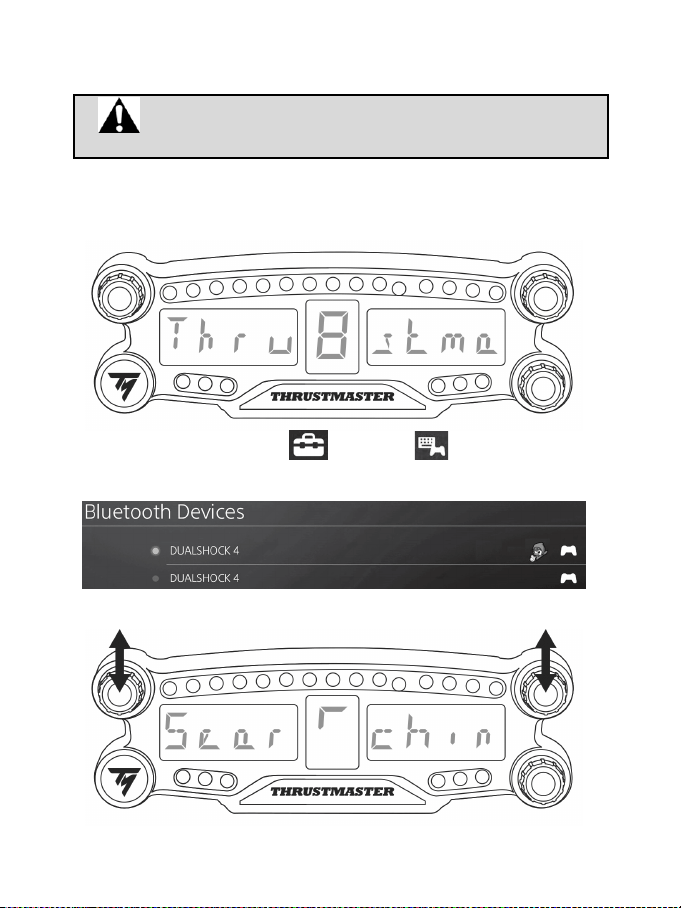
4/12
INSTALLATION ON THE PS4™ SYSTEM
Register the BT LED DISPLAY on the PS4™ system
This operation should only be performed once. It is not required every
time the PS4™ system is restarted.
When using the BT LED DISPLAY for the first time, you must imperatively register it on your PS4™
system; this operation must only be performed once.
1. Turn on the BT LED DISPLAY by pressing the On/Off button (4)
.
The message Thrustmaster BT Wheel Display scrolls on the main display (6).
2. In the PS4™ system’s menu, select [ Settings ] > [ Devices ] > [ Bluetooth
Devices ] to automatically search for nearby Bluetooth® devices. Paired devices and other
Bluetooth devices will appear in the list.
3. Briefly press and release selectors no. 1 and 2 simultaneously on the BT LED DISPLAY. The
message Searching known devices scrolls on the main display (6).
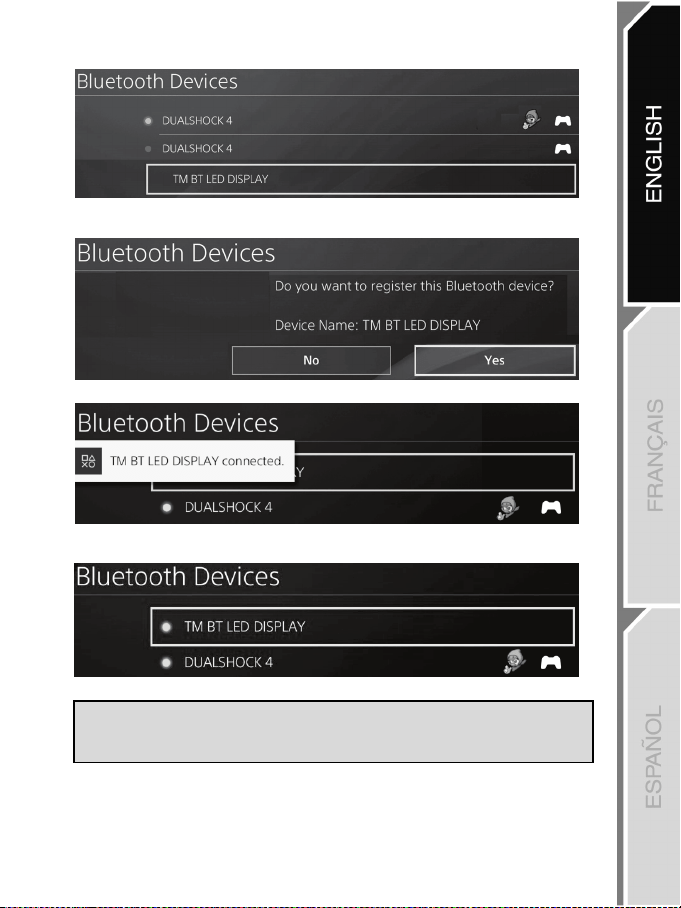
5/12
4. After some time, the name TM BT LED DISPLAY appears on the PS4™ system’s screen. Using
your gamepad, select it and press the s button.
5. The message Do you want to register this Bluetooth device TM BT LED DISPLAY? appears
on the PS4™ system’s screen. Select YES, then press the s button to confirm.
6. The message TM BT LED DISPLAY connected briefly appears on the PS4™ system’s screen.
On the PS4™ system’s screen, the indicator light located to the left of the TM BT LED DISPLAY
now lights up in green, meaning that the device is correctly connected to the system.
7. You are now ready to play!
If the operation fails, turn off your PS4™ system and disconnect, then reconnect
the system’s power cable. Restart your PS4™ system, then repeat registration
steps 1 to 6.
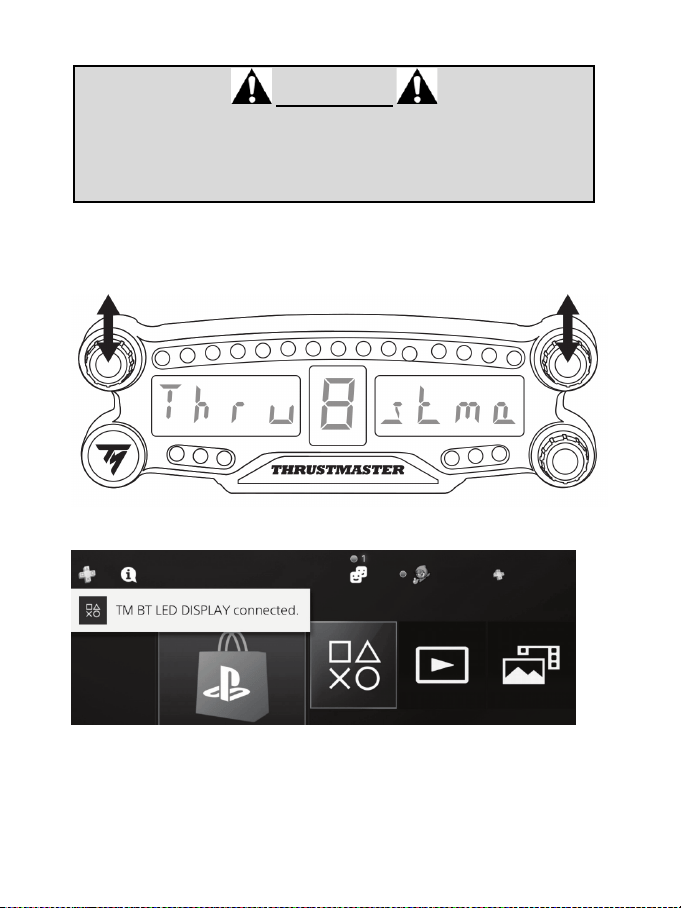
6/12
Connect the BT LED DISPLAY to the PS4™ system
VERY IMPORTANT
- It is imperative that you perform this operation every time the PS4™ system is
restarted.
- The connection of the BT LED DISPLAY to the PS4™ system will only
function if the previous step (i.e. Register the BT LED DISPLAY on the PS4™
system) has been properly performed at least once.
1. Turn on the BT LED DISPLAY by pressing the On/Off button (4).
The message Thrustmaster BT Wheel Display scrolls on the main display (6).
2. Briefly press and release selectors no. 1 and 2 simultaneously on the BT LED DISPLAY.
The message Connected briefly appears on the main display (6).
The message TM BT LED DISPLAY connected briefly appears on the PS4™ system’s screen.
3. You are now ready to play!
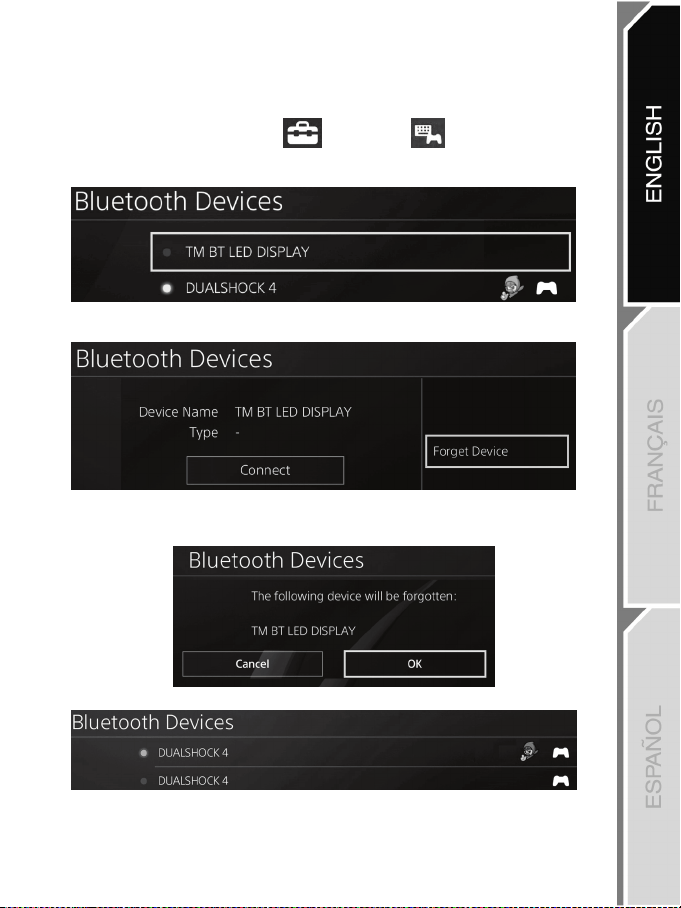
7/12
Unregister the BT LED DISPLAY from the PS4™ system
(This operation is only required when troubleshooting, or purchasing a new BT LED DISPLAY.)
1. Turn off the BT LED DISPLAY by pressing the On/Off button (4)
.
2. In the PS4™ system’s menu, select
[ Settings ] > [ Devices ] > [ Bluetooth
Devices ].
Select TM BT LED DISPLAY, then press the s button to confirm.
3. The message Device Name TM BT LED DISPLAY appears on the screen. Press the OPTIONS
button on your controller, then select Forget Device. Press the s button to confirm.
4. The message The following device will be forgotten: TM BT LED DISPLAY appears on the
screen.
Select OK, then press the s button to confirm.
5. The TM BT LED DISPLAY is now unregistered from your PS4™ system.
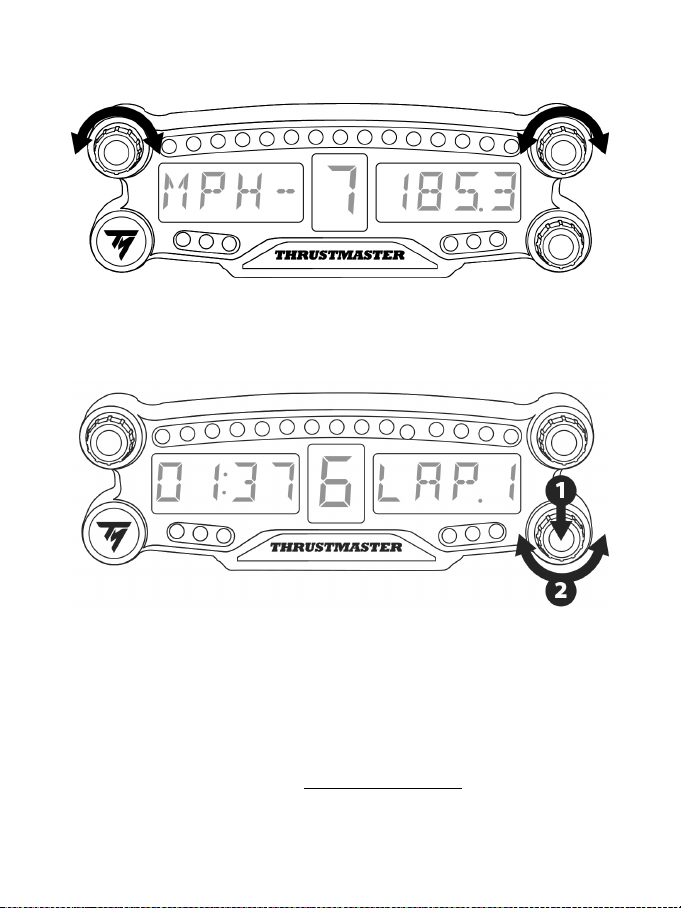
8/12
USING THE ROTARY SELECTORS NO.1 AND NO.2
Depending on the PS4 ™ game, you can turn the selectors no.1 and no. 2 to change the display settings,
and to toggle from one setting to another.
ADJUSTING THE BT LED DISPLAY’S BRIGHTNESS
1) Press and release the selector no. 3 to toggle from setting the brightness of the 21 LEDs (5) to
adjusting the intensity of the main display (6), and conversely.
2) Turn the selector to the left to reduce the intensity or to the right to increase it.
ATTACHING THE BT LED DISPLAY
You can install the BT LED DISPLAY at your convenience within a 10 meter/33 foot radius around the
PS4™ system.
You can also attach the device to various suitable items* or directly to some racing wheels (for instance,
the TM OPEN WHEEL*) using the two M3 threaded holes located at the back of the device (9).
* Sold separately
For more information about this, please go to http://support.thrustmaster.com: click Racing wheels / BT
LED DISPLAY, then User manual or FAQ.
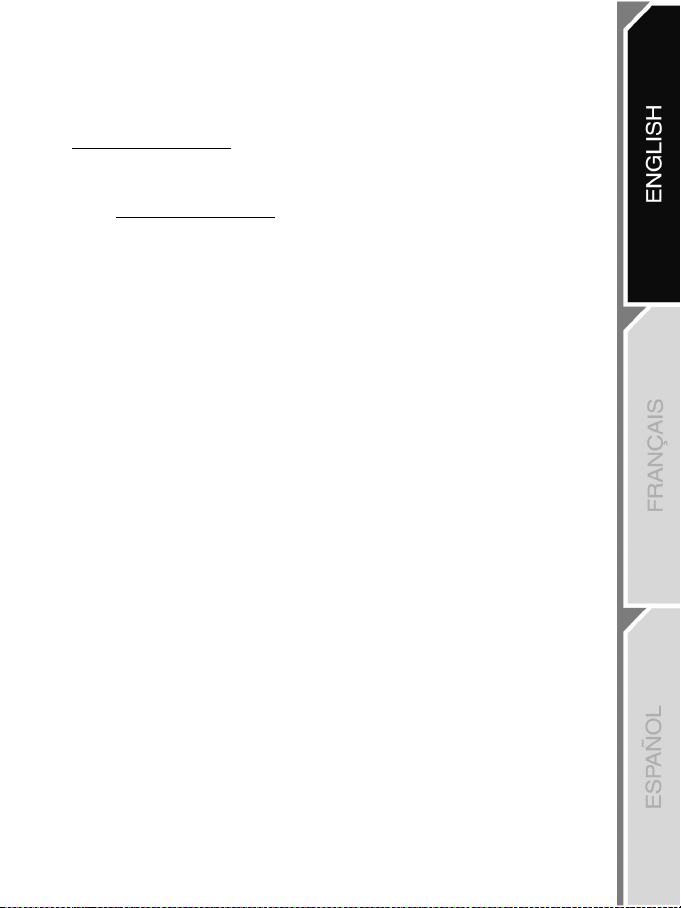
9/12
UPDATING THE BT LED DISPLAY’S FIRMWARE
Both firmware (general firmware and Bluetooth firmware) included in the BT LED DISPLAY can be
updated with more recent versions, featuring product improvements.
To display your BT LED DISPLAY’s firmware versions and update them if required: on a PC, access
http://support.thrustmaster.com, select Racing wheels / BT LED DISPLAY, then select Firmware and
follow the instructions and the download and installation procedure.
HELP, FAQ AND HINTS
Access http://support.thrustmaster.com. Select Racing wheels / BT LED DISPLAY, then User
manual or FAQ.

10/12
CONSUMER WARRANTY INFORMATION
Worldwide, Guillemot Corporation S.A., whose registered office is located at Place du Granier, B.P. 97143, 35571
Chantepie, France (hereinafter “Guillemot”) warrants to the consumer that this Thrustmaster product shall be free
from defects in materials and workmanship, for a warranty period which corresponds to the time limit to bring an
action for conformity with respect to this product. In the countries of the European Union, this corresponds to a
period of two (2) years from delivery of the Thrustmaster product. In other countries, the warranty period
corresponds to the time limit to bring an action for conformity with respect to the Thrustmaster product according to
applicable laws of the country in which the consumer was domiciled on the date of purchase of the Thrustmaster
product (if no such action exists in the corresponding country, then the warranty period shall be one (1) year from the
original date of purchase of the Thrustmaster product).
Notwithstanding the above, rechargeable batteries are covered by a warranty period of six (6) months from the date
of original purchase.
Should the product appear to be defective during the warranty period, immediately contact Technical Support, who
will indicate the procedure to follow. If the defect is confirmed, the product must be returned to its place of purchase
(or any other location indicated by Technical Support).
Within the context of this warranty, the consumer’s defective product shall, at Technical Support’s option, be either
replaced or returned to working order. If, during the warranty period, the Thrustmaster product is subject to such
reconditioning, any period of at least seven (7) days during which the product is out of use shall be added to the
remaining warranty period (this period runs from the date of the consumer’s request for intervention or from the date
on which the product in question is made available for reconditioning, if the date on which the product is made
available for reconditioning is subsequent to the date of the request for intervention). If permitted under applicable
law, the full liability of Guillemot and its subsidiaries (including for consequential damages) is limited to the return to
working order or the replacement of the Thrustmaster product. If permitted under applicable law, Guillemot disclaims
all warranties of merchantability or fitness for a particular purpose.
This warranty shall not apply: (1) if the product has been modified, opened, altered, or has suffered damage as a
result of inappropriate or abusive use, negligence, an accident, normal wear, or any other cause unrelated to a
material or manufacturing defect (including, but not limited to, combining the Thrustmaster product with any
unsuitable element, including in particular power supplies, rechargeable batteries, chargers, or any other elements
not supplied by Guillemot for this product); (2) if the product has been used for any use other than home use,
including for professional or commercial purposes (game rooms, training, competitions, for example); (3) in the event
of failure to comply with the instructions provided by Technical Support; (4) to software, said software being subject
to a specific warranty; (5) to consumables (elements to be replaced over the product’s lifespan: disposable batteries,
audio headset or headphone ear pads, for example); (6) to accessories (cables, cases, pouches, bags, wrist-straps,
for example); (7) if the product was sold at public auction.
This warranty is nontransferable.
The consumer’s legal rights with respect to laws applicable to the sale of consumer goods in his or her country are
not affected by this warranty.
Additional warranty provisions
During the warranty period, Guillemot shall not provide, in principle, any spare parts, as Technical Support is the only
party authorized to open and/or recondition any Thrustmaster product (with the exception of any reconditioning
procedures which Technical Support may request that the consumer carry out, by way of written instructions – for
example, due to the simplicity and the lack of confidentiality of the reconditioning process – and by providing the
consumer with the required spare part(s), where applicable).
Given its innovation cycles and in order to protect its know-how and trade secrets, Guillemot shall not provide, in principle,
any reconditioning notification or spare parts for any Thrustmaster product whose warranty period has expired.
In the United States of America and in Canada, this warranty is limited to the product’s internal mechanism and
external housing. In no event shall Guillemot or its affiliates be held liable to any third party for any consequential or
incidental damages resulting from the breach of any express or implied warranties. Some States/Provinces do not
allow limitation on how long an implied warranty lasts or exclusion or limitation of liability for consequential or
incidental damages, so the above limitations or exclusions may not apply to you. This warranty gives you specific
legal rights, and you may also have other rights which vary from State to State or Province to Province.
11/12
Liability
If permitted under applicable law, Guillemot Corporation S.A. (hereinafter “Guillemot”) and its subsidiaries disclaim all
liability for any damages caused by one or more of the following: (1) the product has been modified, opened or
altered; (2) failure to comply with assembly instructions; (3) inappropriate or abusive use, negligence, an accident (an
impact, for example); (4) normal wear; (5) the use of the product for any use other than home use, including for
professional or commercial purposes (game rooms, training, competitions, for example). If permitted under applicable
law, Guillemot and its subsidiaries disclaim all liability for any damages unrelated to a material or manufacturing
defect with respect to the product (including, but not limited to, any damages caused directly or indirectly by any
software, or by combining the Thrustmaster product with any unsuitable element, including in particular power
supplies, rechargeable batteries, chargers, or any other elements not supplied by Guillemot for this product).
DECLARATION OF CONFORMITY
CANADIAN COMPLIANCE NOTICE: this Class B digital apparatus meets all requirements of the Canadian
Interference-Causing Equipment Regulations.
USA COMPLIANCE NOTICE: this equipment has been tested and found to comply with the limits for a Class B
digital device, pursuant to Part 15 of the FCC rules. Operation is subject to the following two conditions:
(1) This device may not cause harmful interference, and
(2) This device must accept any interference received, including interference that may cause undesired operation.
These limits are designed to provide reasonable protection against harmful interference in a residential installation.
This equipment generates, uses and can radiate radio frequency energy and, if not installed and used in accordance
with the instructions, may cause harmful interference to radio communications. However, there is no guarantee that
interference will not occur in a particular installation. If this equipment does cause harmful interference to radio or
television reception, which can be determined by turning the equipment on and off, the user is encouraged to try to
correct the interference by one or more of the following measures:
- Reorient or relocate the receiving antenna.
- Increase the separation between the equipment and receiver.
- Connect the equipment into an outlet on a circuit different from that to which the receiver is connected.
- Consult the dealer or an experienced radio/TV technician for help.
IC radiation exposure statement
This equipment complies with Canada radiation exposure limits set forth for uncontrolled environments. This
transmitter must not be co‐located or operating in conjunction with any other antenna or transmitter. This equipment
should be installed and operated with a minimum distance of 5 millimeters between the radiator and your body.
FCCID: NAM4169091
TECHNICAL SUPPORT
http://support.thrustmaster.com

12/12
COPYRIGHT
© 2018 Guillemot Corporation S.A. All rights reserved. Thrustmaster
®
is a registered trademark of
Guillemot Corporation S.A.
Manufactured & distributed under license from Sony Interactive Entertainement LLC.
“
2”, “PlayStation” and “khjl” are registered trademarks of Sony Interactive Entertainment Inc.
“
” is a trademark of the same company. All rights reserved.
All other trademarks and brand names are hereby acknowledged and are property of their respective
owners. Illustrations not binding. Contents, designs and specifications are subject to change without
notice and may vary from one country to another. Made in China.
ENVIRONMENTAL PROTECTION RECOMMENDATION
Please adhere to local recycling laws for electrical and electronic equipment.
Retain this information. Colors and decorations may vary.
Plastic fasteners and adhesives should be removed from the product before it is used.
1/12
PlayStation
®4
Manuel de l’utilisateur
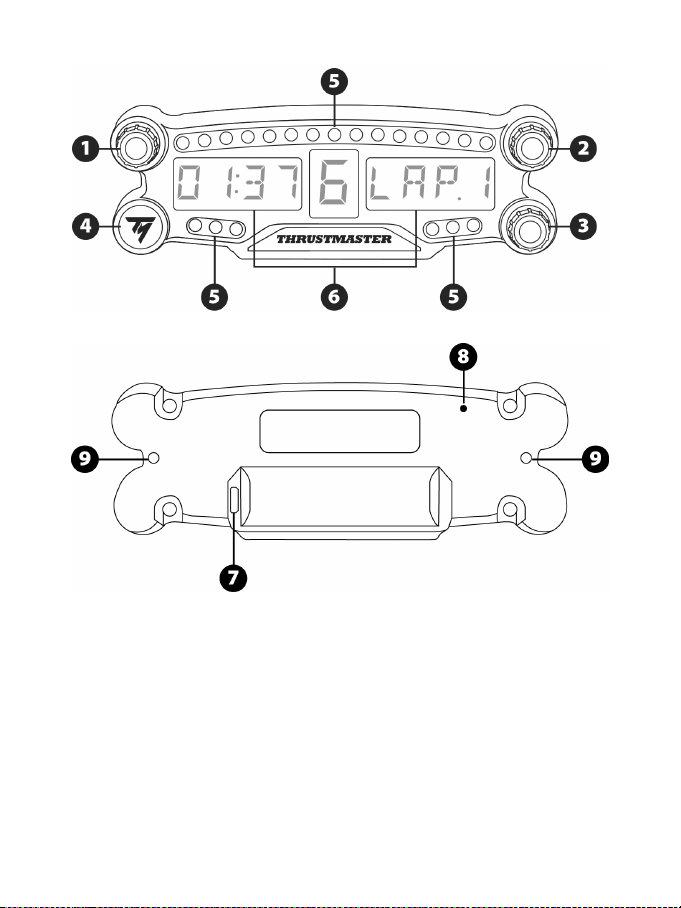
2/12
DESCRIPTION DU PRODUIT
1 Sélecteur n°1 avec fonction bouton poussoir
2 Sélecteur n°2 avec fonction bouton poussoir
3 Sélecteur n°3 avec fonction bouton poussoir
(pour ajuster la luminosité)
4 Bouton Marche/Arrêt
5 21 LEDs
6 Afficheur principal
7 Connecteur de charge micro-USB
8 Témoin de charge
9 Deux pas de vis type M3 pour diverses fixations
3/12
AVERTISSEMENTS
Avant d’utiliser ce produit, lisez attentivement cette documentation et conservez-la pour pouvoir la
consulter ultérieurement.
Avertissement – Choc électrique
* Conservez le produit dans un endroit sec et ne l’exposez ni à la poussière ni au soleil.
* Ne tordez pas et ne tirez pas sur les connecteurs et câbles.
* Ne renversez pas de liquide sur le produit et ses connecteurs.
* Ne mettez pas le produit en court-circuit.
* Ne démontez jamais le produit, ne le jetez pas au feu et ne l’exposez pas à des températures
élevées.
* N’ouvrez pas l’appareil. L’appareil ne contient pas de pièces réparables par l'utilisateur. Confiez
toute réparation au fabricant, à une agence spécifiée ou un technicien qualifié.
Avertissement – Batterie Interne
- Avant d’utiliser le BT LED DISPLAY, effectuez une charge complète.
- Ne désassemblez pas le produit ; cela annulerait sa garantie.
- Protégez votre produit contre les chocs et les impacts.
- Ce produit ne doit pas être utilisé par un enfant de moins de 14 ans sans la supervision d'un
adulte.
THRUSTMASTER® DECLINE TOUTE RESPONSABILITE EN CAS DE NON-RESPECT DE CES
CONSIGNES.
ATTENTION : RISQUE D’EXPLOSION SI LA BATTERIE EST REMPLACÉE PAR UN TYPE DE
BATTERIE INCORRECT.
SUIVEZ LES INSTRUCTIONS CONCERNANT LA MISE AU REBUT DES BATTERIES.
RECHARGER LA BATTERIE DU BT LED DISPLAY
A l’aide d’un câble micro-USB (celui de votre manette PS4™, par exemple), branchez le BT LED
DISPLAY sur l’un des ports USB alimentés de votre système PS4™.
Le connecteur de charge (7) est situé à l’arrière du BT LED DISPLAY.
Le témoin de charge (8) s’allume en rouge lors du chargement et s’éteint lorsque la charge est
pleine.
COMPATIBILITE DANS LES JEUX PS4™
La liste des jeux PS4™ compatibles avec le BT LED DISPLAY est disponible sur
http://support.thrustmaster.com : cliquez sur Volants / BT LED DISPLAY puis Paramètres de jeux.
Cette liste s’étoffera régulièrement avec l’arrivée des nouveaux jeux PS4™ compatibles avec le BT
LED DISPLAY.
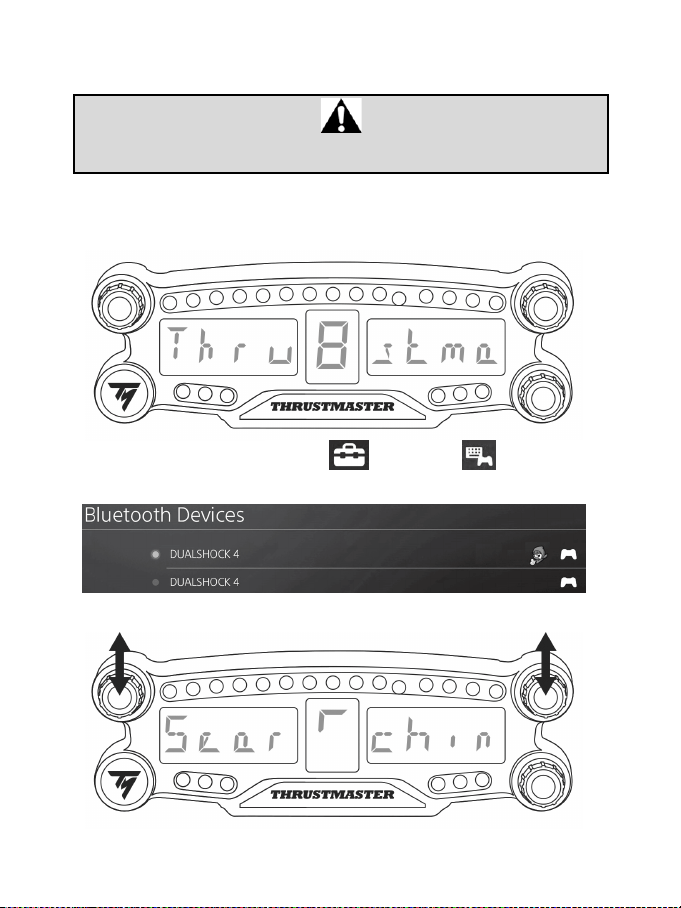
4/12
INSTALLATION SUR LE SYSTÈME PS4™
Enregistrer le BT LED DISPLAY sur le système PS4™
Cette opération ne doit être effectuée qu'une fois. Elle n'est pas nécessaire après
chaque redémarrage du système PS4™.
La première fois que vous utilisez votre BT LED DISPLAY, vous devez impérativement l'enregistrer sur
votre système PS4™ (cette opération ne doit être effectuée qu’une seule fois).
1. Allumez le BT LED DISPLAY en appuyant sur le bouton Marche/Arrêt (4).
Le texte Thrustmaster BT Wheel Display défile sur l’afficheur principal (6).
2. Dans le menu du système PS4™, sélectionnez [ Paramètres ] > [ Périphériques ] >
[ Périphériques Bluetooth ] pour rechercher automatiquement les périphériques Bluetooth® à
proximité. Les périphériques couplés et les autres périphériques Bluetooth apparaîtront dans la liste.
3. Pressez très rapidement et relâchez simultanément les sélecteurs n°1 et n°2 du BT LED DISPLAY.
Le texte Searching known devices défile sur l’afficheur principal (6).
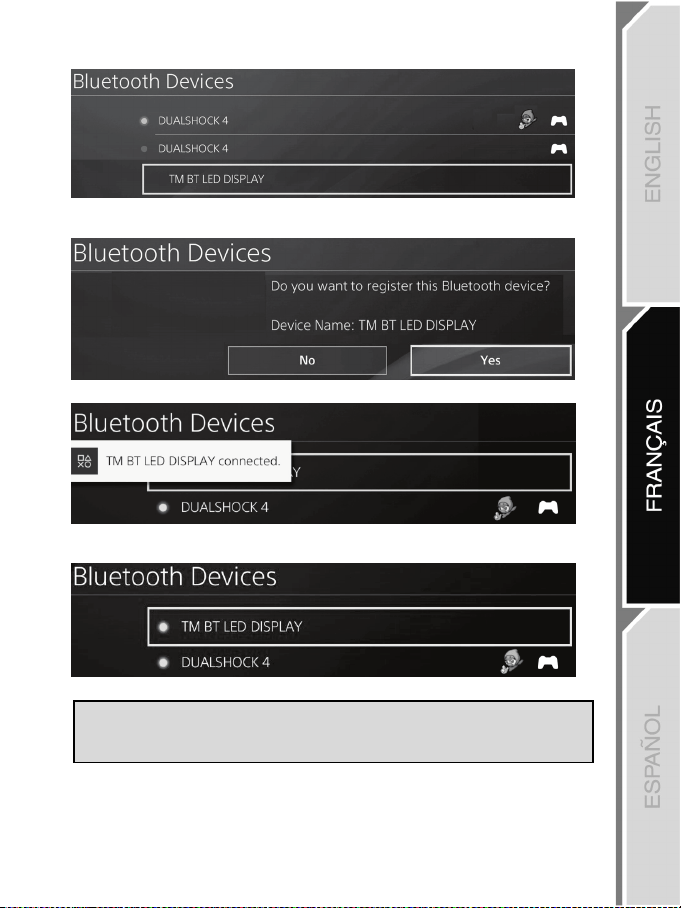
5/12
4. Au bout de quelque temps, TM BT LED DISPLAY apparaît sur l’écran du système PS4™. Avec
votre manette, sélectionnez-le et appuyez sur la touche s.
5. Le message Voulez-vous enregistrer le périphérique Bluetooth TM BT LED DISPLAY ?
s’affiche sur l’écran du système PS4™. Choisissez OUI et appuyez sur la touche s pour valider.
6. Le message TM BT LED DISPLAY connecté apparaît brièvement sur l’écran du système PS4™.
Sur l’écran du système PS4™, le voyant lumineux à gauche de TM BT LED DISPLAY est
désormais allumé en vert pour signifier que l’accessoire est bien connecté au système.
7. Vous êtes maintenant prêt à jouer !
Si l’opération échoue : éteignez complètement votre système PS4™, débranchez
puis rebranchez le câble d’alimentation secteur de la console, redémarrez votre
système PS4™, puis répétez les étapes d'enregistrement 1 à 6.
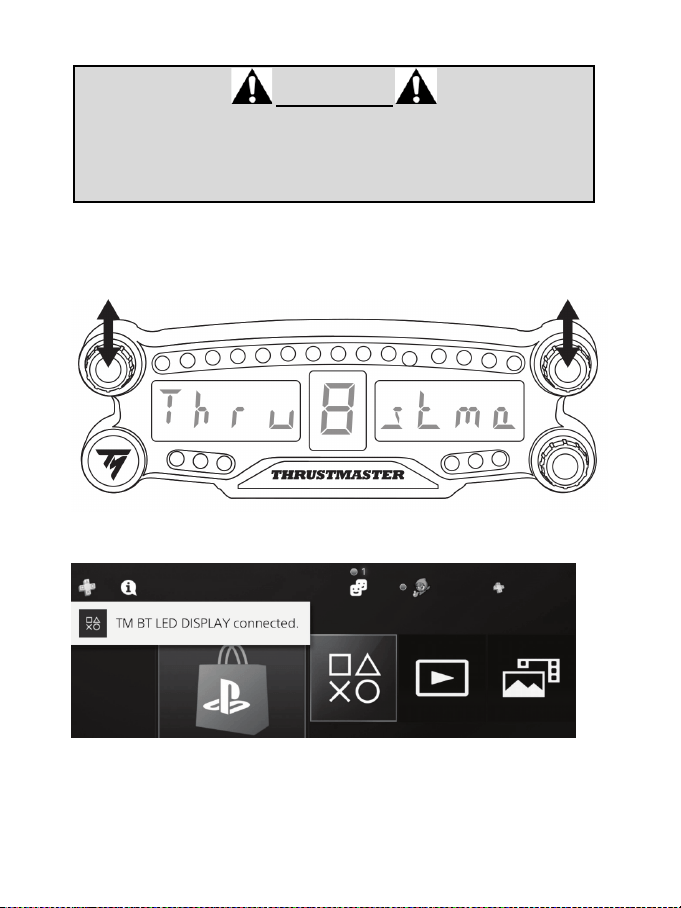
6/12
Connecter le BT LED DISPLAY au système PS4™
TRES IMPORTANT
- Effectuez impérativement cette opération après chaque redémarrage du
système PS4™.
- La connexion du BT LED DISPLAY au système PS4™ ne fonctionne que si
l’étape précédente (Enregistrer le BT LED DISPLAY sur le PS4™) a été
correctement effectuée au moins une fois.
1. Allumez le BT LED DISPLAY en appuyant sur le bouton Marche/arrêt (4).
Le texte Thrustmaster BT Wheel Display défile sur l’afficheur principal (6).
2. Pressez très rapidement et relâchez simultanément les sélecteurs n°1 et n°2 du BT LED
DISPLAY.
Le texte Connected apparaît brièvement sur l’afficheur principal (6).
Le message TM BT LED DISPLAY connecté apparaît brièvement sur l’écran du système PS4™.
3. Vous êtes maintenant prêt à jouer !
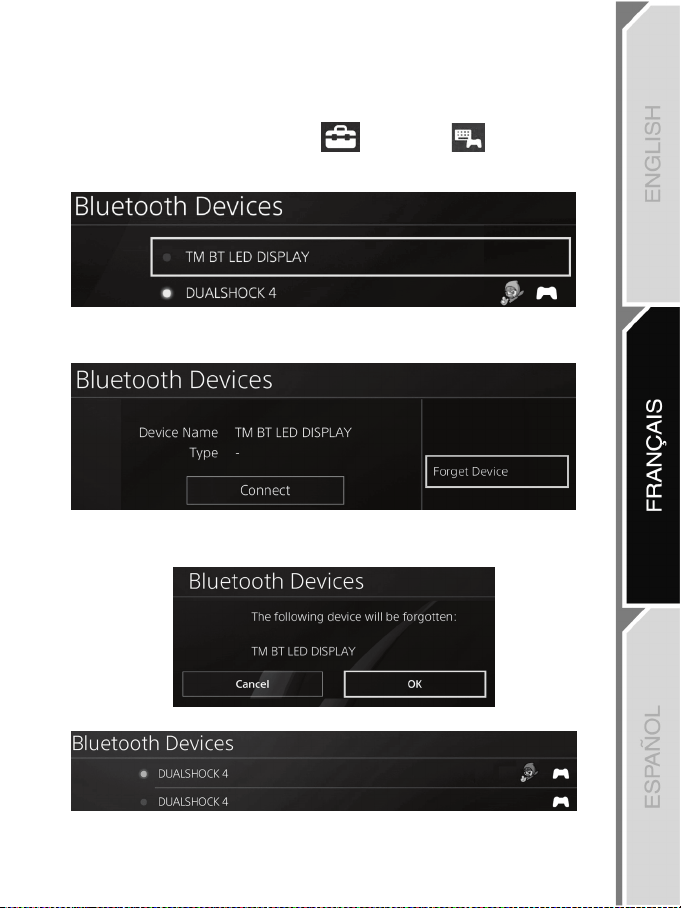
7/12
Désenregistrer le BT LED DISPLAY du système PS4™
(Cette opération n'est nécessaire qu'en cas de dépannage ou d’acquisition d’un nouveau BT LED
DISPLAY)
1. Eteignez le BT LED DISPLAY en appuyant sur le bouton Marche/Arrêt (4).
2. Dans le menu du système PS4™, sélectionnez [ Paramètres ] > [ Périphériques ] >
[ Périphériques Bluetooth ].
Sélectionnez TM BT LED DISPLAY et appuyez sur la touche s pour valider.
3. Le message Nom du périphérique TM BT LED DISPLAY apparaît à l’écran. Appuyez sur la touche
OPTIONS de votre manette, puis sélectionnez Oublier le périphérique. Appuyez sur la touche s
pour valider.
4. Le message Le périphérique ci-dessous va être oublié : TM BT LED DISPLAY apparaît à l’écran.
Sélectionnez OK et appuyez sur la touche s pour valider.
5. Le TM BT LED DISPLAY est désormais désenregistré de votre système PS4™.
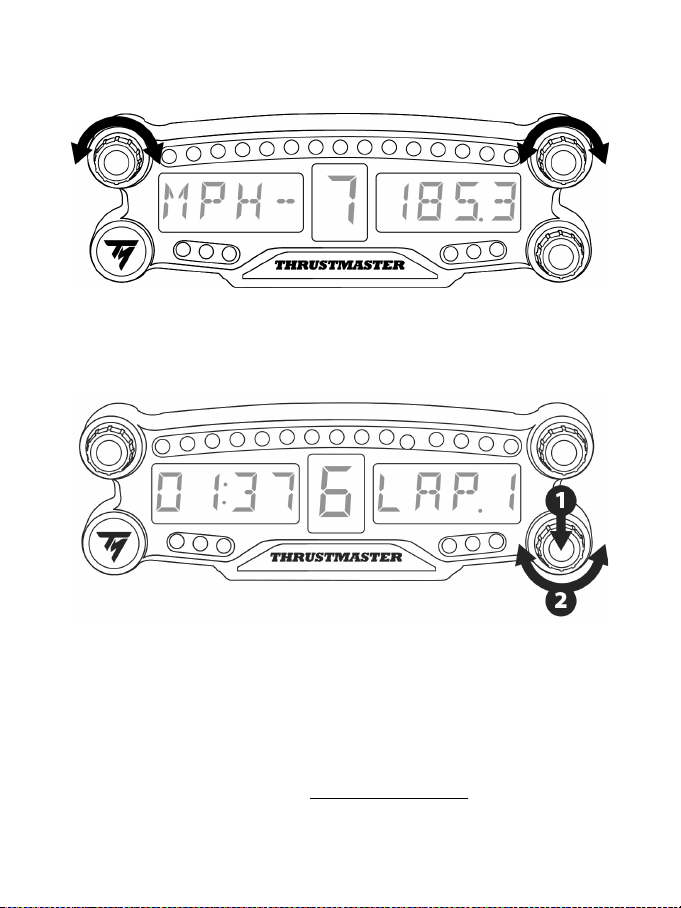
8/12
UTILISATION DES SÉLECTEURS N°1 ET N°2
En fonction du jeu PS4™ utilisé, les sélecteurs n° 1 et n°2 vous permettront, en les tournant, de modifier
les paramètres d’affichage et de basculer d’un paramètre à l’autre.
AJUSTER LA LUMINOSITE DU BT LED DISPLAY
1) Pressez puis relâchez le sélecteur n°3 pour basculer du réglage de l’intensité des 21 LEDs (5) au
réglage de l’intensité de l’afficheur principal (6) et inversement.
2) Tournez le sélecteur vers la gauche pour baisser l’intensité ou vers la droite pour l’augmenter.
FIXATION DU BT LED DISPLAY
Le BT LED DISPLAY peut-être être posé partout où vous le souhaitez dans un rayon de 10 mètres/33'
autour du système PS4™.
Il est également possible de fixer le dispositif sur divers supports compatibles* ou sur la roue de certains
volants (par exemple la roue TM OPEN WHEEL*) via les deux pas de vis type M3 situés à l’arrière (9).
* Vendu(e)s séparément
Pour plus d'informations sur ce point, allez sur http://support.thrustmaster.com : cliquez sur Volants / BT
LED DISPLAY, puis Manuel utilisateur ou FAQ.
9/12
METTRE A JOUR LE FIRMWARE DU BT LED DISPLAY
Les deux firmwares (un firmware général et un firmware Bluetooth) inclus dans le BT LED DISPLAY
peuvent être mis à jour par des versions plus récentes intégrant des améliorations produits.
Pour afficher les versions de firmware de votre BT LED DISPLAY et les mettre à jour si nécessaire :
sur PC, allez sur http://support.thrustmaster.com, cliquez sur Volants / BT LED DISPLAY puis
Firmware et suivez les instructions et la procédure de téléchargement et d’installation.
AIDES, FAQ ET ASTUCES DIVERSES
Allez sur http://support.thrustmaster.com. Cliquez sur Volants / BT LED DISPLAY puis Manuel
utilisateur ou FAQ.

10/12
INFORMATIONS RELATIVES A LA GARANTIE AUX CONSOMMATEURS
Dans le monde entier, Guillemot Corporation S.A., ayant son siège social Place du Granier, B.P. 97143, 35571
Chantepie, France (ci-après « Guillemot ») garantit au consommateur que le présent produit Thrustmaster est exempt
de défaut matériel et de vice de fabrication, et ce, pour une période de garantie qui correspond au délai pour intenter
une action en conformité de ce produit. Dans les pays de l’Union Européenne, ce délai est de deux (2) ans à compter de
la délivrance du produit Thrustmaster. Dans les autres pays, la durée de la période de garantie correspond au délai pour
intenter une action en conformité du produit Thrustmaster selon la législation en vigueur dans le pays où le
consommateur avait son domicile lors de l’achat du produit Thrustmaster (si une telle action en conformité n’existe pas
dans ce pays alors la période de garantie est de un (1) an à compter de la date d’achat d’origine du produit
Thrustmaster).
Si, au cours de la période de garantie, le produit semble défectueux, contactez immédiatement le Support Technique
qui vous indiquera la procédure à suivre. Si le défaut est confirmé, le produit devra être retourné à son lieu d’achat (ou
tout autre lieu indiqué par le Support Technique).
Dans le cadre de la garantie, le consommateur bénéficiera, au choix du Support Technique, d'un remplacement ou
d'une remise en état de marche du produit défectueux. Si, pendant la période de garantie, le produit Thrustmaster fait
l'objet d'une telle remise en état, toute période d'immobilisation d'au moins sept jours vient s'ajouter à la durée de la
garantie qui restait à courir (cette période court à compter de la demande d'intervention du consommateur ou de la mise
à disposition pour remise en état du produit en cause, si cette mise à disposition est postérieure à la demande
d'intervention). Lorsque la loi applicable l’autorise, toute responsabilité de Guillemot et ses filiales (y compris pour les
dommages indirects) se limite à la remise en état de marche ou au remplacement du produit Thrustmaster. Lorsque la
loi applicable l’autorise, Guillemot exclut toutes garanties de qualité marchande ou d’adaptation à un usage particulier.
Cette garantie ne s’appliquera pas : (1) si le produit a été modifié, ouvert, altéré, ou a subi des dommages résultant d’une
utilisation inappropriée ou abusive, d’une négligence, d’un accident, de l’usure normale, ou de toute autre cause non liée à un
défaut matériel ou à un vice de fabrication (y compris, mais non limitativement, une combinaison du produit Thrustmaster
avec tout élément inadapté, notamment alimentations électriques, batteries, chargeurs, ou tous autres éléments non-fournis
par Guillemot pour ce produit) ; (2) si le produit a été utilisé en dehors du cadre privé, à des fins professionnelles ou
commerciales (salles de jeu, formations, compétitions, par exemple). (3) en cas de non respect des instructions du Support
Technique ; (4) aux logiciels, lesdits logiciels faisant l’objet d’une garantie spécifique ; (5) aux consommables (éléments à
remplacer pendant la durée de vie du produit : piles, coussinets de casque audio, par exemple) ; (6) aux accessoires (câbles,
étuis, housses, sacs, dragonnes, par exemple) ; (7) si le produit a été vendu aux enchères publiques.
Cette garantie n’est pas transférable.
Les droits légaux du consommateur au titre de la législation applicable dans son pays à la vente de biens de
consommation ne sont pas affectés par la présente garantie.
Par exemple, en France, indépendamment de la présente garantie, le vendeur reste tenu de la garantie légale de
conformité mentionnée aux articles L. 217-4 à L.217-12 du code de la consommation et de celle relative aux défauts
(vices cachés) de la chose vendue, dans les conditions prévues aux articles 1641 à 1648 et 2232 du code civil. La loi
applicable (c'est-à-dire la loi française) impose de reproduire les extraits de la loi française suivants:
Article L. 217-4 du code de la consommation:
Le vendeur livre un bien conforme au contrat et répond des défauts de conformité existant lors de la délivrance.
Il répond également des défauts de conformité résultant de l'emballage, des instructions de montage ou de l'installation
lorsque celle-ci a été mise à sa charge par le contrat ou a été réalisée sous sa responsabilité.
Article L. 217-5 du code de la consommation:
Le bien est conforme au contrat :
1° S'il est propre à l'usage habituellement attendu d'un bien semblable et, le cas échéant :
- s'il correspond à la description donnée par le vendeur et possède les qualités que celui-ci a présentées à l'acheteur
sous forme d'échantillon ou de modèle ;
- s'il présente les qualités qu'un acheteur peut légitimement attendre eu égard aux déclarations publiques faites par le
vendeur, par le producteur ou par son représentant, notamment dans la publicité ou l'étiquetage ;
2° Ou s'il présente les caractéristiques définies d'un commun accord par les parties ou est propre à tout usage spécial
recherché par l'acheteur, porté à la connaissance du vendeur et que ce dernier a accepté.
Article L. 217-12 du code de la consommation:
L'action résultant du défaut de conformité se prescrit par deux ans à compter de la délivrance du bien.
Article L. 217-16 du code de la consommation:
Lorsque l'acheteur demande au vendeur, pendant le cours de la garantie commerciale qui lui a été consentie lors de
l'acquisition ou de la réparation d'un bien meuble, une remise en état couverte par la garantie, toute période
d'immobilisation d'au moins sept jours vient s'ajouter à la durée de la garantie qui restait à courir.
Cette période court à compter de la demande d'intervention de l'acheteur ou de la mise à disposition pour réparation du
bien en cause, si cette mise à disposition est postérieure à la demande d'intervention.
11/12
Article L. 1641 du code civil:
Le vendeur est tenu de la garantie à raison des défauts cachés de la chose vendue qui la rendent impropre à l'usage
auquel on la destine, ou qui diminuent tellement cet usage que l'acheteur ne l'aurait pas acquise, ou n'en aurait donné
qu'un moindre prix, s'il les avait connus.
Article L. 1648 alinéa 1
er
du code civil:
L'action résultant des vices rédhibitoires doit être intentée par l'acquéreur dans un délai de deux ans à compter de la
découverte du vice.
Stipulations additionnelles à la garantie
Pendant la période de garantie, Guillemot ne fournira, en principe, pas de pièce détachée car le Support Technique est
seul habilité tant à ouvrir qu'à remettre en état tout produit Thrustmaster (à l'exception des remises en état que le
Support Technique demanderait, par instructions écrites, au consommateur d'effectuer -par exemple en raison de la
simplicité et de l'absence de confidentialité du processus de remise en état-, en lui fournissant, le cas échéant, la ou les
pièces détachées nécessaires).
Compte tenu de ses cycles d'innovation et pour préserver ses savoir-faire et secrets, Guillemot ne fournira, en principe,
ni notice de remise en état, ni pièce détachée pour tout produit Thrustmaster dont la période de garantie est expirée.
Aux États-Unis d’Amérique et au Canada, la présente garantie est limitée au mécanisme interne et au boîtier externe du produit. En
aucun cas, Guillemot ou ses sociétés affiliées ne sauraient être tenues responsables envers qui que ce soit de tous dommages
indirects ou dommages accessoires résultant du non respect des garanties expresses ou implicites. Certains États/Provinces
n’autorisent pas la limitation sur la durée d’une garantie implicite, ou l’exclusion ou la limitation de responsabilité pour les dommages
indirects ou accessoires, de sorte que les limitations ou exclusions ci-dessus peuvent ne pas vous être applicables. Cette garantie
vous confère des droits spécifiques ; vous pouvez également bénéficier d’autres droits qui peuvent différer d’un État/Province à
l’autre.
Responsabilité
Lorsque la loi applicable l’autorise, Guillemot Corporation S.A. (ci-après « Guillemot ») et ses filiales excluent toute
responsabilité pour tous dommages causés par un ou plusieurs des faits suivants: (1) le produit a été modifié, ouvert, altéré,
(2) l’irrespect des instructions de montage, (3) l’utilisation inappropriée ou abusive, la négligence, l’accident (un choc, par
exemple), (4) l’usure normale du produit, (5) l’utilisation du produit en dehors du cadre privé, à des fins professionnelles ou
commerciales (salles de jeu, formations, compétitions, par exemple). Lorsque la loi applicable l’autorise, Guillemot et ses
filiales excluent toute responsabilité pour tout dommage dont la cause n’est pas liée à un défaut matériel ou à un vice de
fabrication du produit (y compris, mais non limitativement, tout dommage causé directement ou indirectement par tout logiciel,
ou par une combinaison du produit Thrustmaster avec tout élément inadapté, notamment alimentations électriques, batteries,
chargeurs, ou tous autres éléments non-fournis par Guillemot pour ce produit).
SUPPORT TECHNIQUE
http://support.thrustmaster.com
12/12
Déclaration de conformité
UTILISATEURS CANADIENS :
Cet appareil numérique de la classe B respecte toutes les exigences du Règlement sur le matériel
brouilleur du Canada.
Déclaration d’IC sur l’exposition aux radiations
Cet équipement est conforme aux limites d’exposition aux radiations définies par le Canada pour des
environnements non contrôlés. Cet émetteur ne doit pas être installé au même endroit ni utilisé avec
une autre antenne ou un autre émetteur. Cet équipement devrait être installé et actionné avec une
distance minimum de 5 millimètres entre le radiateur et votre corps.
FCCID : NAM4169091
COPYRIGHT
© 2018 Guillemot Corporation S.A. Tous droits réservés. Thrustmaster
®
est une marque déposée de
Guillemot Corporation S.A.
Fabriqué et distribué par Guillemot Corporation S.A. sous licence de Sony Interactive Entertainment
LLC. “
2”, “PlayStation” et “khjl” sont des marques déposées de Sony Interactive
Entertainment Inc. “
” est une marque de la même société. Tous droits réservés.
Toutes les autres marques sont la propriété de leurs propriétaires respectifs. Illustrations non
contractuelles. Le contenu, la conception et les spécifications sont susceptibles de changer sans
préavis et de varier selon les pays. Fabriqué en Chine.
RECOMMANDATION RELATIVE A LA PROTECTION DE L’ENVIRONNEMENT
Veuillez vous reporter aux législations locales relatives au recyclage des équipements électriques et
électroniques.
Informations à conserver. Les couleurs et décorations peuvent varier.
Il est recommandé de retirer les attaches en plastique et les adhésifs avant d’utiliser le produit.
www.thrustmaster.com
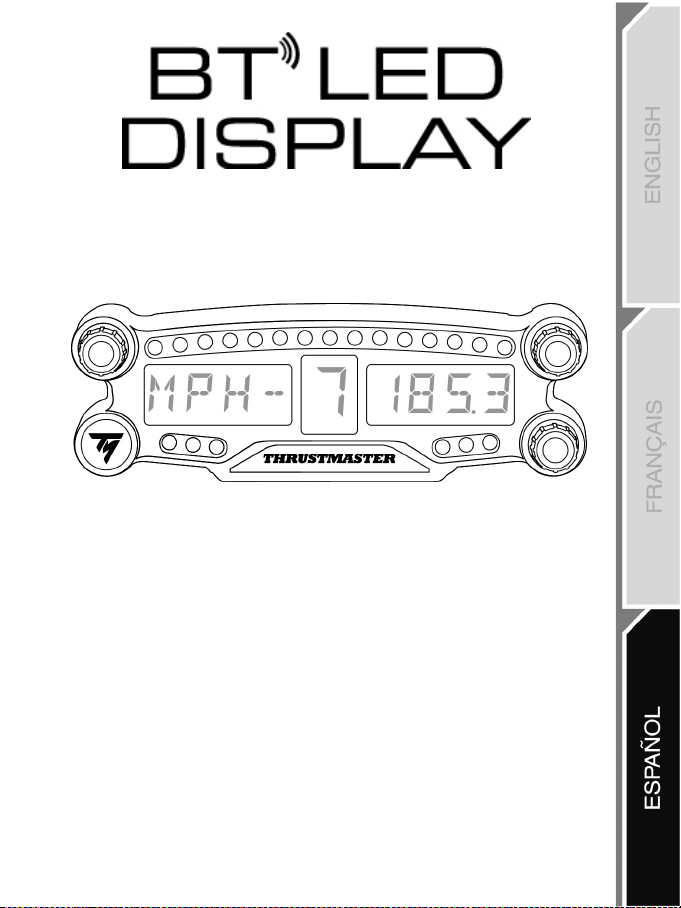
1/12
PlayStation
®4
Manual del usuario
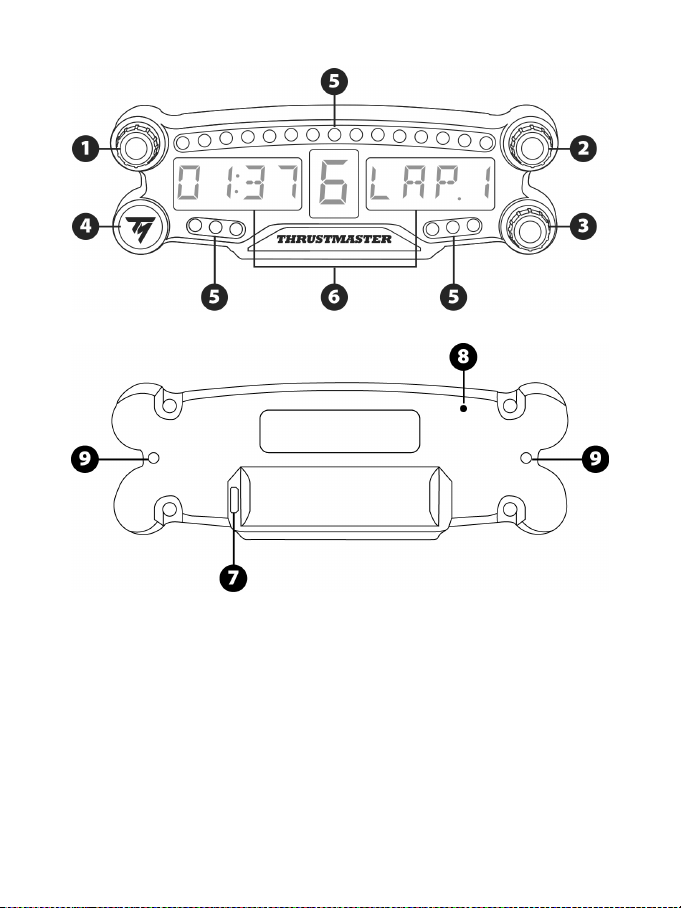
2/12
DESCRIPCIÓN DEL PRODUCTO
1 Selector giratorio nº 1 con función de botón
pulsador
2 Selector giratorio nº 2 con función de botón
pulsador
3 Selector giratorio nº 3 con función de botón
pulsador (control de ajuste del brillo)
4 Botón de encender/apagar
5 21 LED
6 Pantalla principal
7 Conector de recarga micro USB
8 Indicador de carga
9 Dos agujeros con rosca M3 para fijar el
dispositivo
3/12
ADVERTENCIAS
Antes de utilizar este producto, lee detenidamente este manual y consérvalo para consultarlo
posteriormente.
Advertencia – Descarga eléctrica
* Mantén el producto en un lugar seco y no lo expongas al polvo ni a la luz directa del sol.
* No retuerzas ni tires de los conectores ni de los cables.
* No derrames líquidos en el producto ni en sus conectores.
* No cortocircuites el producto.
* No desmontes nunca el producto ni lo lances al fuego ni lo expongas a temperaturas elevadas.
* No abras el dispositivo: en el interior no hay piezas que el usuario pueda arreglar. Las
reparaciones las debe realizar el fabricante, su representante autorizado o un técnico cualificado.
Advertencia – Batería interna
- Carga por completo el BT LED DISPLAY antes de usarlo.
- No desmontes el dispositivo, ya que invalidarías su garantía.
- Protege el dispositivo de golpes e impactos.
- Este dispositivo no deben usarlo niños menores de 14 años sin la supervisión de un adulto.
THRUSTMASTER® RENUNCIA A CUALQUIER RESPONSABILIDAD EN EL CASO DE
INCUMPLIMIENTO DE ESTAS INSTRUCCIONES.
ADVERTENCIA: SE PUEDE PRODUCIR UNA EXPLOSIÓN SI LA BATERÍA SE SUSTITUYE POR
OTRA DE UN TIPO INCORRECTO.
SIGUE LAS INSTRUCCIONES RELACIONADAS CON LA ELIMINACIÓN DE LAS BATERÍAS.
CÓMO CARGAR LA BATERÍA DEL BT LED DISPLAY
Usando un cable micro USB (el cable del mando del sistema PS4™, por ejemplo), conecta el BT
LED DISPLAY a uno de los puertos USB alimentados del sistema PS4™.
El conector de carga (7) se encuentra en la parte trasera del BT LED DISPLAY.
El indicador de carga (8) se enciende en rojo cuando el dispositivo está cargando y se apaga
cuando está totalmente cargado.
COMPATIBILIDAD CON JUEGOS DE PS4™
Una lista de juegos de PS4™ compatibles con el BT LED DISPLAY está disponible en
http://support.thrustmaster.com: selecciona Volantes de carreras / BT LED DISPLAY / Ajustes de los juegos.
Esta lista se ampliará regularmente con el lanzamiento de nuevos juegos de PS4™ compatibles
con el BT LED DISPLAY.
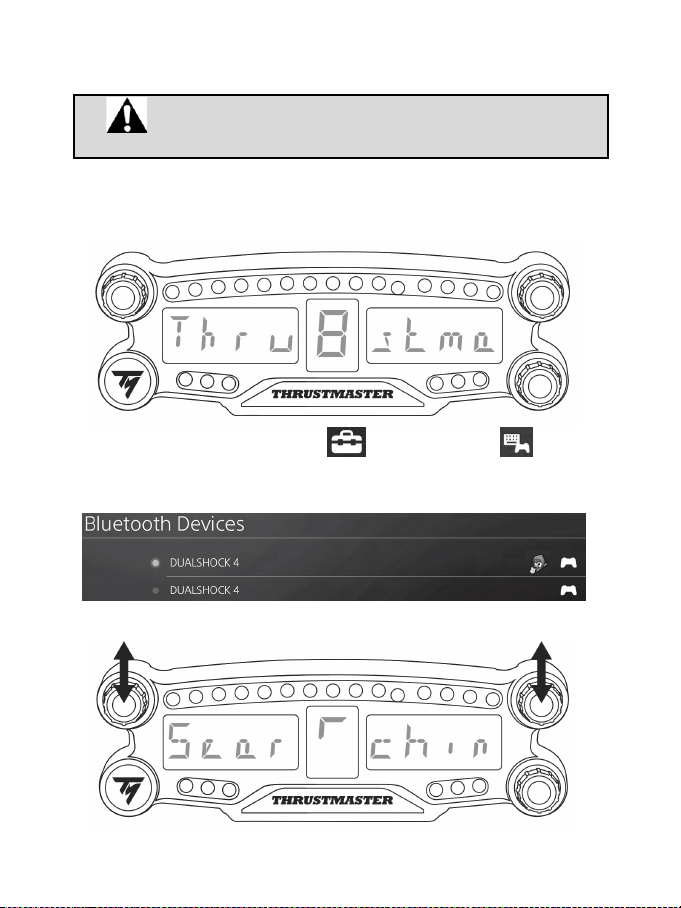
4/12
INSTALACIÓN EN EL SISTEMA PS4™
Registrar el BT LED DISPLAY en el sistema PS4™
Esta operación sólo tendría que realizarse una vez. No es necesario
hacerla cada vez que se reinicie el sistema PS4™.
Al usar el BT LED DISPLAY por primera vez, debes registrarlo obligatoriamente en el sistema PS4™;
esta operación sólo tiene que realizarse una vez.
1. Enciende el BT LED DISPLAY pulsando el botón de encender/apagar (4)
.
Se mostrará el mensaje Thrustmaster BT Wheel Display en la pantalla principal (6).
2. En el menú del sistema PS4™, selecciona [ Settings ] [Ajustes] > [ Devices ]
[Dispositivos] > [ Bluetooth Devices ] [Dispositivos Bluetooth] para buscar automáticamente
dispositivos Bluetooth® cercanos. Aparecerán en la lista los dispositivos emparejados y otros
dispositivos Bluetooth.
3. Pulsa brevemente y suelta los selectores nº 1 y 2 simultáneamente en el BT LED DISPLAY. Se
mostrará el mensaje Searching known devices en la pantalla principal (6).
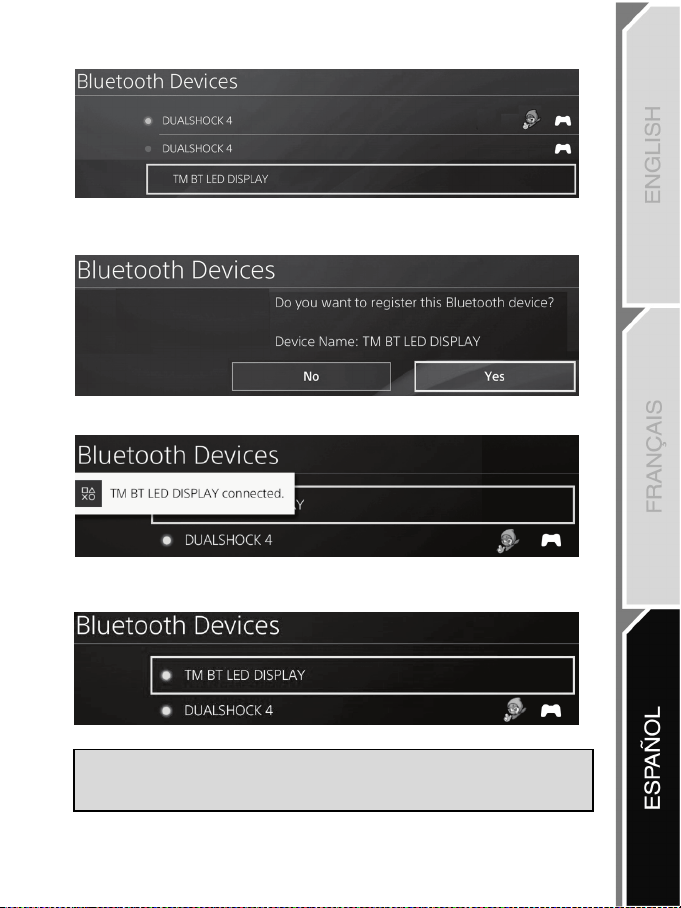
5/12
4. Después de algún tiempo, aparecerá el nombre TM BT LED DISPLAY en la pantalla del sistema
PS4™. Usando el gamepad, selecciónalo y pulsa el botón s.
5. El mensaje Do you want to register this Bluetooth device TM BT LED DISPLAY? [¿Deseas
registrar este dispositivo Bluetooth TM BT LED DISPLAY?] aparecerá en la pantalla del sistema
PS4™. Selecciona YES [Sí] y luego pulsa el botón s para confirmar.
6. El mensaje TM BT LED DISPLAY connected [TM BT LED DISPLAY conectado] aparecerá
brevemente en la pantalla del sistema PS4™.
En la pantalla del sistema PS4™, la luz indicadora situada a la izquierda del TM BT LED DISPLAY
se enciende ahora en verde, lo que significa que el dispositivo está conectado correctamente al
sistema.
7. ¡Ya estás preparado para jugar!
Si la operación fallase, apaga el sistema PS4™ y desconecta y luego vuelve a
conectar el cable de alimentación del sistema. Reinicia el sistema PS4™ y luego
repite los pasos de registro del 1 al 6.
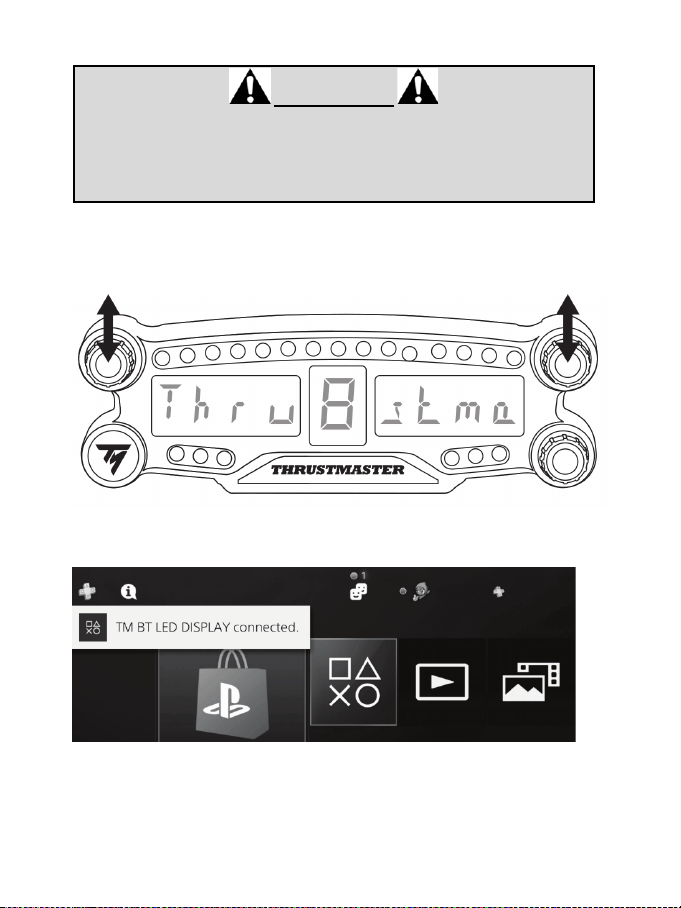
6/12
Conectar el BT LED DISPLAY al sistema PS4™
MUY IMPORTANTE
- Es obligatorio que realices esta operación cada vez que se reinicie el sistema
PS4™.
- La conexión del BT LED DISPLAY al sistema PS4™ sólo funcionará si el paso
anterior (es decir, Registrar el BT LED DISPLAY en el sistema PS4™) se ha
realizado correctamente al menos una vez.
1. Enciende el BT LED DISPLAY pulsando el botón de encender/apagar (4).
Se mostrará el mensaje Thrustmaster BT Wheel Display en la pantalla principal (6).
2. Pulsa brevemente y suelta los selectores nº 1 y 2 simultáneamente en el BT LED DISPLAY.
Aparecerá brevemente el mensaje Connected en la pantalla principal (6).
El mensaje TM BT LED DISPLAY connected [TM BT LED DISPLAY conectado] aparecerá
brevemente en la pantalla del sistema PS4™.
3. ¡Ya estás preparado para jugar!
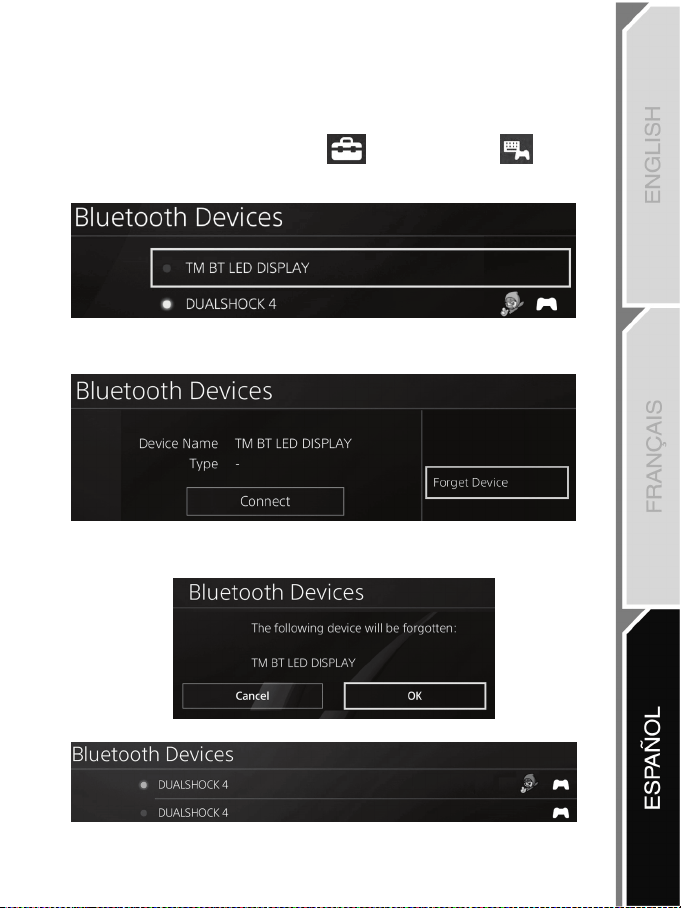
7/12
Quitar el registro del BT LED DISPLAY del sistema PS4™
(Sólo es necesario realizar esta operación al resolver problemas o al comprar un nuevo BT LED
DISPLAY.)
1. Apaga el BT LED DISPLAY pulsando el botón de encender/apagar (4)
.
2. En el menú del sistema PS4™, selecciona
[ Settings ] [Ajustes] > [ Devices ]
[Dispositivos] > [ Bluetooth Devices ] [Dispositivos Bluetooth].
Selecciona TM BT LED DISPLAY y luego pulsa el botón s para confirmar.
3. Aparecerá el mensaje Device Name TM BT LED DISPLAY [Nombre del dispositivo TM BT LED
DISPLAY] en la pantalla. Pulsa el botón OPTIONS en el gamepad y luego selecciona Forget
Device [Olvidar dispositivo]. Pulsa el botón s para confirmar.
4. Aparecerá el mensaje The following device will be forgotten: TM BT LED DISPLAY [Se va a
olvidar el siguiente dispositivo: TM BT LED DISPLAY] en la pantalla.
Selecciona OK [Aceptar] y luego pulsa el botón s para confirmar.
5. Ya se ha quitado el registro del TM BT LED DISPLAY del sistema PS4™.
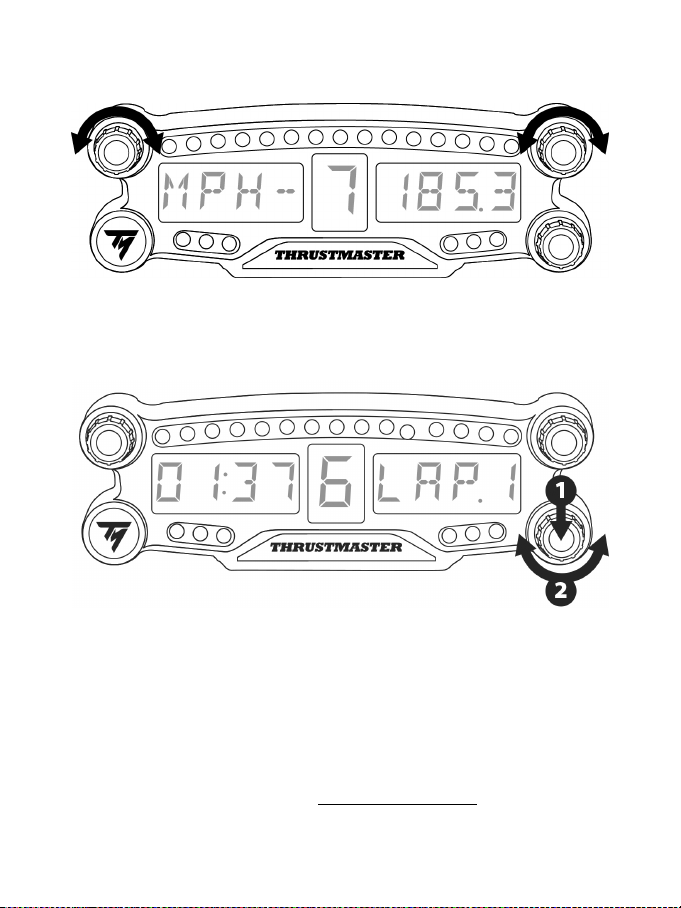
8/12
CÓMO USAR LOS SELECTORES GIRATORIOS Nº 1 Y Nº 2
En función del juego de PS4™, puedes girar los selectores nº 1 y nº 2 para cambiar los ajustes de
visualización y para alternar entre una configuración y otra.
CÓMO AJUSTAR EL BRILLO DEL BT LED DISPLAY
1) Pulsa y suelta el selector nº 3 para cambiar de ajustar el brillo de los 21 LED (5) a ajustar la intensidad
de la pantalla principal (6), y a la inversa.
2) Gira el selector hacia la izquierda para reducir la intensidad o hacia la derecha para aumentarla.
COLOCACIÓN DEL BT LED DISPLAY
Puedes instalar el BT LED DISPLAY a tu conveniencia en un radio de 10 metros alrededor del sistema
PS4™.
También puedes fijar el dispositivo a diversos objetos adecuados* o directamente a algunos volantes de
carreras (por ejemplo, el TM OPEN WHEEL*) usando los dos agujeros con rosca M3 situados en la parte
trasera del dispositivo (9).
* Se venden por separado
Para obtener más información sobre esto, visita http://support.thrustmaster.com: haz clic en Volantes de
carreras / BT LED DISPLAY, y luego en Manual del usuario o PF.
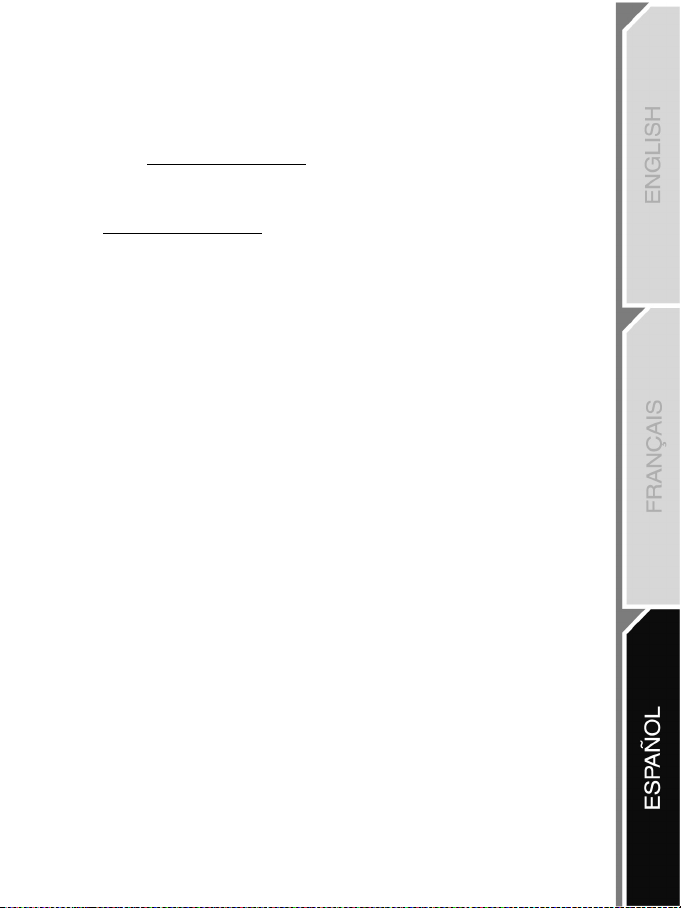
9/12
ACTUALIZACIÓN DEL FIRMWARE DEL BT LED DISPLAY
Los dos firmwares (general y de Bluetooth) incluidos en el BT LED DISPLAY se pueden actualizar con
versiones más recientes, que incluyen mejoras del producto.
Para mostrar las versiones del firmware del BT LED DISPLAY y actualizarlas de ser necesario: en un
PC, accede a http://support.thrustmaster.com, selecciona Volantes de carreras / BT LED DISPLAY, y
luego selecciona Firmware y sigue las instrucciones y el procedimiento de descarga e instalación.
AYUDA, PF Y CONSEJOS
Visita http://support.thrustmaster.com. Selecciona Volantes de carreras / BT LED DISPLAY, y luego
Manual del usuario o PF.

10/12
INFORMACIÓN DE GARANTÍA AL CONSUMIDOR
En todo el mundo, Guillemot Corporation S.A., cuyo domicilio legal se encuentra en Place du
Granier, B.P. 97143, 35571 Chantepie, Francia (en lo sucesivo “Guillemot”) garantiza al consumidor
que este producto de Thrustmaster estará libre de defectos de materiales y mano de obra, durante
un período de garantía que corresponde al límite de tiempo para interponer una acción legal
referida a la conformidad en relación con este producto. En los países de la Unión Europea, esto
corresponde a un período de dos (2) años a partir de la entrega del producto de Thrustmaster. En
otros países, el período de garantía corresponde al límite de tiempo para interponer una acción
legal referida a la conformidad en relación con este producto de Thrustmaster según las leyes
aplicables del país en el que el consumidor estuviese domiciliado en la fecha de compra del
producto de Thrustmaster (si no existiese una acción similar en el país correspondiente, entonces el
período de garantía será de un (1) año a partir de la fecha de compra original del producto de
Thrustmaster).
A pesar de lo anterior, las baterías recargables están cubiertas por un período de garantía de seis
(6) meses a partir de la fecha de compra original.
Si el producto resultase defectuoso durante el período de garantía, hay que ponerse en contacto
inmediatamente con el Soporte Técnico, que indicará el procedimiento a seguir. Si se confirma el
defecto, el producto debe devolverse a su lugar de compra (o a cualquier otra ubicación indicada
por el Soporte Técnico).
Dentro del contexto de esta garantía, el producto defectuoso del consumidor será sustituido o
restaurado su funcionamiento correcto. Si, durante el período de garantía, el producto de
Thrustmaster fuese sometido a dicho reacondicionamiento, cualquier período de cómo mínimo siete
(7) días durante el que el producto no se pueda usar se añadirá al período de garantía restante
(este período va desde la fecha de petición de intervención del consumidor o desde la fecha en la
que el producto se entrega para el reacondicionamiento, si la fecha en la que el producto se
entrega para el reacondicionamiento fuese posterior a la fecha de la petición de intervención). Si la
ley aplicable lo permite, toda la responsabilidad de Guillemot y sus filiales (incluso por daños
resultantes) se limita a la restauración del funcionamiento correcto o la sustitución del producto de
Thrustmaster. Si la ley aplicable lo permite, Guillemot renuncia a todas las garantías de
comerciabilidad o adecuación para un propósito determinado.
Esta garantía no se aplicará: (1) si el producto ha sido modificado, abierto, alterado o ha sufrido
daños como resultado de un uso inapropiado o abuso, negligencia, accidente, desgaste normal, o
cualquier otra causa no relacionada con un defecto de materiales o fabricación (incluyendo, pero no
de forma exclusiva, la combinación del producto de Thrustmaster con cualquier elemento no
adecuado, incluyendo en particular fuentes de alimentación, baterías recargables, cargadores o
cualquier otro elemento no suministrado por Guillemot para este producto); (2) si el producto se ha
empleado para otro uso distinto del doméstico, incluyendo fines profesionales o comerciales
(salones de juego, entrenamiento, competiciones, por ejemplo); (3) en caso de incumplimiento de
las instrucciones proporcionadas por el Soporte Técnico; (4) a software, es decir software sujeto a
una garantía específica; (5) a consumibles (elementos que se tienen que reemplazar a lo largo de
la vida del producto: por ejemplo, baterías desechables o almohadillas para auriculares de audio);
(6) a accesorios (por ejemplo, cables, cajas, bolsas, bolsos o muñequeras); (7) si el producto se ha
vendido en una subasta pública.
Esta garantía no es transferible.
Los derechos legales del consumidor en relación con las leyes aplicables a la venta de productos
de consumo de su país no se ven afectados por esta garantía.
11/12
Provisiones de garantía adicionales
Durante el período de garantía, Guillemot no proporcionará, en principio, ninguna pieza de
repuesto, ya que el Soporte Técnico es el único autorizado para abrir y/o reacondicionar los
productos de Thrustmaster (con la excepción de los procedimientos de reacondicionamiento que el
Soporte técnico puede solicitar que lleve a cabo el consumidor, mediante instrucciones por escrito –
por ejemplo, debido a la simplicidad y la falta de confidencialidad del proceso de
reacondicionamiento – y suministrando al consumidor las piezas de repuesto necesarias, si hiciese
falta).
Debido a sus ciclos de innovación y para proteger su know-how y secretos comerciales, Guillemot
no proporcionará, en principio, ninguna pieza de repuesto ni instrucciones de reacondicionamiento
para los productos de Thrustmaster cuyo período de garantía haya vencido.
En los Estados Unidos de América y en Canadá, esta garantía está limitada al mecanismo interno
del producto y al alojamiento externo. En ningún caso, Guillemot ni sus filiales serán responsables
ante terceros por daños resultantes o fortuitos resultado del incumplimiento de cualquier garantía
expresa o implícita. En algunos estados o provincias no se permite la limitación de la duración de
una garantía implícita ni la exclusión o limitación de responsabilidad por daños resultantes o
fortuitos, por lo que las limitaciones o exclusiones anteriores pueden no ser aplicables. Esta
garantía ofrece derechos legales específicos al consumidor, que también puede tener otros
derechos que pueden variar de un estado a otro o de una provincia a otra.
Responsabilidad
Si la ley aplicable lo permite, Guillemot Corporation S.A. (en lo sucesivo “Guillemot”) y sus filiales
renuncian a toda responsabilidad por los daños causados por uno o más de los siguientes motivos:
(1) el producto ha sido modificado, abierto o alterado; (2) incumplimiento de las instrucciones de
montaje; (3) uso inapropiado o abuso, negligencia, accidente (un impacto, por ejemplo); (4)
desgaste normal; (5) el producto se ha empleado para otro uso distinto del doméstico, incluyendo
fines profesionales o comerciales (salones de juego, entrenamiento, competiciones, por ejemplo).
Si la ley aplicable lo permite, Guillemot y sus filiales renuncian a toda responsabilidad por los daños
no relacionados con defectos de materiales o fabricación en relación con el producto (incluyendo,
pero no de forma exclusiva, los daños causados de forma directa o indirecta por cualquier software,
o por combinar el producto de Thrustmaster con cualquier elemento no adecuado, incluyendo en
particular fuentes de alimentación, baterías recargables, cargadores o cualquier otro elemento no
suministrado por Guillemot para este producto).
SOPORTE TÉCNICO
http://support.thrustmaster.com
12/12
DECLARACIÓN DE CONFORMIDAD
NOTICIA DE CONFORMIDAD EN USA: este dispositivo cumple con los límites para dispositivos de computación de Clase
B de acuerdo con la Parte 15 de las reglas FCC.
FCCID: NAM4169091
COPYRIGHT
© 2018 Guillemot Corporation S.A. Todos los derechos reservados. Thrustmaster
®
es una marca registrada de Guillemot
Corporation S.A.
Fabricado y distribuido bajo licencia de Sony Interactive Entertainment LLC. “2”, “PlayStation” y “khjl” son
marcas comerciales registradas de Sony Interactive Entertainment Inc. “ ” es una marca comercial de la misma
compañía. Todos los derechos reservados.
Todas las demás marcas registradas y nombres comerciales se reconocen por los presentes y son propiedad de sus
respectivos dueños. Ilustraciones no definitivas. El contenido, la concepción y las especificaciones son susceptibles de
cambiar sin previo aviso y varían según el país. Fabricado en China.
RECOMENDACIÓN DE PROTECCIÓN AMBIENTAL
Cumpla las leyes locales sobre reciclaje de equipos eléctricos y electrónicos.
Esta información debe conservarse. Los colores y motivos decorativos pueden variar.
Los adhesivos y los cierres de plástico se deben quitar del producto antes de utilizarlo.
www.thrustmaster.com
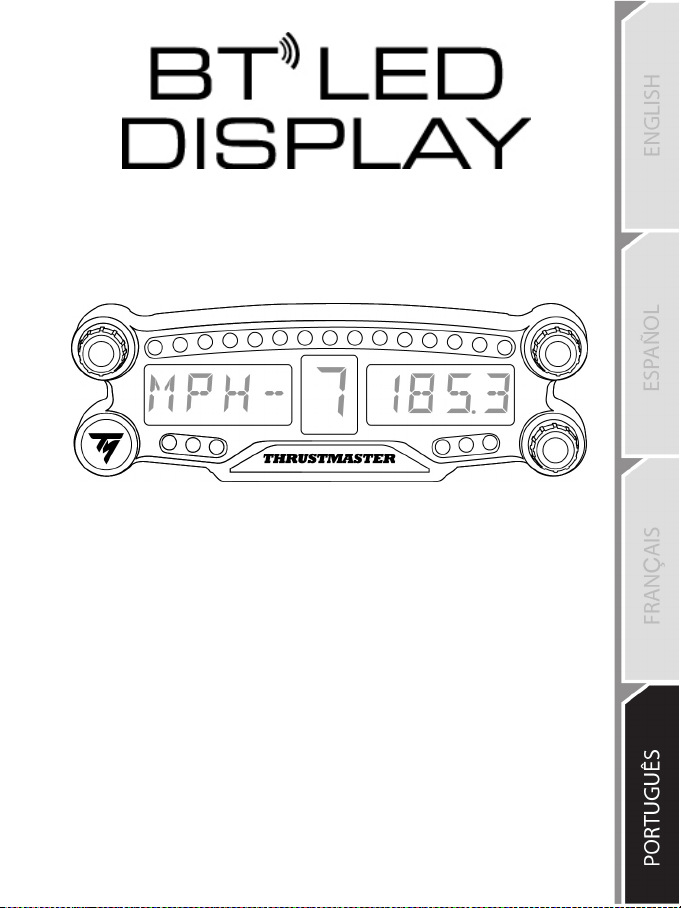
1/12
PlayStation
®4
Manual do usuário
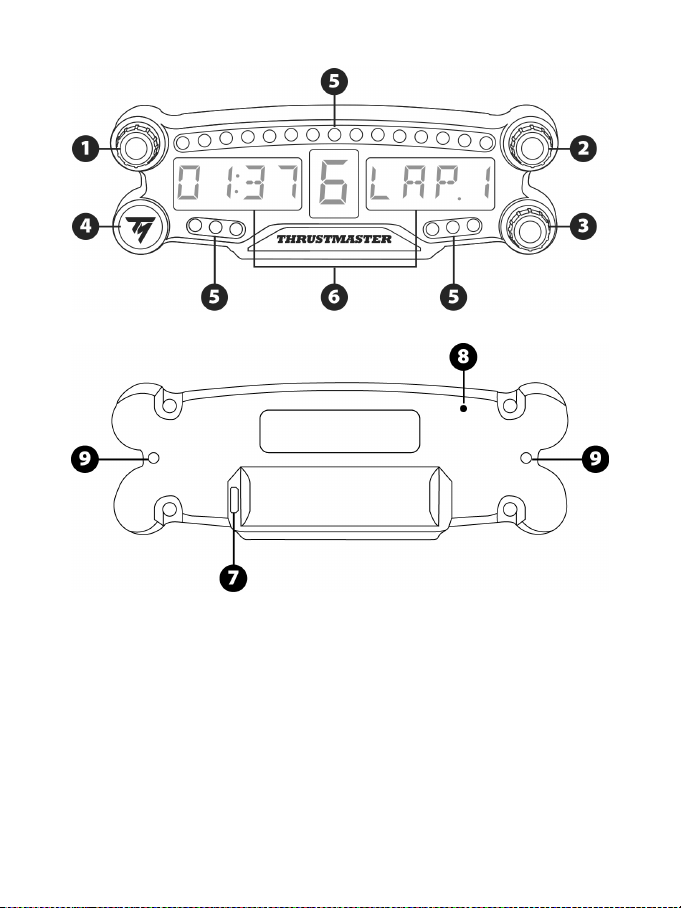
2/12
ESPECIFICAÇÕES TÉCNICAS
1 Sintonizador no. 1 com função de botão
2 Sintonizador no. 2 com função de botão
3 Sintonizador no. 3 com função de botão
(controle de ajuste de brilho)
4 Botão ligar/desligar
5 21 LEDs
6 Display principal
7 Conector de carregamento Micro USB
8 Indicador de carregamento
9 Dois orifícios com rosca M3 para fixar o
dispositivo
3/12
ATENÇÃO
Antes de utilizar este produto, leia atentamente este manual e guarde-o para consultas futuras.
Atenção – Choque elétrico
* Guarde o produto em um local seco e não exponha ao pó nem à luz do sol.
* Não torça nem puxe os conectores e os cabos.
* Não derrame líquidos sobre o produto ou nos respetivos conectores.
* Não provoque um curto-circuito no produto.
* Nunca desmonte o produto, não o jogue em fogo nem o exponha a temperaturas elevadas.
* Não abra o dispositivo: ele não contém peças reparáveis pelo usuário no interior. Todos os
consertos devem ser realizados pelo fabricante, pelo seu representante autorizado ou por um
técnico qualificado.
Atenção – Bateria interna
- Carregue totalmente o BT LED DISPLAY antes de usar.
- Não desmonte o dispositivo. Se o fizer, perderá a sua garantia.
- Proteja o seu dispositivo de choque e impactos.
- Este dispositivo não deve ser usado por menores de 14 anos sem a supervisão de um adulto.
A THRUSTMASTER® SE ISENTA DE QUALQUER RESPONSABILIDADE EM CASO DE FALHA
NO CUMPRIMENTO DESTAS INSTRUÇÕES.
ATENÇÃO: SE A BATERIA FOR SUBSTITUÍDA PELO TIPO DE BATERIA INCORRETO, UMA
EXPLOSÃO PODE ACONTECER.
SIGA AS INSTRUÇÕES PARA A ELIMINAÇÃO DE BATERIAS.
CARREGANDO A BATERIA DO BT LED DISPLAY
Usando um cabo micro USB (o cabo do controle do sistema PS4™, por exemplo), conecte o BT
LED DISPLAY em uma das portas USB do sistema PS4™.
O conector de carregamento (7) fica localizado na parte de trás do BT LED DISPLAY.
O indicador de carregamento (8) acende uma luz vermelha quando o dispositivo está carregando e
apaga quando está totalmente carregado.
COMPATIBILIDADE COM JOGOS DE PS4™
Uma lista de jogos de PS4™
compatíveis com o BT LED DISPLAY está disponível em
http://support.thrustmaster.com: Selecione Volantes / BT LED DISPLAY / Configurações de jogos.
Essa lista será atualizada constantemente com os novos jogos de PS4™
lançados e compatíveis
com o BT LED DISPLAY.
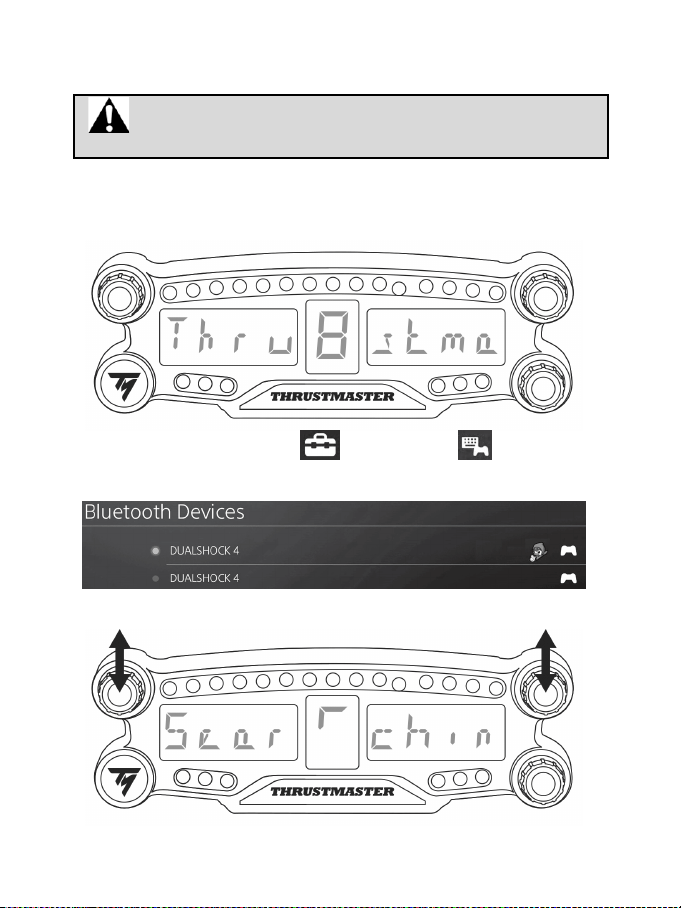
4/12
INSTALAÇÃO NO SISTEMA PS4™
Registre o BT LED DISPLAY no sistema PS4™
Essa operação só deve ser feita uma vez. Não é necessário sempre que o
sistema PS4™ for reiniciado.
Ao usar o BT LED DISPLAY pela primeira vez, você deve registrá-lo no seu sistema PS4™. Essa
operação deve ser executada apenas uma vez.
1. Ligue o BT LED DISPLAY pressionando o botão On/Off (4)
.
A mensagem
Thrustmaster BT Wheel Display será exibida no display principal (6).
2. No menu do sistema PS4™, selecione [ Configurações ] > [ Dispositivos ] >
[ Dispositivos Bluetooth ] para buscar automaticamente por dispositivos Bluetooth® próximos.
Dispositivos conectados e outros dispositivos Bluetooth aparecerão na lista.
3. Pressione brevemente e solte os sintonizadores no. 1 e 2 no BT LED DISPLAY ao mesmo tempo. A
mensagem
Searching known devices será exibida no display principal (6).
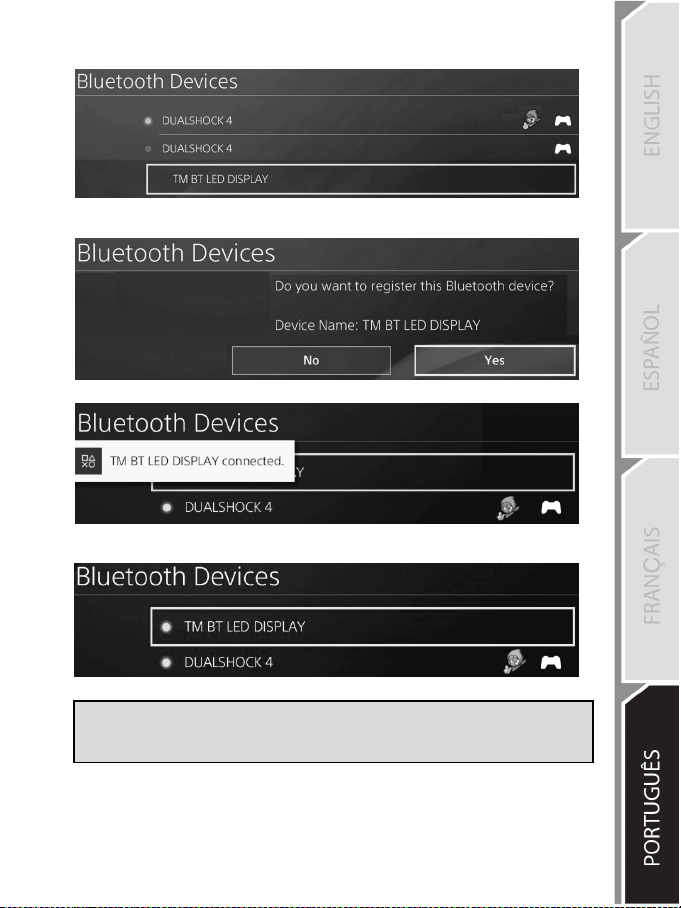
5/12
4. Depois de alguns segundos, o nome TM BT LED DISPLAY aparecerá na tela do sistema PS4™.
Usando o seu controle, selecione ele e pressione o botão s.
5. A mensagem Deseja registrar este dispositivo Bluetooth TM BT LED DISPLAY? aparecerá
na tela do sistema PS4™. Selecione SIM, então pressione o botão s para confirmar.
6. A mensagem TM BT LED DISPLAY conectado aparece rapidamente na tela do sistema PS4™.
Na tela do sistema PS4™, a luz indicadora localizada à esquerda do TM BT LED DISPLAY agora
acende com a cor verde, o que significa que o dispositivo está conectado ao sistema.
7. Você está pronto para jogar!
Se a operação falhar, desligue o seu sistema PS4™ e então desconecte e
reconecte o cabo de alimentação do sistema. Reinicie o seu sistema PS4™, então
repita os passos de registro 1 até 6.
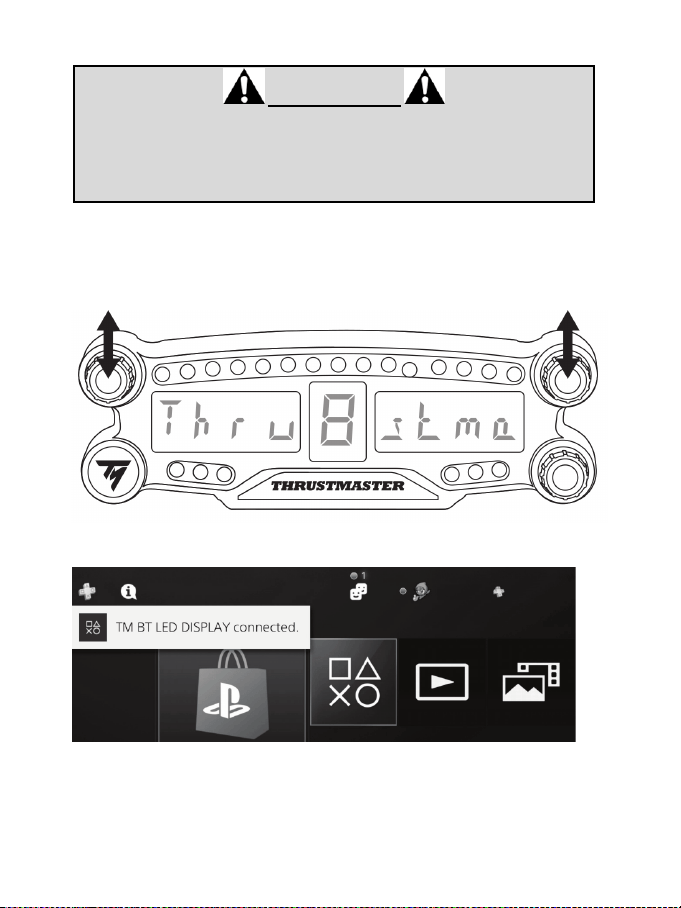
6/12
Conecte o BT LED DISPLAY ao sistema PS4™
MUITO IMPORTANTE
- Você deve executar essa operação sempre que o seu sistema PS4™ for
reiniciado.
- A conexão do BT LED DISPLAY ao sistema PS4™ só funcionará se o passo
anterior (Registro do BT LED DISPLAY no sistema PS4™) tenha sido
executado corretamente pelo menos uma vez.
1. Ligue o BT LED DISPLAY pressionando o botão On/Off (4).
A mensagem
Thrustmaster BT Wheel Display será exibida no display principal (6).
2. Pressione brevemente e solte os sintonizadores no. 1 e 2 no BT LED DISPLAY ao mesmo
tempo.
A mensagem Connected será exibida rapidamente no display principal (6).
A mensagem TM BT LED DISPLAY conectado aparece rapidamente na tela do sistema PS4™.
3. Você está pronto para jogar!
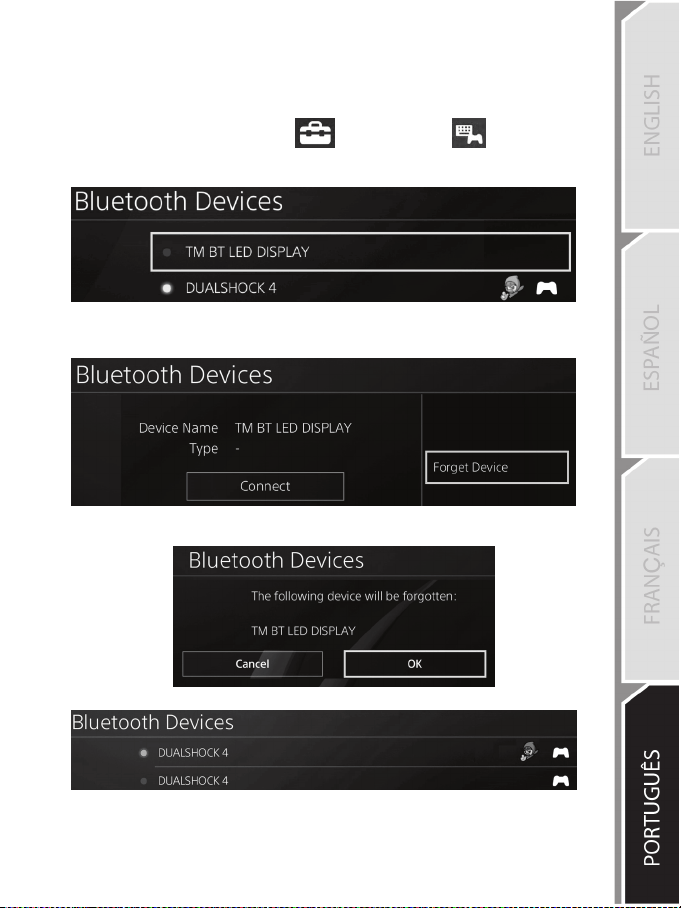
7/12
Remover o BT LED DISPLAY do sistema PS4™
(Esta operação só é necessária para resolver problemas ou ao comprar um novo BT LED DISPLAY.)
1. Desligue o BT LED DISPLAY pressionando o botão On/Off (4)
.
2. No menu do sistema PS4™, selecione
[ Configurações ] > [ Dispositivos ] > [
Dispositivos Bluetooth ].
Selecione TM BT LED DISPLAY, então pressione o botão s para confirmar.
3. A mensagem Nome do Dispositivo TM BT LED DISPLAY será exibida na tela. Pressione o botão
OPTIONS no seu controle, então selecione Esquecer Dispositivo. Pressione o botão s para
confirmar.
4. A mensagem O dispositivo a seguir será esquecido: TM BT LED DISPLAY será exibida na tela.
Selecione OK, então pressione o botão s para confirmar.
5. O TM BT LED DISPLAY agora está desconectado do sistema PS4™.
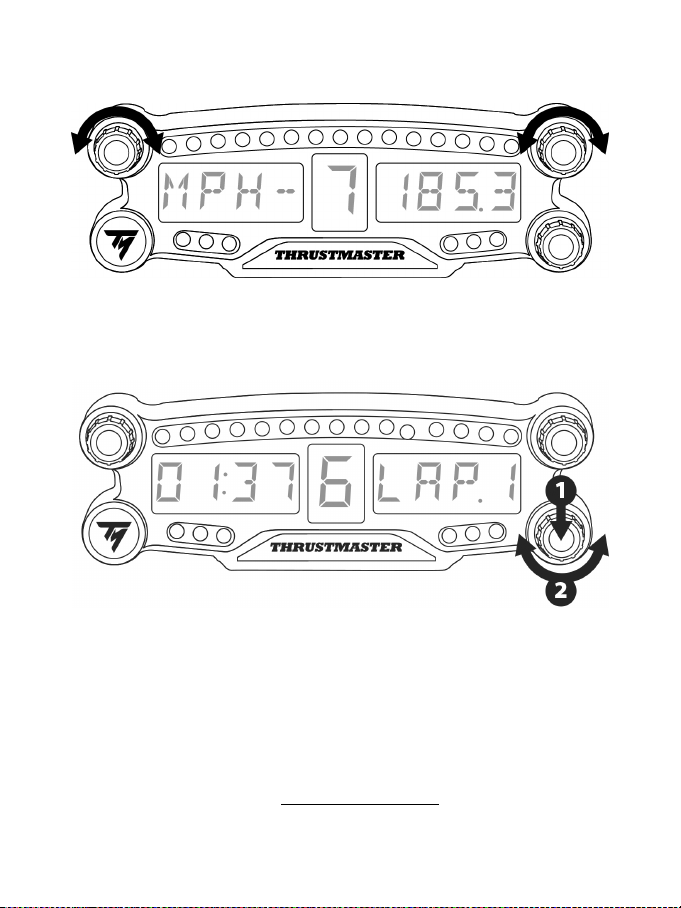
8/12
USANDO OS SINTONIZADORES NO.1 E NO.2
Dependendo do jogo de PS4™, você pode mexer nos sintonizadores 1 e 2 para alterar as configurações
de exibição e navegar entre as configurações.
AJUSTANDO O BRILHO DO BT LED DISPLAY
1) Pressione e solte o sintonizador no. 3 para mudar de ajustar o brilho dos 21 LEDs (5) para ajustar a
intensidade do display principal (6), e o inverso.
2) Sintonize à esquerda para reduzir a intensidade e à direita para aumentar.
AFIXANDO O BT LED DISPLAY
Você pode instalar o BT LED DISPLAY onde achar melhor em um raio de 10 metros/33 pés do sistema
PS4™.
Você também pode afixar o dispositivo em vários itens compatíveis* ou diretamente em alguns volantes
(por exemplo, o TM OPEN WHEEL*) usando os dois orifícios com rosca M3 localizados na parte de trás
do dispositivo (9).
* Vendidos separadamente
Para mais informações sobre isso, visite http://support.thrustmaster.com: clique Volantes / BT LED
DISPLAY, então Manual do Usuário ou FAQ.
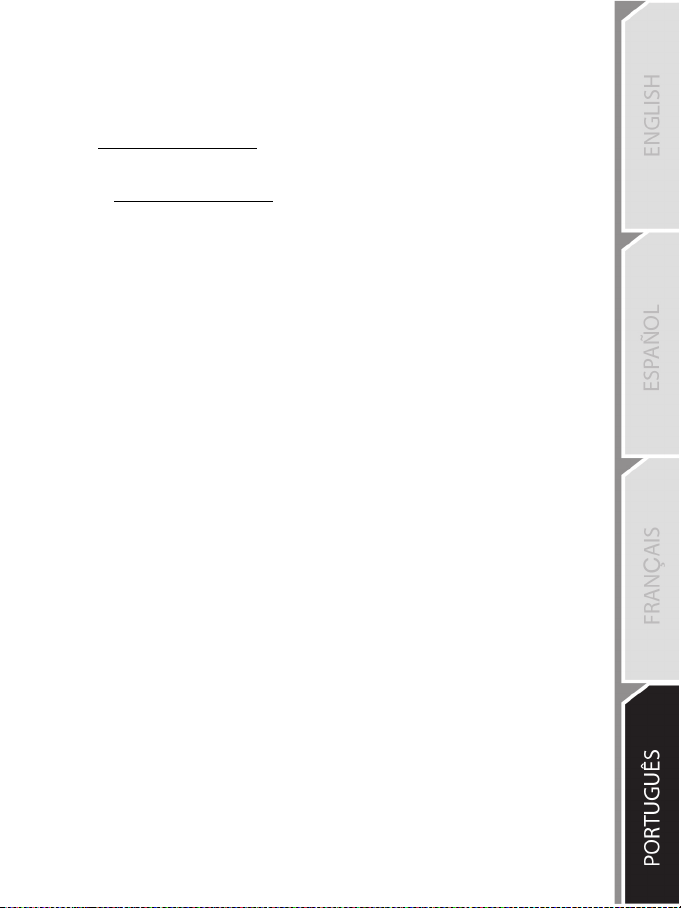
9/12
ATUALIZANDO O FIRMWARE DO BT LED DISPLAY
Os dois firmwares (geral e do Bluetooth) incluídos no BT LED DISPLAY podem ser atualizados por
versões mais recentes com melhorias.
Para exibir a versão de firmware do BT LED DISPLAY e atualizar ele, se necessário: em um PC, vá
para http://support.thrustmaster.com
AJUDA, PERGUNTAS FREQUENTES E DICAS
Acesse http://support.thrustmaster.com. Selecione Volantes / BT LED DISPLAY, então Manual do
Usuário ou FAQ.

10/12
INFORMAÇÕES SOBRE A GARANTIA PARA O CONSUMIDOR
A Guillemot Corporation S.A., com sede social situada em Place du Granier, B.P. 97143, 35571
Chantepie, França (a seguir designada como “Guillemot”) garante a nível mundial ao consumidor
que este produto Thrustmaster está livre de defeitos em termos de materiais e fabricação durante
um período de garantia que corresponde ao limite de tempo para intentar uma ação de
conformidade relativamente a este produto. Nos países da União Europeia, isto corresponde a um
período de dois (2) anos desde a entrega do produto Thrustmaster. Em outros países, o período de
garantia corresponde ao limite de tempo para intentar uma ação de conformidade relativamente ao
produto Thrustmaster de acordo com a legislação em vigor do país no qual o consumidor residia na
data de compra do produto Thrustmaster (se tal ação não existir no país correspondente, então o
período de garantia será de um (1) ano a partir da data de compra original do produto
Thrustmaster).
Não obstante o supracitado, as baterias recarregáveis são cobertas por um período de garantia de
seis (6) meses a partir da data de compra original.
No caso de o produto apresentar algum defeito durante o período da garantia, contate
imediatamente o Suporte Técnico, que lhe indicará o procedimento a tomar. Se o defeito se
confirmar, o produto deverá ser devolvido ao respetivo local de compra (ou qualquer outro local
indicado pelo Suporte Técnico).
No âmbito da presente garantia, e por opção do Suporte Técnico, o produto defeituoso do
consumidor será substituído ou reparado. Se, durante o período da garantia, o produto
Thrustmaster for submetido à dita reparação, qualquer período mínimo de (7) dias durante o qual o
produto estiver fora de serviço será adicionado ao período da garantia restante (este período
decorre desde a data do pedido intervenção pelo consumidor ou desde a data em que o produto
em questão é disponibilizado para reparação, se a data em que o produto é disponibilizado para
reparação for posterior à data do pedido de intervenção). Se for permitido pela legislação em vigor,
a responsabilidade total da Guillemot e das respectivas subsidiárias (incluindo para danos indiretos)
está limitada à reparação ou à substituição do produto Thrustmaster. Se for permitido pela
legislação em vigor, a Guillemot rejeita todas as garantias de comercialização ou adequação a um
fim específico.
A presente garantia não se aplicará: (1) se o produto tiver sido modificado, aberto, alterado ou
danificado como resultado de utilização inadequada ou abusiva, negligência, acidente, desgaste
normal ou qualquer outra causa relacionada a um defeito de material ou fabricação (incluindo, mas
sem limitação, combinar o produto Thrustmaster com qualquer elemento inadequado, incluindo, em
particular, fontes de alimentação, baterias recarregáveis, carregadores ou quaisquer outros
elementos não fornecidos pela Guillemot para este produto); (2) se o produto tiver sido usado para
qualquer outro propósito além do uso doméstico, inclusive para fins profissionais ou comerciais
(salas de jogos, treinamento ou competições, por exemplo); (3) na eventualidade de não
cumprimento das instruções fornecidas pelo Suporte Técnico; (4) a software, estando o mesmo
sujeito a uma garantia específica; (5) a consumíveis (elementos para substituir ao longo da vida útil
do produto, como baterias descartáveis e almofadas de fones de ouvido, por exemplo); (6) a
acessórios (cabos, estojos, bolsas, sacos e correias de pulso, por exemplo); (7) se o produto foi
vendido num leilão público.
A presente garantia não é transmissível.
Os direitos legais do consumidor no que concerne à legislação aplicável à venda de bens de
consumo no seu país não são afetados pela presente garantia.
11/12
Disposições de garantia adicionais
Durante o período da garantia, a Guillemot não fornecerá, em princípio, quaisquer peças de
substituição, uma vez que o Suporte Técnico é a única parte autorizada a abrir e/ou reparar
qualquer produto Thrustmaster (exceto por quaisquer procedimentos de reparação que o Suporte
Técnico possa pedir ao consumidor para realizar, através de instruções por escrito – por exemplo,
devido à simplicidade e à falta de confidencialidade do processo de reparação – e fornecendo ao
consumidor a(s) peça(s) de substituição necessária(s), quando aplicável).
Tendo em conta os seus ciclos de inovação, e a fim de proteger o seu know-how e segredos
comerciais, a Guillemot não fornecerá, em princípio, qualquer notificação de reparação ou peças de
substituição para produtos Thrustmaster cujo período da garantia tenha expirado.
Nos Estados Unidos da América e no Canadá, a presente garantia está limitada ao mecanismo interno e
à caixa do produto. Em nenhuma circunstância serão a Guillemot ou as respectivas subsidiárias
consideradas responsáveis perante terceiros por quaisquer danos indiretos ou acidentais resultantes da
violação de quaisquer garantias expressas ou implícitas. Alguns estados/províncias não permitem a
limitação da duração de uma garantia implícita ou a exclusão ou limitação de responsabilidade por danos
indiretos ou acidentais, portanto as limitações ou exclusões supracitadas podem não se aplicar a você. A
presente garantia concede-lhe direitos legais específicos, e você também pode ter outros direitos, que
variam de acordo com o estado ou a província.
Responsabilidade
Se for permitido pela legislação em vigor, a Guillemot Corporation S.A. (a seguir designada como
“Guillemot”) e as respectivas subsidiárias rejeitam qualquer responsabilidade por quaisquer danos
resultantes de uma ou mais das seguintes causas: (1) o produto foi modificado, aberto ou alterado;
(2) não cumprimento das instruções de montagem; (3) utilização imprópria ou abusiva, negligência
ou acidente (um impacto, por exemplo); (4) desgaste normal; (5) utilização do produto para
qualquer outro propósito além do uso doméstico, inclusive para fins profissionais ou comerciais
(salas de jogos, treinamento ou competições, por exemplo). Se for permitido ao abrigo da
legislação aplicável, a Guillemot e as respectivas subsidiárias rejeitam qualquer responsabilidade
por danos relacionados a um defeito de material ou fabricação relativamente ao produto (incluindo,
mas sem limitação, quaisquer danos causados direta ou indiretamente por qualquer software ou por
combinar o produto Thrustmaster com qualquer elemento inadequado, incluindo, em particular,
fontes de alimentação, baterias recarregáveis, carregadores ou quaisquer outros elementos não
fornecidos pela Guillemot para este produto).
SUPORTE TÉCNICO
http://support.thrustmaster.com

12/12
DECLARAÇÃO DE CONFORMIDADE
Aviso de Cumprimento dos EUA: Este equipamento foi testado e considerado em conformidade com os limites para um
dispositivo digital Classe B, conforme a Parte 15 das regras da FCC.
DIREITOS AUTORAIS
© 2018 Guillemot Corporation S.A. Todos os direitos reservados. Thrustmaster
®
é uma marca registada da Guillemot
Corporation S.A.
Fabricado e distribuído sob licença da Sony Interactive Entertainement America LLC.
Playstation, o logotipo da família PS, PS3, PS4 e "khjl" são marcas registradas da Sony Interactive Entertainment
Inc. Todos os direitos reservados.
Todas as outras marcas comerciais e nomes de marcas são por este meio reconhecidas e pertencem aos respectivos
proprietários. As ilustrações não são vinculativas. Os conteúdos, desenhos e especificações estão sujeitos a alteração sem
aviso prévio e podem variar de país para país. Fabricado na China.
RECOMENDAÇÕES DE PROTEÇÃO AMBIENTAL
Respeite a legislação local sobre a reciclagem de equipamento elétrico e eletrônico.
Guarde estas informações. As cores e as decorações podem variar.
Os prendedores de plástico e os adesivos devem ser removidos do produto antes da utilização.
www.thrustmaster.com
1/12
PlayStation®4 用
ユーザーズマニュアル
警告:
PlayStation®3 または PlayStation®4 のシステムソフトウエアによっては、
全ての機能がお使いいただけない場合があります。
その場合は、最新のシステムソフトウエアにバージョンアップしてからご利用下さい。
システムソフトウエアのバージョン確認およびアップデートに関しましてはお使いのゲーム機
本体の取扱説明書を御覧ください。
本製品は PlayStation®2、PlayStation®および PS one®にはご使用になれません。
本製品はワイヤレスコントローラーではありません。
本製品は PlayStation®2、PlayStation®、PS one®では、ご使用になれません。
また、PlayStation®2 規格のソフトウェアでの動作につきましては保証いたしかねます。
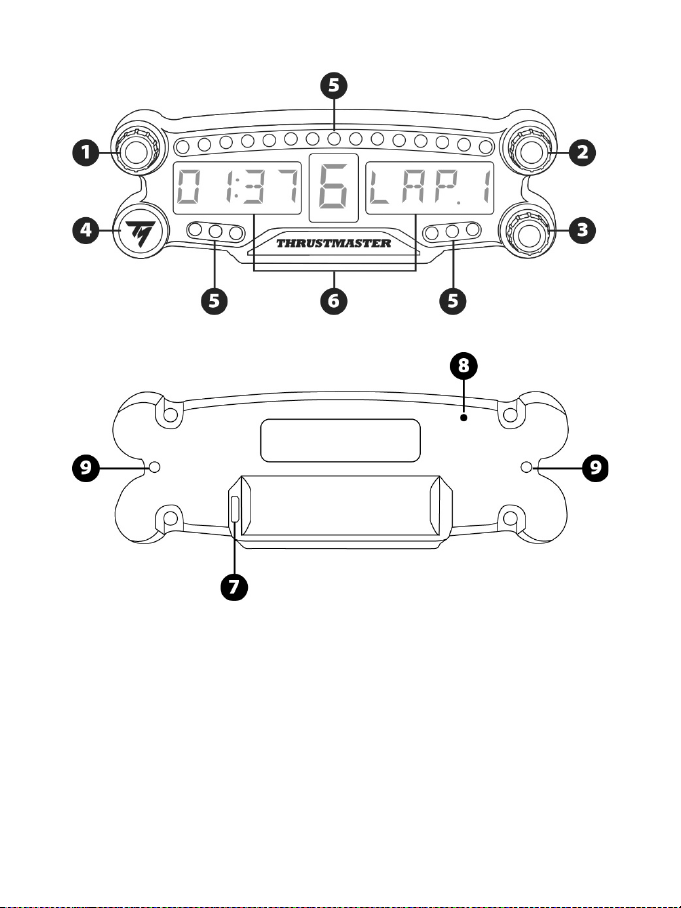
2/12
技術仕様
1
プッシュボタン機能付きロータリーセレク
タ No.1
2
プッシュボタン機能付きロータリーセレク
タ No.2
3
プッシュボタン機能付きロータリーセレク
タ No.3 (輝度調整)
4
電源オン/オフボタン
5
LED 21
個
6
メインディスプレイ
7
Micro USB 充電コネクター
8
充電インジケーター
9
デバイス取り付け用 M3 ねじ穴 2 個

3/12
保証規定
※ 本製品を使用される前に必ずお読みください。
この度は、本製品をお買い上げいただき誠にありがとうございます。以下の保証規定をお読みいた
だき内容を同意の上、本製品をご使用ください。
初期不良期間はお買い上げ日から1週間とさせていただいております。
保証期間はお買い上げ日から 1 年間です。
注意:
個人売買(インターネット等)で購入された際の購入日は、保証開始日として起算できません。
社会的信用のある販売店での購入時のみ、購入日を保証開始日としますので、個人売買の場合
は、商品の発売日から保証開始日として起算させて頂きます。
製品が取扱説明書記載の通常の使用方法により正常に動作しなくなった場合は、弊社の判断で
無償にて交換/修理いたします。完売等の場合は同等品と無償で交換いたします。
交換の場合、お客様からお送りいただいた製品等は返却いたしかねます。また、修理の際に取り
外した部品等も返却いたしかねます。
保証期間内でも、次の場合は保証が受けられません。
1. 弊社製品と判断出来ない場合。
2. ハードウェア自身の消耗に起因する故障または損傷(本製品は性質上、物理的な機構の
耐久性能に依存する製品寿命がございます)。
3. 火災、地震、水害、落雷、ガス害、塩害、その他の天災地変、公害や異常電圧による故障
または損傷。
4. お買い上げ後の輸送、移動時の落下などお取り扱いが不適当なため生じた故障・損傷。
5. ご使用時の不備あるいは接続している他の機器によって生じた故障または損傷。
6. 取扱説明書の記載内容に反するお取り扱いによって生じた故障または損傷。
7. 弊社以外で改造、調整、部品交換などをされた場合。
8. 本製品の故障に起因するデータ損失などの付随する損害に関しては一切保証できません。
9. ご使用環境との相性問題に関しての返品、返金等。
10. ゲームソフトとの相性問題に関しての返品、返金等。
11. 一般家庭以外(例えば業務用)でのご使用による故障、損傷または不具合。
12. その他、弊社が、交換を認め難い不適切な行為があると判断した場合。
13. 購入日が確認できるレシートがない場合。

4/12
カスタマーサポート
本製品に異常を感じられた場合は、すぐに使用を中止し、カスタマーサポートへご相談ください。
■保証を受ける際に用意するもの
購入店と購入した日付が分かる書類(購入時のレシート、保証書シール、保証書レシート、通販の
代引伝票など)が必要となります。
それらは決して捨てたりせずに大切に保管してください。
ご購入日付を証明する書類をご呈示いただけない場合、保証期間内であっても有償での修理対応
となりますので、あらかじめご了承下さい。
又、保証を受ける権利はご購入者以外(保証の譲渡)が所有する事はできません。
■ご送付についてのご案内
本製品に異常が発生した場合、カスタマーサポートにご相談頂いた後に、本製品をカスタマーサポ
ートまでご送付いただく場合がございます。現象、環境等の詳細をお書き添え頂き、配送業者様の
送り状(伝票)に“不良検証品”と明記の上、お買い上げ時のレシート等と共に本製品をお送りくだ
さい。
発送される際は、紛失等のトラブルを防ぐため、必ず受領確認の取れる宅配便でご送付ください。
封書、郵便小包等の郵送は固くお断り申し上げます。
※ なお、輸送中の事故については、弊社にて責任を負いかねます。あらかじめご了承ください。
■交換/修理依頼時のご注意
以下の点をご了承の上、交換/修理をご依頼頂けますようお願いいたします。
1. 交換/修理のご依頼について:交換/修理のご依頼は日本国内にお住まいの方とさせて頂き
ます。
2. 代替機の貸出について:交換/修理に伴う代替機の貸出等は行っておりません。
3. 製品の交換について:修理が困難な場合には、修理せずに同等品と交換させて頂く事がござい
ます。この場合、お客様にて貼られたシールなどはお返しできません。
4. お客様が設定されたデータについて:弊社にて修理作業を行う際にお客様が設定されたデータ
を消去する場合があります。この場合は、工場出荷初期状態でお返しすることとなります。(製
品ごと交換する場合も同様です)
■送料について
1. 初期不良期間内(お買い上げ日から1週間) :初期不良期間の送料は往復共に弊社が負担さ
せていただきます。
2. 初期不良期間終了以降~保証期間終了まで :弊社にご送付頂く際の送料はお客様にてご負
担願います。
3. 製品を返送する際の送料は弊社にて負担させて頂きます。
5/12
警告
本製品を使用する前にこのマニュアルをよくお読みになり、いつでも参照できるよう手近
な所に保管してください。
警告 – 感電
* 本製品は湿気・ホコリの多い場所や、直射日光のあたる場所で保管しないでください。
* コネクターやケーブルを、ねじったり引っ張ったりしないでください。
* 本製品やコネクターをぬらさないでください。
* 本製品をショートさせないでください。
* 分解や改造は絶対にしないでください。本製品を火の中に投棄したり、高温にさらした
りしないでください。
* デバイスを分解しないでください: 内部にはユーザーが保守可能な部品はありません。
修理はメーカー、指定の修理業者、あるいは資格を有する技術者までご依頼ください。
警告 - 内蔵バッテリー
- BT LED DISPLAY は使用する前に完全に充電してください。
- 本製品を分解しないでください。分解すると保証が無効となります。
- デバイスに強い衝撃や振動を与えないでください。
- 14 歳未満のお子様は、お客様の監督なしでこのデバイスを使用できません。
THRUSTMASTER® は、これらの指示に従わないことによって生じたいかなる損害につ
いては一切責任を追いません。
警告:誤った種類のバッテリーを使用すると爆発の恐れがあります。
バッテリーの破棄については、指示に正しく従ってください。
BT LED DISPLAY のバッテリーを充電する
Micro USB ケーブル (PS4™ システム付属の USB ケーブルなど) を使って、BT LED
DISPLAY を PS4™ システムのいずれかの給電対応 USB ポートに接続します。
充電コネクター
(7)
は、BT LED DISPLAY の背面に配置されています。
充電中は充電インジケーター
(8)
が赤く点灯し、充電が完了するとオフになります。
PS4™ ゲームとの互換性
BT LED DISPLAY と互換性のある PS4™ ゲームの一覧は
http://support.thrustmaster.com にてご確認いただけます: 「レーシングコントローラー」
/ 「BT LED DISPLAY」 / 「ゲーム設定」を選択します。
この一覧は、BT LED DISPLAY と互換性のある PS4™ ゲームが発売されるたびに随時
更新されます。
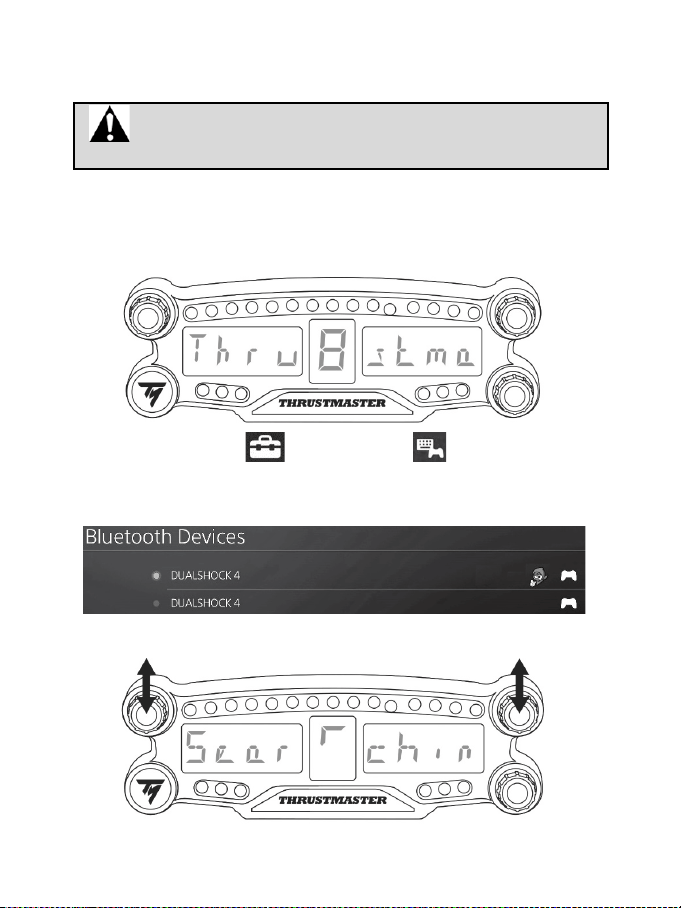
6/12
PS4™ システムへの設置
BT LED DISPLAY を PS4™ システムに登録する
この操作は 1 回だけ実行してください。PS4™ を再起動するたびに必
要になるわけではありません。
BT LED DISPLAY の初回使用時には、お使いの PS4 システムに必ず登録する必要があ
ります。登録は初回のみ必要となります。
1.オン/オフボタン
(4)
を押して BT LED DISPLAY の電源をオンにします。
「Thrustmaster BT Wheel Display」というメッセージがメインディスプレイ
(6)
にスクロール
表示されます。
2.PS4™ システムのメニューで [ Settings ] (設定) > [ Devices ] (周辺機器) >
[ Bluetooth Devices ] (Bluetooth 機器) を選択すると、近くにある
Bluetooth®
機器を自動
的に検索できます。ペアリングされたデバイスと、その他の Bluetooth デバイスがリストに
表示されます。
3.BT LED DISPLAY のセレクタ No.1 と No.2 を短く同時押ししてから離します。「Searching
known devices」というメッセージがメインディスプレイ
(6)
にスクロール表示されます。
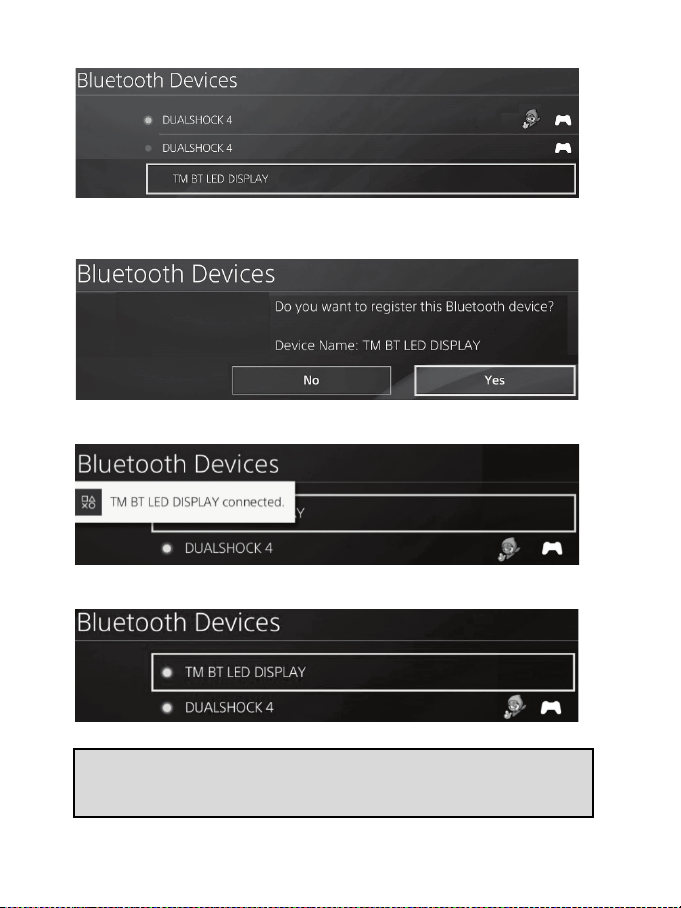
7/12
4.しばらくすると、「TM BT LED DISPLAY connected」という名前が PS4™ システム画面
に表示されます。ゲームパッドを使って選択し、s
ボタンを押します。
5.「
Do you want to register this Bluetooth device TM BT LED DISPLAY? 」(この
Bluetooth 機器
TM BT LED DISPLAY を登録しますか?) というメッセージが PS4™ シ
ステム画面に表示されます。
YES を選択し、s ボタンを押して確定します。
6.「
TM BT LED DISPLAY connected」(TM BT LED DISPLAY 接続済み)というメッセージ
が PS4™ システム画面に短く表示されます。
PS4™ システム画面で、TM BT LED DISPLAY の左側に表示されているインジケーター
が緑に点灯します。これは、デバイスが本体に正しく接続されたことを意味します。
7.これでプレイの準備ができました!
操作が失敗した場合は PS4™ の電源を切ってから取り外し、電源ケーブ
ルを接続し直してください。PS4™ システムを再起動した後、ステップ 1~6
までを繰り返します。
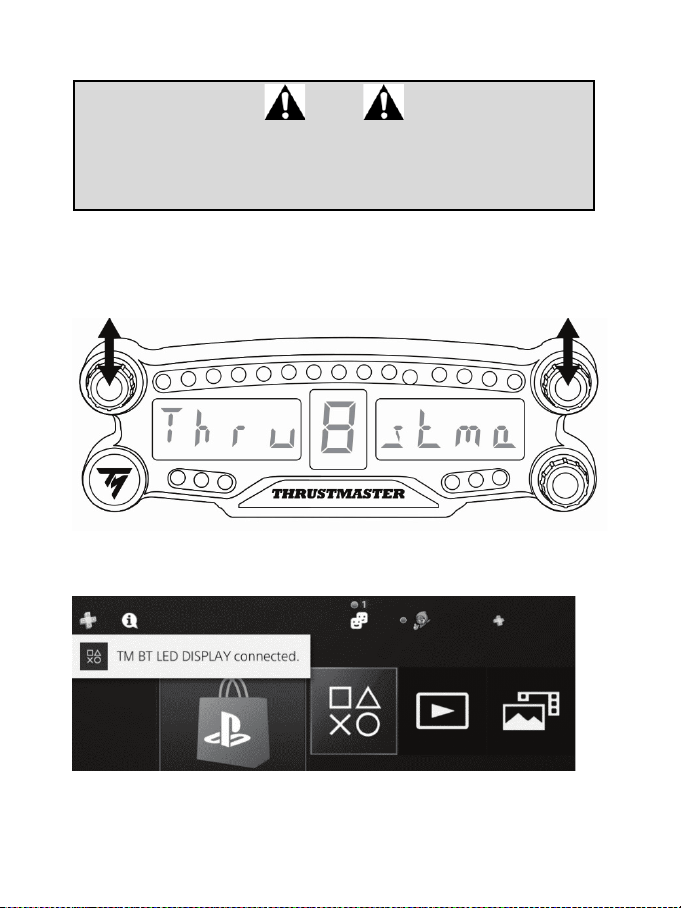
8/12
BT LED DISPLAY を PS4™ システムに接続します
超重要
- PS4™ を再起動するたびに、この操作を必ず行ってください。
- PS4™ システムへの BT LED DISPLAY の接続は、直前のステップ (=
PS4™ システムに BT LED DISPLAY を登録) を 1 回正しく完了していない
と確立されません。
1.オン/オフボタン
(4)
を押して BT LED DISPLAY の電源をオンにします。
「Thrustmaster BT Wheel Display」というメッセージがメインディスプレイ
(6)
にスクロー
ル表示されます。
2.BT LED DISPLAY のセレクタ No.1 と No.2 を短く同時押ししてから離します。
「
Connected」というメッセージがメインディスプレイ
(6)
に短く表示されます。
「
TM BT LED DISPLAY connected」というメッセージが PS4™ システム画面に短く表示さ
れます。
3.これでプレイの準備ができました!
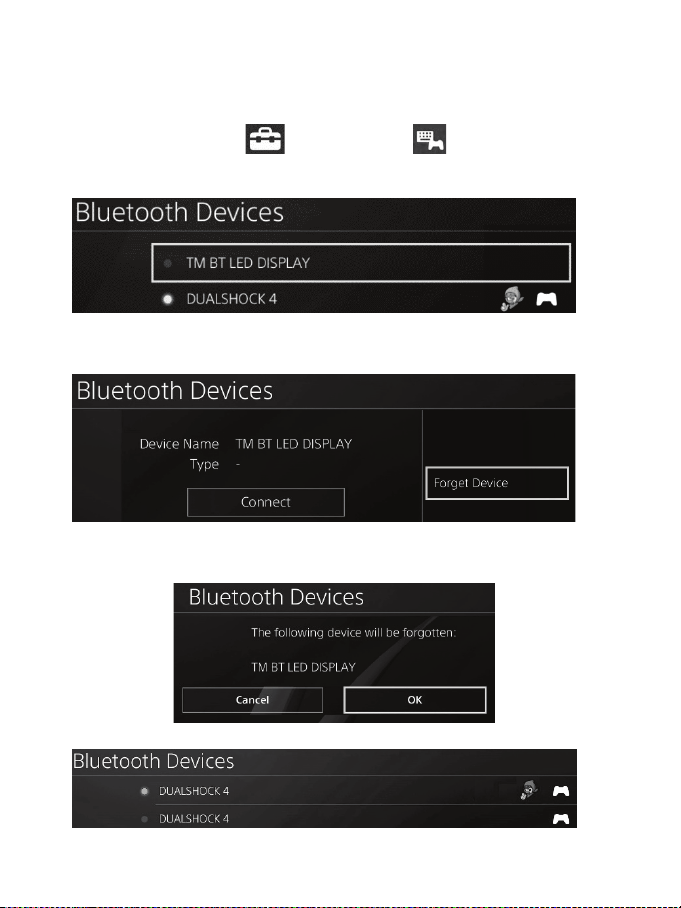
9/12
BT LED DISPLAY を PS4™ システムから登録解除する
(この操作はトラブルシューティング時、および BT LED DISPLAY の新規購入時にのみ必要
です。)
1.オン/オフボタン
(4)
を押して BT LED DISPLAY の電源をオフにします。
2.PS4™ システムのメニューで
[ Settings ] (設定) > [ Devices ] (周辺機器) >
[ Bluetooth Devices ] (Bluetooth 機器)を選択します。
TM BT LED DISPLAY を選択し、s ボタンを押して確定します。
3.画面に
Device Name TM BT LED DISPLAY (機器名 TM BT LED DISPLAY) と表示され
ます。コントローラーの
OPTIONS ボタンを押して「Forget Device」(デバイスを削除) を
選択します。s
ボタンを押して確定します。
4.「
The following device will be forgotten:TM BT LED DISPLAY」(次のデバイスが削除され
ます: TM BT LED DISPLAY) というメッセージが画面に表示されます。
OK を選択し、s ボタンを押して確定します。
5.これで TM BT LED DISPLAY が PS4™ から登録解除されました。
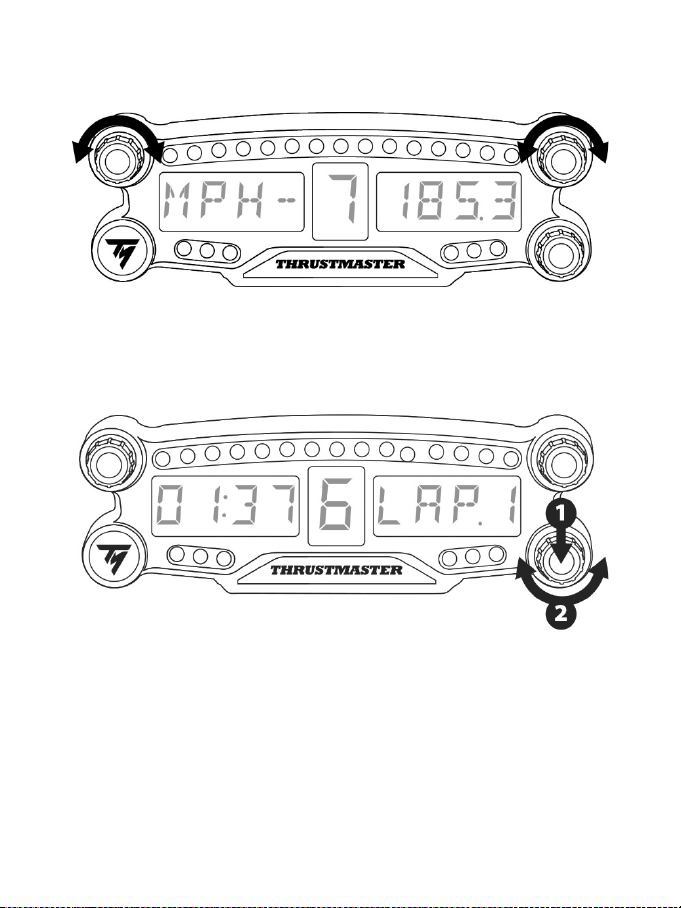
10/12
ロータリーセレクタ NO.1 と NO.2 を使う
PS4™ のゲームによって、セレクタ No.1 と No.1 を回してディスプレイ設定を変更したり、各種
設定を切り替えたりできます。
BT LED DISPLAY の輝度を調整する
1) セレクタ No.3 を押してから離して、LED 21 個
(5)
の輝度調整と、メインディスプレイ
(6)
の
明るさ調整を切り替えます。
2) 強さを下げるにはセレクタを左に、上げるには右に回してください。
BT LED DISPLAY を取り付ける
BT LED DISPLAY は、PS4™ 本体の半径 10m 以内の好きな場所に設置できます。
また、この製品を互換性のある各種デバイス* (たとえば TM OPEN WHEEL* など) もしくは
一部のステアリングコントローラーに、デバイス背面の M3 ねじ穴 2 個
(9)
を使って直接取り
付けることも可能です。
* 別売品

11/12
詳細は http://support.thrustmaster.com にアクセス、「レーシングコントローラー」 / 「BT
LED DISPLAY」を選択し、次に「ユーザーズマニュアル」または「FAQ」を選択してください。
BT LED DISPLAY のファームウェアをアップデートする
BT LED DISPLAY の両ファームウェア (本体ファームウェアおよび Bluetooth ファームウェア
) はともに最新バージョンに随時アップデートして製品の性能を向上させることが可能です。
BT LED DISPLAY のファームウェアバージョンを表示し、必要に応じてアップデートするに
は: PC で http://support.thrustmaster.com にアクセスし、「ステアリングコントローラー」 -
「BT LED DISPLAY」をクリックし、「ファームウェア」を選択してファームウェアのダウンロー
ドおよびセットアップ手順にしたがってください。
ヘルプ、FAQ およびヒント
http://support.thrustmaster.com にアクセスします。「レーシングコントローラー」 / 「BT
LED DISPLAY」を選択し、次に「ユーザーズマニュアル」または「FAQ」を選択します。
12/12
著作権
© 2017 Guillemot Corporation S.A. All rights reserved. Thrustmaster® は、Guillemot
Corporation S.A. の登録商標です。
“2” 、 “PlayStation” 、 “Ø” および “KHJL” は Sony Interactive
Entertainment Inc. の商標または登録商標です。All rights reserved.
その他、本書に記載の登録商標およびブランド名は、それぞれの所有権者に帰属しま
す。本書に含まれるイラストには法的拘束力はありません。 本書に含まれる内容、設計
および仕様は、事前の通告なしに変更される場合があり、また、各国で異なる場合があ
ります。Made in China.
環境保護推奨
お住まいの国・地域で適用される、電気電子機器のリサイクル法を遵守してください。
この情報は大切に保管してください。色や形状は実際の製品と異なる場合があります。
本製品をご使用になる前に、プラスチック留め具や粘着テープなどはすべて取り除いて
ください。
FCCID:NAM4169091
www.thrustmaster.com
1/12
适用于 PlayStation®4
用户手册
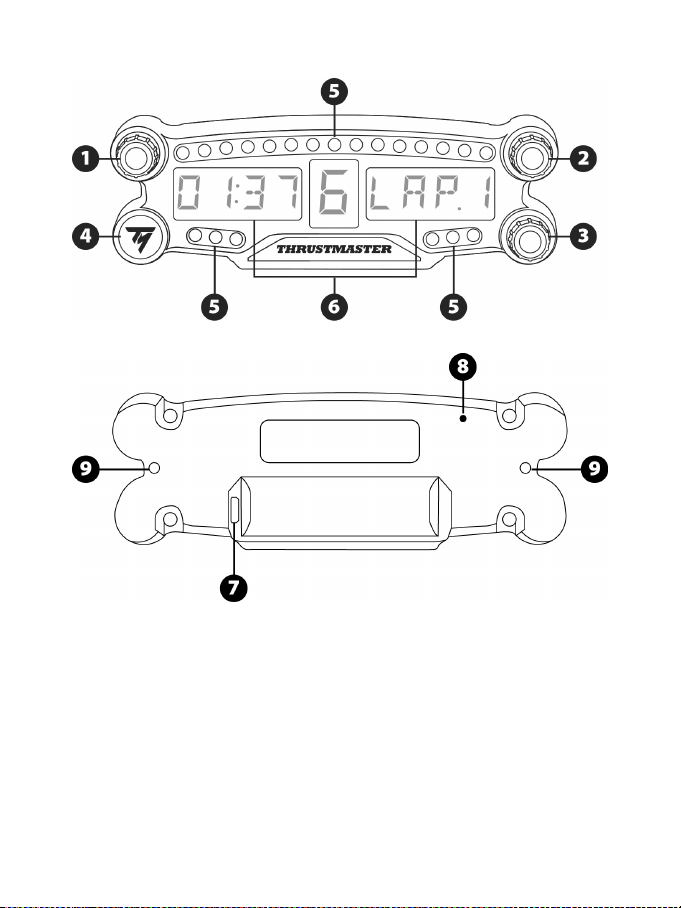
2/12
技术规格
1 带按钮功能的 1 号旋钮式选择器
2 带按钮功能的 2 号旋钮式选择器
3 带按钮功能的 3 号旋钮式选择器(亮度
调节控制)
4 ON/OFF(开/关)按钮
5 21
个
LED 指示灯
6 主显示屏
7 Micro USB 充电接头
8 充电指示灯
9 两个 M3 螺孔,用于连接设备
3/12
警告
在使用此产品之前,请仔细阅读并保管好本手册以便日后参考之用。
警告 – 触电
* 请将本产品置于干燥的位置,切勿将其暴露在灰尘或阳光中。
* 切勿扭曲或拉扯连接器和电缆。
* 切勿让任何液体溅到本产品或其连接器上。
* 切勿造成本产品短路。
* 切勿拆解本产品;切勿将其投入火中,亦勿将其暴露在高温环境中。
* 切勿拆开方向盘:内部没有任何可由用户维修的零部件。任何维修工作均须由制
造商、其授权代表或持证技工执行。
警告 – 内置电池
- 在使用前将 BT LED DISPLAY 充满电
- 切勿拆解本设备;这会导致保修失效。
- 妥善保护您的设备,防止振动和撞击。
- 未满 14 岁的儿童在没有成人监护的情况下不得使用本设备。
若未遵守以上说明,THRUSTMASTER®(图马思特)概不承担任何责任。
警告:如果更换的电池型号错误,可能会引起爆炸。
请按照电池弃置处理的说明处理废旧电池。
给 BT LED DISPLAY 的电池充电
使用一根 micro USB 电缆(如 PS4™ 系统附带的 USB 电缆),将 BT LED DISPLAY 连接
至一个由 PS4™ 系统供电的 USB 端口。
充电接头 (7) 位于 BT LED DISPLAY 的背部。
当设备正在充电时,充电指示灯 (8) 亮起红光;充满电后,指示灯将关闭。
兼容的 PS4™ 游戏
有关 BT LED DISPLAY 兼容的 PS4™ 游戏列表,请访问 http://support.thrustmaster.com:
选择 Racing wheels(方向盘)/ BT LED DISPLAY / Games settings(游戏设置)。
随着新款兼容 BT LED DISPLAY 的 PS4™ 游戏的发布,我们将会定期扩充此列表。
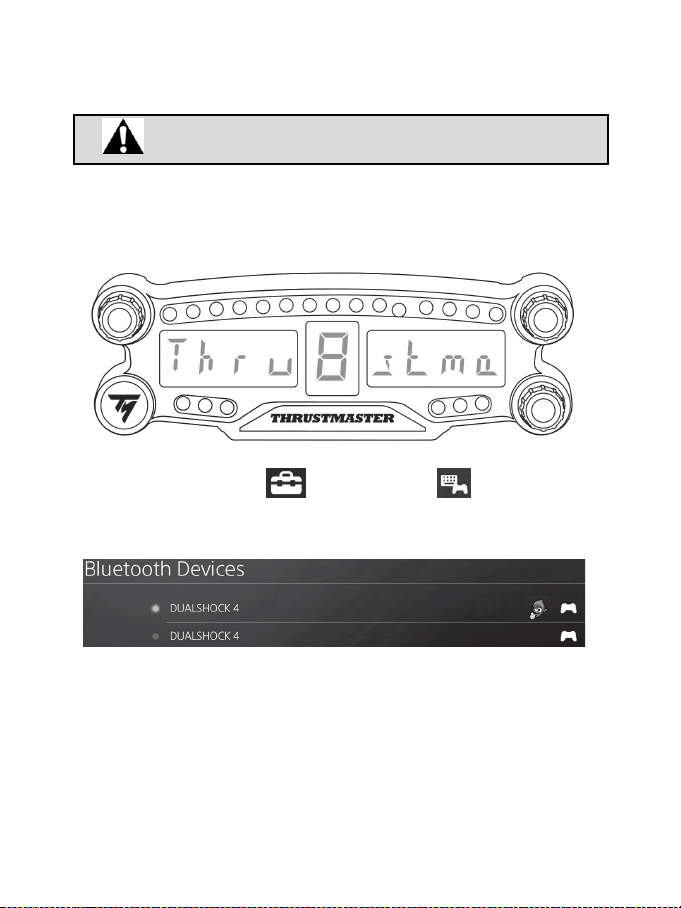
4/12
在 PS4™ 系统上安装
在 PS4™ 系统上注册 BT LED DISPLAY
此操作应仅执行一次。并不需要每次重启 PS4™ 系统时执行。
首次使用 BT LED DISPLAY 时,您必须在 PS4™ 系统上注册它;此操作只能执行一次。
1.通过按 ON/OFF(开/关)按钮 (4) 打开 BT LED DISPLAY
。
此时,主显示屏 (6) 上将滚动显示消息 Thrustmaster BT Wheel Display。
2.在 PS4™ 系统的菜单中,选择
[ Settings ](设置)> [ Devices ](设备)>
[ Bluetooth Devices ]
(蓝牙设备)以自动搜索附近的 Bluetooth® 蓝牙设备。配对设备
和其他蓝牙设备将显示在列表中。
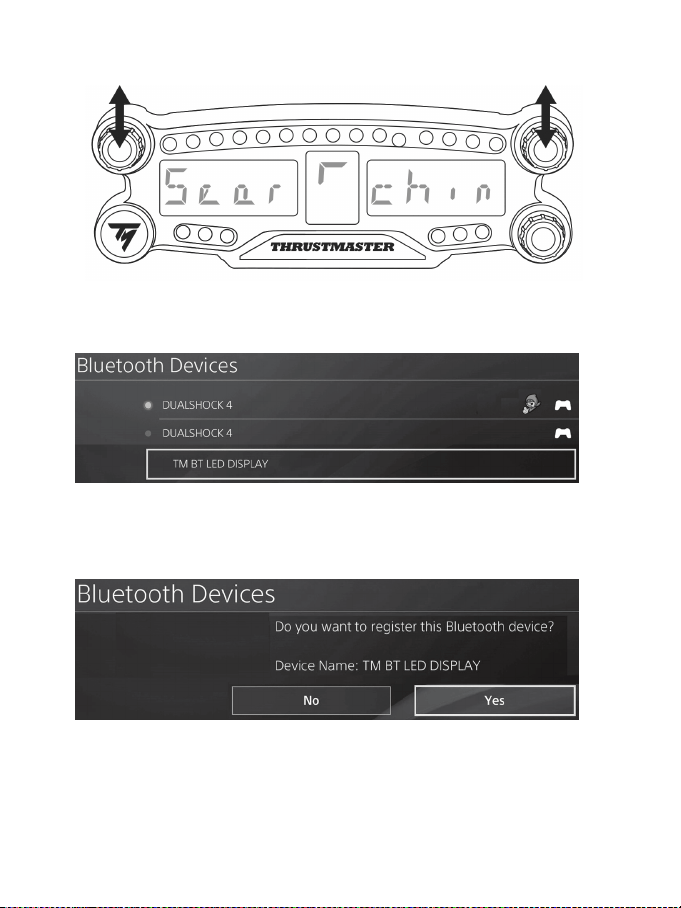
5/12
3.在 BT LED DISPLAY 上同时快速按下再松开 1 号和 2 号选择器。此时,主显示屏 (6) 上
将滚动显示消息 Searching known devices。
4.过一会, PS4™ 系统的屏幕上将会显示名称 TM BT LED DISPLAY。使用您的游戏手
柄,选中该名称并按 s 按钮。
5.此时,PS4™ 系统的屏幕上将显示消息 Do you want to register this Bluetooth device
TM BT LED DISPLAY?
(您是否要在此蓝牙设备上注册 TM BT LED 仪表盘?)。选
择 YES
(是),然后按 s 按钮进行确认。
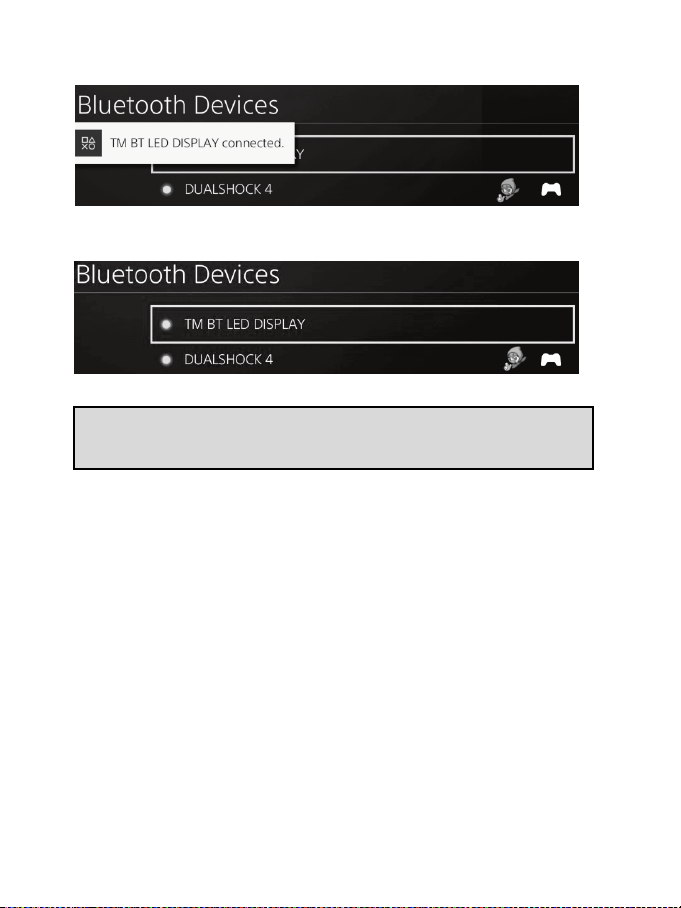
6/12
6.此时,PS4™ 系统的屏幕上将显示消息 TM BT LED DISPLAY connected(TM BT LED
仪表盘已连接)。
在 PS4™ 系统的屏幕上,位于 TM BT LED DISPLAY 左侧的指示灯现在亮起绿光,表示
设备已正确连接到系统。
7.现在即可开始玩游戏了!
如果此操作失败,请关闭 PS4™ 系统并断开连接,然后重新连接系统的
电源线。重启 PS4™ 系统,然后重复注册步骤 1 至 6。
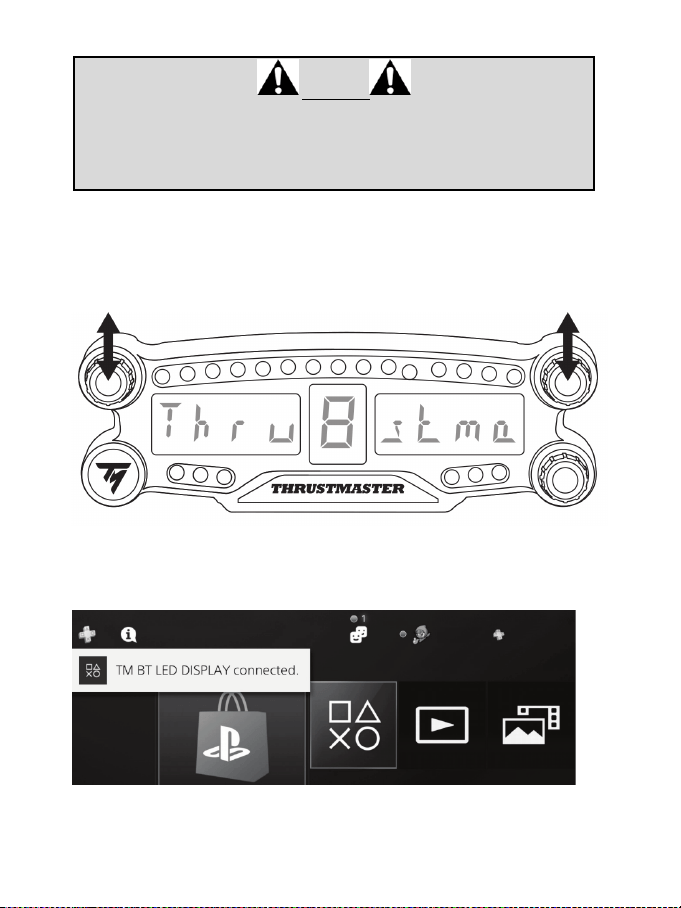
7/12
将 BT LED DISPLAY 连接到 PS4™ 系统
重要提示
- 每次重启 PS4™ 系统时您都必须执行此操作。
- 只有在至少正确执行一次前述步骤(即在 PS4™ 系统上注册 BT LED
DISPLAY)之后,才能将 BT LED DISPLAY 连接至 PS4™ 系统。
1.通过按 ON/OFF(开/关)按钮 (4) 打开 BT LED DISPLAY。
此时,主显示屏 (6) 上将滚动显示消息 Thrustmaster BT Wheel Display。
2.在 BT LED DISPLAY 上同时快速按下再松开 1 号和 2 号选择器。
此时,主显示屏 (6) 上将短时显示消息 Connected。
此时,PS4™ 系统的屏幕上将显示消息 TM BT LED DISPLAY connected
(TM BT LED
仪表盘已连接)。
3.现在即可开始玩游戏了!
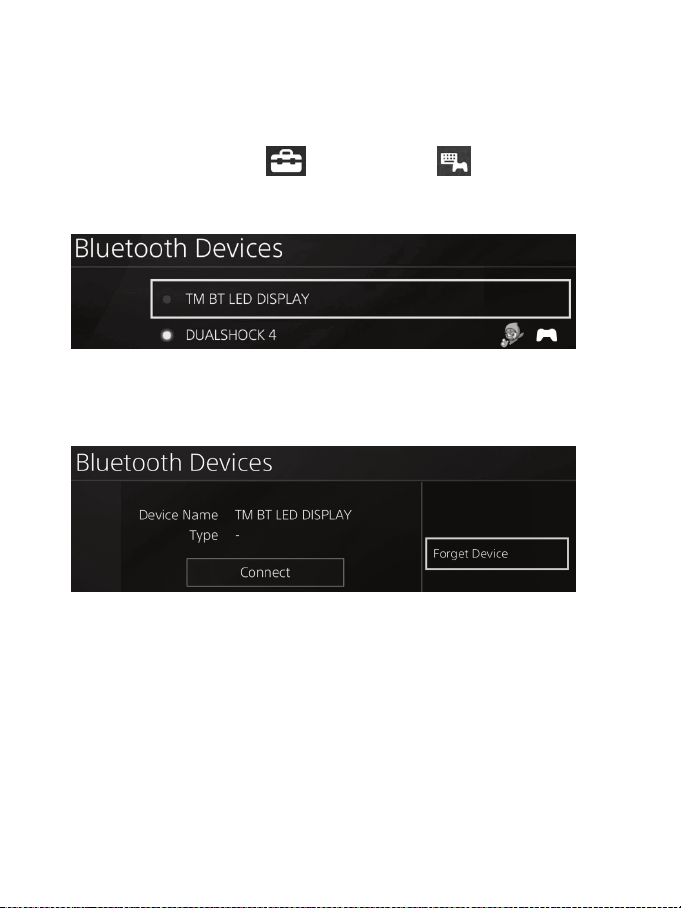
8/12
从 PS4™ 系统取消注册 BT LED DISPLAY
(仅当进行故障检修或购买新的 BT LED DISPLAY 时才需要此操作。)
1.通过按 ON/OFF(开/关)按钮 (4) 关闭 BT LED DISPLAY
。
2.在 PS4™ 系统的菜单中,选择
[ Settings ](设置)> [ Devices ](设备)>
[ Bluetooth Devices ]
(蓝牙设备)。
选择 TM BT LED DISPLAY,然后按 s 按钮进行确认。
3.此时,屏幕上将显示消息 Device Name TM BT LED DISPLAY
(设备名称 TM BT LED
仪表盘)。按控制器上的 OPTIONS(选项)按钮,然后选择 Forget Device(忽略
设备)。按 s 按钮进行确认。
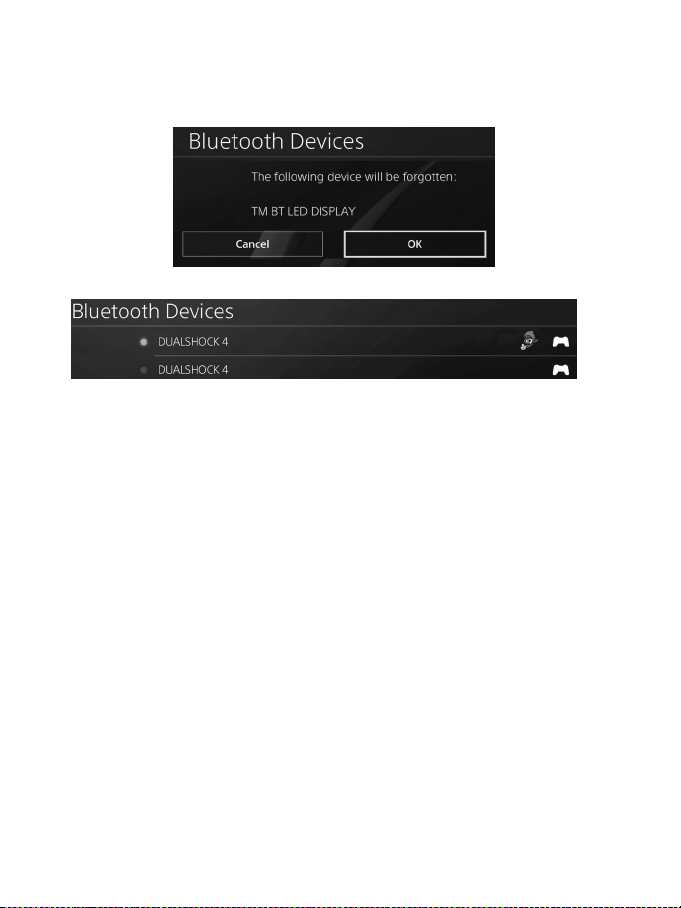
9/12
4.此时,屏幕上将显示消息 The following device will be forgotten: TM BT LED DISPLAY(以
下设备将被忽略: TM BT LED 仪表盘)。
选择 OK
(确定),然后按 s 按钮进行确认。
5.现在,已从 PS4™ 系统取消注册 TM BT LED DISPLAY。
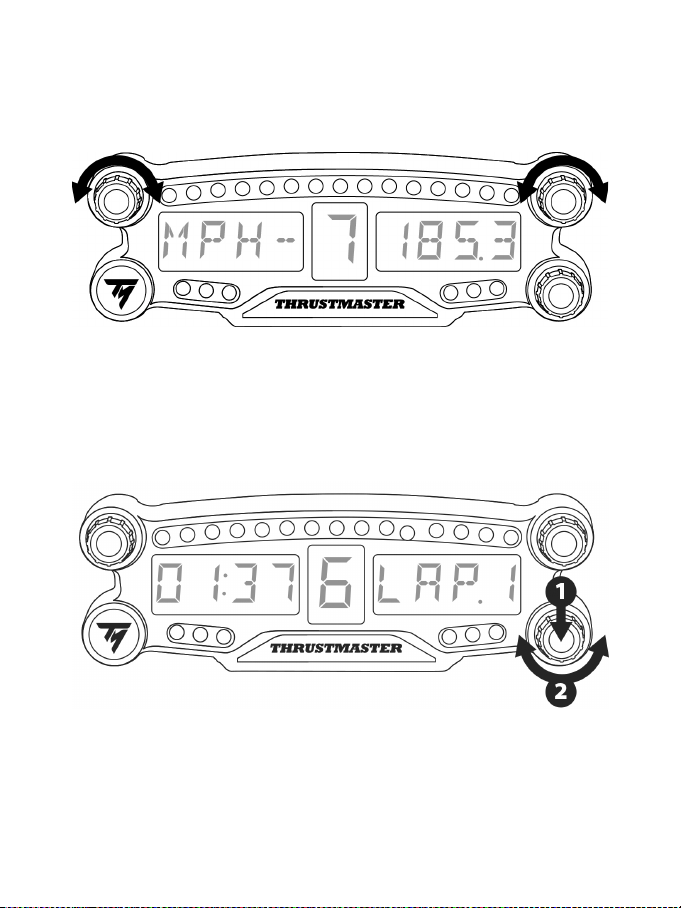
10/12
使用 1 号和 2 号旋钮式选择器
取决于所玩的 PS4 ™ 游戏,您可以通过旋转 1 号和 2 号选择器来更改显示屏设置,并在
不同设置之间进行切换。
调节 BT LED DISPLAY 的亮度
1) 按下再松开 3 号选择器,可从设置 21 个 LED (5) 的亮度切换到调节主显示屏 (6) 的亮
度,也可反向切换。
2) 向左旋转选择器可降低亮度,向右旋转选择器可增加亮度。

11/12
固定 BT LED DISPLAY
方便时,您可以将 BT LED DISPLAY 安装到 PS4™ 系统周围半径 10 米/33 英尺的范围中。
您还可以使用设备背部的两个 M3 螺孔 (9) 将此设备固定到各种适合的装置上*或将其直
接固定到某些方向盘上(例如,TM OPEN WHEEL*)。
*
单独销售
有关详情,请转到 http://support.thrustmaster.com:点击 Racing wheels(方向盘)/ BT LED
DISPLAY,然后点击 User manual(用户手册)或 FAQ(常见问题解答)。
更新 BT LED DISPLAY 的固件
可将 BT LED DISPLAY 包含的两个固件(通用固件和蓝牙固件)升级至最新版本,从而
改进产品性能。
要显示 BT LED DISPLAY 的固件版本并在需要时更新固件:在 PC 上,访问
http://support.thrustmaster.com,选择 Racing wheels(方向盘)/ BT LED DISPLAY,然后选择
固件并按照说明以及下载和安装程序操作。
帮助、常见问题解答和提示
访问 http://support.thrustmaster.com。选择 Racing wheels(方向盘)/ BT LED DISPLAY,然
后选择 Manual(手册)或 FAQ(常见问题解答)。

12/12
版权声明
© 2017 Guillemot Corporation S.A. 保留所有权利。Thrustmaster®(图马思特)是 Guillemot
Corporation S.A.(基利摩股份有限公司)的注册商标。
“2”、“PlayStation”、“Ø”和“KHJL”是 Sony Interactive Entertainment Inc 的注册
商标。保留所有权利。
特此确认,所有其他商标和品牌名称均为其各自所有者的资产。插图不具约束力。
内容、设计和规格可能因国家/地区而异,并可能随时出现更改,恕不另行通知。中
国制造。
环保建议
请遵守当地电气电子设备的回收法律。
请保留此信息。颜色和装饰可能会有变动。
在使用本产品之前,应先取下塑料紧固件并撕掉胶带。
FCCID:NAM4169091
www.thrustmaster.com
1/12
適用於
PlayStation®4
使用者手冊
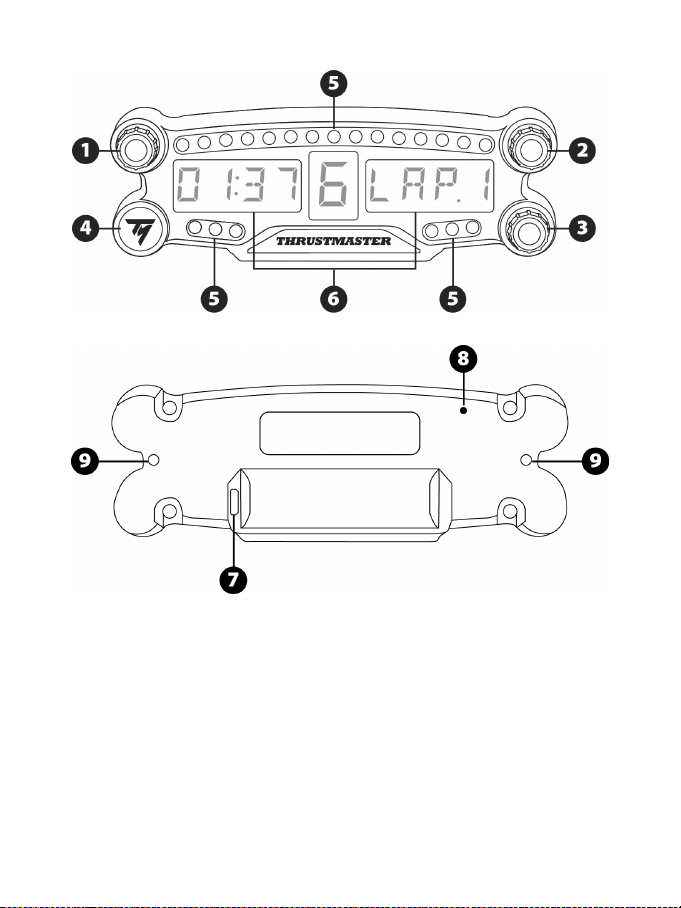
2/12
技術規格
1
帶按鈕功能的
1
號旋鈕式選取器
2 帶按鈕功能的 2 號旋鈕式選取器
3 帶按鈕功能的 3 號旋鈕式選取器(亮度
調節控制)
4 ON/OFF(開/關)按鈕
5 21 個 LED
指示燈
6
主螢幕
7 Micro USB 充電接頭
8 充電指示燈
9 兩個 M3 螺孔,用於固定裝置
3/12
警告
在使用此產品之前,請仔細閱讀並保管好本手冊以便日後參考之用。
警告
–
觸電
* 請將本產品置於乾燥的位置,切勿將其暴露在灰塵或陽光中。
* 切勿扭曲或拉扯接頭和電纜。
* 切勿讓任何液體濺到本產品或其接頭上。
* 切勿造成本產品短路。
* 切勿拆散本產品;切勿將其投入火中,亦勿將其暴露在高溫環境中。
* 切勿拆開方向盤:內部沒有任何可由使用者維修的零部件。任何維修工作均須由
製造商、其授權代表或持證技工執行。
警告
–
內建電池
- 在使用前將 BT LED DISPLAY 充滿電。
- 切勿拆解本裝置;這會導致保修失效。
- 妥善保護您的裝置,防止振動和撞擊。
- 未滿 14 歲的兒童在沒有成人監護的情況下不得使用本裝置。
若未遵守以上說明,THRUSTMASTER®(圖馬思特)概不承擔任何責任。
警告:如果更換的電池型號錯誤,可能會引起爆炸。
請按照電池棄置處理的說明處理廢舊電池。
給
BT LED DISPLAY
的電池充電
使用一根 micro USB 電纜(如 PS4™ 系統附帶的 USB 電纜),將 BT LED DISPLAY 連線
至一個由 PS4™ 系統供電的 USB 埠。
充電接頭 (7) 位於 BT LED DISPLAY 的背部。
當裝置正在充電時,充電指示燈 (8) 亮起紅光;充滿電後,指示燈將關閉。
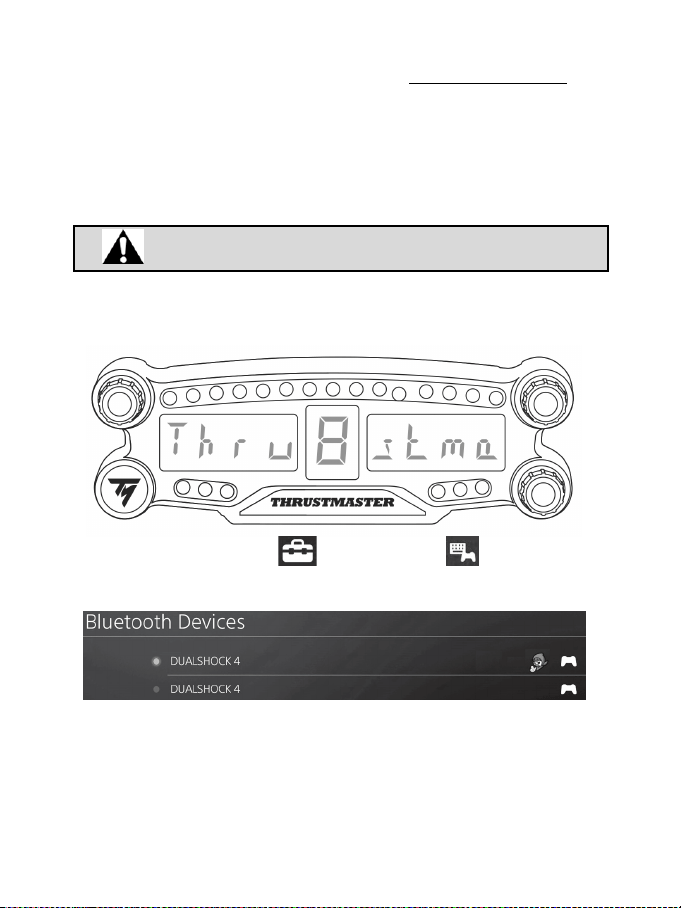
4/12
相容的
PS4™
遊戲
有關 BT LED DISPLAY 相容的 PS4™ 遊戲清單,請瀏覽 http://support.thrustmaster.com:
選取 Racing wheels(方向盤)/ BT LED DISPLAY / Games settings(遊戲設定)。
隨著新款相容 BT LED DISPLAY 的 PS4™ 遊戲的發佈,我們將會定期擴充此清單。
在
PS4™
系統上安裝
在
PS4™
系統上註冊
BT LED DISPLAY
此操作應僅執行一次。並不需要每次重啟
PS4™
系統時執行。
首次使用 BT LED DISPLAY 時,您必須在 PS4™ 系統上註冊它;此操作只能執行一次。
1.透過按 ON/OFF(開/關)按鈕 (4) 開啟 BT LED DISPLAY
。
此時,主螢幕 (6) 上將滾動顯示消息 Thrustmaster BT Wheel Display。
2.在 PS4™ 系統的功能表中,選取 [ Settings ]
(設定)
> [ Devices ]
(裝置)
> [ Bluetooth Devices ]
(藍牙裝置)
以自動搜尋附近的 Bluetooth® 藍牙裝置。配對裝
置和其他藍牙裝置將顯示在此清單中。
3.在 BT LED DISPLAY 上同時快速按下再鬆開 1 號和 2 號選取器。此時,主螢幕 (6) 上將
滾動顯示消息 Searching known devices。
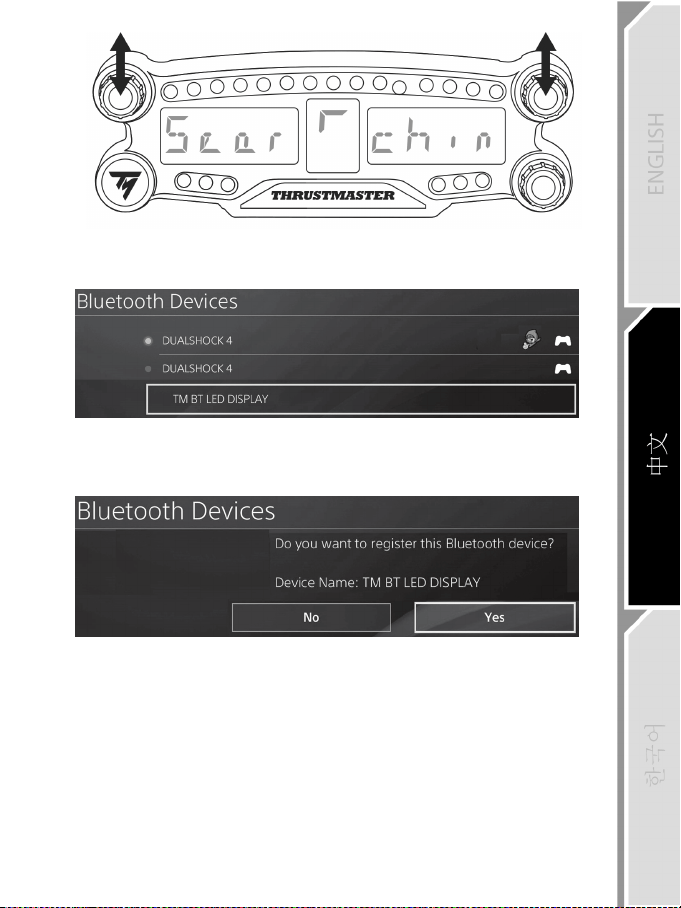
5/12
4.過一會, PS4™ 系統的螢幕上將會顯示名稱 TM BT LED DISPLAY。使用您的遊戲手
把,選取該名稱並按 s 按鈕。
5.此時,PS4™ 系統的螢幕上將顯示消息 Do you want to register this Bluetooth device
TM BT LED DISPLAY?
(您是否要在此藍牙裝置上註冊
TM BT LED
儀錶盤?)
。選
取 YES
(是)
,然後按 s 按鈕進行確認。
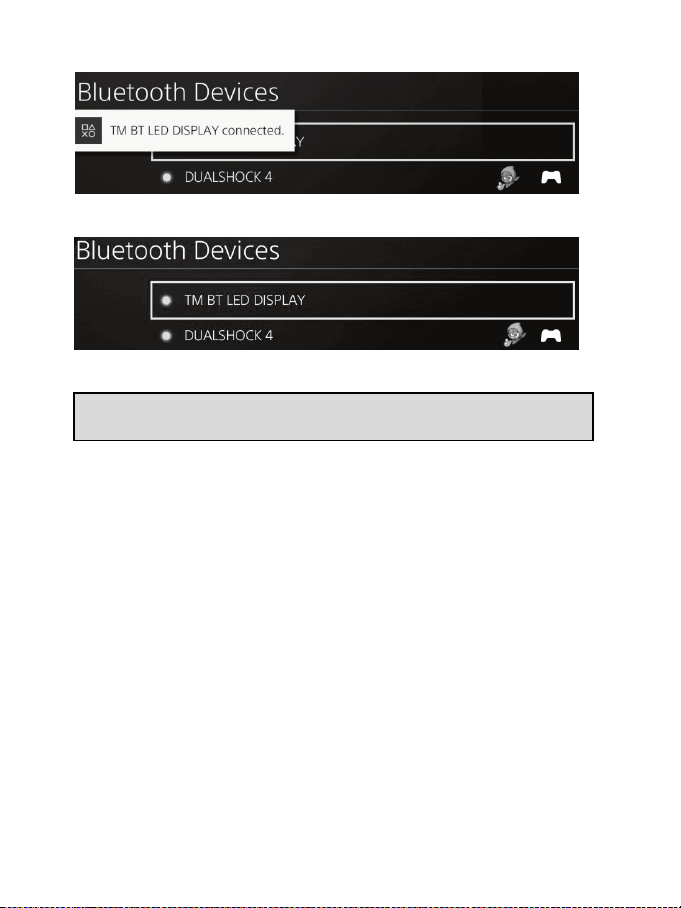
6/12
6.此時,PS4™ 系統的螢幕上將顯示消息 TM BT LED DISPLAY connected
(
TM BT LED
儀錶盤已連線)
。
在 PS4™ 系統的螢幕上,位於 TM BT LED DISPLAY 左側的指示燈現在亮起綠光,表示
裝置已正確連線到系統。
7.現在即可開始玩遊戲了!
如果此操作失敗,請關閉
PS4™
系統並斷開連線,然後重新連線系統的
電源線。重啟
PS4™
系統,然後重複註冊步驟
1
至
6
。
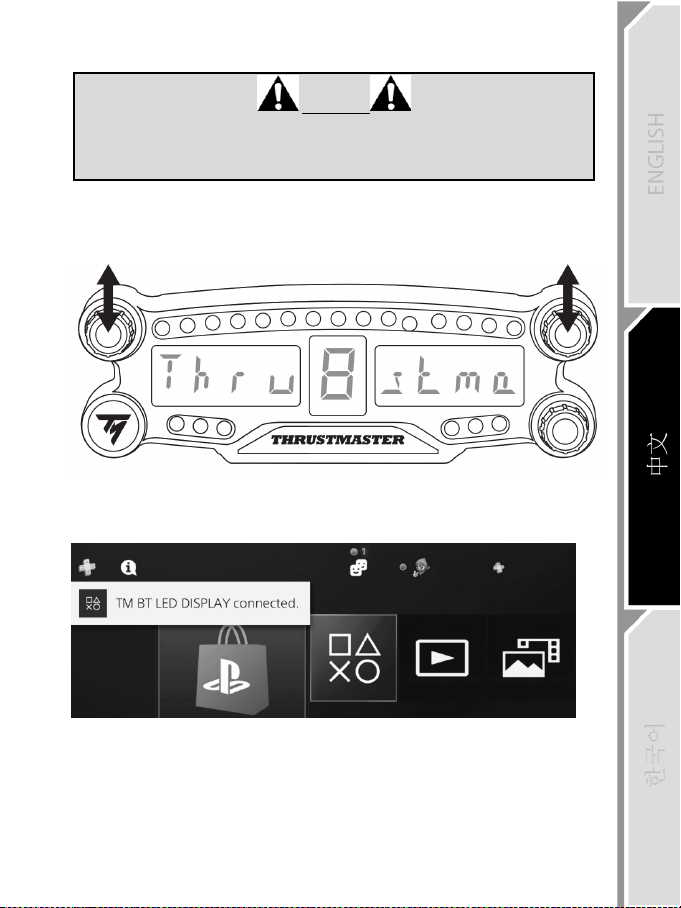
7/12
將
BT LED DISPLAY
連線到
PS4™
系統
重要提示
-
每次重啟
PS4™
系統時,您都必須執行此操作。
-
只有在至少正確執行一次前述步驟(即在
PS4™
系統上註冊
BT LED
DISPLAY
)之後,才能將
BT LED DISPLAY
連線至
PS4™
系統。
1.透過按 ON/OFF(開/關)按鈕 (4) 開啟 BT LED DISPLAY。
此時,主螢幕 (6) 上將滾動顯示消息 Thrustmaster BT Wheel Display。
2.在 BT LED DISPLAY 上同時快速按下再鬆開 1 號和 2 號選取器。
此時,主螢幕 (6) 上將短時顯示消息 Connected。
此時,PS4™ 系統的螢幕上將顯示消息 TM BT LED DISPLAY connected
(
TM BT LED
儀
錶盤已連線)
。
3.現在即可開始玩遊戲了!
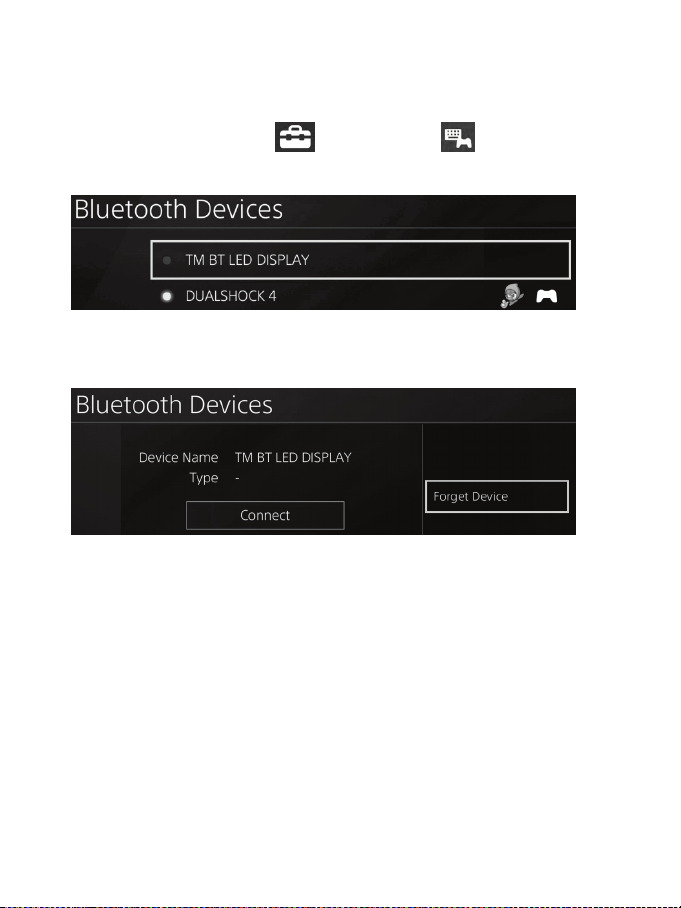
8/12
從
PS4™
系統取消註冊
BT LED DISPLAY
(僅當進行故障檢修或購買新的 BT LED DISPLAY 時才需要此操作。)
1.透過按 ON/OFF(開/關)按鈕 (4) 關閉 BT LED DISPLAY
。
2.在 PS4™ 系統的功能表中,選取
[ Settings ]
(設定)
> [ Devices ]
(裝置)
>
[ Bluetooth Devices ]
(藍牙裝置)
。
選取 TM BT LED DISPLAY,然後按 s 按鈕進行確認。
3.此時,螢幕上將顯示消息 Device Name TM BT LED DISPLAY
(裝置名稱
TM BT LED
儀錶盤)
。按控制器上的 OPTIONS
(選項)
按鈕,然後選取 Forget Device
(忽略
裝置)
。按 s 按鈕進行確認。
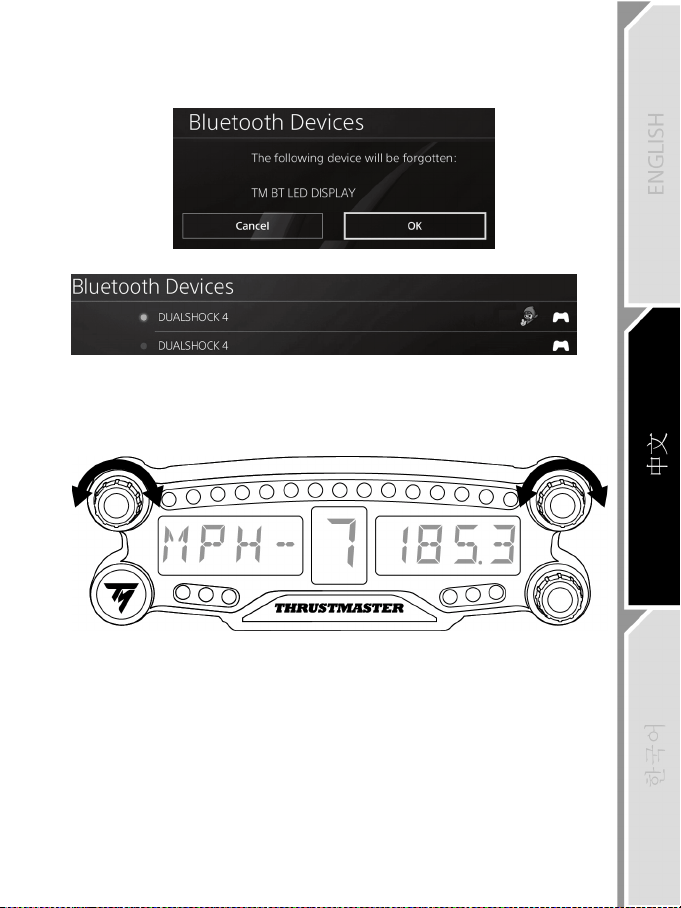
9/12
4.此時,螢幕上將顯示消息 The following device will be forgotten: TM BT LED DISPLAY
(以
下裝置將被忽略
: TM BT LED
儀錶盤)
。
選取 OK
(確定)
,然後按 s 按鈕進行確認。
5.現在,已從 PS4™ 系統取消註冊 TM BT LED DISPLAY。
使用
1
號和
2
號旋鈕式選取器
取決於所玩的 PS4 ™ 遊戲,您可以透過旋轉 1 號和 2 號選取器來變更螢幕設定,並在不
同設定之間進行切換。
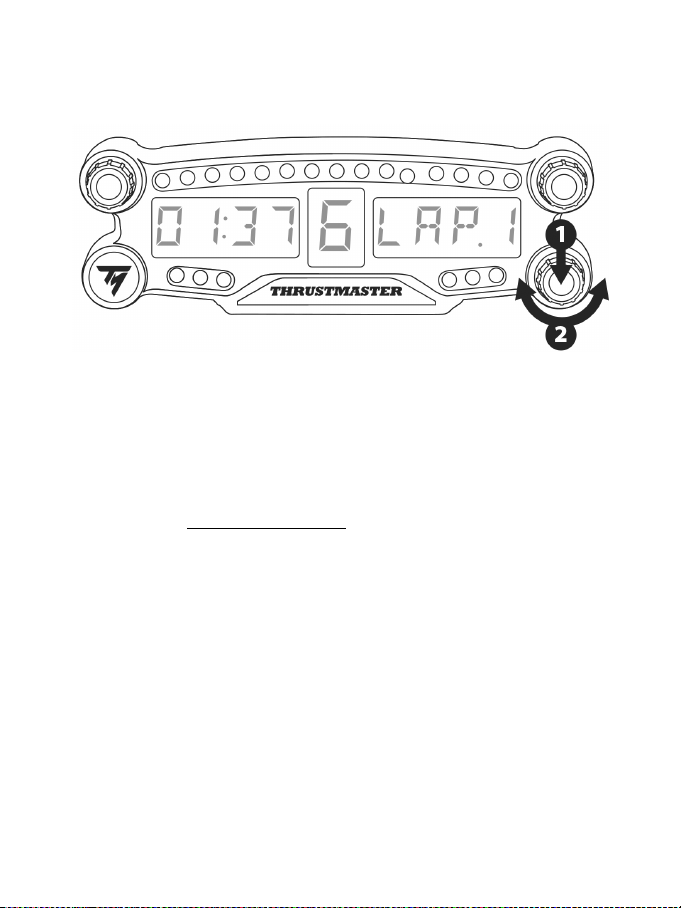
10/12
調節
BT LED DISPLAY
的亮度
1) 按下再鬆開 3 號選取器,可從設定 21 個 LED (5) 的亮度切換到調節主螢幕 (6) 的亮度,
也可反向切換。
2) 向左旋轉選取器可降低亮度,向右旋轉選取器可增加亮度。
固定
BT LED DISPLAY
方便時,您可以將 BT LED DISPLAY 安裝到 PS4™ 系統周圍半徑 10 米/33 英尺的範圍中。
您還可以使用裝置背部的兩個 M3 螺孔 (9) 將此裝置固定到各種適合的裝置上*或將其直
接固定到某些方向盤上(例如,TM OPEN WHEEL*)。
*
單獨銷售
有關詳情,請前往 http://support.thrustmaster.com:按一下 Racing wheels(方向盤)/ BT LED
DISPLAY,然後按一下 User manual(使用者手冊)或 FAQ(常見問題解答)。
11/12
更新
BT LED DISPLAY
的固件
可將 BT LED DISPLAY 包含的兩個固件(通用固件和藍牙固件)升級至最新版本,從而
改進產品效能。
要顯示 BT LED DISPLAY 的固件版本並在需要時更新固件:在 PC 上,瀏覽
http://support.thrustmaster.com,選取 Racing wheels(方向盤)/ BT LED DISPLAY,然後選取
固件並按照說明以及下載和安裝程式操作。
說明、常見問題解答和提示
瀏覽 http://support.thrustmaster.com。選取 Racing wheels(方向盤)/ BT LED DISPLAY,然
後選取 Manual(手冊)或 FAQ(常見問題解答)。
12/12
版權聲明
© 2018 Guillemot Corporation S.A. 保留所有權利。Thrustmaster®(圖馬思特)是 Guillemot
Corporation S.A.(基利摩股份有限公司)的註冊商標。
“2”、“PlayStation”、“Ø”和“KHJL”是 Sony Interactive Entertainment Inc 的註冊
商標。保留所有權利。
特此確認,所有其他商標和品牌名稱均為其各自所有者的資產。插圖不具約束力。內
容、設計和規格可能因國家而異,並可能隨時出現變更,恕不另行通知。中國製造。
環保建議
請遵守當地電氣電子裝置的回收法律。
僅適用於台灣
廢電池請回收
根據
NCC
低功率電波輻射性電機管理辦法規定
第十二條
經型式認證合格之低功率射頻電機,非經許可,公司、商號或使用者
均不得擅自變更頻率、加大功率或變更原設計之特性及功能。
第十四條
低功率射頻電機之使用不得影響飛航安全及干擾合法通信;經發現有
干擾現象時,應立即停用,並改善至無干擾時方得繼續使用。
前項合法通信,指依電信法規定作業之無線電通信。
低功率射頻電機須忍受合法通信或工業、科學及醫療用電波輻射性電
機設備之干擾。
請保留此資訊。顏色和裝飾風格可能會有所不同。
在使用本產品之前,應先取下塑膠緊固件並撕掉膠帶。
FCCID
:
NAM4169091
www.thrustmaster.com
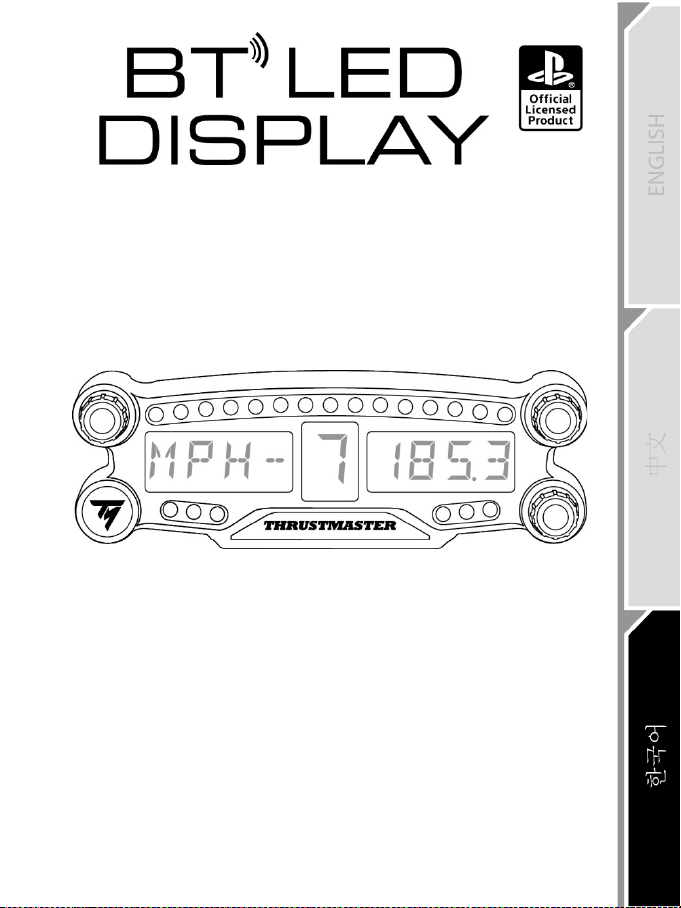
1/12
PlayStation
®4 용
사용설명서
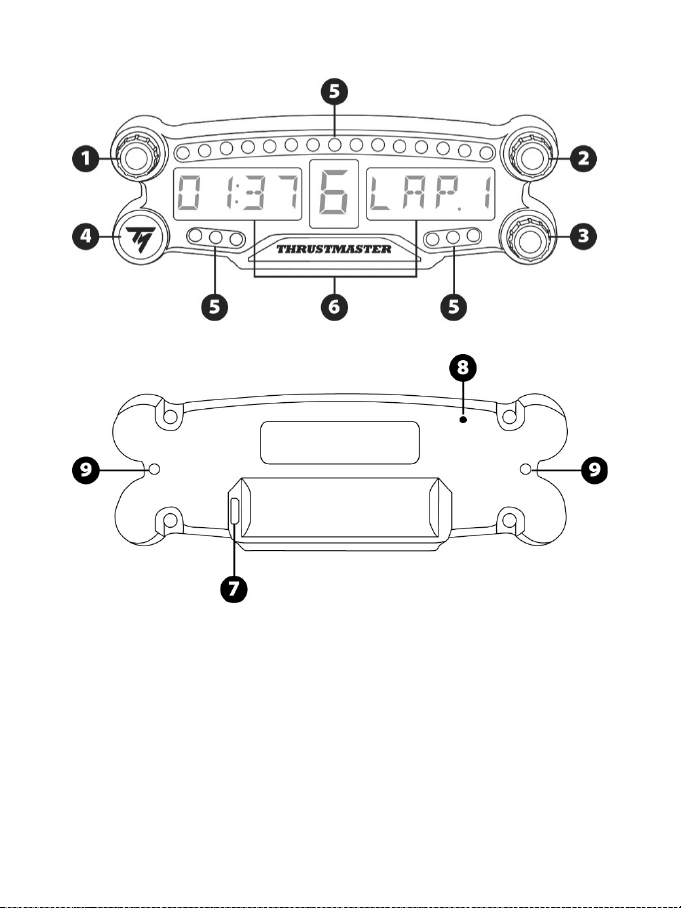
2/12
기술 사양
1 푸시 버튼 기능이 있는 1 번 회전
셀렉터
2 푸시 버튼 기능이 있는 2 번 회전
셀렉터
3 푸시 버튼 기능이 있는 3 번 회전
셀렉터 (밝기 조절 제어)
4 전원 켜기/끄기 버튼
5 21 개 LED
6 메인 디스플레이
7 마이크로 USB 충전 커넥터
8 충전 표시
9 기기 부착용 M3 나사형 구멍 2 개
3/12
경고
이 제품을 사용하기 전에 이 설명서를 주의 깊게 읽고 나중에 참고할 수 있도록 잘
보관하시기 바랍니다.
경고 - 감전
* 본 제품은 건조한 곳에 보관해야 하며, 먼지나 태양광선에 노출시키지 마십시오.
* 커넥터 및 케이블을 비틀거나 잡아 당기지 마십시오.
* 본 제품이나 제품의 커넥터에 액체를 흘리지 마십시오.
* 제품을 단락(합선)시키지 마십시오.
* 제품을 절대 분해하지 마십시오. 불 속에 제품을 던지지 마십시오. 제품을 고온에
노출시키지 마십시오.
* 기기를 열지 마십시오. 기기 내부에는 사용자가 수리할 수 있는 부품이 없습니다.
모든 수리는 제조사, 제조사가 승인한 대리점 또는 자격을 갖춘 기술자기
수행해야 합니다.
경고 – 내부 배터리
- 사용하기 전 BT LED DISPLAY를 완전히 충전하십시오.
- 기기를 분해하지 마십시오. 품질 보증이 무효화됩니다.
- 기기를 쇼크 및 충격으로부터 보호하십시오.
- 14세 이하의 어린이는 어른의 감독 없이 본 기기를 사용해서는 안됩니다.
THRUSTMASTER®는 이 지시사항을 준수하지 않아 발생하는 사항에 대해 일체
책임을 지지 않습니다.
경고: 맞지 않는 배터리로 교체한 경우 폭발이 일어날 수 있습니다.
배터리 폐기 관련 지시사항을 따르십시오.
BT LED DISPLAY 배터리 충전하기
마이크로 USB 케이블 (PS4™ 시스템에서 제공하는 USB 케이블 등)로 BT LED
DISPLAY 를 PS4™ 시스템 전원 공급 USB 포트 중 하나에 연결하십시오.
충전 커넥터(7)는 BT LED DISPLAY 뒷면에 위치합니다.
충전 표시등(8)은 기기가 충전 중일 때 빨간색으로 켜지고 충전이 완료되면
꺼집니다.
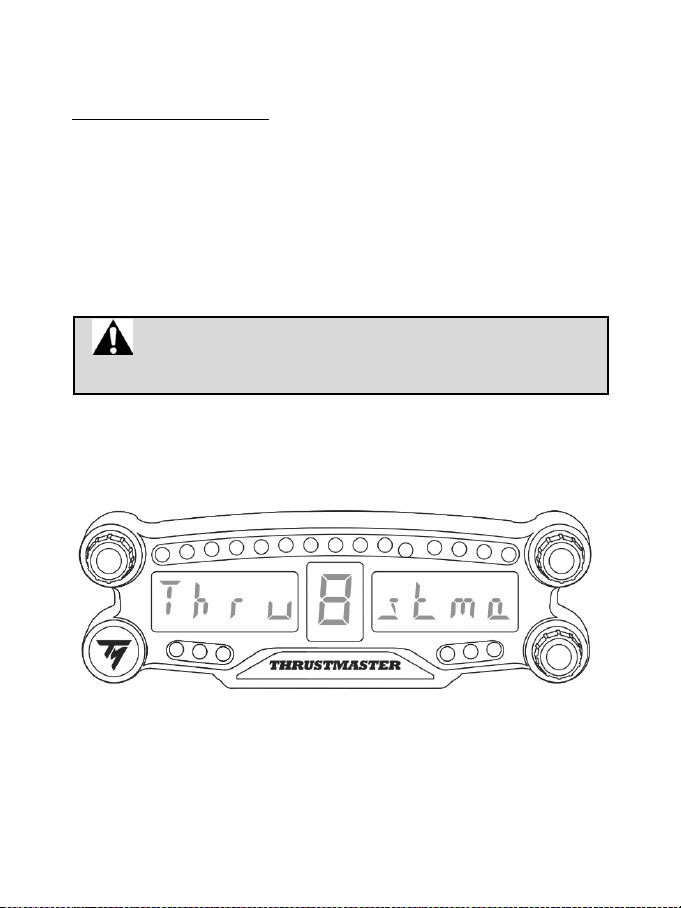
4/12
PS4™ 게임과 호환 가능
BT LED DISPLAY 와 호환 가능한 PS4™ 게임 목록은
http://support.thrustmaster.com 에서 확인하실 수 있습니다. 레이싱 핸들/BT LED
DISPLAY/게임 설정을 선택하세요.
이 목록은 BT LED DISPLAY 와 호환 가능한 PS4™ 게임의 신규 출시와 더불어
정기적으로 확대됩니다.
PS4™ 시스템에 설치하기
BT LED DISPLAY를 PS4™ 시스템에 등록하십시오.
이 동작은 한번만 실행합니다. PS4™ 시스템이 재시작될 때마다
등록할 필요가 없습니다.
BT LED DISPLAY 를 처음 사용하는 경우, 반드시 PS4™ 시스템에 등록해야 하며, 이
동작은 한번만 실행합니다.
1. 켜기/끄기 버튼(4)을 눌러 BT LED DISPLAY 를 켭니다.
Thrustmaster BT Wheel Display 메시지가 메인 디스플레이(6)에 스크롤됩니다.
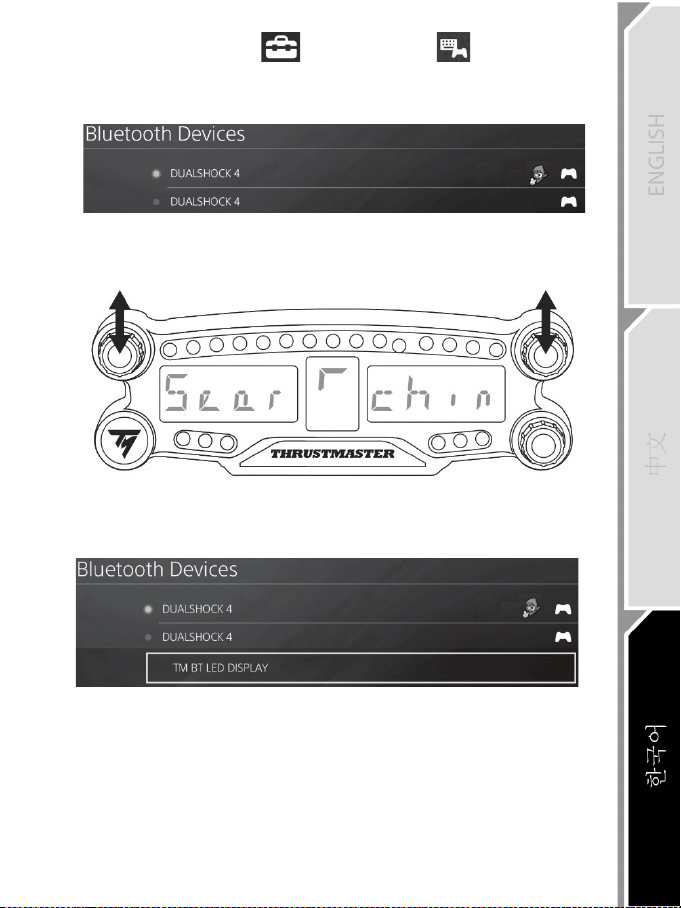
5/12
2. PS4™ 시스템 메뉴에서 [Settings(설정)] > [Devices(기기)] >
[Bluetooth Devices(Bluetooth
기기)]를 선택해 주변 Bluetooth® 기기를
찾습니다. 페어링된 기기 및 기타 Bluetooth 기기가 목록에 표시됩니다.
3. BT LED DISPLAY 에 있는 1 번과 2 번 셀렉터를 잠시 누른 후 동시에 놓습니다.
Searching known devices 메시지가 메인 디스플레이(6)에 스크롤됩니다.
4. 일정 시간이 지난 후, TM BT LED DISPLAY 이름이 PS4™ 시스템 화면에
나타납니다. 게임패드를 이용해 이를 선택한 후 s 버튼을 누르십시오.
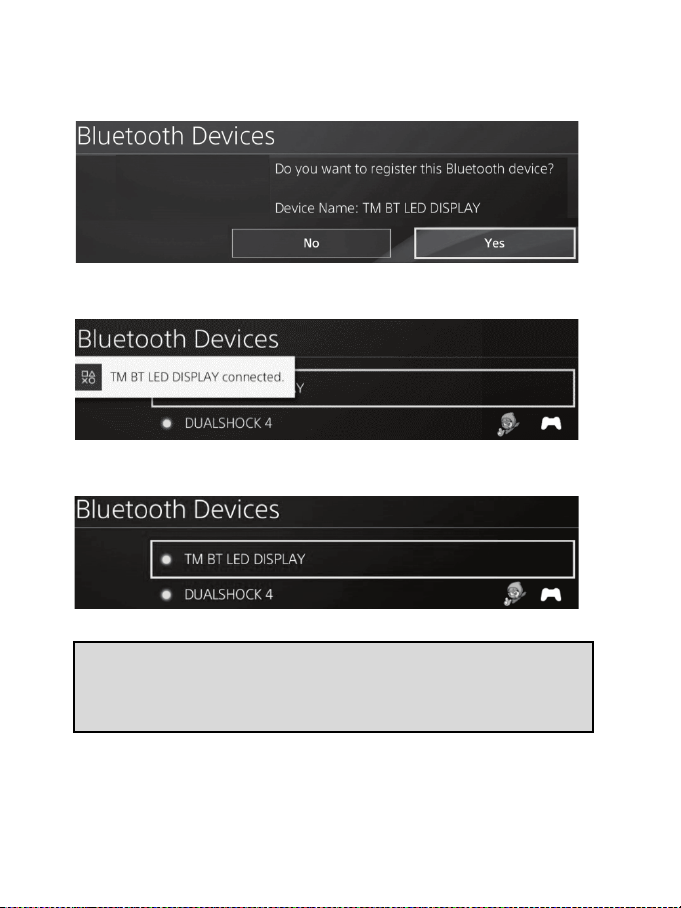
6/12
5. Do you want to register this Bluetooth device TM BT LED
DISPLAY?(Bluetooth 기기를 TM BT LED DISPLAY 에 등록하시겠습니까?)
메시지가 PS4™ 시스템 화면에 나타납니다. YES 를 선택한 후, s 버튼을 눌러
확인하십시오.
6. TM BT LED DISPLAY connected(TM BT LED DISPLAY
가 연결되었습니다.)
메시지가 PS4™ 시스템 화면에 짧게 나타납니다.
이제 PS4™ 시스템 화면에서 TM BT LED DISPLAY 의 왼쪽에 위치한 표시등이
녹색으로 바뀌며, 이는 기기가 시스템에 올바로 연결되었음을 뜻합니다.
1. 이제 레이싱 준비가 되었습니다!
바르게 설치 되지 않은 경우 PS4™ 시스템의 전원을 끄고 연결을
해제한 다음, 시스템 전원 케이블을 다시 연결하십시오. PS4™
시스템을 재시작한 후, 1 ~ 6단계를 다시 반복하여 등록하십시오.
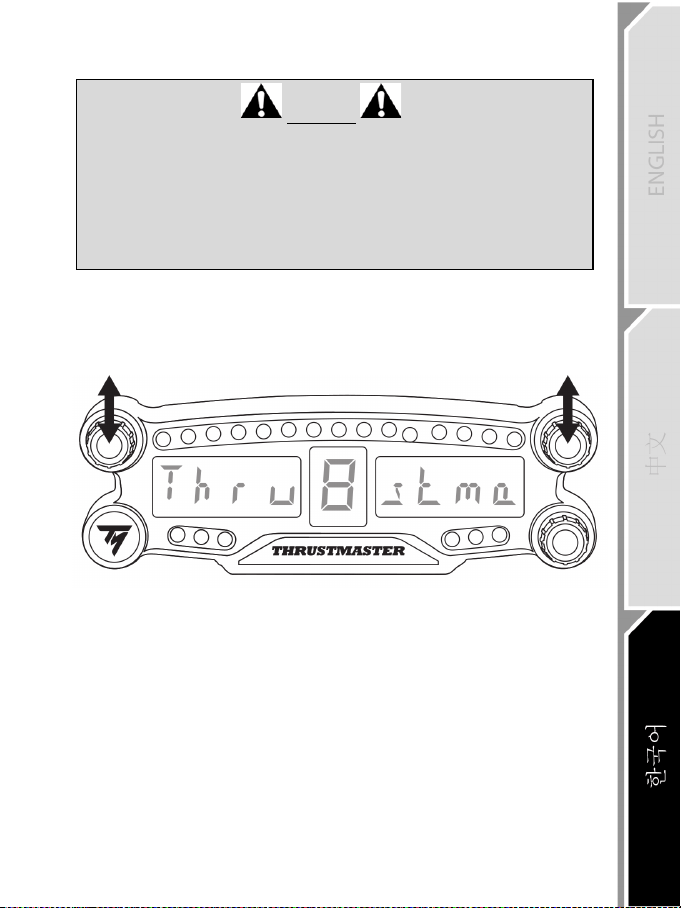
7/12
BT LED DISPLAY를 PS4™ 시스템에 연결하십시오.
매우
중요
- PS4
™
시스템을
재시작할
때마다
이
동작을
반드시
수행해야
합니다
.
-
이전
단계
(
즉
, PS4
™
시스템에
BT LED DISPLAY
등록하기
)
가
한번에
제대로
시행된
경우에만
BT LED DISPLAY
가
PS4
™
시스템에
연결됩니다
.
1. 켜기/끄기 버튼(4)을 눌러 BT LED DISPLAY 를 켭니다.
Thrustmaster BT Wheel Display 메시지가 메인 디스플레이(6)에 스크롤됩니다.
2. BT LED DISPLAY 에 있는 1 번과 2 번 셀렉터를 잠시 누른 후 동시에 놓습니다.
Connected 메시지가 메인 디스플레이(6)에 짧게 나타납니다.
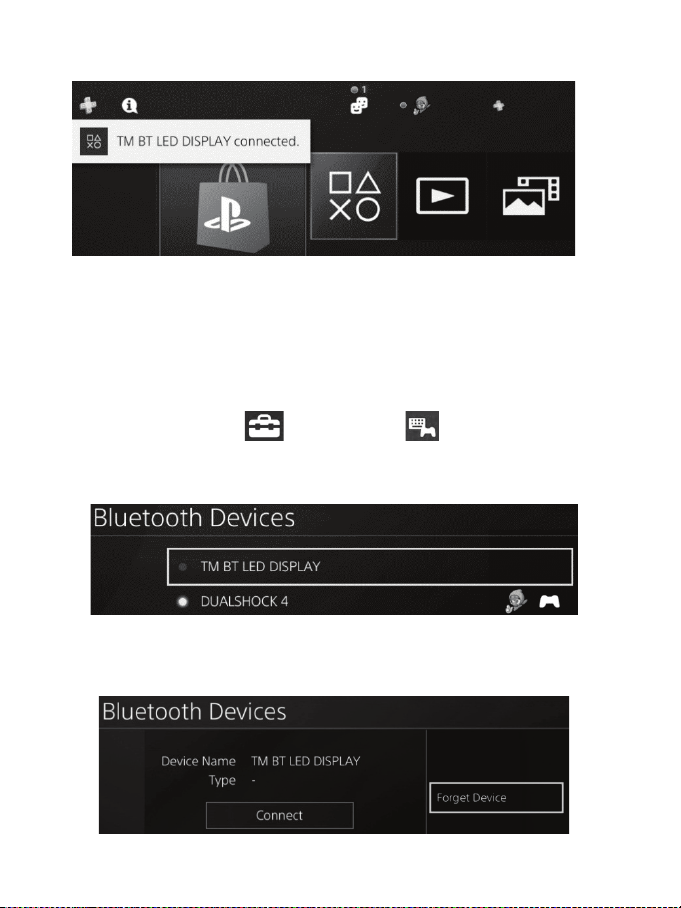
8/12
TM BT LED DISPLAY connected(TM BT LED DISPLAY 가 연결되었습니다.)
메시지가 PS4™ 시스템 화면에 짧게 나타납니다.
3. 이제 레이싱 준비가 되었습니다!
BT LED DISPLAY
를 PS4™ 시스템에서 등록 취소하십시오.
(이 동작은 문제 해결 또는 새로운 BT LED DISPLAY 를 구입하는 경우에만
필요합니다.)
1. 켜기/끄기 버튼(4)을 눌러 BT LED DISPLAY 를 끕니다.
2. PS4™ 시스템 메뉴에서 [Settings(설정)] > [Devices(기기)] >
[Bluetooth Devices(블루투스 기기)]를 선택하십시오.
TM BT LED DISPLAY 를 선택한 후, s 버튼을 눌러 확인하십시오.
3. Device Name TM BT LED DISPLAY(
기기명 TM BT LED DISPLAY) 메시지가
화면에 나타납니다. 컨트롤러에서 OPTIONS 버튼을 누른 후, Forget
Device(기기 지우기)를 선택하십시오. s 버튼을 눌러 확인합니다.
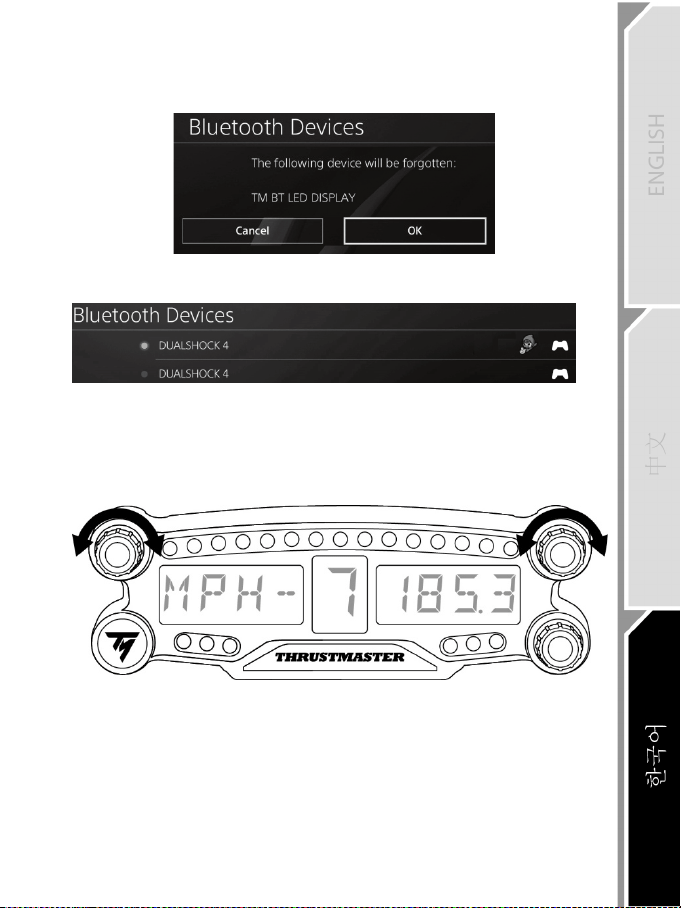
9/12
4. The following device will be forgotten: TM BT LED DISPLAY(다음 기기가
지워집니다: TM BT LED DISPLAY) 라는 메시지가 화면에 나타납니다.
OK 를 선택한 후, s 버튼을 눌러 확인하십시오.
5. 이제 TM BT LED DISPLAY 가 PS4™ 시스템에서 등록 취소되었습니다.
1
번 및 2 번 회전 셀렉터 이용하기
PS4 ™ 게임에 따라 1번 및 2번 셀렉터를 켜서 디스플레이 설정을 바꾸고 한 설정에서
다른 설정으로 바꿀 수 있습니다.
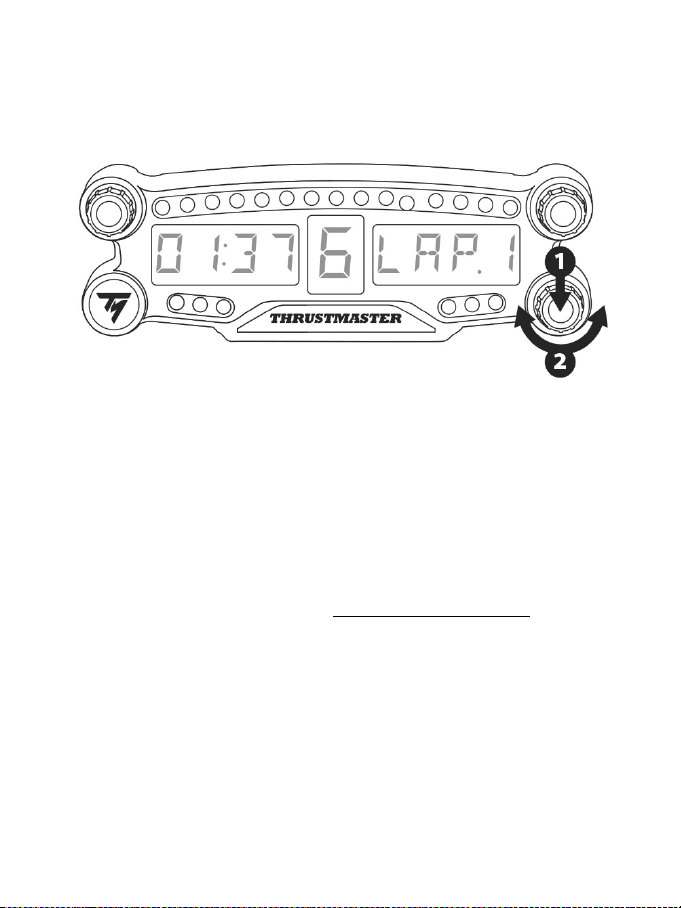
10/12
BT LED DISPLAY 밝기 조정하기
1) 3번 셀렉터를 눌렀다 놓으면 21개 LED(5) 밝기 설정부터 메인 디스플레이 강도
조절(6)까지 토글할 수 있으며, 그 반대도 가능합니다.
2) 왼쪽으로 셀렉터를 돌려 강도를 줄이거나 오른쪽으로 돌려 강도를 높이십시오.
BT LED DISPLAY 부착하기
PS4™시스템 주변 반경 10m/33 피트 내 원하는 대로 BT LED DISPLAY 를 설치할 수
있습니다.
또한, 기기를 여러가지 다양한 적합한 제품* 또는 일부 레이싱 핸들 (예, TM OPEN
WHEEL*)에 장치 뒷면에 위치한 M3 나사형 구멍 2 개(9)를 이용해 부착할 수 있습니다.
*
별도
판매
이와 관련한 보다 자세한 정보는 웹사이트 http://support.thrustmaster.com 로 이동하여
레이싱 핸들/BT LED DISPLAY 를 클릭한 후, 사용자 매뉴얼 또는 FAQ 를 선택하세요.
11/12
BT LED DISPLAY 펌웨어 업데이트하기
BT LED DISPLAY에 포함된 두 펌웨어(일반 펌웨어 및 Bluetooth 펌웨어)를
개선사항이 포함된 최신 버전으로 업데이트할 수 있습니다.
필요시 BT LED DISPLAY 펌웨어 버전을 표시하거나 업데이트하려면 PC에서
웹사이트 http://support.thrustmaster.com를 방문해 레이싱 핸들/BT LED DISPLAY를
선택한 후, 펌웨어를 선택하고 지시사항, 다운도르 및 설치 절차를 따르십시오.
도움말, FAQ 및 힌트
http://support.thrustmaster.com 으로 이용하십시오. 레이싱 핸들/BT LED
DISPLAY 를 선택한 후, 사용자 매뉴얼 또는 FAQ 를 선택하십시오.

12/12
COPYRIGHT
© 2018 Guillemot Corporation S.A. 모든 권리 보유. Thrustmaster
®
는 Guillemot
Corporation S.A.의 등록상표입니다.
“2”, “PlayStation”, “Ø” 및 “KHJL”은 Sony Interactive Entertainment
Inc.의 등록상표입니다. 모든 권리 보유.
다른 모든 상표 및 브랜드 이름은 해당 소유자의 자산입니다. 도면은 법적 구속력이
없습니다. 설명서의 내용, 설계 및 사양은 예고 없이 변경될 수 있으며, 국가마다
다르게 적용될 수 있습니다. 제조국: 중국
환경 보호 권장 사항
전기 및 전자 장비에 관한 현지의 재활용 법률을 준수해 주십시오.
이 설명서를 보관하십시오. 색상 및 장식은 달라질 수 있습니다.
플라스틱 고정부품 및 접착제는 제품 사용 전에 제거해야 합니다.
FCCID: NAM4169091
www.thrustmaster.com
1/10
For PlayStation
®4
User Manual
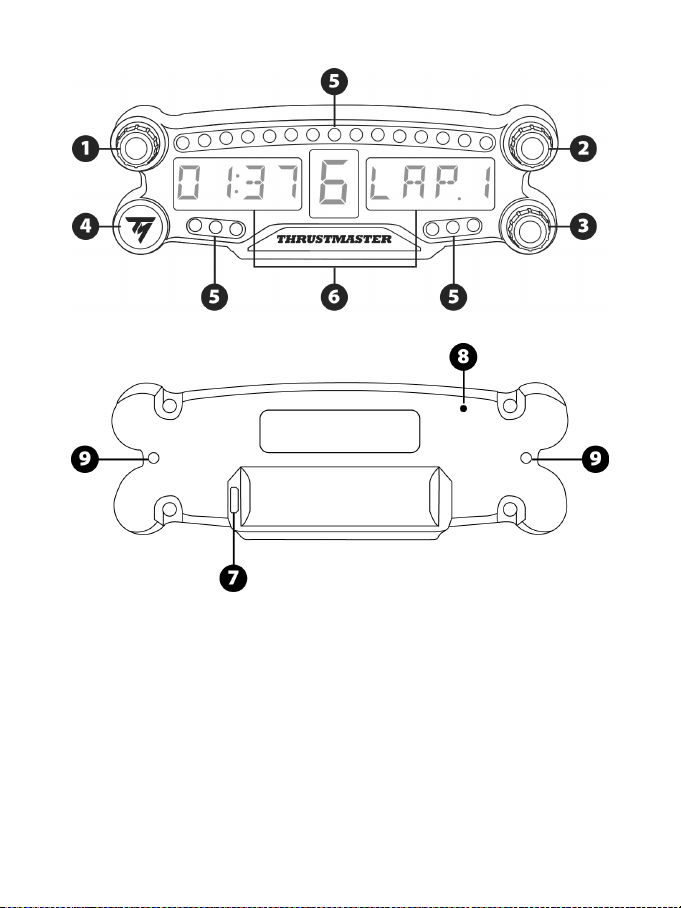
2/10
TECHNICAL SPECIFICATIONS
1 Rotary selector no. 1 with push-button feature
2 Rotary selector no. 2 with push-button feature
3 Rotary selector no. 3 with push-button feature
(brightness adjustment control)
4 Power On/Off button
5 21 LEDs
6 Main display
7 Micro USB charging connector
8 Charging indicator
9 Two M3 threaded holes for attaching the
device
3/10
WARNING
Before using this product, please read this manual carefully and save it for later reference.
Warning – Electrical shock
* Keep the product in a dry location and do not expose it to dust or sunlight.
* Do not twist or pull on the connectors and cables.
* Do not spill any liquid on the product or its connectors.
* Do not short-circuit the product.
* Never dismantle the product; do not throw it onto a fire and do not expose it to high temperatures.
* Do not open up the device: there are no user-serviceable parts inside. Any repairs must be carried
out by the manufacturer, its authorized representative or a qualified technician.
Warning – Internal battery
- Fully charge the BT LED DISPLAY before use.
- Do not disassemble the device; this would void its warranty.
- Protect your device from shocks and impacts.
- This device should not be used by children below the age of 14 without an adult’s supervision.
THRUSTMASTER® DISCLAIMS ANY LIABILITY IN THE EVENT OF NON-COMPLIANCE WITH
THESE INSTRUCTIONS.
WARNING: AN EXPLOSION MAY OCCUR IF THE BATTERY IS REPLACED WITH AN
INCORRECT TYPE OF BATTERY.
FOLLOW INSTRUCTIONS REGARDING THE DISPOSAL OF BATTERIES.
CHARGING THE BT LED DISPLAY’S BATTERY
Using a micro USB cable (such as the USB cable supplied with the PS4™ system), connect the BT
LED DISPLAY to one of the PS4™ system’s powered USB ports.
The charging connector (7) is located at the back of the BT LED DISPLAY.
The charging indicator (8) lights up in red when the device is charging, and turns off when it is fully
charged.
COMPATIBILITY WITH PS4™ GAMES
A list of PS4™ games compatible with the BT LED DISPLAY is available at http://support.thrustmaster.com:
Select Racing wheels / BT LED DISPLAY / Games settings.
This list will regularly be expanded with the release of new PS4™ games compatible with the BT
LED DISPLAY.
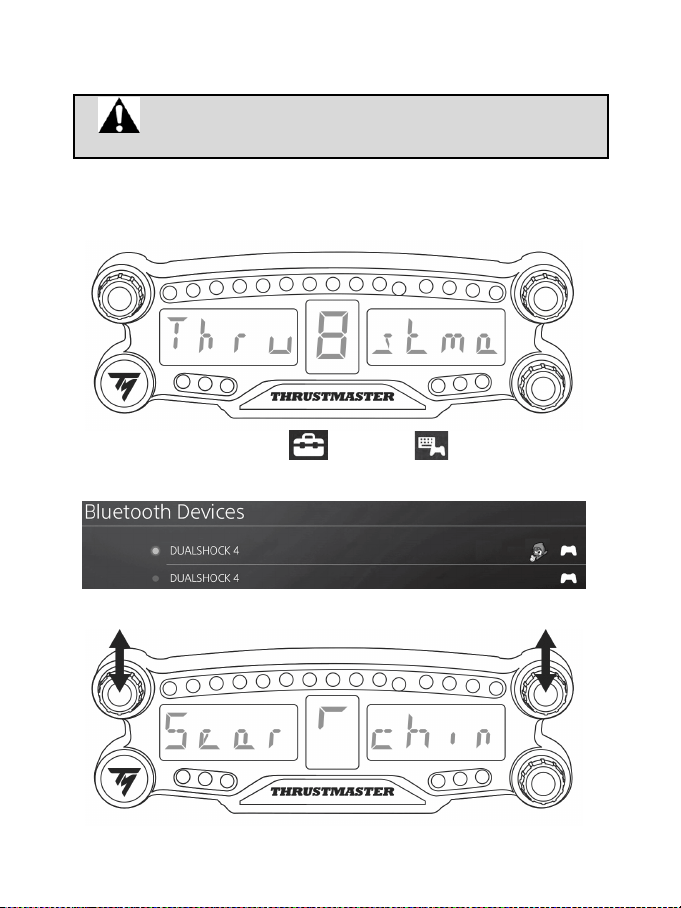
4/10
INSTALLATION ON THE PS4™ SYSTEM
Register the BT LED DISPLAY on the PS4™ system
This operation should only be performed once. It is not required every
time the PS4™ system is restarted.
When using the BT LED DISPLAY for the first time, you must imperatively register it on your PS4™
system; this operation must only be performed once.
1. Turn on the BT LED DISPLAY by pressing the On/Off button (4)
.
The message Thrustmaster BT Wheel Display scrolls on the main display (6).
2. In the PS4™ system’s menu, select [ Settings ] > [ Devices ] > [ Bluetooth
Devices ] to automatically search for nearby Bluetooth® devices. Paired devices and other
Bluetooth devices will appear in the list.
3. Briefly press and release selectors no. 1 and 2 simultaneously on the BT LED DISPLAY. The
message Searching known devices scrolls on the main display (6).
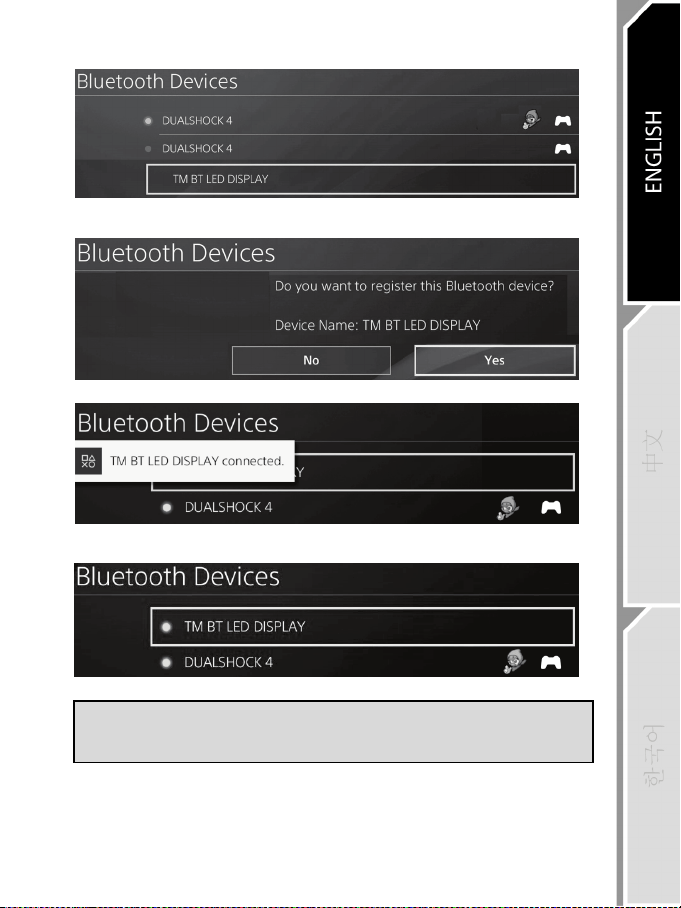
5/10
4. After some time, the name TM BT LED DISPLAY appears on the PS4™ system’s screen. Using
your gamepad, select it and press the s button.
5. The message Do you want to register this Bluetooth device TM BT LED DISPLAY? appears
on the PS4™ system’s screen. Select YES, then press the s button to confirm.
6. The message TM BT LED DISPLAY connected briefly appears on the PS4™ system’s screen.
On the PS4™ system’s screen, the indicator light located to the left of the TM BT LED DISPLAY
now lights up in green, meaning that the device is correctly connected to the system.
7. You are now ready to play!
If the operation fails, turn off your PS4™ system and disconnect, then reconnect
the system’s power cable. Restart your PS4™ system, then repeat registration
steps 1 to 6.
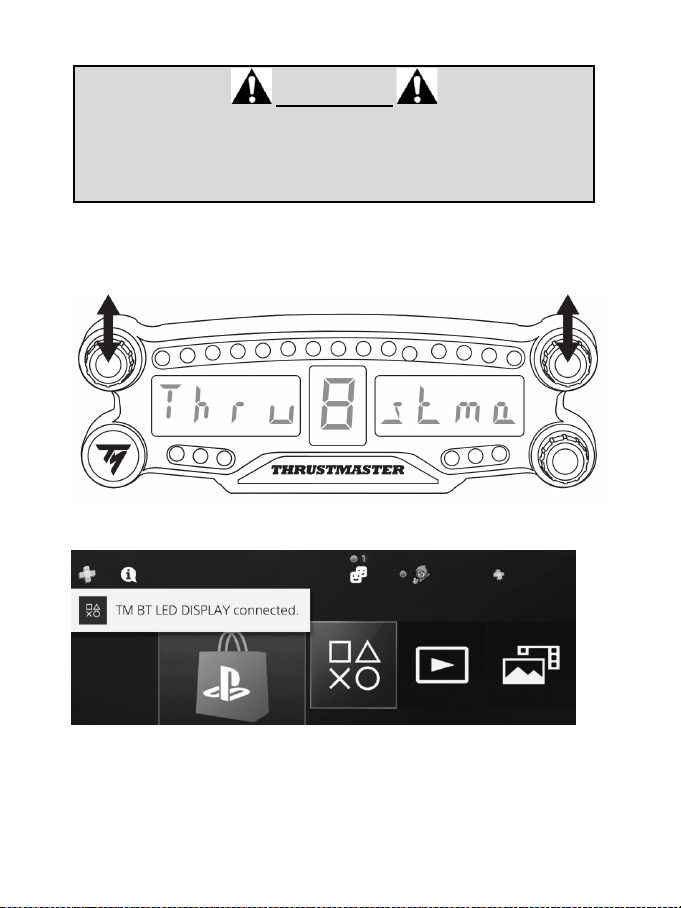
6/10
Connect the BT LED DISPLAY to the PS4™ system
VERY IMPORTANT
- It is imperative that you perform this operation every time the PS4™ system is
restarted.
- The connection of the BT LED DISPLAY to the PS4™ system will only
function if the previous step (i.e. Register the BT LED DISPLAY on the PS4™
system) has been properly performed at least once.
1. Turn on the BT LED DISPLAY by pressing the On/Off button (4).
The message Thrustmaster BT Wheel Display scrolls on the main display (6).
2. Briefly press and release selectors no. 1 and 2 simultaneously on the BT LED DISPLAY.
The message Connected briefly appears on the main display (6).
The message TM BT LED DISPLAY connected briefly appears on the PS4™ system’s screen.
3. You are now ready to play!
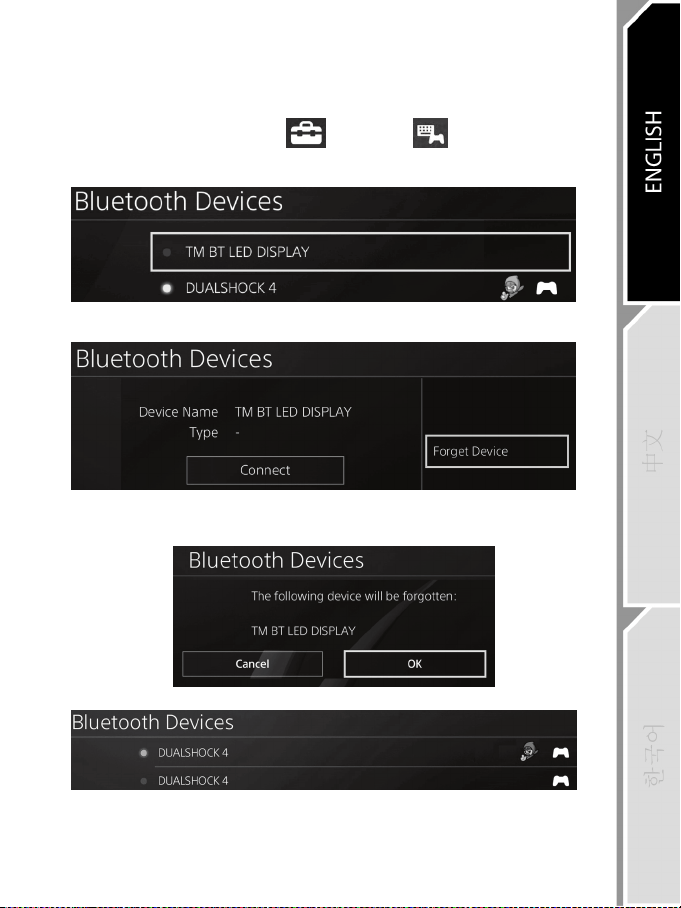
7/10
Unregister the BT LED DISPLAY from the PS4™ system
(This operation is only required when troubleshooting, or purchasing a new BT LED DISPLAY.)
1. Turn off the BT LED DISPLAY by pressing the On/Off button (4)
.
2. In the PS4™ system’s menu, select
[ Settings ] > [ Devices ] > [ Bluetooth
Devices ].
Select TM BT LED DISPLAY, then press the s button to confirm.
3. The message Device Name TM BT LED DISPLAY appears on the screen. Press the OPTIONS
button on your controller, then select Forget Device. Press the s button to confirm.
4. The message The following device will be forgotten: TM BT LED DISPLAY appears on the
screen.
Select OK, then press the s button to confirm.
5. The TM BT LED DISPLAY is now unregistered from your PS4™ system.
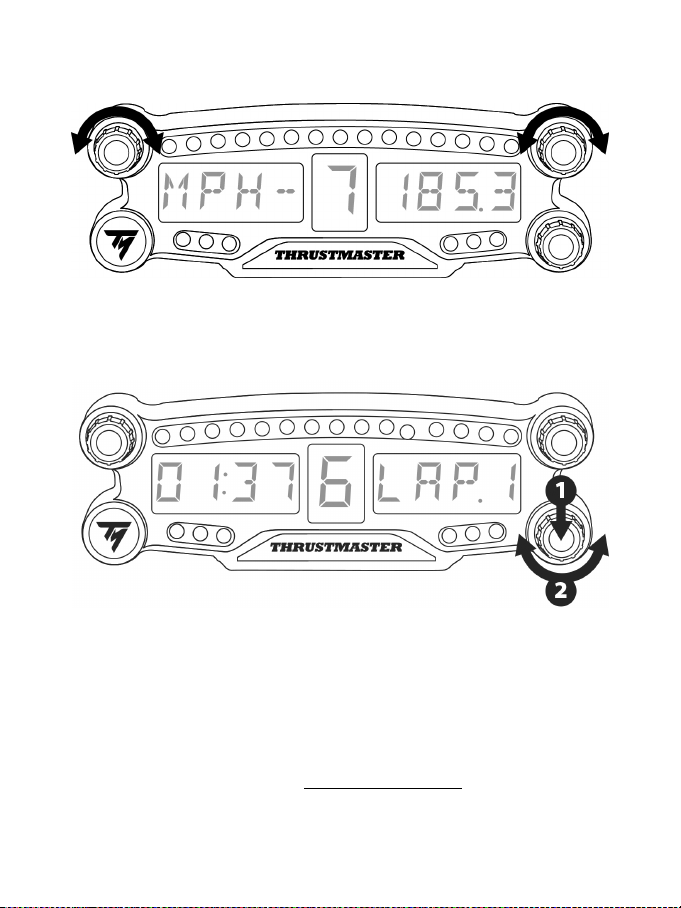
8/10
USING THE ROTARY SELECTORS NO.1 AND NO.2
Depending on the PS4 ™ game, you can turn the selectors no.1 and no. 2 to change the display settings,
and to toggle from one setting to another.
ADJUSTING THE BT LED DISPLAY’S BRIGHTNESS
1) Press and release the selector no. 3 to toggle from setting the brightness of the 21 LEDs (5) to
adjusting the intensity of the main display (6), and conversely.
2) Turn the selector to the left to reduce the intensity or to the right to increase it.
ATTACHING THE BT LED DISPLAY
You can install the BT LED DISPLAY at your convenience within a 10 meter/33 foot radius around the
PS4™ system.
You can also attach the device to various suitable items* or directly to some racing wheels (for instance,
the TM OPEN WHEEL*) using the two M3 threaded holes located at the back of the device (9).
* Sold separately
For more information about this, please go to http://support.thrustmaster.com: click Racing wheels / BT
LED DISPLAY, then User manual or FAQ.
9/10
UPDATING THE BT LED DISPLAY’S FIRMWARE
Both firmware (general firmware and Bluetooth firmware) included in the BT LED DISPLAY can be
updated with more recent versions, featuring product improvements.
To display your BT LED DISPLAY’s firmware versions and update them if required: on a PC, access
http://support.thrustmaster.com, select Racing wheels / BT LED DISPLAY, then select Firmware and
follow the instructions and the download and installation procedure.
HELP, FAQ AND HINTS
Access http://support.thrustmaster.com. Select Racing wheels / BT LED DISPLAY, then User
manual or FAQ.

10/10
COPYRIGHT
© 2018 Guillemot Corporation S.A. All rights reserved. Thrustmaster
®
is a registered trademark of
Guillemot Corporation S.A.
“2”, “PlayStation”, “Ø” and “KHJL” are registered trademarks of Sony Interactive
Entertainment Inc. All rights reserved.
All other trademarks and brand names are hereby acknowledged and are property of their
respective owners. Illustrations not binding. Contents, designs and specifications are subject to
change without notice and may vary from one country to another. Made in China.
ENVIRONMENTAL PROTECTION RECOMMENDATION
Please adhere to local recycling laws for electrical and electronic equipment.
Retain this information. Colors and decorations may vary.
Plastic fasteners and adhesives should be removed from the product before it is used.
FCCID: NAM4169091
www.thrustmaster.com