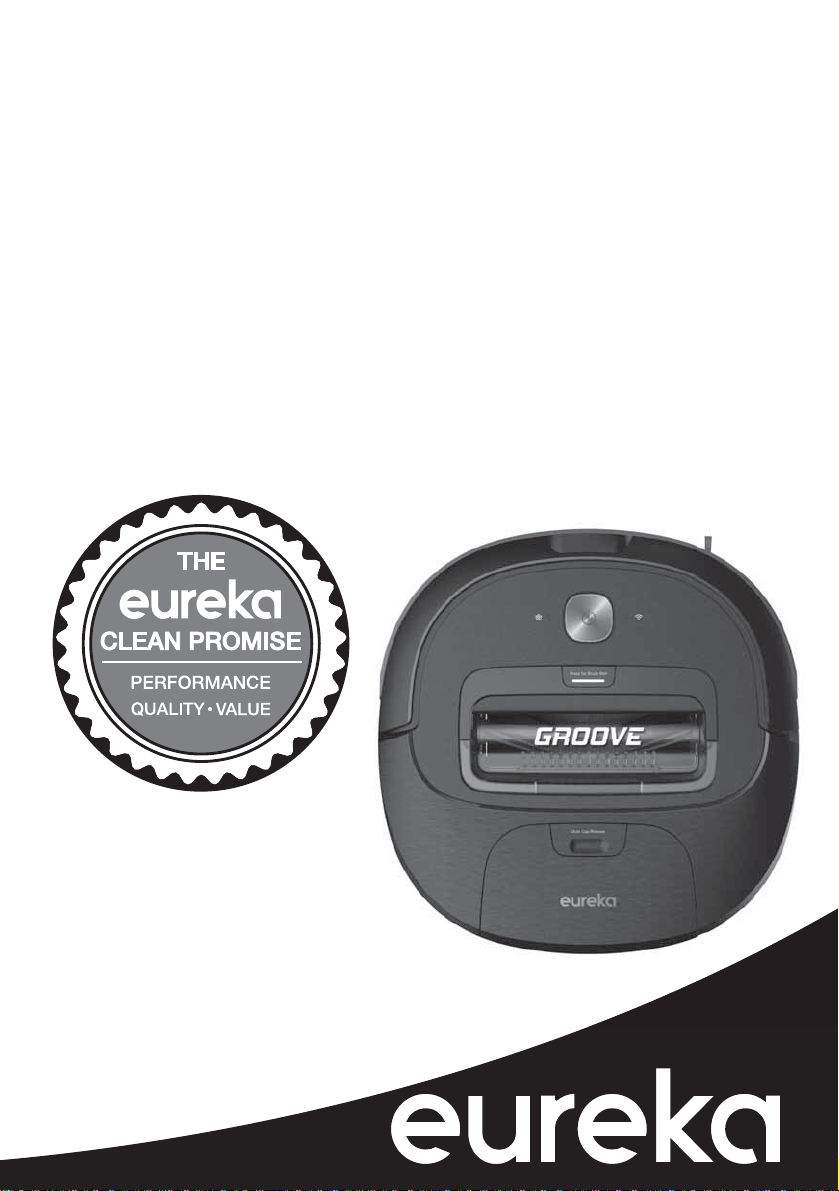
Thank you for purchasing your new Eureka vacuum!
Important instructions
For easy assembly, please take a few moments to read this
owner’s guide.
If you have questions about your new vacuum, please
contact our customer service HELPLINE at 1-800-282-2886.
We’re here to help!
Eureka stands by our
Clean Promise seal.
Learn more at
www.eureka.com/cleanpromise
www.eureka.com
Owner’s Guide
NER300 series
Robotic vacuum cleaner; household type
2
Eureka Customer Service HELPLINE 1-800-282-2886
Contents
FCC and Industry Canada Compliance Statement .........................3
Important safeguards. . . . . . . . . . . . . . . . . . . . . . . . . . . . . . . . . . . . . . . . . . . . . . . .4
What comes in the carton ............................................5
How to identify parts of your robotic cleaner ..............................6
Easy assembly, How to charge battery ..................................7
How to use your robotic vacuum cleaner ................................8
How to use remote, app and voice control .............................8-9
How to maintain your vacuum cleaner .................................10
+RZWRPDLQWDLQGXVWFXSÀOWHUVDQGEUXVKUROO ...........................10
The Eureka limited warranty .........................................11
Thermal cut-off and problem solving ...................................12
How to dispose vacuum cleaner and battery pack ........................12
How to order replacement parts ......................................13
!
Follow caution information wherever you see this symbol.
:KHUHWRÀQGLPSRUWDQWYDFXXPLQIRUPDWLRQ
.HHSWKLVLQIRUPDWLRQ
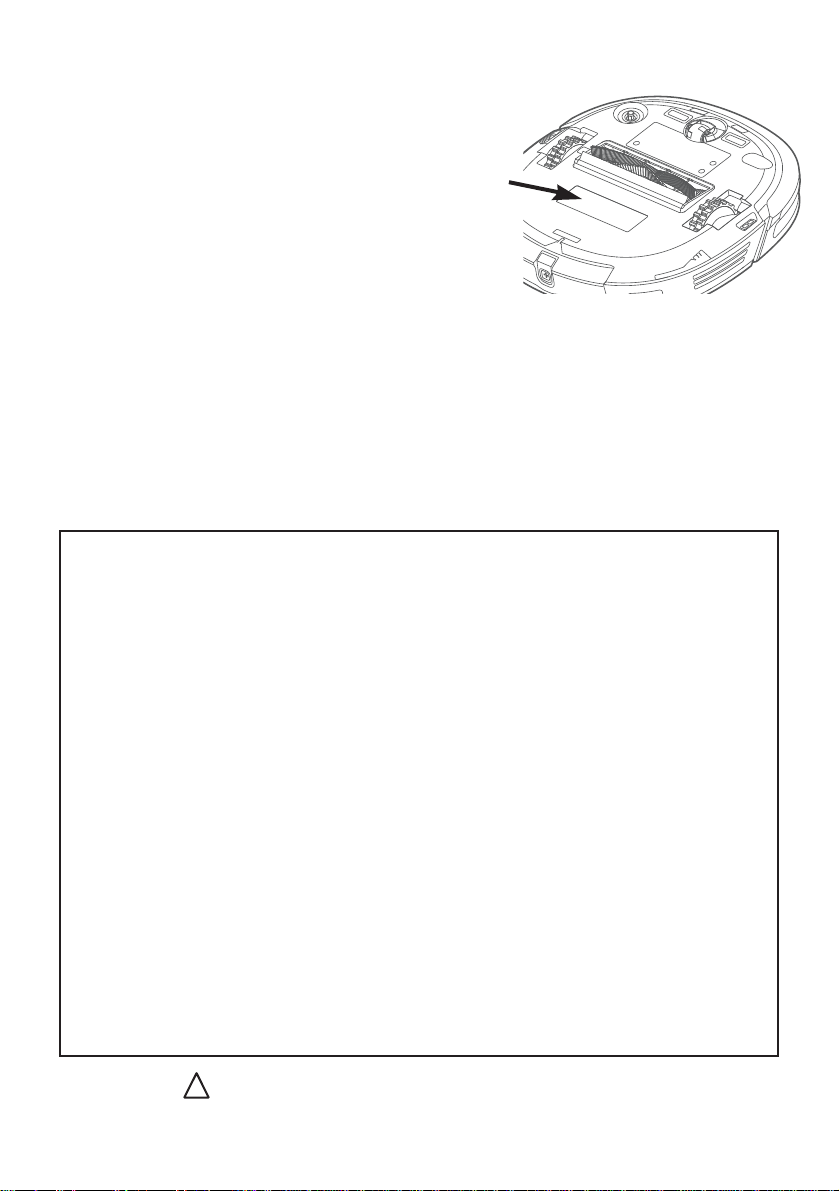
Write the model, type and serial number here:
Date of purchase (keep your receipt) ______________
Model number and type _________________________
Serial number ________________________________
Find these numbers on a label on the hand vacuum,
battery, and charger. Refer to these numbers when
ordering parts and accessories, or if service is needed.
7KLV2ZQHU·V*XLGHSURYLGHVLPSRUWDQWLQVWUXFWLRQV
WRSURORQJWKHOLIHRI\RXU(XUHNDYDFXXPFOHDQHU
5HJLVWUDWLRQ: To register your product visit www.eureka.comDQGFOLFNRQWKH¶5HJLVWHU<RXU3URGXFW·
link in the top right corner.
,QVSHFWLRQ: Carefully unpack and inspect your new Eureka vacuum cleaner for shipping damage.
Each unit is tested and thoroughly inspected before shipping. For instructions regarding any
shipping damage, call the Eureka Customer Service +(/3/,1( at 1-800-282-2886 immediately.

www.eureka.com 3
)&&DQG,QGXVWU\&DQDGD&RPSOLDQFH6WDWHPHQW
This device complies with Part 15 of the
FCC Rules and RSS 210 of Industry & Science
Canada. Operation is subject to the following
two conditions: (1) this device may not cause
harmful interference, and (2) this device must
accept any interference received, including
interference that may cause undesired
operation.
• Only operate the device in accordance with
the instructions supplied.
This device complies with FCC and IC
radiation exposure limits set forth for an
uncontrolled environment. In order to avoid the
possibility of exceeding the FCC and IC radio
frequency exposure limits, human proximity
to the antenna shall not be less than 20cm
(8 inches) during normal operation.
&KDQJHVRUPRGLÀFDWLRQVQRWH[SUHVVO\
approved by the party responsible for
FRPSOLDQFHFRXOGYRLGWKHXVHU·VDXWKRULW\WR
operate the equipment.
This equipment has been tested and found
to comply with the limits for a Class B
digital device, pursuant to Part 15 of the
FCC Rules. These limits are designed to
provide reasonable protection against harmful
interference in a residential installation. This
equipment generates uses and can radiate
radio frequency energy and, if not installed
and used in accordance with the instructions,
may cause harmful interference to radio
communications.
However, there is no guarantee that
interference will not occur in a particular
installation. If this equipment does cause
harmful interference to radio or television
reception, which can be determined by
turning the equipment off and on, the user is
encouraged to try to correct the interference by
one or more of the following measures:
• Reorient or relocate the receiving antenna.
• Increase the separation between the
equipment and receiver.
• Connect the equipment into an outlet on
a circuit different from that to which the
receiver is connected.
• Consult the dealer or an experienced
radio/TV technician for help.

4
Eureka Customer Service HELPLINE 1-800-282-2886
,03257$176$)(*8$5'6
When using an electrical appliance, basic precautions should always be followed, including the following:
5($'$//,16758&7,216%()25(86,1*7+,69$&880&/($1(5
Failure to follow the warnings and instructions may result in electric shock, re and/or serious injury.
This vacuum should not be used by children under the age of eight or those with reduced physical, sensory or mental capabilities without supervision.
:$51,1*
• Before using, clear area of power cords, pull cords for curtains or
blinds, clothing and fragile items.
• Do not operate in a room where a child or infant is sleeping.
• Do not pour or spray any liquids on or in your robot.
• If you live in an area that is prone to electrical storms, we
recommend using a surge protector.
• Do not operate the robot in a room that has lit candles or lit fireplace.
• Do not allow children to sit on vacuum.
• Do not use the docking station if it is damaged.
• Do not operate in areas with exposed electrical outlets on the floor.
• Be aware that the robot moves around on its own. Take care when
walking in the area when it is in operation.
• Do not place the robot on any unstable surfaces.
• Prevent unintentional starting. Ensure the switch is in the off-position
before picking up or carrying the appliance. Carrying the appliance
with your finger on the switch or energizing appliance that has the
switch on invites accidents.
• Danger. Do not touch nozzle when the vacuum cleaner is on.
• Do not put any object into openings. Do not use with any openings
blocked; keep free of dust, lint, hair and anything that may reduce air flow.
• Do not use outdoors or on wet surfaces.
• Do not operate the vacuum cleaner or charger if it has been damaged
in any way. If vacuum cleaner is not working as it should, has been
dropped, damaged, left outdoors, or dropped into water or other liquid,
call the Eureka Customer Service HELPLINE at 1-800-282-2886.
• To avoid excessive heat and damage to the unit or battery, the
vacuum cleaner will not operate while charging.
• Do not allow to be used as a toy. Close attention is necessary when
used by or near children.
• Use only as described in this manual. Use only manufacturer’s
recommended attachments.
• Recharge only with the charger specified by the manufacturer. A
charger that is suitable for one type of battery pack may create a risk
of fire when used with another battery pack.”
• Do not pull or carry the charger by cord, use cord as a handle, close
a door on cord, or pull cord around sharp edges or corners. Do not
run appliance over cord. Keep cord away from heated surfaces.
• This charger is not intended for use by travelers.
• Do not use extension cords or outlets with inadequate current-carrying
capacity for the charger.
• Do not unplug by pulling on cord. To unplug, grasp the plug, not the cord.
• Do not handle charger or vacuum cleaner with wet hands.
• Use appliances only with specifically designated battery packs. Use of
any other battery packs may create a risk of injury and fire.
• DO NOT MUTILATE OR INCINERATE BATTERIES. THEY BECOME
DANGEROUS AT HIGH TEMPERATURES.
• Liquid ejected from the battery may cause irritation or burns. If the
liquid gets on the skin, (1) seek medical attention, (2) wash quickly
with soap and water, and (3) neutralize with a mild acid such as
lemon juice or vinegar. If the liquid gets into the eyes, flush them
immediately with clean water for a minimum of 10 minutes.
• When battery pack is not in use, keep it away from other metal objects,
like paper clips, coins, keys, nails, screws or other small metal objects,
that can make a connection from one terminal to another. Shorting the
battery terminals together may cause burns or a fire.
• This product is functioning at temperature range within 40°F - 104°F.
• Do not use a battery pack or appliance that is damaged or modified.
Damaged or modified batteries may exhibit unpredictable behavior
resulting in fire, explosion or risk of injury.
• Do not expose a battery pack or appliance to fire or excessive
temperature. Exposure to fire or temperature above 266°F may
cause explosion.
• Follow all charging instructions and do not charge the battery
pack or appliance outside of the temperature range specified in the
instructions. Charging improperly or at temperatures outside of the
specified range may damage the battery and increase the risk of fire.
• Have servicing performed by a qualified repair person using only
identical replacement parts. This will ensure that the safety of the
product is maintained.
• Do not modify or attempt to repair the appliance or the battery pack
except as indicated in the instructions for use and care.
• The terminals on both the vacuum cleaner and battery should be kept
free and clear of objects. Do not insert metal objects inside the terminals.
• This vacuum cleaner creates suction. Keep hair, loose clothing,
fingers, and all parts of body away from openings and moving parts.
• Do not pick up anything that is burning or smoking, such as
cigarettes, matches, or hot ashes.
• Do not use without filters in place.
• Do not use the robot to pick up flammable or combustible liquids,
such as gasoline, or use in areas where they may be present.
• Store vacuum cleaner and charger indoors in a cool, dry area.
To avoid electric shock and/or damage, do not expose to
weather elements.
• Keep your work area well lit. Unplug electrical appliances before
vacuuming them.
• Overcharging, short circuiting, reverse charging, mutilating or
incinerating the cells and the batteries must be avoided.
• If a cell or a battery has leaked or vented, it should be replaced
immediately using protective gloves.
• If and when necessary, these cells or batteries must be replaced with
identical new ones from the same manufacturer. If a cell or a battery
to be replaced is connected with other cells or batteries in series, it is
recommended that the other cells or batteries be replaced with new
ones at the same time.
• Reverse polarity installation of the cell or the battery in the end
product must be avoided.
• Do not incinerate this appliance even if it is severely damaged.
Contact local waste facility before discarding in trash.
• WARNING: This product can expose you to chemicals including
Di(2-ethylhexyl)phthalate (DEHP), which is known to the State
of California to cause cancer and to cause birth defects or other
reproductive harm. For more information go to
www.P65Warnings.ca.gov.
SAVE THESE INSTRUCTIONS
Owner’s
Manual
www.eureka.com 5
:KDWFRPHVLQWKHFDUWRQ
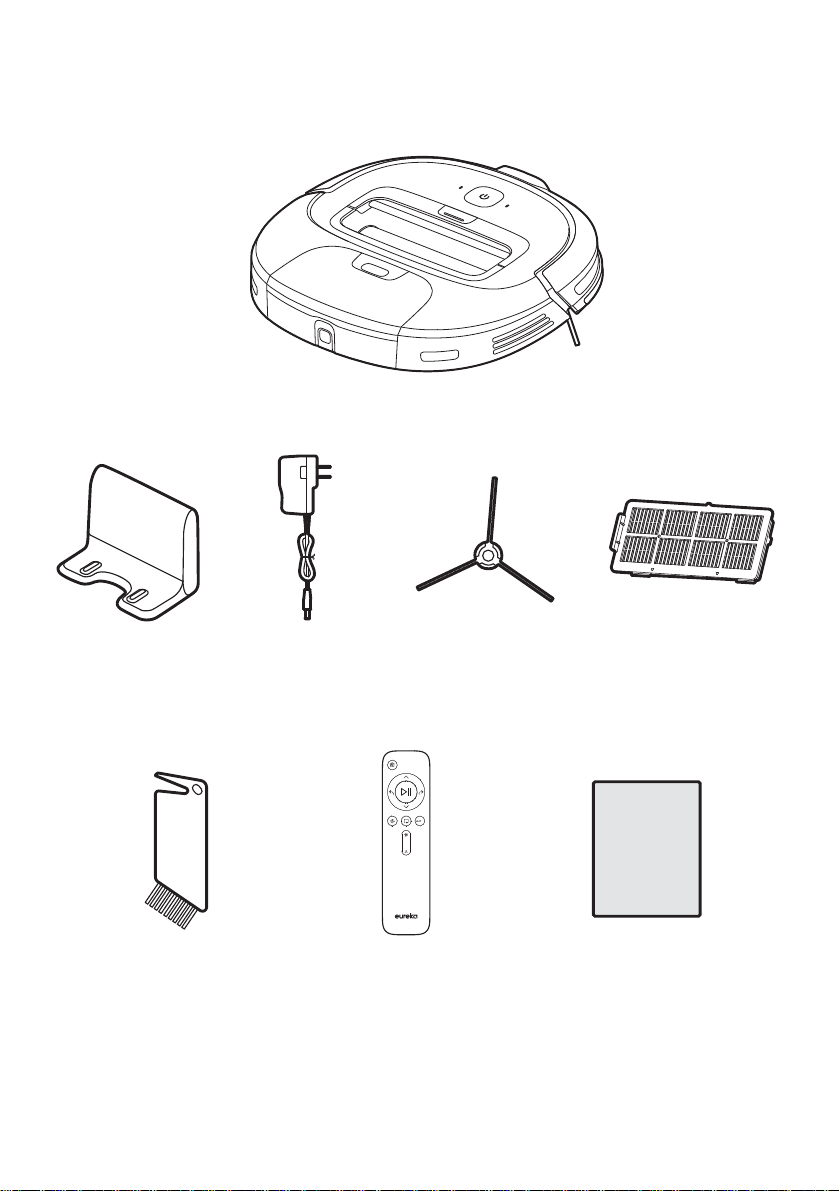
Vacuum
Charging base Charging cord 2 Spinning brushes +(3$ÀOWHUV
Brush roll tool Remote
(includes 2 AAA batteries)
2ZQHU·VPDQXDO
%XWWRQVRQ5RERW
6
Eureka Customer Service HELPLINE 1-800-282-2886
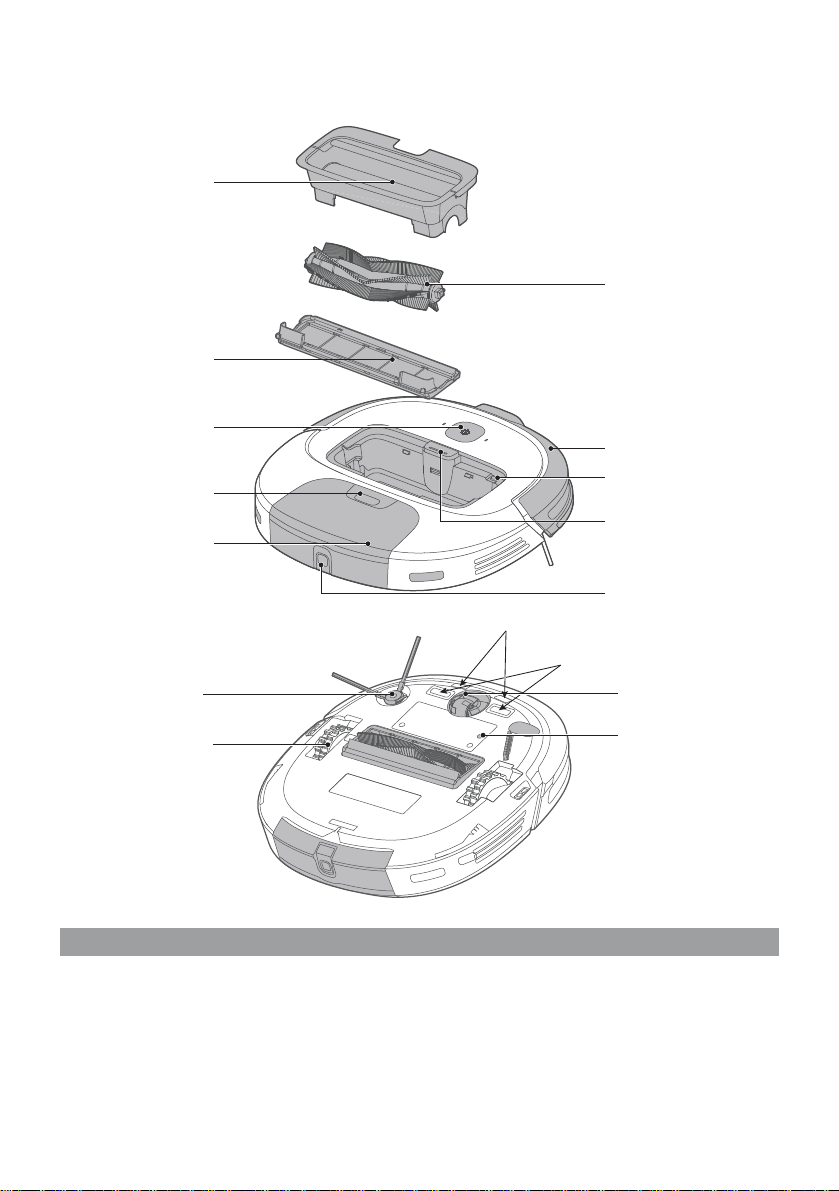
+RZWRLGHQWLI\SDUWVRI\RXUYDFXXPFOHDQHU
Brush roll cover
Brush roll frame
Power button
Dust cup release button
Dust cup
Drive wheel
Brush roll
Front bumper
Battery indicator light
Wi-Fi indicator light
Wi-Fi button
Brush roll access button
Dust cup empty button
Front caster wheel
Reset button
Press power button for 1 second to turn
robot on.
When robot is on, the power button will be lit up
in white.
When the robot is on, to start the robot cleaning,
press the power button.
When the robot is running press the power
button to pause it.
To fully turn off the power, press and hold the
power button for 3 seconds. A red light will blink
by the home icon on the robot and the power
button will no longer be illuminated white.
Spinner brush post
Cliff sensors
Charging contacts
(DV\$VVHPEO\
&KDUJLQJ
www.eureka.com 7
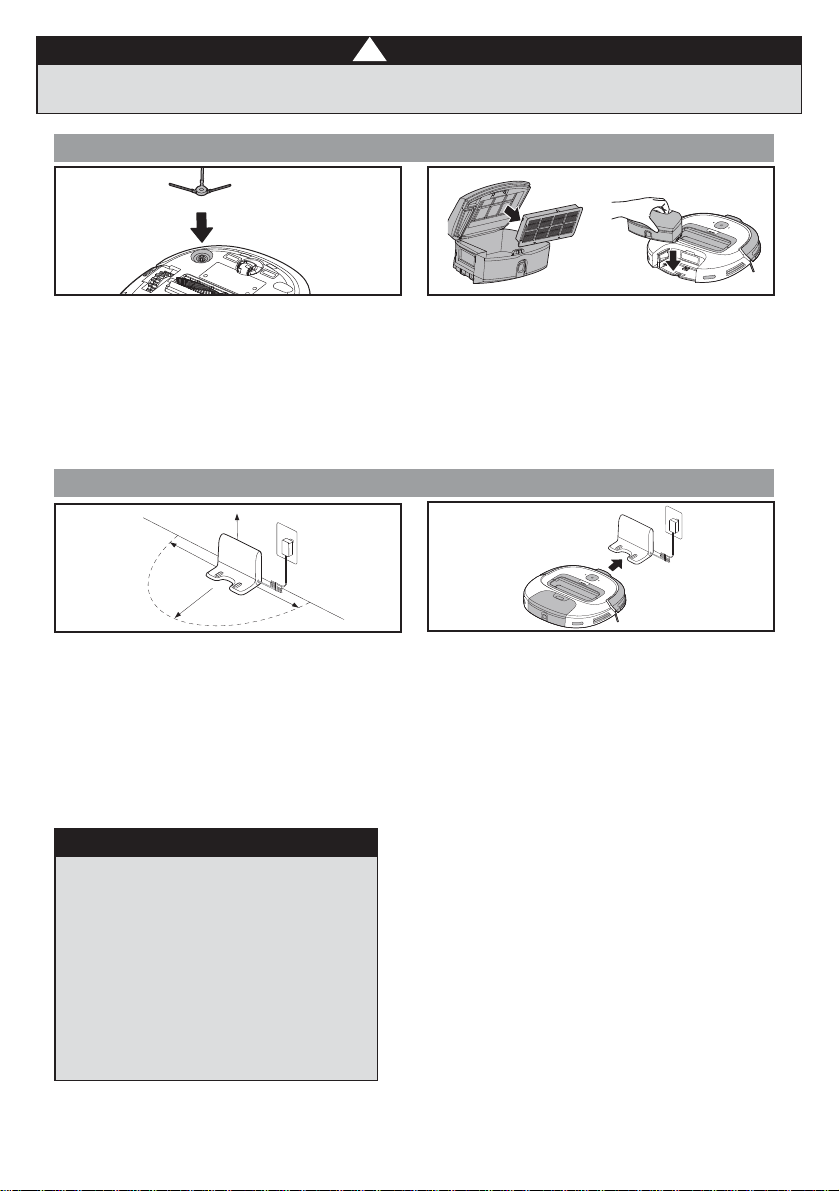
,QVWDOOWKHVLGHEUXVKEHIRUHXVH
Turn robot over and locate circle on upper
left side, align the small circle of the spinner
brush post in the center of the spinning brush
and push until it clicks in place.
!
:$51,1*
Before running the robot, clear area of power cords,
pull cords for curtains or blinds, clothing and fragile items.
+(3$ÀOWHULQVWDOODWLRQ
5RERWFRPHVZLWK+(3$ÀOWHULQVWDOOHG
%HIRUHXVHHQVXUHWKH+(3$ÀOWHULVVHFXUHO\
in place. Remove dust cup from robot, pull up
OLGRIGXVWFXSDQGPDNHVXUH+(3$ÀOWHULV
snapped into place. Ensure dust cup lid and
bottom latch are securely closed and replace
dust cup onto robot.
1. 3ODFHWKHEDFNRIWKHGRFNÁXVKDJDLQVWD
wall and ensure there are at least 3 feet of
free space along the wall on either side of the
dock, so the robot is not blocked.
2. Connect the charger into the port on the lower
right side of the dock and plug the other end
of the charger into the wall.
3. Place robot on charger and ensure that the
metal charging contacts on the bottom of the
robot and those on the dock are touching.
When the robot is correctly lined it will make
an audible beep and the power button on the
robot will light up.
4. The white light on and around the power button
will blink while the robot is charging and will turn to
a solid white light once the robot is fully charged.
5. Before initial use fully charge the robot for at
least 4 hours.
3 Ft
3 Ft
3 Ft
3 Ft
127(
When the battery power reaches less than 20%
the robot will shut off the suction power and
automatically return to the charging dock.
The robot may occasionally back up off the
charger and then go forward back onto charger
to realign itself if a better connection is needed
with the metal charging contacts.
Please note the robot will arrive with a partially
charged battery. If you start using it before fully
charging the battery, the cleaning cycle will be
shorter than normal as it will return to the dock to
recharge when it reaches 20% battery power.
7RHIIHFWLYHO\H[WHQGWKHEDWWHU\OLIH\RXVKRXOG
D)RUWKHÀUVWXVHSOHDVHFKDUJHIRUKRXUV
b. When the battery is low, please charge as soon as
possible
c. If you do not use the appliance for an extended
period of time, fully charge the battery and store in a
well ventilated and dry place
d. If the appliance is not used for more than 3 months,
charge the appliance for 12 hours
8VLQJUHPRWH
8
Eureka Customer Service HELPLINE 1-800-282-2886
1RWH The robot must be initially turned on to
operate in any of the four control methods. To turn
robot on, press power button on top of the robot
for 3 seconds to turn on until you hear a beep and
the power symbol is illuminated in white.
Once the robot is turned on, indicated by the
power button lit up in white, you can use either
the power button on the robot, the remote control
or the app to run the robot.
1. To turn robot on,
press power button
for 1 second
to turn on until you
hear a beep and
the power symbol is
illuminated in white.
If you want to run the robot using the on unit
power button:
1. Press power button on robot to start the robot.
Press power button on robot to stop the robot.
2. Robot will automatically run until the battery
reaches 20% charge, this will be indicated
E\DÁDVKLQJUHGOLJKWWRWKHOHIWRIWKHSRZHU
button on the robot. It will automatically stop
its suction power and will go back to the
charging dock on its own.
3. While the robot is on the dock it will remain
powered on. If you want to fully power the
robot down press the power button on the
robot for 3 seconds, release and the robot
will turn off.
+RZWR8VH5RERWLF9DFXXP&OHDQHU
Ensure that the robot is turned on by pressing and
holding the power button
on the robot for 3 seconds
to turn on until you hear a beep and the power symbol
is illuminated in white.
1. Press the start/stop button on remote to start the
robot. Press start/stop button on remote to stop or
pause the robot.
2. Robot will automatically run until its battery gets low,
WKLVZLOOEHLQGLFDWHGE\DÁDVKLQJUHGOLJKWWRWKHOHIW
of the power button on the robot. It will automatically
stop its suction power and will go back to the
charging dock on its own.
,I\RXZRXOGOLNHWKHURERWWRÀQLVKFOHDQLQJHDUOLHU\RX
can press the home button on the remote and the robot
will stop its suction power and go back to the charging
dock where it will automatically begin charging.
4. While the robot is on the dock it will stay turned on.
If you want to fully power the robot down press the
power button on the robot for 10 seconds, release
and the robot will turn off.
5HWXUQWR'RFN
3UHVV+RPH5HWXUQWR'RFNEXWWRQDQGURERW·VVXFWLRQ
will power down and it will navigate itself back to the
charging dock and automatically begin charging.
&OHDQLQJ0RGHDQG6XFWLRQ,QWHQVLW\
1. Press the different cleaning mode icon buttons to change
cleaning modes.
6SRW&OHDQLQJ0RGH Robot will repeatadly turn in a
tight spiral to focus on one spot.
(GJH&OHDQLQJ0RGH Robot will clean along the
edges of the room.
$XWR&OHDQLQJ0RGH Robot will clean the room
QRUPDOO\QRWDVSHFLÀFSDWWHUQ
2. The Suction Intensity button can increase or
decrease the suction manually.
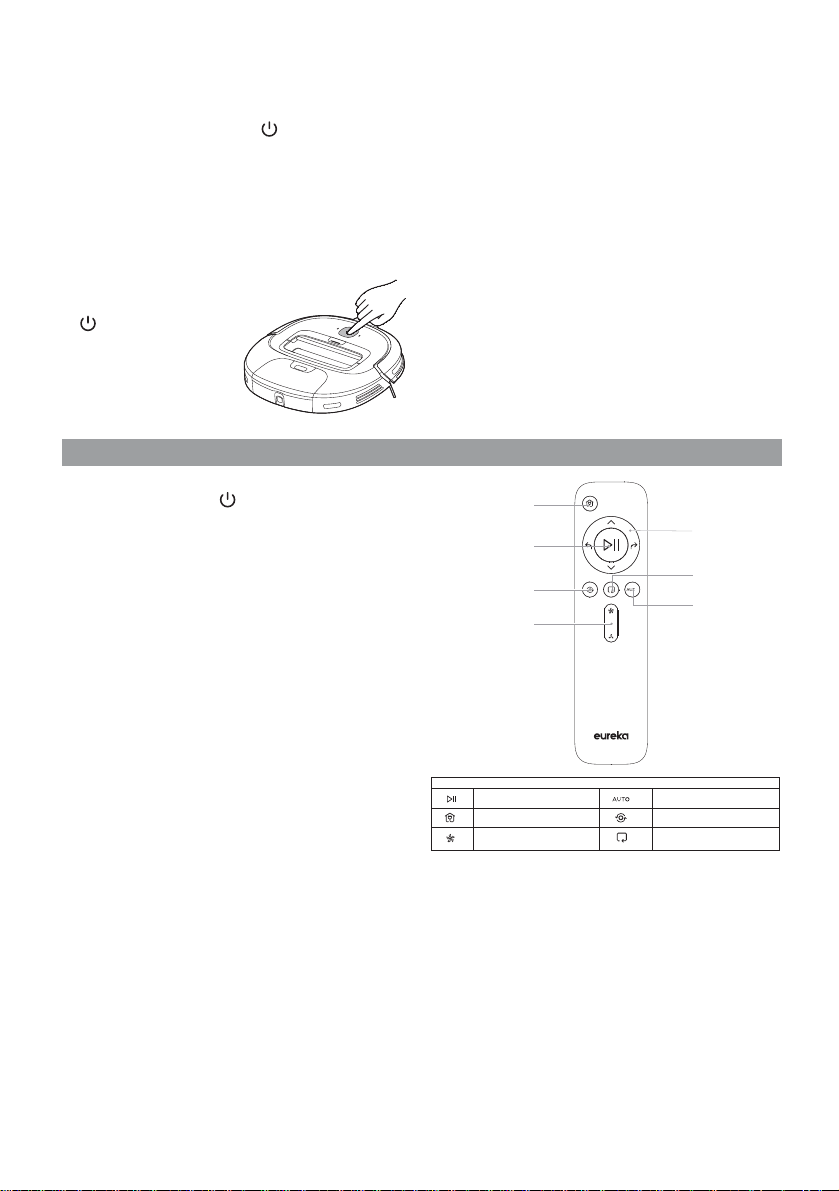
Home/
Return to Dock
Start/Stop
Spot Cleaning
Mode
Suction Power
Increase/Decrease
Directional
Controls
Edge Cleaning
Mode
Auto Cleaning
Mode
6HWWLQJ8S$SSDQG&RQQHFWLQJWR:L)L
www.eureka.com 9
1. In the App Store or Google Play, search for Eureka
Robot, download and install the app.
2. Open the Eureka app and complete the registration
process, which includes an email address
FRQÀUPDWLRQDQGRQFH\RXKDYHFRQÀUPHG\RXU
email address you can log in and follow the setup
instructions in the app.
3. Connect your phone to your home Wi-Fi network.
4. In the app select Add Devices and choose Groove
Robot NER300
5. On the robot, press the button that says “Press
for Brush Roll” and remove cover, on the far right
VLGHÀQGWKHVPDOOJUD\EXWWRQDQGSUHVVIRUDIHZ
seconds until you hear a ding and the light by the
Wi-Fi symbol on the top of the robot lights up, which
will indicate that the Wi-Fi has been successfully
connected.
8VLQJ$PD]RQ(FKRRU*RRJOH+RPH
$PD]RQ(FKR
1. Open Amazon Alexa App
6HOHFW¶6NLOOV*DPHV·DQGVHDUFKIRU(XUHND5RERW
and select
3. Enable the Eureka robot skill
<RXU(XUHNDURERWDSSZLOOWKHQRSHQDQG\RXZLOO
login using your Eureka robot app credentials
5. The Eureka robot skill and the app should now be
successfully linked, and this will be indicated on the
Amazon Alexa app.
<RXFDQQRZXVHWKHIROORZLQJFRPPDQGVWRFRQWURO
the robot:
“Alexa, tell Eureka robot to start cleaning”
“Alexa, tell Eureka robot to stop cleaning”
“Alexa, tell Eureka robot to go home”
*RRJOH+RPH
1. Open Google Home App
2. Search for Eureka robot and select
3. Link Eureka robot skill
<RXU(XUHNDURERWDSSZLOOWKHQRSHQDQG\RXZLOO
login using your Eureka robot app credentials
5. The Eureka robot skill and the app should now be
successfully linked
<RXFDQQRZXVHWKHIROORZLQJFRPPDQGVWRFRQWURO
the robot:
“Ask Eureka robot to start cleaning”
“Ask Eureka robot to stop cleaning”
“Ask Eureka robot to go home”
127(
7KLVPRGHOGRHVQRWVXSSRUWD:(3HQFU\SWHGURXWHU
7KHKRPH:L)LQDPHDQGSDVVZRUGPXVWEH(QJOLVK
numbers or symbols.
7KHQHWZRUNDFFHVVLQJFRQÀJXUDWLRQRIWKHURERWUHTXLUHV
a Wi-Fi network of 2.4GHz frequency range, it will work
with a 5GHz frequency range.
'XULQJLQLWLDOVHWXSGRQRWFRQQHFWWKHURERWWR:L)LZKLOH
the robot is charging, the robot must be fully charged to
successfully connect to Wi-Fi.
<RXPXVWKDYH:L)LLQRUGHUWRFRQWUROWKHURERWXVLQJWKH
app. Once you have set up the app and connect the Wi-Fi,
App may be operated in
Wi-Fi/2G/3G/4G network environment and you can control
the robot remotely.
,I\RXUKRPH:L)LSDVVZRUGLVFKDQJHGRUWKHURXWHULV
UHSODFHGWKHURERWZLOOVKRZDVRIÁLQHRQWKHDSS\RXZLOOMXVW
need to reconnect the robot to the Wi-Fi following the Wi-Fi
connecting instructions.
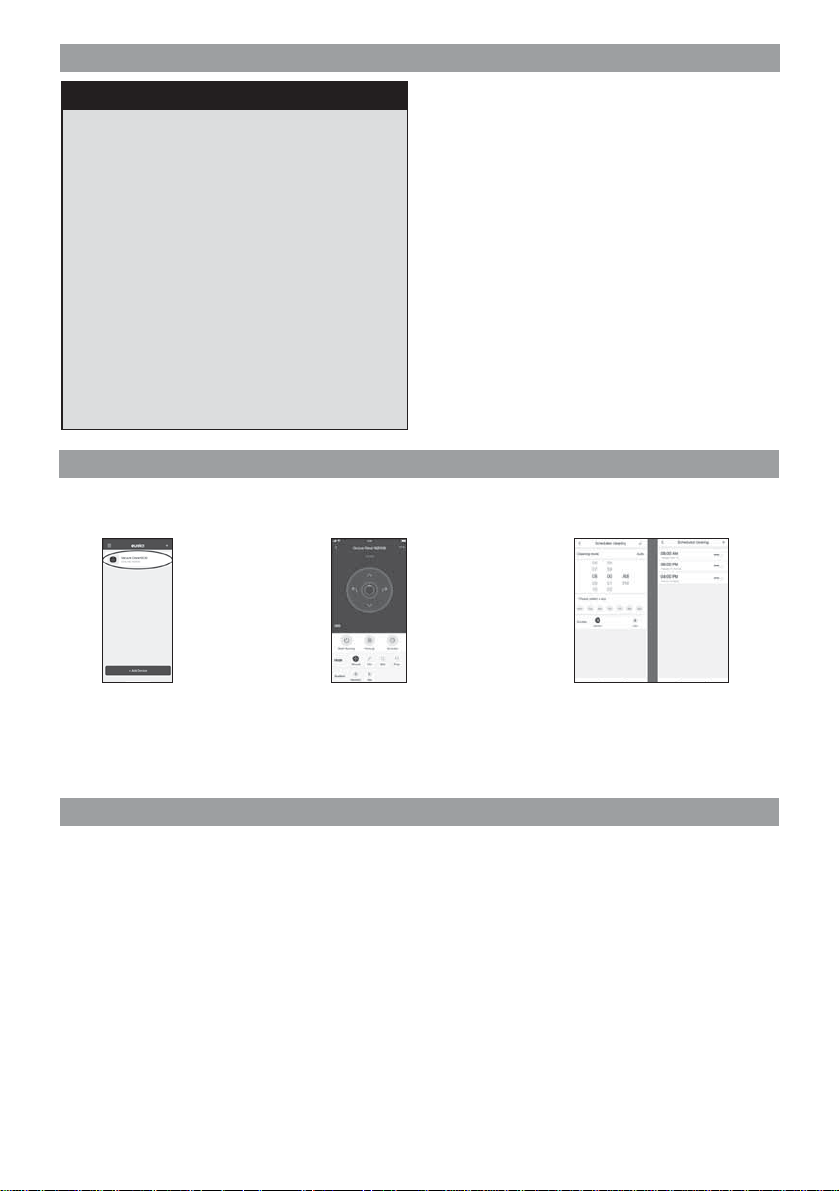
8VLQJ(XUHND5RERW$SS
The robot can be controlled using the Eureka Robot app from anywhere when the robot is connected to Wi-Fi. See
Connecting to Wi-Fi instructions to connect to Wi-Fi and complete Eureka robot app installation and registration.
2QWKHDSS·VKRPH
screen, select the
Groove Robot NER300
On the next screen you will be able to
use the buttons to start/stop cleaning,
change modes, adjust suction power,
recharge, direct and schedule the robot.
To schedule the robot, click the Schedule
button and you can add multiple cleaning
VFKHGXOHVVHOHFWVSHFLÀFGD\VDQGWLPHV
as well as the type of cleaning mode and
suction power you would like to use.
$SSVXSSRUWVL26DQGDERYH$QGURLGDQGDERYH
SKRQHV\VWHPYHUVLRQVWKHDSSLVQRWDYDLODEOHIRUXVH
ZLWKWDEOHWV
!
!
&$87,21
Make sure vacuum cleaner is turned off and not
plugged into a power source.
:$51,1*Do not attempt to remove belt.
Call the Eureka Customer Service HELPLINE
at 1-800-282-2886.
10
Eureka Customer Service HELPLINE 1-800-282-2886
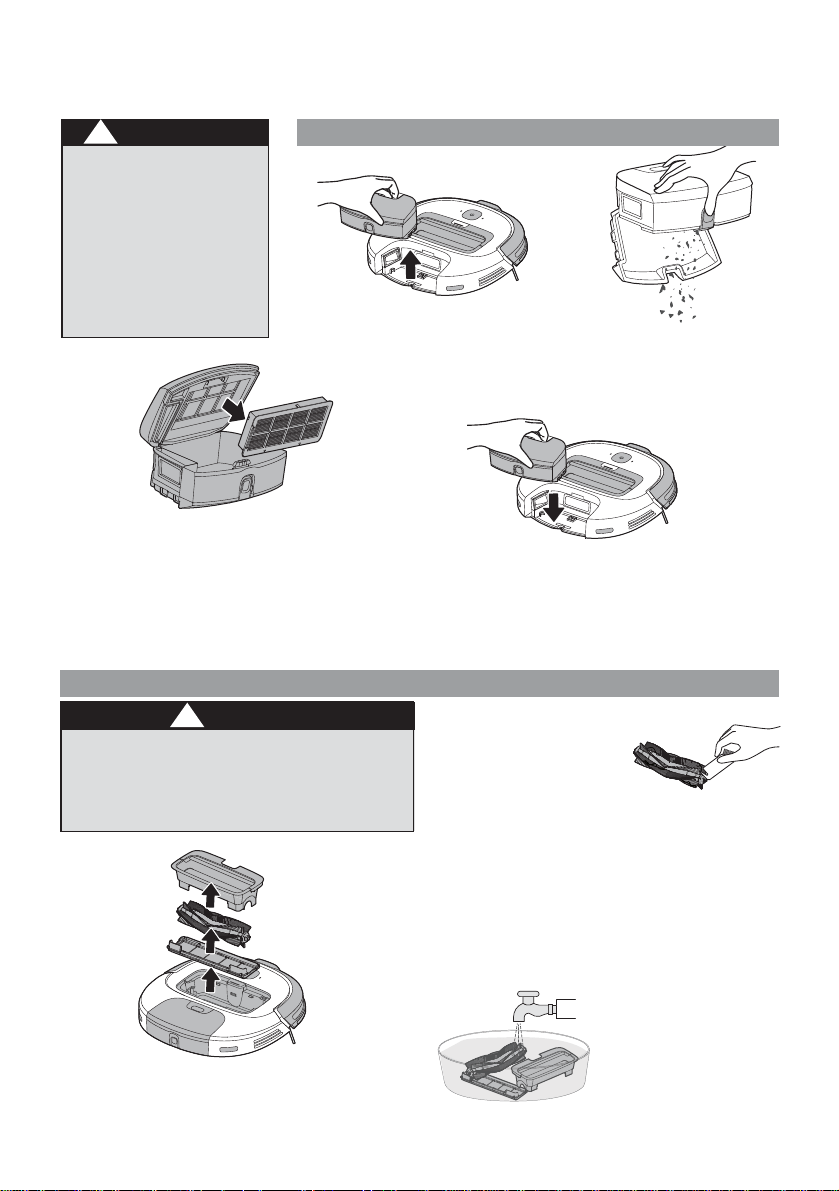
+RZWRPDLQWDLQ\RXUYDFXXPFOHDQHU
&$87,21
Never operate vacuum
FOHDQHUZLWKRXWDOOÀOWHUV
ÀOWHUVFUHHQDQGGXVWFXS
in proper position.
:$51,1*Moving parts!
Recharge cleaner after
each use.
2. Brush roll can then be lifted out
by pulling up on the left side
(indicated by the red tip). Any
threads, hair or debris can be cut
away with scissors or using the
included brush cleaner. Be sure to
remove any hair or strings which
may have wrapped around the tips of the brush roll.
3. Replace brush roll and push down to ensure it is correctly in
place with the red tipped end of the brush on the left side.
Replace lid and push down until it clicks.
1RWH If spinning brush is curled, you can remove it and place in
warm water for 30 seconds and then let it thoroughly dry. Also
regularly use the brush cleaner to remove dust, debris and hair
from the spinning brush. Brushroll frame can also be removed and
cleaned but lifting out. When putting back in ensure the side with
UXEEHUÁDSLVRQWKHVLGHFORVHVWWRWKHGXVWELQ
1. Press dust cup release button to remove
dust cup from robot.
:DVKDEOHEUXVKUROO²FOHDQIUHTXHQWO\
Every three months, rinse
and dry the brush roll, spinner
EUXVKDQG+(3$ÀOWHUWKHQGU\
thoroughly for at least 24 hours.
+RZWRPDLQWDLQEUXVKUROO
7RDYRLGXQQHFHVVDU\VHUYLFHFDOOVSHULRGLFDOO\FKHFNEUXVKUROOIRUGHEULV,IEUXVKUROOJHWVFORJJHG
LWZLOODXWRPDWLFDOO\VKXWRII7XUQYDFXXPRIIEHIRUHDWWHPSWLQJWRUHPRYHFORJ
1. Press brush roll release button on top of
robot and lift center unit out.
2. Hold dust cup over trash can and press
the easy empty release button.
3. Thoroughly clean dust cup. Lid can also
be opened from top to remove additional
debris that may be stuck.
2SHQOLGWRDFFHVVDQGUHPRYH+(3$ÀOWHUDQGVKDNHWR
UHPRYHGXVW5HSODFH+(3$ÀOWHUHQVXULQJWKDWGXVWDQG
GHEULVGRHVQ·WIDOOLQWRWKHRSHQLQJEHKLQGWKHÀOWHUDQGWKHQ
SXVKÀOWHUHGJHVWRHQVXUHLWFOLFNVEDFNLQWRSODFH
5. Close top and bottom lid until they both click in to place and
place the dust cup back on the robot until it clicks into place.
Regularly use a dry cloth to remove dust and debris from cliff sensors,
charging contacts and sensors on front bumper to ensure they are not blocked.
'XVWFXS²(PSW\DIWHUHDFKXVH

www.eureka.com 11
7KH(XUHNDWZR\HDUOLPLWHGZDUUDQW\
Midea America Corp. (“Eureka”), subject to the terms and conditions
herein, warrants this vacuum cleaner to be free from defects in material and
workmanship for a term of two years from the date of original purchase
when used in accordance with the Eureka operating and maintenance
instructions and under normal household usage. This warranty is granted
only to the original purchaser and members of immediate household, and is
applicable only to original purchases from Eureka authorized resellers.
:KDW(XUHNDZLOOGR
Eureka will, at its option, repair or replace a defective vacuum or vacuum
part that is covered by this warranty. Repairs may be performed using new
or refurbished parts that meet or exceed Eureka specifications for new
parts. If Eureka elects to replace the vacuum, the replacement may be a
reconditioned unit. Depending on availability of products, Eureka reserves
the right to provide you with a replacement product that is the same or
similar, or substitute equivalent of the original product. As a matter of
warranty policy, Eureka will not refund the consumer’s purchase price.
7KLVZDUUDQW\GRHVQRWFRYHU
• Battery module and battery components. The battery module and its
components are covered by a separate one-year limited battery warranty.
• Normal wear and tear of the vacuum and vacuum parts that require
replacement under normal use such as disposable dust bags, filters, drive
belts, light bulbs, brush-roll, bristles, impellers and cleaning.
• Damages or malfunctions resulting from: improper or unreasonable use
or maintenance, abuse, negligence, failure to follow instructions contained
in any written materials that accompany the product, deterioration by
reason of excess moisture, corrosive atmosphere, lightning, power
surges, connections to improper voltage supply, unauthorized alteration,
or other external causes such as extremes in temperature or humidity,
modifications, scratches or discoloration, accidents, misuse, or acts of
God. This warranty also does not cover damage resulting from repair or
attempted repair by anyone other than Eureka or an authorized Eureka
Warranty Station. This warranty is not applicable to any product that has
been altered or on which the serial number has been defaced, modified or
removed. Altering, erasing, or forging any proof-of-purchase documents
voids any applicable product warranty.
2EWDLQLQJZDUUDQW\VHUYLFH
To obtain warranty service you must contact the Eureka Service Team,
toll free, at 1-800-282-2886 or email [email protected],
to discuss the warranty claim and procedures to be followed. All warranty
claims must include submission of proof-of-purchase documentation. For
additional information, you may also visit www.eureka.com.
6KLSSLQJFKDUJHV
You will be responsible for any initial shipping and insurance charges if
the defective product(s) must be shipped for warranty service or warranty
evaluation; however, Eureka or a Eureka Authorized Warranty Station will
pay the return shipping charges if repairs are covered by the warranty.
When returning parts for repair, you must include the model, type and serial
number located on the rating plate. If any product submitted for warranty
service is found to be ineligible, an estimate of repair cost will be furnished
and the repair performed only if requested by the owner and upon receipt of
payment or acceptable arrangements for payment.
)XUWKHUOLPLWDWLRQVDQGH[FOXVLRQV
Any warranty that may be implied in connection with your purchase or use
of the vacuum, including any warranty of Merchantability or any warranty
of Fitness For A Particular Purpose is limited to the duration of this limited
warranty. Some states do not allow limitations on how long an implied
warranty lasts, so the above limitations may not apply to you.
Your relief for the breach of this warranty is limited to the relief expressly
provided above. In no event shall the manufacturer be liable for any
consequential or incidental damages you may incur in connection with your
purchase or use of the vacuum. Some states do not allow the exclusion or
limitation of incidental or consequential damages, so the above limitation
or exclusion may not apply to you. This warranty gives you specific legal
rights. You may also have other rights, which may vary by state.
7KH(XUHNDPRQWKOLPLWHGEDWWHU\
ZDUUDQW\
Midea America Corp. (“Eureka”), subject to the terms and conditions
herein, warrants this Battery Module to be free from defects in material
and workmanship for a term of one year from the date of original purchase
when used in accordance with the Eureka operating and maintenance
instructions and under normal household usage. This warranty is granted
only to the original purchaser and members of immediate household, and
is applicable only to original purchases from Eureka authorized resellers.
:KDW(XUHNDZLOOGR:
Eureka will, at its option, repair or replace a defective Battery Module or
battery part that is covered by this warranty. Repairs may be performed
using new or refurbished parts that meet or exceed Eureka specifications
for new parts. If Eureka elects to replace the Battery Module, the
replacement may be a reconditioned unit. Depending on availability of
products, Eureka reserves the right to provide you with a replacement
product that is the same or similar, or substitute equivalent of the original
product. As a matter of warranty policy, Eureka will not refund the
consumer’s purchase price.
7KLVZDUUDQW\GRHVQRWFRYHU
• Normal wear and tear of the Battery Module and battery parts that require
replacement under normal use.
• Damages or malfunctions resulting from: improper or unreasonable
use or maintenance, abuse, negligence, failure to follow instructions
contained in any written materials that accompany the product,
deterioration by reason of excess moisture, corrosive atmosphere,
lightning, power surges, connections to improper voltage supply,
unauthorized alteration, or other external causes such as extremes in
temperature or humidity, modifications, scratches or discoloration,
accidents, misuse, or acts of God. This warranty also does not cover
damage resulting from repair or attempted repair by anyone other than
Eureka or an authorized Eureka Warranty Station. This warranty is not
applicable to any product that has been altered or on which the serial
number has been defaced, modified or removed. Altering, erasing, or
forging any proof-of-purchase documents voids any applicable product
warranty.
2EWDLQLQJZDUUDQW\VHUYLFH
To obtain warranty service you must contact the Eureka Service Team,
toll free, at 1-800-282-2886 or email [email protected],
to discuss the warranty claim and procedures to be followed. All warranty
claims must include submission of proof-of-purchase documentation. For
additional information, you may also visit www.eureka.com.
6KLSSLQJFKDUJHV
You will be responsible for any initial shipping and insurance charges if
the defective product(s) must be shipped for warranty service or warranty
evaluation; however, Eureka or a Eureka Authorized Warranty Station will
pay the return shipping charges if repairs are covered by the warranty.
When returning parts for repair, you must include the model, type and
serial number located on the rating plate. If any product submitted for
warranty service is found to be ineligible, an estimate of repair cost will
be furnished and the repair performed only if requested by the owner and
upon receipt of payment or acceptable arrangements for payment.
)XUWKHUOLPLWDWLRQVDQGH[FOXVLRQV
Any warranty that may be implied in connection with your purchase or use
of the Battery Module, including any warranty of Merchantability or any
warranty of Fitness For A Particular Purpose is limited to the duration of
this limited warranty. Some states do not allow limitations on how long an
implied warranty lasts, so the above limitations may not apply to you.
Your relief for the breach of this warranty is limited to the relief expressly
provided above. In no event shall the manufacturer be liable for any
consequential or incidental damages you may incur in connection with
your purchase or use of the Battery Module. Some states do not allow
the exclusion or limitation of incidental or consequential damages, so the
above limitation or exclusion may not apply to you.
This warranty gives you specific legal rights. You may also have other
rights, which may vary by state.
0LGHD$PHULFD&RUS6\OYDQ:D\3DUVLSSDQ\1-86$
!
!
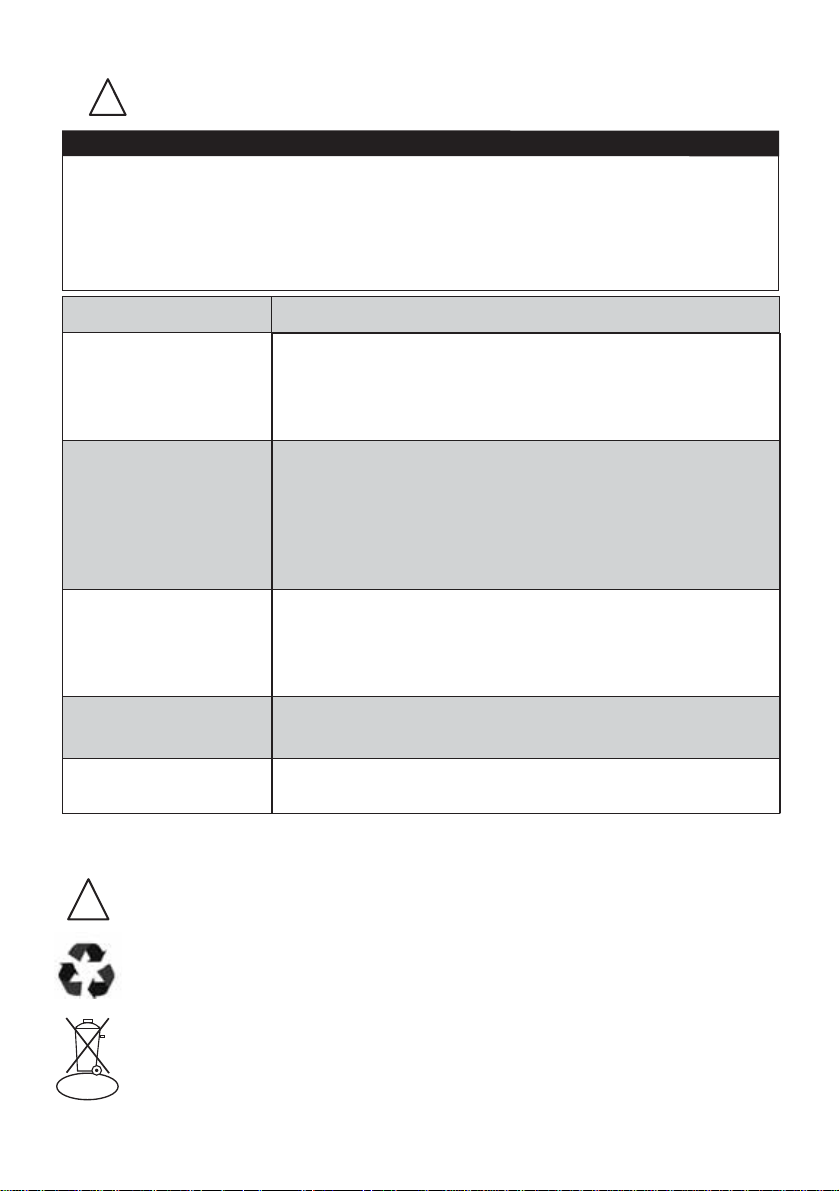
3UREOHP 6ROXWLRQ
Motor will not start
• Make sure cleaner is fully powered.
• Push charger securely into electrical outlet, try another
outlet or check circuit breaker.
• See detailed “thermal cut-off” instructions above.
Charging indicator lights
are not lit while charging
4HRLZ\YLJOHYNLYPZZLJ\YLS`PUZLY[LKPU[VLSLJ[YPJHSV\[SL[
4HRLZ\YLJOHYNPUNWS\NPZZLJ\YLS`PUZLY[LKPU[V[OLKVJR
4HRLZ\YL[OH[JOHYNPUNJVU[HJ[ZVUKVJRHUKJOHYNPUNJVU[HJ[Z
VUYVIV[HYLJVYYLJ[S`SPULK\WHUKUV[OPUNPZJV]LYPUN[OLT0M
ULJLZZHY`\ZLHKY`JSV[O[OLYLTV]LK\Z[VYKLIYPZ[OH[TH`OH]L
I\PS[\WVU[OLJOHYNPUNJVU[HJ[Z
1RWHQRXJK
VXFWLRQSRZHU
(PSW\GXVWFXSDQGFOHDQRUFKDQJHÀOWHUV6HHSDJHIRU
maintenance instructions.
• Make sure cleaner is fully powered. Charge battery.
5HPRYHFORJVWKDWUHVWULFWWKHDLUÁRZ
1RWHQRXJK
UXQQLQJWLPH
• Make sure cleaner is fully powered.
• Charge battery for up to four hours before using.
%UXVKUROOZLOOQRWWXUQ
• Check brushroll, brushroll frame and brushroll bearings for hair
wrap or debris. See page 9 for maintenance instructions.
12
Eureka Customer Service HELPLINE 1-800-282-2886
/LLRQ
3UREOHPVROYLQJ
0DNHVXUHYDFXXPFOHDQHULVRIIDQGFKDUJLQJSOXJLVXQSOXJJHG
This vacuum cleaner has a special thermostat that protects the vacuum cleaner in case of motor
overheating. ,IWKHYDFXXPVXGGHQO\VKXWVRII, proceed as follows: 1) Check the vacuum for a
SRVVLEOHVRXUFHRIRYHUKHDWLQJVXFKDVDIXOOGXVWFXSWDQJOHGEUXVKUROORUFORJJHGÀOWHUV,IWKHVH
FRQGLWLRQVDUHIRXQGÀ[WKHPDQGZDLWDWOHDVWPLQXWHVEHIRUHDWWHPSWLQJWRXVHWKHYDFXXP
2) After the PLQXWH period, press the power button. If the vacuum still does not work, call the
Eureka Customer Service +(/3/,1( at 1-800-282-2886.
127,&(7KHUPDOFXWRII
'LVFDUGLQJWKHYDFXXPDQGEDWWHU\SDFN
)LMVYL`V\KPZJHYK[OPZ]HJ\\TKPZWVZLVMIH[[LY`PUHULU]PYVUTLU[HSS`ZHML
THUULY+VUV[KPZJHYKIH[[LY`^P[O`V\YYLN\SHYOV\ZLOVSK[YHZO
,PSRUWDQWEDWWHU\GLVSRVDOLQIRUPDWLRQ
7RÀQGDGLVSRVDOORFDWLRQQHDUHVW\RXFDOO
To preserve natural resources, please recycle or dispose of expired battery
pack properly.;OPZWYVK\J[JVU[HPUZHSP[OP\TPVUIH[[LY`0[T\Z[ILKPZWVZLK
VMWYVWLYS`3VJHSSH^ZTH`WYVOPIP[KPZWVZHSVMSP[OP\TPVUIH[[LYPLZPUVYKPUHY`
[YHZO*VUZ\S[`V\YSVJHS^HZ[LH\[OVYP[`MVYPUMVYTH[PVUYLNHYKPUNH]HPSHISL
YLJ`JSPUNHUKVYKPZWVZHSVW[PVUZ
www.eureka.com 13
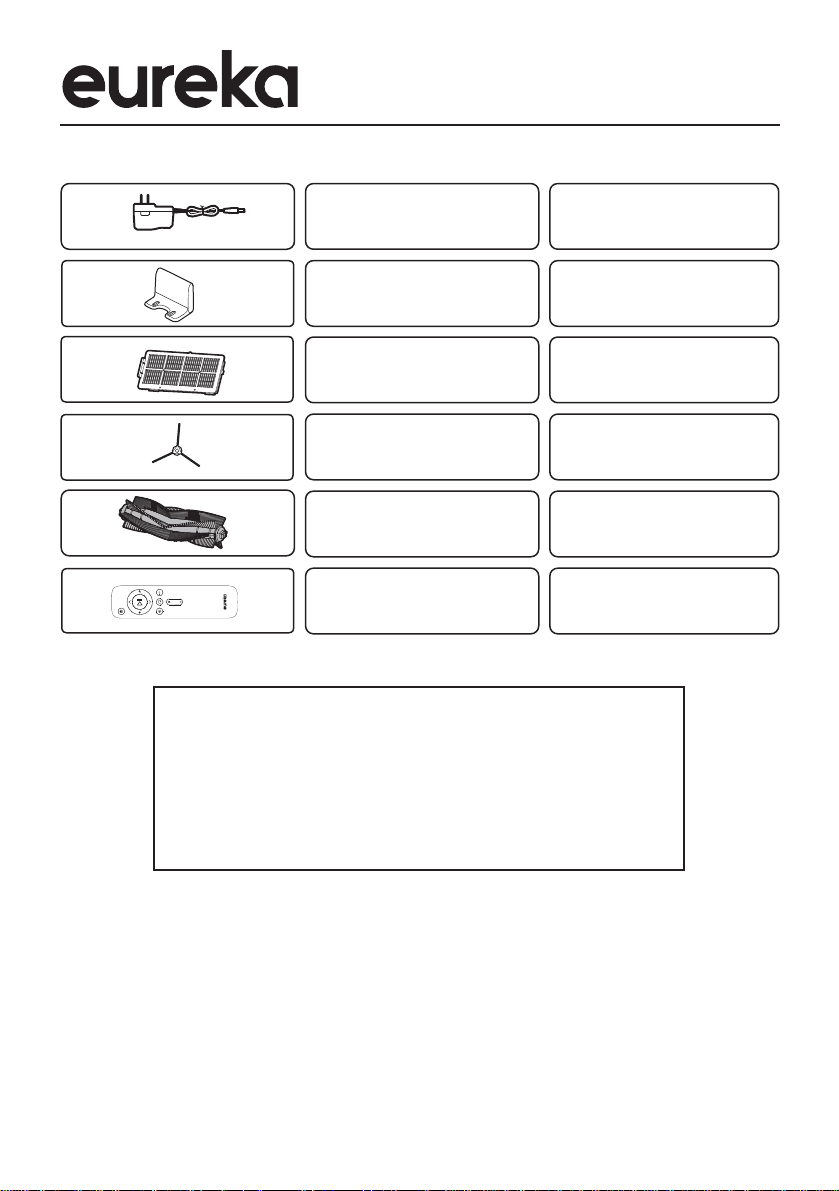
Charger
Charging base
HEPA Filter
Spinner brush
Brush roll
Remote control
R0106
R0105
R0104
R0102
R0103
@2020 Midea America Corp. Printed in China.
2UGHUJHQXLQH(XUHNDDFFHVVRULHVDQGUHSODFHPHQWSDUWV
9LVLW www.eureka.comRUFDOO
,PDJH
3DUWÀWVPRGHOV
3DUWQDPH
R0101
Free 3 months extension of the
original limited warranty period!
Just text proof of purchase to
844 224 1614
* The extension is for the three months immediately following the
FRPSOHWLRQRIWKHSURGXFW·VRULJLQDOZDUUDQW\SHULRG