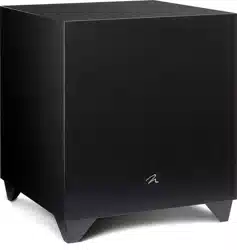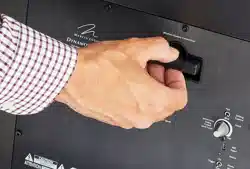
Dy n a m o 600X
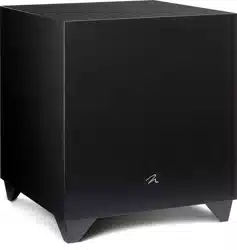
Dy n a m o 800X
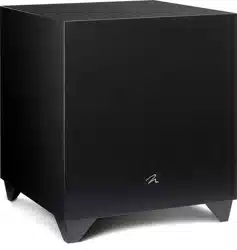
Dy n a m o 1100X
Dy n a m o
1600X
Model/型号: Dy n a m o 600 X / Dy n a m o 8 00X / Dy n a m o 110 0X / Dy n a m o 1600 X
®
user’s manual / manuel de l’utilisateur / 使用手册

Serial Numbers: _________________________________________
Record your serial numbers here for easy reference. You will need this informa-
tion when filling out your warranty registration. Your serial number is located
near the bottom of the backplate and on the shipping container.
Settings:
Volume (level): __________________________________________
Low Pass Filter: _________________________________________
Phase: ________________________________________________
20–30Hz Level: ________________________________________
A/V Processor Bass Management Settings:
Main Speaker Size: ___________ (large recommended for full range speakers)
Center Speaker Size: _______________________ (small recommended)
Surround Speaker Size: _____________________ (small recommended)
Level: _________________________________________________
High-Pass: _____________________________________________
Low-Pass: ______________________________________________
Numéro de série _______________________________________________
Veuillez noter vos numéros de série ici afin de pouvoir les consulter facilement. Vous aurez
besoin de ces renseignements lorsque vous remplirez l’inscription à la garantie. Le numéro
de série se trouve dans la partie inférieure de la plaque arrière et sur le carton d’emballage.
Paramètres` :
Volume (niveau) ________________________________________________
Filtre passe basse ______________________________________________
Phase ________________________________________________________
Niveau 20–30 Hz _____________________________________________
Paramètres de gestion des graves du processeur A/V :
Taille de l’enceinte principale ____________________________________
(grande taille recommandée pour les enceintes à gamme complète)
Taille de l’enceinte centrale ______________________ (petite taille recommandée)
Taille de l’enceinte ambiophonique _______________ (petite taille recommandée)
Niveau ______________________________________________________
Passe haute __________________________________________________
Passe basse __________________________________________________

Thank you—to you the MartinLogan owner,
for loving what we do,
and making it possible for us to do what we love.
— — — — — — — — — — — — — — — — — — — — — — — — — — — — — —
Merci à vous, propriétaire d’un produit MartinLogan,
d’aimer ce que nous faisons,
et de faire en sorte que nous puissions faire ce que nous aimons.


Contents | table des matières
Overview of Controls and Connections ......... 2
Controls ...................................2
Audio Signal Connections .......................3
Wireless Audio Signal Connection ..................4
AC Power Connection ..........................4
Break-In....................................4
Overview of the Subwoofer Control App ....... 5
The Logo Button ..............................5
The Menu Bar ...............................5
Settings: Volume ..............................6
Settings: Low Pass Filter .........................6
Settings: Phase ...............................7
Settings: Listening Modes ........................8
Settings: 20–30Hz Level ........................8
Settings: Room Correction........................8
Settings: Passcode.............................8
Settings: Rename..............................8
Settings: Reset ...............................8
Connecting the Subwoofer and Setting Controls .. 9
Before Connecting the
Dynamo ....................9
2-Channel Mode .............................9
Multi-Channel Mode ..........................10
Simultaneous 2-Channel/Multi-Channel Mode .........12
Using Speaker Level Inputs ......................14
SWT-X Wireless Systems .......................15
SWT-X Status LEDs and Power ....................15
Placement ............................. 16
Subwoofer Position ...........................16
www.martinlogan.com/subsetup ..................16
Ask Your Dealer .............................16
Enjoy Yourself...............................16
Installing in a Cabinet .........................16
Changing Woofer Orientation....................17
Room Acoustics ......................... 18
Your Room.................................18
Terminology ...............................18
Solid Footing ...............................18
Home Theater .......................... 19
Anthem Room Correction (ARC™) Setup ....... 20
About ARC ................................20
Before You Begin ............................20
ARC Connection (Mobile Device)..................20
Running ARC (Mobile Device) ....................20
ARC Conneciton (Computer) .....................21
Running ARC (Computer) .......................21
Frequently Asked Questions and Troubleshooting 22
Frequently Asked Questions......................22
Troubleshooting .............................22
Control App Troubleshooting.....................23
ARC Troubleshooting ..........................23
General Information ..................... 24
Warranty and Registration ......................24
Service ...................................24
Specifications........................... 26
Aperçu des commandes et des raccords ....... 30
Commandes ................................30
Connexions de signal audio .....................31
Connexions de signal audio sans fil .................32
Raccord de l’alimentation CA ....................32
Rodage...................................32
Aperçu de l’application de commande du
caisson de sous-graves ................... 33
Le bouton Logo . . . . . . . . . . . . . . . . . . . . . . . . . . . . 33
La barre de menu ............................33
Réglages : volume............................34
Réglages : filtre de passe basse...................34
Réglages : phase ............................35
Réglages : modes d’écoute......................36
Réglages : 20–30Hz level (niveau) ................36
Réglages : correction de la pièce..................36
Réglages : mot de passe .......................36
Réglages : renommer..........................36
Réglages : réinitialiser .........................36
Raccord du caisson de sous-graves et commandes
de réglage
.............................. 37
Avant de raccorder le
Dynamo ...................37
Mode à 2 canaux............................37
Mode canaux multiples ........................38
Mode 2 canaux/canaux multiples simultanés ..........40
Utilisation de l’entrée Speaker Level (niveau d’enceinte) ....42
Système SWT-X sans fil.........................43
DEL de statut SWT-X et alimentation ................43
Placement ............................. 44
Position d’écoute.............................44
www.martinlogan.com/subsetup ..................44
Demandez à votre revendeur.....................44
Profitez du produit ............................44
Installation dans un boîtier ........................44
Modifier l’orientation du haut-parleur
..................45
Acoustique de la pièce .................... 46
Votre pièce ................................46
Terminologie ...............................46
Base solide ................................46
Cinéma maison ......................... 47
Configuration de l’Anthem Room Correction (ARC
MC
)
. 48
À propos de l’ARC ...........................48
Avant de commencer..........................48
Connexion ARC (appareil mobile) .................48
Lancement de l’ARC (appareil mobile)
................48
Connexion de l’ARC (ordinateur) ..................49
Lancement de l’ARC (ordinateur)...................49
Foires aux questions et dépannage .......... 50
Foires aux questions...........................50
Dépannage ................................51
Dépannage de l’application de commande ...........51
Dépannage de l’ARC..........................51
Renseignements généraux ................. 53
Garantie et Enregistrement ......................53
Service ...................................53
Spécifications........................... 54

6

7
Congratulations! You have invested in one of the world's pre-
mier subwoofers.
MartinLogan Dynamo subwoofers represent the extension of an
intensive, dedicated team research program directed toward
establishing a world class line of reference subwoofers using lead-
ing-edge technology, without compromising durability, reliability,
craftsmanship or aesthetics.
Dynamo subwoofers feature a high-excursion driver to achieve
deep, tight, well-defined bass and a powerful amplifier to drive
the output stage with precision and extremely high efficiency.
Low-pass filtering and phase control have been designed to make
integrating the
Dynamo subwoofer with MartinLogan and non-
MartinLogan products both seamless and simple.
Dynamo subwoofers are designed with a Bluetooth control system
to simplify the setup process. Additionally,
Dynamo subwoofers fea-
tures the ability to connect to Anthem Room Correction™ technology
(sold separately). ARC measures acoustic output within your room
and optimizes the subwoofer's performance within your unique lis-
tening environment.
The materials in your new subwoofer are of the highest quality and
will provide years of enduring enjoyment and deepening respect.
The cabinet is constructed from the finest composite material for
acoustical integrity and is finished with an attractive custom coating.
This User's Manual will explain in detail the operation of your
subwoofer and the philosophy applied to its design. A clear
understanding will insure that you obtain maximum performance
and pleasure from this most exacting subwoofer.
Félicitations! Vous avez acheté un des meilleurs caissons de
sous-grave au monde.
Les caissons de sous-graves MartinLogan
Dynamo sont le fruit d’un
programme de recherche intensif mené par une équipe dévouée
visant à développer une gamme de caissons de sous-graves
de classe mondiale à l’aide d’une technologie de pointe, sans
faire de compromis sur la durabilité, la fiabilité, le savoir-faire ou
l’esthétique.
Les caissons de sous-graves
Dynamo sont dotés d’un haut-parleur
de graves à excursion élevée qui produit des graves profondes,
serrées et bien définies, et d’un amplificateur puissant qui reproduit
la sortie avec une précision et une efficacité très élevées. La filtra-
tion à passe basse et la commande de phase ont été conçues
pour faciliter et simplifier l’intégration des caissons de sous-graves
Dynamo avec les produits fabriqués par MartinLogan ou non.
Les caissons de sous-graves
Dynamo sont dotés d’un système
de commande Bluetooth qui simplifie le processus de configura-
tion. De plus, les caissons de sous-graves
Dynamo peuvent se
connecter au système de correction de la pièce Anthem Room
Correction
MC
(vendu séparément). L’ARC mesure la sortie acous-
tique dans la pièce et optimise le rendement du caisson de
sous-graves au sein de votre environnement d’écoute unique.
Les matériaux utilisés dans votre nouveau caisson de sous-graves
Dynamo sont de la plus haute qualité et vous offriront des années de
plaisir d’écoute et de profond respect. Le boîtier est construit avec le
matériau composite le plus fin pour garantir l’intégrité acoustique et il
est enduit d’un revêtement spécial attrayant.
Ce manuel de l’utilisateur explique en détail le fonctionnement du
caisson de sous-graves
Dynamo et la philosophie sous-jacente à sa
conception. En comprenant bien le fonctionnement du caisson de
sous-graves, vous pourrez en profiter au maximum.
introduCtion

180°
180°
180°
180°
Dynamo 600X
Dynamo 800X
Dynamo 1100X
Dynamo 1600X

EU COMPLIANCE INFORMATION
Hereby, SVI Holdings (US), Inc.’s declares that this Dynamo 600X, Dynamo 800X, Dynamo 1100X, or Dynamo 1600X
ments and other relevant provisions of the following EU Compliance Directive Information.
• Conforms to European Union Low Voltage Directive 2014/35/EU;
• European Union EMC Directive 2014/30/EU;
• European Union Radio Equipment Directive (RED) 2014/53/EU.
• European Union Eco-Design Directive 2009/125/EC;
• European Union WEEE Directive 2012/19/EU;
• European Union Restriction of Hazardous Substances Recast (RoHS2) Directive 2011/65/EU;
• European Union Registration, Evaluation, Authorization and Restriction of Chemicals (REACH) Directive
2006/121/EC;
• You may obtain a free copy of the Declaration of Conformity by contacting your dealer, distributor, or
SVI Holdings (US), Inc.’s worldwide headquarters. Contact information can be found here: http://www.
martinlogan.com
INFORMATION SUR LA CONFORMITÉ POUR L’UE
Par la présente, SVI Holdings (US), Inc. déclare que son produit Dynamo 600X, Dynamo 800X, Dynamo 1100X, ou
Dynamo 1600X est conforme aux principales exigences et autres clauses pertinentes des directives suivantes sur
l’information de la conformité pour l’EU.
• Conforme à la Directive européenne Basse tension 2014/35/UE;
• Directive européenne CEM 2014/30/UE;
• Directive européenne 2014/53/UE relatives aux équipements radioélectriques (RED);
• Directive européenne d’écoconception 2009/125/CE;
• Directive européenne WEEE 2012/19/UE;
•
Directive européenne sur la restriction de l’utilisation de certaines substances dangereuses dans les équipe-
ments électriques et électroniques (Union Restriction of Hazardous Substances Recast) (RoHS2) 2011/65/UE;
• Directive européenne concernant l’enregistrement, l’évaluation et l’autorisation des substances chimiques
ainsi que les restrictions applicables à ces substances (REACH) (Registration, Evaluation, Authorization
and Restriction of Chemicals) 2006/121/CE.
• Vous pouvez obtenir un exemplaire gratuit de la Déclaration de conformité en communiquant avec votre
revendeur, votre distributeur ou le siège social mondial de SVI Holdings (US), Inc. Les coordonnées sont
disponibles ici : http://www.martinlogan.com
This device complies with Industry Canada’s licence-exempt RSSs. Operation is subject to the following two conditions:
(1) This device may not cause interference; and
(2) This device must accept any interference, including interference that may cause undesired operation of
the device.
Any changes or modifications not expressly approved by the party responsible for compliance could void the
user’s authority to operate the equipment.
This equipment complies with IC radiation exposure limits set forth for an uncontrolled environment.
Le présent appareil est conforme aux CNR d’Industrie Canada applicables aux appareils radio exempts de licence.
L’exploitation est autorisée aux deux conditions suivantes :
(1) l’appareil ne doit pas produire de brouillage, et
(2) l’utilisateur de l’appareil doit accepter tout brouillage radioélectrique subi, même si le brouillage est
susceptible d’en compromettre le fonctionnement.
Les changements ou modifications non expressément approuvés par les autorités compétentes en matière de
conformité peuvent priver l’utilisateur du droit d’utiliser l’équipement en question.
Ce dispositif respecte les limites de l’IC sur l’exposition aux radiations établies pour un environnement non contrôlé.
specifications / SPÉCIFICATIONS / 规格
Contains / Contient / 包含 FCC ID : QOQBGM113 Contains IC : 5123A-BGM113
Frequency Range / Frequency Range / 频率范围 : 2402 – 2480 MHz
Max. Transmitter Power / Puissance max du transmetteur / 最大发射功率 : 2.5dBm / 瓦
This device complies with part 15 of the FCC Rules. Operation is subject
to the following two conditions: (1) This device may not cause harmful
interference, and (2) this device must accept any interference received,
including interference that may cause undesired operation.
Cet appareil est conforme à la partie 15 des règles du FCC. L’utilisation
est assujettie aux deux conditions suivantes : (1) cet appareil ne doit
pas causer d’interférence nuisible, et (2) cet appareil doit accepter
l’interférence reçue, notamment l’interférence qui peut causer un mauvais
fonctionnement.
In accordance with the European Union WEEE (Waste
Electrical and Electronic Equipment) directive effective
August 13, 2005, we would like to notify you that this
product may contain regulated materials which upon
disposal, according to the WEEE directive, require special reuse and
recycling processing.
For this reason MartinLogan has arranged with our distributors in
European Union member nations to collect and recycle this product at
no cost to you. To find your local distributor please contact the dealer
from whom you purchased this product, email [email protected]
or visit the distributor locator at www.martinlogan.com.
Please note, only this product itself falls under the WEEE directive.
When disposing of packaging and other related shipping materials we
encourage you to recycle these items through the normal channels.
En vertu de la directive WEEE de l’Union européenne (direc-
tive sur les déchets électriques et électroniques) entrée en
vigueur le 13 août 2005, nous vous avisons que ce produit
pourrait renfermer des matériaux réglementés dont l’élimination
doit faire l’objet de procédures de réutilisation et de recyclage particulières.
À cette fin, MartinLogan a demandé à ses distributeurs dans les pays mem-
bres de l’Union européenne de reprendre et recycler ce produit gratuitement.
Pour trouver le distributeur le plus près, veuillez communiquer avec le revendeur
auprès de qui vous avez acheté ce produit, envoyer un courriel à info@mar-
tinlogan.com ou consulter le localisateur de distributeur sur le site Web www.
martinlogan.com.
Veuillez noter que seul le produit est régi par la directive WEEE. Nous vous
encourageons à recycler les matériaux d’emballage et autres matériaux
d’expédition selon les procédures normales.
Dynamo 600X, Dynamo 800X,
Dynamo 1100X, Dynamo 1600X
Tested to Comply with FCC Standards
FOR HOME OR OFFICE USE
Dynamo 600X, Dynamo 800X,
Dynamo 1100X, Dynamo 1600X
Testé pour être conforme aux normes du FCC
POUR UNE UTILISATION À LA MAISON OU AU BUREAU
NOTE: This equipment has been tested and found to comply with the limits for a Class B digital device, pursu-
ant to part 15 of the FCC Rules. These limits are designed to provide reasonable protection against harmful
interference in a residential installation. This equipment generates uses and can radiate radio frequency
energy and, if not installed and used in accordance with the instructions, may cause harmful interference
to radio communications. However, there is no guarantee that interference will not occur in a particular
installation. If this equipment does cause harmful interference to radio or television reception, which can be
determined by turning the equipment off and on, the user is encouraged to try to correct the interference by
one or more of the following measures:
— Reorient or relocate the receiving antenna.
— Increase the separation between the equipment and receiver.
— Connect the equipment into an outlet on a circuit different from that to which the receiver is con-
nected.
— Consult the dealer or an experienced radio/TV technician for help.
REMARQUE : cet équipement a été testé et jugé conforme aux limites d’un appareil numérique de Classe B, en
vertu de la Section 15 du règlement de la FCC. Ces limites sont conçues pour offrir une protection jugée raisonnable
contre l’interférence nuisible dans une installation résidentielle. Cet équipement génère des utilisations et peut
émettre une énergie radiofréquence et, s’il n’est pas installé et utilisé conformément aux instructions, peut causer
une interférence nuisible aux radiocommunications. Toutefois, il n‘existe aucune garantie qu’une interférence ne
se produira pas dans une installation particulière. Si cet équipement cause une interférence nuisible à la réception
radiophonique ou télévisuelle, qu’on peut déterminer en ouvrant et en fermant l’équipement, l’utilisateur est invité
à essayer de corriger l’interférence à l’aide d’une des mesures suivantes :
— Réorienter l’antenne de réception ou la changer de place.
— Augmenter la distance entre l’équipement et le récepteur.
— Raccorder l’équipement à une prise située sur un autre circuit que celui sur lequel le récepteur est rac-
cordé.
— Consulter le revendeur ou un technicien radio/TV compétent pour obtenir de l’aide.
12
Safety Warnings and Installation in Brief (English)
Important Safety Instructions
1 Read these instructions.
2 Keep these instructions.
3 Heed all warnings.
4 Follow all instructions.
5 Do not use this apparatus near water.
6 Clean only with dry cloth.
7 Do not block any ventilation openings. Install in accordance with the
manufacturer's instructions.
8 Do not install near any heat sources such as radiators, heat registers,
stoves, or other apparatus (including amplifiers) that produce heat.
9 Do not defeat the safety purpose of the polarized or grounding-type
plug. A polarized plug has two blades with one wider than the other.
A grounding type plug has two blades and a third grounding prong.
The wide blade or the third prong are provided for your safety. If the
provided plug does not fit into your outlet, consult an electrician for
replacement of the obsolete outlet.
10 Protect the power cord from being walked on or pinched, particu-
larly at plugs, convenience receptacles, and the point where they exit
from the apparatus.
11 Only use attachments/accessories specified by the manufacturer.
12 Use only with the cart, stand, tripod, bracket, or table
specified by the manufacturer, or sold with the appara-
tus. When a cart is used, use caution when moving the
cart/apparatus combination to avoid injury from tip-over.
13 Unplug this apparatus during lightning storms or when unused for
long periods of time.
14 Refer all servicing to qualified service personnel. Servicing is required
when the apparatus has been damaged in any way, such as power-
supply cord or plug is damaged, liquid has been spilled or objects
have fallen into the apparatus, the apparatus has been exposed to
rain or moisture, does not operate normally, or has been dropped.
15 The apparatus shall not be exposed to dripping or splashing and
that objects filled with liquids, such as vases, shall not be placed on
apparatus.
16 Maintain a minimum of 20-30cm distance around the apparatus for
sufficient ventilation;
17 The ventilation should not be impeded by covering the ventilation
openings with items, such as newspapers, tablecloths, curtains, etc.;
18 No naked flame sources, such as candles, should be placed on the
apparatus;
19 The use of apparatus in tropical climates
20 This equipment is a Class II or double insulated electrical appliance
21 Mains plug or an appliance coupler is used as the disconnect
device, the disconnect device shall remain readily operable.
The exclamation point within an equilateral triangle is
intended to alert the user to the presence of important
operating and maintenance (servicing) instructions in the
literature accompanying the appliance.
The lightning bolt flash with arrowhead symbol, within
an equilateral triangle, is intended to alert the user to the
presence of uninsulated “dangerous voltage” within the
product’s enclosure that may be of sufficient magnitude to
constitute a risk of electric shock.
WARNING! Do not use this product outside of the coun-
try of original sale—voltage requirements vary by country.
Improper voltage can cause damage that will be poten-
tially expensive to repair. The subwoofer is shipped to
MartinLogan authorized distributors with the correct power
supply for use in the country of intended sale. A list of
authorized distributors can be accessed at www.martinlo-
gan.com or by emailing [email protected].
WARNING!
•
Hazardous voltages exist inside—do not remove cover.
• Refer servicing to a qualified technician.
• To prevent fire or shock hazard, do not expose this
module to moisture.
• Turn amplifier off and unplug subwoofer should any
abnormal conditions occur.
• The power cord should not be installed, removed, or
left detached from the speaker while the other end is
connected to an AC power source.
• No candles or other sources of open flame should be
placed on the speaker.
• No liquids either in glasses or vases should be placed
on speaker.
• Speaker should not be exposed to dripping or splash-
ing liquids.
• The power cord should remain readily operable
should any abnormal conditions occur.
We know you are eager to hear your new MartinLogan subwoofer, so
this section is provided to allow fast and easy set up. Once you have your
subwoofer operational, please take the time to read, in depth, the rest of
the information in the enclosed manual. It will give you perspective on how
to attain the greatest possible performance from this most exacting woofer
system.
If you should experience any difficulties in the setup or operation of your
MartinLogan subwoofer, please refer to the Room Acoustics, Placement or
Operation sections of the enclosed owner’s manual. Should you encounter
a persistent problem that cannot be resolved, please contact your autho-
rized MartinLogan dealer. They will provide you with the appropriate
technical analysis to alleviate the situation.
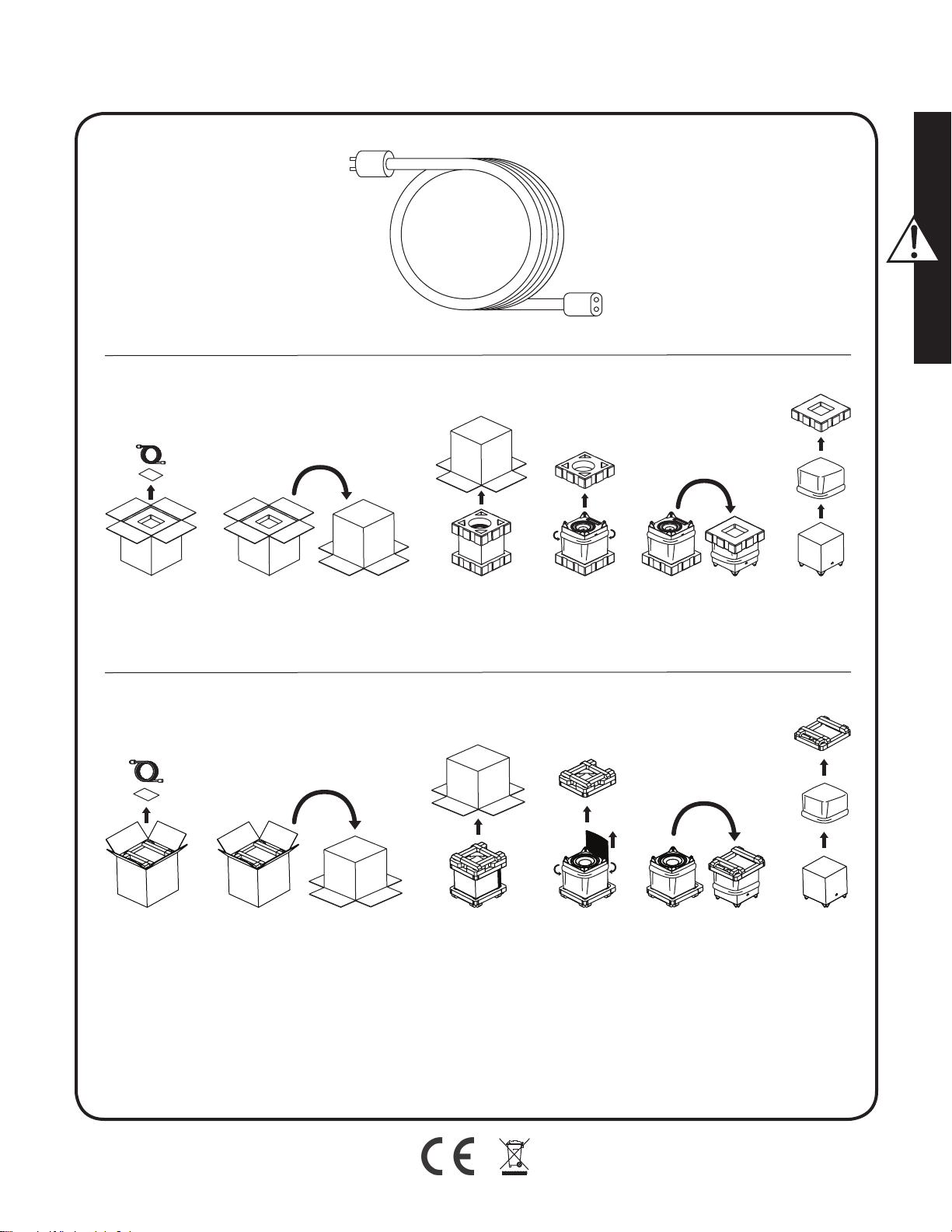
Step 1: Unpacking
Remove your new subwoofer from its packing. Please retain the original pack-
ing materials for future use—replacement packaging may be expensive.
Step 2: Placement
You may choose to begin by placing the subwoofer in a corner near the
front of the room. Before deciding on a permanent corner placement,
experiment with other positions. Locations away from corners often prove
more effective in providing ideal low-frequency performance and blend
with the main speakers. Please see the Placement section for details.
Step 3: Signal Connection
Use the best cables you can. High quality cables, available from your spe-
cialty dealer, are recommended and will give you superior performance.
Attach your preamplifier/processor outputs to the signal input connec-
tors located on the subwoofer’s rear panel. Please see the Controls and
Connections section for details.
If you plan to connect your subwoofer using Speaker Level (high level)
inputs, refer to the Speaker Level Inputs section for details.
Step 4: Power Connection (AC) (see warning)
Make sure the level knob is set at 0. Plug the subwoofer into a wall outlet.
Review the AC Power Connection section of this manual for details.
Step 5a: Setting the Controls (Using LFE Input)
• Setting Control: Set the switch to 'Local'.
• Power Mode: Set the switch to 'Auto'.
• Level: Set at one-o'clock (just right of straight up).
• Use your processor/receiver's bass management system to adjust
subwoofer integration.
Step 5b: Setting the Controls (Using Left/Right Inputs)
• Setting Control: Set the switch to 'App'.
• Power Mode: Set the switch to 'Auto'.
• Download the MartinLogan Sub Control app (from Google Play or the
Apple App Store).
• Using the app, adjust the following settings:
o Volume (level): Set at -10dB and increase until sound has deep,
extended bass.
o Phase: Start with 90° (with Inverted polarity turned on).
o 20–30Hz Level: Start with 0dB.
o Low Pass Filter: Set lower than the low-end frequency response of
your main speakers. If you are uncertain of your main speaker low-
frequency response, start with 35Hz.
Step 6: Listen and Enjoy.
安全警告及安装简介 (中国的 / Chinese)
重要的安全说明
1 阅读这些说明。
2 请保留这些说明。
3 注意所有警告。
4 遵循所有说明。
5 请勿在靠近水的地方使用本设备。
6 只能用干布清洁。
7 请勿堵塞通风口。按照制造商的说明进行安装。
8 请勿安装在散热器,加热器,炉子或其他产生热量的设备(包括
放大器)等热源附近。
9 不要损害极化或接地型插头的安全用途。极化插头有两个刀片,
一个比另一个宽。接地型插头有两个刀片和第三个接地插脚。宽
刀片或第三叉是为了您的安全而设置的。如果提供的插头不适合
您的插座,请咨询电工更换过时的插座。
10 保护电源线不被踩踏或挤压,特别是在插头,便利插座和设备出
口处。
11 只能使用制造商指定的附件/附件。
12 只能使用制造商指定的或与本设备一起出售的推车,
支架,三角架,支架或桌子。使用推车时,请小心移
动推车/设备组合,以免翻倒造成伤害。
13 雷雨期间或长时间不使用时,请拔下本设备的插头。
14 将所有维修工作交给合格的维修人员。如果设备受到任何损坏,
如电源线或插头损坏,液体溅落或物体掉入设备,设备受到雨淋
或潮湿,不能正常工作,则需要进行维修,或者已经被丢弃。
15 产品不得暴露在滴水或溅水的环境中,充满液体的物体如花瓶不
得放在产品上。
16 保持设备周围至少20-30cm的距离,以保证足够的通风。
17 不应通过用报纸,桌布,窗帘等物品盖住通风口来阻止通风。
18 设备上不应放置明火等火源,例如蜡烛。
19 产品可用于热带气候地区使用
20 本设备属II类或双重绝缘电器
21
电源插头或电器耦合器用作断开装置,断开装置应保持可操作性。
内部的感叹号等边三角形的意图提醒用户存在重要的操
作和维护(维修)文献中的说明伴随着电器。
在等边三角形内带有箭头符号的闪电闪光灯旨在提醒用
户,产品外壳内存在未绝缘的“危险电压”,可能具有足
够大的触电危险。
警告! 请勿在原产国以外的地区使用本产品。 不正确的
电压会造成损坏,修理费用可能很高。 扬声器运送到
MartinLogan授权经销商处,不同国家的电源适配器可
在此购买。可以通过www.martinlogan.com或通过电子
邮件[email protected]访问授权分销商名单。
警告!
• 内部存在危险电压—请勿擅自拆盖。
• 如需服务,请联系有资质的技术人员。
• 为防止火灾或电击危害,请勿将组件暴露于潮湿环
境中。
• 如发生任何反常情况,请立即关闭功放,并拔掉低
音炮插头。
• 当电源线接入交流电源插座时,请勿插拔电源线与
扬声器连接的另一端口,以避免危险发生,和可能
导致的对产品本身带来的损害。
• 请勿将蜡烛或其它明火源置于扬声器上。
• 请勿将含有液体的玻璃容器或花瓶置于扬声器上。
• 请勿使扬声器接触到水滴或飞溅液体。
• 如发生任何反常情况,电源线应保持随时可操作状
态。
我们深知,您已迫不及待想感受下这款全新的扬声器了。所以我们为
您编写了以下内容,便于您更加简易迅速地进行安装。一旦您着手操
作时,请花点时间仔细阅读本章节,并深入了解随产品附上的用户手
册中的信息。它能教您如何使这款最精确的低音扬声器系统发挥最佳
的性能。
如果您在设置或操作扬声器时遇到任何问题,请参考用户手册中关于
室内声学,摆位或操作的相关信息。如果遇到持续未能解决的问题,
请联系经授权的MartinLogan经销商,他们会向您提供适当的技术分析
来减少问题。
我们深知,您已迫不及待想感受这款全新的扬声器了。所以我们为您编
写了以下内容,便于您更简易迅速地进行安装。一旦您着手操作时,
请花点时间仔细阅读本章节,并深入了解随产品附上的用户手册中的
信息。它能教您如何使这款最精确的低音扬声器系统发挥最佳的性能。
如果您在设置或操作扬声器时遇到任何问题,请参考用户手册中关于
室内声学、摆位或操作的相关信息。如果遇到持续未能解决的问题,
请联系经授权的MartinLogan经销商,他们会向您提供适当的技术分析
来减少问题。
步骤1: 拆开包装箱
将您全新的扬声器从包装箱中取出。出于您可能的将会重新使用原包
装的考虑,请保留原始包装材料– 重换包装会比较昂贵。
步骤2: 摆位
一开始您可能会将扬声器摆在房间前方的墙角处。在决定永久摆放在
墙角前时,试试其它位置的效果。通常远离墙角摆放效果会更好,能
带来理想的低频效果并与主音箱更好地融合。请参考说明书中“摆位”章
节获得更多信息。
步骤3: 信号连接
使用您所能用到的最好的线材。推荐您向专门的经销商购买高品质的
线材,以此获得最好的性能。
将您前级放大器/处理器的输出连接到位于扬声器后面板上的信号输入
连接器。请参考说明书中“控制”和“连接”章节获得更多信息。
如果您打算将扬声器连接到喇叭线输入(高电平输入),请参考“喇叭
线输入”章节获得更多信息。
步骤 4: 电源连接 (交流电) (见“警告”)
请先确保将音量旋钮设置为0。将扬声器插头插入壁装电源插座中。参
考用户手册中“交流电电源连接”章节获得更多信息。
步驟5a:設置控件(使用LFE輸入)
• 設置控制:將開關設置為“本地”。
• 電源模式:將開關設置為“自動”。
• 級別:設置在一點(正好朝上)。
• 使用處理器/接收器的低音管理系統來調整扬声器的整合。
步驟5b:設置控件(使用左/右輸入)
• 設置控制:將開關設置為“應用程序”。
• 電源模式:將開關設置為“自動”。
• 從Google Play或Apple App Store下載MartinLogan Sub Control應
用程序。
• 使用應用程序,調整以下設置:
o 音量(電平):設定在-10dB,並增加,直到聲音深沉,延長低音。
o 相位:從90°開始(反轉極性打開)。
o 房間增益:從0dB開始。
o 低通濾波器:設置低於主揚聲器的低頻響應。 如果您不確定主
揚聲器的低頻響應,則從35Hz開始。
步骤6: 开启聆听享受之旅
Bezpečnostní varování a instalace v krátkosti (Česky/Czech)
Důležité bezpečnostní pokyny
1 Přečtětesitytopokyny.
2 Uchovávejtetytopokyny.
3 Dodržujtevšechnavarování.
4 Postupujtepodlepokynů.
5 Nepoužívejtetotozařízenívblízkostivody.
6 Očistětepouzesuchoulátkou.
7 Neblokujteventilačníotvory.Instalujtepodlepokynůvýrobce.
8 Neinstalujtevblízkostizdrojůtepla,jakojsouradiátory,tepelné
registry,kamnanebojinépřístroje(včetnězesilovačů),které
vyrábějíteplo.
9 Nepoškozujtebezpečnostníúčelpolarizovanénebozemnící
zástrčky.Polarizovanázástrčkamádvěčepele,znichžjedna
ješiršíneždruhá.Zástrčkauzemňovacíhotypumádvěnožea
třetíuzemňovacíhrot.Širokáčepelnebotřetíhrotjsouurčeny
provašibezpečnost.Pokudsedodávanázástrčkanezapadádo
elektrickézásuvky,obraťtesenaelektrikářenavýměnuzasta-
ralézásuvky.
10 Chraňtenapájecíšňůrupředprasknutímnebosevřením,zejmé-
napřizástrčkách,zásuvkáchamístu,kdevystupujízezařízení.
11 Používejtepouzepříslušenství/příslušenstvíurčenévýrobcem.
12 Používejtepouzesvozíkem,stojanem,stativem,
držákemnebostolemurčenýmvýrobcemnebo
prodávanýmispřístrojem.Připoužitívozíkubuďte
opatrnípřipřemísťováníkombinacevozík/přístroj,
abystezabrániliporaněnípřipřevrácení.
13 Běhembleskovýchbouřínebopřidlouhodobémnepoužívání
odpojtetotozařízení.
14 Proveďteveškeréservisníprácekvalifikovanýmservisním
pracovníkům.Servisjezapotřebí,jestližebylpřístrojnějakým
způsobempoškozen,napříkladpoškozenýnapájecíkabelnebo
zástrčka,kapalinanebopředmětyspadlydopřístroje,přístroj
bylvystavendeštinebovlhkosti,nepracujenormálně,nebobyl
vynechán.
15 Zařízenínesmíbýtvystavenokapajícínebostříkajícívoděaže
nazařízenínesmíbýtumístěnypředmětynaplněnékapalinami,
jakojsouvázy.
16 Zajistěteminimálnívzdálenost20-30cmkolempřístrojepro
dostatečnévětrání;
17 Větráníbynemělobránitpokrytívětracíchotvorůpředměty,jako
jsounoviny,ubrusy,záclonyapod.;
18 Napřístrojinesmíbýtumístěnyžádnézdrojeotevřeného
plamene,jakojsousvíčky;
19 Použitípřístrojůvtropickémpodnebí
20 TotozařízeníjeelektrickýspotřebičtřídyIInebodvojitéizolace
21 Jakoodpojovacízařízenísepoužívásíťovázástrčkanebospo-
jkazařízení,odpojovacízařízenímusíbýtsnadnoovladatelné.
Vykřičníkvrovnostrannémtrojúhelníkumáupozornit
uživatelenapřítomnostdůležitýchpokynůproobsluhu
aúdržbu(údržbu)vliteratuře,kterájesoučástí
přístroje.
Bleskbleskusesymbolemhrotušipkyvrovnostran-
némtrojúhelníkuupozorňujeuživatelenapřítomnost
neizolovaného "nebezpečnéhonapětí" v krytu
produktu,kterémůžemítdostatečnouvelikost,aby
představovalorizikoúrazuelektrickýmproudem.
VAROVÁNÍ! Nepoužívejte tento výrobekmimo
zemipůvodníchpožadavkůnaprodejanapětív
různýchzemích.Nesprávnénapětímůžezpůsobit
poškození,kterémůžebýtopravdudrahé.Subwoofer
jedodávánautorizovanýmdistributorůmMartinLogan
se správným napájecím zdrojempro použití v
zemiurčenéhoprodeje.Seznamautorizovaných
distributorůjedostupnýnaadresewww.martinlogan.
comneboe-mailemnaadrese[email protected].
VAROVÁNÍ!
•
Vnitřnínebezpečnénapětí-neodstraňujtenikdykryt.
•
Opravymůžeprovádětpouzekvalifikovanýtechnik.
•
Neprovozujte subwoofer ve vlhkémprostředí,
zabráníteúrazuelektrickýmproudemapožáru.
•
Vypnětezesilovačaodpojtesubwoofer,docházílik
abnormálnímpodmínkám.
•
Síťovýkabelsenesmíinstalovat,neboodstraňovat
odreproduktoru,zatímcodruhýkonecjepřipojenék
napájení230V.
•
Nasubwoofer,nebodojehoblízkostineumisťujte
svíčky,aniotevřenýplamen.
•
Žádnétekutinybynemělybýtumístěnyna,nebov
blízkostisubwooferu
•
Reproduktorbynemělbýtvystavenkapajícínebo
stříkajícítekutině.
Víme,žejižtoužíteposlouchatsvůjnovýMartinLogansubwoofer,
takžetatočástjeurčenaprorychléasnadnénastavení.Věnujtepro-
símpozornosttěmtoinformacím,kterévámpomohoudosáhnoutco
největšíhovýkonu.
Máte-lijakékolipotížesnastavenímneboprovozemvašehosub-
wooferuMartinLogan,kontaktujtesvéhoautorizovanéhoprodejce
společnostiMartinLogan.
Krok 1: Vybalení
Vyjmětenovýsubwooferzjehoobalu.Ponechtesioriginálníobalové
materiályprobudoucípoužití-náhradníobalymohoubýtdrahé.
Krok 2: Umístění
Začnětetím,žeumístítesubwooferdorohupoblížpředníčástmíst-
nosti.Nežserozhodnetektrvalémuumístěnívrohu,experimentujte
sjinýmipozicemi.Umístěnísubwooferumimorohysečastoprojevuje
lepšímsladěnímshlavnímireproduktoryahlubšímibasy.Podrobné
informacenaleznetevčástiUmístění.
Krok 3: Připojení signálu
Použijtenejlepšíkabely,kterémáte.
Připojtevýstupypředzesilovače/procesorukevstupnímkonektorům
signáluumístěnýnazadnímpanelusubwooferu.Prohlédnětesipro-
símovládacíprvkyapodrobnostiopřipojení.
Pokudmátevúmyslupřipojitsubwooferpomocíreproduktorových
výstupůvašehozesilovače(vysokáúroveň),podrobnostinaleznetev
částiVstupyúrovněreproduktorů.
Krok 4: Napájení 230V (viz výstraha)
Ujistětese,žejeotočnýknoflíknastavenna0.Připojtesubwoofer
doelektrickézásuvky.PodrobnostinaleznetevčástiPříručkapro
napájenístřídavýmproudemvtétopříručce.
Krok 5a: Nastavení ovládacích prvků (pomocí vstupu LFE)
• Řízenínastavení:Nastavtepřepínačna"Local".
• Režimnapájení:Nastavtepřepínačnahodnotu"Auto".
• Úroveň:Nastavtenajednuhodinu(přímovpravonahoru).
• Použijtesystémsprávybasůprocesoru/přijímačekúpravěinte-
gracesubwooferu.
Krok 5b: Nastavení ovládacích prvků (pomocí levého / pravého vstupu)
• Nastaveníovládání:Nastavtepřepínačna"App".
• Režimnapájení:Nastavtepřepínačnahodnotu"Auto".
• StáhněteaplikaciMartinLoganSubControl(zaplikaceGoogle
PlayneboAppleAppStore).
• Pomocíaplikaceupravtenásledujícínastavení:
o Hlasitost(úroveň):Nastavtenahodnotu-10dBazvyštetak,
rozšířenébasy.
o Fáze:začnětes90°(sezapnutouobrácenoupolaritou).
o Ziskmístnosti:začnětes0dB.
o Filtrnízkéhoprůchodu:nastavtenižšínežfrekvenčníodezvu
nejnižšíhokmitočtuvašichhlavníchreproduktorů.Pokudsi
nejstejistihlavnímreproduktorem,začnětesfrekvencí35Hz.
Krok 6: Poslouchejte a užívejte si.
Sikkerhedsanvisning og kort vejledning i
ibrugtagning. (Dansk/Danish)
Vigtige sikkerhedsinstruktioner
1 Læs disse instruktioner.
2 Opbevar disse instruktioner.
3 Overhold alle advarsler.
4 Følg alle instruktioner.
5 Brug ikke dette apparat i nærheden af vand.
6 Rengør kun med tør klud.
7 Bloker ikke ventilationsåbninger. Installer i overensstemmelse med pro-
ducentens anvisninger.
8 Installer ikke i nærheden af varmekilder som radiatorer, varmel-
egemer, komfurer eller andet apparat (herunder forstærkere), der
producerer varme.
9 Undgå at besejre sikkerhedsformålet med polariseret eller jordforbin-
delse. En polariseret stik har to blade med en bredere end den
anden. En stikkontaktstik har to knive og en tredje jordstik. Den brede
kniv eller den tredje stang er til gavn for din sikkerhed. Hvis den
medfølgende stik ikke passer ind i stikkontakten, skal du kontakte en
elektriker for at udskifte det forældede stik.
10
Beskyt strømledningen fra at blive slået på eller klemt, især ved stikprop-
per, forsyningsbeholdere og det punkt, hvor de kommer ud af apparatet.
11 Brug kun tilbehør / tilbehør specificeret af producenten.
12 Brug kun med vogn, stativ, stativ, beslag eller bord angivet
af producenten eller solgt med apparatet. Når der bru-
ges en vogn, skal du være forsigtig, når du flytter vogn /
apparatkombinationen for at undgå skader fra tip-over.
13 Tag stikket ud af dette apparat under lynvejr eller når det ikke bruges
i længere tid.
14 Henvis alle serviceydelser til kvalificeret servicepersonale.
Vedligeholdelse er nødvendig, når apparatet er blevet beskadiget på
nogen måde, som f.eks. Strømforsyningsledning eller stik er beskadi-
get, væske er spildt eller genstande er faldet i apparatet, apparatet
er blevet udsat for regn eller fugt, fungerer ikke normalt , eller er ble-
vet droppet.
15 Apparatet må ikke udsættes for dryp eller stænk, og genstande fyldt
med væsker, såsom vaser, må ikke anbringes på apparatet.
16 Vedligeholde mindst 20-30 cm afstand omkring apparatet for tilstræk-
kelig ventilation;
17 Ventilationen må ikke forhindres ved at dække ventilationsåbningerne
med genstande, såsom aviser, duge, gardiner mv .;
18 Der må ikke anbringes ildkilder, såsom lys, på apparatet;
19 Anvendelse af apparater i tropiske klimaer
20 Dette udstyr er et Klasse II eller dobbelt isoleret elektrisk appa-
rat
21 Netstikket eller en apparatkobler bruges som frakoblingsenhed, frako-
blingsenheden skal forblive let at betjene.
Udråbstegn i en ligesidet trekant er beregnet til at advare
brugeren om tilstedeværelsen af vigtige drifts- og vedlige-
holdelsesanvisninger (instruktioner) i den ledsagende
litteratur.
Lynbolten blinker med pilehovedsymbolet inden for en
ligesidet trekant med det formål at advare brugeren om
tilstedeværelsen af uisoleret "farlig spænding" i produktets
kabinet, der kan være tilstrækkelig stor til at udgøre en
risiko for elektrisk stød.
ADVARSEL! Brug ikke dette produkt uden for det land,
hvor originale salgsspændingskrav varierer fra land til land.
Forkert spænding kan forårsage skade, som vil være poten-
tielt dyr at reparere. Subwooferen sendes til MartinLogan
autoriserede distributører med den korrekte strømforsyning
til brug i det planlagte salg. En liste over autoriserede dis-
tributører kan fås på www.martinlogan.com eller ved at
sende en e-mail til [email protected].
ADVARSEL!
• ben ikke apparatet. Det indeholder elektriske dele med
høj spænding.
• Overlad altid service til en kvalificeret tekniker.
• For at undgå brand eller elektrisk stød må du ikke
udsætte denne enhed for fugt.
• Sluk forstærker og frakobl subwoofer, hvis udstyret ikke
fungerer efter hensigten.
• Strømledningen må ikke tilsluttes, frakobles eller efter-
lades frakoblet fra højttaleren når den modsatte ende
er tilsluttet til strøm.
• Placer ikke stearinlys eller anden kilde til åben ild på
højttaleren.
• Placer ikke væsker i glas eller vaser på højtaleren.
• Højttaleren må ikke udsættes for dryppende eller sprøj-
tende væske.
•
Strømledningen skal være let tilgængelig, så det kan
betjenes i tilfælde af udstyret ikke fungerer efter hensigten.
Vi ved, at du er ivrig efter, at høre din nye Martin Logan subwoofer, så
det følgende giver dig en instruktion i hurtig og nem opsætning. Når din
subwoofere er monteret og fungerer, tag da venligst tiden til at læse den
vedlagte manual i dybden. Den vil give dig en dybdegående indsigt i
hvorledes du får den bedst mulige ydelse fra subwooferen.
Hvis du oplever problemer ved opsætning eller betjening af din Martin
Logan subwoofer, henvises der til afsnittene om akustik, placering eller
betjening i den vedlagte manual. Støder du på et vedvarende problem,
der ikke umiddelbart lader sig løse, bedes du kontakte din autoriserede
Martin Logan forhandler. De vil bistå dig med den nødvendige tekniske
assistance til at afhjælpe problemet.
Trin 1: Udpakning
Tag din nye subwoofer ud af emballagen. Opbevar venligst emballagen
til senere brug – tilsvarende emballage kan være bekostelig.
Trin 2: Placering
Du kan vælge, til en start, at placere subwooferen i et hjørne i den forreste
ende af rummet. Eksperimenter gerne med andre placeringer før du beslut-
ter dig endeligt for at placere subwooferen i et hjørne. Placeringer væk fra
hjørner vil ofte resultere i bedre lavfrekvens ydelse og bedre kobling til de
øvrige højttalere. Se venligst afsnittet om placering for yderligere detaljer.
Trin 3: Tilslutning af signal
Brug de bedste kabler du kan. Kvalitetskabler kan anbefales og vil give
dig en overlegen ydeevne. De kan anskaffes hos din faghandler.
Tilslut din forforstærker/processors udgang til terminalerne (input) på sub-
wooferens bagside. Se venligst afsnittene om kontrolpanelet og tilslutninger
for yderligere detaljer.
Hvis du ønsker at tilslutte din subwoofer med højttalersignal (ved hjælp af
højttalerledninger), henvises til afsnittet om Speaker Level Inputs for yder-
ligere detaljer.
Trin 4: Tilslutning til strøm (se advarsel)
Sørg for at volumenknappen (level) er indstillet til 0. Tilslut subwooferen
til en stikkontakt. Se øvrige detaljer for tilslutning til strøm i denne manual.
Trin 5a: Indstilling af kontroller (ved hjælp af LFE-indgang)
• Setting Control: Indstil kontakten til 'Local'.
• Power Mode: Indstil kontakten til 'Auto'.
• Level: Indstil niveau til "klokken et" (Lidt over lodret position).
• Brug din processor / modtager's basstyringssystem til at justere sub-
wooferintegrationen.
Trin 5b: Indstilling af kontroller (Brug af venstre / højre
indgange)
• Setting Control: Indstil kontakten til 'App'.
• Power Mode: Indstil kontakten til 'Auto'.
• Download MartinLogan Sub Control-appen (fra Google Play eller
Apple App Store).
• Brug appen, juster følgende indstillinger:
o Level (niveau): Indstil til -10dB og øg niveau til lyden har dyb,
kraftig bas.
o Phase: Start med 90 ° (med omvendt polaritet tændt).
o 20–30Hz Level: Start med 0dB.
o Low Pass Filter: Indstilles til en frekvens lavere end resonans-
frekvensen på dine hovedhøjttalere. Hvis du er usikker på
højttalerens Resonansfrekvens, skal du starte med 35Hz.
Trin 6: Lyt og nyd.
Veiligheidswaarschuwingen en installatie in het kort
(Nederlandse/Dutch)
Belangrijke veiligheidsinstructies
1 Lees deze instructies.
2 Bewaar deze instructies.
3 Let op alle waarschuwingen.
4 Volg alle instructies.
5 Gebruik dit apparaat niet in de buurt van water.
6 Maak alleen schoon met een droge doek.
7 Blokkeer geen ventilatieopeningen. Installeer in overeenstemming met
de instructies van de fabrikant.
8 Installeer het apparaat niet in de buurt van warmtebronnen zoals
radiatoren, warmteroosters, kachels of andere apparaten (inclusief
versterkers) die warmte produceren.
9 Negeer niet het veiligheidsdoel van de gepolariseerde of geaarde
stekker. Een gepolariseerde stekker heeft twee bladen waarvan de
ene breder is dan de andere. Een geaarde stekker heeft twee bladen
en een derde aardingstong. Het brede mes of de derde vorktand is
bedoeld voor uw veiligheid. Als de meegeleverde stekker niet in uw
stopcontact past, raadpleeg dan een elektricien om het verouderde
stopcontact te vervangen.
10 Zorg ervoor dat er niet op het netsnoer kan worden getrapt of dat het
kan worden afgekneld, met name bij stekkers, stopcontacten en het
punt waar ze uit het apparaat komen.
11 Gebruik alleen hulpstukken / accessoires die zijn gespecificeerd
door de fabrikant.
12 Gebruik alleen met de wagen, standaard, statief, beugel
of tafel die is opgegeven door de fabrikant of die wordt
verkocht bij het apparaat. Wanneer een wagen wordt
gebruikt, wees dan voorzichtig bij het verplaatsen van
de wagen / apparaat combinatie om verwonding door kantelen te
voorkomen.
13 Koppel dit apparaat los tijdens onweer of wanneer het gedurende
lange tijd niet wordt gebruikt.
14 Laat alle onderhoud over aan bevoegd onderhoudspersoneel.
Onderhoud is vereist wanneer het apparaat op enigerlei wijze is
beschadigd, zoals het netsnoer of de stekker is beschadigd, vloeistof
is gemorst of voorwerpen in het apparaat zijn gevallen, het apparaat
is blootgesteld aan regen of vocht, niet normaal functioneert of is
verwijderd.
15 Het apparaat mag niet worden blootgesteld aan druipende of spat-
tende vloeistoffen en objecten die met vloeistof zijn gevuld, zoals
vazen, mogen niet op het apparaat worden geplaatst.
16 Houd een afstand van minimaal 20-30 cm rondom het apparaat
aan voor voldoende ventilatie;
17 De ventilatie mag niet worden belemmerd door de ventilatieope-
ningen te bedekken met voorwerpen zoals kranten, tafelkleden,
gordijnen, enz .;
18
Plaats geen open vuurbronnen, zoals kaarsen, op het apparaat;
19 Het gebruik van apparaten in tropische klimaten
20 Dit apparaat is een Klasse II of dubbel geïsoleerd elektrisch apparaat
21 De netstekker of een apparaatkoppelaar wordt gebruikt als ont-
koppelapparaat, het ontkoppelingsmechanisme moet gemakkelijk
bedienbaar blijven.
Het uitroepteken in een gelijkzijdige driehoek is bedoeld
om de gebruiker attent te maken op de aanwezigheid van
belangrijke bedienings- en onderhoudsinstructies in de lite-
ratuur die bij het apparaat wordt geleverd.
De bliksemflits met pijlpuntsymbool, binnen een gelijkzijdige
driehoek, is bedoeld om de gebruiker te waarschuwen voor
de aanwezigheid van niet-geïsoleerde "gevaarlijke span-
ning" in de behuizing van het product die voldoende groot
kan zijn om een risico van een elektrische schok te vormen.
WAARSCHUWING! Gebruik dit product niet buiten
het land van de oorspronkelijke specificaties voor verkoop-
spanning, maar verschilt per land. Onjuiste spanning kan
schade veroorzaken die mogelijk duur is om te repareren.
De subwoofer wordt naar de geautoriseerde distributeurs van
MartinLogan verzonden met de juiste voeding voor gebruik
in het land van de beoogde verkoop. Een lijst met erken-
de distributeurs is beschikbaar op www.martinlogan.com of
door een e-mail te sturen naar [email protected].
WAARSCHUWING!
• In het toestel zijn gevaarlijke spanningen aanwezig -
verwijder de kap niet.
• Laat onderhoud uitvoeren door een gekwalificeerde
technicus.
• Stel dit apparaat niet bloot aan vocht om brand of
elektrische schokken te voorkomen.
• Schakel de versterker uit en ontkoppel de subwoofer
van het lichtnet mochten zich abnormale omstan-
digheden voordoen.
• Het netsnoer mag niet worden geïnstalleerd, verwij-
derd of losliggen van de luidspreker terwijl het andere
uiteinde is aangesloten op het lichtnet.
• Er mogen geen kaarsen of andere bronnen van open
vuur op de luidspreker worden geplaatst.
• Er mogen geen vloeistoffen in glazen of vazen op de
luidspreker worden geplaatst.
• Luidspreker mag niet worden blootgesteld aan druipe-
nde of spattende vloeistoffen.
• Het netsnoer moet gemakkelijk bereikbaar blijven
mochten zich abnormale omstandigheden voordoen.
We kunnen ons voorstellen dat u graag naar uw nieuwe MartinLogan
subwoofer wilt luisteren, dus dit gedeelte is bedoeld om een snelle en een-
voudige installatie te bewerkstelligen. Nadat u uw subwoofer in gebruik
hebt genomen, neemt u alstublieft de tijd om de rest van de informatie in
de bijgevoegde handleiding grondig te lezen. Het stelt u in staat om de
best mogelijke prestaties te halen uit dit hoogwaardige subwoofersysteem.
Als u problemen ondervindt bij het instellen of gebruik van uw MartinLogan-
subwoofer, raadpleegt u dan de hoofdstukken Kamer akoestiek, Plaatsing
of Bediening in de bijgevoegde gebruikershandleiding. Mocht u een bli-
jvend probleem ondervinden dat niet kan worden opgelost, neem dan
contact op met uw geautoriseerde MartinLogan-dealer. Zij zullen u voorz-
ien van de juiste technische ondersteuning om de situatie te verhelpen.
Stap 1: Uitpakken
Haal uw nieuwe subwoofer uit de verpakking. Bewaar het originele ver-
pakkingsmateriaal voor toekomstig gebruik - vervangende verpakking kan
duur zijn.
Stap 2: Plaatsing
U kunt ervoor kiezen om te beginnen door de subwoofer in een hoek aan
de voorkant van de kamer te plaatsen. Voordat u voor een definitieve
plaatsing in de hoek kiest, experimenteer met andere posities. Locaties
uit de buurt van hoeken blijken vaak effectiever in het leveren van ideale
laagfrequente prestaties en zorgen voor een betere aansluiting met de
hoofdluidsprekers. Raadpleeg het hoofdstuk Plaatsing voor meer informa-
tie.
Stap 3: Signaalverbinding
Gebruik de beste kabels waarover u kunt beschikt beschikken. Kabels van
hoge kwaliteit, verkrijgbaar bij uw speciaalzaak, worden aanbevolen en
bieden superieure prestaties. Bevestig de uitgangen van uw voorversterker
/ processor aan de signaal ingangsaansluitingen op het achterpaneel van
de subwoofer. Raadpleeg de hoofdstukken Instellingen en Aansluitingen
voor meer informatie. Als u van plan bent om uw subwoofer aan te sluiten
met behulp van luidsprekerniveau (hoog niveau) ingangen, raadpleegt u
dan het hoofdstuk Luidspreker niveau ingangen voor details.
Stap 4: Stroomaansluiting (AC) (zie waarschuwing)
Zorg ervoor dat de niveauknop op 0 staat. Sluit de subwoofer aan op
een stopcontact. Raadpleeg het hoofdstuk AC-stroomaansluiting in deze
handleiding voor meer informatie.
Stap 5a: De regelaars instellen (met LFE-invoer)
• Setting Control: zet de schakelaar op 'Local'.
• Power-modus: zet de schakelaar op 'Auto'.
• Niveau: stel in op stand één uur (net rechts van het midden).
• Gebruik het basmanagementsysteem van uw processor / receiver om
de subwoofer-integratie aan te passen
Stap 5b: De regelaars instellen (links / rechts-ingangen
gebruiken)
• Setting Control: Zet de schakelaar op 'App'.
• Power-modus: zet de schakelaar op 'Auto'.
• Download de MartinLogan Sub Control-app (via Google Play of de
Apple App Store).
• Pas de volgende instellingen aan met behulp van de app:
o Volume (niveau): stel in op -10 dB en verhoog totdat het geluid een
diepe en volle bas heeft.
o Fase: begin met 90 ° (met omgekeerde polariteit ingeschakeld).
o 20–30Hz Level: begin met 0dB.
o Laagdoorlaatfilter: lager instellen dan het lage frequentiebereik van
uw hoofdluidsprekers. Als u niet zeker bent van de lage frequentie
van uw hoofdluidspreker, begin dan met 35Hz.
Stap 6: Luister en geniet.
Turvallisuusvaroitukset ja lyhyt asennusohje
(Suomi/Finnish)
Tärkeitä turvallisuusohjeita
1 Lue nämä ohjeet.
2 Pidä nämä ohjeet.
3 Huomioi kaikki varoitukset.
4 Noudata kaikkia ohjeita.
5 Älä käytä laitetta veden läheisyydessä.
6 Puhdista vain kuivalla kankaalla.
7 Älä tuki mitään tuuletusaukkoja. Asenna valmistajan ohjeiden
mukaisesti.
8 Älä asenna lähelle lämmönlähteitä, kuten lämpöpattereita,
lämpörekistereitä, uuneja tai muita lämpöä tuottavia laitteita (mukaan
lukien vahvistimet).
9 Älä pudota polarisoidun tai maadoitetun pistokkeen turvallisuustarkoitu-
sta. Polarisoidulla pistokkeella on kaksi terää, joilla on yksi leveämpi
kuin toinen. Maadoitustyyppisellä pistokkeella on kaksi terää ja yksi
kolmas maadoituskoukku. Laaja terä tai kolmas kiinnitysosa on tarkoitet-
tu turvallisuutesi vuoksi. Jos toimitettu pistoke ei sovi pistorasiaan, ota
yhteyttä sähköasentajaan vanhentuneen pistorasian vaihtamisesta.
10 Suojaa virtajohtoa kävelemästä tai puristustöistä, erityisesti pistokkeis-
sa, sopivissa astioissa ja kohdassa, jossa ne poistuvat laitteesta.
11 Käytä vain valmistajan ilmoittamia lisälaitteita / lisävarusteita.
12 Käytä vain valmistajan määrittelemää tai laitteen mukana
myytävällä kori-, jalusta-, jalustalla, kannalla tai taulu-
kolla. Käytettäessä kärryä varoen siirrettäessä kärryä /
laitekokonaisuutta estäen tartuntavaurioiden välttämiseksi.
13 Irrota laite pistorasiasta ukkosmyrskyjen aikana tai jos sitä ei käytetä
pitkiä aikoja.
14 Tarkasta kaikki huolto pätevälle huoltohenkilökunnalle. Huoltoa tarvi-
taan, kun laite on vahingoittunut millään tavoin, kuten virtajohdon tai
pistokkeen vaurioitunut, nestettä on kaadettu tai esine on pudonnut
laitteeseen, laite on altistunut sateelle tai kosteudelle, ei toimi normaa-
listi , tai on pudonnut.
15 Laitetta ei saa altistaa tippumiselle tai roiskeille ja että nesteitä, kuten
maljakoita, sisältäviä esineitä ei saa laittaa laitteeseen.
16 Säilytä laitteen ympärillä vähintään 20-30 cm etäisyydelle riittävä
ilmanvaihto.
17 Tuuletusta ei saa estää peittämällä tuuletusaukot esineisiin, kuten
sanomalehtiin, pöytäliinoihin, verhoihin jne .;
18 Laitteeseen ei saa sijoittaa avotulen lähteitä, kuten kynttilöitä;
19 Laitteen käyttö trooppisissa ilmasto-olosuhteissa
20 Tämä laite on luokan II tai kaksinkertainen eristetty sähkölaite
21 Irrotuslaitteena käytetään verkkovirtaa tai laitteen liitintä, irrotuslaitteen
on oltava helposti käytettävissä.
Tasapainotteisen kolmion sisällä oleva huutomerkki on
tarkoitettu ilmoittamaan käyttäjälle tärkeiden käyttö- ja
huolto-ohjeiden olemassaolosta laitteen mukana toimitetus-
sa kirjallisuudessa.
Salamavalon salpa, jossa nuolenpääsymboli, tasasivuisen
kolmion sisällä, on tarkoitettu varoittamaan käyttäjää
sellaisen eristämättömän "vaarallisen jännitteen" esii-
ntymisestä tuotteen kotelossa, joka voi olla riittävän suuri
sähköiskun vaaran syntymiseksi.
VAROITUS! Älä käytä tätä tuotetta maan ulkopuolella,
kun alkuperäiset myyntijännitetarpeet vaihtelevat mait-
tain. Väärä jännite voi aiheuttaa vahinkoja, jotka ovat
mahdollisesti kalliita korjata. Subwoofer toimitetaan
MartinLogan-valtuutetuille jakelijoille, joissa on oikea
virtalähde käytettäväksi myyntiin tarkoitetussa maassa.
Luettelo valtuutetuista jakelijoista on osoitteessa www.
martinlogan.com tai lähettämällä sähköpostia osoitteeseen
VAROITUS!
• Laitteessa on hengenvaarallinen jännite — älä avaa
tai poista osia.
• Vikatapauksissa käänny valtuutetun huoltoliikkeen
puoleen.
• Välttääksesi tulipalon tai sähköiskun vaaran, älä altista
laitetta kosteudelle.
• Sammuta vahvistin ja irrota subwoofer jos huomaat
ongelmia laitteissa tai niiden käyttöympäristössä.
• Älä liitä, irrota tai jätä virtajohtoa irti kaiuttimesta jos
seinän puoleinen virtapistoke on kiinni.
• Älä sijoita kynttilöitä tai muita palavia esineitä kaiut-
timien läheisyyteen.
• Älä sijoita nestettä sisältäviä laseja, maljakoita tms.
kaiuttimien läheisyyteen.
• Kaiutinta ei saa altistaa tippuvalle tai roiskuvalle nest-
eelle. Varmista kuiva ja turvallinen käyttöympäristö.
• Virtajohdon tulee olla nopeasti irrotettavissa mahdol-
lisen ongelmatilanteen varalta.
Tiedämme että haluat jo kovasti päästä kuulemaan uutta MartinLogan sub-
wooferiasi, joten tämä osio on kirjoitettu nopeaa ja helppoa asennusta
silmälläpitäen. Kun olet tehnyt perusasennuksen, suosittelemme kuitenkin
lukemaan laitteen käyttö-ohjeen perusteellisesti. Se tarjoaa paljon vinkkejä
parhaan suorituskyvyn mahdollistamiseksi tästä huipputason subwooferi-
sta. Mikäli koet hankaluuksia MartinLogan subwooferin asennuksessa tai
käytössä, tutustu tarkemmin käyttö-ohjeen “Room Acoustics”, “Placement”
ja “Operation” -osioihin. Jos törmäät ylitsepääsemättömään ongelmaan,
olethan ensin yhteydessä MartinLogan jälleenmyyjääsi, jotta voimme par-
haiten auttaa teknisessä analyysissä ja ongelman ratkaisussa.
Vaihe 1: Laitteen purkaminen paketista
Poista uusi subwooferisi paketista. Säilytä alkuperäiset pakkausmateriaalit
mahdollista tulevaa tarvetta varten.
Vaihe 2: Laitteen sijoittaminen
Voit aloittaa sijoittamalla subwooferin kuuntelutilan etuosaan lähelle nurk-
kaa. Ennenkuin päätät lopullisen sijainnin, kokeile subwooferia useassa
eri paikassa. Subwoofer voi usein soida erottelevammin ja yhtenäisemmin
pääkaiuttimien toiston kanssa jos se on sijoitettu etäämmälle nurkasta. Lue
”Placement” –osio lisätietoja varten.
Vaihe 3: Äänisignaalin kytkentä
Käytä parhaita johtoja mitä voit. Erikoisliikkeestä saatavat laadukkaat
johdot takaavat parhaan lopputuloksen.
Liitä johto esivahvistimen/prosessorin ulostulosta subwooferin takapaneelin
sisääntuloon. Lue tarkempia lisätietoja “Controls and Connections” –osiosta.
Jos aiot kytkeä subwooferin Speaker Level -liitännöillä (kaiutintasoinen sig-
naali), tutustu käyttö-ohjeen kohtaan “Speaker Level Inputs”.
Vaihe 4: Virran kytkentä (huomioi turvallisuusvaroitukset)
Tarkista että voimakkuussäädin on minimiasennossa (0). Kytke virta-
johto subwooferiin ja seinäpistokkeeseen. Katso lisätietoja “AC Power
Connection” –osiosta.
Vaihe 5a: Säätimien asetus (jos käytät LFE sisääntuloa)
• Setting Control (asetusten valinta): Aseta kytkin asentoon 'Local'.
• Power Mode (virran kytkentä): Aseta kytkin asentoon 'Auto'.
• Level (voimakkuus): Käännä aluksi noin klo 12 - 13 kohdalle.
• Aseta AV-prosessorin tai viritinvahvistimen kaiutinsäädöt mieleiseksi.
Vaihe 5b: Säätimien asetus (jos käytät RCA Left/Right sisääntuloa)
• Setting Control (asetusten valinta): Aseta kytkin asentoon 'App'.
• Power Mode (virran kytkentä): Aseta kytkin asentoon 'Auto'.
• Lataa Android tai Apple sovelluskaupasta "MartinLogan Sub Control"
applikaatio mobiililaitteellesi.
• Valitse applikaatiossa seuraavat asetukset:
o Volume (voimakkuus): Aseta ensin -10dB ja lisää voimakkuutta
kunnes bassotoisto kuulostaa syvältä ja ulottuvalta.
o Phase (vaihe): Aloita 90° (Inverted polarity kytkettynä päälle).
o 20–30Hz Level (huonevahvistus): Aloita 0dB asetuksella.
o Low Pass Filter (alipäästöfiltteri): Aseta hieman alemmaksi, kuin
mihin pääkaiuttimesi toistavat.
Vaihe 6: Kuuntele, hienosäädä ja nauti.
Avertissements de sécurité et installation en bref
(Français/French)
Consignes de sécurité importantes
1 Lisez ces instructions.
2 Conservez ces instructions.
3 Tenez compte de tous les avertissements.
4 Suivez toutes les instructions.
5 N'utilisez pas cet appareil près de l'eau.
6 Nettoyez uniquement avec un chiffon sec.
7 Ne bloquez pas les ouvertures de ventilation. Installez conformément
aux instructions du fabricant.
8 N'installez pas l'appareil à proximité de sources de chaleur telles
que des radiateurs, des bouches de chaleur, des poêles ou tout autre
appareil (y compris les amplificateurs) produisant de la chaleur.
9 Ne pas mettre en échec l'objectif de sécurité de la fiche polarisée
ou de mise à la terre. Une fiche polarisée possède deux lames dont
l'une est plus large que l'autre. Une fiche de type mise à la terre com-
porte deux lames et une troisième broche de mise à la terre. La lame
large ou la troisième broche sont fournies pour votre sécurité. Si la
fiche fournie ne rentre pas dans votre prise, consultez un électricien
pour le remplacement de la prise obsolète.
10 Protégez le cordon d'alimentation de tout piétinement ou pincement,
en particulier au niveau des prises, des prises de courant et du point
de sortie de l'appareil.
11 N'utilisez que des accessoires / accessoires spécifiés par le fabricant.
12 Utilisez uniquement le chariot, le support, le trépied, le
support ou la table spécifié par le fabricant ou vendu
avec l'appareil. Lorsqu'un chariot est utilisé, soyez pru-
dent lorsque vous déplacez la combinaison chariot / appareil pour
éviter les blessures causées par un renversement.
13 Débranchez cet appareil pendant les orages ou lorsqu'il n'est pas
utilisé pendant de longues périodes.
14 Confiez toute réparation à un technicien qualifié. L'entretien est
nécessaire lorsque l'appareil a été endommagé de quelque façon
que ce soit, par exemple un cordon d'alimentation ou une prise
endommagée, du liquide a été renversé ou des objets sont tombés
dans l'appareil, l'appareil a été exposé à la pluie ou à l'humidité ou
a été abandonné.
15 L'appareil ne doit pas être exposé à des gouttes ou à des éclabous-
sures et les objets remplis de liquides, tels que des vases, ne doivent
pas être placés sur l'appareil.
16 Maintenir une distance minimale de 20 à 30 cm autour de l'appareil
pour une ventilation suffisante.
17 La ventilation ne devrait pas être gênée en couvrant les ouvertures de
ventilation avec des articles tels que des journaux, des nappes, des
rideaux, etc .;
18 Aucune source de flamme nue, telle que des bougies, ne doit être
placée sur l'appareil;
19 L'utilisation d'appareils dans les climats tropicaux
20
Cet appareil est un appareil électrique de classe II ou à double isolation
21 La fiche secteur ou un coupleur d'appareil est utilisé comme dispositif
de déconnexion, le dispositif de déconnexion doit rester facilement
accessible.
Le point d'exclamation dans un triangle équilatéral est
destiné à alerter l'utilisateur de la présence d'instructions
importantes d'utilisation et de maintenance (entretien) dans
la documentation accompagnant l'appareil.
Le symbole représentant un éclair dans le triangle équila-
téral est destiné à alerter l'utilisateur de la présence d'une
«tension dangereuse» non isolée à l'intérieur de l'enceinte
du produit, qui peut être suffisamment importante pour
constituer un risque d'électrocution.

AVERTISSEMENT! N'utilisez pas ce produit en dehors
du pays d'origine. Les spécifications de tension varient
selon les pays. Une tension incorrecte peut causer des dom-
mages qui peuvent être coûteux à réparer. Le subwoofer
est expédié aux distributeurs agréés MartinLogan avec
l'alimentation correcte pour une utilisation dans le pays de
vente prévu. Une liste des distributeurs autorisés peut être
consultée sur www.martinlogan.com ou en envoyant un
courriel à [email protected].
AVERTISSEMENT!
• Présence de tensions dangereuses à l’intérieur—ne
pas ouvrir.
• Confiez les réparations à un technicien qualifié.
• Pour éviter un risque d’incendie ou d’électrocution,
n’exposez pas ce matériel à l’humidité.
• Eteignez l’amplificateur et débranchez le caisson de
graves en cas d’apparition de conditions anormales.
• Le cordon secteur ne devra pas être mis en place,
enlevé ou laissé détaché du haut-parleur lorsque son
extrémité opposée est reliée au secteur électrique.
• Ne pas placer de bougies ou autres flammes ouvertes
sur le haut-parleur.
• Ne pas placer de liquides dans des verres ou des
vases sur le haut-parleur.
• Le haut parleur ne doit pas être exposé à des liquides
s’égouttant ou projetés.
• Le cordon secteur doit rester normalement accessible
pour le cas où des conditions anormales surviendraient.
Nous savons que vous êtes impatient d’écouter votre nouveau caisson de
graves MartinLogan. Ce document vous permet une installation rapide et
facile. Une fois qu’il sera en service, prenez s'il vous plait le temps de
lire en profondeur le reste des informations contenues dans le manuel de
l'utilisateur. Il vous procurera des informations relatives à l'obtention des
meilleures performances de ce caisson de graves très performant.
Si vous deviez rencontrer des difficultés lors de l'installation ou de
l'utilisation de votre caisson de graves MartinLogan, référez-vous aux
sections Acoustique des Pièces, Placement ou Fonctionnement de votre
manuel. En cas de problèmes persistants ou difficiles à résoudre, contactez
s'il vous plait votre concessionnaire MartinLogan officiel. Il vous apportera
le soutien technique approprié à votre situation.
Etape 1: Déballage
Sortez votre nouveau caisson de graves de son emballage.Veuillez con-
server le matériel d’emballage d’origine pour une utilisation ultérieure
– l’emballage de rechange peut être dispendieux.
Etape 2: Positionnement
Vous choisirez peut-être de placer votre caisson dans un coin à l’avant
de votre pièce. Avant tout placement final, expérimentez avec d’autres
emplacements. Une position plus éloignée des coins peut souvent apporter
une meilleure intégration avec les enceintes principales. Voir la section
placement pour plus de détails.
Etape 3: Placement
Utilisez les meilleurs câbles possibles. Des câbles de haute qualité, dis-
ponibles chez votre revendeur, sont recommandés et vous procureront des
performances supérieures.
Reliez les sorties de votre préampli/processeur vers les connecteurs
d’entrée situés sur la face arrière du caisson. Voyez la section Contrôles et
Connexions pour plus de détails.
Si vous comptez connecter votre caisson en utilisant l’entrée Speaker Level
(entrée haut niveau), référez-vous à la section Entrée Haut Niveau pour
plus de détails.
Etape 4 : Connexion Secteur (voir avertissement)
Assurez-vous que le bouton de niveau est réglé sur 0. Branchez le caisson sur
le secteur. Lisez la section Connexion Secteur de ce manuel pour plus détails.
Étape 5a : Réglage des commandes (avec entrée LFE)
• Commande de réglage : réglez l’interrupteur à « Local ».
• Mode d’alimentation : réglez l’interrupteur à « Auto ».
• Niveau : réglez le niveau à une heure (tout juste à droite de « tout droit »).
• Utilisez le système de gestion des graves du processeur/récepteur pour
régler l’intégration du caisson de sous-graves.
Étape 5b : Réglage des commandes (avec entrées Left/
Right (gauche/droite))
• Commande de réglage : réglez l’interrupteur à « App ».
• Mode d’alimentation : réglez l’interrupteur à « Auto ».
• Téléchargez l’appli de commande du caisson de sous-graves
MartinLogan (sur Google Play ou Apple App Store).
• À l’aide de l’appli, ajustez les réglages suivants :
o Volume (niveau) : réglez le niveau à -10dB et augmentez-le jusqu’à
ce que le son ait des graves profondes et étendues.
o Phase : commencez avec 90° (avec polarité inversée allumée).
o Niveau 20–30 Hz : commencez avec 0dB.
o Filtre de passe basse : réglez plus bas que l’extrémité inférieure de
la plage de réponse de fréquence de vos enceintes principales. Si
vous n’êtes pas certain de la réponse de basse fréquence de votre
enceinte principale, commencez avec un réglage de 35 Hz.
Etape 6: Ecoutez et Profitez.
Sicherheitshinweise und Installation (Deutsch/German)
Wichtige Sicherheitsanweisungen
1 Lesen Sie diese Anweisungen.
2 Bewahren Sie diese Anweisungen auf.
3 Beachten Sie alle Warnungen.
4 Befolgen Sie alle Anweisungen.
5 Verwenden Sie dieses Gerät nicht in der Nähe von Wasser.
6 Reinigen Sie nur mit einem trockenen Tuch.
7 Blockieren Sie keine Belüftungsöffnungen. Installieren Sie in
Übereinstimmung mit den Anweisungen des Herstellers.
8 Installieren Sie das Gerät nicht in der Nähe von Wärmequellen
wie Heizkörpern, Heizregistern, Öfen oder anderen Geräten (ein-
schließlich Verstärkern), die Wärme erzeugen.
9 Beseitigen Sie nicht den Sicherheitszweck des polarisierten
Steckers. Ein polarisierter Stecker hat zwei Klingen mit einer bre-
iter als die andere. Ein Erdungsstecker hat zwei Flügel und einen
dritten Erdungsstift. Die breite Klinge oder die dritte Zinke sind zu
Ihrer Sicherheit vorgesehen. Wenn der mitgelieferte Stecker nicht in
Ihre Steckdose passt, wenden Sie sich an einen Elektriker, um die
veraltete Steckdose zu ersetzen.
10 Schützen Sie das Netzkabel vor Quetschungen oder Quetschungen,
insbesondere an Steckern, Steckdosen und an der Stelle, an der es
aus dem Gerät austritt.
11 Verwenden Sie nur vom Hersteller spezifizierte Zubehörteile /
Zubehörteile.
12 Verwenden Sie nur den Wagen, den Ständer, das Stativ,
die Halterung oder den Tisch, die vom Hersteller angege-
ben oder mit dem Gerät verkauft wurden. Wenn ein
Wagen benutzt wird, seien Sie vorsichtig, wenn Sie die Wagen- /
Gerätekombination bewegen, um Verletzungen durch Umkippen zu
vermeiden.
13 Ziehen Sie das Gerät während eines Gewitters oder bei längerer
Nichtbenutzung heraus.
14 Überlassen Sie alle Wartungsarbeiten qualifiziertem Servicepersonal.
Eine Wartung ist erforderlich, wenn das Gerät in irgendeiner Weise
beschädigt wurde, z. B. Netzkabel oder Stecker beschädigt sind,
Flüssigkeit verschüttet wurde oder Gegenstände in das Gerät gefallen
sind, das Gerät Regen oder Feuchtigkeit ausgesetzt war, nicht nor-
mal funktioniert oder wurde gelöscht.
15 Das Gerät darf keinem Tropf- oder Spritzwasser ausgesetzt werden
und Gegenstände, die mit Flüssigkeiten gefüllt sind, wie z. B. Vasen,
dürfen nicht auf das Gerät gestellt werden.
16 Halten Sie einen Abstand von mindestens 20-30 cm um das Gerät
herum für ausreichende Belüftung.
17 Die Belüftung sollte nicht durch Abdecken der Lüftungsöffnungen
mit Gegenständen wie Zeitungen, Tischdecken, Vorhängen usw.
behindert werden;
18 Keine offenen Flammenquellen, wie z. B. Kerzen, sollten auf dem
Gerät platziert werden;
19 Die Verwendung von Geräten in tropischen Klimazonen
20 Dieses Gerät ist ein elektrisches Gerät der Klasse II oder dop-
pelt isoliert
21 Als Trennvorrichtung wird ein Netzstecker oder eine Gerätekupplung
verwendet, die Trennvorrichtung muss leicht bedienbar bleiben.
Das Ausrufezeichen in einem gleichseitigen Dreieck
weist den Benutzer auf wichtige Betriebs- und
Wartungsanweisungen in der Begleitdokumentation des
Geräts hin.
Der Blitz mit Pfeilsymbol in einem gleichseitigen Dreieck
weist den Benutzer auf nicht isolierte "gefährliche
Spannungen" innerhalb des Gehäuses des Produkts hin,
die eine ausreichende Stromstärke aufweisen können, um
die Gefahr eines Stromschlags auszuschließen.
WARNHINWEIS! Verwenden Sie dieses Produkt nicht
außerhalb des Landes, in dem das Original verkauft wird.
Die Spannungsanforderungen variieren je nach Land. Eine
falsche Spannung kann zu Schäden führen, die möglich-
erweise teuer zu reparieren sind. Der Subwoofer wird an
autorisierte MartinLogan-Vertragshändler mit der richtigen
Stromversorgung für den Einsatz im Bestimmungsland
geschickt. Eine Liste der autorisierten Distributoren kann
unter www.martinlogan.com oder per E-Mail unter info@
martinlogan.com abgerufen werden.
WARNHINWEIS!
• Im Gerät sind gefährliche Spannungen vorhanden.
Bitte nehmen Sie die Geräteabdeckung nicht ab.
• Lassen Sie Servicearbeiten nur von einem qualifizierten
Techniker ausführen.
• Zur Verhinderung von Brand- und Stromschlaggefahren
dürfen Sie die Elektronik nicht Feuchtigkeit aussetzen.
• Wenn irgendwelche abnormale Situation auftreten
sollte, müssen Sie den Verstärker ausschalten und den
Netzstecker des Tieftonverstärkers ziehen.
• Wenn das Netzkabel an einer Wechselstromquelle
angeschlossen ist, sollte es nicht am Lautsprecher ang-
esteckt werden, am Lautsprecher abgezogen werden
oder vom Lautsprecher entfernt belassen bleiben.
• Auf dem Lautsprecher sollten keine Kerzen oder ande-
re Gegenstände mit offener Flamme platziert werden.
• Auf dem Lautsprecher sollten keine mit Flüssigkeit gefül-
lten Gläser oder Vasen platziert werden.
• Der Lautsprecher sollte keinen Tropf- oder
Spritzflüssigkeiten ausgesetzt sein.
• Das Netzkabel sollte leicht und schnell für den Fall
zugängig sein, dass irgendeine abnormale Situation
auftreten sollte.
Wir wissen, dass Sie gespannt sind, Ihren neuen Subwoofer von
MartinLogan zu hören. Deshalb bieten wir Ihnen diesen Abschnitt, um
alles schnell und ohne Probleme einrichten zu können. Wenn Sie den
Subwoofer betriebsbereit haben, nehmen Sie sich bitte die Zeit, um die
restlichen, in dieser Bedienungsanleitung enthaltenen Informationen genau
durchzulesen. Damit erhalten Sie eine Vorstellung darüber, wie die höch-
stmögliche Leistung aus diesem äußerst anspruchsvollen Subwoofer-System
herausgeholt werden kann.
Wenn Sie beim Einrichten oder beim Betrieb Ihres Subwoofers von
MartinLogan irgendwelche Schwierigkeiten haben sollten, schauen Sie sich
bitte die Abschnitte "Raumakustik", "Platzierung" und "Gerätebedienung" der
beigefügten Bedienungsanleitung an.

Sollten Sie auf ein Problem stoßen, das nicht gelöst werden kann, wenden
Sie sich bitte an Ihren autorisierten MartinLogan-Händler. Dieser wird die
entsprechende technische Analyse vornehmen, um Abhilfe zu schaffen.
Schritt 1: Auspacken
Nehmen Sie Ihren neuen Subwoofer aus der Verpackung heraus.
Bewahren Sie die Originalverpackung bitte für einen zukünftigen
Bedarfsfall auf, denn Ersatzverpackung kann teuer sein.
Schritt 2: Platzierung
Sie können damit beginnen, dass Sie den Subwoofer in einer Ecke an der
Lautsprecher-Seite des Raums platzieren. Bevor Sie sich dafür entscheiden,
den Subwoofer ständig in einer Ecke zu platzieren, probieren Sie bitte auch
andere Positionierungen aus. Stellen abseits der Ecken erweisen sich oft-
mals effizienter in Bezug auf eine ideale Linearität undAnbindung an die
Hauptlautsprecher. Einzelheiten hierzu finden Sie im Abschnitt "Platzierung".
Schritt 3: Signalanschluss
Verwenden Sie die bestmöglichen Kabel. Hochwertige Kabel, die bei Ihrem
Spezialhändler erhältlich sind, empfehlen sich und bieten Ihnen eine besseres
Ergebnis. Schließen Sie Ihre Vorverstärker/Prozessor-Ausgänge an den
Signaleingangsbuchsen an der Rückwand des Subwoofers an. Einzelheiten hierzu
finden Sie im Abschnitt "Bedienelemente und Anschlüsse". Wenn Sie Ihren Subwoofer
unter Nutzung der Speaker Level (Hochpegel-Eingänge) anschließen wollen, finden
Sie diesbezügliche Detailinformationen im Abschnitt "Speaker Level-Eingänge".
Schritt 4: Wechselstrom-Netzanschluss (siehe Warnhinweis)
Vergewissern Sie sich, dass der Lautstärkeknopf auf 0 steht. Stecken Sie den
Subwoofer an einer Wandsteckdose an. Weitere Einzelheiten hierzu finden
Sie im Abschnitt "Wechselstromanschluss" dieser Bedienungsanleitung.
Schritt 5a: Einstellungen für den Anschluss am LFE Eingang
• Setting Control: Schalter auf die Position „Local“ einstellen
• Power Mode: Schalter auf die Position „Auto“ einstellen
•
Level: auf die 1 Uhr Position drehen (etwas rechts von gerade nach oben)
• Die Einstellungen für den Subwoofer werden im Subwoofer/Bass
Management Ihres AV Prozessors/Receivers vorgenommen
Step 5b: Setting the Controls (Using Left/Right Inputs)
• Setting Control: Schalter auf die Position „App“ einstellen
• Power Mode: Schalter auf die Position „Auto“ einstellen
• Laden Sie die MartinLogan Sub Control App aus dem Google Play
oder Apple App Store runter.
• Benutzen Sie die App um folgende Einstellungen vorzunehmen:
o Volume Level: auf -10dB einstellen und erhöhen bis der Bass die
gewünschte Lautstärke hat
o Phase: Mit der 90° Einstellung beginnen
o 20–30Hz Level: Starten Sie mit 0dB
o Low Pass Filter: Diesen Wert sollten sie auf einen Wert unterhalb
der unteren Grenzfrequenz Ihres Hauptlautsprechers einstellen.
Wenn Sie diese nicht kennen beginnen Sie bei 35Hz.
Schritt 6: Anhören und genießen
Ειδοποιήσεις ασφαλείας και οδηγός σύντομης
εγκατάστασης (EΛΛHNIKA/Greek)
Σημαντικές οδηγίες ασφαλείας
1 Διαβάστεαυτέςτιςοδηγίες.
2 Διατηρήστεαυτέςτιςοδηγίες.
3 Προσέξτεόλεςτιςπροειδοποιήσεις.
4 Ακολουθήστεόλεςτιςοδηγίες.
5 Μηχρησιμοποιείτετησυσκευήκοντάσενερό.
6 Καθαρίστεμόνομεστεγνόπανί.
7 Μηνμπλοκάρετεταανοίγματαεξαερισμού.Εγκαταστήστε
σύμφωναμετιςοδηγίεςτουκατασκευαστή.
8 Μην εγκαθιστάτε κοντά σε πηγές θερμότητας όπως
θερμαντικάσώματα,θερμαντήρες,σόμπεςήάλλεςσυσκευές
(συμπεριλαμβανομένωντων ενισχυτών) που παράγουν
θερμότητα.
9 Μην παραβιάζετε τον σκοπό ασφαλείας του βύσματος
πολωμένουήγειωμένουτύπου.Έναπολωμένοβύσμαέχειδύο
λεπίδεςμεέναπλάτοςμεγαλύτεροαπότοάλλο.Έναβύσμα
τύπουγείωσηςέχειδύολεπίδεςκαιένατρίτογείωσηςγείωσης.
Ηευρείαλεπίδαήοτρίτοςάξοναςπαρέχονταιγιατηνασφάλειά
σας.Εάντοπαρεχόμενοβύσμαδενταιριάζειστηνπρίζασας,
συμβουλευτείτεένανηλεκτρολόγογιατηναντικατάστασητης
παλιάςπρίζας.
10 Προστατέψτετοκαλώδιοτροφοδοσίαςαπότοναπερπατήσειή
νατσιμπήσει,ιδιαίτερασταβύσματα,ταδοχείαευκολίαςκαιστο
σημείοόπουεξέρχονταιαπότησυσκευή.
11 Χρησιμοποιείτεμόνοεξαρτήματα/εξαρτήματαπουκαθορίζονται
απότονκατασκευαστή.
12 Χρησιμοποιείτεμόνομετοκαλάθι,τηβάση,τοτρίποδο,το
βραχίοναήτοτραπέζιπουκαθορίζεταιαπότον
κατασκευαστήήπωλείταιμαζίμετησυσκευή.Όταν
χρησιμοποιείταικαροτσάκι,προσέξτεότανκινείστετο
συνδυασμόκαλαθιού/συσκευήςγιανααποφύγετε
τραυματισμούςαπότηνανατροπή.
13 Αποσυνδέστετησυσκευήαπότησυσκευήκατάτηδιάρκεια
καταιγίδωνήότανδενχρησιμοποιείταιγιαμεγάλεςχρονικές
περιόδους.
14 Ανατρέξτεσεόλεςτιςεργασίεςσυντήρησηςσεεξειδικευμένο
τεχνικόπροσωπικό.Ησυντήρησηαπαιτείταιότανησυσκευή
έχειυποστείζημιάμεοποιονδήποτετρόπο,όπωςτοκαλώδιο
τροφοδοσίαςήτοβύσμαέχεικαταστραφεί,έχειχυθείυγρόή
έχουνπέσειαντικείμεναστησυσκευή,ησυσκευήέχειεκτεθείσε
βροχήήυγρασία,δενλειτουργείκανονικά,ήέχειπέσει.
15 Ησυσκευήδενπρέπειναεκτίθεταισεστάγδηνήεκτόξευσηκαι
τααντικείμεναπουείναιγεμάταμευγρά,όπωςτααγγεία,δεν
πρέπεινατοποθετούνταιπάνωστησυσκευή.
16 Διατηρήστεαπόστασητουλάχιστον20-30cmγύρωαπότη
συσκευήγιαεπαρκήαερισμό.
17 Οαερισμόςδενπρέπειναπαρεμποδίζεταικαλύπτονταςτα
ανοίγματαεξαερισμούμεαντικείμενα,όπωςεφημερίδες,
τραπεζομάντιλα,κουρτίνεςκλπ.
18 Δενπρέπεινατοποθετούνταιπάνωστησυσκευήπηγέςγυμνής
φλόγας,όπωςκεριά.

19 Ηχρήσησυσκευώνσετροπικάκλίματα
20 Αυτός ο εξοπλισμόςείναι μια ηλεκτρική συσκευή
κατηγορίαςΙΙήδιπλήςμόνωσης
21 Τοβύσμαδικτύουήοσυζευκτήραςσυσκευήςχρησιμοποιείται
ωςσυσκευήαποσύνδεσης,ησυσκευήαποσύνδεσηςπαραμένει
άμεσαλειτουργική.
Τοθαυμαστικόσεέναισόπλευροτρίγωνοέχειωςστόχο
ναειδοποιείτονχρήστηγιατηνπαρουσίασημαντικών
οδηγιώνλειτουργίαςκαισυντήρησης(συντήρηση)στη
βιβλιογραφίαπουσυνοδεύειτησυσκευή.
Τομπουλόνιαστραπήςαναβοσβήνειμεσύμβολο
βέλουςμέσασεέναισόπλευροτρίγωνοκαισκοπό
έχειναειδοποιήσειτονχρήστηγιατηνπαρουσίαμη
μονωμένων"επικίνδυνωντάσεων"μέσαστοπερίβλημα
τουπροϊόντοςπουμπορείναέχουνεπαρκέςμέγεθος
γιαναδημιουργήσουνκίνδυνοηλεκτροπληξίας.
ΠΡΟΣΟΧΗ!Μηνχρησιμοποιείτεαυτότοπροϊόνεκτός
τηςχώραςγιατιςαρχικέςαπαιτήσειςπώλησης-τάσης
ποικίλλουνανάλογαμετηχώρα.Ηακατάλληλητάση
μπορείναπροκαλέσειζημιάπουθαείναιπιθανώς
δαπανηρήγιατηνεπισκευή.Τουπογούφεραποστέλλεται
στουςεξουσιοδοτημένουςδιανομείςτηςMartinLoganμε
τοσωστότροφοδοτικόγιαχρήσηστηχώραπροορισμού.
Έναςκατάλογοςεξουσιοδοτημένωνδιανομέωνείναι
διαθέσιμοςστηδιεύθυνσηwww.martinlogan.comήμέσω
ηλεκτρονικούταχυδρομείουστο[email protected].
ΠΡΟΣΟΧΗ!
• Στοεσωτερικόυπάρχουνεπικίνδυνεςτάσεις
ρεύματος.Μηναφαιρείτετοκάλυμμα.
• Σε περίπτωση επισκευής απευθυνθείτε σε
πιστοποιημένοτεχνικό.
• Γιατηναποφυγήπρόκλησηςφωτιάςήκίνδυνο
ηλεκτροπληξίας,ναμηνεκτίθενταιοιενισχυτικές
μονάδεςσευγρασία.
• Κλείστετονενισχυτήκαιαφαιρέστεαπότηνπρίζα
τουπογούφερσεπερίπτωσηπουυπάρχουν
περίεργεςσυνθήκες.
• Το καλώδιο ρεύματος δε θα πρέπει να
εγκαθίσταται, να αφαιρείται ή ναπαραμένει
αποκατεστημένομετοένατουάκροσυνδεδεμένο
στηνπαροχήρεύματος
• Κεριάκαιάλλεςπηγέςανοιχτήςφλόγαςδενθα
πρέπεινατοποθετούνταιπάνωστοηχείο.
• Υγρά,είτεσεποτήριαείτεσεβάζαδεθαπρέπεινα
τοποθετούνταιπάνωστοηχείο.
• Ταηχείαδεθαπρέπειναείναιεκτεθειμένασε
περιοχέςόπουτρέχουνυγρά.
• Τοκαλώδιορεύματοςθαπρέπειναπαραμένει
έτοιμογιαχρήσησεπερίπτωσηπουυπάρχουν
συνθήκεςμηιδανικές.
ΓνωρίζουμεότιανυπομονείτεναακούσετετονέοMartinLogan
υπογούφερσας.Γιατολόγοαυτότοσυγκεκριμένοτμήμαυπάρχειγια
νασαςπροσφέρειοδηγίεςμιαςεύκοληςκαιγρήγορηςεγκατάστασης.
Αφούβεβαιωθείτεότιτουπογούφερλειτουργείκανονικά,αφιερώστε
λίγοχρόνογιαναδιαβάσετετιςοδηγίεςστοπεριεχόμενοεγχειρίδιο
χρήσης.Θασαςδώσειμιαοπτικήγωνίαστοπωςναέχετετημέγιστη
δυνατήαπόδοσηαπόαυτότοσύστημαυπογούφερ.
Σεπερίπτωσηπουαντιμετωπίσετεδυσκολίεςστηνεγκατάστασηήτο
χειρισμότουMartinLoganυπογούφερσας,παρακαλούμεαποτανθείτε
στοτμήμαΑκουστικήδωματίου,ΤοποθέτησηήΧειρισμός,στο
εγχειρίδιοοδηγιών.Σεπερίπτωσηπουτοπρόβλημαεπιμείνεικαι
δενδύναταιναεπιλυθεί,παρακαλούμεεπικοινωνήστεμετονεπίσημο
διανομέςτηςMartinLogan.Θασαςπαρέχειμετηνκατάλληλητεχνική
συμβουλήγιαναεπιλυθείηκατάστασητουπροβλήματος.
Βήμα 1ο: Αποσυσκευασία
Αφαιρέστετονέοσαςυπογούφεραπότησυσκευασία.Παρακαλούμε
κρατήστετηναρχικήσυσκευασίαγιαμελλοντικήχρήσηκαθώςη
αντικατάστασήτηςενδεχομένωςναείναιακριβή.
Βήμα 2ο: Τοποθέτηση
Μπορείτεναεπιλέξετεναξεκινήσετετοποθετώνταςτουπογούφερ
σεμιαγωνίακοντάστομπροστινόμέροςτουδωματίου.Πριν
αποφασίσετεγιατημόνιμητοποθέτηση,πειραματιστείτεκαιμε
άλλεςθέσεις.Σημείαμακρυάαπόγωνίεςσυχνάείναιιδανικάγια
νααποδώσουνχαμηλέςσυχνότητεςκαινασυνδυαστούναρμονικά
μετακύριαηχεία.ΠαρακαλούμεδείτετοτμήμαΤοποθέτησηγια
λεπτομέρειες.
Βήμα 3ο: Συνδέοντας το σήμα
Χρησιμοποιείστετακαλύτερακαλώδιαπουμπορείτενααποκτήσετε.
Καλώδιαυψηλής ποιότητας,διαθέσιμα στον αντιπρόσωπο,
συνιστώνταικαιθασαςδώσουνανώτερηαπόδοση.Συνδέστετην
έξοδοτουπροενισχυτήAV/ολοκληρωμένοAVστηείσοδοπου
βρίσκεταιστοπίσωμέροςτουυπογούφερ.Παρακαλούμεδείτετο
τμήμαΧειριστήριακαιΣυνδέσειςγιαλεπτομέρειες.Σεπερίπτωση
πουσχεδιάζετενασυνδέσετετουπογούφερσαςκάνονταςχρήσητης
εισόδουSpeakerLevel(highlevel),παρακαλούμεδείτετοτμήμαΕίσοδοι
SpeakerLevelγιαλεπτομέρειες.
Βήμα 4ο: Σύνδεση ρεύματος (Δείτε το τμήμα Προσοχή)
Επιβεβαιώστεπωςτοχειριστήριοlevelείναιστο0.Συνδέστετο
υπογούφερστηνπρίζα.ΔείτεξανάτοτμήμαΣύνδεσηΡεύματοςαυτού
τουεγχειριδίουγιαλεπτομέρειες.
Βήμα 5α: Ρύθμιση των χειριστηρίων (χρησιμοποιώντας την
είσοδο LFE)
• Ρύθμισηελέγχου:Ρυθμίστετοδιακόπτηστο"Τοπικό".
• Λειτουργίατροφοδοσίας:Ρυθμίστετοδιακόπτησε'Αυτόματο'.
• Επίπεδο:Ρυθμίστεσεμίαώρα(ακριβώςδεξιά).
• Χρησιμοποιήστετοσύστημαδιαχείρισηςμπάσωντουεπεξεργαστή
/δέκτηγιαναρυθμίσετετηνολοκλήρωσητουυπογούφερ.
Βήμα 5β: Ρύθμιση των χειριστηρίων (χρησιμοποιώντας τις
εισόδους αριστερά / δεξιά)
• Ρύθμισηελέγχου:Ρυθμίστετοδιακόπτησε'App'.
• Λειτουργίατροφοδοσίας:Ρυθμίστετοδιακόπτησε'Αυτόματο'.
• ΚατεβάστετηνεφαρμογήελέγχουMartinLoganSubControl(από
τοGooglePlayήτοAppleAppStore).
• Χρησιμοποιώνταςτηνεφαρμογή,προσαρμόστετιςπαρακάτω
ρυθμίσεις:
o Όγκος(επίπεδο):Ρυθμίστεσε-10dBκαιαυξήστεέωςότουο
ήχοςέχειβαθιά,εκτεταμέναμπάσα.
o Φάση:Ξεκινήστεμε90°(μεενεργοποιημένητηναντίστροφη
πολικότητα).
o Κέρδοςδωματίου:Ξεκινήστεμε0dB.
o Φίλτροχαμηλήςδιέλευσης:Ορίστεχαμηλότερηαπότην
απόκρισησυχνότηταςχαμηλήςαπόδοσηςτωνκύριωνηχείων
σας.Εάνδενείστεσίγουροιγιατηναπόκρισηχαμηλής
συχνότηταςτουκεντρικούηχείου,ξεκινήστεμε35Hz.
Βήμα 6ο: Ακούστε και απολαύστε.
Rövid biztonságtechnikai figyelmeztetések és a telepítési
műveletsor (Magyarul/Hungarian)
Fontos biztonsági utasítások
1 Olvassaelazutasításokat.
2 Tartsabeezeketazutasításokat.
3 Figyelmeztetnikellazösszesfigyelmeztetést.
4 Kövesseazutasításokat.
5 Nehasználjaakészüléketvízközelében.
6 Csakszárazruhávaltisztítsameg.
7 Nezárjonbesemmilyenszellőzőnyílást.Telepítseagyártóutasí-
tásainakmegfelelően.
8 Netelepítseolyanhőforrásokközelében,mintaradiátorok,
hőregiszterek,kályhákvagymásolyankészülékek(beleértveaz
erősítőket),amelyekhőttermelnek.
9 Neverjükapolarizáltvagyföldelttípusúdugaszbiztonsági
célját.Apolarizáltdugókétpengévelrendelkezik,amelyekszéle-
sebbekamásiknál.Egyföldelttípusúdugókétpengévelésegy
harmadikföldelőcsappalrendelkezik.Aszélespengevagyahar-
madikkötélbiztosítjaazÖnbiztonságát.Haamellékeltdugasz
nemilleszkedikakonnektorba,forduljonvillanyszerelőhözaz
elavultkimenetcseréjéhez.
10 Vigyázzon,hogyatápkábelnelegyenjegesedvevagymegc-
sípve,különösenadugóknál,akényelmestárolóknálésabbana
pontban,aholkilépakészülékből.
11 Csakagyártóáltalmegadotttartozékokat/tartozékokat
használja.
12 Csakagyártóáltalmegadottvagyakészülékkel
eladottkocsin,állványon,állványon,konzolonvagy
asztalonhasználható.Akosárhasználatakorügyeljen
akosár/készülékkombinációmozgatására,hogy
elkerüljeasérüléstafelborítássalszemben.
13 Húzzakiakészüléketavillámcsapásokviharaiközött,vagyha
hosszabbideignemhasználja.
14 Azösszesszerviztszakképzettszervizszemélyzethezkell
fordítani.Szükségvanaszervizelésre,haakészüléketbármi-
lyenmódonmegrongálta,példáulatápkábelvagyadugósérült,
folyadékotkifújtakvagytárgyakatesettakészülékbe,akészül-
ékesővagynedvességhatásánakvankitéve,nemműködik
megfelelően,vagyleesett.
15 Akészüléketneérjecsöpögésvagyfröccsenés,ésafolyadékok-
kaltöltötttárgyakat,példáulavázákatnehelyezzeakészülékre.
16 Tartsonlegalább20-30cmtávolságotakészülékkörüla
megfelelőszellőzésérdekében;
17 Aszellőzéstnemszabadakadályozniaszellőzőnyílásoktételek-
kel,példáulújságok,terítők,függönyökstb.
18 Akészülékrenemszabadnyíltlángforrásokat,példáulgyertyákat;
19 Akészülékekhasználatatrópusiéghajlaton
20 EzaberendezésII.Osztályúvagykettősszigetelésűele-
ktromoskészülék
21 Ahálózaticsatlakozótvagyakészülékcsatlakozóthasználják
leválasztó eszközként, a leválasztó eszköz könnyen
működtethető.
Azegyenlőoldalúháromszögbenlévőfelkiáltójelarra
szolgál,hogyfigyelmeztesseafelhasználótakészül-
ékhezmellékeltszakirodalombantalálhatófontos
üzemeltetésiéskarbantartásiutasításokról.
Avillámcsaposvillanónyíllaljelöltszimbólumegy
egyenlőoldalúháromszögbenarraszolgál,hogyfigy-
elmeztesseafelhasználótatermékburkolatánbelüli
szigeteletlen"veszélyesfeszültség"jelenlétére,amely
elegendőennagylehetazáramütésveszélyének.
FIGYELEM! Nehasználjaeztaterméketazországon
kívülazeredetiértékesítésifeszültségkövetelményei
országonkénteltérőek.Anemmegfelelőfeszültség
károsodástokozhat,amipotenciálisandrágaleheta
javításhoz.AmélysugárzóaMartinLoganhivatalos
forgalmazóihozszállítjaamegfelelőáramellátásta
tervezettértékesítésországában.Afeljogosítottfor-
galmazóklistájaawww.martinlogan.comcímenérhető
el,vagyaz[email protected]e-mailcímre.
FIGYELEM!
•
Veszélyesennagyfeszültségvanjelenakészülék
belse-jében—Nevegyeleakészülékfedelét!
•
Bízzaakészülékjavításátamegfelelőenképzett
szak-emberekre!
•
Atűzveszélyésazelektromosáramütésveszé-
lyeelkerüléseérdekébennetegyekiakészüléket
nedves-ség,esőhatásának!
•
Kapcsoljakiakészüléketéshúzzaiskiavillásdugót
azelektromosaljzatból,harendellenesenkezdene
visel-kedniakészülék!
•
Neválasszale,necsatlakoztassa,nehagyjaszaba-

donahálózatitápkábelt,miközbenavillásdugótaz
elektro-moscsatlakozóaljzathozcsatlakoztatta!
•
Netegyengyertyát,vagymás,nyíltlángothasználó
eszköztakészülékre!
•
Netegyenfolyadékotsepohárban,sevázában,se
másedénybenakészüléktetejére!
•
Netegyekiahangsugárzótcsepegő,vagyfröccsenő
vízhatásának!
•
Könnyenelérhetőhelyenlegyenahálózatitápkábel,
hogyrendellenesműködéseseténhamaráramtala-
nítanitudjaakészüléket!
Tudjuk,hogymihamarabbszeretnéélvezniaMartinLoganmélyn-
yomóvarázslatoshangzását,ígyittcsakrövidenéslényegretörően
ismertetjükatelepítéslegfontosabbműveleteit.Miutánmárműködika
mély-nyomója,szánjonidőtarra,hogyfigyelmesenelolvassaakészül-
ékhezmellékelthasználatiútmutatót!Sokhasznostudnivalótlelhet
bennearravonatkozóan,hogyhogyanhozhatjakialegtöbbetebből
asokatígérőmegjelenésűésizgatóanérdekes,kiválóképességekkel
rendelkezőmélynyomóból.
OlvassaátfigyelmesenamellékelthasználatiutasításTeremakusztika,
Akészülékelhelyezése,Akészülékkezelésefejezeteit,hanehézségei
támadnánakaMartinLoganmélynyomóbeállításával,vagykezelé-
sévelkapcsolatban.Amennyibenmakacs,akezelésiutasítás-ban
foglaltakalapjánnemmegoldhatóproblémátészlelne,akkorforduljon
bizalommalaMartinLoganszakkereskedőjéhez,vagymagyarországi
forgalmazójá-hoz.Mindenbizonnyalsegítségérefognaktudnilenni
abban,hogyműszaki,alkalmazástechnikaielemzésselmegoldást
találjanakafelmerültproblémára.
1. lépés: Kicsomagolás
Vegyekiamélynyomótacsomagolásából!Őrizzemegazere-
deticsomagolóanyagot,mertazesetlegesgaran-ciálisjavításnál
szükségelehetrá–csakdrágánvásárolhathozzámásikcsoma-
golóanyagot!
2. lépés: A mélynyomó elhelyezése
Elsőkéntmegpróbálhatjaafrontsugárzóktérsíkjában,valaholafal-
sarokhozközelelhelyezniamélynyomót!Mielőttvéglegeldöntené,
hogyasarokbanmarad-eamélynyomó,próbáljakitöbbmáshelyen
is.Gyakranhatékonyabbnakbizonyulamélynyomó,jobbanbele-
olvadafőhangsugárzókhangzásképébeéshangzás-terébe,jobbak
isamélyei,hanemasarokbanállítjafelazt!Akezelésiutasítás
Elhelyezéspontjábanolvashatminderrőlrészletesebben.
3. lépés: A forrásjel csatlakoztatása
Alehetőlegjobbkábelthasználja!Aszakkeres-kedésekbentalál
kiválóminőségűkábeltéstapasztalnifogja,hogyamegfelelőkábel
használatávalcsúcs-teljesítményreképesamélynyomója!
Csatlakakoztassaazelőerősítő/jelfeldolgozóegységvonalszintű,
vagymélynyomó kimenetétamélynyomóhátlapján található
vonalszintűbemenetialjzathoz!ApontosrészleteketAkészülék
kezelőszerveiéscsatlakozóipontbantaláljameg.
Amennyibenaforráskészülékhangsugárzókimene-téhezkívánja
csatlakoztatniamélynyomómagasszintűbemenetét,akkorakezelé-
siutasításHangsugárzószintűbemenetekpontjábanfoglaltakszerint
járjonel!
4. lépés: A tápáram (AC) csatlakoztatása (lásd a figyel-meztetéseket!)
Ügyeljen arra, hogy a szintállító gomb 0 állásban legyen!
Csatlakoztassaahálózatitápkábelvillásdugójátegy230volt50
Hzváltóáramotadóelektromosaljzat-hoz!Akezelésiutasítás
Tápcsatlakoztatáspontjábantaláljamegapontosrészleteket.
5a. lépés: A kezelőszervek beállítása (Az LFE bemenet használata esetén)
• Akezelőszervekbeállítása:'Local'állásbaállítsaakapcsolót!
• PowerMode/Bekapcsolásimód:Állítsaazüzemmódválasztó
kapcsolót'Auto'állásba!
• Level/Szint:Állítsaegyóraállásba(kicsitjobbraafüggőlegestől)!
• Ajelfeldolgozóegysége/rádióerősítőjemélyhang-kezelőrend-
szeréthasználvaállítsabeaztamódot,ahogyanalegjobban
illeszkedikamélynyomóarendszerébe!
5b lépés: A kezelőszervek beállítása (A bal/jobb bemenetet használva)
• SAkezelőszervekbeállítása:'App'állásbaállítsaakap-csolót!
• PowerMode/Bekapcsolásimód:Állítsaazüzemmódválasztó
kapcsolót'Auto'állásba!
• TöltseleaMartinLoganSubControlalkalmazást(aGooglePlay,
vagyazAppleAppStorevegyeskeres-kedésből).
• Azalkalmazáshasználatávalazalábbibeállításokatvégezhetiel:
o Volume(hangerő):-10dBértékkelindítsonésaddignövelje
ahangerőt,amígigazimély,jólmegfogottmélyhangokatnem
tapasztal.
o Phase/Fázis:90°értékkelindítson(bevankapcsolvaafordí-
tottpolaritás).
o 20–30HzLevel/Teremerősítésitényező:A0dBbeállítási
értékkelindítson!
o Low Pass Filter/Felülvágószűrő:Alacsonyabb érté-ket
válasszon,mintamiafrontsugárzóalsófrekvenciaátvitelipon-
tja!35Hzértékkelindítson,hanembiztosabban.hogymia
hangsugárzójaalsóhatárfrekvenciája!
6. lépés: Hallgassa a rendszert és élvezze a hangzását!
Norme di sicurezza ed installazione (Italiano/Italian)
Importanti istruzioni di sicurezza
1 Leggi queste istruzioni.
2 Conservare queste istruzioni.
3 Ascolta tutti gli avvertimenti.
4 Seguire tutte le istruzioni.
5 Non usare questo apparecchio vicino all'acqua.
6 Pulire solo con un panno asciutto.
7 Non bloccare alcuna apertura di ventilazione. Installare in confor-
mità con le istruzioni del produttore.
8
Non installare vicino a fonti di calore come radiatori, diffusori di aria calda,
stufe o altri apparecchi (inclusi gli amplificatori) che producono calore.
9 Non ostacolare lo scopo di sicurezza della spina polarizzata o con
messa a terra. Una spina polarizzata ha due lame con una più larga
dell'altra. Una spina con messa a terra ha due poli e un terzo polo
di messa a terra. La lama larga o il terzo polo sono forniti per la vos-
tra sicurezza. Se la spina fornita non si adatta alla presa, consultare
un elettricista per la sostituzione della presa obsoleta.
10 Proteggere il cavo di alimentazione dall'essere calpestato o schiac-
ciato, in particolare in corrispondenza di spine, prese e nel punto in
cui escono dall'apparecchio.
11 Utilizzare solo accessori / accessori specificati dal produttore.
12 Utilizzare solo carrelli, supporti, treppiedi, staffe o tavoli
specificati dal produttore o venduti con l'apparecchio.
Quando si utilizza un carrello, prestare attenzione quan-
do si sposta la combinazione carrello / apparecchio per
evitare lesioni da ribaltamento.
13 Scollegare l'apparecchio durante i temporali o quando non viene
utilizzato per lunghi periodi di tempo.
14 Rivolgersi a personale qualificato per l'assistenza. La manutenzione
è necessaria quando l'apparecchio è stato danneggiato in qualsiasi
modo, come il cavo di alimentazione o la spina è danneggiato,
il liquido è stato versato o oggetti sono caduti nell'apparecchio,
l'apparecchio è stato esposto a pioggia o umidità, non funziona nor-
malmente o è stato eliminato.
15 L'apparecchio non deve essere esposto a gocciolamenti o spruzzi
e gli oggetti pieni di liquidi, come vasi, non devono essere posti
sull'apparecchio.
16 Mantenere una distanza minima di 20-30 cm intorno all'apparecchio
per una sufficiente ventilazione;
17 La ventilazione non dovrebbe essere impedita coprendo le aperture
di ventilazione con oggetti come giornali, tovaglie, tende, ecc .;
18 Nessuna fonte di fiamme libere, come candele, dovrebbe essere col-
locata sull'apparecchio;
19 L'uso di apparecchi in climi tropicali
20 Questa apparecchiatura è un apparecchio elettrico di classe
II o doppio isolato
21 La spina di alimentazione o un accoppiatore dell'apparecchio viene
utilizzato come dispositivo di disconnessione, il dispositivo di discon-
nessione deve rimanere facilmente utilizzabile.
Il punto esclamativo all'interno di un triangolo equilatero
avverte l'utente della presenza di importanti istruzioni
operative e di manutenzione (assistenza) nella documen-
tazione che accompagna l'apparecchio.
Il lampo lampeggia con il simbolo della freccia, all'interno
di un triangolo equilatero, è inteso per avvisare l'utente
della presenza di "voltaggio pericoloso" non isolato
all'interno del recinto del prodotto che può essere di gran-
dezza sufficiente a costituire un rischio di scossa elettrica.
Attenzione! Non utilizzare questo prodotto al di
fuori del paese di vendita originale-i requisiti di voltag-
gio variano da Paese a Paese. Una tensione impropria
può causare danni che potrebbero essere costosi da
riparare. Il subwoofer viene spedito ai distributori autoriz-
zati MartinLogan con l'alimentatore corretto per l'uso nel
paese di vendita previsto. Un elenco di distributori autor-
izzati può essere consultato su www.martinlogan.com o
tramite e-mail all'indirizzo [email protected].
Attenzione!
• Sono presenti all’interno voltaggi pericolosi—non rimuo-
vere la copertura od aprire.
• Per l’assistenza fare riferimento solo a tecnici qualificati.
• Per prevenire incendi o scariche elettriche non esporre
all’umidità.
• Spegnere l’amplificatore e scollegare il subwoofer dal-
la presa di corrente dovrebbe eliminare ogni possibile
condizione anomala.
• Il cavo di alimentazione non dovrebbe essere colle-
gato o rimosso dal diffusore mentre l’altro capo è col-
legato alla rete elettrica.
• Nessuna candela od altro tipo di fiamma libera deve
essere posizionata sul diffusore.
• Nessun tipo di bicchiere o altro recipiente con del liq-
uido all’interno deve venir posizionato sul diffusore.
• Il diffusore non deve venire esposto a nessun tipo di
sgocciolamento, caduta di liquidi o presenza di schizzi.
• Il cavo di alimentazione deve essere sempre facilmente
accessibile nel caso in cui dovessero presentarsi con-
dizioni anomale.
Sappiamo che sarai sicuramente impaziente di ascoltare il tuo nuovo
subwoofer Martin Logan e questa sezione ti aiuterà ad installarlo e configu-
rarlo velocemente. Una volta che il tuo subwoofer è funzionante, leggi per
favore approfonditamente il resto delle informazioni incluse nel manuale. Ti
daranno le indicazioni su come ottenere il massimo da questo straordinario
sistema audio.
Se dovessi incontrare difficoltà nel setup e nell’operatività del tuo subwoofer
Martin Logan, fai riferimento alla sezione Acustica della Stanza, Posizion-
amento o Operatività del manuale utente. Se dovessi incontrare problemi
persistenti e non risolvibili, ti preghiamo di contattare il tuo rivenditore Mar-
tin Logan autorizzato di fiducia. Sapranno sicuramente risolvere il problema
o procedere con una procedura di assistenza.
Passo 1: Rimozione dall’imballo
Rimuovi il tuo nuovo subwoofer dal suo imballo. Ci raccomandiamo di
conservarlo per un utilizzo futuro. Realizzarne uno nuovo in un secondo
momento può essere molto costoso.
Passo 2: Posizionamento
Puoi scegliere di posizionare inizialmente il subwoofer in un angolo vicino
alla parete frontale della stanza. Prima di decidere per un posizionamento
definitivo in un angolo, effettua delle prove con altre posizioni. In alcuni
casi posizionare il subwoofer lontano dagli angoli può essere preferibile
dove le basse frequenze andassero ad asciugarsi ed amalgamarsi meglio
con l’impianto principale.
Step 3: Connessione
Utilizza il miglior cavo possibile. Cavi di alta qualità, disponibili presso il
tuo rivenditore di fiducia, sono raccomandati e ti daranno una performance
superiore.
Collega le uscite del tuo preamplificatore/processore al connettore di in-
gresso che si trova sul pannello posteriore del sub. Fai riferimento alla
sezione Controllo e Connessione per dettagli.
Se prevedi di collegare il subwoofer utilizzando gli ingressi di alto livello
dei diffusori, fai riferimento per favore alla sezione Ingressi Ad alto Livello
per dettagli.
Step 4: Connessione alla rete elettrica (AC) (vedere le norme
di sicurezza)
Assicurati che il potenziometro del livello sia settato su 0. Collega il sub ad
una presa a muro. Controlla di nuovo la sezione Collegamento alla Rete
Elettrica di questo manuale per dettagli.
5a): Impostazione dei controlli (utilizzando l'ingresso LFE)
• Controllo impostazioni: impostare l'interruttore su "Local".
• Modalità risparmio energia: impostare l'interruttore su "Auto".
• Livello: impostare potenziometro in posizione ore 1 dell’orologio in
maniera esatta.
• Utilizzare la regolazione della gamma bassa del proprio processore
per integrare subwoofer nel sistema.
5b): Impostazione dei controlli (utilizzando gli ingressi Left / Right)
• Controllo dell'impostazione: impostare l'interruttore su "App".
• Modalità risparmio energia: impostare l'interruttore su "Auto".
• Scarica l'app Martin Control Sub Control (da Google Play o
dall'Apple App Store).
• Usando l'app, regola le seguenti impostazioni:
o Volume (livello): impostare a -10dB e aumentare finché il suono
non ha bassi profondi ed estesi.
o Fase: Inizia con 90 ° (con polarità invertita attivata).
o 20–30Hz Level: inizia con 0dB.
o Filtro passa-basso: impostato su un valore inferiore a quello basso
Step 6: Ascolta e divertiti.
安全に関する注意事項および簡略版取付説明 (日本語/Japanese)
重要な安全に関する注意事項
1 これらの指示をお読みください。
2 これらの指示に従ってください。
3 すべての警告に注意してください。
4 すべての指示に従ってください。
5 本装置を水の近くで使用しないでください。
6 乾いた布でのみ掃除してください。
7 通気口を塞がないでください。製造元の指示に従って取り付け
てください。
8 ラジエーター、ヒート・レジスター、ストーブ、または熱を発
生するその他の機器(アンプを含む)などの熱源の近くには設
置しないでください。
9 極性または接地タイプのプラグの安全目的を破らないでくださ
い。極性プラグには、2つのブレードがあり、一方が他方より
も広い。接地タイプのプラグには、2本のブレードと3本の接地
用突起があります。幅の広いブレードまたは第3の突起は、安
全のために用意されています。付属のプラグがコンセントに合
わない場合は、古いコンセントの交換のために電気技師に相談
してください。
10 電源コードを踏んだり、挟まれたりしないように、特にプラ
グ、コンセント、およびそれらが装置から出る箇所を守ってく
ださい。
11 メーカーが指定する付属品/アクセサリのみを使用してくださ
い。
12 メーカーが指定したカート、スタンド、三脚、ブラ
ケット、テーブルのみを使用するか、装置と一緒に
販売してください。カートを使用するときは、カー
ト/装置の組み合わせを動かして転倒によるけがをし
ないように注意してください。
13 雷雨や長期間使用しないときは、この機器の電源コードを抜い
てください。
14 すべてのサービスを資格のあるサービス担当者に依頼してくだ
さい。電源コードやプラグが破損したり、液体がこぼれたり、
物が落下したり、装置が雨や湿気にさらされたり、正常に動作
したりしないなど、装置が何らかの損傷を受けた場合には修理
が必要です。 、または削除されました。
15 装置に水滴や飛沫が掛からないようにし、花瓶などの液体で満
たされた物を装置の上に置かないでください。
16 十分な換気のために装置の周りに20〜30cmの距離を維持してく
ださい。
17 換気口は、新聞紙、テーブルクロス、カーテンなどの物品で通
気口を覆うことによって妨げられてはならない。
18 ろうそくのような裸の火源は装置に置かないでください。
19 熱帯気候における装置の使用
20 この機器は、クラスIIまたは二重絶縁電気器具
21 電源プラグまたは機器のカプラが切断デバイスとして使用され
ている場合、切断デバイスは容易に動作可能なままでなければ
ならない。
正三角形内の感嘆符は、機器に添付されている資料に
重要な操作および保守(保守)の指示があることをユ
ーザーに警告することを目的としています。
正三角形の中にある矢印記号のついた稲妻は、電気シ
ョックの危険性を構成するのに十分な大きさの、製品
の筐体内に絶縁されていない「危険な電圧」が存在す
ることを警告します。

注意事項 本製品を元の販売国以外で使用しないでく
ださい。電圧要件は国によって異なります。 不適切
な電圧は、修理に潜在的に高価になる損傷を引き起
こす可能性があります。 サブウーファーは、販売
目的の国で使用するために、正しい電源を使用して
MartinLogan正規販売代理店に出荷されます。 認定代
理店のリストは、www.martinlogan.comまたはinfo@
martinlogan.comに電子メールでアクセスできます。
注意事項
•
内部には危険な高電圧がかかっています。カバーを
取り外さないで下さい。
•
修理は資格を持った技術者に依頼して下さい。
•
火事や感電防止のため、本体を湿気にさらさないよ
うにして下さい。
•
異常事態が発生したら、必ずアンプの電源を切り、
サブウーファーのプラグを抜いて下さい。
•
電源コードの一端が交流電源に繋がった状態で、も
う一端をスピーカーに繋げたり、スピーカーから外
したりする、あるいはスピーカーから抜いたままに
しておくのはやめましょう。
•
ロウソクなど炎が出るものをスピーカーの上に置か
ないでください。
•
コップや瓶などに入った液体をスピーカーの上に置
かないでください。
•
液体のしずくがかかるところにスピーカーを置かな
いでください。
•
異常事態が発生した時のために、電源コードはいつ
でもすぐに作動できる状態になければなりません。
MartinLoganサブウーファーのサウンドを聴きたくてうずうずしてい
らっしゃることでしょうから、この項は素早く簡単に設定できるよう
配慮した簡略版となっています。サブウーファーが使えるようになっ
たら、ぜひお時間を取って、同梱のマニュアルに記載された内容をし
っかりお読みください。この厳密なウーファーシステムから最高の性
能を引き出す方法について新たな視点が得られるはずです。
MartinLoganサブウーファーの設定または使用において何か問題が
ありましたら、同梱のユーザーマニュアルにある、「室内音響」、
「設置」、「使用」の項をご参照下さい。それでも解決できない場
合は、MartinLoganの正規販売店にお問い合わせ下さい。正規販売店
は、状況を改善するための、適切な技術分析を行います。
ステップ 1:開封
サブウーファーを梱包から取り出します。梱包材は後々のために取っ
ておいて下さい。梱包材を新たに調達するのは高額な費用がかかる可
能性があります。
ステップ 2:設置
まず、部屋の前側に近い隅にサブウーファーを置いてみて下さい。最
終的に隅に設置する前に、他の場所にも置いて実験してみましょう。
隅から離れた場所の方が、理想的な低音を提供する上で一層効果的な
場合が多く、メインのスピーカーと溶け合います。詳細は、「設置」
の項をご覧下さい。
ステップ 3:信号接続
品質の良いケーブルをご使用下さい。専門の販売店が取り扱っている
高品質のケーブルは、優れた音を提供します。そのような高品質ケー
ブルの使用をお勧めします。
プリアンプあるいはプロセッサの出力を、サブウーファーの裏パネ
ルにある信号入力コネクタに繋ぎます。詳しくは「コントロールと
接続」の項をご覧下さい。
サブウーファーをスピーカーレベル(高)の入力を使って接続する予
定の場合は、「スピーカーレベルの入力」の項で詳細をご覧下さい。
ステップ 4:交流電源接続 (注意事項をご覧下さい)
レベルのつまみが0に設定されていることをご確認下さい。サブウー
ファーの電源プラグを壁のコンセントに差し込みます。詳細は、本
マニュアルの交流電源接続の項目をご覧下さい。
ステップ 5a:コントロールの設定 (LFE 入力端子使用)
• コントロールの設定:スイッチを ‘Local’(ローカル)に設定しま
す。
• 電源モード:スイッチを ‘Auto’(自動)に設定します。
• レベル:1時(真上の右隣)の方向に設定します。
• お手持ちのプロセッサあるいはレシーバーのベース・マネジメン
ト・システムを使ってサブウーファーの統合のしかたを調節して
下さい。
ステップ 5b: コントロールの設定(左/右 入力端子使用)
• コントロールの設定:スイッチを ‘App’(アプリ)に設定しま
す。
• 電源モード:スイッチを ‘Auto’(自動)に設定します。
• Google PlayまたはApple App ストアから、MartinLogan Sub
Control のアプリをダウンロードします。
• アプリを使って次の設定を調節して下さい:
o ボリューム(レベル):まず-10dBに設定し、深い音が響くよ
うになるまで上げていきます。
o 位相:まず90°に設定します(極性反転をオンにした状態で)
。
o ルームゲイン:まず0dBに設定します。
o ローパスフィルター:メインスピーカーの周波数応答の下限
値より低く設定して下さい。メインスピーカーの周波数応答
の下限値がわからない場合は、まず35Hzに設定します。.
ステップ 6:サウンドを楽しみましょう。
안전경고 및 설치 시 주의사항 (한국어 / Korean)
중요 안전 지침
1 이 지침을 읽으십시오.
2 이 지침을 보관하십시오.
3 모든 경고에 유의하십시오.
4 모든 지침을 따르십시오.
5 이 장치를 물 근처에서 사용하지 마십시오.
6 마른 천으로 만 닦으십시오.
7 통풍구를 막지 마십시오. 제조업체의 지침에 따라 설치하십시오.
8 라디에이터, 난방 장치, 스토브 또는 열을 발생시키는 기타 장치 (
앰프 포함)와 같은 열원 근처에 설치하지 마십시오.
9 극성 또는 접지 형 플러그의 안전 목적을 저 지르지 마십시오. 극
성 플러그에는 두 개의 날이 있으며 한 쪽이 다른 쪽보다 넓습니
다. 접지 형 플러그에는 두 개의 블레이드와 세 번째 접지 단자가
있습니다. 넓은 날 또는 세 번째 갈래는 안전을 위해 제공됩니다.
제공된 플러그가 콘센트에 맞지 않으면 전기 기술자에게 문의하
여 구식 콘센트를 교체하십시오.
10 전원 코드가 밟히거나 끼지 않도록하십시오. 특히 플러그, 소켓
및 장치에서 빠져 나오는 지점을 피해야합니다.
11 제조업체가 지정한 부착물 / 액세서리 만 사용하십시오.
12 제조업체가 지정하거나 장치와 함께 판매되는 카트,
스탠드, 삼각대, 받침대 또는 테이블 만 사용하십시오.
카트를 사용할 때는 카트 / 장비 조합을 옮길 때 뒤집힘
으로 인한 부상을 방지하기 위해주의하십시오.
13 번개가 칠 때나 오랜 시간 사용하지 않을 때는이 장치의 플러그를
뽑으십시오.
14 자격있는 서비스 직원에게 모든 서비스를 의뢰하십시오. 전원 코
드 나 플러그가 손상되거나 액체가 엎질러 지거나 물건이 떨어지
거나 장치가 비나 습기에 노출되었거나 정상적으로 작동하지 않
는 등 기기가 손상된 경우 서비스가 필요합니다 , 또는 삭제되었
습니다.
15 장치는 물방울이나 튀김에 노출되어서는 안되며 꽃병과 같이 액
체로 채워진 물건을 장치 위에 두지 마십시오.
16 충분한 통풍을 위해 기기 주변에서 최소 20 ~ 30cm 거리를 유지
하십시오.
17 통풍구가 통풍구를 신문, 테이블 보, 커튼 등과 같은 물건으로 가
려서는 안됩니다.
18 촛불과 같은 화기가없는 물질을 기기 위에 올려 놓지 마십시오.
19 열대 기후에서의 장치 사용
20 이 장비는 Class II 또는 이중 절연 전기 기기입니다
21 전원 플러그 또는 기기 용 커플러가 차단 장치로 사용되면 차단
장치는 쉽게 작동 할 수 있어야합니다.
정삼각형 안의 느낌표는 제품과 함께 제공된 설명서에
중요한 작동 및 유지 보수 (서비스) 지침이 있음을 사용
자에게 경고하기위한 것입니다.
정삼각형 안에있는 화살촉 기호가있는 번개 모양의 번
쩍임은 감전의 위험이 될 수있는 크기의 절연되지 않은
"위험한 전압"이 제품 내부에 있음을 사용자에게 경고
하기위한 것입니다.
경고! 이 제품을 원래 판매 국가 이외에서 사용하지 마
십시오. 전압 요구 사항은 국가마다 다릅니다. 부적절
한 전압은 잠재적으로 수리 비용이 많이 든다. 서브 우
퍼는 의도 된 판매 국가에서 사용할 수있는 올바른 전
원 공급 장치를 갖춘 MartinLogan 공인 유통 업체에
게 배송됩니다. 공인 대리점 목록은 www.martinlogan.
com 또는 [email protected]으로 전자 메일을 보
내 액세스 할 수 있습니다.
경고!
• 고압전압이 내부에 흐르고 있습니다. 안전을 위하여
커버를 제거하지 마세요.
• 전문가의 서비스를 받으세요.
• 화재 및 감전사고 예방을 위하여 습한 장소에 배치
하지 마세요.
• 제품이 정상적으로 작동하지 않을 시, 전원을 끄고
전원코드를 분리해주세요.
• 전원코드가 AC전원에 연결 되어있는 동안 스피커
로부터 전원코드를 제거하거나 연결하지 마세요.
• 양초와 같은 화재위험이 있는 물건을 근처에 두지
마세요.
• 꽃병이나 물컵 같은 물체를 스피커 주변에 두지 마
세요.
• 물과 같은 액체류가 흐르거나 튈 수 있는 장소에 배
치하지 마세요.
• 비정상적인 현상이 일어날 경우를 대비하여 전원코
드는 바로 조작이 가능하도록 설치하세요.
Martin Logan Subwoofer를 보다 쉽고 빠르게 설치하고, 제품의 성능을
최대한 발휘 시키기 위해서 동봉된 설명서에 기재 되어있는 내용을 정
독 하시기 바랍니다.
소음, 배치, 조작에 관련해서 어려움이 있으시다면 동봉된 설명서를 참
조하세요. 혼자 해결하기 힘든 문제가 발생할 경우 공식 대리점에 문의
하시기 바랍니다.
Step 1: 개봉
이동 또는 이사시에 안전하고 용이하게 제품을 옮길 수 있도록 박스를
개봉한 후에는 박스를 보관하시기 바랍니다.
Step 2: 설치
설치하고자 하는 공간 구석에 제품을 배치하신 후 원하시는 거리를 조
절하실 수 있습니다. 공간 선정 시 메인 스피커를 동시에 작동하여 보
다 선명하고, 효과적인 위치를 선정하시기 바랍니다. 자세한 내용은 배
치 섹션을 참조하세요.
Step 3: 신호연결
사용 가능한 최고의 케이블을 사용하시길 권장합니다. 전문 대리점에
서 추천하는 케이블은 제품의 성능을 향상, 제공할 것입니다.
제품 후면의 프리엠프/프로세서 출력 단자에 연결하세요. 자세한 내용
은 컨트롤 및 연결 섹션을 참조하세요.
우퍼를 스피커 레벨 단자에 연결하고자 하시면, 스피커 레벨 단자 섹션
을 참조하세요.
Step 4: 전원연결 (AC) <주의요망>
전원을 연결하기 전 반드시, 우퍼 level이 ‘0’으로 설정되어 있는지 확인
하세요. 자세한 내용은 AC전원 연결 섹션을 참조하세요.
Step 5a: 컨트롤 세팅 (LFE 입력장치 사용)
• 컨트롤 세팅: ‘Local’로 스위치를 돌리세요.
• 파워 모드: ‘Auto’로 스위치를 돌리세요.
• 레벨: 1시로 세팅하세요 (똑바로 오른쪽)
• 서브우퍼 통합을 조절하기 위해서 프로세서/리시버의 베이스 매니
지먼트 시스템을 사용하세요.
Step 5b: 컨트롤 세팅 (좌/우 입력장치 사용)
• 컨트롤 세팅: ‘App’으로 스위치를 돌리세요.
• 파워 모드: ‘Auto’로 스위치를 돌리세요.
• 마틴로건 서브 컨트롤 어플을 다운로드하세요. (구글 플레이나 애
플 앱 스토어 사용)
• 어플을 사용하며 아래 사항을 따라하세요.
o 볼륨(레벨): 10dB 로 세팅하고 사운드가 깊고 저음이 길어질때
까지 볼륨을 올리세요.
o 위상: 90°에서 시작하세요 (바뀐 극성이 켜져있는 상태에서)
o 룸 게인: 0dB로 시작하세요.
o 로우 패스 필터: 메인 스피커의 로우앤드 주파수 응답 보다 낮
게 세팅 하세요. 메인스피커의 로우앤드 주파수 응답에 확신이
없다면 35Hz로 시작하세요.
Step 6: Martin Logan 과 음악을 즐기세요.
Informacje dot. bezpieczeństwa i instalacji (Polski/Polish)
Ważne instrukcje bezpieczeństwa
1 Przeczytajteinstrukcje.
2 Zachowajteinstrukcje.
3 Uważajnawszystkieostrzeżenia.
4 Postępujzgodniezewszystkimiinstrukcjami.
5 Nieużywajtegourządzeniawpobliżuwody.
6 Czyśćtylkosuchąszmatką.
7 Nieblokujżadnychotworówwentylacyjnych.Zainstalujzgodnie
zinstrukcjamiproducenta.
8 Nieinstalujwpobliżuźródełciepła,takichjakkaloryfery,rejes-
tratoryciepła,piecelubinneurządzenia(wtymwzmacniacze),
którewytwarzająciepło.
9 Nienależyniwelowaćbezpieczeństwawtyczkispolaryzowanej
lubuziemionej.Spolaryzowanawtyczkamadwaostrzazjednym
szerszymniżdrugi.Wtyczkauziemiającamadwaostrzaitrzeci
bolecuziemiający.Szerokieostrzelubtrzecibolecsąprzewid-
zianedlatwojegobezpieczeństwa.Jeślidostarczonawtyczka
niepasujedogniazdka,skonsultujsięzelektrykiemwsprawie
wymianyprzestarzałegogniazdka.
10 Chrońprzewódzasilającyprzednadepnięciemlubzgnieceniem,
szczególnieprzywtyczkach,gniazdkachipunkcie,wktórym
wychodzązurządzenia.
11 Używajwyłączniedodatków/akcesoriówokreślonychprzezpro-
ducenta.
12 Używajtylkowózka,stojaka,statywu,wspornikalub
stołuwskazanegoprzezproducentalubsprzedawa-
negowrazzurządzeniem.Podczaskorzystaniazwózkanależy
zachowaćostrożnośćpodczasprzenoszeniazestawuwózek/
urządzenie,abyuniknąćobrażeńspowodowanychprzewróce-
niem.
13 Odłącztenaparatodzasilaniapodczasburzyzpiorunamilub
gdyniejestużywanyprzezdłuższyczas.
14 Wszystkienaprawynależyzlecaćwykwalifikowanemuper-
sonelowiserwisowemu.Serwisowaniejestwymagane,gdy
urządzeniezostałowjakikolwieksposóbuszkodzone,na
przykładprzewódzasilającylubwtyczkasąuszkodzone,rozlana
cieczlubprzedmiotywpadłydourządzenia,aparatzostałwys-
tawionynadziałaniedeszczulubwilgoci,niedziałanormalnie
lubzostałupuszczony.
15 Urządzenieniepowinnobyćnarażonenakapanielubrozpryski-
wanie,aprzedmiotywypełnionecieczami,takiejakwazony,nie
mogąbyćumieszczanenaurządzeniu.
16 Zachowajminimum20-30cmodległościwokółurządzenia,aby
zapewnićwystarczającąwentylację;
17 Nienależyutrudniaćwentylacjizakrywającotworywentylacyjne
przedmiotami,takimijakgazety,obrusy,zasłonyitp.;
18 Naurządzeniuniewolnoumieszczaćźródełotwartegoognia,
takichjakświece;
19 Zastosowanieaparatówwklimatachtropikalnych
20 TourządzeniejesturządzeniemelektrycznymklasyIIlub
podwójnieizolowanym
21
Jakourządzenieodłączającestosujesięwtyczkęsieciowąlubłącznik
urządzenia,urządzenierozłączającepowinnobyćłatwodostępne.
Wykrzyknikwtrójkącierównobocznymmanacelu
ostrzeżenieużytkownikaoobecnościważnychinstruk-
cjidotyczącychobsługiikonserwacji(serwisowania)w
literaturzedołączonejdourządzenia.
Piorunbłyskającystrzałkąwtrójkącierównobocznym
manaceluostrzeżenieużytkownikaoobecnościnie-
izolowanego"niebezpiecznegonapięcia"wobudowie
produktu,któremożebyćwystarczającoduże,aby
stanowićryzykoporażeniaprądem.
UWAGA!Nieużywajtegoproduktupozakrajemorygi-
nalnychwymagańdotyczącychsprzedażynapięcia
różnisięwzależnościodkraju.Niewłaściwenapięcie
możespowodowaćuszkodzenie,którebędziepotenc-
jalniekosztownewnaprawie.Subwooferjestwysyłany
doautoryzowanychdystrybutorówMartinLoganz
odpowiednimzasilaczemdoużytkuwkrajusprzedaży.
Listęautoryzowanychdystrybutorówmożnauzyskać
nastronie www.martinlogan.comlubwysyłając
wiadomośće-mailnaadres[email protected].
UWAGA!
• Wewnątrzobudowywystępująwysokienapięcia–
niezdejmujobudowy.
• Pozostawserwiswykwalifikowanemupersonelowi.
•
Abyuchronićsięodpożarulubporażeniaelektrycz-
nego,nienarażajurządzenianadziałaniewilgoci.
•
Wyłączwzmacniacziodłączsubwooferjeślizauważysz
jakiekolwiekniepokojącezachowanieurządzeń.
• Kabelzasilanianiepowinienbyćdołączanylub
odłączanyodgłośnikawczasiegdyjegodrugi
koniecznajdujesięwgnieździezasilaniaAC.
• Nieumieszczajnagłośnikuświeclubinnychźródeł
wolnegoognia.
• Nieumieszczajnagłośnikunaczyńzawierających
płyny.
•
Głośnikniepowinienbyćnarażonynazachlapania.
•
Kabelzasilaniapowinienbyćłatwodostępnywcelu
odłączeniago,gdywystąpiąnieprzewidzianewarunki.
Wiemy,żeniemożeszsiędoczekać,abyusłyszećswójnowy
subwooferMartinLogan,poniższasekcjapozwolinajegołatwąi
szybkąkonfigurację.Pouruchomieniusubwoofera,poświęćswój
czasnadokładnezapoznaniesięzresztąinformacjizawartych
wdołączonejinstrukcji.PozwoliCitonapoznaniesposobów
osiągnięcianajwyżejjakościbrzmieniategoekscytującegogłośnika.
Jeślinapotkaszjakiekolwiekproblemypodczaskonfiguracji,sprawdź
rozdziałyAkustyka,Rozmieczenielub Obsługa wzałączonej
instrukcji.Jeżeliniemożeszsamodzielnierozwiązaćproblemu,skon-
taktujsięzautoryzowanymsprzedawcąMartinLogan.DostarczyCi
onniezbędnychinformacji.
Krok 1: Rozpakowanie
Wyjmijsubwooferzopakowania.Zachowajoryginalneopakowaniena
przyszłość–zamiennikimogąbyćdrogie.
Krok 2: Rozmieszczenie
Możeszrozpocząćodumieszczeniasubwooferawrogupomieszc-
zenia przy frontowej ścianie. Przed ostateczną decyzją o
miejscuustawieniasubwoofera,eksperymentujzróżnymilokacjami.
Lokalizacjeoddaloneodrogówpomieszczeniaczęstozapewniają
bardziejefektywnysposóbdostarczanianiskichczęstotliwości
ipokrycie zgłównymigłośnikami. Więcejinformacjiw sekcji
Rozmieszczenie.
Krok 3: Podłączenie sygnału
Użyjnajlepszychkabli.Wysokiejjakościkable,dostępneuwyspecjal-
izowanychsprzedawcówsąrekomendowaneizapewniąnajlepsząjakość.
Dołączwyjściaprzedwzmacniacza/procesoradowejśćumieszc-
zonychnatylnympanelusubwoofera.Więcejinformacjiwsekcji
RegulacjaiPołączenia.
Jeśli chcesz podłączyć subwooferz wykorzystaniem wejść
głośnikowych(SpeakerLevel),więcejinformacjiznajdzieszwsekcji
WejściaGłośnikowe.
Krok 4: Zasilanie (AC)
Upewnijsię,żegałkakontroligłośnościjestwpozycji0.Dołącz
subwooferdogniazdazasilania.WięcejinformacjiwsekcjiZasilanieAC.
Krok 5a: Ustawienia regulatorów (Wykorzystanie wejścia LFE)
• SettingControl:Ustawprzełącznikwpozycji„Local”.
• PowerMode:Ustawprzełącznikwpozycji„Auto”.
• Level:Ustawgałkęnagodzinie1(lekkowprawoodpozycji
wyjściowej).
• Wykorzystajsekcjęzarządzaniabasemprocesora/amplitunera
abyustawićpoprawnieintegracjęsubwoofera.
Krok 5b: Ustawienia regulatorów (Wykorzystanie wejść Lewy / Prawy)
• SettingControl:Ustawprzełącznikwpozycji„App”.
• PowerMode:Ustawprzełącznikwpozycji„Auto”.
• PobierzaplikacjęMartinLoganSubControl(zGooglePlaylub
AppleAppStore).
• Wykorzystującaplikacjęwprowadźnastępująceustawienia:
o Volume:Ustawwartość-10dBizwiększajjądoosiągnięcia
głębokiego,pełnegobasu.
o Phase: Rozpocznij od 90o (z włączoną odwróconą
polaryzacją).
o 20–30HzLevel:Rozpocznijod0dB.
o LowPassFilter:Ustawna wartośćniższąniżnajniższa
częstotliwośćpasmaprzenoszeniaTwoichgłównychgłośników.
Jeżeliniejesteśpewnyjakatowartośćrozpocznijod35Hz.
Krok 6: Rozkoszuj się muzyką.
Resumo de normas de instalação e segurança
(Português/Portuguese)
Importantes instruções de segurança
1 Leia estas instruções.
2 Mantenha estas instruções.
3 Atenção a todos os avisos.
4 Siga todas as instruções.
5 Não use este aparelho perto da água.
6 Limpe apenas com um pano seco.
7 Não bloqueie as aberturas de ventilação. Instale de acordo com as
instruções do fabricante.
8 Não instale perto de fontes de calor tais como radiadores, aquece-
dores, fogões ou outros aparelhos (incluindo amplificadores) que
produzam calor.
9 Não vença o objetivo de segurança do plugue polarizado ou ater-
rado. Um plugue polarizado possui duas lâminas com uma maior
que a outra. Um plugue de aterramento tem duas lâminas e uma
terceira linha de aterramento. A lâmina larga ou o terceiro pino são
fornecidos para sua segurança. Se o plug fornecido não caber na
sua tomada, consulte um eletricista para substituir a saída obsoleta.
10 Proteja o cabo de alimentação de ser encaminhado ou comprimido,
particularmente em fichas, receptáculos de conveniência e o ponto
em que eles saem do aparelho.
11 Utilize apenas acessórios / acessórios especificados pelo fabricante.
12 Use apenas com o carrinho, o suporte, o tripé, o suporte
ou a mesa especificados pelo fabricante ou vendidos
com o aparelho. Quando um carrinho é usado, tenha
cuidado ao mover a combinação carrinho / aparelho
para evitar lesões por propina.
13 Desconecte este aparelho durante tempestades com raios ou quando
não for usado por longos períodos de tempo.
14 Consulte toda a manutenção para pessoal de serviço qualificado.
A manutenção é necessária quando o aparelho foi danificado de
qualquer forma, como o cabo de alimentação ou o plugue está dan-
ificado, o líquido foi derramado ou os objetos caíram no aparelho,
o aparelho foi exposto à chuva ou à umidade, não funciona normal-
mente , ou foi descartado.
15
O aparelho não deve estar exposto a pingos ou salpicos e os objetos
cheios de líquidos, como vasos, não devem ser colocados no aparelho.
16 Mantenha um mínimo de 20-30cm de distância em torno do apa-
relho para ventilação suficiente;
17 A ventilação não deve ser impedida cobrindo as aberturas de venti-
lação com itens, como jornais, toalhas de mesa, cortinas, etc .;
18 Nenhuma fonte de chamas nua, como velas, deve ser colocada no
aparelho;
19 O uso de aparelhos em climas tropicais
20 Este equipamento é um aparelho elétrico de Classe II ou de
isolamento duplo
21 A tomada de rede ou um acoplador de aparelho é usado como o
dispositivo de desconexão, o dispositivo de desconexão deve per-
manecer prontamente operável.
O ponto de exclamação dentro de um triângulo equi-
látero destina-se a alertar o usuário para a presença
de instruções importantes de operação e manutenção
(manutenção) na literatura que acompanha o aparelho.
O flash do relâmpago com símbolo de ponta de flecha,
dentro de um triângulo equilátero, destina-se a alertar o
usuário para a presença de "tensão perigosa" não isolada
dentro do gabinete do produto que pode ser de magnitude
suficiente para constituir um risco de choque elétrico.
ATENÇÃO! Não use este produto fora do país dos req-
uisitos originais de tensão de venda variam de acordo
com o país. A tensão inadequada pode causar danos
que serão potencialmente caros de reparar. O subwoofer
é enviado aos distribuidores autorizados MartinLogan
com a fonte de alimentação correta para uso no país da
venda pretendida. Uma lista de distribuidores autorizados
pode ser acessada em www.martinlogan.com ou envi-
ando um e-mail para [email protected].
ATENÇÃO!
• Perigo de choque eléctrico dentro do aparelho – não
retire a tampa.
• Reparação só deve ser feita por técnico qualificado.
• Para evitar perigo de incêndio ou choque eléctrico,
não exponha este módulo a líquidos ou humidade.
• Desligue o amplificador e retire o cabo de corrente
do subwoofer se algo de anormal ocorrer.
• O cabo de corrente não deve ser colocado, retirado
ou mantido afstado da coluna de som se a outra ponte
estiver ligada a uma tomada de corrente de sector.
• Velas ou qualquer tipo de chama sem protecção não
devem ser colocadas sobre a coluna de som.
• Copos ou outros recipientes com água ou líquidos
não devem ser colocados sobre a coluna de som.
• A coluna de som não deve estar exposta à acção de
pingos ou borrifos de líquidos.
• O cabo de corrente deve poder ser rapidamente reti-
rado se alguma condição anormal ocorrer.
Nós sabemos que está desejoso de ouvir o seu novo subwoofer Martin
Logan, por isso com esta secção pretende-se facilitar uma instalação rápi-
da e fácil. Logo que tenha o seu subwoofer a funcionar, por favor passe
algum tempo a ler, em profundidade, a restante informação do manual
junto. Pois vai dar-lhe uma melhor perspectiva de como obter o máximo
desempenho possível do mais preciso sistema de subgraves.
Se tiver alguma dificuldade na instalação ou funcionamento do seu
subwoofer Martin Logan, por favor, consulte as secções Room Acoustics
(Acústica de Salas), Placement (Colocação) ou Operation (Funcionamento)
do manual de utilizador. Se encontrar algum problema persistente, que
não possa ser resolvido, por favor, contacte um distribuidor oficial da
Martin Logan. Ele providenciará uma análise técnica apropriada para
eliminar o problema.
Passo 1: Desembalar
Retire o seu novo subwoofer da embalagem. Por favor, guarde todos os
materiais da embalagem original para utilização futura – a substituição
da embalagem pode ser dispendiosa.
Passo 2: Colocação
Pode começar por colocar o subwoofer num canto na parede em frente
da sala. Antes de se decidir por uma colocação permanente num canto,
experimente com outras posições. A colocação afastada dos cantos tem
provado ser eficaz para obter o desempenho ideal de baixa-frequência e
o melhor entrosamento com as colunas principais. Por favor, leia a secção
Placement (Colocação) em mais pormenor.
Passo 3: Ligações
Utilize os melhores cabos que puder comprar. Cabos de qualidade,
disponíveis num distribuidor da especialidade, são recomendados e dar-
lhe-ão um desempenho superior.
Ligue as saídas dos seu preamplificador/processador aos terminais de
entrada de sinal localizados no painel traseiro do subwoofer. Por favor,
veja as Secções Controls (Controlos) e Connections (Ligações) para mais
pormenores.
Se pretende ligar o seu Subwoofer utilizando as entradas Speaker Level
(nível elevado), por favor leia com atenção a secção Speaker Level Inputs.
Passo 4: Ligações à corrente de sector (ver aviso)
Certifique-se de que o botão de controlo de nível está na posição 0. Ligue
o cabo do Subwoofer à tomada. Releia a secção AC Power Connection
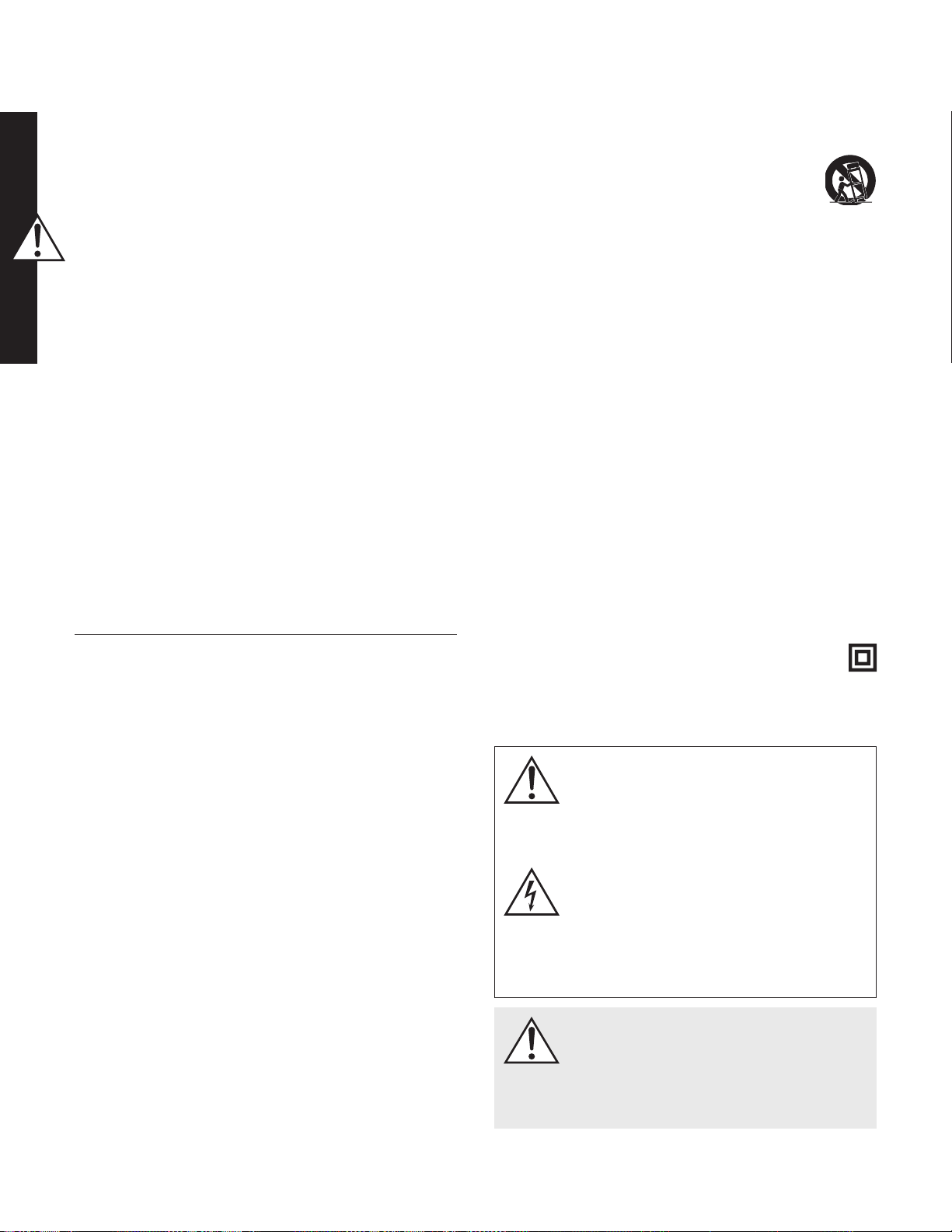
(Ligação à Corrente de Sector) deste manual para mais pormenores.
Passo 5a: Configurar os controlos (utilizando a entrada LFE)
• Configurar o controlo: Coloque o interruptor na posição “Local”.
• Modo Ligar/desligar: Coloque o interruptor na posição “Auto”.
• Nível: Coloque na posição dos ponteiros da uma hora (na vertical no
sentido ascendente).
• Utilize o sistema de gestão de graves do processador/amplificador
para ajustar a integração do subwoofer.
Passo 5b: Configurar os controlos (utilizando as entradas
direita/esquerda)
• Configurar o controlo: Coloque o interruptor na posição “App”.
• Modo Ligar/desligar: Coloque o interruptor na posição “Auto”.
• Transfira a aplicação MartinLogan Sub Control (no Google Play ou na
Apple App Store).
• Utilizando a aplicação, ajuste as seguintes configurações:
o Volume (nível): Coloque em -10 dB e aumente até que o som
tenha graves profundos e prolongados.
o Fase: Comece nos 90° (com a polaridade invertida ligada).
o Ganho da divisão: Comece nos 0 dB.
o Filtro Passa-baixo: Configure para um nível mais baixo do que a
frequência inferior dos seus altifalantes principais. Se não tem a
certeza qual é a resposta de baixa frequência do altifalante princi-
pal, comece nos 35 Hz.
Passo 6: Oiça e Divirta-se
Предупреждения по технике безопасности и
эксплуатации (Русский/Russian)
Важные инструкции по безопасности
1 Прочтитеэтиинструкции.
2 Сохранитеэтиинструкции.
3 Соблюдайтевсепредупреждения.
4 Следуйтевсеминструкциям.
5 Неиспользуйтеустройствовблизиводы.
6 Протирайтетолькосухойтканью.
7 Незакрывайтевентиляционныеотверстия.Установитев
соответствиисинструкциямипроизводителя.
8 Неустанавливайтевблизиисточниковтепла,такихкак
радиаторы,тепловыерегистры,печиилидругиеустройства
(включаяусилители),которыевыделяюттепло.
9
Не нарушайтецелибезопасностиполяризованного или
заземляющегоштекера.Поляризованнаявилкаимеетдве
лопасти,однаизкоторыхширедругой.Штекерзаземления
имеетдваконтактаитретийконтактзаземления.Широкий
клинок или третий штырь предусмотрены для вашей
безопасности.Еслипоставляемыйштепсельневходитв
розетку,обратитеськэлектрикудлязаменыустаревшейрозетки.
10 Защититешнур питанияотходьбыили защемления,
особеннонавилки,розеткидляудобстваиместо,гдеони
выходятизустройства.
11 Используйтетолькопринадлежности илиаксессуары,
указанныепроизводителем.
12 Используйтетолькостележкой,подставкой,
треногой,кронштейномилистолом,указанными
изготовителем,илипроданнымисустройством.
Когда используетсятележка, будьте осторожныпри
перемещениикомбинациитележки/ аппарата,чтобы
избежатьтравмотопрокидывания.
13 Отключайтеустройствоотсетивовремягрозыилипри
неиспользованиивтечениедлительныхпериодоввремени.
14 Обратитесьзаобслуживаниемкквалифицированному
обслуживающемуперсоналу.Техническоеобслуживание
требуется,когдаустройствокаким-либообразомповреждено,
например,поврежденшнурпитанияилиштепсельнаявилка,
пролиласьжидкостьилипопалипредметывустройство,
устройствоподверглосьвоздействиюдождяиливлаги,не
работаетнормально,илибылудален.
15 Устройство не должно подвергаться капле или
разбрызгиванию,апредметы,наполненныежидкостями,
напримервазы,недолжныпомещатьсянаустройство.
16 Поддерживайте расстояние около 20-30 см вокруг
устройствадляобеспечениядостаточнойвентиляции;
17 Не следует препятствовать вентиляции, закрывая
вентиляционныеотверстияпредметами,такимикакгазеты,
скатерти,шторыит.Д.;
18 Наустройствоне должно быть установленоникаких
источниковоткрытогоогня,такихкаксвечи;
19 Использованиеаппаратоввтропическомклимате
20 Данное оборудование представляет собой
электрическийприборклассаIIилисдвойнойизоляцией
21 Вкачестверазъединительногоустройстваиспользуется
сетевойштепсельилисоединительустройства,устройство
отключениядолжнооставатьсяврабочемсостоянии.
Восклицательный знак в равностороннем
треугольникепредназначендляпредупреждения
пользователяоналичииважныхинструкцийпо
эксплуатацииитехническомуобслуживаниюв
литературе,сопровождающейприбор.
Вспышка молнии с символом стрелки в
равностороннемтреугольникепредназначена
дляпредупрежденияпользователяоналичии
неизолированного «опасного напряжения»
в корпусе изделия, которое может иметь
достаточнуювеличину, чтобы представлять
опасностьпораженияэлектрическимтоком.
Предупреждения!Неиспользуйтеэтотпродукт
запределамистранысисходнымитребованиями
кнапряжениювразныхстранах.Неправильное
напряжениеможетпривести кповреждению,
котороебудетпотенциальнодорогостоящимдля
ремонта.Сабвуферпоставляетсяавторизованным
дистрибьюторам MartinLogan с правильным
источникомпитаниядляиспользованиявстране
предполагаемойпродажи.Списокавторизованных
дистрибьюторовможнополучитьнасайтеwww.
martinlogan.comилипоэлектроннойпочтеinfo@
martinlogan.com.
Предупреждения!
• Высокоенапряжение–невскрывать
• Обратитесьвспециализированныйсервисный
центра
• Во избежание возникновенияпожараили
поражения током не подвергать изделие
воздействиювлаги
• Воизбежаниепораженияэлектрическимтоком
выключитеусилительиотключитесабвуферот
сетипитания
• Неотсоединяйтекабельпитанияизразъёма
устройства,подключенногоксетипитания
• Не используйтесвечиилииныеисточники
открытогоогнярядомсгромкоговорителем
• Не допускайте использования/хранения
жидкостейрядомсгромкоговорителем
• Громкоговорительнезащищенотпопадания
влаги
• Кабельпитания,подключенныйкустройству,
можетявлятьсяисточникомэлектрического
напряжения
Итак,выготовыкпрослушиваниюсабвуфераоткомпании
MartinLogan.Данное руководствопоможетВамбыстрои
легкоосуществитьнастройкусистемы.Просимвнимательно
изучитьинструкциюпоэксплуатациипередначаломработы.
БлагодаряэтомуВысможетезадействоватьвсересурсынашей
низкочастотнойсистемы.
ЕслиВыиспытываетесложностивнастройкеилииспользовании
низкочастотнойсистемыMartinLogan,пожалуйста,вначале
внимательноознакомьтесьсразделом«Акустикапомещения.
Установка и настройка» в приложенной инструкции по
эксплуатации.Привозникновениипроблемвработеустройства
обратитеськближайшемуофициальномудилерукомпанииMartin
Logan.Выполучитенеобходимуюконсультациюдлярешения
возникшейзадачи.
Шаг 1: распаковка
Извлекитеновыйсабвуферизупаковки.
Шаг 2: размещение
Дляначалаустановитенизкочастотнуюсистемувкаком-либоиз
угловВашейкомнатыпрослушивания.Неостанавливайтесьна
достигнутом,повозможностипротестируйтесистемувразличных
местахВашейкомнатыпрослушивания.Удалениеототражающих
поверхностей положительно влияет на тональныйбаланс.
Пожалуйста,ознакомьтесьсразделом«Размещениесистемы»в
инструкциипоэксплуатации.
Шаг 3: коммутация
Используйтекачественныекабели.Высококачественныекабели,
рекомендованныедилером,позволятьполучитьмаксимумот
работыВашейсистемы.
Подсоединитевашпредусилитель/процессорксигнальным
входам,расположеннымстыльнойсторонынизкочастотной
системыMartinLogan.Пожалуйста,ознакомьтесьсразделом
«Управлениеиподключение»винструкциипоэксплуатации.
Шаг 4: подключение к сети переменного тока (см. раздел
«Предупреждения»)
Убедитесь,что регуляторуровня сигнала установленна
значение«0».Подключитенизкочастотнуюсистемуксети
переменноготока.Ознакомьтесьсразделом«Подключениек
сетипеременноготока»винструкциипоэксплуатации.
Шаг 5а: Установки при использовании входа LFE.
• Переключатель«SettingControl»установитевположение'Local'.
• Переключатель«PowerMode»установитевположение'Auto'.
• Регулятор«Level»установитевположение«13часов».
• Используйтерегулировкипроцессораилиресиверадля
настройкисабвуфера.
Шаг 5б: Установки при использовании входа «Стерео»
• Переключатель«SettingControl»установитевположение'App'.
• Переключатель«PowerMode»установитевположение'Auto'.
• Загрузите на свое мобильное устройство приложение
«MartinLoganSubControl»изGooglePlayилиAppleStore.
• Используяприложениесделайтеследующиенастройки:
o
«Volume(level)»-установите-10dBипостепенноувеличивайте
его,поканеполучитеглубокийирасширенныйНЧ.
o «Phase»-начнитесположения90°,привключенной
инвертированнойполярностью.
o «20–30HzLevel»-начнитес0dB.
o «LowPassFilter»-установитевположениенижеграничной
НЧчастотывашейосновнойакустики.Есливынезнаете
нижнююграничнуючастотувашейосновнойакустики,
начнитес35Hz.
Шаг 6: Наслаждайтесь прослушиванием.
Advertencias de seguridad e instalación en breve
(Español/Spanish)
Instrucciones de seguridad importantes
1 Lea estas instrucciones.
2 Guarde estas instrucciones.
3 Presta atención a todas las advertencias.
4 Sigue todas las instrucciones.
5 No use este aparato cerca del agua.
6 Limpie solo con un paño seco.
7 No bloquee ninguna abertura de ventilación. Haga la instalación
conforme a las instrucciones del fabricante.
8 No instale cerca de fuentes de calor como radiadores, registros de
calor, estufas u otros aparatos (incluidos amplificadores) que produz-
can calor.
9 No anule el propósito de seguridad del enchufe polarizado o con
toma de tierra. Un enchufe polarizado tiene dos cuchillas con una
más ancha que la otra. Un enchufe con toma de tierra tiene dos
cuchillas y una tercera a tierra. La hoja ancha o la tercera punta
se proporcionan para su seguridad. Si el enchufe suministrado no
encaja en su tomacorriente, consulte a un electricista para reempla-
zar la toma de corriente obsoleta.
10 Proteja el cable de alimentación de ser pisado o pellizcado, particu-
larmente en los enchufes, receptáculos de conveniencia y el punto
donde salen del aparato.
11 Utilice únicamente accesorios / accesorios especificados por el fab-
ricante.
12 Use solo con el carro, soporte, trípode, soporte o mesa espe-
cificados por el fabricante, o vendidos con el aparato.
Cuando se usa un carro, tenga cuidado al mover la
combinación del carro / aparato para evitar lesiones
por vuelco.
13 Desconecte este aparato durante tormentas eléctricas o cuando no
se use durante largos períodos de tiempo.
14 Remita todos los servicios a personal de servicio calificado. Se requi-
ere servicio cuando el aparato ha sido dañado de alguna manera,
como el cable de alimentación o el enchufe está dañado, se ha
derramado líquido o han caído objetos en el aparato, el aparato ha
estado expuesto a la lluvia o la humedad, no funciona normalmente
, o ha sido eliminado.
15 El aparato no debe exponerse a goteos o salpicaduras, y los objetos
que contengan líquidos, como jarrones, no deben colocarse en el
aparato.
16 Mantenga una distancia mínima de 20-30 cm alrededor del apara-
to para una ventilación suficiente;
17 No se debe impedir la ventilación cubriendo las aberturas de venti-
lación con elementos tales como periódicos, manteles, cortinas, etc .;
18 No se deben colocar sobre el aparato fuentes de llama descubier-
tas, como velas.
19 El uso de aparatos en climas tropicales
20 Este equipo es un electrodoméstico de Clase II o doble aislado
21 El enchufe de red o un acoplador de dispositivo se utiliza como
dispositivo de desconexión, el dispositivo de desconexión debe per-
manecer fácilmente operativo.
El signo de exclamación dentro de un triángulo equilátero
tiene la intención de alertar al usuario de la presencia de
instrucciones importantes de operación y mantenimiento
(servicio) en la literatura que acompaña al aparato.
El símbolo del rayo con punta de flecha, dentro de un
triángulo equilátero, está destinado a alertar al usuario
sobre la presencia de "voltaje peligroso" no aislado den-
tro del producto que puede ser de suficiente magnitud
para constituir un riesgo de descarga eléctrica.
¡ADVERTENCIA! No use este producto fuera del país
de los requisitos originales de tensión de venta según el
país. Un voltaje inapropiado puede causar daños que
serán potencialmente costosos de reparar. El subwoofer
se envía a los distribuidores autorizados de MartinLogan
con la fuente de alimentación correcta para su uso en
el país de venta previsto. Se puede acceder a una lista
de distribuidores autorizados en www.martinlogan.com o
por correo electrónico a [email protected].
¡ADVERTENCIA!
• Voltaje peligroso en el interior—no retire la cubierta.
• Refiera cualquier reparación a un técnico cualificado.
• Para evitar riesgo de incendio o de descarga eléc-
trica, no exponga este aparato a la humedad.
• Apague el amplificador y desconecte el subwoofer si
se diera alguna circunstancia anormal.
• No deberá conectar o retirar el cable de alimentación
del subwoofer estando el otro extremo conectado a la
toma de la pared.
• No sitúe el subwoofer cerca de velas o cualquier otro
tipo de fuego abierto.
• No sitúe encima del subwoofer vasos o jarrones que
contengan líquido.
• No exponga el subwoofer a salpicaduras de líquidos.
• Deberá poder acceder al cable de alimentación en
todo momento por si hubiera un accidente o se diera
una situación fuera de lo normal.
Sabemos que está deseoso de escuchar su nuevo subwoofer Martin
Logan; por eso ofrecemos esta guía rápida. Una vez que tenga el
subwoofer operativo, tómese el tiempo necesario para leer en profundi-
dad el resto de la información del manual que adjuntamos. Le dará la
perspectiva suficiente para lograr el mejor rendimiento posible de este
preciso sistema de woofers.
Si tuviera alguna dificultad en la configuración o uso de su subwoofer
Martin Logan, le referimos a las secciones Room Acoustics, Placement
o Operation del manual de instrucciones que adjuntamos. Si tuviera un
problema persistente que no pudiera resolver, póngase en contacto con
su distribuidor autorizado de Martin Logan. Él podrá realizar el análisis
técnico apropiado para solucionarlo.
Paso 1: desembalado
Saque su nuevo subwoofer de su embalaje. Por favor, conserve el material
de embalaje para usos futuros.
Paso 2: ubicación
Puede empezar situando el subwoofer en una esquina cerca de la parte
frontal de la sala. Antes de decidir una ubicación permanente, experi-
mente con otras ubicaciones. A veces, colocarlo lejos de las esquinas
puede ser más efectivo para mejorar la integración con las cajas frontales
y puede dar un grave más idóneo. Consulte la sección Placement para
más información.
Paso 3: conexión de la señal
Use los mejores cables que pueda permitirse. Recomendamos cables de
alta calidad, ya que mejorarán el rendimiento.
Conecte las salidas de su previo / procesador a los conectores de entra-
da de señal ubicados en el panel trasero del subwoofer. Le referimos a la
sección Controls and Connections para más detalle.
Si desea conectar su subwoofer usando las entradas Speaker Level (nivel
alto), le referimos a la sección Speaker Level Inputs para más detalle.
Paso 4: Conexión a la alimentación (AC) (ver advertencia)
Asegúrese de que el volumen está a 0. Conecte el subwoofer a la toma
de alimentación de la pared.
Paso 5a: Ajuste de los controles (usando la entrada LFE)
• Setting Control: seleccione la posición “Local”
• Power Mode: seleccione “Auto”.
• Level: póngalo a la 1 (justo a la derecha de la posición recta), como
si fuera un reloj.
• Use el sistema de control de graves del procesador/receptor para aju-
star la integración del subwoofer.
Paso 5b: Ajuste de los controles (Usando las entradas L/R)
• Setting Control: seleccione la posición “App”
• Power Mode: seleccione la posición “Auto”
• Descargue la aplicación MartinLogan Sub Control (desde Google Play
o desde Apple App Store).
• Usando la aplicación, ajuste los siguientes valores:
o Volume: seleccione -10dB y empiece a subirlo hasta que obtenga
un grave profundo y extendido
o Phase: empiece con 90° (con la polaridad invertida activada)
o 20–30Hz Level: empiece en 0dB.
o Low Pass Filter: seleccione un valor por debajo de la respuesta
de frecuencia más baja de sus altavoces principales. Si no está
seguro de cuál es este valor, empiece por 35Hz.
Paso 6: Siéntese y disfrute.
Säkerhetsanvisningar och goda råd om installationen
(Svenska/Swedish)
Viktiga säkerhets instruktioner
1 Läs dessa anvisningar.
2 Håll dessa instruktioner.
3 Håll alla varningar.
4 Följ alla instruktioner.
5 Använd inte apparaten nära vatten.
6 Rengör endast med torr trasa.
7 Blockera inga ventilationsöppningar. Installera enligt tillverkarens
instruktioner.
8
Installera inte i närheten av värmekällor som radiatorer, värmekällor,
spisar eller andra apparater (inklusive förstärkare) som producerar värme.
9 Bekämpa inte säkerhetsändamålet för polariserad eller jordad plug-
gen. En polariserad kontakt har två blad med en bredare än den
andra. En plugg med jordningstyp har två blad och en tredje jord-
stång. Det breda bladet eller den tredje stången är för din säkerhet.
Om den medföljande kontakten inte passar in i ditt vägguttag, kon-
takta en elektriker för att byta ut det föråldrade uttaget.
10 Skydda strömkabeln från att gå på eller klämma fast, särskilt vid plug-
gar, bekvämlighetsbehållare och punkten där de lämnar apparaten.
11 Använd endast tillbehör / tillbehör som anges av tillverkaren.
12 Använd endast med vagnen, stativet, stativet, konsolen
eller bordet som anges av tillverkaren eller säljs med
apparaten. När en vagn används, var försiktig när du
flyttar vagnen / apparatkombinationen för att undvika
skador på spetsen.
13 Koppla ur den här apparaten under åskväder eller vid oanvändning
under långa perioder.
14 Se all service till kvalificerad servicepersonal. Servicen är nödvän-
dig när apparaten har skadats på något sätt, såsom strömkabeln
eller kontakten är skadad, vätska har spillts eller föremål har fallit in
i apparaten, apparaten har utsatts för regn eller fukt, fungerar inte
normalt , eller har tappats bort.
15 Apparaten får inte utsättas för dropp eller stänk och att föremål som
är fyllda med vätskor, såsom vaser, får inte placeras på apparater.
16 Håll minst 20-30 cm avstånd runt apparaten för tillräcklig ventilation.
17 Ventilationen bör inte hindras genom att täcka ventilationsöppningar-
na med föremål, t.ex. tidningar, dukar, gardiner mm
18 Inga öppna flamskällor, såsom ljus, ska placeras på apparaten.
19 Användning av apparater i tropiska klimat
20
Denna utrustning är en klass II eller dubbelisolerad elektrisk apparat
21 Nätkontakt eller en apparatkopplare används som avkopplingsenhet,
frånkopplingsenheten ska förbli lätt att använda.
Utropstecken inom en liksidig triangel är avsedd att varna
användaren för att det finns viktiga instruktioner för drift
och underhåll (service) i den bifogade litteraturen.
Blixtbulten blinkar med pilspetssymbolen, inom en liksidig
triangel, är avsedd att varna användaren för närvaron av
oisolerad "farlig spänning" i produktens hölje som kan vara
av tillräcklig storlek för att utgöra en risk för elektriska stötar.
VARNING! Använd inte den här produkten utanför det
land där de ursprungliga försäljningsspänningskraven
varierar beroende på land. Felaktig spänning kan orsaka
skador som kan vara dyra att reparera. Subwooferen
skickas till MartinLogans auktoriserade distributörer med
rätt strömförsörjning för användning i det avsedda landet.
En lista över auktoriserade distributörer kan nås på www.
martinlogan.com eller via e-post [email protected].
VARNING!
• Farlig högspänning inuti. Undvik att ta isär produkten.
• Överlåt alla former av service och reparation till en
kvalificerad tekniker.
• Utsätt inte produkten för fukt för att undvika brandfara
och elektriska stötar.
• Stäng av förstärkaren och koppla ur subwoofern om
produkten inte fungerar som förväntat.
• Nätkabeln ska inte anslutas, kopplas ur eller kvarläm-
nas om stickkontakten i den andra änden är ansluten
till ett nätuttag.
•
Placera inte stearinljus eller annan öppen eld på högtalaren.
•
Undvik att ställa vätskefyllda vaser eller glas på högtalaren.
• Vätskor får inte droppa ner eller stänkas på högtalarna.
• Nätkabeln ska vara lättåtkomlig i det fall produkten
inte fungerar som förväntat.
Vi vet att du är ivrig att börja använda din nya MartinLogan subwoofer
och detta kapitel hjälper dig att komma igång så snabbt och effektivt som
möjligt. Så snart du har installerat subwoofern bör du ta dig tid att grundligt
läsa igenom övrig information i den medföljande användarhandboken. Det
kommer att hjälpa dig att få nödvändig insikt i hur du kan få det ljudmässigt
bästa utbytet av denna ytterst högkvalitativa subwoofer.
I det fall du stöter på problem under installationen eller vid användning av din
MartinLogan subwoofer, kan du se den medföljande användarhandbokens
kapitel om rumsakustik, placering och användning. Kontakta din auktorise-
rade MartinLogan-återförsäljare om det uppstår ett bestående problem som
du inte kan lösa. Denne har nödvändig teknisk insikt för att lösa problemet.
Steg 1: Uppackning
Ta ur din nya subwoofer ur förpackningen. Behåll originalförpackningen
för framtida användning; ersättningsförpackningar kan vara dyra.
Steg 2: Placering
Du kan börja med att placera subwoofern i ett hörn i den främre delen
av rummet. Testa andra placeringar innan du bestämmer dig för att per-
manent placera den i ett hörn. Placeringar på andra platser än i hörn är
ofta mer effektiva när det gäller att återge låga frekvenser och att smälta
samman ljudet med det från huvudhögtalarna. Se kapitlet om placering för
ytterligare information.
Steg 3: Anslutning
Använd bästa möjliga kablar. Vi rekommenderar högkvalitativa kablar –
tillgängliga hos specialiserade återförsäljare – som ger dig ljudmässigt
bäst utbyte.
Anslut signalutgångarna på förstärkaren/processorn till ingångarna som
finns på subwooferns baksida. Se kapitlet om installation och anslutning för
ytterligare information.
Om du har för avsikt att ansluta din subwoofer med ingångar för högtalar-
volym (hög volym), kan du se kapitlet om ingångar för högtalarvolym för
ytterligare information.
Steg 4: Nätanslutning (AC) (se varning)
Se till att volymratten står på 0. Anslut subwoofern till vägguttaget. Se kapitlet
om nätanslutning i denna användarhandbok för ytterligare information.
Steg 5a: Inställning av kontroller (LFE input/ingång)
• Ställ in kontroll: Sätt switch till “Local”.
• Strömbrytare/Power mode: Ställ in switch på “Auto”.
• Nivå: Vrid till “klockan 1” (strax höger om rakt upp).
• Använd ditt förstegs/receivers inställningar för subwoofer för justering
av subbasens integration i systemet.
Steg 5b: Inställning av kontroller (vänster/höger ingångar)
• Ställ in kontroll: Ställ switch till “App”.
• Strömbrytare/Power mode: Ställ in switch på “Auto”.
• Ladda ner MartinLogan Sub Control app (från Google Play eller Apple
App store).
• Använd appen, justera följande inställningar:
o Volym (nivå): Ställ till -10 dB och öka tills ljudet har en djup,
utvidgad bas.
o Fas/Phase:Starta med 90° (med inverterad poläritet påslagen).
o Rumsnivå/20–30Hz Level: Starta via 0dB.
o Låg pass filter/ Low Pass Filter: Ställ “low-end” delnings frekvenser-
na lägre än vad dina huvudhögtalare klarar. Om du är osäker hur
lågt de går, börja vid 35 Hz.
Steg 6: Lyssna och njut!
安全警告和安裝簡介(台灣/Taiwan)
重要的安全說明
1 閱讀這些說明。
2 請保留這些說明。
3 注意所有警告。
4 遵循所有說明。
5 請勿在靠近水的地方使用本設備。
6 只能用乾布清潔。
7 請勿堵塞通風口。按照製造商的說明進行安裝。
8 請勿安裝在散熱器,加熱器,爐子或其他產生熱量的設備(包括
放大器)等熱源附近。
9 不要損害極化或接地型插頭的安全用途。極化插頭有兩個刀片,
一個比另一個寬。接地型插頭有兩個刀片和第三個接地插腳。寬
刀片或第三叉是為了您的安全而設置的。如果提供的插頭不適合
您的插座,請諮詢電工更換過時的插座。
10 保護電源線不被踩踏或擠壓,特別是在插頭,便利插座和設備出
口處。
11 只能使用製造商指定的附件/附件。
12 只能使用製造商指定的或與本設備一起出售的推車,
支架,三角架,支架或桌子。使用推車時,請小心移
動推車/設備組合,以免翻倒造成傷害。
13 雷雨期間或長時間不使用時,請拔下本設備的插頭。
14 將所有維修工作交給合格的維修人員。如果設備受到任何損壞,
如電源線或插頭損壞,液體濺落或物體掉入設備,設備受到雨淋
或潮濕,不能正常工作,則需要進行維修,或者已經被丟棄。
15 儀器不得暴露在滴水或濺水的環境中,充滿液體的物體如花瓶不
得放在儀器上。
16 保持設備周圍至少20-30cm的距離,以保證通風良好;
17 不應通過用報紙,桌布,窗簾等物品蓋住通風口來阻止通風。
18 設備上不應放置明火等火源,例如蠟燭。
19 在熱帶氣候中使用儀器
20 本設備屬二類或雙重絕緣電器
21
電源插頭或電器耦合器用作斷開裝置,斷開裝置應保持可操作性。
等邊三角形內的感嘆號旨在提醒用戶注意設備隨附文獻
中的重要操作和維護(維修)說明。
在等邊三角形內帶有箭頭符號的閃電閃光燈旨在提醒用
戶,產品外殼內存在未絕緣的“危險電壓”,可能會造成
觸電危險。
警告! 請勿在原產國以外的地區使用本產品。 不正確
的電壓會造成損壞,修理費用可能很高。 低音炮運送
到MartinLogan授權經銷商處,在正確銷售的國家使用
正確的電源。 可以通過www.martinlogan.com或通過
電子郵件[email protected]訪問授權分銷商列表。
警告!
• 內部存在危險電壓 - 不要取下蓋子。
• 請諮詢合格的技術人員。
• 為防止火災或觸電危險,請勿將此模塊暴露在潮濕
環境中。
• 如果發生任何異常情況,請關閉擴大機並拔下低音
喇叭。
• 另一端連接到交流電源時,不得將電源線安裝、拆
除或與揚聲器分離。
• 揚聲器上不應放置蠟燭或其他明火。
• 眼鏡或花瓶中的液體不能放在揚聲器上。
• 揚聲器不應暴露於液體滴落或飛濺。
• 任何異常情況發生時,電源線應保持隨時可用。
我們知道您渴望聽到您的新型MartinLogan低音喇叭,所以本節提供了
快速簡單的設置。一旦使用您的低音喇叭,請花時間詳細閱讀隨附手
冊中的其他信息。它將為您提供有關如何從這個最苛刻的低音揚聲器
系統中獲得最佳性能的觀點。
如果您在設置或操作MartinLogan低音喇叭時遇到任何困難,請參閱隨
附的用戶手冊中的室內聲學,放置或操作部分。如果您遇到無法解決
的問題,請聯繫您授權的MartinLogan經銷商。他們會為您提供適當的
技術分析以緩解這種情況。
第1步:拆包
從包裝中取出新的低音喇叭。請保留原包裝材料以備將來使用,更換
包裝可能會很昂貴。
第2步:安置
您可以選擇將低音喇叭放置在靠近房間正面的角落。在決定永久性的
角落安置之前,請嘗試其他位置。遠離角落的位置通常證明在提供理
想的低頻性能和與主揚聲器混合方面更有效。詳情請參閱“展示位置”部
分。
第3步:信號連接
使用最好的電纜,你可以。高品質的電纜,可從您的專業經銷商,建
議,並會給你優越的性能。
將前置放大器/處理器輸出連接到位於超低音揚聲器後面板上的信號輸
入連接器。有關詳細信息,請參閱控制和連接部分。
如果您打算使用揚聲器電平(高電平)輸入連接您的超低音揚聲器,
請參閱揚聲器電平輸入部分了解詳情。
步驟4:電源連接(AC)(請參閱警告)
確保電平旋鈕設置為0.將低音喇叭插入牆上插座。有關詳細信息,請查
閱本手冊的“交流電源連接”部分
步驟5a:設置控件(使用LFE輸入)
• 設置控制:將開關設置為“本地”。
• 電源模式:將開關設置為“自動”。
• 級別:設置在一點(正好朝上)。
• 使用處理器/接收器的低音管理系統來調整低音炮的整合。
步驟5b:設置控件(使用左/右輸入)
• 設置控制:將開關設置為“應用程序”。
• 電源模式:將開關設置為“自動”。
• 從Google Play或Apple App Store下載MartinLogan Sub Control應
用程序。
• 使用應用程序,調整以下設置:
o 音量(電平):設定在-10dB,並增加,直到聲音深沉,延長低
音。
o 相位:從90°開始(反轉極性打開)。
o 房間增益:從0dB開始。
o 低通濾波器:低於主揚聲器的低頻響應。如果您不確定主揚聲
器的低頻響應,則從35Hz開始。
第六步:聆聽和享受。
คำ�เตือนเรื่องคว�มปลอดภัยและคำ�แนะนำ�ก�รติดตั้งอย่�งสั้นๆ (ฉบับ
ภ�ษ�ไทย/Thai)
คำ�แนะนำ�เพื่อคว�มปลอดภัยที่สำ�คัญ
1 อ่านคำาแนะนำาเหล่านี้
2 เก็บคำาแนะนำาเหล่านี้ไว้
3 จงฟังคำาเตือนทั้งหมด
4 ปฏิบัติตามคำาแนะนำาทั้งหมด
5 อย่าใช้เครื่องนี้ใกล้กับน้ำา
6 ทำาความสะอาดด้วยผ้าแห้งเท่านั้น
7 อย่าบล็อกช่องระบายอากาศใดๆติดตั้งตามคำาแนะนำาของผู้ผลิต
8 อย่าติดตั้งใกล้แหล่งความร้อนเช่นหม้อน้ำา,เครื่องทำาความร้อน,เตาหรือ
อุปกรณ์อื่นๆ(รวมถึงเครื่องขยายเสียง)ที่ผลิตความร้อน
9 อย่าพ่ายแพ้เพื่อความปลอดภัยของปลั๊กชนิดโพลาไรซ์หรือสายดินปลั๊ก
แบบโพลาไรซ์มีใบมีดสองใบที่กว้างกว่าที่อื่นปลั๊กชนิดพื้นดินมีใบมีด
สองใบและง่ามดินที่สามมีดกว้างหรือง่ามที่สามเพื่อความปลอดภัยของ
คุณหากปลั๊กที่จัดให้ไม่พอดีกับเต้าเสียบของคุณโปรดปรึกษาช่างไฟฟ้า
เพื่อเปลี่ยนเต้าเสียบที่ล้าสมัย
10 ป้องกันสายไฟจากการเดินหรือถูกบีบอัดโดยเฉพาะที่ปลั๊ก,เต้ารับที่
สะดวกและจุดที่พวกเขาออกจากเครื่อง
11 ใช้อุปกรณ์เสริม/อุปกรณ์เสริมที่ระบุโดยผู้ผลิตเท่านั้น
12 ใช้เฉพาะกับรถเข็น,ขาตั้ง,ขาตั้ง,วงเล็บหรือตารางที่ระบุ
โดยผู้ผลิตหรือจำาหน่ายพร้อมกับเครื่องเมื่อใช้รถเข็นให้ใช้
ความระมัดระวังในการเคลื่อนย้ายเกวียน/ชุดเครื่องมือเพื่อ
หลีกเลี่ยงการบาดเจ็บจากปลายปลาย
13 ถอดปลั๊กเครื่องนี้ในระหว่างเกิดพายุฟ้าผ่าหรือเมื่อไม่ได้ใช้เป็นเวลานาน
14 ให้บริการทั้งหมดแก่ผู้ให้บริการที่มีคุณสมบัติเหมาะสมต้องมีการบำารุง
รักษาเมื่ออุปกรณ์เสียหายในลักษณะใดเช่นสายไฟหรือปลั๊กเสียหายเกิด
การรั่วไหลของของเหลวหรือสิ่งของหล่นลงไปในอุปกรณ์อุปกรณ์ถูกฝน
หรือความชื้นไม่ทำางานตามปกติหรือถูกทิ้งไว้
15 อุปกรณ์จะต้องไม่ให้น้ำาหยดหรือกระเด็นและวัตถุที่เต็มไปด้วยของเหลว
เช่นแจกันจะไม่ถูกวางลงบนเครื่อง
16 รักษาระยะห่างของอุปกรณ์ประมาณ20-30ซม.อย่างน้อยเพื่อให้มีการ
ระบายอากาศที่เพียงพอ
17 ควรปิดช่องระบายอากาศด้วยอุปกรณ์เช่นหนังสือพิมพ์ผ้าปูโต๊ะผ้าม่าน
ฯลฯ
18 ห้ามนำาแหล่งเปลวไฟเปลือยเช่นเทียนมาวางไว้บนเครื่อง
19 การใช้อุปกรณ์ในภูมิอากาศเขตร้อน
20 อุปกรณ์นี้เป็นเครื่องใช้ไฟฟ้าที่มีClassIIหรือDoubleInsulated
21 ปลั๊กไฟหรืออุปกรณ์เชื่อมต่อเครื่องใช้ไฟฟ้าใช้เป็นอุปกรณ์ตัดการเชื่อม
ต่ออุปกรณ์ปลดจะต้องสามารถใช้งานได้
เครื่องหมายอัศเจรีย์ภายในรูปสามเหลี่ยมด้านเท่ามี
วัตถุประสงค์เพื่อแจ้งเตือนให้ผู้ใช้ปฏิบัติตามคำาแนะนำาในการ
บำารุงรักษาและการบำารุงรักษา(การบำารุงรักษาที่สำาคัญ)ใน
เอกสารที่มาพร้อมกับเครื่อง
ลูกศรฟ้าผ่าที่มีสัญลักษณ์ลูกศรอยู่ในรูปสามเหลี่ยมด้านเท่า
มีจุดประสงค์เพื่อเตือนผู้ใช้ถึงแรงดันไฟฟ้าที่ไม่เป็นอันตราย
ภายในกล่องบรรจุของผลิตภัณฑ์ซึ่งอาจมีขนาดเพียงพอที่จะ
ทำาให้เกิดไฟฟ้าช็อตได้
คำ�เตือน! ห้ามใช้ผลิตภัณฑ์นี้นอกประเทศที่มีข้อกำาหนด
เกี่ยวกับแรงดันไฟฟ้าขายแตกต่างกันไปในแต่ละประเทศ
แรงดันไฟฟ้าที่ไม่ถูกต้องอาจทำาให้เกิดความเสียหายที่อาจ
จะมีราคาแพงในการซ่อมซับวูเฟอร์จะถูกส่งไปยังตัวแทน
จำาหน่ายที่ได้รับอนุญาตMartinLoganพร้อมแหล่งจ่ายไฟที่
ถูกต้องสำาหรับการใช้งานในประเทศที่ต้องการขายรายชื่อผู้
จัดจำาหน่ายที่ได้รับอนุญาตสามารถเข้าชมได้ที่www.mar-
tinlogan.comหรือทางอีเมล[email protected]
คำ�เตือน!
• มีแรงดันไฟ้ฟ้าที่เป็นอันตรายอยู่ภายในห้ามเปิดฝา
• โปรดขอรับบริการจากช่างเทคนิคที่มีความชำานาญ
• เพื่อป้องกันอันตรายจากไฟไหม้หรือการถูกไฟดูดอย่าทิ้ง
โมดูลนี้ไว้ในที่ชื้น
• หากเกิดสภาวะที่ไม่ปกติให้ปิดเครื่องขยายเสียงและถอด
ปลั๊กซับวูฟเฟอร์
•
ไม่ควรติดตั้งถอดหรือปลดสายไฟออกจากลำาโพงในขณะ
ที่ปลายอีกด้านหนึ่งของสายไฟเสียบอยู่กับแหล่งจ่ายไฟAC
• ห้ามวางเทียนหรือสิ่งที่สามารถเกิดเปลวไฟไว้บนลำาโพง
• ห้ามวางแก้วหรือแจกันที่บรรจุของเหลวไว้บนลำาโพง
• ไม่ควรวางลำาโพงไว้ในที่ที่มีของเหลวหยดหรือกระเด็น
• ควรปล่อยให้สายไฟอยู่ในสภาพพร้อมใช้งานหากเกิด
สภาพผิดปกติขึ้น
เราทราบว่าท่านปรารถนาอยากจะฟังซับวูฟเฟอร์MartinLoganใหม่ของท่าน
แต่โปรดอ่านหัวข้อนี้เพื่อให้สามารถติดตั้งได้อย่างรวดเร็วและง่ายดายเมื่อท่าน
ได้ติดตั้งซับวูฟเฟอร์ให้พร้อมใช้งานแล้วโปรดสละเวลาเพื่ออ่านข้อมูลส่วนที่
เหลืออย่างละเอียดในคู่มือที่แนบมาด้วยซึ่งจะช่วยให้ท่านเข้าใจวิธีการทำาให้
ระบบวูฟเฟอร์นี้มีประสิทธิภาพสูงสุดเท่าที่จะเป็นไปได้
หากท่านพบปัญหาในการติดตั้งหรือใช้งานซับวูฟเฟอร์MartinLoganโปรดดู
ในหัวข้อระบบเสียงในห้องการจัดวางหรือการใช้งานของคู่มือผู้ใช้ที่แนบมา
ด้วยหากท่านยังประสบปัญหาอยู่และไม่สามารถแก้ไขได้โปรดติดต่อตัวแทน
จำาหน่ายMartinLoganที่ได้รับอนุญาตตัวแเทนเหล่านั้นจะช่วยท่านวิเคราะห์
ทางเทคนิคที่เหมาะสมเพื่อแก้ไขปัญหา
ขั้นตอนที่ 1: แกะกล่อง
นำาซับวูฟเฟอร์ใหม่ออกจากล่องโปรดเก็บวัสดุบรรจุภัณฑ์ดั้งเดิมไว้ใช้ใน
อนาคตการเปลี่ยนบรรจุภัณฑ์อาจมีราคาแพง
ขั้นตอนที่ 2: ก�รจัดว�ง
ท่านสามารถเริ่มโดยวางซับวูฟเฟอร์ไว้ใกล้กับมุมด้านหน้าห้องเพื่อให้วูฟฟเอร์
ทั้งสองตัวมีระยะห่างจากกำาแพงด้านข้างเท่าๆกันก่อนตัดสินใจวางที่มุมใดมุม
หนึ่งอย่างถาวรโปรดทดสองวางในตำาแหน่งอื่นๆด้วยตำาแหน่งที่ห่างออกจาก
มุมห้องมักให้ประสิทธิภาพเสียงความถี่ต่ำาที่ดีกว่าและกลมกลืนกับลำาโพงหลัก
โปรดดูรายละเอียดในหัวข้อการจัดวาง
ขั้นตอนที่ 3: ก�รเชื่อมต่อสัญญ�ณ
กรุณาใช้สายเคเบิ้ลที่ดีที่สุดที่ท่านมีเราขอแนะนำาให้ท่่านใช้สายเคเบิ้ลที่มี
คุณภาพสูงเพื่อประสิทธิภาพเสียงที่เป็นเลิศท่านสามารถหาซื้อสายเคเบิ้ลที่มี
คุณภาพสูงได้จากตัวแทนจำาหน่ายผลิตภัณฑ์นี้โดยเฉพาะ
ต่อสัญญาณออกของฟรีแอมปลิไฟเออร์/โปรเซสเซอร์เข้ากับคอนเนกเตอร์
สัญญาณเข้าที่อยู่ด้านหลังของซับวูฟเฟอร์โปรดดูรายละเอียดในหัวข้อตัว
ควบคุมและการเชื่อมต่อ
หากท่านวางแผนจะเชื่อมต่อซับวูฟเฟอร์โดยใช้สัญญาณเข้าระดับสัญญาณ
ลำาโพง(ระดับสัญญาณสูง)โปรดอ่านรายละเอียดในหัวข้อสัญญาณเข้าระดับ
สำญญาณลำาโพง
ขั้นตอนที่ 4: ก�รเชื่อมต่อส�ยไฟ (AC) (โปรดอ่�นคำ�เตือน)
ตรวจดูให้แน่ใจว่าลูกบิดระดับสัญญาณตั้งอยู่ที่0เสียบปลั๊กของซับวูฟเฟอร์เข้า
กับเต้ารับที่ผนังอ่านดูรายละเอียดในหัวข้อการเชื่อมต่อสายไฟACในคู่มือนี้
ขั้นตอนที่ 5a: ก�รตั้งค่� โดยใช้ช่องต่อข�เข้� LFE Input
• ปรับสวิทซ์ไปที่Local
• ปรับสวิทซ์ไปที่Auto
• ตั้งค่าLevelที่ประมาณบ่ายโมง
• ใช้ระบบควบคุมเบสของโปรเซสเซอร์(Processor)หรือรีซีฟเวอร์
(Receiver)ปรับแต่งเสียงเบสให้เข้ากัน
ขั้นตอนที่ 5b: ก�รตั้งค่� โดยใช้ช่องต่อข�เข้� Left/Right Input
• ปรับสวิทซ์ไปที่App
• ปรับสวิทซ์ไปที่Auto
• ดาวโหลดMartinloganSubControlapp(จากGooglePlayหรือApple
AppStore)
• ใช้Appปรับแต่งดังนี้:
o Volume:ตั้งที่-10dbและเพิ่มขึ้นจนกระทั่งได้เสียงเบสต่ำาๆ
o Phase:เริ่มจาก90องศา(โดยInvertedpolarityเปิดอยู่)
o 20–30HzLevel:เริ่มจาก0db
o LowPassFilter:ตั้งค่าให้ต่ำากว่าความถี่ต่ำาสุดของลำาโพงคู่หลัก.ถ้า
ไม่แน่ใจให้ตั้งที่35Hz
ขั้นตอนที่ 6: เชิญรับฟังและเพลิดเพลินกับเสียงอันไพเร�ะ
Kısaca Güvenlik Uyarıları ve Kurulum (Türkçe/Turkish)
Önemli güvenlik TALİMATLARI
1 Butalimatlarıokuyun.
2 Butalimatlarısaklayın.
3 Tümuyarılaradikkatedin.
4 Tümtalimatlarıuygulayın.
5 Bucihazısuyayakınyerlerdekullanmayın.
6 Sadecekurubezletemizleyin.
7 Havalandırmadelikleriniengellemeyin.Üreticitalimatlarına
uygunolaraktakın.
8 Isıüretenradyatörler,ısıkayıtcihazları,ocaklarveyadiğer
cihazlar(amplifikatörlerdahil)gibiherhangibirısıkaynağının
yakınınakurmayın.
9 Kutupluveyatopraklamatipifişingüvenlikamacınıyenilgiye
uğratmayın.Kutuplanmışbirtıpanındiğeridahagenişolaniki
bıçağıvardır.Birtopraklamatipifişinikibıçağıvebirüçüncü
topraklamaucuvardır.Güvenliğiniziçingenişbıçakveyaüçüncü
uçlarsağlanmıştır.Sağlananfişprizeuymuyorsa,eskiprizin
değiştirilmesiiçinbirelektrikçiyedanışın.
10 Güçkablosununüzerindeyürümektenveyasıkışmamasına,
özelliklefişlerde,prizlerdevecihazdançıktıklarındakoruyun.
11 Sadeceüreticitarafındanbelirtilenekleri/aksesuarlarıkullanın.
12 Yalnızcaüreticitarafındanbelirtilenveyacihazla
birliktesatılanaraba,sehpa,tripod,dirsekveyamasa
ilekullanın.Birarabakullanıldığında,devirmeyerek
yaralanmayıönlemekiçinaraba/cihazkombinasyo-
nunuhareketettirirkendikkatliolun.
13 Şimşeklifırtınalardaveyauzunsürekullanılmadığındabucihazı
fiştençekin.
14
Tümservisleriyetkiliservispersonelinebaşvurun.Güçkablosuveya
fişhasargörmüş,cihazıniçinesıvıdökülmüşveyanesnelerdüşmüş,
cihazyağmuraveyanememaruzkalmış,normalçalışmıyorgibi
cihazhasargördüğündebakımgerekiyorveyadüşürüldü.
15 Cihaz,damlayanveyasıçramasınamaruzkalmamalıvevazolar
gibisıvılarladolunesneleraparatüzerineyerleştirilmemelidir.
16 Yeterlihavalandırmasağlamakiçincihazınçevresindeenaz
20-30cmmesafebırakın;
17 Havalandırmaaçıklıklarınıgazete,masaörtüleri,perdelergibi
malzemelerleörterekhavalandırmaengellenmemelidir;
18 Cihazamumgibihiçbirçıplakalevkaynağıkoyulmamalıdır;
19 Tropikiklimlerdeaparatkullanımı
20 BuekipmanSınıfIIveyaçiftyalıtımlıelektriklibircihazdır
21 Bağlantıkesmecihazıolarakelektrikfişiveyacihazkuplajı
kullanılırsa,bağlantıkesmecihazıkullanımahazırhaldedir.
Eşkenarüçgeniçindekiünlemişareti,kullanıcıyacihazla
birliktegelenliteratürdeönemliişletmevebakım(servis)
talimatlarınınvarlığınıbildirmekiçinhazırlanmıştır.
Eşkenarüçgeniçindekiokbaşsimgesiylegösterilen
yıldırımçarpması,kullanıcınınelektrikçarpmasıriski
oluşturacakkadarbüyükolabilecekyalıtılmamış"teh-
likelivoltaj"varlığınadikkatetmesiamaçlanmıştır.
UYARI! Buürünüülkenindışındakiorijinalsatışgeri-
limigereksinimleriniülkeyegörefarklıkullanmayın.
Uygunolmayanvoltaj,potansiyelolaraktamiredilme-
sigereken hasarlaranedenolabilir.Subwoofer,
amaçlanansatışülkesindekullanılmaküzeredoğru
güçkaynağıylaMartinLoganyetkilidistribütörlerine
gönderilir.Yetkilidistribütörlerinbirlistesiwww.mar-
tinlogan.comadresindenveya[email protected]
adresinee-postagöndererekerişilebilir.
UYARI!
•
İçeridetehlikeliseviyedevoltajvardır—kapağını
açmayınız.
•
Bakımiçinehliyetlibirteknisyenebaşvurun.
•
Muhtemel yangın veya elektrik çarpmasıteh-
likesindenkaçınmakiçin,buüniteyinememaruz
bırakmayınız.
•
Anormalbirdurumlakarşılaştığınızda,amplifikatörü
kapatınızvederinbashoparlörünün(subwoofer)
bağlantısınıkesiniz.
•
GüçkablosununbirucununAlternatifAkımpri-
zinetakılıolmasıhalinde,diğerucunuhoparlöre
takmayınız,hoparlördençıkarmayınızveyahopar-
lördençıkmışbirdurumdabırakmayınız.
•
Hoparlörünüzerindemumveyabenzeriaçıkalevli
nesneleribırakmayın.
•
Hoparlörünüzerindeiçindesıvıbulunanbardakveya
vazogibinesneleribırakmayın.
•
Hoparlörlerhiçbirşekildedamlayanveyasıçrayan
sıvılaramaruzbırakılmamalıdır.
•
Anormalbirdurumlakarşılaşmanızhalinde,güçkab-
losubağlıkalmalıdır.
MartinLoganderinbashoparlörünübiranöncedinlemekisteyeceğiniz
düşünülerek hızlı ve kolay kurulum talimatları bu bölümde

sunulmaktadır.Hoparlörünüzü,çalışırdurumagetirdiktensonra,el
kitabındaverilentümbilgileridikkatleokuyunuz.Elkitabı,sonderece
hassasolanbubashoparlöründenmümkünolanenmükemmel
performansınasıleldeedebileceğinizigösterenbilgileriiçerir.
MartinLoganderinbaslıhoparlörünüzün,kuruluşuveyaçalışması
esnasındaherhangibirsorunlakarşılaşırsanız,sizeverilenkullanım
kılavuzununOdaAkustiği,Konumlamasıveyaİşletimbölümlerine
başvurunuz.Eğerçözülemeyenbirsorunlakarşılaşırsanız,yet-
kiliMartinLogansatıcısıiletemasageçiniz.Sorunuçözmekiçinsize
uygunteknikanalizlerivereceklerdir.
Adım 1: Ambalajın açılması
Yeniderinbaslıhoparlörünüzüambalajındançıkarınız.İleridetekrar
kullanımiçinlütfenambalajmalzemelerinisaklayınız—ziramalze-
meleriyenidenalacakolsanızsiziniçindahapahalıolabilir.
Adım 2: Konumlandırma
Derinbaslıhoparlörünüzüodanızınöntarafında bir köşeye
yerleştirebilirsiniz.Hangiköşeyikullanacağınızakararvermeden
önce,diğerkonumlardadatecrübeediniz.Köşelerdenuzakta
konuşlandırılmalarıhalinde,genellikledahaetkindüşükfrekanslıbir
performanssağlarveanahoparlörlerledahauyumluolurlar.Detaylar
içinKonumlandırmabölümünebaşvurunuz.
Adım 3: Sinyal Bağlantısı
Bulabileceğinizenkalitelikablolarıkullanmayagayretedin.
Bayinizdenteminedebileceğinizyüksekkalitelikablolar,tavsiyeolu-
nurvesizemükemmelbirperformanssağlar.
Preamplifikatör/işlemciçıkışlarınıderinbaslıhoparlörünüzünarka
panosundakonumlandırılmışolansinyalgirişlerinebağlayınız.
DetaylariçinKontrolveBağlantılarbölümünebaşvurunuz.
Eğer,SpeakerLevel(HoparlörSeviyesi)(yüksekseviye)girdil-
erinikullanarakderinbaslıhoparlörünüzübağlamakistiyorsanız
detaylariçinSpeakerLevelInput(HoparlörSeviyesiGirdileri)bölü-
münebakınız.
Adım 4: Güç Bağlantısı (Alternatif Akım) (uyarıya bakınız)
Seviyedüğmesinin0’aayarlanmışolmasınadikkatediniz.Derin
baslıhoparlörünüzüduvardakiprizetakınız.BukılavuzunACPower
Connection(AlternatifAkımGüçBağlantısı)bölümünüokuyunuz.
Adım 5a: Kontrollerin Ayarının Yapılması (LFE Input - Alçak
Frekanslı Etki Girdileri kullanarak)
• KontrollerinKuruluşu:Anahtarı“Local”(Yerel)konumunagetiriniz.
• GüçModu:Anahtarı‘Auto’(Otomatik)konumunagetiriniz.
• Seviye:Saatbirkonumunaayarlayın(dikkonumunhemensağı).
• Derinbaslıhoparlörünüzünentegrasyonunuayarlamakiçin
işlemci/alıcıbasyönetimsisteminikullanınız.
Adım 5b: Kontrollerin Ayarının Yapılması (Sol/Sağ Girdilerinin
kullanarak)
• KontrolünKuruluşu:Anahtarı‘App’(Uygulama)konumunagetiriniz.
• GüçModu:Anahtarı‘Auto’(Otomatik)konumunagetiriniz.
• MartinLoganSubControluygulamasınıindirin(GooglePlayveya
AppleAppStore’ukullanarak).
• Uygulamayıkullanarakaşağıdakiayarlarıyapınız:
o Sesseviyesi(seviye):Başlangıçta-10dBseviyesineayar-
layarak,derin,genişletilmişbaseldeedilenekadaryavaş
yavaşyükseltin.
o Faz:90°’denbaşlayın(Terspolariteaçılmışşekilde).
o OdaGain:0dB’denbaşlayınız.
o AlçakGeçişFiltresi:Anahoparlörlerinizindüşükfrekans
karşılığındandadahadüşükseviyedeayarlayın.Eğerana
hoparlörünüzündüşükfrekanskarşılığındanemindeğilseniz
başlangıçolarak35Hz’eayarlayınvebunoktadanbaşlayın.
Adım 6: Dinleyin ve Zevk Alın.
Tóm tắt cảnh báo về an toàn và cài đặt thiết bị (Việt/Vietnamese)
Hướng dẫn An toàn Quan trọng
1 Đọc các hướng dẫn này.
2 Giữ các hướng dẫn này.
3 Giữ mọi lời cảnh cáo.
4 Thực hiện theo tất cả các hướng dẫn.
5 Không sử dụng thiết bị này gần nước.
6 Chỉ lau bằng khăn khô.
7 Không chặn bất kỳ lỗ thông khí. Lắp đặt theo hướng dẫn của nhà
sản xuất.
8
Không cài đặt gần bất kỳ nguồn nhiệt nào như bộ tản nhiệt, lò sưởi,
lò sưởi, hoặc các thiết bị khác (kể cả bộ khuếch đại) tạo ra nhiệt.
9 Không đánh bại mục đích an toàn của phích cắm có phân cực
hoặc nối đất. Một phích cắm có hai lưỡi với một rộng hơn khác.
Một phích cắm mặt đất có hai lưỡi và một đầu nối đất thứ ba.
Khay rộng hoặc ngạnh thứ ba được cung cấp cho sự an toàn
của bạn. Nếu phích cắm không phù hợp với đầu ra của bạn, hãy
tham khảo ý kiến của một thợ điện để thay thế ổ cắm đã lỗi thời.
10 Bảo vệ dây nguồn khỏi bị đi bộ hoặc bị chèn ép, đặc biệt là các
phích cắm, ổ cắm thuận tiện và điểm mà chúng thoát ra khỏi
thiết bị.
11 Chỉ sử dụng phụ kiện / phụ kiện do nhà sản xuất quy định.
12 Chỉ sử dụng với giỏ hàng, giá treo, chân, giá đỡ, hoặc
bảng do nhà sản xuất quy định, hoặc được bán kèm
với thiết bị. Khi sử dụng xe đẩy, hãy thận trọng khi di
chuyển bộ kết hợp giỏ / thiết bị để tránh chấn thương
từ đầu.
13 Rút phích cắm của thiết bị này trong những cơn bão sét hoặc khi
không sử dụng trong thời gian dài.
14 Tham khảo tất cả các dịch vụ cho nhân viên dịch vụ có trình độ.
Cần phải bảo dưỡng khi máy bị hư hỏng dưới bất kỳ hình thức
nào, chẳng hạn như dây nguồn hoặc phích cắm bị hỏng, chất
lỏng đã đổ hoặc vật rơi vào trong thiết bị, thiết bị đã bị mưa hoặc
ẩm ướt, không hoạt động bình thường , hoặc đã bị bỏ.
15 Thiết bị không được để nước nhỏ giọt hoặc bắn tung tóe và các
vật chứa đầy chất lỏng, như bình, không được đặt trên thiết bị.
16 Duy trì khoảng cách tối thiểu 20-30cm xung quanh thiết bị để
thông gió đầy đủ;
17 Không được cản trở thông gió bằng cách che các lỗ thông khí
bằng các vật dụng, chẳng hạn như báo chí, khăn trải bàn, rèm ...;
18 Không được để nguồn lửa trần, như nến, đặt trên thiết bị;
19 Việc sử dụng thiết bị trong khí hậu nhiệt đới
20 Thiết bị này là thiết bị điện loại II hoặc hai lớp điện
21 Phích cắm điện hoặc đầu nối thiết bị được sử dụng làm thiết bị
ngắt kết nối, thiết bị ngắt sẽ vẫn hoạt động được.
Dấu chấm than trong một tam giác đều đề cập đến
người sử dụng với các hướng dẫn vận hành và bảo
dưỡng quan trọng (phục vụ) trong các tài liệu kèm
theo thiết bị.
Đèn flash chớp với biểu tượng đầu mũi tên, trong một
tam giác đều, nhằm cảnh báo người sử dụng với sự
có mặt của "điện áp nguy hiểm" không được bảo vệ
trong khu vực sản phẩm có thể đủ lớn để gây nguy cơ
điện giật.
CẢNH BÁO! Không sử dụng sản phẩm này bên ngoài
quốc gia có yêu cầu về điện áp bán ban đầu thay
đổi theo quốc gia. Điện áp không đúng có thể gây
ra thiệt hại mà sẽ có khả năng đắt tiền để sửa chữa.
Loa siêu trầm được chuyển tới các nhà phân phối ủy
quyền MartinLogan với nguồn điện chính xác để sử
dụng tại quốc gia dự định bán. Một danh sách các
nhà phân phối ủy quyền có thể được truy cập tại www.
martinlogan.com hoặc bằng cách gửi email tới info@
martinlogan.com.
Chú ý!
•
Điện áp nguy hiểm bên trong, không được tháo nắp.
•
Tham khảo kỹ thuật viên khi lắp đặt
•
Để ngăn ngừa cháy hoặc sốc nguy hiểm, không nên
đặt loa tại nơi có nhiều độ ẩm.
•
Tắt nguồn và rút phích cắm điện ra khỏi loa siêu trầm
nếu có bất kỳ hiện tượng bất thường nào xảy ra.
•
Không nên cắm dây nguồn vào hoặc rút ra khỏi loa
nếu trong khi đầu kia được nối với nguồn điện AC.
•
Không nên đặt nến hoặc các đồ vật có lửa trên loa.
•
Không đặt ly có nước hoặc có chất lỏng khác lên loa.
•
Không để chất lỏng nhỏ giọt hoặc bắn tung tóe vào loa.
•
Dây nguồn nên vẫn hoạt động nếu bất kỳ điều kiện
bất thường xảy ra.
Chúng tôi biết bạn đang mong muốn thưởng thức loa siêu trầm
MartinLogan mới của bạn, vì vậy phần này được cung cấp để cho
phép nhanh chóng và dễ dàng lắp đặt. Trước khi cho loa sub của bạn
hoạt động, xin vui lòng dành thời gian để đọc kỹ phần hướng dẫn còn
lại. Nó sẽ cung cấp cho bạn những thông tin làm thế nào để đạt được
hiệu suất tối đa có được từ hệ thống loa siêu trầm này.
Nếu bạn nên gặp bất kỳ khó khăn trong việc lắp đặt hoặc hoạt động
của loa siêu trầm MartinLogan, vui lòng xem lại các kỹ thuật về Âm học
của phòng nghe, Vị trí đặt loa hoặc hướng dẫn sử dụng. Nếu bạn gặp
phải vấn đề rắc rối mà không thể được giải quyết, xin vui lòng liên hệ
với đại lý ủy quyền của MartinLogan. Họ sẽ cung cấp cho bạn các phân
tích kỹ thuật thích hợp để giải quyết các vấn đề rắc rối đó.
Bước 1: Mở thùng
Tháo bao bì ra khỏi loa siêu trầm mới của bạn và giữ lại các vật liệu
đóng gói phòng khi dùng lại sau này.
Bước 2: Vị trí đặt loa
Bạn có thể chọn một góc gần phía trước của căn phòng để đặt loa siêu
trầm. Hãy thử nghiệm với các vị trí khác, trước khi quyết định một vị trí cố
định. Vị trí góc phòng góc thường cho âm thanh hiệu quả hơn trong việc
cung cấp hiệu suất tần số thấp lý tưởng và sự cộng hưởng tốt với cặp loa
chính.
Bước 3: Kết nối tín hiệu
Sử dụng các loại cáp tốt nhất bạn có thể. Loại cáp chất lượng cao sẽ
cung cấp cho bạn hiệu suất cao. Kết nối ngõ ra từ preamplifier /bộ
xử lý với ngõ vào tín hiệu nằm trên bảng điều khiển phía sau của loa
siêu trầm. Xin vui lòng xem các điều khiển và phần kết nối để biết chi
tiết. Nếu bạn có kế hoạch để kết nối loa siêu trầm của bạn sử dụng
Cấp loa (mức cao) đầu vào. Vui lòng tham khảo các mục Control và
Connection để biết thêm các chi tiết.
Bước 4: Kết nối điện (AC) (xem cảnh báo)
Hãy chắc chắn rằng vị trí núm vặn được đặt ở 0. Cắm loa siêu trầm
vào một ổ cắm trên tường.
Bước 5a: Cài đặt Điều khiển (Sử dụng Đầu vào LFE)
• Cài đặt Điều khiển: Gạt công tắc sang ‘Local’.
• Chế độ Nguồn: Gạt công tắc sang ‘Auto’.
• Mức độ: Đặt lúc một giờ (gần như thẳng đứng).
• Sử dụng hệ thống quản lý âm trầm của bộ xử lý/máy thu của bạn
để điều chỉnh sự tích hợp của loa subwoofer.
Bước 5b: Cài đặt Điều khiển (Sử dụng Đầu vào Trái/Phải)
• Cài đặt Điều khiển: Gạt công tắc sang ‘App’.
• Chế độ Nguồn: Gạt công tắc sang ‘Auto’.
• Tải về ứng dụng MartinLogan Sub Control (từ Kho ứng dụng
Google Play hoặc Apple App Store).
• Sử dụng ứng dụng, điều chỉnh các cài đặt sau đây:
o Âm lượng (mức độ): Đặt ở mức -10dB và tăng cho đến khi âm
thanh có âm trầm sâu, mở rộng.
o Pha: Bắt đầu với 90° (có phân cực nghịch đảo bật).
o Bù trừ Trong phòng: Bắt đầu với 0dB.
o Bộ lọc Thông thấp: Đặt thấp hơn so với mức đáp ứng tần số
cuối thấp của loa chính. Nếu bạn không chắc chắn về mức đáp
ứng tần số thấp của loa chính, hãy bắt đầu với 35Hz.
Bước 6:Hãy thưởng thức âm trầm sâu lắng của loa Sub Martin Logan.
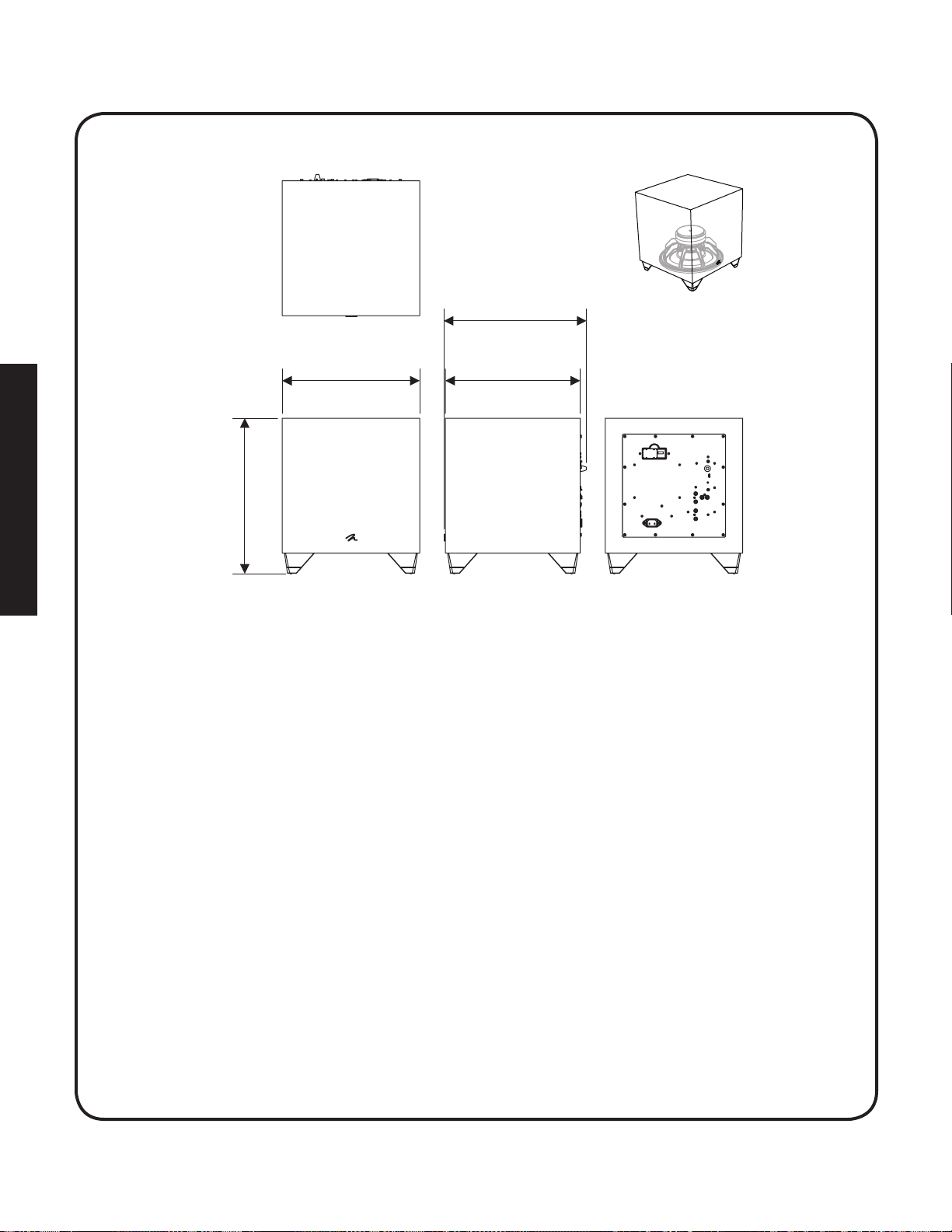
Dynamo 600X
16.3” (41.5cm)
16,3 po (41,5 cm)
14.9” (37.8cm)
14,9 po (37,8 cm)
14.2” (36cm)
14,2 po (36 cm)
14.5” (36.7cm)
14,5 po (36,7 cm)
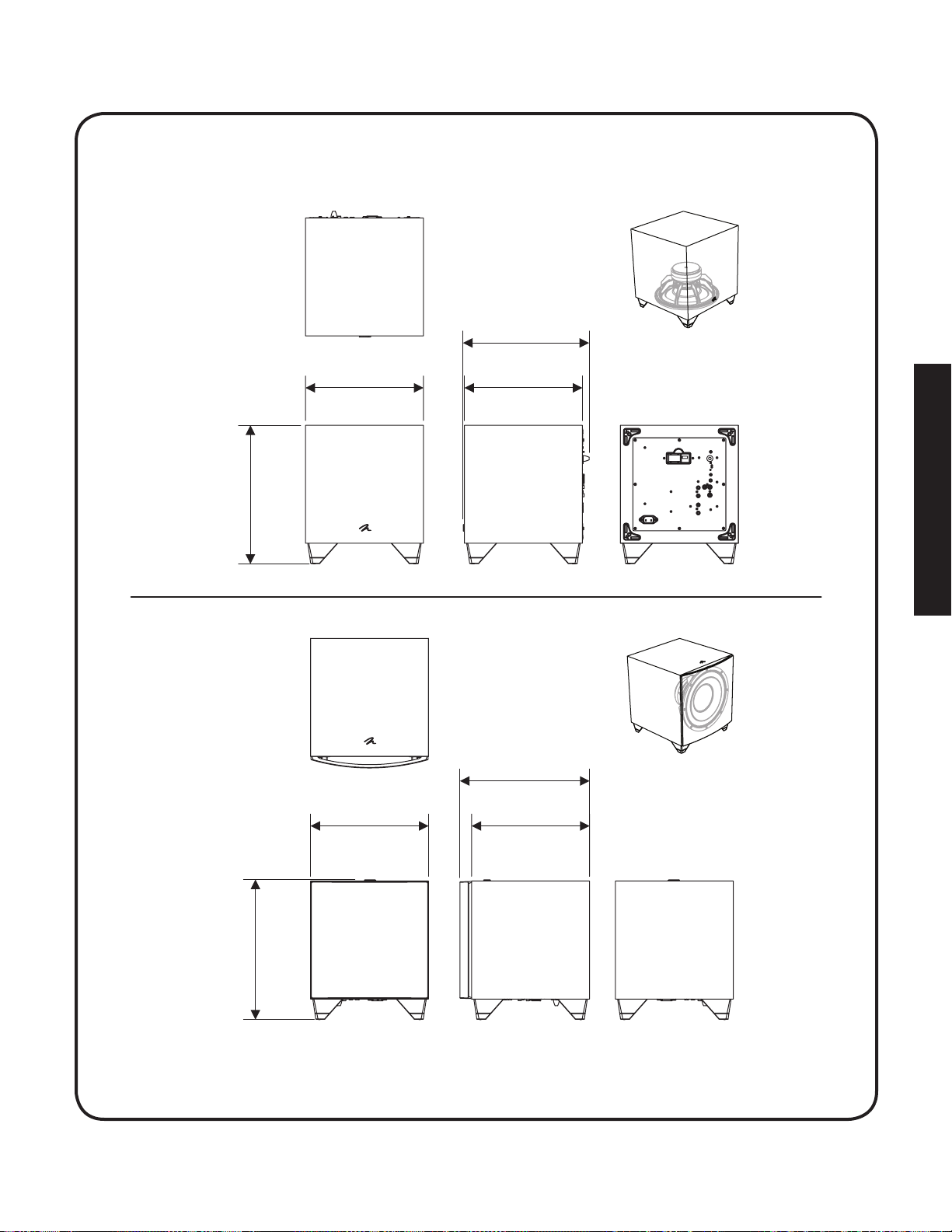
dynamo 800X
14.6” (37.1cm)
14,6 po (37,1 cm)
12.7” (32.4cm)
12,7 po (32,4 cm)
11.5” (29.3cm)
11,5 po (29,3 cm)
12.4” (31.5cm)
12,4 po (31,5 cm)
13.7” (34.8cm)
13,7 po (34,8 cm)
13.1” (33.3cm)
13,1 po (33,3 cm)
12.4” (31.5cm)
12,4 po (31,5 cm)
12.4” (31.5cm)
12,4 po (31.5 cm)
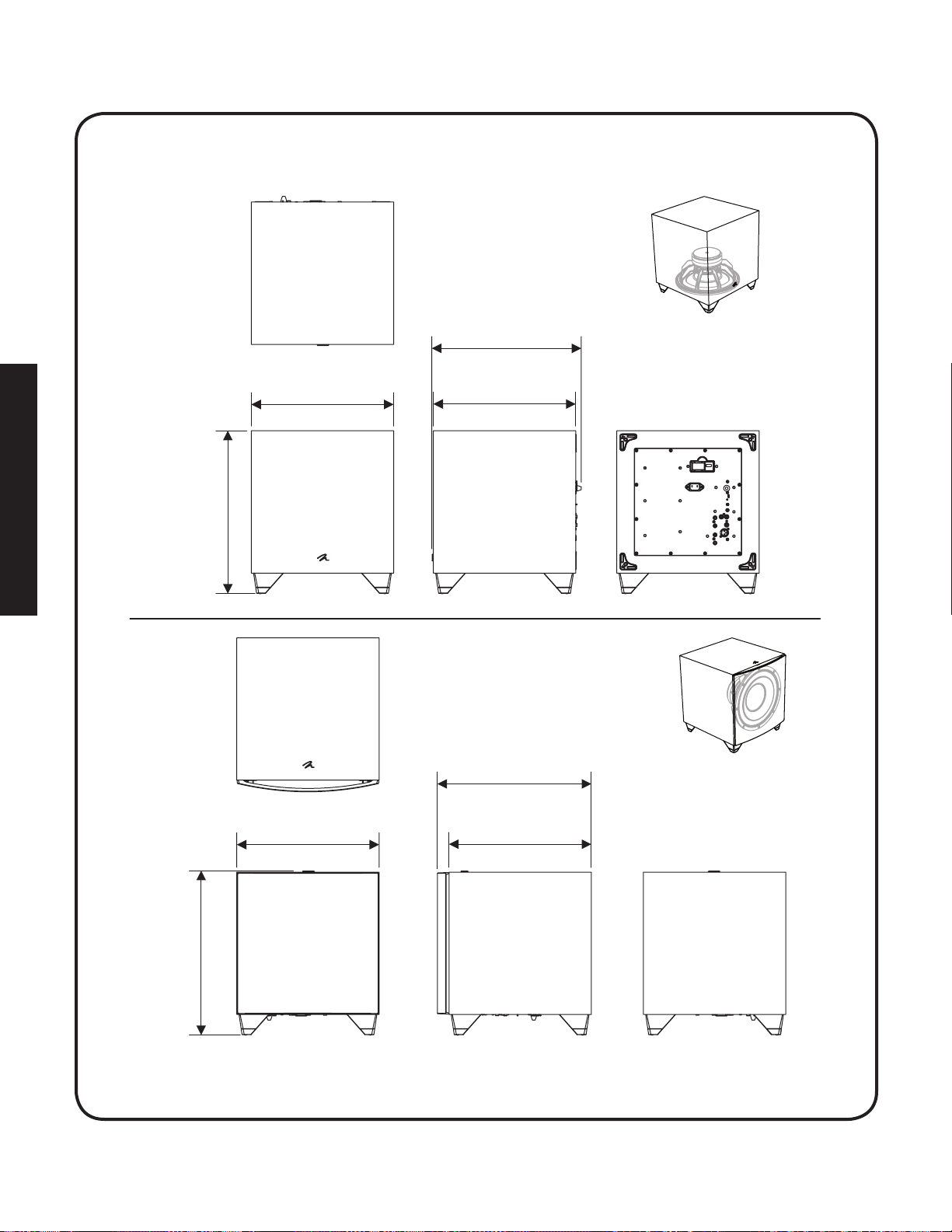
dynamo 1100X
17.2” (43.6cm)
17,2 po (43,6 cm)
16.2” (41.1cm)
16,2 po (41,1 cm)
15” (38cm)
15 po (38 cm)
15” (38cm)
15 po (38 cm)
17.1” (43.5cm)
17.1 po (43,5 cm)
15.6” (39.6cm)
15,6 po (39,6 cm)
15” (38cm)
15 po (38 cm)
15” (38cm)
15 po (38 cm)
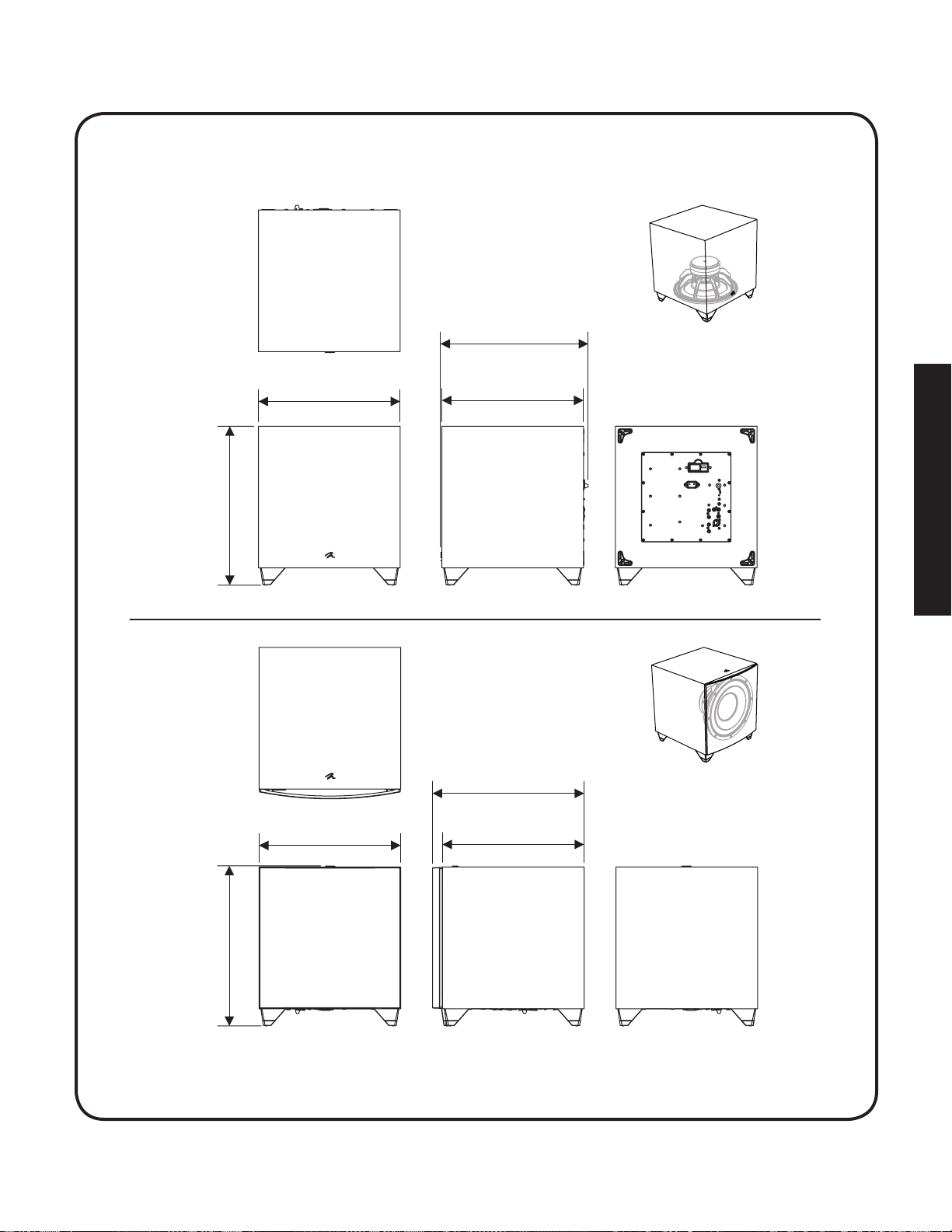
dynamo 1600X
20.1” (51cm)
20,1 po (51 cm)
19.1” (48.6cm)
19,1 po (48,6 cm)
17.9” (45.4cm)
17,9 po (45,4 cm)
17.9” (45.4cm)
17,9 po (45,4 cm)
20” (50.9cm)
20 po (50,9 cm)
18.5” (47cm)
18.5 po (47 cm)
17.9” (45.4cm)
17,9 po (45,4 cm)
17.9” (45.4cm)
17,9 po (45,4 cm)
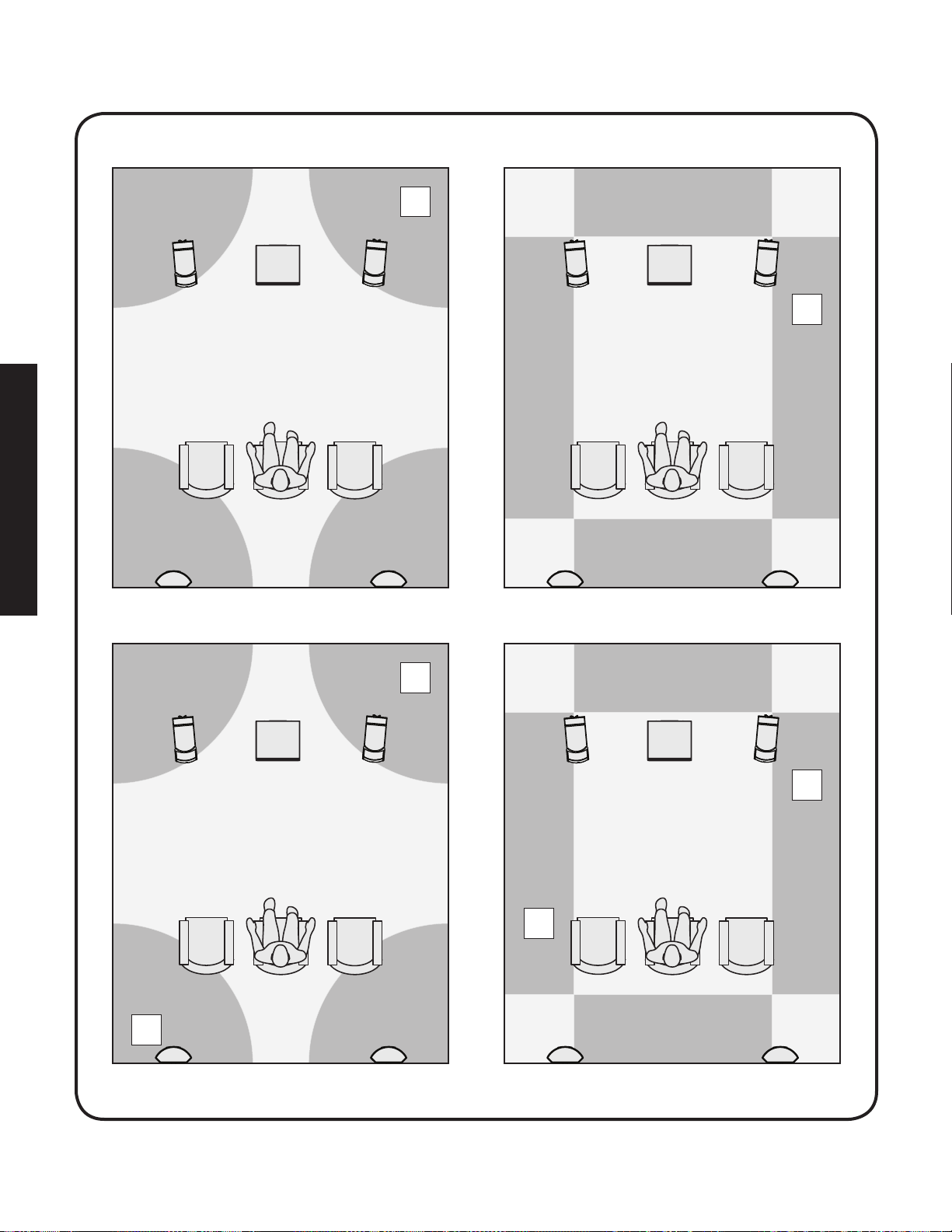
x1
x2
x2
x1
x2
x2
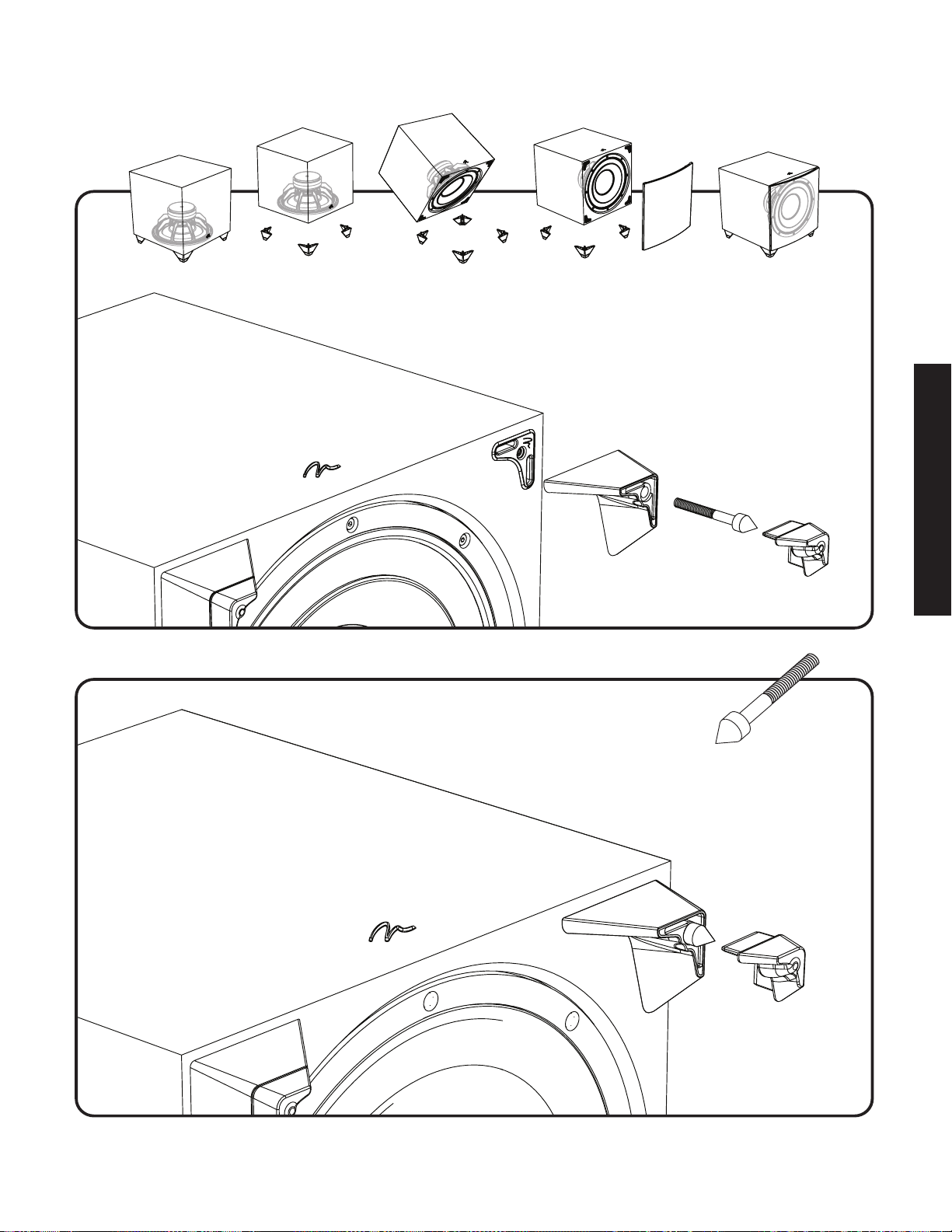
Dynamo 800X
Dynamo 1100X
Dynamo 1600X
Dynamo 800X
Dynamo 1100X
Dynamo 1600X
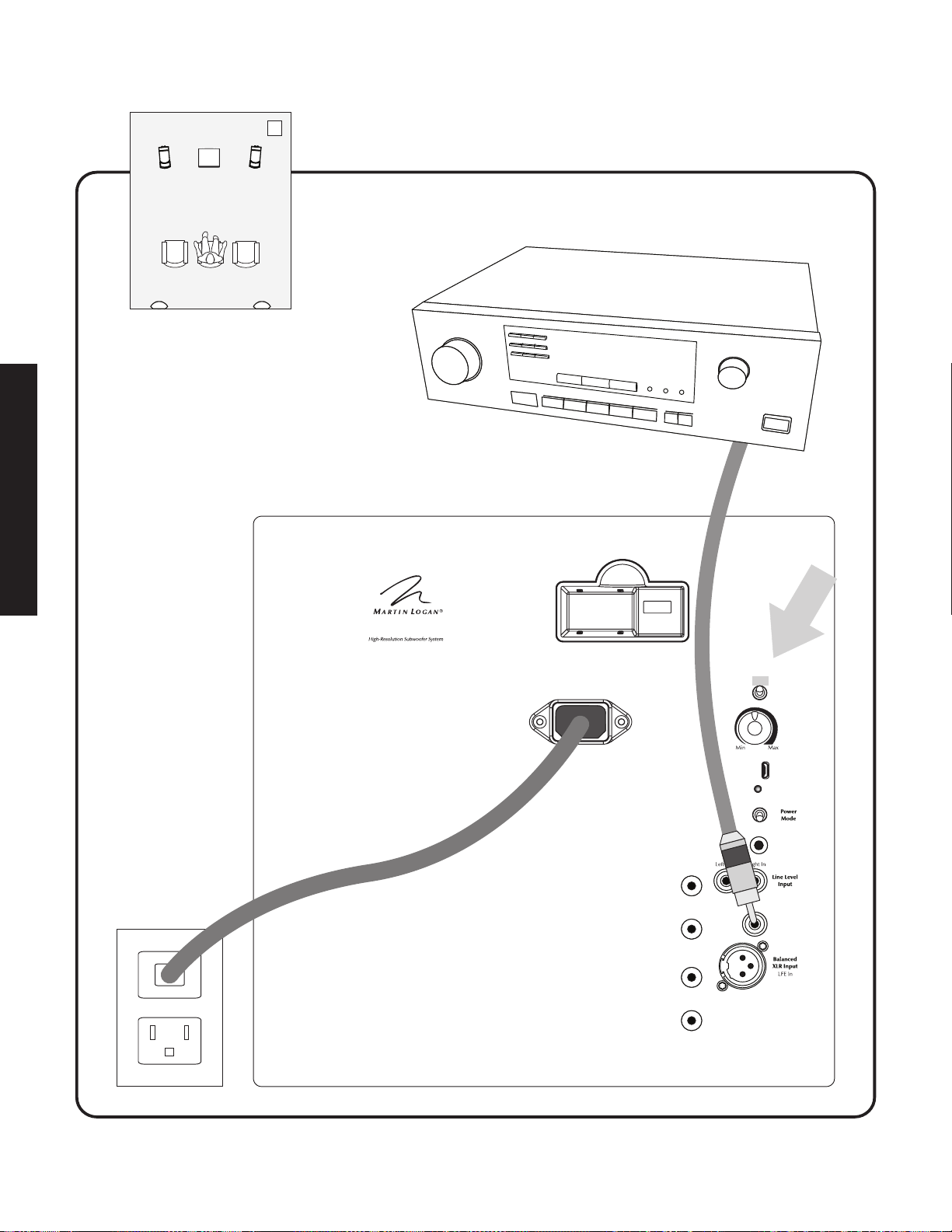
50
+
Speaker
Level
Input
–
Left In
+
Speaker
Level
Input
–
Right In
Status
USB
Input
Line Level
Input
LFE In
On
Auto
Trigger
DYNAMO
TM
Wireless Module Connection
(active when
Setting
Control
set to ‘Local’)
Setting
Control
Local
App
12V Trigger
Input
Level
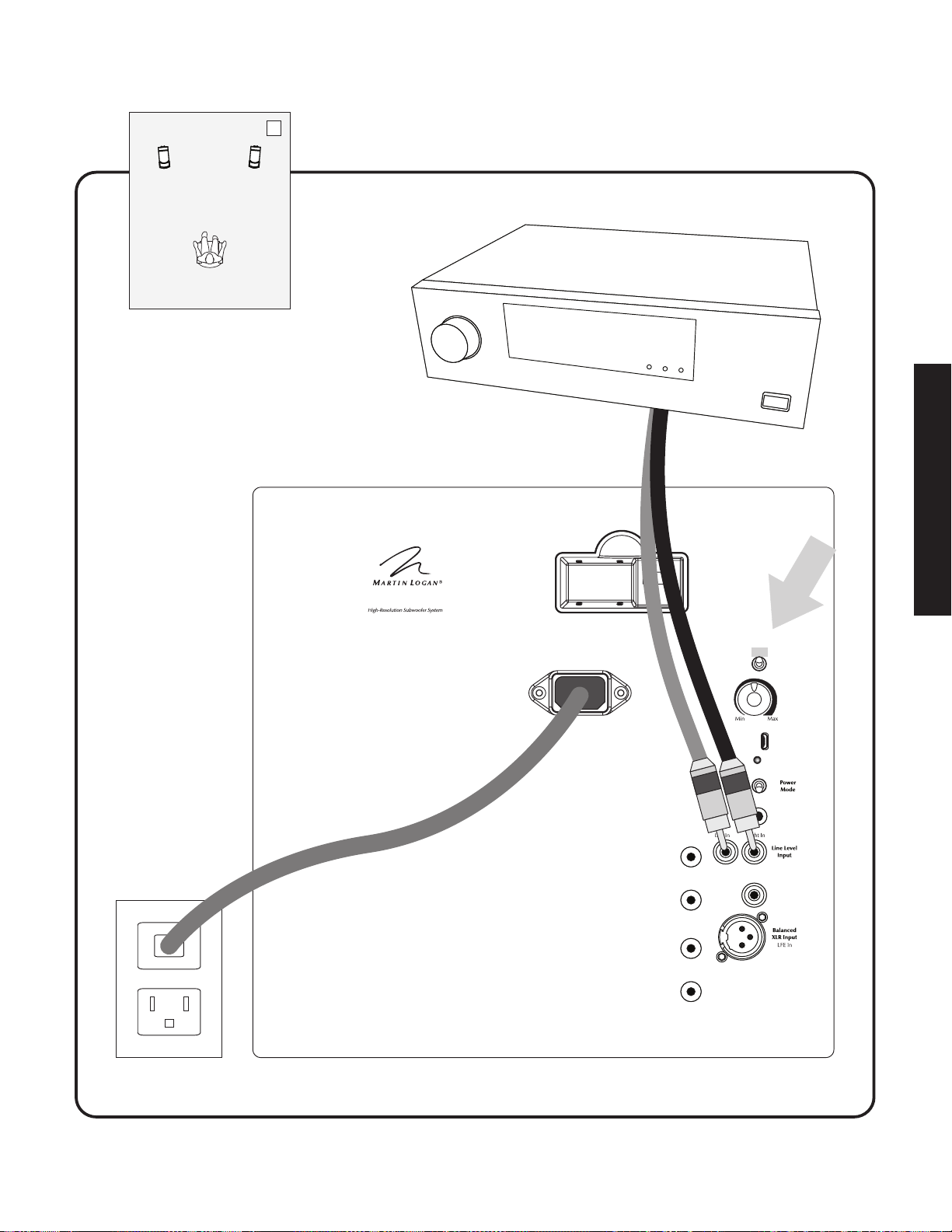
51
+
Speaker
Level
Input
–
Left In
+
Speaker
Level
Input
–
Right In
Status
USB
Input
Line Level
Input
LFE In
On
Auto
Trigger
D
YNAMO
TM
Wireless Module Connection
(active when
Setting
Control
set to ‘Local’)
Setting
Control
Local
App
12V Trigger
Input
Level

Dy n a m o 600X
D
y n a m o 800X
D
y n a m o
1100X
Dy n a m o 1600X
user’s manual
®
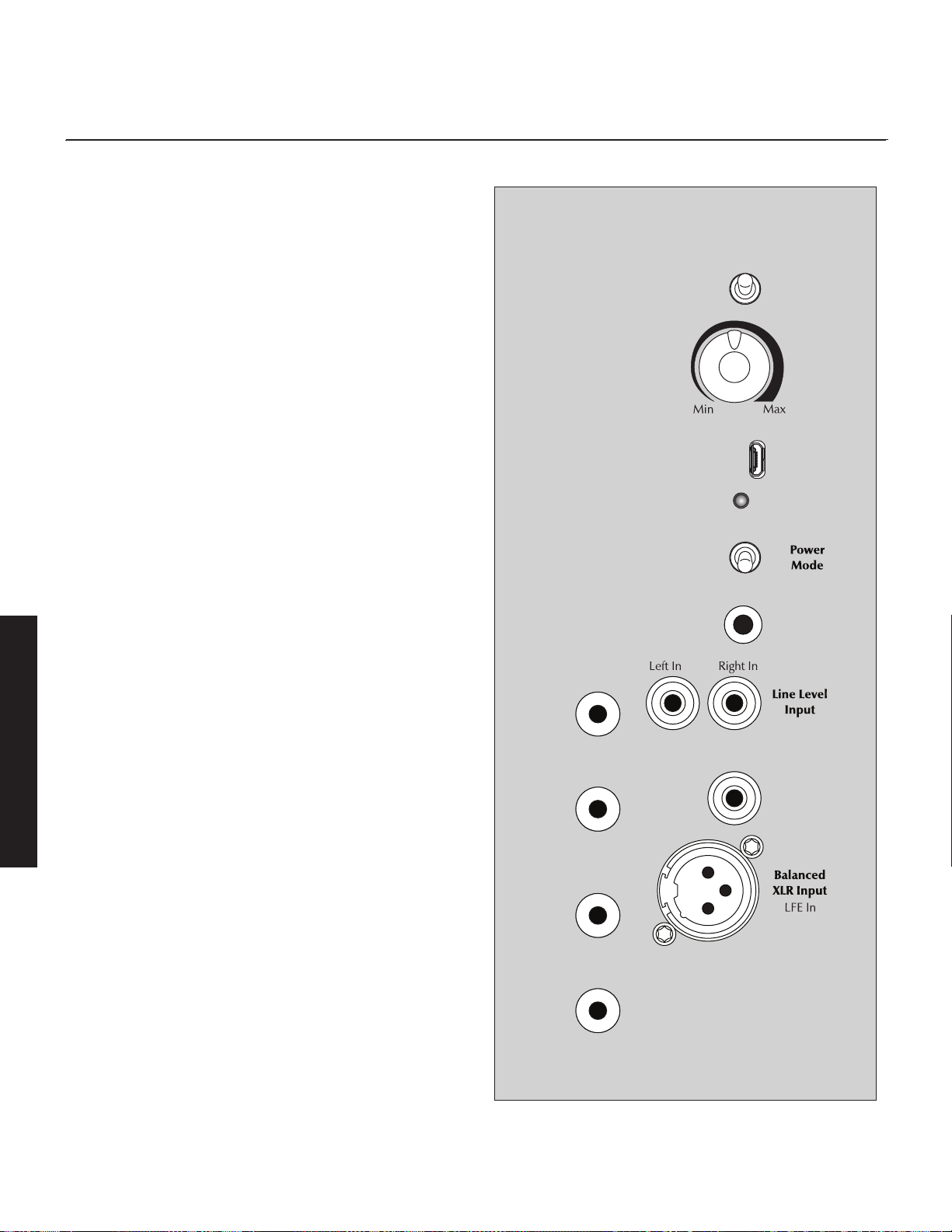
2
Controls
Setting Control
The Setting Control switch adjusts how level (volume) and settings
of the subwoofer are controlled.
• App: When this switch is set to "App" all of the subwoofer's
control functions (except for Power Mode) are controlled via the
subwoofer control app. Please note: To fully release control of
the sub to the local controls, you must fully exit any active ses-
sions of the Subwoofer Control App.
• Local: When this switch is set to "Local" the sub's Level (volume)
control knob is active and the rest of the sub's settings are set
to default settings. The local setting is intended for applications
where you connect the subwoofer to a receiver/processor and
let the receiver/processor handle most of the settings.
Subwoofer Default Settings:
Phase: 0°
Polarity: Normal
Low-pass: 120Hz 4th order
20–30Hz Level: 0dB
ARC: Off
If the subwoofer is setup with the app and the Setting Control
changes to Local, all of the subwoofer's settings change to
default. However, when the switch is changed back to App,
the previous app settings are re-engaged.
Level
The level knob is only active when Setting Control is set to "Local".
When Setting Control is set to "App" the level is controlled via the
subwoofer control app. Setting the level too high will cause the
bass to seem bloated and is the single most common cause of
bad sounding subwoofers. A rule of thumb is that the subwoofer
should not draw attention to itself, but should simply make the sys-
tems low end seem more extended and accurate.
USB Input
This input is used to apply firmware updates and to run ARC from
a PC. ARC is discussed in detail later in this manual. Even when a
subwoofer is perfectly positioned, the room can have a dramatic
impact on bass performance. Room dimensions, dead spots, arch-
ways, furniture, and countless other factors can turn a room into
an additional instrument playing alongside musicians or movie
scores with unwanted contributions of coloration and resonance.
Although the controls on your subwoofer allow you to fine tune
and optimize bass performance in your room, ARC™ allows you
to also correct for the effects of your rooms boundaries.
overview of Controls and ConneCtions
Figure 1. Controls and connections. Connection options vary by model.
+
Speaker
Level
Input
–
Left In
+
Speaker
Level
Input
–
Right In
Status
USB
Input
Line Level
Input
LFE In
On
Auto
Trigger
(active when
Setting
Control
set to ‘Local’)
Setting
Control
Local
App
12V Trigger
Input
Level
English
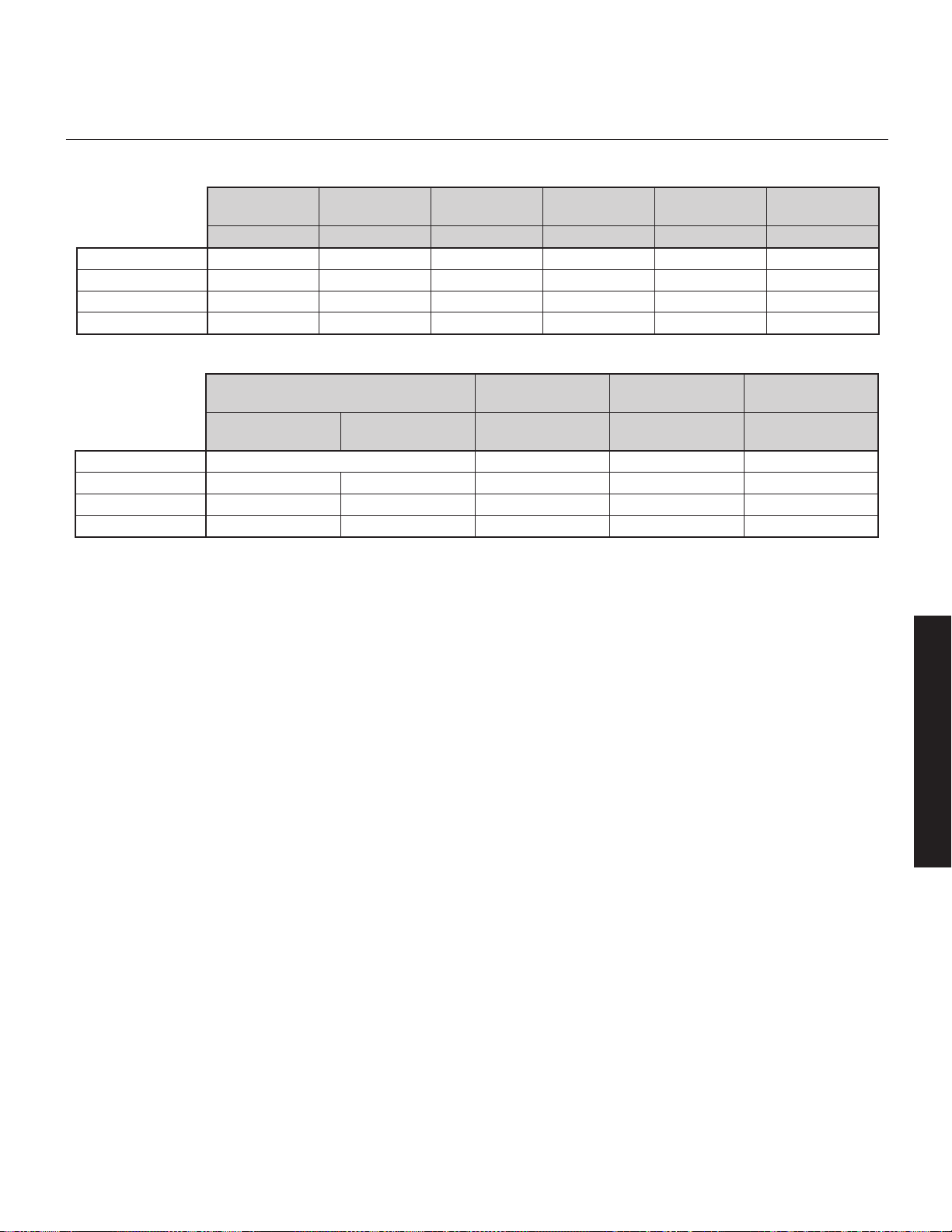
3
The ARC Mobile app can use a Bluetooth connection to the
subwoofer. Use of your subwoofer's built-in USB Input is not
required to run Anthem Room Correction.
For those who desire to run ARC using a computer, the USB Input
allows connection of your subwoofer to a computer via a Micro
USB connection. Depending on the version of your ARC kit (sold
separately) you may need a USB (Type A) to Micro-B USB cable
or a Mini-B USB (Female) to Micro-B USB (Male) adapter.
The USB Input can also be used to apply firmware updates to your
subwoofer.
Status
Your subwoofer is equipped with a multi-color LED to indicate the
current status of the subwoofer.
• No color: No power. The subwoofer is not plugged in or has
shutdown due to an overload condition. Unplug the subwoofer
and plug it back in to correct.
• White: Play mode. This indicates the subwoofer detects an
audio signal and has automatically switched into play mode.
• Red: Standby. The sub has switched into power saving mode.
• Flashing: Error. The sub is displaying an error code.
Power Mode and Trigger Input
The Power Mode switch allows control of when the subwoofer
turns on and off.
• Auto: When set to 'Auto' the subwoofer will turn itself on when
detecting an audio signal. After several minutes of inactivity the
subwoofer will put itself in standby mode.
• On: When set to 'On' the subwoofer will always be on.
• Trigger:
Dynamo 800X, 1100X, and 1600X are equipped
with a trigger input. If you have an external source component
(such as a receiver) with built in trigger controls, you may wish
to turn the subwoofer on and off using this source. Connect a
cable from the control component to your subwoofer's Trigger
Input and set the Power Mode switch to 'Trigger'. Although
this technology is commonly referred to as a 12V trigger, the
subwoofer will respond to any signal between 5–24V DC.
Audio Signal Connections
Line Level Input (Left In / Right In)
Found on
Dynamo 600X, 800X, 1100X, and 1600X. Please
note, on the 600X the Right In also serves as the LFE In. Connect
from the Main Out or Pre Out on your receiver/pre-amp. The set-
ting for the Low-Pass Filter control is applied to the signal received
through these inputs.
Figure 3.
Audio signal inputs.
Line Level
(RCA)
Balanced
(XLR)
Speaker Level
(Banana Jacks)
Wireless Audio
(sold separately)
Left In &
Right In
LFE In LFE In
Left In &
Right In
Left In &
Right In (LFE In)
Dynamo 600X
ü (Right In doubles as LFE In))
–
ü ü
Dynamo 800X
ü ü
–
ü ü
Dynamo 1100X
ü ü ü ü ü
Dynamo 1600X
ü ü ü ü ü
Figure 2.
Controls and inputs.
Setting Control
(Switch)
Level
(Knob)
USB Input
(Micro-B USB)
Status
(LED)
Power Mode
12V Trigger
Input
App / Local Min – Max – – On / Auto
Dynamo 600X
ü ü ü ü ü
–
Dynamo 800X
ü ü ü ü ü (+ Trigger) ü
Dynamo 1100X
ü ü ü ü ü (+ Trigger) ü
Dynamo 1600X
ü ü ü ü ü (+ Trigger) ü
English
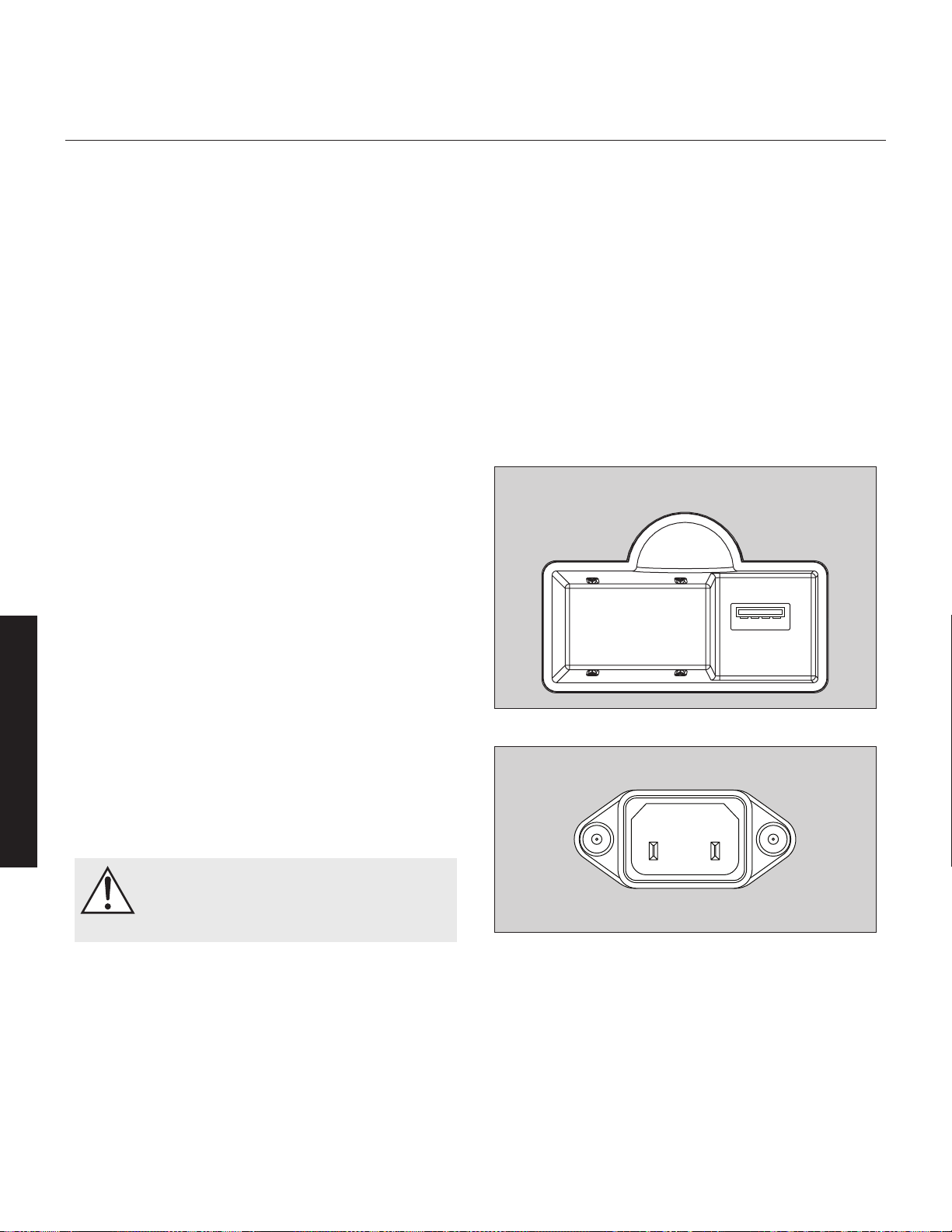
4
Line Level Input (LFE In)
Found on Dynamo 800X, 1100X, and 1600X. Please note, on
the 600X, Right In also serves as LFE In. Connect from the Sub Out
on your A/V processor. Crossover settings for LFE In are controlled
through your A/V processor. The subwoofer's setting for the Low-Pass
Filter is not applied to this connection, except in the
Dynamo 600X (if
using the 600X for LFE In, set the Low Pass Filter to Bypass).
Balanced XLR Input (LFE In)
Found on
Dynamo 1100X and 1600X. Connect from the Sub Out
on your A/V processor. The setting for the Low-Pass Filter control
is not applied to this connection. Crossover settings for LFE In are
controlled through your A/V processor. Please note, do not make
connections using both the XLR and RCA LFE inputs at the same
time.
Speaker Level Input (Left In / Right In)
Found on
Dynamo 600X, 800X, 1100X, and 1600X. This set of
inputs provides a place to connect the subwoofer using standard
speaker cable. To use these connections the speaker cable should
be terminated using banana style plugs. The setting for the Low-Pass
Filter control is applied to the signal received through these inputs.
Please note, do not make connections using both the RCA and
Speaker Level Left/Right inputs at the same time.
Wireless Audio Signal Connection
Found on Dynamo 600X, 800X, 1100X, and 1600X. The SWT-X
Subwoofer Wireless Transmitter/Receiver system is sold separately
and available from your local dealer. Detail on using an SWT-X
system are found later in this manual.
AC Power Connection
WARNING!
The power cord should not be installed, removed,
or left detached from the subwoofer while the
other end is connected to an AC power source.
The IEC power cord should be firmly inserted into the AC power
receptacle on the rear connection panel of the subwoofer, then to
any convenient AC wall outlet. The sub also integrates a signal
sensing power supply that automatically switches off after sensing
no music signal for several minutes (this will occur when the power
switch is set to 'Auto').
Your subwoofer is wired for the power service supplied in the coun-
try of original consumer sale. The AC power rating applicable to
a particular unit is specified both on the packing carton and on
the serial number plate attached to the subwoofer. If you remove
your subwoofer from the country of original sale, be certain that
AC power supplied in any subsequent location is suitable before
connecting and operating the subwoofer. Substantially impaired
performance or severe damage may occur to the subwoofer if oper-
ation is attempted from an incorrect AC power source.
Break-In
Our custom made woofers require approximately 50 hours of break-
in at moderate listening levels before their optimal performance
occurs. This will factor in on any critical listening and judgment.
Wireless Module Connection
Figure 4. Wirless module receptacle
Figure 5. AC Power receptacle
English
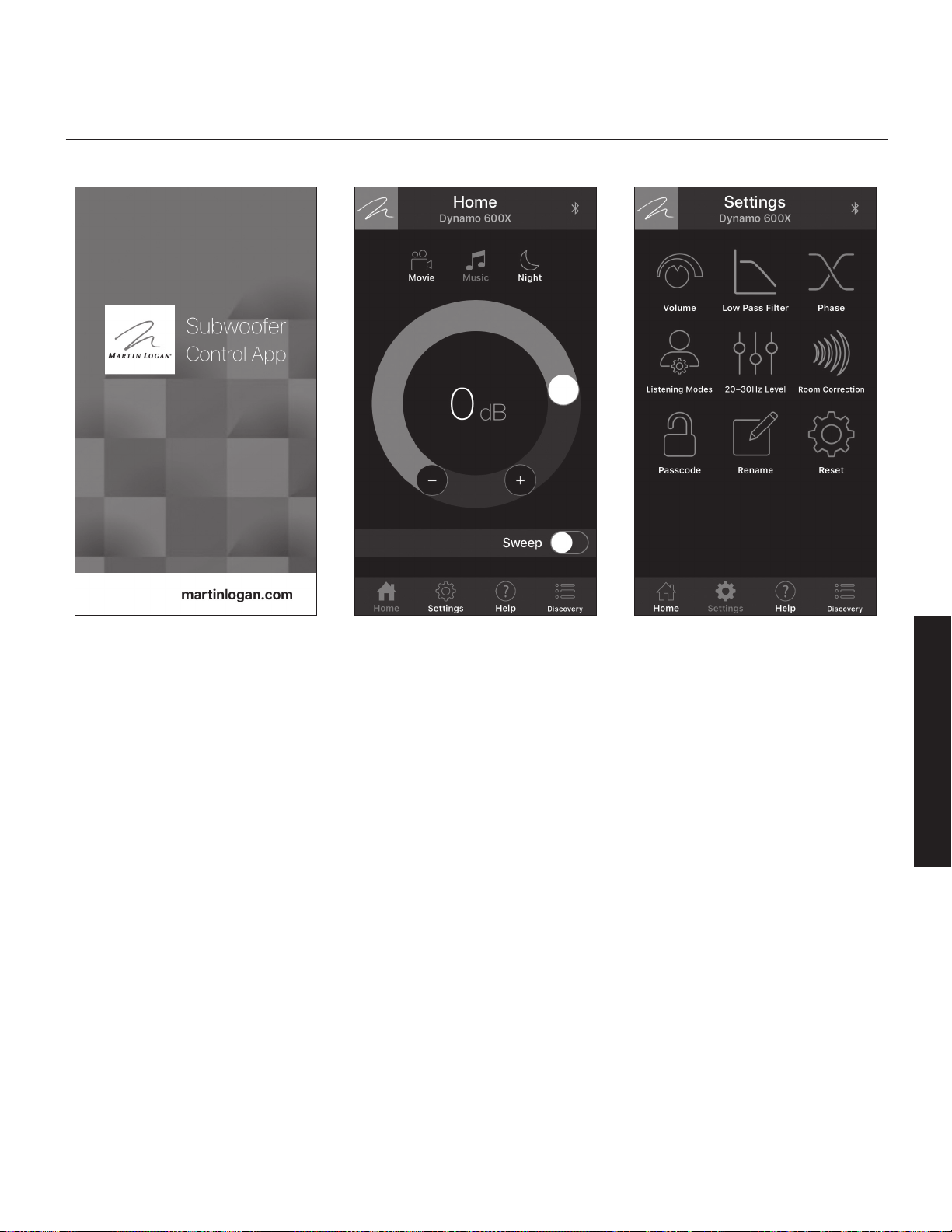
5
overview of the subwoofer Control app
Dynamo 600X, 800X, 1100X, and 1600X feature an advanced
app based control system (available for iOS and Android) that
connects to your subwoofer using a mobile device and Bluetooth
connection. Visit MartinLogan.com for details on downloading
MartinLogan's free Subwoofer Control App from iOS or Android
app stores.
NOTE: The MartinLogan Subwoofer Control App is subject to
change and, depending on future updates, functions may differ
from what is outlined here.
NOTE: The MartinLogan Subwoofer Control App and the ARC
Mobile app may interfere with each other's ability to discover your
subwoofer. If you're having trouble getting either app to run or
your subwoofer is not being discovred, check to make sure the
other app isn't open and running in the background.
The Logo Button
Located in the upper left corner of the app, the button with the
MartinLogan logo will bring up a screen that display's basic
subwoofer information, such as model and firmware build version.
The Menu Bar
The menu bar, located at the bottom of the app, lets you select the
four main functions of the app.
• Home: This screen lets you quickly adjust your subwoofer's vol-
ume, select a listening mode, and run a tone sweep.
• Settings: This screen lets you select the subwoofer's control
functions.
• Help: This button will display a pop-up window with a descrip-
tion of the control currently displayed on the screen.
• Discovery: This screen displays a list from which you can select
the subwoofer you want to control. If your subwoofer does
not show in this list, check to make sure the subwoofer Setting
Control is set to "App" and that ARC Mobile isn't running on your
device. Additionally, check that it isn't being controlled by anoth-
er mobile device running ARC or the Subwoofer Control App.
Figure 7. Home screenFigure 6. MartinLogan Subwoofer Control App Figure 8. Settings screen
English
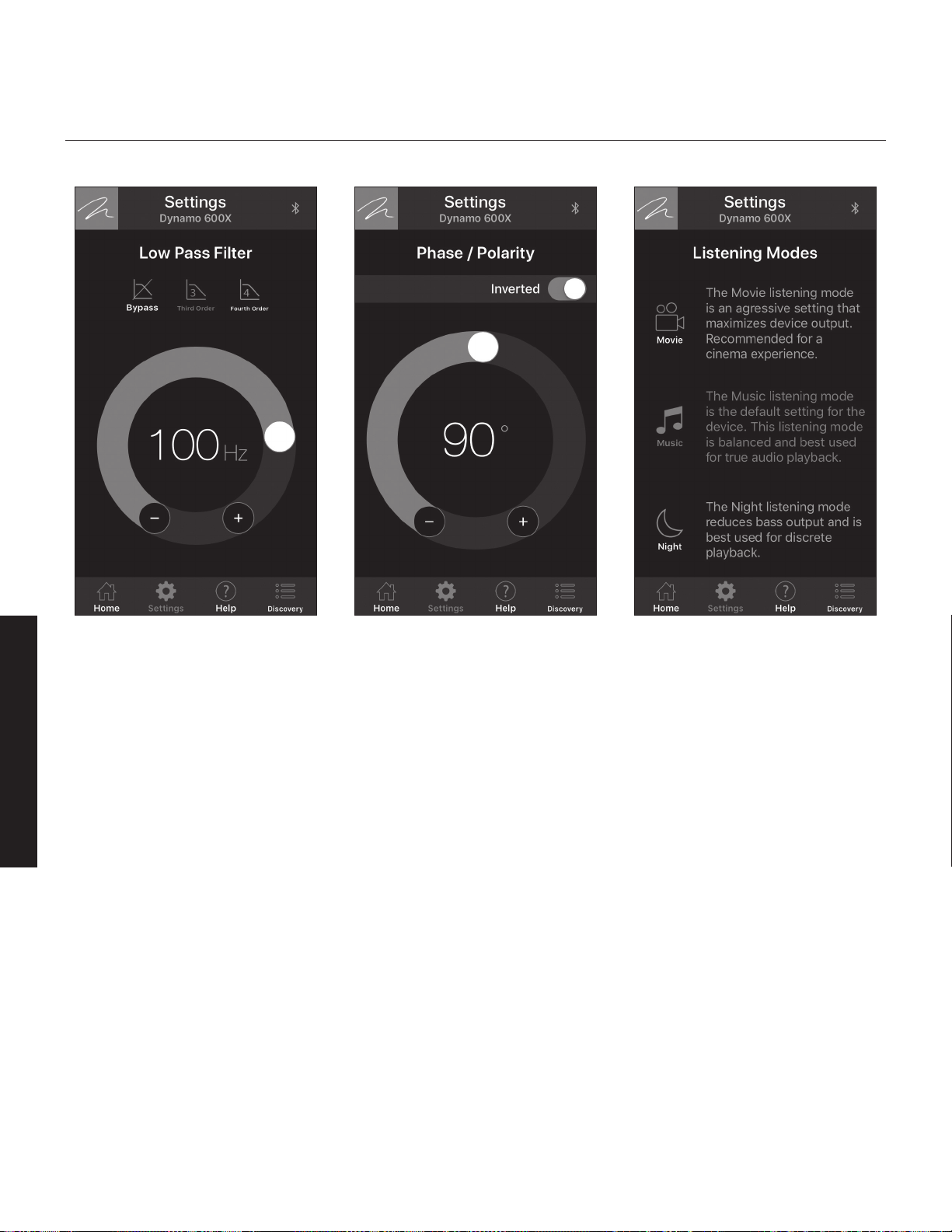
6
Figure 11. Settings: Listening Modes screen
Settings: Volume
• Volume: The volume (level) control allows you to adjust the
loudness of your subwoofer from -40dB to 12dB. For most
applications a setting between -14dB and 0dB is adequate.
Setting the level too high will cause the bass to seem bloated
and is the most common cause of bad sounding subwoofers.
A rule of thumb is that the subwoofer’s bass should not draw
attention to itself. Instead it should simply make the system’s low
end seem more extended and accurate.
• Sweep: The Sweep feature is useful for locating areas in your
listening room where troublesome rattles or resonances may
occur. The tone sweep feature may also prove useful when set-
ting phase, crossover, and volume on the subwoofer. Pressing
the Sweep toggle initiates a repeating tone sweep from
20–120Hz. Volume can be adjust while the tone sweep is
playing. Pressing the pause button pauses the subwoofer at a
specific tone frequency and also allows you to set a specific
tone frequency. While a tone frequency is paused, you can
select 'Continue' to adjust the level of the subwoofer. The tone
sweep will continue until the Sweep toggle is set to off.
Settings: Low Pass Filter
The Low Pass Filter screen lets you to adjust the low-pass frequency
for the left and right (RCA or speaker level) inputs. This setting is
not applied to the LFE (RCA or XLR) inputs, instead leaving the task
of bass management to your audio/video processor.
Dynamo subwoofers offer exceptional performance in both 2-chan-
nel (Left In/Right In) systems and multi-channel (LFE In) home theater
systems.
Dynamo 800X, 1100X, and 1600X offer the ability to con-
nect both Left In/Right In and LFE In, allowing you to achieve an
optimum setup for 2-channel listening while still allowing for multi-
channel (movie) mode listening. When listening to stereo source
material the system achieves optimum music integration with the
subwoofer playing below the front speaker’s lowest response fre-
quency. While watching a movie the LFE track and the bass from
the surrounds can be fed to the subwoofer using (low pass) cross-
over settings from the processor’s bass management system.
As a general rule, the Low-Pass Filter should be set at a value approxi-
mately equal to (or below) 70% of your main speaker’s lowest
frequency response. For example, your speaker’s frequency response
goes down to 43Hz. 70% of 43Hz equals 30.1, so you should set
the subwoofer’s low pass filter to 30Hz. We advise that once you
Figure 9. Settings: Low Pass Filter screen Figure 10. Settings: Phase / Polarity screen
English
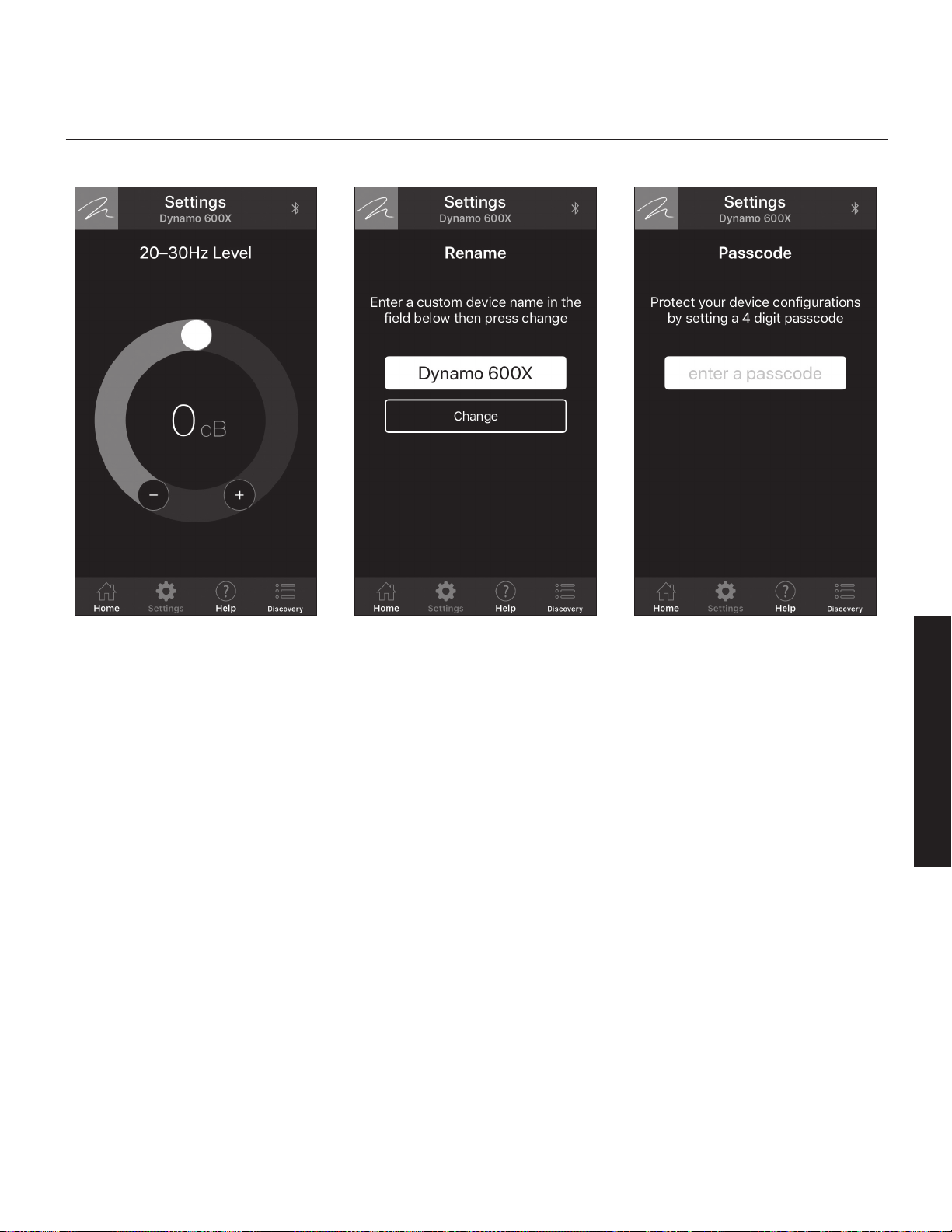
7
try the recommended setting using the formula above, you should try
the surrounding settings as well. If you are uncertain of your main
speaker low-frequency response, start with a setting of 35Hz. You will
not harm anything by experimenting with different settings.
Remember, because this setting only applies to Left/Right inputs. This
setting is not used if your subwoofer is only connected via a LFE input.
However, if you're using a SWT-X wireless system to connect an LFE
channel or using the
Dynamo 600X as an LFE channel (connected
via the Right In/LFE In), you will need to set the Low Pass Filter to
Bypass.
• Bypass: Select this option if you plan to use your receiver/pro-
cessor's bass management to set a low pass filter.
• Third Order: If you are using the subwoofers Left/Right inputs,
select this option to use a third order crossover to adjust the roll
off characteristics of your subwoofer's upper frequencies as they
approach the low-pass filter frequency setting. A third order filter
has a slope of 18dB per octave—a slower roll off than a fourth
order. For most applications a third order crossover is ideal.
• Fourth Order: If you are using the subwoofers Left/Right inputs,
select this option to use a fourth order crossover to adjust the
roll off characteristics of your subwoofer's upper frequencies as
they approach the low-pass filter frequency setting. A fourth
order filter has a slope of 24dB per octave—a faster roll off
than a third order.
Settings: Phase
The Phase screen allows you to adjust the phase of the subwoofer
from 0–180° in increments of 1° and also allows you to invert the
polarity of the phase.
The Phase control is entirely dependent on numerous factors includ-
ing the size and configuration of your listening environment, the
placement of the unit, and seating arrangement. Due to the way
bass sound waves develop in different rooms there is no rule of
thumb for setting phase. For instance, if your room has a peak at
the subwoofer crossover area, you may wish to set the phase so the
actual acoustic outputs of the subwoofer and main speakers are out
of phase. Experiment and try different settings and be patient.
If you are using the subwoofer to augment other MartinLogan
products, we suggest starting with the phase set at 90° (with
Inverted polarity turned on).
Figure 12. Settings: 20–30Hz Level screen Figure 13. Settings: Rename screen Figure 14. Settings: Passcode screen
English

8
In a system where phase and polarity are properly set, the main
speakers and subwoofer should work together and sound as if
there is more total bass in the system. If your main speakers and
subwoofers are out of phase their sound waves will cancel each
other and total bass output in the system will sound decreased.
Again, experiment and listen for the smoothest bass without any
prominent or absent notes.
Settings: Listening Modes
The Listening Modes screen lets you apply preset listening modes
to the subwoofer's output. Listening modes are also accessible
from the app's Home screen.
• Movie: The Movie listening mode is an aggressive setting that
maximizes device output for an especially explosive experience.
• Music: The Music listening mode is the default setting for the
Dynamo subwoofers. This mode is balanced and best used for
an accurate musical presentation.
• Night: The Night listening mode reduces bass output and is
best used for discrete playback.
Settings: 20–30Hz Level
The 20–30Hz Level screen allows you to adjust subwoofer out-
put from -10dB to +10dB in the 20–30Hz range. This control and
Anthem Room Correction (ARC) serve similar purposes. Where this
control is limited to the 20–30Hz frequency range, ARC adjusts
your subwoofer's output across its entire frequency range.
If not using ARC, this control can be used to modify your sub-
woofer's response to compensate for the room anomalies or to
modify the subwoofers sound to your personal taste. The frequen-
cies adjusted are between 20–30Hz—a range where peaks
(room gain) and dips of different amplitudes often develop in lis-
tening rooms. The ideal setting is dependent on room size and
construction, system configuration, and personal preference. As a
rule of thumb, if your low-bass sounds weak, increase this control.
If your low-bass sounds bloated, decrease this control.
If using ARC, this control can be used to match your personal taste
by further changing the way the subwoofer sounds.
Note: The 20–30Hz Level setting will not affect the ARC mea-
surements or compensation filters. If you have an ARC correction
uploaded to your subwoofer, we recommend first listening with this
control set to 0. Remember, this setting will adjust the subwoofer
output in addition to ARC's adjustments.
Settings: Room Correction
The Room Correction screen provides information on Anthem Room
Correction (ARC). The ARC toggle allows you to turn ARC correction
on and off (only available if ARC software has been used to upload
a correction curve to your sub). This is an effective tool for hearing
the difference that Anthem Room Correction makes!
Settings: Passcode
The Passcode screen lets you protect your subwoofer's settings
with a custom 4-digit passcode. Once a passcode is set it can
also be cleared on this screen.
Settings: Rename
The Rename screen lets you assign a custom name to your
subwoofer. This is useful if you have multiple subwoofer's in your
system. A custom subwoofer name must be between 3–13 charac-
ters long.
Settings: Reset
The Reset screen lets you perform a factory reset on your
subwoofer. A factory reset will restore all settings to their defaults.
It will also erase any ARC corrections that have been uploaded to
the subwoofer.
English
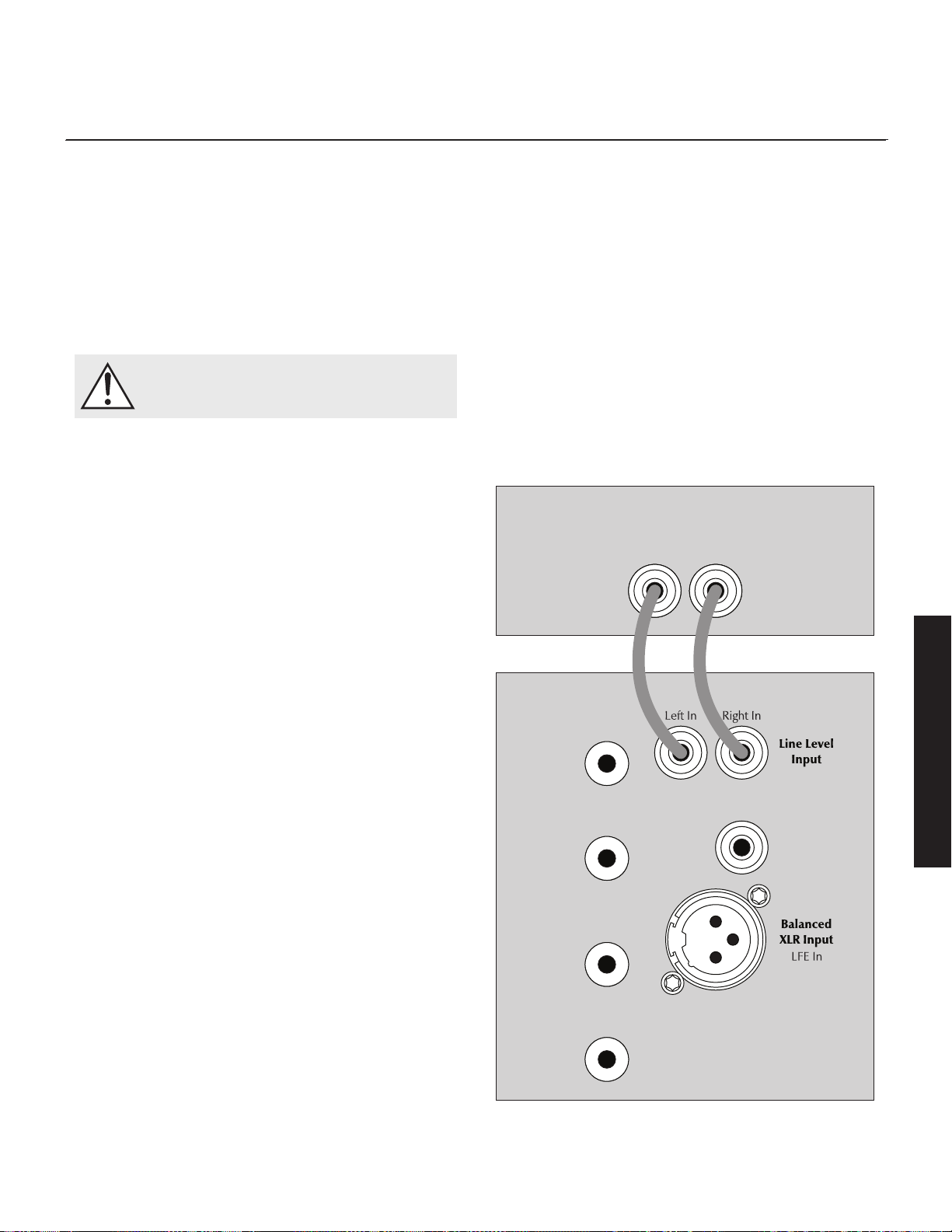
9
Before Connecting the dynamo
MartinLogan developed the Dynamo subwoofer for easy setup and
system integration. Before beginning to connect your subwoofer,
please review the controls discussed in the last section. An under-
standing of these will help speed you along. All signal connections
are done on the rear connections panel of the subwoofer. Make cer-
tain that all of your connections are tight.
WARNING!
Unplug your subwoofer before making or breaking
any signal connections!
2-Channel Mode
This setup is recommended if your subwoofer will be used in
a 2-channel only system. When a signal is connected to the
subwoofers Left In/Right In, the Low Pass Filter control is active.
Signal Connection:
1 Connect the left out/right out from your preamp/receiver to the
Left In/Right In of the subwoofer. Use RCA interconnects or speak-
er level connections, but choose only one connection method—do
not use multiple methods of connection at the same time. Speaker
level connections are discussed in detail later in this manual.
Recommended Control Settings:
IMPORTANT! If you intend to use Anthem Room Correction (ARC)
room correction we recommend running ARC and optimizing
placement of your subwoofer prior to adjusting the subwoofer’s
controls. When engaged, ARC will alter the acoustic output of
your subwoofer and influence the settings described below.
1 Set the subwoofer's Control Setting to App.
2 Calculate the number equal to 70% of your main loudspeak-
er’s lowest frequency rating. Set the Low Pass Filter to a setting
equal to the resulting number. If the resulting number is lower
than 30Hz, set this to 30Hz.
3 Play familiar music with bass content. Increase the Volume
(level) until the music has deep extended bass. Be careful to
avoid levels that become overwhelming.
4 Try the Phase and Polarity (Inverted) in different settings until
the best blending is obtained. Play familiar music with deep,
repetitive bass. Adjust the Phase and Polarity (Inverted) setting
so the bass notes seem their loudest and without blur when
heard from your typical listening position. If you are augmenting
MartinLogan loudspeakers, we suggest you start with Phase set
at 90° (with Inverted polarity turned on) when experimenting.
5 If you have completed steps 1–4 and still have weak or boom-
ing bass consider adjusting the 20–30Hz Level to compensate
for these anomalies. Experiment by changing the Volume (level)
setting while adjusting the 20–30Hz Level and try to find a
position that gives you deep extended bass and good blend-
ing with your main speakers. If you still have weak or booming
bass you may want to consider moving your subwoofer and
go through these setup steps again (especially if it is located in
or near a room corner). Remember, room position has a major
impact on overall bass performance.
ConneCting the subwoofer and setting Controls
+
Speaker
Level
Input
–
Left In
+
Speaker
Level
Input
–
Right In
Line Level
Input
LFE In
Dynamo
Subwoofer
Receiver/Preamplifier
Left Out Right OutLeft Out Right Out
Receiver/Preamplifier
Figure 15. Signal connection for 2-channel mode.
English
10
Multi-Channel Mode
This setup is recommended if you will use your subwoofer in a
dedicated home theater or other multi-channel system. When a
signal is connected to the subwoofer’s LFE In, the setting for the
Low-Pass Filter control is not used. Your processor handles most of
the bass management.
•
Dynamo 600X and 800X: These subwoofers do not offer the
XLR LFE connections discussed here.
• Dynamo 600X: If connecting a Dynamo 600X using this meth-
od, please note that the Right In doubles as the LFE In and you
should set the subwoofer's Low Pass Filter to Bypass using the
Subwofoer Control App.
• SWT-X Wireless System used with any subwoofer: If connect-
ing the sub using a SWT-X wireless system, please note that the
SWT-X receiver's Right In doubles as the LFE In and you should
set the sub's Low Pass Filter to Bypass using the Subwoofer
Control App.
Signal Connection:
1 Connect the Sub output of the processor to the subwoofer's LFE
In. Use either an RCA or an XLR interconnect—do not use both
at the same time.
Recommended Control Settings:
IMPORTANT! If you intend to use Anthem Room Correction (ARC)
room correction we recommend running ARC and optimizing
placement of your subwoofer prior to adjusting the subwoofer’s
controls. When engaged, ARC will affect the acoustic output of
your subwoofer and influence the settings described below.
1 Set the subwoofer's Control Setting to App.
2 If your front speakers are large (e.g. full-range floorstanding
type speakers) set your processor controls for front speakers to
wide, large, or full mode. If your front speakers are small (e.g.
bookshelf type speakers) set your processor control for front
speakers to narrow, small, or limited mode. Set processor con-
trols for center and effects type speakers to narrow, small, or
limited mode. Remember, few center and effects type speakers
are designed to go much lower than 70Hz, which means that
any bass information in a soundtrack lower than this frequency
will normally be lost. When you set your center and effects
type speakers to narrow, small, or limited mode, all of the bass
lower than the assigned crossover point will be redirected to
the subwoofer along with the LFE output—guaranteeing that no
bass information from these channels is lost.
Please note: some processors allow the changing of speaker
configuration based on source material type. Under these con-
ditions the user may want to run the fronts in narrow, small, or
limited mode for multi-channel source material and run the fronts
in wide, large, or full mode for 2-channel stereo source material.
WARNING! Based on the performance of most
receivers/processors it is recommended that
MartinLogan center and effects type speakers not
be run in large, wide, or full range mode. Doing
so may potentially damage the speaker if the pro-
cessor attempts to drive the speaker beyond its
rated frequency range. This warning also applies
to products from other manufacturers.
3 With multi-channel source material playing, use the Subwoofer
Control App to adjust the Volume (level) control to your preferred
level. Be careful to avoid levels that become overwhelming.
4
Dynamo 600X and SWT-X Wireless System used with any
subwoofer: Use the Subwoofer Control App to set the Low
Pass Filter to Bypass.
Dynamo 800X, 1100X, and 1600X: When using a cable to
connect your receiver/processor to the LFE Input changing the
Low Pass Filter will have no effect on the sub's output. Their LFE
input internally bypasses the sub's Low Pass Filter.
5 Use the Subwoofer Control App and try the Phase and Polarity
(Inverted) in different settings until the best blending is obtained.
Play familiar music with deep, repetitive bass. Adjust the Phase
and Polarity (Inverted) so the bass notes seem their loudest and
without blur when heard from your typical listening position. If you
are augmenting MartinLogan loudspeakers, we suggest you start
with Phase set at 0° (although we suggest 90° elsewhere, in this
specific connection method we suggest 0° since your processor
will be doing most of the bass management).
6 If you have completed steps 1–5 and still have weak or boom-
ing bass consider using the Subwoofer Control App to adjust
20–30Hz Level to compensate for these anomalies. Experiment
with the settings and listen to the result. Try to find a position
that sounds correct to you. Experiment by changing the Volume
(level) setting while adjusting the 20–30Hz Level. Find a posi-
tion that gives you deep extended bass and good blending
with your main speakers.
English
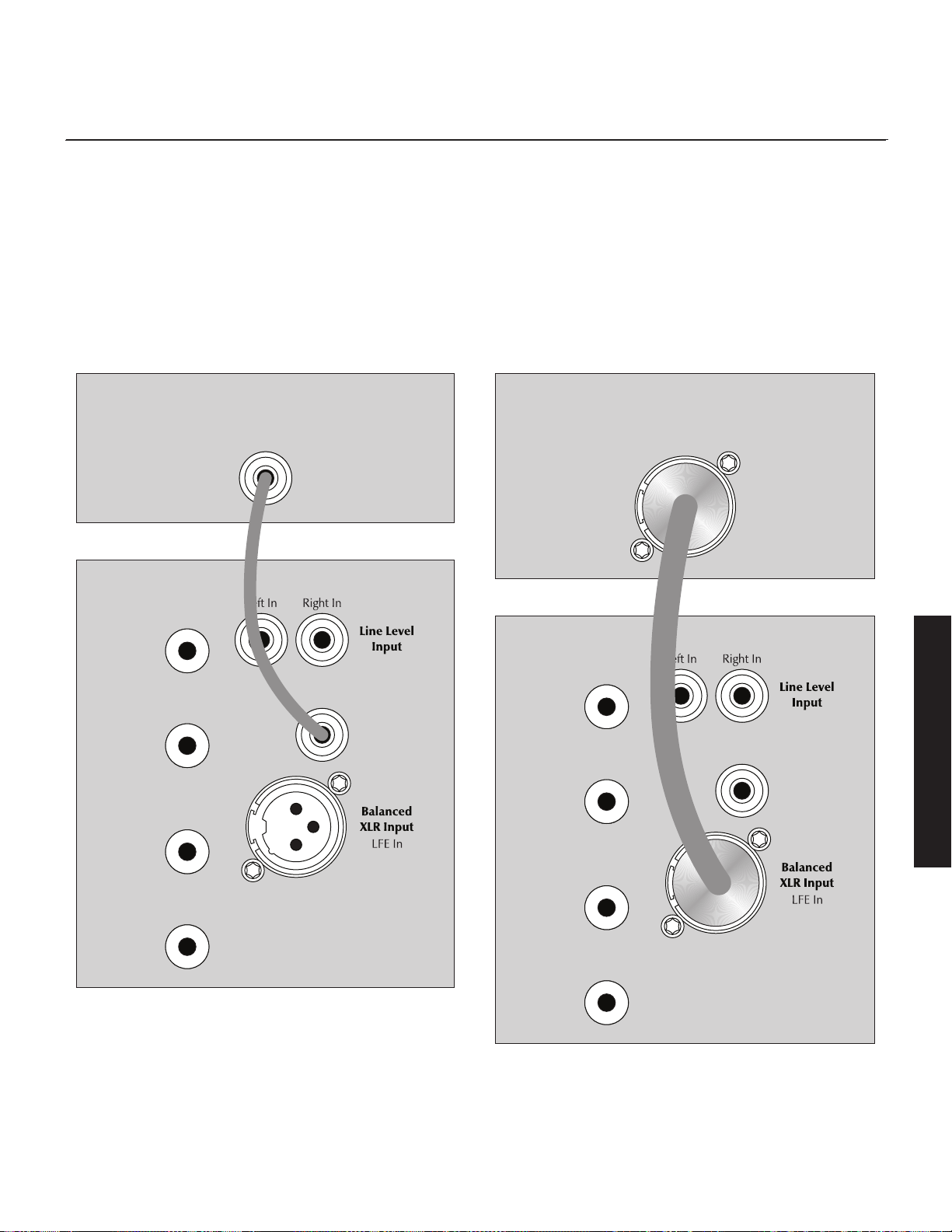
11
English
+
Speaker
Level
Input
–
Left In
+
Speaker
Level
Input
–
Right In
Line Level
Input
LFE In
Dynamo
Subwoofer
LFE Out
Receiver/Processor
Figure 16. Signal connection for multi-channel mode.
+
Speaker
Level
Input
–
Left In
+
Speaker
Level
Input
–
Right In
Line Level
Input
LFE In
Dynamo
Subwoofer
Receiver/Processor
LFE Out
Figure 17. Signal connection for multi-channel mode.
7 Use the bass management section of your receiver/proces-
sor’s speaker setup to set the subwoofer level at an appropriate
level. Follow the instructions in your processor’s manual to fine-
tune the subwoofer level.
8 If you have completed steps 1–7 and still have weak or boom-
ing bass consider using the Subwoofer Control App to further
adjust the 20–30Hz Level to compensate for these anomalies
(yes, you're tweaking the 20–30Hz Level again). Experiment
with the settings and listen to the result. Try to find a position
that sounds correct to you. Experiment by changing the Volume
(level) setting while adjusting the 20–30Hz Level. Find a posi-
tion that gives you deep extended bass and good blending
with your main speakers. If you still have weak or booming
bass you may want to consider moving your subwoofer and
go through these setup steps again (especially if it is located in
or near a room corner). Remember, room position has a major
impact on overall bass performance.
12
Simultaneous 2-Channel/Multi-
Channel Mode
The advantage of this dual mode is that you are able to achieve
an optimum setup for stereo listening and still allow for multi-channel
(movie) mode listening. When listening to stereo source mate-
rial the system achieves optimum music integration. In this mode
the subwoofer plays only below the front main speaker’s lowest
response frequency. While in movie mode the LFE track and the
bass from the surrounds can be fed to the subwoofer using cross-
over settings from the processor’s bass management system.
•
Dynamo 600X: This connection method is not compatible with
the
Dynamo 600X.
• SWT-X Wireless System: This connection method is not com-
patible with the SWT-X wireless receiver/transmitter system.
•
Dynamo 600X and 800X: These subwoofers do not offer the
XLR LFE connections discussed here.
Signal Connection:
1 Connect the left out/right out from your processor to the Left
In/Right In of the subwoofer. Use either RCA or speaker level
connections, but choose only one connection method—do not
use both at the same time for left/right inputs. Use quality RCA
interconnects or speaker cable. Speaker level connections are
discussed in detail later in this manual.
2 Connect the Sub output of the processor to the subwoofer’s
LFE In. Use quality RCA or XLR interconnects. Please note, the
connection method for the LFE In does not need to match Left
In/Right In. If you used RCA interconnects or speaker level con-
nections for Left In/Right In it is acceptable to use XLR for the
LFE Input. Be flexible, experiment, and listen to determine what
sounds best in your unique installation. Do not use multiple
methods of connection at the same time for the LFE input (i.e.
connecting both XLR LFE In and Line Level LFE In).
Recommended Control Settings:
IMPORTANT! If you intend to use Anthem Room Correction (ARC)
room correction we recommend running ARC and optimizing
placement of your subwoofer prior to adjusting the subwoofer’s
controls. When engaged, ARC will affect the acoustic output of
your subwoofer and influence the settings described below.
1 Set the subwoofer's Control Setting to App.
2 Set your processor controls for front speakers to wide, large, or full
mode. If your front speakers are small (e.g. bookshelf type speak-
ers) we recommend that you not use this method for connecting
your subwoofer and instead refer to the “Multi-Channel Mode”
section. Set processor controls for center and effects type speak-
ers to narrow, small, or limited mode. Remember, few center and
effects type speakers are designed to go much lower than 70Hz,
which means that any bass information in a soundtrack lower than
this frequency will be lost. When you set your center and effects
type speakers to narrow, small, or limited mode, all of the bass
lower than the assigned crossover point will be redirected to the
subwoofer along with the LFE output—guaranteeing that no bass
information from these channels is lost.
Please note: Some processors allow the changing of speaker
configuration based on source material type. Under these con-
ditions the user may want to run the fronts in narrow, small, or
limited mode for multi-channel source material and run the fronts
in wide, large, or full mode for 2-channel stereo source material.
WARNING! Based on the performance of most
processors it is recommended that MartinLogan
center and effects type speakers not be run in
large, wide, or full range mode. Doing so may
potentially damage the speaker if the processor
attempts to drive the speaker beyond its rated
frequency range. This warning also applies to
products from other manufacturers.
3 Calculate the number equal to 70% of your main loudspeaker’s
lowest frequency rating. Us the Subwoofer Contrl App to set
the Low Pass Filter to a setting equal to the resulting number. If
the resulting number is lower than 30Hz, set this to 30Hz.
4 Play familiar music with bass content. Use the Subwoofer
Control App to increase the Volume (level) until the music has
deep extended bass. Be careful to avoid levels that become
overwhelming.
5 Using the Subwoofer Control App, try Phase and Polarity
(Inverted) in different settings until the best blending is obtained.
Play familiar music with deep, repetitive bass. Adjust the Phase
and Polarity (Inverted) so the bass notes seem their loudest and
without blur when heard from your typical listening position.
If you are augmenting MartinLogan loudspeakers, we suggest
you start with Phase set at 90° (with Inverted polarity turned on)
when experimenting.
6 With multi-channel source material playing, use the bass man-
agement section of your receiver/processor’s speaker setup
English
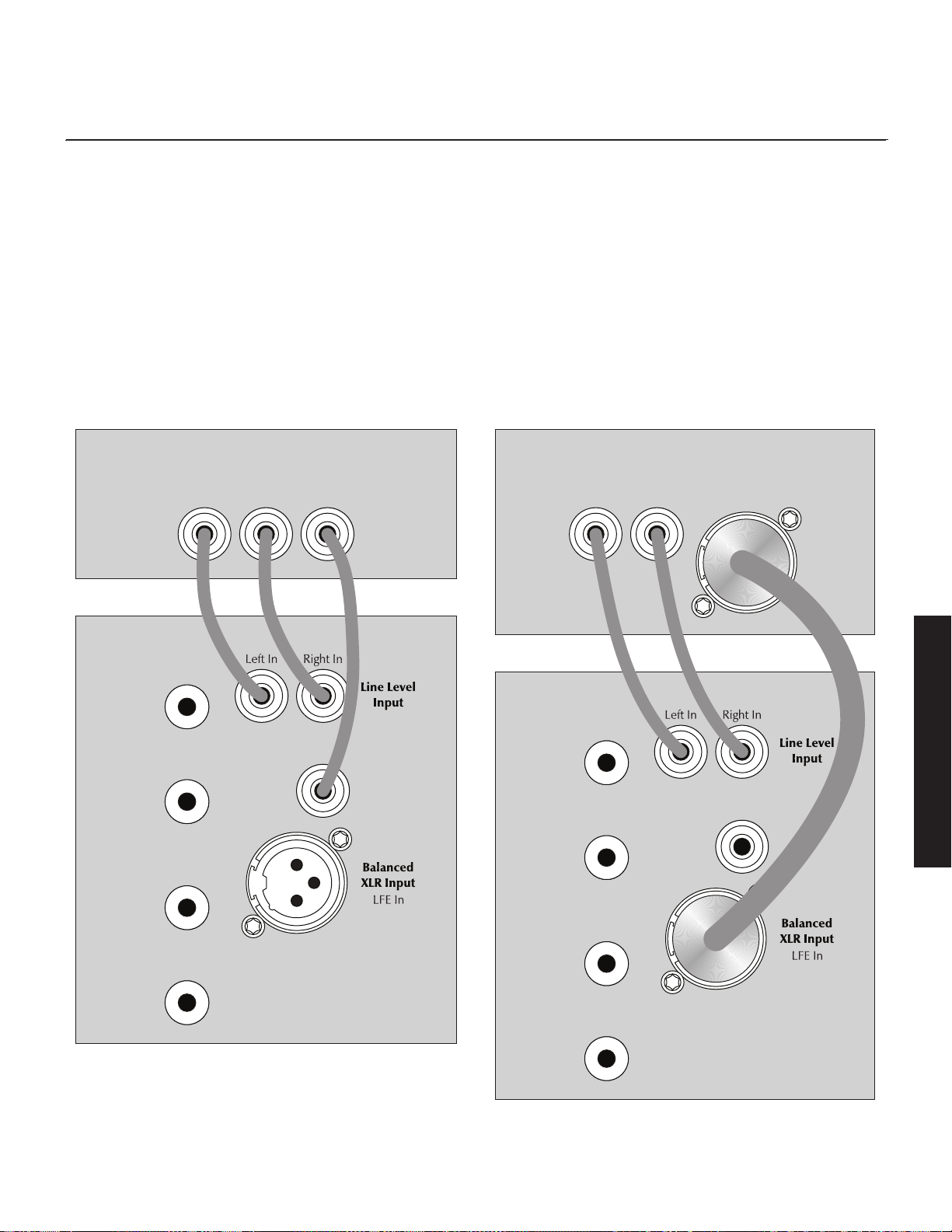
to set the sub volume level at an appropriate level. Follow the
instructions in your processor’s manual to fine-tune the sub level.
7 If your processor offers the option to setup crossovers for a
subwoofer, we recommend that you start with the following
settings—Crossover: 70Hz, High Pass: 12dB, and Low Pass:
24dB. The optimal setting for these options may vary depend-
ing on your room and listening preferences. Experiment and
listen for what sounds best to you.
8 If you have completed steps 1–7 and still have weak or boom-
ing bass consider using the Suwoofer Control App to further
adjust 20–30Hz Level to compensate for these anomalies (yes,
you're tweaking the 20–30Hz Level again). Experiment with
the settings and listen to the result. Try to find a position that
sounds correct to you. Experiment by changing the Volume
(level) setting while adjusting the 20–30Hz Level. Find a posi-
tion that gives you deep extended bass and good blending
with your main speakers. If you still have weak or booming
bass you may want to consider moving your subwoofer and
go through these setup steps again (especially if it is located in
or near a room corner). Remember, room position has a major
impact on overall bass performance.
13
English
+
Speaker
Level
Input
–
Left In
+
Speaker
Level
Input
–
Right In
Line Level
Input
LFE In
Dynamo
Subwoofer
Receiver/Processor
Left Out Right OutLeft Out Right Out LFE Out
Figure 18. Signal connection for 2-channel/multi-channel mode.
+
Speaker
Level
Input
–
Left In
+
Speaker
Level
Input
–
Right In
Line Level
Input
LFE In
Dynamo
Subwoofer
Receiver/Processor
Left Out Right OutLeft Out Right Out LFE Out
Figure 19. Signal connection for 2-channel/multi-channel mode.
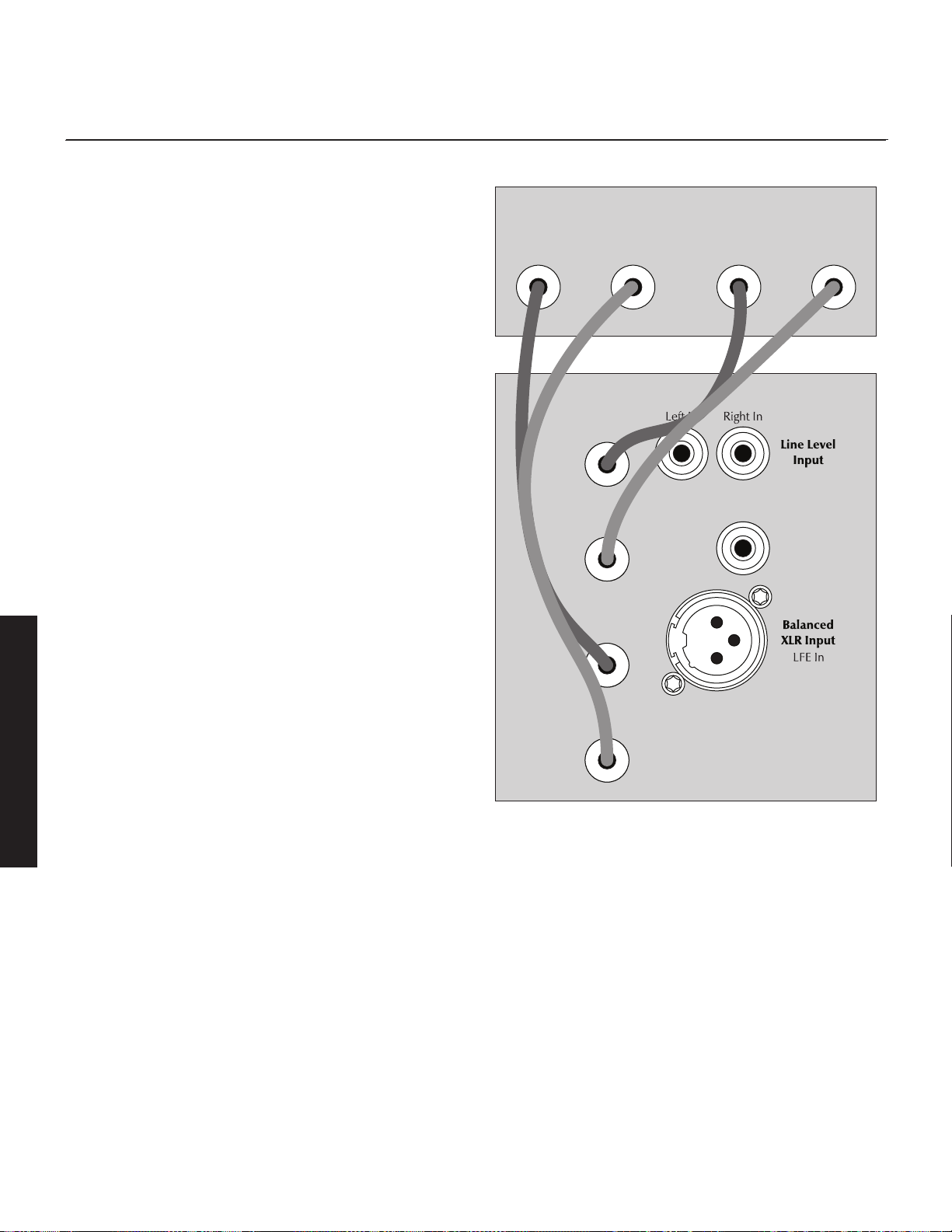
14
Using Speaker Level Inputs
This connection method is recommended if your subwoofer will be
used in a 2-channel only system with full-range front loudspeakers.
To connect using Speaker Level Inputs the speaker cable sshould
be terminated using banana style plugs. The Low-Pass Filter is
applied to the signal received through these inputs.
SWT-X Wireless System: This connection method is not compat-
ible with the SWT-X wireless receiver/transmitter system.
Speaker Level Inputs are an alternative to using RCA or XLR inter-
connects. If you use the Speaker Level Inputs do not use RCA or
XLR at the same time for Left In/Right In connections. If you use the
Speaker Level Inputs it is okay to still use RCA or XLR for the LFE
connection.
Connect the left and right outputs of your amplifier to the sub’s
Speaker Level Inputs (Left In/Right In). Use quality speaker cable
and banana plugs. Be consistent and make sure the positive (+)
and negative (–) terminals from your amplifier are attached to the
matching positive (+) and negative (–) terminals on the subwoofer.
If your amplifier only has one set of outputs you may connect your
amplifier to your speakers as normal and run an additional set of
cables from your speakers to the subwoofer’s Speaker Level Inputs.
English
+
Speaker
Level
Input
–
Left In
+
Speaker
Level
Input
–
Right In
Line Level
Input
LFE In
Dynamo
Subwoofer
Receiver/Processor
+ Left Out– + Right Out –
Figure 20. Signal connection for speaker level inputs.
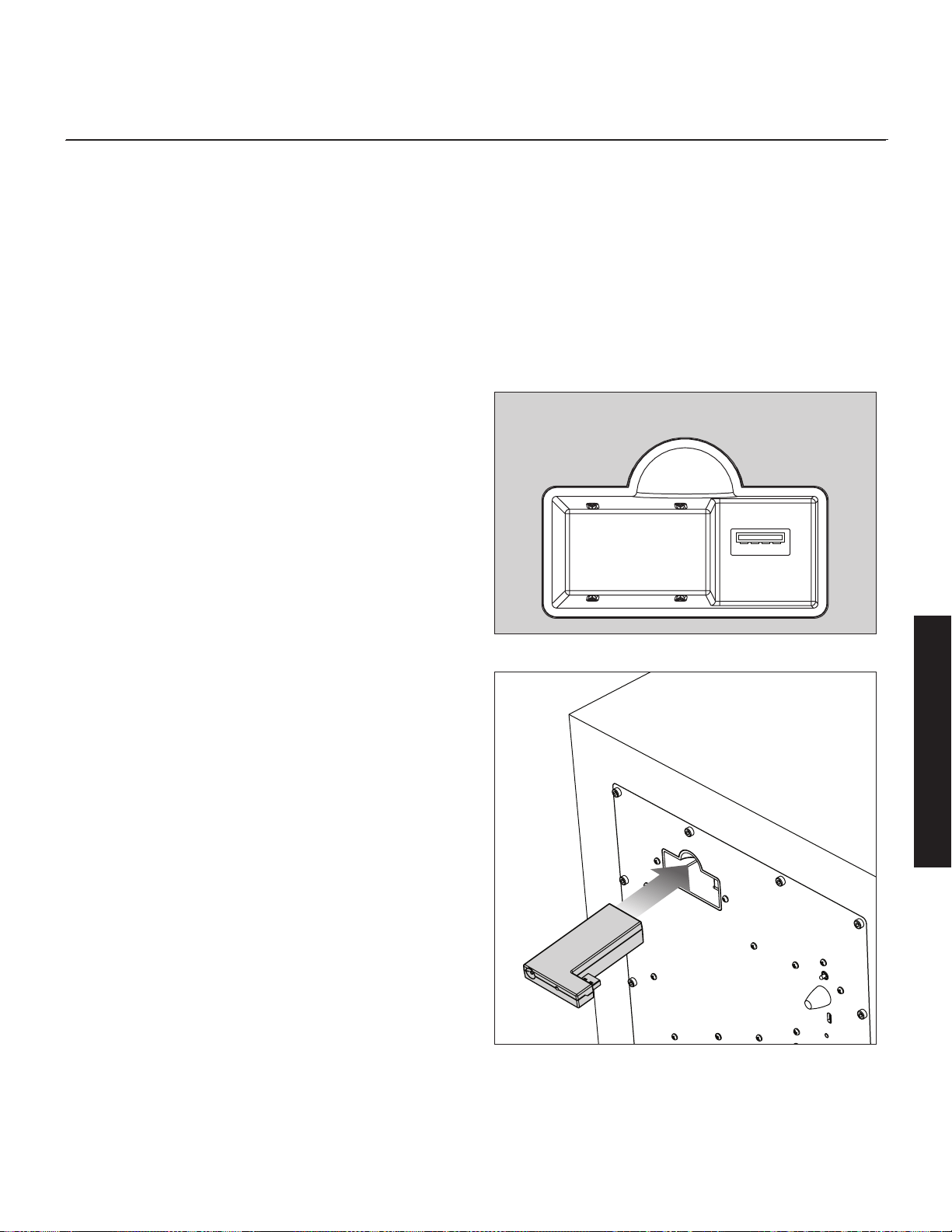
15
English
SWT-X Wireless System
Found on Dynamo 600X, 800X, 1100X, and 1600X. The SWT-X
Subwoofer Wireless transmitter/receiver system is sold separately
and available from your local dealer.
The SWT-X wireless system can be used to establish either a left/
right line level connection or a LFE line level connection.
To install the SWT-X wireless receiver, slide it into the Wireless
Module Connection port on the back of the subwoofer.
SWT-X receivers and transmitters are shipped already paired.
Signal Connection:
1 Follow the instructions outlined in "2-Channel Mode" or "Multi-
Channel Mode", only instead of connecting your receiver/
processor to the subwoofer, connect it to the SWT-X transmitter.
Please note, "Simultaneous 2-Channel/Multi-Channel Mode"
and "Speaker Level Input" connection methods are not compat-
ible with the wireless system.
Recommended Control Settings:
1 Follow the instructions outlined above in "2-Channel Mode" or
"Multi-Channel Mode".
SWT-X Status LEDs and Power
The SWT-X transmitter shuts down to save power after about 20
minutes. When the transmitter shuts down the receiver will also shut
-
down shortly thereafter.
SWT-X Transmitter LED (front) Status:
• No light: Standby
• Solid light: Transmitting wireless signals
• Flashing slowly: Waiting to be synchronized
• Flashing fast: Searching for receiver (after sync button has
been pressed)
SWT-X Transmitter LED (back) Status:
• Off: No power
• On: Receiving power
SWT-X Receiver LED (front) Status:
• Off: Standby or subwoofer is unpowered
• On: Wireless audio being received
• Flashing slowly: Waiting to be synchronized
• Flashing fast: Searching for transmitter (after sync button has
been pressed)
Wireless Module Connection
Figure 21. Wireless module receptacle
Figure 22. Wireless module installation

16
plaCement
Subwoofer Position
Generally, subwoofers have the most output when placed in
the corner of a room. However, this can also exaggerate the
subwoofers output making blending difficult. We recommend start-
ing by placing the subwoofer in a corner. If, after the full range
of tuning techniques have been employed, the subwoofer sounds
like it has too much upper bass energy try pulling it away from
the wall, toward the listening position. This will lessen the rein-
forcement of these problematic frequencies from the wall and likely
smooth out the response. Repeat the tuning techniques with the
woofer controls after you move it.
www.martinlogan.com/subsetup
Setting up a subwoofer can be a daunting process. However,
equipped with the right knowledge, exceptional results are attain-
able. To assist in the process of setting up your subwoofer, we’ve
created an online resource to walk you through the process. Here
you will find tips and tricks to aid with placement, connection, and
setting the controls. Please visit www.martinlogan.com/subsetup.
Ask Your Dealer
Your MartinLogan dealer can suggest many options for optimal
subwoofer placement. They also have many tools at their disposal,
such as experience, familiarity with the associated equipment, and
even sound analysis equipment which may make the task of deter-
mining optimal subwoofer placement easier.
Enjoy Yourself
MartinLogan subwoofers are very refined subwoofers and will ben-
efit from care in setup. With the above placement tips in mind you
will find, over months of listening, that small changes can result in
measurable differences. As you live with your subwoofer, do not
be afraid to experiment with positioning until you find the optimal
relationship between your room, settings and subwoofer that gives
you the best results. Your efforts will be rewarded.
Installing in a Cabinet
When placing the subwoofer inside of a cabinet it is recommend-
ed that you use a front-firing configuration and that there be a
minimum of three inches of open space between the cabinet and
the front and back sides.
Figure 23. MartinLogan subwoofers as the LFE channels, MartinLogan
speakers as front, center, and surround (effects) channels. Note the corner
placement of the subwoofers at the front of the listening room.
Figure 24. Placing the subwoofer in a cabinet requires a minimum of three
inches of open space on the front and back.
English
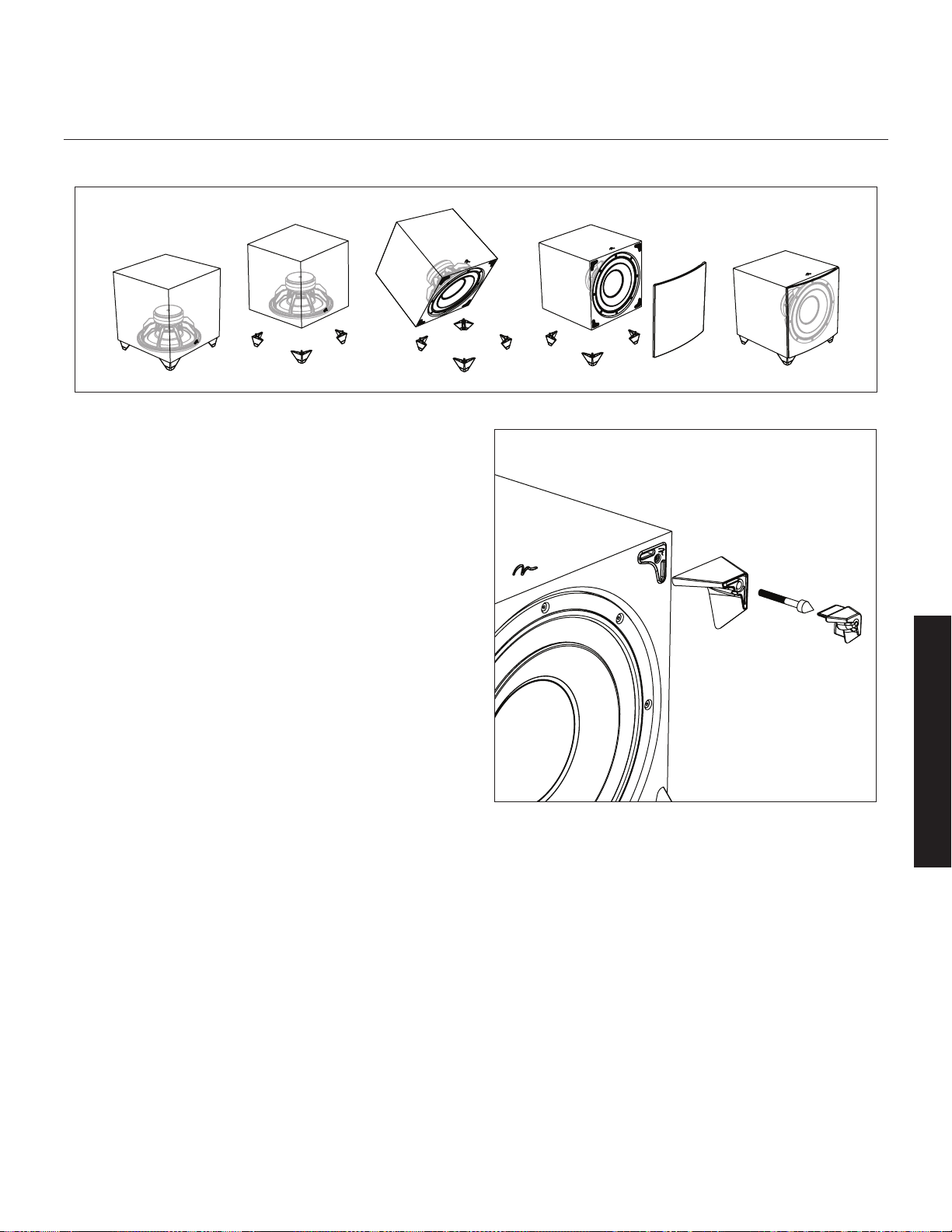
17
Changing Woofer Orientation
Dynamo 800X, 1100X, and 1600X
Please note: When configured in the front-firing orientation a
right angle adaptor is required if using an XLR connection.
When installing the subwoofer in a cabinet it is recommended
that the subwoofer be converted to a front-firing configuration.
1 Prepare a flat surface with a blanket to protect the finish.
Unplug signal and power connections. Remove the grill cloth,
if installed.
2 Carefully lay the subwoofer on its side. Remove the rubber
cap, unscrew the attached spike, and remove the foot.
3 Change the location of the four feet.
4 Reinstall the foot, spike, and, if desired, the rubber cap.
Figure 26. To change woofer orientation, remove the rubber cap, spike,
and foot, change location, and reinstall.
Figure 25. Dynamo 800X, 1100X, and 1600X are capable of both front-firing and down-firing woofer orientations.
English
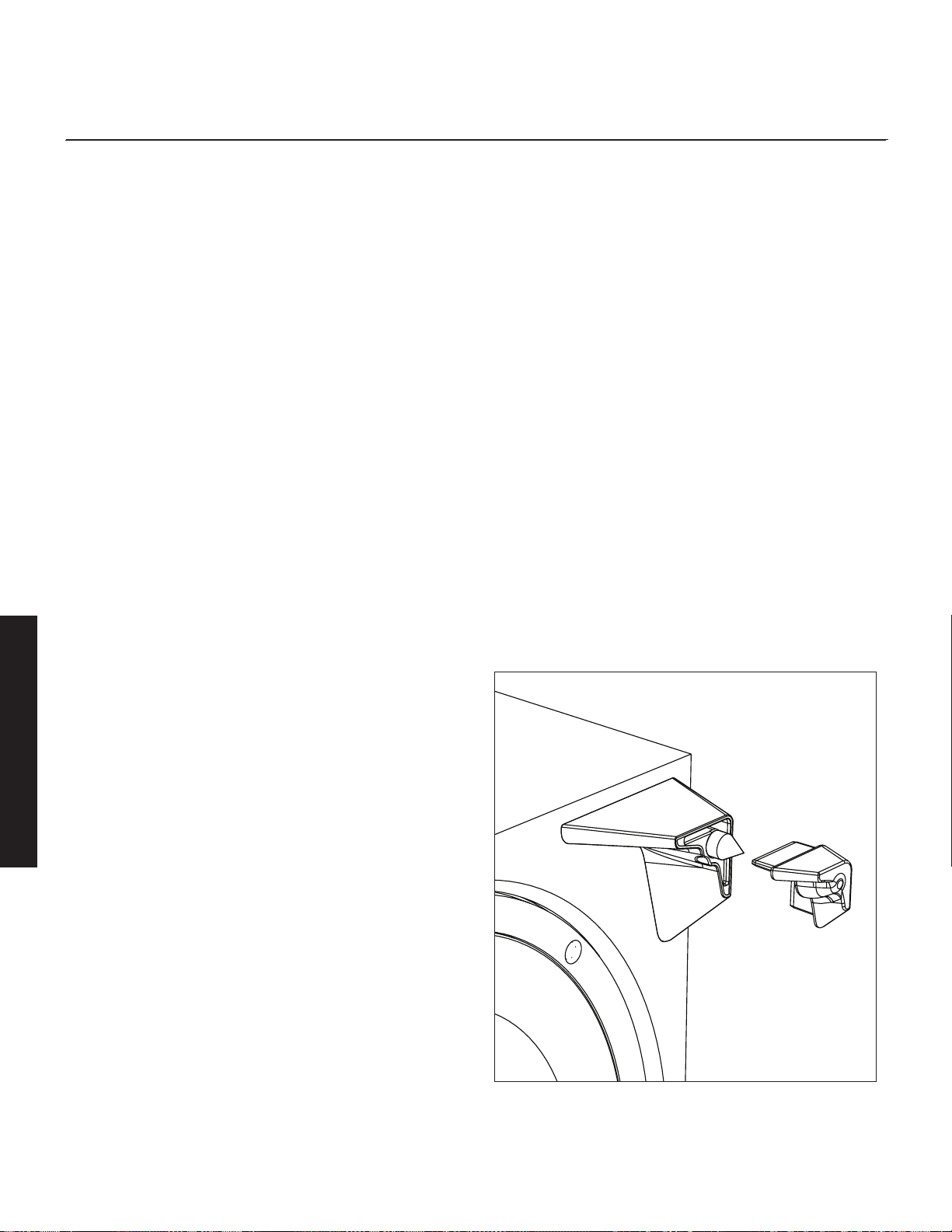
18
room aCoustiCs
Your Room
This is an area that requires both a little background to understand
and some time and experimentation to attain the best performance
from your system. Your room is actually a component and an impor-
tant part of your system. This component is a large variable and can
dramatically add to or subtract from a great sonic experience.
All sound is composed of waves. Each frequency has its own
wave size, with the lower, or bass frequencies literally encompass-
ing from 10 feet to as much as 40 feet. Your room participates in
this wave experience like a swimming pool with waves reflecting
and becoming enhanced depending on the size and shape of the
room and the types of surfaces in the room.
Remember that your audio system can actually generate all of the
information required to recreate a sonic event in time, space, and
tonal balance. Acoustically, the role of an ideal room would be to
neither delete nor contribute to that information. However, nearly
every room does to some degree.
Terminology
Standing Waves
Sound coming from a speaker bounces around in a room until a
pattern emerges—this is called a standing wave. Typically, this is
only a problem with frequencies below 100Hz. When this hap-
pens different parts of your room experience either an excess or
a lack of bass.
Some people believe that having a room without parallel walls
will eliminate this effect. The truth is that non-parallel walls only
generate different standing wave patterns than those that occur in
rectangular rooms.
Usually, you can excite most of the standing waves in a room by
putting the subwoofer in a corner. Listening position determines
which standing waves you will experience. For instance, if you sit
in a corner you will hear most of the standing waves. This can be
an overpowering experience. Sitting next to a wall can also inten-
sify the levels of the standing waves that are experienced.
Resonant Surfaces and Objects
All of the surfaces and objects in your room are subject to the
frequencies generated by your system. Much like an instrument,
they will vibrate and "carry on" in syncopation with the music, and
may contribute in a negative way to the sound. Ringing, boomi-
ness, and even brightness can occur simply because surfaces and
objects are "singing along" with your speakers.
Resonant Cavities
Small alcoves or closet type areas in your room can be chambers
that create their own "standing waves" and can drum their own
"one note" sounds.
Solid Footing
After living and experimenting with your subwoofer, you may want
to use ETC™ (Energy Transfer Coupler) spikes. With the use of
these spikes, the subwoofer will become more firmly planted on the
floor and, consequently, bass will tighten. It is best not to implement
the spikes, however, until you are secure in the positioning, as the
spikes can damage the floor if the subwoofer is moved.
Spike Installation Instructions:
1 Carefully lay the subwoofer on its side to gain access to the
bottom of the feet.
2 Remove the rubber cap from the foot to reveal the spike.
Caution: Make sure your hands and any cabling are clear of the
spikes. Do not slide the subwoofer as spikes are sharp and can
damage your floor or carpet.
English
Figure 27. To access the spikes, remove the rubber cap..
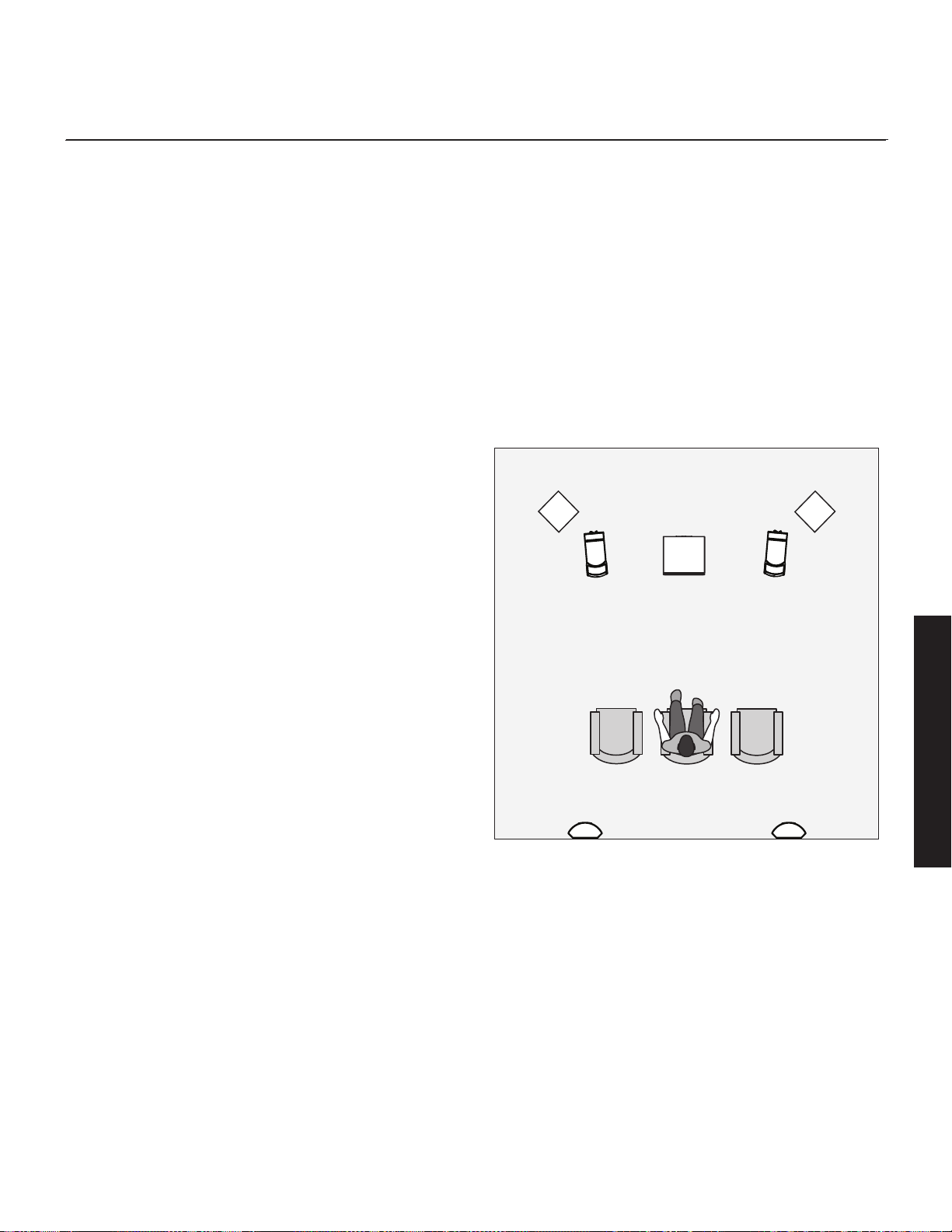
19
home theater
It had long been the practice of stereo buffs to connect their televi-
sion to a stereo system. The advantage was the use of the larger
speakers and more powerful amplifier of the stereo system. Even
though the sound was greatly improved, it was still mono and lim-
ited by the broadcast signal.
In the late 1970’s and early 1980’s two new home movie formats
became widely available to the public: VCR and laser disc.
By 1985, both formats had developed into very high qual-
ity audio/video sources. In fact, the sonic performance of some
video formats exceeded audio-only formats. Now, with theater-
quality sound available at home, the only element missing was the
"surround sound" presentation found in movie houses.
Fortunately, Dolby and DTS encoded DVD’s emerged with the
same surround sound information encoded on home releases as
the theatrical release. Additionally, new high-resolution home-
viewing formats such as Blu-ray as well as high-definition content
provided via cable or satellite have evolved which include multi-
channel encoded audio that is virtually master tape quality. All
that is required to retrieve this information is a decoder and addi-
tional speakers and amps to reproduce it.
Home theater is a complex purchase and we recommend that you
consult your local MartinLogan dealer, as they are well versed in
this subject.
Each piece of a surround system can be purchased separately.
Take your time and buy quality. No one has ever complained that
the movie was too real. The following list and descriptions will
give you only a brief outline of the responsibilities and demands
placed on each speaker.
Front Left and Front Right
If these speakers will be the same two used for your stereo play-
back, they should be of very high quality and able to play loudly
(over 102 dB) and reproduce bass below 80 Hz.
Center Channel
This is the most important speaker in a home theater system, as
almost all of the dialogue and a large portion of the front speaker
information is reproduced by the center channel. It is important
that the center speaker be extremely accurate and mate well with
the front speaker, and that it is recommended for use as a center
speaker. This is not the place to cut corners.
Surround Speakers
We recommend (along with the film industry) that the surround
speakers play down to at least 80 Hz. Surround speakers contain
the information that makes it appear that planes are flying over
your head. Some may suggest that this is the place to save money
and purchase small, inexpensive speakers. If you choose to do so,
be prepared to upgrade in the future as discrete multi-channel digi-
tal encoding is proliferating rapidly and the demands on surround
speakers have increased.
Subwoofer
With any good surround system you will need one or more high-
quality subwoofers (the .1 in a 5.1, 6.1, or 7.1 channel surround
system). Most movie soundtracks contain large amounts of bass
information as part of the special effects. Good subwoofers will
provide a foundation for the rest of the system.
English
Figure 28. Dynamo subwoofers as the LFE (effects) channels, MartinLogan
speakers as front, center, and surround (effects) channels.

20
anthem room CorreCtion (arC™) setup
About ARC
Your subwoofer includes Anthem Room Correction technology for
optimizing low-frequency output within your room. Your subwoof-
er's ARC system employs a mobile device connected via Bluetooth
or computer and a microphone connected via USB cables.
ARC utilizes multiple measurement points, at least five—but up
to ten—individual data positions, allowing ARC to analyze the
unique characteristics of your room. ARC software calculates
correction curves for each measurement point, substantially mini-
mizing the rounding errors of less sophisticated “calculators”, like
those used in standard on-board room equalization systems.
Additionally, ARC computer software is capable of calibrating
itself to individual microphones, eliminating potential interference
that would otherwise skew the data.
Although ARC is designed to adjust the subwoofer’s output to mini-
mize sonic anomalies caused by room interactions, it is always
recommended to use traditional methods to achieve a flat response
before implementing digitally based room correction. Remember,
subwoofer placement is one of the most influential parameters when
dealing with anomalous low-frequency room interactions. Listening
position is equally important to bass response but is often dictated
by other factors that are more difficult to change.
The ARC in your subwoofer is not a replacement for room cor-
rection systems designed to optimize multi-channel audio systems
across the entire frequency range. When beginning the task of
optimizing a multi-channel audio system’s performance, the first
step should always be proper setup of the subwoofer and front,
center, and surround speakers. The next step should be run-
ning ARC to adjust the individual subwoofer's output to account
for room interactions. Only after proper setup of speakers and
subwoofers, including running ARC on the subwoofer(s), is it time
to run your processor’s full room correction system to help balance
overall system performance within the room.
Before You Begin
Anthem Room Correction does not always require an external
microphone. ARC Mobile can use the microphone built into some
mobile devices (especially those found in Apple
®
iOS devices). It
should be noted that external microphones, designed especially
for ARC, may offer superior results. For users who desire a cali-
brated ARC microphone, ARC kits are sold separately and are
available in several different versions. Check AnthemAV.com/ARC
for compatibility of ARC Mobile with your mobile device or com-
patibility of ARC software with your computer's operating system.
NOTE: Use of your subwoofer's built-in USB Input is not required
to run Anthem Room Correction. The ARC Mobile app can use a
direct Bluetooth connection to the subwoofer.
ARC Connection (Mobile Device)
To run ARC Mobile your sub's Setting Control must be set to "App".
If you plan to use the "Local" setting for your final installation you
must temporarily set this switch to "App" for the duration of the ARC
measurement and upload process.
ARC Mobile connects to your subwoofer using Bluetooth. Before
running ARC you will need to turn on Bluetooth in your mobile
device. When you run ARC Mobile it will discover all available
devices. Select your subwoofer from this list.
Running ARC (Mobile Device)
To run ARC on a mobile device you will need to download the
latest ARC Mobile app. ARC Mobile will walk you through the
measurement process with step-by-step on screen instructions.
A calibrated ARC microphone, designed especially for use with
mobile devices, is also available from your MartinLogan dealer.
Depending on your mobile device you may be able to use the
device's built-in microphone. Apple iOS devices tend to have
microphones with very predictable responses. Android devices,
however, prove to have less predictable microphone responses
and benefit from a calibrated ARC microphone. Remember, to
provide an accurate room correction curve, ARC need not only
understand the sound of your subwoofer within your room, but also
what coloration the microphone itself might be contributing to the
measurements. Visit AnthemAV.com/ARC for details.
NOTE: The MartinLogan Subwoofer Control app and the ARC
Mobile app may interfere with each other's ability to discover your
subwoofer. If you're having trouble getting either app to run or
your subwoofer is not being discovred, check to make sure the
other app isn't open and running in the background.
• Before running ARC Mobile, set up your subwoofer by adjust-
ing placement.
• During measurement ARC Mobile overrides the settings of the
Volume (level), Phase, Low-Pass Filter, and 20–30Hz Level
controls. These controls do not effect measurements. After the
correction curve has been uploaded to the speaker these con-
trols can be used to fine tune the subwoofer's performance.
• If you are using an external ARC microphone, follow ARC
English

21
Mobile's queues for microphone connection instructions.
• When taking ARC measurements the microphone should be at
locations approximately where your ears will be.
• If using an external microphone when taking ARC measure-
ments, the microphone should point up, towards the ceiling.
• If using a mobile devices built-in microphone, the microphone
should point in the direction of the device being measured.
• When taking ARC measurements the room should be silent.
Please turn off or remove potential sources of noise.
• If using a mobile devices built-in microphone, it is recommend-
ed that you remove the mobile device from its case, as a case
may interfere with measurement accuracy.
• ARC Mobile will require you to measure five listening positions.
The first position should be located at the primary listening
position. Subsequent measurements should be taken at other
listening positions and should never be closer than 2-feet from
one another.
• Although it might seem logical to do so, you do not need to take
measurements throughout the room (i.e. in the front corners, far
off to the side, etc.). Measurement locations should focus only on
positions where people will be listening to the subwoofer.
ARC Connection (Computer)
To run ARC on a computer you will need an ARC compat-
ible microphone (available from your MartinLogan dealer). Visit
AnthemAV.com/ARC for details.
NOTE: If you own a MartinLogan PBK (Perfect Bass Kit) or Anthem
ARC kit, the microphone included with either kit will work with the
ARC computer software used to measure your subwoofer(s).
Before running ARC on a computer, connect your subwoofer to
the computer. Use a USB cable to connect the subwoofer's USB
Input (Micro-B USB) to a USB (Type A)-input on your computer.
Depending on the version of your ARC kit (sold separately) you
may need an additional USB (Type A) to Micro-B USB cable or a
Mini-B USB (Female) to Micro-B USB (Male) adapter.
Before running ARC on a computer, Connect the ARC microphone
to your computer using a Mini-B USB to USB (Type A) cable.
Running ARC (Computer)
To run ARC on a computer you will need to download the lat-
est ARC software from AnthemAV.com/ARC. You will also need
an ARC compatible microphone (available from your MartinLogan
dealer).
When running ARC software we recommend Automatic/Wizard
Mode for most users. This mode will walk you through the mea-
surement process with step-by-step on screen instructions. The ARC
software's Manual Mode is recommend for advanced users. For
more information, please visit AnthemAV.com/ARC.
• Before running ARC, set up your subwoofers by adjusting
placement.
• During measurement ARC overrides the settings of the Volume
(level), Phase, Low-Pass Filter, and 20–30Hz Level controls.
These controls do not effect measurements. After the correction
curve has been uploaded to the speaker these controls can be
used to fine tune the subwoofer's performance.
• When taking ARC measurements the microphone should be
approximately at the locations where your ears will be.
• When taking ARC measurements, the microphone should point
up, towards the ceiling.
• When taking ARC measurements the room should be silent.
Please turn off or remove potential sources of noise.
• ARC will require you to measure five (or more) listening posi-
tions. The first position should be located at the primary
listening position. Subsequent measurements should be taken at
other listening positions and should be no closer than 2-fee to
each other.
• Although it might seem logical to do so, you do not need to take
measurements throughout the room (i.e. in the front corners, far
off to the side, etc.). Measurement locations should focus only on
positions where people will be listening to the subwoofer.
English

22
Frequently Asked Questions
How do I clean my subwoofer? Use a dust free cloth or a
soft brush to clean your subwoofer.
Is it safe to set things on my subwoofer? While your
subwoofer is designed with a durable, stain-resistant surface, we
advise you not to set anything on your subwoofer—especially con-
tainers holding liquids.
Is there likely to be any interaction between my
sub and the television in my Audio/ Video system?
No. Although your sub doesn’t use a shielded driver, modern
plasma, LCD, and LED television are not susceptible to magnetic
interference. We recommend 3 feet between the sub and video
components that are susceptible to magnetic fields.
Will my electric bill go 'sky high' by leaving my
subwoofer plugged in all the time? No. When the
power switch is set to ‘Auto’ the subwoofer will draw very few
watts when idle or in standby mode.
Should I unplug my sub during a thunderstorm? Yes,
or before. It's a good idea to disconnect all of your audio/video
components during stormy weather.
Is the Control App available for PC or Mac? No. The
Subwoofer Control App is only available for iOS and Android
devices.
Is the Control App avialble for Windows Phone? No.
The Subwoofer Control App is only available for iOS and Android
devices.
How do I install a firmware update? Use a USB cable
to connect the subwoofer's USB Input (Micro-B USB) to a USB
(Type A) input on your computer. Using ARC software (available
from AnthemAV.com/ARC), choose your subwoofer when asked to
select a device. The ARC software should automatically ask if you
would like to install an update if one is available. ARC software
will download and install the firmware update from MartinLogan
servers. You may also manually initiate a firmware update by
choosing the option from the software's menu. ARC also offer's the
ability to manually select a firmware file if you have one saved on
your computer.
How do I connect my subwoofer to a receiver with
two subwoofer outputs? Receivers and processors with
multiple subwoofer outputs usually output the same signal on both
outputs. You can connect your subwoofer to either output. If your
processor/receiver offers independint control of the inputs, connect
your subwoofer to one output and use the receiver/processor's
menu to configure the outputs.
How do I connect my sub to a 2-channel system?
Your subwoofer is designed to connect to either 2-channel or multi-
channel systems (or both) and offers connetions and controls for
either scenario. Please review the "Connecting the Subwoofer and
Setting Controls" section of this manual for details.
Why does my subwoofer have so few controls?
These subwoofers have moved controls to a Subwoofer Control
App (available for iOS or Android).
My receiver has one sub output jack, but my sub
has two (or three) inputs. Which input should I use?
In most installations you will connect the receiver/processor's sub
output to the susbwoofer's LFE In (or Right In/LFE In in the case
of the
Dynamo 600X). Dynamo subs offer flexible connection
options to accomodate other scenarios. These are all outlined in
the "Connecting the Subwoofer and Setting Controls" section of
this manual.
Where should I place the subwoofer in my room?
We recommend starting by placing the subwoofer in a corner.
Generally, subs have the most output when placed in the corner of
a room. However, this can also exaggerate the sub output making
it difficult to blend with the main speakers. Additional adjustments
may be necessary. Please refer to the "Placement" section of this
manual or www.martinlogan.com/subsetup for more details.
My receiver has a room correction system. Should
I still use the subwoofer's built-in room correction?
The ARC (Anthem Room Correction) system in your sub is not a
replacement for room correction systems designed to optimize
multi-channel audio systems across the entire frequency range.
When beginning the task of optimizing a multi-channel audio sys-
tem’s performance, the first step should always be proper setup
of the sub and front, center, and surround speakers. The next step
should be running ARC to adjust the individual sub's output to
account for room interactions. Only after proper setup of speakers
and subwoofers, including running ARC on the sub(s), is it time to
run your processor’s full room correction system to help balance
overall system performance within the room.”
Troubleshooting
No Output
• Check that all components are plugged in and turned on.
frequently asked questions and troubleshooting
English

23
English
• Check all interconnecting cables.
• Check that the subwoofer is connected to the sub out (or other
appropriate output) on the receiver/processor/amplifier.
• Check that subwoofer output is enabled in the receiver/proces-
sor's setup menu.
• Make sure the sub's level control is not turned down.
• If the problem persists, contact your dealer.
Muddy Bass
• Check placement. Try moving the subwoofer closer to the front
and side walls.
• Check the type of feet that are being used. Try installing the
ETC spikes.
• Decrease the volume level.
• Check your processor setup.
• If the problem persists, contact your dealer.
Hums or Unusual Sounds
• Turn the subwoofer off, unplug all signal inputs, turn the
subwoofer back on and turn up the level. If the problem disap-
pears, the hum is originating elsewhere in your system.
•
Connect the sub to the same AC circuit as the receiver/processor.
• If operating in wireless mode, move the sub away from micro-
wave ovens and/or any devices that use wireless technology.
• If the problem persists, contact your dealer.
Control App Troubleshooting
Multiple subwoofers all have same name in
the Control App or ARC (app or computer soft-
ware)
• Unplug all subwoofers. Plug the subs in one at a time and use
the Subwoofer Control App to rename to each sub. Once
you've given each subwoofer a custom name, plug them all
back in.
• Use the Subwoofer Control App's tone sweep feature to gener-
ate a tone in each sub and rename each sub accordingly.
Control App not discovering subwoofer
• Make sure sub's Setting Control is set to "App"
• Make sure nothing is connected to the sub's USB Input.
• Make sure ARC Mobile is not connected to the sub on your
current device or any other devices (completely close the app
so that it is not running, even in the background).
• Unplug the subwoofer for 20 minutes and plug it back in. This
will cause any connected devices to lose their connection.
• Use ARC (for computer) to check for any available firmware
updates and install if necessary.
Custom passcode not working
• Use the code "0133" to bypass a custom passcode.
ARC Troubleshooting
ARC Mobile not discovering subwoofer
• Make sure sub's Setting Control is set to "App". The is neces-
sary for the duration of the ARC process, even if you intend to
use the "Local" setting.
• Make sure nothing is connected to the sub's USB Input.
• Make sure the Subwoofer Control App is not connected to the
sub on your current device or any other devices (completely
close the app so that it is not running, even in the background).
• Unplug the subwoofer for 20 minutes and plug it back in. This
will cause any connected devices to lose their connection.
• Use ARC (for computer) to check for any available firmware
updates and install if necessary.
ARC (for computer) not recognizing the ARC
microphone
• Unplug the microphone’s USB cable from your computer and
plug it back into your computer. If your computer has more than
one USB port try using a different USB port.
• While the microphone is plugged in to your computer allow
one minute for the computer to install the microphone drivers.
• If driver installation fails, try connecting your subwoofer and
microphone to an external USB hub and the hub to your com-
puter.
• Try to re-trigger installation of the microphone drivers. On your
Windows PC, go the Device Manager (right click “Computer”
in the Start menu and select “Properties”). In the list of devices
locate “Sound, video, and game controllers” and expand the
list of available devices. Right click on the defective micro-
phone and select uninstall. With the microphone’s USB cable
attached to your computer, right click any item in the Device
Manager and select “Scan for hardware change”.
ARC (for computer) software Installation
• Make sure your subwoofer and ARC microphone are not con-
nected to the computer when installing the ARC software.
• If you are having trouble installing the software, go to
AnthemAV.com/ARC and download the installation file to make
sure you are using the newest version.
• If you are still having trouble installing the software or the soft-
ware gets stuck repeatedly on the first measurement it may be
best to try another computer.

24
Warranty and Registration
Your subwoofer is provided with an automatic Limited 90 Day
Warranty coverage. You have the option, at no additional charge,
to receive Limited 3-Year Warranty coverage. To obtain the Limited
3-Year Warranty coverage you need to register your product with
MartinLogan. For your convenience MartinLogan offers online
warranty registration at www.martinlogan.com. Please retain your
original sales receipt from an authorized MartinLogan dealer or
distributor for proof of warranty terms and proof of purchase.
MartinLogan may not honor warranty service claims unless we
have a completed warranty registration on file!
Service
Should you be using your MartinLogan product in a country other
than the one in which it was originally purchased, we ask that you
note the following:
1. The appointed MartinLogan distributor for any given country is
responsible for warranty servicing only on units distributed by
or through it in that country in accordance with its applicable
warranty.
2. Should a MartinLogan product require servicing in a country
other than the one in which it was originally purchased, the
end user may seek to have repairs performed by the nearest
MartinLogan distributor, subject to that distributor's local servic-
ing policies, but all cost of repairs (parts, labor, transportation)
must be born by the owner of the MartinLogan product.
3. If, after owning your subwoofer for six months, you relocate
to a country other than the one in which you purchased
your subwoofer, your warranty may be transferable. Contact
MartinLogan for details.
general information

25

26
speCifiCations*
System Frequency Response....
Woofer ...................
Amplifier . . . . . . . . . . . . . . . . . .
Controls (backplate)..........
Level......................
Setting Control ...............
Power Mode ................
Controls (via Bluetooth) .......
Level......................
Low-Pass Filter (Frequency) .......
Low-Pass Filter (Order) ..........
Phase .....................
Phase (Polarity) ...............
Preset Listening Modes ..........
20–30Hz Level ..............
Anthem Room Correction (ARC) ....
Tone Sweep (20–120Hz) .......
Inputs (Line Level RCA) .............
Inputs (Balanced XLR) ..............
Inputs (Speaker Level)..............
Inputs (12V Trigger) ...............
Inputs (USB) .....................
Input (Wireless)...................
Input Impedance..................
Room Correction..................
Power Draw.....................
Feet . . . . . . . . . . . . . . . . . . . . . . . . . . .
Weight.........................
Size (HxWxD, Front-Firing Orientation)
..
Size (HxWxD, Down-Firing Orientation)
..
Dynamo 600X*
27–200 Hz ± 3 dB. Anechoic in LFE mode.
10” (25.4cm) high-excursion, inverted sur-
round, polypropylene cone in a stamped steel
basket with extended throw driver assembly.
Ported.
120 watts (240 watts peak)
Located on subwoofer backplate
Min–Max
Local, App
On, Auto
App available for iOS and Android
-40 to 12dB
35–120Hz
Bypass, Third, Fourth
0–180° (1° Increments)
Normal, Inverted
Music, Night, Movie
±10dB
On, Off
On, Off, Pause (Frequency)
Left and Right/LFE
N/A
Left and Right via banana jacks
N/A
Micro USB (for ARC™/firmware update)
SWT-X Wireless Receiver (sold separately)
RCA: 8300 Ohms
XLR: N/A
Speaker Level: 2000 Ohms (red to black)
Anthem Room Correction (ARC™) ready
Typical: 30W, Max: 150W,
Idle: 4W, Standby: 0.5W
Rubber
35.5 lbs. each (16.1 kg)
N/A
16.3 x 14.5 x 14.9 inches (41.5 x 36.7 x 37.8 cm)
Dynamo 800X*
24–200 Hz ± 3 dB. Anechoic in LFE mode.
10” (25.4cm) high-excursion, inverted sur-
round, polypropylene cone in a stamped steel
basket with extended throw driver assembly;
sealed non-resonant cabinet design.
300 watts (600 watts peak)
Located on subwoofer backplate
Min–Max
Local, App
On, Trigger, Auto
App available for iOS and Android
-40 to 12dB
35–120Hz
Bypass, Third, Fourth
0–180° (1° Increments)
Normal, Inverted
Music, Night, Movie
±10dB
On, Off
On, Off, Pause (Frequency)
Left, Right, and LFE
N/A
Left and Right via banana jacks
3.5mm (5–24V DC)
Micro USB (for ARC™/firmware update)
SWT-X Wireless Receiver (sold separately)
RCA: 8300 Ohms
XLR: N/A
Speaker Level: 2000 Ohms (red to black)
Anthem Room Correction (ARC™) ready
Typical: 70W, Max: 360W,
Idle: 10W, Standby: 0.5W
Rubber, ETC™ (Energy Transfer Coupler) spikes
30 lbs. each (13.6 kg)
14.6 x 12.4 x 12.7 inches (37.1 x 31.5 x 32.4 cm)
13.7 x 12.4 x 13.1 inches (34.8 x 31.5 x 33.3 cm)
English

27
System Frequency Response....
Woofer ...................
Amplifier . . . . . . . . . . . . . . . . . .
Controls (backplate)..........
Level......................
Setting Control ...............
Power Mode ................
Controls (via Bluetooth) .......
Level......................
Low-Pass Filter (Frequency) .......
Low-Pass Filter (Order) ..........
Phase .....................
Phase (Polarity) ...............
Preset Listening Modes ..........
20–30Hz Level ..............
Anthem Room Correction (ARC) ....
Tone Sweep (20–120Hz) .......
Inputs (Line Level RCA) .............
Inputs (Balanced XLR) ..............
Inputs (Speaker Level)..............
Inputs (5–24V DC Trigger)...........
Inputs (USB) .....................
Input (Wireless)...................
Input (Impedance).................
Room Correction..................
Power Draw.....................
Feet . . . . . . . . . . . . . . . . . . . . . . . . . . .
Weight.........................
Size (HxWxD, Front-Firing Orientation)
..
Size (HxWxD, Down-Firing Orientation)
..
Dynamo 1100X*
22–200 Hz ± 3 dB. Anechoic in LFE mode.
12” (30.5cm) high-excursion, inverted sur-
round, polypropylene cone in a cast aluminum
basket with extended throw driver assembly;
sealed non-resonant cabinet design.
650 watts (1300 watts peak)
Located on subwoofer backplate
Min–Max
Local, App
On, Trigger, Auto
App available for iOS and Android
-40 to 12dB
35–120Hz
Bypass, Third, Fourth
0–180° (1° Increments)
Normal, Inverted
Music, Night, Movie
±10dB
On, Off
On, Off, Pause (Frequency)
Left, Right, and LFE
LFE
Left and Right via banana jacks
3.5mm (5–24V DC)
Micro USB (for ARC™/firmware update)
SWT-X Wireless Receiver (sold separately)
RCA: 8300 Ohms
XLR: 28000 Ohms (pin 2 to 3)
Speaker Level: 2000 Ohms (red to black)
Anthem Room Correction (ARC™) ready
Typical: 100W, Max: 600W,
Idle: 15W, Standby: 0.5W
Rubber, ETC™ (Energy Transfer Coupler) spikes
46 lbs. each (20.9 kg)
17.2 x 15 x 16.2 inches (43.6 x 38 x 41.1 cm)
17.1 x 15 x 15.6 inches (43.5 x 38 x 39.6 cm)
Dynamo 1600X*
20–200 Hz ± 3 dB. Anechoic in LFE mode.
15” (38.1cm) high-excursion, inverted sur-
round, polypropylene cone in a cast aluminum
basket with extended throw driver assembly;
sealed non-resonant cabinet design.
900 watts (1,800 watts peak)
Located on subwoofer backplate
Min–Max
Local, App
On, Trigger, Auto
App available for iOS and Android
-40 to 12dB
35–120Hz
Bypass, Third, Fourth
0–180° (1° Increments)
Normal, Inverted
Music, Night, Movie
±10dB
On, Off
On, Off, Pause (Frequency)
Left, Right, and LFE
LFE
Left and Right via banana jacks
3.5mm (5–24V DC)
Micro USB (for ARC™/firmware update)
SWT-X Wireless Receiver (sold separately)
RCA: 8300 Ohms
XLR: 28000 Ohms (pin 2 to 3)
Speaker Level: 2000 Ohms (red to black)
Anthem Room Correction (ARC™) ready
Typical: 125W, Max: 800W,
Idle: 15W, Standby: 0.5W
Rubber, ETC™ (Energy Transfer Coupler) spikes
57 lbs. each (25.9 kg)
20.1 x 17.9 x 19.1 inches (51 x 45.4 x 48.6 cm)
20 x 17.9 x 18.5 inches (50.9 x 45.4 x 47 cm)
English
* Specifications are subject to change without notice.

Dy n a m o 600X
D
y n a m o 800X
D
y n a m o 1100X
Dy n a m o 1600X
manuel de l’utilisateur
®
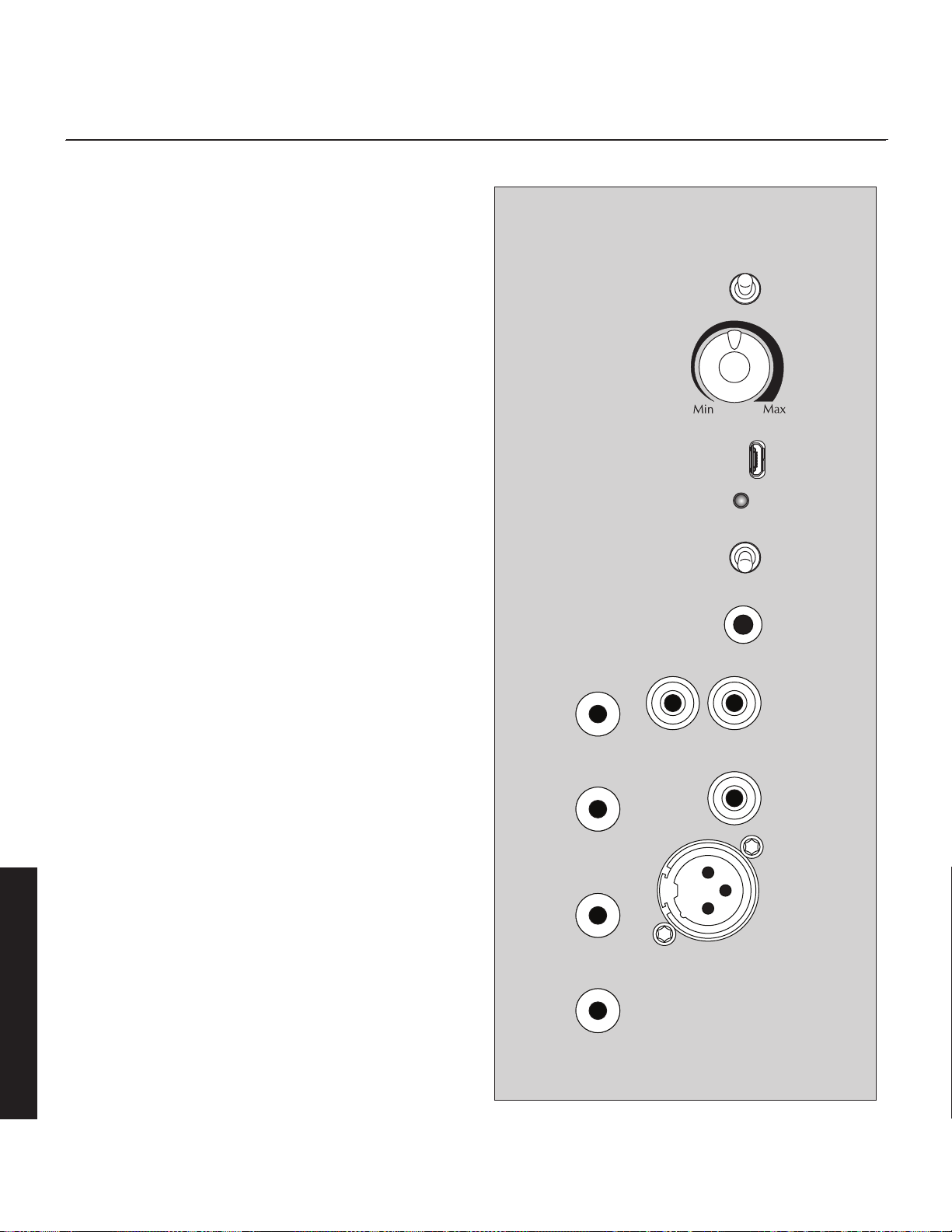
30
aperçu des Commandes et des raCCords
Français
Figure 1. Commandes de raccords. Les options de raccord peuvent varier selon le modèle.
Commandes
Commande de réglage : L’interrupteur Setting Control (commande
de réglage) permet de régler la façon dont le niveau (volume) et les
réglages du caisson de sous-graves sont commandés.
• App: lorsque cet interrupteur est réglé à « App », toutes les fonctions
de commande du caisson de sous-graves (sauf Power Mode – Mode
d’alimentation) sont commandées par l’application de commande pour
caisson de sous-graves. Veuillez noter : pour transmettre entièrement le
contrôle du caisson aux commandes locales, vous devez sortir entière-
ment de toute session active de l’Application de commande du caisson
de sous-graves.
• Local: lorsque cet interrupteur est réglé à « Local », le bouton de com-
mande de niveau (volume) du caisson est actif et le reste des réglages
du caisson est réglé aux paramètres par défaut. Le réglage local est
conçu pour les applications où vous raccordez le caisson de sous-
graves à un récepteur/processeur et que vous laissez le récepteur/
processeur gérer la plupart des réglages.
Réglages par défaut du caisson de sous-graves :
Phase : 0°
Polarité : Normale
Passe passe (Low-pass) : 120Hz 4e ordre
Niveau 20–30 Hz : 0dB
ARC : Off (Éteint)
Si le caisson de sous-graves est configuré avec l’application et que la
commande de réglage passe à Local, tous les réglages du caisson
de sous-graves passent à Défault. Toutefois, si l’interrupteur est remis à
App, les réglages précédents de l’application sont réactivés.
Niveau : Le bouton de niveau est uniquement actif lorsque la commande
de réglage est réglée à Local. Lorsque la commande de réglage est réglée
à App, le niveau est commandé par l’Application de commande du caisson
de sous-graves. Si vous réglez le niveau trop haut, les graves sembleront
gonflées; c’est la cause la plus courante de caissons de sous-graves qui
offrent un mauvais son. À titre de règle générale, le caisson de sous-graves
ne doit pas attirer l’attention sur lui; il doit seulement reproduire les graves
du système de façon à ce qu’elles semblent plus étendues et plus précises.
Entrée USB : Cette entrée est utilisée pour appliquer les mises à jour du
microprogramme et exécuter ARC à partir d'un PC. L’ARC est abordé en
détail plus loin dans ce manuel. Même si votre caisson de sous-graves est
parfaitement positionné, la pièce peut avoir une incidence importante sur
le rendement des graves. Les dimensions de la pièce, les zones mortes,
les couloirs voûtés, les meubles et de nombreux autres facteurs peuvent
transformer la pièce en instrument supplémentaire qui joue de concert
avec les musiciens ou les trames sonores en ajoutant une coloration et
+
Entrée
niveau enceinte
–
Entrée gauche
Statut
Entrée
USB
Entrée niveau
de ligne
Entrée LFE
Allumé
Auto
Entrée gauche Entrée droite
Déclencheur
(actif lorsque
Commande
de réglage
réglée à Local)
Commande
de réglage
Local
App
Entrée
déclencheur
12 V
Niveau
Mode
d'alimentation
Entrée niveau
de ligne
Entrée XLR
équilibrée
Entrée LFE
+
Entrée
niveau enceinte
–
Entrée droite
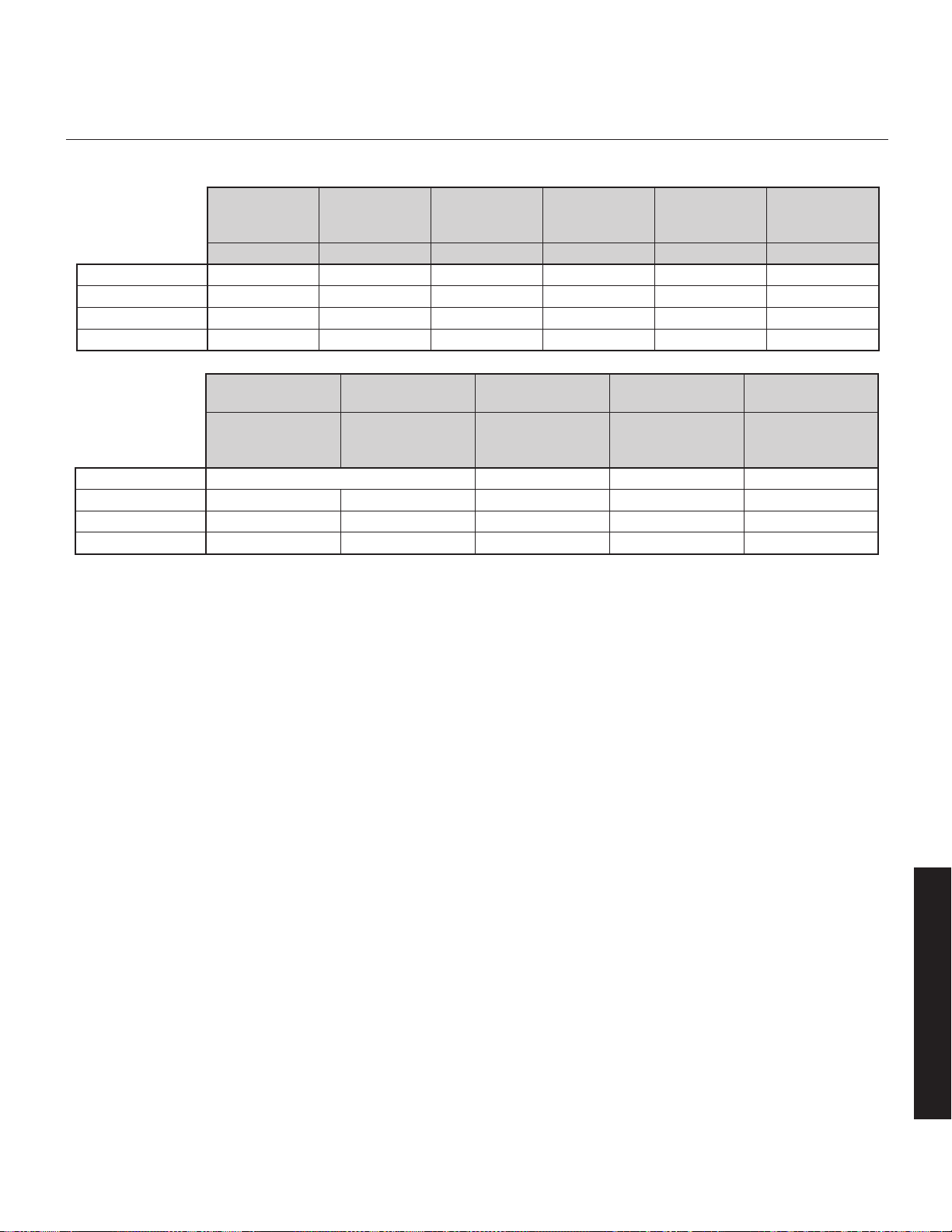
31
une résonance nuisibles. Bien que les commandes de votre caisson de
sous-graves vous permettent d’effectuer un réglage fin et d’optimiser le ren-
dement des graves dans la pièce, l’ARC
MC
vous permet de corriger les
effets des limites de la pièce.
L’application ARC Mobile peut utiliser une connexion Bluetooth au caisson
de sous-graves. Il n’est pas nécessaire d’utiliser l’entrée USB intégrée du
caisson de sous-graves pour lancer l'Anthem Room Correction.
Si vous souhaitez lancer l’ARC sur un ordinateur, l’entrée USB permet de
raccorder le caisson de sous-graves à un ordinateur par l'entremise d'une
connexion Micro USB. Selon la version de votre trousse ARC (vendue
séparément), vous pourriez avoir besoin d’un USB (type A) à câble Micro
USB, ou d’un adaptateur Mini-B USB (femelle) à Micro-B USB (mâle).
L’entrée USB peut également être utilisée pour appliquer les mises à jour
de micrologiciel à votre caisson de sous-graves.
Statut : Votre caisson de sous-graves est doté d’une DEL multicolore pour
indiquer son statut actuel.
• Aucune couleur : Aucune alimentation. Le caisson de sous-graves n’est
pas branché, ou il s'est éteint en raison d'une surcharge. Débranchez
le caisson de sous-graves et rebranchez-le pour corriger le problème.
•
Blanche : Mode lecture. Cela indique que le caisson de sous-graves
détecte un signal audio et qu’il a basculé automatiquement en mode lecture.
• Rouge : Veille. Le caisson est passé en mode économie d’énergie.
• Clignotante : Erreur. Le caisson affiche un code d’erreur.
Power Mode (mode alimentation) et Trigger Input (entrée
déclencheur) : L'interrupteur de mode d’alimentation vous permet de
commander le moment où le caisson de sous-graves s'allume et s’éteint.
• Auto : WLorsqu’il est réglé à « Auto », le caisson de sous-graves
s’allume quand il détecte un signal audio. Après quelques minutes
d’inactivité, le caisson de sous-grave bascule en mode veille.
• On (allumé) : Lorsqu’il est réglé à « On », le caisson de sous-graves
sera toujours allumé.
• Trigger (déclencheur) : Les modèles Dynamo 800X, 1100X et 1600X
sont dotés d’une entrée de déclencheur (trigger input). Si vous avez
une composante source externe (comme un récepteur) avec des com-
mandes de déclenchement intégrées, vous pouvez allumer et éteindre
le caisson de sous-graves avec cette source. Raccordez un câble du
composant de commande à l’entrée Trigger du caisson de sous-graves
et réglez le mode d’alimentation à « Trigger » (déclencheur). Bien que
cette technologie soit couramment appelée déclencheur 12V, le cais-
son de sous-graves répondra à tout signal de 5 à 24V CC.
Connexions de signal audio
Line Level Input (Left In/Right In) (Entrée niveau de ligne
(entrée gauche / entrée droite) : Sur les modèles Dynamo 600X,
800X, 1100X et 1600X. Veuillez noter, sur le modèle 600X, l'entrée
Figure 3.
Entrées de signal
audio
Niveau de Ligne
(RCA)
Niveau de Ligne
(RCA)
Équilibrée
(XLR)
Niveau d’enceinte
(prises bananes)
Audio sans fil
(vendu séparément)
Left In & Right In
(Entrée gauche et
Entrée droite)
LFE In
(Entrée LFE)
LFE In
(Entrée LFE)
Left In & Right In
(Entrée gauche et
Entrée droite)
Left In &
Right In (LFE In)
Dynamo 600X
ü (Right In est doublée comme LFE In)
–
ü ü
Dynamo 800X
ü ü
–
ü ü
Dynamo 1100X
ü ü ü ü ü
Dynamo 1600X
ü ü ü ü ü
Figure 2.
Commandes et entrées.
Commande de
réglage
(Interrupteur)
Niveau
(bouton)
Entrée USB
(Micro-B USB)
Statut
(DEL)
Mode
d’alimentation
Déclencheur
12 V
Entrée
App / Local Min – Max – – On / Auto
Dynamo 600X
ü ü ü ü ü
–
Dynamo 800X
ü ü ü ü ü (+ déclencheur) ü
Dynamo 1100X
ü ü ü ü ü (+ déclencheur) ü
Dynamo 1600X
ü ü ü ü ü (+ déclencheur) ü
Français
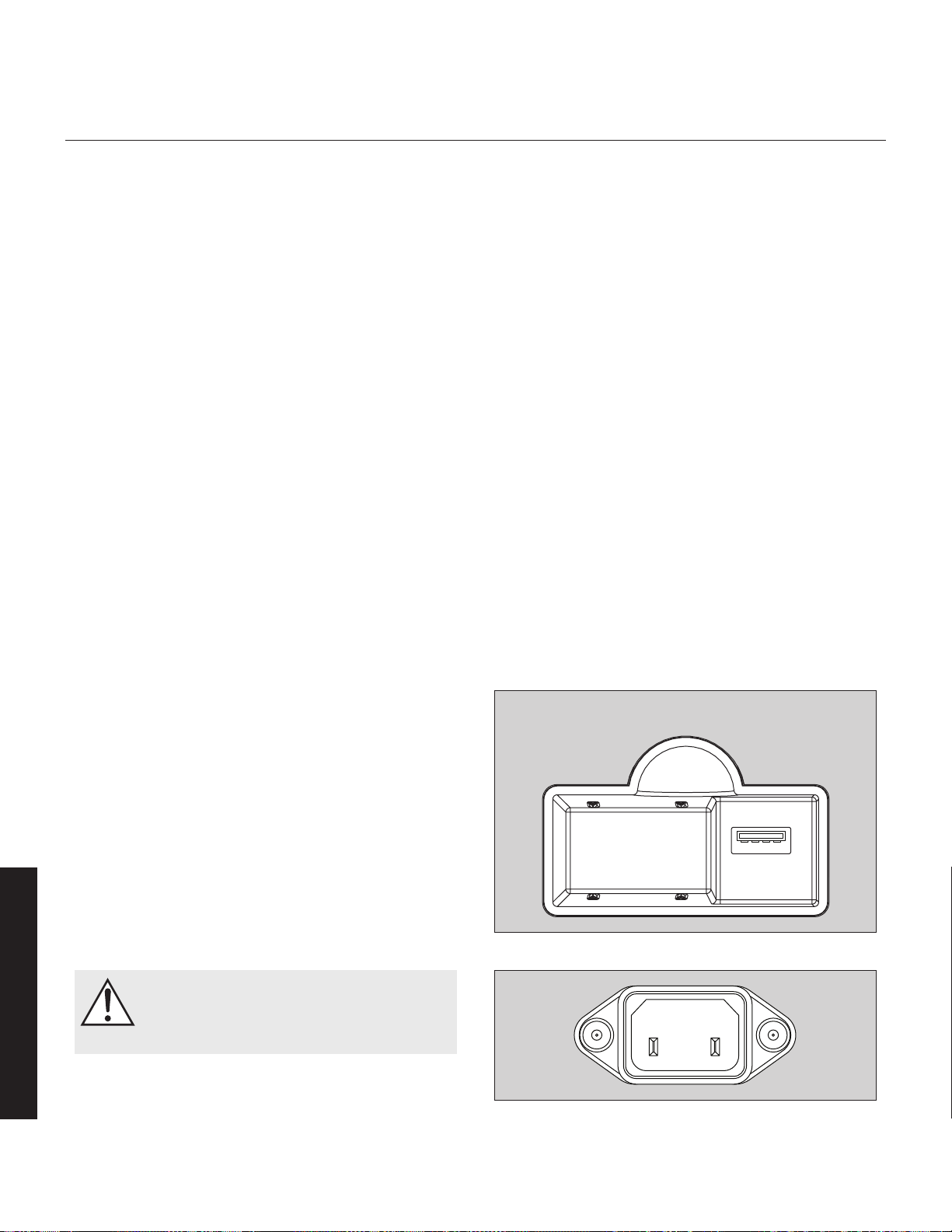
32
Right In sert aussi de LFE In. Se à partir de Main-Out ou Pre-Out sur votre
récepteur/préamplificateur. La configuration de la commande du Filtre de
passe basse est appliquée au signal reçu par ces entrées.
Line Level Input (LFE In) (Entrée niveau de ligne (LFE In)) :
Sur les modèles Dynamo 800X, 1100X et 1600X. Veuillez noter, sur le
modèle 600X, l'entrée Right In sert aussi de LFE In. Se branche à partir de
Sub Out sur votre processeur A/V. Les réglages du répartiteur (crossover)
pour le LFE In sont commandés par le processeur A/V. Le réglage pour le
filtre de passe basse du caisson de sous-graves n’est pas appliqué à cette
connexion, sauf pour le Dynamo 600X (si vous utilisez le 600X pour LFE
In, réglez le filtre de passe basse à Bypass – contournement).
Balanced XLR Input (LFE In) (Entrée XLR équilibrée) (LFE In)
: Sur les modèles Dynamo 1100X et 1600X. Se branche à partir de Sub
Out sur votre processeur A/V. La configuration de la commande du Filtre
de passe basse n’est pas appliquée à cette connexion. Les réglages du
répartiteur (crossover) pour le LFE In sont commandés par le processeur
A/V. Veuillez noter : ne faites pas les raccords avec les entrées XLR et
RCA LFE en même temps.
Speaker Level Input (Left In/Right In) (Entrée niveau
enceinte) (entrée gauche/entrée droite) : Sur les modèles
Dynamo 600X, 800X, 1100X et 1600X. Cet ensemble d’entrées offre
un endroit pour brancher le caisson de sous-graves à l’aide d’un câble
d’enceinte standard. Pour utiliser ces connexions, le câble d’enceinte doit
se terminer par une prise de type banane. La configuration de la com-
mande du Filtre de passe basse est appliquée au signal reçu par ces
entrées. Veuillez noter : ne faites pas les raccords avec les entrées RCA et
Speaker Level Left/Right en même temps.
Connexions de signal audio sans fil
Sur les modèles Dynamo 600X, 800X, 1100X et 1600X. Le système de
transmetteur/récepteur sans fil de caisson de sous-graves SWT-X est vendu
séparément et disponible auprès de votre revendeur local. Les détails sur
l’utilisation d’un système SWT-X sont fournis plus loin dans ce manuel.
Raccord de l’alimentation CA
MISE EN GARDE! Le cordon d’alimentation ne doit pas
être installé, enlevé ou laissé détaché du caisson de
sous-graves pendant que l’autre extrémité est branchée
à une source d’alimentation CA.
Le cordon IEC doit être fermement inséré dans la prise d’alimentation
CA située sur le panneau de raccord arrière du caisson de sous-graves,
puis à une prise murale CA appropriée. Directement à côté de la prise
d’alimentation CA située sur le panneau de raccord arrière du caisson
de sous-graves se trouve l’interrupteur d’alimentation maître. Cet inter-
rupteur est branché directement au CA principal et allume et éteint toute
l’alimentation qui arrive au caisson de sous-graves. Le Dynamo comporte
également un capteur d’alimentation qui basculera en mode Veille après
quelques minutes sans signal musical si l’interrupteur du panneau avant est
réglé à « Auto ».
Votre caisson de sous-graves est câblé pour le service d’électricité fourni
dans le pays d’achat d’origine. La puissance nominale CA applicable à
un appareil en particulier est indiquée sur le carton d’emballage et sur la
plaque du numéro de série fixée sur le caisson de sous-graves.
Si vous déplacez le caisson de sous-graves du pays d’achat d’origine,
assurez-vous que l’alimentation CA fournie à tout autre endroit est appro-
priée avant de raccorder et d’utiliser le caisson de sous-graves. Le caisson
de sous-graves peut subir des dommages importants ou son rendement
peut être très diminué s’il est utilisé avec une source d’alimentation CA
inappropriée.
Rodage
Nos haut-parleurs de graves personnalisés ont besoin d’un rodage d’environ
50 heures à des niveaux d’écoute moyens avant d’offrir un rendement opti-
mal. Cela aura des répercussions sur l’écoute et le jugement critiques.
Figure 5. Réceptacle d’alimentation CA
Français
Figure 4. Réceptacle de module sans fil
Connexion de module sans fil
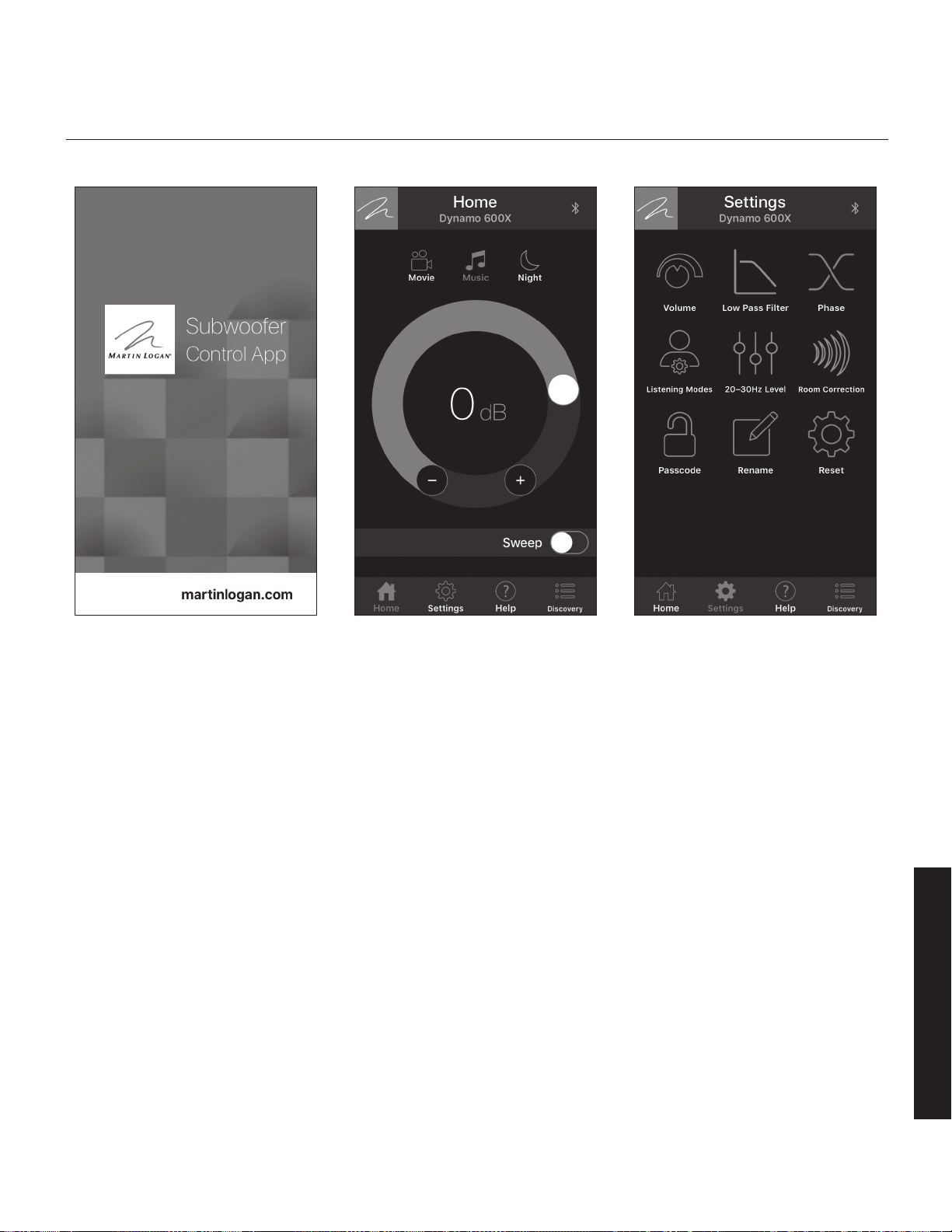
33
aperçu de l’appliCation de Commande du Caisson de sous-graves
Les modèles Dynamo 600X, 800X, 1100X et 1600X sont dotés d’un système
perfectionné de commande par application (disponible pour iOS et Android)
qui relie votre caisson de sous-graves à l’aide d'un appareil mobile et d’une
connexion Bluetooth. Consultez le site Web MartinLogan.com pour savoir
comment télécharger l’application de commande du caisson de sous-graves
gratuite de MartinLogan à partir des magasins d’application iOS ou Android.
REMARQUE : L’application de commande du caisson de sous-graves
de MartinLogan peut être modifiée et, selon la nature des mises à jour,
les fonctions peuvent être différentes de celles qui sont décrites ici.
REMARQUE : L’application de commande du caisson de sous-graves
MartinLogan et l’application ARC Mobile peuvent interférer avec leur
capacité réciproque à repérer le caisson de sous-graves. Si vous avez de
la difficulté à faire fonctionner l’une ou l’autre des applications ou si votre
caisson de sous-graves n’est pas repéré, assurez-vous que l’autre applica-
tion n’est pas ouverte et qu’elle ne fonctionne pas en arrière-plan.
Le bouton Logo
Situé dans le coin supérieur gauche de l’appli, le bouton affichant le logo de
MartinLogan fera apparaître un écran qui affiche les renseignements de base
du caisson de sous-graves, comme le modèle et la version du micrologiciel.
La barre de menu
La barre de menu, située dans le bas de l’appli, vous permet de choisir
parmi les quatre fonctions principales de l’appli.
• Home (accueil) : Cet écran vous permet de régler rapidement le vol-
ume du caisson de sous-graves, de choisir un mode d’écoute et de
lancer un balayage de tonalité (tone sweep).
• Settings (réglages) : Cet écran vous permet de choisir parmi les fonc-
tions de commande du caisson de sous-graves.
• Help (aide) : Ce bouton affichera une fenêtre-éclair contenant une
description de la commande actuellement affichée à l’écran.
• Discovery (exploration) : Cet écran affiche une liste à partir de
laquelle vous pouvez choisir le caisson de sous-graves que vous sou-
haitez commander. Si votre caisson de sous-graves n’apparaît pas
dans cette liste, assurez-vous que la commande des réglages du cais-
son de sous-graves est réglée à « App » et que l’ARC Mobile n’est pas
activé sur votre appareil. De plus, vérifiez qu’il n’est pas commandé
par un autre appareil mobile utilisant l’ARC ou l’application de com-
mande du caisson de sous-graves.
Figure 7. Écran accueilFigure 6. Application de commande du cais-
son de sous-graves MartinLogan
Figure 8. Écran Réglages
Français
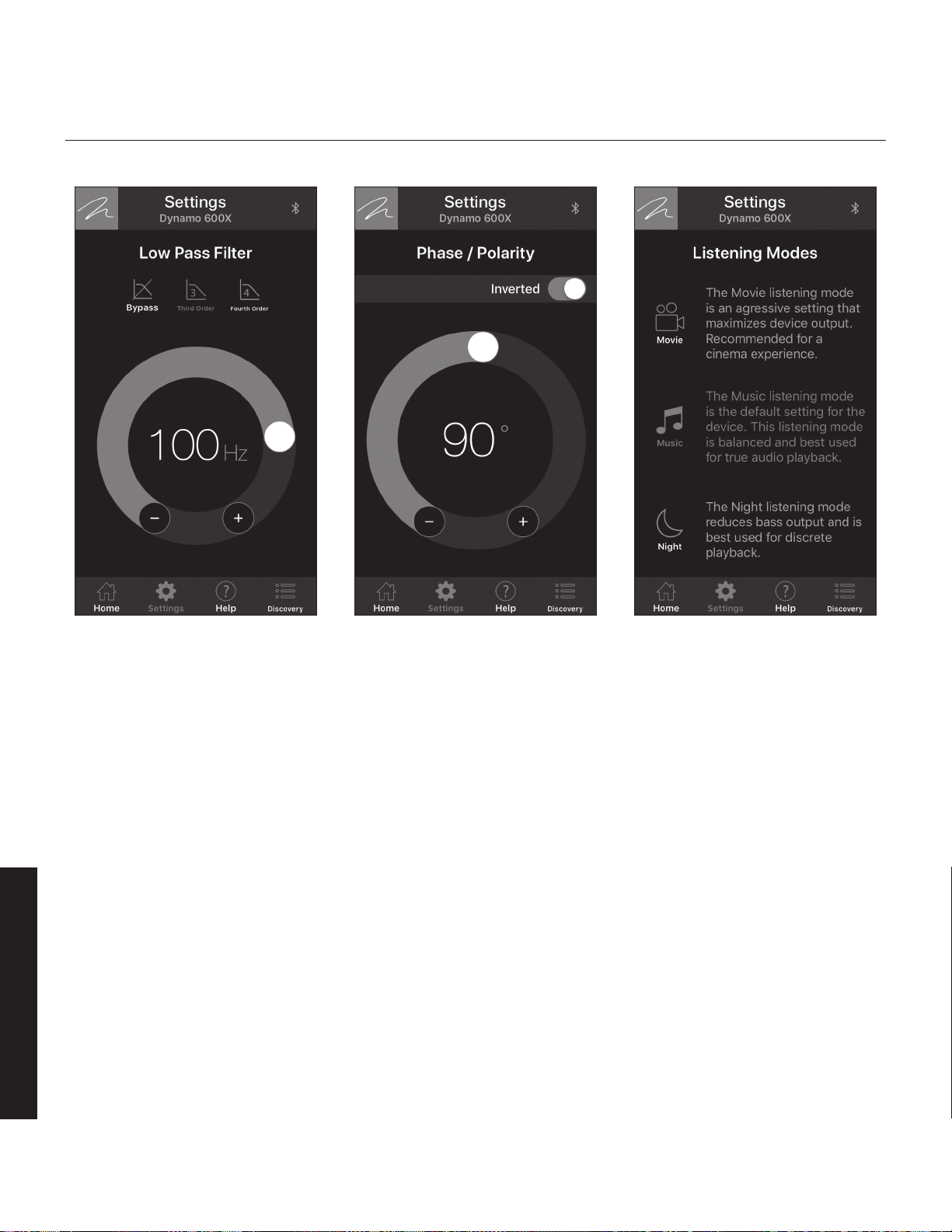
34
Figure 11. Écran Réglages : modes d’écoute
Réglages : volume
• Volume: La commande de volume (niveau) vous permet de régler la
puissance sonore de votre caisson de sous-graves de -40dB à 12dB.
Pour la plupart des applications, un réglage de -14dB à 0dB est appro-
prié. Si vous réglez le niveau trop haut, les graves sembleront gonflées;
c’est la cause la plus courante de caissons de sous-graves qui offrent un
mauvais son. Une règle pratique stipule que le caisson de sous-graves
ne doit pas attirer l’attention sur lui. Il doit simplement faire en sorte que
les graves du système soient plus étendues et plus précises.
• Sweep (Balayage) : La fonction Sweep (balayage) est utile pour trou-
ver les zones de votre salle d'écoute où il pourrait y avoir des bruits ou
des résonances problématiques. La fonction de balayage de tonalité
peut également être utile pour régler la phase, la répartition (crossover)
et le volume du caisson de sous-graves. Le fait d’appuyer sur la touche
Sweep lance un balayage de tonalité de 20 à 120Hz. Vous pouvez
régler le volume pendant la lecture de la tonalité de balayage. Le fait
d’appuyer sur le bouton pause arrête le caisson de sous-graves à une
fréquence de tonalité particulière et vous permet également de régler
une tonalité de fréquence particulière. Lorsqu’une tonalité de fréquence
est en pause, vous pouvez choisir « Continuer » pour régler le niveau
du caisson de sous-graves. Le balayage de tonalité continuera jusqu’à
ce que la touche Sweep soit réglée à off (fermée).
Réglages : Filtre de passe basse
L’écran Filtre de passe basse vous permet d’ajuster la fréquence de passe
basse pour les entrées gauche et droite (RCA ou niveau d’enceinte). Ce
réglage n’est pas appliqué aux entrées LFE (RCA ou XLR); la tâche de la
gestion des graves est plutôt laissée à votre processeur audio/vidéo.
Les caissons de sous-graves Dynamo offrent un rendement exceptionnel
dans les systèmes à 2 canaux (Left In/Right In) et les systèmes de cinéma
maison à canaux multiples (LFE In). Les modèles Dynamo 800X, 1100X
et 1600X permettent de raccorder Left In/Right In et LFE In, ce qui vous
permet d’obtenir une configuration optimale pour l’écoute en 2 canaux
tout en permettant le mode d’écoute à canaux multiples (film). Lorsque
vous écoutez du matériel source stéréo, le système atteint une intégration
optimale de la musique avec le caisson de sous-graves qui joue sous la
fréquence de réponse la plus basse de l’enceinte avant. Lorsque vous
regardez un film, la piste LFE et les graves provenant des enceintes ambio-
phoniques peuvent être transmises au caisson de sous-graves à l’aide des
réglages du répartiteur (passe basse) provenant du système de gestion
des graves du processeur.
Règle générale, le filtre de passe basse doit être réglé à une valeur à peu
près égale (ou inférieure) à 70 % de la fréquence de réponse la plus basse
de l’enceinte principale. Exemple : la fréquence de réponse la plus basse de
Figure 9. Écran Réglages : filtre de passe basse Figure 10. Écran Réglages : phase/polarité
Français
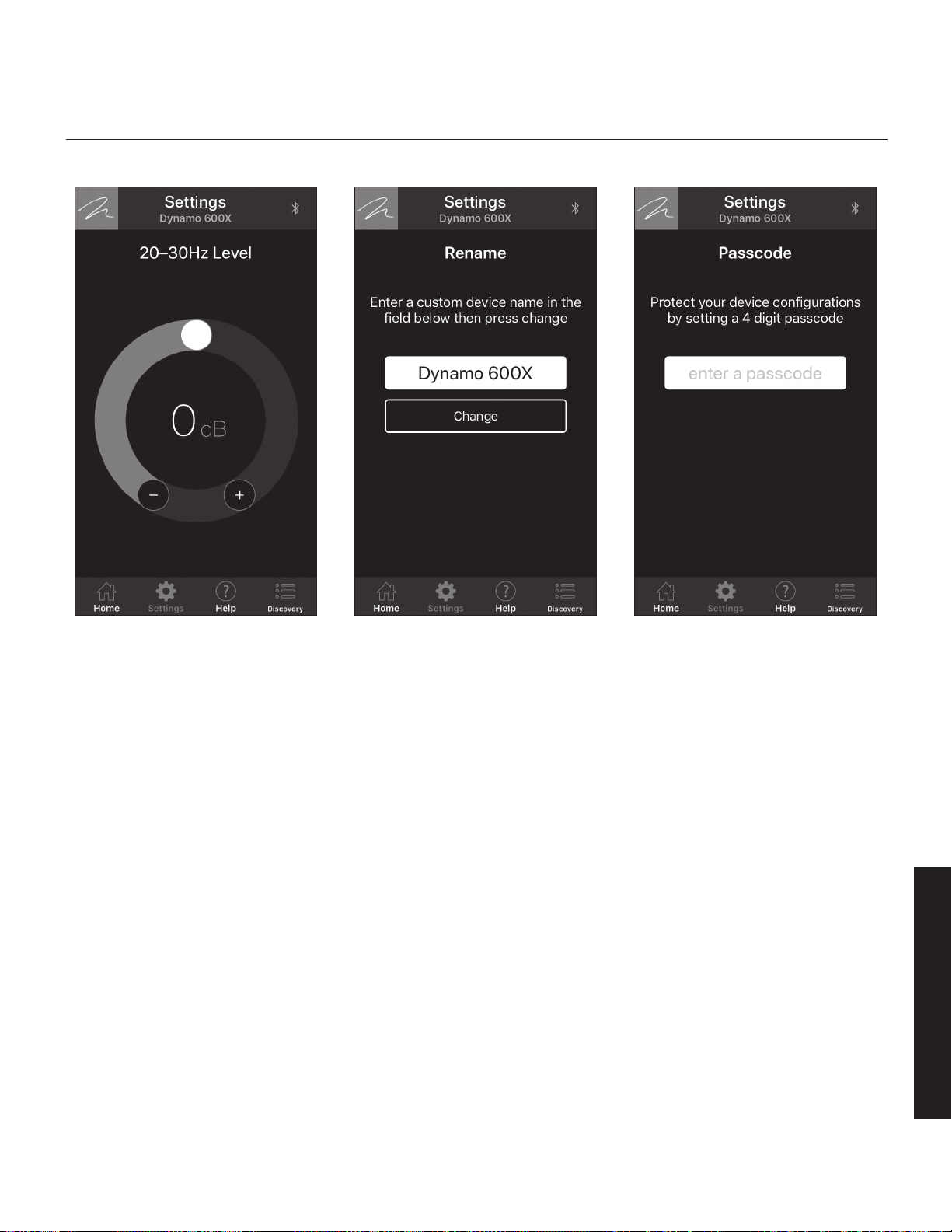
35
votre enceinte est 43 Hz. 70 % de 43 Hz donne 30,1; vous devez donc
régler le filtre de passe basse du caisson de sous-graves à 30 Hz. Pour votre
information, une fois que vous avez essayé le réglage recommandé à l’aide de
la formule susmentionnée, vous devez également essayer les autres réglages.
Si vous n’êtes pas certain de la réponse de fréquence la plus faible de
votre enceinte principale, commencez avec un réglage de 35 Hz. Le fait
d'essayer différents réglages ne causera pas de tort au système.
N’oubliez pas, puisque ce réglage s’applique uniquement aux entrées
gauche/droite, ce réglage n’est pas utilisé si votre caisson de sous-graves
est uniquement raccordé par une entrée LFE. Toutefois, si vous utilisez un
système sans fil SWT-X pour raccorder un canal LFE ou si vous utilisez
le Dynamo 600X comme canal LFE (raccordé par Right In/LFE In), vous
devrez régler le filtre de passe basse à Bypass (contournement).
• Bypass (contournement) : Choisissez cette option si vous planifiez
d’utiliser la gestion des graves du récepteur/processeur pour config-
urer un filtre de passe basse.
• Troisième ordre : Si vous utilisez les entrées gauche/droite du cais-
son de sous-graves, choisissez cette option pour utiliser un répartiteur
de troisième ordre pour régler les caractéristiques de déploiement
des fréquences supérieures du caisson de sous-graves alors qu’elles
approchent du réglage de la fréquence du filtre de passe basse.
Un filtre de troisième ordre a une pente de 18dB par octave, soit
un déploiement plus lent que le quatrième ordre. Pour la plupart des
applications, un répartiteur de troisième ordre est idéal.
• Quatrième ordre : Si vous utilisez les entrées gauche/droite du cais-
son de sous-graves, choisissez cette option pour utiliser un répartiteur
de quatrième ordre pour régler les caractéristiques de déploiement
des fréquences supérieures du caisson de sous-graves alors qu’elles
approchent du réglage de la fréquence du filtre de passe basse. Un
filtre de quatrième ordre a une pente de 24dB par octave, soit un
déploiement plus rapide que le troisième ordre.
Réglages : Phase
L’écran Phase vous permet de régler la phase du caisson de sous-graves de
0 à 180° par paliers de 1° et vous permet d’inverser la polarité de la phase.
La commande de la phase dépend entièrement de nombreux facteurs,
notamment la taille et la configuration de votre environnement d’écoute,
du positionnement de l’appareil et de la disposition des sièges. En raison
de la façon selon laquelle les ondes sonores des graves se développent
dans les différentes pièces, il n’existe aucune règle générale pour régler la
Figure 12. Écran Réglages : gain de la pièce Figure 13. Écran Réglages : écran Renommer
Figure 14. Écran Réglages : écran Mot de passe
Français
REMEMBER TO CHANGE INCREMENT TO 1°.

36
phase. Par exemple, si la pièce a une crête dans la zone du répartiteur du
caisson de sous-graves, il est recommandé de régler la phase de façon
à ce que les sorties acoustiques réelles du caisson de sous-graves et les
enceintes principales soient déphasées. Expérimentez, essayez différents
réglages et soyez patient.
Si vous utilisez le caisson de sous-graves pour compléter d'autres produits
MartinLogan, nous vous conseillons de commencer avec un réglage de
phase à 90° (avec polarité inversée activée).
Dans un système où la phase et la polarité sont bien réglées, les enceintes
principales et le caisson de sous-graves doivent fonctionner ensemble et
sonner comme s’il y avait plus de graves totales dans le système. Si vos
enceintes principales et vos caissons de sous-graves sont déphasés, leurs
ondes sonores s’annuleront les unes les autres et le total des graves dans
le système semblera diminuer. Encore une fois, faites des essais et cher-
chez les graves les plus douces sans notes trop importantes ou absentes.
Réglages : Modes d’écoute
L’écran Modes d’écoute vous permet d’appliquer des modes d’écoute
préréglés à la sortie du caisson de sous-graves. Vous pouvez également
accéder aux modes d'écoute par l'écran Home (accueil) de l’appli.
• Movie (film) : Le mode d’écoute Movie (film) est un réglage agressif
qui maximise la sortie de l’appareil pour obtenir une expérience par-
ticulièrement explosive.
• Music (musique) : Le mode d’écoute Music (musique) est le réglage
par défaut des caissons de sous-graves Dynamo. Ce mode est équili-
bré et optimal pour une présentation musique précise.
• Night (nuit) : Le mode d’écoute Night (nuit) diminue la sortie des
graves et est optimal pour une lecture discrète.
Réglages : 20–30Hz Level (Niveau)
L’écran 20–30Hz Level (niveau) vous permet de régler la sortie du cais-
son de sous-graves de -10dB à +10dB dans l’intervalle de 20 à 30Hz.
20–30Hz Level (niveau) et Anthem Room Correction (ARC) ont une utilité
semblable. Lorsque 20–30Hz Level (niveau) est limité à l’intervalle de
fréquence 20 à 30Hz, l’ARC règle la sortie du caisson de sous-graves sur
tout son intervalle de fréquence.
Si vous n’utilisez pas l’ARC, 20–30Hz Level (niveau) peut être utilisé pour
modifier la réponse du caisson de sous-graves afin de compenser les
anomalies de la pièce ou pour modifier le son du caisson de sous-graves
selon vos préférences. Les fréquences réglées se situent entre 20 et 30Hz,
un intervalle où le gain de la pièce (crêtes) et les creux de différentes
amplitudes se développent souvent dans les salles d’écoute. Le réglage
idéal dépend de la taille et de la construction de la pièce, de la configu-
ration du système et de vos préférences personnelles. Règle générale, si
les graves basses sonnent faibles, augmentez le gain de la pièce. Si les
graves basses sonnent gonflées, diminuez le gain de la pièce.
Si vous utilisez l’ARC, 20–30Hz Level (niveau) peut être ajusté pour correspondre
à vos préférences en modifiant encore plus le son du caisson de sous-graves.
REMARQUE : Le réglage 20–30Hz Level (niveau) n’influencera pas les
mesures de l’ARC ou les filtres de compensation. Si une correction ARC est
téléchargée dans votre caisson de sous-graves, nous vous recommandons
de commencer par écouter avec Room gain (gain de la pièce) réglé à 0.
N’oubliez pas, le réglage 20–30Hz Level (niveau) ajustera la sortie du
caisson de sous-graves en plus des ajustements de l’ARC.
Réglages : Correction de la pièce
L’écran Room Correction (correction de la pièce) donne des renseigne-
ments sur l’Anthem Room Correction (ARC). La touche ARC vous permet
d'allumer et d'éteindre la correction ARC (uniquement disponible si le
logiciel ARC a été utilisé pour télécharger une courbe de correction dans
votre caisson). Il s’agit d’un outil efficace pour entendre la différence
qu’offre le système Anthem Room Correction!
Réglages : mot de passe
L’écran Passcode (mot de passe) vous permet de protéger les réglages de
votre caisson de sous-graves avec un mot de passe à 4 chiffres. Une fois
le mot de passe réglé, il peut également être supprimé sur cet écran.
Réglages : renommer
L'écran Rename (renommer) vous permet d'attribuer un nom personnalisé
à votre caisson de sous-graves. Cette fonction est utile si votre système
compte plusieurs caissons de sous-graves. Le nom personnalisé du caisson
de sous-graves doit compter de 3 à 13 caractères.
Réglages : Réinitialisation
L’écran Reset (réinitialisation) vous permet de réinitialiser votre caisson de
sous-graves aux paramètres d'usine. Une réinitialisation aux paramètres
d’usine rétablir tous les réglages aux valeurs par défaut. Elle effacera
également toutes les corrections ARC qui ont été téléchargées dans le
caisson de sous-graves.
Français

37
Avant de raccorder le dynamo
MartinLogan a développé le caisson de sous-graves Dynamo afin qu’il soit fac-
ile à configurer et à intégrer dans un système. Avant de commencer à raccorder
votre caisson de sous-graves, veuillez consulter les commandes analysées dans
la dernière section. Le fait de bien les comprendre accélérera le processus. Tous
les raccords de signal sont effectués sur le panneau de raccord arrière du cais-
son de sous-graves. Assurez-vous que tous les raccords sont bien serrés.
MISE EN GARDE!
Débranchez le caisson de sous-graves avant de faire ou
de défaire tout raccord de signal!
Mode à 2 canaux
Cette configuration est recommandée si le caisson de sous-graves est
utilisé dans un système à deux canaux uniquement. Lorsqu’un signal est
raccordé à l’entrée Left In/Right In du caisson de sous-graves, la com-
mande de filtre de passe basse est active.
Raccord de signal :
1 Branchez les sorties left out/right out de votre préamplificateur/
récepteur aux entrées Left In/Right In du caisson de sous-graves.
Utilisez les interconnexions RCA ou les raccords Speaker level (niveau
d’enceinte), mais choisissez une seule méthode de raccordement –
n’utilisez pas plusieurs méthodes de connexion en même temps. Les
raccords Speaker level sont abordés plus loin dans ce manuel.
Paramètres de commande recommandés :
IMPORTANT! Si vous avez l’intention d’utiliser l’Anthem Room Correction
(ARC), nous vous recommandons de lancer l’ARC et d’optimiser le posi-
tionnement de votre caisson de sous-graves avant d'ajuster les commandes du
caisson de sous-graves. Une fois activé, l’ARC aura une influence sur la sortie
acoustique du caisson de sous-graves et sur les réglages décrits ci-dessous.
1 Réglez la commande de réglage du caisson de sous-graves à App.
2 Calculez le nombre équivalent à 70 % de la fréquence la plus faible
de votre haut-parleur principal. Réglez le filtre de passe basse à un
réglage équivalent au nombre obtenu. Si le nombre obtenu est inférieur
à 30 Hz, réglez-le à 30 Hz.
3 Faites jouer de la musique que vous connaissez avec des graves.
Augmentez le volume (niveau) jusqu'à ce que la musique produise des
graves profondes et étendues. Voyez à ce que les niveaux ne devien-
nent pas trop présents.
4 Essayez la phase et la polarité (inversée) dans différents réglages jusqu’à
ce que vous obteniez le meilleur mélange. Faites jouer de la musique
avec des graves profondes et répétitives. Ajustez la phase et la polarité
(inversée) afin que les notes graves semblent plus fortes et sans brouillage
dans une salle d’écoute typique. Si vous augmentez des haut-parleurs
MartinLogan, nous vous suggérons de commencer avec une phase de
90° (avec polarité inversée allumée) pendant les essais.
5
Si vous avez terminé les étapes 1 à 4 et que vous obtenez encore des
graves faibles ou flottantes, pensez à ajuster le 20–30Hz Level (Niveau)
pour compenser ces anomalies. Faites des essais en changeant le
réglage de volume (niveau) tout en ajustant le 20–30Hz Level (Niveau)
et essayez de trouver une position qui vous donne des graves profondes
étendues et une bonne intégration avec vos enceintes principales. Si
vous obtenez encore des graves faibles ou flottantes, nous vous recom-
mandons de déplacer le caisson de sous-graves et de refaire ces étapes
(particulièrement s'il est positionné dans un coin de la pièce ou proche
d’un coin). N’oubliez pas, le positionnement dans la pièce a un impact
important sur le rendement général des graves.
raCCord du Caisson de sous-graves et Commandes de réglage
+
Entrée
niveau enceinte
–
Entrée gauche
Entrée niveau
de ligne
Entrée LFE
Entrée gauche Entrée droite
Entrée niveau
de ligne
Entrée XLR
équilibrée
Entrée LFE
+
Entrée
niveau enceinte
–
Entrée droite
Caisson de
sous-graves
Dynamo
Récepteur/amplificateur
Left Out
(Sortie gauche)
Right Out
(sortie droite)
Figure 15. Raccord de signal pour le mode à deux canaux.
Français
38
Mode canaux multiples
Cette configuration est recommandée si vous utilisez votre caisson de
sous-grave dans un cinéma maison ou un système à canaux multiples.
Lorsqu’un signal est branché au LFE In du caisson de sous-graves, la com-
mande de Filtre de passe basse n’est pas active. Le processeur gère la
plus grande partie de la gestion des graves.
• Dynamo 600X et 800X : ces caissons de sous-graves n’offrent pas les
raccords XLR LFE abordés ici.
• Dynamo 600X : si vous raccordez un modèle Dynamo 600X avec
cette méthode, veuillez noter que Right In se dédouble comme LFE
In et que vous devez régler le filtre de passe basse du caisson de
sous-graves à Bypass (contournement) à l’aide de l’application de
commande du caisson de sous-graves.
• Système SWT-X sans fil utilisé avec tout caisson de sous-graves : si
vous raccordez le caisson à l’aide d’un système SWT-X sans fil, veuillez
noter que l’entrée Right In du récepteur SWT-X se dédouble comme LFE
In et que vous devez régler le filtre de passe basse du caisson à Bypass
à l’aide de l’application de commande du caisson de sous-graves.
Raccord de signal :
1 Branchez la sortie Sub out du processeur à l’entrée LFE In du caisson
de sous-graves. Utilisez une interconnexion RCA ou XLR – N’utilisez
pas les deux en même temps.
Paramètres de commande recommandés :
IMPORTANT! Si vous avez l’intention d’utiliser l’Anthem Room Correction
(ARC), nous vous recommandons de lancer l’ARC et d’optimiser le posi-
tionnement de votre caisson de sous-graves avant d'ajuster les commandes du
caisson de sous-graves. Une fois activé, l’ARC aura une influence sur la sortie
acoustique du caisson de sous-graves et sur les réglages décrits ci-dessous.
1 Réglez la commande de réglage du caisson de sous-graves à App.
2 Si vos enceintes avant sont grandes (p. ex. : enceintes sur le sol
pleine gamme), réglez les commandes de votre processeur pour les
enceintes avant en mode large, grand ou plein. Si vos enceintes
avant sont petites (p. ex. : enceintes sur étagère), réglez la com-
mande du processeur pour les enceintes avant en mode étroit, petit
ou limité. Réglez les commandes du processeur pour les enceintes
centrales ou à effets en mode étroit, petit ou limité. N’oubliez pas,
peu d’enceintes centrales ou à effets sont conçues pour aller beau-
coup plus bas que 70 Hz, ce qui signifie que toutes les graves dans
une bande sonore inférieures à cette fréquence seront normalement
perdues. Lorsque vous réglez vos enceintes centrales et à effets en
mode étroit, petit ou limité, toutes les graves inférieures au point de
répartition (crossover) désigné seront redirigées vers le caisson de
sous-graves avec la sortie LFE, ce qui garantit qu'aucune grave prov-
enant de ces canaux n'est perdue.
Veuillez noter : certains processeurs permettent de changer la configu-
ration des enceintes en fonction du type de matériel source. Dans ces
conditions, nous recommandons à l’utilisateur de faire jouer les enceintes
avant en mode étroit, petit ou limité pour le matériel source à canaux
multiples et de faire jouer les enceintes avant en mode large, grand ou
plein pour le matériel source stéréo à deux canaux.
MISE EN GARDE! Selon les performances de la plupart
des récepteurs/processeurs, il est recommandé que les
enceintes centrales et à effets MartinLogan ne soient
pas utilisées en mode grand, large ou plein. Si c’est le
cas, cela peut causer des dommages à l'enceinte si le
processeur essaye de pousser l'enceinte au-delà de sa
capacité nominale de fréquence. Cette mise en garde
s’applique également aux produits des autres fabricants.
3 En faisant jouer un matériel source à canaux multiples, utilisez
l'application de commande du caisson de sous-graves pour ajuster le
volume (niveau) au niveau souhaité. Voyez à ce que les niveaux ne devi-
ennent pas trop présents.
4 Dynamo 600X et SWT-X sans fil utilisés avec tout caisson de sous-
graves : utilisez l’application de commande du caisson de sous-graves
pour régler le filtre de passe basse à Bypass.
Dynamo 800X, 1100X, et 1600X: lorsque vous utilisez un câble pour
raccorder le récepteur/processeur à l’entrée LFE, le fait de changer le
filtre de passe basse n’aura aucun effet sur la sortie du caisson. Son
entrée LFE contourne à l’interne le filtre de passe basse du caisson.
5 À l’aide de l’application de commande du caisson de sous-graves,
essayez la phase et la polarité (inversée) dans différents réglages jusqu’à
ce que vous obteniez le meilleur mélange. Faites jouer de la musique
avec des graves profondes et répétitives. Ajustez la phase et la polarité
(inversée) afin que les notes graves semblent plus fortes et sans brouillage
dans une salle d’écoute typique. Si vous augmentez des haut-parleurs
MartinLogan, nous vous suggérons de commencer avec une phase de
0° pendant les essais (bien que nous suggérions 90° ailleurs, pour cette
méthode de raccordement, nous suggérons 0° puisque votre processeur
effectuera la plus grande partie de la gestion des graves).
6
Si vous avez terminé les étapes 1 à 5 et que vous obtenez encore
des graves faibles ou flottantes, utilisez l’application de commande du
caisson de sous-graves pour ajuster le 20–30 Hz Level (Niveau) pour
compenser ces anomalies. Faites des essais avec les réglages et écoutez
Français
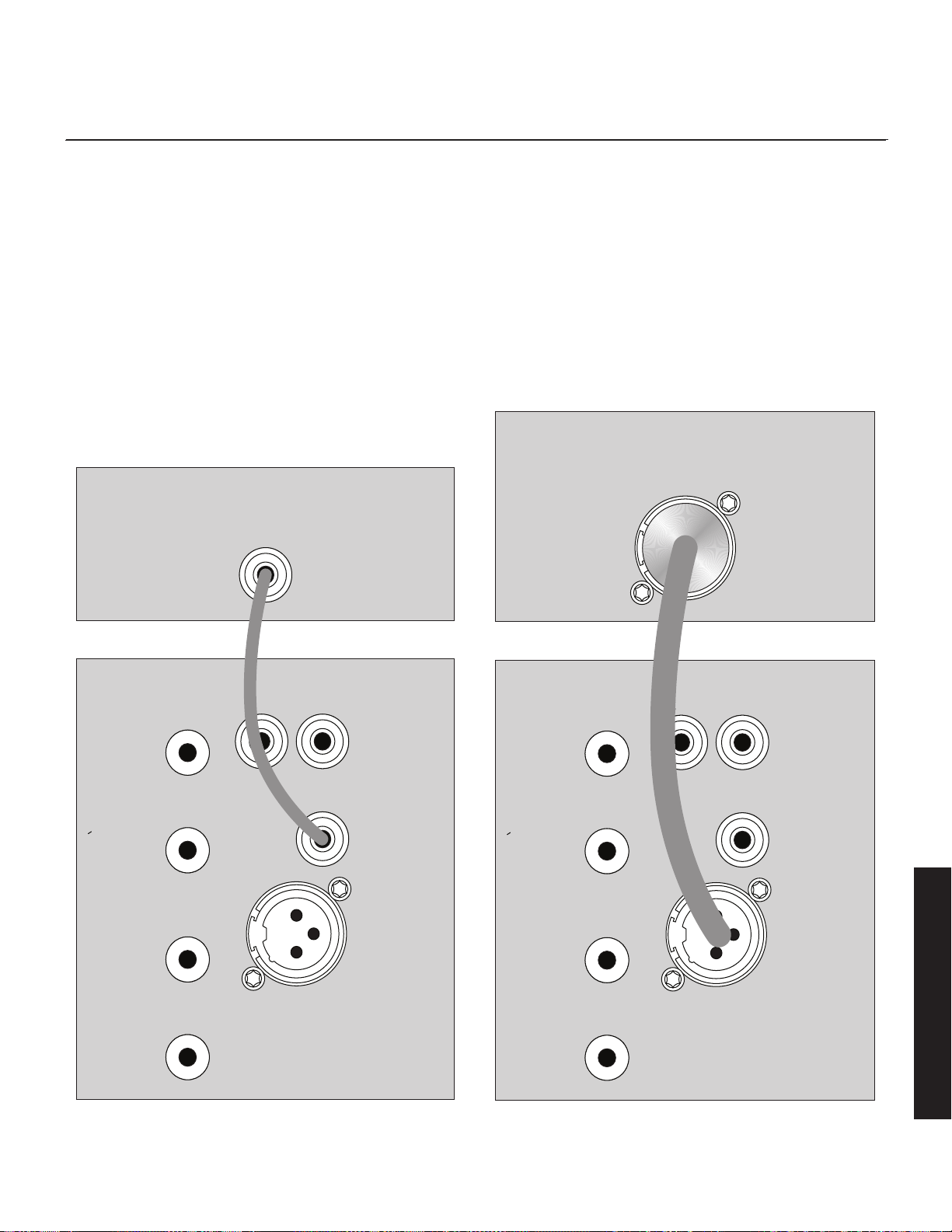
39
+
Entrée
niveau enceinte
–
Entrée gauche
Entrée niveau
de ligne
Entrée LFE
Entrée gauche Entrée droite
Entrée niveau
de ligne
Entrée XLR
équilibrée
Entrée LFE
+
Entrée
niveau enceinte
–
Entrée droite
Caisson de
sous-graves
Dynamo
LFE Out
(Sortie LFE)
Récepteur/processeur
Figure 16. Raccord de signal pour le mode à canaux multiples.
+
Entrée
niveau enceinte
–
Entrée gauche
Entrée niveau
de ligne
Entrée LFE
Entrée gauche Entrée droite
Entrée niveau
de ligne
Entrée XLR
équilibrée
Entrée LFE
+
Entrée
niveau enceinte
–
Entrée droite
Caisson de
sous-graves
Dynamo
Récepteur/processeur
LFE Out
(Sortie LFE)
Figure 17. Raccord de signal pour le mode à canaux multiples.
le résultat. Essayez de trouver la position qui vous offre le bon son. Faites
des essais en changeant le volume (niveau)tout en ajustant le 20–30Hz
Level (Niveau). Trouvez une position qui vous donne des graves profond-
es et étendues et un bon mélange avec vos enceintes principales.
.
7 Utilisez la section de gestion des graves de la configuration de
l’enceinte de votre récepteur/processeur pour régler le niveau du cais-
son de sous-graves au niveau approprié. Suivez les instructions du
manuel du processeur pour effectuer un réglage fin du niveau du cais-
son de sous-graves.
8 Si vous avez terminé les étapes 1 à 7 et que vous obtenez encore
des graves faibles ou flottantes, pensez à utiliser l’application de com-
mande du caisson de sous-graves pour ajuster le 20–30Hz Level
(Niveau) pour compenser ces anomalies (oui, vous ajustez encore
le 20–30Hz Level (Niveau). Faites des essais avec les réglages et
écoutez le résultat. Essayez de trouver la position qui vous offre le bon
son. Faites des essais en changeant le volume (niveau)tout en ajustant
le 20–30Hz Level (Niveau)). Trouvez une position qui vous donne des
graves profondes et étendues et un bon mélange avec vos enceintes
principales. Si vous obtenez encore des graves faibles ou flottantes,
nous vous recommandons de déplacer le caisson de sous-graves et de
refaire ces étapes (particulièrement s'il est positionné dans un coin de
la pièce ou proche d’un coin). N’oubliez pas, le positionnement dans
la pièce a un impact important sur le rendement général des graves.
Français
40
Mode 2 canaux/canaux
multiples simultanés
L’avantage de ce mode double est que vous pouvez obtenir une configu-
ration optimale pour l’écoute stéréo qui permet tout de même l’écoute en
mode à canaux multiples (film). Lorsque vous écoutez un matériel source sté-
réo, le système offre une intégration optimale de la musique. Dans ce mode,
le caisson de sous-graves joue uniquement sous la fréquence de réponse la
plus faible de l’enceinte avant principale. En mode film, la piste LFE et les
graves provenant des enceintes ambiophoniques peuvent être transmises au
caisson de sous-graves à l’aide des réglages du répartiteur provenant du
système de gestion des graves du processeur.
• Dynamo 600X : cette méthode de raccord n’est pas compatible avec
le Dynamo 600X.
• Système SWT-X sans fil : cette méthode de raccord n’est pas compat-
ible avec le système de récepteur/transmetteur SWT-X sans fil.
• Dynamo 600X et 800X : ces caissons de sous-graves n’offrent par les
raccords XLR LFE abordés ici.
Raccord de signal :
1 Branchez les sorties left out/right out de votre processeur aux entrées Left
In/Right In du caisson de sous-graves. Utilisez les interconnexions RCA
ou les raccords speaker level (niveau d’enceinte), mais choisissez une
seule méthode de raccordement - n’utilisez pas les deux en même temps
pour les entrées left/right. Utilisez des interconnexions RCA ou un câble
d’enceinte de qualité. Les raccords Speaker level sont abordés plus loin
dans ce manuel.
2
Branchez la sortie Sub out du processeur à l’entrée LFE In du caisson de
sous-graves. Utilisez des interconnexions RCA ou XLR de qualité. Veuillez
noter que la méthode de raccordement pour le LFE In n’a pas besoin de
correspondre à Left In/Right In. Si vous avez utilisé des interconnexions
RCA ou des raccords speaker level pour Left In/Right In, il est acceptable
d’utiliser XLR pour LFE Input. Faites preuve de souplesse, faites des essais
et écoutez afin de déterminer ce qui sonne le mieux pour votre installa-
tion unique. N’utilisez pas plusieurs méthodes de raccordement en même
temps pour l’entrée LFE (c.-à-d. : raccorder XLR LFE In et Line Level LFE In).
Recommended Control Settings:
IMPORTANT! Si vous avez l’intention d’utiliser l’Anthem Room Correction
(ARC), nous vous recommandons de lancer l’ARC et d’optimiser le posi-
tionnement de votre caisson de sous-graves avant d'ajuster les commandes du
caisson de sous-graves. Une fois activé, l’ARC aura une influence sur la sortie
acoustique du caisson de sous-graves et sur les réglages décrits ci-dessous.
1 Réglez la commande de réglage du caisson de sous-graves à App.
2 Réglez les commandes du processeur pour les enceintes avant en
mode large, grand ou plein. Si vos enceintes avant sont petites (p.
ex. : enceintes pour étagère), nous vous recommandons de ne pas uti-
liser cette méthode pour raccorder le caisson de sous-graves; consultez
plutôt la section « Mode à canaux multiples ». Réglez les commandes
du processeur pour les enceintes centrales ou à effets en mode étroit,
petit ou limité. N’oubliez pas, peu d’enceintes centrales ou à effets
sont conçues pour aller beaucoup plus bas que 70 Hz, ce qui sig-
nifie que toutes les graves dans une bande sonore inférieures à cette
fréquence seront perdues. Lorsque vous réglez vos enceintes centrales
et à effets en mode étroit, petit ou limité, toutes les graves inférieures au
point de répartition (crossover) désigné seront redirigées vers le cais-
son de sous-graves avec la sortie LFE, ce qui garantit qu'aucune grave
provenant de ces canaux n'est perdue.
Veuillez noter : certains processeurs permettent de changer la configu-
ration des enceintes en fonction du type de matériel source. Dans ces
conditions, nous recommandons à l’utilisateur de faire jouer les enceintes
avant en mode étroit, petit ou limité pour le matériel source à canaux
multiples et de faire jouer les enceintes avant en mode large, grand ou
plein pour le matériel source stéréo à deux canaux.
MISE EN GARDE! Selon les performances de la
plupart des processeurs, il est recommandé que les
enceintes centrales et à effets MartinLogan ne soient
pas utilisées en mode grand, large ou plein. Si c’est le
cas, cela peut causer des dommages à l'enceinte si le
processeur essaye de pousser l'enceinte au-delà de sa
capacité nominale de fréquence. Cette mise en garde
s’applique également aux produits des autres fabricants.
3 Calculez le nombre équivalent à 70 % de la fréquence la plus faible
de votre haut-parleur principal. Utilisez l’application de commande
du caisson de sous-graves pour ajuster le filtre de passe basse à un
réglage équivalent au nombre obtenu. Si le nombre obtenu est inférieur
à 30 Hz, réglez-le à 30 Hz.
4 Faites jouer de la musique que vous connaissez avec des graves.
Utilisez l’application de commande de caisson de sous-graves pour
augmenter le volume (niveau) jusqu'à ce que la musique produise des
graves profondes et étendues. Voyez à ce que les niveaux ne devien-
nent pas trop présents.
5 À l’aide de l’application de commande du caisson de sous-graves,
essayez la phase et la polarité (inversée) dans différents réglages jusqu’à
ce que vous obteniez le meilleur mélange. Faites jouer de la musique
avec des graves profondes et répétitives. Ajustez la phase et la polarité
(inversée) afin que les notes graves semblent plus fortes et sans brouillage
Français
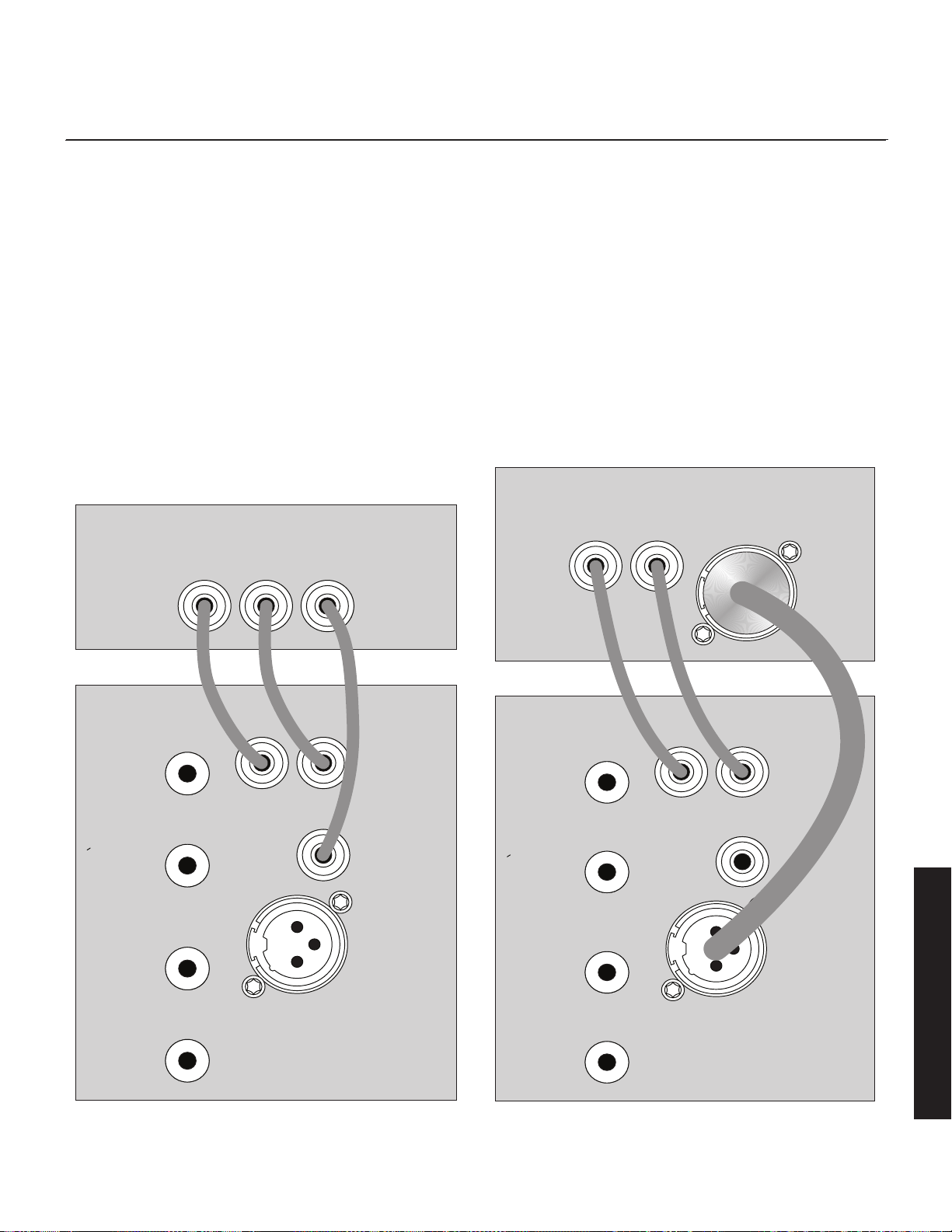
dans une salle d’écoute typique. Si vous augmentez des haut-parleurs
MartinLogan, nous vous suggérons de commencer avec une phase de
90° (avec polarité inversée allumée) pendant les essais.
6
En faisant jouer du matériel source à canaux multiples, utilisez la section
de gestion des graves de la configuration de l’enceinte de votre proces-
seur/récepteur pour régler le niveau de volume du caisson de sous-graves
au niveau approprié. Suivez les instructions du manuel du processeur pour
effectuer un réglage fin du niveau du caisson de sous-graves.
7 Si votre processeur offre l’option de régler les répartiteurs (crossovers)
pour un caisson de sous-graves, nous vous recommandons de com-
mencer avec les réglages suivants – Répartiteur : 70Hz, passe haute :
12dB, et passe basse : 24dB. Les réglages optimaux pour ces options
varient en fonction de votre pièce et de vos préférences en matière
d’écoute. Faites des essais et écoutez ce qui sonne le mieux pour vous.
8 Si vous avez terminé les étapes 1 à 7 et que vous obtenez encore
des graves faibles ou flottantes, pensez à utiliser l’application de com-
mande du caisson de sous-graves pour ajuster le 20–30Hz Level
(Niveau) pour compenser ces anomalies (oui, vous ajustez encore
le 20–30Hz Level (Niveau)). Faites des essais avec les réglages et
écoutez le résultat. Essayez de trouver la position qui vous offre le bon
son. Faites des essais en changeant le volume (niveau)tout en ajustant
le 20–30Hz Level (Niveau). Trouvez une position qui vous donne des
graves profondes et étendues et un bon mélange avec vos enceintes
principales. Si vous obtenez encore des graves faibles ou flottantes,
nous vous recommandons de déplacer le caisson de sous-graves et de
refaire ces étapes (particulièrement s'il est positionné dans un coin de
la pièce ou proche d’un coin). N’oubliez pas, le positionnement dans
la pièce a un impact important sur le rendement général des graves.
41
+
Entrée
niveau enceinte
–
Entrée gauche
Entrée niveau
de ligne
Entrée LFE
Entrée gauche Entrée droite
Entrée niveau
de ligne
Entrée XLR
équilibrée
Entrée LFE
+
Entrée
niveau enceinte
–
Entrée droite
Caisson de
sous-graves
Dynamo
Récepteur/processeur
Right Out
(sortie droite)
Left Out
(Sortie gauche)
LFE Out
(Sortie LFE)
Figure 18. Raccord de signal pour le mode à deux canaux/canaux multiples simultané.
+
Entrée
niveau enceinte
–
Entrée gauche
Entrée niveau
de ligne
Entrée LFE
Entrée gauche Entrée droite
Entrée niveau
de ligne
Entrée XLR
équilibrée
Entrée LFE
+
Entrée
niveau enceinte
–
Entrée droite
Caisson de
sous-graves
Dynamo
Récepteur/processeur
Right Out
(sortie droite)
Left Out
(Sortie gauche)
LFE Out
(Sortie LFE)
Figure 19. Raccord de signal pour le mode à deux canaux/canaux multiples simultané.
Français
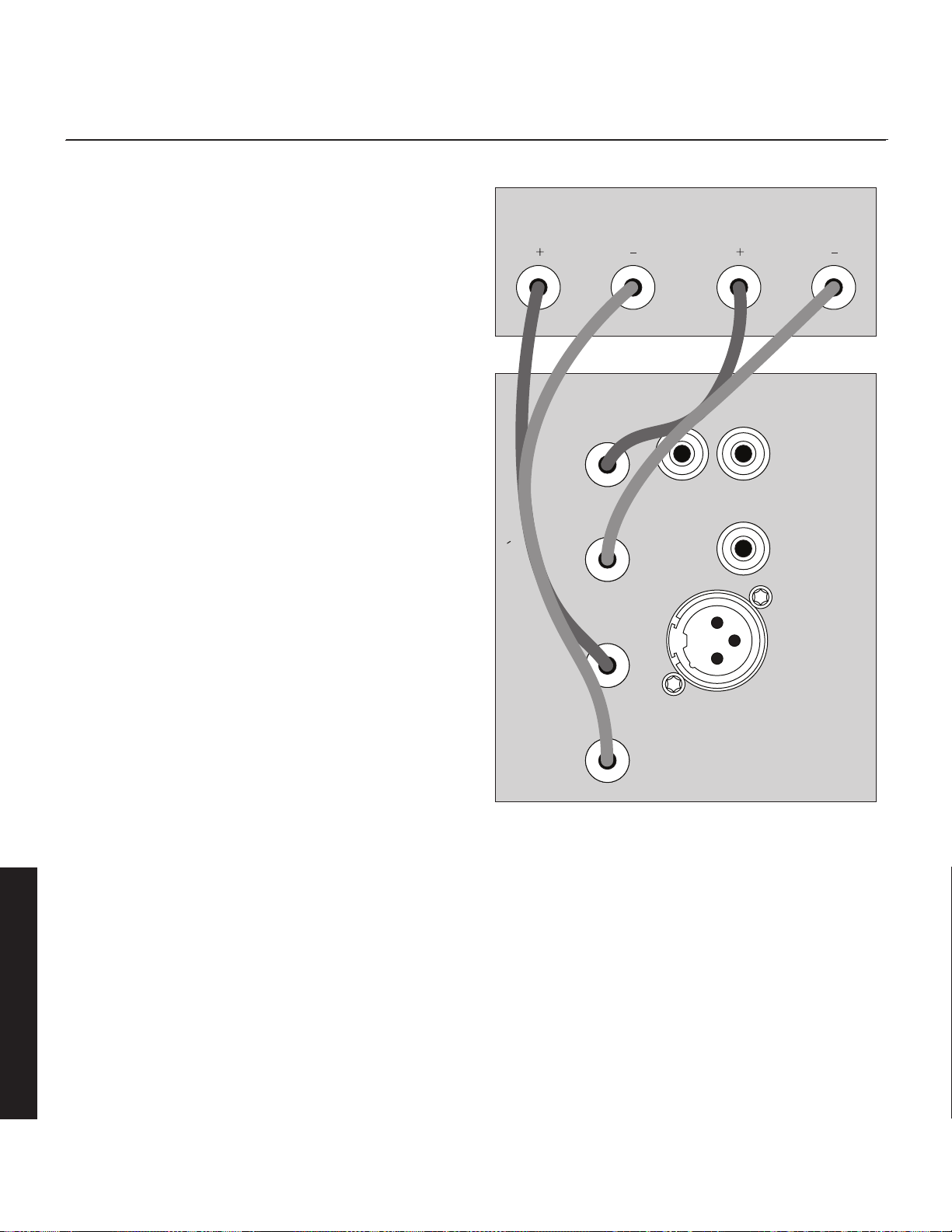
42
Utilisation de l’entrée Speaker
Level (niveau d’enceinte)
Cette méthode de raccordement est recommandée si votre caisson de
sous-graves est utilisé uniquement dans un système à deux canaux avec
des haut-parleurs de gamme complète. Pour raccorder à l’aide des entrées
Speaker Level, le câble d’enceinte doit se terminer par des prises de type
banane. Le Filtre de passe basse est appliqué au signal reçu par ces entrées.
Système SWT-X sans fil : cette méthode de raccord n’est pas compatible
avec le système de récepteur/transmetteur SWT-X sans fil.
Les entrées Speaker Level sont une solution de rechange aux interconnex-
ions RCA ou XLR. Si vous utilisez les entrées Speaker Level, n’utilisez pas
les entrées RCA ou XLR en même temps pour les raccords Left In/Right In.
Si vous utilisez les entrées Speaker Level, il est correct d’utiliser RCA ou XLR
pour le raccord LFE.
Raccordez les sorties de gauche et de droite de votre amplificateur aux
entrées Speaker Level (Left In/Right In) du caisson de sous-graves. Utilisez
un câble d’enceinte de qualité et une prise de type banane. Soyez
cohérent et assurez-vous que les bornes positive (+) et négative (–) de votre
amplificateur sont fixées aux bornes positive (+) et négative (–) correspon-
dantes de votre caisson de sous-graves.
Si votre amplificateur a seulement un ensemble de sorties, vous pouvez
raccorder votre amplificateur à vos enceintes comme d’habitude et passez
un autre ensemble de câbles de vos enceintes aux entrées Speaker Level
du caisson de sous-graves.
+
Entrée
niveau enceinte
–
Entrée gauche
Entrée niveau
de ligne
Entrée LFE
Entrée gauche Entrée droite
Entrée niveau
de ligne
Entrée XLR
équilibrée
Entrée LFE
+
Entrée
niveau enceinte
–
Entrée droite
Caisson de
sous-graves
Dynamo
Récepteur/processeur
Right Out
(sortie droite)
Left Out
(Sortie gauche)
Figure 20. Raccord de signal pour les entrées Speaker level.
Français
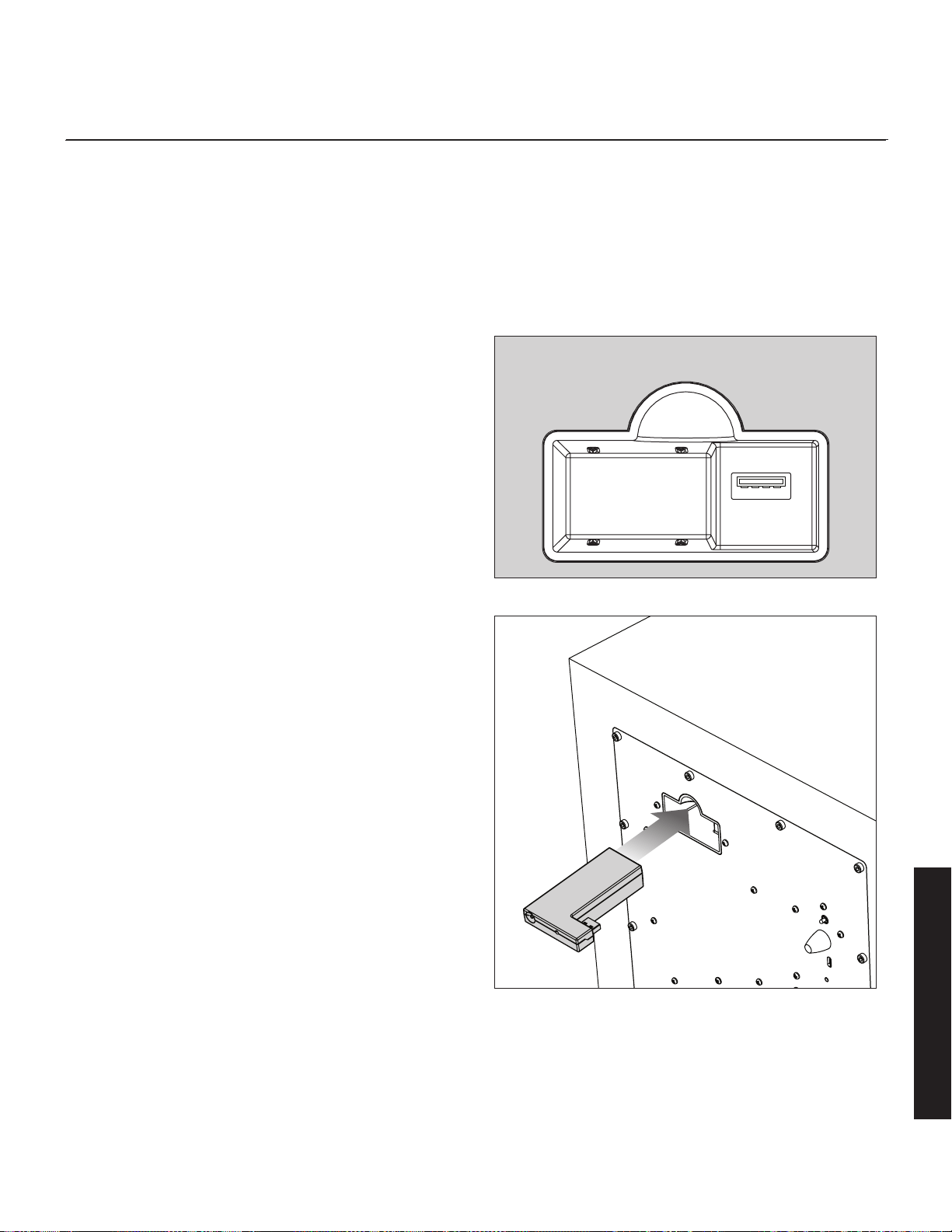
43
Système SWT-X sans fil
Sur les modèles Dynamo 600X, 800X, 1100X et 1600X. Le système de
transmetteur/récepteur sans fil de caisson de sous-graves SWT-X est vendu
séparément et disponible auprès de votre revendeur local.
Le système SWT-X sans fil peut être utilisé pour établir un raccord de
niveau de ligne gauche/droite ou un raccord de niveau de ligne LFE.
Pour installer le récepteur SWT-X sans fil, glissez-le dans le port de con-
nexion du module sans fil qui se trouve sur la partie arrière du caisson de
sous-graves.
Les récepteurs et transmetteurs SWT-X sont vendus déjà jumelés.
Raccord de signal :
1 Suivez les instructions décrites dans les sections « Mode 2 canaux » ou «
Mode canaux multiples », seulement, au lieu de raccorder le récepteur/
processeur au caisson de sous-graves, raccordez-le au transmetteur
SWT-X. Veuillez noter que les méthodes de raccord « 2 canaux/canaux
multiples simultané » et « Speaker Level Input – Entrée niveau enceinte »
ne sont pas compatibles avec le système sans fil.
Paramètres de commande recommandés :
1 Suivez les instructions décrites dans les sections « Mode 2 canaux » ou
« Mode canaux multiples ».
DEL de statut SWT-X et alimentation
Le transmetteur SWT-X s’éteint pour économiser de l’énergie après environ
20 minutes. Lorsque le transmetteur s’éteint, le récepteur s’éteint également
un peu après.
Statut DEL (avant) du transmetteur SWT-X :
• Éteinte : veille
• Lumière unie : transmission de signaux sans fil
• Clignotement lent : attente de synchronisation
• Clignotement rapide : recherche de récepteur (après avoir appuyé sur
le bouton de synchronisation)
Statut DEL (arrière) du transmetteur SWT-X :
• Éteinte : aucune alimentation
• Allumée : réception de l’alimentation
Statut DEL (avant) du récepteur SWT-X :
• Éteinte : veille ou caisson de sous-graves hors tension
• Allumée : réception de signal audio sans fil
• Clignotement lent : attente de synchronisation
• Clignotement rapide : recherche de transmetteur (après avoir appuyé
sur le bouton de synchronisation)
Connexion de module sans fil
Figure 21. Réceptacle de module sans fil
Figure 22. Installation du module sans fil
Français
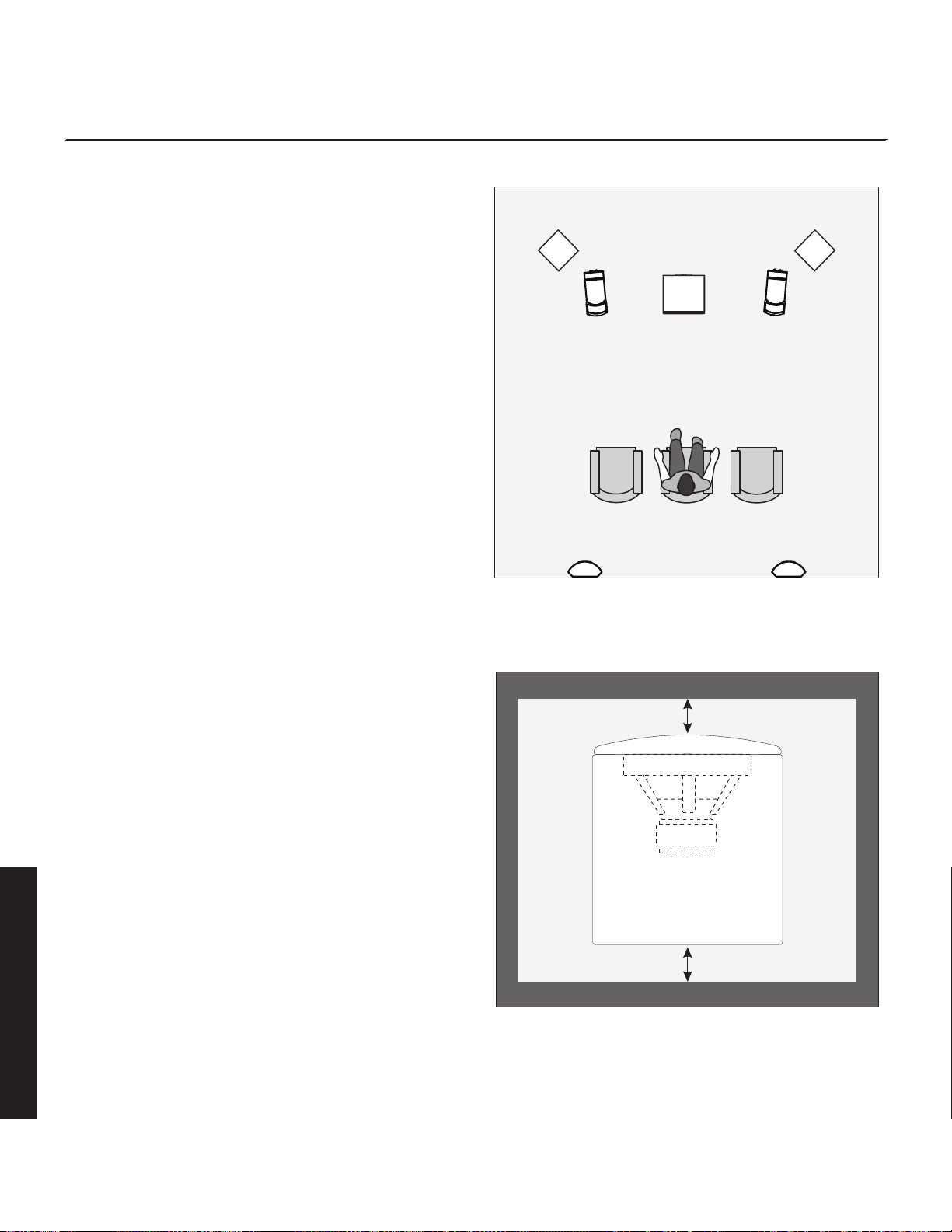
44
plaCement
Position d’écoute
Généralement, les caissons de sous-graves offrent la meilleure sortie lorsqu’ils
sont placés dans un coin de la pièce. Toutefois, cela peut également exagér-
er la sortie des caissons de sous-graves et rendre le mélange difficile. Nous
vous recommandons de commencer en plaçant le Dynamo dans un coin.
Si, après de nombreuses techniques de réglage, le caisson de sous-graves
sonne comme s’il avait trop d’énergie pour les graves élevées, essayez de
le tirer plus loin du mur, en direction de la position d’écoute. Cette mesure
diminuera le renforcement de ces fréquences problématiques du mur et
adoucira probablement la réponse. Répétez la procédure de configuration
avec les commandes de haut-parleur de graves après l’avoir déplacé.
www.martinlogan.com/subsetup
La configuration d’un caisson de sous-graves peut être une tâche ardue.
Toutefois, si vous avez les bonnes connaissances, il est possible d’obtenir
des résultats exceptionnels. Pour vous aider à configurer votre caisson de
sous-graves, nous avons créé une ressource en ligne qui vous explique
le processus. Cette ressource vous donne des conseils et des trucs pour
le positionnement, le raccordement et la configuration des commandes.
Veuillez consulter le site Web www.martinlogan.com/subsetup.
Demandez à votre revendeur
Votre revendeur MartinLogan peut vous suggérer de nombreuses options
de placement optimal du caisson de sous-graves. Il possède également de
nombreux outils, comme son expérience, sa connaissance de l’équipement
connexe et même de l’équipement pour analyser le son, ce qui peut faciliter la
détermination de l’option de placement optimale du caisson de sous-graves.
Profitez du produit
Le Dynamo est un caisson de sous-graves très raffiné et il fonctionne encore
mieux s’il est configuré avec soin. En gardant ces conseils à l’esprit, vous
remarquerez au fil des mois d’écoute que de petits changements peuvent
faire une grande différence. Au fil du temps, ne craignez pas de faire des
essais de positionnement jusqu’à ce que vous trouviez la relation optimale
entre la pièce, les paramètres et le caisson de sous-graves qui vous don-
nera les meilleurs résultats. Vos efforts seront récompensés.
Installation dans un boîtier
Lorsque vous placez le caisson de sous-graves à l’intérieur d’un boîtier, il est
recommandé d’utiliser une configuration orientée vers l’avant et de laisser un mini-
mum de trois pouces d’espace ouvert entre le boîtier et les côtés avant et arrière.
Figure 23. Caissons de sous-graves MartinLogan en tant que canaux LFE,
enceintes MartinLogan en tant que canaux avant, central et ambiopho-
nique (effets). Veuillez noter le positionnement en coin des caissons de
sous-graves à l’avant de la salle d’écoute.
Partie avant du boîtier
Partie arrière du boîtier
3 pouces
3 pouces
Figure 24. Lorsque le caisson de sous-graves est placé dans un boîtier, il
faut un minimum de trois pouces d’espace libre à l’avant et à l’arrière.
Français
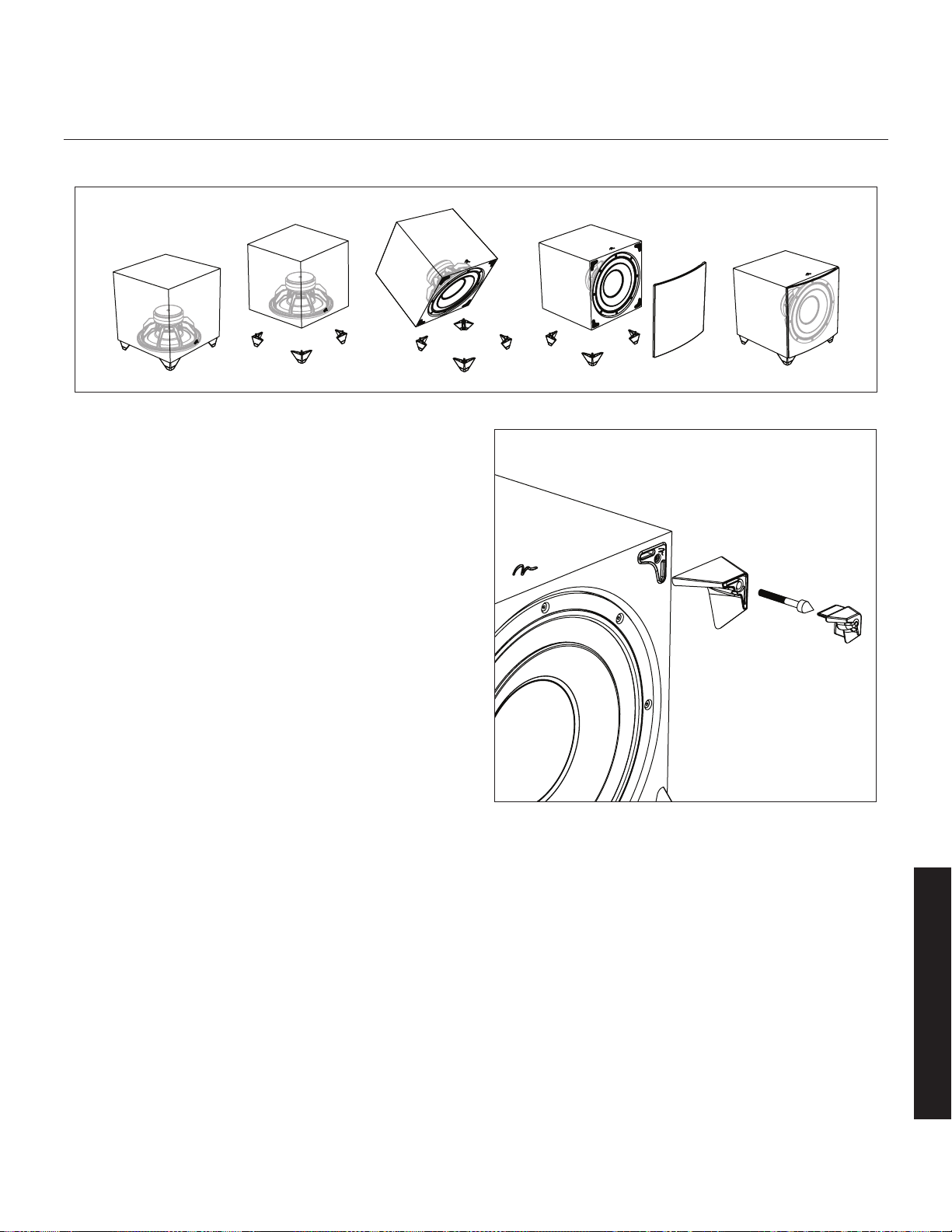
45
Modifier l’orientation du haut-parleur
Dynamo 800X, 1100X, et 1600X
Veuillez noter : lorsque le caisson est orienté vers l'avant, un adapta-
teur à angle droit est nécessaire si vous utilisez une connexion XLR.
Lorsque vous installez le caisson de sous-graves dans un boîtier, il est
recommandé que le caisson de sous-graves soit converti à une configura-
tion orientée vers l’avant.
1 Préparez une surface plane avec une couverture pour protéger le fini.
Débranchez les raccords de signal et d’orientation. Enlevez le tissu
de la grille, le cas échéant.
2 Couchez délicatement le caisson de sous-graves sur son côté.
Enlevez le capuchon en caoutchouc, dévissez le crampon fixé et
enlevez le pied.
3 Changez l’emplacement des quatre pieds.
4 Réinstallez le pied, le crampon et le capuchon en caoutchouc le cas
échéant.
Figure 26. Pour changer l’orientation du haut-parleur, enlevez le capuchon
en caoutchouc, le crampon et le pied, changez l’emplacement et réin-
stallez.
Figure 25. Les modèles Dynamo 800X, 1100X et 1600X peuvent être configurés avec le haut-parleur orienté vers l’avant ou vers le bas.
Français
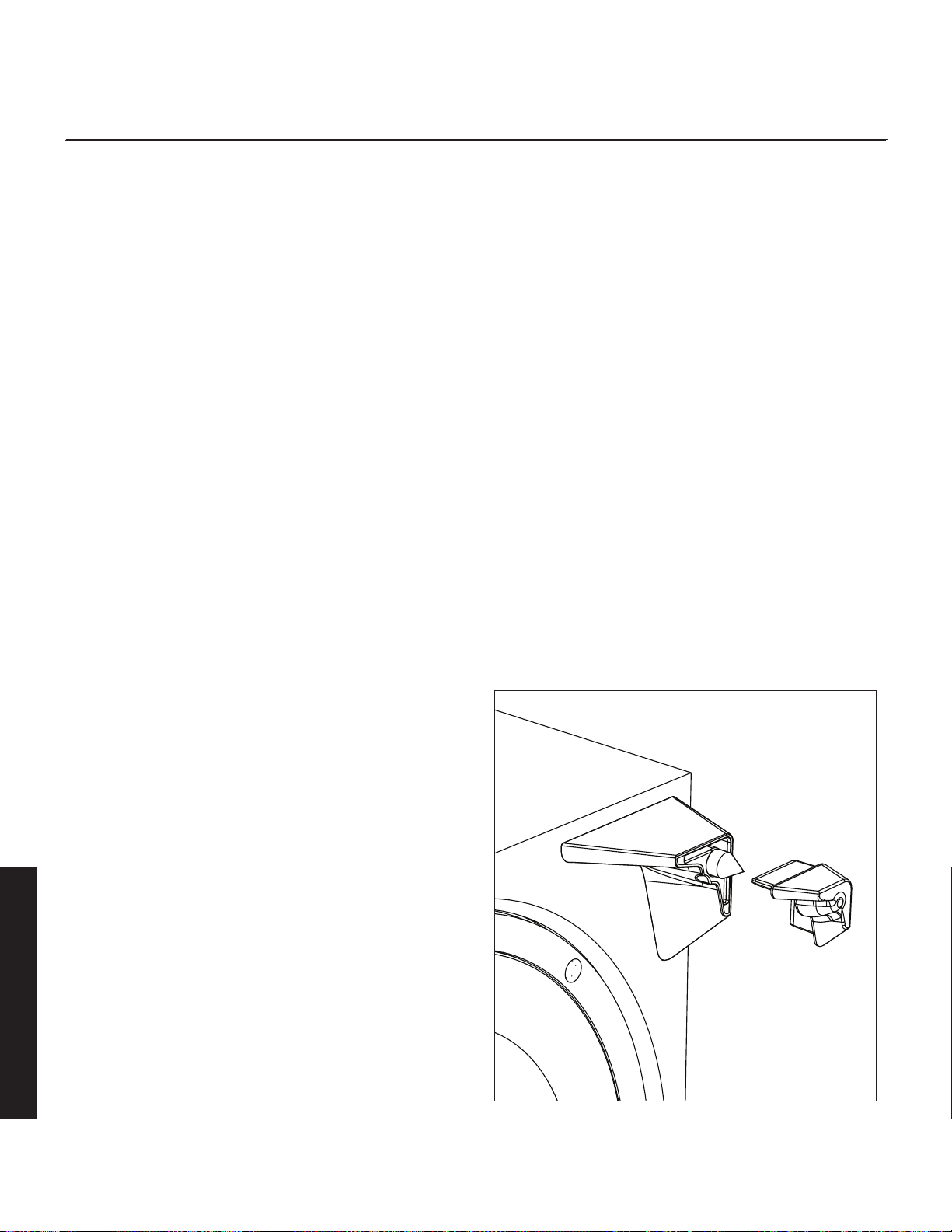
46
aCoustique de la pièCe
Votre pièce
C’est l’un des domaines qui requièrent un certain bagage pour compren-
dre, et un peu de temps et d’expérimentation pour obtenir le meilleur
rendement possible de votre système.
La pièce est une composante et une partie intégrale de votre système. Cette
composante est une variable très importante et peut beaucoup ajouter, ou
enlever, à une grande expérience musicale.
Tous les sons sont composés d’ondes. Chaque fréquence possède sa propre
taille d’onde, et les graves, soit les plus basses, englobent littéralement de 10 à
40 pieds. Votre pièce participe à ces ondes comme une piscine, qui reflète ou
augmente les ondes en fonction de la taille et des types de surface de la pièce.
N’oubliez pas, votre système audio peut littéralement générer tous les ren-
seignements nécessaires pour recréer le temps, l’espace et l’équilibre tonal
d’un événement musical. Sur le plan acoustique, le rôle d’une pièce idé-
ale est de ne pas supprimer cette information et de ne pas y contribuer.
Toutefois, chaque pièce le fait dans une certaine mesure.
Terminologie
Ondes stationnaires
Le son qui provient d’une enceinte rebondit dans la pièce jusqu’à ce
qu’un schéma émerge – ce phénomène est appelé une onde stationnaire.
Habituellement, cela pose un problème uniquement avec les fréquences
inférieures à 100 Hz.Lorsque cela se produit, différentes parties de la
pièce présentent un excès ou un manque de graves.
Certaines personnes croient que le fait d’avoir une pièce sans murs par-
ralèles supprimera cet effet. En fait, les murs non parallèles généreront
uniquement des schémas d’onde stationnaire différents que ceux qui survien-
nent dans des pièces rectangulaires.
Habituellement, vous pouvez exciter la plupart de sondes stationnaires dans
une pièce en plaçant le caisson de sous-graves dans un coin. La position
d’écoute détermine quelles ondes stationnaires vous obtiendrez. Par exemple,
si vous êtes assis dans un coin, vous entendrez la plupart des ondes station-
naires. Cela peut être une expérience trop intense. Le fait d’être assis près d’un
mur peut également intensifier les niveaux des ondes stationnaires produites.
Surfaces et objets résonnants
Toutes les surfaces et tous les objets de votre pièce sont assujettis aux
fréquences générées par votre système. Comme pour un instrument, elles
vibreront et « continueront » en syncope avec la musique, en plus de
contribuer de façon négative à la musique. Un tintement, une lourdeur et
même une clarté peuvent survenir simplement parce qu’ils « chantent en
cœur » avec votre musique.
Cavités résonnantes
Les zones qui forment de petites alcôves ou des garde-robes dans votre
pièce peuvent être des chambres qui créent leurs propres « ondes station-
naires » et qui peuvent taper leurs propres sons à « une note ».
Base solide
Après avoir vécu et expérimenté avec votre caisson de sous-
graves, vous pouvez utiliser les crampons ETC™ (Energy Transfer
Coupler). En utilisant ces crampons, le caisson de sous-graves sera
fixé plus fermement au sol et, par conséquent, les graves seront
plus serrées. Toutefois, il est recommandé de ne pas utiliser les
crampons avant d’être certain de l’emplacement du caisson de
sous-graves, car les crampons peuvent endommager le plancher si
vous déplacez le caisson de sous-graves.
Instructions pour l’installation des crampons :
1 Couchez délicatement le caisson de sous-graves sur le côté pour avoir
accès à la partie inférieure des pieds.
2 Enlevez le capuchon en caoutchouc du pied pour exposer le crampon.
Mise en garde : assurez-vous que vos mains et les câbles sont dégagés
des crampons. Ne glissez pas le caisson de sous-graves, car les cram-
pons sont coupants et peuvent endommager le plancher ou le tapis.
Figure 27. Pour accéder aux crampons, enlevez le capuchon en caoutchouc.
Français
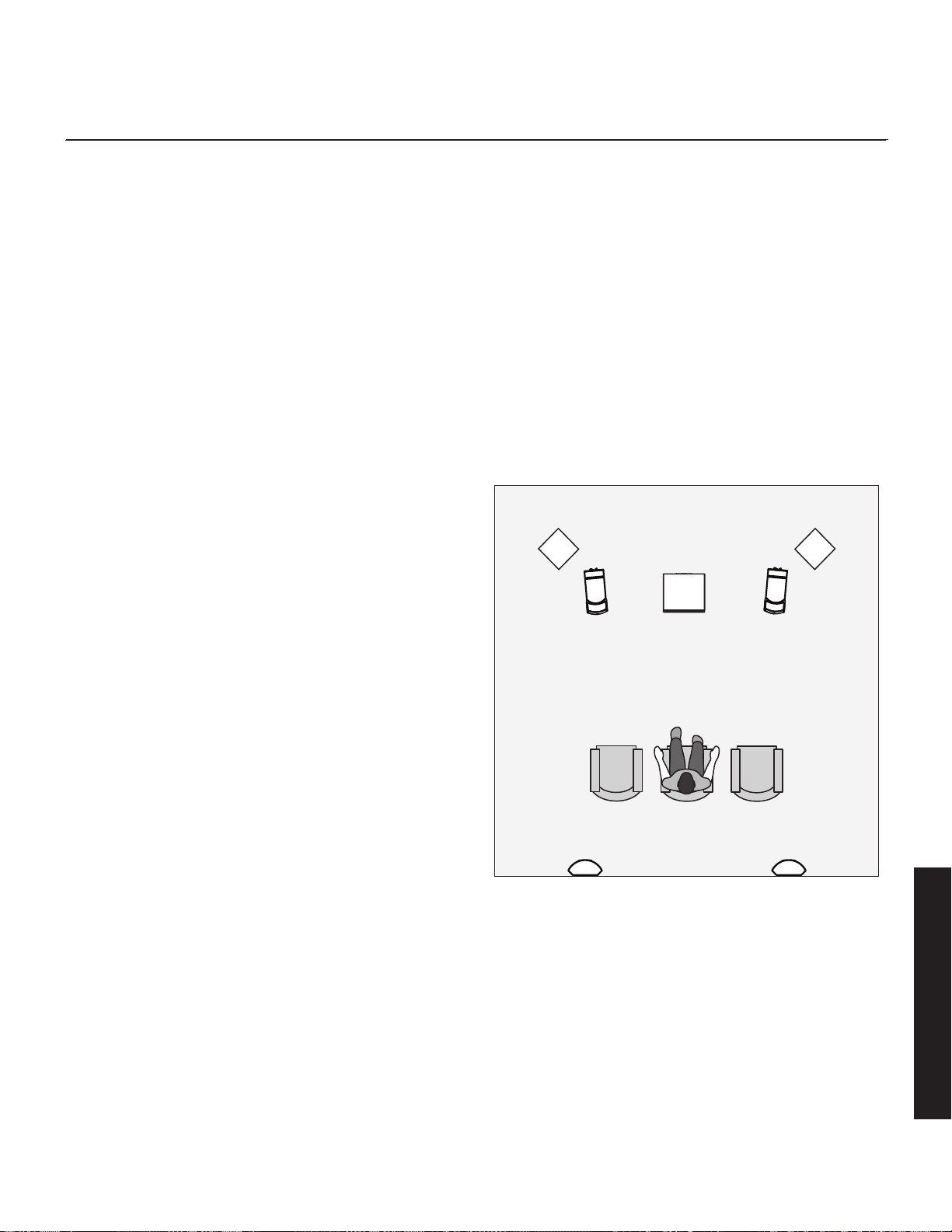
47
Cinéma maison
Les maniaques de stéréo branchent depuis longtemps leur télévision à leur
système stéréo. L’avantage était d’utiliser les enceintes plus grandes et
l’amplificateur plus puissant du système stéréo. Même si le son était grande-
ment amélioré, il était encore mono et son signal de diffusion était limité.
Fin 1970, début 1980, deux nouveaux formats de cinéma maison sont
devenus largement disponibles au public : VCR et disque laser.
En 1985, les deux formats s’étaient développés en sources audio/vidéo
de très haute qualité. En fait, le rendement sonore de certains formats
vidéo surpassait les formats audio uniquement. À cette époque, avec le
son de qualité cinéma disponible à la maison, le seul élément manquant
était la présentation en « son ambiophonique » des cinémas.
Heureusement, les films encodés Dolby et DTS ont la même information
de son ambiophonique encodée sur les films pour la maison que sur les
films pour le cinéma. De plus, les nouveaux formats de visionnement à la
maison à haute résolution, tels que le Blu-ray, ainsi que le contenu haute
définition offert par câble ou satellite ont évolué, incluant un format audio
encodé à canaux multiples qui a littéralement la même qualité que la
bande originale. Tout ce qu’il faut pour récupérer cette information est un
décodeur ainsi que des enceintes et des amplificateurs supplémentaires
pour la reproduire.
Un cinéma maison est un achat complexe et nous vous recommandons
de consulter votre revendeur MartinLogan local, car celui-ci connaît bien
le sujet.
Chaque pièce d’un système ambiophonique peut être achetée séparé-
ment. Prenez votre temps et allez-y pour la qualité. Personne ne s’est
jamais plaint que le film était trop réel. La liste et les descriptions ci-dessous
vous donneront un aperçu des responsabilités et des demandes placées
sur chaque enceinte.
Avant gauche et avant droite
Si ces enceintes seront les deux mêmes que vous utilisez pour la lecture sté-
réo, elles doivent être de très haute qualité et capables de jouer fort (plus
de 102 dB) et de reproduire des graves sous 80 Hz.
Canal central
C’est l’enceinte la plus importante dans un système de cinéma maison,
car presque tous les dialogues et une grande partie de l’information de
l’enceinte avant sont reproduits par le canal central. Il est important que
l’enceinte centrale soit très précise et qu’elle s’adapte bien aux enceintes
avant, et qu’elle soit recommandée pour une utilisation à titre d’enceinte
centrale. Il ne faut pas tourner les coins ronds.
Enceintes ambiophoniques
Nous vous recommandons (comme le fait l’industrie du film) que les
enceintes ambiophoniques jouent les graves jusqu’à au moins 80 Hz.
Les enceintes ambiophoniques contiennent l’information qui fait en sorte
que les avions semblent voler au-dessus de votre tête. Certaines personnes
pourraient suggérer que c’est le moment d’économiser en achetant une
petite enceinte économique. Si c’est votre choix, préparez-vous à faire une
mise à niveau plus tard, car l’encodage numérique à canaux multiples
discret progresse rapidement et la demande sur les enceintes ambiopho-
niques a augmenté.
Caisson de sous-graves
Avec tout bon système ambiophonique, vous aurez besoin d’un ou de plu-
sieurs caissons de sous-graves de haute qualité (le .1 dans un système
ambiophonique à 5.1, 6.1 ou 7.1 canaux). La plupart des trames sonores
de film contiennent de grandes quantités d’informations de graves, qui font
partie des effets spéciaux. Les bons caissons de sous-graves constitueront
le pilier du reste du système.
Figure 28. Caissons de sous-graves Dynamo en tant que canaux LFE
(effets), enceintes MartinLogan en tant que canaux avant, central et ambio-
phonique (effets).
Français

48
Configuration de l’anthem room CorreCtion (arC
mC
)
À propos de l’ARC
Votre caisson de sous-graves est doté de la technologie Anthem Room
Correction pour optimiser la sortie des basses fréquences dans votre
pièce. Le système ARC de votre caisson de sous-graves utilise un dispositif
mobile connecté par Bluetooth ou un ordinateur, et un microphone con-
necté par des câbles USB.
L’ARC utilise de nombreux points de mesure, au moins cinq, mais jusqu’à
dix données de position individuelles, ce qui lui permet d’analyser les
caractéristiques uniques de votre pièce. Le logiciel de l’ARC calcule les
courbes de correction pour chaque point de mesure, ce qui diminue gran-
dement les erreurs d’arrondissement des calculateurs moins perfectionnés,
comme ceux utilisés dans les systèmes intégrés d’égalisation de la pièce
standards. De plus, le logiciel ARC est capable de se calibrer lui-même
aux microphones individuels, ce qui élimine les interférences potentielles
qui pourraient autrement fausser les données.
Bien que l’ARC soit conçu pour ajuster la sortie du caisson de sous-graves
afin de minimiser les anomalies sonores causées par les interactions avec
la pièce, il est toujours recommandé d’utiliser des méthodes traditionnelles
pour obtenir une réponse plane avant de mettre en marche la correction
numérique de la pièce. N’oubliez pas, le positionnement du caisson de
sous-graves est l’un des paramètres les plus influents lorsque l’on gère les
interactions anormales des basses fréquences avec la pièce. Les positions
d’écoute sont également importantes pour la réponse des graves, mais
elles sont souvent dictées par d’autres facteurs plus difficiles à modifier.
L’ARC dans votre caisson de sous-graves ne constitue pas un remplace-
ment pour les autres systèmes de correction de la pièce conçus pour
optimiser les systèmes audio à canaux multiples sur toute la plage de
fréquences. Lorsque l’on entreprend d’optimiser le rendement d’un sys-
tème audio à canaux multiples, la première étape devrait toujours être de
bien configurer les enceintes avant, centrales et ambiophoniques. La pro-
chaine étape consiste à lancer l’ARC pour ajuster la sortie du caisson de
sous-graves individuel afin de tenir compte des interactions avec la pièce.
C’est seulement après la configuration des enceintes et des caissons de
sous-graves, y compris le lancement de l’ARC pour le ou les caissons de
sous-graves, qu’il est temps de lancer le système de correction de la pièce
pleine gamme de votre processeur afin d’aider à équilibrer le rendement
général du système dans la pièce.
Avant de commencer
Anthem Room Correction n’a pas toujours besoin d’un microphone
externe. ARC Mobile peut utiliser le microphone intégré dans certains
appareils mobiles (particulièrement ceux des appareils Apple
®
iOS).
Veuillez noter que les microphones externes, conçus expressément
pour l’ARC, pourraient offrir des résultats supérieurs. Pour les utilisateurs
qui souhaitent obtenir un microphone ARC étalonné, les trousses ARC
sont vendues séparément et sont disponibles dans différentes versions.
Consultez le site Web AnthemAV.com/ARC pour savoir si l’ARC Mobile
est compatible avec votre appareil mobile ou si le logiciel ARC est com-
patible avec le système d'exploitation de votre ordinateur.
REMARQUE : il n’est pas nécessaire d’utiliser l’entrée USB intégrée
du caisson de sous-graves pour lancer l'Anthem Room Correction.
L’application ARC Mobile peut utiliser une connexion Bluetooth
directe au caisson de sous-graves.
Connexion ARC (appareil mobile)
Pour lancer l’ARC Mobile, la commande de réglage du caisson doit être
réglée à « App ». Si vous planifiez d’utiliser le réglage « Local » pour votre
installation finale, vous devez régler temporairement cet interrupteur à «
App » pendant les mesures et le processus de téléchargement de l’ARC.
L’ARC Mobile se connecte à votre caisson de sous-graves à l’aide de
Bluetooth. Avant de lancer l’ARC, vous devrez allumer Bluetooth sur votre
appareil mobile. Lorsque vous lancez l’ARC Mobile, il repèrera tous les appa-
reils disponibles. Choisissez votre caisson de sous-graves dans cette liste.
Lancement de l’ARC (appareil mobile)
Pour lancer l’ARC sur un appareil mobile, vous devez télécharger
l’application ARC Mobile la plus récente. L’ARC Mobile vous guide pendant
le processus de mesure avec des instructions étape par étape à l’écran.
Un microphone ARC étalonné, conçu expressément pour une utilisation
avec les appareils mobiles, est également disponible auprès de votre
revendeur MartinLogan. Selon le type d’appareil mobile, il pourrait être
possible d‘utiliser le microphone intégré de l’appareil. Les appareils Apple
iOS ont souvent des microphones avec des réponses très prévisibles.
Toutefois, les appareils Android ont souvent des réponses de microphone
moins prévisibles et profiteront d’un microphone ARC étalonné. N’oubliez
pas, pour fournir une courbe de correction de la pièce précise, l’ARC a
besoin de comprendre le son de votre caisson de sous-graves dans la
pièce, mais également la coloration que le microphone lui-même pour-
rait donner aux mesures. Consultez le site Web AnthemAV.com/ARC pour
obtenir plus de détails.
REMARQUE : l’application de commande du caisson de sous-graves
MartinLogan et l’application ARC Mobile peuvent interférer avec leur
capacité réciproque à repérer le caisson de sous-graves. Si vous avez de
la difficulté à faire fonctionner l’une ou l’autre des applications ou si votre
caisson de sous-graves n’est pas repéré, assurez-vous que l’autre applica-
tion n’est pas ouverte et qu’elle ne fonctionne pas en arrière-plan.
Français

49
• Avant de lancer l’ARC Mobile, configurez votre caisson de sous-graves
en ajustant le positionnement.
• Pendant les mesures, l’ARC Mobile outrepasse les réglages des com-
mandes du volume (niveau), de la phase, du filtre de passe basse et
du Niveau 20–30 Hz. Ces commandes n’influencent pas les mesures.
Après le chargement de la courbe de correction dans l’enceinte, ces
commandes peuvent être utilisées pour effectuer un réglage fin du ren-
dement du caisson de sous-graves.
• Si vous utilisez un microphone ARC externe, suivez les files de l’ARC
Mobile pour les instruction de connexion du microphone.
• Lorsque vous prenez les mesures ARC, le microphone doit être aux
emplacements où se trouveront approximativement les oreilles.
• Si vous utilisez un microphone externe en prenant les mesures ARC, le
microphone doit être orienté vers le haut, en direction du plafond.
• Si vous utilisez le microphone intégré d’un appareil mobile, le micro-
phone doit être orienté dans la direction de l’appareil mesuré.
• Lorsque vous prenez les mesures ARC, la pièce doit être silencieuse.
Veuillez éteindre et retirer les sources de bruit potentielles.
• Si vous utilisez le microphone intégré d’un appareil mobile, il est
recommandé de retirer l’appareil de son étui, car l’étui peut avoir une
influence sur la précision des mesures.
• L’ARC Mobile vous demandera de mesurer cinq positions d’écoute. La
première position doit être située à la position d’écoute principale. Les
mesures suivantes doivent être prises aux autres positions d’écoute et
ne doivent jamais être rapprochées de plus de 2 pieds l’une de l’autre.
• Bien qu’il puisse sembler logique de le faire, vous n’avez pas besoin
de prendre des mesures dans toute la pièce (c.-à-d. : dans les coins
avant, loin sur le côté, etc.). Les emplacements de mesure doivent se
concentrer seulement sur les positions où des gens écouteront le cais-
son de sous-graves.
Connexion de l’ARC (ordinateur)
Pour lancer l’ARC sur un ordinateur, vous aurez besoin d’un micro-
phone compatible avec l‘ARC (disponible auprès de votre revendeur
MartinLogan). Consultez le site Web AnthemAV.com/ARC pour plus de
détails.
REMARQUE : si vous possédez une trousse MartinLogan PBK (Perfect Bass
Kit) ou une trousse Anthem ARC, le microphone inclus avec l’une de ces
trousses fonctionnera avec le logiciel ARC pour ordinateur utilisé pour
mesurer votre ou vos caissons de sous-graves.
Avant de lancer l'ARC sur un ordinateur, connectez votre caisson de sous-
graves à l'ordinateur. Utilisez un câble USB pour connecter l’entrée USB
du caisson de sous-graves (Micro-B USB) à une entrée USB (Type A) sur
votre ordinateur.
Selon la version de votre trousse ARC (vendue séparément), vous pourriez
avoir besoin d’un câble USB (type A) à câble Micro-B USB supplémen-
taire, ou d’un adaptateur Mini-B USB (femelle) à Micro-B USB (mâle).
Avanrt de lancer l’ARC sur un ordinateur, connectez le microphone ARC à
votre ordinateur à l’aide d’un câble Mini-B USB à USB (Type A).
Lancement de l’ARC (ordinateur)
Pour lancer l’ARC sur un ordinateur, vous devrez télécharger la version la
plus récente du logiciel ARC sur AnthemAV.com/ARC. Vous aurez égale-
ment besoin d’un microphone compatible avec l‘ARC (disponible auprès
de votre revendeur MartinLogan).
Lorsque vous lancer le logiciel ARC, nous recommandons le mode
Automatic/Wizard pour la plupart des utilisateurs. Ce mode vous guidera
pendant le processus de mesure avec des instructions étape par étape à
l’écran. Le mode manuel du logiciel ARC est recommandé pour les utilisa-
teurs avancés. Pour obtenir de plus amples renseignements, consultez le
site Web AnthemAV.com/ARC.
• Avant de lancer l’ARC, configurez votre caisson de sous-graves en
ajustant le positionnement.
• Pendant les mesures, l’ARC outrepasse les réglages des commandes
du volume (niveau), de la phase, du filtre de passe basse et du
Niveau 20–30 Hz. Ces commandes n’influencent pas les mesures.
Après le chargement de la courbe de correction dans l’enceinte, ces
commandes peuvent être utilisées pour effectuer un réglage fin du ren-
dement du caisson de sous-graves.
• Lorsque vous prenez les mesures ARC, le microphone doit être aux
emplacements où se trouveront approximativement les oreilles.
• En prenant les mesures ARC, le microphone doit être orienté vers le
haut, en direction du plafond.
• Lorsque vous prenez les mesures ARC, la pièce doit être silencieuse.
Veuillez éteindre et retirer les sources de bruit potentielles.
• L’ARC vous demandera de mesurer cinq positions d’écoute (ou plus).
La première position doit être située à la position d’écoute principale.
Les mesures suivantes doivent être prises aux autres positions d’écoute
et ne doivent pas être rapprochées de plus de 2 pieds l’une de l’autre.
• Bien qu’il puisse sembler logique de le faire, vous n’avez pas besoin
de prendre des mesures dans toute la pièce (c.-à-d. : dans les coins
avant, loin sur le côté, etc.). Les emplacements de mesure doivent se
concentrer seulement sur les positions où des gens écouteront le cais-
son de sous-graves.
Français

50
Foire aux questions
Comment nettoyer mon caisson de sous-graves? Utilisez un
linge propre ou une brosse molle pour nettoyer votre caisson de sous-graves.
Est-il sécuritaire de placer des choses sur mon caisson de
sous-graves? Bien que votre caisson de sous-graves soit conçu avec
une surface durable qui résiste aux taches, nous vous recommandons de ne
rien placer sur celui-ci — particulièrement les objets contenant des liquides.
Peut-il y avoir une interaction entre mon caisson de
sous-graves et la télévision dans mon système Audio/
Vidéo? Non. Bien que votre caisson n’utilise pas de conducteur pro-
tégé, les télévisions modernes à plasma, LCD et DEL ne sont pas sensibles
à l’interférence magnétique. Nous recommandons une distance de trois
pieds entre le caisson de sous-graves et les composantes vidéo qui sont
sensibles aux champs magnétiques.
Est-ce que ma facture d’électricité « explosera » si mon
caisson de sous-graves est branché en tout temps? Non. Le
caisson de sous-graves, lorsque l’interrupteur est réglé à « Auto », utilisera
très peu de puissance (watts) au point mort ou en mode veille.
Dois-je débrancher mon caisson de sous-graves pen-
dant un orage électrique? Oui, ou avant. Il est recommandé de
débrancher tous vos appareils audio/vidéo par temps orageux.
Est-ce que l’application de commande est disponible pour
PC ou Mac? Non. L’application de commande du caisson de sous-
graves est uniquement disponible pour les appareils iOS ou Android.
Est-ce que l’application de commande est disponible pour
Windows Phone? Non. L’application de commande du caisson de
sous-graves est uniquement disponible pour les appareils iOS ou Android.
Comment puis-je installer une mise à jour du micrologiciel?
Utilisez un câble USB pour connecter l’entrée USB du caisson de sous-
graves (Micro-B USB) à une entrée USB (Type A) sur votre ordinateur. À
l’aide du logiciel ARC (disponible sur AnthemAV.com/ARC), choisissez votre
caisson de sous-graves lorsque l’on vous demande de choisir un appareil.
Le logiciel ARC devrait vous demander automatiquement si vous souhaitez
installer une mise à jour si une telle à mise à jour est disponible. Le logiciel
ARC téléchargera et installera la mise à jour du micrologiciel sur les serveurs
de MartinLogan. Vous pouvez également lancer manuellement une mise à
jour du micrologiciel en choisissant l’option dans le menu du logiciel. L’ARC
vous permet également de choisir manuellement un fichier de micrologiciel
si un tel fichier est sauvegardé sur votre ordinateur.
Comment puis-je connecter mon caisson de sous-graves
à un récepteur avec deux sorties de caisson de sous-
graves? Les récepteurs et les processeurs avec deux sorties de caisson
de sous-graves produisent habituellement le même signal sur les deux sor-
ties. Vous pouvez raccorder votre caisson de sous-graves à l’une ou l’autre
de ces sorties. Si votre processeur/récepteur offre un contrôle indépen-
dant de ces entrées, connectez votre caisson de sous-graves à une sortie
et utilisez le menu du récepteur/processeur pour configurer les sorties.
Comment puis-je connecter mon caisson à un système à 2
canaux? Votre caisson de sous-graves est conçu pour se connecter à
des systèmes à 2 canaux ou à canaux multiples (ou les deux) et offre des
connexions et des commandes pour chaque scénario. Veuillez consulter la
section « Raccord du caisson de sous-graves et commandes de réglage »
de ce manuel pour plus de détails.
Pourquoi mon nouveau caisson de sous-graves a si peu
de commandes? Les commandes de ces caissons de sous-graves sont
passées à l'application de commande du caisson de sous-graves (dis-
ponible pour iOS ou Android).
Mon récepteur a une prise Sub ouput (sortie caisson),
mais mon caisson a deux (ou trois) entrées. Quelle entrée
dois-je utiliser? Dans la plupart des installations, vous raccorderez la
sortie Sub Output du récepteur/processeur à l’entrée LFE In du caisson de
sous-graves (ou Right In/LFE In dans le cas du Dynamo 600X). Les cais-
sons Dynamo offrent des options de connexion souples pour les autres
scénarios. Celles-ci sont toutes décrites dans la section « Raccord du cais-
son de sous-graves et commandes de réglage » de ce manuel.
Où dois-je placer mon caisson de sous-graves dans la
pièce? Nous recommandons de commencer en plaçant le caisson de
sous-graves dans un coin. Généralement, les caissons de sous-graves
offrent la meilleure sortie lorsqu’ils sont placés dans un coin de la pièce.
Toutefois, cela peut également exagérer la sortie des caissons de sous-
graves et rendre l’intégration difficile avec les enceintes principales. Des
ajustements supplémentaires pourraient être nécessaires. Consultez la sec-
tion « Positionnement » de ce manuel ou le site Web www.martinlogan.
com/subsetup pour obtenir de plus amples détails.
Mon récepteur a un système de correction de la pièce. Est-
ce que je dois tout de même utiliser la correction de la
pièce intégrée du caisson de sous-graves? Le système ARC
(Anthem Room Correction) dans votre caisson de sous-graves ne constitue
pas un remplacement pour les autres systèmes de correction de la pièce
conçus pour optimiser les systèmes audio à canaux multiples sur toute la
plage de fréquences. Lorsque l’on entreprend d’optimiser le rendement
d’un système audio à canaux multiples, la première étape devrait toujours
être de bien configurer les enceintes avant, centrales et ambiophoniques.
La prochaine étape consiste à lancer l’ARC pour ajuster la sortie du cais-
son de sous-graves individuel afin de tenir compte des interactions avec
la pièce. C’est seulement après la configuration des enceintes et des
foire auX questions et dépannage
Français

51
caissons de sous-graves, y compris le lancement de l’ARC pour le ou les
caissons de sous-graves, qu’il est temps de lancer le système de correction
de la pièce pleine gamme de votre processeur afin d’aider à équilibrer le
rendement général du système dans la pièce.
Dépannage
Pas de son
• Vérifiez que toutes les composantes sont branchées et allumées.
• Vérifiez tous les câbles interconnectés.
• Vérifiez que le caisson de sous-graves est connecté à la sortie Sub Out
(ou une autre sortie appropriée) sur le récepteur/processeur/amplifica-
teur.
• Vérifiez que la sortie du caisson de sous-graves est activée dans le
menu de configuration du récepteur/processeur.
• Assurez-vous que la commande de niveau du caisson n’est pas éteinte.
• Si le problème persiste, communiquez avec votre revendeur.
Graves ternes
• Vérifiez le positionnement. Essayez de déplacer le caisson de sous-
graves plus près du mur avant et des murs latéraux.
• Vérifiez le type de pied utilisé. Essayez d’installer les crampons ETC.
• Diminuez le niveau de volume.
• Vérifiez la configuration du processeur.
• Si le problème persiste, communiquez avec votre revendeur.
Bourdonnements ou sons inhabituels
• Éteignez le caisson de sous-graves, débranchez toutes les entrées de
signal, rallumez le caisson de sous-graves et augmentez le niveau. Si
le problème disparaît, le bourdonnement provient d’ailleurs dans votre
système.
• Raccordez le caisson au même circuit CA que le récepteur/proces-
seur.
• S’il fonctionne en mode sans fil, éloignez le caisson des fours à micro-
ondes et de tout appareil qui utilise la technologie sans fil.
• Si le problème persiste, communiquez avec votre revendeur.
Dépannage de l’application de
commande
Plusieurs caissons de sous-graves ont le même nom
dans l’application de commande ou l’ARC (applica-
tion ou logiciel d’ordinateur)
• Débranchez tous les caissons de sous-graves. Branchez les caissons
un à la fois et utilisez l’application de commande de caisson de sous-
graves pour renommer chaque caisson. Une fois que vous avez donné
un nom à chaque caisson du sous-graves, rebranchez-les tous.
• Utilisez la fonction de balayage de ton de l’application de commande
du caisson de sous-graves pour générer une tonalité dans chaque
caisson et renommez chaque caisson en conséquence.
L’application de commande ne repère pas le caisson
de sous-graves
• Assurez-vous que la commande de réglage du caisson est à « App ».
• Assurez-vous que rien n’est connecté dans l’entrée USB du caisson.
• Assurez-vous que ARC Mobile n’est pas connecté au caisson sur
votre appareil actuel ou sur tout autre appareil (fermez complètement
l’application afin qu’elle ne fonctionne pas, même en arrière-plan).
• Débranchez le caisson de sous-graves pendant 20 minutes, puis
rebranchez-le. Cette mesure fera perdre la connexion de tout appareil
connecté.
• Utilisez l’ARC (pour ordinateur) pour vérifier si des mises à jour de
micrologiciel sont disponibles et installez-les, le cas échéant.
Le mot de passe personnalisé ne fonctionne pas
• Utilisez le code « 0133 » pour contourner un mot de passe person-
nalisé.
Dépannage de l’ARC
ARC Mobile ne repère pas le caisson de sous-graves
• Assurez-vous que la commande de réglage du caisson est à « App
». Cela est nécessaire pendant tout le processus ARC, même si vous
avez l’intention d’utiliser le réglage « Local ».
• Assurez-vous que rien n’est connecté dans l’entrée USB du caisson.
• Assurez-vous que l’application de commande du caisson de sous-
graves n’est pas connectée au caisson sur votre appareil actuel ou sur
tout autre appareil (fermez complètement l’application afin qu’elle ne
fonctionne pas, même en arrière-plan).
• Débranchez le caisson de sous-graves pendant 20 minutes, puis
rebranchez-le. Cette mesure fera perdre la connexion de tout appareil
connecté.
• Utilisez l’ARC (pour ordinateur) pour vérifier si des mises à jour de
micrologiciel sont disponibles et installez-les, le cas échéant.
ARC (pour ordinateur) ne reconnaît pas le micro-
phone ARC
• Débranchez le câble USB du microphone de votre ordinateur et
rebranchez-le dans votre ordinateur. Si votre ordinateur a plus d’un
port USB, essayez un port USB différent.
• Pendant que le microphone est branché dans votre ordinateur, atten-
dez une minute que l'ordinateur installe les pilotes du microphone.
• Si l’installation des pilotes échoue, essayez de brancher votre caisson
de sous-graves et le microphone à un concentrateur USB externe, puis
branchez le concentrateur à votre ordinateur.
• Essayez de redémarrer l’installation des pilotes du microphone. Sur
votre PC Windows, allez à Gestionnaire des périphériques (cliquez
Français

52
à droite sur « Ordinateur » dans le menu Démarrer et choisissez «
Propriétés »). Dans la liste de périphériques, trouvez « Son, vidéo et
commandes de jeu » et étendez la liste des appareils disponibles.
Cliquez à droit sur le microphone défectueux et choisissez désinstaller.
Avec le câble USB du microphone fixé à votre ordinateur, cliquez à
droite sur tout élément du Gestionnaire des périphériques et choisissez
« Balayage pour changement de matériel ».
Installation du logiciel ARC (pour ordinateur)
• Assurez-vous que votre caisson de sous-graves et le microphone ARC
ne sont pas branchés à l’ordinateur lorsque vous installez le logiciel
ARC.
• Si vous avez de la difficulté à installer le logiciel, allez à AnthemAV.
com/ARC et téléchargez le fichier d’installation pour vous assurer que
vous utilisez la version la plus récente.
• Si vous avez encore de la difficulté à installer le logiciel ou si le
logiciel bloque à répétition à la première mesure, il est recommandé
d’essayer un autre ordinateur.
Français

53
Garantie et inscription
Votre caisson de sous-graves est vendu avec une garantie limitée
automatique de 90 jours. Vous avez la possibilité d’obtenir, sans frais sup-
plémentaires, une garantie limitée de trois ans. Pour obtenir la garantie
limitée de 3 ans, vous devez inscrire votre produit chez MartinLogan. Pour
plus de commodité, MartinLogan permet également l’enregistrement en
ligne à la garantie à l’adresse www.martinlogan.com.
Veuillez conserver vos reçus originaux des achats effectués auprès d’un
revendeur ou d’un distributeur autorisé de MartinLogan comme preuve des
modalités de garantie et preuve d’achat.
MartinLogan pourrait ne pas honorer les réclamations de service au titre
de la garantie à moins d’avoir une carte d’enregistrement à la garantie
dûment remplie dans ses dossiers!
Service
Si vous utilisez votre produit MartinLogan dans un pays autre que celui
où il a été acheté à l’origine, nous vous demandons de noter ce qui suit :
1. Le distributeur MartinLogan désigné pour tout pays donné est respon-
sable du service au titre de la garantie uniquement pour les appareils
distribués par ce pays ou par l’entremise de celui-ci conformément à sa
garantie applicable.
2. Si un produit MartinLogan doit faire l’objet de réparations (service)
dans un pays autre que celui où il a été acheté à l’origine, l’utilisateur
final peut faire réparer le produit chez le distributeur MartinLogan le
plus proche, sous réserve des politiques de service locales de ce dis-
tributeur, mais tous les coûts des réparations (pièces, main-d’œuvre et
transport) seront assumés par le propriétaire du produit MartinLogan.
3. Si, après avoir possédé le caisson de sous-graves pendant six mois,
vous déménagez dans un pays autre que celui où vous avez ache-
té le caisson de sous-graves, votre garantie peut être transférable.
Communiquez avec MartinLogan pour obtenir tous les détails.
Français
renseignements générauX

54
spéCifiCations*
Réponse de fréquence du système ..
Haut-parleur de graves ..........
Amplificateur .................
Commandes (plaque arrière) ......
Niveau........................
Commande de réglage .............
Mode d’alimentation...............
Commandes (par Bluetooth).......
Niveau........................
Filtre de passe basse (fréquence) .......
Filtre de passe basse (ordre) ..........
Phase.........................
Phase (polarité) ..................
Modes d’écoute préréglés ...........
Niveau 20–30 Hz ................
Anthem Room Correction (ARC)........
Balayage de tonalité (20–120Hz)......
Entrées (Line Level RCA) ...............
Entrées (Balanced XLR) ................
Entrées (Speaker Level) ................
Entrées (déclencheur 12V)..............
Entrées (USB) .......................
Entré (sans fil).......................
Impédance d’entrée ..................
Correction de la pièce.................
Consommation d’énergie ..............
Pieds .............................
Poids .............................
Taille (hxlxP, orientation vers l’avant) .....
Taille (hxlxP, orientation vers le bas) ......
Dynamo 600X*
27–200 Hz ± 3 dB. Anéchoïque en mode LFE.
Cône en polypropylène à ambiophique inversé à
excursion élevée de 10 po (25,4 cm) dans un pan-
ier en acier estampé avec montage de haut-parleur
de poussée étendue. Antirésonnant.
120 watts (crête de 240 watts)
Situés sur la plaque arrière du caisson
Min–Max
Local, App
On, Auto
App disponible pour iOS et Android
-40 à 2dB
35–120Hz
Contournement, troisième, quatrième
0–180° (paliers de 1°)
Normale, Inversée
Musique, nuit, film
±10dB
Ouvert, fermé
Ouvert, fermé, pause (fréquence)
Gauche et droite/LFE
(N/D)
Gauche et droite via prises banane
(N/D)
Micro USB (pour mise à jour de micrologiciel/ARC
MC
)
Récepteur sans fil SWT-X (vendu séparément)
RCA : 8300 ohms
XLR : (N/D)
Niveau d’enceinte : 2000 ohms (rouge à noir)
Prêt pour Anthem Room Correction (ARC
MC
)
Typique : 30W, Max : 150W
Attente : 4W, veille : 0,5W
Caoutchouc
35,5 lb chacun (16,1 kg)
N/A
16,3 x 14,5 x 14,9 pouces (41,5 x 36,7 x 37,8 cm)
Dynamo 800X*
24–200 Hz ± 3 dB. Anéchoïque en mode LFE.
Cône en polypropylène à ambiophique inversé à
excursion élevée de 10 po (25,4 cm) dans un pan-
ier en acier estampé avec montage de haut-parleur
de poussée étendue, boîtier scellé non résonant.
300 watts (crête de 600 watts)
Situés sur la plaque arrière du caisson
Min–Max
Local, App
Ouvert, Déclencheur, Auto
App disponible pour iOS et Android
-40 à 2dB
35–120Hz
Contournement, troisième, quatrième
0–180° (paliers de 1°)
Normale, Inversée
Musique, nuit, film
±10dB
Ouvert, fermé
Ouvert, fermé, pause (fréquence)
gauche, droite et LFE
(N/D)
Gauche et droite via prises banane
3,5mm (5–24V CC)
Micro USB (pour mise à jour de micrologiciel/ARC
MC
)
Récepteur sans fil SWT-X (vendu séparément)
RCA : 8300 ohms
XLR : (N/D)
Niveau d’enceinte : 2000 ohms (rouge à noir)
Prêt pour Anthem Room Correction (ARC
MC
)
Typique : 70W, Max : 360W
Attente : 10W, veille : 0,5W
Crampons en caoutchouc, ETC
MC
(Energy Transfer Coupler)
29,5 lb chacun (13,4 kg)
14,6 x 12,4 x 12,7 pouces (37,1 x 31,5 x 32,4 cm)
13,7 x 12,4 x 13,1 pouces (34,8 x 31,5 x 33,3 cm)
Français

55
Réponse de fréquence du système ..
Haut-parleur de graves ..........
Amplificateur .................
Commandes (plaque arrière) ......
Niveau........................
Commande de réglage .............
Mode d’alimentation...............
Commandes (par Bluetooth).......
Niveau........................
Filtre de passe basse (fréquence) .......
Filtre de passe basse (ordre) ..........
Phase.........................
Phase (polarité) ..................
Modes d’écoute préréglés ...........
Niveau 20–30 Hz ................
Anthem Room Correction (ARC)........
Balayage de tonalité (20–120Hz)......
Entrées (Line Level RCA) ...............
Entrées (Balanced XLR) ................
Entrées (Speaker Level) ................
Entrées (déclencheur 12V)..............
Entrées (USB) .......................
Entré (sans fil).......................
Impédance d’entrée ..................
Correction de la pièce.................
Consommation d’énergie ..............
Pieds .............................
Poids .............................
Taille (hxlxP, orientation vers l’avant) .....
Taille (hxlxP, orientation vers le bas) ......
Dynamo 1100X*
22–200 Hz ± 3 dB. Anéchoïque en mode LFE.
Cône en polypropylène à ambiophique inversé à
excursion élevée de 12 po (30,5 cm) dans un pan-
ier en acier estampé avec montage de haut-parleur
de poussée étendue, boîtier scellé non résonant.
650 watts (crête de 1300 watts)
Situés sur la plaque arrière du caisson
Min–Max
Local, App
Ouvert, Déclencheur, Auto
App disponible pour iOS et Android
-40 à 2dB
35–120Hz
Contournement, troisième, quatrième
0–180° (paliers de 1°)
Normale, Inversée
Musique, nuit, film
±10dB
Ouvert, fermé
Ouvert, fermé, pause (fréquence)
gauche, droite et LFE
LFE
Gauche et droite via prises banane
3,5mm (5–24V CC)
Micro USB (pour mise à jour de micrologiciel/ARC
MC
)
Récepteur sans fil SWT-X (vendu séparément)
RCA : 8300 ohms
XLR : 28000 ohms (tige 2 à 3)
Niveau d’enceinte : 2000 ohms (rouge à noir)
Prêt pour Anthem Room Correction (ARC
MC
)
Typique : 100W, Max : 600W
Attente : 15W, veille : 0,5W
Crampons en caoutchouc, ETC
MC
(Energy Transfer Coupler)
46 lb chacun (20,9 kg)
17,2 x 15 x 16,2 pouces (43,6 x 38 x 41,1 cm)
17,1 x 15 x 15,6 pouces (43,5 x 38 x 39,6 cm)
Dynamo 1600X*
20–200 Hz ± 3 dB. Anéchoïque en mode LFE.
Cône en polypropylène à ambiophique inversé à
excursion élevée de 15 po (38,1 cm) dans un pan-
ier en acier estampé avec montage de haut-parleur
de poussée étendue, boîtier scellé non résonant.
900 watts (crête de 1800 watts)
Situés sur la plaque arrière du caisson
Min–Max
Local, App
Ouvert, Déclencheur, Auto
App disponible pour iOS et Android
-40 à 2dB
35–120Hz
Contournement, troisième, quatrième
0–180° (paliers de 1°)
Normale, Inversée
Musique, nuit, film
±10dB
Ouvert, fermé
Ouvert, fermé, pause (fréquence)
gauche, droite et LFE
LFE
Gauche et droite via prises banane
3,5mm (5–24V CC)
Micro USB (pour mise à jour de micrologiciel/ARC
MC
)
Récepteur sans fil SWT-X (vendu séparément)
RCA : 8300 ohms
XLR : 28000 ohms (tige 2 à 3)
Niveau d’enceinte : 2000 ohms (rouge à noir)
Prêt pour Anthem Room Correction (ARC
MC
)
Typique : 125W, Max : 800W
Idle: Attente , veille : 0,5W
Crampons en caoutchouc, ETC
MC
(Energy Transfer Coupler)
57 lb chacun (25,9 kg)
20,1 x 17,9 x 19,1 pouces (51 x 45,4 x 48,6 cm)
20 x 17,9 x 18,5 pouces (50,9 x 45,4 x 47 cm)
*Les spécifications peuvent changer sans préavis.
Français
2101 Delaware Street, Lawrence, Kansas, USA tel/tél. 785.749.0133 fax/téléc. 785.749.5320 www.martinlogan.com
©2018 SVI Holdings (US) Inc., All rights reserved. Tous droits réservés. Rev. 008
®
WARNING! Do not use your Dynamo subwoofer outside of the country of original sale—voltage requirements vary by country. Improper
voltage can cause damage that will be potentially expensive to repair. The Dynamo subwoofer is shipped to authorized MartinLogan
distributors with the correct power supply for use in the country of intended sale. A list of authorized distributors can be accessed at
www.martinlogan.com or by emailing [email protected]rtinlogan.com.
MISE EN GARDE! N’utilisez pas le caisson de sous-graves Dynamo à l’extérieur du pays où il a été acheté à l’origine – les exigences
en matière de tension varient d’un pays à l’autre. Une tension inappropriée peut causer des dommages potentiellement dispendieux à
réparer. Le caisson de sous-graves Dynamo est expédié aux distributeurs MartinLogan autorisés avec l’alimentation électrique appro-
priée pour une utilisation dans le pays où la vente est prévue. Une liste des distributeurs autorisés est disponible sur le site Web
www.martinlogan.com ou en envoyant un courriel à l’adresse info@martinlogan.
P.N. MAN0153 rev 8