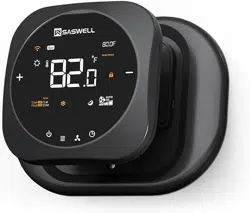
T29UTW-7-WIFI(TY)
T29UTW-7-WIFI(TY)
OPERATING
INSTRUCTION
OPERATING
INSTRUCTION
Contents
01
Thermostat Specifications
01
T510-45 specifications
07
Thermostat Installation
08
First Time Setting
09
10
System Setting
Programming Settings
12
Fan Speed Setting
18
Cooling and Heating Modes
19
Child Lock
20
Configuration Menu
22
Errod Warning
21
Install your thermostat with a C wire
32
Install your thermostat without a C wire
40
Specifications
Power source :
18-30VAC 50/60Hz
IP Rating : IP21
Temperature setting range : 41°F~95°F
1°FTemperature setting accuracy:
32°F~122°FTemperature display range :
Temperature accuracy : 0.1°F
Operation temperature range : 32°F~122°F
Shipping & storage temperature : 14°F~140°F
Output : Relay Load Imax 24V/(1A)
T29UTW-7-WIFI(TY)
thermostat
Accessory
55
A2
Wifi Communication protocol : TCP/IP,MQTT
Wifi Frequency : 2.412GHz-2.4848GHz
Link APP
60
02 03
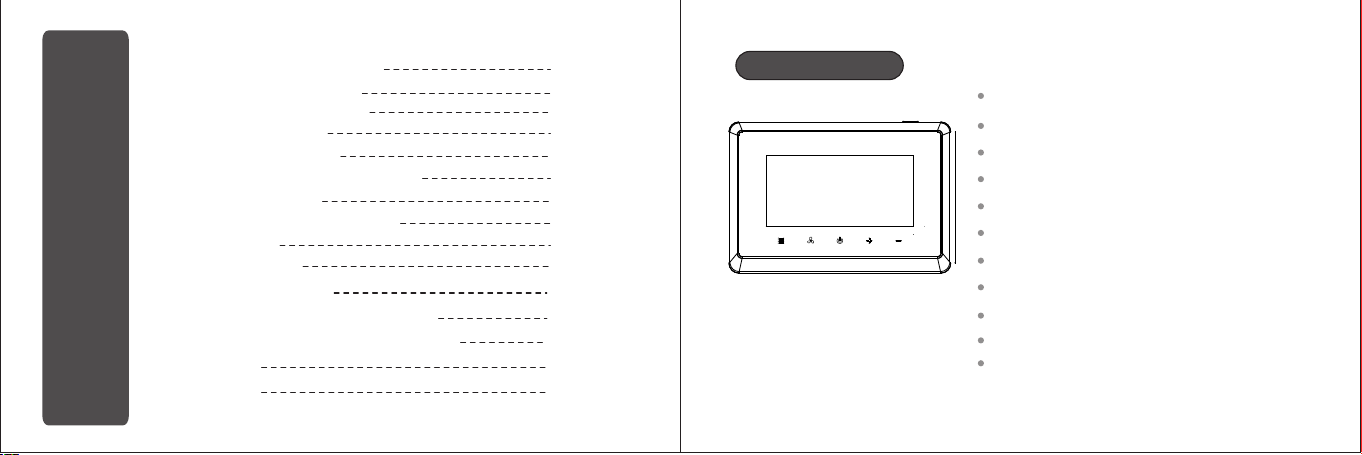
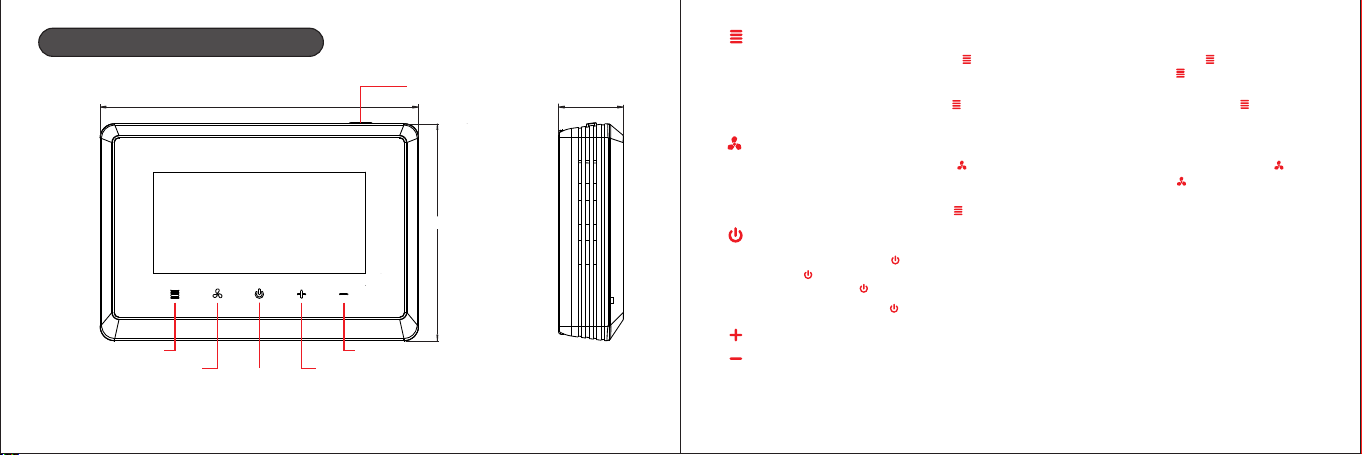
Thermostat’s appearance
135mm
92mm
27,5mm
Menu button
Fan speed button
Power
Down button
Up button
Mode button
1. Under power on status, short press button to switch the mode, long press button to enter
the programming settings. Under programming setting status, short press button to enter the
next item.
2. Under power off status, long press button to enter the menu setting. Short press button
under menu setting state to enter the next item.
Fan speed button
1.Under power-on status, short press button to switch the wind speed mode. Long press
button to enter time query. Under time query or setting status, short press button to enter
the next time setting.
2.Under power off status, short press button in menu setting state to enter configuration menu..
Power button
1.In power on, short press to save and exist the time/program setting;
short press to enter into work state.
Power off, long press to remove WIFI and enter into network pair state.
2.In power off, short press to power on.
Increase button
Decrease button
* In power on, press increase button and decease button simultaneously to activate key lock.
* Without holiday mode and hold mode
Note: long press: press for 5 seconds, short press: press for 1seconds.
Hold/Run prog button
(press to switch Hold/Run prog mode)
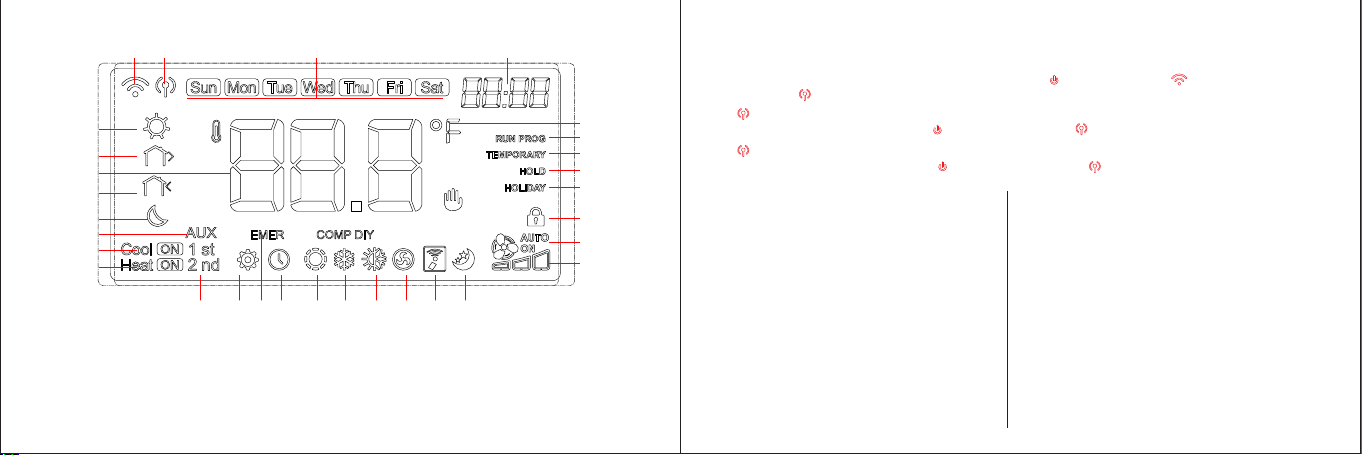
3:Week
4:Temperature setting, Time setting,
Parameter setting
5:Temperature unit
6:Program run
7:Temporary mode
8:Permanent mode
9:Holiday mode
10:Key lock
11:Indicate Fan AUTO/ON
12:Indicate Filter alarm
13:Indicates leave home mode
14:Indicate U V light alarm
15:Indicate fresh air output
16:Indicate Auto mode
1 2 3 4
6
7
8
9
10
12
11
131415161718192122
30
29
27
26
24
23
25
28
5
20
17:Indicate cooling mode
18:Indicate heating mode
19:Indicate clock
20:Indicate Emergency and Auxiliary
Heat mode
21:Setting
22:1 stage or 2 stage output
23:Heating Output
24:Cooling Output
25:Assistant Heating Output
26:Sleep
27:Return
28:Temperature Sampling
29:Leave
30:Wake
04 05
* Ensure the thermostat in AP mode(Hot spot mode)
How to get into AP mode?
Under power on status, Long press the power off button until the WIFI icon is off and change
to AP mode . (Hot spot mode)
Quick blinking, (0.5 seconds per time), how do change to quick blinking mode? In power on status,
long press the power off button until the AP mode icon is off. (Please use quick blinking mode)
Slow blinking, (2 seconds per time), how do change to slow blinking mode? In power on status,
long press the power off button until the AP mode icon is off.(Please use quick blinking mode)
a)
b)
1:WIFI icon: Flashing indicates the W I F I in connection,static indicates successful connection
2:Fast blinking indicates the network configuration status,
Slow blinking indicates AP connect network status.
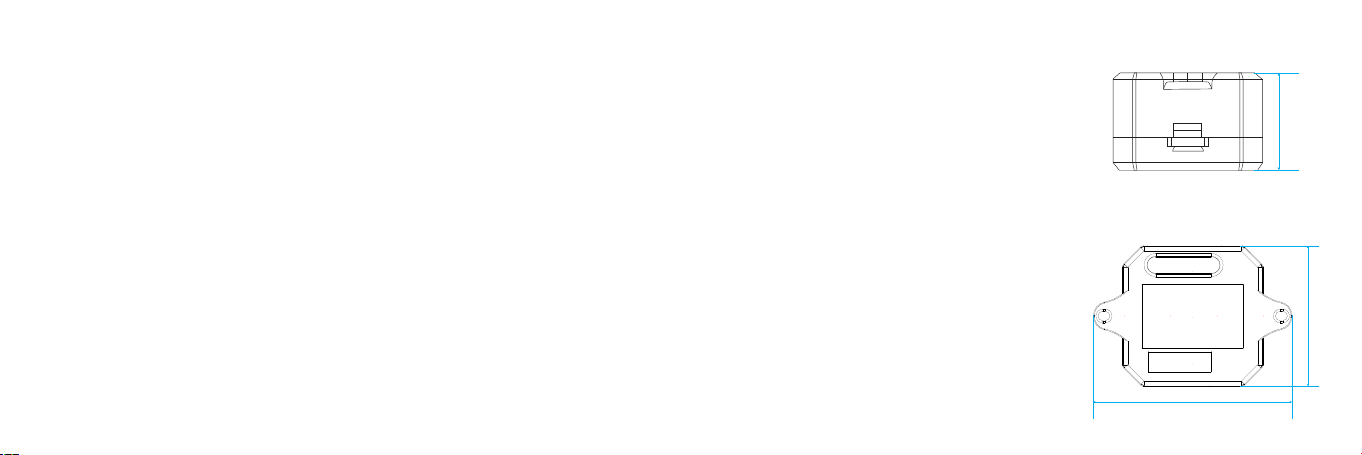
T510-45(Electric Control Module)
* Power supply: 24VAC(18-30VAC) 60Hz
* Ambient temperature : 32°F~122°F(0°C~50°C)
* Shipping temperature:14°F~140°F(-10°C~60°C)
* Output: Relay Load Imax 24V/(1A)
* IP rating: IP 21
* Color:white
* Size: 67.1*47.5*30.3mm
67.1mm
47.5mm
30.3mm
Five-core lead length 500mm (18#AWG) input: R,C,G,Y,G
R: Air conditioning equipment 24VAC power input
C: Air conditioning equipment 24VAC power supply public input
G: Air conditioner fan input
Y: Air conditioning equipment refrigeration compressor input
W: Air conditioning equipment heating input
Terminal output: R,C,S,W
R: Converter 24VAC power output
C: Converter 24VAC power supply common output
S: Converter control terminal (with G and Y collinear control)
W: Converter heating terminal
T29UTW-7-WIFI(TY) Intelligent voice control thermostat
Power supply: 24VAC (18-30VAC) power supply through RC or RH, C terminal
(no C line can be transferred through four-wire to five-wire module)
Support stages: 1H/0C,0H/1C,1H/1C,2H/1C,2H/2C,3H/2C,4H/2C
Terminal 1:RT+,RT-,S,G,Y1,Y2,O/B
RT+: External sensor + terminal input
RT-: External sensor - terminal input
S: Control terminal input (with G and Y collinear input)
G: Fan output
Y1: One stage cooling or heat pump heating output
Y2: Two stage cooling or heat pump heating output
O/B: Four-way directional valve output
Terminal2: C,RC,RH,W1,W2,AC-,AC+ (, AC-, AC+ function software and hardware design are
reserved, not standard, follow-up optional)
C: 24VAC power supply common input
RC: 24VAC cooling or single power input
RH: 24VAC heating power input
W1: One stage heating output
W2: Two stage heating output
AC-: Single wire is empty, two wires are passive common output
AC+: Ventilator equipment output (24VAC output when single wire)
06 07
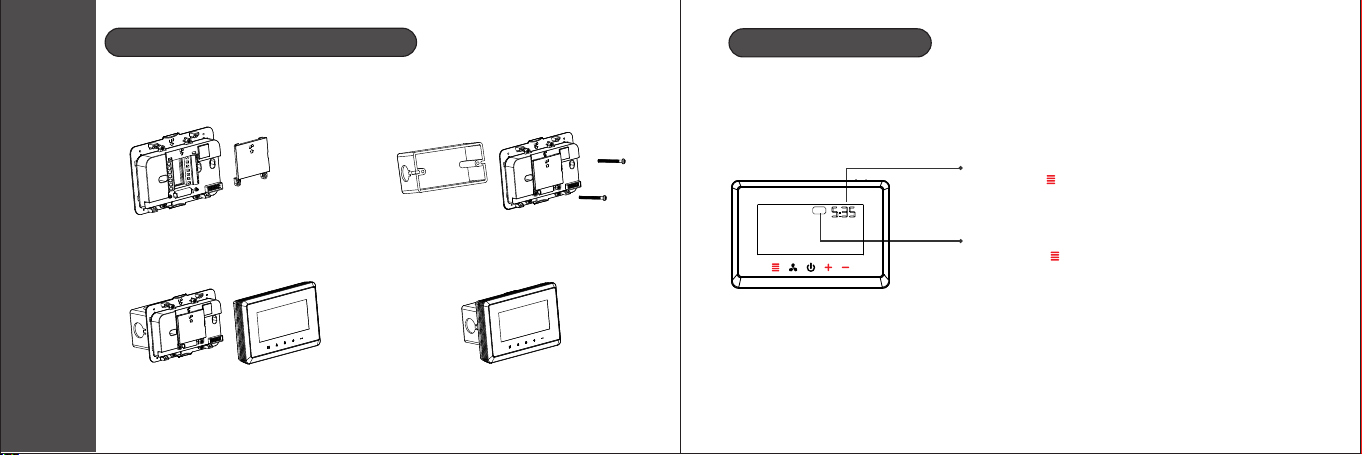
Thermostat Installation
Installation and programming
08 09
1.Unscrew terminal protective
jacket then wiring.
2.After wiredlid the terminal ,
protective jacketinstall the ,
screw.
3.Install and fasten foundation,
embed in display module.
4.Installation finished.
First Time Setting
Sat
Week setting: press “ ”or “” to adjust the week + -
short press“ ” and switch to the system setting.
Time setting: press “ ”or “” to adjust the time ,+ -
short press“ ” and switch to the week setting.
Set the current actual time and week.
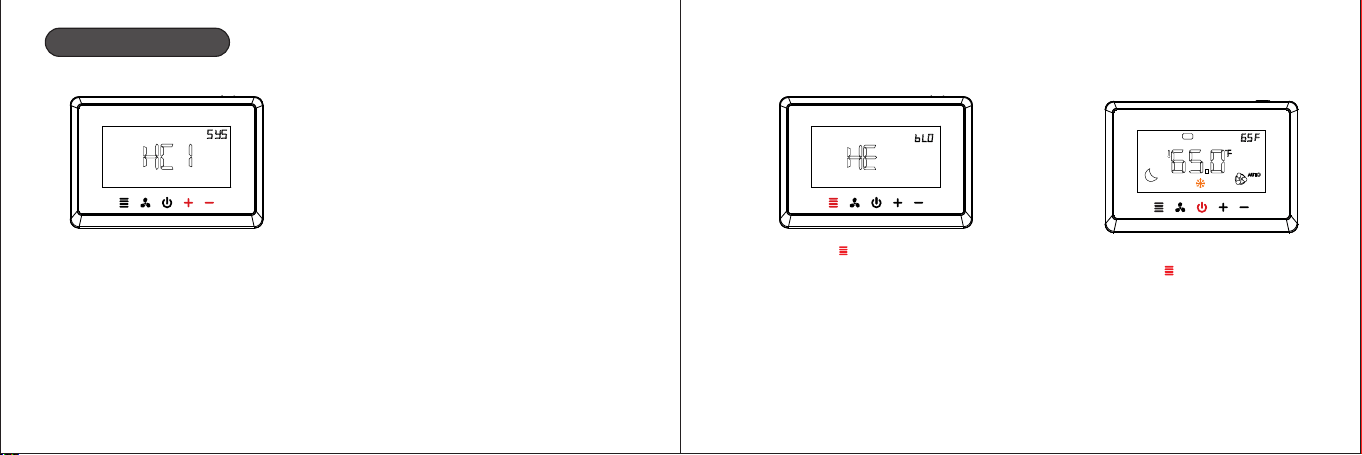
System Setting
10 11
(Multistage system )
1.press “ ”or “” to + -
select the primary
system .
2.press“ ”to confirm
the selection system
HE:Electric backup heat
HA:Fossil fuel backup heat
3.System setup completed,
press “ ”to return to the
main interface
Sat
Parameter options:(CO1,CO2,HE1,HE2,HC1,HC2,HP1,HP2,HPA)
CO1:1 cool conventional CO2:2 cool conventional
HE1:1 heat conventional HE2:2 heat conventional
HC1: 1 heat/1 cool conventional HC2: 2 heat/2 cool conventional
H 1: 1 compressor heat pump,1-AUX
HP2: 2 compressors or 2 speed compressor heat pump,1-AUX
HPA: 2 compressors or 2 speed compressor heat pump, 2-AUX
P
12 13
Programming Settings
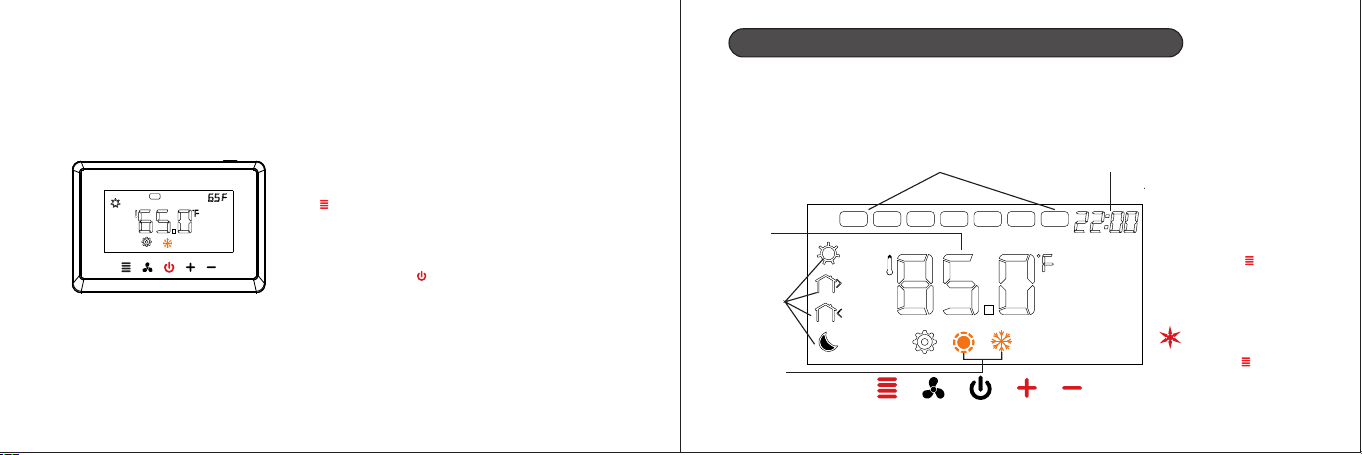
1.Short press the power button “ ”,
and then the screen shows “OFF”.
2.Long press the menu button
“ ”for 5s until the system
selection interface is displayed
and select the system set up
previously .
3.After system selection, select
programming mode: press “ ”+
or “ ”for switch the programming-
mode(Pr0/Pr2/Pr7),and press
“ ”to confirm and save the options.
Pr0:Non-programmable
Pr2:Work days+Friday&Saturday
Pr7:7 days individually programming
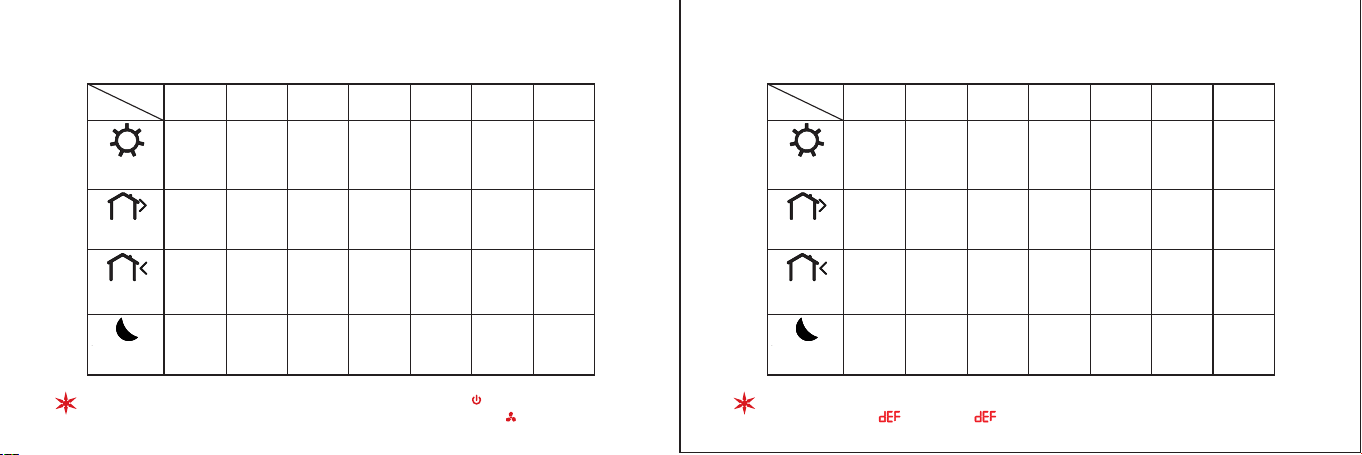
4.Short press the power button
“ ”,and the screen shows
“OFF”,then short press the
power button“ ”again to enter
the programming main interface
Sat
14 15
5.Long press the menu button
“ ”for 5s to enter the programming
setting.
please Keep all the buttons lights on
before performing this operation,if not,
please press “ ”
7 days programming-Time/temperature setting
Separate programming settings for each day (Pr7)
(the programming setting are different from Sunday to Monday )
The are 4 periods each day by default
Sat
Thu
Fri
WedTueMon
Sun
week setting time setting
Four
periods
for a day
temperature
setting
1.Week setting
2.Time setting
3.Temperature setting
press “ ”“” to adjust + -
the week / time /
temperature, short
short press“ ” to save
the setting and switch
to next period setting.
Heating/
cooling
mode
long press “ ” for 5s
to switch the heating
mode or cooling mode
Sat
16 17
Default setting (heating) Default setting (cooling)
Exit programming settings : short press power button “ ”
Return to the previous step : short press fan speed button “ ”
Morning
6:00
Out door
8:00
Back home
18:00
Night
22:00
periods
week
Sun
Mon Tue Wed Thu
Fri Sat
72°F
61°F
72°F
61°F
72°F
61°F
72°F
61°F
72°F
61°F
72°F
61°F
72°F
61°F
Morning
6:00
Out door
8:00
Back home
18:00
Night
22:00
periods
week
Sun
Mon Tue Wed
Thu
Fri Sat
77°F 77°F 77°F 77°F 77°F 77°F 77°F
Restore default setting: long press “ ”and “ ”for more than 5s until the+ -
screen shows “ ”and the “ ”flash 3times.
72°F 72°F 72°F 72°F 72°F 72°F 72°F
61°F 61°F 61°F 61°F 61°F 61°F 61°F
77°F 77°F 77°F 77°F 77°F 77°F 77°F
82°F 82°F 82°F 82°F 82°F 82°F 82°F
82°F 82°F 82°F 82°F 82°F 82°F 82°F
19
Fan speed setting
Sat
Fan speed
button
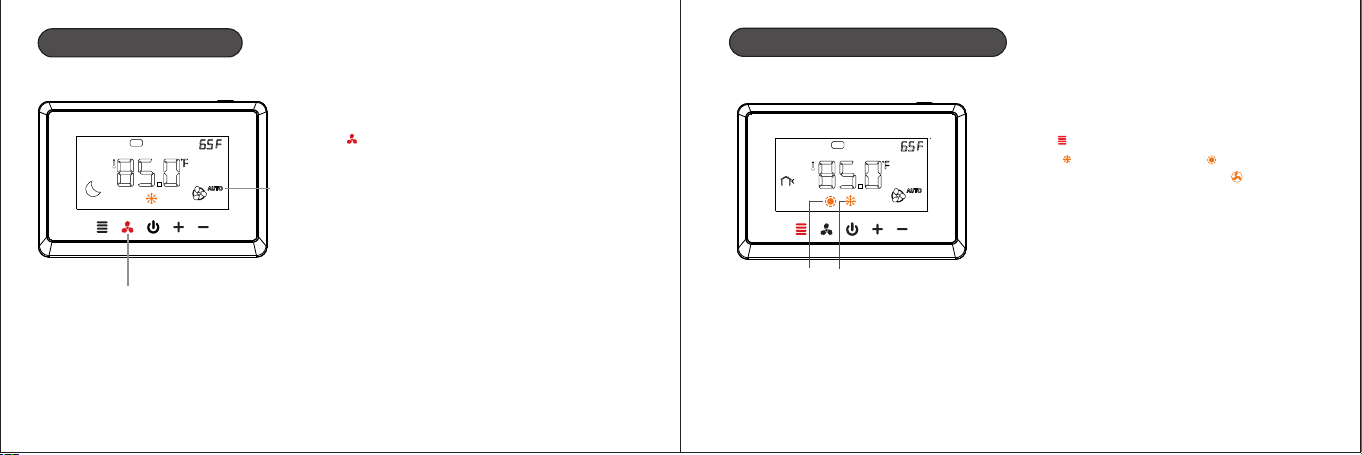
Fan speed mode setting : short press
“ ” for switching “AUTO” or “ON”mode.
mode
AUTO:Automatic mode
ON:FAN ON mode
18
Sat
Cooling and Heating Modes
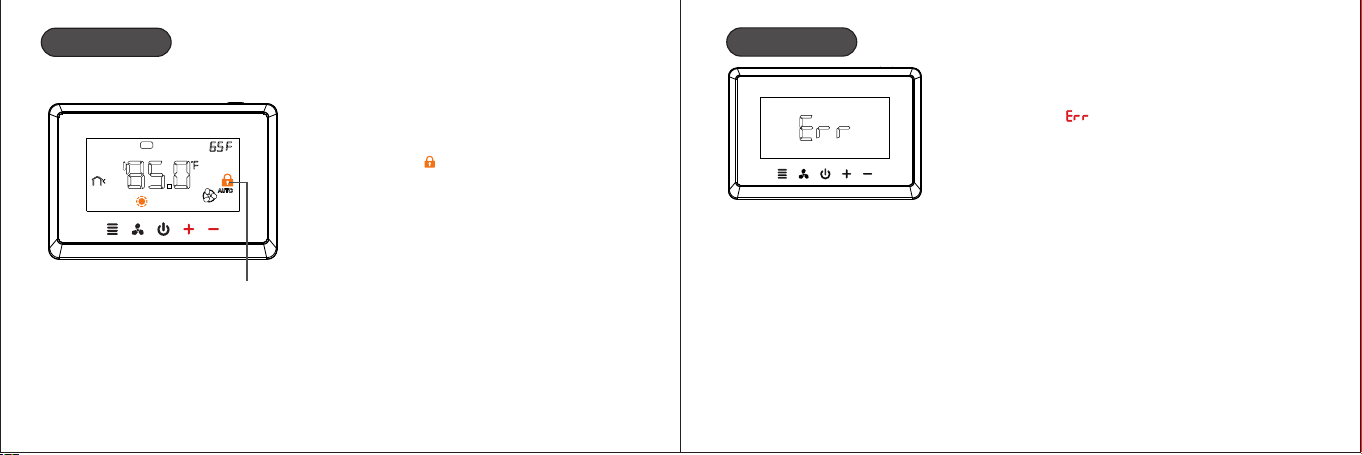
Short press the menu button
“ ”for switching cooling mode
“ ”or heating mode “ ” or
single speed fan mode “ ”
Heating
mode
Cooling
mode
20 21
Child Lock
Sat
Child lock
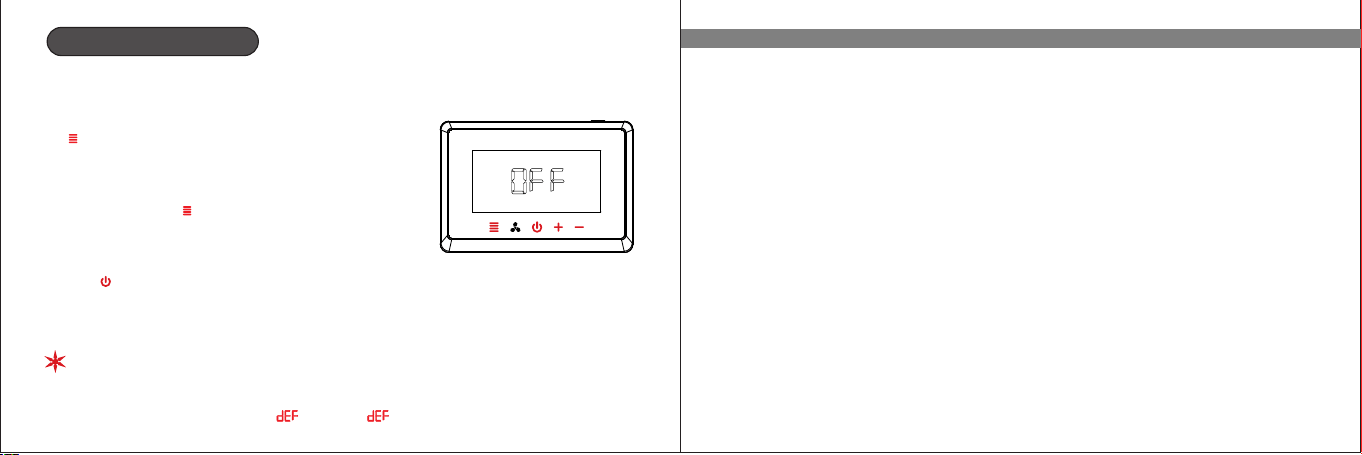
Press the “ ” and “ ” buttons for 5s+ -
at the same time to open / close the
child lock “ ”.
Errod Warning
Room Temp(inside room sensor)
broken or short cut,the thermostat
will have “ ”
2322
Configuration Menu
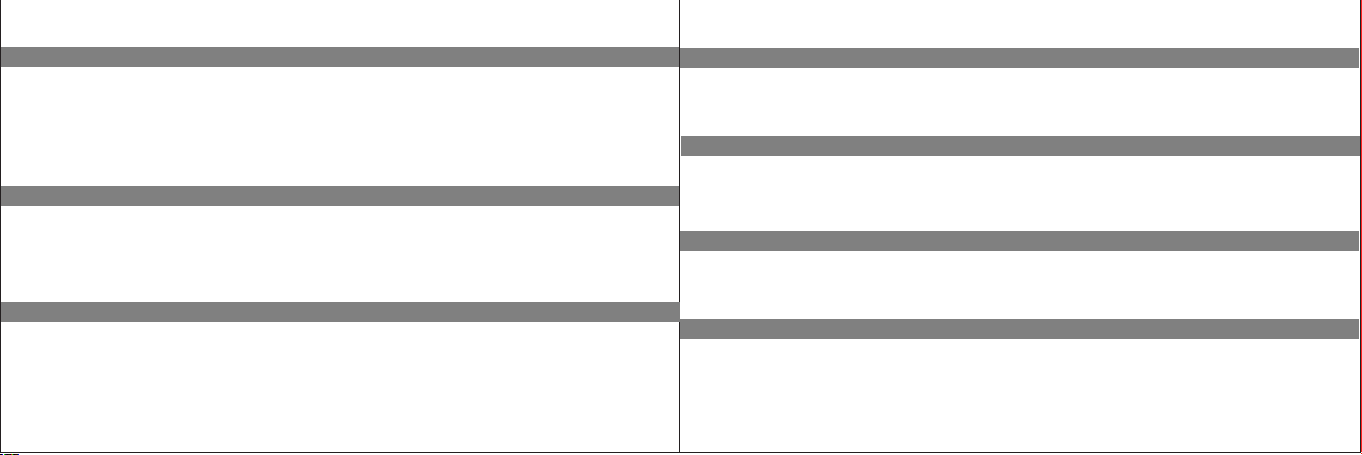
The configuration menu setting :
1.In the state of shutdown,long press menu button
“ ”for 5s to enter the configuration parameter
programming setting.
2.Press “ ”or “ ”to select the configuration parameter +
-
setting,then press “ ”to save and switch to the next
item setting.
3.After all the parameters are set up, press power
button “ ”exit the setting and return to the OFF stage.
1.The thermostat will exit the configuration parameter setting automatically
and return to the shutdown state if there is no any operation whin 30s.
2.Restore default setting: during setup, long press “ ”and “ ”for more than+ -
5s until the screen shows “ ”and the “ ”flash 3times.
System type option(SYS)
Parameter options:(CO1,CO2,HE1,HE2,HC1,HC2,HP1,HP2,HPA)
CO1:1 cool conventional CO2:2 cool conventional
HE1:1 heat conventional HE2:2 heat conventional
HC1: 1 heat/1 cool conventional HC2: 2 heat/2 cool conventional
H 1: 1 compressor heat pump,1-AUX
HP2: 2 compressors or 2 speed compressor heat pump,1-AUX
Factory default: HC1
HPA: 2 compressors or 2 speed compressor heat pump, 2-AUX
P
24 25
Intelligent recovery option (rEC)
Parameter options:(OFF,ON)
OFF: Deactivate the intelligent recovery function
ON: Activate the intelligent recovery function
Factory default:OFF
Manual/Autochangeover option(CHA)
First cooling cycle rate(CCY)
Parameter options:(1°F~6°F)
Factory default:1°F
First heating cycle rate(HCY)
Parameter options:(1°F~6°F)
Factory default:1°F
Second cooling cycle rate(C2S)
Parameter options:(1°F~6°F)
Factory default:1°F
Second heating cycle rate(H2S)
Parameter options:(1°F~6°F)
Factory default:1°F
Emergency heat cycle rate(CrY)
Parameter options:(1°F~6°F)
Factory default:1°F
Parameter options: (OFF,ON)
OFF: Manual changeover ON: Auto changeover
Factory default:OFF
26 27
Compressor lockout delay option(dEL)
Parameter options:(0~5)
To protect the compressor from short cycling, you can select compressor off-time cycle
between 0~5 minutes
Factory default:3
When the thermostat compressor time delay occurs, lockout.
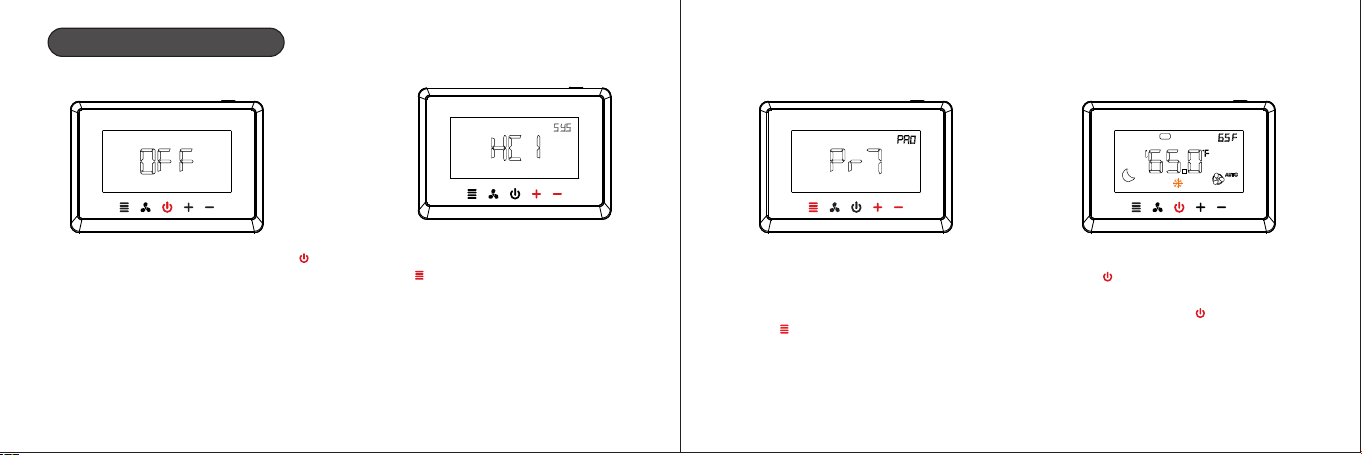
No heat pump heat type option(BLO)
Parameter options:(HA,HE)
HA: Fossil fuel backup heat HE: Electric backup heat
Factory default:HE
HP1, HP2 and HPA system are Auxiliary heating
Display backlight option(BLL)
Parameter options:(1,2)
1:No backlight display
2:The backlight come on for approximately 30s when any button is touched
Factory default:2
Temperature recalibration option(CAL)
Parameter options:(-8~+8°F)
Factory default:0
℉ or ℃ readout option(FC)
Parameter options:(℉ , ℃)
Factory default:℉
28 29
Program option(Pr0)
Parameter options:(Pr7,Pr0)
Pr7: 7-day program function for the thermostat
Pr0: non-program function for the thermostat
Factory default: 7Pr
17.Filter replacement run time option( FIL)
Parameter options:(00-12)
This is a reminder to change or clean your air filter. This time can be set from 0 to
12 months in 1 month increments.
Factory default: 00
1.The thermostat will display the “ ” after a set time of operation.
2.Selection of 00 will cancel the function.
18.UV lamp replacement run time option(UUL)
Parameter options:(ON,OFF)
ON: It means starts to counting for 0 day to 400 day
OFF: It means cancel the function
Factory default:OFF
The thermostat will display the “ ” when UV time(400 days) has expired.
20.Remote sensor option(SEn)
Parameter options:(0,1,2)
0: No remote sensor
1: Outdoor control sensor (See Menu item 21 Heat pump temperature lockout)
2: Indoor sensor. if the thermostat is installed with an indoor remote sensor, display
will show the read temperature from the indoor sensor.
If the option is 1,2,please choose NTC-10 sensor.
Factory default:0
30 31
Heat pump compressor lockout option(HPL)
Parameter options:(0 ,15 , 20 ,25 , ,35 , )°F °F °F °F 30°F °F 40°F
0:No heat pump compressor lockout
15 , 20 , 25 , 30 , 35℉,40℉:heat pump compressor lockout temperature°F °F °F °F
Factory default:0
This option apply only to HP1, HP2, HP setting in system type option and only works when A
remote sensor option (menu item 20) is set 2.
Heat pump auxiliary heating temperature lockout option(AUL)
Parameter options:(0℉,40℉,45℉,50℉, 55℉,60℉)
0:No auxiliary heating temperature lockout
40℉,45℉,50℉,55℉,60℉:heat pump auxiliary heating temperature lockout
Factory default:0
This option apply only to HP1, Hp2, HP setting in system type option and only works when A
remote sensor option (menu item 20) is set 2.
Auto changeover dead band option(dbA)
Parameter options:(4~8℉)
Factory default:4℉
O/B port selection direction(Ob)
O: O/b terminal is output in cooling mode
b: O/b terminal is output in heating mode
Factory default: b
ventilator(FAN)
0~60 min
Factory default: 0
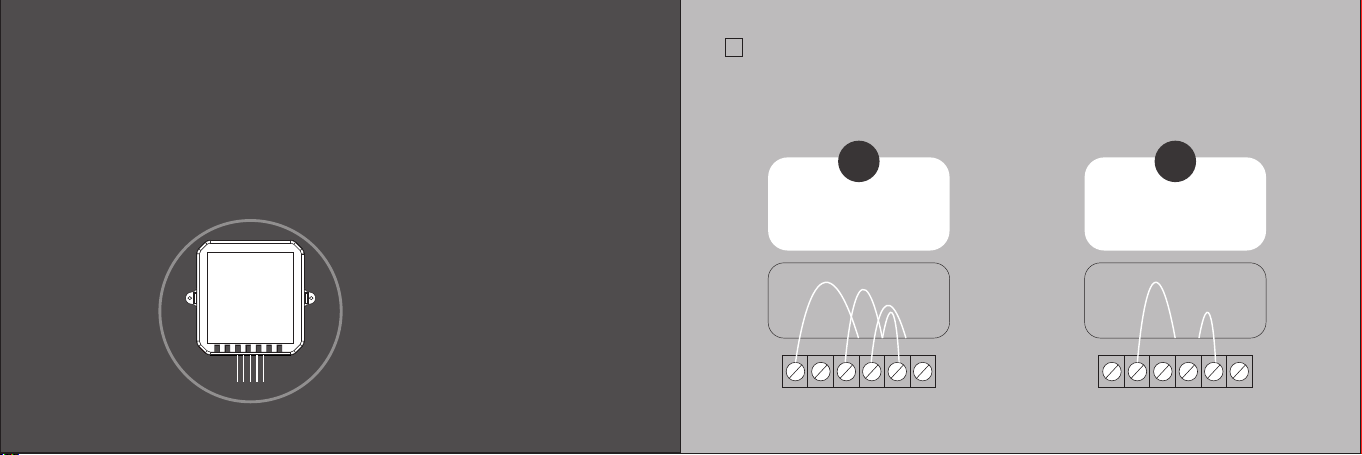
CHECKPOINT:C WIRE
√
Do your have a C wire connected to you old thermostat ?
YES
Great, please continue
to the NEXT PAGE.
NO
Go to install
with a ECM.
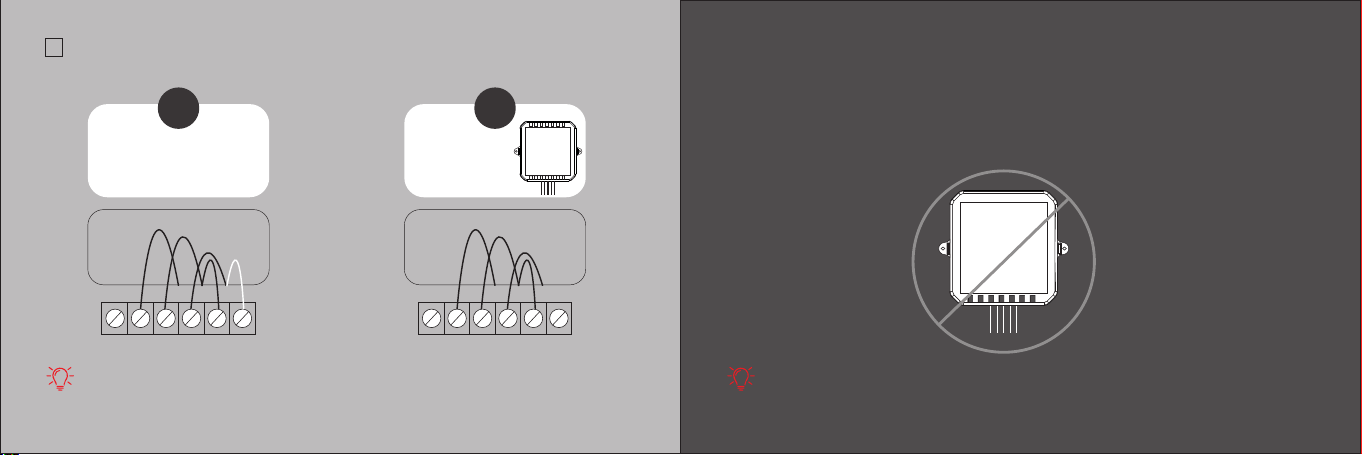
RC RH G Y W C RC RH G Y W C
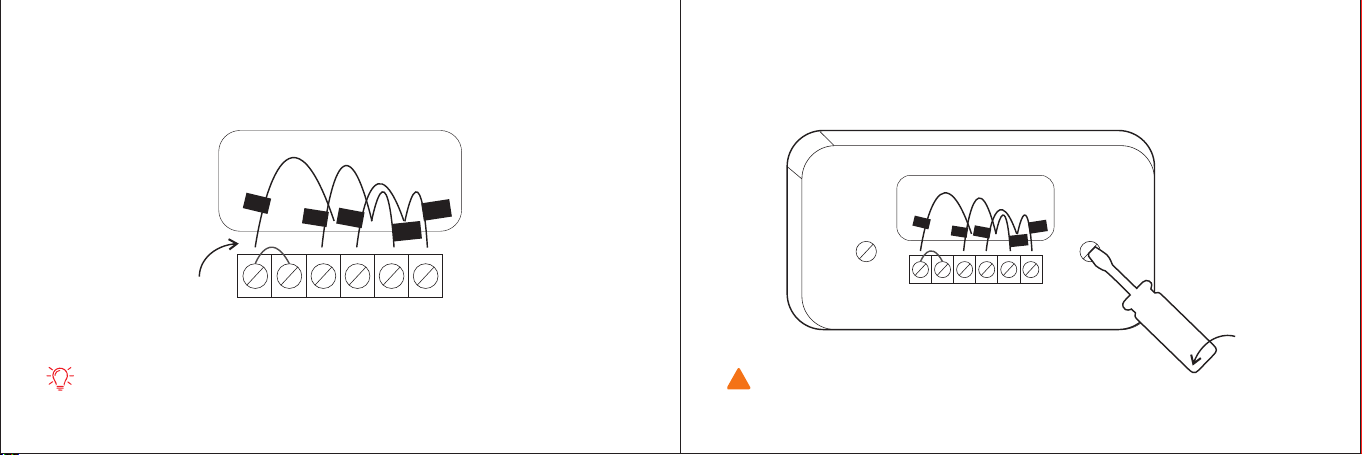
TIPS:
The wiring on your old thermostat may look different, just check to see if there’s
a C wire.
Install your thermostat
with a C wire
If you have a C wire, it will power your thermostat. you won’t need the Electric
Control Module included in the box.
TIPS:
TO install accessories(humidifier, dehumidifier or ventilator)please refer to the wiring
diagrams at wiring.
3332
34 35
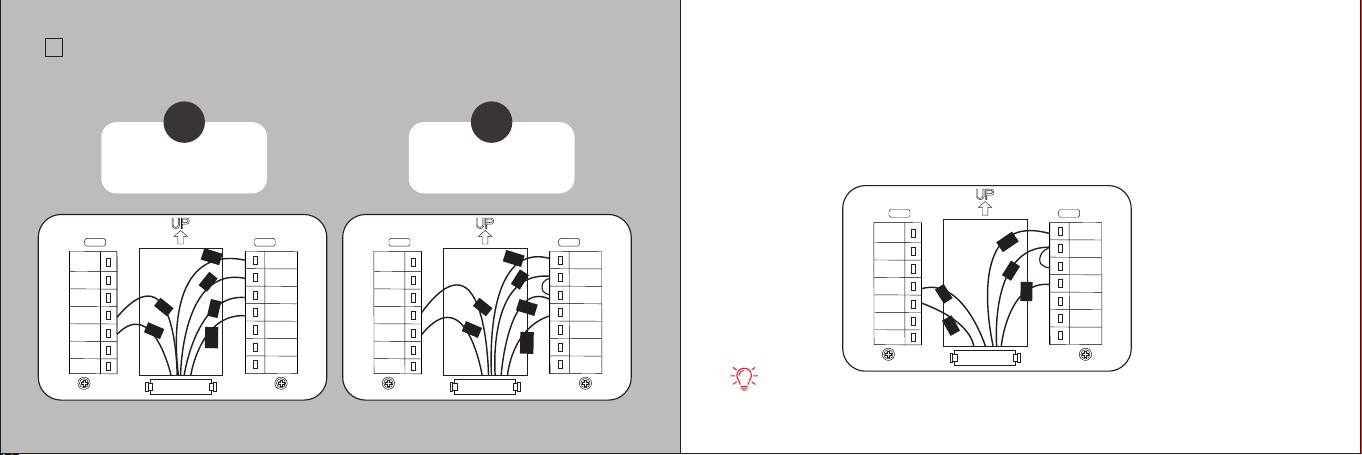
STEP2
Unscrew the mounting plate of your old thermostat to remove it from the wall.
STEP1
Carefully disconnect and label the wires from your old thermostat one at a time,
using the labels provided.
RC RH G Y W C
TIPS:
If you have a jumper between RC,RH,OR R, leave it alone.
Only label the wires that run from your wall into a terminal block.
RC
C
G
Y
1
W
1
W
1
RC RH G Y W C
R
C
C
G
Y
1
W
1
W
/
W
1
!
WARNING:
Be careful, as some thermostat may contain mercury.
Recycle your old thermostat safely with your local hazardous waste facility.
C
RC
RH
W1
W2
AC+
AC-
RT+
RT-
S
G
Y1
Y2
O/B
C
RC
RH
W1
W2
AC+
AC-
RT+
RT-
S
G
Y1
Y2
O/B
R
C
C
G
Y
1
W
1
37
CHECKPOINT: INSERT YOUR R WIRE(S)
√
Do your have more than one R wire?
(That includes R,RC,and RH)
YES
Insert your wires:
R or RC → RC
RH → RH
NO
Insert your single wire:
R,RC,or RH→ RC
36
C
RC
RH
W1
W2
AC+
AC-
RT+
RT-
S
G
Y1
Y2
O/B
C
G
Y
1
RH
RC
R
H
G
Y
1
W
1
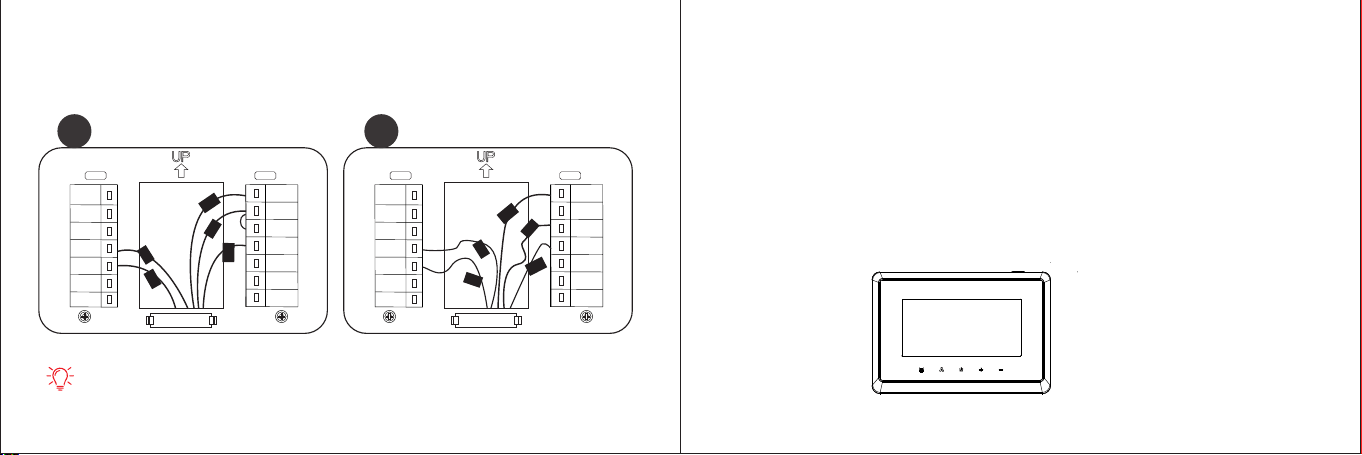
STEP3
Insert your remaining wires into the side (not the front) of their corresponding
terminal blocks.
TIPS:
1.Press the terminal block levers to insert the wires more easily.
2.When a wire has been connected correctly, the level on the block will lower.
STEP4
Tug on the wire gently to ensure they are securely connected.
W
1
* Note: Do not jumper RC or RH
RC
C
C
RC
RH
W1
W2
AC+
AC-
RT+
RT-
S
G
Y1
Y2
O/B
C
RC
RH
W1
W2
AC+
AC-
RT+
RT-
S
G
Y1
Y2
O/B
38
STEP5
Carefully push any excess wires back into the hole and ensure there are no drafts
coming from the hole(s) in the wall.
R
C
C
G
Y
1
1
√
RC
C
G
X
TIPS:
Large holes behind your thermostat will affect temperature readings.
Prevent drafts by covering the holes.
W1
W
1
Y
1
STEP6
Turn the power to your HVAC system back on using the master switch or at the
circuit breaker box.
Congratulations, you did it!
Say hi to your new thermostat! To complete your setup and registrations,
follow the instructions on your thermostat screen.
39
Install your thermostat
without a C wire
If you don’t have a C wire, you will need to use the Electric Control Module
included to reliable power your thermostat.
CHECKPOINT: 4 WIRES
√
The Electric Control Module requires your system to have either of the following:4 wires
W/W1,Y/Y1,G,and R(or RC or RH)
Do you have these wires?
YES
Great, please continue
to the NEXT PAGE.
NO
Please check compatibility
or contact us!
RC RH G Y W C RC RH G Y W C
The Electric Control Module
will work with your system!
4140
(Optional 4 to 5 wires)
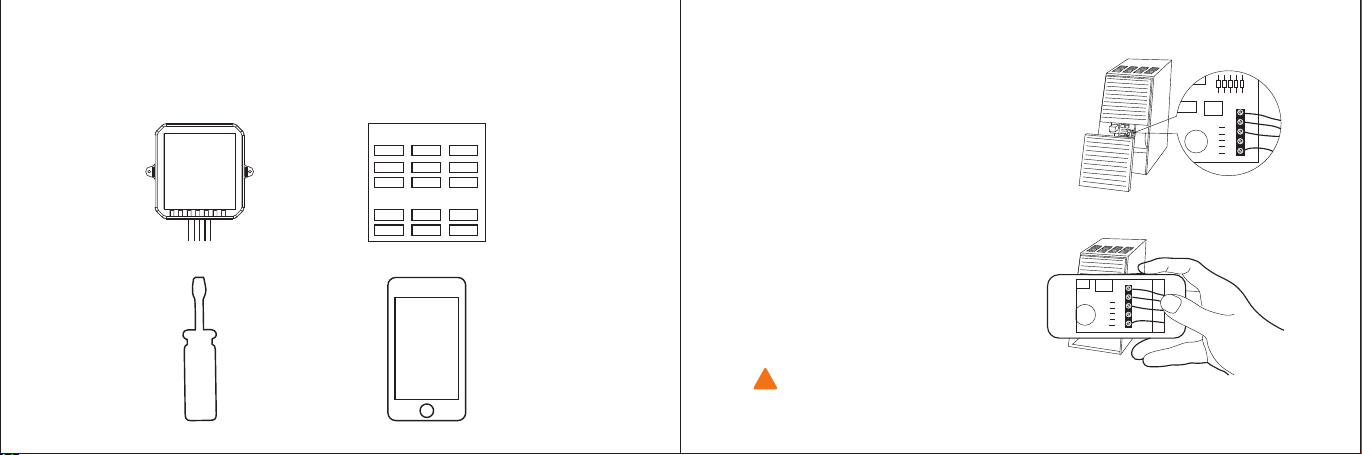
STEP1
Take your Electric Control Module ,wire labels, tools, your smart-phone, and go to
your HVAC system.
Thermostat wire labe
Label wires at your:
STEP2
Open your HAVC system’s cover to
reveal at control board.
STEP3
Take a picture of the wires
connected to your control board.
You may need to reference this
photo later on.
HVAC system contain high voltage wires. Use caution when working with the
control board. If you’d rather leave it up to a professional.
WARNING:
!
Cont ro l bo ar d
Y
W
G
C
R
Y
W
G
C
R
4342
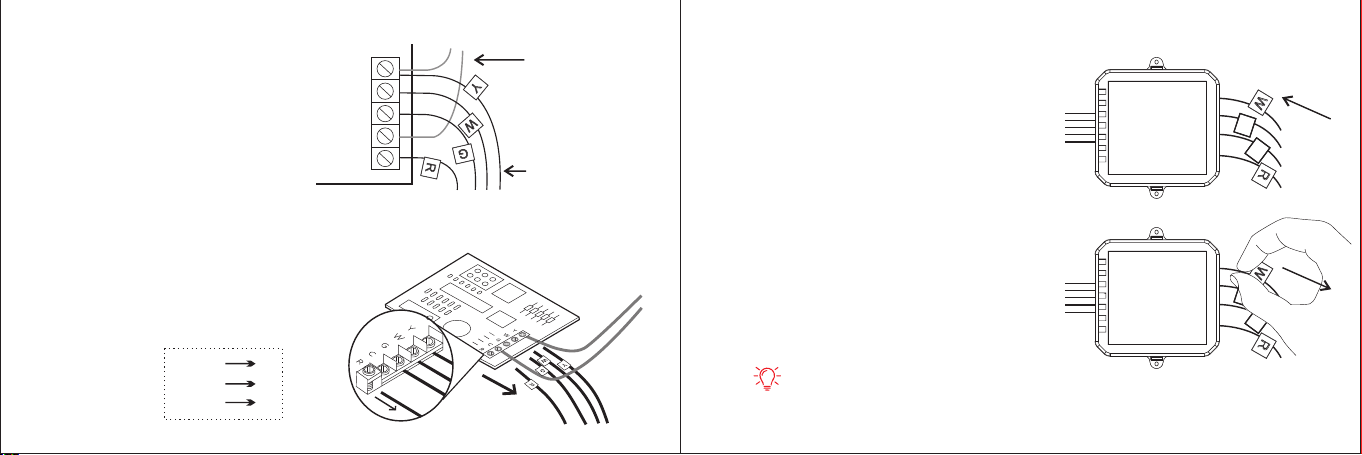
STEP4
Label only the R,Y,or Y1,G,and W or
W1 wires with the matching labels
provided.
If you have more than one wire going
into these terminals, only label those
going to your thermostat.
STEP5
Disconnect the wires labeled
R,Y,G,and W from the control
board.Then label it as follow:
Y
W
G
C
R
Y
W
R
G
Wires going
to You're A/C
(ignore this )
Wires going to
Your thermostat
control board
STEP6
Connect the wires you disconnected
from the control board into their
matching gray terminal blocks on
the Electric Control Module.
STEP7
Tug on the wires gently to
ensure they are securely
connected.
TIPS:
1.Press the buttons to insert the wires more easily.
2.When a wire has been connected correctly, the button on that block will lower.
S
W
R
C
S
W
C
R
C
S
S
W
R
C
S
W
C
R
C
S
4544
RC/RH R
G C
Y S
* Important*
Attention please,at this time, you need to
change the wire number. As follow:
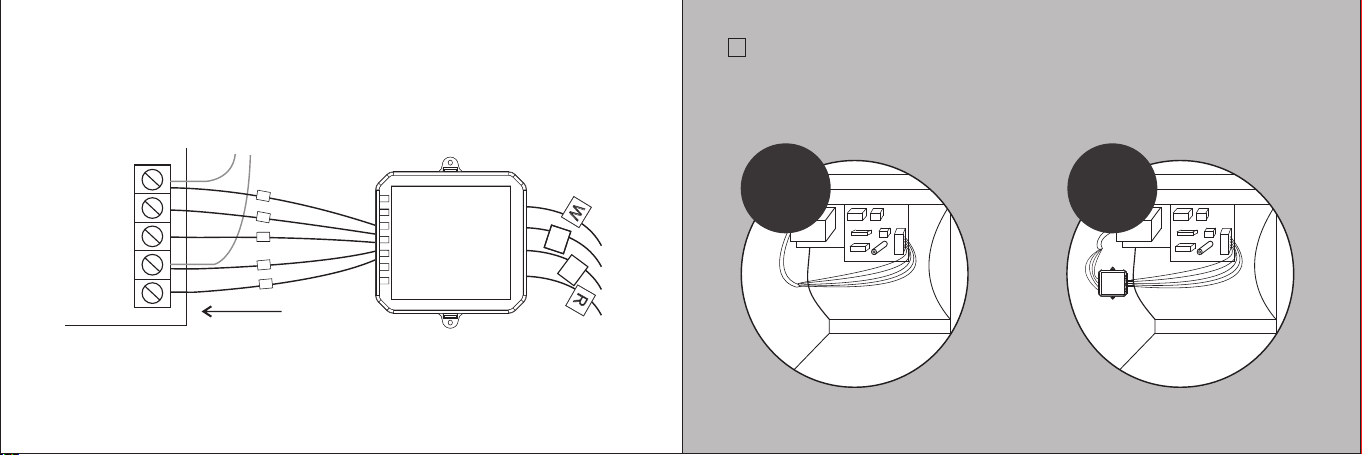
STEP8
Connect the five white wires coming out of your Electric Control Module to their
correspending terminals on the control board .
Y
W
G
C
R
control board
s
W
R
c
S
W
C
R
Electric Control Module
s
c
CHECKPOINT: Electric Control Module
√
Check that you have installed the Electric Control Module correctly. It should be
installed between your thermostat wiring and your control board.
BEFORE AFTER
4746
Y
W
G
C
R

STEP9
Mount the Electric Control Module inside your HAVC system,taking care not to
strain the wires.
Close the HVAC cover panel securely return to your thermostat.
TIPS:
Make sure your HVAC panel is fully closed. Some systems will not turn on if
the cover panel has not been closed properly.
STEP10
4948
RC
RH
G
Y
W
C
Back at your thermostat:
Carefully disconnect and label the wires from your old thermostat one at a time,
using the labels provided. If you have a jumper between RC,RH,or R leave it alone.
Only label the wires that run from your wall into a terminal block.
RC RH G Y W C
R
C
W
1
C
W
1
S
R/RC/RH RC
G C
Y S
W W1
* Take a phone before disconnecting the
wires from your old thermostat ,
You may need to reference this photo
later on.
* Important*
Attention please,at this time, you need
to change the wire number. As follow:

STEP11
Unscrew the mounting plate of your old thermostat to remove it from the wall.
WARNING:
Be careful, as some thermostat may contain mercury.
Recycle your old thermostat safely with your local hazardous waste facility.
5150
!
C
RC
RH
W1
W2
AC+
AC-
RT+
RT-
S
G
Y1
Y2
O/B
STEP12
First, connect these 4 wires as show: RC,C,S,W1. Then connect any remaining
wires to their corresponding terminal.
TIPS:
Press the terminal block levers to insert the wires more easily.
R
C
C
S
W
1
W
/
RC RH G Y W C
R
C
W1
C
W
1
S
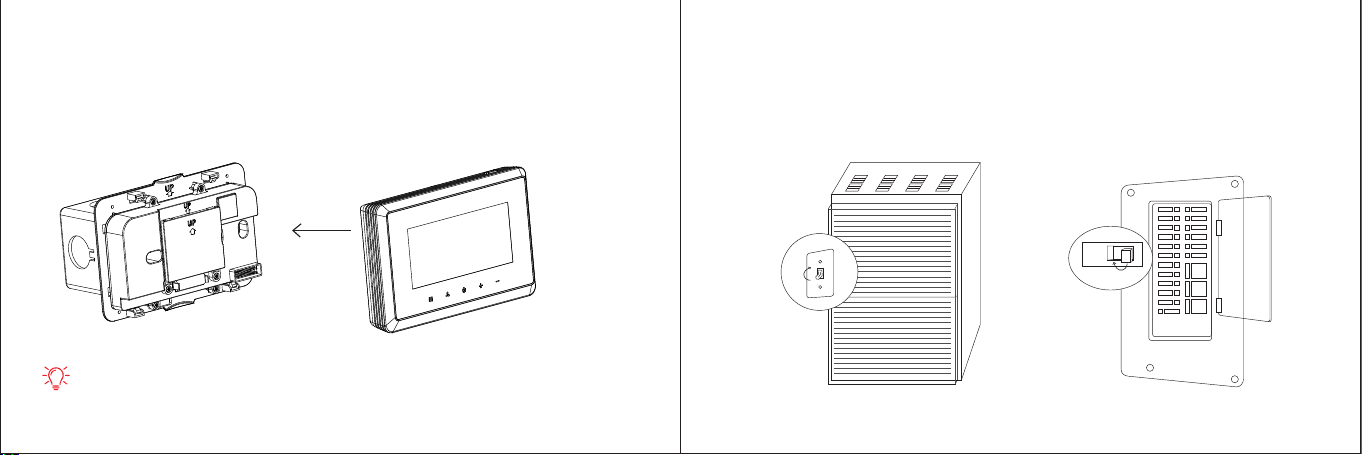
5352
STEP13
Gently press your thermostat into the backplate until it “clicks” into place.
TIPS:
If the thermostat “rocks”or is not flush with the wall,be sure the excess wires are
pushed all the way into the wall.
STEP14
Turn the power to your HVAC system back on using the master switch or at the
circuit breaker box.
ON
OFF
ON
OFF

Boiler or radiant system with air handler and conventional cooling or heat pump.
C
RC
RH
W1
W2
AC+
AC-
Y1Y2RCG
Air handler
Y1Y2CO/B
Air conditioner or
Heat pump
W1RW2
Boiler
Stage 2 heat and
cool if applicable
*Reversing valve
for heat pumps only
Note:
Do not jumper RC or RH
RT+
RT-
S
G
Y1
Y2
O/B
5554
RT+
RT-
S
G
Y1
Y2
O/B
Accessory devices
The T29 can control an accessory HVAV device like a humidifier, dehumidifier, or
ventilation device from its AC terminals
Note:You will need to configure the accessory device when you first power on your T29.
2-wire accessory (ventilator)
C
RC
RH
W1
W2
AC+
AC-
RCGYWWire1 Wire2
Furnace control board
Accessory
Note:
Do not jumper RH or AC+
RT+
RT-
S
G
Y1
Y2
O/B
1-wire accesory
(ventilator)
C
RC
RH
W1
W2
AC+
AC-
RCGYWWire1
Furnace control board
Accessory
T29 automatically connects Rc to AC- when 1-wire configuration is selected during
accessory setup.
Warning: Damage may occur if accessory is connected to AC-
!
5756
C
RC
RH
W1
W2
AC+
AC-
RT+
RT-
S
G
Y1
Y2
O/B
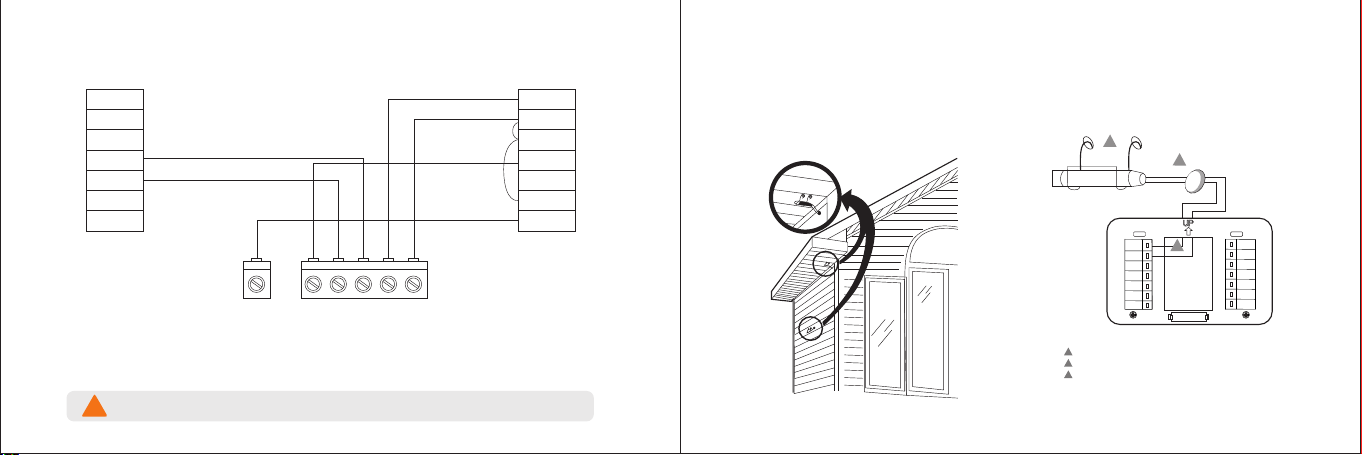
Fig.1. Typical locations for outdoor sensor.
Fig. 2. Wiring diagram for the NTC-100K
Outdoor Sensor to the thermostat.
Wiring must comply with applicable codes, ordinances and regulations.
WIRING HOLE
THROUGH
STRUCTURE
NTC-100K
1
Use appropriate mounting means for the type of structure.
1
2
2
3
Plug wiring hole with non- hardening caulk or putty.
RT+/RT- terminal location varies with model.
3
1.Wire the NTK100 Outdoor Sensor to the RT+/RT- terminals on the thermostat.
ForanexampleofgeneralwiringoftheNTC-100K,seeFig.2.Pigtailwiringcanbeused.
2.MounttheNTC-100Kinitsmountingclip.
3.Plugwiringholeusingnonhardeningcaulkorputty.
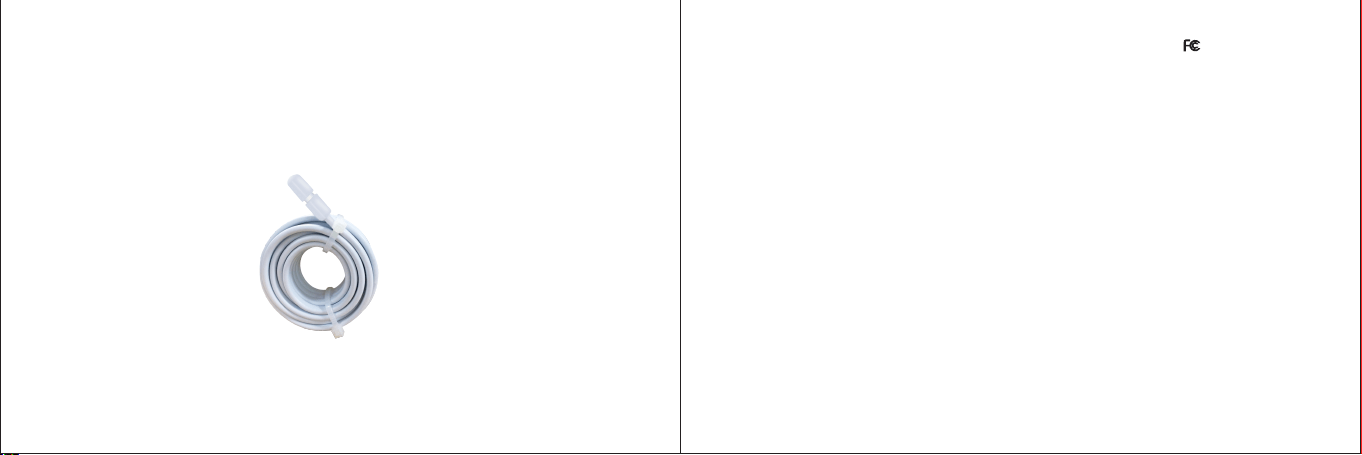
Optional sensor
SASWELL NTC 100K Room Sensor With 3 Meter Wiring
*Used for outdoor temperature detection when there is water pump
protection.
5958
FCC Radiation Exposure Statement:
This equipment complies with FCC radiation exposure limits set forth for an uncontrolled environment.
This equipment should be installed and operated with minimum distance 20cm between the radiator
& your body.
FCC Warning
This device complies with Part 15 of the FCC Rules. Operation is subject to the
following two conditions:
(1) This device may not cause harmful interference,and (2) This device must accept any interference
received, including interference that may cause undesired operation.
NOTE 1: This equipment has been tested and found to comply with the limits for a Class B digital device,
pursuant to part 15 of the F C C Rules. These limits are designed to provide reasonable protection
against harmful interference in a residential installation. This equipment generates uses and can radiate
radio frequency energy and, if not installed and used in accordance with the instructions, may cause
harmful interference to radio communications. However, there is no guarantee that interference will not
occur in a particular installation. If this equipment does cause harmful interference to radio or television
reception, which can be determined by turning the equipment off and on, the user is encouraged to try to
correct the interference by one or more of the following measures:
- Reorient or relocate the receiving antenna.
- Increase the separation between the equipment and receiver.
-Connect the equipment into an outlet on a circuit different from that to which the receiver is connected.
-Consult the dealer or an experienced radio/T V technician for help.
FCC ID:2AO IFT 29 U TW
NOTE 2: Any changes or modifications to this unit not expressly approved by the party responsible for
compliance could void the user's authority to operate the equipment.
6160
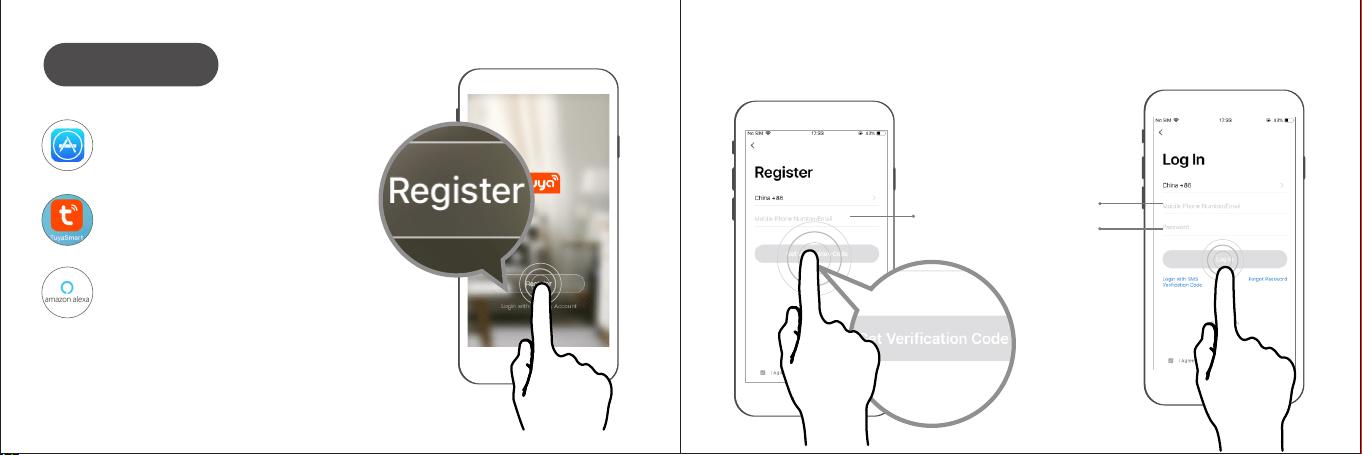
Insert email
address or
phone number
Registed mailbox
/ photo number
Insert your
pass word
When you finish the register, log in your mailbox and click on the link to activate your account,
then can login thermostat’s APP.
Click App store (click
Android application market)
Search “ TuyaSmart ”
and download .
Search “ amazon alexa ”
and download .
Link APP
6362
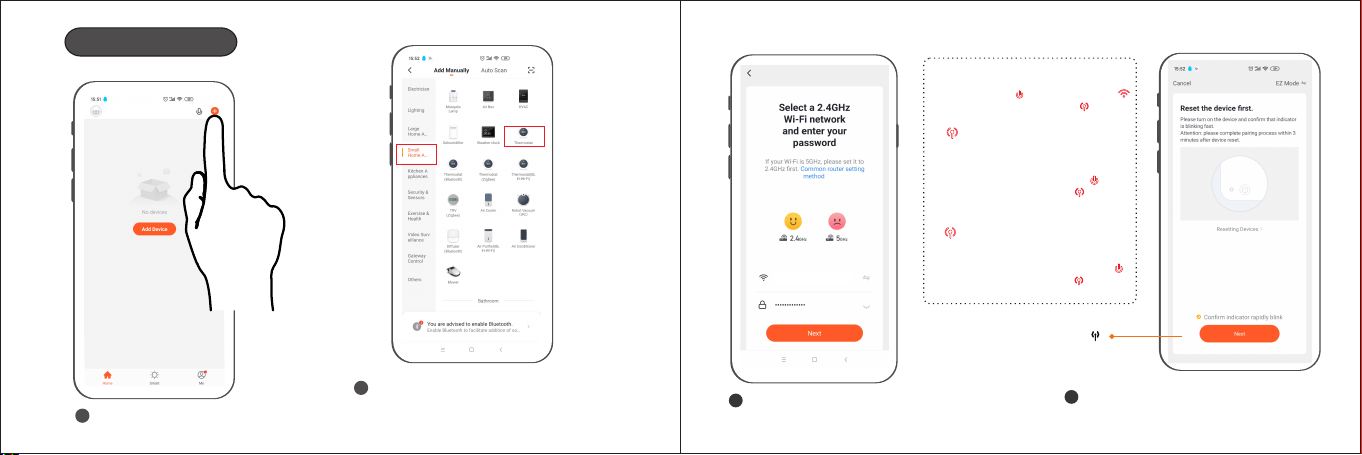
Add Thermostat
Click “+” on the top of right.
1
Click the list bar “Small Home AP” and
select the thermostat in the right device list.
2
Distribution network in AP mode:
Confirm wifi account and enter
wifi password,then click “Next”
3
Check the "Confirm indicator rapidly"
then click “Next”
4
(Note: AP mode"" Ensure
of thermostat flashes fast)
xxxx xx xxxxx x
How to get into AP mode?
Under power on status, Long press the
power off button until the WI FI icon
is off and change to AP mode .
(Hot spot mode)
Quick blinking, (0.5 seconds
per time), how do change to
quick blinking mode?
In power on status, long
press the power off button
until the AP mode icon
is off. (Please use quick
blinking mode)
Slow blinking, (2 seconds per
time), how do change to slow
blinking mode? In power on status,
Long press the power off button
until the AP mode icon is off.
(Please use quick blinking mode)
a)
b)
64 65
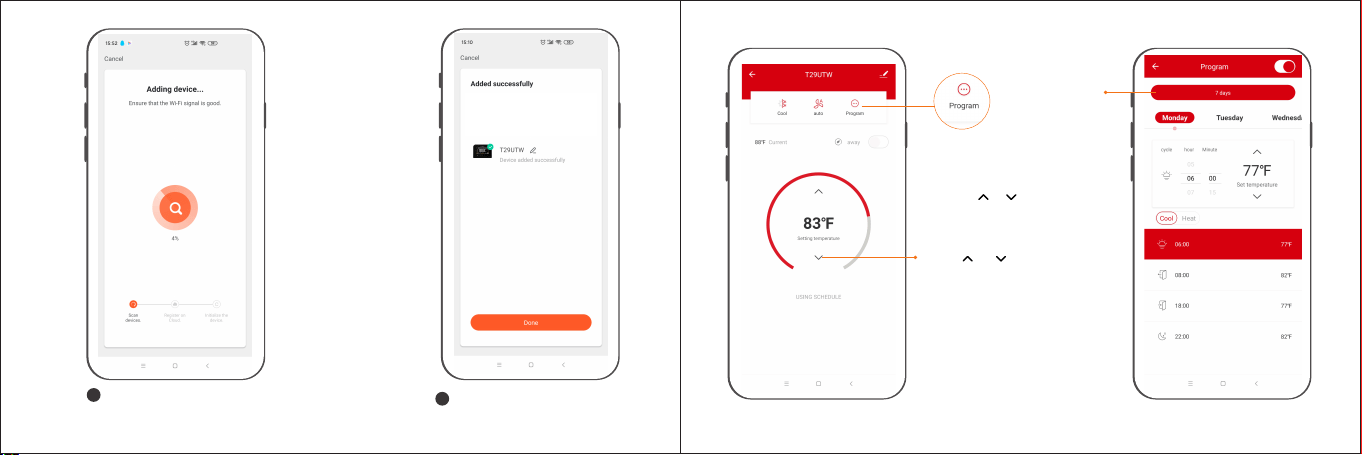
Device added successfully,
click “Done”.
5
Enter automatic search and add
devices, wait a few seconds
4
Press " "、" "
to adjust the temperature.
Click the “program” to enter
the programming interface
for selecting the period of
time of 7-day programming,
press “ ” “ ” to set
temperatures in the different
periods of time.
Click the “7 days”
to select the period

youcanchoose
ON/Auto mode
youcanchoose
Cool/Heat/E M E R/off mode
66
Open the APP of Amazon Alexa click " " ,
Add Device
1
2
Link Alexa
67
Long press the reset button for 6s, Alexa said “Now in setup mode, follow the instructions
on your alexa APP”
Required: The account of Tuya smart and Amazon Alexa must be the same.
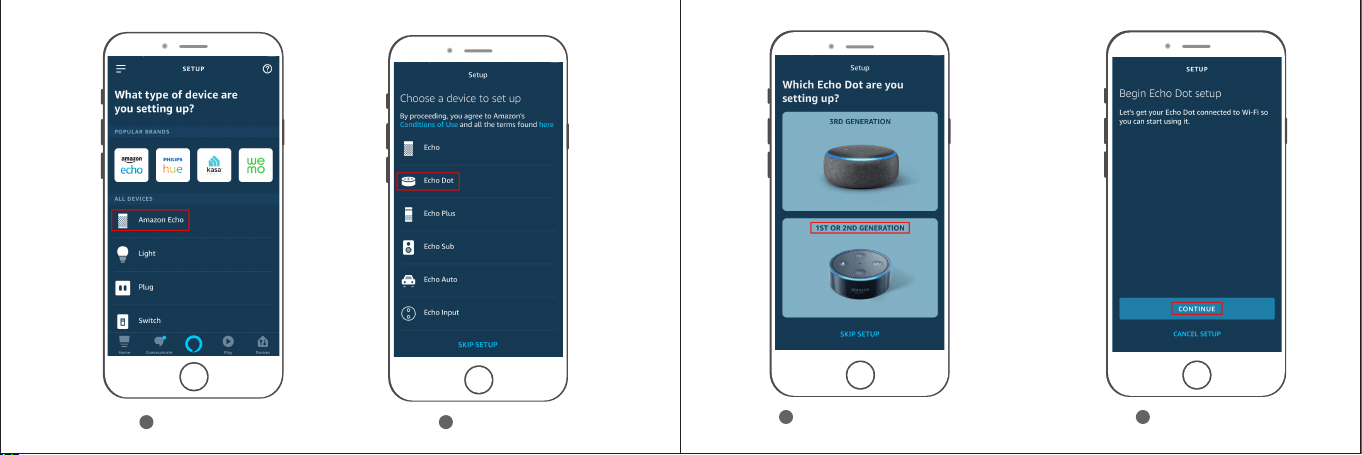
Select your Echo Dot
5
6
4
Echo Dot
CONTINUE
3
Amazon Echo
68 69
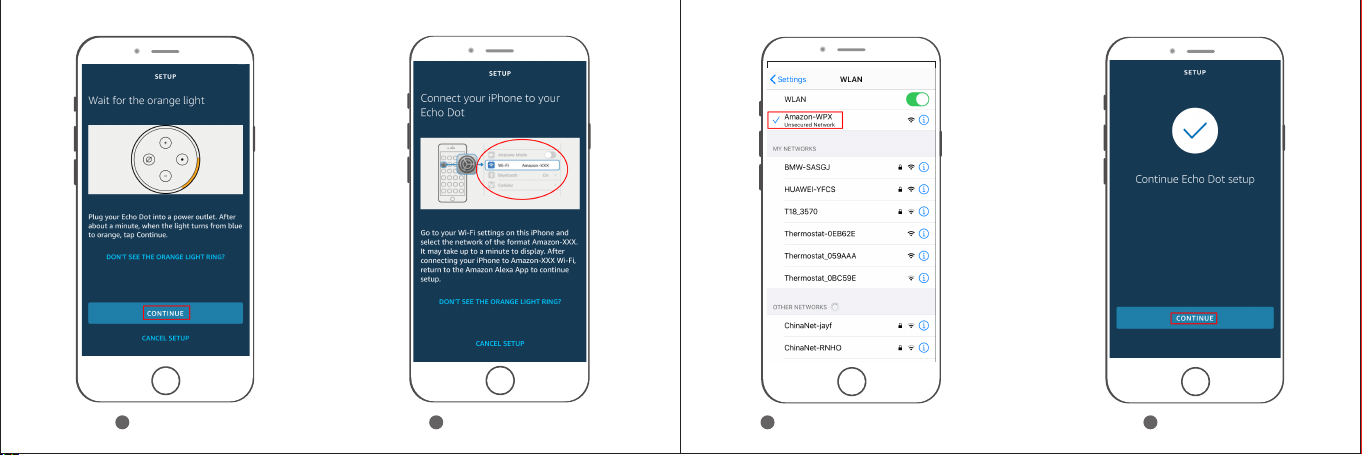
98
Find Amazon Device
Select your Amazon Device
10
CONTINUE
7
CONTINUE
70 71
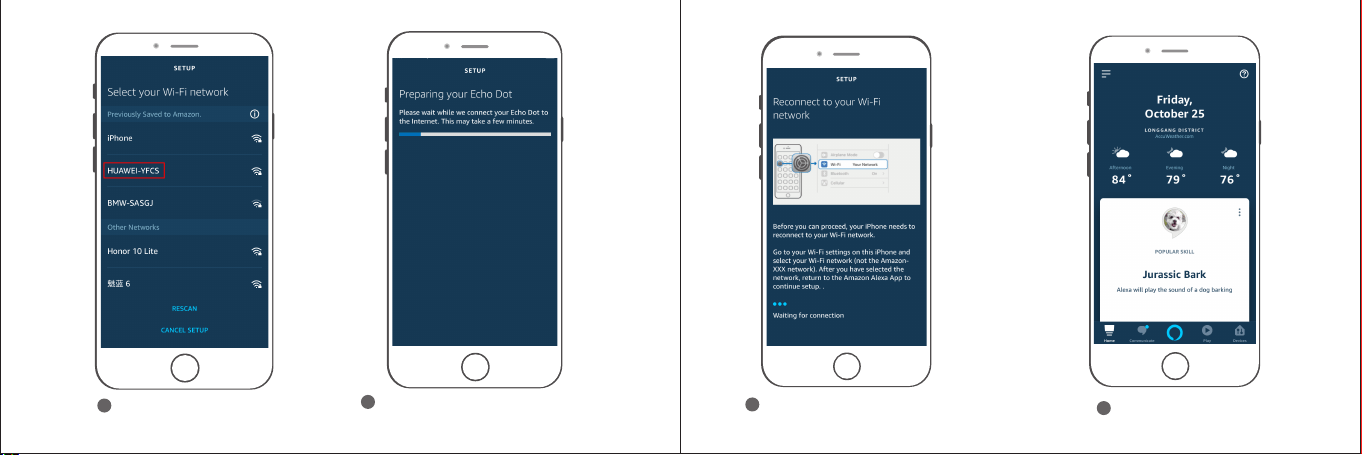
It will access the SETUP and
reconnect your WIFI network Automatically.
13
Link to Alexa successfully.
14
11
Select your WIFI network
Preparing your Echo Dot. Then the
Alexa said“Your Echo Dot is ready”
12
72 73

Click " Skills & Games "
16
Reopen the APP of Amazon Alexa,
click " "
15
Click " " search Tuya Smart
17
Click " Tuya Smart "
18
74 75
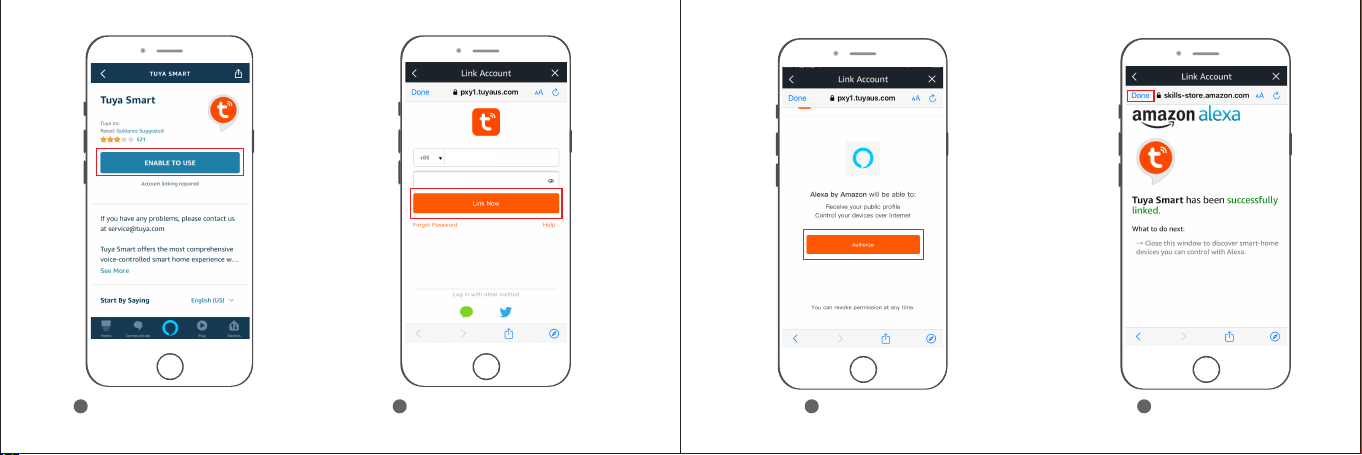
Click " ENABLE TO USE "
19 20
Enter your account & password
of Tuyasmart,click"LinkNow"
21
Click Authorize" "
22
Click Done" "
xxxx xxx x
xxxx xxx x
76 77

23
Click DISCOVER DEVIC" "
24
Discovering......
25
Discovering thermostat
successfully.
CANCEL
DISCOVER D E V I C
Discover Devices
Smar t Hom e devic es must b e dis cover ed
befo re th ey can be u sed wit h Alex a.
Device List
1
Settings
2
Device Settings
3
How to change Fahrenheit and Celsius
78 79
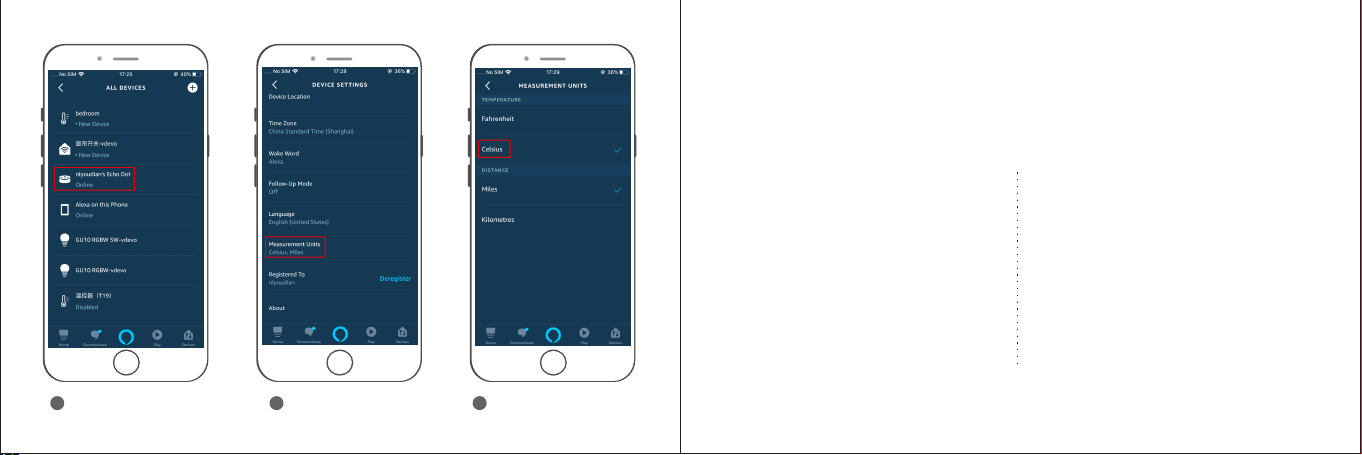
nlyoudian’s Echo Dot
4
Measurement Unit
5
Select Fahrenheit or
Celsius
6
80 81
*Set the bedroom(Device name) to Cool/heat/auto/aux/off mode
“Alexa,change bedroomto Cool mode.”
* You can say “change/switch/turn/make bedroom to cool mode”
“Alexa,what is the temperature in the bedroom.”
“Alexa,set the bedroom to 72 degrees.”
“Alexa,raise the bedroom by 1 degree.”
“Alexa,increase the bedroom by 1 degree .”
“Alexa,drop the bedroom by 1 degree.”
“Alexa,resume my bedroom schedule.”
*You can say such as follow:
“Ok,google,turn on bedroom”
“Ok,google,turn off bedroom”
“Ok,google,set the bedroom to 16 degrees”
Google Assistant
Amazon Alexa
*You can say such as follow:
“Ok,google,change bedroomto Cool mode.”
Tips:you need connect to the Google speaker
* Bedroom is the device name,you can name it yourself.
Voice commands:
*The temperature unit of thermostat and speaker must be the same.