Orbit 62100 Motion-Activated Sprinkler

Product's Documents

Below are documents related to this product, you can read online or download:
User Manual Warranty
62100 photo
User Guide Orbit 62100 Motion-Activated Sprinkler

INSTALLING THE BATTERIES

  • Verify the operation dial is in the “OFF” position.
  • Remove the tray on the back of the sensor by sliding it out.
  • Battery tray is waterproof. You may need to use a screwdriver to push on the tab and slide the compartment out.
  • Insert four AA (1.5V) alkaline batteries (not included) as directed on the tray and replace the tray.

Note:

  1. Do not mix old and new batteries.
  2. Use only alkaline batteries.

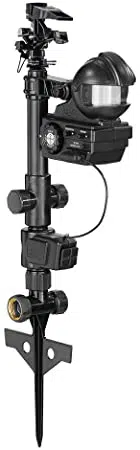
YARD ENFORCER® ASSEMBLY

  • Thread the riser onto the valve.
  • Slip the mounting arm with attached sensor unit onto the riser.
  • Thread the impact sprinkler onto the riser above the mounting arm.
  • Thread the step-spike onto the valve and tighten the swivel coupling.
  • Insert the valve cable into the sensor aligning the grooves.

QUICK-START INSTRUCTIONS

  • Attach an outdoor hose to the step-spike inlet.
  • Position the step-spike in your chosen location, then step on the spike crossbar until the top of it is flush and level with the ground.
  • Make adjustments to the impact sprinkler head so when activated the spray is in the direction of the desired coverage zone.
  • Adjust the duration of the spray by turning the labeled knob.
  • Adjust the range of the sensor by turning the labeled knob.
  • Set the operation dial to your desired on position.
  • Turn on water.
  • Make further adjustments to the impact head, duration, and range as needed to fine-tune the enforced area.

GETTING TO KNOW YOUR YARD ENFORCER®

  1. The sensor detects the combination of both heat and movement to activate the valve.
  2. Move the sensor unit left or right by applying pressure to the unit in either direction.
  3. Face the sensor unit up or down by loosening the attachment knob, moving it into place, and then tightening the attachment knob.

INTELLIGENT SENSING

  • The Yard Enforcer is programed with Intelligent Sensing.
  • This feature automatically increases the time between each of the valve activations to prevent overwatering. Turn this feature off by rotating the dial to “OFF” and holding the 30 minute water
  • Cycle Button for 20 seconds. The sprinkler will activate briefly to confirm. Repeat the above steps to turn Intelligent Sensing back on.
    • Stage 1 Intelligent Sensing: 10 second delay between each valve activation.
    • Stage 2 Intelligent Sensing: 60 second delay between each valve activation. This stage will last for one hour*
    • Stage 3 Intelligent Sensing: 10 minute delay between each valve activation. This stage will last for two hours.
    • Intelligent Sensing Off: 15 second delay between each valve activation.
    • The Yard Enforcer will enter into stage 2 if the valve is activated more than 10 times in any given 10 minute period. After entering into stage 2 it will enter into stage 3 if there are more than 9 activations within the next 15 minutes.

OPERATION DIAL FEATURES

OFF

  • Turns the sensor and valve off. Must be in this mode to install batteries or to turn Intelligent Sensing on or off. Resets the time delays between valve activation if Intelligent Sensing is on.

DAY

  • Activates sensor and valve only during daylight.

NIGHT

  • Activates sensor and valve only when dark.

ALWAYS

  • Sensor and valve are always active.

DURATION ADJUSTMENT KNOB

  • Adjust the duration of the water from approximately 3 seconds to 10 seconds.
  • Turn knob towards the + to increase how long the water sprays.
  • Turn knob towards the – to decrease how long the water sprays.

SENSOR ADJUSTMENT KNOB

  • The sensor range is adjustable up to 40 ft. For smaller animals increase the distance the sensor monitors. For larger ones decrease the distance.
  • Turn knob towards the + to increase the distance the sensor monitors.
  • Turn knob towards the – to decrease the distance the sensor monitors.

MIN. WATER CYCLE BUTTON

  • Press button to activate a 30 minute watering cycle.
  • Press button again to stop the 30 minute watering cycle.
  • A slight delay allows the user to move a safe distance away from the unit before watering begins

IMPACT SPRINKLER OPERATION

ADJUSTING THE PATTERN

  1. Determine where you want the stream of water to go and position a friction collar to the left and right of that area.
  2. Place the trip pin in-between the two friction collars in the down position. If you want to water in a 360º circle push the trip pin to the up position.

ADJUSTING THE DISTANCE OF SPRAY

  • There are two ways to reduce the distance of the spray.
  • Screw diffuser pin into stream.
  • Press down deflector shield and turn distance control knob.

YARD ENFORCER® TIPS AND TRICKS

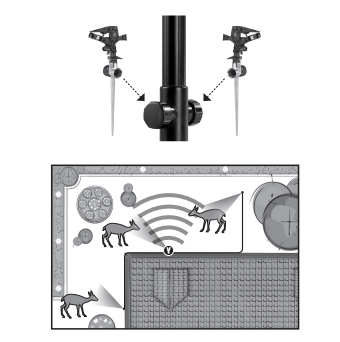
  • Position the sensor and sprinkler in the direction of where the pest enters the yard to chase them away before they reach the plants and landscaping you are protecting.
  • Certain animals are intelligent enough to recognize the pattern and range of the Yard Enforcer and learn how to avoid the spray.
  • Weekly adjustments may be necessary to continue to discourage these animals. Another option is to create a sprinkler "minefield" to better deter certain types of animals.
  • Create a sprinkler "minefield" by attaching additional sprinklers to the riser outlets.

TROUBLESHOOTING

Water is leaking from joints.

Check if:

  • Connections and swivel couplings are tight.
  • Washer is missing, pinched, or damaged and replace if needed.

Sprinkler won’t activate.

Check if:

  • Operation dial is set to appropriate time of day.
  • Valve cable is connected to sensor unit.
  • Batteries are low and replace if needed.
  • Hose faucet is on.

Sensor not detecting movement.

Check if:

  • Range adjustment is set too low and adjust range if needed.
  • Angle of sensor on mounting arm is too steep and adjust sensor angle if needed.
  • Object in front of sensor is moving and producing heat.
  • Intelligent Sensing increases the delay between activations.
  • Deactivate Intelligent Sensing mode if desired (see Intelligent Sensing section).
  • There is dust, dirt or hard water build-up on the white lens which will limit sensitivity. Wipe the lens gently with a damp cloth if needed.

Sprinkler is activating without movement.

Check if:

  1. Sensor is detecting tree movement with the sun behind the tree.
  2. Activate Intelligent Sensing mode if desired.
  3. Sensor is being triggered falsely. Ensure sensor is not pointed at moving objects, such as water or windy areas.

Sprinkler is taking longer to turn off.

Check if:

  1. Batteries are low and replace if needed.
  2. Working Water Pressure
  3. Minimum: 20 PSI
  4. Maximum: 100 PSI
  5. If you do have high pressure Orbit® recommends adding a pressure reducer to increase hose life).

Working Temperature

  • Maximum: Do not operate at temperatures exceeding 120°F
  • Minimum: Keep from freezing. To prevent damage from freezing water, take the Yard Enforcer® inside and remove the battery before the first winter frost.

Warnings

  1. For outdoor use with cold water only.
  2. Not for use on appliances.
  3. Do not spraynear electrical connections.
  4. Improper setup or use of sprinklers increases the risk of water damage to property. Limit the supply of water to the sprinkler by opening the valve to a ¾ turn position. Use high quality hoses and maintain pressures within the working pressure range stated above. Install a pressure reducer if you have high pressure from the hose faucet. Only opening the tap part way does NOT lower water pressure.
  5. Use the step on the stake when pushing into the ground. Do not apply pressure or weight on the sensor housing or sprinkler. (If you do have high pressure Orbit® recommends adding a pressure reducer to increase hose life).

Reference file: Orbit 62100 Motion-Activated Sprinkler

Specifications

Indexed Terms: Motion-Activated

Orbit 62100 Questions and Answers

  • Total questions: 17
  • Questions unAnswered : 11

Q: I have 3 6200's, all purchased last fall. All worked perfectly at first, but now 2 of the 3 no longer work. I have done ALL the things listed in the manual and can only get them to run on the 30 minute cycle. Motion sensing doesn't trigger them anymore. Any suggestions? Reply

Q: The sprinkler is not producing enough pressure to spray the water. the water comes out in a slow stream. What is causing this? My water pressure is fine. Reply

Q: What is that extra part that is unidentified in the manual for? Reply

Questions and Answers

Related Products

Product Orbit 96883 image
Orbit 96883 Sprinkler Timer
2025-06-30 1 docs