
i
IMPORTANT SAFETY INFORMATION
Read all instructions carefully prior to use. For your safety, the information detailed in this manual
should be followed. Improper use and/or handling can cause serious damage to the appliance
and/or to the user including but not limited to fire, explosion, and/or electric shock, resulting in
personal injury, or death. This dishwasher is intended for domestic use only; any other use may
invalidate the warranty.
Use this appliance only for its intended purpose as described in this Owner′s Manual.
Electrical Safety
• The dishwasher must be connected to a grounded permanent electrical system by a licensed
plumber.
• Improper connection of the equipment-grounding conductor can result in a risk of electric
shock.
• Do not, under any circumstances, cut or remove the third (ground) prong from the power cord.
• Check with a qualified electrician or service representative if you are in doubt whether the
appliance is properly grounded.
• Use only the correct power supply with appropriate amperage. Do not exceed the suggested
power ratings.
• To minimize the possibility of electric shock, disconnect this appliance from the power supply
before attempting any maintenance.
• Turning the dishwasher OFF does not disconnect the appliance from the power supply.
• Use a power supply that cannot be turned off by a wall switch or pull chain.
• Do not start or stop the dishwasher by switching the circuit breaker’s power on and off.
• Never plug or unplug the dishwasher with wet hands.
• Always turn the unit off and disconnect it from the power supply before cleaning or
maintenance.
• If the power cord is damaged, it must be replaced by the manufacturer, a service agent, or a
qualified technician.
• Keep the unit and control panel dry; do not spray water directly on the control panel to avoid
electric shock.
Caution: Hydrogen gas is flammable. Under certain conditions, hydrogen gas may be produced in
a water heater that has not been used for more than two weeks. To prevent the possibility of
damage and/or injury, turn on all hot water faucets and allow them to run for several minutes. Do
this before using any electrical appliance connected to the hot water system. This simple
procedure will release any built-up hydrogen gas. Since hydrogen gas is flammable, do not smoke,
use an open flame, or use any appliance during this process.
ii
Note: This owner’s manual is provided for reference use only. Specifications may change without
prior notice. Refer to the product label on the back of your dishwasher for the latest technical
information.
General Safety
• Installation, maintenance and repair should be performed by a qualified installer. Work by
unqualified persons could be dangerous and may void the warranty.
• This dishwasher should be properly installed and placed in a location in accordance with the
Installation Instructions prior to operation.
• Do not attempt to repair or replace any part of your dishwasher unless it is specifically
recommended in this manual.
• All other service maintenance should be completed by a qualified technician.
• Use this appliance only for its intended purpose as described in this Owner’s Manual.
• This dishwasher must be installed indoors.
• This appliance is not intended for use by children.
• Do not allow children to play with, on, or inside this or any appliance.
• Close supervision is necessary if this appliance is used near children.
• Use caution when opening or closing the door to avoid injury.
• Use only powder, tabs, liquid detergents, or rinse agents recommended for use in a
dishwasher and keep them out of the reach of children.
• Using a detergent that is not specifically designed for dishwashers may have an undesired
result such as excessive suds.
• To avoid damage to the door seal, place sharp items strategically.
• Load sharp knives handle-side up to reduce the risk of injury.
• Do not wash plastic unless it is marked as dishwasher safe. For plastic items not marked as
dishwasher safe, refer to the manufacturer’s recommendations.
• Do not operate your dishwasher unless everything enclosed is securely in place.
• Do not tamper with controls.
• Do not sit or stand on the door or dish rack of the dishwasher.
• The door should remain closed. Left in the down position, the door presents a tripping hazard.
• Do not discard the dishwasher without removing the door.
• Do not store or use combustible materials such as gasoline or other flammable vapors and
liquids in the vicinity of this or any other appliance.
• Contents washed in Sanitize or Hi Temp mode may be hot to the touch. Use care before
handling.
• Do not wash non-dishware items such as furnace filters, paint brushes, etc. in your
dishwasher. Discoloration, staining, and/or other damage to dishwasher may result.
• Do not touch the heating element during or immediately after use.

iii
Table of Contents
IMPORTANT SAFETY INFORMATION ................................................................................................ I
TABLE OF CONTENTS ...................................................................................................................... III
FIRST TIME OPERATING INSTRUCTIONS ........................................................................................ 1
INTRODUCTION .................................................................................................................................. 1
PARTS IDENTIFICATION .................................................................................................................... 2
Front View with Door Open ..................................................................................................................................................... 2
Front View with Door Closed ................................................................................................................................................... 3
UNPACKING THE DISHWASHER ....................................................................................................... 3
FEATURES OF YOUR NEW DISHWASHER ....................................................................................... 4
Multiple Filter System .............................................................................................................................................................. 4
Smart Wash System ............................................................................................................................................................... 4
How Your Dishwasher Cleans ................................................................................................................................................ 4
OPERATING INSTRUCTIONS ............................................................................................................. 4
Pre-Check ............................................................................................................................................................................... 4
Quick Start ............................................................................................................................................................................... 5
Control Panel........................................................................................................................................................................... 5
Cycle Chart .............................................................................................................................................................................. 7
PREPARING AND LOADING DISHES ................................................................................................ 8
Dish Preparation ..................................................................................................................................................................... 8
Loading the Lower Basket ....................................................................................................................................................... 8
Loading the Upper Basket ....................................................................................................................................................... 9
Adjusting the Upper Basket ..................................................................................................................................................... 9
Loading the Silverware Basket.............................................................................................................................................. 10
Forgot to Add a Dish? ........................................................................................................................................................... 11
FILLING DETERGENT AND RINSE AID DISPENSERS ................................................................... 11
Only Use Proper Detergent ................................................................................................................................................... 11
Filling the Detergent Dispenser ............................................................................................................................................. 11
Filling the Rinse Aid Dispenser ............................................................................................................................................. 13
Completing a Wash Cycle ..................................................................................................................................................... 14
DISHWASHER MAINTENANCE ........................................................................................................ 15
Cleaning the Exterior ............................................................................................................................................................. 15
Cleaning the Interior .............................................................................................................................................................. 15
Cleaning the Filter System .................................................................................................................................................... 15
Cleaning the Lower Spray Arm ............................................................................................................................................. 18
Protecting Against Freezing .................................................................................................................................................. 18
Preparation for Storage ......................................................................................................................................................... 18
Moving the Dishwasher ......................................................................................................................................................... 18
TROUBLESHOOTING ....................................................................................................................... 19
Error Codes ........................................................................................................................................................................... 19
Troubleshooting Guide .......................................................................................................................................................... 20
SPECIFICATIONS .............................................................................................................................. 22
EDGESTAR LIMITED WARRANTY ................................................................................................... 23

1
First Time Operating Instructions
Before use, make sure all packaging labels and materials are removed from the unit. Be
sure to keep track of all included parts and pieces before discarding the packaging
materials. It is advised that you keep the original box and packaging materials in case you
ever need to move or ship the appliance in the future.
Introduction
Thank you for purchasing this EdgeStar dishwasher. We hope that this purchase will be
the beginning of a lasting and rewarding relationship between you and EdgeStar. We will
provide the customer support and exemplary products necessary to nurture that
relationship.
This manual contains important information regarding the proper installation, use, and
maintenance of your dishwasher. Following this manual will ensure that your product will
work at its peak performance and efficiency.
Please save the original product packaging in case you need to safely transport your
dishwasher.
For Your Records:
Please write down the model number and serial number below for future reference.
Both numbers are located on the ratings label on the back of your unit and are
needed to obtain warranty service. You may also want to staple your receipt to this
manual as it is the proof of your purchase, and is also needed for service under your
warranty.
Model Number:
Serial Number:
Date of Purchase:
For a more efficient experience, please do the following before contacting customer service:
• If you received a damaged product, immediately contact the retailer or dealer that sold you
the product.
• Read and follow this instruction manual carefully to help you install, use, and maintain your
dishwasher.
• Read the troubleshooting section of this manual as it will help you diagnose and solve
common issues.
• Visit us on the web at https:/www.edgestar.com to register your product, download product
guides, and access additional troubleshooting resources and up-to-date information. You
can also find an interactive self-diagnostic tool at https://support.edgestar.com
• If you need warranty service, our friendly customer service representatives are available
via email at [email protected].
2
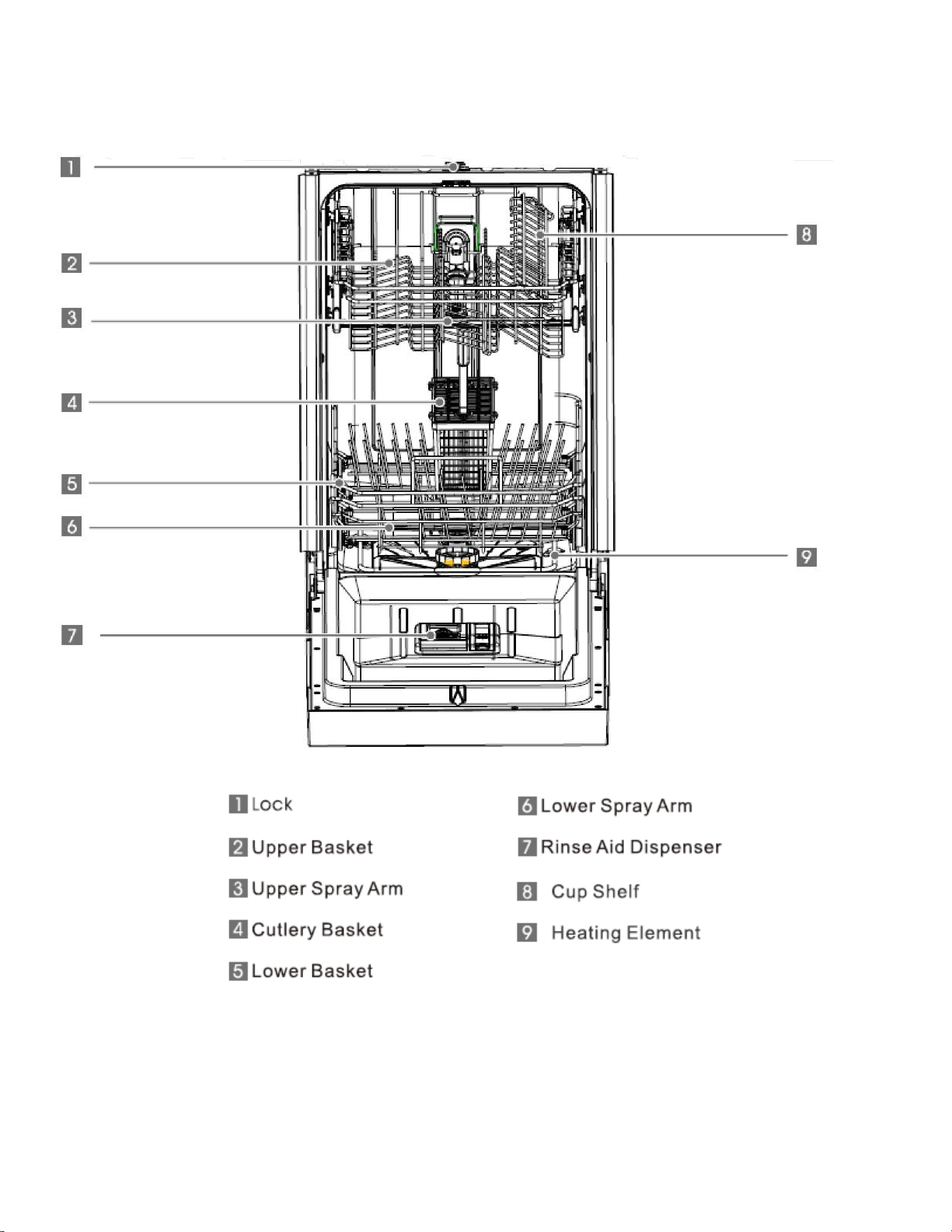
Parts Identification
Front View with Door Open
3
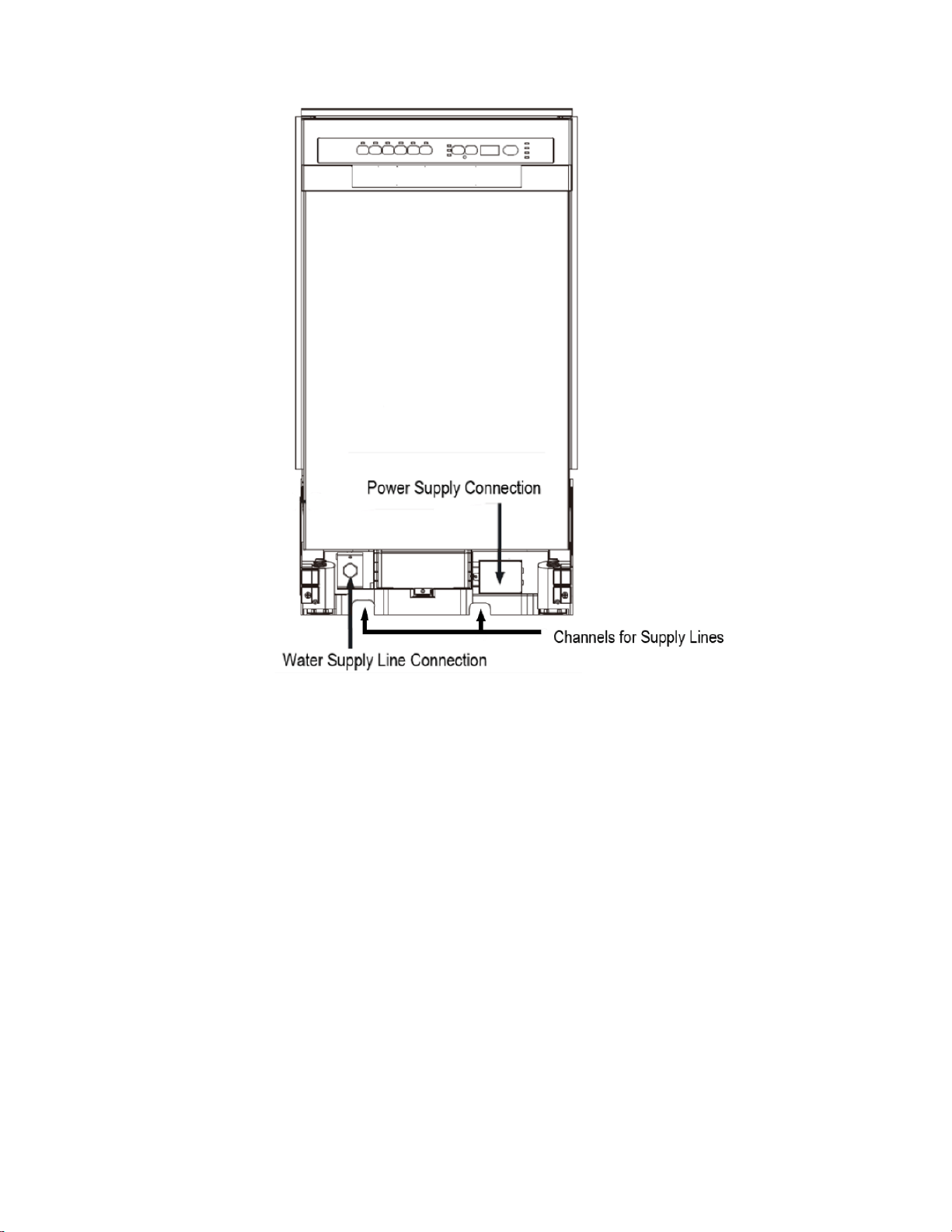
Front View with Door Closed
Unpacking the Dishwasher
• Use at least two people to move and install the dishwasher to prevent injuries. Always lift the
dishwasher to move it as sliding it can damage its base and feet, or floor surfaces.
• Carefully remove the packaging materials and inspect the dishwasher for damage. If the
dishwasher is damaged immediately contact the dealer that sold you the product. We
recommend that you retain the carton and all packing materials in case you ever need to
move or ship the appliance in the future.
• Remove any shipping labels or tape from your dishwasher before using. Do not use sharp
instruments, rubbing alcohol, flammable fluids, or abrasive cleaners to remove labels or tape.
These products can damage the surface of your dishwasher.
• Check to make sure all provided installation accessories are included. If any parts are
missing, please contact customer service. Make sure to locate and set aside the dishwasher’s
kick plate. The kick plate is attached to the packing material of the dishwasher.
• Put the dishwasher on a level and flat surface that is able to support its entire weight.
• DO NOT remove the sound-absorbent padding that surrounds the exterior of the tub of the
dishwasher.
4
Features of Your New Dishwasher
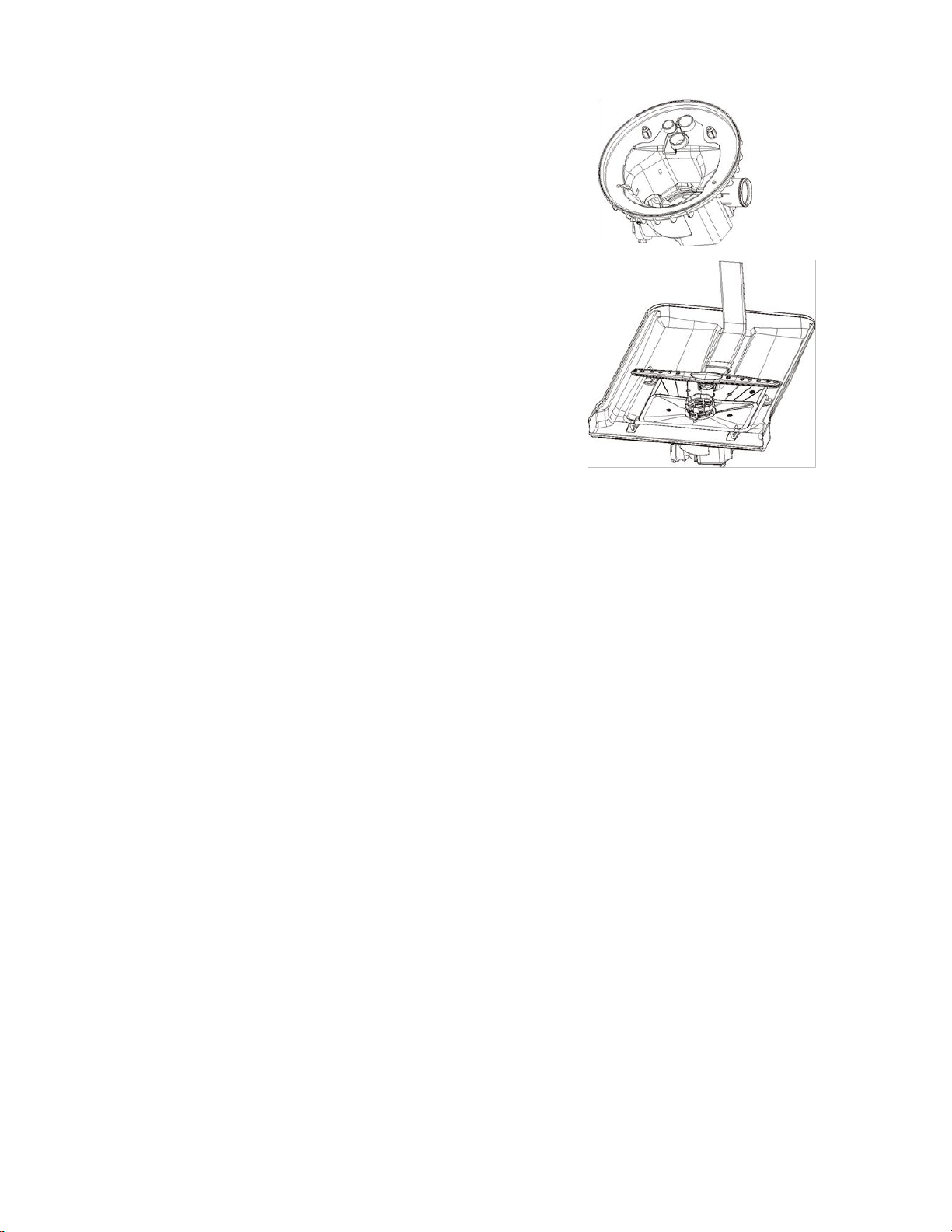
Multiple Filter System
Your dishwasher has a Multiple Filter System. In the system
there are three filters that can separate soiled water and
clean water in different chambers. This Multiple Filter
System improves your dishwasher’s performance with less
water and energy use.
Smart Wash System
Your dishwasher also has a Smart Wash System. When a
partial load of lightly soiled dishes is placed into the unit, a
short wash cycle will automatically be performed. When a full
load of heavily soiled dishes is placed into the unit, a heavy
wash cycle will automatically be performed. The Smart Wash
System can determine the length of the cycle required to
clean the dishes and will clean more efficiently every time.
How Your Dishwasher Cleans
Your dishwasher cleans by spraying a mixture of hot water and detergent onto soiled dish surfaces
through the two spray arms. The unit first fills with water covering the filter area. Water is then
pumped through the multiple filter system and spray arms. Separated soil particles go down the drain
as water is pumped out and replaced with clean water. The number of water fills will vary with the
cycle being used.
Cycle times are approximate and will vary with the options selected. Hot water is necessary to
activate the detergent and melt fatty food soils. An automatic sensor checks the incoming water
temperature. If it is not at the appropriate temperature the timer will delay the cycle to allow automatic
water heating during the main wash. When the Hi temp or Sanitize option is selected an even higher
temperature will be used to handle heavier soiled loads.
Operating Instructions
To get the best performance from your dishwasher, read all operating instructions in this manual.
Pre-Check
Pre-check the following things before using the dishwasher:
1. The dishwasher is level.
2. The inlet valve is open.
3. The hot water valve is open.
4. There are no leaks at the drain or inlet ports.
5. The unit’s power plug is connected to a grounded outlet.
6. The power is switched on.
7. There are no kinks in the drain and inlet hoses.
8. All packing and printed materials are removed from the dishwasher.
5
Quick Start
1. Load the dishwasher (see Preparing and Loading Dishes section.)
2. Add detergent (see Filling the Detergent Dispenser.)
3. Add LIQUID rinse aid (see Filling the Rinse Aid Dispenser.) Rinse aid greatly improves drying
and reduces water spots and film. The heated drying option will not perform as well without
rinse aid. If the rinse aid is low or none is added the Status Display will show the error code
“LSb.”
4. Close the door.
5. Select the desired Wash Cycle (see Control Panel and Cycle Chart.)
6. Select the desired Options (see Control Panel.) The indicator light(s) next to the Options button
will glow when selected.
7. Run the hot water faucet nearest the dishwasher until the water is hot, then turn it off.
8. To Start, press Start/Cancel (see Control Panel.)
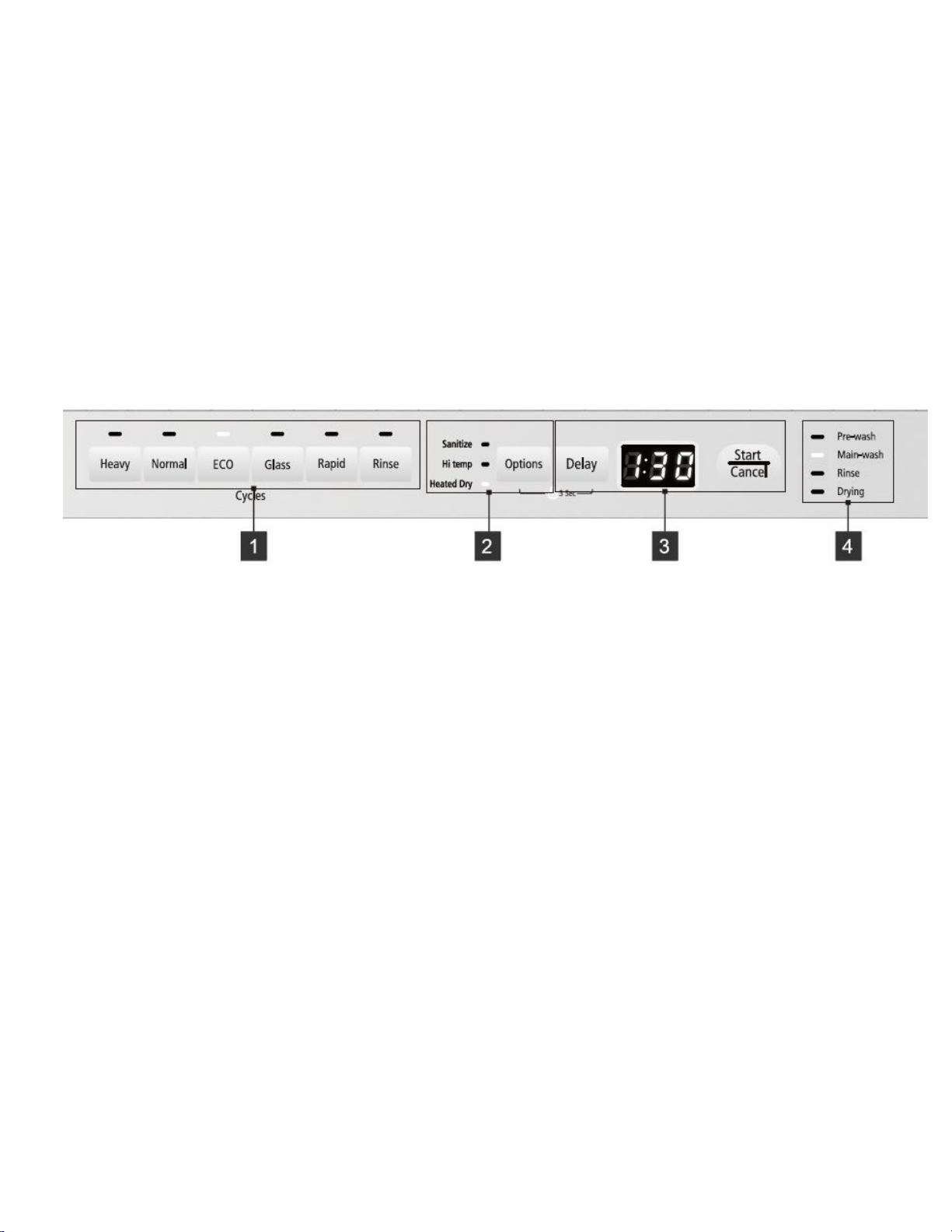
Control Panel
1. Wash Cycles
• Heavy – This cycle is for hard to clean, heavily soiled dishes, pots and pans.
• Normal – This is the standard cycle. It is for regularly soiled dinner dishes and silverware.
• ECO – Suitable for cleaning normally soiled tableware. This is the most efficient cycle in
terms of energy and water consumption.
• Glass – For lightly soiled loads such as glasses, crystal and china.
• Rapid – A shorter wash for lightly soiled loads that do not need drying.
• Rinse – Use for rinsing dishes, glasses and silverware that will not be washed right away.
2. Options
• Sanitize – This option maintains the water temperature at 156°F (69°C) max. The max
temperature may not be reached if the incoming water temperature is too low. The
Sanitize option is only available for Heavy, Normal and ECO cycles.
• Hi Temp – This option maintains the water temperature at 140°F (60°C) max. The Hi
Temp option is available for Heavy, Normal, ECO and Glass cycles.
• Heated Dry – When this option is selected the electric heater works during the drying
cycle. The Heated Dry option is available for all cycles except Rinse.
3. Additional Features
• Delay – To delay the start of a selected cycle, press the Delay button until the desired
delay time shows (in hours) on the display. You can delay the start for 1 to 24 hours.
Press Start/Cancel once to begin the delay timer. To cancel the delay start function before
the time period is over, press the Start/Cancel button again.

6
• Status Display – If the Delay Start function is selected, the number of HOURS (H:01 –
H:24) remaining in the delay time is shown. After a Wash Cycle is selected, the remaining
time of the cycle is shown in hours and minutes (2:45 – END or -:--.) In certain situations
that are critical to the dishwasher’s function and safe operation, the display may show
error codes. If error codes are displayed, contact the dealer for help in trouble shooting
the problem. See error codes on page 18.
• Start/Cancel – Press to start a Wash Cycle or to start the Delay time. Press again to
cancel the cycle. When canceling a cycle the timer will count down from 60 seconds to
allow the unit to drain. If you want to Pause a cycle (e.g. to load additional plates), simply
open the door. WARNING - contents may be hot! Close the door and press start again to
continue the cycle.
• Control Panel Lock – To disable the Control Panel press and hold both the Options and
Delay buttons for 3 seconds (the lock indicator light will turn on.) To turn the Control Panel
back on press and hold both buttons for another 3 seconds (the lock indicator light will
turn off.)
4. Cycle Progress Indicator
• When Pre-wash, Main-wash, Rinse or Drying is lit the Wash Cycle is currently in that
stage.
• When the selected cycle is complete all indicator lights will be turned off and the display
will read END.
7
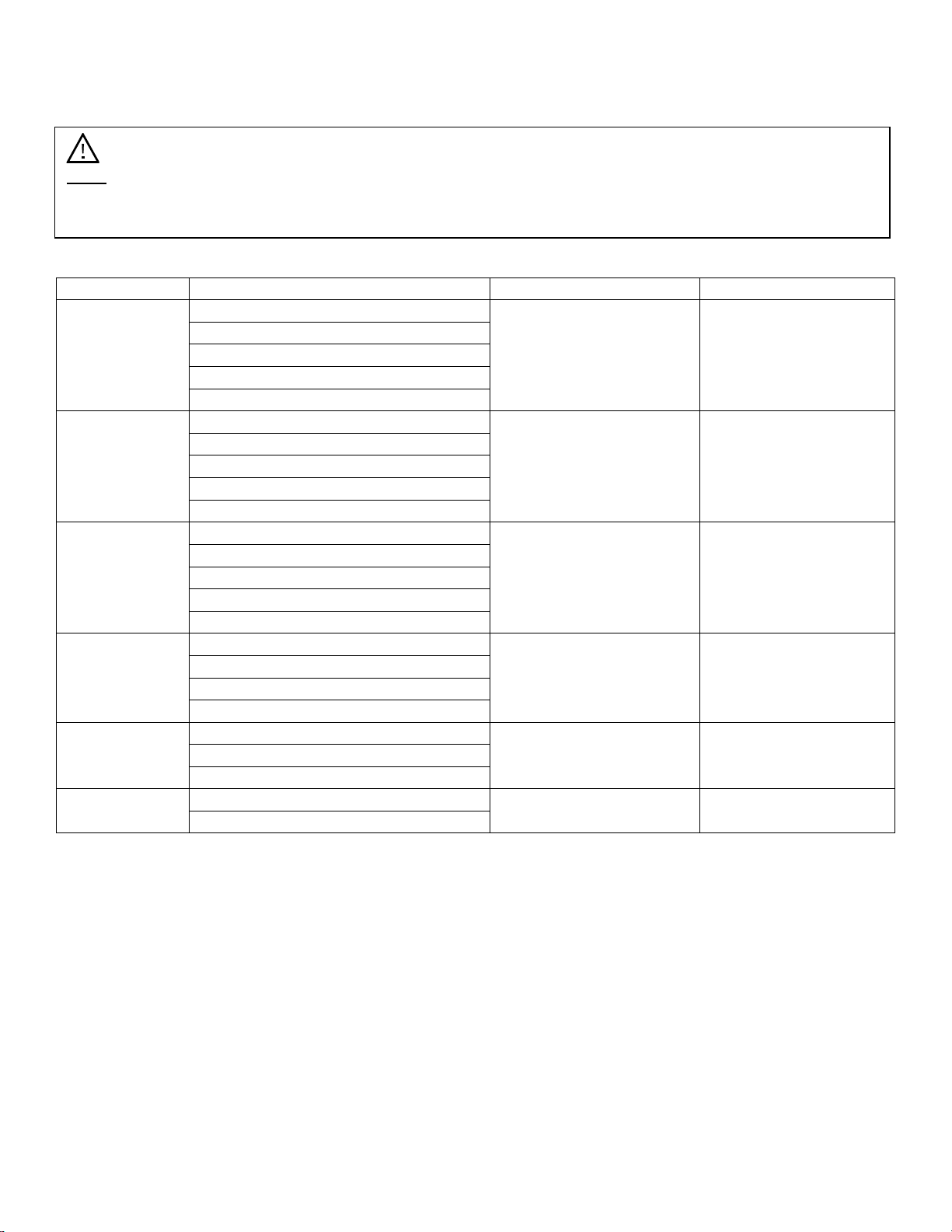
Cycle Chart
Wash Cycle
Description
Water Use (Gal./Lit.)
Cycle Time (Min.)
Heavy
Pre-wash
5.2 G / 19.7 L
145 - 160
Main-wash (140°F/60°C)
Rinse (149°F/65°C)
Rinse with Sanitize (156°F/69°C)
Drying
Normal
Pre-wash
2.5-4.9 G / 9.5-18.5 L
135 - 155
Main-wash (131°F/55°C)
Rinse (140°F/60°C)
Rinse with Sanitize (156°F/69°C)
Drying
ECO
Pre-wash
4.1 G / 15.5 L
105 - 130
Main-wash (122°F/50°C)
Rinse (131°F/55°C)
Rinse with Sanitize (156°F/69°C)
Drying
Glass
Pre-wash
4.1 G / 15.5 L
95 - 100
Main-wash (122°F/50°C)
Rinse (131°F/55°C)
Drying
Rapid
Pre-wash
3.3 G / 12.5 L
60
Main-wash (122°F/50°C)
Rinse (131°F/55°C)
Rinse
Pre-wash
1.8 G / 6.7 L
20
Rinse
Note: The remaining time can suddenly increase or decrease by several minutes. This means the
Smart Sensor has checked the soil level and determined if additional water fills need to be added
or subtracted.
8
Preparing and Loading Dishes
Dish Preparation
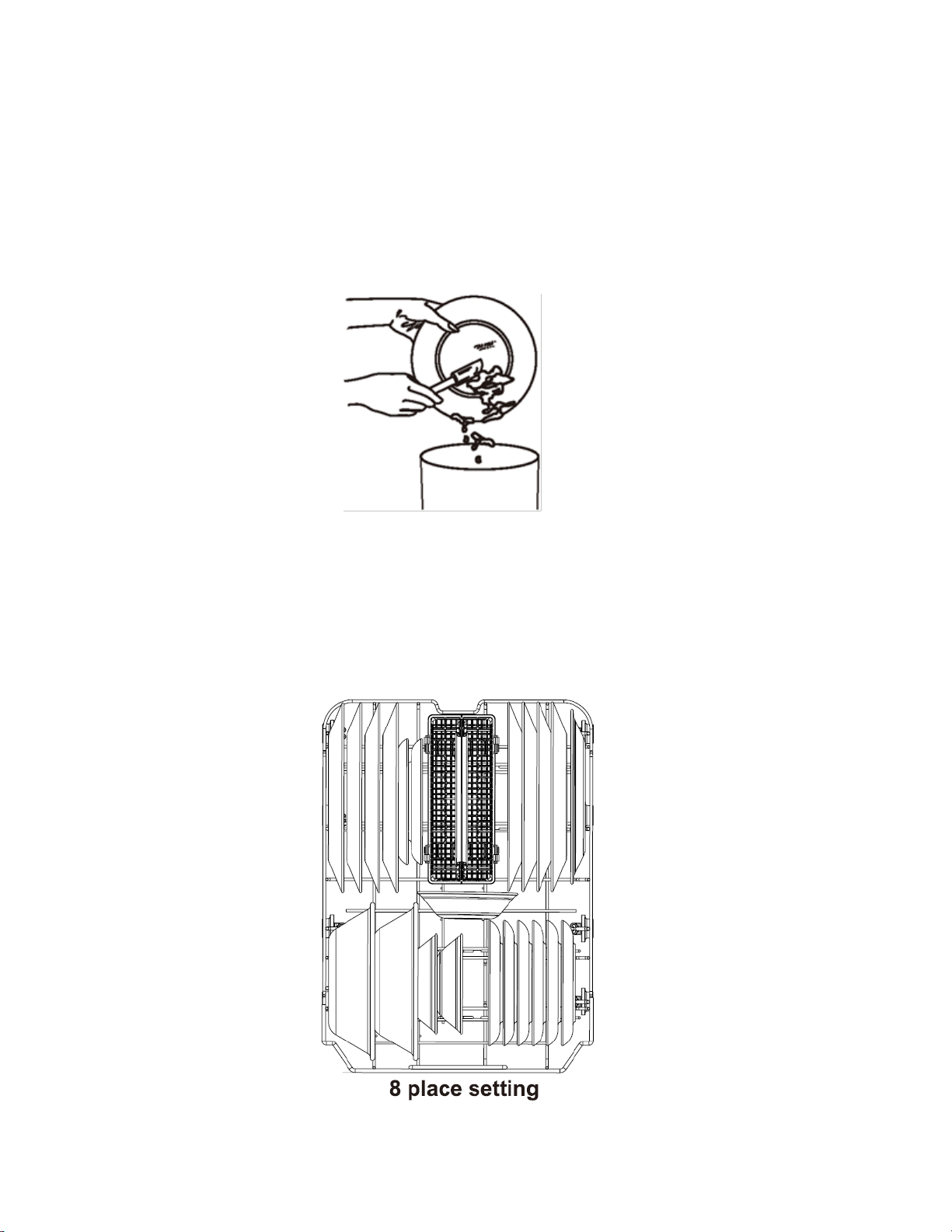
Scrape away large pieces of food, bones, pits, toothpicks, etc. The continuously filtered wash system
will remove the remaining food particles. Burned-on foods should be loosened before loading. Empty
any liquids from glasses and cups. Foods such as mustard, mayonnaise, vinegar, lemon juice and
tomato based products may cause discoloration of stainless steel and plastics if allowed to sit for a
long period of time. Unless the dishwasher is to be operated at once it is best to run the Rinse Cycle
to wash off these food soils. If the dishwasher drains into a food disposer, be sure disposer is
completely empty before starting dishwasher.
Loading the Lower Basket
The lower basket is designed for larger items that are the most difficult to clean such as dinner plates,
soup bowls, pots, pans, lids and casserole dishes. The largest items should be placed along the
edges so they do not interfere with the upper spray arm rotation, and to make sure they do not
prevent the detergent dispenser from opening. Load large items such as pots and pans into the
dishwasher so their open sides are slanted or face downwards to allow water to drain. The silverware
basket should be located at the center rear as shown below.
9
Loading the Upper Basket
The upper basket is designed for glasses, mugs, cups, small plates, bowls and plastic items marked
“dishwasher safe.” For best results, place the items with their soiled surfaces facing down or toward
the center. Tilt slightly for better drainage.
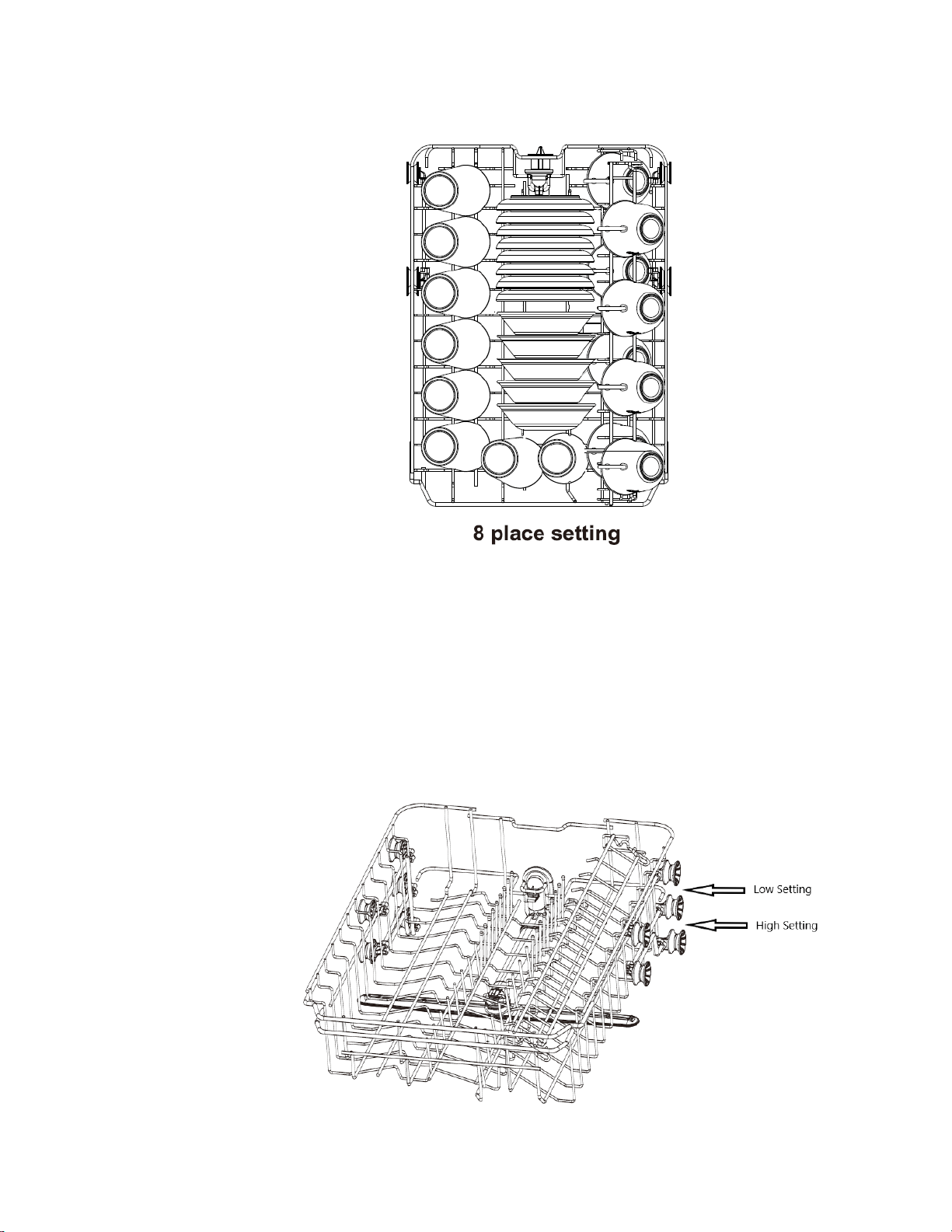
Adjusting the Upper Basket
The upper basket can be raised to allow for dishes up to 11” in the lower basket. Make sure dishes
loaded in the lower basket do not interfere with the rotation of the spray arm which is located on the
bottom of the upper basket. (Check this by rotating the spray arm by hand.) If the spray arm comes in
contact with dishes in the lower basket, raise the upper basket.
To raise the upper basket, completely remove the basket from the dishwasher by pulling it forward
and removing it from the track. Next, slide the basket back onto with the track between the two sets of
rollers labeled “High Setting” as illustrated below.
10
Loading the Silverware Basket
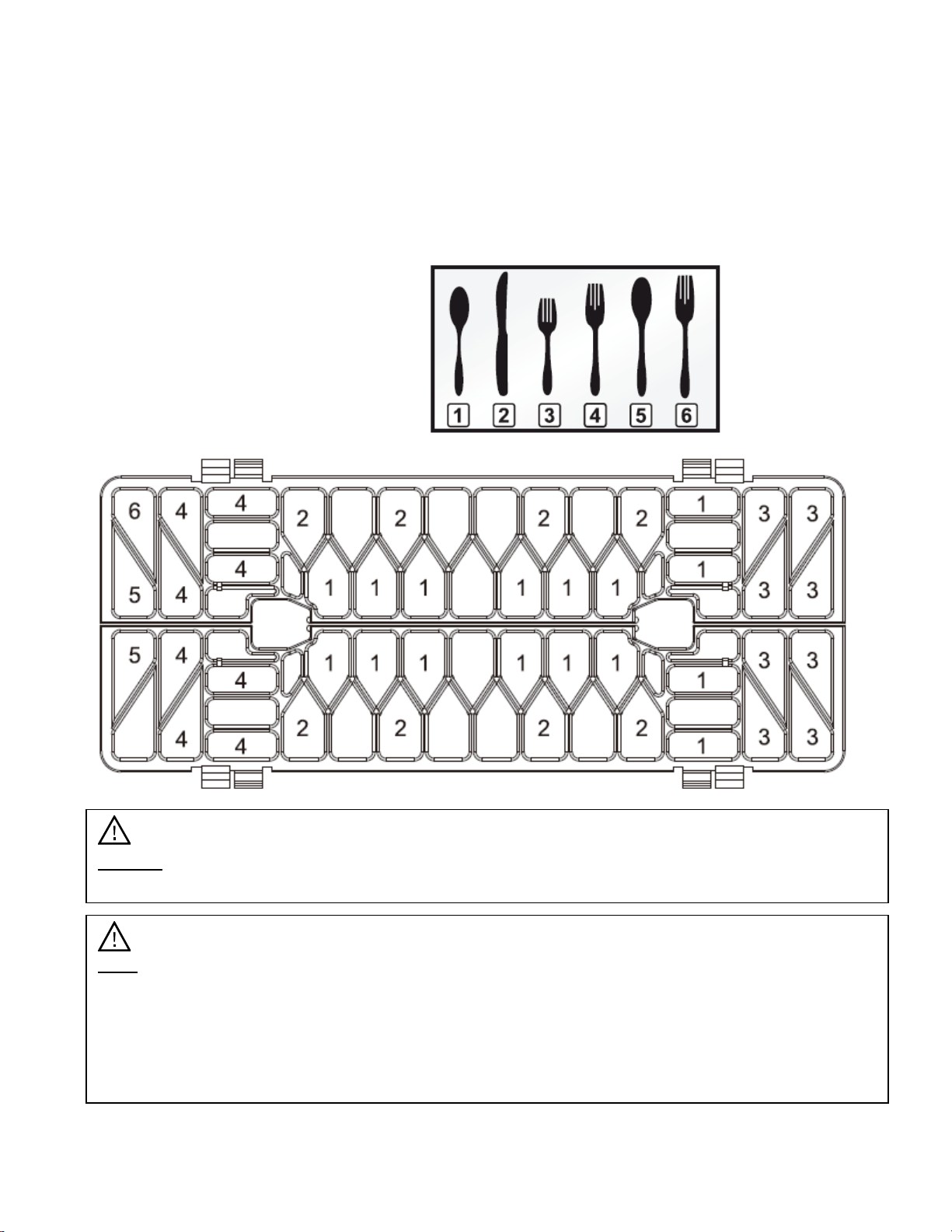
The silverware basket is divided into separate compartments (illustrated below) to allow for maximum
cleaning efficiency. Spoons and forks should be placed in the basket with their handles pointing
downward. Knives and other sharp utensils should be placed in the basket with their handles pointed
upward. Longer utensils should be placed in the horizontal position on the upper basket’s cup shelf
instead of in the silverware basket.
For best results, DO NOT overload the silverware basket and be sure that similar pieces of silverware
DO NOT nest together.
1. Spoons
2. Knives
3. Salad Forks
4. Dinner Forks
5. Large Spoons
6. Large Forks
Caution: Do not let any item extend through the bottom of the cutlery basket. This may
prevent the spray arm from spinning.
Note:
• For personal safety and the highest quality wash, securely place all silverware in the
basket.
• Be sure the similar pieces of silverware do not nest together.
• Place most silverware with the handles down.
• Place knives and other potentially dangerous utensils handles-up.
11
Forgot to Add a Dish?
A dish can be added any time before the detergent dispenser opens:
1. Open the door slightly and wait several seconds for the wash cycle to stop.
2. You can open the door completely after the spray arms stop spinning.
3. Add remaining dishes.
4. Close the door.
5. Press the Start/Cancel button to continue the wash cycle.
Filling Detergent and Rinse Aid Dispensers
Only Use Proper Detergent
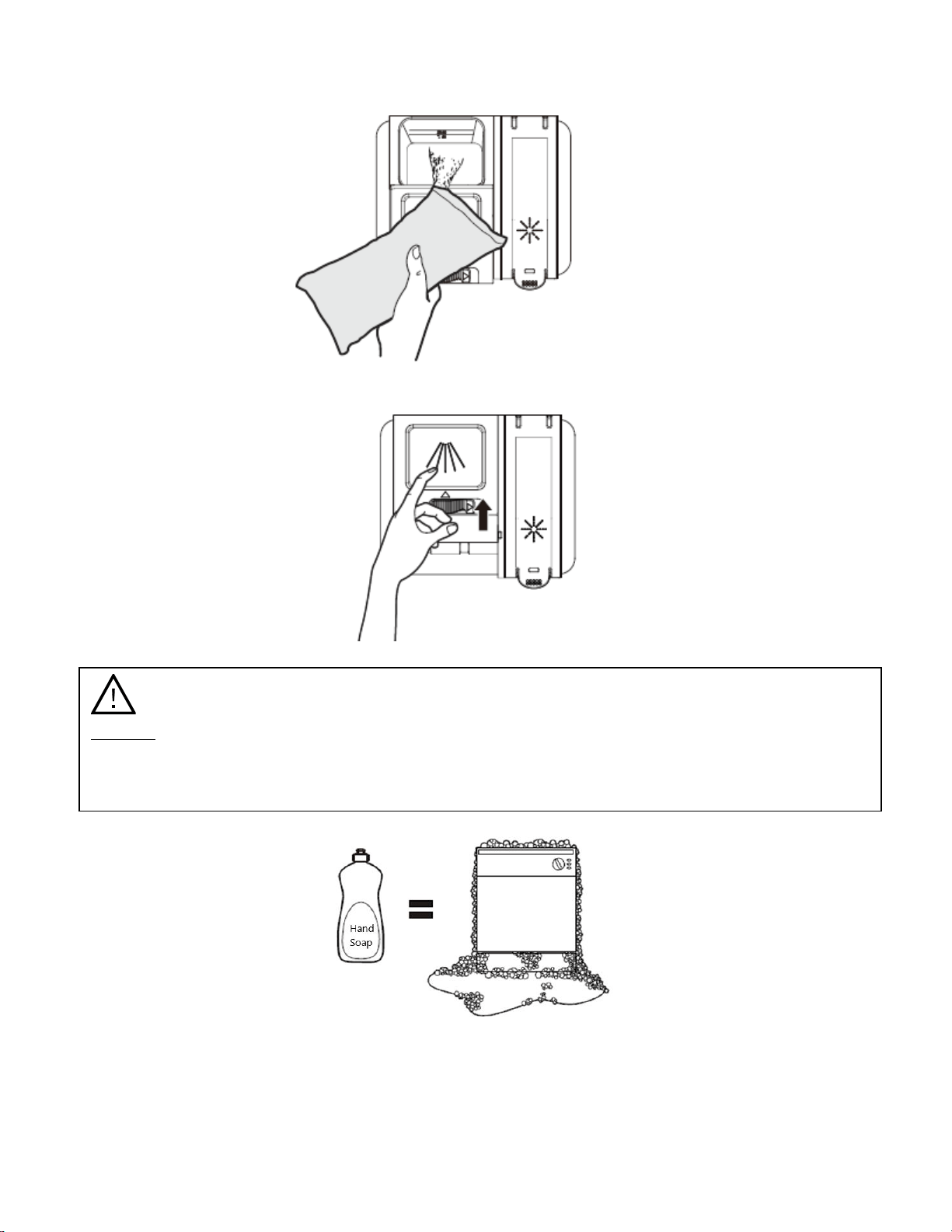
Use only detergent specifically made for use in dishwashers. Do not use detergents designed for
hand washing dishes. Using a detergent that is not specifically designed for dishwashers will cause
the dishwasher to fill with suds. During operation, these suds will spill out of the dishwasher vents.
Keep your detergent fresh and dry. Do not put powder detergent into the dispenser until you are
ready to wash dishes.
The amount of detergent to use depends on whether your water is hard or soft. With hard water, you
need extra detergent to alleviate the deposits that are left by the excessive minerals. Less detergent
is needed for soft water.
Filling the Detergent Dispenser
The dispenser must be refilled before the start of each wash cycle. Your dishwasher uses less
detergent and rinse aid than a conventional dishwasher. Generally, only one tablespoon of detergent
is needed for a normal wash load. Always add the detergent just before starting the dishwasher,
otherwise it could get damp and will not dissolve properly during the wash cycle.
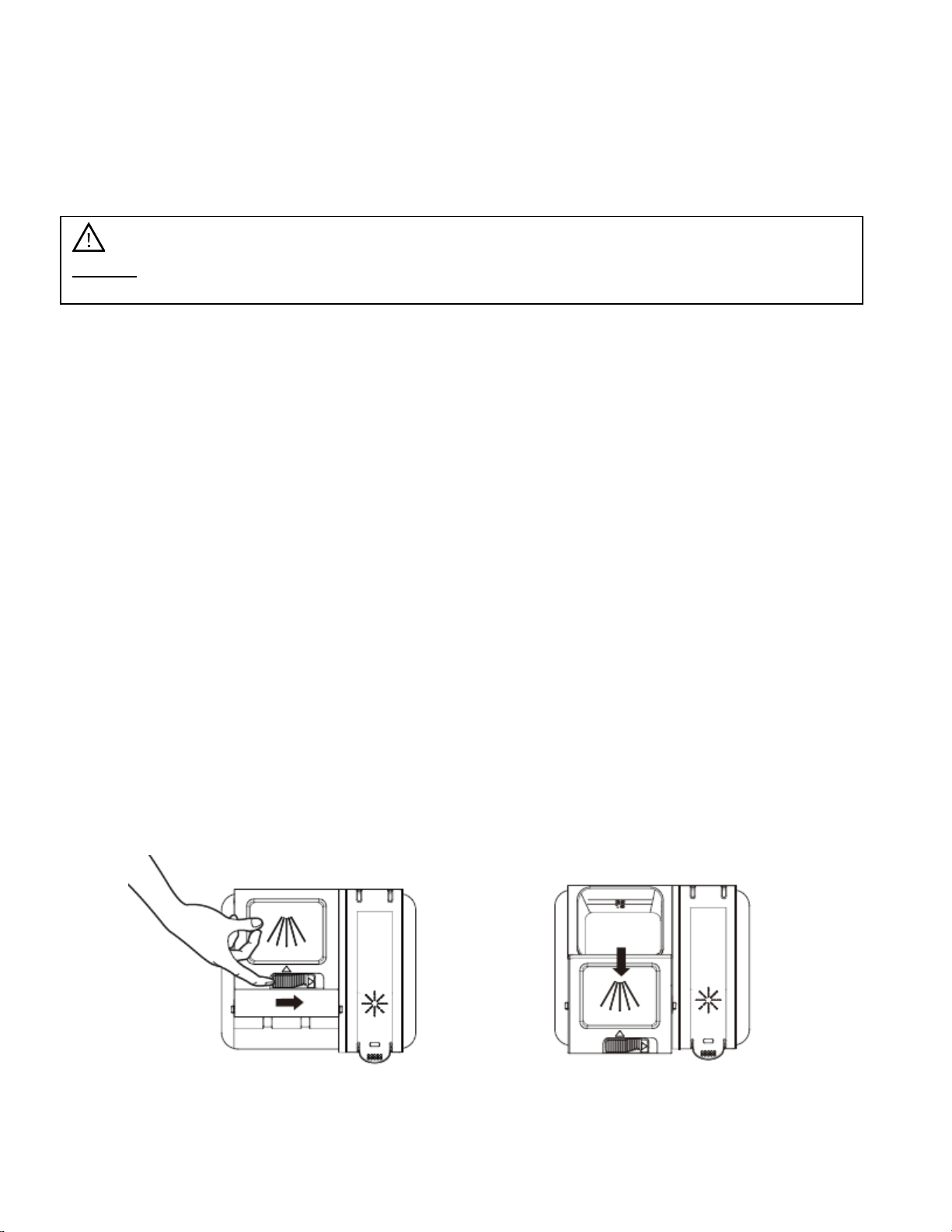
1. Open the detergent dispenser cap by pushing the detergent dispenser release to the right. The
dispenser cap will flip open toward you. Note: The cap always remains open at the end of a
washing cycle.
Caution: TO AVOID BURN INJURY: Slightly open the door and wait until the spray arms and
wash action stop. Failing to do so may cause hot water to splash out of the dishwasher
resulting in injury.
12
2. Add the recommended amount of dishwasher detergent to the main wash compartment.
3. Close the cap by sliding it forward and pressing down.
Caution:
• Use only detergent specifically made for use in dishwashers.
• Do not use dish detergent designed for hand washing dishes as it will cause the
dishwasher to overflow with suds.
13
Filling the Rinse Aid Dispenser
The rinse aid is released during the final rinse to remove spots, prevent new film build-up on your
dishes, glasses, flatware, cookware and plastic, and to improve drying time. Your dishwasher is
designed to use ONLY LIQUID rinse aids. DO NOT use powdered rinse aids which will clog the
dispenser and cause malfunctions. The rinse aid dispenser is located inside the door next to the
detergent dispenser.
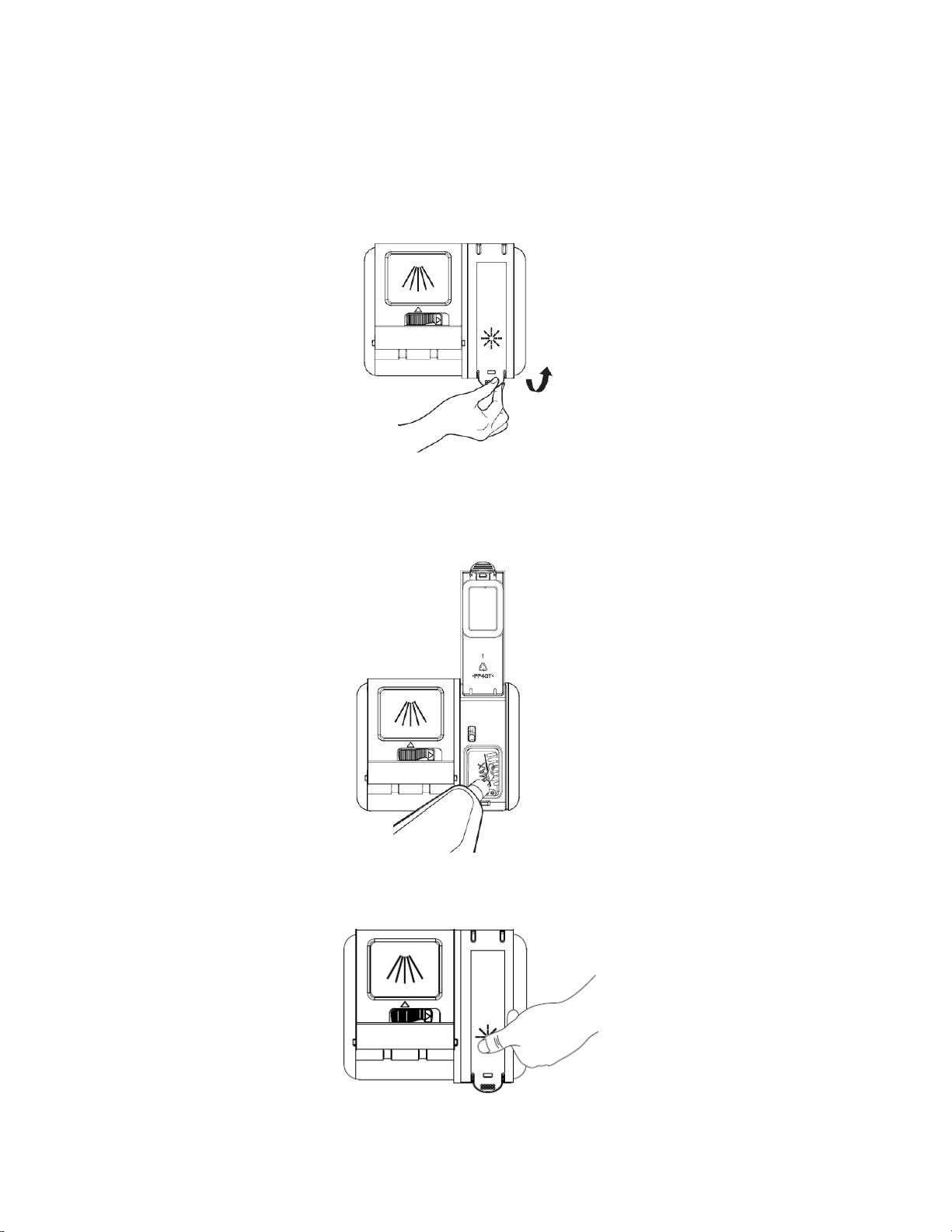
1. Open the rinse aid dispenser by lifting up the handle.
2. Fill the rinse aid reservoir with LIQUID rinse aid. Use the viewing port when filling the reservoir.
DO NOT fill the reservoir above the “MAX” level indicator or rinse aid will overflow during the
wash cycle.
3. Close the rinse aid dispenser by lowering the lid and pressing until it clicks shut.
14
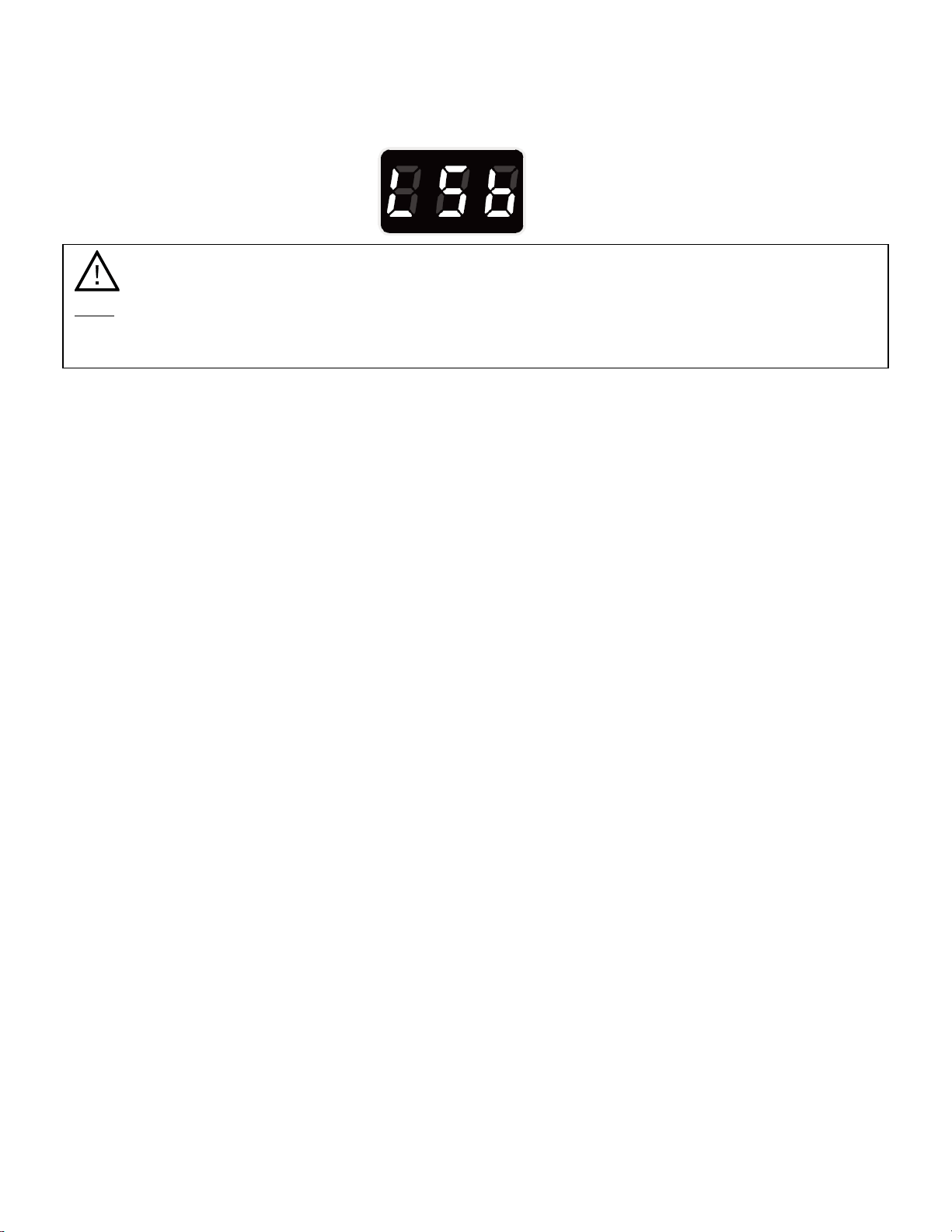
4. Refill the rinse aid when the Status Display shows the “LSb” error code. Your dishwasher will
run with low or no rinse aid, but your rinsing and drying results will suffer.
Completing a Wash Cycle
When the selected wash cycle has finished, the Status Display will read END, or -:-- if it has been
canceled. Open the door carefully and wait a few minutes before unloading the dishwasher to avoid
handling the dishes and utensils while they are still hot. This will also assist in the drying process. It is
normal for the dishwasher to be wet inside.
Note:
• Only use branded rinse aid, such as Jet-Dry, for the dishwasher.
• Never fill the rinse aid dispenser with any other substances or detergents.
15
Dishwasher Maintenance
Keeping your dishwasher clean improves its performance, reduces unnecessary repairs and
lengthens its life.
Cleaning the Exterior
It is best to clean spills on the outside of your dishwasher as they occur. Use a soft, damp cloth on
the control panel and door to gently wipe away spills and dust. Never use sharp objects, scouring
pads, or harsh cleaners on any part of the dishwasher as they may scratch and discolor the surface
of your dishwasher. Do not clean the dishwasher by spraying water over it and avoid letting water
come into contact with any of the electrical parts.
Cleaning the Interior
Clean the interior of your dishwasher periodically to remove any dirt or food particles and prevent
odors. Wipe the inside of the dishwasher, inner part of the door, and the door seal with a soft, warm,
wet cloth. We recommend filling the detergent dispenser and running the dishwasher empty
periodically using either the Normal or ECO wash cycle with the Sanitize option. This will keep your
dishwasher clean.
If spots or odors are still present, run the Normal wash cycle with the dishwasher empty and without
detergent until it flushes. Then, interrupt the cycle and put an 8 ounce cup of white vinegar into the
bottom of the dishwasher. Close the dishwasher, press Start/Cancel, and let the cycle finish.
Cleaning the Filter System
For best performance and results, the filter assembly must be cleaned regularly. The filter system removes soil and
food particles from the water, allowing it to be recycled during the wash cycle.
Filter Assembly Parts
The filter assembly consists of three filters:
1. The Course Filter which collects large items, such as pieces of bone or glass that could block
the drain.
2. The Fine Filter that holds soil and food residue and prevents them from being redeposited on
the dishes during the wash cycle.
3. The Main Filter that traps soil and food particles, then breaks them down with assistance from
a special jet on the spray arm and washes them down the drain.
Note: Abrasive agents or some paper towels may scratch or leave spots on the stainless steel
interior surface.
Note: If your dishwasher has a stainless steel door panel, you can clean it with a stainless steel
cleaner for home appliances using a clean, soft cloth.
16
Removing, Cleaning and Replacing the Filter Assembly
1. Turn off the dishwasher.
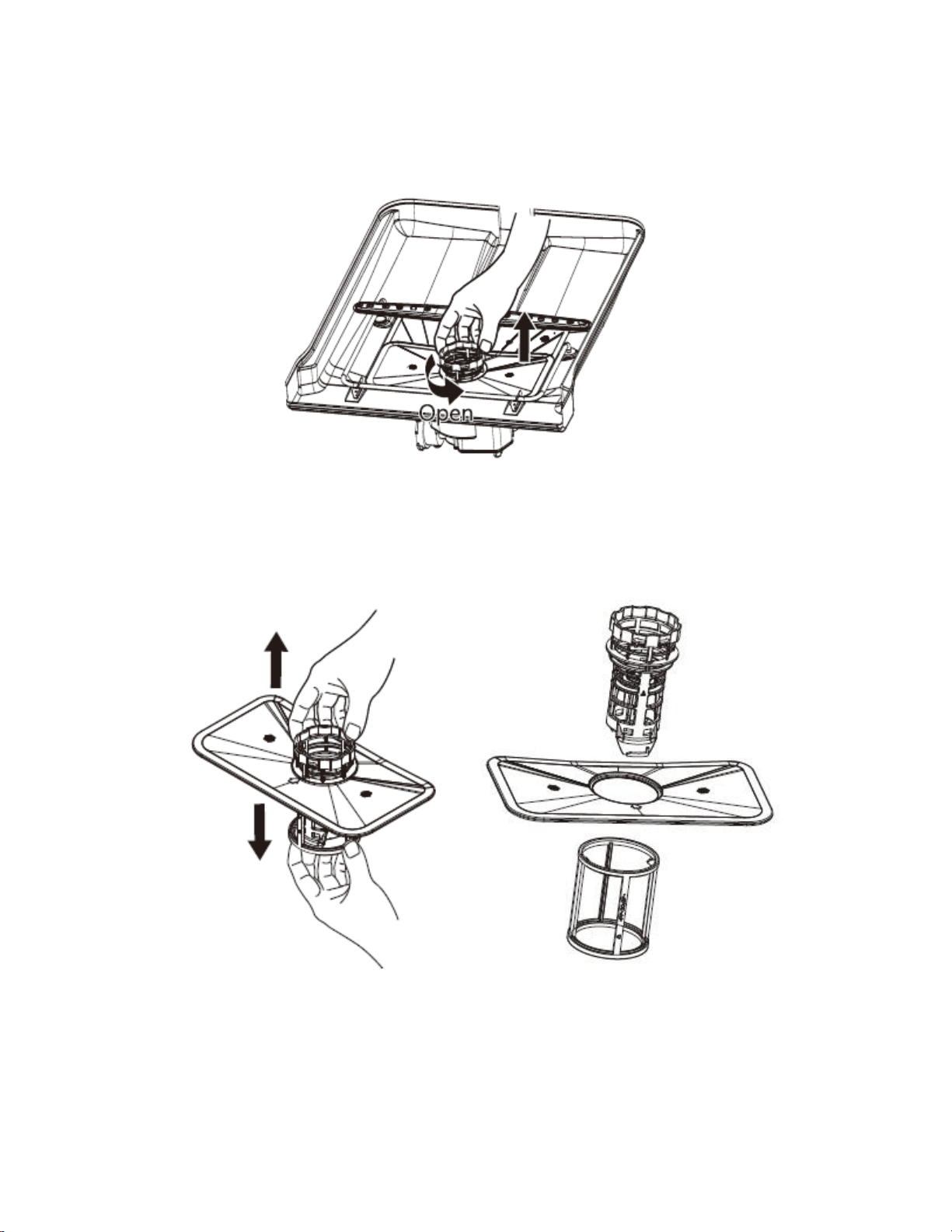
2. Rotate the filter assembly counterclockwise to unlock it, then pull up to remove it.
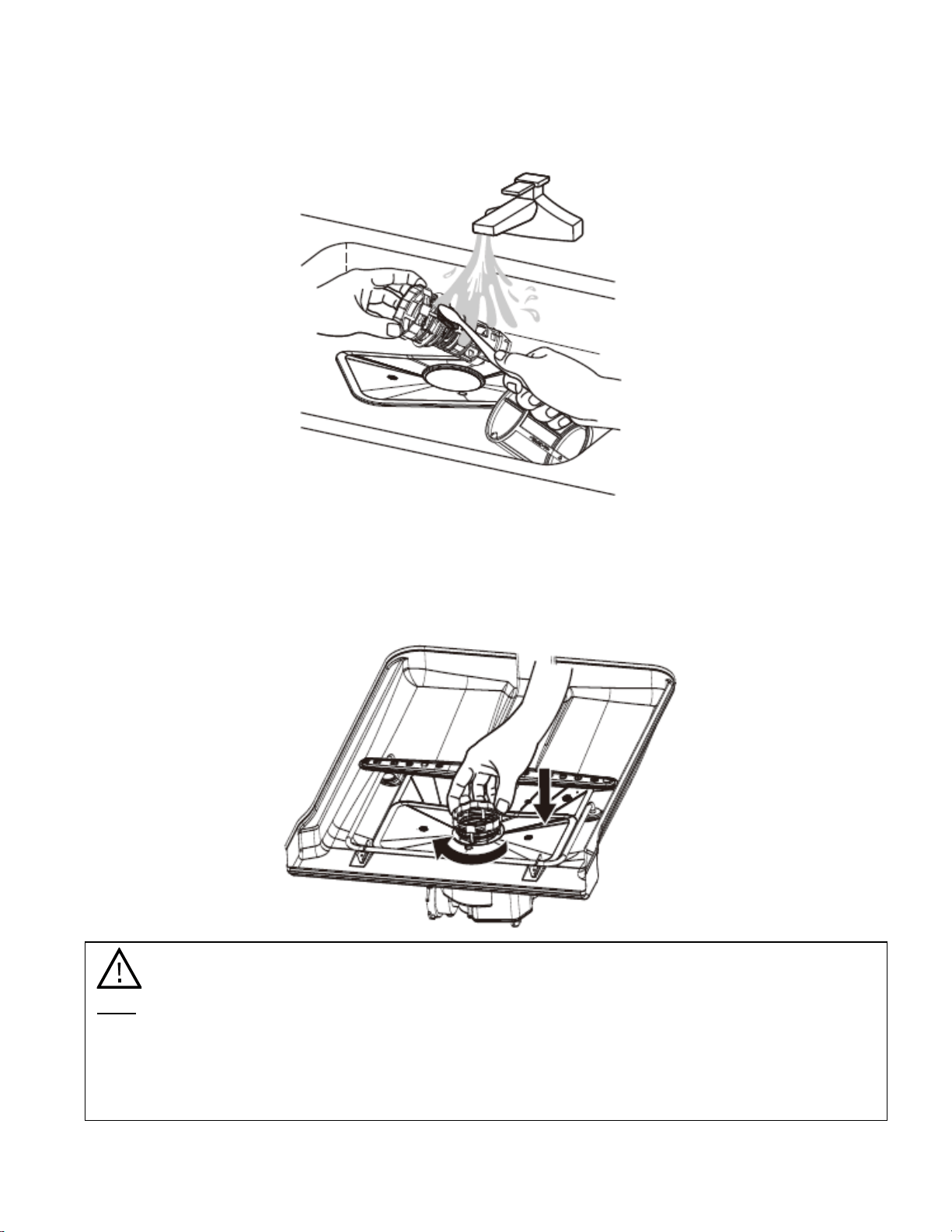
3. Take apart the three filters by pulling the fine and course filters in opposite directions, then
separate them from the main (flat) filter.
17
4. Remove all debris from the filters by rinsing them under warm, running water. You may loosen
trapped particles with a soft bristled brush.
5. Once clean, reassemble the filters and place the entire filter assembly back into its
compartment. Then, rotate the course filter clockwise until it locks into place and the arrows on
the main filter and the course filter line up.
Note:
• If the filter assembly is not secured properly back into place the performance of the
dishwasher will decrease
• Never run the dishwasher without the filter system in place.
• Clean the entire filter system at least once a week when in use.
18
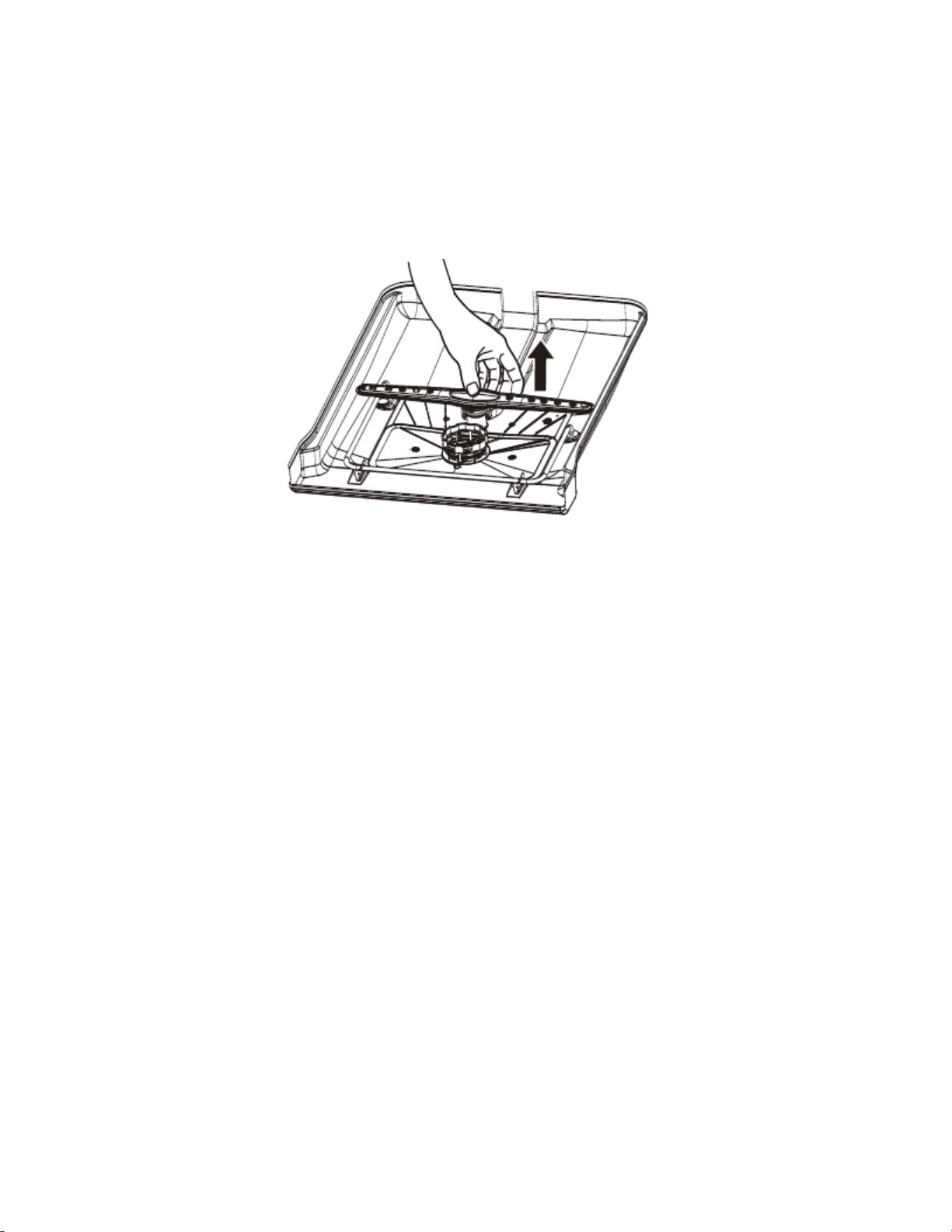
Cleaning the Lower Spray Arm
The lower spray arm can be removed for periodic cleaning of the nozzles to prevent clogging and
maintain the efficiency of your dishwasher. When removing the spray arm, exercise care so you don’t
damage or break it. To remove, clean and replace the lower spray arm:
1. Visibly check whether the nozzle holes are clogged by soil or food particles.
2. If cleaning is needed, remove the spray arm by grasping it in the middle and pulling it upwards.
3. Wash the spray arm nozzles under warm, running water. A soft bristled brush may be used to
help remove particles.
4. Reinstall the spray arm by pushing it back down into place until it locks.
5. Check whether the spray arm has be reinstalled correctly by rotating it by hand. It should rotate
freely and easily.
Protecting Against Freezing
If your dishwasher is left in an unheated place during the winter, ask a service technician to:
1. Turn off the electrical power to the dishwasher.
2. Turn off the water supply and disconnect the water supply line from the unit.
3. Drain the water from the supply line and inlet valve (use a pan to catch the water.)
4. Reconnect the water supply line to the inlet valve.
5. Remove the filter system and use a sponge to absorb the water that is in the filter (sump) area.
Preparation for Storage
When preparing to put the dishwasher into storage, it is recommended that you run a wash cycle with
the dishwasher empty. Disconnect the unit from power. Remove any water remaining in the sump
area with a cloth or absorbent sponge. Turn off the water supply and leave the door of the appliance
slightly open. This will help the door seals to last longer and prevent odors from forming inside the
dishwasher.
Moving the Dishwasher
If the dishwasher must be moved, keep it in the upright position. Do not transport the unit on its side
or upside down.
19
Troubleshooting
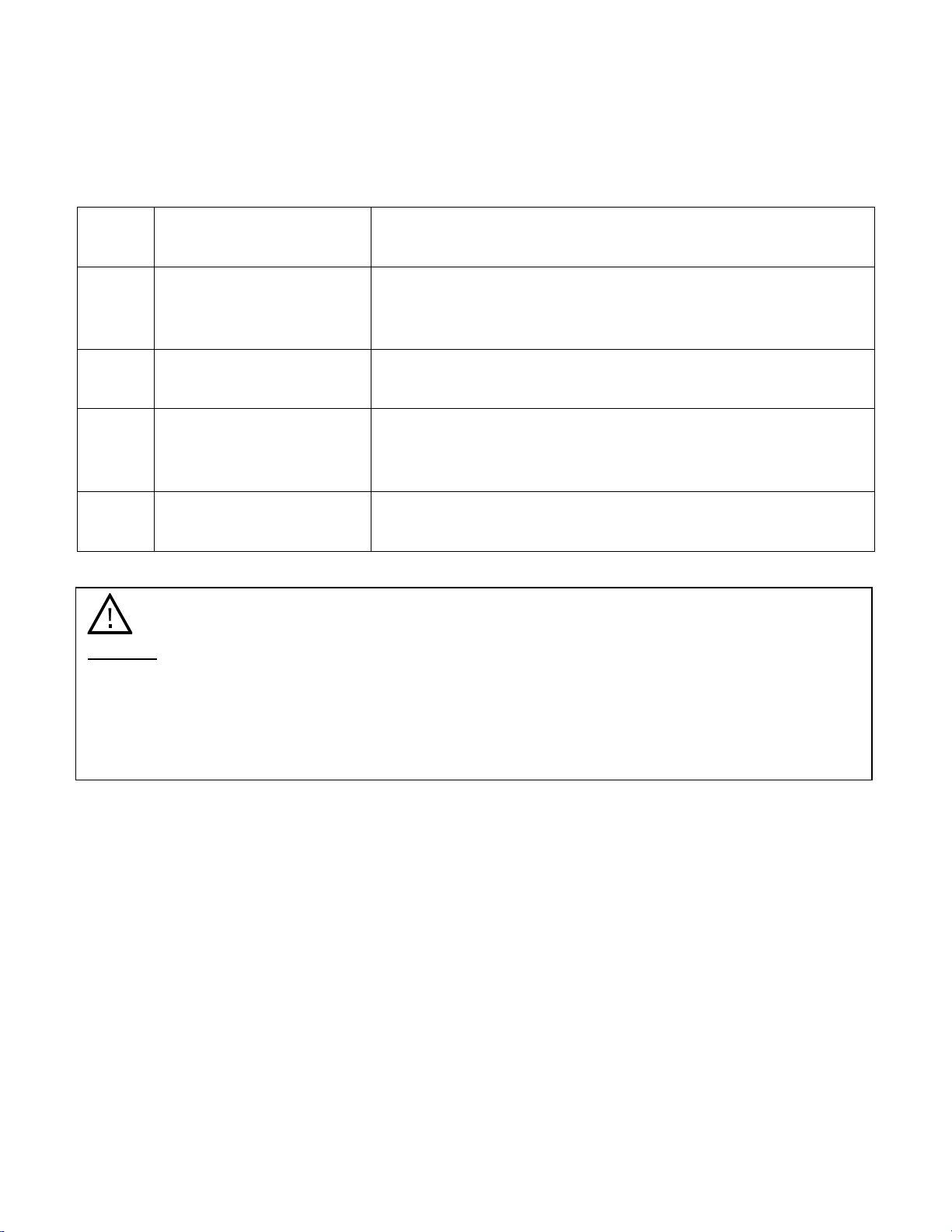
Error Codes
Under certain conditions warning or malfunction codes will be shown on the Status Display.
Error
Code
Meaning
Possible Causes
E1
Long water inlet time
The water supply may not be opened or the water
pressure may be too low. The water inlet may also be
restricted or kinked.
E3
Not reaching required
temperature
Possible heating element malfunction.
E4
Overflow
Dishwasher may be leaking or may have overflowed
because of too much detergent or the wrong kind of
detergent.
LSb
Rinse aid warning
Dishwasher is empty or low on liquid rinse aid. Refill rinse
aid dispenser.
Warning:
• If E4 (Overflow) occurs, turn off the main water supply before calling service.
• If there is water in the base pan because of an overflow or leak, the water should be
removed before restarting the dishwasher.
• The dishwasher must have the main power turned off and then on again to clear an error
code.
20
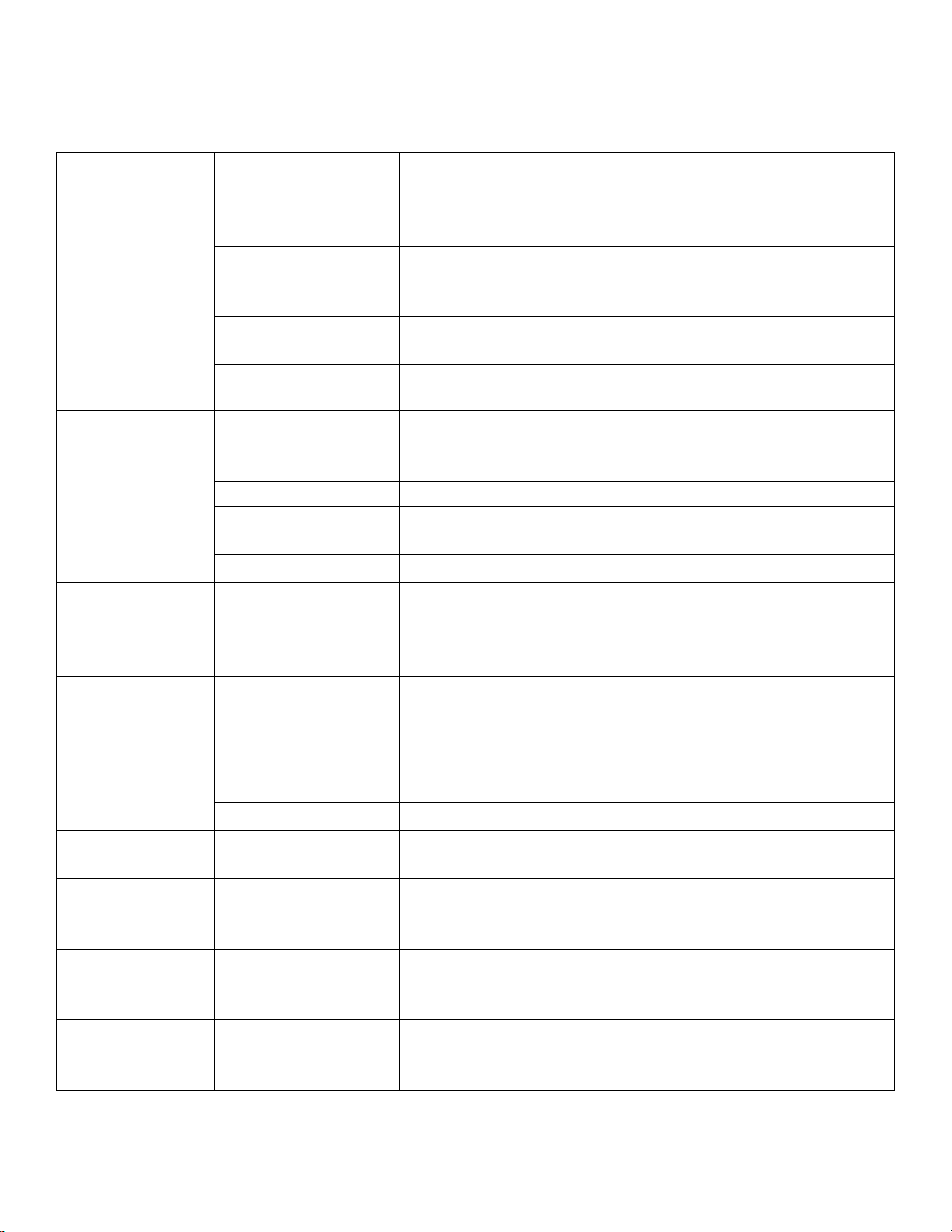
Troubleshooting Guide
Issue
Possible Cause
Solution
Dishwasher
does not start
Fuse is blown or
circuit breaker is
tripped
Replace fuse or reset circuit breaker. Remove any other
appliances sharing the same circuit with the dishwasher.
Power Supply is not
connected or
turned on
Call a certified technician to check and/or connect the
power supply.
Control panel lock is
on
Press and hold the Options and Delay buttons
simultaneously for 3-5 seconds.
Dishwasher door is
not properly closed
Close dishwasher, ensuring that the door latches.
Water not
pumped from
dishwasher
Previous cycle has
not finished or has
been interrupted
Restart the cycle and let it run to completion.
Filter clogged
Clean filter assembly.
Kitchen sink
clogged
Ensure kitchen sink is draining well. If sink is not draining,
refer to a plumber.
Kink in drain hose
Check drain hose.
Dishwasher
won’t fill
Dishwasher door is
not properly closed
Close dishwasher, ensuring that the door latches.
Water valve is
turned off
Check water valve.
Suds in tub
Improper detergent
Use only the specified detergent. If improper detergent
was used, open the dishwasher allowing suds to
evaporate. Add 1 gallon of cold water to the tub. Close
and latch the door. Start the “RINSE” wash cycle to drain
the water. Repeat if necessary.
Spilled rinse aid
Always clean up rinse aid spills immediately.
Stained tub
interior
Detergent used
contained colorant
Do not use detergents with colorants.
White film on
dishwasher
interior surface
Hard water minerals
While wearing rubber gloves, use a damp sponge to
clean the interior with dishwasher detergent. Never use
any other cleaner to clean dishwasher.
Rust stains
appear on
cutlery
Items are not non-
corrosive
Do not place non-dishwasher safe items in dishwasher.
Knocking noise
inside of
dishwasher
The spray arm is
knocking against an
item in the dish rack
Pause the wash cycle and rearrange the items which are
obstructing the movement of the spray arm.
21
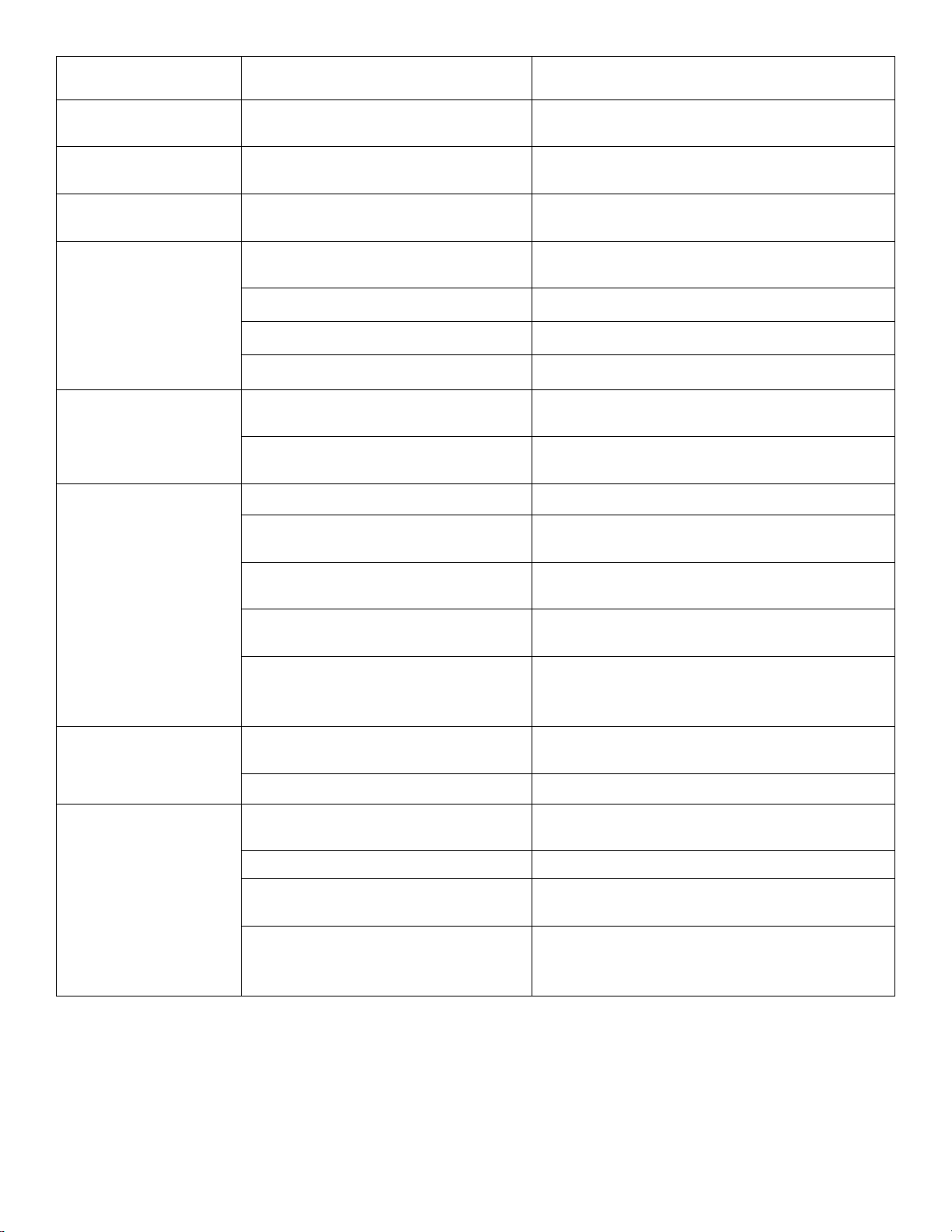
Issue
Possible Cause
Solution
Rattling noise inside
of dishwasher
Item is not securely placed in
dish rack
Pause the wash cycle and secure the
items in the dish rack.
Black or gray marks
on dishes
Utensils may have rubbed
against dishes
Use a mild abrasive cleaner to eliminate
marks. Load carefully.
Detergent left in
dispenser cup
Dishes are blocking detergent
dispenser door
Re-load dishwasher according to
instructions in this manual.
Spots and filming
on dishes
Water hardness is too high
For extremely hard water install a water
softener.
Improper loading of dishes
See section on loading the dishwasher.
Old rinse aid used
Use fresh rinse aid.
Rinse aid empty
Add rinse aid to the dispenser.
Etching
Using too much detergent
Use less detergent especially if you have
soft water.
The inlet water temperature
exceeds 158°F
Lower the inlet water temperature.
Dishes are not
cleaned
Dishes were not loaded properly
See section on loading the dishwasher.
The wash cycle was not
powerful enough
Select a more intensive wash cycle.
Not enough detergent was
dispensed
Use more or change brand of detergent.
Items are blocking the path of
the spray arms
Rearrange the items so the spray arms
can fully rotate.
The filter in the base of the
dishwasher is not clean or is
installed incorrectly
Clean and install the filter combination
correctly.
Cloudiness on
glassware
Combination of too much
detergent with soft water
Use less detergent and/or select the
shortest wash cycle to clean glassware.
The filter may be dirty or blocked
Clean the filter.
The dishes are not
dry
Improper Loading
Re-load dishwasher according to
instructions.
Not enough rinse aid
Refill rinse aid.
Dishes removed too soon
Do not remove dishes from dishwasher
immediately.
Wrong cycle selected
Short cycles have lower cleaning
performance. Choose a more intensive
cycle.
22
Specifications
Description of product
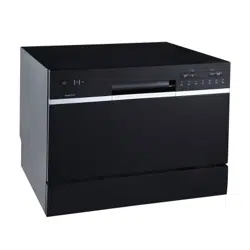
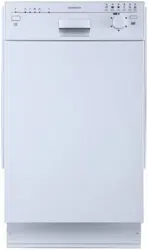
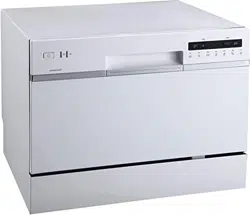
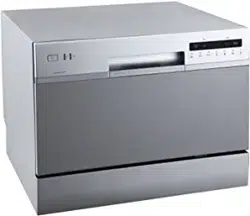
18” Built-In Dishwasher
Model
BIDW1802BL / BIDW1802SS / BIDW1802WH
Color
Black / Stainless Steel / White
Number of Place Settings
8
Maximum Diameter of Place Settings
11"
Voltage/Frequency
120V AC/60Hz
Input Power
Wash motor 100W, Heater 700W
Delay Start
1-24 Hour
Unit Dimensions
H x W x D
32 1/2” x 17 5/8” x 22 7/16”
Net Weight
52.9 lbs.
Nominal Inlet Water Temperature
120°F
Water Pressure
5.8 – 145 PSI

23
EdgeStar Limited Warranty
One (1) Year Parts & Labor
This product is warranted by EdgeStar and is subject to any conditions set forth as follows:
WHAT IS COVERED:
For a period of ONE (1) YEAR from the date of original retail purchase, EdgeStar will repair or replace any part free of charge
including labor that fails due to a defect in materials or workmanship. Labor will be performed free of charge at an authorized
EdgeStar repair facility and EdgeStar will supply new, rebuilt, or refurbished parts free of charge. EdgeStar may request a defective
part be returned in exchange for the replacement part. All replacement parts or products will be new, remanufactured, or
refurbished. All products and parts replaced by EdgeStar under warranty service become the property of EdgeStar. After the 12
month period, EdgeStar will no longer be responsible for labor charges incurred or replacement parts. All defective products and
parts covered by this warranty will be repaired or replaced on a mail-in basis to an EdgeStar authorized repair facility.
This warranty applies to the original purchaser only, and only covers defects in workmanship experienced during operation of the
product under normal service, maintenance, and usage conditions. This warranty applies to the purchase and use of this product in
residential settings within the contiguous United States of America.
Exceptions: Commercial or Rental Use
Warranty
90 days labor and parts from date of original purchase. No other warranty applies.
WHAT IS NOT COVERED- The following limitations apply to the coverage of this warranty. This warranty does not cover:
-Labor charges for installation, setup, or training to use the product.
-Shipping damage, and any damage caused by improper packaging for shipment to an authorized service center, and any damaged
caused by improper voltage or any other misuse, including abnormal service, handling, or usage.
-Cosmetic damage such as scratches and dents.
-Normal wear and tear on parts or replacement of parts designed to be replaced, e.g. filters, cartridges, batteries.
-Service trips to deliver, pick-up, or repair, install the product, or to instruct in proper usage of the product.
-Damages or operating problems resulting from misuse, abuse, operation outside environmental specifications, uses contrary to
instructions provided in the owner’s manual, accidents, acts of God, vermin, fire, flood, improper installation, unauthorized service,
maintenance negligence, unauthorized installation or modification, or commercial use.
-Labor, service transportation, and shipping charges for the removal and replacement of defective parts, beyond the initial 12 month
period.
-Products that have been modified to perform outside of specifications without the prior written permission of EdgeStar.
-Products lost in shipment, or theft.
-Products sold AS IS or from an unauthorized reseller.
-Products that have had their serial numbers removed, defaced, or with serial numbers that have been invalidated.
-Damage from other than normal household use.
-Replacement or repair of household fuses, circuit breakers, wiring or plumbing.
-Damage to personal property from use of product.
-Damage from service other than from an authorized EdgeStar repair facility.
-Hoses, knobs, lint trays and all attachments, accessories and disposable parts.
-Any service charges not specifically identified as normal such as normal service area or hours.
-Any special or consequential damages arising out of the use of the product.
OBTAINING WARRANTY SERVICE: If you believe your product is defective, contact EdgeStar Customer Support for
troubleshooting assistance and warranty service at www.edgestar.com or call 1-866-319-5473. Before contacting Customer Support
you are required to have your model number, serial number, and proof of purchase available upon request. Once an EdgeStar
authorized representative has confirmed that your product is defective and eligible for warranty service, the product must be
returned to an EdgeStar authorized repair facility. EdgeStar is not responsible for damage resulting from shipper mishandling or
improper packaging. Do not return a defective product to the place of
purchase. Products received without a return authorization number will be refused.
THIS WARRANTY IS IN LIEU OF ANY OTHER WARRANTY, EXPRESS OR IMPLIED, INCLUDING WITHOUT LIMITATION, ANY
WARRANTY OF MERCHANTABILITY OR FITNESS FOR A PARTICULAR PURPOSE. TO THE EXTENT ANY IMPLIED
WARRANTY IS REQUIRED BY LAW, IT IS LIMITED IN DURATION TO THE EXPRESS WARRANTY PERIOD ABOVE. NEITHER
THE MANUFACTURER NOR ITS DISTRIBUTORS SHALL BE LIABLE FOR ANY INCIDENTAL, CONSEQUENTIAL, INDIRECT,
SPECIAL, OR PUNITIVE DAMAGES OF ANY NATURE, INCLUDING WITHOUT LIMITATION, LOST REVENUES OR PROFITS,
OR ANY OTHER DAMAGE WHETHER BASED IN CONTRACT, TORT, OR OTHERWISE. IN NO EVENT AND UNDER NO
CIRCUMSTANCE OF ANY TYPE OR KIND SHALL THE SELLER, MANUFACTURER AND/OR DISTRIBUTOR BE LIABLE FOR
ANY REASON, UNDER ANY THEORY, FOR MORE THAN THE BASIC COST OF THE PRODUCT TO THE PURCHASER OR
END USER. SOME STATES DO NOT ALLOW THE EXCLUSION OF INCIDENTAL OR CONSEQUENTIAL DAMAGES, SO THE
ABOVE EXCLUSION MAY NOT APPLY TO YOU. THIS WARRANTY GIVES YOU SPECIFIC LEGAL RIGHTS. YOU MAY HAVE
OTHER RIGHTS THAT VARY FROM STATE TO STATE.