

User Guide
• Somecontentandillustrationsmaydifferfromyourdevicedependingonthe
region,serviceprovider,softwareversion,orOSversion,andaresubjectto
changewithoutpriornotice.
• AlwaysusegenuineLGaccessories.Thesupplieditemsaredesignedonlyforthis
deviceandmaynotbecompatiblewithotherdevices.
• Thisdeviceisnotsuitableforpeoplewhohaveavisualimpairmentduetothe
touchscreenkeyboard.
• Copyright©2015LGElectronics,Inc.Allrightsreserved.LGandtheLGlogoare
registeredtrademarksofLGGroupanditsrelatedentities.Allothertrademarks
arethepropertyoftheirrespectiveowners.
• Google™,GoogleMaps™,Gmail™,YouTube™,Hangouts™andPlayStore™
aretrademarksofGoogle,Inc.
ENGLISH

2
Table of contents
Important notice .......................................4
Getting to know your phone .....................7
Phone layout ............................................ 7
Installing the SIM or USIM card and
battery .....................................................9
Charging the battery .............................. 11
Inserting a memory card ........................ 12
Removing the memory card ................... 13
Locking and unlocking the device ..........13
Your Home screen ................................... 15
Touch screen tips ..................................15
Home screen .........................................16
Customizing the Home screen ...............17
Returning to recently-used applications .18
Notifications panel .................................18
On-screen keyboard ..............................21
Special Features .....................................23
Gesture shot ..........................................23
Glance View ........................................... 24
KnockON ...............................................24
Knock Code ...........................................24
QuickMemo+ ......................................... 25
Google account setup ............................. 27
Creating your Google account ................27
Signing into your Google account ........... 27
Connecting to Networks and Devices .... 29
Wi-Fi .....................................................29
Bluetooth ...............................................30
Wi-Fi Direct ...........................................31
Transferring data between a PC and the
device....................................................32
Calls ........................................................33
Making a call .........................................33
Calling your contacts .............................33
Answering and rejecting a call ...............33
Making a second call .............................34
Viewing your call logs ............................34
Call settings ........................................... 34
Contacts ..................................................35
Searching for a contact .......................... 35
Adding a new contact ............................35
Favorites contacts..................................35
Creating a group .................................... 36
Messaging ............................................... 37
Sending a message ...............................37
Conversation view .................................38
Changing your messaging settings ........38
E-mail ......................................................39
Managing email accounts ......................39
Working with account folders .................39
Composing and sending email ...............40
Table of contents

3
Table of contents
Camera and Video ...................................41
Camera options on the viewfinder .......... 41
Using the advanced settings ..................42
Taking a photo .......................................43
Once you have taken a photo ................. 43
Recording a video ..................................43
After recording a video...........................44
Gallery ................................................... 45
Multimedia ..............................................48
Music ....................................................48
Utilities ....................................................50
Clock .....................................................50
Calculator ..............................................51
Calendar ................................................ 52
Voice Recorder ......................................52
Voice Search..........................................52
Downloads ............................................53
LG SmartWorld ......................................53
Browsing the Web...................................55
Browser ................................................. 55
Chrome .................................................56
Settings ...................................................57
Networks ...............................................57
Sound .................................................... 59
Display ..................................................61
General .................................................. 62
PC software (LG PC Suite) ......................69
For Windows OS ....................................69
For Mac OS ............................................70
Phone software update ..........................72
Phone software update ..........................72
About this user guide .............................74
About this user guide ............................. 74
Trademarks ...........................................74
Accessories ............................................. 75
Troubleshooting ......................................76
FAQ ..........................................................79
For Your Safety........................................85

4
Important notice
Please read this before you start using your phone!
Pleasechecktoseewhetheranyproblemsyouencounteredwithyourphoneare
describedinthissectionbeforetakingthephoneinforserviceorcallingaservice
representative.
1. Phone memory
Whenthereislessthan10MBofspaceavailableinyourphonememory,yourphone
cannotreceivenewmessages.Youmayneedtocheckyourphonememoryanddelete
somedata,suchasapplicationsormessages,tomakemorememoryavailable.
To uninstall applications:
1 Tap > > >General tab>Apps.
2 Onceallapplicationsappear,scrolltoandselecttheapplicationyouwantto
uninstall.
3 Tap Uninstall > OK.
2. Optimizing battery life
Extendyourbattery'spowerbyturningofffeaturesthatyoudonotneedtorun
constantlyinthebackground.Youcanmonitorhowapplicationsandsystemresources
consumebatterypower.
Extending your phone's battery life:
• Turnoffradiocommunicationswhenyouarenotusing.IfyouarenotusingWi-Fi,
BluetoothorGPS,turnthemoff.
• Reducescreenbrightnessandsetashorterscreentimeout.
• TurnoffautomaticsyncingforGmail,Calendar,Contactsandotherapplications.
Important notice
5
Important notice
• Someapplicationsyoudownloadmayconsumebatterypower.
• Whileusingdownloadedapplications,checkthebatterychargelevel.
3. Before installing an open source application and OS
WARNING
If you install and use an OS other than the one provided by the manufacturer
it may cause your phone to malfunction. In addition, your phone will no longer
be covered by the warranty.
WARNING
To protect your phone and personal data, only download applications from
trusted sources, such as Play Store™. If there are improperly installed
applications on your phone, the phone may not work normally or a serious
error may occur. You must uninstall those applications and all associated data
and settings from the phone.
4. Using the Hard Reset (Factory Reset)
Ifyourphonedoesnotrestoretoitsoriginalcondition,useaHardReset(FactoryReset)
toinitializeit.
1 Turnthepoweroff.
2 PressandholdthePower/Lock Key + Volume Down Keyonthebackofthe
phone.
3 ReleasethePower/Lock Keyonlywhenthebootlogoisdisplayed,then
immediatelypressandholdthePower/Lock Keyagain.
4 ReleaseallkeyswhentheFactoryresetscreenisdisplayed.
5 PresstheVolume KeystohighlightYes,thenpressthePower/Lock Keyto
continue.
6
Important notice
6 PresstheVolume KeystohighlightYesoncemore,thenpressthePower/Lock
Keytoconfirm.
WARNING
If you perform a Hard Reset, all user applications, user data and DRM licenses
will be deleted. Please remember to backup any important data before
performing a Hard Reset.
5. Opening and switching applications
MultitaskingiseasywithAndroid;youcankeepmorethanoneapplicationrunningat
thesametime.Thereisnoneedtoquitanapplicationbeforeopeninganother.Useand
switchbetweenseveralopenapplications.Androidmanageseachapplication,stopping
andstartingthemasneededtomakesurethatidleapplicationsdon'tconsume
resourcesunnecessarily.
1 Tap .Apppreviewsofrecentlyusedapplicationswillbedisplayed.
2 Taptheapplicationyouwanttoaccess.Thisdoesnotstopthepreviousappfrom
runninginthebackground.Makesuretotap tobackoutofanappafterusingit.
• Tocloseanappfromtherecentappslist,swipetheapppreviewtotheleftorright.
Toclearallapps,tapClear all.
6. If the screen freezes
Ifthescreenfreezesorthephonedoesnotrespondwhenyoutrytooperateit,remove
thebatteryandreinsertit.Thenpowerthephonebackon.
7
Getting to know your phone
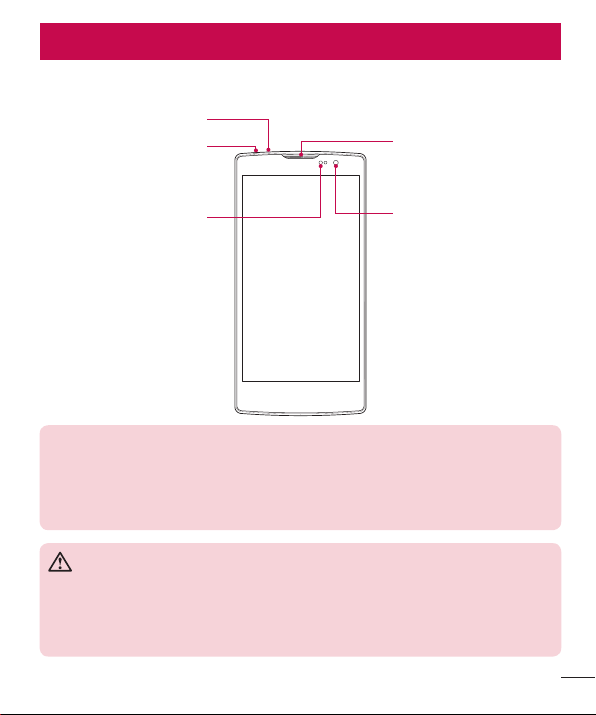
Phone layout
Proximity Sensor
Earpiece
Headset Jack
Front Camera Lens
Microphone
NOTE: Proximity sensor
When receiving and making calls, the proximity sensor automatically turns
the backlight off and locks the touch screen by sensing when the phone is
near your ear. This extends battery life and prevents you from unintentionally
activating the touch screen during calls.
WARNING
Placing a heavy object on the phone or sitting on it can damage the display
and touch screen functions. Do not cover the proximity sensor with screen
protectors or any other type of protective film. This could cause the sensor to
malfunction.
Getting to know your phone
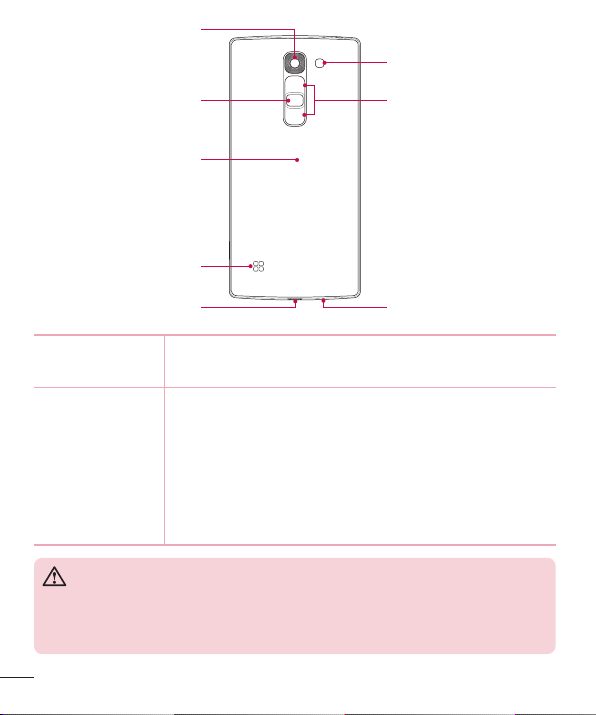
8
Getting to know your phone
Microphone
Volume Keys
NFC Touch Point
Charger/USB port
Power/Lock Key
Rear Camera Lens
Speaker
Flash
Power/Lock Key • Turnyourphoneon/offbypressingandholdingthiskey.
• Pressoncequicklytolock/unlockthescreen.
Volume Keys While the screen is off:
• PressandholdtheVolumeUpKeytolaunchQuickMemo+.
• PressandholdtheVolumeDownKeytolaunchthecamera.
While the screen is on:
• FromtheHomescreen,presstochangetheringertype.
• Whilelisteningtomusicoronacall,presstoadjustthe
volume.
WARNING
• The NFC antenna for this model is on the back cover.
• Be careful not to damage the NFC touch point on the phone, which is part
of the NFC antenna.
9
Getting to know your phone
Installing the SIM or USIM card and battery
Beforeyoucanstartexploringyournewphone,youneedtosetitup.
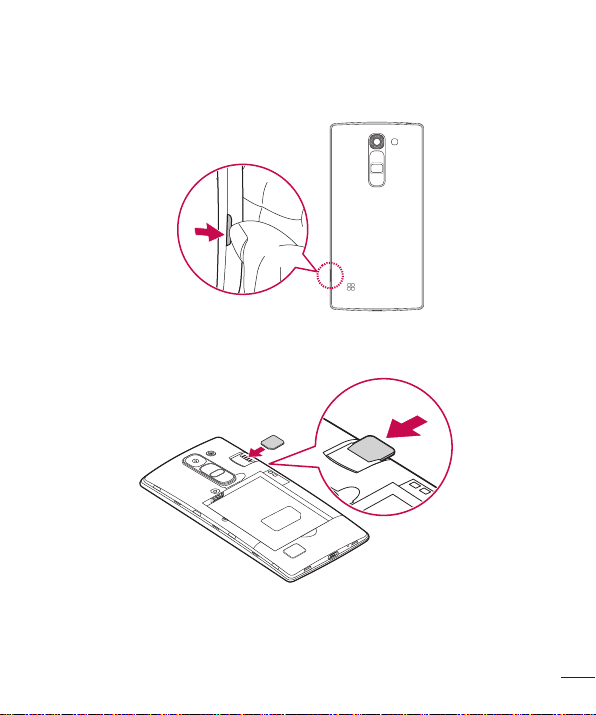
1 Toremovethebackcover,holdthephonefirmlyinonehand.Withyourotherhand,
liftoffthebackcoverwithyourthumbnailasshowninthefigurebelow.
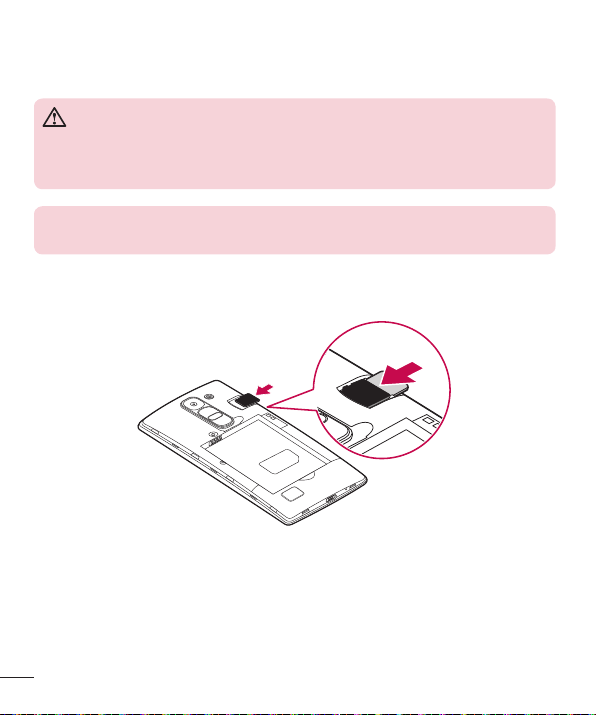
2 SlidetheSIMcardintothelowerslotfortheSIMcardasshowninthefigure.Make
surethegoldcontactareaonthecardisfacingdownward.
10
Getting to know your phone
WARNING
Do not insert a memory card into the SIM card slot. If a memory card
happens to be lodged in the SIM card slot, take the device to a LG Service
Center to remove the memory card.
NOTE: Only microSIM cards work with this device.
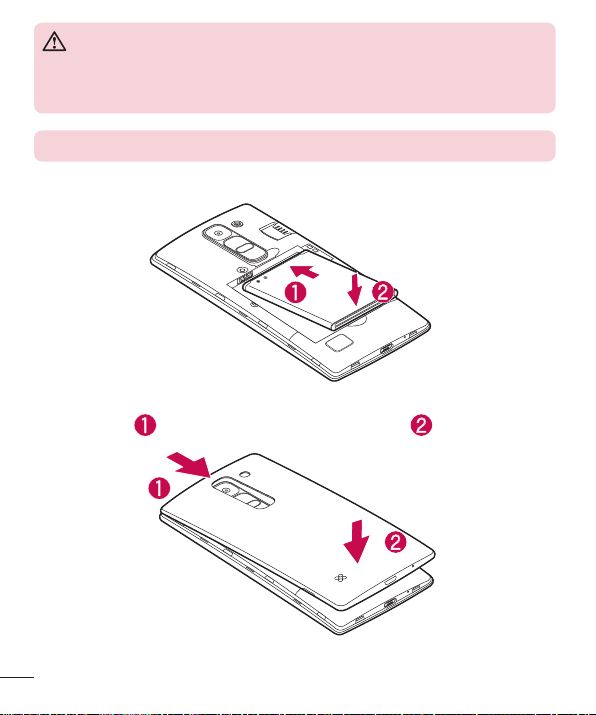
3 Insertthebattery.
4 Toreplacethecoverontothedevice,alignthebackcoveroverthebattery
compartment andpressitdownuntilitclicksintoplace .
11
Getting to know your phone
Charging the battery
Chargethebatterybeforeusingitforfirsttime.Usethechargertochargethebattery.
Acomputercanalsobeusedtochargethebatterybyconnectingthephonetoitusing
theUSBcable.
WARNING
Use only LG-approved chargers, batteries and cables. If you use unapproved
chargers, batteries or cables, it may cause a battery charging delay. This can
also cause the battery to explode or damage the device, which is not covered
by the warranty.
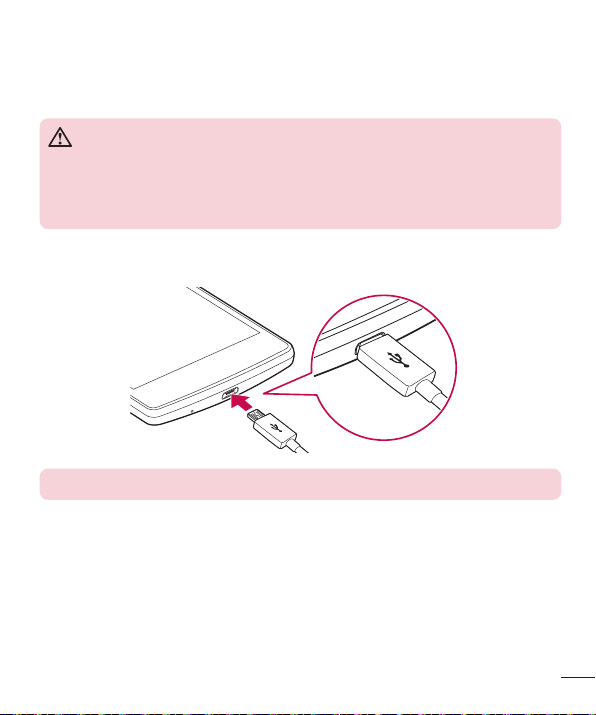
TheCharger/USBPortislocatedatthebottomofthephone.Insertthechargerand
plugitintoapoweroutlet.
NOTE: Do not open the back cover while your phone is charging.
12
Getting to know your phone
Inserting a memory card
Yourdevicesupportsuptoa32GBmicroSDcard.Dependingonthememorycard
manufacturerandtype,somememorycardsmaynotbecompatiblewithyourdevice.
WARNING
Some memory cards may not be fully compatible with the device. Using an
incompatible card may damage the device or the memory card, or corrupt the
data stored in it.
NOTE: Frequent writing and erasing of data shortens the lifespan of memory
cards.
1 Removethebackcover.
2 Insertamemorycardwiththegold-coloredcontactsfacingdownwards.
3 Replacethebackcover.
13
Getting to know your phone
Removing the memory card
Beforeremovingthememorycard,firstunmountitforsaferemoval.
1 Tap > > >Generaltab>Storage>Unmount SD card.
2 Removethebackcoverandpulloutthememorycard.
WARNING
Do not remove the memory card while the device is transferring or accessing
information. Doing so can cause data to be lost or corrupted or damage to
the memory card or device. LG is not responsible for losses that result from
the misuse of damaged memory cards, including the loss of data.
Locking and unlocking the device
PressingthePower/Lock Keyturnsoffthescreenandputsthedeviceintolockmode.
Thedeviceautomaticallygetslockedifitisnotusedforaspecifiedperiod.Thishelpsto
preventaccidentaltapsandsavesbatterypower.
Tounlockthedevice,pressthePower/Lock Keyandswipethescreeninanydirection.
NOTE: Double-tapping on the screen also can wake up the screen instead of
the Power/Lock Key.
Changing the screen lock method
Youcanchangethewaythatyoulockthescreentopreventothersaccessingyour
personalinformation.
1 Tap > > >Displaytab>Lock screen>Select screen lock.
2 SelectadesiredscreenlockfromKnock Code,Pattern,PINandPassword.
14
Getting to know your phone
NOTE: Create or sign in to a Google account before setting an screen lock
and remember the backup PIN you created when creating your screen lock.
Caution! If you haven't created or signed in to a Google account on the
phone and you forgot your PIN, Password, and the backup PIN, you need to
perform a hard reset. Performing a hard reset deletes all user applications and
user data. Please remember to back up any important data before performing
a hard reset.
TIP! Smart Lock
You can use Smart Lock to make unlocking your phone easier. You can set
it to keep your phone unlocked when you have a trusted Bluetooth device
connected to it, when it's in a familiar location like your home or work, or
when it recognises your face.
Setting up Smart Lock
1 Tap > > .
2 Tap Display tab > Lock screen > Smart Lock.
3 Before you add any trusted devices, trusted places, or trusted face, you
need to set up a screen lock (pattern, PIN, or password).

15
Your Home screen
Touch screen tips
Herearesometipsonhowtonavigateonyourphone.
• Tap or touch–Asinglefingertapselectsitems,links,shortcutsandlettersonthe
on-screenkeyboard.
• Touch and hold–Touchandholdanitemonthescreenbytappingitandnot
liftingyourfingeruntilanactionoccurs.
• Drag–Touchandholdanitemforamomentandthen,withoutliftingyourfinger,
moveyourfingeronthescreenuntilyoureachthetargetposition.Youcandrag
itemsontheHomescreentorepositionthem.
• Swipe or slide–Toswipeorslide,quicklymoveyourfingeracrossthesurface
ofthescreen,withoutpausingwhenyoufirsttapit(soyoudon'tdraganitem
instead).
• Double-tap–Double-taptozoomonawebpageoramap.
• Pinch-to-Zoom–Useyourindexfingerandthumbinapinchingorspreading
motiontozoominoroutwhenusingthebrowser,Maps,orwhenviewingpictures.
• Rotate the screen–Frommanyapplicationsandmenus,thescreenorientation
adjuststothedevice'sphysicalorientation.
NOTE:
• Do not press too hard; the tap screen is sensitive enough to pick up a light,
yet firm tap.
• Use the tip of your finger to tap the option you want. Be careful not to tap
any other buttons.
Your Home screen
16
Your Home screen
Home screen
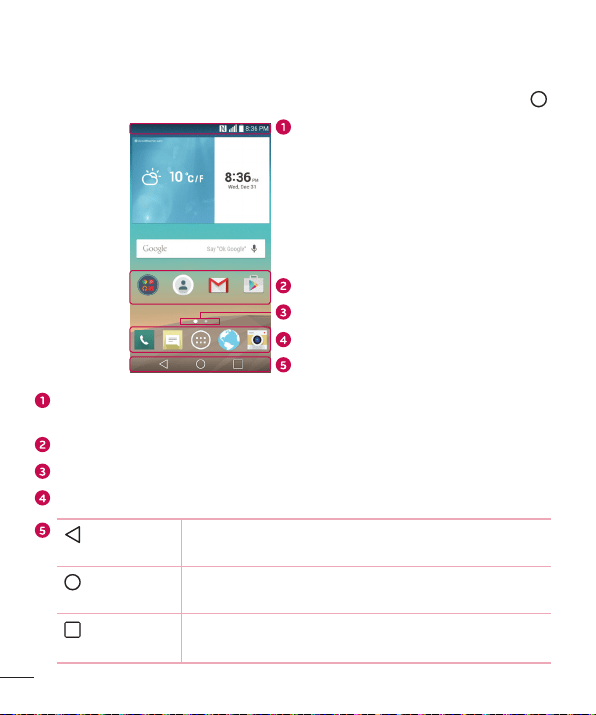
TheHomescreenisthestartingpointformanyapplicationsandfunctions.Itallowsyouto
additemslikeappshortcutsandGooglewidgetstogiveyouinstantaccesstoinformation
andapplications.Thisisthedefaultcanvasandaccessiblefromanymenubytapping .
Status Bar
Application Icons
Location Indicator
Quick Button Area
Home Touch Buttons
Showsthephone'sstatusinformation,includingthetime,signalstrength,battery
statusandnotificationicons.
Tapanicon(application,folder,etc.)toopenanduseit.
IndicateswhichHomescreencanvasyouarecurrentlyviewing.
Providesone-touchaccesstothefunctionfromanyHomescreencanvas.
Back Button
Returnstothepreviousscreen.Alsoclosespop-upitems,
suchasmenus,dialogboxesandtheon-screenkeyboard.
Home Button
ReturntotheHomescreenfromanyscreen.Touchandhold
toaccessGoogleNow.
Recent Apps
Button
Displaysrecentlyusedapplications.Ifyoutouchandhold
thisbutton,itopensamenuofavailableoptions.

17
Your Home screen
Extended Home screen
TheoperatingsystemprovidesmultipleHomescreencanvasestoprovidemorespace
foraddingicons,widgetsandmore.
• SlideyourfingerleftorrightacrosstheHomescreentoaccessadditional
canvases.
Customizing the Home screen
YoucancustomizeyourHomescreenbyaddingappsandwidgetsandchanging
wallpapers.
Adding items on your Home screen
1 TouchandholdtheemptypartoftheHomescreen.
2 TaptheWidgetstabandselecttheitemyouwanttoadd.Youthenseethisadded
itemontheHomescreen.
3 Dragittothedesiredlocationandliftyourfinger.
TIP! To add an application icon to the Home screen from the Apps screen,
touch and hold the application you want to add.
Removing an item from the Home screen
• WhileontheHomescreen,touchandholdtheiconyouwanttoremove,thendrag
itto andreleaseit.
Adding an app to the Quick Button area
• FromtheAppsscreenorontheHomescreen,touchandholdanapplicationicon
anddragittotheQuickButtonarea.Thenreleaseitinthedesiredlocation.
Removing an app from the Quick Button area
• TouchandholdthedesiredQuickButton,dragitto ,andreleaseit.
18
Your Home screen
NOTE: The Apps Button cannot be removed.
Customizing app icons on the Home screen
1 Touchandholdanapplicationiconuntilitunlocksfromitscurrentposition,then
releaseit.Theeditingicon appearsintheupper-rightcorneroftheapplication.
2 Taptheapplicationiconagainandselectthedesiredicondesignandsize.
3 Tap OKtosavethechange.
NOTE: You can also tap Add new to personalize icons with your pictures.
Returning to recently-used applications
1 Tap .Apppreviewsofrecentlyusedapplicationswillbedisplayed.
2 Tapanapppreviewtoopentheapplication.Ortap toreturntoyourprevious
screen.
Notifications panel
Notificationsalertyoutothearrivalofnewmessages,calendareventsandalarms,as
wellasongoingevents,suchaswhenyouareonacall.
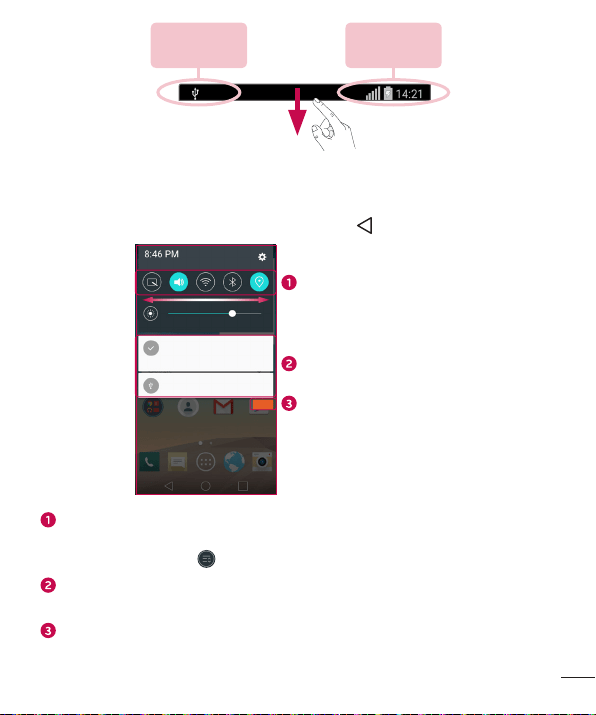
Whenanotificationarrives,itsiconappearsatthetopofthescreen.Iconsforpending
notificationsappearontheleft,andsystemicons,suchasWi-Fiandbatterystrength
areshownontheright.
NOTE: The available options may vary depending on the region or service
provider.
19
Your Home screen
Pending
notifications
System
notifications
Opening the Notifications panel
SwipedownfromtheStatusbartoopentheNotificationspanel.Toclosethe
Notificationspanel,swipethescreenupwardsortap .
Quick Settings Area
Notifications
Clear
Tapeachquicksettingbuttontotoggleiton/off.Touchandholdthedesiredbutton
todirectlyaccessthesettingsmenuforthefunction.Toseemoretogglekeys,
swipeleftorright.Tap toremove,addorrearrangequicksettingbuttons.
Currentnotificationsarelisted,eachwithabriefdescription.Tapanotificationto
viewit.
Taptoclearallofthenotifications.
20
Your Home screen
Indicator icons on the Status Bar
Indicatoriconsappearonthestatusbaratthetopofthescreentoreportmissedcalls,
newmessages,calendarevents,devicestatusandmore.
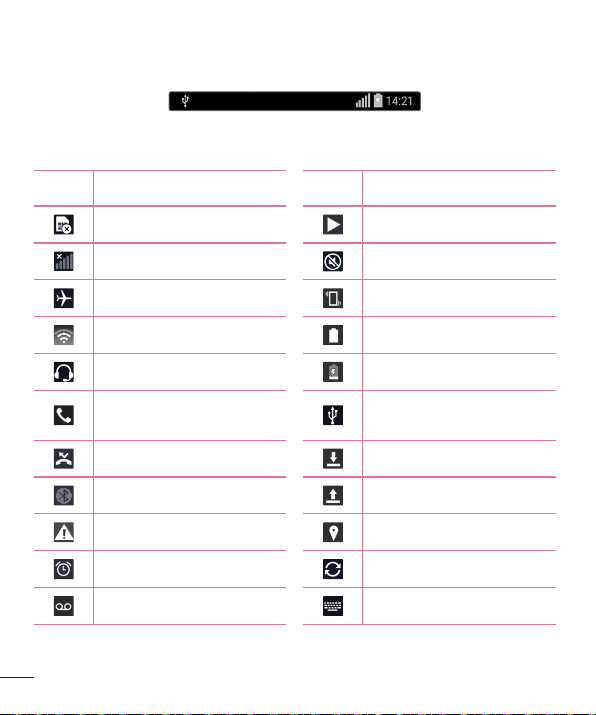
Theiconsdisplayedatthetopofthescreenprovideinformationaboutthestatusofthe
device.Theiconslistedinthetablebelowaresomeofthemostcommonones.
Icon Description Icon Description
NoSIMcardinserted Asongiscurrentlyplaying
Nonetworksignalavailable Ringerissilenced
Airplanemodeison Vibratemodeison
ConnectedtoaWi-Finetwork Batteryfullycharged
Wiredheadsetconnected Batteryischarging
Callinprogress
Thephoneisconnectedtoa
PCviaaUSBcable
Missedcall Downloadingdata
Bluetoothison Uploadingdata
Systemwarning GPSison
Analarmisset Dataissynchronizing
Newvoicemailavailable Chooseinputmethod
21
Your Home screen
Newtextormultimedia
message
Mediaservercontentsharing
ison
NFCison
NOTE: The icon's location in the Status bar may differ according to the
function or service.
On-screen keyboard
Youcanentertextusingtheon-screenkeyboard.Theon-screenkeyboardappearson
thescreenwhenyoutapanavailabletextentryfield.
Using the keypad and entering text
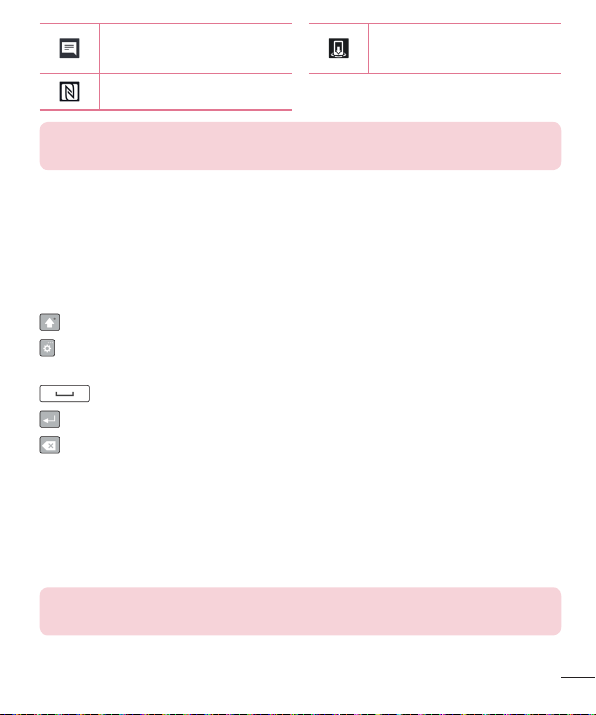
Taponcetocapitalizethenextletteryoutype.Double-tapforallcaps.
Taptogotothekeyboardsettings.Touchandholdtoentertextbyvoiceoraccess
theClipTray.
Taptoenteraspace.
Taptocreateanewline.
Taptodeletethepreviouscharacter.
Entering special characters
Theon-screenkeyboardallowsyoutoenterspecialcharacters.
Forexample,toinput"á",touchandholdthe"a"buttonuntilthezoom-inkeyexpands
anddisplaysspecialcharacters.Withoutliftingyourfinger,dragyourfingertothe
desiredspecialcharacter.Onceit'shighlighted,liftyourfinger.
NOTE: A symbol at the top right corner of a key indicates that additional
characters are available for that key.
22
Special Features
Gesture shot
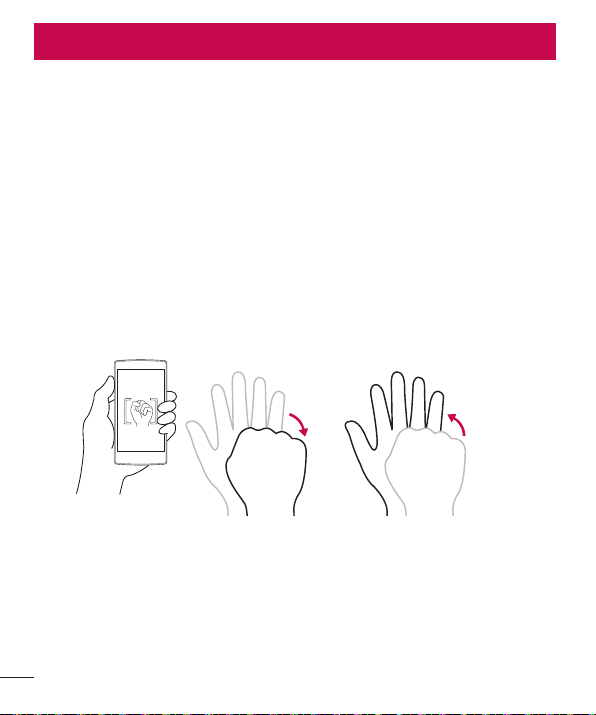
TheGestureshotfeatureallowsyoutotakeapicturewithahandgestureusingthe
frontcamera.
To take photo
TherearetwomethodsforusingtheGestureshotfeature.
• Raiseyourhand,withanopenpalm,untilthefrontcameradetectsitandabox
appearsonthescreen.Thencloseyourhandintoafisttostartthetimer,allowing
youtimetogetready.
OR
• Raiseyourhand,inaclenchedfist,untilthefrontcameradetectsitandabox
appearsonthescreen.Thenunclenchyourfisttostartthetimer,allowingyoutime
togetready.
OR
Special Features
23
Special Features
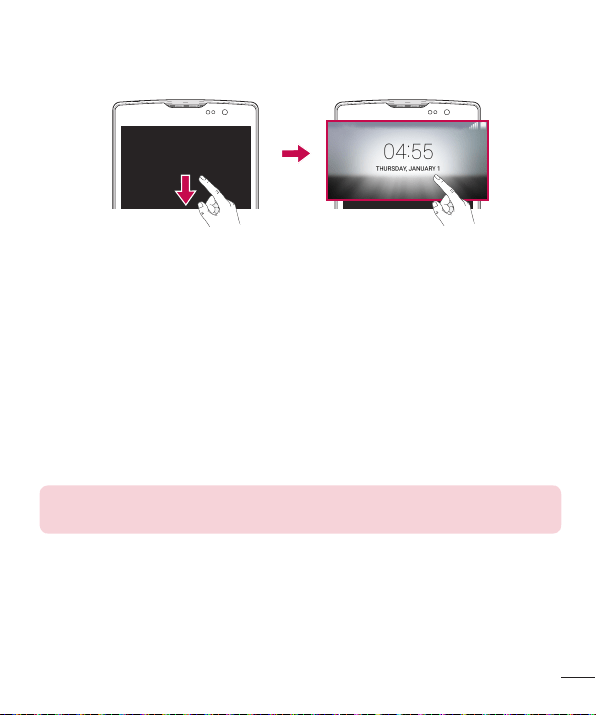
Glance View
Whenthephonescreenisoff,youcanseetheStatusbar,timeanddatebydragging
yourfingerdownfromthetopofthescreen.
KnockON
TheKnockONfeatureallowsyoutodouble-tapthescreentoeasilyturnitonoroff.
To turn the screen on
1 Double-tapthecenteroftheLockscreentoturnthescreenon.
2 Unlockthescreenoraccessanyoftheavailableshortcutsorwidgets.
To turn the screen off
1 Double-tapanemptyareaoftheHomescreenortheStatusBar.
2 Thescreenwillturnoff.
NOTE: Tap on the center area of the screen. If you tap on the bottom or the
top area, the recognition rate may decrease.
Knock Code
TheKnockCodefeatureallowsyoutocreateyourownunlockcodeusinga
combinationofknocksonthescreen.YoucanaccesstheHomescreendirectlywhen
thescreenisoffbytappingthesamesequenceonthescreen.
24
Special Features
NOTE:
• If you enter the wrong Knock Code 6 times, it will compulsorily take you to
your Google account log in/backup PIN.
• Use the fingertip instead of finger nail to tap the screen for turning it on or
off.
• When the Knock Code is not in use, you can use Knock On function by
taping the screen.
1 Tap > > >Display tab>Lock screen>Select screen lock>
Knock Code.
2 TapthesquaresinapatterntosetyourKnockCode.YourKnockCodepatterncan
be3to8taps.
Unlocking the screen using the Knock Code
YoucanunlockthescreenbytappingtheKnockCodepatternyoualreadyset,when
thescreenturnsoff.
QuickMemo+
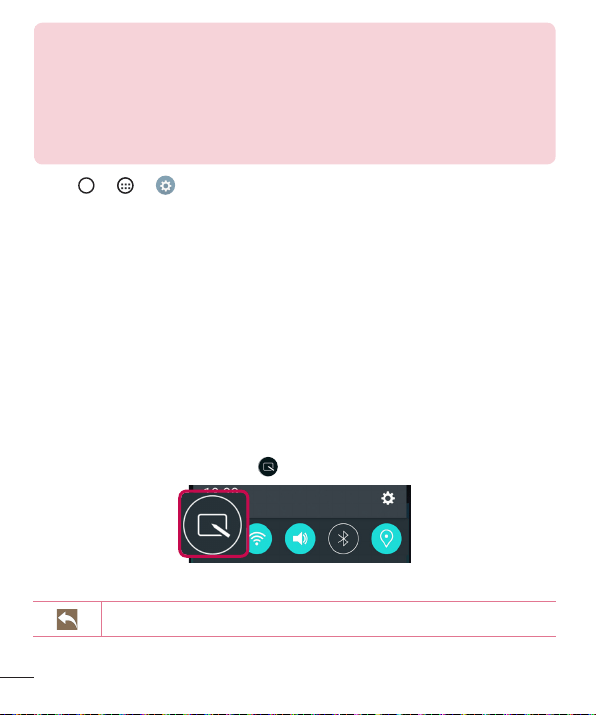
TheQuickMemo+featureallowsyoutocreatememosandcapturescreenshots.
You canuseQuickMemo+toeasilyandefficientlycreatememosduringacall,witha
savedpictureoronthecurrentphonescreen.
1 DragtheStatusbardownandtap .
2 Createamemousingthefollowingoptions:
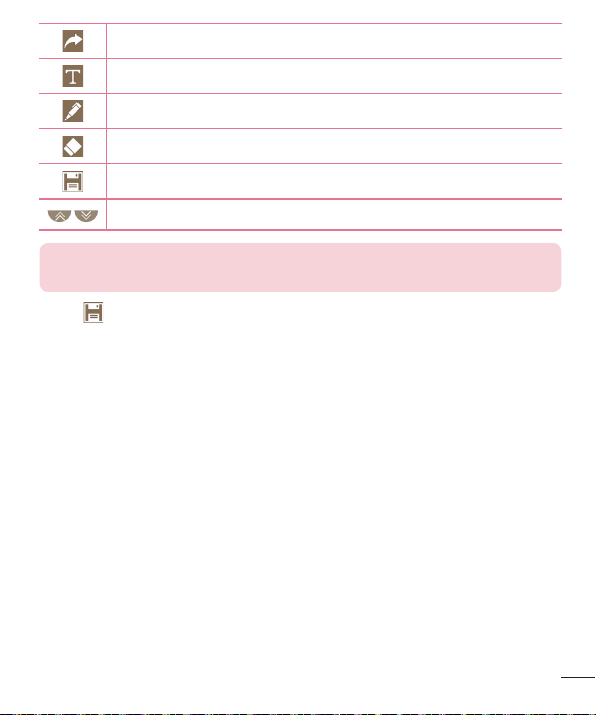
Taptoundothemostrecentaction.
25
Special Features
Taptoredothemostrecentlydeletedaction.
Taptoinserttextintoyourmemo.
Taptoselectthepentypeandcolor.
Taptousetheerasertoerasethepenmarksonthememo.
Taptosavethememoyou'vecreated.
Taptohideordisplaythetoolbar.
NOTE: Please use a fingertip while using the QuickMemo+ feature. Do not
use your fingernail.
3 Tap tosavethecurrentmemototheQuickMemo+ orGallery.
26
Google account setup
ThefirsttimeyouopenaGoogleapplicationonyourphone,youwillberequiredtosign
inwithyourexistingGoogleaccount.IfyoudonothaveaGoogleaccount,youwillbe
promptedtocreateone.
Creating your Google account
1 Tap > .
2 Tap >Generaltab>Accounts & sync>Add account>Google>Create a
New Account.
3 Enteryourfirstandlastname,thentapNext.
4 EnterausernameandtapNext.YourphonewillcommunicatewithGoogleservers
andcheckforusernameavailability.
5 EnteryourpasswordandtapNext.
6 Followtheinstructionsandentertherequiredandoptionalinformationaboutthe
account.Waitwhiletheservercreatesyouraccount.
Signing into your Google account
1 Tap > .
2 Tap >Generaltab>Accounts & sync>Add account>Google.
3 EnteryouremailaddressandtapNext.
4 OnceyouhavesetupyourGoogleaccount,yourphonewillautomatically
synchronizewithyourGoogleaccountontheweb(ifadataconnectionisavailable).
Google account setup

27
Google account setup
Aftersigningin,yourphonewillsyncwithyourGoogleservices,suchasGmail,
Contacts,andGoogleCalendar.YoucanalsouseMaps,downloadapplicationsfrom
PlayStore,backupyoursettingstoGoogleservers,andtakeadvantageofotherGoogle
servicesonyourphone.
IMPORTANT
• Some applications, such as Calendar, work only with the first Google Account
you add. If you plan to use more than one Google Account with your phone,
be sure to sign into the one you want to use with such applications first. When
you sign in, your contacts, Gmail messages, Calendar events, and other
information from these applications and services on the web are synchronized
with your phone. If you don't sign into a Google Account during setup, you will
be prompted to sign in or to create a Google Account the first time you start
an application that requires one, such as Gmail or Play Store.
• If you have an enterprise account through your company or other organization,
your IT department may have special instructions on how to sign into that
account.
28
Connecting to Networks and Devices
Wi-Fi
Youcanusehigh-speedInternetaccesswhilewithinthecoverageofthewireless
accesspoint(AP).
Connecting to Wi-Fi networks
1 Tap > > >Networks tab>Wi-Fi.
2 Tap toturnWi-FionandstartscanningforavailableWi-Finetworks.
3 Tapanetworktoconnecttoit.
• Ifthenetworkissecuredwithalockicon,youwillneedtoenterasecuritykeyor
password.
4 TheStatusbardisplaysiconsthatindicateWi-Fistatus.
NOTE: If you are out of the Wi-Fi zone or have set Wi-Fi to Off, the device
may automatically connect to the Web using mobile data, which may incur
data charges.
TIP! How to obtain the MAC address
Tap
> > > Networks tab > Wi-Fi > > Advanced Wi-Fi > MAC
address.
Connecting to Networks and Devices
29
Connecting to Networks and Devices
Bluetooth
Bluetoothisashort-rangecommunicationstechnologythatallowsyoutoconnect
wirelesslytoanumberofBluetoothdevices,suchasheadsetsandhands-freecarkits,
andBluetooth-enabledhandhelds,computers,printers,andwirelessdevices.
NOTE:
• LG is not responsible for the loss, interception or misuse of data sent or
received via the Bluetooth feature.
• Always make sure that you share and receive data with devices that are
trusted and properly secured.
• If there are obstacles between the devices, the operating distance may be
reduced.
• Some devices, especially those that are not tested or approved by Bluetooth
SIG, may be incompatible with your device.
Pairing your phone with another Bluetooth device
1 Tap > > >Networks tab>Bluetooth.
2 Tap toturnBluetoothon.
3 Tap Search for devicestoviewthevisibledevicesinrange.
4 Choosethedeviceyouwanttopairwithfromthelist.Oncetheparingissuccessful,
yourphoneconnectstotheotherdevice.
NOTE: Pairing between two Bluetooth devices is a one-time process. Once
a pairing has been created, the devices will continue to recognize their
partnership and exchange information.
TIP! Please consult documentation included with Bluetooth device for
information on pairing mode and passcode (typically 0 0 0 0 – four zeroes).
30
Connecting to Networks and Devices
Sending data via Bluetooth
1 Selectafileoritem,suchasacontactormediafile.
2 SelecttheoptionforsendingdataviaBluetooth.
3 SearchforandpairwithaBluetooth-enableddevice.
• DuetodifferentspecificationsandfeaturesofotherBluetooth-compatibledevices,
displayandoperationsmaybedifferent,andfunctionssuchastransferor
exchange,maynotbepossiblewithallBluetoothcompatibledevices.
Receiving data via Bluetooth
1 Tap > > >Networks tab>Bluetooth.
2 Tap toturnBluetoothon.
3 Youwillreceivearequesttoacceptapairingattemptfromthesendingdevice.Be
suretoselectAccept.
Wi-Fi Direct
Wi-FiDirectprovidesadirectconnectionbetweenWi-Fienableddeviceswithout
requiringanaccesspoint.
Turning on Wi-Fi Direct
1 Tap > > > Networks tab > Wi-Fi.
2 Tap > Advanced Wi-Fi > Wi-Fi Direct.
NOTE: When in this menu, your device is visible to other visible Wi-Fi Direct
devices nearby.

31
Connecting to Networks and Devices
Transferring data between a PC and the device
YoucancopyormovedatabetweenaPCandthedevice.
Transferring data
1 ConnectyourdevicetoaPCusingtheUSBcablethatcamewithyourphone.
2 OpentheNotificationspanel,,tapthecurrentUSBconnection,andselectMedia
sync (MTP).
3 Awindowwillpop-uponyourPC,allowingyoutotransferthedesireddata.
NOTE: The LG United Mobile Driver is required to be installed on your PC to
be able to detect the phone.
Items Requirement
OS MicrosoftWindowsXPSP3,Vistaorhigher
WindowMediaPlayerversion WindowsMediaPlayer10orhigher
NOTE: Please refer to www.android.com/filetransfer/#tips in order to use MTP
on the MAC OS.
32
Calls
Making a call
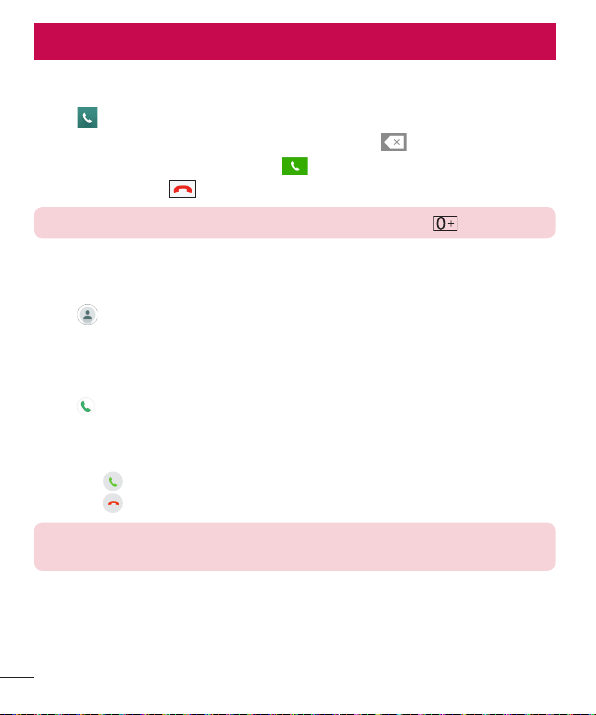
1 Tap toopenthedialer.
2 Enterthenumberusingthedialer.Todeleteadigit,tap .
3 Afterenteringthedesirednumber,tap toplacethecall.
4 Toendthecall,tap .
TIP! To enter "+" to make international calls, touch and hold .
Calling your contacts
1 Tap toopenyourcontacts.
2 Scrollthroughthecontactlist.Youcanalsoenterthecontact'snameintheSearch
fieldorscrollalongthealphabetlettersontherightedgeofthescreen.
3 Inthelistthatisdisplayed,tapthecontactyouwanttocall.
4 Tap nexttothenumberyouwanttodial.
Answering and rejecting a call
• Swipe inanydirectiontoanswertheincomingcall.
• Swipe inanydirectiontodeclineanincomingcall.
NOTE: Tap or swipe the Decline with message if you want to send a
message to the caller.
Calls
33
Calls
Making a second call
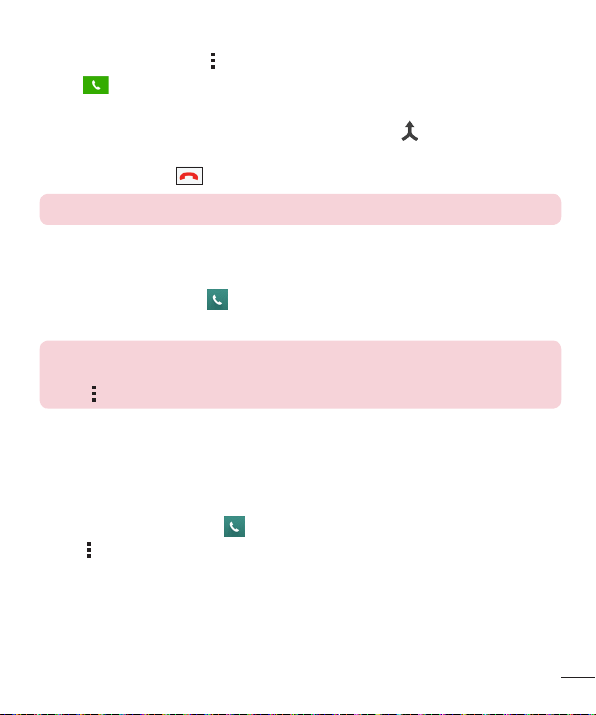
1 Duringyourfirstcall,tap >Add callandenterthenumber.
2 Tap toplacethecall.
3 Bothcallsaredisplayedonthecallscreen.Yourinitialcallislockedandputonhold.
4 Tapthedisplayednumbertotogglebetweencalls.Ortap tostartaconference
call.
5 Toendallcalls,tap .
NOTE: You are charged for each call you make.
Viewing your call logs
FromtheHomescreen,tap andselectCall logs.
Viewalistofalldialed,receivedandmissedcalls.
TIP!
• Tap any call log entry to view the date, time and duration of the call.
• Tap , then tap Delete all to delete all of the recorded items.
Call settings
Youcanconfigurephonecallsettings,suchascallforwarding,aswellasotherspecial
featuresofferedbyyourcarrier.
1 FromtheHomescreen,tap toopenthedialer.
2 Tap todisplaytheavailableoptions.
3 Tap Call settingsandconfigurethedesiredoptions.
34
Contacts
Youcanaddcontactsonyourphoneandsynchronizethemwiththecontactsinyour
GoogleAccountorotheraccountsthatsupportsyncingcontacts.
Searching for a contact
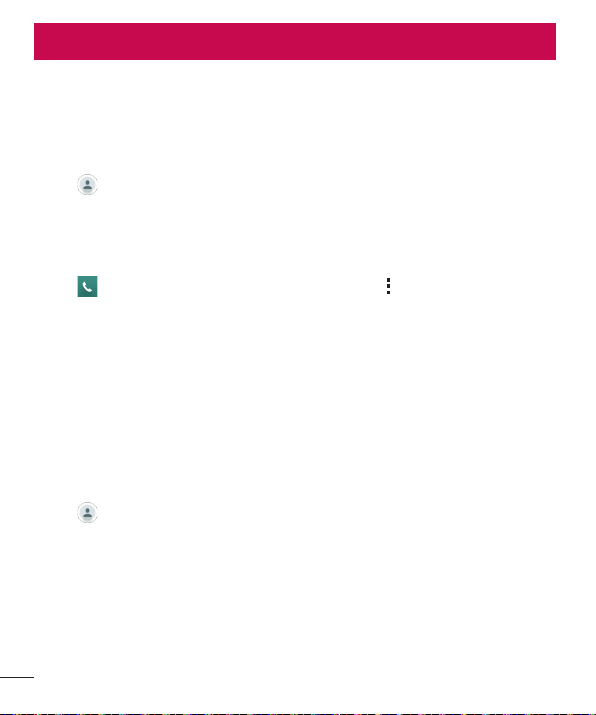
1 Tap toopenyourcontacts.
2 Tap Search contactsandenterthecontactnameusingthekeyboard.
Adding a new contact
1 Tap andenterthenewcontact'snumber.Thentap >Add to Contacts.
2 Ifyouwanttoaddapicturetothenewcontact,taptheimagearea.
ChooseTake photoorSelect from Gallery.
3 Enterthedesiredinformationforthecontact.
4 Tap Save.
Favorites contacts
Youcanclassifyfrequentlycalledcontactsasfavorites.
Adding a contact to your favorites
1 Tap toopenyourcontacts.
2 Tapacontacttoviewitsdetails.
3 Tapthestaratthetoprightofthescreen.Thestarturnsgold.
Contacts

35
Contacts
Removing a contact from your favorites list
1 Tap toopenyourcontacts.
2 TaptheFavoritestab,andchooseacontacttoviewitsdetails.
3 Tapthegoldstaratthetoprightofthescreen.Thestarturnsadarkcolorandthe
contactisremovedfromyourfavorites.
Creating a group
1 Tap toopenyourcontacts.
2 Tap Groups> >New group.
3 Enteranameforthenewgroup.Youcanalsosetadistinctringtoneforthenewly
createdgroup.
4 Tap Add memberstoaddcontactstothegroup.
5 Tap Savetosavethegroup.
NOTE:
• If you delete a group, the contacts assigned to that group will not be lost.
They will remain in your contact list.
36
Messaging
Yourphonecombinestextandmultimediamessagingintooneintuitive,easyto-use
menu.
Sending a message
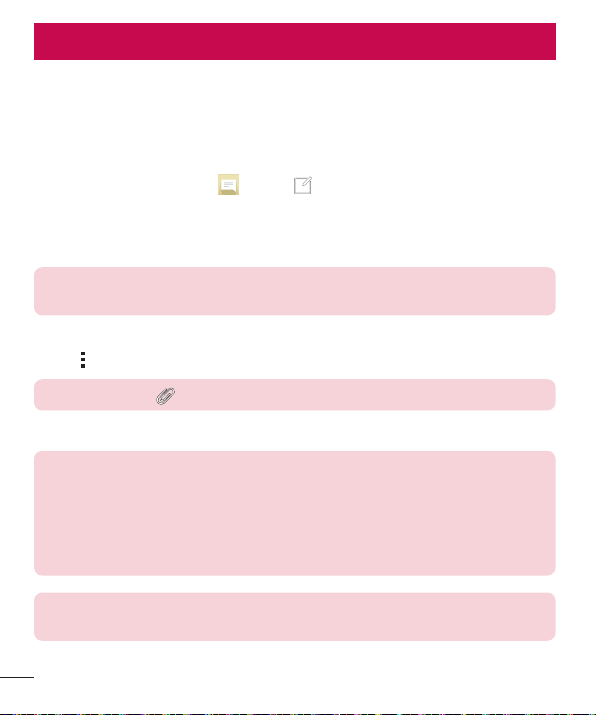
1 FromtheHomescreen,tap andtap tocreateanewmessage.
2 EnteracontactnameorcontactnumberintotheTofield.Asyouenterthecontact
name,matchingcontactsappear.Youcantapasuggestedrecipientandaddmore
thanonecontact.
NOTE: You may be charged for each text message you send. Please consult
with your service provider.
3 Tapthetextfieldandstartenteringyourmessage.
4 Tap toopentheoptionsmenu.Choosefromanyoftheavailableoptions.
TIP! You can tap to attach the file that you want to share with message.
5 Tap Sendtosendyourmessage.
TIP!
• The 160-character limit may vary from country to country depending on how
the text message is coded and the language used in the message.
• If an image, video, or audio file is added to a text message, it will be
automatically converted into a multimedia message and you will be charged
accordingly.
NOTE: When you get a text message during a call, there will be an audible
notification.
Messaging

37
Messaging
Conversation view
Messagesexchangedwithanotherpartyaredisplayedinchronologicalordersothat
youcanconvenientlyseeandfindyourconversations.
Changing your messaging settings
Yourphone'smessagingsettingsarepredefinedtoallowyoutosendmessages
immediately.Youcanchangethesettingsbasedonyourpreferences.
• Tap ontheHomescreen,tap >Settings.
38
E-mail
YoucanusetheEmailapplicationtoreademailfromprovidersotherthanGmail.
TheEmailapplicationsupportsthefollowingaccounttypes:POP3,IMAPandMicrosoft
Exchange(forEnterpriseusers).
Managing email accounts
To open the Email application
Tap > > .
ThefirsttimeyouopentheEmailapplication,asetupwizardopenstohelpyouaddan
emailaccount.
Adding another email account:
• Tap > > > >Settings > Add account.
Changing the email general settings:
• Tap > > > >Settings>General settings.
Deleting an email account:
• Tap > > > >Settings> >Remove account>Selectthe
accounttodelete>Remove>Yes.
Working with account folders
Tap > > > >Folders.
EachaccounthasInbox,Outbox,SentandDraftsfolders.Dependingonthefeatures
supportedbyyouraccount'sserviceprovider,youmayhaveadditionalfolders.
E-mail

39
E-mail
Composing and sending email
1 Inthe application,tap tocreateanewemail.
2 Enteranaddressforthemessage'sintendedrecipient.Asyouentertext,matching
addresseswillbeofferedfromyourcontacts.Separatemultipleaddresseswith
semicolons.
3 TaptheCc/Bccfieldtocopyorblindcopytoothercontacts/emailaddresses.
4 Tapthetextfieldandenteryourmessage.
5 Tap Attachtoattachthefileyouwanttosendwithyourmessage.
6 Tap Sendtosendthemessage.
40
Camera and Video
Camera options on the viewfinder
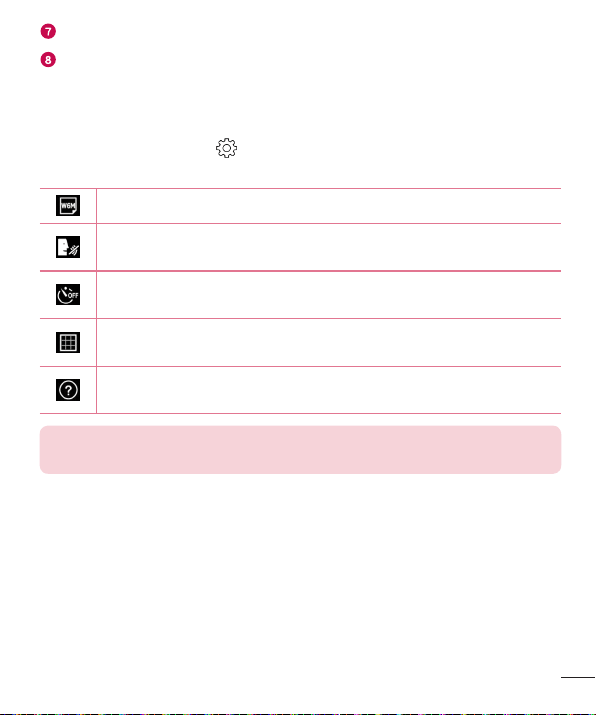
ToopentheCameraapplication,tap > > .
Youcanusethecameraorcamcordertotakeandsharepicturesandvideos.
NOTE: Be sure to clean the protective lens cover with a microfiber cloth
before taking pictures. A lens cover with smudges from fingers can cause
blurry pictures with a "halo" effect.
Hide/Display Options–Taptohide/displaythecameraoptionsontheviewfinder.
Flash–Allowsyoutomanagethecamera'sflash.
Swap camera–Taptoswapbetweentherearcameralensandthefrontcamera
lens.
Settings–Tapthisicontoopenthecamerasettingsmenu.
Gallery–Taptoviewthelastphotoorvideoyoucaptured.
Record–Taptostartrecording.
Camera and Video
41
Camera and Video
Capture –Taptotakeaphoto.
Exit –Taptoexitthecamera.
Using the advanced settings
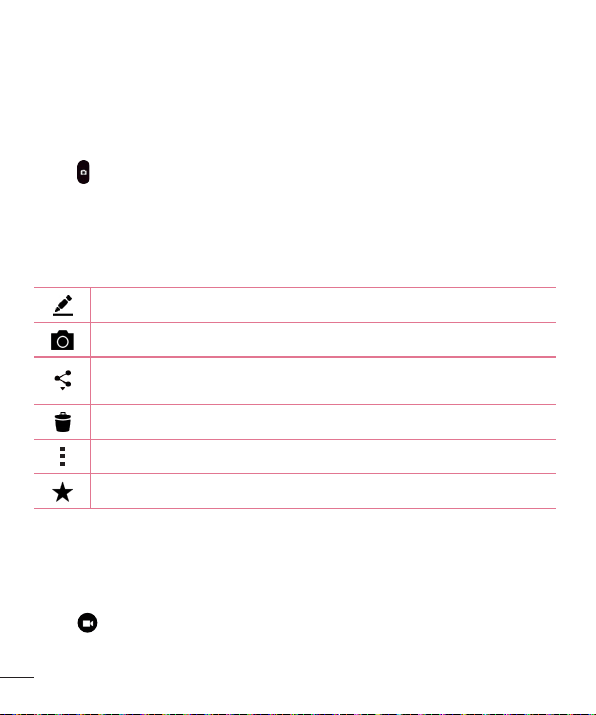
Inthecameraviewfinder,tap toshowtheadvancedoptions.Tapeachiconto
adjustthefollowingcamerasettings.
Setthesizeofyourpictureandvideo.
Allowsyoutosayavoicecommandtotakepictures.YoucansayLG,
Cheese,Smile,oranyothersupportedcommand.
Setyourcamera'stimer.Thisisidealifyouwanttobeapartofthepicture
orvideo.
Allowsyoutotakebetterpicturesandrecordbettervideosbydisplayinga
gridlineforhelpwithalignment.
Allowsyoutolearnhowafunctionworks.Thisiconwillprovideyouwitha
helpguide.
NOTE: The shutter sound is not available when Vibrate mode or Silent mode
is enabled.
42
Camera and Video
Taking a photo
1 Open the Camera application and point the lens toward the subject you want to
photograph.
2 Focusindicatorswillappearinthecenteroftheviewfinderscreen.Youcanalsotap
anywhereonthescreentofocusonthatspot.
3 Whenthefocusindicatorsturnblue,thecamerahasfocusedonyoursubject.
4 Tap tocapturethephoto.
Once you have taken a photo
Taptheimagethumbnailonthescreentoviewthelastphotoyoutook.Thefollowing
optionsareavailable.
Taptoeditthephoto.
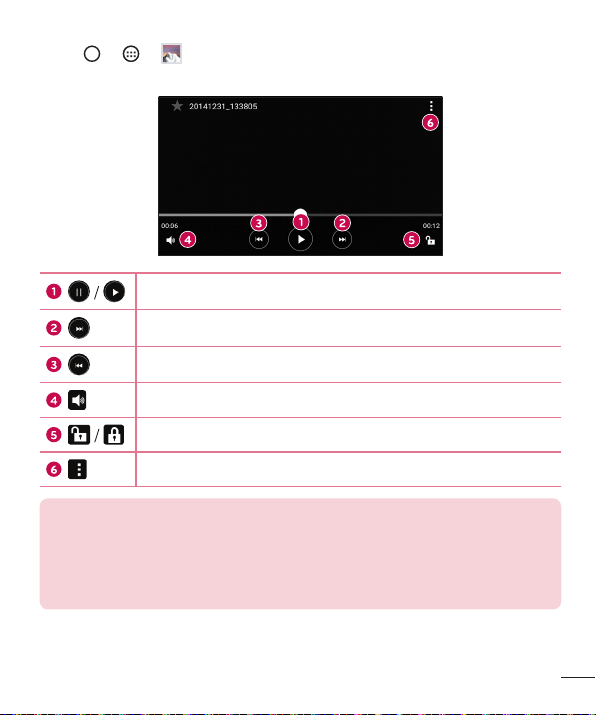
Taptotakeanotherphotoimmediately.
Taptosendyourphototoothersorshareitviaanyavailablesocialnetwork
services.
Taptodeletethephoto.
Taptoaccessadditionaloptions.
Taptoaddthephototoyourfavorites.
Recording a video
1 Open the Camera application and point the lens toward the subject you want to
captureinyourvideo.
2 Tap oncetostartrecording.
43
Camera and Video
NOTE: The timer will be displayed on the screen.
3 Tap tostoprecording.
TIP!
– Tap to capture a screen shot while recording a video.
– Tap to pause the recording.
After recording a video
Tapthevideothumbnailonthescreentoviewthelastvideoyourecorded.The
followingoptionsareavailable.
Taptorecordanothervideoimmediately.
Taptosendyourvideotoothersorshareitviaanyavailablesocialnetwork
services.
Taptodeletethevideo.
Taptoaccessadditionaloptions.
Taptoaddthevideotofavorites.
Multi-point Auto Focus
Whenyoutakeapicture,theMulti-pointAutoFocus(AF)functionoperatesautomatically
andallowsyoutoseeaclearimage.
Burst shot
Allowsyoutotakemultipleshotsquickly.Touchandhold .

44
Camera and Video
Gallery
TheGalleryapplicationpresentsthepicturesandvideosinyourstorage,includingthose
you'vetakenwiththeCameraapplicationandthoseyoudownloadedfromthewebor
otherlocations.
1 Tap > > toviewtheimagesstoredinthestorage.
2 Tapanalbumtoopenitandviewitscontents.(Thepicturesandvideosinthealbum
aredisplayedinchronologicalorder.)
3 Tapapictureinanalbumtoviewit.
NOTE:
• Depending on the software installed, some file formats may not be
supported.
• Some files may not play properly due to their encoding.
Viewing pictures
TheGallerydisplaysyourpicturesinfolders.Whensomeappssaveapicture,afolderis
automaticallycreatedtocontainthepicture.
Picturesaredisplayedbythedatetheywerecreated.Selectapicturetoviewitfull
screen.Scrollleftorrighttoviewthenextorpreviousimage.
Zooming in and out
Useoneofthefollowingmethodstozoominandoutonanimage:
• Double-tapanywheretozoominandout.
• Spreadtwofingersapartonanyplaceinthepicturezoomin.Pinchintozoomout.
45
Camera and Video
Video options
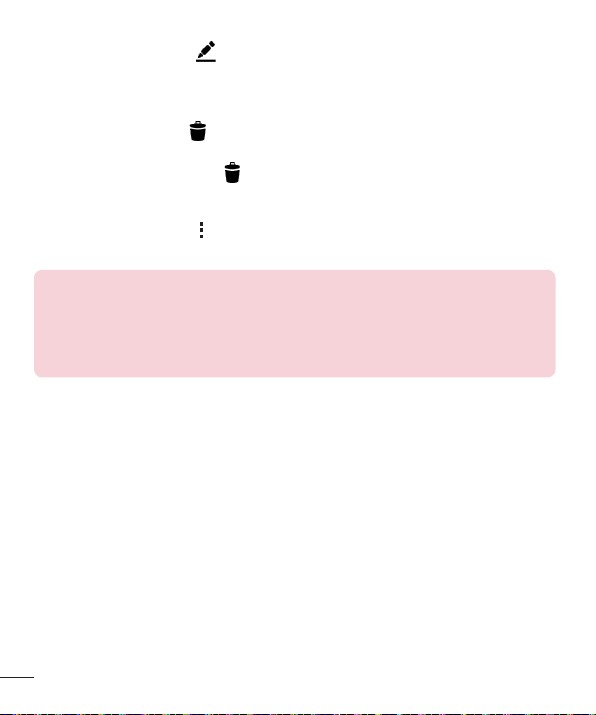
1 Tap > > .
2 Selectthevideoyouwanttowatch.
Touchtopause/resumevideoplayback.
Touchtofast-forward.
Touchtorewind.
Touchtoadjustvideovolume.
Touchtolock/unlockthescreen.
Taptoaccessadditionaloptions.
NOTE:
• While a video is playing, the following options are available:
• Slide the right side of the screen up or down to adjust the sound.
• Slide the left side of the screen up or down to adjust the brightness.
• Slide your finger from left to right (or vice versa) to fast-forward and rewind.
46
Camera and Video
Editing photos
Whileviewingaphoto,tap .
Deleting photos/videos
Useoneofthefollowingmethods:
• Whileinafolder,tap ,selectthephotos/videosyouwanttodelete.Thentap
Delete.
• Whileviewingaphoto,tap .
Setting wallpaper
Whileviewingaphoto,tap >Set image astosettheimageaswallpaperorassign
ittoacontact.
NOTE:
• Depending on the software installed, some file formats may not be
supported.
• If the file size exceeds the available memory, an error can occur when you
open files.
47
Multimedia
Music
Yourphonehasamusicplayerthatletsyouplayallyourfavoritetracks.
Playing a song
1 Tap > > .
2 TaptheSongstab.
3 Selectthesongyouwanttoplay.
4 Thefollowingoptionsareavailable.
Taptoaddthesongtoyourfavorites.
Taptoopenthecurrentplaylist.
Taptoaccessadditionaloptions.
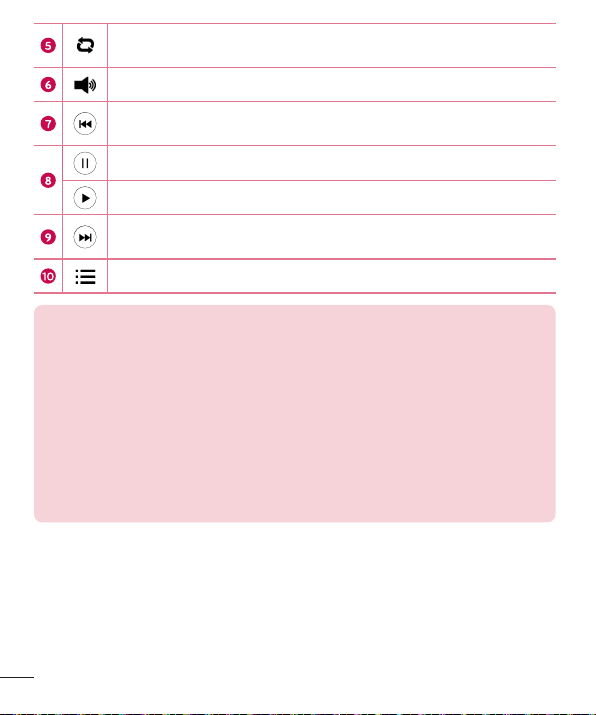
Taptoplaythecurrentplaylistinshufflemode(tracksareplayedin
randomorder).
Multimedia
48
Multimedia
Taptotogglethroughrepeatallsongs,repeatcurrentsongandrepeat
off.
Taptoadjustthevolume.
Taptorestartthecurrenttrackorskiptotheprevioustrackinthealbum,
playlistorshufflelist.Touchandholdtorewind.
Taptopauseplayback.
Taptoresumeplayback.
Taptoskiptothenexttrackinthealbum,playlistorshufflelist.Touch
andholdtofast-forward.
Taptoopenthemusiclibrary.
NOTE:
• Depending on the software installed, some file formats may not be
supported.
• If the file size exceeds the available memory, an error can occur when you
open files.
• Music file copyrights may be protected by international treaties and national
copyright laws. Therefore, it may be necessary to obtain permission or
a licence to reproduce or copy music. In some countries, national laws
prohibit private copying of copyrighted material. Before downloading or
copying the file, please check the national laws of the relevant country
concerning the use of such material.
49
Utilities
Clock
TheClockappgivesyouaccesstotheAlarms,Timer,WorldclockandStopwatch
functions.Accessthesefunctionsbytappingthetabsacrossthetopofthescreenor
swipinghorizontallyacrossthescreen.
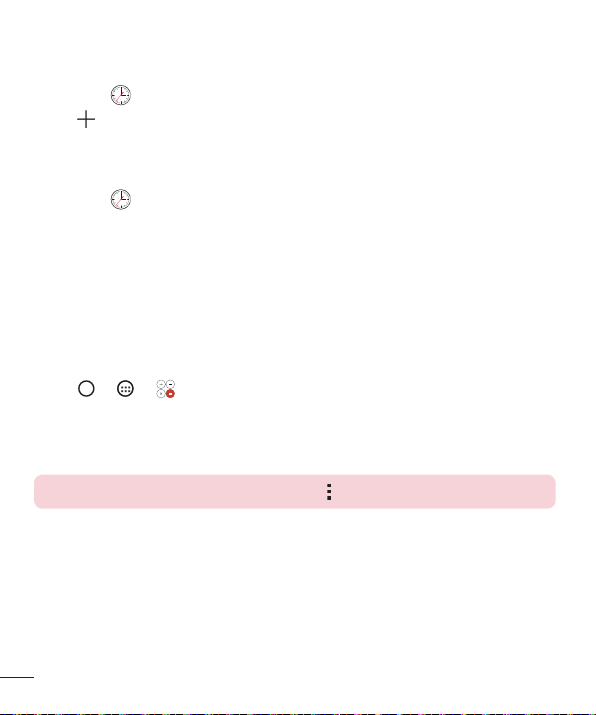
Tap > > .
Alarms
TheAlarmstaballowsyoutosetalarms.
1 Openthe app,thenselecttheAlarmstab.
2 Tap toaddanewalarm,tapanalarm.
3 AdjustthesettingsasnecessaryandtapSave.
NOTE: You can also tap an existing alarm to edit it.
Timer
TheTimertabcanalertyouwithanaudiblesignalwhenasetamountoftimehas
passed.
1 Openthe app,thenselecttheTimertab.
2 Setthedesiredtimeonthetimer.
3 Tap Starttostartthetimer.
4 Tap Stoptostopthetimer.
Utilities
50
Utilities
World clock
TheWorldclocktaballowsyoutoeasilycheckthecurrenttimeinothercitiesaround
theworld.
1 Openthe app,thenselecttheWorld clocktab.
2 Tap andselectthedesiredcity.
Stopwatch
TheStopwatchtaballowsyoutouseyourphoneasastopwatch.
1 Openthe app,thenselecttheStopwatchtab.
2 TaptheStartbuttontoinitiatethestopwatch.
• TaptheLapbuttontorecordlaptimes.
3 TaptheStopbuttontostopstopwatch.
Calculator
TheCalculatorappallowsyoutoperformmathematicalcalculationsusingastandardor
scientificcalculator.
1 Tap > > .
2 Tapthenumberkeystoenternumbers.
3 Forsimplecalculations,tapthefunctionyouwanttoperform(+,–,xor÷)followed
by=.
NOTE: For more complex calculations, tap > Scientific calculator.
51
Utilities
Calendar
TheCalendarappallowsyoutotrackyourscheduleofevents.
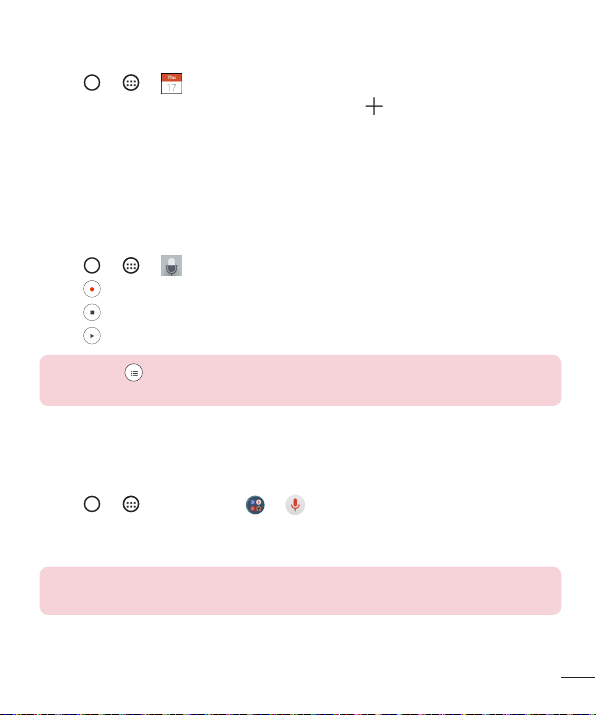
1 Tap > > .
2 Tapthedateyouwanttoaddaneventto.Thentap .
3 EntertheeventdetailsandtapSave.
Voice Recorder
TheVoiceRecorderapprecordsaudiblefilesforyoutouseinavarietyofways.
Recording a sound or voice
1 Tap > > .
2 Tap tobeginrecording.
3 Tap toendtherecording.
4 Tap tolistentotherecording.
NOTE: Tap to access your recordings. You can listen to your saved
recordings.
Voice Search
Usethisapplicationtosearchwebpagesusingvoice.
1 Tap > >Google folder > .
2 SayakeywordorphrasewhenSpeak nowappearsonthescreen.Selectoneofthe
suggestedkeywordsthatappear.
NOTE: This application may not be available depending on the region or
service provider.
52
Utilities
Downloads
Usethisapplicationtoseewhatfileshavebeendownloadedthroughtheapplications.
• Tap > > .
NOTE: This application may not be available depending on the region or
service provider.
LG SmartWorld
LGSmartWorldoffersanassortmentofexcitingcontent–fonts,themes,games,
applications.
How to Get to LG SmartWorld from Your Phone
1
Tap > > .
2 Tap Sign inandenteryourusernameandpassword.Ifyouhavenotsignedupyet,
tapRegistertocreateanaccount.
3 Browseanddownloadthecontentyouwant.
NOTE:
• You may incur data fee charges when using your mobile network to access
LG SmartWorld.
• LG SmartWorld may not be available for all carriers or in all countries.
What if there is no LG SmartWorld icon?
1 Using a mobile Web browser on your device, access LG SmartWorld
(www.lgworld.com) and select your country.
2 Download the LG SmartWorld App.
3 Run and install the downloaded file.
4 Access LG SmartWorld by tapping the
icon.

53
Utilities
Special benefits available for LG SmartWorld
• Personalize your device with home themes, keyboard themes, and fonts.
• Enjoy special promotions only offered on LG SmartWorld.
• Note that LG SmartWorld is only available for certain devices. Please check
the www.lgworld.com for more information.
54
Browsing the Web
Browser
TheBrowsergivesyouafast,full-colorworldofgames,music,news,sports,
entertainment,andmuchmore,rightonyourmobilephone.
NOTE: Additional charges apply when connecting to these services and
downloading content. Check data charges with your network provider.
1 Tap > > .
Using the Web toolbar
Scrolltowardsthetopofthewebpagetoaccessthebrowsertoolbar.
Taptogobackonepage.
Taptogoforwardonepage.
TaptogototheHomepage.
Taptoopenanewwindow.
Taptoaccessyourbookmarks.
Viewing webpages
Taptheaddressfield,enterthewebaddressandtapGoonthekeyboard.
Opening a page
Togotoanewpage,tap > .
Togotoanotherwebpage,tap ,scrollupordown,andtapthepagetoselectit.
Browsing the Web
55
Browsing the Web
Searching the web by voice
Taptheaddressfieldandthentap .Whenprompted,sayakeywordandselectone
ofthesuggestedkeywordsthatappear.
NOTE: This feature may not be available depending on the region or service
provider.
Bookmarks
Tobookmarkthecurrentwebpage,tap >Add to bookmarks>OK.
Toopenabookmarkedwebpage,tap andselectthedesiredbookmark.
History
Tap >Historytabtoopenalistofrecentlyvisitedwebpages.Toclearallofyour
history,tap >Yes.
Chrome
UseChrometosearchforinformationandbrowsewebpages.
1 Tap > > .
NOTE: This application may not be available depending on your region and
service provider.
Viewing webpages
Taptheaddressfield,andthenenterawebaddressorsearchcriteria.
Opening a page
Toopenanewpage,tab >New tab.
Togotoanotherwebpage,tap (iftabsaremergedwithapps)or atthetopright
cornerofthebrowser(iftabsarenotmergedwithapps).Thentapthedesiredpageto
viewit.
56
Settings
TheSettingsapplicationcontainsmostofthetoolsforcustomizingandconfiguringyour
phone.AllofthesettingsintheSettingsapplicationaredescribedinthissection.
To open the Settings application
• Tap >touchandhold >System settings.
-or-
• Tap > > .
Networks
< WIRELESS NETWORKS >
Airplane mode
AirplaneMode(flightmode)allowsyoutousemanyofyourphone'sfeatures,suchas
games,andmusic,whenyouareinanareawheremakingorreceivingcallsordata
useisprohibited.WhenyousetyourphonetoAirplaneMode,itcannotsendorreceive
anycallsoraccessonlinedata.
Wi-Fi
TurnsonWi-FitoconnecttoavailableWi-Finetworks.
Bluetooth
TurnstheBluetoothwirelessfeatureonorofftouseBluetooth.
Data Manager
Displaysthedatausageandallowsyoutosetapersonalizedmobiledatausagelimit.
Call
Configurephonecallsettings,suchascallforwardingandotherspecialfeaturesoffered
byyourcarrier.
• Voicemail –Allowsyoutoselectyourcarrier'svoicemailservice.
• Fixed dialing numbers–Turnonandcompilealistofnumbersthatcanbe
calledfromyourphone.YouneedyourPIN2,whichisavailablefromyouroperator.
Settings

57
Settings
Onlynumbersinthefixeddiallistcanbecalledfromyourphone.
• Caller ID –Usedefaultoperatorsettingstodisplayyournumberinoutgoingcalls.
• Incoming voice call pop-up–Displaysincomingvoicecallpop-upwhenanapp
isinuse.
• Call reject–Allowsyoutosetthecalldeclinefunction.
• Decline with message–Whenyouwanttodeclineacall,youcansendaquick
messageusingthisfunction.Thisisusefulifyouneedtodeclineacallduringa
meeting.
• Auto answer–Setsthetimebeforeaconnectedhands-freedeviceautomatically
answersanincomingcall.
• Connection vibration–Vibratesyourphonewhentheotherpartyanswersthe
call.
• TTY mode–SetstheTTYmodetocommunicatewithotherTTYdevices.
• Hearing aids–Allowsyoutoturnonhearingaidcompatibility.
• Noise suppression–Suppressesbackgroundnoiseonyourdeviceduringacall.
• Power key ends call–Allowsyoutoselectyourendcall.
• Call duration–Viewthedurationofcalls,includingLastcall,Outgoingcalls,
IncomingcallsandAllcalls.
• Sound settings–Allowsyoutocontrolthesoundsonthephone.
• Additional settings–Allowsyoutochangethefollowingsettings.
Call forwarding:Allowsyoutosetthecallforwardingoptions.
Call waiting:Ifcallwaitingisactivated,thehandsetwillnotifyyouofanincoming
callwhileyouareonacall(dependingonyournetworkprovider).
< CONNECTIVITY >
Share & connect
• NFC–NFC(NearFieldCommunication)isawirelesstechnologythatenablesdata
transmissionbetweentwoobjectswhentheyarebroughtwithinafewinchesof
eachothers.WhenyouenableNFConyourphone,yourphonecanexchangedata
withotherNFC-enableddevicesorreadinformationfromsmarttagsembeddedin
posters,stickers,andotherproducts.

58
Settings
• Android Beam–Whenthisfeatureisturnedon,youcanbeamappcontentto
anotherNFC-capabledevicebyholdingthedevicesclosetogether.Forexample,
youcanbeamBrowserpages,YouTubevideos,contacts,ThinkFreeViewer,and
more.Justbringthedevicestogether(typicallybacktoback)andthentouchyour
screen.Theappdetermineswhatgetsbeamed.
• LG PC Suite–ConnectLGPCSuitewithyourphonetoeasilymanagemultimedia
contentandapps.
More...
• Mobile networks–Allowsyoutoconfigurevariousmobilenetworksettings.
• VPN–Fromyourphone,youcanadd,setup,andmanagevirtualprivatenetworks
(VPNs)thatallowyoutoconnectandaccessresourcesinsideasecuredlocal
network,suchasyourcorporatenetwork.
NOTE: You must set a screen lock before you can use VPN.
• Emergency alerts–Ifemergencyalertsareissued,thosealertswillappearon
thisscreen.
Sound
< BASIC >
Sound profile
AllowsyoutosetthesoundprofiletoSound,Vibrate onlyandDo not disturb.
Volume
Adjustthephone'svolumesettingstosuityourneedsandenvironment.
< RINGTONES & VIBRATIONS >
Ringtone
Selecttheringtoneforincomingcalls.
Default notification sound
Selecttheringtonefornotifications,suchasreceivingnewmessagesorcalendar
events.

59
Settings
Sound with vibration
Checkmarktosetthephonetovibrateinadditiontotheringtonewhenyoureceive
calls.
Vibration type
Allowsyoutosetavibrationtypefornotifications.
< NOTIFICATIONS >
Do not disturb
Allowsyoutosetaschedulewhentopreventinterruptionsfromnotifications.Youcan
settoallowcertainfeaturestointerruptwhenPriorityonlyisset.
Lock screen
Allowsyoutochooseifyouwanttoshoworhidenotificationsonthelockscreen.
Apps
Allowsyoutopreventappsfromdisplayingnotificationsorsetappstoshow
notificationswithprioritywhenDonotdisturbissettoPriorityonly.
< ADVANCED SETTINGS >
Vibrate on tap
CheckmarktovibratewhentappingtheHometouchbuttonsandduringotherUI
interactions.
Sound effects
Thismenuletsyouselectwhetheryouheartoneswhentouchingnumbersonthedial
pad,selectingon-screenoptions,andscreenlocksound.
• Dialpad touch sounds –Checkmarktoplaytoneswhileusingthedialpad.
• Touch sound –Checkmarktoplaysoundwhenmakingscreenselections.
• Screen lock sound –Checkmarktoplayasoundwhenlockingandunlockingthe
screen.
Message/call voice notifications
Allowsthedevicetoreadouttheincomingcallandthemessageeventautomatically.

60
Settings
Display
< HOME & LOCK >
Home screen
• Select Home –SelectthedesiredHometheme.ChoosefromHome(standard
Androidlayout)orEasyHome(simplifiedversionforuserslessfamiliarwith
Androidnavigation).
• Theme–Setsthescreenthemeforyourdevice.Youcandownloadnewthemes
fromLGSmartWorld.
• Wallpaper –AllowsyoutosetthedesiredwallpaperforyourHomescreen.
• Screen swipe effect –Choosethedesiredtypeofeffecttodisplaywhenyou
swipefromoneHomescreencanvastothenext.
• Allow Home screen looping –CheckmarktoallowcontinuousHomescreen
scrolling(loopbacktofirstscreenafterlastscreen).
• Home backup & restore –SettobackupandrestoreHomeapplayoutand
wallpaper.
• Help –TouchtogetinformationonusingtheHomescreenofyourdevice.
Lock screen
• Select screen lock–Allowsyoutosetascreenlocktosecureyourphone.
• Smart Lock–Setstokeepyourphoneunlockedwhenyouhaveatrusted
Bluetoothdeviceconnectedtoit,whenit'sinafamiliarlocationlikeyourhomeor
work,orwhenitrecognizesyourface.
• Screen swipe effect–Setstheeffectusedwhenswipingthelockscreen.
• Wallpaper–Selectthewallpapertodisplayforyourlockscreen.
• Shortcuts–Customizeshortcutsonthelockscreen.
• Contact info for lost phone–Selectwhethertodisplaytheownerinformationon
thelockscreenandcustomizetheownerinformation.
• Lock timer–Allowsyoutosettheamountoftimebeforethescreenautomatically
locksafterthescreenhastimed-out.
• Power button instantly locks–Checkmarktoinstantlylockthescreenwhenthe
Power/LockKeyispressed.ThissettingoverridestheSecuritylocktimersetting.

61
Settings
Home touch buttons
Selectthehometouchbuttoncombinationandcolor.
< FONT >
Font type
Selectthedesiredfonttypeforthephoneandmenus.
Font size
Selectthedesiredfontsizeforthephoneandmenus.
< OTHER SCREEN SETTINGS >
Brightness
Allowsyoutoadjustthescreenbrightness.Checkmark Night brightnesstoset
brightnessat0%automaticallybetween12:00AM~06:00AM.
Auto-rotate screen
Allowsyoutosettoswitchthescreenorientationautomaticallywhenyouphysically
rotatethephone.
Screen timeout
Allowsyoutosettheamountoftimebeforethescreentimesout.
< ADVANCED SETTINGS >
Screen-off effect
Allowsyoutosettheeffectusedwhenthescreenturnsoff.
Daydream
Selectthescreensavertodisplaywhenthephoneissleepingwhiledockedand/or
charging.
General
< PERSONAL >
Language & input
Selectthelanguageforthetextonyourphoneandforconfiguringtheon-screen
keyboard,includingwordsthatyou'veaddedtoitsdictionary.

62
Settings
• Language –Choosealanguagetouseonyourphone.
• Spelling correction–Allowsspellingcorrectionwhenusingtheon-screen
keyboard.
• Default –Allowsyoutoselectthedefaultkeyboardtype.
• Google Keyboard–TaptheSettingsicontochangetheGoogleKeyboardsettings.
• LG Keyboard–TaptheSettingsicontochangetheLGKeyboardsettings.
• Google voice typing –CheckmarktoselectGooglevoicetypingtoentertext.Tap
theSettingsicontochangetheGooglevoicesettings.
• Voice Search–TouchtoconfiguretheVoiceSearchsettings.
• Text-to-speech output –Touchtosetthepreferredengineorgeneralsettingsfor
text-to-speechoutput.
• Pointer speed –Adjustthepointerspeed.
Location
Turnonlocationservice,yourphonedeterminesyourapproximatelocationusingWi-Fi
andmobilenetworks.Whenyouselectthisoption,you'reaskedwhetheryouconsentto
allowingGoogletouseyourlocationwhenprovidingtheseservices.
• Mode –Setsthehowyourcurrentlocationinformationisdetermined.
• Recent Location Request –Displaysapplicationsandservicesthathaverecently
requestedyourlocationinformation.
• Camera –Checkmarktotagphotosorvideoswiththeirlocations.
• Google Location History –AllowsyoutoviewandmanageyourGooglelocation
history.
Accounts & sync
UsetheAccounts&syncsettingsmenutoadd,remove,andmanageyourGoogleand
othersupportedaccounts.Youalsousethesesettingstocontrolhowandwhether
allapplicationssend,receive,andsyncdataontheirownschedulesandwhetherall
applicationscansynchronizeuserdataautomatically.
Gmail™,Calendar,andotherapplicationsmayalsohavetheirownsettingstocontrol
howtheysynchronizedata;seethesectionsonthoseapplicationsfordetails.Touch
Add accounttoaddnewaccount.

63
Settings
Accessibility
UsetheAccessibilitysettingstoconfigureaccessibilityplug-insyouhaveinstalledon
yourphone.
• TalkBack–AllowsyoutosetuptheTalkBackfunctionwhichassistspeoplewith
impairedvisionbyprovidingverbalfeedback.
• Font size–Setsthefontsize.
• Invert colors–Checkmarktoinvertthecolorsofthescreenandcontent.
• Color adjustment –Allowsyoutoadjustscreenandcontentcolors.
• Touch zoom–Allowsyoutozoominandoutbytriple-tappingthescreen.
• Message/call voice notifications–Thisfeatureallowsyoutohearautomatic
spokenalertsforincomingcallsandmessages.
• Screen shade–Checkmarktosetthescreentoadarkercontrast.
• Accessibility shortcut–AllowsyoutoopentheAccessibilityfeaturequicklyon
anyscreen.
• Text-to-speech output–Taptocustomizetext-to-speech(TTS)settings.
• Audio type–Setstheaudiotype.
• Sound balance–Setstheaudioroute.Movethesliderontheslidebartosetit.
• Flash alerts–Checkmarktosettheflashtoblinkforincomingcallsand
notifications.
• Turn off all sounds–Checkmarktoturnoffalldevicesounds.
• Captions–Allowsyoutocustomizecaptionsettingsforthosewithhearing
impairments.
• Touch feedback time–Setsthetouchfeedbacktime.
• Touch assistant–Showatouchboardwitheasyaccesstocommonactions.
• Screen timeout –Setstheamountoftimebeforethebacklightturnsoff
automatically.
• Touch control areas–Allowsyoutoselectanareaofthescreentolimittouch
activationtojustthatareaofthescreen.
• Auto-rotate screen–Checkmarktoallowthephonetorotatethescreen
dependingonthephoneorientation(portraitorlandscape).

64
Settings
• Password voice confirmation–Checkmarksothatyourphonecanread
passwordsyoutouch.
• Power key ends call–Checkmarksothatyoucanendvoicecallsbypressing
thePower/LockKey.
• Accessibility settings shortcut–Setsquick,easyaccesstoselectedfeatures
whenyoutriple-taptheHomeButton.
• One-touch input –Checkmarktoenableone-touchinput.Itallowseachfinger
touchtoenteraletterorcharacterontheLGkeyboard.
• Switch Access–Allowsyoutointeractwithyourdeviceusingoneormore
switchesthatworklikekeyboardkeys.Thismenucanbehelpfulforuserswith
mobilitylimitationsthatpreventthemfrominteractingdirectlywiththeyourdevice.
One-handed operation
Allowsyoutoadjustthepositionofthedialkeypad,LGkeyboard,orlockscreentothe
leftorrightsideofthescreentoeasilyuseitwithonehand.
• Dial keypad –Checkmarktoenableyoutomovethedialkeypadtotherightor
leftsideofthedevice.Simplytapthearrowtomoveittoonesideortheother.
• LG keyboard –Checkmarktoenableyoutomovethekeyboardtotherightorleft
sideofthedevice.Simplytapthearrowtomoveittoonesideortheother.
• Lock screen –CheckmarktoenableyoumovethePINLockscreenkeypadtothe
rightorleftsideofthephone.Simplytapthearrowtomoveittoonesideorthe
other.
• Help –Displaysinformationregardingone-handedoperation.
Shortcut key
GetquickaccesstoappsbypressingandholdingtheVolumeKeyswhenthescreenis
offorlocked.
< PRIVACY >
Security
UsetheSecuritymenutoconfigurehowtohelpsecureyourphoneanditsdata.
• Lock screen–Allowsyoutosetyourlockscreensettings.
• Encrypt phone–Allowsyoutoencryptdataonthephoneforsecurity.Youwillbe

65
Settings
requiredtoenteraPINorpasswordtodecryptyourphoneeachtimeyoupower
iton.
• Encrypt SD card storage–EncryptSDcardstorageandkeepdataunavailable
forotherdevices.
• Set up SIM card lock–AllowsyoutosetaPINtoberequiredtousethephone.
YoucanalsochangethePINaftersettingit.
• Password typing visible–Checkmarktobrieflyshoweachcharacterof
passwordsasyouenterthemsothatyoucanseewhatyouenter.
• Phone administrators–Viewordeactivatephoneadministrators.
• Unknown sources–Allowinstallationofnon-PlayStoreapplications.
• Verify apps –Disalloworwarnbeforeinstallationofappsthatmaycauseharm.
• Storage type –Displaysthestoragetypeforcredentials.
• Trusted credentials–AllowsyoutochecktrustedCAcertificateslist.
• Install from storage–Touchtoinstallasecurecertificate.
• Clear credentials–Deletesallsecurecertificatesandrelatedcredentialsand
erasesthesecurestorage'sownpassword.
• Trust agents –Selectappstousewithoutunlockingscreen.
• Screen pin –Thisfeatureallowsyoutolockyourdevicesothatthecurrentuser
canonlyaccessthepinnedapp.Thisisusefulforuserswithchildren.
• App usage access–Allowappstoviewappusageinfoonyourphone.
< SMART FUNCTIONS >
Gestures
• Silence incoming calls –Checkmarktoenableyoutoflipthephonetosilence
incomingcalls.
• Snooze or stop alarm –Checkmarktoenableyoutosimplyflipthephoneto
snoozeorstopthealarm.
• Pause video–Checkmarktoenableyoutosimplyflipthephonetopausethe
currentlyplayingvideo.
• Help –TouchtogetinformationonusingtheGesturefunctionsofyourphone.
• Motion sensor calibration –Allowsyoutoimprovetheaccuracyofthetiltand

66
Settings
speedofthesensor.
< PHONE MANAGEMENT >
Date & time
Setyourpreferencesforhowthedateandtimeisdisplayed.
Storage
Youcanmonitortheusedandavailableinternalmemoryinthedevice.
Battery
• Battery information–TheBatterychargeinformationisdisplayedonabattery
graphicalongwiththepercentageoftheremainingchargeanditsstatus.
• Battery usage –Viewbatteryusage.
• Battery percentage on status bar –Checkmarktodisplaythebatterylevel
percentageontheStatusbarnexttotheBatteryicon.
• Battery saver–TaptheBatterySaverswitchtotoggleitonoroff.Youcanalso
setwhentoturnbatterysaveron.
• Help –Displaysbatterysavingitemsinformation.
Apps
Allowsyoutoviewdetailsabouttheappsinstalledonyourphone,managetheirdata,
andforcethemtostop.
Default message app
Thismenuallowsyoutochoosewhatmessagingapptouseasyourdefaultmessaging
app.
Backup & reset
Changethesettingsformanagingyoursettingsanddata.
• Back up my data –Backupappdata,Wi-Fipasswords,andothersettingsto
Googleservers.
• Backup account –Displaystheaccountthatiscurrentlybeingusedtobackup
information.
• Automatic restore –Whenreinstallinganapp,restorebackedupsettingsand
data.

67
Settings
• LG Backup service –Backsupallinformationonthedeviceandrestoresitinthe
eventofdatalossorreplacement.
• Factory data reset –Resetyoursettingstothefactorydefaultvaluesanddelete
allyourdata.Ifyouresetthephonethisway,youarepromptedtore-enterthe
sameinformationaswhenyoufirststartedAndroid.
Printing
• Cloud Print–AllowsyoutomanageyourGoogleCloudPrintsettingsandprint
jobs.
About phone
Viewlegalinformation,checkphonestatusandsoftwareversions,andperforma
softwareupdate.

68
PC software (LG PC Suite)
For Windows OS
LGPCSuitehelpsyoumanagemediacontentsandapplicationsinyourphoneby
allowingyoutoconnecttoyourphonetoyourPC.
With the LG PC Suite software, you can...
• Manageandplayyourmediacontents(music,movie,pictures)onyourPC.
• Sendmultimediacontentstoyourdevice.
• Synchronizesdata(schedules,contacts,bookmarks)inyourdeviceandPC.
• Backuptheapplicationsinyourdevice.
• Updatethesoftwareinyourdevice.
• PlaymultimediacontentsofyourPCfromotherdevice
NOTE: Some functions may not be available, depending on the model.
NOTE: You can use the Help menu from the application to find out how to
use the LG PC Suite software.
Installing the LG PC Suite Software
TodownloadtheLGPCSuitesoftware,pleasedothefollowing:
1 Gotowww.lg.com.
2 GotoSUPPORT>MOBILE SUPPORT>PC Sync.
3 SelectthemodelinformationandclickGO.
4 Scrolldown,selectthePC SYNC tab> Windows > DOWNLOAD todownload
LGPCSuite.
PC software (LG PC Suite)

69
PC software (LG PC Suite)
System Requirements for LG PC Suite software
• OS:WindowsXP(Servicepack3)32bit,WindowsVista,Windows7,Windows8
• CPU:1GHzorhigherprocessors
• Memory:512MBorhigherRAMs
• Graphiccard:1024x768resolution,32bitcolororhigher
• HDD:500MBormorefreeharddiskspace(Morefreeharddiskspacemaybe
neededdependingonthevolumeofdatastored.)
• Requiredsoftware:LGUniteddrivers,WindowsMediaPlayer10orlater.
NOTE: LG United USB Driver
The LG United USB driver is required to connect an LG device and PC. It is
installed automatically when you install the LG PC Suite software application.
For Mac OS
With the LG PC Suite software, you can...
• Manageandplayyourmediacontents(music,movie,pictures)onyourPC.
• Sendmultimediacontentstoyourdevice.
• Synchronizesdata(schedules,contacts,bookmarks)inyourdeviceandPC.
NOTE: Some functions may not be available, depending on the model.
NOTE: You can use the Help menu from the application to find out how to
use the LG PC Suite software.

70
PC software (LG PC Suite)
Installing the LG PC Suite Software
TodownloadtheLGPCSuitesoftware,pleasedothefollowing:
1 Gotowww.lg.com.
2 GotoSUPPORT>MOBILE SUPPORT>PC Sync.
3 SelectthemodelinformationandclickGO.
4 Scrolldown,selectthePC SYNCtab>Mac OS>DOWNLOADtodownloadLGPC
Suite.
System Requirements for LG PC Suite software
• OS:MacOSX(10.6.8)orhigher
• Memory:2GBRAMorhigher
• Graphicscard:1024x768screenresolutionorhigherand32-bitcolor
• Harddisc:Storageof500MBorhigher(Additionalspacemayberequiredfordata)
• Requiredsoftware:LGUnitedMobiledriver
NOTE: LG United USB Driver
The LG United USB driver is required to connect an LG device and PC. It is
installed automatically when you install the LG PC Suite software application.
71
Phone software update
Phone software update
LG Mobile phone software update from the Internet
Formoreinformationaboutusingthisfunction,pleasevisithttp://www.lg.com/common/
index.jsp selectyourcountryandlanguage.
Thisfeatureallowsyoutoconvenientlyupdatethefirmwareonyourphonetoanewer
versionfromtheInternetwithoutneedingtovisitaservicecenter.Thisfeaturewillonly
beavailableifandwhenLGmakesanewerfirmwareversionavailableforyourdevice.
Becausethemobilephonefirmwareupdaterequirestheuser'sfullattentionforthe
durationoftheupdateprocess,pleasemakesureyoucheckallinstructionsandnotes
thatappearateachstepbeforeproceeding.PleasenotethatremovingtheUSBdata
cableduringtheupgrademayseriouslydamageyourmobilephone.
NOTE: LG reserves the right to make firmware updates available only for
selected models at its own discretion and does not guarantee the availability
of the newer version of the firmware for all handset models.
LG Mobile Phone software update via Over-the-Air (OTA)
Thisfeatureallowsyoutoconvenientlyupdateyourphone'ssoftwaretoanewer
versionviaOTA,withoutconnectingusingaUSBdatacable.Thisfeaturewillonlybe
availableifandwhenLGmakesanewerfirmwareversionavailableforyourdevice.
Youshouldfirstcheckthesoftwareversiononyourmobilephone:Tap > >
>Generaltab>About phone>Update Center > Software Update > Check now
for update.
Phone software update

72
Phone software update
NOTE: Your personal data from internal phone storage—including information
about your Google account and any other accounts, your system/application
data and settings, any downloaded applications and your DRM licence—
might be lost in the process of updating your phone's software. Therefore,
LG recommends that you backup your personal data before updating your
phone's software. LG does not take responsibility for any loss of personal
data.
NOTE: This feature depends on your network service provider, region and
country.

73
About this user guide
About this user guide
• Beforeusingyourdevice,pleasecarefullyreadthisguide.Thisensuresthatyou
useyourphonesafelyandcorrectly.
• Someoftheimagesandscreenshotsprovidedinthisguidemayappeardifferently
onyourphone.
• Yourcontentmaydifferfromthefinalproductorfromsoftwaresuppliedbyservice
providersorcarriers.Thiscontentissubjecttochangewithoutpriornotice.Forthe
latestversionofthisguide,pleasevisittheLGwebsiteatwww.lg.com.
• Yourphone'sapplicationsandtheirfunctionsmayvarybycountry,regionor
hardwarespecifications.LGcannotbeheldliableforanyperformanceissues
resultingfromtheuseofapplicationsdevelopedbyprovidersotherthanLG.
• LGcannotbeheldliableforperformanceorincompatibilityissuesresultingfrom
editedregistrysettingsormodifiedoperatingsystemsoftware.Anyattemptto
customizeyouroperatingsystemmaycausethedeviceoritsapplicationstowork
incorrectly.
• Software,audio,wallpaper,images,andothermediasuppliedwithyourdeviceare
licensedforlimiteduse.Ifyouextractandusethesematerialsforcommercialor
otherpurposes,youmaybeinfringingcopyrightlaws.Asauser,youarefullyare
entirelyresponsiblefortheillegaluseofmedia.
• Additionalchargesmayapplyfordataservices,suchasmessaging,
uploading,downloading,auto-syncingandlocationservices.Toavoidadditional
charges,selectadataplansuitabletoyourneeds.Contactyourserviceproviderto
obtainadditionaldetails.
Trademarks
• LGandtheLGlogoareregisteredtrademarksofLGElectronics.
• Allothertrademarksandcopyrightsarethepropertyoftheirrespectiveowners.
About this user guide

74
Accessories
Theseaccessoriesareavailableforusewiththeyourphone.(Items described below
may be optional.)
• Traveladaptor
• QuickStartGuide
• Stereoheadset
• USBcable
• Battery
NOTE:
• Always use genuine LG accessories. The supplied items are designed only
for this device and may not be compatible with other devices.
• The items supplied with the device and any available accessories may vary
depending on the region or service provider.
Accessories
75
Troubleshooting
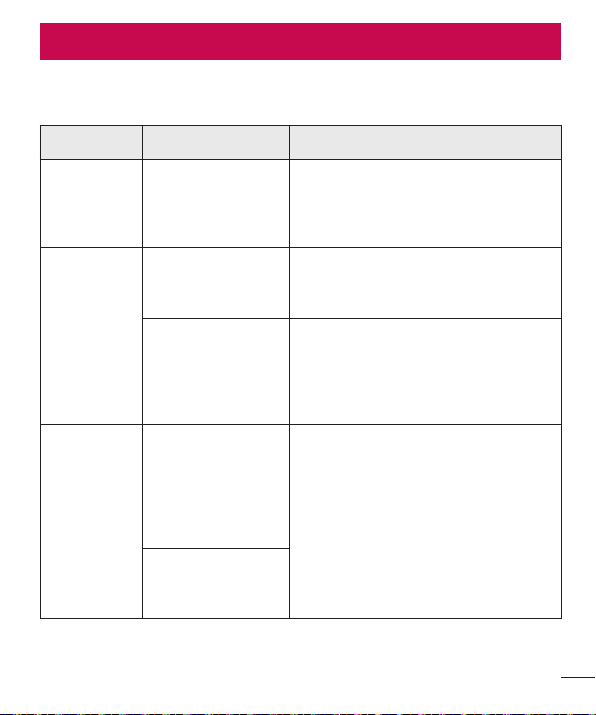
Thischapterlistssomeproblemsyoumightencounterwhenusingyourphone.Some
problemsrequireyoutocallyourserviceprovider,butmostareeasytofixyourself.
Message Possible causes Possible corrective measures
SIM or
USIM card
error
There is no SIM
or USIM card in
the phone or it is
inserted incorrectly.
Make sure that the SIM or USIM card
is correctly inserted.
No network
connection/
Dropped
network
Signal is weak or
you are outside the
carrier network.
Move toward a window or into
an open area. Check the network
operator coverage map.
Operator applied
new services.
Check whether the SIM or USIM card
is more than 6~12 months old. If so,
change your SIM or USIM card at your
network provider's nearest branch.
Contact your service provider.
Codes do
not match
To change a
security code,
must need to
confirm the
new code by
re-entering it.
If you forget the code, contact your
service provider.
The two codes
you entered do not
match.
Troubleshooting
76
Troubleshooting
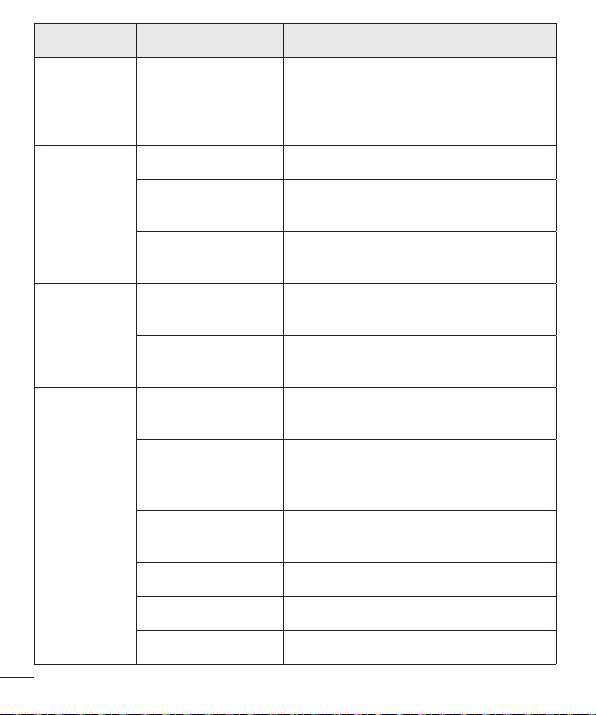
Message Possible causes Possible corrective measures
No
applications
can be set
Not supported by
service provider
or registration
required.
Contact your service provider.
Calls not
available
Dialing error New network not authorized.
New SIM or USIM
card inserted.
Check for new restrictions.
Pre-paid charge
limit reached.
Contact service provider or reset limit
with PIN2.
Phone
cannot be
turned on
On/Off key pressed
too briefly.
Press the On/Off key for at least two
seconds.
Battery is not
charged.
Charge battery. Check the charging
indicator on the display.
Charging
error
Battery is not
charged.
Charge battery.
Outside
temperature is too
hot or cold.
Make sure phone is charging at a
normal temperature.
Contact problem
Check the charger and its connection
to the phone.
No voltage Plug the charger into a different outlet.
Charger defective Replace the charger.
Wrong charger Use only original LG accessories.
77
Troubleshooting
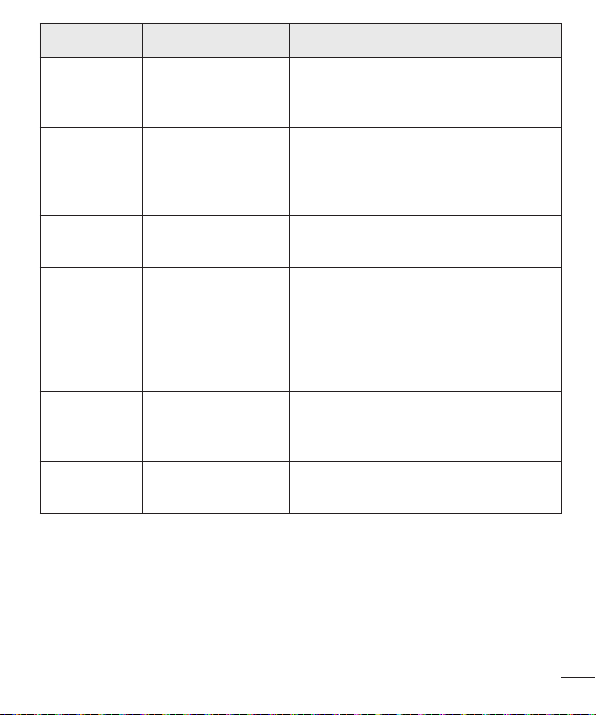
Message Possible causes Possible corrective measures
Number not
allowed.
The Fixed dialling
number function
is on.
Check the Settings menu and turn the
function off.
Impossible
to receive/
send SMS
& photos
Memory full
Delete some messages from your
phone.
Files do not
open
Unsupported file
format
Check the supported file formats.
The screen
does not
turn on
when I
receive a
call.
Proximity sensor
problem
If you use a protection tape or case,
make sure it has not covered the area
around the proximity sensor. Make
sure that the area around the proximity
sensor is clean.
No sound Vibration mode
Check the settings status in the sound
menu to make sure you are not in
vibration or silent mode.
Hangs up
or freezes
Intermittent
software problem
Try to perform a software update
through the website.
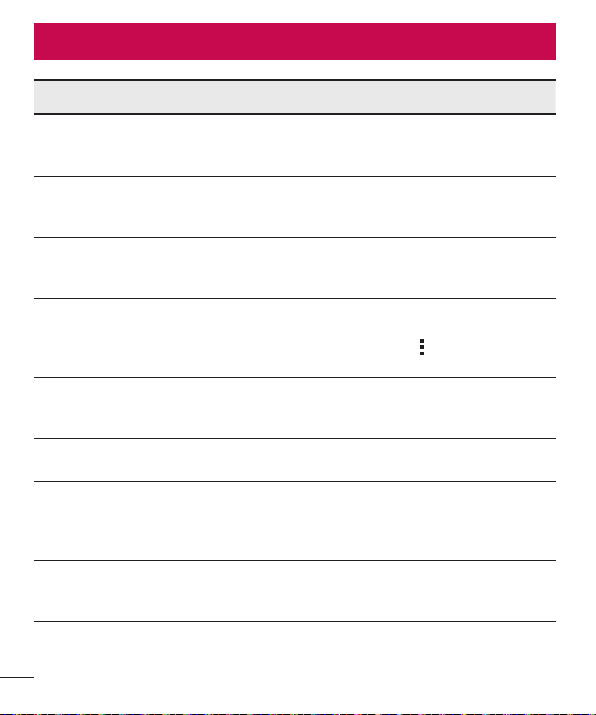
78
FAQ
Category Question Answer
Bluetooth
Devices
What functions
are available via
Bluetooth?
You can connect a Bluetooth audio
device, such as a Stereo/Mono
headset or car kit.
Contacts
Backup
How can I back up
Contacts?
Contacts data can be synchronized
between your phone and your Google
account.
Synchronization
Is it possible to set up
one-way sync with
Gmail?
Only two-way synchronization is
available.
Synchronization
Is it possible to
synchronize all email
folders?
The Inbox is automatically
synchronized. You can view other
folders by tapping and selecting
Folders to choose a folder.
Gmail Log-In
Do I have to log into
Gmail whenever I want
to access Gmail?
Once you have logged into Gmail, there
is no need to log into Gmail again.
Google
Account
Is it possible to filter
emails?
No, the phone does not support email
filtering.
Email
What happens when
I execute another
application while
writing an email?
Your email is automatically saved as
a draft.
Ringtone
Is there a file size limit
for using MP3 files as
ringtones?
There is no file size limit.
FAQ
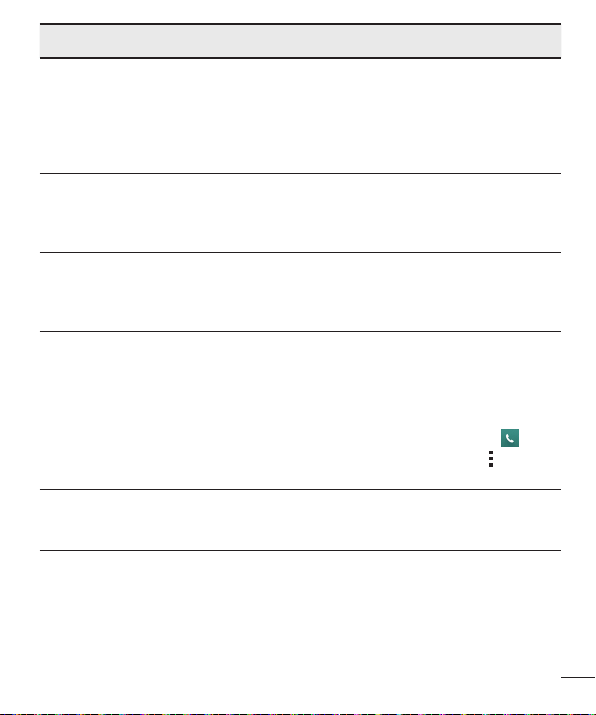
79
FAQ
Category Question Answer
Message
Time
My phone does not
display the time of
receipt for messages
older than 24 hrs.
How can I change
this?
Open the conversation and touch and
hold the desired message. Then tap
Details.
Navigation
Is it possible to install
another navigation
application on my
phone?
Any application that is available at Play
Store™ and is compatible with the
hardware can be installed and used.
Synchronisation
Is it possible to
synchronize my
contacts from all my
email accounts?
Only Gmail and MS Exchange server
(company email server) contacts can
be synchronized.
Wait and
Pause
Is it possible to save
a contact with Wait
and Pause in the
numbers?
If you transferred a contact using the
Wait & Pause functions saved into the
number, you cannot use those features.
You must save each number again.
How to save with Wait and Pause:
1. From the Home screen, tap .
2. Dial the number, then tap .
3. Tap Add 2-sec pause or Add wait.
Security
What are the phone's
security functions?
You can set the phone to require an
Unlock Pattern to be entered before
the phone can be accessed or used.

80
FAQ
Category Question Answer
Unlock
Pattern
How do I create the
Unlock Pattern?
1. From the Home screen, touch and
hold .
2. Tap System settings > Display tab
> Lock screen.
3. Tap Select screen lock > Pattern.
The first time you do this, a short
tutorial about creating an Unlock
Pattern appears.
4. Set up your pattern by drawing it
then drawing it a second time for
confirmation.
Precautions to take when using the
pattern lock.
It is very important to remember the
unlock pattern you set. You can no
longer access your phone if you use
an incorrect pattern five times. You
have five chances to enter your unlock
pattern, PIN or password. If you have
used all 5 opportunities, you can try
again after 30 seconds. (Or, if you
preset the backup PIN, you can use
the backup PIN code to unlock the
pattern.)
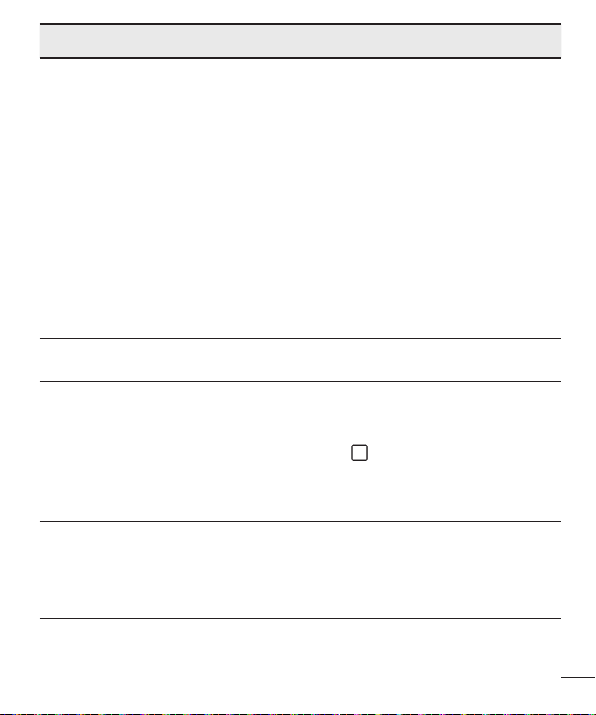
81
FAQ
Category Question Answer
Unlock
Pattern
What should I do if
I forget the unlock
pattern and I did not
create my Google
account on the
phone?
If you forgot your pattern:
If you logged into your Google account
on the phone but failed to enter the
correct pattern 5 times, tap the Forgot
pattern button. You are then required
to log in with your Google account
to unlock your phone. If you have
not created a Google account on the
phone or you have forgotten it, you
must perform a hard reset.
Caution: If you perform a factory reset,
all user applications and user data are
deleted. Please remember to back up
any important data before performing a
factory reset.
Memory
Will I know when my
memory is full?
Yes, you will receive a notification.
Language
Support
Is it possible to
change my phone's
language?
The phone has multilingual capabilities.
To change the language:
1. From the Home screen, touch and
hold and tap System settings.
2. Tap General tab > Language &
input > Language.
3. Tap the desired language.
VPN
How do I set up a
VPN?
VPN access configuration is different
for each company. To configure VPN
access on your phone, you must
obtain the details from your company's
network administrator.
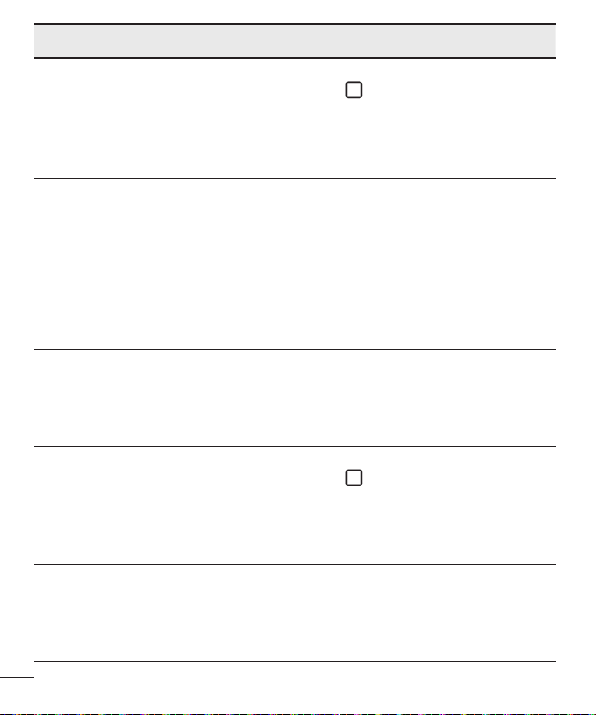
82
FAQ
Category Question Answer
Screen time
out
My screen turns off
after only 15 seconds.
How can I change the
amount of time for the
backlight to turn off?
1. From the Home screen, touch and
hold .
2. Tap System settings > Display tab.
3. Tap Screen timeout.
4. Tap the preferred screen backlight
timeout time.
Wi-Fi &
mobile
network
When the Wi-Fi and
mobile networks are
both available, which
service does my
phone use?
When using data, your phone may
default to the Wi-Fi connection (if Wi-Fi
connectivity on your phone is set to
On). However, there is no notification
when your phone switches from one to
the other.
To know which data connection is
being used, view the mobile network or
Wi-Fi icon at the top of your screen.
Home
screen
Is it possible to
remove an application
from the Home
screen?
Yes. Just touch and hold the icon until
the trash can icon appears at the top
and center of the screen. Then, without
lifting your finger, drag the icon to the
trash can.
Application
I downloaded an
application and it
causes a lot of errors.
How do I remove it?
1. From the Home screen, touch and
hold .
2. Tap System settings > General tab
> Apps > DOWNLOADED.
3. Tap the application, then tap
Uninstall.
Charger
Is it possible to charge
my phone using
a USB data cable
without installing the
necessary USB driver?
Yes, the phone is charged through the
USB cable regardless of whether the
necessary drivers are installed.

83
FAQ
Category Question Answer
Alarm
Can I use music files
for my alarm?
Yes. After saving a music file as a
ringtone, you can use it as an alarm.
1. Touch and hold a song in a library
list. In the menu that opens, tap Set
as ringtone > Phone ringtone or
Contact ringtone.
2. On the Alarm Clock Setting screen,
select the song as a ringtone.
Alarm
Will my alarm be
audible or will it go off
if the phone is turned
off?
No, this is not supported.
Alarm
If my ringer volume is
set to Off or Vibrate,
will I hear my alarm?
Your alarm is programmed to be
audible even in these scenarios.
Hard Reset
(Factory
Reset)
How can I perform a
factory reset if I cannot
access the phone's
Settings menu?
If your phone does not restore to its
original condition, use a hard reset
(factory reset) to initialize it.

84
For Your Safety
Safety Information
Pleasereadandobservethefollowinginformationforsafeandproperuseofyour
phoneandtopreventdamage.
WARNING! ThisproductcontainschemicalsknowntotheStateofCaliforniatocause
cancerandbirthdefectsorreproductiveharm.Wash hands after handling.
Caution Violation of the instructions may cause minor or serious damage to
the product.
• Donotdisassembleoropencrush,bendordeform,punctureorshred.
• Donotmodifyorremanufacture,attempttoinsertforeignobjectsintothebattery,
immerseorexposetowaterorotherliquids,exposetofire,explosionorother
hazard.
• Onlyusethebatteryforthesystemforwhichitisspecified.
• Onlyusethebatterywithachargingsystemthathasbeenqualifiedwiththe
systemperCTIACertificationRequirementsforBatterySystemComplianceto
IEEE1725.Useofanunqualifiedbatteryorchargermaypresentariskoffire,
explosion,leakage,orotherhazard.
• Donotshortcircuitabatteryorallowmetallicconductiveobjectstocontactbattery
terminals.
• Replacethebatteryonlywithanotherbatterythathasbeenqualifiedwiththe
systemperthisstandard,IEEE-Std-1725.Useofanunqualifiedbatterymay
presentariskoffire,explosion,leakageorotherhazard.
• Onlyauthorizedserviceprovidersshallreplacebattery(Ifthebatteryisnon-user
replaceable).
• Promptlydisposeofusedbatteriesinaccordancewithlocalregulations.
• Batteryusagebychildrenshouldbesupervised.
• Avoiddroppingthephoneorbattery.Ifthephoneorbatteryisdropped,especially
onahardsurface,andtheusersuspectsdamage,takeittoaservicecenterfor
For Your Safety

85
For Your Safety
inspection.
• Improperbatteryusemayresultinafire,explosionorotherhazard.
• Repairsunderwarranty,atLG’soption,mayincludereplacementpartsorboards
thatareeitherneworreconditioned,providedthattheyhavefunctionalityequalto
thatofthepartsbeingreplaced.
• ForthosehostdevicesthatutilizeaUSBportasachargingsource,thehost
device’susermanualshallincludeastatementthatthephoneshallonlybe
connectedtoproductsthatbeartheUSB-IFlogoorhavecompletedtheUSB-IF
complianceprogram.
Charger and Adapter Safety
• Thechargerandadapterareintendedforindooruseonly.
• Insertthebatterypackchargerverticallyintothewallpowersocket.
• Unplugthepowercordandchargerduringlightningstormstoavoidelectricshock
orfire.
• Usethecorrectadapterforyourphonewhenusingthebatterypackcharger
abroad.
Battery Information and Care
• Pleasereadthemanualofproperinstallationandremovalofthebattery.
• Pleasereadthemanualofspecifiedchargeraboutchargingmethod.
• Donotdamagethepowercordbybending,twisting,orheating.Donotusethe
plugifitislooseasitmaycauseelectricshockorfire.
• Donotplaceanyheavyitemsonthepowercord.Donotallowthepowercordto
becrimpedasitmaycauseelectricshockorfire.
• Unplugthepowercordpriortocleaningyourphone,andcleanthepowerplugpin
whenit’sdirty.Whenusingthepowerplug,ensurethatit’sfirmlyconnected.If
not,itmaycauseexcessiveheatorfire.Ifyouputyourphoneinapocketorbag
withoutcoveringthereceptacleofthephone(powerplugpin),metallicarticles
(suchasacoin,papercliporpen)mayshort-circuitthephone.Short-circuitof
theterminalmaydamagethebatteryandcauseanexplosion.Alwayscoverthe
receptaclewhennotinuse.

86
For Your Safety
• Rechargethebatteryafterlongperiodsofnon-usetomaximizebatterylife.Battery
lifewillvaryduetousagepatternandenvironmentalconditions.
• Neverstoreyourphoneintemperaturelessthan-4°Forgreaterthan122°F.
• Chargingtemperaturerangeisbetween32°Fand113°F.Donotchargethe
batteryoutofrecommendedtemperaturerange.Chargingoutofrecommended
rangemightcausethegeneratingheatorseriousdamageofbattery.Andalso,it
mightcausethedeteriorationofbattery’scharacteristicsandcyclelife.
• Donotuseorleavethebatteryundertheblazingsunorinheatedcarbysunshine.
Thebatterymaygenerateheat,smokeorflame.Andalso,itmightcausethe
deteriorationofbattery’scharacteristicsorcyclelife.
• Thebatterypackhasprotectioncircuittoavoidthedanger.Donotusenearplaces
thatcangeneratestaticelectricitymorethan100Vwhichcoulddamagethe
protectioncircuit.Damagedprotectioncircuitsmaygeneratesmoke,ruptureor
ignite.
• Whenusingthebatteryforthefirsttime,ifitemitsabadsmell,youseerustonit,
oranythingelseabnormal,donotusetheequipmentandbringthebatterytothe
shopwhichitwasbought.
• Keepbatteriesawayfrombabiesandsmallchildren.Ifchildrenusethebattery,
theirparentsorlegalguardiansareresponsibleforsupervisingandteachingthem
aboutthesafehandlingofbatteriesandhowtousebatteriesaccordingtothe
manualwithcare.
• Ifliquidfromthebatteryrubsagainstskinorclothing,washwithfreshwater.It
maycausetheskininflammation.Removeanddonotusethebattery.Becareful
thatchildrendonotswallowanyparts(suchasearphone,connectionpartsofthe
phone,etc.).Thiscouldcauseasphyxiationorsuffocationresultinginseriousinjury
ordeath.
• Donothandlethephonewithwethandswhileitisbeingcharged.Itmaycausean
electricshockorseriouslydamageyourphone.
• Donotplaceoranswercallswhilechargingthephoneasitmayshort-circuitthe
phoneand/orcauseelectricshockorfire.
• Donotuseharshchemicals(suchasalcohol,benzene,thinners,etc.)ordetergents

87
For Your Safety
tocleanyourphone.Thiscouldcauseafire.
• Alwaysunplugthechargerfromthewallsocketafterthephoneisfullychargedto
saveunnecessarypowerconsumptionofthecharger.
Care and Maintenance
Yourmobiledeviceisaproductofsuperiordesignandcraftsmanshipandshouldbe
treatedwithcare.Thesuggestionsbelowwillhelpyoufulfillanywarrantyobligations
andallowyoutoenjoythisproductformanyyears:
Keep your Mobile Device away from:
Liquids of any kind
Keepthemobiledevicedry.Precipitation,humidity,andliquidscontainmineralsthatwill
corrodeelectroniccircuits.Ifthemobiledevicedoesgetwet,donotacceleratedrying
withtheuseofanoven,microwave,ordryer,becausethismaydamagethemobile
deviceandcouldcauseafireorexplosion.
Donotusethemobiledevicewithawethand.
Doingsomaycauseanelectricshocktoyouordamagetothemobiledevice.
Extreme heat or cold
Avoidtemperaturesbelow0°C/32°Forabove45°C/113°F.
Microwaves
Donottrytodryyourmobiledeviceinamicrowaveoven.Doingsomaycauseafireor
explosion.
Dust and dirt
Donotexposeyourmobiledevicetodust,dirt,orsand.
Sunscreen lotion
Donotexposeorwearyourdevicetoanyliquidlikesunscreenlotion.
Doingsomaycauseyourdevicetoordamagetothemobiledevice.

88
For Your Safety
Cleaning solutions
Donotuseharshchemicals,cleaningsolvents,orstrongdetergentstocleanthemobile
device.
Wipeitwithasoftclothslightlydampenedinamildsoap-and-watersolution.
Shock or vibration
Donotdrop,knock,orshakethemobiledevice.
Roughhandlingcanbreakinternalcircuitboards.
Paint
Donotpaintthemobiledevice.Paintcanclogthedevice’smovingpartsorventilation
openingsandpreventproperoperation.
General Notice
• Anemergencycallcanbemadeonlywithinaservicearea.Foranemergencycall,
makesurethatyouarewithinaserviceareaandthatthephoneisturnedon.
• Donotplaceitemscontainingmagneticcomponentssuchasacreditcard,phone
card,bankbook,orsubwayticketnearyourphone.Themagnetismofthephone
maydamagethedatastoredinthemagneticstrip.
• Talkingonyourphoneforalongperiodoftimemayreducecallqualityduetoheat
generatedduringuse.
• Whenthephoneisnotusedforalongperiodtime,storeitinasafeplacewiththe
powercordunplugged.
• Usingthephoneinproximitytoreceivingequipment(i.e.,TVorradio)maycause
interferencetothephone.
• Donotusethephoneiftheantennaisdamaged.Ifadamagedantennacontacts
skin,itmaycauseaslightburn.PleasecontactanLGAuthorizedServiceCenterto
replacethedamagedantenna.
• Thedatasavedinyourphonemightbedeletedduetocarelessuse,repairofthe
phone,orupgradeofthesoftware.Pleasebackupyourimportantphonenumbers.
(Ringtones,textmessages,voicemessages,pictures,andvideoscouldalsobe
deleted.)Themanufacturerisnotliablefordamageduetothelossofdata.
• Whenyouusethephoneinpublicplaces,settheringtonetovibrationsoyoudon’t

89
For Your Safety
disturbothers.
• Donotturnyourphoneonoroffwhenputtingittoyourear.
• Yourphoneisanelectronicdevicethatgeneratesheatduringnormaloperation.
Extremelyprolonged,directskincontactintheabsenceofadequateventilation
mayresultindiscomfortorminorburns.Therefore,usecarewhenhandlingyour
phoneduringorimmediatelyafteroperation.
Useaccessories,suchasearphonesandheadsets,withcaution.Ensurethatcablesare
tuckedawaysafelyanddonottouchtheantennaunnecessarily.
Part 15.19 statement
Thisdevicecomplieswithpart15oftheFCCrules.Operationissubjecttothefollowing
twoconditions:(1)Thisdevicemaynotcauseharmfulinterference,and(2)thisdevice
mustacceptanyinterferencereceived,includinginterferencethatmaycauseundesired
operation.
Part 15.21 statement
ChangeorModificationsthatarenotexpresslyapprovedbythemanufacturerfor
compliancecouldvoidtheuser’sauthoritytooperatetheequipment.
Part 15.105 statement
ThisequipmenthasbeentestedandfoundtocomplywiththelimitsforaclassBdigital
device,pursuanttoPart15oftheFCCRules.Theselimitsaredesignedtoprovide
reasonableprotectionagainstharmfulinterferenceinaresidentialinstallation.This
equipmentgeneratesusesandcanradiateradiofrequencyenergyand,ifnotinstalled
andusedinaccordancewiththeinstructions,maycauseharmfulinterferencetoradio
communications.However,thereisnoguaranteethatinterferencewillnotoccurina
particularinstallation.Ifthisequipmentdoescauseharmfulinterferencetoradioor
televisionreception,whichcanbedeterminedbyturningtheequipmentoffandon,theuser
isencouragedtotrytocorrecttheinterferencebyoneormoreofthefollowingmeasures:
• Reorientorrelocatethereceivingantenna.
• Increasetheseparationbetweentheequipmentandreceiver.
• Connecttheequipmentintoanoutletonacircuitdifferentfromthattowhichthe
receiverisconnected.

90
For Your Safety
• Consultthedealeroranexperiencedradio/TVtechnicianforhelp.
FCC RF Exposure Information
WARNING! Read this information before operating the phone.
InAugust1996,theFederalCommunicationsCommission(FCC)oftheUnitedStates,
withitsactioninReportandOrderFCC96-326,adoptedanupdatedsafetystandard
forhumanexposuretoRadioFrequency(RF)electromagneticenergyemittedby
FCCregulatedtransmitters.Thoseguidelinesareconsistentwiththesafetystandard
previouslysetbybothU.S.andinternationalstandardsbodies.Thedesignofthisphone
complieswiththeFCCguidelinesandtheseinternationalstandards.
Body-worn Operation
Thisdevicewastestedfortypicalbody-wornoperationswiththebackofthephonekept
0.39inches(1cm)betweentheuser’sbodyandthebackofthephone.Tocomplywith
FCCRFexposurerequirements,aminimumseparationdistanceof0.39inches(1cm)
mustbemaintainedbetweentheuser’sbodyandthebackofthephone.Anybelt-clips,
holsters,andsimilaraccessoriescontainingmetalliccomponentsmaynotbeused.
Body-wornaccessoriesthatcannotmaintain0.39inches(1cm)separationdistance
betweentheuser’sbodyandthebackofthephone,andhavenotbeentestedfor
typicalbody-wornoperationsmaynotcomplywithFCCRFexposurelimitsandshould
beavoided.
Vehicle-Mounted External Antenna
(Optional,ifavailable.)
TosatisfyFCCRFexposurerequirements,keep8inches(20cm)betweentheuser
/bystanderandvehicle-mountedexternalantenna.FormoreinformationaboutRF
exposure,visittheFCCwebsiteatwww.fcc.gov.
Caution
Useonlythesuppliedantenna.Useofunauthorizedantennas(ormodificationstothe
antenna)couldimpaircallquality,damagethephone,voidyourwarrantyand/orviolate
FCCregulations.
Don’tusethephonewithadamagedantenna.Adamagedantennacouldcausea
minorskinburn.Contactyourlocaldealerforareplacementantenna.

91
For Your Safety
Consumer Information About Radio Frequency
Emissions
Yourwirelessphone,whichcontainsaradiotransmitterandreceiver,emitsradio
frequencyenergyduringuse.Thefollowingconsumerinformationaddressescommonly
askedquestionsaboutthehealtheffectsofwirelessphones.
Are wireless phones safe?
Scientificresearchonthesubjectofwirelessphonesandradiofrequency(“RF”)energy
hasbeenconductedworldwideformanyyears,andcontinues.IntheUnitedStates,the
FoodandDrugAdministration(“FDA”)andtheFederalCommunicationsCommission
(“FCC”)setpoliciesandproceduresforwirelessphones.TheFDAissuedawebsite
publicationonhealthissuesrelatedtocellphoneusagewhereitstates,“Thescientific
communityatlarge…believesthattheweightofscientificevidencedoesnotshow
anassociationbetweenexposuretoradiofrequency(RF)fromcellphonesandadverse
healthoutcomes.Stillthescientificcommunitydoesrecommendconductingadditional
researchtoaddressgapsinknowledge.Thatresearchisbeingconductedaroundthe
worldandFDAcontinuestomonitordevelopmentsinthisfield.Youcanaccessthejoint
FDA/FCCwebsiteathttp://www.fda.gov(under“C”inthesubjectindex,selectCell
Phones>Research).YoucanalsocontacttheFDAtoll-freeat(888)463-6332or(888)
INFO-FDA.InJune2000,theFDAenteredintoacooperativeresearchanddevelopment
agreementthroughwhichadditionalscientificresearchisbeingconducted.TheFCC
issueditsownwebsitepublicationstatingthat“thereisnoscientificevidencethat
provesthatwirelessphoneusagecanleadtocanceroravarietyofotherproblems,
includingheadaches,dizzinessormemoryloss.”
Thispublicationisavailableathttp://www.fcc.gov/oet/rfsafetyorthroughtheFCCat
(888)225-5322or(888)CALL-FCC.
What does “SAR” mean?
In1996,theFCC,workingwiththeFDA,theU.S.EnvironmentalProtectionAgency,
andotheragencies,establishedRFexposuresafetyguidelinesforwirelessphonesin
theUnitedStates.Beforeawirelessphonemodelisavailableforsaletothepublic,it
mustbetestedbythemanufacturerandcertifiedtotheFCCthatitdoesnotexceed

92
For Your Safety
limitsestablishedbytheFCC.OneoftheselimitsisexpressedasaSpecificAbsorption
Rate,or“SAR.”SARisameasureoftherateofabsorptionofRFenergyinthebody.
TestsforSARareconductedwiththephonetransmittingatitshighestpowerlevelinall
testedfrequencybands.Since1996,theFCChasrequiredthattheSARofhandheld
wirelessphonesnotexceed1.6wattsperkilogram,averagedoveronegramoftissue.
AlthoughtheSARisdeterminedatthehighestpowerlevel,theactualSARvalue
ofawirelessphonewhileoperatingcanbelessthanthereportedSARvalue.This
isbecausetheSARvaluemayvaryfromcalltocall,dependingonfactorssuchas
proximitytoacellsite,theproximityofthephonetothebodywhileinuse,andtheuse
ofhands-freedevices.
FormoreinformationaboutSARs,seetheFCC’sOETBulletins56and65athttp://
www.fcc.gov/Bureaus/Engineering_Technology/Documents/bulletinsorvisittheCellular
TelecommunicationsIndustryAssociationwebsiteathttp://www.ctia.org/consumer_info/
index.cfm/AID/10371.Youmayalsowishtocontactthemanufacturerofyourphone.
Can I minimize my RF exposure?
IfyouareconcernedaboutRF,thereareseveralsimplestepsyoucantaketominimize
yourRFexposure.Youcan,ofcourse,reduceyourtalktime.Youcanplacemore
distancebetweenyourbodyandthesourceoftheRF,astheexposureleveldropsoff
dramaticallywithdistance.TheFDA/FCCwebsitestatesthat“hands-freekitscanbe
usedwithwirelessphonesforconvenienceandcomfort.Thesesystemsreducethe
absorptionofRFenergyintheheadbecausethephone,whichisthesourceofthe
RFemissions,willnotbeplacedagainstthehead.Ontheotherhand,ifthephoneis
mountedagainstthewaistorotherpartofthebodyduringuse,thenthatpartofthe
bodywillabsorbmoreRFenergy.WirelessphonesmarketedintheU.S.arerequired
tomeetsafetyrequirementsregardlessofwhethertheyareusedagainstthehead
oragainstthebody.Eitherconfigurationshouldresultincompliancewiththesafety
limit.”Also,ifyouuseyourwirelessphonewhileinacar,youcanuseaphonewithan
antennaontheoutsideofthevehicle.Youshouldalsoreadandfollowyourwireless
phonemanufacturer’sinstructionsforthesafeoperationofyourphone.
Do wireless phones pose any special risks to children?
TheFDA/FCCwebsitestatesthat“thescientificevidencedoesnotshowadangerto

93
For Your Safety
usersofwirelesscommunicationdevices,includingchildren.”TheFDA/FCCwebsite
furtherstatesthat“somegroupssponsoredbyothernationalgovernmentshave
advisedthatchildrenbediscouragedfromusingwirelessphonesatall”.Forexample,
theStewartReportfromtheUnitedKingdom[“UK”]madesucharecommendationin
December2000.Inthisreportagroupofindependentexpertsnotedthatnoevidence
existsthatusingacellphonecausesbraintumorsorotherilleffects.[TheUK’s]
recommendationtolimitcellphoneusebychildrenwasstrictlyprecautionary;itwas
notbasedonscientificevidencethatanyhealthhazardexists.AcopyoftheUK’sleaflet
isavailableathttp://www.dh.gov.uk(search“mobile”),oryoucanwriteto:NRPB,
Chilton,Didcot,OxonOX11ORQ,UnitedKingdom.CopiesoftheUK’sannualreports
onmobilephonesandRFareavailableonlineatwww.iegmp.org.ukandhttp://www.
hpa.org.uk/radiation/(search“mobile”).Parentswhowishtoreducetheirchildren’sRF
exposuremaychoosetorestricttheirchildren’swirelessphoneuse.
Where can I get further information about RF emissions?
Forfurtherinformation,seethefollowingadditionalresources(websitescurrentasof
April2005):
U.S. Food and Drug Administration
FDAConsumermagazine
November-December2000
Telephone:(888)INFO-FDA
http://www.fda.gov(Under“C”inthesubjectindex,selectCellPhones>Research.)
U.S. Federal Communications Commission
44512thStreet,S.W.
Washington,D.C.20554
Telephone:(888)225-5322
http://www.fcc.gov/oet/rfsafety
Independent Expert Group on Mobile Phones
http://www.iegmp.org.uk

94
For Your Safety
Royal Society of Canada Expert Panels on Potential Health Risks of Radio
Frequency Fields from Wireless Telecommunication Devices
283SparksStreet
Ottawa,OntarioK1R7X9
Canada
Telephone:(613)991-6990
World Health Organization
AvenueAppia20
1211Geneva27
Switzerland
Telephone:01141227912111
http://www.who.int/mediacentre/factsheets/fs193/en/
International Commission on Non-Ionizing Radiation Protection
c/oBundesamtfurStrahlenschutz
IngolstaedterLandstr.1
85764Oberschleissheim
Germany
Telephone:0114918883332156
http://www.icnirp.de
American National Standards Institute
1819LStreet,N.W.,6thFloor
Washington,D.C.20036
Telephone:(202)293-8020
http://www.ansi.org
National Council on Radiation Protection and Measurements
7910WoodmontAvenue,Suite800
Bethesda,MD20814-3095
Telephone:(301)657-2652
http://www.ncrponline.org

95
For Your Safety
Engineering in Medicine and Biology Society, Committee on Man and
Radiation (COMAR) of the Institute of Electrical and Electronics Engineers
http://ewh.ieee.org/soc/embs/comar/
TIA Safety Information
ThefollowingisthecompleteTIASafetyInformationforwirelesshandheldphones.
Consumer Information on SAR
(Specific Absorption Rate)
Thismodelphonemeetsthegovernment’srequirementsforexposuretoradiowaves.
Yourwirelessphoneisaradiotransmitterandreceiver.Itisdesignedandmanufactured
nottoexceedtheemissionlimitsforexposuretoRadioFrequency(RF)energysetby
theFederalCommunicationsCommissionoftheU.S.Government.Theselimitsarepart
ofcomprehensiveguidelinesandestablishpermittedlevelsofRFenergyforthegeneral
population.Theguidelinesarebasedonstandardsthatweredevelopedbyindependent
scientificorganizationsthroughperiodicandthoroughevaluationofscientificstudies.
Thestandardsincludeasubstantialsafetymargindesignedtoassurethesafetyofall
persons,regardlessofageandhealth.
Theexposurestandardforwirelessmobilephonesemploysaunitofmeasurement
knownastheSpecificAbsorptionRate,orSAR.TheSARlimitsetbytheFCCis1.6
W/kg.TestsforSARareconductedusingstandardoperatingpositionsspecifiedby
theFCCwiththephonetransmittingatitshighestcertifiedpowerlevelinalltested
frequencybands.AlthoughSARisdeterminedatthehighestcertifiedpowerlevel,the
actualSARlevelofthephonewhileoperatingcanbewellbelowthemaximumvalue.
Becausethephoneisdesignedtooperateatmultiplepowerlevelstouseonlythe
powerrequiredtoreachthenetwork,ingeneral,thecloseryouaretoawirelessbase
stationantenna,thelowerthepoweroutput.
Beforeaphonemodelisavailableforsaletothepublic,itmustbetestedandcertified
totheFCCthatitdoesnotexceedthelimitestablishedbythegovernmentadopted
requirementforsafeexposure.Thetestsareperformedinpositionsandlocations(e.g.,
attheearandwornonthebody)asrequiredbytheFCCforeachmodel.

96
For Your Safety
ThehighestSARvaluesare:
*Head:1.02W/kg
*Body(Body-worn/Hotspot):1.23W/kg
(bodymeasurementsdifferamongphonemodels,dependinguponavailable
accessoriesandFCCrequirements).
WhiletheremaybedifferencesbetweenSARlevelsofvariousphonesandatvarious
positions,theyallmeetthegovernmentrequirementforsafeexposure.
TheFCChasgrantedanEquipmentAuthorizationforthismodelphonewithall
reportedSARlevelsevaluatedasincompliancewiththeFCCRFemissionguidelines.
SARinformationonthismodelphoneisonfilewiththeFCCandcanbefoundunder
theDisplayGrantsectionofhttp://www.fcc.gov/oet/fccidaftersearchingonFCCID
ZNFH443.AdditionalinformationonSpecificAbsorptionRates(SAR)canbefoundon
theCellularTelecommunicationsIndustryAssociation(CTIA)websiteathttp://www.ctia.
org/.
*IntheUnitedStatesandCanada,theSARlimitformobilephonesusedbythepublic
is1.6watts/kg(W/kg)averagedoveronegramoftissue.Thestandardincorporatesa
substantialmarginofsafetytogiveadditionalprotectionforthepublicandtoaccount
foranyvariationsinmeasurements.
Exposure to Radio Frequency Signal
Yourwirelesshandheldportablephoneisalowpowerradiotransmitterandreceiver.
WhenON,itreceivesandsendsoutRadioFrequency(RF)signals.
InAugust,1996,theFederalCommunicationsCommissions(FCC)adoptedRF
exposureguidelineswithsafetylevelsforhandheldwirelessphones.Thoseguidelines
areconsistentwiththesafetystandardspreviouslysetbybothU.S.andinternational
standardsbodies:
ANSIC95.1(1992)*
NCRPReport86(1986)
ICNIRP(1996)
*AmericanNationalStandardsInstitute;NationalCouncilonRadiationProtectionand
Measurements;InternationalCommissiononNon-IonizingRadiationProtection
Thosestandardswerebasedoncomprehensiveandperiodicevaluationsoftherelevant

97
For Your Safety
scientificliterature.Forexample,over120scientists,engineers,andphysiciansfrom
universities,governmenthealthagencies,andindustryreviewedtheavailablebodyof
researchtodeveloptheANSIStandard(C95.1).
ThedesignofyourphonecomplieswiththeFCCguidelines(andthosestandards).
Antenna Care
Useonlythesuppliedoranapprovedreplacementantenna.Unauthorizedantennas,
modifications,orattachmentscoulddamagethephoneandmayviolateFCC
regulations.
Phone Operation
NORMALPOSITION:Holdthephoneasyouwouldanyothertelephonewiththeantenna
pointedupandoveryourshoulder.
Tips on Efficient Operation
Foryourphonetooperatemostefficiently:
Don’ttouchtheantennaunnecessarilywhenthephoneisinuse.Contactwiththe
antennaaffectscallqualityandmaycausethephonetooperateatahigherpowerlevel
thanotherwiseneeded.
Electronic Devices
MostmodernelectronicequipmentisshieldedfromRFsignals.However,certain
electronicequipmentmaynotbeshieldedagainsttheRFsignalsfromyourwireless
phone.
Pacemakers
TheHealthIndustryManufacturersAssociationrecommendsthataminimumseparation
ofsix(6)inchesbemaintainedbetweenahandheldwirelessphoneandapacemaker
toavoidpotentialinterferencewiththepacemaker.Theserecommendationsare
consistentwiththeindependentresearchbyandrecommendationsofWireless
TechnologyResearch.
Personswithpacemakers:
• ShouldALWAYSkeepthephonemorethansix(6)inchesfromtheirpacemaker
whenthephoneisturnedON;
• Shouldnotcarrythephoneinabreastpocket;

98
For Your Safety
• Shouldusetheearoppositethepacemakertominimizethepotentialfor
interference;
• ShouldturnthephoneOFFimmediatelyifthereisanyreasontosuspectthat
interferenceistakingplace.
Hearing Aids
Somedigitalwirelessphonesmayinterferewithsomehearingaids.Intheeventofsuch
interference,youmaywanttoconsultyourserviceprovider(orcallthecustomerservice
linetodiscussalternatives).
Other Medical Devices
Ifyouuseanyotherpersonalmedicaldevice,consultthemanufacturerofyourdevice
todetermineifitisadequatelyshieldedfromexternalRFenergy.Yourphysicianmaybe
abletoassistyouinobtainingthisinformation.
Health Care Facilities
TurnyourphoneOFFinhealthcarefacilitieswhenanyregulationspostedinthese
areasinstructyoutodoso.Hospitalsorhealthcarefacilitiesmayuseequipmentthat
couldbesensitivetoexternalRFenergy.
Vehicles
RFsignalsmayaffectimproperlyinstalledorinadequatelyshieldedelectronicsystems
inmotorvehicles.Checkwiththemanufactureroritsrepresentativeregardingyour
vehicle.Youshouldalsoconsultthemanufacturerofanyequipmentthathasbeen
addedtoyourvehicle.
Posted Facilities
TurnyourphoneOFFinanyfacilitywherepostednoticessorequire.
Aircraft
FCCregulationsprohibitusingyourphonewhileintheair.SwitchOFFyourphone
beforeboardinganaircraft.
Blasting Areas
Toavoidinterferingwithblastingoperations,turnyourphoneOFFwhenina“blasting
area”orinareasposted:“Turnofftwo-wayradio”.Obeyallsignsandinstructions.

99
For Your Safety
Potentially Explosive Atmosphere
TurnyourphoneOFFwheninanyareawithapotentiallyexplosiveatmosphereand
obeyallsignsandinstructions.Sparksinsuchareascouldcauseanexplosionorfire
resultinginbodilyinjuryorevendeath.
Areaswithapotentiallyexplosiveatmosphereareoften,butnotalwaysmarkedclearly.
Potentialareasmayinclude:fuelingareas(suchasgasolinestations);belowdeckon
boats;fuelorchemicaltransferorstoragefacilities;vehiclesusingliquefiedpetroleum
gas(suchaspropaneorbutane);areaswheretheaircontainschemicalsorparticles
(suchasgrain,dust,ormetalpowders);andanyotherareawhereyouwouldnormally
beadvisedtoturnoffyourvehicleengine.
For Vehicles Equipped with an Air Bag
Anairbaginflateswithgreatforce.DONOTplaceobjects,includingeitherinstalledor
portablewirelessequipment,intheareaovertheairbagorintheairbagdeployment
area.Ifin-vehiclewirelessequipmentisimproperlyinstalledandtheairbaginflates,
seriousinjurycouldresult.
FDA Consumer Update
● Do not immerse your phone in
water, liquid, or expose to high
humidity. If this happens, turn it
off immediately and remove the
battery. Immediately, take it to an
LG Authorized Service Center.
● Do not paint your phone.
● The data saved in your phone
might be deleted due to careless
use, repair of the phone, or
upgrade of the software. Please
backup your important phone
numbers. (Ringtones, text
messages, voice messages,
pictures, and videos could also be
deleted.) The manufacturer is not
liable for damage due to the loss
of data.
● When you use the phone in public
places, set the ringtone to
vibration so you don't disturb
others.
● Do not turn your phone on or off
when putting it to your ear.
● Use accessories, such as
earphones and headsets, with
caution. Ensure that cables are
tucked away safely and do not
touch the antenna unnecessarily.
FDA
Consumer
Update
The U.S. Food and Drug
Administration’s Center for Devices
and Radiological Health Consumer
Update on Mobile Phones:
1. Do wireless phones pose a
health hazard?
The available scientific evidence does
not show that any health problems
are associated with using wireless
phones. There is no proof, however,
32
VX8370_PSWG1.0_Eng_091210.qxd 1/19/10 3:01 PM Page 3
TheU.S.FoodandDrugAdministration’sCenterforDevicesand
RadiologicalHealthConsumerUpdateonMobilePhones:
1. Do wireless phones pose a health hazard?
Theavailablescientificevidencedoesnotshowthatanyhealthproblemsareassociated
withusingwirelessphones.Thereisnoproof,however,thatwirelessphonesare
absolutelysafe.WirelessphonesemitlowlevelsofRadioFrequency(RF)energyin
themicrowaverangewhilebeingused.TheyalsoemitverylowlevelsofRFwhenin
idlemode.WhereashighlevelsofRFcanproducehealtheffects(byheatingtissue),
exposuretolowlevelRFthatdoesnotproduceheatingeffectscausesnoknown
adversehealtheffects.ManystudiesoflowlevelRFexposureshavenotfoundany
biologicaleffects.Somestudieshavesuggestedthatsomebiologicaleffectsmayoccur,
butsuchfindingshavenotbeenconfirmedbyadditionalresearch.Insomecases,other
researchershavehaddifficultyinreproducingthosestudies,orindeterminingthe

100
For Your Safety
reasonsforinconsistentresults.
2. What is the FDA’s role concerning the safety of wireless phones?
Underthelaw,theFDAdoesnotreviewthesafetyofradiation-emittingconsumer
productssuchaswirelessphonesbeforetheycanbesold,asitdoeswithnewdrugs
ormedicaldevices.However,theagencyhasauthoritytotakeactionifwirelessphones
areshowntoemitRadioFrequency(RF)energyatalevelthatishazardoustotheuser.
Insuchacase,theFDAcouldrequirethemanufacturersofwirelessphonestonotify
usersofthehealthhazardandtorepair,replace,orrecallthephonessothatthehazard
nolongerexists.
AlthoughtheexistingscientificdatadoesnotjustifyFDAregulatoryactions,theFDAhas
urgedthewirelessphoneindustrytotakeanumberofsteps,includingthefollowing:
• SupportneededresearchintopossiblebiologicaleffectsofRFofthetypeemitted
bywirelessphones;
• DesignwirelessphonesinawaythatminimizesanyRFexposuretotheuserthat
isnotnecessaryfordevicefunction;and
• Cooperateinprovidingusersofwirelessphoneswiththebestpossibleinformation
onpossibleeffectsofwirelessphoneuseonhumanhealth.
TheFDAbelongstoaninteragencyworkinggroupofthefederalagenciesthathave
responsibilityfordifferentaspectsofRFsafetytoensurecoordinatedeffortsatthe
federallevel.Thefollowingagenciesbelongtothisworkinggroup:
• NationalInstituteforOccupationalSafetyandHealth
• EnvironmentalProtectionAgency
• OccupationalSafetyandHealthAdministration
• NationalTelecommunicationsandInformationAdministration
TheNationalInstitutesofHealthparticipatesinsomeinteragencyworkinggroup
activities,aswell.
TheFDAsharesregulatoryresponsibilitiesforwirelessphoneswiththeFederal
CommunicationsCommission(FCC).AllphonesthataresoldintheUnitedStatesmust
complywithFCCsafetyguidelinesthatlimitRFexposure.TheFCCreliesontheFDA
andotherhealthagenciesforsafetyquestionsaboutwirelessphones.
TheFCCalsoregulatesthebasestationsthatthewirelessphonenetworksrelyupon.

101
For Your Safety
Whilethesebasestationsoperateathigherpowerthandothewirelessphones
themselves,theRFexposuresthatpeoplegetfromthesebasestationsaretypically
thousandsoftimeslowerthanthosetheycangetfromwirelessphones.Basestations
arethusnotthesubjectofthesafetyquestionsdiscussedinthisdocument.
3. What kinds of phones are the subject of this update?
Theterm“wirelessphone”refersheretohandheldwirelessphoneswithbuilt-in
antennas,oftencalled“cell”,“mobile”,or“PCS”phones.Thesetypesofwireless
phonescanexposetheusertomeasurableRadioFrequency(RF)energybecauseof
theshortdistancebetweenthephoneandtheuser’shead.
TheseRFexposuresarelimitedbyFCCsafetyguidelinesthatweredevelopedwith
theadviceoftheFDAandotherfederalhealthandsafetyagencies.Whenthephone
islocatedatgreaterdistancesfromtheuser,theexposuretoRFisdrasticallylower
becauseaperson’sRFexposuredecreasesrapidlywithincreasingdistancefrom
thesource.Theso-called“cordlessphones,”whichhaveabaseunitconnectedto
thetelephonewiringinahouse,typicallyoperateatfarlowerpowerlevels,andthus
produceRFexposuresfarbelowtheFCCsafetylimits.
4. What are the results of the research done already?
Theresearchdonethusfarhasproducedconflictingresults,andmanystudieshave
sufferedfromflawsintheirresearchmethods.Animalexperimentsinvestigatingthe
effectsofRadioFrequency(RF)energyexposurescharacteristicofwirelessphones
haveyieldedconflictingresultsthatoftencannotberepeatedinotherlaboratories.A
fewanimalstudies,however,havesuggestedthatlowlevelsofRFcouldacceleratethe
developmentofcancerinlaboratoryanimals.However,manyofthestudiesthatshowed
increasedtumordevelopmentusedanimalsthathadbeengeneticallyengineeredor
treatedwithcancer-causingchemicalssoastobepre-disposedtodevelopcancer
intheabsenceofRFexposure.OtherstudiesexposedtheanimalstoRFforupto22
hoursperday.Theseconditionsarenotsimilartotheconditionsunderwhichpeople
usewirelessphones,sowedonotknowwithcertaintywhattheresultsofsuchstudies
meanforhumanhealth.Threelargeepidemiologystudieshavebeenpublishedsince
December2000.Betweenthem,thestudiesinvestigatedanypossibleassociation
betweentheuseofwirelessphonesandprimarybraincancer,glioma,meningioma,or

102
For Your Safety
acousticneuroma,tumorsofthebrainorsalivarygland,leukemia,orothercancers.
Noneofthestudiesdemonstratedtheexistenceofanyharmfulhealtheffectsfrom
wirelessphoneRFexposures.However,noneofthestudiescananswerquestions
aboutlong-termexposures,sincetheaverageperiodofphoneuseinthesestudieswas
aroundthreeyears.
5. What research is needed to decide whether RF exposure from wireless
phones poses a health risk?
Acombinationoflaboratorystudiesandepidemiologicalstudiesofpeopleactually
usingwirelessphoneswouldprovidesomeofthedatathatareneeded.Lifetimeanimal
exposurestudiescouldbecompletedinafewyears.However,verylargenumbersof
animalswouldbeneededtoprovidereliableproofofacancerpromotingeffectifone
exists.Epidemiologicalstudiescanprovidedatathatisdirectlyapplicabletohuman
populations,buttenormoreyearsfollow-upmaybeneededtoprovideanswersabout
somehealtheffects,suchascancer.Thisisbecausetheintervalbetweenthetimeof
exposuretoacancer-causingagentandthetimetumorsdevelop—iftheydo—may
bemany,manyyears.Theinterpretationofepidemiologicalstudiesishamperedby
difficultiesinmeasuringactualRFexposureduringday-to-dayuseofwirelessphones.
Manyfactorsaffectthismeasurement,suchastheangleatwhichthephoneisheld,or
whichmodelofphoneisused.
6. What is the FDA doing to find out more about the possible health effects
of wireless phone RF?
TheFDAisworkingwiththeU.S.NationalToxicologyProgramandwithgroupsof
investigatorsaroundtheworldtoensurethathighpriorityanimalstudiesareconducted
toaddressimportantquestionsabouttheeffectsofexposuretoRadioFrequency(RF)
energy.
TheFDAhasbeenaleadingparticipantintheWorldHealthOrganizationInternational
ElectroMagneticFields(EMF)Projectsinceitsinceptionin1996.Aninfluentialresultof
thisworkhasbeenthedevelopmentofadetailedagendaofresearchneedsthathas
driventheestablishmentofnewresearchprogramsaroundtheworld.Theprojecthas
alsohelpeddevelopaseriesofpublicinformationdocumentsonEMFissues.
TheFDAandtheCellularTelecommunications&InternetAssociation(CTIA)havea

103
For Your Safety
formalCooperativeResearchAndDevelopmentAgreement(CRADA)todoresearchon
wirelessphonesafety.TheFDAprovidesthescientificoversight,obtaininginputfrom
expertsingovernment,industry,andacademicorganizations.CTIA-fundedresearchis
conductedthroughcontractswithindependentinvestigators.Theinitialresearchwill
includebothlaboratorystudiesandstudiesofwirelessphoneusers.TheCRADAwill
alsoincludeabroadassessmentofadditionalresearchneedsinthecontextofthe
latestresearchdevelopmentsaroundtheworld.
7. How can I find out how much Radio Frequency energy exposure I can
get by using my wireless phone?
AllphonessoldintheUnitedStatesmustcomplywithFederalCommunications
Commission(FCC)guidelinesthatlimitRadioFrequency(RF)energyexposures.The
FCCestablishedtheseguidelinesinconsultationwiththeFDAandtheotherfederal
healthandsafetyagencies.TheFCClimitforRFexposurefromwirelessphonesis
setataSpecificAbsorptionRate(SAR)of1.6wattsperkilogram(1.6W/kg).TheFCC
limitisconsistentwiththesafetystandardsdevelopedbytheInstituteofElectricaland
ElectronicEngineering(IEEE)andtheNationalCouncilonRadiationProtectionand
Measurement.Theexposurelimittakesintoconsiderationthebody’sabilitytoremove
heatfromthetissuesthatabsorbenergyfromthewirelessphoneandissetwellbelow
levelsknowntohaveeffects.ManufacturersofwirelessphonesmustreporttheRF
exposurelevelforeachmodelofphonetotheFCC.TheFCCwebsite(http://www.fcc.
gov/oet/rfsafety)givesdirectionsforlocatingtheFCCidentificationnumberonyour
phonesoyoucanfindyourphone’sRFexposurelevelintheonlinelisting.
8. What has the FDA done to measure the Radio Frequency energy coming
from wireless phones?
TheInstituteofElectricalandElectronicEngineers(IEEE)isdevelopingatechnical
standardformeasuringtheRadioFrequency(RF)energyexposurefromwireless
phonesandotherwirelesshandsetswiththeparticipationandleadershipofFDA
scientistsandengineers.Thestandard,“RecommendedPracticeforDetermining
theSpatial-PeakSpecificAbsorptionRate(SAR)intheHumanBodyDuetoWireless
CommunicationsDevices:ExperimentalTechniques”,setsforththefirstconsistenttest
methodologyformeasuringtherateatwhichRFisdepositedintheheadsofwireless

104
For Your Safety
phoneusers.Thetestmethodusesatissue-simulatingmodelofthehumanhead.
StandardizedSARtestmethodologyisexpectedtogreatlyimprovetheconsistency
ofmeasurementsmadeatdifferentlaboratoriesonthesamephone.SARisthe
measurementoftheamountofenergyabsorbedintissue,eitherbythewholebody
orasmallpartofthebody.Itismeasuredinwatts/kg(ormilliwatts/g)ofmatter.This
measurementisusedtodeterminewhetherawirelessphonecomplieswithsafety
guidelines.
9. What steps can I take to reduce my exposure to Radio Frequency energy
from my wireless phone?
Ifthereisariskfromtheseproducts—andatthispointwedonotknowthatthere
is—itisprobablyverysmall.Butifyouareconcernedaboutavoidingevenpotential
risks,youcantakeafewsimplestepstominimizeyourexposuretoRadioFrequency
(RF)energy.Sincetimeisakeyfactorinhowmuchexposureapersonreceives,
reducingtheamountoftimespentusingawirelessphonewillreduceRFexposure.
Ifyoumustconductextendedconversationsbywirelessphoneeveryday,youcould
placemoredistancebetweenyourbodyandthesourceoftheRF,sincetheexposure
leveldropsoffdramaticallywithdistance.Forexample,youcoulduseaheadsetand
carrythewirelessphoneawayfromyourbodyoruseawirelessphoneconnectedtoa
remoteantenna.Again,thescientificdatadoesnotdemonstratethatwirelessphones
areharmful.ButifyouareconcernedabouttheRFexposurefromtheseproducts,you
canusemeasureslikethosedescribedabovetoreduceyourRFexposurefromwireless
phoneuse.
10. What about children using wireless phones?
Thescientificevidencedoesnotshowadangertousersofwirelessphones,including
childrenandteenagers.IfyouwanttotakestepstolowerexposuretoRadioFrequency
(RF)energy,themeasuresdescribedabovewouldapplytochildrenandteenagersusing
wirelessphones.Reducingthetimeofwirelessphoneuseandincreasingthedistance
betweentheuserandtheRFsourcewillreduceRFexposure.
Somegroupssponsoredbyothernationalgovernmentshaveadvisedthatchildrenbe
discouragedfromusingwirelessphonesatall.Forexample,thegovernmentinthe
UnitedKingdomdistributedleafletscontainingsucharecommendationinDecember

105
For Your Safety
2000.Theynotedthatnoevidenceexiststhatusingawirelessphonecausesbrain
tumorsorotherilleffects.Theirrecommendationtolimitwirelessphoneusebychildren
wasstrictlyprecautionary;itwasnotbasedonscientificevidencethatanyhealth
hazardexists.
11. What about wireless phone interference with medical equipment?
RadioFrequency(RF)energyfromwirelessphonescaninteractwithsomeelectronic
devices.Forthisreason,theFDAhelpeddevelopadetailedtestmethodtomeasure
ElectroMagneticInterference(EMI)ofimplantedcardiacpacemakersanddefibrillators
fromwirelesstelephones.Thistestmethodisnowpartofastandardsponsoredbythe
AssociationfortheAdvancementofMedicalInstrumentation(AAMI).Thefinaldraft,a
jointeffortbytheFDA,medicaldevicemanufacturers,andmanyothergroups,was
completedinlate2000.Thisstandardwillallowmanufacturerstoensurethatcardiac
pacemakersanddefibrillatorsaresafefromwirelessphoneEMI.
TheFDAhastestedhearingaidsforinterferencefromhandheldwirelessphones
andhelpeddevelopavoluntarystandardsponsoredbytheInstituteofElectricaland
ElectronicEngineers(IEEE).Thisstandardspecifiestestmethodsandperformance
requirementsforhearingaidsandwirelessphonessothatnointerferenceoccurswhen
apersonusesa“compatible”phoneanda“compatible”hearingaidatthesametime.
ThisstandardwasapprovedbytheIEEEin2000.
TheFDAcontinuestomonitortheuseofwirelessphonesforpossibleinteractionswith
othermedicaldevices.Shouldharmfulinterferencebefoundtooccur,theFDAwill
conducttestingtoassesstheinterferenceandworktoresolvetheproblem.
12. Where can I find additional information?
Foradditionalinformation,pleaserefertothefollowingresources:
FederalCommunicationsCommission(FCC)RFSafetyProgram
(http://www.fcc.gov/oet/rfsafety)
InternationalCommissiononNon-lonizingRadiationProtection
(http://www.icnirp.de)
WorldHealthOrganization(WHO)InternationalEMFProject
(http://www.who.int/emf)
NationalRadiologicalProtectionBoard(UK)

106
For Your Safety
(http://www.hpa.org.uk/radiation/)
Driving
Checkthelawsandregulationsontheuseofwirelessphonesintheareaswhereyou
driveandalwaysobeythem.Also,ifusingyourphonewhiledriving,pleaseobservethe
following:
• Givefullattentiontodriving--drivingsafelyisyourfirstresponsibility;
• Usehands-freeoperation,ifavailable;
• Pullofftheroadandparkbeforemakingoransweringacallifdrivingconditionsor
thelawrequireit.
HAC statement
Thisphonehasbeentestedandratedforusewithhearingaidsforsomeofthe
wirelesstechnologiesthatituses.
However,theremaybesomenewerwirelesstechnologiesusedinthisphonethathave
notbeentestedyetforusewithhearingaids.
Itisimportanttotrythedifferentfeaturesofthisphonethoroughlyandindifferent
locations,usingyourhearingaidorcochlearimplant,todetermineifyouhearany
interferingnoise.
Consultyourserviceproviderorthemanufacturerofthisphoneforinformationon
hearingaidcompatibility.
Ifyouhavequestionsaboutreturnorexchangepolicies,consultyourserviceprovideror
phoneretailer.
FCC Hearing-Aid Compatibility (HAC) Regulations for Wireless Devices
Whilesomewirelessphonesareusednearsomehearingdevices(hearingaidsand
cochlearimplants),usersmaydetectabuzzing,humming,orwhiningnoise.Some
hearingdevicesaremoreimmunethanotherstothisinterferencenoise,andphones
alsovaryintheamountofinterferencetheygenerate.
Thewirelesstelephoneindustryhasdevelopedaratingsystemforwirelessphones,to
assisthearingdeviceuserstofindphonesthatmaybecompatiblewiththeirhearing
devices.Notallphoneshavebeenrated.Phonesthatareratedhavetheratingontheir
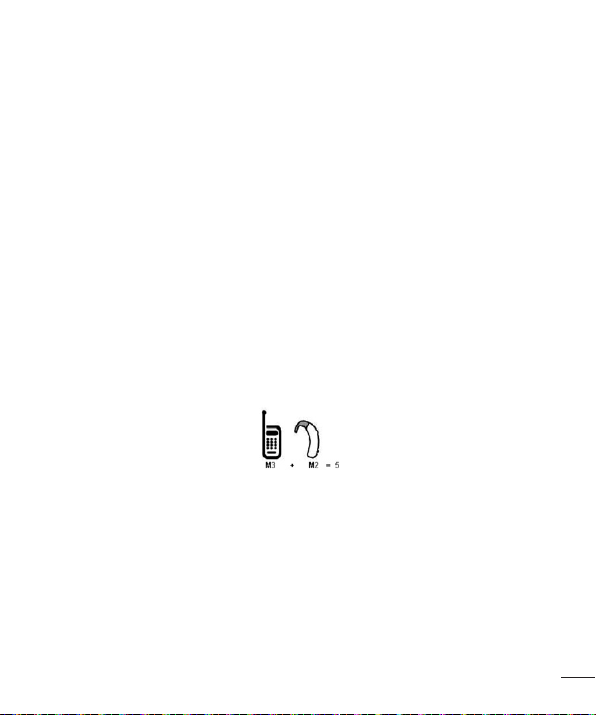
107
For Your Safety
boxoralabellocatedonthebox.
Theratingsarenotguarantees.
Resultswillvarydependingontheuser’shearingdeviceandhearingloss.Ifyour
hearingdevicehappenstobevulnerabletointerference,youmaynotbeabletousea
ratedphonesuccessfully.
Tryingoutthephonewithyourhearingdeviceisthebestwaytoevaluateitforyour
personalneeds.
M-Ratings:PhonesratedM3orM4meetFCCrequirementsandarelikelytogenerate
lessinterferencetohearingdevicesthanphonesthatarenotlabeled.M4isthebetter/
higherofthetworatings.
T-Ratings:PhonesratedT3orT4meetFCCrequirementsandarelikelytogenerate
lessinterferencetohearingdevicesthanphonesthatarenotlabeled.T4isthebetter/
higherofthetworatings.
Hearingdevicesmayalsoberated.Yourhearingdevicemanufacturerorhearinghealth
professionalmayhelpyoufindthisrating.Higherratingsmeanthatthehearingdevice
isrelativelyimmunetointerferencenoise.Thehearingaidandwirelessphonerating
valuesarethenaddedtogether.Asumof5isconsideredacceptablefornormaluse.
Asumof6isconsideredforbestuse.
Intheaboveexample,ifahearingaidmeetstheM2levelratingandthewirelessphone
meetstheM3levelrating,thesumofthetwovaluesequalM5.Thisshouldprovidethe
hearingaiduserwith“normalusage”whileusingtheirhearingaidwiththeparticular
wirelessphone.“Normalusage”inthiscontextisdefinedasasignalqualitythat’s
acceptablefornormaloperation.
TheMmarkisintendedtobesynonymouswiththeUmark.TheTmarkisintendedto
besynonymouswiththeUTmark.
TheMandTmarksarerecommendedbytheAllianceforTelecommunications
IndustriesSolutions(ATIS).TheUandUTmarksarereferencedinSection20.19ofthe

108
For Your Safety
FCCRules.
TheHACratingandmeasurementprocedurearedescribedintheAmericanNational
StandardsInstitute(ANSI)C63.19standard.
ToenterthattheHearingAidCompatibilityratingforyourphoneismaintained,
secondarytransmitterssuchasBluetoothandWLANcomponentsmustbedisabled
duringacall.
For information about hearing aids and digital wireless phones Wireless
Phones and Hearing Aid Accessibility http://www.accesswireless.org/
FCC Hearing Aid Compatibility and Volume Control
http://www.fcc.gov/cgb/consumerfacts/hac_wireless.html
Open Source Software Notice Information
To obtain the source code under GPL, LGPL, MPL, and other open source
licenses, that is contained in this product, please visit http://opensource.lge.
com.
In addition to the source code, all referred license terms, warranty disclaimers
and copyright notices are available for download.
LG Electronics will also provide open source code to you on CD-ROM for a
charge covering the cost of performing such distribution (such as the cost of
media, shipping, and handling) upon email request to opensour[email protected].
This offer is valid for three (3) years from the date on which you purchased the
product.

Limited Warranty Statement
1. WHAT THIS WARRANTY COVERS:
LG offers you a limited warranty that the enclosed subscriber unit and its enclosed accessories will
be free from defects in material and workmanship, according to the following terms and conditions:
(1) The limited warranty for the product extends for TWELVE (12) MONTHS beginning on the date of
purchase of the product with valid proof of purchase, or absent valid proof of purchase, FIFTEEN
(15) MONTHS from date of manufacture as determined by the unit’s manufacture date code.
(2) The limited warranty extends only to the original purchaser of the product and is not assignable
or transferable to any subsequent purchaser/end user.
(3) This warranty is good only to the original purchaser of the product during the warranty period as
long as it is in the U.S., including Alaska, Hawaii, U.S. Territories and Canada.
(4) The external housing and cosmetic parts shall be free of defects at the time of shipment and,
therefore, shall not be covered under these limited warranty terms.
(5) Upon request from LG, the consumer must provide information to reasonably prove the date of
purchase.
(6) The customer shall bear the cost of shipping the product to the Customer Service Department
of LG. LG shall bear the cost of shipping the product back to the consumer after the completion
of service under this limited warranty.
2. WHAT THIS WARRANTY DOES NOT COVER:
(1) Defects or damages resulting from use of the product in other than its normal and customary
manner.
(2) Defects or damages from abnormal use, abnormal conditions, improper storage, exposure to
moisture or dampness, unauthorized modifications, unauthorized connections, unauthorized
repair, misuse, neglect, abuse, accident, alteration, improper installation, or other acts which are
not the fault of LG, including damage caused by shipping, blown fuses, spills of food or liquid.
(3) Breakage or damage to antennas unless caused directly by defects in material or workmanship.
(4) That the Customer Service Department at LG was not notified by consumer of the alleged defect
or malfunction of the product during the applicable limited warranty period.
(5) Products which have had the serial number removed or made illegible.
(6) This limited warranty is in lieu of all other warranties, express or implied either in fact or by
operations of law, statutory or otherwise, including, but not limited to any implied warranty of
marketability or fitness for a particular use.
(7) Damage resulting from use of non LG approved accessories.
(8) All plastic surfaces and all other externally exposed parts that are scratched or damaged due to
normal customer use.
(9) Products operated outside published maximum ratings.
(10) Products used or obtained in a rental program.
(11) Consumables (such as fuses).

3. WHAT LG WILL DO:
LG will, at its sole option, either repair, replace or refund the purchase price of any unit that is
covered under this limited warranty. LG may choose at its option to use functionally equivalent
re-conditioned, refurbished or new units or parts or any units. In addition, LG will not re-install
or back-up any data, applications or software that you have added to your phone. It is therefore
recommended that you back-up any such data or information prior to sending the unit to LG to
avoid the permanent loss of such information.
4. STATE LAW RIGHTS:
No other express warranty is applicable to this product. THE DURATION OF ANY IMPLIED
WARRANTIES, INCLUDING THE IMPLIED WARRANTY OF MARKETABILITY OR
MERCHANTABILITY OR FITNESS FOR A PARTICULAR PURPOSE, IS LIMITED TO THE DURATION
OF THE EXPRESS WARRANTY HEREIN. LG SHALL NOT BE LIABLE FOR THE LOSS OF THE
USE OF THE PRODUCT, INCONVENIENCE, LOSS OR ANY OTHER DAMAGES, DIRECT OR
CONSEQUENTIAL, ARISING OUT OF THE USE OF, OR INABILITY TO USE, THIS PRODUCT
OR FOR ANY BREACH OF ANY EXPRESS OR IMPLIED WARRANTY, INCLUDING THE IMPLIED
WARRANTY OF MARKETABILITY OR MERCHANTABILITY OR FITNESS FOR A PARTICULAR
PURPOSE APPLICABLE TO THIS PRODUCT.
Some states do not allow the exclusive limitation of incidental or consequential damages or
limitations on how long an implied warranty lasts; so these limitations or exclusions may not apply to
you. This warranty gives you specific legal rights and you may also have other rights which vary from
state to state.
5. HOW TO GETWARRANTY SERVICE:
To obtain warranty service, please call or fax to the following telephone numbers from anywhere in
the continental United States:
Tel. 1-800-793-8896
Or visit http://us.lgservice.com. Correspondence may also be mailed to:
LG Electronics Service- Mobile Handsets, P.O. Box 240007, Huntsville, AL 35824
DO NOT RETURN YOUR PRODUCT TO THE ABOVE ADDRESS. Please call or write for the location
of the LG authorized service center nearest you and for the procedures for obtaining warranty claims.

7.11 Warranty Laws
The following laws govern warranties that arise in retail sales of consumer goods:
• The California Song-Beverly Consumer Warranty Act [CC §§1790 et seq],
• The California Uniform Commercial Code, Division Two [Com C §§2101 et seq], and
• The federal Magnuson-Moss Warranty Federal Trade Commission Improvement Act [15 USC §§2301
et seq; 16 CFR Parts 701– 703]. A typical Magnuson-Moss Act warranty is a written promise that the
product is free of defects or a written promise to refund, repair, or replace defective goods. [See 15
USC §2301(6).] Remedies include damages for failing to honor a written warranty or service contract
or for violating disclosure provisions. [See 15 USC §2310(d).] Except for some labeling and disclosure
requirements, the federal Act does not preempt state law. [See 15 USC §2311.]
The Consumer Warranty Act does not affect the rights and obligations of parties under the state
Uniform Commercial Code, except the provisions of the Act prevail over provisions of the Commercial
Code when they confl ict. [CC §1790.3.]
For purposes of small claims actions, this course will focus on rights and duties under the state laws.