Ed:
Rev :
Cod :
INSTRUCTION
10/19 GRLDEVEFTFK20000
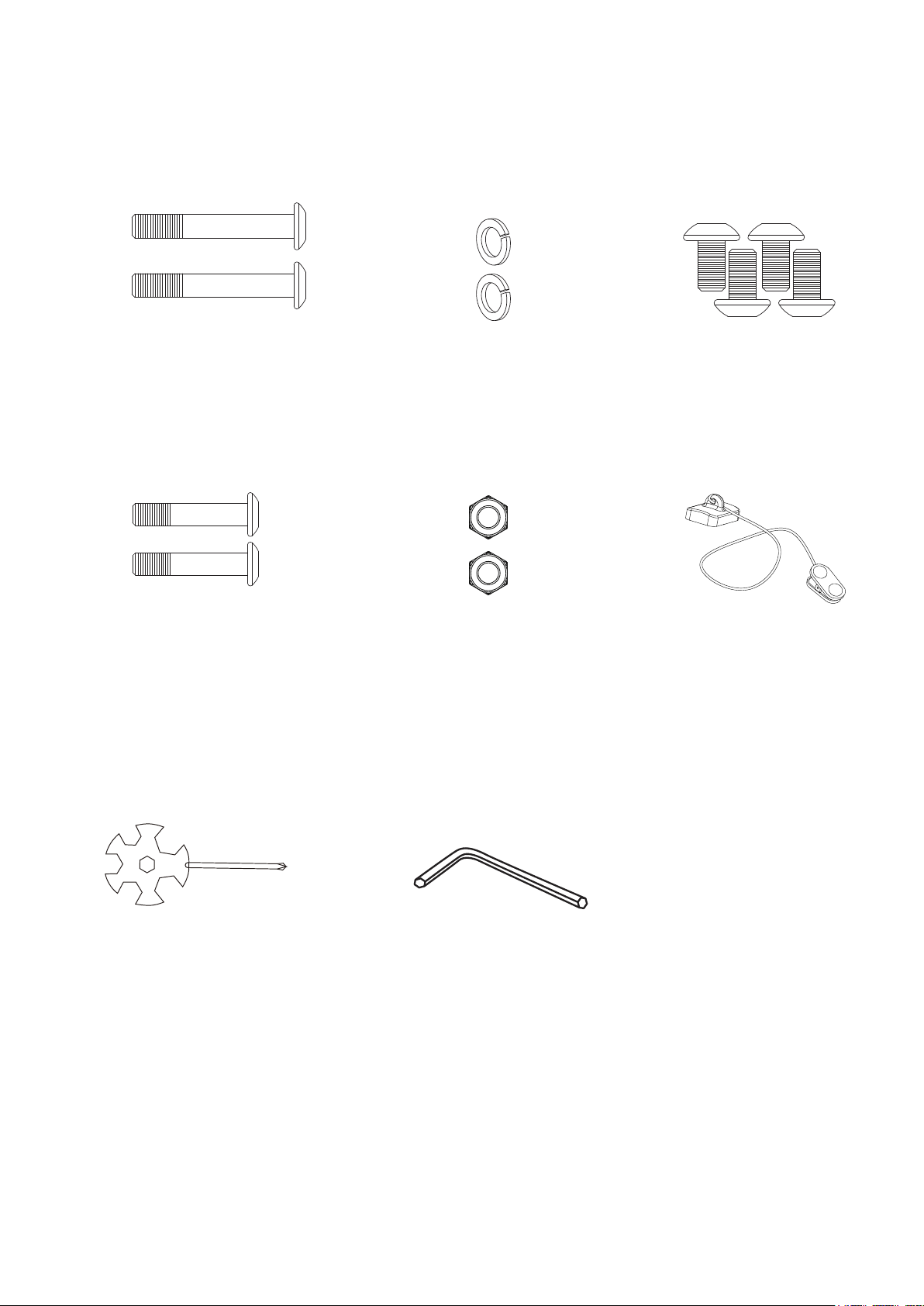
Nylon Nut M8
X 2
Safety Tether Key
X 1
Hexagon Socket Oval
Head Bolt M8x50
X2
Spring Washer M8
X2
M8x16 Allen Bolt
X 4
S1 S2
S6
TOOLS
S4 S5
HARDWARE LIST & ASSEMBLY COMPONENT
S3
M8x30 screw
X1
Allen Wrench
Multi Hex Tool with
Phillips Screwdriver
X1
X 1
ASSEMBLY INSTRUCTIONS
S1
S2
S3
STEP 1
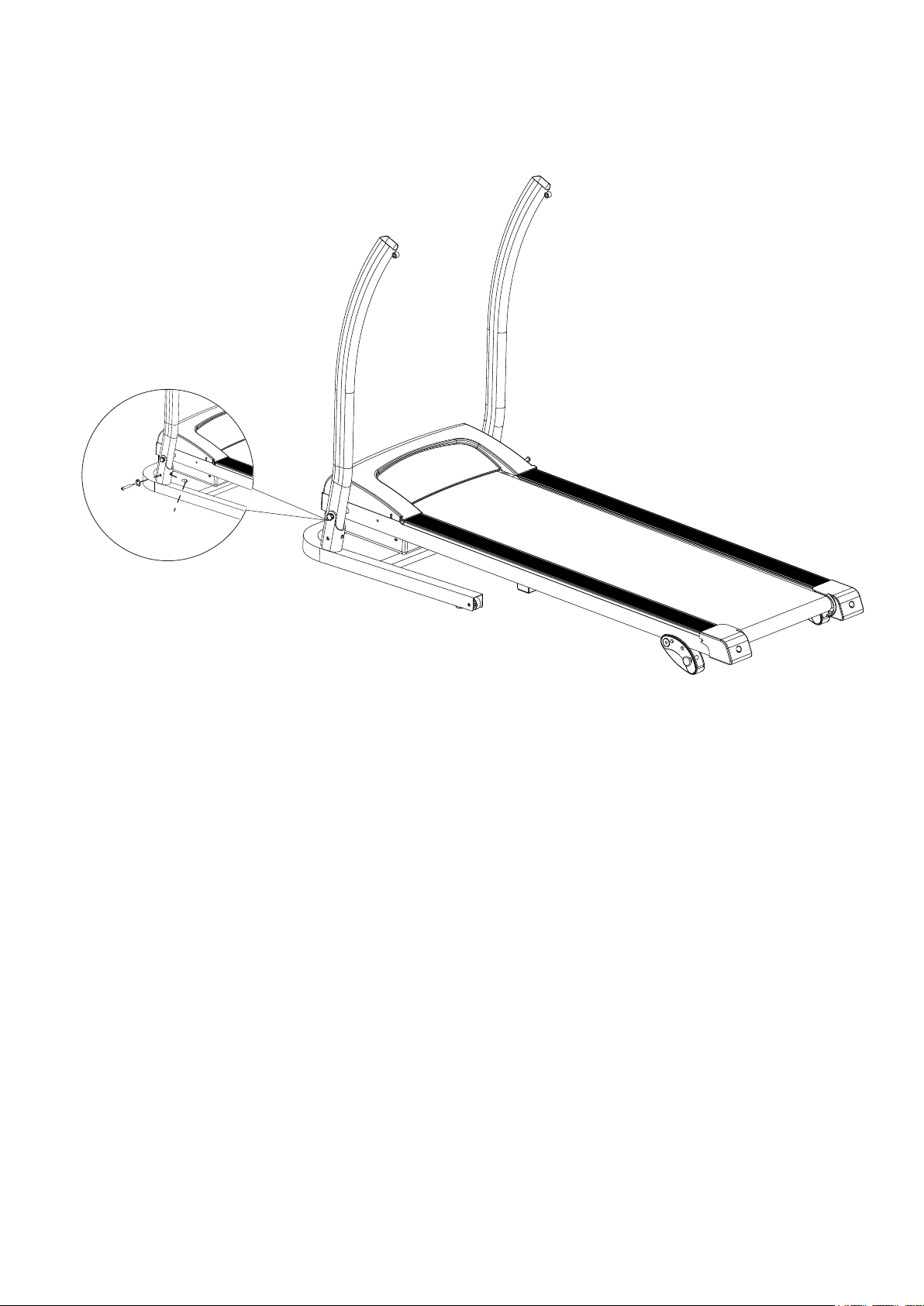
It is recommended to have a second person assist with this step. Lift both Right and Left
Handlebar Support Tubes up. One person should hold the both Right and Left
Handlebar Support Tubes in place while the other person tightens the bolts.
Lift both Right and Left Handlebar Support Tubes up and align bolt holes. Use two
M8x50 Hexagon Socket Oval Head Bolts (S1) and two M8 Spring Washers (S2) to secure
both Right and Left Handlebar Support Tubes onto the Base Frame.
Use two M8x16 Hexagon Socket Oval Head Bolts (S3) to secure both Right and Left
Handlebar Support Tubes onto the Base Frame .
Semi-tighten all bolts with the Allen Wrench provided.
NOTE: DO NOT FULLY TIGHTEN BOLTS IN STEP 1 UNTIL STEP 2 IS COMPLETED.
STEP 2
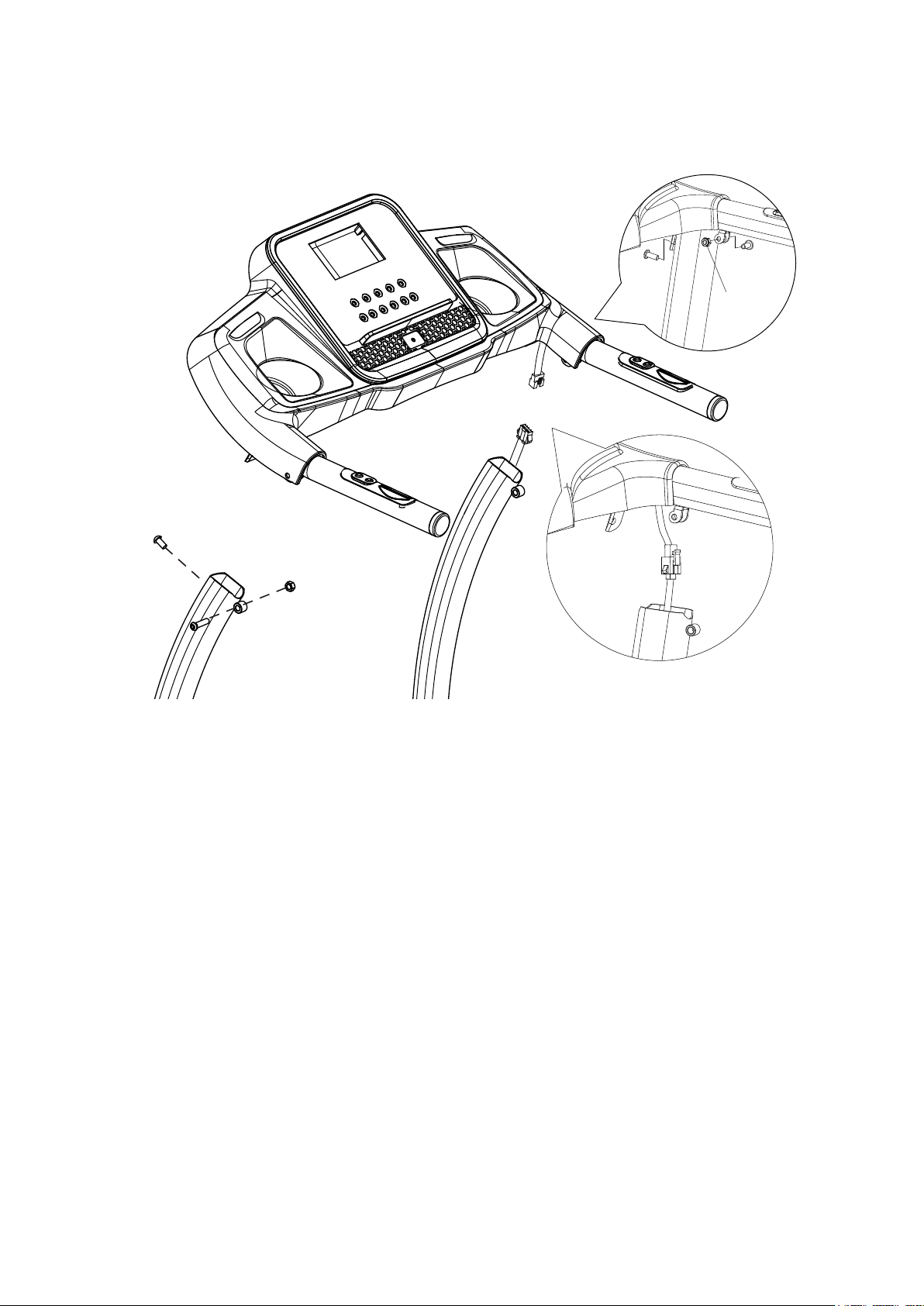
It is recommended to have a second person assist with this step. One person should hold
the Computer Console in place while the other person connects the cables.
Connect the Main Control Cable from the Right Handlebar Support Tube to the
cable that comes from the Computer Console.
Install the Handlebar Bracket onto the Right and Left Handlebar Support Tubes, using two
M8x16 Hexagon Socket Oval Head Bolts (S3), two M8 Nylon Nuts (S5), and two
M8x30 Hexagon Socket Oval Head Bolts (S4). Tighten bolts and nylon nuts with the Allen
Wrench and Multi Hex Tool with Phillips Screwdriver provided.
IMPORTANT: While sliding the Handlebar Bracket onto the Right and Left Handlebar
Support Tubes make sure the cables are installed inside the Right Handlebar
Support Tube and pay attention not to pinch the cables.
NOW PLEASE FULLY TIGHTEN ALL BOLTS INSTALLED IN STEP 1 .
S3
S4
S5
S3
S4
S5
OPERATING THE COMPUTER
NOTE: Always stand on the side rails when you start the treadmill, never start
the treadmill while you are standing on the running belt.
QUICK START:
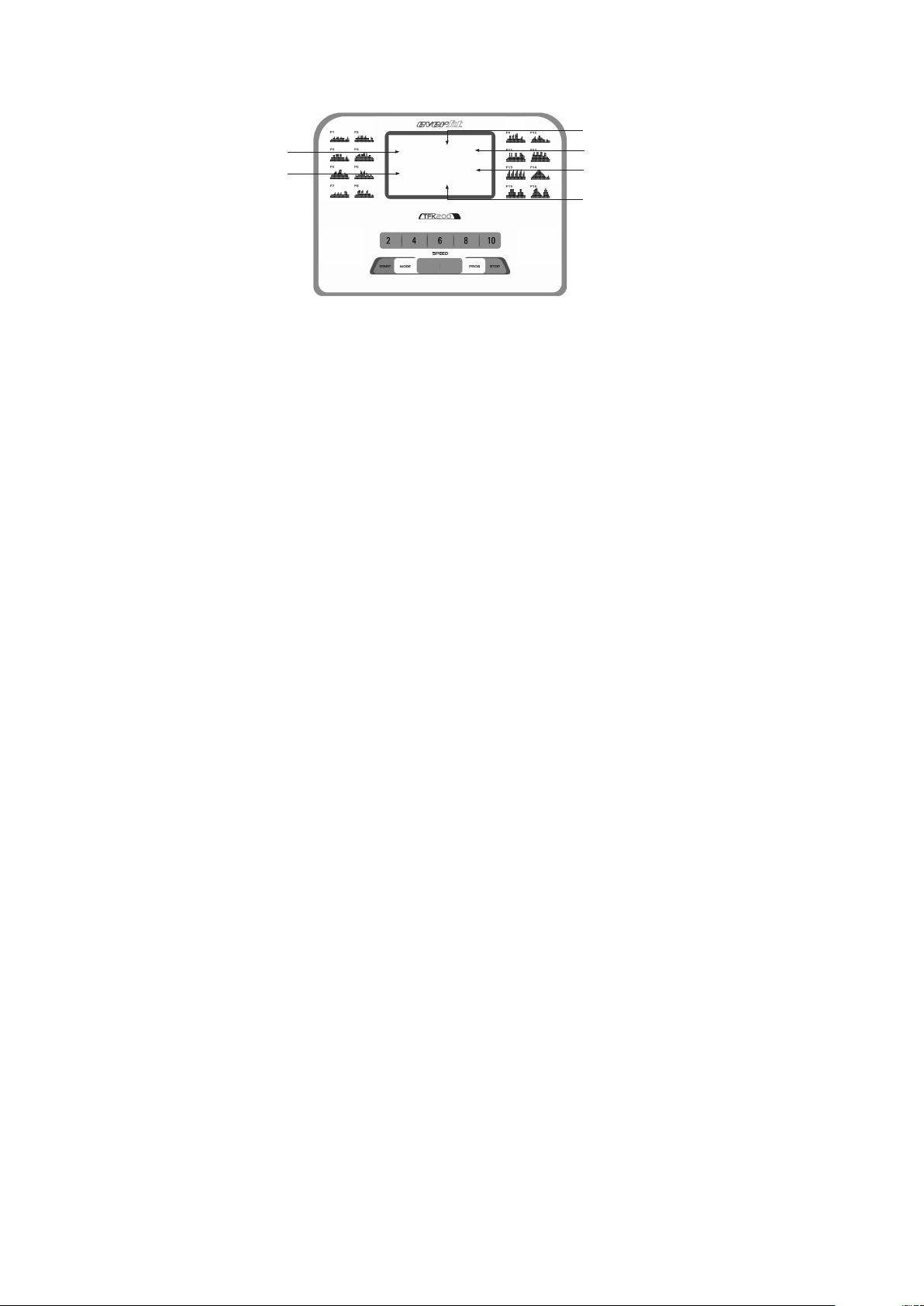
Press the START button on the computer to start exercise, the LCD window will
countdown 3 seconds with the LCD showing "3-2-1" before the running belt starts moving.
The running belt starts moving with an initial speed of 0.8 KPH. Always allow the
treadmill to reach a speed of 0.8 KPH before stepping on to the running belt. You may
press the SPEED + or SPEED - button on the computer console or handlebar to
increase or decrease the running speed during exercise. The split window
of SPEED will
display your current running speed. The speed range is from the minimum 0.8 KPH to
the maximum 12.0 KPH. You may also press one of the INSTANT SPEED buttons (2 / 4
/ 6 / 8 / 10) on the computer console and the split window of SPEED will display the
speed that you have pressed and the running speed will change to 2 KPH, 4 KPH, 6 KPH,
8 KPH, or 10 KPH respectively. The split window of TIME will display your elapsed
workout time in minutes and seconds. The split window of DISTANCE will display the
accumulative distance travelled during workout. The split window of CALORIES will
display the total accumulated calories burned during workout. The split window of
PULSE will display your current heart rate in beats per minute (BPM). To activate, grip
the hand pulse sensors on both handlebars during exercise and the pulse will display
after 4-5 seconds. For a more accurate reading, grip pulse sensors with both hands.
During training, you may press the STOP button on the computer cons
ole to stop the
treadmill running at any time, or pull out the safety tether key to stop the treadmill running.
FUNCTION BUTTONS:
START:
Press the START button to start training on different training mode.
STOP:
Press the STOP button to stop training on different training mode.
PROG (PROGRAM):
Press the PROG button to select the pre-set training program (P01-P16) mode before
training.
DISTANCE
TIME
CALORIES
PULSE
PROGRAM
SPEED

MODE:
Press the MODE button to select different functions (time, distance, or calories) for setting
exercise goals in manual program mode before training.
SPEED +
(SPEED UP):
Press the SPEED + button to make upward adjustments for pre-setting target training
time, distance, or calorie in manual program mode before training.
Press the SPEED + button to make upward adjustments for pre-setting target training
time in pre-set training program (P01-P16) mode before training.
Makes speed adjustments during all training periods on different training modes.
The speed range is from 0.8 KPH to 12.0 KPH.
SPEED -
(SPEED DOWN):
Press the SPEED - button to make backward adjustments for pre-setting target training
time, distance, or calorie in manual program mode before training.
Press the SPEED - button to make backward adjustments for pre-setting target training
time in pre-set training program (P01-P16) mode before training.
Makes speed adjustments during all training periods on different training modes.
The speed range is from 0.8 KPH to 12.0 KPH.
INSTANT SPEED (2 / 4 / 6 / 8 / 10):
Used to reach desired speed more quickly.
DISPLAY FUNCTIONS:
TIME: Displays your elapsed workout time in minutes and seconds. Press the START
button on the computer to begin exercising, the LCD window will countdown 3 seconds
with the LCD showing "3-2-1" before the running belt starts moving. The running belt
starts moving with an initial speed of 0.8 KPH. You may press the SPEED + or
SPEED - button on the computer console or handlebar to increase or decrease the
running speed during exercise. Time starts counting up from 0:00 to 99:59 per 1 second
increment.
SPEED: Displays the current speed from the minimum 0.8 KPH to the maximum
12.0 KPH. You may increase or decrease the speed by pressing the SPEED + or
SPEED - button on the computer console or handlebar.
(DISTANCE: Displays the accumulative distance travelled during workout. Press the
START button on the computer to begin exercising, the LCD window will countdown 3
seconds with the LCD showing "3-2-1" before the running belt starts moving. The running
belt starts moving with an initial spe
ed of 0.8 KPH. You may press the SPEED + or
SPEED - button on the computer console or handlebar to increase or decrease the
running speed during exercise. Distance starts counting up.

CALORIES: Displays the total calories burned during your workout. Press the START
button on the computer to begin exercising, the LCD window will countdown 3 seconds
with the LCD showing "3-2-1" before the running belt starts moving. The running belt
starts moving with an initial speed of 0.8 KPH. You may press the SPEED + or
SPEED - button on the computer console or handlebar to increase or decrease the
running speed during exercise. Calorie starts counting up. (This data is a rough guide for
comparison of different exercise sessions and should not be used in medical treatment).
PULSE: Displays your current heart rate in beats per minute (BPM). To activate, grip the
hand pulse sensors during exercise and the pulse will display after 2-5 seconds. For a
more accurate reading, grip pulse sensors with both hands.
TRAINING
IN MANUAL PROGRAM MODE:
You may pre-set target TIME, DISTANCE, or CALORIES in STOP mode before training.
Only one of the functions can be pre-set.
To set TIME press the MODE button on the computer console until you see the split
window of TIME begin blinking. Press the SPEED + or SPEED - button on the
computer console or handlebar to change the setting. Each increment is 1 minute. The
pre-set target time range is from 5:00 to 99:00 minutes. Once you pre-set target time,
press the START button on the computer to begin exercising. The running belt starts
moving with an initial speed of 0.8 KPH. You may press the SPEED + or SPEED -
button on the computer console or handlebar to increase or decrease the running speed
during exercise. Time starts counting down from pre-set target time to 0:00 per 1 second
backward. When the pre-set target time counts down to 0:00, the computer will beep to
alert you and the treadmill will stop automatically.
To set DISTANCE press the MODE button on the computer console until you see the
window of DISTANCE begin blinking. Press the SPEED + or SPEED - button on the
computer console to change the setting. The pre-set target distance ra
nge is from 0.5
99.5 kilometers, the default distance is 1 kilometer. Once you pre-set target distance,
press the START button on the computer to begin exercising. The running belt starts
moving with an initial speed of 0.8 KPH. You may press the SPEED + or SPEED -
button on the computer console or handlebar to increase or decrease the running speed
during exercise. Distance starts counting down from pre-set target distance to 0.00.
When the pre-set target distance counts down to 0.00, the c
omputer will beep to alert you
and the treadmill will stop automatically.
To set CALORIES press the MODE button on the computer console until you see the
window of CALORIES begin blinking. Press the SPEED + or SPEED - button on the
computer console to change the setting. The pre-set target calorie range is from 10 to
995 calories. Once you pre-set target calories, press the START button on the computer
to begin exercising. The running belt starts moving with an initial speed of 0.8 KPH. You
may press the SPEED + or SPEED - button on the computer console or handlebar to
increase or decrease the running speed during exercise. calories start counting down
from pre-set target calories to 0. When the pre-set target calories counts down to 0, the
computer will beep to alert you and the treadmill will stop automatically.
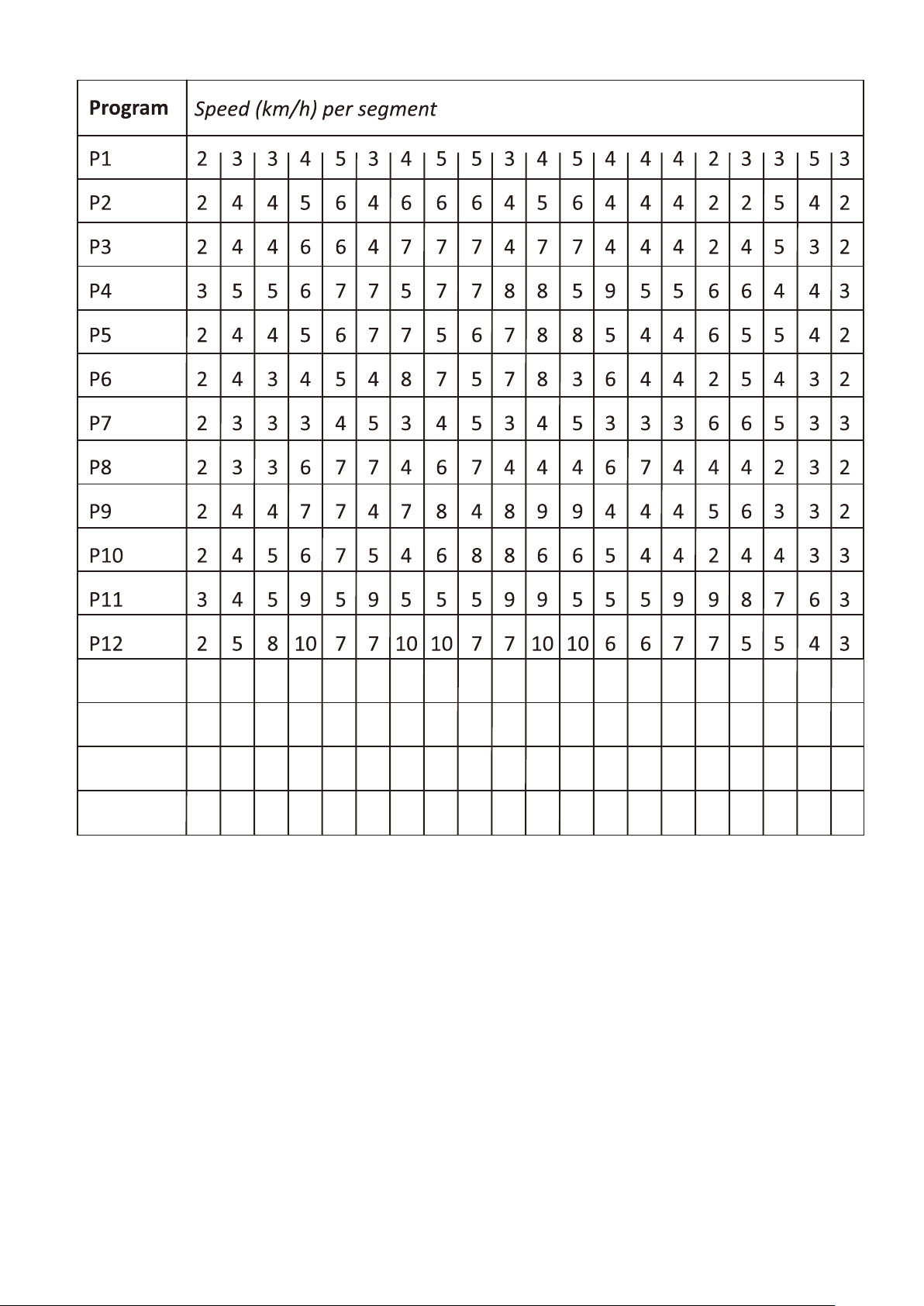
P13 3 6 8 10 3 6 8 10 3 6 8 10 3 6 8 10 3863
2 3 4 5 6 7 8 9 10 9 8 7 6 5 4 3 2432
3 3 6 6 9 9 9 9 6 6 3 3 6 6 9 9 3366
2 3 4 8 9 10 10 7 6 5 4 3 2 6 8 10 2468
P14
P15
P16
EMERGENCY STOP
SAFETY TETHER KEY
Before beginning a workout session ensure that the Safety Tether Key is properly placed
onto the Computer Console and the Safety Clip is securely attached to an article of your
clothing. If you fall the clip will pull out the SAFETY TETHER KEY from the Computer
Console and the running belt will stop immediately for emergency stop, helping to prevent
injury.
Replaced the Safety Tether Key onto the Computer Console. Press the START button to
begin exercise again.
LUBRICATION
Lubricating under the running belt will ensure superior performance and extend its life
expectancy. After the first 25 hours of use (or 2-3 months) apply some lubricant, and
repeat for every following 50 hours of use (or 5-8 months).
How to check running belt for proper lubrication
Lift one side of the running belt and feel the top surface of the running deck.
If the surface is slick to the touch, then no further lubrication is required.
If the surface is dry to the touch, apply some lubricant.
How to apply lubricant
Lift one side of running belt.
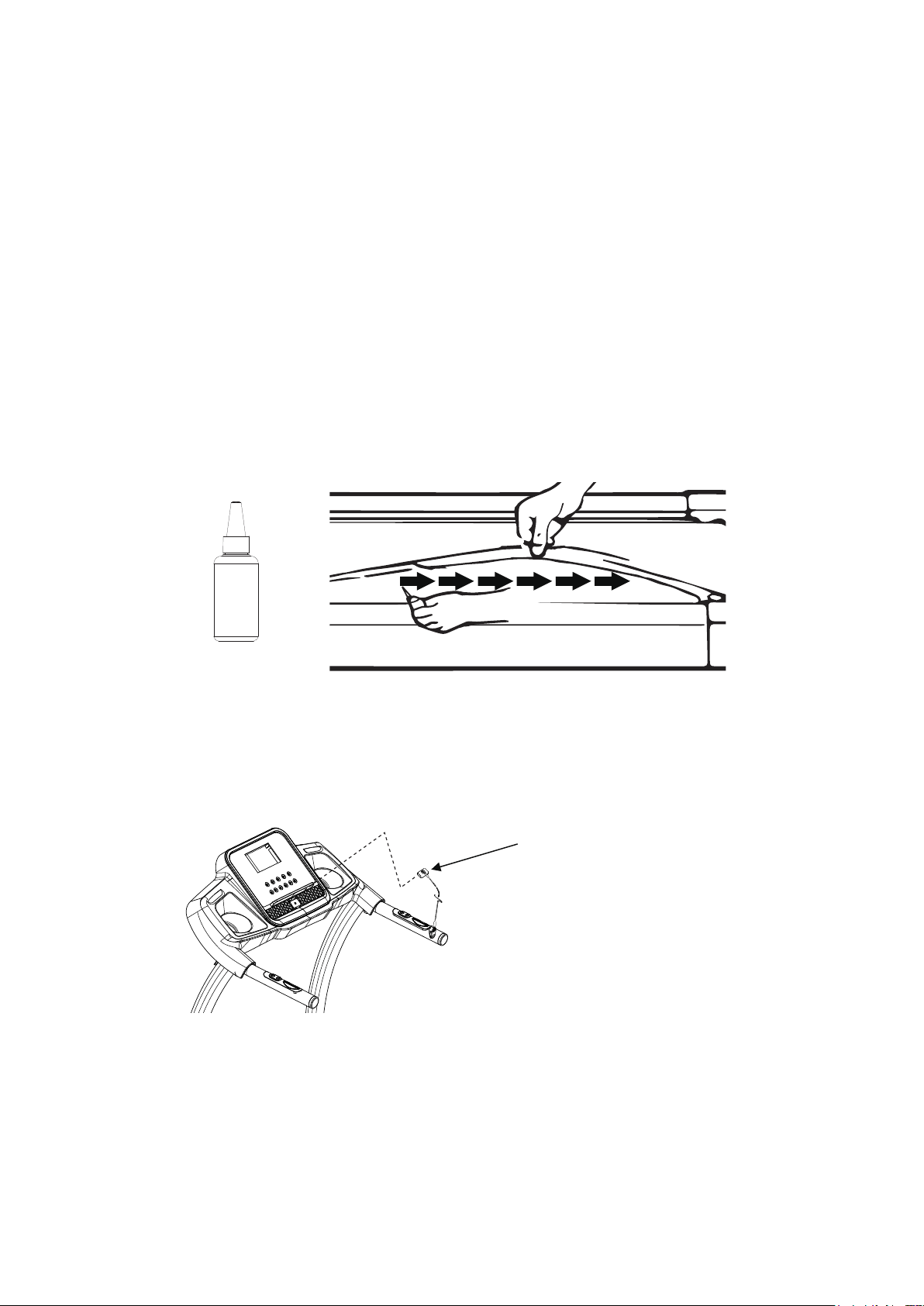
Pour some lubricant under the centre of the running belt on the top surface of the running
deck.
Run on the treadmill at a slow speed for 3 to 5 minutes to evenly distribute lubricant.
NOTE: DO NOT over lubricate running deck. Any excess lubricant that comes out should
be wiped off.
Lubricant
1 PC
Tool:
Allen Wrench
Allen Wrench
Allen Wrench
BELT ADJUSTMENT
The running belt is pre-adjusted to the running deck at the factory, but after prolonged use
it can stretch and require readjustment. To adjust the belt, turn on the main power switch
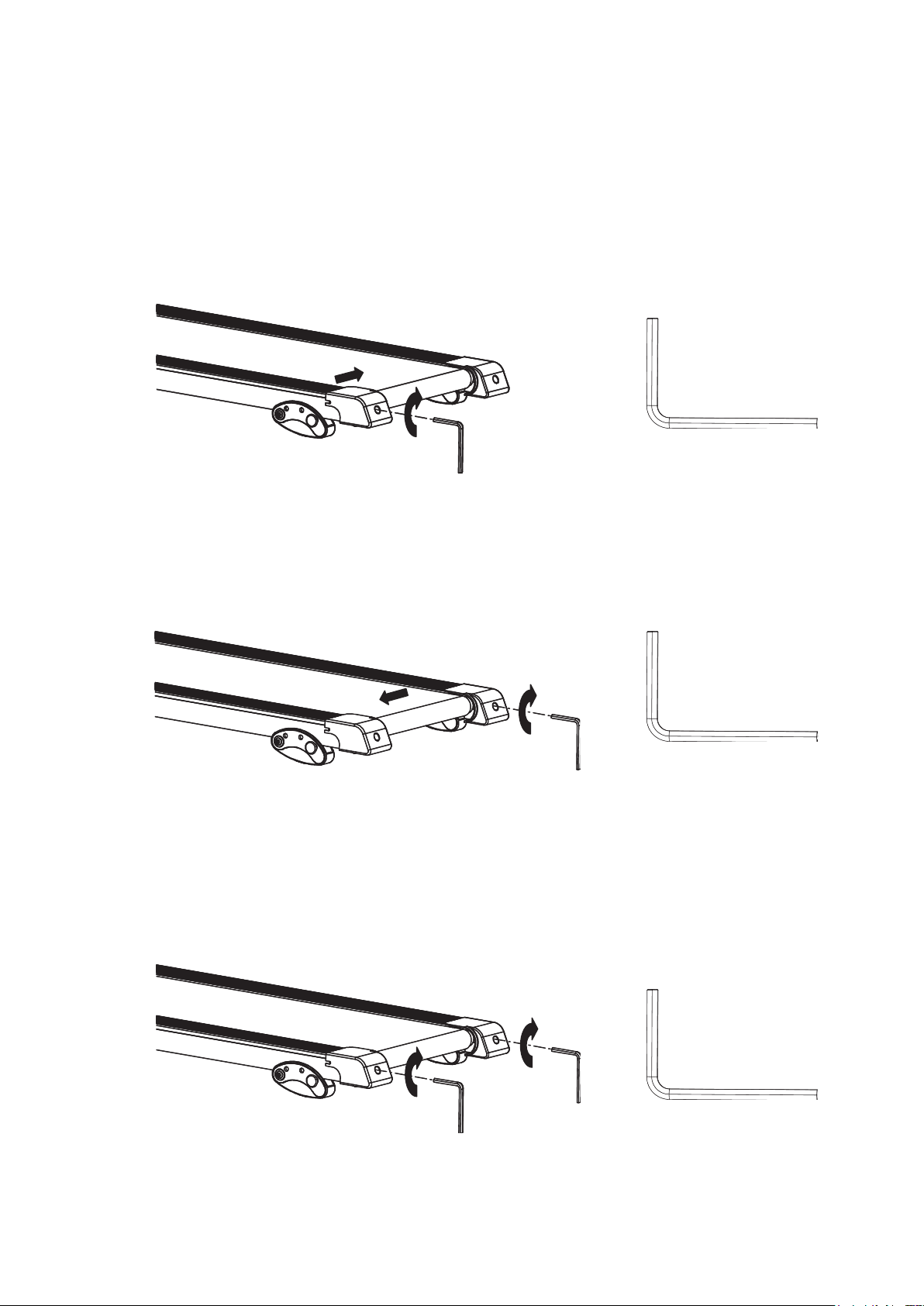
of the treadmill and let the belt run at a speed of 8-10 KPH. Use the Allen Wrench
provided to turn the rear roller adjustment bolts in order to centre the belt. If the running
belt is shifting to the left, turn the left adjustment bolt 1/4 turn clockwise, and the running
belt should start to correct itself.
If the runnin
g belt is shifting to the right, then turn the right adjustment bolt 1/4 turn
clockwise, and the belt should start to correct itself. Keep turning the adjustment bolts until
the running belt is properly centered.
If the running belt is slipping during use, turn off and unplug the treadmill. Using the
Allen Wrench provided, turn both left and right rear roller adjustment bolts 1/4 turn
clockwise, then turn the main power switch back on and run the treadmill at a speed of
8-10 KPH. Run on to the running be
lt to determine if the belt is still slipping. Repeat this
procedure until the belt no longer slips.
Tool:
Tool:
CARE, MAINTENANCE & TROUBLESHOOTING GUIDE
WARNING: To prevent electrical shock, please turn off and unplug the treadmill before
cleaning or performing routine maintenance.
WARNING: Always check the wear and tear components like spring knob and running belt
to prevent injury.
CLEANING
After each exercise, ensure that the unit is wiped down and any sweat is removed
from the unit.
The treadmill can be cleaned with a soft cloth and mild detergent. Do not use abrasives
or solvents. Be careful not to get excessive moisture on the display panel as this might
damage the unit and create an electrical hazard.
Please keep the treadmill, especially the computer console, out of direct sunlight to
prevent damage to the screen.
STORAGE
Store the treadmill in a clean and dry indoor environment. Never leave or use the unit
outdoors. Ensure the master power switch is off and the power cord is un-plugged from
wall outlet.
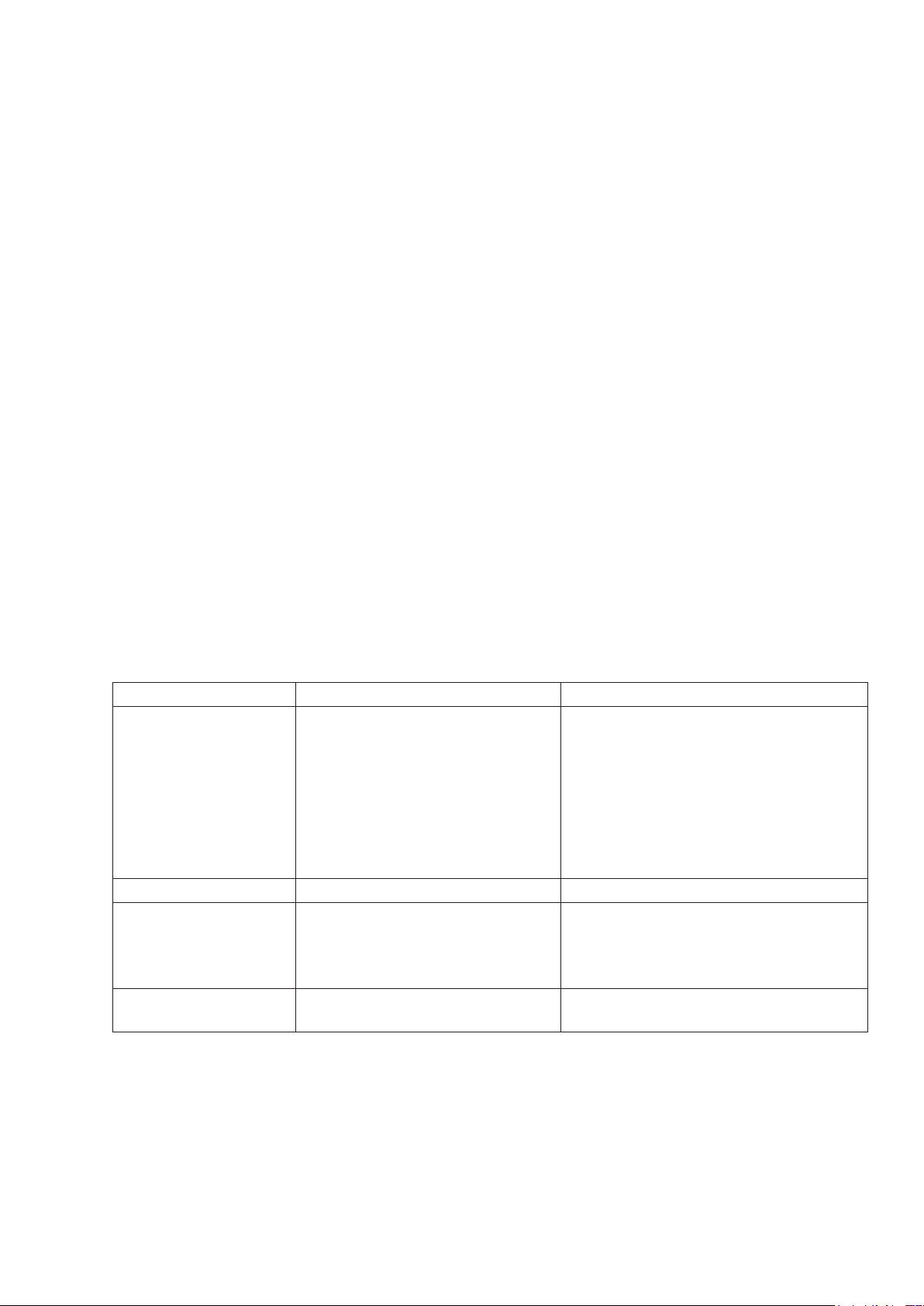
TROUBLESHOOTING GUIDE
Problem Potential Causes Corrections
Treadmill will not
start.
1. Treadmill not plugged in.
2. Safety Tether Key is not
correctly installed.
3. Circuit breaker in the
house has been tripped.
4. Treadmill circuit breaker
has been tripped.
1. Plug the power cord into a wall
outlet.
2. Reinstall the Safety Tether Key.
3. Reset the circuit breaker, or call
an electrician to replace the
circuit breaker.
4. Wait 5 minutes and then try to
restart the treadmill.
Belt slips. Belt not tight enough. Adjust belt tension.
Belt hesitates when
stepped on.
1. Not enough lubrication
applied onto the running
deck.
2. Belt is too tight.
1. Apply lubricant.
2. Adjust belt tension.
Belt is not centred. Running belt tension not even
across the rear roller.
Centre the belt.
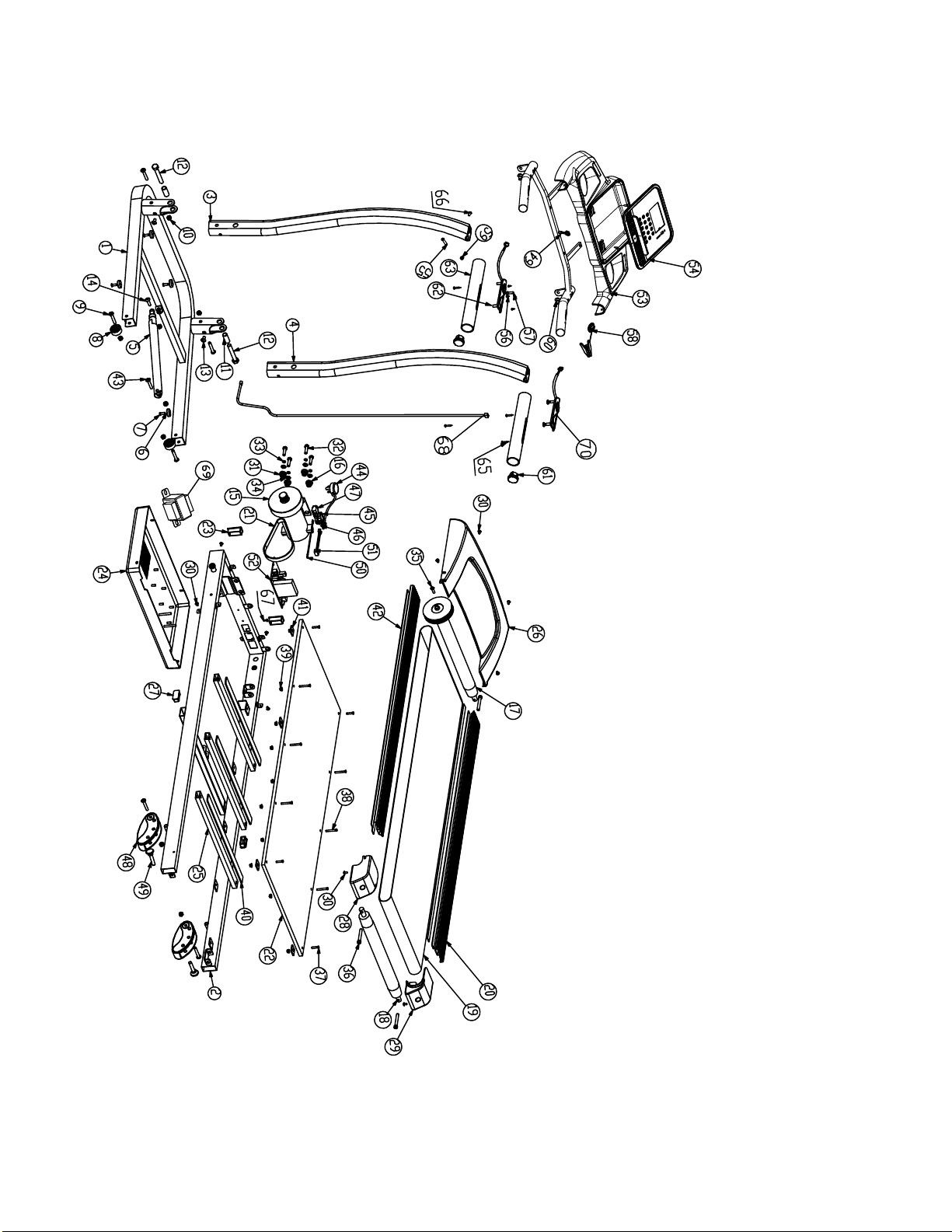
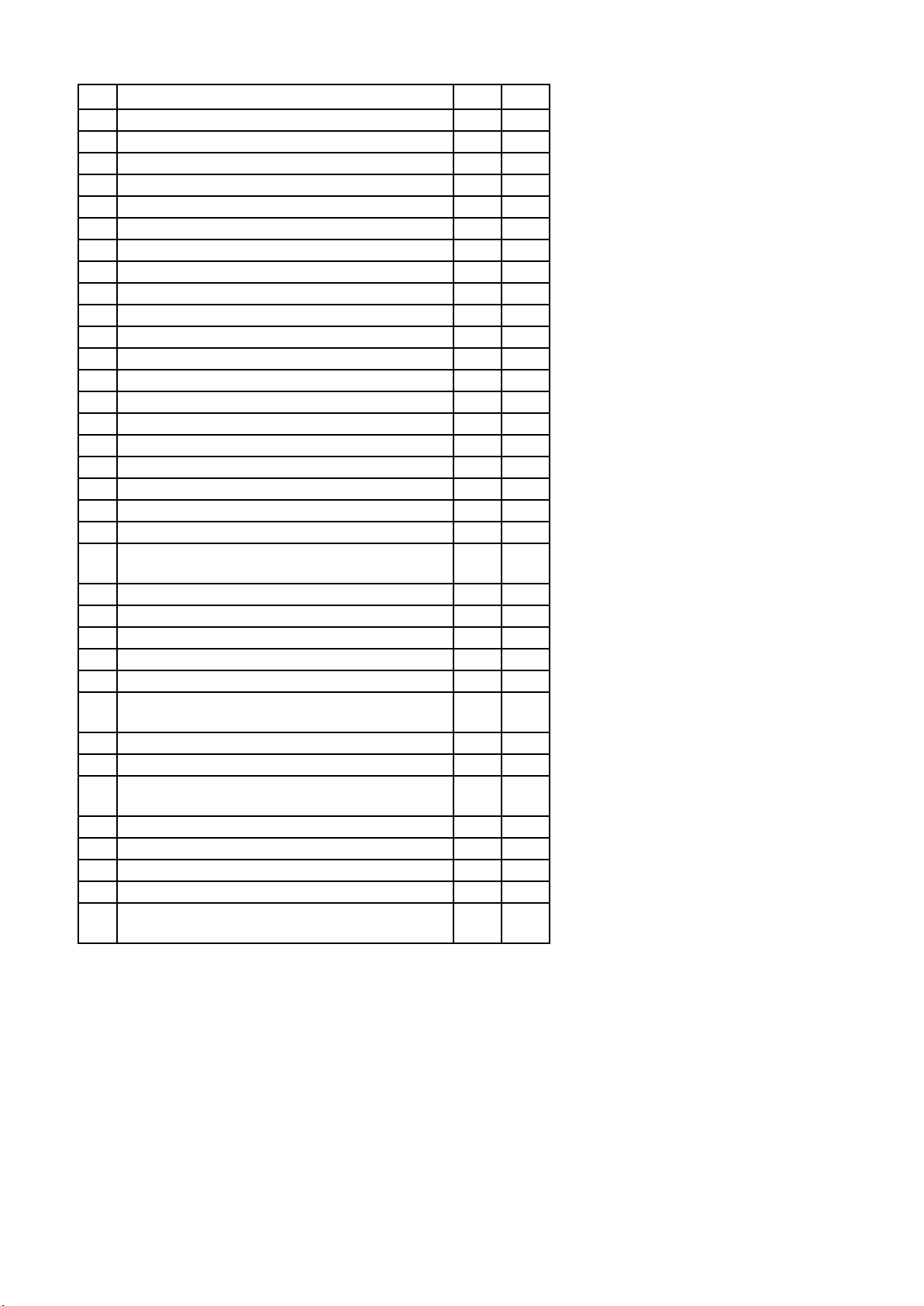
NO DESCRIPTION QTY NO
1 Base Frame 1 36
2 Main Frame 1 37
3 Left Handlebar Support Tube 1 38
4 Right Handlebar Support Tube 1 39
5 Foot Lock Latch Tube 1 40
6 Foot Pad for Base Frame Ø30x7 4 41
7 Cross Recessed Oval Head Bolt M6x16 4 42
8 Transport Wheel Ø37x22 2 43
9 Hexagon Socket Oval Head Bolt M8x50 6 44
10 Nylon Nut M8 8 45
11 Spacer Ø16xØ12.2x38 2 46
12 Hexagon Head Bolt M12x80 2 47
13 Hexagon Socket Oval Head Bolt M8x15 2 48
14 Hexagon Socket Oval Head Bolt M8x30 1 49
15 Motor 1 50
16 Foot Pad for Motor Ø22xT10 4 51
17 Front Roller Ø105xØ42xØ15x514 1 52
18 Rear Roller Ø42xØ15x500 1 53
19 Running Belt 400x2560xT1.6 1 54
20 Side Rail 80x12x1090 2 55
21 Belt 180J6 1 56
22 Running Deck 1 57
23 Rectangular End Cap (□25x50) 2 58
24 Lower Motor Cover 1 59
25 Reinforced Tube 15x30xT1.1x500 3 60
26 Upper Motor Cover 1 61
27 Rectangular End Cap (□20x40) 2 62
28 Left End Cover 1 63
29 Right End Cover 1 64
30 Cross Recessed Truss Head Screw M5x10 10 65
31 Nylon Nut M8 4 66
32 Hexagon Head Bolt M8x30 4 67
33 Spring Washer M8 4 68
34 Washer M8 4 69
35 Cross Recessed Truss Head Screw M6x20 1 70
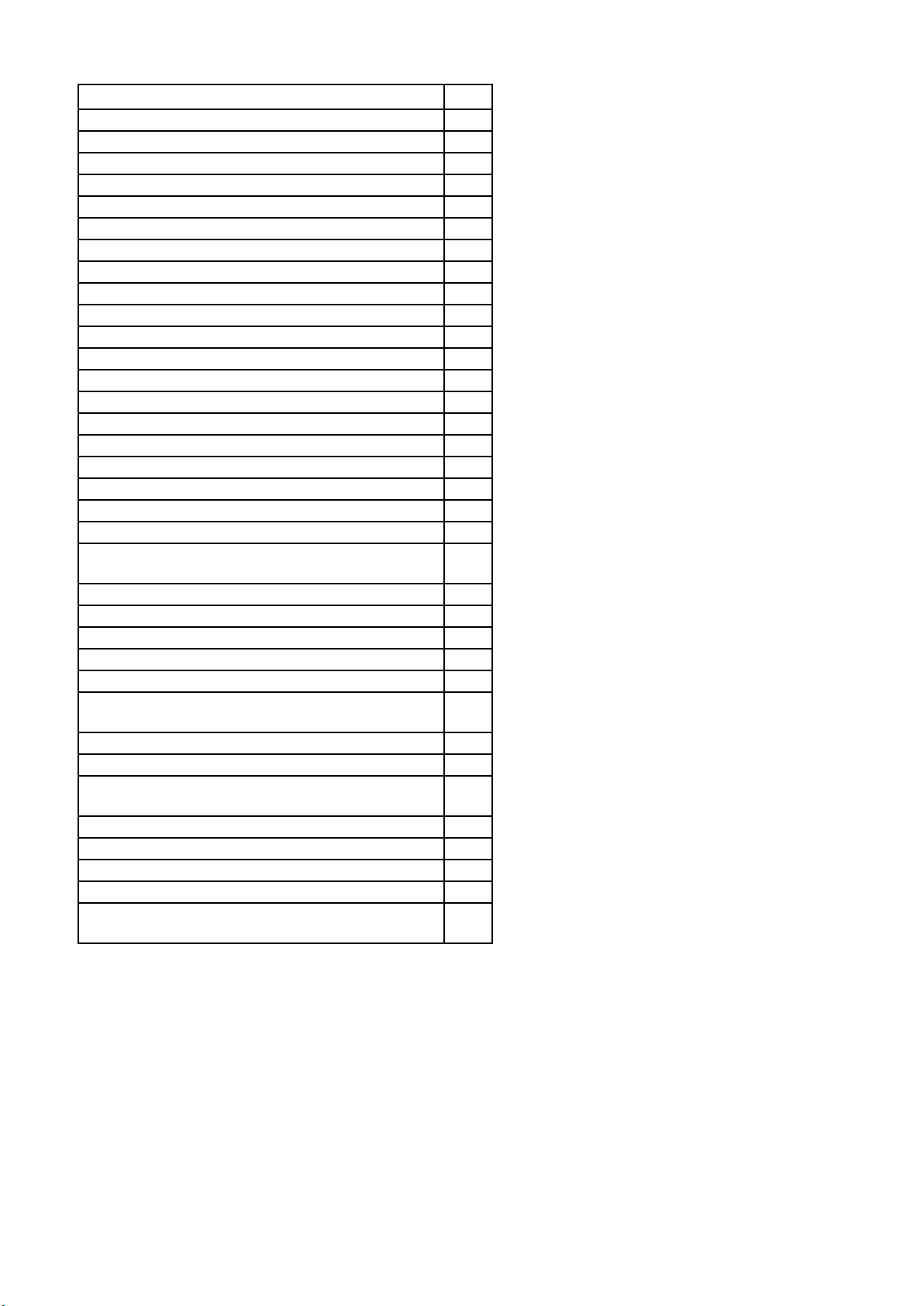
DESCRIPTION QTY
Hexagon Socket Round Head Cap Bolt M8x55 3
Cross Recessed Countersunk Head Bolt M6x25 4
Cross Recessed Countersunk Head Bolt M6x40 6
Flange Nut M6 10
EVA Reinforced Pad 400x30xT3.0 3
EVA Deck Bumper 28x28xT5 4
EVA Adhesive 1080x25xT3 4
Hexagon Socket Oval Head Bolt M8x45 1
Power Cord (L=1700 mm) 1
Power Switch 1
Power Cord Grommet 1
Fuse Box 1
Incline Adjuster 2
Lock Pin Ø28x17xØ10x45 2
Wire for Fuse Box 1
Wire for Power Control Board 1
Electric controller 1
Console Cover Down) 1
Console Cover (Up) 1
Hexagon Socket Oval Head Bolt M8x30 2
Cross Recessed Oval Head Tapping Screw
Ø4x12
16
Hexagon Socket Oval Head Bolt M6x20 1
Safety Key 1
Flange Nut M8 2
Handle Rail Frame 1
Handlebar End Cap Ø38 2
Start/Stop Buttons and Hand Pulse Sensor with
Wire
2
Handlebar Foam Grip 2
Console Control Cable 2
Cross Recessed Oval Head Tapping Screw
Ø4x25
4
Hexagon Socket Oval Head Bolt M8x16 2
Cross Recessed Truss Head Screw ST4x12 1
Main Control Cable 1
Choke 1
Speed Buttons and Hand Pulse Sensor with Wire
1

GARLANDO SPA
Via Regione Piemonte, 32 - Zona Industriale D1
15068 - Pozzolo Formigaro (AL) - Italy
www.evert.it - info@evert.it