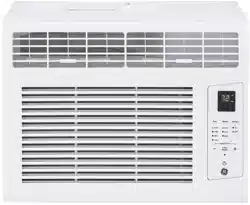
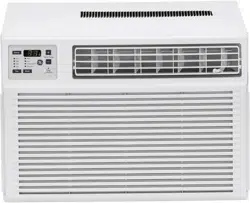
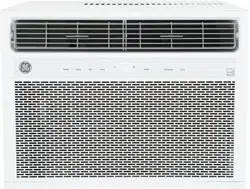
User manual Window Air Conditioner
Controls
Features and appearance will vary.
Lights below the touch pads on the air conditioner control panel indicate the selected settings.
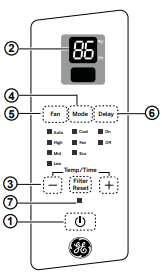
Air Conditioner Controls
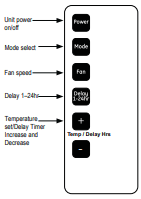
Remote Control
Controls
1. Power Pad
Turns air conditioner on and off. When turned on, the display will show the room temperature.
2. Display
Shows the room temperature or time remaining on the Delay timer. Shows the Set temperature while setting the temperature in Cool or Energy Saver modes.
3. Temp and Delay Increase + /Decrease – Pads
Use to set temperature or delay time. Temperature can be set in Cool and Energy Saving mode.
4. Mode Pad
Use to set the air conditioner to Fan Only, Cool, or Energy Saver mode.
5. Fan Speed Pad
In Cool, Energy Saving mode:
Use to set the fan speed to Auto, High, Med or Low on the unit.
In Fan Only mode:
Use to set the fan speed to High. Med. or Low on the unit.
6. Delay Pad
Delay ON—When the air conditioner is off, it can be set to automatically come on in 1 to 24 hours at its previous mode and fan settings.
Delay OFF—When the air conditioner is on, it can be set to automatically turn off in 1 to 24 hours.
How to set:
Press the Delay 1–24hr pad on the unit or the remote control. Each touch of the Increase + / Decrease – pads on the unit or the remote control will set the timer in 1-hour intervals.
To review the remaining time on the Delay 1–24hr timer, press the Delay 1–24hr pad on the unit or the remote control. Use the Increase + / Decrease – pads on the unit or on the remote control to set a new time if desired.
To cancel the timer, press Decrease – pad on the unit or the remote control until the set time is zero. After 3 seconds the light on the Delay 1-24 hour pad goes off.
7. Filter Reset Pad
This feature automatically notifies you that the air filter must be cleaned. The indicator light will come on after 240 hours of operation. Clean the air filter (refer to page 6), place it back in the front panel, and press the Filter Reset pad. The light will go off.
Using the Air Conditioner
Do Not Operate in Freezing Outdoor Conditions
This cool-only air conditioner was not designed for freezing outdoor conditions. It must not be used when the outdoor temperature is below freezing (32°F).
Remote Control
- To ensure proper operation, aim the remote control at the signal receiver on the air conditioner.
- The remote control signal has a range of up to 20 feet.
- Make sure nothing is between the air conditioner and the remote control that could block the signal.
- Make sure batteries are fresh and installed correctly as indicated on the remote control.
Cool Mode
Use the Cool mode at Low, Med, High or Speed for cooling. Use theTemperature Increase +/ Decrease – pads to set the desired temperature between 64°F and 86°F in 1°F increments.
An electronic thermostat is used to maintain the room temperature. The compressor will cycle on and off to keep the room at the set level of comfort. Set the thermostat at a lower number and the indoor air will become cooler. Set the thermostat at a higher number and the indoor air will become warmer.
NOTE: If the air conditioner is off and is then turned on while set to a Cool setting or if turned from a fan setting to a Cool setting, it may take approximately 3 minutes for the compressor to start and cooling to begin.
Cooling Descriptions
For Normal Cooling—Select the Cool mode and High or Med fan with a middle set temperature.
For Maximum Cooling—Select the Cool mode and High fan with a lower set temperature.
For Quieter and Nighttime Cooling—Select the Cool mode and Low fan with a middle set temperature.
Energy Saver Mode
Controls the fan.
ON—The fan will cycle on and off with the compressor. This may result in wider variations of room temperature and humidity. NOTE: the fan may continue to run for a short time or may pulse intermittently after the compressor cycles off to sample the room air.
OFF—The fan runs all the time, while the compressor cycles on and off.
Fan Only Mode
Use the Fan Only Mode at Low, Med or High fan speed to provide air circulation and filtering without cooling. Since fan-only settings do not provide cooling, a Set temperature cannot be entered. The room temperature will appear in the display
Auto Fan Mode
Set to Auto for the fan speed to automatically set to the speed needed to provide optimum comfort settings with the set temperature.
If the room needs more cooling, the fan speed will automatically increase. If the room needs less cooling, the fan speed will automatically decrease.
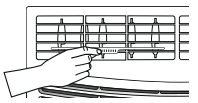
Air Direction
Use the lever to adjust the air direction left to right.
Care and Cleaning
Grille and Case
Turn the air conditioner off and remove the plug from the wall outlet before cleaning.
To clean, use water and a mild detergent. Do not use bleach or abrasives.
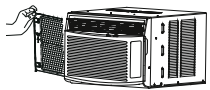
Air Filter
The air filter behind the front grille should be checked and cleaned at least every 30 days or more often if necessary
To remove:
- Slide the filter from the left side of the unit. Remove the filter.
- Clean the filter with warm, soapy water. Rinse and let the filter dry before replacing it. Do not clean the filter in a dishwasher.
CAUTION DO NOT operate the air conditioner without a filter because dirt and lint will clog it and reduce performance.
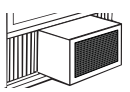
Outdoor Coils
The coils on the outdoor side of the air conditioner should be checked regularly. If they are clogged with dirt or soot, they may be professionally cleaned.
How to Insert the Battery in the Remote Control
- Remove the screw on the back of the battery cover.
- Pinch the slide lock and pull the battery tray out at the same time.
- Insert new battery, making sure that the (+) and (–) of battery are installed correctly.
- Reinsert the battery tray and reinstall the screw.
NOTES:
Use one CR 2025 ( 3V) Lithium battery.
Remove the battery from the remote control if the system is not going to be used for a long time.
Installation Instructions
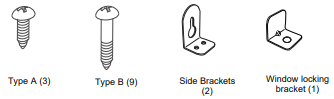
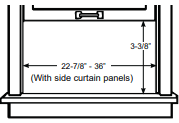
1. WINDOW REQUIREMENTS
- These instructions are for a standard double-hung window. You will need to modify them for other types of windows.
- The air conditioner can be installed without the side curtain panels if needed to fit in a narrow window. See the window opening dimensions.
- All supporting parts must be secured to firm wood, masonry or metal.
- The electrical outlet must be within reach of the power cord.
- Follow the dimensions in the table and illustration for your model.
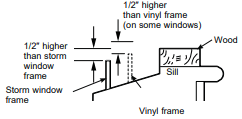
2. STORM WINDOW REQUIREMENTS
A storm window frame will not allow the air conditioner to tilt toward the outside, and will keep it from draining properly. To adjust for this, attach a piece of wood to the sill.
WOOD PIECES
WIDTH: 2"
LENGTH: Long enough to fit inside the window frame.
THICKNESS: To determine the thickness, place a piece of wood on the sill to make it 1/2" higher than the top of the storm window frame or the vinyl frame.
Attach securely with nails or screws provided by the installer.
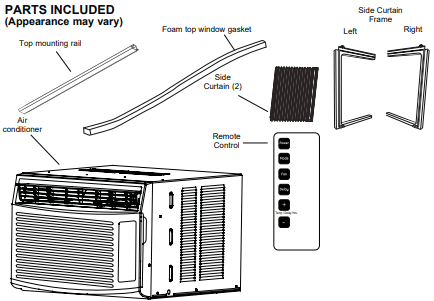
3. PREPARE THE AIR CONDITIONER
A. Install the top mounting rail with Type A screws from the outside of the case.
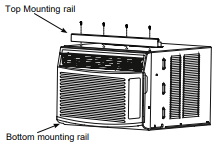
B. Slide the side curtain panels into the side panel rails.
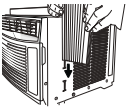
C. Slide left and right side curtain frames into top and bottom rails. Make sure that side curtains snap into side of the frames.
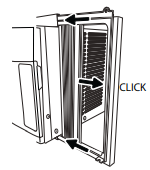
4. INSTALL THE AIR CONDITIONER IN THE WINDOW
A. Mark the center of the window. Set the air conditioner in the window so that is it centered. Place the air conditioner so that front edge of the bottom mounting rail is against the back edge of the sill.
B. Bring the window down so that the front edge of the top mounting is in front of the window. Make sure that the air conditioner is level or tilting slightly to the outside.
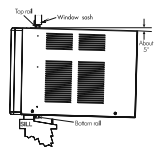
C. Extend the curtain panels until they fill the window. Mark the location of the holes in each corner. Use the drill and 1/8" drill bit to drill pilot holes. use 4 type B screws to secure the side panels in place.
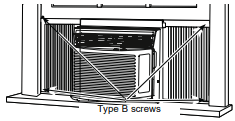
5. SECURE AIR CONDITIONER
A. Loosen the screw on the right hand side of the air conditioner near the bottom.
B. Slide a side bracket over the screw so that the bracket is resting on the window sill. Tighten the screw.

C. Use a 1/8" drill bit to drill a starer hole into the window sill through the holes in the side bracket. Use 4 type B screws to attach the side bracket to the window sill.
D. Repeat the side bracket installation on the left side.

6. INSTALL WINDOW LOCK BRACKET AND FOAM TOP WINDOW GASKET
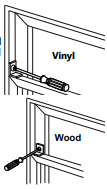
Use Type B Screw to install the window lock bracket on top of the bottom window.
A. CAUTION To prevent broken glass or damage to windows, on vinyl or other similarly constructed windows, attach the window locking bracket to the window side jamb with one Type B screw.
B. Cut the foam top window gasket to the window width.
C. Stuff the foam between the glass and the window to prevent air and insects from getting into the room.
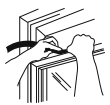
NOTE: If the gasket supplied does not fit your window, obtain appropriate material locally to provide a proper installation seal.
Troubleshooting Tips
Air conditionerdoes not start.
Make sure the air conditioner plug is pushed completely into the outlet.
- The fuse is blown/circuit breaker is tripped.
Check the house fuse/circult breaker box and replace the fuse or reset the breaker.
The unit will automatically restart in the setting last used after the power is restored.
There is a protective time delay (approximately 3 minutes) to prevent tripping of the compressor overload. For this reason, the unit may not start normal cooling for 3 minutes after it is turned back on.
- The current interrupter device is tripped.
Press RESET button located on the power cord plug.
If the RESET button will not stay engaged, discontinue use of the air conditioner and contact a qualified service technician
Air conditioner does not cool as it should.
- Indoor airflow is restricted.
Make sure there are not curtains, blinds or furniture blocking the front of the air conditioner.
- The temp control may not be set properly.
Turn the temperature control to a higher number.
Clean the filter at least every 30 days. See Care and Cleaning section.
- The room may have been hot.
When the air conditioner is first turned on, you need to allow time for the room to cool down.
Check for open furnace registers and cold air returns.
- Cooling coils have iced up.
See " Air conditioner freezing up" below.
Air conditioner freezing up
- Ice blocks the air flow and stops the air conditioner from cooling the room.
Set the mode control to High Fan or High Cool with the temperature setting as high as it can be set.
Water drips outside
This is normal.
Water drips inside
- The air conditioner is not tilted to the outside.
For proper disposal, make sure the air conditioner slants slightly from the case front to the rear.
Water collects in base pan
- Moisture removed from air and drain into base pan.
This is normal for a short period in areas with little humidity; normal for a longer period in very humid areas.
Normal Operating Sounds
- You may hear a pinging noise caused by water being picked up and thrown against the condenser on rainy days of when the humidity is high. This design feature helps remove moisture and improve efficiency.
- You may hear the thermostat click when the compressor cycles on and off.
- Water will collect in the base pan during high humidity or on rainy days. The water may overflow and drip from the outdoor side of the unit.
- The fan may run even when the compressor does not.
- Water droplets being thrown against the outside colls can make a pinging noise. This helps cool the condenser. You can reduce this noise by removing the subbase water plug.
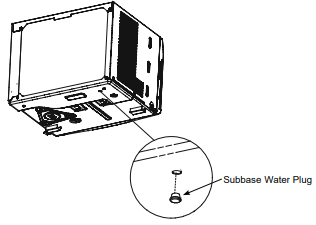
Removing this plug will lower the Energy Efficiency of your until.
NOTE: Do not drill hole in the base pan.