Quality Office Products Since 1917
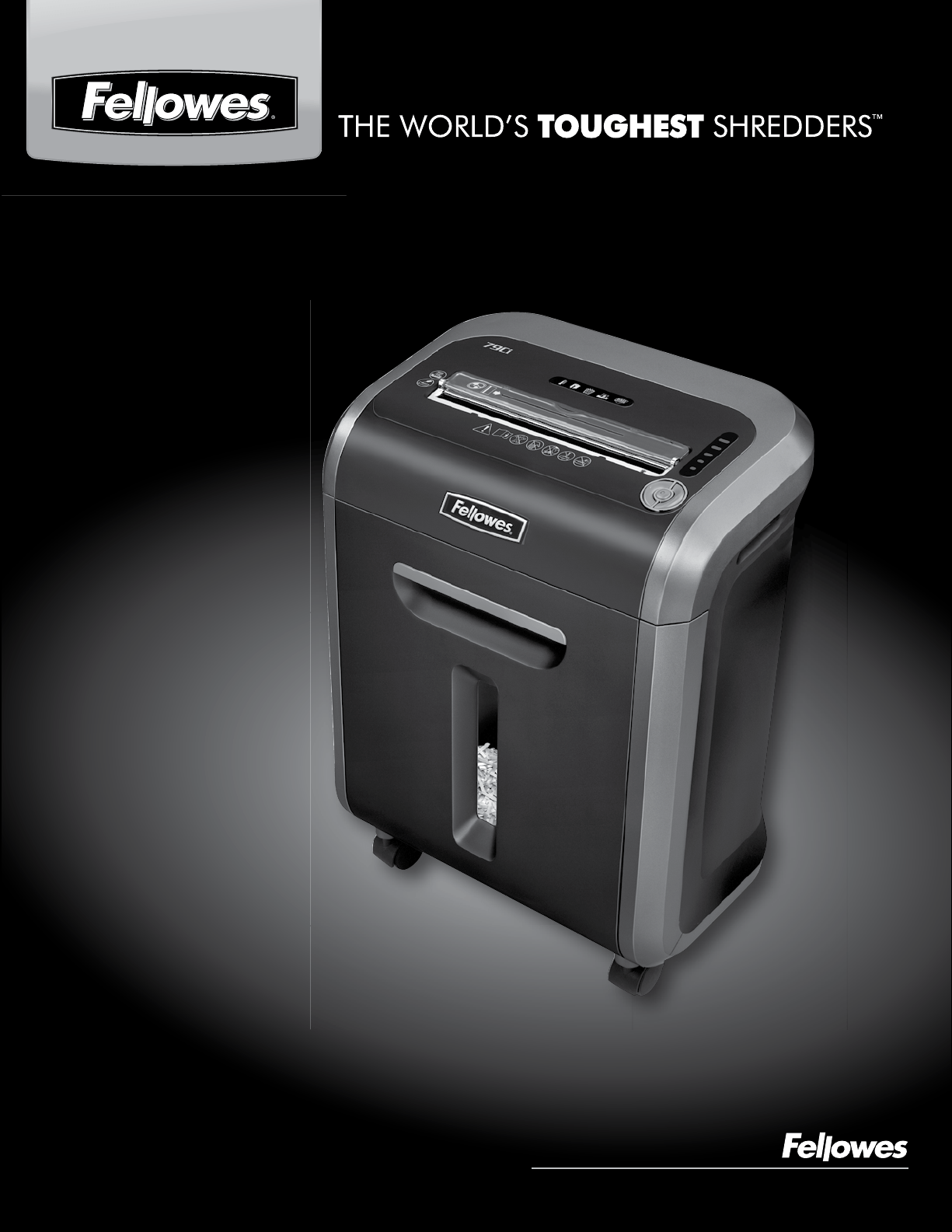
POWERSHRED
®
79Ci
POWERSHRED
®
79Ci
Please read these instructions before use.
Do not discard: keep for future reference.
Veuillez lire ces instructions avant d’utiliser l’appareil.
Ne pas jeter : conserver afin de consulter les directives
ultérieurement, en cas de besoin.
Lea estas instrucciones antes del uso.
No las deseche: consérvelas como referencia futura.
Will shred: Paper, credit cards, CD/DVDs, staples and small paper clips
Will not shred: Adhesive labels, continuous form paper, transparencies, newspaper,
cardboard, large paper clips, laminates, file folders, X-rays or plastic other than noted above
Paper shred size:
Cross-Cut ...............................................................................5/32” x 1-1/2” (4 x 38mm)
Maximum:
Sheets per pass ........................................................................................................... 16*
CDs/Cards per pass ....................................................................................................... 1*
Paper entry width ...........................................................................................9” (230mm)
*8.5”x11”, 20lb., (75g) paper at 120V, 60 Hz, 4Amps; heavier paper, humidity
or other than rated voltage may reduce capacity. Maximum recommended daily usage rates:
500 sheets, 25 credit cards; 10 CDs.
16 sheets per pass.
Fellowes SafeSense
®
shredders are designed to be operated in home and office environments ranging
between 50 – 80 degrees Fahrenheit (10 – 26 degrees Celsius) and 40 – 80% relative humidity.
2
CAPABILITIES
ENGLISH
Model 79Ci
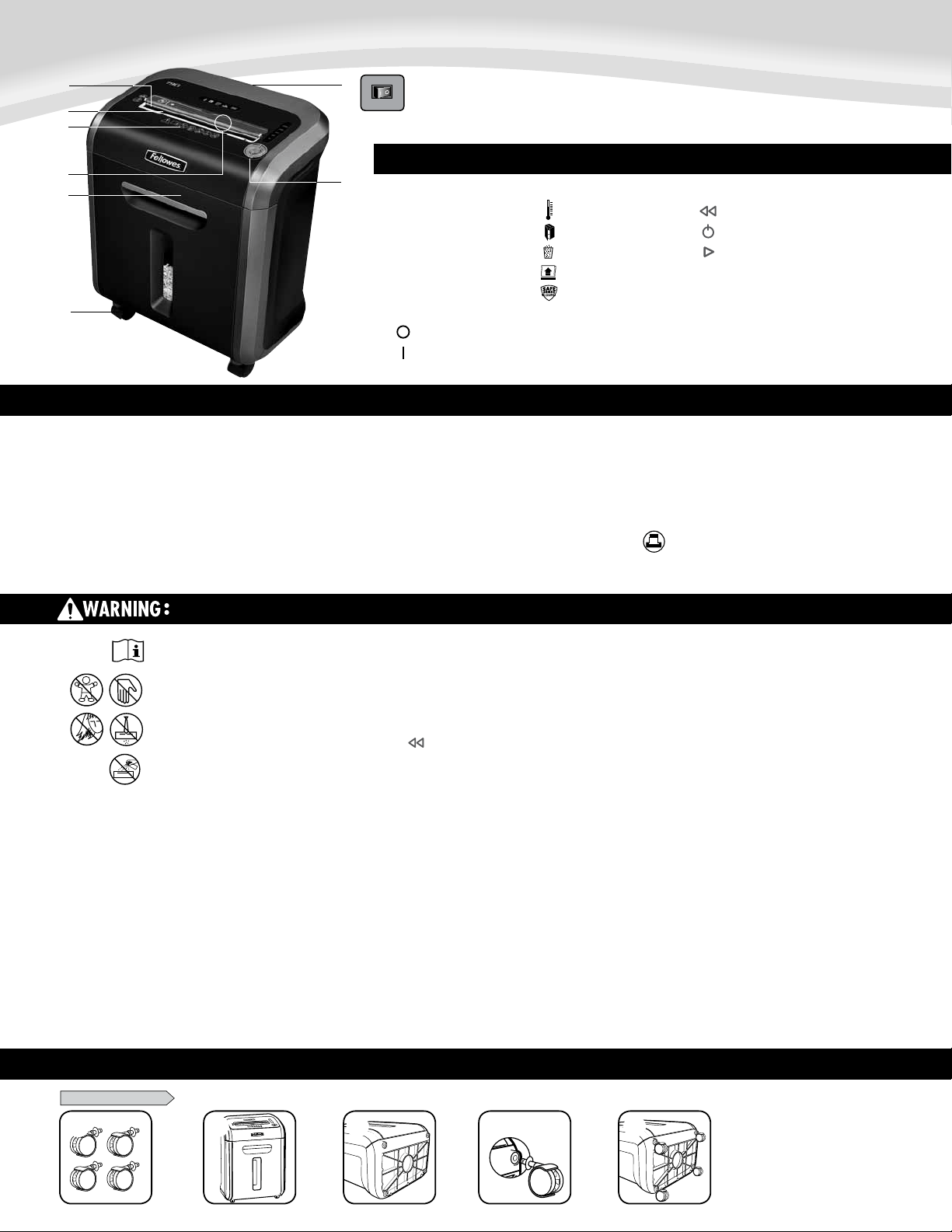
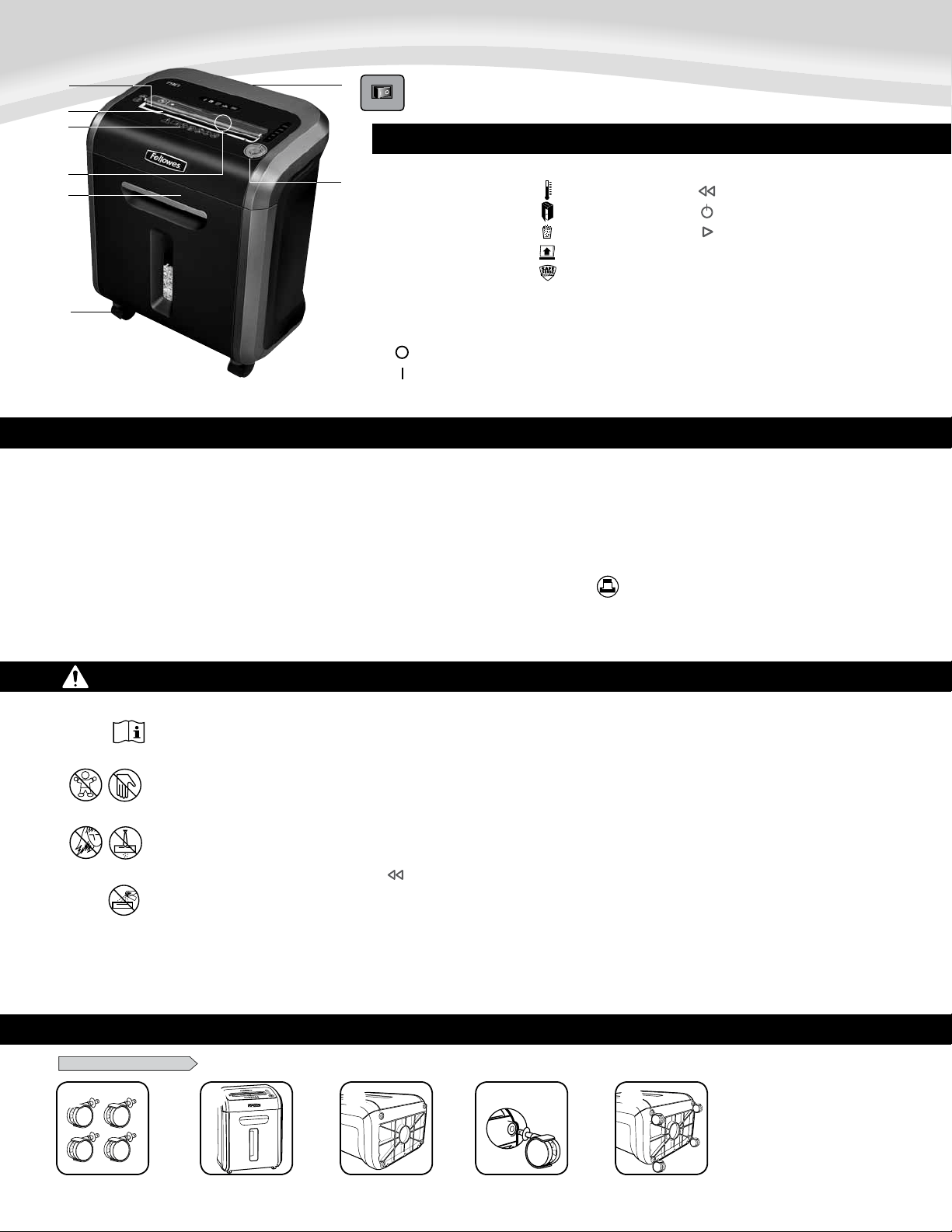
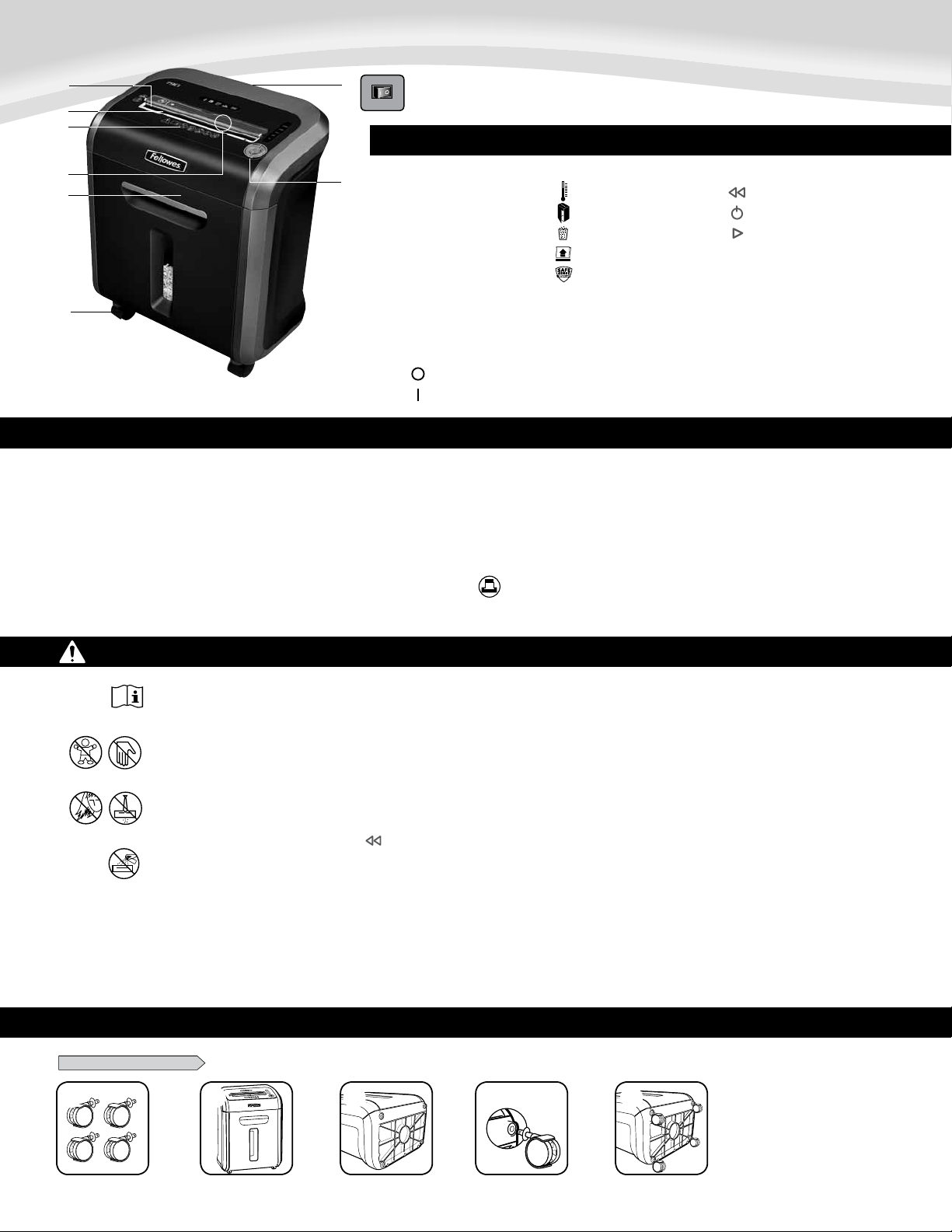
KEY
A. SafeSense
®
Technology
B. Paper entry
C. See safety instructions
D. CD/Card safety flap
E. Pullout bin
F. Casters
G. Disconnect power switch
1. OFF
2. ON
H. Control Panel and LEDs
1. Overheat (red)
2. Bin open (red)
3. Bin full (red)
4. Remove Paper (red)
5. SafeSense
®
indicator (yellow)
6. Reverse
7. ON/OFF (blue)
8. Forward
IMPORTANT SAFETY INSTRUCTIONS — Read Before Using!
15
BASIC SET UP
CASTER INSTALLATION
1 2 3
1
7
A
UT
O
79Ci
1
1 2 3
1
7
A
UTO
79Ci
2
1 2 3
1
7
A
UTO
79Ci
3
1 2 3
1
7
A
UTO
79Ci
4
1 2 3
1
7
A
UTO
79Ci
5
15
• Operation,maintenance,andservicerequirementsarecoveredintheinstruction
manual. Read the entire instruction manual before operating shredders.
• Keepawayfromchildrenandpets.Keephandsawayfrompaperentry.Always
set to off or unplug when not in use.
• Keepforeignobjects–gloves,jewelry,clothing,hair,etc.–awayfromshredder
openings.Ifobjectenterstopopening,switchtoReverse(
)tobackoutobject.
• Neveruseaerosolproducts,petroleumbasedlubricantsorotherflammable
products on or near shredder. Do not use canned air on shredder.
• Donotuseifdamagedordefective.Donotdisassembleshredder.
Do not place near or over heat source or water.
• ThisshredderhasaDisconnectPowerSwitch(G)thatmustbeintheON(I)
position to operate shredder. In case of emergency, move switch to OFF (O)
position. This action will stop shredder immediately.
• Avoidtouchingexposedcuttingbladesundershredderhead.
• Shreddermustbepluggedintoaproperlygroundedwalloutletorsocketofthe
voltage and amperage designated on the label. The grounded outlet or socket
mustbeinstalledneartheequipmentandeasilyaccessible.Energyconverters,
transformers, or extension cords should not be used with this product.
• FIREHAZARD–DoNOTshredgreetingcardswithsoundchipsorbatteries.
• Forindooruseonly.
• Unplugshredderbeforecleaningorservicing.
15
15
Warning:Changesormodificationstothisunitnotexpresslyapprovedbythepartyresponsibleforcompliancecouldvoidtheuser'sauthoritytooperatetheequipment.NOTE:Thisequipment
has been tested and found to comply with the limits for a Class B digital device, pursuant to Part 15 of the FCC Rules. These limits are designed to provide reasonable protection against harmful
interferenceinaresidentialinstallation.Thisequipmentgenerates,usesandcanradiateradiofrequencyenergyand,ifnotinstalledandusedinaccordancewiththeinstructions,maycause
harmful interference to radio communications.
However,thereisnoguaranteethatinterferencewillnotoccurinaparticularinstallation.Ifthisequipmentdoescauseharmfulinterferencetoradioortelevisionreception,whichcanbe
determinedbyturningtheequipmentoffandon,theuserisencouragedtotrytocorrecttheinterferencebyoneormoreofthefollowingmeasures:
•Reorientorrelocatethereceivingantenna.
•Increasetheseparationbetweentheequipmentandreceiver.
•Connecttheequipmentintoanoutletonacircuitdifferentfromthattowhichthereceiverisconnected.
•Consultthedealeroranexperiencedradio/TVtechnicianforhelp.
G.
F.
B.
A.
C.
E.
D.
H.
16
79Ci
16
79Ci
16
79Ci
2
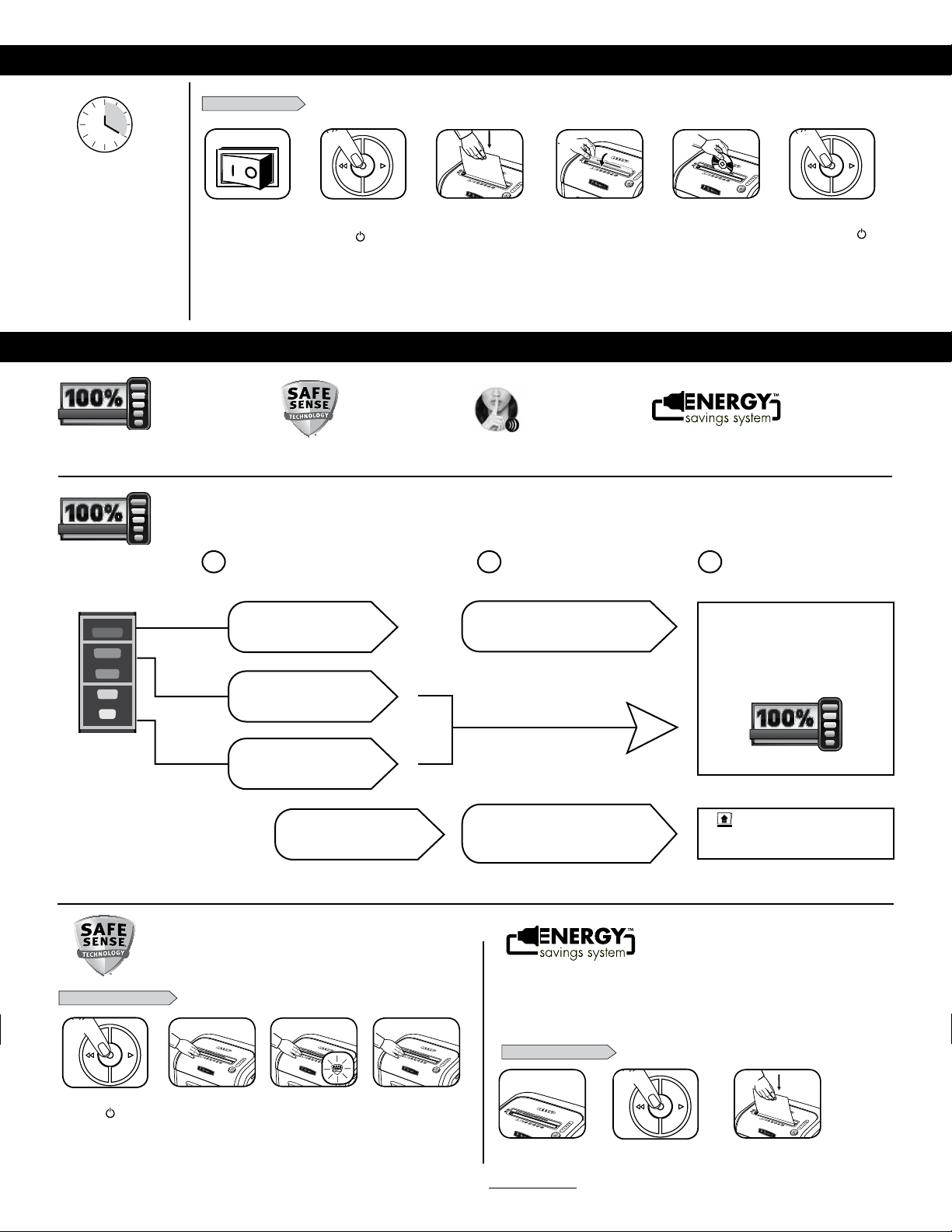
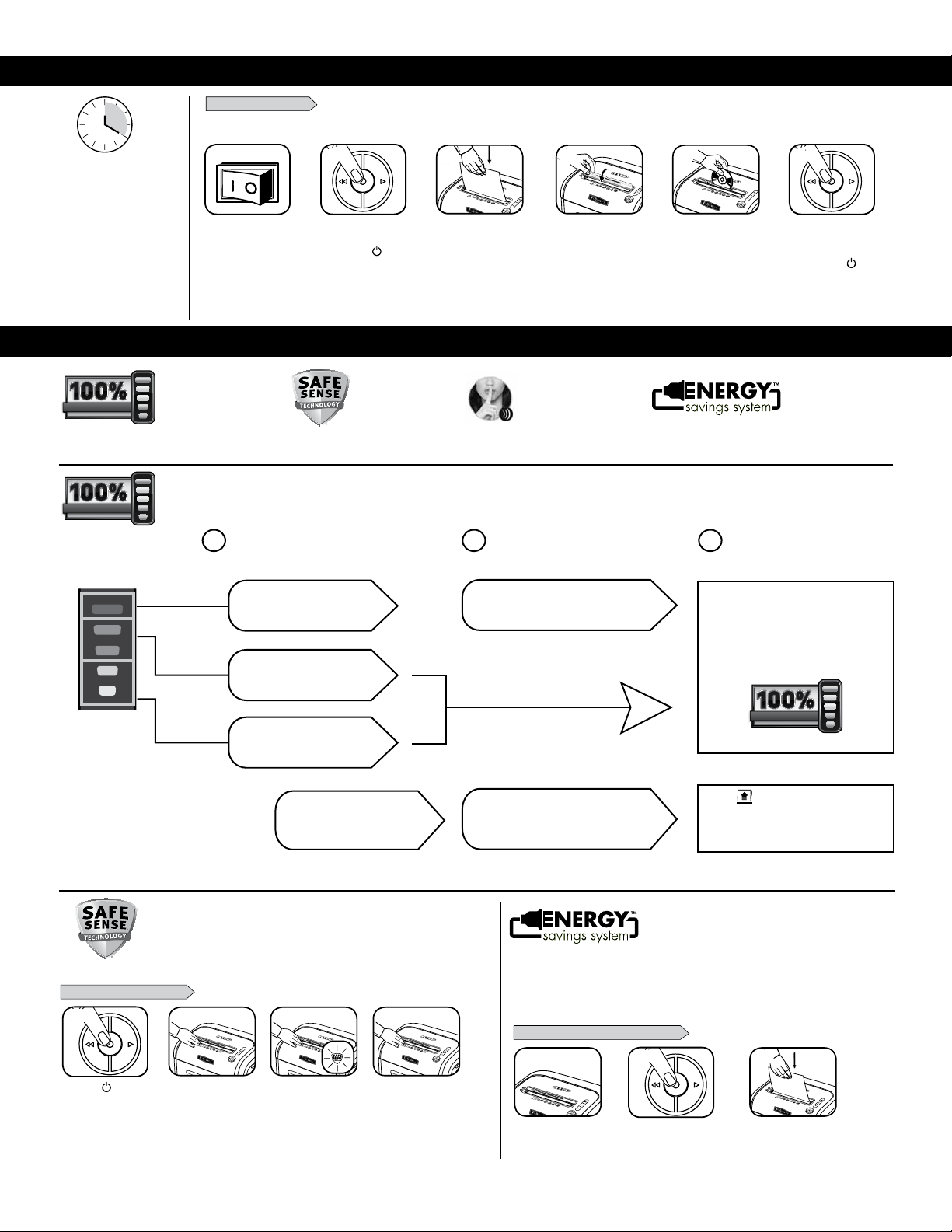
Press ( ) ON to
activate (blue)
PAPER OR CD/CARD
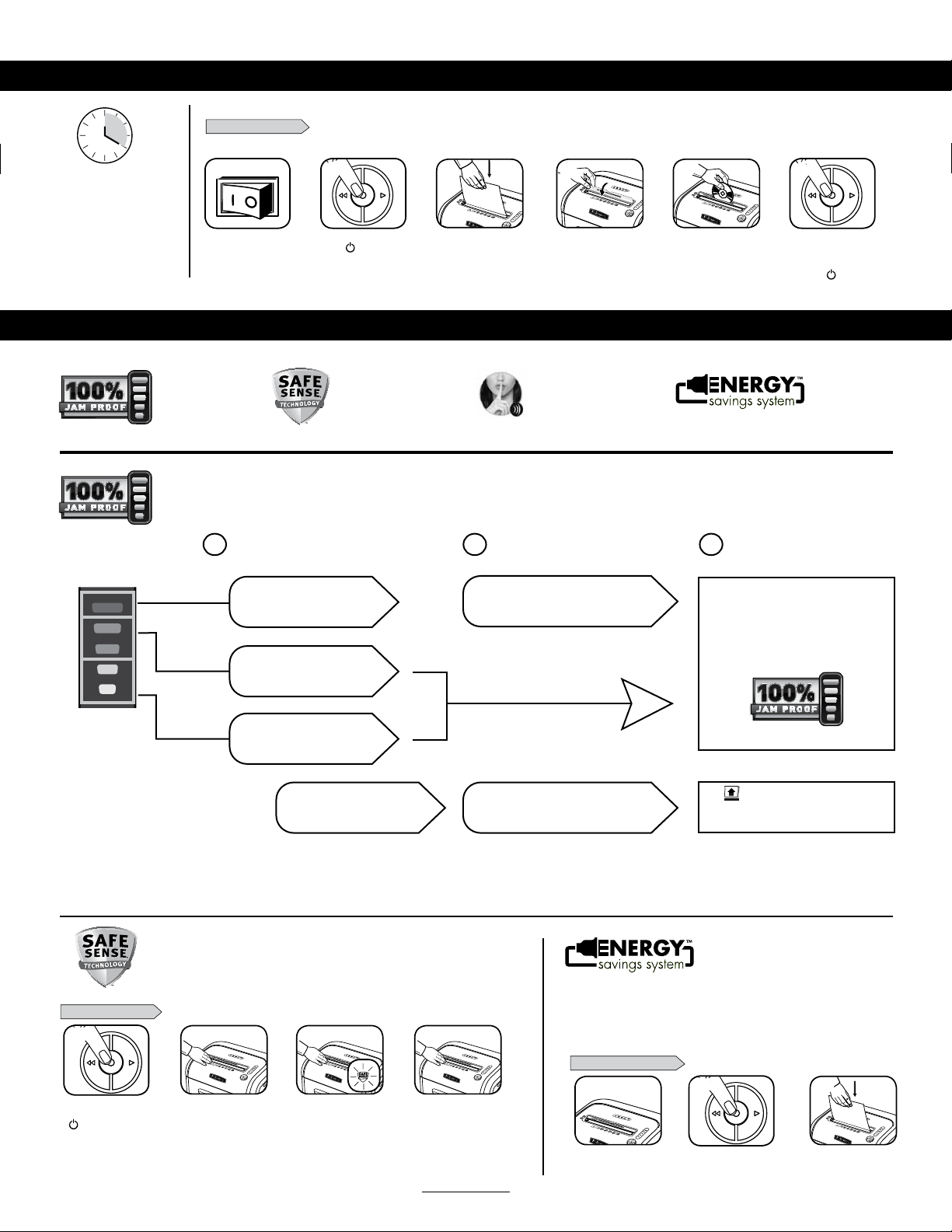
BASIC SHREDDING OPERATION
1
4
Feed paper straight into
paper entry and release
or
3
Plug in and put
disconnect power
switch in ON (I) position
Continuous operation:
Up to 20-minute maximum
NOTE: Shredder runs briefly
after each pass to clear entry.
Continuous operation beyond
20-minutes will trigger
30-minute cool down period.
5
When finished
shredding set
to OFF (
)
6
3
ADVANCED PRODUCT FEATURES
To shred CDs or credit
cards rotate safety flap
into place
Hold card/CD at edge.
Feed into center of
entry and release
Energy Savings System
Optimalenergyefficiency
100%ofthetime–inuse
andoutofuse.
Jam Proof System
Elimimatespaperjams
andpowersthrough
toughjobs.
SafeSense
®
Technology
Stopsshreddingimmediately
whenhandstouchthepaper
opening.
SilentShred™
Technology
Shredswithoutnoisy
disruptions.
16
79Ci
3
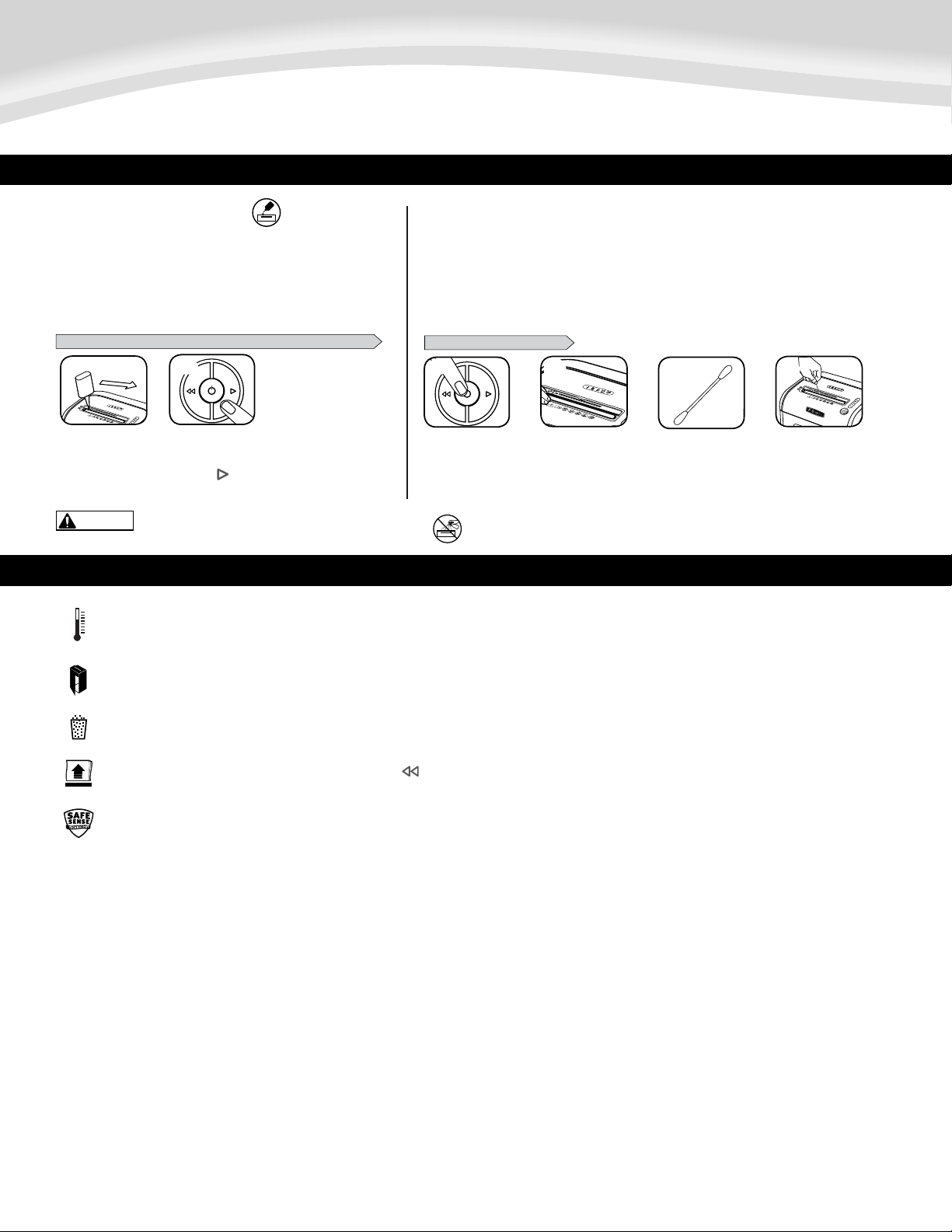
SAFESENSE
®
TECHNOLOGY OPERATION
Stopsshreddingimmediatelywhenhandstouchthepaperopening.
or
SET-UP AND TESTING
16
79Ci
16
79Ci
1
3
2
TurntheshredderON
()toactivateSafeSense
®
Touchtestareaand
lookfortheSafeSense
®
indicatortoilluminate
SafeSense
®
isactiveand
workingproperly
IfhandisheldonSafeSense
®
areamorethan3seconds
shredderwillshutoff
1
16
79Ci
2
WHEN IN SLEEP MODE
Insleepmode
Togetoutofsleepmode
touchcontrolpanel
For more information about all of Fellowes Advanced Product Features go towww.fellowes.com
ENERGY SAVINGS SYSTEM
• Savesenergyinfourways:energy-efficientelectronics,jamprevention,
standbymodeandsleepmode.
• SleepModeshutsdownshredderafter2minutesofinactivity.
Optimal energy efficiency 100% of
the time – in use and out of use.
16
79Ci
4
insertpaper
JAM PROOF SYSTEM OPERATION*
*100% Jam Proof when used in accordance with user manual
AdvancedJamPrevention-Electronically
measurespaperthicknesstopreventpaperjams:
Removeseveralsheetsuntil
indicatorisbelowred.
Continue100%Jam
ProofShredding
Ifamisfeed
occurs:
If
illuminatesafterpaperhasbeen
reversed,pressreverseandremovepaper.
Otherwise,regularshreddingwillresume.
1 2 3
UptoRED:Toomany
sheetshavebeeninserted.
UptoGREEN:Moresheets
canbeadded.
UptoYELLOW:Productivity
isoptimized.
Allindicatorslightupand
shredderpausesfor3-6seconds
Waitforflashingtostopafterautomaticcorrection
iscomplete.Regularshreddingwillresume.
Eliminates paper jams and powers through tough jobs.
4
ENGLISH
Model 79Ci
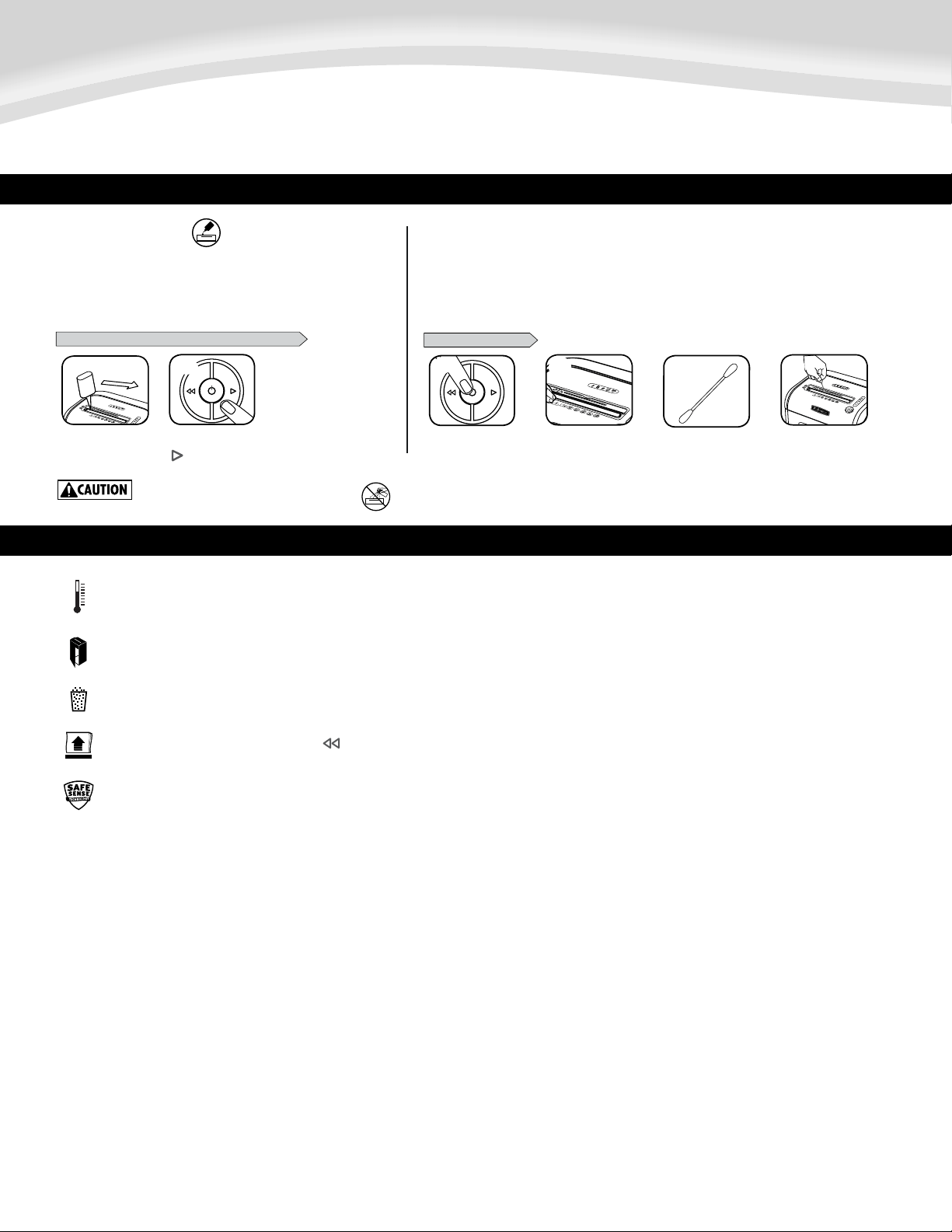
PRODUCT MAINTENANCE
TO CLEAN THE SENSORS
CLEANING AUTO-START INFRARED SENSORS
Paper detection sensors are designed for maintenance free operation. However, on rare occasions the sensors
may become blocked by paper dust causing the motor to run even if there is no paper present.
(Note: two paper detection sensors are located in the center of the paper entry).
Allcross-cutshreddersrequireoilforpeakperformance.Ifnotoiled,a
machine may experience diminished sheet capacity, intrusive noise when
shredding, and could ultimately stop running. To avoid these problems, we
recommend you oil your shredder each time you empty your waste bin.
OILING SHREDDER
15
15
* Only use a non-aerosol vegetable oil in long
nozzle container such as Fellowes 35250
FOLLOW OILING PROCEDURE BELOW AND REPEAT TWICE
Turn off and unplug
shredder
Locate Auto-start
infrared sensor
Using cotton swab, wipe
away any contamination
from the paper sensors
Dip cotton swab in
rubbing alcohol
Press and hold forward
( ) 2-3 seconds
*Apply oil across entry
3
1
16
79Ci
16
79Ci
2 4
16
79Ci
1
2
TROUBLESHOOTING
OverheatIndicator:WhentheOverheatIndicatorisilluminated,theshredderhasexceededitsmaximumoperatingtemperatureandneedstocooldown.Thisindicator
willremainilluminatedandtheshredderwillnotoperateforthedurationoftherecoverytime.SeeBasicShreddingOperationformoreinformationabout the
continuousoperationandrecoverytimeforthisshredder.
BinFull:Whenilluminated,theshredderwastebinisfullandneedstobeemptied.UseFelloweswastebag36052.
BinOpen:Theshredderwillnotrunifthebinisopen.Whenilluminated,closethebintoresumeshredding.
RemovePaper:Whenilluminated,pressreverse( )andremovepaper.Reducepaperquantitytoanacceptableamountandrefeedintopaperentry.
SafeSense
®
Indicator:Ifhandsaretooclosetothepaperentry,theSafeSense
®
indicatorwillilluminateandtheshredderwillstopshredding.IfSafeSense
®
isactivefor3seconds,theshredderwillautomaticallyturnoffandtheusermustpressthepowerbuttononthecontrolpaneltoresumeshredding.

5
LIMITED PRODUCT WARRANTY
Limited Warranty: Fellowes, Inc. (“Fellowes”) warrants the parts of the machine to be free of
defects in material and workmanship and provides service and support for 2 years from the date
of purchase by the original consumer. Fellowes warrants the cutting blades of the machine to be
free from defects in material and workmanship for the lifetime of the shredder. If any part is
found to be defective during the warranty period, your sole and exclusive remedy will be repair
or replacement, at Fellowes’ option and expense, of the defective part. This warranty does not
apply in cases of abuse, mishandling, failure to comply with product usage standards, shredder
operation using an improper power supply (other than listed on the label), or unauthorized
repair. Fellowes reserves the right to charge the consumers for any additional costs incurred by
Fellowes to provide parts or services outside of the country where the shredder is initially sold
by an authorized reseller. ANY IMPLIED WARRANTY, INCLUDING THAT OF MERCHANTABILITY OR
FITNESS FOR A PARTICULAR PURPOSE, IS HEREBY LIMITED IN DURATION TO THE APPROPRIATE
WARRANTYPERIODSETFORTHABOVE.InnoeventshallFellowesbeliableforanyconsequential
or incidental damages attributable to this product. This warranty gives you specific legal rights.
The duration, terms, and conditions of this warranty are valid worldwide, except where different
limitations,restrictions,orconditionsmayberequiredbylocallaw.Formoredetailsortoobtain
service under this warranty, please contact us or your dealer.
Déchiquette : papier, cartes de crédit, CD/DVD, agrafes et petits trombones
Ne déchiquette pas :étiquettesadhésives,papierdeformulairecontinu,acétates,
journaux,carton,largestrombones,stratifiés,dossiers,radiographiesouplastiqueautre
quecequiestindiquéplushaut
Taille de déchiquetage du papier :
Coupe croisée .................................................................... 4 x 38 mm (5/32 x 1 1/2 po)
Maximum :
Feuilles par passage .................................................................................................... 16*
CD/cartes par passage .................................................................................................. 1*
Largeur d’entrée de papier ...........................................................................230 mm/9 po
* papier de 21,59 x 27,94 cm (8,5 x 11 po), 75 g (20 lb) à 120 V, 60 Hz, 4 ampères; pour
unpapierpluslourd,l’humiditéetunetensionautrequelatensionnominalepeuvent
réduirelacapacité.Tauxd’utilisationquotidiensmaximumrecommandé:500 feuilles,
50 cartes de crédit; 10 CD.
16 feuilles par passage.
LesdéchiqueteusesFellowesSafeSense
MD
sont conçues pour des milieux résidentiels et de bureau dont
la température se situe entre 10 et 26 degrés Celsius (50 et 80 degrés Fahrenheit) et à une humidité
relative entre 40 et 80 %.
6
CAPACITÉS
FRANÇAIS
Modèle 79Ci
1 2 3
1
7
A
UTO
79Ci
1
1 2 3
1
7
A
UTO
79Ci
2
1 2 3
1
7
A
UTO
79Ci
3
1 2 3
1
7
A
UTO
79Ci
4
1 2 3
1
7
A
UTO
79Ci
5
CONFIGURATION DE BASE
INSTALLATION DES ROULETTES
TOUCHE
A. Technologie SafeSense
MD
B. Entrée de papier
C. Consultez les instructions
de sécurité
D. Rabat de sécurité
CD/Carte
E. Contenant amovible
F. Roulettes
G. Sectionneur
1. ARRÊT
2.
MARCHE
H. Panneau de commande et DEL
1. Surchauffe (rouge)
2. Contenant ouvert (rouge)
3. Contenant plein (rouge)
4. Retirez le papier (rouge)
5. Voyant SafeSense
MD
(jaune)
6. Inversion
7. MARCHE/ARRÊT (bleu)
8. Marche avant
15
ATTENTION
AVERTISSEMENT :
15
• Opération,maintenance,etexigencesdeservicesontcouvertsdansle
manuel d’instructions. Veuillez lire tout le manuel d’instructions avant
defairefonctionnerlesdéchiqueteuses.
• Gardezhorsdelaportéedesenfantsetdesanimauxdomestiques.
Gardezlesmainséloignéesdel'entréedupapier.Régleztoujours
l’appareilàl'arrêtoudébranchez-lelorsqu’iln’estpasutilisé.
• Gardezlescorpsétrangers-gants,bijoux,vêtements,cheveux,
etc.-loindesentréesdeladéchiqueteuse.Siunobjetpénètrepar
l'ouverture supérieure, faites Marche arrière ( )poursortirl'objet.
• N’utilisezjamaisd’aérosol,deproduitsàbasedepétroleouautres
produitsinflammablessurladéchiqueteuseouàproximité.N’utilisez
pasd’airencannettesurladéchiqueteuse.
• N’utilisezpasl’appareils’ilestendommagéoudéfectueux.Ne
démontez pas l'appareil. Ne placez pas l’appareil sur une source de
chaleur ou d’eau, ou à proximité de celle-ci.
• Cettedéchiqueteuseestdotéed'unsectionneur(G)quidoitêtreen
position MARCHE (I) pour pouvoir fonctionner. En cas d’urgence,
mettez l'interrupteur en position ARRÊT (O). Cela arrêtera
immédiatementladéchiqueteuse.
• Évitezdetoucherleslamesexposéessouslatêtedéchiqueteuse.
• L’appareildoitêtrebranchédansuneprisemuralecorrectementmise
à la terre ou une prise de la tension et de l’ampérage désignée sur
l’étiquette.Lapriseoulaprisemiseàlaterredoitêtreinstalléeprès
del’équipementetfaciled’accès.Lesconvertisseursd’énergie,les
transformateurs ou les rallonges ne doivent pas être utilisés avec
ce produit.
• DANGERD’INCENDIE-NEdéchiquetezPASlescartesdesouhaitsavec
piles ou puces sonores
• Réservéàuneutilisationintérieure.
• Débranchezbroyeuravantlenettoyageoul’entretien.
15
15
IMPORTANTES INSTRUCTIONS DE SÉCURITÉ — À lire avant d’utiliser !
G.
F.
B.
A.
C.
E.
D.
H.
7
16
79Ci
16
79Ci
16
79Ci
21
4
3
5
6
Appuyez sur
MARCHE ( ) pour
activer (bleu)
Acheminez le papier
directement dans
l’entrée et laissez-le
aller
Branchez et placez le
sectionneur en position
MARCHE (I)
Opération en continu :
20 minutes au maximum
REMARQUE : La
déchiqueteusefonctionneun
peuaprèschaqueinsertion
pour dégager l’entrée. Une
utilisation continuelle d’une
durée supérieure à 20 minutes
déclenchera une période de
refroidissement de 30 minutes.
Aprèsledéchiquetage,
réglez à ARRÊT (
)
OPÉRATION DE DÉCHIQUETAGE DE BASE
PAPIER/CARTE ou CD
FONCTIONS AVANCÉES DE LA DÉCHIQUETEUSE
ou
Pourdéchiqueterles
CD ou carte tournez
le rabat de CD pour le
mettre en place
Tenez le CD ou
la carte par le
bord. Acheminez-la
au centre de l’entrée
et laissez aller
Technologie SafeSense
MD
Arrêteledéchiquetage
immédiatementlorsqueles
mains touchent l'ouverture
du papier.
Système à l'épreuve
des blocages
Éliminelesblocagesde
papier et fonctionne pour
les travaux difficiles.
Technologie SilentShred
MC
Destructionsansnuisance
sonore.
Système d’économie
d’énergie
Efficacitéénergétiqueoptimale
enpermanence(enserviceet
horsservice).
ou
OPÉRATION DE TECHNOLOGIE SAFESENSE
MD
Arrêteledéchiquetageimmédiatementlorsquelesmainstouchent
l'ouverturedupapier
CONFIGURATION ET TEST
Mettezladéchiqueteuse
enmarche(
)pour
activerlafonction
SafeSense
MD
Touchezlasectionde
testetattendezquele
voyantdelafonction
SafeSense
MD
s’allume
LafonctionSafeSense
MD
estactivéeetfonctionne
correctement
Sivousgardezlamain
surlasectionSafeSense
®
pendantplusde3secondes,
ladéchiqueteuses
’
éteindra
Pour de plus amples informations sur les fonctions avancées des produits Fellowes, visitezwww.fellowes.com
SYSTÈME D’ÉCONOMIE D’ÉNERGIE
• Économisedel’énergiedequatremanières:produitsélectroniquestrèsefficaces
surleplanénergétique,préventiondesblocages,modeattenteetmodesommeil.
• Lemodesommeilarrêteladéchiqueteuseaprès2minutesd’inactivité.
Efficacité énergétique optimale en
permanence (en service et hors service).
EN MODE VEILLE (SLEEP)
Enmodeveille
Poursortirdupanneau
decontrôletactileen
modeveille
insérerlepapier
16
79Ci
3
1
16
79Ci
2
16
79Ci
4
16
79Ci
16
79Ci
1
3
2
*100 % à l’épreuve des blocages lorsque utilisé conformément au manuel de l’utilisateur
À L'ÉPREUVE DES BLOCAGES
À L'ÉPREUVE DES BLOCAGES
Préventiondesblocagesdepointe-Mesureélectroniquement
l’épaisseurdupapierpouréviterlesblocagesdepapier:
Poursuivezledéchiquetage
100%àl’épreuvedesblocages
1 2 3
Jusqu’àROUGE:tropdefeuilles
ontétéinsérées.
Jusqu’àVERT:onpeutajouter
plusdefeuilles.
Jusqu’àJAUNE:laproductivité
estoptimisée.
S’ilyaunmauvais
acheminement:
Si
s’allumeaprèsquelepapiersoitinversé,
enclenchezlamarchearrièreetretirezlepapier.
Sinon,ledéchiquetagerégulierreprendra.
Touslesvoyantss’allumentetl’appareil
s’arrêtependant3à6secondes
Attendezquelevoyantcessedeclignoter
aprèslafindelacorrectionautomatique.
Ledéchiquetagerégulierreprendra.
Retirezquelquesfeuillesjusqu’àcequele
voyantsoitsousrouge.
SYSTÈME À L’ÉPREUVE DES BLOCAGES*
À L'ÉPREUVE DES BLOCAGES
À L'ÉPREUVE DES BLOCAGES
À L'ÉPREUVE DES BLOCAGES
À L'ÉPREUVE DES BLOCAGES
Élimine les blocages de papier et fonctionne pour les travaux difficiles.
* N’utiliser que de l’huile végétale dans un conteneur à long
col sans aérosol telle que l’huile Fellowes n° 35250.
8
FRANÇAIS
Modèle 79Ci
NETTOYAGE DES CAPTEURS INFRAROUGE DE DÉMARRAGE AUTOMATIQUE
MAINTENANCE DE BASE
Les capteurs de détection du papier sont conçus pour un fonctionnement sans maintenance. Toutefois, dans de rares
cas,lescapteurspeuventêtrebloquéspardelapoussièredepapieretentraînerlefonctionnementdumoteur
même en l’absence de papier.
(Remarque:Deuxcapteursdedétectiondupapiersetrouventaucentredelafented’insertiondupapier).
Tout destructeur à coupe croisée nécessite de l’huile pour assurer des
performances optimales. S’il n’est pas huilé, l’appareil pourrait avoir une
capacité réduite, faire des bruits dérangeants lors de la destruction et
finalement, s’arrêter de fonctionner. Pour éviter ces problèmes, nous vous
recommandonsd’huilervotredestructeuràchaquefoisquevousvidez
votre corbeille à papier.
HUILAGE DU DESTRUCTEUR
15
Eteindre et
débrancher le
destructeur
Repérer le capteur
infrarouge de
démarrage
automatique
Nettoyer toutes les
saletés des capteurs
de papier avec le
coton-tige
Tremper un coton-
tige dans de l’alcool
à friction
Appuyer et maintenir
enfoncée la touche
Avancer ( ) pendant
(2 à 3 econdes)
* Mettre de l’huile en
travers de l’insertion
POUR NETTOYER LES CAPTEURS
SUIVRE LA PROCEDURE D’HUILAGE CI-DESSOUS ET LA REPETER DEUX FOIS
15
ATTENTION
3
1
16
79Ci
16
79Ci
2 4
DÉPANNAGE
16
79Ci
1
2
Indicateurdesurchauffe:Lorsquel'indicateurdesurchauffeestallumé,lebroyeuradépassélatempératuremaximaledefonctionnementetdoitrefroidir.Cetindicateurresteallumé
etlebroyeurnefonctionnepaspendantladuréedutempsderécupération.Voirbasededéchiquetageopérationpourplusd'informationssurlefonctionnementcontinuettempsde
récupérationpourcebroyeur.
Contenantplein:Lorsquelevoyants’allume,lecontenantdedéchetsdeladéchiqueteuseestpleinetdoitêtrevidé.UtilisezlesacdedéchetsFellowes36052.
Contenantouvert:Ladéchiqueteusenefonctionnerapassilacontenantduboîtierestouverte.Lorsquelevoyantestallumé,fermezlacontenantpourreprendreledéchiquetage
Retirerlepapier:Lorsqu’ils’allume,enclenchezlamarchearrière( )etretirezlepapierRéduisezlaquantitédepapieràunequantitéacceptableetremettezdansl’entréedepapier.
VoyantSafeSense
MD
:Silesmainssonttropprochesdel’entréedepapier,levoyantSafeSense
MD
s’allumeraetladéchiqueteusecesseradedéchiqueter.SilafonctionSafeSense
MD
est
activéependant3secondes,ladéchiqueteuses’éteindraautomatiquementetl’utilisateurdoitenfoncerlatouchedecourantsurlepanneaudecommandepourreprendreledéchiquetage.

9
GARANTIE LIMITÉE DU PRODUIT
Garantielimitée:Fellowes,Inc.(«Fellowes»)garantitquelespiècesdel’appareilsontlibresdetout
vice de matériau et de fabrication et offre service et soutien pendant une période de 2 ans à partir de la
dated’achatparleconsommateuroriginal.Fellowesgarantitqueleslamesdecoupedel’appareilsont
libresdetoutvicedematériauoudefabricationpendantladuréedeviedeladéchiqueteuse.Siune
pièces’avèredéfectueusedurantlapériodedegarantie,votreseuletuniquerecoursseralaréparation
ou le remplacement de la pièce à la discrétion et aux frais de Fellowes. Cette garantie ne couvre pas
les cas de mauvaise utilisation, mauvaise manipulation, ne pas se conformer aux normes d’usage du
produit,l’utilisationdeladéchiqueteuseavecuncourantinapproprié(autrequ’indiquésurl’étiquette)
ou une réparation interdite. Fellowes se réserve le droit de facturer aux consommateurs tous coûts
supplémentaires encourus par Fellowes pour fournir des pièces ou les services à l’extérieur du pays où
ladéchiqueteuseaétévendueàl’origineparunrevendeurautorisé.TOUTEGARANTIEIMPLICITE,Y
COMPRISCELLEDEQUALITÉMARCHANDEOUD’ADAPTATIONÀUNEUTILISATIONPARTICULIÈRE,SELIMITE
PARLAPRÉSENTEÀLADURÉEDELAPÉRIODEDEGARANTIEAPPROPRIÉEÉTABLIEDANSCEDOCUMENT.En
aucuncas,Fellowesneseratenueresponsabledequelquefaçonquecesoitdetoutdommageindirectou
consécutifattribuableàceproduit.Cettegarantievousdonnedesdroitsjuridiquesspécifiques.Ladurée,
lesmodalitésetlesconditionsdecettegaranties’appliquentpartoutaumondesaufdanslescasoù
différentes limites, restrictions ou conditions pourraient être exigées par la loi locale. Pour plus de détails
ou pour obtenir un service sous cette garantie, veuillez nous contacter ou contacter votre concessionnaire.
NETTOYAGE DES CAPTEURS INFRAROUGE DE DÉMARRAGE AUTOMATIQUE
Destruye:papel,tarjetasdecrédito,CD/DVD,grapasysujetapapelespequeños
No destruye:etiquetasadhesivas,papeldeformularioscontinuos,transparencias,
periódicos,cartón,sujetapapelesgrandes,laminados,carpetasdearchivos,radiografíasni
plástico, a excepción de los mencionados anteriormente
Tamaño de corte del papel:
Corte cruzado ......................................................................4 x 38 mm (5/32” x 1 1/2”)
Máximo:
Hojasporpasada......................................................................................................... 16*
CD/tarjetasporpasada ................................................................................................ 1*
Ancho de la entrada del papel .......................................................................230 mm (9”)
* Papel de 21,59 x 27,94 cm (8,5 x 11 pulg.), 75 g (20 lb) a 120 V, 60 Hz, 4 A; si el papel
esmáspesado,estáhúmedooelvoltajeesotro,lacapacidadpuededisminuir.Tasas
diariasmáximasrecomendadasdeusodiario:500hojas;25tarjetasdecrédito;10CD.
16hojasporpasada.
Las destructoras SafeSense
®
deFellowesestándiseñadasparafuncionarenelhogarylaoficina,en
ambientes con temperaturas de 10 a 26 °C (50 a 80 °F) y 40 a 80% de humedad relativa.
CAPACIDADES
ESPAÑOL
Modelo 79Ci
CONFIGURACIÓN BÁSICA
10
INSTALACIÓN DE LAS RUEDITAS
EXPLICACIÓN
A.TecnologíaSafeSense
®
B. Entrada del papel
C. Consulte las instrucciones
de seguridad
D. Tapa de seguridad para
CD/tarjetap
E.Papeleraextraíble
F. Rueditas
G. Interruptor de desconexión
delaenergía
1. APAGADO
2. .
ENCENDIDO
H. Panel de control e indicadores luminosos
1.Sobrecalentamiento(rojo)
2.Papeleraabierta(rojo)
3.Papelerallena(rojo)
4.Quitarpapel(rojo)
5. Indicador de SafeSense
(amarillo)
6. Retroceso
7. ENCENDIDO/APAGADO (azul)
8. Avance
1 2 3
1
7
A
UTO
79Ci
1
1 2 3
1
7
A
UTO
79Ci
2
1 2 3
1
7
A
UTO
79Ci
3
1 2 3
1
7
A
UTO
79Ci
4
1 2 3
1
7
A
UTO
79Ci
5
INSTRUCCIONES DE SEGURIDAD IMPORTANTES ¡Léalas antes de usar la máquina!
15
PRECAUCIÓN
ADVERTENCIA:
15
• Losrequisitosdeoperación,mantenimientoyserviciosecubrenenel
manual de instrucciones. Lea dicho manual en su totalidad antes de
operar las trituradoras.
• Mantengalatrituradoraalejadadeniñosymascotas.Mantenga
lasmanosalejadasdelaentradadepapel.Siempreapagueo
desenchufe la trituradora cuando no esté en uso.
• Mantengaobjetosextraños(guantes,joyas,ropa,cabello,etc.)lejosde
lasaberturasdelatrituradora.Sialgúnobjetoseintroduceenlaabertura
superior, ponga la trituradora en Retroceso ( )pararetirarelobjeto.
• Nuncautiliceproductosenaerosol,lubricantesabasedepetróleou
otros productos inflamables para limpiar la trituradora ni cerca de
ella. No utilice aire comprimido para limpiar la trituradora.
• Noutilicelatrituradorasiestádañadaodefectuosa.Nodesarmela
trituradora.Nocoloquelatrituradoracercanisobreunafuentede
calor o agua.
• EstatrituradoraposeeunInterruptordedesconexióndeenergía(G)
quedebeestarenlaposicióndeENCENDIDO(ON)(I)parafuncionar.
Encasodeemergencia,coloqueelinterruptorenAPAGADO(O).Esta
acción detendrá la trituradora de inmediato.
• Evitetocarlascuchillascortantesexpuestasdebajodelcabezaldela
trituradora.
• Latrituradoradebeenchufarseenunatomaoenchufedeparedcon
descargaatierraquetengaelvoltajeyamperajequeseindican
enlaetiqueta.Latomaoenchufecondescargaatierradebeestar
instaladacercadelequipoyserdefácilacceso.Nodebenusarsecon
esteproductoconvertidoresdeenergía,transformadoresnicables
prolongadores.
• RIESGODEINCENDIO–NOdestruyatarjetasdesaludoconchipsde
sonidoobaterías.
• Parausoenáreascubiertasúnicamente.
• Desconectetrituradoraantesdelalimpiezaoelmantenimiento.
15
15
G.
F.
B.
A.
C.
E.
D.
H.
OPERACIÓN BÁSICAS DE LA DESTRUCTORA
2
Presione el botón de
ENCENDIDO (
) para
activarlamáquina(azul)
PAPEL O CD/TARJETA
1
4
Introduzca el papel
directamente en la
entrada de papel y suelte
3
Enchúfelaycoloque
el interruptor de
desconexión de la
energíaenlaposiciónde
ENCENDIDO (I)
Funcionamiento continuo:
Máximo de 20 minutos
NOTA: la destructora funciona
brevemente después de
cada pasada para limpiar la
entrada. El funcionamiento
continuo durante más de 20
minutosactivaráelperíodode
enfriamiento de 30 minutos.
5
Cuando termine de
destruir, presione el botón
de APAGADO (
)
11
16
79Ci
16
79Ci
16
79Ci
21
4
3
5
6
CARACTERÍSTICAS AVANZADAS DEL PRODUCTO
o
Para destruir CD o
tarjetagirelatapapara
CDhastaquealcance
suposición normal
Tenez le CD ou la carte
par le bord. Acheminez-
la au centre de l’entrée
et laissez aller
Tecnología SafeSense
®
Detiene la destrucción
inmediatamente cuando
las manos tocan la
abertura para papel.
Sistema a prueba de
atascos
Elimina los atascos de papeles
ysuperalostrabajos.
Tecnología SilentShred™
Destrucción silenciosa.
Sistema de ahorro de
energía
Óptimaeficienciaenergética
todoeltiempo–enusoy
fueradeuso.
o
CONFIGURACIÓN Y PRUEBA
OPERACIÓN DE LA TECNOLOGÍA SAFESENSE
®
Detieneinmediatamenteladestruccióncuandolasmanostocanla
aberturaparapapel.
Encienda( )la
destructoraparaactivar
SafeSense
®
Toqueeláreadeprueba
yespereaqueel
indicadordeSafeSense
®
seencienda
SafeSense
®
está
activayfunciona
correctamente
Sisedejalamanopormás
de3segundosenelárea
deseguridadSafeSense
®
,la
trituradoradepapelseapagará
SISTEMA DE AHORRO DE ENERGÍA
• Cuatromanerasdeahorrarenergía:circuitoelectrónicoconbajoconsumoenergético,
prevencióndeatascos,mododereservaymododesuspensión.
• Elmododesuspensiónapagaladestructoradespuésde2minutosdeinactividad.
Óptima eficiencia energética todo el tiempo – en
uso y fuera de uso.
Si desea obtener más información acerca de todas las características avanzadas del producto de Fellowes, visite www.fellowes.com
CARACTERÍSTICAS DEL MODO LATENTE
Enmodolatente
Parasalirdelmodo
latente,toqueel
paneldecontrol
insertepapel
16
79Ci
3
1
16
79Ci
2
16
79Ci
4
16
79Ci
16
79Ci
1
3
2
A PRUEBA DE ATASCOS
A PRUEBA DE ATASCOS
A PRUEBA DE ATASCOS
A PRUEBA DE ATASCOS
*Es 100% a prueba de atascos cuando se utiliza según el manual del usuario
A PRUEBA DE ATASCOS
A PRUEBA DE ATASCOS
Prevenciónavanzadadeatascos:Mediciónelectrónicadel
espesordelpapel,paraevitaratascos:
Retirevariashojashastaqueelindicadoresté
debajodelnivelrojo.
Sigaconladestrucciónconla
proteccióntotalcontraatascos
Siseproduceuna
cargaincorrecta:
Silaluz
seenciendedespuésdequeseha
invertidoelpapel,presioneelbotónderetroceso
yretireelpapel.Sinolohace,continuarála
destrucciónnormalmente.
1 2 3
HastaelnivelROJO:Sehan
introducidodemasiadashojas.
HastaelnivelVERDE:Sepueden
agregarmáshojas.
HastaelnivelAMARILLO:
Productividadóptima.
Seencenderántodaslasluces
indicadoras,yladestructorahará
unapausade3a6segundos
Espereaquelaslucesdejendeestarintermitentes,
paraquesecompletelacorrecciónautomática.
Luegocontinuaráladestrucciónnormalmente.
OPERACIÓN DEL SISTEMA A PRUEBA DE ATASCOS*
Elimina los atascos de papeles y supera los trabajos.
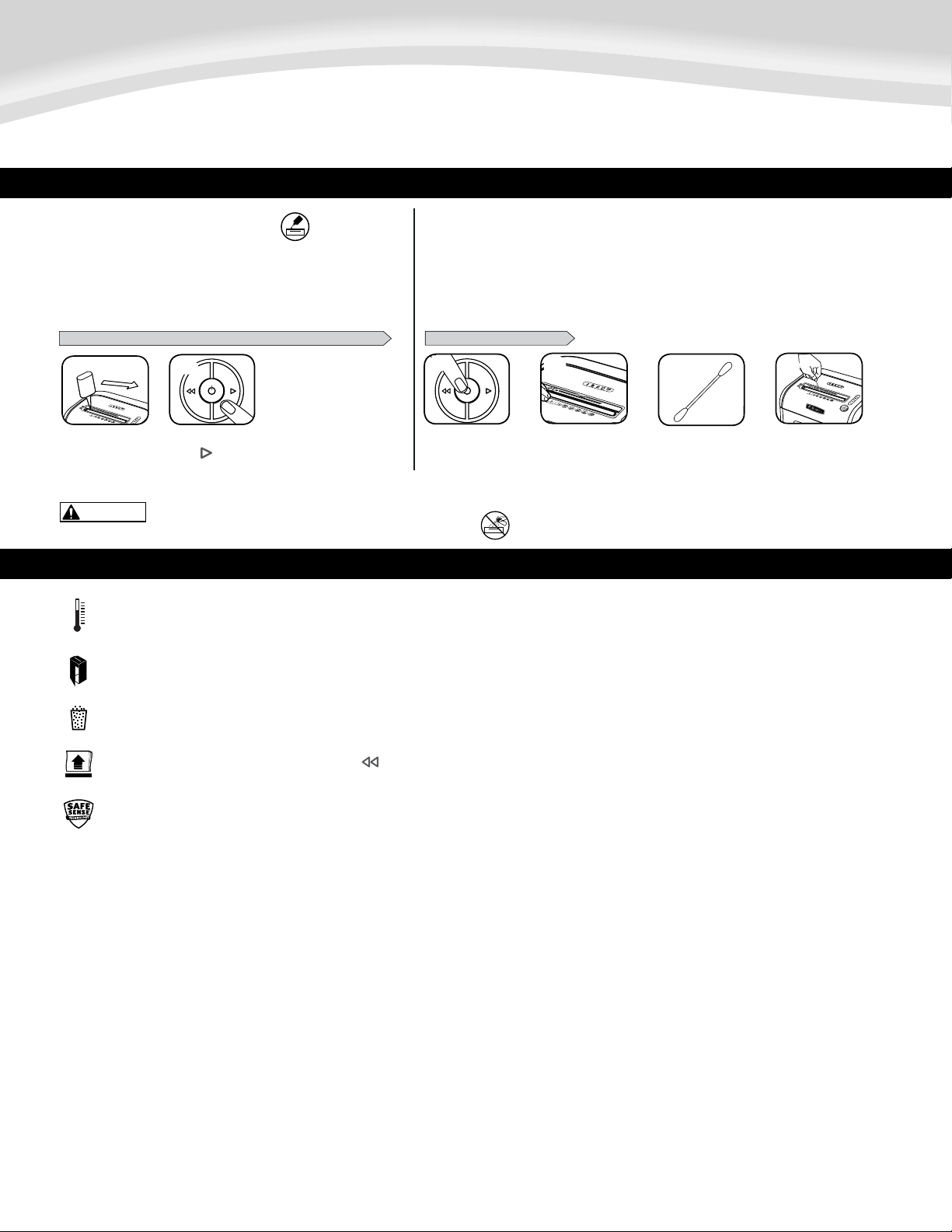
* Use sólo aceite vegetal que no sea en aerosol en los contenedores
de boquilla larga como el Fellowes No. 35250
12
ESPAÑOL
Modelo 79Ci
MANTENIMIENTO DEL PRODUCTO
3
1
16
79Ci
16
79Ci
2 4
PARA LIMPIAR LOS SENSORES
ENGRASE DE LA DESTRUCTORA
15
15
PRECAUCIÓN
REALICE EL SIGUIENTE PROCEDIMIENTO DE ENGRASE Y REPÍTALO DOS VECES
*Apliqueaceiteen
la entrada
Mantenga pulsada la
tecla ( ) de retroceso
(2 a 3 segundos)
LIMPIEZA DE LOS SENSORES INFRARROJOS DE INICIO AUTOMÁTICO
Lossensoresdedeteccióndepapelestándiseñadosparafuncionarsinningúnmantenimiento.Sin
embargo,enrarasocasioneslossensorespodríanbloquearsedebidoapolvodepapelquehaceque
el motor siga funcionando aún cuando no haya papel. (Nota: en el centro de la entrada de papel se encuentran dos
sensores de detección de papel).
Todas las destructoras de corte cruzado necesitan aceite para funcionar
almáximodesurendimiento.Siunamáquinanoseengrasa,podríaver
reducidoelnúmerodehojasquepuededestruir,producirunruidomolesto
aldestruireinclusodejardefuncionar.Paraevitarestosproblemas,
recomendamosengrasarladestructoracadavezquesevacíelapapelera.
Localice el sensor de
infrarrojosdeinicio
automático
Impregne un
bastoncillo de
algodón con alcohol
Limpie la contaminación
de los sensores de
papel con el bastoncillo
de algodón
Apague y desenchufe
la destructora
SOLUCIÓN DE PROBLEMAS
16
79Ci
1
2
Indicadordesobrecalentamiento:Cuandoelindicadordesobrecalentamientoseenciende,laplantahasuperadolatemperaturadefuncionamientomáximoyfrío
deben.Esteindicadorpermaneceencendidoyelmolinonofuncionaduranteeltiempoderecuperación.TrituraciónVerbasadoenlaoperaciónparaobtenermás
informaciónsobreelfuncionamientocontinuoyeltiempoderecuperacióndeestemolino..
Papelerallena:Cuandoestáencendido,lapapeleradelatrituradoraestállenaysedebevaciar.UseunabolsaderesiduosFellowes36052.
Papeleraabierta:Latrituradoranofuncionarásilapuertadelpapeleraestáabierta.Cuandoestáencendidoesteindicador,cierrelapapeleraparareanudarelcorte.
Quitarpapel:Cuandoestáiluminado,presioneretroceso( )yretireelpapel.Reduzcalacantidaddepapelaunaadecuadayvuelvaacargarloenlaentradadepapel.
IndicadorSafeSense
®
:Silasmanosestándemasiadocercadelaentradadelpapel,seencenderáelindicadorSafeSense®ylatrituradoradejarádefuncionar.SiSafeSense
®
está
activopor3segundos,latrituradoraseapagaráautomáticamenteyelusuariodeberápresionarelbotóndeencendidoenelpaneldecontrolparareanudarelcorte.

13
GARANTÍA LIMITADA DEL PRODUCTO
Garantíalimitada:Fellowes,Inc.(“Fellowes”)garantizaquelaspiezasdelamáquinaestarán
libres de defectos de material y mano de obra y proporciona servicio y soporte técnico durante
2añosapartirdelafechaenqueelconsumidororiginalhayaadquiridoelproducto.Fellowes
garantizaquelascuchillascortantesdelamáquinaestaránlibresdedefectosdematerialymano
deobradurantelavidaútildeladestructora.Siseencuentraalgúndefectoencualquierade
laspiezasduranteelperíododegarantía,laúnicayexclusivasoluciónserálareparaciónoel
cambiodelapiezadefectuosa,acriterioycuentadeFellowes.Estagarantíanorigeparacasos
de abuso, uso indebido, incapacidad de cumplir con las normas de uso del producto, operación de
latrituradorausandounafuentedeenergíaindebida(distintaalaqueseindicaenlaetiqueta),
o reparaciones no autorizadas. Fellowes se reserva el derecho a cobrar a los consumidores los
costosadicionalesenqueincurraFellowesparasuministrarpiezasoserviciosfueradelpaís
enelqueunrevendedorautorizadohayavendidooriginalmentelatrituradora.PORMEDIO
DEL PRESENTE, TODA GARANTÍA IMPLÍCITA, INCLUIDA LA GARANTÍA DE COMERCIABILIDAD
O ADAPTABILIDAD PARA UN PROPÓSITO ESPECÍFICO, SE LIMITA AL PERÍODO DE DURACIÓN
CORRESPONDIENTE DE LA GARANTÍA CONFERIDA ANTERIORMENTE. En ningún caso, Fellowes será
responsabledecualquierdaño,directooindirecto,quepuedaatribuírseleaesteproducto.Esta
garantíaleconfierederechoslegalesespecíficos.Laduración,lostérminosylascondicionesde
estagarantíasonválidosentodoelmundo,exceptoenloslugaresdondelalegislaciónlocalexija
limitaciones, restricciones o condiciones diferentes. Para obtener más detalles o recibir servicio
conformeaestagarantía,comuníqueseconnosotrosoconsudistribuidor
.

Quality Office Products Since 1917
©2014 Fellowes, Inc. Part No. 407992
POWERSHRED
®
79Ci
Canada +1-800-665-4339
Mexico +001-800-514-9057
United States +1-800-955-0959
Questions or Concerns?
www.fellowes.com
Troubleshooting
Registration
Manuals
Customer Service & Support
Troubleshooting
Replacement parts
General questions