jabra.com/evolve80
User Manual
JABRA EVOLVE 80

Made in China
MODEL: HSC019
FCC ID: BCE-HSC019
IC: 2386C-HSC019
© 2014 GN Netcom A/S / GN Netcom US, Inc. All rights reserved.
Jabra
®
is a registered trademark of GN Netcom A/S. All other
trademarks included herein are the property of their respective
owners. The Bluetooth
®
word mark and logos are owned by the
Bluetooth SIG, Inc. and any use of such marks by GN Netcom A/S is
under license.
Declaration of Conformity can be found on
www.jabra.com/CP/US/declarations-of-conformity

3
ENGLISH
JABRA EVOLVE 80
CONTENTS
1. WELCOME .......................................... 5
2. JABRA EVOLVE 80 OVERVIEW ...........6
2.1 INCLUDED ACCESSORIES
2.2 OPTIONAL ACCESSORY
3. HOW TO WEAR .................................. 9
3.1 LEFT AND RIGHT
3.2 MICROPHONE POSITION
3.3 FOLDFLAT STORAGE
4. HOW TO CHARGE THE BATTERY ......12
4.1 CHARGE USING THE CONTROLLER
4.2 CHARGE USING USB CABLE
5. HOW TO CONNECT ...........................14
5.1 CONNECT TO PC WITH CONTROLLER
5.2 CONNECT TO MOBILE DEVICE
WITHOUT CONTROLLER
6. HOW TO USE ...................................16
6.1 CALLS
6.2 MULTIPLE CALL HANDLING
6.3 BUSYLIGHT
6.4 ACTIVE NOISE CANCELLATION ANC
6.5 LISTENIN
6.6 TRANSFER CALL FROM PC TO MOBILE DEVICE


5
ENGLISH
JABRA EVOLVE 80
1. WELCOME
Thank you for using the Jabra Evolve 80. We hope
you will enjoy it!
JABRA EVOLVE 80 FEATURES
Active Noise Cancellation (ANC)
Rechargeable battery powering the ANC for up
to 24 hours
Automatic charging through the Jabra EVOLVE
LINK controller
Listen in function
Busylight on headset and the Jabra EVOLVE LINK
controller
Discreet microphone boom-arm that integrates
into the headband when not on calls
Automatic mute when microphone boom-arm is
docked in the headband
Connects to multiple devices (smartphone or
tablet) with 3.5mm jack (plug & play)
Superior music and voice capabilities
Hi-fi Sound
6
ENGLISH
JABRA EVOLVE 80
2. JABRA EVOLVE 80
OVERVIEW
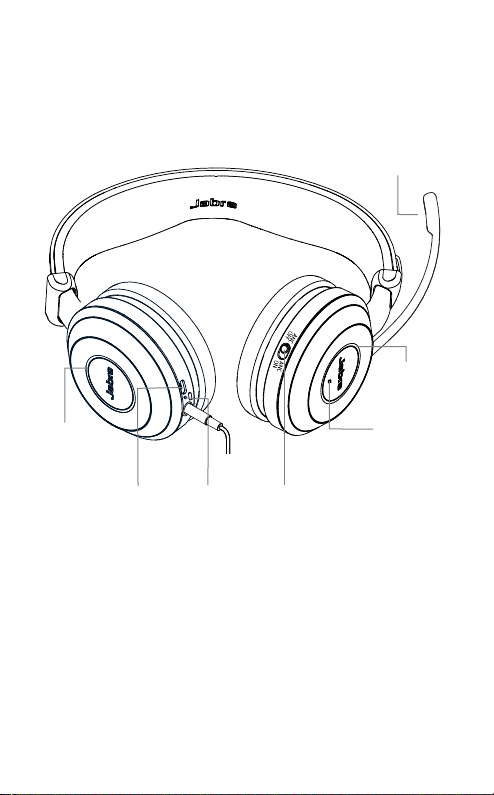
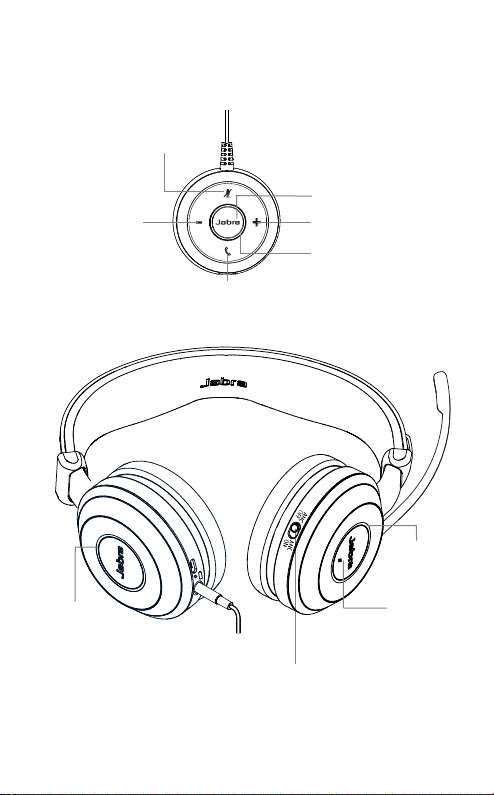
Listen-in
button
Busylight
indicator
Microphone
Active Noise
Cancellation
(ANC) switch
Battery
indicator
USB/
charging
port
Busylight
indicator

7
ENGLISH
JABRA EVOLVE 80
CONTROLLER (JABRA EVOLVE LINK)
Volume down
Busylight indicator
Answer/end call
Mute
Volume up
Busylight button
8
ENGLISH
JABRA EVOLVE 80
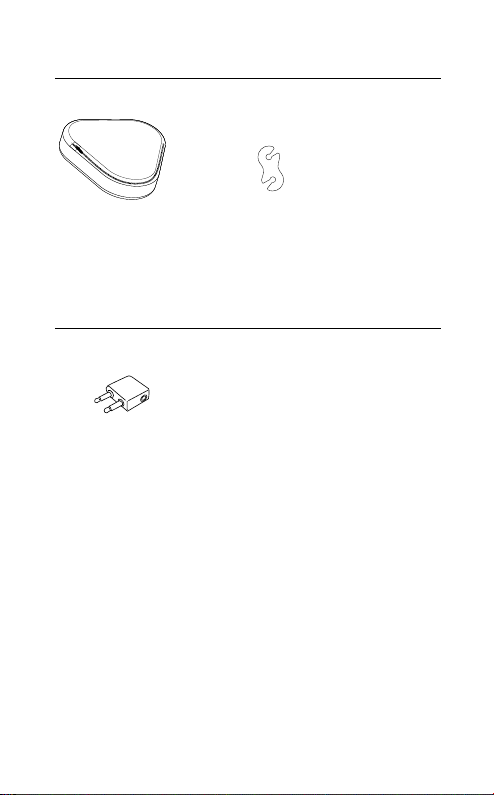
2.1 INCLUDED ACCESSORIES
Cable
management clip
Carry pouch
2.2 OPTIONAL ACCESSORIES
Flight adapter
9
ENGLISH
JABRA EVOLVE 80
3. HOW TO WEAR
3.1 LEFT AND RIGHT
Left and right is marked inside each earcup.
L
R

10
ENGLISH
JABRA EVOLVE 80
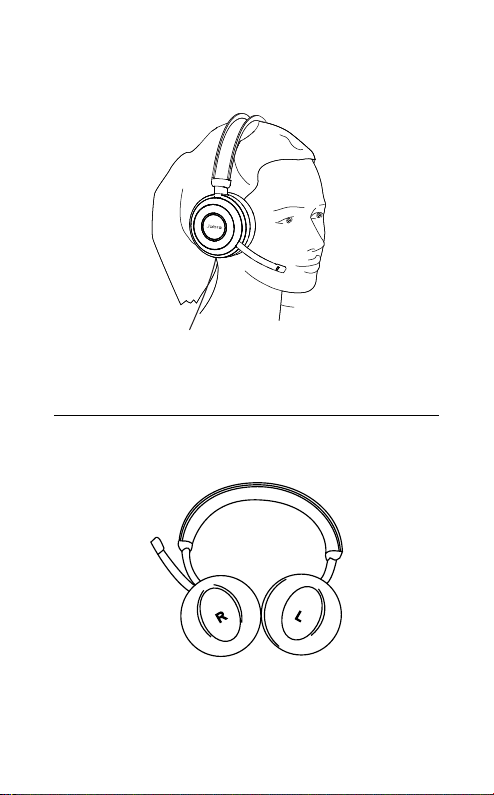
3.2 MICROPHONE POSITION
It is recommended to position the microphone
close to your mouth (2 cm). The microphone is
bendable for personal preference.
3/4"
2 cm
When listening to music or outdoors, the
microphone can be stored in the headband
groove.
The microphone will be muted when the
microphone is rotated up, and un-muted when
rotated down.
3/4"
2 cm
11
ENGLISH
JABRA EVOLVE 80
3.3 FOLDFLAT STORAGE
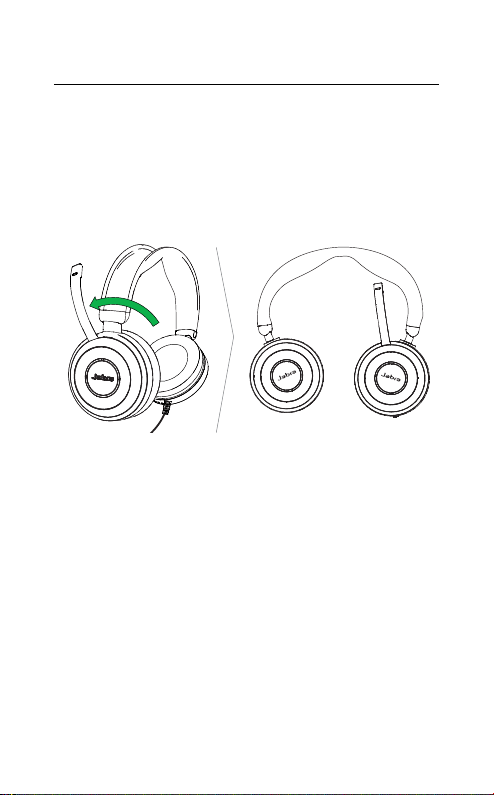
The earcups can be folded-flat for easy storage.
The microphone must be removed from the
headband groove and swiveled backwards before
folding the earcups flat.
12
ENGLISH
JABRA EVOLVE 80
4. HOW TO CHARGE THE
BATTERY
The in-built rechargeable battery powers the
Active Noise Cancellation (ANC) and Listen-in
functions. The headset can still be used for calls
and music without the battery.
It takes approx. 3 hours to fully charge the battery.
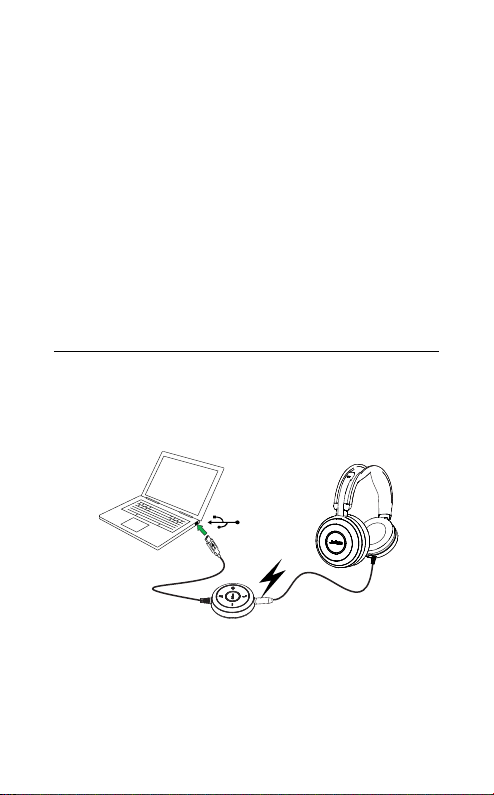
4.1 CHARGE USING THE CONTROLLER
Normal use of the headset when connected to the
controller will charge the battery.
13
ENGLISH
JABRA EVOLVE 80
4.2 CHARGE USING USB CABLE
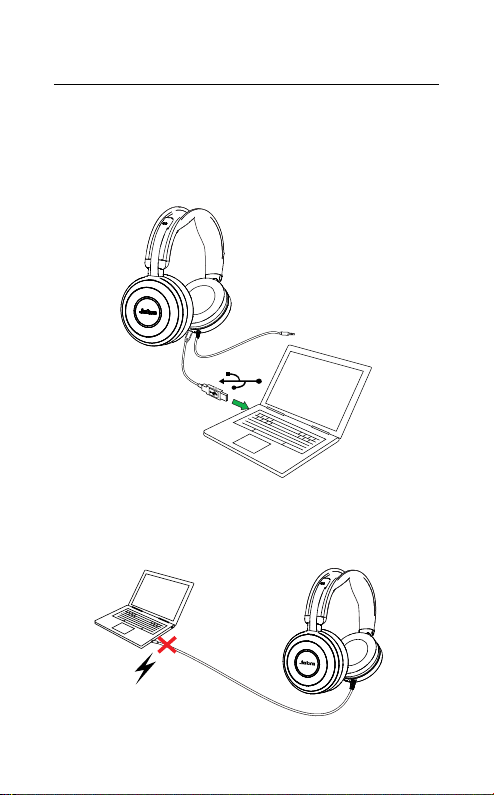
The headset battery will charge when connected
to a USB cable. It is highly recommended to use a
Jabra USB cable.
The headset will NOT charge when directly
connected to the PC without a USB cable.

14
ENGLISH
JABRA EVOLVE 80
5. HOW TO CONNECT
5.1 CONNECT TO PC WITH CONTROLLER
Fully plug the headset into the controller, and
connect the controller to a USB port on the PC.
The headset jack MUST be fully inserted into the
controller for the headset to work.
NOTE: When the headset is disconnected from the controller, any
active call will be put on hold. To resume the call, reconnect the
headset to the controller and manually resume the call on the PC
(softphone).
15
ENGLISH
JABRA EVOLVE 80
5.2 CONNECT TO MOBILE DEVICE
WITHOUT CONTROLLER
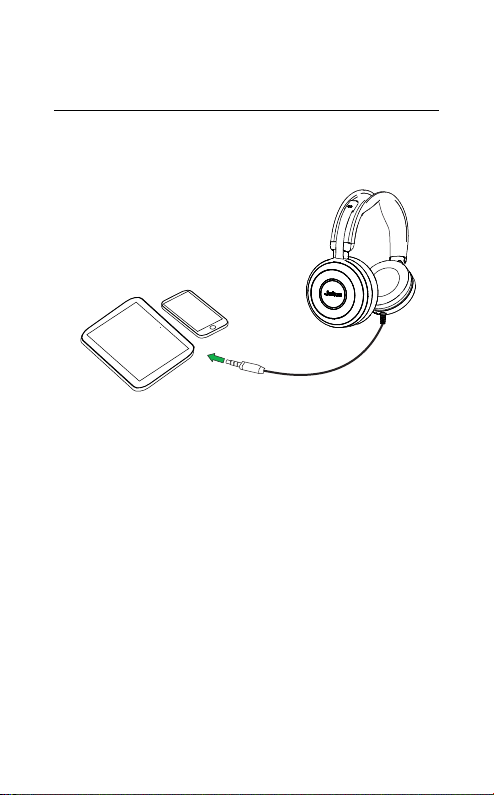
Plug the headset directly into your mobile device.
The headset battery will not charge when plugged
directly into a mobile device.
NOTE: When plugged directly into a mobile device, the overall
call quality (for you and the listener) will be lower than when
connected to a PC/tablet using the controller (Jabra Evolve Link).
16
ENGLISH
JABRA EVOLVE 80
6. HOW TO USE
Listen-in
button
Busylight
indicator
Active
Noise Cancellation
(ANC) switch
Busylight
indicator
Volume down
Busylight indicator
Answer/end call
Mute
Volume up
Busylight button
17
ENGLISH
JABRA EVOLVE 80
6.1 CALLS
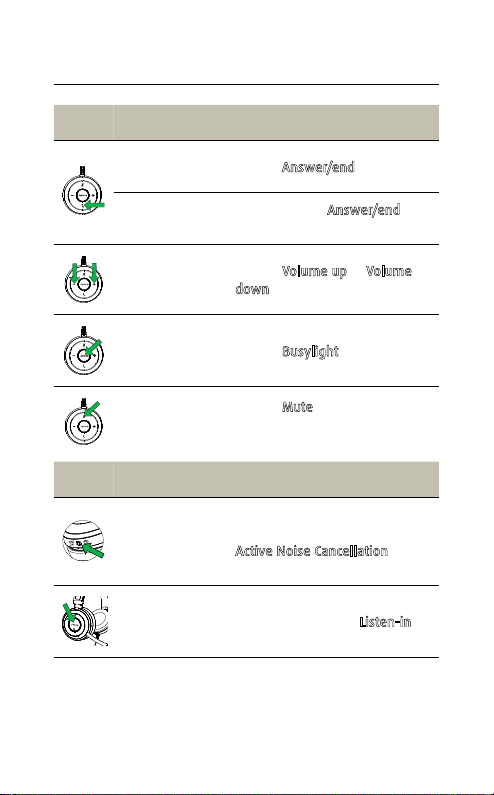
FUNCTION ACTION
Answer/end
call
Tap the
Answer/end button
Reject call
Double-tap the
Answer/end
button
Adjust volume
Tap the
Volume up or Volume
down button
Busylight
on/off
Tap the
Busylight button
Mute/unmute
microphone
Tap the
Mute button, or swivel
the microphone up (mute) or
down (un-mute)
FUNCTION ACTION
Active Noise
Cancellation
(ANC) on/off
Active Noise Cancellation reduces
outside disturbance. Slide the
Active Noise Cancellation switch
to ANC ON/ANC OFF
Listen-in
on/off
Listen-in lets outside sound into
the headset. Tap the
Listen-in
button (ANC must be on)

18
ENGLISH
JABRA EVOLVE 80
6.2 MULTIPLE CALL HANDLING
The headset can accept and handle multiple calls
at the same time.
FUNCTION ACTION
End current call and
answer incoming call
Tap the Answer/end
button
Switch between held call
and active call
Press and hold
(2 secs) the
Answer/end button
Put current call on hold
and answer incoming call
Press and hold
(2 secs) the
Answer/end button
Reject incoming call,
when on a call
Double-tap the
Answer/end button
19
ENGLISH
JABRA EVOLVE 80
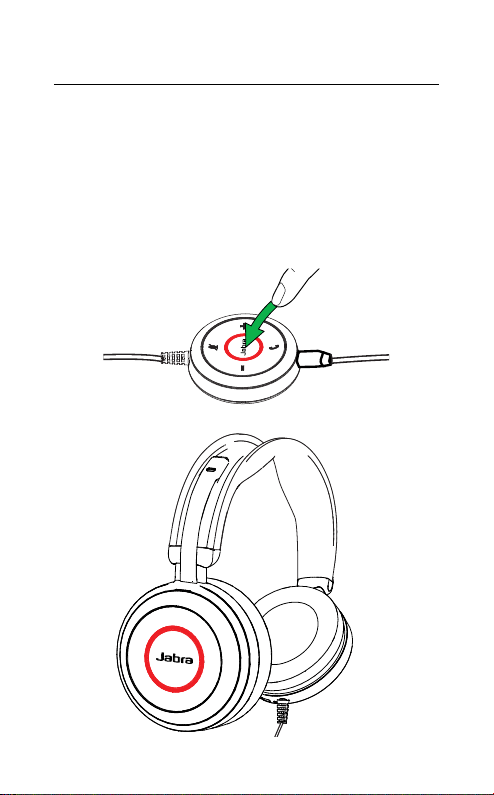
6.3 BUSYLIGHT
The busylight indicators on the headset and
controller let others know when you are busy, or
on a call.
Tap the Busylight button on the controller to
manually turn on/off the busylight indicator.

20
ENGLISH
JABRA EVOLVE 80
6.4 ACTIVE NOISE CANCELLATION ANC
The headset uses Active Noise Cancellation (ANC)
to reduce outside disturbance to a minimum,
allowing you to fully focus on your work or call.
Additionally, sound quality is also boosted when
ANC is switched on. ANC is powered by the in-built
rechargeable battery. The battery will power ANC
for up to 24 hours, when not connected to the
controller.
Slide the Active Noise Cancellation switch to ANC
ON/ANC OFF.
ON
OFF
21
ENGLISH
JABRA EVOLVE 80
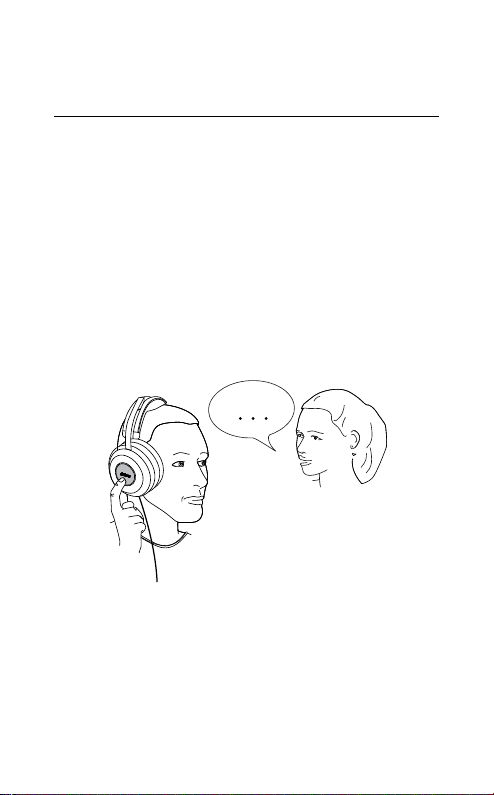
6.5 LISTENIN
Listen-in is a feature that enables you to hear your
surroundings without having to remove the
headset. Your music and calls will be muted (not
paused), however your microphone will remain
on. Listen-in is powered by the in-built rechargeable
battery.
Tap the Listen-in button on the right earcup to
activate/deactivate Listen-in.
The Active Noise Cancellation switch must be set
to ANC ON to use Listen-in.

22
ENGLISH
JABRA EVOLVE 80
6.6 TRANSFER CALL FROM PC TO MOBILE
DEVICE
It is possible to transfer an active call from your PC
to mobile device and continue using the headset.
1. Transfer the call from PC to mobile device using
your supported softphone.
2. Unplug the headset from the controller.
3. Plug the headset directly into your mobile
device, and manually resume the call.

23
ENGLISH
JABRA EVOLVE 80
7. SUPPORT
7.1 FAQ
View the FAQs on Jabra.com/evolve80
7.2 HOW TO CARE FOR YOUR HEADSET
Always store the headset with the power off
and safely protected.
Avoid storage at extreme temperatures (above
25°C/77°F or below -20°C/4°F). This can shorten
battery life and may adversely affect the
headset.

24
ENGLISH
JABRA EVOLVE 80
8. TECHNICAL
SPECIFICATIONS
JABRA EVOLVE 80 HEADSET SPECIFICATION
Headset weight: 324 g
Controller weight: 57 g
Headset dimensions: 190 mm x 190 mm
Controller dimensions: 55 mm x 55 mm
Microphones: Noise cancelling microphone
Speaker:
40mm Dynamic PureSound
speakers (Hi-fi)
Speaker maximum input
power:
30 mW
Speaker frequency range: 20 hz - 20 kHz
Cable length:
Controller to PC: 90 mm
Headset to 3.5mm jack: 1.2 m
Noise reduction:
Up to 98% cancellation
using Hybrid Active Noise
Cancellation
ANC time: Up to 24 hours
Operating temperature: -10°C to 55°C (14°F to 131°F)
Storage temperature: -20°C to 25°C (-4°F to 77°F)

25
ENGLISH
JABRA EVOLVE 80
REV B
www.jabra.com/evolve80