USER INSTRUCTIONS
SCOLA™ FM SYSTEM
SCOLA FLEX RECEIVER
and
SCOLA FLEX-i RECEIVER
9 514 0231 001 #03.indd 1 9/21/2015 11:27:55 AM

CONTENTS
INTRODUCTION ..................................................
THESCOLA™FMSYSTEM ..........................................
DESCRIPTION ..................................................
PREPARINGTHESCOLARECEIVER...............................
Batteryinformation ............................................
ConnectingSCOLAFLEXFMshoeversion.......................
ConnectingSCOLAFLEXEuroplugversion ......................
ConnectingtheSCOLAFLEX-iintegratedversion ................
OPERATINGTHESCOLARECEIVER ...............................
Themodeswitch ...............................................
Changingthereceivingchannel .................................
Thescanbutton ................................................
GOODADVICE..................................................
CAREANDMAINTENANCE.......................................
WARNINGS ....................................................
INCASEOFMALFUNCTION......................................
TERMSANDDEFINITIONSEXPLAINED ............................
2
9 514 0231 001 #03.indd 2 9/21/2015 11:27:55 AM

WARRANTY....................................................
REGULATORYINFORMATION....................................
SYMBOLS......................................................
SETTINGS .....................................................
3
9 514 0231 001 #03.indd 3 9/21/2015 11:27:55 AM
4
INTRODUCTION
SCOLA provides hearing aid users with additional opportunities
in difficult listening situations.
The SCOLA FM system has been developed specifically for chil-
dren and educational environments. These instructions therefore
primarily address parents and teachers.
The symbol refers to the section ‘Terms and definitions
explained’, where you will find detailed explanations of functions
and technical terms.
WARNING
This booklet contains important information and instructions. Read
this booklet carefully before you start using the device.
9 514 0231 001 #03.indd 4 9/21/2015 11:27:55 AM

5
NOTE
Your SCOLA receiver and accessories may not look exactly as illustrat-
ed in this booklet. We furthermore reserve the right to make any
changes considered necessary.
The SCOLA FLEX-i is the design-integrated version of the SCOLA FLEX.
Unless otherwise stated, these instructions apply to both the SCOLA
FLEX receiver and the SCOLA FLEX-i receiver.
9 514 0231 001 #03.indd 5 9/21/2015 11:27:55 AM

6
THE SCOLA™ FM SYSTEM
The SCOLA™ FM system consists of a SCOLA transmitter and
one or two SCOLA FLEX or SCOLA FLEX-i receivers.
The SCOLA transmitter’s primary function is to transmit sound
signals from the microphone or audio equipment to the receiver.
The operating range is up to 20-30 metres, depending on the
surroundings.
The receiver’s function is to receive sound signals from a SCOLA
transmitter or other FM transmitters.
For Widex behind-the-ear hearing aids, the shoe and receiver are
assembled to form an integrated unit, henceforth referred to as
an FM shoe. For use with other behind-the-ear hearing aid types,
the receiver (only SCOLA FLEX) can be provided with a 3-pin plug
(Europlug) to fit an audio shoe.
9 514 0231 001 #03.indd 6 9/21/2015 11:27:55 AM

7
The SCOLA FLEX-i receiver is connected directly to the hearing
aid without the use of any FM shoe.
The SCOLA transmitter and receiver must be on the same chan-
nel to work together.
9 514 0231 001 #03.indd 7 9/21/2015 11:27:55 AM
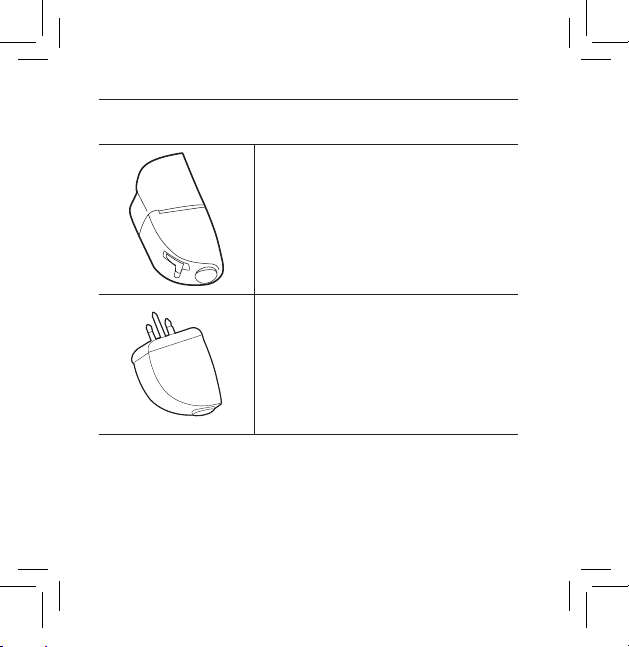
8
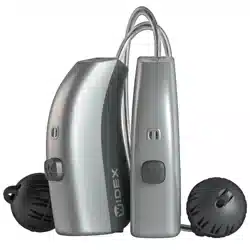
SCOLA FLEX
SCOLA FLEX FM shoe, 1 or 2 units
SCOLA FLEX with Europlug, 1 or 2 units
9 514 0231 001 #03.indd 8 9/21/2015 11:27:55 AM
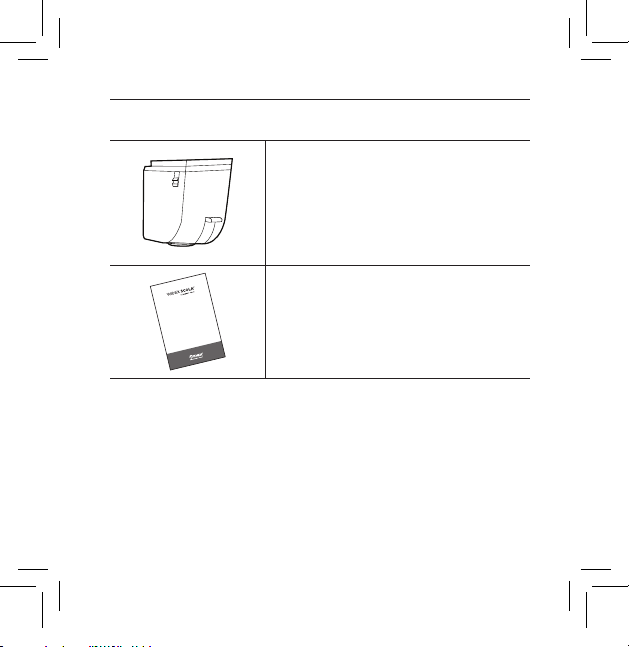
9
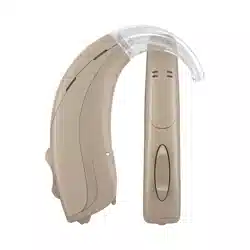
SCOLA FLEX-i
SCOLA FLEX-i
Design-integrated receiver which can be
connected to specific Widex hearing aids.
User instrUctions
SCOLA™ FM SySteM
SCOLA FLEX RECEIVER
and
SCOLA FLEX-i RECEIVER
User instructions
9 514 0231 001 #03.indd 9 9/21/2015 11:27:56 AM
10
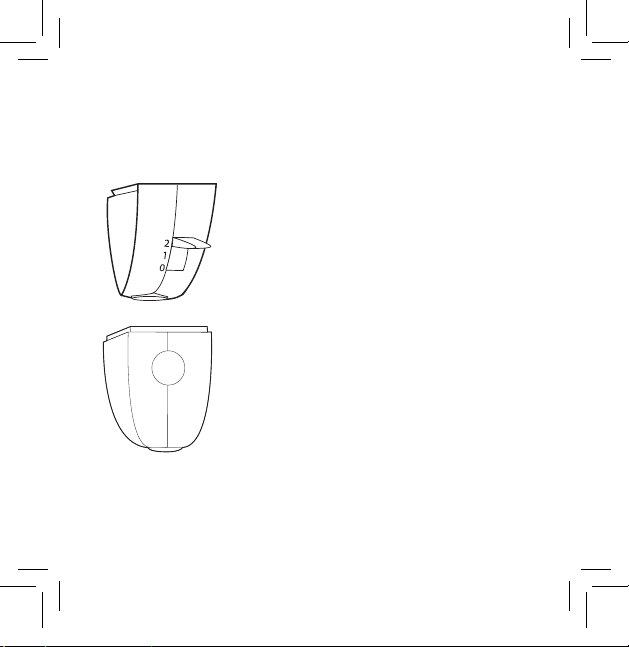
DESCRIPTION
The receiver has the following functions:
3-position mode switch.
Channel scan button allowing scanning and
automatic selection of the receiving channel.
Right (red) / left (blue) / neutral (transpar-
ent) mark for correct positioning of receiv-
ers on the hearing aids (if two hearing aids
are used).
The serial number and CE mark are found
on the side of the receiver.
NOTE
We recommend that you make a note of the se-
rial number at the back of this booklet.
101 180
9 514 0231 001 #03.indd 10 9/21/2015 11:27:56 AM

11
PREPARING THE SCOLA RECEIVER
Battery information
The receiver is powered by the hearing aid battery. We rec-
ommend that you insert a new battery in the hearing aid when
using the SCOLA system for the first time.
The receiver is provided with an automatic hibernation mode ,
which reduces the power usage.
Connecting SCOLA FLEX, FM shoe version:
Several different FM shoe versions are available for Widex BTE
hearing instruments, in which the shoe and the SCOLA FLEX are
an integrated unit. In the manual ”The FM shoes for the SCOLA™
system” you can see how to connect SCOLA FLEX to various
Widex hearing instruments.
9 514 0231 001 #03.indd 11 9/21/2015 11:27:56 AM

12
Connecting SCOLA FLEX, Europlug version:
When SCOLA FLEX is used with hearing aids and shoes that
require a Europlug version, connecting SCOLA FLEX is a two-step
process:
• Click the SCOLA FLEX onto the shoe. Push the plug into the
shoe until it clicks.
• Now attach the shoe with the connected SCOLA FLEX to the
hearing aid.
The shoes are available in various makes and designs. Your shoe
may therefore look different from the one shown in these instruc-
tions. However, the way to attach it is, in principle, the same.
9 514 0231 001 #03.indd 12 9/21/2015 11:27:56 AM
13
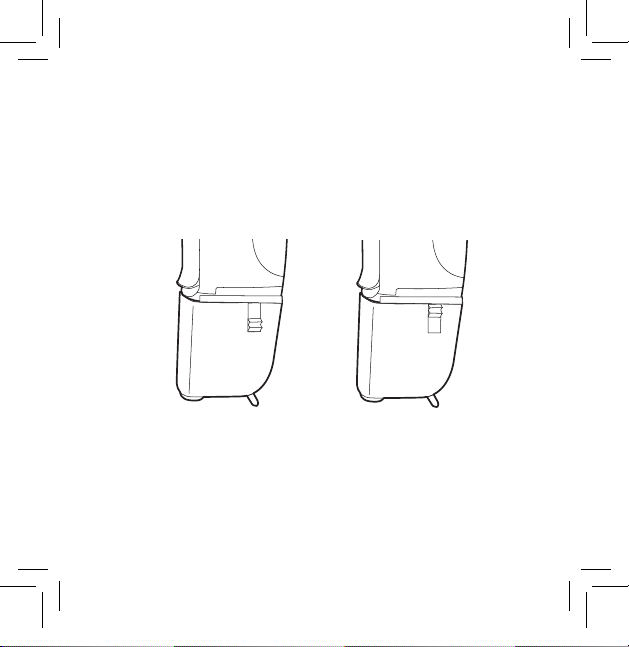
Connecting the SCOLA FLEX-i integrated version:
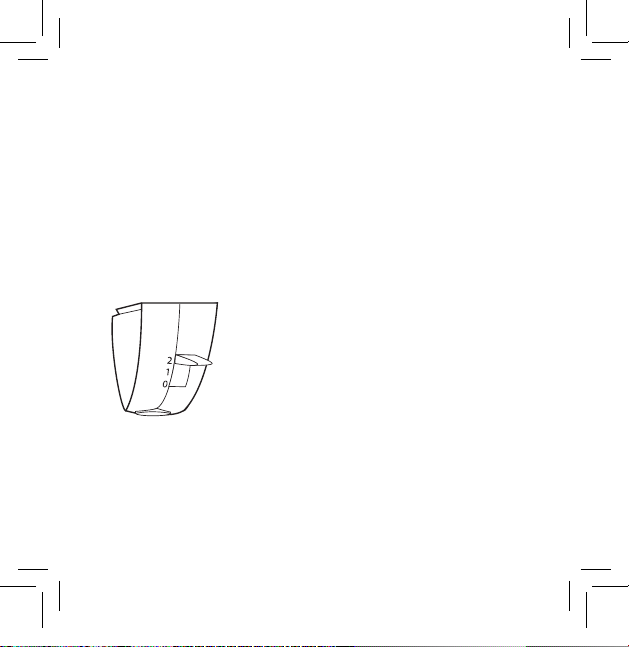
After removing the cover plate, slide the SCOLA FLEX-i into posi-
tion on the bottom of the hearing aid.
Slide the locking button upwards to lock the SCOLA FLEX-i into
place.
Open Locked
We recommend that the SCOLA FLEX-i remains on the hearing
aid.
9 514 0231 001 #03.indd 13 9/21/2015 11:27:56 AM
14
OPERATING THE SCOLA RECEIVER
The mode switch
Thereceiveristurnedonandoffbymeansofthemodeswitch
Thestandardswitchpositionsareand
• positionThereceiverisoffOnlythe
soundsignalfromthehearingaidcanbe
heard
• positionThereceiverisonOnlytheFM
signalcanbeheardInsomeolderhear-
ingaidmodelsthemicrophonewillnot
becompletelyturnedoffwhichmeans
thatloudsoundscanstillbeheardThis
settingiscalled“FM”
• positionThereceiverisonBoththe
FMsignalandthesoundsignalfromthe
hearingaidarereceivedThissettingis
called“FMM”
9 514 0231 001 #03.indd 14 9/21/2015 11:27:56 AM

15
With recent Widex hearing aids, the mode switch may function
differently. This is described in the manual: “The FM shoes for the
SCOLA™ system”.
The hearing care professional can program the mode switch so
that it functions differently than described here. This can then be
noted at the back of this booklet.
Changing the receiving channel
When the receiver is turned on, the starting channel will be the
channel last used unless programmed differently.
9 514 0231 001 #03.indd 15 9/21/2015 11:27:56 AM

16
The scan button
By using the channel scan button:
Press the scan button down. The receiver will then scan the pre-
selected channels automatically. During scanning, a brief beep
will be heard every 1½ seconds. When an FM signal is detected
on one of the channels, the scanning stops automatically and two
beep tones are heard. If no FM signal is detected on any of the
pre-selected channels, the scanning will not stop until all chan-
nels have been scanned, i.e. it will return to the starting channel.
A long beep will then be heard.
The hearing care professional can change the channel scan but-
ton function so that it is no longer possible to operate the scan
button. The scan button setting can be noted at the back of these
instructions.
The frequency and volume of the beep tone can also be adjusted
by the hearing care professional.
9 514 0231 001 #03.indd 16 9/21/2015 11:27:56 AM

17
By synchronising:
SCOLA CLASSMATE, SCOLA TEACH or other compatible prod-
ucts can wirelessly set the SCOLA receiver to a specific receiv-
ing channel.
9 514 0231 001 #03.indd 17 9/21/2015 11:27:56 AM

18
GOOD ADVICE
To benefit fully from the SCOLA FM system, it is important to:
• practiseusingtheFMsystemandtestthedifferentsettings
infamiliarsurroundings
• informotherpeoplethatyouuseanFMsystemwithyour
hearingaidsothattheycanunderstandwhytheyshould
talkintothemicrophoneandhowthesystemworks
• selecttherightsettingsfortheSCOLAtransmitterandre-
ceiver
9 514 0231 001 #03.indd 18 9/21/2015 11:27:56 AM
19
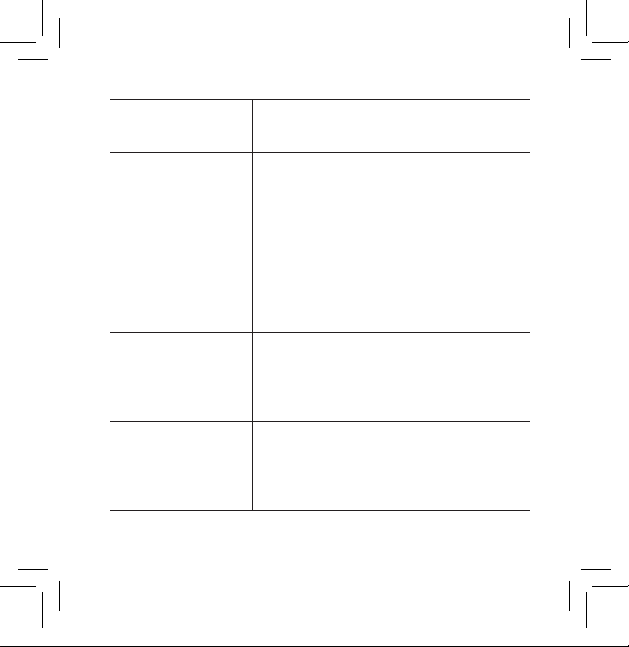
Listening situation
Suggested setting of the mode switch on
the receiver
In kindergartens /
classrooms
With young children, we recommend choosing
setting 2 (FM+M) to allow the children to hear
themselves as well as those around them.
Using SCOLA TEACH as the transmitter device,
the teacher may also choose to set the receiver
temporarily to another setting, e.g. “FM+M”
irrespective of the physical position of the
switch. In this setting the receiver cannot be
turned off.
Lectures If you want to listen to the teacher / lecturer
only, choose setting 1 (FM).
If you also want to listen to speech around you,
choose setting 2 (FM+M).
In a car In general, we always suggest using the
receiver with setting 2 (FM+M).
If a child only needs to hear what a parent is
saying, choose setting 1 (FM).
9 514 0231 001 #03.indd 19 9/21/2015 11:27:56 AM

20
CARE AND MAINTENANCE
In general, the SCOLA™ FM system should be cared for in the
same way as the hearing aid. It is a good idea to clean and remove
dirt and debris from the FM system on a daily basis. There are also
some special precautions which should be taken.
• Removeanydirtfromthereceiverwithadrysoftcloth
• DonotdisassembleanyoftheSCOLAproductsorhearing
aidasthiswillvoidtheguarantee
• DonotusewateralcoholortheliketocleantheFMsystem
• Makesurethatthemicrophoneaudioandpowersupply
cordsdonotbecometangledup
• Donotexposethereceivertocosmeticshairspraywater
cleaningsolutionsorotherchemicals
9 514 0231 001 #03.indd 20 9/21/2015 11:27:56 AM
21
WARNINGS
WARNING
• Make sure that the SCOLA receiver and the batteries for the hearing
aid are kept out of reach of children, who might place them in their
mouths. Discard used batteries carefully. Do not change batteries in
front of children and do not let them see where you keep your supply.
9 514 0231 001 #03.indd 21 9/21/2015 11:27:56 AM

22
IN CASE OF MALFUNCTION
WithproperuseandmaintenanceyourSCOLA™FMsystemwill
giveyouyearsofreliableserviceThe followingpagescontain
somebriefadvicetofollowifyouexperienceproblemswithyour
SCOLA FMsystem Beforecontactingthe hearing care profes-
sionalwhereyouacquiredyourSCOLA FMsystempleasefol-
lowtheadvicebelow
If there is no sound from the SCOLA FM system or the audio
equipment, or the sound is distorted, it could be because:
• The hearing aid, the SCOLA receiver or SCOLA transmitter is not
set correctly. Check that all the settings are correct for the desired
use, including that both the transmitter and receiver are on.
• TheFMshoeisnotcorrectlyattachedCheckthattheshoe
clickscorrectlywhenyouattachittothehearingaidThere
mustbecontactbetweentheshoeandthehearingaid’scon-
tactpoints
(NB: This does not apply to the SCOLA FLEX-i.)
9 514 0231 001 #03.indd 22 9/21/2015 11:27:56 AM

23
• The hearing aid’s contact points for the shoe are dirty. Consult
the hearing care professional where you acquired your hearing
aid to have the contact points cleaned.
• The earmould or tubing is blocked. Check that the tubing and
earmould are securely in place and that they are free of wax,
moisture and debris.
• The receiver and transmitter are not set to the same channel.
Check that the channel number in the display of the SCOLA
transmitter is the same as the receiving channel of the receiver
by making a channel scan.
• The hearing aid battery cannot supply both the hearing aid and
the receiver. Replace the battery.
If there is noise in the hearing aid, it could be because:
• You are at or beyond the limit of the receiving range of the
receiver. Reduce the distance between the receiver and the
transmitter.
9 514 0231 001 #03.indd 23 9/21/2015 11:27:56 AM

24
• The receiver is set to ”FM” and the signal from the FM micro-
phone or from the audio equipment is too weak, or there is no
signal. Set the receiver to ”FM+M”. Check that the SCOLA trans-
mitter is turned on, place it closer to the person speaking, or
turn up the volume on the audio equipment.
• Noise and whistling are interfering with reception, pos-
sibly because two or more FM transmitters are trans-
mitting on the same channel as your receiving channel.
To avoid this type of interference, make sure that only one FM
transmitter is transmitting on the receiving channel.
Try turning off your SCOLA transmitter. If you hear another FM
signal, this is what is causing the noise. There are several ways
to avoid interference :
• TurnononeFMtransmitteronly
• Findanotheravailablechannelandselectthischannelon
boththereceiverandtransmitter
• IncreasethedistancebetweentheinterferingFMtransmit-
terandthereceiveruntiltheinterferencestops
9 514 0231 001 #03.indd 24 9/21/2015 11:27:56 AM

25
TERMS AND DEFINITIONS EXPLAINED
Antenna
The receiver and transmitter are both provided with an antenna.
The SCOLA receiver has a built-in directional antenna. To help
ensure the best possible reception, the hearing aid user should
face in the direction of the transmitter.
Approval and CE marking
The SCOLA receivers and the SCOLA transmitters are tested at an
EU/FCC accredited test laboratory. The CE/FCC marking and dec-
laration of conformity document that the products conform to the
directives and technical requirements laid down in North America
and the EU, as well as associated countries.
The transmitters and receivers are provided with serial numbers.
9 514 0231 001 #03.indd 25 9/21/2015 11:27:56 AM

26
Synchronisation
The transmitting channel of external devices such as SCOLA
TEACH can be synchronised with the receiver’s receiving chan-
nel in two ways:
Channel synchronisation
The receiver is set wirelessly to a specific receiving channel.
Teacher’s synchronisation
This is an expanded type of synchronisation that is performed
from SCOLA TEACH and includes both the receiving channel and
the temporary settings of the switch and scan button. It allows
the teacher or parent to lock the receiver mode switch in a specific
setting, e.g. FM+M, and/or disable the scan button. These tempo-
rary settings will remain active until the hearing aid is switched
off or the receiver is removed.
You can read more about this function in the SCOLA TEACH user
instructions, or at http://scolasimulator.widex.com/
9 514 0231 001 #03.indd 26 9/21/2015 11:27:56 AM

27
FM system
An FM system is a radio communication system in which a trans-
mitter sends signals to a receiver via carrier waves. ”FM” stands
for “frequency modulation” and is a technical term for the way in
which the radio signal is produced. FM transmission ensures high
quality reception without any noise, hum or distortion.
If you have two hearing aids, they should both have a receiver.
Hibernation mode
If the receiver receives no signal from the transmitter, it will auto-
matically switch to hibernation mode, reducing power consump-
tion significantly. The receiver “wakes up” automatically after
a maximum period of 20 seconds after a transmitting signal is
received.
9 514 0231 001 #03.indd 27 9/21/2015 11:27:57 AM

28
Interference
Interference occurs when signals from two transmitters on the
same frequency are mixed in the same receiver. When the sig-
nals are equally strong, the interference will be most noticeable.
The further away one transmitter is from the receiver compared
to the other transmitter, the weaker the disturbing noise will be.
Interference can be avoided by selecting another transmitting
and receiving channel.
Operating range
The operating range of the FM system is highly dependent on
the surroundings, including construction materials. The optimum
operating range of 20-30 metres can be obtained in the open and
with the microphone lead hanging freely. Inside buildings with
steel and concrete walls and floors, the operating range may be
reduced to ten metres. The position of the receiver also affects
the range.
9 514 0231 001 #03.indd 28 9/21/2015 11:27:57 AM

29
Power drain on the hearing aid battery
The receiver is powered by the hearing aid battery. Please note
that when it is turned on and receives signals from the trans-
mitter, battery power drain will increase by approximately 100%
compared to use without FM.
Also note that if the hearing aid is provided with a low battery
alarm, FM reception may stop before the alarm beeps. If the
receiver is turned off, the hearing aid may be able to work for
slightly longer.
9 514 0231 001 #03.indd 29 9/21/2015 11:27:57 AM

30
WARRANTY
A warranty of two years is provided. The warranty covers
any defects in manufacture or materials. Defects arising from
improper handling or repairs carried out by an unauthorised
party are not covered by this warranty.
9 514 0231 001 #03.indd 30 9/21/2015 11:27:57 AM

31
Directive 1999/5/EC
Hereby, Widex A/S declares that this SCOLA FLEX and SCOLA
FLEX-i are in compliance with the essential requirements and
other relevant provisions of Directive 1999/5/EC.
A copy of the Declaration of Conformity according to 1999/5/EC
can be found at:
http://www.widex.com/doc
9 514 0231 001 #03.indd 31 9/21/2015 11:27:57 AM

32
REGULATORY INFORMATION
FCC ID: BRG-871T
IC: 5676A-871T
Federal Communications Commission Statement
This device complies with part 15 of the FCC Rules. Operation is subject
to the following two conditions:
(1) This device may not cause harmful interference, and
(2) this device must accept any interference received, including
interference that may cause undesired operation.
NOTE:
This equipment has been tested and found to comply with the limits
for a Class B digital device, pursuant to part 15 of the FCC Rules. These
limits are designed to provide reasonable protection against harmful
interference in a residential installation. This equipment generates, uses
and can radiate radio frequency energy and, if not installed and used
in accordance with the instructions, may cause harmful interference to
radio communications. However, there is no guarantee that interference
9 514 0231 001 #03.indd 32 9/21/2015 11:27:57 AM

33
will not occur in a particular installation. If this equipment does cause
harmful interference to radio or television reception, which can be
determined by turning the equipment off and on, the user is encouraged
to try to correct the interference by one or more of the following
measures:
— Reorient or relocate the receiving antenna.
— Increase the separation between the equipment and receiver.
— Connect the equipment into an outlet on a circuit different from that
to which the receiver is connected.
— Consult the dealer or an experienced radio/TV technician for help.
NOTE:
This equipment complies with FCC radiation exposure limits set forth for
an uncontrolled environment. This transmitter must not be co-located or
operating in conjunction with any other antenna or transmitter.
Changes or modifications to the equipment not expressly approved by
Widex could void the user’s authority to operate the equipment.
9 514 0231 001 #03.indd 33 9/21/2015 11:27:57 AM

34
Industry Canada Statement / Déclaration d’industrie Canada
Under Industry Canada regulations, this radio transmitter may only
operate using an antenna of a type and maximum (or lesser) gain
approved for the transmitter by Industry Canada.
To reduce potential radio interference to other users, the antenna
type and its gain should be so chosen that the equivalent isotropically
radiated power (e.i.r.p.) is not more than that necessary for successful
communication.
This device complies with Industry Canada licence-exempt RSS
standard(s). Operation is subject to the following two conditions:
(1) this device may not cause interference, and
(2) this device must accept any interference, including interference that
may cause undesired operation of the device.
9 514 0231 001 #03.indd 34 9/21/2015 11:27:57 AM

35
Conformément à la réglementation d’Industrie Canada, le présent
émetteur radio peut fonctionner avec une antenne d’un type et d’un
gain maximal (ou inférieur) approuvé pour l’émetteur par Industrie
Canada.
Dans le but de réduire les risques de brouillage radioélectrique à
l’intention des autres utilisateurs, il faut choisir le type d’antenne et
son gain de sorte que la puissance isotrope rayonnée équivalente
(p.i.r.e.) ne dépasse pas l’intensité nécessaire à l’établissement d’une
communication satisfaisante.
Le présent appareil est conforme aux CNR d’Industrie Canada
applicables aux appareils radio exempts de licence. L’exploitation est
autorisée aux deux conditions suivantes :
(1) l’appareil ne doit pas produire de brouillage, et
(2) l’utilisateur de l’appareil doit accepter tout brouillage radioélectrique
subi, même si le brouillage est susceptible d’en compromettre le
fonctionnement.
9 514 0231 001 #03.indd 35 9/21/2015 11:27:57 AM
36
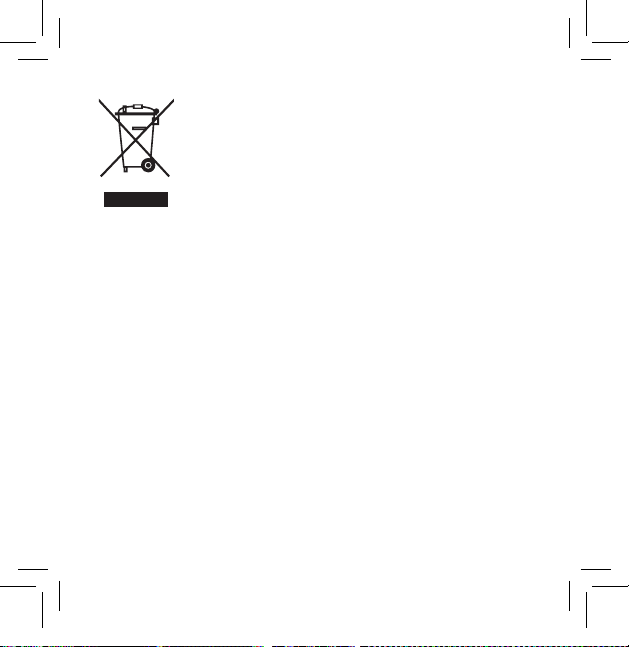
Electrical and electronic equipment (EEE) contains
materials, components and substances that can be
hazardous and present a risk to human health and
the environment when waste electrical and elec-
tronic equipment (WEEE) is not handled correctly.
Do not dispose of hearing aids, hearing aid accessories and bat-
teries with ordinary household waste.
Hearing aids, batteries and hearing aid accessories should be
disposed of at sites intended for waste electrical and electronic
equipment, or given to your hearing care professional for safe
disposal. Proper disposal helps to protect human health and the
environment.
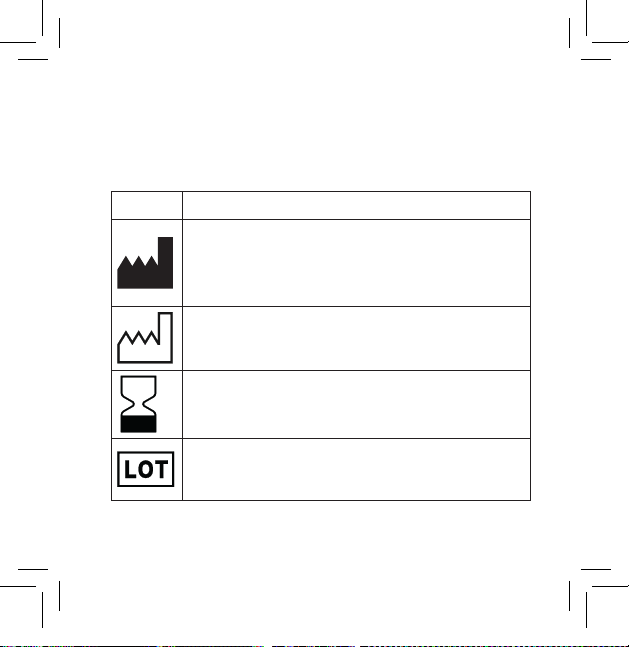
Symbols commonly used by Widex A/S in medical device labelling
(labels/IFU/etc.)
Symbol Title/Description
Manufacturer
The product is produced by the manufacturer whose name
and address are stated next to the symbol. If appropriate,
the date of manufacture may also be stated.
Date of manufacture
The date when the product was manufactured.
Use-by date
The date after which the product is not to be used.
Batch code
The product’s batch code (lot or batch identification).
9 514 0231 001 #03.indd 36 9/21/2015 11:27:57 AM
37
Symbols commonly used by Widex A/S in medical device labelling
(labels/IFU/etc.)
Symbol Title/Description
Manufacturer
The product is produced by the manufacturer whose name
and address are stated next to the symbol. If appropriate,
the date of manufacture may also be stated.
Date of manufacture
The date when the product was manufactured.
Use-by date
The date after which the product is not to be used.
Batch code
The product’s batch code (lot or batch identification).
SYMBOLS
9 514 0231 001 #03.indd 37 9/21/2015 11:27:57 AM
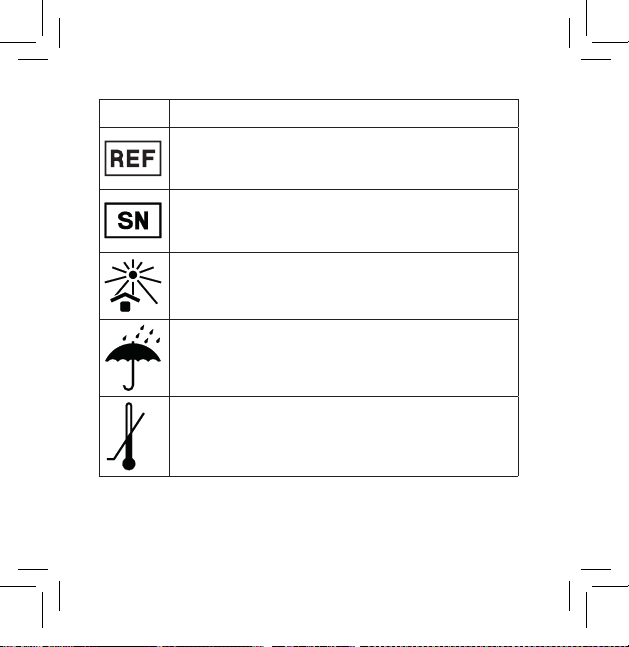
38
Symbol Title/Description
Catalogue number
The product’s catalogue (item) number.
Serial number
The product’s serial number.*
Keep away from sunlight
The product must be protected from light sources and/or
The product must be kept away from heat
Keep dry
The product must be protected from moisture and/or The
product must be kept away from rain
Lower limit of temperature
The lowest temperature to which the product can be safely
exposed.
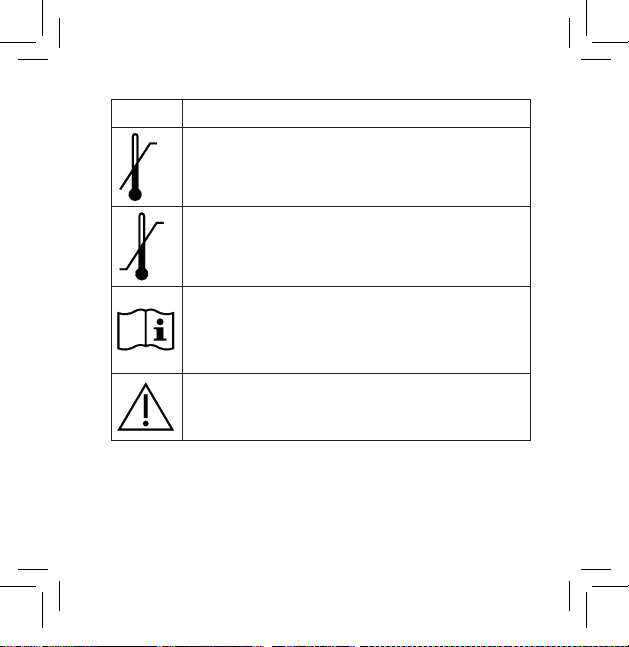
Symbol Title/Description
Upper limit of temperature
The highest temperature to which the product can be
safely exposed.
Temperature limits
The highest and lowest temperatures to which the product
can be safely exposed.
Consult instructions for use
The user instructions contain important cautionary infor-
mation (warnings/precautions) and must be read before
using the product.
Caution/Warning
Text marked with a caution/warning symbol must be read
before using the product.
9 514 0231 001 #03.indd 38 9/21/2015 11:27:58 AM
39
Symbol Title/Description
Catalogue number
The product’s catalogue (item) number.
Serial number
The product’s serial number.*
Keep away from sunlight
The product must be protected from light sources and/or
The product must be kept away from heat
Keep dry
The product must be protected from moisture and/or The
product must be kept away from rain
Lower limit of temperature
The lowest temperature to which the product can be safely
exposed.
Symbol Title/Description
Upper limit of temperature
The highest temperature to which the product can be
safely exposed.
Temperature limits
The highest and lowest temperatures to which the product
can be safely exposed.
Consult instructions for use
The user instructions contain important cautionary infor-
mation (warnings/precautions) and must be read before
using the product.
Caution/Warning
Text marked with a caution/warning symbol must be read
before using the product.
9 514 0231 001 #03.indd 39 9/21/2015 11:27:58 AM
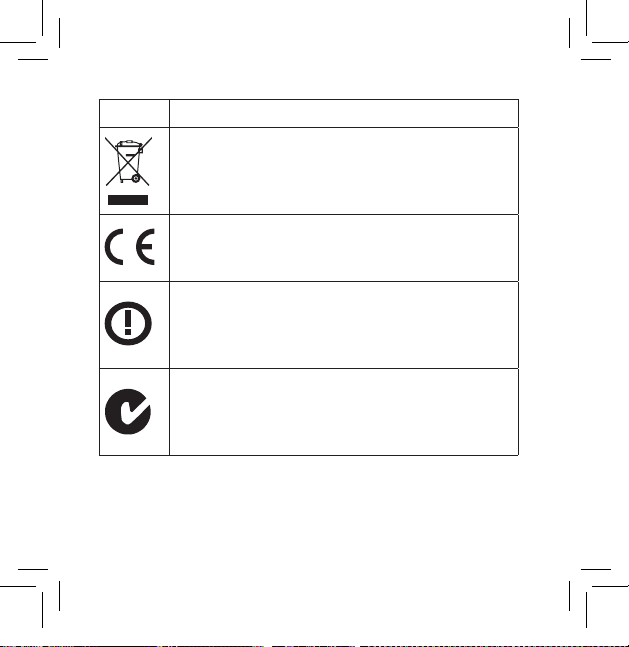
40
Symbol Title/Description
WEEE mark
“Not for general waste”
When the product is to be discarded, it must be sent to a
designated collection point for recycling and recovery.
CE mark
The product is in conformity with the requirements set out
in European CE marking directives.
Alert
The product is identified by R&TTE Directive 1999/5/EC as
an equipment Class 2 product with some restrictions on
use in some CE member states.
C-Tick mark
The product complies with EMC and radio spectrum
regulatory requirements for products supplied to the
Australian or New Zealand market.
Symbol Title/Description
Interference
Electromagnetic interference may occur in the vicinity of
the product.
*The six- or seven-digit number on the product is the serial number. Se-
rial numbers may not always be preceded by
9 514 0231 001 #03.indd 40 9/21/2015 11:27:59 AM

41
Symbol Title/Description
WEEE mark
“Not for general waste”
When the product is to be discarded, it must be sent to a
designated collection point for recycling and recovery.
CE mark
The product is in conformity with the requirements set out
in European CE marking directives.
Alert
The product is identified by R&TTE Directive 1999/5/EC as
an equipment Class 2 product with some restrictions on
use in some CE member states.
C-Tick mark
The product complies with EMC and radio spectrum
regulatory requirements for products supplied to the
Australian or New Zealand market.
Symbol Title/Description
Interference
Electromagnetic interference may occur in the vicinity of
the product.
*The six- or seven-digit number on the product is the serial number. Se-
rial numbers may not always be preceded by
9 514 0231 001 #03.indd 41 9/21/2015 11:27:59 AM
42
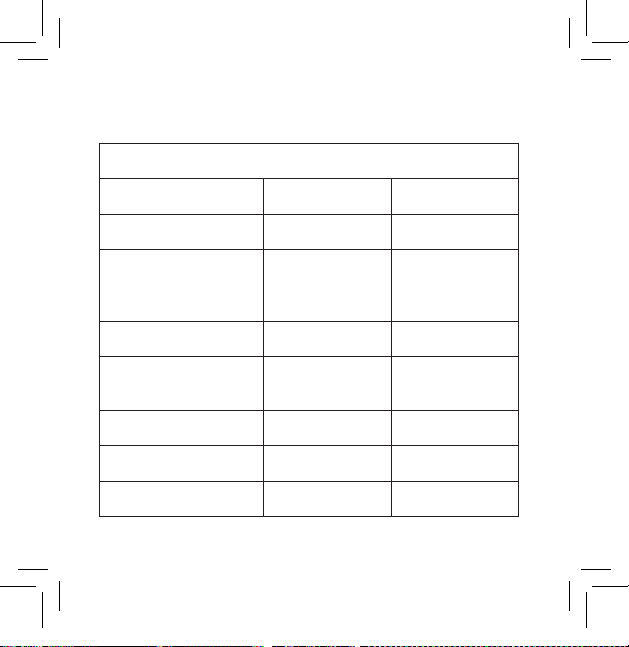
SETTINGS
SCOLA FLEX / SCOLA FLEX-i
Serial numbers Right: Left:
Starting channel
Mode switch
(check the selected set-
ting)
Standard setting
Changed setting to
”FM+M”
Changed setting to ”FM”
Scan button
Scan possible Yes No
9 514 0231 001 #03.indd 42 9/21/2015 11:27:59 AM

43
9 514 0231 001 #03.indd 43 9/21/2015 11:27:59 AM
É[5qr0w3|a;;a;;]
WIDEX A/S Nymoellevej 6, DK-3540 Lynge, Denmark
www.widex.com
Manual no.:
9 514 0231 001 #03
Issue:
2015-06
9 514 0231 001 #03.indd 44 9/21/2015 11:27:59 AM