
1
SW021 ID205L Smartwatch Frequently Customer questions & answers
1. How to contact seller?....................................................................................................2
2. How to connect the watch to your phone via bluetooth?..............................................2
3. Which phone model is compatible with this watch?.......................................................3
4. How to change the time of the smart watch?....................................................................3
5. Do you have to pair this watch with a phone or can it be a stand alone watch?..........3
6. What is the size of the watch band? Where can I get a replacement watch band?......3
7. Does it need a screen protector? Where can I get a screen protector?.........................4
8. How do you charge the watch? Where can I get a replacement charger?....................4
9. How to use the music control function?...........................................................................4
10. How to use Find my Phone function?.............................................................................5
11. Is this a waterproof watch?..............................................................................................5
12. I am not seeing workout mode, how do I activate workout mode?..............................5
13. Does this device have its own built in GPS or does it use your phone GPS? How can i check my
workout route?.......................................................................................................................5
14. How to make step counting more accurate?..................................................................6
15. How to measure heart rate more accurately?.................................................................7
16. How to make sleep monitoring more accurate?.............................................................7
17. What if the watch cannot be turned on?.........................................................................8
18. How to reset the watch?...................................................................................................8
2
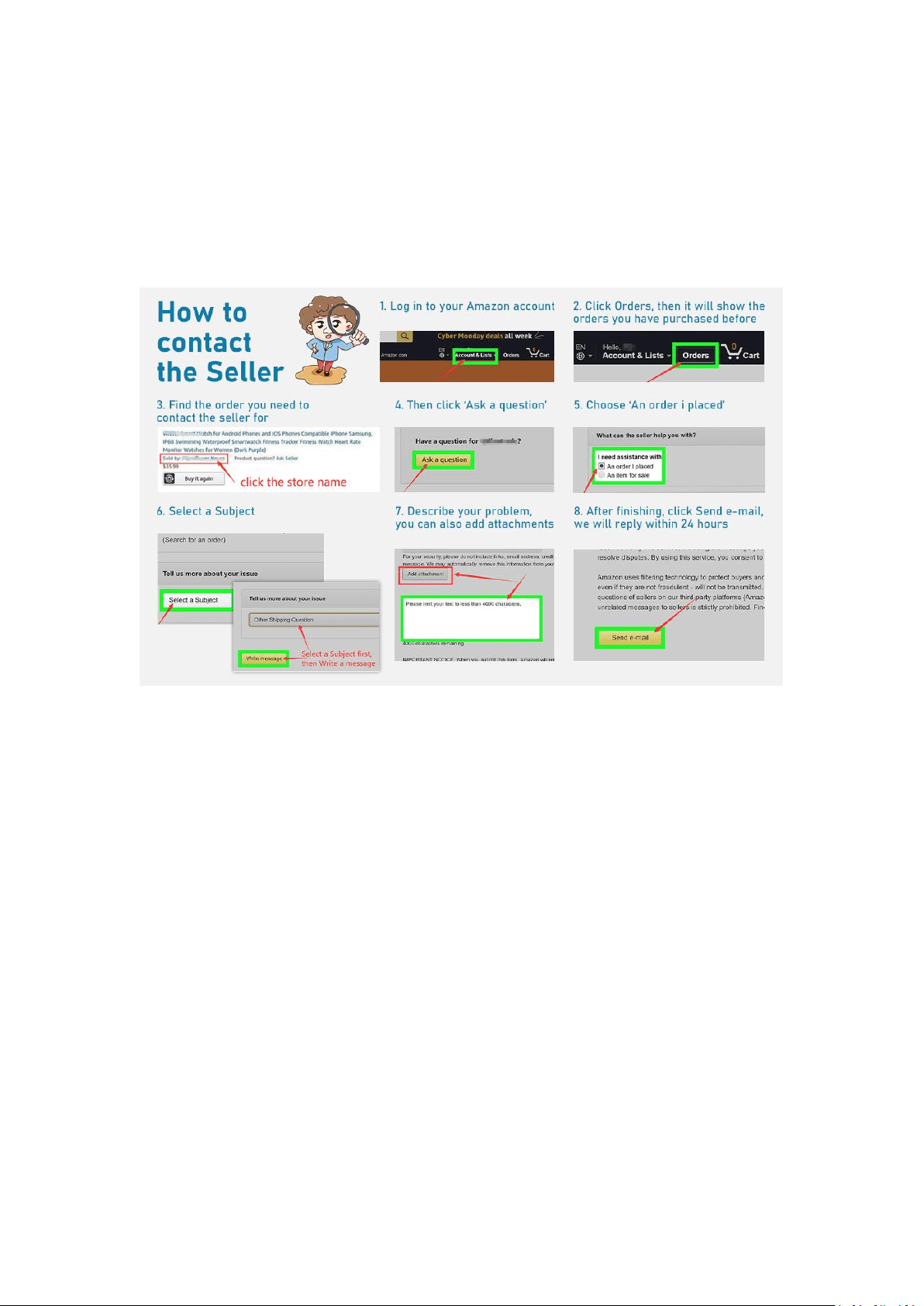
1. How to contact seller?
<A>Go to Your Orders->Find the order ID in the list->Click ‘Contact with us’.
<B>Log in to your Amazon account --> Click Orders, then it will show the orders you
have purchased before--> Find the order you need to contact the seller for, Click the
store name --> Then click ‘Ask a question’ --> Choose ‘An order i placed’ --> Select a
Subject, then write message --> Describe your problem, you can also add
attachments --> After finishing, click Send e-mail, we will reply within 24 hours:)
2. How to connect the watch to your phone via bluetooth?
<1> Download the 'VeryFitPro' App by scanning the QR code in the package or the
below picture. (You can also download the 'VeryFitPro' App in Google play or Apple
store)
<2> Open your phone's Bluetooth and open the VeryFitPro APP, find the smart watch
model ID205L, then bind the smart watch in the 'VeryFitPro' App. (Don't connect the
smart watch in the phone's default Bluetooth list.)
Note: VeryfitPro APP never charges or requires customers' private information. If the
APP ask you to fill in your private information (such as credit card number), please
check whether you have downloaded the wrong APP, and contact us immediately via
your order ID, we will find out and give you a satisfactory solution. (Go to Your
Orders->Find the order ID in the list->Click Contact with us)

3
3. Which phone model is compatible with this watch?
This watch is compatible with most iOS 8.0 & Android 4.4 above smartphones.
(Smartphones only, not for pc or tablet.)
4. How to change the time of the smart watch?
The watch time will synchronize with the phone time when the watch is successfully
connected to your phone. If the watch time is incorrect, please try to uninstall the
VeryFitPro APP->then reinstall the VeryFitPro APP->after then, rebind the smart
watch in the VeryFitPro APP)
Note: Please bind the watch with your phone at least once a week to synchronize
watch time in avoid of time lag.
5. Do you have to pair this watch with a phone or can it be a stand alone watch?
You need to pair this watch with a phone to correct the watch time first, then this
watch can work as standalone.
<1> You need to download the 'VeryFitPro' App in your mobile phone;
<2> Then bind the watch in the 'VeryFitPro' App;
<3>The time will sync with your phone's time after bind and the watch can work as
standalone with basic functions, such as heart rate monitor, step monitor, breath
guide and stopwatch ect;
<4>More functions can be used when the watch is bound in 'VeryFitPro' App, such as
sleep data analysis, sports route display, calls/text/social media notifications ect.
6. What is the size of the watch band? Where can I get a replacement watch band?
The watch band fits for wrist circumference 6.5 inch to 9.5 inch (165mm to 241mm).
The band width is 22mm, the Lug length is 19mm, the Spring bar is 21mm. You can
search for the keywords 'ID205L replacement band' on Amazon website to get a
different color, different materials and different sizes replacement watch band.
4
7. Does it need a screen protector? Where can I get a screen protector?
The screen of this watch is 1.3 inch, you can search for the keywords '1.3 inch watch
screen protector' on Amazon official website to get a protector to protect your watch
screen.
Our product screen material is 2.5D high hardness anti-friction and anti-drop glass,
under normal circumstances it will not be seriously worn, so it does not need a
screen protector in common use.
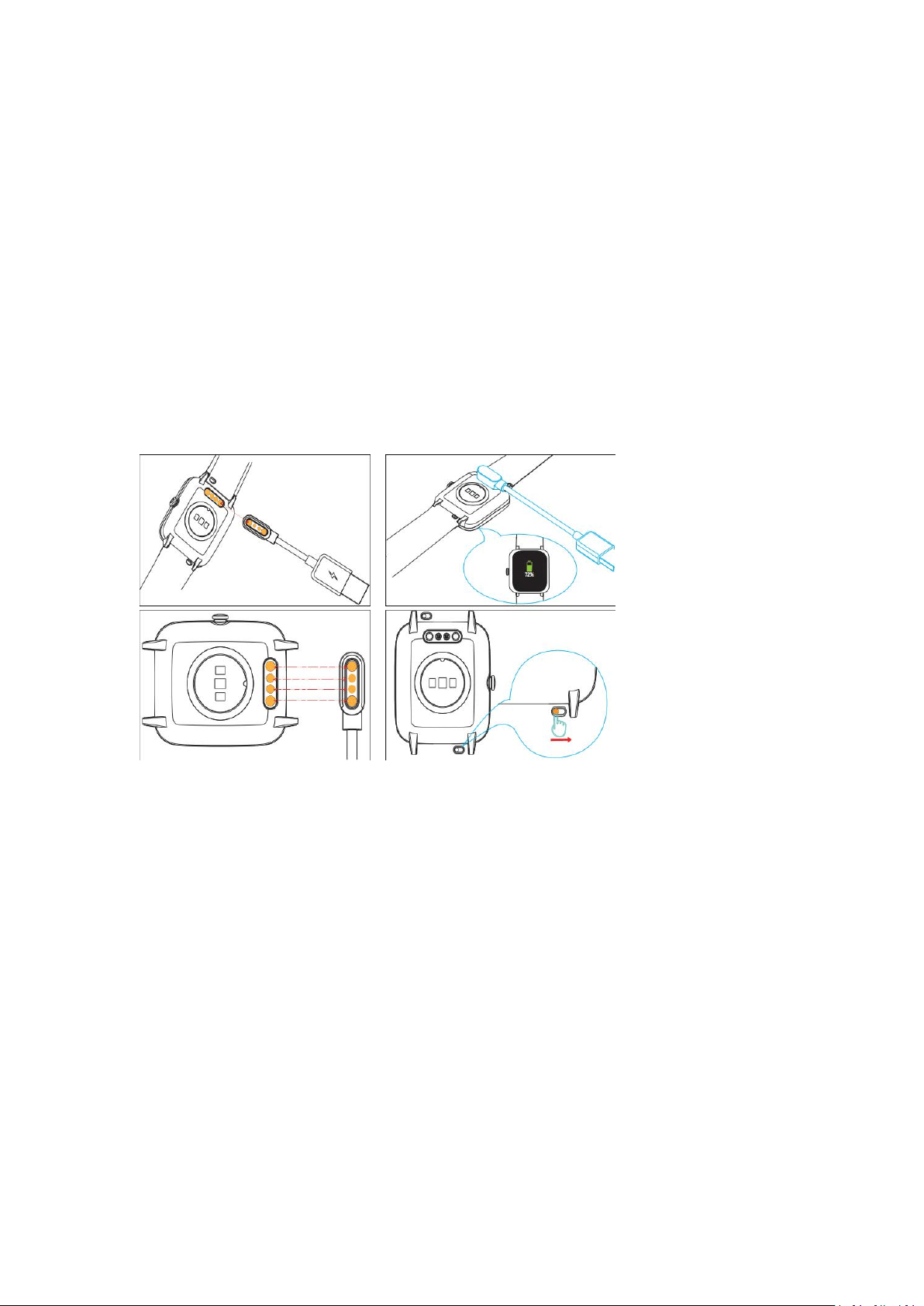
8. How do you charge watch? Where can I get a replacement charger?
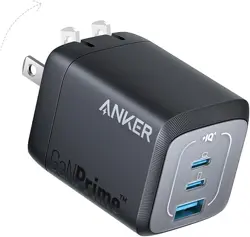
The watch comes with a magnetic charger. You need to connect it to a USB power
source.
A 2.5 hours full charge supports 7 days of normal use and 30 days of standby time.
You can search for the keywords ‘ID205L replacement charger’ on Amazon official
website to get a replacement watch charger.
9. How to use the music control function?
Here are the steps to use the music control function:
<1> Download the 'VeryFitPro' App, then bind the smart watch in the 'VeryFitPro'
App;
Note: don't connect the smart watch in the phone's default Bluetooth list.
<2>Turn on 'Music Control' in the VeryFitPro APP (search via: 'VeryFitPro'
App-->'Device'-->'Music Control'-->Turn it on)
<3>Make sure the watch is connected to your phone successfully. Then you can use
play/pause/next/previous function on the watch.
(Note: You cannot store or play music on the watch. In general, the watch can control
Spotify, Amazon Music, Apple Music, Pandora ect.)
5
10. How to use Find my Phone function?
'Find my phone' function only works when the watch is connected to your phone
successfully and your phone is in non-silent mode and make sure you keep the
VeryFitPro app running in your phone background.
<1>You need to turn on 'Find my phone' function in the VeryFitPro APP first. (search
via: VeryFitPro APP<Device<More<turn on Find my Phone)
<2>When you want to use this function, click 'Find my Phone' icon on the watch (on
the watch homepage, slide right, then you will see a rectangle with a GPS icon in the
bottom right corner) and the phone will send an alarm.
If the function still doesn't work, please try to reboot the watch in the VeryFitPro APP
(search via: VeryFitPro APP<Device<More<Reboot your device) or contact us via your
order ID. (Go to Your Orders->Find the order ID in the list->Click Contact with us)
11. Is this a waterproof watch?
Yes, it is IP68 waterproof.
You can wear it when washing hands, running in the rain, swimming in a pool or at a
shallow beach. (Note: Not suitable for diving, swimming in the sea, or in a sauna.)
In order to maintain a pleasant wearing experience, please wipe the waterproof
watch as soon as possible after soaking in water.
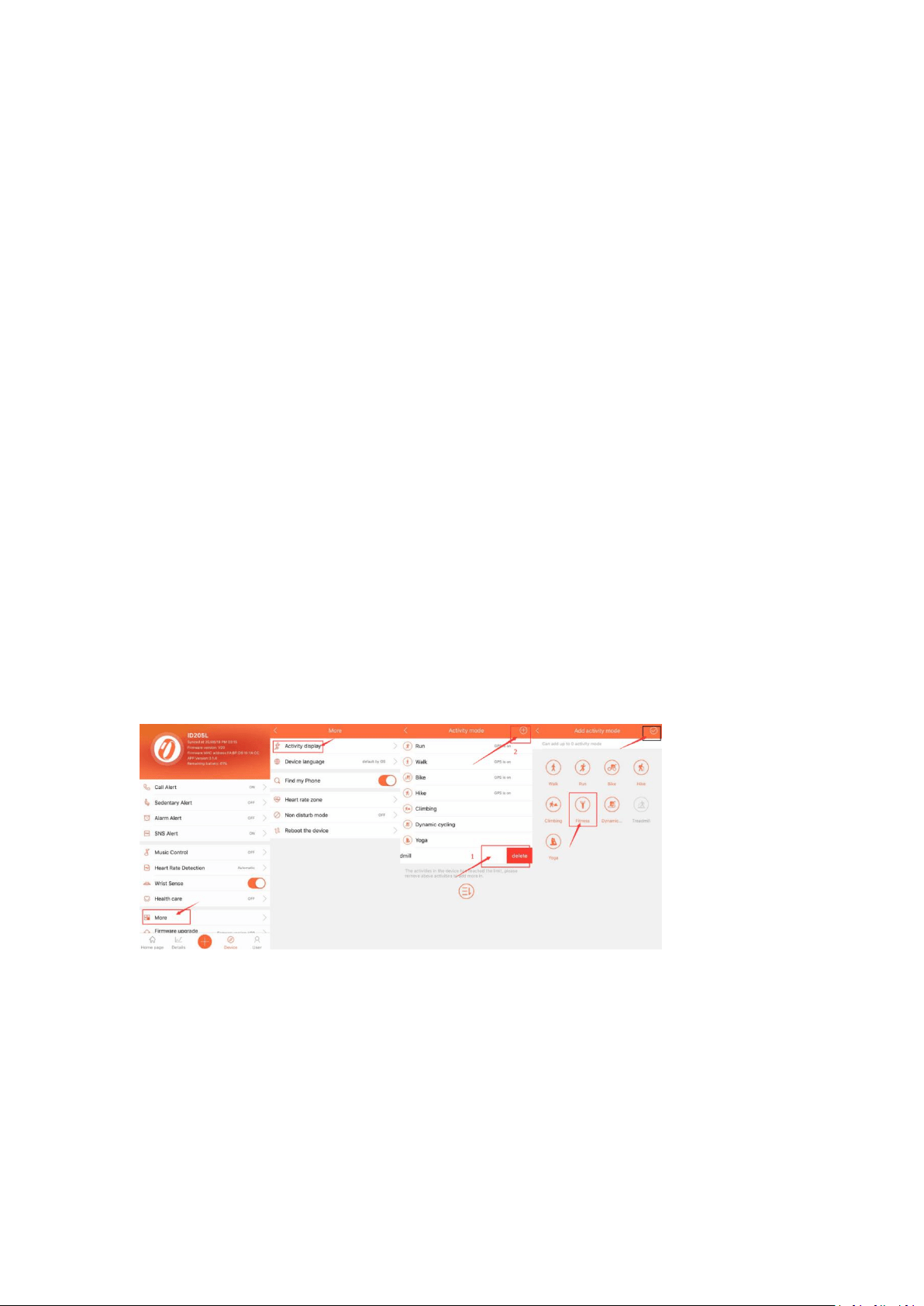
12. I am not seeing workout mode, how do I activate workout mode?
You can only check 8 sports on the VeryFitPro APP or the watch. If you want to
change activity mode, you need to remove one of the activities then add another in.
(Here are the steps: VeryFitPro APP<Device<More<Activity display<Choose the one
you don’t need, slide left, delete it<click+, and add the activity mode you need)
13. Does this device have its own built in GPS or does it rely on your
phone/devices GPS? How can i check my workout route?
The watch itself doesn't have GPS, it just connects to your phone with Bluetooth, and
then uses your phone’s GPS to record your workout route.
When the watch is successfully connected to your phone and you select the ‘Bike’
model (as an example) in the "VeryFitPro" APP, then you can check the
distance/calories burned/average speed and your workout routine in the VeryFitPro
APP. (search via: VeryFitPro APP< '+' in the middle< left GPS icon< click '···' <choose
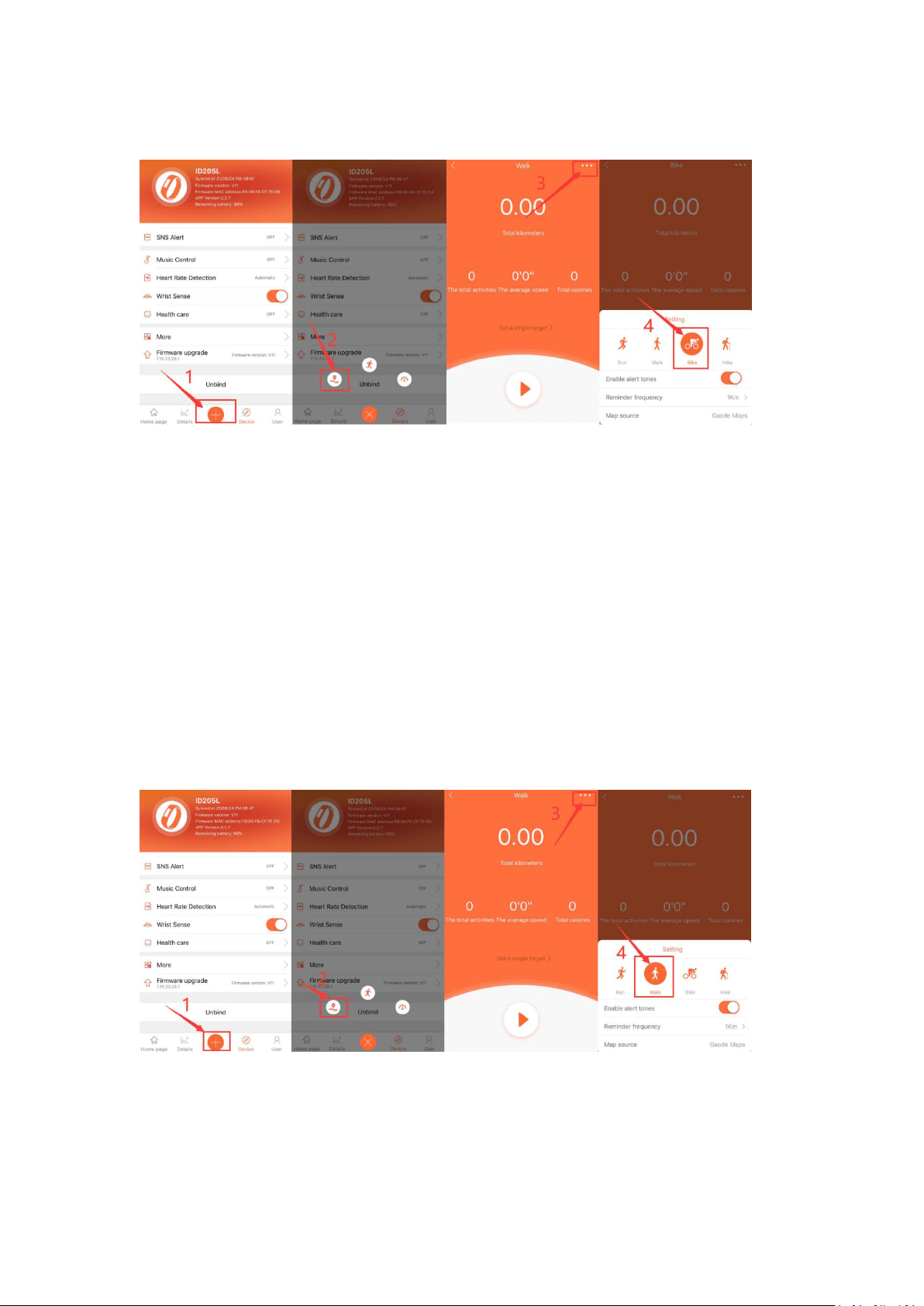
6
Bike model, then you can check your workout routine in the APP when you are riding
a bike)
14. How to make step counting more accurate?
The step counter will not count if your movement less than 10 steps or perform
invalid steps, such as move your wrist, stand up straight ect.
(Tip: We recommend selecting the walking mode in the VeryFitPro app, which will be
more correct.)
Usually, the tracker could accurately track your steps. You could try to have a 200
steps walking. If the tolerance is more than 30%, you could have another 100 steps
see whether the problem still exist, if yes, could you please try to reboot the watch in
the VeryFitPro APP see whether it works or not? (search via: VeryFitPro
APP<Device<More<Reboot your device) You can also update the data by sliding the
homepage in the APP.
If the issue still exists, please feel free to contact us and we will definitely give you a
satisfied solution. (Go to Your Orders->Find the order ID in the list->Click Contact
with us)
7
15. How to measure heart rate more accurately?
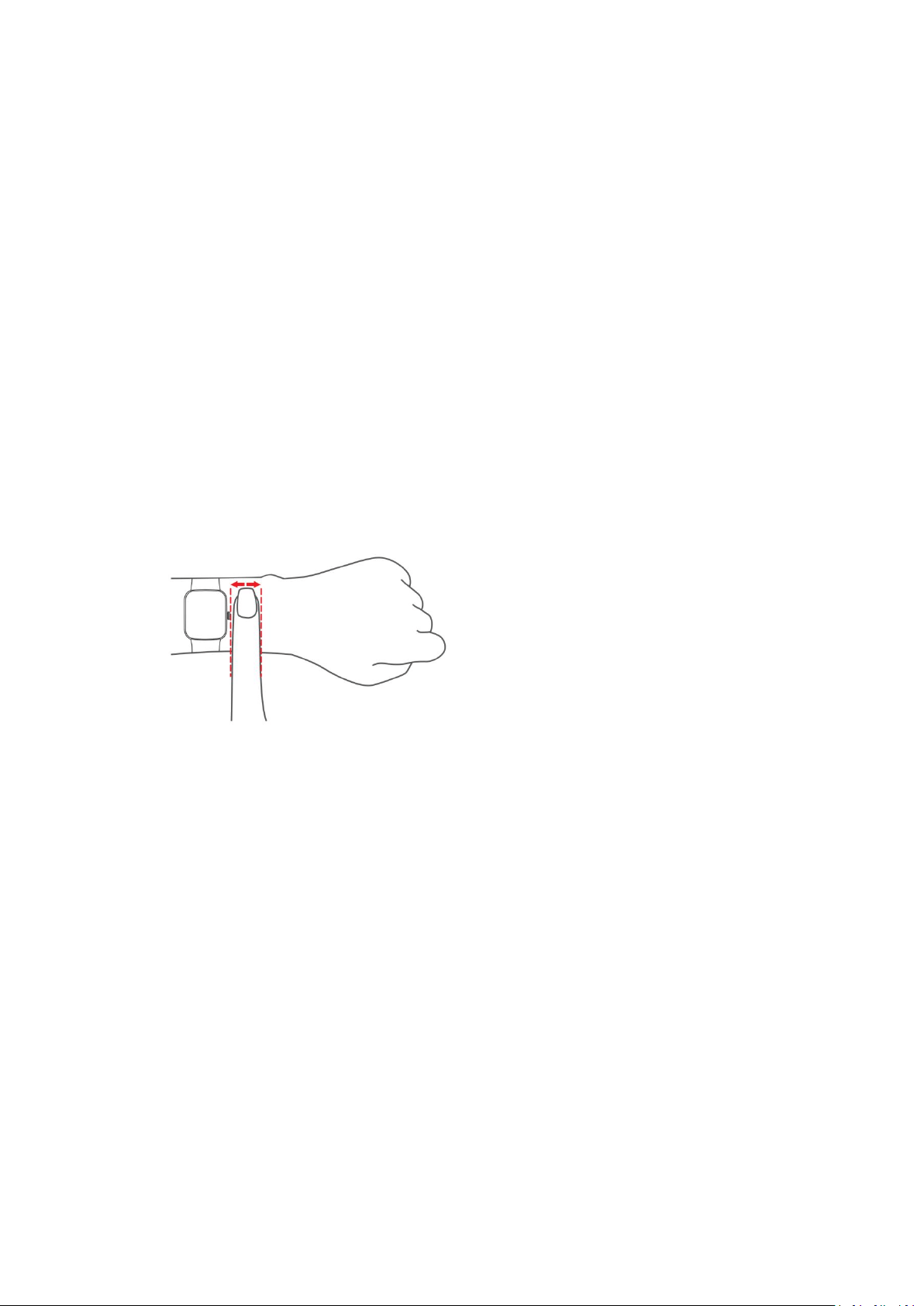
Please make sure the watch back contacts well with your wrist and wear the watch
above one fingers of your blood flow when the watch begins to detect the heart rate.
The data will jump up/down initially, it needs several seconds to stabilize in order to
offer you a reliable data. And remember to slide down the app homepage to sync the
data on device to app.
Usually, the watch will automatically detect your heart rate every 5 minutes if you
have turned on the 'Automatic' Heart Rate Detection,
If it is not monitor your heart rate, please try the below steps:
<1>Uninstall and download the 'VeryFitPro' App again, then bind the smart watch in
the 'VeryFitPro' App
Notes: don't connect the smart watch in the phone's default Bluetooth list.
<2>Reboot the watch in the VeryFitPro APP. (search via: VeryFitPro
APP<Device<More<Reboot the device)
If the issue still exists, please feel free to contact us and we will definitely give you a
satisfied solution. (Go to Your Orders->Find the order ID in the list->Click Contact
with us)
16. How to make sleep monitoring more accurate?
Usually, the smart watch will automatically detect your sleep throughout the day
when you wear it on your wrist. It judges your sleeping status from your wrist action
or body movement.
If it is not monitor your sleep properly, the following steps may be helpful:
<1>Reboot the watch in the VeryFitPro APP. (VeryFitPro APP<Device<More<Reboot
your device)
<2>Make sure the wrist band is attached to your wrist but not loose on your wrist
during sleep.
<3>If you wake up over 30 minutes during sleep, the sleep data will be divided into
two parts or more, the app will save a longer piece of data, and sleep data less than 3
hours will not be recorded.
<4>Make sure you have refreshed data by sliding down the app homepage to sync
the data on device to app.
If the issue still exists, please feel free to contact us and we will definitely give you a
satisfied solution. (Go to Your Orders->Find the order ID in the list->Click Contact
with us)

8
17. What if the watch cannot be turned on?
We need to confirm if the watch is defective or the charger. Could you please clean
the charging sheet metal behind the watch before you attach the watch to the
magnetic strip charging cord? Usually, the watch will attach to the magnetic strip
charging cord closely, and it will show green charging icon on the watch when it is
charging.
If there is no charging icon on the watch, the charger may be defective. If the watch
is fully charged but it still can not be turned on, the watch may be defective. Please
contact us via your order ID and we will definitely give you a satisfied solution. (Go to
Your Orders->Find the order ID in the list->Click Contact with us)
18. How to reset the watch?
You can reset the watch in the VeryFitPro APP.
VeryFitPro APP<Device<More<Reboot your device