
260
PO
(260PO) MODEL ECO7110&8110 SALTWATER SYSTEM ENGLISH 7.5” X 10.3” PANTONE 295U 05/15/2015
EnglishEnglish
OWNER’S MANUAL
Saltwater System with
E.C.O. (Electrocatalytic
Oxidation)
Model ECO7110 & 8110
IMPORTANT
SAFETY RULES
Read, understand, and follow
all instructions carefully before
installing and using this product.
Don’t forget to try these other fine Intex products: Pools, Pool
Accessories, Inflatable Pools and In-Home Toys, Airbeds and
Boats available at fine retailers or visit our website listed below.
Due to a policy of continuous product improvement, Intex
reserves the right to change specifications and appearance,
which may result in updates to the instruction manual without
notice.
IMPORTANT!
DO NOT RETURN PRODUCT TO STORE
To purchase parts and accessories or to obtain non-technical assistance, Visit
www.intexcorp.com
For technical assistance and missing parts call us toll-free (for U.S. and Canadian Residents):
1-800-234-6839
Monday through Friday, 8:30am to 5:00pm Pacific Time
260-*PO-R0-1605
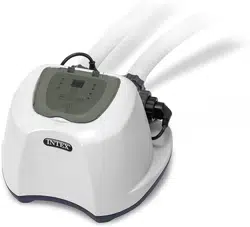
For illustrative purposes only.

(260PO) MODEL ECO7110&8110 SALTWATER SYSTEM ENGLISH 7.5” X 10.3” PANTONE 295U 05/15/2015
260
PO
SAVE THESE INSTRUCTIONS
English
Page 2
Warnings............................................................................... 3
Parts References................................................................... 4-5
Product Information & Specifications................................ 6
Setup Instructions................................................................ 7-11
Salt & Pool Water Volumes...................................................12
Intex Pools Salt Table........................................................... 13
Intex Pools Cyanuric Acid Table..........................................14
Intex Pools Operating Time Table........................................15-16
Non-Intex Pools Salt Table................................................... 17
Non-Intex Pools Cyanuric Acid Table................................. 17
Non-Intex Pools Operating Time Table................................17
Operating Instructions......................................................... 18-19
LED Code Chart.................................................................... 20
Maintenance.......................................................................... 21-23
Long Term Storage............................................................... 23
Pool Maintenance and Chemical Definitions..................... 24
Troubleshooting Guide........................................................ 25-26
General Aquatic Safety........................................................ 27
Limited Warranty................................................................... 28
TABLE OF CONTENTS

(260PO) MODEL ECO7110&8110 SALTWATER SYSTEM ENGLISH 7.5” X 10.3” PANTONE 295U 05/15/2015
260
PO
SAVE THESE INSTRUCTIONS
English
Page 3
WARNING
• To reduce the risk of injury, do not permit children to use this product. Always supervise
children and those with disabilities.
• Children must stay away from this product and all electrical cords.
• Assembly and disassembly by adults only.
• Risk of electric shock. Connect only to a grounding type receptacle, this product is provided
with a ground-fault circuit interrupter. If replacement of the plug or cord is needed, use only
identical replacement parts.
• Always unplug this product from the electrical outlet before removing, cleaning, servicing or
making any adjustment to the product.
• The unit is provided with a ground-fault circuit interrupter (GFCI). To test the GFCI, push the
test button. The GFCI should interrupt power. Push the reset button, power should be restored.
If the GFCI fails to operate in this manner. The GFCI is defective. If the GFCI interrupts power
to the pump without the test button being pushed, a ground current is flowing, indicating the
possibility of an electric shock. Do not use this pump. Disconnect the pump and have the
problem corrected by a qualified service representative before using.
• Do not bury the electrical cord. Locate the cord where it will not be damaged by lawn mowers,
hedge trimmers and other equipment.
• To reduce the risk of electric shock, the supply cord cannot be replaced. If the cord is
damaged, the appliance should be replaced immediately.
• To reduce the risk of electric shock, do not use extension cords, timers, plug adaptors or
converter plugs to connect unit to electric supply; provide a properly located outlet.
• Do not attempt to plug in or unplug this product while standing in water or when your hands
are wet.
• Do not use an appliance leakage current interrupter (ALCI) in place of a GFCI since the ALCI
will not protect people.
• Position this product away from the pool, so as to prevent children from climbing on it and
accessing the pool.
• Do not operate this product when the pool is occupied.
• This product is intended to be used only for the purposes described in the manual!
FAILURE TO FOLLOW THESE WARNINGS MAY RESULT IN PROPERTY
DAMAGE, ELECTRIC SHOCK, ENTANGLEMENT OR OTHER SERIOUS
INJURY OR DEATH.
IMPORTANT SAFETY RULES
Read, Understand and Follow All Instructions Carefully Before Installing and Using this Product.
READ AND FOLLOW ALL INSTRUCTIONS
For portable Above-Ground-Pools only
This product is for use with storable pools only. Do not use with permanently-installed pools. A
storable pool is constructed so that it is capable of being readily disassembled for storage and
reassembled to its original integrity. A permanently-installed pool is constructed in or on the
ground or in a building such that it cannot be readily disassembled for storage.
To reduce the risk of electric shock the pool must be installed no closer than 6 feet (1.8 m) from
any electrical outlet. Do not place portable appliances closer than 5 feet (1.5 m) from the pool.
These product warnings, instructions and safety rules provided with the product represent some common
risks of water recreation devices and do not cover all instances of risk and danger. Please use common
sense and good judgement when enjoying any water activity.
CAUTION
(260PO) MODEL ECO7110&8110 SALTWATER SYSTEM ENGLISH 7.5” X 10.3” PANTONE 295U 05/15/2015
260
PO
SAVE THESE INSTRUCTIONS
English
Page 4
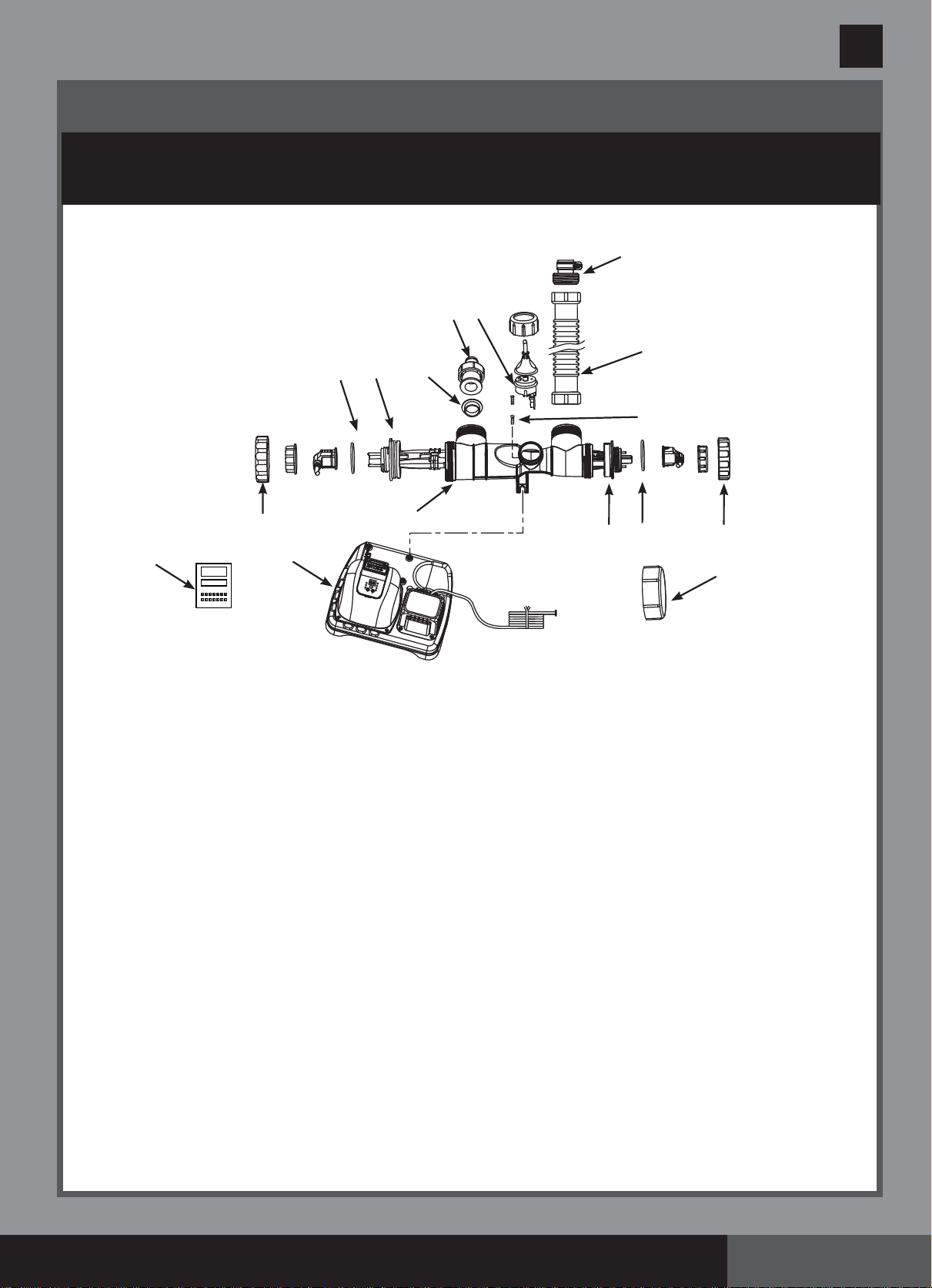
PARTS REFERENCE
Before assembling your product, please take a few minutes to check the contents
and become familiar with all the parts.
NOTE: Drawings for illustration purpose only. Actual product may vary. Not to scale.
Operation is subject to the following two conditions: (1) this device may not cause interference,
and (2) this device must accept any interference, including interference that may cause
undesired operation of the device.
Changes or modifications not expressly approved by the party responsible for compliance could
void the user’s authority to operate the equipment.
This equipment has been tested and found to comply with the limits for Class B digital device,
pursuant to part 15 of the FCC Rules. These limits are designed to provide reasonable
protection against harmful interference in a residential installation. This equipment generates,
uses and can radiate radio frequency energy and, if not installed and used in accordance with
the instructions, may cause harmful interference to radio communications. However, there is
no guarantee that interference will not occur in a particular installation. If this equipment does
cause harmful interference to radio or television reception, which can be determined by
turning the equipment off and on, the user is encouraged to try to correct the interference by
one or more of the following measures:
• Reorient or relocate the receiving antenna.
• Increase the separation between the equipment and the receiver.
• Connect the equipment into an outlet on a circuit different from that to which the receiver is
connected.
• Consult the dealer or an experienced radio/TV technician for help.
1
13
6
11
7
4
5
9
8
10
2
12
3
15
16
14
(260PO) MODEL ECO7110&8110 SALTWATER SYSTEM ENGLISH 7.5” X 10.3” PANTONE 295U 05/15/2015
260
PO
SAVE THESE INSTRUCTIONS
English
Page 5
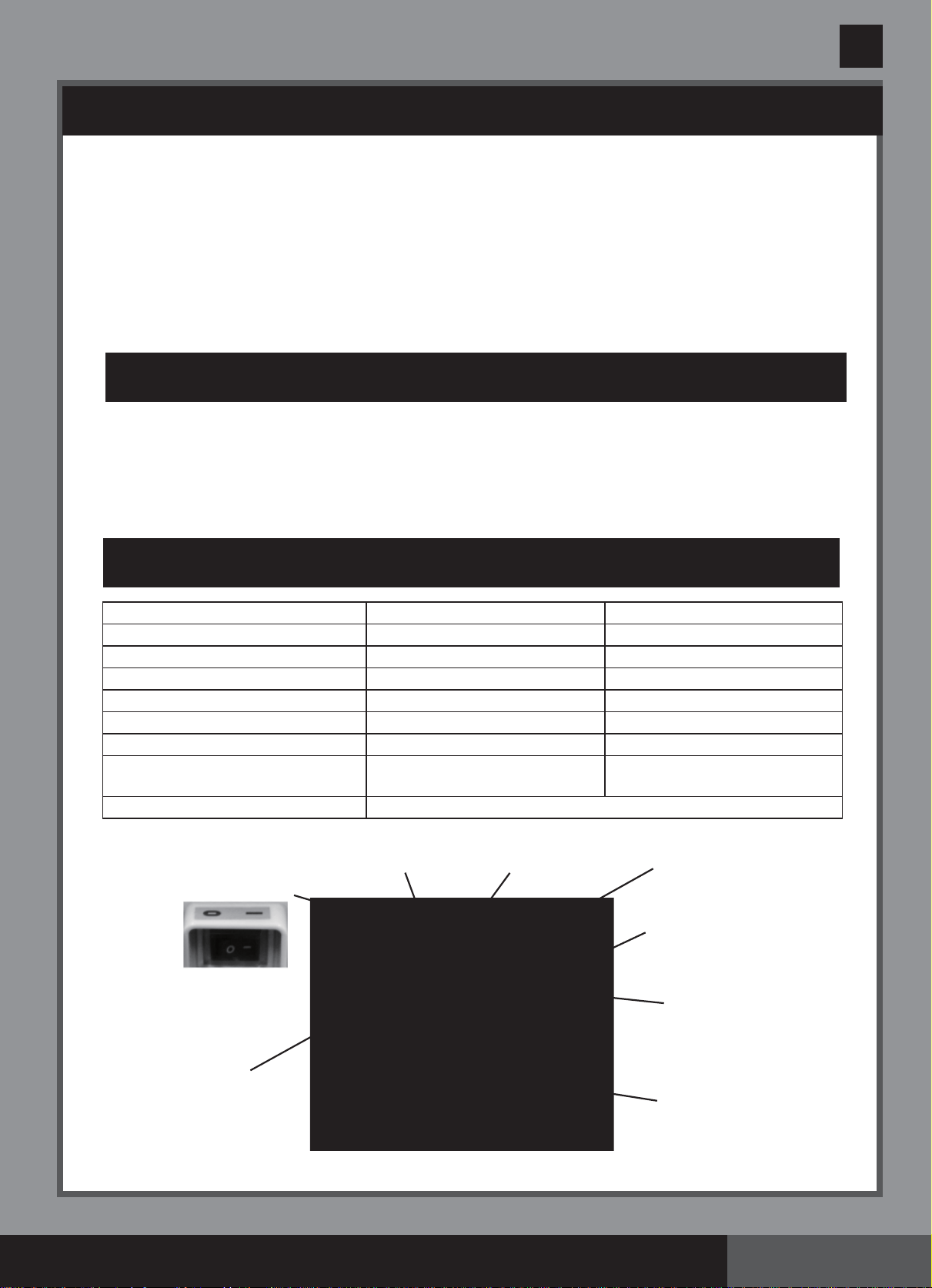
When ordering parts, be sure to quote the model number and part numbers.
REF. NO.
DESCRIPTION QTY.
SPARE PART NO.
COMMON
PARTS
PARTS FOR
CONNECTION
TO FILTER
PUMPS WITH
1-1/4” (32MM)
HOSE SIZE
ECO7110 ECO8110
1
ADAPTOR A WITH THREADED COLLAR (OPTIONAL)
1 10849 10849
2 SCREW 2 11519 11519
3 ELECTROLYTIC CELL HOUSING 1 11898 11903
4 E.C.O. ELECTRODE 1 11900 11905
5 TITANIUM ELECTRODE 1 11899 11904
6 FLOW SENSOR 1 11460 11460
7
CONNECTOR HOSE WITH THREADED FITTINGS
1 10720 10720
8
THREADED ADAPTOR B (OPTIONAL)
1 10722 10722
9
CELL COVER
2 11131 11131
10 ELECTROLYTIC CELL NUT 1 11582 11432
11 L-SHAPE O-RING 2 11228 11228
12 TITANIUM ELECTRODE O-RING 1 11585 11515
13 CONTROL STATION 1 11901 11907
14 TEST STRIPS 1 19635 19635
15 TITANIUM ELECTRODE O-RING 1 11585 11585
16 ELECTROLYTIC CELL NUT 1 11582 11582
PARTS REFERENCE (continued)
Before assembling your product, please take a few minutes to check the contents
and become familiar with all the parts.
(260PO) MODEL ECO7110&8110 SALTWATER SYSTEM ENGLISH 7.5” X 10.3” PANTONE 295U 05/15/2015
260
PO
SAVE THESE INSTRUCTIONS
English
Page 6
This product is specially designed for above ground pools. It will destroy the bacteria, oxidize
bather organics and control algae, which provide a safe, clean and comfortable swimming pool.
Common salt (sodium chloride) is made up of two elements, sodium and chloride. During the
installation of your Saltwater System, a measured quantity of salt is dissolved in the pool water
to make it slightly salty. The pool water flows through the Saltwater System ’s electrolytic cell to
produce chlorine. The chlorine dissolves in the water and instantly starts destroying bacteria and
algae. It also oxidizes all other organic materials.
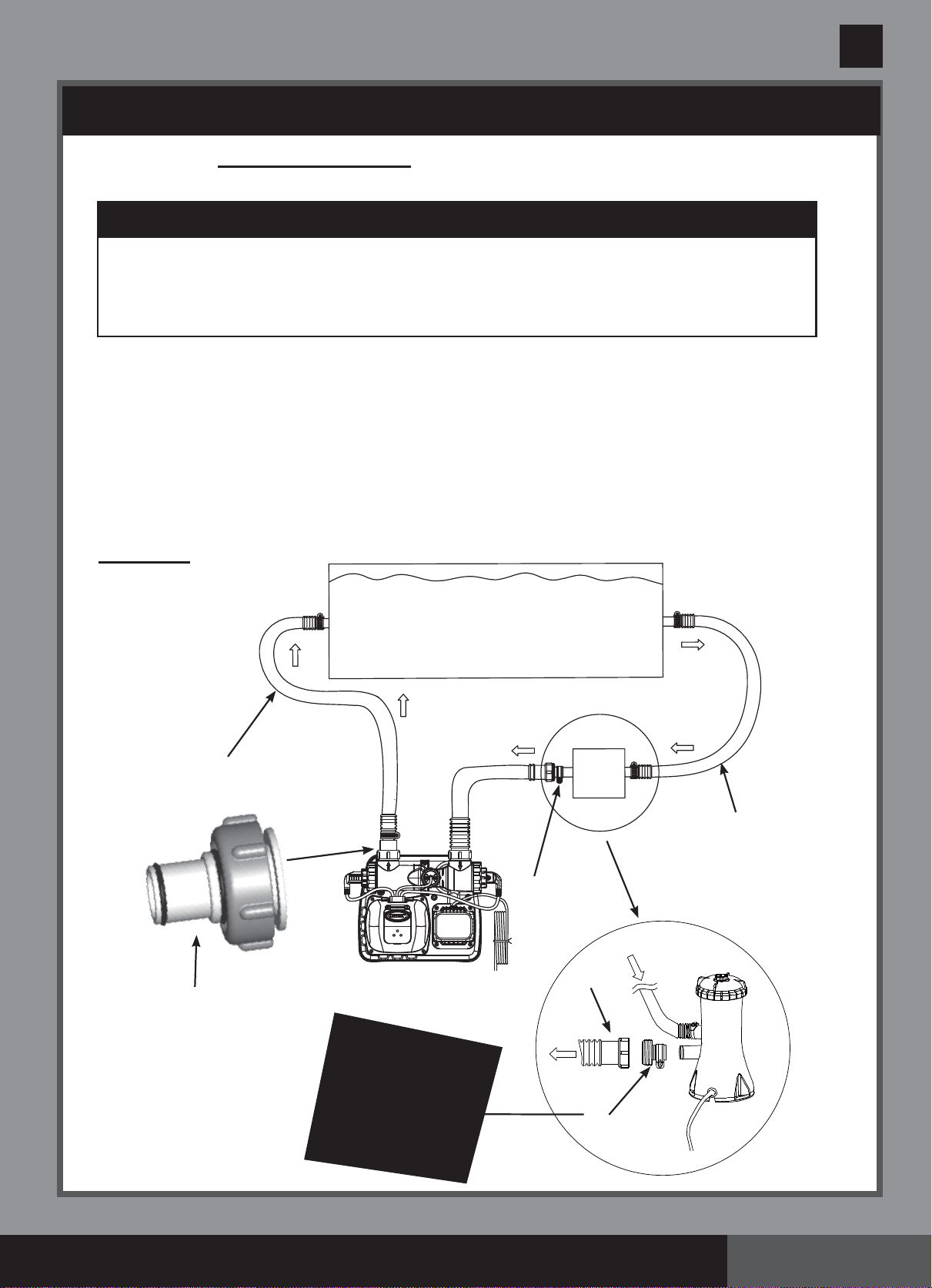
HOW THE CHLORINE IS GENERATED
PRODUCT SPECIFICATIONS
Hose from
Filter Pump
Flow Sensor
Electronic
Control Station
Power Supply
Electrolytic Cell
Power Switch
Hose Returning
Water to Pool
E.C.O.
Electrodes
The Electrocatalytic Oxidation (E.C.O.) is an Advanced Oxidation Processes (AOPs). When
direct current is applied to the electrocatalytic oxidation electrodes, water will be discharged to
generate “hydroxyl radicals”. The hydroxyl radical is a powerful oxidant, which oxidizes organic
contaminants, and destroys bacteria and algae. Hydroxyl radicals in combination with free
available chlorine provide the strongest and safest pool water sanitation.
HOW THE ELECTROCATALYTIC OXIDATION WORKS
Model: ECO7110 ECO8110
Power 110 - 120 Volt AC 110 - 120 Volt AC
Amperage 0.6 A 1.1 A
Wattage: 65 W 125 W
Ideal Salt Level: 3000 ppm (parts per million) 3000 ppm (parts per million)
E.C.O. Cell Output Current: 500 mA 800 mA
Maximum Chlorine Output/hour: 5 grams/hour 12 grams/hour
Filter pump
minimum flow rate: 700 ~ 3000 gallons/hour
(2650 - 11355 liters/hour)
700 ~ 3000 gallons/hour
(2650 - 11355 liters/hour)
Limited Warranty: see “Limited Warranty”
(260PO) MODEL ECO7110&8110 SALTWATER SYSTEM ENGLISH 7.5” X 10.3” PANTONE 295U 05/15/2015
260
PO
SAVE THESE INSTRUCTIONS
English
Page 7
SETUP INSTRUCTIONS
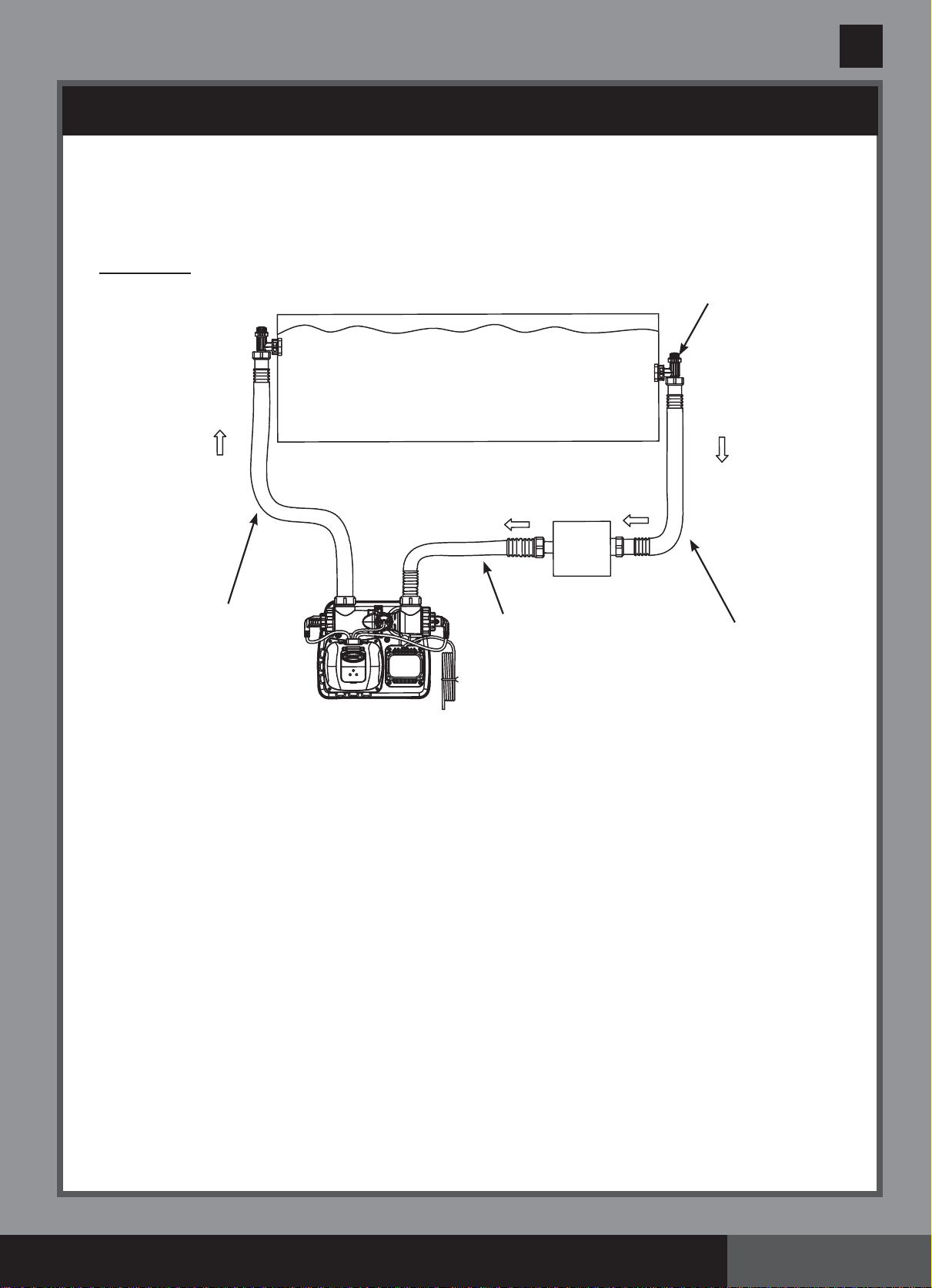
1. Assemble the above-ground-pool (AGP) and its filter pump according to their installation
instructions.
2. Take the Saltwater System and its accessories out of the packaging.
3. Place the Saltwater System in line after the filter pump.
4. Connect the connector hose (7) to the Saltwater System inlet.
Connecting the system to pump and pool with 1-1/4” (32mm) connections/
hoses:
The saltwater system features 1-1/2” (38mm) connections. It is accordingly supplied
with adaptors A (1) and B (8) for connecting to the small 1-1/4” (32mm) diameter
connections/hoses. Install as follows:
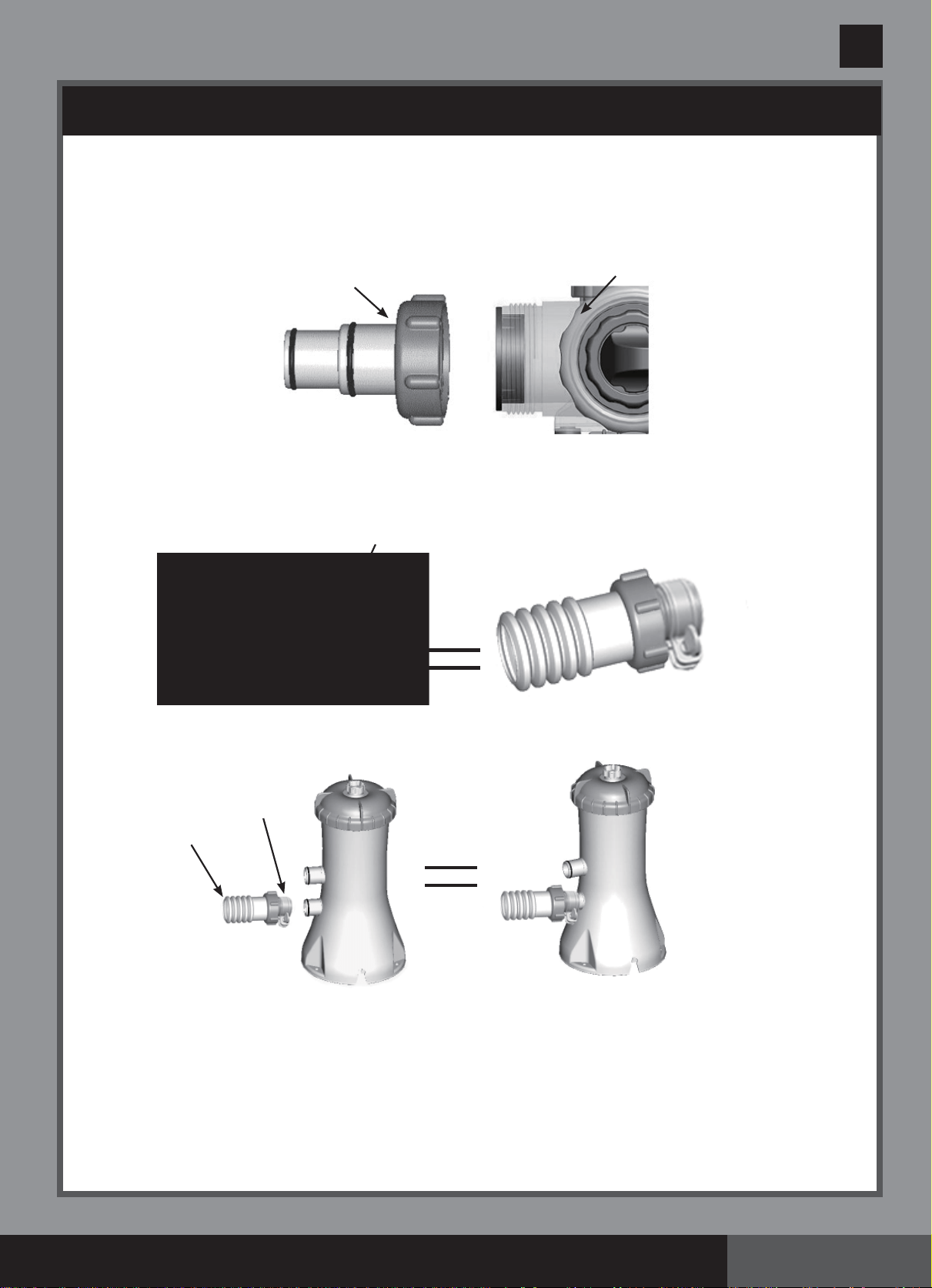
Drawing #1
IMPORTANT
• The Saltwater System requires a separate filter pump [700~3000 gph (2650~
11355 lph)] to drive the water and function properly.
• The Saltwater System must be installed as the last piece of pool equipment in the
water return line to the pool as displayed in Drawing #1. This location extends the
life of the titanium plates.
WATER TO
POOL
WATER FROM
POOL
ID 1-1/4” (32mm)
HOSE
ID 1-1/4”
(32mm) HOSE
1
8
8
7
SALTWATER SYSTEM WITH E.C.O.
(ELECTROCATALYTIC OXIDATION)
FILTER
PUMP
SWIMMING POOL
Please visit www.intexcorp.com for the latest instructional video on the
installation and operation of this product.
(260PO) MODEL ECO7110&8110 SALTWATER SYSTEM ENGLISH 7.5” X 10.3” PANTONE 295U 05/15/2015
260
PO
SAVE THESE INSTRUCTIONS
English
Page 8
SETUP INSTRUCTIONS (continued)
1. Go directly to step 2 if your pool is empty. If your above-ground-pool is filled with water,
unscrew the strainer grids from the strainer connectors and insert the black hat-like plugs
into the connectors, before installing the saltwater pool system.
2. Connect the adaptor A (1) to the electrolytic cell (3) outlet as shown in Drawing #1. Tighten
securely.
3. Disconnect the water return hose from the filter pump connection and connect it to the
adaptor A (1) on the Saltwater System with a hose clamp. (see Drawing #1)
4. Connect adaptor B (8) to the connector hose (7). Tighten securely. (see Drawing #1)
5. Connect adaptor B (8) to filter pump outlet (lower connection). Tighten securely.
6. Remove the black hat-like plugs that prevent water from flowing out of the pool. Now, return
the strainer grids to the strainer connectors.
7
8
1
3
7
8
Filter
Pump
(260PO) MODEL ECO7110&8110 SALTWATER SYSTEM ENGLISH 7.5” X 10.3” PANTONE 295U 05/15/2015
260
PO
SAVE THESE INSTRUCTIONS
English
Page 9
SETUP INSTRUCTIONS (continued)
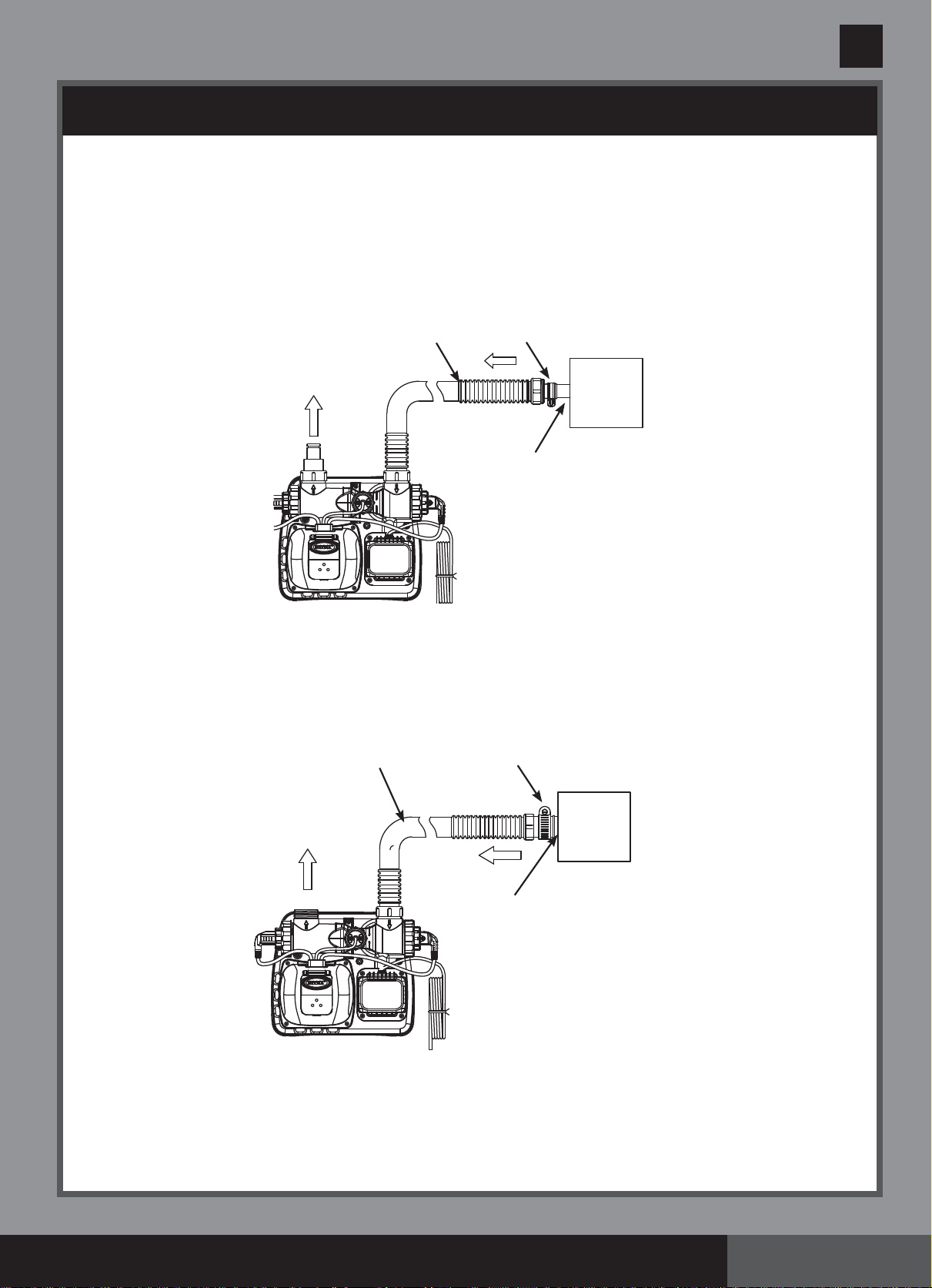
Connecting the system to pump and pool with 1-1/2” (38mm) connections/hoses:
Pump and pool with 1-1/2” (38mm) connections do not require the adaptors A (1) or B (8).
Install as follows:
Drawing #2
1. Go directly to step 2 if your pool is empty. If your above-ground-pool is filled with water,
close the plunger valves before installing the Saltwater System.
2. Disconnect the water return hose from the filter pump connection and connect it to the
Saltwater System outlet.
3. Connect the connector hose (7) to the filter pump outlet connection.
4. Open the plunger valves to allow the water to flow.
FILTER
PUMP
ID 1-1/2” (38mm)
HOSE
ID 1-1/2” (38mm)
HOSE
SALTWATER SYSTEM WITH E.C.O.
(ELECTROCATALYTIC OXIDATION)
SWIMMING POOL
WATER TO
POOL
PLUNGER
VALVE
WATER FROM
POOL
7
(260PO) MODEL ECO7110&8110 SALTWATER SYSTEM ENGLISH 7.5” X 10.3” PANTONE 295U 05/15/2015
260
PO
SAVE THESE INSTRUCTIONS
English
Page 10
SETUP INSTRUCTIONS (continued)
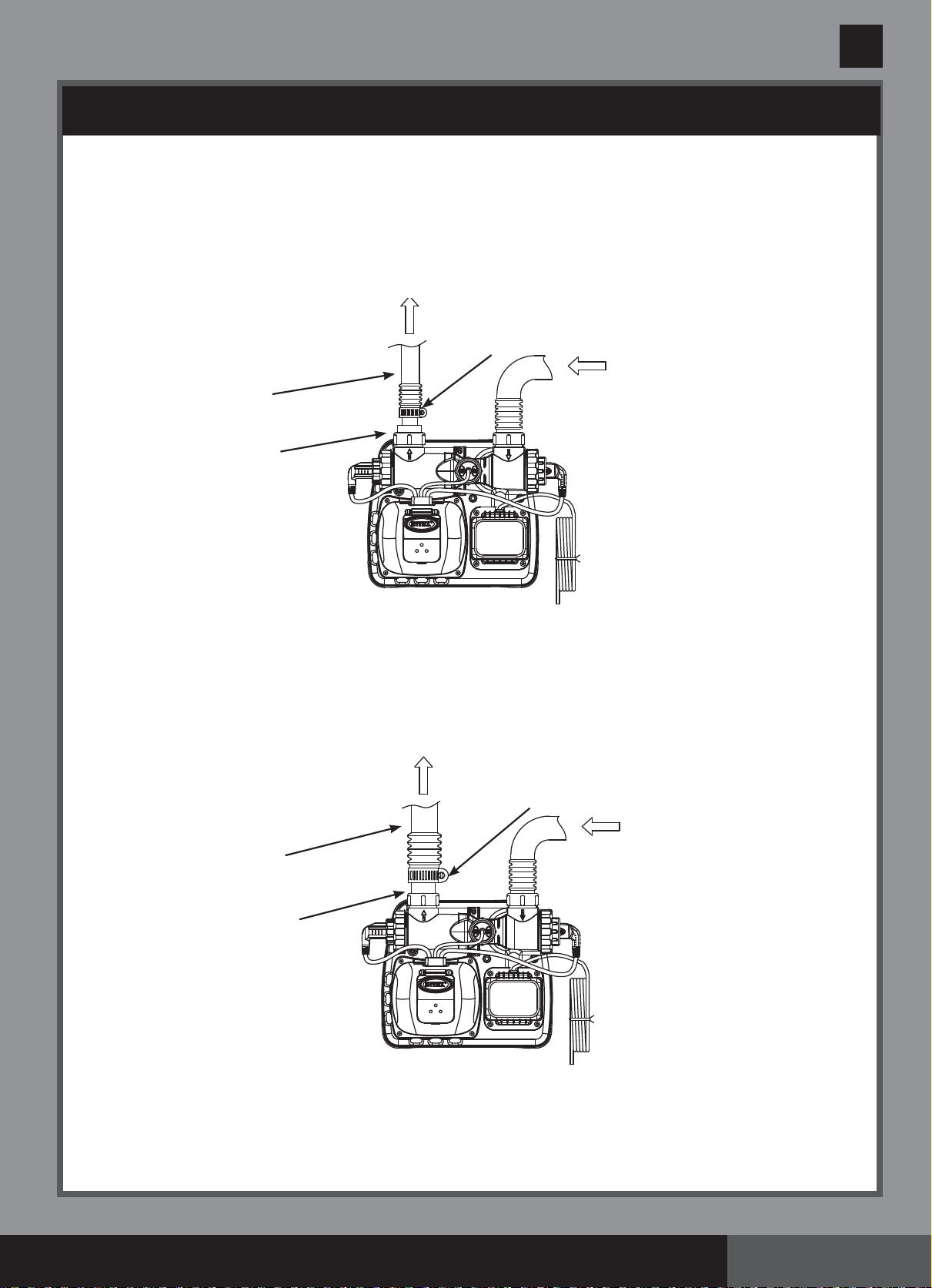
Connecting the system to other types of pump (with different type of thread or no
thread):
The Saltwater System can also be adapted to other filter pumps with different thread or those
without a thread on the connection.
Connection to 1-1/4” (32mm) hose:
1. Connect one end of adaptor B (8) to the connector hose (7). Tighten securely.
2. Now, connect the other end of adaptor B (8) to the filter pump outlet. Tighten securely.
Connection to 1-1/2” (38mm) hose with clamp:
1. Connect the connector hose (7) to the filter pump outlet connection with a large hose
clamp. Tighten securely.
ID 1-1/4” (32mm)
CONNECTION
SALTWATER SYSTEM WITH E.C.O.
(ELECTROCATALYTIC OXIDATION)
FILTER
PUMP
7
8
LARGE HOSE CLAMP
SALTWATER SYSTEM WITH E.C.O.
(ELECTROCATALYTIC OXIDATION)
7
FILTER
PUMP
ID 1-1/2” (38mm)
CONNECTION
(260PO) MODEL ECO7110&8110 SALTWATER SYSTEM ENGLISH 7.5” X 10.3” PANTONE 295U 05/15/2015
260
PO
SAVE THESE INSTRUCTIONS
English
Page 11
SETUP INSTRUCTIONS (continued)
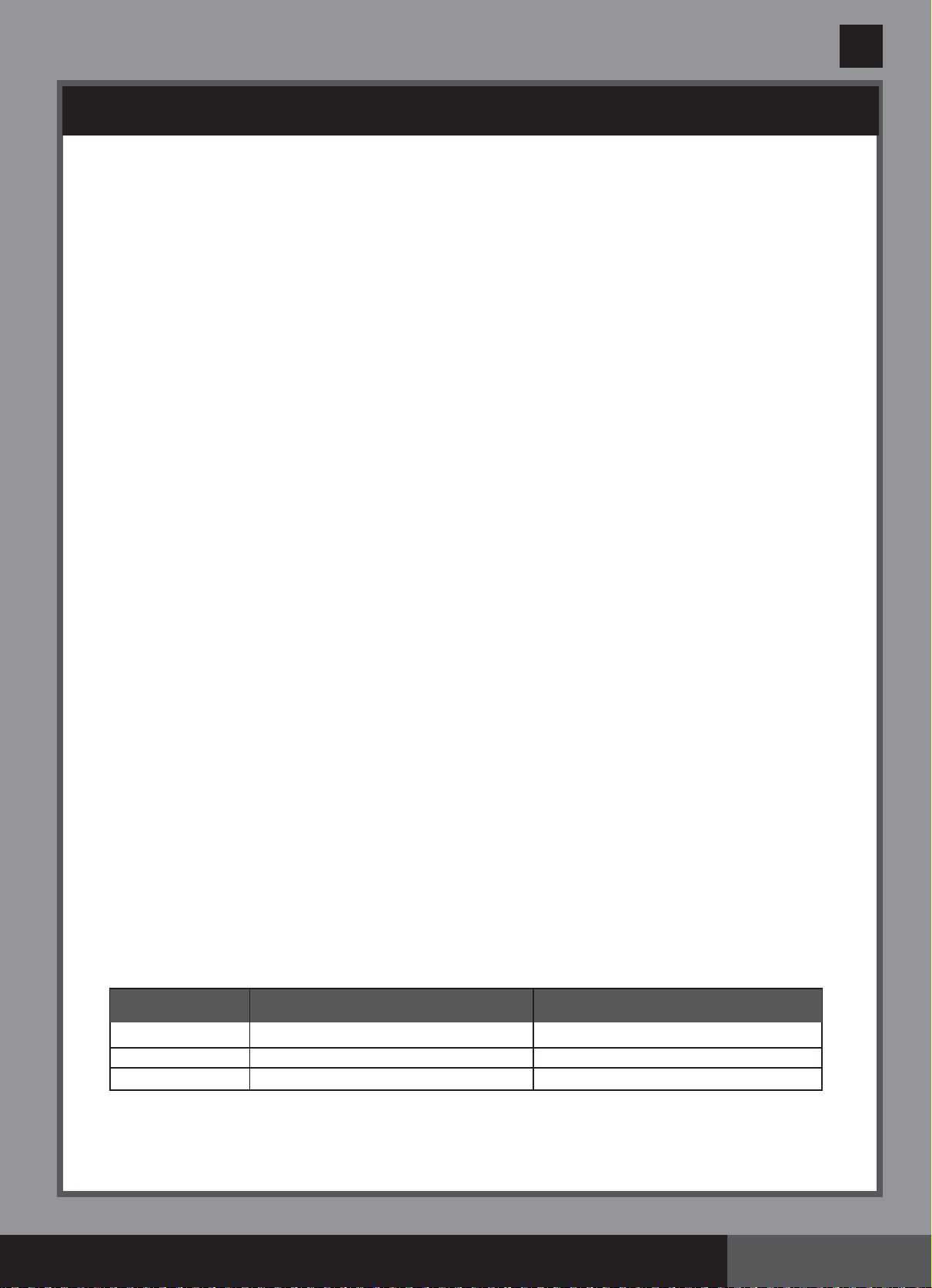
Connecting the system to other types of pool
After you have connected the Saltwater System to the pump, connect it to the pool.
This is depicted in Drawings #1 and #2.
Following are the common connection types:
Connection to 1-1/4” (32mm) connectors:
1. Connect the adaptor A (1) to the electrolytic cell (3) outlet. Tighten securely.
2. The adapter A (1) is now fitted to the Saltwater System. The following step is to connect the
water return hose to the adaptor A (1) with a hose clamp.
Connection to 1-1/2” (38mm) connectors without thread:
1. Connect the adaptor A (1) to the electrolytic cell (3) outlet. Tighten securely.
2. With the adaptor A (1) fixed to the Saltwater System, connect the water return hose to the
adaptor, using a large hose clamp.
SALTWATER SYSTEM WITH E.C.O.
(ELECTROCATALYTIC OXIDATION)
HOSE CLAMP
1
ID 1-1/4” (32mm)
HOSE
SALTWATER SYSTEM WITH E.C.O.
(ELECTROCATALYTIC OXIDATION)
LARGE HOSE CLAMP
1
ID 1-1/2” (38mm)
HOSE
(260PO) MODEL ECO7110&8110 SALTWATER SYSTEM ENGLISH 7.5” X 10.3” PANTONE 295U 05/15/2015
260
PO
SAVE THESE INSTRUCTIONS
English
Page 12
SALT & POOL WATER VOLUMES
• Which kind of salt to use:
Use only Sodium Chloride Salts
Use only sodium chloride (NaCl) salt that is at least 99.8% pure. It is also acceptable to use
water conditioning salt pellets (the compressed forms of evaporated salt). However, it will take a
longer time for them to dissolve.
Do not use iodized or yellow (yellow prussiate of soda) colored salt.
Salt is added to the pool water and the electrolytic cell uses the salt to create chlorine. The purer
the salt the better the performance of the electrolytic cell.
• Optimum Salt Levels
The ideal salt level in the pool water is between 2500-3500 ppm (parts per million). The optimal
level is 3000 ppm.
A too low salt level will reduce the efficiency of the Saltwater System and result in low chlorine
production. A high salt level may generate a salty taste to the pool water (this may occur at a salt
level above 3500-4000ppm). Too high a salt level may damage the power supply and cause
corrosion to the pool metal fixtures and accessories. The Salt Table page of this manual, shows
the correct dosage of salt needed. The salt in the pool is constantly recycled. The loss of salt is
due only to pool water being physically removed from the pool. Salt is not lost due to
evaporation.
• Adding Salt
1. Switch the filter pump on to start the water circulation.
2. Keep the Saltwater System turned off.
3. Determine the amount of salt to be added (see “Salt Table”).
4. Evenly spread the proper amount of salt around the inside perimeter of the pool.
5. Avoid clogging the filter. Do not add salt through the skimmer.
6. Brush the pool bottom to speed up the dissolving process. Do not allow salt to pile up on the
bottom of the pool. Run the filter pump 24 consecutive hours to thoroughly dissolve the salt.
7. After 24 hours and if all the salt is dissolved, turn on the Saltwater System, press button
until you hear a “beep”, code “00” flashing and set the saltwater pool system to desired
operating time (see “Operating Time Table”).
• Removing Salt
If too much salt has been added, the unit will beep and display “Code 92” (see “Alarm Codes”).
You will need to lower the salt concentration. The only way to do so, is to partially drain the pool
and refill it with fresh water. Drain and refill approximately 20% of the pool’s water until the “Code
92” disappears.
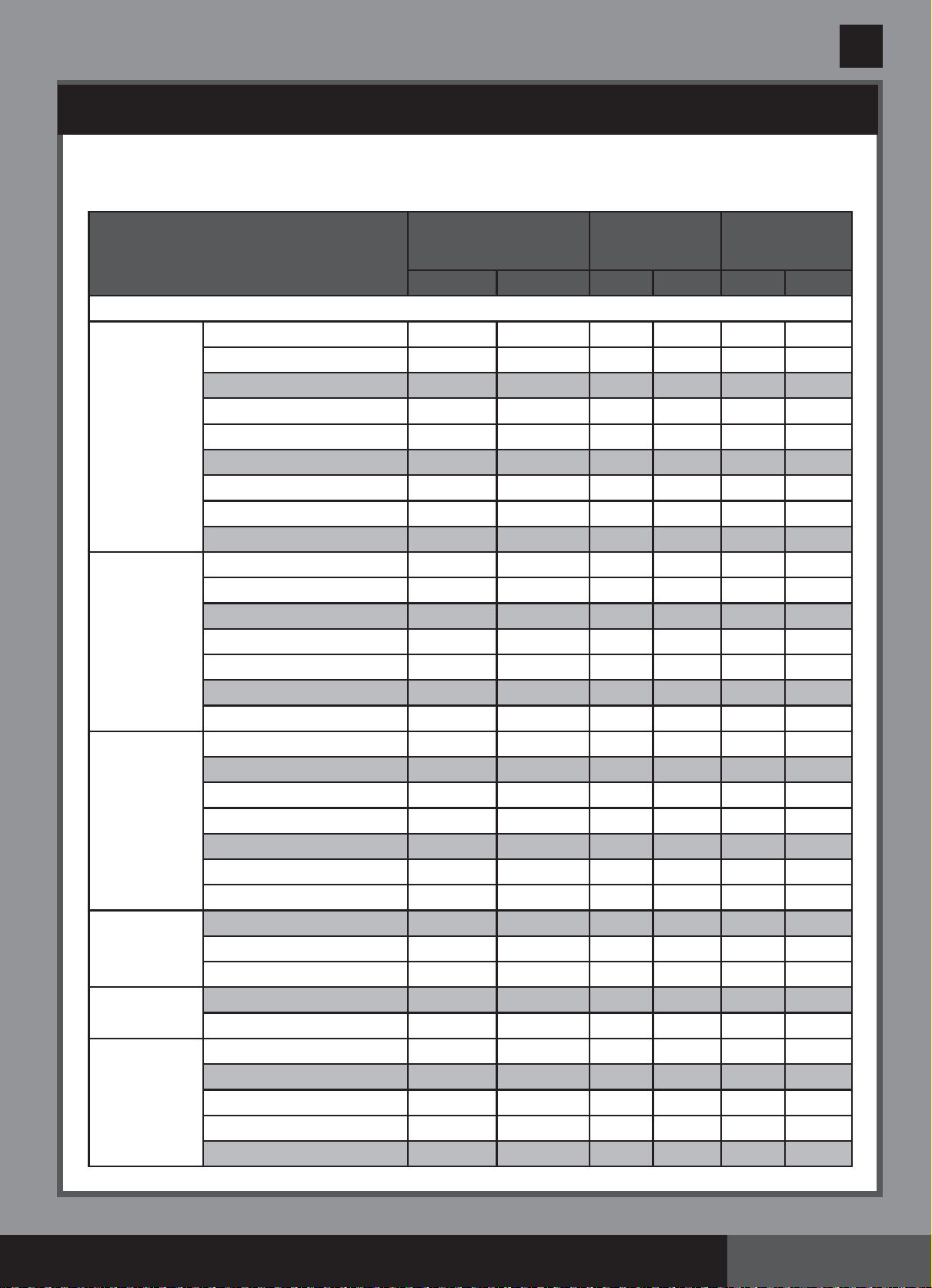
• Pool Volume Calculation
Rectangular
Length x Width x Average Depth x 7.5 Length x Width x Average Depth
Circular
Length x Width x Average Depth x 5.9 Length x Width x Average Depth x 0.79
Oval
Length x Width x Average Depth x 6.0 Length x Width x Average Depth x 0.80
Types of Pool
Gallons
(pool size in feet)
Cubic Meters
(pool size in meters)
(260PO) MODEL ECO7110&8110 SALTWATER SYSTEM ENGLISH 7.5” X 10.3” PANTONE 295U 05/15/2015
260
PO
SAVE THESE INSTRUCTIONS
English
Page 13
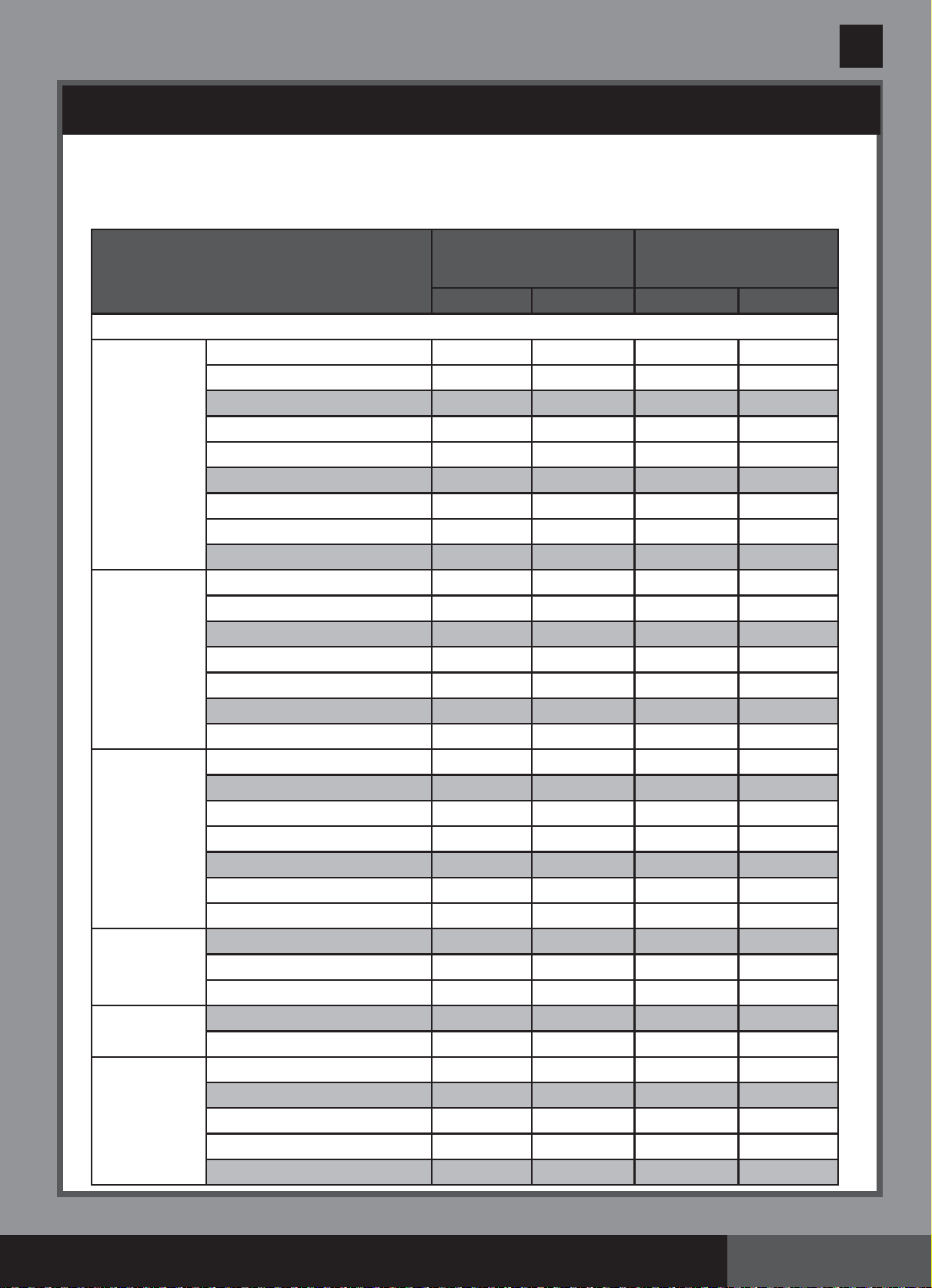
INTEX POOLS SALT TABLE
This table shows the amount of salt needed to achieve and maintain the optimal 3000 ppm
salt level.
Pool Size
Water Capacity (Calculated at
90% for Frame Pool and 80%
for Easy Set & Oval Pool)
Salt Needed for
Startup
3.0g/L (3000ppm)
Salt Needed when
Low Salt Detected
(CODE “91”)
(Gals)
(Liters) (Lbs) (Kgs) (Lbs) (Kgs)
INTEX ABOVE GROUND POOLS (AGP’s)
EASY SET
®
POOL
CIRCULAR
METAL
FRAME POOL
ULTRA
FRAME
®
POOL
SEQUOIA
SPIRIT
®
POOL SET
OVAL FRAME
POOL
RECT. ULTRA
FRAME POOL
15' x 33" (457cm x 84cm)
15' x 36" (457cm x 91cm)
15' x 42" (457cm x 107cm)
15' x 48" (457cm x 122cm)
16' x 42" (488cm x 107cm)
16' x 48" (488cm x 122cm)
16' x 52" (488cm x 132cm)
18’ x 42” (549cm x 107cm)
18’ x 48” (549cm x 122cm)
15' x 36" (457cm x 91cm)
15' x 42" (457cm x 107cm)
15' x 48" (457cm x 122cm)
16' x 48" (488cm x 122cm)
18' x 48" (549cm x 122cm)
21' x 52" (640cm x 132cm)
24' x 52" (732cm x 132cm)
16' x 48" (488cm x 122cm)
18’ x 48” (549cm x 122cm)
18' x 52" (549cm x 132cm)
20’ x 48” (610cm x 122cm)
22’ x 52” (671cm x 132cm)
24’ x 52” (732cm x 132cm)
26’ x 52” (792cm x 132cm)
15’8” x 49” (478cm x 124cm)
16'8" x 49" (508cm x 124cm)
18'8" x 53" (
569
cm x 135cm)
18' x 10' x 42" (549cm x 305cm x 107cm)
20' x 12' x 48" (610cm x 366cm x 122cm)
15’ x 9’ x 48” (457cm x 274cm x 122cm)
18' x 9' x 52" (549cm x 274cm x 132cm)
20 x 10’ x 52” (610cm x 305cm x 132cm)
24' x 12' x 52" (732cm x 366cm x 132cm)
32' x 16' x 52" (975cm x 488cm x 132cm)
2587 9792 65 30 20 10
2822 10681 65 30 20 10
3284 12430 80 35 20 10
3736 14141 95 45 25 10
3754 14209 95 45 25 10
4273 16173 110 50 30 15
4614 17464 115 50 30 15
4786 18115 120 55 30 15
5455 20647 135 60 35 15
3282 12422 80 35 20 10
3861 14614 100 45 25 10
4440 16805 110 50 30 15
5061 19156 125 55 35 15
6423 24311 160 75 40 20
9533 36082 240 110 60 30
12481 47241 310 140 80 35
5061 19156 125 55 35 15
6423 24311 160 75 40 20
6981 26423 175 80 45 20
7947 30079 210 90 50 25
10472 39637 260 120 65 30
12481 47241 310 140 80 35
14667 55515 365 165 90 40
4440 16805 110 50 30 15
5061 19156 125 55 35 15
6981 26423 175 80 45 20
2885 10920 70 30 20 10
4393 16628 110 50 30 15
3484 13187 90 40 25 10
4545 17203 115 50 30 15
5835 22085 145 65 40 20
8403 31805 210 95 55 25
14364 54368 360 165 90 40
(260PO) MODEL ECO7110&8110 SALTWATER SYSTEM ENGLISH 7.5” X 10.3” PANTONE 295U 05/15/2015
260
PO
SAVE THESE INSTRUCTIONS
English
Page 14
INTEX POOLS CYANURIC ACID TABLE
Pool Size
Water Capacity (Calculated at
90% for Frame Pool and 80%
for Easy Set & Oval Pool)
Cyanuric Acid Needed for
Startup
0.03g/L (30ppm)
(Gals)
(Liters) (Lbs) (Kgs)
INTEX ABOVE GROUND POOLS (AGP’s)
EASY SET
®
POOL
CIRCULAR
METAL
FRAME POOL
ULTRA
FRAME
®
POOL
SEQUOIA
SPIRIT
®
POOL SET
OVAL FRAME
POOL
RECT. ULTRA
FRAME POOL
15’ x 33” (457cm x 84cm)
15’ x 36” (457cm x 91cm)
15’ x 42” (457cm x 107cm)
15’ x 48” (457cm x 122cm)
16’ x 42” (488cm x 107cm)
16’ x 48” (488cm x 122cm)
16’ x 52” (488cm x 132cm)
18’ x 42” (549cm x 107cm)
18’ x 48” (549cm x 122cm)
15’ x 36” (457cm x 91cm)
15’ x 42” (457cm x 107cm)
15’ x 48” (457cm x 122cm)
16’ x 48” (488cm x 122cm)
18’ x 48” (549cm x 122cm)
21’ x 52” (640cm x 132cm)
24’ x 52” (732cm x 132cm)
16’ x 48” (488cm x 122cm)
18’ x 48” (549cm x 122cm)
18’ x 52” (549cm x 132cm)
20’ x 48” (610cm x 122cm)
22’ x 52” (671cm x 132cm)
24’ x 52” (732cm x 132cm)
26’ x 52” (792cm x 132cm)
15’8” x 49” (478cm x 124cm)
16’8” x 49” (508cm x 124cm)
18’8” x 53” (
569
cm x 135cm)
18’ x 10’ x 42” (549cm x 305cm x 107cm)
20’ x 12’ x 48” (610cm x 366cm x 122cm)
15’ x 9’ x 48” (457cm x 274cm x 122cm)
18’ x 9’ x 52” (549cm x 274cm x 132cm)
20 x 10’ x 52” (610cm x 305cm x 132cm)
24’ x 12’ x 52” (732cm x 366cm x 132cm)
32’ x 16’ x 52” (975cm x 488cm x 132cm)
2587 9792 0.6 0.3
2822 10681 0.7 0.3
3284 12430 0.8 0.4
3736 14141 0.9 0.4
3754 14209 0.9 0.4
4273 16173 1.1 0.5
4614 17464 1.2 0.5
4786 18115 1.2 0.5
5455 20647 1.4 0.6
3282 12422 0.8 0.4
3861 14614 1.0 0.4
4440 16805 1.1 0.5
5061 19156 1.3 0.6
6423 24311 1.6 0.7
9533 36082 2.4 1.1
12481 47241 3.1 1.4
5061 19156 1.3 0.6
6423 24311 1.6 0.7
6981 26423 1.7 0.8
7947 30079 2.0 0.9
10472 39637 2.6 1.2
12481 47241 3.1 1.4
14667 55515 3.7 1.7
4440 16805 1.1 0.5
5061 19156 1.3 0.6
6981 26423 1.7 0.8
2885 10920 0.7 0.3
4393 16628 1.1 0.5
3484 13187 0.9 0.4
4545 17203 1.1 0.5
5835 22085 1.5 0.7
8403 31805 2.1 1.0
14364 54368 3.6 1.6
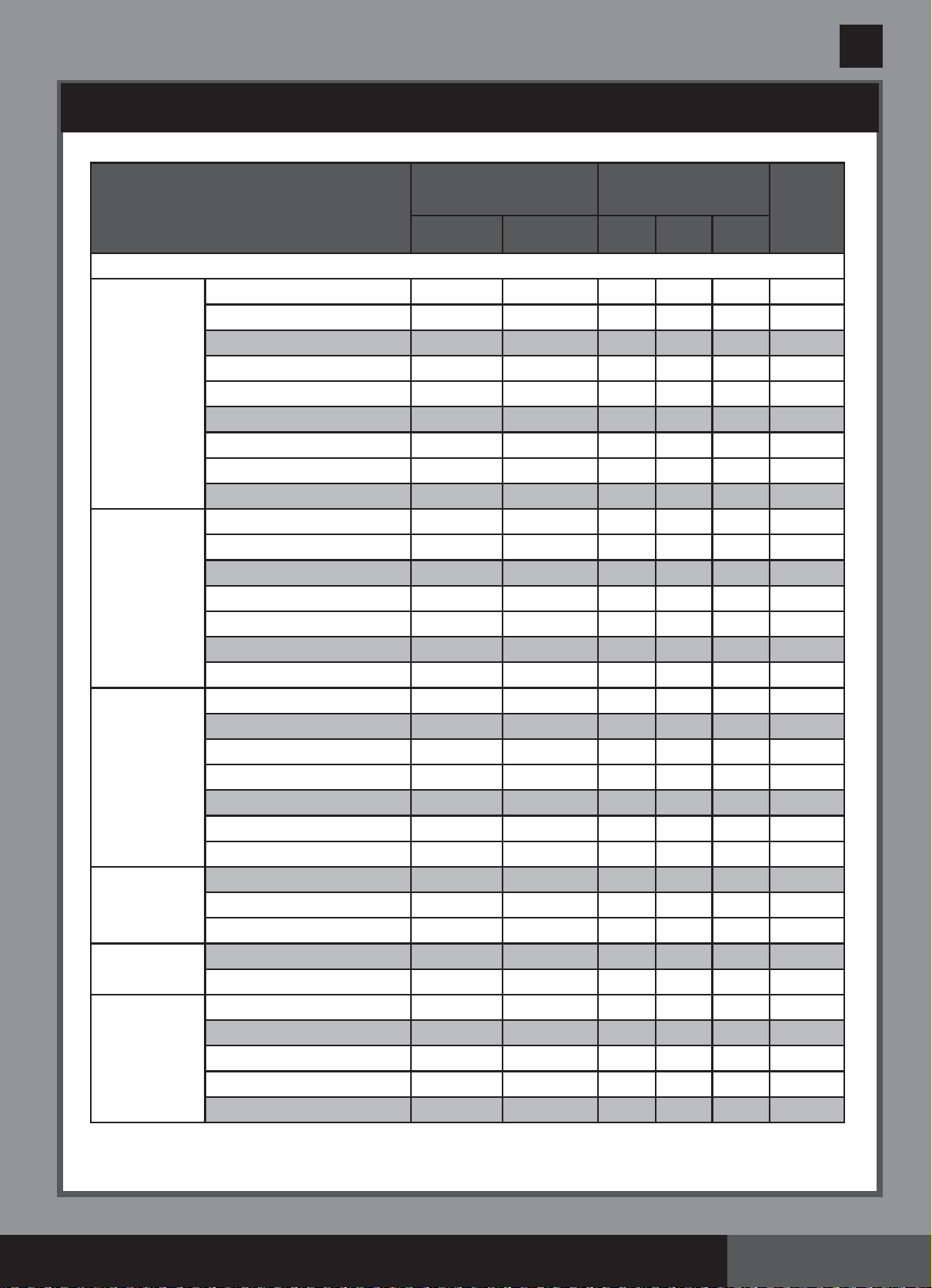
Cyanuric acid is a chemical that reduces the loss of chlorine in water due to ultraviolet rays. To maintain the pool water clear
and clean, and to maximize the performance of the device, add cyanuric acid to the pool. We recommend that the cyanuric
acid level be maintained at approximately 1% of the salt, i.e. 100 Lbs (45 Kgs) salt x1% = 1 Lbs (0.45 Kgs) cyanuric acid.
If the pool water is dirty, filthy or grimy, DO NOT add chlorine stabilizer (cyanuric acid) as this will slowdown the sanitation
time of the device. Under this condition you must BOOST your pool water, refer to BOOST cycle steps. Once the pool water
has been restored to clear and clean conditions you may add cyanuric acid.
(260PO) MODEL ECO7110&8110 SALTWATER SYSTEM ENGLISH 7.5” X 10.3” PANTONE 295U 05/15/2015
260
PO
SAVE THESE INSTRUCTIONS
English
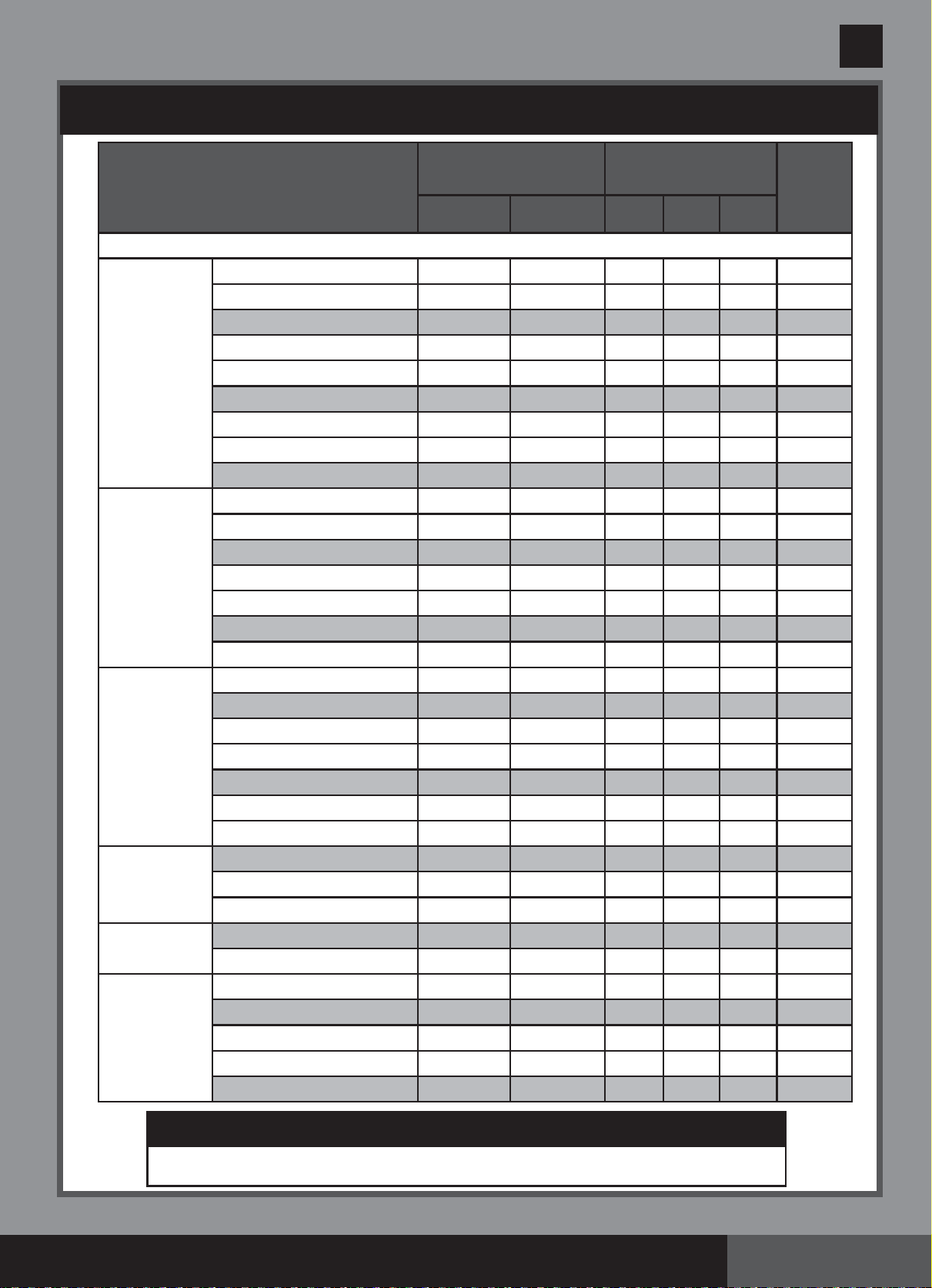
INTEX POOLS OPERATING TIME TABLE (WITH CYANURIC ACID)
Pool Size
Water Capacity (Calculated at
90% for Frame Pool and 80%
for Easy Set & Oval Pool)
Operating Time (hours)
at different ambient/air
temperatures
Intex Filter
pump
Operating
Time
(hours)
(Gals) (Liters)
10 - 19°C
(50 - 66°F)
20 - 28°C
(68 - 82°F)
29 - 36°C
(84 - 97°F)
MODEL: ECO7110
EASY SET
®
POOL
CIRCULAR
METAL
FRAME POOL
ULTRA
FRAME
®
POOL
SEQUOIA
SPIRIT
®
POOL SET
OVAL FRAME
POOL
RECT. ULTRA
FRAME POOL
15’ x 33” (457cm x 84cm)
15’ x 36” (457cm x 91cm)
15’ x 42” (457cm x 107cm)
15’ x 48” (457cm x 122cm)
16’ x 42” (488cm x 107cm)
16’ x 48” (488cm x 122cm)
16’ x 52” (488cm x 132cm)
18’ x 42” (549cm x 107cm)
18’ x 48” (549cm x 122cm)
15’ x 36” (457cm x 91cm)
15’ x 42” (457cm x 107cm)
15’ x 48” (457cm x 122cm)
16’ x 48” (488cm x 122cm)
18’ x 48” (549cm x 122cm)
21’ x 52” (640cm x 132cm)
24’ x 52” (732cm x 132cm)
16’ x 48” (488cm x 122cm)
18’ x 48” (549cm x 122cm)
18’ x 52” (549cm x 132cm)
20’ x 48” (610cm x 122cm)
22’ x 52” (671cm x 132cm)
24’ x 52” (732cm x 132cm)
26’ x 52” (792cm x 132cm)
15’8” x 49” (478cm x 124cm)
16’8” x 49” (508cm x 124cm)
18’8” x 53” (
569
cm x 135cm)
18’ x 10’ x 42” (549cm x 305cm x 107cm)
20’ x 12’ x 48” (610cm x 366cm x 122cm)
15’ x 9’ x 48” (457cm x 274cm x 122cm)
18’ x 9’ x 52” (549cm x 274cm x 132cm)
20 x 10’ x 52” (610cm x 305cm x 132cm)
24’ x 12’ x 52” (732cm x 366cm x 132cm)
32’ x 16’ x 52” (975cm x 488cm x 132cm)
2587
2822
3284
3736
3754
4273
4614
4786
5455
3282
3861
4440
5061
6423
9533
12481
5061
6423
6981
7947
10472
12481
14667
4440
5061
6981
2885
4393
3484
4545
5835
8403
14364
9792
10681
12430
14141
14209
16173
17464
18115
20647
12422
14614
16805
19156
24311
36082
47241
19156
24311
26423
30079
39637
47241
55515
16805
19156
26423
10920
16628
13187
17203
22085
31805
54368
3
3
3
4
4
4
5
5
6
3
4
5
5
7
-
-
5
7
-
-
-
-
-
5
5
-
3
5
3
5
6
-
-
3
4
4
5
5
5
6
6
7
4
5
6
6
8
-
-
6
8
-
-
-
-
-
6
6
-
4
5
4
6
7
-
-
4
5
5
6
6
6
7
7
8
5
6
6
7
9
-
-
7
9
-
-
-
-
-
6
7
-
5
6
5
7
8
-
-
6
6
6
8
8
8
8
8
12
6
8
8
8
12
-
-
8
12
-
-
-
-
-
8
8
-
6
8
6
8
12
-
-
Page 15
(260PO) MODEL ECO7110&8110 SALTWATER SYSTEM ENGLISH 7.5” X 10.3” PANTONE 295U 05/15/2015
260
PO
SAVE THESE INSTRUCTIONS
English
Page 16
INTEX POOLS OPERATING TIME TABLE (WITH CYANURIC ACID)
IMPORTANT
The filter pump running time should be 1 hour longer than the required operating
time of the Saltwater System.
Pool Size
Water Capacity (Calculated at
90% for Frame Pool and 80%
for Easy Set & Oval Pool)
Operating Time (hours)
at different ambient/air
temperatures
Intex Filter
pump
Operating
Time
(hours)
(Gals) (Liters)
10 - 19°C
(50 - 66°F)
20 - 28°C
(68 - 82°F)
29 - 36°C
(84 - 97°F)
MODEL: ECO8110
EASY SET
®
POOL
CIRCULAR
METAL
FRAME POOL
ULTRA
FRAME
®
POOL
SEQUOIA
SPIRIT
®
POOL SET
OVAL FRAME
POOL
RECT. ULTRA
FRAME POOL
15’ x 33” (457cm x 84cm)
15’ x 36” (457cm x 91cm)
15’ x 42” (457cm x 107cm)
15’ x 48” (457cm x 122cm)
16’ x 42” (488cm x 107cm)
16’ x 48” (488cm x 122cm)
16’ x 52” (488cm x 132cm)
18’ x 42” (549cm x 107cm)
18’ x 48” (549cm x 122cm)
15’ x 36” (457cm x 91cm)
15’ x 42” (457cm x 107cm)
15’ x 48” (457cm x 122cm)
16’ x 48” (488cm x 122cm)
18’ x 48” (549cm x 122cm)
21’ x 52” (640cm x 132cm)
24’ x 52” (732cm x 132cm)
16’ x 48” (488cm x 122cm)
18’ x 48” (549cm x 122cm)
18’ x 52” (549cm x 132cm)
20’ x 48” (610cm x 122cm)
22’ x 52” (671cm x 132cm)
24’ x 52” (732cm x 132cm)
26’ x 52” (792cm x 132cm)
15’8” x 49” (478cm x 124cm)
16’8” x 49” (508cm x 124cm)
18’8” x 53” (
569
cm x 135cm)
18’ x 10’ x 42” (549cm x 305cm x 107cm)
20’ x 12’ x 48” (610cm x 366cm x 122cm)
15’ x 9’ x 48” (457cm x 274cm x 122cm)
18’ x 9’ x 52” (549cm x 274cm x 132cm)
20 x 10’ x 52” (610cm x 305cm x 132cm)
24’ x 12’ x 52” (732cm x 366cm x 132cm)
32’ x 16’ x 52” (975cm x 488cm x 132cm)
2587
2822
3284
3736
3754
4273
4614
4786
5455
3282
3861
4440
5061
6423
9533
12481
5061
6423
6981
7947
10472
12481
14667
4440
5061
6981
2885
4393
3484
4545
5835
8403
14364
9792
10681
12430
14141
14209
16173
17464
18115
20647
12422
14614
16805
19156
24311
36082
47241
19156
24311
26423
30079
39637
47241
55515
16805
19156
26423
10920
16628
13187
17203
22085
31805
54368
1
1
1
1
1
2
2
2
2
1
1
2
2
3
4
6
2
3
3
3
5
5
7
2
2
3
1
2
1
2
2
4
6
2
2
2
2
2
3
3
3
3
2
2
3
3
4
5
6
3
4
4
4
5
6
7
3
3
4
2
3
2
3
3
4
7
3
3
3
3
3
3
4
4
4
3
3
4
4
5
6
7
4
4
5
5
6
7
8
4
4
5
3
3
3
4
4
5
8
4
4
4
4
4
4
6
6
6
4
4
6
6
6
8
8
6
6
6
6
8
8
12
6
6
6
4
4
4
6
6
6
12
(260PO) MODEL ECO7110&8110 SALTWATER SYSTEM ENGLISH 7.5” X 10.3” PANTONE 295U 05/15/2015
260
PO
SAVE THESE INSTRUCTIONS
English
Page 17
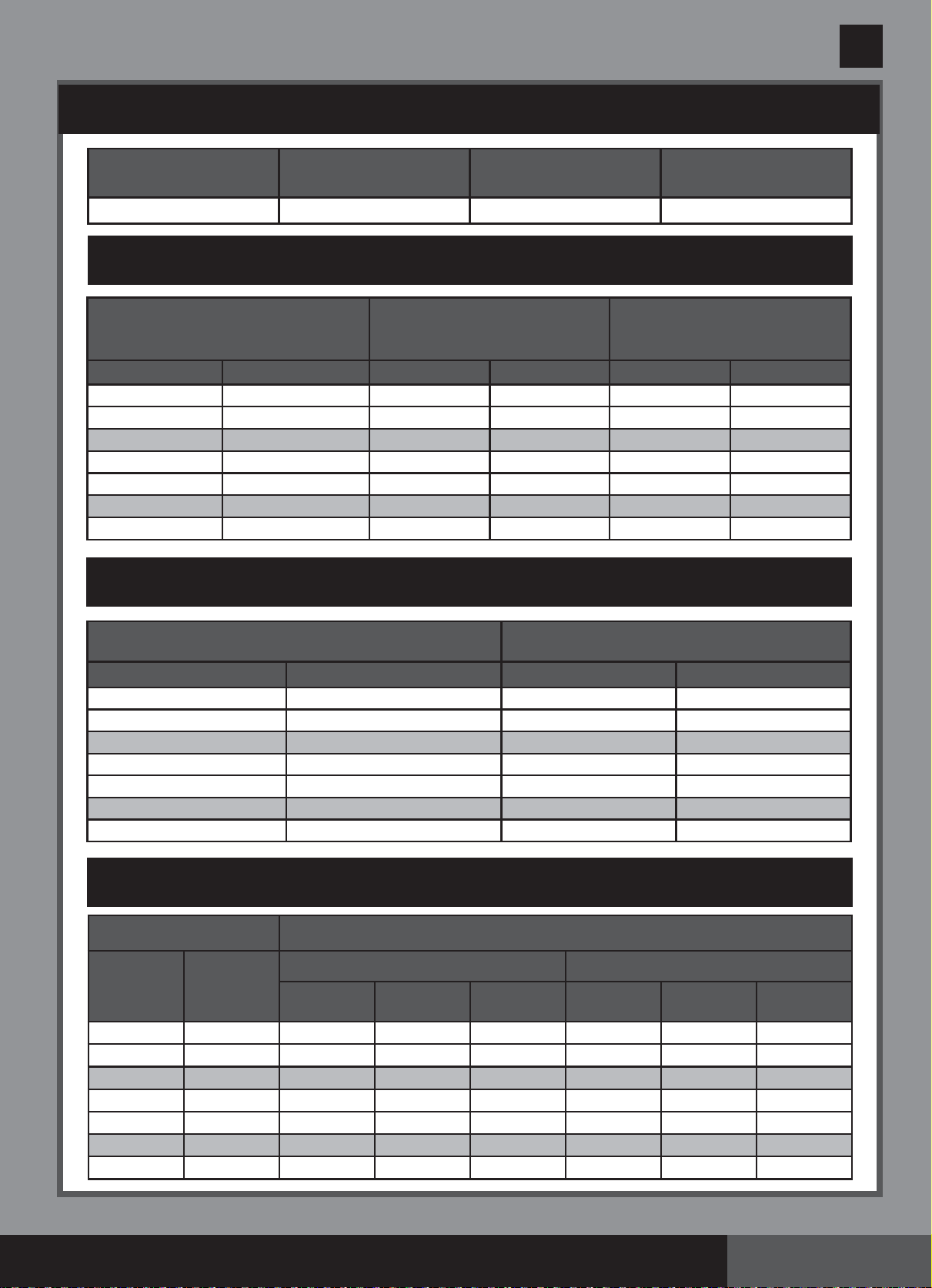
SALT TABLE FOR COMMON NON-INTEX POOLS
Water Capacity
Salt Needed for Startup
Salt Needed when
Low Salt Detected
(CODE “91”)
(Gals) (Liters) (Lbs) (Kgs) (Lbs) (Kgs)
2000 7500 50 20 10 5
4000 15000 100 45 25 10
6000 22500 150 65 40 20
8000 30000 200 90 55 25
10000 37500 250 110 70 30
12000 45500 300 135 80 35
14000 53000 350 160 95 45
Salt Needed for Startup
(Lbs)
Salt Needed for Startup
(Kgs)
Salt Needed when
Low Salt Detected (Lbs)
Salt Needed when
Low Salt Detected (Kgs)
Water Capacity (Gals) x 0.025
Water Capacity (Liters) x 0.003
Water Capacity (Gals) x 0.0067 Water Capacity (Liters) x 0.0008
OPERATING TIME TABLE FOR COMMON NON-INTEX POOLS (WITH CYANURIC ACID)
CYANURIC ACID TABLE FOR COMMON NON-INTEX POOLS
Water Capacity
Cyanuric Acid Needed for Startup
0.03g/L (30ppm)
(Gals) (Liters) (Lbs) (Kgs)
2000
4000
6000
8000
10000
12000
14000
7500
15000
22500
30000
37500
45500
53000
0.23
0.45
0.68
0.90
1.13
1.37
1.59
0.5
1.0
1.5
2.0
2.5
3.0
3.5
SALT CALCULATION FORMULA FOR ALL POOLS
Water Capacity
Operating Time (hours) at different ambient/air temperatures
(Gals) (Liters)
ECO7110
ECO8110
10 - 19°C
(50 - 66°F)
20 - 28°C
(68 - 82°F)
29 - 36°C
(84 - 97°F)
10 - 19°C
(50 - 66°F)
20 - 28°C
(68 - 82°F)
29 - 36°C
(84 - 97°F)
2000
4000
6000
8000
10000
12000
14000
7500
15000
22500
30000
37500
45500
53000
1
2
3
4
5
6
7
2
3
4
5
6
7
8
1
1
2
3
4
5
6
3
5
7
-
-
-
-
4
6
8
-
-
-
-
2
4
6
-
-
-
-

(260PO) MODEL ECO7110&8110 SALTWATER SYSTEM ENGLISH 7.5” X 10.3” PANTONE 295U 05/15/2015
260
PO
SAVE THESE INSTRUCTIONS
English
Page 18
OPERATION INSTRUCTIONS
1. Turn on the filter pump.
2. Start up the unit:
Plug the power cord into the electrical
outlet and test the GFCI/RCD (circuit breaker).
Switch on the unit. Flashing code
“00” appears on the electronic control
station’s LED, indicating that the unit is ready to be programmed.
3. Set operating hours for Saltwater system:
With code “00” flashing, press button to
set the desired operating hours. See the
“Operating Time Table” for the required
operating hours related to each pool size.
Pressing will increase the time from 01
to 12 hours maximum. If you have selected
too many hours keep pressing to repeat
the cycle. The built-in timer will now activate
your Saltwater System, at the same time
each day, for the number of hours you have set.
NOTE: The Saltwater System will not operate if the filter pump is not operating. Make
sure to program your filter pump (or start it manually) for operation beginning 5 minutes
before the saltwater system and finishing 15 minutes after the saltwater system.
4. Lock keypad controls:
With the desired hour value showing, press button until
you hear a “beep”. A green “WORKING” indicator on the
control panel will light up within a few seconds to indicate that
the saltwater system has started chlorine production. Locking
the control buttons into this setting prevents unauthorized
changing of the operating cycle.
NOTE: If you forget to lock the keypad controls, the system
will automatically lock it and start working 1 minute later.
5.
Readjust operating time if necessary:
The operating hours can be re-adjusted if necessary.
Press button until you hear a “beep” to unlock the
keypad and the current programmed time will flash.
Repeat steps 3 to 4.
(1 to 12 hours max per cycle)

(260PO) MODEL ECO7110&8110 SALTWATER SYSTEM ENGLISH 7.5” X 10.3” PANTONE 295U 05/15/2015
260
PO
SAVE THESE INSTRUCTIONS
English
Page 19
OPERATION INSTRUCTIONS (continued)
6. Boost cycle
•
First time installation, press and hold “BOOST”
button for 5 seconds until the indicator lights up and the
LED display “80”. This indicates that the saltwater
system has started E.C.O. and more chlorine sanitizer
production. You can press and hold the “BOOST” button for
another 5 seconds until the indicator is off, which will cancel
the Boost cycle.
•
The boost operating hours is 8 times the amount of time programmed into the system, i.e. if
your saltwater system operating time is 2 hours, the boost procedure will run 8 x 2 = 16 hours.
After boost procedure has been completed, the system will automatically switch to the
normal working mode.
•
Once the boost is operating, check whether the filter pump operating hours have been
set properly. For example, the boost operating time is 8 hours, the filter pump should be
set to run for 8 hours at least. Increase the filter pump operating time if necessary.
Note: If an Intex filter pump is attached to the system, set the pump switch to on “I”
position.
•
After a heavy rain or if the pool is dirty, press the “BOOST” button to shock the pool
again.
7. Stand-by/power saving mode:
•
When the cycle ends, the green “SLEEP” indicator on the
control panel lights up and the LED display flashes “93”.
The system is now in Stand-By mode. After a while, it
shuts down and sets itself in a Power Saving mode. The
system will automatically turn itself back on in 24 hours,
starting its daily cycle of chlorine production.
•
The “SLEEP” indicator stays on, while the system is in the
Power Saving mode. The LED display however, goes blank
after 5 minutes. Press any button ( or ) to view the last
LED code.
(260PO) MODEL ECO7110&8110 SALTWATER SYSTEM ENGLISH 7.5” X 10.3” PANTONE 295U 05/15/2015
260
PO
SAVE THESE INSTRUCTIONS
English
Page 20
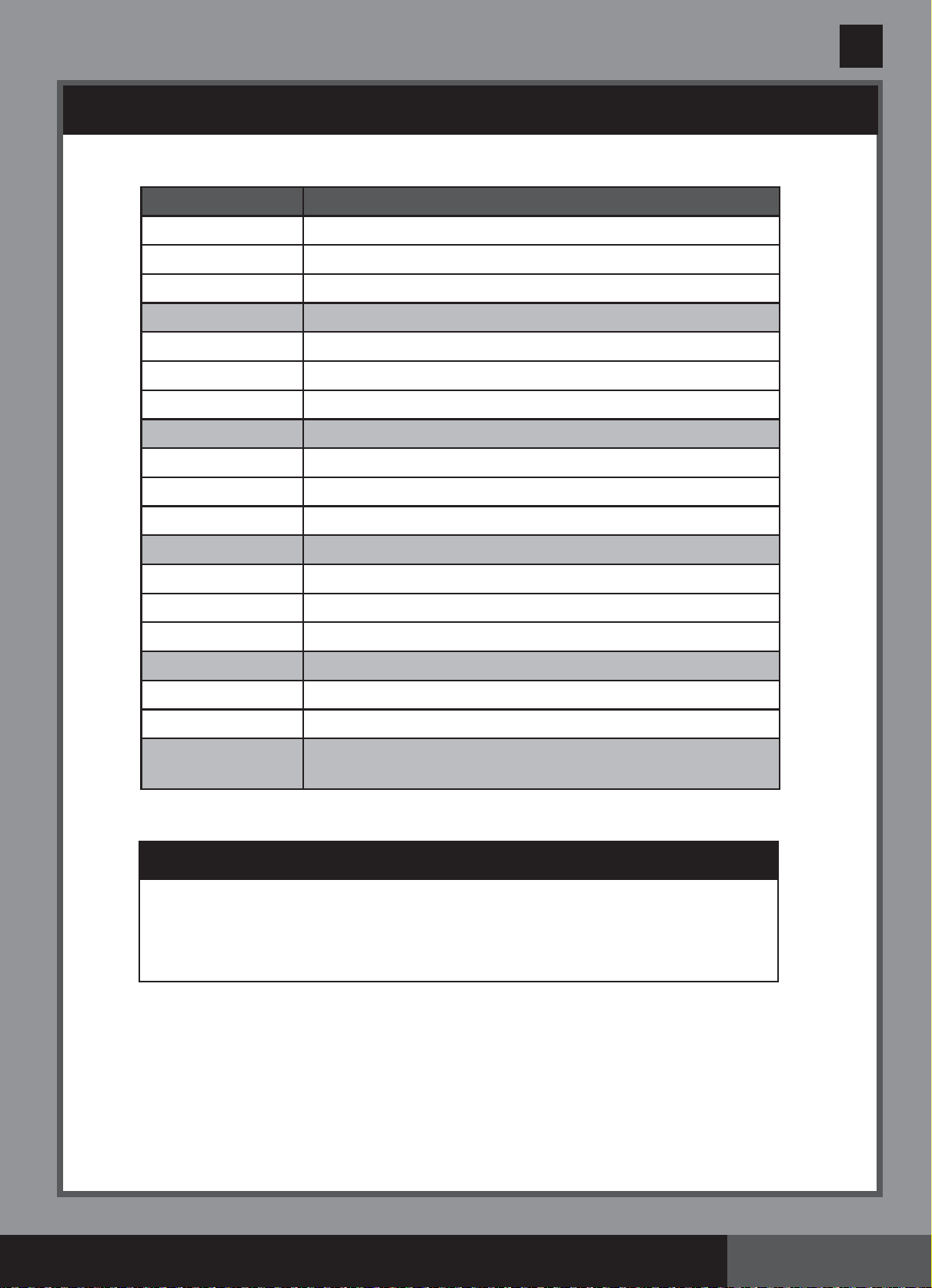
LED CODE CHART
IMPORTANT
When Code “90” alarm is shown, ensure the timer of the filter pump is set
one (1) hour longer than the Saltwater System.
If the filter pump does not have a built-in timer, the filter pump needs to
be turned on/off manually every day.
LED Reading Definitions
80 Boost Mode
00 Stand-By Mode (Start-up)
01 Minimum Operating Hour (1 hour remaining)
02 Operating Hours (2 hours remaining)
03 Operating Hours (3 hours remaining)
04 Operating Hours (4 hours remaining)
05 Operating Hours (5 hours remaining)
06 Operating Hours (6 hours remaining)
07 Operating Hours (7 hours remaining)
08 Operating Hours (8 hours remaining)
09 Operating Hours (9 hours remaining)
10 Operating Hours (10 hours remaining)
11 Operating Hours (11 hours remaining)
12 Maximum Operating Hours (12 hours remaining)
90 Alarm Code(Low Pump Flow/No Pump Flow)
91 Alarm Code (Low Salt Level)
92 Alarm Code (High Salt Level)
93 Stand-By Mode (Operating Process finished)
“BLANK” No Power or “Power Saving Mode” waiting to start next
Saltwater System cycle.
(260PO) MODEL ECO7110&8110 SALTWATER SYSTEM ENGLISH 7.5” X 10.3” PANTONE 295U 05/15/2015
260
PO
SAVE THESE INSTRUCTIONS
English
Page 21
MAINTENANCE
IMPORTANT
Unplug the power cord before cleaning your system. Also close the plunger
valves on your pool or insert the black hat-like plugs in the strainer opening to
prevent water spillage. After completing all maintenance tasks, you must plug the
power cord back in and open the plunger valves or remove the plugs.
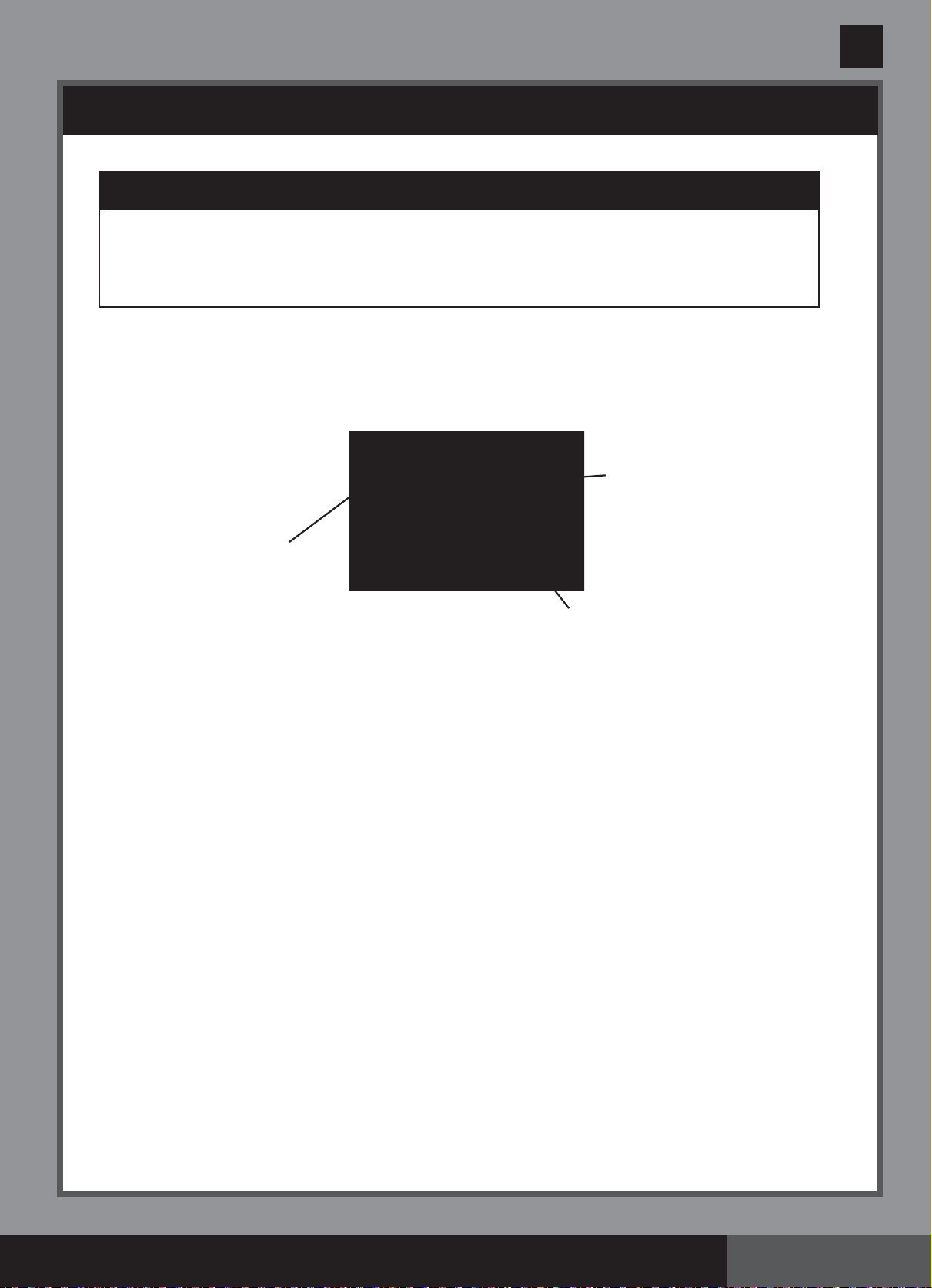
Flow Sensor Cleaning
1. In a counter-clockwise motion unscrew the collar of the flow sensor (6) and remove it from
the electrolytic cell conduit. See “Part Reference”.
2. If deposits and debris are seen on the surface of the flow sensor, then use a garden hose
to wash it off.
3. If flushing with water does not remove the deposits, use a plastic brush to clean the
surface and the hinge if necessary. Do not use a metal brush.
4. After the flow sensor has been inspected and cleaned, align the locator notch on the flow
sensor to the connection ridge in the conduit. Now turn the collar in a clockwise motion,
tightening the sensor back into its position. Do not overtighten.
Titanium and E.C.O. Electrodes Cleaning
The titanium electrode and E.C.O. electrodes have a self cleaning function incorporated into
the electronic control’s programming. In most cases this self cleaning action will keep the
electrodes working at optimum efficiency. If the pool water is hard (high mineral content) the
electrodes may require periodic manual cleaning. To maintain maximum performance, we
recommend that you open and visually inspect the titanium and E.C.O. electrodes (4 & 5)
monthly.
The following steps provide instructions on how to clean your cell.
Inspection and cleaning:
1. Switch off the unit, unplug the power cord from the electrical socket.
2. For filter pumps with 1-1/4” (32mm) hose size - To prevent water from flowing out of the
pool, unscrew the strainer grids from the strainer connectors and insert the hat-like plugs
into the strainer connectors.
For filter pumps with 1-1/2” (38mm) hose size - Turn both plunger valve handles fully
clockwise until they stop. This closes the valve, prevents the water from flowing out of the
pool.
Connection Ridge
Locator Notch
Hinge

(260PO) MODEL ECO7110&8110 SALTWATER SYSTEM ENGLISH 7.5” X 10.3” PANTONE 295U 05/15/2015
260
PO
SAVE THESE INSTRUCTIONS
English
Page 22
MAINTENANCE (continued)
3. Disconnect the 2 hoses from the Saltwater System, and attach the cell covers (9) to the inlet
and outlet of the electrolytic cell (3).
4. Unscrew the collar of the flow sensor (6) and pull out the flow sensor from the electrolytic cell
(3) housing.
5. Pour kitchen grade vinegar into the electrolytic cell (3) to immerse the titanium and ECO
electrodes. Soak for 1 hour.
6. Open one side of the cell cover (9), drain and properly dispose of the vinegar. Connect the
hose which goes from the pool to the cell. Flush the electrolytic cell housing with the pool
water.
7. Reverse steps 3, 4, 5 and 6 to reconnect the electrolytic cell.

(260PO) MODEL ECO7110&8110 SALTWATER SYSTEM ENGLISH 7.5” X 10.3” PANTONE 295U 05/15/2015
260
PO
SAVE THESE INSTRUCTIONS
English
Page 23
MAINTENANCE (continued)
The Test Strips can test the “Free Chlorine”, “pH”, “Calcium Hardness” and “Total Alkalinity”
levels at the same time. We recommend that you test the water chemistry weekly, and maintain
the chlorine concentration at 0.5-3.0 ppm.
Directions and Use
1. Dip the entire strip into the water and remove immediately.
2. Hold the strip level for 15 seconds. Do not shake excess water from the strip.
3. Now compare the strip pad to the color chart on the packaging label. If necessary, adjust the
chemical level in the pool water. It is very important, to use the proper technique when
testing the water's chemical level. Read and follow the written strip instructions carefully.
1. Disconnect the power cord from the electrical outlet.
2. After the pool is completely empty, disconnect the Saltwater System from the hoses by
reversing the installation instructions.
3. Air-dry the unit before you store it. This might be a good time to visually inspect and clean
the electrolytic cell.
4. Store the unit and accessories in a dry place. The temperature should be controlled, between
32 degrees Fahrenheit (0 degrees Celsius) and 97 degrees Fahrenheit (36 degrees Celsius).
5. The original package can be used for storage.
INTEX
®
TEST STRIPS (PACKED WITH THE PRODUCT)
LONG TERM STORAGE
(260PO) MODEL ECO7110&8110 SALTWATER SYSTEM ENGLISH 7.5” X 10.3” PANTONE 295U 05/15/2015
260
PO
SAVE THESE INSTRUCTIONS
English
Page 24
POOL MAINTENANCE & CHEMICAL DEFINITIONS
Free Chlorine
-
Is the chlorine residual present in pool water.
Combined Chlorine
-
Is formed by the reaction of free chlorine with ammonia wastes.
Result if too high - Sharp chlorinous odor, eye irritation.
pH
-
A value that indicates how acidic or basic a solution is.
Result if too low - Corroded metals, eye & skin irritation, destruction
of total alkalinity.
Result if too high - Scale formation, cloudy water, shorter filter runs,
eye & skin irritation, poor chlorine efficiency.
Total Alkalinity
-
Indicates the degree of the water's resistance to change in pH. It
determines the speed and ease of pH change, so always adjust total
alkalinity before adjusting the pH level.
Result if too low - Corroded metals, eye & skin irritation. Low
alkalinity will cause the pH to be unstable. Any
chemical added to the water will have an affect on
pH.
Result if too high - Scale formation, cloudy water, eye & skin irritation,
poor chlorine efficiency.
Calcium Hardness
-
Refers to the amount of calcium and magnesium dissolved in the
water.
Result if too high - Eye & skin irritation, difficulty balancing water and
poor chlorine efficiency. Scale will form and will
cause the water to become cloudy.
Stabilizer
-
Stabilizers extend the life of chlorine in swimming pools.
(Cyanuric Acid)
• Do not add pool chemicals directly to the skimmer. This may damage the cell.
• Maintaining a salt and sanitizer level above the recommended range can contribute to the
corrosion of the pool equipment.
• Check the expiry date of the test kit as the test results may be inaccurate if the kit is used
after that date.
• If, due to heavy pool usage, it is required to increase the sanitizer level, then use a chemical
based on Trichloro-s-triazinetrione or sodium dichloro-s-triazinetrione dihydrate.
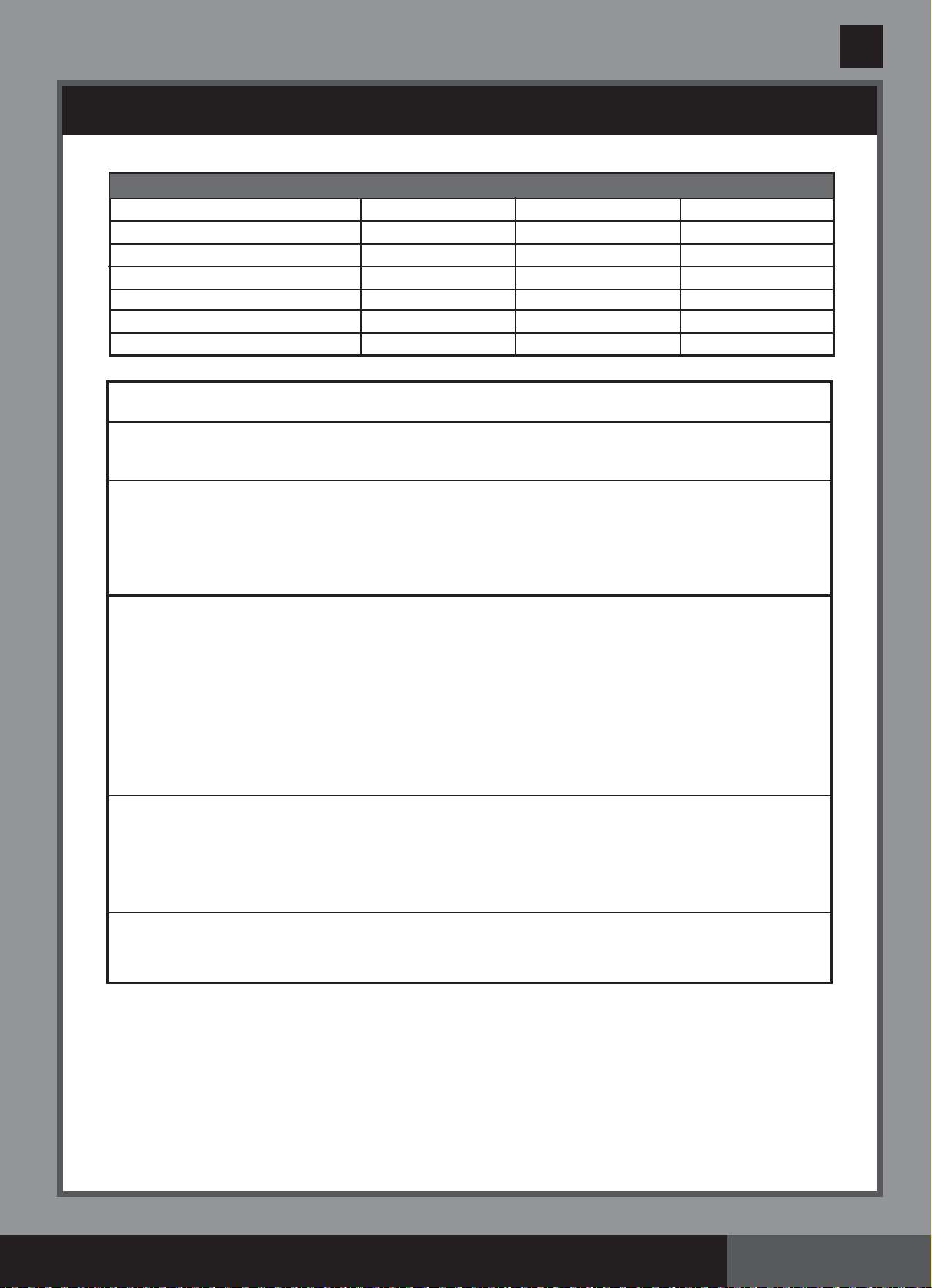
Preferred Water Chemistry Reading
Minimum Ideal Maximum
Free Chlorine 0 0.5 - 3.0 ppm 5.0 ppm
Combined Chlorine 0 0 ppm 0.2 ppm
pH 7.2 7.4 - 7.6 7.8
Total Alkalinity 40 ppm 80 ppm 120 ppm
Calcium Hardness 50 ppm 100 - 250 ppm 350 ppm
Stabilizer (Cyanuric Acid) 10 ppm 20 - 40 ppm 50 ppm
(260PO) MODEL ECO7110&8110 SALTWATER SYSTEM ENGLISH 7.5” X 10.3” PANTONE 295U 05/15/2015
260
PO
SAVE THESE INSTRUCTIONS
English
Page 25
TROUBLESHOOTING GUIDE
INSUFFICIENT
CHLORINE
WHITE FLAKES IN
THE WATER
NO LED DISPLAY
• Insufficient operating hours of
the Saltwater System.
• The salt level in the pool water
is less than 2000ppm. This is
insufficient.
• Chlorine loss due to intense
sunlight exposure.
• The bather load has increased.
• Clogged or dirty electrolytic cell.
• High UV level exposure.
• Excessive calcium hardness is
present in pool water.
• No power supply.
• RCD/GFCI has not reseted.
• A power fuse has blown.
• LED failure.
• Increase the daily Saltwater System
operating time. See “Operating Instructions”.
• Check the salt level with the Test Kit. Adjust
as needed. See “Salt & Pool Water Volumes”.
• Use a pool cover when the pool is not
in use and/or when the unit is operating.
• Increase the daily Saltwater System
operating time. See “Operating Instructions”.
• Remove the cell for inspection, clean it if
necessary. See “Maintenance”.
• Cover the pool with a pool cover for 2
days with the device running and then
test the water using the test strips.
• If the pool is clean and clear, add stabilizer
to the water and then test the water with the
device running.
• Drain about 20 to 25% of the pool
water and add fresh water to decrease
the calcium hardness. Inspect the
electrolytic cell for scale buildup. Clean
the electrolytic cell if necessary.
• Plug the cell cord firmly into the cell
housing receptacle.
• Find out the switch and turn on.
• Reset the RCD/GFCI.
• Contact Intex Service Center.
PROBLEM CAUSE SOLUTION
(260PO) MODEL ECO7110&8110 SALTWATER SYSTEM ENGLISH 7.5” X 10.3” PANTONE 295U 05/15/2015
260
PO
SAVE THESE INSTRUCTIONS
English
Page 26
TROUBLESHOOTING GUIDE (continued)
IMPORTANT
If you continue to experience difficulty, please contact our Consumer Service Department for
assistance. See separate “Authorized Service Centers” sheet.
1. Filter pump not attached to
system and/or switch on.
2. Circulation line is blocked.
3. Incorrect inlet and outlet hose
direction.
4. Scale on the flow sensor.
5. Flow sensor cord is loose.
6. Inner timer conflict between
filter pump and saltwater system.
7. Flow sensor failure.
1. Dirt or scale on titanium plates.
2. Low salt level / No salt.
3. Electrolytic cell cord is loose.
4. Possible electrolytic cell failure.
1. High salt level.
1. Display and all lights are off - the
system does not power up.
• Ensure filter pump is attached and
operating. See "Setup Instruction".
• If your unit has plunger valves, ensure
that they are open.
• Clear your filter cartridge and cell from
debris and dirt. See “Maintenance”.
• Release all trapped air in the circulation
line. See the filter pump manual.
• Check the direction of the inlet and the
outlet hose. Reverse the hoses if
necessary. See “Set Up Instructions”.
• Clean the flow sensor, paying special
attention to the hinge. See
“Maintenance”.
• Plug the flow sensor firmly into the flow
sensor receptacle.
• Reset both timers on the filter pump and
saltwater system. See “Boost Cycle”.
• Contact Intex Service Center.
• Remove the electrolytic cell for
inspection. Clean it if necessary.
See “Maintenance”.
•
Add salt. See “Salt & Pool Water Volumes”.
• Ensure that the cell cord is plugged
firmly into the cell housing receptacle.
• Contact Intex Service Center. Replace
the cell if needed.
• Partially drain the pool and refill it with
fresh water. See “Salt & Pool Water
Volumes”.
• Household voltage is too high or too low
(+ 20%). Check the voltage is within the
range stated on the device housing.
• Contact Intex Service Center.
LED PANEL
CODE
PROBLEM
SOLUTION
LED Panel Code Flash & Alarm On (NOTE: Always turn off the power before cleaning and servicing).

(260PO) MODEL ECO7110&8110 SALTWATER SYSTEM ENGLISH 7.5” X 10.3” PANTONE 295U 05/15/2015
260
PO
SAVE THESE INSTRUCTIONS
English
Page 27
GENERAL AQUATIC SAFETY
Water recreation is both fun and therapeutic. However, it involves inherent risks
of injury and death. To reduce your risk of injury, read and follow all product,
package and package insert warnings and instructions. Remember, however,
that product warnings, instructions and safety guidelines cover some common
risks of water recreation, but do not cover all risks and dangers.
For additional safeguards, also familiarize yourself with the following general
guidelines as well as guidelines provided by nationally recognized Safety
Organizations:
• Demand constant supervision. A competent adult should be appointed as a “lifeguard”
or water watcher, especially when children are in and around the pool.
• Learn to swim.
• Take the time to learn CPR and first aid.
• Instruct anyone who is supervising pool users about potential pool hazards and about
the use of protective devices such as locked doors, barriers, etc.
• Instruct all pool users, including children what to do in case of an emergency.
• Always use common sense and good judgement when enjoying any water activity.
• Supervise, supervise, supervise.
For additional information on safety, please visit
• The Association of Pool and Spa Professionals: The Sensible Way to Enjoy Your
Aboveground/Onground Swimming Pool www.nspi.org
• American Academy of Pediatrics: Pool Safety for Children www.aap.org
• Red Cross www.redcross.org
• Safe Kids www.safekids.org
• Home Safety Council: Safety Guide www.homesafetycouncil.org
• Toy Industry Association: Toy Safety www.toy-tia.org

(260PO) MODEL ECO7110&8110 SALTWATER SYSTEM ENGLISH 7.5” X 10.3” PANTONE 295U 05/15/2015
260
PO
SAVE THESE INSTRUCTIONS
English
Page 28
Your Krystal Clear Saltwater System
®
has been manufactured using the highest
quality materials and workmanship. All Intex products have been inspected and
found free of defects prior to leaving the factory. This Limited Warranty applies only
to the Krystal Clear Saltwater System
®
and accessories listed below.
The provisions of this Limited Warranty apply only to the original purchaser and is
not transferable. This Limited Warranty is valid for the period noted below from the
date of the initial retail purchase. Keep your original sales receipt with this manual,
as proof of purchase will be required and must accompany warranty claims or the
Limited Warranty is invalid.
Krystal Clear Saltwater System
®
Warranty – 2 Years
Titanium electrode Warranty – 1 Year
E.C.O. electrode Warranty – 1 Year
Hoses, Plunger Valves & Fittings Warranty – 180 days
If a manufacturing defect is found within the periods noted above,
please contact the
appropriate Intex Service Center listed in the separate “Authorized Service Centers”
sheet.
The Service Center will determine the validity of the claim. If the Service
Center directs you to return the product, please carefully package the product and
send with shipping and insurance prepaid to the Service Center. Upon receipt of the
returned product, the Intex Service Center will inspect the item and determine the
validity of the claim. If the provisions of this warranty cover the item, the item will be
repaired or replaced at no charge.
Any and all disputes regarding the provisions of this Limited Warranty shall be
brought before an informal dispute settlement board and unless and until the
provisions of these paragraphs are carried forth, no civil action may be instituted.
The methods and procedures of this settlement board shall be subject to the rules
and regulations set forth by the Federal Trade Commission (F.T.C.). IMPLIED
WARRANTIES ARE LIMITED TO THE TERMS OF THIS WARRANTY AND IN
NO EVENT SHALL INTEX, THEIR AUTHORIZED AGENTS OR EMPLOYEES
BE LIABLE TO THE BUYER OR ANY OTHER PARTY FOR DIRECT OR
CONSEQUENTIAL DAMAGES OR LIABILITIES. Some states, or jurisdictions do
not allow the exclusion or limitation of incidental or consequential damages, so the
above limitation or exclusion may not apply to you.
This Limited Warranty does not apply if the products are subject to negligence,
abnormal use or operation, accident, improper operation, improper voltage or current
contrary to operating instructions, or to damage by circumstances beyond Intex’s
control, including but not limited to, ordinary wear and tear and damage caused by
exposure to fire, flood, freezing, rain, or other external environmental forces. This
Limited Warranty applies only to those parts and components sold by Intex. The
Limited Warranty does not cover unauthorized alterations, repairs or disassembly by
anyone other than Intex Service Center personnel.
DO NOT GO BACK TO THE PLACE OF PURCHASE FOR RETURN OR
REPLACEMENT. IF YOU ARE MISSING PARTS OR NEED ASSISTANCE,
PLEASE CALL US TOLL-FREE (FOR U.S. AND CANADIAN RESIDENTS):
1-800-234-6839 OR VISIT OUR WEBSITE: WWW.INTEXSTORE.COM.
Proof of Purchase must accompany all returns or the warranty claim will be invalid.
LIMITED WARRANTY