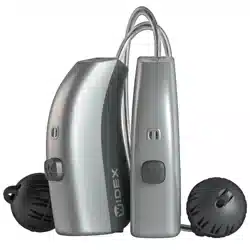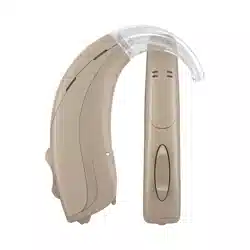
USER INSTRUCTIONS
BB4 MODEL
RITE
RECEIVER-IN-THE-EAR
THE WIDEX BABY™440 HEARING AID
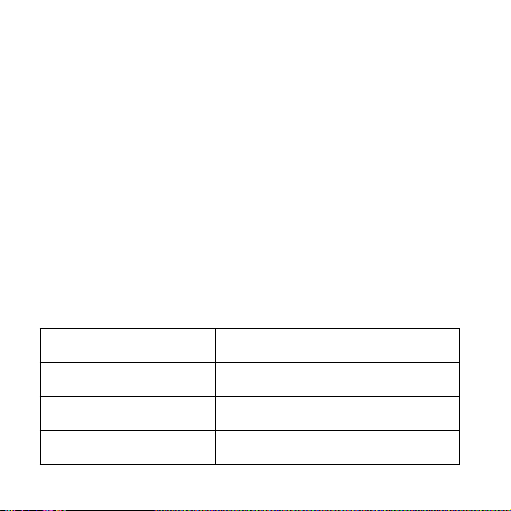
(To be filled out by the hearing care professional)
Date: ________________________
Battery size: ___________________
Ear-set:
Instant receiver ear-tip
Custom receiver earmould
Listening programs Selected program position
Master
Audibility Extender
TV
2

CONTENTS
ACCESSORIES ....................................................
THANKYOU . . . . . . . . . . . . . . . . . . . . . . . . . . . . . . . . . . . . . . . . . . . . . . . . . . . .
THEHEARINGAIDANDEAR-SET.................................
THEBATTERY ..................................................
Insertingthebattery .............................................
Drainedbattery . . . . . . . . . . . . . . . . . . . . . . . . . . . . . . . . . . . . . . . . . . . . . . . . . .
TURNINGTHEHEARINGAIDONANDOFF ........................
LIGHT-EMITTINGDIODE(LED) ...................................
Checkingthesound ..............................................
RIGHTLEFTIDENTIFICATION....................................
POSITIONINGTHEHEARINGAID .................................
RETENTIONSTRING.............................................
Retentionstring-twohearingaids ................................
Retentionstring-onehearingaid .................................
ADHESIVESTRIPS ..............................................
REMOVINGTHEHEARINGAID...................................
AUTOMATICVOLUMEADJUSTMENT ..............................
REMOTECONTROL..............................................
3

LISTENINGPROGRAMS .........................................
CLEANING .....................................................
Thehearingaid ..................................................
Theear-set ......................................................
Theearpiece .....................................................
CHANGINGTHEEAR-SET........................................
Ear-tip...........................................................
Earmould........................................................
INCASEOFMALFUNCTION ......................................
CARINGFORTHEHEARINGAID..................................
WARNINGS ....................................................
ADVICE........................................................
SYMBOLS......................................................
4

ACCESSORIES
Your hearing care professional will mark the accessories that you
have chosen for your child´s hearing aid.
Listening tube
Adhesive tape
Battery drawer
opening tool
5
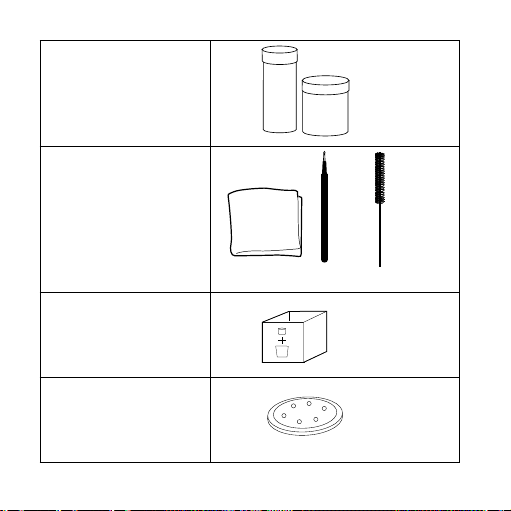
Drying kit
Cleaning accessories
a. cloth
b. wax loop /battery
magnet
c. wax brush
Box for used batteries
Battery pack
1.
2. 3.
1.
2. 3.
1.
2. 3.
a b c
6

a b
Quick guide
User instructions
Retention string
a. monaural
b. binaural
Bonnet
7
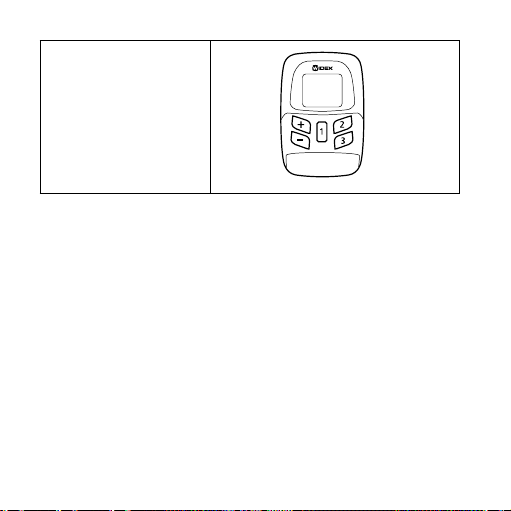
Remote control
8

THANK YOU...
...for choosing a Widex hearing aid.
We hope you will be pleased with your child’s new Widex hearing
aid. We realise that being confronted with a child’s hearing loss
can be daunting, but we hope this booklet will show that using a
hearing aid need not be complicated.
All illustrations in this booklet show a right-ear hearing aid.
Unless otherwise stated, the same principles apply to the left ear.
NOTE
The hearing aid will not restore normal hearing, but can help your child
to make the best possible use of her or his remaining hearing ability.
9
WARNING
This booklet contains important information and instructions.Please
read this booklet carefully before using the hearing aid.
NOTE
Your child´s hearing aid, ear-set and accessories may not look exactly
as illustrated in this booklet. We also reserve the right to make any
changes considered necessary.
10
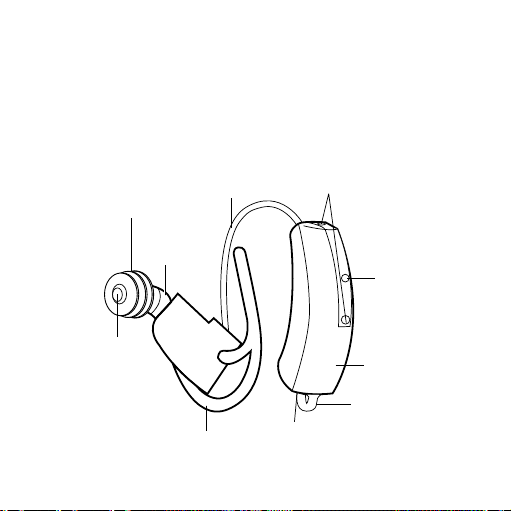
THE HEARING AID AND EAR-SET
Several ear-set solutions are available for the hearing aid. The
ear-set consists of an earwire and an earpiece. The hearing care
professional will mark the solution chosen for your child.
Ear-tip
Sound tube
Earwire
Microphone openings
Light-emitting
diode
Hearing aid
Battery drawer
Anchor
Sound bore
Instant receiver ear-tip
Eye loop
11
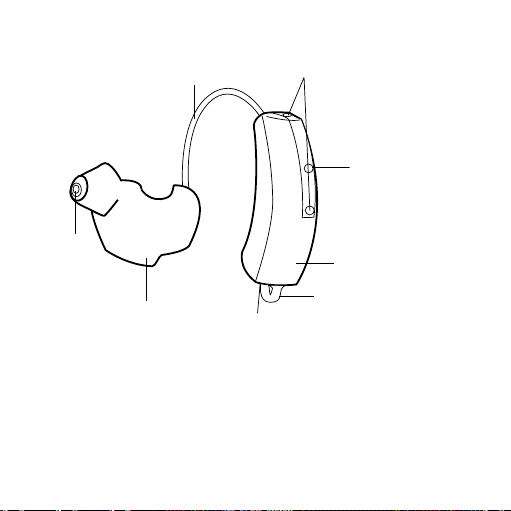
Custom receiver earmould
Earwire
Microphone
openings
Light-emitting diode
Hearing aid
Battery drawer
Earmould
Sound bore
Eye loop
If you need help to identify the serial number (usually six or seven digits)
on the product, please contact your hearing care professional.
12
THE BATTERY
We recommend Zinc Air batteries. Use a size 10 battery for the
hearing aid.
To obtain replacement batteries, please consult the hearing care
professional. It is important to take note of the expiry date and
the recommendations regarding disposal of used batteries on the
battery pack.
INSERTING THE BATTERY
Before inserting a new battery into the hearing
aid, remember to remove the adhesive tab. Once
the tab has been removed, the battery will start
functioning after a few seconds.
13

CAUTION
Do not use batteries on which there is a sticky residue from the tab, or
other unwanted substances.
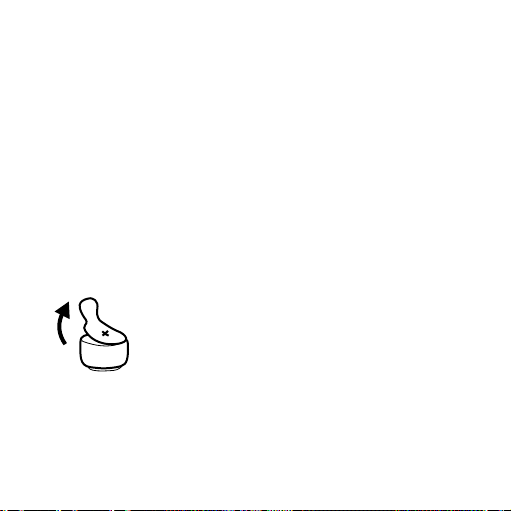
Use the opening tool provided to gently open
the battery drawer as illustrated. Do not
press the drawer beyond the open position.
14

Place the battery in the drawer so that the plus sign (+) on the bat-
tery is visible when you hold the hearing aid as shown. You can
use the battery magnet on the wax loop tool provided to steer the
battery into place.
If the battery drawer does not close easily, the battery is incor-
rectly inserted.
15
DRAINED BATTERY
If the light-emitting diode (LED) on the hearing aid stops flash-
ing, or there is no sound in the hearing aid, it is an indication that
the battery is exhausted. Battery life is approximately 2-3 days.
However, exactly how long the battery will last varies from one
case to another. We recommend that you always keep a spare
battery on hand.
Please note that the LED may have been disabled.
WARNING
Never leave an exhausted battery in the hearing aid. Exhausted batter-
ies may leak, damaging the hearing aid.
When changing the battery, it is a good idea to hold the hearing
aid over a table.
16
TURNING THE HEARING AID ON AND OFF
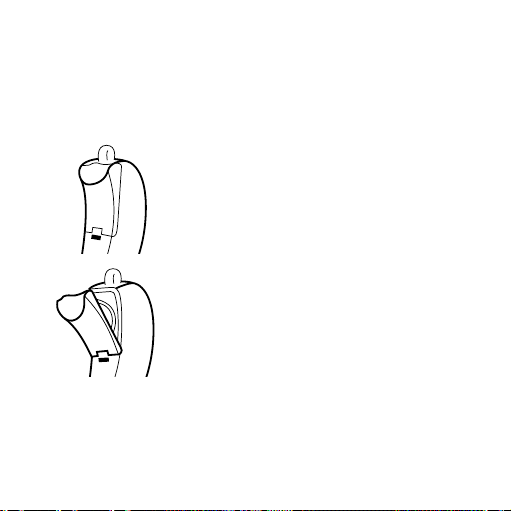
The battery drawer of the hearing aid also functions as the on/
off switch.
Close the battery drawer to turn the hearing
aid on. If you have just turned off the hearing
aid, wait at least three seconds before turn-
ing it on again.
Open the battery drawer as described on
page 10 to turn off the hearing aid.
Please remember to switch the hearing aid off when it is not in
use. Remove the battery if the hearing aid will not be used for
several days.
17
LIGHT-EMITTING DIODE (LED)
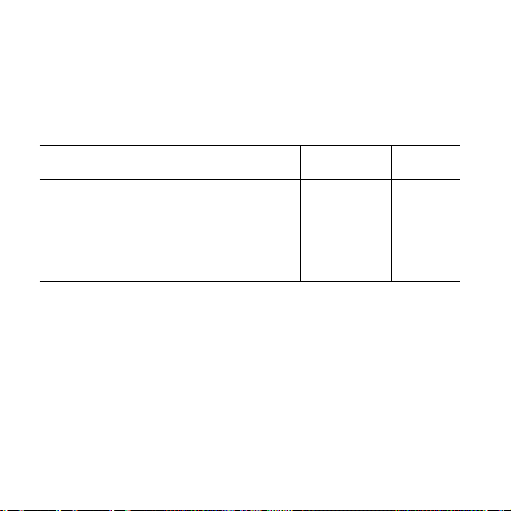
The hearing aid is provided with a LED to indicate certain func-
tions.
RC signal received Flashes OFF*
Hearing aid or program active:
Hearing aid is on Flashes OFF
Specific program is active Flashes OFF
* bold indicates standard setting
Please also see page page 16.
18

CHECKING THE SOUND
The listening tube enables you to check the sound in the hearing
aid before placing it in your child’s ear. If there is no sound in the
hearing aid, it may be an indication that the battery is exhausted.
19

RIGHT/LEFT IDENTIFICATION
If your child wears hearing aids on both ears,
it is a good idea to ask your hearing care
professional to place identification marks on
the hearing aids (red mark = right and blue
mark = left).
The arrow shows the position of the identi-
fication mark.
20

POSITIONING THE HEARING AID
Before positioning the ear-tip in your child´s ear, make sure that
the receiver housing inside the ear-tip sits correctly.
These illustrations show an instant ear-
tip solution, but the same procedure is
used with an earmould.
Place the hearing aid behind the ear, so
that the earwire rests comfortably on
the ear, close to the head.
21

Insert the earpiece in the child’s ear
canal while holding the earpiece.
If your child is using an instant ear-tip
solution, position the anchor so that
it rests in the outer ear, securing the
position of the ear-set. Check at reg-
ular intervals that the hearing aid and
the ear-set are positioned correctly.
22
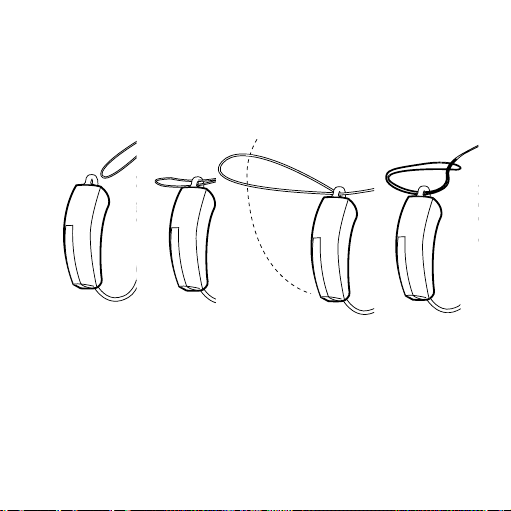
RETENTION STRING
The retention string helps to ensure that the hearing aids will not
be lost, if they fall off the ear.
Fasten the string to the hearing aids in the following way: Put the
string through the eye loop on the hearing aid. Guide the hear-
ing aid up through the loop formed. Pull the string to form a tight
knot around the eye loop.
23

WARNING
We recommend that you always use the retention string with the
hearing aids.
RETENTION STRING - TWO HEARING AIDS
Open the clip, pushing it upwards as illustrated. When you feel
resistance, push upwards again.
24

Attach the clip at the end of the string firmly
to your child’s clothes, making sure that it is
always securely fastened.
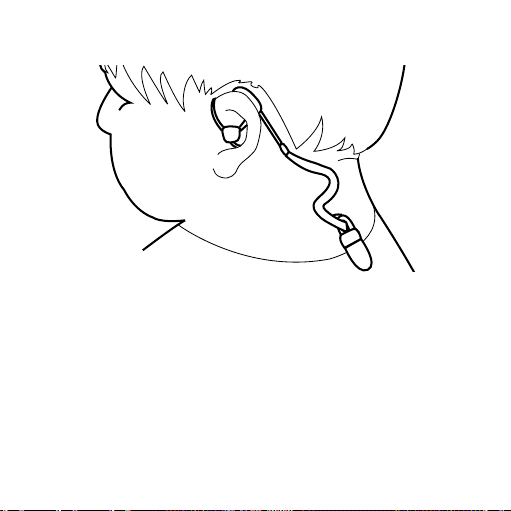
Use the slider to adjust the string so that
your child can only just turn his or her head
without the hearing aids coming off.
Slider for
adjusting the length
25
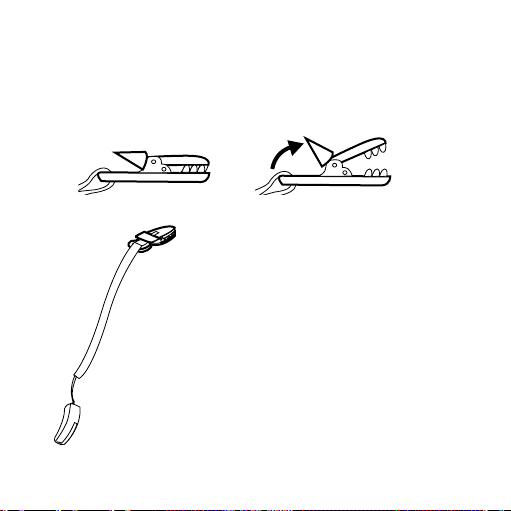
RETENTION STRING - ONE HEARING AID
Open the clip, pushing it upwards as illustrated. When you feel
resistance, push upwards again.
Attach the clip at the end of the string
firmly to your child’s clothes, making
sure that it is always securely fastened.
Place the string so that your child can
turn his or her head without the hearing
aid coming off.
26
27
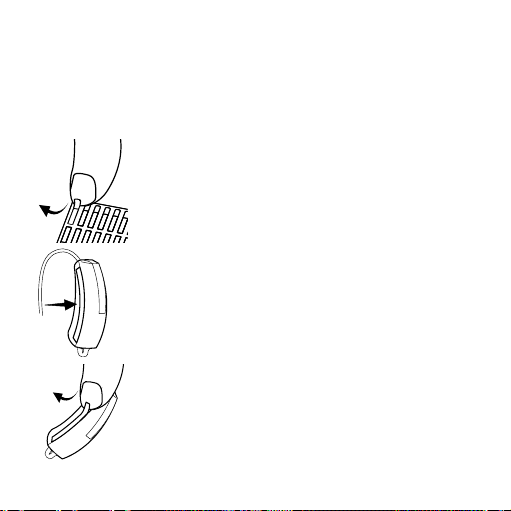
ADHESIVE STRIPS
If necessary, the hearing aid can be further fastened using the
adhesive strips provided.
Peel off an adhesive strip from the pack.
Attach the strip to the hearing aid.
Remove the cover from the strip
28
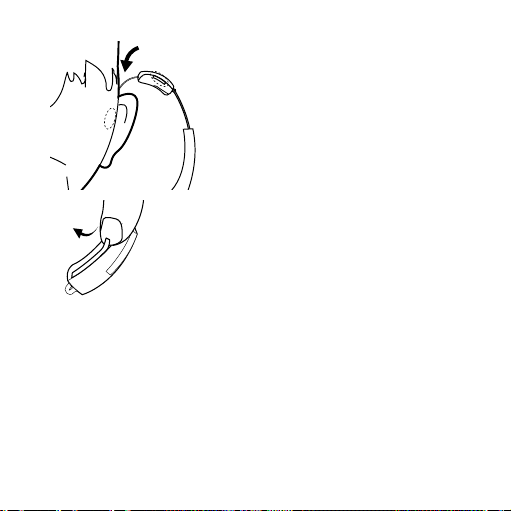
Position the hearing aid behind the ear.
Before using the hearing aid the next
time, use a fingernail to gently peel off
the used adhesive strip.
29

REMOVING THE HEARING AID
Remove the hearing aid from its posi-
tion behind your child’s ear.
Carefully pull the earpiece out of the
ear canal, while holding the lower
part of the earwire.
30
AUTOMATIC VOLUME ADJUSTMENT
The volume of the hearing aid will adjust itself automatically to
your child’s sound environment.
WARNING
If the volume in the hearing aid is generally too loud or too weak, or
the reproduced sounds are distorted, or if you would like any further
information, consult the hearing care professional.
31
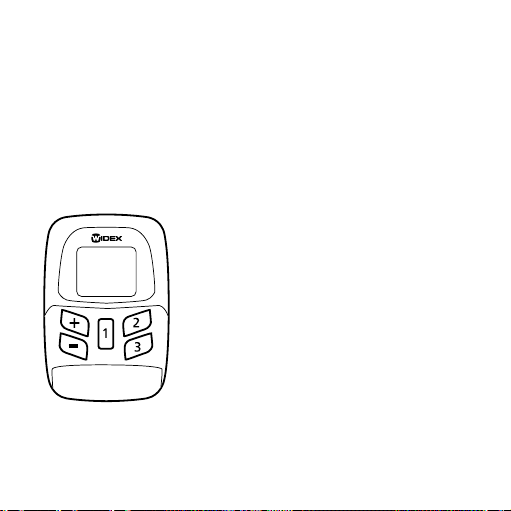
REMOTE CONTROL
A remote control is an accessory for the hearing aid that provides
a number of additional options, such as changing program and
adjusting the volume.
The basic functions are described below:
Press the [1] key to switch on the remote
control. By default, it automatically
switches off after 30 seconds.
Press the [+] key to turn up the volume.
Press the [-] key to turn down the volume.
32
Press the [1], [2] and [3] keys briefly to choose between listening
programs 1-3. The number of programs available will depend on
how the hearing aid is programmed.
Please also refer to the user instructions for the remote control.
WARNING
Be very careful not to accidentally activate the volume key on the re-
mote control and thereby cause the sound level in your child’s hear-
ing aid to be too high or too low.
33

LISTENING PROGRAMS
Ordinarily, the hearing aid has one listening program (Master).
Other listening programs intended for specific listening situations
can be made available with a remote control:
Audibility Extender: Makes high-frequency sounds audible, with
certain configurations of hearing loss.
TV: For listening to the TV.
At the front of this booklet, the hearing care professional can list
the listening programs that are available in the hearing aid. If the
needs of your child change over time, the combination of listen-
ing programs can be altered.
34
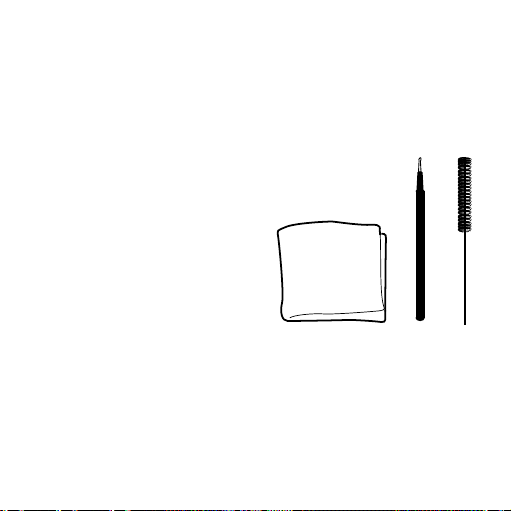
CLEANING
The hearing aid and ear-set should be cleaned on a daily basis.
The following cleaning accessories are available for the hearing
aid and ear-set.
1. Cloth
2. Wax loop
3. Wax brush
If necessary, the wax brush can be washed in soapy water.
Contact the hearing care professional if you need additional sup-
plies of cleaning accessories.
1.
2. 3.
35
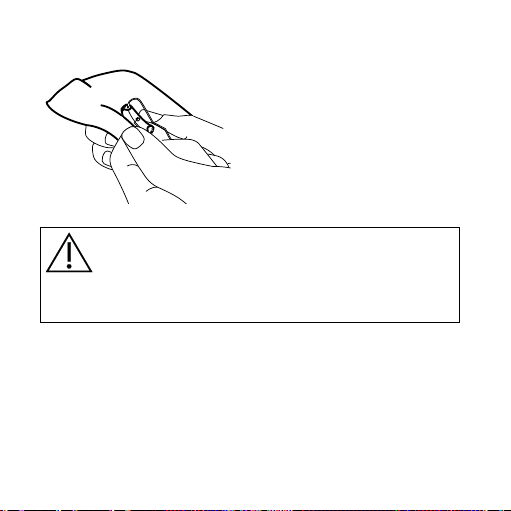
THE HEARING AID
Clean the hearing aid after use
with the cloth provided. If the
microphone openings are still
blocked, contact your hearing
care professional.
WARNING
Never use water or cleaning solutions to clean the hearing aid, as this
may cause it to malfunction.
36
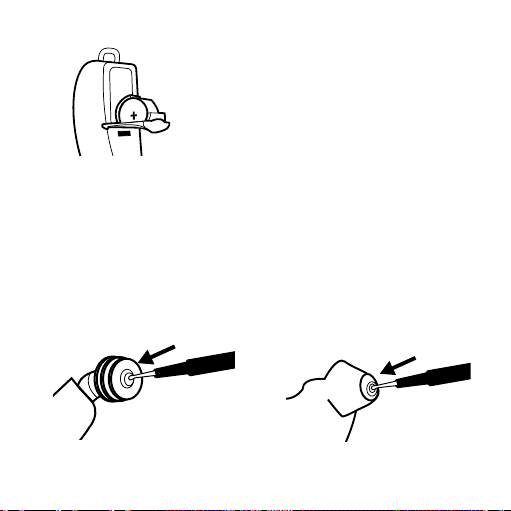
When the hearing aid is not in use, keep
it in a warm, dry place with the battery
drawer open to ventilate the hearing aid
and allow it to dry.
THE EAR-SET
Wipe off the ear-set with the cloth after use.
THE EARPIECE
Use the wax loop to dig out any hard earwax, as illustrated.
37
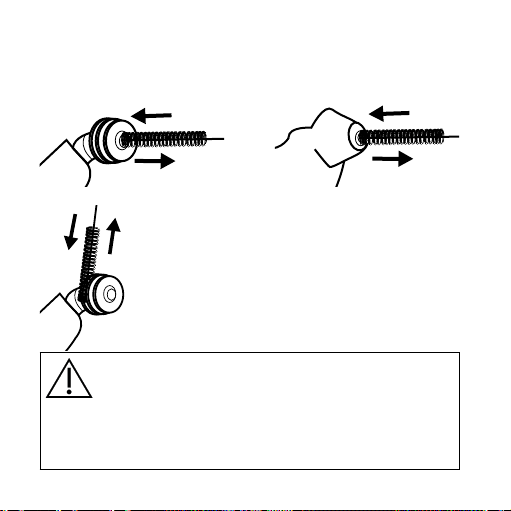
Insert the wax brush into the sound bore to remove any soft ear-
wax.
If earwax has gathered on the ear-
tip, use the cloth, loop or brush to
remove it.
WARNING
Make sure that the ear-set is free of earwax, moisture or the like.
The ear-set must never come into contact with water, alcohol or other
cleaning solutions.
3.
3.
3.
3.
38
CHANGING THE EAR-SET
The ear-set should be changed as required, for example if the ear-
piece no longer fits your child’s ear. Contact the hearing care pro-
fessional for advice on how often the ear-set should be changed
and to obtain replacement ear-sets.
EAR-TIP
An instant ear-tip should only be changed by your hearing care
professional.
WARNING
Do not attempt to remove the ear-tip from the rest of the ear-set your-
self.
39
EARMOULD
If the earmould no longer fits your child’s ear canal, contact your
hearing care professional for a new one.
To change the custom earmould do as follows:
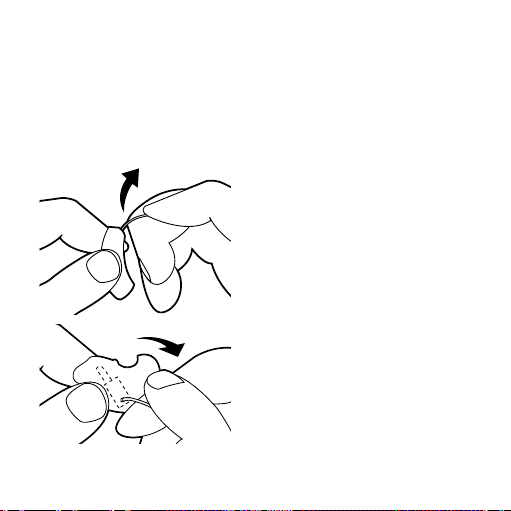
Grip the hearing aid between
your thumb and index finger.
With the other hand grip the
earwire and pull straight apart
as indicated by the arrow.
Follow the same procedure to
pull the earwire out of the ear-
mould.
40

Turn the earmould around and
hold it as illustrated. Use your
thumbs to press the sides of the
earmould backwards as illus-
trated.
Take out the receiver.
Hold the new earmould as illus-
trated. Push the receiver into the
large hole as far as it goes.
41
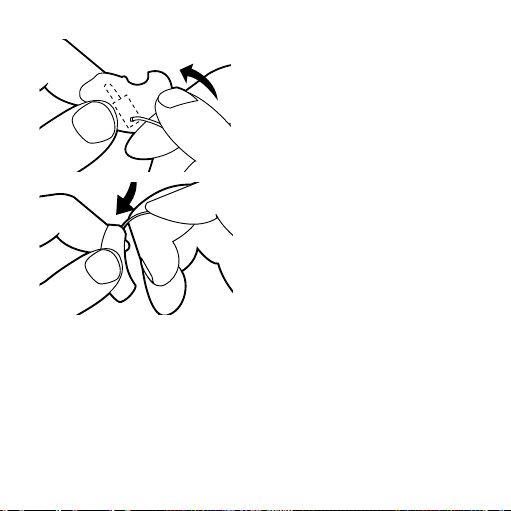
Turn the earmould around. Con-
nect the plug on the earwire to
the receiver in the earmould.
Press the plug until a click is felt.
Connect the earwire to the
hearing aid, pressing the plug
until a click is felt.
Check that the ear-set is securely assembled.
42
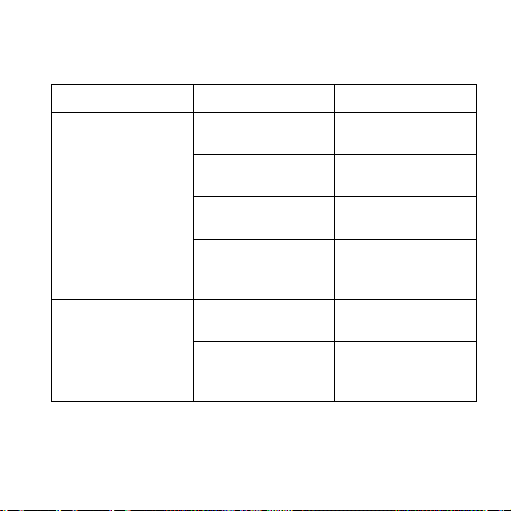
IN CASE OF MALFUNCTION
Problem Possible cause Solution
The hearing aid is com-
pletely silent
The hearing aid is not
turned on
Make sure the battery
drawer is closed
The earwire is defective Contact the hearing
care professional
The battery does not
work
Insert a new battery in
the hearing aid
The sound bore of the
earpiece is blocked
Clean the blocked
sound bore (see page
page 37)
The hearing aid volume
is not powerful enough
The battery is nearly
exhausted
Insert a new battery in
the hearing aid
The sound bore of the
earpiece is blocked
Clean the blocked
sound bore (see page
page 37)
43
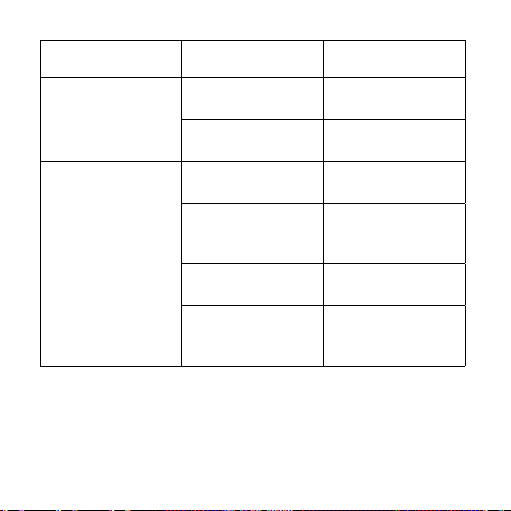
Problem Possible cause Solution
Your child responds less
to sound
Your child’s ear is
blocked by earwax
Contact the ENT doc-
tor/physician
Your child’s hearing
may have changed
Contact the hearing
care professional
The hearing aid whis-
tles continuously
The ear is blocked by
earwax
Contact the ENT doc-
tor/physician
The earpiece is not cor-
rectly placed in the ear
canal
Take the earpiece out
and reinsert it
The earpiece fit is too
loose
Contact the hearing
care professional
The receiver is not posi-
tioned correctly in the
earpiece
Contact the hearing
care professional
See page page 21
44

CARING FOR THE HEARING AID
The hearing aid is a valuable object and should be treated with
care. Here are some things you can do to prolong the life of the
hearing aid:
45
CAUTION
• Turn off the hearing aid when it is not in use. Remove the battery if
the hearing aid will not be used for several days.
• When the hearing aid is not in use, keep it in its case in a dry location
out of reach of children and pets.
• Do not expose the hearing aid to extreme temperatures or high
humidity. Make sure to dry the hearing aid thoroughly after heavy
perspiration.
• Avoid dropping the hearing aid – perform cleaning and battery
changes while holding the hearing aid above a soft surface.
• Your child must not wear the hearing aid while in the bath or shower,
or when a hair dryer is used, and avoid letting the hearing aid come
into contact with sticky or greasy substances, such as hair spray or
sunscreen.
• To maintain the proper shape of the ear-set, be careful not to twist
or squeeze it out of shape when the hearing aid is placed in the case.
46

WARNINGS
WARNING
Hearing aids and batteries can be dangerous if swallowed or used im-
properly. Swallowing or improper use can result in severe injury or
even fatalities. In case of ingestion, contact a physician immediately.
• When your child wears the hearing aid, make sure he or she does
not put the hearing aid or its battery, parts and accessories into his
or her mouth.
• Make sure that the retention string is adjusted correctly and is
securely fastened to your child’s clothes so that your child is not
entangled by the string.
• Risk of explosion if battery is replaced by an incorrect type or
recharged. Dispose of used batteries according to the instructions.
47

WARNING
• Please be aware that the use of any type of hearing aid may involve
a slightly increased risk of infection in the ear canal. An infection can
arise as the result of inadequate ventilation of the ear. We therefore
recommend that you remove the hearing aid and ear-set from your
child’s ear at night to allow the ear canal to be ventilated. Make sure
that you clean and inspect the hearing aid and ear-set as required. If
an infection occurs, you should seek medical attention and contact
the hearing care professional for advice on how to disinfect the var-
ious hearing aid parts. Do not under any circumstances use alcohol,
chlorine or similar substances for this purpose.
• Regular use of a de-humidifier is recommended to help avoid mal-
function of the hearing aid.
48
WARNING
• Check on a regular basis that your child’s ear canal does not show
signs of soreness or scratches. If you see any irregularities, contact
your hearing care professional.
• Clean and inspect the hearing aid after use to check that it is intact.
If the hearing aid or the ear-set breaks while in the ear canal, contact
your hearing care professional immediately. Do not try to remove the
parts yourself.
• The hearing aid and the adhesive tape are made of modern non-aller-
genic materials. Nonetheless, in rare cases skin irritation can occur.
If you notice skin irritation in or around your child’s ear or ear canal,
contact the hearing care professional
• If napping with the hearing aid on causes redness or pressure marks,
remove the hearing aid.
49
WARNING
• Keep hearing aids and their parts, accessories and batteries out of
reach of children and anyone else who might swallow such items or
otherwise cause injury to themselves. Do not change batteries in
front of them and do not let them see where you keep your battery
supply. Discard used batteries carefully.
• Batteries are very small and can easily be mistaken for pills or the like.
Never put a battery or hearing aid in your mouth for any reason, as
you may risk swallowing it.
• Never allow others to wear your child´s hearing aid, as this could
cause permanent damage to their hearing.
50
WARNING
• Never try to open or repair the hearing aid yourself.
• The hearing aid must not be worn during x-ray scans, MR scans, CT
scans, short-wave diathermy, or similar radiation treatments, and
should never be placed in a microwave oven. These are some of the
types of radiation that can damage the hearing aid and it can become
very hot. Radiation from, for example, room surveillance equipment,
burglar alarms and cell phones is weaker and will not damage the
hearing aid.
• Widex hearing aids are not certified for use in mines or other areas
with explosive gases.
51
CAUTION
• The hearing aid has been tested for interference according to inter-
national standards. Nevertheless, it is possible that unforeseen inter-
ference may occur in the hearing aid due to electromagnetic radiation
from other products such as alarmsystems, room surveillance equip-
ment and mobile phones.
• Although the hearing aid has been designed to comply with the most
stringent international electromagnetic compatibility standards, the
possibility cannot be excluded that it may cause interference with
other equipment, such as medical devices.
52

ADVICE
NOTE
• To help your child grow accustomed to sounds, we recommend that
your child wears the hearing aid in as many situations as possible
during the day.
• The use of hearing aids increases the risk of accumulation of earwax.
Contact your physician/ENT doctor if you suspect that a plug of ear-
wax has accumulated in your child’s ear. Earwax can both reduce your
child’s hearing and considerably impair the effect of the hearing aid.
It is a good idea to ask your physician to clean your child’s ears a cou-
ple of times a year.
• In most cases, using the hearing aid infrequently will not permit your
child to gain full benefit from it.
• The use of a hearing aid is only part of hearing habilitation and may
need to be supplemented by auditory training and instruction in
lipreading.
53
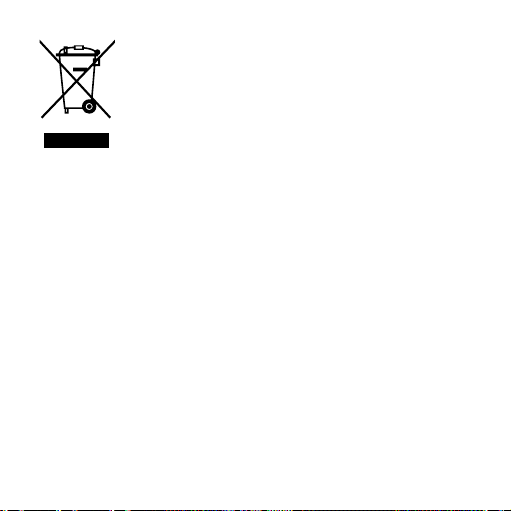
Electrical and electronic equipment (EEE) contains
materials, components and substances that can be
hazardous and present a risk to human health and
the environment when waste electrical and elec-
tronic equipment (WEEE) is not handled correctly.
Do not dispose of hearing aids, hearing aid accessories and bat-
teries with ordinary household waste.
Hearing aids, batteries and hearing aid accessories should be
disposed of at sites intended for waste electrical and electronic
equipment, or given to your hearing care professional for safe
disposal. Proper disposal helps to protect human health and the
environment.
54

SYMBOLS
Symbols commonly used by Widex A/S in medical device labelling
(labels/IFU/etc.)
Symbol Title/Description
Manufacturer
The product is produced by the manufacturer whose name
and address are stated next to the symbol. If appropriate,
the date of manufacture may also be stated.
Date of manufacture
The date when the product was manufactured.
Use-by date
The date after which the product is not to be used.
Batch code
The product’s batch code (lot or batch identification).
55

Symbol Title/Description
Catalogue number
The product’s catalogue (item) number.
Serial number
The product’s serial number.*
Keep away from sunlight
The product must be protected from light sources and/or
The product must be kept away from heat
Keep dry
The product must be protected from moisture and/or The
product must be kept away from rain
Lower limit of temperature
The lowest temperature to which the product can be safely
exposed.
56
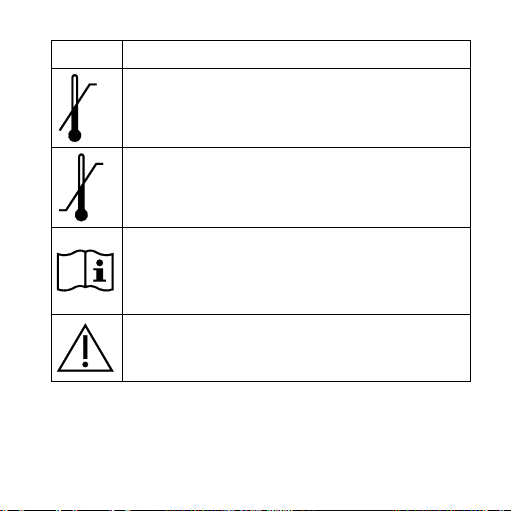
Symbol Title/Description
Upper limit of temperature
The highest temperature to which the product can be
safely exposed.
Temperature limits
The highest and lowest temperatures to which the product
can be safely exposed.
Consult instructions for use
The user instructions contain important cautionary infor-
mation (warnings/precautions) and must be read before
using the product.
Caution/Warning
Text marked with a caution/warning symbol must be read
before using the product.
57
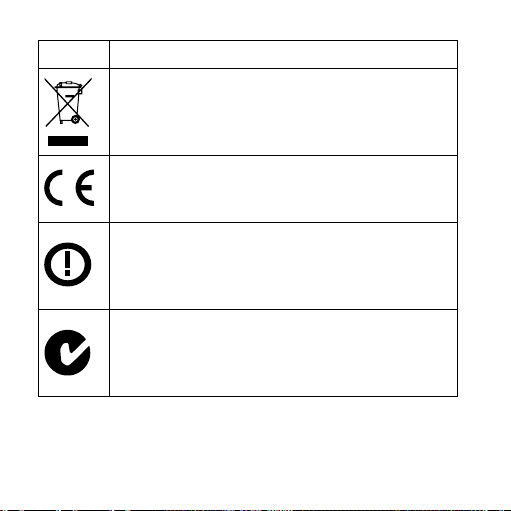
Symbol Title/Description
WEEE mark
“Not for general waste”
When the product is to be discarded, it must be sent to a
designated collection point for recycling and recovery.
CE mark
The product is in conformity with the requirements set out
in European CE marking directives.
Alert
The product is identified by R&TTE Directive 1999/5/EC as
an equipment Class 2 product with some restrictions on
use in some CE member states.
C-Tick mark
The product complies with EMC and radio spectrum
regulatory requirements for products supplied to the
Australian or New Zealand market.
58

Symbol Title/Description
Interference
Electromagnetic interference may occur in the vicinity of
the product.
*The six- or seven-digit number on the product is the serial number. Se-
rial numbers may not always be preceded by
59

Manual no.:
9 514 0124 001 #03
Issue :
2015-06
WIDEX and WIDEX BABY are trademarks of Widex A/S
É[5qr0q2|f;;a;g]
WIDEX A/S Nymoellevej 6, DK-3540 Lynge, Denmark
www.widex.com