Microwave Oven
User manual
MS28F303T** / MS28F304T**
MS28F303TFK_TC_DE68-04599H-00_EN.indd 1 2020-07-24 오후 5:20:37
2 English
Contents
Contents
Safety instructions 3
Important safety instructions 3
Installation 7
Accessories 7
Installation site 7
Turntable 7
Maintenance 8
Cleaning 8
Replacement (repair) 8
Care against an extended period of disuse 8
Oven features 9
Oven 9
Control panel 9
Oven use 10
How a microwave oven works 10
Checking that your oven is operating correctly 10
Cooking/Reheating 11
Setting the time 11
Power levels and time variations 12
Adjusting the cooking time 12
Stopping the cooking 13
Setting the energy save mode 13
Using the Healthy Cooking features 13
Using the My Plate features 15
Using the Power Defrost features 16
Using the Soften/Melt features 17
Power steam cooking guide
(only MS28F303TF*, MS28F304TF* models) 18
Using the Deodorisation features 20
Using the Child Lock features 20
Using the Turntable On/Off features 21
Switching the beeper off 21
Cookware guide 22
Troubleshooting and information code 23
Troubleshooting 23
Information code 25
Technical specifications 25
MS28F303TFK_TC_DE68-04599H-00_EN.indd 2 2020-07-24 오후 5:20:37

English 3
Safety instructions
• by clients in hotels, motels and other residential
environments;
• bed and breakfast type environments.
Only use utensils that are suitable for use in microwave ovens.
When heating food in plastic or paper containers, keep an eye
on the oven due to the possibility of ignition.
The microwave oven is intended for heating food and
beverages. Drying of food or clothing and heating of warming
pads, slippers, sponges, damp cloth and similar may lead to risk
of injury, ignition or fire.
If smoke is observed (emitted), switch off or unplug the
appliance and keep the door closed in order to stifle any
flames.
Microwave heating of beverages can result in delayed eruptive
boiling, therefore care must be taken when handling the
container.
The contents of feeding bottles and baby food jars shall
be stirred or shaken and the temperature checked before
consumption, in order to avoid burns.
Eggs in their shell and whole hard-boiled eggs should not be
heated in microwave ovens since they may explode, even after
microwave heating has ended.
Safety instructions
IMPORTANT SAFETY INSTRUCTIONS
READ CAREFULLY AND KEEP FOR FUTURE REFERENCE.
WARNING: If the door or door seals are damaged, the oven
must not be operated until it has been repaired by a competent
person.
WARNING: It is hazardous for anyone other than a competent
person to carry out any service or repair operation that
involves the removal of a cover which gives protection against
exposure to microwave energy.
WARNING: Liquids and other foods must not be heated in
sealed containers since they are liable to explode.
WARNING: Only allow children to use the oven without
supervision when adequate instructions have been given
so that the child is able to use the oven in a safe way and
understands the hazards of improper use.
This appliance is intended to be used in household only and it
is not intended to be used such as:
• staff kitchen areas in shops, offices and other working
environments;
• farm houses;
MS28F303TFK_TC_DE68-04599H-00_EN.indd 3 2020-07-24 오후 5:20:37

4 English
Safety instructions
Safety instructions
The oven should be cleaned regularly and any food deposits
removed.
Failure to maintain the oven in a clean condition could lead to
deterioration of the surface that could adversely affect the life
of the appliance and possibly result in a hazardous situation.
The microwave oven is intended to be used on the counter top
(freestanding) use only, the microwave oven shall not be placed
in a cabinet.
Metallic containers for food and beverages are not allowed
during microwave cooking.
The care should be taken not to displace the turntable when
removing containers from the appliance.
The appliance shall not be cleaned with a steam cleaner.
The appliance should not be cleaned with a water jet.
The appliance is not intended for installing in road vehicles,
caravans and similar vehicles etc.
This appliance is not intended for use by persons (including
children) with reduced physical, sensory or mental capabilities,
or lack of experience and knowledge, unless they have
been given supervision or instruction concerning use of the
appliance by a person responsible for their safety.
Children should be supervised to ensure that they do not play
with the appliance.
This appliance can be used by children aged from 8 years and
above and persons with reduced physical, sensory or mental
capabilities or lack of experience and knowledge if they have
been given supervision or instruction concerning use of the
appliance in a safe way and understand the hazards involved.
Children shall not play with the appliance. Cleaning and user
maintenance shall not be made by children without supervision.
If the supply cord is damaged, it must be replaced by the
manufacturer, its service agent or similarly qualified persons in
order to avoid a hazard.
This oven should be positioned proper direction and height
permitting easy access to cavity and control area.
Before using the your oven first time, oven should be operated
with the water during 10 minute and then used.
If the oven generates a strange noise, a burning smell, or smoke
is emitted, unplug the power plug immediately and contact
your nearest service center.
The microwave oven has to be positioned so that plug is
accessible.
MS28F303TFK_TC_DE68-04599H-00_EN.indd 4 2020-07-24 오후 5:20:37

English 5
Safety instructions
General safety
Any modifications or repairs must be performed by qualified personnel only.
Do not heat food or liquids sealed in containers for the microwave function.
Do not use benzene, thinner, alcohol, or steam or high-pressure cleaners to clean
the oven.
Do not install the oven: near a heater or flammable material; locations that are
humid, oily, dusty or exposed to direct sunlight or water; or where gas may leak;
or an uneven surface.
This oven must be properly grounded in accordance with local and national codes.
Regularly use a dry cloth to remove foreign substances from the power plug
terminals and contacts.
Do not pull, excessively bend, or place heavy objects on the power cord.
If there is a gas leak (propane, LP, etc) ventilate immediately. Do not touch the
power cord.
Do not touch the power cord with wet hands.
While the oven is operating, do not turn it off by unplugging the power cord.
Do not insert fingers or foreign substances. If foreign substances enter the oven,
unplug the power cord and contact a local Samsung service centre.
Do not apply excessive pressure or impact to the oven.
Do not place the oven over fragile objects.
Ensure the power voltage, frequency, and current matches the product
specifications.
Firmly plug the power plug into the wall socket. Do not use multiple plug adapters,
extension cords, or electric transformers.
Do not hook the power cord on metal objects. Make sure the cord is between
objects or behind the oven.
Do not use a damaged power plug, power cord, or loose wall socket. For damaged
power plugs or cords, contact a local Samsung service centre.
Do not pour or directly spray water onto the oven.
Do not place objects on the oven, inside, or on the oven door.
Do not spray volatile materials such as insecticide on the oven.
Do not store flammable materials in the oven. Because alcohol vapours can contact
hot parts of the oven, use caution when heating food or drinks containing alcohol.
Children may bump themselves or catch their fingers on the door. When opening/
closing the door, keep children away.
Microwave warning
Microwave heating of beverages may result in delayed eruptive boiling; always
use caution when handling the container. Always allow beverages to stand at least
20 seconds before handling. If necessary, stir during heating. Always stir after
heating.
In the event of scalding, follow these First Aid instructions:
1. Immerse the scalded area in cold water for at least 10 minutes.
2. Cover with a clean, dry dressing.
3. Do not apply any creams, oils, or lotions.
To avoid damaging the tray or rack, do not put the tray or rack in water shortly
after cooking.
Do not use the oven for deep fat frying because the oil temperature cannot be
controlled. This could result in a sudden boil over of hot oils.
Microwave oven precautions
Only use microwave-safe utensils. Do not use metallic containers, gold or silver
trimmed dinnerware, skewers, etc.
Remove wire twist ties. Electric arcing may occur.
Do not use the oven to dry papers or clothes.
Use shorter times for small amounts of food to prevent overheating or burning.
Keep the power cord and power plug away from water and heat sources.
To avoid the risk of explosion, do not heat eggs with shells or hard-boiled eggs. Do
not heat airtight or vacuum-sealed containers, nuts, tomatoes, etc.
Do not cover the ventilation slots with cloth or paper. This is a fire hazard. The
oven may overheat and turn off automatically and will remain off until it cools
sufficiently.
Always use oven mitts when removing a dish.
Stir liquids halfway during heating or after heating ends and allow the liquid stand
at least 20 seconds after heating to prevent eruptive boiling.
Stand at arms length from the oven when opening the door to avoid getting
scalded by escaping hot air or steam.
MS28F303TFK_TC_DE68-04599H-00_EN.indd 5 2020-07-24 오후 5:20:37
6 English
Safety instructions
Safety instructions
Because these following operating instructions cover various models, the
characteristics of your microwave oven may differ slightly from those described in
this manual and not all warning signs may be applicable. If you have any questions
or concerns, contact a local Samsung service centre or find help and information
online at www.samsung.com.
Use this oven for heating food only. It is intended for domestic use only. Do not
heat any type of textiles or cushions filled with grains. The manufacturer cannot
be held liable for damage caused by improper or incorrect use of the oven.
To avoid deterioration of the oven surface and hazardous situations, always keep
the oven clean and well maintained.
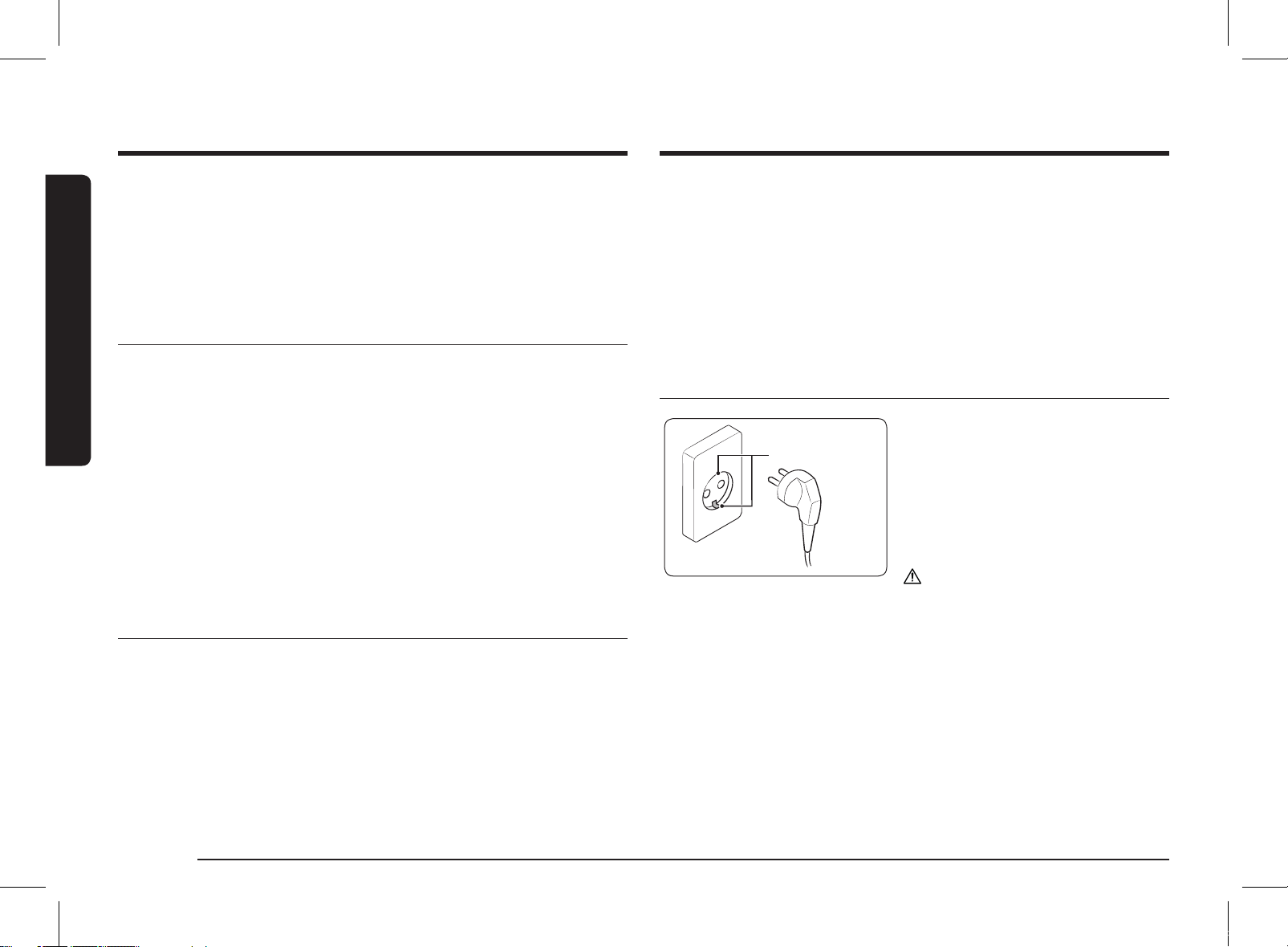
Grounding method
Ground terminal
You must plug the product to the
grounded outlet.
• Otherwise, there is a risk of electric
shock, fire, or product damage.
• If the power outlet is not equipped
with a grounded terminal, connect the
provided ground wire to the ground
conductor.
CAUTION
Do not connect the ground wire to the gas
pipe, water pipe, or phone lines.
Do not operate the oven when it is empty. The oven will automatically shut down
for 30 minutes for safety purposes. We recommend placing a glass of water inside
the oven at all times to absorb microwave energy in case the oven is started
accidentally.
Install the oven in compliance with the clearances in this manual. (See Installing
your microwave oven.)
Use caution when connecting other electrical appliances to sockets near the oven.
Microwave operation precautions
Failure to observe the following safety precautions may result in harmful exposure
to microwave energy.
• Do not operate the oven with the door open. Do not tamper with the safety
interlocks (door latches). Do not insert anything into the safety interlock holes.
• Do not place any object between the oven door and front face or allow food
or cleaner residue to accumulate on sealing surfaces. Keep the door and door
sealing surfaces clean by wiping with a damp cloth and then with a soft, dry
cloth after each use.
• Do not operate the oven if it is damaged. Only operate after it has been repaired
by a qualified technician.
Important: the oven door must close properly. The door must not be bent; the
door hinges must not be broken or loose; the door seals and sealing surfaces
must not be damaged.
• All adjustments or repairs must be done by a qualified technician.
Limited warranty
Samsung will charge a repair fee for replacing an accessory or repairing a cosmetic
defect if the damage to the unit or accessory was caused by the customer. Items
this stipulation covers include:
• Door, handles, out-panel, or control panel that are dented, scratched, or broken.
• A broken or missing tray, guide roller, coupler, or wire rack.
Use this oven only for its intended purpose as described in this instruction manual.
Warnings and Important Safety Instructions in this manual do not cover all
possible conditions and situations that may occur. It is your responsibility to use
common sense, caution, and care when installing, maintaining, and operating your
oven.
MS28F303TFK_TC_DE68-04599H-00_EN.indd 6 2020-07-24 오후 5:20:38
English 7
Installation
Installation
Accessories
Depending on the model that you have purchased, you are supplied with several
accessories that can be used in a variety of ways.
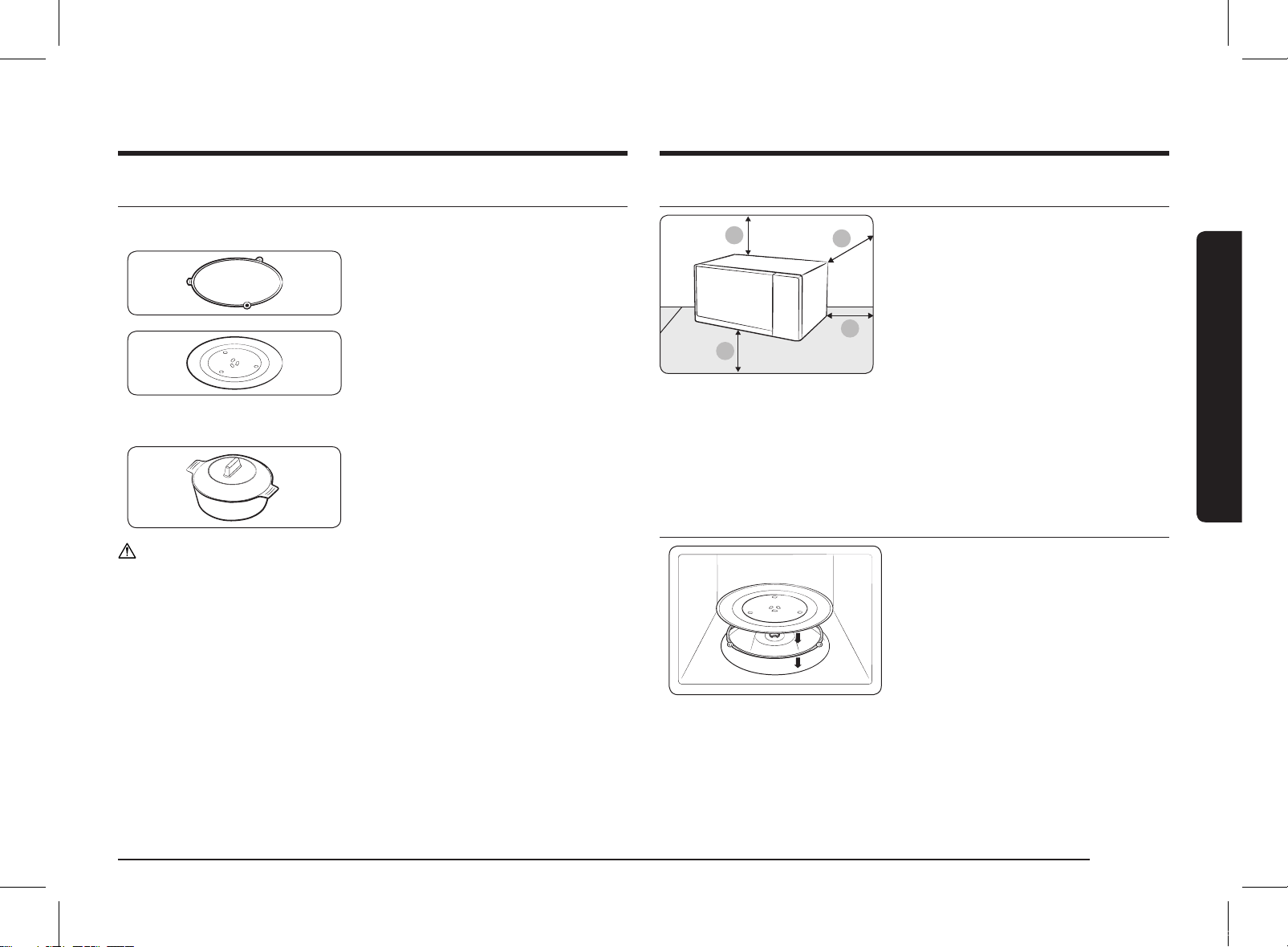
01 Roller ring, to be placed in the centre of
the oven.
The roller ring supports the turntable.
02 Turntable, to be placed on the roller
ring with the centre fitting to the
coupler.
The turntable serves as the main
cooking surface; it can be easily
removed for cleaning.
03 Steam cooker, see pages 18 to 20.
(Only MS28F303TF*, MS28F304TF*
models)
The plastic steam cooker when using
power steam function.
CAUTION
DO NOT operate the microwave oven without the roller ring and turntable.
Installation site
A
B
C
D
A. 20 cm above
B. 10 cm behind
C. 10 cm on the side
D. 85 cm of the floor
• Select a flat, level surface approx. 85 cm
above the floor. The surface must support
the weight of the oven.
• Secure room for ventilation, at least 10 cm
from the rear wall and both sides, and
20 cm from above.
• Do not install the oven in hot or damp
surroundings, such as next to other
microwave ovens or radiators.
• Conform to the power supply
specifications of this oven. Use only
approved extension cables if you need to
use.
• Wipe the interior and the door seal with a
damp cloth before using your oven for the
first time.
Turntable
Remove all packing materials inside the
oven. Install the roller ring and turntable.
Check that the turntable rotates freely.
MS28F303TFK_TC_DE68-04599H-00_EN.indd 7 2020-07-24 오후 5:20:38
8 English
Maintenance
Maintenance
Cleaning
Clean the oven regularly to prevent impurities from building up on or inside the
oven. Also pay special attention to the door, door sealing, and turntable and roller
ring (applicable models only).
If the door won’t open or close smoothly, first check if the door seals have built up
impurities. Use a soft cloth in soapy water to clean both the inner and outer sides
of the oven. Rinse and dry well.
To remove stubborn impurities with bad smells from inside the oven
1. With an empty oven, put a cup of diluted lemon juice on the centre of the
turntable.
2. Heat the oven for 10 minutes at max power.
3. When the cycle is complete, wait until the oven cools down. Then, open the door
and clean the cooking chamber.
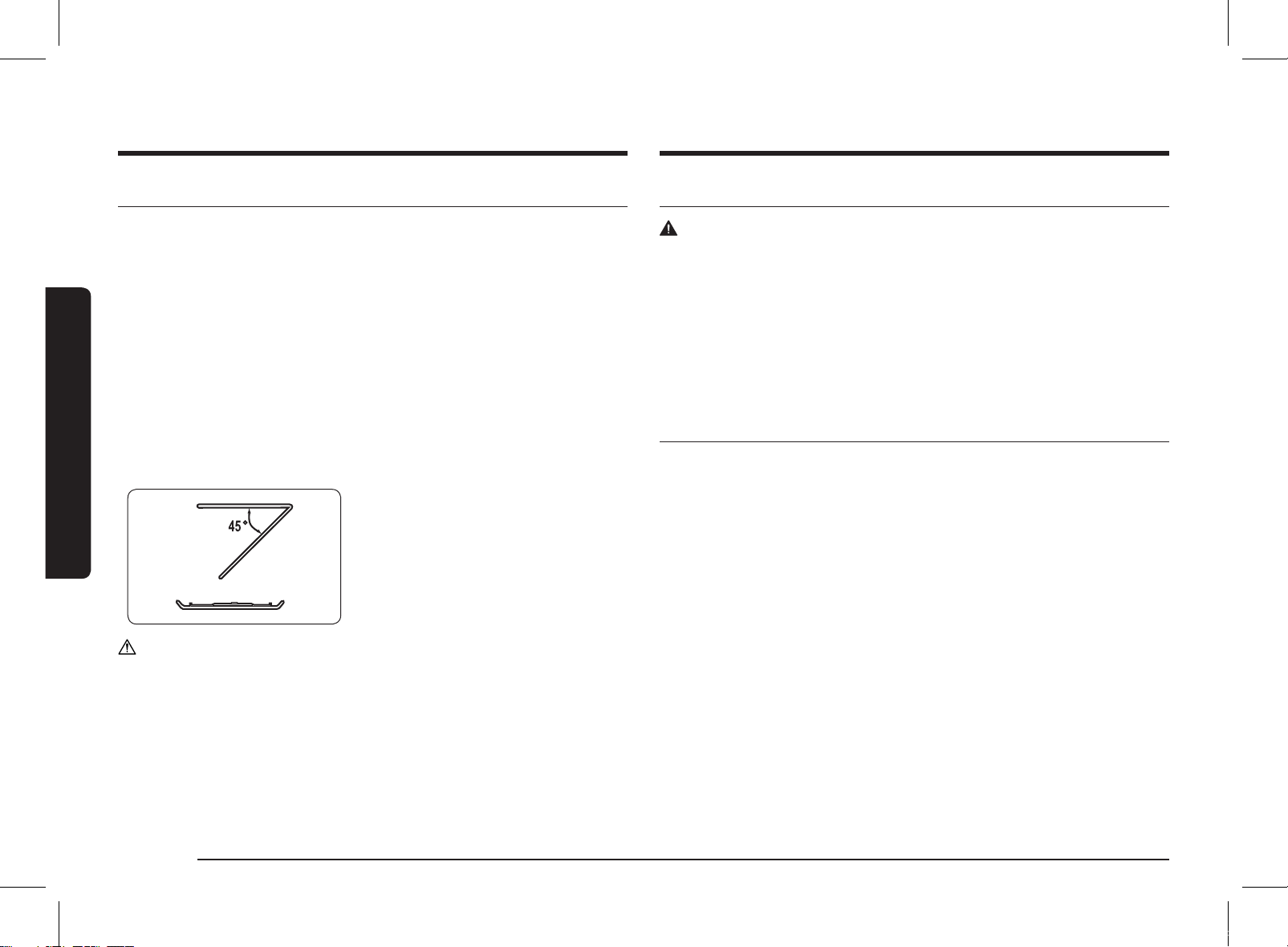
To clean inside swing-heater models
To clean the upper area of the cooking
chamber, lower the top heating element by
45° as shown. This will help clean the upper
area. When done, reposition the top heating
element.
CAUTION
• Keep the door and door sealing clean and ensure the door opens and closes
smoothly. Otherwise, the oven’s lifecycle may be shortened.
• Take caution not to spill water into the oven vents.
• Do not use any abrasive or chemical substances for cleaning.
• After each use of the oven, use a mild detergent to clean the cooking chamber
after waiting for the oven to cool down.
Replacement (repair)
WARNING
This oven has no user-removable parts inside. Do not try to replace or repair the
oven yourself.
• If you encounter a problem with hinges, sealing, and/or the door, contact a
qualified technician or a local Samsung service centre for technical assistance.
• If you want to replace the light bulb, contact a local Samsung service centre. Do
not replace it yourself.
• If you encounter a problem with the outer housing of the oven, first unplug the
power cord from the power source, and then contact a local Samsung service
centre.
Care against an extended period of disuse
• If you don’t use the oven for an extended period of time, unplug the power cord
and move the oven to a dry, dust-free location. Dust and moisture that builds up
inside the oven may affect the performance of the oven.
MS28F303TFK_TC_DE68-04599H-00_EN.indd 8 2020-07-24 오후 5:20:39
English 9
Oven features
Oven features
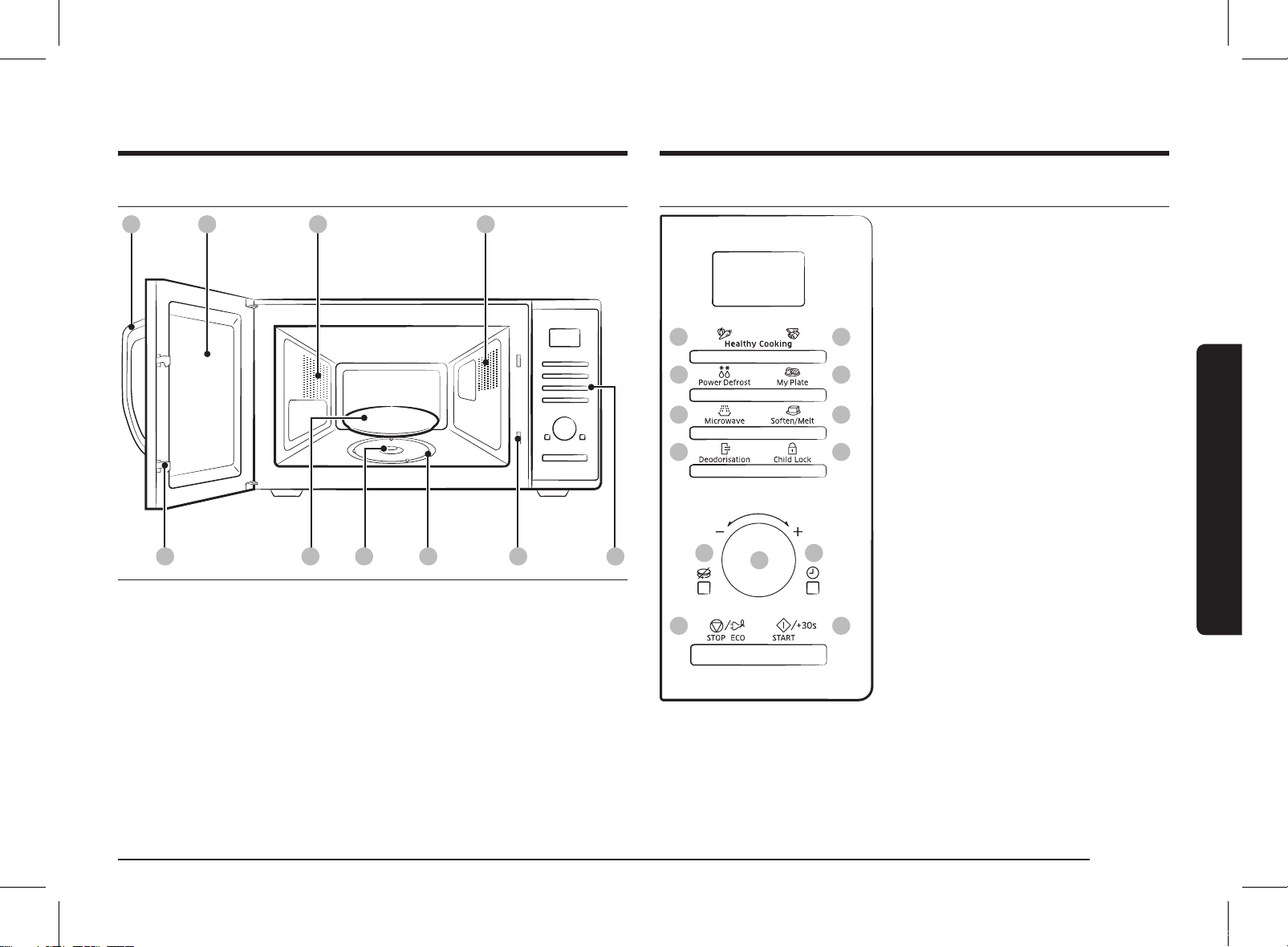
Oven
01 02 04
09 100706
03
0805
01 Door handle 02 Door 03 Ventilation holes
04 Light 05 Door latches 06 Turntable
07 Coupler 08 Roller ring 09 Safety interlock holes
10 Control panel
Control panel
01
03
05
07
09 11
02
04
06
08
10
1312
01 Healthy Cooking
(Vegetable, Grain)
02 Healthy Cooking
(Poultry, Fish)
03 Power Defrost
04 My Plate
05 Microwave
06 Soften/Melt
07 Deodorisation
08 Child Lock
09 Turntable On/Off
10 Dial Knob (Weight/Serving/Time)
11 Clock
12 STOP/ECO
13 START/+30s
MS28F303TFK_TC_DE68-04599H-00_EN.indd 9 2020-07-24 오후 5:20:39
10 English
Oven use
Checking that your oven is operating correctly
The following simple procedure enables you to check that your oven is
working correctly at all times. If you are in doubt, refer to the section entitled
"Troubleshooting" on the page 23.
NOTE
The oven must be plugged into an appropriate wall socket. The turntable must be
in position in the oven. If a power level other than the maximum (100 % - 1000 W)
is used, the water takes longer to boil.
Open the oven door by pulling the handle on the right side of the door.
Place a glass of water on the turntable. Close the door.
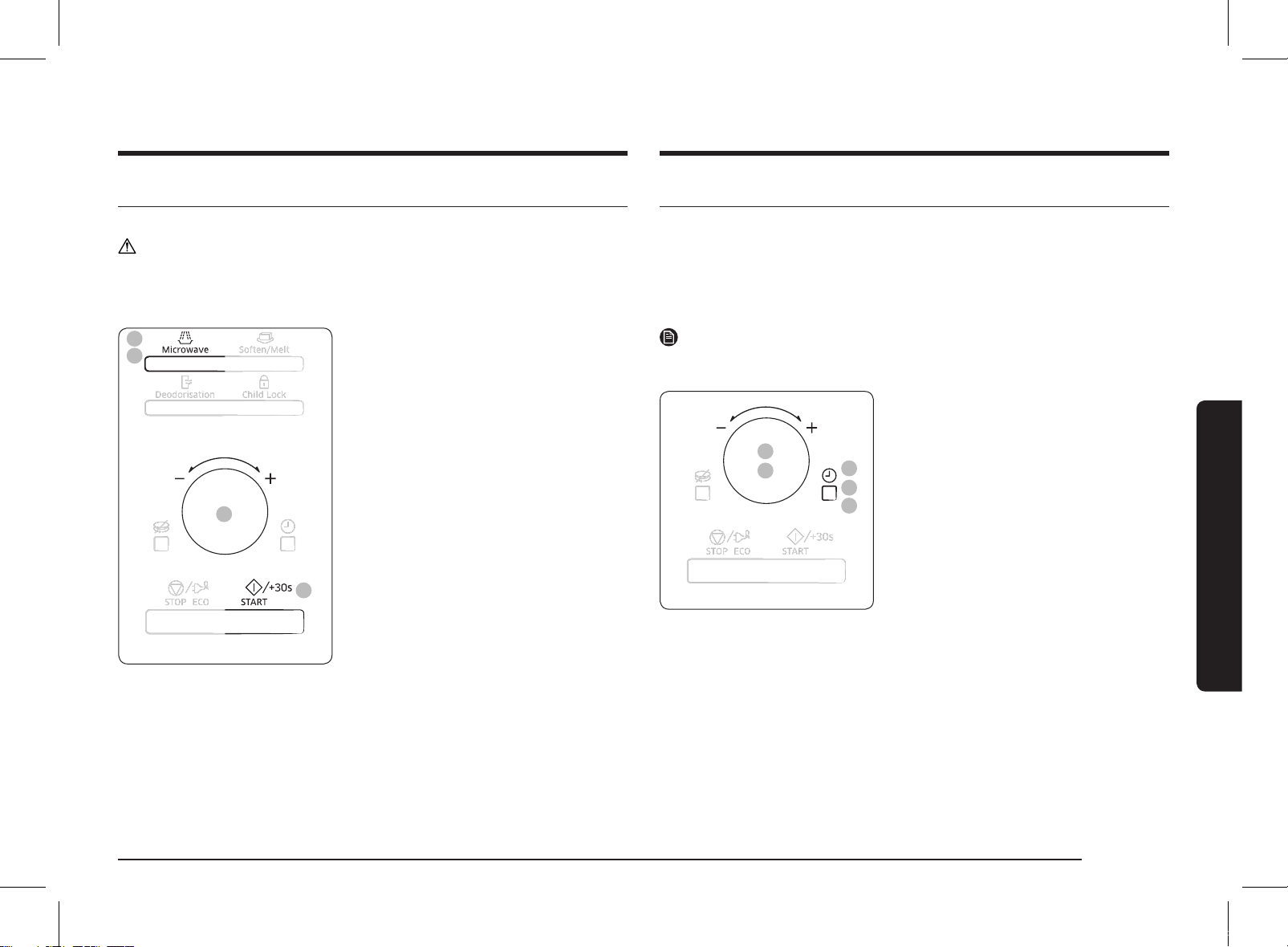
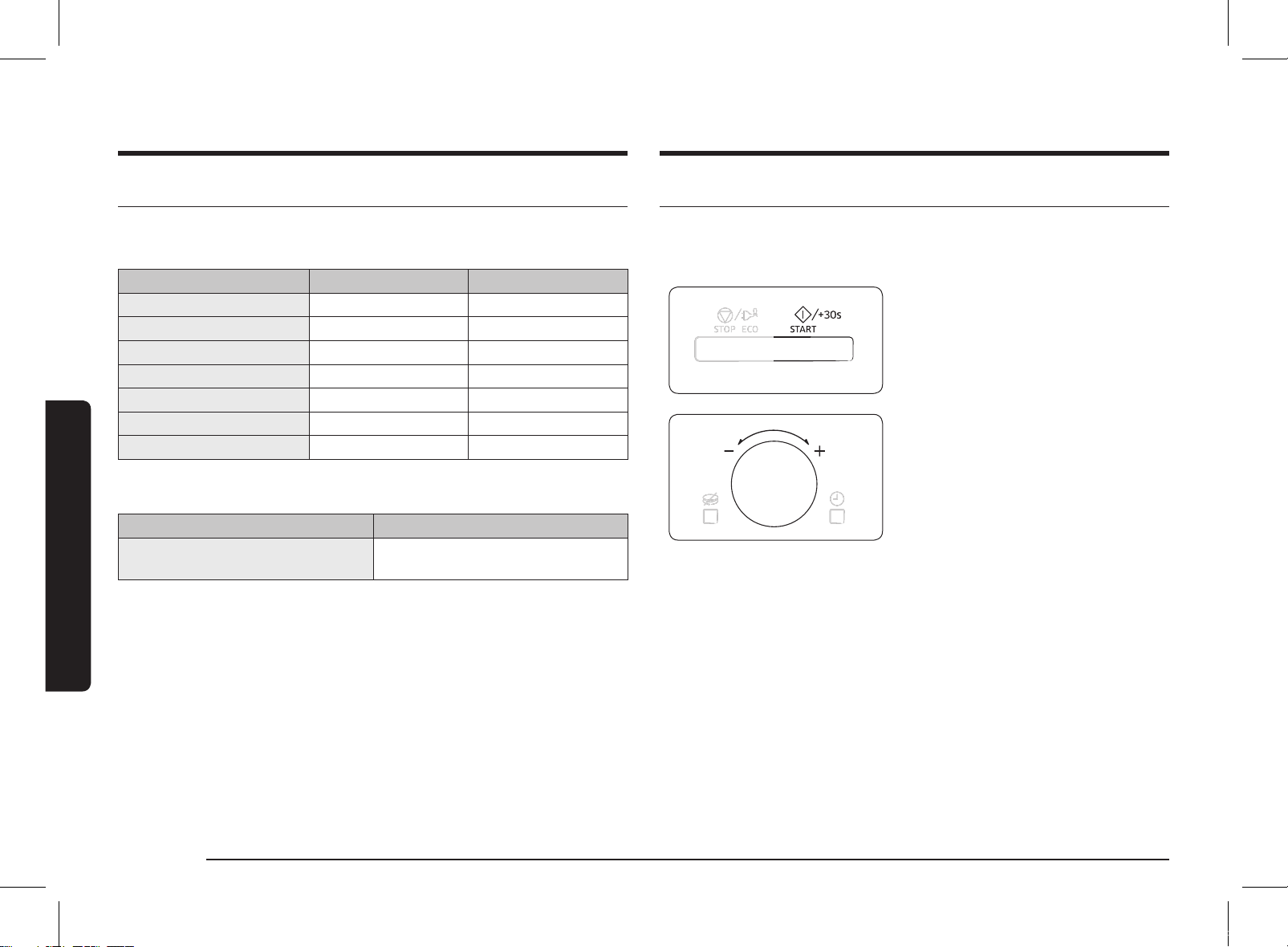
Press the START/+30s button and set the
time to 4 or 5 minutes, by pressing the START/+30s
button the appropriate number of times.
The oven heats the water for 4 or 5
minutes. The water should then be boiling.
Oven use
How a microwave oven works
Microwaves are high-frequency electromagnetic waves; the energy released
enables food to be cooked or reheated without changing either the form or the
colour.
You can use your microwave oven to:
• Defrost
• Reheat
• Cook
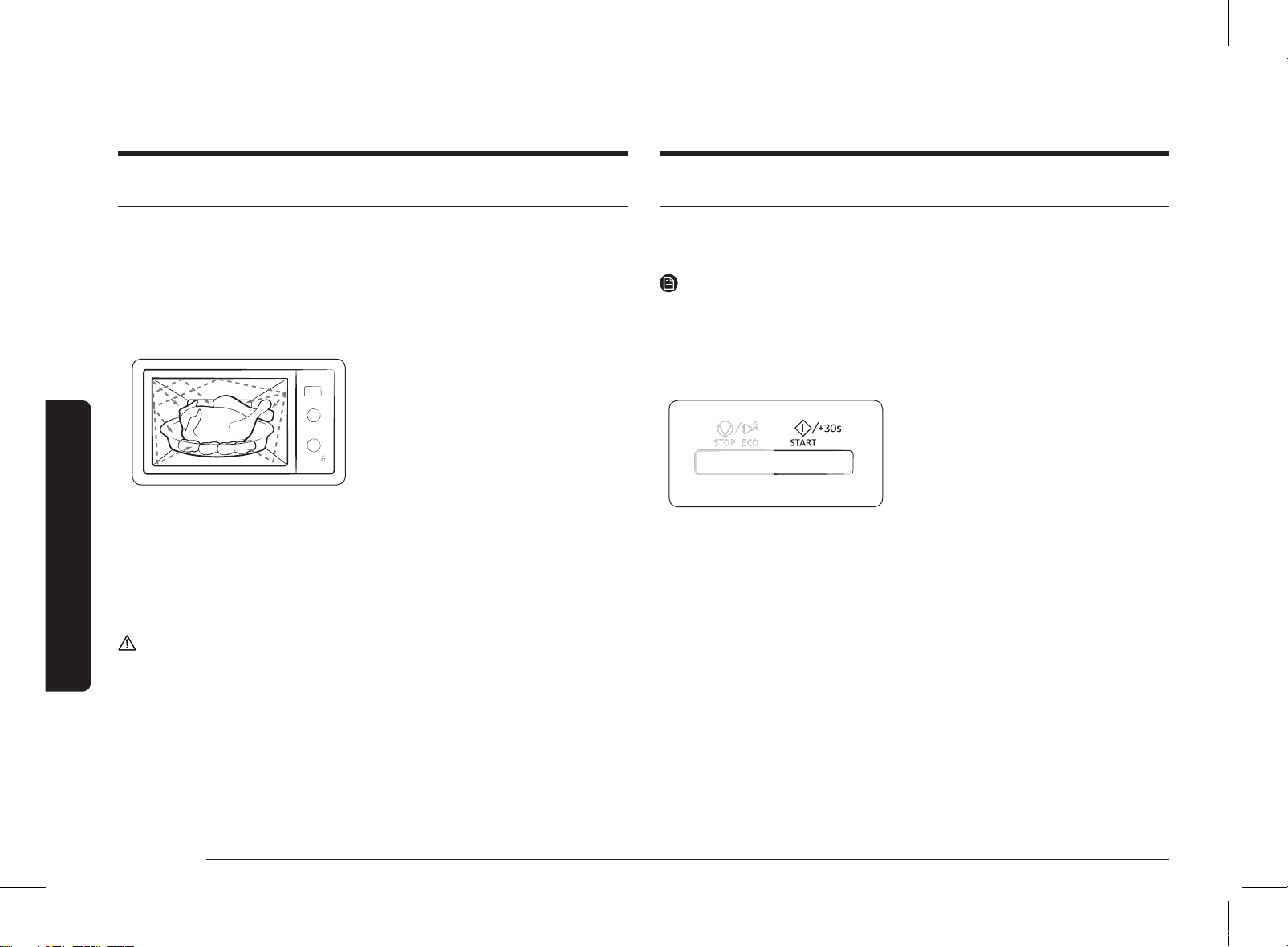
Cooking principle.
1. The microwaves generated by the
magnetron reflected at cavity and are
distributed uniformly as the food rotates
on the turntable. The food is thus cooked
evenly.
2. The microwaves are absorbed by the
food up to a depth of about 1 inch
(2.5 cm). Cooking then continues as the
heat is dissipated within the food.
3. Cooking times vary according to the
container used and the properties of the
food:
• Quantity and density
• Water content
• Initial temperature (refrigerated or not)
CAUTION
As the centre of the food is cooked by heat dissipation, cooking continues even
when you have taken the food out of the oven. Standing times specified in recipes
and in this booklet must therefore be respected to ensure:
• Even cooking of the food right to the centre.
• The same temperature throughout the food.
MS28F303TFK_TC_DE68-04599H-00_EN.indd 10 2020-07-24 오후 5:20:39
English 11
Oven use
Cooking/Reheating
The following procedure explains how to cook or reheat food.
CAUTION
ALWAYS check your cooking settings before leaving the oven unattended.
Open the door. Place the food in the centre of the turntable. Close the door. Never
switch the microwave oven on when it is empty.
4
3
1
2
1. Press the Microwave button.
2. Select the appropriate power level by
pressing the Microwave button again
until the corresponding wattage is
displayed. Refer to the power level table.
3. Set the cooking time by turning the
Dial Knob.
The cooking time is displayed.
4. Press the START/+30s button.
The oven light comes on and the
turntable starts rotating. Cooking starts
and when it has finished.
• The oven beep and flash End 4 times.
The oven will then beep one time per
minute.
Setting the time
When power is supplied, 88:88 and then 12:00 is automatically displayed on the
display.
Please set the current time. The time can be displayed in either the 24-hour or 12-
hour notation. You must set the clock:
• When you first install your microwave oven
• After a power failure
NOTE
Do not forget to reset the clock when you switch to and from summer and winter
time.
4
3
5
1
2
1. To display the time in the...
24-hour notation
12-hour notation
Press the Clock button once or twice.
2. Turn the Dial Knob to set the hour.
3. Press the Clock button.
4. Turn the Dial Knob to set the minute.
5. When the right time is displayed, press
the Clock button to start the clock.
The time is displayed whenever you are
not using the microwave oven.
MS28F303TFK_TC_DE68-04599H-00_EN.indd 11 2020-07-24 오후 5:20:40
12 English
Oven use
Oven use
Power levels and time variations
The power level function enables you to adapt the amount of energy dissipated
and thus the time required to cook or reheat your food, according to its type and
quantity. You can choose between seven power levels.
Power level Percentage Output
FULL 100 % 1000 W
HIGH 85 % 850 W
MEDIUM HIGH 60 % 600 W
MEDIUM 45 % 450 W
MEDIUM LOW 30 % 300 W
DEFROST 18 % 180 W
LOW/KEEP WARM 10 % 100 W
The cooking times given in recipes and in this booklet correspond to the specific
power level indicated.
If you select a... Then the cooking time must be...
Higher power level
Lower power level
Decreased
Increased
Adjusting the cooking time
You can increase the cooking time by pressing the START/+30s button once for
each 30 seconds to be added.
• Check how cooking is progressing at any time simply by opening the door
• Increase the remaining cooking time
To increase the cooking time of your
food during cooking, press the START/+30s
button once for each 30 seconds that you
wish to add.
• Example: To add three minutes, press the
START/+30s button six times.
Just turning Dial Knob to adjust cooking
time.
• To increase cooking time, turn to right and
to decrease cooking time, turn to left.
MS28F303TFK_TC_DE68-04599H-00_EN.indd 12 2020-07-24 오후 5:20:40
English 13
Oven use
Using the Healthy Cooking features
The Healthy Cooking Features has 16 pre-programmed cooking times. You do not
need to set either the cooking times or the power level.
You can adjust the size of the serving by turning the Dial Knob.
CAUTION
Use only recipients that are microwave-safe.
Open the door. Place the food in the centre of the turntable. Close the door.
3
2
1
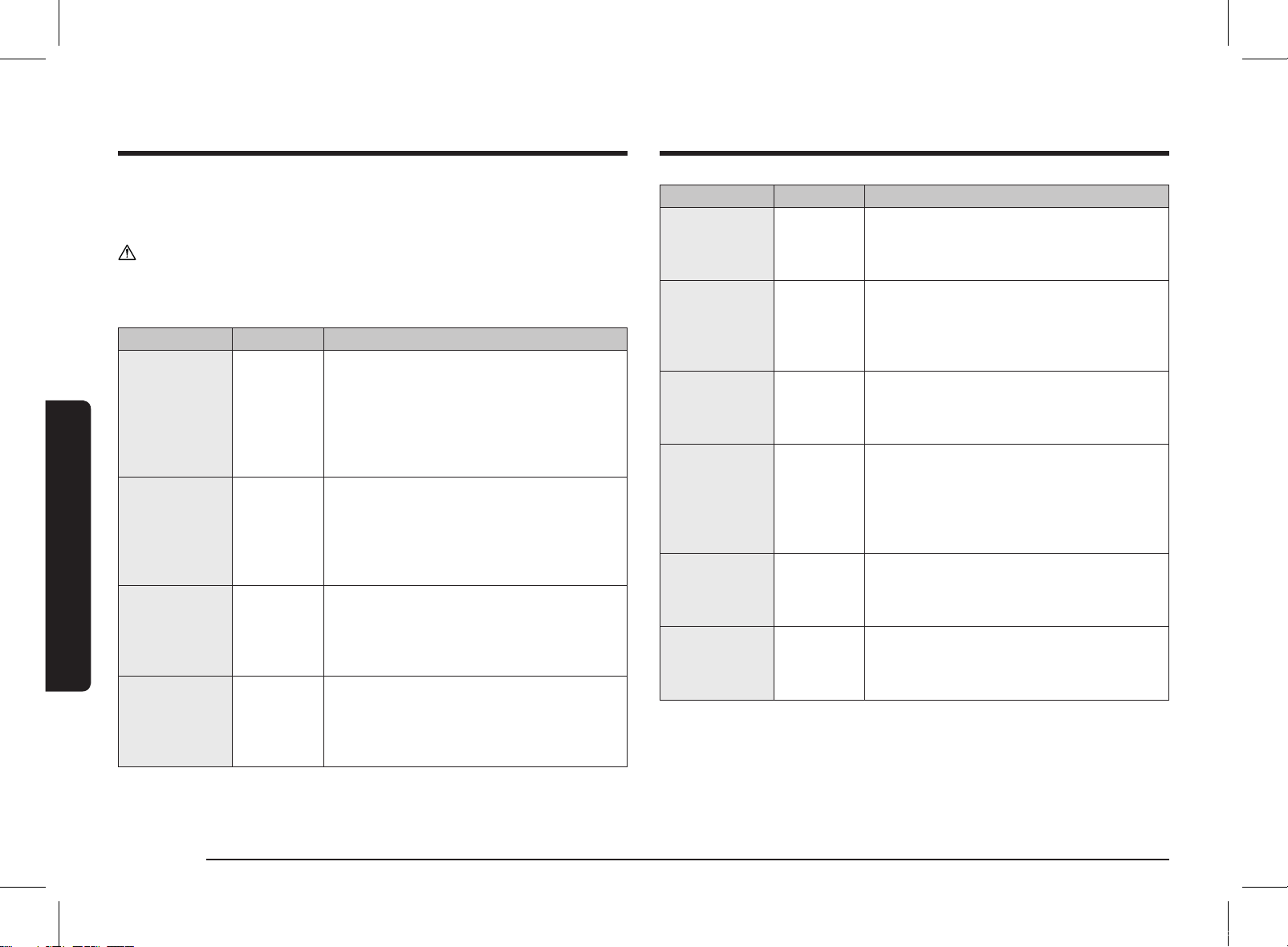
1. Select the type of food that you
are cooking by pressing the Healthy Cooking
button once or more times.
Vegetable & Grain
Poultry & Fish
2. Select the size of the serving by turning
the Dial Knob. (Refer to the table on the
side.)
3. Press the START/+30s button.
The food is cooked according to the pre-
programmed setting selected.
• When cooking has finished, the oven
will beep and flash End 4 times. The
oven will then beep one time per
minute.
Stopping the cooking
You can stop cooking at any time so that you can:
• Check the food
• Turn the food over or stir it
• Leave it to stand
To stop the cooking... Then...
Temporarily Open the door or press the STOP/ECO button once.
Cooking stops.
To resume cooking, close the door again and press the
START/+30s button.
Completely Press the STOP/ECO button once.
Cooking stops.
If you wish to cancel the cooking settings, press the STOP/ECO
button again.
Setting the energy save mode
The oven has an energy save mode.
• Press the STOP/ECO button.
Display off.
• To remove energy save mode, open the
door or press the STOP/ECO button and
then display shows current time. The oven
is ready for use.
NOTE
Auto energy saving function
If you do not select any function when appliance is in the middle of setting or
operating with temporary stop condition, function is canceled and clock will be
displayed after 25 minutes.
Oven Lamp will be turned off after 5 minutes with door open condition.
MS28F303TFK_TC_DE68-04599H-00_EN.indd 13 2020-07-24 오후 5:20:41
14 English
Oven use
Oven use
Code/Food Serving Size Instructions
5
Corn on the Cob
200 g Rinse and clean corn on the cobs and put into
an oval glass dish. Cover with
microwave cling film and pierce film. Stand for
1-2 minutes.
6
Peeled Potatoes
250 g
500 g
Wash and peel the potatoes and cut into a
similar size. Put them into a glass bowl with
lid. Add 45-60 ml (3-4 tbsp.) water. Put bowl in
the centre of turntable. Cook covered. Stand for
2-3 minutes.
7
Brown Rice
(Parboiled)
250 g Use a large glass ovenware dish with lid.
Add double quantity of cold water (500 ml).
Cook covered. Stir before standing time and
add salt and herbs. Stand for 5-10 minutes.
8
Wholemeal
Macaroni
250 g Use a large glass ovenware dish with lid.
Add 1 l hot boiling water, a pinch of salt and
stir well. Cook uncovered.
Cook covered. Stir before standing time
and drain thoroughly afterwards. Stand for
1 minutes.
9
Quinoa
250 g Use a large glass ovenware dish with lid.
Add double quantity of cold water (500 ml).
Cook covered. Stir before standing time and
add salt and herbs. Stand for 1-3 minutes.
10
Bulgur
250 g Use a large glass ovenware dish with lid.
Add double quantity of cold water (500 ml).
Cook covered. Stir before standing time and
add salt and herbs. Stand for 2-5 minutes.
The following table presents quantities and appropriate instructions about 16
pre-programmed cooking options. This is composed of Vegetable & Grain and
Poultry & Fish.
CAUTION
Use oven gloves when taking out food.
1. Vegetable & Grain
Code/Food Serving Size Instructions
1
Broccoli Florets
250 g
500 g
Rinse and clean fresh broccoli and prepare
florets. Put them evenly into a glass bowl with
lid. Add 30 ml (2 tbsp.) water when cooking
for 250 g, and add 60-75 ml (4-5 tbsp.) for
500 g. Put bowl in the centre of turntable.
Cook covered. Stir after cooking. Stand for
1-2 minutes.
2
Carrots
250 g Rinse and clean carrots and prepare even
slices. Put them evenly into a glass bowl with
lid. Add 30 ml (2 tbsp.) water when cooking
for 250 g. Put bowl in the centre of turntable.
Cook covered. Stir after cooking. Stand for
1-2 minutes
3
Green Beans
250 g Rinse and clean green beans.
Put them evenly into a glass bowl with lid.Add
30 ml (1 tbsp.) water when cooking 250 g. Put
bowl in the centre of turntable. Cook covered.
Stir after cooking. Stand for 1-2 minutes.
4
Spinach
150 g Rinse and clean spinach. Put into a glass bowl
with lid. Do not add water.
Put bowl in the centre of turntable. Cook
covered. Stir after cooking. Stand for
1-2 minutes.
MS28F303TFK_TC_DE68-04599H-00_EN.indd 14 2020-07-24 오후 5:20:41
English 15
Oven use
Using the My Plate features
The My Plate features has 2 pre-programmed cooking times. You do not need
to set either the cooking times or the power level. You can adjust the number of
servings by turning the Dial Knob.
First, place the food in the centre of the turntable and close the door.
3
2
1
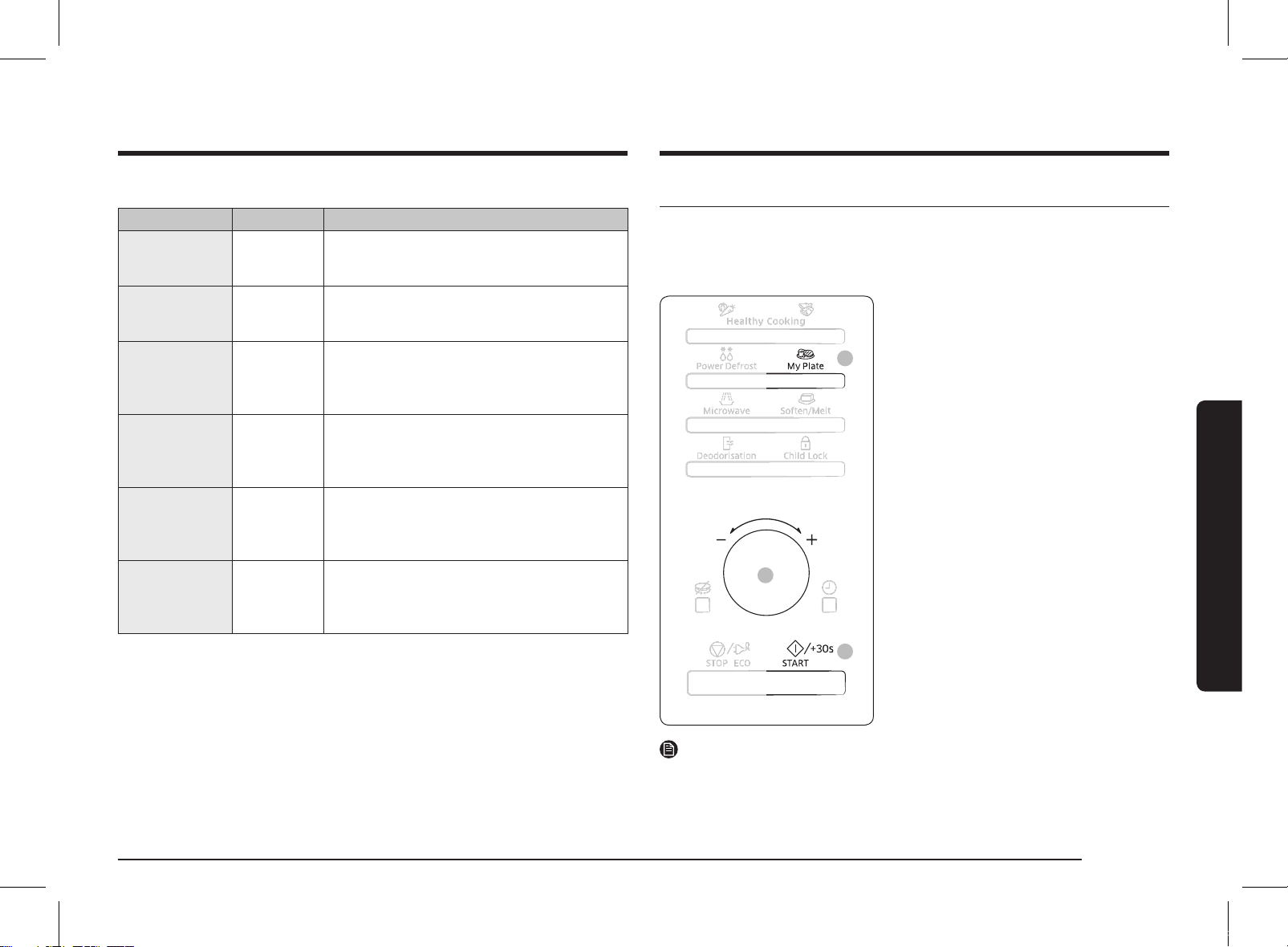
1. Select the type of food that you are
cooking by pressing the My Plate button
once or more times.
2. Select the size of the serving by turning
the Dial Knob. (Refer to the table on the
side.)
3. Press the START/+30s button.
The food is cooked according to the
preprogrammed setting selected.
• When cooking has finished, the oven
will beep and flash End 4 times. The
oven will then beep one time per
minute.
NOTE
Use only recipients that are microwave-safe.
2. Poultry & Fish
Code/Food Serving Size Instructions
1
Chicken Breasts
300 g
(2 pcs.)
Rinse pieces and put on a ceramic plate. Cover
with microwave cling film. Pierce film. Put dish
on turntable. Stand for 2 minutes.
2
Turkey Breasts
300 g
(2 pcs.)
Rinse pieces and put on a ceramic plate. Cover
with microwave cling film. Pierce film. Put dish
on turntable. Stand for 2 minutes.
3
Fresh Fish
Fillets
300 g
(2 pcs.)
Rinse fish and put on a ceramic plate, add
1 tbsp. lemon juice. Cover with microwave
cling film. Pierce film. Put dish on turntable.
Stand for 1-2 minutes.
4
Fresh Salmon
Fillets
300 g
(2 pcs.)
Rinse fish and put on a ceramic plate, add
1 tbsp. lemon juice. Cover with microwave
cling film. Pierce film. Put dish on turntable.
Stand for 1-2 minutes.
5
Fresh Prawns
250 g Rinse prawns on a ceramic plate, add 1 tbsp.
lemon juice. Cover with microwave cling film.
Pierce film. Put dish on turntable. Stand for
1-2 minutes.
6
Fresh Trout
400 g
(1-2 fish)
Put 1- 2 fresh whole fish into an ovenproof
dish. Add a pinch salt, 1 tbsp. lemon juice and
herbs. Cover with microwave cling film. Pierce
film. Put dish on turntable. Stand for 2 minutes.
MS28F303TFK_TC_DE68-04599H-00_EN.indd 15 2020-07-24 오후 5:20:42
16 English
Oven use
Oven use
The following table presents the My Plate auto reheat programmes, quantities and
appropriate instructions. Those programmes are running with microwave energy
only.
Code/Food Serving Size Instructions
1
Chilled Ready
Meal
300-350 g
400-450 g
Put meal on a ceramic plate and cover with
microwave cling film. This programme is
suitable for meals consisting of 3 components
(e.g. meat with sauce, vegetables and a side
dish like potatoes, rice or pasta). Stand for
2-3 minutes.
2
Chilled
Vegetarian Meal
300-350 g
400-450 g
Put meal on a ceramic plate and cover with
microwave cling film. This programme is
suitable for meals consisting of 2 components
(e.g. spaghetti with sauce or rice with
vegetables). Stand for 2-3 minutes.
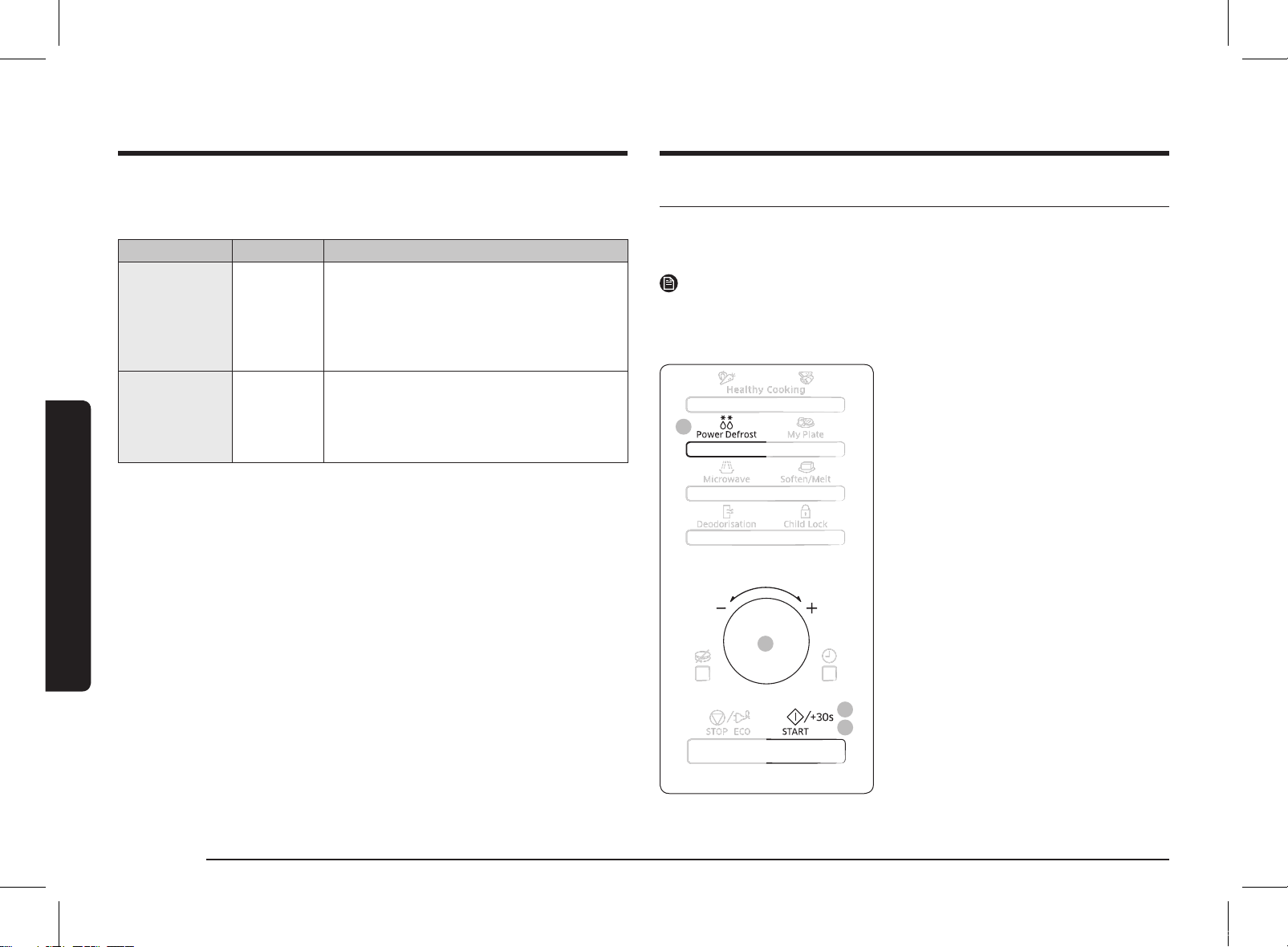
Using the Power Defrost features
The Power Defrost features enable you to defrost meat, poultry, fish, bread and
cake. The defrost time and power level are set automatically. You simply select the
programme and the weight.
NOTE
Use only containers that are microwave-safe.
Open the door. Place the frozen food on a ceramic in the centre of the turntable.
Close the door.
3
4
2
1
1. Select the type of food that you
are cooking by pressing the Power Defrost
button once or more times.
2. Select the size of the serving by turning
the Dial Knob. (Refer to the table on the
side.)
3. Press the START/+30s button.
• Defrosting begins.
• The oven beeps through defrosting to
remind you to turn the food over.
4. Press the START/+30s button again to
finish defrosting.
When cooking has finished, the oven will
beep and flash End 4 times. The oven
will then beep one time per minute.
MS28F303TFK_TC_DE68-04599H-00_EN.indd 16 2020-07-24 오후 5:20:42
English 17
Oven use
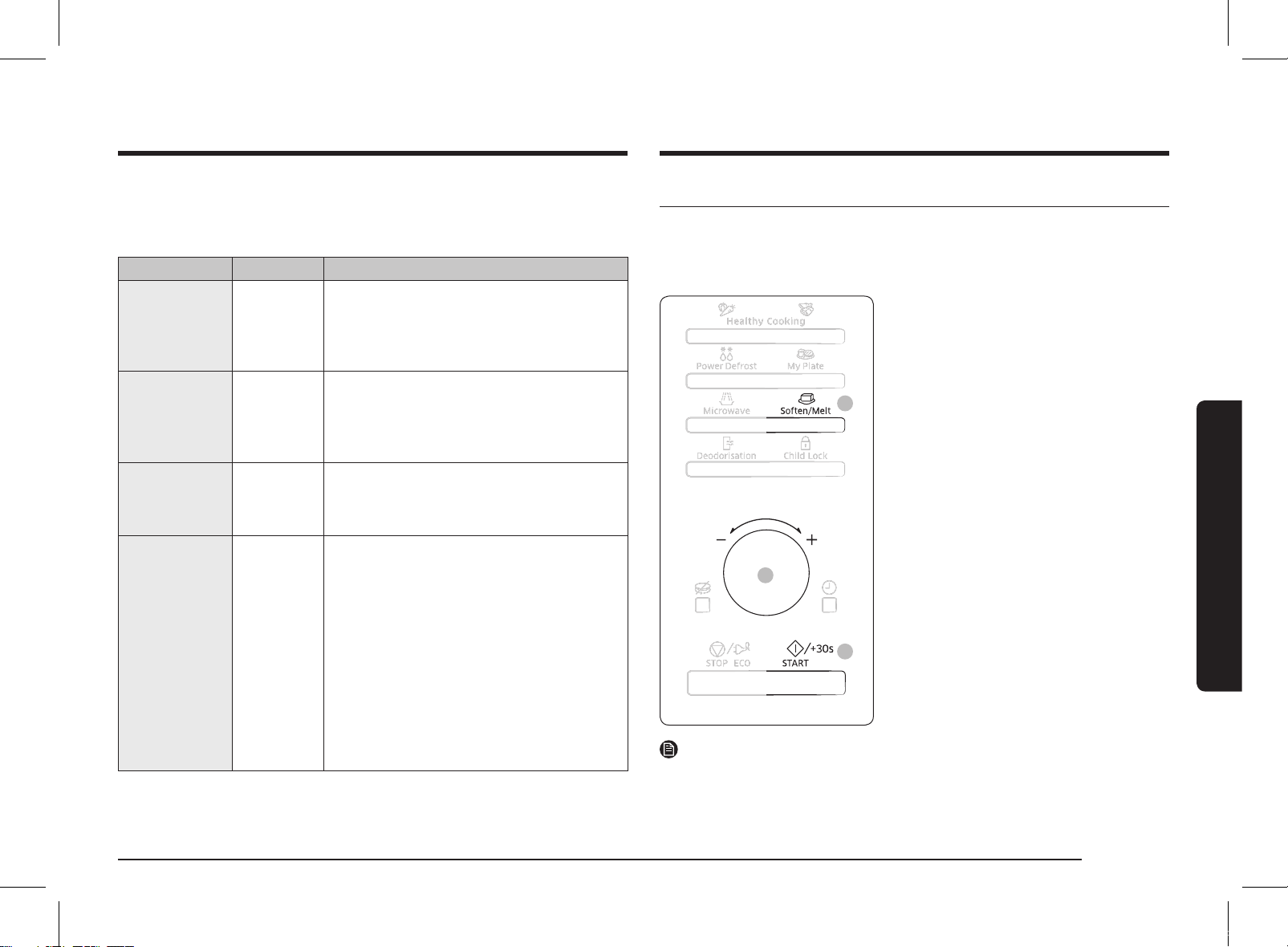
Using the Soften/Melt features
The Soften/Melt features has 4 pre-programmed cooking times. You do not need
to set either the cooking times or the power level. You can adjust the number of
servings by turning the Dial Knob.
First, place the food in the centre of the turntable and close the door.
3
2
1
1. Select the type of food that you
are cooking by pressing the Soften/Melt
button once or more times.
2. Select the size of the serving by turning
the Dial Knob.
(Refer to the table on the side.)
3. Press the START/+30s button.
The food is cooked according to the
preprogrammed setting selected.
• When cooking has finished, the oven
will beep and flash End 4 times. The
oven will then beep one time per
minute.
NOTE
Use only recipients that are microwave-safe.
The following table presents the various Power Defrost programmes, quantities
and appropriate instructions.
Remove all kind of package material before defrosting. Place meat, poultry, fish
and bread/cake on a flat glass dish or ceramic plate.
Code/Food Serving Size Instructions
1
Meat
200-1500 g Shield the edges with aluminium foil. Turn
the meat over, when the oven beeps. This
programme is suitable for beef, lamb, pork,
steaks, chops, minced meat. Stand for 20-
60 minutes.
2
Poultry
200-1500 g Shield the leg and wing tips with aluminium
foil. Turn the poultry over, when the oven
beeps. This programme is suitable for whole
chicken as well as for chicken portions. Stand
for 20-60 minutes.
3
Fish
200-1500 g Shield the tail of a whole fish with aluminium
foil. Turn the fish over, when the oven beeps.
This programme is suitable for whole fishes as
well as for fish fillets. Stand for 20-50 minutes.
4
Bread/Cake
125-1000 g Put bread on a piece of kitchen paper and turn
over, as soon as the oven beeps. Place cake on
a ceramic plate and if possible, turn over, as
soon as the oven beeps. (Oven keeps operating
and is stopped, when you open the door.) This
programme is suitable for all kinds of bread,
sliced or whole, as well as for bread rolls and
baguettes. Arrange bread rolls in a circle. This
programme is suitable for all kinds of yeast
cake, biscuit, cheese cake and puff pastry. It
is not suitable for short/crust pastry, fruit and
cream cakes as well as for cake with chocolate
topping. Stand for 5-20 minutes.
MS28F303TFK_TC_DE68-04599H-00_EN.indd 17 2020-07-24 오후 5:20:42
18 English
Oven use
Oven use
Power steam cooking guide
(only MS28F303TF*, MS28F304TF* models)
The Power Steamer is based on the principle of steam cooking, and is designed for
fast, healthy cooking in your Samsung Microwave oven.
This accessory is ideal for cooking rice, pasta, vegetables, etc. in record time, while
preserving their nutritional values.
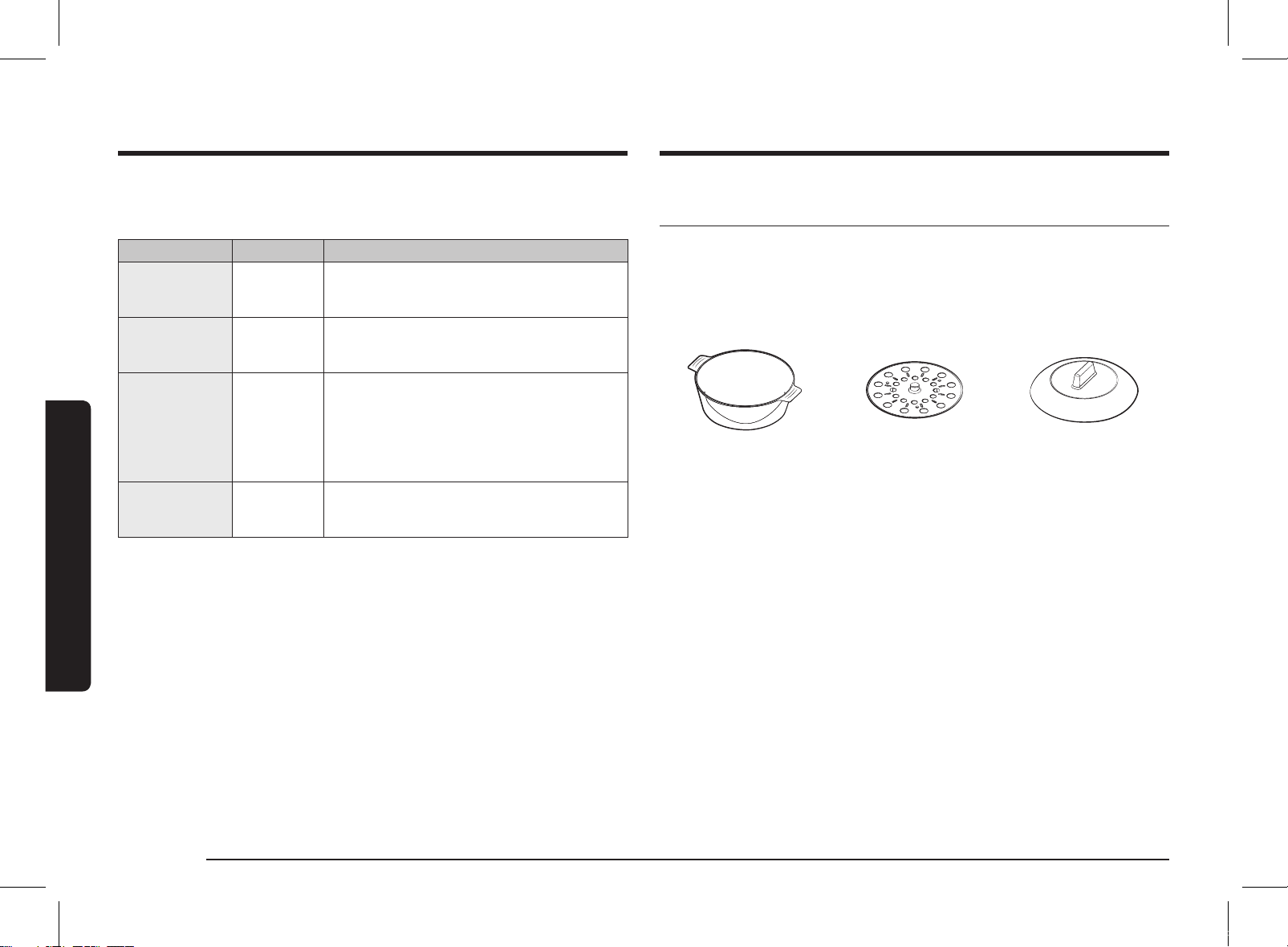
The Microwave Power steamer set is made up of 3 items:
Bowl Insert tray Lid
All parts withstand temperatures from -20 °C to 140 °C.
Suitable for freezer storage. Can also be used separately or together.
Conditions of use:
Do not use:
• to cook foods with a high sugar or fat content,
• with the grill or rotating heat function or on a hob.
Wash all parts well in soapy water before first use.
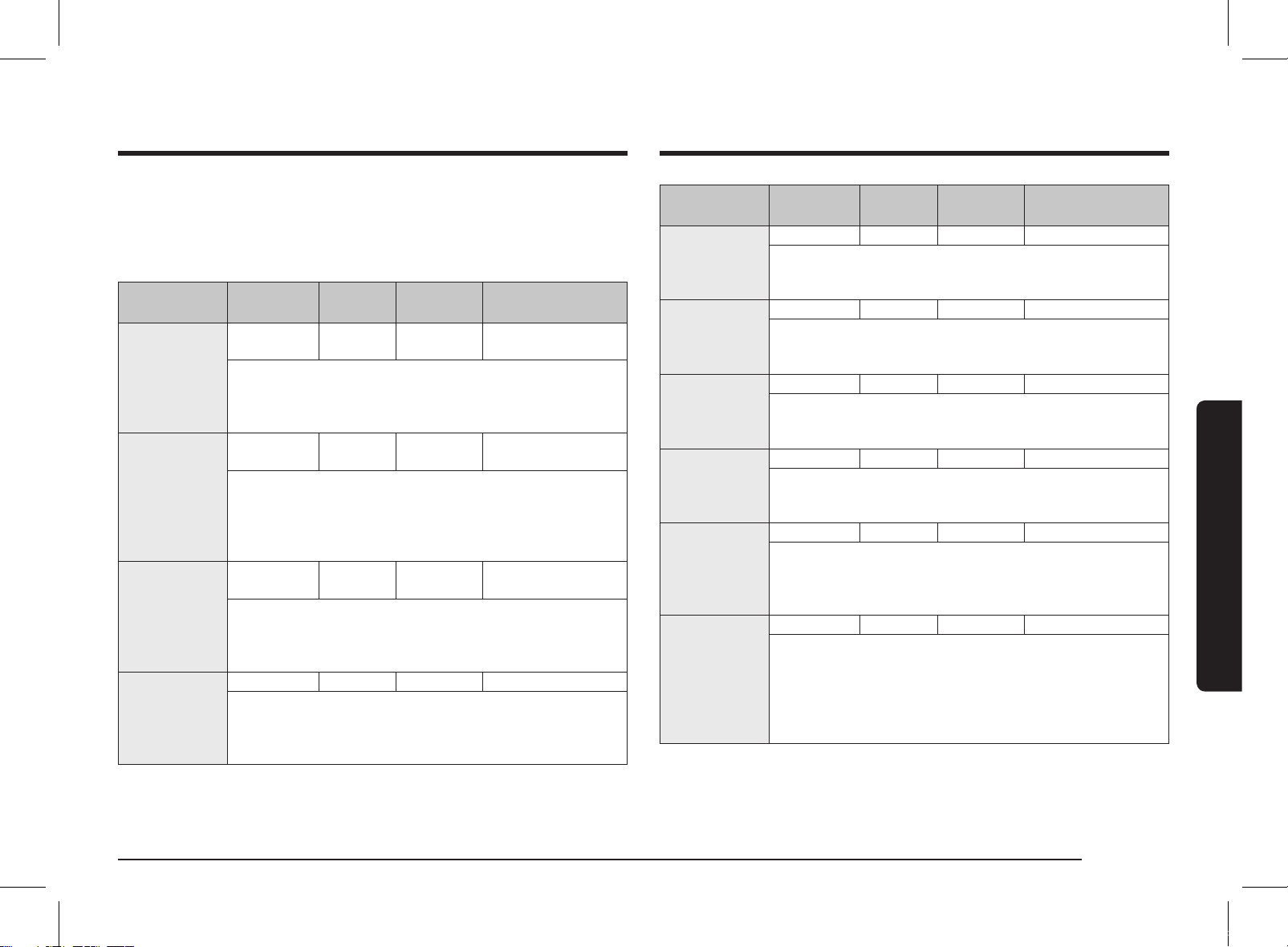
To find out cooking times, please refer to the instructions in the table on next page.
Maintenance:
Your steamer can be washed in a dishwasher.
When washing by hand, use hot water and washing-up liquid. Do not use abrasive
pads.
Some foods (such as tomato) may discolour the plastic. This is normal and not a
manufacturing fault.
The following table presents the Soften/Melt programmes, quantities and
appropriate instructions. Those programmes are running with microwave energy
only.
Code/Food Serving Size Instructions
1
Melt Butter
50 g
100 g
Cut butter into 3 or 4 pieces and Put them on
small glass bowl. Melt uncovered. Stir after
cooking. Stand for 1-2 minutes.
2
Melt Dark
Chocolate
50 g
100 g
Grate dark chocolate and put in small glass
bowl. Melt uncovered. Stir after melting. Stand
for 1-2 minutes.
3
Melt Sugar
25 g
50 g
Put sugar on small glass bowl. Add 10 ml water
for 25 g and add 20 ml water for 50 g.
Melt uncovered. Take out carefully, use oven
gloves! Use spoon or fork and pour caramel
decorations on baking paper. Let stand for
10 minutes until dry and remove from paper.
4
Soften Butter
50 g
100 g
Cut butter into 3 or 4 pieces and Put them in
small glass bowl. Soften uncovered. Stand for
1-2 minutes.
MS28F303TFK_TC_DE68-04599H-00_EN.indd 18 2020-07-24 오후 5:20:43
English 19
Oven use
Food Serving Size
Power
levels
Cooking
time (min.)
Handling
Jacket Potatoes 500 g 850 W 7-8 Bowl + Lid
Instructions
Weigh and rinse the potatoes and put them into steam bowl.
Add 3 tbsp. water. Cover with lid. Stand for 2-3 minutes.
Stew (Chilled) 400 g 600 W 5½-6½ Bowl + Lid
Instructions
Put stew into the steam bowl. Cover with lid. Stir well before
standing. Stand for 1-2 minutes.
Soup (Chilled) 400 g 850 W 3-4 Bowl + Lid
Instructions
Pour into steam bowl. Cover with lid. Stir well before standing.
Stand for 1-2 minutes.
Frozen Soup 400 g 850 W 8-10 Bowl + Lid
Instructions
Put frozen soup into steam bowl. Cover with lid. Stir well
before standing. Stand for 2-3 minutes.
Frozen Yeast
Dumpling with
Jam Filling
150 g 600 W 1½-2½ Bowl + Lid
Instructions
Moist the top of filled dumplings with cold water. Put 1-2
frozen dumplings side by side into the steam bowl. Cover with
lid. Stand for 2-3 minutes.
Fruit Compote 250 g 850 W 3-4 Bowl + Lid
Instructions
Weigh the fresh fruits (e.g. apples, pears, plums, apricots,
mangoes or pineapple) after peeling, washing and cutting
into similar sizes or cubes. Put into steam bowl. Add 1-2 tbsp.
water and 1-2 tbsp. sugar. Cover with lid. Stand for 2-3
minutes.
Defrosting:
Place the frozen food in the steam bowl without the lid. The liquid will remain in
the bottom of the pot and will not harm the food.
Cooking:
Food Serving Size
Power
levels
Cooking
time (min.)
Handling
Artichokes 300 g
(1-2 pcs.)
850 W 5-6
Bowl with insert tray
+ Lid
Instructions
Rinse and clean artichokes. Put insert tray into bowl. Set
artichokes on tray. Add 1 tbsp. lemon juice. Cover with lid.
Stand for 1-2 minutes.
Fresh
Vegetables
300 g 850 W 4-5 Bowl with insert tray
+ Lid
Instructions
Weigh the vegetables (e.g. broccoli, cauliflower, carrots,
pepper) after washing, cleaning and cutting into similar size.
Put tray into bowl. Distribute vegetables on insert tray. Add
2 tbsp. water. Cover with lid. Stand for 1-2 minutes.
Frozen
Vegetables
300 g 600 W 8-9 Bowl with insert tray
+ Lid
Instructions
Put the frozen vegetables into the steam bowl. Put insert tray
into bowl. Add 1 tbsp. water. Cover with lid. Stir well after
cooking and standing. Stand for 2-3 minutes.
Rice 250 g 850 W 15-18 Bowl + Lid
Instructions
Put rice into the steam bowl. Add 500 ml cold water. Cover
with lid. After cooking let stand white rice 5 minutes, brown
rice 10 minutes. Stand for 5-10 minutes.
MS28F303TFK_TC_DE68-04599H-00_EN.indd 19 2020-07-24 오후 5:20:43
20 English
Oven use
Oven use
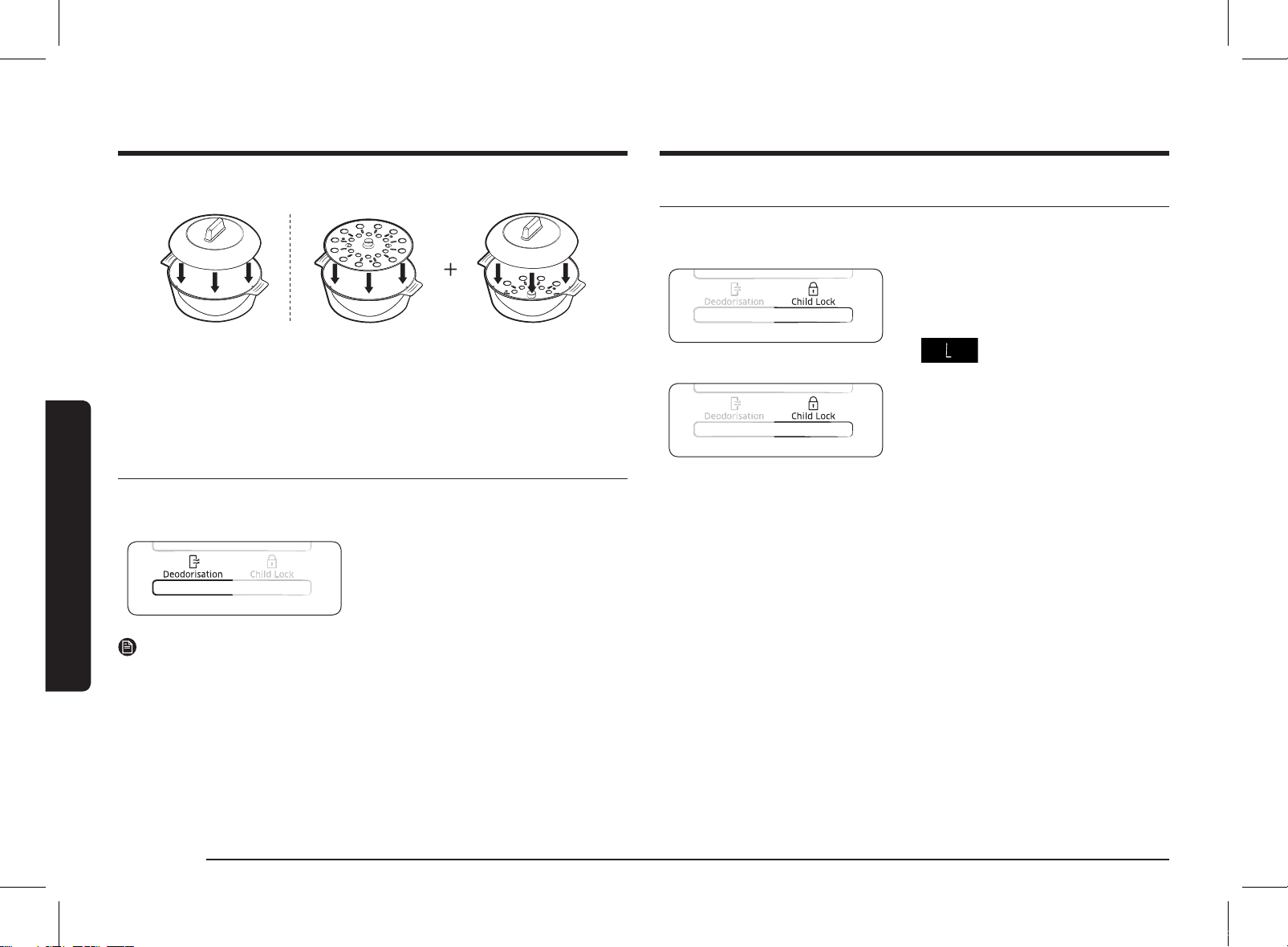
Using the Child Lock features
Your microwave oven is fitted with a special child lock programme, which enables
the oven to be locked so that children or anyone unfamiliar with it cannot operate
it accidentally.
1. Press the Child Lock button.
• The oven is locked (no functions can be
selected).
• The display shows L.
2. To unlock the oven, press the Child Lock
button.
• The oven can be used normally.
Handling of power steam cooker
Bowl + Lid Bowl with insert tray + Lid
PRECAUTIONS:
Take special care when opening the lid of your steamer, because the steam
escaping may be very hot.
Use oven gloves when handling after cooking.
Using the Deodorisation features
Use this features after cooking odorous food or when there is a lot of smoke in the
oven interior.
First clean the oven interior.
Press the Deodorisation button after
you have finished cleaning. As soon as
you press the Deodorisation button, the
operation will start automatically. when it
has finished, the oven beeps four times.
NOTE
• The deodorisation time has been specified as 5 minutes. It increases by
30 seconds whenever the START/+30s button is pressed.
• The maximum deodorisation time is 15 minutes.
MS28F303TFK_TC_DE68-04599H-00_EN.indd 20 2020-07-24 오후 5:20:43
English 21
Oven use
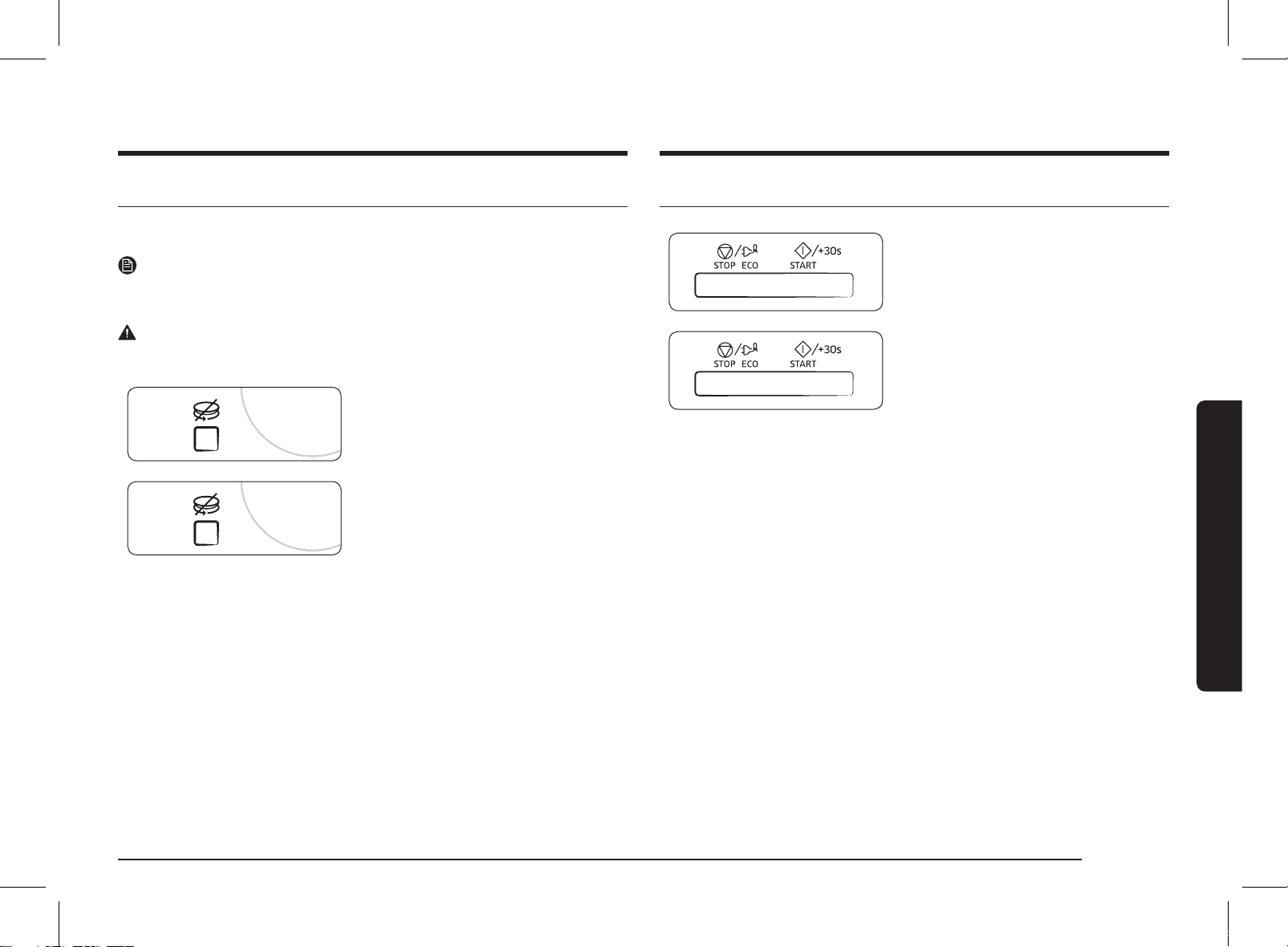
Switching the beeper off
You can switch the beeper off whenever you want.
1. Press the START/+30s and STOP/ECO
button at the same time.
• The oven does not beep to indicate the
end of a function.
2. To switch the beeper back on, press the
START/+30s and STOP/ECO button again
at the same time.
• The oven operates normally.
Using the Turntable On/Off features
The Turntable On/Off button enables you to use large dishes which fill the whole
oven by stopping the turntable from rotating (only manual cooking mode).
NOTE
The results will be less satisfactory in this case as the cooking is less even. We
recommend that you turn the dish by hand halfway through the cooking process.
WARNING
Never operate the turntable without food in the oven.
This may cause fire or damage to the unit.
1. Press the Turntable On/Off button.
• The turntable will not rotate.
2. To switch the turntable rotating back on,
press the Turntable On/Off button again.
• The turntable will rotate.
MS28F303TFK_TC_DE68-04599H-00_EN.indd 21 2020-07-24 오후 5:20:44
22 English
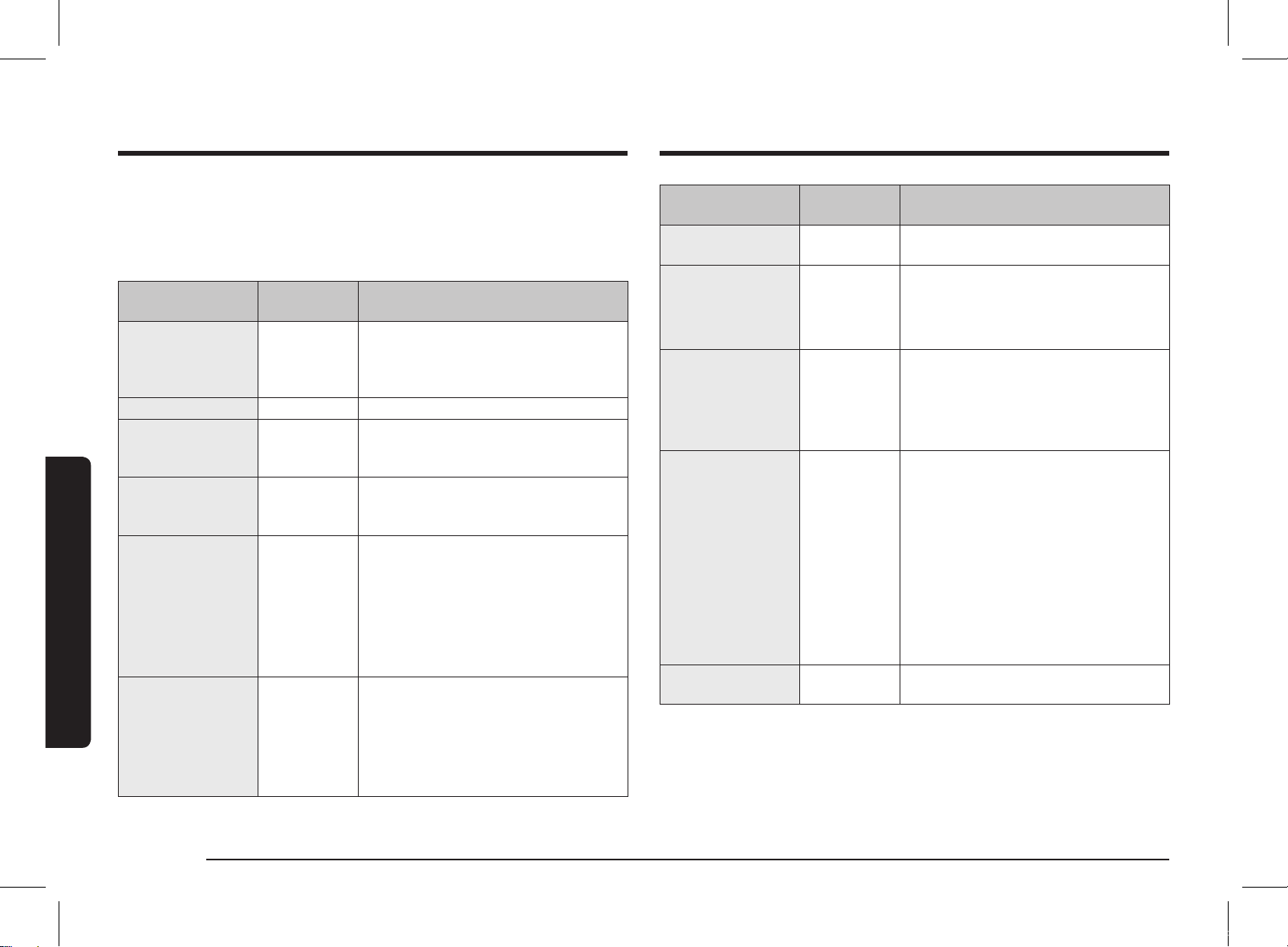
Cookware guide
Cookware guide
To cook food in the microwave oven, the microwaves must be able to penetrate
the food, without being reflected or absorbed by the dish used.
Care must therefore be taken when choosing the cookware. If the cookware is
marked microwave-safe, you do not need to worry.
The following table lists various types of cookware and indicates whether and how
they should be used in a microwave oven.
Cookware
Microwave-
safe
Comments
Aluminum foil
✓✗
Can be used in small quantities to protect
areas against overcooking. Arcing can
occur if the foil is too close to the oven
wall or if too much foil is used.
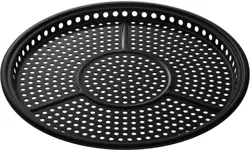
Crust plate
✓
Do not preheat for more than 8 minutes.
China and
earthenware
✓
Porcelain, pottery, glazed earthenware
and bone china are usually suitable,
unless decorated with a metal trim.
Disposable
polyester cardboard
dishes
✓
Some frozen foods are packaged in these
dishes.
Fast-food packaging
• Polystyrene cups
containers
✓
Can be used to warm food. Overheating
may cause the polystyrene to melt.
• Paper bags or
newspaper
✗
May catch fire.
• Recycled paper or
metal trims
✗
May cause arcing.
Glassware
• Oven-to-tableware
✓
Can be used, unless decorated with a
metal trim.
• Fine glassware
✓
Can be used to warm foods or liquids.
Delicate glass may break or crack if
heated suddenly.
Cookware
Microwave-
safe
Comments
• Glass jars
✓
Must remove the lid. Suitable for
warming only.
Metal
• Dishes
✗
May cause arcing or fire.
• Freezer bag twist
ties
✗
Paper
• Plates, cups,
napkins and
kitchen paper
✓
For short cooking times and warming.
Also to absorb excess moisture.
• Recycled paper
✗
May cause arcing.
Plastic
• Containers
✓
Particularly if heat-resistant
thermoplastic. Some other plastics may
warp or discolour at high temperatures.
Do not use Melamine plastic.
• Cling film
✓
Can be used to retain moisture. Should
not touch the food. Take care when
removing the film as hot steam will
escape.
• Freezer bags
✓✗
Only if boilable or oven-proof. Should not
be airtight. Prick with a fork, if necessary.
Wax or grease-
proof paper
✓
Can be used to retain moisture and
prevent spattering.
✓
: Recommended
✓✗
: Use caution
✗
: Unsafe
MS28F303TFK_TC_DE68-04599H-00_EN.indd 22 2020-07-24 오후 5:20:44
English 23
Troubleshooting and information code
Troubleshooting and information code
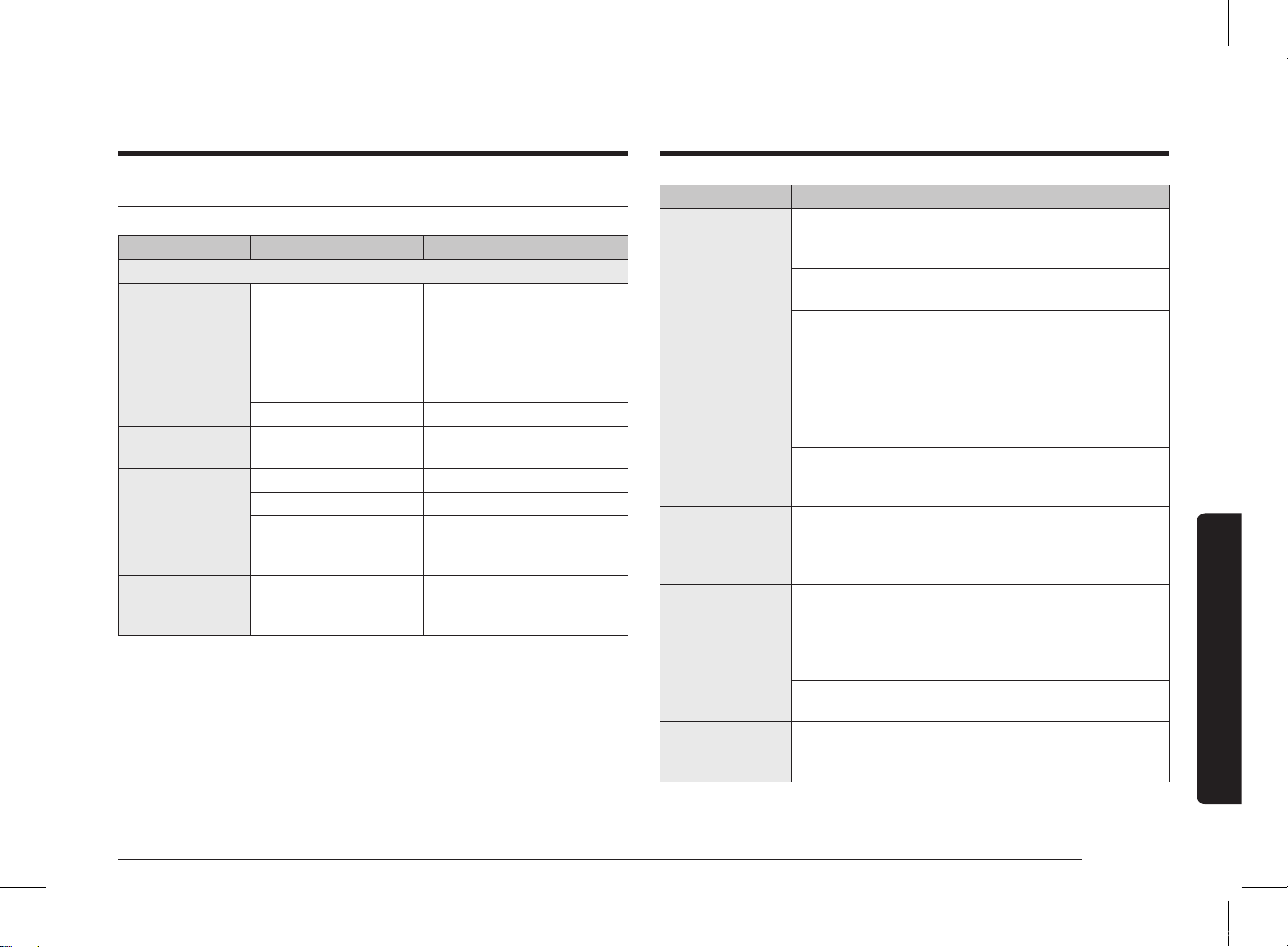
Troubleshooting
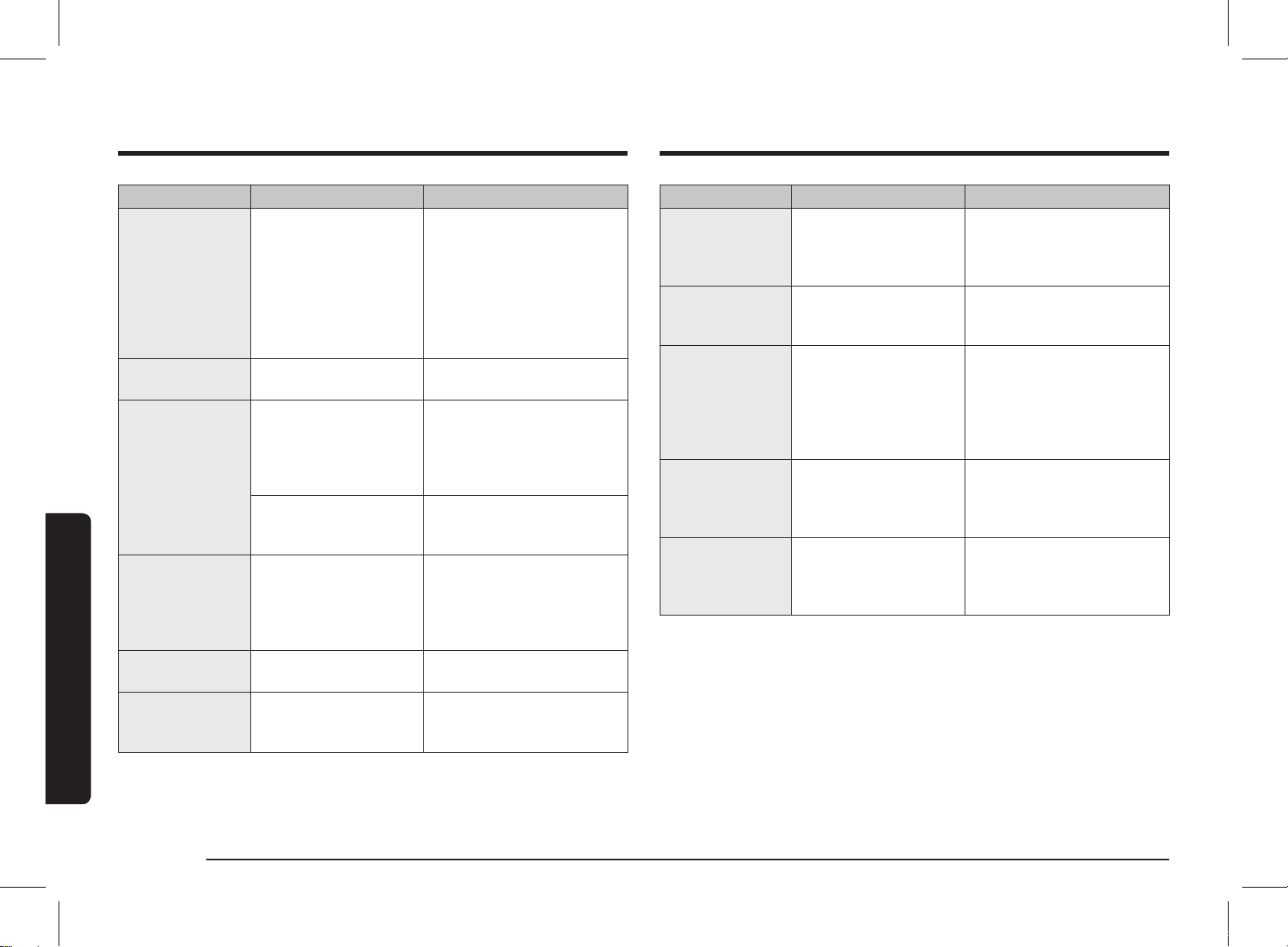
If you have any of the problems listed below try the solutions given.
Problem Cause Action
General
The buttons
cannot be pressed
properly.
Foreign matter may
be caught between the
buttons.
Remove the foreign matter
and try again.
For touch models:
Moisture is on the
exterior.
Wipe the moisture from the
exterior.
Child lock is activated. Deactivate Child lock.
The time is not
displayed.
The Eco (power-saving)
function is set.
Turn off the Eco function.
The oven does not
work.
Power is not supplied. Make sure power is supplied.
The door is open. Close the door and try again.
The door open safety
mechanisms are covered
in foreign matter.
Remove the foreign matter
and try again.
The oven stops
while in operation.
The user has opened the
door to turn food over.
After turning over the food,
press the START/+30s button
again to start operation.
Problem Cause Action
The power
turns off during
operation.
The oven has been
cooking for an extended
period of time.
After cooking for an extended
period of time, let the oven
cool.
The cooling fan is not
working.
Listen for the sound of the
cooling fan.
Trying to operate the
oven without food inside.
Put food in the oven.
There is not sufficient
ventilation space for the
oven.
There are intake/exhaust
outlets on the front and rear of
the oven for ventilation.
Keep the gaps specified in the
product installation guide.
Several power plugs are
being used in the same
socket.
Designate only one socket to
be used for the oven.
There is a popping
sound during
operation, and the
oven doesn't work.
Cooking sealed food or
using a container with a
lid may causes popping
sounds.
Do not use sealed containers
as they may burst during
cooking due to expansion of
the contents.
The oven exterior
is too hot during
operation.
There is not sufficient
ventilation space for the
oven.
There are intake/exhaust
outlets on the front and rear
of the oven for ventilation.
Keep the gaps specified in the
product installation guide.
Objects are on top of the
oven.
Remove all objects on the top
of the oven.
The door cannot be
opened properly.
Food residue is stuck
between the door and
oven interior.
Clean the oven and then open
the door.
MS28F303TFK_TC_DE68-04599H-00_EN.indd 23 2020-07-24 오후 5:20:44
24 English
Troubleshooting and information code
Troubleshooting and information code
Problem Cause Action
Heating including
the Warm function
does not work
properly.
The oven may not work,
too much food is being
cooked, or improper
cookware is being used.
Put one cup of water in a
microwave-safe container and
run the microwave for 1-2
minutes to check whether the
water is heated. Reduce the
amount of food and start the
function again. Use a cooking
container with a flat bottom.
The thaw function
does not work.
Too much food is being
cooked.
Reduce the amount of food
and start the function again.
The interior light
is dim or does not
turn on.
The door has been left
open for a long time.
The interior light may
automatically turn off when
the Eco function operates.
Close and reopen the door or
press the STOP/ECO button.
The interior light is
covered by foreign
matter.
Clean the inside of the oven
and check again.
A beeping sound
occurs during
cooking.
If the Auto Cook function
is being used, this
beeping sound means
it's time to turn over the
food during thawing.
After turning over the food,
press the START/+30s button
again to restart operation.
The oven is not
level.
The oven is installed on
an uneven surface.
Make sure the oven is installed
on flat, stable surface.
There are sparks
during cooking.
Metal containers are used
during the oven/thawing
functions.
Do not use metal containers.
Problem Cause Action
When power is
connected, the
oven immediately
starts to work.
The door is not properly
closed.
Close the door and check
again.
There is electricity
coming from the
oven.
The power or power
socket is not properly
grounded.
Make sure the power and
power socket are properly
grounded.
1. Water drips.
2. Steam emits
through a door
crack.
3. Water remains
in the oven.
There may be water or
steam in some cases
depending on the food.
This is not an oven
malfunction.
Let the oven cool and then
wipe with a dry dish towel.
The brightness
inside the oven
varies.
Brightness changes
depending on power
output changes according
to function.
Power output changes during
cooking are not malfunctions.
This is not an oven
malfunction.
Cooking is
finished, but the
cooling fan is still
running.
To ventilate the oven, the
cooling fan continues to
run for about 3 minutes
after cooking is complete.
This is not an oven
malfunction.
MS28F303TFK_TC_DE68-04599H-00_EN.indd 24 2020-07-24 오후 5:20:44
English 25
Technical specifications
Problem Cause Action
Turntable
While turning, the
turntable comes
out of place or
stops turning.
There is no roller ring,
or the roller ring is not
properly in place.
Install the roller ring and then
try again.
The turn table
drags while
turning.
The roller ring is not
properly in place, there
is too much food, or the
container is too large and
touches the inside of the
microwave.
Adjust the amount of food and
do not use containers that are
too large.
The turn table
rattles while
turning and is
noisy.
Food residue is stuck to
the bottom of the oven.
Remove any food residue
stuck to the bottom of the
oven.
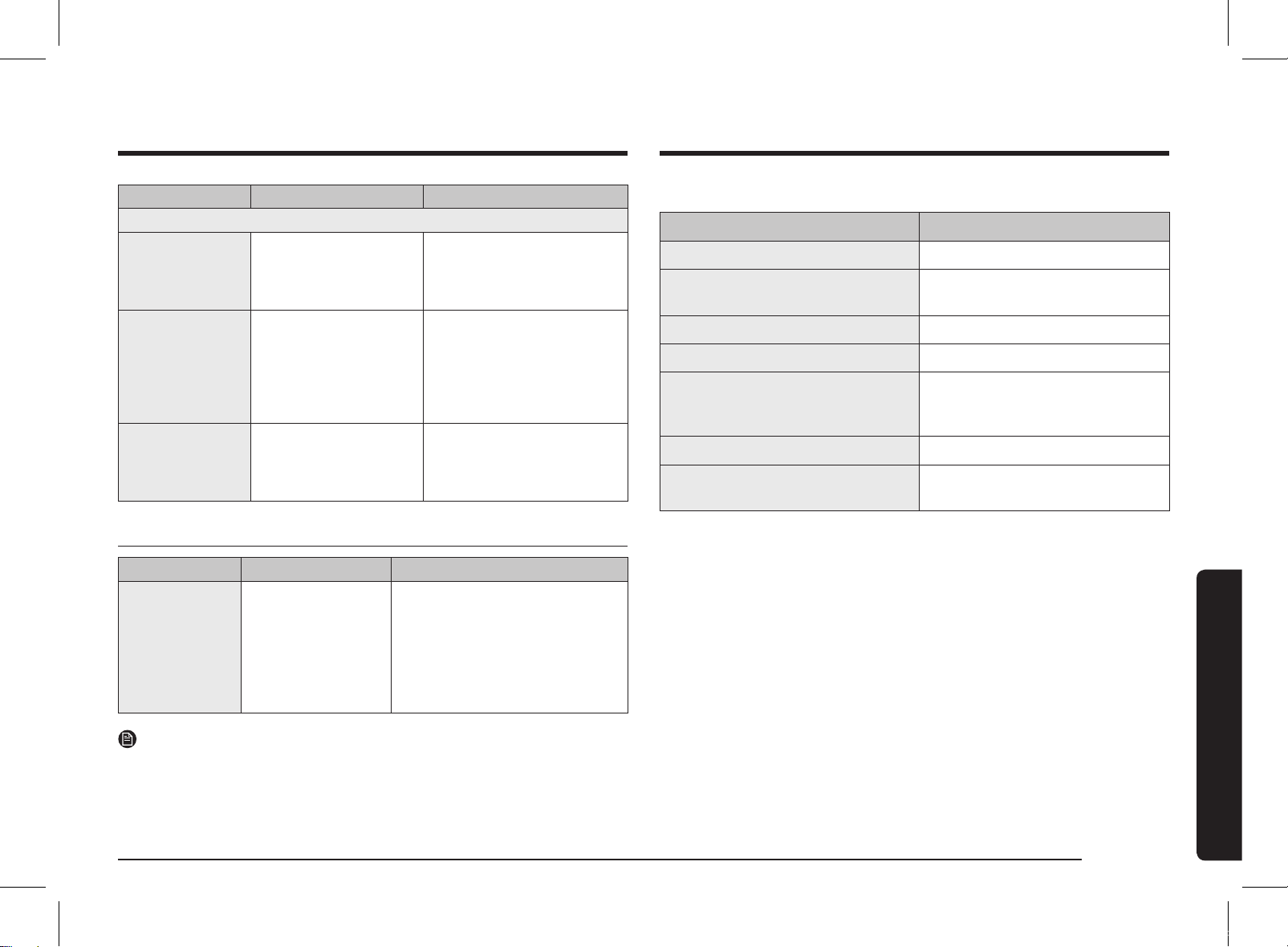
Information code
Information code CAUSE Action
SE
Control buttons
are pressed over
10 seconds.
Clean the keys and check if there
is water on the surface around
key. If it occurs again, turn off the
microwave oven over 30 seconds
and try setting again. If it appears
again, call your local SAMSUNG
Customer Care Centre.
NOTE
If the suggested solution does not solve the problem, contact your local SAMSUNG
Customer Care Centre.
Technical specifications
SAMSUNG strives to improve its products at all times. Both the design specifications
and these user instructions are thus subject to change without notice.
Model MS28F303T** / MS28F304T**
Power source 230 V
~
60 Hz AC
Power consumption
Microwave 1500 W
Output power 100 W / 1000 W - 7 levels (IEC-705)
Operating frequency 2450 MHz
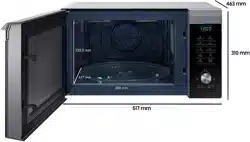
Dimensions (W x H x D)
Outside (Include Handle)
Oven cavity
517 x 297 x 428 mm
357 x 255 x 357 mm
Volume 28 liter
Weight
Net 15.0 kg approx.
Troubleshooting and information code
MS28F303TFK_TC_DE68-04599H-00_EN.indd 25 2020-07-24 오후 5:20:45

Memo
MS28F303TFK_TC_DE68-04599H-00_EN.indd 26 2020-07-24 오후 5:20:45

Memo
MS28F303TFK_TC_DE68-04599H-00_EN.indd 27 2020-07-24 오후 5:20:45
Please be advised that the Samsung warranty does NOT cover service calls to explain product operation, correct improper installation, or perform normal cleaning or
maintenance.
QUESTIONS OR COMMENTS?
COUNTRY /
LOCATION
CALL OR VISIT US ONLINE AT
AUSTRALIA 1300 362 603 www.samsung.com/au/support
NEW ZEALAND 0800 726 786 www.samsung.com/nz/support
CHINA 400-810-5858 www.samsung.com/cn/support
HONG KONG 3698 4698
www.samsung.com/hk/support
(Chinese)
www.samsung.com/hk_en/support
(English)
INDIA
1800 40 SAMSUNG (1800 40 7267864)
(Toll-Free)
1800 5 SAMSUNG (1800 5 7267864)
(Toll-Free)
www.samsung.com/in/support
BANGLADESH
09612300300
08000300300 (Toll free)
www.samsung.com/in/support
INDONESIA
021-5699-7777
0800-112-8888
(All Product, Toll Free)
www.samsung.com/id/support
JAPAN 0120-363-905 www.galaxymobile.jp/jp/support
MALAYSIA
1800-88-9999
+603-7713 7420 (Overseas contact)
www.samsung.com/my/support
COUNTRY /
LOCATION
CALL OR VISIT US ONLINE AT
PHILIPPINES
1-800-10-726-7864 [ PLDT Toll Free ]
1-800-8-726-7864
[ Globe Landline and Mobile ]
02-8-422-2111 [ Standard Landline ]
www.samsung.com/ph/support
SINGAPORE 1800 7267864 | 1800-SAMSUNG www.samsung.com/sg/support
THAILAND
Hotline no : 1282 (For all Product)
0-2689-3232 (For OTH products)
1800-29-3232
(Toll free for all product)
www.samsung.com/th/support
TAIWAN 0800-32-9999 www.samsung.com/tw/support
VIETNAM 1800 588 889 www.samsung.com/vn/support
MYANMAR +95-1-2399-888 www.samsung.com/mm/support
MACAU 0800 333
www.samsung.com/hk/support
(Chinese)
www.samsung.com/hk_en/support
(English)
SRI LANKA 011 SAMSUNG (011 7267864) www.samsung.com/in/support
CAMBODIA
+855-23-993232
1800-20-3232 (Toll free)
www.samsung.com/th/support
LAOS +856-214-17333 www.samsung.com/th/support
NEPAL
16600172667 (Toll Free for NTC Only)
9801572667 (Toll Free for Ncell users)
www.samsung.com/in/support
DE68-04599H-00
MS28F303TFK_TC_DE68-04599H-00_EN.indd 28 2020-07-24 오후 5:20:45