hoover.com
OWNER’S MANUAL
Operating and Servicing Instructions
©2013 Techtronic Floor Care Technology Limited. All Rights Reserved. #961151050 ID105906 R1
THIS PRODUCT IS INTENDED FOR HOUSEHOLD USE ONLY.
IF USED COMMERCIALLY WARRANTY IS VOID.
Español - página E1
IMPORTANT: READ CAREFULLY BEFORE ASSEMBLY AND USE.
Questions or concerns? For assistance, please call Customer Service at 1-800-944-9200
Mon-Fri 8am-7pm EST. PLEASE DO NOT RETURN THIS PRODUCT TO THE STORE.
UH70910RM
hoover.com
OWNER’S MANUAL
Operating and Servicing Instructions
©2013 Techtronic Floor Care Technology Limited. All Rights Reserved. #961151050 ID105906 R1
THIS PRODUCT IS INTENDED FOR HOUSEHOLD USE ONLY.
IF USED COMMERCIALLY WARRANTY IS VOID.
Español - página E1
IMPORTANT: READ CAREFULLY BEFORE ASSEMBLY AND USE.
Questions or concerns? For assistance, please call Customer Service at 1-800-944-9200
Mon-Fri 8am-7pm EST. PLEASE DO NOT RETURN THIS PRODUCT TO THE STORE.
#961A00016
UH70901RM
Important Safety Instructions....................................................................................3
Vacuum Assembly ......................................................................................................5
Carton Contents ......................................................................................................5
Attach Handle ..........................................................................................................5
Attach Dirt Cup ........................................................................................................5
Position Tools ..........................................................................................................5
How To Use .................................................................................................................6
Vacuum Description ................................................................................................6
On-Off Switch ..........................................................................................................6
Suction Only Mode/ Brushroll Shut-Off....................................................................6
Cord Release ...........................................................................................................6
Transporting Cleaner ...............................................................................................7
Handle Positions ......................................................................................................7
Carpet Height Adjustment .......................................................................................7
Tools ..........................................................................................................................8
Select Proper Tool ...................................................................................................8
Removing Hose .......................................................................................................8
Attach Wand And Tools ...........................................................................................8
How To Clean Tools ................................................................................................8
Stair Cleaning ..........................................................................................................9
Cord Rewind and Storage .......................................................................................9
Maintenance ................................................................................................................10
Dirt Cup ...................................................................................................................10
Filters .......................................................................................................................11
Brushroll ..................................................................................................................12
Hose ........................................................................................................................13
Air-Powered Hand Tool ..........................................................................................13
Headlight .................................................................................................................13
Belt ..........................................................................................................................14
Troubleshooting .........................................................................................................15
Service .........................................................................................................................16
Warranty ......................................................................................................................17
2
Thank you for choosing a HOOVER
®
product.
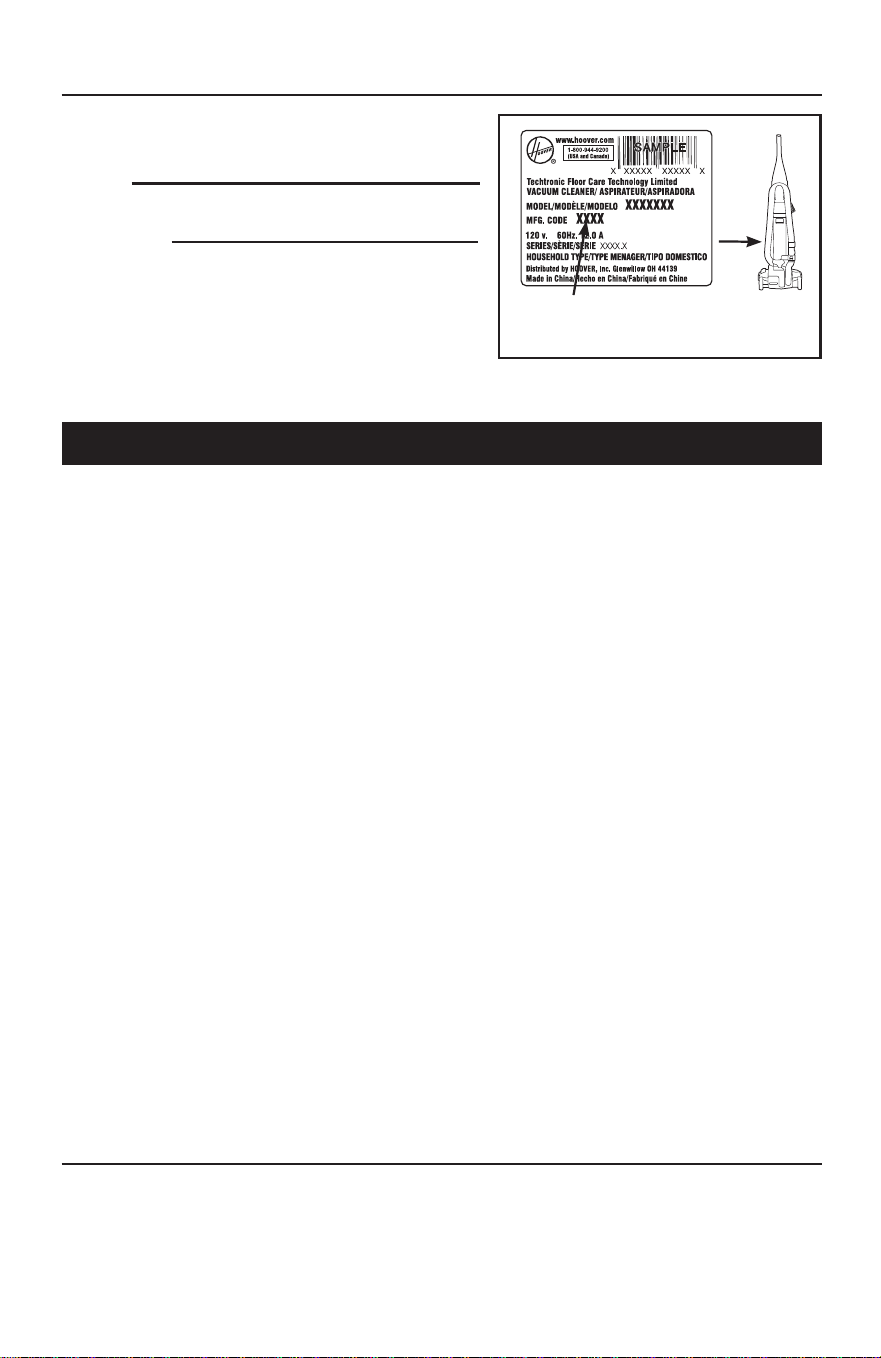
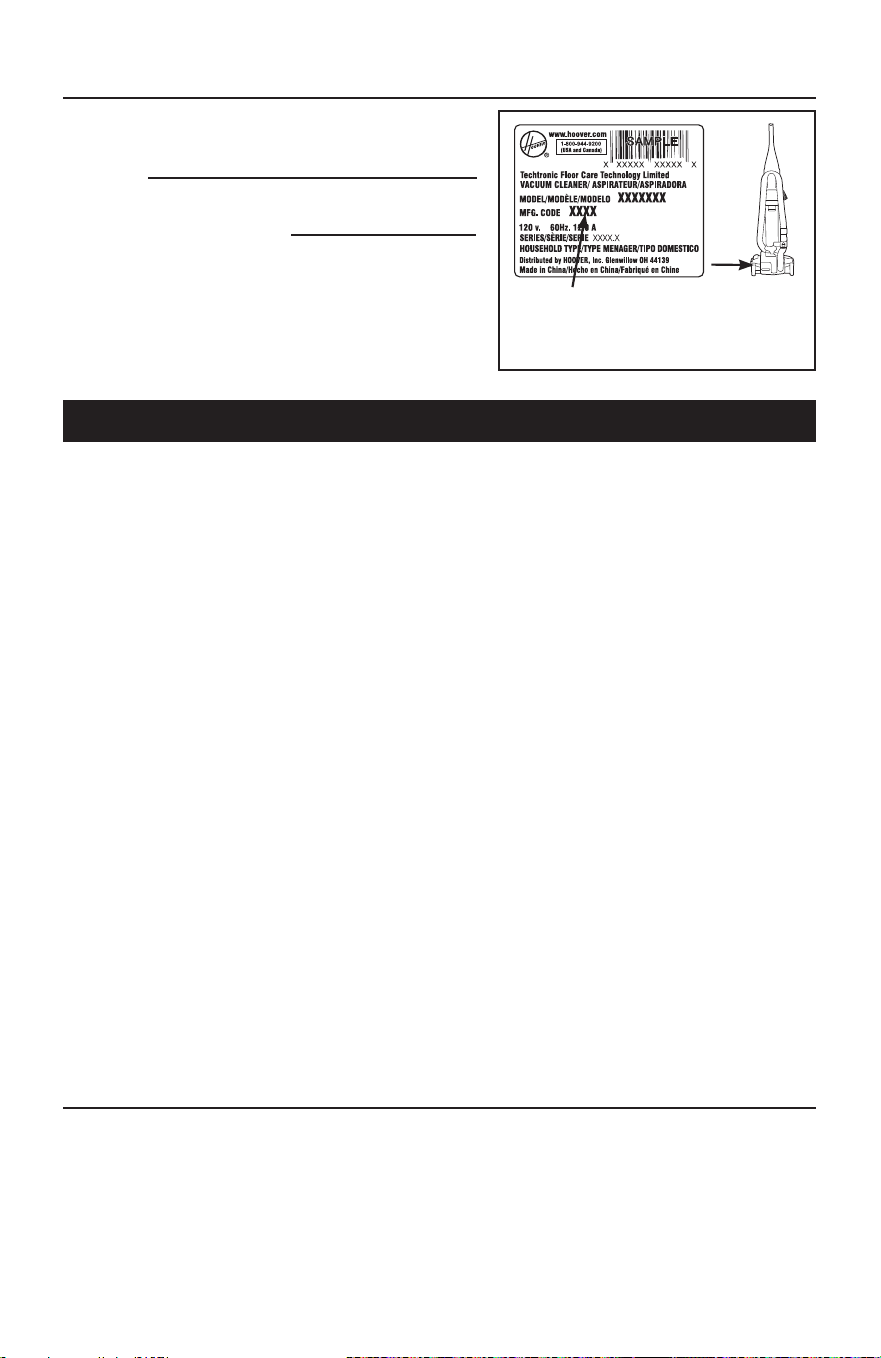
Please enter the complete model and Manufacturing
Code in the spaces provided.
MODEL
MFG. CODE
Hint: Attach your sales receipt to this owner’s manual.
Verification of date of purchase may be required for
warranty service of your HOOVER
®
product.
Be sure to register your product online at Hoover.com or
call 1-800-944-9200 to register by phone. Visit Hoover.com
for additional video instructions for assembly and
maintenance.
MANUFACTURING CODE
If you need assistance:
Visit our website at hoover.com. Follow the authorized dealer locator link to find the Hoover
®
authorized
dealer nearest you or call 1-800-944-9200 for an automated referral of Hoover
®
authorized dealer
locations (U.S. only) or to speak with a customer service representative; Mon- Fri 8am- 7pm EST.
PLEASE DO NOT RETURN THIS PRODUCT TO THE STORE.
(Label located on back of vacuum)
CONTENTS

3
IMPORTANT SAFETY INSTRUCTIONS
SAVE THESE INSTRUCTIONS
When using an electrical appliance, basic precautions should always be
followed, including the following:
READ ALL INSTRUCTIONS BEFORE USING THIS APPLIANCE.
WARNING: TO REDUCE THE RISK OF FIRE,
ELECTRIC SHOCK OR INJURY:
• Fully assemble before operating.
• Operate cleaner only at voltage specified on data label on back of cleaner.
• Do not leave appliance when plugged in. Unplug from outlet when not in use and
before cleaning or servicing.
• Do not use outdoors or on wet surfaces.
• Do not allow to be used as a toy. Not intended for use by children age 12 and
under. Close supervision is necessary when used near children. To avoid injury
or damage, keep children away from product, and do not allow children to place
fingers or other objects into any openings.
• Use only as described in this manual. Use only manufacturer’s recommended
attachments and products.
• Do not use with damaged cord or plug. If appliance is not working as it should,
has been dropped, damaged, left outdoors, or dropped into water, take it to a
service center prior to continuing use.
• Do not pull or carry by cord, use cord as a handle, close a door on cord, or pull
cord around sharp edges or corners. Do not place product on cord. Do not run
appliance over cord. Keep cord away from heated surfaces.
• Do not unplug by pulling on cord. To unplug, grasp the plug, not the cord.
• Do not handle plug or appliance with wet hands.
• Do not put any object into openings. Do not use with any opening blocked; keep
free of dust, lint, hair, and anything that may reduce air flow.
• Keep hair, loose clothing, fingers, and all parts of body away from openings and
moving parts.
• Turn off all controls before unplugging.
• Use extra care when cleaning on stairs. To avoid personal injury or damage,
and to prevent the cleaner from falling, always place cleaner at bottom of stairs
on floor. Do not place cleaner on stairs or furniture, as it may result in injury or
damage.
• Do not use to pick up flammable or combustible liquids, such as gasoline, or fine
wood sandings, or use in areas where they may be present.
• Hold plug when rewinding onto cord reel. Do not allow plug to whip when
rewinding.
• Unplug before connecting Air-Powered Hand Tool.
• Do not pick up anything that is burning or smoking, such as cigarettes, matches,
or hot ashes.
• Do not use without Dirt Cup and/or Filters in place.
• WARNING: This product contains chemicals known to the State of California
to cause cancer, birth defects or reproductive harm. WASH HANDS AFTER
HANDLING.

CAUTION: TO REDUCE THE RISK OF DAMAGE:
• Avoid picking up hard, sharp objects with this product, as they may cause
damage.
• Store appropriately indoors in a dry place. Do not expose machine to freezing
temperatures.
• Do not use sharp objects to clean out hose as they can cause damage.
• With brushroll on, do not allow cleaner to sit in one location for an extended
period of time, as damage to floor can result.
WARNING:
• To reduce the risk of electric shock, this appliance has a polarized plug (one blade
is wider than the other). This plug will fit in a polarized outlet only one way. If the
plug does not fit fully in the outlet, reverse the plug. If it still does not fit, contact a
qualified electrican to install the proper outlet. Do not change the plug in any way.
4
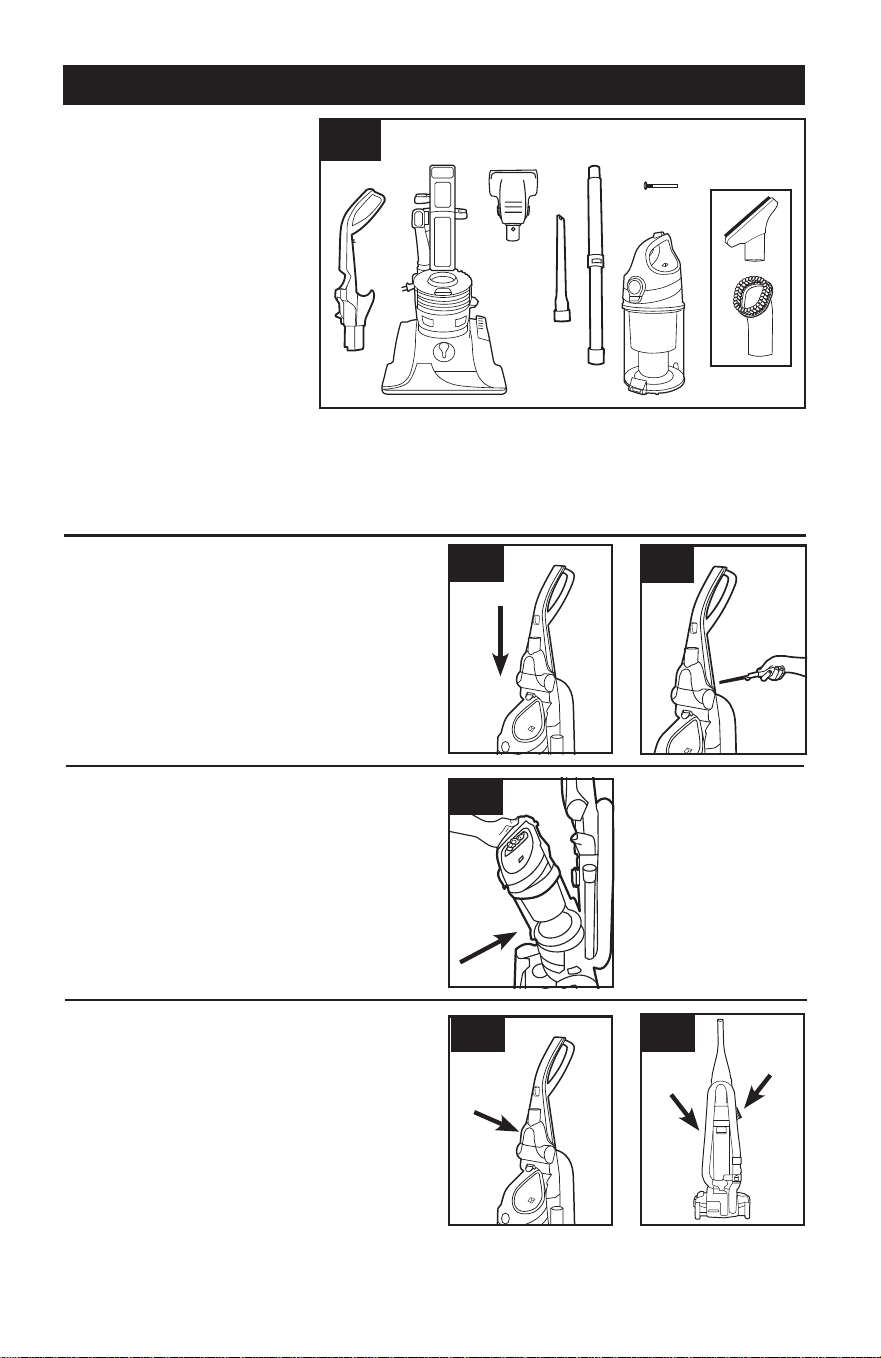
ATTACH HANDLE
POSITION TOOLS
(varies per model)
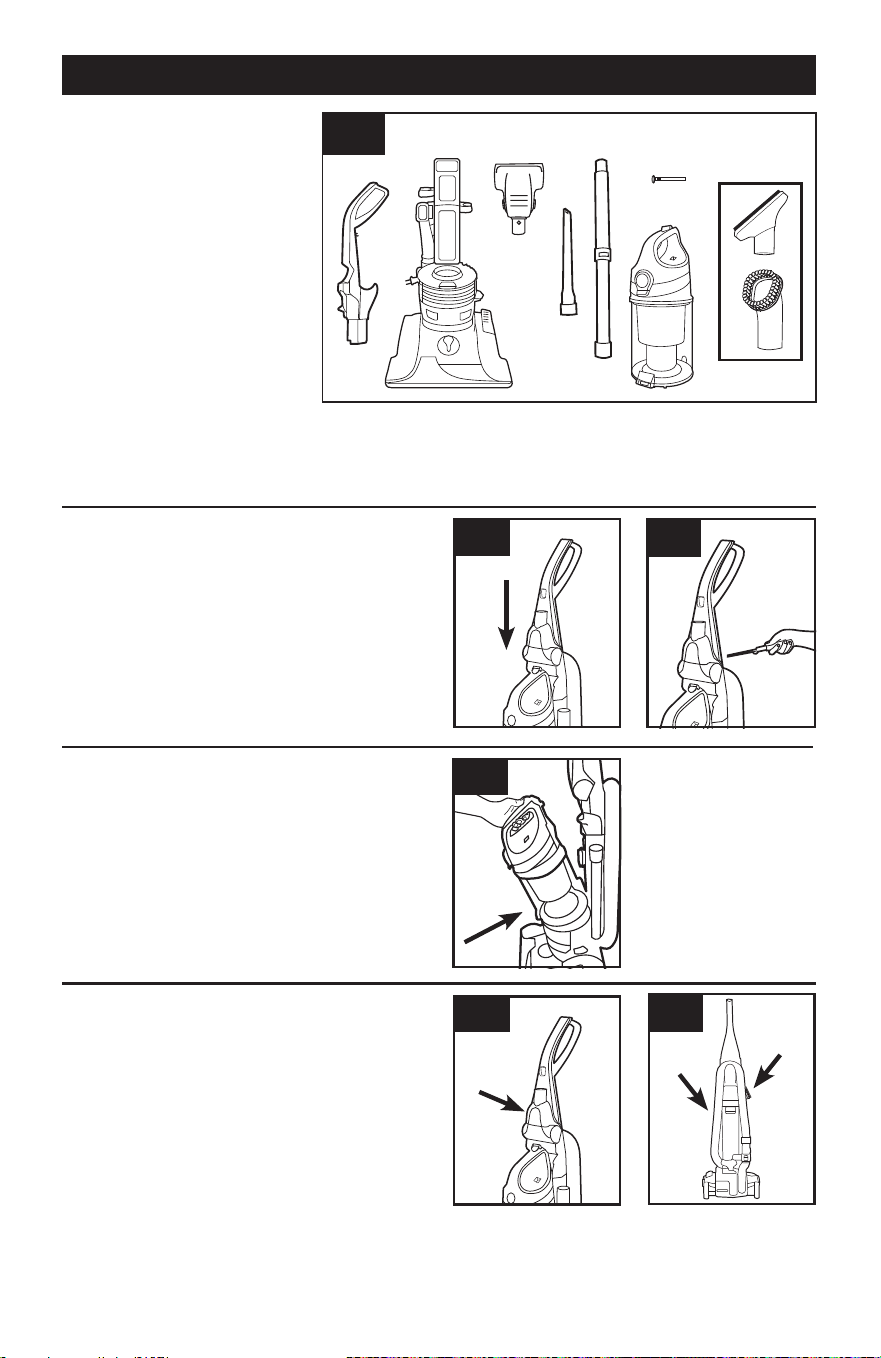
1. VACUUM ASSEMBLY
A. Handle
B. Vacuum Base
C. Air-Powered Hand Tool**
D. Crevice Tool
E. Telescoping Wand
F. Screw (for assembly)
G. Dirt Cup
H Dusting/Upholstery Tool*
*Varies per model
**Available on select models only
Remove all parts from carton
and identify each item shown.
Make sure all parts are located
before disposing of packing materials.
Additional parts may be ordered at
Hoover.com or call 1-800-944-9200.
5
1.2
Note: Remove the screw located in the vacuum
base and set aside until instruction 1.3
1.2 Insert handle section into vacuum base. Push
down firmly.
1.3 Using a Phillips screwdriver, fasten (1) screw
behind handle into vacuum base.
ATTACH DIRT CUP
1.4
1.4 Place bottom of dirt cup into vacuum body first.
Pivot cup into vacuum. Dirt cup is secure when you
hear a click.
1.5 1.6
1.5 Attach bottom of Air-Powered Hand Tool (A)
and pivot into handle until secure.
1.6 Place Crevice Tool into Wand and slide into
tool storage area on left back side (B) of vacuum
and place Upholstery Tool on right back side (C) of
vacuum as shown.
B
C
CARTON CONTENTS
Actual model may vary from images shown.
B
C**
D
1.1
E
F
G
A
1.3
A
H
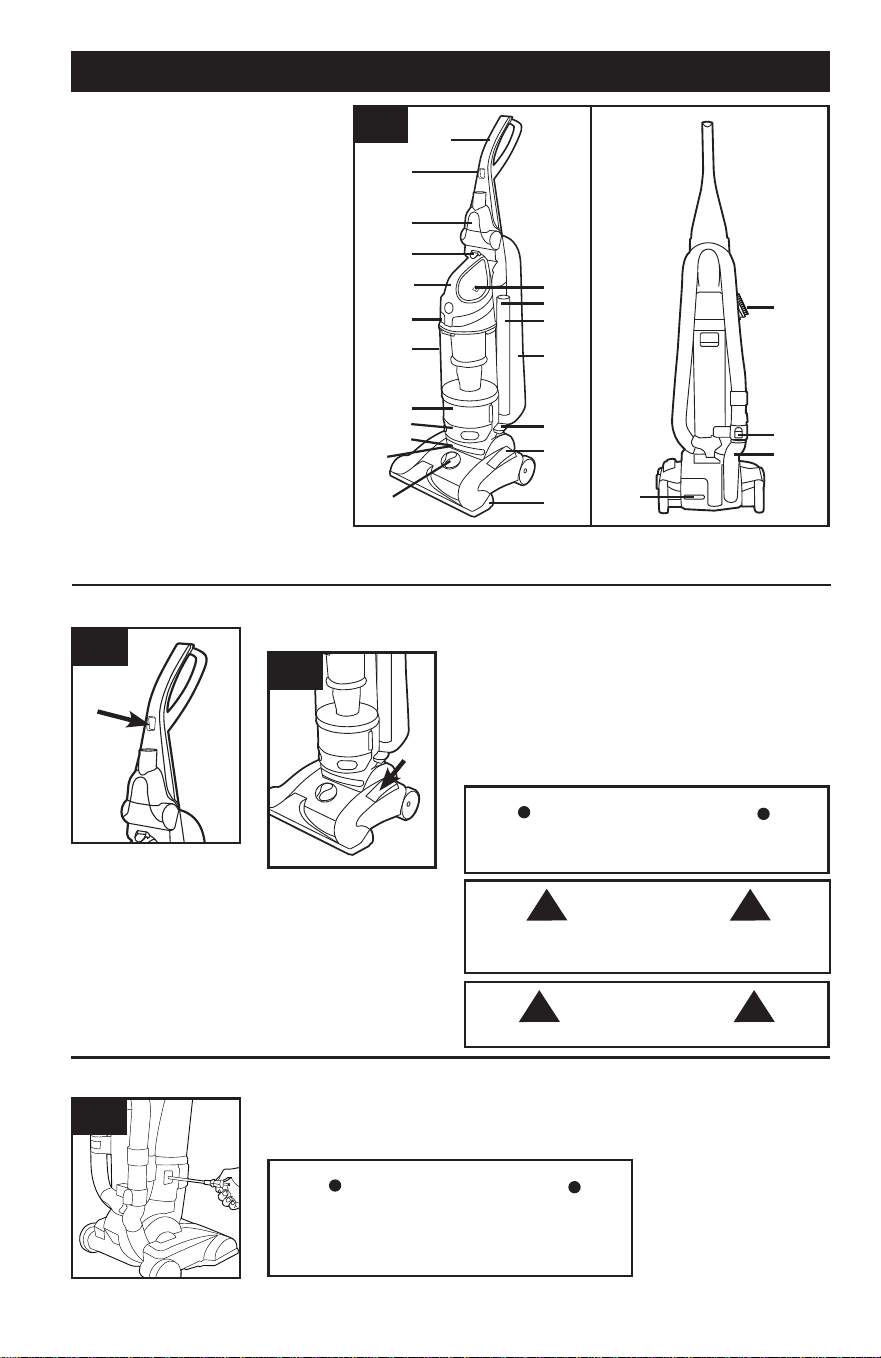
2.1
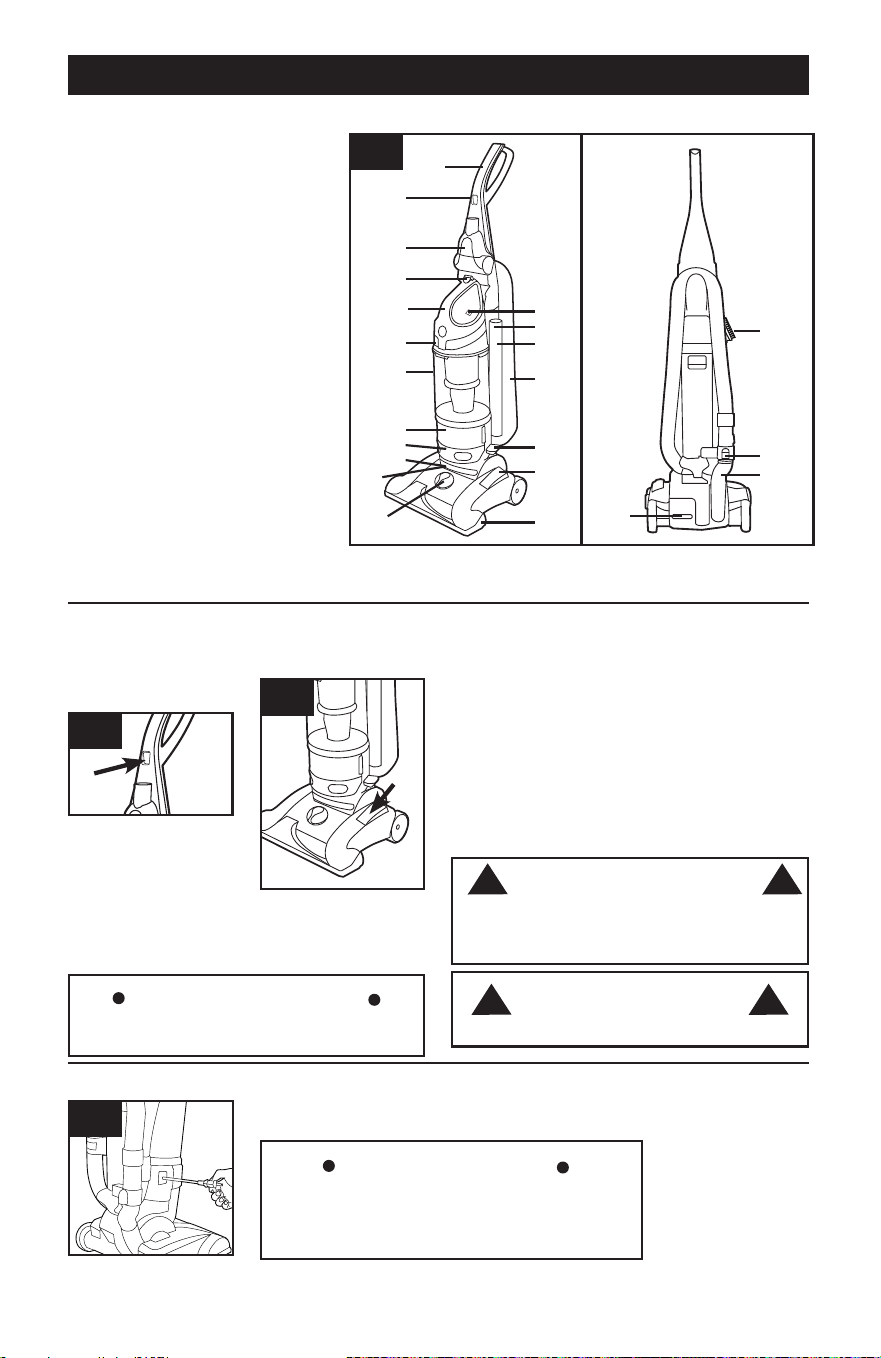
VACUUM DESCRIPTION
2.2 Plug cord into
electrical outlet.
To turn vacuum ON,
push ON/OFF button
(A) once.
To turn vacuum OFF,
push switch again.
2.3 For optimal cleaning performance on bare floors
and carpet with pile deeper than 1”, brushroll should
be turned off.
The vacuum is shipped with the brushroll in the ON
position. To turn brushroll OFF for Suction Only
Mode, step on pedal (B).
2.2
2.3
B
2. HOW TO USE
1. Handle
2. ON/OFF Switch
3. Air-Powered Hand Tool *
4. Dirt Cup Release Button
5. Carry Handle
6. Rinsable Filter Access
7. Dirt Cup
8. Cord Rewind
9. Filter made with HEPA media
and Carbon Filter* Access
10. Stair Cleaning Handle
11. Headlight*
12. Height Adjustment
13. System Check Indicator
14. Crevice Tool (inside wand)
15. Telescoping Wand
16. Hose
17. Cord Rewind Pedal
18. Brushroll On/Off Pedal
(Suction Only Mode)
19. Furniture Guard
20. Dusting/ Upholstery Tool**
21. Hose Release Button
22. Hose Tube
23. Handle Release Pedal
SUCTION ONLY MODE/ BRUSHROLL SHUT-OFFON-OFF SWITCH
2.4 Prior to using, grasp the end of the plug and pull
to release the cord from the cord reel until red tape is
reached.
CORD RELEASE
2.4
*Available on select models only
**Varies per model
for bare floors and very high pile carpet
When pulling on the cord, yellow tape will identify
when the cord is almost fully extended. When red
tape is visible on the cord, the cord has reached its full
length. Do not pull the cord past the red tape.
6
Actual model may vary from images shown.
Pedal (B) is inactive when the cleaner is in the
upright position.
IMPORTANT
Brushroll should be in off position for cleaning of
high pile carpet deeper than 1”.
CAUTION
! !
IMPORTANT
A
CAUTION
! !
Not to be used for grooming a pet.
1
2
3
4
6
7
8
9
12
11
10
13
14
15
16
17
18
19
23
20
21
22
5
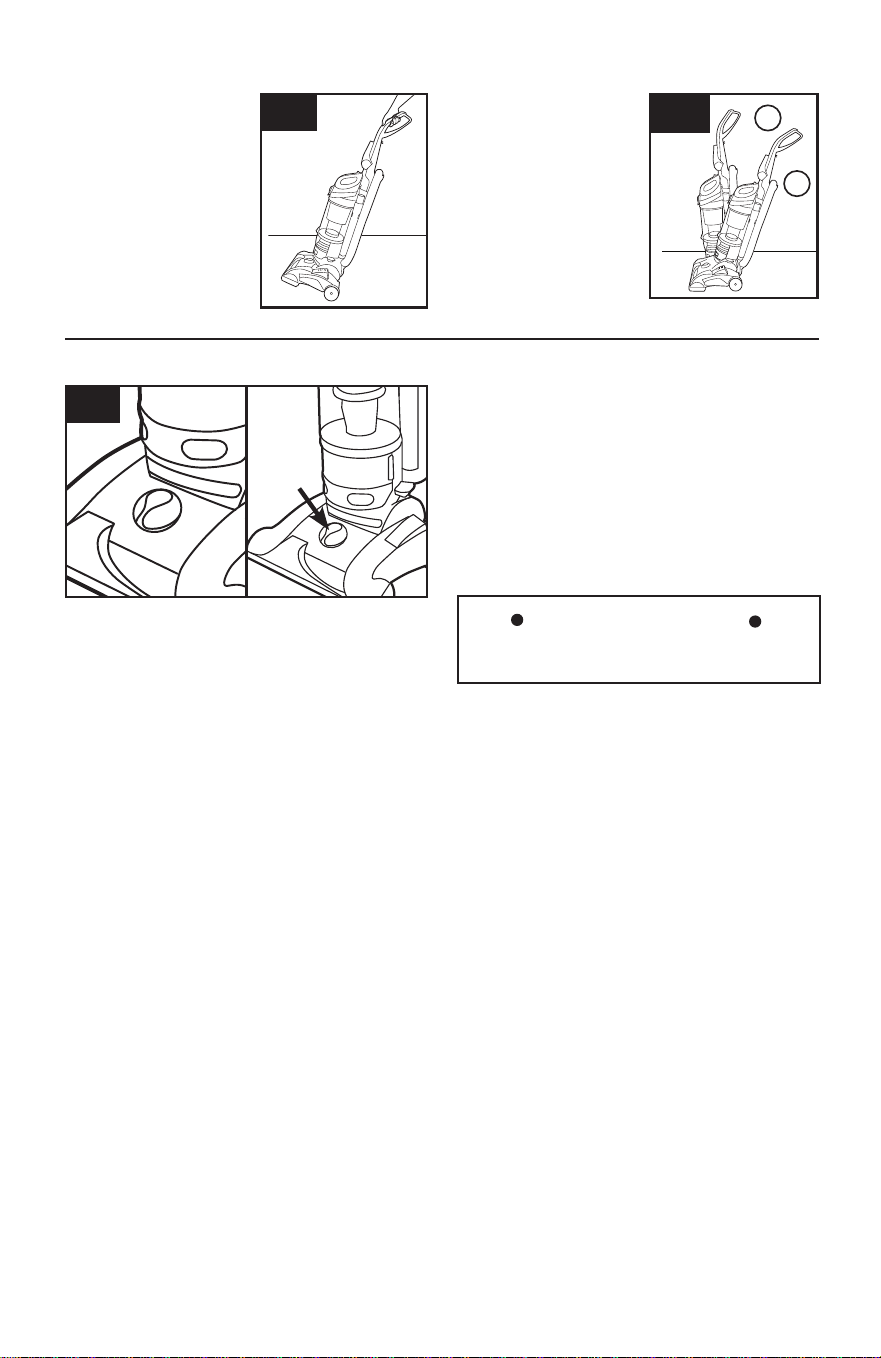
A
2.7 To adjust height setting, TURN knob (A) to
desired height setting.
For maximum cleaning performance, the following
carpet height settings are recommended:
•Lowestsetting(1):forbarefloors.
•Lowsetting(2):foralltypesofcarpet.
•Higher settings: for very deep pile carpet,
where easier pushing effort is desired, while
maintaining good cleaning performance.
2.7
If the vacuum is difficult to push, turn knob to the
next higher setting.
CARPET HEIGHT ADJUSTMENT
IMPORTANT
TRANSPORTING CLEANER
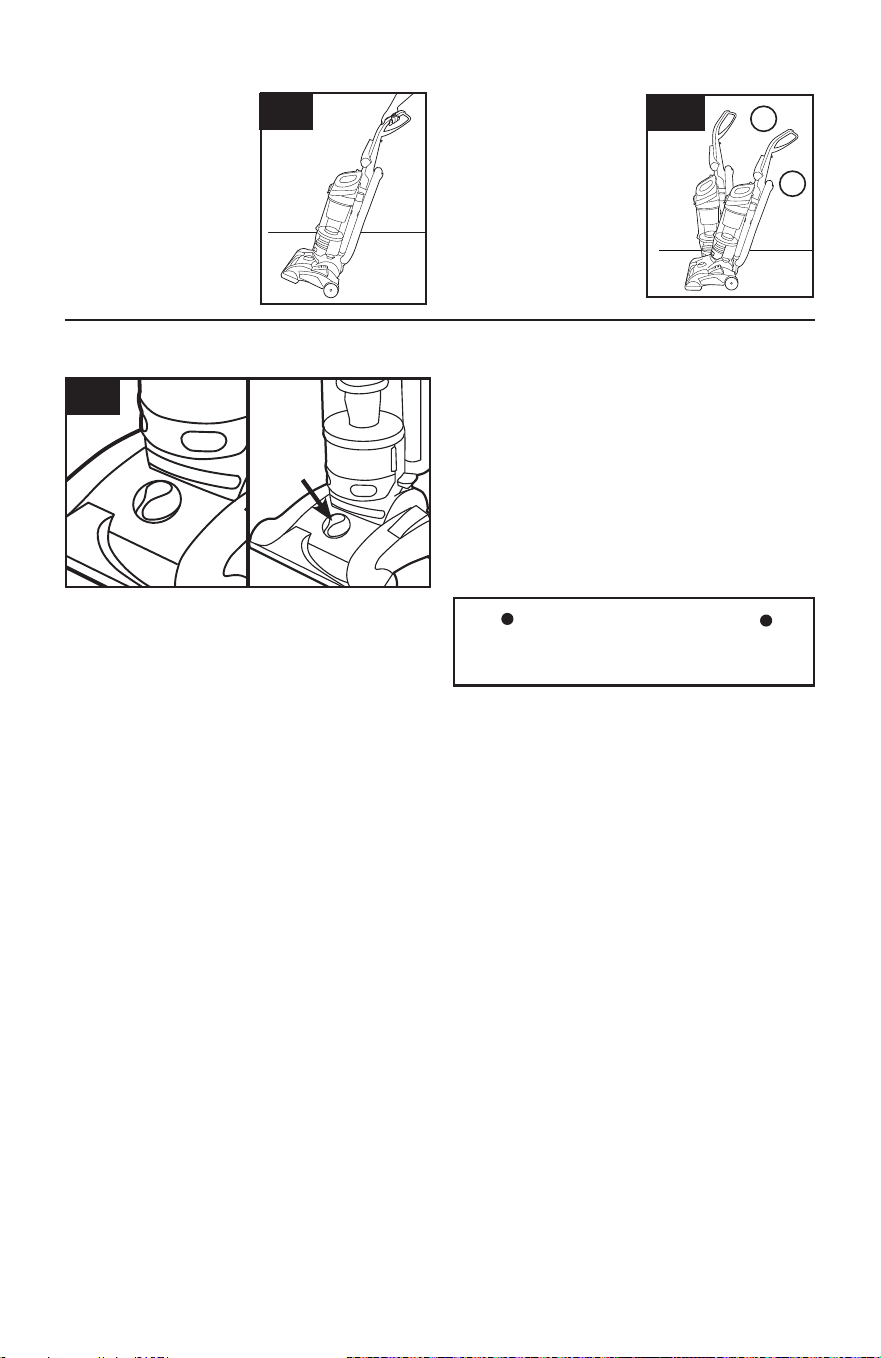
2.5 To move your
cleaner from room to
room, put handle in
upright position, tilt
cleaner back on rear
wheels and push
forward.
2.5
HANDLE POSITIONS
2.6
2.6 The handle of your
cleaner has two
positions: 1) Upright for
storage and when using
cleaning tools. 2)
Operating position for
general operation on
carpets and floors.
Step on handle release
pedal to lower handle.
1
2
7
Actual model may vary from images shown.
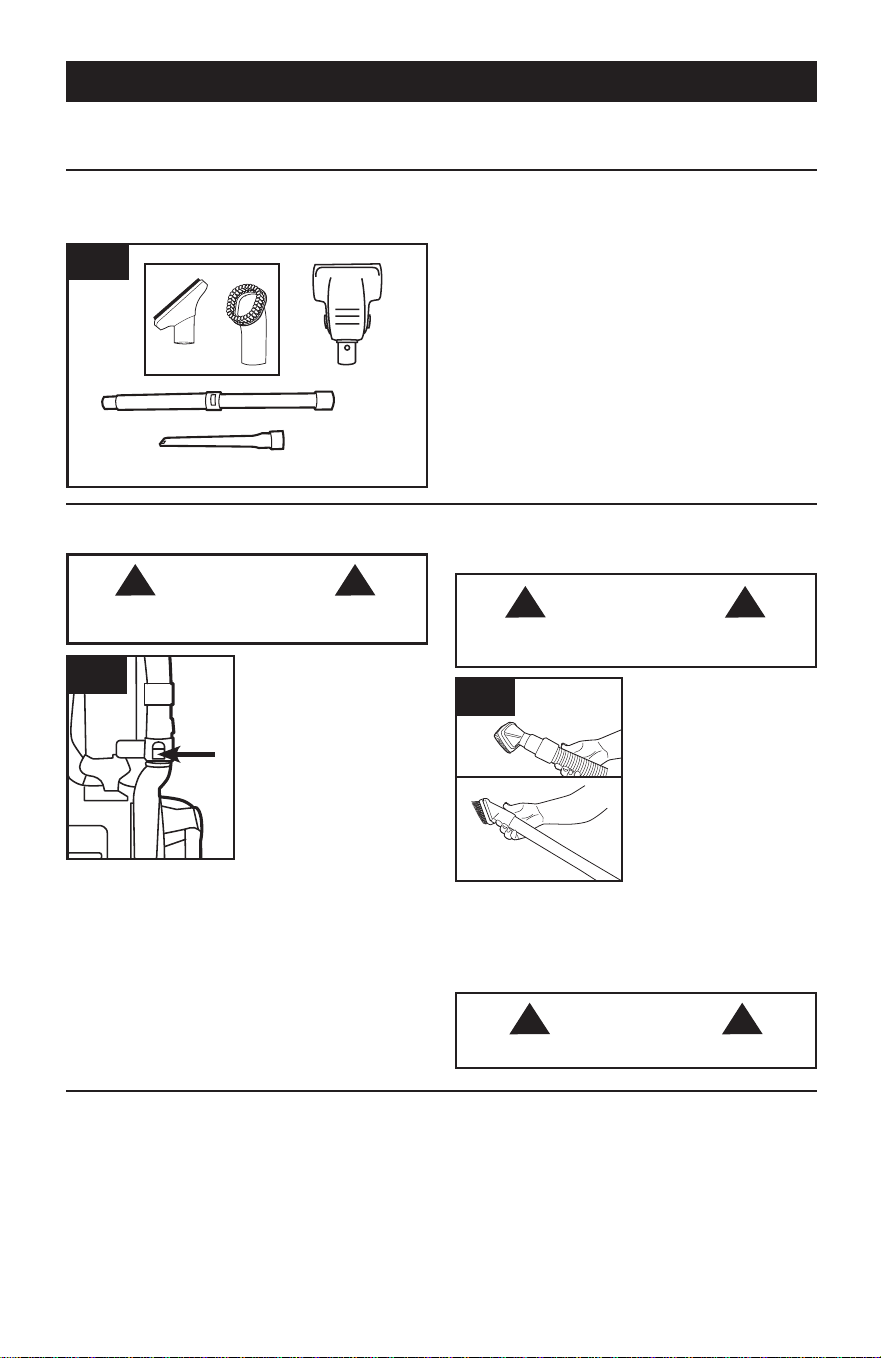
A. Use Dusting/ Upholstery Tool to clean
upholstered furniture, draperies, mattresses,
clothing, and carpeted stairs. (Tool varies per
model)
B. Air-Powered Hand Tool may be used for
upholstered furniture, draperies, mattresses,
clothing, and carpeted stairs. (Tool varies per
model)
C. Telescoping Wand is used to give extra length
to your hose. Use it with any of the above tools.
D. Crevice Tool may be used in tight spaces,
corners and along edges in such places as
dresser drawers, upholstered furniture, stairs and
baseboards.
Tools allow for cleaning surfaces above the floor and for reaching hard to clean areas.
The vacuum is ready for tool use when handle is in upright position.
3. TOOLS
SELECT PROPER TOOL
(Tools may vary per model)
REMOVING HOSE
Actual model may vary from images shown.
ATTACH WAND AND TOOLS
(Tools may vary per model)
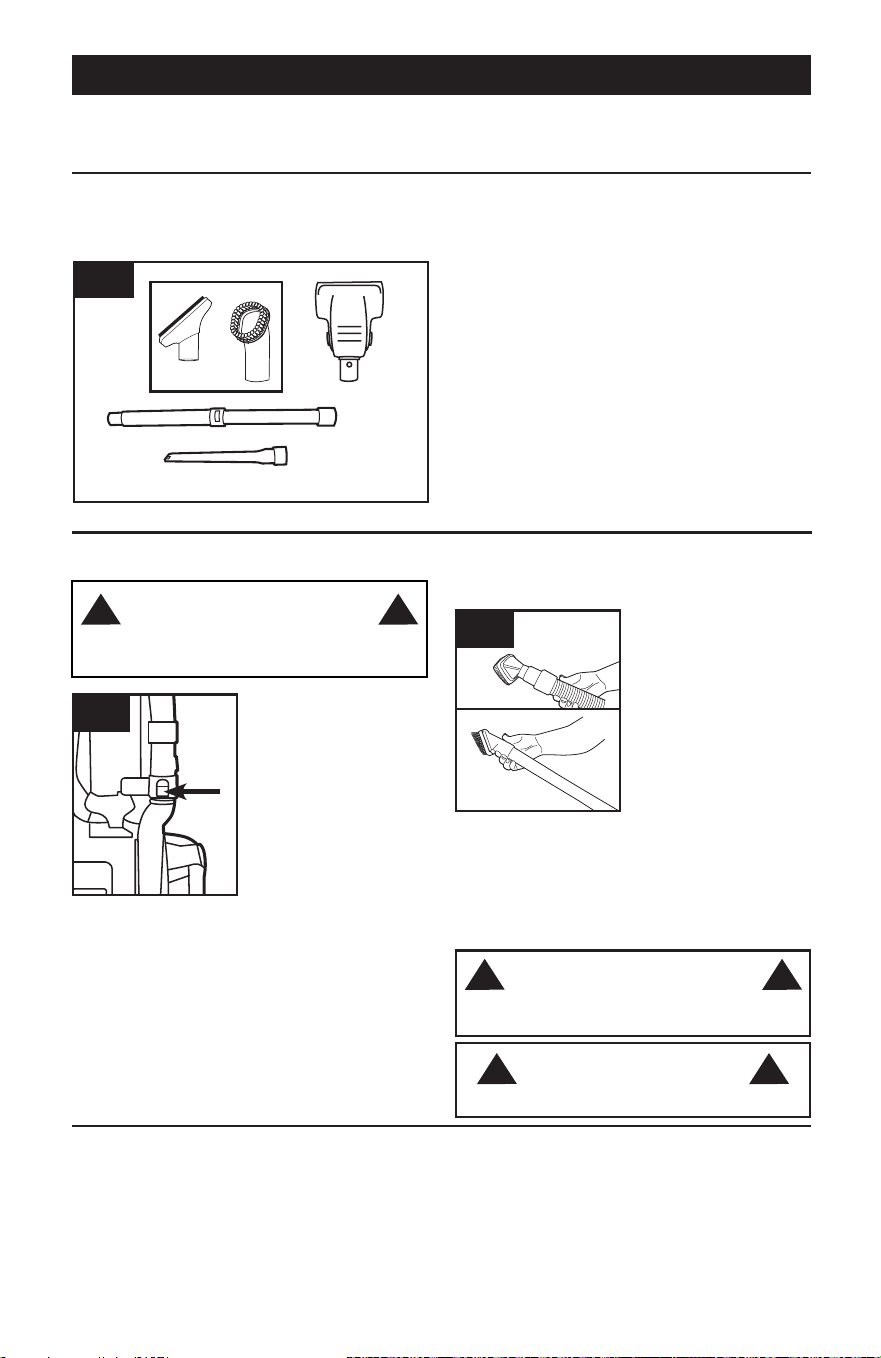
3.3
3.3 Attach tool or wand
to the hose (A).
Attach tool to wand (B)
by pushing it firmly onto
the wand.
Twist wand or tool
slightly to tighten or
loosen the connection.
To extend wand, twist
counter-clockwise to
the unlocked position,
extend wand & twist
clockwise until tight.
Reverse to collapse.
B
A
3.1
B
C
D
A
To reduce the risk of personal injury - Unplug
before cleaning or servicing.
To clean Hose and Air-Powered Hand Tool, wipe
with a damp cloth. DO NOT submerge in water.
Other cleaning tools may be washed in warm water
with a mild detergent. Rinse and air dry 24 hours
before using.
HOW TO CLEAN TOOLS
WARNING
! !
CAUTION
! !
Not to be used for grooming a pet.
3.2
3.2 When using cleaning
tools, place cleaner
handle in the upright
position. The agitator
brushroll will not rotate
when the cleaner is in
the upright position.
To remove hose for tool
use, press the hose
release button and pull
hose end out.
To lock back into place,
push hose into hose
tube until you hear a
click.
WARNING
!
Unplug vacuum before connecting Air-
Powered Hand Tool.
!
8
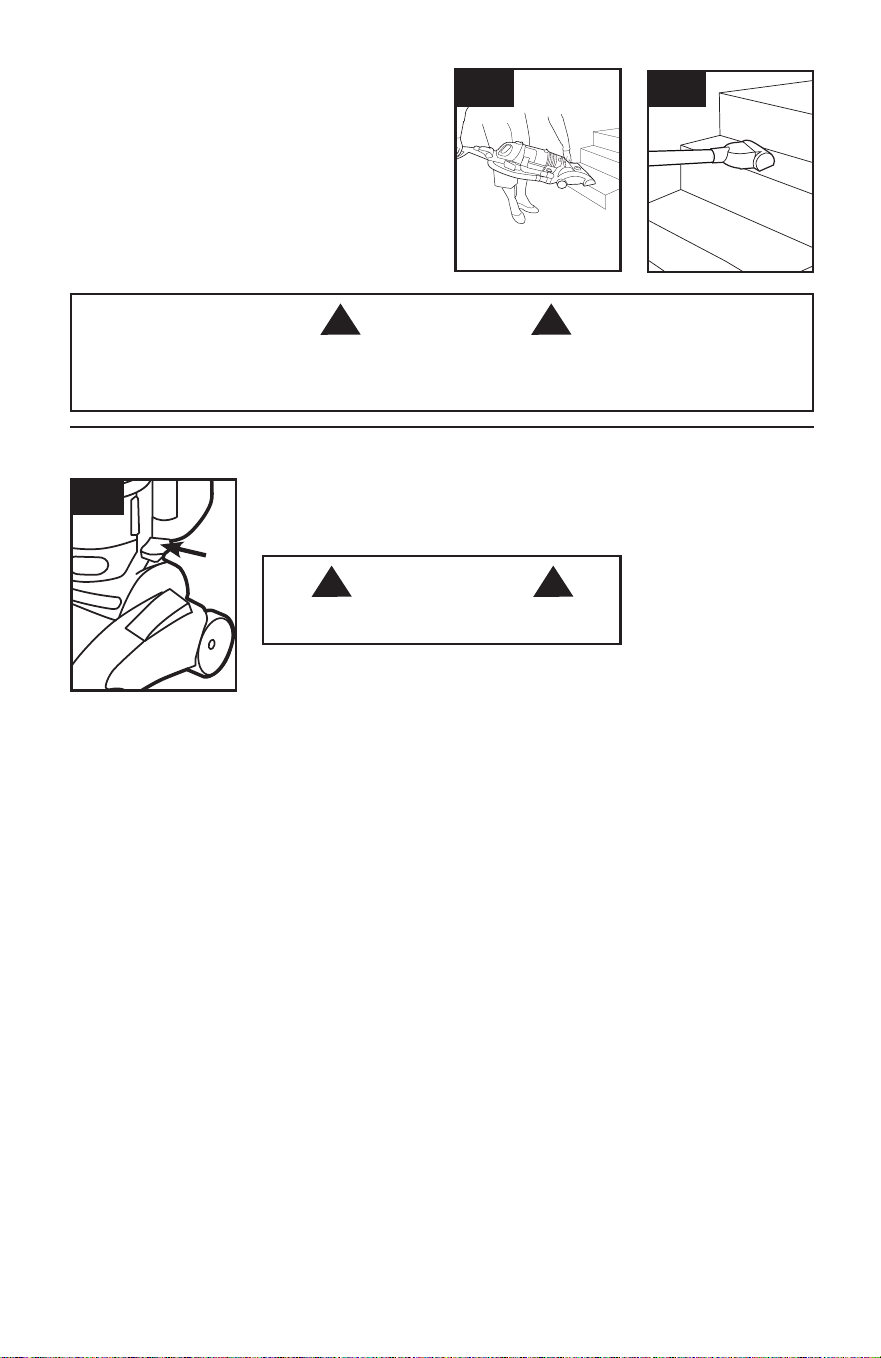
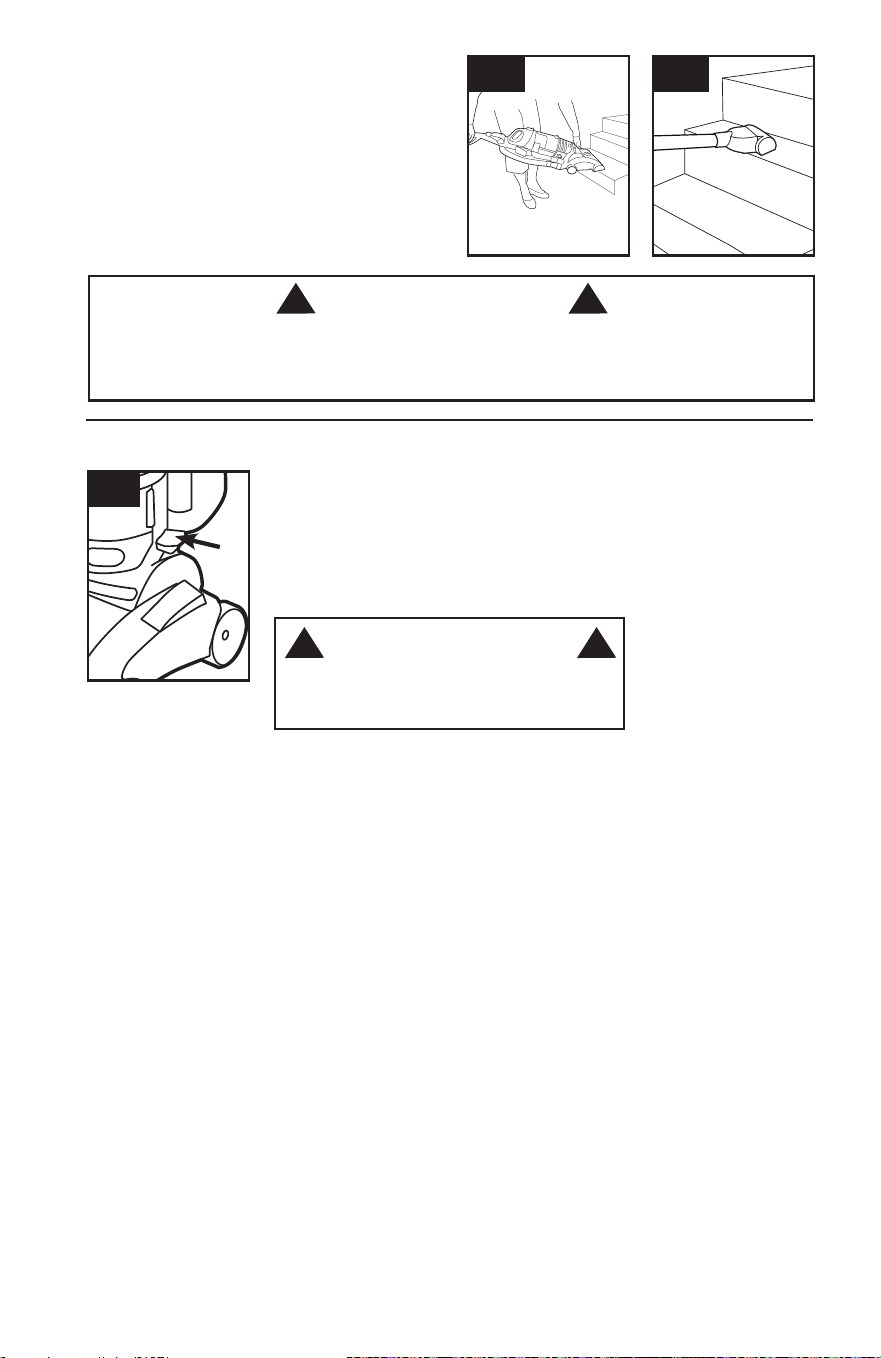
3.4 Lift vacuum by Stair Cleaning Handle and
position on stairs. Clean forward to back. Never
leave the vacuum standing on stairs when not
cleaning.
3.5 Use the Hose and Air-Powered Hand Tool
(Tool varies per model) for stair cleaning. When using
tools, always ensure handle is in upright position.
3.4
STAIR CLEANING
CAUTION
! !
Use extra care when cleaning on stairs. To avoid personal injury or damage, and to prevent the cleaner
from falling, always place cleaner at bottom of stairs on floor. Do not place cleaner on stairs or furniture,
as it may result in injury or damage. When using tools, always ensure handle is in upright position.
3.5
9
Actual model may vary from images shown.
3.6 To return cord for storage, unplug from wall.
To return cord for storage, hold plug and press
down Cord Release Pedal (A) on side of cord reel.
CORD REWIND AND STORAGE
3.6
A
WARNING
! !
Hold plug when rewinding onto cord reel. Do not
allow plug to whip when rewinding.
10
4. MAINTENANCE
A Thermal Protector has been designed into your cleaner to protect it from overheating. When the
thermal protector activates the cleaner will stop running.
If this happens proceed as follows:
1. Turn cleaner OFF and unplug it from the electrical outlet.
2. Empty dirt cup.
3. Inspect the nozzle inlet, hose connector, hose, dirt cup inlet, cyclonic filter, rinsable filter, and
HEPA filter for any obstructions. Clear obstructions if present.
When cleaner is unplugged and motor has cooled for 30 minutes, the thermal protector will deactivate
and cleaning may continue.
If the thermal protector continues to activate after following the above steps, your cleaner
needs servicing.
NOTICE
! !
Familiarize yourself with these home maintenance tasks as proper use and
care of your vacuum will ensure continued cleaning effectiveness.
If appliance is not working as it should, has been dropped, damaged, left
outdoors, or dropped into water, take it to a service center prior to continuing use.
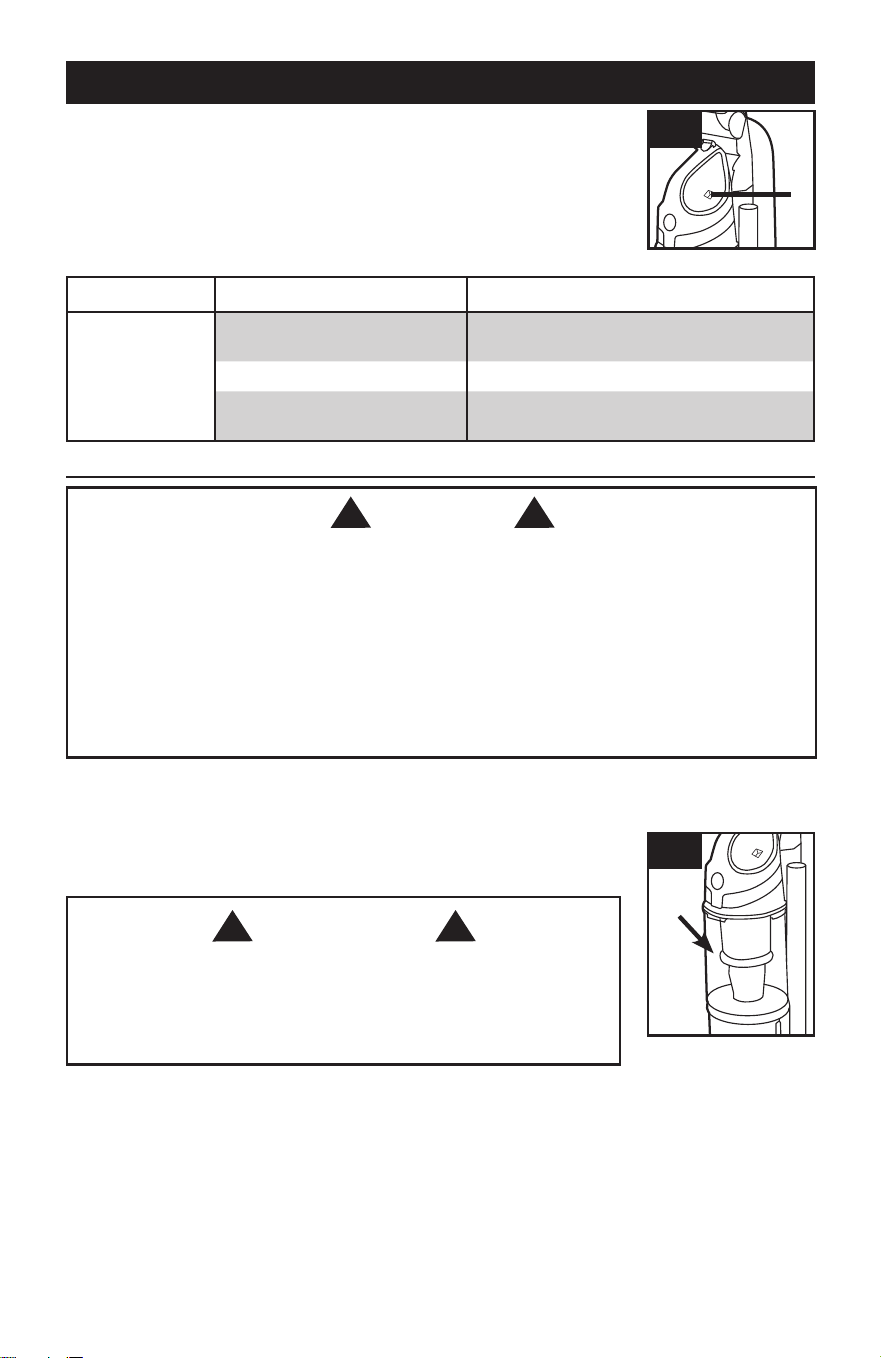
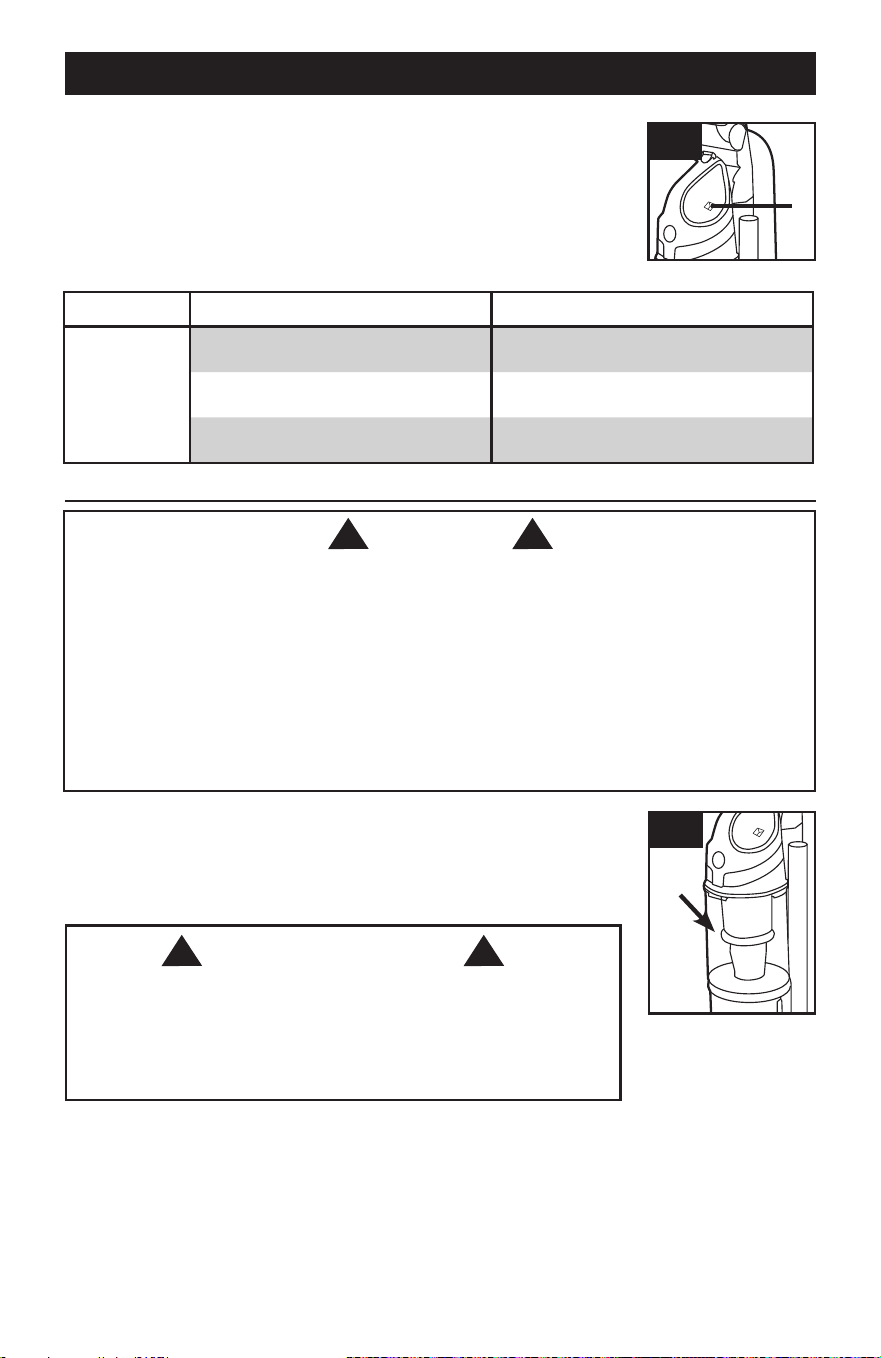
4.1 The System Check Indicator located at (A), alerts you to possible system
performance issues.
A
4.1
PROBLEM POSSIBLE CAUSE POSSIBLE SOLUTION
If System Check
Indicator is red:
1. Rinsable filter and/or filter made
with HEPA media is dirty.
1. Clean rinsable filter and/or filter made with
HEPA media - reference pg. 11
2. Dirt cup is full and/or clogged.
2. Empty dirt cup - reference pg. 10
3. Brushroll and/or hose is
clogged.
3. Check hose for clogging - reference pg 13.
Check brushroll for clogging - reference pg. 12.
Any other servicing should be done by an authorized service representative.
Actual model may vary from images shown.
4.2 To maintain optimal performance, empty the dirt cup before the dirt cup
reaches the max line (A). Place the vacuum in the upright position before
removing the dirt cup.
When to Empty
DIRT CUP
WARNING
! !
To reduce the risk of personal injury - Unplug before cleaning or
servicing. Do not use vacuum without dirt cup or filters in place.
Very fine materials, such as face powder or cornstarch, may seal the filter
and cause a reduction in performance. When using the vacuum for this
type of dust, empty the cup and clean the filters often.
4.2
A
11
4.3
How to Empty
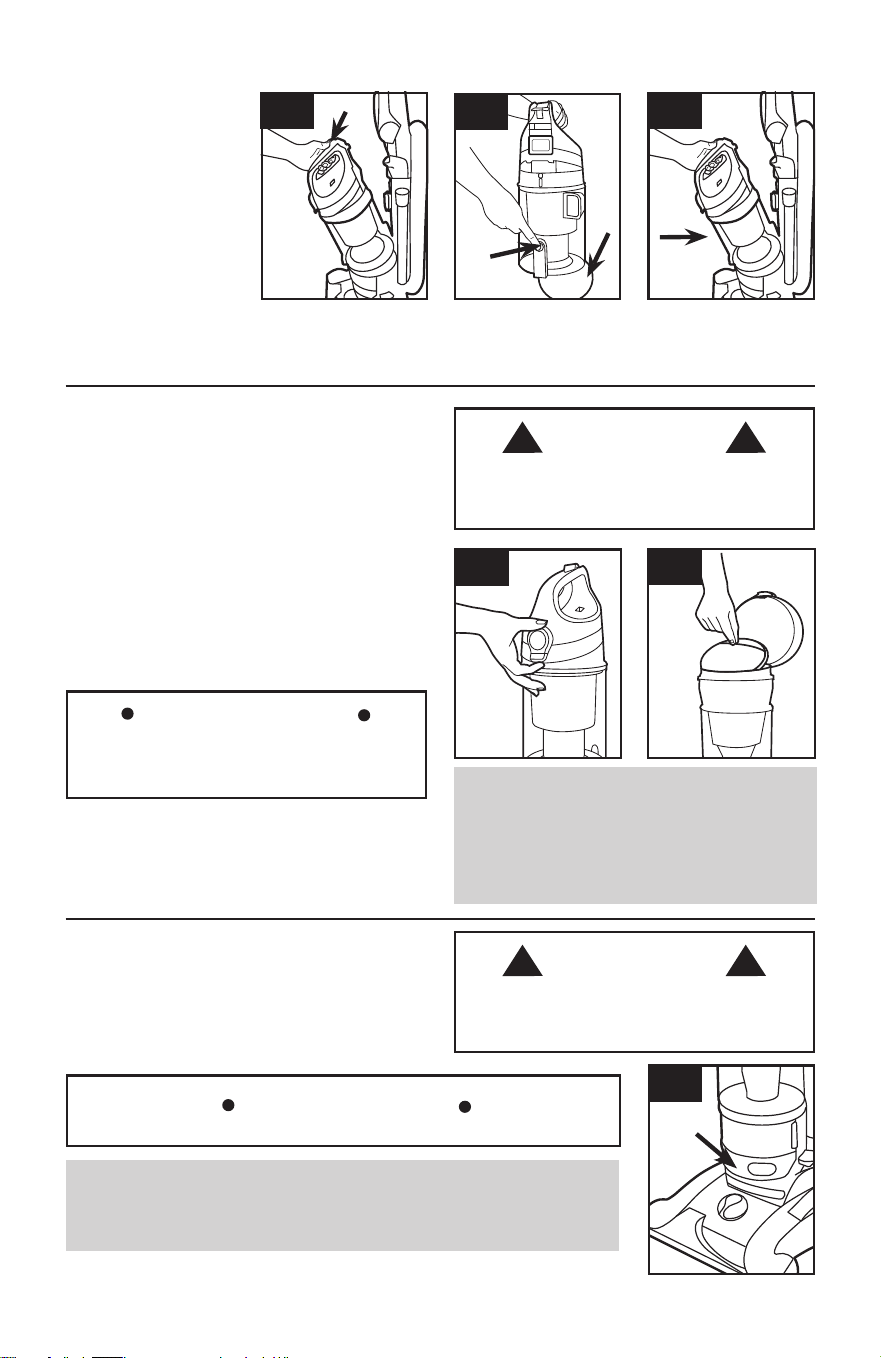
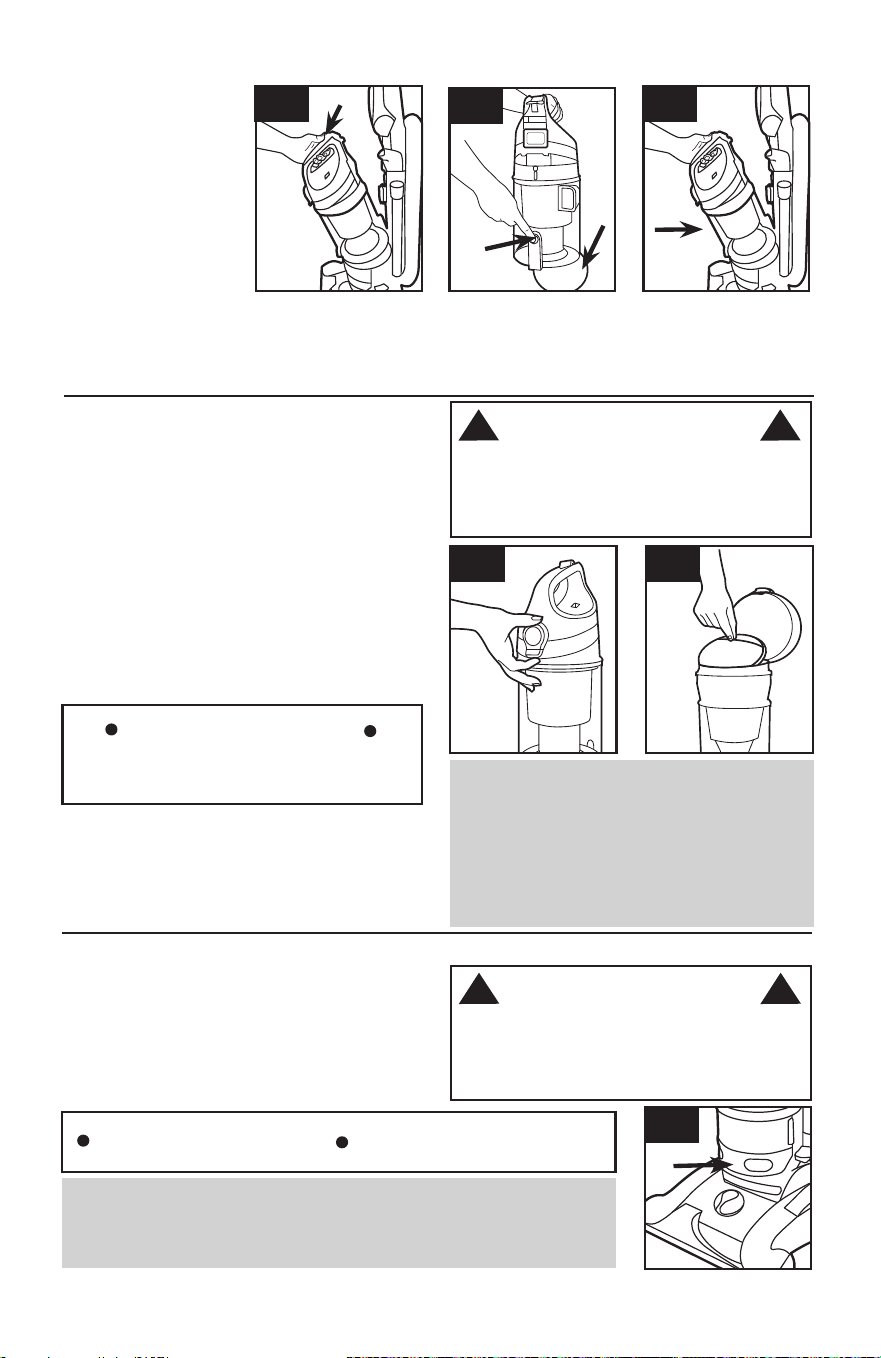
4.3 Press dirt cup
release button (A) and
pivot cup out.
4.4 Hold dirt cup over
trash receptacle, push
dirt cup door release
lever (B) to open dirt
cup door (C).
Close dirt cup door (C).
Press firmly to secure
lever.
4.4
B
A
C
4.5
4.5 Place bottom of dirt cup into vacuum body first. Pivot dirt cup into vacuum
body and press firmly until it locks into place.
To maintain optimal performance, filters should
be cleaned at least every two months under
normal use.
Rinsable Filter: How to Clean
Remove dirt cup as described in Fig. 4.3.
4.6 Pull up on dirt cup latch to open.
4.7 Pull on filter by the pocket to remove rinsable filter.
Hold filter under running water for at least two
minutes to remove dirt and debris. Squeeze filter
twice while underwater. Remove from water and
squeeze a final time to remove excess water.
FILTERS: When to Clean
4.7
To reduce the risk of personal injury - Unplug
before cleaning or servicing. Do not use
vacuum without dirt cup or filters in place.
IMPORTANT
Allow filter to dry completely before replacing.
Dry filter on edge so air circulates on both sides
of filter. This may take up to 48 hours.
Replace filter with pocket facing up.
Close lid securely by pushing until it clicks.
Replace dirt cup as described in Fig 4.5.
4.6
When used and maintained properly, your Rinsable
Filter should not need replacement within the
warranty period. If desired, additional filter is
available at Hoover.com or call 1-800-944-9200.
Ask for Hoover
®
Part No. 303903001.
What to Buy: Rinsable Filter
Actual model may vary from images shown.
4.8
4.8 With fingers in slots, pull filter frame (A)
straight out. Hold filter over a trash receptacle
and tap out dirt and debris.
Slide back into position on vacuum and press
firmly.
A
What to Buy: Filter Made With HEPA Media
When used and maintained properly, your Filter should not need replacement
within the warranty period. If desired, additional filter is available at Hoover.com
or call 1-800-944-9200. Ask for Hoover
®
Part No. 305687001.
IMPORTANT
DO NOT RINSE OR WASH THE FILTER MADE WITH HEPA MEDIA.
Filter Made With HEPA Media: How to Clean
WARNING
! !
To reduce the risk of personal injury - Unplug
before cleaning or servicing. Do not use
vacuum without dirt cup or filters in place.
WARNING
! !
12
Cyclonic Filter Assembly: How to Clean
Remove dirt cup as described in Fig. 4.3.
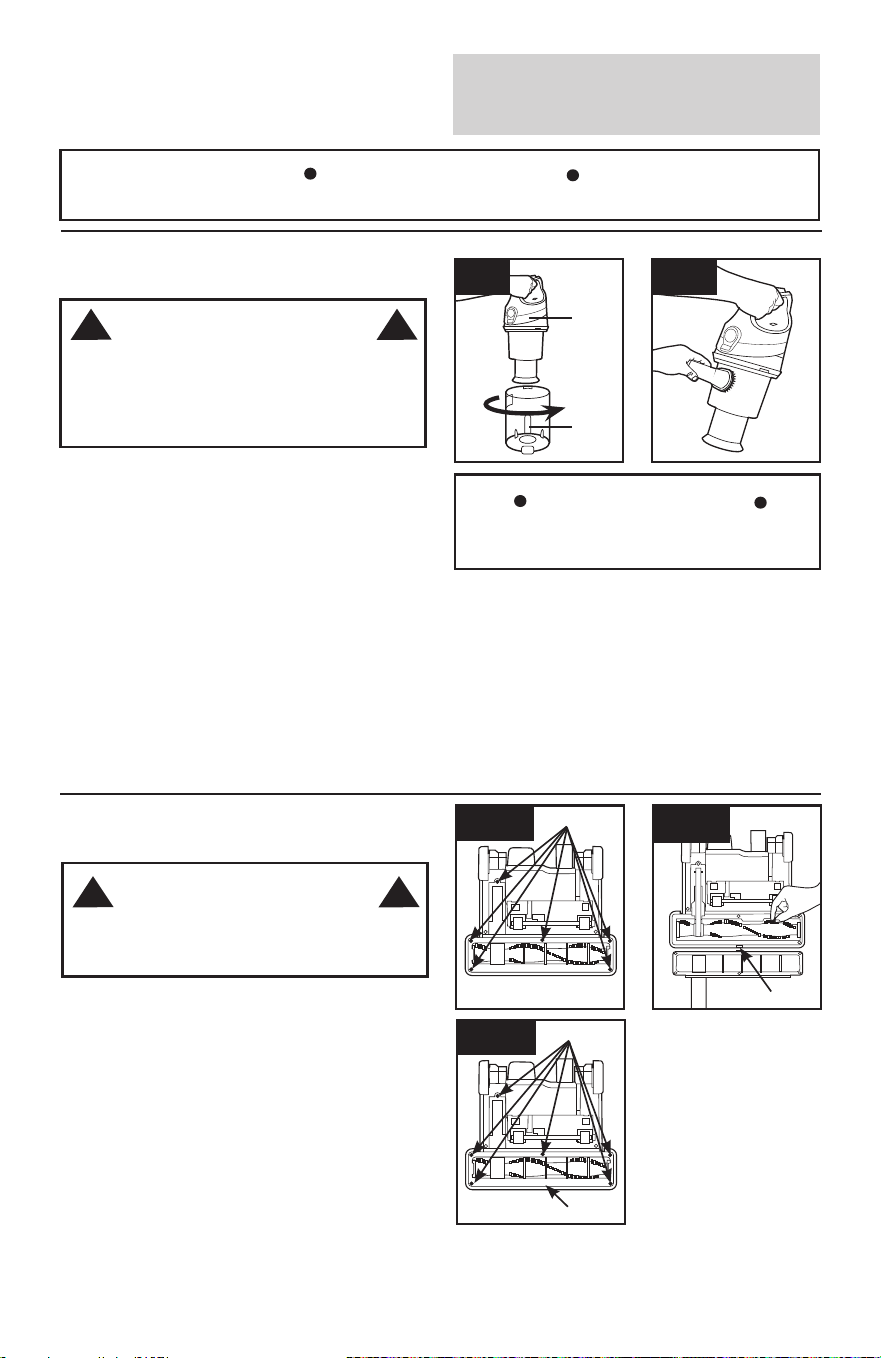
4.9 Twist filter assembly (B) counter-clockwise.
Remove assembly from dirt cup (A).
4.10 Dirt and debris can be cleaned from the filter
assembly with the Dusting/ Upholstery Tool.
Place the filter assembly (4.9, B) on the dirt cup,
aligning (3) tabs on filter with (3) slots on dirt cup (A)
and twist it clockwise to secure into position.
Replace dirt cup as described in Fig. 4.5.
4.9
4.10
What to Buy: Carbon Filter
Carbon Filter may need to be replaced more
often to maintain optimal odor absorbing
effectiveness. Additional filter is available at
Hoover.com or call 1-800-944-9200. Ask for
Hoover
®
Part 902404001.
.
Carbon Filter : How to Clean
(Available on select models only).
Your Carbon Filter is located on the underside of
the Filter made with HEPA media.
IMPORTANT
DO NOT RINSE OR WASH the Carbon Filter.
Filter assembly must be properly aligned to
dirt cup to function properly.
IMPORTANT
Actual model may vary from images shown.
A
To reduce the risk of personal injury - Unplug
before cleaning or servicing. Do not use
vacuum without dirt cup or filters in place.
WARNING
! !
BRUSHROLL
: How to Clean
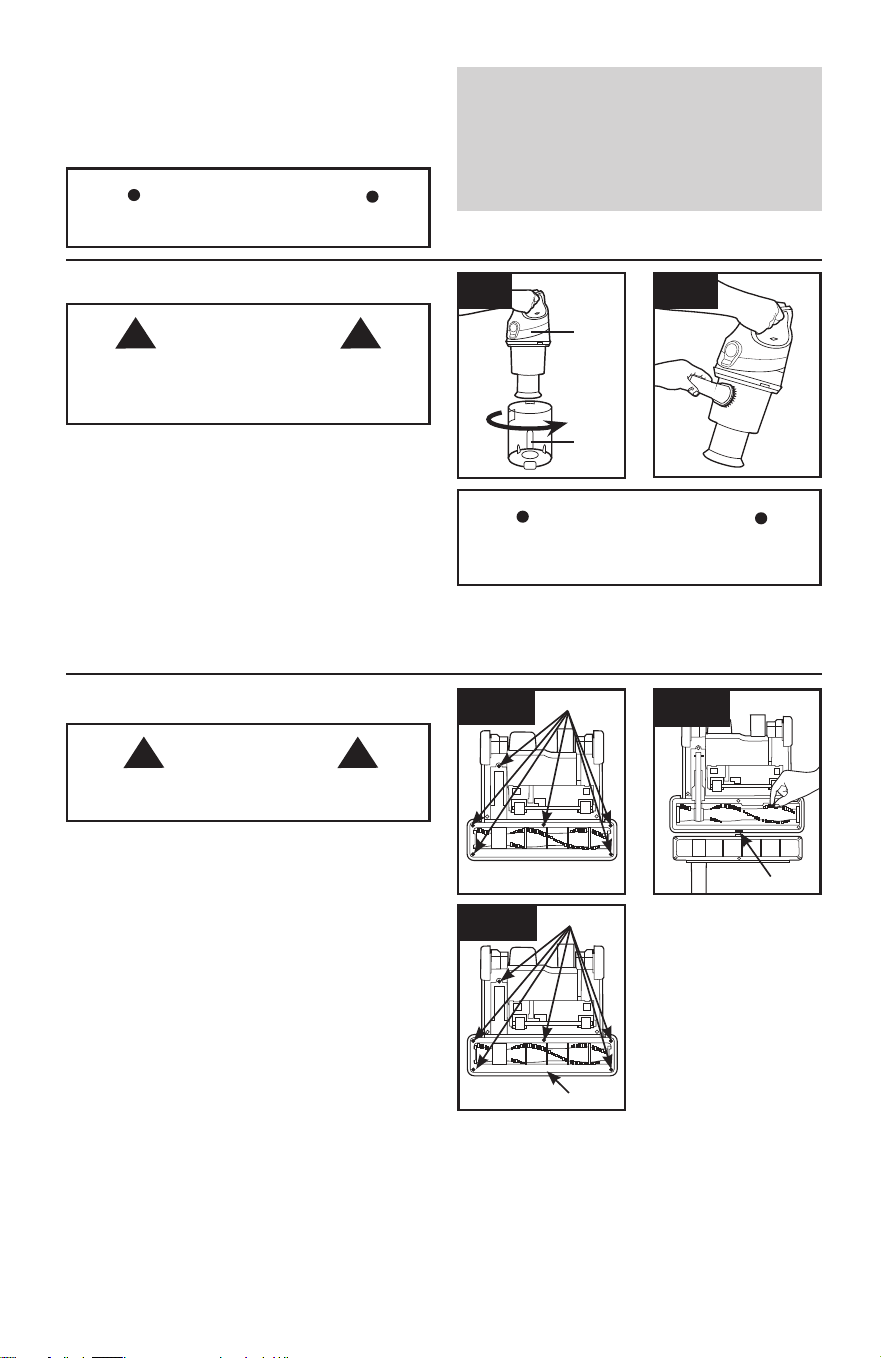
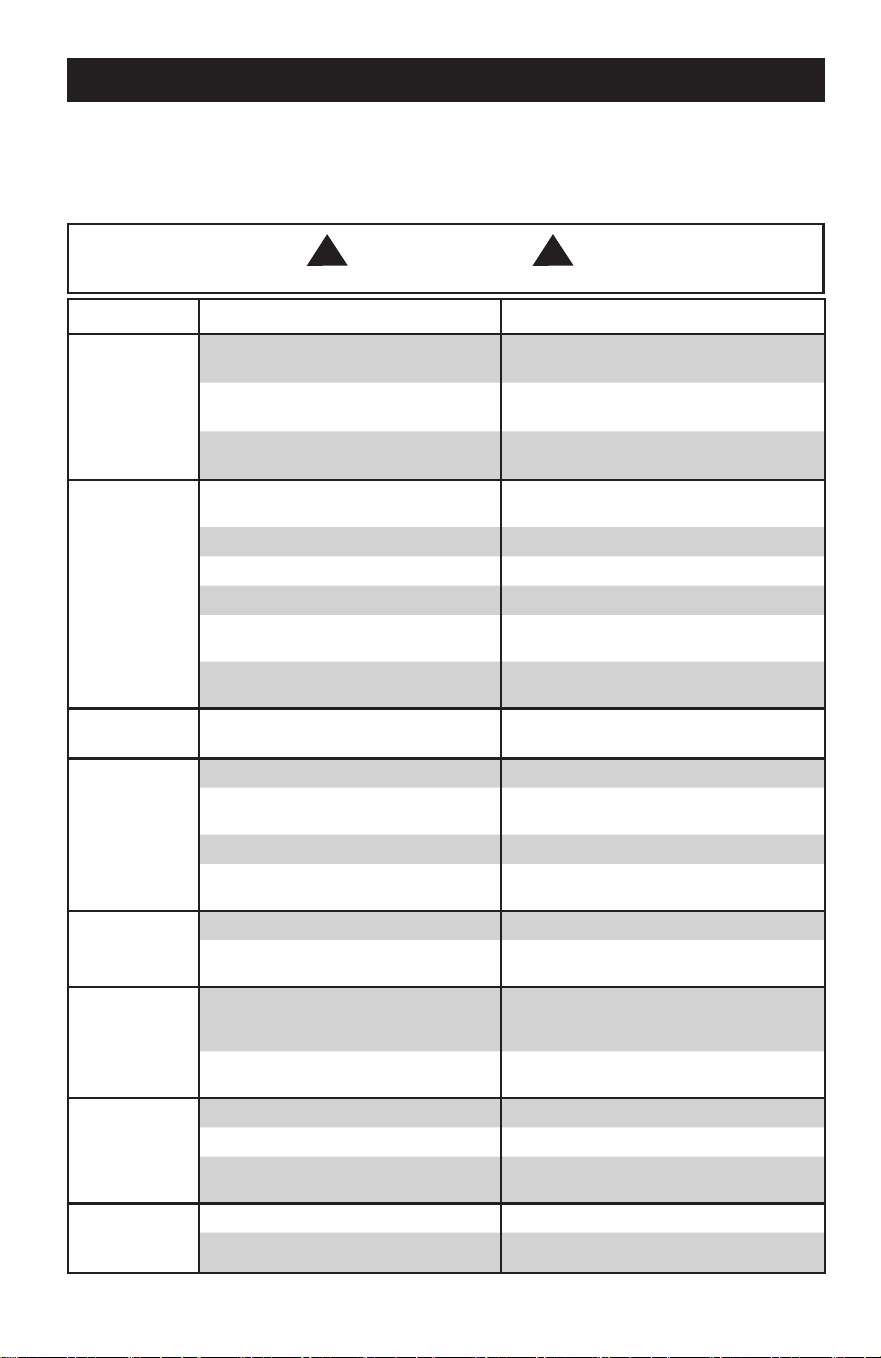
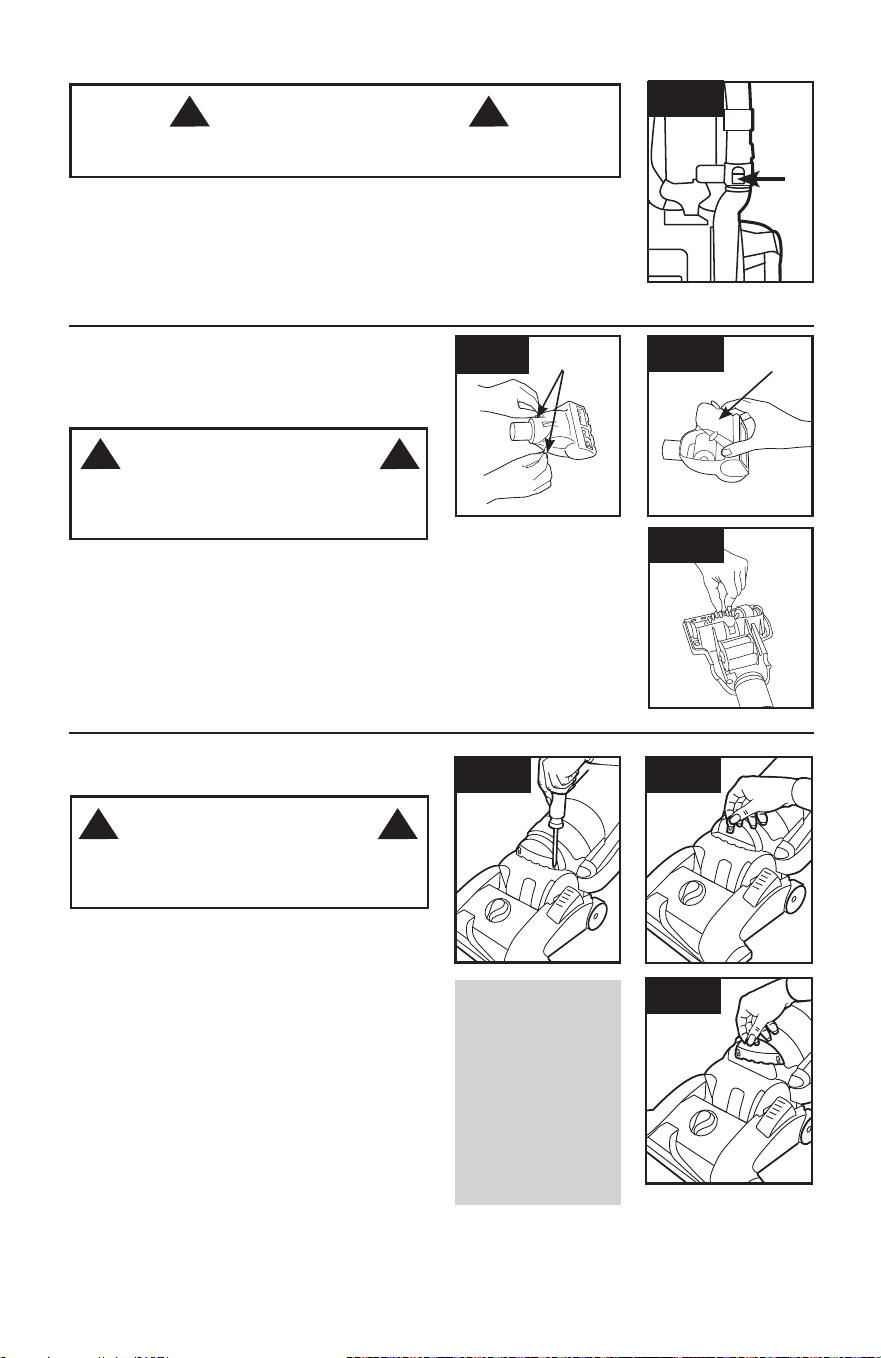
4.11 Turn vacuum over so bottom side is facing up
and remove the (6) screws (A).
4.12 Pivot out bottom plate away from hidden latch
(B) and remove any debris and/or hair from the
brushroll.
4.13 Reposition bottom plate, aligning latch (B) and
fastening all (6) screws (A). Press firmly at latch (B)
area to ensure that it is properly latched.
4.11
A
CAUTION
! !
To reduce the risk of injury from moving parts -
Unplug before servicing.
4.13
A
B
4.12
B
B
13
4.17
4.15
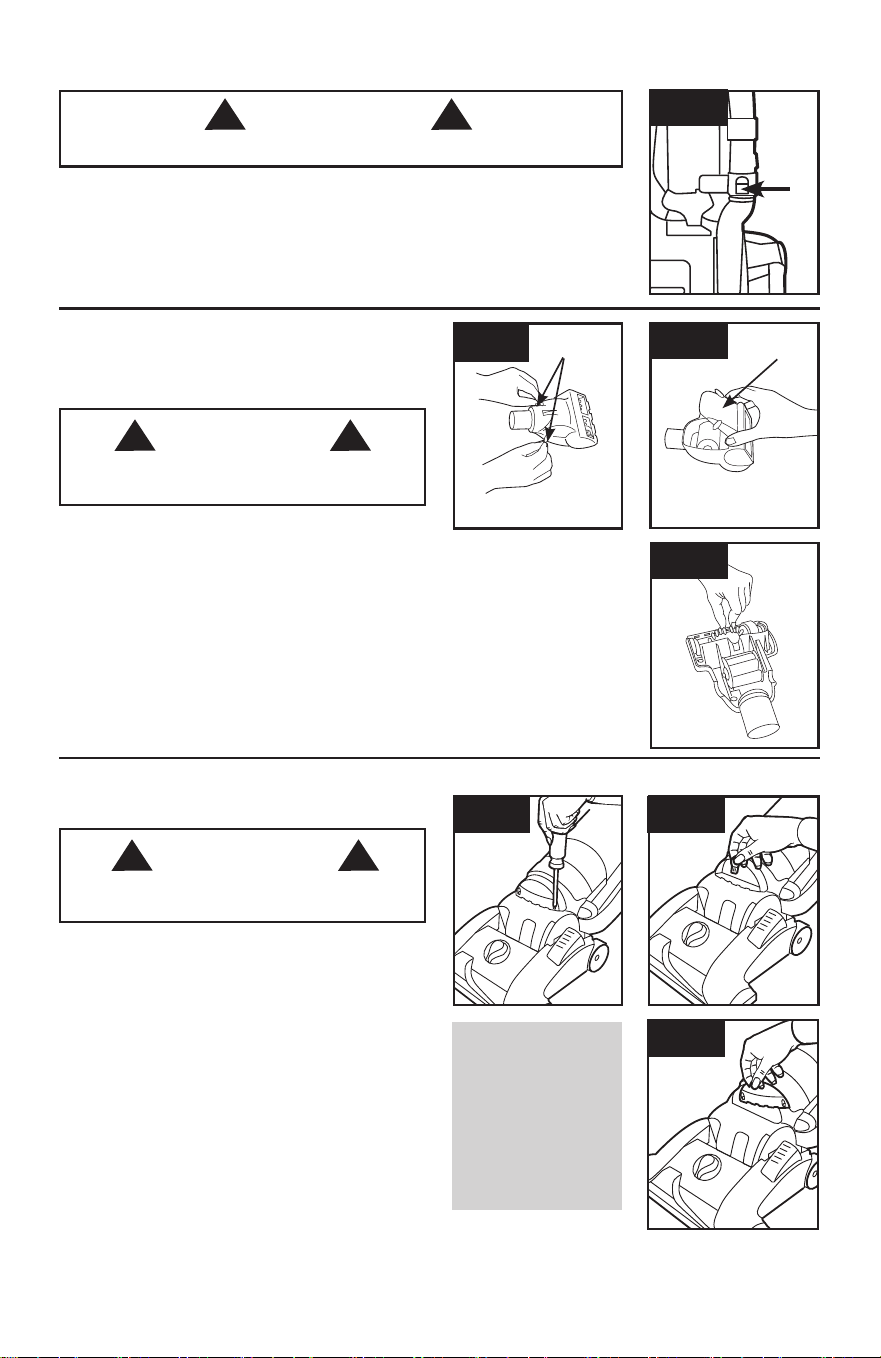
4.15 Turn tool so bottom faces up. Rotate the
latches (A) on either side of tool.
4.16 Remove bottom plate (B).
4.17 Remove any debris and/ or hair from brushroll.
Replace bottom plate by aligning tabs along front
edge of tool. Rotate latches back into locked position.
A
AIR-POWERED HAND TOOL:
How to Clean
(Tool varies per model)
4.16
B
HOSE
: How to Clean
A
To reduce the risk of personal injury - Unplug before cleaning or servicing.
4.14 To remove hose for tool use, press the hose release button (A) and pull
hose end out.
Clear away debris or obstructions from hose. Do not use sharp objects to clean
out hose as they can cause damage. To lock back into place, push hose into
hose tube until you hear a click.
CAUTION
! !
To reduce the risk of injury from moving parts -
Unplug before servicing.
4.18
4.19
4.20
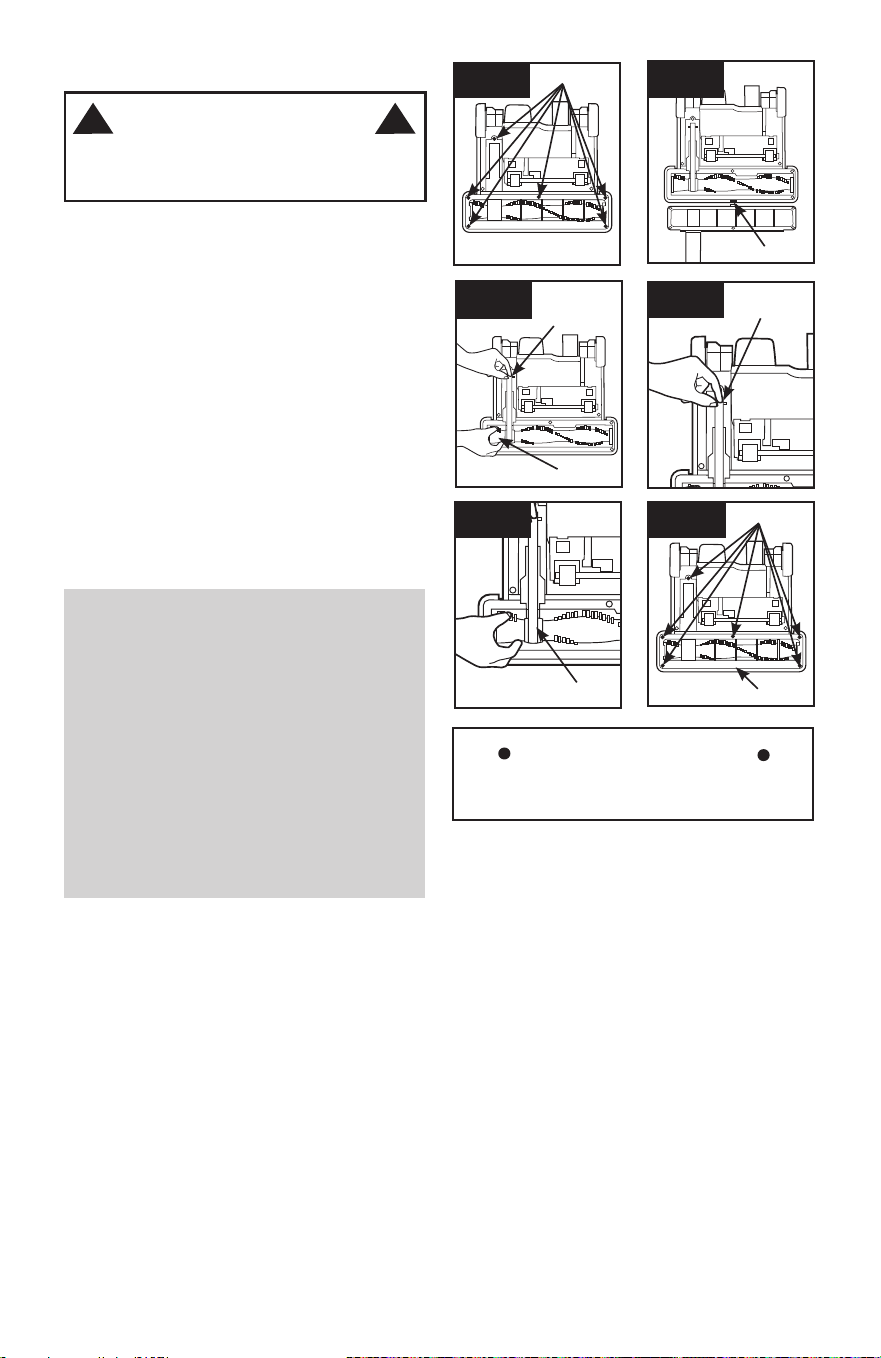
Removing Lens
Press Handle Release Pedal and place handle in
low position.
4.18 Using a Phillips screwdriver, remove (2) screws
as shown and lift off lens.
Installing Bulb
4.19 Pull old bulb straight out of socket. Push new
bulb straight into socket until locked in place.
Do not use excessive force when installing bulb.
Do not twist or turn bulb when installing bulb.
Replacing Lens
4.20 Reposition lens and secure with screws.
What to Buy:
Headlight
Additional bulbs may
be ordered at Hoover.
com or call 1-800-
944-9200. Ask for
Hoover
®
Part No.
27313-107.
HEADLIGHT:
How to Replace
WARNING
! !
To reduce the risk of electric shock - Unplug
before cleaning or servicing.
(available on select models only)
WARNING
! !
4.14
14
Actual model may vary from images shown.
BELT
The belt is located under the bottom plate of the
vacuum and should be checked from time to time
to be sure it is in good condition.
When To Replace
How To Replace
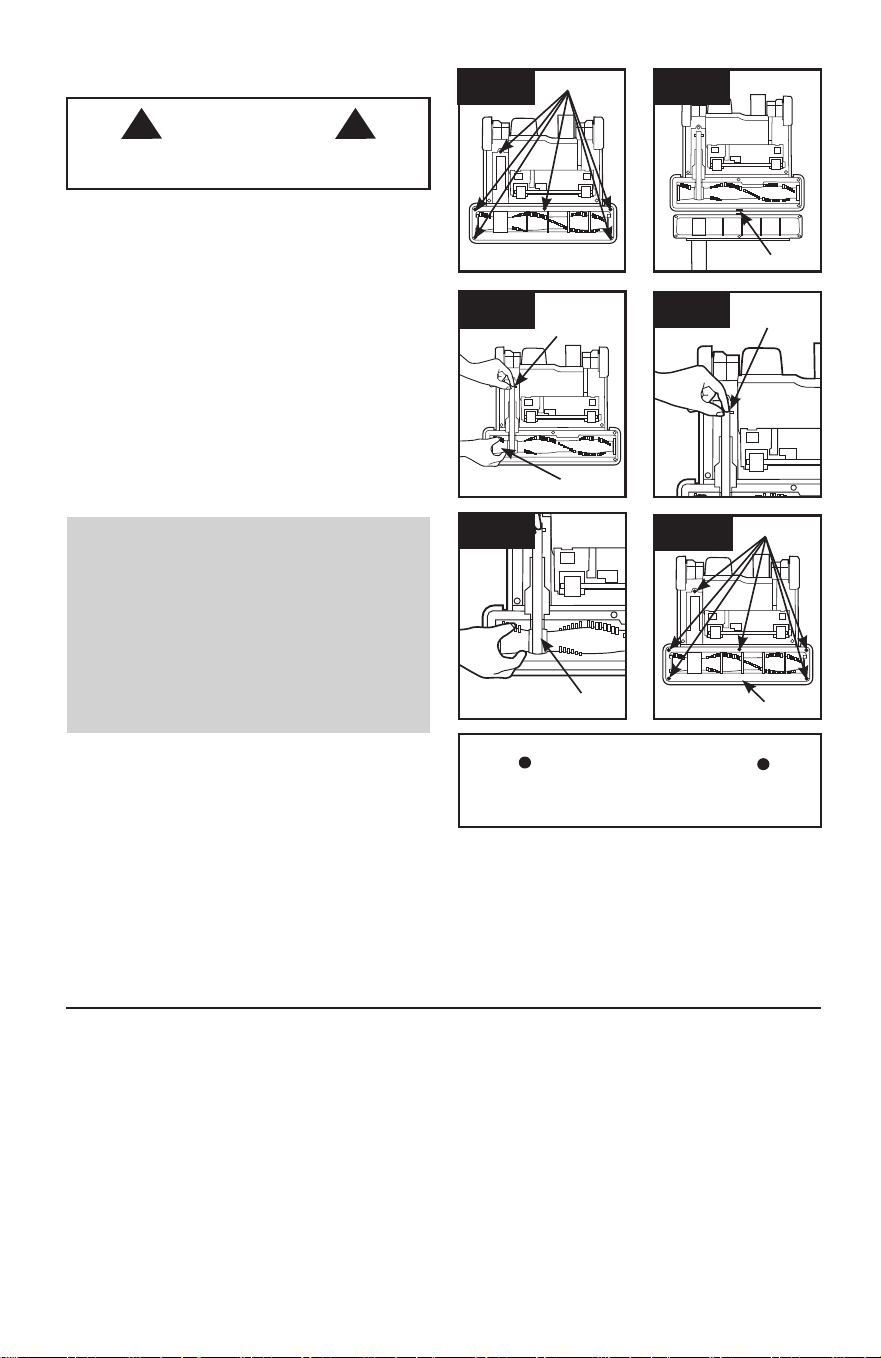
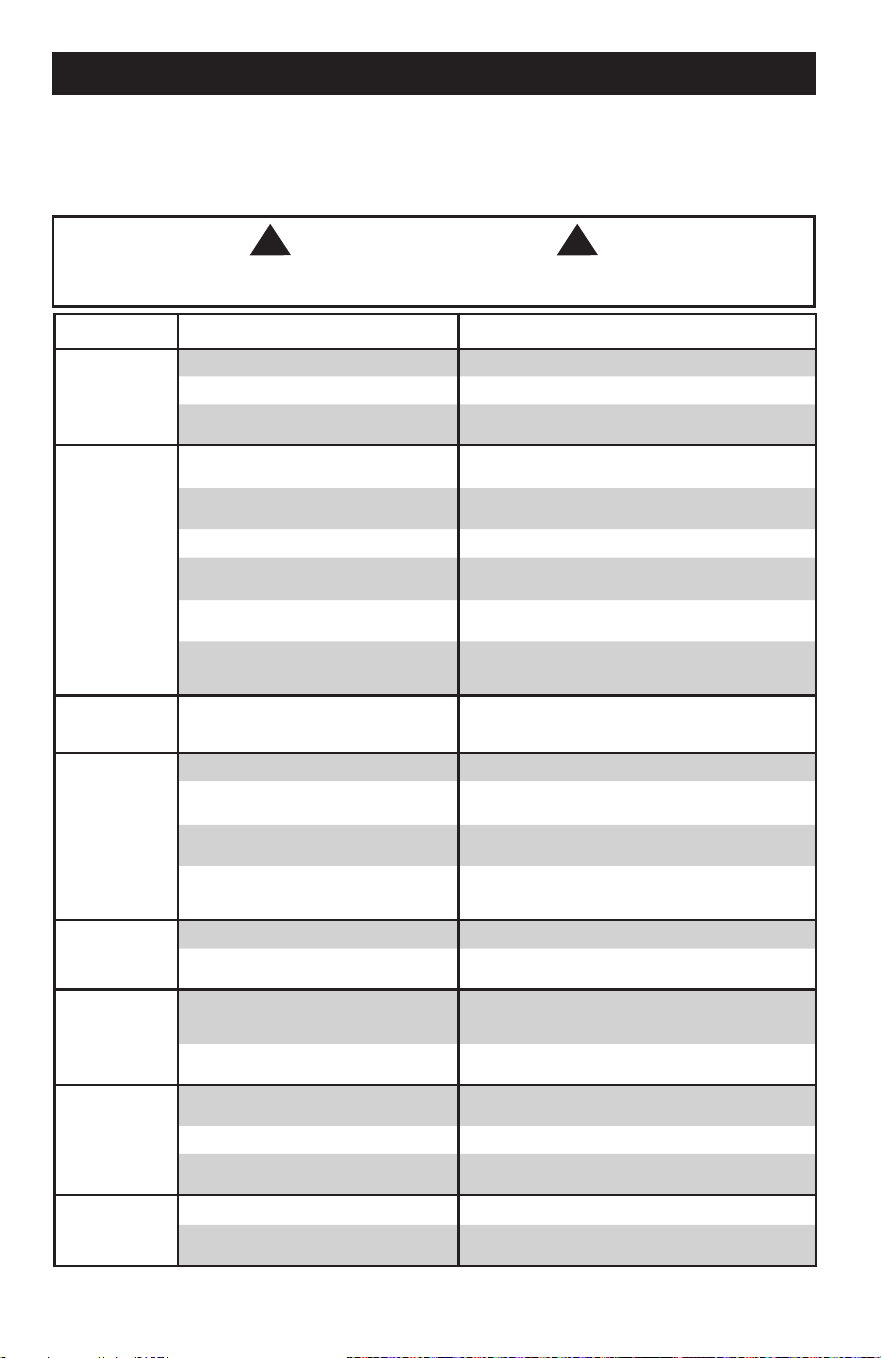
4.21 Turn vacuum over so bottom side is facing up
and remove the (6) screws (A).
4.22 Pivot out bottom plate away from hidden
latch (B).
4.23 Remove used belt from brushroll (C) then from
motor shaft (metal rod) (D) and discard.
Replace belt if it is stretched, cut or broken.
To check the belt, refer to Fig. 4.24 - 4.26.
4.23
C
D
4.24
CAUTION
! !
To reduce the risk of injury from moving parts -
Unplug before servicing.
4.24 With lettering on outside of belt, slide new belt
over motor shaft (metal rod) (E).
4.25 Then slip other end of belt around area of
brushroll without bristles (F).
With belt in place, pull and slide brushroll into nozzle
making sure that the brushroll end caps are in the
correct orientation.
4.26 Reposition bottom plate, aligning latch (B) and
fastening all (6) screws (A).
Press firmly at latch (B) area to ensure that it is
properly latched.
4.25
E
F
What to Buy: Belt
Use only genuine HOOVER
®
belts with your
vacuum.
When purchasing a new belt for models
with
Brushroll On/Off (Suction Only Mode), ask for
Flat Belt - HOOVER
®
part No. 562289001 or
AH20065.
If desired, additional belts can be purchased at
Hoover.com or 1-800-944-9200
IMPORTANT
Rotate brushroll manually to make sure belt is
not twisted.
4.21 4.22
A
4.26
A
B
B
LUBRICATION
The motor and brushroll are equipped with bearings
which contain sufficient lubrication for their lifetime.
The addition of lubricant could cause damage. Do
not add lubricant to motor or brushroll.
15
5. TROUBLESHOOTING
If a minor problem occurs, it usually can be solved quite easily when the cause is found by using the
checklist below.
Any other servicing should be done by an authorized service representative.
If appliance is not working as it should, has been dropped, damaged, left outdoors, or dropped into water, take
it to a service center prior to continuing use.
WARNING
! !
To reduce the risk of personal injury - Unplug before cleaning or servicing.
PROBLEM POSSIBLE CAUSE POSSIBLE SOLUTION
Vacuum won’t
run
1. Power cord not firmly plugged
into outlet.
1. Plug unit in firmly.
2. Blown fuse or tripped breaker. 2. Check fuse or breaker in home.
Replace fuse/reset breaker in home.
3. Thermal Protector activated. 3. Unplug and allow vacuum to cool for
30min. (This willl reset the thermal protector)
System Check
Indicator has
turned red
or
Vacuum won’t
pick up
or
Low suction
1.Rinsable Filter and/ or Filter
made with HEPA media is dirty.
1. Clean Rinsable Filter and or Filter made
with HEPA media - Pg. 11.
2. Dirt cup full and/ or clogged. 2. Empty dirt cup - Pg. 10.
3. Broken or worn belt. 3. Replace belt - Pg.14.
4. Brushroll and/ or Hose clogged. 4. Check Hose - Pg.13. Check Brushroll - Pg. 12.
5. Carpet height setting is incorrect. 5. Set Carpet Height Adjustment to appropri-
ate setting for carpet being cleaned - Pg.7.
6. Suction Only Mode is ON. 6. Step on Brushroll ON/OFF Pedal to turn
Suction Only Mode OFF - Pg. 6.
Cord Rewind
does not work
1. Cord reel does not retract. 1. Call 1-800-944-9200 for the nearest
authorized service representative.
Dust escaping
from vacuum
1. Dirt cup full. 1. Empty dirt cup - Pg. 10.
2. Dirt cup not installed correctly. 2. Review Dirt Cup removal & replacement -
Pg. 10.
3. Hose not installed correctly. 3. Review Hose installation - Pg. 8.
4. Rinsable and/ or Filter made with
HEPA media not installed completely.
4. Review Filter Removal and Cleaning - Pg.
11.
Headlight not
working
1. Bulb burnt out. 1. Replace bulb - Pg. 13.
2. Loose electrical wires. 2. Call 1-800-944-9200 for nearest authorized
Hoover
®
dealer.
Vacuum is
difficult to
push or won’t
move
forward
1. Carpet height setting is incorrect. 1. Set Carpet Height Adjustment knob to
appropriate setting for carpet being
cleaned - Pg. 7.
2. Brushroll is activated. 2. For very high pile carpet deeper than 1”,
turn brushroll off.
Air-Powered
Hand Tool
brushroll
won’t turn
1. Too much pressure being applied to tool. 1. Continue using tool applying light pressure.
2. Blockage. 2. Remove blockage.
3. Low vacuum suction. 3. Check items under “Vacuum won’t pick up
or Low suction.”
Smoky/burn-
ing smell
detected
1. Belt broken or stretched. 1. Replace brushroll belt - Pg. 14.
2. Brushroll is clogged. 2. Clear/ remove debris from brushroll - Pg.12.

16
To obtain approved Hoover
®
service and genuine Hoover
®
parts, locate the nearest Authorized Hoover
®
Warranty Service Dealer (Depot) by:
•CheckingtheYellowPagesunder“VacuumCleaners”or“Household”.
•Visitourwebsiteathoover.com(U.S.Customers)orhoover.ca(Canadiancustomers).
Follow the service center link to find the service outlet nearest you.
•Foranautomatedreferralofauthorizedserviceoutletlocationscall1-800-944-9200.
Do not send your vacuum to Hoover
®
, Inc., Company in Glenwillow for service. This will only result in delay.
If you need further assistance:
To speak with a customer service representative call 1-800-944-9200; Mon-Fri 8am-7pm EST. Always
identify your vacuum by the complete model number when requesting information or ordering parts. (The
model number appears on the bottom of the vacuum.)
PLEASE DO NOT RETURN THIS PRODUCT TO THE STORE.
6. SERVICE

17
7. WARRANTY
LIMITED TWO YEAR WARRANTY
(Domestic Use)
WHAT THIS WARRANTY COVERS
When used and maintained in normal household
use and in accordance with the Owner’s Manual,
your HOOVER
®
product is warranted against
original defects in material and workmanship for
a full two years from date of purchase (the
“Warranty Period”). During the Warranty Period,
Hoover
®
will provide labor and parts, at no cost
to you, to correct any such defect in products
purchased in the United States, U.S. Military
Exchanges and Canada.
HOW TO MAKE A WARRANTY CLAIM
If this product is not as warranted, take or send
the product to either a Hoover
®
Authorized
Warranty Service Dealer along with proof of
purchase. For an automated referral to authorized
service outlets in the U.S.A., phone: 1-800-944-
9200 OR visit Hoover
®
online at www.hoover.
com. For additional assistance or information
concerning this Warranty or the availability of
warranty service outlets, phone the Hoover
®
Consumer Response Center, Phone 1-800-944-
9200, Mon-Fri 8am-7pm EST.
WHAT THIS WARRANTY DOES NOT COVER
This Warranty does not cover: use of the product
in a commercial operation (such as maid,
janitorial and equipment rental services),
brushroll, belt, improper maintenance of the
product, damage due to misuse, acts of God,
nature, vandalism or other acts beyond the
control of Hoover
®
, owner’s acts or omissions,
use outside the country in which the product
was initially purchased and resales of the
product by the original owner. This warranty
does not cover pick up, delivery,
transportation or house calls. However, if you
mail your product to a Hoover
®
Authorized
Warranty Service Dealer, cost of shipping will be
paid one way.
This warranty does not apply to products
purchased outside the United States, including its
territories and possessions, outside a U.S. Military
Exchange and outside of Canada. This warranty
does not cover products purchased from a party
that is not an authorized retailer, dealer, or
distributor of Hoover
®
products.
OTHER IMPORTANT TERMS
This Warranty is not transferable and may not be
assigned. This Warranty shall be governed and
construed under the laws of the state of Ohio. The
Warranty Period will not be extended by any
replacement or repair performed under this
Warranty.
THIS WARRANTY IS THE EXCLUSIVE
WARRANTY AND REMEDY PROVIDED BY
HOOVER
®
. ALL OTHER WARRANTIES,
EXPRESSED OR IMPLIED, INCLUDING
WARRANTIES OF MERCHANTABILITY OR
FITNESS FOR PARTICULAR PURPOSE, ARE
DISCLAIMED. IN NO EVENT WILL HOOVER
BE LIABLE FOR ANY SPECIAL, INDIRECT,
INCIDENTAL OR CONSEQUENTIAL DAMAGES
OF ANY KIND OR NATURE TO OWNER OR
ANY PARTY CLAIMING THROUGH OWNER,
WHETHER BASED IN CONTRACT,
NEGLIGENCE, TORT OR STRICT PRODUCTS
LIABILITY OR ARISING FROM ANY CAUSE
WHATSOEVER. Some states do not allow the
exclusion of consequential damages, so the
above exclusion may not apply to you. This
warranty gives you specific rights; you may also
have others that vary from state to state.

www.hoover.com
MANUAL DEL PROPIETARIO
Instrucciones de Funcionamiento y Servicio
©2013 Techtronic Floor Care Technology Limited. Todos los derechos reservados.
#961151050 ID105906 R1
ESTA ASPIRADORA PARA ALFOMBRAS ESTÁ DISEÑADA
PARA USO DOMÉSTICO.
EL USO COMERCIAL DE ESTE PRODUCTO ANULA LA GARANTÍA.
E1
IMPORTANTE: LEA ATENTAMENTE ANTES DE ENSAMBLAR Y USAR.
¿Tiene alguna pregunta o inquietud? Para obtener asistencia, llame al Servicio de atención al
cliente al 1-800 944 9200, de lunes a viernes, de 8 a.m. a 7 p.m., hora del ESTE.
POR FAVOR, NO DEVUELVA ESTE PRODUCTO A LA TIENDA.
961A00016
E2
Gracias por haber elegido un producto HOOVER
®
.
Anote los números completos de Código de fabricación
en los espacios provistos.
MODELO
CÓDIGO DE FABRICACIÓN
Consejo: Adjunte su recibo de compra a este Manual del
propietario. Para obtener el servicio de garantía de su
producto HOOVER
®
puede requerirse la verificación de la
fecha de compra.
Inscriba su producto en línea en Hoover.com, o llame al
1-800-944-9200 si prefiere hacerlo por teléfono. Visite
Hoover.com para obtener instrucciones adicionales en
video para el armado y el mantenimiento.
CÓDIGO DE FABRICACIÓN
Si necesita ayuda:
Visite nuestro sitio web en www.hoover.com. Haga clic en el enlace que permite localizar los vende-
dores autorizados hoover para encontrar el vendedor más cercano, o marque el 1-800-944-9200 para
escuchar un mensaje indicando la dirección de los vendedores autorizados Hoover
®
(sólo en ee. Uu.)
O para hablar con un representante de atención al cliente (de 8 am a 7 pm, hora estándar del este, de
lunes a viernes).
POR FAVOR, NO DEVUELVA ESTE PRODUCTO A LA TIENDA.
(Etiqueta ubicada en la parte
posterior de la aspiradora)
ÍNDICE
Salvaguardias importantes ........................................................................................E3
Ensamblado de la aspiradora ...................................................................................E5
Contenido de la caja ................................................................................................E5
Colocación Del Mango ............................................................................................E5
Conexión del contenedor para polvo .......................................................................E5
Ubicación de los accesorios ....................................................................................E5
Cómo usar la aspiradora ...........................................................................................E6
Descripción de la aspiradora ...................................................................................E6
Interruptor de encender/apagar (ON/OFF) ..............................................................E6
Modo suction only/ Apagado del rodillo de escobillas del agitador .........................E6
Lanzamiento de la cuerda .......................................................................................E6
Traslado de la aspiradora ........................................................................................E7
Posiciones del mango .............................................................................................E7
Ajuste de la altura para alfombras...........................................................................E7
Accesorios ..................................................................................................................E8
Seleccione el accesorio apropiado ..........................................................................E8
Retiro de la manguera .............................................................................................E8
Conexión del tubo y de los accesorios ....................................................................E8
Limpieza de escaleras .............................................................................................E8
Cómo limpiar los accesorios....................................................................................E9
Enrollado del cordón y almacenamiento .................................................................E9
Mantenimiento ............................................................................................................E10
Depósito para polvo.................................................................................................E10
Los Filtros ................................................................................................................E11
Rodillo de cepillos ...................................................................................................E12
Manguera ................................................................................................................E13
Accesorio de mano turboaccionado ........................................................................E13
Luz delantera ..........................................................................................................E13
Correa ......................................................................................................................E14
Solución de problemas ..............................................................................................E15
Servicio .......................................................................................................................E16
Garantía .......................................................................................................................E17

E3
¡
SALVAGUARDIAS IMPORTANTES
!
¡GUARDE ESTAS INSTRUCCIONES!
Al usar un aparato eléctrico, observe siempre las precauciones básicas,
incluyendo las siguientes:
LEA TODAS LAS INSTRUCCIONES ANTES DE USAR ESTE APARATO
ADVERTENCIA: PARA REDUCIR EL RIESGO
DE INCENDIOS, CHOQUES ELÉCTRICOS O
LESIONES:
• Ensamble completamente el producto antes de hacerlo funcionar.
• Cualquier otra tarea de mantenimiento debe ser realizada por un representante de
mantenimiento autorizado.
• Haga funcionar la aspiradora solamente con el voltaje especificado en la placa de
datos, que se encuentra en la parte posterior de la aspiradora.
• No use este aparato en lugares al aire libre ni en superficies húmedas.
• No permita que el aparato se use como un juguete. No está diseñado para que
lo usen niños de 12 años o menos. Se requiere una supervisión estricta cuando
este aparato se usa cerca de los niños. Para evitar lesiones o daños, mantenga a
los niños lejos del producto y no permita que coloquen los dedos ni otros objetos
dentro de las aberturas.
• Use el producto sólo como se describe en este manual. Use sólo los accesorios
y productos recomendados por el fabricante.
• No use este aparato con un cordón o enchufe dañados. Si el aparato no está fun-
cionando adecuadamente, se dejó caer, se dañó, se dejó a la intemperie o se dejó
caer dentro del agua, llévelo a un Centro de servicio antes de continuar usándolo.
• No tire del cordón ni traslade el aparato jalando del cordón, ni tampoco lo use
como manija; no cierre la puerta cuando el cordón está atravesado ni tire de este
alrededor de bordes o esquinas filosos. No coloque el producto sobre el cordón.
No haga funcionar el aparato encima del cordón. Mantenga el cordón lejos de
superficies calientes.
• No lo desenchufe tirando del cordón. Para desenchufarlo, sujete el enchufe, no el
cordón.
• Nunca manipule el enchufe ni el aparato con las manos húmedas.
• No coloque ningún objeto en las aberturas. No use este aparato con ninguna
abertura obstruida; manténgalo libre de suciedad, pelusa, cabello y cualquier
objeto que pueda reducir el flujo de aire.
• Mantenga el cabello, la ropa holgada, los dedos y todas las partes del cuerpo
fuera de las aberturas y otras piezas en movimiento.
• Apague todos los controles antes de desenchufarlo.
• Tenga especial cuidado al limpiar escaleras. Para evitar lesiones personales o
daños, y evitar que la aspiradora se caiga, siempre colóquela al pie de la escalera,
en el suelo. No coloque la aspiradora sobre escaleras ni muebles, ya que puede
ocasionar lesiones o daños.
• No use este aparato para aspirar líquidos inflamables o combustibles, como
gasolina, o restos de madera lijada, ni lo use en áreas donde dichos materiales
pudieran estar presentes.

ADVERTENCIA: PARA REDUCIR EL RIESGO
DE DAÑOS:
• Evite aspirar objetos duros y filosos con este producto, ya que pueden causar
daños.
• Guarde la máquina en un lugar seco. No la exponga a temperaturas de con-
gelamiento.
• No use objetos filosos para limpiar la manguera, ya que pueden causar daños.
• Cuando el rodillo de cepillos esté encendido, no deje que el aparato permanezca
inmóvil durando mucho tiempo, ya que podría dañar el suelo.
ADVERTENCIA:
• Para disminuir el riesgo de choque eléctrico, este aparato tiene un enchufe
polarizado (una patilla es más ancha que la otra). Este enchufe puede usarse
en una toma de corriente polarizada, de una sola manera. Si el enchufe no
encaja completamente en la toma de corriente, colóquelo al revés. Si aun así
no encaja, comuníquese con un electricista calificado para que instale la toma
de corriente apropiada. No haga ningún tipo de modificación al enchufe.
E4
• Sujete el enchufe cuando enrolle el cordón en la bobina. No permita que el
enchufe dé latigazos al enrollarlo.
• Desenchufe el aparato antes de conectar el accesorio de mano turboaccionado.
• No aspire ningún objeto que se esté quemando o que libere humo, como cigar-
rillos, fósforos o cenizas calientes.
• No use el producto sin el contenedor para polvo y/o los filtros colocados en su
lugar.
• ADVERTENCIA: Este producto contiene sustancias químicas reconocidas por
el estado de California como causantes de cáncer, defectos congénitos o
daño reproductivo. LÁVESE LAS MANOS DESPUÉS DE USAR EL
PRODUCTO.
1.2
1.4
1.5 1.6
B
C
B
C**
D
1.1
E
F
G
A
1.3
A
H
E5
1. ENSAMBLADO DE LA ASPIRADORA
A. Sección del mango*
B. Cuerpo de la aspiradora
C. Accesorio de mano
turboaccionado**
D. Boquilla para hendiduras
E. Accesorio para polvo/tapizados*
F. Tubo telescópico
G. Tornillo (para el ensamblaje)
H. Contenedor para polvo
*El accesorio varía según el modelo.
**Disponible solo en algunos
modelos.
Retire todas las piezas de la caja
e identifique cada artículo que se muestra.
Nota: Retire el tornillo que se encuentra en la base
de la aspiradora y apártelo hasta la instrucción 1.3
1.2 Introduzca la sección del mango en la base de
la aspiradora. Empuje hacia abajo con fuerza.
1.3 Con un destornillador Phillips, asegure (1) tor-
nillo que se encuentra detrás del mango en la base
de la aspiradora.
1.4 En primer lugar, coloque la parte inferior del
contenedor para polvo dentro del cuerpo de la
aspiradora. Gire el contenedor dentro de la aspira-
dora. El contenedor para polvo está asegurado
cuando escucha un clic.
(El accesorio varía según el modelo)
1.5 Asegure el clip del accesorio de mano turboac-
cionado (A) sobre los rebordes en el lateral del
mango. Conecte la parte inferior del accesorio de
mano turboaccionado y gire dentro del clip hasta
que esté seguro.
1.6 Coloque el accesorio para hendiduras en el
tubo y deslícelo dentro del área de almacenamiento
del accesorio en la parte posterior izquierda (B) de
la aspiradora y coloque el accesorio para tapizados
en la parte posterior derecha (C) de la aspiradora,
como se muestra.
COLOCACIÓN DEL MANGO
variar según el modelo)
CONEXIÓN DEL CONTENEDOR
PARA POLVO
UBICACIÓN DE LOS ACCESORIOS
CONTENIDO DE LA
CAJA
El modelo real puede no coincidir con
las imágenes que se muestran.
Asegúrese de ubicar todas las piezas antes de eliminar el embalaje.
Para pedir piezas adicionales, visite Hoover.com o llame al 1 800-944-9200.
2.1
1. Mango
2. Botón de encender/apagar
3. Accesorio de mano turboaccionado*
4. Botón para soltar el depósito
para polvo
5. Asa para transportar
6. Acceso al filtro lavable
7. Contenedor para polvo
8. Cómo enrollar el cordón
9. Acceso al filtro hecho con medios
filtrantes HEPA y al filtro de carbono*
10. Asa para limpiar escaleras
11. Luz delantera*
12. Ajuste de la altura para alfombras
13. Indicador de verificación del
sistema
14. Accesorio para hendiduras
(tubo interior)
15. Tubo telescópico
16. Manguera
17. Botón para rebobinar el cordón
18. Pedal para encender/apagar el
rodillo de cepillos *
(Modo Suction Only [Sólo succión])
19. Protector para muebles
20. Accesorio para polvo/tapizados**
21. Botón de liberación de la manguera
22. Tubo de la manguera
23. Pedal para soltar el mango
1
2
3
4
6
7
8
9
12
11
10
13
14
15
16
17
18
19
23
20
21
22
5
DESCRIPCIÓN DE LA ASPIRADORA
2.2 Enchufe el cordón
en una toma de corri-
ente eléctrica.
Para encender la aspi-
radora (ON), empuje el
interruptor de encender
y apagar una vez.
Para apagar la aspira-
dora (OFF), empuje el
interruptor de nuevo.
2.3 Para un óptimo desempeño de limpieza sobre
pisos sin alfombra y alfombras con pelo de más de
1 pulgada de espesor, el cepillo giratorio debería
estar apagado.
La aspiradora se envía con el rodillo de cepillos en
la posición ON. A fin de apagar el rodillo de cepillos
para el Modo Suction Only (Sólo succión), pise el
pedal (A).
2. FUNCIONAMIENTO
MODO SUCTION ONLY (SÓLO SUCCIÓN)/ APAGADO
DEL RODILLO DE ESCOBILLAS DEL AGITADOR
INTERRUPTOR
DE ENCENDER/
APAGAR (ON/
OFF)
*Disponible sólo en algunos modelos.
**El accesorio varía según el modelo.
E6
El modelo real puede no coincidir con
las imágenes que se muestran.
El cepillo giratorio debería estar en la posición
de apagado para limpiar alfombras con pelo de
más de 1 pulgada de espesor.
El pedal (A) permanece inactivo mientras el
aparato está en posición vertical.
IMPORTANTE
ADVERTENCIA
! !
Para pisos sin alfombra y alfombras de pelo muy largo
2.4 Antes de utilizarlo, sujete el extremo del enchufe y tire para liberar el cordón de la
bobina hasta que vea la cinta roja.
LANZAMIENTO DE LA CUERDA
Al tirar del cordón, una cinta amarilla le indicará que está
casi totalmente extendido. La cinta roja aparece cuando
el cordón está totalmente extendido, así que no lo jale
más.
IMPORTANT
No se debe utilizar para acicalar mascotas.
PRECAUCIÓN
! !
2.2
2.3
B
A
2.4
E7
El modelo real puede no coincidir con
las imágenes que se muestran.
A
2.7
1
2
2.8 Para ajustar la altura, GIRE la perilla (A) a la
altura deseada.
Para obtener el máximo rendimiento de limpieza,
se recomiendan las siguientes posiciones, según la
altura de la alfombra:
•Posiciónmásbaja(1):parasuelossinmoqueta.
•Posiciónbaja(2):paratodotipodemoquetas.
•Posición alta: para alfombra de pelo muy
denso cuando se desea disminuir el esfuerzo
de empuje en tanto que se mantiene una
buena eficiencia de limpieza.
Si le cuesta mucho empujar la aspiradora, gire
la perilla a la siguiente posición más alta.
AJUSTE DE LA ALTURA PARA ALFOMBRAS
IMPORTANTE
TRASLADO DE LA ASPIRADORA
2.5 Para mover su aspi-
radora de una habit-
ación a otra, coloque el
mango en posición ver-
tical, incline la aspirado-
ra hacia atrás sobre las
ruedas posteriores, y
empuje hacia delante.
2.5
POSICIONES DEL MANGO
2.6
2.6 El mango de su
aspiradora tiene dos
posiciones: 1) vertical,
para almacenarla o para
usar los accesorios de
limpieza; 2) posición de
funcionamiento, para su
uso general en moqu-
etas y suelos.
Pise el pedal para soltar
el mango y bajarlo.
3.1
B
C
D
A
3.2
E8
El modelo real puede no coincidir con
las imágenes que se muestran.
A. Use el accesorio para tapizados para limpiar
muebles tapizados, cortinajes, colchones, prendas
de vestir y escaleras enmoquetadas. (Los accesorios
varían según el modelo)
B. El accesorio de mano turboaccionado puede
usarse para muebles tapizados, cortinajes, colcho-
nes, prendas de vestir y escaleras enmoquetadas.
(Los accesorios varían según el modelo)
C. El tubo telescópico se usa para alargar la manguera.
Úselo con cualquiera de los accesorios antes mencio-
nados.
D. El accesorio para hendiduras puede usarse en
lugares estrechos, en esquinas y en bordes de sitios,
como cajones de cómodas, muebles tapizados,
escaleras y zócalos.
Los accesorios le permiten limpiar superficies que están a mayor altura que el piso y llegar a áreas
difíciles de limpiar.
La aspiradora está lista para usarse con los accesorios cuando el mango está en posición vertical.
3. ACCESORIOS
SELECCIONE EL ACCESORIO
APROPIADO
(Los accesorios pueden variar según el modelo)
3.3 Coloque el acceso-
rio o el tubo en la
manguera (A).
Conecte el accesorio al
tubo (B) empujándolo
con fuerza sobre el
tubo.
Gire levemente el tubo
o el accesorio para
conectarlos con mayor
o menor fuerza.
RETIRO DE LA MANGUERA
3.2 Al usar accesorios
de limpieza, coloque el
mango del aparato en
posición vertical. El
rodillo de cepillos del
agitador no girará si el
aparato está en
posición vertical.
A fin de retirar la
manguera para usar el
accesorio, presione el
botón de liberación y
tire el extremo de la
manguera hacia afuera.
Para volver a trabarla
en su lugar, empuje la
manguera dentro del
tubo de la manguera
hasta que escuche un
clic.
CONEXIÓN DEL TUBO Y DE LOS
ACCESORIOS
Desenchufe la aspiradora antes de conectar el
accesorio de mano turboaccionado.
ADVERTENCIA
! !
3.3
B
A
Para alargar el tubo, gire en sentido antihorario
hasta la posición desbloqueada, extienda el tubo y
gire en sentido horario hasta que quede bloqueado.
Para acortar el tubo, siga los pasos anteriores en
sentido inverso.
Para limpiar la Manguera y el Accesorio Manual Impulsado por Aire, pase un trapo húmedo. NO sum-
erja en agua.
Los otros accesorios de limpieza se pueden lavar en agua tibia con un detergente suave. Enjuague y
deje secar al aire durante 24 horas antes de utilizar.
CÓMO LIMPIAR LOS ACCESORIOS
PRECAUCIÓN
! !
No se debe utilizar para acicalar mascotas.
Advertencia: para reducir el riesgo de lesiones
personales, desconecte antes de dar servicio.
ADVERTENCIA
! !
3.4
3.6
A
LIMPIEZA DE ESCALERAS
Tenga especial cuidado al limpiar escaleras. Para evitar lesiones personales o daños, y evitar que
la aspiradora se caiga, siempre colóquela al pie de la escalera, en el suelo. No coloque la aspira-
dora sobre escaleras ni muebles, ya que puede ocasionar lesiones o daños. Al usar accesorios,
asegúrese de que el mango esté en posición vertical.
3.4 Levante la aspiradora por el mango para limpieza
de escaleras y colóquela sobre las escaleras. Limpie
de adelante hacia atrás. Nunca deje la aspiradora
sobre las escaleras cuando no esté limpiando.
3.5 Use la manguera y el accesorio de mano tur-
boaccionado (Los accesorios varían según el
modelo) para limpiar escaleras. Al usar acceso-
rios, asegúrese de que el mango esté en posición
vertical.
ADVERTENCIA
! !
El modelo real puede no coincidir con
las imágenes que se muestran.
3.5
3.6 Para regresar el cable para el guardado,
desenchufe de la pared.
Para regresar el cordón a la posición de almacenamien-
to, sujete el enchufe y presione hacia abajo el pedal
para soltar el cordón (A) que se encuentra en el lat-
eral de la bobina. Sujete el enchufe cuando enrolle el
cordón en la bobina.
ENROLLADO DEL CORDÓN Y ALMACENAMIENTO
ADVERTENCIA
! !
Sujete el enchufe cuando enrolle el cordón en
la bobina. No permita que el enchufe dé
latigazos al enrollarlo.
E9
A
4.1
4.2
A
E10
El modelo real puede no coincidir con
las imágenes que se muestran.
4. MANTENIMIENTO
Su aspiradora tiene incorporado un protector térmico para impedir el sobrecalentamiento. Cuando se
activa el protector térmico, la aspiradora deja de funcionar.
Si esto sucede, proceda de la siguiente manera:
1. Apague la aspiradora y desenchúfela de la toma de corriente eléctrica.
2. Vacíe el contenedor para polvo.
3. Inspeccione la entrada de la boquilla, el conector de la manguera, la manguera, la entrada del
contenedor para polvo, el filtro ciclónico, el filtro enjuagable y el filtro HEPA para asegurarse de
que no hay obstrucciones. Si hay obstrucciones, elimínelas.
Cuando la aspiradora está desenchufada y se deja enfriar el motor durante 30 minutos, el protector
térmico se desactiva, y se puede continuar pasando la aspiradora.
Si el protector térmico sigue activándose después de efectuar los pasos anteriores, es posible que su
aspiradora necesite mantenimiento.
AVISO
! !
Familiarícese con estas tareas de mantenimiento en el hogar, ya que el uso
y cuidado apropiados de su aspiradora asegurarán una limpieza continua-
mente eficaz.
Si el aparato no está funcionando adecuadamente, se dejó caer, se dañó, se
dejó a la intemperie o se dejó caer dentro del agua, llévelo a un centro de
servicio antes de continuar usándolo.
4.1 Cualquier otra tarea de mantenimiento debe ser realizada por un representante
de mantenimiento autorizado.
PROBLEMA CAUSA POSIBLE SOLUCIÓN POSIBLE
El indicador de
verificación del
filtro se ha ilu-
minado en
rojo.
1. El filtro enjuagable y/o el filtro hecho con
medios filtrantes HEPA están sucios.
1. Limpie el filtro enjuagable y/o el filtro hecho
con medios filtrantes HEPA – Pág. E11
2. El contenedor para polvo está lleno y/o
tapado.
2. Vacíe el contenedor para polvo - Pág. E10.
3. Rodillo de cepillos y/o manguera
tapados.
3. Revise la manguera - Pág. E13. Revise el
rodillo de cepillos - Pág. E12.
Cualquier otra tarea de mantenimiento debe ser realizada por un representante de mantenimiento autorizado.
Para reducir el riesgo de lesiones ocasionadas por piezas en movimiento,
desenchufe la aspiradora antes de realizar el mantenimiento. No use la
aspiradora sin el contenedor para polvo ni los filtros colocados en su lugar.
Los materiales muy finos, como talco facial o maicena, pueden sellar el filtro
y reducir el rendimiento. Cuando use la aspiradora para este tipo de sucie-
dad, vacíe el contenedor y limpie los filtros con frecuencia.
ADVERTENCIA
! !
4.2 Para mantener un rendimiento óptimo, vacíe el contenedor para polvo
antes de que alcance su nivel máximo (A). Coloque la aspiradora en posición
vertical antes de retirar el contenedor para polvo.
Cuándo vaciarlo
DEPÓSITO PARA POLVO
4.3
4.4
B
A
C
4.5
4.7
4.6
El modelo real puede no coincidir con
las imágenes que se muestran.
Como vaciarlo
DEPÓSITO PARA POLVO
Cierre la tapa del contenedor para polvo (C). Presione firmemente para
asegurar la palanca.
4.5 En primer lugar, coloque la parte inferior del contenedor para polvo den-
tro del cuerpo de la aspiradora. Gire el contenedor para polvo en el cuerpo
de la aspiradora y presione firmemente hasta que se trabe en su lugar.
Para mantener un rendimiento óptimo, el filtro
debe limpiarse cada dos meses en condiciones
de uso normales.
Filtro enjuagable: Cómo limpiar
Retire el contenedor para polvo, como se describe
en la Fig. 4.3.
4.6 Tire hacia arriba la traba del contenedor para
polvo (A) para abrir.
4.7 Tire de la bolsita del filtro para retirar el filtro
enjuagable.
Mantenga el filtro debajo del agua corriente durante
dos minutos para retirar la suciedad y los residuos.
Oprima el filtro dos veces debajo del agua. Oprima
una última vez para retirar el exceso de agua.
LOS FILTROS:
Cuándo limpiarlo
Coloque el filtro en su reborde para secarlo, de
forma que el aire circule en ambos lados del
filtro. Esto puede demorar hasta 48 horas.
Vuelva a colocar el filtro, con la bolsa viendo hacia
arriba.
Cierre la tapa firmemente presionando hasta que
haga “clic”.
Vuelva a colocar el contenedor para polvo, como se
describe en la Fig. 4.5.
Filtro enjuagable: Qué comprar
Para reducir el riesgo de lesiones ocasionadas por
piezas en movimiento, desenchufe la aspiradora
antes de realizar el mantenimiento. No use la aspira-
dora sin el contenedor para polvo ni los filtros colo-
cados en su lugar.
IMPORTANTE
ADVERTENCIA
! !
4.3 Presione el botón
de liberación del con-
tenedor para polvo (A)
y gire el contenedor
hacia afuera.
4.4 Sujetando el con-
tenedor para polvo
sobre el recipiente de
basura, presione el
botón de liberación de
la puerta del contene-
dor para polvo (A) para
abrir la puerta del con-
tenedor para polvo (B).
Siempre que el uso y el mantenimiento se reali-
cen correctamente, su filtro enjuagable no necesi-
ta reemplazarse dentro del período de garantía.Si
lo desea, puede adquirir el filtro adicionales en
Hoover.com o al 1-800-944-9200 Si lo desea, hay
filtros adicionales disponibles. Solicite la pieza n.°
303903001 de Hoover
®
.
4.8 Con los dedos en las ranuras, tire del marco
del filtro (A) directamente hacia afuera. Sujete el
filtro sobre el recipiente de basura y golpéelo
suavemente para retirar la suciedad y los residu-
os.
Vuelva a deslizarlo hasta que esté en su posición
en la aspiradora y presione firmemente.
Filtro hecho con medios filtrantes HEPA: Cómo limpiar
Para reducir el riesgo de lesiones ocasionadas por
piezas en movimiento, desenchufe la aspiradora
antes de realizar el mantenimiento. No use la aspi-
radora sin el contenedor para polvo ni los filtros
colocados en su lugar.
ADVERTENCIA
! !
NO ENJUAGUE NI LAVE EL
FILTRO HECHO CON MEDIO
FILTRANTE HEPA.
IMPORTANTE
Qué comprar: Filtro hecho con medios filtrantes HEPA
Siempre que el uso y el mantenimiento se realicen correctamente, su filtro no
necesita reemplazarse dentro del período de garantía. Si lo desea, hay filtros
adicionales disponibles. Solicite la pieza n.° 305687001 de Hoover
®
.
E11
4.8
A
4.9
4.10
Filter assembly must be properly aligned to
dirt cup to function properly.
IMPORTANT
A
B
Conjunto del filtro ciclónico:
Cómo limpiar
Retire el contenedor para polvo, como se describe
en la Fig. 4.3.
4.9 Gire el conjunto del filtro (B) en sentido antiho-
rario. Retire el conjunto del contenedor para polvo
(A).
4.10 La suciedad y los residuos pueden limpiarse
del conjunto del filtro con el accesorio para polvo/
tapizados.
Coloque el conjunto del filtro (4.9 B) en el contene-
dor para polvo, alineando las (3) lengüetas del filtro
con las (3) ranuras del contenedor para polvo (A), y
gire en sentido horario para asegurarlo en su
posición.
Vuelva a colocar el contenedor para polvo, como se
describe en la Fig. 4.5.
Para reducir el riesgo de lesiones ocasionadas
por piezas en movimiento, desenchufe la aspi-
radora antes de realizar el mantenimiento.
No use la aspiradora sin el contenedor para
polvo ni los filtros colocados en su lugar.
ADVERTENCIA
! !
Qué comprar: Filtro de carbono:
Si lo
desea, hay filtros adicionales disponibles.
Solicite la pieza n.° 902404001 de Hoover
®
.
Filtro de carbono: Cómo limpiar
(Disponible sólo en algunos modelos)
El filtro de carbón se ubica en la parte inferior
del filtro hecho con medio filtrante HEPA
NO ENJUAGUE NI LAVE el cartucho de Filtro de carbono.
IMPORTANTE
El modelo real puede no coincidir con
las imágenes que se muestran.
RODILLO DE CEPILLOS:
Cómo limpiar
4.11 Invierta la aspiradora de modo que el lado
inferior mire hacia arriba, y retire los (6) tornillos (A).
4.12 Haga girar la placa inferior hacia fuera, apar-
tándola del pestillo oculto (B).
4.13 Vuelva a colocar la placa inferior, alineando el
pestillo (B) y ajustando los (6) tornillos (A).
Presione firmemente sobre el área del pestillo (B)
para asegurarse de que esté trabado de manera
correcta.
Para reducir el riesgo de lesiones ocasionadas
por piezas en movimiento, desenchufe la aspi-
radora antes de realizar el mantenimiento.
ADVERTENCIA
! !
4.11
A
4.13
A
B
4.12
B
E12
A
4.18
4.19
4.20
4.14
El modelo real puede no coincidir con
las imágenes que se muestran.
4.17
4.15
4.15 Voltee el accesorio de modo que la parte infe-
rior mire hacia arriba. Gire las trabas (A) a ambos
lados del accesorio.
4.16 Retire la placa inferior (B).
4.17 Retire toda la suciedad y/o el cabello del rodillo
de cepillos.
Vuelva a colocar la placa inferior y gire las trabas
nuevamente a la posición de trabado.
A
ACCESORIO DE MANO
TURBOACCIONADO:
Cómo limpiar
(Los accesorios varían según el modelo)
4.16
B
Para reducir el riesgo de lesiones ocasionadas
por piezas en movimiento, desenchufe la aspira-
dora antes de realizar el mantenimiento.
MANGUERA:
Cómo limpiar
Para reducir el riesgo de lesiones ocasionadas por piezas en movimiento,
desenchufe la aspiradora antes de realizar el mantenimiento.
4.14 A fin de retirar la manguera para usar el accesorio, presione el botón de
liberación de la manguera (A) y tire el extremo de la manguera hacia afuera.
Elimine la suciedad o las obstrucciones de la manguera. No use objetos filosos
para limpiar la manguera, ya que pueden causar daños. Para volver a trabarla
en su lugar, empuje la manguera dentro del tubo de la manguera hasta que
escuche un clic.
ADVERTENCIA
! !
ADVERTENCIA
! !
E13
Cómo retirar la lente
Presione el pedal para soltar el mango y coloque el
mango en la posición baja.
4.18 Con un destornillador Phillips, retire los (2)
tornillos como se muestra y levante la lente.
Cómo instalar la bombilla
4.19 Extraiga la bombilla usada directamente de su
receptáculo. Empuje la nueva bombilla directa-
mente en su receptáculo hasta que quede trabada
en su lugar.
No se requiere demasiada fuerza.
No se requiere girar la bombilla.
Cómo volver a colocar la lente
4.20 Vuelva a colocar la lente y asegúrela con
tornillo
Qué comprar:
Luz delantera
Si lo desea, puede
adquirir Luz delan-
tera adicionales en
Hoover.com o al
1-800-944-9200. Esta
aspiradora utiliza una
lámpara n. ° 27313-
107 de HOOVER
®
.
LUZ DELANTERA:
Cómo reemplazarla
Para reducir el riesgo de lesiones ocasionadas
por piezas en movimiento, desenchufe la aspi-
radora antes de realizar el mantenimiento.
ADVERTENCIA
! !
(Disponible sólo en algunos modelos)
E14
El modelo real puede no coincidir con
las imágenes que se muestran.
LUBRICACIÓN:
El motor y el rodillo de cepillos están
equipados con rodamientos que contienen
suficiente lubricación para su vida útil. Agregar
lubricante podría provocar daños. No agregue
lubricante al motor ni al rodillo de cepillos.
CORREA
La correa se encuentra debajo de la placa inferior
de la aspiradora, y debe verificarse periódica-
mente para asegurarse de que esté en buenas
condiciones.
Cuándo reemplazarla
Reemplace la correa si está estirada, cortada o
rota. Para revisar la correa plana, consulte la Fig.
4.24 - 4.26.
Cómo reemplazarla
4.21 Tourner l’aspirateur à l’envers et retirer les six
(6) vis (A).
4.22 Faire pivoter la plaque inférieure en l’éloignant
du loquet dissimulé (B).
4.23 Retire la correa usada del rodillo de cepillos
(C); luego, del eje del motor (varilla de metal) (D) y
deséchela.
Para reducir el riesgo de lesiones ocasionadas
por piezas en movimiento, desenchufe la aspi-
radora antes de realizar el mantenimiento.
ADVERTENCIA
! !
4.23
C
D
4.21
4.22
A
B
4.24 Con la inscripción en la parte exterior de la
correa, deslice la correa nueva sobre el eje del
motor (varilla de metal) (E).
4.25 Deslice luego el otro extremo de la correa
alrededor del área del cepillo giratorio que no tiene
cerdas (F).
Con la correa en su lugar, tire del rodillo de cepillos
y deslícelo dentro de la boquilla, asegurándose de
que las tapas de extremo del rodillo de cepillos
tengan la orientación correcta.
4.26 Remettre la plaque inférieure en place en
alignant le loquet (B) et en serrant les six (6) vis (A).
Appuyer fermement du côté du loquet pour
s’assurer qu’elle est bien verrouillée.
Gire el rodillo de cepillos en forma manual para
asegurarse de que no se haya torcido la correa.
IMPORTANTE
Qué comprar: Correa plana
Utilice únicamente correas genuinas de
HOOVER
®
con su aspiradora.
Al comprar una correa nueva para modelos de
rodillo de cepillos con interruptor (modo “Sólo
succión”), solicite la correa plana, nº de pieza
562289001 de HOOVER
®
y AH20065.
Al comprar una correa nueva para modelos sin
rodillo de cepillos con interruptor (modo “Sólo
succión”), solicite la correa elástica, nº de pieza
38528058 de HOOVER
®
y AH20080.
Si lo desea, puede adquirir correas adicionales
en Hoover.com o al 1-800-944-9200
4.24
4.25
E
F
4.26
A
B
E15
5. SOLUCIÓN DE PROBLEMAS
Si ocurre un problema menor, generalmente puede resolverse con bastante facilidad cuando se halla la
causa, usando esta lista de verificación.
Cualquier otra tarea de mantenimiento debe ser realizada por un representante de mantenimiento autorizado.
Si el aparato no está funcionando adecuadamente, se dejó caer, se dañó, se dejó a la intemperie o se dejó caer
dentro del agua, llévelo a un centro de servicio antes de continuar usándolo.
Para reducir el riesgo de lesiones ocasionadas por piezas en movimiento, desenchufe la aspiradora
antes de realizar el mantenimiento.
ADVERTENCIA
! !
PROBLEMA CAUSA POSIBLE SOLUCIÓN POSIBLE
La aspiradora
no funciona
1. No está bien enchufada. 1. Enchúfela bien.
2. Fusible quemado o se disparó el disyuntor. 2. Inspeccione el fusible o el disyuntor.
3. Protector térmico activado. 3. Desenchufe y deje que la aspiradora se enfríe durante 30
min. (Esto reajustará el protector térmico).
El indicador de
verificación del
filtro se ha ilu-
minado en rojo.
o La aspiradora
no aspira o
Baja succión
1. El filtro enjuagable y/o el filtro hecho con
medios filtrantes HEPA están sucios.
1. Limpie el filtro enjuagable y/o el filtro hecho con medios
filtrantes HEPA – Pág. E11.
2. El contenedor para polvo está lleno y/o
tapado.
2. Vacíe el contenedor para polvo - Pág. E10.
3. La correa está rota o desgastada. 3. Reemplace la correa - Pág.E14.
4. Rodillo de cepillos y/o manguera tapados. 4. Revise la manguera - Pág. E13. Revise el rodillo de cepil-
los - Pág. E12.
5. La posición de la altura para moquetas
es incorrecta.
5. Coloque el ajuste de altura de la moqueta en la posición
apropiada para la moqueta que está limpiando - Pág. E7.
6. El modo Suction Only (Sólo succión) está
encendido.
6. Pise el pedal para encender/apagar el rodillo de cepillos
para apagar el modo Suction Only (Sólo succión) -
Pág. E6.
El enrollador
de cordón no
funciona
1. El riel del cordón no se retrae. 1. Llame al 1-800-944-9200 para hablar con el represent-
ante de servicios autorizado más cercano.
El polvo sale
de la
aspiradora
1. El recipiente de polvo está lleno. 1. Vacíe el recipiente de polvo - Pág. E10.
2. El contenedor para polvo no está instalado
correctamente.
2. Revise la sección Cómo retirar y volver a colocar el
contenedor para polvo - Pág. E10.
3. La manguera no está instalada correcta-
mente.
3. Revise la sección Instalación de la manguera - Pág. E8.
4. El filtro enjuagable y/o el filtro hecho con
medios filtrantes HEPA no están instalados
completamente.
4. Revise la sección Cómo retirar y limpiar el filtro -
Pág. E11.
La luz frontal
no funciona
1. Foco fundido. 1. Reemplace el foco - Pág. E13.
2. Cables eléctricos sueltos. 2. Llame al 1-800-944-9200 para encontrar el concesion-
ario autorizado de Hoover® más cercano.
Dificultad para
empujar la
aspiradora
1. La posición de la altura para moquetas es
incorrecta.
1. Coloque la perilla de ajuste de altura de la moqueta en
la posición apropiada para la moqueta que está limpiando
- Pág. E7.
2. El rodillo de cepillos esté encendido. 2. Para alfombras de pelo muy largo, de más de 1 pulga-
da de espesor, apague el cepillo giratorio.
El rodillo de
cepillos del
accesorio de
mano turboac-
cionado no gira
1. Se está aplicando demasiada presión al
accesorio.
1. Continúe usando el accesorio aplicando una presión leve.
2. Obstrucción. 2. Elimine la obstrucción.
3. Baja succión de la aspiradora. 3. Revise los puntos que se encuentran en la sección “La
aspiradora no aspira o Baja succión”.
Se detecta un
olor a humo/
quemado
1. Correa rota o estirada. 1. Reemplace la correa del rodillo de cepillos - Pág. E14.
2. El rodillo de cepillos está tapado. 2. Elimine/retire los residuos del rodillo de cepillos -
Pág. E12.

E16
Para obtener un servicio aprobado de Hoover
®
y piezas genuinas de Hoover
®
, encuentre el Concesionario
autorizado de servicio de garantía de Hoover
®
(depositario) más cercano:
•ConsultandolasPáginasamarillasenlasección“Aspiradoras–uso”doméstico.
•Visitenuestrositiowebenhoover.com(clientes
estadounidenses) o hoover.ca (clientes canadienses). Siga el enlace del centro de servicio para
encontrar el centro de servicio más cercano.
•Paraqueleinformendemaneraautomáticalaubicacióndeloscentrosautorizadosdeservicio,llame
al 1-800-944-9200. No envíe su aspiradora a Hoover
®
, Inc., Company en Glenwillow para realizar el
servicio. Esto sólo provocará demoras.
Si necesita recibir más ayuda:
Para hablar con un representante de atención al cliente, llame al 1-800-944-9200; de lunes a viernes, de
8 a.m. a 7 p.m., hora del Este. Siempre identifique su aspiradora por el número de modelo completo al
solicitar información o realizar pedidos de piezas.
(El número de modelo aparece en la parte inferior de la aspiradora).
NO DEVUELVA ESTE PRODUCTO A LA TIENDA.
6. SERVICIO
E17
7. GARANTÍA
GARANTÍA LIMITADA DE DOS AÑOS
(Para uso doméstico)
QUÉ CUBRE ESTA GARANTÍA
Siempre que el uso y el mantenimiento de su
producto HOOVER
®
se realicen en condiciones
de uso doméstico normales y según el Manual
del usuario, el producto estará garantizado contra
defectos originales en el material y la fabricación
durante de dos años completos desde la fecha de
compra (el “Período de Garantía”). Durante el
Período de Garantía, Hoover
®
le proporcionará
gratuitamente, como se describe en esta
garantía, la mano de obra y las piezas necesarias
para corregir cualquier defecto en los productos
comprados en los Estados Unidos, en una tienda
situada en una base militar de los EE. UU. y en
Canadá.
CÓMO HACER UN RECLAMO EN VIRTUD DE
LA GARANTÍA
Si este producto no se ajusta a las condiciones
garantizadas, llévelo a un Concesionario autor-
izado de servicio de garantía de Hoover
®
junto
con el comprobante de compra. Para que le infor-
men de manera automática la ubicación de los
centros autorizados de servicio, llame al: 1-800-
944-9200 o visite Hoover
®
en Internet, en hoover.
com. (clientes estadounidenses) o hoover.ca
(clientes canadienses). Si necesita asistencia
adicional o información sobre esta Garantía o la
disponibilidad de los centros de servicio de
garantía, llame al 1-800-944-9200, de lunes a
viernes, de 8 a.m. a 7 p.m., hora del Este.
QUÉ NO CUBRE ESTA GARANTÍA
Esta garantía no cubre: el uso del producto con
cualquier fin comercial (como servicios de limp-
ieza, mantenimiento y de alquiler de equipos), el
mantenimiento inadecuado del producto, los
daños provocados por el uso indebido, caso for-
tuito, hechos de la naturaleza, vandalismo u otros
actos que excedan del control de Hoover
®
, accio-
nes u omisiones del propietario, uso fuera del
país en que el producto fue comprado inicial-
mente y reventa del producto por parte del propi-
etario original. Esta garantía no cubre el retiro del
producto, la entrega, el transporte ni las visitas a
domicilio.
Esta garantía no se aplica a los productos com-
prados fuera de los Estados Unidos, incluidos
sus territorios y posesiones, fuera de una tienda
situada en una base militar de los EE. UU. ni
fuera de Canadá. Esta garantía no cubre los
productos comprados a una parte que no sea un
minorista, concesionario o distribuidor autoriza-
dos de los productos de Hoover
®
.
OTROS TÉRMINOS IMPORTANTES
Esta Garantía no es transferible ni puede ceder-
se. Esta Garantía se regirá e interpretará de
conformidad con las leyes del estado de Ohio. El
Período de Garantía no se prorrogará en función
de ningún reemplazo o reparación realizados en
virtud de esta Garantía.
ESTA GARANTÍA ES LA ÚNICA GARANTÍA Y
EL ÚNICO RECURSO QUE HOOVER
®
PROPORCIONA. TODAS LAS DEMÁS
GARANTÍAS, EXPRESAS O IMPLÍCITAS,
INCLUIDAS LAS GARANTÍAS DE
COMERCIABILIDAD O APTITUD PARA UN FIN
PARTICULAR, QUEDAN EXCLUIDAS.
HOOVER NO SERÁ RESPONSABLE EN
NINGÚN CASO POR NINGÚN DAÑO
ESPECIAL, INDIRECTO, INCIDENTAL O
MEDIATO DE NINGÚN TIPO O NATURALEZA
CON RESPECTO AL PROPIETARIO O A
CUALQUIER PARTE QUE REALICE UN
RECLAMO A TRAVÉS DEL PROPIETARIO, YA
SEA QUE SE BASE EN RESPONSABILIDAD
CONTRACTUAL, NEGLIGENCIA,
RESPONSABILIDAD EXTRACONTRACTUAL O
RESPONSABILIDAD CIVIL OBJETIVA POR
LOS PRODUCTOS, O EMERGENTE DE
CUALQUIER OTRA CAUSA. Algunos estados
no permiten la exclusión de los daños mediatos,
por lo cual es posible que la exclusión mencio-
nada no se aplique en su caso. Esta garantía le
otorga derechos específicos; es posible que,
además, tenga otros derechos que varían de un
estado a otro.