User & Installation manual
NY90T5010SS
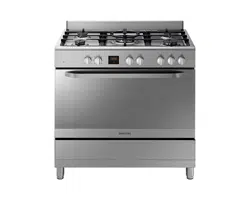
FREE STANDING OVEN

2
Dear User,
Our objective is to make this product provide you with the
best output which is manufactured in our modern facilities in
a careful working environment, in compliance with total quality
concept.
Therefore, we suggest you to read the user manual carefully
before using the product and, keep it permanently at your
disposal.
Note: This user manual is prepared for more than one model.
Some of the features specified in the Manual may not be
available in your appliance.
All our appliances are only for domestic use, not for commercial
use.
Products marked with (*) are optional.
“THIS APPLIANCE SHALL BE INSTALLED IN ACCORDANCE WITH
THE REGULA TIONS FORCE AND ONLY USED IN A WELL VENTILATED
SPACE. READ THE INSTRUCTIONS BEFORE INSTALLING OR USING
THIS APPLIANCE”

3
FOR YOUR SAFETY
“Important: Read these instructions for use carefully so as to
familiarize yourself with the appliance before connecting it to its
gas container. Keep these instructions for future reference”.
This appliance is adjusted to operate on LPG only.
IF YOU SMELL GAS:
• Turn off gas supply at bottle
• Extinguish all naked ames;
• Do not operate any electrical appliances
• Ventilate the area
• Check for leaks as detailed in this manual If odour persists,
contact your dealer or gas supplier immediately
Do not tamper or modify the appliance.
BURN-BACK (FIRE IN BURNER TUBE OR CHAMBER)
In the event of a burn-back, where the ame burns back to the
jet, immediately turn the gas supply off at the control valve on
the panel. After ensuring the ame is extinguished, wait for I
minute and re-light the appliance in the normal manner. Should
the appliance again burn back, close the control valve and call
a service technician. Do not use the appliance again until the
service technician has declared that it is safe to do so.
GAS-PRESSURE REGULATOR
This appliance requires an operating pressure of 2,8 kPa at
the appliance. A suitable LPG regulator that complies with the
requirements of SANS 1237 must be installed.

4
IMPORTANT INFORMATION FOR THE USER
This appliance may only be installed by a registered SAQCC Gas
installer. All registered installers are issued with a card carrying
their registration number. Ask to be shown the card before
allowing the installation work to commence and make a note of the
Installer registration number. Upon completion of the installation,
the installer is required to explain the operational details of the
appliance together with the safety instructions. You will be asked
to sign acceptance of the installation and be provided with a
completion certicate. You should only sign for acceptance of the
installation when the installation is completed to your satisfaction.
Note that your invoice is required in the event that you wish
make a guarantee claim.
IMPORTANT INFORMATION FOR THE INSTALLER
This appliance may only be installed by a gas installer registered
with the South African qualication and certication committee
(SAQCC). The appliance must be installed in accordance with the
requirements of SANS 10087-1for use with LPG, SANS 827 for
use with NG and any re department regulations and/or local
bylaws applicable to the area. If in doubt, check with the relevant
authority before undertaking the installation. Upon completion of
the installation you are required to fully explain and demonstrate
to the user the operational details and safety practices applicable
to the appliance and the installation.

5
CONTENTS
Important warnings 6
Electrical connection 19
Gas connection 20
Introduction of the appliance 25
Accessories 26
Technical features of your oven 27
Installation of your oven 29
Installation of the oven feet 31
Chain lashing illustration 31
Control panel 32
Using oven heating elements 33
Using the wire rack 33
Using gas burners 33
Oven mode selector 35
Cooking modes 35
Cooking recommendations 36
Cooking time table 37
Use of the digital touch timer 38
Maintenance and cleaning 43
Installation of the oven door 44
Rack positions 45
Using wire rack 45
Cleaning and maintenance of the oven’s front door glass 45
Changing the oven lamp 46
Troubleshooting 47
Handling rules 49
Appendix 50
Questions or comments 51

6
IMPORTANT WARNINGS
1. Installation and repair should always
be performed by “AUTHORIZED SERVICE”.
Manufacturer shall not be held responsible for
operations performed by unauthorized persons.
2. Please read this operating instructions
carefully. Only by this way you can use the
appliance safely and in a correct manner.
3. The oven should be used according to
operating instructions.
4. Keep children below the age of 8 and pets
away when operating.
5. WARNING: The accessible parts may be hot
while using the grill. Keep away from children.
6. WARNING: Fire hazard; do not store the
materials on the cooking surface.
7. WARNING: The appliance and its accessible
parts are hot during operation.
8. Setting conditions of this device are specied
on the label. (Or on the data plate)
9. The accessible parts may be hot when the
grill is used. Small children should be kept away.
10. WARNING: This appliance is intended for
cooking. It should not be used for other purposes
like heating a room.
11. To clean the appliance, do not use steam
cleaners.

7
12. Ensure that the oven door is completely
closed after putting food inside the oven.
13. NEVER try to put out the re with water.
Only shut down the device circuit and then cover
the ame with a cover or a re blanket.
14. Children under 8 years of age should be kept
away, if they cannot be monitored continuously.
15. Touching the heating elements should be
avoided.
16. CAUTION: Cooking process shall be
supervised. Cooking process shall always be
supervised.
17. This device can be used by children over
8 years of age, people with physical, hearing
or mental challenges or people with lack of
experience or knowledge; as long as control is
ensured or information is provided regarding
the dangers.
18. This device has been designed for household
use only.
19. Children must not play with the appliance.
Cleaning or user maintenance of the appliance
shall not be performed by children unless they
are older than 8 years and supervised by adults.
20. Keep the appliance and its power cord away
from children less than 8 years old.

8
21. Put curtains, tulles, paper or any ammable
(ignitable) material away from the appliance
before starting to use the appliance. Do not put
ignitable or ammable materials on or in the
appliance.
22. Keep the ventilation channels open.
23. The appliance is not suitable for use with
an external timer or a separate remote control
system.
24. Do not heat closed cans and glass jars. The
pressure may lead jars to explode.
25. Oven handle is not a towel drier. Do not hang
towels, etc. on the oven handle.
26. Do not place the oven trays, plates or
aluminium foils directly on the oven base. The
accumulated heat may damage the base of the
oven.
27. While placing food to or removing food from
the oven, etc., always use heat resistant oven
gloves.
28. Do not use the product in states like
medicated and/or under inuence of alcohol
which may affect your ability of judgement.
29. Be careful when using alcohol in your foods.
Alcohol will evaporate at high temperatures and
may catch re to cause a re if it comes in contact
with hot surfaces.

9
30. After each use, check if the unit is turned
off.
31. If the appliance is faulty or has a visible
damage, do not operate the appliance.
32. Do not touch the plug with wet hands. Do
not pull the cord to plug off, always hold the plug.
33. Do not use the appliance with its front door
glass removed or broken.
34. Place the baking paper together with the
food into a pre-heated oven by putting it inside
a cooker or on an oven accessory (tray, wire grill
etc.).
35. Do not put objects that children may reach
on the appliance.
36. It is important to place the wire grill and
tray properly on the wire racks and/or correctly
place the tray on the rack. Place the grill or tray
between two rails and make sure it is balanced
before putting food on it.
37. Against the risk of touching the oven heater
elements, remove excess parts of the baking
paper that hang over from the accessory or
container.
38. Never use it at higher oven temperatures
than the maximum usage temperature indicated
on your baking paper. Do not place the baking
paper on the base of the oven.

10
39. When the door is open, do not place any
heavy object on the door or allow children to sit
on it. You may cause the oven to overturn or the
door hinges to be damaged.
40. The packaging materials are dangerous for
children. Keep packaging materials away from
the reach of children.
41. Do not use abrasive cleaners or sharp metal
scrapers to clean the glass as the scratches that
may occur on the surface of the door glass may
cause the glass to break.
42. Do not place the appliance on a surface covered
with carpets. Electric parts gets overheated since
there will be no ventilation from below. This will
cause failure of the appliance.
43. Do not hit glass surfaces of vitro-ceramic
cookers with a hard metal, resistance can get
damaged. It may cause an electric shock.
44. User should not handle the oven by himself.
45. Use shall be careful when cleaning gas
burners. It may cause personal injuries.
46. Food can spill when foot of oven is dismantled
or gets broken, be careful. It may cause personal
injuries.
47. During usage, the internal and external
surfaces of the oven get hot. As you open the oven
door, step back to avoid the hot vapour coming
out from the interior. There is risk of burning.

11
48. Upper cover of the oven can be closed for a
reason, than cookware can trip over. Step back to
avoid the hot food coming on you. There is risk
of burning.
49. Do not place heavy objects when oven door
is open, risk of toppling.
50. User should not dislocate the resistance
during cleaning. It may cause an electric shock.
51. Do not remove ignition switches from the
appliance. Otherwise, live electric cables can be
accessed. It may cause an electric shock.
52. Oven supply can be disconnected during any
construction work at home. After completing the
work, re-connecting the oven shall be done by
authorized service.
53. Do not place metal utensils such as knife,
fork, spoon on the surface of the appliance, since
they will get hot.
54. To prevent overheating, the appliance should
not be installed behind of a decorative cover.
55. Turn off the appliance before removing the
safeguards. After cleaning, install the safeguards
according to instructions.
56. Cable xing point shall be protected.
57. WARNING: Don’t use oven and grill burners
at same time.

12
58. Please don’t cook the food directly on the tray
/ grid. Please put the food into or on appropriate
tools before putting them in the oven.
59. Hot surface, leave for cooling before closing
the cover.
Electrical Safety
1. Plug the appliance in a grounded socket
protected by a fuse conforming to the values
specied in the technical specications chart.
2. Have an authorized electrician set grounding
equipment. Our company shall not be responsible
for the damages that shall be incurred due to
using the product without grounding according
to local regulations.
3. The circuit breaker switches of the oven shall
be placed so that end user can reach them when
the oven is installed.
4. The power supply cord (the cord with plug)
shall not contact the hot parts of the appliance.
5. If the power supply cord (the cord with plug)
is damaged, this cord shall be replaced by the
manufacturer or its service agent or an equally
qualied personnel to prevent a hazardous
situation.
6. Never wash the product by spraying or pouring
water on it! There is a risk of electrocution.

13
7. WARNING: To avoid electric shock, ensure
that the device circuit is open before changing
the lamp.
8. WARNING: Cut off all supply circuit connections
before accessing the terminals.
9. WARNING: If the surface is cracked, turn off
the appliance to avoid risk of electric shock.
10. Do not use cut or damaged cords or extension
cords other than the original cord.
11. Make sure that there is no liquid or humidity
in the outlet where the product plug is installed.
12. The rear surface of the oven also heats up
when the oven is operated. Electrical connections
shall not touch the rear surface, otherwise the
connections may be damaged.
13. Do not tighten the connecting cables to the
oven door and do not run them over hot surfaces.
If the cord melts, this may cause the oven to short
circuit and even a re.
14. Unplug the unit during installation,
maintenance, cleaning and repair.
15. If the power supply cable is damaged, it must
be replaced by its manufacturer or authorized
technical service or any other personnel qualied
at the same level, in order to avoid any dangerous
situation.

14
16. Make sure the plug is inserted rmly into
wall socket to avoid sparks.
17. Do not use steam cleaners for cleaning the
appliance, otherwise electric shock may occur.
18. An omnipolar switch capable to disconnect
power supply is required for installation.
Disconnection from power supply shall be
provided with a switch or an integrated fuse
installed on xed power supply according to
building code.
19. Appliance is equipped with a type ‘’Y’’ cord
cable.
20. Fixed connections shall be connected to a
power supply enabling omnipolar disconnection.
For appliances with over voltage category below
III, disconnection device shall be connected to
xed power supply according to wiring code.

15
Gas Safety
1. This appliance is not connected to burning
products evacuation apparatus.This appliance
must be connected and installed according to
the installation regulations in force. Conditions
regarding ventilation must be considered.
2. When a gas cooking appliance is used; humidity,
heat and burning products are generated in the
room. First of all, make sure the kitchen is well
ventilated when operating the appliance and
maintain natural ventilation openings or install a
mechanical ventilation equipment.
3. After using the appliance heavily for en
extended period of time, additional ventilation
may be required. For example open a window or
adjust a higher speed for mechanical ventilation,
if any.
4. This appliance must be used only in well
ventilated locations in accordance with the
regulations in force. Please read the manual
before installing or using this product.
5. Before positioning the appliance, make sure
local network conditions (gas type and gas
pressure) meets appliance requirements.

16
6. The mechanism cannot be run for longer
than 15 seconds. If the burner is not on after
15 seconds, stop the mechanism and wait for
at least one minute before trying to ignite the
burner again.
7. All kinds of operations to be performed on
gas installation must be performed by authorized
and competent people.
8. This appliance is adjusted for LPG. If you have
to use your product with a different gas type,
you have to apply to authorized service for the
conversion.
9. For proper operation, hood, gas pipe and
clamp should be replaced periodically accordint
to manufacturer recommendations and when
required.
10. Gas should burn well in gas products.
Well burning gas can be understood from blue
ame and continuous burning. If gas does not
burn sufciently, carbon monoxide (CO) can be
generated. Carbon monoxide is a colourless,
odourless and very toxic gas; even small amounts
have lethal effect.
11. Ask your local gas supplies about the phone
numbers for emergencies related to gas and the
measures to be taken upon gas odour is detected.

17
Action to be taken in the event of a burn back
1. In the event of a burn back (where the ame
burns back into the jet ) immediately turn off the
control to the affected burner.
2. Wait a few minutes and relight the burner in
the normal manner.
3. If the burn back occurs again, turn off the
control knob to the affected burner, and consult
the nearest Samsung service technician, who will
advise you.
What To Do When Gas Odour Is Detected
1. Do not use naked ame, and do not smoke.
2. Do not operate any electrical switch. (For
example: lamp switch or doorbell)
3. Do not use telephone or mobile phone.
4. Open the doors and windows.
5. Close all valves on the appliances that utilize
gas and the gas counters.
6. Call re brigade from a telephone outside the
home.
7. Check all hoses and their connections against
leaks. If you still smell gas, leave the house and
warn your neighbours.
8. Do not enter into the house until authorities
clarify it is safe.

18
Intended Use
1. This product is designed for home use.
Commercial use of the appliance is not permitted.
2. This appliance may only be used for cooking
purposes. It shall not be used for other purposes
like heating a room.
3. This appliance shall not be used to heat
plates under the grill, drying clothes or towels
by hanging them on the handle or for heating
purposes.
4. The manufacturer assumes no responsibility
for any damage due to misuse or mishandling.
5. Oven part of the unit may be used for thawing,
roasting, frying and grilling food.
6. Operational life of the product you have
purchased is 10 years. This is the period for
which the spare parts required for the operation
of this product as dened is provided by the
manufacturer.
19
ELECTRICAL CONNECTION
1. Your oven requires 16 or 32 Ampere fuse according to
the appliance’s power. If necessary, installation by a qualied
electrician is recommended.
2. Your oven is adjusted in compliance with 220-240 V 50/60 Hz.
electric supply. If the mains are different from this specied
value, contact your authorized service.
3. Electrical connection of the oven should only be made by
the sockets with earth system installed in compliance with the
regulations. If there is no proper socket with earth system in
the place where the oven will be placed, immediately contact a
qualed electrician. Manufacturer shall never be responsible from
the damages that will arise because of the sockets connected to
the appliance with no earth system. If the ends of the electrical
connection cable are open, according to the appliance type, make
a proper switch installed in the mains by which all ends can be
disconnected in case of connecting / disconnecting from / to the
mains.
4. If your electric supply cable gets defective, it should denitely
be replaced by the authorized service or qualed electricians in
order to avoid from the dangers.
5. Electrical cable should not touch the hot parts of the appliance.
6. Please operate your oven in dry atmosphere.
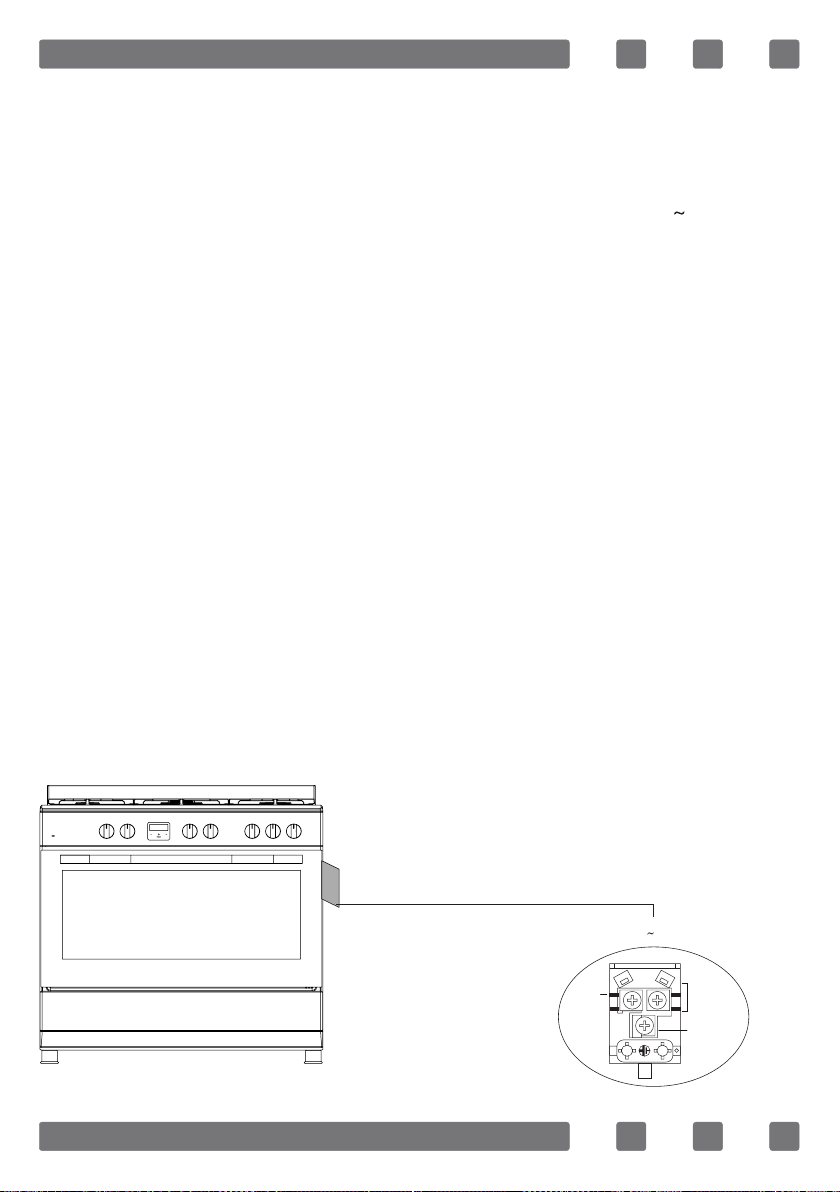
Electrical connection scheme
220-240 V 50/60 Hz
H05 VV-F 3G 2.5 mm²
Neutral
Earth
L1

20
GAS CONNECTION
WARNING: This appliance requires an operating pressure of
2.8-3.0 kPa. A suitable LPG regulator that complies with the
requirements of SANS 1237 must be used.
WARNING: Flexible hose: Not supplied. Any hose that is used
to connect the stove to the gas system shall comply with SANS
1156-2 or BS 3212.
WARNING: Regulator: Not supplied. A 2.8-3.0 kPa LPG gas
regulator which complies with SANS 1237 must be used.
WARNING: Before starting any work related with gas installation,
turn off gas supply. Risk of explosion.
WARNING: Please operate your oven in dry atmosphere.
1. Fit the clamp to the hose. Push one of the hose until it goes
to the end of the pipe.
2. For the sealing control; ensure that the buttons in the control
panel are closed, but the gas cylinder is open. Apply some soap
bubbles to the connection. If there is gas leakage, there will be
foaming in the soaped area.
3. The oven should be using a well ventilation place and should
be install on at ground.
4. Re-inspect the gas connection.
5. When placing your oven to its location, ensure that it is at the
counter level. Bring it to the counter level by adjusting the feet
if necessary.
6. Do not make gas hose and electrical cable of your oven go
through theheated areas, especially through the rear side of the
oven. Do not move gas connected oven. Since the forcing shall
loosen the hose, gas leakage may occur.
7. Please use exible hose for gas connection.
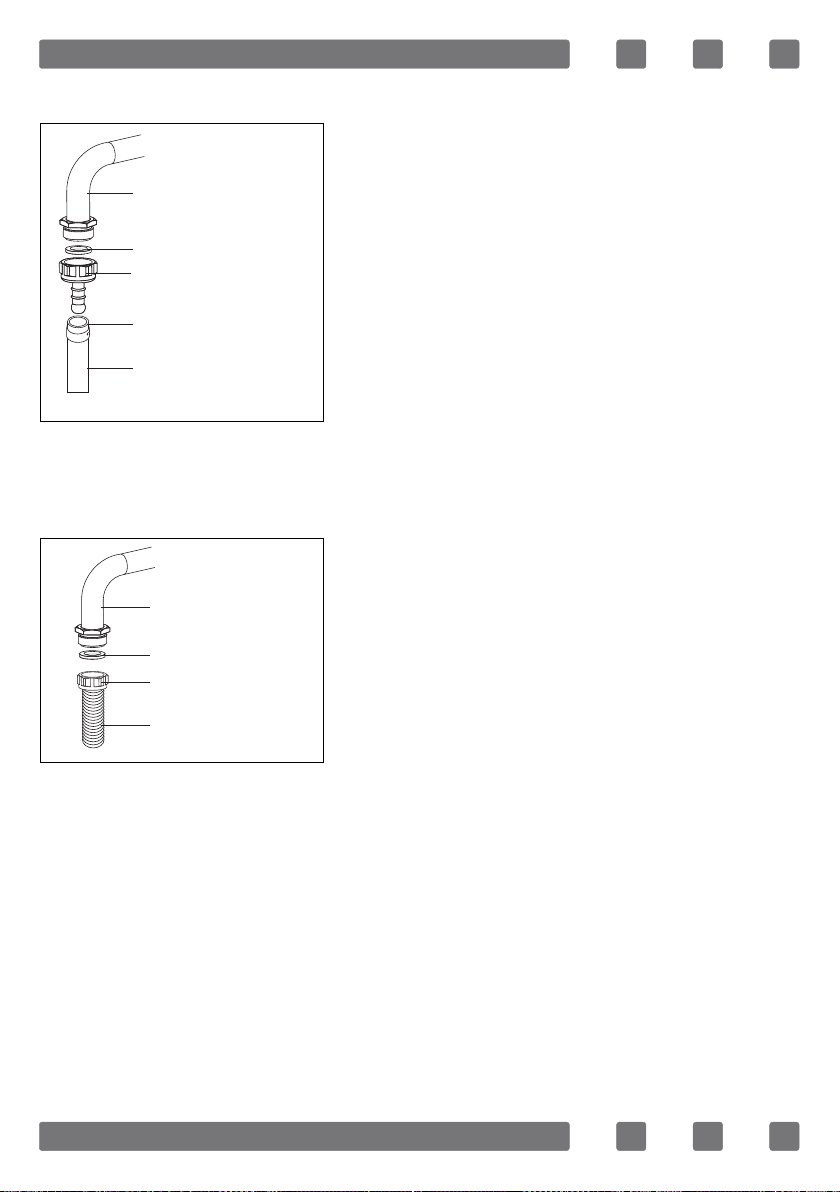
21
For LPG connection;
For LPG (cylinder) connection, afx
metal clamp on the hose coming from
LPG cylinder. Afx an edge of the hose
on hose inlet connector behind the
appliance by pushing to end through
heating the hose in boiled water.
Afterward, bring the clamp towards
end section of the hose and tighten it
with screwdriver. The gasket and hose
inlet connector required for connection
is as the picture shown below.
NOTE: The regulator to be afxed on LPG cylinder should have
300 mmSS feature.
For natural gas connection;
Main gas pipe
Gasket
Hose inlet connector
Metal clamp
LPG connection hose
Main gas pipe
Gasket
Nut
Natural gas
connection hose
WARNING: Natural gas connection
should be done by authorized service.
For natural gas connection, place
gasket in the nut at the edge of natural
gas connection hose. To install the
hose on main gas pipe, turn the nut.
Complete the connection by making
gas leakage control.
22
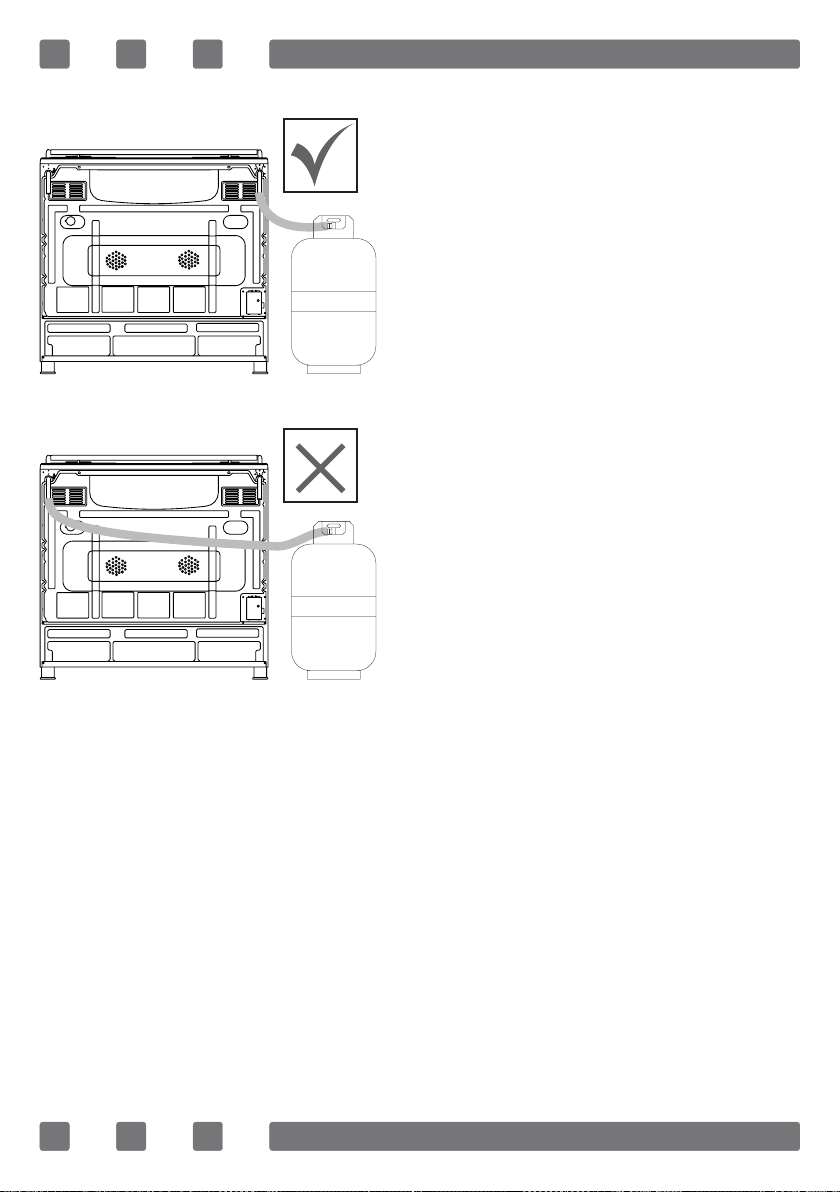
GAS HOSE PASSAGE WAY
Connect the appliance to the gas
piping tap in shortest possible
route and in a way that ensure no
gas leakage will occur.
In order to carry on a tightness
and sealing safety check ensure
that the knobs on the control
panel are closed and the gas
cylindir is open.
WARNING: While performing a
gas leakage check, never use any
kind of lighter, match, cigarette or
similar burning substance.
Apply soap bubble on the
connection points. If there is any
kind of leakage then it will cause
bubbling.
While inserting the appliance in
place ensure that it is on the same
level with the worktop. If required
adjust the legs in order to make
level with the worktop.
Use the appliance on a level surface and in a well ventilated
environment.
WARNING: Before placing the appliance, check that the local
distribution conditions (gas type and pressure) conform to the
product settings.
Figure 1
Figure 2
23
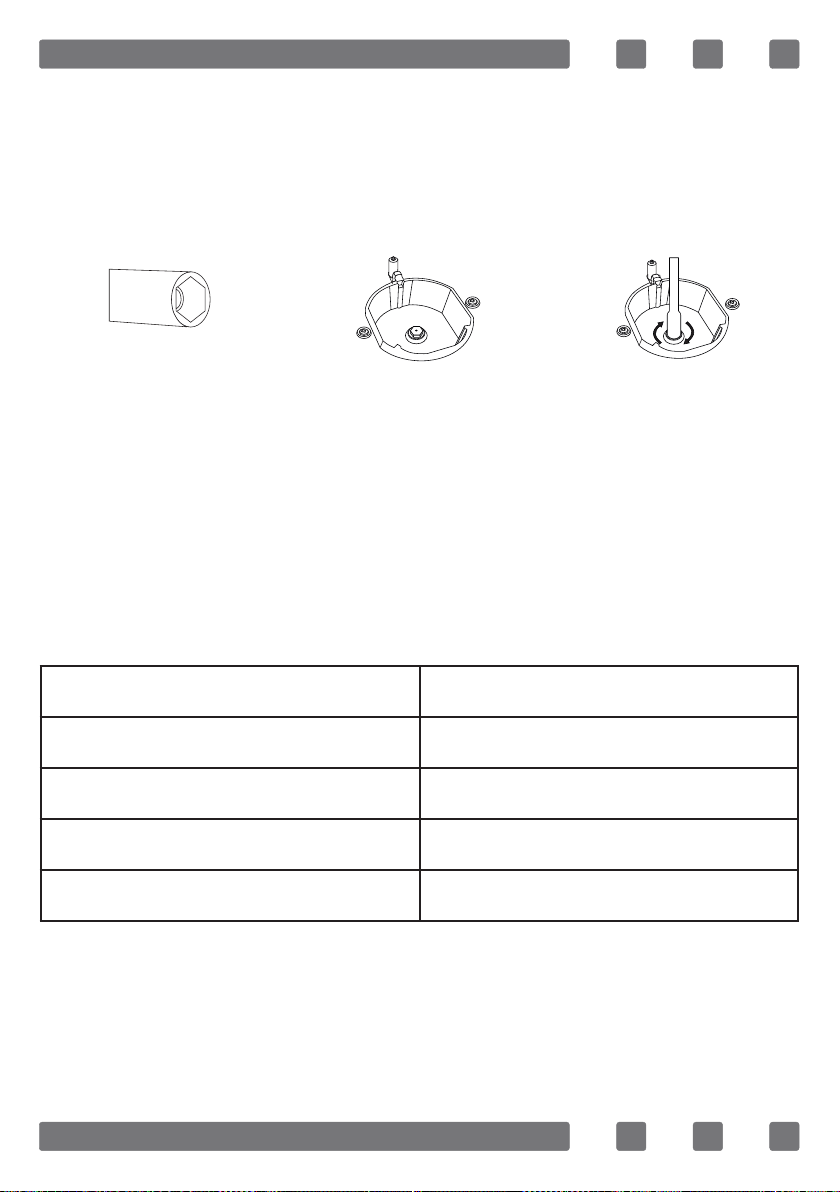
NOZZLE CHANGE OPERATION
1. Please use driver with special head for removed and install
nozzle as. (gure 3)
2. Please remove nozzle (gure 4) from burner with special
nozzle driver and install new nozzle. (gure 5)
VENTILATION OF ROOM
The air needed for burning is received from room air and the
gases emitted are given directly in room. For safe operation
of your product, good room ventilation is a precondition. If no
window or room to be utilized for room ventilation is available,
additional ventilation should be installed. However, room has a
door opening outside, it is no needed to vent holes.
Room size Ventilating opening
Smaller than 5 m³ min. 100 cm²
Between 5 m³ - 10 m³ min. 50 cm²
Bigger than 10 m³ no need
In basement or cellar min. 65 cm²
Figure 3
Figure 4
Figure 5
24
REDUCED GAS FLOW RATE SETTING FOR HOB TAPS
1. Ignite the burner that is to be adjustment and turn the knob
to the reduced position.
2. Remove the knob from the gas tap.
3. Use an appropriately sized screwdriver to adjust the ow
rate adjustment screw. For LPG (butane-pro pane) turn the screw
clockwise. For the naturel gas, you should turn the screw counter-
clockwise once.
“The normal length of a straight ame in the reduced position
should be 6-7 mm.“
4. If the ame is higher than the desired position, turn the screw
clockwise. If it is smaller turn anticolockwise.
5. For the last control, bring the burner both to hight-ame and
reduced positions and check whether the ame is on or off.
Depending on the type of gas tap used in your appliance the
adjustment screw position may vary.
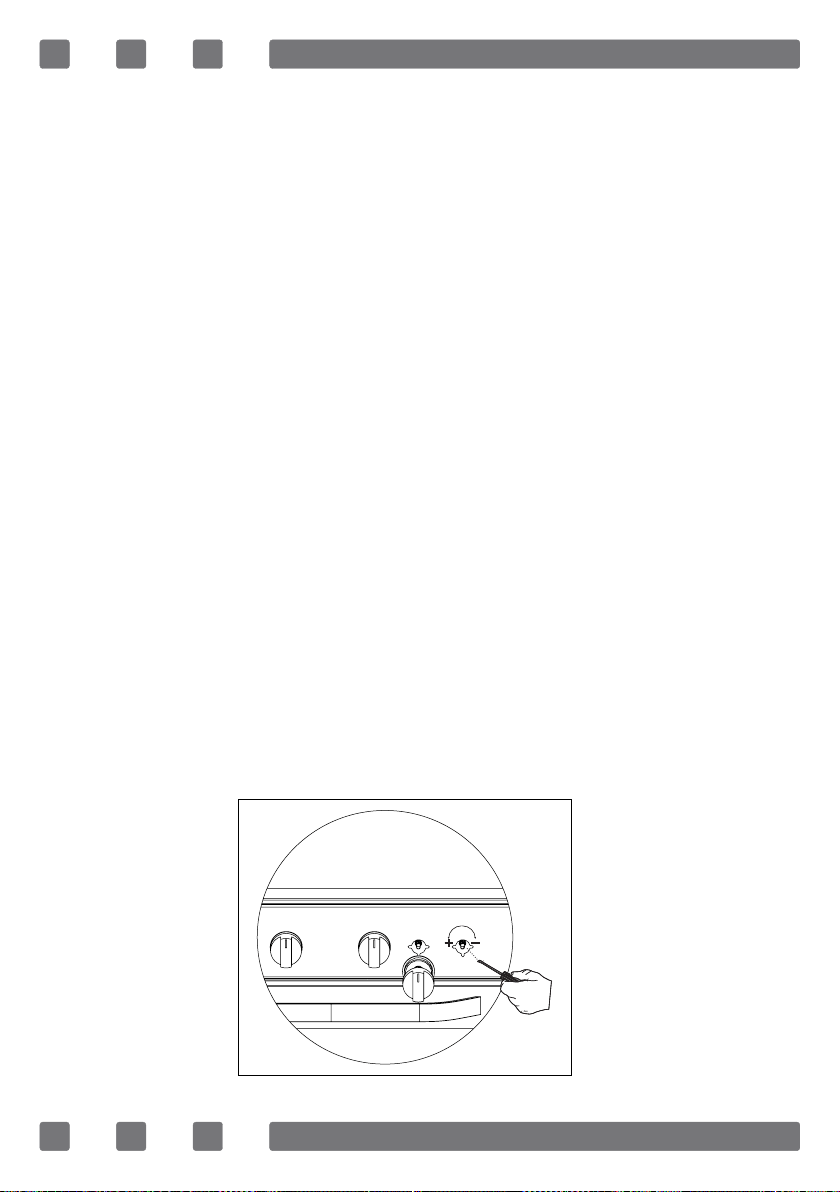
To adjust your oven acc. to the gas type, make the adjustment
for reduced ame carefully by turning with a small screwdriver
as shown below on the screw in the middle of the gas cocks as
well as nozzle changes (gure 6).
WARNING: Do not completely remove the ow rate adjustment
screw from the valve stem. The ow rate adjustment screw is an
integral part of gas valve assembly. Removing the ow rate
adjustment screw will cause gas to leak. After adjusting the ow
rate adjustment screw, inspect the assembly for gas leaks.
Figure 6
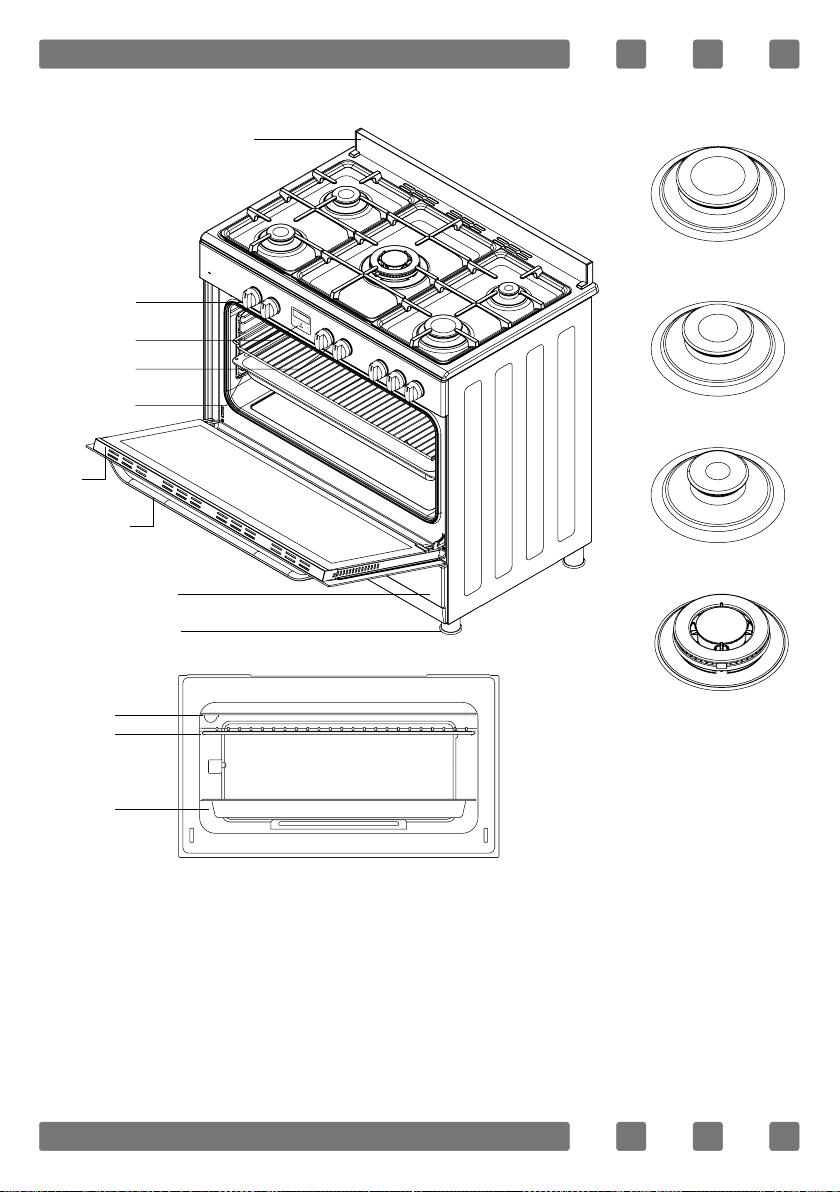
25
INTRODUCTION OF THE APPLIANCE
1. Splash back
2. Oven control knobs
3. Oven timer
4. Hob control knobs
5. Side rack
6. Door
7. Handle
8. Lower cabinet door
9. Telescopic leg
10. Lamp
11. Wire rack
12. Deep tray
13. Rapid burner
14. Semi-rapid burner
15. Auxiliary burner
16. Triple burner
10
11
12
13
14
15
16
6
7
2
3
4
5
9
8
1
26
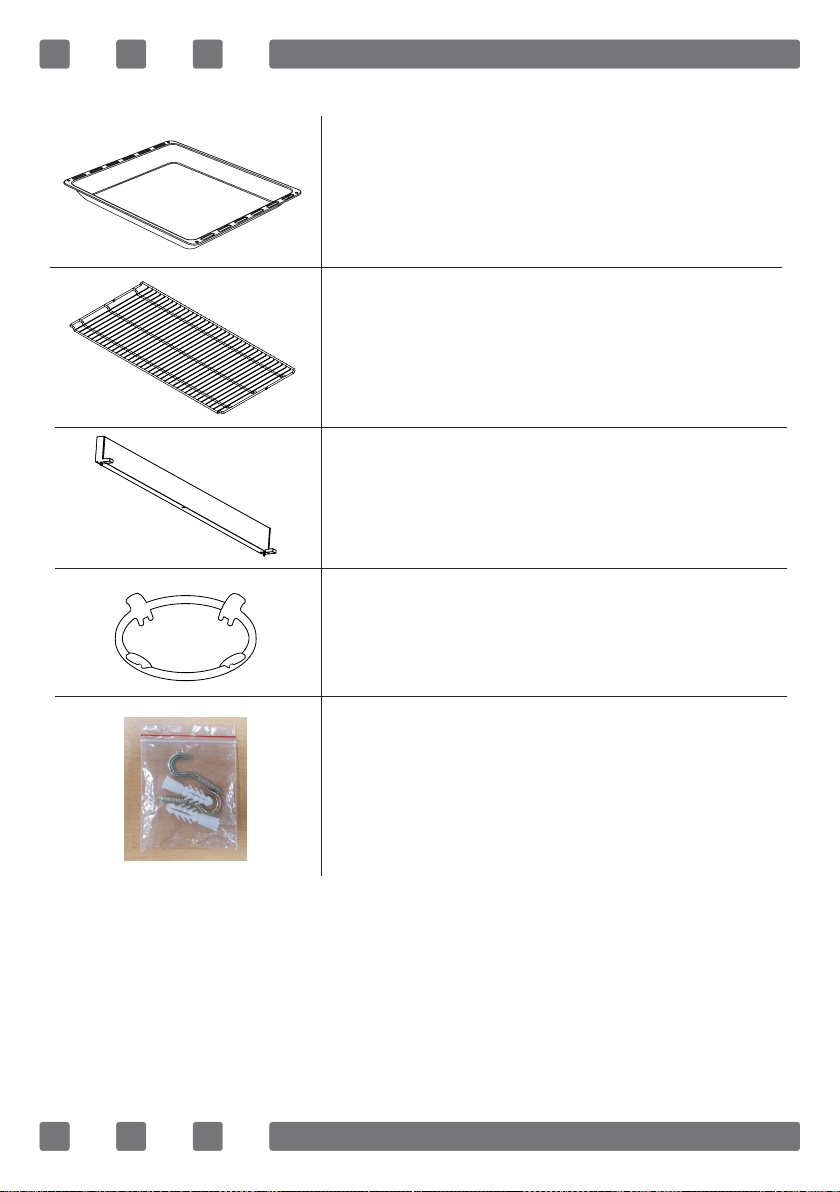
ACCESORIES
Deep tray
Used for pastries, deep fried foods and stew
recipes. In case of frying directly on the grill
for cakes, frozen foods and meat dishes, it
can be used of oil pick-up tray.
Wire rack
Used for frying and/or placing the foods to be
baked, fried and frozen foods on the desired
rack.
Splash back
The resulting temperature of the oven chimney
avoid contact with the wall.
Wok support
Wok support is mainly used for triple burner.
This wok pan support allow you to use
receptacles with a concave base.
Chain lashing
Before using the appliance, in order to ensure
safe use, be sure to x the appliance to the wall
using the chain and hooked screw supplied.
27
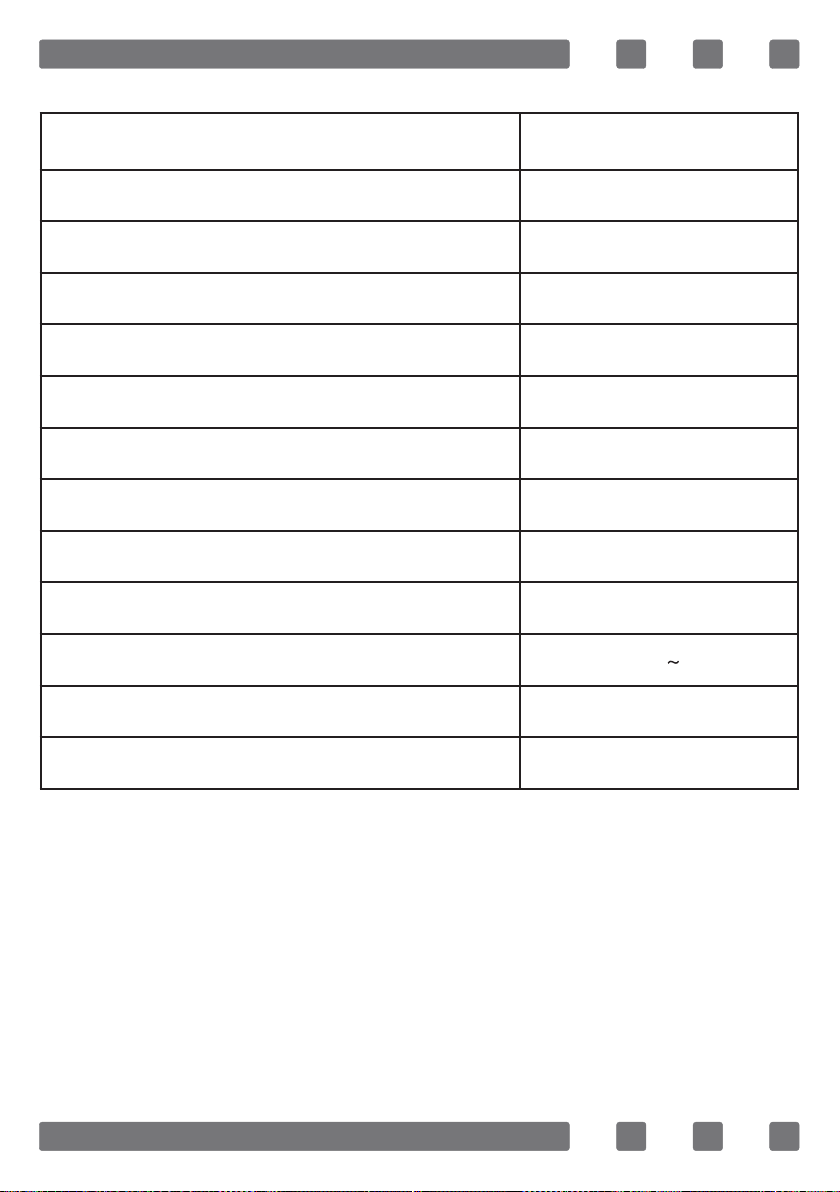
TECHNICAL FEATURES OF YOUR OVEN
Specications NY90T5010SS
Outer width 898 mm
Outer depth 575 mm
Outer height 810 mm (905 with legs)
Lamp power 15-25 W
Bottom heating element 2000 W
Top heating element 1500 W
Low grill heating element 1750 W
High grill heating element 3250 W
Turbo heating element 2200 W
Supply voltage 220-240 V 50/60 Hz
Gas type Liquid Petroleum Gas (LPG) / pressure G30/2.8-3.0 kPa
Converting the gas type Natural Gas (NG) / pressure G20/2.0 kPa
WARNING: For the modication to be done by authorized
service, this table should be considered. Manufacturer may not
be held responsible for any problems rising because of any faulty
modication.
WARNING: In order to increase the product quality, the technical
specications may be changed without prior notice.
WARNING: The values provided with the appliance or its
accompanying documents are laboratory readings in accordance
with the respective standards. These values may differ depending
on the use and ambient conditions.
28
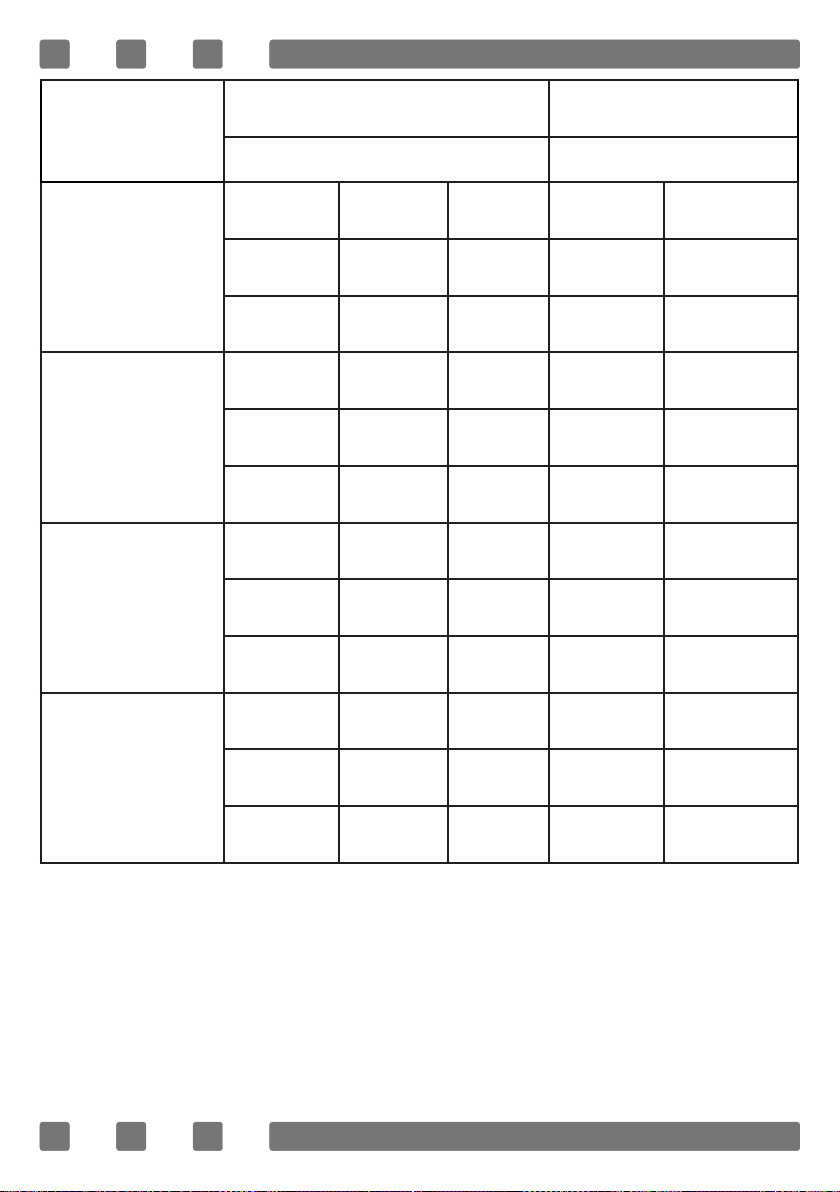
Burner
Specications
NG (G20) / 2.0 kPa LPG (G30) / 2.8-3.0 kPA
Gas Natural LPG
Triple
Burner
Injector 1,40 mm 0,96 mm
Gas ow 0,362 m³/h 254 g/h
Power 3,80 kW 3,50 kW
Rapid
Burner
Injector 1,15 mm 0,85 mm
Gas ow 0,276 m³/h 211 g/h
Power 2,90 kW 2,90 kW
Semi-Rapid
Burner
Injector 0,97 mm 0,65 mm
Gas ow 0,162 m³/h 124 g/h
Power 1,70 kW 1,70 kW
Auxiliary
Burner
Injector 0,72 mm 0,50 mm
Gas ow 0,96 m³/h 69 g/h
Power 0,95 kW 0,95 kW
WARNING: Diameter values written on the injector are specied
without a comma. For example; The diameter of 1,70 mm is
specied as 170 on the injector.

29
INSTALLATION OF YOUR OVEN
Check if the electrical installation is proper to bring the appliance
in operating condition. If electricity installation is not suitable, call
an electrician and plumber to arrange the utilities as necessary.
Manufacturer shall not be held responsible for damages caused
by operations performed by unauthorized persons.
WARNING: It is customer's responsibility to prepare the location
the product shall be placed on and also to have the electrical
installation prepared.
WARNING: The rules in local standards about electrical
installations shall be followed during product installation.
WARNING: Check for any damage and clean the tape glues on the
appliance before installing it. Do not have the product installed
if it is damaged. Damaged products cause a risk for your safety.
Right Place for Installation and Important Warnings
Appliance feet should not stay on soft surfaces such as carpets.
The kitchen oor shall be durable to carry the unit weight and
any other kitchenware that may be used on the oven.
The appliance is suitable for use on both side walls, without
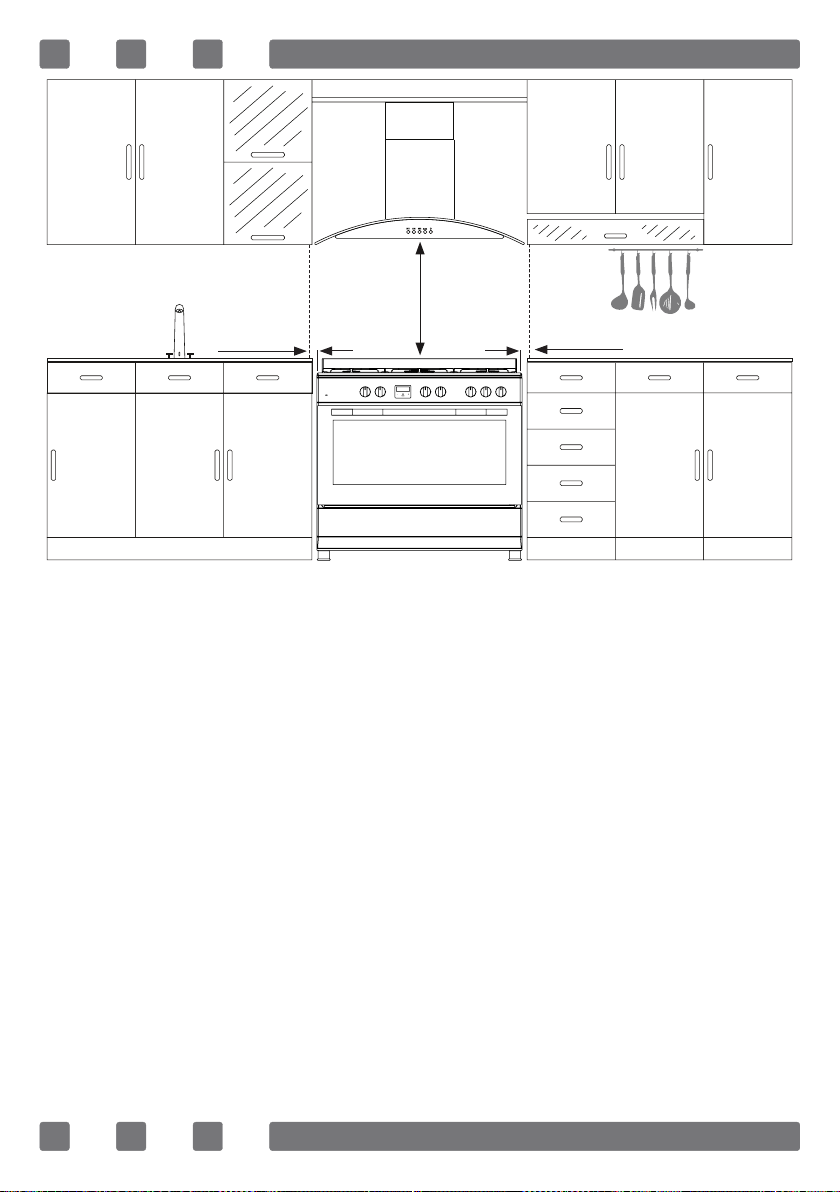
any support, or without being installed in a cabinet. If a hood or
aspirator will be installed above the cooker, follow the instructions
of the manufacturer for height of mounting. (min. 650 mm)
If installing the oven in a built-in cabinet, the cabinet must have
its plastic surfaces and adhesive parts resistant to temperatures
in accordance to EN 60335. Samsung is not responsible for dam-
age to furniture from the oven’s heat emission.
The oven must be properly ventilated. For ventilation, leave a
gap of about 50 mm between the lower shelf of the cabinet and
the supporting wall. If you install the oven under a cooktop, fol-
low the cooktop’s installation instructions.
30
WARNING: The kitchen furniture near the appliance must be
heat resistant.
WARNING: Do not use the door and/or handle to carry or move
the appliance.
WARNING: Do not install the appliance beside refrigerators or
coolers. Heat radiated by the appliance increases the energy
consumption of cooling devices.
650mm min.
6.5 mm min.
6.5 mm min.
31
INSTALLATION OF THE OVEN FEET
In order to install the oven feet;
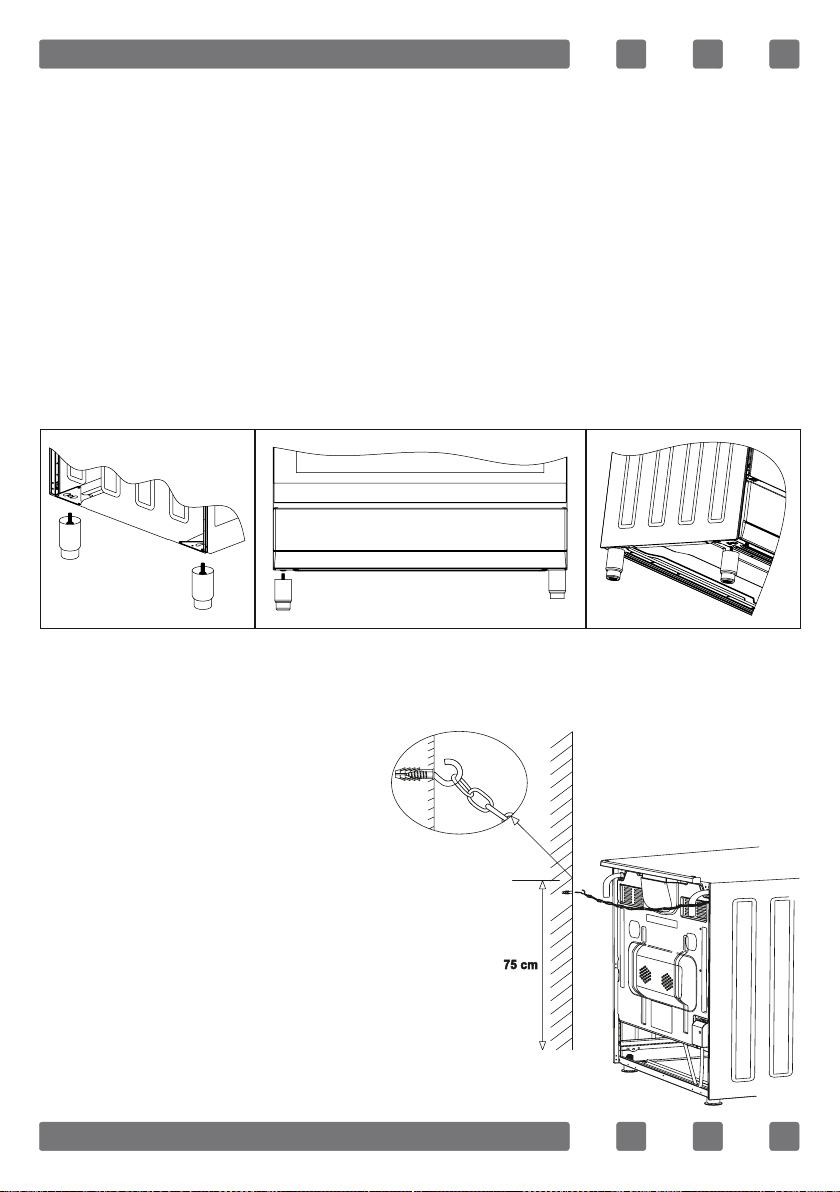
1. Foot attachment lath is installed on the oven from the bottom
of the oven as shown in (gure 7).Nuts are centered on these
lathes in order to screw feet. Complete the feet installation
process by screwing the feet to the nuts (gure 8).
2. You can balance your oven by turning the screwed feet
according to the surface type you are using.
3. If your oven has telescopic feet as in (gure 9) you can
adjust your ovens height from these feet as turned clockwise or
anticlockwise.
CHAIN LASHING ILLUSTRATION
Before using the appliance, in order
to ensure safe use, be sure to fix the
appliance to the wall using thechain
and hooked screw supplied. Ensure
that the hook is screwed into the wall
securely.
Figure 7
Figure 9Figure 8
32
CONTROL PANEL
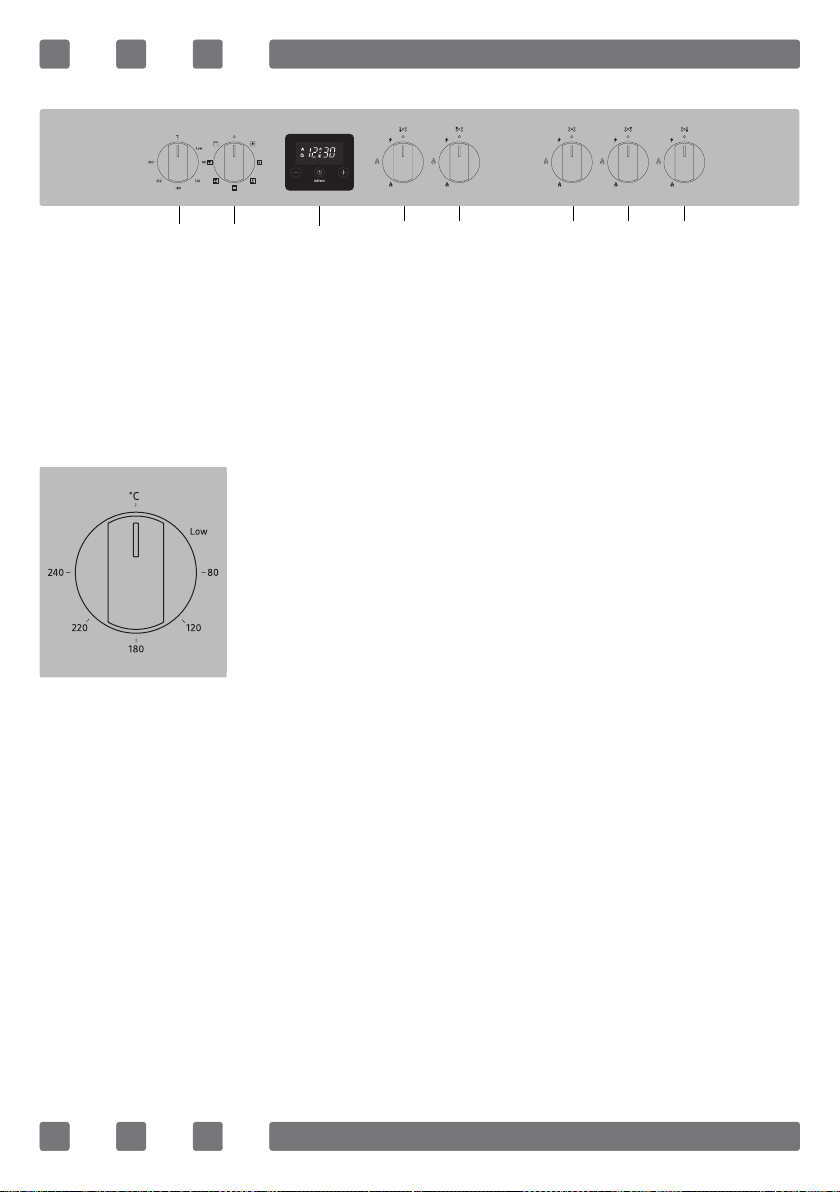
WARNING: The control panel above is only for illustration
purposes. Consider the control panel on your device.
VALUE DIAL
1. Value dial
2. Oven mode selector
3. Digital timer
4. Knob for front left burner
5. Knob for rear left burner
6. Knob for center burner (triple burner)
7. Knob for rear right burner
8. Knob for front right burner
1 2
3
4 5 6 7 8
Helps to set cooking temperature of the food to
be cooked in the oven. You can set the desired
temperature by turning the button after
placing the food into the oven. Check cooking
table related to cooking temperatures of
different foods. Oven heats up to the adjusted
temperature and maintains it. During heating,
temperature lamp stays on.
33
USING OVEN HEATING ELEMENTS
1. When your oven is operated rst time, an odor will be spread
out which will be sourced from using the heating elements. In
order to get rid of this, operate it at 240 °C for 45-60 minutes
while it is empty.
2. Oven control knob should be positioned to desired value;
otherwise oven does not operate.
Using The Wire Rack
1. When you place the wire rack on the top of side rack, the
food on the wire rack shall not touch the upper heating elements.
2. You can preheat for 5 minutes while grilling. If necessary,
you may turn the food upside down.
3. Food shall be in the center of the wire rack to provide
maximum air ow through the oven.
To turn on the grill;
1. Place the oven mode selector over the grill symbol.
2. Then, set it to the desired grill temperature.
To turn the grill off;
Set the oven mode selector to the off position.
WARNING: Keep the oven door closed while grilling.
USING GAS BURNERS
Flame cut-off safety device (FFD) *; operates
instantly when safety mechanism activates
due to overown liquid over upper hobs.
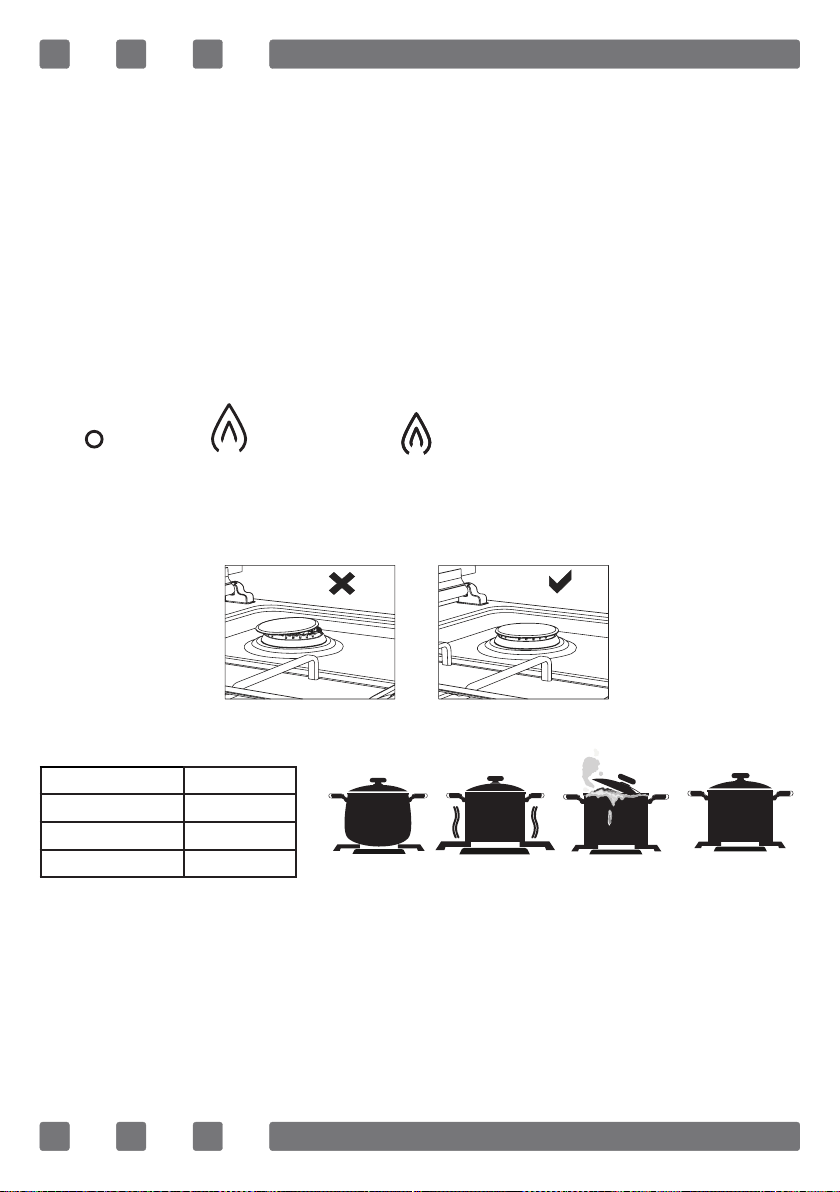
1. The valves controlling the gas cookers have special security
mechanism. In order to light the cooker always press on the switch
forward and bring it to ame symbol by turnin counterclockwise.
All of the lighters shall operate and the cooker you controlled
shall light only. Keep the switch pressed until ignition performed.
Press on the lighter button and turn the knob counter clockwise.
FFD
34
2. Do not continuously operate the igniter for more than 15
seconds. If the burner does not ignite, wait minimum one minute
before try again.
3. In models with gas security system, when ame of the cooker
is extinguished, control valve cuts off the gas automatically. For
operate the burners with gas security system you must press the
knob and turn counter-clock-wise. After the ignition you must
wait nearly 5-10 second for gas security systems activation. If
the burner is extinguished for of the any reason, close the gas
control valve and wait a minimum of one minute before trying
again.
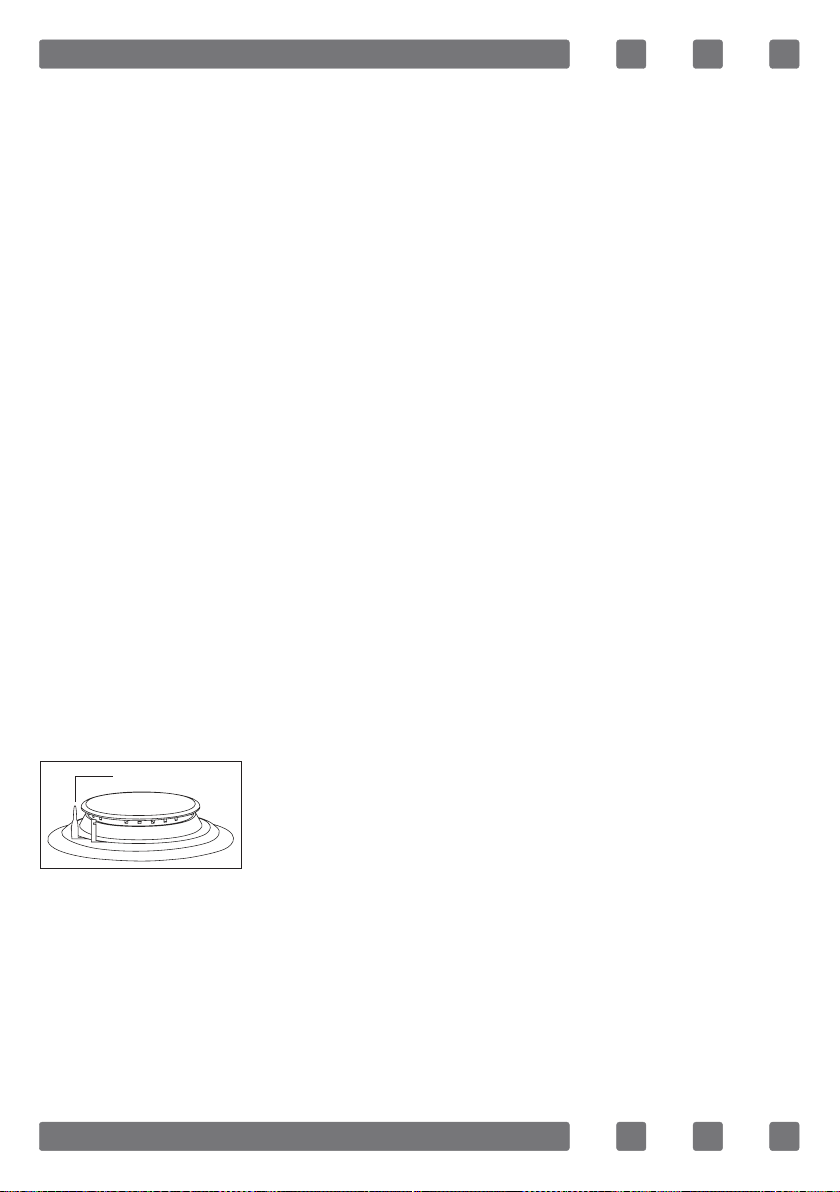
4. Closed Fully open Half open
5. Before operating your hob please make sure that the burner
caps are well positioned. The right placement of the burner caps
are shown as below.
POT SIZES
Auxiliary burner
12-18 cm
Semi-rapid burner
18-22 cm
Rapid burner
22-26 cm
Triple burner
26-32 cm
Figure 10
Figure 11
Incorrect Incorrect Incorrect Correct
35
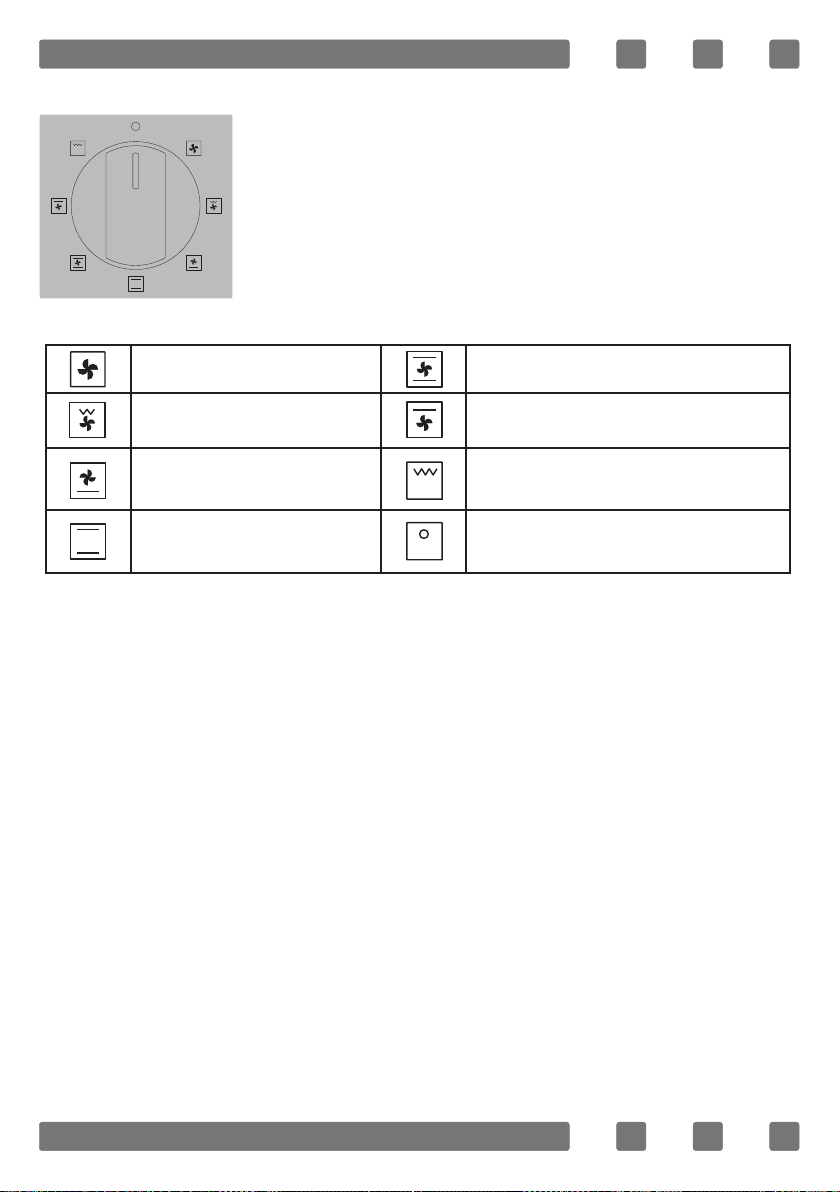
OVEN MODE SELECTOR
COOKING MODES
Fan: For faning e.g.meat, poultry, bread and cakes. The fan
causes the air to circulate around the dish.
Grill and fan: Suitable for cooking meat type foods. Do not forget
to place a cooking tray in a low position of side rack inside the
oven and a little water in it while grilling.
Lower heating element and fan: Use mostly for cooking foods
like fruit cake.
Lower and upper heating elements: A program that can be used
for cooking foods like cake, pizza, biscuit and cookie.
Lower and upper heating element and fan: The program suitable
for cooking foods like cakes, dried cakes, lasagne. Suitable for
cooking meat dishes, as well.
Upper heating element and fan: Used for post heating or
roasting very little pieces of foods.
Grill: Grill cooking mode is used for grilling meat like foods such
as steak, sausage and sh. While grilling, tray should be placed in
the low position of side rack and water must be placed in it.
Off: Used to turn off the oven.
Helps to set with which heaters the food placed
in oven will be cooked. Cooking modes in this
button and their functions are stated below.
Fan Lower-upper heating element and fan
Low grill and fan Upper heating element and fan
Lower heating element and
fan
High grill
Lower-upper heating element Off

36
COOKING RECOMMENDATIONS
WARNING: Oven must be preheated for 7-10 minutes before
placing the food in it.
WARNING: Kinds of meals, cooking times and thermostat
positions are given in cooking table. The values given in the
cooking table are characteristic values and were obtained as
a result of the tests performed in our laboratory. You can nd
different avors suitable for your taste depending on your
cooking and using habits.
WARNING: Cooking times: The results may change according to
the area voltage and material having different quality, amount
and temperatures.
WARNING: During the time when cooking is being performed
in the oven, the lid of the oven should not be opened frequently.
Otherwise circulation of the heat may be imbalanced and the
results may change.
37
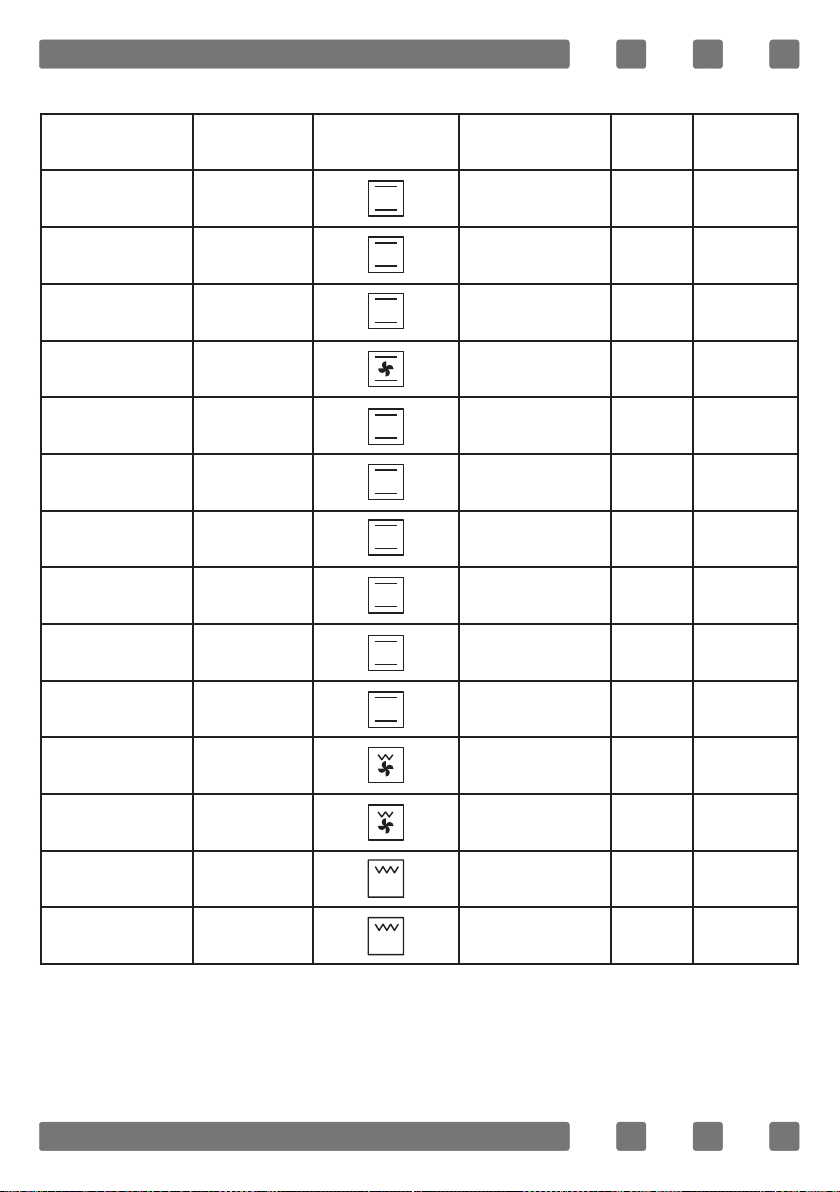
Cooking Time Table
Food
Cooking
function
Cooking
function symbol
Cooking
temperature (°C)
Cooking
rack
Cooking
time (min.)
Cake Static 180 2 70
Small cake Static 180 2 40
Pie Static 200 2 70
Pastry Static+Fan 180-200 2 20-25
Cookie Static 175 2 20
Apple pie Static 180-190 1 150
Sponge cake Static 175 2 45-50
Pizza Static 190 2 25
Lasagne Static 180-200 2 50-60
Meringue Static 100 2 60
Grilled chicken * Low grill+Fan 220 4 25-35
Grilled sh * Low grill+Fan 220 4 35-40
Calf steak * Grill Max. 4 30
Grilled meatball * Grill Max. 4 40
* Food must be turned after half of the cooking time.
38
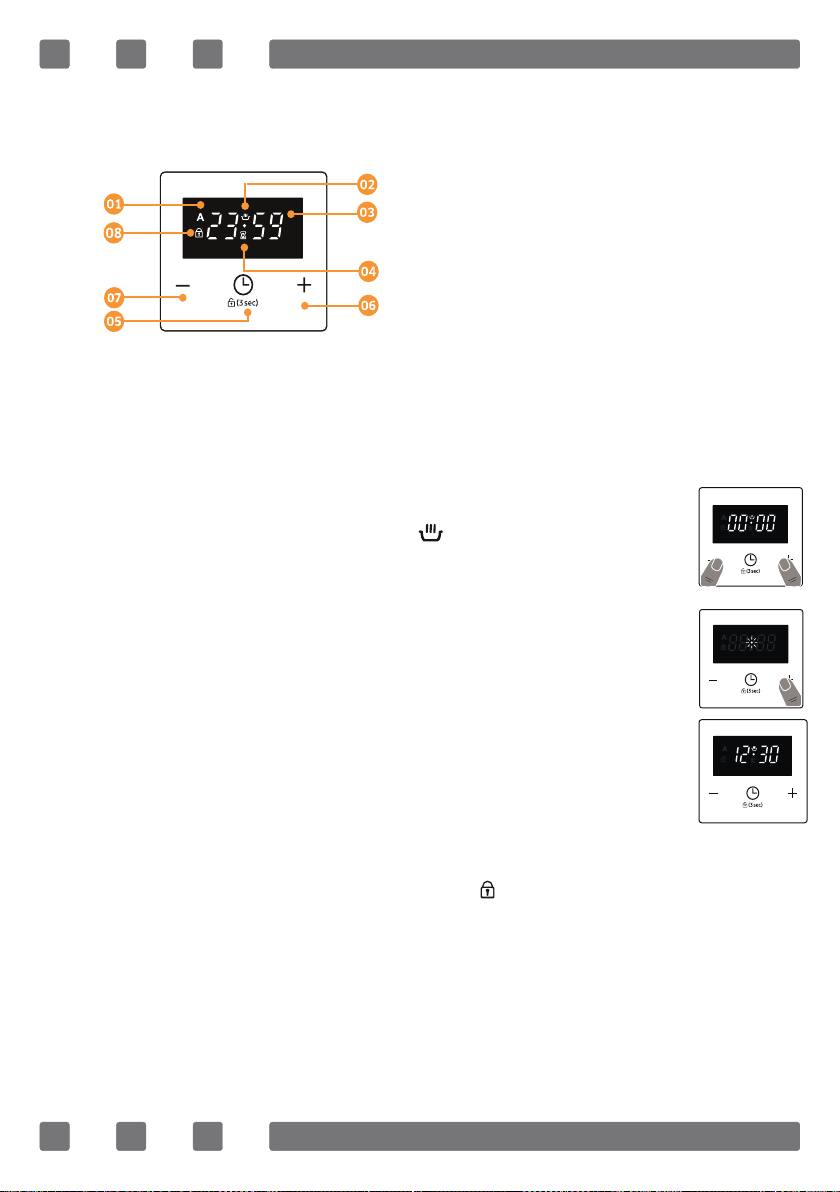
USE OF THE DIGITAL TOUCH TIMER
1.
Auto Cooking Symbol
2.
Manual Cooking Symbol
3.
Timer Display
4.
Minute Minder Symbol
5.
Timer Mode/ Key Lock (3sec)
6.
Increase timer
7.
Decrease timer
8.
Key Lock symbol
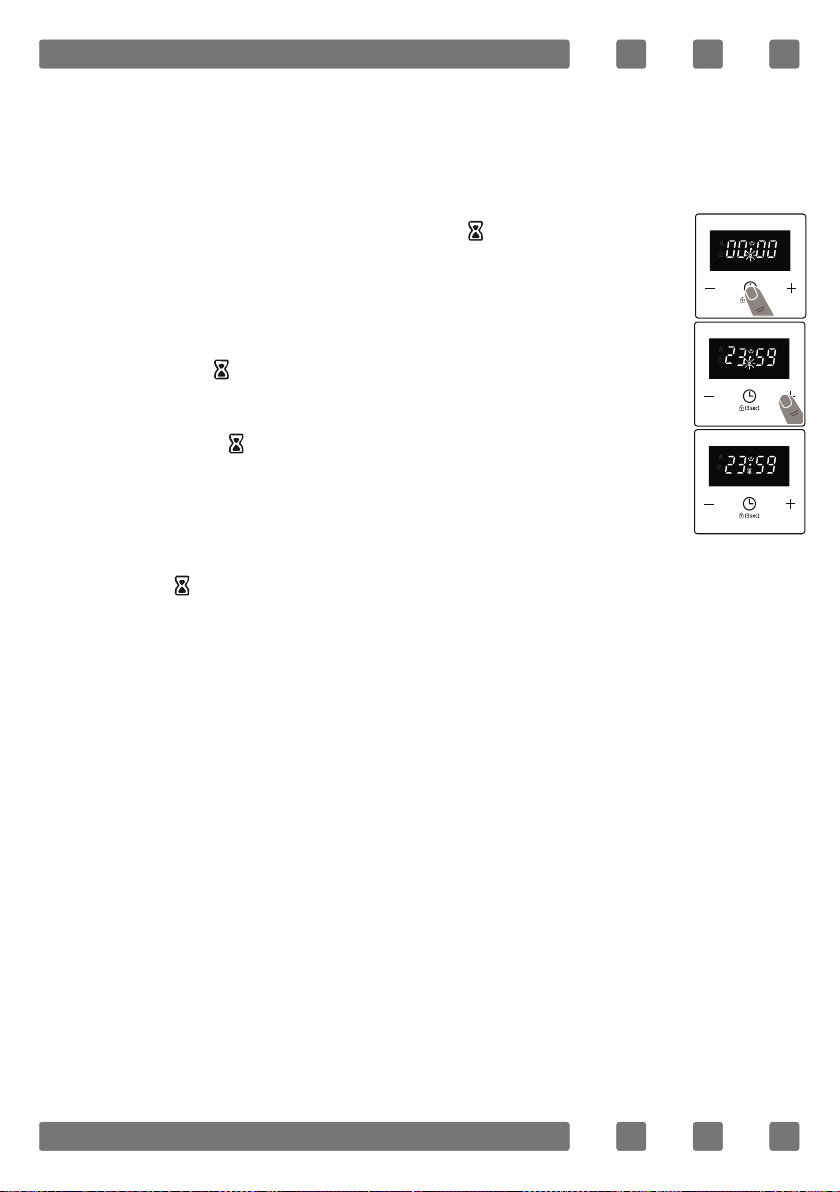
The time must be set before you start using the oven. Following
the power connection, the symbol “A” and “00:00” or “12:00” will
flash on the display.
Press the “+” and “-” simultaneously or only “TIMER
MODE” keys simultaneously. Symbol will appear,
and the dot in the middle of the screen will start to
flash.
Adjust the time while the dot is flashing using the
“+” and “-” keys.
Time adjustment
1.
2.
After a few seconds, the dot will stop flashing and
will remain illuminated.
3.
WARNING: The key lock automatically activates after the timer
has not been used for 30 seconds. “ ” symbol will appear and
remain illuminated. To unlock the timer buttons, press and
hold the “TIMER MODE” button for 3seconds. The desired
operation can then be carried out.
39
The audible warning time can be set to any time between “00:00”
and “23:59” hours. The audible warning time is for warning
purposes only. The oven will not be activated with this function.
Audible warning time adjustment
Press “TIMER MODE”. The symbol will begin to flash
and “000” will be displayed.
1.
Select the desired time period using the “+” and “-”
keys while is flashing.
The symbol will remain illuminated, the time will
be saved and the warning will be set.
When the timer reaches zero, an audible warning will sound and
the symbol will flash on the display. Press any key to stop the
audible warning.
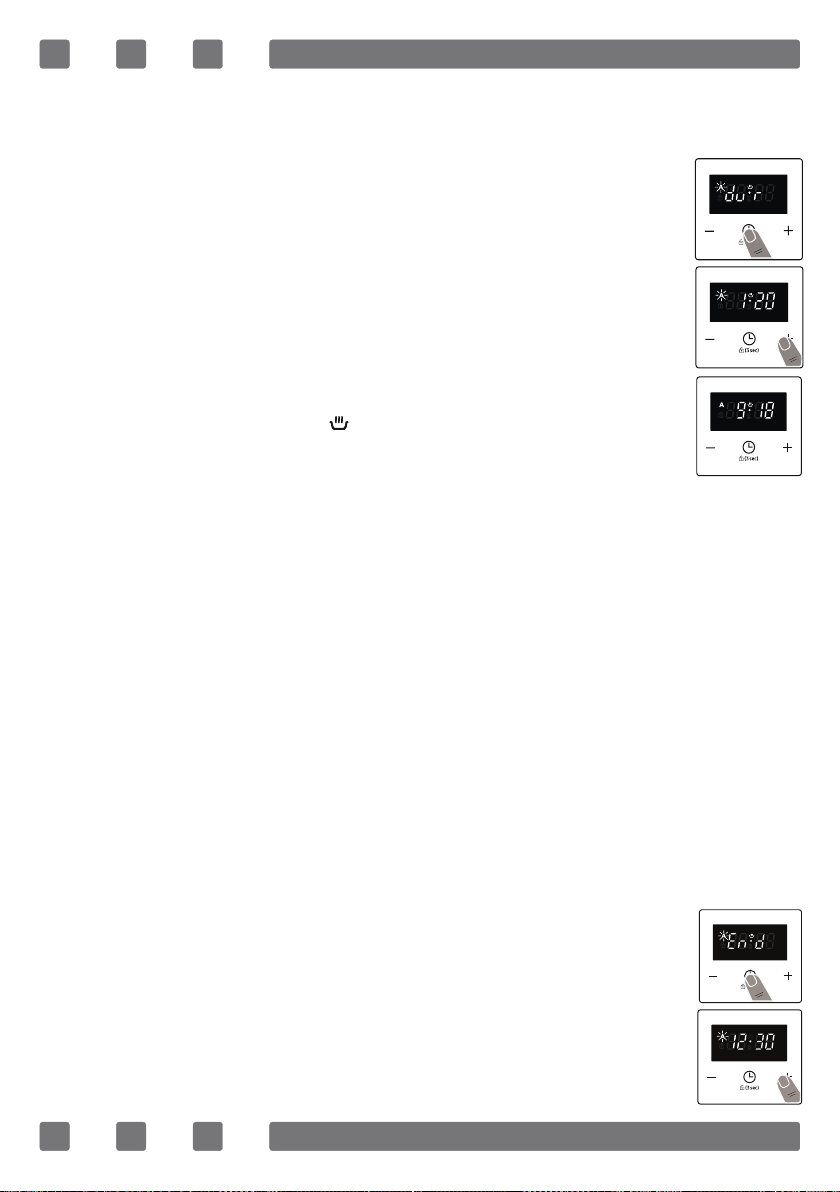
Semi-automatic time adjustment (cooking period)
This function helps you to cook for a fixed period of time. A time
range between 0 and 10 hours can be set. Prepare the food for
cooking and put it in the oven.
2.
3.
40
Press “TIMER MODE” until you see “dur” symbol on
the display screen. The symbol “A” will flash.
Select the desired cooking time period using the “+”
and “-” keys.
The current time will reappear on the screen, and
the symbols “A”, and will remain illuminated.
When the timer reaches zero, the oven will switch off and an
audible warning will sound. The symbols “A” will flash. Turn both
control knobs to the “0” position and press any key on the timer
to stop the warning sound. The symbols will disappear and the
timer will switch back to manual function.
2.
3.
4.
Semi-automatic time adjustment (finishing time)
This function automatically starts the oven so that cooking will
finish at a set time. You can set an end time of up to 10 hours
after the current time of day. Prepare the food for cooking and
put it in the oven.
Select the desired cooking function and the temperature
using the control knobs.
Press “TIMER MODE” until you see “end” symbol
on the display screen. “A” and the current time of
day will flash.
Use the “+” and “-” buttons to set the desired
finishing time.
1.
2.
3.
Select the desired cooking function and the temperature using
the control knobs.
1.
41
When the timer reaches zero, the oven will switch off and an
audible warning will sound. The symbol “A” will flash. Turn both
control knobs to the “0” position and press any key on the timer
to stop the sound. The symbol will disappear and the timer will
switch back to manual function.
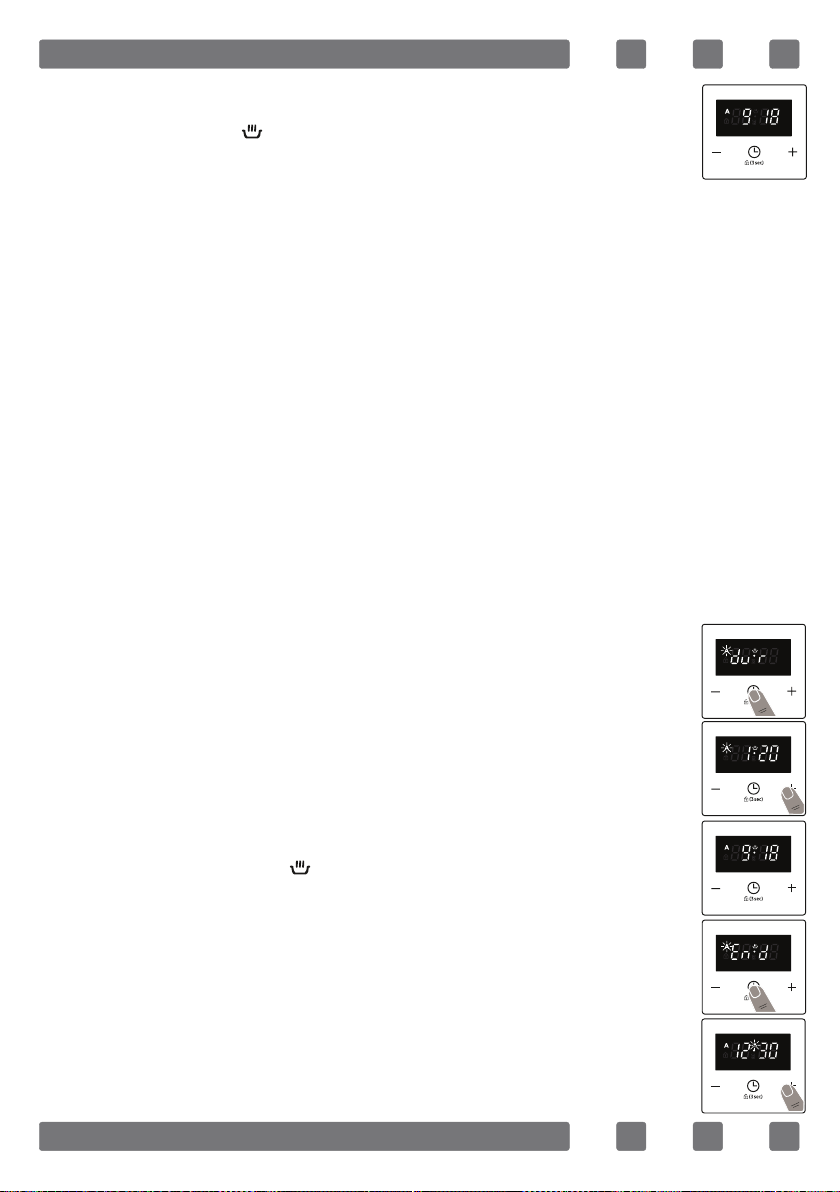
Select the desired cooking function and the temperature
using the control knobs.
Press “TIMER MODE” until you see “dur” symbol on
the screen. The symbol “A” will flash.
Select the desired cooking time period using the
“+” and “-” keys.
The current time will reappear on the screen, the
symbols “A”, and will remain illuminated.
Press “TIMER MODE” until you see “end” symbol on
the screen. The time and the symbols “A” will flash.
Select the desired finishing time using the “+” and
“-” keys.
1.
2.
3.
4.
5.
6.
The current time will reappear on the screen, the
symbols “A”, will remain illuminated.
4.
Full-automatic programming
This function is used to start cooking after a certain period of
time and for a certain duration. A time of up to 23 hours and 59
minutes after the current time of day can be set. Prepare the
food for cooking and put it in the oven.

42
The current time will reappear on the screen, and
the symbols “A”, and will remain illuminated.
The operating time will be calculated and the oven will
automatically start so that cooking will finish at the set
finishing time. When the timer reaches zero, the oven will
switch off, an audible warning will sound and the symbols “A”
will flash. Turn both control knobs to the “0” position and press
any key to stop the sound. The symbol will disappear and the
timer will switch back to manual function.
Brightness Adjustment
To adjust the brightness, while the current time of day is
displayed, press and hold the “+” button for 1-2 seconds until
“br” is appeared on the display. After this, press “+” button for
different brightness steps. There are three different steps of
brightness. Select the desired brightness and do not press any
other buttons. After a short time, the selected brightness will be
saved.
Sound Adjustment
To adjust the volume of the audible warning sound, while the
current time of day is displayed, press and hold the “-” button
for 1-2 seconds until an audible signal sounds. After this, each
time the “-” button is pressed, a different signal will sound.
There are three different types of signal sounds. Select the
desired sound and do not press any other buttons. After a short
time, the selected sound will be saved.
Add the cooking period to the current time of
day. You can set a time of up to 23 hours and 59
minutes after this.
7.
8.
43
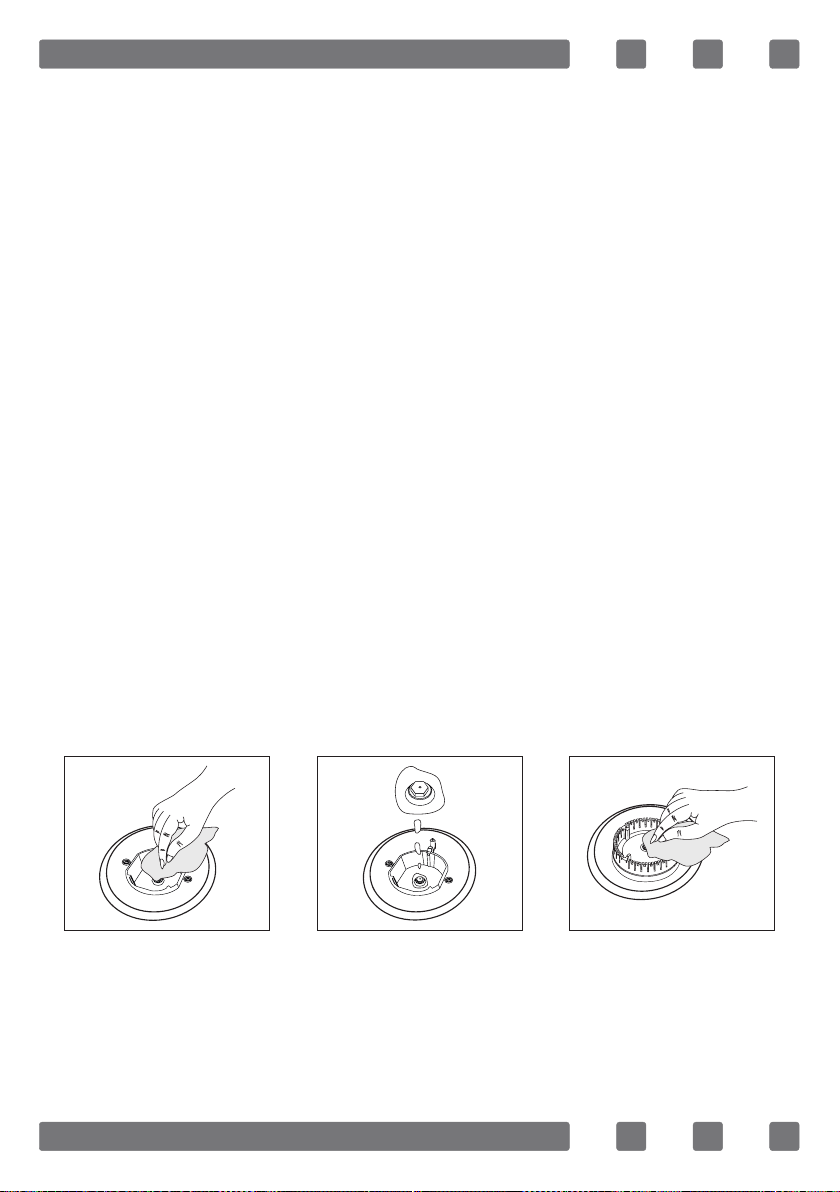
MAINTENANCE AND CLEANING
1. Disconnect the plug supplying electricity for the oven from
the socket.
2. While oven is operating or shortly after it starts operating, it
is extremely hot. You must avoid touching from heating elements.
3. Never clean the interior part, panel, lid, trays and all other
parts of the oven by the tools like hard brush, cleaning mesh or
knife. Do not use abrasive, scratching agents and detergents.
4. After cleaning the interior parts of the oven with a soapy
cloth, rinse it and then dry thoroughly with a soft cloth.
5. Clean the glass surfaces with special glass cleaning agents.
6. Do not clean your oven with steam cleaners.
7. Before opening the upper lid of the oven, clean spilled liquid
off the lid. Also, before closing the lid, ensure that the cooker
table is cooled enough.
8. Never use inammable agents like acid, thinner and gasoline
when cleaning your oven.
9. Do not wash any part of your oven in dishwasher.
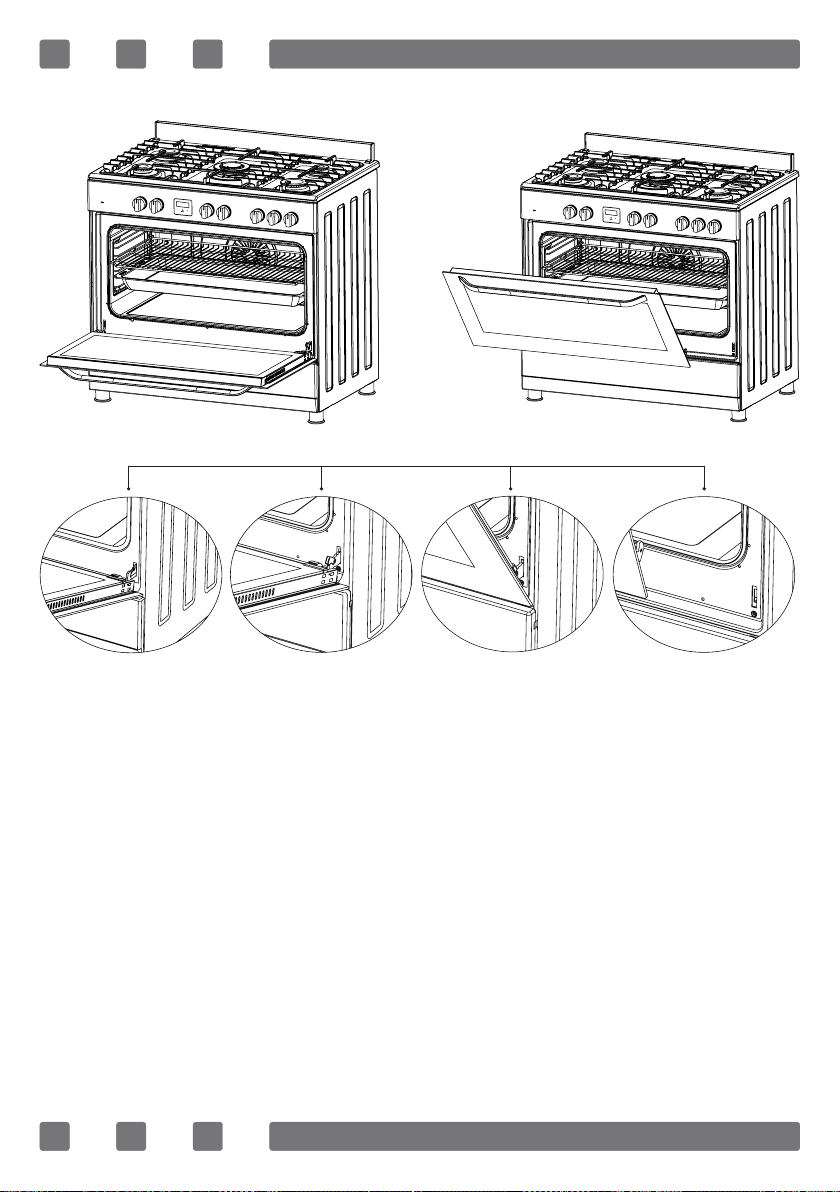
10. In order to clean the front glass lid of the oven; remove the
xing screws xing the handle by means of a screwdriver and
remove the oven door. Than clean and rinse it thoroughly. After
drying, place the oven glass properly and re-install the handle.
Figure 12 Figure 13
Figure 14
44
INSTALLATION OF THE OVEN DOOR
In order to re-place the oven door, perform the abovementioned
steps in reverse.
Figure 15
Figure 16
Completely open
the oven door
by pulling it to
yourself. After-
wards, perform
the unlocking
process by
pulling the hinge
lock upwards
with the help of
a screw driver
as shown in
gure 15.1.
Bring the hinge
lock to the
widest angle
as shown in
gure 15.2.
Bring both
hinges
connecting the
oven door to the
oven to the same
position.
Afterwards, close
the oven door as
to lean on
the hinge lock
as shown in
gure 16.1.
To remove the
oven door, pull
it upwards by
holding it with
both hands when
close to the
closed position
as shown in
gure 16.2.
Figure 15.1 Figure 15.2 Figure 16.1 Figure 16.2
45
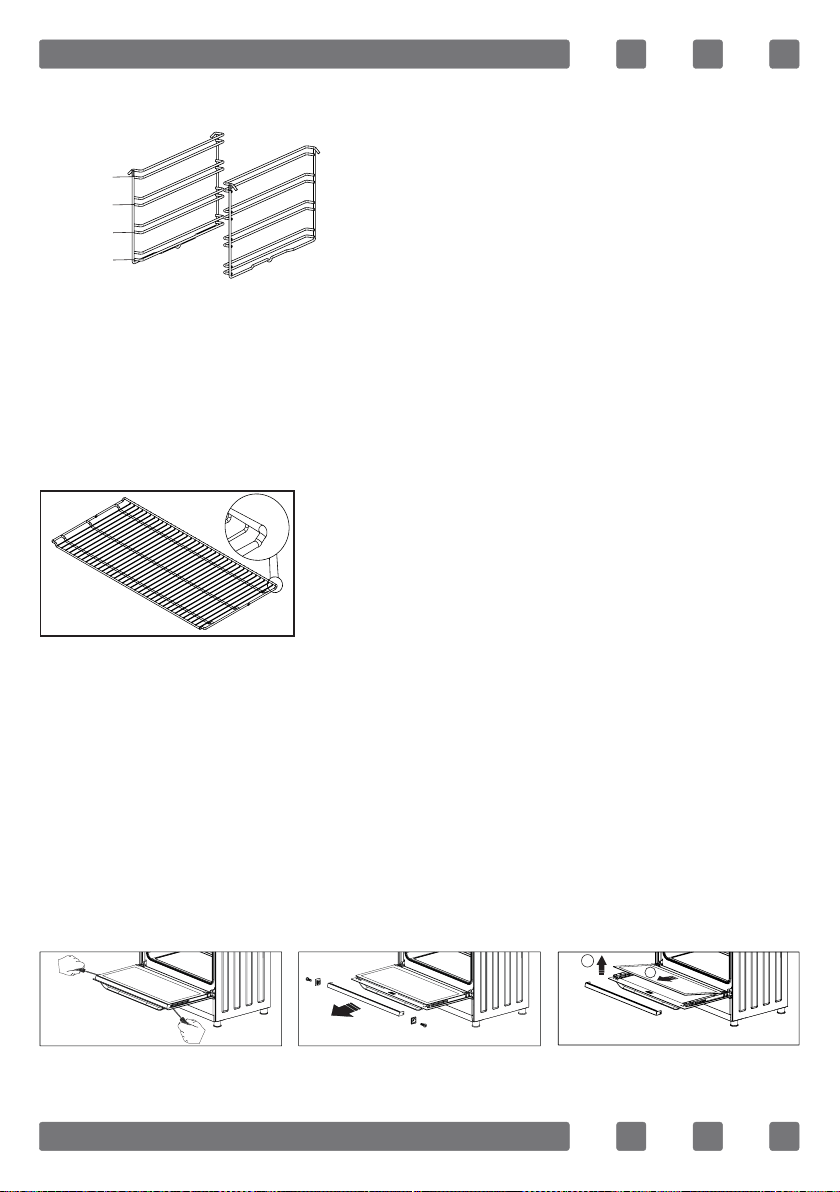
RACK POSITIONS
It is important to place the wire rack
into the oven properly. Do not allow
wire rack to touch rear wall of the
oven. Rack positions are shown in the
next gure. You may place a deep tray
or a standard tray in the lower and
upper side racks.
Installing and removing side racks
To remove side racks, press the clips, rst remove the lower,
and than the upper side from installation location. To install side
racks; reverse the procedure for removing side rack.
USING WIRE RACK
Please put the bent up frame side to the
back, in order to support the restposition
when cooking big loads.
CLEANING AND MAINTENANCE OF THE OVEN’S FRONT DOOR
GLASS
Remove the prole by unscrewing the screws on both left and
right sides as shown on gure 17 and pulling the prole towards
yourself as shown on gure 18. Then remove the inner-glass as
shown in gure 19. If required, middle glass can be removed in
the same way. After cleaning and maintenance are done, remount
the glasses and the prole in reverse order. Make sure the prole
is properly seated in its place.
Rack 4
Rack 3
Rack 2
Rack 1
1
2
Figure 19
Figure 17
Figure 18
46
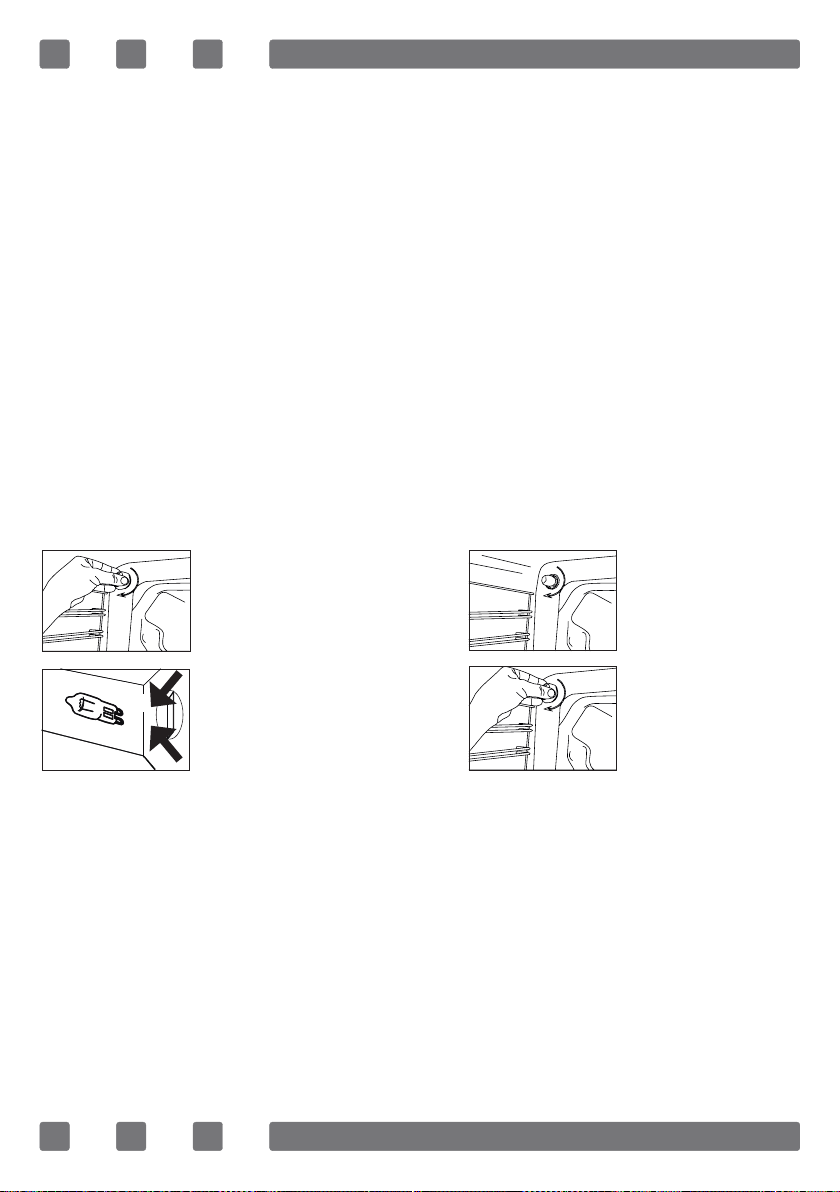
CHANGING THE OVEN LAMP
WARNING: To avoid electric shock, ensure that the appliance
circuit is open before changing the lamp. (having circuit open
means power is off) First disconnect the power of appliance and
ensure that appliance is cold.
Remove the glass protection by turning as indicated in the
gure on the left side. If you have difculty in turning, then using
plastic gloves will help you in turning.
Then remove the lamp by turning, install the new lamp with
same specications.
Reinstall glass protection, plug the power cable of appliance
into electrical socket and complete replacement. Now you can
use your oven.
Type G9 Lamp Type E14 Lamp
220-240 V, AC
15-25 W
Figure 20
220-240 V, AC
15 W
Figure 21
47
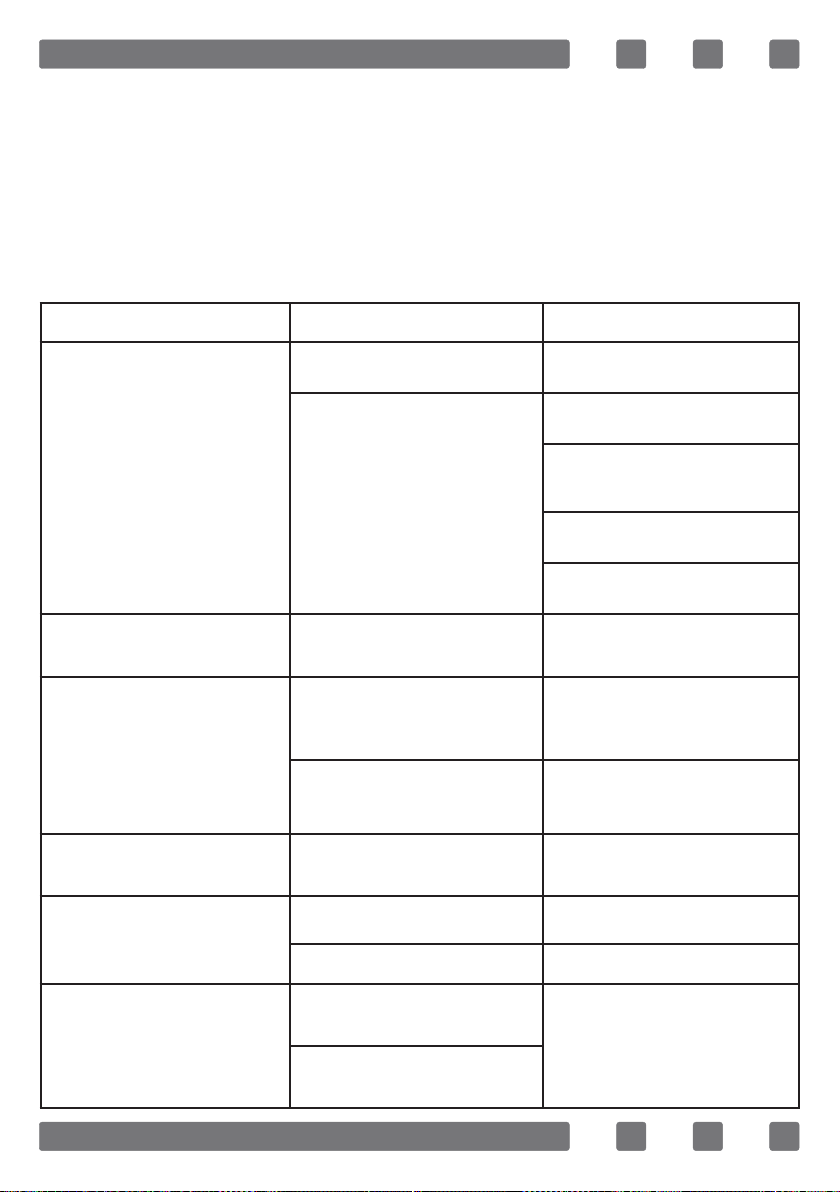
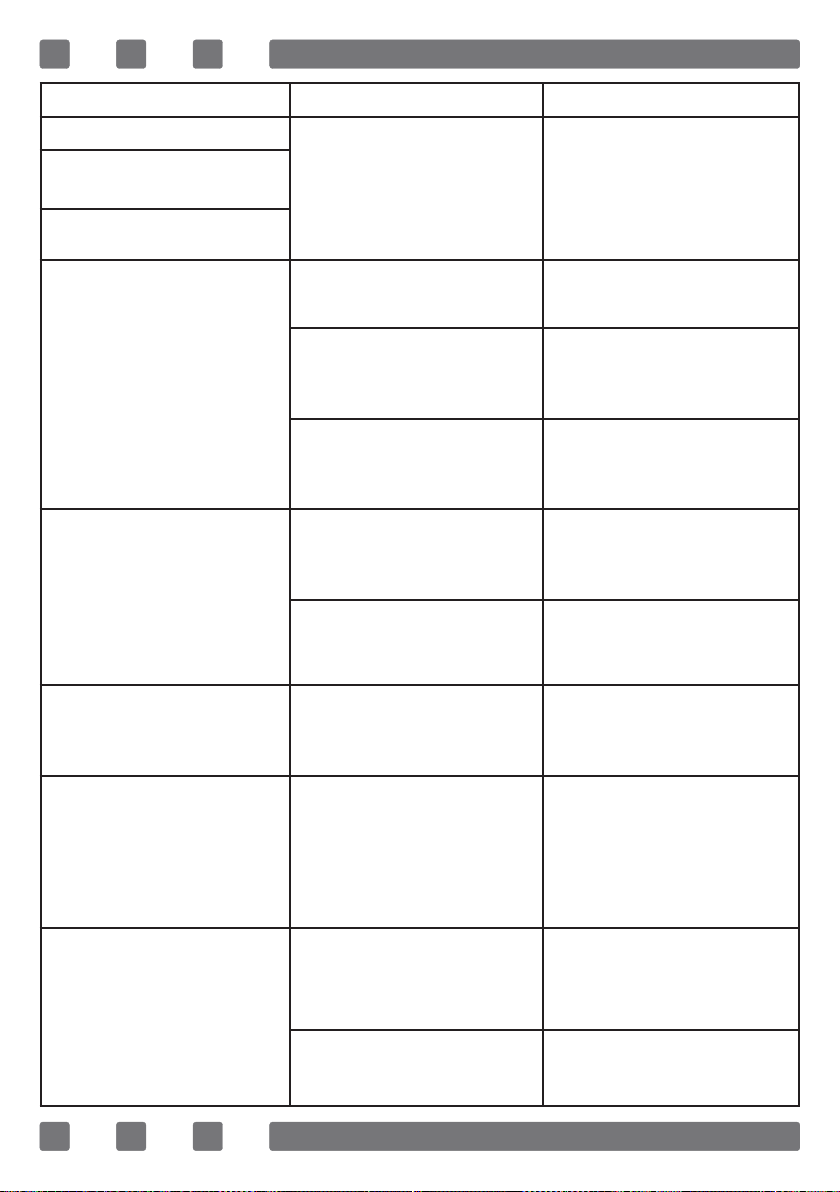
TROUBLESHOOTING
You may solve the problems you may encounter with your
product by checking the following points before calling the
technical service.
Check Points
In case you experience a problem about the oven, rst check
the table below and try out the suggestions.
Problem Possible Cause What to Do
Oven does not operate.
Power supply not available. Check for power supply.
Gas supply not available.
Check if main gas valve is
open.
Check if gas pipe is bent or
kinked.
Make sure gas hose is connected
to the oven.
Check if suitable gas valve is
being used.
Oven stops during cooking.
Plug comes out from the wall
socket.
Re-install the plug into wall
socket.
Turns off during cooking.
Too long continuous operation.
Let the oven cool down after
long cooking cycles.
More than one plugs in a wall
socket.
Use only one plug for each
wall socket.
Oven door is not opening
properly.
Food residues jammed between
the door and internal cavity.
Clean the oven well and try to
re-open the door.
Lighter not operating.
Tips or body of ignition plugs
are clogged.
Clean tips or body of ignition
plugs of gas burners.
Gas burner pipes are clogged. Clean gas burner pipes.
Electric shock when touching
the oven.
No proper grounding.
Make sure power supply is
grounded properly.
Ungrounded wall socket is
used.
48
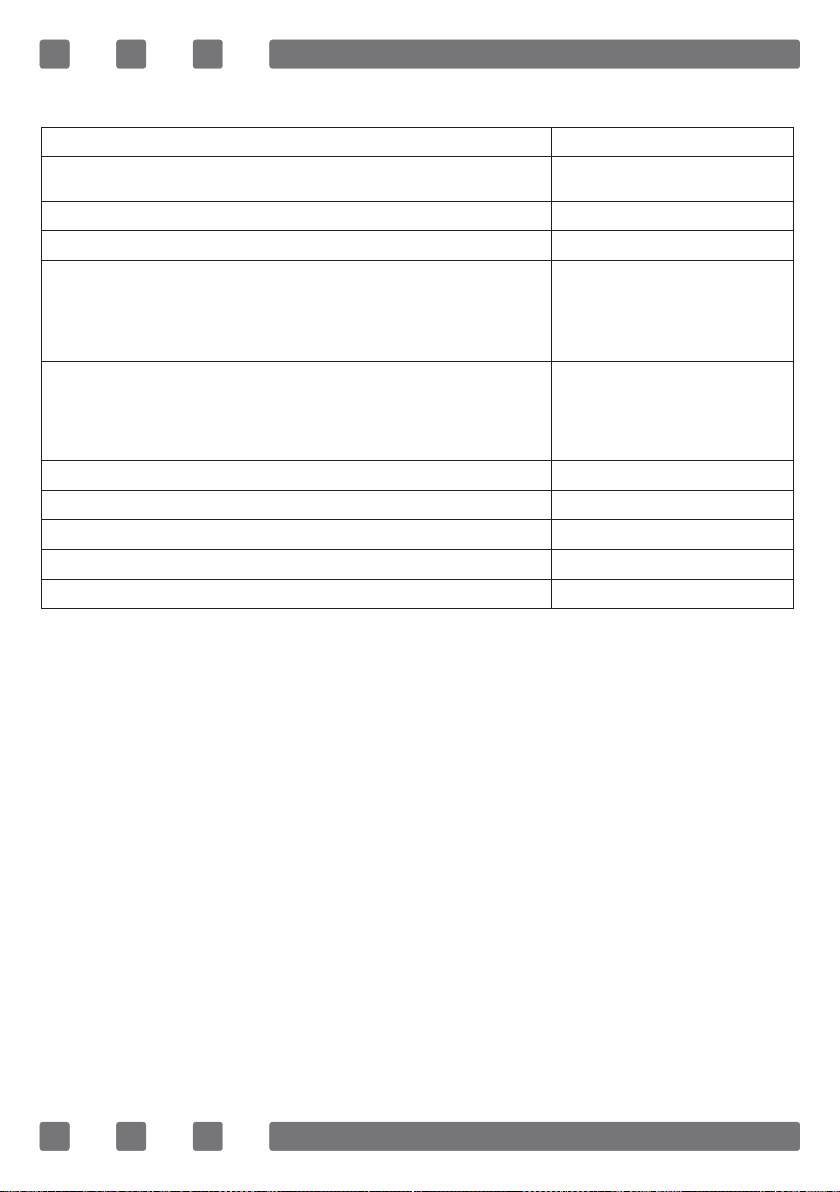
Problem Possible Cause What to Do
Water dripping.
Water or steam may generate
under certain conditions
depending on the food being
cooked. This is not a fault of
the appliance.
Let the oven cool down and
than wipe dry with a dishcloth.
Steam coming out from a
crack on oven door.
Water remaining inside the
oven.
Oven does not heat.
Oven door is open. Close the door and restart.
Oven controls not correctly
adjusted.
Read the section regarding
operation of the oven and reset
the oven.
Fuse tripped or circuit breaker
turned off.
Replace the fuse or reset
the circuit breaker. If this is
repeating frequently, call an
electrician.
Smoke coming out during
operation.
When operating the oven for
the rst time.
Smoke comes out from the
heaters. This is not a fault.
After 2-3 cycles, there will be
no more smoke.
Food on heater.
Let the oven to cool down and
clean food residues from the
heater.
When operating the oven
burnt or plastic odour coming
out.
Plastic or other not heat
resistant accessories are being
used inside the oven.
At high temperatures, use
suitable glassware accessories.
Oven does not cook well.
Oven door is opened
frequently during cooking.
Do not open oven door
frequently, if the food you
are cooking does not require
turning. If you open the door
frequently internal temperature
drops and therefore cooking
result will be inuenced.
Internal light is dim or does
not operate.
Foreign object covering the
lamp during cooking.
Clean internal surface of the
oven and check again.
Lamp might be failed.
Replace with a lamp with same
specications.

49
HANDLING RULES
1. Do not use the door and/or handle to carry or move the
appliance.
2. Carry out the movement and transportation in the original
packaging.
3. Pay maximum attention to the appliance while loading/
unloading and handling.
4. Make sure that the packaging is securely closed during
handling and transportation.
5. Protect from external factors (such as humidity, water, etc.)
that may damage the packaging.
6. Be careful not to damage the appliance due to bumps, crashes,
drops, etc. while handling and transporting and not to break or
deform it during operation.
50
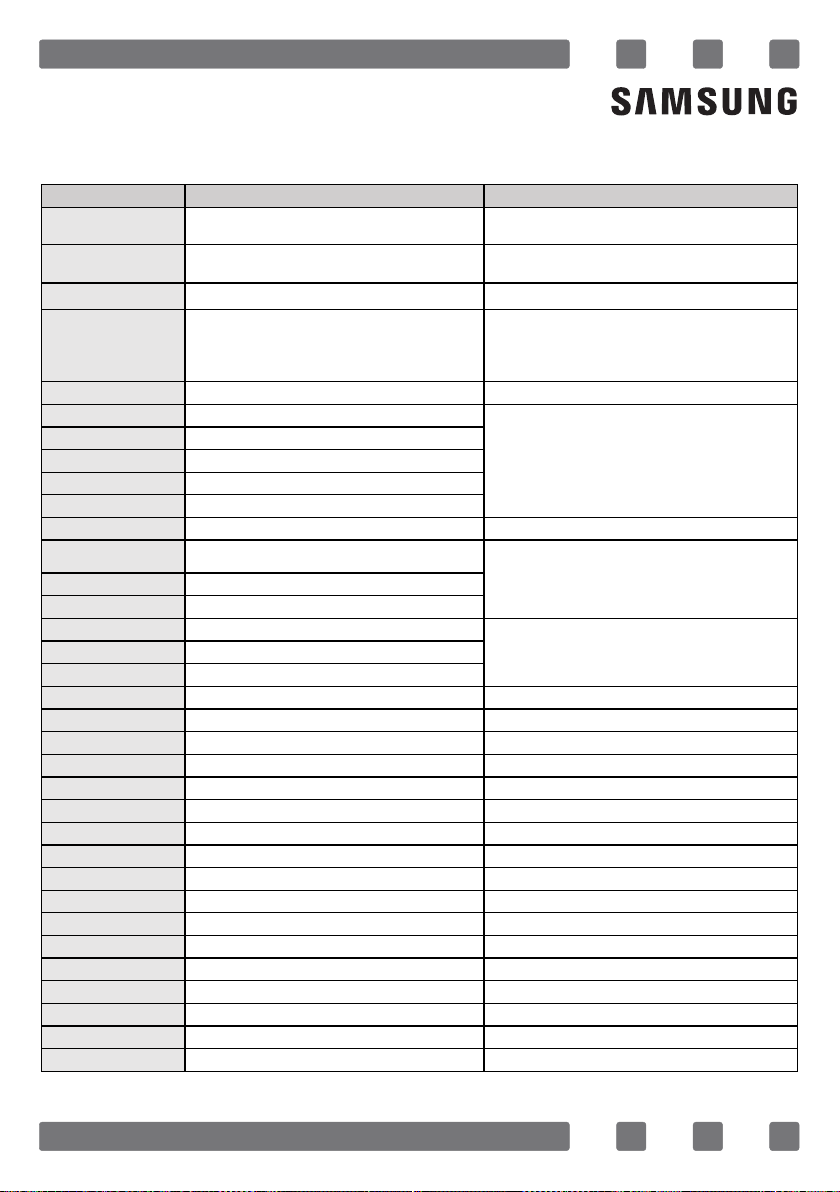
SAMSUNG SAMSUNG
Model identification
NY90T5010SS
Energy Efficiency Index per cavity (EEI cavity)
110,5
Energy Efficiency Class per cavity
B
Energy consumption required to heat a standardised load in a
cavity of an electric heated oven during a cycle in conventional
mode per cavity (electric final energy)
(EC electric cavity)
1.15 kWh/cycle
Energy consumption required to heat a standardised load in a
cavity of an electric heated oven during a cycle in fan-forced
mode per cavity (electric final energy)
(EC electric cavity)
1.05 kWh/cycle
Number of cavities 1
Heat source per cavity (electricity or gas) electricity
Volume per cavity (V)
95 L
Type of oven
90x60 Free Standing Oven
Mass of the appliance(M)
59.2 kg
Energy saving tips
During cooking, the oven door should remain closed except for
turning food over. Do not open the door frequently during
cooking to maintain the oven temperature and to save energy.
Plan oven use to avoid turning the oven off between cooking
one item and the next to save energy and reduce the time for
re-heating the oven.
If cooking time is more than 30 minutes, the oven may be
switched off 5-10 minutes before the end of the cooking time
to save energy. The residual heat will complete the cooking
process.
Wherever possible cook more than one item at a time.
APPENDIX
Problem Possible Cause What to Do
*
Data determined according to standard SANS 941 and SANS
60350-1.
51
QUESTIONS OR COMMENTS?
COUNTRY CALL OR VISIT US ONLINE AT
EGYPT
08000-7267864
16580
www.samsung.com/eg/support
IRAN
021-8255 [CE]
021-42132 [HHP]
www.samsung.com/iran/support
Israel
*6963 www.samsung.com/il/support/
SAUDI ARABIA
8002474357 (800 24/7 HELP)
From Inside Saudi Arabia
+966112974690
From outside Saudi Arabia
(May Call Charges will be applied)
www.samsung.com/sa_en/support
(English)
www.samsung.com/sa/support
(Arabic)
PAKISTAN
0800-Samsung (72678) www.samsung.com/pk/support
U.A.E
800-SAMSUNG (800 - 726 7864)
OMAN
800-SAM CS (800-72627)
KUWAIT
183-CALL (183-2255)
BAHRAIN
8000-GSAM (8000-4726)
QATAR
800-CALL (800-2255)
TURKEY
444 77 11 www.samsung.com/tr/support
JORDAN
0800-22273
06 5777444
Lebanon
1299
Iraq
80010080
ALGERIA
3004
TUNISIA
80 100 012
MOROCCO
080 100 22 55
SOUTH AFRICA
0860 SAMSUNG (726 7864) www.samsung.com/za/support
NAMIBIA
08 197 267 864 www.samsung.com/africa_en/support
ZAMBIA
3434 www.samsung.com/africa_en/support
MAURITIUS
800 5050
www.samsung.com/africa_en/support
REUNION
0262 50 88 80 www.samsung.com/africa_fr/support
MOZAMBIQUE
84 726 7864 www.samsung.com/africa_pt/support
NIGERIA
0800 726 7864 www.samsung.com/africa_en/support
Ghana
0800 100 077 www.samsung.com/africa_en/support
Cote D’Ivoire
8000 0077 www.samsung.com/africa_fr/support
SENEGAL
800 00 0077 www.samsung.com/africa_fr/support
CAMEROON
67095 0077 www.samsung.com/africa_fr/support
KENYA
0800 545 545 www.samsung.com/africa_en/support
UGANDA
0800 300 300 www.samsung.com/africa_en/support
TANZANIA
0800 780 089 www.samsung.com/africa_en/support
RWANDA
9999 www.samsung.com/africa_fr/support
DRC
499 999 www.samsung.com/africa_fr/support
SUDAN
1969 www.samsung.com/eg/support
www.samsung.com/ae/support
(English) www.samsung.com/ae_ar/
support (Arabic)
www.samsung.com/levant/support
www.samsung.com/n_africa/support