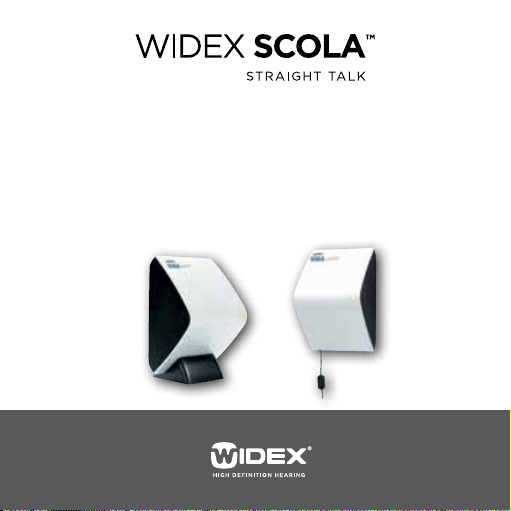
USER’S INSTRUCTIONS
SCOLA™ FM SYSTEM
SCOLA CLASSMATE

2
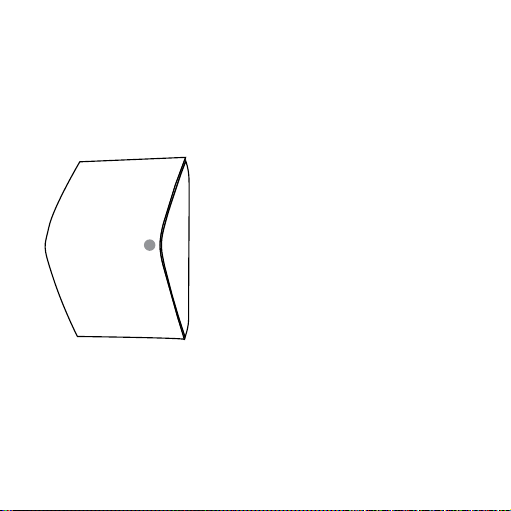
The SCOLA CLASSMATE and accessories shown in these user’s
instructions may differ from the ones you have. We furthermore
reserve the right to make any changes considered necessary.

CONTENTS
SCOLACLASSMATE ...............................................
SCOLACLASSMATEANDACCESSORIES ............................
DESCRIPTION ..................................................
Mechanicaldesign..............................................
HowdoesSCOLACLASSMATEwork? ............................
Responsetosynchronisationsignals.............................
INSTALLATION .................................................
Placement .....................................................
Wallmounting .................................................
Inthestandonashelf ..........................................
LEDLEGEND ...................................................
OPERATION....................................................
SwitchingtheSCOLACLASSMATEonoff ........................
Programming . . . . . . . . . . . . . . . . . . . . . . . . . . . . . . . . . . . . . . . . . . . . . . . . . .
CAREMAINTENANCEANDSAFETYINSTRUCTIONS ...............
TROUBLESHOOTING ............................................
WARRANTY....................................................
3

SPECIFICATIONSANDCOMPLIANCE..............................
STATEMENTSFORUSEINTHEUSAANDCANADA.................
REGULATORYINFORMATION ....................................
SYMBOLS......................................................
4
5
The SCOLA™ FM communication system from Widex provides
hearing aid users with additional opportunities in difficult listen-
ing situations.
SCOLA CLASSMATE and the other parts of the SCOLA system
are developed specifically for children and educational environ-
ments. These instructions therefore primarily address parents
and teachers.
WARNING
This booklet contains important information and instructions. Read
this booklet carefully before you start using the SCOLA CLASSMATE.

6
SCOLA CLASSMATE
As a supplement to the SCOLA FM system, SCOLA CLASSMATE
helps ensure that the same channel is used for both transmitting
and receiving the FM signal in a given location.
SCOLA CLASSMATE can be of particular advantage in schools
where more than one student uses the SCOLA FM system.
At these schools, it is recommended that each classroom uses a
different FM channel to eliminate the risk of interference.
With SCOLA CLASSMATE students using the SCOLA FM system in
a classroom automatically pick up the FM signal from their teach-
er’s FM transmitter.

7
From its position on a classroom wall or table, SCOLA CLASS-
MATE automatically and wirelessly synchronises SCOLA FLEX and
other synchronisation-compatible receivers to the channel being
used for transmission in that particular classroom.
All students wearing such receivers can then listen to the signal
from their teacher’s FM microphone.
8
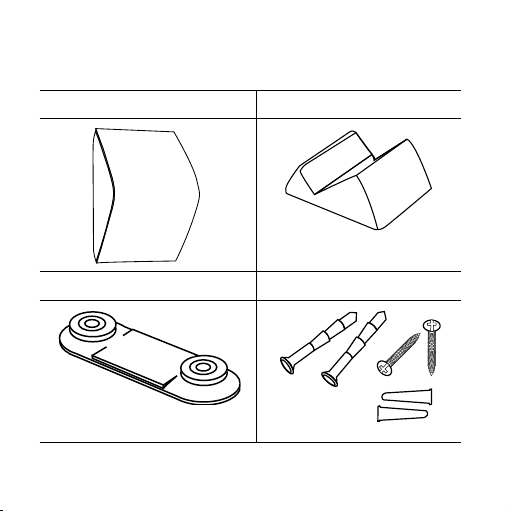
SCOLA CLASSMATE AND ACCESSORIES
SCOLA CLASSMATE Stand
Wall mount Screws and fasteners
9
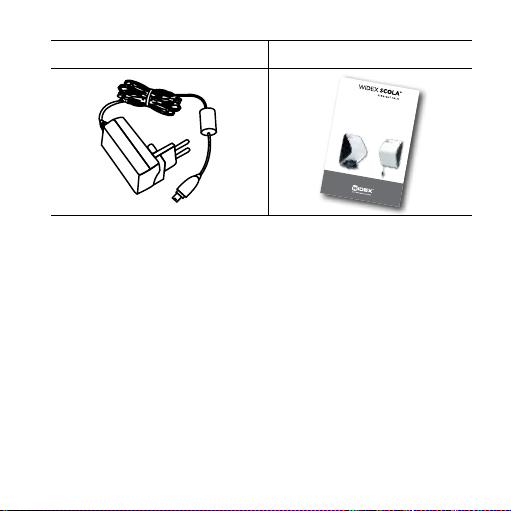
Power supply and extension cord User´s instructions
User’s instrUctions
SCOLA™ FM SySteM
SCOLA CLASSMATE
10
DESCRIPTION
Mechanical design
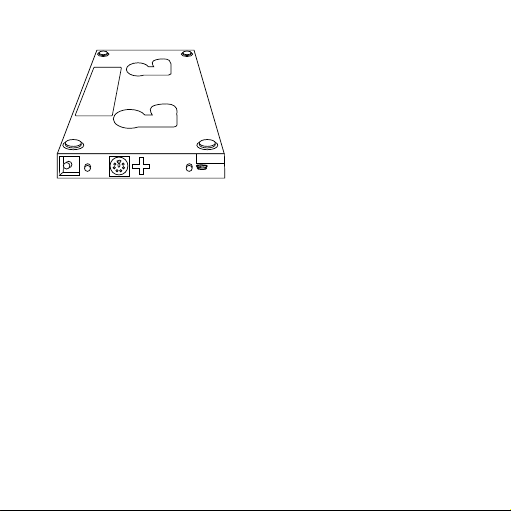
The maximum thickness of the unit is 110 mm.
LED indicator behind the front
plate.
The LED indicates different condi-
tions depending on status.
The size of the rear plate is 125 x
193 mm.
11
Holes for the wall mount.
1. On/off button
2. Extra socket
3. Mini USB connector for power
supply

12
How does SCOLA CLASSMATE work?
During the first minute after SCOLA CLASSMATE has been
turned on, the synchronisation channel can be programmed into
the memory. This is done with a SCOLA TEACH33/44 or SCOLA
PROGRAMMER.
After one minute, the SCOLA CLASSMATE starts to send out the
channel synchronisation signal. This signal will be repeated 3
times per second and will set all SCOLA FLEX or Amigo ear-level
FM receivers within range to the programmed channel.
The range of the signal is approximately 1.5 m.
SCOLA CLASSMATE is powered by the external power supply.
However, an internal rechargeable back-up battery will supply
uninterrupted power to the unit for 48 hours if the mains power
is cut off (for example if the wall outlet is needed for another pur-
pose).

13
The back-up battery is continuously charged when the power
supply is connected to the mains. When connected the first time,
it will take about 10 hours before the battery is fully charged.
NOTE:
The back-up battery can / may only be replaced by authorised Widex
service personnel.
Response to synchronisation signals
ASCOLAFLEXthathasgoneinto“sleep”modeafteraperiodof
notreceivinganytransmissionsignalfromanFMtransmitterwill
first“wakeup”andthenbesynchronisedtothechannelusedin
theclassroom

14
In the standard SCOLA FLEX setting, a beep will be heard every
time the receiver receives a synchronisation signal. The alterna-
tive is a setting where a beep is only generated when the SCOLA
FLEX channel is changed. Please contact the hearing health-
care professional, referring to the Programming guide for SCOLA
PROGRAMMER and SCOLA FLEX and Programming guide for
teachers and professionals.
WithWidexIntegratedSignalProcessing(ISP)hearingaidsset
toworkwithSCOLAFLEXthehearingaid’sdirectaudioprogram
isautomatically switchedonand offcontrolledbythe SCOLA
FLEX
During breaks between lessons, the ISP hearing aid will work in,
for example, its standard acoustic program without the user hav-
ing to operate the FM switch or remove the SCOLA FLEX from
the hearing aid. When the user returns to the lesson, the SCOLA
CLASSMATE will set the SCOLA FLEX to the channel used in that
classroom and switch on the direct audio program, allowing the
FM signal to become audible. Fully automatically.

15
INSTALLATION
Placement
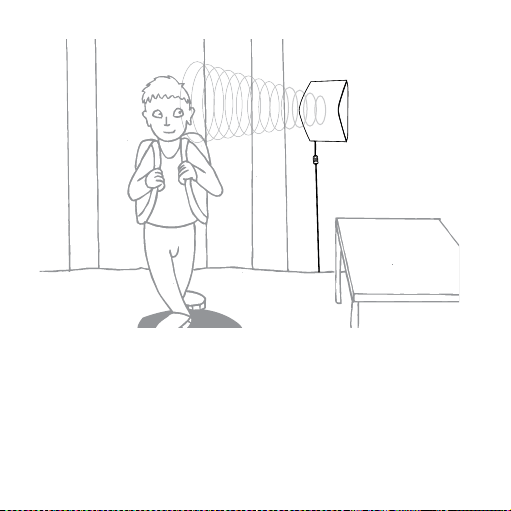
SCOLA CLASSMATE is intended to be mounted on a wall in the
classroom or placed in its stand on a shelf or table.
We recommend that it is placed about 1.5 m above the floor.
The best way to ensure correct channel synchronisation is to
place the SCOLA CLASSMATE close to the entrance door.
If a wall socket is not within reach of the power supply cord, the
provided extension cord can be used.
16
Channel
55

17
Wall mounting
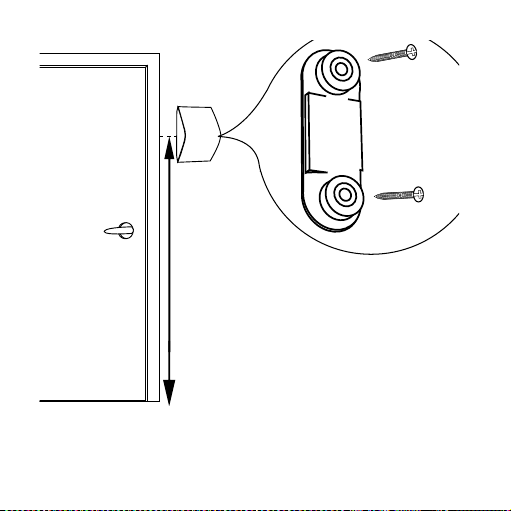
1. Find a convenient location for mounting the
SCOLA CLASSMATE.
2. Use the wall mount as a guide to mark the loca-tion of the
two holes.
3. Drill the holes in the wall.
4. In case of brick, concrete or similar walls, drill the holes with
a diameter that will allow the fasteners to fit into the holes.
18

19
5. Insert the screws through the wall mount washers and screw
the screws into the holes. Take care not to bend the wall
mount during mounting.
6. Plug the power supply into the USB connector. Use the pro-
vided extension cord, if necessary.
7. Plug the power supply into the wall socket and switch on the
mains power.
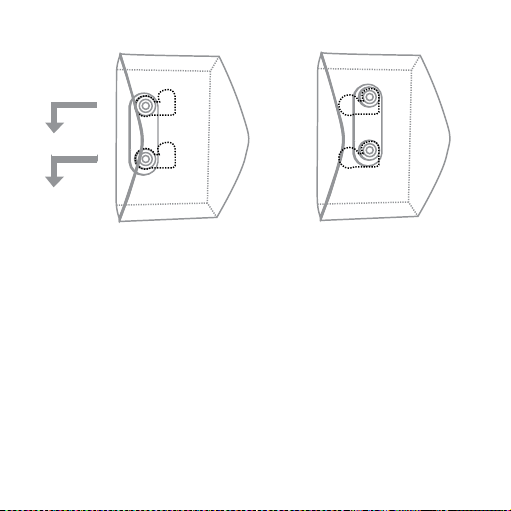
8. Align the SCOLA CLASSMATE with the wall mount.
9. When the SCOLA CLASSMATE has been placed on the wall
mount, slide the unit first to the left and then downwards to
lock it in place.
10. To remove the SCOLA CLASSMATE, lift it slightly and slide it
to the right.
20
21
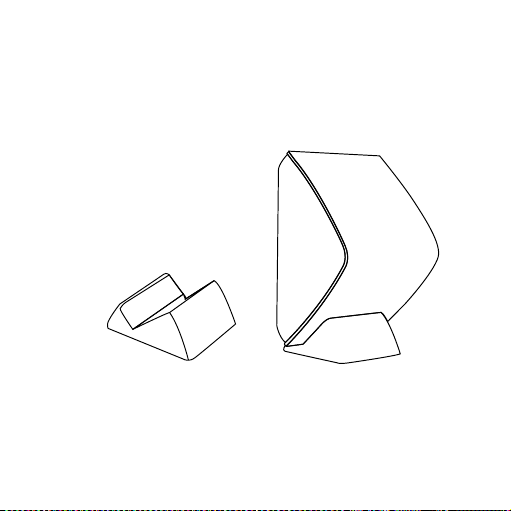
In the stand on a shelf
If the SCOLA CLASSMATE is not intended to be located perma-
nently in one place, for example if it is needed for testing in differ-
ent classrooms, it can be placed in its stand as shown.
NOTE
Do not place the portable stand where there is a risk that it may fall to
the floor.

22
LED LEGEND
The LED indicates as follows:
Constant red:
1. Normal function on external power
2. In programming mode (first minute after power is switched
on) on external power and battery back-up
Flashing red:
Normal function on battery back-up
Triple blink:
Channel synchronisation done
No light:
Off or malfunction (see page 19, Troubleshooting)

23
OPERATION
Switching the SCOLA CLASSMATE on/off
Press the on/off button to turn the SCOLA CLASSMATE on.
The LED will be lit and it will be possible to change the synchro-
nisation channel for one minute. After one minute the LED will:
• beconstantlylitifthepowersupplyison
• flash if the SCOLA CLASSMATE is running on batteries.
To switch the SCOLA CLASSMATE off, just press the on/off button
again.

24
Programming
During the first minute after the SCOLA CLASSMATE is switched
on, it is possible to set / change the synchronisation channel.
Set the SCOLA TEACH33/44 to the required channel, or set the
SCOLA PROGRAMMER to the appropriate channel in “Set chan-
nel” under the “ FLEX programming” menu.
Hold the SCOLA TEACH33/44 / SCOLA PROGRAMMER within a
distance of approximately 50 cm from the SCOLA CLASSMATE
and press the “Enter” button.
When the LED flashes three times, the SCOLA CLASSMATE is pro-
grammed and ready for use.
Reprogramming of the SCOLA CLASSMATE is only necessary if
the transmitting channel used in the classroom is changed.

25
CARE, MAINTENANCE AND SAFETY INSTRUCTIONS
In general, the SCOLA™ FM system should be cared for in the
same way as the hearing aid. It is a good idea to clean the FM
system on a daily basis. Furthermore, there are special precau-
tions to be taken.
1. Clean the SCOLA CLASSMATE with a dry, soft cloth.
2. Do not disassemble the SCOLA CLASSMATE, other SCOLA
units or the hearing aid, as this will void the guarantee.
3. Do not use water, alcohol or similar substances to clean any
SCOLA parts.
4. Make sure that the power supply cord is not tangled up.
5. Do not expose the SCOLA CLASSMATE to cosmetics, hair
spray, water, cleaning solutions or other chemicals.

26
6. Please be sure to keep all SCOLA units, accessories and
hearing aids out of the reach of children, who might place
them in their mouths.
7. Do not use SCOLA CLASSMATE on aeroplanes or in hospitals
without permission.
8. If you use the SCOLA FM system together with equipment
which is connected to the electrical mains, this equipment
must meet the safety re-quirements stated in the interna-
tional standard IEC 60065.
9. Do not use two transmitters (e.g. SCOLA TEACH) on the
same channel/frequency in the same area, as this will cause
interference in the FM receiver(s).

27
TROUBLESHOOTING
No light in the LED:
• Check that the SCOLA CLASSMATE is turned on.
• Check mains supply (power outlet).
• Check that the power supply is connected to the SCOLA
CLASSMATE.
• (Check that you are using the correct power supply)
No receiver synchronisation:
• Program the SCOLA CLASSMATE again making sure that it is
set to the correct channel. See “Programming” on page 16.
Please make sure that the LED flashes three times as acknowl-
edgement of successful programming.
• Check that the SCOLA TEACH33/44 or SCOLA PROGRAMMER
(used for programming of SCOLA CLASSMATE) is used cor-
rectly (see specific user’s instructions).

28
LED is flashing:
• The SCOLA CLASSMATE is running on battery back-up. Check
that the power supply is connected correctly.

29
WARRANTY
A two-year international warranty is provided. The warranty cov-
ers all material and manufacturing defects. Defects arising from
improper handling or repairs carried out by an unauthorised
party are not covered by this warranty.

30
SPECIFICATIONS AND COMPLIANCE
Radiotransmittershortrangeinductivetechnology
FrequencyMHz
Magneticfieldstrength-dBuAm@m
Compliance
Electromagnetic directive:
SCOLA CLASSMATE contains a very weak inductive radio trans-
mitter. The emission power is below international emission lim-
its for human exposure. Just for comparison, the emission from
SCOLA CLASSMATE is less than unintended radio frequency
emissions from, for example, hair dryers and electric shavers.

31
SCOLA CLASSMATE complies with the relevant international
standards and Widex therefore declares that this SCOLA product
is in full compliance with the essential requirements and other rel-
evant provisions of Directive 1999/5/EC (R&TTE directive). A dec-
laration of conformity can be downloaded from the SCOLA home-
page: www.SCOLA.info or ordered from Widex (please see the
back page).
32
STATEMENTS FOR USE IN THE USA AND CANADA
SCOLACLASSMATEcontainsaradiotransmitterwith
FCC
ID: U28EZYNC01
IC: 1350B-EZYNC01
The device complies with Part 15 of the FCC rules and RSS-210 of
Industry Canada.
Operation is subject to the following two conditions:
1. This device may not cause harmful interference.
2. This device must accept any interference received, including
interference that may cause undesired operation.
Changes or modifications made to the equipment not expressly
approved by Widex may void the FCC’s authorization to operate
the equipment.

33
REGULATORY INFORMATION
FCC ID: BRG-871T
IC: 5676A-871T
Federal Communications Commission Statement
This device may not interfere with TV reception or Federal Government
radar.
Industry Canada Statement / Déclaration d’industrie Canada
Under Industry Canada regulations, this radio transmitter may only
operate using an antenna of a type and maximum (or lesser) gain
approved for the transmitter by Industry Canada.
To reduce potential radio interference to other users, the antenna
type and its gain should be so chosen that the equivalent isotropically
radiated power (e.i.r.p.) is not more than that necessary for successful
communication.
This device complies with Industry Canada licence-exempt RSS
standard(s). Operation is subject to the following two conditions:

34
(1) this device may not cause interference, and
(2) this device must accept any interference, including interference that
may cause undesired operation of the device.
Conformément à la réglementation d’Industrie Canada, le présent
émetteur radio peut fonctionner avec une antenne d’un type et d’un
gain maximal (ou inférieur) approuvé pour l’émetteur par Industrie
Canada.
Dans le but de réduire les risques de brouillage radioélectrique à
l’intention des autres utilisateurs, il faut choisir le type d’antenne et
son gain de sorte que la puissance isotrope rayonnée équivalente
(p.i.r.e.) ne dépasse pas l’intensité nécessaire à l’établissement d’une
communication satisfaisante.
Le présent appareil est conforme aux CNR d’Industrie Canada
applicables aux appareils radio exempts de licence. L’exploitation est
autorisée aux deux conditions suivantes:
(1) l’appareil ne doit pas produire de brouillage, et
(2) l’utilisateur de l’appareil doit accepter tout brouillage radioélectrique
subi, même si le brouillage est susceptible d’en compromettre le
fonctionnement.

35
Directive 1999/5/EC
Hereby, Widex A/S declares that this SCOLA CLASSMATE is in
compliance with the essential requirements and other relevant
provisions of Directive 1999/5/EC.
A copy of the Declaration of Conformity according to 1999/5/EC
can be found at:
http://www.widex.com/doc
36
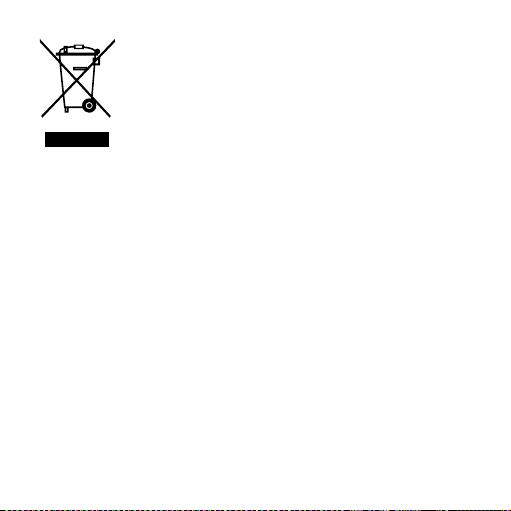
Electrical and electronic equipment (EEE) contains
materials, components and substances that can be
hazardous and present a risk to human health and
the environment when waste electrical and elec-
tronic equipment (WEEE) is not handled correctly.
Do not dispose of hearing aids, hearing aid accessories and bat-
teries with ordinary household waste.
Hearing aids, batteries and hearing aid accessories should be
disposed of at sites intended for waste electrical and electronic
equipment, or given to your hearing care professional for safe
disposal. Proper disposal helps to protect human health and the
environment.
37
SYMBOLS
Symbols commonly used by Widex A/S in medical device labelling
(labels/IFU/etc.)
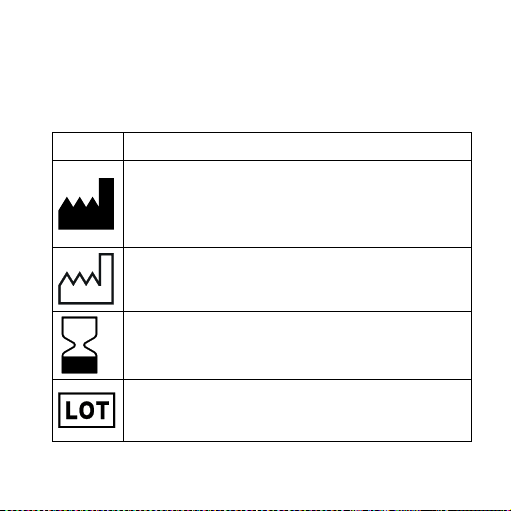
Symbol Title/Description
Manufacturer
The product is produced by the manufacturer whose name
and address are stated next to the symbol. If appropriate,
the date of manufacture may also be stated.
Date of manufacture
The date when the product was manufactured.
Use-by date
The date after which the product is not to be used.
Batch code
The product’s batch code (lot or batch identification).
38
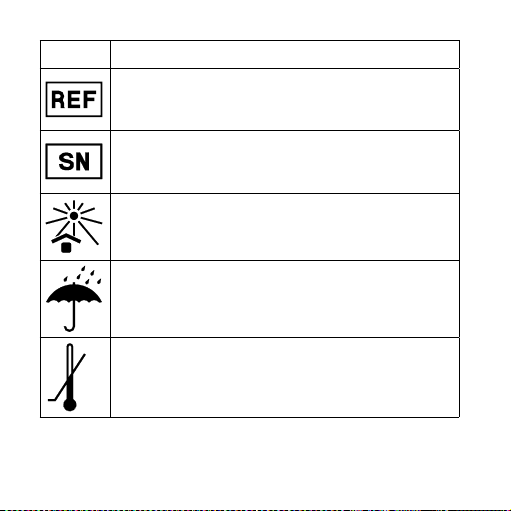
Symbol Title/Description
Catalogue number
The product’s catalogue (item) number.
Serial number
The product’s serial number.*
Keep away from sunlight
The product must be protected from light sources and/or
The product must be kept away from heat
Keep dry
The product must be protected from moisture and/or The
product must be kept away from rain
Lower limit of temperature
The lowest temperature to which the product can be safely
exposed.
39
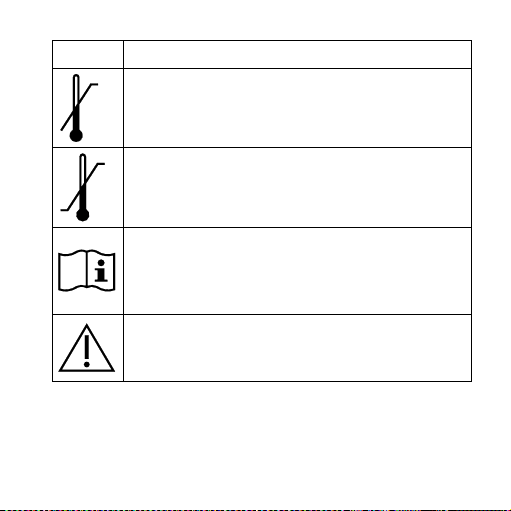
Symbol Title/Description
Upper limit of temperature
The highest temperature to which the product can be
safely exposed.
Temperature limits
The highest and lowest temperatures to which the product
can be safely exposed.
Consult instructions for use
The user instructions contain important cautionary infor-
mation (warnings/precautions) and must be read before
using the product.
Caution/Warning
Text marked with a caution/warning symbol must be read
before using the product.
40
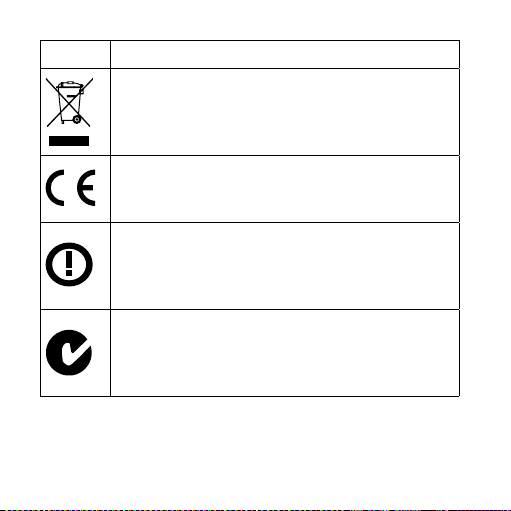
Symbol Title/Description
WEEE mark
“Not for general waste”
When the product is to be discarded, it must be sent to a
designated collection point for recycling and recovery.
CE mark
The product is in conformity with the requirements set out
in European CE marking directives.
Alert
The product is identified by R&TTE Directive 1999/5/EC as
an equipment Class 2 product with some restrictions on
use in some CE member states.
C-Tick mark
The product complies with EMC and radio spectrum
regulatory requirements for products supplied to the
Australian or New Zealand market.
41
Symbol Title/Description
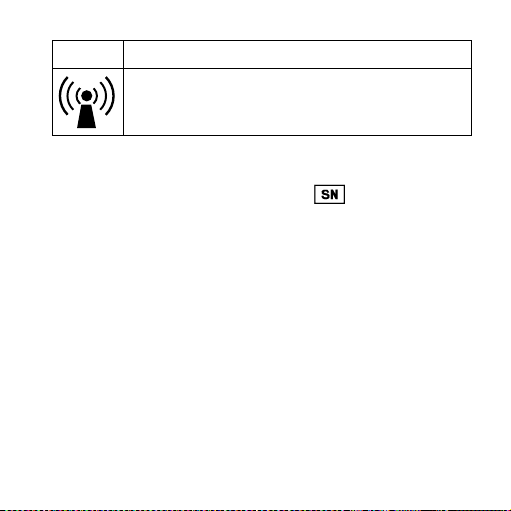
Interference
Electromagnetic interference may occur in the vicinity of
the product.
*The six- or seven-digit number on the product is the serial number. Se-
rial numbers may not always be preceded by

42

43
É[5qr0q2|g;;a;s]
Manual no.:
9 514 0125 001 #03
Issue:
2015-06
WIDEX A/S Nymoellevej 6, DK-3540 Lynge, Denmark
www.widex.com