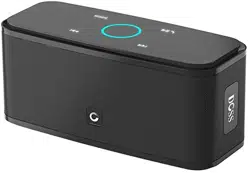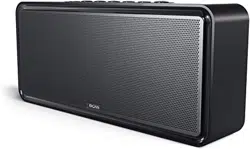
Wireless Bluetooth Home Speaker
EN DE FR IT ES JP
Model Name: DOSS SoundBox XL
Quick Start Guide
US:
UK:
FR:
I T :
CA:
DE:
ES:
JP:
EVATOST CONSULTING LTD
Suite 11, First Floor, Moy Road Business
Centre, Taffs Well, Cardiff, Wales, CF15 7QR
contact@evatmaster.com
eVatmaster Consulting GmbH
Bettinastr. 30
60325 Frankfurt am Main,Germany
contact@evatmaster.com
EN
Package Content
Home speaker x 1
USB-C charging cable x 1
User manual x 1
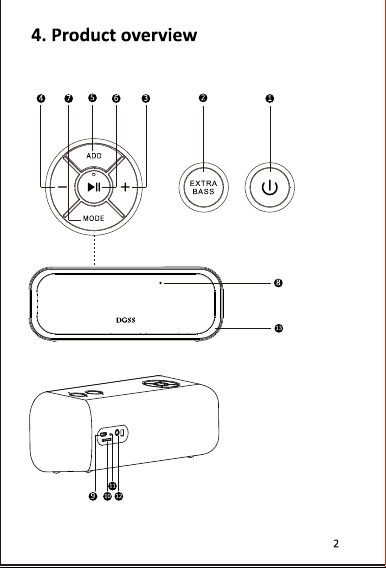
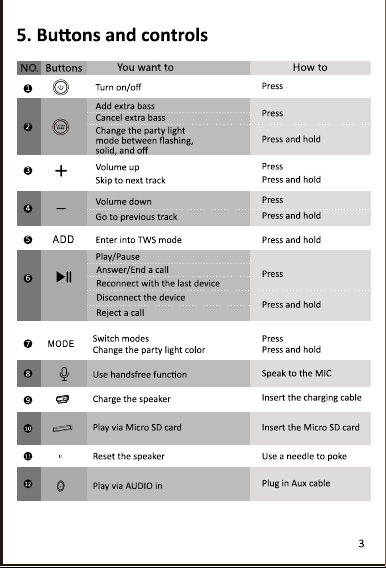
Product Overview
1 2 4 5 6 7
3
1.
Long press to turn ON/OFF.
2.
M Press to switch modes between Bluetooth, Aux in and TF card Mode.
Press and hold to enter into TWS mode.
3.
LED lights from left to right
:
Bluetooth mode; Aux in mode; TF card mode;
Battery status.
4.
Volume control
:
Press to turn down
;
Press to turn up.
5.
Press to track back
.
6.
Press to play/pause; Press to connect the last connected device.
Long press to disconnect Bluetooth .
7.
Press to track forward
.
Note:
*
Press and hold the simultaneously to check version ID
(While Bluetooth disconnecting)
*
Press and hold the to restore factory setting.
*
Press and hold the to cancel/active the prompt tone
DC 5 V 2A
8 910 11
8.
Power input: DC 5V 2A
9.
LED charging light
:
Charging: steady red
Fully charged: light off
10.
AUX in: Play via 3.5mm Auxiliary cable
(
not supplied
)
11.
TF card audio format: MP3, WAV, FLAC, APE (Max capacity 256G) /
play in download order
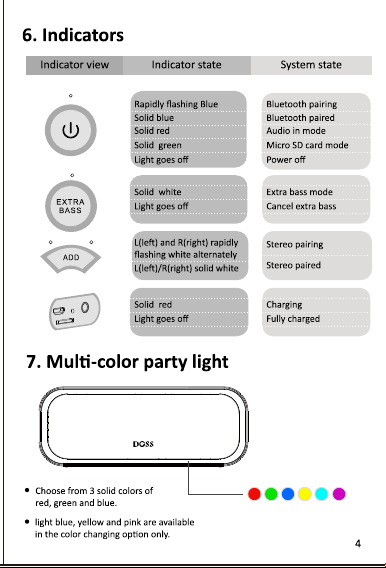
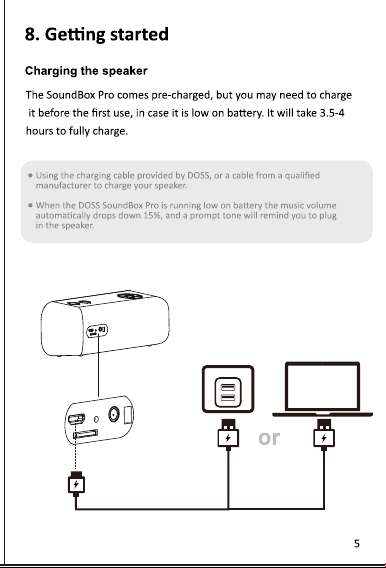
Status Indicators
LED lights on
the top
①Flashing blue
Bluetooth pairing
①Steady blue
Bluetooth connected
②Steady red
Aux in mode
③Steady green
TF card mode
③Flashing green
Maximum volume
④Flashing red
low Battery
Battery LED
Steady red
Charging
Light off
Fully charged
Pairing DOSS SoundBox XL with Your Device
1.
Place the speaker and the device within one meter.
2.
Turn on the speaker and make sure the LED on the top is flashing blue, if
it’s steady blue, long press play/pause button for 5 seconds.
3.
Turn on Bluetooth on your device, and choose DOSS SoundBox XL on the
Bluetooth list.
4.
Once paired, you will hear a prompt tone and the LED on the top will
change to steady blue. If the pairing failed, please repeat steps 1
through 3 again.
Still got a problem?
Please feel free to contact our support team at <support@dossav.com>
True Wireless Stereo Pairing
1. Turn on the first speaker.
2. Turn on the second speaker.
3. Press and hold “M” button on both speakers to enter into TWS pairing.
4. Once TWS paired, the LED on primary speaker turns solid blue, while
the secondary speaker turns flashing blue.
5. Turn on Bluetooth on your device and select DOSS SoundBox XL.
Tips: You can only switch Bluetooth and Aux in mode on the primary
speaker while TWS mode.
Connect DOSS SoundBox XL to Echo Dot
You are able to connect the speaker to Echo Dot via Bluetooth or Auxiliary.
1.
Download Alexa app and get the dot connected to your home Wi-Fi network.
2.
Keep the speaker in waiting for pairing status.
3.
Run the Alexa app, tap Menu and then tap Settings.
4.
Tap the Echo Dot in the Alexa app and then tap Bluetooth.
Select DOSS SoundBox XL in Bluetooth list. If it didn’t show up in Bluetooth
list, please long press play/pause button for 5 seconds and try to reconnect.
Product Specifications
Dimension: 11.8 x 2.64 x 5.2 inch
Weight: 3.2lbs
Bluetooth range: up to 20m/66ft
Output power: 2 x 10 W + 12 W Subwoofer
Battery
Type: Li-ion 7.2v, 2600mAh
Charging time: 3 hours
Playtime: 10 Hours (at 50% volume)
Warning
DO NOT drop, hit or shake the speaker.
DO NOT disassemble, repair or modify the speaker by yourself.
DO NOT use cleaning products that contain benzene, solvents or alcohol.
DO NOT expose the speaker to excessive heat or direct sunlight for a long time.
DO NOT store the speaker in a place with humidity or dust.
DO NOT place heavy objects on top of the speaker.
DO NOT use the speaker near a microwave oven or wireless LAN products.
FCC Statement
This equipment has been tested and found to comply with the limits for a
Class B digital device, pursuant to part 15 of the FCC Rules. These limits are
designed to provide reasonable protection against harmful interference in a
residential installation. This equipment generates, uses and can radiate radio
frequency energy and, if not installed and used in accordance with the
instructions, may cause harmful interference to radio communications.
However, there is no guarantee that interference will not occur in a
particular installation. If this equipment does cause harmful interference to
radio or television reception, which can be determined by turning the
equipment off and on, the user is encouraged to try to correct the
interference by one or more of the following measures:
• Reorient or relocate the receiving antenna.
• Increase the separation between the equipment and receiver.
• Connect the equipment into an outlet on a circuit different from that to
which the receiver is connected.
• Consult the dealer or an experienced radio/TV technician for help.
Caution: Any changes or modifications to this device not explicitly approved
by manufacturer could void your authority to operate this equipment.This
device complies with part 15 of the FCC Rules. Operation is subject to the
following two conditions:
(1) This device may not cause harmful interference, and (2) this device must
accept any interference received, including interference that may cause
undesired operation.
RF Exposure Information
The device has been evaluated to meet general RF exposure requirement.
The device can be used in portable exposure condition without restriction.
ISED Statement
This device contains licence-exempt transmitter(s)/receiver(s) that comply with
Innovation, Science and Economic Development Canada’s licence-exempt
RSS(s). Operation is subject to the following two conditions:
1.
This device may not cause interference.
2.
This device must accept any interference, including interference that may
cause undesired operation of the device.
This equipment should be installed and operated with a minumum distance of
20 cm between the radiator and your body.
Le présent appareil est conforme aux CNR d'Industrie Canada applicables
auxappareils radio exempts de licence. L'exploitation est autorisée aux deux
conditions suivantes : (1)l'appareil ne doit pas produire de brouillage, et (2)
l'utilisateur de l'appareil doit accepter toutbrouillage radioélectrique subi,
même si le brouillage est susceptible d'en compromettre lefonctionnement.
CAN ICES-3(B)/NMB-3(B)
L’appareil a été évalué pour répondre aux exigences générales d’exposition aux
RF. Le dispositif peut être utilisé sans restriction dans des conditions portatives
d’exposition.
Cet équipement doit être installé et utilisé à une distance minimale de 20 cm
entre le radiateur et votre corps.
DE
Paket Inhalt
Heim lautsprecher x 1
USB-C-Ladekabel x 1
Benutzerhandbuch x 1
Produktübersicht
1 2 4 5 6 7
3
1.
Lange drücken, um EIN/AUS zu schalten.
2.
M Drücken, um den Modus zwischen Bluetooth, Aux-Eingang und TF-
Kartenmodus zu wechseln.
Halten Sie gedrückt, um in den TWS-Modus zu wechseln.
3.
LED leuchtet (von links nach rechts): Bluetooth-Modus; Aux-in-Modus;
TF-Kartenmodus; Batteriestatus
4.
Lautstärkeregler: Zum Verringern drücken; Drücken, um aufzutauchen
5.
Drücken Sie , um zurückzuverfolgen
.
6.
Zum Abspielen/Pause drücken; Drücken Sie diese Taste, um das zuletzt
angeschlossene Gerät zu verbinden. Lange drücken, um Bluetooth zu trennen.
7.
Drücken Sie , um vorwärts zu verfolgen.
ANMERKUNG:
*
Halten Sie die Taste gleichzeitig gedrückt, um die Versions-ID zu prüfen
(während die Bluetooth-Verbindung getrennt wird)
*
Halten Sie die Taste gedrückt, um die Werkseinstellungen
wiederherzustellen.
*
Halten Sie die Taste gedrückt, um den Aufforderungston
abzubrechen/zu aktivieren.
DC 5 V 2A
8 910 11
8.
Leistungsaufnahme: DC 5 V 2 A
9.
LED-Ladelicht:
Aufladen: Dauerlicht rot
Vollständig aufgeladen: Licht aus
10.
AUX-Eingang: Wiedergabe über 3,5-mm-Auxiliary-Kabel (nicht im
Lieferumfang enthalten)
11.
Audioformat der TF-Karte: MP3, WAV, FLAC, APE (maximale Kapazität 256
GB) / in Download-Reihenfolge spielen
Statusanzeigen
LED oben
①Blinkt blau
Bluetooth-Kopplung
①Dauerhaft blau
Bluetooth verbunden
②Dauerhaft rot
Aux-in-Modus
③Stetig grün
TF-Kartenmodus
③Grün blinkend
Maximale Lautstärke
④Blinkt rot
Batterie schwach
Batterie-LED
Dauerhaft rot
Laden
Licht aus
Voll aufgeladen
Voll aufgeladen Koppeln der DOSS SoundBox XL
mit Ihrem Gerät
1.
Stellen Sie den Lautsprecher und das Gerät innerhalb eines Meters auf.
2.
Schalten Sie den Lautsprecher ein und vergewissern Sie sich, dass die
LED oben blau blinkt. Wenn sie konstant blau leuchtet, drücken Sie die
Play/Pause-Taste 5 Sekunden lang.
3.
Schalten Sie Bluetooth auf Ihrem Gerät ein und wählen Sie DOSS
SoundBox XL in der Bluetooth-Liste.
4.
Nach der Kopplung hören Sie einen Aufforderungston und die LED auf
der Oberseite wechselt zu konstantem Blau. Wenn die Kopplung
fehlgeschlagen ist, wiederholen Sie bitte die Schritte 1 bis 3 erneut.
Haben Sie noch ein Problem?
Wenden Sie sich bitte an unser Support-Team unter <support_de@dossav.com>
True Wireless Stereo-Kopplung
1. Schalten Sie den ersten Lautsprecher ein.
2. Schalten Sie den zweiten Lautsprecher ein.
3. Halten Sie die M-Taste an beiden Lautsprechern gedrückt, um in die
TWS-Kopplung zu gelangen.
4. Sobald die TWS gekoppelt ist, leuchtet die LED am primären
Lautsprecher durchgehend blau, während der sekundäre Lautsprecher
blau blinkt.
5. Schalten Sie Bluetooth auf Ihrem Gerät ein und wählen Sie DOSS
SoundBox XL.
Tipps: Sie können im TWS-Modus nur den Bluetooth- und Aux-In-Modus
am primären Lautsprecher umschalten.
Verbinden Sie DOSS SoundBox XL mit Echo Dot
Sie können den Lautsprecher über Bluetooth oder Auxiliary mit Echo Dot
verbinden.
1.
Laden Sie die Alexa-App herunter und verbinden Sie den Punkt mit Ihrem
Wi-Fi-Heimnetzwerk.
2.
Lassen Sie den Lautsprecher auf den Kopplungsstatus warten.
3.
Führen Sie die Alexa-App aus, tippen Sie auf Menü und dann auf
Einstellungen
4.
Tippen Sie in der Alexa-App auf den Echo Dot und dann auf Bluetooth.
Wählen Sie DOSS SoundBox XL in der Bluetooth-Liste aus. Wenn es nicht in
der Bluetooth-Liste angezeigt wird, halten Sie bitte die
Wiedergabe-/Pause-Taste 5 Sekunden lang gedrückt und versuchen Sie
erneut, eine Verbindung
Produktspezifikationen
Abmessungen: 29.97 x 6.71 x 13.21 cm
Gewicht: 1451.50g
Bluetooth-Reichweite: bis zu 20m/66ft
Ausgangsleistung: 2 x 10 W + 12 W Subwoofer
Batterie
Typ: Li-Ion 7.2 V, 2600 mAh
Ladezeit: 3 Stunden
Spielzeit: 10 Stunden (bei 50 % Lautstärke)
Warnung
• Lassen Sie das Gerät NICHT fallen, stoßen oder schütteln Sie es nicht.
• Den Lautsprecher NICHT zerlegen, reparieren oder modifizieren.
• Verwenden Sie KEINE Reinigungsmittel, die Benzol, Lösungsmittel oder
Alkohol enthalten
• Setzen Sie den Lautsprecher NICHT über längere Zeit übermäßiger Hitze
oder direkter Sonneneinstrahlung aus.
• Lagern Sie das Gerät NICHT an einem Ort mit hoher Luftfeuchtigkeit oder
Staub.
• Stellen Sie KEINE schweren Gegenstände auf den Lautsprecher
• Verwenden Sie den Lautsprecher NICHT in der Nähe eines Mikrowelle-
nofens oder von WLAN-Produkten.
FR
Contenu de l'emballage
Haut-parleur domestique x 1
Câble de charge USB-C x 1
Manuel d'utilisation x 1
Présentation du Produit
1 2 4 5 6 7
3
1.
Appuyez longuement pour Allumer/Éteindre.
2.
M Appuyez pour basculer entre les modes Bluetooth, Aux in et Carte
TF. Appuyez et maintenez pour entrer en mode TWS.
3.
Lumières LED (de gauche à droite) : Mode Bluetooth, mode Aux in, mode
carte TF, état de la batterie.
4.
Contrôle du volume : Appuyez pour baisser le volume ; Appuyez pour
5.
Appuyez sur pour revenir en arrière .
6.
Appuyez sur pour lire/mettre en pause ; Appuyez sur cette touche
pour connecter le dernier appareil connecté.Appuyez longuement pour
déconnecter Bluetooth
.
7.
Appuyez pour suivre vers l'avant.
NB:
*
Appuyer simultanément sur et la maintenir enfoncée pour vérifier l'ID
de la version (lors de la déconnexion du Bluetooth).
*
Appuyer sur et la maintenir enfoncée pour rétablir les paramètres
d'usine.
*
Appuyer sur et la maintenir enfoncée pour annuler/activer la tonalité
d'invite.
DC 5 V 2A
8 910 11
8.
Entrée d'alimentation : DC 5 V 2 A
9.
Lumière de charge LED :
Chargement : Rouge fixe
Charge complète : Lumière éteinte
10.
AUX in : Lecture via un câble auxiliaire de 3,5 mm (non fourni)
11.
Format audio de la carte TF : MP3, WAV, FLAC, APE (capacité maximale
de 256G) / jouer dans l'ordre de téléchargement
Indicateurs d'État
LED sur le dessus
①Bleu clignotant
Appariement Bluetooth
①Bleu fixe
Bluetooth connecté
②Rouge fixe
Mode Aux in
③Vert fixe
Mode TF carte
③Vert clignotant
Volume maximum
④Rouge clignotan
Batterie faible
LED de la batterie
Rouge fixe
Chargement
Lumière éteinte
Complètement chargé
Couplage DOSS SoundBox XL avec votre appareil
1.
Placez le haut-parleur et l'appareil à moins d'un mètre.
2.
Allumez le haut-parleur et assurez-vous que la LED sur le dessus clignote
en bleu, si elle est bleue fixe, appuyez longuement sur le bouton
Lecture/Pause pendant 5 secondes.
3.
Activez Bluetooth sur votre appareil et choisissez DOSS SoundBox XL dans
la liste Bluetooth.
4.
Une fois le jumelage effectué, vous entendrez une tonalité d'invite et la
LED sur le dessus passera au bleu fixe. Si le jumelage échoue, veuillez
répéter les étapes 1 à 3 à nouveau.
Vous avez toujours un problème ?
N'hésitez pas à contacter notre équipe d'assistance à l'adresse
<support_fr@dossav.com>.
Véritable couplage stéréo sans fil
1.
Allumez la première haut-parleur.
2.
Allumez le deuxième haut-parleur.
3.
Appuyez et maintenez enfoncé le bouton "M" sur les deux haut-parleurs
pour entrer dans l'appairage TWS.
4.
Une fois le TWS apparié, le voyant du haut-parleur principal devient
bleu fixe, tandis que le haut-parleur secondaire devient bleu clignotant.
5.
Activez Bluetooth sur votre appareil et sélectionnez DOSS SoundBox XL.
NB:Vous ne pouvez activer mode Bluetooth et Aux in sur le haut-parleur
principal qu'en mode TWS.
Connectez DOSS SoundBox XL à Echo Dot
Vous pouvez connecter le haut-parleur à Echo Dot via Bluetooth ou Auxiliaire
1.
Téléchargez l'application Alexa et connectez le point à votre réseau Wi-Fi
domestique.
2.
Gardez le haut-parleur en attente de l'état d'appariement.
3.
Lancez l'application Alexa, appuyez sur Menu, puis appuyez sur Paramètres.
4.
Appuyez sur Echo Dot dans l'application Alexa, puis appuyez sur Bluetooth.
5.Sélectionnez DOSS SoundBox XL dans la liste Blurtooth. S'il ne s'affiche pas
dans la liste Bluetooth, veuillez appuyer longuement sur le bouton
Lecture/Pause pendant 5 secondes et essayez de vous reconnecter.
Specifications
Dimensions : 29.97 x 6.71 x 13.21 cm
Poids: 1451.50g
Portée Bluetooth : Jusqu'à 20m/66ft
Puissance de sortie : 2 x 10 W + Caisson de basses 12 W
Batterie
Type : Li-ion 7.2v, 2600mAh
Temps de charge : 3 heures
Autonomie : 10 heures (à 50 % de volume)
Avertissement
• NE PAS laisser tomber, frapper, secouer.
• NE PAS désassembler, réparer ou modifier le haut-parleur.
• NE PAS utiliser de produits de nettoyage contenant du benzène, des
solvants ou de l'alcool.
• NE PAS exposer le haut-parleur à une chaleur excessive ou à la lumière
directe du soleil pendant des périodes prolongées.
• NE PAS stocker l'appareil dans un endroit très humide ou poussiéreux.
• NE PAS placer des objets lourds sur le haut-parleur.
• NE PAS utiliser le haut-parleur à proximité d'un four à micro-ondes ou
d'un produit LAN sans fil.
IT
Contenuto della confezione
Altoparlante domestico x 1
Cavo di ricarica USB-C x 1
Manuale utente x 1
Descrizione del prodotto
1 2 4 5 6 7
3
1.
Premere e tenere premuto per accendere/spegnere.
2.
Premere
M
per cambiare modalità tra Bluetooth, Aux in e TF card modalità.
Tenere premuto per entrare in modalità TWS.
3.
Luci LED (da sinistra a destra): modalità Bluetooth; modalità Aux in;modalità
TF card; stato della batteria.
4.
Controllo del volume: Premere per diminuire; Premere per aumentare;
5.
Premere per riavvolgere.
6.
Premere per riprodurre/pausare; Premere per collegare l'ultimo
dispositivo collegato.premere a lungo per spegnere il Bluetooth
.
7.
Premere per far avanzare velocemente la traccia.
NOTA:
*
Tenere premuto il tasto contemporaneamente per controllare l'ID della
versione (mentre il Bluetooth si disconnette).
*
Tenere premuto per ripristinare le impostazioni di fabbrica.
*
Tenere premuto per annullare/attivare il segnale acustico.
DC 5 V 2A
8 910 11
8.
Ingresso di potenza: DC 5V 2A
9.
Luce di carica a LED:
In carica: rosso fisso
Carica completata: luce spenta
10.
Ingresso AUX: riprodurre attraverso un cavo ausiliario da 3,5 mm
(non fornito)
11.
Scheda SD formato audio: MP3, WAV, FLAC, APE (capacità massima
256G) / giocare in ordine di download
.
Indicatori di stato
LED nella parte
superiore
①Blu lampeggiante
Accoppiamento Bluetooth
①Blu fisso
Bluetooth accoppiato
②Rosso fisso
Modalità AUX
③Verde fisso
Modalità Schede di Memoria
③Verde lampeggiante
Volume massimo
④Rosso lampeggiante
Batteria scarica
LED della batteria
Rosso fisso
In carica
Luce spenta
Carica completa
Accoppiamento di DOSS SoundBox XL con
il vostro dispositivo
1. Collocare l'altoparlante e il dispositivo a un metro di distanza l'uno
dall'altro.
2. Accendere l'altoparlante e assicurarsi che il LED sulla parte superiore sia
blu lampeggiante, se è blu fisso, premere a lungo il pulsante play/pausa per
5 secondi.
3. Accendere il Bluetooth sul dispositivo e scegliere DOSS SoundBox XL
dalla lista del Bluetooth.
4. Una volta accoppiato, si sentirà un tono di avviso e il LED sulla parte
superiore diventerà blu fisso. Se l'accoppiamento non riesce, ripetere
nuovamente i passi da 1 a 3.

Hai ancora un problema?
Non esitate a contattare il nostro team di supporto a
<support_it@dossav.com>.
Vero accoppiamento stereo senza fili
1. Avvia il primo altoparlante.
2. Avvia il secondo altoparlante.
3. Tenere premuto il pulsante "M" su entrambi i diffusori per accedere
all'accoppiamento TWS.
4. Una volta che il TWS è accoppiato, il LED sull'altoparlante primario
diventa blu fisso, mentre l'altoparlante secondario diventa blu
lampeggiante.
5. Attivate il Bluetooth sul vostro dispositivo e selezionate la DOSS
SoundBox XL.
Suggerimenti: Si può solo cambiare la modalità Bluetooth e Aux in
sull'altoparlante primario mentre è in modalità TWS.
Connetti DOSS SoundBox XL a Echo Dot
È possibile collegare l'altoparlante a Echo Dot via Bluetooth o Auxiliary.
1.
Scarica l'app Alexa e collega Echo Dot alla tua rete Wi-Fi domestica.
2.
Tenete l'altoparlante in stato di standby per l'accoppiamento.
3.
Avvia l'app Alexa, tocca Menu, quindi tocca Impostazioni.
4.
Tocca l'Echo Dot nell'app Alexa, poi tocca Bluetooth.
5.
Seleziona DOSS SoundBox XL nell'elenco Blurtooth. Se non appare nella lista
del Bluetooth, tieni premuto il pulsante play/pausa per 5 secondi e provi a
ricollegarsi.
Specifiche del prodotto
Dimensioni: 29.97 x 6.71 x 13.21 cm
Peso: 1451.50 g
Gamma Bluetooth: fino a 20m/66ft
Potenza di uscita: 2 x 10 W + 12 W Subwoofer
Batteria
Tipo: Li-ion 7.2v, 2600mAh
Tempo di ricarica: 3 ore
Tempo di riproduzione: 10 ore (al 50% del volume)
Avvertenze
• NON far cadere, colpire o scuotere il dispositivo.
• NON smontare, riparare o modificare l’altoparlante.
• NON usare prodotti detergenti che contengono benzene, solventi o alcol.
• NON esporre l’altoparlante a calore eccessivo o luce solare diretta per
periodi di tempo prolungati.
• NON conservare il dispositivo in un luogo con molta umidità o polvere.
• NON posizionare oggetti pesanti sopra l’altoparlante.
• NON usare l’altoparlante vicino a forni a microonde o a prodotti con wireless
LAN.
ES
Contenido del paquete
Altavoz doméstico x 1
Cable de carga USB-C x 1
Manual de usuario x 1
Descripción del producto
1 2 4 5 6 7
3
1. Mantenga presionado para encender/apagar.
2. Presione M para cambiar los modos entre Bluetooth, Aux in y TF card
modo.Mantenga presionado para entrar en el modo TWS.
3. Luces LED (de izquierda a derecha): Modo Bluetooth; Modo Aux in; Modo
tarjeta TF; Estado de la batería
.
4. Control de volumen: Presione para bajar; Presione para subir.
5. Presione para retroceder.
6. Presione para reproducir/pausar;Presione para conectar el último
dispositivo conectado. Presione prolongadamente para desconectar el
Bluetooth.
7. Presione para adelantar la pista.
Nota:
*
Mantenga presionado el simultáneamente para comprobar el ID de
versión (Mientras se desconecta el Bluetooth)
*
Mantenga presionado el para restablecer la configuración de fábrica.
*
Mantenga presionado el para cancelar/activar el tono de aviso.
DC 5 V 2A
8 910 11
8. Entrada de alimentación: DC 5V 2A.
9. Luz de carga LED:
Cargando: rojo fijo
Carga completa: luz apagada
10. Entrada AUX: Reproducir a través de un cable auxiliar de 3,5 mm (no
suministrado)
11. Formato de audio de la tarjeta Micro SD: MP3, WAV, FLAC, APE
(Capacidad máxima 256G) / reproduce en orden de descarga.
Indicadores de estado
LED en la parte
superior
①Azul parpadeante
Emparejamiento Bluetooth
①Azul fijo
Bluetooth emparejado
②Rojo fijo
Modo de audio-in
③Verde fijo
Modo de tarjeta Micro SD
③Verde parpadeante
Volumen máximo
④Rojo parpadeante
Batería baja
LED de la batería
Rojo fijo
Cargando
Luz apagada
Completamente cargado
Emparejando DOSS SoundBox XL con tu dispositivo
1.
Coloca el altavoz y el dispositivo a menos de un metro.
2.
Enciende el altavoz y asegúrate de que el LED de la parte superior parpadea
en azul, si está fijo en azul, pulsa prolongadamente el botón de reproduc-
ción/pausa durante 5 segundos.
3.
Encienda el Bluetooth en su dispositivo, y elija DOSS SoundBox XL en la lista
de Bluetooth.
4.
Una vez emparejado, escuchará un tono de aviso y el LED de la parte
superior cambiará a azul fijo. Si el emparejamiento falla, por favor repite los
pasos 1 a 3 de nuevo.

Todavía tienes algún problema?
Por favor, no dude en contactar con nuestro equipo de soporte en
<support_es@dossav.com>
Verdadero emparejamiento estéreo inalámbrico
1. Inicia el primer altavoz.
2. Inicia el segundo altavoz
3. Mantenga presionado el botón "M" en ambos altavoces para entrar en el
emparejamiento TWS.
4. Una vez emparejado TWS, el LED del altavoz principal se vuelve azul fijo,
mientras que el altavoz secundario se vuelve azul flashing.
5. Enciende el Bluetooth en tu dispositivo y selecciona el DOSS SoundBox XL.
Consejos: Sólo puede cambiar el modo Bluetooth y Aux in en el altavoz
primario mientras el modo TWS.
Conecta DOSS SoundBox XL a Echo Dot
Puedes conectar el altavoz a Echo Dot a través de Bluetooth o Auxiliar.
1.
Descarga la aplicación Alexa y conecta el Echo Dot a tu red Wi-Fi doméstica.
2.
Mantén el altavoz en espera del estado de emparejamiento.
3.
Ejecuta la aplicación Alexa, pulsa en Menú y luego en Ajustes.
4.
Toca el Echo Dot en la aplicación Alexa y luego toca Bluetooth.
5.Selecciona DOSS SoundBox XL en la lista de Blurtooth. Si no aparece en la
lista de Bluetooth, por favor, mantenga pulsado el botón de reproduce/pausa
durante 5 segundos e intente volver a conectarse.
Especificaciones del producto
Dimensiones: 29.97 x 6.71 x 13.21 cm
Peso: 1451.50 g
Alcance del Bluetooth: hasta 20m/66ft
Potencia de salida: 2 x 10 W + 12 W Subwoofer
Batería
Tipo: Li-ion 7.2v, 2600mAh
Tiempo de carga: 3 horas
Tiempo de reproducción: 10 horas (al 50% de volumen)
Advertencias
• NO dejar caer, golpear o sacudir el dispositivo.
• NO desarmar, reparar o modificar el altavoz usted mismo.
• NO usar productos de limpieza que contengan benceno, solventes o alcohol.
• NO exponer el altavoz a luz solar o calor excesivo por periodos de tiempo
largos.
• NO almacene el dispositivo en un lugar con humedad o polvo.
• NO coloque objetos pesados encima del altavoz.
• NO lo use cerca de un microondas o productos de internet inalámbrico LAN.
JP
同梱品一覧
ホームスピーカーx 1
USB-C充電ケーブル x 1
取扱説明書(本書)x 1
基本操作
1 2 4 5 6 7
3
1. 長押しすると電源をON/OFF。
2.
M
を押して再生モード((Bluetooth、TFカード、AUX IN)を切り
替えます。長押ししてTWSモードに入ります。
3. LED ライト表示(左から右まで): Bluetoothモード、Aux inモード、TFカ
ードモード、バッテリー状態を表示します。
4. 音量コントロール: を押すと音量を下がり、 を押すと音量を上
がります。
5. 押して前の曲を再生します。
6. 押して音楽を再生/一時停止、bluetooth未接続の状態に押すこ
とで前回のデバイスに再接続します。長押しして Bluetooth接続中のデ
バイスから接続を解除します。
7. 押して次の曲を再生します。
ご注意:
*
を同時に長押ししてバージョンIDを確認できます。
(Bluetooth未接続の状態)
*
を同時に長押しして本機を初期化にします。
*
を同時に長押しして提示音をオン/オフします。
DC 5 V 2A
8 910 11
8. 充電ポート:DC 5V 2A
9. LED充電ランプ:
充電中: 赤点灯
充電完了: ランプは消灯
10. AUX in: 3.5mm AUX inケーブル(別売)で外部音声を再生します。
11. TFカードオーディオフォマード: MP3、WAV、FLAC、APE (最大容
量256G)/ ダウンロード順番によって音楽を再生します。
状態インジケータ
本体上面のLED
①青点滅
Bluetoothモード
①青点灯
Bluetooth 接続(登録)済み
②赤点灯
Aux inモード
③緑点灯
TFカードモード
③緑点滅
最大音量
④赤点滅
電池残量は低下
バッテリーのLED
赤点灯
充電中
ランプは消灯
充電完了
デバイスをDOSS SoundBox XLと接続
1.
本機をBluetooth機器の1m内に置いてください。
2.スピーカをオンにして本体上面のLEDは青色に点滅します。LEDは
青色に点灯した場合、「再生/一時停止」ボタンを5秒間長押しして
ください。 3.
デバイスのBluetooth機能を起動し、Bluetoothリストにて「DOSS
SoundBox
XL」を選択ください。
4.ペアリングは成功になると、「ビービー」という提示音がします
、スピーカー上面のLEDは青色の点灯になります。ペアリングは失
敗になる場合、1-3の操作方法を再度試してください。

接続に問題がありますか?
< [email protected] > まで 私ともに連絡ください。
2台を同時にペアリング(TWSモード)
1.
1台目のスピーカーをオンにします。
2.
2台目のスピーカーをオンにします。
3.
「M」ボタンを長押しして、スピーカーはTWSモードに入れ、2台
のスピーカーは自動的に接続します。
4.2台のスピーカーは接続が成功になると、マスタースピーカーのLED
は青色に点灯し、スレーブスピーカーのLEDは青色に点滅します。
5. スマートデバイスのBluetoothリストに「DOSS SoundBox XL」を選ん
でください。
ご注意: TWSモード中、マスタースピーカーしか再生モード(
BluetoothとAux in)を切り替えません
。
Echo Dotと本機を接続
Bluetoothを通して本機とEcho Dotを接続することができます。以下
の手順に従ってBluetooth経由で設定してください
1.
AlexaアプリをダウンロードしてDotと自宅のwi-fiネットワークに接続
します。
2.
本機をBluetoothモードに切り替えてください。
3.
Alexaアプリを起動し、「Menu」をクリックしてから「設定」ボタン
をクリックして設定します。
4.
AlexaデバイスのリストでEcho Dotをクリックしてから、Bluetoothをク
リ ックします。
5.
Bluetoothリストにて「DOSS SoundBox XL」を選択してください。
Bluetoothリストに「DOSS SoundBox XL」が表示されない場合、「再生/
一時停止」ボタンを約5秒間長押ししてからやり直してください。
製品スペック
サイズ: 29.97*6.71*13.21 cm
重量: 1451.50 g
通信範囲: 最大約20m/66ft
最大出力: 2 x 10 W + 12 Wサブウーファー
電源
バッテリー種類: リチウム電池7.2v, 2600mAh
充電時間: 3 hours
再生時間: 約10 H (50%ボリューム)
安全上のご注意
•本機を落としたり、ぶつけたり、揺れたりしないてください。
•自分で本機を解体したり、修理したり、改造したりしないてください
•本機をベンゼン、アルコールなどの溶剤の入った洗剤で洗浄しないて
ください。
•本機を異常に温度の高いところや直射日光のあたるところに長く置か
ないてく ださい。
•本機を湿気のあたるところやホコリの多いところで保存しないてくだ
さい。
•本機の上に重たい物体を置かないでください。
•本機を電子レンジや無線LANデバイスに近付けないでください。