jabra.com/evolve65
User Manual
JABRA EVOLVE 65
Made in China
MODEL: HSC018W
FCC ID: BCE-HSC018W
IC: 2386C-HSC018W
© 2014 GN Netcom A/S / GN Netcom US, Inc. All rights reserved.
Jabra
®
is a registered trademark of GN Netcom A/S. All other
trademarks included herein are the property of their respective
owners. The Bluetooth
®
word mark and logos are owned by the
Bluetooth SIG, Inc. and any use of such marks by GN Netcom A/S is
under license.
Declaration of Conformity can be found on
www.jabra.com/CP/US/declarations-of-conformity
MSIP-CMM-
GNM-HSC018W

3
ENGLISH
JABRA EVOLVE 65
1. WELCOME .......................................... 4
2. JABRA EVOLVE 65 OVERVIEW ........... 5
2.1 STEREO VARIANT
2.2 MONO VARIANT
2.3 OPTIONAL ACCESSORIES (STEREO AND MONO)
3. HOW TO WEAR .................................. 7
3.1 STEREO AND MONO
3.2 ADJUST THE HEADBAND
3.3 POSITION THE MICROPHONE
3.4 STORING THE MICROPHONE
4. HOW TO CHARGE THE BATTERY ..... 10
5. HOW TO CONNECT ...........................11
5.1 CONNECT TO PC (USING JABRA LINK 360)
5.2 CONNECT TO MOBILE DEVICE (USING BLUETOOTH)
5.3 CONNECT TO PC (USING USB CABLE)
6. HOW TO USE ...................................14
6.1 CALLS
6.2 MULTIPLE CALL HANDLING
6.3 BUSYLIGHT
7. SUPPORT ..........................................18
7.1 FAQ
7.2 HOW TO CARE FOR YOUR HEADSET
8. TECHNICAL SPECIFICATIONS ...........19

4
ENGLISH
JABRA EVOLVE 65
1. WELCOME
Thank you for using the Jabra Evolve 65. We hope
you will enjoy it!
JABRA EVOLVE 65 FEATURES
Connects to PC via Jabra Link 360 bluetooth
adapter or USB cable
Connects to mobile devices via Bluetooth
Integrated busylight
Discreet microphone boom-arm that integrates
into the headband when not on calls
Superior music and voice capabilities
Hi-Fi Sound
5
ENGLISH
JABRA EVOLVE 65
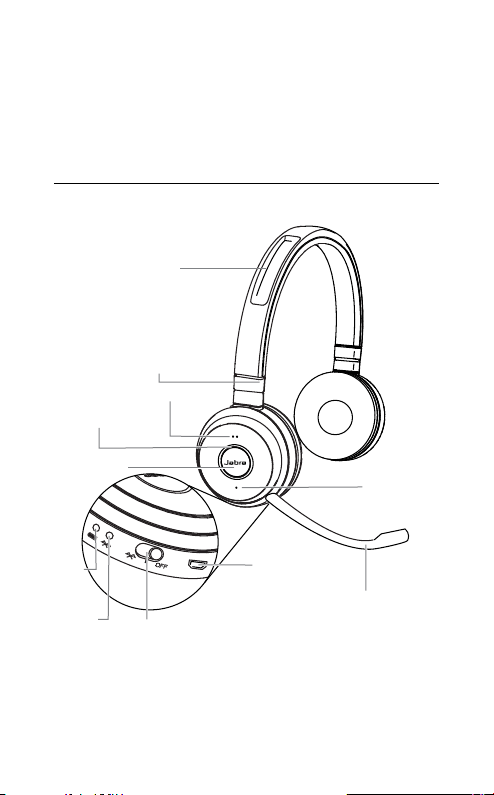
2. JABRA EVOLVE 65
OVERVIEW
2.1 STEREO VARIANT
Adjustable headband
Magnetic
microphone groove
Busylight indicator
Battery
indicator
Bluetooth
indicator
USB connect &
charging port
On/o/connect switch
Microphone
boom-arm
Volume up
Volume down
Multi-function
button
6
ENGLISH
JABRA EVOLVE 65
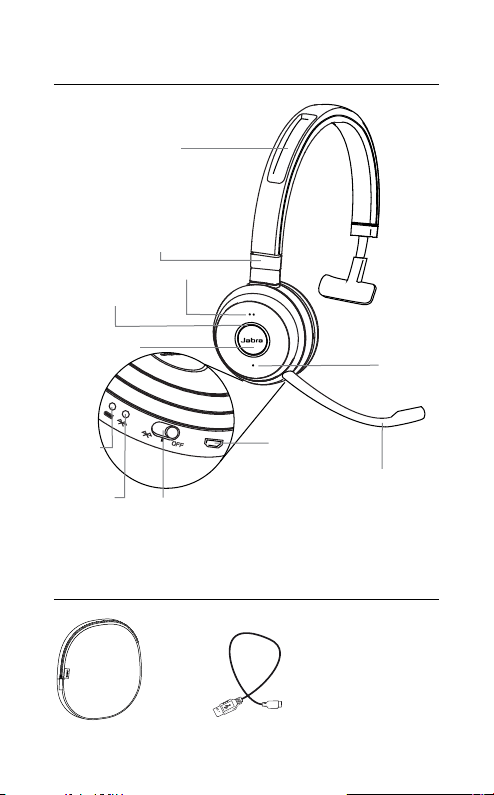
2.2 MONO VARIANT
Busylight indicator
Battery
indicator
Bluetooth
indicator
USB connect &
charging port
On/o/connect switch
Microphone
boom-arm
Volume up
Volume down
Multi-function
button
2.3 INCLUDED ACCESSORIES
STEREO AND MONO
USB cable
Carry pouch
Adjustable headband
Magnetic
microphone groove
7
ENGLISH
JABRA EVOLVE 65
3. HOW TO WEAR
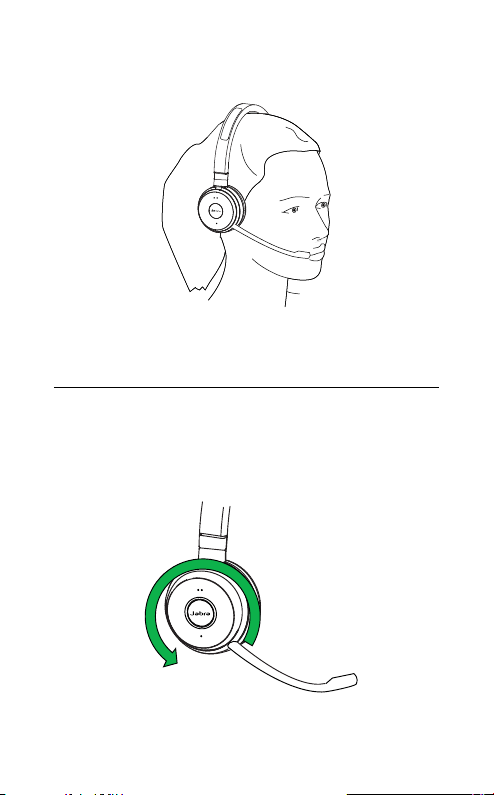
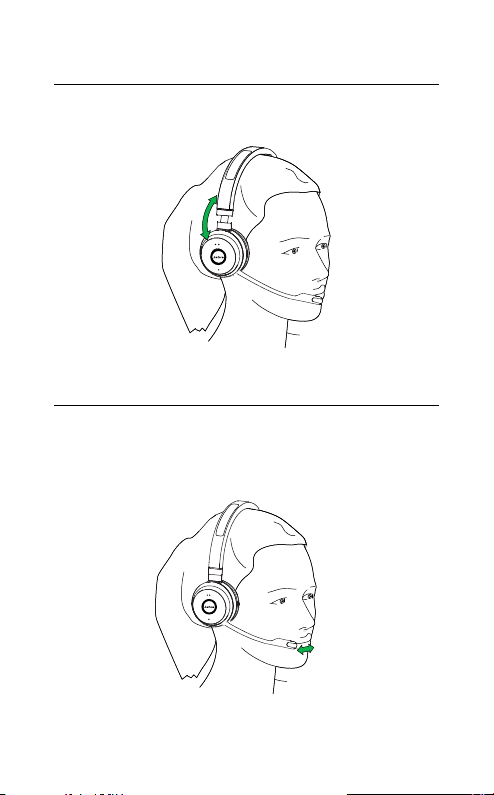
3.1 LEFT OR RIGHT WEARING STYLE
The Jabra Evolve 65 can be worn on the left or
right by flipping the microphone to the other side
(270° limit).
270°
8
ENGLISH
JABRA EVOLVE 65
3.2 ADJUST THE HEADBAND
Adjust the headband to find the most comfortable
fit.
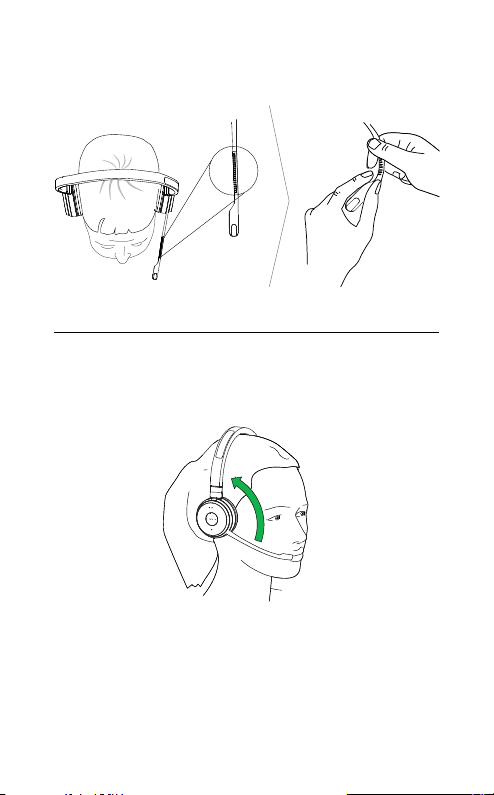
3.3 POSITION THE MICROPHONE
It is recommended to position the microphone
close to your mouth (0.5 inches).
9
ENGLISH
JABRA EVOLVE 65
The microphone is bendable for personal
preference.
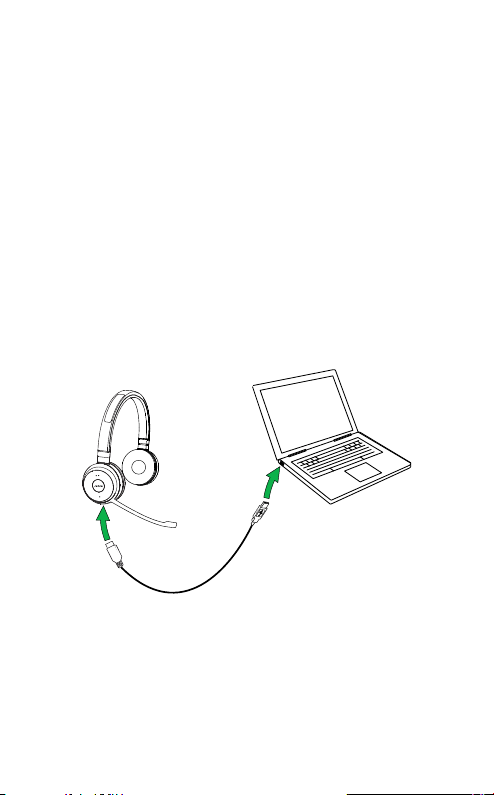
3.4 STORING THE MICROPHONE
When listening to music or outdoors, the
microphone can be magnetically stored in the
headband groove.
10
ENGLISH
JABRA EVOLVE 65
4. HOW TO CHARGE THE
BATTERY
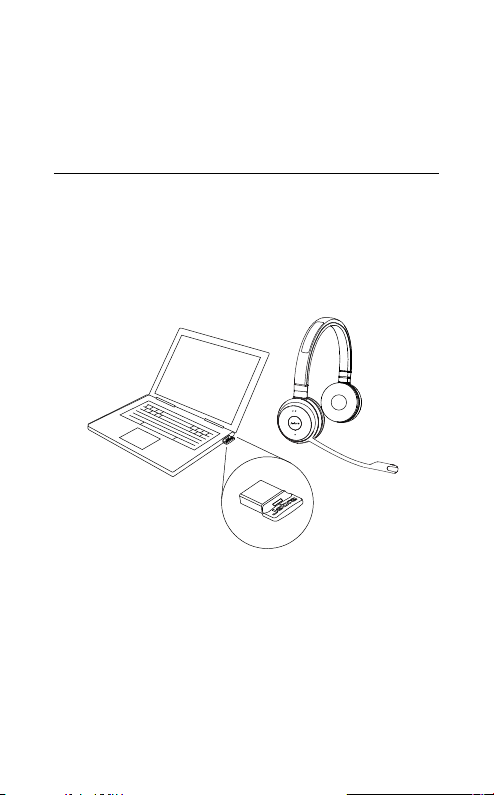
The headset battery will charge when connected
to a PC using a USB cable, or when using any USB
charger supplied with your mobile device.
The headset can still be used for calls while
charging using a USB cable connected to a PC.
It takes approx. 3 hours to charge the battery.
11
ENGLISH
JABRA EVOLVE 65
5. HOW TO CONNECT
5.1 CONNECT TO PC
USING JABRA LINK 360
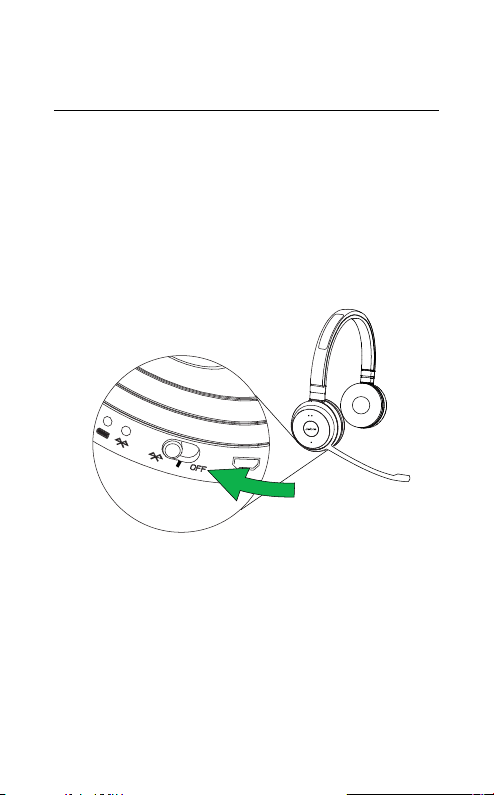
1. Ensure the headset is switched on.
2. Plug the Jabra Link 360 dongle into a USB port
on your PC. The headset and Jabra Link 360 are
already pre-connected.
12
ENGLISH
JABRA EVOLVE 65
5.2 CONNECT TO MOBILE DEVICE
USING BLUETOOTH
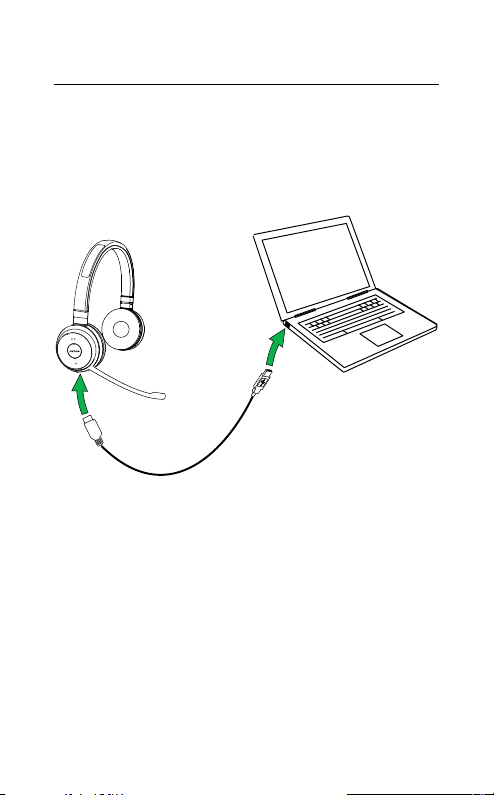
1. Wear the headset.
2. Hold (3 secs) the On/off/connect switch in the
connect position until you hear the voice guided
instructions. The Bluetooth indicator will flash
blue.
3. Follow the voice guided instructions to connect.
13
ENGLISH
JABRA EVOLVE 65
5.3 CONNECT TO PC USING USB CABLE
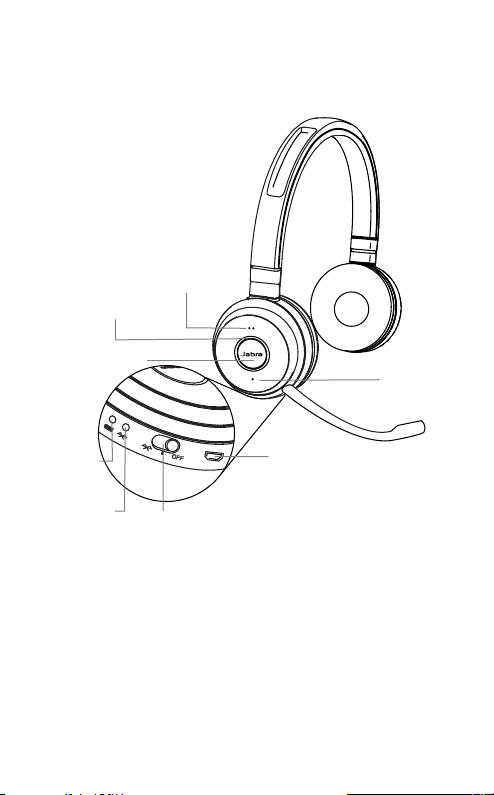
1. Ensure the headset is switched on.
2. Plug the headset into a USB port on your PC
using the supplied USB cable.
14
ENGLISH
JABRA EVOLVE 65
6. HOW TO USE
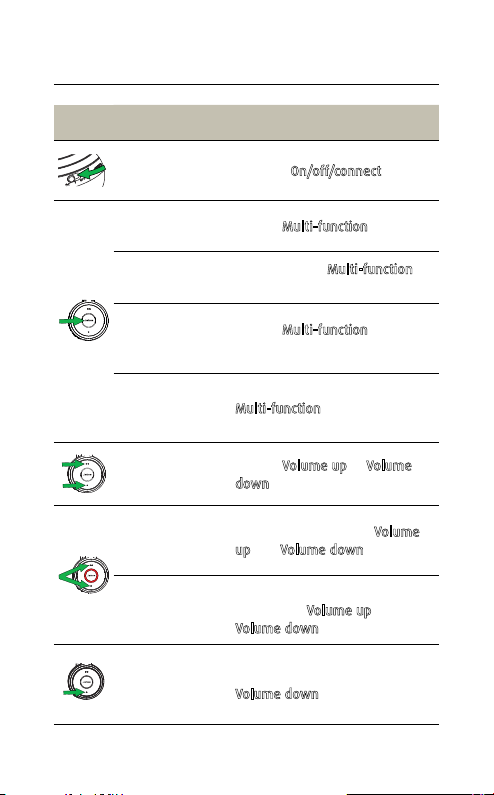
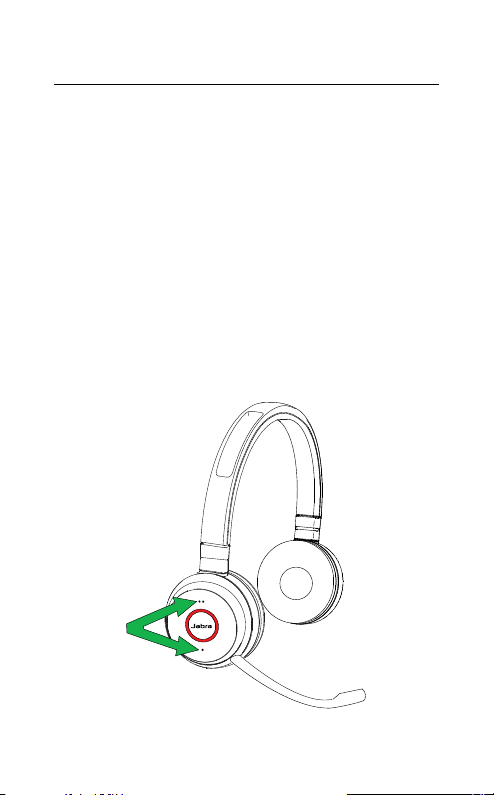
Busylight indicator
Battery
indicator
Bluetooth
indicator
USB connect &
charging port
On/o/connect switch
Volume up
Volume down
Multi-function
button
15
ENGLISH
JABRA EVOLVE 65
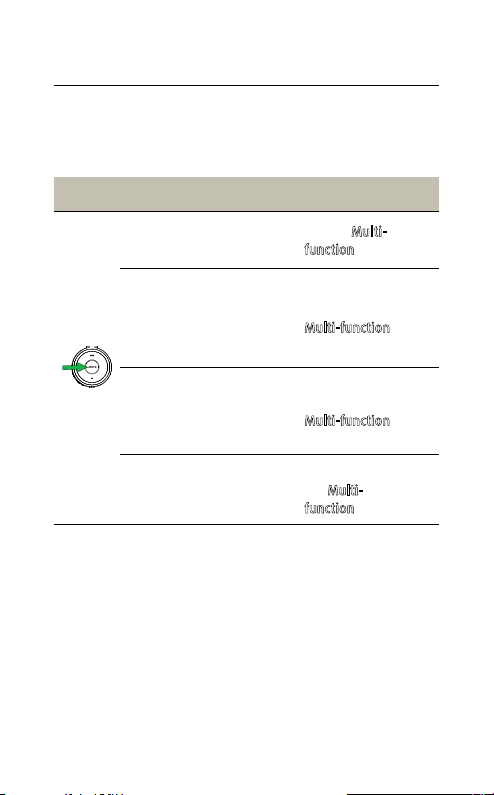
6.1 EVERYDAY USE
FUNCTION ACTION
Headset on/off Slide the On/off/connect switch
Answer/end
call
Tap the
Multi-function button
Reject call
Double-tap the
Multi-function
button
Battery and
connection
status
Tap the
Multi-function button
when not on a call
Enable/disable
Voice prompts
Press and hold the
Multi-function button while
turning on the headset
Adjust volume
Tap the
Volume up or Volume
down button
Manual
busylight
on/off
Simultaneously tap the
Volume
up and Volume down buttons
Enable/disable
Busylight
function
Simultaneously press and hold
(3 secs) the
Volume up and
Volume down buttons
Mute/unmute
microphone
Press and hold (2 secs) the
Volume down button
16
ENGLISH
JABRA EVOLVE 65
6.2 MULTIPLE CALL HANDLING
The headset can accept and handle multiple calls
at the same time.
FUNCTION ACTION
End current call and
answer incoming call
Tap the Multi-
function button
Switch between held call
and active call
Press and hold
(2 secs) the
Multi-function
button
Put current call on hold
and answer incoming call
Press and hold
(2 secs) the
Multi-function
button
Reject incoming call,
when on a call
Double-tap
the
Multi-
functionbutton
17
ENGLISH
JABRA EVOLVE 65
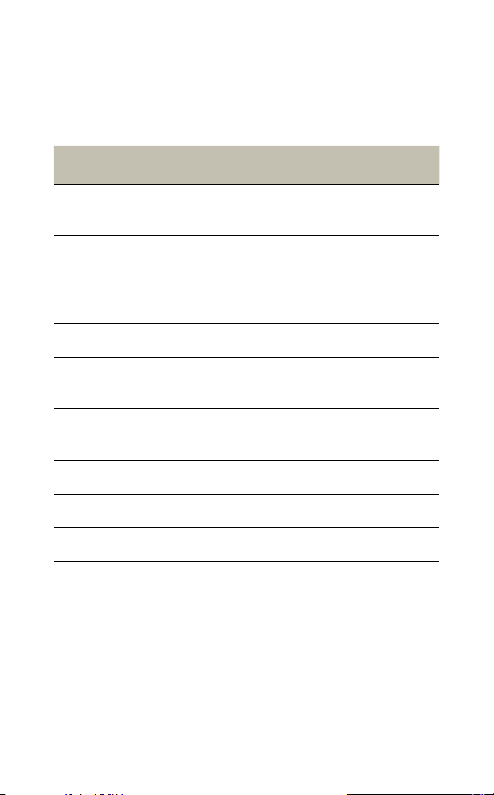
6.3 BUSYLIGHT
The busylight indicator on the headset can be
turned on to let others know that you are busy.
MANUALLY TURN BUSYLIGHT ON/OFF
To manually turn the busylight on/off, tap both the
Volume up and Volume down buttons at the same
time.
ENABLE/DISABLE BUSYLIGHT FUNCTION
To enable/disable the busylight function, press
and hold (3 secs) both the Volume up and Volume
down buttons at the same time.

18
ENGLISH
JABRA EVOLVE 65
7. SUPPORT
7.1 FAQ
View the FAQs on Jabra.com/evolve65
7.2 HOW TO CARE FOR YOUR HEADSET
Always store the headset with the power off
and safely protected.
Avoid storage at extreme temperatures (above
55°C/131°F or below -10°C/14°F). This can
shorten battery life and may adversely affect
the headset.
19
ENGLISH
JABRA EVOLVE 65
8. TECHNICAL
SPECIFICATIONS
JABRA EVOLVE 65 HEADSET SPECIFICATION
Headset weight:
Mono headset: 79 g
Stereo headset: 111 g
Headset dimensions:
Mono headset: L 154.4 mm x
W 58.6 mm x H 170.4 mm
Stereo headset: L 155.5 mm x
W 58.6 mm x H 170.5 mm
Microphones: Noise cancelling microphone
Speaker:
28 mm Dynamic PureSound
speakers (Hi-Fi)
Speaker maximum input
power:
10 mW
Speaker frequency range: 70 hz - 20 kHz
Operating temperature: -10°C to 55°C (14°F to 131°F)
Storage temperature: -20°C to 25°C (-4°F to 77°F)

20
ENGLISH
JABRA EVOLVE 65
BLUETOOTH ADAPTER
(JABRA LINK 360)
SPECIFICATION
PC connection: USB 2.0
Bluetooth version: 4.0
Bluetooth range: Up to 100m (300 feet), Class 1
Bluetooth profiles: A2DP (v1.2), Hands free profile (v1.6)
Simultaneous Bluetooth
connections:
1
Bluetooth audio bandwidth HD voice (wideband), A2DP
Visual indicators: Multicolor LED

21
ENGLISH
JABRA EVOLVE 65
REV D
www.jabra.com/evolve65