WE’RE HERE TO HELP
If you have any questions along the way, our US-based install experts are standing by to help.
Call us at: 800-359-5520 Or, chat at: SANUS.com/chatSP
WSWM
21
and WSWM
22
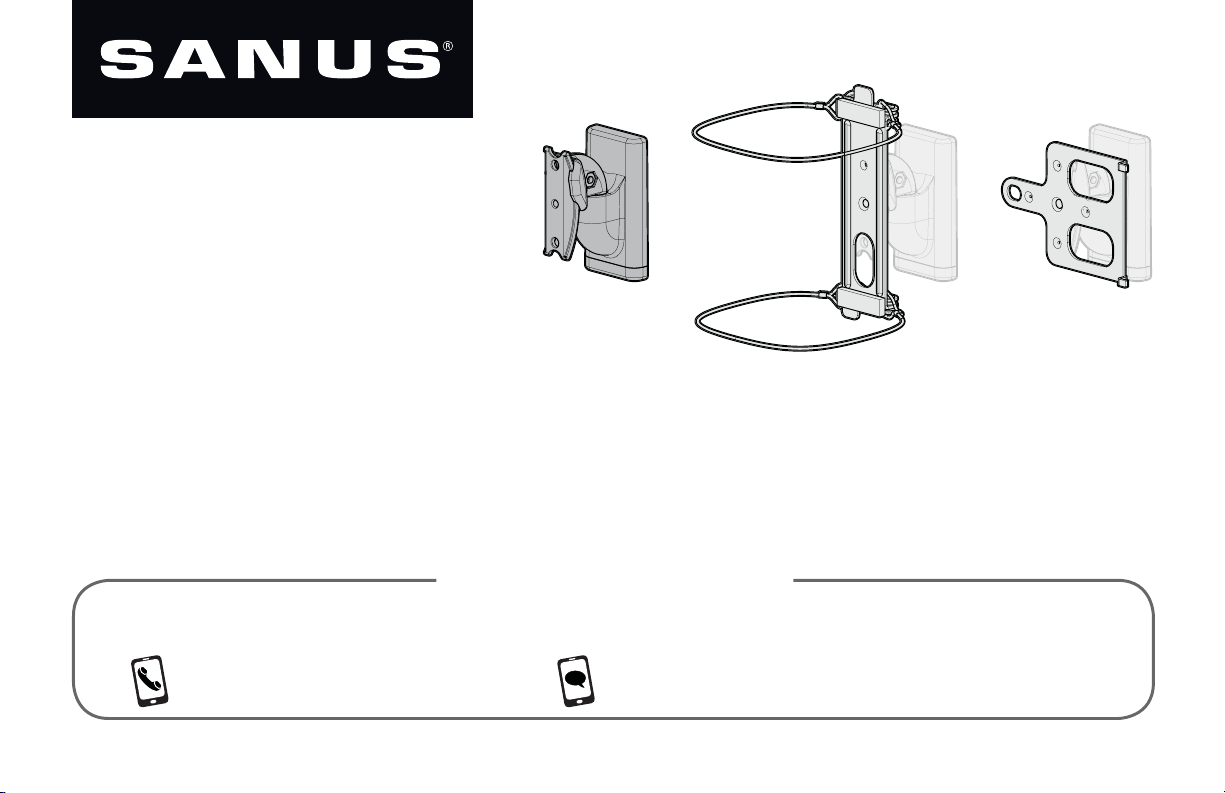
WIRELESS SPEAKER
WALL MOUNT
INSTRUCTION MANUAL
2
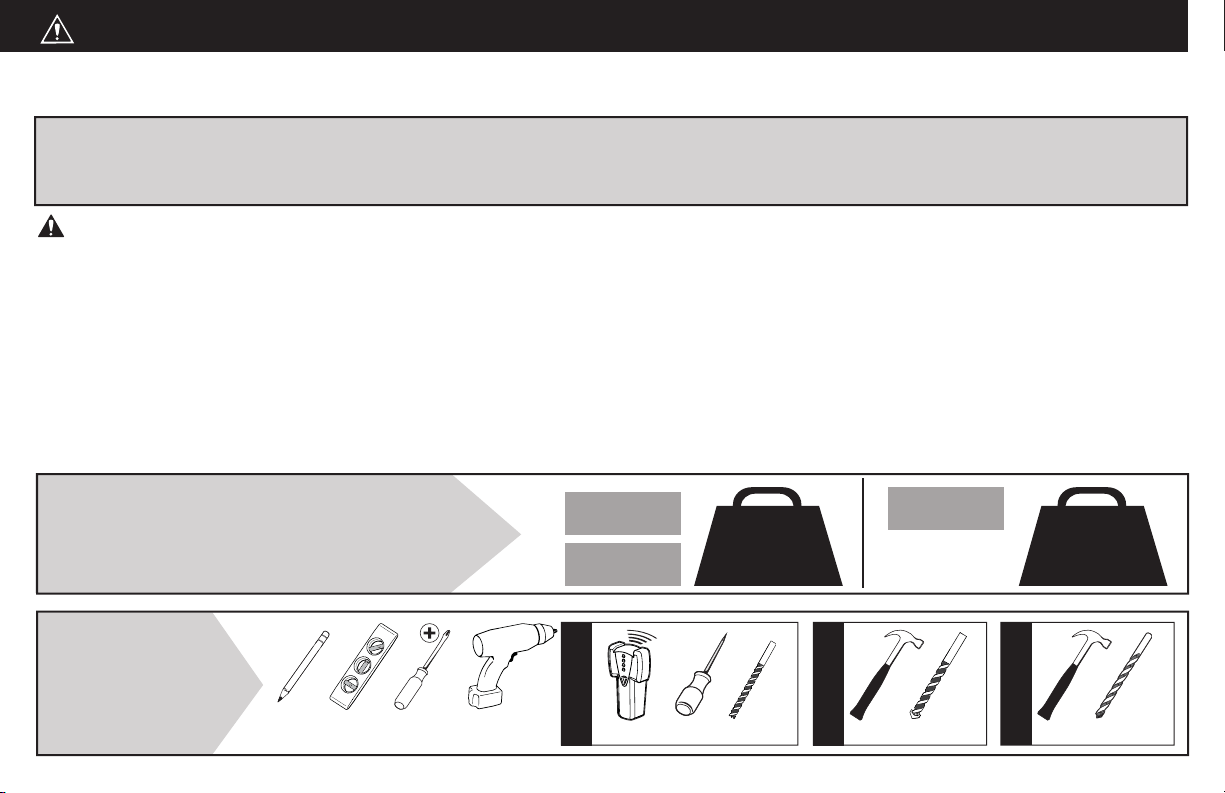
CAUTION: IMPORTANT SAFETY INSTRUCTIONS — PLEASE READ ENTIRE MANUAL PRIOR TO USE — SAVE THESE INSTRUCTIONS
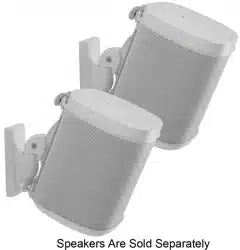
This mount is designed to support Sonos
®
One™, PLAY:1™ and PLAY:3™ speakers,
as well as other wireless speakers with similar mounting holes.
CAUTION: Avoid potential personal injuries and property damage!
•
Check your speaker owner’s manual to see if there are any special requirements for mounting your speaker.
•
Please read through these instructions completely to be sure you’re comfortable with this easy install process.
•
Do not use this product for any purpose not explicitly specifi ed by manufacturer.
•
Manufacturer is not responsible for damage or injury caused by incorrect assembly or use.
•
The wall must be capable of supporting fi ve times the weight of the speaker and mount combined.
•
If you do not understand these instructions or have doubts about the safety of the installation, assembly or use of this product,
contact Customer Service at 1-800-359-5520.
Before getting started, let’s make sure this product is perfect for you!
4 lbs.
(1.8 kg)
10 lbs.
(4.5 kg)
Speaker Weight Limit
DO NOT EXCEED
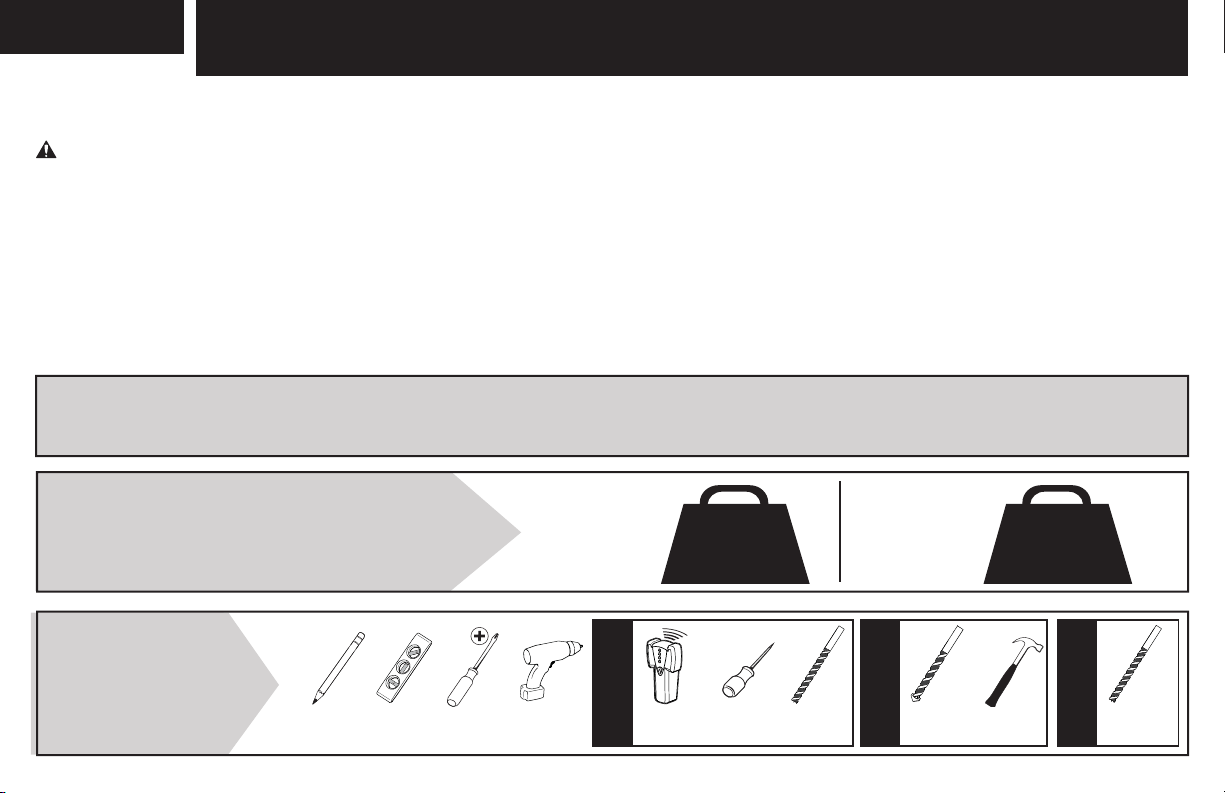
Tools
Needed
Wood Stud Install
Concrete Install
Awl
Pencil Level
Stud Finder
Screwdriver
Drill Bit
Electric
Drill
Hammer Drill Bit
One™
PLAY:1™
PLAY:3™
[and other
speakers]
1/4 in.
(6.5 mm)
Masonry
1/4 in.
(6.5 mm)
1/8 in.
(3 mm)
Wood
Drywall Install
Hammer Drill Bit
3
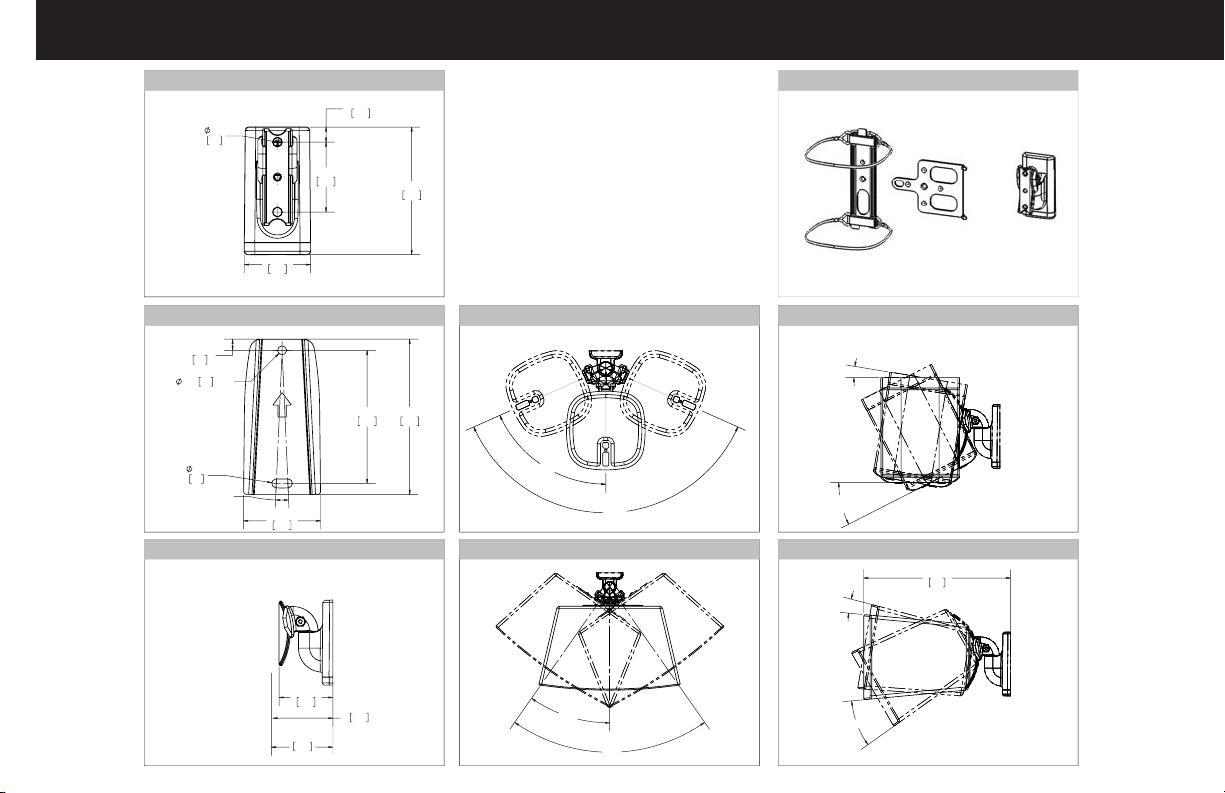
66°
132°
9°
27° PLAY:1
18° SONOS One
9
224
9°
30°
35°
70°
0.45
11.5
3.83
97.2
2.10
53.3
1.99
50.6
2X
0.26
6.6
5.00°
3.00
76.1
0.20
5.1
THRU
0.20
5.1
3.50
88.9
1.73
44.0
0.25
6.4
2.43
61.6
2.77
70.3
PLAY 3
2.70
68.6
PLAY ONE
TV INTERFACE
WALL PLATE
FULLY ASSEMBLED MOUNT
TOP VIEW - SONOS
®
One™ / PLAY:1™
TOP VIEW - SONOS
®
PLAY:3
™
SIDE VIEW - SONOS
®
One
™
/ PLAY:1
™
SIDE VIEW - SONOS
®
PLAY:3
™
3-D
Dimensions
4
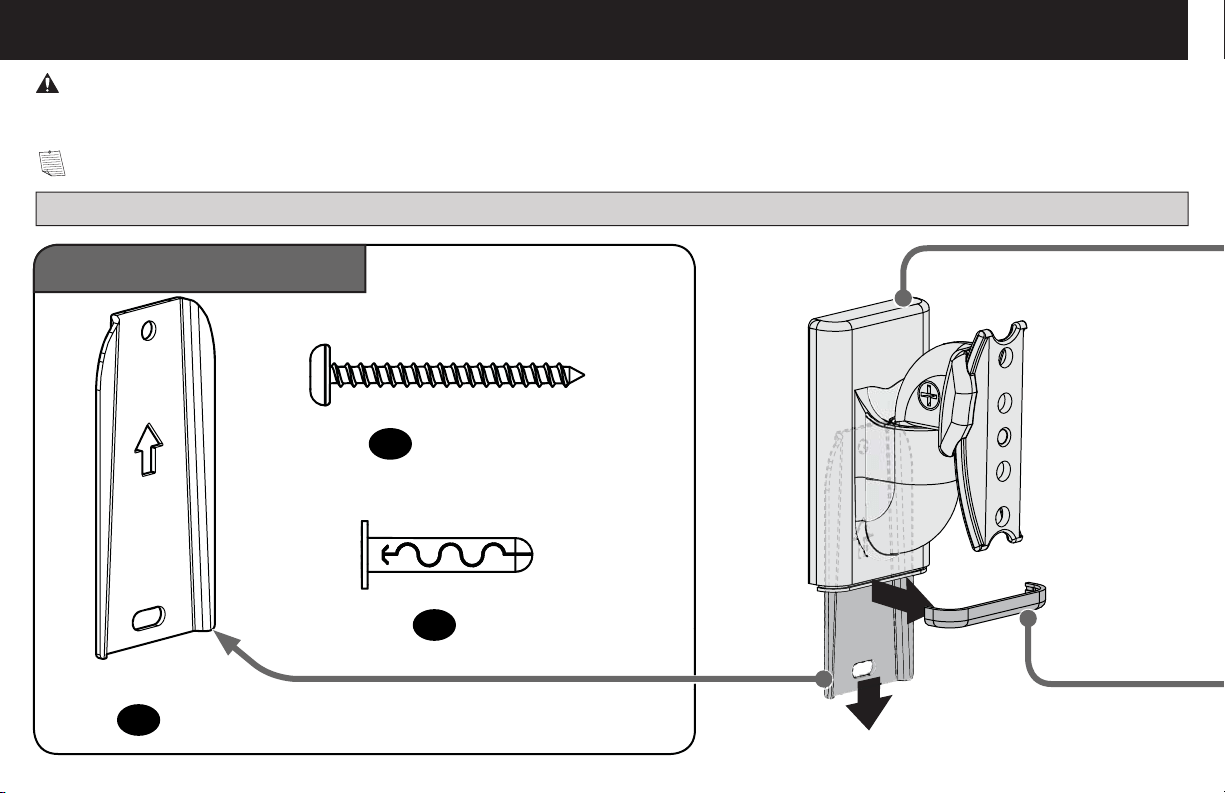
Supplied Parts and Hardware
a
b
STEP 1 Parts and Hardware
Wall Plate Screw
Wall Plate
Anchor
#10 x 1¾ in.
AF6 Toggler
02 x2
01 x1
03 x2
Quantities shown are for one speaker mount.
NOTE: Not all hardware included will be used.
WARNING: This product contains small items that could be a choking hazard if swallowed.
Before starting assembly, verify all parts are included and undamaged. If any parts are missing or damaged, do not return the damaged item to
your dealer; contact Customer Service. Never use damaged parts!
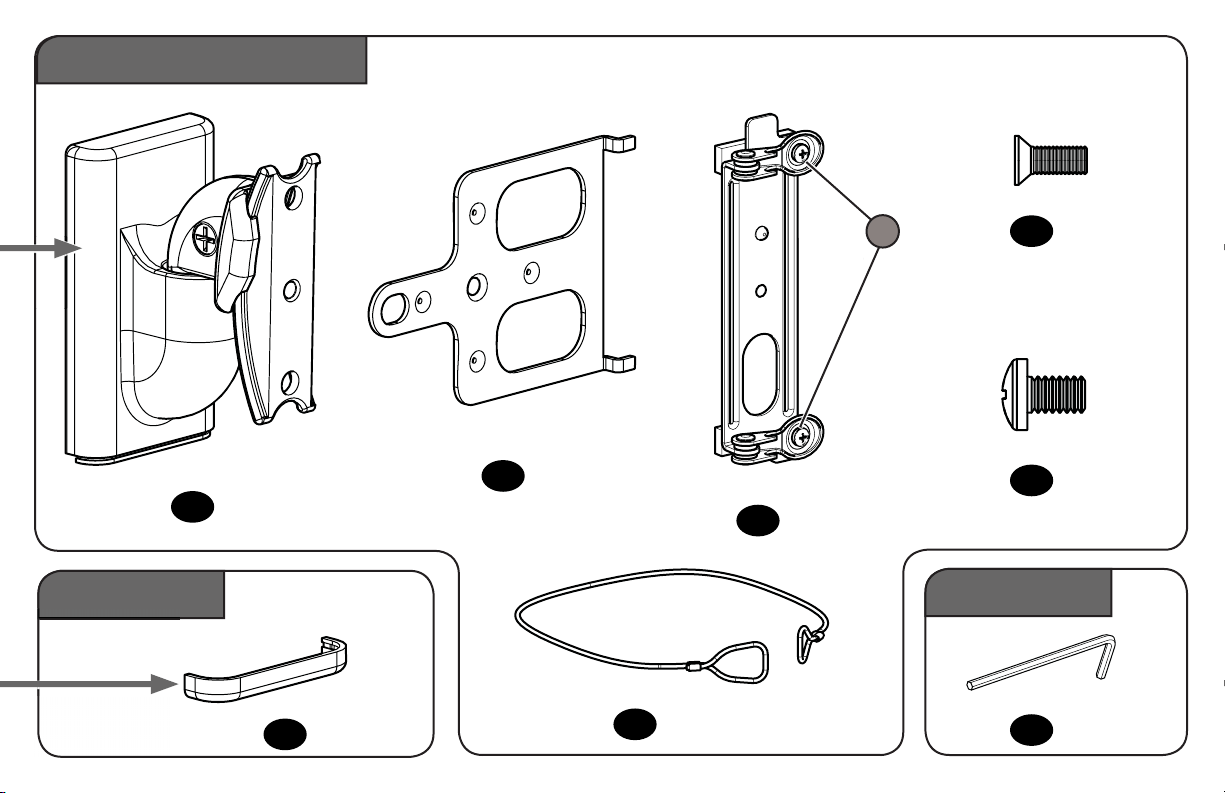
5
STEP 3 Part
Adjustments
Mount
Play:3
™
Interface
Sonos One
™
Interface
Screw
(attached)
Sonos One
™
wire
Cap
Speaker Screw
(and Other Wireless Speakers)
Interface Screw
1/4-20 x 10mm
Reset Tool
10-24 x 1/2 in.
STEP 2 Parts and Hardware
04 x1
05 x1
06 x1
07 x2
10 x1
08 x1
09 x1
11 x1
S
cr
ew
(
attached
)
S
6
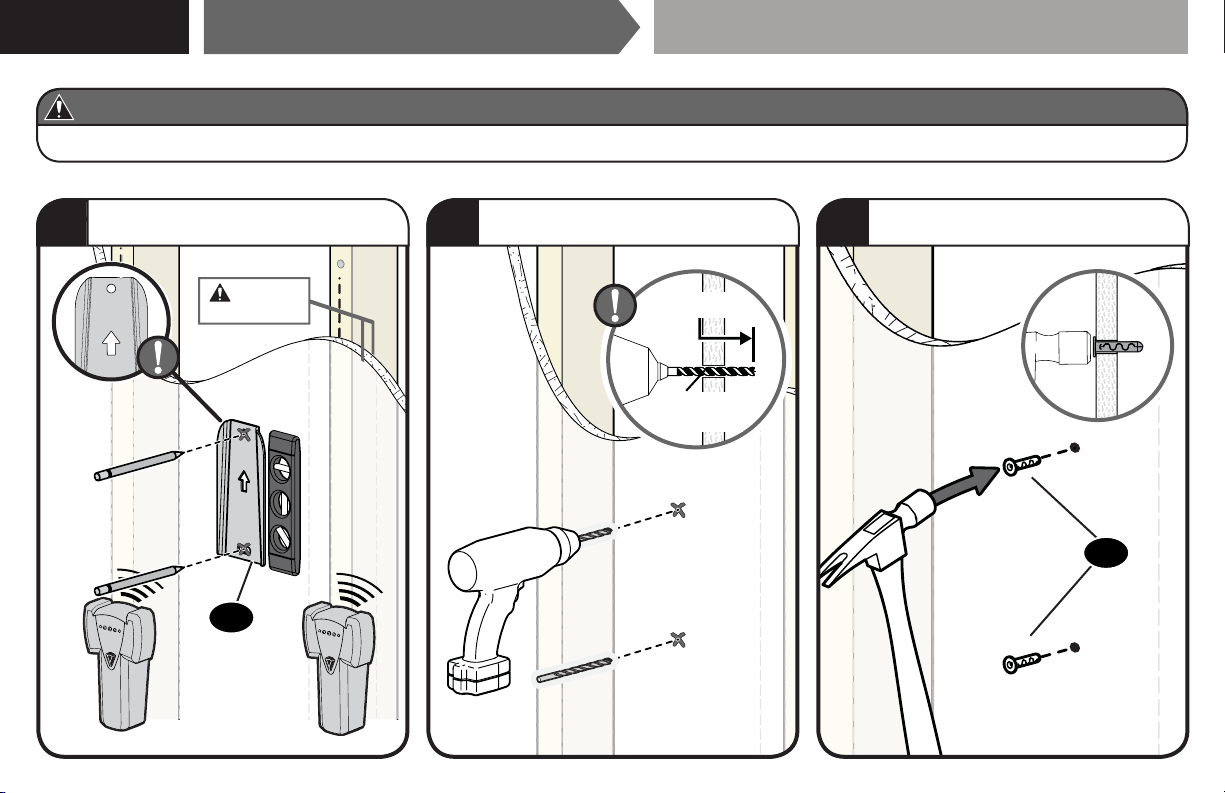
CAUTION: Avoid potential personal injury or property damage!
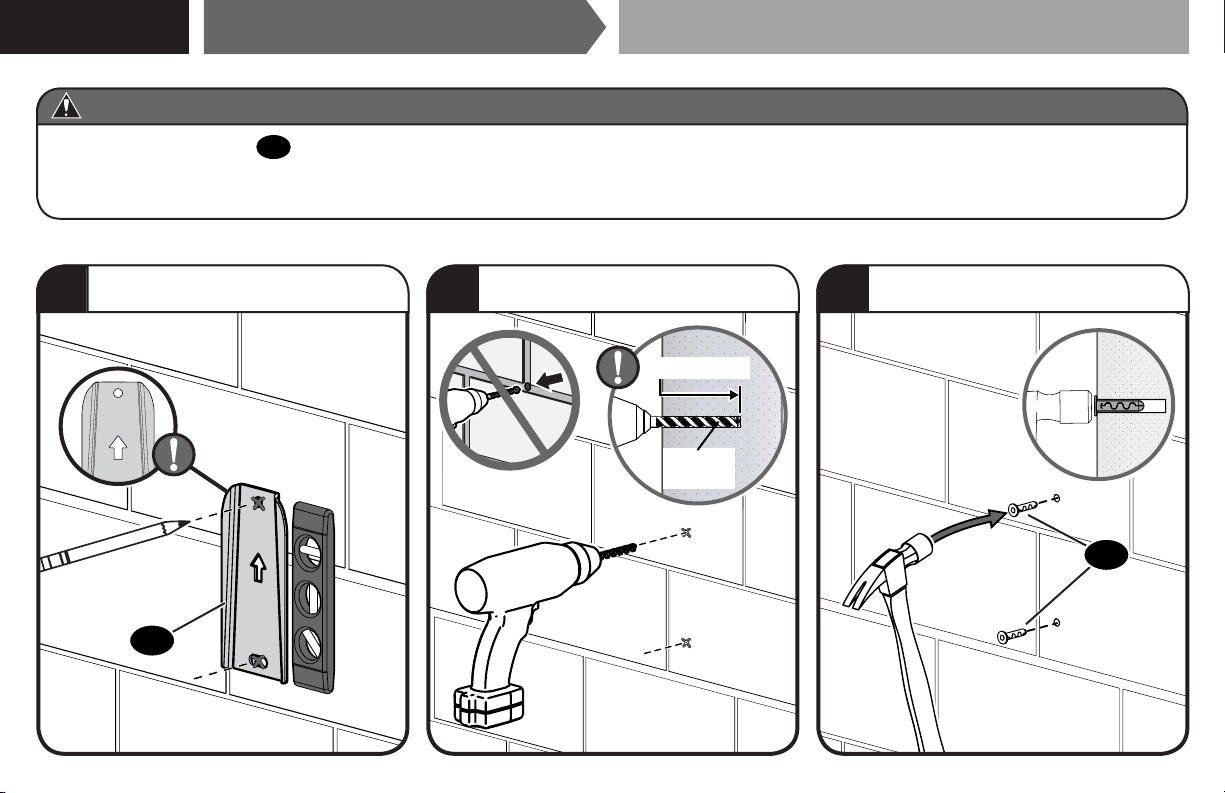
● Drywall covering the wall, must not be less than 1/2 in. (12.7 mm)
Min. 1/2 in.
(12.7 mm)
UP
STEP 1A
Drywall Only InstallationAttach Wall Plate to Wall
1
Mark hole locations BETWEEN studs.
2
Drill two holes.
3
Insert two Anchors, flush with drywall.
1/4 in.
(6.55 mm)
1 in. (25 mm)
03
01
7
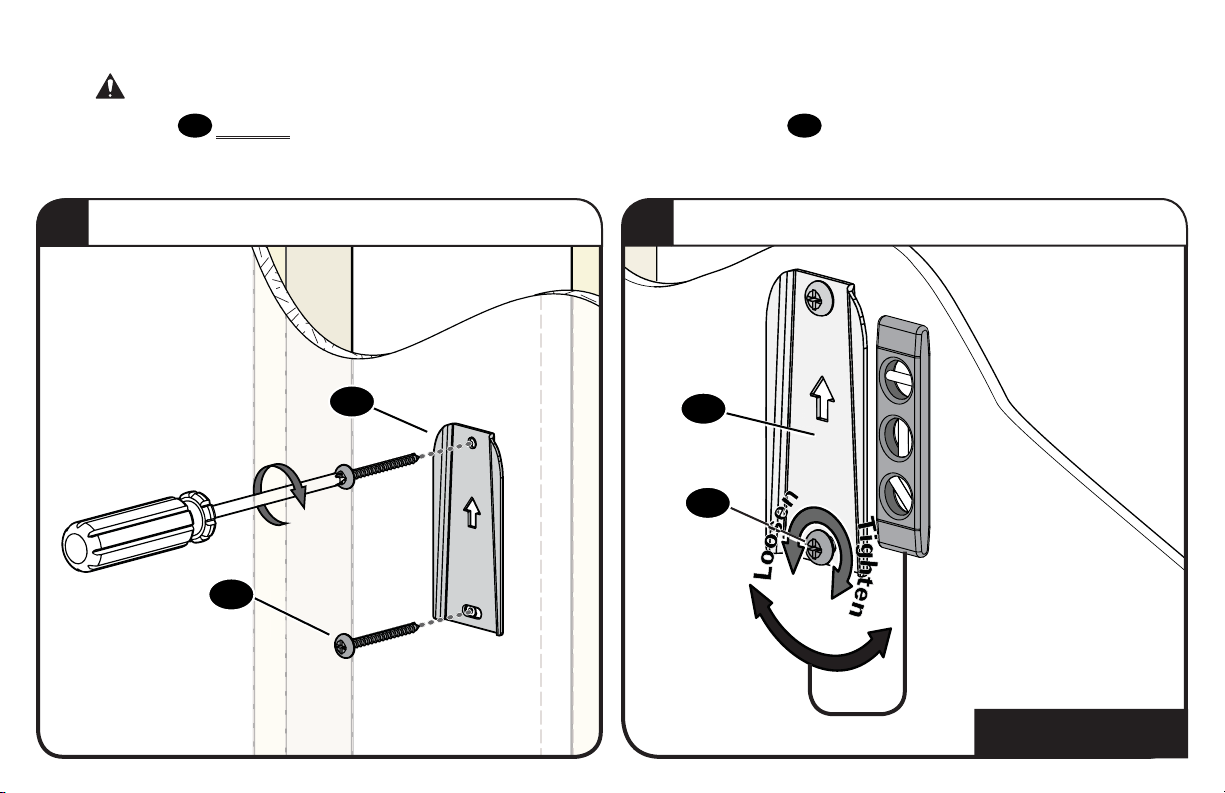
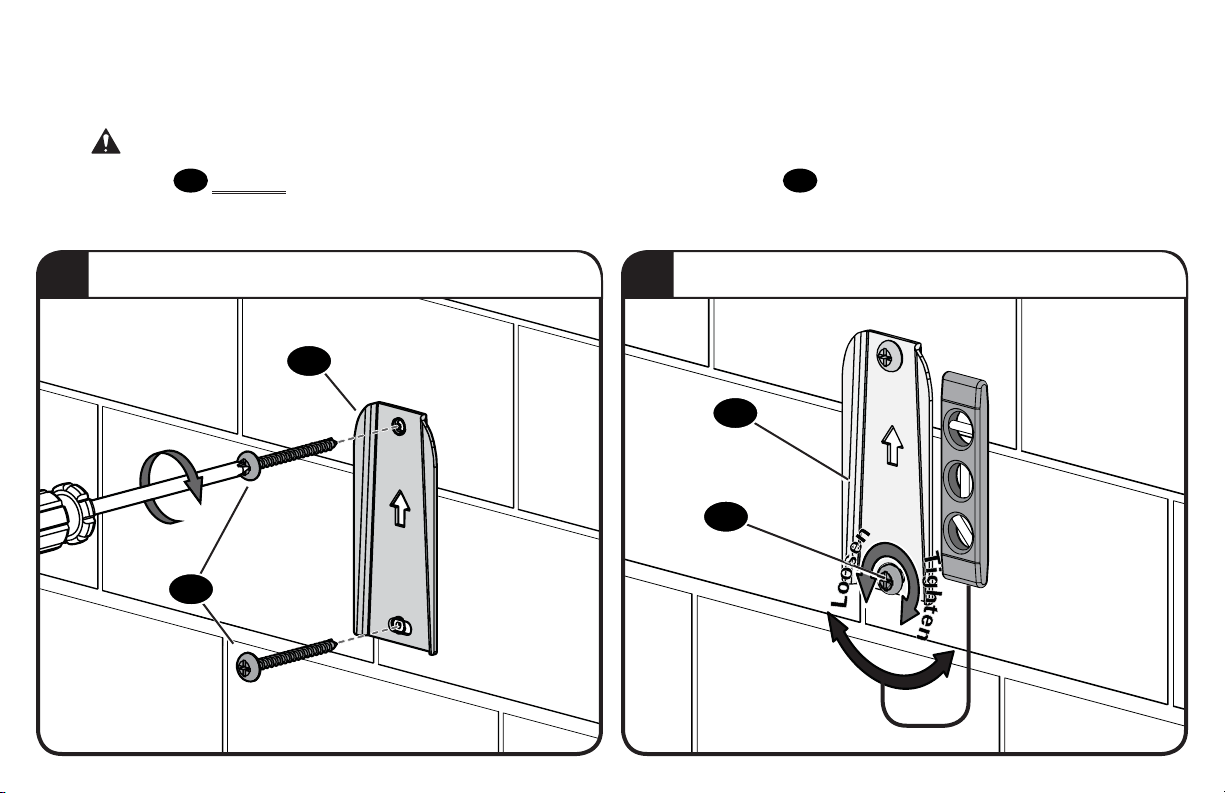
4
Secure wall plate to wall.
5
Loosen lower screw for level adjustment - tighten when finished.
02
02
01
01
Both screws
02
MUST BE firmly tightened to prevent unwanted movement of the wall plate
01
.
Ensure the wall plate is securely fastened to
the wall before continuing on to the next step.
CAUTION:
Avoid potential personal injury or property damage!
Go to STEP 2, PAGE 12.
8
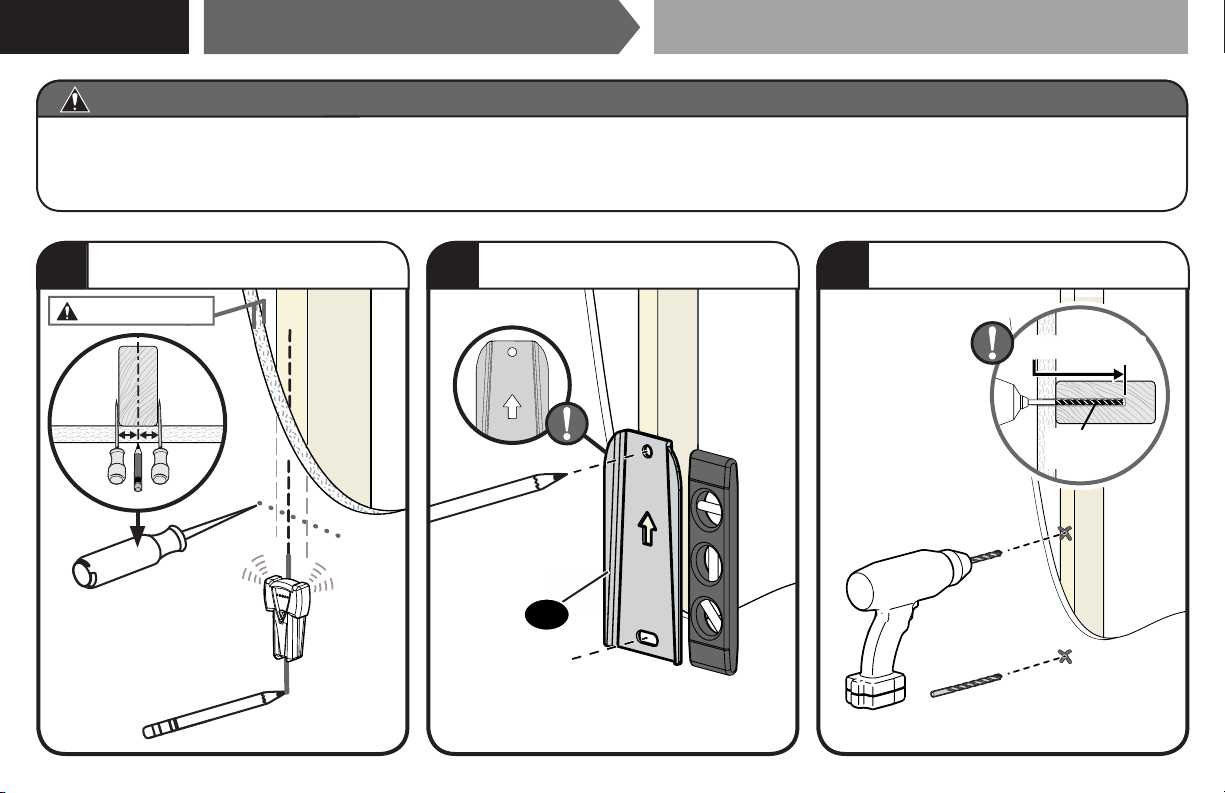
● Drywall covering the wall, must not exceed 5/8 in. (16 mm)
● Minimum wood stud size: nominal 2 x 4 in. (51 x 102 mm) actual 1½ x 3½ in. (38 x 89 mm)
● Stud center must be verified
Max. 5/8 in. (16 mm)
CAUTION: Avoid potential personal injury or property damage!
UP
1
Locate your stud CENTER.
2
Mark two hole locations.
3
Drill two holes.
1/8 in.
(3 mm)
1 ¾ in. (45 mm)
STEP 1B
Wood Stud InstallationAttach Wall Plate to Wall
01
9
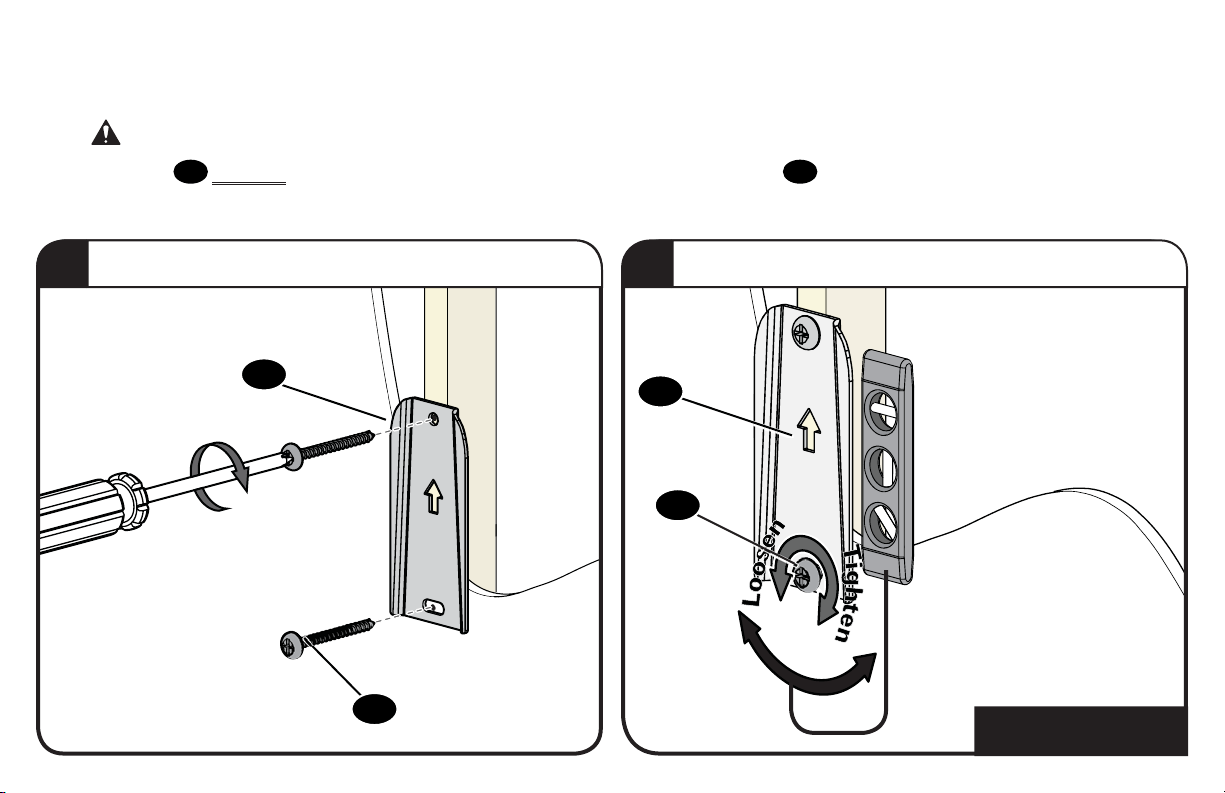
4
Secure wall plate to wall.
5
Loosen lower screw for level adjustment - tighten when finished.
Both screws
02
MUST BE firmly tightened to prevent unwanted movement of the wall plate
01
.
Ensure the wall plate is securely fastened to
the wall before continuing on to the next step.
CAUTION:
Avoid potential personal injury or property damage!
Go to STEP 2, PAGE 12.
02
02
01
01
10
● Mount the wall plate
01
directly onto the concrete surface (no wall covering)
● Minimum solid concrete thickness: 8 in. (203 mm)
● Minimum concrete block size: 8 x 8 x 16 in. (203 x 203 x 406 mm)
CAUTION: Avoid potential personal injury or property damage!
UP
1
Mark two hole locations.
2
Drill two holes.
3
Insert two Anchors, flush with drywall.
1/4 in.
(6.5 mm)
2 in. (50 mm)
03
STEP 1C
Solid Concrete or Concrete Block Installation
Attach Wall Plate to Wall
01
11
4
Secure wall plate to wall.
5
Loosen lower screw for level adjustment - tighten when finished.
Both screws
02
MUST BE firmly tightened to prevent unwanted movement of the wall plate
01
.
Ensure the wall plate is securely fastened to
the wall before continuing on to the next step.
CAUTION:
Avoid potential personal injury or property damage!
02
02
01
01
12
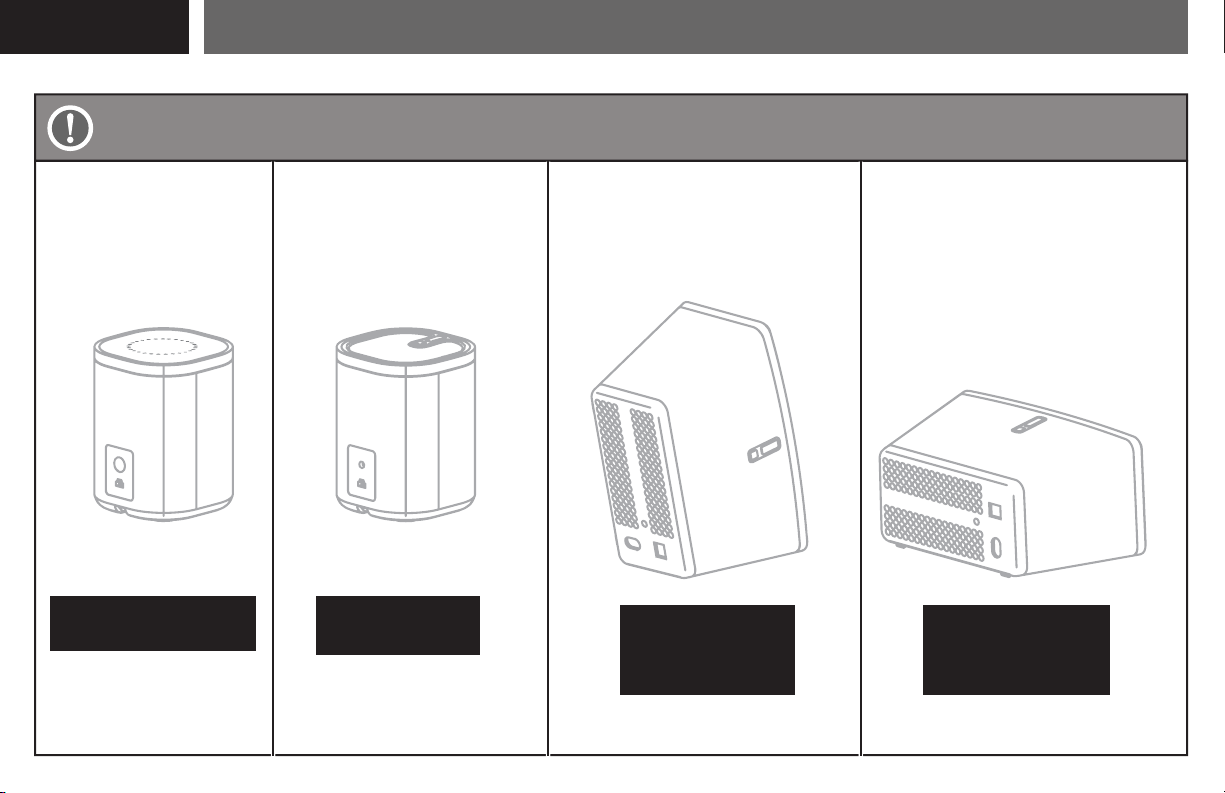
Attach Mount to Speaker
STEP 2
Sonos
®
PLAY:1
™
Sonos
®
One
™
PAGE 13 PAGE 18
PAGE 19 PAGE 20
Sonos
®
PLAY:3
™
Sonos
®
PLAY:3
™
Horizontal InstallationVertical Installation
[and other speakers]
[only]
STEP 2A/2B
STEP 2C
STEP 2E
HORIZONTAL
STEP 2D
VERTICAL
Based on your speaker model, follow the correct STEP 2 below.
13
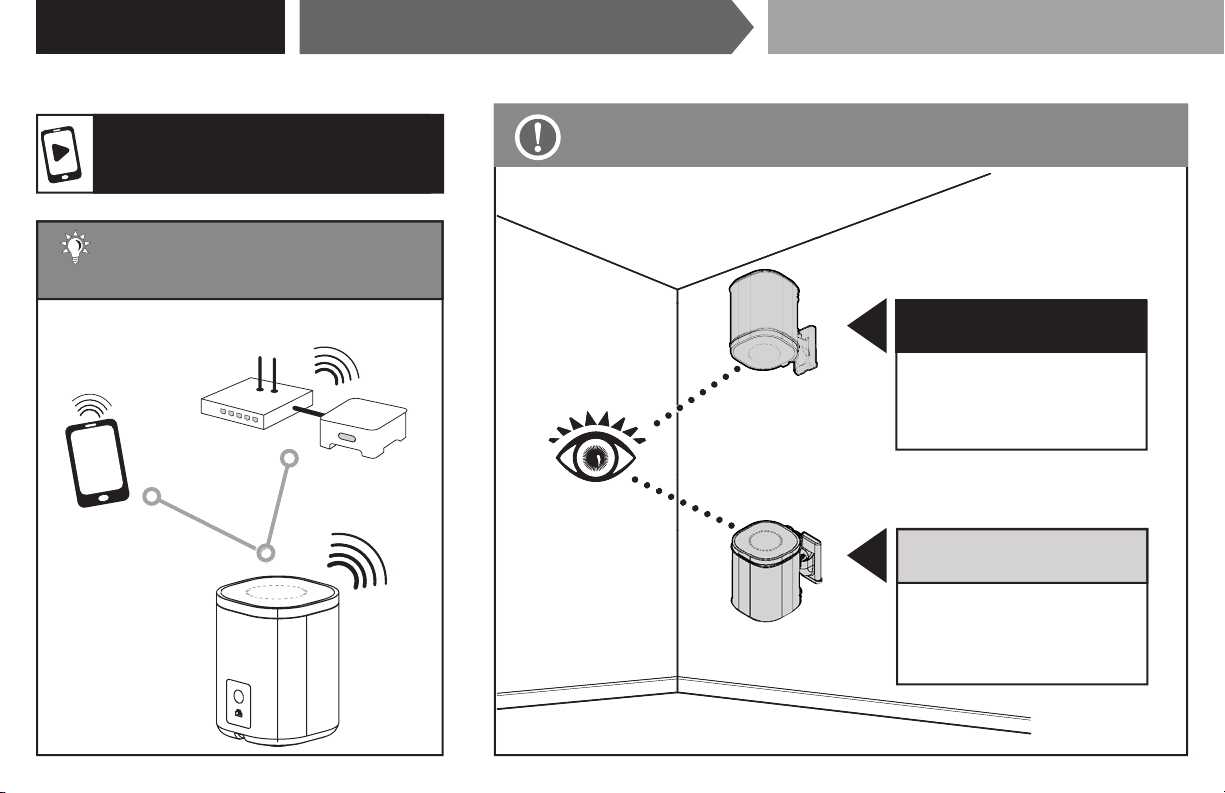
TIP: Set up your Sonos
®
speaker prior to mounting.
BELOW EYE-LEVEL
(speaker right-side up)
Follow PAGE 16.
STEP 2B
ABOVE EYE-LEVEL
(speaker upside down)
Follow PAGE 14.
STEP 2A
Follow the step below based on your installation.
For a helpful install video,
search your model at SANUS.com.
Attach Mount to Speaker SONOS
®
One
™
STEP 2A/2B
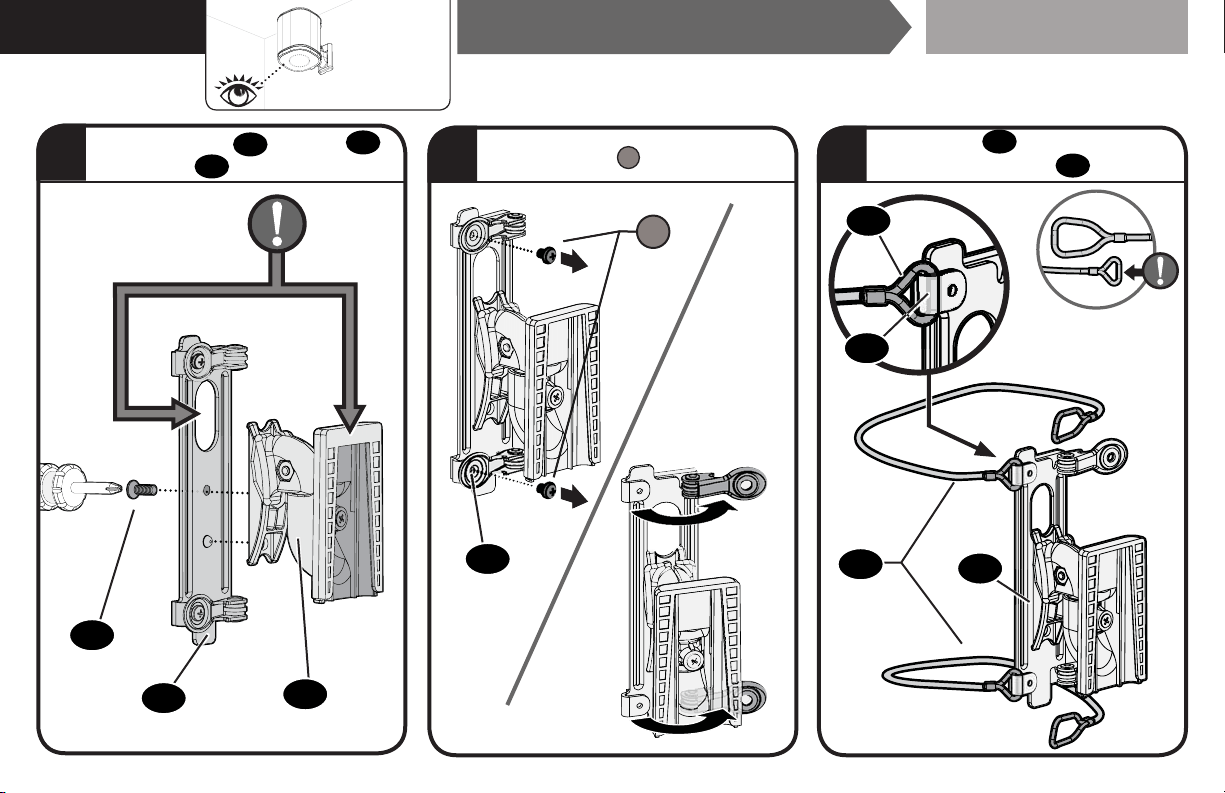
14
1
08
04
06
Remove screws
S
and open clamps.
S
Attach wires
07
(SMALL loop) to
FIXED ends of bracket
06
.
Attach interface
06
to mount
04
with screw
08
.
2 3
Attach Mount to Speaker SONOS
®
One
™
06
06
07
06
07
STEP 2A
Above
Eye
Level
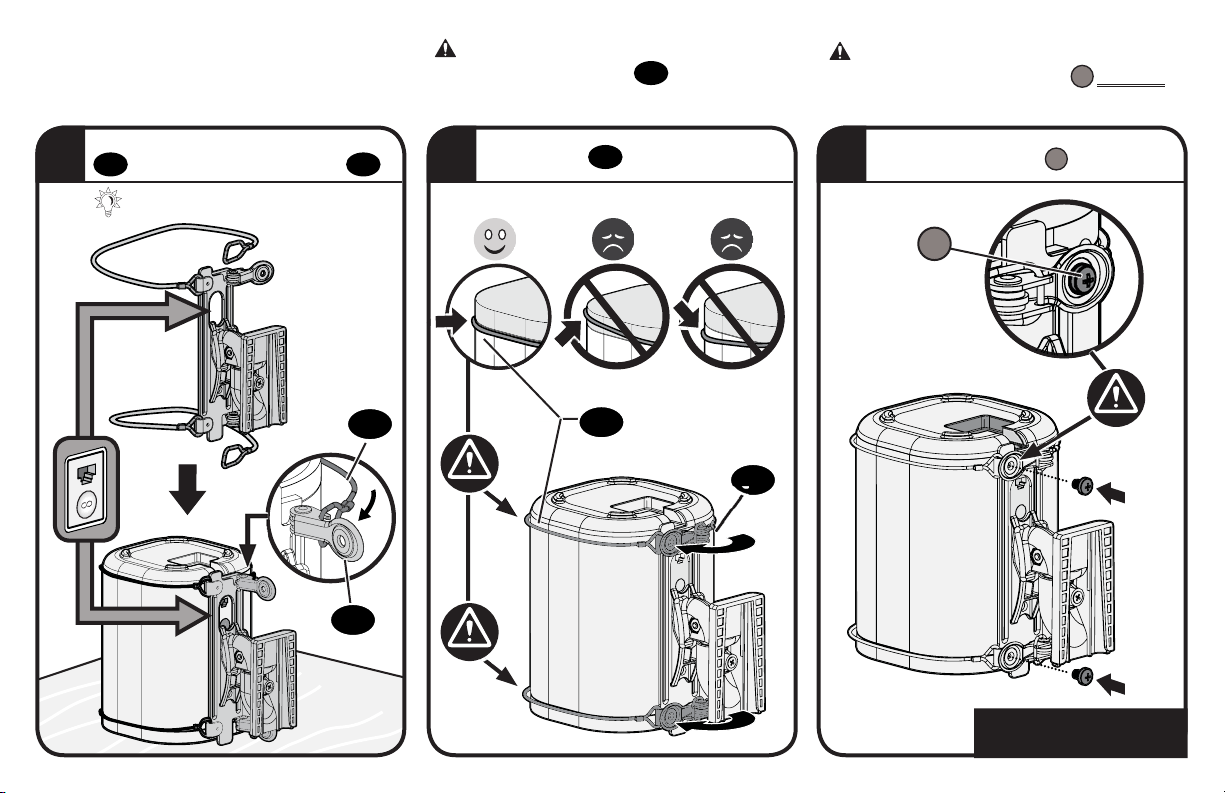
15
5
Slide over speaker and attach wires
07
to CLAMP ends of bracket
06
.
TIP: Rest speaker UPSIDE DOWN.
Align wires
07
and close clamps.
Secure with screws
S
.
CAUTION: Avoid potential personal injury
or property damage! Both screws
S
MUST BE
installed to secure the speaker to the mount.
CAUTION: Avoid potential personal injury
or property damage! Wires
07
must NOT
extend beyond the speaker's end caps.
S
06
07
Go to STEP 3, PAGE 21.
4 6
06
07
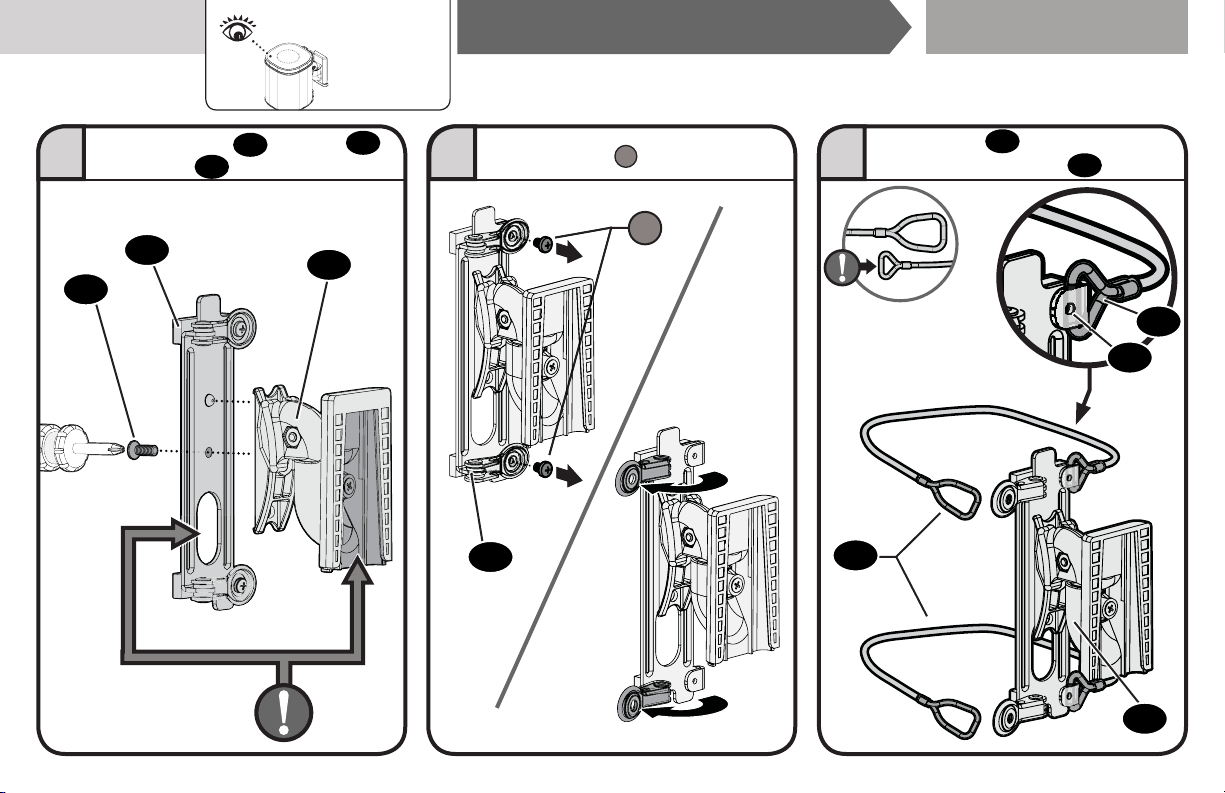
16
08
06
04
Attach wires
07
(SMALL loop) to
FIXED ends of brackets
06
.
Remove screws
S
and open clamps.
06
07
Attach interface
06
to mount
04
with screw
08
.
1 2 3
S
Attach Mount to Speaker SONOS
®
One
™
06
06
07
STEP 2B
Below
Eye
Level
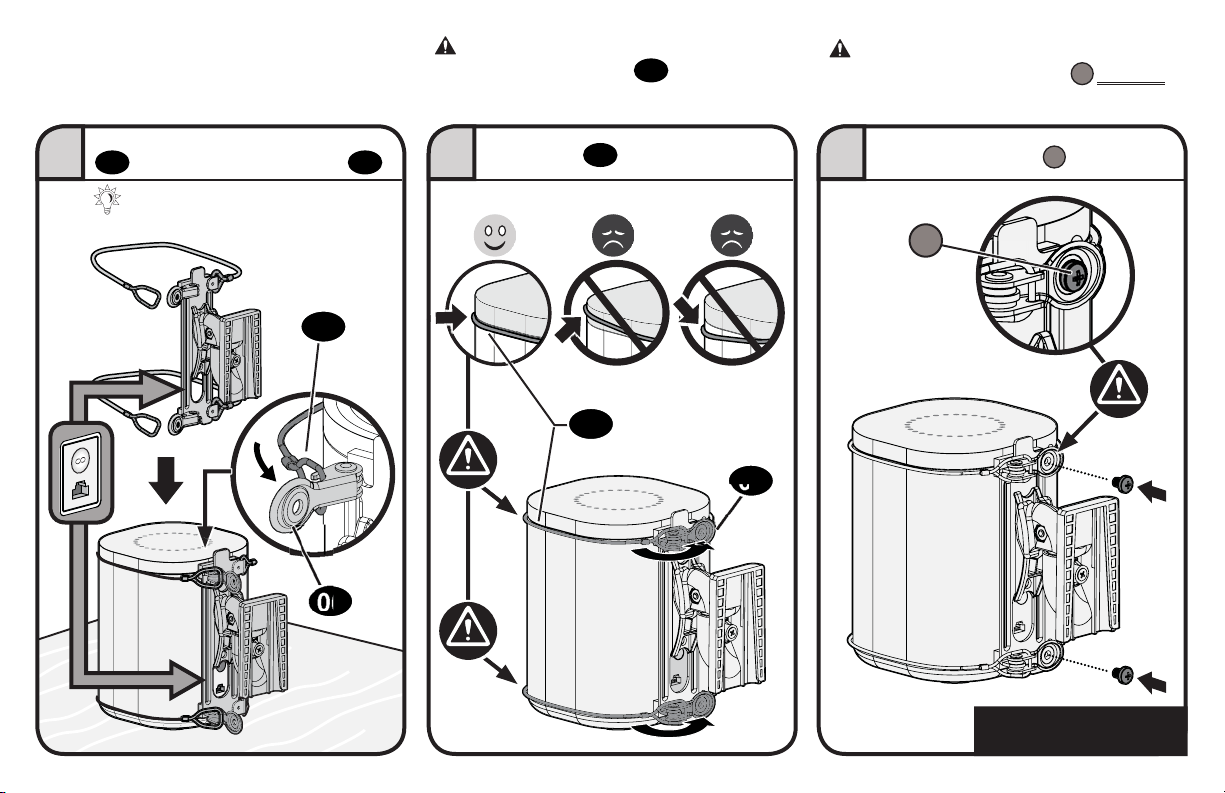
17
Secure with screws
S
.
CAUTION: Avoid potential personal injury
or property damage! Both screws
S
MUST BE
installed to secure the speaker to the mount.
CAUTION: Avoid potential personal injury
or property damage! Wires
07
must NOT
extend beyond the speaker's end caps.
TIP: Rest speaker on flat surface.
Align wires
07
and close clamps.
Slide over speaker and attach wires
07
to CLAMP ends of bracket
06
.
Go to STEP 3, PAGE 21.
54 6
06
07
06
07
S
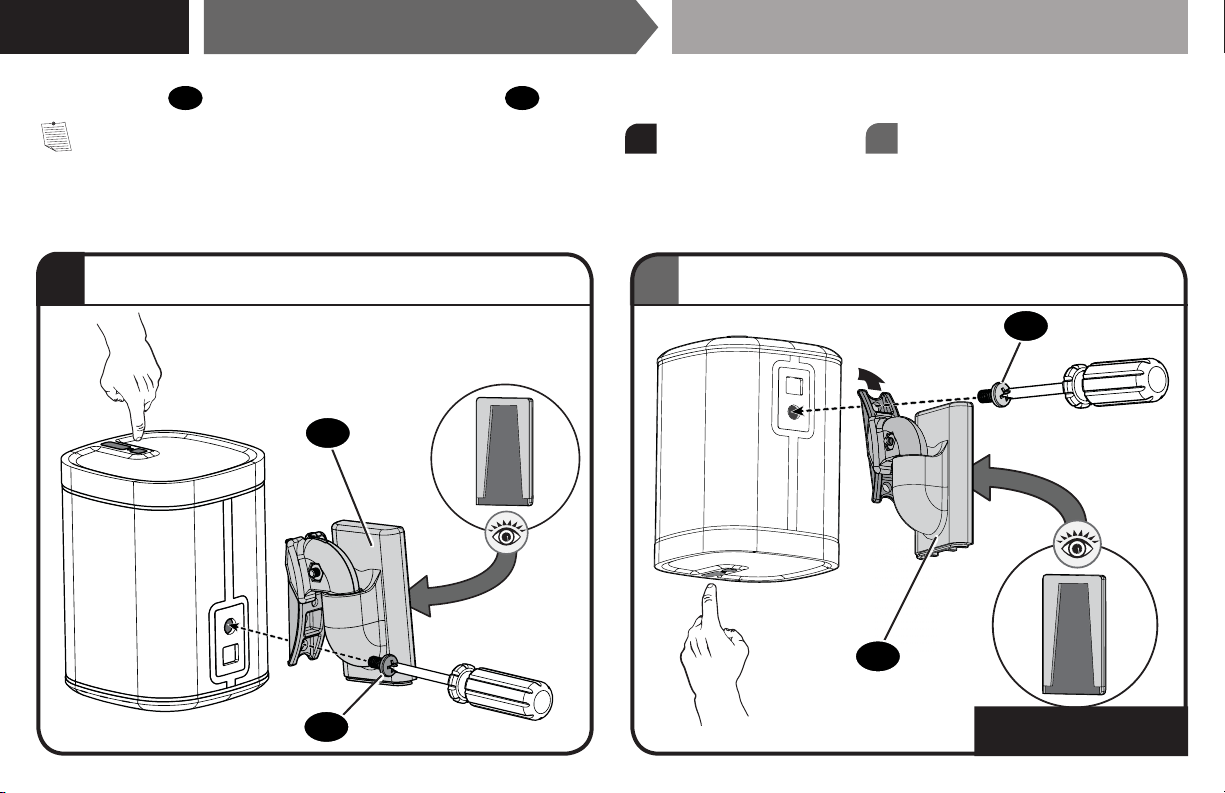
18
b
a
Attach the mount
04
to your speaker with the speaker screw
09
.
NOTE: Speaker may be installed in either the right-side-up position
a
or up-side-down position
b
, depending on height placement.
Attach Mount to Speaker SONOS
®
PLAY:1
™
STEP 2C
Go to STEP 3, PAGE 21.
09
09
Up-Side-Down for ABOVE Eye Level.
Right-Side-Up for BELOW Eye Level.
04
04
[and other speakers]
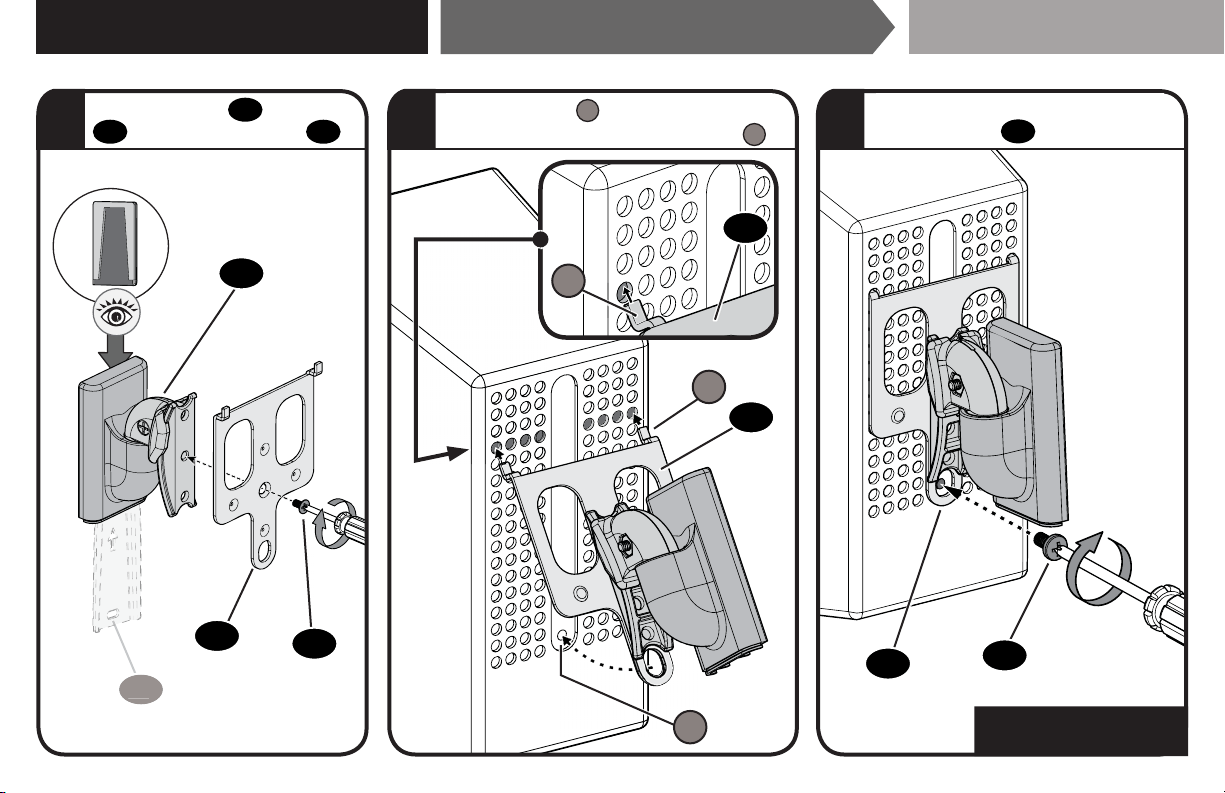
19
1 32
Attach Mount to Speaker SONOS
®
PLAY:3
™
STEP 2D - (VERTICAL)
Insert both legs
L
into the 4th holes
from the top, to align the screw hole
H
.
Secure the assembly with the
speaker screw
09
.
Go to STEP 3, PAGE 21.
08
09
H
L
0101
04
05
05
05
L
05
Attach interface
05
to mount
04
with interface screw
08
.
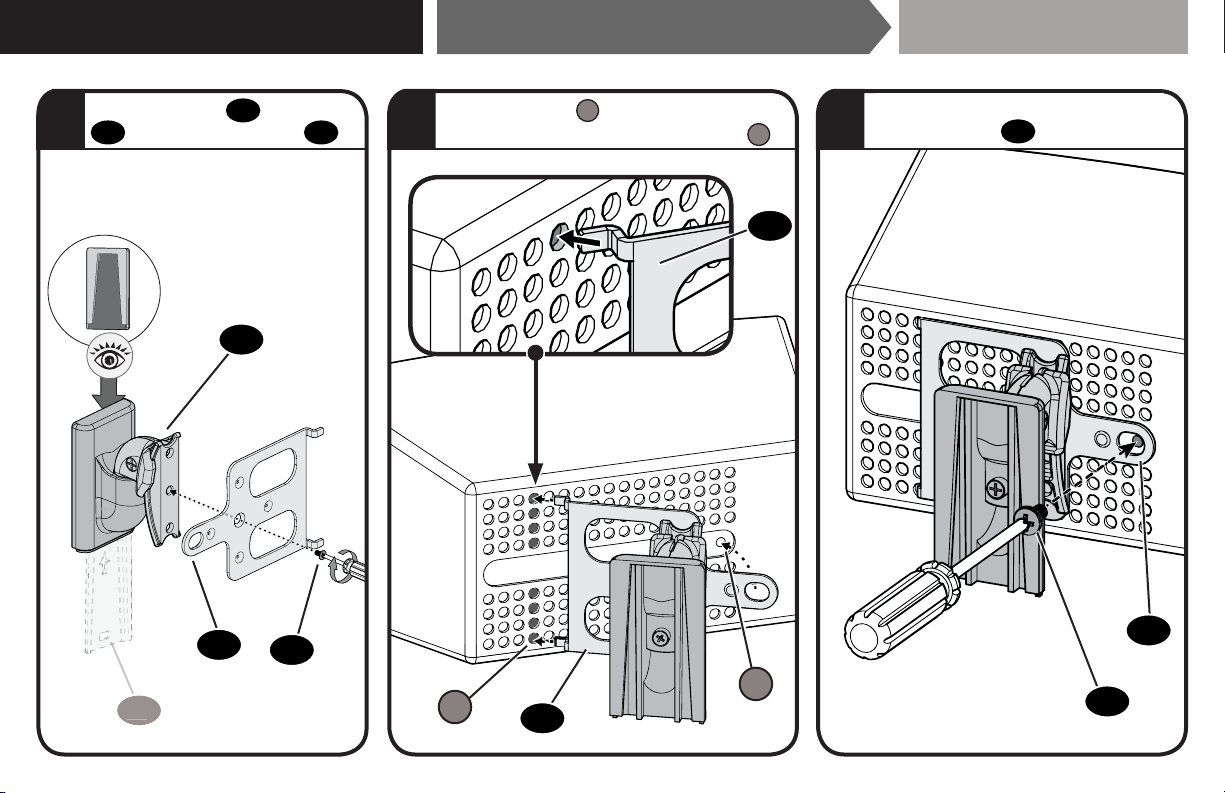
20
Attach Mount to Speaker SONOS
®
PLAY:3
™
STEP 2E - (HORIZONTAL)
1 32
Attach interface
05
to mount
04
with interface screw
08
.
Insert both legs
L
into the 4th holes
from the end, to align the screw hole
H
.
Secure the assembly with the
speaker screw
09
.
08
09
0
1
0
1
H
05
05
04
05
L
05
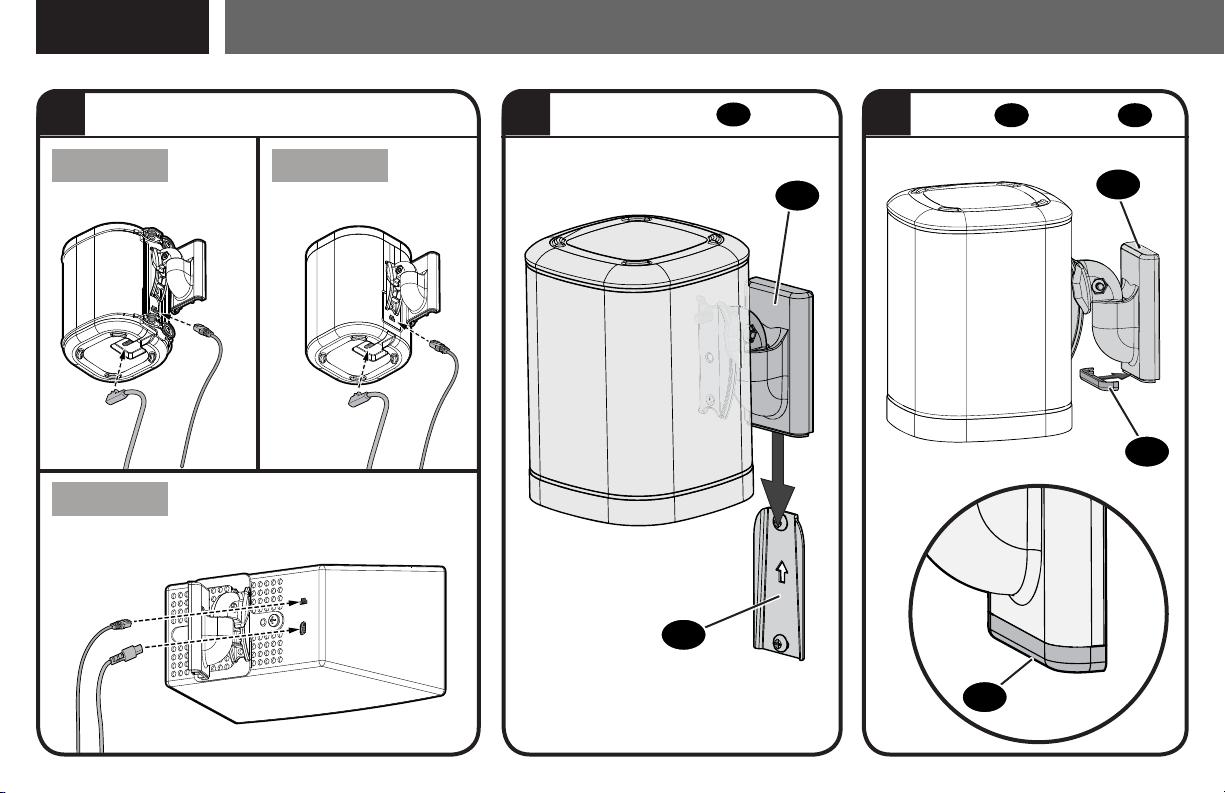
21
Mount Assembly to Wall Plate
STEP 3
2 31
Play:1™ Shown
Play:1™ Shown
HORIZONTAL SHOWN
One
™
PLAY:1
™
PLAY:3
™
01
04
10
10
04
Slide onto wall plate
01
.
Slide cap
10
onto mount
04
.
Install cables
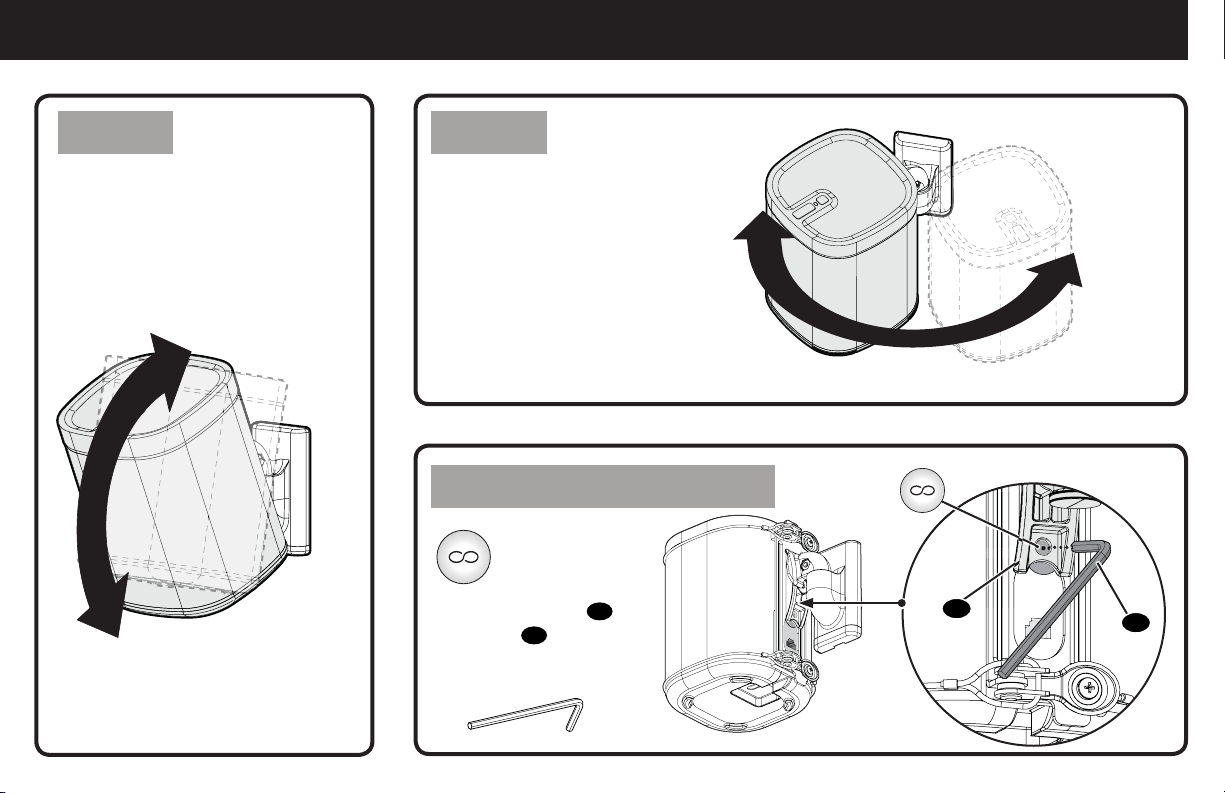
22
Adjustments
Your speaker can tilt up or down. Your speaker can
swivel left or right.
TILT SWIVEL
Play:1™ Shown
Play:1™ Shown
Access your
Sonos
®
Infinity
button, through
the hole on mount
04
,
using tool
11
.
One
™
Reset Button Access
11
04
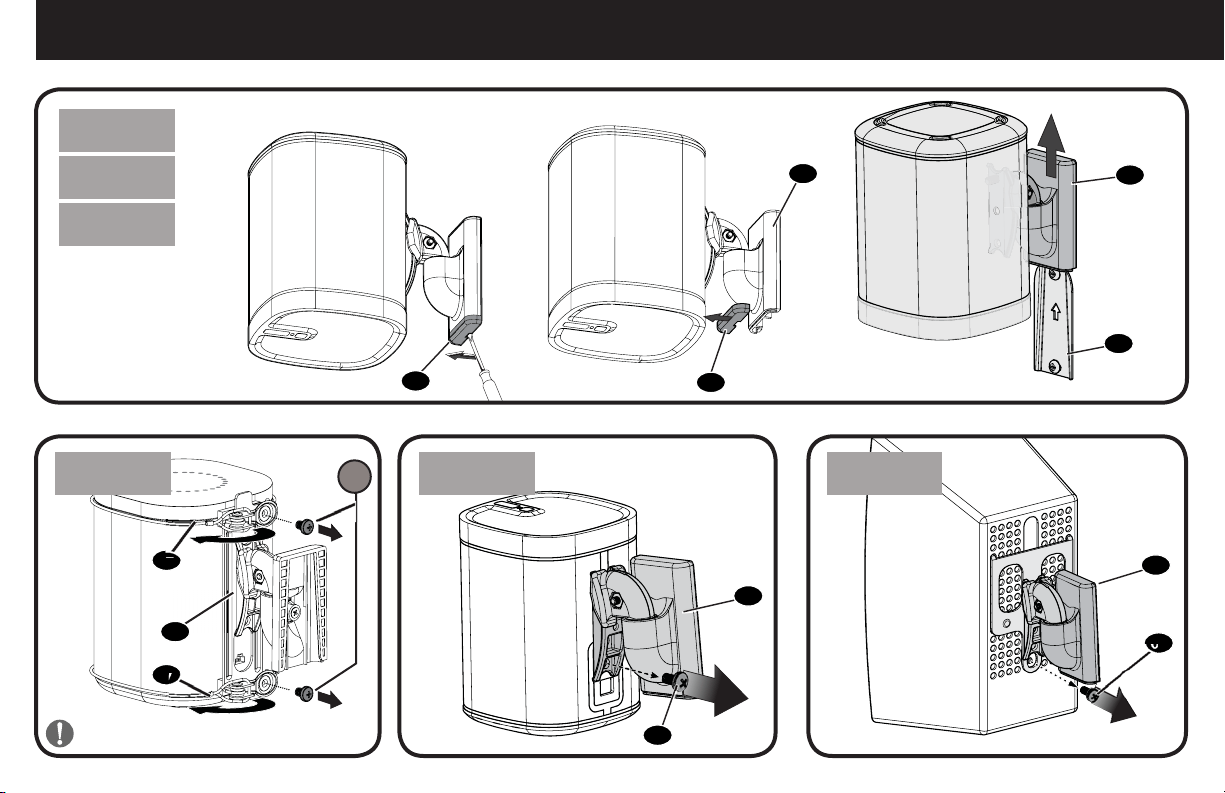
23
To Remove
Play:1 Shown
One
™
One
™
PLAY:1
™
PLAY:1
™
PLAY:3
™
PLAY:3
™
S
IMPORTANT: Set on flat surface.
04
10
10
01
04
04
09
09
04
07
07
06
[and other speakers]
[and other
speakers]
24
Instalación sobre
montante de madera
Instalación
sobre hormigón
Instalación en
tabique de pared
Lápiz Nivel Destornillador
Taladro
eléctrico
Localizador
de montantes
Punzón
Broca para
madera
Broca para
mampostería
Martillo
Broca para
tabiques
6,5 mm
(1/4 pulg.)
6,5 mm
(1/4 pulg.)
3 mm
(1/8 pulg.)
ESPAÑOL
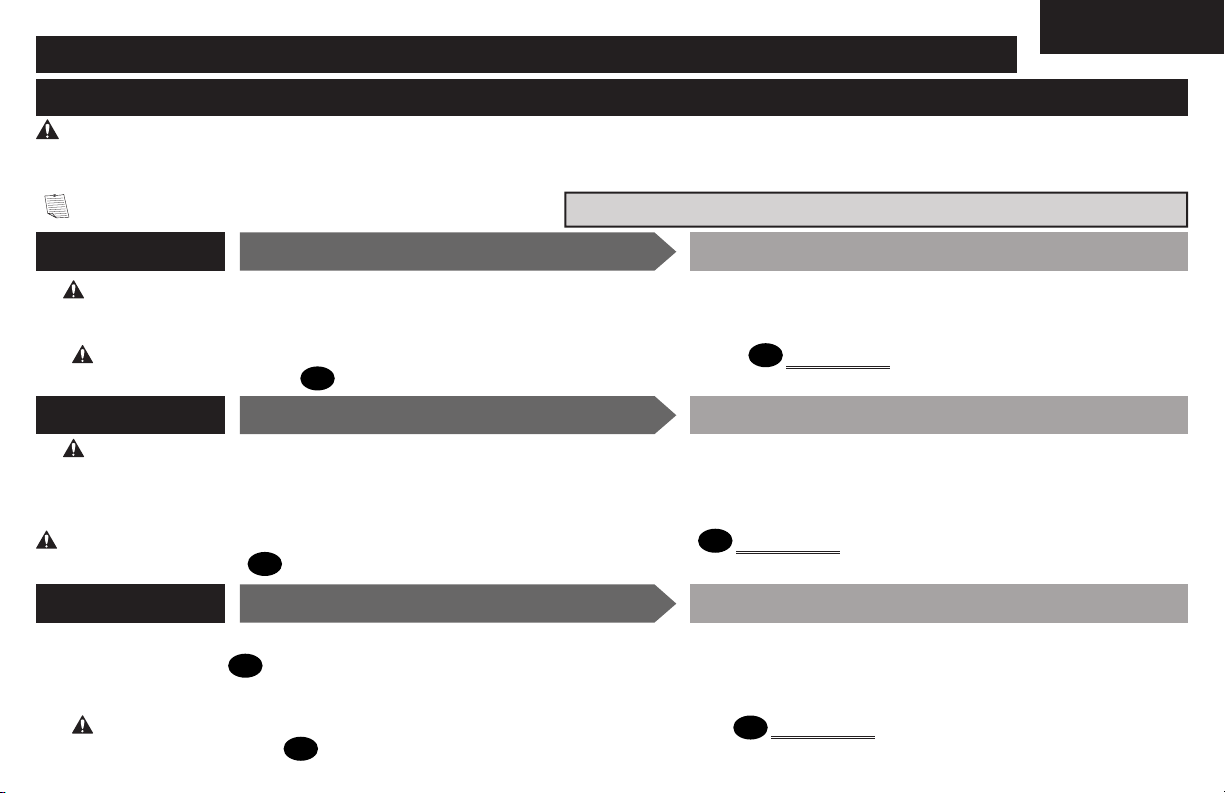
INSTRUCCIONES IMPORTANTES DE SEGURIDAD:
GUARDE ESTAS INSTRUCCIONES Y LEA TODO EL MANUAL ANTES DE UTILIZAR ESTE PRODUCTO.
Los soportes para altavoces fueron concebidos para sostener altavoces Sonos
®
One
™
,
PLAY:1
™
y
PLAY:3
™
, así como la mayoría de altavoces pequeños que admiten soporte.
● Consulte el manual del usuario de su altavoz para ver si existe algún requisito especial para instalar su altavoz en la pared.
● Lea estas instrucciones en su totalidad para sentirse seguro y cómodo con este fácil proceso de instalación.
● No utilice este producto para ningún otro propósito que no sea el explícitamente especifi cado por el fabricante.
● El fabricante no se responsabiliza por ningún daño o lesión resultante del montaje incorrecto o del uso indebido.
● La pared debe ser capaz de soportar hasta cinco veces el peso combinado del altavoz y el soporte.
● Si no entiende las instrucciones o si tiene dudas acerca de la seguridad de la instalación, del ensamblado o del uso del producto, póngase
en contacto con el servicio de atención al cliente al 1-800-359-5520.
Antes de comenzar, verifi quemos que este producto sea el ideal para sus necesidades.
PRECAUCIÓN: Evite posibles lesiones personales y daños materiales.
1.8 kg
(4 lbs.)
4.5 kg
(10 lbs.)
Peso máximo
NO EXCEDAS
herramientas
necesarias
One™
Play:1™
Play:3™
[Y otros
altavoces]
25
Dimensiones
ADVERTENCIA: Este producto contiene piezas pequeñas que, en caso de ser tragadas, podrían causar asfixia.
Antes de comenzar a montar la unidad, verifique que dispone de todas las piezas y que se encuentran en buen estado. Si no dispone de todas las piezas o alguna
está dañada, no devuelva el elemento defectuoso al distribuidor. Póngase en contacto con el servicio de atención al cliente. Nunca utilice piezas en mal estado.
NOTA: No se utilizarán todos los elementos de sujeción incluidos. Las cantidades que se muestran corresponden a un soporte para altavoces.
Piezas y elementos de sujeción suministrados página 4
PRECAUCIÓN: ¡Evite posibles lesiones personales o daños materiales!
● Los paneles de yeso que cubren la pared no deben medir menos de 6,5 mm (1/4 pulg.).
PRECAUCIÓN: Evite posibles lesiones personales o daños materiales. Ambos tornillos
02
DEBEN ESTAR apretados con firmeza para evitar
el movimiento de la placa mural
01
.
Asegúrese de que la placa mural esté bien fijada a la pared antes de continuar con el paso siguiente.
PRECAUCIÓN: ¡Evite posibles lesiones personales o daños materiales!
● Los paneles de yeso que cubren la pared no deben superar los 16 mm (5/8 pulg.)
● Tamaño mínimo de los montantes de madera: nominal 51 x 102 mm (2 x 4 pulg.) actual 38 x 89 mm (1½ x 3½ pulg.)
● Debe comprobar el centro del montante
ESPAÑOL
PASO 1A
PASO 1B
Opción de tabique
Opción montante de madera
Fijar la placa mural a la pared
Fijar la placa mural a la pared
PRECAUCIÓN: ¡Evite posibles lesiones personales o daños materiales! Ambos tornillos
02
DEBEN ESTAR apretados con firmeza para evitar el
movimiento de la placa mural
01
.
Asegúrese de que la placa mural esté bien fijada a la pared antes de continuar con el paso siguiente.
página 3
PASO 1C
hormigón macizo o bloques de hormigón
Fijar la placa mural a la pared
PRECAUCIÓN: ¡Evite posibles lesiones personales o daños materiales!
● Monte la placa mural
01
directamente sobre la superficie de hormigón
● Grosor mínimo del hormigón macizo: 203 mm (8 pulg.)
● Tamaño mínimo del bloque de hormigón: 203 x 203 x 406 mm (8 x 8 x 16 pulg.)
PRECAUCIÓN: ¡Evite posibles lesiones personales o daños materiales! Ambos tornillos
02
DEBEN ESTAR apretados con firmeza para evitar el
movimiento de la placa mural
01
.
Asegúrese de que la placa mural esté bien fijada a la pared antes de continuar con el paso siguiente.
página 10
página 8
página 6
26
ESPAÑOL
PRECAUCIÓN: Evite posibles lesiones físicas y daños materiales. Ambos tornillos
S
DEBEN instalarse para fijar el altavoz al soporte.
PRECAUCIÓN: Evite posibles lesiones físicas y daños materiales. Ambos tornillos
S
DEBEN instalarse para fijar el altavoz al soporte.
PRECAUCIÓN: Evite posibles lesiones físicas y daños materiales. Los cables
07
NO deben extenderse más allá de la cubierta del altavoz.
PRECAUCIÓN: Evite posibles lesiones físicas y daños materiales. Los cables
07
NO deben extenderse más allá de la cubierta del altavoz.
NOTA: Coloque el altavoz sobre una superficie plana.
NOTA: Coloque el altavoz sobre una superficie plana.
página 14
página 13
Fijar el soporte de pared al altavoz
Fijar el soporte de pared al altavoz
Fijar el soporte de pared al altavoz
Fijar el soporte de pared al altavoz
Sonos
®
One
™
Sonos
®
One
™
Sonos
®
One
™
PASO 2A/2B
PASO 2A -
PASO 2B -
PASO 2
Extremo superior
hacia arriba
Para extremo superior hacia arriba - consulte la PÁGINA 14.
Extremo inferior
hacia arriba
Para extremo inferior hacia arriba - consulte la PÁGINA 16.
Para Sonos® One™ - consulte PASO 2A/2B en la PÁGINA 13
Para Sonos® Play:1™ - consulte PASO 2C en la PÁGINA 18
Para Sonos® Play:3™ (vertical) - consulte PASO 2D en la PÁGINA 19
Para Sonos® Play:3™ (horizontal) - consulte PASO 2E en la PÁGINA 20
página 16
página 12
Siga los siguientes pasos según el estilo de su altavoz.
Siga los siguientes pasos basados en su instalación.
27
ESPAÑOL
1. Fije el soporte de conexión del Play:3
05
al soporte
04
con el tornillo
08
.
2. Monte el conjunto en el altavoz Play:3 insertando las patas del soporte de conexión del Play:3
05
en los últimos cuatro orificios desde el final y apoyando
el soporte
05
sobre el altavoz.
3. Fije el conjunto al altavoz Play:3 con el
tornillo del altavoz
09
.
1. Fije el soporte de conexión del Play:3
05
al soporte
04
con el tornillo
08
.
2. Monte el conjunto en el altavoz Play:3 insertando las patas del soporte de conexión del Play:3
05
en los últimos cuatro orificios desde el final y apoyando
el soporte
05
sobre el altavoz.
3. Fije el conjunto al altavoz Play:3 con el
tornillo del altavoz
09
.
Ajustes página 22
Para retirar página 23
Puede inclinar los altavoces sobre el soporte.
Puede girar los altavoces sobre el soporte como desee.
Fije el soporte
04
al altavoz Play:1 con el tornillo del altavoz
09
.
NOTA: Puede instalar el altavoz con la parte derecha hacia arriba (a) o boca abajo (b), en función de sus necesidades.
1. Pasar el cable de alimentación de los altavoces
2. Deslice el conjunto del altavoz/placa mural sobre la placa mural
01
.
3. Ponga la tapa
10
sobre el soporte
04
para completar el montaje.
PRECAUCIÓN: ¡ Coloque el altavoz sobre una superficie plana.
Fijar el soporte de pared al altavoz
Fijar el soporte de pared al altavoz
Fijar el soporte de pared al altavoz
Montar el conjunto a la placa mural
Sonos
®
Play:1
™
Sonos
®
Play:3
™
Sonos
®
Play:3
™
PASO 2C
PASO 2D - (vertical)
PASO 2E -(horizontal)
PASO 3
página 21
página 20
página 19
página 18
Milestone AV Technologies and its a liated corporations and subsidiaries (collectively, “Milestone”), intend to make this manual accurate and complete. However,
Milestone makes no claim that the information contained herein covers all details, conditions, or variations. Nor does it provide for every possible contingency in
connection with the installation or use of this product. The information contained in this document is subject to change without notice or obligation of any kind.
Milestone makes no representation of warranty, expressed or implied, regarding the information contained herein. Milestone assumes no responsibility for accuracy,
completeness or su ciency of the information contained in this document.
©2017 Milestone AV Technologies. All rights reserved. SANUS is a division of Milestone.
All other brand names or marks are used for identifi cation purposes and are trademarks of their respective owners.
Thank you for choosing SANUS! Please take a moment to let us know how we did:
SANUS • 6436 City West Parkway • Eden Prairie, MN 55344 USA 6901-602165 00
Call us: 1-800-359-5520
Leave a review: sanus.com
Email us: [email protected]