49
SUMMARY
International guarantee ........................................ 54
Special recommendations ..................................... 55
Tolerances ......................................................... 56
Table of equivalents ............................................ 58
Pictograms ........................................................ 60
Rubber strap ....................................................... 61
Deployment buckle ............................................. 62
Certicate of authenticity ...................................... 63
Water-resistance / Screw-in crown and push-pieces .... 64
Adjusting the time (General information) ................... 65
Quartz watches
L296 ................................................................ 67
Automatic watches
L602 ........................................................................................... 68
L635 – 24 Time zones .................................................................. 69
L636, L897 ................................................................................. 71
L704.3 ........................................................................................ 72
L633, L888 – Diver Date ............................................................... 73
L699 – The Lindbergh Hour Angle Watch ......................................... 74
L699 – The Longines Weems Second-Setting Watch ......................... 76
L707 – 4X Retrograde
.................................................................... 77
Chronographs
General information .................................................................. 80
Quartz chronographs
L440 ........................................................................................... 81
L442 ........................................................................................... 85
L538 ........................................................................................... 90
Automatic chronographs
L650, L651 ................................................................................. 95
L688 – Column-Wheel .................................................................. 96
L788
–
Single Push-Piece Chronograph ........................................... 97
L789
– 24h/
Single Push-Piece Chronograph ..................................... 97
L678, L687 – Phases of the Moon ................................................. 98
You can download a PDF
version of the instructions
for use from ourwebsite
www.longines.com
ENGLISH
ENGLISH
02-English.indd 49 19.11.18 14:36

50
LIMITED TWO-YEARS WARRANTY (USA)
LONGINES is delighted that you should have chosen a model from
our prestigious collection. The little technical marvel you now own will
serve you faithfully for many years. The most advanced techniques
were used during its manufacture, and it underwent stringent controls
before it was released for sale.
Your LONGINES
®
watch is warranted by Longines Watch Co.
Francillon Ltd* for a period of twenty - four (24) months from the
date of purchase under the terms and conditions of this warranty.
The international LONGINES warranty covers material and manu-
facturing defects existing at the time of delivery of the purchased
LONGINES watch (“defects”). The warranty only comes into force if
the warranty
certicate is dated, fully and correctly completed and
stamped by an ofcial LONGINES dealer (“valid warranty certicate”).
During the warranty period and by presenting the valid warranty
certicate, you will have the right to have any defect repaired free of
charge. In the event that repairs are improper to restore the normal
conditions of use of your LONGINES watch, Longines Watch Co.
Francillon Ltd guarantees its replacement by a LONGINES watch of
identical or similar characteristics. The warranty for the replacement
watch ends twenty-four (24) months after the date of purchase of
the replaced watch.
This manufacturer’s warranty does not cover:
• the life of the battery;
• normal wear and tear and aging (e.g. scratched crystal; alteration
of the colour and/or material of non metallic straps and chains,
such as leather, textile, rubber; peeling of the plating);
• any damage on any part of the watch resulting from abnormal /
abusive use, lack of care, negligence, accidents (knocks, dents,
crushing, broken crystal, etc.), incorrect use of the watch and
non-observance of the use directions provided by Longines
Watch Co. Francillon Ltd;
• the LONGINES watch handled by non-authorized persons (e.g.
for battery replacement, services or repairs) or which has been
altered in its original condition beyond Longines Watch Co.
Francillon Ltd’s control.
ALL APPLICABLE IMPLIED WARRANTIES, INCLUDING THE IMPLIED
WARRANTY OF MERCHANTABILITY AND OF FITNESS FOR A PAR-
TICULAR PURPOSE GIVEN TO YOU BY LAW ARE HEREBY LIMITED
IN DURATION TO THE DURATION OF THIS WARRANTY. UNDER NO
CIRCUMSTANCES WILL LONGINES WATCH CO. FRANCILLON LTD
BE LIABLE FOR ANY INDIRECT OR CONSEQUENTIAL DAMAGES
OF ANY KIND.
Some states do not allow limitations on how long implied warran-
ties last, or exclusions or limitations of incidental or consequential
damages, so exclusions or limitations mentioned may not apply to
you. This
warranty gives you specic legal rights and you may also
have other rights which may vary from state to state.
02-English.indd 50 14.11.18 15:43

51
LONGINES
®
is a registered trademark.
LIMITED TWO-YEARS WARRANTY (USA)
LONGINES WATCH CO. FRANCILLON LTD’S OBLIGATION IS STRICTLY
LIMITED TO REPAIR OR REPLACEMENT AS EXPRESSLY STATED
IN THIS LIMITED WARRANTY. YOUR OFFICIAL LONGINES DEALER
CARRIES SOLE RESPONSIBILITY FOR ANY OTHER GUARANTEES.
The Longines Watch Co. Francillon Ltd’s customer service ensures
the perfect working order of your LONGINES watch. If your watch
needs maintenance, rely on an ofcial LONGINES dealer or an
authorized LONGINES Service Center as set forth in the enclosed
list: they can guarantee service according to Longines Watch Co.
Francillon Ltd’s standards.
* Longines Watch Co. Francillon Ltd,
CH-2610 Saint-Imier, Switzerland.
©2002 Longines Watch Co. Francillon Ltd.
All rights reserved.
02-English.indd 51 14.11.18 15:43

52
AUSTRALIAN / NEW ZEALAND WARRANTY
NOTE: If you purchased your LONGINES
®
watch in Australia or New
Zealand, the International LONGINES
®
Warranty contained in the
booklet provided with this watch and on the LONGINES
®
website
(www.longines.com) does NOT apply to you, and is replaced by
this Australian / New Zealand Warranty (referred to below as the
“Warranty”).
IMPORTANT NOTICE REGARDING YOUR CONSUMER
RIGHTS
The benets given to you under this Warranty are additional to, and
do not detract from, other rights and remedies that you may have in
relation to your LONGINES
®
watch and its purchase under Australian
or New Zealand laws, including consumer protection laws.
In Australia, LONGINES
®
watches come with guarantees that cannot
be excluded under the Australian Consumer Law. You are entitled to
a replacement or refund for a major failure and compensation for any
other reasonably foreseeable loss or damage. You are also entitled to
have your LONGINES
®
watch repaired or replaced if it fails to be of
acceptable quality and the failure does not amount to a major failure.
In New Zealand, LONGINES
®
watches also come with guarantees
that cannot be excluded under the New Zealand Consumer Guar-
antees Act.
This Warranty:
• Is not intended to change or exclude any statutory or consumer
rights that cannot be lawfully changed or excluded;
• Is independent of any warranty that may be provided by the seller,
for which he carries sole responsibility; and
• Does not affect your rights against the seller, including any
mandatory statutory rights you may have against theseller under
local consumer laws.
OUR WARRANTY TO YOU
This Warranty is provided by LONGINES WATCH CO. FRANCILLON
LTD, CH-2610 Saint Imier, Switzerland.
Your LONGINES
®
watch is covered by this Warranty for a period of
twenty-four (24) months from the date of purchase under the terms
and conditions of this Warranty.
Thi
s Warranty covers material and manufacturing defects existing at
the time of delivery of the purchased LONGINES
®
watch (“defects”).
Where such defects become apparent during the warranty period and
provided you present a valid warranty certicate, LONGINES WATCH
CO. FRANCILLON LTD will:
• Repair your watch free of charge; or
• In the event that repairs are unable to restore the normal condi-
tions of use of your LONGINES
®
watch, replace your watch with
a LONGINES
®
watch of identical or similar characteristics. Such
replacement watch will have the benet of this Warranty for
the remainder of the Warranty Period applicable to the original
(replaced) watch.
Please be aware that:
• Goods presented for repair may be replaced by refurbished goods
of the same type rather than being repaired. Refurbished parts
may be used to repair the goods;
• Any data you store in your watch may be lost in the course of a
repair. It is your responsibility to back up any data that may be
stored in your watch before presenting it for warranty service; and
• The Warranty
is only valid if the warranty certicate enclosed with
your LONGINES
®
watch upon purchase is dated, fully and cor-
rectly completed
and stamped by an ofcial LONGINES
®
retailer.
02-English.indd 52 14.11.18 15:43

53
EXCLUSIONS AND LIMITATIONS
This Warranty does not cover:
• The lifetime of the battery;
• Normal wear and tear and aging (e.g. scratched crystal; alteration
of the colour and/or material of non-metallic straps and chains,
such as leather, textile, rubber; peeling of the plating);
• Any damage on any part of the watch resulting from abnormal/
abusive use, lack of care, negligence, accidents (knocks, dents,
crushing, broken crystal, etc.), incorrect use of the watch and
non-observance of the use directions provided by LONGINES
WATCH CO. FRANCILLON LTD;
• Indirect or consequential damages of any kind resulting from e.g.
the use, the non-functioning, the defects or the inaccuracy of the
LONGINES
®
watch; or
• Defects caused by the LONGINES® watch being handled by
non-authorized persons (e.g. for battery replacement, services
or repairs) or altered in its original condition beyond LONGINES
WATCH CO. FRANCILLON LTD’s control.
HOW TO MAKE A CLAIM UNDER THIS WARRANTY
To make a claim under this Warranty, we recommend that you
wrap your LONGINES
®
watch carefully so as to avoid any damage
and send it with valid warranty by registered mail or drop it off in
person to your nearest ofcial LONGINES
®
retailer or an authorised
LONGINES
®
Service Centre. To nd current contact information for
your nearest ofcial LONGINES
®
retailer or authorised LONGINES
®
Service Centre, email [email protected] or go
to www.longines.com.
You will be responsible for paying the expenses associated with
making a claim under this Warranty, including postal or delivery
expenses and any relevant taxes.
OTHER CONDITIONS
No ofcial LONGINES
®
retailer or Service Centre is authorised to make
any modication, extension or addition to this Warranty. LONGINES
WATCH CO. FRANCILLON LTD provides no warranty against defects
beyond the rights and remedies given under this Warranty and which
are available under the Australian Consumer Law and the New
Zealand Consumer Guarantees Act 1993.
LONGINES
®
is a registered trademark of LONGINES WATCH CO.
FRANCILLON LTD
AUSTRALIAN / NEW ZEALAND WARRANTY
02-English.indd 53 14.11.18 15:43

54
INTERNATIONAL GUARANTEE
LONGINES is delighted that you should have chosen a model from
our prestigious collection. The little technical marvel you now own will
serve you faithfully for many years. The most advanced techniques
were used during its manufacture, and it underwent stringent controls
before it was released for sale.
Your LONGINES
®
watch is warranted by Longines Watch Co. Fran-
cillon Ltd* for a period of twenty-four (24) months from the date of
purchase under the terms and conditions of this warranty.
The international LONGINES warranty covers material and manu-
facturing defects existing at the time of delivery of the purchased
LONGINES watch (“defects”). The warranty only comes into force if
the warranty certicate is dated, fully and correctly completed and
stamped by an ofcial LONGINES dealer (“valid warranty certicate”).
During the warranty period and by presenting the valid warranty
certicate, you will have the right to have any defect repaired free of
charge. In the event that repairs are improper to restore the normal
conditions of use of your LONGINES watch, Longines Watch Co.
Francillon Ltd guarantees its replacement by a LONGINES watch of
identical or similar characteristics. The warranty for the replacement
watch ends twenty-four (24) months after the date of purchase of
the replaced watch.
This manufacturer’s warranty does not cover:
• the life of the battery;
• normal wear and tear and aging (e.g. scratched crystal; alteration
of the colour and/or material of non metallic straps and chains,
such as leather, textile, rubber; peeling of the plating);
• any damage on any part of the watch resulting from ab
normal/
abusive use, lack of care, negligence, accidents (knocks,
dents, crushing, broken crystal, etc.), incorrect use of the watch
and non-observance of the use directions provided by Longines
Watch Co. Francillon Ltd;
• indirect or consequential damages of any kind resulting from
e.g. the use, the non-functioning, the defects or the inaccuracy
of the LONGINES watch;
• the LONGINES watch handled by non-authorised persons (e.g.
for battery replacement, services or r
epairs) or which has been
altered in its original condition beyond Longines Watch Co.
Francillon Ltd’s control.
Any further claim against Longines Watch Co. Francillon Ltd e.g. for
damages additional to the above described warranty is expressly
excluded, except mandatory statutory rights the purchaser may have
against the manufacturer.
02-English.indd 54 14.11.18 15:43

55
SPECIAL RECOMMENDATIONS
International guarantee
The above manufacturer’s warranty is:
• independent of any warranty that may be provided by the seller,
for which he carries sole responsibility;
• does not affect the purchaser’s rights against the seller nor
any other mandatory statutory rights the purchaser may have
against the seller.
The Longines Watch Co. Francillon Ltd’s customer service ensures
the perfect maintenance of your LONGINES watch. If your watch
needs attention, rely on an ofcial LONGINES dealer or an authorised
LONGINES Service Center as set forth in the enclosed list: they can
guarantee service according to Longines Watch Co. Francillon Ltd’s
standards.
* Longines Watch Co. Francillon Ltd,
CH-2610 Saint-Imier, Switzerland.
LONGINES
®
is a registered trademark.
CHECKS / SERVICES:
How often should my watch be checked?
We recommend that your watch’s water-resistance be checked every
year (partial service with movement check).
How often should my watch be serviced?
Like any other precision instrument a watch should be serviced
regularly to ensure that it runs perfectly. We cannot say how often
you should have your watch ser-viced as this depends on the model,
the climate where you live and how you look after the watch yourself.
As a rule, a watch should be serviced every 4 or 5 years, depending
on the conditions in which it is worn.
Where should I go to get my watch serviced or
foranew battery?
We recommend that you go to an approved LONGINES agent or
retailer. They are the only people who have the necessary tools
and apparatus to work on your watch and to carry out the neces-
sary checks to a professional level. Moreover, only specialists can
guarantee that their work meets the stringent quality standards set
by LONGINES.
02-English.indd 55 14.11.18 15:43

56
SPECIAL RECOMMENDATIONS / TOLERANCES
What can I do to ensure that my LONGINES watch
functions perfectly for many years?
Magnetic elds: avoid placing your watch in the vicinity of magnetic
elds. These invisible elds may originate from sources such as hard
drives, medical devices, speakers, televisions and refrigerator doors.
Cases for mobile phones, tablets and laptops, as well as magnetic
fasteners on handbags and purses, are also powerful sources of
magnetic elds.
Salt-water: always rinse your watch in fresh water after swimming
in the sea.
Shocks: avoid subjecting your watch to shocks, including sudden
changes in temperature.
Screw-in crown: always make sure you have screwed the crown in
fully to avoid any humidity getting into the mechanism.
Push-in crown: always push the crown back in to the neutral
position to avoid any humidity getting into the mechanism.
Cleaning: use a toothbrush and soapy water to clean metal bracelets
and water-resistant cases and a soft cloth to dry off afterwards.
Chemical products: avoid all direct contact with solvents, deter-
gents, perfume, cosmetics, etc. which may damage the bracelet or
strap, the case or the seals.
Temperatures: avoid exposing your watch to extreme temperatures
(over 60 °
C or 140 ° F and under 0 ° C or 32 ° F) and to sudden
uctuations in temperature.
Water-resistance: we cannot guarantee that your watch will be
permanently water-resistant. The seal may be affected by wear or
by an accidental shock to the crown. As recommended in our service
instructions, you should have the water-resistant seals of your watch
tested once a year by an approved LONGINES agent.
Chronograph push-pieces: do not adjust the push-pieces under
water as this may allow humidity to get into the mechanism.
TOLERANCES / WINDING
Mechanical movements
The precision of a mechanical movement varies depending on the
wearer’s habits. The majority of LONGINES watches have a precision
of between – 5 and +15 seconds per day.
Winding (crown pushed right in)
The natural movements of your wrist will automatically wind your
Longines watch, which has a power reserve of several dozen hours
(see table of equivalents on p. 58-59). It is only necessary
to wind it manually if your watch/chronograph has not been worn
for one or more days.
Occasional winding: if your watch has not been worn for one or
more days, wind it manually with the crown in position 1.
02-English.indd 56 14.11.18 15:43
57
RECOMMENDATIONS
QUARTZ MOVEMENTS
The ambient temperature affects the precision of a quartz movement,
which will be between – 0.3 and + 0.5 second per day.
If you have a quartz watch the electrical power is sup-plied by
a battery. After 12 to 18 months of use (with the exception of
watches with lithium batteries) the voltage in the battery may drop
suddenly and cause your watch to stop. Some models have a
battery end-of-life function. The seconds hand will start to jump
every 4 seconds. If this happens we recommend that you replace
the battery immediately, because once the battery runs down totally
it may damage your watch.
Collection and treatment of end of life quartz
watches *
This symbol indicates that this product
should not be disposed with household
waste. It has to be returned to a local author-
ised collection system. By following this
procedure you will contribute to the protec-
tion of the environment and human health.
The recycling of the materials will help to conserve natural resources.
* Valid in the EU member states and in any countries with corresponding
legislation.
Replacing the battery
We recommend that you contact an approved LONGINES service centre
or authorised LONGINES retailer, as they are equipped with the tools
and apparatus required to carry out the work and the necessary
checks in a professional manner. A worn-out battery should be
replaced immediately in order to reduce the risk of leakage and
consequent damage to the movement.
Battery type
Button-type zinc-silver oxide primary battery cell.
02-English.indd 57 14.11.18 15:43
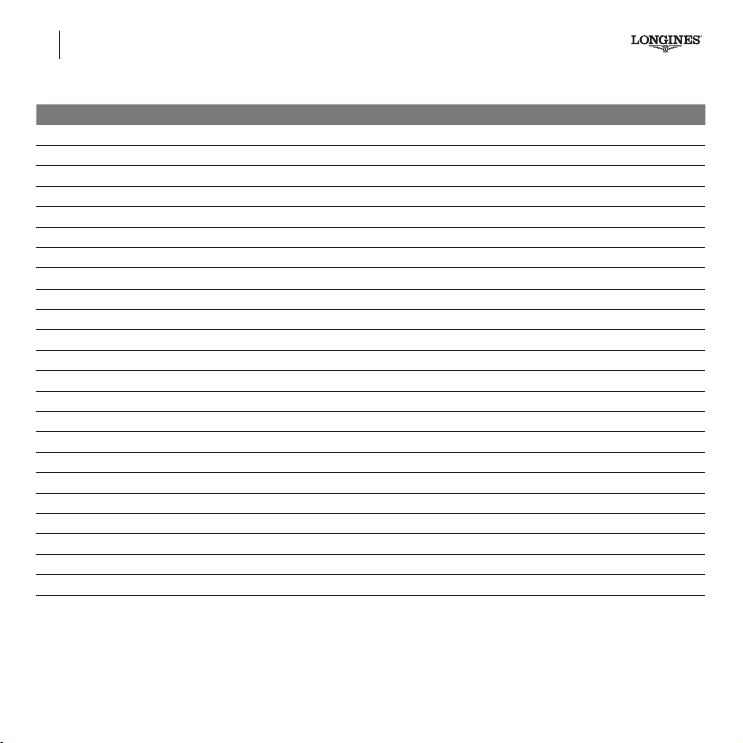
58
TABLE OF EQUIVALENTS
* Only calibres with more than 3 hands and the date. For other calibres, see pages 65-66
The reference number of your watch is engraved on the case-back.
Ref. Calibre* Collection Power reserve Page
L2.629. L651 The Longines Master Collection 42h 95
L2.631. L635 The Longines Master Collection 38h 69
L2.643. L650 evidenza 42h 95
L2.673.4 L687 The Longines Master Collection 54h 98
L2.673.8 L678 The Longines Master Collection 48h 98
L2.678. L699 The Lindbergh Hour Angle Watch 46h 74
L2.708. L602 The Longines Master Collection 42h 68
L2.713. L699 The Longines Weems Second Setting Watch 46h 76
L2.738. L707 The Longines Master Collection 48h 77
L2.739. L707 The Longines Master Collection 48h 77
L2.743. L688 Conquest 54h 96
L2.751. L704.3 Longines Twenty-Four Hours 46h 72
L2.752. L688 The Longines Saint-Imier Collection 54h 96
L2.755. L636 The Longines Master Collection 38h 71
L2.759. L688 The Longines Master Collection 54h 96
L2.773. L687 The Longines Master Collection 54h 98
L2.786. L688 Conquest Classic 54h 96
L2.797. L789
The Longines Twenty-Four Hours Single Push-Piece Chronograph
54h 97
L2.800. L788 The Longines Column-Wheel Single Push-Piece Chronograph 54h 97
L2.801. L788 The Longines Column-Wheel Single Push-Piece Pulsometer Chronograph 54h 97
L2.812.4 L788 The Longines Avigation Watch Type A-7 1935 54h 97
L2.816. L688 The Longines Avigation Big Eye 54h 96
L2.822. L888 The Longines Skin Diver Watch 54h 73
02-English.indd 58 14.11.18 15:43
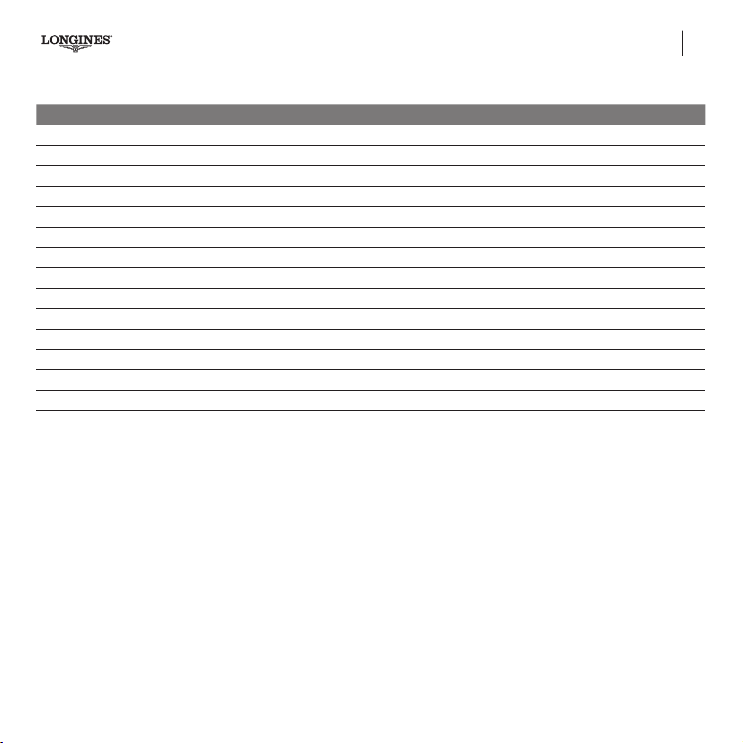
59
* Only calibres with more than 3 hands and the date. For other calibres, see pages 65-66
TABLE OF EQUIVALENTS
The reference number of your watch is engraved on the case-back.
Ref. Calibre* Collection Power reserve Page
L3.379. L538 Conquest QUARTZ 90
L3.380. L296 Conquest QUARTZ 67
L3.381. L296 Conquest QUARTZ 67
L3.674.
L633/L888 - Diver
The Longines Legend Diver Watch 38h 73
L3.700. L440 Conquest QUARTZ 81
L3.702. L442 Conquest QUARTZ 85
L3.744. L688 HydroConquest 54h 96
L3.783. L688 HydroConquest 54h 96
L3.800. L440 Conquest QUARTZ 81
L3.801. L688 Conquest 54h 96
L3.843. L440 HydroConquest QUARTZ 81
L3.883.
L688
HydroConquest 54h 96
L4.799. L636 Flagship 38h 71
L4.803. L688 Flagship 54h 96
02-English.indd 59 14.11.18 15:43
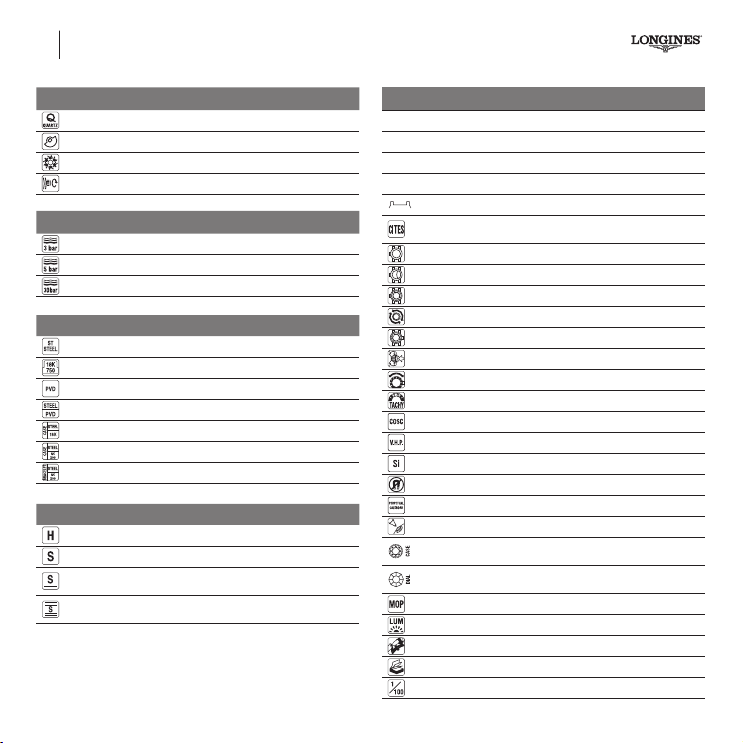
60
PICTOGRAMS
Movement
Quartz
Automatic
Column-wheel movement
Manual
Water-resistance
Water-resistant to 3 bar (30 m)*
Water-resistant to 5 bar (50 m)*
Water-resistant to 30 bar (300 m)*
Case material
Stainless steel
Gold 18K
PVD
Stainless steel/PVD
Stainless steel/Gold 18K
Stainless steel/Gold Cap 200
Stainless steel/Gold Cap 200
Glass
PMMA HT (Polymethyl methacrylate)
Sapphire
Sapphire crystal with a single layer of anti-reflective coating on
the underside
Sapphire crystal with several layers of anti-reflective coating on
the underside
Miscellaneous
Cal.
Caliber
Ref.
Reference
E.O.L
For End of Life feature
EOE
Distance between lugs
Convention on International Trade in Endangered Species of Wild
Fauna and Flora
T
Transparent case back
T
Transparent case back with back cover
Screw-down case back
Screw-in crown
Screwed bezel
Single push-piece crown
Rotating bezel
Tachymeter
COSC
V.H.P.
Silicium
Antimagnetic **
Perpetual calendar
Correcting point
Number and carat weight of Top Wesselton VVS Diamonds
Number and carat weight of Top Wesselton VS or SI Diamonds
Mother-of-pearl dial
Super-LumiNova
®
Deployment buckle
Additional booklet
1/100 second
* The values given in meters for the water-resistance are equivalent to the degree of superpressure applied
under the ISO 22810 norm.
** ISO 764
02-English.indd 60 14.11.18 15:43
61
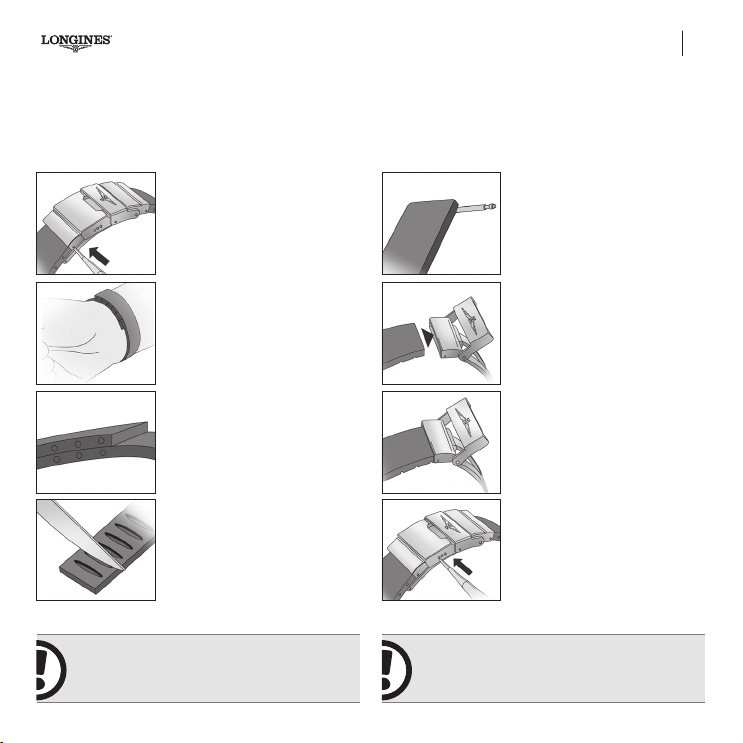
RUBBER STRAP
• Excellent resistance to water and wear
• Superb mechanical properties
• Very good resistance to aggressive and extreme environments
• Incomparable suppleness and softness to the touch
• Hi-tech product
• Top-range quality
• Hand-nished
1.
Detach the two covers over the clasp
by pressing on the bars.
2. Measure the circumference of your
wrist by wrapping the strap round it.
Half the number of holes that overlap
indicates the length that suits your wrist.
Example: half resulting in an even number:
8 overlapping holes, half of 8 is 4, remove 2
holes on each section.
Half resulting in a odd number: 14 overlap-
ping holes, half of 14 is 7, remove 4 holes
on the section of the strap at 12 o’clock and
3 holes on the section at 6 o’clock.
3. Cut along the corresponding
graduations.
4. Reinsert the bars in the two sections
of the strap.
5. Attach the sections to the clasp so
that the graduations are on the inside,
i.e. against your skin, insert the bars
in the holes closest to the centre of
the clasp.
6. Try your watch on.
7. For the nal adjustment, move the bar
to one of the holes in the clasp.
If the strap is too long, you can remove
another hole.
We recommend that, if necessary, you
have the length of your strap adjusted by a
Longines agent.
We recommend that you wash your rubber strap
regularly with soap and water, especially on
the inside.
02-English.indd 61 14.11.18 15:43
62
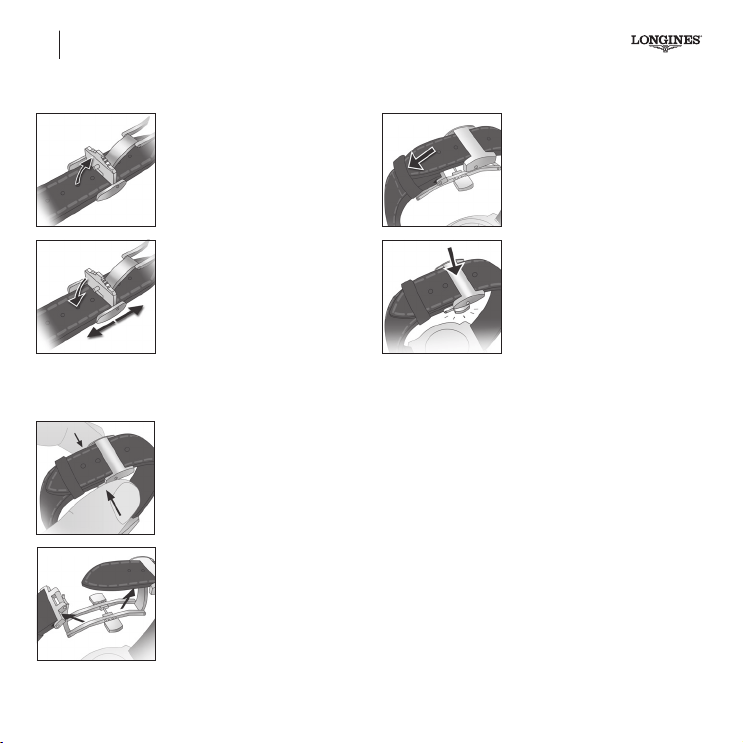
DEPLOYMENT BUCKLE
Adjusting the clasp
1.
Release the adjusting mechanism by
removing the pin from the hole in the
long section of the strap.
2.
Slide the mechanism along this long
section and then x it by reinserting the
pin in the desired hole.
Opening the clasp
3.
To open the clasp press in the push-
pieces on either side simultaneously.
4.
Open the clasp to enlarge the bracelet
and remove the watch from your wrist.
Closing the clasp
5.
Put the bracelet on your wrist and
slide the long section through the small
xed buckle.
6.
Close the folding clasp until it clicks
into place. If necessary, slide the long
section through the small mobile buckle.
02-English.indd 62 14.11.18 15:43
63
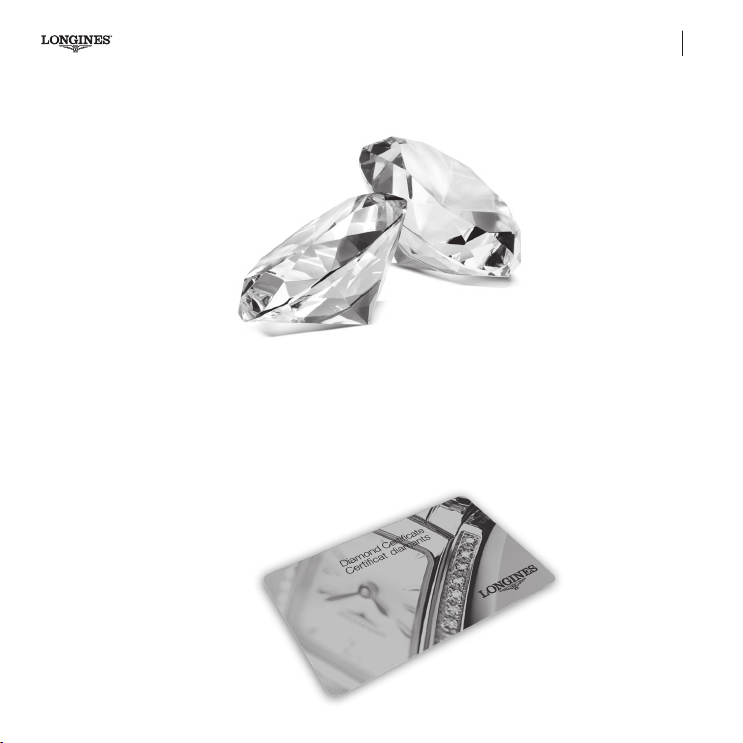
CERTIFICATE OF AUTHENTICITY
Longines bows to the paragon of beauty: the diamond
This certicate of authenticity guarantees the quality of each precious
stone selected by Longines’ specialists.
The cut: Longines diamonds are cut in the traditional brilliant style.
The purity: the degree of purity of a Longines diamond is VVS (very
very small inclusions). This means that it may include minute imper-
fections which are hardly visible under tenfold magnication (VVS).
The colour: the colour of the diamonds used by Longines is
Top Wesselton.
The weight: the weight of a diamond is measured in carats, one
carat being equal to one fth of a gram.
02-English.indd 63 14.11.18 15:43
64
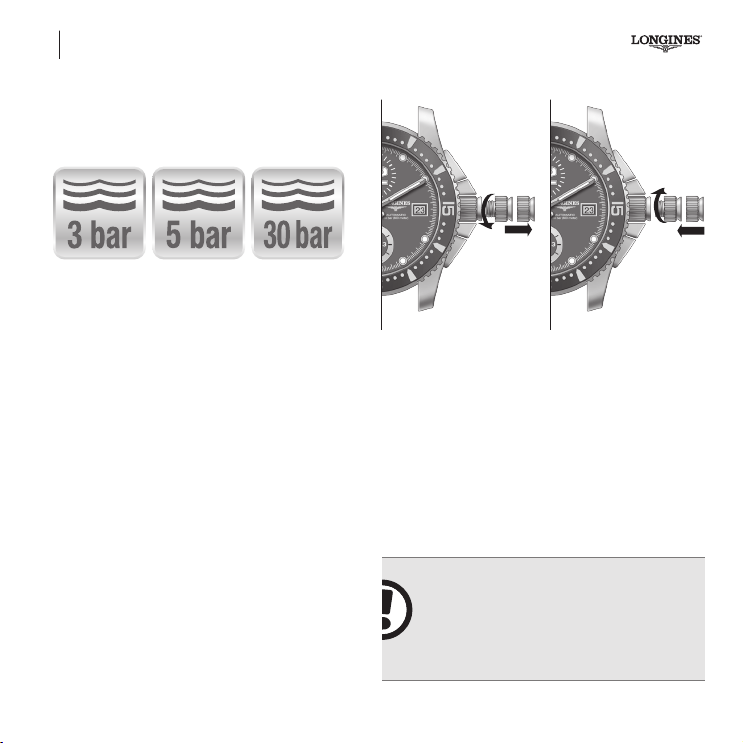
WATER-RESISTANCE / SCREW-IN CROWN AND PUSH-PIECES
Precautions regarding water-resistance
If your watch is water-resistant it is essential that the seals be checked
each year before the bathing season because, without your realising
it, they might have been damaged as the result of a shock.
If the case has to be opened for any reason, the seals for the glass
and the case-back as well as the crown (and/or push-pieces) must
be checked and, if neces-sary, replaced.
1 2 3
-
3
ba
21
Screw-in crown and push-pieces
Certain Longines models have a screw-in crown which has to be
unscrewed before each adjustment by turning it anti-clockwise
(g. a).
After use, return the crown to position 2,
then push in and screw
in rmly in position
1
to ensure that the seal with the case is water
resistant
(g. b).
-
Important ! You should always push the
crown (and/or the push-pieces) right in and
screw in firmly to ensure a water-resistant
seal with the case. The crown (and/or push
pieces) should never be adjusted if the
watch is in a humid atmosphere.
02-English.indd 64 14.11.18 15:43
65
Important
ADJUSTING THE TIME – GENERAL INFORMATION
! You should always push the
crown (and/or the push-pieces) right in and
screw in firmly to ensure a water-resistant
seal with the case. The crown (and/or push-
pieces) should never be adjusted if the
watch is in a humid atmosphere.
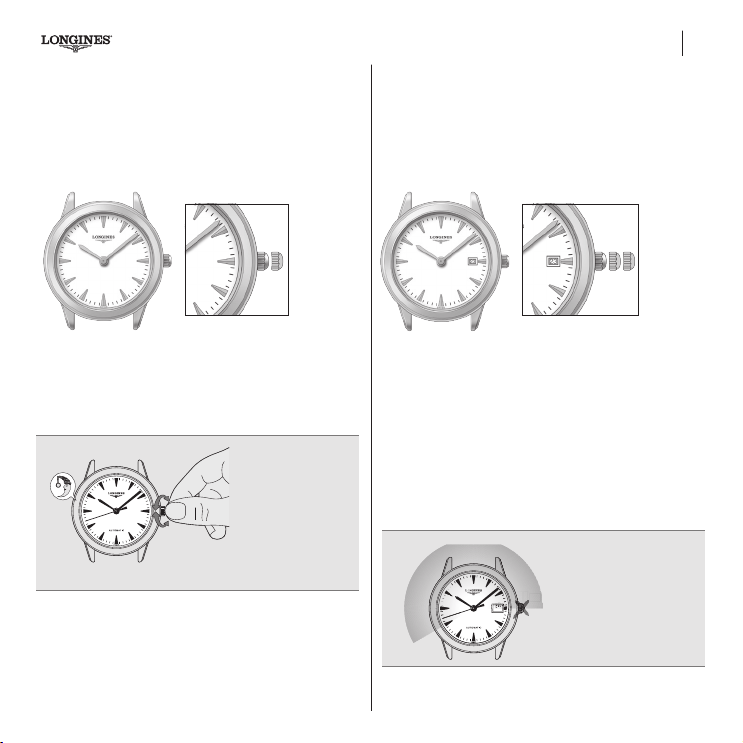
Model with Hour and Minute Hands
2-position crown
Applies to all watches that do not feature in the table of equivalents
on pages 58-59.
Adjusting the time
Pull the crown right out to position 2. Adjust the hands by turning
the crown in either direction. Push the crown back in to position 1.
Automatic watches
require manual
winding following
a long period of
inactivity.
Model with Hour, Minute Hands and Date
3-position crown
Applies to all watches that do not feature in the table of equivalents
on pages 58-59.
Adjusting the time
Pull the crown right out to position 3. Adjust the hands by turning
the crown in either direction. Push the crown back in to position 1.
Quick date adjustment (standard)
Pull the crown out to the intermediate position 2. Adjust the date
by turning the crown forwards (clockwise), then push the crown
back in again to position 1. It is necessary to adjust the date after
each month with less than 31 days.
1 2 321
It is not possible
to adjust the date
between 8.00 p.m. and
3.00 a.m.
23
22
2222222222222222222222
2222222222222222222222222222222
8:00pm
3:00 am
8:00pm
3:00 am
000000000003::::::::33::::::::::::::333
23
22
2
2
2
2
2
2
2
2
2
2
2
2
2
2
2
2
2
2
2
2
2
2
22
22
22
22
22
2
2
2
2
2
2
2
2
2
2
2
2
2
2
2
2
2
2
2
2
2
8:00pm
3:00 am
8:00pm
3:00 am
0
0
0
0
0
0
0
0
0
0
0
3
:
:
:
::
:
:
:
3
3
:
:
::
::
::
::
::
::
3
3
3
02-English.indd 65 14.11.18 15:43
66
Model with Hour, Minute, Seconds hands and Date
3-position crown
Applies to all watches that do not feature in the table of equivalents
on pages 58-59.
321
Adjusting the time and stop seconds (standard)
To synchronise the watch with the ofcial time signal (radio,
telephone, etc.), pull the crown to its furthest position 3, at the
moment when the small seconds hand is at 60, then push the crown
back in again to position 1 at the time signal. Set the time by turning
the crown in the desired direction.
The calendar changes every time the hour hand passes midnight.
Quick date adjustment (standard)
Pull the crown out to the intermediate position 2. Adjust the date
by turning the crown forwards (clockwise), then push the crown
back in again to position 1. It is necessary to adjust the date after
each month with less than 31 days.
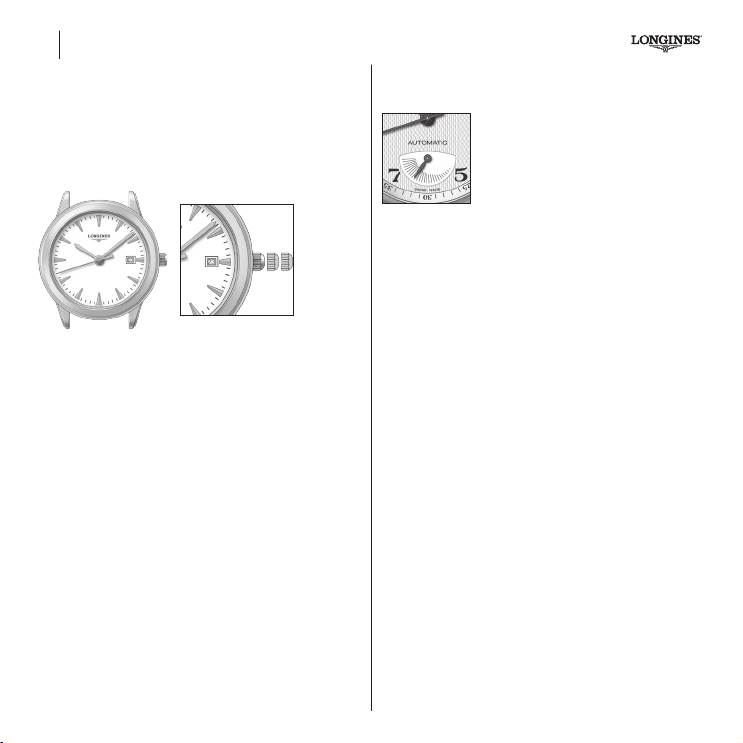
Power-reserve indicator
Certain watches have a power-reserve indicator
(calibre L602).
If the watch is worn rarely or not at all, the
hand will gradually shift anti-clockwise. When
it indicates that the power-reserve is below
1/4, the watch should either be wound or worn
to avoid it stopping.
When the watch is wound the power-reserve indicator will shift
clockwise.
ADJUSTING THE TIME – GENERAL INFORMATION
02-English.indd 66 14.11.18 15:43
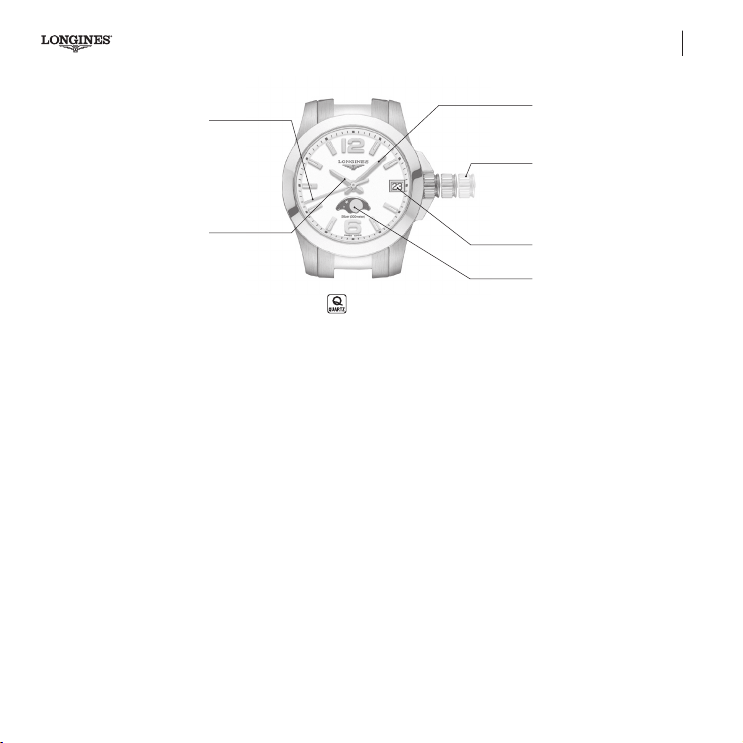
Quartz watches L296
Hour hand
Minute hand
Date window
Moon phase
window
Seconds hand
Time-setting crown
(position 1, 2, 3)
L296
1 2 3
67
Hour, minute, seconds, date and moon phase display.
3-position crown
Adjusting the time and stop seconds
(See page 66)
Quick date and moon phase adjustment
Pull the crown out to the intermediate position 2. Turn the crown
forward to correct the date, and backward to correct the moon
phase, and then push the crown fully back in again (pos. 1). The
date needs to be corrected after every month shorter than 31 days.
02-English.indd 67 14.11.18 15:43
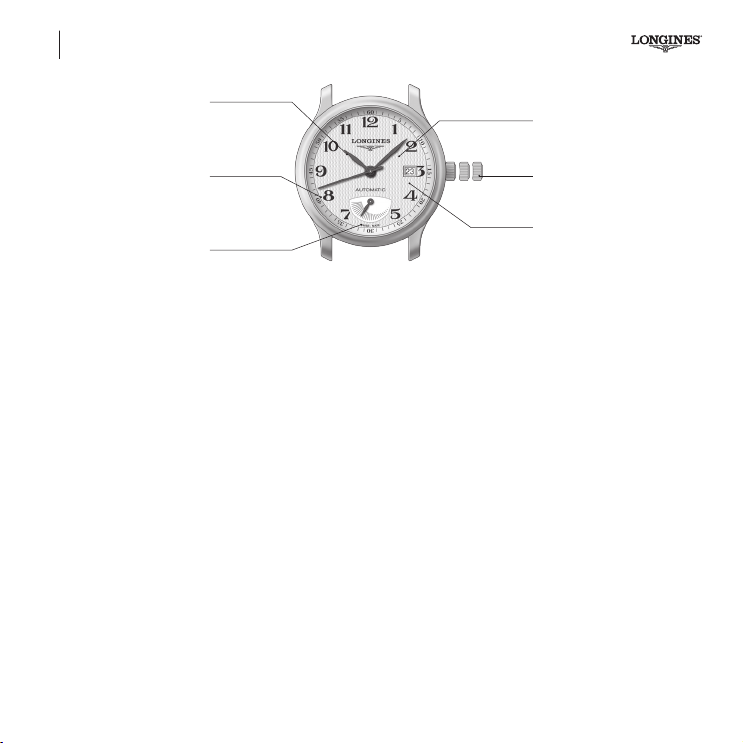
L602
Automatic watches
Hour hand
Minute hand
3-position
crown
Date aperture
Seconds hand
Power reserve
indicator
1 2 3
L602
68
Shows the hours, minutes, seconds and date, as well as the
power-reserve.
3-position crown
Adjusting the time and stop seconds
(See page 66)
Quick date adjustment
(See page 66)
02-English.indd 68 14.11.18 15:43
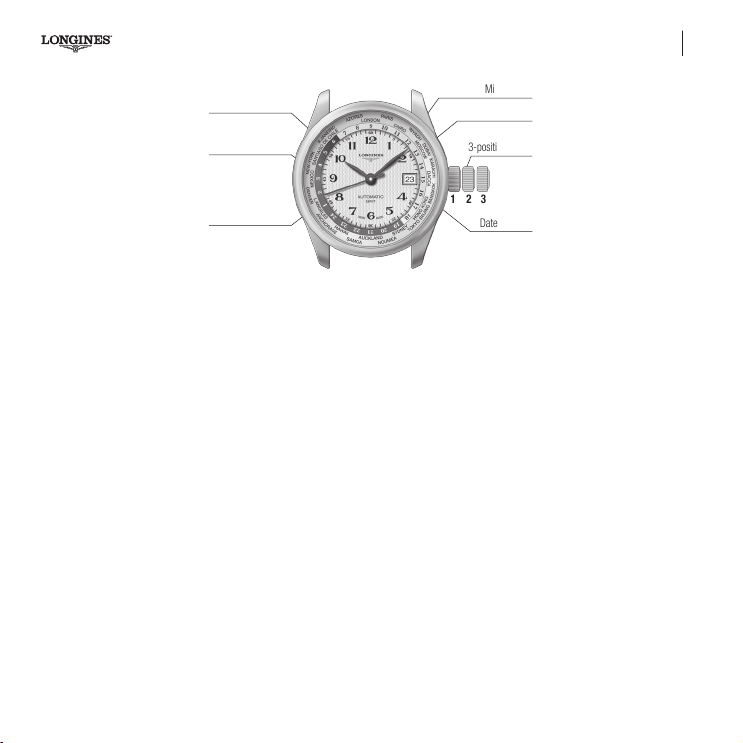
Automatic watches L635 – 24 TIME ZONES
L635
24 time zones
Hour hand
Rotating 24-hour
disc
Minute hand
3-position crown
Town ring
Date aperture
Seconds hand
1 2 3
69
Shows the hours, minutes, seconds and date, as well as the time in
the 24 time zones where there is a reference point (Longines patent
no. 02266/92-3).
3-position crown
Adjusting the time and stop seconds
Pull the crown right out to position 3. The seconds hand will now
stop. Adjust the time by turning the crown in either direction. When
the crown is turned the 24-hour disc also turns. Synchronise your
watch with a time signal (telephone, radio, TV) and then push the
crown back in to position 1.
Adjusting the time zone and the date
Pull the crown out to the intermediate position 2. Turn the crown
forwards or backwards to adjust the hour hand in the corresponding
direction by successive jumps of one hour, which will not affect the
minute or seconds hands.
When the hour hand passes midnight, the date will change auto-
matically, indicating either the next day or the day before, depending
on the direction you turn the crown. It is necessary to adjust the
date at the end of each month with less than 31 days. Push the
crown back in to position 1.
02-English.indd 69 14.11.18 15:43
70
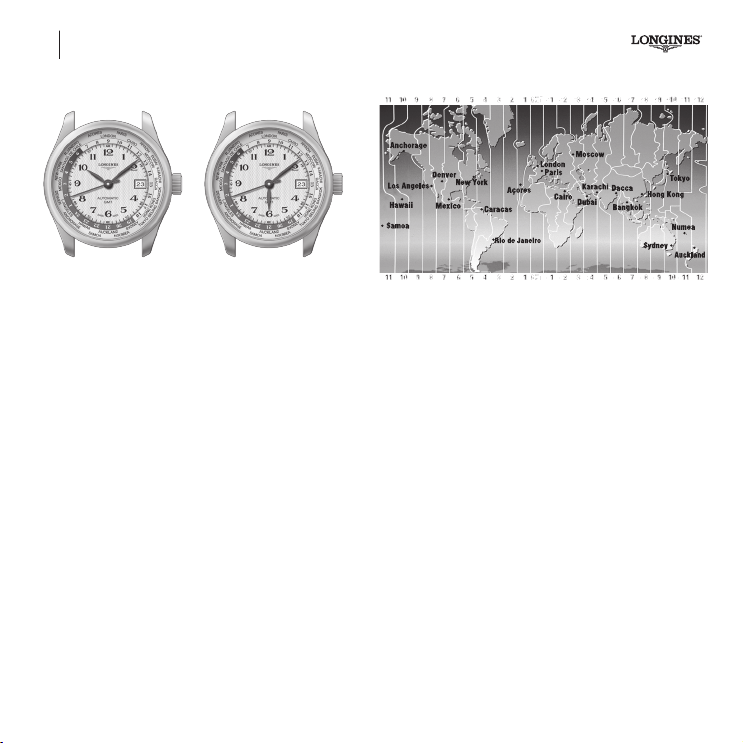
How to use your Longines 24 time zone watch
Pull the crown right out to position 3. The seconds hand will now stop.
Turn the crown in either direction so that your local time (winter
time) is displayed on the 24-hour disc opposite the town in the time
zone where you are.
Push the crown back in to the intermediate position 2 and adjust the
hour hand to local time, checking that the date jumps at midnight.
Push the crown back in to position 1.
Your watch now shows universal time on the 24-hour disc and local
time by the hands.
Example: 23 February, Paris, GMT (London) is at 12 o’clock,
the hands show 10 hours and 8 minutes and on the disc the 10
is opposite Paris.
How to use when travelling
Pull the crown out to the intermediate position 2.
Adjust the hour hand to correspond to the time zone of the town
where you are (see table of towns).
Push the crown back in to position 1.
Certain countries have summer time; to adjust your watch, carry out
the same procedure.
Example: 23 February, Tokyo, GMT (London) is at 12 o’clock,
the hands show 18 hours and 8 minutes and on the disc the 10 is
opposite Paris: this means that it is 10.08 a.m. in Paris.
L635 – 24 TIME ZONES Automatic watches
02-English.indd 70 14.11.18 15:43
Automatic watches L636, L897
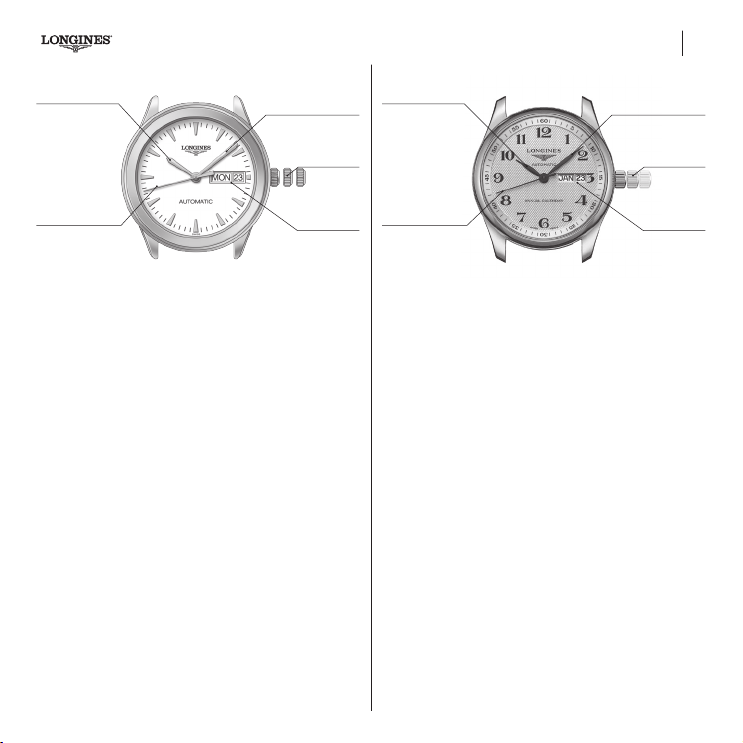
Hour hand
Minute hand
3-position
crown
Day and date
aperture
Seconds hand
1 2 3
L636
71
Shows the hours, minutes, seconds, date and day.
3-position crown
Adjusting the time and stop seconds
(See page 66)
Quick date and day adjustment
Pull the crown out to the intermediate position 2. Turn it forwards
(clockwise) to adjust the date, backwards to change the day, and
then push it back in again to position 1. It is necessary to adjust
the date after each month with less than 31 days.
Hour hand
Minute hand
3-position
crown
Month and date
aperture
Seconds hand
1 2 3
L897
Shows the hours, minutes, seconds, date and month.
3-position crown
Adjusting the time and stop seconds
(See page 66)
Quick date and month adjustment
Pull the crown out to the intermediate position 2. Turn it forwards
(clockwise) to adjust the date, backwards to change the month,
and then push it back in again to position 1. A manual correction is
required upon the February to March month change. After 30-day
months, it takes 5 hours for the mechanism to reach the 1st of
the next month. Do not make any quick month adjustments on the
30 and/or a quick date or month adjustment between 9 p.m. and
5 a.m., as this could damage the mechanism.
02-English.indd 71 14.11.18 15:43
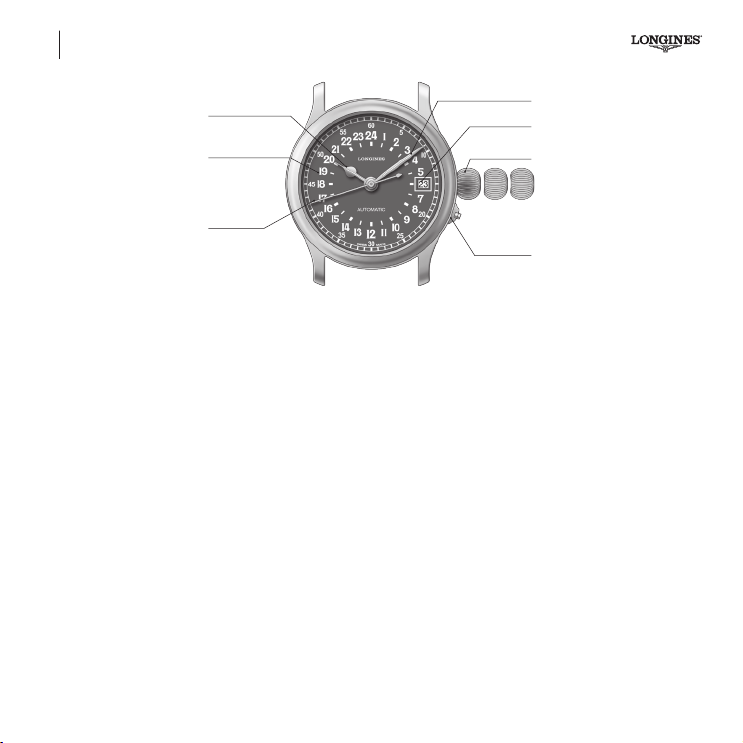
L704.3
Automatic watches
L704.3
Longines Twenty-Four Hours
Hour hand (24h)
24-hour display
Minute hand
3-position
crown
Push-piece to
open the
case-back
Date aperture
Seconds hand
1 2 3
72
Shows the hours, minutes, seconds and date.
3-position crown
Adjusting the time and stop seconds
(See page 66)
Quick date adjustment
Pull the crown out to the intermediate position 2. Turn the crown
forwards until the desired date is shown, then push the crown
back in to position 1. It is necessary to adjust the date after each
month with less than 31 days.
02-English.indd 72 14.11.18 15:43
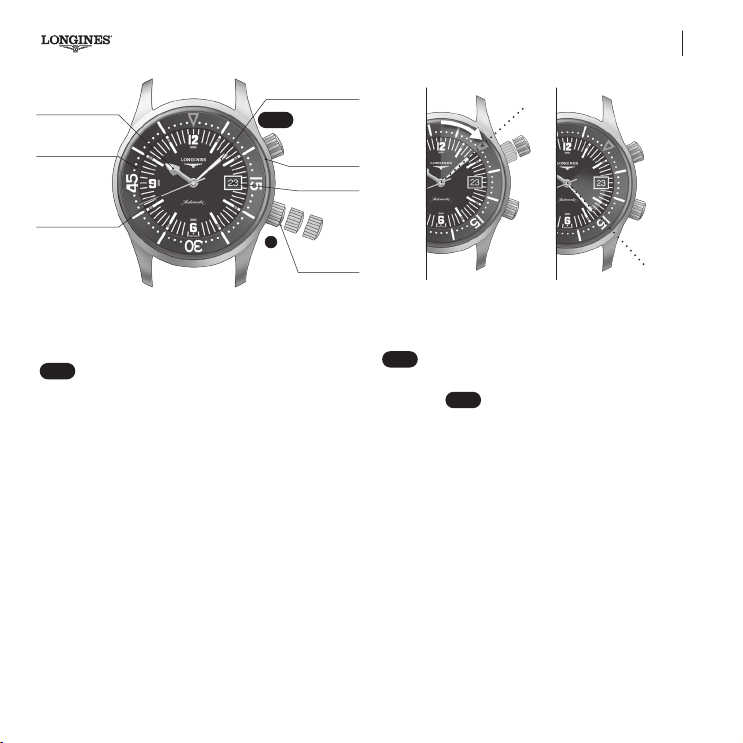
Automatic watches L633, L888 – DIVER DATE
L633, L888
Diver
Date
Hour hand
Bi-directional rotating
ange
Minute hand
Stop/start crown for
the bi-directional
rotating ange
3-position
crown
Date aperture
Seconds hand
1
2
3
a
A
DIVER
73
Your Longines Legend Diver Watch has 2 crowns, A and
DIVER
, which can be used for specic functions (g.
a
).
Shows the hours, minutes, seconds and date and also enables the
user to check his or her diving time.
Crown A: 3 positions
Adjusting the time and stop seconds
Unscrew crown A and pull it out to position 3. The seconds hand
will now stop. Adjust the time by turning the crown in either direction.
Synchronise your watch with a time signal (telephone, radio, TV) and
then push the crown A back in to position 1, and screw in rmly.
Adjusting the date
Unscrew crown A and pull it out to the intermediate position 2.
Turn it forwards until it shows the desired date. Push crown A
back in to position 1 and screw in rmly.
b c
DIVER
screw-in crown
Verifying your diving time
Unscrew the
DIVER
crown. When you start diving turn the rotating
bidirectional ring to adjust the needle to the minute hand. Push the
crown back in again and then screw in rmly (g.
b
).
You
can read off your diving time from the minute hand on the
graduations of the rotating bidirectional ring
(g.
c
).
The example shows: 15 minutes diving time.
02-English.indd 73 14.11.18 15:43
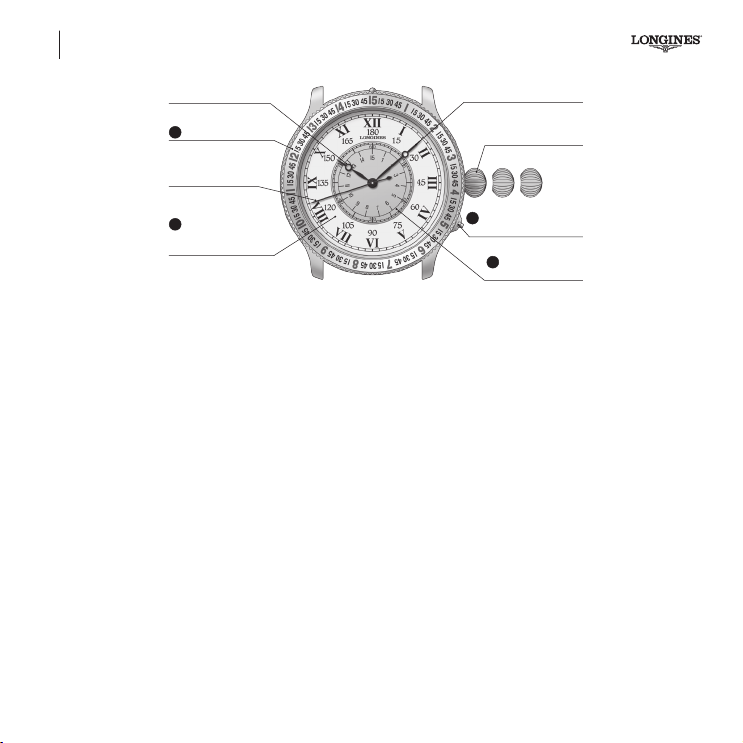
L699 – THE LINDBERGH HOUR ANGLE WATCH Automatic watches
1 2 3
L699-Lindbergh
Hour hand
Seconds hand
Rotating bezel
Minute hand
3-position crown
Push-piece to open the
case-back
Central rotating
seconds dial
Central rotating hours,
minutes, seconds, hour
angle dial
D
C
A
B
74
The original Lindbergh Hour Angle Watch was designed by Charles
Lindbergh as a navigational aid for pilots. Used with a sextant and a
nautical almanac, this watch enables the wearer to quickly determine
the hour angle from Greenwich, in other words his or her longitude.
Thanks to its ingenious combination of dials, this time-piece differs
from an ordinary watch in three ways:
A The indications on the dial are designed in such a way that they
show simultaneously the time (in hours, minutes and seconds)
and the hour angle (in degrees and minutes of arc).
B The rotating central dial shows the seconds and it can be turned
using the crown in order to synchronise the watch with a time
signal.
C The bezel can be rotated to correct the equation of time (which
varies from one day to the next).
3-position crown
Adjusting the time and stop seconds
(See page 66)
Synchronising the watch with a time signal
In the intermediate position 2, the crown can be used to turn the
central dial (in either direction). Pull the crown out to the intermedi-
ate position 2 and turn the central dial so that the seconds hand
points to the “60/15” position on the last pip of the time signal.
Push the crown back in to position 1.
Push-piece
D
at 4 o’clock
This is for opening the case back, thus revealing the movement
through a protective sapphire glass.
02-English.indd 74 14.11.18 15:43
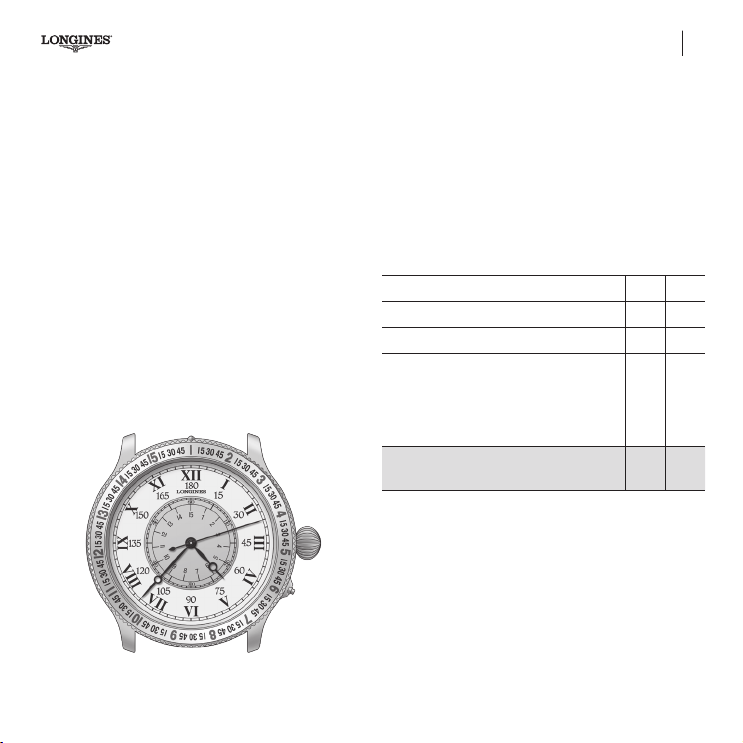
The space/time dial and how it works
The design of the whole of The Lindbergh Hour Angle Watch takes
into account the fact that the Earth revolves through 360° in 24hours,
through 180° in 12 hours, through 15° in 1 hour and through 15’
of arc in 1 minute.
Consequently:
The hour hand indicates 15° per hour. One complete circle of the
dial (12 hours) is equivalent to 180°.
The minute hand indicates 1° per 4’, in other words 15° per hour.
Each of the 15° is subdivided into four sectors of 15’ of arc. All
these indications are engraved on the rotating bezel.
One complete circle of the centre seconds is equivalent to 15’ of arc.
The rotating central dial is divided into 60’’ and 15’ of arc.
75
Automatic watches L699 – THE LINDBERGH HOUR ANGLE WATCH
How to use your The Lindbergh Hour Angle Watch
Having synchronised your watch with a time signal. As an example
when you check it your watch shows 4 hours, 37 minutes and
12 seconds. The equation of time for the day in question is minus
4 minutes and 50 seconds.
Therefore move the marker situated at “15” on the bezel 4 gradua-
tions to the left. These graduations represent the minutes engraved
around the case.
Your data are as follows:
Seconds hand (centre dial) 3’
Minute hand (bezel) 10° 15’
Hour hand (main dial) 60°
As you have only turned the bezel by 4 minutes,
you still have to take into account the 50 seconds
(the equation of time being 4 minutes and
50seconds for the day in question).
On the central dial, the 50 is opposite 12½ . /. 12½’
Greenwich hour angle of the sun
(your longitude)
7 0 ° 5½’
02-English.indd 75 14.11.18 15:43

L699 – THE LONGINES WEEMS SECOND-SETTING WATCH
Hour hand
Seconds hand
Minute hand
3-position crown
Push-piece to open
the case-back
Central rotating dial
L699-Weems
1 2 3
A
76
Automatic watches
Shows the hours, minutes and seconds. The central rotating dial
indicates the seconds; it can be adjusted to synchronise the watch
with a time signal using the crown, without affecting the seconds,
minutes and hours.
3-position crown
Adjusting the time and stop seconds
(See page 66)
Synchronising the watch with a time signal
In the intermediate position
2
, the crown can be used to turn the
central dial (in either direction). Pull the crown out to the intermediate
position
2
and turn the central dial so that the seconds hand points to
the “60” position on the last pip of the time signal. Push the crown
back in to position
1
.
Push-piece A
This is for opening the case back thus revealing the movement
through a protective sapphire glass.
02-English.indd 76 14.11.18 15:43
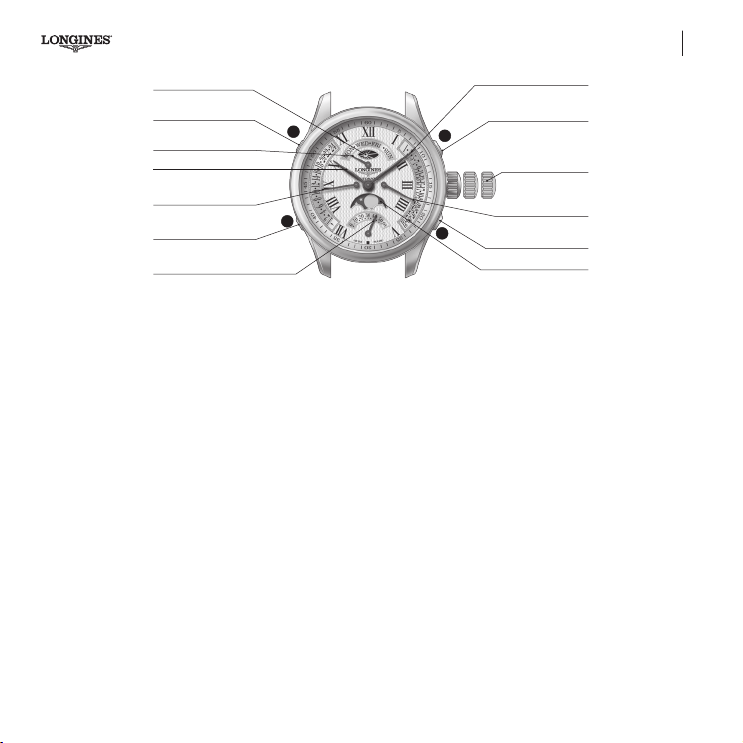
77
Automatic watches
L707
Hour hand
24H hand push-piece
Days of the week hand
24h a.m./p.m. display
Minute hand
Day of the week
push-piece
Date push-piece
(calendar)
Phases of the Moon
3-position crown
Calendar with hand
24-hour hand
(24H-second time zone)
Phases of the Moon
push-piece
Retrograde small seconds
L707
4X Retrograde
1 2 3
A
B
C
D
Shows the hours and minutes, small seconds in a retrograde display,
the day, the date and the time in a second time zone, together with
Moon-phase and day/night indications.
3-position crown
The crown can be used not only to adjust the hour, minute and
seconds hands but also interdependently the day, date and time
in a second time zone.
Adjusting the time and stop seconds
To synchronise the watch with the ofcial time signal (radio,
telephone, etc.), pull the crown to its furthest position 3, at the
moment when the small seconds hand is at 60, then push the crown
back in again to position 1 at the time signal. The calendar changes
every time the hour hand passes midnight.
This adjustment will also affect the time in a second time zone,
as well as the day and date each time the hand passes midnight,
the adjustment being effected when the crown is pushed back in
to position 1. The day, date and 24-hour time zone indicators are
excluded from the retrograde sectors when the crown is pulled
out to position 3.
Quick time adjustment
Pull the crown out to the intermediate position 2. Turn it in either
direction. The hour hand will jump forwards by 1 hour at a time
without affecting the minute or seconds hands. Then push the crown
back in to position 1. This adjustment will also affect the day and date
each time the hand passes midnight, the adjustment being effected
when the crown is pushed back in to position 1. The day, date and
24-hour time zone indicators are excluded from the retrograde
sectors when the crown is pulled out to position 2.
Adjusting the time (a.m./p.m.)
The dial is divided into 12 hours. The date and the day of the week
change only once every 24 hours (each time the hour hand completes
two circles of the dial).
In order to ensure that the date and day change at midnight,
please follow the instructions below before changing the date and
the day of the week.
02-English.indd 77 14.11.18 15:43
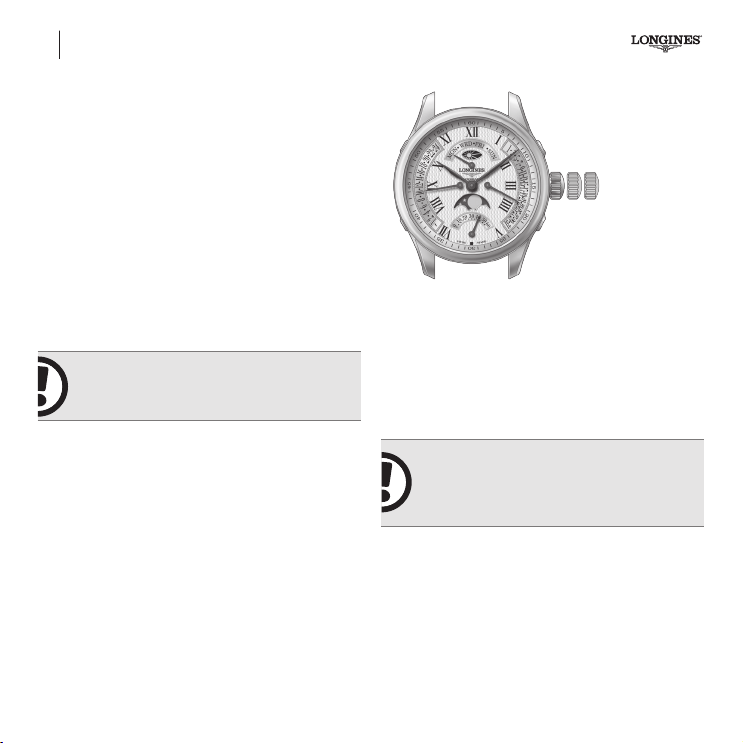
78
L707
Automatic watches
Note the day of the week indicated on the dial.
Pull the crown out to position 2 (Quick time adjustment) and
turn it clockwise until the hour hand has completed one circle.
Push the crown back in to position 1 (Winding).
Check that the day of the week has changed.
If so, the watch will now indicate morning (a.m.). If the watch
indicates morning
but it is in fact afternoon pull the crown out to
position2 (Quick time adjustment) and turn it until the hour hand
has completed one circle.
If, however, the day of the week has not changed, the watch will
indicate afternoon (p.m.). If the watch indi-cates afternoon but it is in
fact morning
pull the crown out to position 2 (Quick time adjust-
ment) and turn it until the hour hand has completed one circle.
Push the crown back in to position 1 (Winding).
IMPORTANT! You will not see any changes
on the dial when using the crown in
positions2and3.
24-hour indicator:
if you do not wish to use the Second time
zone function you can convert it into a 24-hour indicator. This will
enable you to avoid this step in the future.
See under: Synchronising the time in a second time zone /
24-hour indicator.
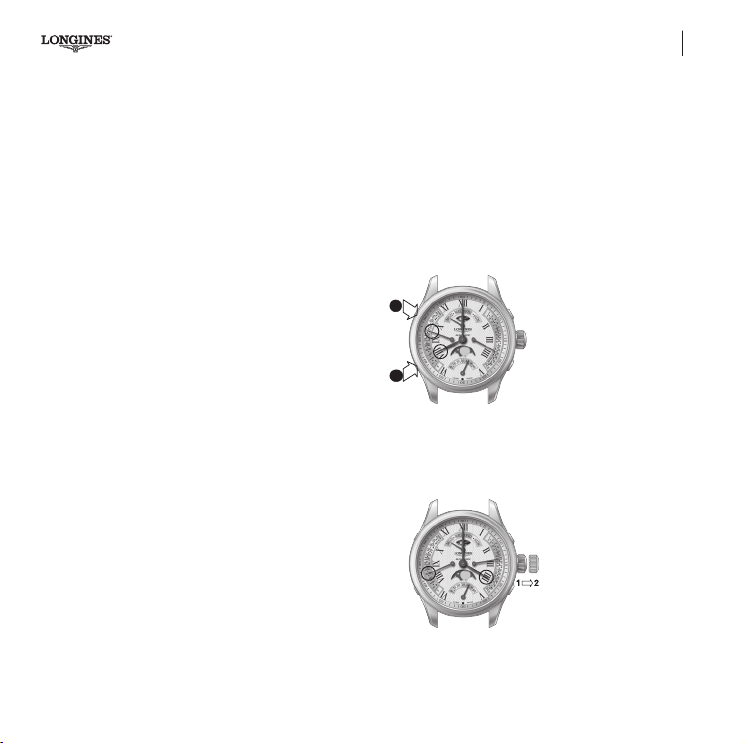
The functions of the 3 push-pieces
The 3 push-pieces can be used when the crown is in any position.
Adjusting the day of the week
Press push-piece
A
to adjust the day of the week.
IMPORTANT! Do not change the date or
use the push-pieces A (for the day) or B
(for the date) between 9 p.m. and 3 a.m. as
doing so may damage the mechanism.
Adjusting the date
Press push-piece
B
to adjust the date.
02-English.indd 78 14.11.18 15:43
79
Automatic watches L707
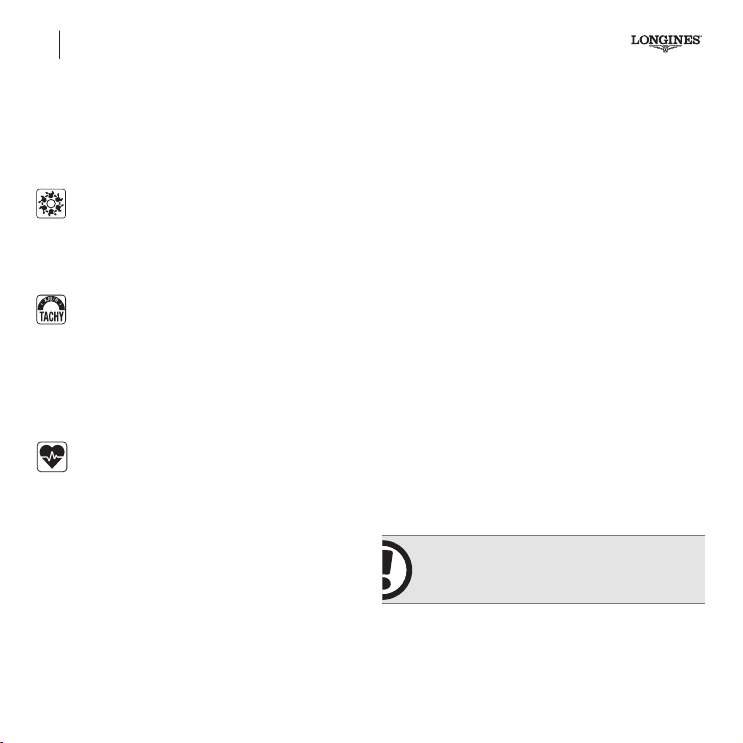
Adjusting the time in the second time zone
(24-hour hand)
Press push-piece C to adjust the time in the second time zone
by successive steps of 1 hour, which will not affect the minute
and seconds hands.
Example: you are on Geneva time (home) and it is 8 a.m. You know
that there is an 8-hour difference between Switzerland and Japan.
Moon-phase correction
Press corrector D until the full moon appears in the centre of the
Moon-phase display. Calculate the date of the last full moon, and
press corrector D again as many times as the number of days
that have passed since the last full moon. Do not correct the
Moon-phase between 3 p.m. and 6p.m. as this function is
not active during this period.
Synchronising the time in the second time zone /
the24-hour hand
To synchronise the time in the second time zone with the actual
time where you are, use push-piece C. If the watch stops you will
immediately see from the time in the second time zone whether your
watch is showing morning (a.m.) or afternoon (p.m.).
Please note that if you use the Quick time adjustment function
(crown in position 2), the synchronisation will be interrupted.
Option a: you leave your watch on Geneva time and date. You press
push-piece
C to adjust the time in the second time zone so that the
24-hour hand is on 16 (4 p.m. Japanese time).
Option b: you travel to Japan and want your watch to show
Japanese time and date. You adjust the time by turning the crown
(in position 2) clockwise so that the 24-hour hand is on the 4 (4p.m.
Japanese time). Then push the crown back in. The time shown
in the second time zone will stay at 8 a.m. (Geneva time: home).
Option a
L707
C
D
Option b
L707
02-English.indd 79 14.11.18 15:43
80
CHRONOGRAPHS – GENERAL POINTS
THE CHRONOGRAPH
The chronograph is an instrument for measuring short periods of
time. It is used mainly in sport but also in aviation or for scientic
experiments, for example.
The Column-Wheel
The column-wheel movement is reputed for the feeling
of crisp efciency its handling provides. In particular, the
instant responsiveness of its pushpieces adds to the pleasure of
using the chronograph.
Tachometric scale
Chronograph tted with a scale allowing speed to be read
in kph.
Measure the time needed to cover 1 kilometre (or 1 mile). The position
of the seconds hand when it stops indicates the mean speed. If it
takes 30 seconds to cover 1 km (or 1 mile), the scale will indicate
a mean speed of 120 kph (or 120 mph).
Pulsometer scale
A chronograph whose dial features a scale enabling the
wearer to directly read their hear trate, by starting the
chronograph and counting 30 beats.
Chronographs standard functions
Standard Start-Stop function
Add Rally function (partial times)
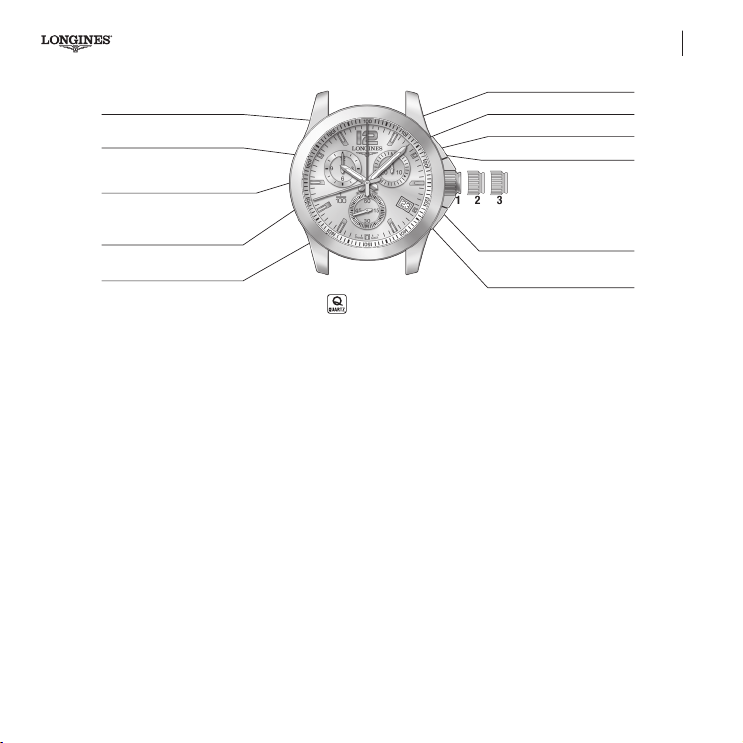
Standard Start-Stop function
Used for timing a single event:
• Press push-piece A: to start the chronograph.
• Press push-piece A: to stop the chronograph.
• Press push-piece B to return to zero.
Add Rally function (partial times)
Used for measuring successive events but not the inter-vals between
them. Each result is automatically added to the preceding one. To
time the different stages of a car rally, for example:
• At the
start of the rst stage, press push-pieceA to start
the chronograph.
• At the
end of the rst stage, press push-piece A again and
the chronograph will stop.
• Repeat this procedure for each stage of the rally.
• At the
end of the nal stage the chronograph will show the total
time of the rally, in other words, the accumu-lated time for all
the stages.
• Press push-piece B to return to zero.
IMPORTANT! The time should not be adjusted
while the chronograph function is being used.
02-English.indd 80 14.11.18 15:43
81
Quartz chronographs L440
Chronograph 1/100th of a
second hand
12-hour counter
3-position crown
Hour hand
Chronograph seconds hand
Small seconds
2 31
L440
Minute hand
1/100th of a second counter
30-minute counter
Push-piece A Start-Stop
Date aperture
Push-piece B Split
and return to zero
Longines’ quartz chronograph tted with calibre L440 shows the
local time (hours, minutes, small seconds), and the date in a window.
• Quick time zone and date adjustment.
• The hour and minute are displayed by the 2big central hands.
• The small seconds are displayed on the counter at 6 o'clock.
• Rate precision ±0.07 seconds per day (PreciDrive).
• The 12-hour chronograph displays the hour, minute, seconds
and hundredths of a second.
• Quick-moving chronograph counter hands.
• Electronic quartz movement with 5motors and 7 hands.
• Hour with time zone mechanism.
• The time measurement and hand movements are managed by
a micro-controller.
• The movement seconds are controlled by a PreciDrive Watch
Module.
3-position crown
Simple function
In this function, with the crown in position 1, push-piece A is used to
switch the chronograph status between START and STOP.
After START is pressed, the counter hands will show the measured
time. The 1/100th of a SECOND counter hand will not turn.
After STOP has been pressed, the 60-SECOND, 30-MINUTE and
12-HOUR counter hands will stop running. The 1/100th of a SECOND
counter hand will move to show the one hundredths of a second value.
To measure another time, press push-piece B to return the counters
to zero (RESET). All the hands will quickly return clockwise to their
start point, and the chronograph will switch back to watch mode.
02-English.indd 81 14.11.18 15:43

82
L440 Quartz chronographs
Adjusting the time and stop seconds
Unscrew the crown if necessary.
To synchronise the watch with an ofcial time signal (radio, telephone,
etc.), pull the crown to its furthest position 3, at the moment when
the small seconds hand is at 60, then push the crown back in again
to position 1 at the time signal, and screw in.
The calendar changes every time the hour hand passes midnight.
Minute and seconds adjustment
After unscrewing the crown (if necessary) and pulling it to its furthest
position 3, the 3 counter hands will move to the midday position. Turn
the crown to correct the hour and minute hands. Turn the crown
either way to correct the minute. Then push the crown back in again
to position 1, and screw in.
Changing the time zone and the date
Unscrew the crown (if necessary), and pull it out to the intermedi-
ate position 2. The hour hand will make one-hour jumps, enabling
quick time zone adjustments. The hour hand can be moved in either
direction without affecting the minute and seconds hands. Turning
the crown through 24 hours will cause a date change. The crown
be turned either way. Then push the crown back in again to position
1, and screw in.
Chronograph functions
Standard Start-Stop function
Simple time measurement – Timing 100metres.
ADD function (partial times)
Adds several times together – Timing periods of a hockey match or
a stage race, for instance.
Split function (intermediate times)
This function is used to time intermediate race lap times in a single
event. Intermediate times are accumulated throughout the event.
Standard Start-Stop function
Used for timing a single event:
• Press push-piece A : to start the chronograph.
• Press push-piece A : to stop the chronograph.
• Press push-piece B : to return to zero.
ADD Rally function (partial times)
Used for measuring successive events, but not the intervals between
them. Each result is automatically added to the preceding one. To
time the various stages of a car rally, for example:
• At the start of the rst stage, press push-piece A to start the
chronograph.
• At the start of the rst stage, press push-piece A again and the
chronograph will stop to 1/100th of a second.
• Repeat this procedure for each stage of the rally.
• At the end of the nal stage the chronograph will show the total
time of the rally, in other words, the accumulated time for all
the stages.
• Press push-piece B to return to zero.
02-English.indd 82 14.11.18 15:43

83
Quartz chronographs L440
IMPORTANT!
NB:
Split FUNCTION (intermediate times)
This function is used to time one single event. Intermediate times are
accumulated throughout the event.
While the watch displays an intermediate time the
chronograph function will still be timing the event.
• Press push-piece A at the start of the event you wish to time,
for example a ski race.
• Press push-piece B to see the rst intermediate time; the
60-second, 30-minute and 12-hour counter hands will stop,
and the 1/100th of a second counter hand will move to the
measured one hundredth.
• Press push-piece B again and the chronograph hands will jump
to the correct time since the start of the race.
To see the second intermediate time, repeat the procedure.
• Press push-piece B once to see the second intermediate
time measured to 1/100th of a second, and again to make the
chronograph hands jump to the current time.
• At the end of the race, press push-piece A to see the total
time for the race.
• Press push-piece B to return to zero.
The split function / intermediate times can also be used to record
consecutively the times of various competitors as they nish a race.
Resetting the chronograph hands
If for any reason the chronograph hands do not return exactly to zero,
take the following action:
• Unscrew the crown if necessary.
• Pull the crown out to the intermediate position 2; the 4 CHRONO
counter hands, 1/100th of a SECOND and 60-SECOND in the
centre, 30-MINUTE at 2 o'clock and 12-HOUR at 10 o'clock, will
return to their start point, normally the midday position.
If the watch was in RESET status, the hands are already zeroed. If
there is a timing operation in progress, the hands will return to their
start point. Then they will all complete one quick circle of the dial.
Pressing push-piece A will move the selected hand to indicate which
hand will be moved by pressing push-piece B.
Each successive press on A selects the next hand.
A short press on push-piece B will move the selected counter one
step clockwise.
Holding push-piece B for more than one second will move the hand
in quick continuous rotation.
02-English.indd 83 14.11.18 15:43
84
L440 Quartz chronographs
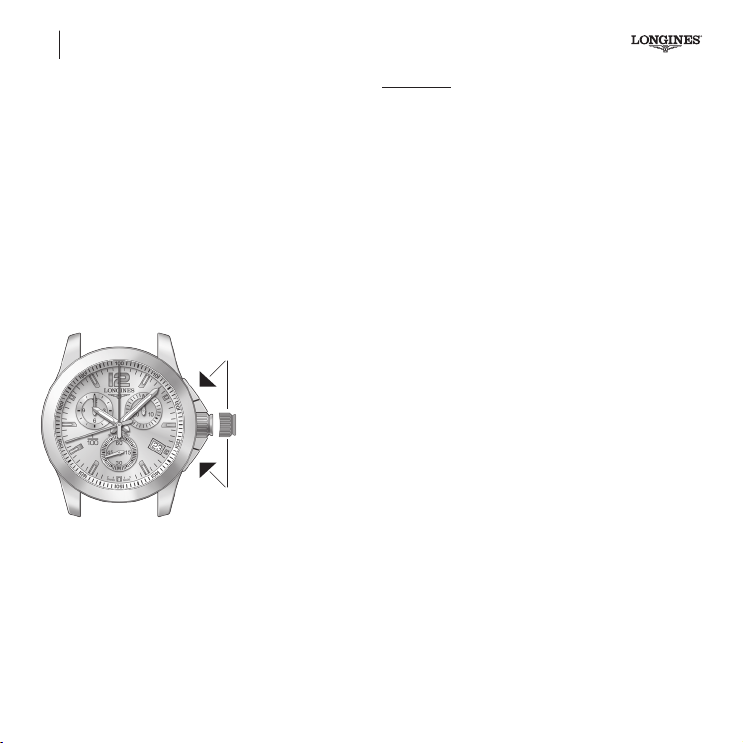
1. Chronograph 1/100th of a second counter (centre):
With the crown in position 2, press push-piece B.
2. Chronograph 60-second counter (centre):
With the crown in position 2, press push-piece A, and then adjust
with push-piece B.
3. Chronograph 30-minute counter (at 2 o'clock):
With the crown in position 2, press push-piece A, and then adjust
with push-piece B.
4. Chronograph 12-hour counter (at 10 o'clock):
With the crown in position 2, press push-piece A, and then adjust
with push-piece B.
Then push the crown back in again to position1, and screw in.
Select counter to return
to zero (selected hand
moves)
Return saelected
hand to zero
Time-adjusting
crown
21
1
2
A
B
IMPORTANT! The time, or any other display, should not be adjusted
while the chronograph function is being used.
Important notes
a) It is possible to combine the various Chrono functions (SIMPLE,
ADD and SPLIT) in the same timing operation.
b) Unless the chronograph is stopped (STOP pressed), the chro-
nograph hands will not stop moving. Continuous running of the
chronograph
will greatly reduce the autonomy of the movement.
Battery end-of-life mode (E.O.L)
If the battery voltage decreases and the risk of function loss arises,
E.O.L mode is activated. If the voltage is below the E.O.L level,
the chronograph functions are locked, and the small seconds at
6o'clock is stopped.
E.O.L mode is activated if the battery voltage is below the E.O.L level
for more than one hour. If the battery voltage climbs above the E.O.L
level for more than 15 minutes, E.O.L mode is deactivated. This
scenario may occur in particular if the watch has been temporarily
exposed to low temperatures.
In this mode:
The small seconds hand moves jerkily. The hand moves 4 steps
quickly, and then remains immobile for 4 seconds.
The chronograph can no longer be activated (START) for approxi-
mately one hour after E.O.L mode has been activated.
If the chronograph was active at this time, it will continue to run,
though there could be step loss.
02-English.indd 84 14.11.18 15:43
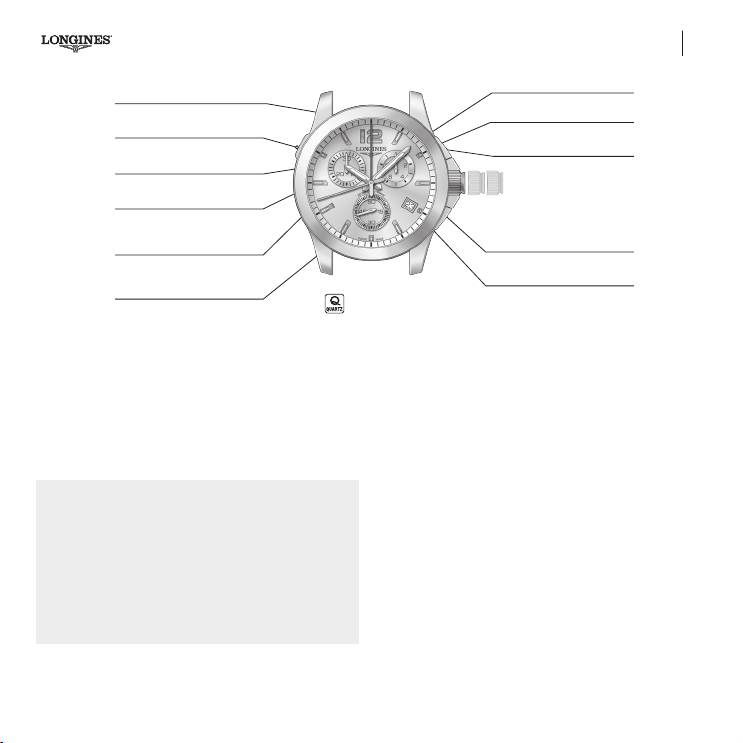
85
Quartz chronographs
L442
Minute hand
60-second counter
30-minute counter
1/10
th
of a second counter
Push-piece C
Push-piece A
3-position crown
Hour hand
60-second counter
(split-seconds hand)
Date aperture
Push-piece B
Small seconds
L442
2 31
When used as a watch, the Longines L442 QUARTZ chronograph
indicates a local time (hour, minute and small seconds), plus the date
in a window, and features quick time zone adjustments.
In its chronograph function, this model can time events lasting up
to 30 minutes, while displaying the results to the nearest 1/10th of
a second. PowerDrive quick-moving chronograph counter hands.
PreciDrive rate precision, earning COSC certication.
PreciDrive calibre 251.294
• Electronic quartz movement with 5motors and 7 hands.
• Hour with time zone mechanism.
• The time measurement and hand movements are mana
ged
by a microcontroller.
• The movement seconds are controlled b
y a PreciDrive Watch
Module, which transforms this calibre into a chronometer
with a rate precision exceeding the COSC requirements.
Timing mode
Simple function
In this function, with the crown in position 1, push-piece A is used to
switch the chronograph status between START and STOP.
After START is pressed, the counter hands will show the measured
time. The 60-SECOND and SPLIT-SECONDS counters run simultane-
ously, indicating the measured time in seconds.
After STOP has been pressed, the 60-SECOND, SPLIT-SECONDS and
30-MINUTE counter hands will stop running. The 1/10th of a SECOND
counter hand displays the value in tenths of a second as it runs.
To measure another time, press push-piece B to return the counters
to zero (RESET). All the hands will quickly return clockwise to the start
point, and the chronograph will go back to watch mode.
Battery end-of-life mode (E.O.L)
(See page 84)
02-English.indd 85 14.11.18 15:43
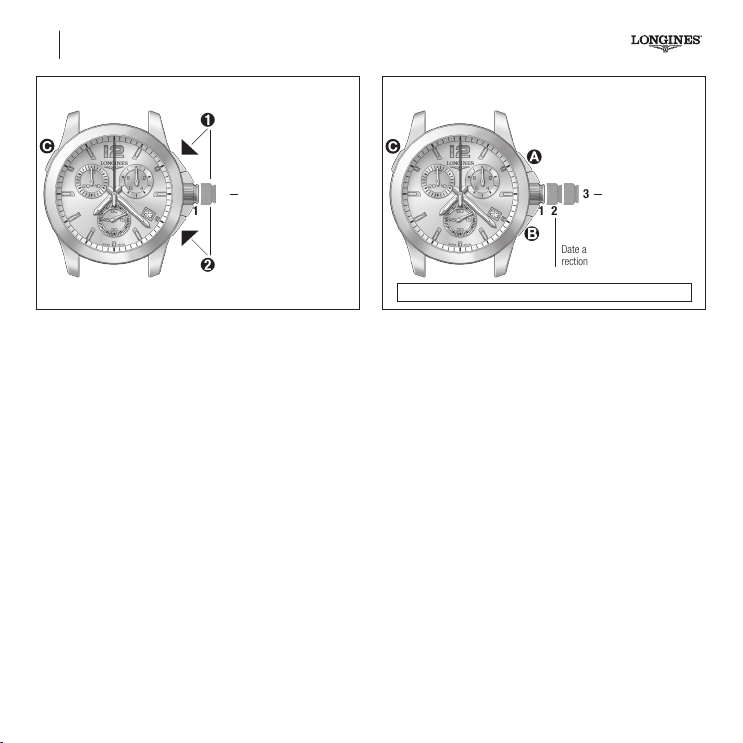
Resetting the counters /
Crown in position 2
Time-setting crown
1
2
Select counter to return to
zero (selected hand moves)
Return
selected hand to zero
1
2
Resetting the counters
Changing the time zone and the date
Unscrew the crown if necessary.
Pull it out to the intermediate position 2. The hour hand will make
one-hour jumps, enabling quick time zone adjustments. Turning the
crown through 24 hours will cause a date change. The crown can
be turned either way. Then push the crown fully back in again (pos.
1), and screw in.
T
ime setting and corrections / Crown in position 2 or 3
Correct the hour and
minute hands, and
correct the date every
time the hour hand
passes midnight
Date and time zone cor-
rection
1 2
3
86
L442 Quartz chronographs
Note: Time-setting crown in position 3: STOP SECONDS
Time setting and corrections
Minute and seconds adjustment
Unscrew the crown if necessary. Pull the crown out to its furthest
position 3; the 3 counter hands will move to 12 o'clock. Turn the
crown to correct the hour and minute hands. Turn the crown either
way to correct the minute. When the crown has been pulled out to
its furthest position, the movement seconds hand will be immobile. If
the crown is pulled out when the movement seconds hand is pointing
to the zero position, press the crown at the time signal to enable an
accurate seconds correction.
Then push the crown fully back in again (pos. 1), and screw it in.
02-English.indd 86 14.11.18 15:43
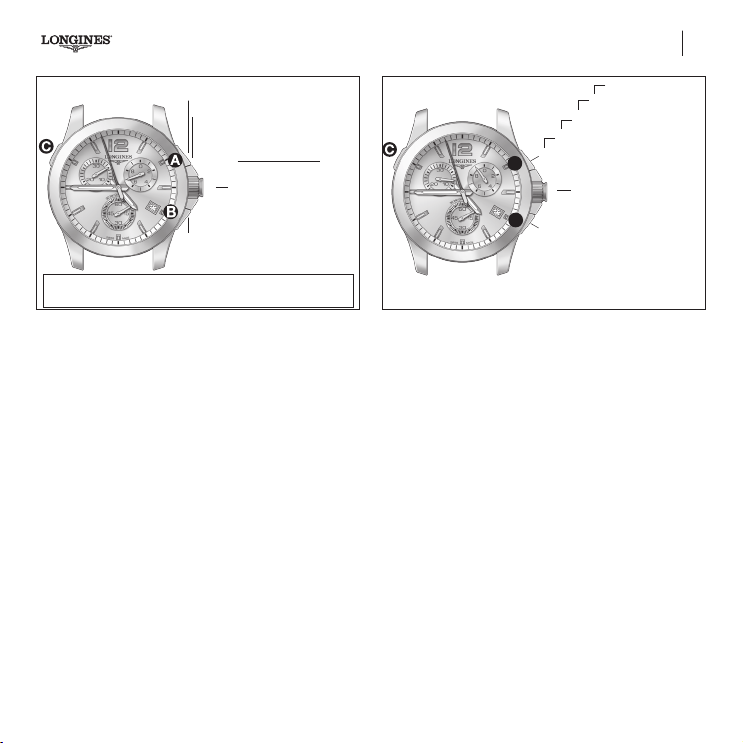
87
Quartz chronographs
Simple timing function
1
1 START
2 STOP > Read time
- 5 minutes
- 57 secs
- 7/10ths of a sec.
3 Reset
1 to 3 order of functions
Time-setting crown in
position 1
IMPORTANT! Before each timing operation, the chronograph hands must be at
their start point. If necessary, see the RESETTING THE COUNTERS PARAGRAPH.
Chronograph functions
Standard Start-Stop function
Simple time measurement – Timing a 100 metres.
ADD function (partial times)
Adds several times together – Timing periods of a hockey match or
a stage race, for instance.
SPLIT-SECONDS function
Measures intermediate race lap times.
MEMO function
Memorises intermediate times.
Standard Start-Stop function
Timing a single event:
• Press push-piece A: to start the chronograph.
• Press push-piece A: to stop the chronograph.
• Press push-piece B: to return to zero.
ADD function
1
1
START
x
Reset
2
STOP Read
3
RESTART
4
STOP Read
…
Time-setting crown in
position 1
1 to x order of functions
L442
Rally ADD function (partial times)
This function starts like the SIMPLE function.
Used for measuring successive events, but not the intervals between
them. Each result is automatically added to the preceding one.
To time the various stages of a car rally, for example:
At the start of the rst stage, press push-piece A to start the
chronograph.
After the rst time measurement (STOP), provided that push-piece
B (RESET) has not been pressed, you can RESTART (push-piece
A) to add a new time to the previously measured time.
After STOP has been pressed, the 60-SECOND, SPLIT-SECONDS and
30-MINUTE counter hands will stop running. The 1/10th of a SECOND
counter hand displays the value in tenths of a second as it runs.
After STOP (push-piece A) has been pressed, engage a RESET
(push-piece B) to nish timing, and return the chronograph to
watch mode.
At the end of the nal stage the chronograph will show the total time
of the rally, in other words, the accumulated time for all the stages..
Repeat this procedure for each stage of the rally.
Press push-piece B to reset.
02-English.indd 87 14.11.18 15:43
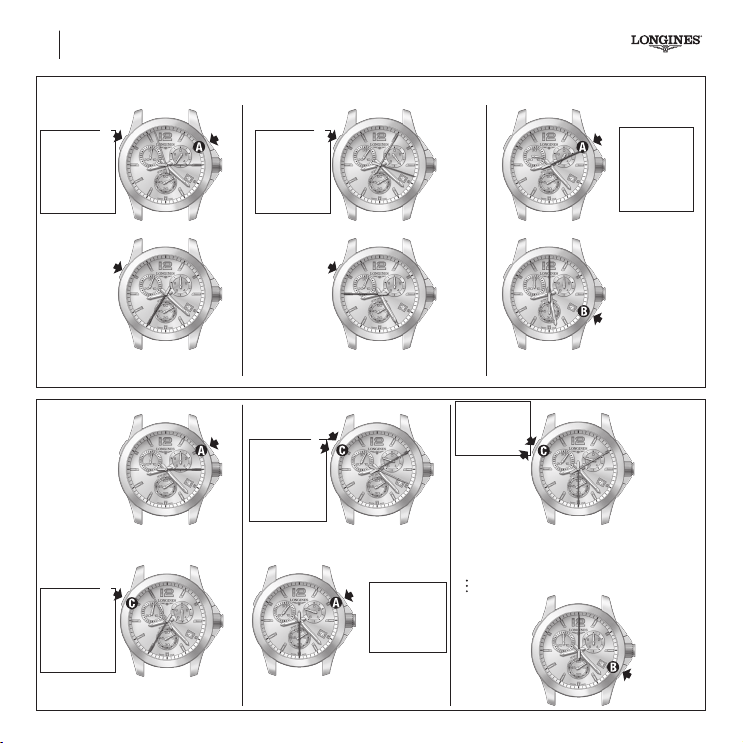
SPLIT-SECONDS function or intermediate time
Stop
Read intermedi-
ate time 1
- 1 minute
- 57 seconds
ths
- 6/10 of a sec.
1
Star
t
2
Restart
Split-seconds
3
Stop
Read intermedi-
ate time 2
- 3 minute
- 5 seconds
ths
- 4/10 of a sec.
4
Restart
Split-seconds
5
Note: the maximum catch-up time can be 30minutes
(only chrono in the world with this ability).
6
Stop
Read nal time
- 8 minutes
- 11 seconds
- 6/10
ths
of
a sec.
Reset
7
1 to 7 order of functions
88
L442 Quartz chronographs
MEMO
function
1
Start
Stop
Read intermedi-
ate time 1
- 1 minute
- 35 seconds
- 5/10
ths
of a sec.
2
2 Stop read 1st intermediate time
1 to x order of functions
Stop
Read intermediate
time 2
- 2 minutes
- 10 seconds
- 8/10
ths
of a sec.
3
Restart
4
3 Restart
4 Stop read 2
nd
intermediate time
5
Stop
Read nal time
- 3 minutes
- 30 seconds
- 8/10
ths
of a sec.
5 Stop read nal time
- 2 minutes
- 10 seconds
- 8/10ths of
a sec.
6
7
6 Read last memorised intermediate time
7 Read nal memorised time...
8 Re-read last memorised intermediate time
9 Re-read nal memorised time...
Reset
x
02-English.indd 88 14.11.18 15:43

89
Quartz chronographs L442
SPLIT-SECONDS function
Between START and STOP, press push-piece C to activate the
SPLIT-SECONDS function. The SPLIT-SECONDS and 30-MINUTE
counter hands will stop. The 1/10th of a SECOND counter hand will
move to the nearest measured one tenth. Meanwhile, the 60-SECOND
counter will not stop running.
After reading the measured time, press push-piece C to reactivate
the measured time display. The SPLIT-SECONDS and 30-MINUTE
counter hands will catch up to the positions corresponding to the
ongoing elapsed time. The 1/10th of a SECOND counter hand will
return to zero.
Pressing push-piece B before the chrono has been stopped will
restart the counters at zero, and the intermediate time will be lost.
Pressing push-piece B after the chrono has been stopped will
cause a RESET.
MEMO function
If STOP has been engaged during a SPLIT-SECONDS function, the
counters will move to display the measured STOP time. Press push-
piece C for a reminder of the previous intermediate time. Pressing
this same push-piece again will display the nal time again.
Pressing push-piece C alternates between the intermediate time
display and nal time display for the ongoing timing operation. This
is the MEMO function.
After STOP has been engaged, pressing push-piece B will cause a
RESET, and all the counters will return to zero. The timing operation
will nish, and the chronograph will return to watch mode. If RESET
is engaged before you have read the stop time, the 60-SECOND
and SPLIT-SECONDS counter hands are not superimposed as they
move to zero.
Note:
There is no possible confusion in reading the intermediate and stop
times. When you read the chrono stop time, the 60-SECOND and
SPLIT-SECONDS counter hands are actually superimposed, whereas
for the intermediate time, they are never superimposed.
However, if a chrono STOP function occurs exactly one or more
minute after an intermediate time (i.e. the 60-SECOND and SPLIT-
SECONDS counters are indicating the same value), the 60-SECOND
counter is deliberately offset by one position when reading the
intermediate time in MEMO function. In this way the hands of these
two counters are only superimposed for the stop time, and the rule
above is obeyed.
Important notes
a) It is possible to combine the various Chrono functions (SIMPLE,
ADD, SPLIT-SECONDS and MEMO) in the same timing operation. For
example, during a MEMO function you can restart the time measure-
ment (ADD) without losing the memorised time.
b) Unless timing is deliberately stopped (pressing STOP), the
chronograph hands will keep running. Continuous running of the
chronograph will greatly reduce the autonomy of the movement.
Hands initial positioning mode
The four chronograph counters are initialised to their start point
digitally, by means of the push-pieces.
The four chronograph counter hands are positioned in sequence via
the push-pieces with the crown pulled out to position 2.
After pulling the crown out to position 2, the four counter hands -
SPLIT-SECONDS and CHRONO 60-SECOND in the centre, CHRONO
1/10th of a SECOND at 2 o'clock and CHRONO 30-MINUTE at 10
o'clock will move to their start point, normally zero, at 12 o'clock. The
two centre hands will make this movement together. If the watch was
in RESET status, the hands are already zeroed. If there is a timing
operation in progress, the hands will move to their start point. Then
they will all complete one quick circle of the dial. During this complete
rotation, none of the hands will move at the same time. The rst
hand to make its rotation is the tenths hand, then the split-seconds
hand, the chrono seconds hand and nally the chrono minute hand.
Pressing push-piece A will move the selected hand to indicate which
hand will be moved by pressing push-piece B.
Each successive press on A selects the next hand.
02-English.indd 89 14.11.18 15:43
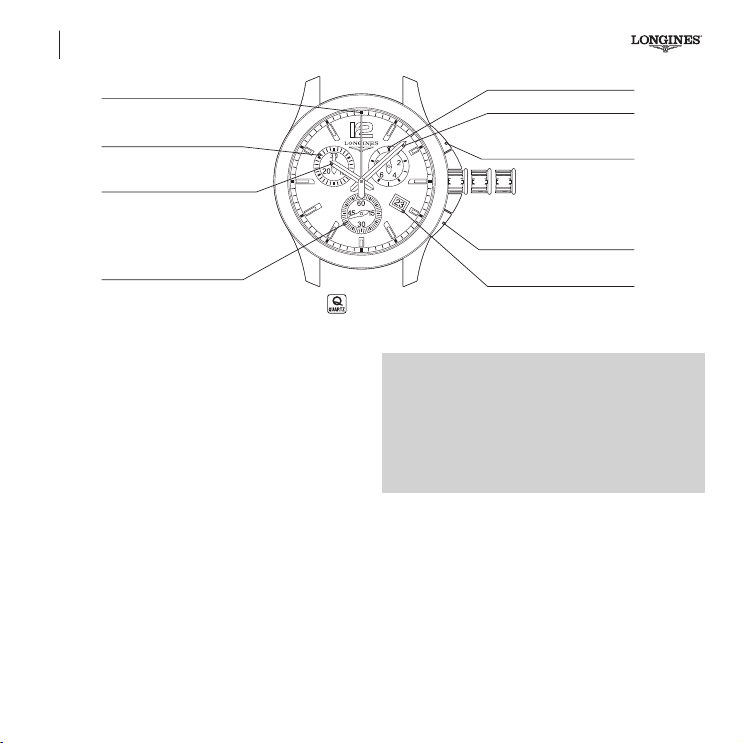
L538
60-second counter
30-minute counter
3-position crown
Hour hand
Small seconds
2 31
L538
Minute hand
1/10
th
of a second counter
Push-piece A
Start - Stop
Date window
Push-piece B
Split and reset
90
Quartz chronographs
How to use your Longines chronograph
When used as a watch, the Longines calibre L538 quartz chronograph
shows the hour, minute, seconds and the date in a window.
In its chronograph function, this model can time events lasting up
to 30 minutes, while displaying the results to the nearest 1/10
th
of a second.
• Quick time zone and date adjustment.
• The hour and minute are displayed by the 2big central hands.
• The small seconds are displayed on the counter at 6 o'clock.
• The 30-minute chronograph displays the minute, seconds and
tenths of a second.
• Quick-moving chronograph counter hands.
• Electronic quartz movement with 5motors and 6 hands.
• Hour with time zone mechanism, minute and jumping small
seconds.
• The time measurement and hand movements are managed by
a microcontroller.
*PowerDrive technology:
PowerDrive controls the chronograph motors, and is able to boost
the hand travel speed to more than 200 Hz (i.e. 200 hand jumps
per second in both rotation directions).
This technology improves the hand movement control, which
makes for a highly dynamic display. PowerDrive also enables
numerous counter programming options.
02-English.indd 90 14.11.18 15:43
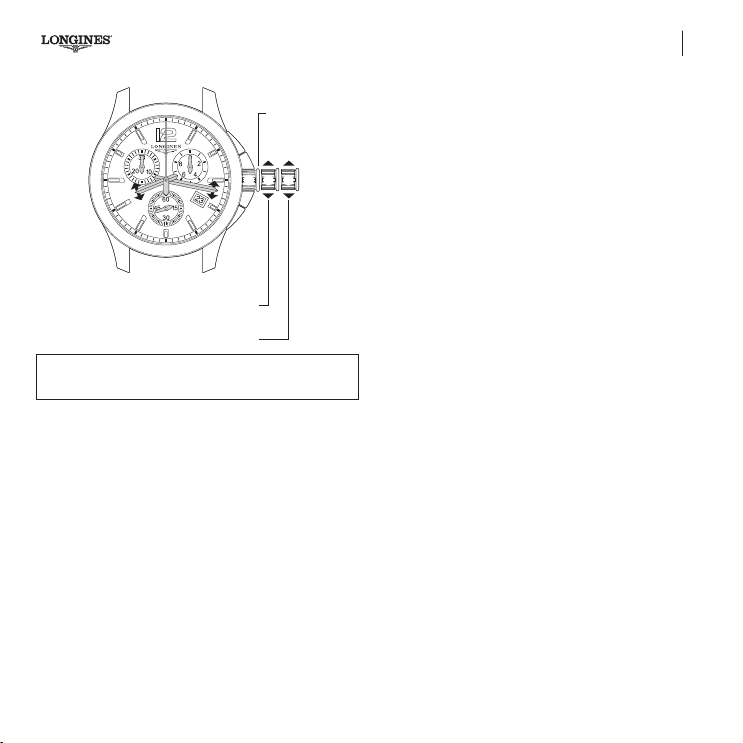
L538
Correct time zone and the date every time the
hour hand passes midnight.
Position the hands to their start point
Time setting with stop seconds
2 31
Working position
Note: do not leave the time-setting crown in position 2 for
more than 20 minutes (time loss).
91
Quartz chronographs
3-position crown
Simple function
In this function, with the crown in position 1, push-piece A is used to
switch the chronograph status between START and STOP.
After START is pressed, the counter hands will show the measured time.
The 1/10
th
of a SECOND counter hand will not turn.
After STOP has been pressed, the 60-SECOND and 30-MINUTE counter
hands will stop running. The 1/10
th
of a SECOND counter hand displays
the value in tenths of a second as it runs.
To measure another time, press push-piece B
to return the counters
to zero (RESET). All the hands will quickly return clockwise to their
start point, and the chronograph will switch back to watch mode.
Time setting and corrections
Unscrew the crown (if necessary), and pull it out to its furthest
position 3. The watch will stop and the hour and minute hands can
be adjusted for the time setting.
Hour, minute and seconds correction
Crown in position 3: the 3 counter hands will move to 12 o'clock.
Turn the crown to correct the hour and minute hands. Turn the crown
either way to correct the minute. Then push the crown fully back in
again (pos. 1), and screw it in.
To synchronise the watch with an ofcial time signal (radio, telephone,
etc.), pull the crown to its furthest position 3, at the moment when
the small seconds hand is at 60, then push the crown back in again
fully (pos. 1) at the time signal, and screw it back in.
The calendar changes every time the hour hand passes midnight.
Changing the time zone and the date
Unscrew the crown (if necessary), and pull it out to the intermediate
position 2. The hour hand will make one-hour jumps, enabling
quick time zone adjustments. The hour hand can be moved in either
direction without affecting the minute and seconds hands setting.
Turning the crown through 24 hours will cause a date change. The
crown can be turned either way. Then push the crown fully back in
again (pos. 1), and screw it back in.
02-English.indd 91 14.11.18 15:43
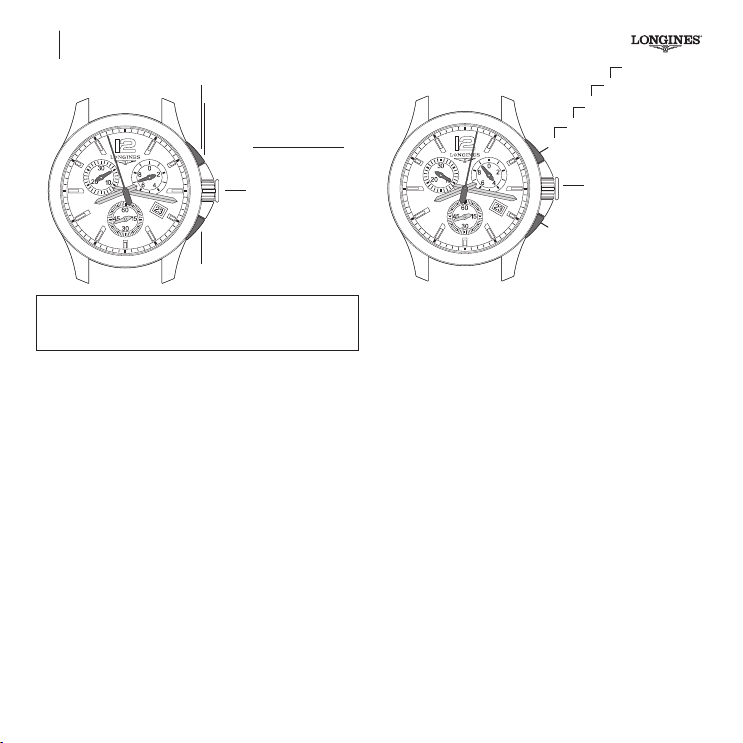
Quartz chronographs
1
START
2
STOP > Read time
- 5 minutes
- 57 secs
- 7/10
ths
of a sec.
3
Reset
Time-setting crown in
position 1
1 to 3 order of functions
IMPORTANT! Before each timing operation, the chronograph
hands must be at their start point.
If necessary, see the resetting the counters paragraph.
92
L538
Chronograph functions
• Standard Start-Stop function
Simple time measurement – Timing a 100 metres.
• ADD function (partial times)
Adds several times together – Timing periods of a hockey match or
a stage race, for instance.
• Split function (intermediate times)
This function is used to time intermediate race lap times in a single
event. Intermediate times are accumulated throughout the event.
Standard Start-Stop function
Timing a single event:
• Press push-piece A: to start the chronograph.
• Press push-piece A: to stop the chronograph.
• Press push-piece B: to reset.
1
START
X. Reset
2
STOP Read
4
STOP Read
…
3
START
Time-setting crown in
position 1
A
B
ADD Rally function (partial times)
Used for measuring successive events, but not the intervals between
them. Each result is automatically added to the preceding one. To
time the various stages of a car rally, for example:
• At the start of the first stage, press push-piece A
to start the chronograph.
• At the end
of the rst stage, press push-piece
A again, and the
chronograph will stop to 1/10
th
of a second.
Repeat this procedure for each stage of the rally.
At the end
of the nal stage the chronograph will show the total time
of the rally, in other words, the accumulated time for all the stages..
• Press push-piece B to reset.
IMPORTANT! While the watch displays an intermediate time the
chronograph function will still be timing the event.
02-English.indd 92 14.11.18 15:43
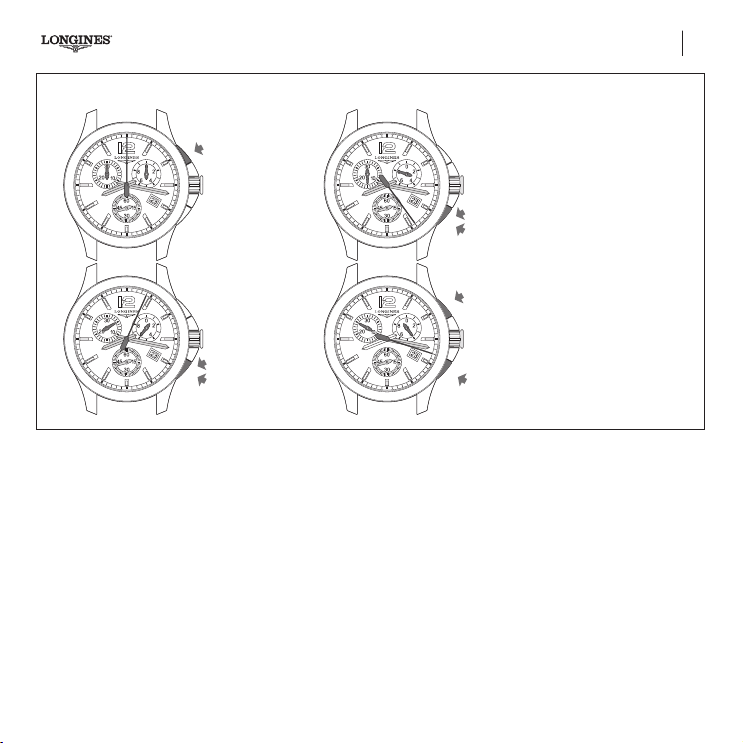
93
2
STOP Read
4
STOP Read
…
Quartz chronographs L538
SPLIT-SECONDS function or intermediate time
START
1
SPLIT 1
2
SPLIT 2
4
STOP
6
RESTART
3
(catchup)
RESTART
5
(catchup)
Time-setting crown in
position 1
Reset
7
from
1
to
7
order of functions.
Read time 1
- 5 minutes
- 4 secs
- 6/10
ths
of a sec.
Read time 2
- 15 minutes
- 24 secs
- 8/10
ths
of a sec.
Read last time
- 25 minutes
- 18 secs
- 4/10
ths
of a sec.
• Press push-piece A at the start of the event you wish to time,
for example a ski race.
• Press push-piece B to see the rst intermediate time; the
60-second and 30-minute counter hands will stop, and the 1/10
th
of a second counter hand will move to the measured tenth.
• Press push-piece B again; the chronograph hands will jump to
the time elapsed since the start of the race.
To see the second intermediate time, repeat the procedure:
• Press push-piece B once to see the second intermediate time
measured to 1/10
th
of a second, and again to make the chrono-
graph hands catch up to the elapsed time.
• At the
end of the race, press push-piece
A to
make the chrono-
graph display the total race time.
• Press push-piece B to reset.
NOTE: The split/intermediate times function can also be used
to record consecutively the times of various competitors as they
nish a race.
02-English.indd 93 14.11.18 15:43
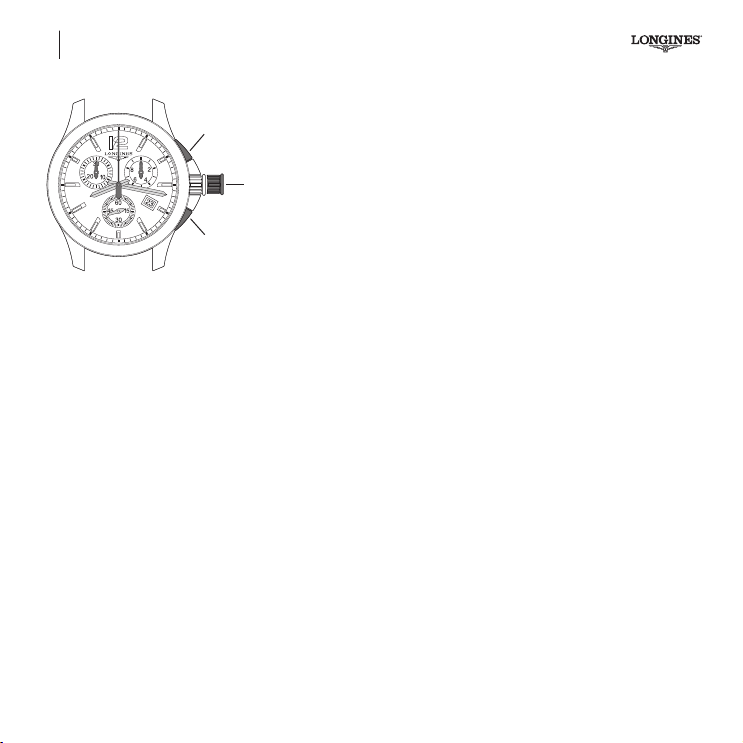
Select hand to position
Correct the hand position
Short press: step
Hold down: quick continuous
rotation
Time-setting crown in
position 2
A
B
94
L538 Quartz chronographs
Resetting the counters
Resetting the chronograph hands
If for any reason the chronograph hands do not return exactly to zero,
take the following action:
• Unscrew the crown if necessary.
• Pull the crown out to the intermediate position 2; the 3 CHRONO
counter hands, 1/10
th
of a SECOND at 2 o'clock, 60-SECOND in
the centre and 30-MINUTE at 10 o'clock, will return to their start
point, normally the midday position.
If the watch was in RESET status, the hands are already zeroed. If
there is a timing operation in progress, the hands will return to their
start point. Then they will all complete one quick circle of the dial.
P
ressing push-piece A will move the selected hand to indicate which
hand will be moved by pressing push-piece B.
Each successive press on A selects the next hand.
A short press on push-piece B will move the selected counter one
step clockwise.
Holding push-piece B for more than one second will move the hand
in quick continuous rotation.
1) Chronograph 30-minute counter(at 10 o'clock):
Crown in position 2, press push-piece A.
2) Chronograph 60-second counter(centre):
Crown in position 3, press push-piece A.
3) Chronograph 1/10
th
of a second counter(at 2 o'clock):
With the crown in position 3, press push-piece B.
Then push the crown fully back in again (pos. 1), and screw it back in.
IMPORTANT! The time, or any other display, should not be adjusted
while the chronograph function is being used.
Important notes
a) It is possible to combine the various Chrono functions (SIMPLE,
ADD and SPLIT) in the same timing operation.
b) Unless the chronograph is stopped (STOP pressed), the chrono-
graph hands will not stop moving. Continuous running of the
chronograph will greatly reduce the autonomy of the movement.
Important: Do not leave the crown in position 2 for more than
20minutes, as this could interfere with the time function.
If your chronograph breaks down, it should be entrusted only to an
approved Longines service centre.
Battery end-of-life mode (E.O.L)
(See page 84)
02-English.indd 94 14.11.18 15:43
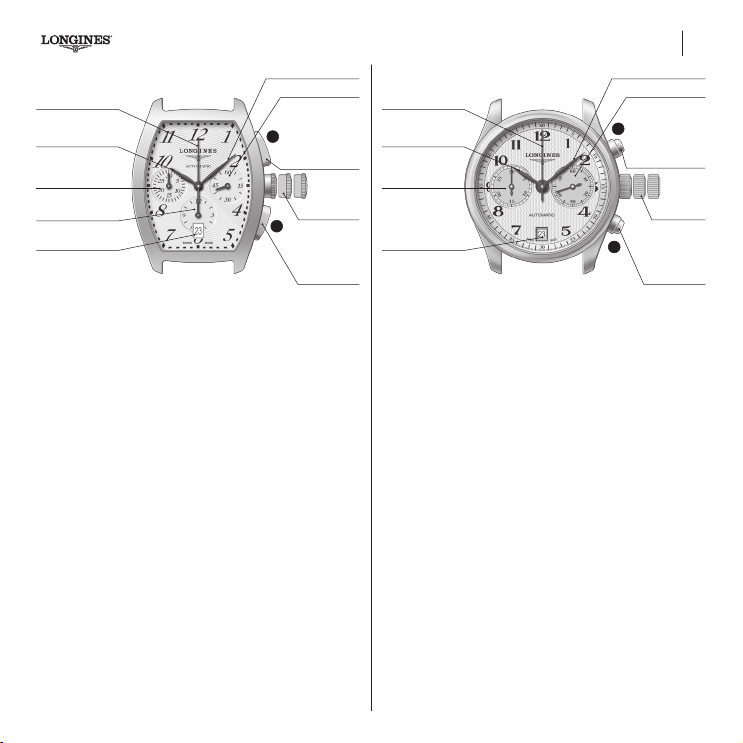
95
Automatic chronographs L650, L651
Hour hand
Chronograph
seconds hand
Minute hand
Small seconds
Start/stop push-piece.
Engagement and
disengagement
push-piece for the
chronograph hand
and counters
Return-to-zero
push-piece for the
chronograph hand
and counters
3-position
crown
30 minute counter
12-hour counter
Date aperture
L650
1 2 3
A
B
Shows the hours, minutes, seconds and date. Can be used to time
events that last up to 12 hours, the results being shown to 1/5
th
of a second.
3-position crown
Adjusting the time and stop seconds
(See page 66)
Quick date adjustment
(See page 66)
Chronograph standard functions
(See page 80)
Hour hand
Chronograph
seconds hand
Minute hand
Small seconds
Start/stop push-piece.
Engagement and
disengagement
push-piece for the
chronograph hand
and counters
Return-to-zero
push-piece for the
chronograph hand
and counters
3-position
crown
30 minute counter
Date aperture
L651
321
A
B
Shows the hours, minutes, seconds and date. Can be used to time
events that last up to 30 minutes, the results being shown to 1/5
th
of a second.
3-position crown
Adjusting the time and stop seconds
(See page 66)
Quick date adjustment
(See page 66)
Chronograph standard functions
(See page 80)
02-English.indd 95 14.11.18 15:44
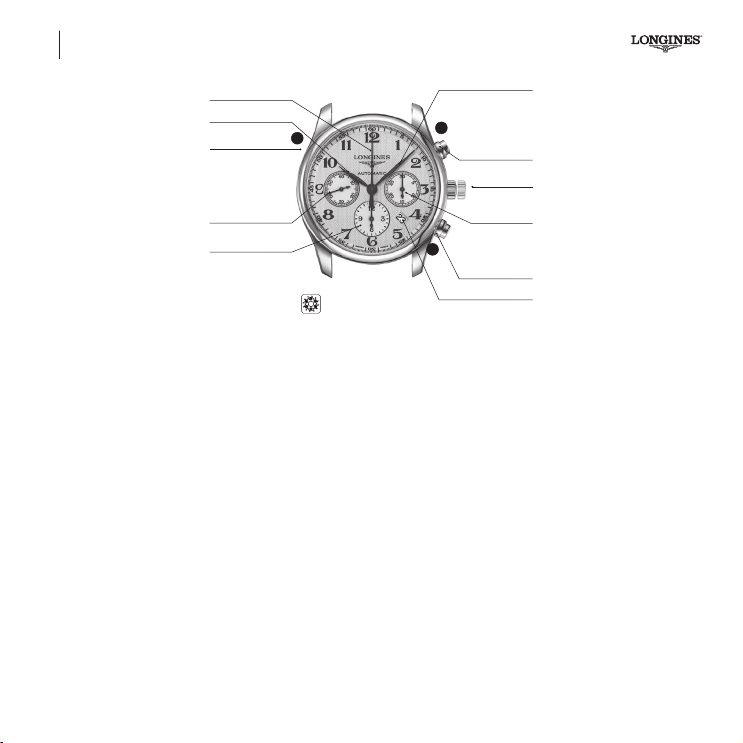
L688 Automatic chronographs
L688
Column-Wheel
Hour hand
Date push-piece
Minute hand
30 minute
counter
Date aperture
Chronograph
seconds hand
Return-to-zero
push-piece for the
chronograph hand
and counters
Start/stop push-piece.
Engagement and
disengagement
push-piece for the
chronograph hand
and counters
Small seconds
12-hour counter
1 2
B
C
A
2-position
crown
96
Shows the hours, minutes, seconds and date. Can be used to time
events that last up to 12 hours, the results being shown to 1/5
th
of a second.
2-position crown
Adjusting the time and stop seconds
(See page 66)
Quick date adjustment
Push-piece C for adjusting the date is at 10 o’clock. Using the
soft-pointed instrument provided by Longines, press the push-piece
to obtain the exact date. It is necessary to adjust the date at the
end of each month with less than 31 days.
Chronograph standard functions
(See page 80)
02-English.indd 96 14.11.18 15:44
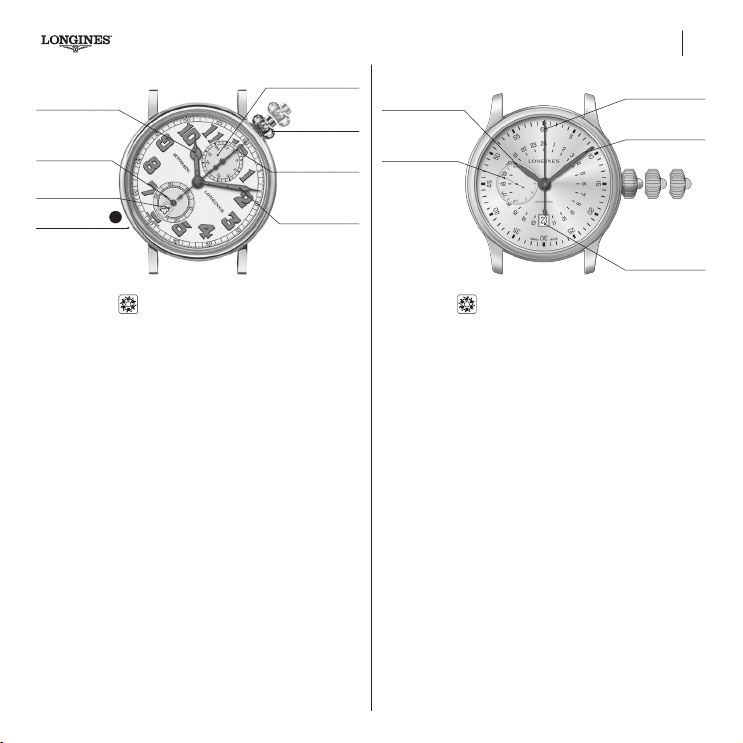
97
Hour hand
30 minute counter
Chronograph
seconds hand
Minute hand
2-position
crown
Small seconds
Date aperture
L788
Single push-piece
1
2
Date push-piece
C
Shows the hours, minutes, seconds and date. Can be used to
time events that last up to 30 minutes, the results being shown to
1/5
th
of a second.
2-position crown
Adjusting the time and stop seconds
(See page 66)
Quick date adjustment
Push-piece C for adjusting the date is at 7 o’clock. Using the soft-
pointed instrument provided by Longines, press the push-piece to
obtain the exact date. It is necessary to adjust the date at the end of
each month with less than 31 days.
Function
The functions of a single push-piece chronograph are activated via the
crown only. To start the chronograph, press the crown once. When
you press the crown again, timing will stop and you will be able to read
the elapsed time. To reset the chronograph, press the crown again.
Important! Unlike a regular chronograph, once stopped, timing can
no longer be restarted / continued. Simple timing is the only option.
Hour hand (24 h)
Minute hand
Chronograph
seconds hand
3-position crown
Small seconds
Date aperture
1 2 3
L789
24 h / Single push-piece
24-hour, minute, seconds and date display. Can be used to time
events lasting up to 60 seconds, while displaying the results to the
nearest 1/5
th
of a second.
3-position crown
Adjusting the time and stop seconds
(See page 66)
Quick date adjustment
(See page 66)
Function
The functions of a single push-piece chronograph are activated via the
crown only. To start the chronograph, press the crown once. When
you press the crown again, timing will stop and you will be able to read
the elapsed time. To reset the chronograph, press the crown again.
Important! Unlike a regular chronograph, once stopped, timing can
no longer be restarted / continued. Simple timing is the only option.
Automatic chronographs L788, L789 – Single push-piece
02-English.indd 97 15.11.18 09:47
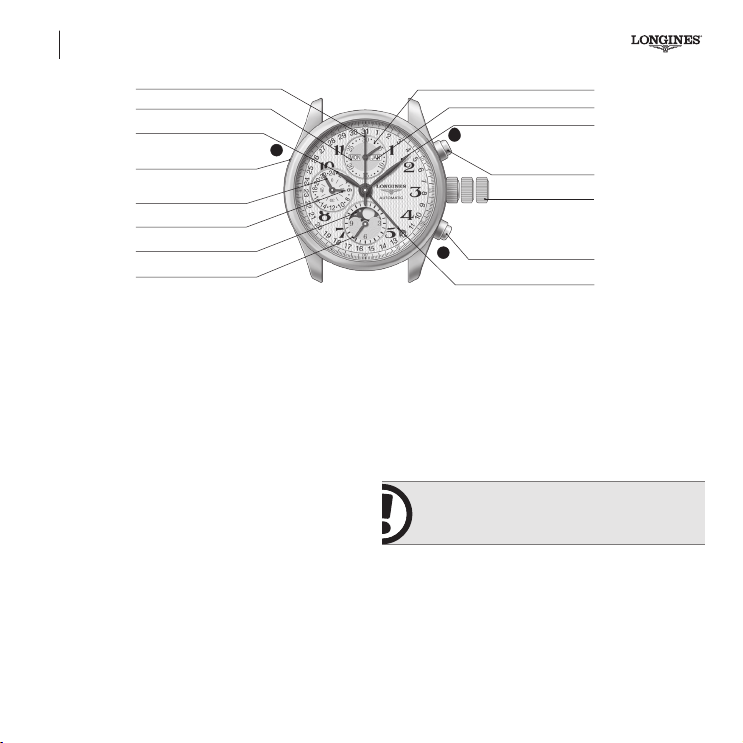
L678, L687
Phases of the Moon
Hour hand
Day of the week aperture
Day of the week push-piece
Minute hand
Month aperture
30 minute counter
3-position crown
Calendar with hand
Chronograph seconds hand
Return-to-zero push-piece
for the chronograph hand
and counters
Start/stop push-piece.
Engagement and disengagement
push-piece for the chronograph
hand and counters
24-hour hand
Small seconds
12-hour counter
Phases of the Moon
1 2 3
B
A
C
98
Shows the hours, minutes, seconds, day, month, date and phases
of the Moon. Can be used to time events lasting up to 12 hours,
showing the result to 1/5
th
of a second.
3-position crown
Adjusting the time and stop seconds
(See page 66)
Quick adjustment of the date and month
Pull the crown right out to position 2 and turn it backwards to adjust
the date and month. Then push it back in to position 1. It is necessary
to adjust the date at the end of each month with less than 31 days.
Adjusting the phases of the Moon
Pull the crown out to the intermediate position 2 and turn it
forwards to adjust the phase of the Moon until the full moon
appears at the centre of the phases of the Moon aperture. Deter-
mine the date of the last full moon using a diary or calendar
indicating the dates of the full moon. Turn the crown forwards
again to the position indicated on the table of lunar months.
IMPORTANT! The date and the phases of the
Moon should not be adjusted between 7 p.m. and
6 a.m. as doing so may damage the mechanism.
Adjusting the day of the week
Push-piece C for adjusting the day of the week is situated at
10o’clock. Using the soft-pointed instrument provided by Longines,
press the push-piece to obtain the exact day.
Chronograph standard functions
(See page 80)
L678, L687 – PHASES OF THE MOON Automatic chronographs
02-English.indd 98 14.11.18 15:44