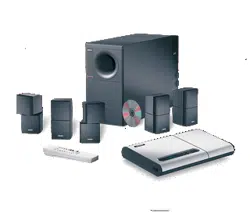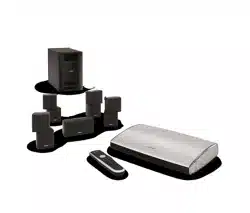

The Bose
®
Lifestyle
®
12 System
Owner’s Guide
December 20, 2001
AM191409_01_V.pdf
2 December 20, 2001 AM191409_01_V.pdf
Safety Information
WARNING:
To reduce the risk of fire or electric shock, do not expose the system to rain or
moisture.
CAUTION
RISK OF ELECTRICAL SHOCK
DO NOT OPEN
CAUTION: TO REDUCE THE RISK OF ELECTRIC SHOCK,
DO NOT REMOVE COVER (OR BACK).
NO USER-SERVICEABLE PARTS INSIDE.
REFER SERVICING TO QUALIFIED PERSONNEL.
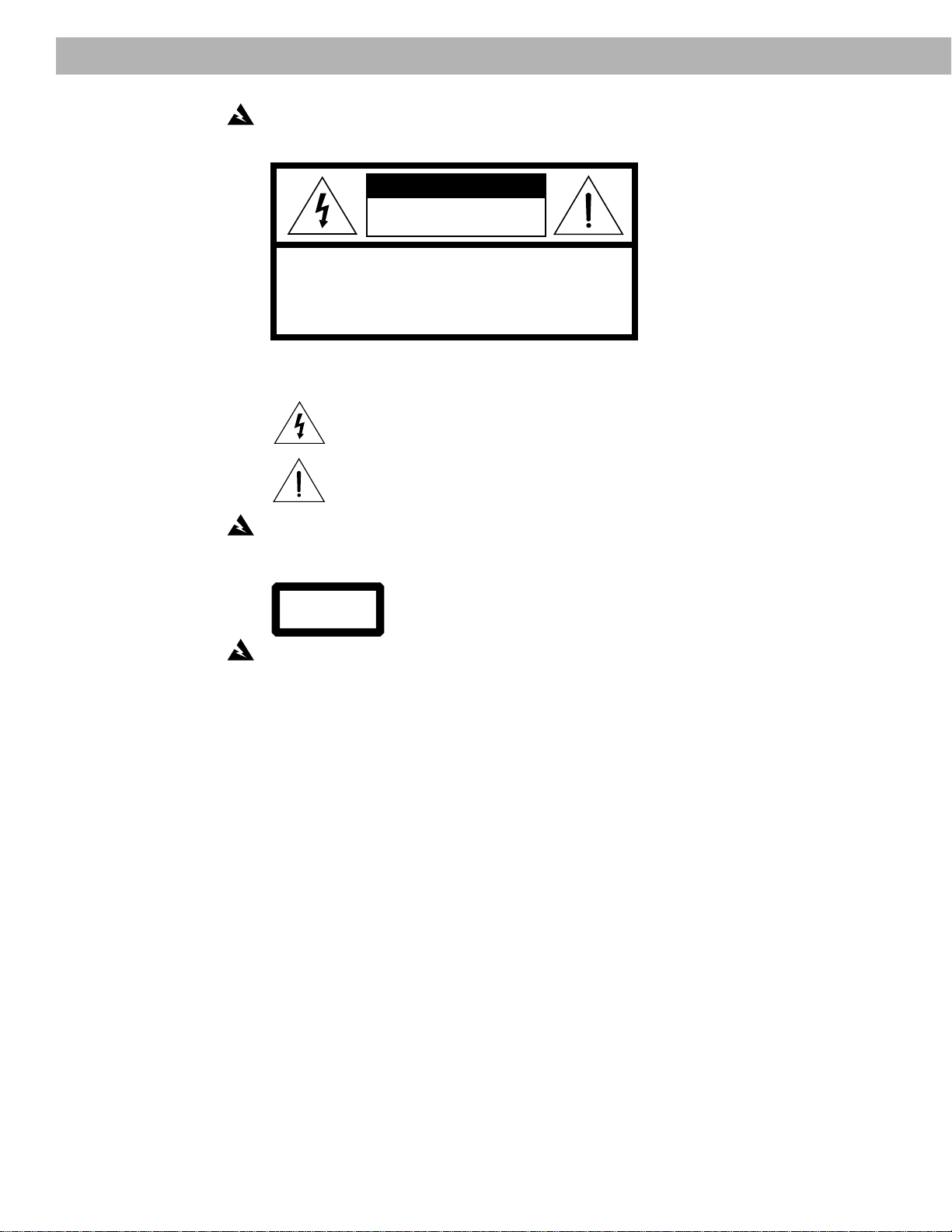
These CAUTION marks are located on the back panel and bottom of your Lifestyle
®
music
center and the bottom panel of your Acoustimass
®
module:
The lightning flash with arrowhead symbol, within an equilateral triangle, is intended to alert
the user to the presence of uninsulated dangerous voltage within the system enclosure that
may be of sufficient magnitude to constitute a risk of electric shock.
The exclamation point within an equilateral triangle, as marked on the system, is intended to
alert the user to the presence of important operating and maintenance instructions in this
owner’s guide.
CAUTION:
To prevent electric shock, match wide blade of plug to wide slot, insert fully.
Class 1 laser product
This compact disc player is classified as a CLASS 1 LASER product. The
CLASS 1 LASER PRODUCT label is located on the bottom
of the unit.
CAUTION:
Use of controls or adjustments or performance of procedures other than those
specified herein may result in hazardous radiation exposure. The compact disc player should
not be adjusted or repaired by anyone except properly qualified service personnel.
Class B emissions limits
This Class B digital apparatus meets all requirements of the Canadian Interference-Causing
Equipment Regulations.
Batteries
Please dispose of used batteries properly, following any local regulations. Do not incinerate.
Additional safety information
See the additional instructions on the Important Safety Information page enclosed with this
owner’s guide.
Please read this owner’s guide
Please take the time to follow this owner’s guide carefully. It will help you set up and operate
your system properly, and enjoy all of its advanced features. Save your owner’s guide for
future reference.
CLASS 1 LASER PRODUCT
KLASSE 1 LASER PRODUKT
LUOKAN 1 LASER LAITE
KLASS 1 LASER APPARAT
AM191409_01_V.pdf December 20, 2001 a
Important Safety Instructions
1. Read these instructions – for all components
before using this product.
2. Keep these instructions – for future reference.
3. Heed all warnings – on the product and in the
owner’s guide.
4. Follow all instructions.
5. Do not use this apparatus near water or
moisture – Do not use this product near a
bathtub, washbowl, kitchen sink, laundry tub, in a
wet basement, near a swimming pool, or any-
where else that water or moisture are present.
6. Clean only with a dry cloth – and as directed
by Bose
®
Corporation. Unplug this product from
the wall outlet before cleaning.
7. Do not block any ventilation openings.
Install in accordance with the
manufacturer’s instructions – To ensure
reliable operation of the product and to protect it
from overheating, put the product in a position
and location that will not interfere with its proper
ventilation. For example, do not place the product
on a bed, sofa, or similar surface that may block
the ventilation openings. Do not put it in a built-in
system, such as a bookcase or a cabinet that may
keep air from flowing through its ventilation
openings.
8. Do not install near any heat sources, such
as radiators, heat registers, stoves or other
apparatus (including amplifiers) that pro-
duce heat.
9. Do not defeat the safety purpose of the
polarized or grounding-type plug. A polar-
ized plug has two blades with one wider
than the other. A grounding-type plug has
two blades and a third grounding prong. The
wider blade or third prong are provided for
your safety. If the provided plug does not fit
in your outlet, consult an electrician for
replacement of the obsolete outlet.
10. Protect the power cord from being walked
on or pinched, particularly at plugs, conve-
nience receptacles, and the point where
they exit from the apparatus.
11. Only use attachments/accessories speci-
fied by the manufacturer.
12. Use only with the cart, stand, tripod,
bracket or table specified by the
manufacturer or sold with the
apparatus. When a cart is used,
use caution when moving the
cart/apparatus combination to
avoid injury from tip-over.
13. Unplug this apparatus during lightning
storms or when unused for long periods of
time – to prevent damage to this product.
14. Refer all servicing to qualified service person-
nel. Servicing is required when the apparatus
has been damaged in any way: such as power-
supply cord or plug is damaged; liquid has
been spilled or objects have fallen into the
apparatus; the apparatus has been exposed to
rain or moisture, does not operate normally, or
has been dropped – Do not attempt to service this
product yourself. Opening or removing covers may
expose you to dangerous voltages or other hazards.
Please call Bose to be referred to an authorized
service center near you.
15. To prevent risk of fire or electric shock, avoid
overloading wall outlets, extension cords, or
integral convenience receptacles.
16. Do not let objects or liquids enter the product –
as they may touch dangerous voltage points or
short-out parts that could result in a fire or electric
shock.
17. See product enclosure for safety related
markings.
Information about products that
generate electrical noise
If applicable, this equipment has been tested and found
to comply with the limits for a Class B digital device,
pursuant to Part 15 of the FCC rules. These limits are
designed to provide reasonable protection against
harmful interference in a residential installation. This
equipment generates, uses, and can radiate radio
frequency energy and, if not installed and used in accor-
dance with the instructions, may cause harmful interfer-
ence to radio communications. However, this is no
guarantee that interference will not occur in a particular
installation. If this equipment does cause harmful interfer-
ence to radio or television reception, which can be
determined by turning the equipment off and on, you are
encouraged to try to correct the interference by one or
more of the following measures:
• Reorient or relocate the receiving antenna.
• Increase the separation between the equipment and
receiver.
• Connect the equipment to an outlet on a different
circuit than the one to which the receiver is connected.
• Consult the dealer or an experienced radio/TV techni-
cian for help.
Note:
Unauthorized modification of the receiver or radio
remote control could void the user’s authority to operate
this equipment.
This product complies with the Canadian ICES-003 Class
B specifications.
English
b December 20, 2001 AM191409_01_V.pdf
Important Safety Instructions
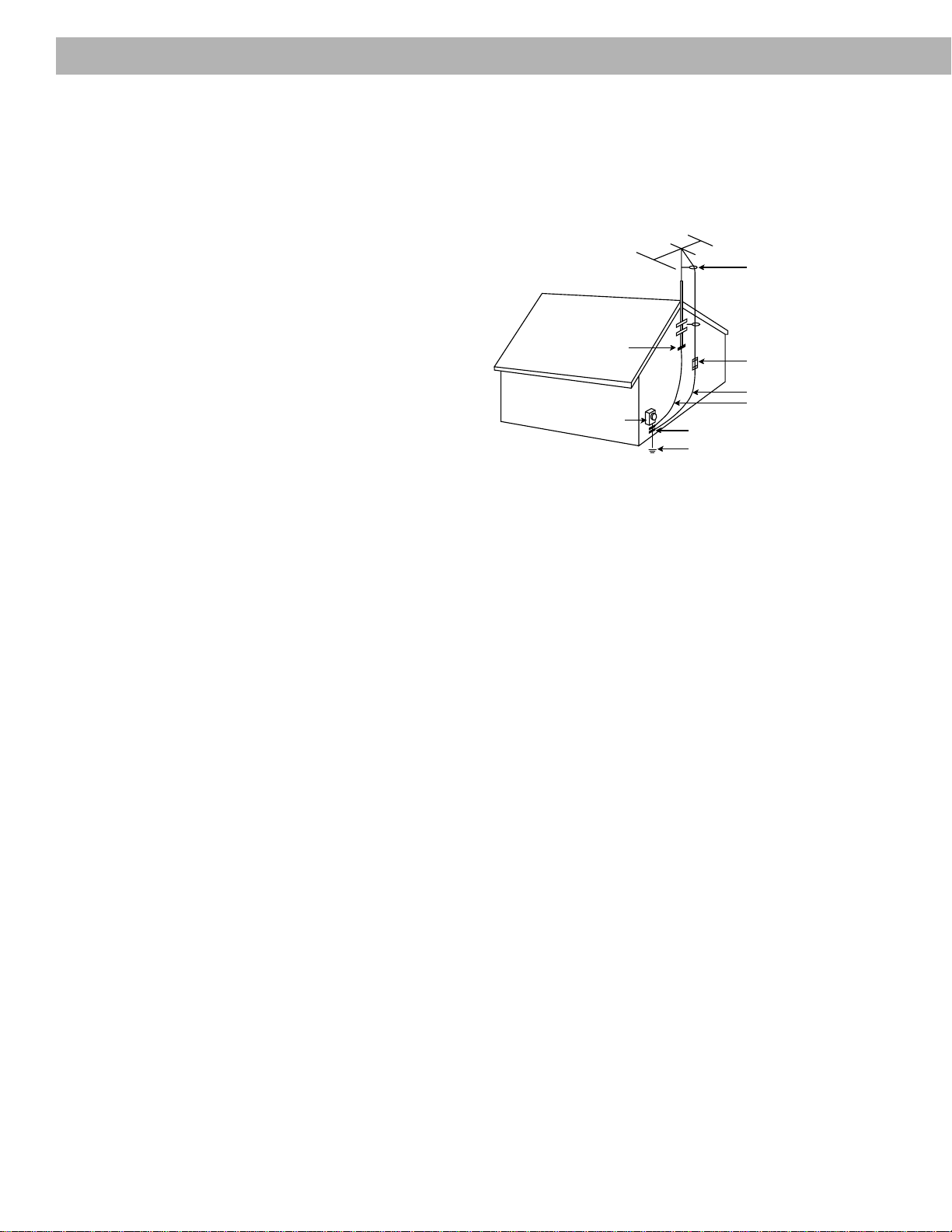
Antenna grounding
Example of antenna grounding as per National Electrical
Code, ANSI/NFPA 70.
Note to CATV system installer
This reminder is provided to call the CATV system
installer’s attention to Article 820-40 of the NEC (of USA)
that provides guidelines for proper grounding. In particu-
lar, it specifies that the cable ground shall be connected
to the grounding system of the building, as close to the
point of cable entry as is practical.
18. Use proper power sources – Plug the product into
a proper power source, as described in the operating
instructions or as marked on the product.
19. Avoid power lines – Use extreme care when
installing an outside antenna system to keep from
touching power lines or circuits, as contact with
them may be fatal. Do not install external antennas
near overhead power lines or other electric light or
power circuits, nor where an antenna can fall into
such circuits or power lines.
20. Ground all outdoor antennas – If an external
antenna or cable system is connected to this
product, be sure the antenna or cable system is
grounded. This will provide some protection against
voltage surges and built-up static charges.
Section 810 of the National Electrical Code ANSI/
NFPA No. 70 provides information with respect to
proper grounding of the mast and supporting
structure, grounding of the lead-in wire to an antenna
discharge unit, size of grounding conductors,
location of antenna-discharge unit, connection to
grounding electrodes, and requirements for the
ground electrode. Refer to the antenna grounding
illustration on this page.
Antenna lead in wire
Antenna discharge unit
(NEC Section 810-20)
Grounding conductors
(NEC Section 810-21)
Power service grounding
electrode system
(NEC ART 250, Part H)
Ground clamps
Ground clamp
Electric service
equipment

AM191409_01_V.pdf December 20, 2001 3
Contents
Where to find…
Setting Up
Before you begin ........................................................................................................... 4
Unpacking the carton ................................................................................................... 5
Select the locations for your Lifestyle
®
12 system ........................................................ 6
Connect the speakers and Lifestyle
®
music center ...................................................... 9
Connecting your home theater components to the Lifestyle
®
12 system ................... 12
Connect the antennas ................................................................................................. 16
Attach the wire cover .................................................................................................. 16
Set up the remote control ........................................................................................... 17
Set radio channel spacing for dual voltage and 120V systems .................................. 17
Turn on the music center ............................................................................................ 17
Operating Your Lifestyle
®
12 System
The music center display ............................................................................................ 18
The system controls.................................................................................................... 18
The music center controls .......................................................................................... 19
The Lifestyle
®
remote control ...................................................................................... 19
Listening to your Lifestyle
®
12 system ........................................................................ 20
Listening to video sound ............................................................................................. 20
Listening to the radio .................................................................................................. 21
Listening to a CD ........................................................................................................ 22
Using the system with an external component .......................................................... 22
Maintaining Your Lifestyle
®
12 System
Fine-tuning your system ............................................................................................. 23
Changing the house code settings ............................................................................. 24
Adding speakers ......................................................................................................... 25
Troubleshooting .......................................................................................................... 26
Warranty period .......................................................................................................... 27
Customer service ........................................................................................................ 27
Cleaning the Lifestyle
®
12 system ............................................................................... 28
Product Information
Technical information.................................................................................................. 29
Accessories................................................................................................................. 29
Index ................................................................................................................................. 30
Bose
®
Corporation .................................................................................... inside back cover
For your records
Serial numbers are located on the bottom of the music center and the bottom panel of the
Acoustimass
®
module.
Music center serial number: ______________________________________________________
Acoustimass module serial number: ______________________________________________
Dealer name: __________________________________________________________________
Dealer phone: _______________________ Purchase date: ___________________________
We suggest you keep your sales slip and warranty card together with this owner’s guide.
4 December 20, 2001 AM191409_01_V.pdf
Before you begin
Thank you for purchasing the Bose
®
Lifestyle
®
12 system. This complete audio home enter-
tainment system offers superb sound, elegance, technology, and simplicity for music and
home theater.
Your system includes:
• A Lifestyle
®
music center with built-in AM/FM radio and compact disc (CD) player
• Inputs for a video sound source, an auxiliary source, and a tape deck
• Powered Acoustimass
®
speakers with a hide-away Acoustimass module
• An easy-to-use remote control
Bose Videostage
®
decoder technology enables the Lifestyle
®
12 system to reproduce the
realism of movie sound especially for a home environment. When a movie soundtrack or CD
is produced in a surround sound format, specially encoded sound is sent to any or all of the
available speakers. Dialogue is usually sent to the front speakers. Sounds from the left or
right side of the picture are sent to left or right front speakers. Ambient sounds or special
effects may be sent to the surround (rear) speakers. Bose Videostage circuitry automatically
directs the sound to the correct speakers.
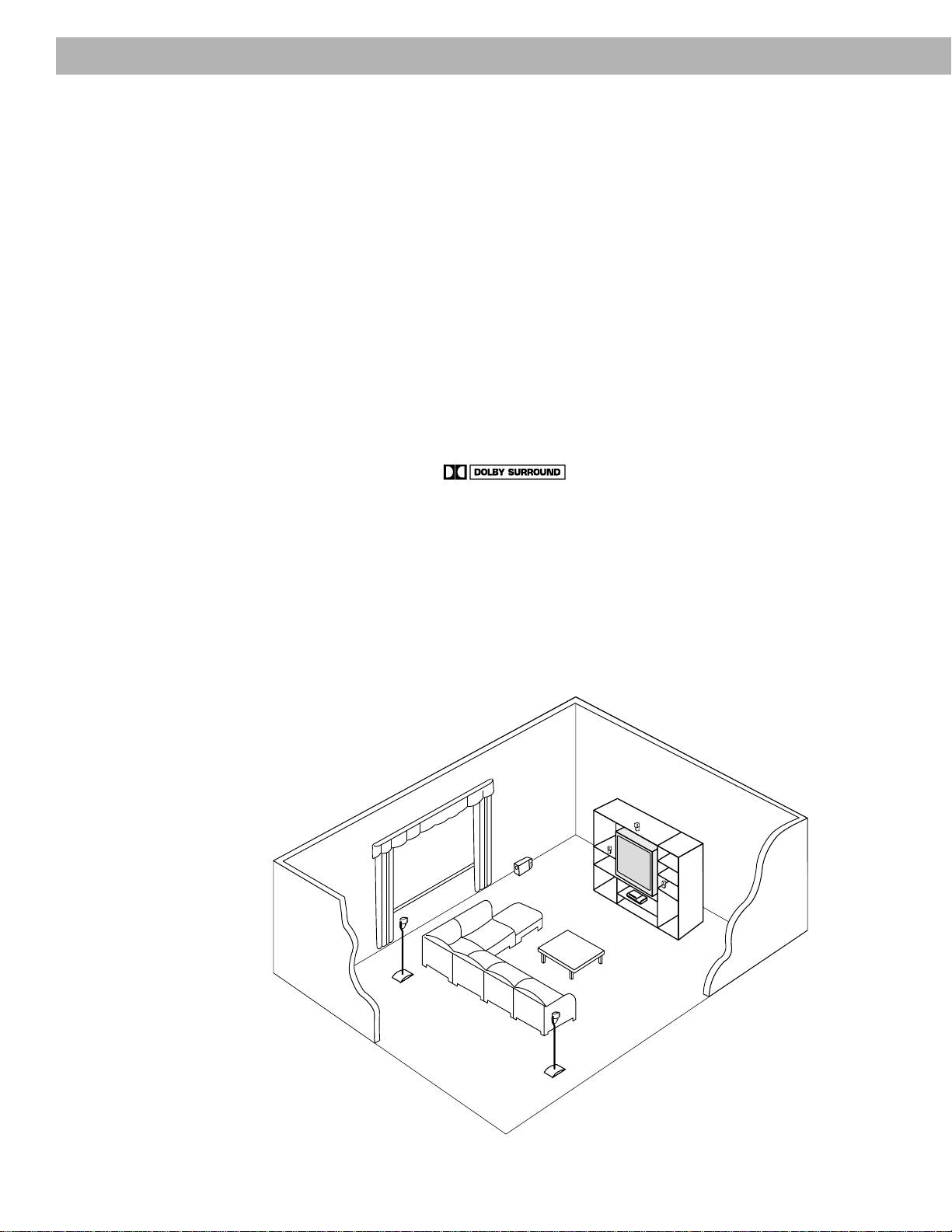
To select surround-encoded material, look for any of the terms Surround, Dolby Surround,
and the double-D symbol * on tapes and discs, and the word “surround”
preceding a TV broadcast.
When sound is recorded in stereo, but not surround-encoded, Videostage decoder technol-
ogy directs it to the most appropriate speakers based on the signals received. When viewing
older movies or listening to other monaural programs on your Lifestyle
®
12 system,
Videostage circuitry directs sound so it appears to come from the center of the TV screen.
You can listen to any program material in SURROUND (5-speaker) mode, whether the
program is surround-encoded, stereo, or monaural. You will not hear sound from all five
speakers all of the time. Even with surround-encoded material there are times when no
sounds are directed to the surround speakers. You can select the speaker mode that sounds
best to you for each particular program.
Setting Up
* Dolby and the double-D symbol are trademarks of Dolby Laboratories Licensing Corporation.
®
®
®
AM191409_01_V.pdf December 20, 2001 5
Setting Up
Unpacking the carton
Carefully unpack your system. Save all packing materials for possible future use. The
original packing materials provide the safest way to transport your Lifestyle
®
12 system. If
any part of the product appears damaged, do not attempt to use the system. Notify Bose
®
or your authorized Bose dealer immediately.
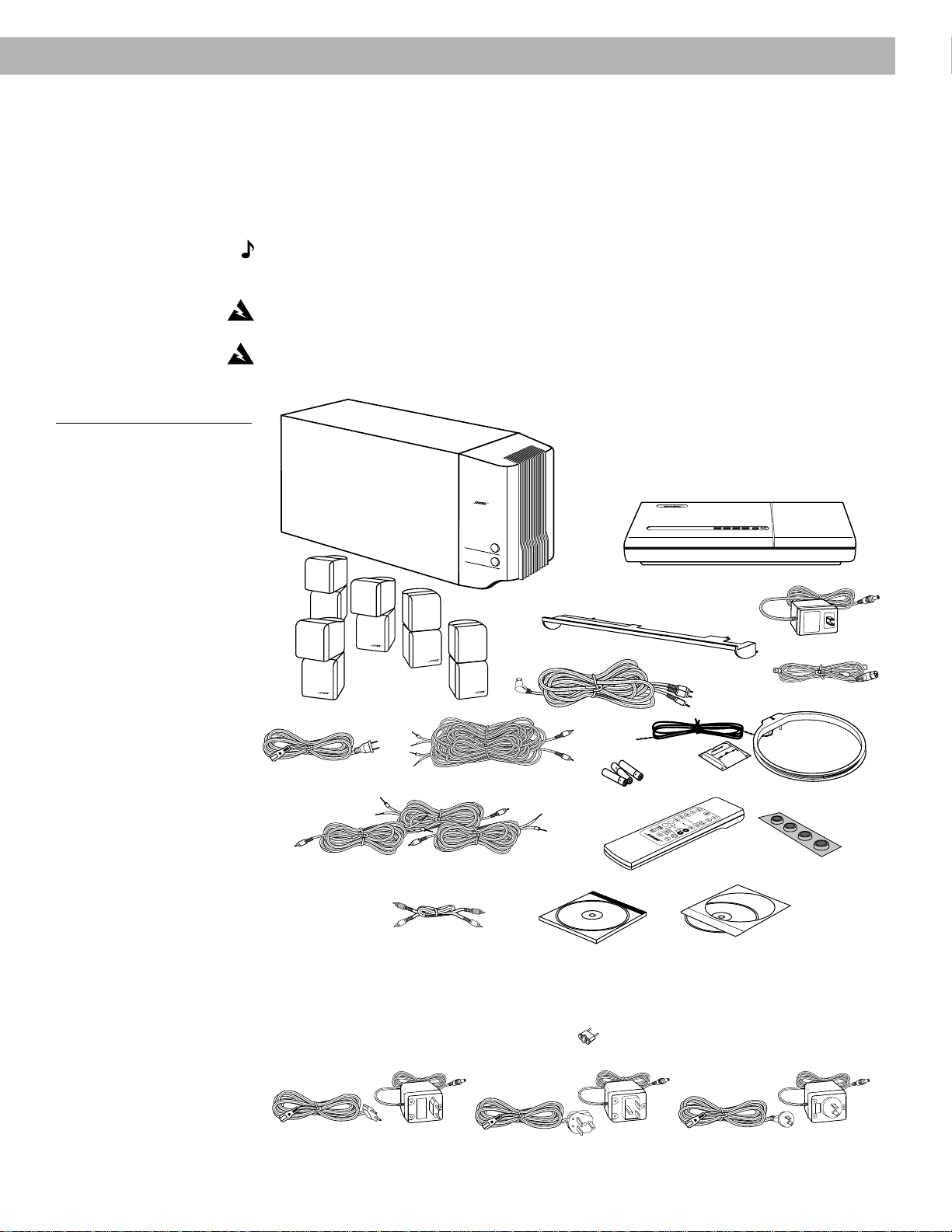
Check to be sure your Lifestyle
®
12 system contains the parts identified in Figure 1.
Note:
Find the serial numbers on the bottom panel of the Acoustimass
®
module and the
bottom of the music center. Then write them on your warranty card and in the spaces
provided on page 3.
WARNING:
he Acoustimass module weighs 33 pounds (15 kg). Use good lifting practice
to avoid injury.
WARNING:
To avoid danger of suffocation, keep the plastic bags out of the reach of
children.
Figure 1
What comes with your
Lifestyle
®
12 system:
®
®
®
®
®
®
®
®
T
r
e
b
le
B
a
s
s
+
–
Surround speaker cables
(orange connectors)
Front speaker cables
(blue connectors)
AA batteries
AC power pack
5 cube
speaker arrays
AC power cord
Rubber
feet
Stereo cable
Test CD
FM antenna
AM loop antenna
Audio input cable
Wire cover
Lifestyle
®
music center
Acoustimass module
Antenna base
Remote control
• Lifestyle
®
music center
• AC power (mains) pack*
• Wire cover
• FM antenna
• AM loop antenna
• AM antenna base
• Remote control
• 3 AA batteries
• Acoustimass
module
• 5 cube speaker arrays
• AC power (mains) cord*
• Audio input cable
• 5 speaker cables
(2 surround and 3 front)
• 4 self-adhesive rubber feet
(for the Acoustimass module
)
• Stereo cable
• Lifestyle
®
system CD
• Test CD
Lifestyle
®
system CD
*
Power cord and pack shown above are USA/Canada versions.
Dual voltage systems include 1 power cord, 1 adapter , and 2 power packs.
The power cords and packs for Europe, UK/Singapore, and Australia are shown below.
UK/Singapore
Europe
Australia

6 December 20, 2001 AM191409_01_V.pdf
Setting Up
Select the locations for your Lifestyle
®
12 system
When you place your speakers according to the guidelines below, a combination of reflected
and direct sound provides the audio atmosphere of a home theater. You may experiment with
the placement and orientation of the cubes to produce the sound most pleasing to you. For
the best surround effect, adjust the speakers so you cannot pinpoint where the sound comes
from. It is preferable not to aim the cubes directly at the listener. For more discussion of
speaker placement and room acoustics, see “Fine-tuning your system” on page 23.
Speaker locations
Follow these guidelines to select locations that provide the maximum home theater effect
from your Lifestyle
®
12 system (Figures 2 and 3).
CAUTION:
Choose a stable and level surface for your speakers. Vibration can cause the
speakers to move, particularly on smooth surfaces like marble, glass, or highly polished
wood. For additional stability, you can add rubber feet to your speakers. You may obtain
rubber feet (part no. 178321), free of charge, from Bose
®
. Contact Bose Customer Service
(see listings on the inside back cover).
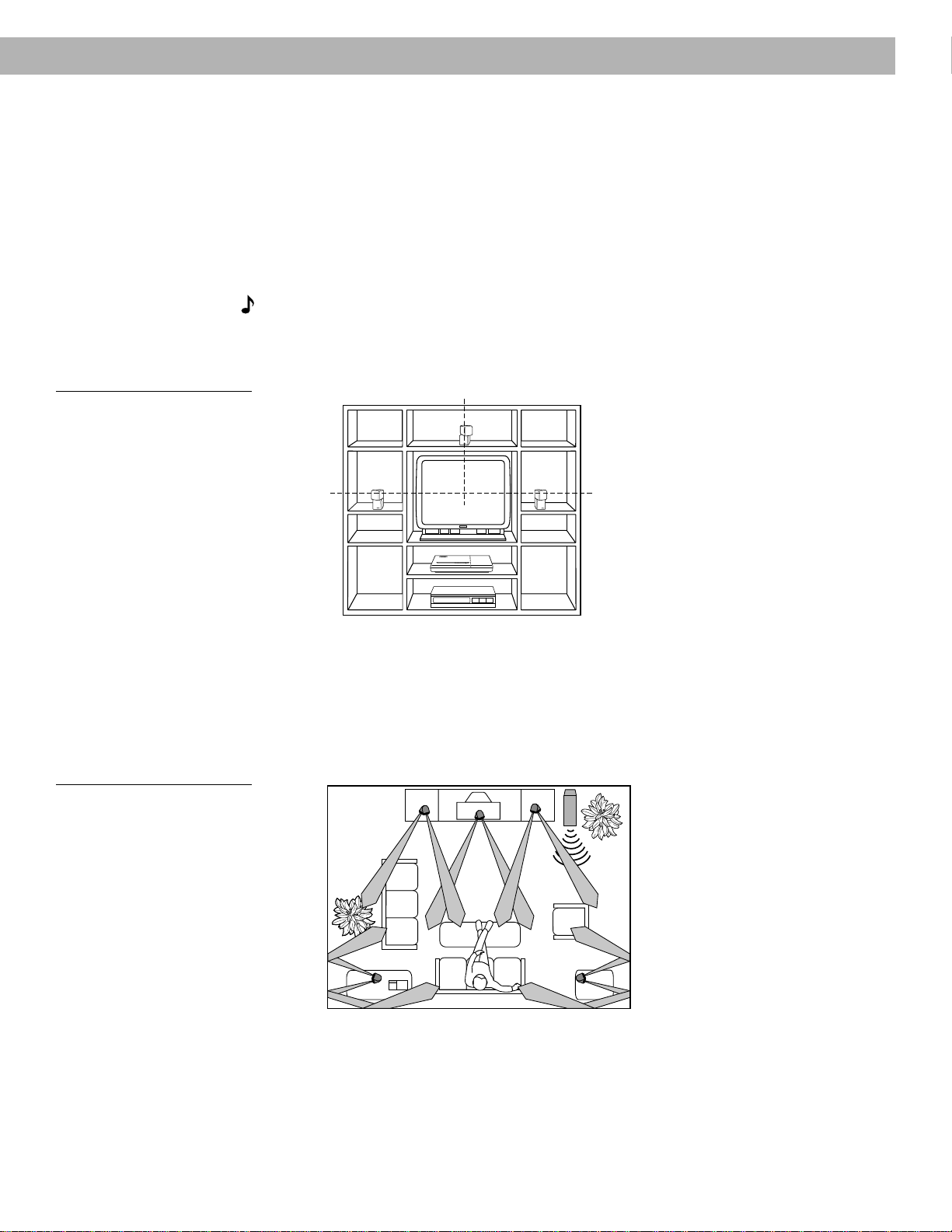
Left and right front speakers
The sound from the left and right front speakers should seem to appear at the edge of the
picture, so that the acoustic image is close to the size of the visual image (Figure 2). The front
speaker cables allow up to 20 feet (6.1 m) distance from the Acoustimass
®
module.
1. Place the cubes on line with the horizontal center of the TV screen.
2. Place them up to 3 feet (1 m) from the edge of the TV screen.
We recommend a maximum distance of 3 feet (1 m) so that the sound does not become
too separated from the picture. You may wish to vary this distance based on room condi-
tions and personal preference.
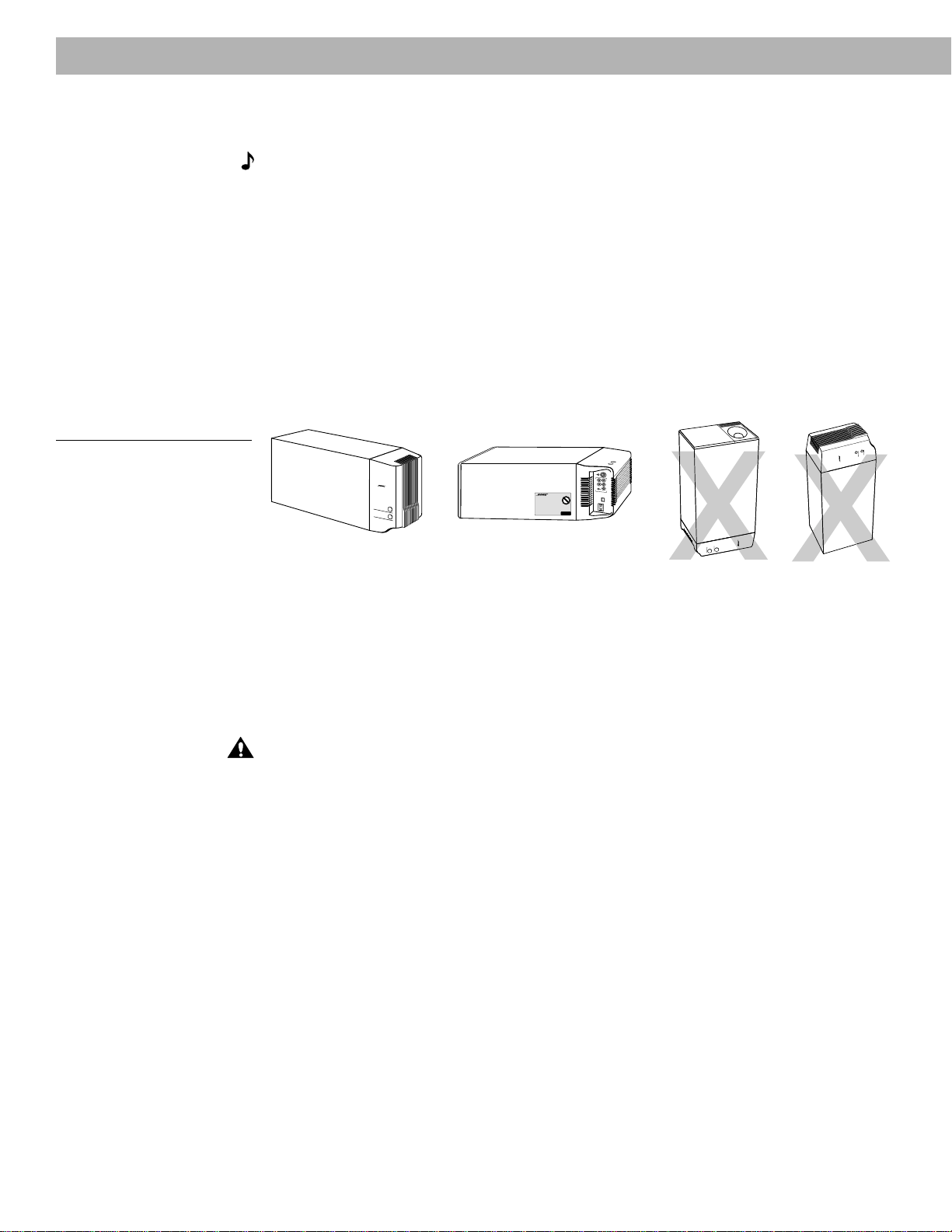
3. Direct one cube of each array forward. Direct the other cube toward the wall or in a
different direction to create reflected sound. (See the illustration of reflected sound pat-
terns in Figure 3.)
Note:
The cube speakers are magnetically shielded so you can place them close to the
TV without affecting picture quality.
AM191409_01_V.pdf December 20, 2001 7
Center speaker
The sound from the center speaker should appear to come directly from the center of the
picture (Figure 2). The center speaker cable allows up to 20 feet (6.1 m) distance from the
Acoustimass
®
module.
1. Place the speaker on line with the vertical center of the screen, above or below (which-
ever is closer to the screen), or the closest convenient location.
2. Place the speaker in line with the front of the screen (not pushed to the back of the TV).
3. Direct each of the cubes slightly away from center, to create a wider area of direct sound
(Figure 3).
Note:
If you put the speakers in a bookcase unit, be sure to place each one at the front
edge of the shelf. Placing speakers in an enclosed space can change the tonal quality of the
sound. This effect is minimized if the shelves are filled with books.
Figure 2
Recommended front speaker
locations
Left front
Right front
®
®
®
®
Center
Surround speakers
The surround (rear) speakers create an area of sound around the listener. Place them in the
back half of your room. Direct the cubes so that you do not pinpoint the exact location of the
sound source (Figure 3). The surround cables allow up to 50 feet (15.2 m) distance from the
Acoustimass module.
Figure 3
Speaker placement
1. Place the speakers at ear height or higher, if possible.
2. Direct the cubes to reflect sound off one or more surfaces.
3. Do not direct the sound straight at the listener.
Left
surround
Acoustimass moduleCenter
Right
surround
Left
front
Right
front
Setting Up
8 December 20, 2001 AM191409_01_V.pdf
Setting Up
Acoustimass
®
module
Follow these guidelines to select a location for the Acoustimass module.
Note:
To avoid interference with the TV picture, place the Acoustimass module at least
18 inches (45 cm) from the TV.
1. Place the Acoustimass module along the same the wall as the TV, or close to the same
end of the room as the front speakers (see the example along the front wall in Figure 3).
2. Select a convenient location – under a table, behind a sofa. Do not allow furniture or
drapes to block the ventilation openings of the module.
3. Place the Acoustimass module within reach of the audio input cable, speaker cables, and
an AC power (mains) outlet.
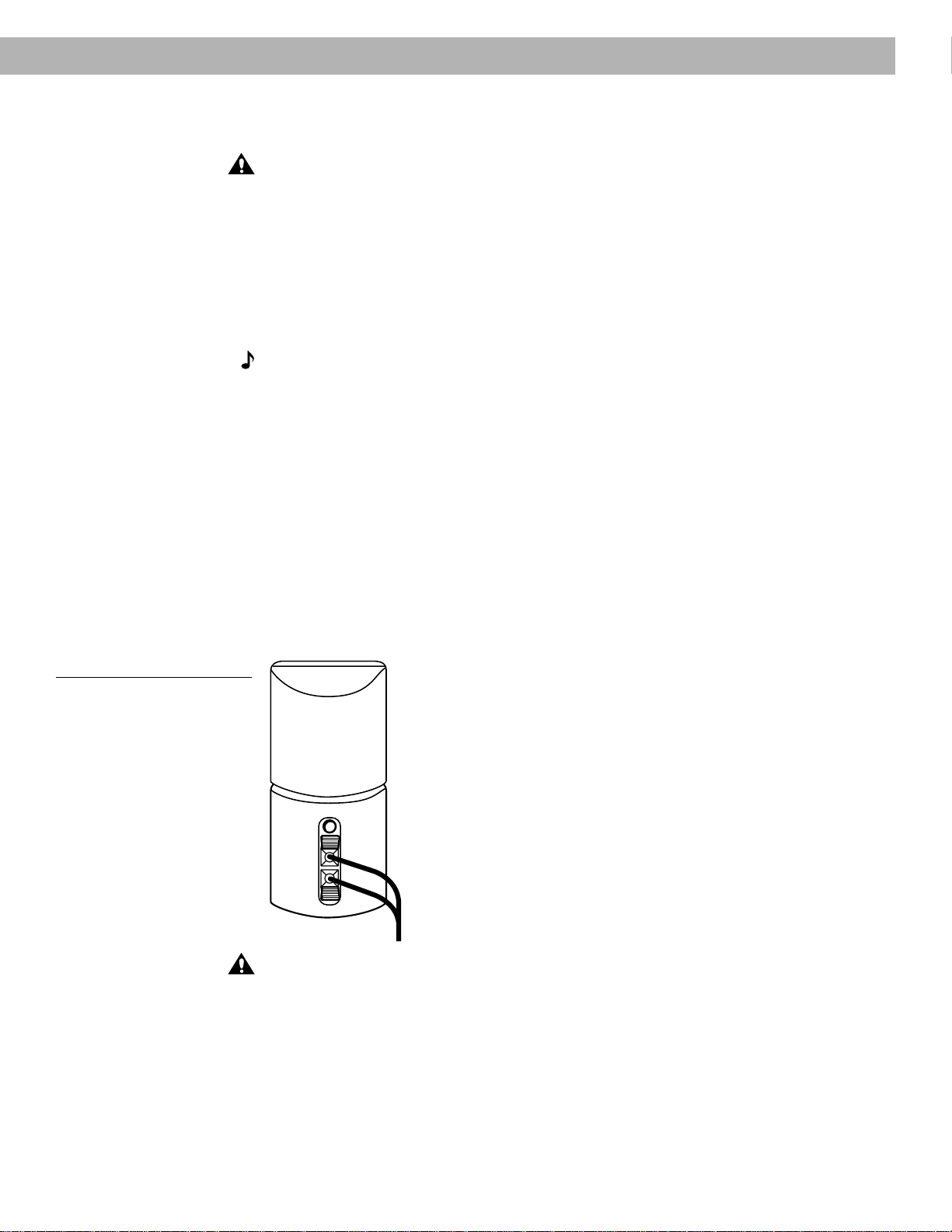
4. Select a position for the Acoustimass module (Figure 4). For proper ventilation, place it on
the long edge, with the connectors facing the floor. An alternate position is on its largest
side, with the bass and treble controls facing up. Do not place the module on either end,
as shown by the last two views in Figure 4.
Figure 4
Acoustimass module positions
®
T
r
e
b
l
e
B
a
s
s
Preferred
position
R
I
G
H
T
F
R
O
N
T
R
I
G
H
T
R
E
A
R
C
E
N
T
E
R
O
U
T
P
U
T
S
T
O
C
U
B
E
S
P
E
A
K
E
R
S
L
E
F
T
F
R
O
N
T
L
E
F
T
R
E
A
R
®
Alternate position
5. Once you have selected a position for the module, place the four self-adhesive rubber feet
near the corners of the bottom surface. The rubber feet provide increased stability and
protection from scratches.
6. Aim the port (the round opening) into the room or along the wall to avoid blocking the port
or creating too much bass.
7. For best bass performance, do not place the port at equal distances from any two walls or
from a wall and the ceiling.
CAUTION:
Do not cover the ventilation openings of the Acoustimass module. The slots on
the end provide ventilation for the built-in electronic circuitry, and should not be blocked.
Music center
Select a location for the music center.
1. Allow enough room to open the CD player cover.
2. Place the music center close enough to the sound sources (TV, VCR, etc.) to allow for
cable length. If you need additional audio and/or video cables to connect all of your
components, see your dealer or call Bose
®
.
3. Place the music center within 30 feet (9.1 m) of the Acoustimass module (the length of the
audio input cable).
®
®®
AM191409_01_V.pdf December 20, 2001 9
Setting Up
Connect the speakers and Lifestyle
®
music center
Once you have selected locations for your music system, connect the speakers.
CAUTION:
Make sure all components are unplugged from the power outlet before you
begin hooking up the system.
Connecting the cube speaker arrays to the Acoustimass
®
module
Each speaker cable contains two wires. The wire marked with a red collar is positive (+) and
the plain one is negative (–). These wires match the positive (red) and negative (black) termi-
nals on the back of each speaker. To lengthen the cable, use standard RCA extension cables
or splice in 18-gauge or thicker cord (connecting + to + and – to –). To purchase cables, see
your dealer, electronics store, or call Bose
®
customer service.
Note:
The surround cables are joined together for your convenience, providing an easy-to-
use cable for connecting the surround speakers. To run the cables in different directions from
the Acoustimass module, simply pull apart the cables as needed.
1. Match the correct cable to the corresponding speaker location.
• Front speaker cables have blue connectors at one end, with L, R, and C molded into
the connectors. The red collars on the + wire are labeled LEFT, RIGHT, and CENTER.
• Surround speaker cables have orange connectors at one end, with L and R molded
into the connectors. The red collars on the + wire are labeled LEFT and RIGHT.
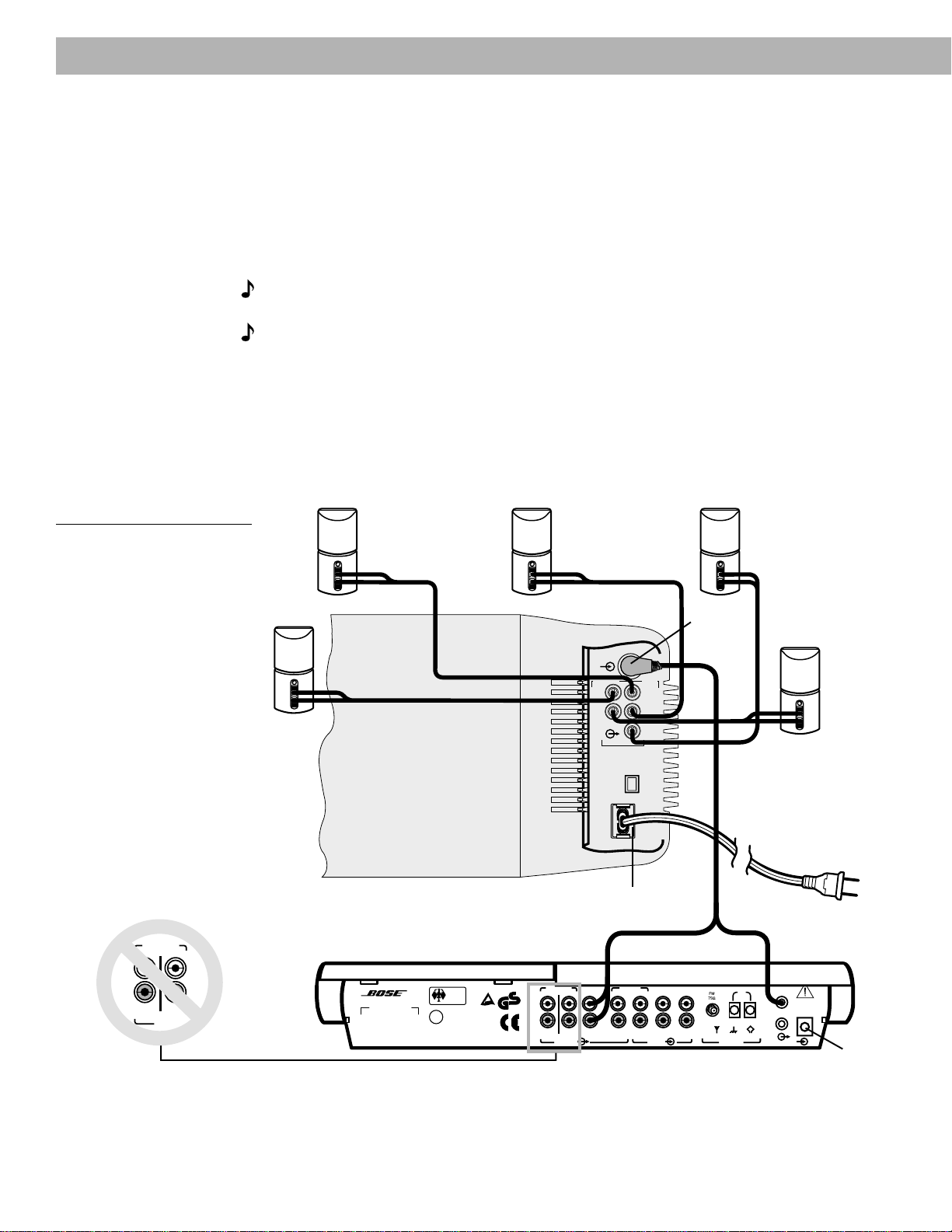
2. Connect the wire end of one speaker cable to the terminals on the rear of the matching
cube speaker array.
a. Push each terminal tab down, then insert the end of the appropriate wire into the
exposed hole. Release the tab to secure the wire. Connect each wire to its correspond-
ing terminal positive to positive (+ to +) and negative to negative (– to –).
b. Repeat this step for each of the five cube speaker arrays. (See Figure 5.)
Figure 5
Speaker cable connections to
the cube speaker array
CAUTION:
Make sure no strands of wire from any terminal touch any other terminal.
Bridged wires create short circuits that affect proper operation of your system.
3. Connect each cable to the corresponding jack on the Acoustimass module.
a. Plug the blue connectors into the matching left front, center, and right front jacks.
b. Plug the orange connectors into the matching left surround and right surround jacks.
10 December 20, 2001 AM191409_01_V.pdf
Connecting the Acoustimass
®
module to the Lifestyle
®
music
center
Connect the Acoustimass module to the music center with the audio input cable (Figure 6).
1. Insert the three connectors at one end of the audio input cable into the jacks on the rear
panel of the music center:
• Black connector into the SYSTEM CONTROL 1 jack
• Red connector into the R (right) FIXED OUTPUT jack
• White connector into the L (left) FIXED OUTPUT jack
Note:
Be sure the connectors are fully inserted into each of the jacks. If the black connector
is not inserted fully into the SYSTEM CONTROL jack, you will hear no sound.
Note:
Do
not
connect the audio input cable to the SPEAKERS A or SPEAKERS B outputs
(Figure 6). The speakers in your Lifestyle
®
12 system are designed to work properly with the
fixed level audio output available from the FIXED OUTPUT jacks.
2. Insert the single right-angle multi-pin connector on the other end of the audio input cable
into the AUDIO INPUT jack on the Acoustimass module. Align the connector at the angle
shown in Figure 6.
3. Extend the audio input cable as much as possible, since it includes an antenna for the
remote control.
Figure 6
Music center and speaker
connections
RIGHT
RIGHT
CENTER
OUTPUTS TO
CUBE SPEAKERS
LEFT
LEFT
POWER
12VAC IN
~
1.0A
SYSTEM
CONTROL
1
2
AM
LOOP
ANTENNA
AUX VIDEO SOUND
B
R
INPUT
PLAYREC
OUTPUT
A
L
R
L
SPEAKERS FIXED TAPE
B
Z
T
G642
950 D S
BOSE Corporation
U
L
®
LISTED 917D
AUDIO
EQUIPMENT
MANUFACTURED:
geprüdfte
Sicherheit
93
TÜV Rheinland
BOSE CORPORATION, FRAMINGHAM, MA 01701-9168 MADE IN USA
®
LIFESTYLE MODEL 5 MUSIC CENTER
®
FRONTSURROUND
AUDIO
INPUT
Left
surround
speaker
Right
surround
speaker
AC power
jack
Black connector
into SYSTEM
CONTROL 1
Right-angle
connector
into AUDIO
INPUT
Audio
input
cable
AC power
jack
Center
speaker
Left front
speaker
Right front
speaker
Red and white connectors into
matching FIXED OUTPUTs
OUTPUT
BA
R
L
SPEAKERS
Setting Up
AM191409_01_V.pdf December 20, 2001 11
Setting Up
230 V
115 V
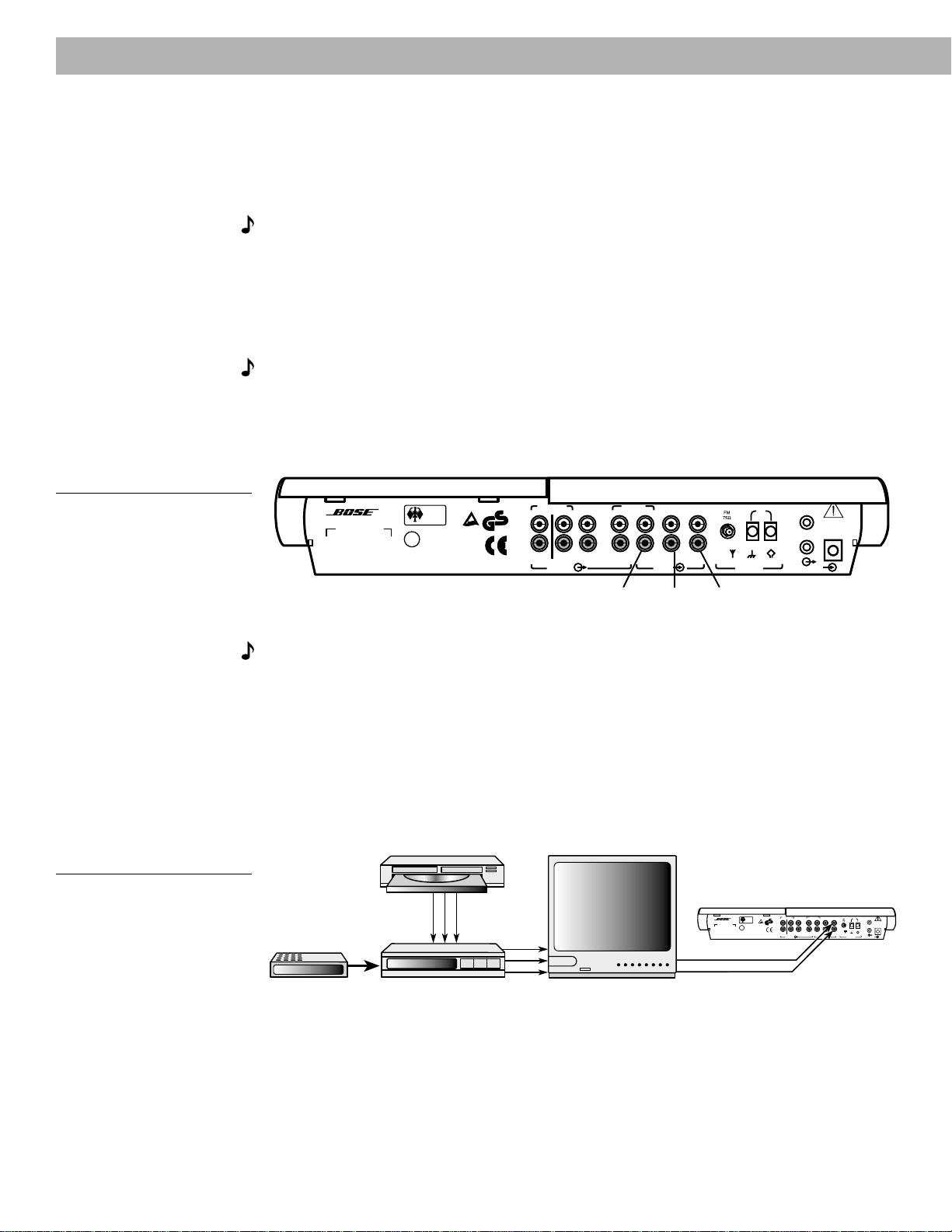
1. Firmly insert the small connector on the end of the AC (mains) power pack cable into the
AC POWER jack on the back of the Lifestyle
®
music center.
2. Make sure that the power pack reaches an AC (mains) outlet.
Note:
Do
not
plug the AC power pack into a power outlet until all component connections
are complete.
Connecting the Acoustimass
®
module power (mains) cord
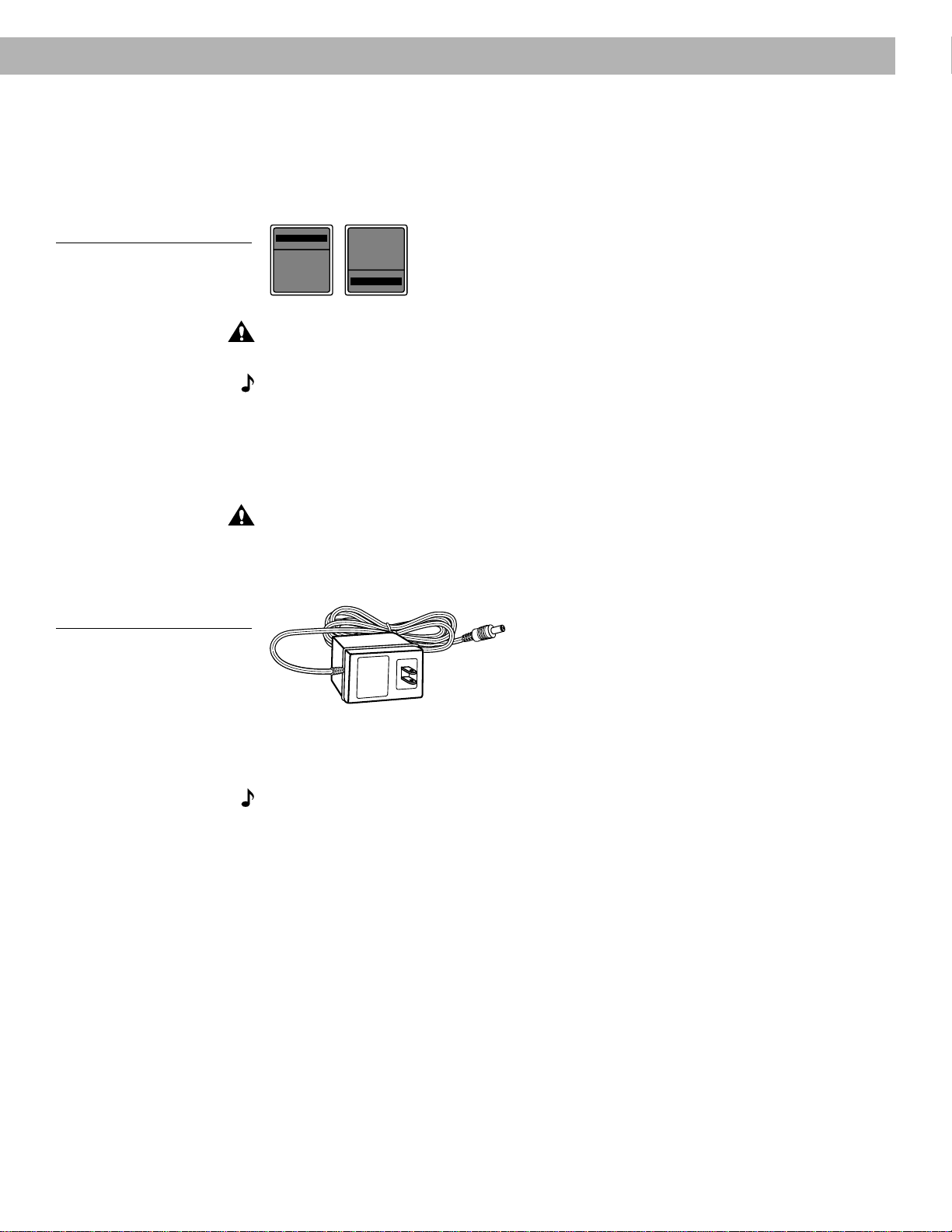
1. On a dual voltage system, the voltage selector switch is preset at the factory to be correct
for your area. Check to be sure it is set for the proper voltage (Figure 7). Use 115V for
North America; 230V for Europe and Australia. In Europe, use the adapter plug provided. If
you are in doubt, contact your local electric utility for the appropriate voltage setting.
Figure 7
Dual voltage Acoustimass
module: voltage selector switch
settings
CAUTION:
Make sure the voltage selector switch is set correctly.
2. Plug the small end of the power (mains) cord into the Acoustimass module AC power jack.
Note:
Do
not
plug the AC power cord into a power outlet until all component connections
are complete.
Connecting the music center AC (mains) power pack
The Lifestyle
®
music center comes with a 120V AC (mains) power pack for use in the USA
and Canada or an appropriate 230V or 240V power pack for international use. (See Figures 1
and 8.) Dual voltage models include both 120V and 230V power packs.
CAUTION:
Be sure to use the correct power pack for your area. Using the wrong one may
damage your power pack or your music center.
• Model PS71, 120V in North America • Model PS72, 230V in Europe
• Model PS74, 230V in UK or Singapore • Model PS77, 240V in Australia
Figure 8
The AC power pack
(model PS71 shown
12 December 20, 2001 AM191409_01_V.pdf
Setting Up
Connecting your home theater components to the Lifestyle
®
12 system
There are many variations of equipment in a home theater. A basic home theater system
might include a stereo or mono TV and stereo VCR with the Lifestyle
®
12 system. Your home
theater can include many other combinations of equipment, including cable TV, laserdisc
players, DVD players, CDI players, additional VCRs, and satellite decoder.
Note:
A mono TV only serves as a display for the video, not as a source for the audio.
In order for the Lifestyle
®
12 system to provide home theater effects, the program material
must be in stereo or surround-encoded, and the device playing the material must be stereo.
Look for the word “surround” on the tape, CD, or preceding the TV broadcast. To hear stereo
or surround sound from encoded video tapes, you must have a stereo (HiFi) VCR. While not
all VCRs are stereo devices, all CD, DVD, and CDI players and nearly all laserdisc players are
stereo.
Note:
Line level outputs from most VCRs or laserdisc players are fixed. If your VCR, laserdisc
player, or other video sound source has fixed and variable outputs, use the fixed outputs.
Setting up the primary video sound source
The Lifestyle
®
12 system has one set of video inputs for the primary source (Figure 9).
Figure 9
Music center connectors
POWER
12VAC IN
~
1.0A
SYSTEM
CONTROL
1
2
AM
LOOP
ANTENNA
AUX VIDEO SOUND
B
R
INPUT
PLAYREC
OUTPUT
A
L
R
L
SPEAKERS FIXED TAPE
B
Z
T
G642
950 D S
BOSE Corporation
U
L
®
LISTED 917D
AUDIO
EQUIPMENT
MANUFACTURED:
geprüdfte
Sicherheit
93
TÜV Rheinland
BOSE CORPORATION, FRAMINGHAM, MA 01701-9168 MADE IN USA
®
LIFESTYLE MODEL 5 MUSIC CENTER
®
Tape input
jacks
Auxiliary
input jacks
Video sound
input jacks
Note:
Your Lifestyle
®
12 system includes one 6-foot (1.8 m) stereo cable to connect the right
(R) and left (L) audio outputs from a component to the music center inputs. Cables may also
be supplied with your components. If needed, audio cables are available at many electronics
stores, or call Bose
®
. Most audio cables are color coded. Match red connectors to right (R)
jacks and black or white connectors to left (L) jacks.
There are three basic methods for setting up your home theater. It is easiest to use a stereo
TV as the switching center to select the sound source. The next easiest option is to use a
stereo VCR as the switching center. The third option is to connect components directly to the
Lifestyle
®
12 music center, and select the source from the Lifestyle
®
12 remote or control
panel.
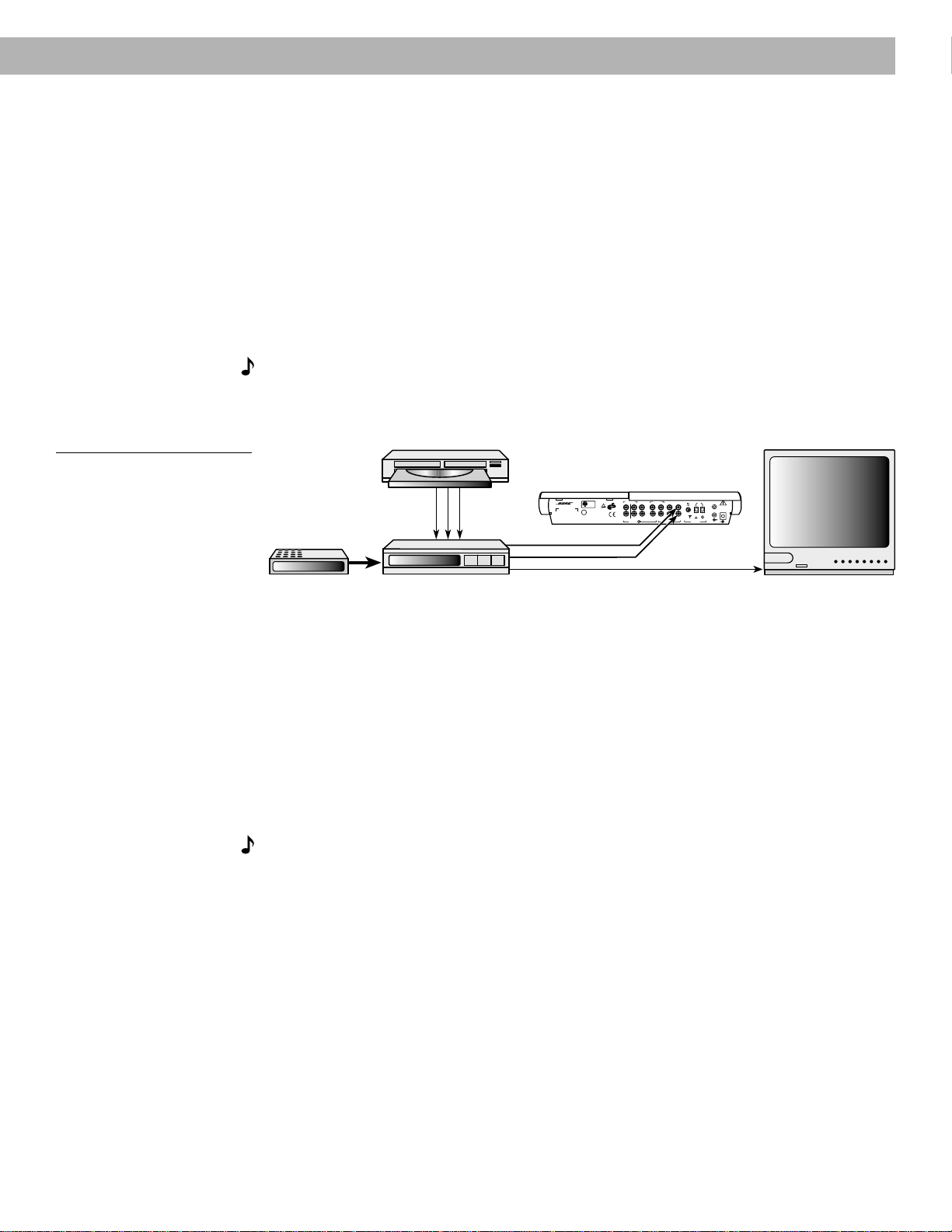
Figure 10
Connecting components
through your TV
L
L
POWER
12VAC IN
~
1.0A
SYSTEM
CONTROL
1
2
AM
LOOP
ANTENNA
AUX VIDEO SOUND
B
R
INPUT
PLAYREC
OUTPUT
A
L
R
L
SPEAKERS FIXED TAPE
B
Z
T
G642
950 D S
BOSE Corporation
U
L
®
LISTED 917D
AUDIO
EQUIPMENT
MANUFACTURED:
geprüdfte
Sicherheit
93
TÜV Rheinland
BOSE CORPORATION, FRAMINGHAM, MA 01701-9168 MADE IN USA
®
LIFESTYLE MODEL 5 MUSIC CENTER
®
LRV
R
V
R
Cable TV
Laserdisc
VCR TV
Lifestyle
®
music center
AM191409_01_V.pdf December 20, 2001 13
(1) To direct your video sound sources through your TV
If your stereo TV has fixed audio outputs (the audio signal level doesn’t change), and it allows
you to select the source of the signal (VCR, laserdisc, cable, etc.):
• Connect your home theater components (VCR, cable box, laserdisc player, etc.) to the
appropriate TV inputs. (See Figure 10.)
• Connect the fixed audio outputs to the VIDEO SOUND INPUTs of the music center.
• Turn the TV speakers off or the volume all the way down.
(If there is an internal/external speakers switch, select external speakers. Do not
connect any speakers to the TV.)
• Set the TV balance control to the center of the dial or range.
• Set tone controls to flat or the middle position (neutral).
• Set TV to the stereo position.
Note:
If necessary, as a second choice, you can use variable audio outputs from your stereo
TV. Turn off or disconnect the TV’s speakers and leave the volume control up – close to the
maximum setting.
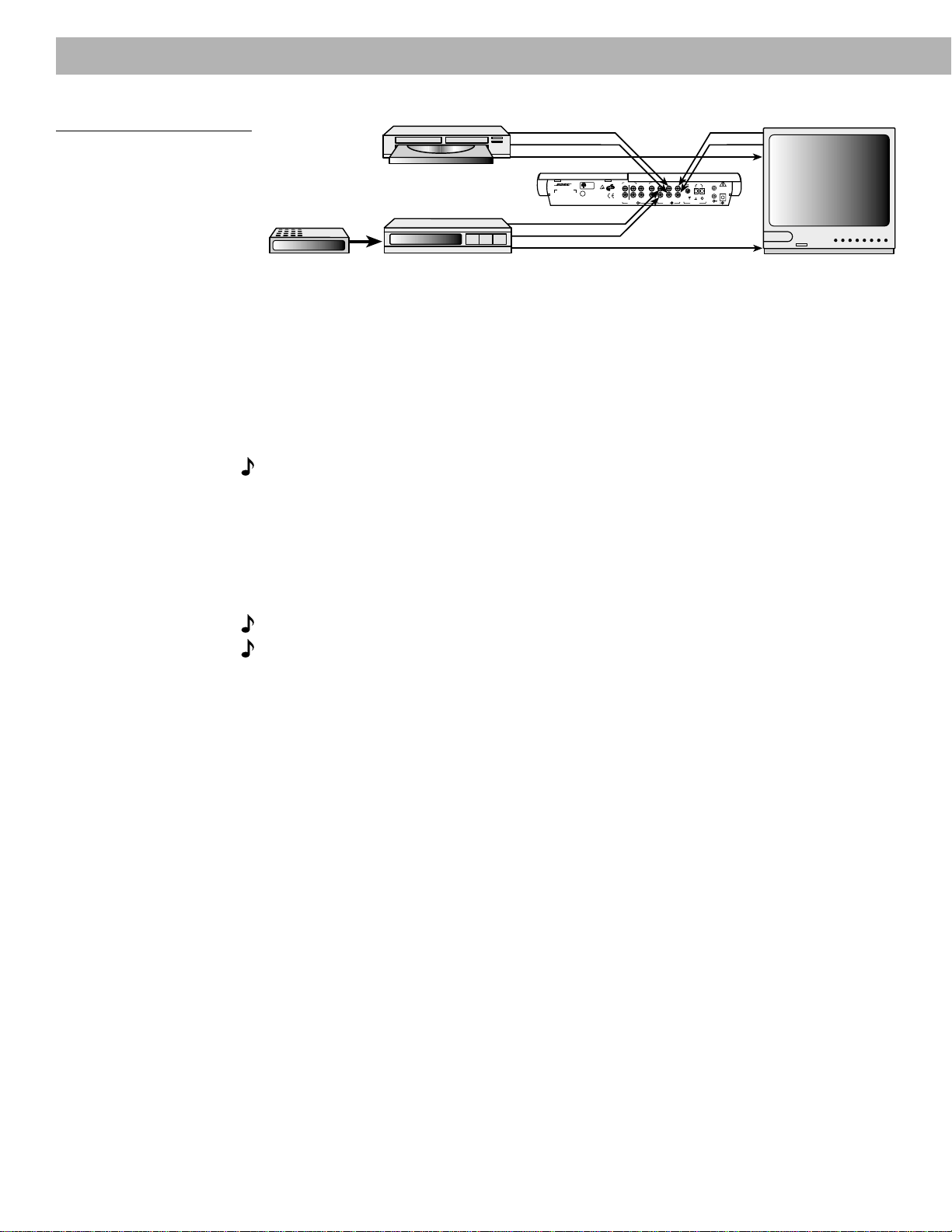
Figure 11
Connecting components
through your VCR
(2) To direct your video sound sources through your VCR
If your TV is not a stereo model, or does not have the appropriate outputs, connect your
stereo VCR to the music center. Use the VCR as a tuner and to select other connected sound
sources. (See Figure 11.)
• Connect your home theater components to the appropriate VCR inputs.
• Connect the VCR video signal to the TV through VIDEO IN or composite video input. You
can also use the RF or antenna input.
• Turn the TV speakers off or the volume all the way down.
(If there is an internal/external speakers switch, select external speakers. Do not connect
any speakers to the TV.)
• Connect the VCR fixed audio outputs to the VIDEO SOUND INPUTs of the music center.
Note:
To ensure proper stereo or surround sound, connect the L and R audio outputs from
your stereo VCR directly to your music center L and R VIDEO SOUND inputs, as shown in
Figure 11. If you prefer to connect the audio outputs from your TV to the music center, be sure
to use the L and R audio outputs from the VCR to the TV, instead of using coaxial cable. If the
audio signal passes through two coaxial cable connections (like the connection from a cable
TV box), in some cases the stereo or surround encoding may be lost.
Setting Up
L
POWER
12VAC IN
~
1.0A
SYSTEM
CONTROL
1
2
AM
LOOP
ANTENNA
AUX VIDEO SOUND
B
R
INPUT
PLAYREC
OUTPUT
A
L
R
L
SPEAKERS FIXED TA PE
B
Z
T
G642
950 D S
BOSE Corporation
U
L
®
LISTED 917D
AUDIO
EQUIPMENT
MANUFACTURED:
geprüdfte
Sicherheit
93
TÜV Rheinland
BOSE CORPORATION, FRAMINGHAM, MA 01701-9168 MADE IN USA
®
LIFESTYLE MODEL 5 MUSIC CENTER
®
LRV
R
V
Cable TV
Laserdisc
VCR
Video out to TV
TV
Audio out
Lifestyle
®
music center
14 December 20, 2001 AM191409_01_V.pdf
Setting Up
Figure 12
Connecting components to the
Lifestyle
®
12 system inputs
(3) To connect components directly to the Lifestyle
®
12 system
If you cannot (or do not choose to) use your TV or VCR to select the sound sources, connect
up to three sound sources directly to the Lifestyle
®
12 system. For example, connect a VCR
into TAPE PLAY IN, a laserdisc to AUX IN, and a TV’s fixed audio outputs to VIDEO SOUND
IN on the music center. (See Figure 12.) By pressing one of these keys (TAPE, AUX, or VIDEO)
on the music center control panel or remote control, you choose which sound source to hear.
Select between TAPE, AUX, or VIDEO for the most pleasing sound quality for each particular
program.
Note:
Selecting VIDEO on your Lifestyle
®
12 system automatically selects SURROUND
(5-speaker) mode, and selecting AUX or TAPE automatically selects STEREO (2-speaker)
mode. If you wish, you can change the speaker mode after you select the source.
About the video source
Your TV is the display for the video (picture) signal. Therefore, the video signal must be
connected directly to the TV. The video signal should not be connected to the Lifestyle
®
12
system.
Note:
For assistance with video connections, see your video components manuals.
Note:
There is no video signal input (usually a yellow-coded jack) on the music center. The
VIDEO SOUND INPUT jacks are for audio from a video source.
L
L
L
POWER
12VAC IN
~
1.0A
SYSTEM
CONTROL
1
2
AM
LOOP
ANTENNA
AUX VIDEO SOUND
B
R
INPUT
PLAYREC
OUTPUT
A
L
R
L
SPEAKERS FIXED TAPE
B
Z
T
G642
950 D S
BOSE Corporation
U
L
®
LISTED 917D
AUDIO
EQUIPMENT
MANUFACTURED:
geprüdfte
Sicherheit
93
TÜV Rheinland
BOSE CORPORATION, FRAMINGHAM, MA 01701-9168 MADE IN USA
®
LIFESTYLE MODEL 5 MUSIC CENTER
®
R
V
R
V
R
V
VCR
Video out to TV
Laserdisc
Cable TV
TV
Audio out
Lifestyle
®
music center
AM191409_01_V.pdf December 20, 2001 15
Other connections
Tape deck
To use an external tape recorder (analog audio cassette, analog open reel, digital audio tape,
Digital Compact Cassette, or MiniDisc), connect the inputs (REC) from the tape deck to the
music center TAPE REC jacks. Connect the outputs (PLAY) from the tape deck to the music
center TAPE PLAY INPUT jacks, matching the red plug to R (right) and black or white plug to
L (left).
CD changer, DVD player, or laserdisc player
To use one of these components, connect its audio outputs to the music center AUX INPUT
jacks, matching the red plug to R (right) and black or white plug to L (left).
Turntable
To connect a turntable, you need a phono preamplifier (with RIAA equalization). Consult your
dealer for the appropriate model. Connect the audio outputs of the phono preamplifier to the
music center AUX INPUT jacks, matching the red plug to R (right) and black or white plug to L
(left).
Note:
The Lifestyle
®
12 system cannot turn a connected component on or off.
Setting Up
16 December 20, 2001 AM191409_01_V.pdf
Connect the antennas
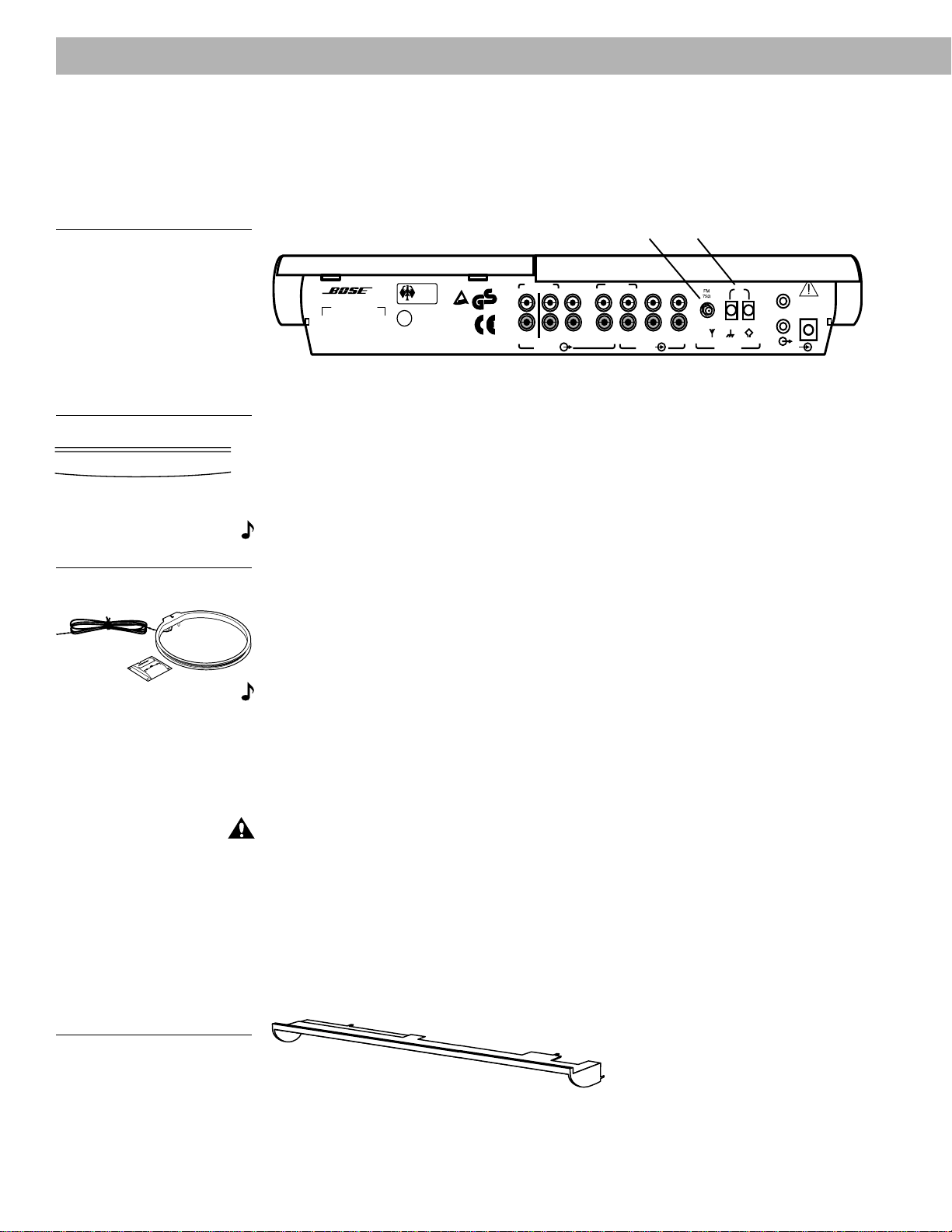
The rear panel of your Lifestyle
®
music center provides connections for AM and FM antennas
(Figure 13). Unwind each antenna’s wires. Antennas provide better reception when their wires
are not bundled.
Figure 13
The antenna connections
Setting Up
POWER
12VAC IN
~
1.0A
SYSTEM
CONTROL
1
2
AM
LOOP
ANTENNA
AUX VIDEO SOUND
B
R
INPUT
PLAYREC
OUTPUT
A
L
R
L
SPEAKERS FIXED TAPE
B
Z
T
G642
950 D S
BOSE Corporation
U
L
®
LISTED 917D
AUDIO
EQUIPMENT
MANUFACTURED:
geprüdfte
Sicherheit
93
TÜV Rheinland
BOSE CORPORATION, FRAMINGHAM, MA 01701-9168 MADE IN USA
®
LIFESTYLE MODEL 5 MUSIC CENTER
®
AM antenna
terminals
FM antenna
jack
Figure 14
The FM dipole antenna
Figure 15
The AM loop antenna
FM antenna connections
1. Plug the antenna connector into the FM ANTENNA jack on the back of the Lifestyle
®
music
center.
2. Spread out the antenna arms. Experiment with both the placement and the angle of this
antenna to provide optimum FM reception.
AM antenna connections
Note:
To install the AM antenna on a wall, follow the instructions enclosed with the antenna.
1. Loosen the AM ANTENNA screw terminals on the back of the Lifestyle
®
music center.
2. Slide the wire connectors around the screw terminals. Tighten the screws over the con-
nectors.
3. Stand the loop antenna on the base, following the instructions enclosed with the antenna.
4. Move the loop part of the antenna at least 20 inches (50 cm) from the music center.
Experiment with the orientation of the loop for optimum AM reception.
Note:
Outdoor antennas may be used with the music center antenna connections. To install
an outdoor antenna, consult a qualified installer. Follow all safety instructions.
Connecting to a cable radio signal
To connect your system to the FM signal available from some cable TV companies, contact
your cable provider for assistance. The connection is made to the FM 75Ω EXTERNAL
antenna connector on the back of the system.
CAUTION:
Be certain that the installation includes a signal splitter so that only the FM band,
not the cable TV band, is transmitted to the system. It is necessary to use a splitter that filters
the signal to prevent any re-emissions of the TV spectrum through the system.
Attach the wire cover
To hide the wires and jacks from view, after all the connections are completed, attach the wire
cover to the music center. The five tabs on the wire cover snap into matching slots on the
music center back panel.
Figure 16
The wire cover
AM191409_01_V.pdf December 20, 2001 17
Setting Up
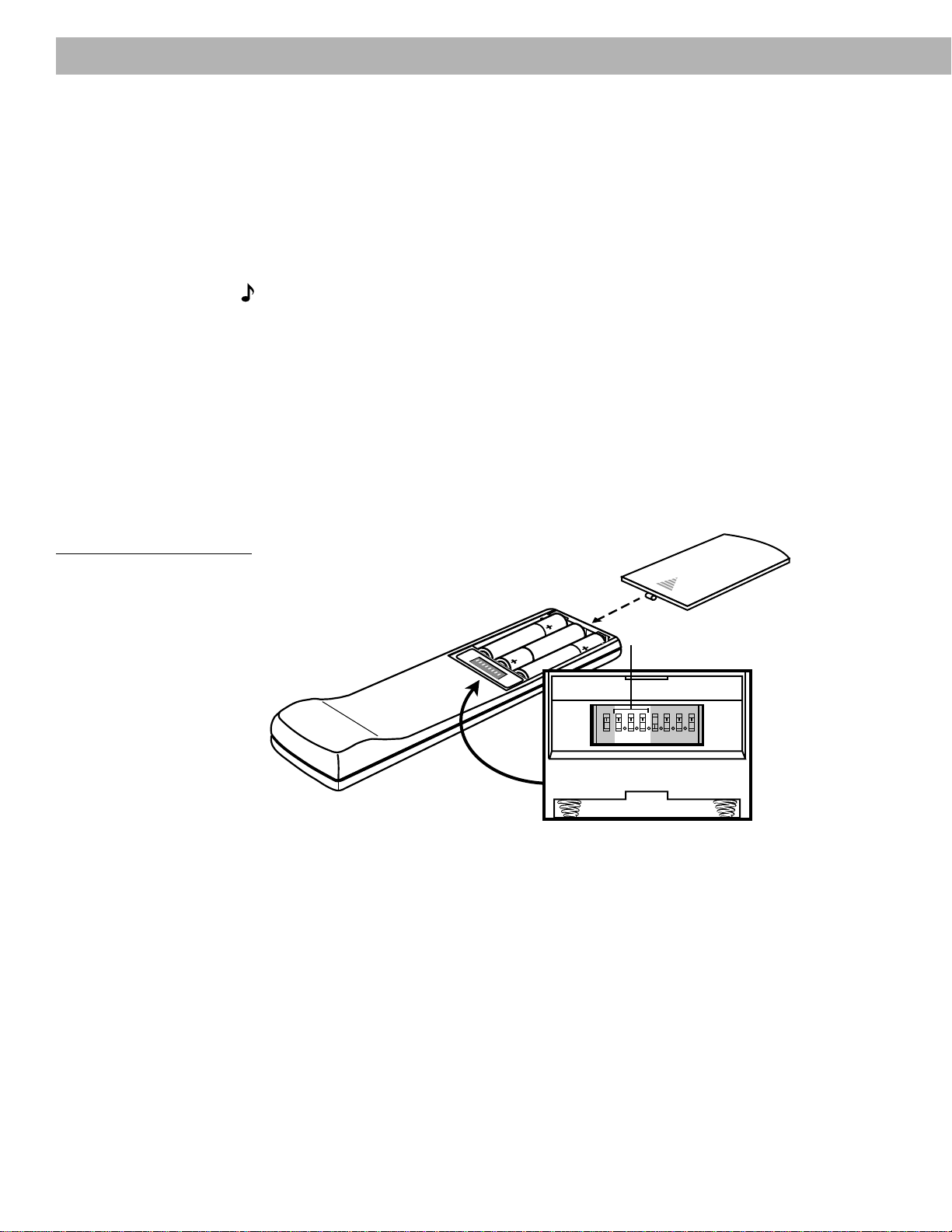
Miniature switches
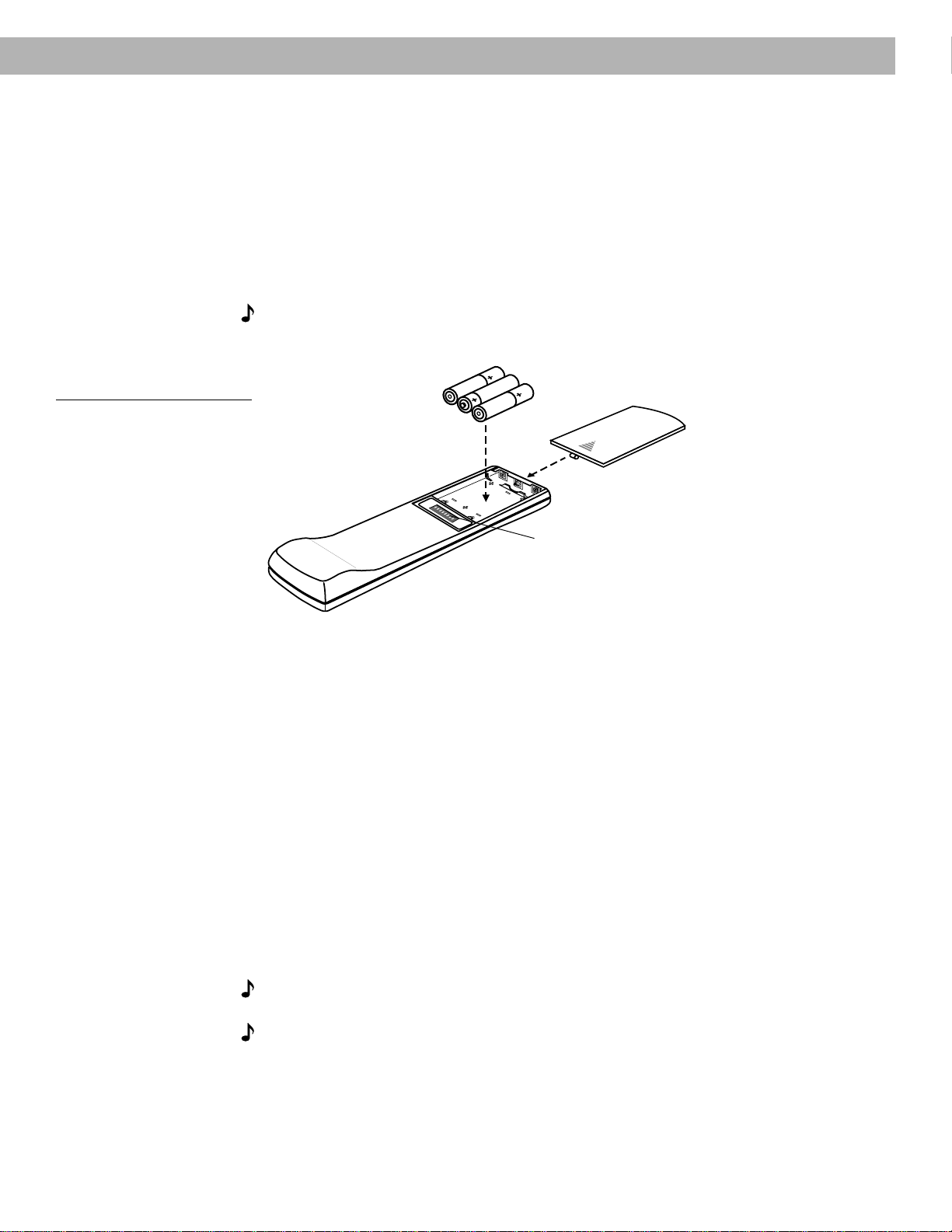
Battery compartment cover
3 AA batteries
Set radio channel spacing for dual voltage and 120V systems
Dual voltage music centers (which include both 120V and 230V power packs) and 120V
music centers can be set for two types of AM and FM channel spacing.
• Channel spacing for North America is 10 kHz for AM and 200 kHz for FM.
• Channel spacing for Europe is 9 kHz for AM and 50 kHz for FM.
Your dual voltage or 120V music center is factory preset for North American spacing. Select
the channel spacing most appropriate for your area.
To change AM and FM channel spacing:
1. Press OFF to turn off the music system.
2. Press and release the ERASE key under the CD cover. (See Figure 19 on page 19.)
The display indicates US for North American spacing and EU for European spacing.
Turn on the music center
Plug the Acoustimass
®
module power cord into an AC (mains) outlet. Then plug in the music
center power pack.
Note:
Your speakers will not operate unless you complete all cable and power connections
before turning on the music center.
Note:
If your system will be unattended for a few days, you may want to unplug your music
center to prevent a neighbor’s Lifestyle
®
remote control or your pets from accidentally turning
it on. In addition, see “Changing the house code settings” on page 24.
You are ready to enjoy your new Lifestyle
®
system. Refer to the following pages for informa-
tion on operating the music center controls and the Lifestyle
®
remote control.
Play the Test CD, following the instructions on page 22. Listen to the instructions on the CD
to verify your system setup.
Set up the remote control
Install the batteries
1. Slide open the battery compartment on the back of the remote (Figure 17).
2. Insert 3 AA or IEC-R6 1.5V batteries, or the equivalent, as shown. Match the + and –
symbols on the batteries with the + and – markings inside the compartment.
3. Slide the battery compartment cover back into place.
Replace the batteries when the remote control stops operating or its range seems reduced.
Alkaline batteries are recommended.
Note:
Do not change the settings of the factory-preset miniature switches. See “Changing
the house code settings” on page 24 for information on how to prevent conflicts with other
Lifestyle
®
music systems.
Figure 17
Installing the remote control
batteries
18 December 20, 2001 AM191409_01_V.pdf
Operating Your Lifestyle
®
12 System
The music center display
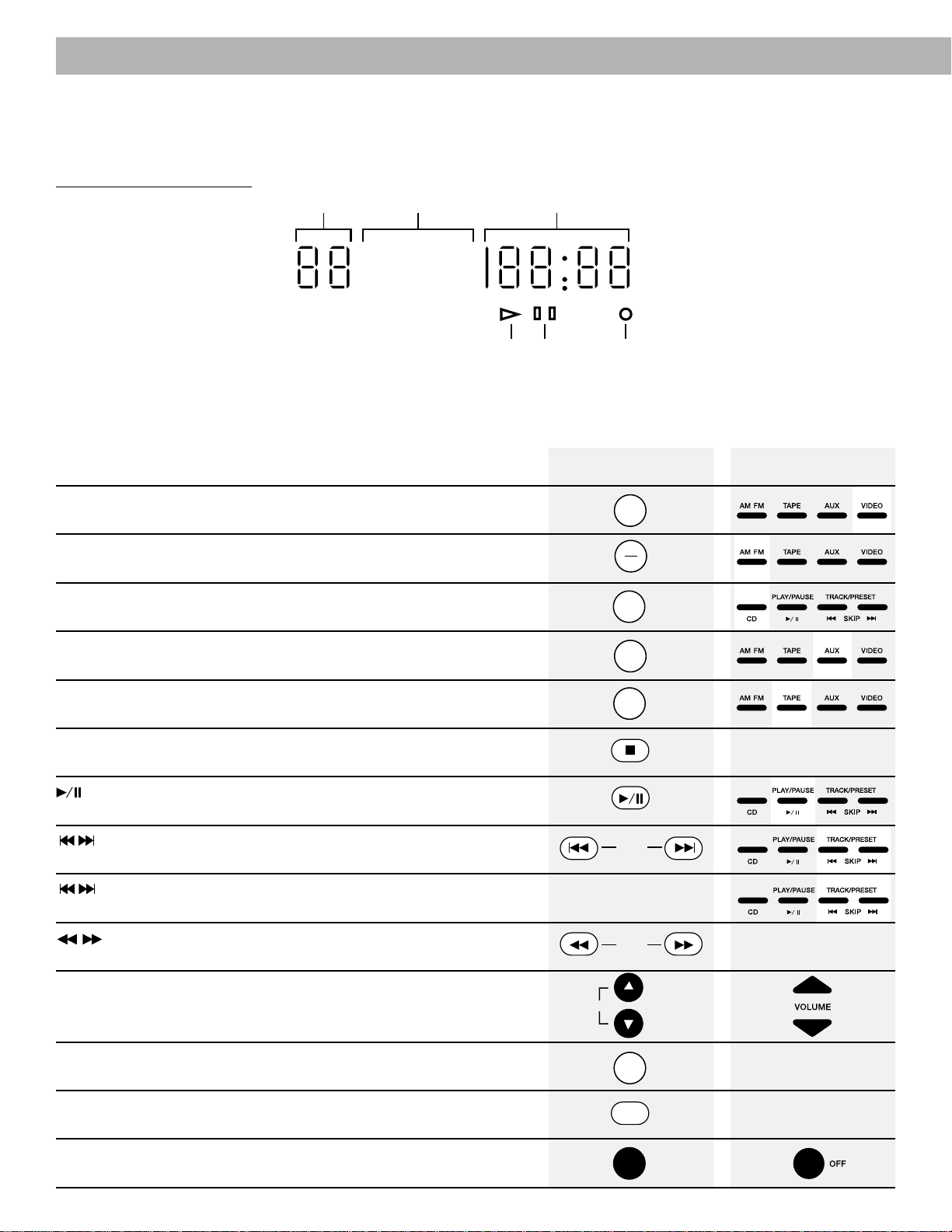
This music center display (Figure 18) provides information on the music center functions.
Figure 18
The music center display
The system controls
Function
VIDEO - Selects a video sound source connected to the VIDEO inputs, and
turns the system on (in SURROUND speaker mode and enhanced bass).
AM/FM - Selects the radio and turns the system on (in STEREO speaker mode).
When the radio is on, switches between AM and FM.
CD - Selects the built-in CD player and turns the system on (in STEREO speaker
mode).
AUX - Selects a CD changer or other component connected to the AUX inputs,
and turns the system on (in STEREO speaker mode).
TAPE - Selects a tape deck or component connected to the TAPE inputs, and
turns the system on (in STEREO speaker mode).
■ STOP - Stops the CD player.
PLAY/PAUSE - Begins or pauses play of the CD. When held down for two
seconds, stops play of a CD.
SKIP - Selects the previous or next CD track, or the previous or next
preset radio station.
SKIP - Press and hold to scan a CD. When these two keys on the music
center are pressed simultaneously, plays CD tracks in random order.
SEEK - Searches backward or forward through a CD. Seeks the
previous or next strong AM or FM station.
VOLUME ▲ \ ▼- Raises or lowers the system volume.
AUTO OFF - Sets a 15-minute delay before the system shuts off. Each addi-
tional key press increases the time until shutoff by 15 minutes (up to 75 minutes).
MUTE - Silences the speakers. Also restores volume to muted speakers.
OFF - Turns the system off.
AUTO
OFF
MUTE
OFF
SEEK
SKIP
TRACK/PRESET
STOP
TAPE
AUX
CD
AM
FM
VIDEO
PLAY/PAUSE
No disc
indicator
Play
indicator
Pause
indicator
CD track and
AM/FM preset
number display
Source
indicators
FM
STEREO
DISC
RANDOM
AUTOOFFMUTE
AUX
TAPE
VIDEO
CD AM
TRACK
PRESET
CD elapsed time
and AM/FM station
frequency display
Music CenterRemote Control
VOLUME
AM191409_01_V.pdf December 20, 2001 19
VOLUME OFF
VIDEO
TRACK/PRESET
AUX
SKIP
/ ll
TAPE
PLAY/PAUSE
CD
AM/FM
SEEK/TUNE
PRESET
STORE ERASE
SEEK/TUNE
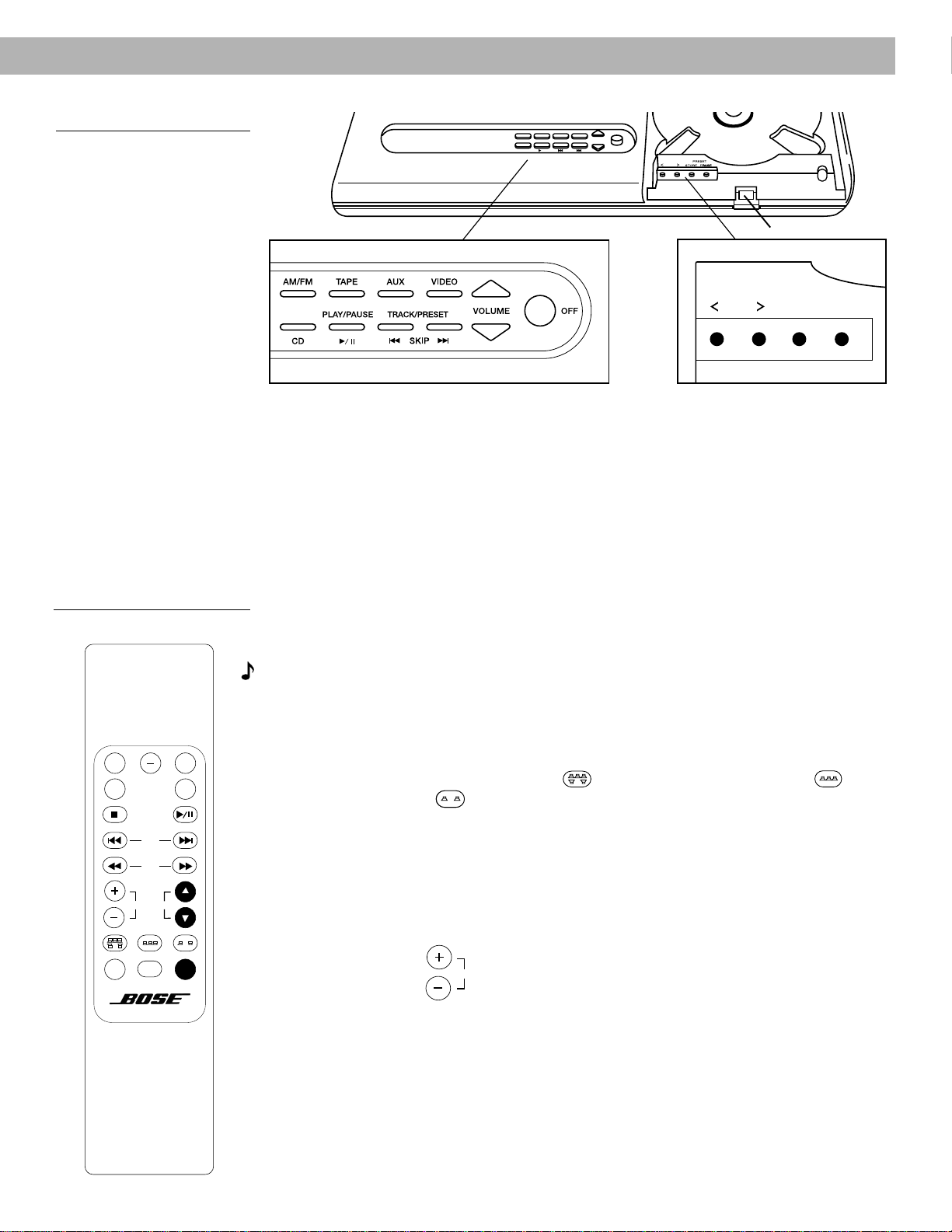
The music center controls
Use the special keys on the music center to manually tune the radio and set station presets.
The CD cover latch opens the CD cover for loading and unloading a CD.
SEEK/TUNE
<
/
>
- Lowers or raises the frequency setting of the radio (stations).
PRESET STORE/ERASE - Adds or removes radio station presets.
The Lifestyle
®
remote control
For most types of home construction, your advanced radio-frequency remote control works
from anywhere in your home. Its radio wave signals pass through walls and floors to reach
the music center. To operate, simply press the desired key. You don’t need to aim the remote
at the music center.
Note:
Some types of buildings create “dead spots” where the remote will not operate.
Simply move the remote a foot or two and try again. You can also move the music center a
few feet to a location with better remote response.
Special keys on the remote control select the speaker mode (2, 3, or 5 speakers), and adjust
the surround (rear) volume and the center speaker volume.
SPEAKER MODE - Selects SURROUND
SURROUND
(5-speaker), STEREO+CENTER
STEREO+CENTER
(3-speaker), or STEREO
STEREO
(2-speaker) mode.
• When you press VIDEO, the system automatically selects SURROUND mode.
• For other sound sources (AM/FM, CD, AUX, TAPE), the system selects STEREO mode.
• Each time you change to another sound source, the system selects the factory-set
speaker mode for that source (SURROUND for VIDEO, STEREO for all others).
• While the system is playing, you can change to any other speaker mode (SURROUND,
STEREO+CENTER, STEREO).
SURROUND
+
/
–
-
SURROUND
In SURROUND mode, raises or lowers the volume of the
surround speakers. In STEREO+CENTER mode, raises or lowers the volume of
the center speaker.
• Each time you select SURROUND mode, the surround and center speaker volumes
return to the last settings used. Each time you select STEREO+CENTER mode, the
center speaker volume returns to the last setting used.
• To return to the factory-set SURROUND or STEREO+CENTER volume, hold the
SURROUND or STEREO+CENTER key for 10 seconds.
• While in STEREO (2-speaker) mode, pressing SURROUND
+
selects SURROUND
(5-speaker) mode.
Operating Your Lifestyle
®
12 System
Figure 19
The music center controls
Figure 20
The remote control
AUX
VIDEO
TAPE
CD
AM
FM
STOP PLAY/PAUSE
TRACK/PRESET
SKIP
SEEK
MUTE
AUTO
OFF
SURROUND STEREOSTEREO+CENTER
SPEAKER MODE
VOLUMESURROUND
OFF
CD cover latch

20 December 20, 2001 AM191409_01_V.pdf
Operating Your Lifestyle
®
12 System
Listening to your Lifestyle
®
12 system
Your Lifestyle
®
12 system offers the option of listening in 2, 3, or 5-speaker mode. The system
turns on in SURROUND (5-speaker) mode when VIDEO is selected and in STEREO (2-
speaker) mode for AM/FM, CD, TAPE, or AUX. You can change to the speaker mode that
sounds best to you for each particular program.
You can listen to any program material in SURROUND mode, whether the program is sur-
round-encoded, stereo, or monaural. You will not hear sound from all 5 speakers all of the
time. Even with surround-encoded material there are times when no sounds are directed to
the surround speakers. For most video material (mono, stereo, or surround), listening in 3 or
5-speaker mode helps anchor the dialogue to the picture while providing a fuller sound. See
additional discussion about selecting program material on page 4.
The system’s Videostage
®
decoding technology directs the sound from surround-encoded
program material to the appropriate speakers to create the home theater effects. Monaural
program material is directed to the front speakers, primarily the center. For stereo material,
sounds encoded as left are directed to the left front, right to the right front, and both left and
right directed primarily to the center. Some sounds which are not specifically left or right may
also be directed to the surround speakers. Decide if the particular material sounds better to
you in 3 or 5-speaker mode.
Adjusting the volume
• Use the VOLUME ▲ (up) or ▼ (down) keys to raise or lower the volume.
• For SURROUND mode, use the SURROUND
+
or
–
keys to raise or lower the sound
level directed to the surround speakers.
• For STEREO+CENTER mode, use the SURROUND
+
or
–
keys to raise or lower the
sound level directed to the center speaker.
Turning the system off
• Press the OFF key on the remote or the console.
• To turn off your music system automatically after 15 minutes, press the AUTO OFF key on
the remote. Each additional press of AUTO OFF increases the time until shutoff by 15
minutes (up to 75 minutes). The display indicates AUTO OFF is set and flashes the amount
of time set.
Listening to video sound
Turning the video components on
Turn on the TV, VCR, laserdisc, DVD, or CDI player, or other video source. If you are viewing
video from a VCR, laserdisc, DVD, or CDI player, load a tape or disc.
Turning the system on and choosing video sound
Press the VIDEO key on the remote or the console to turn your music system on to play video
sound. The system turns on in SURROUND mode.
If your video component is connected to the music center AUX or TAPE jacks, press AUX or
TAPE to select the source. The system turns on in STEREO mode. Select SURROUND or
STEREO+CENTER mode, if desired.
Using enhanced bass for movie soundtracks
Pressing VIDEO turns the system on in enhanced bass mode, a bass level specially designed
for proper playback of movie soundtracks. Press VIDEO again to alternate between enhanced
bass for movies and standard bass for other listening.
Pressing AUX or TAPE turns the system on in standard bass mode. Press AUX or TAPE again
to alternate between standard bass for other listening and enhanced bass for movies.
Note:
You may not hear a difference between enhanced and standard bass when listening
to movie soundtracks that do not have much very low bass content.

AM191409_01_V.pdf December 20, 2001 21
Operating Your Lifestyle
®
12 System
Listening to the radio
Turning the system on and choosing the radio
Press the AM/FM key on the remote or the console to turn your music system on to the most
recently heard AM or FM station. The system turns on in STEREO mode. Select another
speaker mode, if desired.
Note:
f the system is on and the radio is already selected, this key switches between the AM
and FM bands.
Tuning
Seeking the strongest stations
• Press and release the SEEK (forward) or (reverse) key on the remote to seek and
stop at the next strong signal. If you hold these keys down, the radio continues to seek
without stopping at any station.
• Or, press SEEK/TUNE
>
or
<
(under the CD cover) on the music center.
• To stop seeking in one direction, briefly press the opposite direction key.
Switching between AM and FM
Press the AM/FM key to switch to the other band.
Manual tuning
If you want to tune the radio to a distant or weak station that the radio cannot seek, use the
SEEK/TUNE keys, located under the CD cover.
1. Hold down the
>
or
<
key to scan through the stations.
2. Release the
>
or
<
key to stop at a selected station.
3. As soon as the scan stops, tap the
>
or
<
key to tune one channel at a time.
Setting a station preset
Your Lifestyle
®
music center can store up to 20 AM and FM stations in any combination.
1. Select a radio station you wish to store as a preset.
2. Press the STORE key (located under the CD cover). The station is stored in the lowest
available preset location.
3. If you decide not to store the displayed station in the displayed preset location:
a. Press and hold the STORE key.
b. Press the SKIP (forward) or (reverse) key to select a different preset number for
this station.
c. Release the STORE key. The frequency of the preset station flashes.
Note:
You cannot store a station in an already-occupied preset location without erasing that
preset station first (see “Erasing a preset station” below). If you attempt to store more than 20
stations, the preset display will flash ‘— —’.
Selecting a preset station
Once you set one or more station presets, press the SKIP (forward) or (reverse) key to
select the next or the previous preset station.
Erasing a preset station
1. Use the SKIP (forward) or (reverse) keys to select the preset station you wish to
erase.
2. Press the ERASE key (located under the CD cover). The preset number is no longer lit.
22 December 20, 2001 AM191409_01_V.pdf
Listening to a CD
Loading a CD into the music center
Press the latch on the CD cover, and place a CD onto the spindle, label-side up. Close the
CD cover.
Turning the system on and choosing the CD player
Press the CD key on the remote or the console. If the music system is already on, pressing
one of these keys selects the CD player and the CD indicator lights. The system turns on in
STEREO mode. Select another speaker mode, if desired.
If a CD has been loaded, it begins to play. If no CD is loaded, the No Disc O indicator lights.
Using the CD player
The following operations apply to keys on both the remote control and the music center,
except where noted:
• To play a stopped or paused CD, press PLAY/PAUSE.
• To pause a CD, press .
• To stop a CD, hold the key on the music center for two seconds, press the ■ STOP
key on the remote, or open the CD cover.
• To skip tracks, press SKIP (forward) to go to the next track or SKIP (reverse) to go to
the beginning of the current or previous track.
• To move through a track, on the remote control press SEEK (forward) to move forward
or SEEK (reverse) to move back, on the music center press and hold SKIP or
SKIP .
• To play tracks in random order, (using the music center controls only) press the SKIP
and keys simultaneously. To continue playing the tracks in their regular order, press
these keys again.
Using the system with an external component
Follow the instructions for connecting a component before proceeding. To begin, make sure
the component is turned on and a tape, CD, DVD, laserdisc, etc. is loaded.
Note:
The Lifestyle
®
12 system cannot turn a connected component on or off.
Turning the system on and selecting the component
Press the TAPE, AUX, or VIDEO key on either the remote or the console to turn the system on
and select the component connected to that input. If the system is already on, press one of
these keys to select the component. Pressing TAPE or AUX plays it in STEREO mode;
pressing VIDEO plays it in SURROUND mode. Choose another speaker mode, if desired.
The appropriate display indicator lights when the system is on and the component is se-
lected.
Using a tape deck, CD changer, or other connected component
Turn on your component directly or by using its remote control. Use the VOLUME ▲ (up) or ▼
(down) key to raise or lower the volume. Control all other functions at the source, referring to
its owner’s manual if necessary. To record to a connected tape deck, play the source (AM/FM,
CD, AUX, VIDEO) you wish to tape. Set the tape unit to record.
Using headphones
For headphone listening, use the stereo mini headphones jack on the left side of the music
center. While this jack accepts most headphone models, you can get an adapter at Bose
®
dealers and most electronics stores, if needed. Connecting headphones automatically shuts
off speakers connected to the FIXED OUTPUTs and SPEAKERS A.
Operating Your Lifestyle
®
12 System
AM191409_01_V.pdf December 20, 2001 23
Maintaining Your Lifestyle
®
12 System
Fine-tuning your system
In most situations, you only need to follow the speaker placement guidelines (see “Setting
Up” on pages 6-8) for your system to provide excellent sound quality.
You do not need to adjust tone settings for changes in volume, since Bose
®
patented signal
processing technology provides a natural tonal balance over the full range of volume settings.
If desired, you can further fine-tune your system as described here.
Adjusting speaker controls
The Lifestyle
®
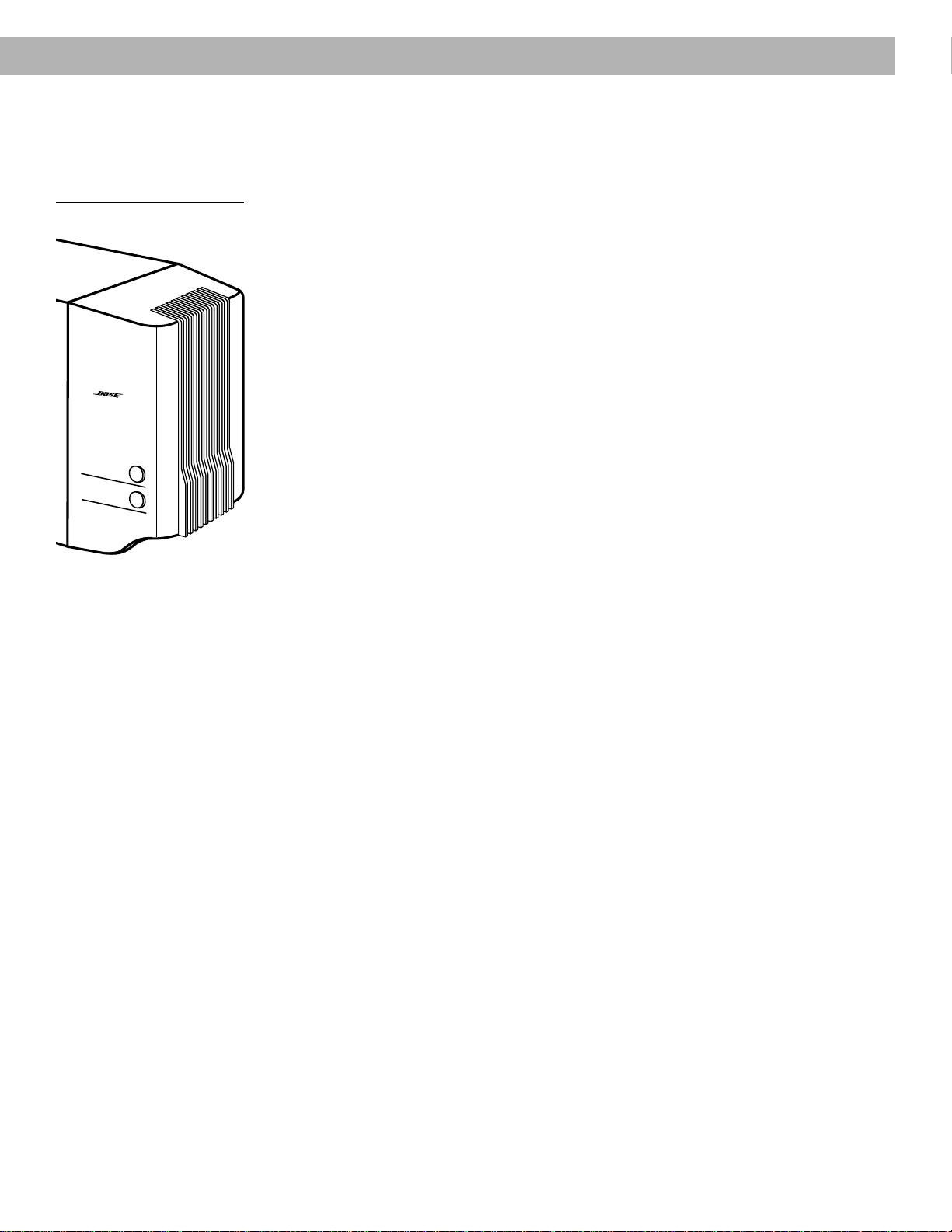
12 system TREBLE and BASS controls are located on the Acoustimass
®
module (Figure 21). They allow you to adjust the treble (high frequencies) and bass (low
frequencies). In the normal setting, the dots on each control are in the 12 o’clock position.
You can also locate the normal setting by feeling when the control settles into the notch at
this position. Turn the controls clockwise to increase, and counterclockwise to decrease, the
amount of treble or bass.
Compensating for room acoustics
The acoustics (sound qualities) of your room can affect the overall sound quality of any
speaker system. In general, you can reduce many problems with acoustics by the cautious
use of the TREBLE and BASS controls.
Too much or too little treble
Rooms with too few sound-absorbing furnishings, especially those with bare floors and walls,
may sound overly shrill or “bright.” Turning down the treble control (toward –)
decreases treble sound.
Rooms with a lot of sound-absorbing furnishings, such as upholstered furniture, wall-to-wall
carpet, or heavy drapes, may reduce the treble sound of your system. Moving speakers
further away from soft furnishings increases treble. You can increase treble sound by slightly
turning up the treble control (toward +).
Too much or too little bass
You can decrease bass sound by turning down the bass control (toward –). To increase bass,
turn up the bass control (toward +).
Acoustimass module placement affects the amount of bass you hear. Placing the module
closer to the corner of the room increases bass. Moving the module away from the corner
decreases bass.
Compensating for movie soundtracks
When a movie soundtrack is played in a motion picture theater, its bass is restored to the full
level intended by the movie’s sound designer. To perform the same way in your home, your
Lifestyle
®
12 system restores the bass to this level when you select VIDEO. In VIDEO, AUX, or
TAPE mode, you can choose between standard and enhanced bass.
In VIDEO mode, the system turns on enhanced bass for movies. Press VIDEO again to
change to standard bass.
In AUX or TAPE mode, the system turns on in standard bass. Press AUX or TAPE again to
change to enhanced bass for movies.
Figure 21
Bass and treble controls
®
T
re
ble
B
a
ss
24 December 20, 2001 AM191409_01_V.pdf
Maintaining Your Lifestyle
®
12 System
Changing the house code settings
Each Lifestyle
®
remote control uses a system of matching house codes to communicate with
its corresponding music center. If your remote’s commands ever conflict with those of
another nearby Lifestyle
®
system, you can easily set a new house code for your system and
its remote control(s) by following the procedures below.
1. Open the remote control battery cover.
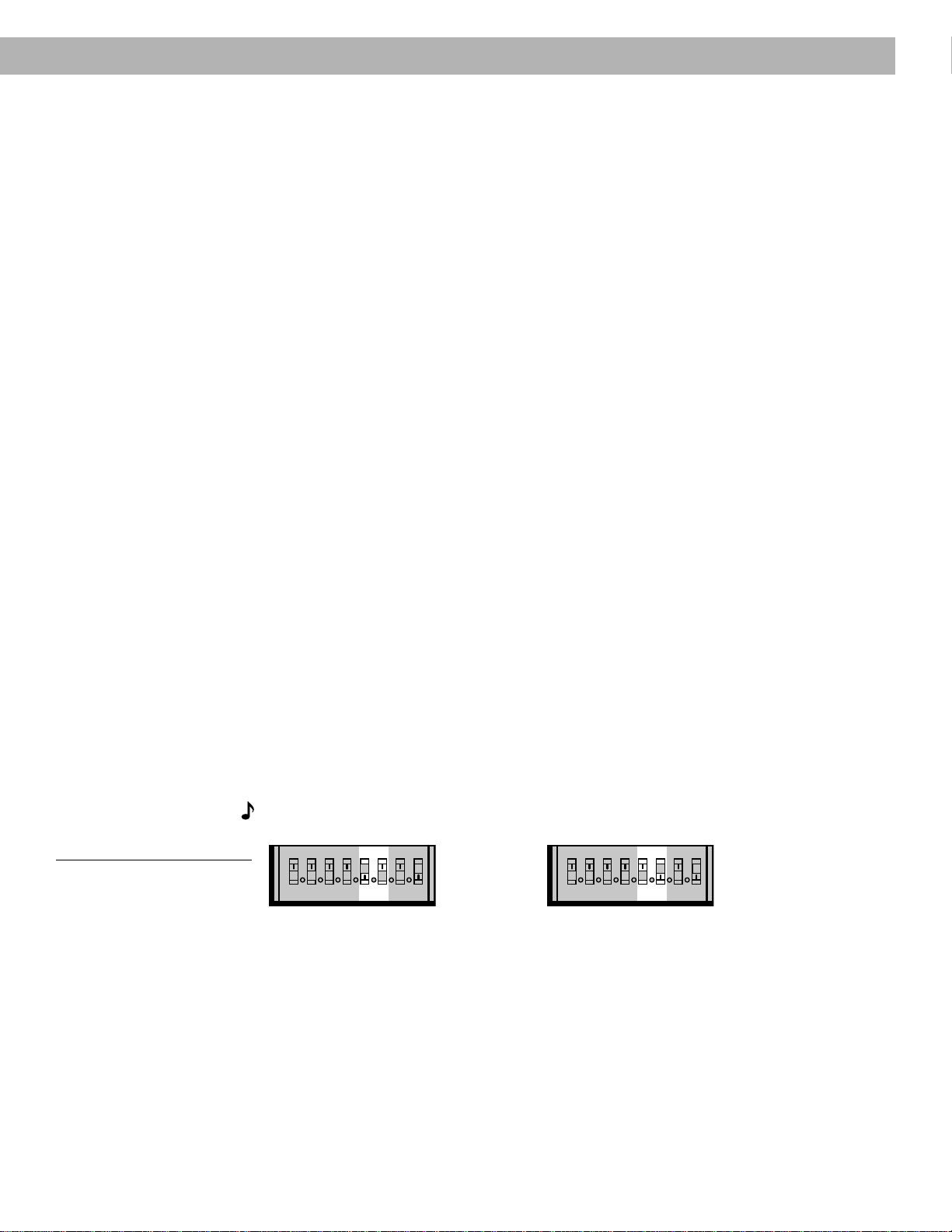
2. Locate the miniature switches (Figure 22). Change the position of switch 2, 3, or 4 by
moving it in the opposite direction from its current setting.
Note:
Do not change any other switches at this time.
3. Replace the battery cover on the remote control.
4. Press the OFF key on the console.
5. Open the CD cover.
6. Press the STORE key. The display will begin to flash ‘— —’.
7. Within two seconds while the display is flashing, press any key on the remote control.
The display stops flashing and momentarily shows ‘— —’ to confirm recognition of the
house code. The system will remain off.
8. If you have additional remote controls, open the battery cover of each one and change the
switches to match those of the first remote control. It is not necessary to repeat steps 4–7.
Figure 22
Miniature switches for setting
house codes and speakers
234
ON
5678
K
40
l
House code switches
AM191409_01_V.pdf December 20, 2001 25
Adding speakers
Your Lifestyle
®
12 system provides high quality audio for a single listening area. However, your
music center also provides connections (SPEAKERS A or SPEAKERS B) for adding a pair of
powered speakers in a second room. In the second room, you can listen to the sound source
that is playing in the main room.
You can purchase an additional remote control to keep in the second room.
Keep the following considerations in mind if you choose to connect secondary speakers.
Using speakers connected to the B outputs:
• You must use a second remote control, set to B (see instructions below), to turn on the
B speakers.
• Adjusting volume with this second remote adjusts volume for only the B speakers.
• Using the mute key on the second remote mutes or unmutes the second room speak-
ers.
Using speakers connected to the A outputs:
• The music center controls operate speakers connected to FIXED and A outputs.
• Adjusting volume from the music center control panel or with the remote control that
came with the system adjusts volume for speakers connected to FIXED and A outputs.
• Using the mute key on the main remote mutes or unmutes speakers connected to
FIXED and A outputs.
Setting a second remote for additional speakers
You need a second remote control, set to B, to operate speakers connected to the
SPEAKERS B outputs. When you purchase a second remote control, it is shipped set to A, to
control your main speakers. It will also control secondary speakers connected to
SPEAKERS A.
To set your second remote to control speakers connected to B, follow these steps:
1. Open the remote control battery cover.
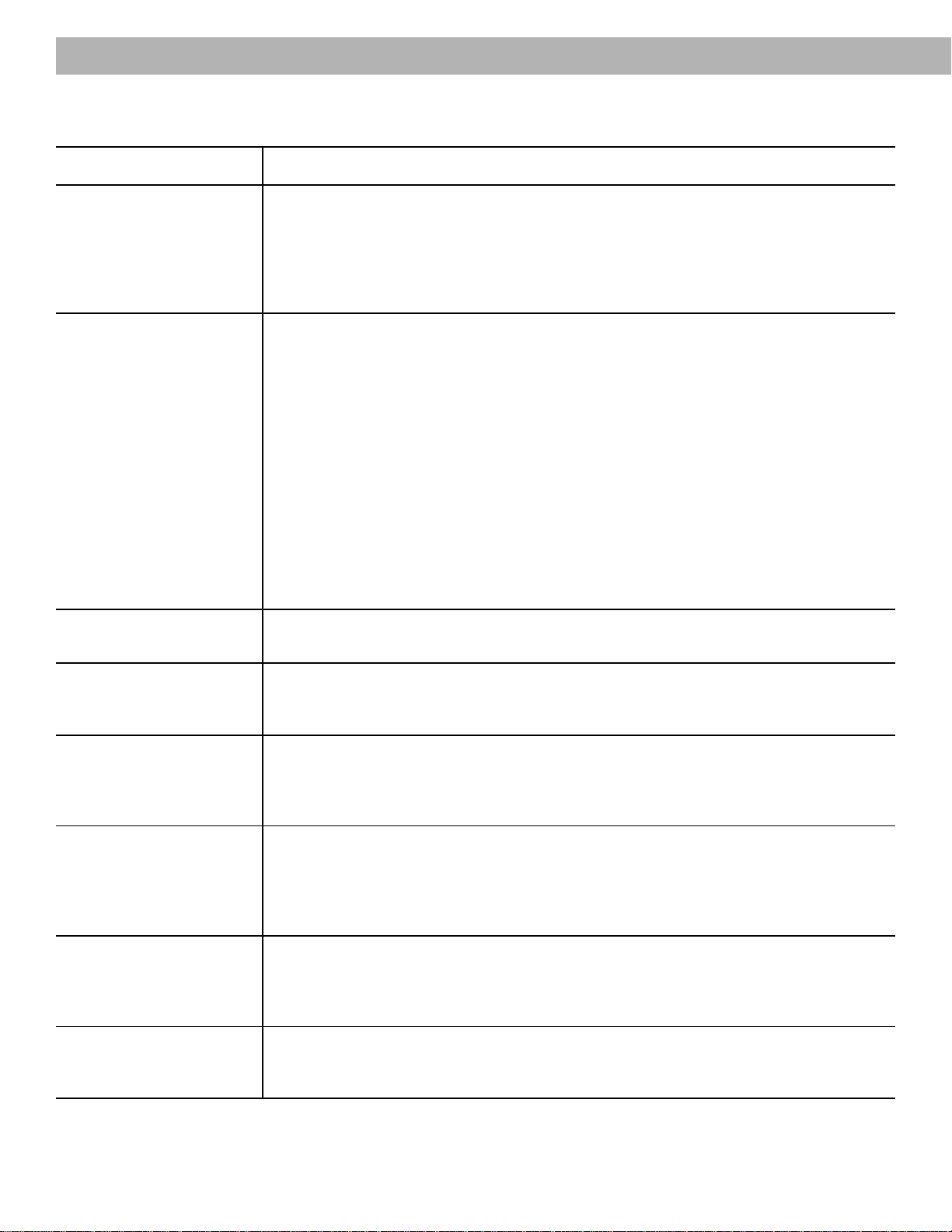
2. Locate miniature switch 5. Slide the switch down (Figure 23).
3. Locate miniature switch 6. Slide the switch up (Figure 23).
4. Make sure that the house code switches match those on your first remote (see page 20).
5. Replace the battery cover on the remote control.
Note:
Switches 7 and 8 are not for current system use.
Figure 23
Speaker code switch settings
Maintaining Your Lifestyle
®
12 System
Set to SPEAKERS A Set to SPEAKERS B
234l
ON
5678
K
40
234l
ON
5678
K
40
26 December 20, 2001 AM191409_01_V.pdf
Maintaining Your Lifestyle
®
12 System
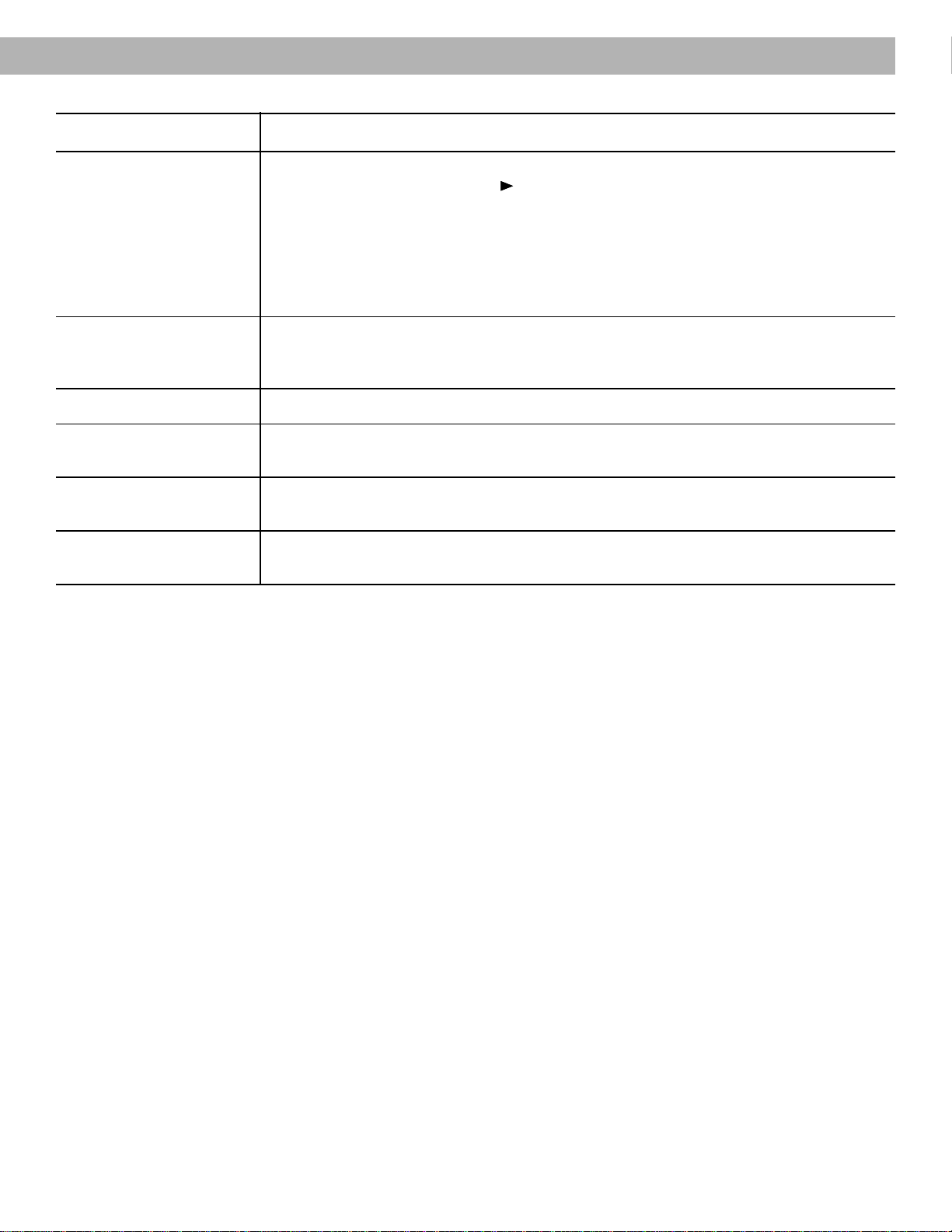
Troubleshooting
Problem What to do
System does not • Make sure the power connector is plugged securely into the music center, the Acoustimass
®
function at all module power cord is plugged securely into the module, and the power pack and power
cord are plugged into operating AC wall outlets.
• Be sure to select a source (CD, AM/FM, etc.).
• Unplug the music center power pack for a minute, then reconnect it. This allows the unit to
reset itself after a power surge or power interruption.
No sound • Make sure the audio input cable is connected to the music center FIXED outputs, the black
connector is fully seated in the music center SYSTEM CONTROL 1 jack, and the multi-pin
connector is firmly seated in the Acoustimass module jack.
• Turn the music center off for ten seconds, then on again, to reestablish communication
between the music center and the speakers.
• Check the connections for any external components. Make sure to select the correct
source for the desired input.
• Check the speaker connections.
• Be sure the CD is placed correctly, label-side up, in the music center, and the cover is
closed.
• Increase the volume.
• Check to see if MUTE is lit in the display. Press the MUTE button on the remote to unmute
the sound.
• Disconnect any headphones.
• Connect the FM and AM antennas.
No sound from • Make sure that the center cube cable is connected at both ends.
center speaker • Select STEREO+CENTER (3-speaker) or SURROUND (5-speaker) mode.
Too much sound • In STEREO+CENTER mode, press SURROUND
–
, to decrease center speaker volume.
from center speaker • Press and hold the STEREO+CENTER (3-speaker) mode key for 10 seconds to restore the
factory preset center volume setting.
No sound from • Select SURROUND (5-speaker) mode.
surround speakers • Press SURROUND
+
.
• Make sure the video sound source is stereo and surround-encoded, and the component
used (TV, VCR, DVD or laserdisc player) is stereo.
Surround speakers • In SURROUND mode, press SURROUND
–
.
are too loud • Make sure that the left and right front speakers are connected to the front speaker jacks
and the left and right surround speakers are connected to the surround speaker jacks.
• Press and hold the SURROUND (5-speaker) mode key for 10 seconds to restore the factory
preset surround volume setting.
Remote control • Check batteries and their polarity (+ and –).
is inconsistent • Operate the remote control closer to the music center.
or does not work • Make sure the remote control house code matches the music center code. Follow steps 4-7
on page 24 to match the house code settings.
Unit turns on • Change the house code setting to prevent signals from conflicting with another nearby
and off by itself, Lifestyle
®
system. See page 24 for instructions on setting the house code.
or acts erratically
AM191409_01_V.pdf December 20, 2001 27
Maintaining Your Lifestyle
®
12 System
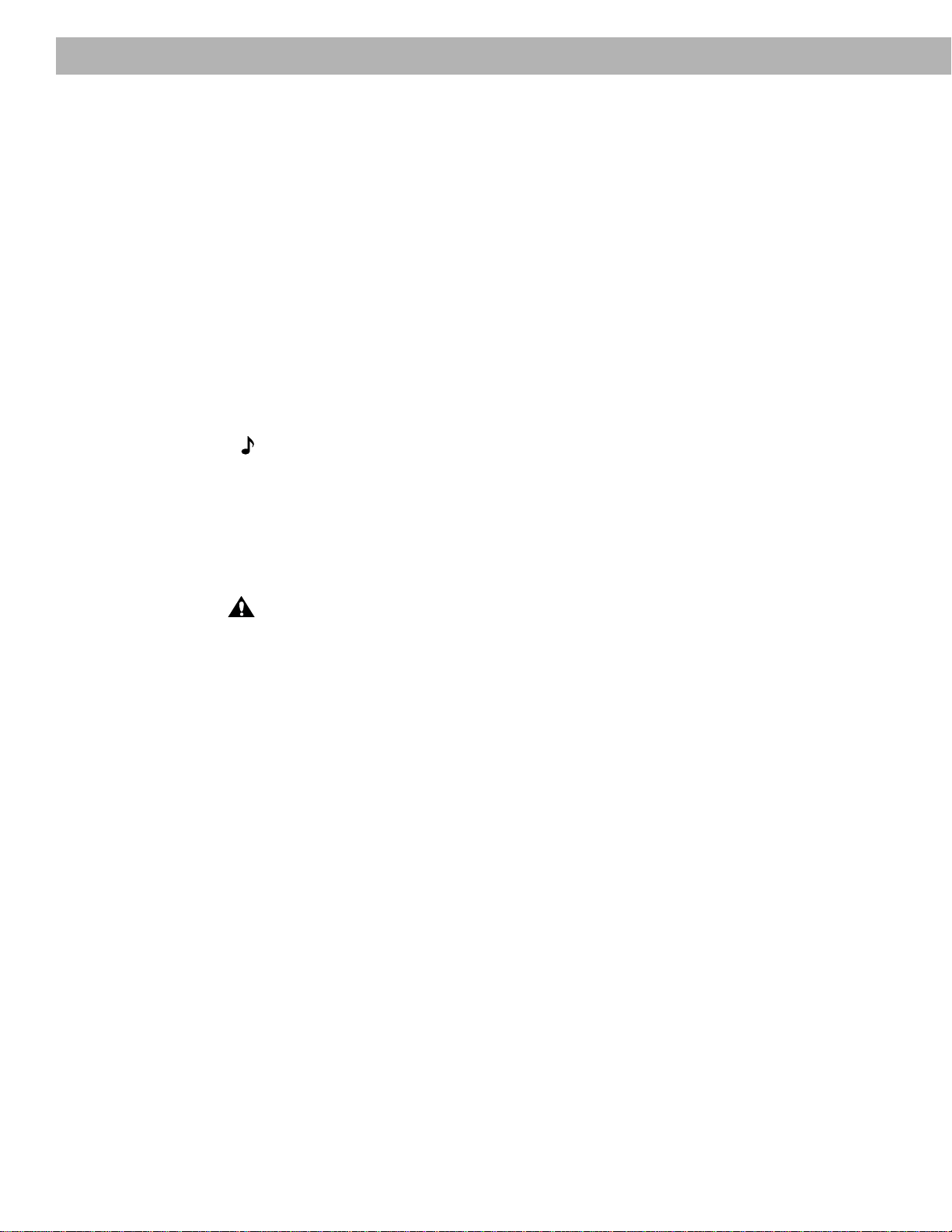
Problem What to do
CD does not play • Make sure the music center CD cover is closed.
• Check to see if the play symbol in the display is lit.
• After pressing the CD key, wait a few seconds before pressing PLAY.
• Check to see if there is a disc in the player, label-side up.
• The disc may be damaged. Try another disc.
• There may be dirt or dust on the laser pickup or on the CD. Clean the CD. Do not touch the
laser pickup.
• The music center cannot play a DVD disc.
Radio does not work • Make sure antennas are connected properly.
• Adjust antenna position to improve reception.
• You may be in an area of weak signal coverage.
FM sound is distorted • Adjust antenna position to reduce interference.
Sound is distorted • Make sure speaker cables are not damaged and the connections are secure.
• Reduce the output level from any external components connected to the music center.
Volume control is • Check to be sure the audio input cable is connected to the music center FIXED OUTPUTs,
too sensitive not to SPEAKERS A or B.
No tape, CD, VCR, • Check the connections.
or TV sound • Refer to the component owner’s manual.
Warranty period
The Bose
®
Lifestyle
®
12 system is covered by a limited 1-year transferable warranty. Details of
the warranty are provided on the warranty card that came with your system. Please fill out the
information section on the card and mail it to Bose.
Customer service
For additional help in solving problems, contact Bose customer service. See the inside back
cover for Bose customer service offices and phone numbers.
28 December 20, 2001 AM191409_01_V.pdf
Maintaining Your Lifestyle
®
12 System
Cleaning the Lifestyle
®
12 system
The only maintenance needed is cleaning the system and replacing batteries for the remote
control.
For information on replacing the remote control batteries, see “Install the batteries” on page 17.
Cleaning the music center
Use only a soft cloth to clean the outside of the Lifestyle
®
music center.
Do not use any solvents, chemicals, or cleaning solutions containing alcohol, ammonia, or
abrasives. Do not allow liquids to spill into any openings. Do not use any sprays near the
system.
Cleaning the CD player lens
Clean the CD player lens carefully, and only if necessary. If the lens is dusty, blow the dust
away using a cold blower or camera lens brush. To remove fingerprints from the lens, wipe it
gently with a lens tissue moistened with lens cleaning solution. Make sure no solution enters
the unit; it may cause damage.
Note:
Do
not
apply excessive pressure on the lens, which could be damaged.
Cleaning the speakers and Acoustimass
®
module
Clean the surface of your speakers with a soft damp cloth. Do not use any sprays near the
system. Do not use any solvents, chemicals, or cleaning solutions containing alcohol, ammo-
nia, or abrasives. Do not allow liquids to spill into any openings.
The speaker grille panels require no special care, although you may vacuum them carefully
with a soft-bristled attachment, if necessary.
CAUTION:
If liquids get into the product, turn the system off and allow it to air dry. Then turn
it on again. If you notice any problems with its functioning, turn it off and contact Bose
®
customer service.

AM191409_01_V.pdf December 20, 2001 29
Product Information
Dimensions
Music center
15.0" W x 7.8" D x 2.5" H
(38.1 cm x 19.8 cm x 6.4 cm)
Cube speakers
3.0" W x 4.8" D x 6.0" H
(7.6 cm x 12.2 cm x 15.2 cm)
Acoustimass module
23.3" W x 7.5" D x 14.0" H
(59.0 cm x 19.0 cm x 35.5 cm)
Weights
Music center
4.0 lb (1.7 kg)
Cube speakers
2.0 lb (1.0 kg)
Acoustimass module
33 lb (15.0 kg)
Total shipping weight
61 lb (27.7 kg)
Finish
Music center
Simulated aluminum, Polymer
Cube speakers
Polymer, painted
Acoustimass module
Vinyl veneer, Polymer
Accessories
To find out about mounting brackets, stands, and additional remote controls, contact your
Bose dealer. Or call Bose directly (see inside back cover for phone numbers).
Technical information
Powered Acoustimass
®
25
speaker system
Power rating
USA/Canada: 120V~ 50/60 Hz 350W
Europe/Australia: 220-240V~ 50/60 Hz 350W
Dual Voltage: 115/230V~ 50/60 Hz 350W
Model 5 music center
Power pack power rating
USA/Canada: 120V~ 60 Hz 25VA
Europe: 230V~ 50 Hz 25VA
Australia: 240V~ 50 Hz 25VA
Dual Voltage: 120V~ 60 Hz 25VA and
230V~ 50 Hz 25VA
Inputs
TAPE: 3V maximum
AUX, VIDEO SOUND: 4V maximum
FM antenna: 75Ω
AM antenna: 12 µH
POWER: 12V~, 1.0 A
Outputs
Variable audio: SPEAKERS A and B
Fixed audio: FIXED, TAPE
Headphone: 32Ω minimum impedance
SYSTEM CONTROL: for use with Bose
®
powered speakers and accessories
RC-9 remote control
Range: 65 feet (20 m)

30 December 20, 2001 AM191409_01_V.pdf
Index
A
Acoustimass
®
module 2-11, 17, 23, 28, 29
AM antenna 5, 16, 26, 29
AM/FM 4, 18-22, 26
ANTENNA 16
antenna 5, 13, 16, 26, 27, 29
audio input cable 5, 8, 10, 26
AUTO OFF 18, 20
AUX 14, 18, 19, 22, 29
auxiliary 4
B
BASS control 23
batteries 5, 17, 26, 28
C
cable 5-13, 26, 27
cable box 13
cable radio signal 16
cable TV 12
CD 4, 8, 12, 18, 19, 21, 22, 24, 26-28
CD player cover 8
CDI player 12, 20
center speaker 7, 26
compact disc 17
connections 9-11, 14-16, 25-27
controls 2, 8, 13, 18, 19, 23, 24, 29
cube speakers 6, 29
customer service 6, 9, 27
D
display 12, 14, 18, 20-22, 24, 27
DVD 12, 15, 20, 22, 27
E
enhanced bass 20, 23
external antenna 16
F
FM 75Ω EXTERNAL antenna connector 16
FM antenna 5, 16, 29
front speakers 4, 6, 8, 26
H
headphones 22, 26
house codes 17, 24, 25, 26
L
laserdisc 12-14, 26
M
moisture 2
movie soundtracks 20, 23
music center 2-5, 8-19, 21, 22, 24-29
MUTE 17
P
placement 6, 7, 16, 23
PLAY 17
port 8
power cord 5, 11, 17, 26
power pack 5, 11, 17, 26, 29
PRESET 19
preset radio station 18, 19, 21
R
radio 4, 18, 19, 21, 27
radio channel spacing 17
RCA extension cables 9
red collar 9
remote control 3-5, 14, 17, 19, 22, 24-29
room compensation controls 23
S
safety Information 2
serial numbers 5
signal splitter 16
speaker cable 5-9, 27
SURROUND 4, 14, 19, 20, 26
surround 4-7, 9, 10, 12, 19, 20, 26
surround (rear) speakers 7
surround cables 9
surround speakers 4, 7, 9, 20, 26
switches 17, 18, 21, 24, 25
T
TAPE jack 14, 15, 18, 19, 22, 29
tape 4
tape deck 4, 15, 18, 22
terminals 9
TREBLE control 23
troubleshooting 26
tuning 6, 21, 23
turntable 15
TV 4, 6-8, 12-14, 16, 26, 27
U
unpack 3, 5
V
VCR 8, 12-14, 26, 27
ventilation 8
VIDEO SOUND jack 13, 14, 17-19, 22, 29
Videostage
®
4
voltage 2, 5, 11, 29
VOLUME 18
volume 13, 18, 19, 20, 22, 23, 25, 26
W
warranty 27
wire cover 5, 16

1
Bose
®
Corporation
USA
Bose Corporation, The Mountain
Framingham, MA 01701-9168
1-800-288-BOSE (1-800-288-2673)
Phone hours - ET (eastern time):
Weekdays 9 a.m. to 8 p.m.
Saturdays 9 a.m. to 3 p.m.
Canada
Bose Ltd., 8-35 East Beaver Creek Road
Richmond Hill, Ontario L4B 1B3
1-800-444-BOSE (1-800-444-2673)
Phone hours - ET (eastern time):
Weekdays 9 a.m. to 5 p.m.
European Office
Bose B.V., Nijverheidstraat 8
1135 GE Edam, Nederland
TEL 0299-390190 FAX 0299-390109
Australia
Bose Australia, Inc., 1 Sorrell Street
Parramatta, N.S.W. 2150
TEL 02 204-6111 FAX 02 204-6122
Belgique/België
Bose N.V., Limesweg 2, B-3700 Tongeren
TEL 012-390800 FAX 012-390840
Danmark
Bose A/S, Industrivej 7, 2605 Brøndby
TEL 4343-7777 FAX 4343-7818
Deutschland
Bose GmbH, Max-Planck-Straße 36d
D-61381 Friedrichsdorf
TEL 06172-71040 FAX 06172-710419
France
Bose S.A., 6, rue Saint Vincent
78100 Saint Germain en Laye
TEL 01-30616363 FAX 01-30614105
India
Bose Corporation India Private Limited
W-16, Greater Kailash-II
New Delhi 110 048
TEL (011) 648 4462 FAX (011) 648 4463
Ireland
Bose Corporation
Carrickmacross, Co Monaghan
TEL 042-61988 FAX 042-61998
Italia
Bose S.p.A., Via Luigi Capucci, 12
00147 Roma
TEL 06-5127641 FAX 06-5115438
Japan
Bose K.K., Shibuya YT Building
28-3 Maruyama-cho
Shibuya-ku, Tokyo 150
TEL 3-5489-1054 FAX 3-5489-0591
Nederland
Bose B.V., Nijverheidstraat 8
1135 GE Edam
TEL 0299-390111 FAX 0299-390109
Norge
Bose A/S, Solheimsgate 11
N-2001, Lillestrøm
TEL 63-817380 FAX 63-810819
Österreich
Bose Ges.m.b.H., Vienna Business Park
Wienerbergstrasse 7 (10.OG)
A-1100 Vienna
TEL 01-60404340 FAX 01-604043423
Schweiz
Bose AG, Rünenbergerstrasse 13
4460-Gelterkinden
TEL 061-9815544 FAX 061-9815502
Sverige
Bose A/S, Blandsädsgatan 2D
S-43146 Mölndal
TEL 31-878850 FAX 31-274891
United Kingdom
Bose Limited, Unit G2
Trinity Trading Estate
Sittingbourne, Kent ME10 2PD
TEL 01795-475341 FAX 01795-427227
From other locations
Bose Customer Service, 1 New York Ave.
Framingham, MA 01701-9168 USA
TEL (508) 766-1900 FAX (508) 766-1919
World Wide Web
www.bose.com
©1998 Bose Corporation, The Mountain,
Framingham, MA 01701-9168 USA
JN97870 PN191409 Rev.01 AM191409 Rev.01