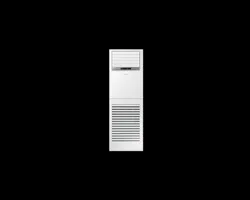
Air conditioner
User & installation manual
AF✴✴MV1MAEENTC / AF✴✴MV1MAEEXTC
• Thank you for purchasing this Samsung air conditioner.
• Before operating this unit, please read this user manual carefully and retain it for future
reference.
PAC_B2B 미라지 필리핀향_IBIM_EN_DB68-07271A-00_170504.indd 1 2017-06-02 오후 3:34:31
2 English
Contents
Safety Information 4
At a Glance 12
Indoor Unit Overview 12
Control Panel Overview 13
Indoor unit display
Locking the control panel
Using the air conditioner with the control panel 14
Remote Control Overview 15
Replacing batteries
Storing the remote control
Remote Control Operation 17
Turning on or off the air conditioner
Operation modes
Controlling fan speed
Controlling temperature
Controlling air flow direction
Basic Operation 19
Selecting air flow direction
Quick Smart Features 20
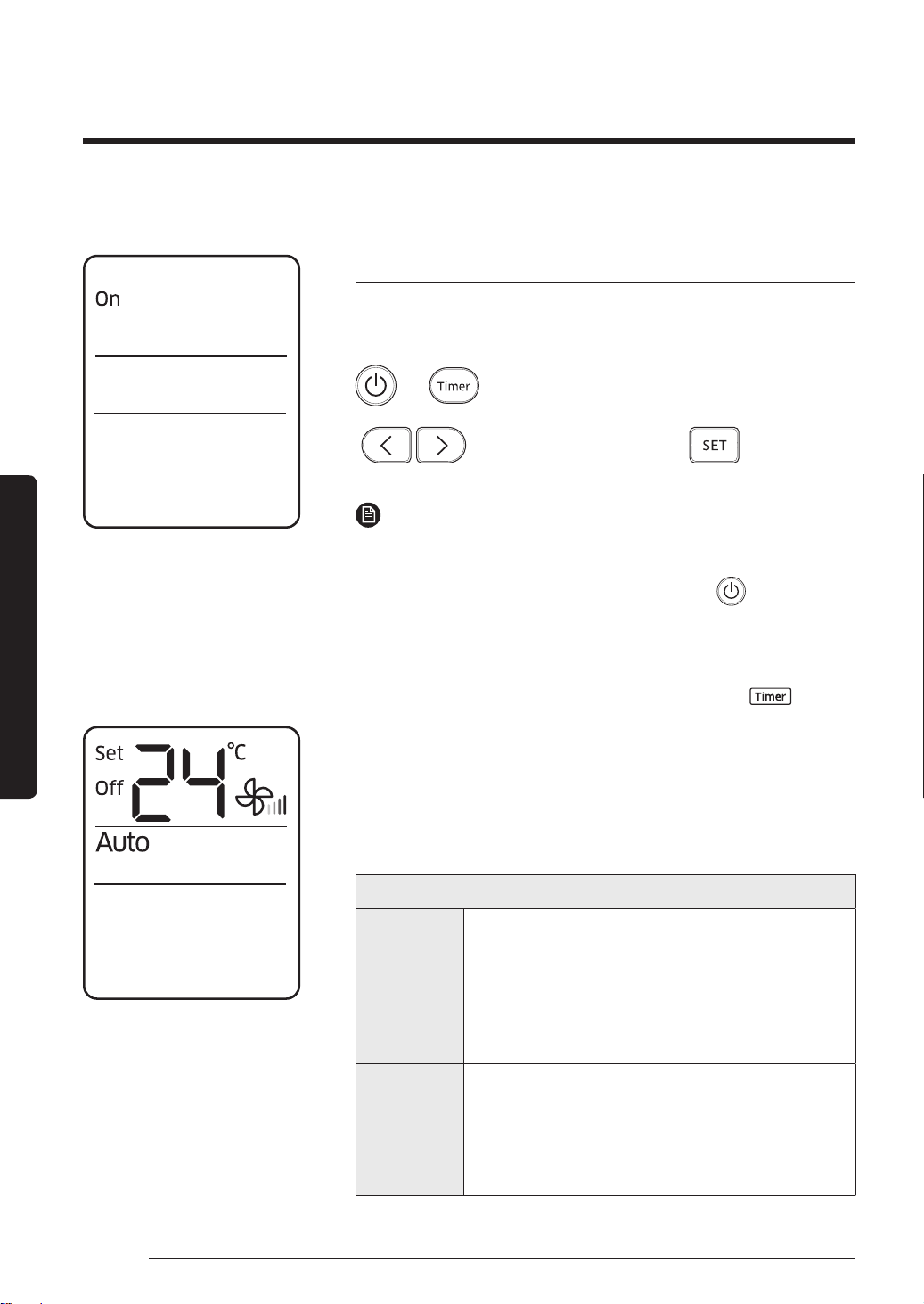
Timed on/Timed off function
Turbo function
Long reach function
Cleaning and Maintenance 22
Cleaning at a Glance 22
Troubleshooting 25
Safety Information 28
General information
Installing the unit
Power supply line, fuse or circuit breaker
PAC_B2B 미라지 필리핀향_IBIM_EN_DB68-07271A-00_170504.indd 2 2017-06-02 오후 3:34:31
3English
Disposal of This Product
(Waste Electrical & Electronic Equipment)
(Applicable in countries with separate collection systems)
This marking on the product, accessories or literature indicates that the product and its electronic accessories (e.g.
charger, headset, USB cable) should not be disposed of with other household waste at the end of their working life.
To prevent possible harm to the environment or human health from uncontrolled waste disposal, please separate
these items from other types of waste and recycle them responsibly to promote the sustainable reuse of material
resources.
Household users should contact either the retailer where they purchased this product, or their local government
office, for details of where and how they can take these items for environmentally safe recycling.
Business users should contact their supplier and check the terms and conditions of the purchase contract. This
product and its electronic accessories should not be mixed with other commercial wastes for disposal.
Installation Procedure 31
Step 1 Choosing the installation location
Step 2 Unpacking
Step 3 Checking and preparing accessories
Step 4 Drilling a hole through a wall
Step 5 Taping the pipes, cables, and drain hose
Step 6 Connecting the refrigerant pipes
Step 7 Optional: Cutting and flaring the pipes
Step 8 Connecting the power and communication cables
Step 9 Optional: Extending the power cable
Step 10 Checking the earthing
Step 11 Performing gas leakage test
Step 12 Evacuating the air
Step 13 Charging the refrigerant
Step 14 Fixing and insulating the connection part for refrigerant pipes
Step 15 Installing and connecting the drain hose
Step 16 Performing drainage test
Step 17 Checking the earthing
Step 18 Performing the final check and trial operation
Appendix 49
Troubleshooting
PAC_B2B 미라지 필리핀향_IBIM_EN_DB68-07271A-00_170504.indd 3 2017-06-02 오후 3:34:31
4 English
Safety Information (Using the Air Conditioner)
Safety Information
Safety Information (Using the Air Conditioner)
Before using your new air conditioner, please read this manual thoroughly
to ensure that you know how to safely and efficiently operate the
extensive features and functions of your new appliance.
Because the following operating instructions cover various models, the
characteristics of your air conditioner may differ slightly from those
described in this manual. If you have any questions, call your nearest
contact center or find help and information online at www.samsung.com.
These warning signs are here to prevent injury to you and others. Please
follow them carefully.
Important safety symbols and precautions:
WARNING
Hazards or unsafe practices that may result in severe personal injury or
death.
CAUTION
Hazards or unsafe practices that may result in minor personal injury or
property damage.
Follow directions.
Do NOT attempt.
Make sure the machine is grounded to prevent electric shock.
Unplug the power plug from the wall socket.
Do NOT disassemble.
Safety Information
PAC_B2B 미라지 필리핀향_IBIM_EN_DB68-07271A-00_170504.indd 4 2017-06-02 오후 3:34:31
5English
Safety Information
Safety Information
FOR INSTALLATION
WARNING
Use the power line with the power specifications of the product or
higher and use the power line for this appliance only. In addition, do
not use an extension line.
• Extending the power line may result in electric shock or fire.
• Do not use an electric transformer. It may result in electric shock or
fire.
• If the voltage/frequency/rated current condition is different, it may
cause fire.
The installation of this appliance must be performed by a qualified
technician or service company.
• Failing to do so may result in electric shock, fire, explosion, problems
with the product, or injury.
Install a switch and circuit breaker dedicated to the air conditioner.
• Failing to do so may result in electric shock or fire.
Fix the outdoor unit firmly so that the electric part of the outdoor
unit is not exposed.
• Failing to do so may result in electric shock or fire.
Do not install this appliance near a heater, inflammable material. Do
not install this appliance in a humid, oily or dusty location, in a location
exposed to direct sunlight and water (rain drops). Do not install this
appliance in a location where gas may leak.
• This may result in electric shock or fire.
Never install the outdoor unit in a location such as on a high external
wall where it could fall.
• If the outdoor unit falls, it may result in injury, death or property
damage.
PAC_B2B 미라지 필리핀향_IBIM_EN_DB68-07271A-00_170504.indd 5 2017-06-02 오후 3:34:31
6 English
Safety Information (Using the Air Conditioner)
Safety Information
This appliance must be properly grounded. Do not ground the
appliance to a gas pipe, plastic water pipe, or telephone line.
• Failure to do so may result in electric shock, fire, an explosion, or
other problems with the product.
• Never plug the power cord into a socket that is not grounded
correctly and make sure that it is in accordance with local and
national codes.
CAUTION
Install your appliance on a level and hard floor that can support its
weight.
• Failing to do so may result in abnormal vibrations, noise, or problems
with the product.
Install the draining hose properly so that water is drained correctly.
• Failing to do so may result in water overflowing and property
damage.
When installing the outdoor unit, make sure to connect the draining
hose so that draining is performed correctly.
• The water generated during the heating operation by the outdoor
unit may overflow and result in property damage. In particular, in
winter, if a block of ice falls, it may result in injury, death or property
damage.
Do not install the product in a place where thermo-hygrostat is needed
(such as server room, machinery room, computer room, etc.)
• Those places do not provide guaranteed operation condition of the
product therefore performance can be poor in these places.
Do not install the product in a place where hair spray is frequently
used (such as hair salon) since it decreases the hydrophilicity of the
product's heat exchanger and cause dew formation on the surface of
the product.
PAC_B2B 미라지 필리핀향_IBIM_EN_DB68-07271A-00_170504.indd 6 2017-06-02 오후 3:34:32
7English
Safety Information
FOR POWER SUPPLY
WARNING
When the circuit breaker is damaged, contact your nearest service
centre.
Do not pull or excessively bend the power line. Do not twist or tie the
power line. Do not hook the power line over a metal object, place a
heavy object on the power line, insert the power line between objects,
or push the power line into the space behind the appliance.
• This may result in electric shock or fire.
CAUTION
When not using the air conditioner for a long period of time or during
a thunder/lightning storm, cut the power at the circuit breaker.
• Failing to do so may result in electric shock or fire.
FOR USING
WARNING
If the appliance is flooded, please contact your nearest service centre.
• Failing to do so may result in electric shock or fire.
If the appliance generates a strange noise, a burning smell or smoke,
unplug the power plug immediately and contact your nearest service
centre.
• Failing to do so may result in electric shock or fire.
In the event of a gas leak (such as propane gas, LP gas, etc.), ventilate
immediately without touching the power line. Do not touch the
appliance or power line.
• Do not use a ventilating fan.
• A spark may result in an explosion or fire.
PAC_B2B 미라지 필리핀향_IBIM_EN_DB68-07271A-00_170504.indd 7 2017-06-02 오후 3:34:32
8 English
Safety Information (Using the Air Conditioner)
Safety Information
To reinstall the air conditioner, please contact your nearest service
centre.
• Failing to do so may result in problems with the product, water
leakage, electric shock, or fire.
• A delivery service for the product is not provided. If you reinstall the
product in another location, additional construction expenses and an
installation fee will be charged.
• Especially, when you wish to install the product in an unusual
location such as in an industrial area or near the seaside where it
is exposed to the salt in the air, please contact your nearest service
centre.
Do not touch the circuit breaker with wet hands.
• This may result in electric shock.
Do not strike or pull the air conditioner with excessive force.
• This may result in fire, injury, or problems with the product.
Do not place an object near the outdoor unit that allows children to
climb onto the machine.
• This may result in children seriously injuring themselves.
Do not turn the air conditioner off with the circuit breaker while it is
operating.
• Turning the air conditioner off and then on again with the circuit
breaker may cause a spark and result in electric shock or fire.
After unpacking the air conditioner, keep all packaging materials well
out of the reach of children, as packaging materials can be dangerous
to children.
• If a child places a bag over its head, it may result in suffocation.
Do not insert your fingers or foreign substances into the outlet when
the air conditioner is operating or the air flow blade is closing.
• Take special care that children do not injure themselves by inserting
their fingers into the product.
PAC_B2B 미라지 필리핀향_IBIM_EN_DB68-07271A-00_170504.indd 8 2017-06-02 오후 3:34:32
9English
Safety Information
Do not insert your fingers or foreign substances into the air inlet/outlet
of the air conditioner.
• Take special care that children do not injure themselves by inserting
their fingers into the product.
Do not use this air conditioner for long periods of time in badly
ventilated locations or near infirm people.
• Since this may be dangerous due to a lack of oxygen, open a window
at least once an hour.
If any foreign substance such as water has entered the appliance,
cut the power by unplugging the power plug and turning the circuit
breaker off and then contact your nearest service centre.
• Failing to do so may result in electric shock or fire.
Do not attempt to repair, disassemble, or modify the appliance
yourself.
• Do not use any fuse (such as copper, steel wire, etc.) other than the
standard fuse.
• Failing to do so may result in electric shock, fire, problems with the
product, or injury.
CAUTION
Do not place objects or devices under the indoor unit.
• Water dripping from the indoor unit may result in fire or property
damage.
Check that the installation frame of the outdoor unit is not broken at
least once a year.
• Failing to do so may result in injury, death or property damage.
Max current is measured according to IEC standard for safety and
current is measured according to ISO standard for energy efficiency.
PAC_B2B 미라지 필리핀향_IBIM_EN_DB68-07271A-00_170504.indd 9 2017-06-02 오후 3:34:32
10 English
Safety Information (Using the Air Conditioner)
Safety Information
Do not stand on top of the appliance or place objects (such as laundry,
lighted candles, lighted cigarettes, dishes, chemicals, metal objects,
etc.) on the appliance.
• This may result in electric shock, fire, problems with the product, or
injury.
Do not operate the appliance with wet hands.
• This may result in electric shock.
Do not spray volatile material such as insecticide onto the surface of
the appliance.
• As well as being harmful to humans, it may also result in electric
shock, fire or problems with the product.
Do not drink the water from the air conditioner.
• The water may be harmful to humans.
Do not apply a strong impact to the remote control and do not
disassemble the remote control.
Do not touch the pipes connected with the product.
• This may result in burns or injury.
Do not use this air conditioner to preserve precision equipment, food,
animals, plants or cosmetics, or for any other unusual purposes.
• This may result in property damage.
Avoid directly exposing humans, animals or plants from the air flow
from the air conditioner for long periods of time.
• This may result in harm to humans, animals or plants.
This appliance is not intended for use by persons (including children)
with reduced physical, sensory or mental capabilities, or lack of
experience and knowledge, unless they have been given supervision or
instruction concerning use of the appliance by a person responsible for
their safety. Children should be supervised to ensure that they do not
play with the appliance.
PAC_B2B 미라지 필리핀향_IBIM_EN_DB68-07271A-00_170504.indd 10 2017-06-02 오후 3:34:32
11English
Safety Information
FOR CLEANING
WARNING
Do not clean the appliance by spraying water directly onto it. Do not
use benzene, thinner, alcohol or acetone to clean the appliance.
• This may result in discoloration, deformation, damage, electric shock
or fire.
Before cleaning or performing maintenance, unplug the air conditioner
from the wall socket and wait until the fan stops.
• Failing to do so may result in electric shock or fire.
CAUTION
Take care when cleaning the surface of the heat exchanger of the
outdoor unit since it has sharp edges.
• To avoid cutting your fingers, wear thick cotton gloves when cleaning
it.
Do not clean the inside of the air conditioner by yourself.
• For cleaning inside the appliance, contact your nearest service centre.
• When cleaning the internal filter, refer to the descriptions in the
‘Cleaning and maintaining the air conditioner’ section.
• Failure to do may result in damage, electric shock or fire.
PAC_B2B 미라지 필리핀향_IBIM_EN_DB68-07271A-00_170504.indd 11 2017-06-02 오후 3:34:32
12 English
At a Glance
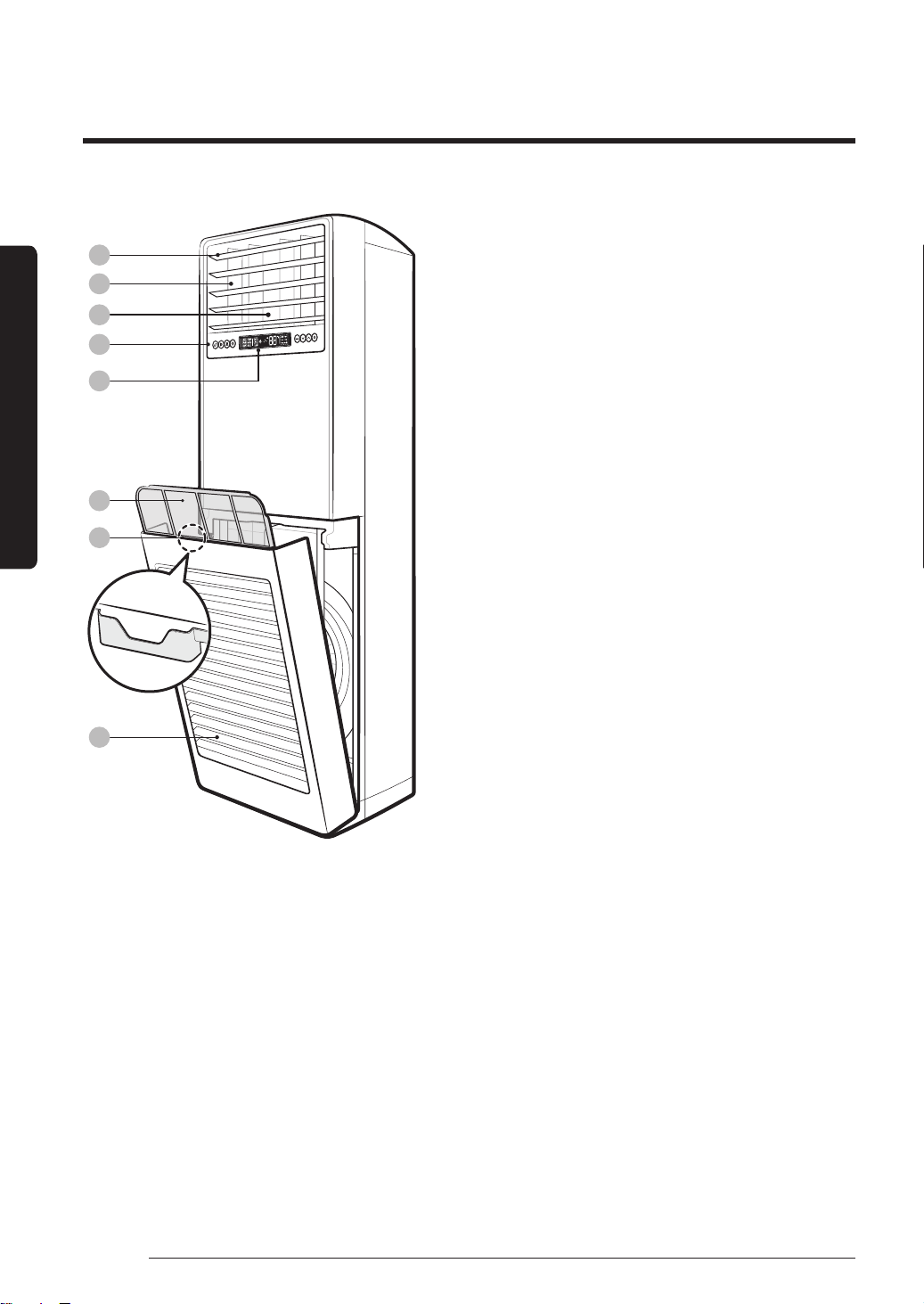
Indoor Unit Overview
01 Air flow blade (up and down)
02 Air flow blade (left and right)
03 Air outlet
04 Control panel
05 Indoor unit display
06 Air filter
07 Remote control holder
08 Air intake
The actual product may differ slightly from the image depicted below.
At a Glance
01
02
04
03
06
07
08
05
PAC_B2B 미라지 필리핀향_IBIM_EN_DB68-07271A-00_170504.indd 12 2017-06-02 오후 3:34:33
13English
At a Glance
At a Glance
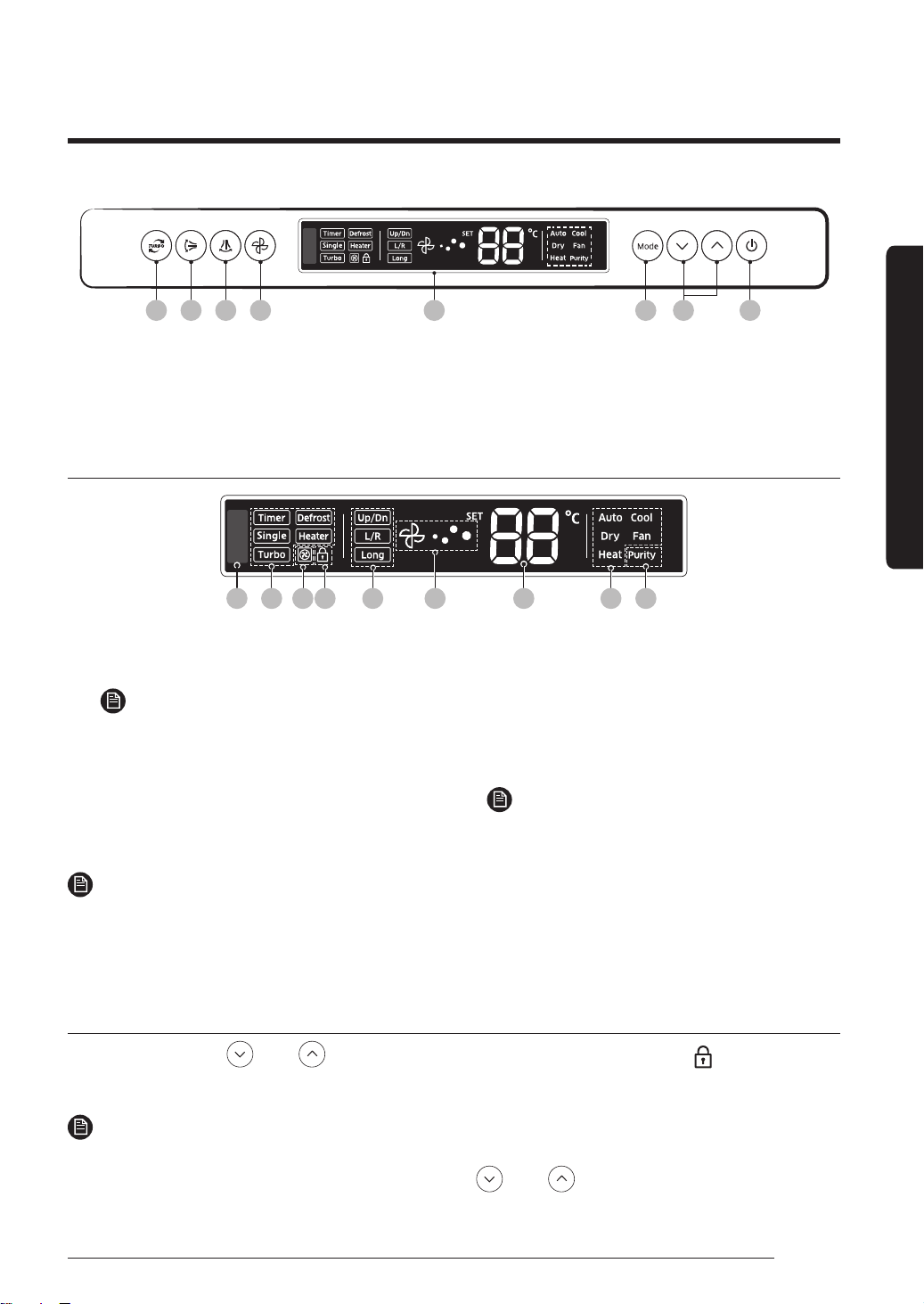
01 02 03 04 05 06 07 08
01 Turbo button
02 Vertical air swing button
03 Horizontal air swing button
04 Fan speed button
05 Indoor unit display
06 Mode button
07 Temperature buttons
08 Power button
Indoor unit display
01 03 04 07 0805 0602 02
01 Remote control sensor
02 Function indicators
NOTE
• The Single user, Heater, and Purity
functions are not supported by this model.
03 Outdoor unit indicator
04 Lock indicator
05 Vertical air swing indicator /
Horizontal air swing indicator /
Long function indicator
06 Fan speed indicator
07 Set temperature indicator
08 Operation mode indicators
NOTE
• The Heat mode is not supported by this
model.
NOTE
• If you set a dedicated mode available only in the upper level controller (DMS), it may limit
available operation modes that can be selected in the indoor unit display.
– DMS cooling mode: Auto, Cooling, Dry, and Fan
Locking the control panel
Press and hold the and buttons for 3 seconds at the same time. The (Lock)
indicator appears on the indoor unit display.
NOTE
• When the control panel is locked, you can control the air conditioner only with the remote control.
• To unlock the control panel, press and hold the and buttons again for 3 seconds at
the same time.
Control Panel Overview
PAC_B2B 미라지 필리핀향_IBIM_EN_DB68-07271A-00_170504.indd 13 2017-06-02 오후 3:34:33
14 English
At a Glance
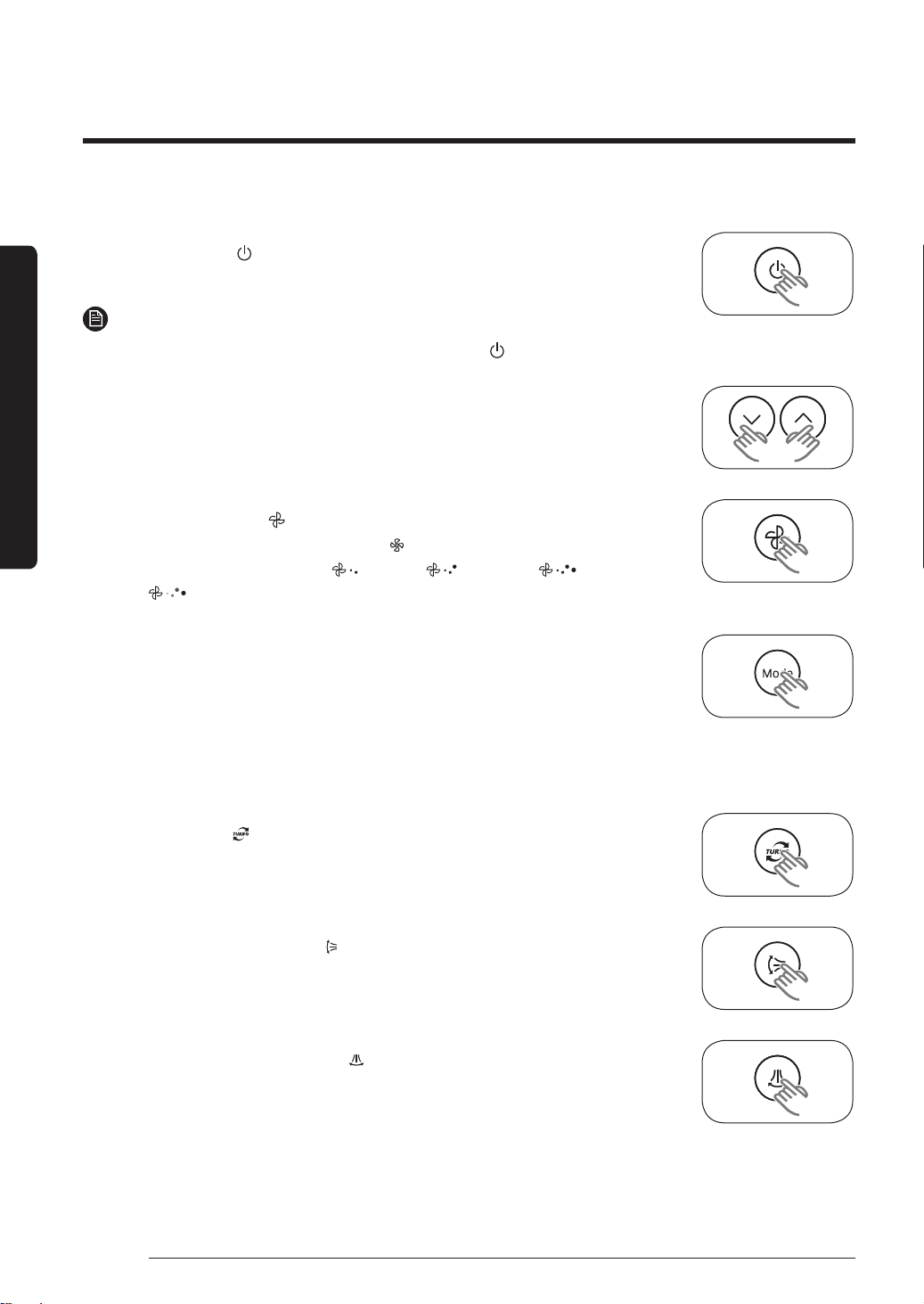
Using the air conditioner with the control panel
You can control the air conditioner without the remote controller.
1. Press the Power
button on the indoor unit control panel.
– The air conditioner will turn on with ringing sound.
NOTE
• To turn off the air conditioner, press the Power
button again.
2. Press the Temp ﹀ and ︿ button to adjust the temperature.
– You can increase/decrease the temperature by 1 °C.
3. Press the Fan Speed button to adjust the fan speed.
– Each time you press the Fan Speed
button, the fan speed will
change in order of Medium( ), High( ), Turbo( ) and
Auto( ).
4. Press the Mode button to select the operation mode.
– You can select operation mode you want by pressing the Mode
button.
– Each time you press the Mode button, the mode will change in
order of Auto, Cool, Dry, Fan.
5. Press the Turbo button to select Turbo mode.
6. Press the Vertical air swing button to adjust vertical air flow
direction.
7. Press the Horizontal air swing button to adjust vertical air flow
direction.
PAC_B2B 미라지 필리핀향_IBIM_EN_DB68-07271A-00_170504.indd 14 2017-06-02 오후 3:34:34
15English
At a Glance
Remote Control Overview
01
05
06
07
08
15
16
17
19
20
02
03
04
10
11
13
14
12
18
09
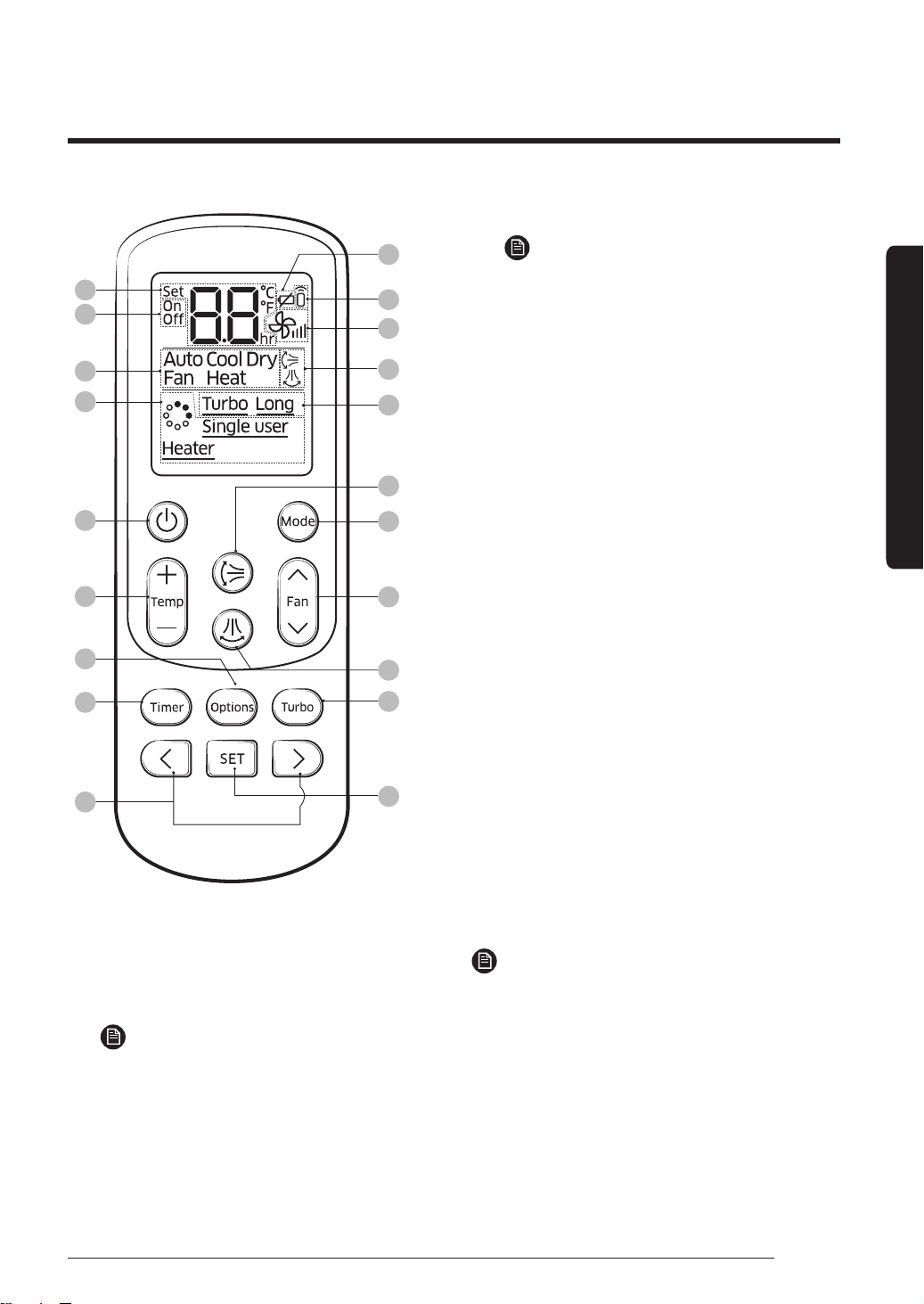
01 Set temperature indicator
02 Timed on/off indicator
03 Operation mode indicator
NOTE
• The Heat mode is not supported by
this model.
04 Unsupported functions
NOTE
• The Single user, Heater and Purity
functions are not supported by this
model.
05 Low battery indicator
06 Signal transmission indicator
07 Fan speed indicator
08 Vertical air swing indicator / Horizontal
air swing indicator
09 Options indicator
10 Power button
11 Temperature button
12 Options button
13 Timer button
14 Direction button / Selection button
15 Vertical air swing button
16 Mode button
17 Fan speed button
18 Horizontal air swing button
19 Turbo button
20 SET button
NOTE
• The descriptions in this manual are
primarily made based on the remote
control buttons.
PAC_B2B 미라지 필리핀향_IBIM_EN_DB68-07271A-00_170504.indd 15 2017-06-02 오후 3:34:34
16 English
Using the air conditioner with the control panel
At a Glance
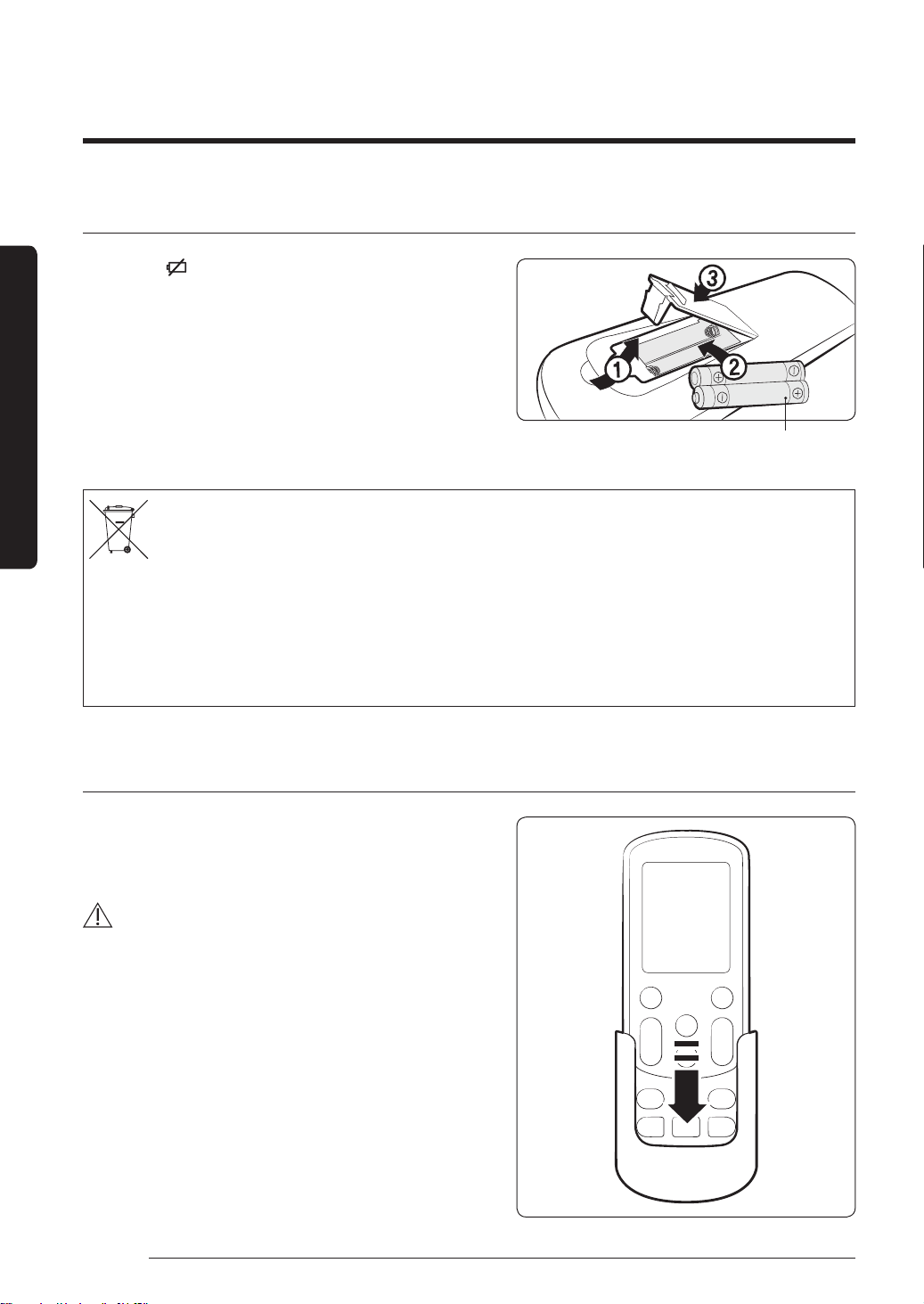
Replacing batteries
When the icon appears in the remote control
display, replace the batteries with new ones. Two
1.5V AAA type batteries are required.
Two 1.5V AAA type batteries
Correct disposal of batteries in this product
(Applicable in countries with separate collection systems)
This marking on the battery, manual or packaging indicates that the batteries in this product should not be disposed
of with other household waste at the end of their working life. Where marked, the chemical symbols Hg, Cd or Pb
indicate that the battery contains mercury, cadmium or lead above the reference levels in EC Directive 2006/66. If
batteries are not properly disposed of, these substances can cause harm to human health or the environment.
To protect natural resources and to promote material reuse, please separate batteries from other types of waste and
recycle them through your local, free battery return system.
Storing the remote control
If the remote control will not be used for an
extended period of time, store it in the remote
control holder with the batteries removed.
CAUTION
• Make sure that water does not come into the
remote control.
PAC_B2B 미라지 필리핀향_IBIM_EN_DB68-07271A-00_170504.indd 16 2017-06-02 오후 3:34:34
17English
At a Glance
Remote Control Operation
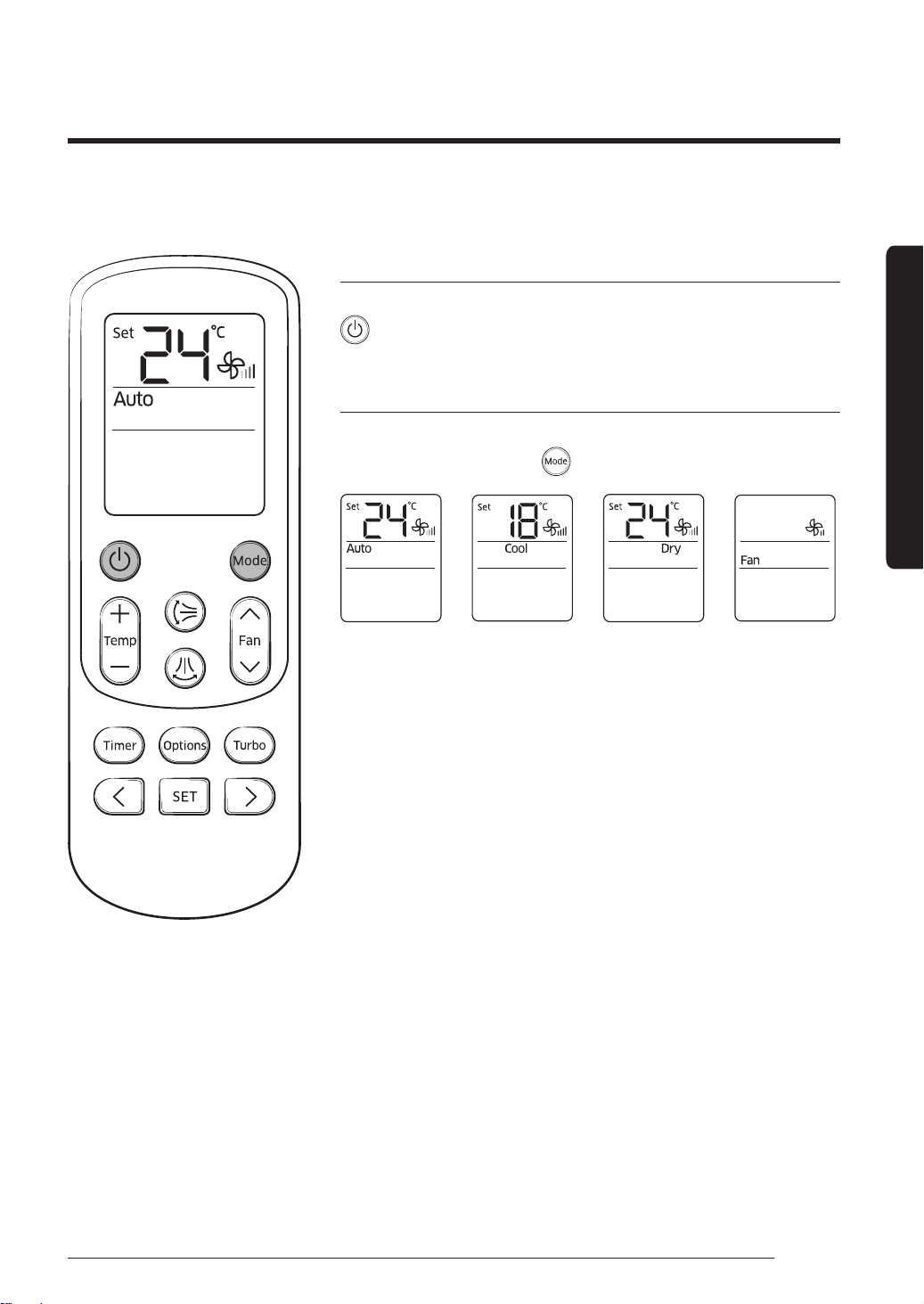
Turning on or off the air conditioner
You can turn on or off the air conditioner by pressing the
(Power) button.
Operation modes
You can change the current mode between Auto, Cool, Dry
and Fan by pressing the (Mode) button.
► ► ►
You can use the air conditioner easily by selecting a mode or function and then by controlling
the temperature, fan speed, and air flow direction.
PAC_B2B 미라지 필리핀향_IBIM_EN_DB68-07271A-00_170504.indd 17 2017-06-02 오후 3:34:35
18 English
Remote Control Operation
At a Glance
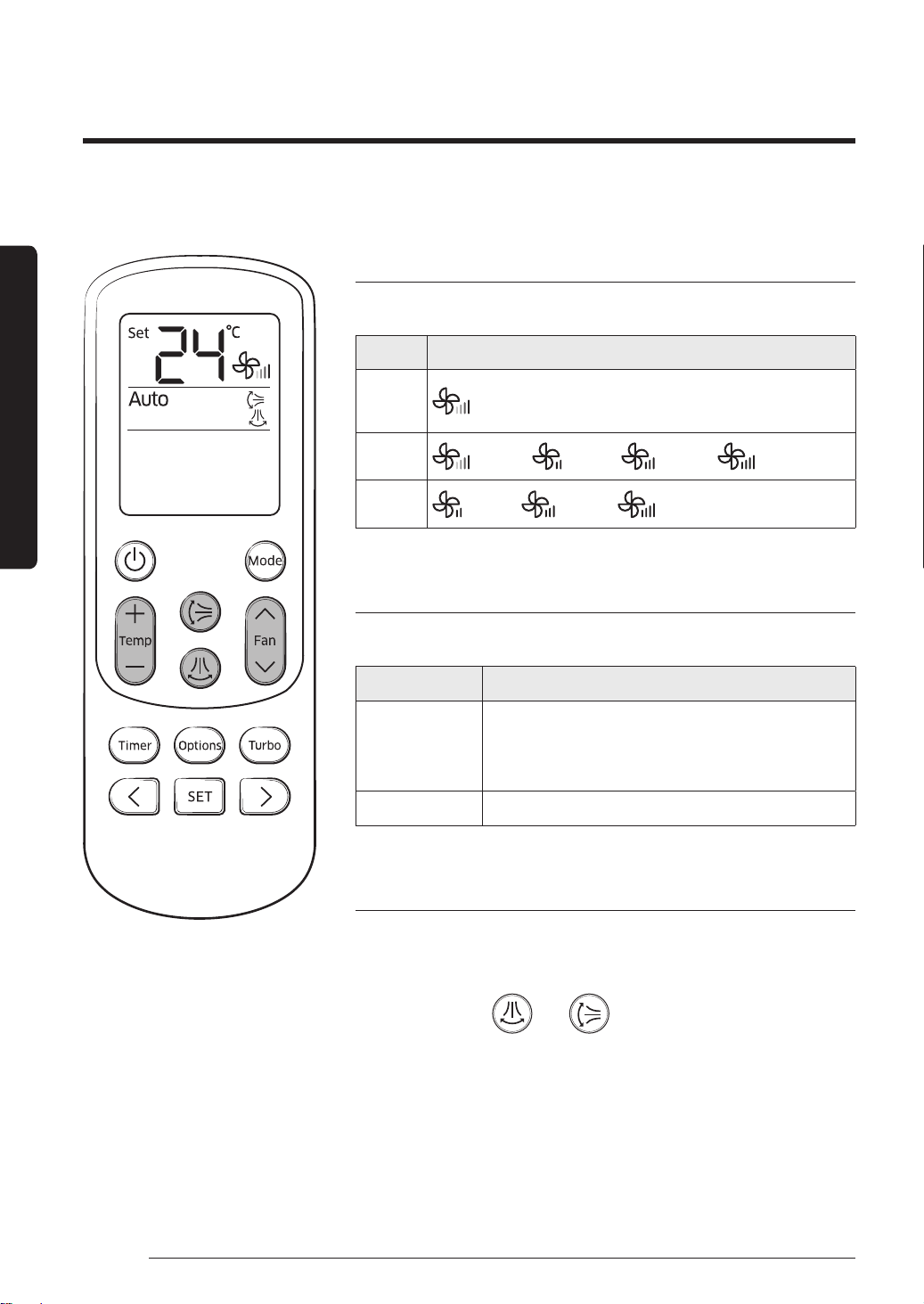
Controlling fan speed
You can select the following fan speeds in each mode:
Mode Available fan speeds
Auto
Dry
(Auto)
Cool
(Auto), (Med), (High), (Turbo)
Fan
(Med), (High), (Turbo)
Controlling temperature
You can control the temperature in each mode as follows:
Mode Temperature control
Auto
Cool
Dry
Adjust by 1°C between 18°C and 30°C.
Fan You cannot control the temperature.
Controlling air flow direction
Keep the air flow in a constant direction by stopping the
movements of the vertical and horizontal air flow blades.
In operation
►
or
Basic Operation
PAC_B2B 미라지 필리핀향_IBIM_EN_DB68-07271A-00_170504.indd 18 2017-06-02 오후 3:34:35
19English
Basic Operation
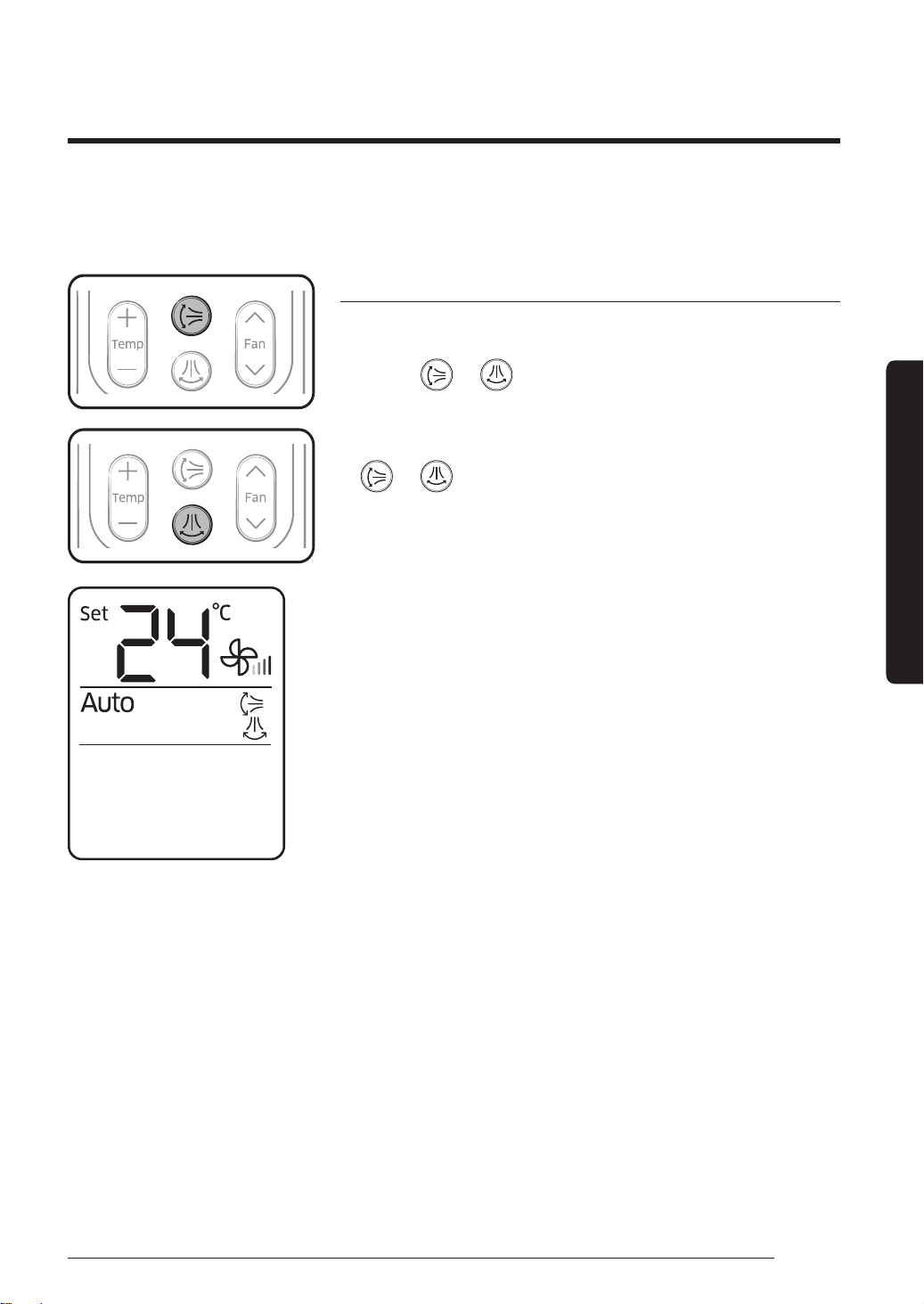
Selecting air flow direction
This function allows you to shift the air flow direction up and
down or left and right.
Press the
or button to move the air flow direction
up and down or left and right while the air conditioner is
turned on.
• When the blade reaches the desired position, press the
or button one more time to set the air flow
direction. The up/down and left/right tilting of the blade
will stop.
Remote controller display
Basic Operation
Basic Operation
PAC_B2B 미라지 필리핀향_IBIM_EN_DB68-07271A-00_170504.indd 19 2017-06-02 오후 3:34:36
20 English
Quick Smart Features
There is a variety of useful functionality provided by the Samsung air conditioner.
Quick Smart Features
Quick Smart Features
Timed on/Timed off function
Use the Timed on/off function to turn the air conditioner on
or off after the time that you set.
► ►
Select On or Off.
►
(Set the on/off time.)
►
NOTE
• You can set a time between 0.5 and 24 hours.
• To cancel the Timed on/off function, set the time interval
to 0.0 on the remote control, or press the
(Power)
button on the control panel.
• After starting the Timed on function, you cannot change
the fan speed.
• Once you start the Timed on/off function, the
(Timer)
indicator is displayed on the indoor unit display.
• After starting the Timed on function, you can change the
mode and the set temperature. You cannot change the set
temperature while the Fan mode is running.
• You cannot set the same time for both of the Timed on
and Timed off functions.
Combining Timed on and Timed off
When
the air
conditioner
is off
Example) Timed on: 3 hours, Timed off: 5
hours
The air conditioner turns on after 3 hours
from the moment you start Timed on/
off, remains on for 2 hours, then turns off
automatically.
When
the air
conditioner
is on
Example) Timed on: 3 hours, Timed off: 1 hour
The air conditioner turns off after 1 hour from
the moment you start Timed on/off, then turns
on after 2 hours from the moment it is turned
off.
Remote controller display
(When the air conditioner
is off)
Remote controller display
(When the air conditioner
is on)
PAC_B2B 미라지 필리핀향_IBIM_EN_DB68-07271A-00_170504.indd 20 2017-06-02 오후 3:34:36
21English
Quick Smart Features
Quick Smart Features
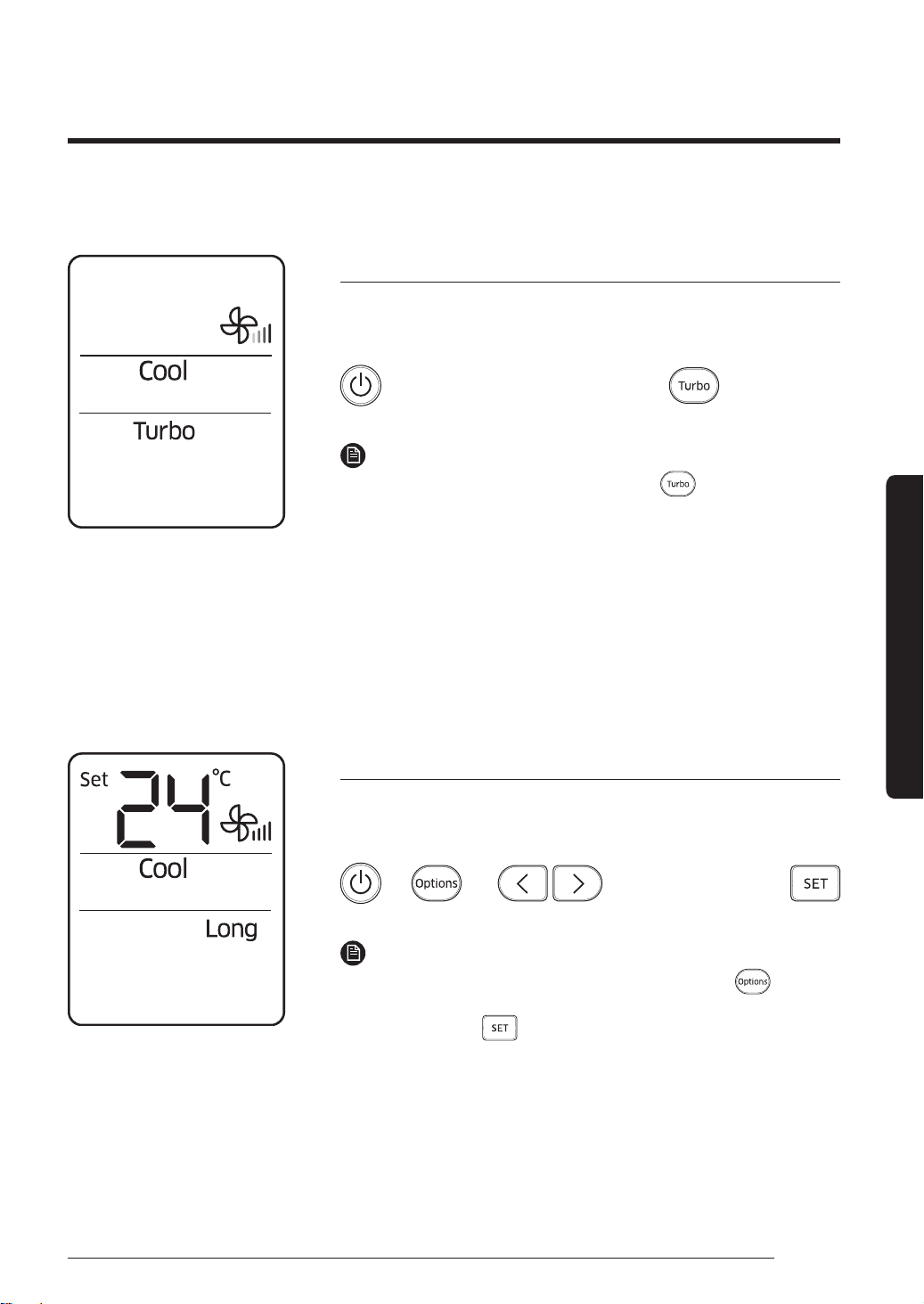
Turbo function
Use the Turbo function to quickly cool your room. This
function provides the most powerful cooling air.
When the air conditioner
is operating in Cool mode.
►
NOTE
• To turn off the Turbo function, press
(Turbo) button
again.
• This function is only available in the Auto and Cool modes.
• When this function is run for 30 minutes, the air
conditioner automatically returns to the previous mode.
• You cannot use this function and the Long reach function
at the same time.
• You can change the air flow direction.
• You cannot change the set temperature and the fan speed.
Long reach function
Use the Long reach function to extend the area cooled by the
air conditioner.
► ► ►
Select Long.
►
NOTE
• To turn off the Long reach function, press the
(Options) button and directional button to select Long, and
then press the (SET) button.
• You cannot use this function and the Turbo function at the
same time.
• You can change the horizontal air flow direction.
• You cannot change the fan speed.
• You cannot use this function in the Dry and Fan modes.
PAC_B2B 미라지 필리핀향_IBIM_EN_DB68-07271A-00_170504.indd 21 2017-06-02 오후 3:34:36
22 English
Cleaning and Maintenance
Cleaning at a Glance
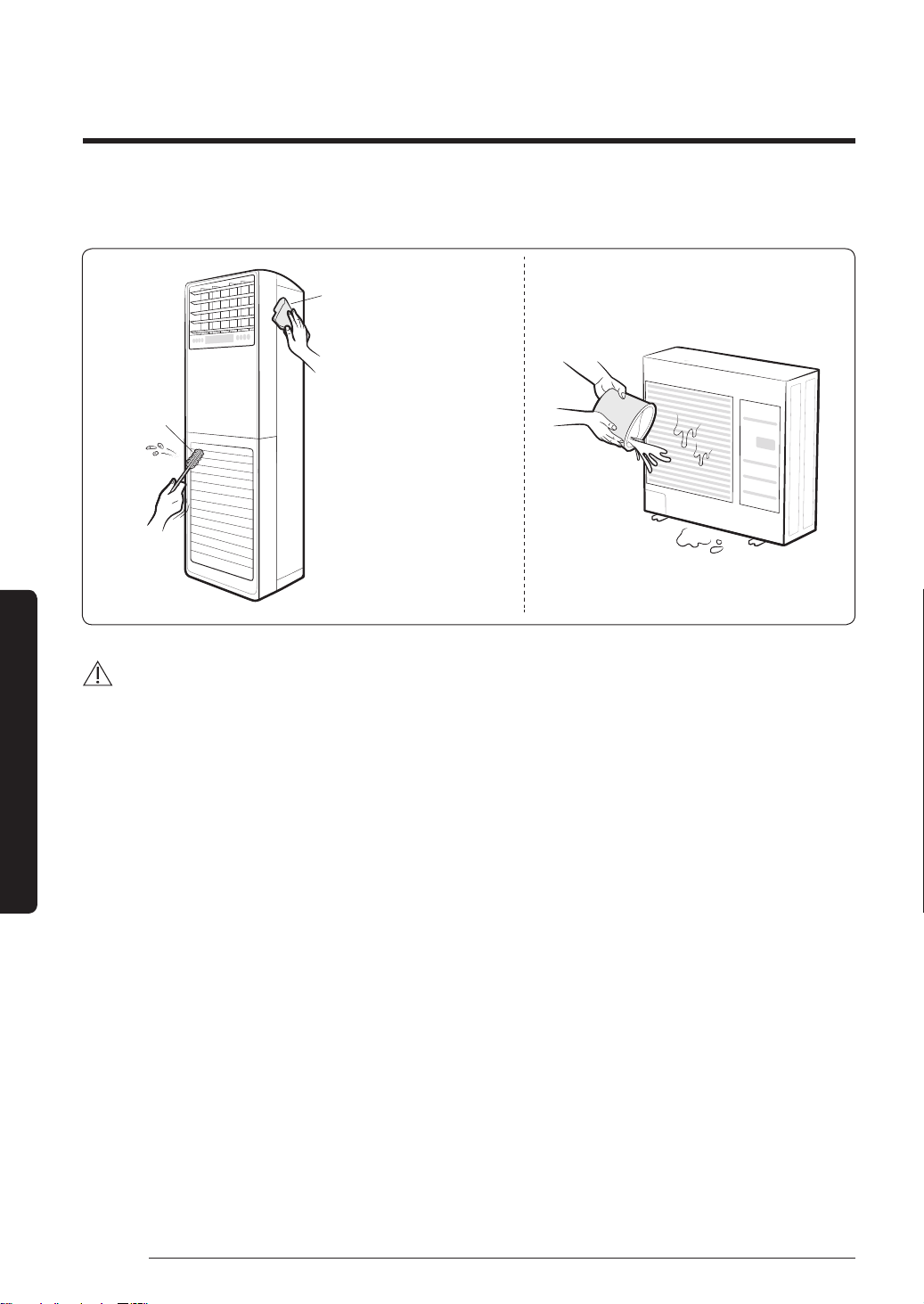
Cleaning the indoor unit exterior and outdoor unit heat exterior
Tepid damp cloth
Soft brush
Before cleaning, be sure to
turn off the air conditioner.
Spray water to clean the dust.
CAUTION
• Do not open the panel when the air conditioner is operating. This action may cause a
malfunction or an electrical hazard.
• Do not clean the display by using alkaline detergent.
• Do not use sulphuric acid, hydrochloric acid, or organic solvents (such as thinner, kerosene,
and acetone) to clean the surfaces. Do not put any stickers on it as this can damage the
surface of the air conditioner.
• When you clean and inspect the heat exchanger on the indoor and outdoor units, contact
the local service centre for help.
• Be sure to prevent any injury from sharp edges of the surface when handling the heat
exchanger.
• If the air conditioner is running in specific environment such as a restaurant or a hair salon,
it may generate unpleasant odours. To prevent odours, ventilate the room properly, clean
the air filter, or operate the air conditioner in the Fan mode. If the problem still exists,
contact a service centre.
Cleaning and Maintenance
PAC_B2B 미라지 필리핀향_IBIM_EN_DB68-07271A-00_170504.indd 22 2017-06-02 오후 3:34:36
23English
Cleaning and Maintenance
Cleaning and Maintenance
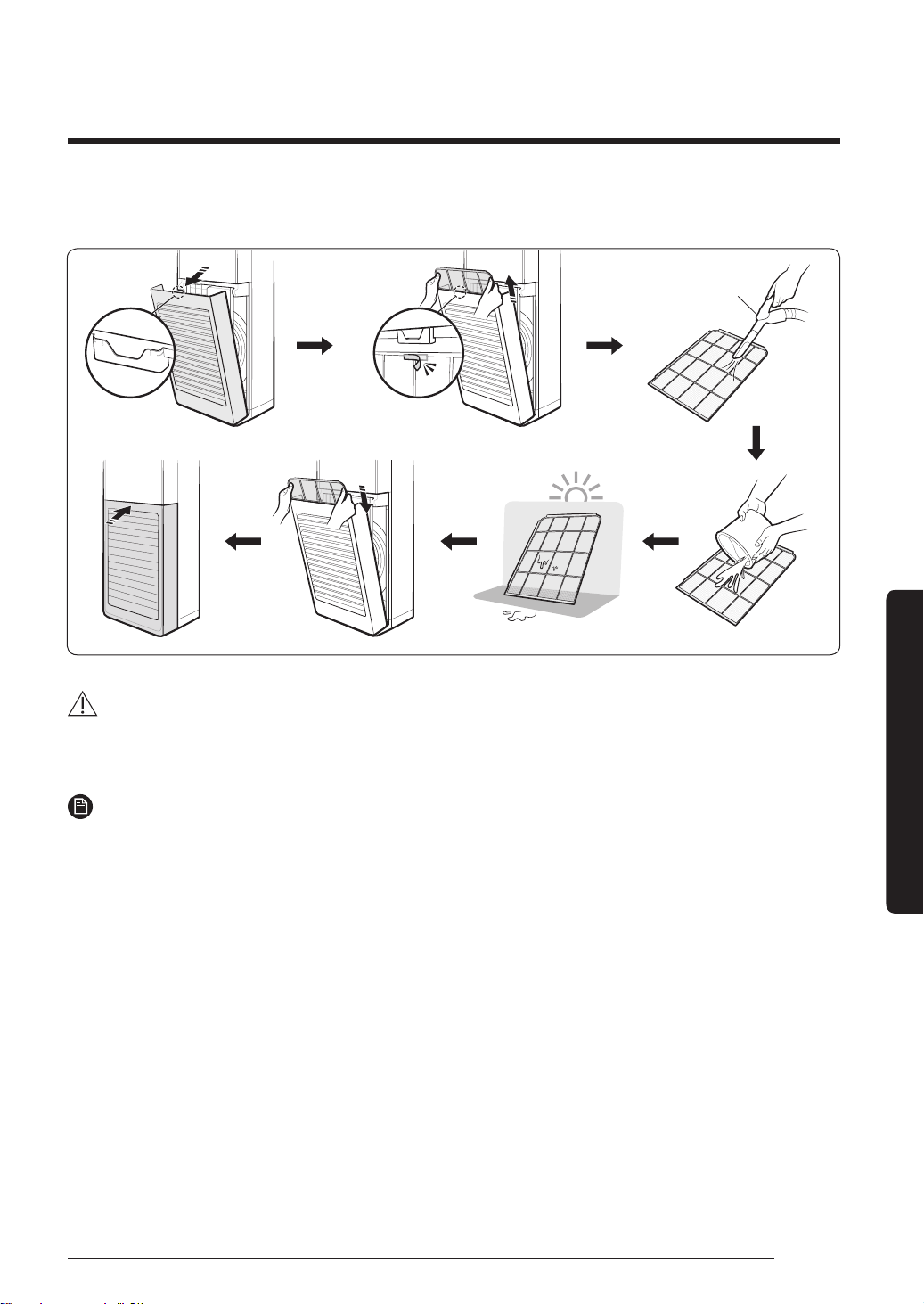
Cleaning the filter
Vacuum
cleaner
CAUTION
• Do not scrub the air filter with a brush or other cleaning utensil. This may damage the filter.
• Do not expose the air filter to direct sunlight when drying it.
NOTE
• Clean the air filter every 2 weeks. Cleaning term may vary depending on the usage and
environmental conditions.
• If the air filter dries in a humid area, it may produce offensive odours. Clean it again and
dry it in a well-ventilated area.
PAC_B2B 미라지 필리핀향_IBIM_EN_DB68-07271A-00_170504.indd 23 2017-06-02 오후 3:34:37
24 English
Cleaning at a Glance
Cleaning and Maintenance
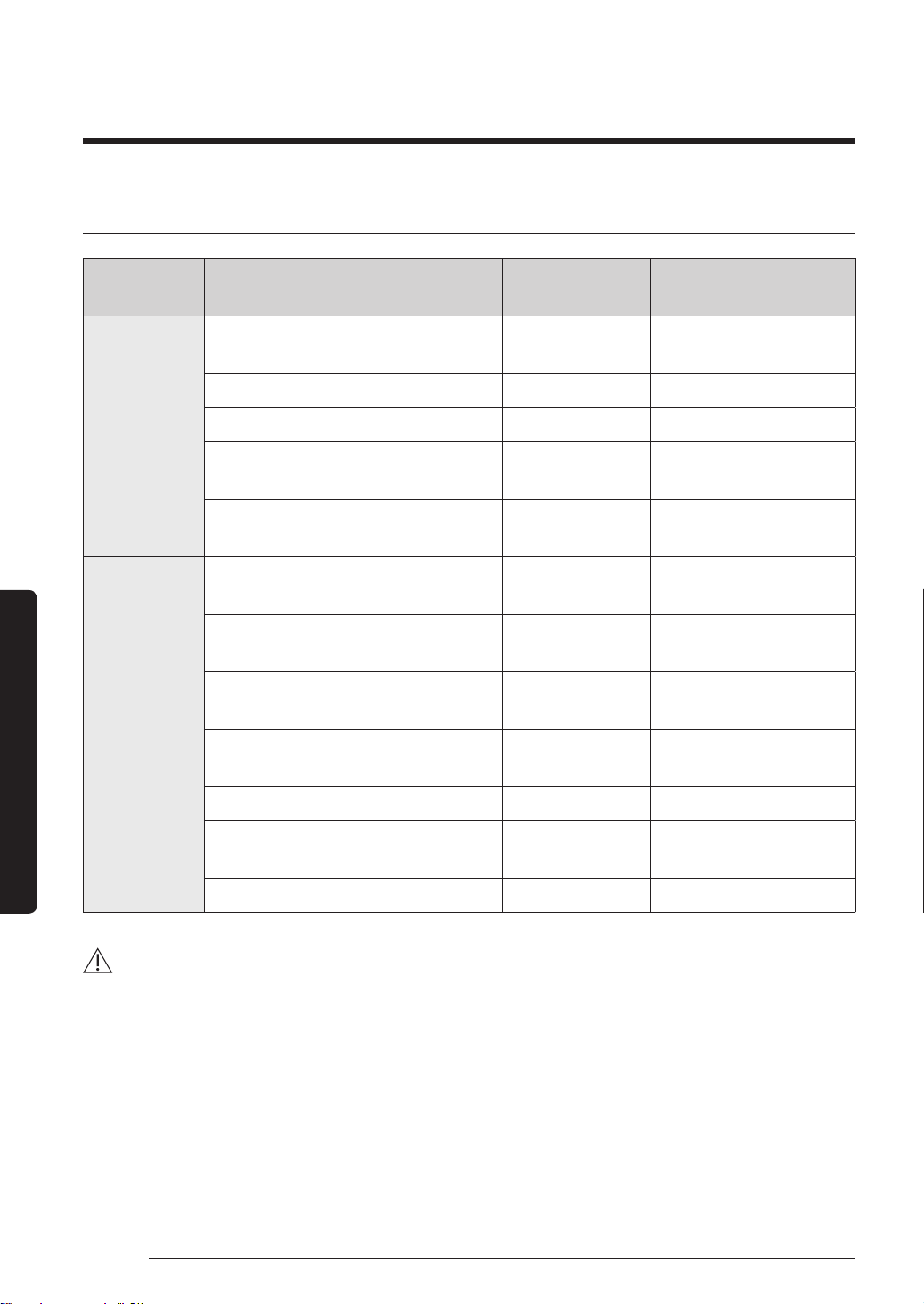
Periodical maintenance
Unit Maintenance item Interval
Requires qualified
technicians
Indoor unit
Clean the air filter.
Once every 2
weeks
Clean the condensate drain pan. Once a year Required
Clean up the heat exchange. Once a year Required
Clean the condensate drain pipe.
Once every 4
months
Required
Replace the remote control
Batteries.
Once a year
Outdoor
unit
Clean the heat exchanger on the
outside of the unit.
Once every 4
months
Required
Clean the heat exchanger on the
inside of the unit.
Once a year Required
Clean the electric components with
jets of air.
Once a year Required
Verify that all the electric
components are firmly tightened.
Once a year Required
Clean the fan. Once a year Required
Verify that the fan assemblies are
firmly tightened.
Once a year Required
Clean the condensate drain pan. Once a year Required
CAUTION
• Be sure to perform the maintenance check periodically. This work improves the air
conditioner's efficiency.
• The frequency of maintenance work may vary depending on the geographical area, amount
of dust, and other environmental elements. If the air conditioner is installed in a very dusty
place, perform the maintenance work more frequently.
• Make sure that the maintenance work must be done by qualified technicians. For more
detailed information, refer to the Installation manual.
PAC_B2B 미라지 필리핀향_IBIM_EN_DB68-07271A-00_170504.indd 24 2017-06-02 오후 3:34:37
25English
Cleaning and Maintenance
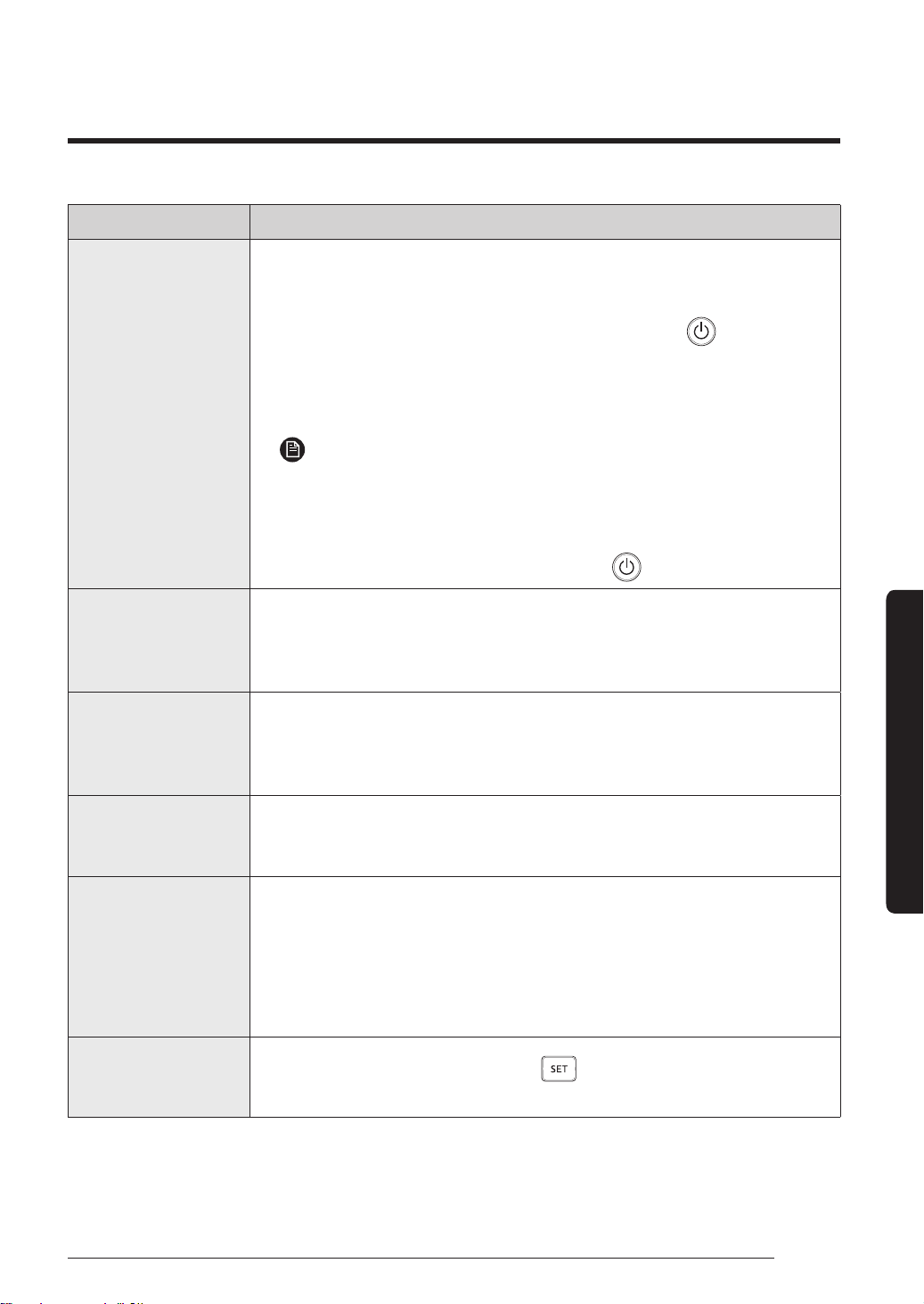
Refer to the following chart if the air conditioner operates abnormally. This may save time and
unnecessary expense.
Troubleshooting
Problem Solution
The air conditioner
does not operate
at all.
• Check if the power plug is properly connected.
• Check whether the auxiliary power switch (ELCB, ELB) is turned on.
• If the auxiliary power switch (ELCB, ELB) is turned off, the air
conditioner does not work although you press the
(Power)
button.
• When you clean the air conditioner or do not use it for an extended
period of time, turn off the auxiliary power switch (ELCB, ELB).
NOTE
• The auxiliary power switch (ELCB, ELB) is sold separately.
• Make sure that auxiliary power switch (ELCB, ELB) is installed in
the distribution box inside the building.
• If the air conditioner is turned off by the Timed off function, turn on
the air conditioner again by pressing the
(Power) button.
The temperature
does not change.
• Check whether the Auto or Fan mode, or the Turbo function is
running. In these modes and function, the air conditioner controls
the set temperature automatically, and you cannot change the set
temperature.
The fan speed does
not change.
• Check whether the Auto or Dry mode, or the Turbo or Long
reach function is running. In these modes and functions, the air
conditioner controls its fan speed automatically, and you cannot
change the fan speed.
The air flow
direction does not
change.
• Check whether the Long reach function is running. In the Long reach
function, only horizontal air flow direction can be changed.
The wireless
remote control
does not operate.
• Check whether the batteries are discharged. Replace the batteries
with new ones.
• Make sure that nothing is blocking the remote control sensor.
• Check whether any strong lighting sources are near the air
conditioner. Strong light which comes from fluorescent bulbs or
neon signs may interfere with the remote control.
The Timed on/off
function does not
operate.
• Check whether you pressed the
(SET) button on the remote
control after setting the on/off time. Set the on/off time.
PAC_B2B 미라지 필리핀향_IBIM_EN_DB68-07271A-00_170504.indd 25 2017-06-02 오후 3:34:37
26 English
Troubleshooting
Cleaning and Maintenance
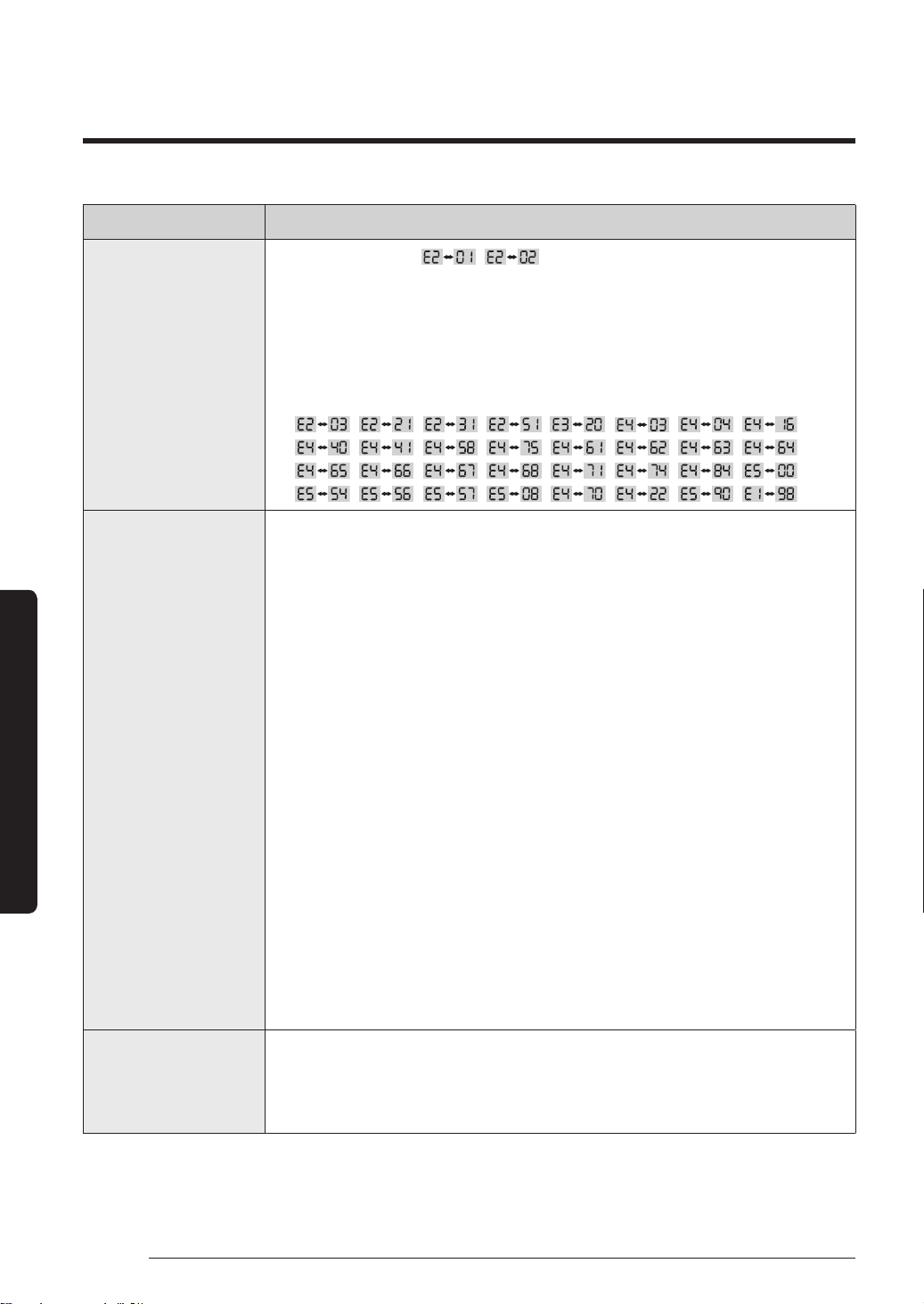
Problem Solution
The indoor unit
display blinks
continuously.
• Check whether
, is displayed on the indoor unit
display. Make sure that the power and communication cables
are connected correctly between the indoor and outdoor units,
and then restart the air conditioner. If the error is still displayed,
contact a service centre.
• Check whether the following errors are displayed on the indoor
unit display:
, , , , , , , ,
, , , , , , , ,
, , , , , , , ,
, , , , , , ,
Air does not come
out of the air
conditioner.
• In the Cool mode, air does not come out if the set temperature is
higher than the current temperature.
• Cooling does not operate in the Fan mode. Select the Cool, Auto, or
Dry mode.
• Check whether the air filter is blocked with dirt. A dusty filter may
decrease the cooling efficiencies. Clean the air filter frequently.
• If a cover is on the outdoor unit or any obstacle is present near the
outdoor unit, remove them.
• Install the outdoor unit in a well-ventilated place. Avoid places
exposed to direct sunlight or close to a heating appliance.
• Place a sunscreen over the outdoor unit to protect it from direct
sunlight.
• If the indoor unit is installed in a place exposed to direct sunlight,
pull the curtains on the windows.
• Close the windows and doors to maximize the cooling efficiencies.
• If the Cool mode is stopped and then started immediately, cool air
comes out after about 3 minutes to protect the compressor of the
outdoor unit.
• If the refrigerant pipe is too long, the cooling efficiencies may be
decreased. Avoid exceeding the maximum pipe length.
The air conditioner
makes strange
noises.
• In certain conditions (especially, when the outdoor temperature
is lower than 20°C), a hissing, rumbling, or splashing sound may
be heard while the refrigerant is circulating through the air
conditioner. This is a normal operation.
PAC_B2B 미라지 필리핀향_IBIM_EN_DB68-07271A-00_170504.indd 26 2017-06-02 오후 3:34:39
27English
Cleaning and Maintenance
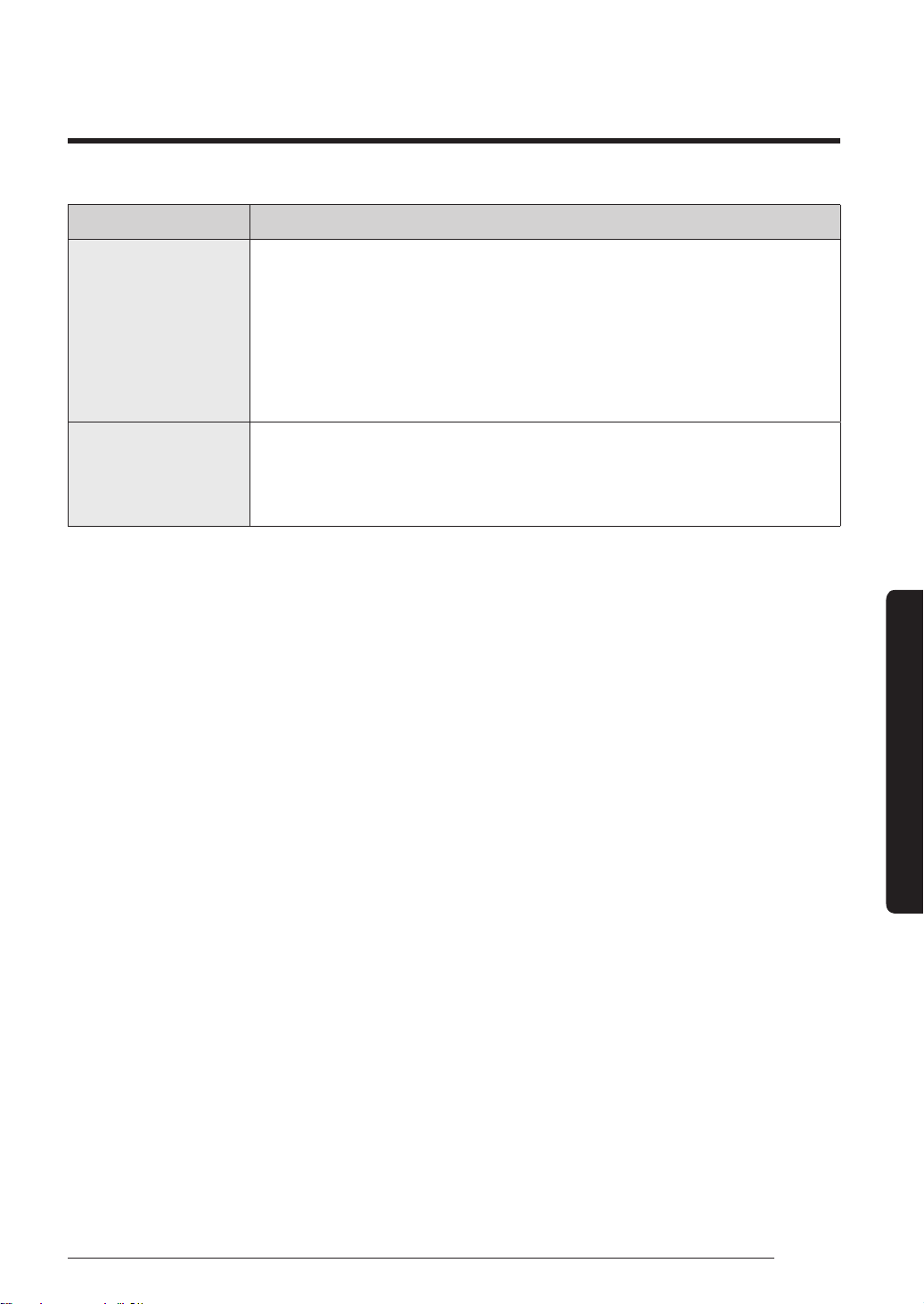
Problem Solution
Unpleasant odours
permeate the room.
• If the air conditioner is running in a smoky area or if there is a
smell entering from outside, ventilate the room properly.
• If the air conditioner has not been operated for an extended period
of time, clean the indoor unit and operate the air conditioner in
Fan mode for 3 to 4 hours to dry the inside of the indoor unit for
removal of unpleasant odours.
• If the air filter blocked with dirt, clean the air filter.
Water drops
from the piping
connections of the
outdoor unit.
• Condensation may develop due to the difference in temperature.
This is a normal condition.
PAC_B2B 미라지 필리핀향_IBIM_EN_DB68-07271A-00_170504.indd 27 2017-06-02 오후 3:34:39
28 English
Safety Information (Installing the Air Conditioner)
Safety Information
Carefully follow the precautions listed as below because
they are essential to guarantee the safety of SAMSUNG
product.
WARNING
∙ Always disconnect the air conditioner from the power
supply before servicing it or accessing its internal
components.
∙ Verify that installation and testing operations are
performed by qualified personnel.
∙ Verify that the air conditioner is not installed in an
easily accessible area.
General information
∙ Carefully read the content of this manual before
installing the air conditioner and store the manual in
a safe place in order to be able to use it as reference
after installation.
∙ For maximum safety, installers should always
carefully read the following warnings.
∙ Store the manual in a safe location and remember to
hand it over to the new owner if the air conditioner is
sold or transferred.
∙ This manual explains how to install an indoor unit
with a split system with two SAMSUNG units. The use
of other types of units with different control systems
may damage the units and invalidate the warranty.
The manufacturer shall not be responsible for
damages arising from the use of non compliant units.
∙ The manufacturer shall not be responsible for
damage originating from unauthorized changes or
the improper connection of electric and hydraulic
lines. Failure to comply with these instructions or
to comply with the requirements set forth in the
“Operating limits” table, included in the manual, shall
immediately invalidate the warranty.
∙ The air conditioner should be used only for the
applications for which it has been designed: the
indoor unit is not suitable to be installed in areas
used for laundry.
∙ Do not use the units if damaged. If problems occur,
switch the unit off and disconnect it from the power
supply.
∙ In order to prevent electric shocks, fires or injuries,
always stop the unit, disable the protection switch
and contact SAMSUNG’s technical support if the unit
produces smoke, if the power cable is hot or damaged
or if the unit is very noisy.
∙ Always remember to inspect the unit, electric
connections, refrigerant tubes and protections
regularly. These operations should be performed by
qualified personnel only.
∙ The unit contains moving parts, which should always
be kept out of the reach of children.
∙ Do not attempt to repair, move, alter or reinstall the
unit. If performed by unauthorized personnel, these
operations may cause electric shocks or fires.
∙ Do not place containers with liquids or other objects
on the unit.
∙ All the materials used for the manufacture and
packaging of the air conditioner are recyclable.
∙ The packing material and exhaust batteries of the
remote control (optional) must be disposed of in
accordance with current laws.
∙ The air conditioner contains a refrigerant that has
to be disposed of as special waste. At the end of its
life cycle, the air conditioner must be disposed of in
authorized centers or returned to the retailer so that
it can be disposed of correctly and safely.
∙ This appliance is not intended for use by persons
(including children) with reduced physical, sensory
or mental capabilities, or lack of experience and
knowledge, without supervision or instruction
concerning use of the appliance by a person
responsible for their safety. Children should be
supervised to ensure that they do not play with the
appliance.
Safety Information (Installing the Air Conditioner)
Safety Information
PAC_B2B 미라지 필리핀향_IBIM_EN_DB68-07271A-00_170504.indd 28 2017-06-02 오후 3:34:39
29English
Safety Information
Installing the unit
IMPORTANT: When installing the unit, always remember
to connect first the refrigerant tubes, then the electrical
lines. Always disassemble the electric lines before the
refrigerant tubes.
∙ Upon receipt, inspect the product to verify that
it has not been damaged during transport. If the
product appears damaged, DO NOT INSTALL it and
immediately report the damage to the carrier or
retailer (if the installer or the authorized technician
has collected the material from the retailer).
∙ After completing the installation, always carry out a
functional test and provide the instructions on how to
operate the air conditioner to the user.
∙ Do not use the air conditioner in environments with
hazardous substances or close to equipment that
release free flames to avoid the occurrence of fires,
explosions or injuries.
∙ Our units must be installed in compliance with
the spaces indicated in the manual to ensure
either accessibility from both sides or ability to
perform routine maintenance and repairs. The units’
components must be accessible and that can be
disassembled in conditions of complete safety either
for people or things. For this reason, where it is
not observed as indicated into the manual, the cost
necessary to reach and repair the unit (in safety, as
required by current regulations in force) with slings,
trucks, scaffolding or any other means of elevation
won’t be considered in-warranty and charged to end
user.
Power supply line, fuse or circuit breaker
∙ For this reason, when provisions of the installation
manual are not complied with, the cost required to
access and repair the units (in SAFETY CONDITIONS,
as set out in prevailing regulations) with harnesses,
ladders, scaffolding or any other elevation system
will NOT be considered part of the warranty and will
be charged to the end customer.
∙ Always make sure that the power supply is compliant
with current safety standards. Always install the air
conditioner in compliance with current local safety
standards.
∙ Always verify that a suitable grounding connection is
available.
∙ Verify that the voltage and frequency of the power
supply comply with the specifications and that the
installed power is sufficient to ensure the operation
of any other domestic appliance connected to the
same electric lines.
∙ Always verify that the cut-off and protection switches
are suitably dimensioned.
∙ Verify that the air conditioner is connected to the
power supply in accordance with the instructions
provided in the wiring diagram included in the
manual.
∙ Always verify that electric connections (cable entry,
section of leads, protections…) are compliant with
the electric specifications and with the instructions
provided in the wiring scheme. Always verify that all
connections comply with the standards applicable to
the installation of air conditioners.
∙ Be sure not to perform power cable modification,
midway wiring, and multiple wire connection.
– It may cause electric shock or fire due to poor
connection or insulation and current limit override.
– When midway wiring is required due to power line
damage, refer to "Step 2.4 Optional: Extending the
power cable" in the installation manual.
PAC_B2B 미라지 필리핀향_IBIM_EN_DB68-07271A-00_170504.indd 29 2017-06-02 오후 3:34:39
30 English
Safety Information (Installing the Air Conditioner)
Safety Information
CAUTION
∙ Make sure that you earth the cables.
– Do not connect the earth wire to the gas pipe,
water pipe, lighting rod or telephone wire. If
earthing is not complete, electric shock or fire may
occur.
∙ Install the circuit breaker.
– If the circuit breaker is not installed, electric shock
or fire may occur.
∙ Make sure that the condensed water dripping from
the drain hose runs out properly and safely.
∙ Install the power cable and communication cable of
the indoor and outdoor unit at least 1m away from
the electric appliance.
∙ Install the indoor unit away from lighting apparatus
using the ballast.
– If you use the wireless remote control, reception
error may occur due to the ballast of the lighting
apparatus.
∙ Do not install the air conditioner in following places.
– Place where there is mineral oil or arsenic acid.
Resin parts flame and the accessories may drop or
water may leak. The capacity of the heat exchanger
may reduce or the air conditioner may be out of
order.
– The place where corrosive gas such as sulfurous
acid gas generates from the vent pipe or air outlet.
The copper pipe or connection pipe may corrode
and refrigerant may leak.
– The place where there is a machine that generates
electromagnetic waves. The air conditioner may not
operate normally due to control system.
– The place where there is a danger of existing
combustible gas, carbon fiber or flammable dust.
The place where thinner or gasoline is handled. Gas
may leak and it may cause fire.
Installation Procedure
PAC_B2B 미라지 필리핀향_IBIM_EN_DB68-07271A-00_170504.indd 30 2017-06-02 오후 3:34:39
31English
Installation Procedure
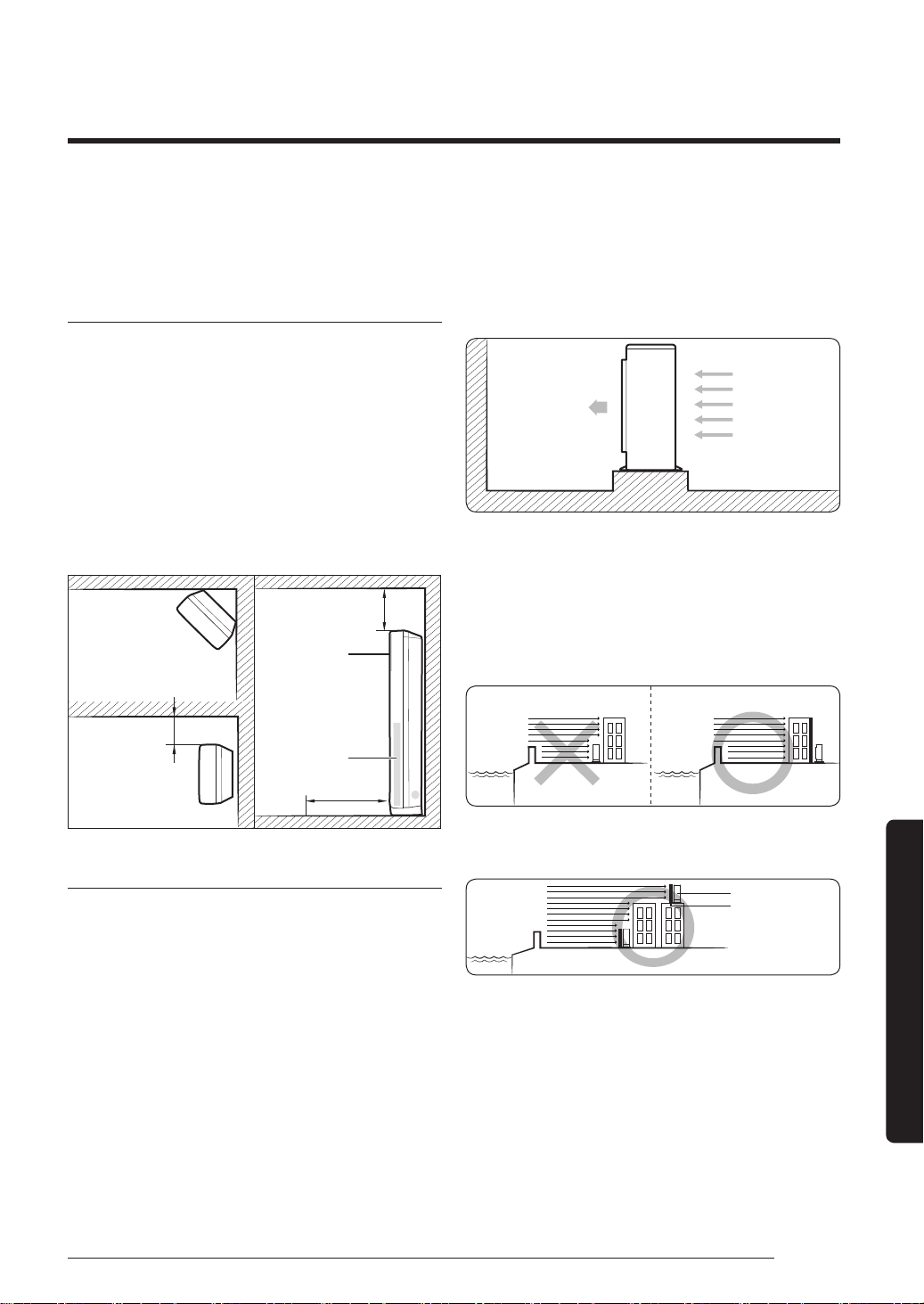
Step 1 Choosing the installation location
Determine the installation location considering the
following conditions and obtain the user approval.
Indoor unit
∙ Install the unit where the pipes and cables can be easily
connected to the outdoor unit.
∙ Install the unit where there are no obstacles against the wind
around the air intake and air outlet.
∙ Install the unit on a flat and stable surface that can hold the
unit’s weight. Otherwise, the unit may generate noise and
vibrations.
∙ Do not install the unit near highly frequented doors and
passages.
∙ Do not install the unit in a location exposed to direct sunlight.
Top view Side view
More than 60cm
<Corner installation>
<Wall installation>
More than 100cm
More than 50cm
Air intake
Air outlet
Outdoor unit
∙ Install the unit where it will not experience oil leakages,
salt collection, gas exposure, or sulfide gas risk, and keep it
and safe from other dangers.
∙ Install the unit where does not disturb your neighbors as
they may be affected by the noise or airflow coming from
the unit.
∙ Install the unit where no rainwater can collect on or near it.
∙ Install the unit in a well-ventilated location away from direct
sunlight or strong winds.
∙ Install the unit where the pipes and cables can be easily
connected to the indoor unit.
∙ Maintain sufficient space for repairs and service.
∙ Make sure that condensed water dripping from the drain
hose is directed away safely.
∙ If there is any unavoidable reason to install the unit at such
a place, take the following measures:
– When installing the unit at a roadside concentrated with
buildings, install it parallel to the road.
– Install the unit so that the air outlet faces the wall such as
rooftop that may be subjected to strong wind.
Strong wind
Rooftop
∙ When installing the outdoor unit near the seashore, make
sure that it is not directly exposed to sea breeze. If you
cannot find an adequate place, a protection wall should
be constructed.
– Install the outdoor unit at a place (such as near a
building) where it can be protected from sea breeze.
Failure to do so may cause damage to the outdoor unit.
Outdoor UnitOutdoor Unit
Sea Sea
Sea breeze Sea breeze
∙ If you cannot avoid a place near the seashore,
construct a protection wall around the outdoor unit.
Outdoor Unit
Protection wall
Sea
Sea breeze
∙ Construct a protection wall made of solid material
such as concrete to block sea breeze. Make sure that
its height and width are 1.5 times greater than the
size of the outdoor unit. In addition, secure a space
larger than 600 mm between the protection wall and
the outdoor unit for exhausted air to ventilate.
∙ Install the unit at a place where water can drain smoothly.
∙ If you have any difficulty in finding an installation
location, contact your manufacturer.
∙ Be sure to clean sea water and dust on the heat
exchanger of the outdoor unit and apply a corrosion
inhibitor on it (at least once in a year).
Installation Procedure
Installation Procedure
PAC_B2B 미라지 필리핀향_IBIM_EN_DB68-07271A-00_170504.indd 31 2017-06-02 오후 3:34:39
32 English
Installation Procedure
Installation Procedure
Outdoor unit installation request
∙ The suggested space is based on the outdoor temperature
of 35°C while in operation. If the outdoor temperature is
higher than 35°C, secure more space.
∙ Be sure to secure sufficient clearance for a person and air
flow passage.
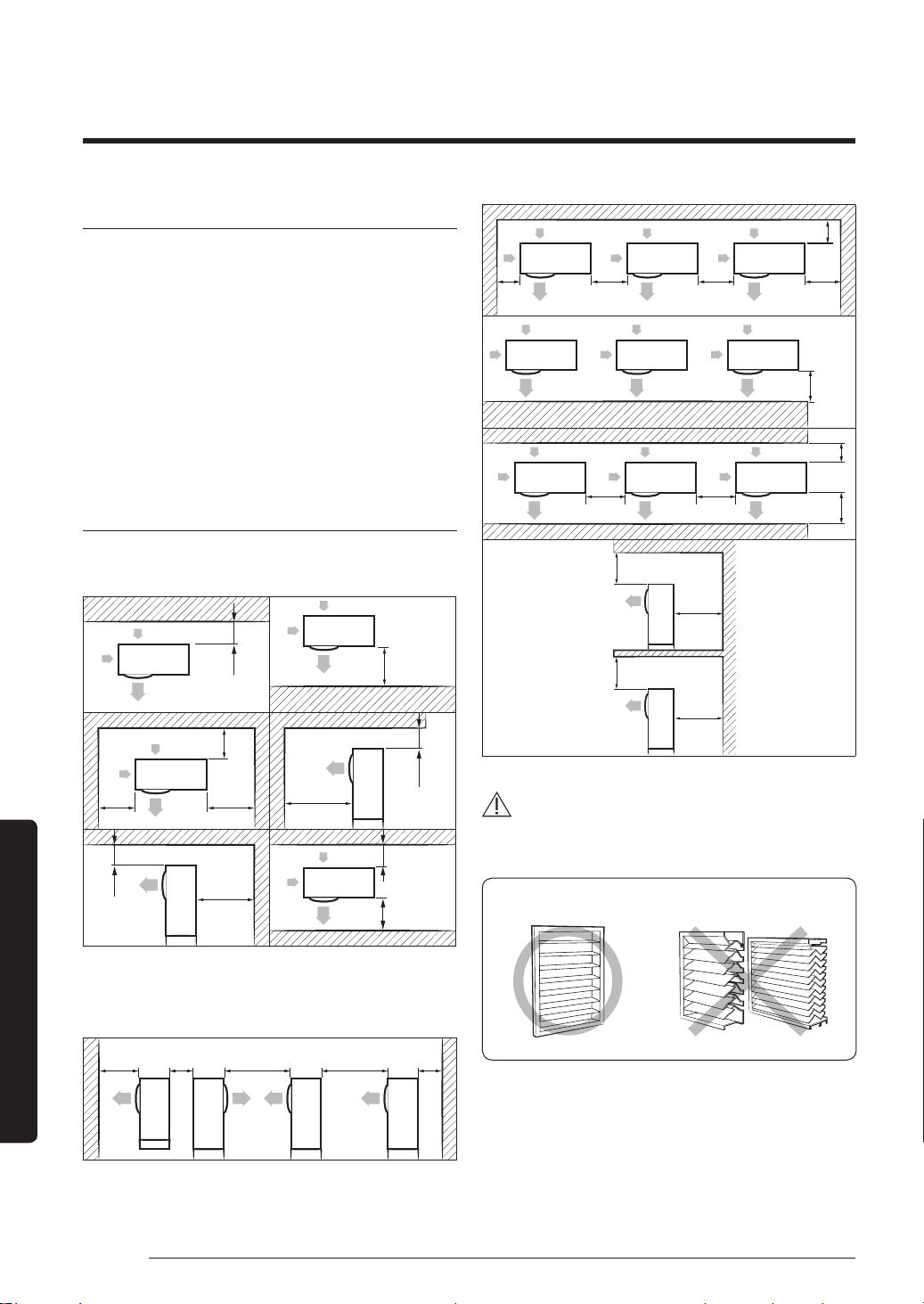
∙ See the clearances and dimensions in Minimum clearances
for the outdoor unit (page 32) when installing the
outdoor unit.
∙ If you install multiple outdoor units in the same place, be
sure to secure enough space for ventilation and free airflow.
∙ If the space for ventilation is insufficient, the air conditioner
may not perform well as designed.
Minimum clearances for the outdoor unit
When installing 1 outdoor unit
(Unit: mm)
300 or more
1500 or more
300 or
more
600 or
more
300 or
more
2000 or
more
1500 or more
300 or more
600 or more
300 or more
1500 or more
When installing more than 1 outdoor unit
(Unit: mm)
1500 or
more
600 or
more
3000 or
more
3000 or
more
300 or
more
300 or
more
600 or
more
600 or
more
600 or
more
300 or
more
1500 or
more
600 or
more
600 or
more
300 or more
1500 or more
300 or
more
500 or
more
500 or
more
300 or
more
WARNING
∙ Should adopt bar type louver. Don’t use a type of rain
resistance louver.
[Bar type louver] [Rain resistance louver]
∙ Louver specifications.
– Angle criteria : less than 20°
– Opening ratio criteria : greater than 80%
PAC_B2B 미라지 필리핀향_IBIM_EN_DB68-07271A-00_170504.indd 32 2017-06-02 오후 3:34:40
33English
Installation Procedure
WARNING
∙ After installing the outdoor unit, apply rust inhibitor
on the internal pipes and heat exchanger.
– Airborne corrosive gas such as sulfur compounds,
hydrogen sulfide, and ammonia, or salty dust may
cause pipe corrosion. This corrosion may result in
refrigerant leakage.
– Inspect the outdoor unit at least once a year and
re-apply the rust inhibitor where it is damaged or
worn out.
∙ When applying rust inhibitor, be sure to follow the
instructions below:
– Turn off the power before spraying the rust
inhibitor.
– Wear protective goggles and a mask in advance.
– Clean the dusty surface with clean fabric or paper
before spraying the inhibitor.
– Make sure that wind is blowing from behind the
worker.
– Do not spray on the PCB panel and electric parts.
CAUTION
∙ Install the indoor unit away from any interference,
such as radios, computers, and stereo devices, and
also select the place where the electrical wiring work
is possible.
– Keep the unit at least 3 m away from electronic
devices that generate electromagnetic waves, and
install a protection tube for the main power cable
and communication cable.
– Make sure that there is no device that can generate
electromagnetic waves. Otherwise, a malfunction
of the control system may occur. For example, the
indoor unit remote control sensor may not properly
receive signals near fluorescent lamps because of
interference.
∙ Be sure to install the outdoor unit in a safe place
where it is not affected by snowfall. The frame should
be installed in a place where the air inlet and heat
exchanger of the unit are not buried under snow.
∙ A ventilation system is required when the outdoor
unit is installed in a closed space or room, even
though R-410A is not poisonous or flammable.
∙ Install the railing around the outdoor unit to prevent
falling when installed at a high place.
∙ Avoid installation near exhaust pipes and ventilating
openings exposed to corrosive gas, sulfur oxide,
ammonia, or sulfur gas herbicide. Installations near
these places require anticorrosive treatments. Contact
the manufacturer to avoid corrosion of copper pipes
or soldered parts.
∙ Depending on the power supply, electric noise or
unstable voltage may happen after malfunctions of
the electrical parts or the control system particularly
on ships or other places using generators.
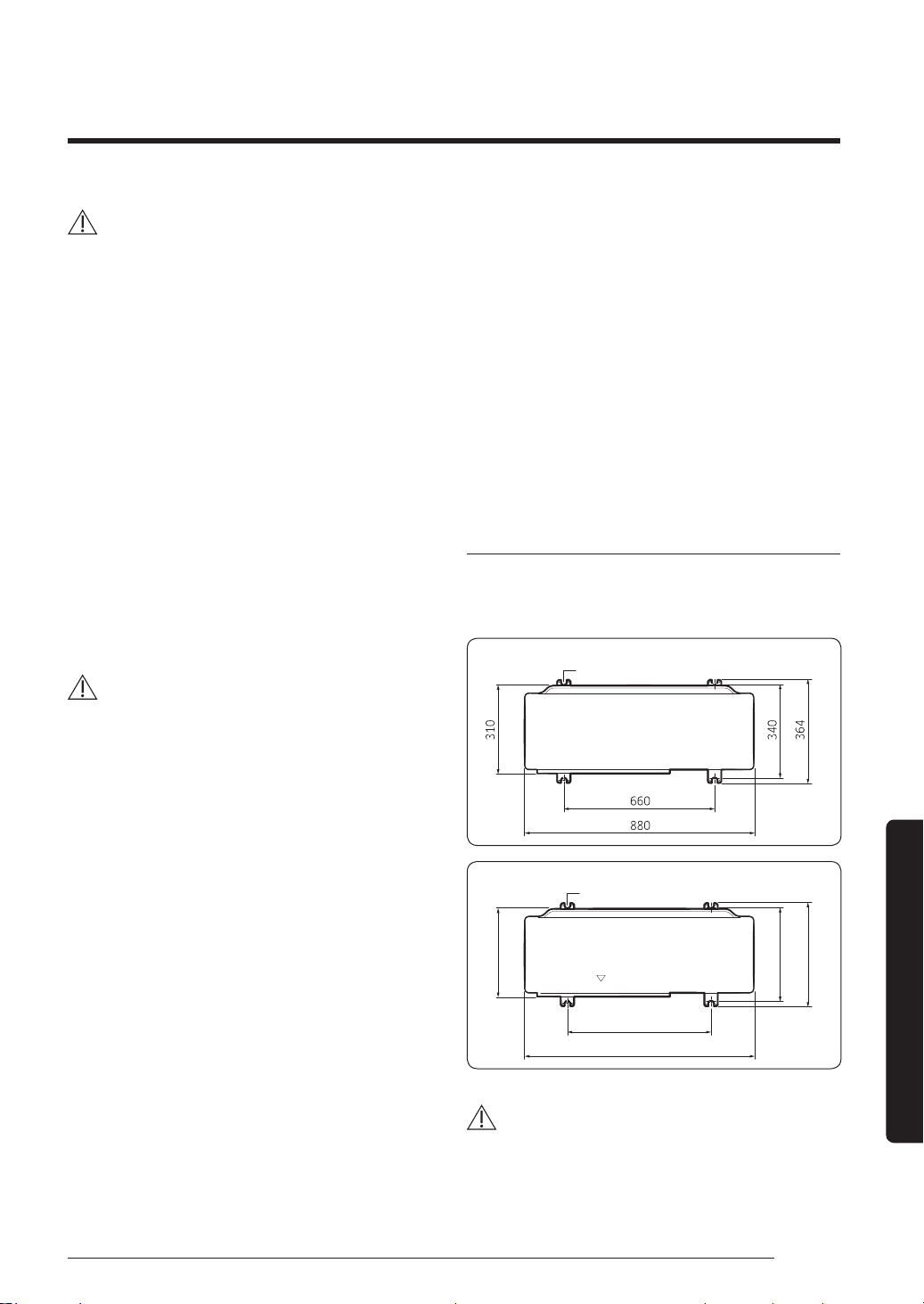
Fixing the outdoor unit in place
Fix the outdoor unit with anchor bolts. Make sure that
the anchor bolts are 20 mm or higher from the base
surface.
Anchor bolt hole
(Unit : mm)
AF36MV1MAEEXTC
(Unit : mm)
Anchor bolt hole
AF48MV1MAEEXTC
620
940
330
360
384
CAUTION
∙ Install a drain outlet at the lowest end around the
base for the outdoor unit drainage.
∙ When installing the outdoor unit on the roof,
waterproof the unit and check ceiling strength.
PAC_B2B 미라지 필리핀향_IBIM_EN_DB68-07271A-00_170504.indd 33 2017-06-02 오후 3:34:40
34 English
Installation Procedure
Installation Procedure
Step 2 Unpacking
Unpacking the indoor unit
1 Open the indoor unit package.
2 Remove the top and middle cushions.
3 Remove the bottom cushion.
Unpacking the outdoor unit
1 Pull out the outdoor unit from the package.
2 Remove the top cushion.
3 Remove the 4 screws from the wooden pallet.
4 Remove the wooden pallet.
Step 3 Checking and preparing
accessories
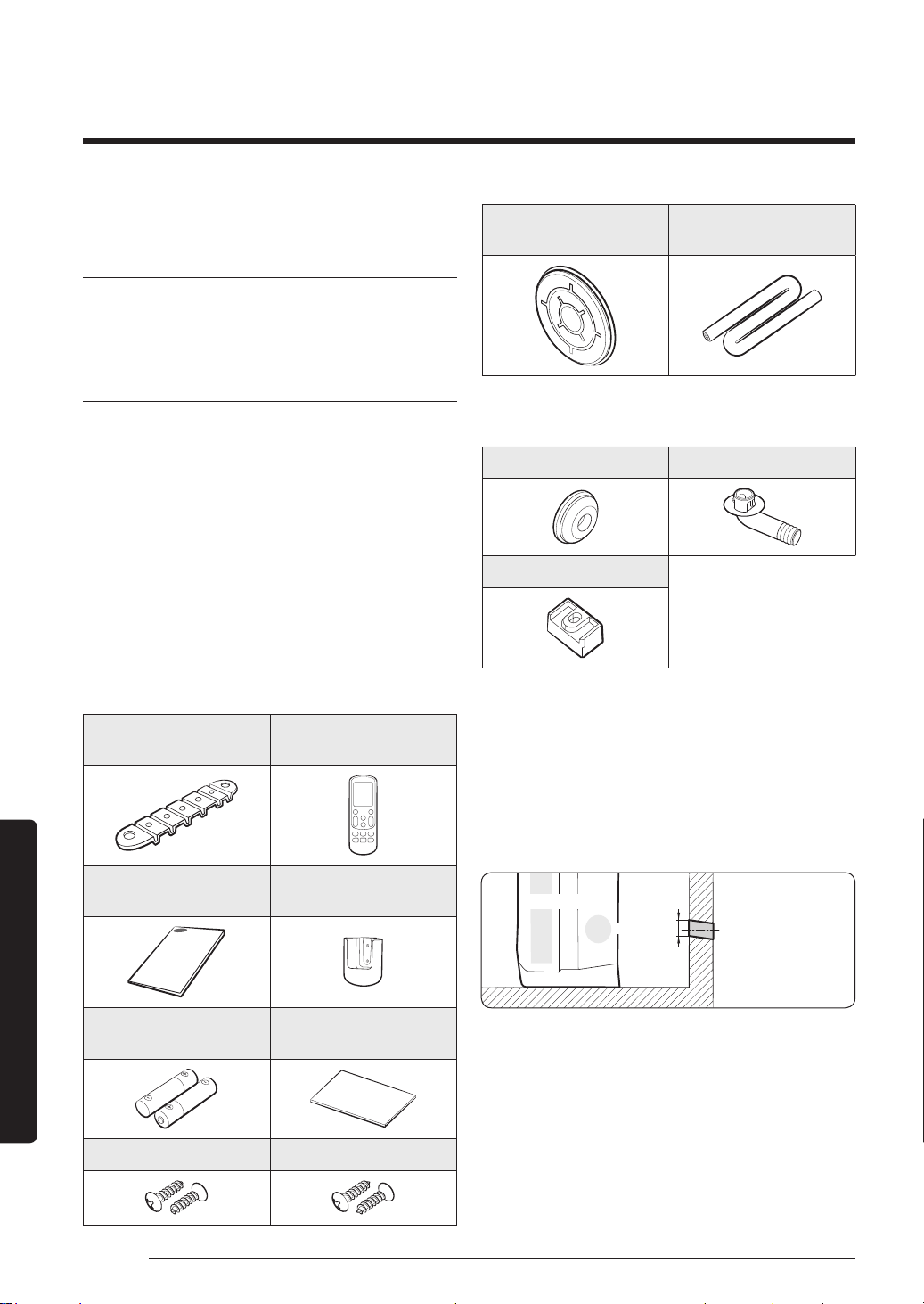
The following accessories are supplied with the
air conditioner. Their type and quantity may differ
depending on the specifications.
Accessories in the indoor unit package
Fixing bracket for indoor
unit (1)
Remote control (1)
Installation manual (1)
Remote control holder
(1)
Batteries for remote
control (2)
Insulation for piping(1)
M4 X L12 screws (4) M4 X L14 screws (4)
Pipe outlet protection
rubber (1)
Insulation for drain hose
(1)
Accessories in the outdoor unit package
Drain cap (3) Drain plug out (1)
Rubber leg (4)
Step 4 Drilling a hole through a wall
1 Determine the position of a 60 to 65 mm hole
considering possible directions of the pipe bundle and
minimum distances between the hole and installation
plate.
2 Drill the hole that slopes slightly downward (15°).
Ø 60~65 mm
Outdoor
Indoor unit
PAC_B2B 미라지 필리핀향_IBIM_EN_DB68-07271A-00_170504.indd 34 2017-06-02 오후 3:34:41
35English
Installation Procedure
Step 5 Taping the pipes, cables, and
drain hose
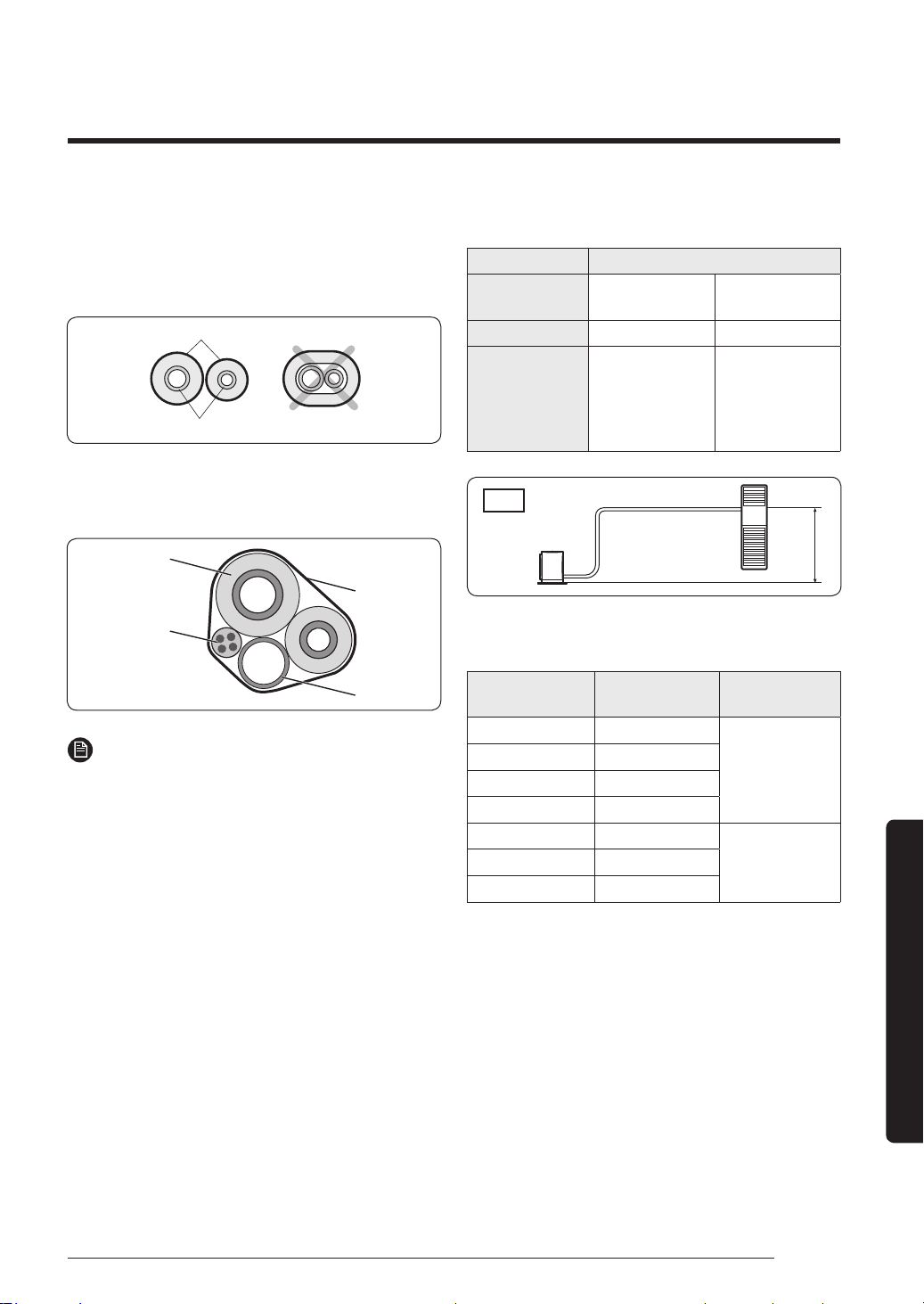
1 Wrap the refrigerant pipes with the provided
insulation. This wrapping minimises condensation.
Insulation
Refrigerant pipes
2 Wind the refrigerant pipes, power cable,
communication cable, and drain hose with vinyl tape
to make a pipe bundle.
Pipe insulator
Vinyl tape
Drain hose
Indoor/outdoor
unit
communication
cable
NOTE
∙ Be sure to insulate the pipes without gaps or cracks,
and use adhesive between the connecting parts of the
insulation to prevent moisture from entering.
∙ When bending the pipe, try to secure a large bending
radius (over 100 mm) to prevent the copper pipe
from distorting.
∙ Use the polyethylene or EPDM foam insulation with a
thickness over 7 mm.
∙ If pipes are installed in a place with humidity
over 80% (such as in a building site pit, basement,
seashore, near hot springs, or lakes), use an insulation
of a thickness over 10 mm.
∙ Make sure that the thickness of the insulation does
not get thinner on the pipe's bending area.
∙ When the insulation thickness becomes thinner, use
extra insulation to maintain thickness.
∙ When installing the pipe hanger, use extra PE- foam
insulation (over 5 mm) to make the width of the
insulation 3 times wider than the hanger. Do not use
cable ties as a pipe hanger.
Step 6 Connecting the refrigerant pipes
Items Maximum allowable length
Outdoor unit
models
AF36MV1MAEEXTC AF48MV1MAEEXTC
Main pipe (L1) 50 m 75 m
Max. height
difference
between outdoor
and indoor units
(h1)
30 m 30 m
L
1
h
1
n=1
indoor
Outdoor
∙ Temper grade and minimum thickness of the
refrigerant pipe
Outer diameter
[mm]
Minimum
thickness [mm]
Temper grade
ø6.35 0.7
C1220T-O
ø9.52 0.7
ø12.70 0.8
ø15.88 1.0
ø15.88 0.8
C1220T-1/2H OR
C1220T-H
ø19.05 0.9
ø22.23 0.9
PAC_B2B 미라지 필리핀향_IBIM_EN_DB68-07271A-00_170504.indd 35 2017-06-02 오후 3:34:41
36 English
Installation Procedure
Installation Procedure
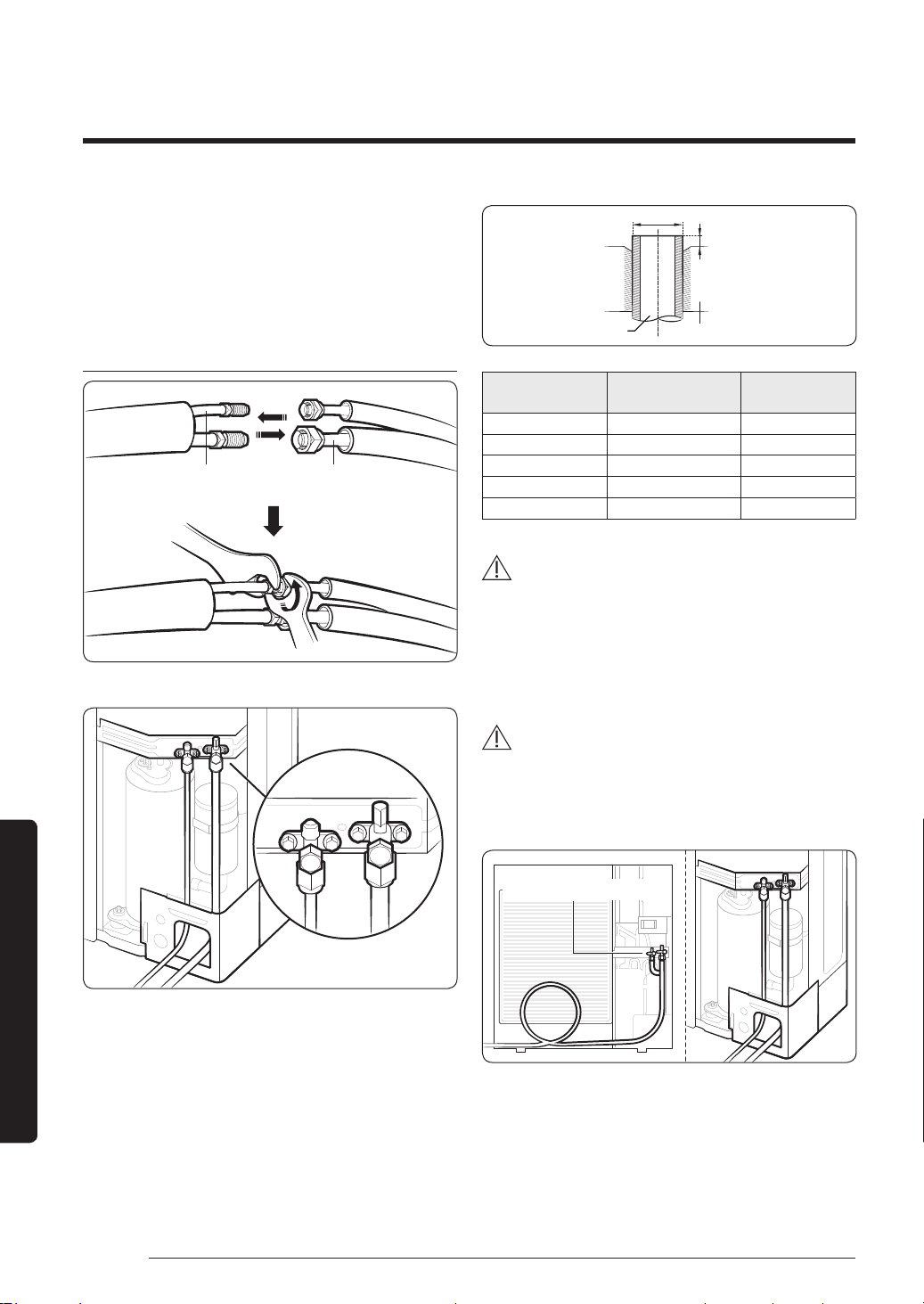
1 Connect each assembly pipe to the appropriate valves
on the indoor and outdoor units and fasten the flare
nuts.
2 As depicted in the illustration below, tighten the flare
nut manually, and then apply the following torque
with a torque wrench.
Indoor unit
Liquid side
service valve
Gas side
service valve
Outdoor unit
Liquid
Gas
D
A
Pipe Flare
Outer Diameter
(D, mm)
Fastening torque
(N·m)
Depth (A, mm)
6.35 14 to 18 1.3
9.52 34 to 42 1.8
12.7 49 to 61 2
15.88 68 to 82 2.2
19.05 100 to 120 2.2
WARNING
∙ During installation, make sure that there is no gas
leakage. When collecting refrigerant, first stop the
compressor. If the refrigerant pipe is not properly
connected and compressor runs with the service
valve open, the pipe takes in air and the pressure
rises, which may cause explosion or injury.
CAUTION
∙ Be sure to use C1220T-1/2H (Semi-hard) pipe for
more than Ø19.05 mm. If you use C1220T-O (Soft)
pipe for Ø19.05 mm, the pipe may be broken, which
can result in an injury.
Make at least one round:
It will reduce noise and vibration
∙ The appearance of the unit may be different from the
diagram depending on the model.
PAC_B2B 미라지 필리핀향_IBIM_EN_DB68-07271A-00_170504.indd 36 2017-06-02 오후 3:34:42
37English
Installation Procedure
Step 7 Optional: Cutting and flaring the
pipes
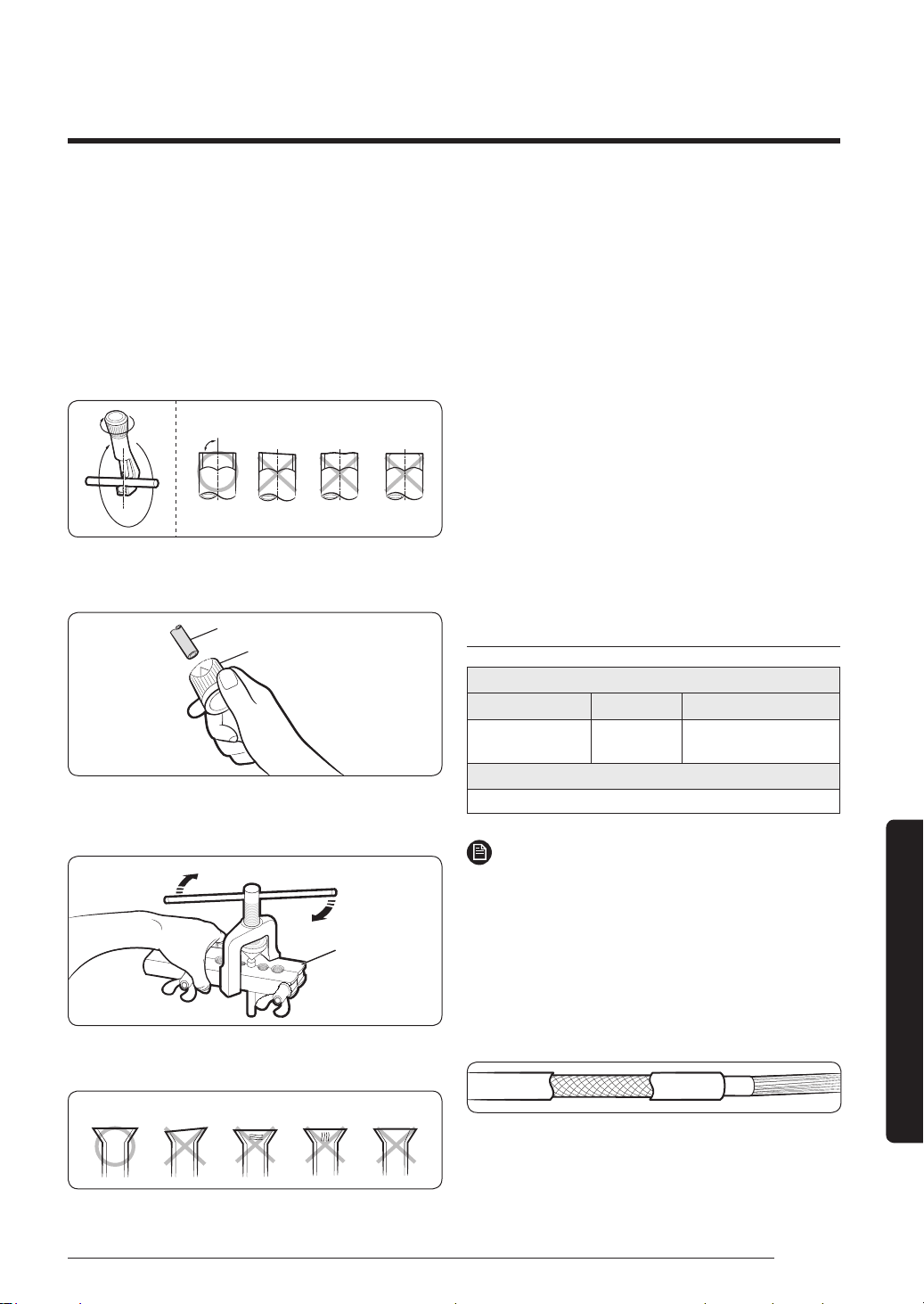
1 Make sure that you have the required tools; pipe
cutter, reamer, flaring tool, and pipe holder.
2 If you want to shorten the pipes, cut it with a pipe
cutter, making sure that the cut edge remains at a
90° angle to the side of the pipe. See the illustrations
below for the correct edge cut.
90°
Oblique
Rough Burr
3 To prevent gas leakage, remove all burrs at the cut
edge of the pipe with a reamer.
Pipe
Reamer
4 Slide a flare nut onto the pipe.
5 Modify the flare with a flaring tool.
Flaring tool
6 Check that the flaring has been properly made,
referring to the illustrations below.
Correct Inclined Damaged
Surface
Cracked Uneven
Thickness
Step 8 Connecting the power and
communication cables
Electrical work must be done by the certified personnel.
∙ Wiring work should be performed in compliance with
related regulations following technical specifications
and installation guide.
∙ Be sure to install an exclusive power supply. If you
use a power strip for multiple electrical connections,
there is a risk of electric shock or fire.
∙ Be sure to install a circuit breaker with a rated current
sensitivity of over 30 mA.
∙ Fasten the screws on the terminal block to be within
the rated range and so that they do not loosen.
∙ Be sure to connect the ground wire. Install the power
wire and make sure it is shorter than 50 m. If the
length of the power wire exceeds 50 m, the product
may not work properly or the wire may be damaged.
Outdoor-to-indoor power and communication
cables specifications
Indoor power supply
Power supply Max/Min (V) Indoor power cable
1Φ, 220-240V,
50/60 Hz
±10% 2.5 mm²
↑
, 3 wires
Communication cable
0.75 to 1.5 mm², 2 wires
NOTE
∙ For outdoor use, the power supply cords of
the appliances must not be lighter than the
polychloroprene sheathed flexible cord. (Code
designation IEC: 60245 IEC 57 / CENELEC: H05RN-F
or IEC: 60245 IEC66 / CENELEC H07RN-F)
∙ When installing the indoor unit in a computer room
or net work room, use the double shielded (tape
aluminium / polyester braid + copper ) cable of
FROHH2R type.
PAC_B2B 미라지 필리핀향_IBIM_EN_DB68-07271A-00_170504.indd 37 2017-06-02 오후 3:34:42
38 English
Installation Procedure
Installation Procedure
CAUTION
∙ Use rated cables or products only, with heat
resistance over 105°C, as well as properly rated
switches or fuses in the cabinet panel.
∙ Make sure that the cables connected do not produce
sparks around the auxiliary power switch or that
they are not installed in a place subject to high
temperature. High ambient temperature decreases
allowable current.
∙ Install the auxiliary power switch in a dry place,
install the panel board or electrical component box,
and then install the circuit breaker in the panel board.
∙ When connecting the main power cable, press the
cable to the terminal for a secure connection.
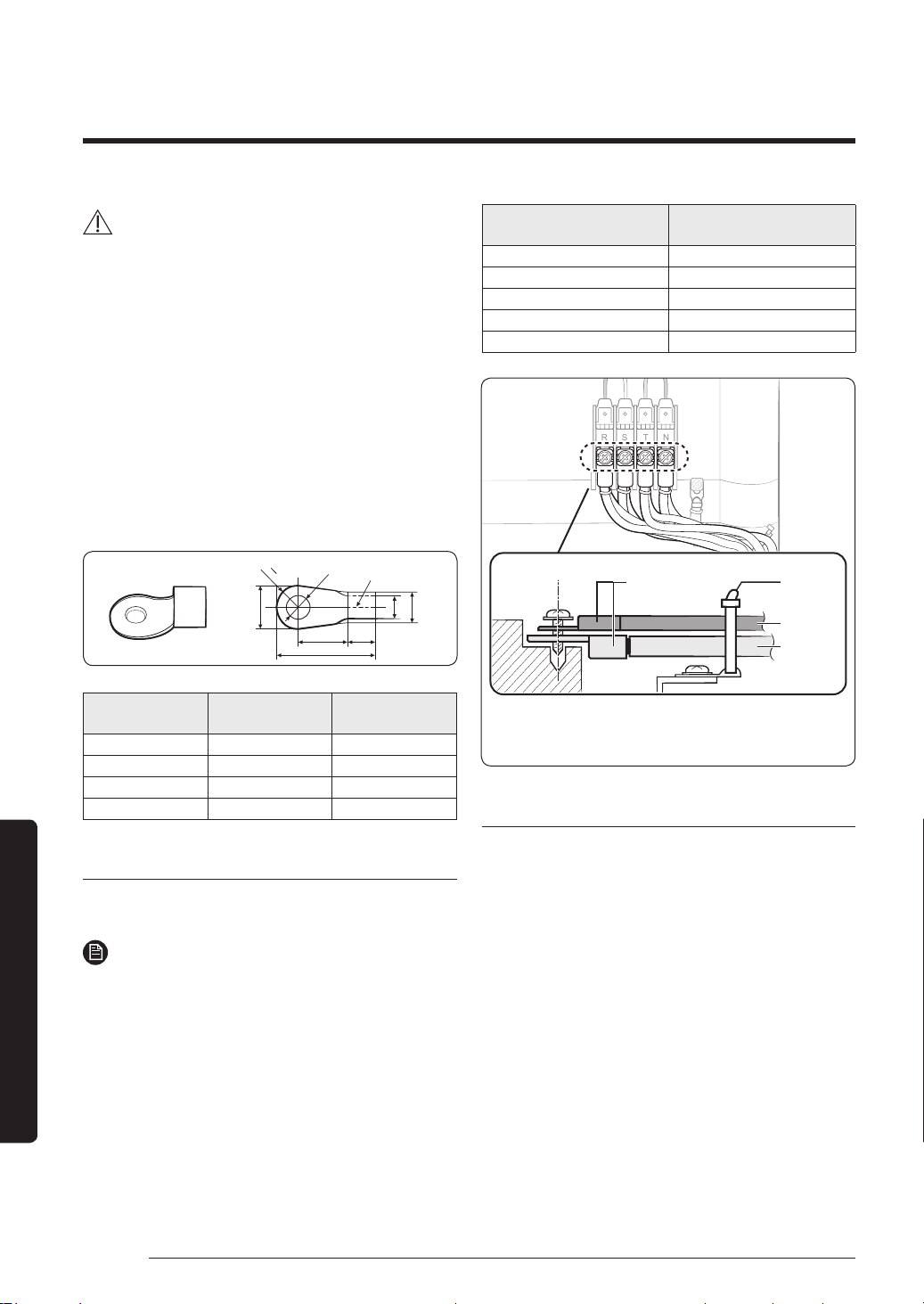
∙ Select a ring terminal for use.
R
B
2
d2
d1
D
B
L
F E
Silver solder
Thickness of the
wire (mm
2
)
B (mm) d2 (mm)
2.5 Less than 9.5 More than 4.5
4 Less than 9.5 More than 4.5
6 Less than 9.5 More than 4.5
10 Less than 15 More than 8.4
Connecting the cable to the power terminal
Connect the cables to the terminal board with the ring
terminals.
NOTE
∙ Be sure to use the certified and rated cables and
firmly connect them without applying any external
force to the ring terminal.
∙ Connect with a driver and wrench that can apply the
rated torque to the screws.
∙ Connect the terminal screws in compliance with the
rated tightening torques.
∙ If the terminal is loose, a fire may occur, caused by
arcing electricity. If the terminal is connected too
firmly, the terminal may be damaged.
Screw
Tightening torque for
terminal (kgf∙cm)
M3 5 to 7.5
M3.5 8 to 12
M4 12 to 18
M5 20 to 30
M6 25 to 37.5
R
S T N
When connecting two cables to a ring terminal, separate the ring
terminal up or down to prevent it from getting loose. Place the thin
cable upward and the thick cable downward. Fix the power cables
with a cable tie.
Solderless ring
terminal
Cable tie
Thin cable
Thick cable
Connecting the cables
∙ This product uses a single phase power, with 220 to
240V supply.
∙ When connecting the outdoor-to-indoor power cables,
be sure to match the numbers (or letters) between the
outdoor and indoor units. Connect the communication
cable to the connector included in the electrical
component box for each unit. When the outdoor-
to-indoor power cables are connected incorrectly, a
malfunction of the product may occur.
∙ When connecting the communication and outdoor-to-
indoor power cables, make sure these cables do not
touch the service valve on the refrigerant pipe on the
gas side or the pipes without proper insulation. Fix the
outdoor-to-indoor power cables to the insulated pipes.
∙ Be sure to comply with the wiring standards, as there
may be a risk of fire.
∙ Make sure to install the circuit breaker firmly inside
the electrical component box.
PAC_B2B 미라지 필리핀향_IBIM_EN_DB68-07271A-00_170504.indd 38 2017-06-02 오후 3:34:42
39English
Installation Procedure
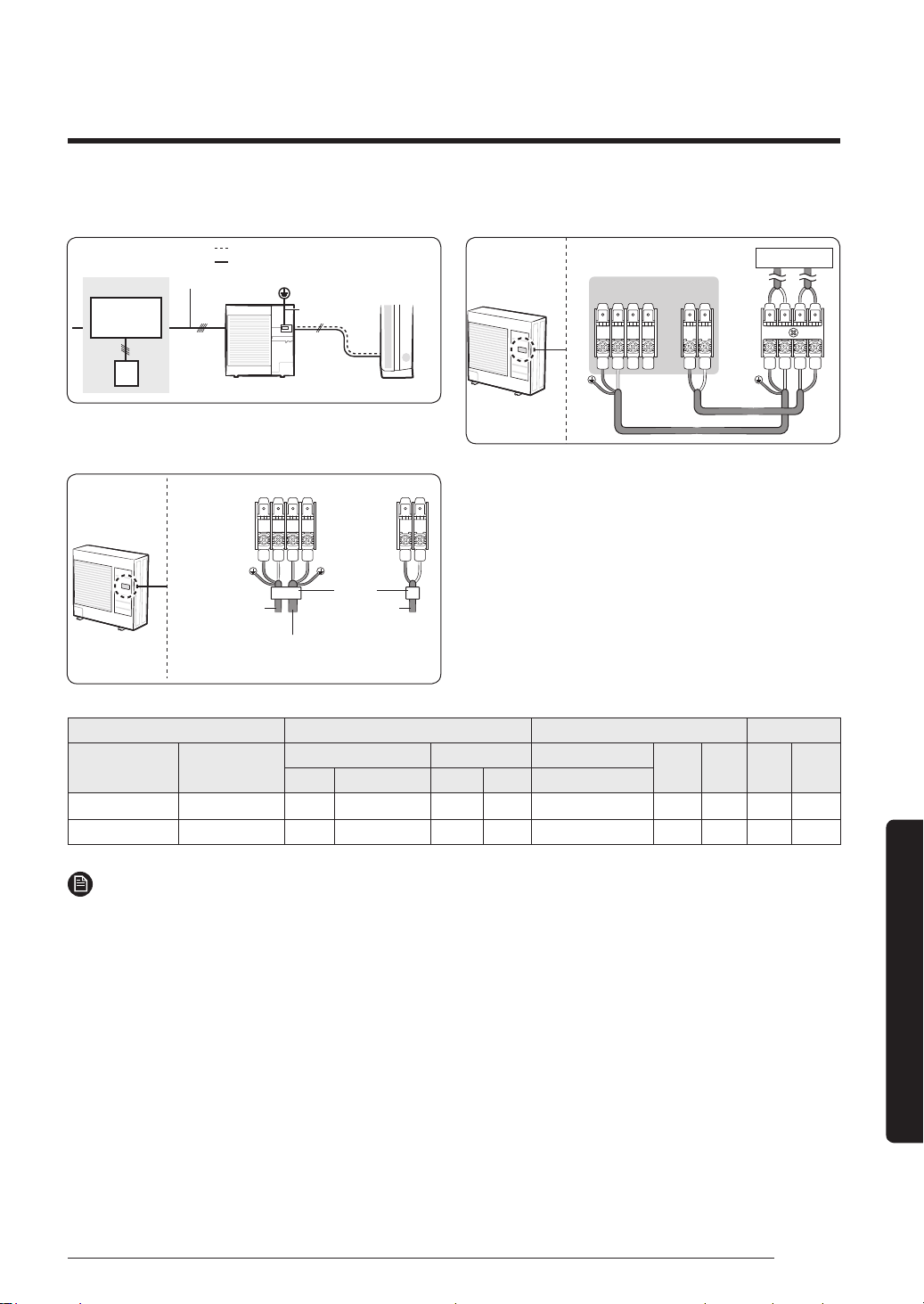
Entire system diagram
ELB
NFB Single
phase 220 to
240V, 50/60Hz
Outdoor-to-indoor power cable
Main power cable
Outdoor unit Indoor unit
Electrical panel
Earthing
Ground wire
Communication cable
Power wiring diagram
1(L)
2(N) L N
F1 F2
Outdoor-to-indoor
power cable
Communication
cable
cable tie
power supply cable (Single phase
AC 220-240V, should be purchased
on-site)
Indoor and outdoor unit connection diagram
1(L)
2(N) L N
F1 F2
1(L) 2(N)
F1 F2
Outdoor unit
Indoor unit
Main power cable specifications
The power cable is not supplied with air conditioner.
∙ Select the power supply cable in accordance with
relevant local and national regulations.
∙ Wire size must comply with the applicable local and
national code.
∙ Specifications for local wiring power cord and branch
wiring are in compliance with local cord.
Model Outdoor unit Input Current[A] Power supply
Outdoor unit Indoor unit
Rated
Voltage Range
Outdoor(Down_Amp)
Indoor Total MCA MFA
Hz Volts Min
.
Max
.
Cooling
AF36MV1MAEEXTC
AF36MV1MAEENTC
50/60 220-240 198 264 20.0 1.0 21.0 21.0 26.3
AF48MV1MAEEXTC
AF48MV1MAEENTC
50/60 220-240 198 264 32.0 1.6 33.6 33.6 42.0
NOTE
1 Voltage range
∙ Units are suitable for use on electrical systems where voltage supplied to unit terminal is not below or above
listed range limits
2 Maximum allowable voltage variation between phases is 2%.
3 Wire size & type must comply with the applicable local and national code.
∙ Wire size: Based on the value of MCA.
∙ Wire type: 60245 IEC57(IEC) or H05RN-F(CENELEC) grade or more.
4 MFA is used to select the circuit breaker and the ground fault circuit interrupter (earth leakage circuit breaker).
5 MCA represents maximum input current.
∙ MFA represents capacity which may accept MCA
∙ Abbreviations
MCA: Min. Circuit Amps. (A)
MFA: Max. Fuse Amps. (A)
PAC_B2B 미라지 필리핀향_IBIM_EN_DB68-07271A-00_170504.indd 39 2017-06-02 오후 3:34:43
40 English
Installation Procedure
Installation Procedure
Step 9 Optional: Extending the power
cable
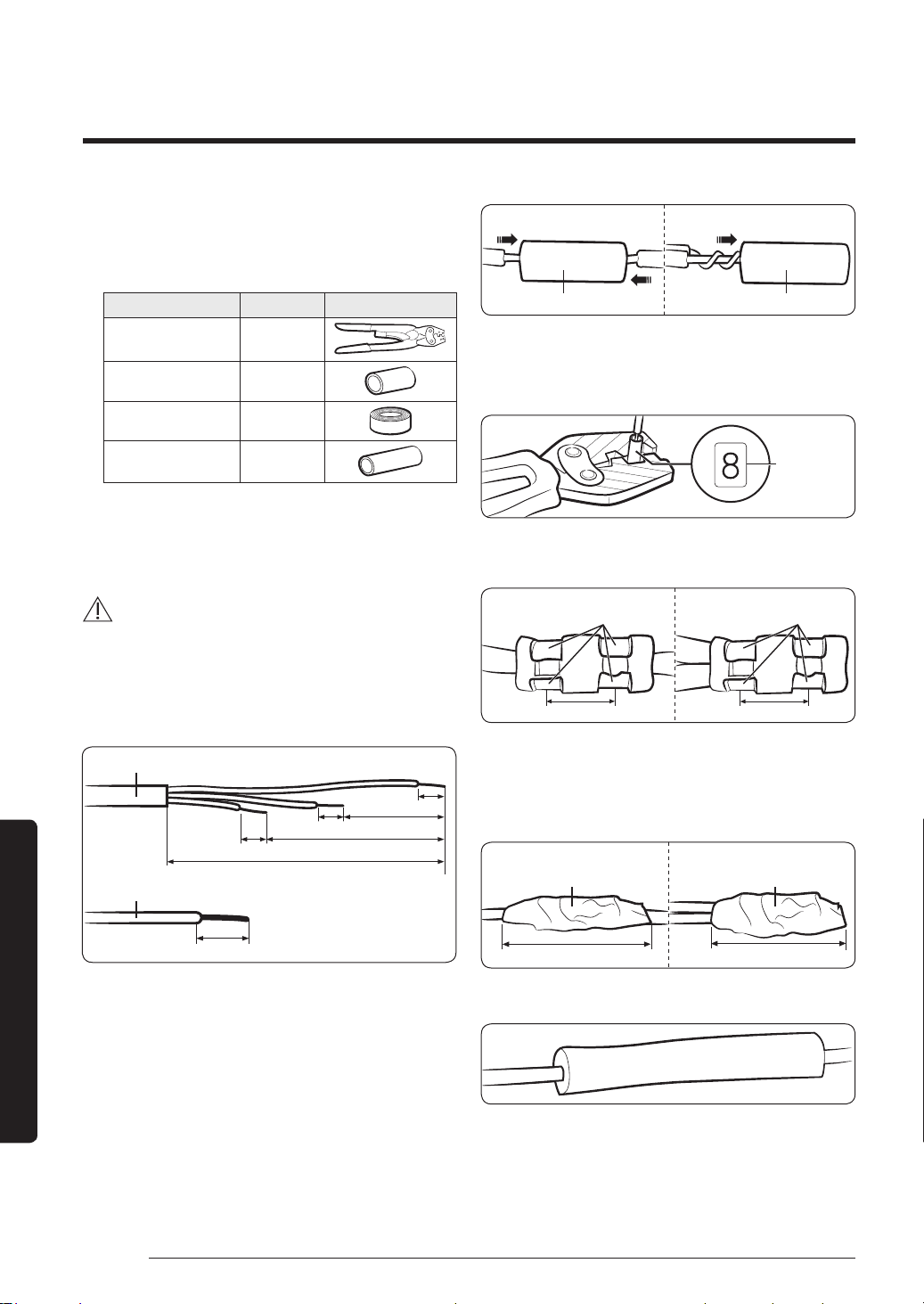
1 Prepare the following tools.
Tools Spec Shape
Crimping pliers MH-14
Connection sleeve
(mm)
20 x Ø6.5
(HxOD)
Insulation tape
Width 19
mm
Contraction tube
(mm)
70 x Ø8.0
(LxOD)
2 As shown in the figure, peel off the shields from the
rubber and wire of the power cable.
∙ Peel off 20 mm of cable shields from the pre-
installed tube.
CAUTION
∙ For information about the power cable specifications
for indoor and outdoor units, refer to the installation
manual.
∙ After peeling off cable wires from the pre-installed
tube, insert a contraction tube.
Power cable
Pre-installed tube for the power cable
(Unit: mm)
20
20
20
20
60
120
180
3 Insert both sides of core wire of the power cable into
the connection sleeve.
∙ Method 1: Push the core wire into the sleeve from
both sides.
∙ Method 2: Twist the wire cores together and push it
into the sleeve.
Connection sleeveConnection sleeve
Method 2Method 1
4 Using a crimping tool, compress the two points and flip it
over and compress another two points in the same location.
∙ The compression dimension should be 8.0.
Compression
dimension
∙ After compressing it, pull both sides of the wire to
make sure it is firmly pressed.
Compress it 4 times. Compress it 4 times.
5 mm 5 mm
Method 1 Method 2
5 Wrap it with the insulation tape twice or more and
position your contraction tube in the middle of the
insulation tape.
Three or more layers of insulation are required.
Method 1 Method 2
Insulation tape Insulation tape
40 mm 35 mm
6 Apply heat to the contraction tube to contract it.
Contraction tube
PAC_B2B 미라지 필리핀향_IBIM_EN_DB68-07271A-00_170504.indd 40 2017-06-02 오후 3:34:43
41English
Installation Procedure
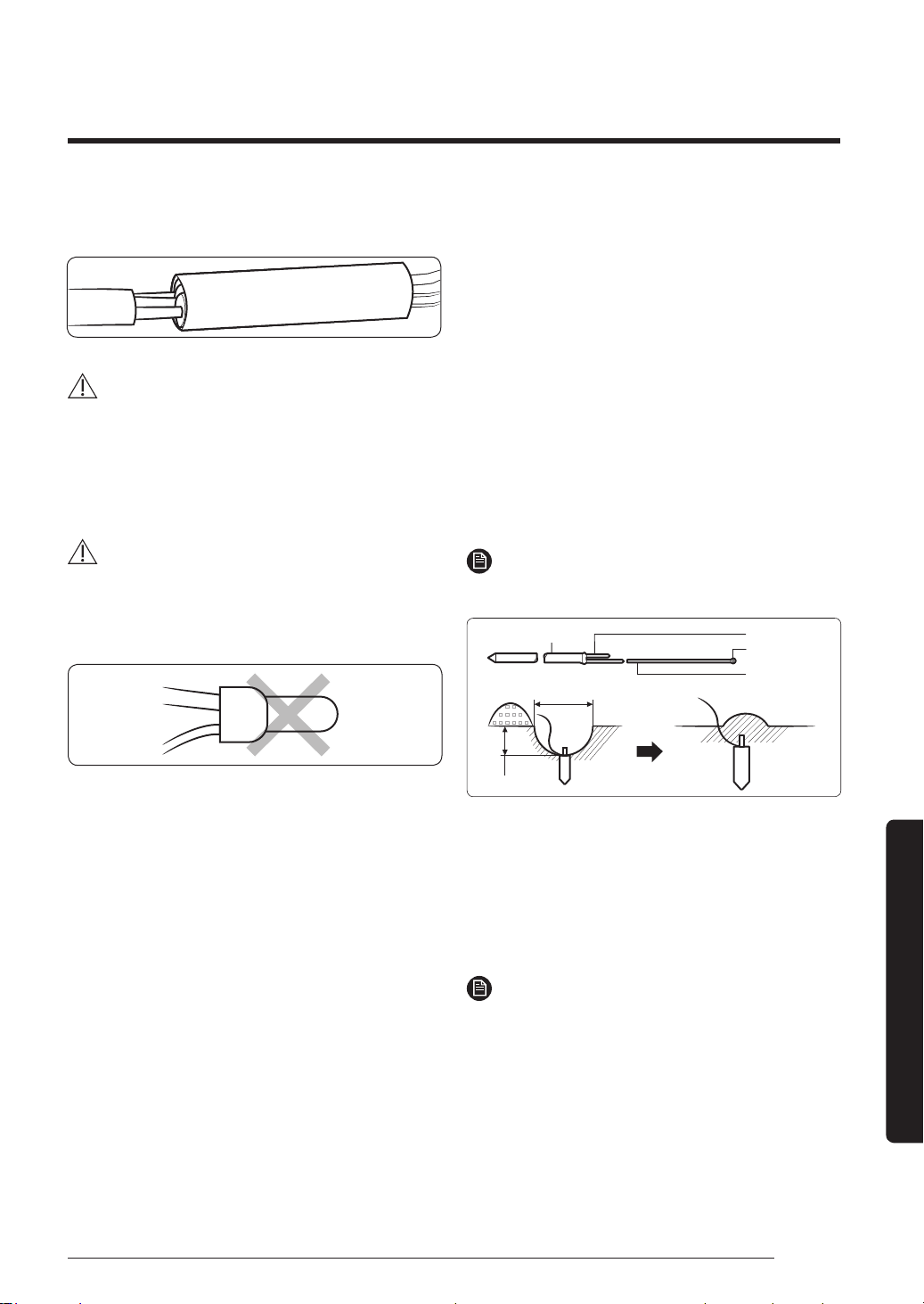
7 After tube contraction work is completed, wrap it with
the insulation tape to finish.
Insulation tape
CAUTION
∙ Make sure that the connection parts are not exposed
to outside.
∙ Be sure to use insulation tape and a contraction tube
made of approved reinforced insulating materials that
have the same level of withstand voltage with the power
cable. (Comply with the local regulations on extensions.)
WARNING
∙ In case of extending the electric wire, please DO NOT
use a round-shaped pressing socket.
– Incomplete wire connections can cause electric
shock or a fire.
Step 10 Checking the earthing
If the power distribution circuit does not have a earthing
or the earthing does not comply with specifications, an
earthing electrode must be installed. The corresponding
accessories are not supplied with the air conditioner.
1 Select an earthing electrode that complies with the
specifications given in the illustration.
2 Connect the flexible hose to the flexible hose port.
∙ In damp hard soil rather than loose sandy or gravel
soil that has a higher earthing resistance.
∙ Away from underground structures or facilities,
such as gas pipes, water pipes, telephone lines and
underground cables.
∙ At least two metres away from a lightening
conductor earthing electrode and its cable.
NOTE
∙ The earthing wire for the telephone line cannot be
used to ground the air conditioner.
50 cm
30 cm
Carbon plastic
To grounding screw
Steel core
Terminal M4
PVC-insulated
green/yellow
wire
3 Finish wrapping insulating tape around the rest of the
pipes leading to the outdoor unit.
4 Install a green/yellow coloured earthing wire:
∙ If the earthing wire is too short, connect an
extension lead in a mechanical way and wrap it
with insulating tape (do not bury the connection).
∙ Secure the earthing wire in position with staples.
NOTE
∙ If the earthing electrode is installed in an area with
heavy traffic, its wire must be connected securely.
5 Carefully check the installation by measuring the
earthing resistance with a earth resistance tester. If
the resistance is above the required level, drive the
electrode deeper into the ground or increase the
number of earthing electrodes.
6 Connect the earthing wire to the electrical component
box inside of the outdoor unit.
PAC_B2B 미라지 필리핀향_IBIM_EN_DB68-07271A-00_170504.indd 41 2017-06-02 오후 3:34:44
42 English
Installation Procedure
Installation Procedure
Step 11 Performing gas leakage test
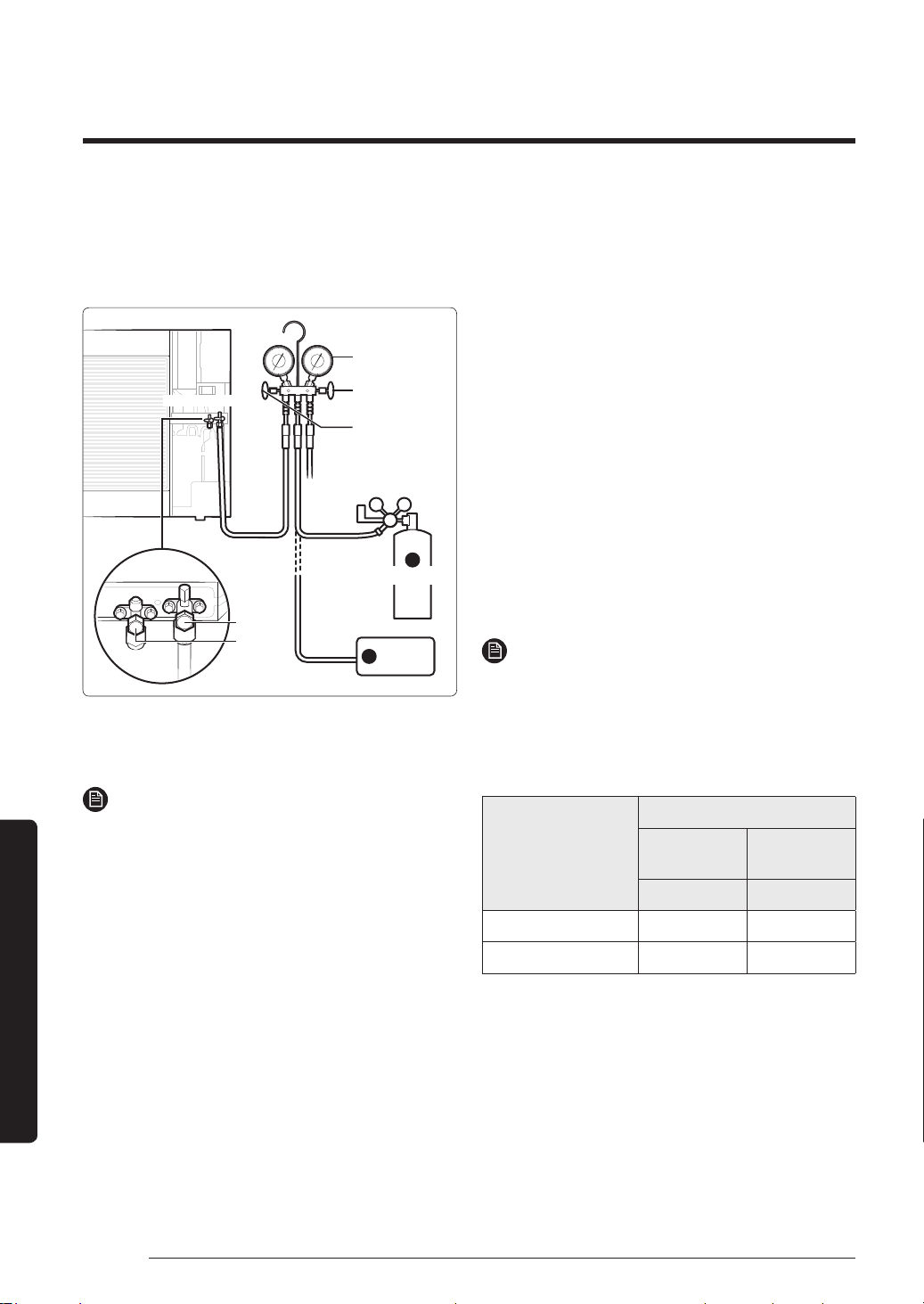
Use nitrogen gas at a pressure range between 0.2 and 4.1
MPa when testing the gas leakage. If you apply pressure
at over 4.1 MPa, the refrigerant pipes may be damaged.
Outdoor unit
Gas
Liquid
2
Manifold gauge
High pressure side
Low pressure side
Vacuum
pump
Nitrogen gas
1
1 Connect the charging hose of low pressure side of
manifold gauge to the packed valve having a service
port as shown at the figure.
NOTE
∙ The designs and shape are subject to change
according to the model.
2 Open the valve of the low pressure side (A) of the
manifold gauge anticlockwise.
3 Connect the manifold gauge to the nitrogen gas.
4 Apply nitrogen gas.
5 Check the change of pressure with a pressure
regulator.
6 Check the gas leakage at the connection part or
brazed part by using soap water.
7 Open the manifold gauge to discharge nitrogen.
Step 12 Evacuating the air
1 Connect the manifold gauge to a vacuum pump.
2 Purge the air from the system using the vacuum
pump for about 30 minutes.
∙ Make sure that pressure gauge shows -0.1006 Mpa
after about 30 minutes.
∙ Use a vacuum pump that is at least 140 l/min in
capacity.
∙ Make sure that vacuuming timing is longer when
the piping gets longer.
∙ Pressure will not drop even after 5 minutes of
vacuuming when there is moisture within the pipe.
In this case, apply nitrogen gas again, and then
purge the air again.
Step 13 Charging the refrigerant
1 Measure the quantity of refrigerant depending on the
length of the liquid side pipe.
NOTE
∙ When the pipe length exceeds the standard pipe
length of 5 m, charge refrigerant according to the
increased length. Do not charge refrigerant by
assuming the quantity through the pressure gauge.
When the pipe length is shorter than the standard,
you do not need to charge refrigerant.
Model name
Refrigerant amount
Standard
(less 5m)
Additional
(over 5m)
g g/m
AF36MV1MAEEXTC 1500 20
AF48MV1MAEEXTC 2900 30
PAC_B2B 미라지 필리핀향_IBIM_EN_DB68-07271A-00_170504.indd 42 2017-06-02 오후 3:34:44
43English
Installation Procedure
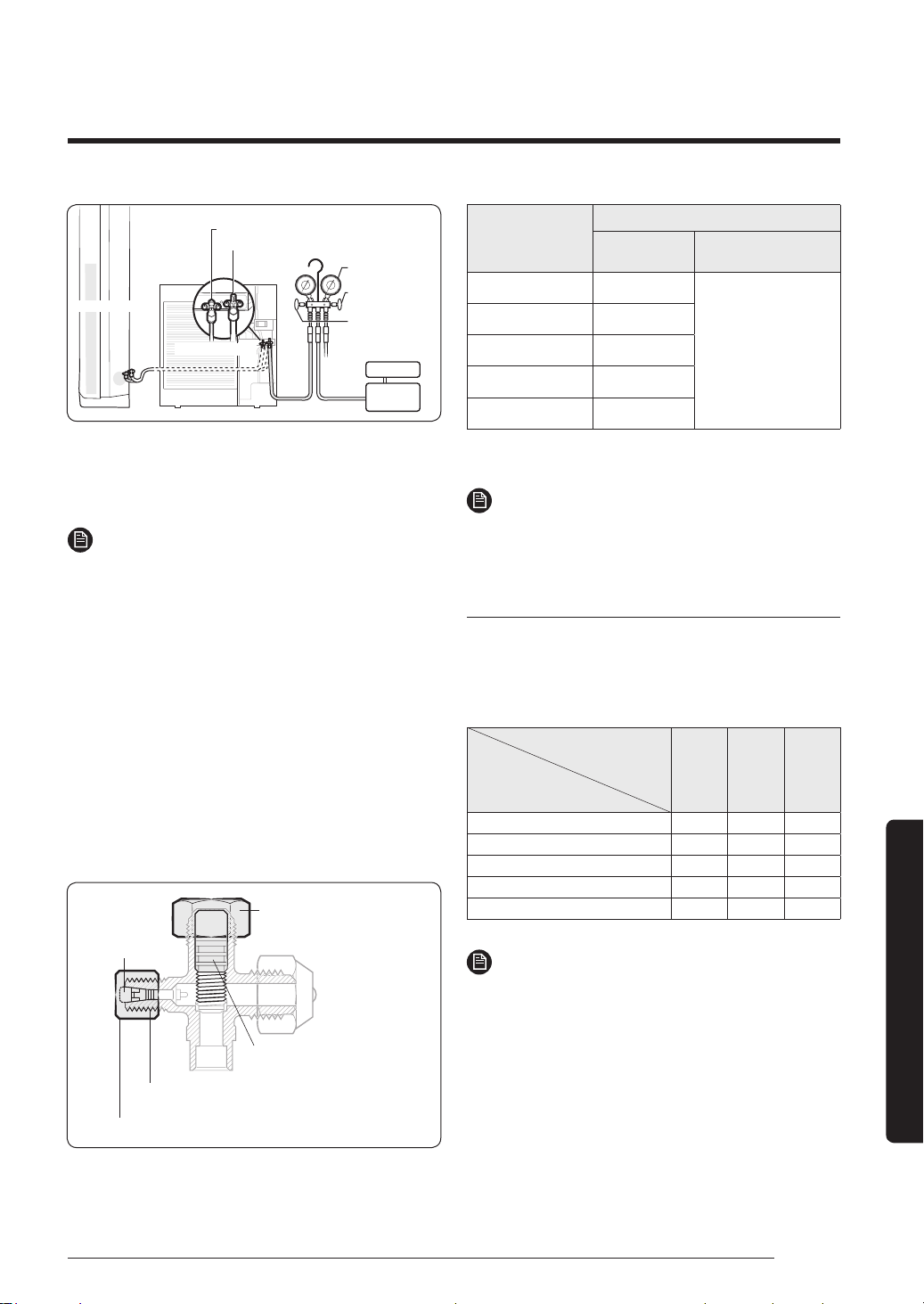
Outdoor unit
Ref.
(Scale)
Indoor unit
Liquid side service valve
Manifold gauge
Vacuum
pump
High pressure
side
Low pressure
side
Gas side service valve
Open the manifold gauge valve connected to the liquid
service valve and add refrigerant to reach the fixed
quantity noting the scale.
NOTE
∙ If you cannot add refrigerant when the operation of
the outdoor unit is stopped, open the gas and liquid
service valves and add remaining refrigerant by
pressing the cooling trial operation button.
∙ After charging, completely open the spindles of
the both the gas and liquid side service valves by
rotating them anti-clockwise. (Do not press them
further if the spindle hits the stopper.)
∙ Fasten the caps of the service valves for the gas and
liquid pipes including the cap nut of the charging
port.
– There may be slight refrigerant leakage when you
open the spindle with a wrench. This is not a failure
of the product.
– Use a wrench that can apply the appropriate force.
Tightening torque for body cap
(Refer to the table)
Spindle
Charging core
R-22: Thread of the screw - 7/16-2OUNF
R-410A: Thread of the screw -1/2-2OUNF
Tightening torque for charging port cap (Refer to the table)
Outer diameter
(mm)
Tightening torque
Body cap
(N•m)
Charging port cap
(N•m)
ø 6.35 20 to 25
10 to 12
ø 9.52 20 to 25
ø 12.70 25 to 30
ø 15.88 30 to 35
Over ø 19.05 35 to 40
(1N•m=10kgf•cm)
NOTE
∙ Be extra cautious for the gas leakage from the 3-way
valve’s stem nuts (gas side), and from the service port
cap.
Pressure table for each temperature
If extra refrigerant charging is required due to gas
leakage or product relocation, see the following table.
Cooling operation
Unit: [kPa, G]
Indoor temperature (°C)
(Dry bulb /
Wet bulb)
Outdoor temperature (°C)
32/23 27/19 21/15
46 1040 850 730
35 920 750 640
21 830 690 590
7 690 540 490
-15 550 400 370
NOTE
∙ Pressure for each temperature was measured at the
gas side service valve.
PAC_B2B 미라지 필리핀향_IBIM_EN_DB68-07271A-00_170504.indd 43 2017-06-02 오후 3:34:44
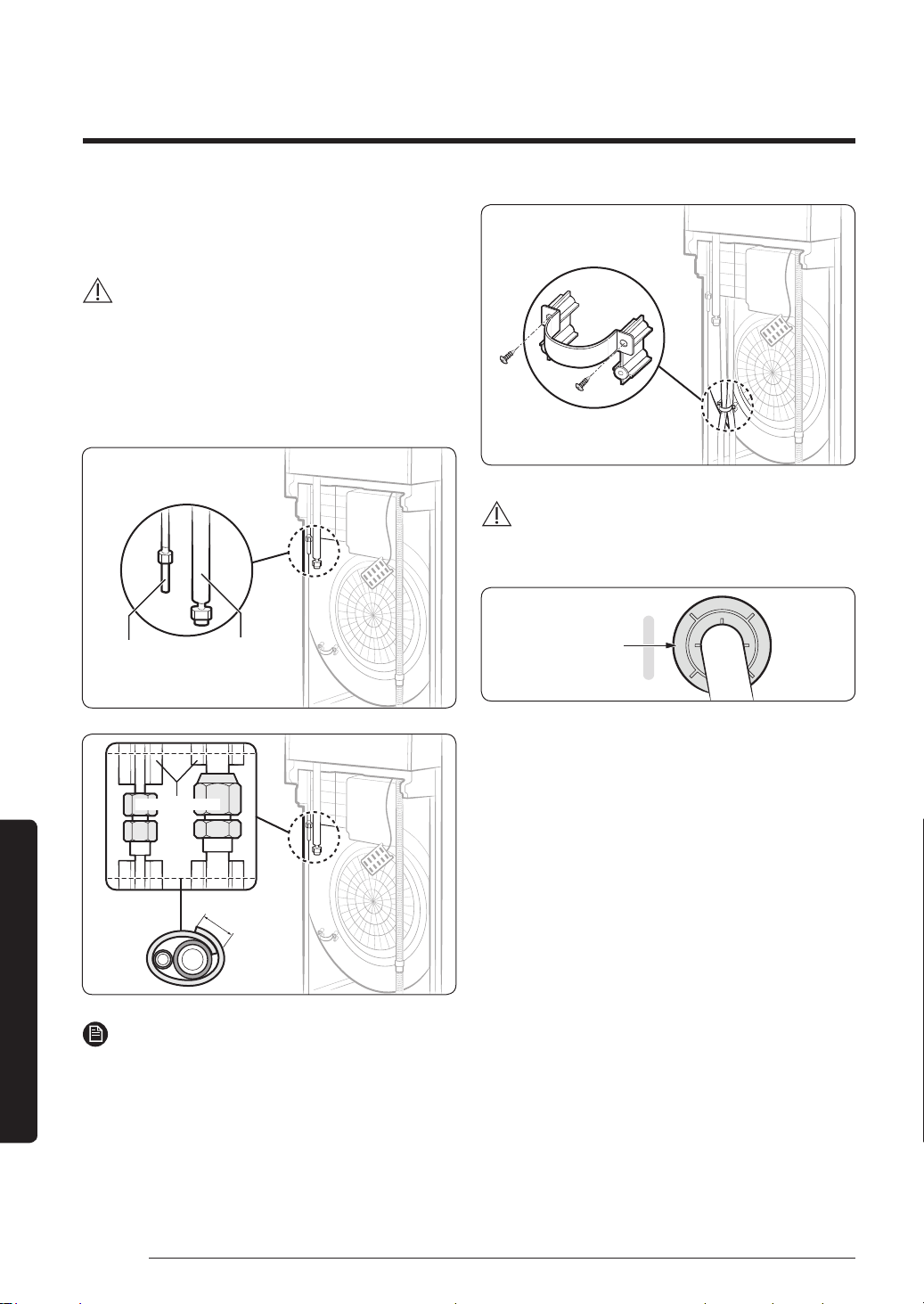
44 English
Installation Procedure
Installation Procedure
Step 14 Fixing and insulating the
connection part for refrigerant pipes
CAUTION
∙ Before wrapping the connection part for refrigerant
pipes, be sure to check whether there is gas leakage
on the connection part.
1 Wrap the foam insulation around the connection
part as shown in the figure. This wrapping minimises
condensation.
High
pressure
pipe
Low
pressure
pipe
Insulator for pipe
connection part
30 mm or more
Pipe insulation
NOTE
∙ Use polyethylene foam over 5 mm thick to insulate
the connection.
2 Fasten the pipes with a pipe clamp and fix it with
screws.
WARNING
∙ Remove the middle part of the pipe outlet protection
rubber before inserting the pipe.
Pipe outlet
protection rubber
PAC_B2B 미라지 필리핀향_IBIM_EN_DB68-07271A-00_170504.indd 44 2017-06-02 오후 3:34:45
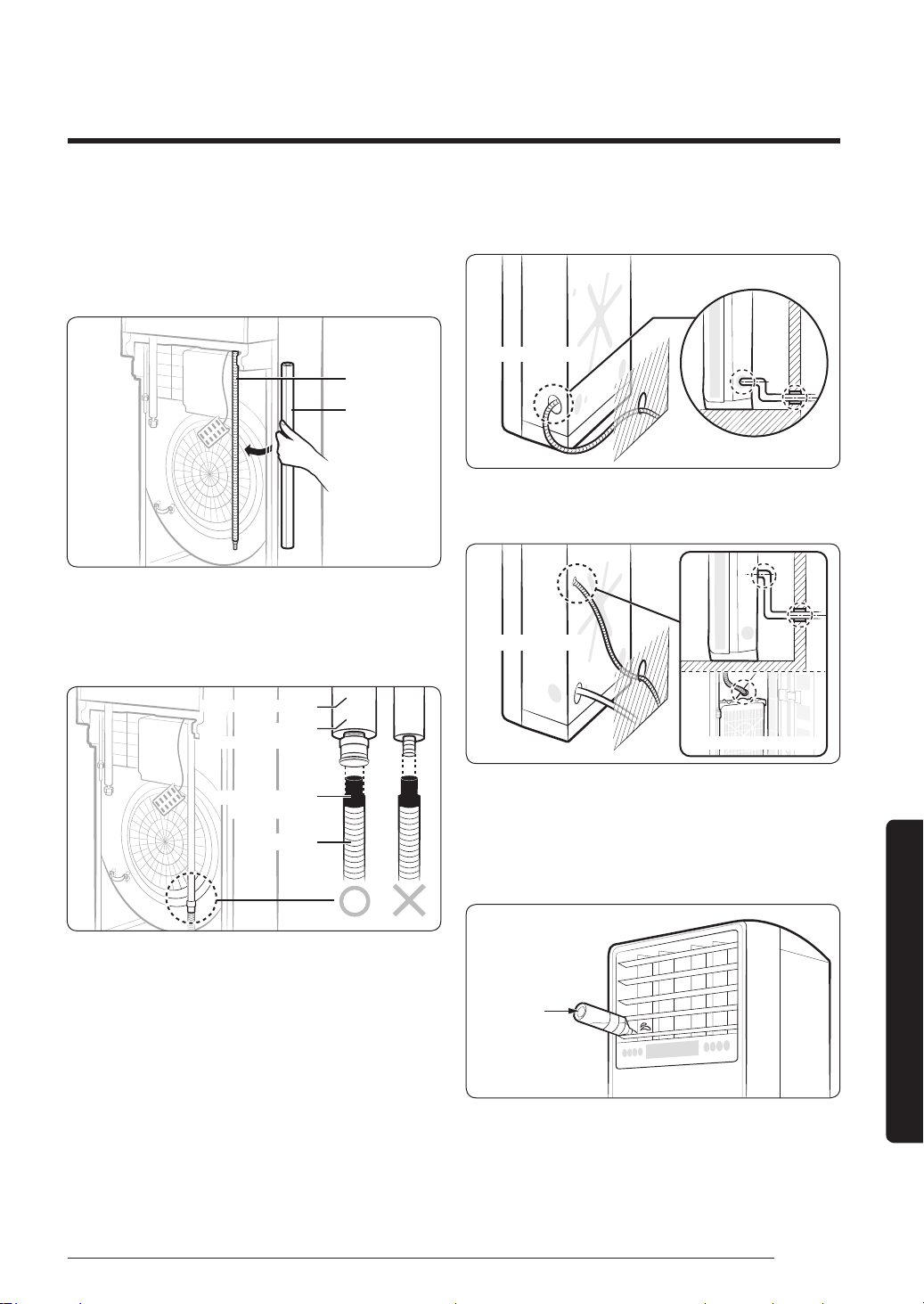
45English
Installation Procedure
Step 15 Installing and connecting the
drain hose
1 Wrap the drain hose with the provided insulation.
This wrapping minimises condensation.
Drain hose
Insulation
2 Insert the end of the drain hose to the extension drain
hose to make a connection.
3 Tightly wrap the connection part with a cable tie or
tape for fixing.
Connecting drain hose
Insulation
(foamed polyethylene)
Drain hose
Drain hole for duct
(polypropylene)
∙ When the hole of the drain hose on the wall is lower
than that of the drain hose connection
Indoor unit
∙ When the hole of the drain hose on the wall is higher
than that of the drain hose connection
Inside indoor unit
Indoor unit
Step 16 Performing drainage test
Put the water bottle deeply into the first blade on the
left of the air outlet and slowly pour water.
Water bottle
PAC_B2B 미라지 필리핀향_IBIM_EN_DB68-07271A-00_170504.indd 45 2017-06-02 오후 3:34:45
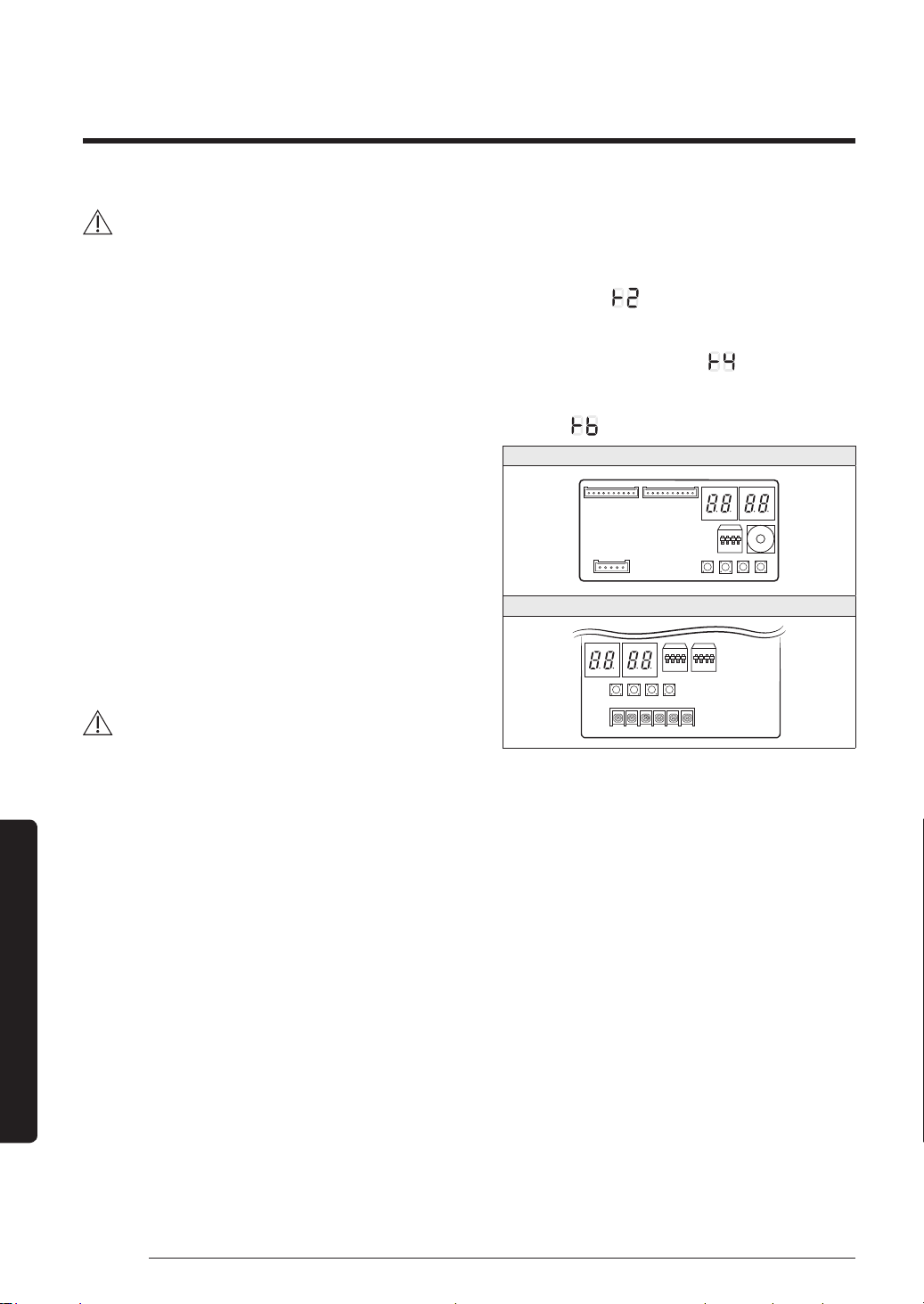
46 English
Installation Procedure
Installation Procedure
CAUTION
∙ Install the drain hose in a downward direction.
∙ Water leakage may occur when the drain hose is not
firmly fixed with a cable tie or tape.
∙ If there is any foreign substance in the drain pan,
it may clog the drain hose. Be sure to remove the
foreign substance after installation.
∙ Do not use the drain hose connected by multiple
drain hoses.
– Water may leak from the extension connection
part. Install the drain hose for each piece.
– If its length is too short and you cannot avoid
the connecting multiple drain hoses, be sure to
use silicone sealant or other material for water-
proofing. Do not use the insulating tape.
Step 17 Checking the earthing
Before supplying main power, use a DC 500V insulation
resistance tester to measure the resistance between the
power terminals (L, N) and the outdoor unit earthing.
Make sure that the measurement comes to 30 MΩ.
CAUTION
∙ Do not test the communication terminals with the DC
500V insulation resistance tester. Failure to do so may
damage the communication circuit.
∙ Use a common circuit tester to test the
communication terminals for open or short circuit.
Step 18 Performing the final check and
trial operation
1 Check the power supply between the outdoor unit
and the auxiliary circuit breaker.
∙ 1 phase power supply: L, N
2 Check the indoor unit.
∙ Check that you have connected the power and
communication cables correctly. If the power
cable and communication cables one mixed up or
connected incorrectly, the PCB will be damaged.
∙ Check that the thermistor sensor, drain pump/hose,
and display are connected correctly.
3 Press K2 on the outdoor unit PCB to run the test
mode and stop.
∙ Press K2 button
→
Start Cooling test mode
→
Press
K2 button three times
→
Stop
→
Cooling test mode
7-seg display:
∙ Press K2 button twice
→
Start Inverter Checker
mode
→
Press K2 button twice
→
Stop
→
Inverter
Checker mode 7-seg display:
∙ Press K2 three times
→
Start Pump down mode
→
Press K2 button
→
Stop
→
Pump down mode 7-seg
display:
AF36MV1MAEEXTC
1
2
3
4
5
6
7
8
9
0
K1 K2 K3 K4
AF48MV1MAEEXTC
K1 K2 K3 K4
4 After 12 minutes of stationary conditions check each
indoor unit air treatment:
∙ Cooling mode (indoor unit check)
→
Inlet air temp. -
Outlet air temp.: From 10°C to 12°C
5 How to reset the power supply of the outdoor unit
and deactivate the eco mode (standby mode):
∙ Outdoor unit types A, B and C: Press the K3 button
for over 1 second to reset the power supply of the
outdoor unit and deactivate the eco mode (standby
mode).
PAC_B2B 미라지 필리핀향_IBIM_EN_DB68-07271A-00_170504.indd 46 2017-06-02 오후 3:34:46
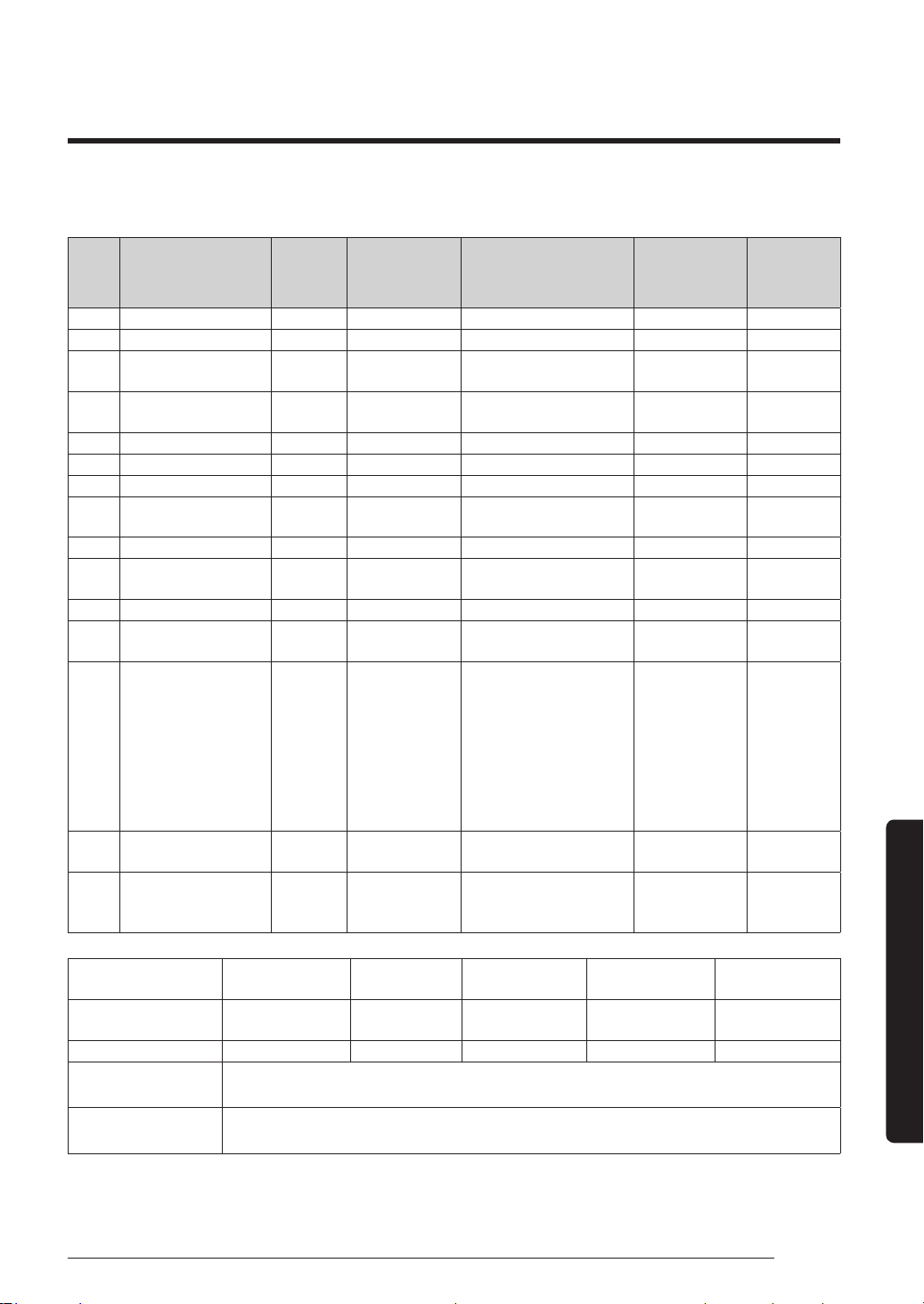
47English
Installation Procedure
6 View mode: When the K4 switch is pressed, you can see information about our system state, as detailed below.
K4
short
push
Display contents SEG1 SEG2 SEG3 SEG4 Unit
1 Order frequency 1 Hundreds digit Tens digit Units digit Hz
2 Current frequency 2 Hundreds digit Tens digit Units digit Hz
3
The number of
current indoor units
3 Hundreds digit Tens digit Units digit EA
4
The sensor for
outdoor air intake
4 + / - Tens digit Units digit °C
5 Discharge sensor 5 Hundreds digit Tens digit Units digit °C
6 Eva-Mid sensor 6 + / - Tens digit Units digit °C
7 Cond sensor 7 + / - Tens digit Units digit °C
8 Current 8 Tens digit Units digit
The first place
of decimals
A
9 Fan RPM 9 Thousands digit Hundreds digit Tens digit rpm
10
Target discharge
temperature
A Hundreds digit Tens digit Units digit °C
11 EEV B Hundreds digit Tens digit Units digit step
12
The capacity sum of
indoor units
C Tens digit Units digit
The first place
of decimals
kW
13 Protective control D 0: Cooling
Protective control
0: No Protective control
1: Freezing
2: Non-stop defrosting
3: Over-load
4: Discharge
5: Total electric current
Frequency
status
0: Normal
1: Hold
2: Down
3: Up_limit
4: Down_limit
-
14
The temperature of
heat radiating plate
E Hundreds digit Tens digit Units digit -
15
The number of
connected indoor
units
F Hundreds digit Tens digit Units digit EA
Long push
Main micom
version
Year (Dec) Month (Hex) Date (Tens digit) Date (Units digit)
After short push 1
Inverter micom
version
Year (Dec) Month (Hex) Date (Tens digit) Date (Units digit)
After short push 1 E2P version Year (Dec) Month (Hex) Date (Tens digit) Date (Units digit)
After short push 3
Page 1 - AUTO
Page 2 - (SEG1,2 - Indoor:"A","0") (SEG3,4 - Address: ex) 00)
After short push 4
Page 1 - MANU
Page 2 - (SEG1,2 - Indoor:"A","0") (SEG3,4 - Address: ex) 00)
∙ Long push K4 (Main micom ver.)
→
short push 1 more (Inv. micom ver.)
→
short push 1 more (E2P. ver.)
PAC_B2B 미라지 필리핀향_IBIM_EN_DB68-07271A-00_170504.indd 47 2017-06-02 오후 3:34:46
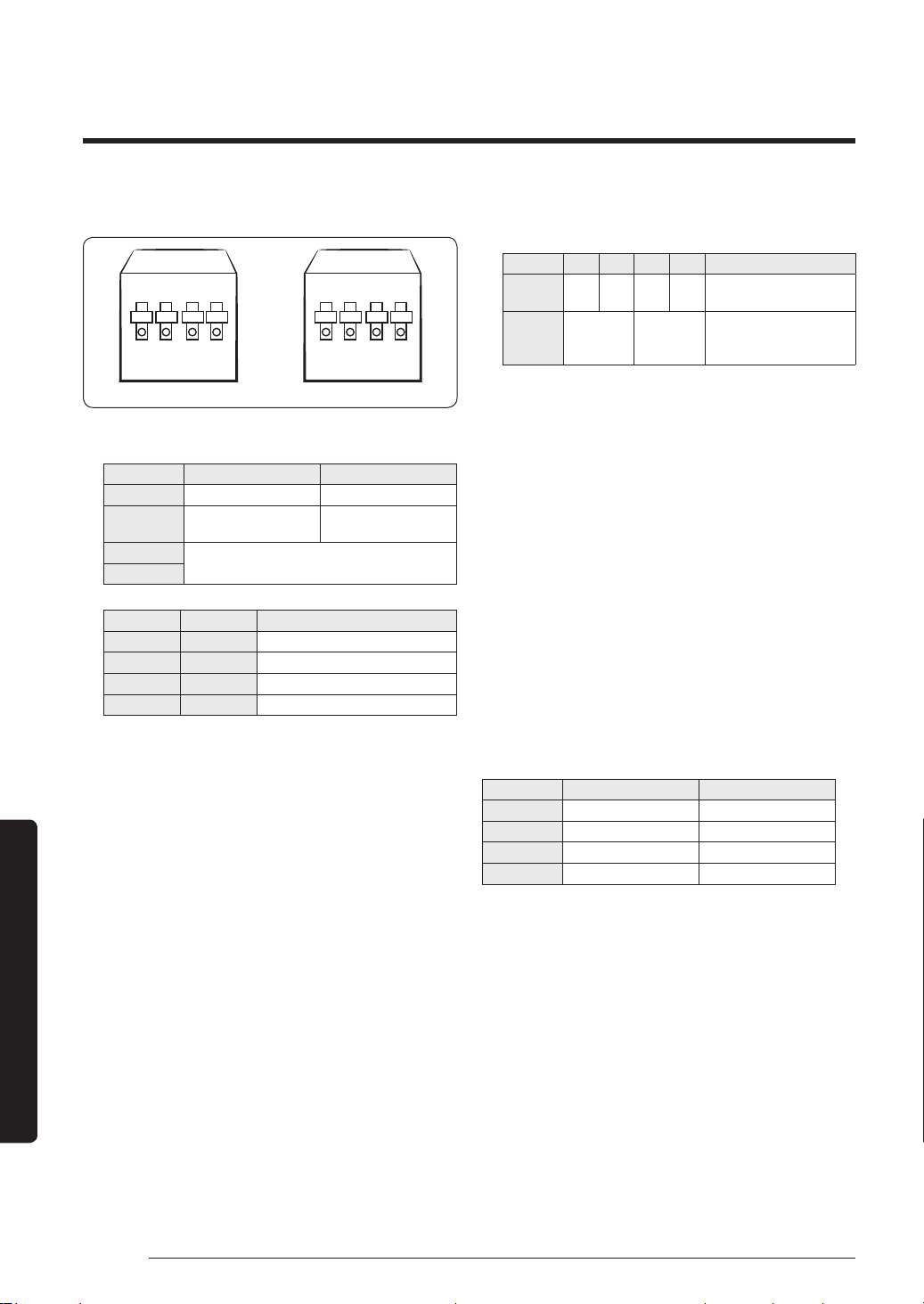
48 English
Installation Procedure
Installation Procedure
7 DIP switch option
ON
1 2 3 4 1 2 3 4
ON
SW507 SW508
∙ SW507 option
On (default) Off
Switch 1 - -
Switch 2
Disable snow
prevention control
Enable snow
prevention control
Switch 3
Silence mode option
Switch 4
Switch 3 Switch 4 Operation
On On Disable Silence mode
On Off Silence mode step 1
Off On Silence mode step 2
Off Off Silence mode step 3
(*1) Setting the address manually
a Turn off the air conditioner, press and hold the
K2 switch for a while to enter the Option mode.
(Initial value: 00AU)
– You cannot enter the Option mode when the
air conditioner is running.
b Set the address in SEG3 and SEG4 by pressing the
K2 switch shortly.
Option SEG1 SEG2 SEG3 SEG4 Function
Channel
address
0 0 A U
The address is
setautomatically.
00 to 15
The address is
setmanually. You can set
avalue from 0 to 15.
c Press and hold the K2 switch for a while to save
the address and exit the Option mode. Each
segment will flicker for 3 seconds in the current
display state. Then if you need to change the
address, reset the system, and then repeat all
steps again. Press and hold the K1 switch to exit
without save.
※
If you want to restore the setting to factory default,
press and hold the K4 button while you are in the
option setting mode.
– If you press and hold the K4 button, setting will
be restored to factory default but it doesn't mean
that restored setting is saved.Press and hold the
K2 button. When the segments shows that tracking
mode is in progress, setting will be saved
∙ When snow prevention mode is in use, eco mode
(standby mode) will not work.
∙ SW508 option (AF48MV1MAEEXTC)
On (default) Off
Switch 1 Auto Silence mode Manual Silence mode
Switch 2 - -
Switch 3 - -
Switch 4 - -
Appendix
PAC_B2B 미라지 필리핀향_IBIM_EN_DB68-07271A-00_170504.indd 48 2017-06-02 오후 3:34:46
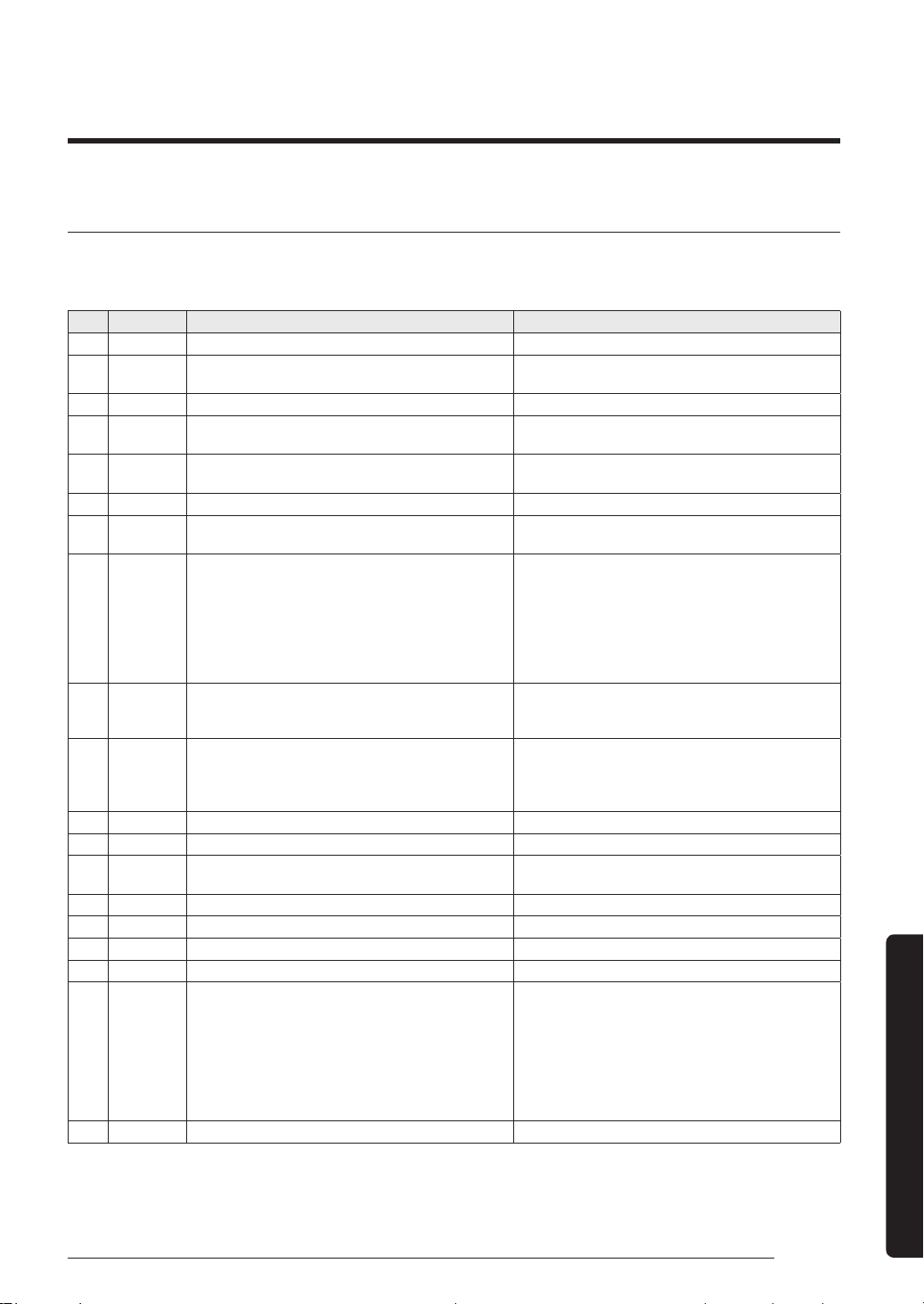
49English
Appendix
Troubleshooting
The table below lists the self-diagnostic routines. For some of error codes, you must contact an authorized service
centre. If an error occurs during the operation, it is displayed on the outdoor unit PCB LED, both MAIN PCB and
INVERTER PCB.
No. Error Code Meaning Remarks
1 E108 Error due to duplicated communication address Check on repeated indoor unit main address
2 E121
Error on room temperature sensor of indoor unit
(Short or Open)
Indoor unit Room Thermistor Open/Short
3 E122 Error on EVA IN sensor of indoor unit (Short or Open) Indoor unit EVA_IN Thermistor Open/Short
4 E123
Error on EVA OUT sensor of indoor unit (Short or
Open)
Indoor unit EVA_OUT Thermistor Open/Short
5 E153 Error on float switch (2nd detection)
Indoor unit Float Switch Open/Short Drain Pump
operation Check
6 E154 Indoor fan error Check on indoor unit indoor Fan operation
7 E198 Error on thermal fuse of indoor unit (Open)
Thermal Fuse Open Check of indoor unit Terminal
Block
8 E201
Communication error between the indoor unit and
outdoor unit (Pre-tracking failure or when the actual
number of indoor units are different from the indoor
unit quantity setting on the outdoor unit)
Error due to communication tracking failure after
initial power is supplied (The error occurs regardless
of the number of units.)
Check indoor quantity setting in outdoor
9 E202
Communication error between indoor unit and
outdoor unit (When there is no response from indoor
units after tracking is completed)
Check electrical connection and setting between
indoor unit and outdoor unit
10 E203
Communication error between the outdoor unit and
main micom (For PF #4 to #6 controllers, error will
be determined from the time when the compressor is
turned on.)
Check electrical connection and setting between
outdoor unit MAIN PBA - INVERTER PBA
11 E221 Error on outdoor temperature sensor (Short or Open) Check Outdoor sensor Open / Short
12 E231 Error on outdoor COND OUT sensor (Short or Open) Check Cond-Out sensor Open / Short
13 E251
Error on discharge temperature sensor of compressor
1 (Short or Open)
Check Discharge sensor Open / Short
14 E320 Error on OLP sensor (Short or Open) Check OLP sensor Open / Short
15 E403 Compressor down due to freeze protection control Check Outdoor Cond.
16 E404 System stop due to overload protection control Check Comp. when it starts
17 E416 System stop due to discharge temperature -
18 E422 Blockage detected on high pressure pipe
1. Check if the service valve is open
2. Check for refrigerant leakage (pipe connections,
heat exchanger) and charge refrigerant if necessary
3. Check if there's any blockage on the refrigerant
cycle (indoor unit/outdoor unit)
4. Check if additional refrigerant has been added after
pipe extension
19 E425 Reverse phase or open phase Check whether 3 phase is reversed or opened.
Appendix
PAC_B2B 미라지 필리핀향_IBIM_EN_DB68-07271A-00_170504.indd 49 2017-06-02 오후 3:34:46
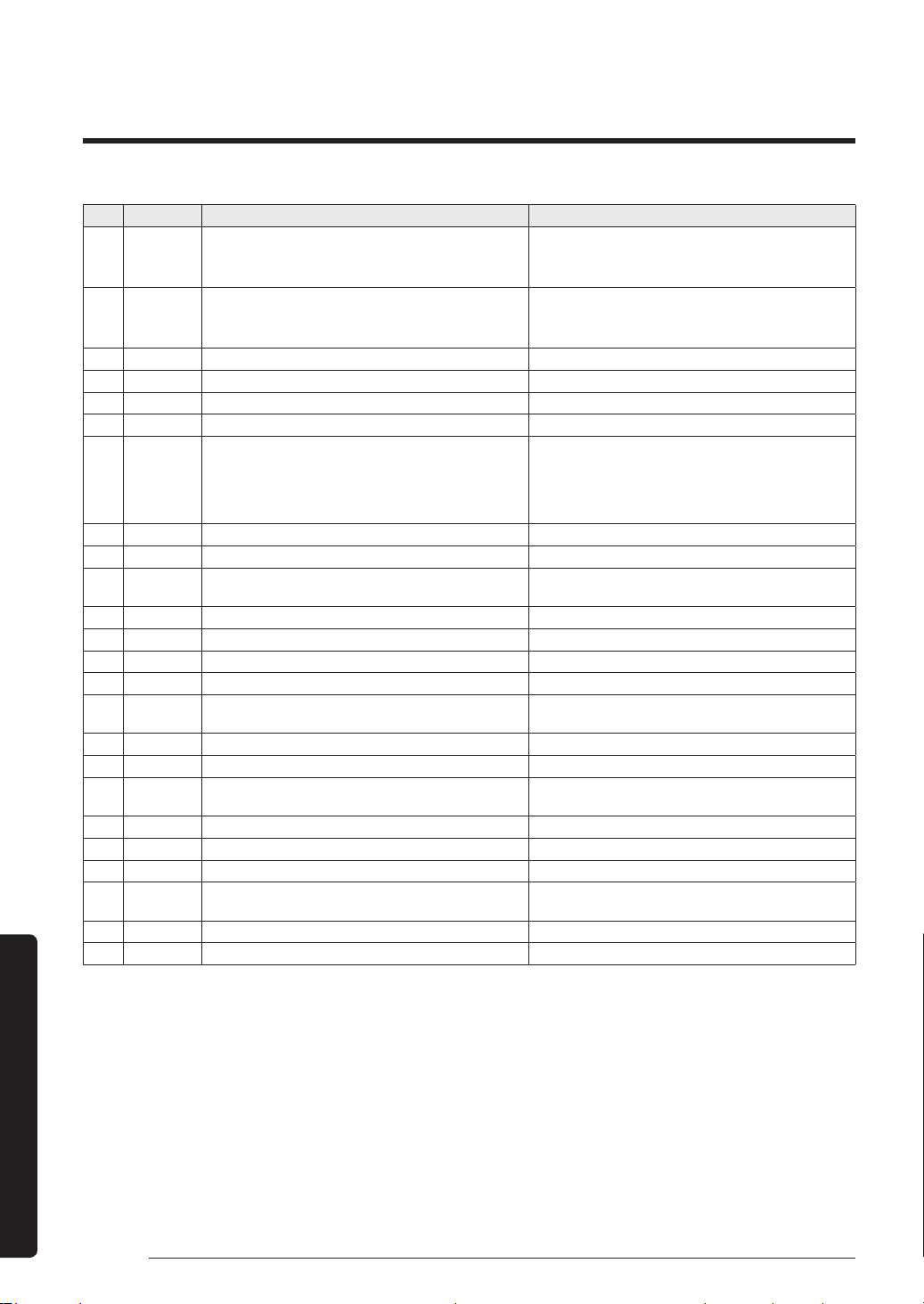
50 English
Installation Procedure
Appendix
No. Error Code Meaning Remarks
20 E440
Heating operation restricted at outdoor temperature
over Theat_high value (default:30°C)
1. Check the range of temperature limited for heating
operation
2.Check the outdoor temperature sensor
21 E441
Cooling operation restricted at outdoor temperature
below Tcool_low value (default:0°C)
1. Check the range of temperature limited for cooling
operation
2.Check the outdoor temperature sensor
22 E458 Fan speed error FAN1 ERROR
23 E461 Error due to operation failure of inverter compressor -
24 E462 System stop due to full current control -
25 E463 Over current trip / PFC over current error Check OLP sensor
26 E464 IPM Over Current(O.C)
1.Check if the service valve is open
2.Check the state of refrigerant
3.Check if connecting wire and the pipe are OK
4.Check the compressor
27 E465 Comp. Over load error -
28 E466 DC-Link voltage under/over error Check AC Power and DC Link Voltage
29 E467
Error due to abnormal rotation of the compressor or
unconnected wire of compressor
Check Comp wire
30 E468 Error on current sensor (Short or Open) Check Outdoor Inverter PBA.
31 E469 Error on DC-Link voltage sensor (Short or Open) -
32 E470 Outdoor unit EEPROM Read/Write error (Option) Check Outdoor EEPROM Data
33 E471 Outdoor unit EEPROM Read/Write error (H/W) Check Outdoor EEPROM PBA
36 E474
Error on IPM Heat Sink sensor of inverter 1 (Short or
Open)
Check Outdoor Inverter PBA.
37 E475 Error on inverter fan 2 FAN2 ERROR
38 E484 PFC Overload (Over current) Error Check Outdoor Inverter PBA.
39 E485
Error on input current sensor of inverter 1 (Short or
Open)
Check Outdoor EEPROM PBA
40 E500 IPM over heat error on inverter 1 Check Outdoor Inverter PBA.
41 E508 Smart install is not installed -
42 E554 Gas leak detected Check the refrigerant
43 E556
Error due to mismatching capacity of indoor and
outdoor unit
Check the indoor and outdoor unit capacity
44 E557 DPM remote controller option error Check the indoor option code
45 E590 Inverter EEPROM Checksum error -
PAC_B2B 미라지 필리핀향_IBIM_EN_DB68-07271A-00_170504.indd 50 2017-06-02 오후 3:34:46
51English
Appendix
Memo
PAC_B2B 미라지 필리핀향_IBIM_EN_DB68-07271A-00_170504.indd 51 2017-06-02 오후 3:34:46
QUESTIONS OR COMMENTS?
COUNTRY CALL OR VISIT US ONLINE AT
PHILIPPINES
1-800-10-726-7864 [ PLDT Toll Free ]
1-800-8-726-7864 [ Globe Landline and Mobile ]
www.samsung.com/ph/support
DB68-07271A-00
PAC_B2B 미라지 필리핀향_IBIM_EN_DB68-07271A-00_170504.indd 52 2017-06-02 오후 3:34:47