Register
your product
www.kaercher.com/welcome
86408790-B 02/05/20
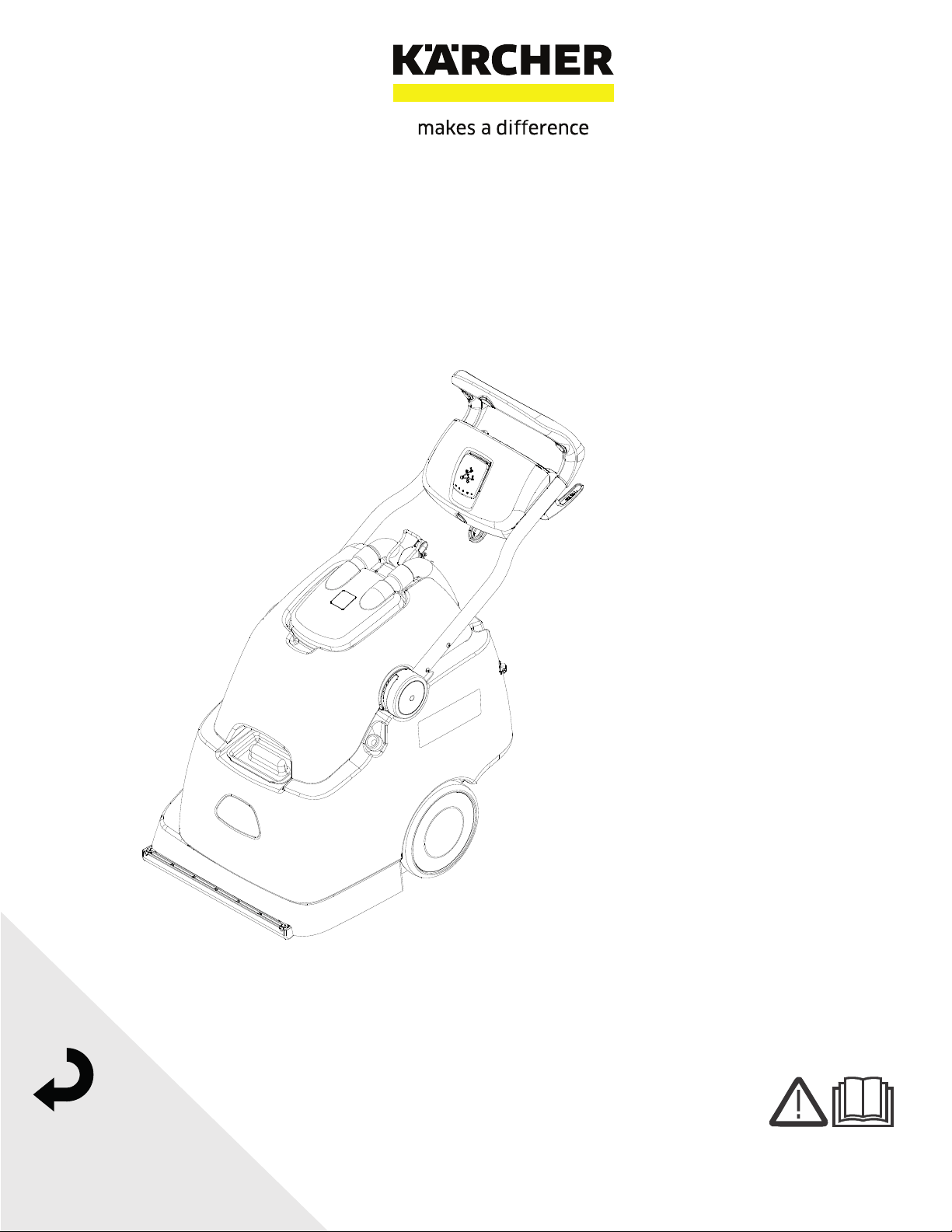
Clipper Duo
English 02
From Serial Number (Ref No1*)
*See Serial Number Page in Spare
Parts List or call manufacturer
Warranty Registration
Thank you for purchasing a Kärcher North America product. Warranty registration is quick
and easy. Your registration will allow us to serve you better over the lifetime of the product.
To register your product go to :
http://warranty.karcherna.com
For customer assistance:
1-800-444-7654
2 86408790 Operator’s Manual - Clipper Duo
Machine Data Label
Overview
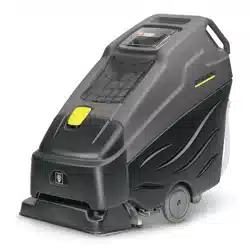
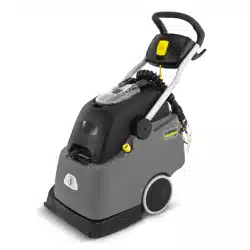
This carpet extractor is an electrical powered, portable carpet extractor intended for commercial use. The appliance
sprays a cleaning solution onto the carpet, agitates the wet carpet, and then extracts the soiled solution back into
the unit's recovery tank. The appliance is fitted with and a hand tool for cleaning upholstery and stairs.
MODELS:
1.008-048.0
CLPDU

3
Table of Contents
Machine Data Label . . . . . . . . . . . . . . . . . . . . . . . . . .2
Overview . . . . . . . . . . . . . . . . . . . . . . . . . . . . . . . . . .2
Table of Contents . . . . . . . . . . . . . . . . . . . . . . . . . . .3
How To Use This Manual . . . . . . . . . . . . . . . . . . . . .4
Safety
IMPORTANT SAFETY INSTRUCTIONS . . . . . . . . .5
CONSIGNES DE SÉCURITÉ IMPORTANTES . . . .6
HAZARD INTENSITY LEVEL . . . . . . . . . . . . . . . . . .7
NIVEAU D'INTENSITÉ DU DANGER. . . . . . . . . . . .8
Safety Labels . . . . . . . . . . . . . . . . . . . . . . . . . . . . . .9
Grounding Instructions . . . . . . . . . . . . . . . . . . . . . .10
Instructions De Mise À La Terre . . . . . . . . . . . . . . .11
Operations
Technical Specifications . . . . . . . . . . . . . . . . . . . . .12
How this machine works . . . . . . . . . . . . . . . . . . . . .14
Components . . . . . . . . . . . . . . . . . . . . . . . . . . . . . .15
Controls. . . . . . . . . . . . . . . . . . . . . . . . . . . . . . . . . .16
Filling The Solution Tank . . . . . . . . . . . . . . . . . . . .17
Pre Run Setup . . . . . . . . . . . . . . . . . . . . . . . . . . . .18
Operating The Machine . . . . . . . . . . . . . . . . . . . . .20
Using The Hand Tool . . . . . . . . . . . . . . . . . . . . . . .23
Maintenance
Service Schedule . . . . . . . . . . . . . . . . . . . . . . . . . .24
Components . . . . . . . . . . . . . . . . . . . . . . . . . . . . . .25
Periodic Maintenance . . . . . . . . . . . . . . . . . . . . . . .26
Circuit Protection. . . . . . . . . . . . . . . . . . . . . . . . . . .27
Scrub Deck . . . . . . . . . . . . . . . . . . . . . . . . . . . . . . .28
Scrub Head . . . . . . . . . . . . . . . . . . . . . . . . . . . . . . .29
Scrub Brush Replacement . . . . . . . . . . . . . . . . . . .29
Vacuum Motor Carbon Brushes . . . . . . . . . . . . . . .30
Troubleshooting . . . . . . . . . . . . . . . . . . . . . . . . . . .31
Suggested Spare Parts. . . . . . . . . . . . . . . . . . . . . .32
86408790 Operator’s Manual - Clipper Duo
4
How To Use This Manual
This manual contains the following sections:
• How to Use This Manual
•Safety
• Operations
• Maintenance
The HOW TO USE THIS MANUAL section will tell you
how to find important information for ordering correct
repair parts.
Parts may be ordered from authorized dealers. When
placing an order for parts, the machine model and
machine serial number are important. Refer to the
MACHINE DATA box which is filled out during the
installation of your machine. The MACHINE DATA box
is located on the inside of the front cover of this manual.
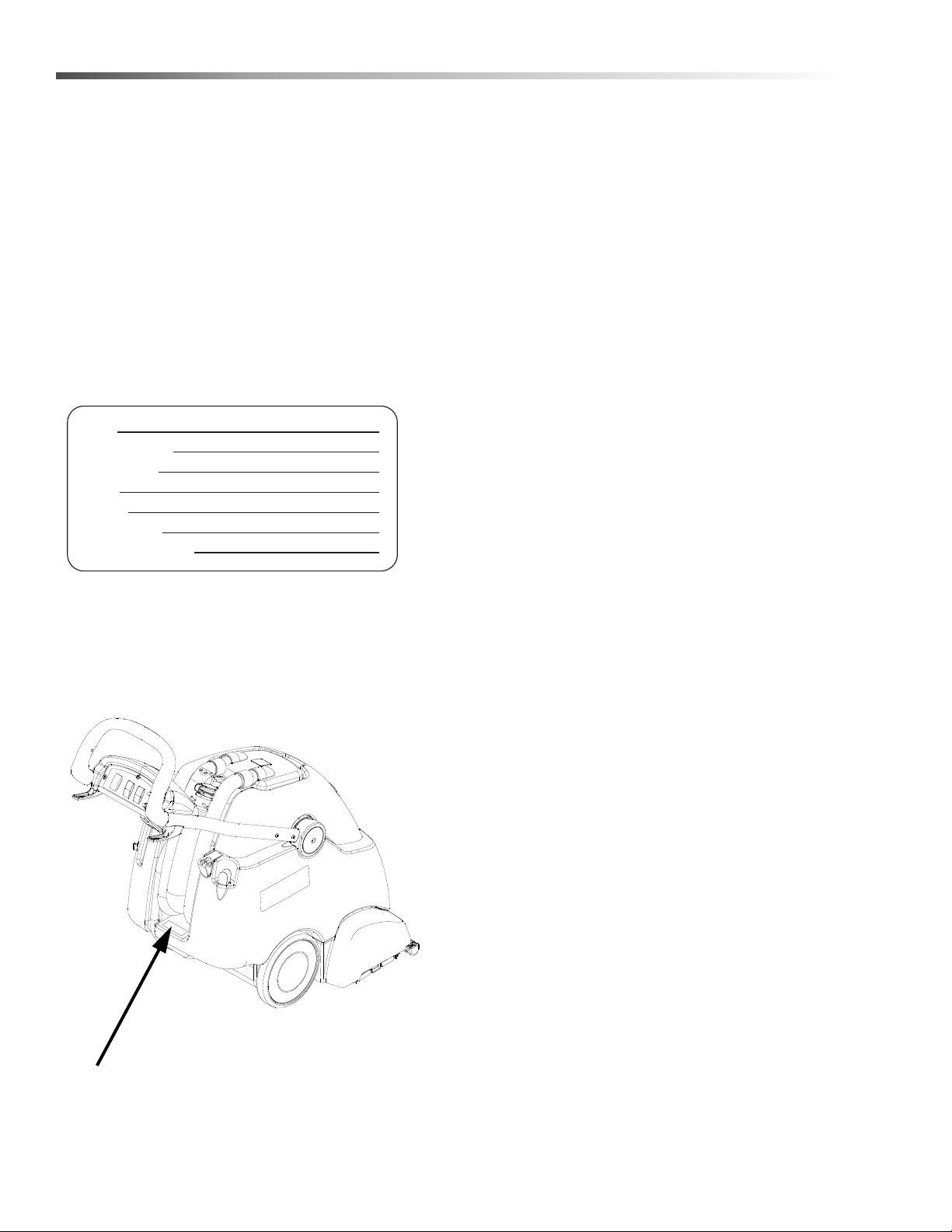
The model and serial number of your machine are
located on the back of the machine.
The SAFETY section contains important information
regarding hazardous or unsafe practices of the
machine. Levels of hazards are identified that could
result in product damage, personal injury, or severe
injury resulting in death.
The OPERATIONS section is to familiarize the operator
with the operation and function of the machine.
The MAINTENANCE section contains preventive
maintenance information to keep the machine and its
components in good working condition. They are listed
in this general order:
• Periodic Maintenance
• Daily/Regular Maintenance
• Troubleshooting
NOTE: If a service or option kit is installed on your
machine, be sure to keep the KIT INSTRUCTIONS
which came with the kit. It contains replacement parts
numbers needed for ordering future parts.
NOTE: The manual part number is located on the
lower right corner of the front cover.
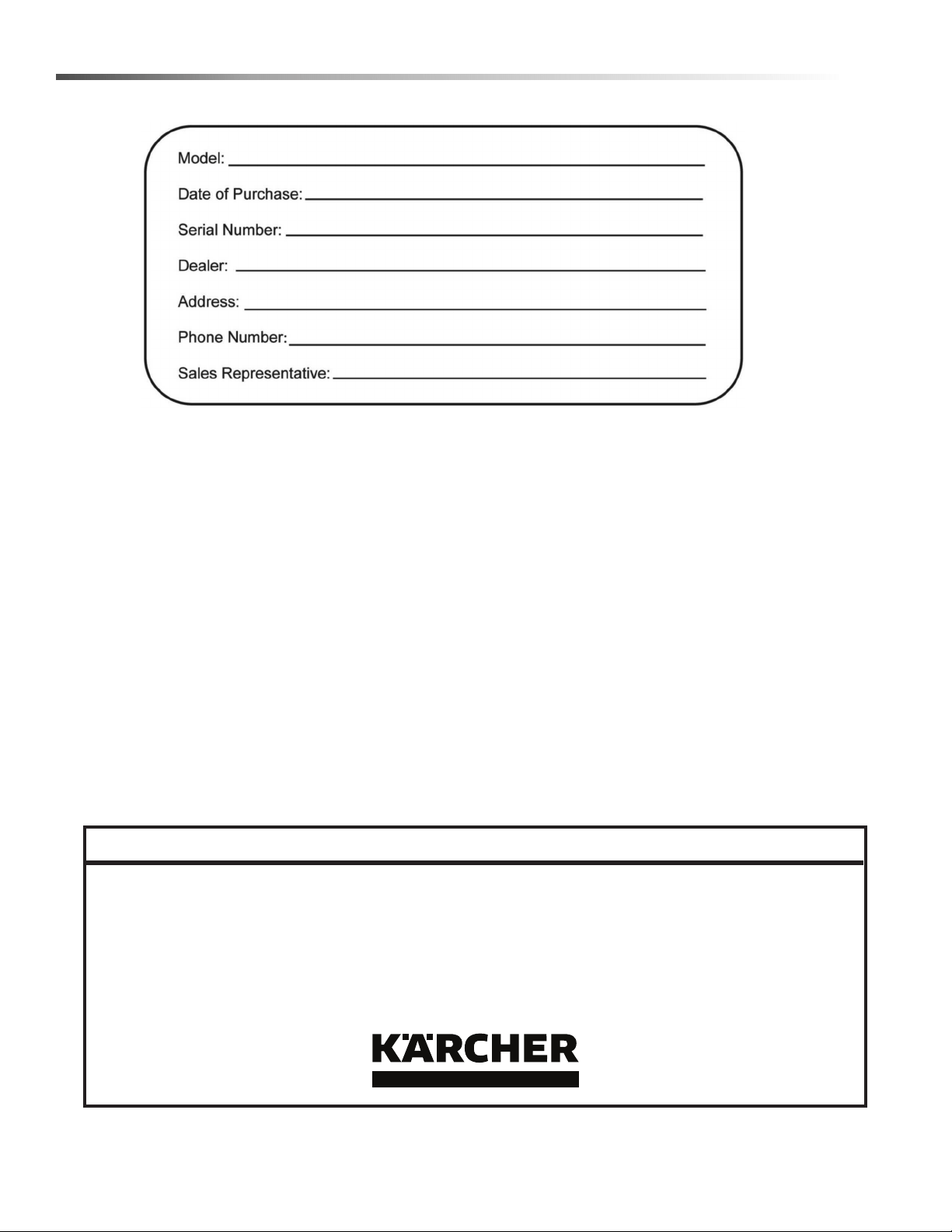
Model:
Date of Purchase:
Serial Number:
Dealer:
Address:
Phone Number:
Sales Representative:
86408790 Operator’s Manual - Clipper Duo

5
Safety
IMPORTANT SAFETY INSTRUCTIONS
When using this machine, basic precaution
must always be followed, including the following:
READ ALL INSTRUCTIONS BEFORE USING THIS MACHINE.
To reduce the risk of fire, electric shock, or injury:
Connect to a properly grounded outlet. See Grounding Instructions.
Do not leave the machine unattended. Unplug machine from outlet when not in use and before maintenance or
service.
Use only indoors. Do not use outdoors or expose to rain.
Do not allow machine to be used as a toy. Close attention is necessary when used by or near children.
Use only as described in this manual. Use only manufacturer's recommended components and attachments.
Do not use damaged electrical cord or plug. Follow all instructions in this manual concerning grounding the
machine. If the machine is not working properly, has been dropped, damaged, left outdoors, or dropped into water,
return it to an authorized service center.
Do not pull or carry machine by electrical cord, use as a handle, close a door on cord, or pull cord around sharp
edges or corners.
Do not run machine over cord. Keep cord away from heated surfaces.
Do not unplug machine by pulling on cord. To unplug, grasp the electrical plug, not the electrical cord.
Do not handle the electrical plug or machine with wet hands.
Do not operate the machine with any openings blocked. Keep openings free of debris that may reduce airflow.
This machine is intended for cleaning carpet only.
Do not vacuum anything that is burning or smoking, such as cigarettes, matches, or hot ashes.
This machine is not suitable for picking up health endangering dust.
Turn off all controls before unplugging.
Do not operate this machine near flammable fluids, dust or vapors.
Maintenance and repairs must be done by qualified personnel.
If foam or liquid comes out of machine, switch off immediately.
READ AND SAVE THESE INSTRUCTIONS
86408790 Operator’s Manual - Clipper Duo

6
Safety
CONSIGNES DE SÉCURITÉ IMPORTANTES
Lors de l'utilisation de cette machine, des précautions de base
doivent toujours être prises, y compris les précautions suivantes :
LIRE TOUTES LES INSTRUCTIONS AVANT D'UTILISER CETTE MACHINE.
Pour réduire le risque d'incendie, d'électrocution ou de
blessure :
Cet appareil ne doit être connecter qu a des prises ayant une sortie de terre.
Ne pas laisser l'appareil sans surveillance lorsqu'il est branché. Débrancher lorsque l'appareil n'est pas utilisé et
avant l'entretien.
Pour reduire les risques de choc electrique, ne pas utiliser à l exterieur et ne pas aspirer de matières humides.
Ne pas permettre aux enfants de jouer avec l'appareil. Une attention particulière est nécessaire lorsque l'appareil
est utilisé par des enfants ou à proximité de ces derniers.
Utiliser cet appareil conformément aux instructions du présent manuel uniquement. N'utiliser que conformément à
cette notice avec les accessoires recommandés par le fabricant.
Ne pas utiliser si le cordon ou la fiche est endommagé. Retourner l'appareil à un atelier de réparation s'il ne
fonctionne pas bien, s'il est tombé ou s'il a été endommagé, oublié à l'extérieur ou immergé.
Ne pas tirer soulever ou traîner l'appareil par le cordon. Ne pas utiliser le cordon comme une poignée, le coincer
dans l'embrasure d'unée porte ou l'appuyer contre des arêtes vives ou des coins.
Ne pas faire rouler l'appareil sur le cordon. Garder le cordon à l'écart des surfaces chaudes.
Ne pas débrancher en tirant sur le cordon. Tirer plutôt la fiche.
Ne pas toucher la fiche ou l'appareil lorsque vos mains sont humides.
N'insérer aucun objet dans les ouvertures. Ne pas utiliser l'appareil lorsqu'une ouverture est bloquée. S'assure que
de la poussière, de la peluche, des cheveux ou d'autres matières ne réduisent pas le débit d'air.
Cette machine est destinée pour nettoyer tapis seulement.
Ne pas aspirer de matiéres en combustion ou qui dégagent de la fumée, comme des cigarettes, des allumettes ou
des cendres chaudes.
Cette machine n'est pas adaptée au ramassage de poussières dangereuses.
Mettre toutes les commandes à la position ARRÊT avant de débrancher l'appareil.
Ne pas aspirer des liquides inflammables ou combustibles, comme de l'essence, et ne pas faire fonctionner dans
des endroits où peuvent se trouver de tels liquides.
L'entretien et les réparations de la machine doivent être effectuées par un personnel qualifié.
Si de la mousse ou du liquide sort de la machine, la mettre hors tension immédiatement.
LIRE ET CONSERVER CES INSTRUCTIONS
86408790 Operator’s Manual - Clipper Duo

7
Safety
The following symbols are used throughout this guide as indicated in their descriptions:
HAZARD INTENSITY LEVEL
There are three levels of hazard intensity identified by signal words -WARNING and CAUTION and FOR SAFETY.
The level of hazard intensity is determined by the following definitions:
WARNING - Hazards or unsafe practices which COULD result in severe personal injury or death.
CAUTION - Hazards or unsafe practices which could result in minor personal injury or product or property damage.
FOR SAFETY: To Identify actions which must be followed for safe operation of equipment.
Report machine damage or faulty operation immediately. Do not use the machine if it is not in proper operating
condition. Following is information that signals some potentially dangerous conditions to the operator or the equip-
ment. Read this information carefully. Know when these conditions can exist. Locate all safety devices on the
machine. Please take the necessary steps to train the machine operating personnel.
FOR SAFETY:
DO NOT OPERATE MACHINE:
Unless Trained and Authorized.
Unless Operation Guide is Read and understood.
In Flammable or Explosive areas.
In areas with possible falling objects
WHEN SERVICING MACHINE:
Avoid moving parts. Do not wear loose clothing; jackets, shirts, or sleeves when working on the machine. Use
manufacturer approved replacement parts.
86408790 Operator’s Manual - Clipper Duo

8
Safety
Les symboles suivants sont utilisés dans tout ce manuel, tels que décrits ici :
NIVEAU D'INTENSITÉ DU DANGER
Il existe trois niveaux d'intensité du danger, identifiés par des termes d'avertissement - AVERTISSEMENT,
ATTENTION et POUR VOTRE SÉCURITÉ. Le niveau d'intensité du danger est déterminé par les définitions
suivantes :
AVERTISSEMENT - Les dangers ou des pratiques contraires à la sécurité qui POURRAIENT entraîner des
blessures personnelles ou la mort.
ATTENTION - Les dangers ou des pratiques contraires à la sécurité qui pourraient entraîner des blessures person-
nelles légères ou des dégâts sur le produit ou d'autres biens.
POUR DES RAISONS DE SÉCURITÉ : Pour identifier les actions qui doivent être exécutées pour un fonc-
tionnement sûr de l'équipement.
Signaler immédiatement tout dommage subi par la machine ou fonctionnement défectueux. Ne pas utiliser la
machine si elle ne fonctionne pas correctement. Ci-dessous se trouvent les informations indiquant les conditions
potentiellement dangereuses pour l'opérateur ou l'équipement. Lire attentivement ces informations. Être conscient
que ces conditions peuvent survenir. Repérer tous les dispositifs de sécurité sur la machine. Suivre les étapes
nécessaires de formation du personnel qui utilise la machine.
POUR DES RAISONS DE SÉCURITÉ :
NE PAS FAIRE FONCTIONNER LA MACHINE :
Sauf si le personnel est formé et autorisé.
Sauf si le manuel d'utilisation est lu et compris.
Dans des zones inflammables ou explosives.
Dans des zones contenant des objets susceptibles de tomber
LORS DE L'ENTRETIEN DE LA MACHINE :
Éviter les pièces mobiles. Ne pas porter de vêtements, vestes, chemises ou manches vagues lors de l'entretien de
la machine. Utiliser les pièces de rechange approuvées par le fabricant.
86408790 Operator’s Manual - Clipper Duo

9
Safety
Safety Labels
NOTE: These drawings indicate the location of safety labels on the machine. If at any time the labels become
illegible, promptly replace them.
Emplacement De L'étiquette De Sécurité
Les ÉTIQUETTES D'AVERTISSEMENT suivantes se trouvent sur votre unité de nettoyage. Ces étiquettes
signalent les avertissements et mises en garde importantes qui doivent être suivis en tout temps. Le non respect
des avertissements et mises en garde pourrait entraîner des dommages matériels, des blessures graves ou même
la mort. Suivez attentivement ces instructions ! NE PAS retirer ces étiquettes.
REMARQUE : Ces dessins indiquent l'emplacement des étiquettes de sécurité sur la machine. Si, à tout moment,
les étiquettes deviennent illisibles, remplacez-les rapidement.
86242230
WARNING LABEL
WARNING LABEL
86310500
EXPLOSION FRENCH
86408790 Operator’s Manual - Clipper Duo
10
Safety
Grounding Instructions
Electrical
In the USA this machine operates on a standard 15
amp 115 volt A.C. power circuit. The amp, hertz, and
voltage are listed on the data label found on each
machine. Using voltages above or below those
indicated on the data label will cause serious damage
to the motors
Extension Cords
If an extension cord is used, the wire size must be at
least one size larger than the power cord on the
machine, and must be limited to 50 feet (15.5m) in
length.
Grounding Instructions
This appliance must be grounded. If it should malfunc-
tion or breakdown, grounding provides a path of least
resistance for electric current to reduce the risk of
electric shock. This appliance is equipped with a cord
having an equipment-grounding conductor and
grounding plug. The plug must be inserted into an
appropriate outlet that is properly installed and
grounded in accordance with all local codes and ordi-
nances.
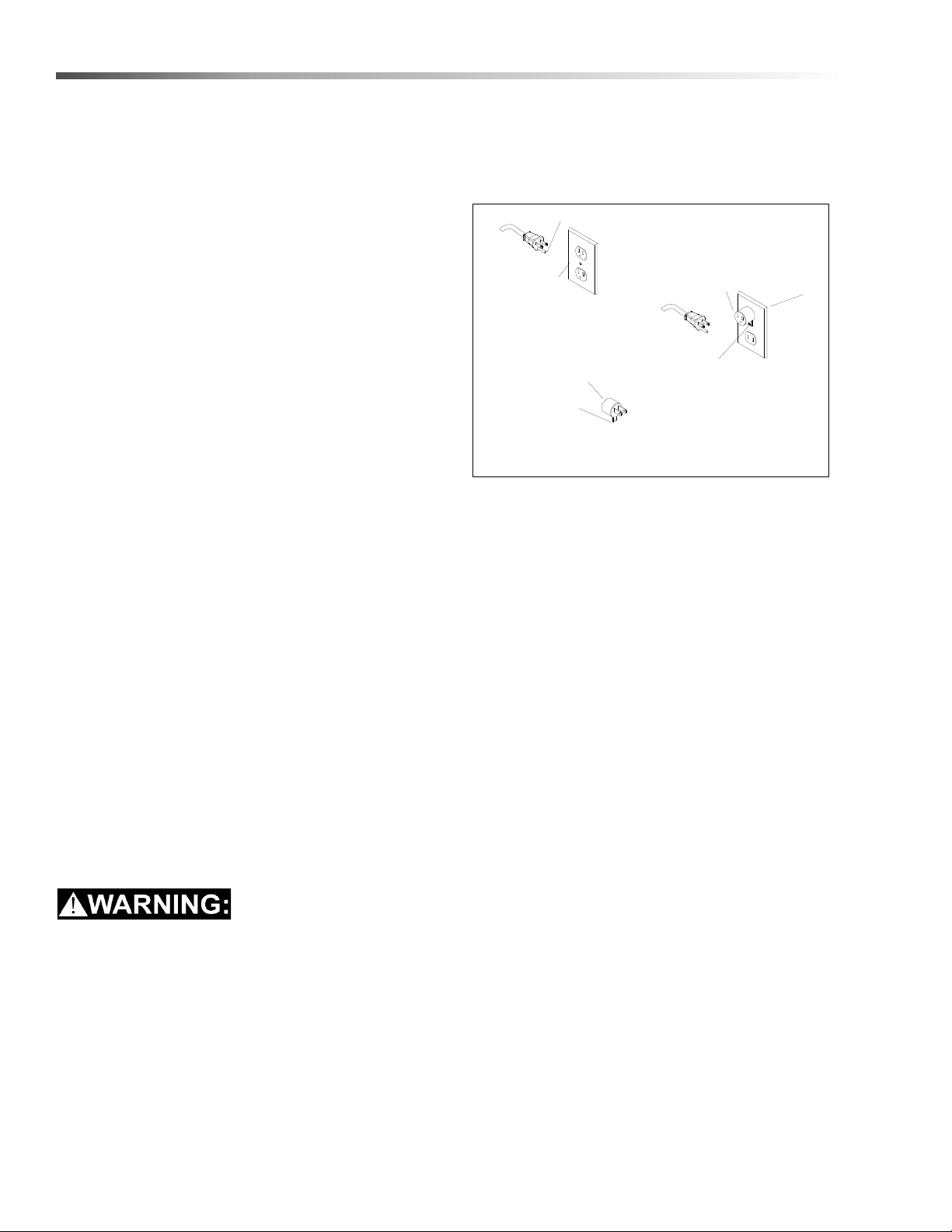
This appliance is for use on a nominal 120-volt circuit,
and has a grounded plug that looks like the plug illus-
trated in sketch A. A temporary adapter looks like
adapter illustrated in sketches B and C, may be used to
connect this plug to a 2-pole receptacle as shown in
sketch B if a properly grounded outlet is not available.
The temporary adapter should be used only until a
properly grounded outlet (sketch A) can be installed by
a qualified electrician. The green colored rigid ear, lug
or the like extending from the adapter must be
connected to a permanent ground such as a properly
grounded outlet box cover. Whenever the adapter is
used, it must be held in place by a metal screw
Improper connection of the equipment-grounding
conductor can result in a risk of electric shock.
Check with a qualified electrician or service person
if you are in doubt as to whether the outlet is
properly grounded. Do not modify the plug
provided with the appliance - if it will not fit the
outlet, have a proper outlet installed by a qualified
electrician.
.
NOTE: In Canada, the use of a temporary adapter is
not permitted by the Canadian Electrical Code.
USING AN ADAPTOR
GROUNDING CONNECTION
Note: Adaptors are not allowed in Canada.
Outlet
Tab for Grounding
Outlet Box
FIGURE C
Grounded
FIGURE A
Adaptor
Screw
FIGURE B
Adaptor
Metal Screw
Grounded
Grounding Pin
86408790 Operator’s Manual - Clipper Duo

11
Safety
Instructions De Mise À La Terre
Cet appareil doit être relié à la terre. S'il fonctionne mal
ou tombe en panne, la mise à la terre fournit un chemin
de résistance moindre au courant électrique pour
réduire le risque d'électrocution. Cet appareil est fourni
avec un cordon équipé d'un conducteur de mise à la
terre d'équipement et d'une fiche de terre. La fiche doit
être insérée dans une prise appropriée qui est correcte-
ment installée et mise à la terre, conformément aux
codes et réglementations locales.
Une connexion incorrecte du conducteur de mise à
la terre de l'équipement peut entraîner une électro-
cution. En cas de doute sur la mise à la terre de la
prise murale, vérifier, avec un électricien qualifié ou
un technicien d'entretien. Ne pas modifier la fiche
fournie avec l'appareil- Si elle ne correspond pas à
la prise murale, faire installer une prise appropriée
par un électricien qualifié.
Cet appareil doit être utilisé sur un circuit nominal de
120 volts et est équipé d'une prise de terre qui
ressemble à celle illustrée dans le schéma A. Un adap-
tateur temporaire ressemble à l'adaptateur illustré aux
schémas B et C, peut être utilisé pour brancher la fiche
à une prise à 2 pôles comme illustrés au schéma B si
aucune prise correctement reliée à la terre n'est dispo-
nible. L'adaptateur temporaire doit être utilisé unique-
ment jusqu'à ce qu'une prise correctement reliée à la
terre (schéma A) puisse être installée par un électricien
qualifié. La patte rigide ou le crochet de couleur verte
ou l'équivalent à l'extrémité de l'adaptateur doit être
connecté à une prise de terre permanente telle qu'une
boîte de jonction correctement reliée à la terre. Dès lors
que l'adaptateur est utilisé, il doit être maintenu en
place par une vis métallique.
Rallonges
Si une rallonge est utilisée, la taille du fil doit être au
moins une taille plus grande que le cordon d'alimenta-
tion sur la machine, et doit être limitée à 50 pieds (15,5
millions) de longueur.
REMARQUE : Au Canada, l'utilisation d'un
adaptateur temporaire n'est pas autorisée par le code
canadien de l'électricité.
FIGURE C
FIGURE A
FIGURE B
Boitier De Prise
Reliée À La Terre
Fiche De Mise à La Terre
Prise Reliée À La
Terre
Vis Métallique
Adaptateur
Languette Pour Vis De
Mise À La Terre
REMARQUE: Au Canada, l'utilisation d'un adaptateur temporaire n'est pas
autorisée par le code canadien de l'électricité.
Adaptateur
Mise À La Terre En Utilisant
Un Adaptateur
86408790 Operator’s Manual - Clipper Duo

12
Operations
Technical Specifications
Special Notes:
The sound pressure level at the operator's ear was measured to be 73.7 dBA. This was a nearfield, broad-band
measurement taken in a typical industrial environment on a tile floor. This appliance contains no possible source of
impact noise. The instantaneous sound pressure level is below 63 Pa.
The weighted root mean square acceleration at the operator's arms was measured to be below 2.5m/s2 This was
a tri-axial, third-octave-band measurement made during normal operation on a composite tile floor. The measure-
ment and related calculations were made in accordance with ISO 5349-1.
ITEM DIMENSION/CAPACITY
Construction Steel chassis with rotationally molded polyethylene tanks
Vacuum Motor
Three stage, bypass, 1.5 hp (1,119 watts), 100 cfm (2.8m³/min), 120" (3050 mm)
waterlift
Solution Pump
100 psi (7 bar) - Restorative
50 psi (3.5 bar) - Interim
Brush Motor 1/2 hp (604 watts) AC with circuit breaker protection
Brushes 2 x 16" (406 mm), ABS core, Perform Alert™ bristle spiral pattern
Cleaning Path 16" (40.6 cm)
Flow Rate
Interim - 0.09 gpm ( 0.37 lpm)
Restorative - 1.0 gpm (37.8 lpm)
Solution Spray
Interim - One quick-disconnect jet
Restorative - One quick-disconnect jet
Solution Tanks 10 gallons ( 37.8 l)
Recovery Tank 10 gallons (37.8 l)
Vacuum Shoe 18" (458 mm) wide, cast aluminum
Wheels 10" (254 mm) non-marking rubber
Power Cable 50' (15 m) detachable
Weight 166 lbs (75.3 kg) with cord
86408790 Operator’s Manual - Clipper Duo
13
Operations
This appliance is not intended for use by persons (including children) with reduced physical, sensory or mental
capabilities, or lack of experience and knowledge, unless they have been given supervision or instruction
concerning use of the appliance by a person responsible for their safety. Children should be supervised to ensure
that they do not play with the appliance.
Cet appareil n'est pas prévu à l'usage des personnes (enfants y compris) avec des possibilités physiques, sensori-
elles ou mentales réduites, ou le manque d'expérience et de connaissance, à moins qu'ils aient été donnés la
surveillance ou l'instruction au sujet de l'utilisation de l'appareil par une personne chargée de leur sûreté. Des
enfants devraient être dirigés pour s'assurer qu'ils ne jouent pas avec l'appareil.
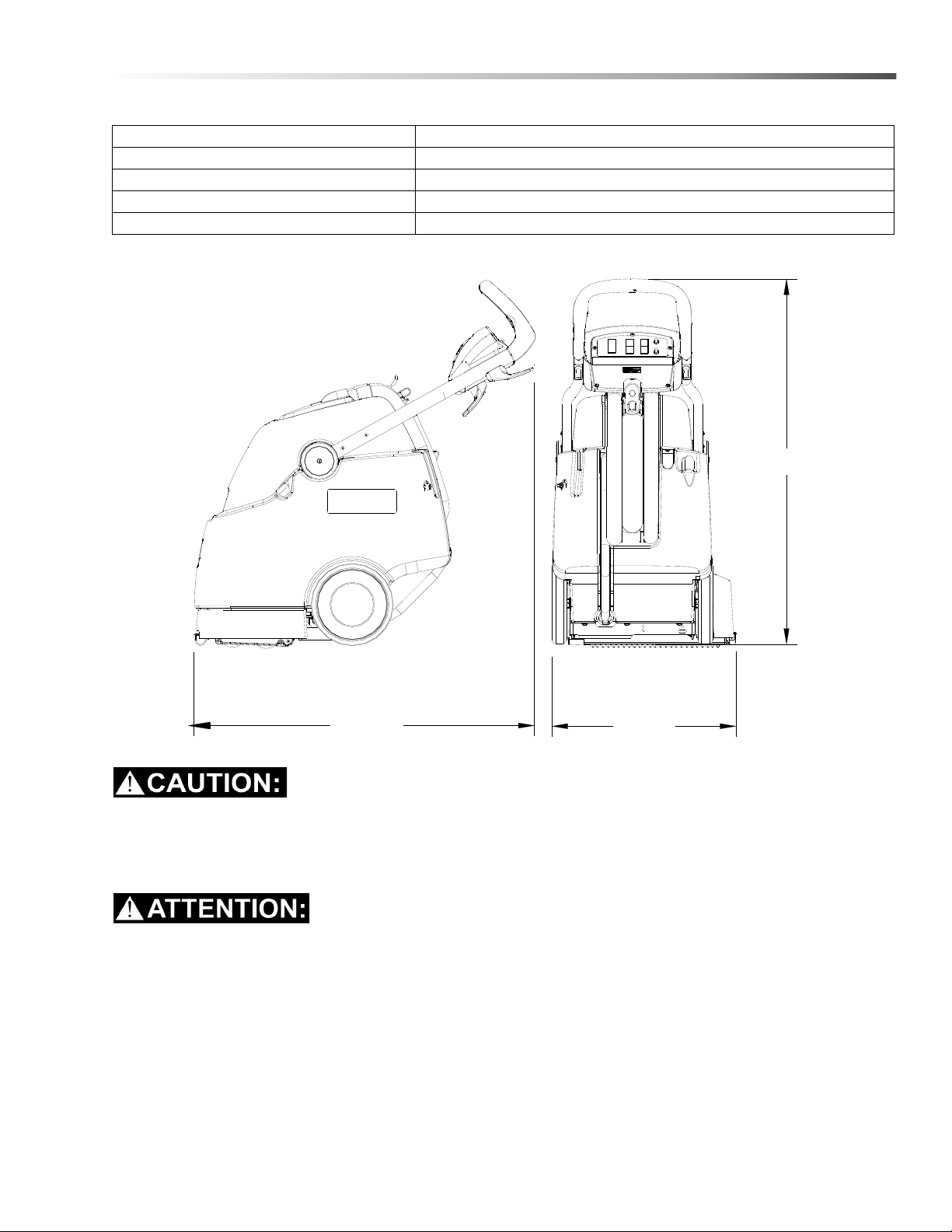
ITEM MEASURE
Height 43 inches (1092 mm)
Length 40.5 inches (1029 mm)
Width 22 inches (559 mm)
Width of scrub path 16 inches (406 mm)
WIDTH
HEIGHT
LENGTH
86408790 Operator’s Manual - Clipper Duo

14
Operations
How this machine works
This carpet extractor is an electrical powered, portable
carpet extractor intended for commercial use. The
appliance sprays a cleaning solution onto the carpet
agitates the wet carpet, and then extracts the soiled
solution back into the unit's recovery tank. The
appliance is fitted with and a hand tool for cleaning
upholstery and stairs.
The machine is designed to maintain your carpet using
the Encapsulating Interim Carpet Cleaning Process. By
using the Interim Carpet Maintainer in conjunction with
Windsor Red Carpet Encapsulating Interim Cleaning
(W450-4) or Encapsulating Interim Cleaning with
Carpet Protection (W455-4) chemical solution, you can
perform a regular light cleaning and grooming of your
carpet very quickly, and have the carpet dry and ready
for traffic within 30 minutes.
The machine is also designed to restore your carpet
using carpet extraction chemicals. The machine is
designed to apply cleaning solution onto carpeted floor,
scrub the carpet with two counter-rotating brushes, and
then vacuum the soiled water back into the recovery
tank.
The machine's primary systems are the solution
system, scrub system, recovery system and operator
control system.
The function of the solution system is to store mixed
solution and deliver solution to the appropriate spray
jet. The solution system consists of the solution tank,
strainer, extraction pump and interim pump, solenoid
valve, spray jets, accessory hand tool, and controls.
The solution tank stores solution until it is delivered
through the strainer to the appropriate pump. The
solenoid valve allows flow from the extraction pump to
the extraction nozzle or stops flow at the extraction
nozzle so that the accessory hand tool can be used.
The interim pump provides flow directly to the interim
nozzle. The strainer protects the pump from debris.
The solution pumps control the cleaning solution flow.
The function of the scrub system is to scrub the carpet,
mix the cleaning solution with the soil and lift and groom
the carpet pile. The scrub system consists of two cylin-
drical brushes, motor, and controls. The brushes scrub
the carpet as the motor drives the brushes. The
counter-rotating action of the brushes grooms the
carpet pile.
The function of the recovery system is to vacuum the
soiled water back into the recovery tank. The recovery
system consists of the vacuum shoe, vacuum motor,
float ball filter, recovery tank and controls. The vacuum
shoe extracts the dirty solution from the carpet as the
machine moves forward. The vacuum motor provides
suction to draw the dirty solution off the floor and into
the recovery tank. The float ball filter protects the
vacuum fan from debris and foam. The recovery tank
stores the dirty solution.
The function of the operator control system is to allow
the operator to select the desired function to perform.
This appliance is not suitable for picking up hazardous
dust.
Cet appareil n'est pas conçu pour aspirer des pous-
sières dangereuses.
86408790 Operator’s Manual - Clipper Duo

15
Operations
Components
1. Control Panel 6. Solution Fill Cover
2. Recovery Dome 7. Solution Drain Hose
3. Recovery Drain Hose 8. Solution Tank
4. Recovery Tank 9. Vacuum Shoe
5. Scrub Deck
7
1
2
8
6
4
5
9
3
86408790 Operator’s Manual - Clipper Duo
16
Operations
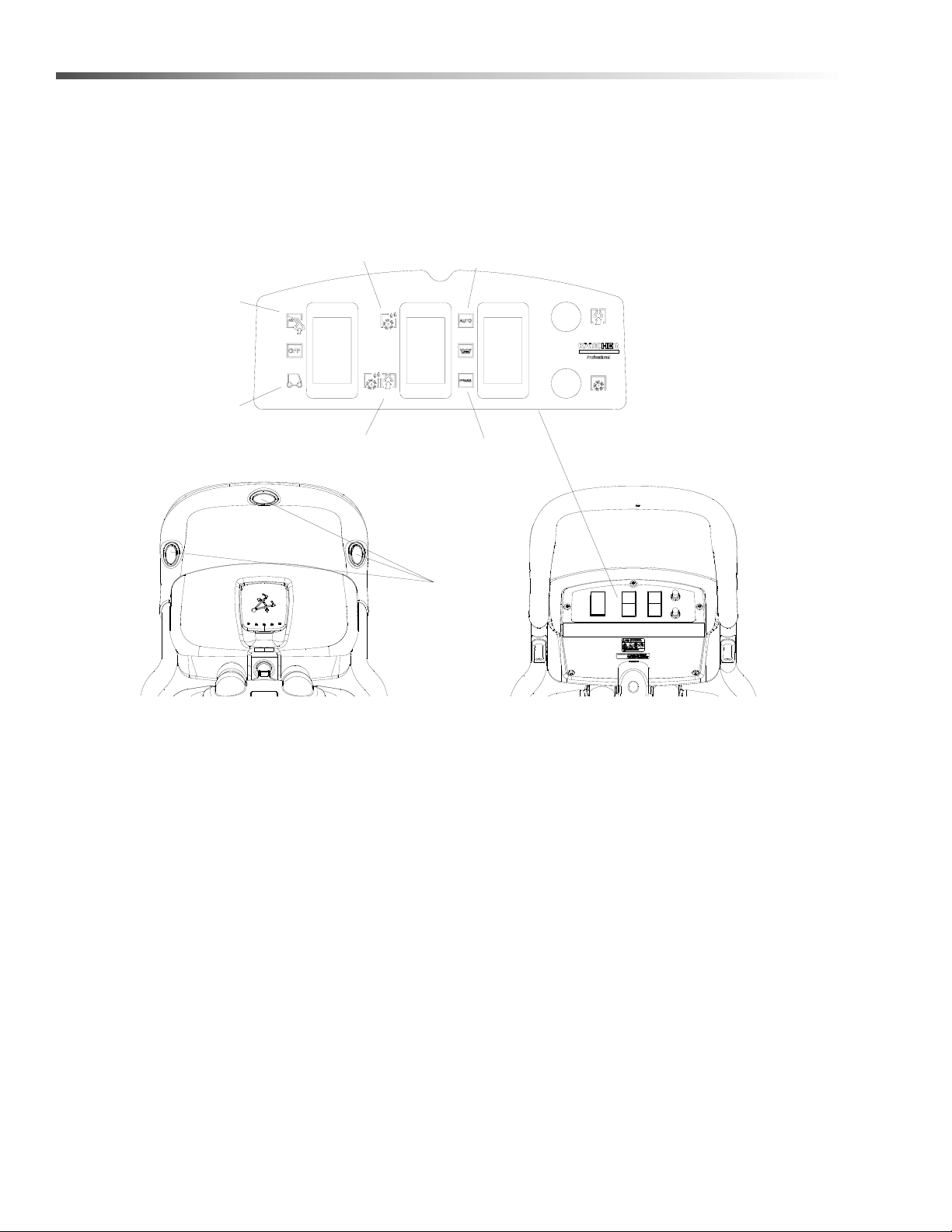
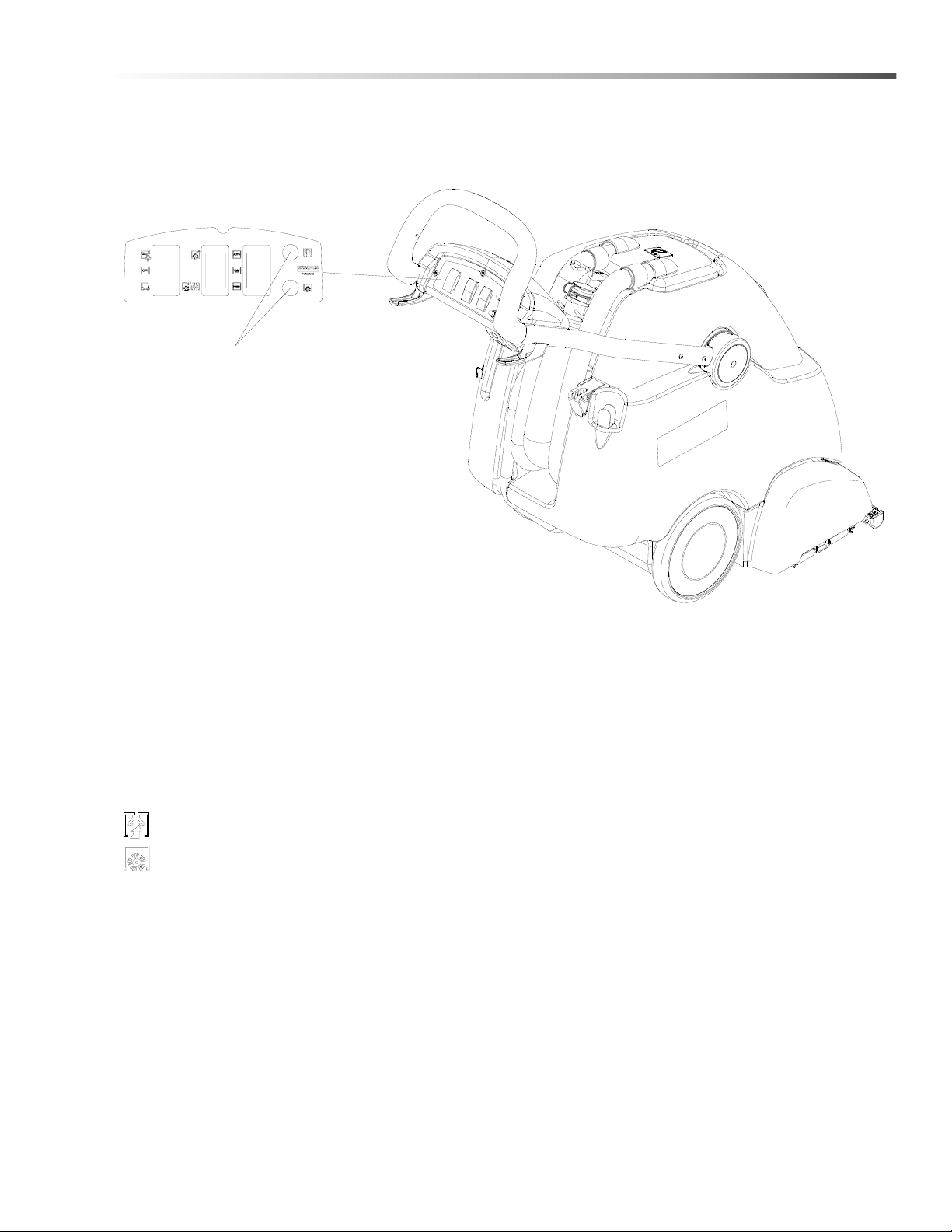
Controls
1. Hand Tool Switch 5. Continuous Spray
2. Main Switch 6. Intermittent Spray
3. Light Cleaning 7. Intermittent Spray Buttons
4. Deep Cleaning
1
2
3
4
5
6
7
86408790 Operator’s Manual - Clipper Duo
17
Operations
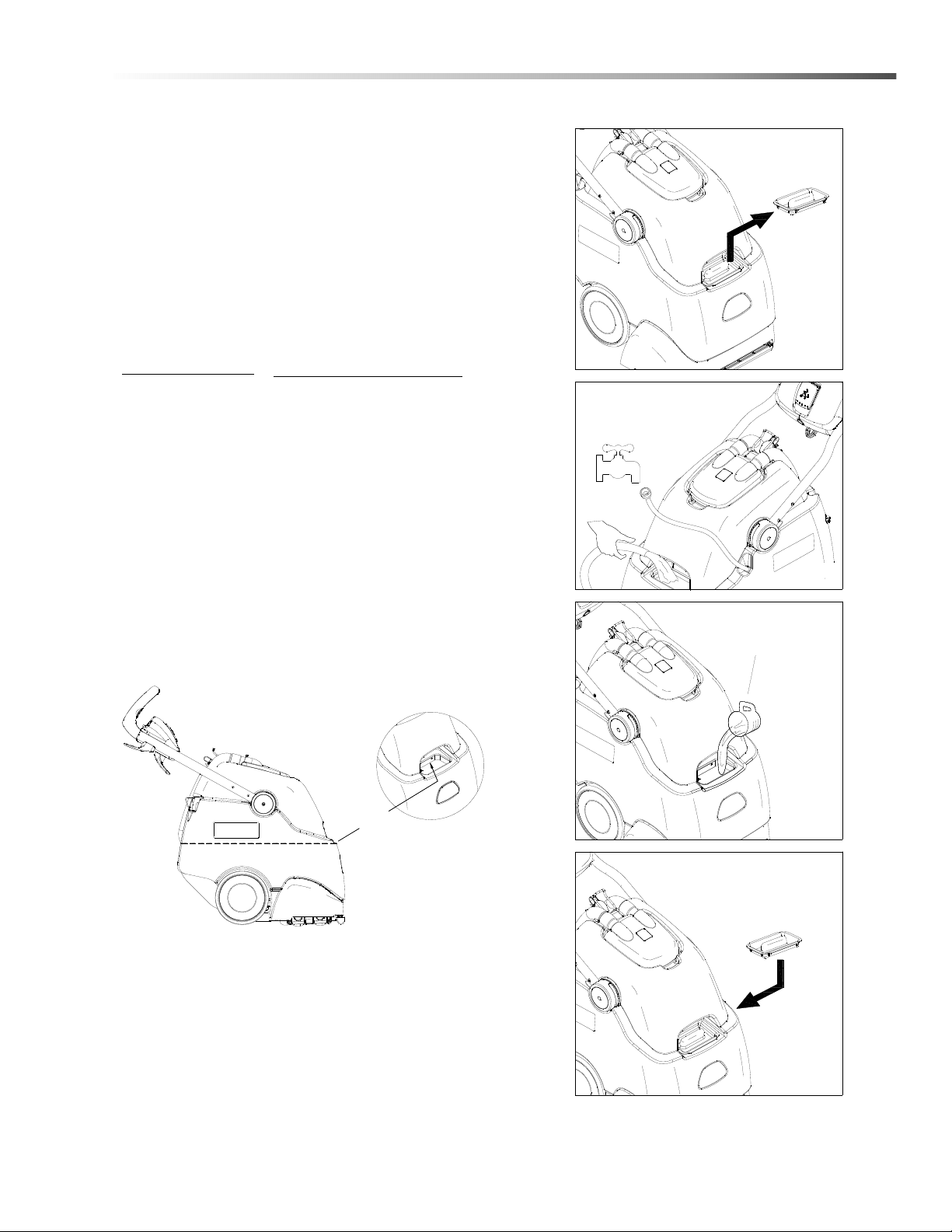
Filling The Solution Tank
Do not put defoamer, solvents, spotter or
prespray chemicals in the solution tank.
Do not allow water to spill into vacuum motor inlet.
Dry spills from top of solution tank
.
Use only the suitable chemicals listed below. Using
incompatible chemicals will damage the machine.
Damages of this type are not covered under warranty.
Carefully read ingredients on manufacturer's label
before using any product in this machine.
* Product Trademark Names
FILL LINE
REPLACE SOLUTION
FILL COVER
STEP 4
ADD CLEANING
CHEMICAL PER
CHEMICAL LABELING
STEP 3
REMOVE SOLUTION
FILL COVER
STEP 1
OR
ADD WATER
10 Gal.
(38 Lt)
STEP 2
86408790 Operator’s Manual - Clipper Duo
CHEMICALS
Suitable Chemicals
Alkalis
Detergents
Hydroxides
Soaps
Vinegar
Non-Compatible Chemicals
Aldehydes
Aromatic Hydrocarbons
SP Butyls
Carbon Tetrachloride Clorox*
Chlorinated Bleaches
Chlorinated Hydrocarbons
Lysol*
Methyl Ethel Ketone (MEK)
Perchorethylene (perc)
Phenolics
Trichlorethylene
D-Limonene
18
Operations
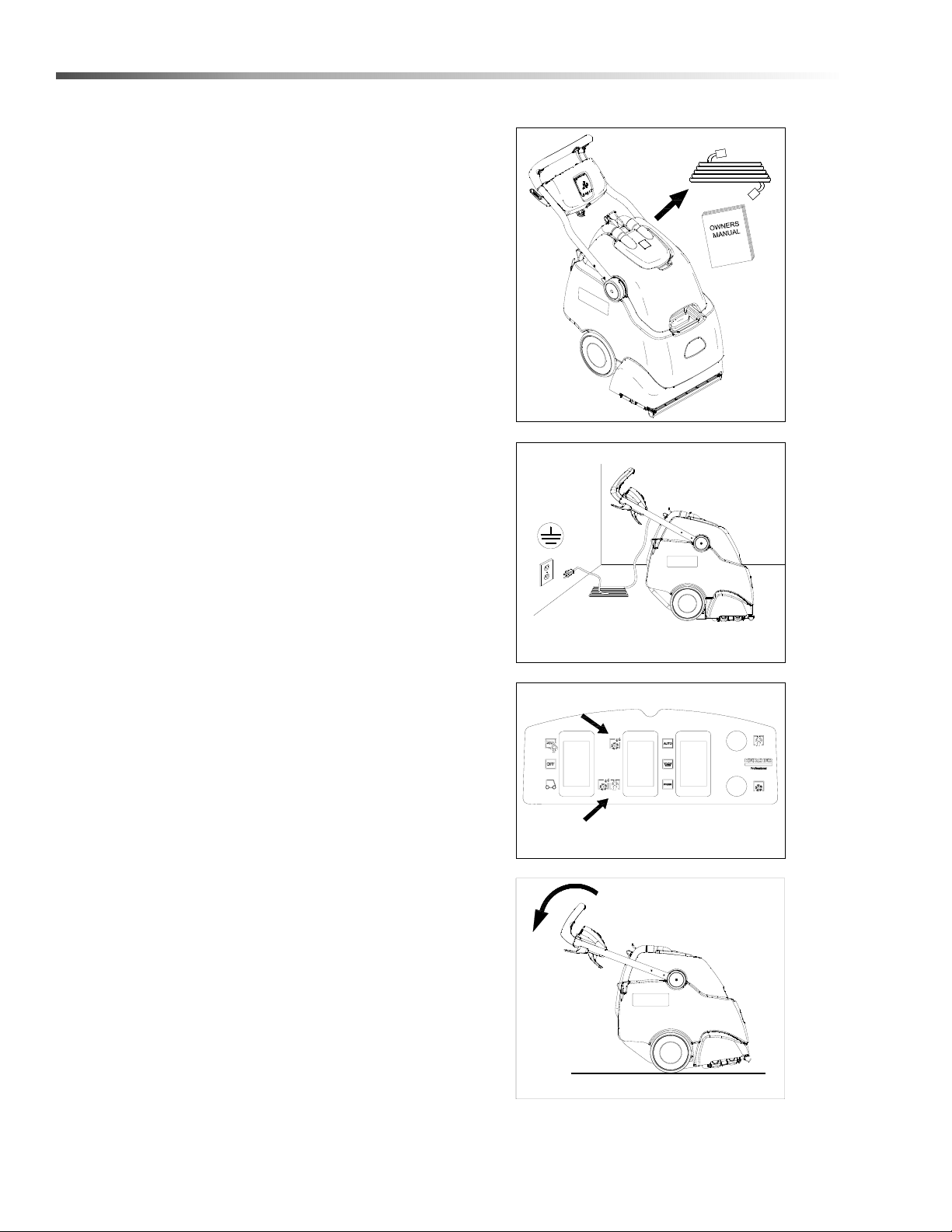
Pre Run Setup
Remove electrical cord and literature from recovery
tank. Fill solution tank (see filling instructions).
Plug cord into grounded outlet.
NOTE: Be sure dome
is seated on recovery tank, and float shut-off is installed
correctly.
Switch the cleaning mode switch to the desired
process.
Press the top of the switch for the encapsulating Interim
Carpet Cleaning Process.
Press the bottom of the switch for Deep Extraction.
Adjust handle to comfortable operating position. Tip
machine back by main handle to move to starting point.
STEP 1
STEP 2
STEP 3
STEP 4
86408790 Operator’s Manual - Clipper Duo
19
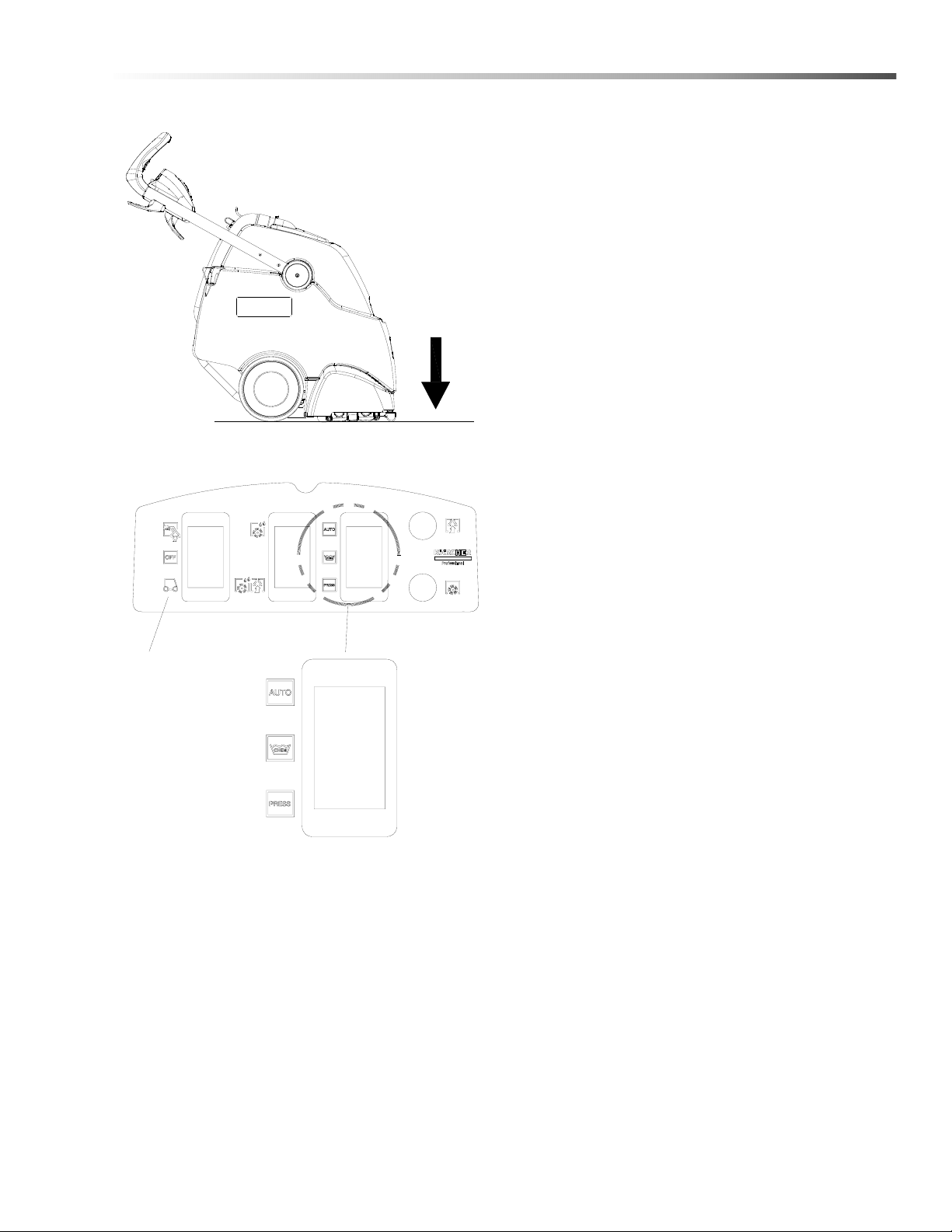
Operations
Lower machine to floor.
Select continuous AUTO setting to start solution spray
or select intermittent PRESS setting to enable use of
trigger switches to start solution spray.
The intermittent PRESS setting requires the operator
to hold any one of the three trigger switches in the "on"
position with the fingers, and is typically used in small
areas where short cleaning passes are made.
The continuous AUTO setting allows the operator to set
the switch in the "on" position with one touch, and is
typically used in large areas where long cleaning
passes are made.
Place main switch in machine cleaning mode to start
cleaning process.
MAIN SWITCH
86408790 Operator’s Manual - Clipper Duo
20
Operations
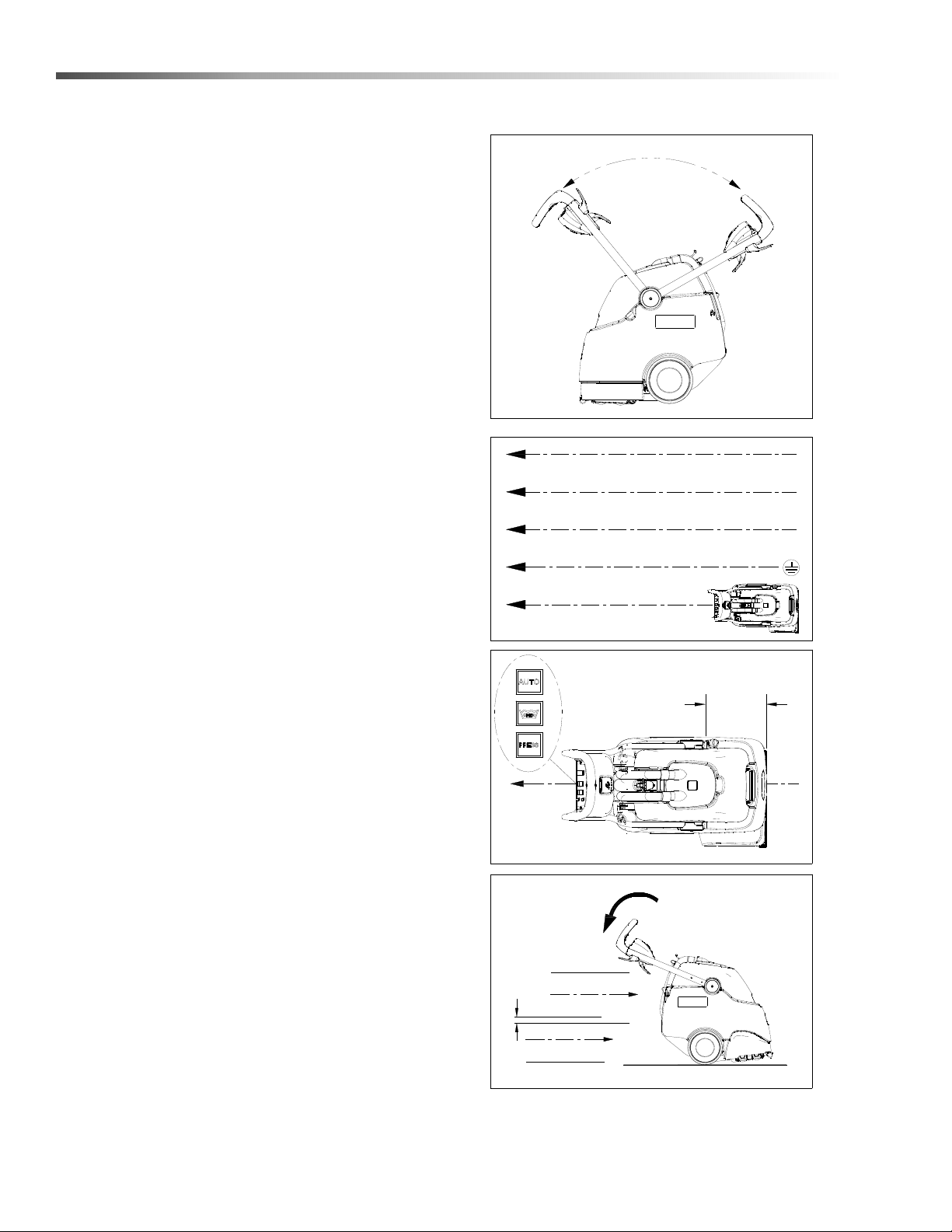
Operating The Machine
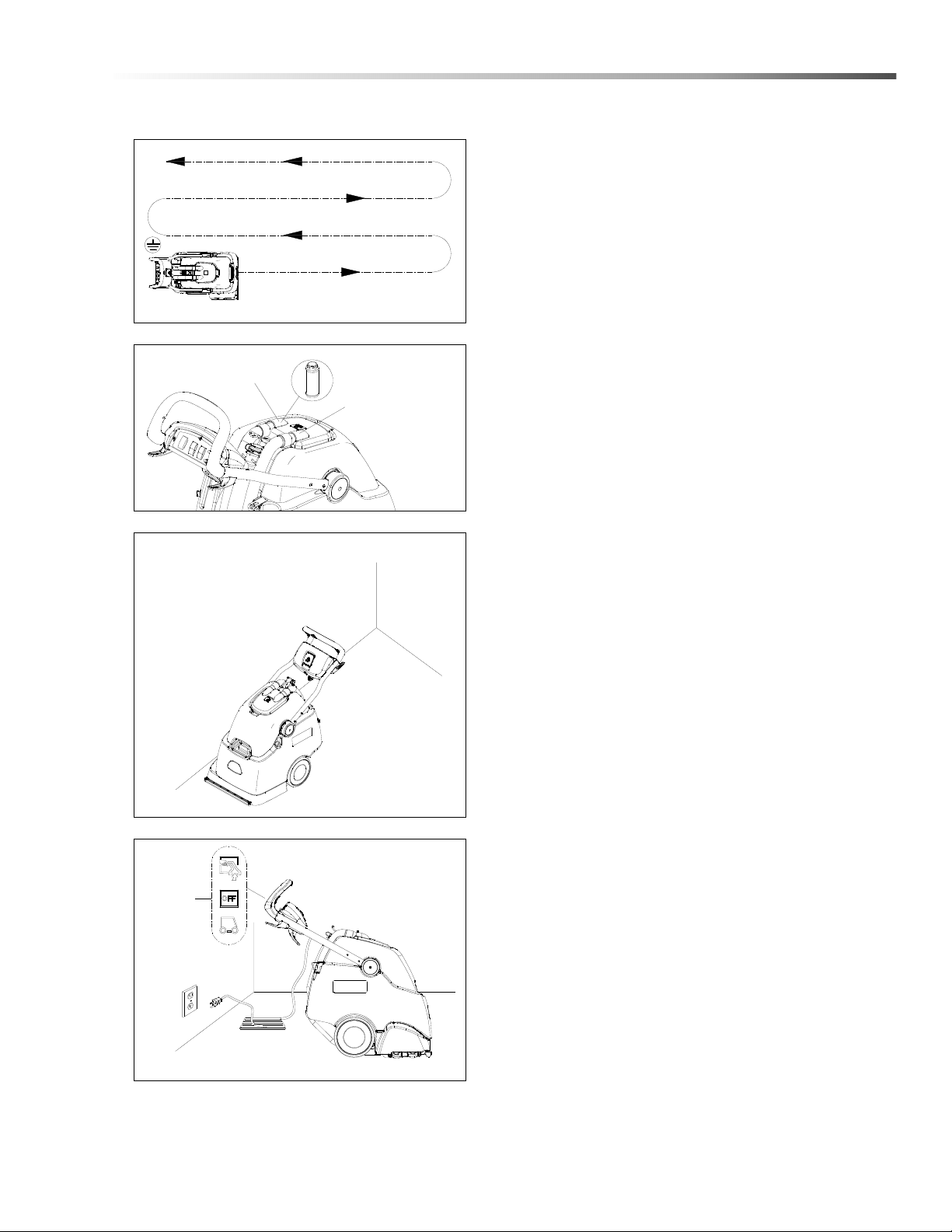
1. This machine can be operated in either direction.
For smaller areas operate the machine by pulling
rearward.
For larger unobstructed areas, flip the handle and
use the machine's brush assisted propelling
motion.
2. Start at wall closest to power outlet. For small
areas, pull straight back without pushing down on
handle.
3. Release intermittent PRESS trigger switches or
turn off continuous AUTO setting on solution switch
approximately 1 foot before ending cleaning pass.
4. Push down on handle to raise vacuum shoe and
brush before moving to the next cleaning pass.
Overlap brush contact area approximately 1 inch.
1 in.
(25mm)
STEP 4
STEP 2
1 ft.
(30 cm)
STEP 3
STEP 1
1
2
86408790 Operator’s Manual - Clipper Duo
21
Operations
Start at wall closest to power outlet. For large areas
flip handle and operate machine in parallel passes,
overlapping brush path. Clean perimeter last.
5. During operation, observe the following: This
machine is equipped with clear dome to facilitate
operator viewing of dirty solution and vacuum air
flow.
During operation, observe the vacuum intake.
Large amounts of water or foam entering the
vacuum system can damage the vacuum motor. If
you notice either condition, shut down the machine
immediately. Empty recovery tank and/or add
defoamer to recovery tank.
6. Use right side of machine for cleaning against
walls.
7. After cleaning, turn off all controls, and carefully
unplug machine.
SHUT
DOWN
STEP 7
STEP 6
ALTERNATE CLEANING PATH
STEP 5
SOLUTION INTAKE
VACUUM INTAKE
OFF
POSITION
CENTER
86408790 Operator’s Manual - Clipper Duo
22
Operations
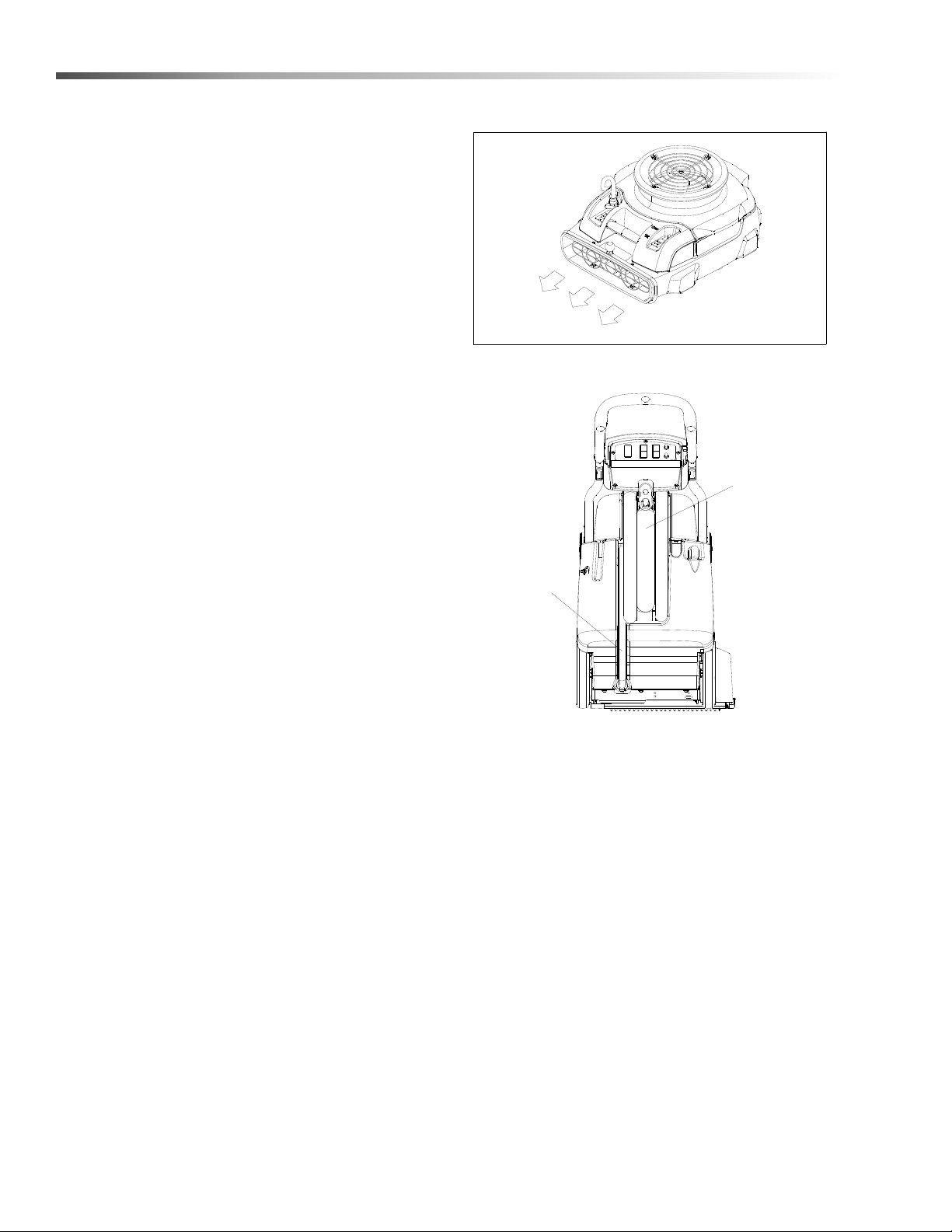
To speed drying, use an air mover fan.
8. . Empty recovery tank by releasing recovery drain
hose. Use a hose with cold water to clean out the
recovery tank.
Drain solution tank after each use.
RECOVERY
DRAIN HOSE
SOLUTION
DRAIN HOSE
STEP 8
86408790 Operator’s Manual - Clipper Duo
23
Operations
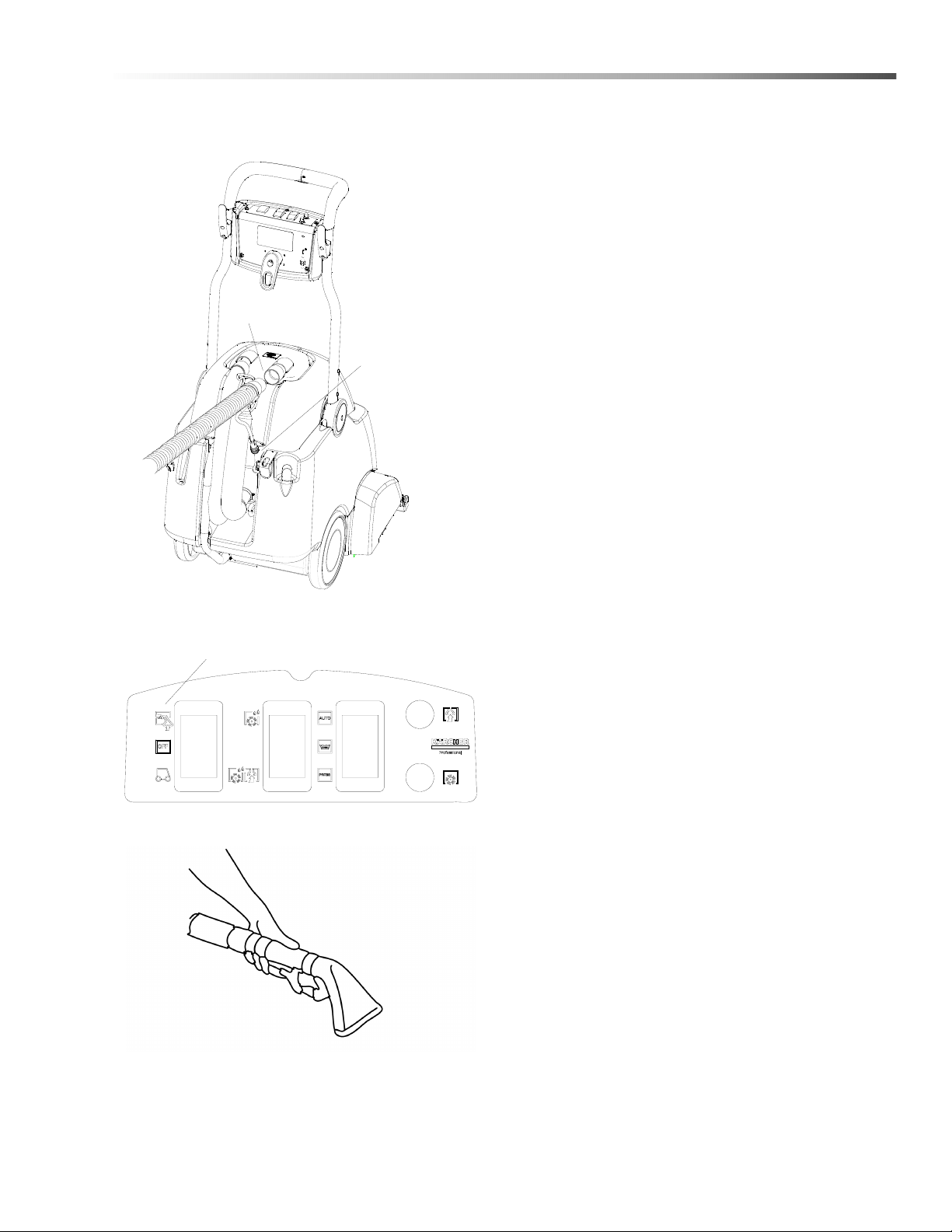
Using The Hand Tool
1. Use only acceptable accessory tools. See Optional
Accessories section.
To connect solution hose pull back collar and insert
over machine mounted fitting, then release collar to
lock into place. Solution connection can remain
connected at all times.
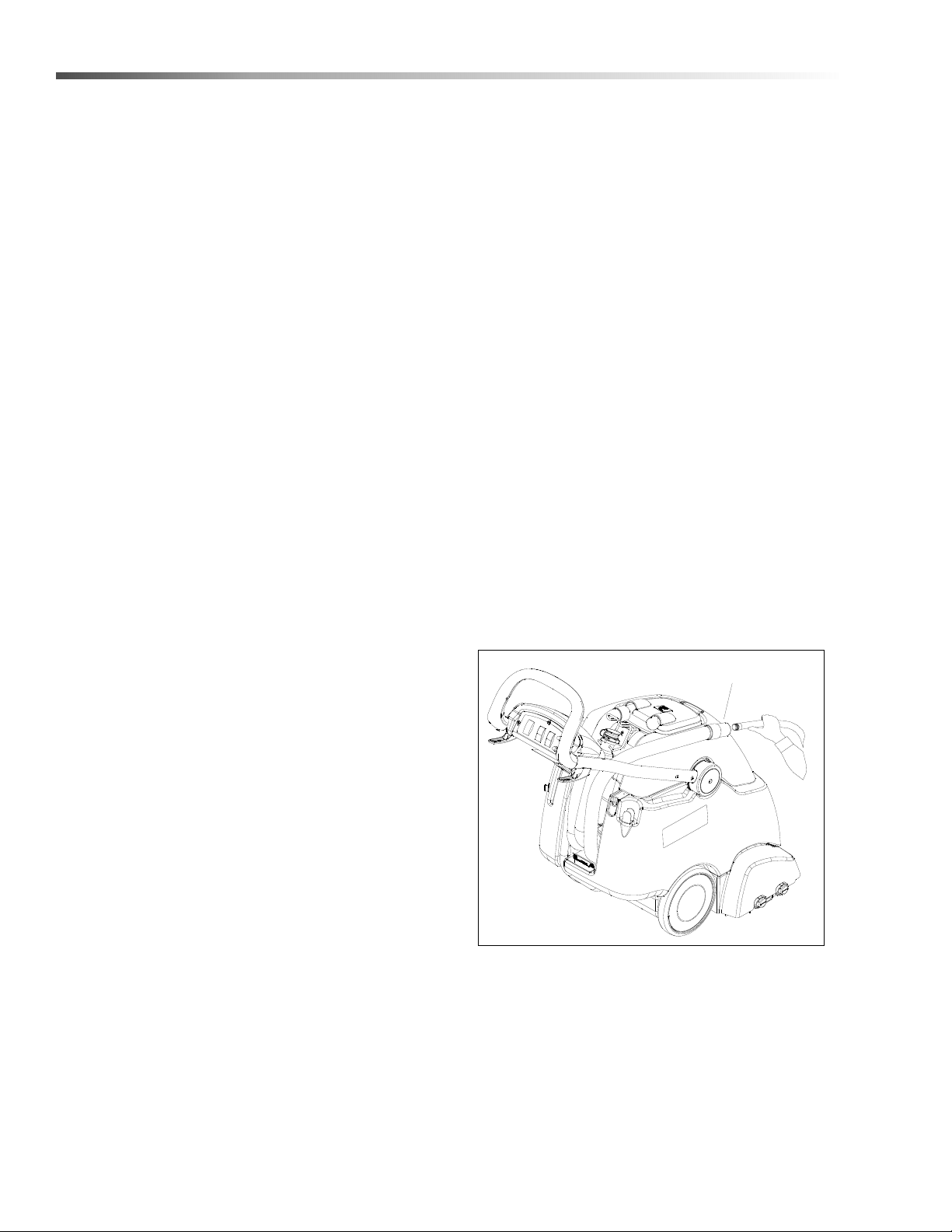
Disconnect vacuum hose and connect the hand
tool to hand tool connection as shown.
2. Select hand tool switch.
3. Squeeze handle on accessory tool to begin
cleaning.
SOLUTION QUICK
DISCONNECT
HAND TOOL
CONNECTION
HAND TOOL SWITCH
86408790 Operator’s Manual - Clipper Duo

24
Maintenance
Service Schedule
MAINTENANCE DAILY WEEKLY QUARTERLY
Check machine for cord damage *
Check recovery dome and gasket for damage and cleanliness *
Check brushes - should be clean with no lint or strings attached *
Remove bearing cap from end of brush. Clean bearing and cap. *
Inspect vac shoe for blockage; remove fibers with coat hanger, etc. *
Check hoses for wear, blockages, or damage *
Check handles, switches, and knobs for damage *
Run one gallon of water through solution system *
Clean out recovery tank, clean float screen and check float valve to
make sure it moves freely
*
Clean out solution *
Clean outside of all tanks and check for damage *
Run vac motor for at least one minute to allow motor to dry *
Store with dome off tank to allow the tank to dry *
Check all bearings for noise *
Check all gaskets for wear and leakage *
Check pump pressure; observe spray pattern and check with gauge
if necessary
*
Check and clean solution screen *
Check brush for wear; ensure bristles are not damaged *
Check condition of vac shoe and frame for damage *
Check overall performance of machine *
Check vac motor carbon brushes *
Check belts for wear and replace as necessary *
Check cables for fraying *
86408790 Operator’s Manual - Clipper Duo
25
Maintenance
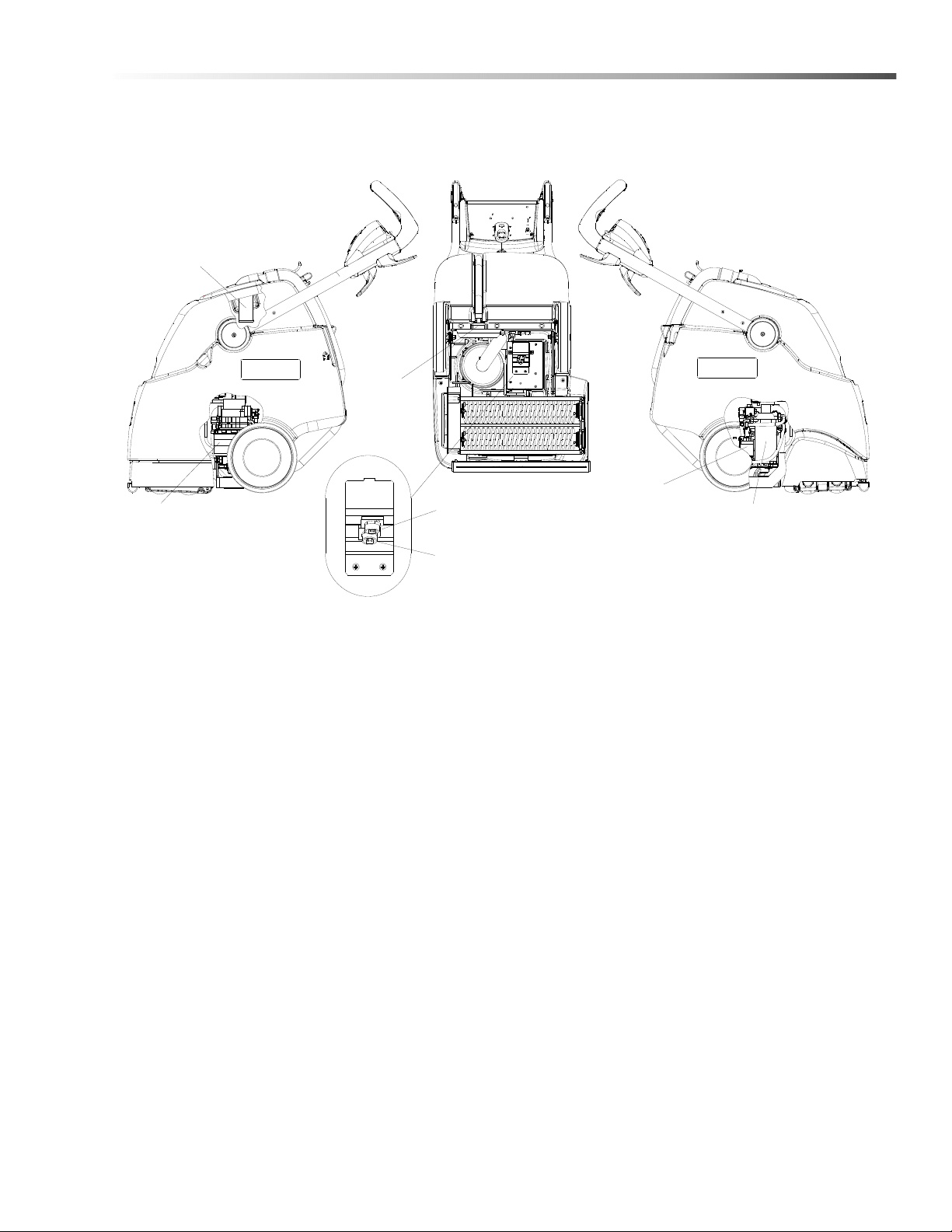
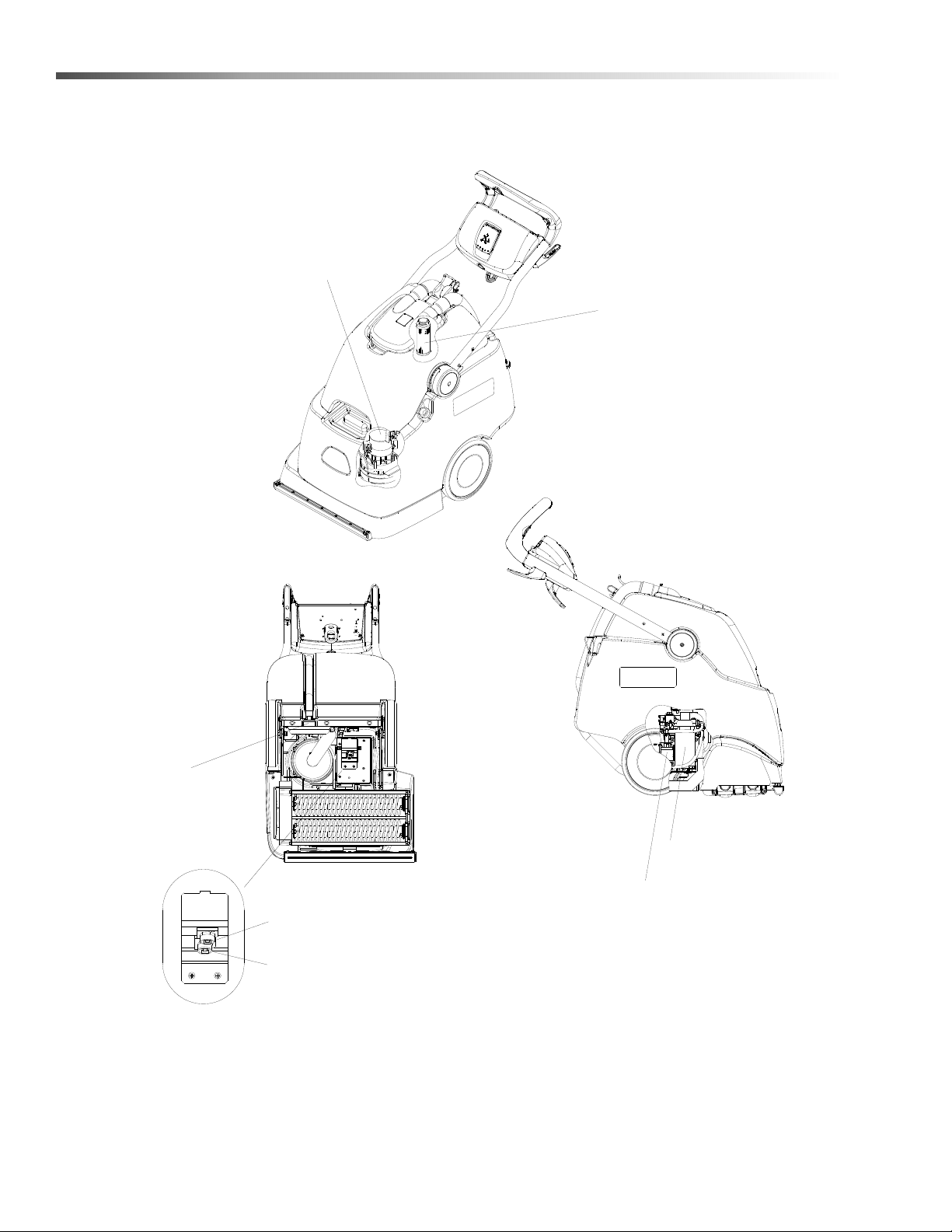
Components
1. Vacuum Motor 4. Interim Solution Pump
2. Solution Strainer (Inside Tank Fitting) 5. Main Solution Pump
3A. Spray Jet - Extraction 6. Float Shut-Off
3B. Spray Jet - Interim
RIGHT
LEFT
BOTTOM
1
2
3A
4
5
6
3B
86408790 Operator’s Manual - Clipper Duo
26
Maintenance
Periodic Maintenance
Twice a month, flush a white vinegar solution (One
quart vinegar to two gallons of water) or anti-browning
solution (mixed as directed) through the extractor. This
will prevent build-up of alkaline residue in the system. If
spray jets become clogged, remove the spray tips,
wash them thoroughly, and blow-dry.
NOTE: Do not use pins, wire, etc. to clean nozzles as
this could destroy spray pattern.
Periodically inspect all hoses, electrical cables and
connections on your machine. Frayed or cracked hoses
should be repaired or replaced to eliminate vacuum or
solution pressure loss. If the cable insulation is broken
or frayed, repair or replace it immediately. Do not take
chances with electrical fire or shock.
Daily / Regular Maintenance
NOTE: Before making any adjustments or repairs to the
machine, disconnect the power cord from electrical
source
1. Empty unused cleaning solution from the solution
tank.
2. Flush pumping system with 4 or 7 liters of clean,
hot water.
3. After each use, rinse tank with fresh water. Periodi-
cally inspect the recovery tank and decontaminate
if necessary, using a Hospital Grade Virucide or a
1-10 bleach to water solution. Waste water should
be disposed of properly.
4. Check for and remove any lint or debris around vac
shoe.
5. Check spray jets for full spray pattern.
6. Remove lint and dirt build-up from brush and
housing.
7. Check float and shut-off screen and clean as
necessary.
Vacuum Shoe and Hose
NOTE: Vacuum Shoe and hose flush should be done
daily after use. Place machine over drainage area
before beginning.
1. Remove vacuum hose from dome.
2. Insert water hose into vacuum hose.
3. With water pressure on high, rinse out hose and
vacuum shoe. Water should flow freely from
vacuum shoe.
Vacuum Hose
86408790 Operator’s Manual - Clipper Duo
27
Maintenance
Circuit Protection
Circuit Breakers
Circuit breakers interrupt the flow of power in the event of an electrical overload. When a circuit breaker is tripped,
reset it by pressing the exposed button. If a circuit breaker continues to trip. The cause should be found and
corrected.
CIRCUIT BREAKERS
15 Amp. Protects the vacuum motor.
8 Amp. Protects the brush motor.
86408790 Operator’s Manual - Clipper Duo
28
Maintenance
Scrub Deck
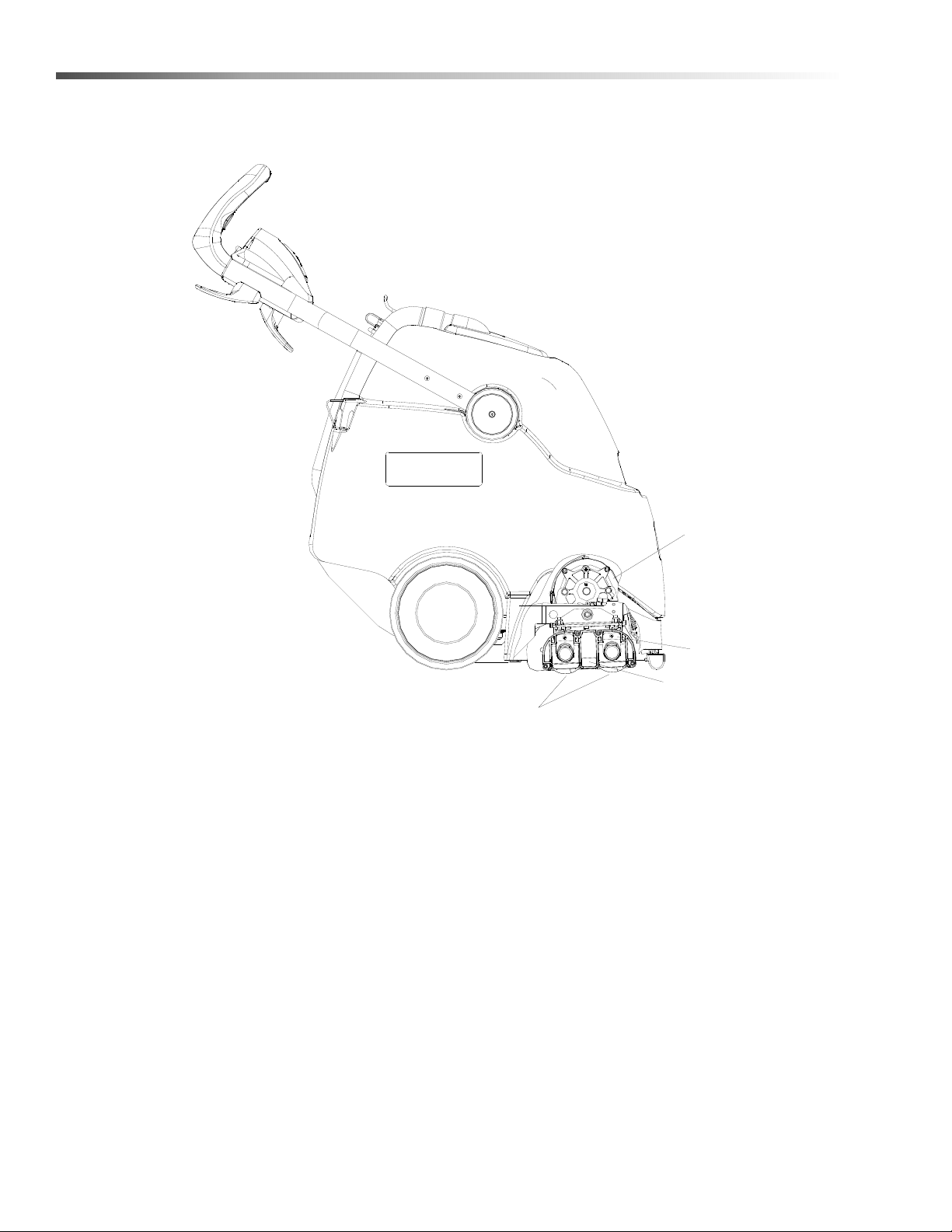
1. Scrub Brush Motor
2. Scrub Brushes
3. Retaining Clip
4. Brush Installation Decal
1
2
3
4
86408790 Operator’s Manual - Clipper Duo
29
Maintenance
Scrub Head
The dual cylindrical scrub head is designed to scrub
chemical into the carpet. The two counter rotating
brushes raise the pile of the carpet, giving it a lush
groomed appearance.
The rear brush is the stiffer brush and is intended to
scrub deeper and help propel the machine. It can be
identified by its black color.
The front brush is the softer brush and is intended to lift
and groom the carpet pile. It can be identified by the
white bristles.
Maintenance
Scrub brushes should be replaced as a set when bristle
length wears to height of yellow Perform AlertTM
bristles.
Scrub Brush Removal
The scrub brushes are removed from the right side of
the machine.
5. Disconnect all power and unplug machine.
6. Tip the machine back.
7. Pull out on the bottom of the retaining clip.
8. The brush assembly and end cap should drop
down. Then pull the brush down far enough to
clear the bottom of the housing.
9. Pull brush out with a rocking motion to free brush
from drive hub.
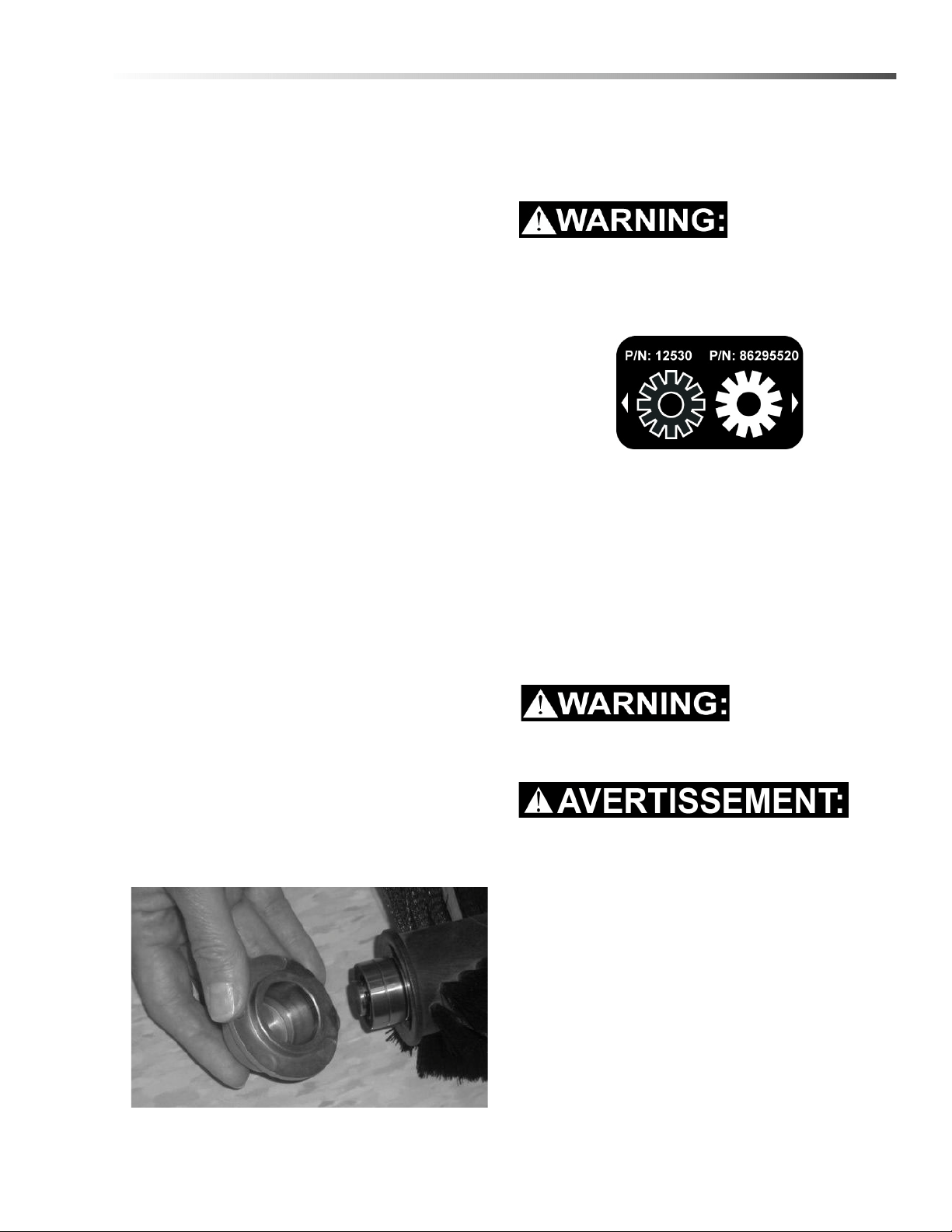
Bearing Cleaning
1. Remove bearing cap from end of brush.
2. Clean cap and bearings.
Scrub Brush Replacement
NOTE: See brush placement decal on brush deck.
(Black brush to rear of machine and white brush to
front of machine).
Only use the brushes provided with the appliance
or those specified in the instructions manual. The
use of other brushes may impair safety.
1. Lift the drive side of the brush and push it onto
drive hub until a positive stop is felt. The brush
cannot be installed until the brush is fully seated on
the drive hub.
2. Pull out on the bottom of the retaining clip.
3. Line up the end cap with the flats to each side.
4. Slide brush up into the retaining clip until it clicks in
place.
Only qualified maintenance personnel are to
perform the following repairs
Seul le personnel d'entretien qualifié peut effectuer
des réparations
.
Vacuum Motor Replacement
1. Turn off all switches and unplug machine.
2. Remove recovery tank.
3. Remove handle mounting assembly and set aside.
4. Disconnect and remove the solution/vacuum frame
assembly through the top of the machine.
5. Remove the vacuum motor to service brushes.
6. Reverse process to install vacuum motor.
86408790 Operator’s Manual - Clipper Duo
30
Maintenance
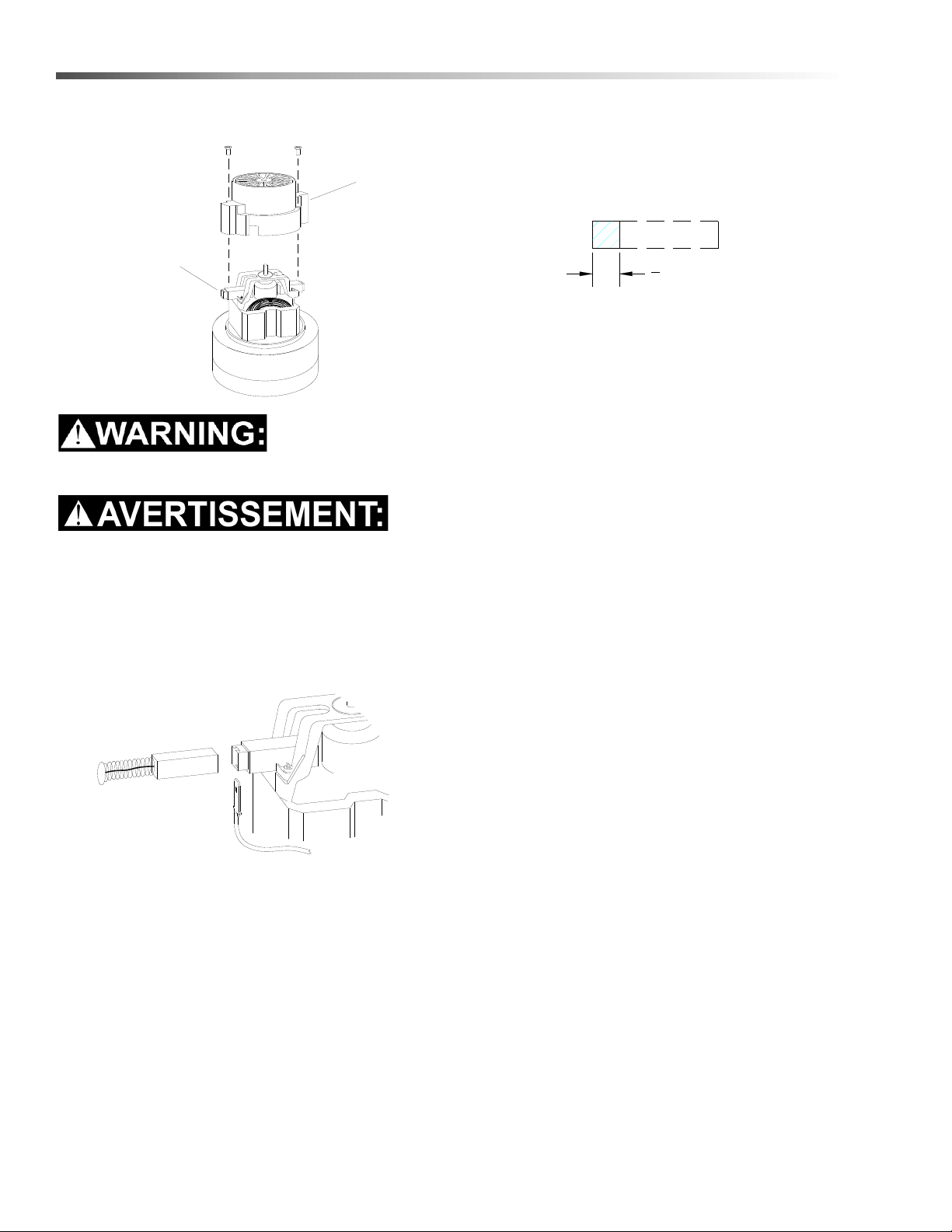
Vacuum Motor Carbon Brushes
The green ground wire must be attached for safe
operation. See wiring diagram.
Le fil de mise à la terre vert doit être fixé pour
assurer un fonctionnement sécuritaire. Voir le
schéma de câblage.
If armature commutator is grooved, extremely pitted or
not concentric, the motor will need to be replaced or
sent to a qualified service center.
Important:
These brushes wear quicker as the length shortens due
to increased heat. Spring inside brush housing will
damage motor if brushes are allowed to wear away
completely.
Periodically check the length of the carbon brushes.
Replace both carbon brushes when either is less than
3/8" (9.5mm) long.
Carbon Brushes
End Cap
3
8
[9.5mm]
86408790 Operator’s Manual - Clipper Duo

31
Maintenance
Troubleshooting
PROBLEM CAUSE SOLUTION
No Power, Nothing
Runs
Is the cord plugged in. Plug in cord.
Circuit breaker tripped in building. Reset breaker.
Faulty switch. Call for service.
Faulty power cord or pigtail. Call for service.
Vacuum Motor Will Not
Run
Vacuum circuit breaker tripped. Reset breaker.
Faulty main vacuum switch. Call for service.
Loose wiring. Call for service.
Faulty vac motor. Call for service.
Vacuum Motor Runs
But Suction Is Poor
Debris lodged in vac shoe. Remove debris from vac shoe.
Dome gasket defective or missing. Replace as necessary.
Vacuum hose cracked or hose cuff loose. Replace or repair as necessary.
Recovery tank full / float ball stuck in the
up position.
Turn off vac motor. Drain and rinse
recovery tank.
Poor Or No Water Flow Pump switch in intermittent position.
Turn to continuous or use buttons on
handle
(Carpet Is Streaky) Jets clogged or missing.
Clean using a vinegar /water solution or
replace.
Solution filter clogged.
Drain solution tank and clean solution
filter.
Faulty solenoid. Call for service.
Brush Does Not Spin Main switch off or in hand tool mode. Turn main switch to machine mode.
Brush circuit breaker tripped. Reset circuit breaker.
Brush belt broken. Replace as necessary.
Faulty brush motor. Call for service.
86408790 Operator’s Manual - Clipper Duo
32
Suggested Spare Parts
FLOAT SHUT-OFF
86299250
86390390
RIGHT
BOTTOM
STRAINER
86003630
86297440 JET, EXTRACTION
86201110 PUMP
86298070 PUMP
VACUUM MOTOR
86012550 JET, INTERIM
86408790 Operator’s Manual - Clipper Duo

33
Notes
86408790 Operator’s Manual - Clipper Duo
Rate your product and tell us your opinion.
Évaluer votre produit et dites-nous votre opinion.
www.kaercher.com/welcome
www.kaercher.com/dealersearch
Alfred Kärcher SE & Co. KG
Alfred-Kärcher-Str. 28-40
71364 Winnenden (Germany)
Tel.: +49 7195 14-0
Fax: +49 7195 14-2212
DANKE!
THANK YOU!
MERCI!
GRACIAS!
!
Registrieren Sie Ihr Produkt und protieren Sie von vielen Vorteilen.
Register your product and benet from many advantages.
Enregistrez votre produit et bénécier de nombreux avantages.
Registre su producto y aproveche de muchas ventajas.
Bewerten Sie Ihr Produkt und sagen Sie uns ihre Meinung.
Reseñe su producto y díganos su opini
ó
n