Use and Care & Installation Guide
Self-Cleaning Electric Range
GE Appliances
Safety Instructions ................... 3–5
Anti-Tip Device ................................ 3, 26, 30
Operating Instructions, Tips
Aluminum Foil.......................... 5, 14, 18–20
Clock and Timer................................... 10, 11
Features....................................................... 6, 7
Oven ........................................................12–25
Auto Oven Shut Off................................. 12
Baking................................................. 13, 14
Broiling................................................ 20, 21
Control Panel..................................... 10, 11
Control Settings.......................................... 8
Roasting ............................................. 18, 19
Self-Cleaning Instructions ............. 22–25
Timed Baking .................................... 15, 16
Power Outage.............................................. 11
Surface Cooking..................................... 8–10
Canning Tips................................................ 9
Control Settings.......................................... 8
Cooktop Comparison................................ 8
Cookware Tips............................................ 9
Care and Cleaning................... 26–29
Anti-Tip Device ............................................ 26
Cooktop.................................................. 27, 29
Lift-Off Oven Door....................................... 28
Oven Light..................................................... 28
Self-Cleaning Instructions................. 22–25
Surface Units................................................ 26
Problem Solver...................... 35, 36
Thermostat Adjustment–
Do It Yourself............................................ 17
More questions ?…call
GE Answer Center® 800.626.2000
Installation................................. 30–34
Anti-Tip Device..................................... 30, 34
Flooring Under the Range......................... 31
Leveling ......................................................... 34
Consumer Services.................. 39
Appliance Registration................................. 2
Important Phone Numbers....................... 39
Model and Serial Number Location.......... 2
Warranty ....................................... Back Cover
Models: JBP19
JBP21
JBP24
JBP25
JBP26
JBP45
JBP46
JBP47
JBP48
164D2966P232
49-8721
3
10-95 CG

2
HELP US HELP YOU
Before using your range,
read this guide carefully.
It is intended to help you
operate and maintain your new
range properly.
Keep it handy for answers to
your questions.
If you don’t understand something
or need more help, call:
GE Answer Center
®
800.626.2000
24 hours a day, 7 days a week
Write down the model
and serial numbers.
You’ll find them on a label
behind the range door or behind
the storage drawer.
These numbers are also on the
Consumer Product Ownership
Registration Card that came with
your range. Before sending in
this card, please write these
numbers here:
Model Number
Serial Number
Use these numbers in any
correspondence or service calls
concerning your range.
If you received
a damaged range…
Immediately contact the dealer (or
builder) that sold you the range.
Save time and money.
Before you request
service…
Check the Problem Solver in the
back of this guide. It lists causes of
minor operating problems that you
can correct yourself.
IF YOU NEED SERVICE
To obtain service, see the Consumer Services page
on the inside back cover.
We’re proud of our service and want you to be
pleased. If for some reason you are not happy with the
service you receive, here are 3 steps to follow for
further help.
FIRST, contact the people who serviced your
appliance. Explain why you are not pleased. In most
cases, this will solve the problem.
NEXT, if you are still not pleased, write all the
details—including your phone number—to:
Manager, Consumer Relations GE Appliances
Appliance Park
Louisville, KY 40225
FINALLY, if your problem is still not resolved, write:
Major Appliance Consumer Action Program
20 North Wacker Drive
Chicago, IL 60606
Important Safety Instructions
IMPORTANT SAFETY INSTRUCTIONS
Read all instructions before using this appliance.
IMPORTANT SAFETY NOTICE
• The California Safe Drinking Water and Toxic
Enforcement Act requires the Governor of
California to publish a list of substances known to
the state to cause birth defects or other reproductive
harm, and requires businesses to warn customers
of potential exposure to such substances.
• The fiberglass insulation in self-clean ovens
gives off a very small amount of carbon
monoxide during the cleaning cycle. Exposure
can be minimized by venting with an open
window or using a ventilation fan or hood.
• Fluorescent light bulbs contain mercury.
If your model has a surface light, you must
recycle the fluorescent light bulb according to
local, state and federal codes.
When using electrical appliances, basic safety
precautions should be followed, including the
following:
• Use this appliance only for its intended use
as described in this guide.
• Be sure your appliance is properly installed
and grounded by a qualified technician in
accordance with the provided installation
instructions.
• Do not attempt to repair or replace any
part of your range unless it is specifically
recommended in this guide. All other servicing
should be referred to a qualified technician.
• Before performing any service, DISCONNECT
THE RANGE POWER SUPPLY AT THE
HOUSEHOLD DISTRIBUTION PANEL BY
REMOVING THE FUSE OR SWITCHING OFF
THE CIRCUIT BREAKER.
WARNING—
All ranges can tip and injury could
result. To prevent accidental tipping
of the range, attach it to the wall and
floor by installing the Anti-Tip device
supplied.
To check if the device is installed and
engaged properly, remove the kick
panel or storage drawer and inspect the rear
leveling leg. Make sure it fits securely into the slot.
If you pull the range out from the wall for any
reason, make sure the device is properly engaged
when you push the range back against the wall.
If it is not, there is a possible risk of the range
tipping over and causing injury if you or a child
stand, sit or lean on an open door.
Please refer to the Anti-Tip device information
in this guide. Failure to take this precaution could
result in tipping of the range and injury.
• Do not leave children alone—children should
not be left alone or unattended in an area where an
appliance is in use. They should never be allowed
to sit or stand on any part of the appliance.
• Do not allow anyone to climb, stand or hang
on the door, kick panel or storage drawer or
cooktop. They could damage the range and even
tip it over, causing severe personal injury.
• CAUTION: ITEMS OF INTEREST TO
CHILDREN SHOULD NOT BE STORED IN
CABINETS ABOVE A RANGE OR ON THE
BACKSPLASH OF A RANGE—CHILDREN
CLIMBING ON THE RANGE TO REACH
ITEMS COULD BE SERIOUSLY INJURED.
• Do not store flammable materials in an oven or
near the cooktop.
• Never wear loose-fitting or hanging garments
while using the appliance. Be careful when
reaching for items stored over the range.
Flammable material could be ignited if brought
in contact with hot surface units or heating
elements and may cause severe burns.
• Use only dry pot holders—moist or
damp pot holders on hot surfaces may
result in burns from steam. Do not let
pot holders touch hot surface units or heating
elements. Do not use a towel or other bulky cloth.
(continued next page)
3

IMPORTANT SAFETY INSTRUCTIONS
(continued)
• For your safety, never use your appliance for
warming or heating the room.
• DO NOT STORE OR USE COMBUSTIBLE
MATERIALS, GASOLINE OR OTHER
FLAMMABLE VAPORS AND LIQUIDS IN
THE VICINITY OF THIS OR ANY OTHER
APPLIANCE.
• Keep the hood and grease filters clean to
maintain good venting and to avoid grease fires.
• Do not let cooking grease or other flammable
materials accumulate in or near the range.
• Do not use water on grease fires.
Never pick up a flaming pan.
Smother flaming pan on surface unit
by covering pan completely with well-fitting lid,
cookie sheet or flat tray, or if available, use dry
chemical or foam-type extinguisher.
Flaming grease outside a pan can be put out by
covering with baking soda or, if available, a multi-
purpose dry chemical or foam-type fire extinguisher.
Flame in the oven can be smothered completely
by closing the oven door and turning the oven
control to OFF or use a dry chemical or foam-
type fire extinguisher.
• Do not touch the surface units, the heating
elements or the interior surface of the oven.
These surfaces may be hot enough to burn even
though they are dark in color. During and after
use, do not touch, or let clothing or other
flammable materials contact the surface units,
areas nearby the surface units or any interior area
of the oven; allow sufficient time for cooling, first.
Potentially hot surfaces include the cooktop,
areas facing the cooktop, oven vent opening,
surfaces near the opening, crevices around the
oven door and metal trim parts above the door.
Remember: The inside surface of the oven may
be hot when the door is opened.
• When cooking pork, follow the directions
exactly and always cook the meat to an internal
temperature of at least 170°F. This assures that,
in the remote possibility that trichina may be
present in the meat, it will be killed and the meat
will be safe to eat.
Oven
• Stand away from the range when opening the
oven door. Hot air or steam which escapes can
cause burns to hands, face and/or eyes.
• Do not heat unopened food containers.
Pressure could build up and the container could
burst, causing an injury.
• Keep the oven vent duct
unobstructed.
• Keep the oven free from
grease buildup.
• Place the oven shelf in desired position while the
oven is cool. If shelves must be handled when hot,
do not let pot holder contact the heating elements.
• Pulling out the shelf to the shelf stop is a
convenience in lifting heavy foods. It is also
a precaution against burns from touching hot
surfaces of the door or oven walls.
• When using cooking or roasting bags in the
oven, follow the manufacturer’s directions.
• Do not use your oven to dry newspapers.
If overheated, they can catch fire.
• Do not use oven for a storage area. Items stored
in an oven can ignite.
• Do not leave paper products, cooking utensils
or food in the oven when not in use.
Self-Cleaning Oven
• Do not clean the door gasket. The door gasket is
essential for a good seal. Care should be taken not
to rub, damage or move the gasket.
• Do not use oven cleaners. No commercial oven
cleaner or oven liner protective coating of any kind
should be used in or around any part of the oven.
Residue from oven cleaners will damage the inside
of the oven when the self-clean cycle is used.
• Clean only parts listed in this Use and Care
Guide.
• Before self-cleaning the oven, remove the
broiler pan, grid and other cookware.
• Be sure to wipe up excess spillage before
starting the self-cleaning operation.
• If the self-cleaning mode malfunctions, turn
the oven off and disconnect the power supply.
Have it serviced by a qualified technician.
4
5
Important Safety Instructions
Surface Cooking Units
• Use proper pan size— Select
cookware having flat bottoms large
enough to cover the surface unit
heating element. The use of undersized cookware
will expose a portion of the surface unit to direct
contact and may result in ignition of clothing.
Proper relationship of cookware to surface unit
will also improve efficiency.
• Never leave the surface units unattended at
high heat settings. Boilovers cause smoking
and greasy spillovers that may catch on fire.
• Be sure the drip pans and the vent duct are not
covered and are in place. Their absence during
cooking could damage range parts and wiring.
• Do not use aluminum foil to line the drip pans
or anywhere in the oven except as described in
this guide. Misuse could result in a shock, fire
hazard or damage to the range.
• Only certain types of glass, glass⁄ceramic,
earthenware or other glazed containers are
suitable for cooktop service; others may break
because of the sudden change in temperature.
• To minimize the possibility of burns, ignition of
flammable materials and spillage, the handle of a
container should be turned toward the center of the
range without extending over nearby surface units.
• Always turn the surface units off before
removing cookware.
• To avoid the possibility of a burn or electric
shock, always be certain that the controls for all
surface units are at the off position and all coils
are cool before attempting to lift or remove a unit.
• Do not immerse or soak the removable surface
units. Do not put them in a dishwasher. Do not
self-clean the surface units in the oven.
• Clean the cooktop with caution. If a wet sponge
is used to wipe spills on a hot cooktop, be careful
to avoid steam burns.
• When flaming foods are under the hood,
turn the fan off. The fan, if operating, may spread
the flame.
• Keep an eye on foods being fried at high or
medium high heat settings.
• Foods for frying should be as dry as possible.
Frost on frozen foods or moisture on fresh foods
can cause hot fat to bubble up and over the sides
of the pan.
• Use little fat for effective shallow or deep-fat
frying. Filling the pan too full of fat can cause
spillovers when food is added.
• If a combination of oils or fats will be used
in frying, stir together before heating, or as fats
melt slowly.
• Always heat fat slowly, and watch as it heats.
• Use a deep fat thermometer whenever
possible to prevent overheating fat beyond
the smoking point.
SAVE THESE
INSTRUCTIONS
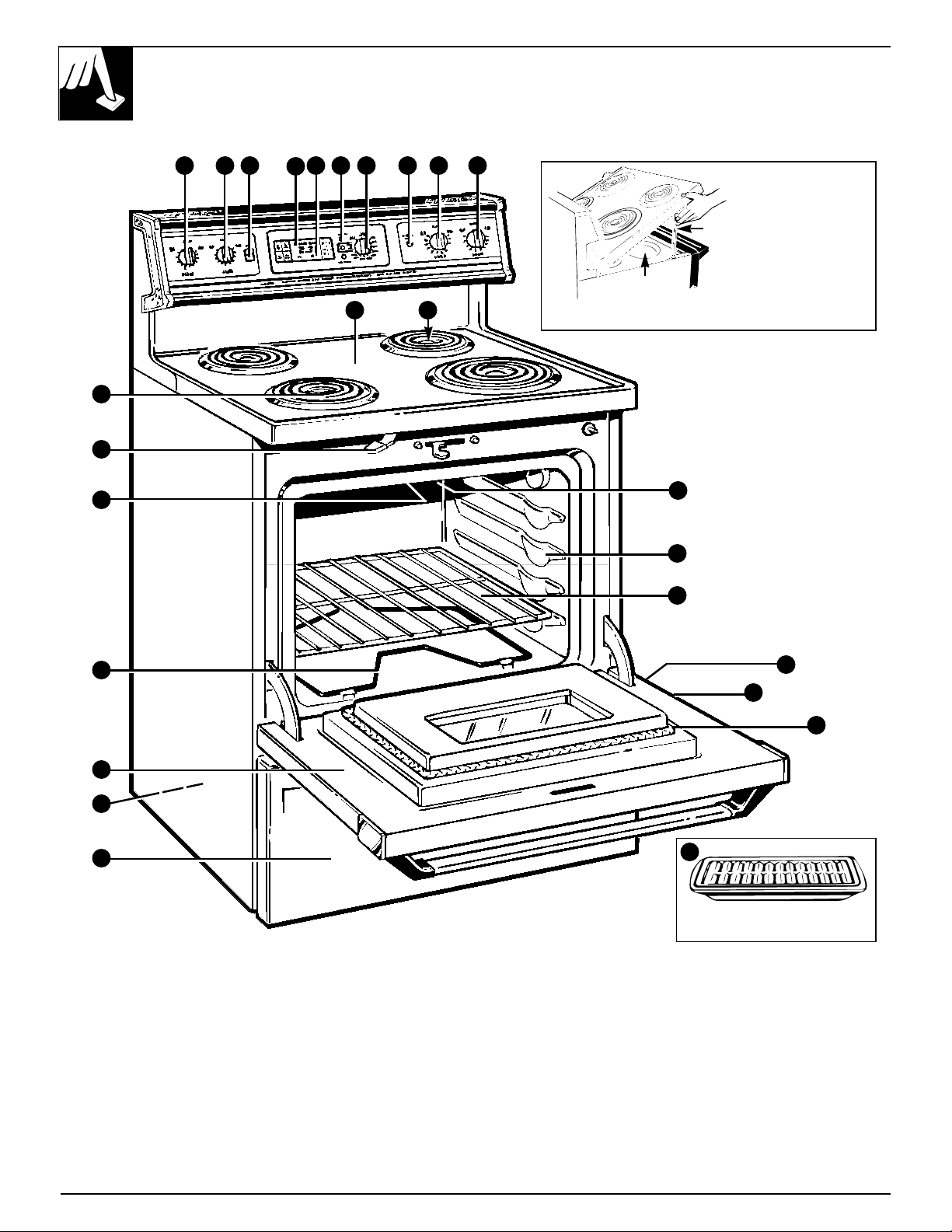
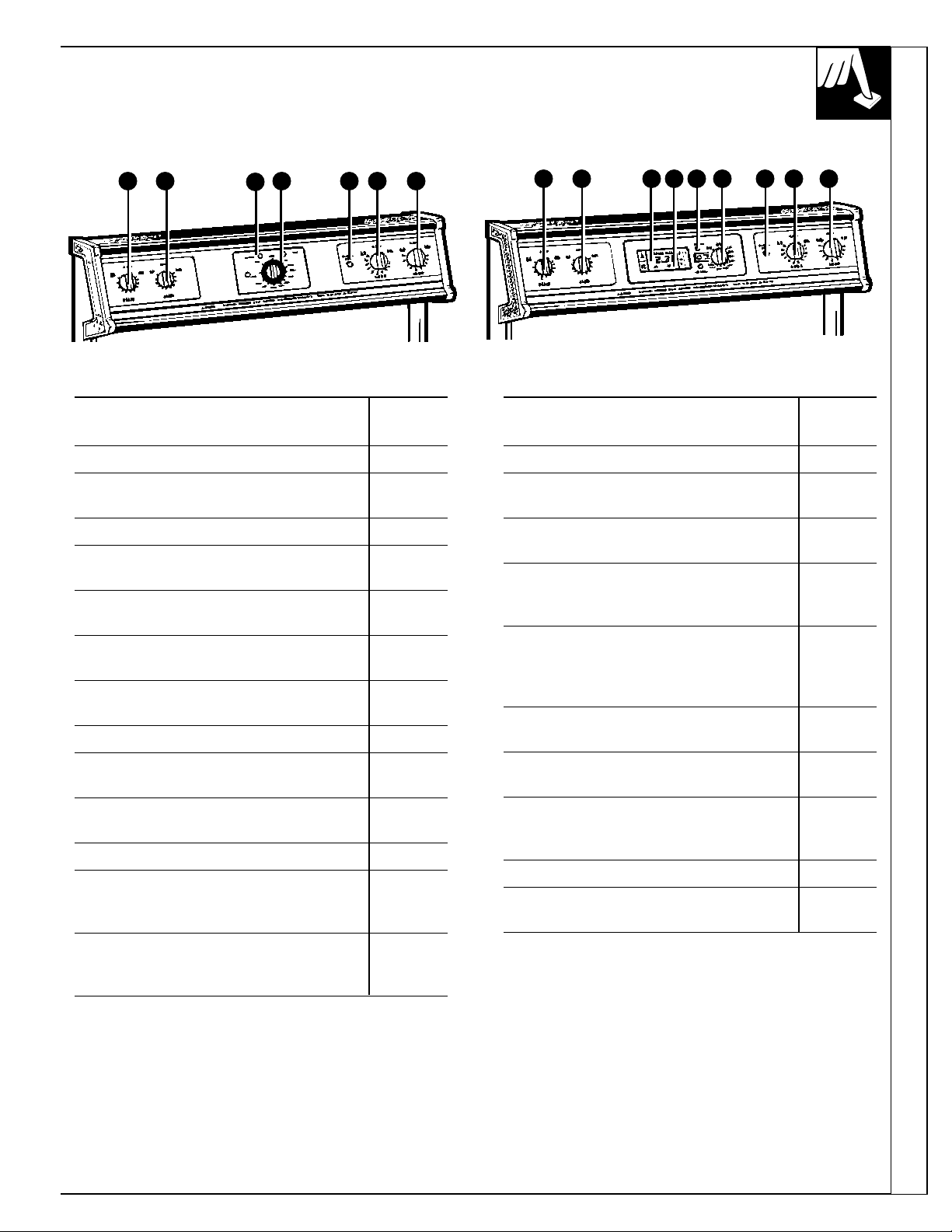
FEATURES OF YOUR RANGE
Not all features are on all models.
6
5
4
1
6
7
8814131211
10
98
15
17
18
19
21
22
16
8
2
3
23
Broiler Pan and Grid
(not included on all models)
Drip Wells
Support Rods
Some models
have lift-up
cooktops for
easier cleaning.
(appearance may vary)
JBP24
JBP25
JBP26
JBP45
JBP46
JBP47
JBP48
20
7
Features of Your Range
Explained
Feature Index Not all models have all features. on page
1 Storage Drawer (on some models) 3, 29
2 Anti-Tip Device 3, 26, 30
See the Installation Instructions.
3 Anti-Tip Label –
4 Bake Element May be lifted gently 3, 4, 22,
for wiping the oven floor. 29
5 Broil Element 3, 4, 20,
22, 29
6 Oven Door Latch 13, 15, 18,
Use for self-cleaning only. 20, 22–25
7 Surface Units, Drip Pans 3–5, 8–10,
26
8 Surface Unit Control Knobs 8, 27
9 Oven Light Switch 13
(for models with oven window)
10 Automatic Oven Light 13
(on some models)
11 Clock and Timer (on some models) 10, 11
12 Oven On Light 10, 12,
Latch Door Light 15–17
Preheated Light
13 Oven Temperature Knob 10, 11, 17,
18, 20,
22–25, 27
Explained
Feature Index Not all models have all features. on page
14 Surface Unit “On” Indicator Light 8
15 Cooktop/Lift-Up Cooktop 3, 5, 8–10,
(on some models) 27, 29
16 Oven Vent 4, 27
Located under right rear surface unit.
17 Oven Interior Light 12, 22, 28
(on some models) Comes on
automatically when door is opened.
18 Oven Shelf Supports 12, 18, 21
Shelf positions for cooking are
suggested in the Baking, Roasting
and Broiling sections.
19 Oven Shelf with Stop-Locks 12–15,
(number may vary) 18, 23, 29
20 Model and Serial Number Location 2
Behind the storage drawer.
21 Lift-Off Oven Door with 4, 20,
Broil Stop Position 22, 28
Easily removed for cleaning.
22 Oven Door Gasket 4, 22, 28
23 Broiler Pan and Grid 4, 18,
(on some models) 20–22, 29
8 8
12
13 14 8 8
JBP19
88141312111088
JBP21
SURFACE CONTROLS
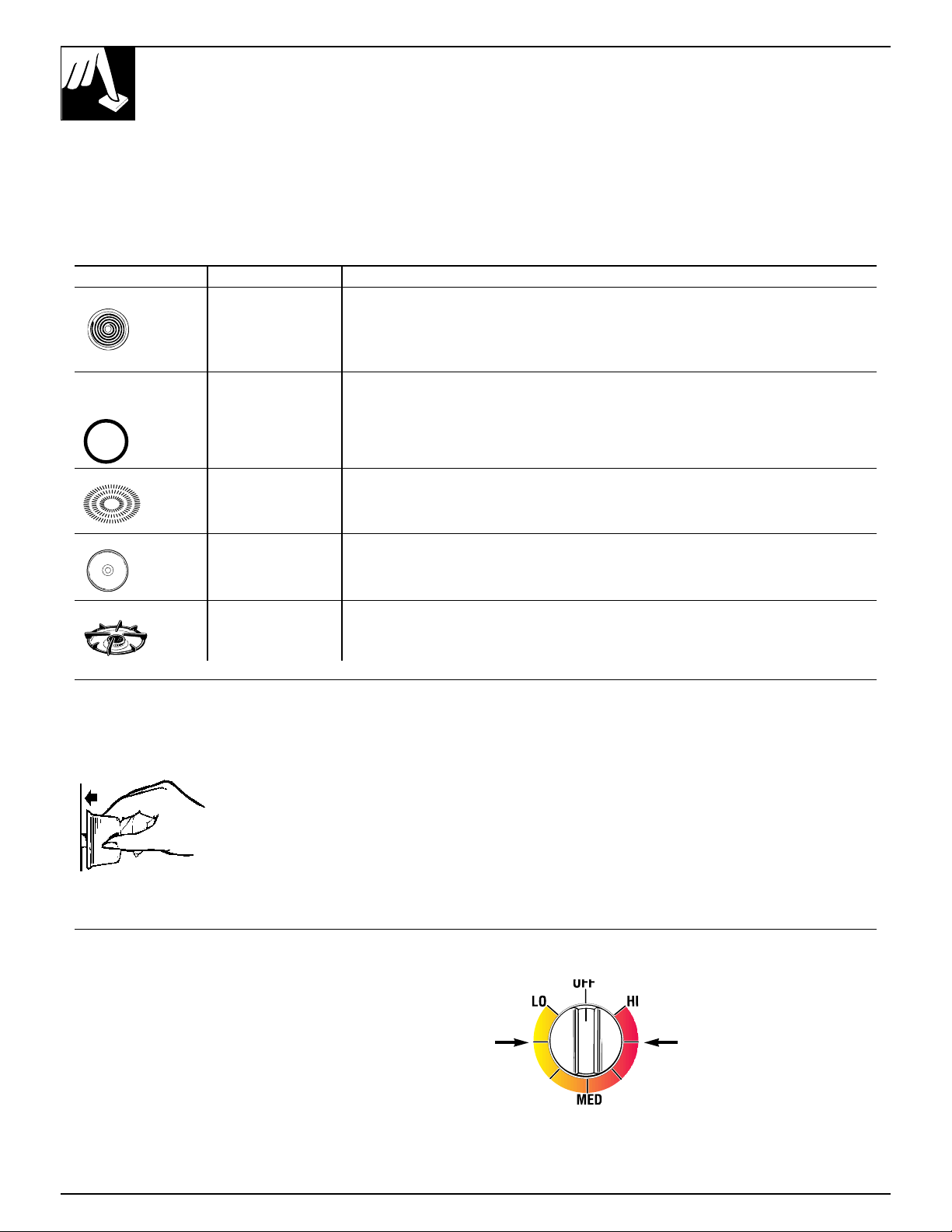
How to Set the Controls
Push the knob in and turn in
either direction to the heat
setting you want.
Be sure you turn control to
OFF when you finish cooking.
The surface unit “on” indicator light will glow
when ANY heat on any surface unit is on.
At both OFF and HI the control “clicks” into position.
You may hear slight “clicking” sounds during
cooking, indicating the control is keeping the unit at
the heat level or power level you set.
Switching heats to higher settings always shows a
quicker change than switching to a lower setting.
Cooking Guide for Using Heat Settings
HI—Used to begin cooking or to bring water to a
boil. Reduce heat setting after water boils.
Medium High—(Setting halfway between HI and
MED) Maintains a fast boil on large amounts of food.
MED—Sauté and brown; keeps food at a medium
boil or simmer.
Medium Low—(Setting halfway between MED and
LO) Cook after starting at HI; cooks with little water
in covered pan.
LO—Used for long
slow cooking
(simmering) to
tenderize and develop
flavors. Use this
setting to melt butter
and chocolate or to
keep foods warm.
NOTE: The surface unit “on” indicator light may
glow between LO and OFF, but there is no power to
the surface units.
8
HOW DOES THIS COOKTOP COMPARE
TO YOUR OLD ONE?
Type of Cooktop Description How it Works
Electric Coil Flattened metal Heats by direct contact with the pan and by heating the air under the pan. For best cooking
tubing containing results, use good quality pans. Electric coils are more forgiving of warped pans than radiant
electric resistance or solid disks. Heats up quickly but does not change heat settings as quickly as gas or
wire suspended induction. Electric coils stay hot enough to continue cooking for a short time after they are
over a drip pan. turned off.
Radiant Electric coils Heat travels to the glass surface and then to the cookware, so pans must be flat on the
(Glass Cooktop) under a glass bottom for good cooking results. The glass cooktop stays hot enough to continue cooking
cooktop. after it is turned off. Remove the pan from the surface unit if you want cooking to stop.
Induction High frequency Pans must be made of ferrous metals (metal that attracts a magnet). Heat is produced by
induction coils a magnetic circuit between the coil and the pan. Heats up right away and changes heat
under a glass settings right away, like a gas cooktop. After turning the control off, the glass cooktop is
surface. hot from the heat of the pan, but cooking stops right away.
Solid Disk Solid cast iron Heats by direct contact with the pan, so pans must be flat on the bottom for good cooking
disk sealed to the results. Heats up and cools down more slowly than electric coils. The disk stays hot
cooktop surface. enough to continue cooking after it is turned off. Remove the pan from the solid disk if
you want the cooking to stop.
Gas Burners Regular or sealed Flames heat the pans directly. Pan flatness is not critical to cooking results, but pans
gas burners use should be well balanced. Gas burners heat the pan right away and change heat settings
either LP gas right away. When you turn the control off, cooking stops right away.
or natural gas.
Your new cooktop has electric coil surface units.
If you are used to cooking with gas burners or other
types of electric cooktops, you will notice some
differences when you use electric coils.
The best types of cookware to use, plus heat-up and
cool-down times, depend upon the type of burner or
surface unit you have.
The following chart will help you to understand the
differences between electric coil surface units and any
other type of cooktop you may have used in the past.
Medium
Low
Medium
High
Use medium- or heavy-weight cookware. Aluminum
cookware conducts heat faster than other metals.
Cast-iron and coated cast-iron cookware are slow to
absorb heat, but generally cook evenly at low to
medium heat settings. Steel pans may cook unevenly
if not combined with other metals.
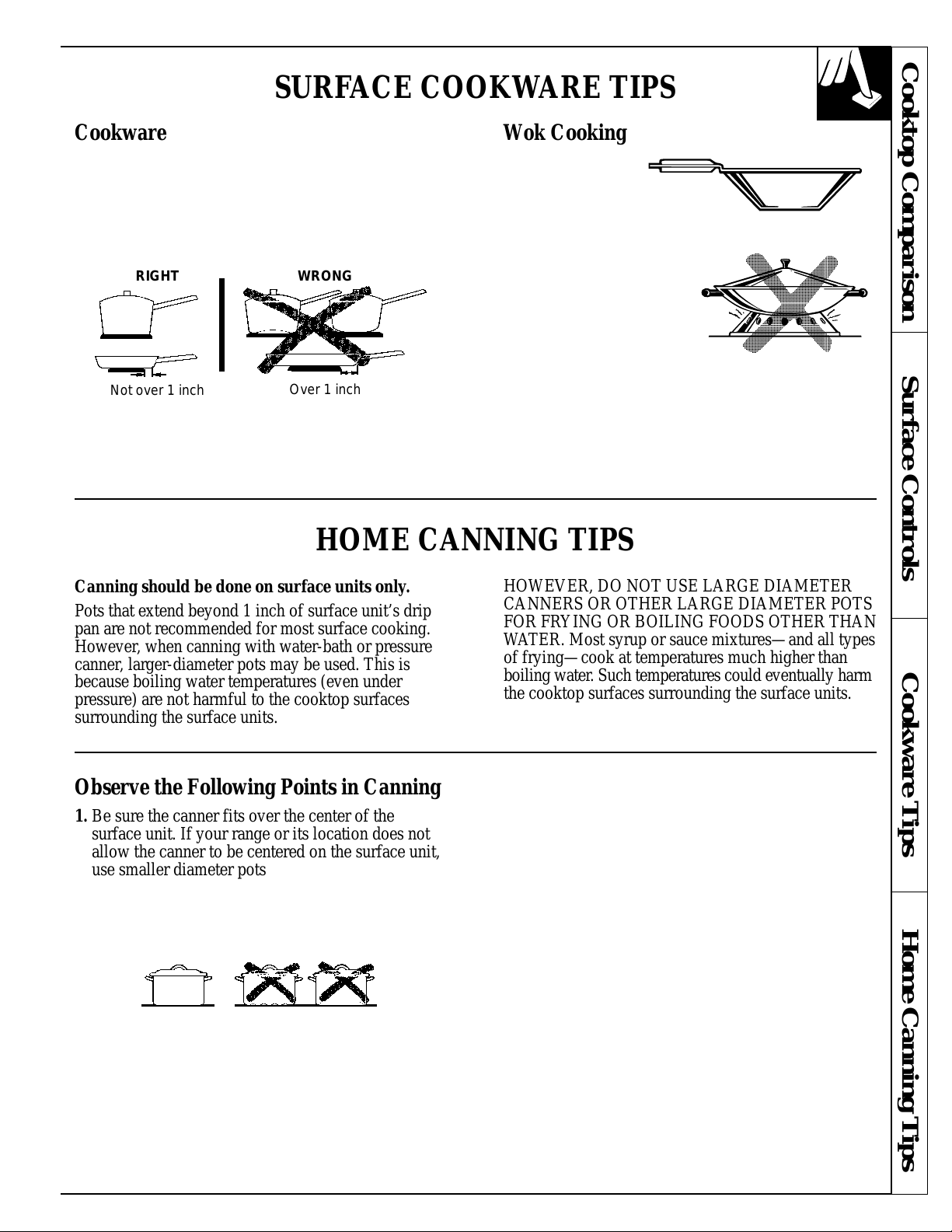
For best cooking results, pans should be flat on the
bottom. Match the size of the saucepan to the size of
the surface unit. The pan should not extend over the
edge of the surface unit more than 1 inch.
We recommend that
you use only a flat-
bottomed wok. They
are available at your
local retail store.
Do not use woks that
have support rings. Use of
these types of woks, with or
without the ring in place,
can be dangerous. Placing
the ring over the surface
unit will cause a build-up
of heat that will damage
the porcelain cooktop.
Do not try to use such woks without the ring.
You could be seriously burned if the wok tipped over.
Do not use woks that have
support rings.
SURFACE COOKWARE TIPS
Cookware Wok Cooking
Not over 1 inch
RIGHT WRONG
Over 1 inch
Cooktop Comparison Surface Controls Cookware Tips Home Canning Tips
HOME CANNING TIPS
Canning should be done on surface units only.
Pots that extend beyond 1 inch of surface unit’s drip
pan are not recommended for most surface cooking.
However, when canning with water-bath or pressure
canner, larger-diameter pots may be used. This is
because boiling water temperatures (even under
pressure) are not harmful to the cooktop surfaces
surrounding the surface units.
HOWEVER, DO NOT USE LARGE DIAMETER
CANNERS OR OTHER LARGE DIAMETER POTS
FOR FRYING OR BOILING FOODS OTHER THAN
WATER. Most syrup or sauce mixtures—and all types
of frying—cook at temperatures much higher than
boiling water. Such temperatures could eventually harm
the cooktop surfaces surrounding the surface units.
Observe the Following Points in Canning
1. Be sure the canner fits over the center of the
surface unit. If your range or its location does not
allow the canner to be centered on the surface unit,
use smaller diameter pots for good canning results.
2. For best results, use canners with flat bottoms.
Canners with flanged or rippled bottoms (often
found in enamelware) don’t make good contact with
the surface unit and take a long time to boil water.
Flat-bottomed canners are recommended.
3. When canning, use recipes and procedures from
reputable sources. Reliable recipes and procedures
are available from the manufacturer of your canner;
manufacturers of glass jars for canning, such as
Ball and Kerr; and the United States Department of
Agriculture Extension Service.
4. Remember that canning is a process that generates
large amounts of steam. To avoid burns from steam
or heat, be careful when canning.
NOTE: If your house has low voltage, canning may
take longer than expected, even though directions
have been carefully followed.
The process time will be shortened by:
(1) using a pressure canner, and
(2) starting with HOT tap water for fastest heating
of large quantities of water.
9
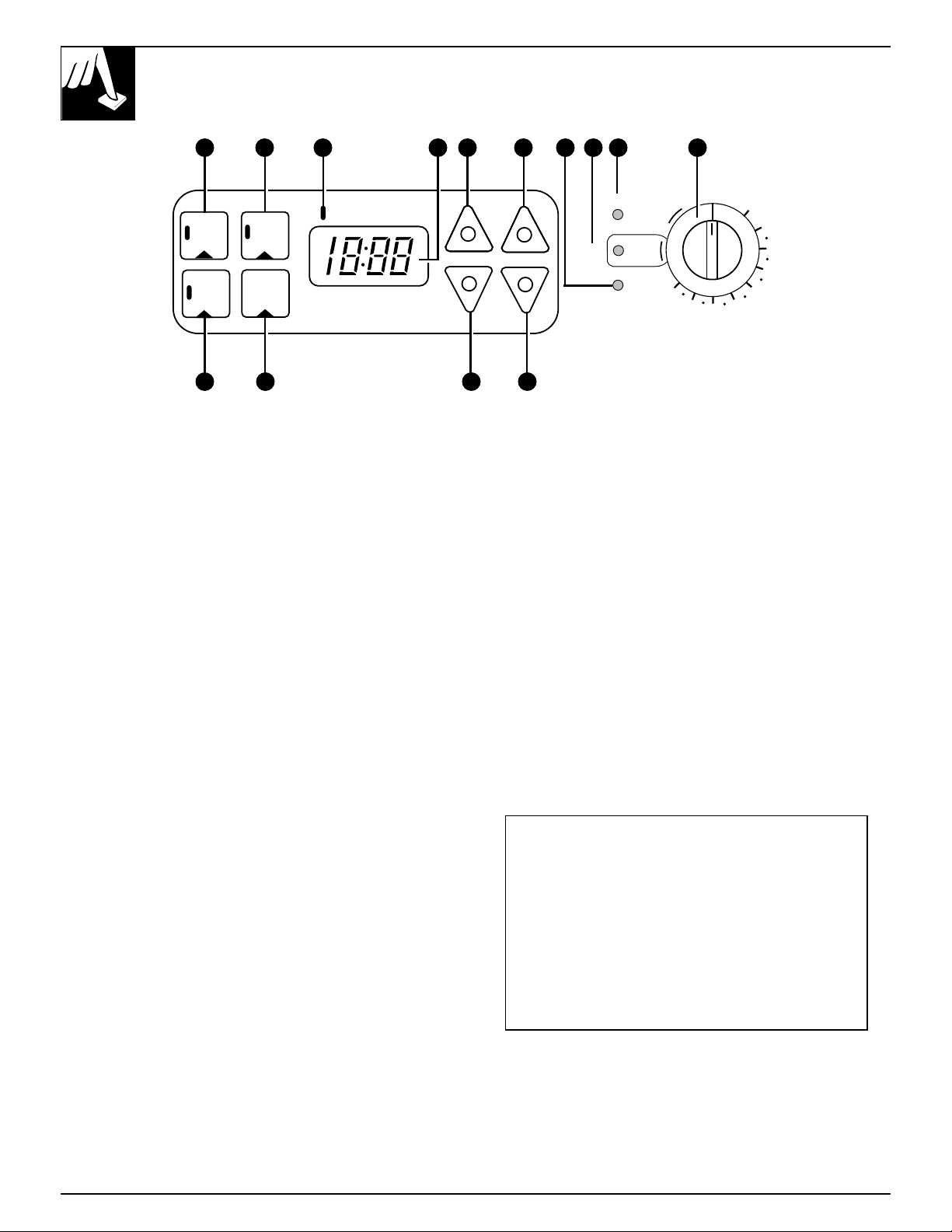
FEATURES OF YOUR OVEN CONTROL
Not all features are on all models. Appearance may vary.
CLOCK
+
–
HOUR
TIMER
ON/OFF
+
–
MIN.
HR MIN
COOK
TIME
ON/OFF
START
TIME
ON/OFF
AUTOMATIC OVEN
OFF
PREHEATED
OVEN ON
BROIL
AUTO
SELF
CLEAN
LATCH
DOOR
WM
200
250
300
350
400
500
550
450
1
11
2
3 554 8 976
10
1. COOK TIME ON/OFF. Press this pad and then
press the HOUR and MIN. pads to set the amount
of time you want your food to cook. Turn the Oven
Temperature knob to the desired temperature. The
oven will shut off after the Cook Time has run out.
2. TIMER ON/OFF. Press this pad to select the timer
feature. The timer does not control oven operations.
The timer can time up to 11 hours and 59 minutes.
To set the timer, first press the TIMER ON/OFF
pad. Press the HOUR and MIN. pads to change
the time.
To cancel the timer, press the TIMER ON/OFF pad
until the display clears.
3. AUTOMATIC OVEN Light. This lights anytime
the oven has been programmed.
4. TIME DISPLAY. Shows the time of day and the
times set for the timer on automatic oven operations.
5. HOUR and MIN. pads. These pads allow you to
set times up to 11 hours and 59 minutes.
6. PREHEATED Indicator Light. Glows when
the oven reaches your selected temperature.
7. LATCH DOOR Light. Glows when the oven is
in the Self-Clean cycle. After the Self-Clean
Cycle, the light will flash. Unlatch the door and
turn the Oven Temperature knob to OFF.
8. OVEN ON Light. Glows anytime the oven is
heating. The light will flash when the oven
automatically turns off to remind you to turn the
Oven Temperature knob to OFF.
9. Oven Temperature Knob. Turn this knob to the
temperature or function you want. See the Baking,
Roasting, Broiling and Self-Cleaning sections.
10. START TIME ON/OFF. Press this pad and the
HOUR and MIN. pads to delay the starting of
your oven up to 11 hours and 59 minutes.
11. CLOCK. Press this pad before setting the
clock. To set the clock, first press the CLOCK
pad. Then press the HOUR and MIN. pads to
change the time of day.
If “F—and a number” flash in the display and
the oven control signals, this indicates a
function error code. If the function error code
appears during the self-cleaning function, check
the oven door latch—the latch handle may have
been moved, even if only slightly, from the
latched position. Make sure the handle is to the
right as far as it will go. Turn the Oven Temperature
knob to off. Allow the oven to cool for one hour.
If the function error code repeats, disconnect
power to the range and call for service.
10
5 5
OVEN CONTROL, CLOCK AND TIMER
Not all features are on all models
The oven controls serve several purposes. Follow the directions for the
controls that apply to your model.
Features of Your Oven Control Oven Control, Clock and Timer
Timer To Set the Timer To Reset the Timer
The timer is a minute timer only.
The timer does not control oven
operations. The maximum setting
on the timer is 11 hours and 59
minutes.
1. Press the TIMER
ON/OFF pad.
2. Press the HOUR and MIN. pads
until the amount of time you
want shows in the display. The
timer will start automatically
within a few seconds of
releasing the pad.
If the display is still showing the
time remaining, you may change it
by pressing the HOUR and MIN.
pads until the time you want
appears in the display.
If the remaining time is not in the
display, recall the remaining time
by pressing the TIMER ON/OFF
pad and then pressing the HOUR
and MIN. pads until the new time
you want shows on the display.
TIMER
ON/OFF
To Cancel the Timer End of Cycle Tones
(on some models)
To cancel the timer, the remaining time must be in
the display. To recall the time remaining, press the
TIMER ON/OFF pad once. To cancel the timer press
the TIMER ON/OFF pad again.
The end of cycle tone can be cleared by pressing the
TIMER ON/OFF pad or, on some models, by pressing
the COOK TIME ON/OFF pad depending on which
function you are using.
Power Outage Oven Temperature Knob
On some models, after a power outage the oven will
automatically resume its setting once the power is
restored.
For models with a CLOCK pad, when the power is
restored the display will flash the time of day until a
pad is pressed or the knob is turned. Reset the clock to
the correct time of day.
If the oven was in operation when the power outage
occurred, the Oven Temperature knob must be turned
back to OFF. Then reset the knob to the way it was
before the power outage.
If your model has a COOK TIME ON/OFF pad
and your oven was set for timed baking or roasting
when the power outage occurred, the clock and all
programmed functions must be reset. To reset them,
first turn the Oven Temperature knob back to OFF,
reset the clock, functions and knob back to the way
they were before the power outage.
The oven temperature
knob maintains the
temperature you set
from WARM (170°F.)
to BROIL (550°F.).
It also has an OFF
and an AUTO SELF
CLEAN setting.
The PREHEATED light glows when the oven
reaches your selected temperature.
The OVEN ON light will glow any time the Oven
Temperature knob is not in the OFF position and is
set on a temperature or a function.
Appearance may vary.
OFF
PREHEATED
OVEN ON
BROIL
AUTO
SELF
CLEAN
LATCH
DOOR
WM
200
250
300
350
400
500
550
450
Automatic Clock To Set the Clock
The clock must be set for the automatic oven timing
functions to work properly. The time of day cannot be
changed during a Timed Baking or Self-Cleaning cycle.
1. Press the CLOCK pad.
2. Press the HOUR and MIN. pads to set
the time of day.
CLOCK
11
USING YOUR OVEN
Before Using Your Oven
1. Look at the controls. Be sure you understand how to
set them properly.
2. Check the oven interior. Look at the shelves. Take
a practice run at removing and replacing them
properly to give sure, sturdy support.
3. Read over the information and tips that follow.
4. Keep this guide handy so you can refer to it,
especially during the first weeks of using your
new range.
Oven Light (on some models) Automatic Oven Shut Off
The light comes on automatically when the oven
door is opened.
On models with an oven window, use the switch to
turn the light on and off when the door is closed.
As a safety feature, this oven will automatically shut
itself off after 12 hours. On models with touch pad
clock controls this feature may be deactivated to
allow the oven to be left on for more than 12 hours.
To deactivate the Automatic Oven Shut-Off, press and
hold both the increase and decrease minute pads for
about 4 seconds. The display will change from time of
day to show “off”.
To reactivate the feature, press and hold both the
increase and the decrease minute pads for about 4
seconds. The display will change from time of day to
show “on”.
12
Shelf Positions
The oven has 4 shelf supports as identified in
this illustration as A (bottom), B, C and D (top).
Shelf positions for cooking food are suggested
in the Baking, Roasting and Broiling sections.
A
B
C
D
Oven Shelves
The shelves are designed with stop-locks so that
when placed correctly on the shelf supports, they
will stop before coming completely out from the
oven, and will not tilt when removing food from or
placing food on them.
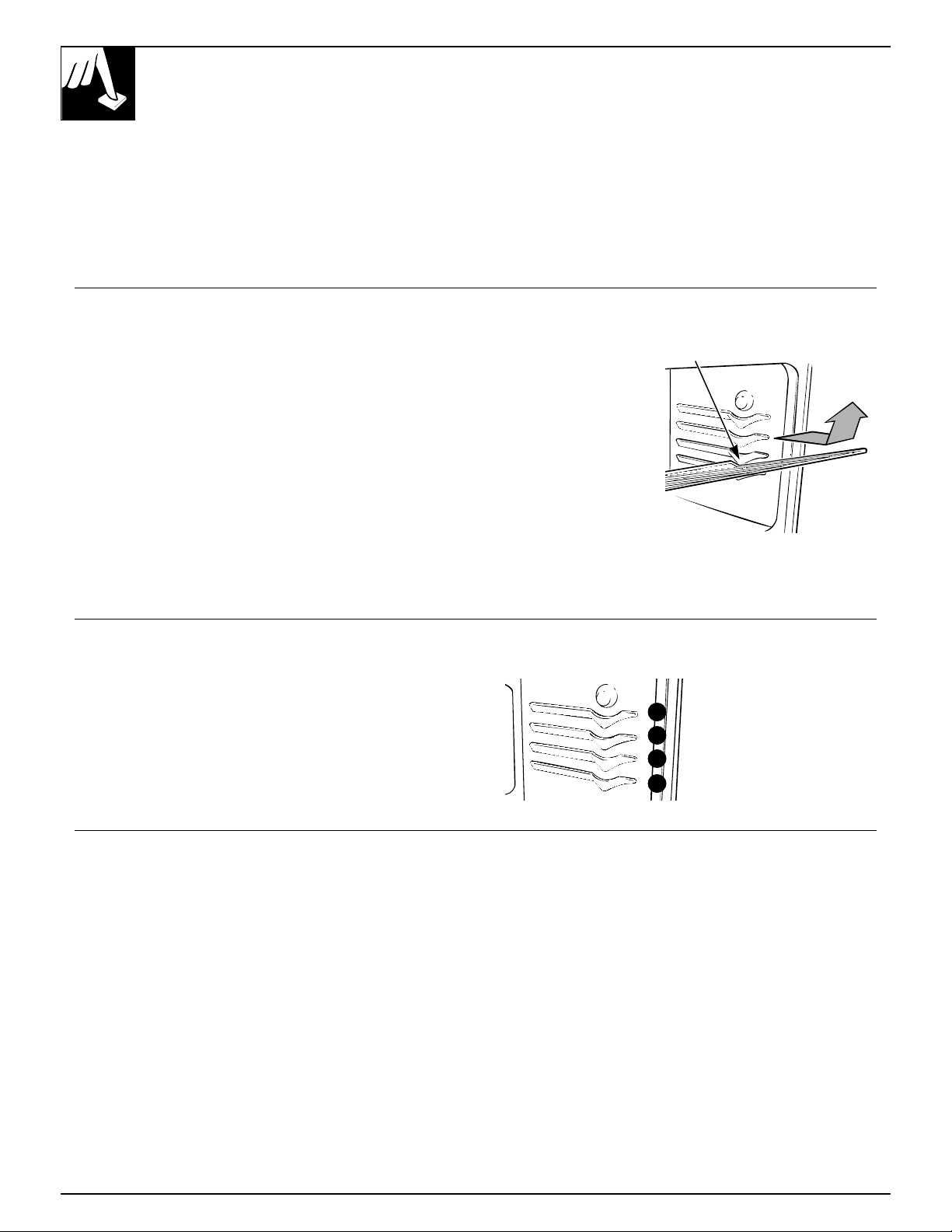
When placing cookware on a shelf, pull the shelf out
to the bump on the shelf support. Place the cookware
on the shelf, then slide the shelf back into the oven.
This will eliminate reaching into the hot oven.
To remove a shelf from the oven, pull it towards you,
tilt the front end upward and pull it out.
To replace, place
the shelf on the shelf
support with the
stop-locks (curved
extension under the
shelf) facing up toward
the rear of the oven.
Tilt up the front and
push the shelf toward
the back of the oven
until it goes past the
bump on the shelf support.
Then lower the front of the
shelf and push it all the way back.
Bump
13
BAKING
Do not lock the oven door with the latch during
baking. The latch is used for self-cleaning only.
Your oven temperature is controlled very accurately
using an oven control system. We recommend that
you operate the range for a number of weeks using the
time given on recipes as a guide to become familiar
with your new oven’s performance.
If you think an adjustment is necessary, see the Adjust
the Oven Thermostat section. It gives easy Do It
Yourself instructions on how to adjust the thermostat.
NOTE: When the oven is hot, the top and outside
surfaces of the range get hot too.
How to Set Your Range for Baking
To avoid possible burns, place the shelves in the
correct position before you turn the oven on.
1. Turn the Oven Temperature knob to the
temperature you desire.
2. Check food for doneness at minimum time on
recipe. Cook longer if necessary.
3. Turn the Oven Temperature knob to OFF and
then remove the foods.
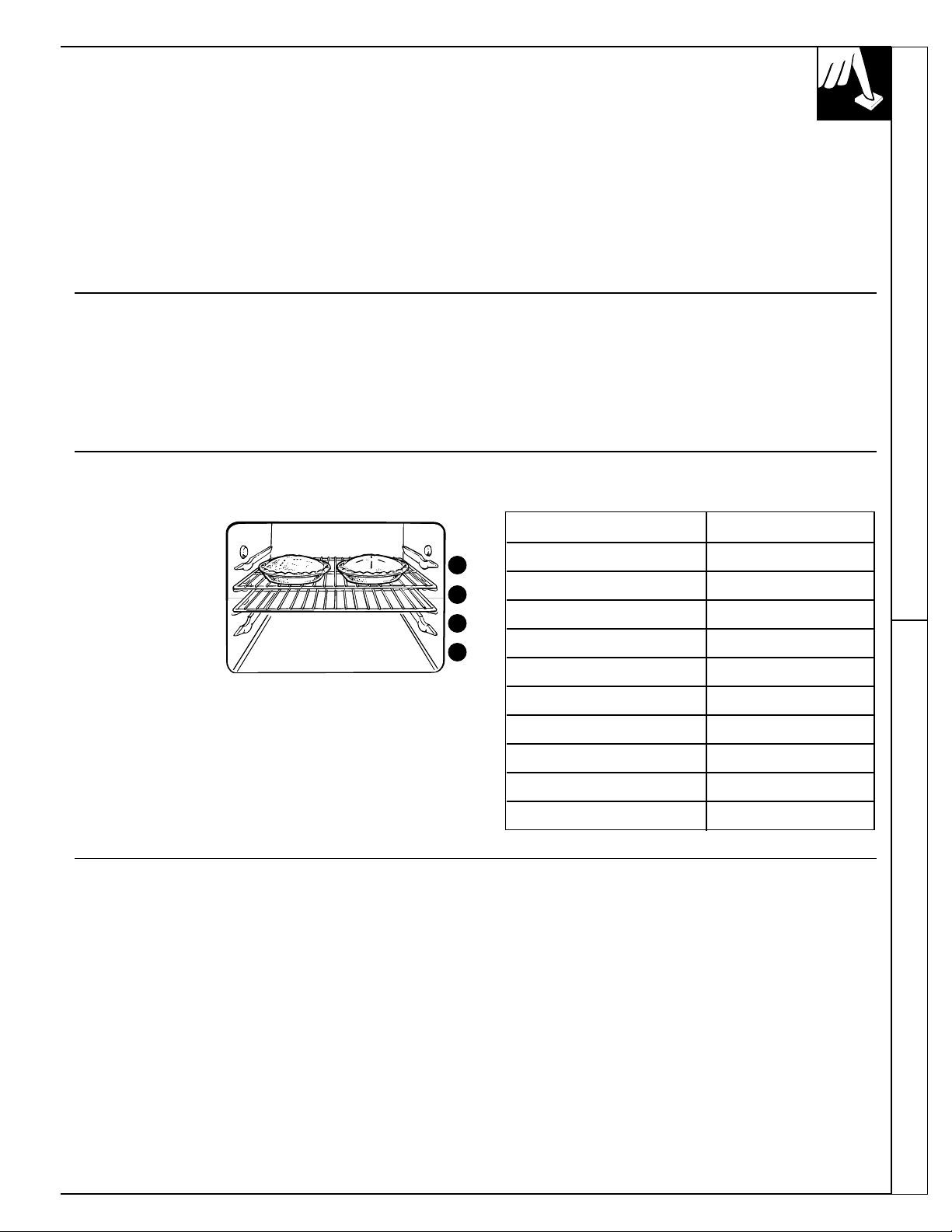
Oven Shelves
Arrange the oven
shelf or shelves in
the desired locations
while the oven is
cool. The correct
shelf position
depends on the kind
of food and the
browning desired.
As a general rule,
place most foods in
the middle of the oven, on either shelf position B or
C. See the chart for suggested shelf positions. B will
be used more than C.
Type of Food Shelf Position
Angel food cake A
Biscuits or muffins B or C
Cookies or cupcakes B or C
Brownies B or C
Layer cakes B or C
Bundt or pound cakes A or B
Pies or pie shells B or C
Frozen pies A (on cookie sheet)
Casseroles B or C
Roasting A or B
D
C
B
A
Preheating Baking Pans
Preheat the oven if the recipe calls for it. Preheat
means bringing the oven up to the specified
temperature before putting the food in the oven.
To preheat, set the oven at the correct temperature—
selecting a higher temperature does not shorten
preheat time.
Preheating is necessary for good results when baking
cakes, cookies, pastry and breads. For most casseroles
and roasts, preheating is not necessary. For ovens
without a preheat indicator light or tone, preheat
10 minutes. After the oven is preheated, place the
food in the oven as quickly as possible to prevent
heat from escaping.
Use the proper baking pan. The type of finish on the
pan determines the amount of browning that will occur.
• Dark, rough or dull pans absorb heat resulting in a
browner, crisper crust. Use this type for pies.
• Shiny, bright and smooth pans reflect heat, resulting
in a lighter, more delicate browning. Cakes and
cookies require this type of pan.
• Glass baking dishes also absorb heat. When baking
in glass baking dishes, the temperature may need to
be reduced by 25°F.
(continued next page)
Using Your Oven Baking
BAKING
(continued)
Pan Placement
For even cooking and proper browning, there must be
enough room for air circulation in the oven. Baking
results will be better if baking pans are centered as
much as possible rather than being placed to the front
or to the back of the oven.
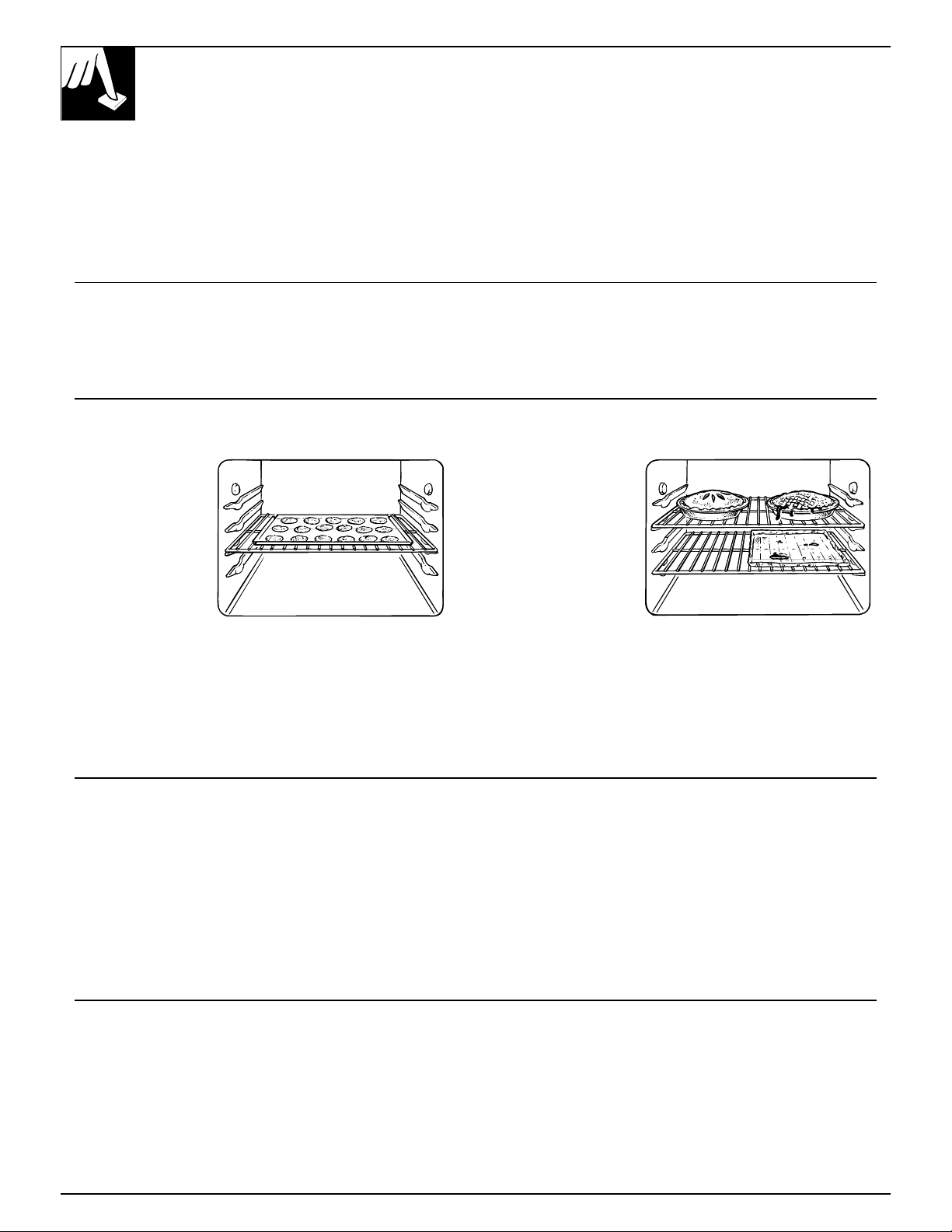
Pans should not touch each other or the walls of
the oven. Allow 1- to 1
1
⁄
2
-inch space between pans
as well as from the back of the oven, the door and
the sides. If you need to use two shelves, stagger the
pans so one is not directly above the other.
Baking Guides
When using prepared baking mixes, follow package recipe or instructions
for the best baking results.
Cookies Aluminum Foil
When baking
cookies, flat cookie
sheets (without
sides) produce
better-looking
cookies. Cookies
baked in a jelly roll
pan (short sides all
around) may have
darker edges and
pale or light browning may occur.
Do not use a cookie sheet so large that it touches the
walls or the door of the oven. Never entirely cover
a shelf with a large cookie sheet.
For best results, use only one cookie sheet in the oven
at a time.
Never entirely cover
a shelf with
aluminum foil.
This will disturb
the heat circulation
and result in
poor baking.
A smaller sheet of
foil may be used
to catch a spillover
by placing it on a
lower shelf several
inches below the food.
Pies Cakes
For best results, bake pies in dark, rough or dull pans
to produce a browner, crisper crust. Frozen pies in foil
pans should be placed on an aluminum cookie sheet
for baking since the shiny foil pan reflects heat away
from the pie crust; the cookie sheet helps retain it.
When baking cakes, warped or bent pans will cause
uneven baking results and poorly shaped products.
A cake baked in a pan larger than the recipe
recommends will usually be crisper, thinner and
drier than it should be. If baked in a pan smaller than
recommended, it may be undercooked and batter may
overflow. Check the recipe to make sure the pan size
used is the one recommended.
Don’t Peek
Set the timer for the estimated cooking time and do
not open the door to look at your food. Most recipes
provide minimum and maximum baking times such
as “bake 30-40 minutes.”
DO NOT open the door to check until the minimum
time. Take advantage of the “Big View” window (on
some models) to monitor cooking progress. Opening
the oven door frequently during cooking allows heat
to escape and makes baking times longer. Your baking
results may also be affected.
14
TIMED BAKING
(on some models)
How to Time Bake
Do not lock the oven door with the latch during
timed baking. The latch is used for self-cleaning only.
The oven control allows you to turn the oven on or
off automatically at specific times that you set.
Examples of Immediate Start (oven turns on now
and you set it to turn off automatically) and Delay
Start and Stop (setting the oven to turn on automatically
at a later time and turn off at a preset Stop Time) will
be described.
NOTE: Before beginning, make sure the oven clock
shows the correct time of day.
To set the clock, first press the CLOCK
pad. Then press the HOUR and MIN. pads
until the correct time of day is displayed.
CLOCK
How to Set Immediate Start and Automatic Stop
To avoid possible burns, place the shelves in the
correct position before you turn the oven on.
The oven will turn on immediately and cook for a
selected length of time. At the end of the Cook Time,
the oven will turn off automatically.
1. Press the COOK TIME ON/OFF pad.
2. Press the HOUR and MIN.
pads until the desired length
of baking time appears in
the display.
3. Turn the Oven Temperature knob to the desired
temperature.
4. The oven will turn on. The display will show the
Cook Time remaining. When the oven reaches the
set temperature, a tone sounds. The oven will
continue to cook for the programmed amount of
time, then shut off automatically.
5. When the oven automatically turns off the
AUTOMATIC OVEN light will flash and the oven
will signal. Turn the oven control to OFF to stop
the flashes and signal.
6. Remove the food from the oven. Remember, foods
that are left in the oven continue cooking after the
controls are off.
NOTE: Foods that spoil easily such as milk, eggs,
fish, stuffings, poultry and pork should not be allowed
to sit for more than one hour before or after cooking.
Room temperature promotes the growth of harmful
bacteria. Be sure that the oven light is off because
heat from the bulb will speed harmful bacteria growth.
(continued next page)
+
–
MIN.
+
–
HOUR
COOK
TIME
ON/OFF
15
Baking Timed Baking
16
To avoid possible burns, place the shelves in the
correct position before you program the oven.
You can set the oven control to delay-start the oven,
cook for a specific length of time and then turn off
automatically.
For example: Let’s say it’s 2:00 and dinner time
is shortly after 7:00. The recipe suggests 3 hours
cooking time at 325°F.
1. Press the COOK TIME ON/OFF pad.
2. For 3 hours of cooking time, press
the HOUR pad until “3:00” appears
in the display.
3. Press the START TIME ON/OFF pad.
4. Press the HOUR pad until “4:00” appears in the
display. The timer is now set to start baking in
2 hours, at 4:00.
5. Turn the Oven Temperature knob to the desired
temperature (in this example 325°F.).
The oven is now set to start at 4:00 and cook
for 3 hours at a temperature of 325°F. At the
end of the 3 hour cooking time (7:00), the oven
will automatically turn off. When the oven
automatically turns off the AUTOMATIC OVEN
light will flash and the oven will signal. Turn the
oven control to OFF to stop the flashes and signal.
6. Remove the food from the oven. Remember,
even though the oven shuts off automatically,
foods continue cooking after controls are off.
NOTE:
• The low temperature zone of this range (between
WARM and 200°F.) is available to keep hot cooked
foods warm. Food kept in the oven longer than
two hours at these low temperatures may spoil.
• Foods that spoil easily such as milk, eggs, fish,
stuffings, poultry and pork should not be allowed
to sit for more than one hour before or after cooking.
Room temperature promotes the growth of harmful
bacteria. Be sure that the oven light is off because heat
from the bulb will speed harmful bacteria growth.
START
TIME
ON/OFF
+
–
HOUR
COOK
TIME
ON/OFF
Quick Reminder
1. Press the COOK TIME ON/OFF pad.
2. Press the HOUR and MIN. pads to set the
desired length of cooking time.
3. Press the START TIME ON/OFF pad.
4. Press the HOUR and MIN. pads to set
the time of day you want cooking to start.
5. Turn the Oven Temperature knob to the
desired temperature.
TIMED BAKING
(continued)
How to Set Delay Start and Automatic Stop
Questions and Answers
Q. Can I use the minute timer during oven
cooking?
A. The minute timer can be used during any
cooking function.
Q. Can I change the time of day on the clock while
I’m Time Baking in the oven?
A. The time of day on the clock should not be
changed during any program that uses the oven
timer. You must either stop those programs or wait
until they are finished before changing the time.
17
Timed Baking Adjust the Oven Thermostat
ADJUST THE OVEN THERMOSTAT—
DO IT YOURSELF!
You may find that your new oven cooks differently
than the one it replaced. We recommend that you
use your new oven for a few weeks to become more
familiar with it, following the times given in your
recipes as a guide.
If you think your new oven is too hot or too cold,
you can adjust the thermostat yourself. If you think
it is too hot, adjust the thermostat to make it cooler.
If you think it is too cool, adjust the thermostat to
make it hotter.
We do not recommend the use of inexpensive
thermometers, such as those found in grocery stores,
to check the temperature setting of your new oven.
These thermometers may vary 20–40 degrees.
To Adjust the Temperature on Models with HOUR Pads
1. Press and hold the HOUR INCREASE
and the HOUR DECREASE pads for
5 seconds until the display changes.
2. Using the HOUR INCREASE/
DECREASE pads, change the set
temperature to be hotter or cooler
in 5 degree increments.
The oven temperature can be increased up
to 35°F. hotter or decreased 35°F. cooler.
If the oven adjustment is set cooler
than the factory setting a minus sign “–”
and the offset temperature will appear in
the display.
3. Wait several seconds for the control to
automatically set and return to its previous setting.
NOTE: This adjustment will not affect the broiling or
the self-cleaning temperatures. The adjustment will be
retained in memory after a power failure.
+
–
HOUR
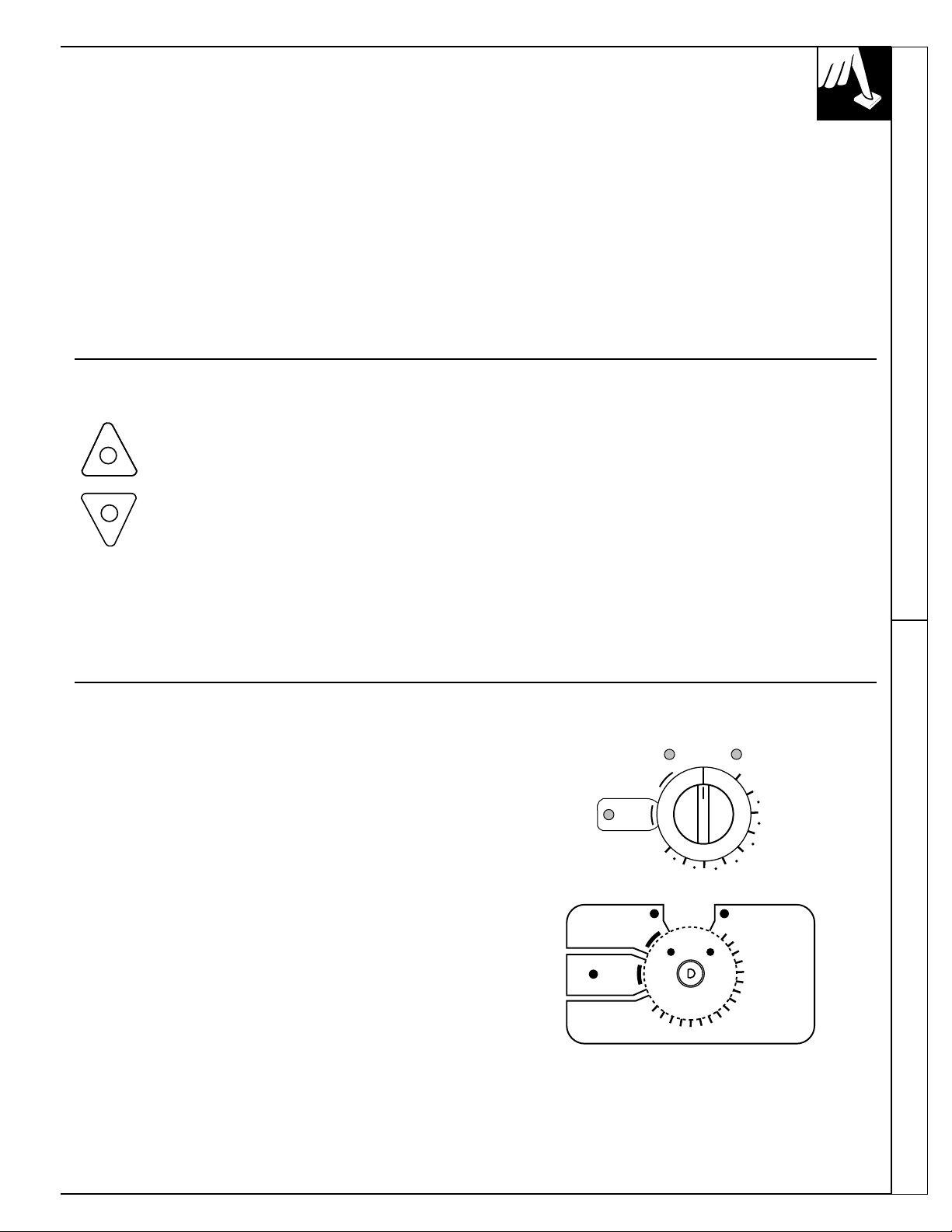
To Adjust the Temperature on Models with Only an Oven Temperature Knob
1. Put the knob in the OFF position.
2. Pull the knob off by pulling straight out.
3. Press and hold the HOTTER or COOLER button
for 5 seconds to make the oven 20°F. hotter or
20°F. cooler.
When you are adjusting the thermostat, the
following lights will flash indicating where the
thermostat will be set when you release the
adjustment button:
OVEN ON indicates the thermostat will be set at the
factory setting.
PREHEATED indicates the thermostat will be set
20°F. hotter.
LATCH DOOR indicates the thermostat will be set
20°F. cooler.
4. After you have made the adjustment, replace
the knob.
(appearance may vary)
-20°
+20°
O
V
E
N
C
O
O
L
E
R
O
V
E
N
H
O
T
T
E
R
T
O
A
D
J
U
S
T
O
V
E
N
T
E
M
P
.
P
R
E
S
S
A
N
D
H
O
L
D
B
U
T
T
O
N
(
5
S
E
C
.
)
U
N
I
T
L
L
I
G
H
T
F
L
A
S
H
E
S
OFF
PREHEATEDOVEN ON
BROIL
AUTO
SELF
CLEAN
LATCH
DOOR
WM
200
250
300
350
400
500
550
450
OFF
PREHEATED
OVEN ON
BROIL
AUTO
SELF
CLEAN
LATCH
DOOR
WM
200
250
300
350
400
500
550
450

18
ROASTING
Do not lock the oven door with the latch during
roasting. The latch is used for self-cleaning only.
Roasting is cooking by dry heat. Tender meat or
poultry can be roasted uncovered in your oven.
Roasting temperatures, which should be low and
steady, keep spattering to a minimum.
Roasting is really a baking procedure used for meats.
Therefore, oven controls are set for Baking or Timed
Baking. (You may hear a slight clicking sound,
indicating the oven is working properly.) Timed
Baking will turn the oven on and off automatically.
Most meats continue to cook slightly while standing,
after being removed from the oven. Standing time
recommended for roasts is 10 to 20 minutes. This
allows roasts to firm up and makes them easier to
carve. The internal temperature will rise about 5° to
10°F.; to compensate for the temperature increase, if
desired, remove the roast from the oven sooner (at 5° to
10°F. less than the temperature in the Roasting Guide).
Remember that food will continue to cook in the
hot oven and therefore should be removed when
the desired internal temperature has been reached.
1. Place the shelf in A or B position. No preheating
is necessary.
2. Check the weight
of the meat. Place it,
fat side up, (or for
poultry, breast-side-
up) on the roasting
grid in a shallow
pan. The melting fat
will baste the meat.
Select a pan as close
to the size of the meat as possible. (The broiler
pan with grid is a good pan for this.)
3. Turn the Oven Temperature knob to the
desired setting.
4. After roasting is complete, turn the Oven
Temperature knob to OFF and then remove
the food from the oven.
B
A
Use of Aluminum Foil
You can use aluminum foil to line the broiler pan.
This makes clean-up easier when using the pan for
marinating, cooking with fruits, cooking heavily
cured meats or basting food during cooking. Press
the foil tightly around the inside of the pan.
(continued next page)
19
Roasting
Questions and Answers
Q. Is it necessary to check for doneness with a
meat thermometer?
A. Checking the finished internal temperature at
the completion of cooking time is recommended.
Temperatures are shown in the Roasting Guide.
For roasts over 8 lbs., check with thermometer
at half-hour intervals after half the cooking time
has passed.
Q. Why is my roast crumbling when I try to
carve it?
A. Roasts are easier to slice if allowed to cool 10 to
20 minutes after removing them from the oven.
Be sure to cut across the grain of the meat.
Q. Do I need to preheat my oven each time I cook a
roast or poultry?
A. It is not necessary to preheat your oven.
Q. When buying a roast, are there any special tips
that would help me cook it more evenly?
A. Yes. Buy a roast as even in thickness as possible,
or buy rolled roasts.
Q. Can I seal the sides of my foil “tent” when
roasting a turkey?
A. Sealing the foil will steam the meat. Leaving it
unsealed allows the air to circulate and brown
the meat.
Oven Approximate Roasting Time Internal
Type Temperature Doneness in Minutes per Pound Temperature °F.
Meat 3 to 5 lbs. 6 to 8 lbs.
Tender cuts; rib, high quality 325° Rare: 24–33 18–22 140°–150°†
sirloin tip, rump or top round* Medium: 35–39 22–29 150°–160°
Well Done: 40–45 30–35 170°–185°
Lamb leg or bone-in shoulder* 325° Rare: 21–25 20–23 140°–150°†
Medium: 25–30 24–28 150°–160°
Well Done: 30–35 28–33 170°–185°
Veal shoulder, leg or loin* 325° Well Done: 35–45 30–40 170°–180°
Pork loin, rib or shoulder* 325° Well Done: 35–45 30–40 170°–180°
Ham, precooked 325° To Warm:
17
–
20 minutes per pound (any weight)
115°–120°
Poultry 3 to 5 lbs. Over 5 lbs.
Chicken or Duck 325° Well Done: 35–40 30–35 185°–190°
Chicken pieces 350° Well Done: 35–40 185°–190°
10 to 15 lbs. Over 15 lbs. In thigh:
Turkey 325° Well Done: 18–25 15–20 185°–190°
*For boneless rolled roasts over 6 inches thick, add 5 to 10 minutes per pound to times given above.
†The U. S. Department of Agriculture says
“Rare beef is popular, but you should know that cooking it to only 140°F. means some
food poisoning organisms may survive.” (Source: Safe Food Book. Your Kitchen Guide. USDA Rev. June 1985.)
ROASTING GUIDE
Frozen Roasts
Frozen roasts of beef, pork, lamb, etc., can be started
without thawing, but allow 10 to 25 minutes per
pound additional time (10 minutes per pound for
roasts under 5 pounds, more time for larger roasts).
Make sure poultry is thawed before roasting.
Unthawed poultry often does not cook evenly. Some
commercial frozen poultry can be cooked successfully
without thawing. Follow the directions given on the
package label.
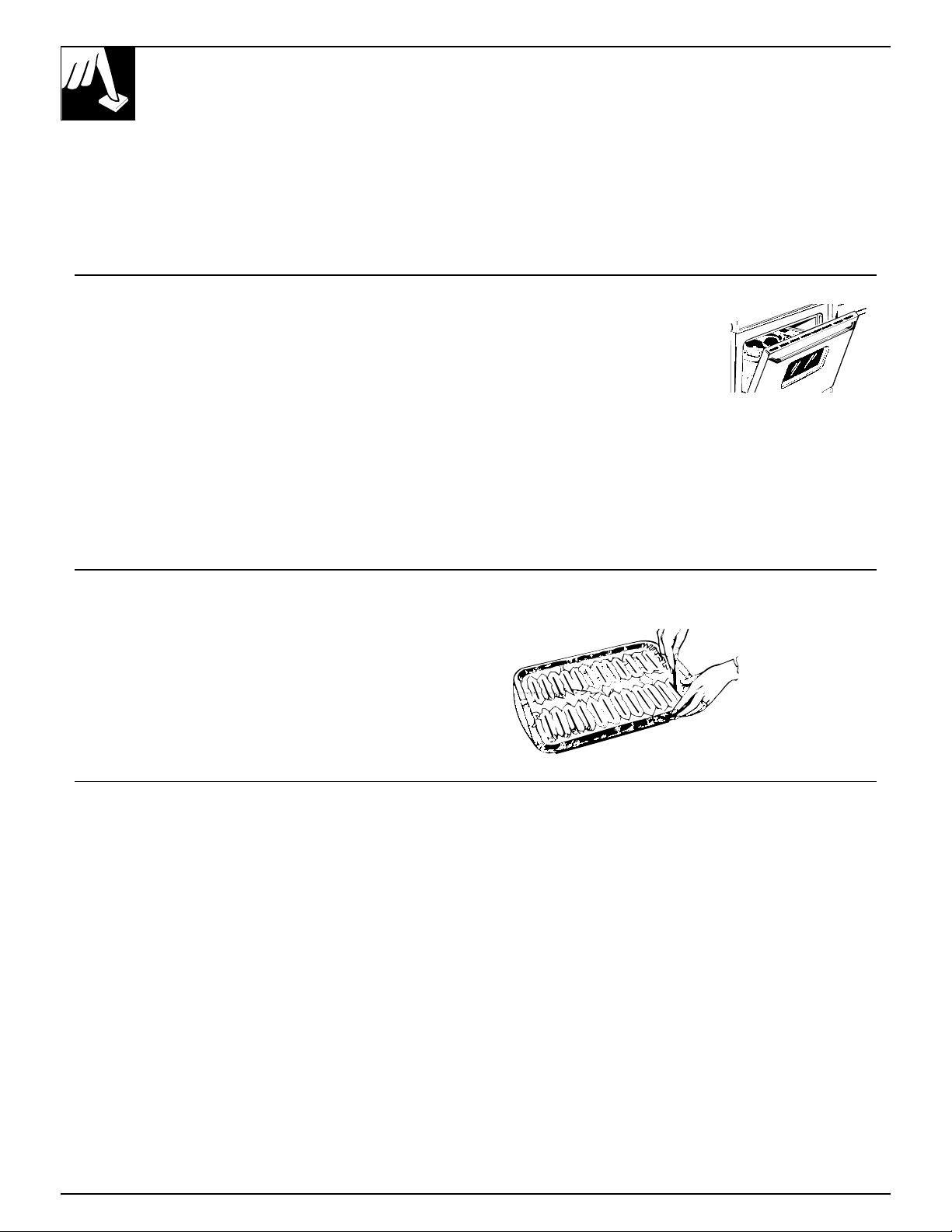
Use of Aluminum Foil
You can use aluminum foil to line your broiler pan
and broiler grid. However, you must mold the foil
tightly to the grid and cut slits in it just like the grid.
Without the slits, the foil will prevent fat and meat
juices from draining to the broiler pan. The juices
could become hot enough to catch on fire. If you do
not cut the slits, you are frying, not broiling.
BROILING
Do not lock the oven door with the latch while
broiling. The latch is used for self-cleaning only.
Broiling is cooking food by intense radiant heat from the
upper broil element in the oven. Most fish and tender
cuts of meat can be broiled. Follow these directions to
keep spattering and smoking to a minimum.
Turn the food only once during broiling. Time the
foods for the first side according to the Broiling Guide.
Turn the food, then use the times given for the second
side as a guide to the preferred doneness.
1. If the meat has fat or gristle around the edge, cut
vertical slashes through both about 2 inches apart.
If desired, the fat may be trimmed, leaving layer
about 1/8 inch thick.
2. Place the meat on the broiler grid in the broiler pan.
Always use the grid so the fat drips into the broiler
pan; otherwise the juices may become hot enough
to catch on fire.
3. Position a shelf on the recommended shelf position
as suggested in the Broiling Guide.
4. Leave the door open to the
broil stop position.
(It should click into position.)
The door stays open by itself,
yet the proper temperature is
maintained in the oven.
5. Turn the Oven Temperature knob to BROIL.
Make sure you turn the knob all the way to the
BROIL position.
6. When broiling is finished, turn the Oven Temperature
knob to OFF. Serve the food immediately, and
leave the pan outside the oven to cool during the
meal for easiest cleaning.
Questions and Answers
Q. When broiling, is it necessary to always
use a grid in the pan?
A. Yes. Using the grid suspends the meat over the
pan. As the meat cooks, the juices fall into the pan,
thus keeping meat drier. Juices are protected by the
grid and stay cooler, thus preventing excessive
spatter and smoking.
Q. Should I salt the meat before broiling?
A. No. Salt draws out the juices and allows them to
evaporate. Always salt after cooking. Turn the
meat with tongs; piercing the meat with a fork also
allows the juices to escape. When broiling poultry
or fish, brush each side often with butter.
Q. Why are my meats not turning out as brown
as they should?
A. In some areas, the power (voltage) to the range
may be low. In these cases, preheat the broil
element for 10 minutes before placing broiler pan
with food in oven. Check to see if you are using
the recommended shelf position. Broil for the
longest period of time indicated in the Broiling
Guide. Turn the food only once during broiling.
Q. Do I need to grease my broiler grid to prevent
meat from sticking?
A. No. The broiler grid is designed to reflect broiler
heat, thus keeping the surface cool enough to
prevent the meat from sticking to the surface.
However, spraying the broiler grid lightly with
a vegetable cooking spray before cooking will
make clean-up easier.
20
21
Broiling
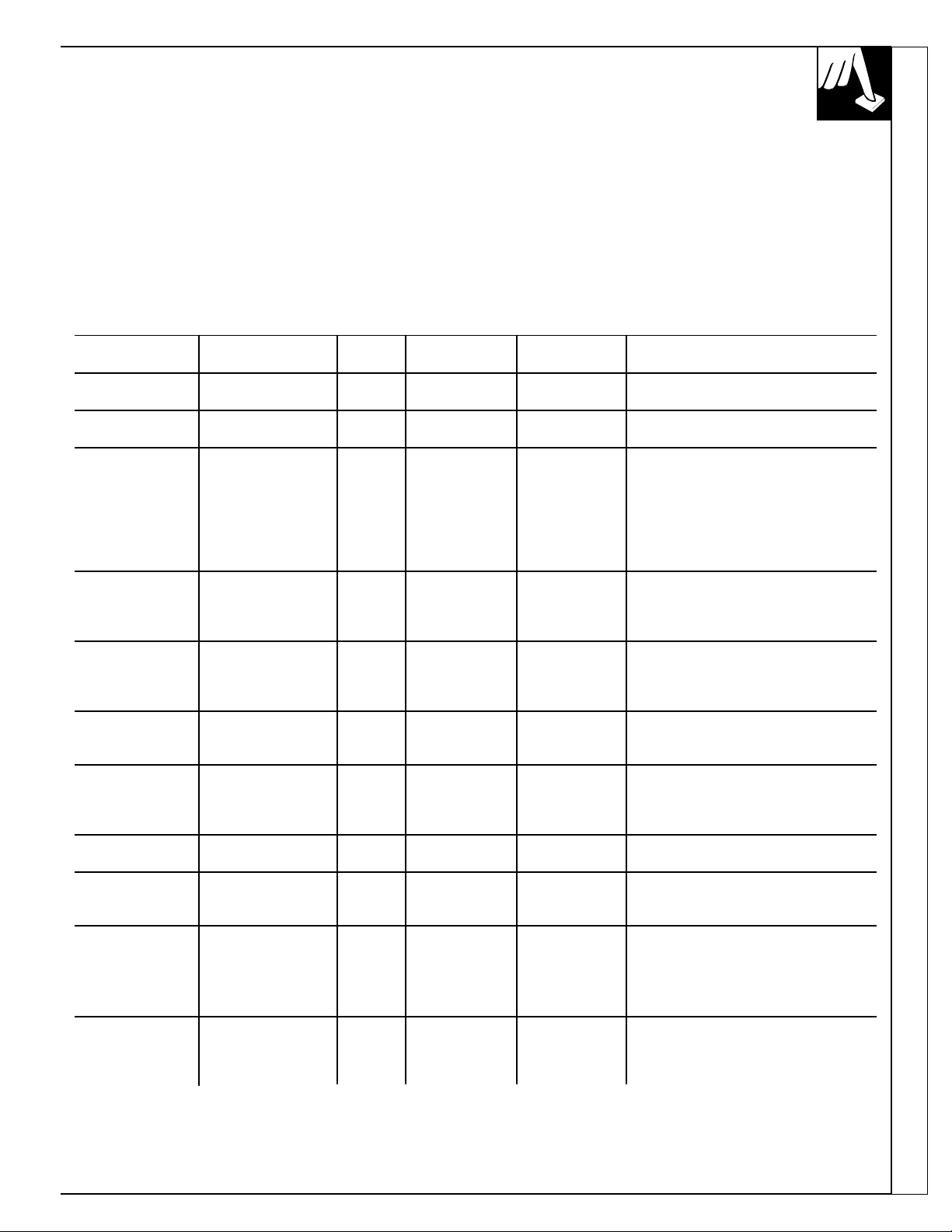
BROILING GUIDE
• Always use a broiler pan and grid. They are
designed to minimize smoking and spattering by
trapping juices in the shielded lower part of the pan.
• The oven door should be open to the broil
stop position.
• Make sure you turn the knob all the way to the
BROIL position.
• If desired, marinate meats or chicken before
broiling, or brush with barbecue sauce last 5 to
10 minutes only.
• When arranging food on the pan, do not let fatty
edges hang over the sides. These could soil the
oven bottom.
• Frozen steaks can be broiled by positioning the oven
shelf at next lowest shelf position and increasing
cooking time given in this guide 1
1
⁄
2
times per side.
Quantity and/or Shelf First Side Second Side
Food Thickness Position Time, Minutes Time, Minutes Comments
Bacon 1/2 lb. (about 8 C 4
1
⁄
2
4
1
⁄
2
Arrange in single layer.
thin slices)
Ground Beef 1 lb. (4 patties) Space evenly.
Well Done 1/2 to 3/4 inch thick C 10 7 Up to 8 patties take about same time.
Beef Steaks
Rare 1 inch thick C 6 5 Steaks less than 1 inch thick cook
Medium (1 to 1
1
⁄
2
lbs.) C 8 6 through before browning. Pan frying
Well Done C 12 11 is recommended.
Rare 1
1
⁄
2
inch thick C 10 7–8 Slash fat.
Medium (2 to 2
1
⁄
2
lbs.) C 15 14–16
Well Done C 25 20–25
Chicken 1 whole A 35 10–15 Reduce time about 5 to 10 minutes
(2 to 2
1
⁄
2
lbs.), per side for cut-up chicken. Brush
split lengthwise each side with melted butter. Broil
skin-side-down first.
Bakery Products
Bread (Toast) or 2 to 4 slices C or D 1
1
⁄
2
–2 1/2 Space evenly. Place English muffins
Toaster Pastries 1 pkg. (2) cut-side-up and brush with butter,
English Muffins 2 (split) C or D 3–4 if desired.
Lobster Tails 2–4 B 13–16 Do not Cut through back of shell. Spread
(6 to 8 oz. each) turn over. open. Brush with melted butter before
broiling and after half of broiling time.
Fish 1-lb. fillets 1/4 to C 5 5 Handle and turn very carefully. Brush
1/2 inch thick with lemon butter before and during
cooking, if desired. Preheat broiler to
increase browning.
Ham Slices 1 inch thick B 8 8 Increase time 5 to 10 minutes per side
(precooked) for 1
1
⁄
2
inch thick or home cured ham.
Pork Chops 2 (1/2 inch thick) C 10 10 Slash fat.
Well Done 2 (1 inch thick), B 13 13
about 1 lb.
Lamb Chops
Medium 2 (1 inch thick), C 10 9 Slash fat.
Well Done about 10 to 12 oz. C 12 10
Medium 2 (1
1
⁄
2
inch thick), C 14 12
Well Done about 1 lb. B 17 12–14
Wieners and 1-lb. pkg. (10) C 6 1–2 If desired, split sausages in half
similar precooked lengthwise; cut into 5- to 6-inch pieces.
sausages,
bratwurst
22
Before a Clean Cycle
The range must be completely cool in order to set
the self-clean cycle. You may have to allow the oven
to cool before you can slide the door latch.
We recommend venting with an open window or
using a ventilation fan or hood during the first self-
clean cycle.
1. Remove all cookware and any aluminum foil from
the oven—they cannot withstand the high cleaning
temperatures.
NOTE: The oven shelves may be cleaned in the
self-cleaning oven. However, they will darken, lose
their luster and become hard to slide.
2. To avoid heavy smoke in the kitchen during self-
cleaning, wipe up heavy soil on the oven bottom.
(If you use soap, rinse thoroughly before self-
cleaning to prevent staining.) The enamel grid and
broiler pan may be cleaned in the self-cleaning
oven. However, to help prevent heavy smoke
caused by self-cleaning the greasy soil in the pan,
you must first clean off the excess grease.
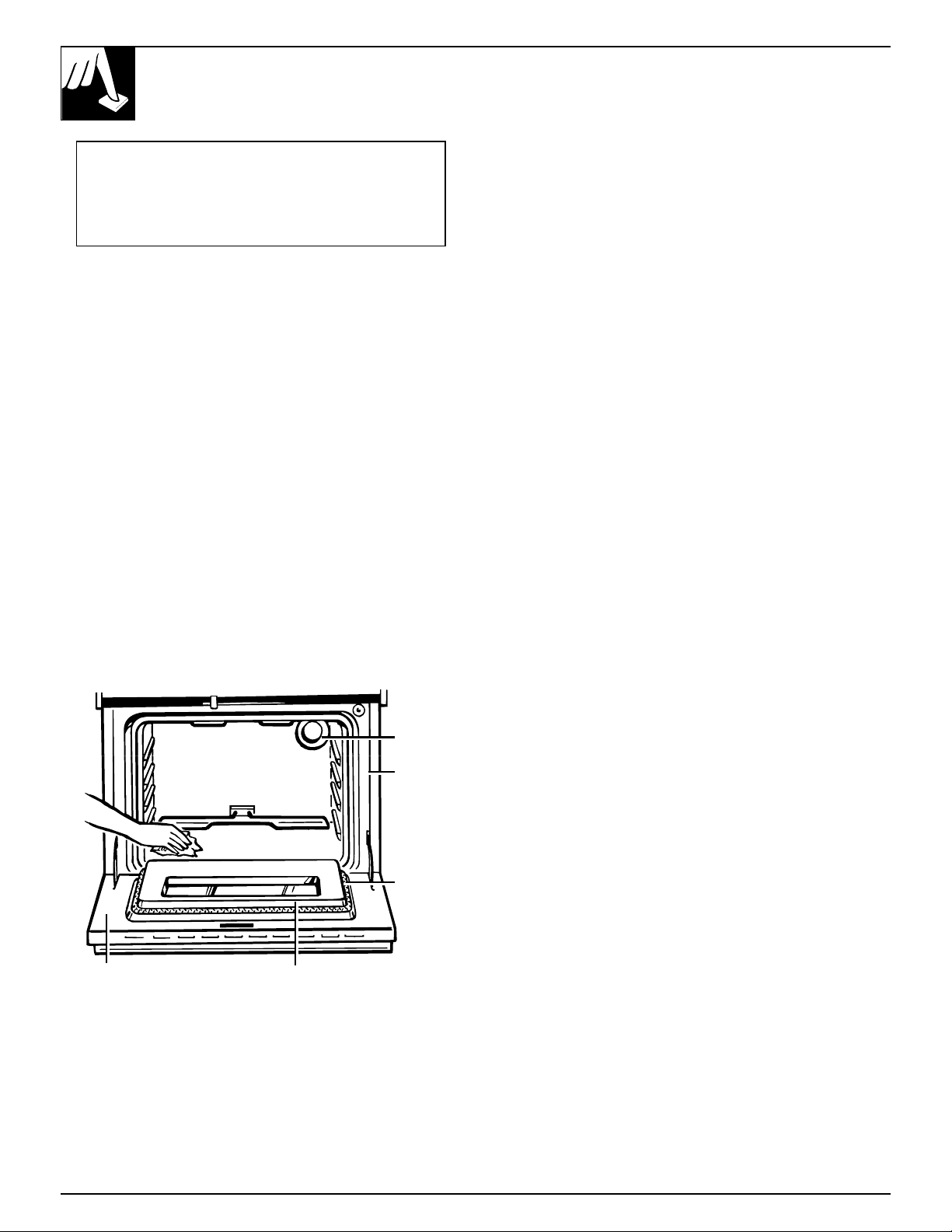
3. Clean spatters or spills on the oven front frame,
and the oven door outside the gasket with a
dampened cloth. The oven front frame and the
oven door outside the gasket do not get cleaned by
the self-clean cycle. On these areas use detergent
and hot water or a soap-filled steel wool pad.
Rinse well with a vinegar and water solution.
This will help prevent a brown residue from
forming when the oven is heated. Buff these areas
with a dry cloth. Do not clean the gasket. Never
use a commercial oven cleaner in or around the
self-cleaning oven.
Do not use abrasives or oven cleaners. Clean the
top, sides and outside front of the oven door with
soap and water.
Make sure the oven light bulb cover is in place.
Do not rub or clean the door gasket—
the fiberglass material of the gasket has an
extremely low resistance to abrasion. An intact
and well-fitting oven door gasket is essential for
energy-efficient oven operation and good baking
results. If you notice the gasket becoming worn,
frayed or damaged in any way or if it has become
displaced on the door, you should have it replaced.
4. Close the door and make sure the oven light
is off. If the oven light is not turned off, the life
of the bulb will be shortened or it may burn out
immediately.
Do not use commercial oven cleaners or oven
protectors in or near the self-cleaning oven.
A combination of any of these products plus the high
clean cycle temperatures may damage the porcelain
finish of the oven.
Quick Reminder:
1. Latch the door.
2. Turn the Oven Temperature knob to
AUTO SELF CLEAN.
OPERATING THE SELF-CLEANING OVEN
Total Cleaning Cycle Time: 4 hours and 20 minutes
Oven
front
frame
Oven
door
gasket
Area
outside
gasket
Area
inside
gasket
Oven
light
To Stop a Clean Cycle
1. Turn the Oven Temperature knob to OFF.
2. Wait until the oven has cooled below the locking temperature to unlatch
the door. You will not be able to open the door right away unless the oven
has cooled below the locking temperature.
23
Operating the Self-Cleaning Oven
How to Set the Oven for Cleaning
If the oven is too hot and you start to set a clean
cycle, you will not be able to slide the latch. Allow
additional time for cooling before you try to set
the cycle.
1. Follow directions to prepare the oven for cleaning.
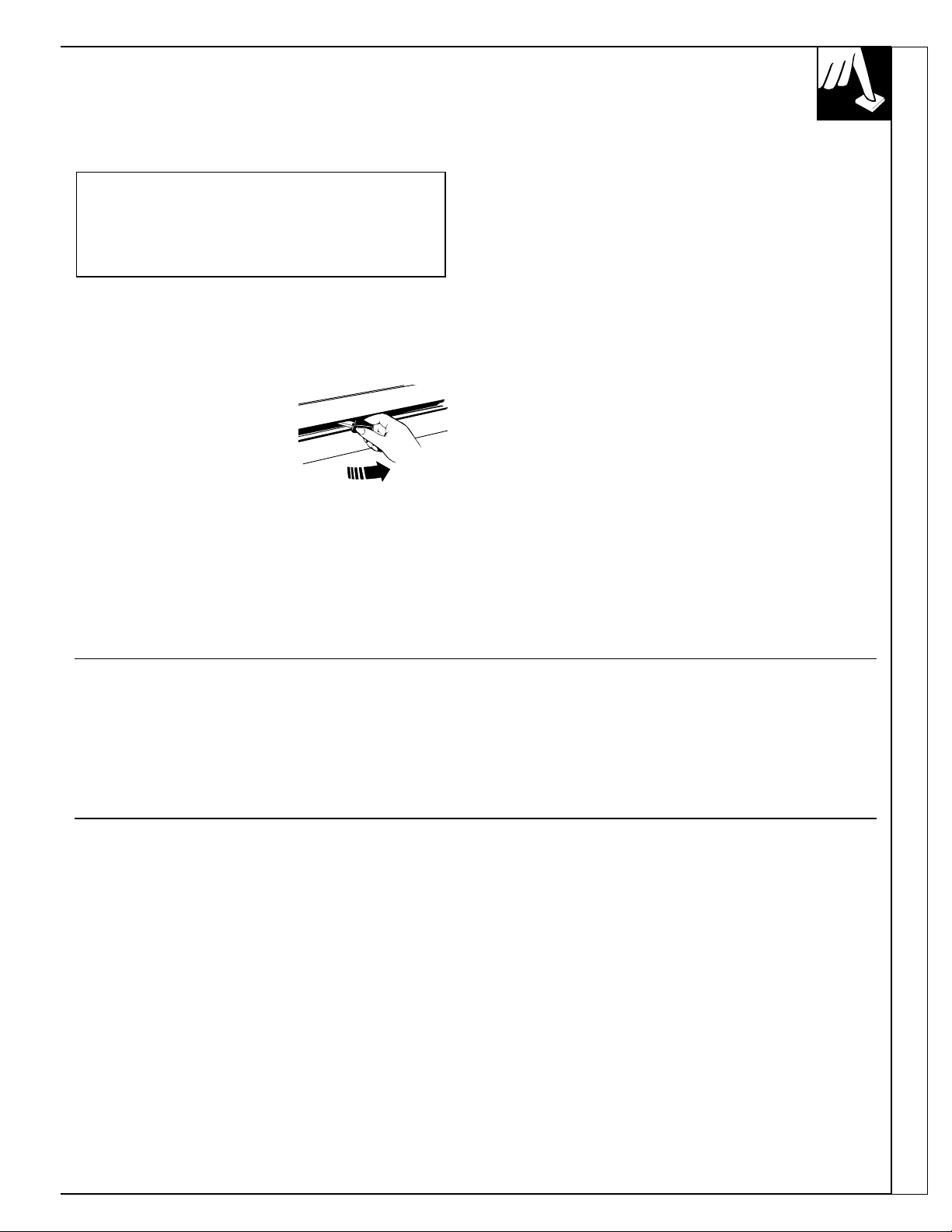
2. Slide the latch handle to the
right as far as it will go.
Never force the latch
handle. Forcing the
handle will damage the
door lock mechanism.
3. Turn the Oven Temperature knob to AUTO
SELF CLEAN. The AUTO SELF CLEAN,
AUTOMATIC OVEN, OVEN ON and COOK
TIME ON/OFF lights will glow.
NOTE: If you turn the Oven Temperature knob
before you slide the latch, the LATCH DOOR
light will flash. Slide the latch to the right.
Clean cycle time is normally 4 hours and 20
minutes. On models with a COOK TIME ON/OFF
pad, you can change the clean time to anywhere
between 3 hours and 5 hours and 59 minutes,
depending on how dirty your oven is.
You have one minute to change your clean time.
Use the HOUR and MIN. pads to change the total
clean time.
Both the OVEN ON light and the LATCH DOOR
light will flash when the clean time is finished.
After using the clean cycle, the door latch and the
Oven Temperature knob must be returned to their
original positions before you can use the oven.
When the LATCH DOOR light flashes, slide the
latch handle to the left as far as it will go, turn the
Oven Temperature knob to OFF and open the door.
Never force the latch handle. Wait until the LATCH
DOOR light flashes and the latch slides easily.
Forcing the latch handle may damage the door lock.
Quick Reminder:
1. Latch the door.
2. Turn the Oven Temperature knob to
AUTO SELF CLEAN.
After a Clean Cycle
You may notice some white ash in the oven. Just
wipe it up with a damp cloth after the oven cools.
If white spots remain, remove them with a soap-
filled steel wool pad. Be sure to rinse thoroughly with
a vinegar and water mixture. These deposits are
usually
a salt residue that cannot be removed by the
Clean Cycle.
If the oven is not clean after one Clean Cycle,
repeat the cycle.
NOTE:
• You cannot set the oven for cooking until the oven is
cool enough for the door to be unlatched.
• While the oven is self-cleaning, you can press the
CLOCK pad to display the time of day. To return
to the clean countdown, press the COOK TIME
ON/OFF pad.
• If the shelves become hard to slide, wipe the shelf
supports with cooking oil.
(continued next page)
24
OPERATING THE SELF-CLEANING OVEN
(continued)
How to Set Delay Start of Cleaning (on some models)
Delay Start is setting the oven timer to start the clean
cycle automatically at a later time than the present
time of day.
For example: Let’s say it is 7:00 and you want the
oven to begin self-cleaning at 9:00 after you’re
finished in the kitchen. The oven is just soiled a
normal amount so the normal Clean Time of 4 hours
and 20 minutes is preferred.
1. Follow steps to prepare the oven for cleaning.
2. Slide the latch handle to the
right as far as it will go.
Never force the latch
handle. Forcing the handle
will damage the door lock
mechanism.
3. Turn the Oven Temperature knob to the
AUTO SELF CLEAN position.
4. Press the START TIME ON/OFF pad.
5. Press the HOUR pad until 9:00 appears
in the display. The timer is now set to
start cleaning in 2 hours, at 9:00.
The Self-Clean Cycle will be set to
automatically begin at 9:00 and finish
at 1:20.
Both the OVEN ON light and the
LATCH DOOR light will flash when
the clean time is finished.
6. When the LATCH DOOR light flashes, slide the
latch handle to the left as far as it will go, turn the
Oven Temperature knob to OFF and open the door.
Never force the latch handle. Wait until the LATCH
DOOR light flashes and the latch slides easily.
Forcing the latch handle may damage the door lock.
+
–
HOUR
START
TIME
ON/OFF
Quick Reminder:
1. Latch the door.
2. Turn the Oven Temperature Control knob to
AUTO SELF CLEAN.
3. Press the START TIME ON/OFF pad.
4. Press the HOUR and MIN. pads to set the
time of day you want cleaning to start. The
Self-Clean Cycle will automatically begin
at the time you selected.

Questions and Answers
Q. Can I use commercial oven cleaners on any part
of my self-cleaning oven?
A. No cleaners or coatings should be used around
any part of this oven. If you do use them and do
not thoroughly rinse the oven with water, wiping it
absolutely clean afterwards, the residue can scar
the oven surface and damage metal parts the next
time the oven is automatically cleaned.
Q. What should I do if excessive smoking occurs
during cleaning?
A. This is caused by excessive soil. Turn the Oven
Temperature knob to OFF. Open the windows to
rid the room of smoke. Wait until the LATCH
DOOR light goes off. Wipe up the excess soil and
reset the clean cycle.
Q. Is the “crackling” or “popping” sound I hear
during cleaning normal?
A. Yes. This is the sound of the metal heating
and cooling during both the cooking and
cleaning functions.
Q. Should there be any odor during the cleaning?
A. Yes, there will be an odor during the first few
cleanings. Failure to wipe out excessive soil might
also cause a strong odor when cleaning.
Q. What causes the hair-like lines on the enameled
surface of my oven?
A. This is a normal condition, resulting from heating
and cooling during cleaning. These lines do not
affect how your oven performs.
Q. Why do I have ash left in my oven after
cleaning?
A. Some types of soil will leave a deposit which
is ash. It can be removed with a damp sponge
or cloth.
Q. My oven shelves do not slide easily. What is
the matter?
A. The self-clean cycle causes the oven shelves to
lose their luster and become hard to slide. To make
shelves slide more easily, wipe the shelf supports
with cooking oil.
Q. My oven shelves have become gray after the
self-clean cycle. Is this normal?
A. Yes. After the self-clean cycle, the shelves will
lose some luster and change to a deep gray color.
Q. Can I cook food on the cooktop while the oven
is self-cleaning?
A. Yes. While the oven is self-cleaning, you can use
the cooktop just as you normally do.
Q. The LATCH DOOR light flashes when I set the
clean cycle. What’s wrong?
A. The LATCH DOOR light will flash until the latch
is moved to the right.
25
Operating the Self-Cleaning Oven
26
CARE AND CLEANING
Proper care and cleaning are important so your range will give you efficient
and satisfactory service. Follow these directions carefully in caring for it to
help assure safe and proper maintenance.
BE SURE ELECTRIC POWER IS OFF BEFORE CLEANING ANY PART
OF THE RANGE.
If your range is removed for cleaning, servicing or any reason,
be sure the anti-tip device is re-engaged properly when the
range is replaced. Failure to take this precaution could result in
tipping of the range and cause injury.
Surface Units and Drip Pans
To clean the surface units, turn the control to the highest
setting for a minute. The coils will burn off any soil.
CAUTION
• Be sure all the controls are turned to OFF and
the surface units are cool before attempting to
remove them.
• Do not immerse the surface units in liquids
of any kind.
• Do not clean the surface units in a dishwasher.
• Do not bend the surface unit plug terminals.
• Do not attempt to clean, adjust or in any way repair
the plug-in receptacle.
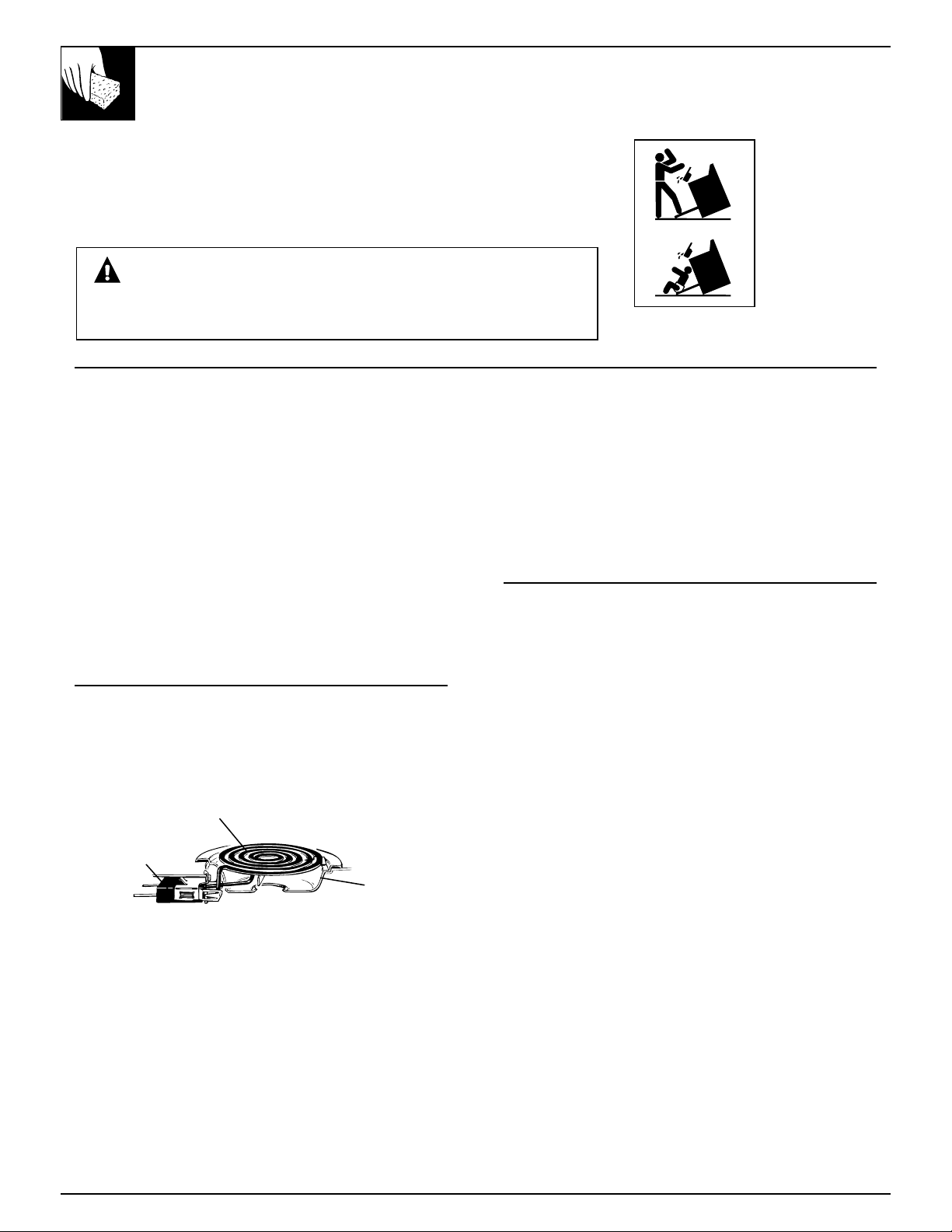
To remove a surface unit:
To remove the drip pans for cleaning, the surface units
must be removed first.
Lift the surface unit about 1 inch above the drip pan
and pull it out.
Do not lift the surface unit more than 1 inch.
If you do, it may not lie flat on the drip pan when
you plug it back in.
Repeated lifting of the surface unit more than 1
inch above the drip pan can permanently damage
the receptacle.
To replace a surface unit:
• Replace the drip pan into the recess in the cooktop.
Make sure the opening in the pan lines up with the
receptacle.
• Insert the terminals of the surface unit through the
opening in the drip pan and into the receptacle.
• Guide the surface unit into place so it rests evenly.
Drip Pans
Remove the surface units. Then lift out the drip pans.
For best results, clean the drip pans by hand. Place
them in a covered container (or a plastic bag) with
1/4 cup ammonia to loosen the soil. Then scrub with
a soap filled scouring pad if necessary. Rinse with
clean water and polish with a clean soft cloth.
The drip pans may also be cleaned in the dishwasher.
Clean the area under the drip pans often.
Built-up soil, especially grease, may catch fire.
Do not cover the drip pans with foil. Using foil
so close to the receptacle could cause shock, fire or
damage to the range.
Receptacle
Surface Unit
Drip Pan
27
Care and Cleaning
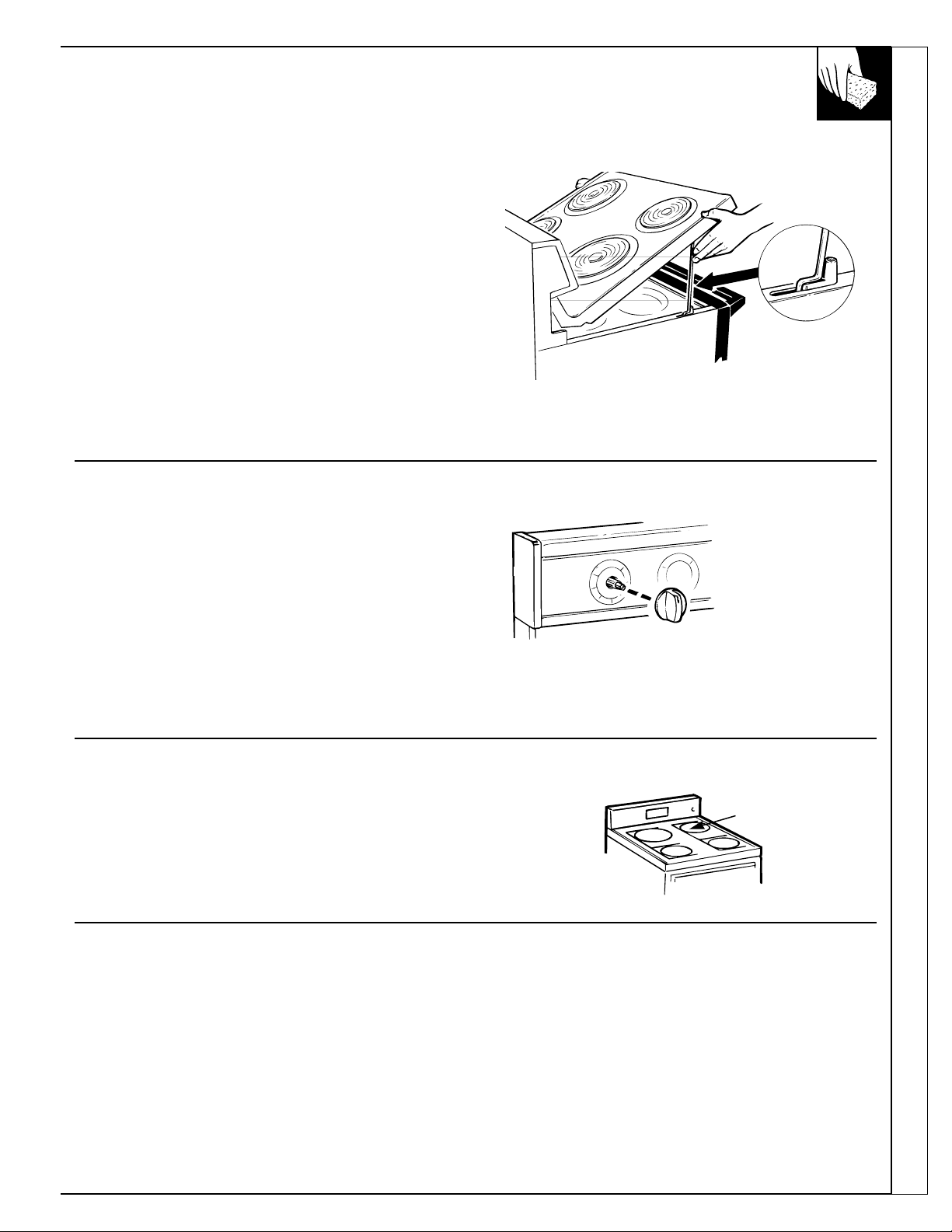
Lift-Up Cooktop (on some models)
Some models have a cooktop that can be lifted up
for easier cleaning. To make cleaning easier, the
entire cooktop may be lifted up and supported in the
up position.
Be sure all surface units are turned off before
raising the cooktop. The surface units do not need to
be removed, however, you may remove one to make
raising the cooktop easier. There are two side supports
that lock into position when the cooktop is lifted up.
After cleaning under the cooktop with hot, mild soapy
water and a clean cloth, lower the cooktop. Be careful
not to pinch your fingers.
To lower the cooktop, push the rods back and gently
lower the cooktop until it rests in place.
Control Panel and Knobs
Clean up any spills or spatters with a damp cloth.
Remove heavier soil with warm, soapy water.
Clean control panel with mild liquid dish detergent
and a soft cloth. Rub control panel lightly.
CAUTION: Do not use abrasives of any kind on the
control panel. The lettering on models with touch
pads is sensitive to abrasives and pressure.
The control knobs may be removed for easier cleaning.
To remove a knob, pull it straight off the stem. Wash
the knobs in soap and water but do not soak.
.
Oven Vent
The oven is vented through an opening under the right rear surface unit.
Never cover the opening with aluminum foil or any other material. This
would prevent the oven vent from working properly.
Oven Vent
Metal Parts Painted Surfaces Glass Window
Do not use steel wool, abrasives,
ammonia or commercial oven
cleaners. To safely clean surfaces;
wash, rinse and then dry with a
soft cloth.
Painted surfaces include the
outside oven door, sides, control
panel and drawer front. Clean
these with soap and water or a
vinegar and water solution.
Do not use commercial oven
cleaners, cleansing powders,
steel wool or harsh abrasives
on any painted surface.
To clean the outside glass finish,
use a glass cleaner. Rinse and
polish with a dry cloth.
(continued next page)
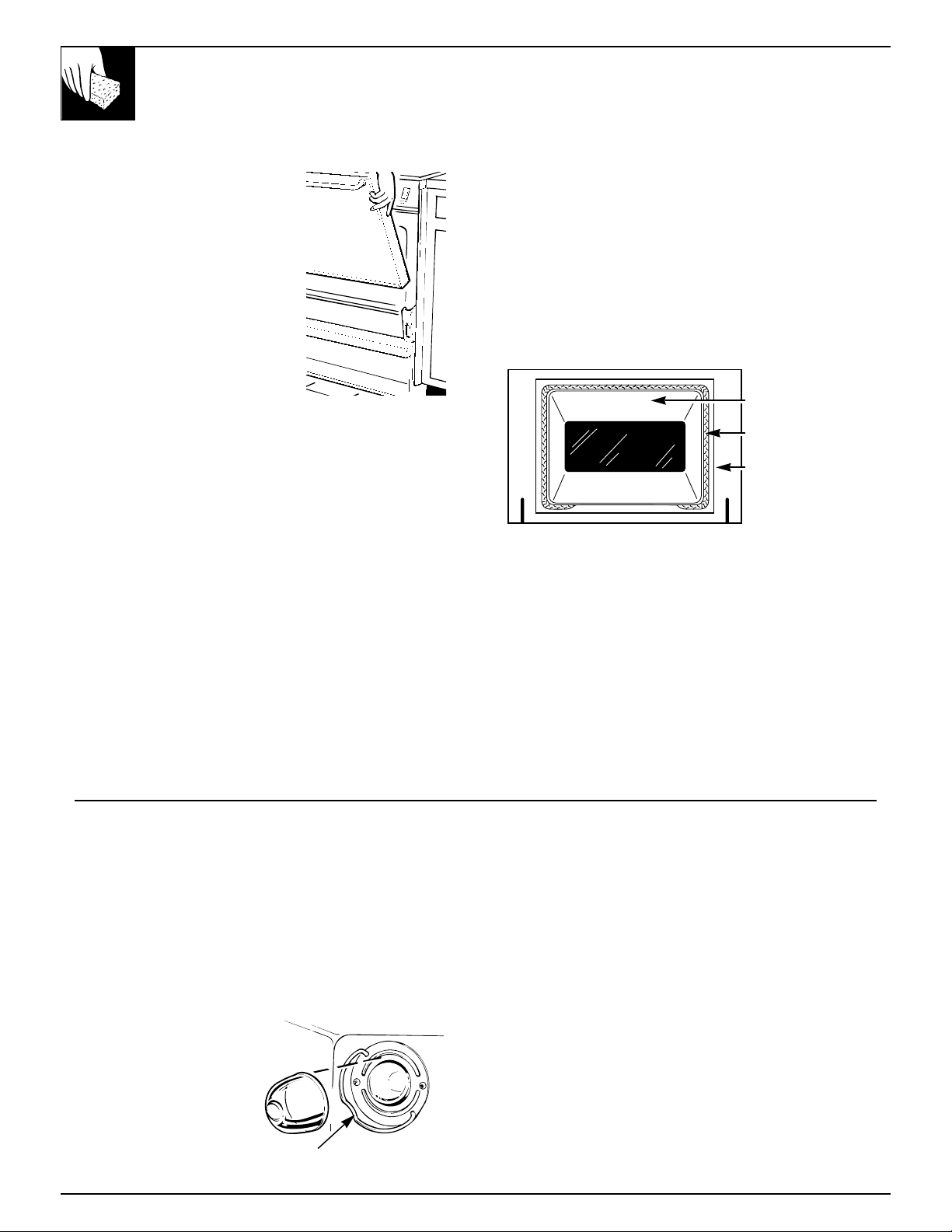
Lift-Off Oven Door
The oven door is removable,
but it is heavy. You may need
help removing and replacing the
door. Do not lift the door by the
handle. This can cause the glass
to break or can cause damage to
the door.
To remove the door, open it a
few inches to the special stop
position that will hold the door
open. Grasp firmly on each side
and lift the door straight up and
off the hinges.
NOTE: Be careful not to place hands between the
hinge and the oven door frame as the hinge could
snap back and pinch fingers.
To replace the door, make sure the hinges are in the
special stop position. Position the slots in the bottom
of the door squarely over the hinges. Then lower the
door slowly and evenly over both hinges at the same
time. If the hinges snap back against the oven frame,
pull them back out. If the oven door is crooked, push
down on the high corner to straighten it.
TO CLEAN THE DOOR:
Inside of the door:
• Because the area inside the gasket is cleaned during
the self clean cycle, you do not need to clean this
by hand. Any soap left on the liner causes additional
stains when the oven is heated.
• The area outside the gasket can be cleaned with
a scouring pad.
• Do not rub or clean the door gasket—the
fiberglass material of the gasket has an extremely
low resistance to abrasion. An intact and well-
fitting oven door gasket is essential for energy-
efficient oven operation and good baking results.
If you notice the gasket becoming worn, frayed or
damaged in any way or if it has become displaced
on the door, you should have it replaced.
NOTE: The gasket is designed with a gap at the
bottom to allow for proper air circulation.
Outside of the door:
• Use soap and water to thoroughly clean the top,
sides and front of the oven door. Rinse well. You
may also use a glass cleaner to clean the glass on
the outside of the door. To avoid water marks on the
inside of the door glass, do not let water drip in the
vent openings.
• Spillage of marinades, fruit juices, tomato sauces
and basting materials containing acids may cause
discoloration and should be wiped up immediately.
When the surface is cool, clean and rinse.
• Do not use oven cleaners, cleansing powders or
harsh abrasives on the outside of the door.
Inside Gasket
Gasket
Outside Gasket
CARE AND CLEANING
(continued)
Oven Light Replacement (on some models)
CAUTION: Before replacing your oven light bulb,
disconnect the electrical power to the range at the
main fuse or circuit breaker panel. Be sure to let
the light cover and bulb cool completely.
The oven light bulb is covered with a removable
glass cover that is held in place with a bail-shaped
wire. Remove the oven door, if desired, to reach
cover easily.
To remove:
1. Hold a hand under the
cover so it doesn’t fall
when released. With
fingers of the same
hand, firmly push back
the wire cover holder.
Lift off the cover.
DO NOT REMOVE ANY SCREWS TO
REMOVE COVER.
2. Do not touch hot bulb with a wet cloth. Replace
bulb with a 40-watt household appliance bulb.
To replace cover:
1. Place it into the groove of the light receptacle. Pull
the wire forward to the center of the cover until it
snaps into place. When in place, the wire holds the
cover firmly. Be certain the wire is in the
depression in the center of the cover.
2. Connect electrical power to the range.
28
Wire cover holder
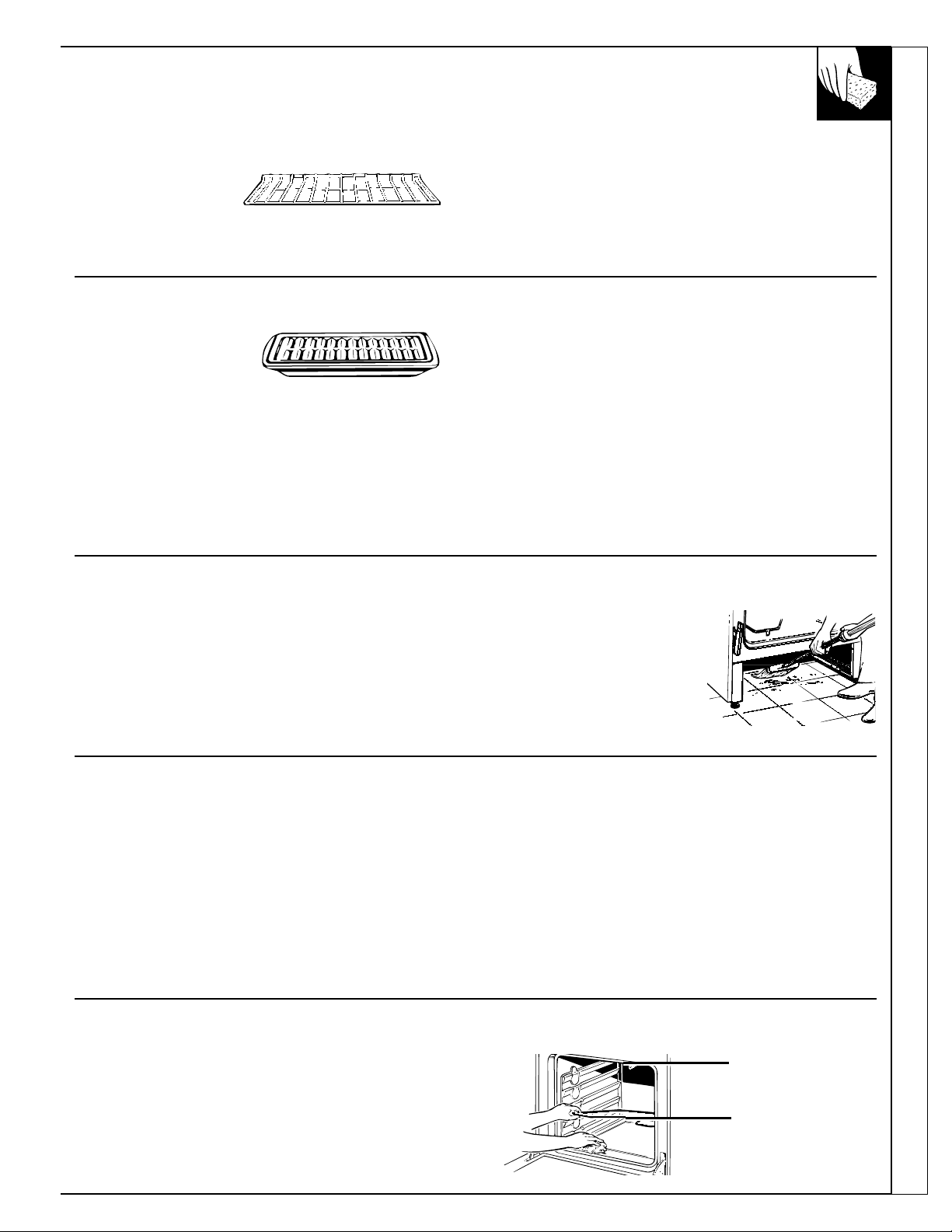
Care and Cleaning
Oven Shelves
Clean the shelves with
an abrasive cleanser
or steel wool. After
cleaning, rinse the shelves with clean
water and dry with
a clean cloth.
The oven shelves may be cleaned in self-cleaning
oven. However, they will darken, lose their luster and
become hard to slide. Wipe the shelf supports with
cooking oil after self-cleaning to make shelves slide
more easily.
Broiler Pan and Grid (on some models)
After broiling, remove
the broiler pan from the
oven. Remove the grid
from the pan. Carefully pour out grease from the pan
into a proper container. Wash and rinse the broiler pan
and grid in hot water with a soap-filled or plastic
scouring pad.
The enamel grid and broiler pan may be cleaned in
the self-clean oven. However, to prevent heavy smoke
caused by self-cleaning the greasy soil in the pan, you
must first clean off the excess grease.
If food has burned on, sprinkle the grid with detergent
while hot and cover with wet paper towels or a
dishcloth. Soaking the pan will remove burned on foods.
The broiler pan may be cleaned with a commercial
oven cleaner. Do not use an oven cleaner on the grid.
Both the broiler pan and grid can also be cleaned in
the dishwasher.
Do not store a soiled broiler pan and grid anywhere
in the range.
How to Remove the Storage Drawer or Kick Panel to Clean Under the Range
The area under the range can be reached easily for
cleaning by removing the bottom drawer (on some
models). To remove, pull the drawer out all the way,
tilt up the front and remove it. To replace, insert glides
at the back of the drawer beyond the stop on range
glides. Lift the drawer if necessary to insert easily. Let
the front of the drawer down, then push in to close.
To clean under models
with a front kick panel,
remove the panel by pulling
it straight out at the bottom.
To replace the panel, first
hook the top tabs on and then
the bottom tabs.
Porcelain Enamel Cooktop
The porcelain enamel finish is sturdy but
breakable if misused. This finish is acid-resistant.
However, any acidic foods spilled (such as fruit
juices, tomato or vinegar) should not be permitted to
remain on the finish.
If acids spill on the cooktop while it is hot, use
a dry paper towel or cloth to wipe it up right away.
When the surface has cooled, wash with soap and
water. Rinse well.
For other spills such as fat spatterings, wash with
soap and water or cleansing powders after the surface
has cooled. Rinse well. Polish with a dry cloth.
Oven Heating Elements
Do not clean the bake element or the broil element.
Any soil will burn off when the elements are heated.
The bake element can be lifted gently to clean the
oven floor. If spillovers, residue or ash accumulate
around the bake element gently wipe around the
element with warm water.
Broil Element
Bake Element
29
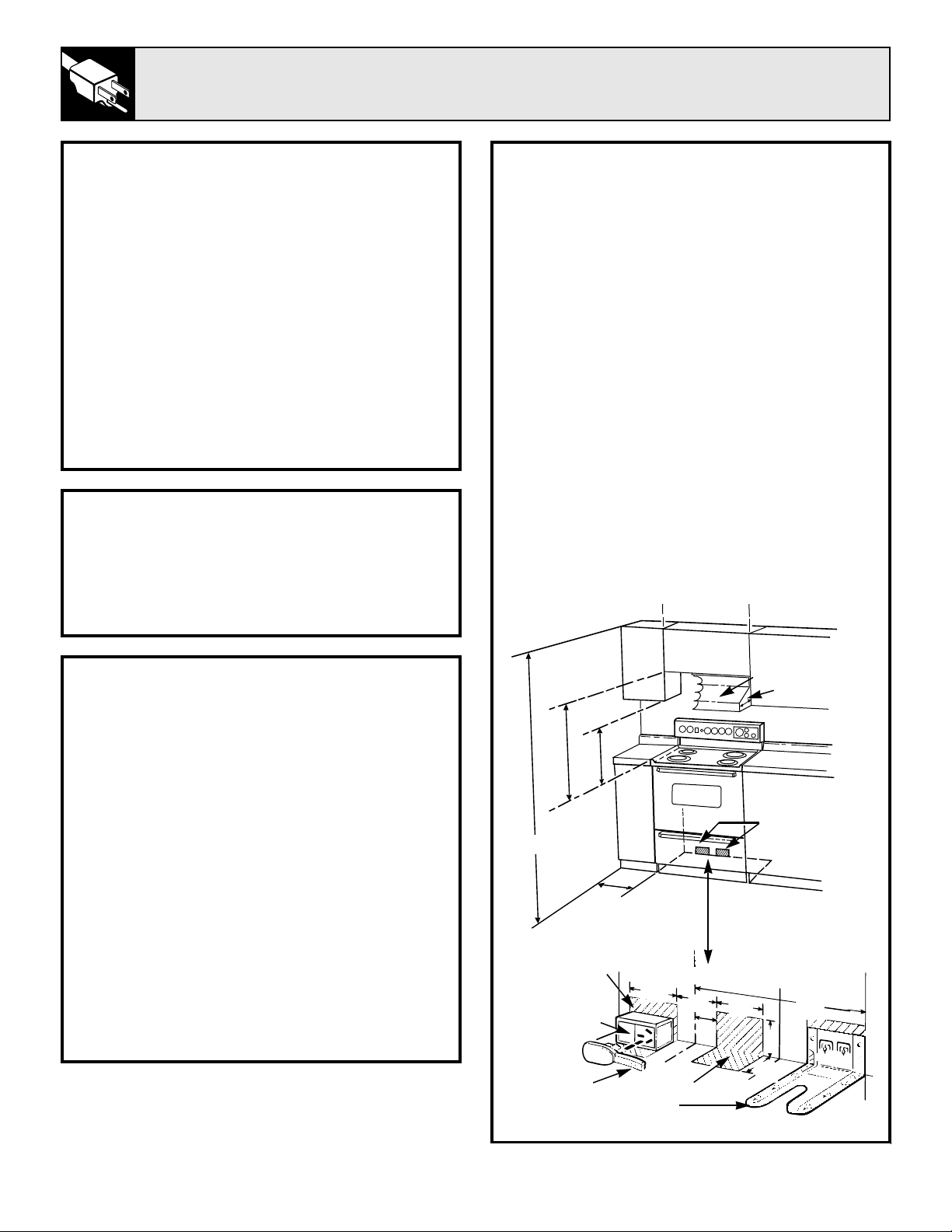
BEFORE YOU BEGIN
Read these instructions completely
and carefully.
IMPORTANT: Save these instructions for
the local electrical inspector’s use.
IMPORTANT: OBSERVE ALL GOVERNING
CODES AND ORDINANCES.
NOTE TO INSTALLER: Leave these
instructions with the appliance after
installation is completed.
NOTE TO CONSUMER:
Keep this Use and
Care Guide and Installation Instructions for
future use.
NOTE: This appliance must be properly
grounded.
INSTALLATION INSTRUCTIONS
STEP 1
PREPARE THE OPENING
1
1
⁄
2
″ spacing is recommended from the range to
adjacent vertical walls above cooktop surface.
Allow 30″ minimum clearance between surface
units and bottom of unprotected wood or metal
top cabinet, and 15″ minimum between
countertop and adjacent cabinet bottom.
EXCEPTION: Installation of a listed microwave
oven or cooking appliance over the cooktop shall
conform to the installation instructions packed
with that appliance.
To eliminate the risk of burns or fire by reaching
over heated surface units, cabinet storage space
above the surface units should be avoided. If
cabinet storage is to be provided, the risk can be
reduced by installing a range hood that projects
horizontally a min. of 5″ beyond the bottom of
the cabinets. Make sure the wall coverings,
countertops and cabinets around the range can
withstand heat generated by the range, oven or
cooktop up to 200°F.
TOOLS YOU WILL NEED
• Large blade screwdriver
• Channel lock pliers or small ratchet wrench
with 3/16″ socket (for leveling range)
• 1/4″ hex head nutdriver
ELECTRICAL REQUIREMENTS
CAUTION, FOR PERSONAL SAFETY:
DO NOT USE AN EXTENSION CORD WITH
THIS APPLIANCE.
REMOVE HOUSE FUSE OR OPEN
CIRCUIT BREAKER BEFORE BEGINNING
INSTALLATION.
This appliance must be supplied with the proper
voltage and frequency, and connected to an
individual, properly grounded branch circuit,
protected by a circuit breaker or time delay fuse, as
noted on the rating plate.
Wiring must conform to National Electric Codes.
If the electric service provided does not meet the
above specifications, it is recommended that a
licensed electrician install an approved outlet.
Because range terminals are not accessible after
range is in position, flexible service conduit or cord
must be used.
NOT LESS THAN
WIDTH OF RANGE
LOCATE
OUTLET BOX
WITHIN EITHER
SHADED AREA
INSTALL
OUTLET BOX
ON EITHER
SIDE OF C
OUTLET
BOX
5″ MIN.
1
1
⁄
2
″
MIN.
15″
MIN.
30″
MIN.
CORD
WALL
WALL
HOOD
Anti-Tip Bracket
(install in either rear corner)
FLOOR
7″
7
1
⁄
2
″
3
1
⁄
2
″
7
1
⁄
2
″
2
1
⁄
4
″
5″
14
5
⁄
8
″
C OF RANGE
L
L
30
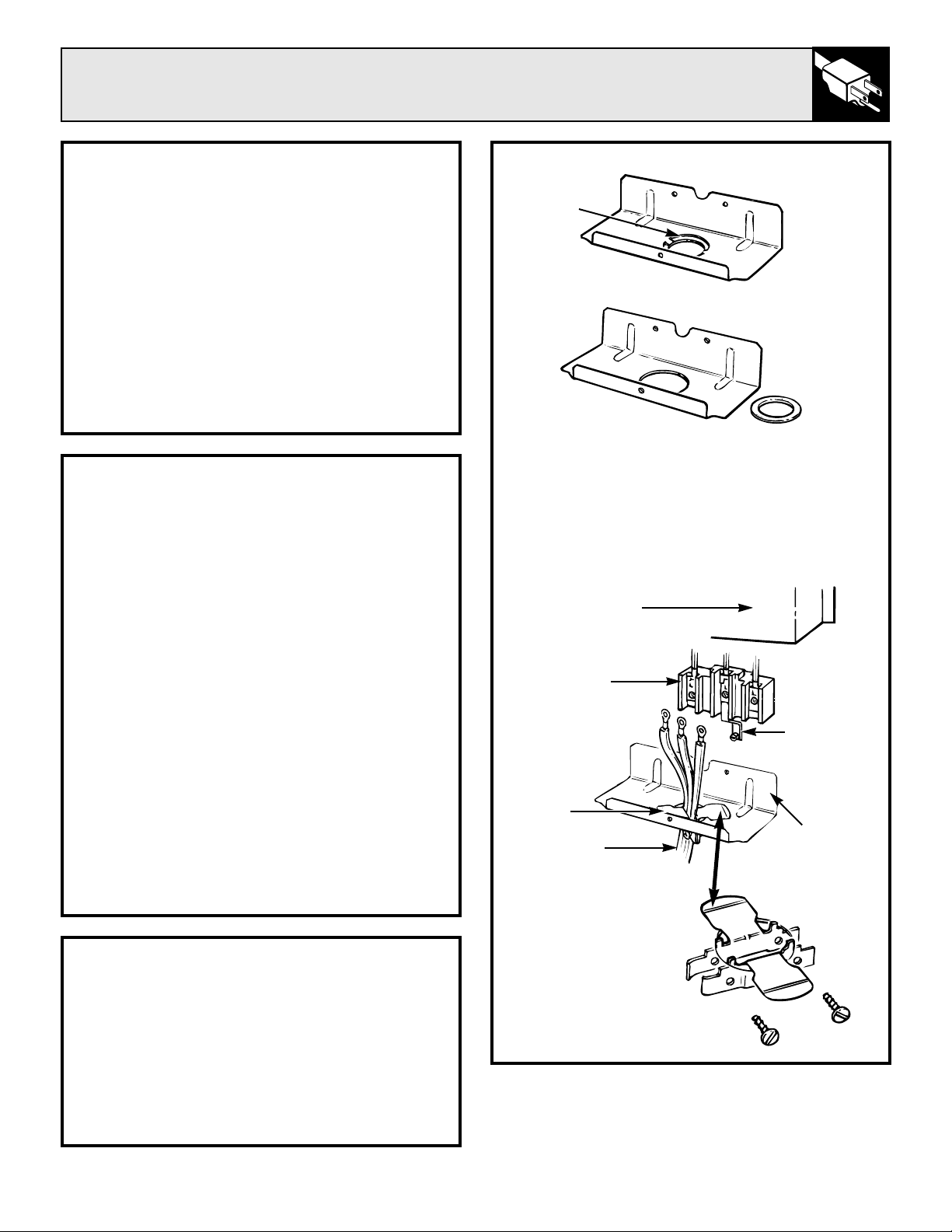
31
Flooring Under the Range
Your range, like many other household
items, is heavy and can settle into soft
floor coverings such as cushioned vinyl or
carpeting. When moving the range on this type
of flooring, use care and follow these simple and
inexpensive instructions.
The range should be installed on a 1/4 inch thick
sheet of plywood (or similar material) as follows:
When the floor covering ends at the front of the
range,
the area that the range will rest on should
be built up with plywood to the same level or
higher than the floor covering. This will allow
the range to be moved for cleaning or servicing.
C. Assemble the strain relief in the hole.
Insert the power cord through the strain relief
and tighten. Allow enough slack to easily attach
the cord terminals to the connector block. If tabs
are present at the end of the winged strain relief,
they can be removed for better fit.
NOTE: Do not install the power cord without a
strain relief.
BEFORE
AFTER
BRACKET
KNOCKOUT
RING
REMOVED
KNOCKOUT
RING
STRAIN RELIEF
BRACKET (PROVIDED
WITH RANGE CORD.
NOT PART OF RANGE.)
CONNECTOR
BLOCK
WIRING COVER
(SHOWN REMOVED)
STRAIN
RELIEF
POWER CORD
GROUND
STRAP
BRACKET
STEP 2
PREPARE FOR ELECTRICAL CONNECTION
Effective January 1, 1996 the National
Electric Code requires that new construction
(not existing) utilize a 4 conductor connection
to an electric range. When installing an
electric range in new construction follow
Steps 3 and 5 for 4 wire connection.
Use only 3-conductor or 4-conductor U.L. listed
range cord. These cords may be provided with
ring terminals on wire and strain relief device.
A range cord rated at 40 amps with 125/250
minimum volt range is required. A 50 amp range
cord is not recommended but if used, it should
be marked for use with nominal 1
3
⁄
8
″ diameter
connection openings. Care should be taken to
center cable and strain relief within knockout
hole to keep the edge from damaging the cable.
NOTE: A 4-conductor cord is to be used when
the appliance is installed in a mobile home or
when local codes do not permit grounding
through the neutral. If conduit is being used,
go to Step 6 or 7.
STEP 3
POWER CORD STRAIN RELIEF INSTALLATION
A. Remove the lower rear range wiring cover to
expose the connector block and bracket.
B. Remove the knockout ring (1
3
⁄
8
″) located on
bracket directly below the connector. To remove
the knockout, use a pair of pliers to bend the
knockout ring away from the bracket and twist
until ring is removed.
(continued next page)
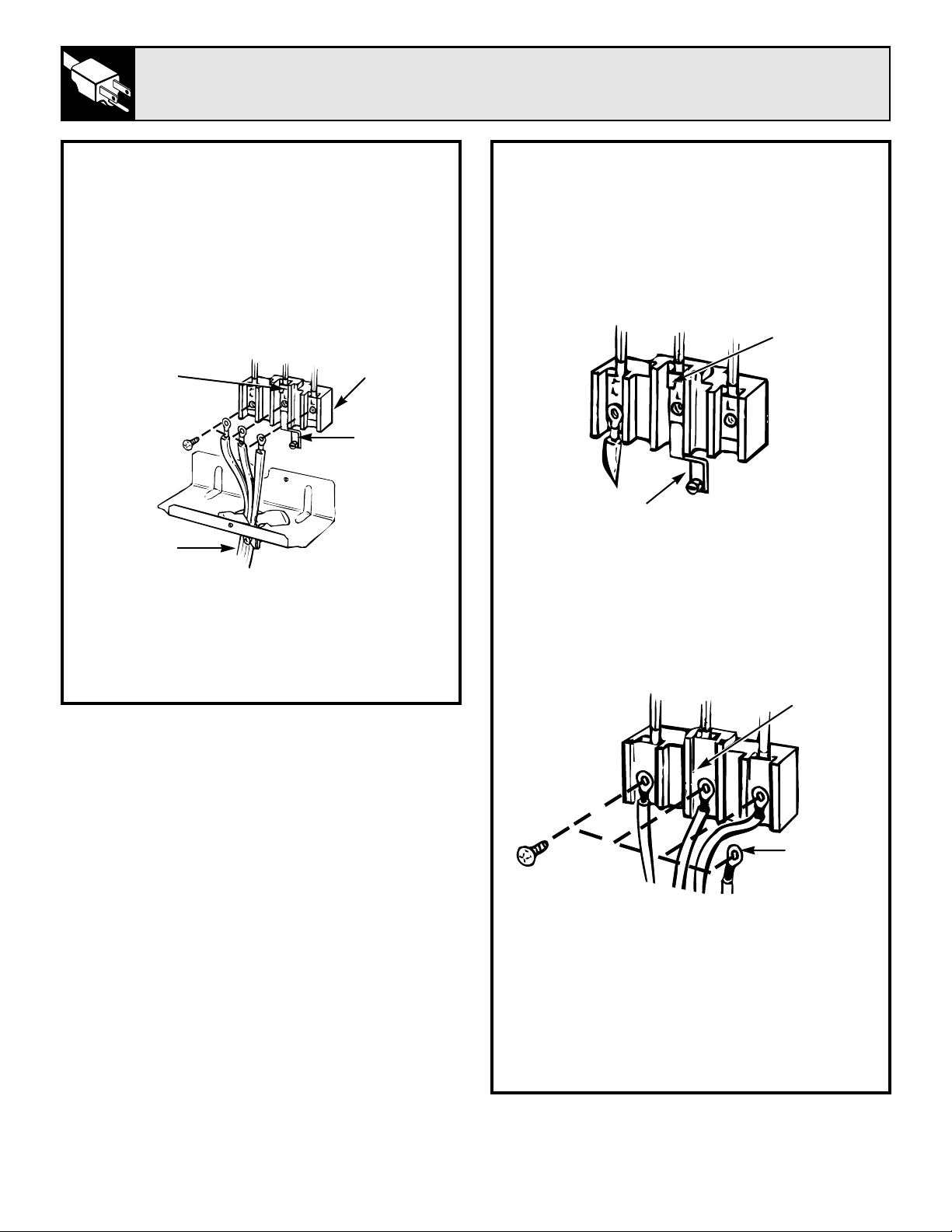
32
INSTALLATION INSTRUCTIONS
(continued)
STEP 4
3 WIRE POWER CORD INSTALLATION
Remove the 3 wire terminal screws from
the connector block. Insert screws through
each power cord terminal ring and into the
connector block until the screws engage the
nuts. Be certain that the center wire is connected
to the center screw of the connector block.
Tighten screws securely. Do NOT remove
ground strap connection.
WARNING: THE NEUTRAL OR GROUND
WIRE OF THE POWER CORD MUST BE
CONNECTED TO THE NEUTRAL
TERMINAL LOCATED IN THE CENTER OF
THE CONNECTOR BLOCK. THE POWER
LEADS MUST BE CONNECTED TO THE
OUTSIDE (BRASS COLORED) TERMINALS.
NEUTRAL
TERMINAL
GROUND
STRAP
CONNECTOR
BLOCK
POWER CORD
STEP 5
4 WIRE POWER CORD INSTALLATION
A. Remove the 3 screws from the connector
block.
B. Remove the grounding screw and strap from
the connector block middle location and the
screw connection to the frame of the range.
C. Insert screws through each power cord
terminal ring and into connector block until
screw engages nut. Be certain that the center
wire is connected to the center screw of the
connector block. Tighten screws securely.
D. Attach ground wire to the frame of the range.
WARNING: THE NEUTRAL WIRE OF
SUPPLY CIRCUIT IS CONNECTED TO
THE NEUTRAL TERMINAL LOCATED
IN THE CENTER OF THE CONNECTOR
BLOCK. THE POWER LEADS MUST
BE CONNECTED TO THE OUTSIDE
(BRASS COLORED) TERMINALS. THE
4TH GROUNDING LEAD MUST BE
CONNECTED TO THE FRAME OF THE
RANGE WITH THE GROUNDING SCREW.
BEFORE
NEUTRAL
TERMINAL
GROUNDING STRAP
(GROUNDING TO RANGE)
AFTER
NEUTRAL
TERMINAL
GROUNDING
TO RANGE
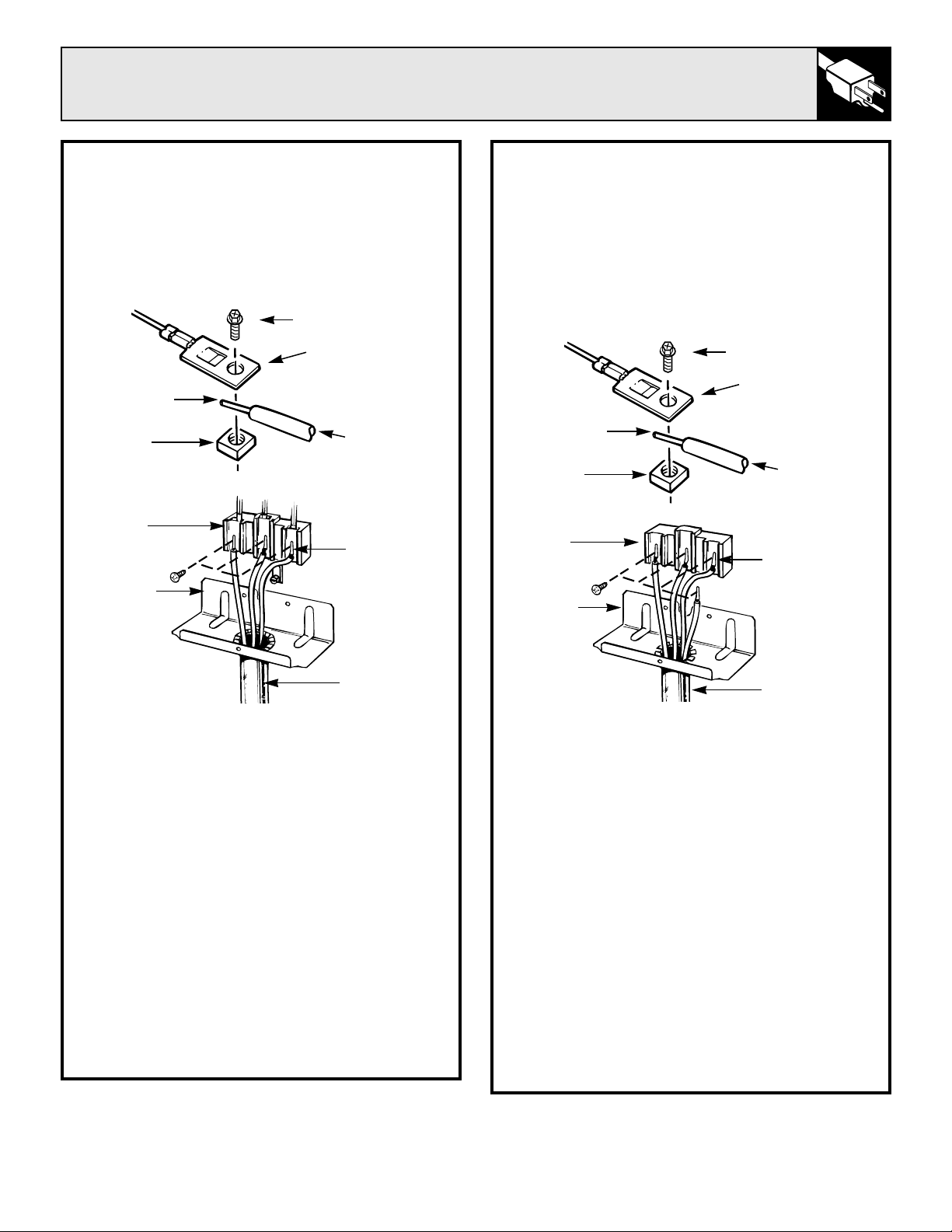
STEP 6
3 WIRE CONDUIT INSTALLATION
Remove the 3 screws from the connector
block. Insert bare wires between the connector
block terminals and movable nuts. Tighten
screws securely. Do not remove ground
strap connection.
WARNING: CONNECTOR BLOCK IS
APPROVED FOR COPPER WIRE
CONNECTION ONLY. IF ALUMINUM
WIRE IS USED, SEE NOTE BELOW.
NOTE: ALUMINUM WIRING
A. Do not connect Aluminum wire to connector
block. Use copper building wire rated for the
correct amperage and voltage to make 3 (three)
3 inch copper jumper wires. Connect wire as per
Step 6 or 7 depending on number of wires.
B. Splice copper wires to aluminum wiring using
special connector terminals designed and UL
approved for joining copper to aluminum and
follow the connector manufacturer’s
recommended procedure closely.
Wire used, location and enclosure of splices,
etc., must conform to good wiring practices and
local codes.
33
STEP 7
4 WIRE CONDUIT INSTALLATION
Remove the 3 screws from the connector block.
Remove the grounding strap from the connector
block middle location and the screw connecting
it to the frame of the range. Insert bare wires
between the connector block terminals and
movable nuts. Tighten screws securely. Attach
ground wire to the frame of the range.
WARNING: CONNECTOR BLOCK IS
APPROVED FOR COPPER WIRE
CONNECTION ONLY. IF ALUMINUM
WIRE IS USED, SEE NOTE BELOW.
NOTE: ALUMINUM WIRING
A. Do not connect Aluminum wire to connector
block. Use copper building wire rated for the
correct amperage and voltage to make 3 (three)
3 inch copper jumper wires. Connect wire as per
Step 6 or 7 depending on number of wires.
B. Splice copper wires to aluminum wiring using
special connector terminals designed and UL
approved for joining copper to aluminum and
follow the connector manufacturer’s
recommended procedure closely.
Wire used, location and enclosure of splices,
etc., must conform to good wiring practices and
local codes.
(continued next page)
BARE
WIRE TIPS
BARE
WIRE TIPS
CONNECTOR
BLOCK
BRACKET
CONDUIT
SCREW
CONNECTOR
BLOCK
TERMINAL
BARE
WIRE
MOVABLE
NUT
FLEXIBLE
CABLE
SCREW
CONNECTOR
BLOCK
TERMINAL
BARE
WIRE
MOVABLE
NUT
FLEXIBLE
CABLE
CONNECTOR
BLOCK
BRACKET
CONDUIT
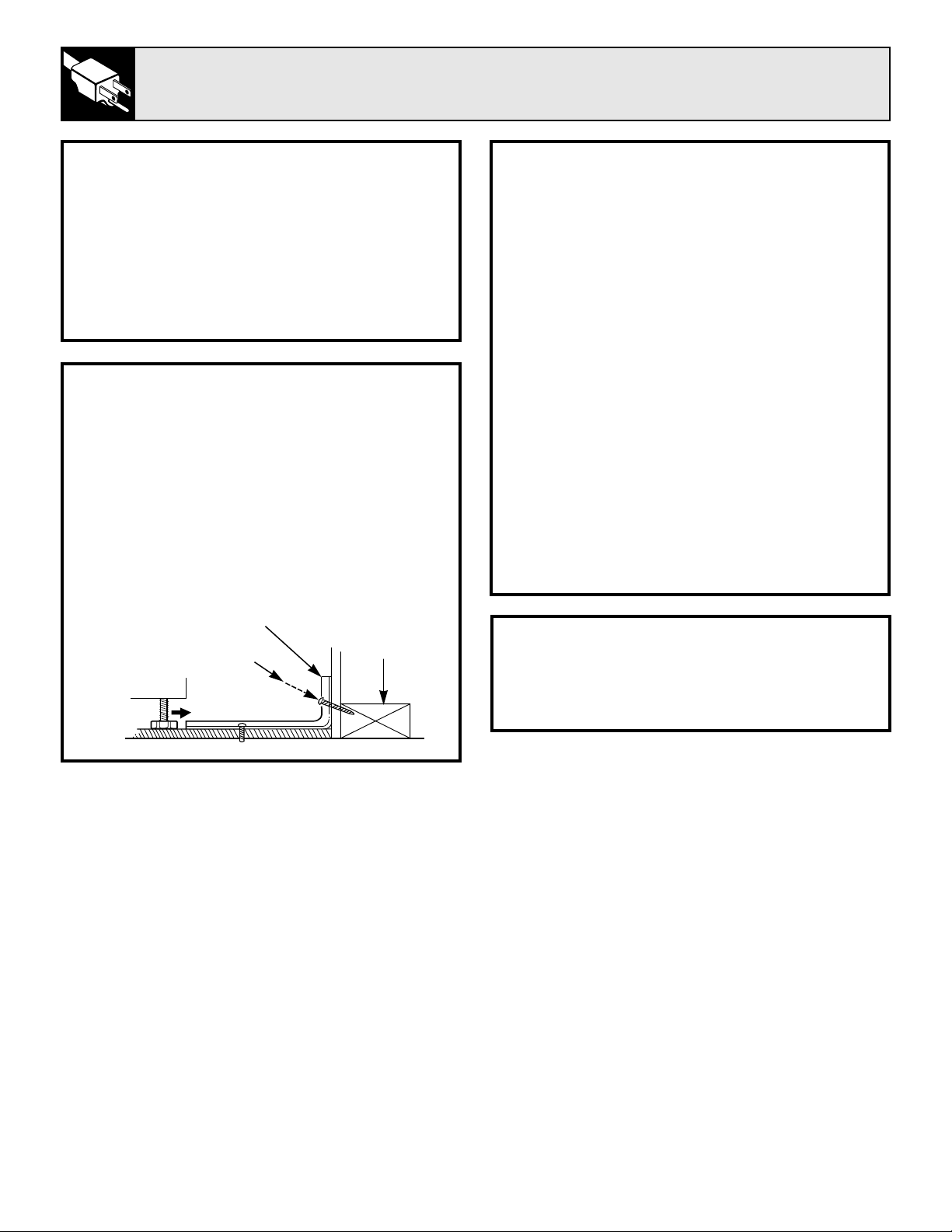
34
INSTALLATION INSTRUCTIONS
(continued)
WARNING
1. Range must be secured by ANTI-TIP bracket
supplied.
2. See instructions to install (supplied with
bracket).
3. Unless properly installed, range could be
tipped by stepping or sitting on door. Injury
might result from spilled hot liquids or from
range itself.
STEP 8
ANTI-TIP BRACKET INSTALLATION
AN ANTI-TIP bracket is supplied with instructions
for installation in a variety of locations. The
instructions include a template, a parts list and a
list of tools necessary to complete the installation.
Read the IMPORTANT SAFETY INSTRUCTIONS
and the instructions that fit your situation before
beginning installation.
Typical Installation of Anti-Tip Bracket
Attachment to Wall
Bracket
Wall Plate
Screw Must Enter
Wood or Metal
STEP 9
LEVELING THE RANGE
The range must be level. Leveling feet are located
at each corner of the base of the range. Remove
the storage drawer or kick panel (depending on
your model) and using channel locks, rotate the
leveling feet in and out as required to level the
range. (For instructions on how to remove and
replace the storage drawer or the kick panel, see
the Cleaning Under the Range section in Care
and Cleaning.) On some models, there are plastic
covers which may be removed for easy
adjustment (just squeeze and pull).
One of the rear leveling feet will engage the
ANTI-TIP bracket (allow for some side to side
adjustment). Allow a minimum clearance of 1/8″
between the range and the leveling foot that is to
be installed into the ANTI-TIP bracket.
Check the range for proper installation into the
ANTI-TIP bracket (after the range has been
properly installed) by removing the kick panel or
storage drawer and inspecting the rear leveling
leg. Make sure it fits securely into the slot.
STEP 10
FINAL CHECK
Be sure all switches are in the OFF position
before leaving the range.
PROBLEM POSSIBLE CAUSE
“F—AND A NUMBER” • If the time display flashes “F—and a number”, you have a function error code.
FLASH IN THE DISPLAY If a function error code appears during the self-cleaning cycle, check the oven
door latch. The latch may have been moved, even if only slightly, from the
latched position. Make sure the latch is moved to the right as far as it will go.
Turn the Oven Temperature knob to off. Allow the oven to cool for one hour.
Put the oven back into operation.
• Disconnect all power to the range for 5 minutes and then reconnect power.
If the failure code repeats, then call for service.
THE DISPLAY GOES BLANK • Disconnect power to the range at the fuse box or circuit breaker for at least
OR INDICATOR LIGHTS 10 seconds. Turn power on and power up your range. If the indicator lights are
COME ON WHEN THE still on, call for service.
RANGE IS NOT IN USE
OVEN WILL • Plug on range is not completely inserted in the electrical outlet.
NOT WORK
• The circuit breaker in your house has been tripped, or a fuse has been blown.
• Oven controls not properly set.
• Door left in locked position after cleaning.
OVEN LIGHT • Light bulb is loose or defective. Tighten or replace.
DOES NOT WORK
• Switch operating oven light is broken. Call for service.
FOOD DOES NOT • The Oven Temperature knob not set at BROIL. Make sure you turn the knob
BROIL PROPERLY all the way to the BROIL position.
• Door not left open to the broil stop position as recommended.
• Improper shelf position being used. See the Broiling Guide.
• Food is being cooked on hot pan.
• Cookware is not suited for broiling.
• Aluminum foil used on the broil pan grid has not been fitted properly
and slit as recommended.
FOOD DOES NOT • The Oven Temperature knob not set correctly.
ROAST OR BAKE
• Shelf position is incorrect. See the Roasting or Baking sections.
PROPERLY
• Oven shelf not level.
• Incorrect cookware or cookware of improper size is being used.
• A foil tent was not used when needed to slow down browning during roasting.
• Oven thermostat needs adjustment. See the Adjust the Oven Thermostat—
Do It Yourself section.
OVEN TEMPERATURE • Oven thermostat needs adjustment. See the Adjust the Oven Thermostat—
TOO HOT OR TOO COLD Do It Yourself section.
CLOCK AND TIMER • Make sure the electrical plug is plugged into a live, properly grounded
DO NOT WORK power outlet.
• Check for power outage.
• See the Oven Control, Clock and Timer section of this guide.
(continued next page)
35
QUESTIONS?
USE THIS PROBLEM SOLVER
Installation Instructions The Problem Solver
36
THE PROBLEM SOLVER
(continued)
PROBLEM POSSIBLE CAUSE
SURFACE UNITS • Surface units are not plugged in solidly.
NOT FUNCTIONING
• Drip pans are not set securely in the cooktop.
PROPERLY
• Surface unit controls are not properly set.
COOKTOP FEELS HOT • Large pans hold heat close to the cooktop and make it feel hotter.
• Pans on the right rear surface unit block some air flow from the oven vent
and cause the cooktop to get hot.
OVEN WILL NOT • Oven temperature is too high to set self-clean operation. Allow the range
SELF-CLEAN to cool to room temperature and reset the controls.
• Control knob not set to AUTO SELF CLEAN.
• Door latch handle not moved all the way to the right.
OVEN DOOR • Turn the Oven Temperature knob to OFF. Allow the oven to cool.
ACCIDENTALLY LOCKED Never force the door latch handle.
DURING COOKING
OVEN DOOR WILL • Oven must cool below locking temperature.
NOT UNLOCK
OVEN NOT CLEAN • Oven controls not set properly.
AFTER CLEAN CYCLE
• Heavily soiled ovens may need to self-clean again or for a longer period.
• Heavy spillovers should be cleaned before starting clean cycle.
LATCH DOOR • The Oven Temperature knob is set at AUTO SELF CLEAN before the
LIGHT FLASHES door latch handle is moved to the right.
OVEN DOOR • Because the oven door is removable, it sometimes gets out of position during
IS CROOKED installation. To straighten the door, push down on the high corner.
If you need more help
…
call, toll free:
GE Answer Center
®
800.626.2000
consumer information service

NOTES
37
The Problem Solver

38
NOTES
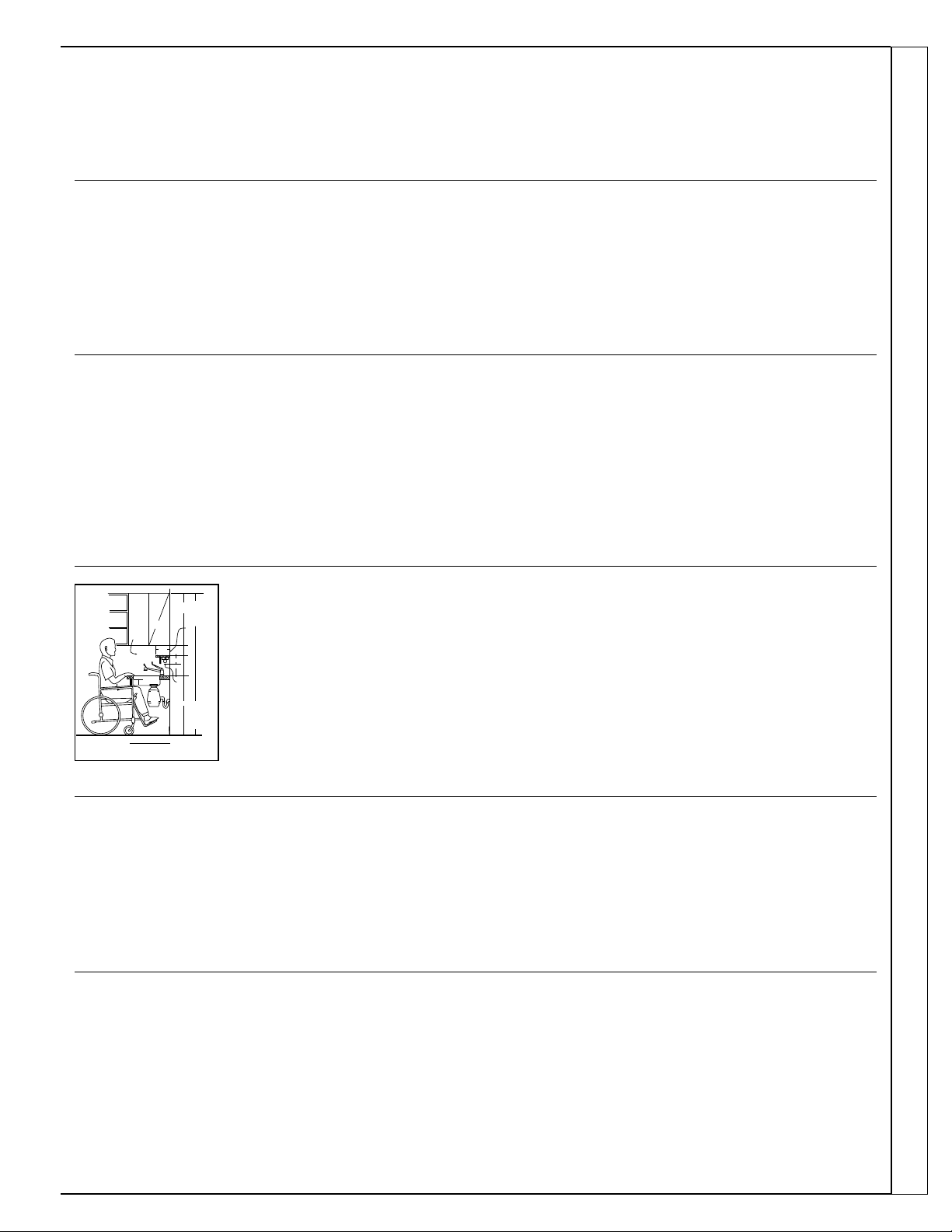
Upon request, GE will provide
Braille controls for a variety of GE
appliances, and a brochure to
assist in planning a barrier-free
kitchen for persons with limited
mobility. To obtain these items,
free of charge, call 800.626.2000.
Consumers with impaired hearing or speech who have
access to a TDD or a conventional teletypewriter may
call 800-TDD-GEAC (800-833-4322) to request
information or service.
We’ll Be There
With the purchase of your new GE appliance, receive the assurance that if you ever need
information or assistance from GE, we’ll be there. All you have to do is call—toll-free!
In-Home Repair Service
800-GE-CARES (800-432-2737)
A GE consumer service professional will provide expert repair service,
scheduled at a time that’s convenient for you. Many GE Consumer Service
company-operated locations offer you service today or tomorrow, or at your
convenience (7:00 a.m. to 7:00 p.m. weekdays, 9:00 a.m. to 2:00 p.m. Saturdays).
Our factory-trained technicians know your appliance inside and out—so most
repairs can be handled in just one visit.
GE Answer Center®
800.626.2000
Whatever your question about any GE major appliance, GE Answer Center®
information service is available to help. Your call—and your question—will be
answered promptly and courteously. And you can call any time. GE Answer
Center® service is open 24 hours a day, 7 days a week.
Service Contracts
800-626-2224
You can have the secure feeling that GE Consumer Service will still be there
after your warranty expires. Purchase a GE contract while your warranty is still
in effect and you’ll receive a substantial discount. With a multiple-year contract,
you’re assured of future service at today’s prices.
Parts and Accessories
800-626-2002
Individuals qualified to service their own appliances
can have parts or accessories sent directly to their home.
The GE parts system provides access to over 47,000
parts…and all GE Genuine Renewal Parts are fully
warranted. VISA, MasterCard and Discover cards
are accepted.
User maintenance instructions contained in this guide
cover procedures intended to be performed by any user.
Other servicing generally should be referred to qualified
service personnel. Caution must be exercised, since
improper servicing may cause unsafe operation.
For Customers With Special Needs…
800.626.2000
SINGLE CONTROL
FAUCET
TBXTOLITE
ON WALL
6’ 10"
5"
8"
6"
5"
7"
1’ 0"
R SHALLOW DEPTH SINKS (6") WITH REAR DRAIN.
SINK SHOULD ALSO BE UNDERCOATED
2’ 10"
3’
1/8
"
SCALE 1’
=
1"
SECTION A-A
FLUORESCENT
FIXTURE
THIS LIGHT CAN
BE INSTALLED
IN BOTTOM OF
WALL CABINETS
2’ 6"
Consumer Services
WHAT IS COVERED
FULL ONE-YEAR WARRANTY
For one year from date of original
purchase, we will provide, free of
charge, parts and service labor in
your home to repair or replace
any
part of the range
that fails because
of a manufacturing defect.
*******************************
This warranty is extended to
the original purchaser and any
succeeding owner for products
purchased for ordinary home use in
the 48 mainland states, Hawaii and
Washington, D.C. In Alaska the
warranty is the same except that it is
LIMITED because you must pay to
ship the product to the service shop
or for the service technician’s travel
costs to your home.
All warranty service will be
provided by our Factory Service
Centers or by our authorized
Customer Care
®
servicers during
normal working hours.
Should your appliance need
service, during warranty period
or beyond, call 800-GE-CARES
(800-432-2737).
WHAT IS NOT COVERED
• Service trips to your home to
teach you how to use the product.
Read your Use and Care material.
If you then have any questions
about operating the product,
please contact your dealer or our
Consumer Affairs office at the
address below, or call, toll free:
GE Answer Center
®
800.626.2000
consumer information service
• Improper installation.
If you have an installation
problem, contact your dealer or
installer. You are responsible for
providing adequate electrical, gas,
exhausting and other connecting
facilities as described in the
Installation Instructions provided
with the product.
• Replacement of house fuses or
resetting of circuit breakers.
• Failure of the product if it is used
for other than its intended
purpose or used commercially.
• Damage to product caused by
accident, fire, floods or acts
of God.
WARRANTOR IS
NOT
RESPONSIBLE FOR
CONSEQUENTIAL DAMAGES.
Some states do not allow the exclusion or limitation of incidental or consequential damages, so the above limitation or exclusion
may not apply to you. This warranty gives you specific legal rights, and you may also have other rights which vary from state to state.
To know what your legal rights are in your state, consult your local or state consumer affairs office or your state’s Attorney General.
Warrantor: General Electric Company
If further help is needed concerning this warranty, write:
Manager—Consumer Affairs, GE Appliances, Louisville, KY 40225
JBP19
JBP21
JBP24
JBP25
JBP26
JBP45
JBP46
JBP47
JBP48
Part No. 164D2966P232
Pub No. 49-8721
10-95 CG
YOUR GENERAL ELECTRIC RANGE
WARRANTY
Staple sales slip or cancelled check
here. Proof of original purchase date
is needed to obtain service
under warranty.
Printed in Louisville, KY
This book is printed on recycled paper.

