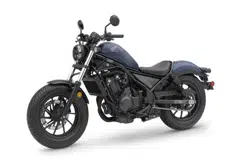
Honda 2021 REBEL 500 Street Cruiser - Owner's Manuals
31MKGA40 - 2021 Rebel 500 (CMX500/A/A2) - MOM 17593 (2008)
Parts Location
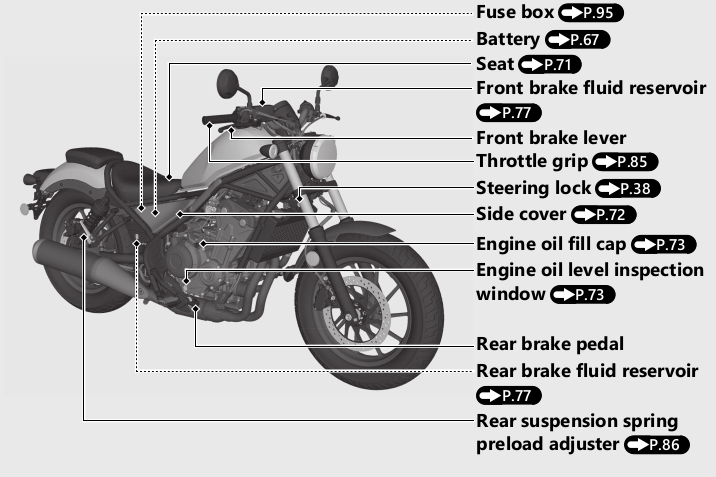
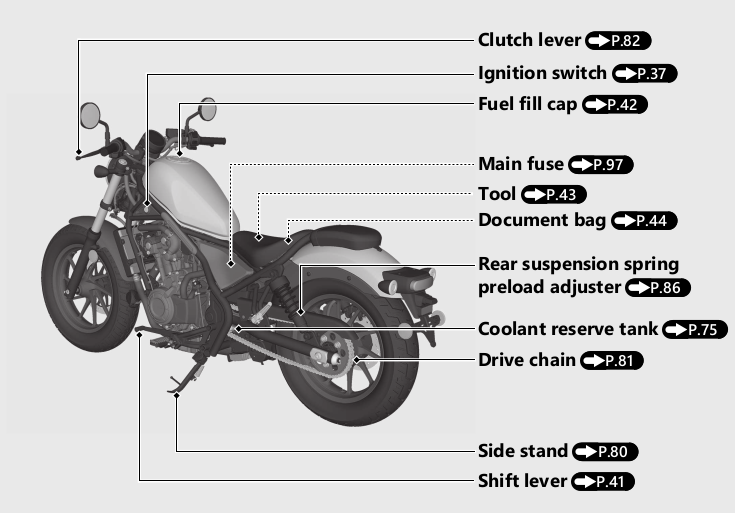
Instruments
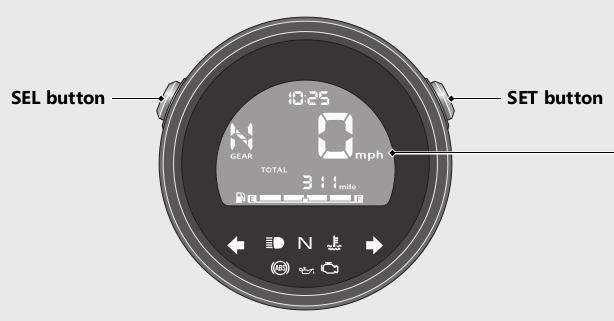
Display Check
When the ignition switch is turned to the ON position. initial animation will show. If any part of these displays does not come on when it should. have your dealer check for problems.
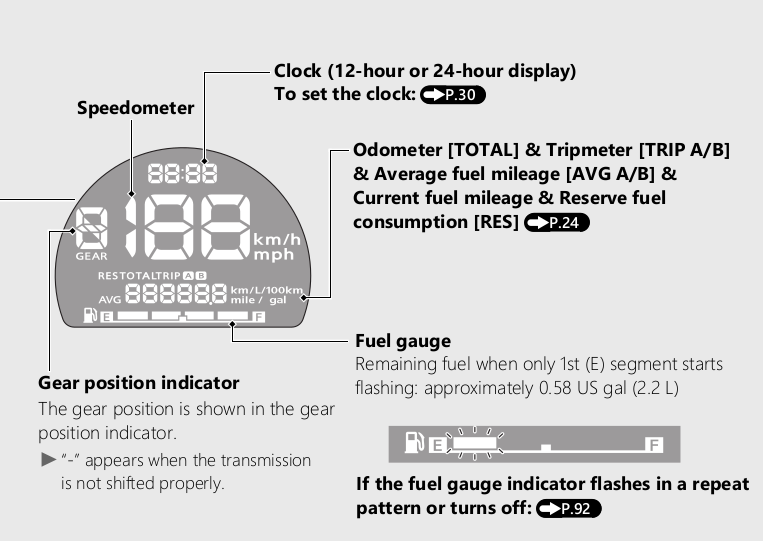
Odometer [TOTAL] & Tripmeter [TRIP A/B] & Current fuel mileage & Average fuel mileage [AVG A/B] & Reserve fuel consumption [RES]
The SEL button switches between the odometer. tripmeter A. tripmeter B. average fuel mileage A. average fuel mileage B. current fuel mileage and reserve fuel consumption.
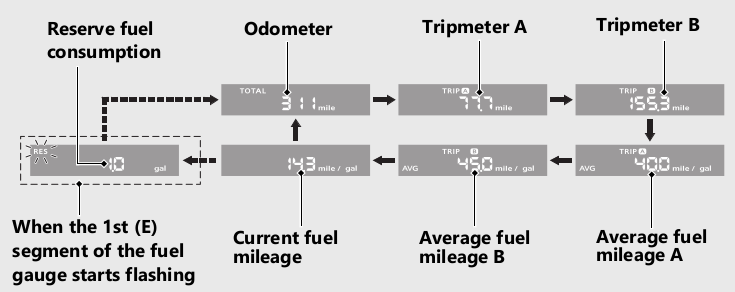
When the st (E) segment of the fuel gauge starts flashing. the odometer. tripmeter A. tripmeter B. average fuel mileage A. average fuel mileage B or current fuel mileage switches to the reserve fuel consumption.
Odometer [TOTAL]
Total distance ridden. When “------' is displayed. go to your dealer for service.
Tripmeter [TRIP A/B]
Distance ridden since tripmeter was reset.
When “----- -" is displayed. go to your dealer for service.
To reset the tripmeter: Page 27.
Average fuel mileage [AVG A/B]
The average fuel mileage A will be based on tripmeter A. Displays the average fuel mileage A since tripmeter A was reset.
The average fuel mileage B will be based on tripmeter B. Displays the average fuel mileage B since tripmeter B was reset.
Display range: 0.0 to 299.9 mile/gal (L/100km or km/L)
+ Initial display: “---.-" is displayed
+ More than 299.9 mile/gal (L/100km or km/L) : "299.9" is displayed
+ When the tripmeter A or B is reset: “---.-" is displayed.
When “---.-" is displayed except for the above-mentioned cases. go to your dealer for service.
To reset the average fuel mileage: Page 27.
Current fuel mileage
Displays the current instant fuel mileage.
Display range: 0.0 to 299.9 mile/gal (L/100km or km/L)
+ Initial display: “---.-" is displayed.
+ When your speed is less than 4 mph (6 km/h): "---.-" is displayed.
+ More than 299.9 mile/gal (L/100km or km/L): "299.9" is displayed.
When “---.-" is displayed except for the above-mentioned cases. go to your dealer for service.
Reserve fuel consumption [RES]
Displays the fuel consumption since the 1st (E) segment of the fuel gauge starts flashing.
When the st (E) segment of the fuel gauge starts flashing. the odometer. tripmeter A. tripmeter B. average fuel mileage A. average fuel mileage B or current fuel mileage switches to the reserve fuel consumption.
You should refill the tank as soon as possible.
Display range: 0.0 to 99.9 gal (gallon) or 0.0 to 99.9 L (liters)
+ Flashes from “0.0"
+ More than 99.9 gal (gallon) or 99.9 L (liters) : "99.9" is displayed.
After refueling more than the reserve amount. the display returns to normal.
When "---.-" is displayed. go to your dealer for service.
To reset the tripmeter [TRIP A/B] and average fuel mileage [AVG A/B]
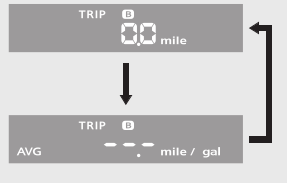
To reset the tripmeter A and average fuel mileage A together. press and hold the SET button while the tripmeter A or average fuel mileage A is displayed
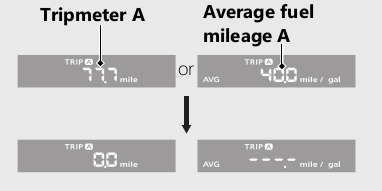
When they are reset. reset display appears at each indication. Then. the display returns to the last selected indication.
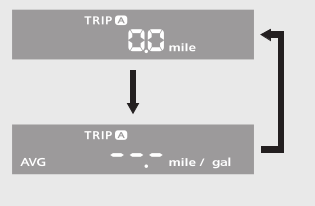
To reset the tripmeter B and average fuel mileage B together. press and hold the SET button while the tripmeter B or average fuel mileage B is displayed.
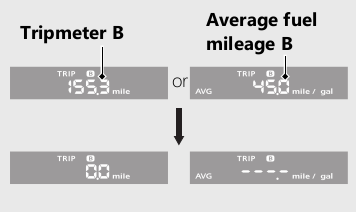
When they are reset. reset display appears at each indication. Then. the display returns to the last selected indication.
Display Setting
Following items can be changed sequentially.
Time format setting
Clock setting
Backlight brightness adjustment
Changing of speed and mileage unit
Changing of fuel mileage meter unit (only when km unit system is selected)
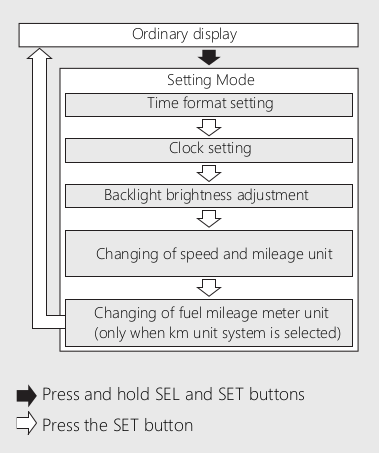
In addition. to move the ordinary display at display setting.
+ The buttons is not pressed for about 30 seconds.
+ Turn the ignition switch to the OFF position and then to the ON position.
1. Time format setting:
You can switch the time format between 12 hour format or 24 hour format.
+ Turn the ignition switch to the ON position.
+ Press and hold SEL and SET buttons until the current time format start flashing.

+ Press SEL button to select “12 hr” or “24 hr".
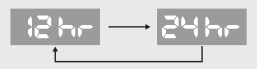
+ Press SET button. The time format is set. and then the display moves to the clock setting.
2 Clock setting:
+Press SEL button until the desired hour is displayed.
Press and hold SEL button to advance the hour quickly.
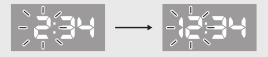
+Press SET button. The minute digits start flashing.
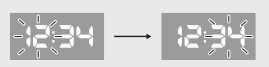
+ Press SEL button until the desired minute is displayed.
Press and hold SEL button to advance the minute quickly.
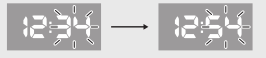
+ Press SET button. The clock is set. and then the display moves to the backlight brightness adjustment.
3 Backlight brightness agjustment:
You can adjust the brightness to one of five levels
+ Press SEL button. The brightness is switched.
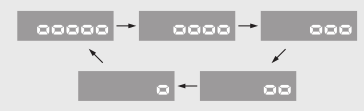
+ Press SET button. The backlight is set. and then the display moves the changing of the speed and mileage unit.
4 Changing of speed and mileage unit:
+ Press SEL button to select either *mph" and “mile” or “km/h” and “km’.
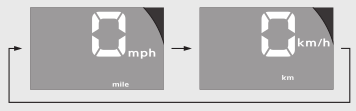
+ When the “km/h” for speed and “km” for mileage are selected
Press SET button. The speed and mileage unit is set. and then the display moves to the changing of fuel mileage meter unit.
When the “mph” for speed and “mile” for mileage are selected
Press SET button. The speed and mileage unit is set. and then the display will return to the ordinary display.
5 Changing of fuel mileage meter unit:
+ Press SEL button to select *kmn/L" or “L/100km"
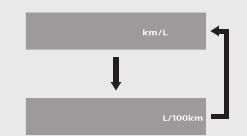
+ Press SET button. The fuel mileage meter unit is set. and then the display moves to the ordinary display.
The established setting can also be set by turning the ignition switch to the OFF position.
The control is automatically switched from the setting mode to the ordinary display if the button is not pressed for about 30 seconds. Even in this case. established setting is maintained.
Indicators
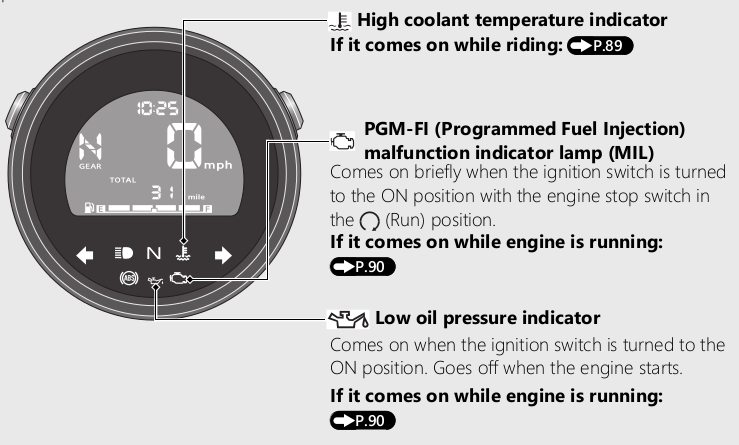
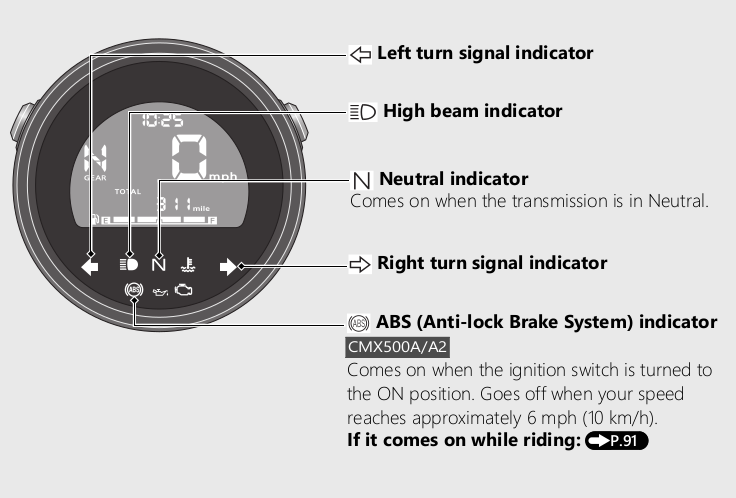
IF one of these indicators does not come on when it snould. have your dealer check for problems.
Switches
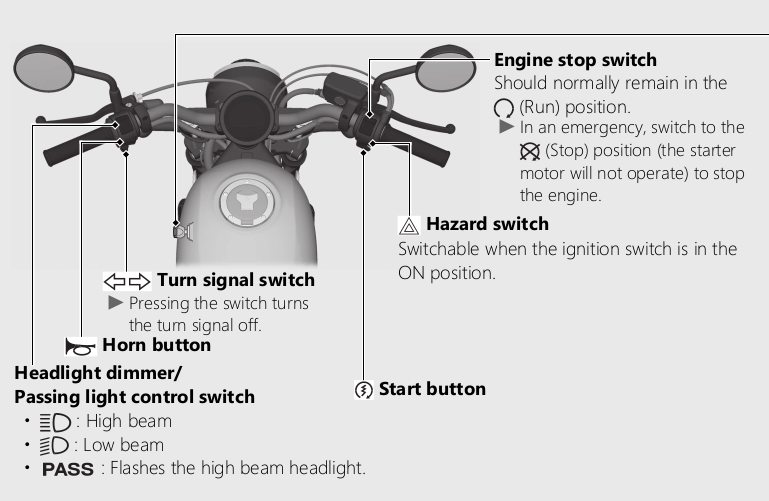
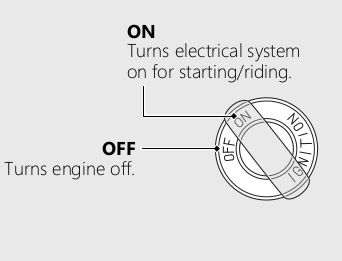
Ignition switch
Switches the electrical system on/off.
Key can be removed when in the OFF position
Steering Lock
Lock the steering when parking to help prevent theft.
A U-shaped wheel lock or similar device is also recommended.
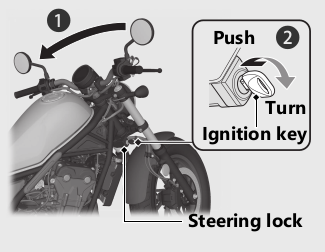
Locking
1 Turn the handlebar all the way to the left.
2 Insert the ignition key in the steering lock.
3 Push the ignition key down. and turn it 180 degrees clockwise.
Jiggle the handlebar if the lock is difficult to engage.
4 Remove the ignition key.
Unlocking
Insert the ignition key. push it in. and turn it 180 degrees counterclockwise.
Starting the Engine
Start your engine using the following procedure. regardless of whether the engine is cold or warm.
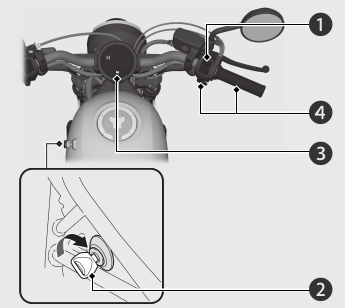
NOTE:
+ If the engine does not start within 5 seconds. turn the ignition switch to the OFF position and wait 10 seconds before trying to start the engine again to recover battery voltage.
+ Extended fast idling and rewing the engine can damage the engine. and the exhaust system.
1 Make sure the engine stop switch is in the  (Run) position.
2 Turn the ignition switch to the ON position
3 Shift the transmission to Neutral ( indicator comes on). Alternatively. pull in the clutch lever to start your vehicle with the transmission in gear so long as the side stand is raised.
4 Press the start button with the throttle completely closed.
If you cannot start the engine:
With the throttle slightly open (about 1/8 in (3 mm). without freeplay) while starting the engine.
About 1/8 in (3 mm). without freeplay
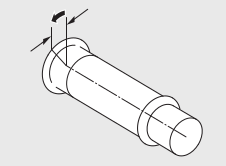
If the engine does not start:
1 Open the throttle fully and press the start button for 5 seconds.
2 Repeat the normal starting procedure.
3 lf the engine starts. open the throttle slightly if idling is unstable
4 If the engine does not start, wait 10 seconds before trying steps 1 2 again
If Engine Will Not Start Page 88.
Shifting Gears
Your vehicle transmission has 6 forward gears in a one-down. five-up shift pattern.
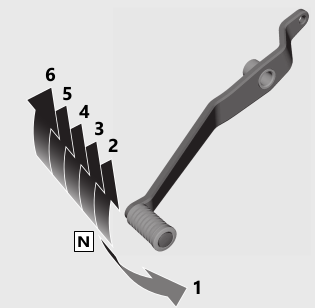
If you put the vehicle in gear with the side stand down. the engine will shut off.
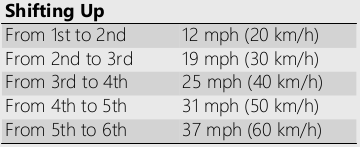
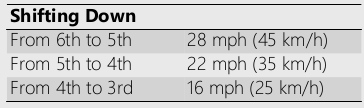
Note: Improper shifting can damage the engine. transmission. and drive train. Also. coasting or towing the vehicle for long distances with the engine off can damage the transmission.
Refueling
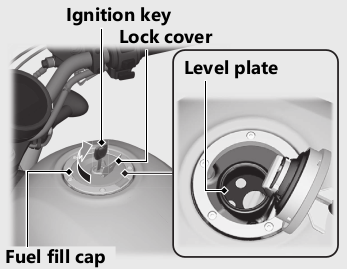
Do not fill with fuel above the level plate.
Fuel type: Unleaded gasoline only
Recommended fuel octane number:
Pump Octane Number (PON) 86 or higher
Tank capacity: 2.96 US gal (11.2 L)
Refueling and Fuel Guidelines: Page 14
Opening the Fuel Fill Cap
Open the lock cover. insert the ignition key. and turn it clockwise to open the fuel fill cap.
Closing the Fuel Fill Cap
+ After refueling. push the fuel fill cap closed until it locks
+ Remove the ignition key and close the lock cover.
The ignition key cannot be removed if the fuel fill cap is not locked.
Warning:
Gasoline is highly flammable and explosive. You can be burned or seriously injured when handling fuel.
+ Stop the engine. and keep heat. sparks. and flame away.
+ Handle fuel only outdoors.
+ Wipe up spills immediately.
Storage Equipment
Tool
The 5 mm Hex wrench is stored behind the right side cover.
To remove the 5 mm Hex wrench. loosen the screw with a coin
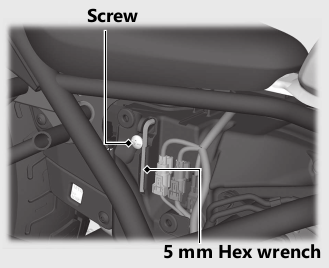
Removing the Right Side Cover: Page 72
The tools are stored on the underside of the seat.
Store the tools and secure them with the rubber strap as shown.
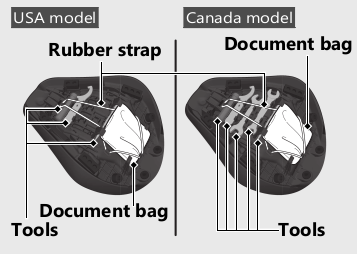
Removing the Seat: Page 71.
The fuse puller is stored on the battery cover under the seat
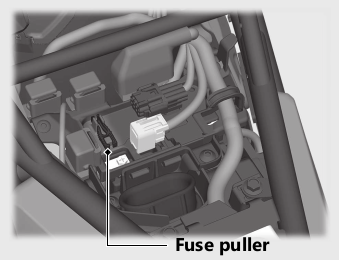
Document Bag
The document bag is stored on the underside of the seat.
Store the document bag and secure it with the rubber strap as shown.
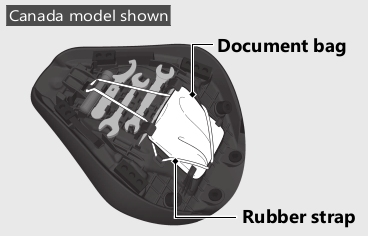
Maintenance
Please read “Importance of Maintenance” and “Maintenance Fundamentals” carefully before attempting any maintenance. Refer to “Specifications” for service data. An optional larger tool kit may be available. Check with your Honda dealer's parts department.
Importance of Maintenance
Keeping your vehicle well-maintained is absolutely essential to your safety and to protect your investment. obtain maximum. performance. avoid breakdowns. and reduce air pollution. Maintenance is the owner's responsibility. Be sure to inspect your vehicle before each ride. and perform the periodic checks specified in the Maintenance Schedule
Warning:
- Improperly maintaining your vehicle or failing to correct a problem before you ride can cause a crash in which you can be seriously hurt or killed.
- Always follow the inspection and maintenance recommendations and schedules in this owner's manual.
For information about the exhaust emission and noise emission requirements of the U.S. Environmental Protection Agency (EPA). the California Air Resources Board (CARB). and the Environment and Climate Change Canada (ECCO). BP. 109
USA
Maintenance. replacement or repair of the emission control devices and systems may be performed by any vehicle repair establishment or individual using parts that are "certified’ to EPA standards.
Maintenance Safety
Always read the maintenance instructions before you begin each task. and make sure that you have the tools. parts. and skills required. We cannot wam you of every conceivable hazard that can arise in performing maintenance. Only you can decide whether or not you should perform a given task
Follow these guidelines when performing maintenance.
+ Stop the engine and remove the key.
+ Place your vehicle on a firm. level surface using the side stand or a maintenance stand to provide support.
+ Allow the engine. muffler. brakes. and other high-temperature parts to cool before servicing as you can get bumed
+ Run the engine only when instructed. and do so in a well-ventilated area.
Maintenance Schedule
The maintenance schedule specifies the maintenance requirements necessary to ensure safe. dependable performance. and proper emission control
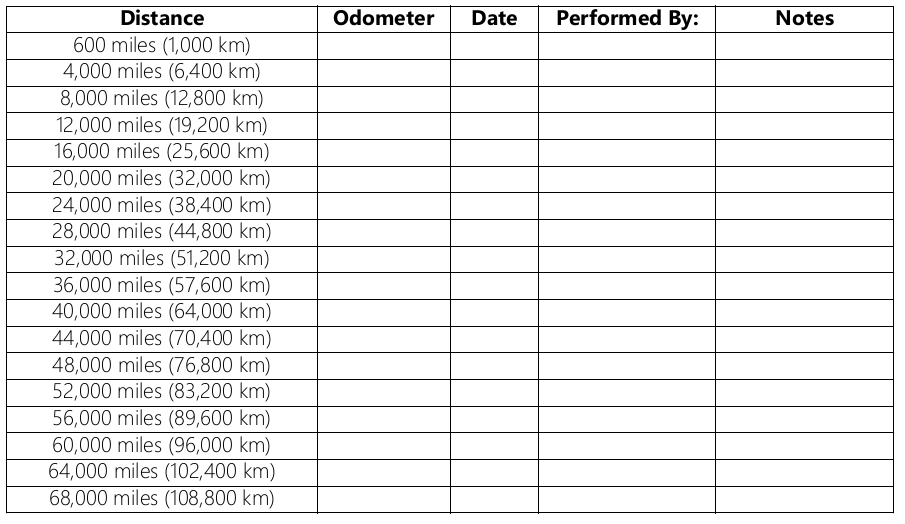
Maintenance work should be performed in accordance with Honda's standards and specifications by properly trained and equipped technicians. Your dealer meets all of these requirements. All scheduled maintenance is considered a normal owner operating cost and will be charged to you by your dealer. Keeping an accurate maintenance record will help ensure your vehicle is properly maintained
Make sure whoever performs the scheduled maintenance completes the maintenance record. Retain all service documents. If you sell your vehicle. these service documents should be transferred with the vehicle to the new owner.
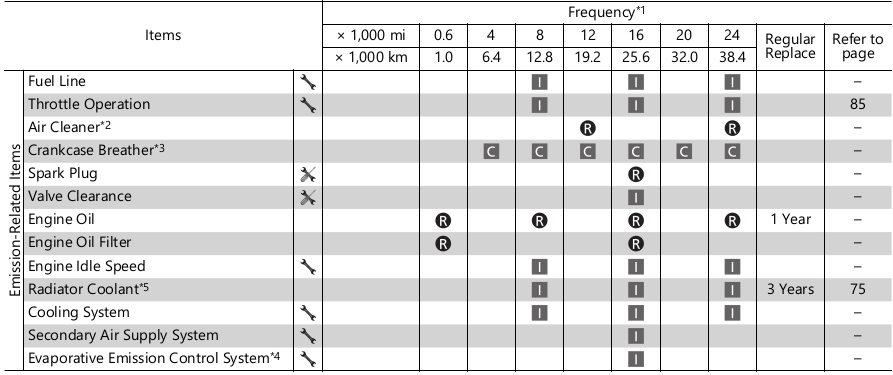
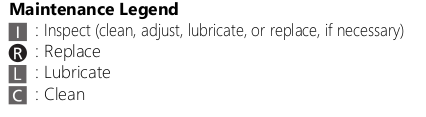
Maintenance Level
Intermediate. We recommend service by your dealer. unless you have the necessary tools and are mechanically skilled. Procedures are provided in an official Honda Service Manual (Page 115).
Technical. In the interest of safety. have your vehicle serviced by your dealer.
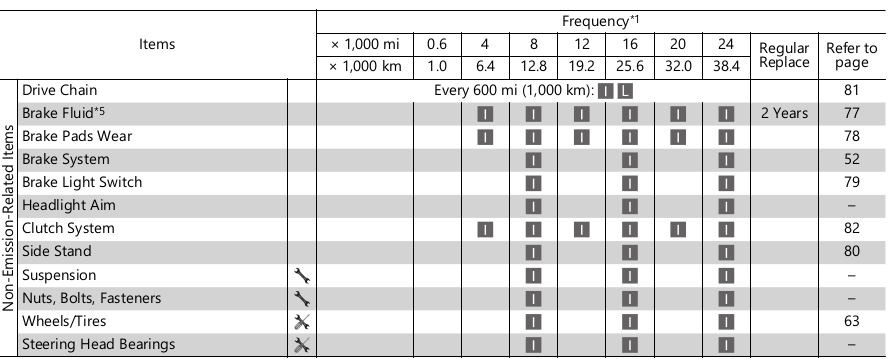
Notes:
1: At higher odometer reading. repeat at the frequency interval established here.
2: Service more frequently when riding in unusually wet or dusty areas
3: Service more frequently when riding in rain or at full throttle.
4: 50 STATE (meets California).
5: Replacement requires mechanical skill
Maintenance Record
Maintenance Fundamentals
Pre-ride Inspection
To ensure safety. it is your responsibility to perform a pre-ride inspection and make sure that any problem you find is corrected. A pre ride inspection is a must. not only for safety. but because having a breakdown. or even a flat tire. can be a major inconvenience.
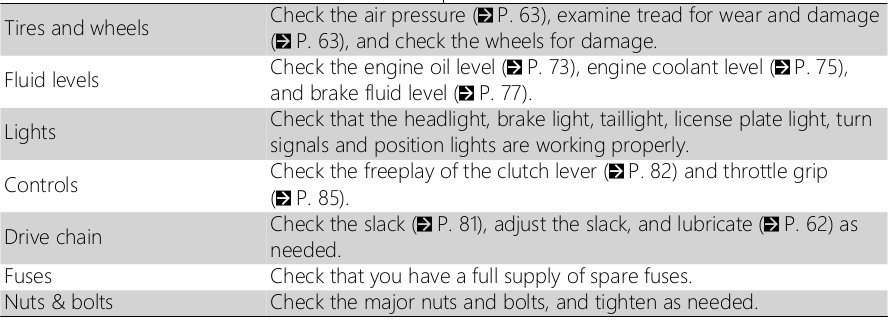
Check the following items before you get on your vehicle
+ Tire tread wear and air pressures are within limits.
+ Lights. horn. and turn signals operate normally.
+ Check the condition of the drive chain Adjust slack and lubricate as needed.
USA model (Model not equipped with Optional Passenger Seat Kit)
Check the following items if you are carrying a cargo:
CeO kkeene) teen eassia as
Check the following items if you are carrying a passenger or cargo:
+ Combined weight is within load limits.
+ Cargo is secured properly.
+ Suspension is adjusted to suit load.
Check the following items after you get on your vehicle:
+ Throttle action moves smoothly without binding.
+ Brake lever and pedal operate normally.
+ Check the fuel level and refuel when needed.
+ Engine stop switch functions properly.
Check the following items at regular intervals:
+ Oil level is between the upper and lower level marks.
+ Brake fluid level is Front: above the LOWER level mark. Rear: between the UPPER and LOWER level marks.
+ Engine coolant level is between the UPPER and LOWER level marks.
+ Side stand functions properly.
Periodic Checks
You should also perform other periodic maintenance checks at least once a month regardless of how often you ride. or more often if you ride frequently.
Also. check the odometer reading against the Maintenance Schedule and perform all maintenance that is due.
Replacing Parts
Always use Honda Genuine Parts or their equivalents to ensure reliability and safety.
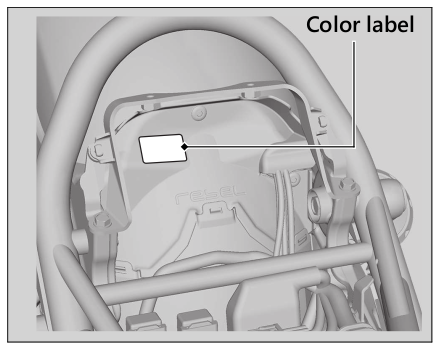
When ordering colored components. specify the model name. color. and code mentioned on the color label.
The color label is attached to the battery box under the seat. EYP. 71
WARNING
Installing non-Honda parts may make your vehicle unsafe and cause a crash in which you can be seriously hurt or killed.
Always use Honda Genuine Parts or equivalents that have been designed and approved for your vehicle.
Battery
Your vehicle has a maintenance-free type battery. You do not have to check the battery electrolyte level or add distilled water. Clean the battery terminals if they become dirty or corroded
Do not remove the battery cap seals. There is no need to remove the cap when charging.
An improperly disposed of battery can be harmful to the environment and human health
Always confirm local regulations for proper battery disposal instruction
What to do in an emergency
If any of the following occur. immediately see your doctor.
+ Electrolyte splashes into your eyes > Wash your eyes repeatedly with cool water for at least 15 minutes. Using water under pressure can damage your eyes.
+ Electrolyte splashes onto your skin:
Remove affected clothing and wash your skin thoroughly using water.
+ Electrolyte splashes into your mouth
Rinse mouth thoroughly with water. and do not swallow.
WARNING
The battery gives off explosive hydrogen gas during normal operation.
A spark or flame can cause the battery to explode with enough force to kill or seriously hurt you.
Wear protective clothing and a face shield. or have a skilled mechanic do the battery servicing.
WARNING: Battery posts. terminals. and related accessories contain lead and lead compounds.
Wash your hands after handling.
Cleaning the Battery Terminals
1. Remove the battery.
2. If the terminals are starting to corrode and are coated with a white substance. wash with warm water and wipe clean
3. If the terminals are heavily corroded. clean and polish the terminals with a wire brush or sandpaper. Wear safety glasses.
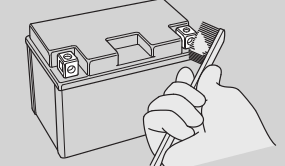
4. After cleaning. reinstall the battery.
The battery has a limited life span. Consult your dealer about when you should replace the battery. Always replace the battery with another maintenance-free battery of the same type.
Charging
If you use electrical accessories that drain the battery or you do not ride frequently. we recommend that you charge the battery every 30 days using a charger designed specifically for your Honda. which can be purchased from your dealer. Read the information that came with your battery charger and follow the instructions on the battery. Avoid using an automobile-type battery charger. as these can overheat a motorcycle battery and cause permanent damage
Make sure the ignition switch is in the OFF position before charging the battery.
Improper charging can damage the battery. If you can't charge the battery or it appears unable to hold a charge. contact your dealer.
Jump starting using an automobile battery can damage your vehicle's electrical system and is not recommended. Bump starting is also not recommended.
Installing non-Honda electrical accessories can overload the electrical system. discharging the battery and possibly damaging the system
Fuses
Fuses protect the electrical circuits on your vehicle. If something electrical on your vehicle stops working. check for and replace any blown fuses. EYP. 95 [ Inspecting and Replacing Fuses
Turn the ignition switch to the OFF position to remove and inspect fuses. If a fuse is blown. replace with a fuse of the same rating. For fuse ratings. see “Specifications.”
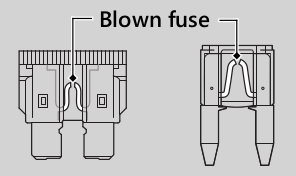
Replacing a fuse with one that has a higher rating greatly increases the chance of damage to the electrical system.
If a fuse fails repeatedly. you likely have an electrical fault. Have your vehicle inspected by your dealer.
Engine Oil
Engine oil consumption varies and oil quality deteriorates according to riding conditions and time elapsed
Check the engine oil level regularly. and add the recommended engine oil if necessary. Dirty oil or old oil should be changed as soon as possible.
Selecting the Engine Oil
For recommended engine oil. see “Specifications.”
If you use non-Honda engine oil. check the label to make sure that the oil satisfies all of the following standards
+ JASO T 903 standard 1*: MA
+ SAE standard 2* : 10W-30
+ API classification 3*: SG or higher
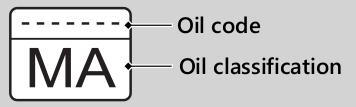
1* The JASO T 903 standard is an index for engine oils for 4-stroke motorcycle engines. There are two classes: MA and MB. For example. the following label shows the MA classification.
2* The SAE standard grades ails by their viscosity.
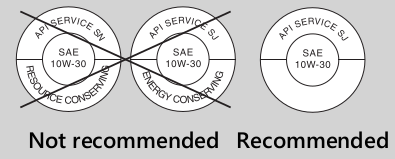
3* The API classification specifies the quality and performance rating of engine oils. Use SG or higher oils. excluding oils marked as “Energy Conserving" or “Resource Conserving” on the circular API service symbol.
Brake Fluid
Do not add or replace brake fluid. except in an emergency. Use only fresh brake fluid from a sealed container. If you do add fluid. have the brake system serviced by your dealer as soon as possible.
Brake fluid can damage plastic and painted surfaces.
Wipe up spills immediately and wash thoroughly.
Recommended brake fluid:
Honda DOT 4 Brake Fluid or equivalent
Clean filler cap before removing. Use only DOT 4 fluid from a sealed container.
Drive Chain
The drive chain must be inspected and lubricated regularly. Inspect the chain more frequently if you often ride on bad roads. ride at high speed. or ride with repeated fast acceleration. &P. 81
If the chain does not move smoothly. makes strange noises. has damaged rollers. has loose pins. has missing O-rings. or kinks. have the chain inspected by your dealer.
Also inspect the drive sprocket and driven sprocket. If either has worn or damaged teeth. have the sprocket replaced by your dealer.
NOTICE
Use of a new chain with worn sprockets will cause rapid chain wear.
Cleaning and Lubricating
After inspecting the slack. clean the chain and sprockets while rotating the rear wheel. Use a dry cloth with chain cleaner designed specifically for O-ring chains. or neutral detergent. Use a soft brush if the chain is dirty.
After cleaning. wipe dry and lubricate with the recommended lubricant.
Recommended lubricant:
Pro Honda HP Chain Lube or equivalent
Do not use a steam cleaner. a high pressure cleaner. a wire brush. volatile solvent such as gasoline and benzene. abrasive cleaner. chain cleaner or lubricant NOT designed specifically for O-ring chains as these can damage the rubber O-ring seals.
Avoid getting lubricant on the brakes or tires
Avoid applying excess chain lubricant to prevent spray onto your clothes and the vehicle.
Recommended Coolant
Pro Honda HP Coolant is a pre-mixed solution of antifreeze and distilled water.
Concentration:
50% antifreeze and 50% distilled water
A concentration of antifreeze below 40% will not provide proper corrosion and cold temperature protection
A concentration of up to 60% will provide better protection in colder climates
Please read on in the PDF file.
Troubleshooting
Engine Will Not Start
Starter Motor Operates But Engine Does Not Start
Check the following items:
+ Check the correct engine starting sequence. P. 39
+ Check that there is gasoline in the fuel tank.
+ Check if the PGM-FI malfunction indicator lamp (MIL) is on
P If the indicator lamp is on. contact your dealer as soon as possible
Starter Motor Does Not Operate
Check the following items:
+ Check the correct engine starting sequence. P. 39
+ Make sure engine stop switch is in the (Run) position. P. 36
+ Check for a blown fuse. P. 95
+ Check for a loose battery connection (P. 67) or battery terminal corrosion (P. 56)
+ Check the condition of the battery. P.94
If the problem continues. have your vehicle inspected by your dealer.
Overheating (High coolant temperature indicator is on)
The engine is overheating when the following occurs:
+ High coolant temperature indicator comes on.
+ Acceleration becomes sluggish. If this occurs. pull safely to the side of the road and perform the following procedure.
Extended fast idling may cause the high coolant temperature indicator to come on.
Continuing to ride with an overheated engine can cause serious damage to the engine.
1. Stop the engine using the ignition switch. and then turn the ignition switch to the ON position.
2. Check that the radiator fan is operating. and then turn the ignition switch to the OFF position.
If the fan is not operating:
Suspect a fault. Do not start the engine.
Transport your vehicle to your dealer.
If the fan is operating:
Allow the engine to cool with the ignition switch in the OFF position.
After the engine has cooled. inspect the radiator hose and check if there is a leak. P.75
Do not start the engine. Transport your vehicle to your dealer
Check the coolant level in the reserve tank. P. 75. Add coolant as necessary.
If 1-4 check normal. you may continue riding. but closely monitor the high coolant temperature indicator.
Warning Indicators On or Flashing
Low Oil Pressure Indicator
If the low oil pressure indicator comes on. pull safely to the side of the road and stop the engine
Continuing to ride with low oil pressure can cause serious damage to the engine.
1. Check the engine oil level. and add oil as necessary. EJP. 73. EYP. 74
2. Start the engine. Only continue riding if the low oil pressure indicator goes off.
Rapid acceleration may momentarily cause the low oil pressure indicator to come on. especially if the oil is at or near the low level.
If the low oil pressure indicator stays on when the oil level is at the proper level. stop the engine and contact your dealer
If the engine oil level goes down rapidly. your vehicle may have a leak or another serious problem. Have your vehicle inspected by your dealer.
PGM-FI (Programmed Fuel Injection) Malfunction Indicator Lamp (MIL)
If the indicator comes on while riding. you may have a serious problem with the PGM-FI system. Reduce speed and have your vehicle inspected by your dealer as soon as possible
ABS (Anti-lock Brake System) Indicator
CMX500A/A2
If the indicator operates in one of the following ways. you may have a serious problem with the ABS. Reduce your speed and have your vehicle inspected by your dealer as soon as possible
+ Indicator comes on or starts flashing while riding.
+ Indicator does not come on when the ignition switch is in the ON position
+ Indicator does not go off at speeds above 6 mph (10 km/h)
If the ABS indicator stays on. your brakes will continue to work as a conventional system. but without the anti-locking function
The ABS indicator may flash if you turn the rear wheel while the rear wheel is lifted off the ground. In this case. turn the ignition switch to the OFF position. and then to the ON position again. The ABS indicator will go off after your speed reaches 19 mph (30 km/h).
Other Warning Indications
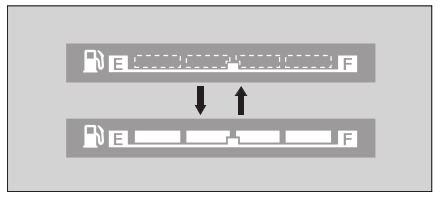
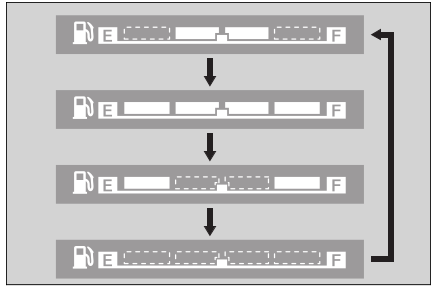
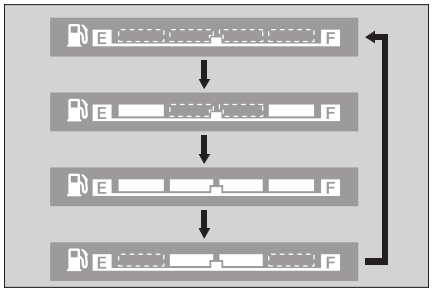
If the fuel system has an error, the fuel gauge indicators will be displayed as shown in the illustrations.
If this occurs, see your dealer as soon as possible.
Tire Puncture
Repairing a puncture or removing a wheel requires special tools and technical expertise
We recommend you have this type of service performed by your dealer.
After an emergency repair. always have the tire inspected/replaced by your dealer.
Emergency Repair Using a Tire Repair Kit
If your tire has a minor puncture. you can make an emergency repair using a tubeless tire repair kit.
Follow the instructions provided with the emergency tire repair kit.
Riding your vehicle with a temporary tire repair is very risky. Do not exceed 30 mph (50 km/h). Have the tire replaced by your dealer as soon as possible
WARNING
Riding your vehicle with a temporary tire repair can be risky. If the temporary repair fails. you can crash and be seriously injured or killed.
If you must ride with a temporary tire repair. ride slowly and carefully and do not exceed 30 mph (50 km/h) until the tire is replaced.
Electrical Trouble
Battery Goes Dead
Charge the battery using a motorcycle battery charger
Remove the battery from the vehicle before charging.
Do not use an automobile-type battery charger. as these can overheat a motorcycle battery and cause permanent damage. If the battery does not recover after recharging. contact your dealer.
Jump starting using an automobile battery can damage your vehicle's electrical system and is not recommended
Bump starting is also not recommended.
Burned-out Light Bulb
All light bulbs on the vehicle are LEDs. If there is an LED which is not turned on. see your dealer for servicing
Blown Fuse
Before handling fuses. see “Inspecting and Replacing Fuses.” P. 59
Fuse Box Fuses
1. Remove the battery cover. EJP. 67
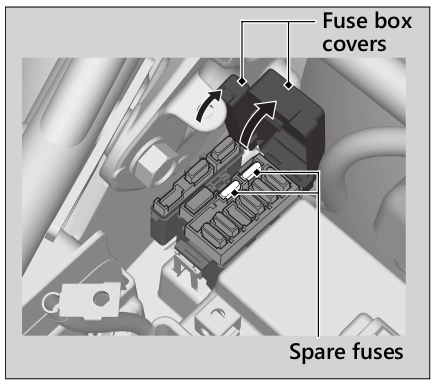
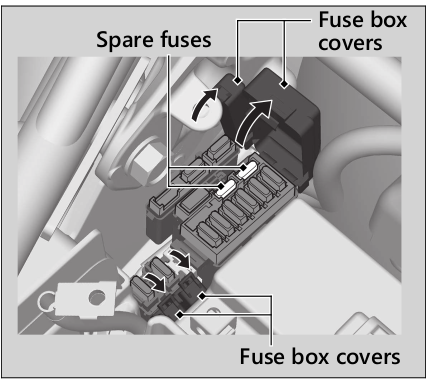
2. Open the fuse box covers. £P. 96
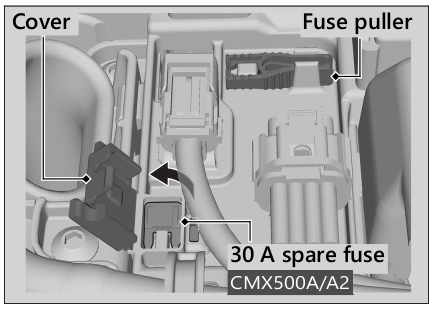
3. Pull the fuses out one by one with the fuse puller and check for a blown fuse. Always replace a blown fuse with a spare fuse of the same rating. » The fuse puller is stored on the battery cover.
CMX500: Spare fuses are provided in the fuse box.
CMX500A/A2: Spare fuses are provided in the fuse box and on the battery cover (to access the spare fuse. open the cover)
4. Close the fuse box covers.
5. Reinstall parts in the reverse order of removal
CMX500
CMX500A/A2
Main Fuse
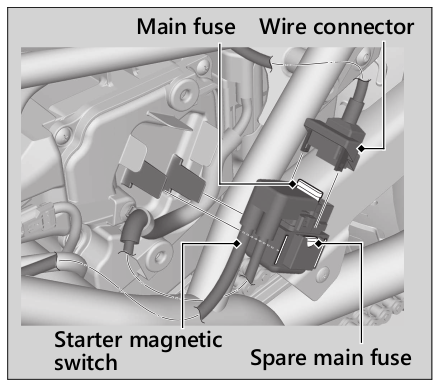
1. Remove the left side cover. P. 72
2. Remove the starter magnetic switch from the air cleaner housing cover. then disconnect the wire connector of the starter magnetic switch.
3. Pull the main fuse out and check for a blown fuse. Always replace a blown fuse with a spare fuse of the same rating
Spare main fuse is provided in the starter magnetic switch.
4. Reinstall parts in the reverse order of removal
If a fuse fails repeatedly. you likely have an electrical problem. Have your vehicle inspected by your dealer.
Please read on in the PDF file.