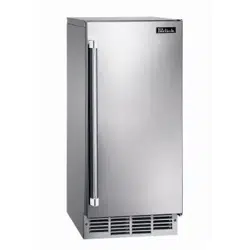
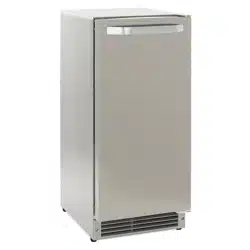
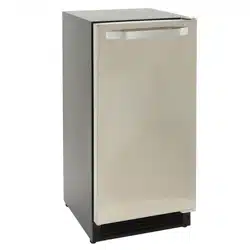
When you first start your ice maker, the water pan will fill and the system will rinse itself before starting to make ice. The rinsing process takes about 5 minutes.
Under normal operating conditions, the ice maker will cycle at preset temperatures. The ice level sensor located in the ice storage bin will monitor the ice levels.
IMPORTANT: If the water supply to the ice maker is turned off, be sure to set the ice maker control to OFF.
The Ice Making Process
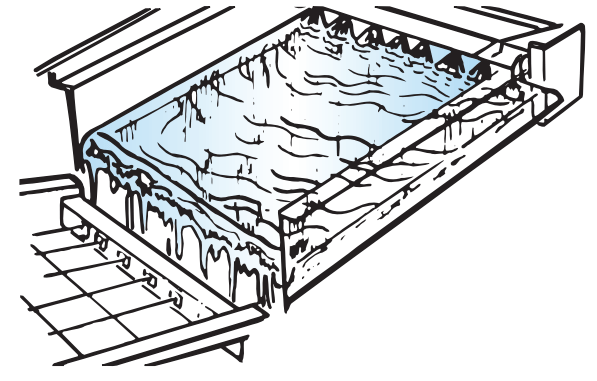
1. Water is constantly circulated over a freezing plate. As the water freezes into ice, the minerals in the water are rejected. This produces a sheet of ice with a low mineral content.
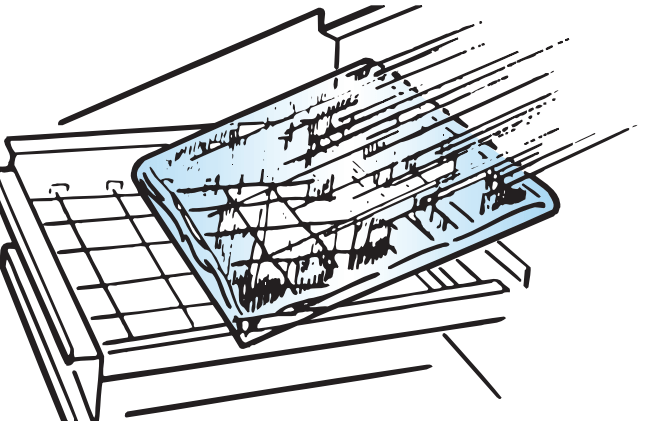
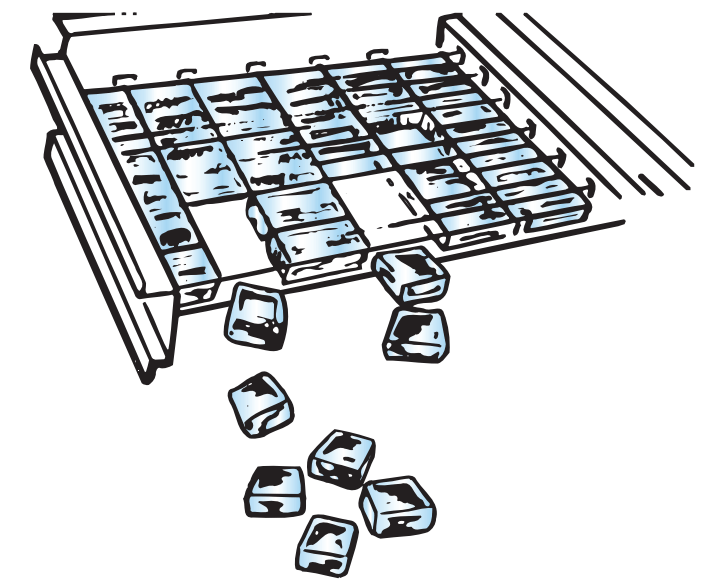
2. When the desired thickness is reached, the ice sheet is released and slides onto a cutter grid. The grid divides the sheet into individual cubes.
3. The water containing the rejected minerals is drained after each freezing cycle.
4. Fresh water enters the machine for the next ice making cycle.
5. Cubes fall into the storage bin. When the bin is full, the ice maker shuts off automatically and restarts when more ice is needed. The ice bin is not refrigerated, and some melting will occur. The amount of melting varies with room temperature.
NOTE: As the room and water temperatures vary, so will the amount of ice produced and stored. This means that higher operating temperatures result in reduced ice production.
Using the Controls
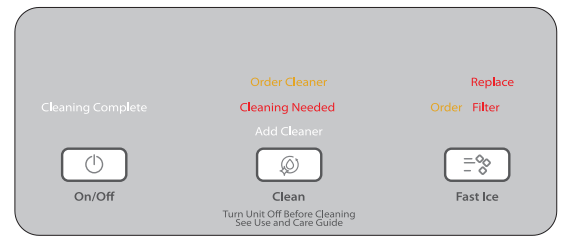
1. To start ice production, press ON/OFF.
2. To stop ice maker operation, press ON/OFF
NOTES:
■ Pressing the ON/OFF button does not shut off power to the ice maker. ■ Allow 24 hours to produce the first batch of ice. Discard the first 2 batches produced.
FAST ICE Mode
Select the FAST ICE feature when you have an upcoming need for a large amount of ice and the ice bin is low or empty. FAST ICE mode will produce a greater quantity of ice in a 24-hour period.
■ Press FAST ICE while the ice maker is on. The indicator light will illuminate. ■ Press FAST ICE again to turn off the FAST ICE feature. The indicator light will turn off. ■ The FAST ICE mode will be on when you first turn on the product. It will turn off after 24 hours. To turn FAST ICE back on, press FAST ICE.
Clean
It is recommended that you clean the ice maker when the “Cleaning Needed” light is illuminated or 9 months has elapsed, or ice production decreases significantly. To clean your ice maker, see “Ice Maker System” in the “Cleaning” section.
Door Ajar Alarm
The Door Ajar Alarm feature sounds an alarm when the ice maker door is open for 5 minutes. The alarm will repeat every 2 minutes. Close the door to turn off. The feature then resets and will reactivate when the door is left open again for 5 minutes.
Water Filtration System
CAUTION
Do not use with water that is microbiologically unsafe or of unknown quality without adequate disinfection before or after the system. Systems certified for cyst reduction may be used on disinfected waters that may contain filterable cysts.
Installing a Water Filter
1. Purchase a Whirlpool approved water filter.
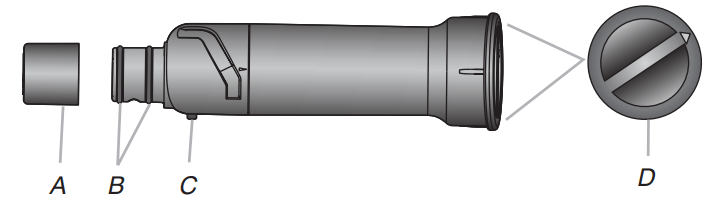
2. Take the water filter out of its packaging and remove the cover from the O-rings. Be sure the O-rings are still in place after the cover is removed.
A. Cover
B. O-rings
C. Alignment pin
D. Alignment arrow
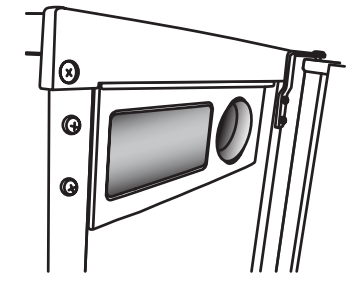
3. The water filter compartment is located in the right-hand side of the ice maker controls.
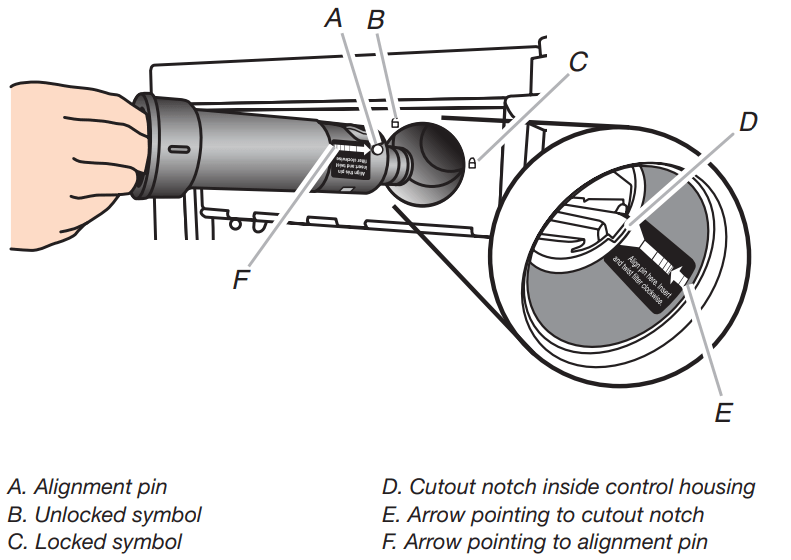
4. Using the arrow pointing to the alignment pin on the side of the filter and the arrow inside the control housing, align the alignment pin with the cutout notch and insert the filter into the housing.
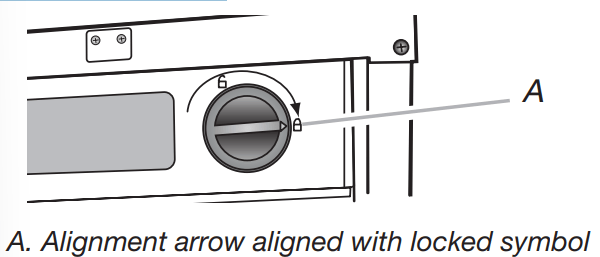
5. Turn the filter clockwise until it locks into the housing. Ensure that the alignment arrow on the filter head aligns with the locked symbol on the control box housing.
NOTE: If the filter is not correctly locked into the housing, the ice maker will not produce ice.
The Water Filter Status Light
The water filter status lights will help you know when to change your water filter.
■ The “Order Filter” status light will be illuminated when it is time to order a replacement filter. ■ The “Replace Filter” status light will be illuminated when it is time to replace the filter. ■ Replacing the disposable water filter with a new filter will automatically reset the filter status tracking feature. See “Using the Controls.”
Replace the Water Filter
To purchase a replacement water filter, see “Accessories.” Replace the disposable water filter when indicated on the water filter status display or at least every 9 months. If the ice making rate decreases before the Replace Filter light illuminates, then replace the filter.
Locate the water filter compartment in the right-hand side of the control housing. See Step 3 in the “Install Water Filter” section.
Turn the water filter counterclockwise (to the left), and pull it straight out of the compartment.
NOTE: There may be some water in the filter. Some spilling may occur.
Install the replacement water filter by following steps 2 through 5 in the “Install the Water Filter” section.
Normal Sounds
Your new ice maker may make sounds that are not familiar to you. Because the sounds are new to you, you might be concerned about them. Most of the new sounds are normal. Hard surfaces such as floors, walls and cabinets can make the sounds seem louder than they actually are. The following describes the kinds of sounds that might be new to you and what may be making them.
You will hear a buzzing sound when the water valve opens to fill the water pan for each cycle.
Rattling noises may come from the flow of the refrigerant or the water line. Items stored on top of the ice maker can also make noises.
The high-efficiency compressor may make a pulsating or high pitched sound.
Water running over the evaporator plate may make a splashing sound.
Water running from the evaporator plate to the water pan may make a splashing sound.
As each cycle ends, you may hear a gurgling sound due to the refrigerant flowing in your ice maker.
You may hear air being forced over the condenser by the condenser fan.
During the harvest cycle, you may hear a “thud” when the ice sheet slides from the evaporator onto the cutter grid.
When you first start the ice maker, you may hear water running continuously. The ice maker is programmed to run a rinse cycle before it begins to make ice.
If the ice maker is connected to a water supply pressure in excess of 60 psi, you may hear a loud sound during water filling associated with the flow of water through the inlet valve. Call a licensed, qualified plumber to determine the best method to reduce the supply water pressure (50 psi is recommended).
CARING FOR YOUR ICE MAKER
Cleaning
The ice making system and the air-cooled condenser need to be cleaned regularly for the ice maker to operate at peak efficiency and to avoid premature failure of system components. See the “Ice Maker System” and the “Condenser” sections.
Exterior Surfaces
Wash the exterior surfaces and gaskets with warm water and mild soap or detergent. Wipe and dry. We recommend using a clean micro fiber cloth or a soft clean cloth to polish and dry.
For products with a painted or colored exterior, regular use of a good household appliance cleaner and polish will help protect the finish. Using paper towels may scratch and/or dull the clear coat of the painted door.
For products with a fingerprint resistant stainless steel exterior, do not use soap-filled scouring pads, abrasive or harsh cleaners, any cleaning product containing chlorine bleach, steel-wool pads, gritty wash cloths or paper towels. Using these types of products may scratch and/or dull the clear coat of the fingerprint resistant stainless steel door.
Ice Maker System
Minerals that are removed from water during the freezing cycle will eventually form a hard scaly deposit in the water system. Cleaning the system regularly helps remove the mineral scale buildup. How often you need to clean the system depends upon how hard your water is. With hard water of 15 to 20 grains/gal. (4 to 5 grains/liter), you may need to clean the system as often as every 9 months.
NOTE: Use one 16 oz (473 mL) bottle of approved ice maker cleaner. To order, see “Accessories.”
1. Press the ON/OFF button.
2. Wait 5 to 10 minutes for the ice to fall into the storage bin. Remove all ice from the storage bin.
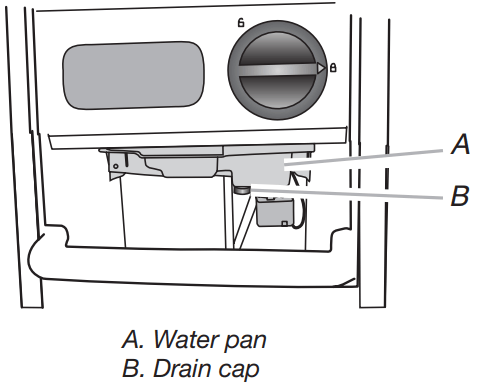
3. Unscrew the drain cap from the bottom of the water pan located inside the storage bin as shown. Allow the water to drain completely.
4. Replace the drain cap securely on the water pan. If the drain cap is loose, water will empty from the water pan and you will have either thin ice or no ice.
5. Read and follow all handling information on the cleaner bottle before completing the steps below. Use one 16 oz (473 mL) bottle of approved ice maker cleaner.
6. Pour one bottle of solution into the water pan. Fill the bottle twice with tap water and pour it into the water pan.
7. Press the CLEAN button. See “Using the Controls.” The Clean button will blink, indicating that the cleaning cycle is in process. When the “Cleaning Complete” light is illuminated (approximately 70 minutes), the cleaning cycle is complete. During the cleaning cycle, the system will both clean and rinse itself.
8. After the cleaning cycle is complete, remove the drain cap from the water pan. Look for any cleaning solution left in the water pan. If cleaning solution drains from the water pan, you should run the clean cycle again. Be sure to refill the water pan with cleaner before starting the clean cycle again. Be sure to replace the drain cap securely on the water pan. If the drain cap is loose, water will empty from the water pan and you will have either thin ice or no ice.
NOTE: Severe scale buildup may require repeated cleaning with a fresh quantity of cleaning solution.
9. Press the ON/OFF button to resume ice production.
Condenser
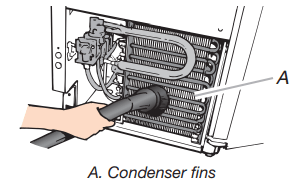
A Dirty or Clogged Condenser
■ Obstructs proper airflow.
■ Reduces ice making capacity.
■ Causes higher than recommended operating temperatures which may lead to component failure.
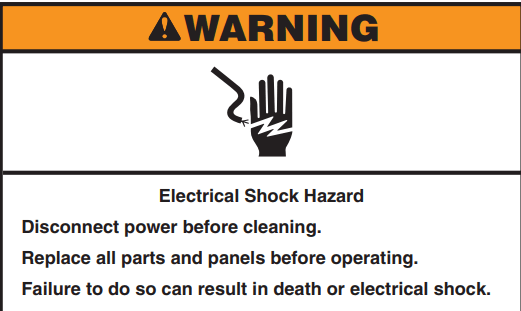
1. Unplug ice maker or disconnect power.
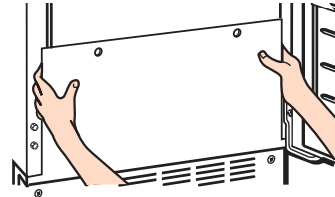
2. Remove the 2 screws in the lower access panel and the 2 screws from the base grille area of the front panel support.
3. Pull the bottom forward and then pull down to remove the lower access panel.
4. Remove dirt and lint from the condenser fins and the unit compartment with a brush attachment on a vacuum cleaner.
5. Replace the lower access panel using the 4 screws.
6. Plug in ice maker or reconnect power
ACCESSORIES
To order accessories, in the U.S.A., visit our web site www.whirlpool.com/accessories or call 1-800-901-2042. In Canada, visit our website www.whirlpoolparts.ca or call 1-800-807-6777
Water Filter Order Part Number F2WC9I1 or ICE2
Cleaner Order Part Number 4396808 Affresh® Stainless Steel Cleaner
In U.S.A., order Part Number W10355016 In Canada, order Part Number W10355016B
Affresh® Stainless Steel Wipes In U.S.A., order Part Number W10355049 In Canada, order Part Number W10355049B Affresh® Kitchen & Appliance Cleaner In U.S.A., order Part Number W10355010 In Canada, order Part Number W10355010B
TROUBLESHOOTING
PROBLEM
RECOMMENDED SOLUTIONS
Ice Maker Will Not Operate
Check that it is plugged into a grounded 3 prong outlet.
Check that the control is turned on. See “Using the Controls.”
Replace the fuse or reset the circuit breaker.
NOTE: If problems continue, contact an electrician.
Room temperature must be above 45°F (7°C). Otherwise, bin thermostat may sense cold room temperature and shut off even though the bin is not full of ice. The ice maker may not restart once it does shut off.
If there was a large amount of water added to the ice maker, wait a few minutes for the drain pump to clear. If there is still water in the bin, check to see whether the drain hose is kinked.
For models with drain pumps, check that the drain hose is not damaged, or kinked or pinched between cabinet and ice maker. Use only Whirlpool approved drain pump kit, Part Number 1901A.
Ice Maker Seems Noisy
Water overflowing the reservoir is normal. This overflow helps to purge minerals that were removed from the water during the ice making process.
Is there a “whooshing” sound, Check the following things:
Check that the water supply is hooked up and turned on.
Check that the drain cap is tight and the water drain pan pump is securely attached to the water pan.
If there is ice between the evaporator plate and the cutting grid, check that the ice maker is level. If the ice maker is level, and the problem persists, run a cleaning cycle.”
If the ice maker is connected to a water supply pressure in excess of 60 psi, you may hear a loud sound during water filling associated with the flow of water through the inlet valve. Call a licensed, qualified plumber to determine the best method to reduce the supply water pressure (50 psi is recommended).
Ice Maker Runs But Produces No Ice
Check that the control is turned on.
Check that the water supply is properly connected and turned on.
If the drain cap is loose, water will empty from the water pan, and you will have either thin ice or no ice. Tighten the drain cap.
Clean the drain tube.
Check that there are no kinks in the drain line.
Ice Maker Runs But Produces Very Little Ice
If the accelerated ice production feature is turned on, this feature increases the ice production rate to provide you with more ice in the same amount of time.
Room temperatures of more than 90°F (32°C) will normally reduce ice production.
Dirt or lint may be blocking the airflow through the condenser.
If there is white scale buildup in the ice maker’s water or freezing system, you should clean the ice maker.
If the drain cap is loose, water will empty from the water pan, and you will have either thin ice or no ice. Tighten the drain cap.
Ensure that the cutter grid is securely in place and that its harness plug is connected.
Check that water filter is properly installed.
Ice Quality
PROBLEM
RECOMMENDED SOLUTIONS
Off Taste, Odor or Gray Color in the Ice
If there is unusually high mineral content in the water supply, the water may need to be treated.
If there is mineral scale buildup, clean your ice maker.
Do not store any foods in the ice bin.
Check that all packaging materials were removed at the time of installation.
Thin, Soft or Clumps of Ice
If there is unusually high mineral content in the water supply, the water may need to be treated.
If there is mineral scale buildup, clean your ice maker.
If there are clumps of ice in the bin and if ice is not used regularly, it will melt and form clumps. Break the clumps with the ice scoop provided.
Pumbing Problems
PROBLEM
RECOMMENDED SOLUTIONS
Water Not Entering Drain Properly
If the drain hose is not aligned over the drain, move the ice maker to align the drain. NOTE: Service technicians cannot repair plumbing problems outside of the ice maker. Call a licensed, qualified plumber.