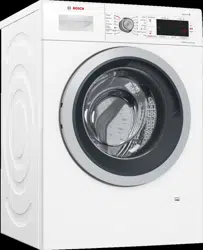
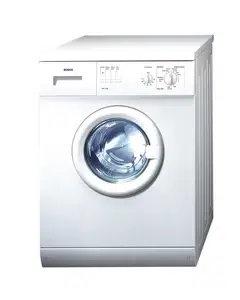
User manual Washer Dryer
Positioning and connecting
Included with the appliance
Note: Check the machine for transport damage. Never use a damaged machine. If you have any complaints, contact the dealer from whom you purchased the appliance or our customer services. → Page 50
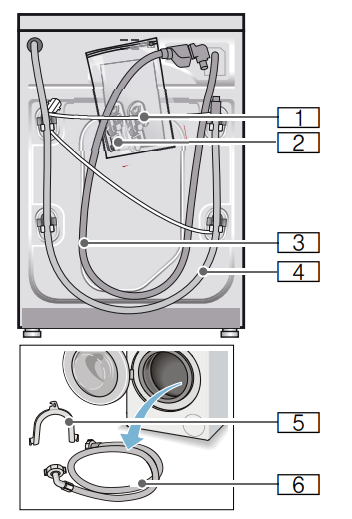
1 Mains lead
2 Bag:
- Installation and operating instructions
- Customer Service location directory*
- Warranty*
- Cover caps for openings after the transport braces have been removed
- Adaptor with sealing washer from 21 mm = ½" to 26.4 mm = ¾" *
3 Water supply hose on Aqua-Stop models
4 Water drain hose
5 Elbow for securing the water outlet hose*
6 Water supply hose on standard/ Aqua-Secure models
* Depending on the model
In addition, a hose clamp (24 - 40 mm diameter, available from specialist retailers) is required to connect the water outlet hose to a siphon.
Useful tool
- Spirit level for aligning
- Spanner with:
- WAF13 for loosening the transport braces and
- WAF17 for aligning the appliance feet
Installation surface
Note: The washing machine be stable so that it does not move around
- The installation surface must be firm and level.
- Soft floors/floor coverings are not suitable.
Installation on a base or a wooden joist floor
Caution!
Damage to the appliance
The appliance may "wander" and tip/ topple from the base when spinning. The feet of the appliance must be secured with holding brackets. Order no. WMZ 2200, WX 975600, CZ 110600, Z 7080X0.
Note: On wooden joist floors, install the appliance:
- In a corner, if possible,
- On a water-resistant wooden board (min. 30 mm thick) which is screwed tightly to the floor.
Installation on a platform with drawer
Platform order no.: WMZ 20490, WZ 20490, WZ 20510, WZ 20520
Installing the appliance in a kitchenette
Warning Risk of death! There is a risk of electric shock if you touch live components. Do not remove the appliance covering plate.
Notes
- Recess width of 60 cm required.
- Only install the appliance underneath a continuous worktop that is securely connected to adjacent cabinets.
Removing the transport locks
Caution! Damage to the appliance
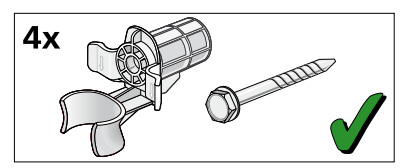
- The appliance is secured for transportation using transport locks. If the transport locks are not removed, the appliance may become damaged when it is operated. Before using the appliance for the first time, make sure that you completely remove all four transport locks. Keep the locks in a safe place.
- To prevent transport damage from occurring if the appliance is moved at a later date, you must refit the transport locks before transporting the appliance.
Note: Keep the screws and sleeves in a safe place.
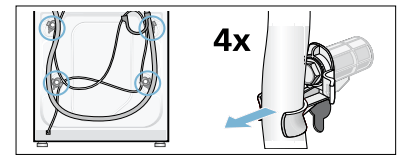
1. Take the hoses out of the holders
2. Unscrew and remove all four transportation securing bolts with a wrench (WAF 13). Remove the sleeves. Remove the mains cable from the holders.
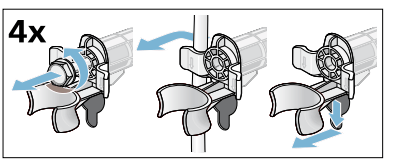
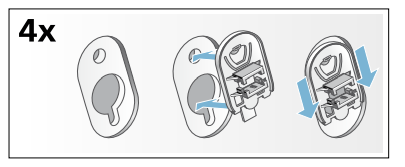
3. Insert the covers. Lock the covers firmly in place by applying pressure to the snap-in hooks.
Hose and cable lengths
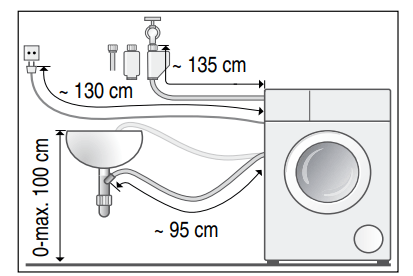
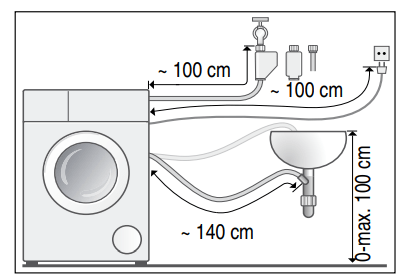
Tip: The following are available from specialist dealers/the after-sales service:
- Extension for Aqua-Stop and cold water supply hose (approx. 2.50 m); order no. WM Z2380, WZ 10130, CZ 11350, Z 7070X0
- A longer supply hose (approx. 2.20 m) for standard models; individual component number for customer services: 00353925
Water inlet
Warning Risk of death! There is a risk of electric shock if you touch live components. Do not immerse the Aqua-Stop safety valve* in water (it contains an electric valve).
Notes
- Only operate the appliance using cold mains water.
- Do not connect the appliance to the mixer tap of an unpressurised hotwater boiler.
- Do not use a used supply hose. Only use the supply hose supplied or one that was purchased from an authorized specialist retailer.
- Do not kink or squash the water supply hose.
- Do not alter (shorten, cut through) the water supply hose (otherwise its strength is no longer guaranteed).
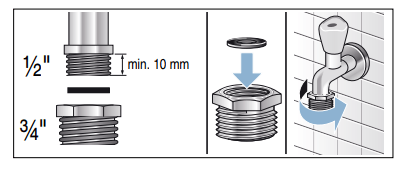
- Only tighten the screw connections by hand. If the screw connections are tightened too much with a tool (pliers), the thread may be damaged.
- When connecting to a 21 mm = ½" tap, first fit an adapter* with a sealing washer from 21 mm = ½" to 26.4 mm = ¾".
Optimum water pressure in the supply network
At least 100 kPa (1 bar)
Maximum 1000 kPa (10 bar)
When the tap is open, the water flow is at least 8 l/min.
If the water pressure is higher than this, a pressure-reducing valve must be installed.
Connection
Connect the water supply hose to the tap (26.4 mm = ¾") and to the appliance (not necessary for Aqua-Stop models as this is permanently installed):
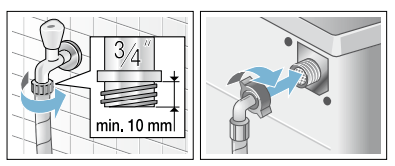
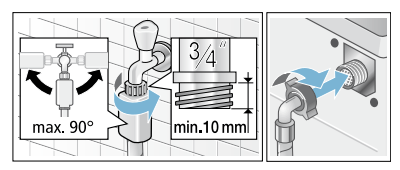
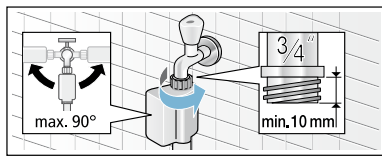
Note: Turn on the tap carefully, checking the leak tightness of the connection points. The screw connection is under mains water pressure.
Water outlet
Caution! Water damage
When water is being pumped away, the outlet hose is under water pressure and may slip out of the wash basin or connection point. Secure the drain hose so that it cannot slip out.
Caution! Damage to the appliance/fabrics
If the end of the drain hose is immersed in the drained water, water may be sucked back into the appliance and may damage the appliance/fabrics. Make sure that:
- The plug does not block drainage from the washbasin.
- The end of the drain hose is not immersed in the drained water.
- The water drains away quickly enough.
Note: Do not kink the water drain hose or put strain on it lengthways.
Connection
- Drainage into a washbasin
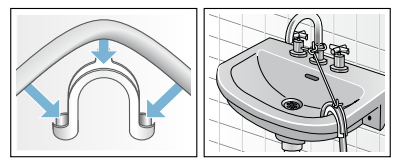
The connection point must be secured using a hose clamp with a diameter of 24 - 40 mm (available from specialist dealers).
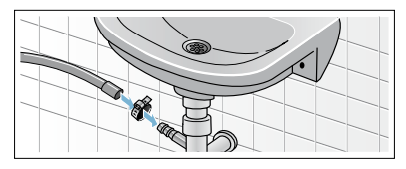
- Drainage into a plastic pipe with rubber bushing or into a drainage pit
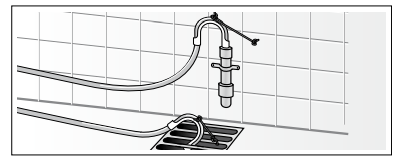
Levelling
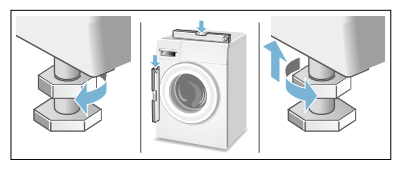
Align the appliance using a spirit level. Incorrect alignment may result in loud noises, vibrations and machine "movement".
1. Loosen the lock nuts using a WAF17 spanner, by turning it in a clockwise direction.
2. Check the alignment of the washing machine with a spirit level, and adjust it if necessary. Change the height by turning the appliance feet. All four appliance feet must stand firmly on the ground.
3. The lock nuts on all four appliance feet must be screwed tightly against the housing using a suitable WAF17 spanner. In doing so, hold the foot tight and do not adjust its height.
Electrical connection
Warning Danger of death!
- Never touch or hold the mains plug with wet hands.
- Only pull out the mains cable by the plug and never by the cable, as this could damage it.
- Never unplug the mains plug during operation.
Observe the following information and ensure that:
Notes
- The mains voltage and voltage indicated on the appliance (rating plate) are the same. The connected load and fuse required are specified on the rating plate
- The appliance is only connected to an alternating current via a properly installed earthed socket.
- The mains plug fits the socket.
- The earthing system is properly installed.
- The mains cable is only replaced by a qualified electrician (if this is necessary). Replacement mains cables are available from the aftersales service.
- No multiple plugs/couplings or extension cables are used.
- If an earth-leakage circuit breaker is used, only a type which displays this symbol is used:
 .Only this symbol guarantees compliance with the currently applicable regulations.
- The mains plug can be accessed at all times. If this is not possible, in order to comply with the relevant safety regulations, a switch (2-pole switch-off) must be built into the permanent installation in accordance with electrical installation regulations
- The mains cable is not kinked, squashed, altered or cut through
- The mains cable does not come into contact with heat sources.
Before washing for the first time
The washing machine was thoroughly tested before leaving the factory.To remove any water that may be left over from the test, run the first wash cycle without any laundry.
Preparatory work:
1. Check the machine.
2. Remove the protective film from the control panel.
3. Plug in the mains plug.
4. Turn on the tap.
Running the programme without laundry:
1. Switch on the appliance.
2. Close the door (do not load any laundry).
3. Set the  Drum Clean 90 °C programme
4. Open the detergent drawer.
5. Pour approximately 1 litre of water into compartment II
6. Pour standard washing powder into compartment II
Note: To prevent foaming, only use half the amount of detergent recommended by the detergent manufacturer.Do not use detergents intended for woollens or delicates.
7. Close the detergent drawer
8. Press the  button.
9. Switch off the appliance at the end of the programme
Your washing machine is now ready to use.
Transportation
Preparatory work:
1. Turn off the water tap.
2. Reduce the water pressure in the supply hose.→ Page 45; Cleaning and maintenance – filter in the water supply blocked
3. Disconnect the washing machine from the mains.
4. Drain the remaining water: → Page 44; cleaning and maintenance – the drain pump is blocked, emergency draining
5. Remove the hoses.
Fitting the transportation securing means:
1. Remove the covers and keep them in a safe place. If required, use a screwdriver
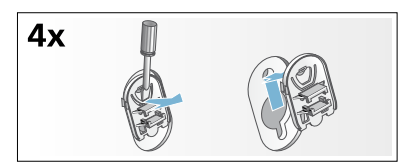
2. Insert all four sleeves. Clip the mains cable securely in the holders. Insert the transportation securing bolts and tighten them with a wrench (WAF 13).
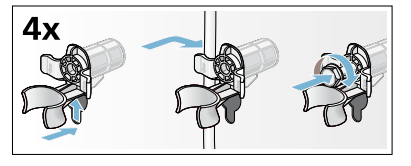
Before switching on the appliance again:
Notes
- The support struts must be removed.
- Pour approx. 1 litre of water into dispenser II, select
 the Drain programme and start. This will prevent detergent from flowing straight into the drain during the next wash.
Main points in brief
Getting to know the appliance
Washing machine
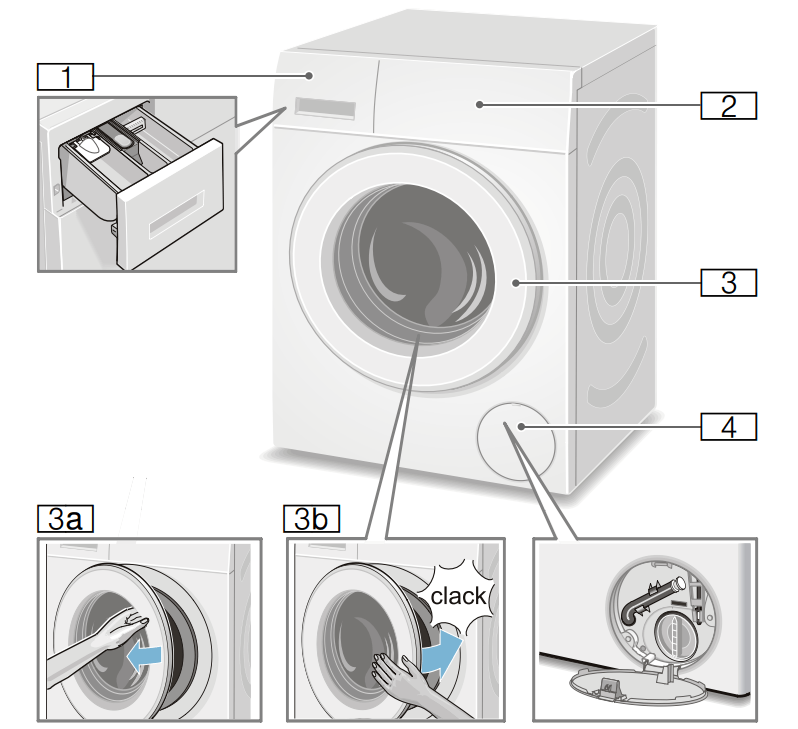
1 Detergent drawer → Page 37
2 Operating/display panel
3 Door with door handle
3a Open the door
3b Close the door
4 Service flap
Control panel
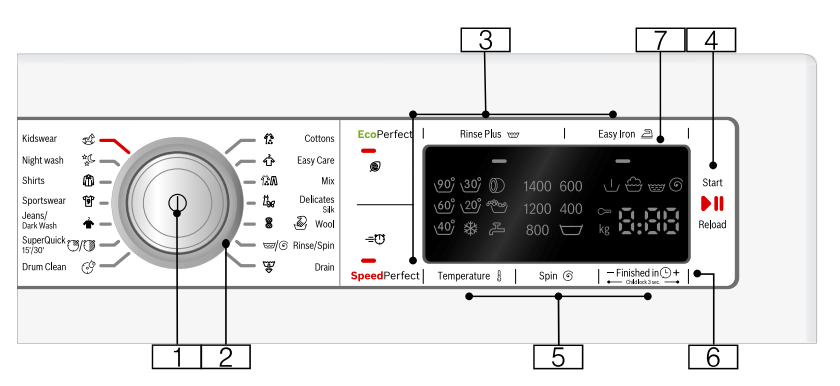
1 Main switch
for switching the washing machine on and off: Press the  button.
2 Programme selector
for selecting a programme.
Overview of programmes → Page 28
3 Additional programme settings: → Page 35
- EcoPerfect

- SpeedPerfect

- Rinse Plus

- Easy Iron

4 button for:
- Starting a programme
- Interrupting a programme, e.g. to add items of laundry → Page 39
- Cancelling a programme → Page 39
5 Changing the default programme settings: → Page 34
- Temperature
- Spin speed (Spin
 ),
),
- Finished in
 time
time
6 Child lock 3 sec. (  ) to prevent the set functions from being changed accidentally: To do so, press Finished in + and - simultaneously for approx. 3 seconds. → Page 38
7 Display panel for settings and information. → Page 25
Display panel
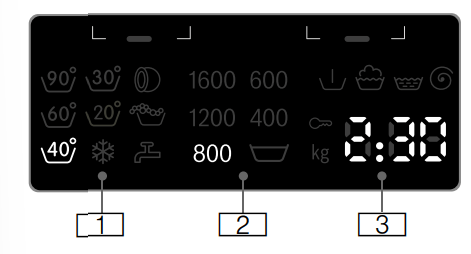
Default programme settings:
1 Temperature  °C
°C  - 90 ( = cold)
2 Spin speed in rpm,
 - 1600*;
* Max. spin speed, depending on the selected programme and model,
= Rinse Stop → Page 34
3 Finished in  time e.g. 2:30;
Programme duration depends on the programme selection in h:min (hours:minutes),
- Preselection of end time 1 - 24 h; Programme ends after ... h (h = hours)
- Load recommendation e.g. kg 9*; * depending on the selected programme
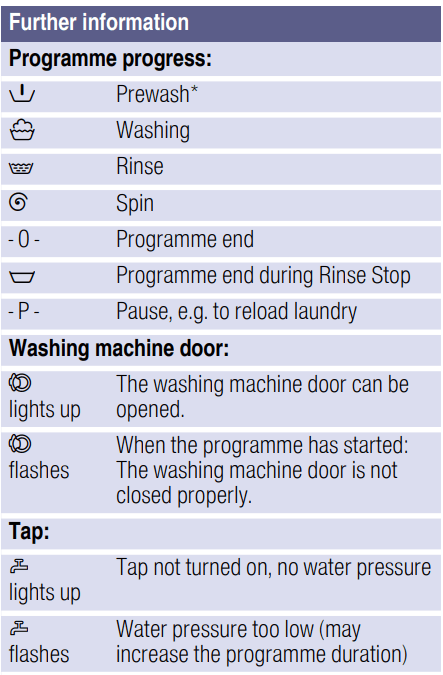
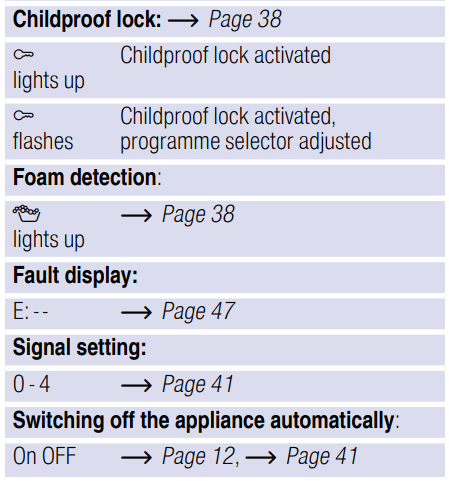
Laundry
Preparing laundry for washing
Protecting your laundry and appliance
Caution! Damage to the appliance/fabrics
Foreign objects (e.g. coins, paperclips, needles, nails) may damage the laundry or components in the washing machine.
You should therefore note the following tips when preparing your laundry:
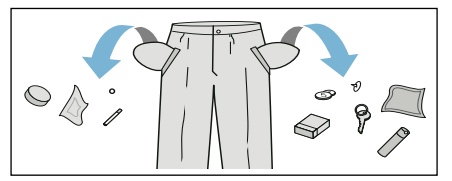
- Remove metal parts (paper clips, etc.).
- Look out for metal items (paperclips, etc.) and remove them.
- Wash delicates in a net or bag (tights, underwired bras, etc).
- Close zips, button up covers.
- Brush sand out of pockets and collars.
- Remove curtain fittings or place in a net/bag
Sorting laundry
Sort your laundry according to the care instructions and manufacturer's information on the care labels, depending on:
- Type of fabric/fibre
- Colour
Note: Laundry may discolour. Wash white and coloured items separately. Wash new coloured items separately the first time you wash them.
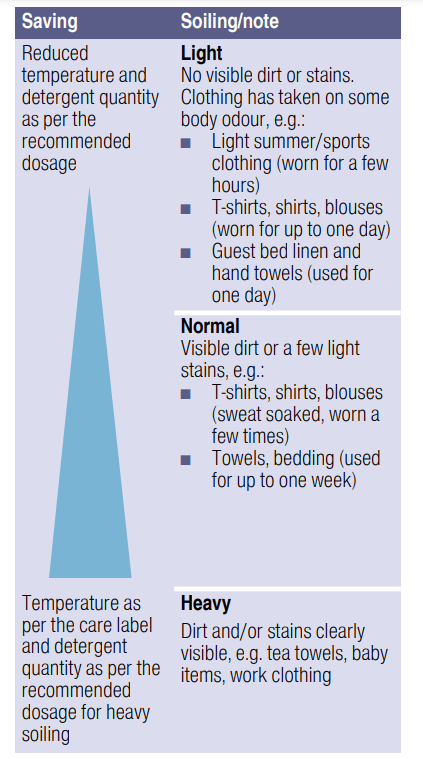
- Soiling
- Wash laundry with the same level of soiling together.
Some examples of soiling levels can be found on → Page 27
– Light: Do not need to pretreat, adjust the SpeedPerfect  if necessary.
– Normal
– Heavy: Load less laundry, need to pretreat or soak laundry firstly.
– Stains: Remove/pretreat stains while they are fresh. First dab with soapy water; do not rub. Then wash the items of laundry with the appropriate programme. Stubborn or dried-in stains can sometimes only be removed by washing several times.
- Symbols on the care labels
 Suitable for normal washing process; e.g. Cottons programme
 A gentle washing process is required; e.g. Easy Care programme
 An especially gentle washing process is required; e.g. Delicates/ Silk programme
 Suitable for washing by hand; e.g.
  Wool programme
 Do not machine wash.
Detergent
Correct selection of detergent
- Standard detergent with optical brighteners
Suitable for boil-washable white laundry made from linen or cotton Programme: Cottons/ cold - max. 90 °C
- Detergent for colours without bleach or optical brighteners
Suitable for coloured laundry made from linen or cotton Programme: Cottons/ cold - max. 60 °C
- Detergent for colours/delicates without optical brighteners
Suitable for coloured laundry made from easy-care fibres, synthetic fibres Programme: Easy-Care/ cold - max. 60 °C
Suitable for delicate, fine fabrics, silk or viscose Programme: Delicate/Silk/ cold - max. 40 °C
Suitable for wool Wool programme/ cold - max. 40 °C
Saving energy and detergent
For light and normal soiling, you can save energy (lower washing temperature) and detergent.
Note: When measuring the amount of all detergents/additives/care products and cleaning agents, please always check the manufacturer's instructions and information. → Page 37
Programme default settings
Program deef aul t settingsThe default programme settings are displayed in the display panel after selecting the programme.
You can change the default settings.
An overview of all programme settings, which can be selected depending on the programme, can be found from → Page 28.
Temperature 
Before and after the programme starts, you can change the temperature setting, depending on what stage the programme is in, by adjusting the desired temperature on the display.
The maximum temperature that can be set depends on the programme that has been selected.
Spin speed
(Spin  )
)
Depending on what stage the programme is in, you can change the spin speed (in rpm; revolutions per minute) before and during the programme
Setting  : Rinse Stop = no final spin. The laundry stays in the water after the final rinse.
You can select "Rinse Stop” to prevent creasing if the laundry will not be taken out of the washing machine immediately after the programme has ended.
To continue/end the programme → Page 39
The maximum speed that can be set depends on the model and programme that has been selected.
Finish in
Before starting the programme, you can preselect the programme end ("Finish in" time) in 0.5h increments (h = hour) up to a maximum of 24 hours.
To do this:
1. Select a programme (except MyTime programme). The programme duration is displayed for the selected programme, e.g. 2:30 (hours:minutes).
2. Press the Finished in button repeatedly until the required number of hours is displayed.
Note: The setting values are increased using the Finished in + button, and decreased using the Finished in — button.
3. Select the  button. The programme starts. The selected number of hours (e.g. 8h) is shown in the display panel and counts down until the programme starts. The duration of the programme is then displayed.
Note: The length of the programme is automatically adjusted when the programme is running. Changes to the programme default settings or programme additional settings may also change the programme duration.
After starting the programme (if a Finished in time has been selected and the programme has not yet started), you can change the preselected number of hours as follows:
1. Select the button.
2. Touch the Finished in — or + button to change the number of hours.
3. Select the button.
After starting the programme, you can add or remove laundry if necessary. → Page 39
Additional programme settings
Aditio p nal rogram seetti ngsAn overview of all additional settings, which can be selected depending on the programme, can be found from → Page 28.
EcoPerfect 
Energy-optimised washing by reducing the temperature while achieving a washing result that is consistent with the selected programme, without the EcoPerfect setting.
SpeedPerfect
Washing in a shorter time while achieving a washing result that is consistent with, but uses more energy than, the selected programme, without the SpeedPerfect setting.
Easy Iron 
Reduces creasing thanks to a special spin sequence followed by fluffing and reduced spin speed.
Note: The washing's residual moisture is increased.
Rinse Plus 
Additional rinse cycle for particularly sensitive skin and/or for areas with very soft water.
Operating the appliance
Preparing the washing machine
Note: The washing machine must be correctly installed and connected. From → Page 13.
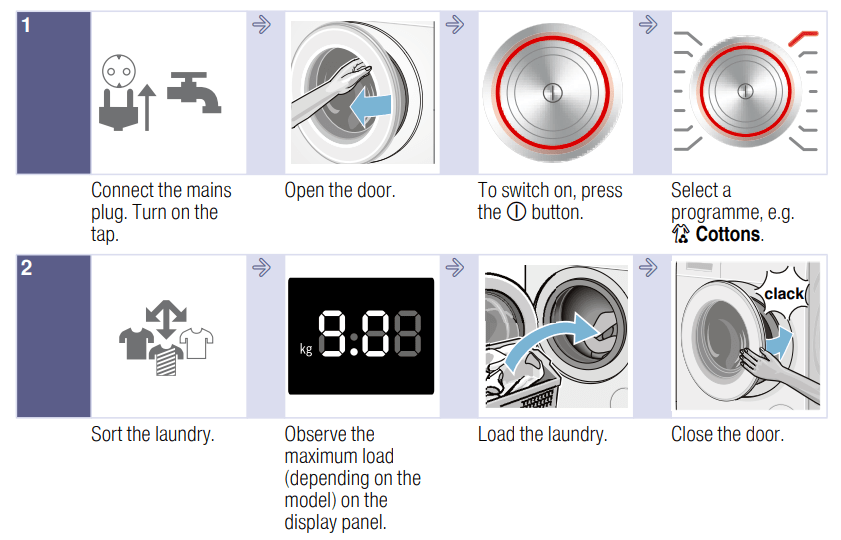
1. Connect the mains plug.
2. Turn on the tap.
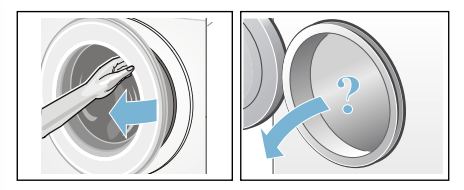
3. Open the door.
4. Check that the drum is completely drained. Drain if necessary
Switching on the appliance/ selecting a programme
Press the  button till the indicator lamp lights up, release the button. The appliance is switched on.
The  Cottons programme (only washing), which is preset at the factory, is then always displayed.
You can use this programme or select a different programme.
Note: If you have activated the childproof lock, you must deactivate it before you can set a different programme. → Page 38
The indicator lamp on the programme selector lights up and the default programme settings for the selected programme appear in the display panel:
- Temperature
- Spin speed and
- The maximum load and the duration of the programme (alternately)
In appliances with a drum light: The drum is lit after switching on the appliance, after opening and closing the door and after starting the programme. The light switches off automatically.
Placing laundry into the drum
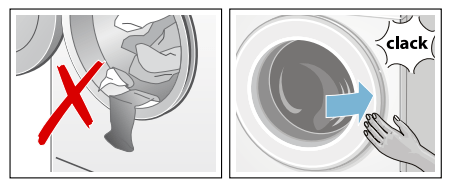
1. Unfold presorted laundry items and place them in the drum.
2. Make sure that no items of laundry are trapped between the door and the rubber seal, and close the door.
The button indicator lamp flashes and the programme settings appear in the display panel.
Measure and add detergent and care products
Dosing
Dose the detergents and care products according to:
- Water hardness (ask your water supply company)
- The manufacturer's instructions on the packaging
- The amount of laundry
- Soiling → Page 27
Filling
Pour the detergent and care products into the appropriate compartments:
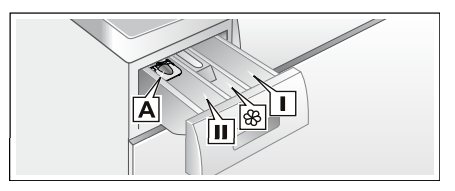
| Measuring aid A |
For liquid detergent |
| Compartment II |
Detergent for the main wash, water softener, bleach, stain remover |
Compartment  |
Fabric softener, liquid starch; do not exceed max |
| Compartment I |
Detergent for prewash |
1. Pull out the detergent drawer as far as possible.
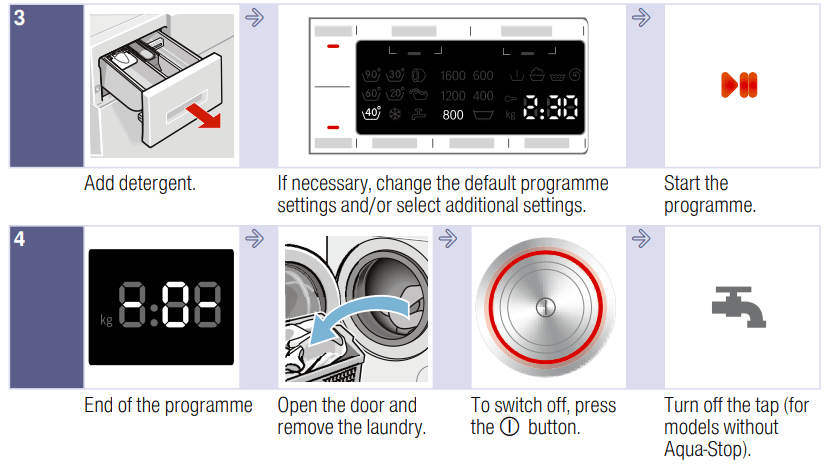
2. Add detergent and/or care products.
3. Close the detergent drawer.
Measuring aid* for liquid detergent
Position the measuring aid for dosing the correct amount of liquid detergent:
1. Pull out the detergent drawer. Press down the insert and fully remove the drawer.
2. Slide the measuring aid forwards, fold it down and click it into place.
3. Reinsert the drawer.
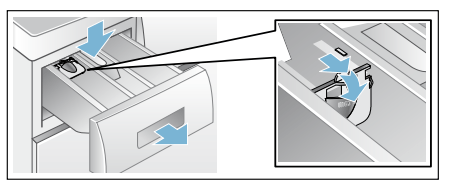
Note: Do not use the measuring aid for gel detergents and washing powder, or for programmes with prewash or when the “Ready in” time is selected.
For models without a measuring aid, pour the liquid detergent into the appropriate dispenser and place it in the drum.
Change the programme default settings
You can use or change the default settings for this washing cycle. To do this, repeatedly press the corresponding button until the required setting is displayed.
The settings are activated without needing to be confirmed.
The settings are not saved after switching off the washing machine. Default programme settings → Page 34
Select additional programme settings
By selecting additional settings, you can better adapt the washing process to your items of laundry.
The settings can be selected or deselected depending on the programme progress.
The button indicator lamps light up if a setting is activated. The settings are not saved after switching off the washing machine.
Additional programme settings → Page 35
Starting the programme
Touch and hold (Start/Reload) button for 1~2 seconds, then release the button. The programme starts and the appliance door is locked. The finish-in time is shown in the display panel and counts down until the programme starts. After the programme has started, the programme duration is displayed. And the symbols for the programme progress are lighting up.
Note: Foam detection
If the symbol  also lights up in the display panel, the appliance has detected too much foam during the wash cycle and automatically activated additional rinse cycles to remove the foam.
Add less detergent to the next washing cycle with the same load. If you want to lock the programme to prevent it from being inadvertently adjusted, you can select the childproof lock as follows.
Childproof lock ( )
)
You can lock the appliance to prevent the functions you have set from being changed inadvertently. To do this, activate the childproof lock
To activate/deactivate, press and hold the Finished in - and + buttons at the same time for approx. three seconds. The E symbol is appears in the display panel.
- (3s) lights up: The childproof lock is activated.
- (3s) flashes: briefly: The childproof lock is active and the programme selector was turned or a button was pressed.
Adding/removing laundry
After starting the programme (only for washing), you can add or remove laundry if necessary.
Press the button to do this.
The button indicator lamp flashes and the machine checks whether it is possible to add laundry.
If the following appears in the display panel:
- Both the - P - and
 symbols light up, it is possible to add laundry.
- - P - lights up, it is not possible to add laundry.
To continue the programme, touch the button. The programme continues automatically.
Notes
- Do not leave the door open for too long when adding laundry as water from the laundry may leak out.
- For safety reasons, the door remains locked when the water level or temperature is high, or while the drum is turning, and it is not possible to add laundry during this time.
- The load display is not active during reloading.
Changing the programme
If you have started the wrong programme by mistake, you can change the programme as follows:
1. Press the button.
2. Select another programme.
3. Press the button again. The new programme starts from the beginning.
Cancel the programme
For programmes washing at high temperatures:
1. Press the (Start/Reload) button.
2. To cool down laundry: Select Rinse.
3. Touch the (Start/Reload) button
For programmes washing at low temperatures:
1. Touch the (Start/Reload) button.
2. Select Spin or  Drain..
3. Touch the (Start/Reload) button.
Programme end during rinse hold
In the display panel, flashes, and the preset spin speed and remaining programme length are displayed for the selected programme. Continue the programme by:
- Pressing the button or
- Changing the spin speed, or setting the programme selector to Drain and then pressing the button.
Programme end
- 0 - and appear in the display panel. The button indicator lamp is off.
Removing laundry/switching off the appliance
1. Open the door and remove the laundry.
2. Press the button. The appliance is switched off.
3. Turn off the tap.
Notes
- Do not leave any items of laundry in the drum. They may shrink in the next wash or discolour another item.
- Remove any foreign objects from the drum and the rubber seal – risk of rusting.
- Wipe the rubber seal dry
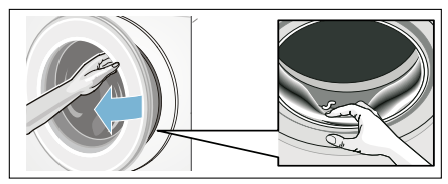
- Leave the door and detergent drawer open so that any residual water can evaporate
- Always wait until the programme ends, as the appliance could still be locked. Then switch the appliance on and wait for it to unlock.
- If the display panel goes off at the end of a programme, the energysaving mode is active. Press any button to activate the panel.
Appliance settings
You can change the following settings
- The volume of the buttons and information signals (e.g. at the end of the programme)
- Select/deselect the appliance's automatic switch-off function. → Page 12
You will need to activate the setting mode in order to change these settings
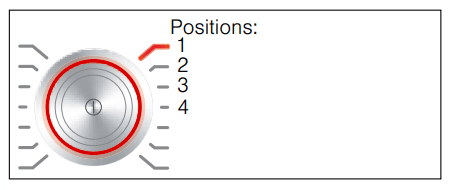
Activating the setting mode
1. Press the button.
The appliance is switched on and the Cottons programme is shown at position 1.
2. Press the Temperature s button and, at the same time, turn the programme selector clockwise to position 2. Release the button.
The setting mode is activated and the preset volume for the information signals appears in the display panel. You can now change the settings:
Changing the signal volume
Use the Finished in + or - button to change the following settings at the corresponding programme selector positions:
- 2: The volume of the information signals and/or
- 3: The volume of the button signals.
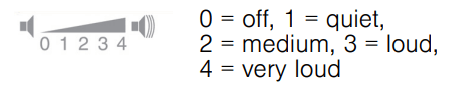
Exit setting mode or:
Selecting/deselecting the appliance automatic switchoff
With the programme selector in position 4, press the Finished in + or - button to switch the "Automatic switch-off" function on or off.
Exiting setting mode
To exit and save the settings, press the button.
The appliance is switched off. The selected settings will take effect the next time the washing machine is switched on.
Cleaning and maintenance
Machine housing/control panel
- Wipe the housing and the control panel with a soft, damp cloth.
- Remove the detergent residue immediately.
- Do not clean with a water jet
Drum
Use chlorine-free cleaning agents, do not use steel wool. If there are odours in the washing machine, or to clean the drum, run the  Drum Clean 90 °C programme without laundry. Add washing powder.
Descaling
Descaling should not be necessary if the detergent is measured out correctly. However, if it is required, follow the manufacturer's instructions for the descaling agent. Suitable descalers can be obtained via our website or from customer services. → Page 50
Detergent drawer and housing
If the appliance contains detergent or fabric softener residues:
1. Pull out the detergent drawer. Press down the insert and fully remove the drawer.
2. To remove the insert: Push the insert upwards from below with your finger.
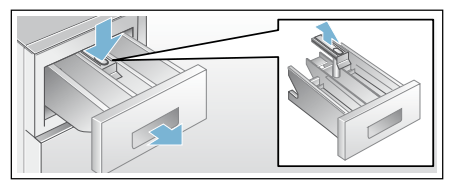
3. Clean the detergent dispenser tray and insert with water and a brush, and dry it. Clean the inside of the housing as well.
4. Fit the insert and lock it in place (push the cylinder onto the guide pin).
5. Push in the detergent drawer
The drain pump is blocked, emergency draining
1. Turn off the tap so that no more water can flow in and has to be drained via the drain pump.
2. Switch off the appliance. Pull out the mains plug.
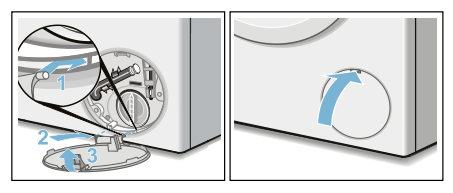
3. Open and remove the service flap.
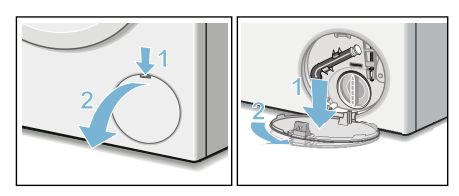
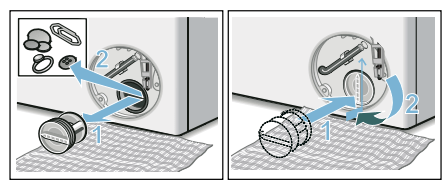
4. Take the drain hose out of the retainer. Remove the sealing cap and pour the water out into a suitable container. Replace the sealing cap and place the drain hose back in the retainer.
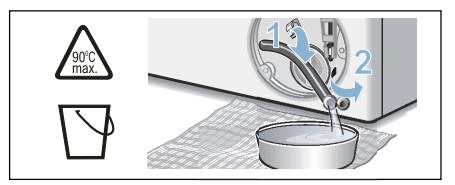
5. Carefully unscrew the pump cover; residual water may leak out. Clean the interior, pump-cover thread and pump housing. The impeller in the drain pump must be able to rotate. Refit the pump cover and screw it on tightly. The handle must be in a vertical position.
6. Place the service flap back on, lock it into place, and close it
The drain hose at the siphon is blocked
1. Switch off the appliance. Pull out the mains plug.
2. Loosen the hose clamp. Carefully remove the drain hose; residual water may leak out.
3. Clean the drain hose and siphon connecting piece.
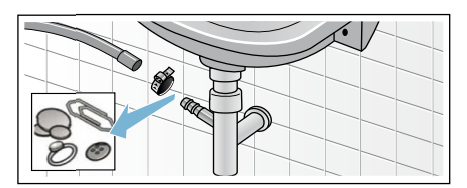
4. Re-attach the drain hose and secure the connection point using the hose clamp.
Filter in the water supply blocked
First, reduce the water pressure in the supply hose:
1. Turn off the tap.
2. Select any programme (except Rinse/Spin/Empty).
3. Press the button. Allow the programme to run for approximately 40 seconds.
4. Press the button. The appliance is switched off.
5. Pull out the mains plug.
Then clean the filter:
1. Disconnect the hose from the tap. Clean the filter with a small brush.
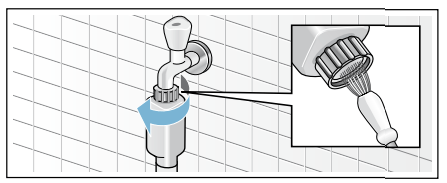
2. For standard and Aqua-Secure models, clean the filter on the rear of the appliance: Remove the hose from the rear of the appliance. Use pliers to remove the filter and then clean it.
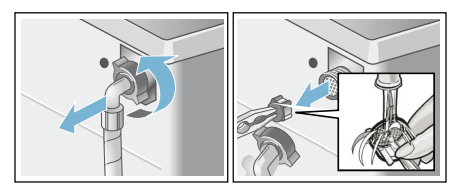
3. Connect the hose and check for leaks.
Faults and what to do about them
Emergency release
E.g. power outage or in the event of a loss of power The programme continues when the power supply is restored. However, if the laundry has to be removed, the appliance door can be opened as follows:
However, if the laundry has to be removed, the washing machine door can be opened as follows:
Caution! Water damage
Any escaping water may cause water damage. Do not open the door if water can be seen through the glass.
1. Switch off the appliance. Pull out the mains plug.
2. Drain the water. → Page 44
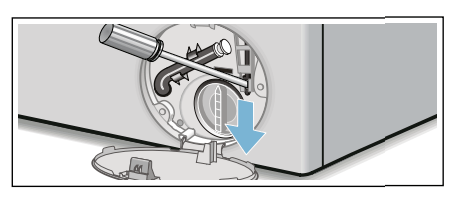
3. Pull the emergency release downwards with a tool and release. The door can then be opened.
Information on the display panel
| Faults |
Cause/Remedy |
| - P - and |
The door is unlocked. It is possible to add laundry |
| - P - |
- The temperature is too high. Wait until the temperature drops.
- The water level is too high. It is not possible to add laundry. Close the door immediately, if necessary. Press the button to continue the programme.
|
| flashes |
- Laundry may be caught. Open and close the door again and press the button.
- If necessary, push the door closed or remove some laundry and then push it closed again.
- If necessary, switch the appliance off and on again; set the programme and make your individual settings; start the programme.
|
 lights up lights up |
- Turn on the tap fully
- Supply hose kinked/trapped,
- The water pressure is too low. Clean the filter. → Page 45
|
| E:18 |
- The drain pump is blocked. Clean the drain pump. → Page 44
- The drain hose/drain pipe is blocked. Clean the drain hose at the siphon.→ Page 45 E:23 There is water in th
|
|
The childproof lock is activated – deactivate it. → Page 38 |
| lights up |
Too must foam has been detected and an additional rinse cycle has been activated. Add less detergent to the next washing cycle with the same load |
| Other displays |
Switch off the appliance, wait for five seconds and then switch it on again. If the display appears again, call customer services. → Page 50 |
Faults and what to do about them.