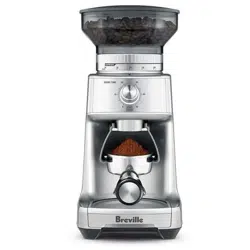
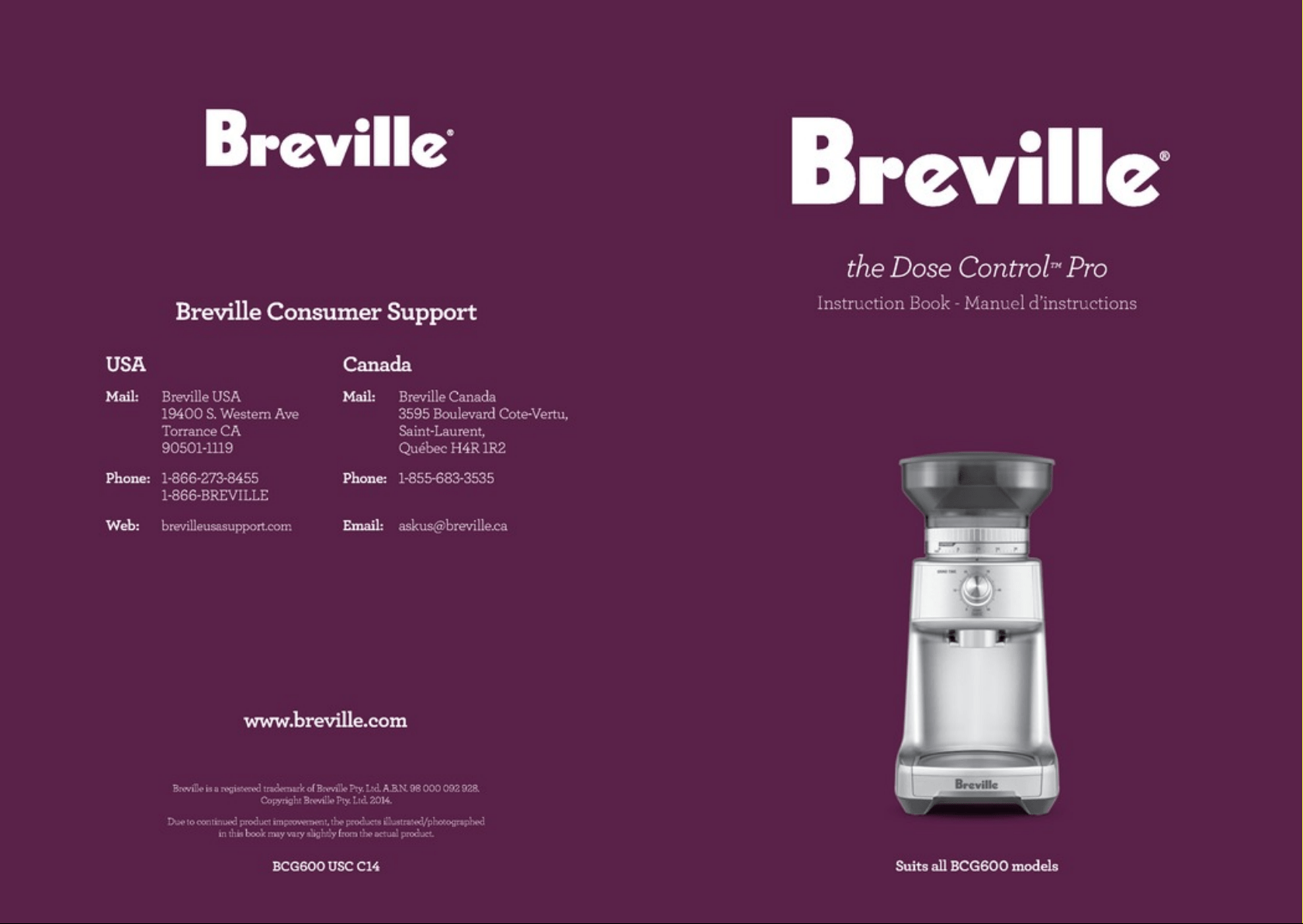
the Dose Control
™
Pro
Instruction Booklet
Suits all BCG600 models
2
CONGRATULATIONS
on the purchase of your new
Breville product
3
CONTENTSCONTENTS
4 Breville recommends safety first
7 Know your Breville product
10 Operating your Breville product
16 Care, cleaning & storage
17 Coffee tips
18 Troubleshooting
4
FOR ALL ELECTRICAL
APPLIANCES
• Remove and safely discard
any packaging material and
promotional labels before
using the Breville Dose
Control™ Pro for the first time.
• To eliminate a choking
hazard for young children,
remove and safely discard
the protective cover fitted to
the power plug of the Breville
Dose Control™ Pro.
• Do not place the Breville
Dose Control™ Pro near the
edge of a bench or table
during operation.
• Do not place the Breville
Dose Control™ Pro on or
near a hot gas burner, electric
element or where it could
touch a heated oven.
• Do not operate the Breville
Dose Control™ Pro on a sink
drain board.
• Ensure that the surface is
level, clean and free of water.
• The Breville Dose Control™
Pro is not intended to be
operated by means of an
external timer or separate
remote control system.
• To protect against electric
shock, do not immerse the
grinder base, power cord or
power plug in water or allow
moisture to come in contact
with these parts.
• Always switch the Breville
Dose Control™ Pro off at the
power outlet and unplug if
Breville Dose Control™ Pro
is to be left unattended, if
not in use, before cleaning,
before attempting to move,
disassembling, assembling
and when storing.
• Do not use attachments other
than those provided with the
Breville Dose Control™ Pro.
• Do not operate the Breville
Dose Control™ Pro without
locking the bean hopper lid in
position. Keep fingers, hands,
hair, clothing and utensils
away from the bean hopper
during operation.
BREVILLE RECOMMENDS SAFETY FIRST
At Breville we are very safety conscious. We design and manufacture consumer products
with the safety of you, our valued customer, foremost in mind. In addition we ask that you
exercise a degree of care when using any electrical appliance and adhere to the following
precautions.
IMPORTANT SAFEGUARDS
5
• The coffee grinder should
not be switched on until the
bean hopper and hopper lid
are locked into position in the
grinding chamber.
• Do not operate the Breville
Dose Control™ Pro,
continuously for longer
than 2 minutes as this could
cause overheating. Allow the
Breville Dose Control™ Pro
to cool down for 20 minutes
after long operation.
• Do not use the Breville Dose
Control™ Pro for any other
purpose than grinding
coffee beans.
• Do not use pre ground coffee
in bean hopper. The Breville
Dose Control™ Pro will not
grind food that is sticky, or
extremely hard, or make
pastes of any fruits, seeds or
herbs ie. curry pastes,
nut butters.
• Children should be
supervised to ensure that
they do not play with the
appliance.
• The installation of a residual
current device (safety switch)
is recommended to provide
additional safety protection
when using electrical
appliances. It is advisable
that a safety switch with a
rated current not exceeding
30mA be installed in the
electrical circuit supplying
the appliance. See your
electrician for professional
advice.
• This appliance shall not be
used by children. Keep the
appliance and its cord out of
reach of children.
• Appliances can be used
by persons with reduced
physical, sensory or mental
capabilities or lack of
experience and knowledge
if they have been given
supervision or instruction
concerning use of the
appliance in a safe way and
if they understand the hazards
involved.
BREVILLE RECOMMENDS SAFETY FIRST

6
SAVE THESE INSTRUCTIONS
FOR HOUSEHOLD USE ONLY
BREVILLE RECOMMENDS SAFETY FIRST
IMPORTANT SAFEGUARDS
FOR ALL ELECTRICAL
APPLIANCES
• Unwind the power cord fully
before use.
• Do not let the power cord
hang over the edge of a bench
or table or, touch hot surfaces
or become knotted.
• To protect against electric
shock, do not immerse the
appliance, power cord or
power plug in water or any
other liquid.
• It is recommended to
regularly inspect the
appliance. Do not use the
appliance if the power cord,
power plug or appliance
becomes damaged in any
way. Return the entire
appliance to the nearest
authorised Breville Service
Centre for examination and/
or repair.
• Any maintenance, other than
cleaning, should be performed
at an authorised Breville
Service Centre.
• This appliance is for
household use only. Do
not use this appliance for
anything other than its
intended use. Do not use in
moving vehicles or boats. Do
not use outdoors. Misuse may
cause injury.
• The installation of a residual
current device (safety switch)
is recommended to provide
additional safety protection
when using electrical
appliances. It is advisable that
a safety switch with a rated
residual operating current not
exceeding 30mA be installed
in the electrical circuit
supplying the appliance.
See your electrician for
professional advice.
• The appliance is not intended
to be operated by means of
an external timer or separate
remote control system.
• Connect only to a 220 -240V
power outlet.
7
KNOW
your Breville product
8
B
C
D
E
F
G
I
H
K
L
J
A
KNOW YOUR BREVILLE PRODUCT
9
KNOW YOUR BREVILLE PRODUCT
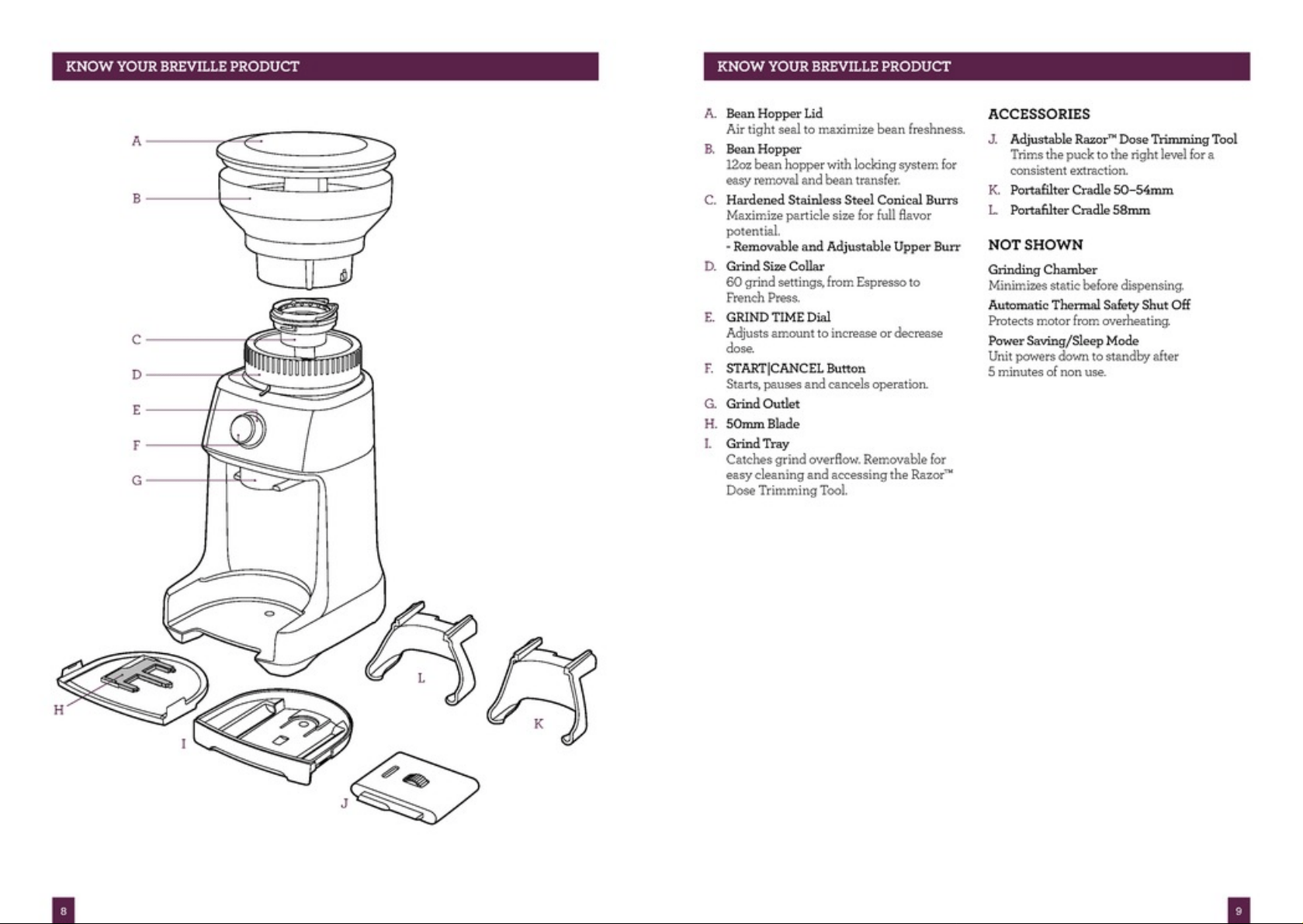
A. Bean Hopper Lid
Air tight seal to maximise bean freshness.
B. Bean Hopper
340g bean hopper with locking system for
easy removal and bean transfer.
C. Hardened Stainless Steel Conical Burrs
Maximise particle size for full flavour
potential.
- Removable and Adjustable Upper Burr
D. Grind Size Collar
60 grind settings, from espresso to
plunger.
E. GRIND TIME Dial
Adjusts amount to increase or decrease
dose.
F. START|CANCEL Button
Starts, pauses and cancels operation.
G. Grind Outlet
H. 50mm blade
I. Grind Tray
Catches grind overflow. Removable for
easy cleaning and accessing the Razor™
Dose Trimming Tool.
ACCESSORIES
J. Adjustable Razor™ Dose Trimming Tool
Trims the puck to the right level for a
consistent extraction.
K. Portafilter Cradle 50–54mm
L. Portafilter Cradle 58mm
NOT SHOWN
Grinding Chamber
Minimises static before dispensing.
Automatic Thermal Safety Shut Off
Protects motor from overheating.
Power Saving/Sleep Mode
Unit powers down to standby after
5 minutes of non use.
10
GRINDER OVERVIEW
Your Dose Control™ Pro uses hardened
stainless steel Conical Burrs and can grind
whole bean coffee suitable for a range of
brewing methods, from the finest setting
for Espresso to the coarsest setting for
Plunger.
The grind amount (dose) for all coffee types is
controlled by an electronic timer. The dose for
each brew method can be adjusted by rotating
the GRIND TIME dial and changing the time
the grinder will run. You can grind directly
into a Portafilter, Container or Drip Coffee
filter basket.
Within each brew method, Espresso, Percolator,
Drip or Plunger, there is a range of grind
size settings; the grind settings will differ
between each brew method. This is because
each method requires different grind sizes for
optimum extraction. Experiment with different
grind size settings until you achieve the brew
that best suits your taste.
Rotating the Bean Hopper will turn the Grind
Size Collar to adjust grind size.
BEFORE FIRST USE
Remove and safely discard all promotional
labels and packing materials attached to your
Breville product. Wash hopper, and cradles in
warm soapy water and dry thoroughly. Wipe
exterior of grinder with a soft damp cloth and
dry thoroughly. Place grinder on flat level
surface and plug power cord into 220-240V
outlet and switch Power 'ON'.
ASSEMBLING YOUR BREVILLE
CONTROL DOSE™ PRO
Bean Hopper
Align tabs on the base of the bean hopper
and insert hopper into position. Holding the
hopper, press down firmly and turn the bean
hopper dial 45° to lock into position.
A "click" sound will be heard when the hopper
is properly locked in place.
X
Ensure the hopper and the Grind Size
Collar is aligned properly.
Fill with fresh coffee beans and secure lid on
top of bean hopper.
NOTE
If the bean hopper has not been locked
into position, the GRIND TIME dial will
not be illuminated. This is to disable
grinder operation for safety reasons.
OPERATING YOUR BREVILLE PRODUCT
11
OPERATING YOUR BREVILLE PRODUCT
The bean hopper can be removed by
holding the hopper and turning the Dial
anti-clockwise and lifting hopper to remove.
The locking system allows you to remove
and transfer beans in the hopper to a storage
container safely.
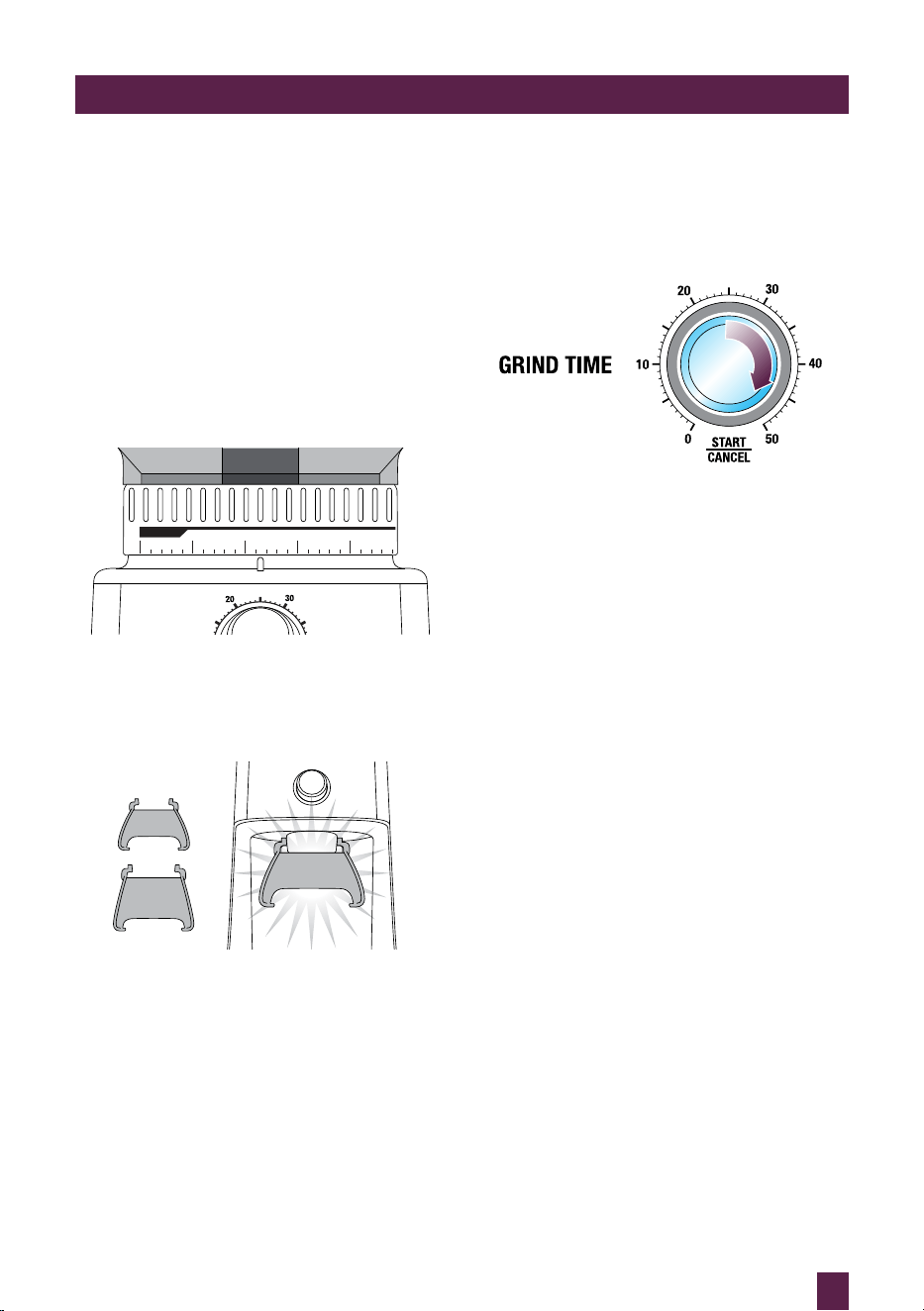
GRINDING FOR ESPRESSO COFFEE
Use single wall filter baskets when grinding
fresh coffee beans. Use the finer 1–25 settings
in the ESPRESSO range.
ESPRESSO
PERCOLATOR
FINE
0 5 10 15 20
25
Step 1:
Insert the appropriate portafilter cradle size.
Insert your portafilter into the cradle.
50-54mm
58mm
CRADLES
PUSH
Step 2:
Selecting Grind Amount
Select the desired amount of ground coffee
required by turning the GRIND TIME dial.
Refer to the Coffee Chart on page 14 as a
starting point to adjust your grind time. This
will vary depending on the individual size of
your filter basket and coffee bean types. Rotate
the GRIND TIME dial to adjust the grind time
until the correct dose is achieved. Increasing
the time will increase the dose and decreasing
the time will decrease the dose.
Step 3:
Tamping the Ground Coffee
After dosing the portafilter with freshly ground
coffee, tamp down with between 15-20kg of
pressure. The amount of pressure is not as
important as consistent pressure every time.
Step 4:
12
Trimming the Dose
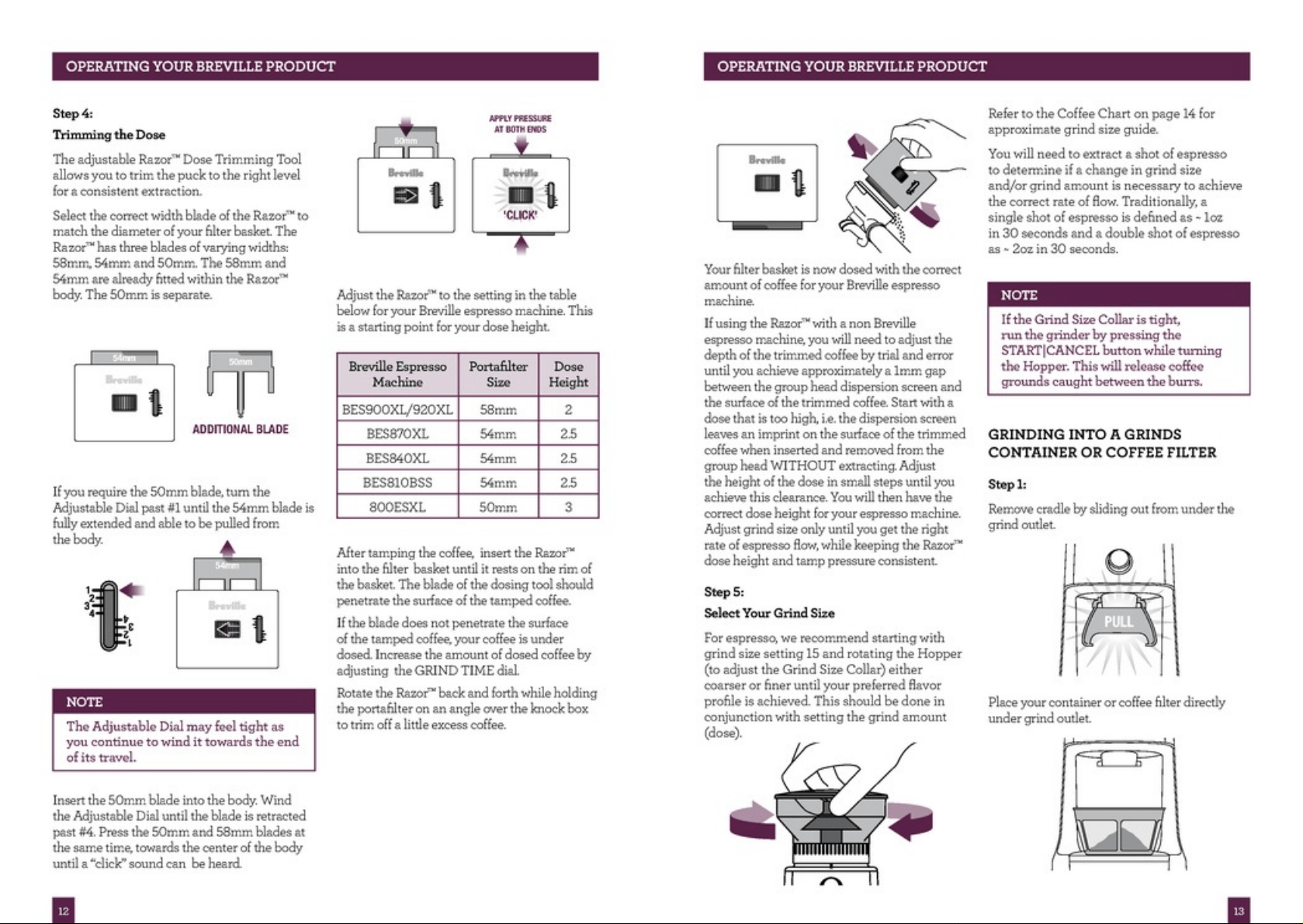
The adjustable Razor™ Dose Trimming Tool
allows you to trim the puck to the right level
for a consistent extraction.
Select the correct width blade of the Razor™ to
match the diameter of your filter basket. The
Razor™ has three blades of varying widths:
58mm, 54mm and 50mm. The 58mm and
54mm are already fitted within the Razor™
body. The 50mm is separate.
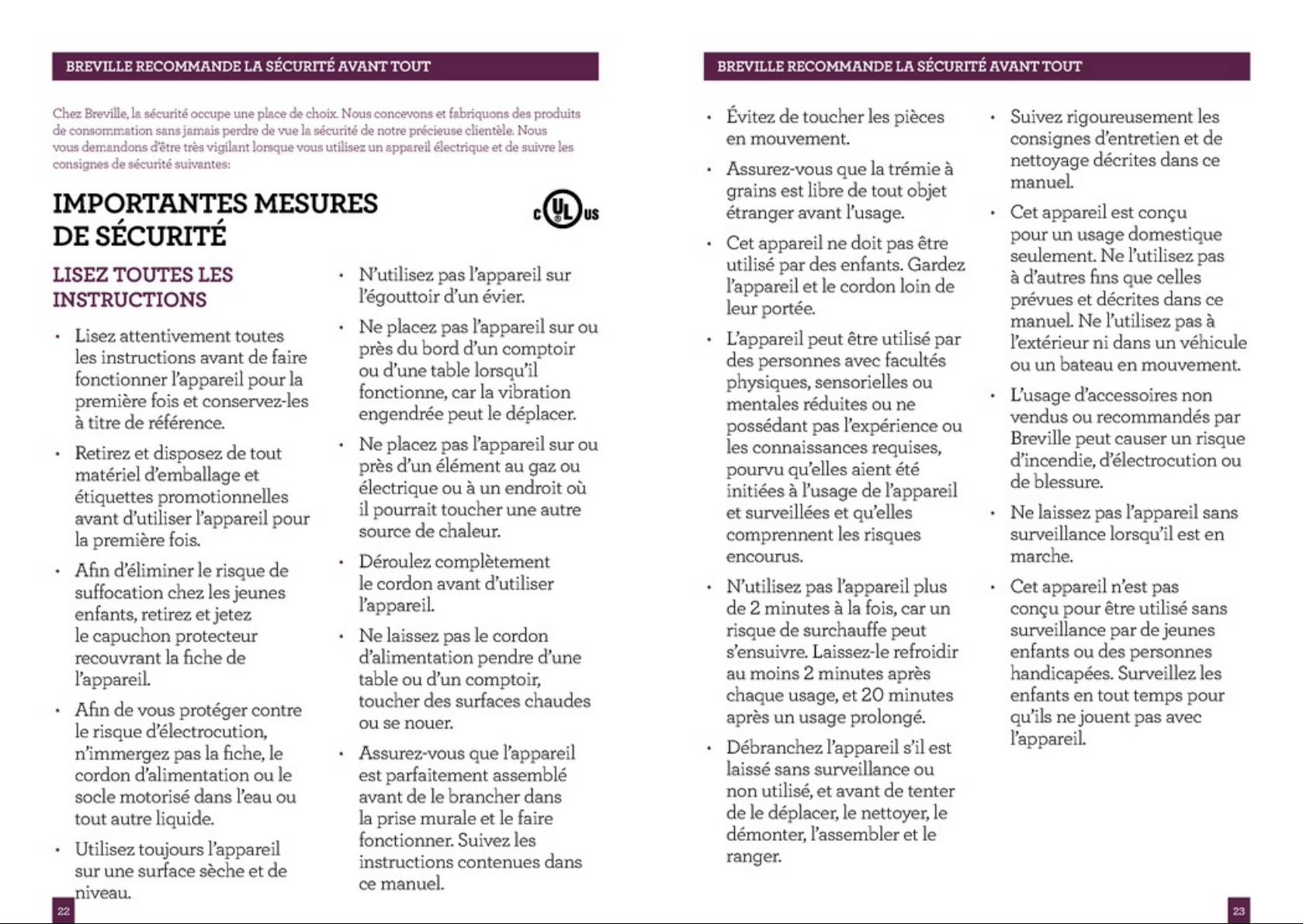
If you require the 50mm blade, turn the
adjustment dial past #1 until the 54mm blade
is fully extended and able to be pulled from
the body.
ADDITIONAL BLADE
54mm
50mm
If you require the 50mm blade, turn the
Adjustable Dial past #1 until the 54mm blade is
fully extended and able to be pulled from
the body.
54mm
NOTE
The Adjustable Dial may feel tight as
you continue to wind it towards the end
of its travel.
Insert the 50mm blade into the body. Wind
the Adjustable Dial until the blade is retracted
past #4. Press the 50mm and 58mm blades at
the same time, towards the centre of the body
until a “click” sound can be heard.
50mm
'CLICK'
Adjust the Razor™ to the setting in the table
below for your Breville espresso machine. This
is a starting point for your dose height.
Breville Espresso
Machine
Portafilter
Size
Dose
Height
BES900/BES920 58mm 2
BES870 54mm 2.5
BES840 54mm 2.5
BES810BSS 54mm 2.5
800ES 50mm 3
BES250 50mm 3
After tamping the coffee, insert the Razor™
into the filter basket until it rests on the rim of
the basket. The blade of the dosing tool should
penetrate the surface of the tamped coffee.
If the blade does not penetrate the surface
of the tamped coffee, your coffee is under
dosed. Increase the amount of dosed coffee by
adjusting the GRIND TIME dial.
Rotate the Razor™ back and forth while holding
the portafilter on an angle over the knock box
to trim off a little excess coffee.
OPERATING YOUR BREVILLE PRODUCT

13
OPERATING YOUR BREVILLE PRODUCT
Refer to the Coffee Chart on page 14 for
approximate grind size guide.
You will need to extract a shot of espresso
to determine if a change in grind size
and/or grind amount is necessary to achieve
the correct rate of flow. Traditionally, a
single shot of espresso is defined as ~ 30mls
in 30 seconds and a double shot of espresso
as ~ 60mls in 30 seconds.
NOTE
If the Grind Size Collar is tight,
run the grinder by pressing the
START|CANCEL button while turning
the Hopper. This will release coffee
grounds caught between the burrs.
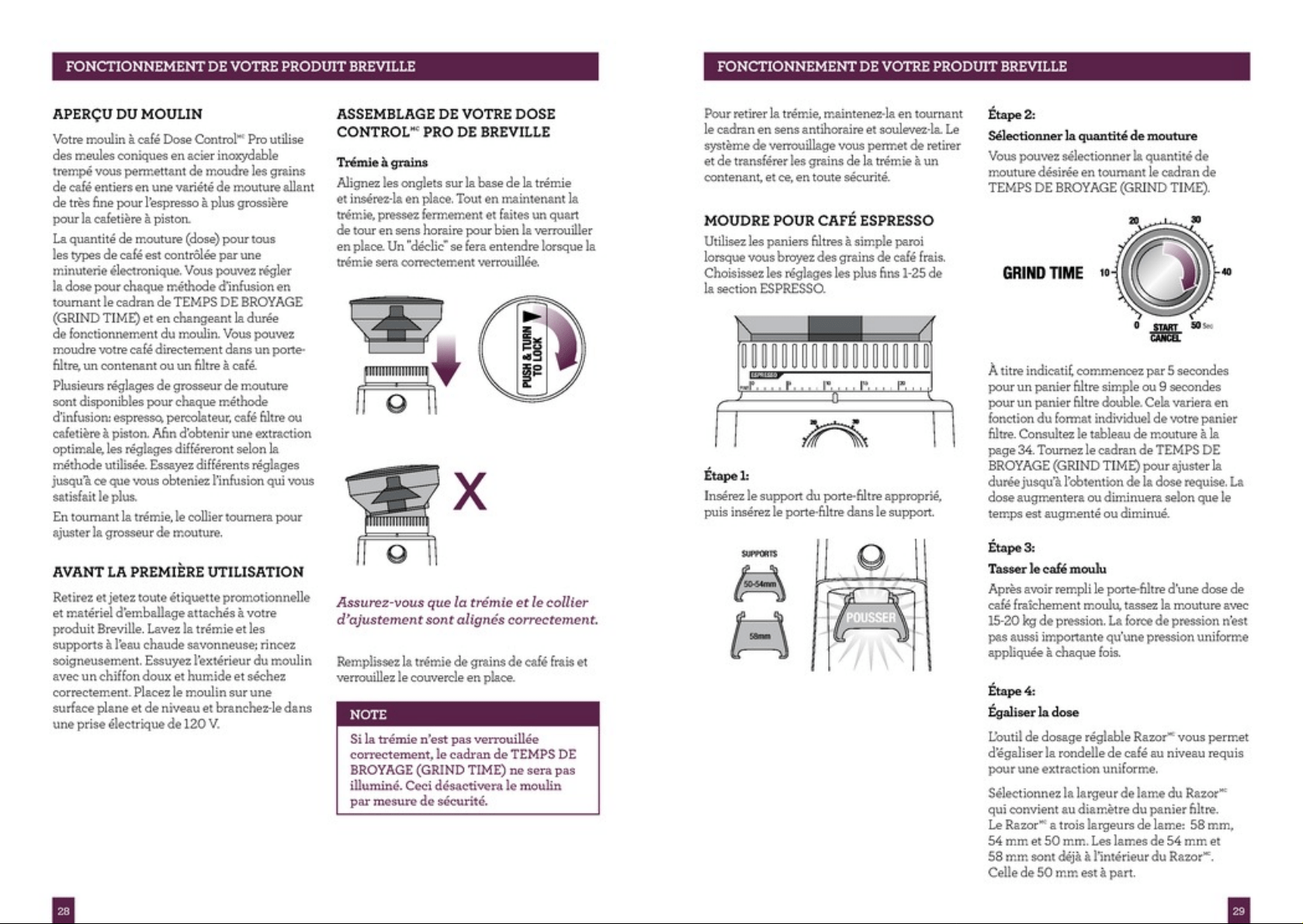
GRINDING INTO A GRINDS
CONTAINER OR COFFEE FILTER
Step 1:
Remove cradle by sliding out from under the
grind outlet.
PULL
Place your container or coffee filter directly
under grind outlet.
Your filter basket is now dosed with the correct
amount of coffee for your Breville espresso
machine.
If using the Razor™ with a non Breville
espresso machine, you will need to adjust the
depth of the trimmed coffee by trial and error
until you achieve approximately a 1mm gap
between the group head dispersion screen and
the surface of the trimmed coffee. Start with a
dose that is too high, i.e. the dispersion screen
leaves an imprint on the surface of the trimmed
coffee when inserted and removed from the
group head WITHOUT extracting. Adjust
the height of the dose in small steps until you
achieve this clearance. You will then have the
correct dose height for your espresso machine.
Adjust grind size only until you get the right
rate of espresso flow, while keeping the Razor™
dose height and tamp pressure consistent.
Step 5:
Select Your Grind Size
For espresso, we recommend starting with
grind size setting 15 and rotating the Hopper
(to adjust the Grind Size Collar) either
coarser or finer until your preferred flavour
profile is achieved. This should be done in
conjunction with setting the grind amount
(dose).

14
OPERATING YOUR BREVILLE PRODUCT
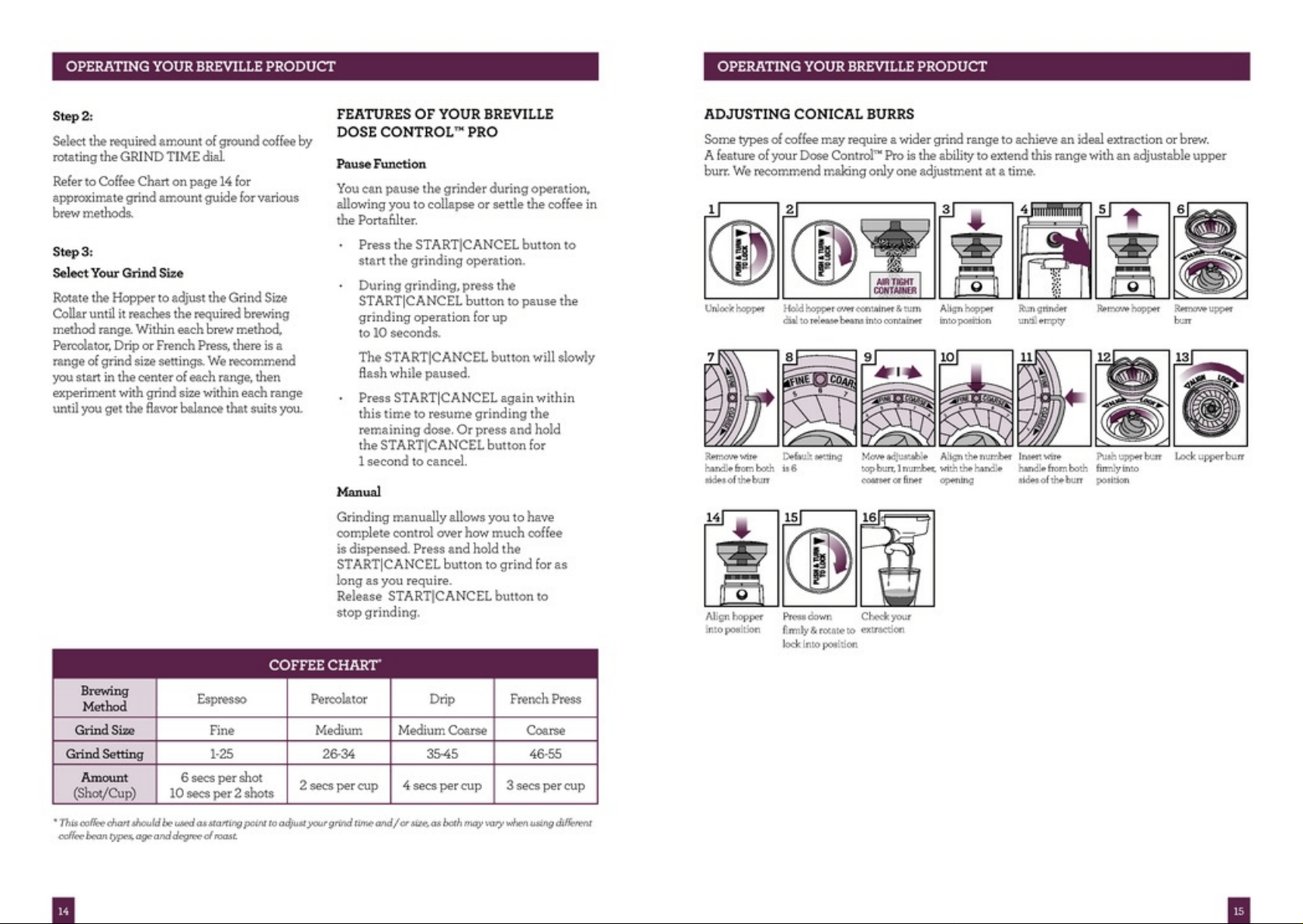
Step 2:
Select the required amount of ground coffee by
rotating the GRIND TIME dial.
Refer to Coffee Chart on page 14 for
approximate grind amount guide for various
brew methods.
Step 3:
Select Your Grind Size
Rotate the Hopper to adjust the Grind Size
Collar until it reaches the required brewing
method range. Within each brew method,
Percolator, Filter or Plunger, there is a range of
grind size settings. We recommend you start in
the centre of each range, then experiment with
grind size within each range until you get the
flavour balance that suits you.
FEATURES OF YOUR BREVILLE
DOSE CONTROL™ PRO
Pause Function
You can pause the grinder during operation,
allowing you to collapse or settle the coffee in
the Portafilter.
• Press the START|CANCEL button to
start the grinding operation.
• During grinding, press the
START|CANCEL button to pause the
grinding operation for up
to 10 seconds.
The START|CANCEL button will slowly
flash while paused.
• Press START|CANCEL again within
this time to resume grinding the
remaining dose. Or press and hold
the START|CANCEL button for
1 second to cancel.
Manual
Grinding manually allows you to have
complete control over how much coffee
is dispensed.Press and hold the
START|CANCEL button to grind for as
long as you require.
• Release START|CANCEL button to
stop grinding.
COFFEE CHART
*
Brewing
Method
Espresso Percolator Drip
French Press
or Plunger
Grind Size Fine Medium Medium Coarse Coarse
Grind Setting 1-25 26-34 35-45 46-55
Amount
(Shot/Cup)
6 secs per shot
10 secs per 2 shots
3 secs per cup 3 secs per cup 2 secs per cup
* This coffee chart should be used as starting point to adjust your grind time and / or size, as both may vary when using
different coffee bean types, age and degree of roast.
15
OPERATING YOUR BREVILLE PRODUCT
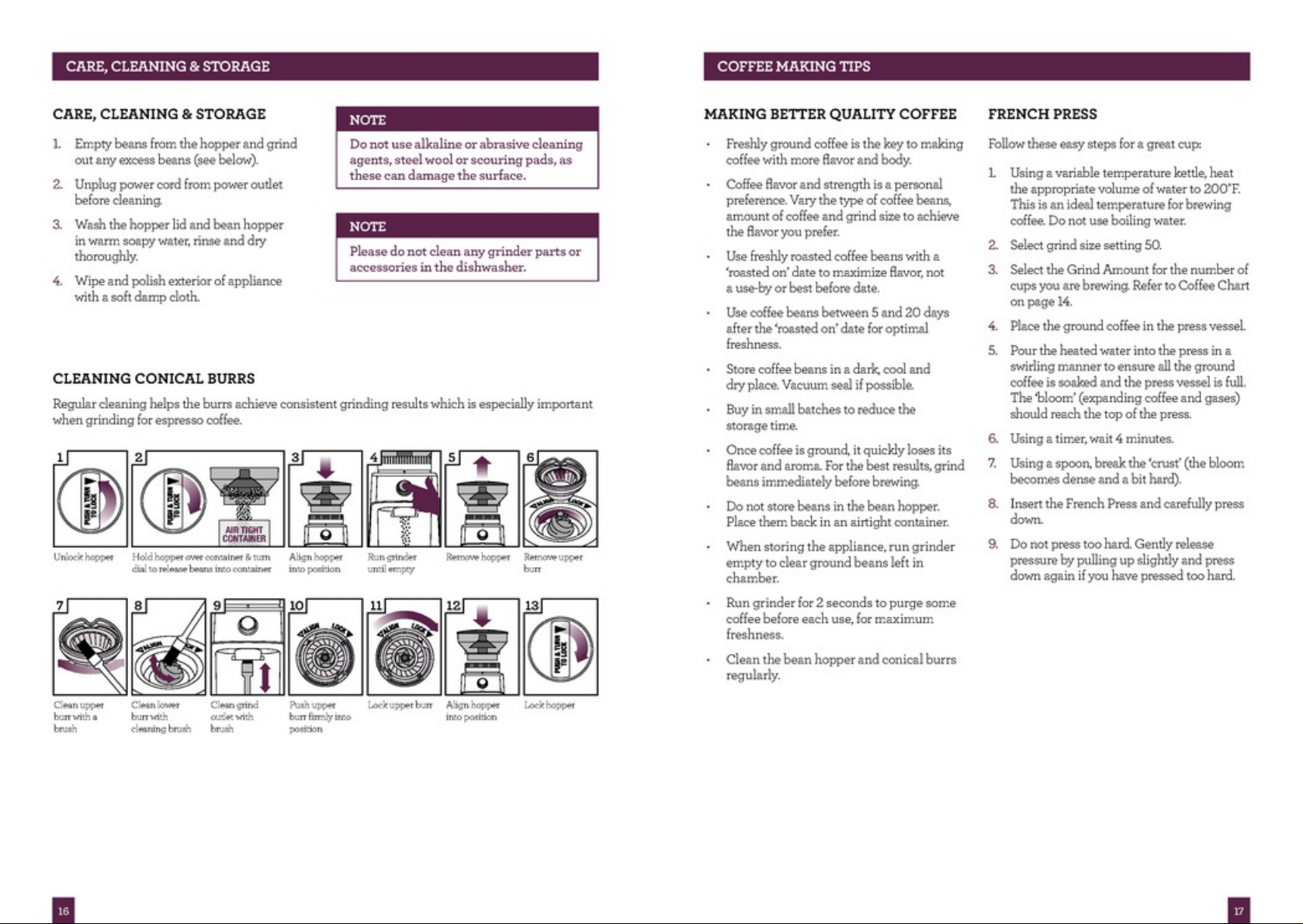
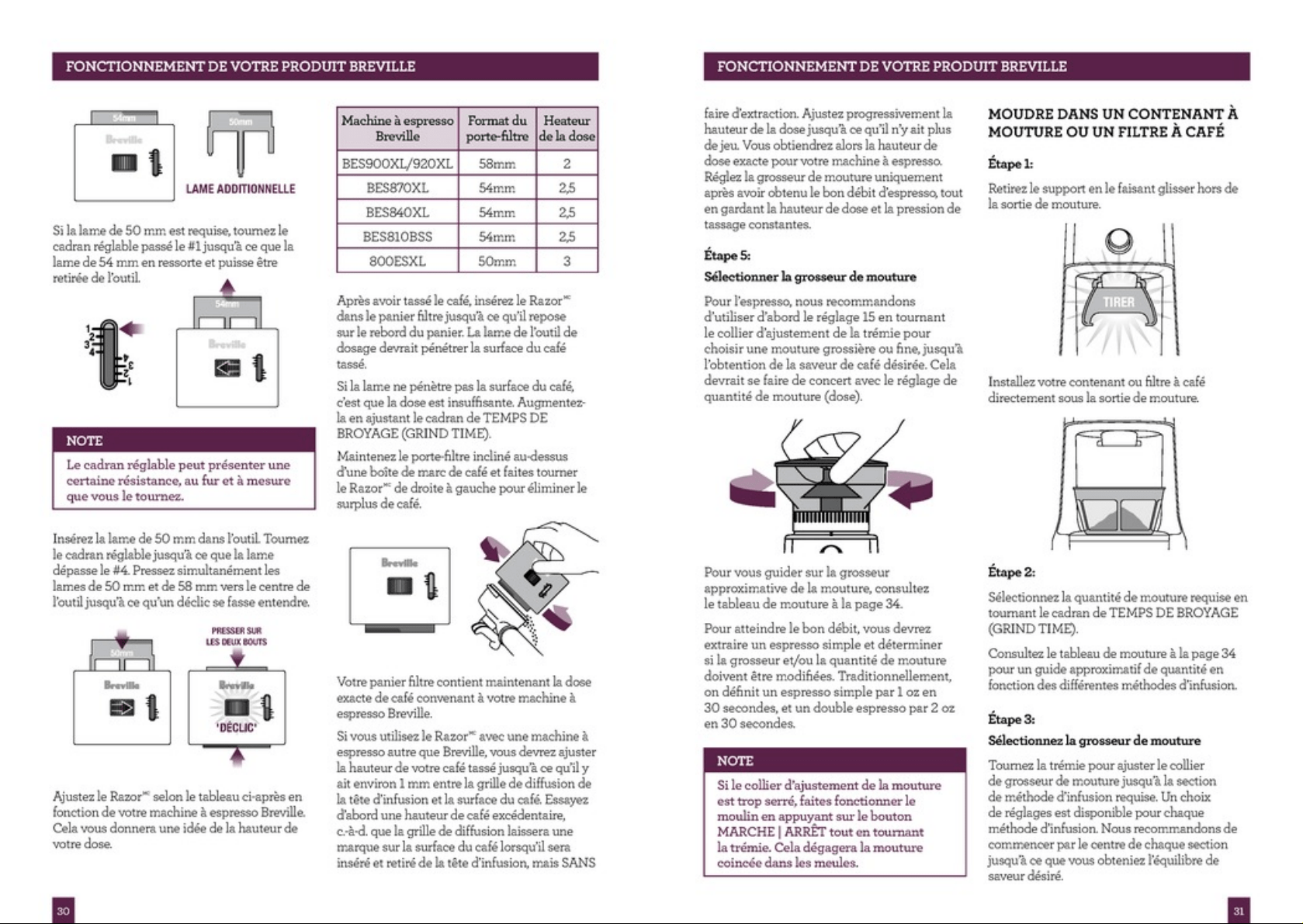
ADJUSTING CONICAL BURRS
Some types of coffee may require a wider grind range to achieve an ideal extraction or brew.
A feature of your Dose Control™ Pro is the ability to extend this range with an adjustable upper
burr. We recommend making only one adjustment at a time.
Hold hopper over container & turn
dial to release beans into container
Align hopper
into position
Run grinder
until empty
Remove hopper
Unlock hopper
1 2 3 4 5
Move adjustable
top burr, 1 number,
coarser or finer
Default setting
is 6
Remove wire
handle from both
sides of the burr
Align the number
with the handle
opening
Remove upper
burr
6
998877 10
Insert wire
handle from both
sides of the burr
11
Push upper burr
firmly into
position
12
Lock upper burr
13
15
Press down
firmly & rotate to
lock into position
16
Check your
extraction
F
I
N
E
C
O
A
R
S
E
3
4
5
6
7
8
F
I
N
E
C
O
A
R
S
E
F
I
N
E
C
O
A
R
S
E
14
Align hopper
into position
F
I
N
E
C
O
A
R
S
E
4
5
6
7
8
F
I
N
E
C
O
A
R
S
E
4
5
6
7
8
F
I
N
E
C
O
A
R
S
E
3
4
5
6
7
8
AIR TIGHT
CONTAINER
DRIP
30 35
16
CARE, CLEANING & STORAGECARE, CLEANING & STORAGE
CARE, CLEANING & STORAGE
1. Empty beans from the hopper and grind
out any excess beans (see below).
2. Unplug power cord from power outlet
before cleaning.
3. Wash the hopper lid and bean hopper
in warm soapy water, rinse and dry
thoroughly.
4. Wipe and polish exterior of appliance
with a soft damp cloth.
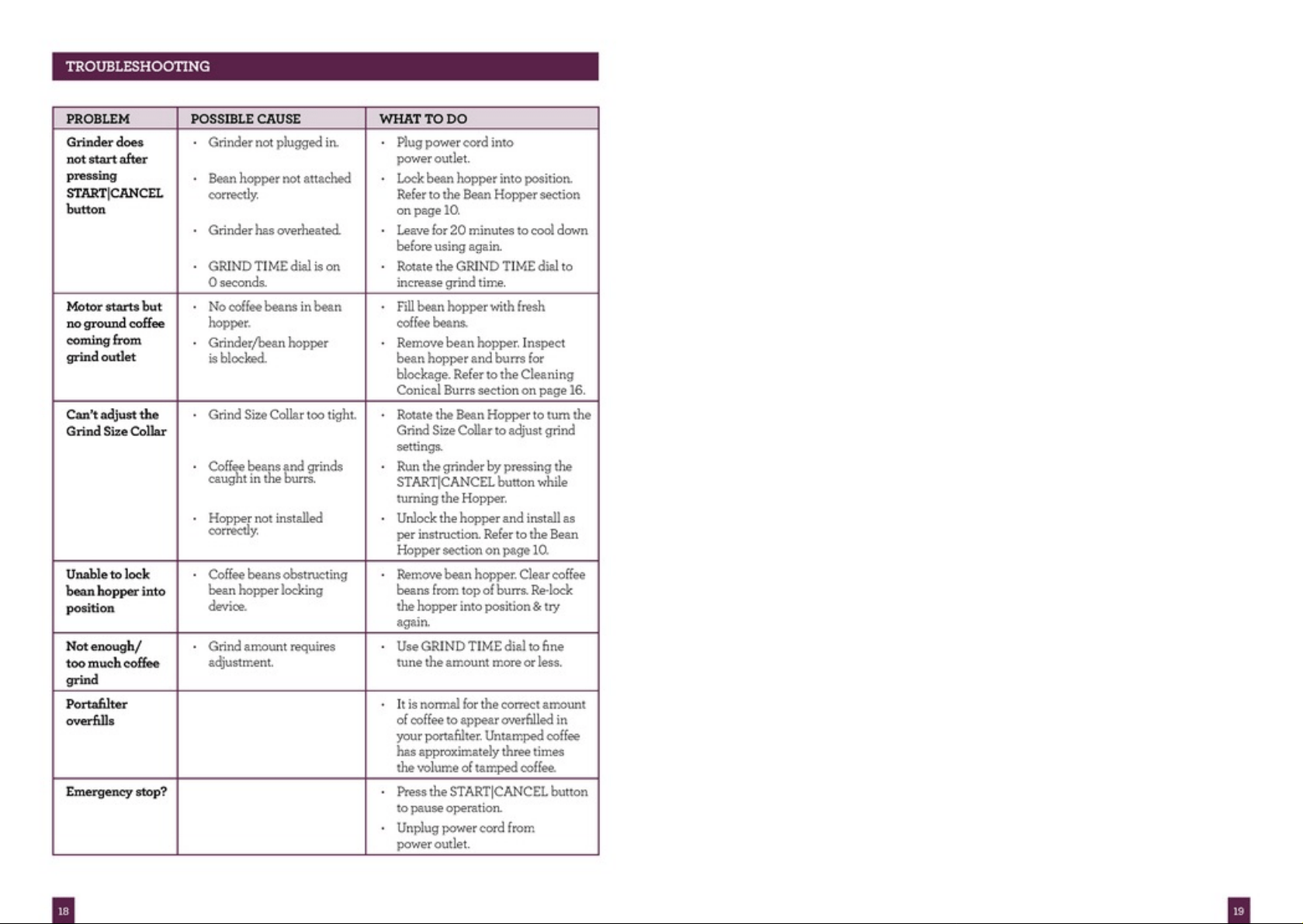
CLEANING CONICAL BURRS
Regular cleaning helps the burrs achieve consistent grinding results which is especially important
when grinding for espresso coffee.
NOTE
Do not use alkaline or abrasive cleaning
agents, steel wool or scouring pads, as
these can damage the surface.
NOTE
Please do not clean any grinder parts or
accessories in the dishwasher.
Hold hopper over container & turn
dial to release beans into container
Align hopper
into position
Run grinder
until empty
Remove hopper
Unlock hopper
1 2 3 4 5
Clean grind
outlet with
brush
Clean lower
burr with
cleaning brush
Clean upper
burr with a
brush
Push upper
burr firmly into
position
Remove upper
burr
6
998877 10
Lock upper burr
11
Align hopper
into position
12
Lock hopper
13
AIR TIGHT
CONTAINER
DRIP
30 35

17
COFFEE MAKING TIPS
MAKING BETTER QUALITY COFFEE
• Freshly ground coffee is the key to making
coffee with more flavour and body.
• Coffee flavour and strength is a personal
preference. Vary the type of coffee beans,
amount of coffee and grind size to achieve
the flavour you prefer.
• Use freshly roasted coffee beans with a
‘roasted on’ date to maximise flavour, not
a use-by or best before date.
• Use coffee beans between 5 and 20 days
after the ‘roasted on’ date for optimal
freshness.
• Store coffee beans in a dark, cool and
dry place. Vacuum seal if possible.
• Buy in small batches to reduce the
storage time.
• Once coffee is ground, it quickly loses its
flavour and aroma. For the best results,
grind beans immediately before brewing.
• Do not store beans in the bean hopper.
Place them back in an airtight container.
• When storing the appliance, run grinder
empty to clear ground beans left in
chamber.
• Run grinder for 2 seconds to purge some
coffee before each use, for maximum
freshness.
• Clean the bean hopper and conical burrs
regularly.
FRENCH PRESS/PLUNGER
Follow these easy steps for a great cup:
1. Using a variable temperature kettle, heat
the appropriate volume of water to 93°C.
This is an ideal temperature for brewing
coffee. Do not use boiling water.
2. Select grind size setting 50.
3. Select the Grind Amount for the number of
cups you are brewing. Refer to Coffee Chart
on page 14.
4. Place the ground coffee in the plunger
vessel.
5. Pour the heated water into the plunger in
a swirling manner to ensure all the ground
coffee is soaked and the plunger vessel is
full. The ‘bloom’ (expanding coffee and
gases) should reach the top of the plunger.
6. Using a timer, wait 4 minutes.
7. Using a spoon, break the ‘crust’ (the bloom
becomes dense and a bit hard).
8. Insert the plunger and carefully press
down.
9. Do not press too hard. Gently release
pressure by pulling up slightly and press
down again if you have pressed too hard.
18
TROUBLESHOOTINGTROUBLESHOOTING
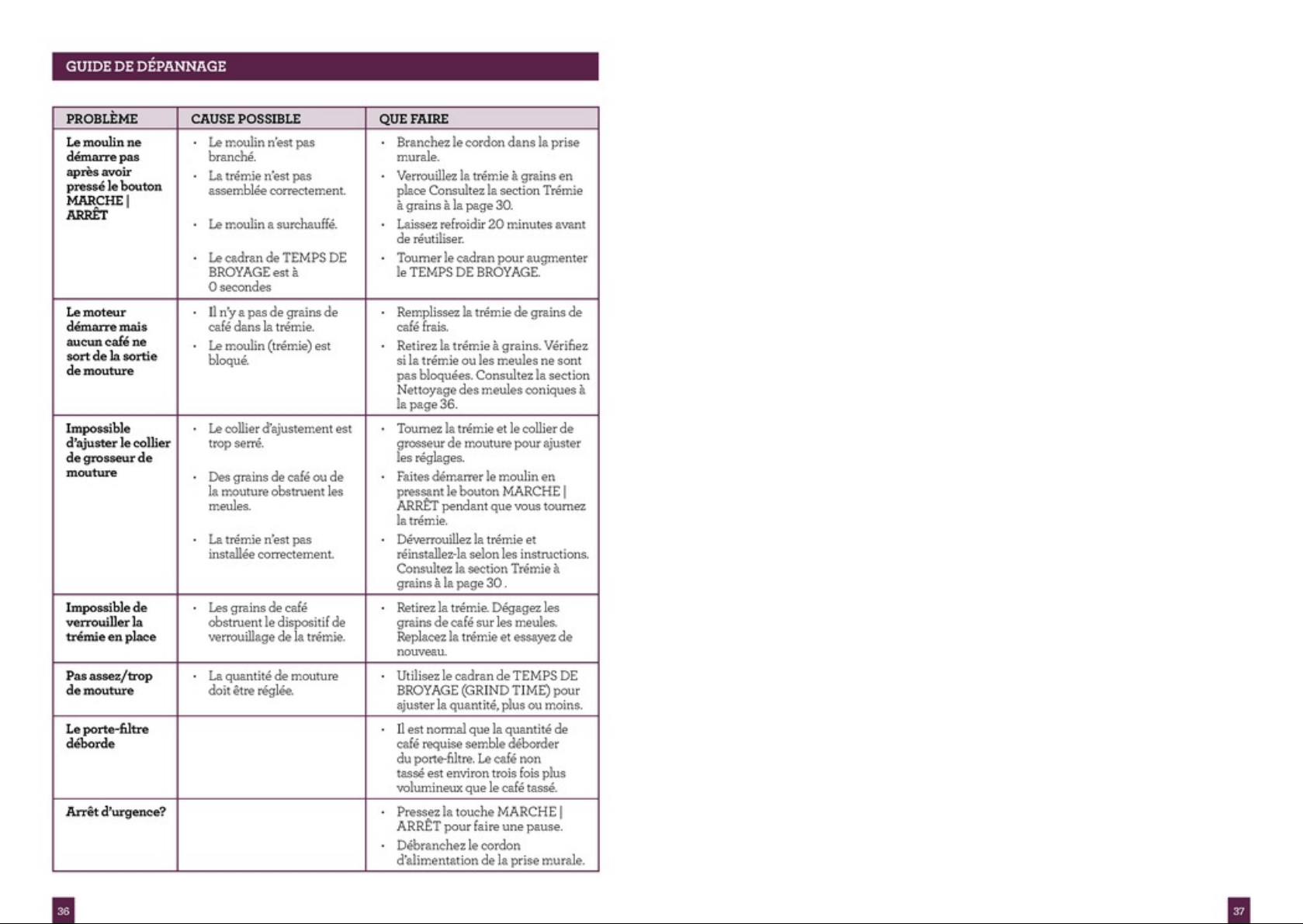
PROBLEM POSSIBLE CAUSE WHAT TO DO
Grinder does
not start after
pressing
START|CANCEL
button
• Grinder not plugged in.
• Bean hopper not attached
correctly.
• Grinder has overheated.
• GRIND TIME dial is on
0 seconds.
• Plug power cord into
power outlet.
• Lock bean hopper into position.
Refer to the Bean Hopper section
on page 10.
• Leave for 20 minutes to cool down
before using again.
• Rotate the GRIND TIME dial to
increase grind time.
Motor starts but
no ground coffee
coming from
grind outlet
• No coffee beans in bean
hopper.
• Grinder/bean hopper
is blocked.
• Fill bean hopper with fresh
coffee beans.
• Remove bean hopper. Inspect
bean hopper and burrs for
blockage. Refer to the Cleaning
Conical Burrs section on page 16.
Can’t adjust the
Grind Size Collar
• Grind Size Collar too tight.
• Coffee beans and grinds
caught in the burrs
• Hopper not installed
correctly.
• Rotate the Bean Hopper to turn the
Grind Size Collar to adjust grind
settings.
• Run the grinder by pressing the
START|CANCEL button while
turning the Hopper.
• Unlock the hopper and install as
per instruction. Refer to the Bean
Hopper section on page 10.
Unable to lock
bean hopper into
position
• Coffee beans obstructing
bean hopper locking
device.
• Remove bean hopper. Clear coffee
beans from top of burrs. Re-lock
the hopper into position & try
again.
Not enough/
too much coffee
grind
• Grind amount requires
adjustment.
• Use GRIND TIME dial to fine
tune the amount more or less.
Portafilter
overfills
• It is normal for the correct amount
of coffee to appear overfilled in
your portafilter. Untamped coffee
has approximately three times
the volume of tamped coffee.
Emergency stop? • Press the START|CANCEL button
to pause operation.
• Unplug power cord from
power outlet.
19
NOTES

Breville is a registered trademark of Breville Pty. Ltd. A.B.N. 98 000 092 928.
Copyright Breville Pty. Ltd. 2014.
Due to continued product improvement, the products illustrated/photographed
in this brochure may vary slightly from the actual product.
BCG600 ANZ D14
Australian Customers
Mail: PO Box 22
Botany NSW 2019
AUSTRALIA
Phone: 1300 139 798
Fax: (02) 9384 9601
Email:
Customer Service:
askus@breville.com.au
New Zealand Customers
Mail: Private Bag 94411
Botany Manukau 2163
Auckland NEW ZEALAND
Phone:
0800 273 845
Fax: 0800 288 513
Email:
Customer Service:
askus@breville.co.nz
Breville Customer Service Centre
www.breville.com.au
www.breville.co.nz