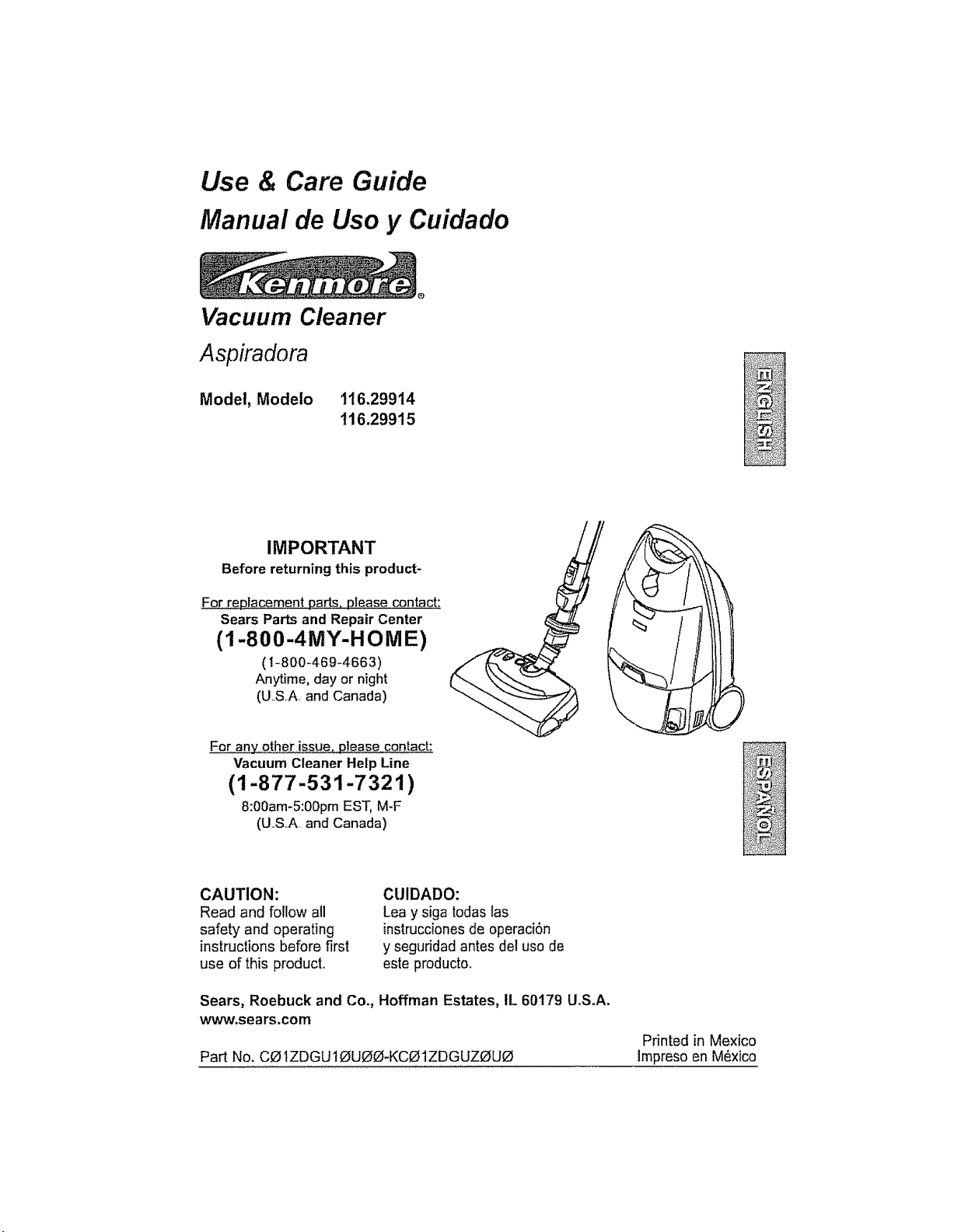
Use & Care Guide
Manual de Uso y Cuidado
Vacuum Cleaner
Aspiradora
Model, Modelo
t16.29914
116.29915
IMPORTANT
Before returning this product-
For..replacementparts,please contact:
Sears Partsand Repair Center
(1-800-4MY-HOME)
(1-800-469_4663)
Anytime, day or night
(USA. and Canada)
For anyother issue,please contact:
Vacuum Cleaner Help Line
(1-877-531-7321)
8:00am-5:00pmEST,M-F
(U.SA and Canada)
CAUTION:
Read and follow all
safety and operating
instructionsbefore first
use of this product,.
CtJlDADO:
Lea y siga todaslas
instrucciones de operaci6n
y seguddad antes del uso de
este producto_
Sears, Roebuck and Co., Hoffman Estates, tL 60179 U.S.A.
www,sears.corn
Part No. COtZDGU10UOO-KC01ZDGUZOUO
Printed in Mexico
Impreso en M6xico
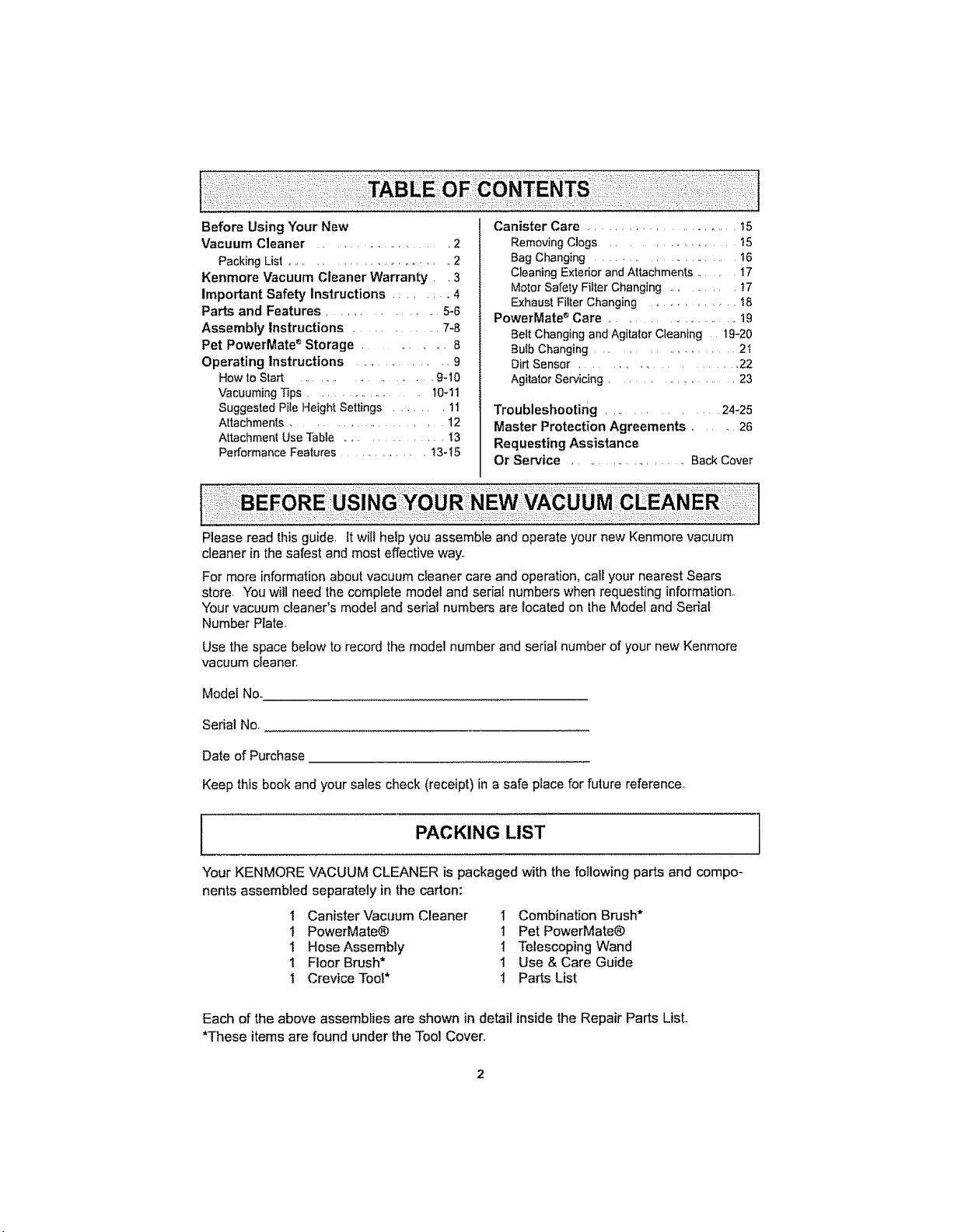
Before Using Your New
Vacuum Cleaner ................... 2
Packing List ............................ 2
Kenmore Vacuum Cleaner Warranty. ,3
Important Safety Instructions ....... 4
Parts and Features .................. 5-6
Assembly Instructions .............. 7-8
Pet PowerMate _ Storage .............. 8
Operating Instructions ................. 9
How to Start ....................... 9-10
Vacuuming Tips .................... 10-1t
Suggested Pile Height Settings ........ I1
Attachments ....................... 12
Attachment Use Table ................ t3
Performance Features ............. t3-15
Canister Care ........................ 15
Removing Clogs .................. t5
Bag Changing ........................ t6
Cleaning Extedor and Attachments ....... I7
Motor Safety Filler Changing .......... t7
Exhaust Filter Changing ............. !8
PowerMate _ Care ....................... t9
Belt Changing and Agitator Cleaning 19-20
Bulb Changing ........................ 2I
Dirt Sensor .......................... 22
Agitator Servicing ..................... 23
Troubleshooting ............. 24-25
Master Protection Agreements ....... 26
Requesting Assistance
Or Service ..................... Back Cover
Please read this guide, It will help you assemble and operate your new Kenmore vacuum
cleaner in the safest and most effective way.
For more information about vacuum cleaner care and operation, call your nearest Sears
store. You will need the complete model and serial numbers when requesting information,
"four vacuum cleaner's model and serial numbers are located on the Model and Serial
Number Plate,
Use the space below to record the model number and serial number of your new Kenmore
vacuum cleaner,
Model No,,
Serial No,
Date of Purchase
Keep this book and your sales check (receipt) in a safe place for future reference,,
PACKING LIST ]
Your KENMORE VACUUM CLEANER is packaged with the following parts and compo-
nents assembled separately in the carton:
1 Canister Vacuum Cleaner I Combination Brush*
i PowerMate® 1 Pet PowerMate®
1 Hose Assembly 1 Telescoping Wand
1 Floor Brush* 1 Use & Care Guide
I Crevice Toot* 1 Parts List
Each of the above assemblies are shown in detail inside the Repair Parts List,
*These items are found under the Tool Cover,,
OneYearLimitedWarranty
Whenassembled,operatedandmaintainedaccordingtoallinstructionssuppliedwith
theproduct,ifthisvacuumcleanerfailsduetoadefectinmaterialorworkmanshipwithin
oneyearfromthedateofpurchase,returnittoanySearsstore,SearsParts&Repair
CenterorotherKenmoreoutletforfreerepair._
Ifthisvacuumcleanerisusedforotherthanprivatefamilypurposes,thiswarranty
appliesforonly90daysfromthedateofpurchase°
This warranty covers only defects in material and workmanship, Sears will NOT
pay for:
1=,Expendable items that can wear out from normal use, including but not limited to
filters, bells, light bulbs, and bags..
2. A service technician to instruct the user in correct product assembly, operation or
maintenanca..
3.. A service technician to clean or maintain this product..
4o Damage to or failure of this product if it is not assembled, operated or maintained
according to all ins_Jctions supplied with the product..
5_ Damage to or failure of this product resulting from accident, abuse, misuse or use for
other than its intended purpose..
6, Damage to or failure of this product caused by the use of detergents, cleaners,
chemicals or utensils other than those recommended in all instructions supplied with
the product.
7. Damage to or failure of parts or systems resulting from unauthorized modifications
made to this producL
Disclaimer of implied warranties; limitation of remedies
Customer's sole and exclusive remedy under this limited warranty shall be product repair
as provided herein.. Implied warranties, including warranties of merchantability or fitness
for a particular purpose, are limited to one year or the shortest period allowed by law.
Sears shall not be liable for incidental or consequential damages._ Some states and
provinces do not allow the exclusion or limitation of incidental or consequential damages,
or limitations on the duration of implied warranties of merchantability or fitness, so these
exclusions or limitations may not apply to you
This warranty applies only while this vacuum cleaner is used in the United States and
Canada_
This warranty gives you specific legal dghts, and you may also have other rights which
vary from state to state.,
Sears, Roebuck and Coo, Hoffman Estates, IL 60179
Sears Canada Inc.., Toronto. Ontario, Canada M5B 2B8

Read all instructions in this manual before assembling or ustng your vacuum cleaner_
WARNmNG
Your safety is important to us_,To reduce the risk of fire, electrical shock,
injur_y to persons or damage when usin_q your vacuum cleaner, follow {oasic
satety precautions including the following:
Use your vacuum cleaner only as
descdbed in this manual.. Use only with
Sears recommended attachments..
Disconnect electrical supply before
servicing or cleaning out brush area.
Failure to do so could result in electrical
shock or brush suddenly starting..
Do not leave vacuum cleaner when
plugged in.. Unplug from outlet when not in
use and before servicing.
To reduce the dsk of electrical shock - Do
not use outdoors or on wet surfaces
Do not allow to be used as a toy. Close
attention is necessary when used by or
near children.
Do not use with damaged cord or plug. if
vacuum cleaner is not working as it should,
has been dropped, damaged, left outdoors,
or dropped into water, return it to a Sears
Service Center.
Do not pull or carry by cord, use cord as a
handle, close door on cord, or putt cord
around sharp edges or comers Do not run
vacuum cleaner over cord.. Keep cord away
from heated surfaces.
Do not unplug by pulling on cord To
unplug, grasp the plug, not the cord
Do not handle plug orvacuum cleaner with
wet hands
Do not put any objects into openings..
Do not use with any opening blocked; keep
free of dust, tint, hair and anything that may
reduce airf ow..
Keep hair, loose clothing, t_ngers, and all
parts of body away from openings and
moving parts
Turn off all controls before unplugging.
Use extra care when cleaning on stairs.. Do
not put on chairs, tables, etc. Keep on
floor.
Do not use vacuum cleaner to pick up
flammable or combustible liquids (gasoline,
cleaning fluids, perfumes, etc), or use in
areas where they may be present. The
fumes from these substances can create a
fire hazard or explosion
Do not pick up anything that is buming or
smoking, such as cigarettes, matches, or
hot ashes..
Do not use vacuum cleaner without dust
bag andlor filters in place
Always change the dust bag after
vacuuming carpet cleaners or freshener,
powders and fine dust. These products clog
the bag, reduce airflow and can cause the
bag to burst.. Failure to change bag could
cause permanent damage to the vacuum
cleaner_
Do not use the vacuum cleaner to pick up
sharp hard objects, small toys, pins, paper
clips, etc They may damage the vacuum
cleaner or dust bag
Do not operate vacuum cleaner without the
exhaust filter or exhaust filter door in place
(If applicable)_
The hose contains electrical wires Do not
use when damaged, cut, or punctured..
Replace if cut or worn Do not pick up
sharp objects..
Always turn off and unplug the vacuum
cleaner before connecting or disconnecting
either hose, Handi-Mate Jr..® (if applicable),
or nozzle
Hold plug when rewinding onto cord reel.
Do not allow plug to whip when rewinding.
You are responsible for making sure that
your vacuum cleaner is not used by anyone
unable to operate it properly
SAVE THESE iNSTRUCTiONS
Proper assembly and safe use of your vacuum cleaner are your responsibilities.,
"Yourvacuum cleaner is intended for Household use, Read t,51s Use & Care Guide
carefully for important use and safety information. This guide contains safety
statements under warning and caution symbols.
4
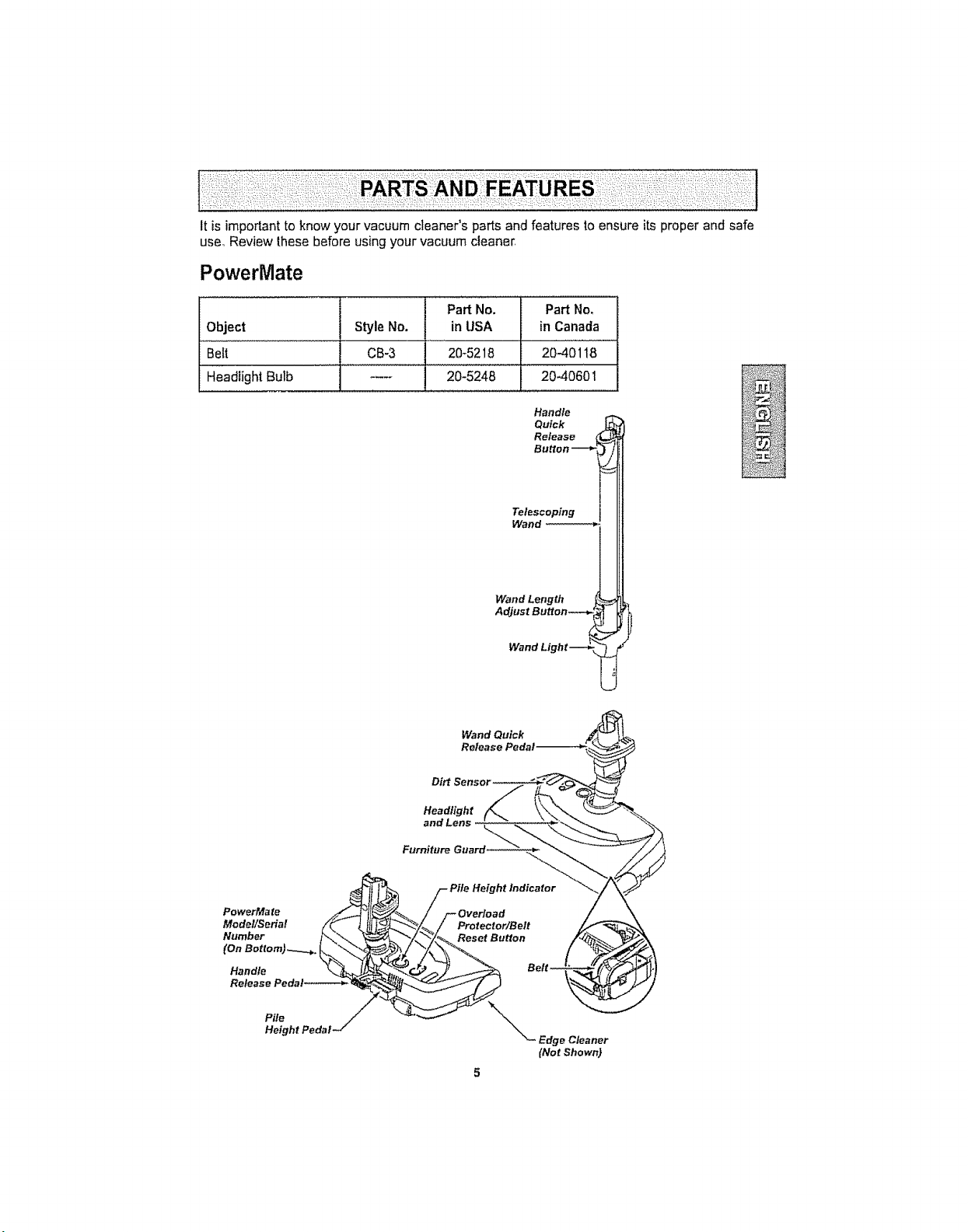
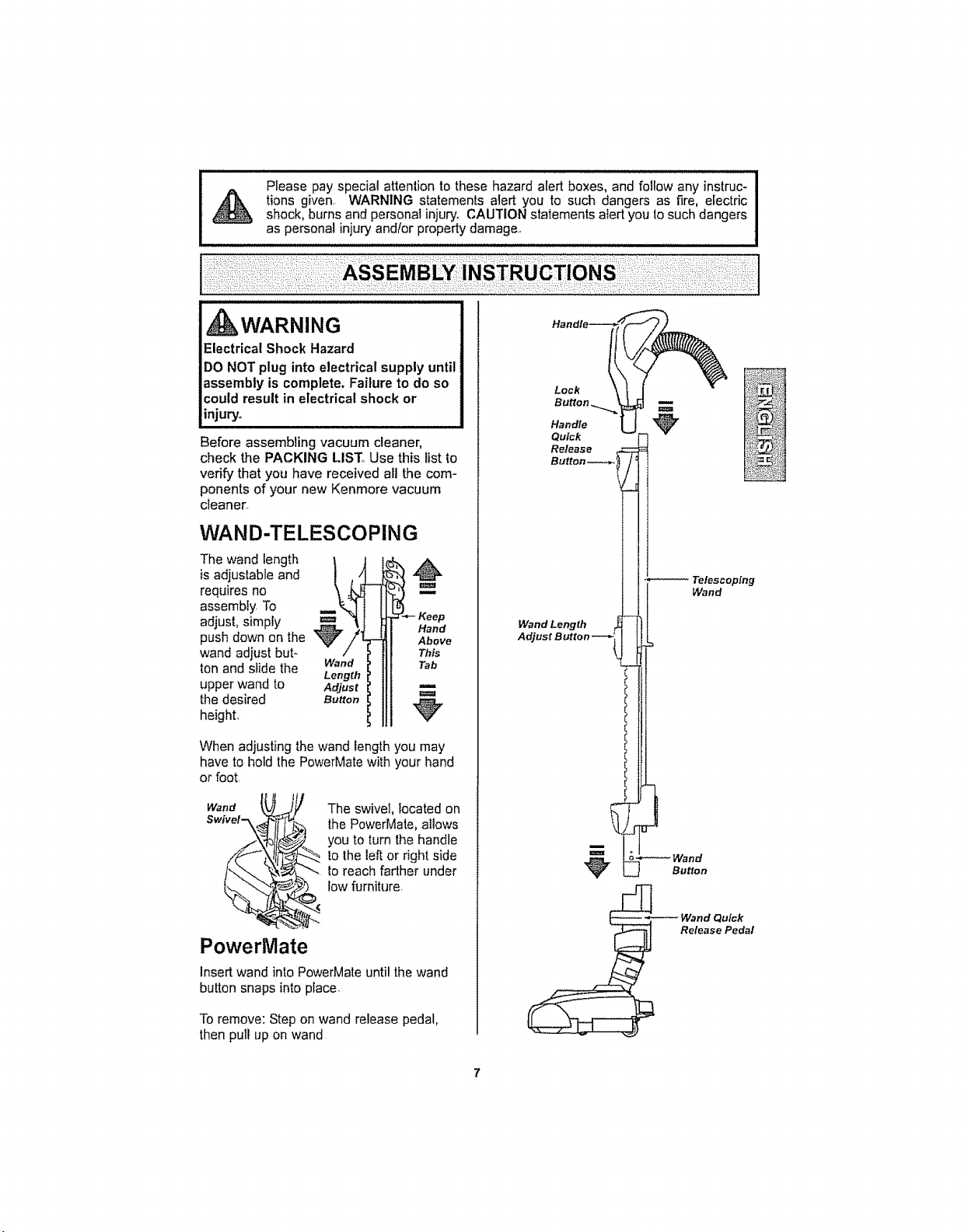
Itisimportant to know your vacuum cleaner's parts and features to ensure its proper and safe
use_Review these before using your vacuum cleaner,
PowerMate
Part No. Part No.
Object Style No. in USA in Canada
Belt CB-3 20_5218 2040118
Headlight Bulb .... 20-5248 20.40601
Handle
Quick
Release
Button
Telescoping
Wand
Wand Length
Adjust Button..--,. 1
Wand Light---_ _
Wand Quick
Release
Headlight
and Lens
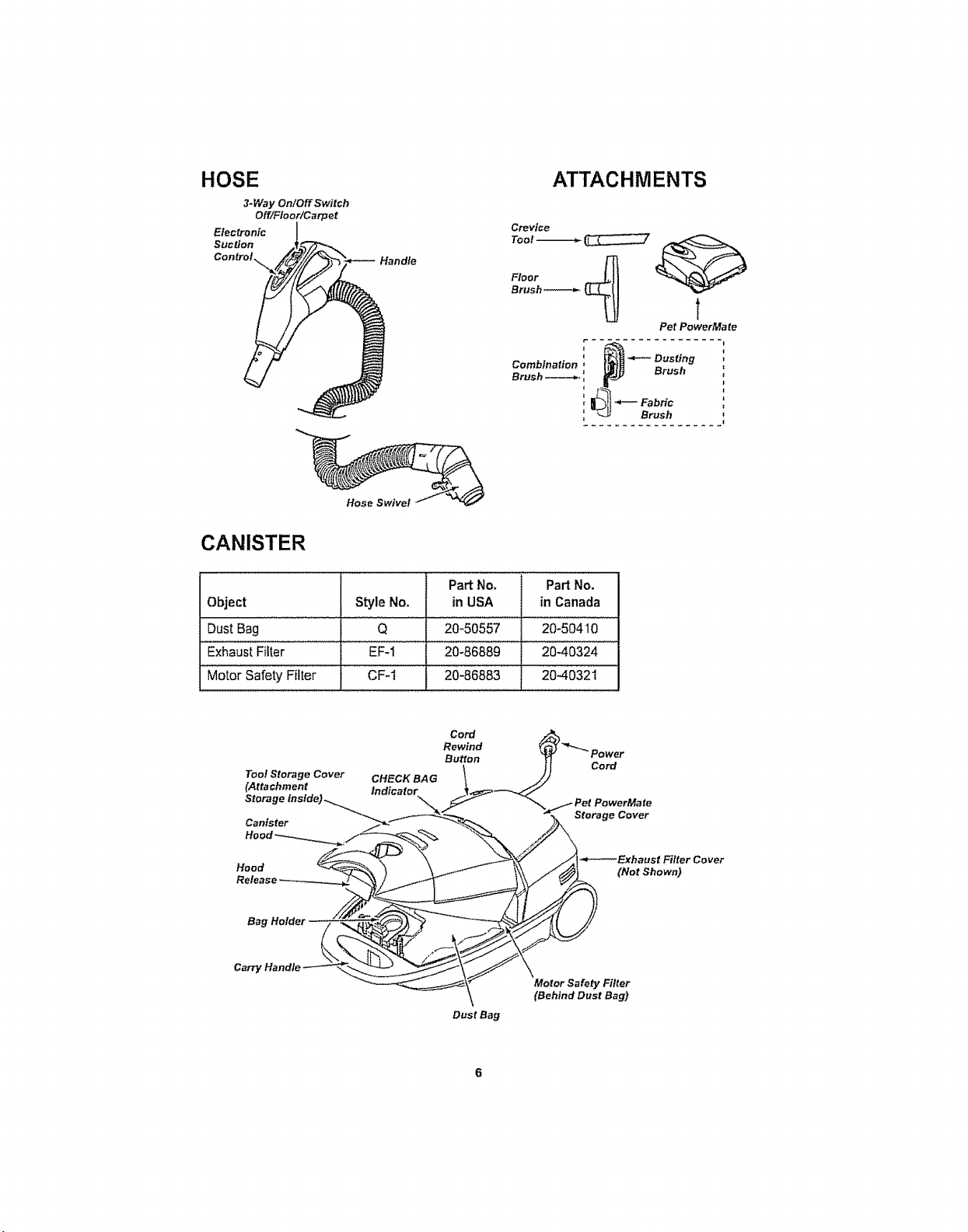
HOSE
3-Way On/Off Switch
Off/Floor/Carpet
Electronic
Suction
Control
Handle
ATTACHMENTS
Crevice
Tool -_ _
Floor
Brush _ _
t
Pet PowerMate
Hose SwiveJ
CANISTER
Part No, Part No.
Object Style No. in USA in Canada
Dust Bag Q 20,,50557 ..... 20:50410
Exhaust Filter EF-1 20-86889 2040324
Motor Safety Filter CF-1 20:86883 2040321
Tool Storage Cover CHECK BAG
(Attachment Indicator
Stora
Canister
Cord
Rewind
Button
Cord
Storage Cover
Hood
_--_ExhaustFilter Cover
(NotShown)
Carr_
Dust Bag
\
Motor Safety Filter
(Behind Dust Bag)
I,II,,U,U,I,,H,U,HI,,U,UUlU,II,Ul,i UUl% ,IllUl
Please pay special attention to these hazard alert boxes, and follow any instruc-
tions given. WARNING statements atert you to such dangers as fire, electric
shock, burns and personal injury. CAUTION statements alert you to such dangers
as personal injury and/or property damage.
WARNING
Electrical Shock Hazard
DO NOT plug into electrical supply until
assembly is complete. Failure to do so
could result in electrical shock or
injury.
Before assembling vacuum cleaner,
check the PACKING LIST_.Use this list to
verify that you have received all the com-
ponents of your new Kenmore vacuum
cleanest.
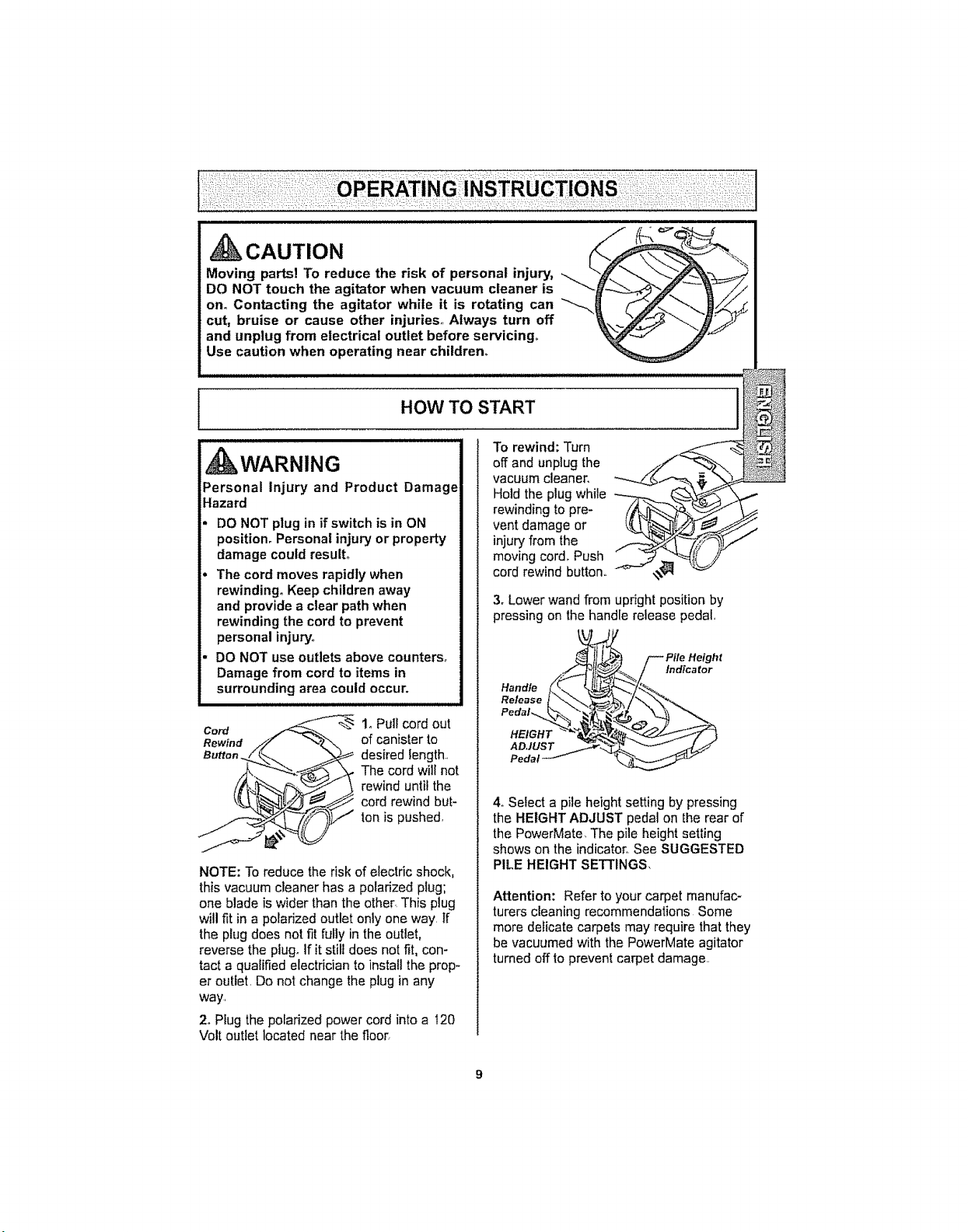
WAN D-TELESCOPING
The wand length I J
is adjustable and ,)
#
requires no
assembly, To
adjust, simply
push down on the
wand adjust but-
ton and slide the Wand
Length
upper wand to Adjust
the desired Burro.
height,
- Keep
Hand
Above
When adjusting the wand length you may
have to hold the PowerMate with your hand
or foot.
Wand
Swivel_..\_
tl
_' The swivel, located on
the PowerMate, allows
L to turn the handle
you
to the left or right side
_-- lo reach farther under
low furniture
PowerMate
Insert wand into PowerMate until the wand
button snaps into place.
Toremove: Step on wand release pedal,
then pull up on wand
Handfe_
Handle
Quick
Release
Button.----_
Wand Length
Adjust Button
B
m
Button

CANISTER
I,, Open the canister hood.
2, Check to see that the dust bag is properly
installed See BAG CHANGING for
instructions
3, Check to see that the motor safety filter is
properly installed, See MOTOR SAFETY
FILTER CHANGING for instructions,
HOOD AND TOOL
STORAGE COVER
It is normal for the canister hood and tool
storage cover to come off when opened
further than needed, Line up the hinge slots,
insert the hinges into the slots, and close the
hood and tool storage cover to reinstall
ii ill i i
kCAUTION
Never open canister hood with the tool
storage cover open, This will help to
prevent damage from occurring to the
canister hood and/or tool storage cover°
HOSE
1. Line up the hose
latch tab and notch
in canister hood
and insert hose
into canister until it
snaps into place
,.,o,. )J
To remove: Do not open hood before
removing hose, With hood closed, depress
hose latch tab and pull upward on hose,
2. Insert handle
into wand until
lock button
snaps in place,
Be sure hose is
not twisted
To remove:
Press handle
quick release
button and pull
up on handle,
To store: Disconnect hose from wand and
canister to prevent stress on hose during
storage. Store hose in a loosely coiled
position so the hose covering is not stressed°
This canister is equipped with an on-board
storage area for a Pet PowerMate
attachment.,
To Install:
Open the Pet PowerMate storage cover
Insert the Pet PowerMate, press down into
place, and close the lid securely,
To Remove:
Open the storage cover, Remove Pet
PowerMate from the storage area and use
as needed (see ATTACHMENTS and
ATTACHMENT USE TABLE)_
Pet PowerMate
Storage Cover._.
i
CAUTION
Moving parts] To reduce the risk of personal injury, _F_...____2_i_
DO NOT touch the agitator when vacuum cleaner is _'_,
on. Contacting the agitator while it is rotating can __/_/_
cut, bruise or cause other injuries., Always turn off
and unplug from electrical outlet before servicing,,
Use caution when operating near children.
HOW TO START
i illl i illl
kWARNING
Personal Injury and Product Damage
Hazard
DO NOT plug in if switch is in ON
position, Personal injury or property
damage could result°
The cord moves rapidly when
rewinding. Keep children away
and provide a clear path when
rewinding the cord to prevent
personal injury,_
DO NOT use outlets above counters°
Damage from cord to items in
surrounding area could occur.
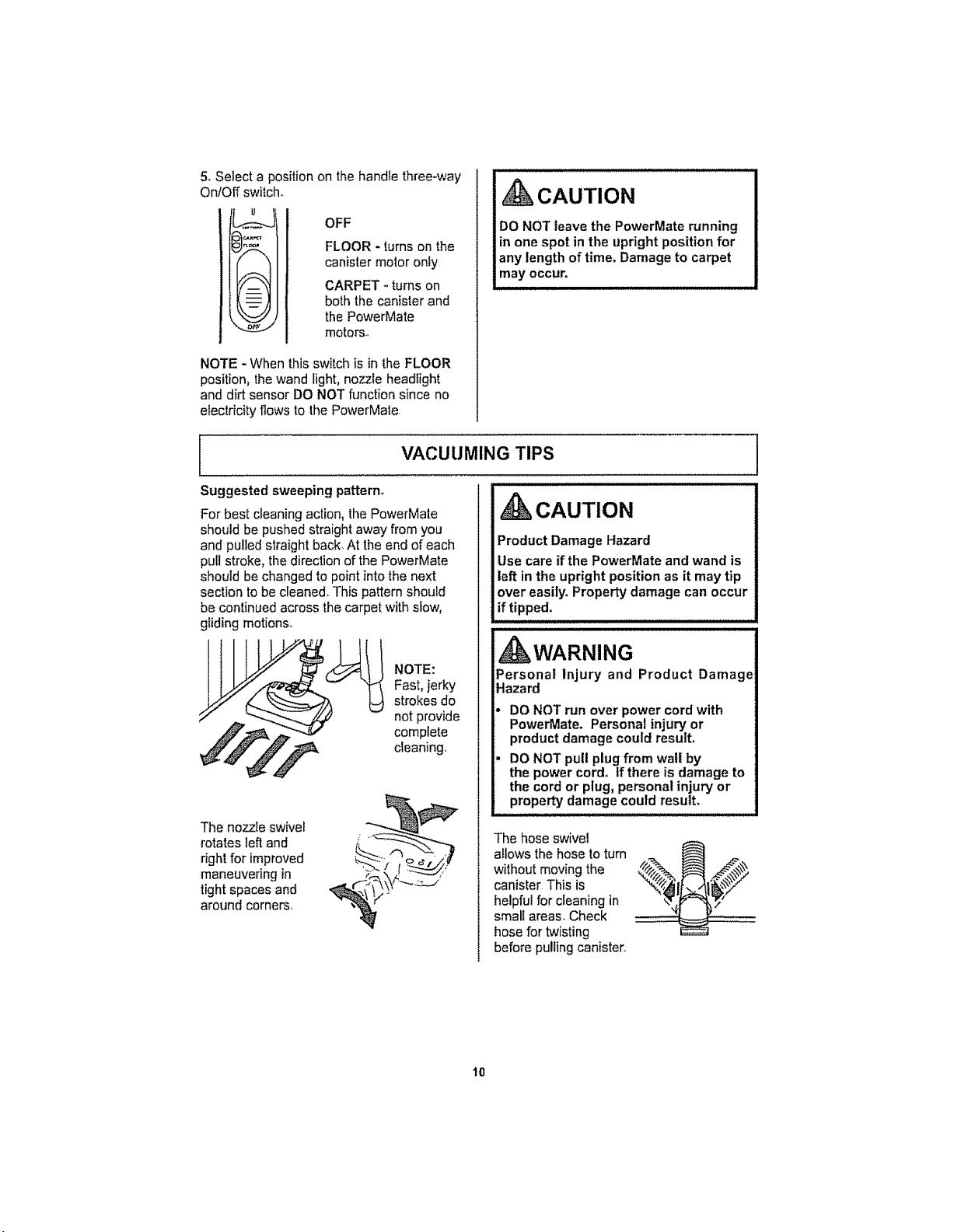
Cord
Rewind
Button.
1. Pull cord out
of canister to
desired length.,
The cord will not
rewind until the
cord rewind but-
tonis pushed,
NOTE: To reduce the risk of electric shock,
this vacuum cleaner has a polarized plug;
one blade is wider than the other. This plug
willfit in a potadzed outlet only one way, tf
the plug does not fit fully in the outlet,
reverse the piugoIf it still does not fit, con-
tact a qualified electrician to install the prop-
er outtet, Do not change the plug in any
way,
2. Plug the polarized power cord into a 120
Volt outlet located near the floor,
To rewind: Turn
off and unplug the
vacuum cleaner.
Hold the plug while
rewinding to pre-
vent damage or
injury'from the
moving cord, Push
cord rewind button,,
3oLower wand from upright position by
pressing on the handle release pedal,
rift/ j_
t_ I f_ Pile Height
Release L_
Pedal
4,,Select a pile height setting by pressing
the HEIGHT ADJUST pedal on the rear of
the PowerMate, The pile height setting
shows on the indicator,, See SUGGESTED
PILE HEIGHT SETTINGS,
Attention: Refer to your carpet manufac-
turers cleaning recommendations Some
more delicate carpets may require that they
be vacuumed with the PowerMate agitator
turned off 1oprevent carpet damage,
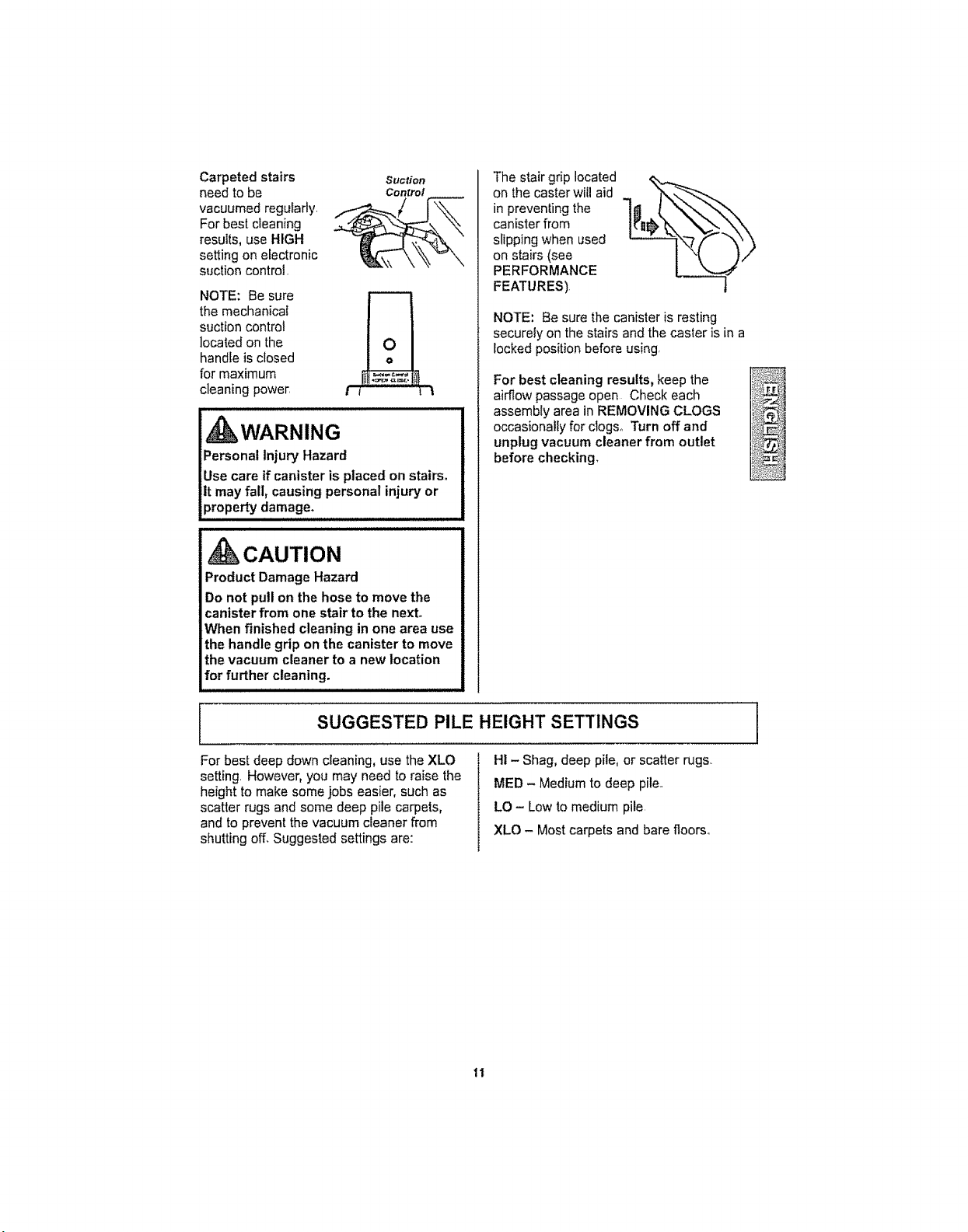
5oSelectapositiononthehandlethree-way
On/Offswitch.
IJ
OFF
FLOOR - turns on the
canister motor only
CARPET - turns on
both the canister and
the PowerMate
motors°
NOTE - When this switch is in the FLOOR
position, the wand light, nozzle headlight
and dirt sensor DO NOT function since no
electricity flows to the PowerMale.
CAUTION
DO NOT leave the PowerMate running
in one spot in the upright position for
any length of time. Damage to carpet
may occur.
VACUUMING TIPS
Suggested sweeping pattern.
For best cleaning action, the PowerMate
should be pushed straight away from you
and pulled straight back. At the end of each
pull stroke, the direction of the PowerMate
should be changed to point into the next
section to be cleaned.. This pattern should
be continued across the carpet with stow,
gliding motions,,
NOTE:
Fast, jerky
strokes do
not provide
complete
cleaning,,
The nozzle swivel
rotates left and
right for improved
maneuvering in
tight spaces and
around corners,
kCAUTION
Product Damage Hazard
Use care if the PowerMate and wand is
left in the upright position as it may tip
over easily. Property damage can occur
if tipped.
, kWARNING
Personal injury and Product Damage
Hazard
DO NOT run over power cord with
PowerMate. Personal injury or
product damage could result,
DO NOT pull plug from wall by
the power cord. If there is damage to
the cord or plug, personal injury or
property damage could result,
The hose swivel
allows the hose to turn
without moving the •
canister This is _,_1_/_,_
helpful for cleaning in
small areas. Check ,f_r "_,"
hose for twisting
before pulling canister,
10
Carpeted stairs suction
need to be Control
vacuumed regularly. _
For best cleaning
results, use HIGH
setting on electronic
suction control.
NOTE: Be sure r----7
the mechanical
suction control
located on the
handle is closed
for maximum
cleaning powe_ I 1 _
, WARNING
Personal Injury Hazard
Use care if canister is placed on stairs°
It may fall, causing personal injury or
property damage.
CAUTION
Product Damage Hazard
Do not pull on the hose to move the
canister from one stair to the next.
When finished cleaning in one area use
the handle grip on the canister to move
the vacuum cleaner to a new location
for further cleaning.
The stair grip located
on the caster will aid
in preventing the
canister from
slipping when used
on stairs (see
PERFORMANCE
FEATURES).
%
NOTE'. Be sure the canister is resting
securely on the stairs and the caster is in a
locked position before using,
For best cleaning results, keep the
airflow passage open Check each
assembly area in REMOVING CLOGS
occasionally for clogs_ Turn off and
unplug vacuum cleaner from outlet
before checking.
SUGGESTED PILE HEIGHT SETTINGS
For best deep down cleaning, use the XLO
setting, However, you may need to raise the
height to make some jobs easier, such as
scatter rugs and some deep pile carpets,
and to prevent the vacuum cleaner from
shutting off, Suggested settings are:
HI - Shag, deep pile, or scatter rugs,.
MED - Medium to deep pile,,
LO - Low to medium pile,
XLO - Most carpets and bare floors,,
ti
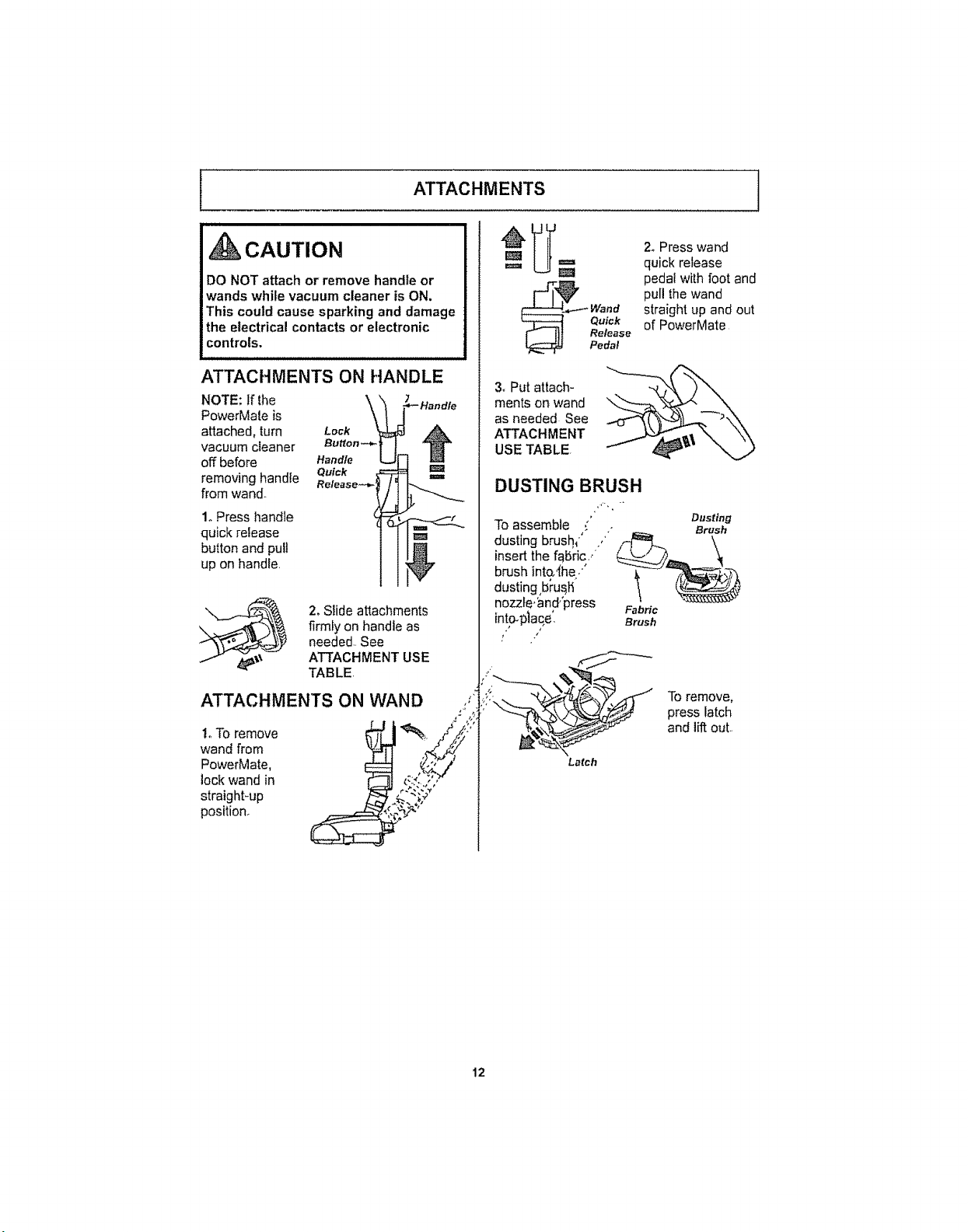
NOTE: If the
PowerMate is
attached, turn
vacuum cleaner
off before
removing handle
from wand..
i
i i
_CAUTION
DO NOT attach or remove handle or
wands while vacuum cleaner is ON.
This could cause sparking and damage
the electrical contacts or electronic
controls.
ATTACHMENTS ON HANDLE
_ _- Handle
Button -_,
Handle
Quick rm=
Release_,-
1. Press handle
quick release
button and pull 1_
up on handle,
2, Slide attachments
firmly on handle as
needed. See
ATTACHMENT USE
TABLE.
ATTACHMENTS ON WAND ,,_
i_ To remove : _ "_../_}"_
wand from , i ,_, ,i,¢-,Y
PowerMate, :_ _.1_/"
lock wand in i _- _-_ ,"_
straight-up )_ _ ";.,'
position. _._ _"'
ATTACHMENTS I
_,-_ Wand
Quick
l]l Release
Pedal
3_Put attach-
ments on wand
as needed See
ATTACHMENT
USE TABLE.
DUSTING BRUSH
2oPress wand
quick release
pedaI with foot and
pull the wand
straight up and out
of PowerMate
" Dusting
To assemble ,' . Brush
insert the fabric..
brush inta'_he/ t _
dusting,bi'us,h'
nozzfe,_3nd,'press Fabric
into@lace', Brush
Toremove,
press latch
and lift out..
Latch
12
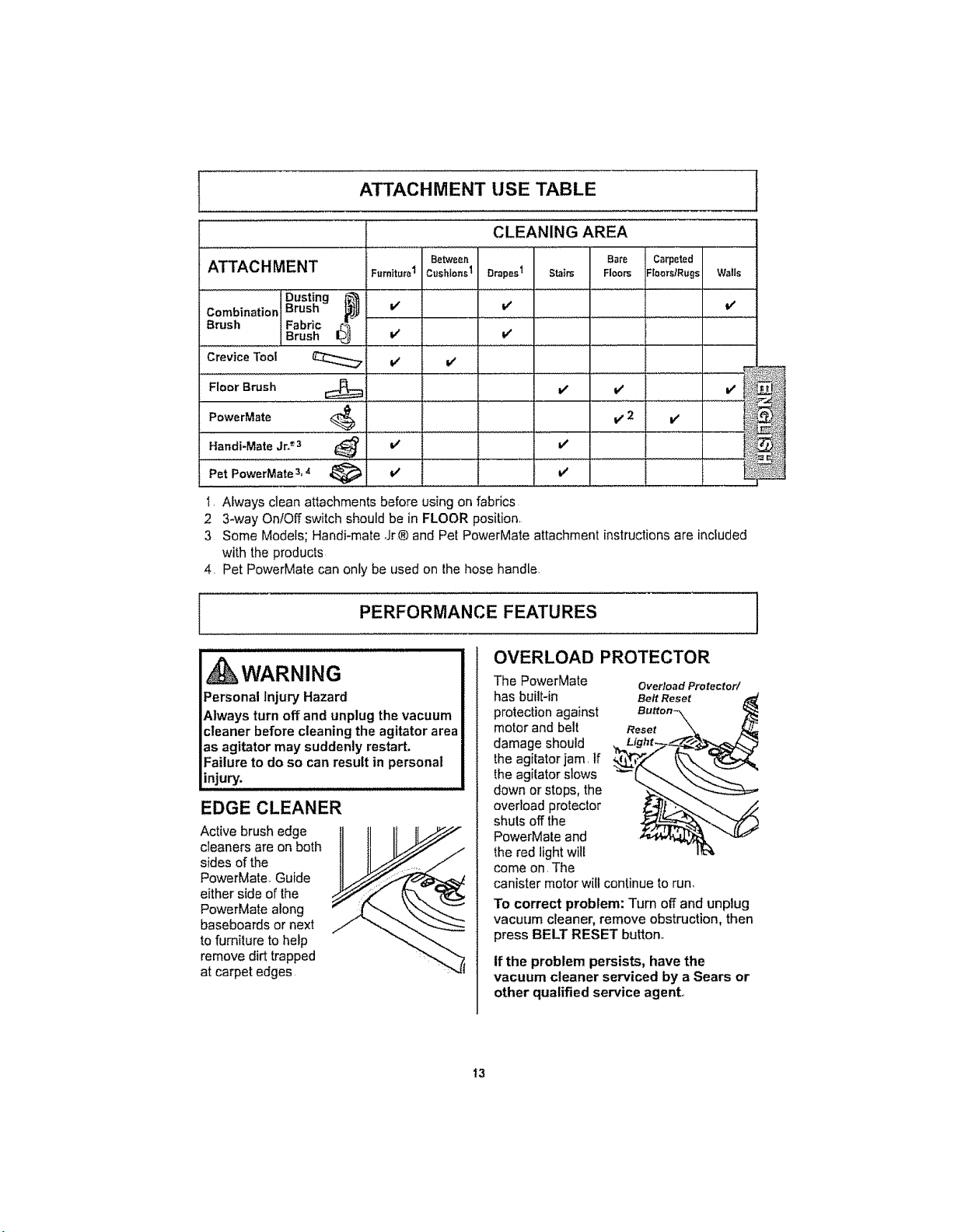
ATTACHMENT USE TABLE
CLEANING AREA
Between Bare Carpeted
ATTACHMENT Furniture1 Cushions1 DrapesI Stairs Floors :[0ors/Rugs W_lls
Dust!ng _'_
Combination t_rusn v' V' V'
Brush Fabric
Brush V V
Crevice Tool V V
I
FiOOrBrush i
PowerMate' "'','_,.1, ............................. i .
Handi-MateJr._:_ V'
Pet PowerMate3,4 _ V v'
1, Always clean attachments before using on fabrics
2 3-way OnlOff switch should be in FLOOR position,
3 Some Models; Handi-mate Jr® and Pet PowerMate attachment instructions are included
with the products
4. Pet PowerMate can only be used on the hose handle
PERFORMANCE FEATURES
OVERLOAD PROTECTOR
kWARNING
Personal Injury Hazard
Always turn off and unplug the vacuum
cleaner before cleaning the agitator area
as agitator may suddenly restart,
Failure to do so can result in personal
injury.
EDGE CLEANER
Active brush edge
cleaners are on both
sides of the
PowerMate. Guide
either side of the
PowerMate along
baseboards or next
to furniture to help
remove dirt trapped
at carpet edges
The PowerMate
has built-in
protection against
motor and belt Reset
damage should
the agitator jam. If
the agitator slows
down or stops, the
overload protector
shuts off the
PowerMate and
the red light will
come on. The
canister motor will continue to run,
Overload Protector/
Belt Reset
To correct problem: Turn off and unplug
vacuum cleaner, remove obstruction, then
press BELT RESET button..
If the problem persists, have the
vacuum cleaner serviced by a Sears or
other qualified service agent..
13
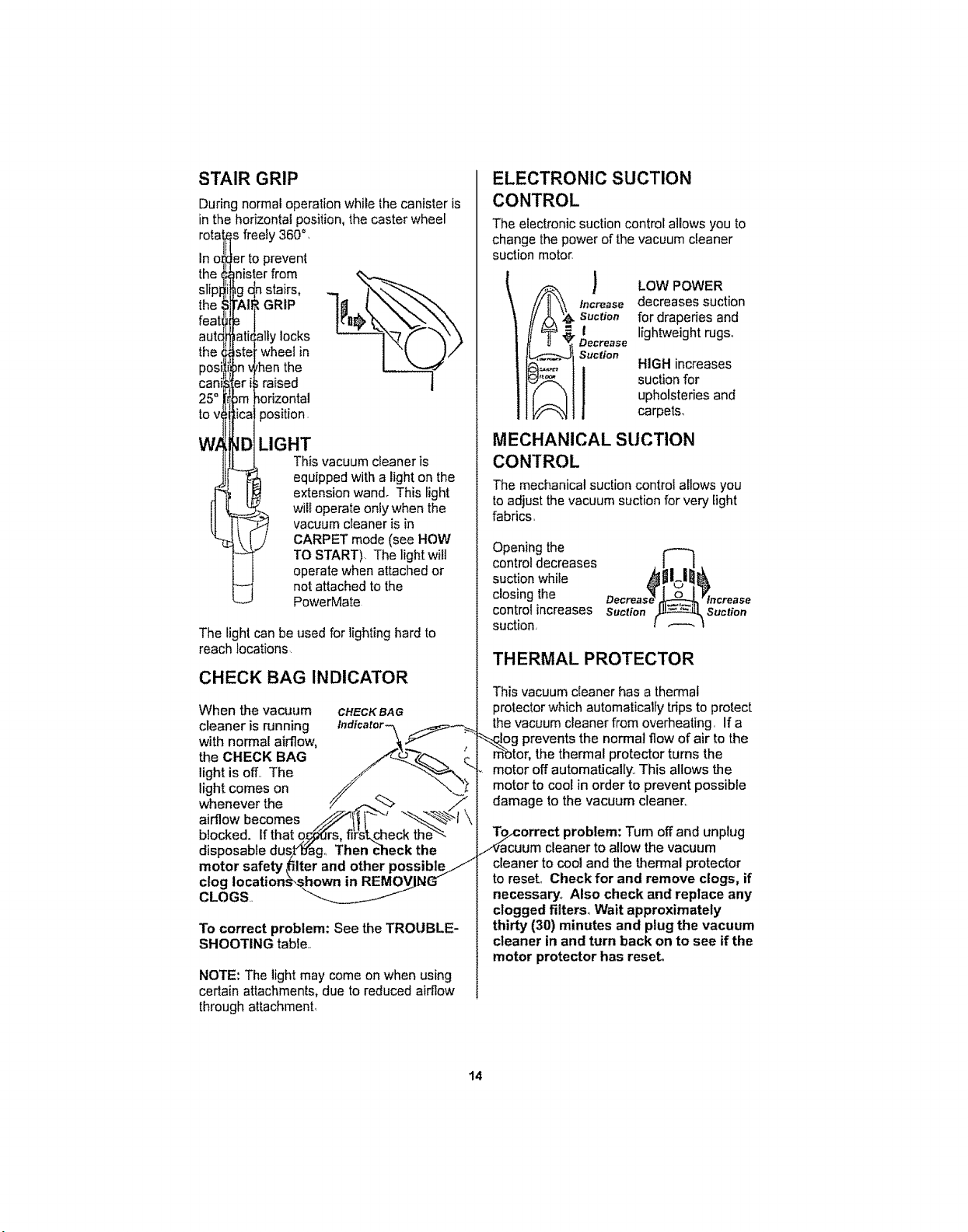
STAIR GRIP
During normal operation while the canister is
in the horizontal position, the caster wheel
freely 360°,
In o r to prevent
the nister from
1stairs,
_GRIPthe
feat
the
posi
can
25=
to V,
Wl
ally locks
wheel in
,henthe
raised
_odzontal
_osition.
LIGHT
Thisvacuum cfeaneris
equipped with a light on the
extension wand. This light
wil! operate only when the
vacuum cleaner is in
CARPET mode (see HOW
TO START). The light will
operate when attached or
not attached to the
PowerMate
The light can be used for lighting hard to
reach locations
CHECK BAG INDICATOR
When the vacuum CHECKBAG
cleaner is running Indicator_ __
with normal airflow, _._"
theC.ECKBAG !'Q-Z.q-.. ;.
light is off,, The ./" "_. --
light comes on // _ _
whenever the /// f.._. /,
airflowbecomes _I! I_ "_'_t \
blocked. Ifthat 9_rs, fifskF.heck the''_'-
disposable dus[_o'ag., Then check the
motor safety _ilterand other possible/.//
clog Iocations_s_hown in REMOVING"
CLOGS..
To correct problem: See the TROUBLE-
SHOOTING table,,
NOTE: The lightmay come on when using
certain attachments, due to reduced airi]ow
through attachment,
ELECTRONIC SUCTION
CONTROL
The electronic suction control allows you to
change thepower of the vacuum cleaner
suction motor
Increase
Suction
.I
Decrease
Suction
1
LOW POWER
decreases suction
for draperies and
lightweight rugs_
HIGH increases
suction for
upholsteries and
carpets_
MECHANICAL SUCTION
CONTROL
The mechanical suction control allows you
to adjust the vacuum suction for very light
fabrics,
Opening the
control decreases
suction white
closing the
control increases Suction
suction.
Suction
THERMAL PROTECTOR
This vacuum cleaner has a thermal
protector which automaticalfy trips to protect
the vacuum cleaner from overheating, If a
Hog prevents the normal flow of air to the
m_otor,the thermal protector turns the
motor off automatically, This allows the
motor to cool in order to prevent possible
damage to the vacuum cleaner,.
OcuOrrect problem: Tum off and unplug
um cleaner to allow the vacuum
cleaner to cool and the thermal protector
to reset., Check for and remove clogs, if
necessap.,-t,Also check and replace any
clogged filters,, Wait approximately
thirty (30) minutes and plug the vacuum
cleaner in and turn back on to see if the
motor protector has reseL
t4
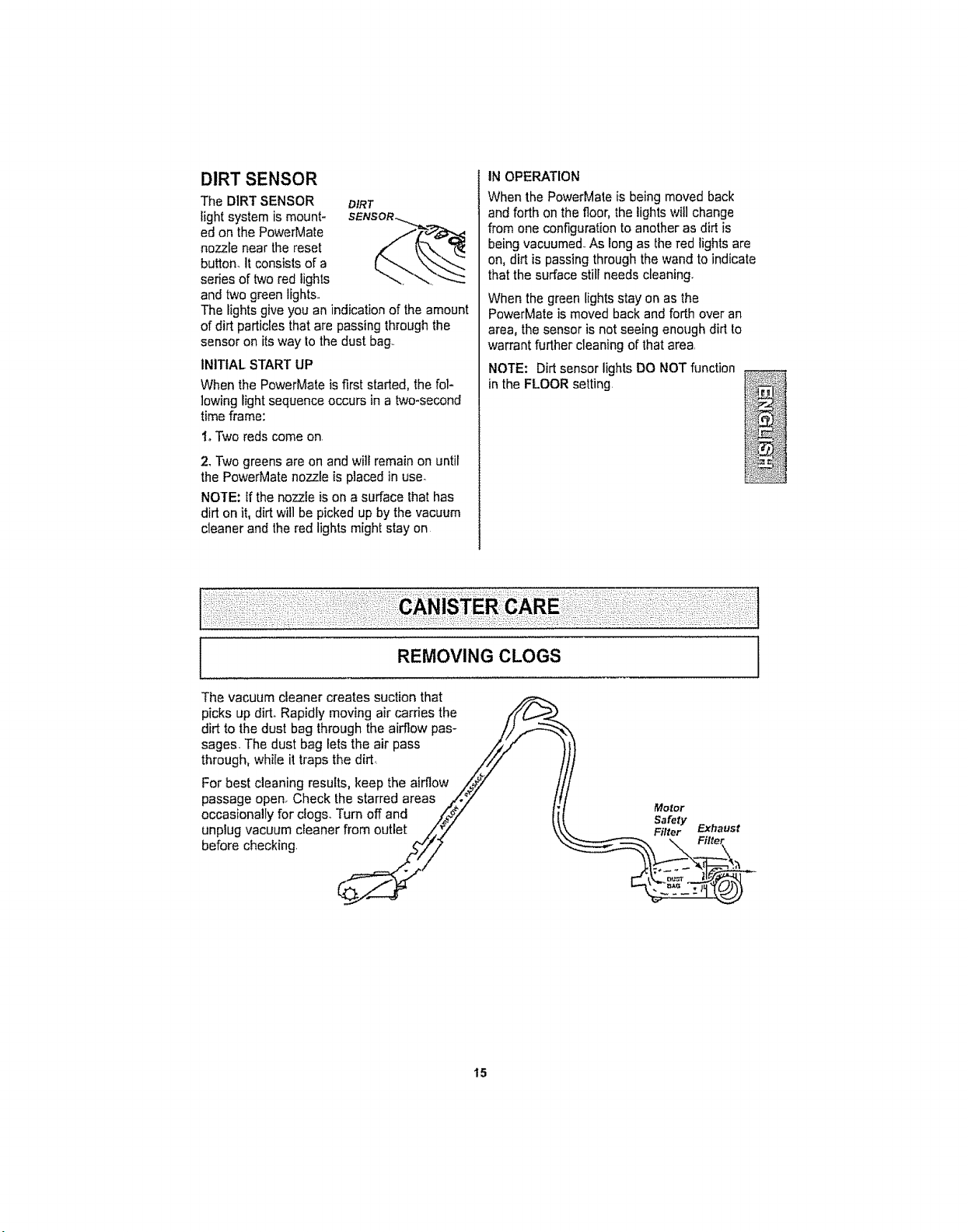
DIRT SENSOR
The DIRT SENSOR
light system is mount-
ed on the PowerMate
nozzle near the reset
button. It consists of a
series of two red lights
and two green lights..
DIRT
SENsoR...._.
The lights give you an indicationofthe amount
of dirt particles that are passing through the
sensor on its way to the dust bag..
INITIAL START UP
When the PowerMate is first started, the fol-
lowing light sequence occurs in a two-second
time frame:
IoTwo reds come on.
2. Two greens are on and wi]l remain on until
the PowerMate nozzle is placed in use_
NOTE: if the nozzle ison a surface thathas
dirt on it, dirt will be picked up by the vacuum
cleaner and the red lights might slay on
IN OPERATION
When the PowerMate is being moved back
and forth on the floor, the lightswillchange
from one configuration to another as dirt is
being vacuumed..As long as the red lights are
on, dirt is passing through the wand to indicate
that the surface still needs cleaning.
When the green lights stay on as the
PowerMate is moved back and forth over an
area, the sensor is not seeing enough dirt to
warrant further cleaning of that area.
NOTE: Dirt sensor lights DO NOT function
in the FLOOR setting
REMOVING CLOGS
The vacuum cleaner creates suction that
picks up dirt..Rapidly moving air carries the ,i'f/_._.'_._
dirt to the dust bag through the airflow pas- //).,_
sages. The dust bag lets the air pass ,/_._/'
through, while it traps the dirt_ ////
For best cleaning results, keep the airflow ,,,_>_y t
passage openr Check the starred areas ..,_'._" [,
occasio.allyfoFclogs,Turnoffand #/ li
unplug vacuum cleaner from outlet ..___/
before checking __//
Motor
I
15
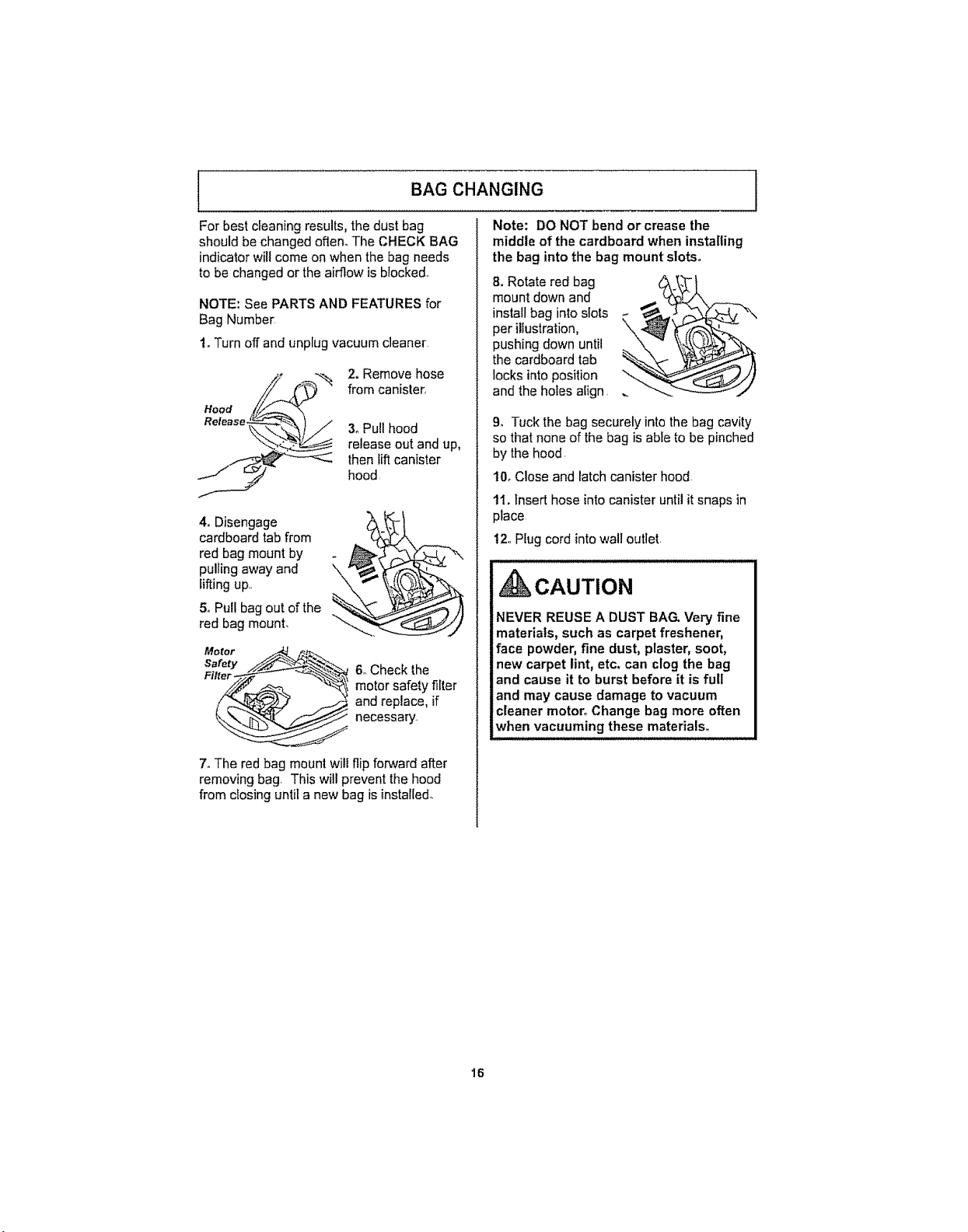
BAG CHANGING j
For best cleaning results, the dust bag
should be changed often.. The CHECK BAG
indicator will come on when the bag needs
to be changed or the airflow is blocked..
NOTE: See PARTS AND FEATURES for
Bag Number
t. Turn off and unplug vacuum cleaner.
Hood
Release.
2. Remove hose
from canister,
3, Pull hood
release out and up,
then lift canister
hood.
4. Disengage
cardboard tab from
red bag mount by
pulling away and
lifting up..
5. Pull bag out of the
red bag mount.
6oCheck the
motor safety filter
and replace, if
necessar!..
7. The red bag mount will flip forward after
removing bag. This will prevent the hood
from closing until a new bag is installed.
Note: DO NOT bend or crease the
middle of the cardboard when installing
the bag into the bag mount slots.
8. Rotate red bag
mount down and
install bag into slots
per illustration,
pushing down until
the cardboard tab
locks into position
and the holes align.
9, Tuck the bag securely into the bag cavity
so that none of the bag is able to be pinched
by the hood.
10, Close and latch canister hood
11. Insert hose into canister until it snaps in
place
t2,. Plug cord into wall outlet.
, CAUTION
NEVER REUSE A DUST BAG. Very fine
materials, such as carpet freshener,
face powder, fine dust, plaster, soot,
new carpet lint, etc. can clog the bag
and cause it to burst before it is full
and may cause damage to vacuum
cleaner motor° Change bag more often
when vacuuming these materials.
t6

i
CLEANING EXTERIOR AND ATTACHMENTS
1. Turn off and unplug vacuum cleaner. DO
NOT drip water on vacuum cleaner.
2. To clean exterior, or to reduce static elec-
tricity and dust build-up, wipe outer surface
of vacuum cleaner and attachments. Use a
dean, soft cloth that has been dipped in a
solution of mild {iquiddetergent and water,
then wrung dry. Wipe dry after cteaning
CAUTION
MOTOR SAFETY FILTER CHANGING
iL, ,WARNING
Electrical Shock Hazard
Turn off and unplug vacuum cleaner
Fromelectrical outlet. Do not operate
the vacuum cleaner without the motor
safety filter. Be sure the filter is dry and
properly installed to prevent motor
failure andlor electrical shock.
i i
MOTOR SAFETY FILTER
ELECTROSTATIC
Do not use attachments if they are wet°
Attachments used in dirty areas, such
as under a refrigerator, should not be
used on other surfaces until they are
washed. They could leave marks.
/ = nlllm uuluull,lll.ul=
2°Lift the rubber ..4L_,j_'_/_----_
retainer and pull out
motor safety filter as
shown
Retainer S
This filter must be replaced when dirty It
should be replaced regularly depending on
use conditions° The filter CANNOT be
washed as it will lose its dust trapping
ability.
NOTE: See PARTS AND FEATURES for
Motor Safety Filter number
1oRemove the bag as outlined in the BAG
CHANGING section.
,.__ 3oReplace the fitter,
_ white side facing
toward dust bag, by
sliding it back into
place under the ribs in
the bag cavity Tuck
_iRubber _" J filter in so that it fits
_Retainer_ completely under the
rubber retainer.
4. Replace the bag as outlined in the BAG
CHANGING section.
I7

EXHAUST FILTER CHANGING
WARNING
Fire andlor Electrical Shock Hazard
Do not operate with a clogged exhaust
filter or without the exhaust filter
installed° Do not operate without filter
cover installed.
iJ J
EXHAUST FILTER
HEPA
The exhaust filter cadridge must be
replaced when dirty, Replace the filter
when the entire surface area is covered
evenly, The filter CANNOT be washed as
it will lose its dust trapping ability_
NOTE: See PARTS AND FEATURES for
exhaust filter number,
1,,Press latch
down to release
the exhaust filter
cover from slot in
canister.,
2, Pull filter
cover outward to
remove from
canister
/
3oRemove the
exhaust filter
using the recess
as shown
Exhaust
4. Replace the
exhaust filter
cartridge.. Place
the new filter into
the canister with
the foam seal
towards the
canister,
5oTo replace the
exhaust filter
cover place the
two tabs on the
filter cover into
the slots on the
canister,
rotate filter cover
into place..
7. Release latch and verify that filter cover
is locked into place,.
18

Alwaysfollowal!safetyprecautionswhenperformingmaintenancetothePowerMate
,d_WARNING
Electrical Shock Or Personal Injury
Hazard
Always turn off and unplug vacuum
cleaner before performing maintenance
to the vacuum cleaner, Failure to do so
could result in electrical shock or
personal injury from vacuum cleaner
suddenly starting.
BELT CHANGING AND AGITATOR CLEANING
TO REMOVE BELT
'__ 1,.Remove the
,.,.., _ wandby pressing
thequick release
_'_ pedat and ,ifting
Wand up on the wand..
Quick
Ill Release
Pedal
Screws
2. Turn
PowerMate
upside down and
unscrew two (2)
PowerMate cover
screws,
Handle i = ,
Pedal----_%
3. Turn PowerMate
right side up,
4. Press handle
release pedal and
lower the swivel.
5. Lift rear latches
up
Rear
Latches
Side
Latch
End Cap
9. Check and clean end cap areas. See
AGITATOR ASSEMBLY for picture of
complete agitator assembly.
t9
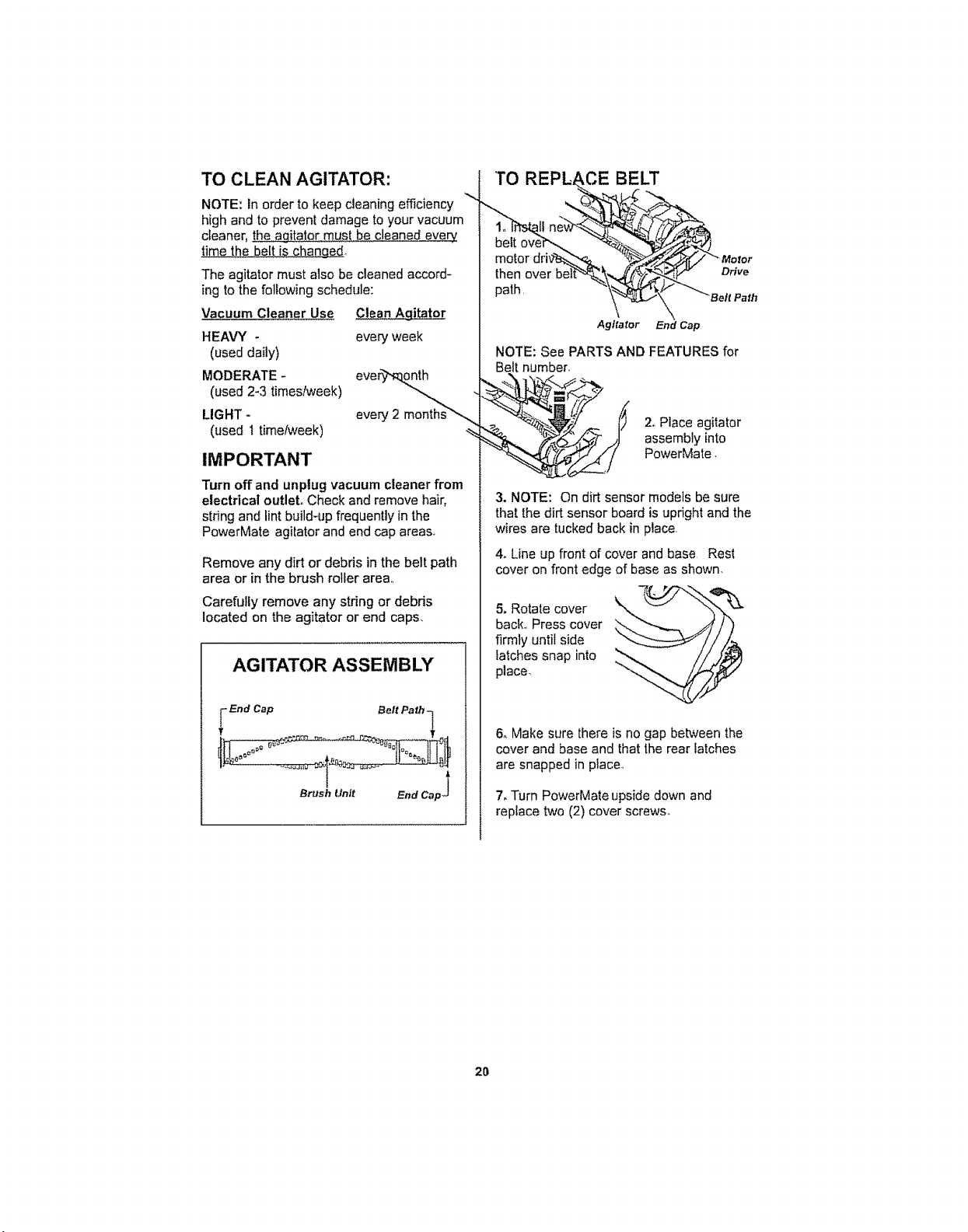
TO CLEAN AGITATOR:
NOTE: In order to keep cleaning efficiency
high and to prevent damage to your vacuum
cleaner, the agitator must be cleaned every+
time the belt is changed.
The agitator must also be cleaned accord-
ing to the following schedule:
Vacuum Cleaner Use
HEAVY -
(used daily)
MODERATE -
(used 2-3 timeslweek)
LIGHT +
(used I time/week)
_itator
every week
eveF_
every 2 months_
IMPORTANT
Turn off and unplug vacuum cleaner from
electrical outlet, Check and remove hair,
string and lint build-up frequently in the
PowerMate agitator and end cap areas.
Remove any dirt or debris in the belt path
area or in the brush roller area,,
Carefully remove any stdng or debris
located on the agitator or end caps,
AGITATOR ASSEMBLY
_ End Cap Belt Path q
Brush Unit End Cap _
then over be
path.
Drive
Agitator End Cap
NOTE: See PARTS AND FEATURES for
Belt number,
2oPlace agitator
assembly into
PowerMate.
3. NOTE: On dirt sensor models be sure
that the dirt sensor board isupright and the
wires are tucked back in place
4+Line up front of cover and base Rest
cover on front edge of base as shown,
5. Rotate cover
back., Press cover
firmly until side
latches snap into
place+ "",
6. Make sure there is no gap between the
cover and base and that the rear latches
are snapped in place,,
7, Turn PowerMate upside down and
replace two (2) cover screws,
2O
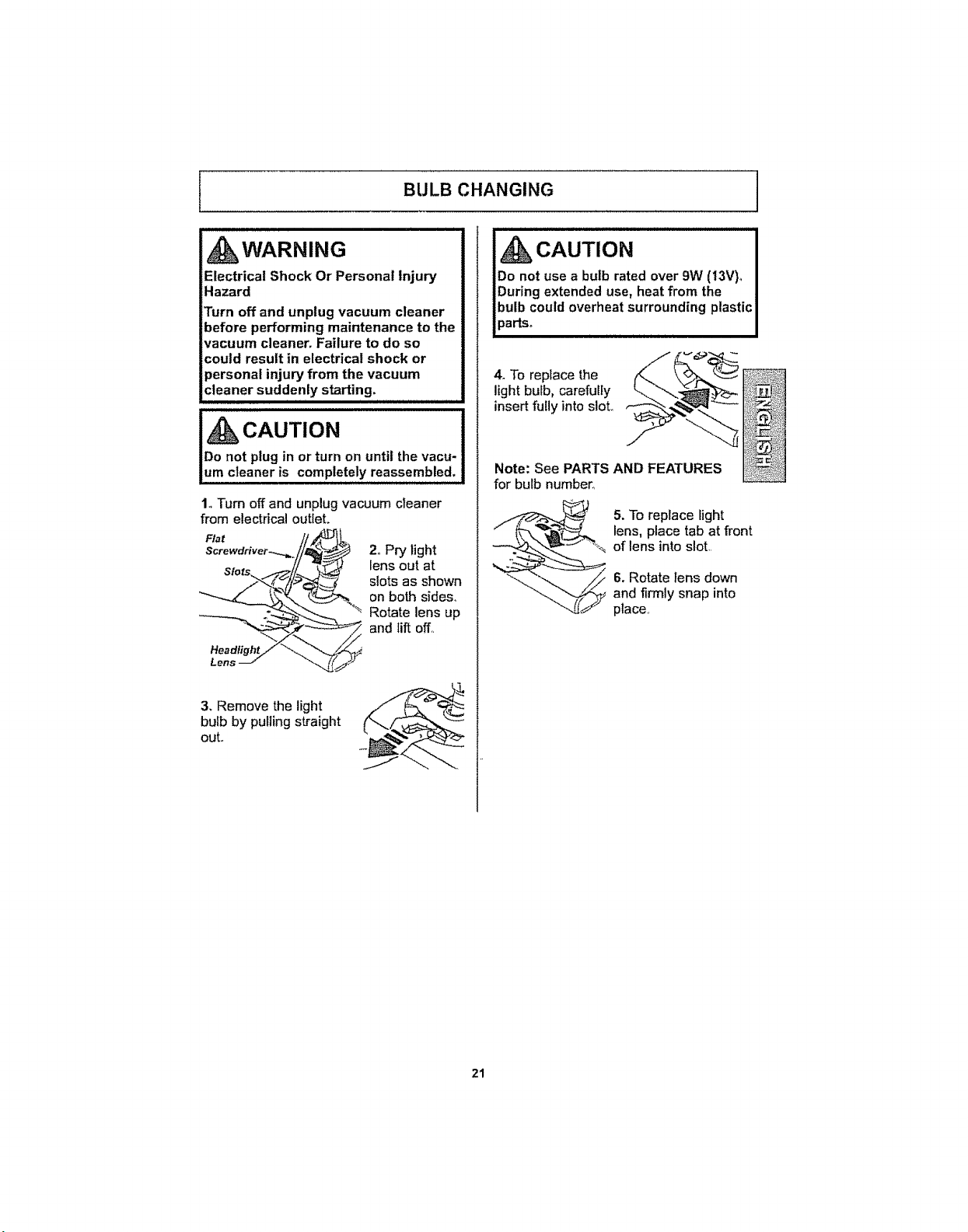
BULB CHANGING
, WARNING
Electrical Shock Or Personal Injury
Hazard
Turn off and unplug vacuum cleaner
before performing maintenance to the
vacuum cleaner, Failure to do so
could result in electrical shock or
personal injury from the vacuum
cleaner suddenly starting.
1. Turn off and unplug vacuum cleaner
from electrical outlet,
Flat
2,,Pry light
lens out at
slots as shown
on both sides,
Rotate lens up
and Iift off,,
3, Remove the light
bulb by pulling straight
out.,
CAUTION
Do not use a bulb rated over 9W (13V)o
During extended use, heat from the
bulb could overheat surrounding plastic
parts° , ......
4_To replace the
light bulb, carefully
insert fully into sloL
Note: See PARTS AND FEATURES
for bulb number,
5. To replace light
lens, place tab at front
of lens into slot.,
6, Rotate lens down
and firmly snap into
place,,
21
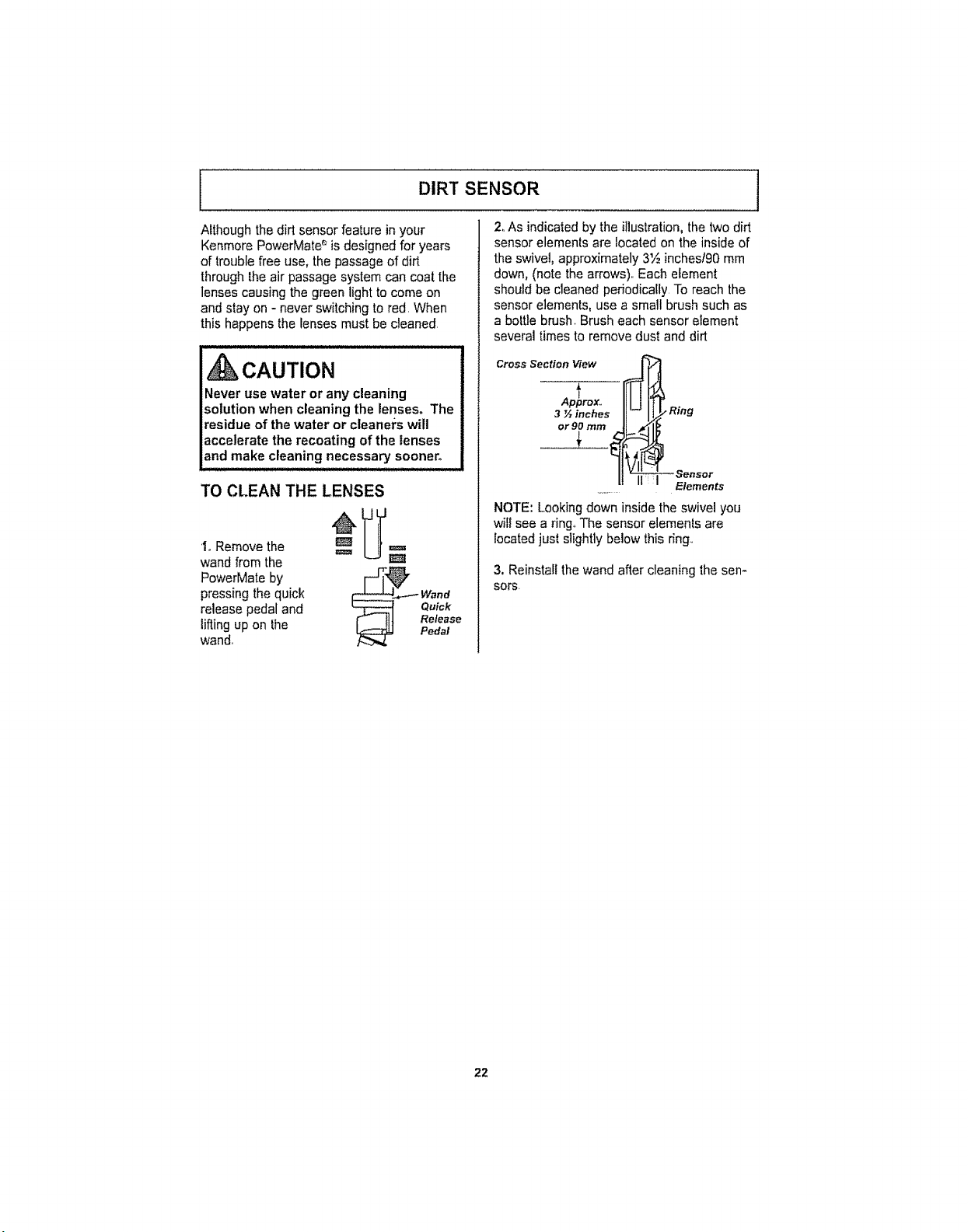
I DIRT SENSOR
Although the dirt sensor feature in your
Kenmore PowerMate_is designed for years
of trouble free use, the passage of dirt
through the air passage system can coat the
lenses causing the green light to come on
and stay on - never switching to red. When
this happens the lenses must be cleaned,
, CAUTION
Never use water or any cleaning
solution when cleaning the lenses. The
residue of the water or cleaners will
accelerate the recoating of the lenses
and make cleaning necessary sooner.
2. As indicated by the illustration, the two dirt
sensor elements are located on the inside of
the swivel, approximately 3'½inchest90mm
down, (note the arrows),, Each element
should be cleaned periodically To reach the
sensor elements, use a small brush such as
a bottle brush, Brush each sensor element
several times to remove dust and dirt
Cross Section View
TO CLEAN THE LENSES
1oRemove the
wand from the
PowerMate by
pressing the quick
release pedal and
lifting up on the
wand,
Ap_prox.,
3 ½ inches
or 90 rnm
_._-_ Wand
Quick
!1t Release
Pedal
. Ring
i _Sensor
Elements
NOTE: Looking down inside the swivel you
will see a ring.,The sensor elements are
located just slightly below this r_ng,,
3. Reinstall the wand after cleaning the sen-
sors.
22
AGITATOR SERVICING 'l
_kWARNING
Electrical Shock Or Personal Injury
Hazard
Always turn off and unplug vacuum
cleaner before performing
maintenance to the vacuum cleaner.
Failure to do so could result in electrical
shock or personal injury from vacuum
cleaner suddenly starting,
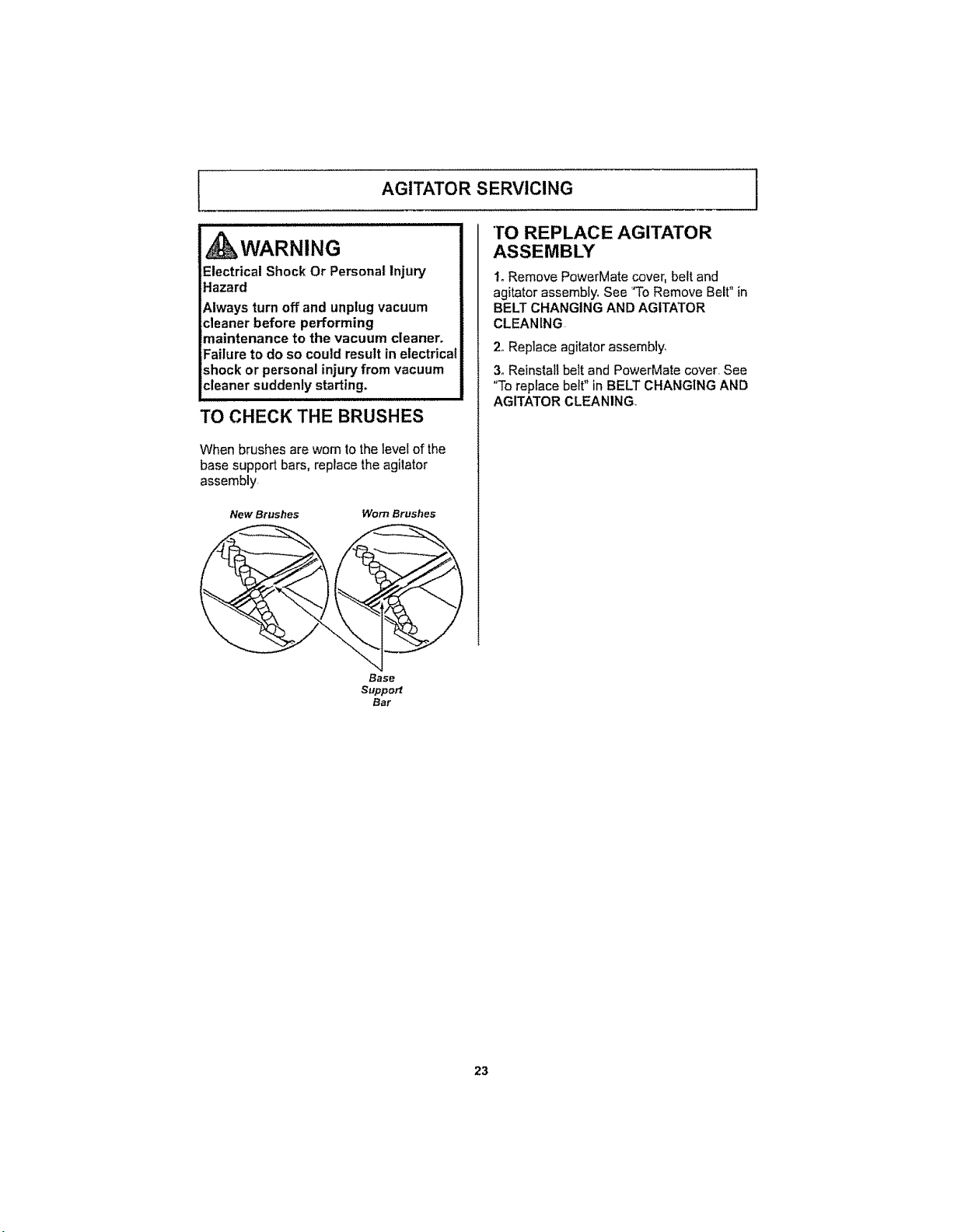
TO CHECK THE BRUSHES
When brushes are worn to the level of the
base support bars, replace the agitator
assembly
New Brushes Worn Brushes
Base
Support
Bar
TO REPLACE AGITATOR
ASSEMBLY
!o Remove PowerMate cover, belt and
agitator assembly. See 'To Remove Belt" in
BELT CHANGING AND AGITATOR
CLEANING
2,,Replace agitator assembly,
3_Reinstall belt and PowerMate cover. See
"To replace belt" in BELT CHANGING AND
AGITATOR CLEANING,,
23
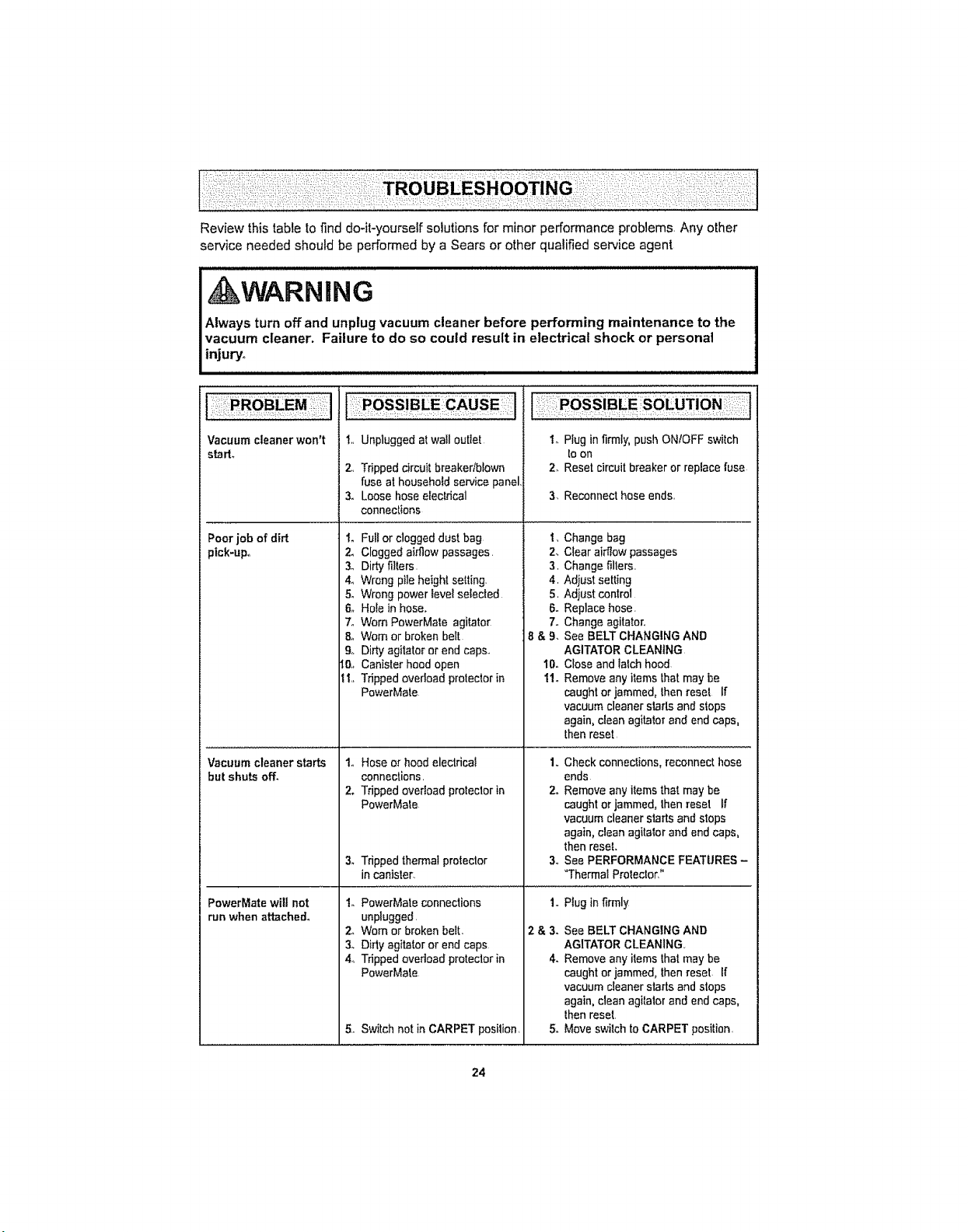
Review this table to find do-it-yourself solutions for minor performance problems, Any other
service needed should be performed by a Sears or other qualified service agent
WARNING
Always turn off and unplug vacuum cleaner before performing maintenance to the
vacuum cleaner. Failure to do so could result in electrical shock or personal
injury°
Vacuum cleaner won't
starL
t,, Unplugged atwall outlet
2., Tripped circuitbreaker/blown
fuse at householdservice panel,
3. Loose hose electrical
connections
Poor job of dirt to
pick-up,, 2_
3o
4_
5.
6_
7o
8o
9.
ti,.
Vacuum cleaner starts
but shuts off.
Full or clogged dust bag
Clogged airflow passages.
Dirty fillers.
Wrong p_leheightsetting.
Wrong power level selected
Hole in hose.
Worn PowerMata agitator
Worn or broken belt
Dirty agitator or end caps.
Canister hood open
Tripped overload protectorin
PewerMate
1. Hose orhood electrical
connections,
2. Tripped overload protectorin
PowerMate
3. Tripped thermalprotector
in canister.
1oPlug infirmly, push ON/OFF switch
toon
2. Reset circuit breaker or replace fuse
3, Reconnect hose ends,,
2.
3,
4,
5,
6-
7.
8&9.
10.
11.
Change bag
Clear airflow passages
Change fillers,,
Adjust setting
Adjust control
Replace hose.
Change agitator.
See BELT CHANGING AND
AGITATOR CLEANING
Close and talch hood
Remove any items lhat may be
caught or jammed, lhen reset If
vacuum cleaner starts and stops
again, clean agitator and end caps,
thenreset,
1,,Check connections, reconnect hose
ends
2oRemove any items that may be
caught or jammed, thenreset If
vacuum cleaner starts and stops
again, clean agitatorand end caps,
then reset.
3,,See PERFORMANCE FEATURES -
"Thermal Prolector"
PowerMate will not
run when attached°
1. PowerMate connections
unplugged,
2. Worn or broken bell:,
3_ Didy agitator or end caps
4,, Tripped overload protectorin
PowerMate
5. Switch not in CARPET posilion,
I,, Plug in firmly
2 & 3. See BELT CHANGING AND
AGITATOR CLEANING,,
4. Remove any items that may be
caught or jammed, thenreset If
vacuum cleaner starts and stops
again, clean agitator and end caps,
lhen reset,
5. Move switch to CARPET position,
24
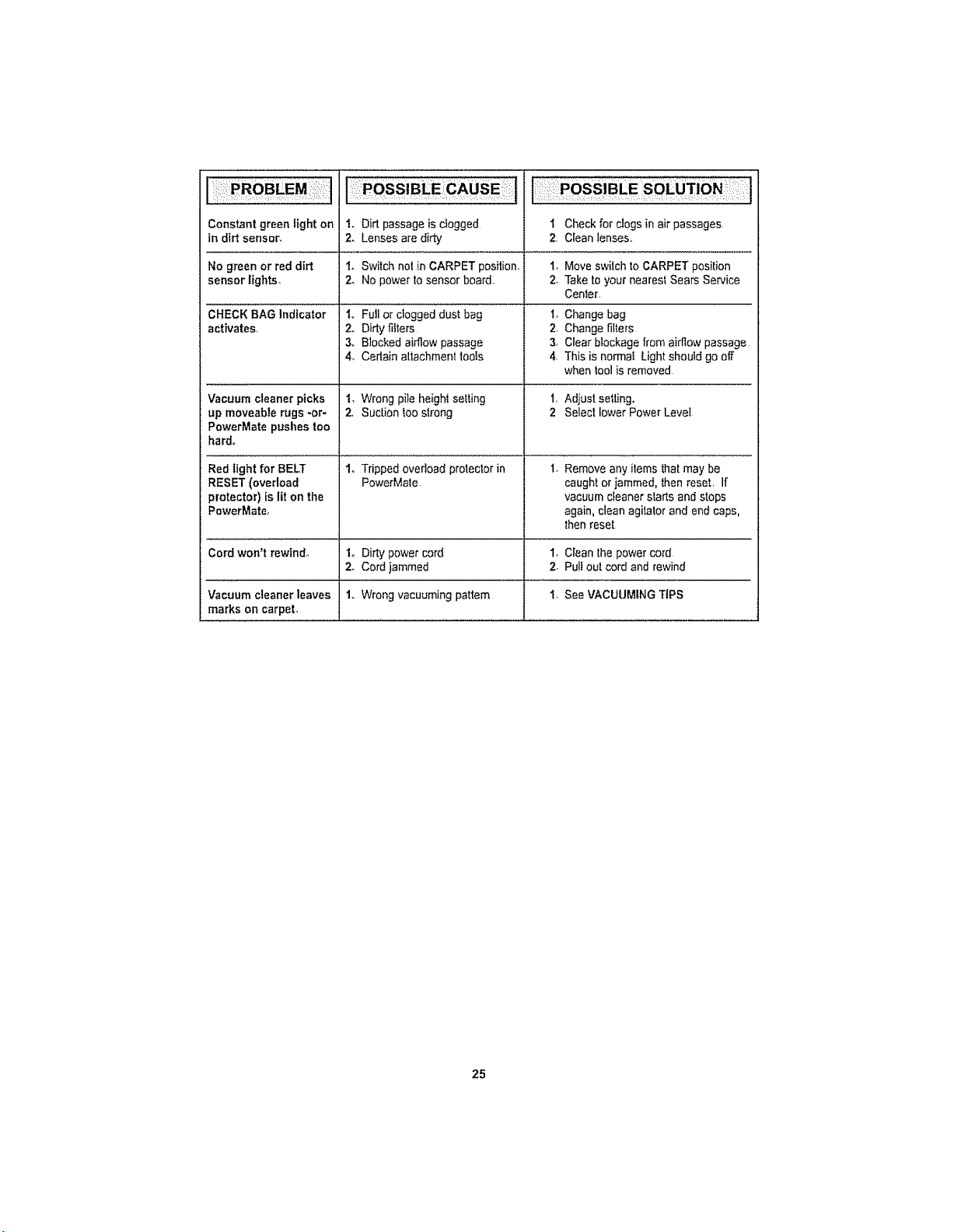
Constantgreen Eighton 1. Dirt passage is dogged t Check for clogs in air passages.
in dirt sensor, 2. Lenses ere dirty 2, Clean lenses,,
No green or red dirt 1o Switch not in CARPET position,, 1, Move swilch to CARPET position
sensor lights, 2, No power to sensor board. 2. Take to your nearest Sears Service
CHECK BAG Indicator
activates,
Vacuum cleaner picks
up moveable rugs -or-
PowerMate pushes too
hard.
Red light for BELT
RESET (overload
protector) is lit on the
PowerMate,
Cord won't rewind°
Vacuum cleaner leaves
marks on carpet,
1,, Full or clogged dust bag
2,, Didy filters
3,, Blocked airflow passage
4_ Certain attachmenI tools
I, Wrong pile height setting
2, Suction too strong
Cen_er,
1, Change bag
2, Change filters
3, Clear blockage from airflow passage
4, This is normal Light should go off
when tool is removed
1, Adjust setting.
2 Select lower Power Level
!, Tripped overload protector in 1. Remove any items thatmay be
PowerMate. caught or jammed, then reset. If
vacuum cleaner starts and stops
again, clean agitator and end caps.
then reset
Io Dirty power cord 1. Clean the power cord
2., Cord jammed 2. Pull out cord and rewind
1., Wrong vacuuming pattern 1, See VACUUMING TIPS
25
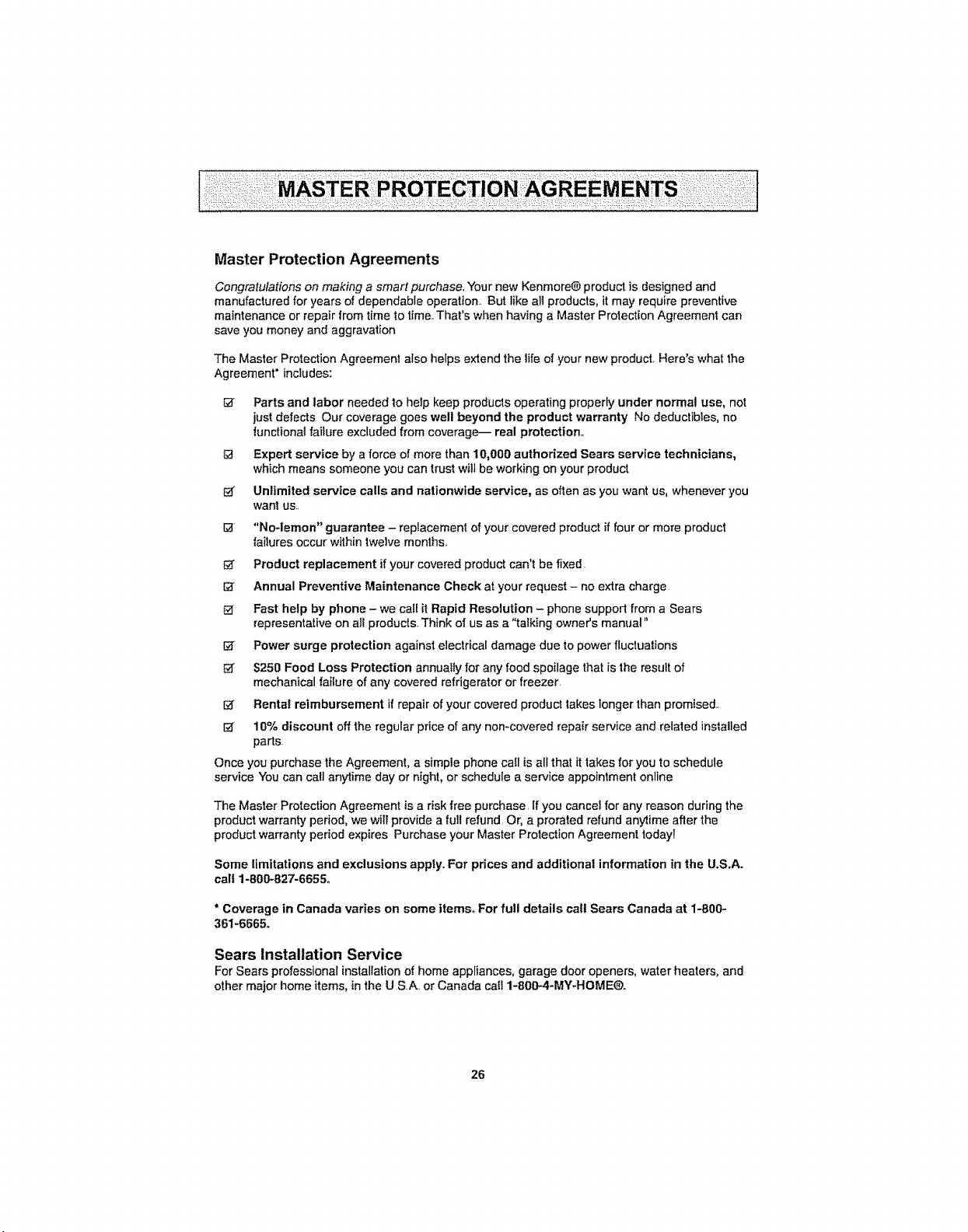
Master Protection Agreements
Congratulations on making a smart purchase. Your new Kenmore® product is designed and
manufactured for years of dependable operation. But like all products, it may require preventive
maintenance or repair from time to time. That's when having a Master Prolection Agreemenl can
save you money and aggravation
The Master Protection Agreement also helps extend the life of your new product Here's what the
Agreement" includes:
Parts and labor needed 10help keep products operating properly under normal use, not
just defects Our coverage goes well beyond the product warranty No deductibles, no
functionat failure excluded from coverage-- real protection,,
Expert service by a force of more than 10,000 authorized Sears service technicians,
which means someone you can trust will be working on your product
i_ Unlimited service calls and nationwide service, as often as you want us. whenever you
want us..
I_ "No-lemon" guarantee - replacement of your covered product if four or more product
failures occur within twelve months.
Product replacement if your covered product can't be fixed
Annual Preventive Maintenance Check at your request - no extra charge
Fast help by phone - we cat_it Rapid Resolution - phone support from a Sears
representative on alt products.. Think of us as a "talking owner's manual"
I_ Power surge protection against electrical damage due to power fluctuations
$250 Food Loss Protection annually for any food spoilage that is 1heresult of
mechanical failure of any covered refrigerator or freezer.
I_ Rental reimbursement if repair of your covered product takes longer than promised..
I_ 10% discount off the regular price of any non-covered repair service and related installed
parts
Once you purchase the Agreement, a simple phone call is all that it takes for you to schedule
service You can call anytime day or night, or schedule a service appointment online
The Master Protection Agreement is a risk free purchase. If you cancel for any reason during the
product warranty period, we wi|I provide a full refund. Or, a prorated refund anytime after the
product warranty period expires Purchase your Master Protection Agreement today!
Some limitations and exclusions appty. For prices and additional information in the U.S.A.
call 1-800-827-6655,,
* Coverage in Canada varies on some items° For full details call Sears Canada at 1-800-
361-6665_
Sears Installation Service
For Sears professional installation of home appliances, garage door openers, water heaters, and
other major home items, in the U S.A. or Canada cab 1-800--4-MY-HOME®..
26
Antes de usar su aspiradora nueva. 1
Lista de embalaje .......................... 1
Garantia de la aspiradora
de Kenmore ............................ 2
Instrucciones importantes de
seguridad ....................................... 3
Piezas y caracteristicas ............. 4-5
Instrucciones de ensamble ............. 6-7
Almacenaje del Pet PowerMate _ ......... 7
Instrucciones de operati6n .............. 8
Pars cornenzar ....................... 8-9
Sugerencias pars aspirar ............. g-10
Sugerencias sobre el sjuste de nivel de
pelo de la alfombra ...................... 10
Accesorios .................................. 1t
Cuadro de uso de los accesofios ..........12
Caracteristicas de rendimiento ........ 12-14
Cuidado det recept&culo ................. 14
Quitar de los residuos de basura
en los conductos ........................... 14
Cambio de la bolsa ..................... 15
Limpieza del exteffor y de los accesorios 16
Cambio del fiftro de seguridad del motor 16
Cambio del filtro de escape ............. 17
Cuidado de la PowerMate _ ............ 18
Cambio de la correa y limpieza
de! agitador ............................ 18-19
Cambio de la bombilta ..................... 20
Detector de polvo ........................... 21
Cuidado del agitador ....................... 22
Reconocimiento de problemas ._,23-24
Acuerdos maestros de protecci6n ....25
InformaciSn de asistencia
o servicio ....................... Posterior Cubierta
Por favor lea esta guia que le ayudara a ensamblar y operar su aspiradora nueva de Kenmore en una manera
m&ssegura y efectiva
Pars mas informaci6nacerca del cuidado y operaci6n de esta aspiradora, Ilame a su tienda Sears mas cer-
cans Cuando pregunte pot informaci6n usted necesiiar& el numero complelo de serie y modelo de la aspi-
radora que est_ localizado en la placa de los n_meros de modelo y sene
Use el espacio de abajo para registrar el numero de modelo y serie para su nueva aspiradora Kenmore,
Numero de Model0
NtJmero de Sefie
Fecha de Compra
Manlenga este tibro y su recibo en on lugar seguro para referencias futuras.
t LISTA DE EMBALAJE i
Su ASPIRADOR KENMORE se empaca con las siguientes piezas y componentes
por separado:
1 Recept&culo 1 Cepillo para combinaci6n*
1 PowerMate@ I Pet PowerMate@
1 Manguera 1 Tubo telescopico
1 Cepillo pars pisos* I Manual de uso y cuidado
1 Herramienta pars I Lists de partes
hendiduras*
Cada uno de estos ensambles es mostrado detalladamente en la lista de p=ezas
para reparaci6n.,
*Estos articulos se encuentran bajo la cubierta de almacenamiento para accesorios,,

Garantialimitadadeuna#,o
Siestaaspiradorafallaperundefectoensusmatedalesofabricaci6nenelperiodode
unafodesdetafechadecompra,cuandoseinstala,manejaymantienesiguiendo
todaslasinstruccionesincluidasconelproducto,devu_,lvalaacualquiertiendaSears,
SearsParts&RepairCenter(CentredeReparacionesyPiezasSears)oaotro
distdbuidorKenmoreparaquereparenelaparatodeforrnagratuita..
Estagarantiaes v_lida solamente durante 90 alias desde ia fecha de compra,
si la aspiradora se utiliza para otros fines que no sean el use familiar pdvado..
Esta garantia cubre exclusivamente los defectos de materiales y fabricaci6n,,
Sears NO pagar&:
1. Los elementos desechables que puedan desgastarse con un use normal, incluyendo
sin car&cter exciuyente, fittros, correas, I_mparas y bolsas..
2, Un t6cnico det servicio t6cnico para que ensefe al usuado a instalar, manejar o
mantener correctamente el producto.
3, Un t6cnico dei servicio t6cnico para limpiar o mantener este producto.
4. Dafos o averia de este producto si no se ha instalado, manejado o mantenido
siguiendo todas las instrucciones incluidas con el producto.
5. Dafos o averia a este producto originados per accidente, abuse, use incorrecto o
use del producto para otros fines distintos de los indicados.
6. Dafos o averia de este producto causados per el use de detergentes, limpiadores,
productos quimicos o utensilios diferentes a los recomendados en todas las
instrucciones que se incluyen con el producto_
7.. Dafos o averias de las piezas o sistemas causados per modificaciones no
autorizadas que se hayan hecho a este producto_
Limitaci6n de responsabilidad de las garantias implfcitas; limitaci6n de remedies
l_l_nico y exclusive remedio del cliente bajo esta garantfa limitada ser_ la reparaci6n del
producto seg(m 1oindicado en este documento. Las garantias implicitas, incluyendo las
garantias de comerciabilidad o idoneidad para un prepSsito especifico, se limitan a un
aSo o el periodo m&s corto permitido per la ley. Sears no ser& responsable per daSos
incidentales ni consecuenciales. Algunos estados o provincias no permiten la exclusi6n
o limitaci6n de daSos incidentales o consecuenciales, ni limitaciones en la duraci6n de
las garantias implicitas de comerciabilidad o idoneidad, per Io que estas exclusiones o
limitaciones podrian no aplicar en su case.
Esta garantia aplica solamente cuando esta aspiradora se utiliza en Estados Unidos o
Canada,
Esta garantia le otorga derechos legales especificos, y usted podria tener otros
derechos que varian en funci6n de cada estado..
Sears, Roebuck and Co., Hoffman Estates, IL 60179
Sears Canad_ Inco, Toronto, Ontario, Canad_ M5B 2B8
Lea las instrucciones en este manual antes de arrnar o usar su aspirador,,
ADVERTENCIA
Su seguridad es muy importante para nosotroso Pare reductr ef desgo de incendio,.
cheque el_ctrico, lesibn corporal o da_os at utilizer su aspiradora, act_e ae acueroo
con precauciones D_sicas ue seguridad, entre elias:
Use su aspiradera _nicamente en la forma
descr_ta en este manual. Use Qnicamente con
accesor_os recomendados per Sears
Desconecte el cord6n eI_ctrico antes de
componer o ]impiar el _rea del cepillo De Io
contrario, el cepiIto podda arranear de retina
imprevista o podHa producirse un cheque
e{_ctrico
No abandone la aspirsdora cuando est_
conectada Descon_ctela cuando no ta est_
usando y antes de dade servicio
Pare reducir el desgo de cheque et_ct,dco, no
use su aspiradora al aire libre ni sabre
superficies mojadas..
No permita que sea utilizada come juguete
Se requiere toner mayor cuidacto cuando sea
utilizada en la proximidad de niSos a per
niSos..
No use la aspiradora si el cord6n o el enchufe
est_n da_ados. Si la aspiradora no esta
funcionando adecuadamente o si se ha
dejado caer, es_ daSada, se ha dejado
expuesta ala }ntemperie o se ha dejado caer
en ague, devu_Na_a a un Centre de servicio
de Soars.
No jale ni transporte la aspiradora per el
cerd6n; no use et cord6n come mango; no
cierre puertas sabre el cord6n; no jale et
cord6n sabre rebordes agudos ni esquinas..
No pase la aspiradora sabre e! cordon
Mantenga et cord6n alejado de superficies
calientes
No desconecte la aspiradora tirando del
cord6n el_cMco Pare desconectada, jate el
enchufe, no el cord6n..
No toque la aspiradora ni el enchufe con las
manes mojadas
No cotoque ebjetos en {as aberturss..
No u_Jlice la aspiradora si alguna abedura
est_ bloqueada; mant_ngala libre do polvo,
pelusa, cabelles y cualquiera case que podria
disminuir el tlujo de aire
Mantenga el eabello, ropa suelta, dodos y
todas las partes del cuerpo alejades do las
aberturas y piezas mec_nicas.
Apague todos los controles antes de
desenchufar
Tonga cuidado especial al utiiizar Ia
aspiradora en escalones No la co!oque sabre
si{las, mesas, etc Mant_nga_a en el piso
No use la aspiradora pare aspirer liquidos
inflamables o combustibles (gasoline, I{quidos
pare limpieza, perfumes, etc) ni la use en
tugares donde _stos poddan ester presentes
Los vapores de estas sustancias pueden crear
un peligro de }ncendio o expIosi6n
No levante ninguna cosa que se est6
quemando o emitiendo humo, come
cigarrillos, cerillos o cenizas calientes
No use ia aspiradora sin tenor insta_ada la
balsa pare polvo ylo los filLros
Cambie siempre la balsa pare polvo despu6s
de aspirer limpiaderes de alfombras o
desodorantes, talcos y pelves fines Estos
productos atascan la balsa, reducen el flujo de
aire y pueden causer que 6sta se tampa Si
no cambia fa balsa podr{a ocasionar daSo
permanente ala aspiradora
No use la aspiradora pare levantar objetos
agudos, juguetes pequer_os, atfiteres,
sujetapapeles, etc. Poddan daQar la
aspiradora o la balsa pare polvo
No oper_ sin el filtro de escape ni ]a cubierta
del filtro de escape instalados
La manguera contiene cables el6ctricos No
fa use cuando es_ dafiada, cortada, o
perforada. Reemplace si est_ cortada o
desgastada No levante objetos afilados
Siempre apagu_ y desconecte la aspiradora
antes de conectar o desconectar la manguera,
Handi-Mate J_.@ (si apltcable), o la boqui_la
Sujete el enchufe con la mane al entailer el
cord6n el_ctr_co Pare desconectada, jale e[
enchufe, no el cord6n
Usted es responsable de asegurar que su
aspiradora no sea utilizada per ninguna
persona que no pueda manejada
correctamente
GUARDE ESTAS JNSTRUCCIONES
El armada y use seguro de su aspiradora sen su responsab!lidad. Esta aspiradora ha side
dise_ada ex(;lusivamente para use dom_stico. La as_raaora aeber_ almacenarse en un lugar
seco y en e[ interior. Lea este Manual de Use y _uidado detenidamente, pues eontiene
imormaci6n !mpo rtante sabre seguridad y use. t:sta guia contiene imormaci6n soore
seguriaad de_a,_o ee s_mr_o_os ee advertencia cuidado.
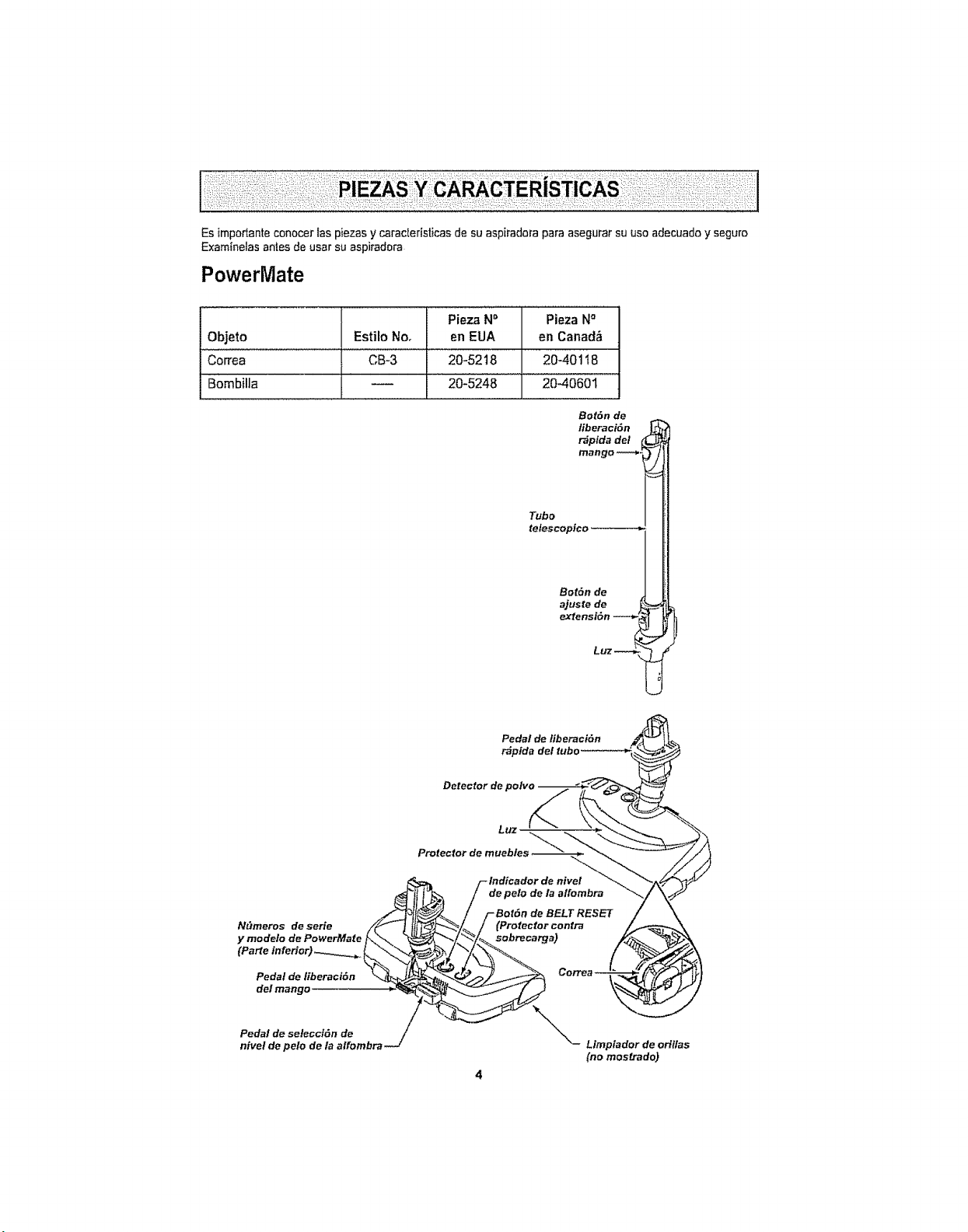
Es impor_anteconocer las piezas y caracteristicas de su aspiradora para asegurar su use adecuado y seguro
Exam_neias antes de usar su aspiradera
PowerMate
Objeto Estilo No,
Correa CB-3
Bombilla
Pieza N_' Pieza N°
en EUA en Canad_
20-52 t8 20-40118
20]5248 2040601'
Bof6n de
fiberaci6n
t-_plda del I
mango **_
Tubo
telescoptco
Bot6n de
ajuste de
extensi6n
LUZ
Pedal de liberaci6n
r_pida
Detector de polvo
Luz
NEtmeros de serie
y modelo de PowerMale
Pedal de liberactdn
de! mango
Pedal de selecci6n de
nivel de pelo de la alfombra
Limptador de orillas
(no mostrado)
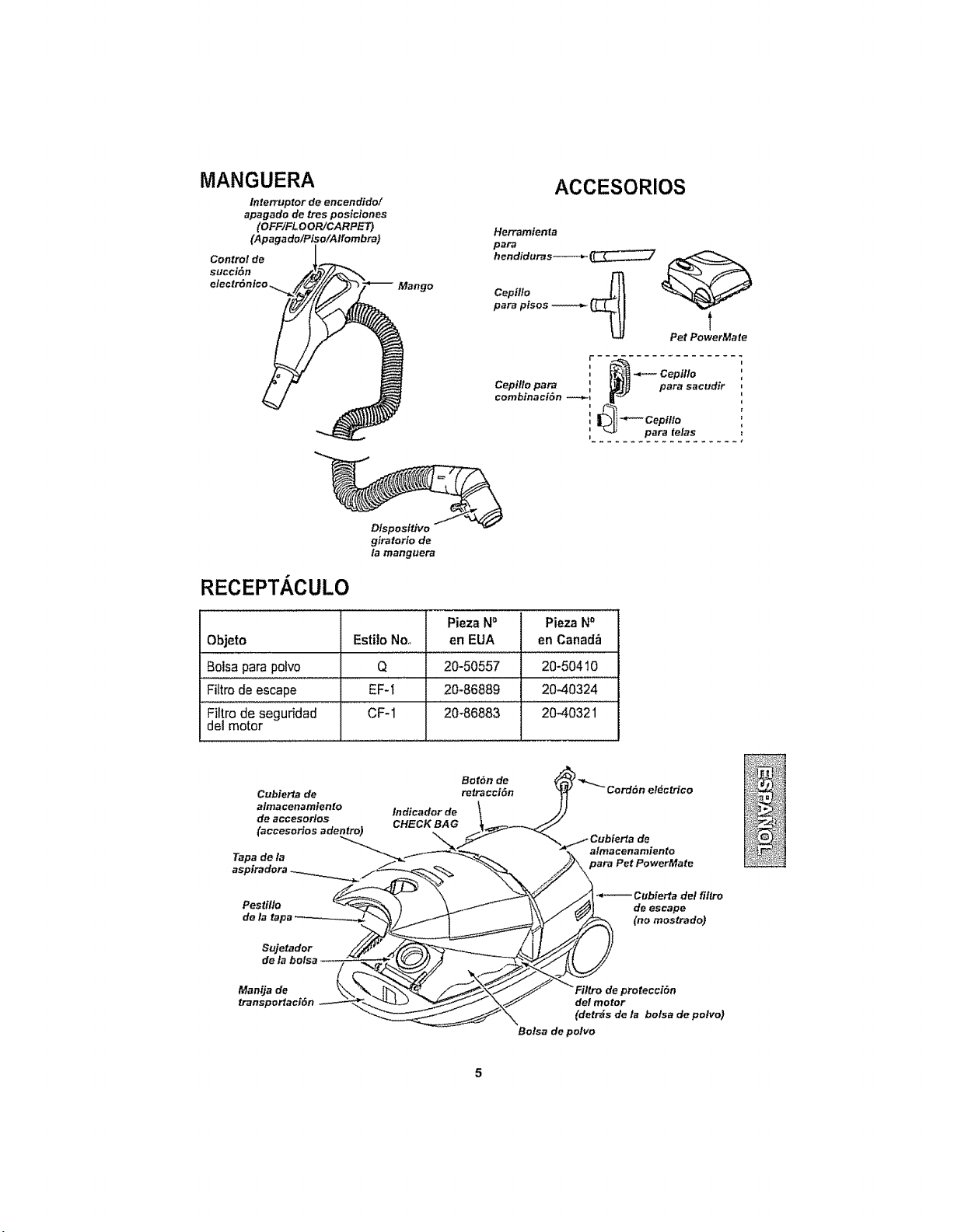
MANGUERA
Interruptor de encendido/
apagado de tres posiciones
(OFF/FLOOR/CARPET)
(Apagado/Piso/Alfombra)
Control de
succi6n
Mango
ACCESORIOS
Herramienta
paFa
hendiduras--*_" _7Cepillo _1
para pisos _ U-_ Pet Po _werMate
, _ Cepil/o
Cepillo para _ para sacudir
combinaci6n ._.-I
i
I
-_'-- Cepitlo
para telas
Dispositivo
giratorio de
la manguera
RECEPTACULO
Pieza N° Pieza Na
Objeto Estilo No,, en EUA en Canadb
Boisa para potvo Q 20-50557 20-50410
Filtre de escape EF-I 20-86889 20-40324
Filtrode seguridad CF-I 20-86883 20_032i ......
del motor
i i n i i I, IIi, ,i illllll,,J,,/,/,,,,t,t,J,,,,t,JllUUU,,,,,t,,t,t,,,,I
,PL Per favor ponga especial atenci6n a 6stos recuadras con aledade nesgo Advertencia: Esta
| _ informaci6nIe alertara det peligrode fuego, cheque el6ctfico, quemaduras y Iesiones
I.._..........C.u!dad°: Esla ,nformaci6n ,ealertara de peligros come ,esiones y dafios ala propiedad
Peligro de cheque el6ctrico
No conecte la aspiradora hasta que ten"ninede
armada. De Io contrario podria causar un
cheque el6ctrico o lesi6n corporal
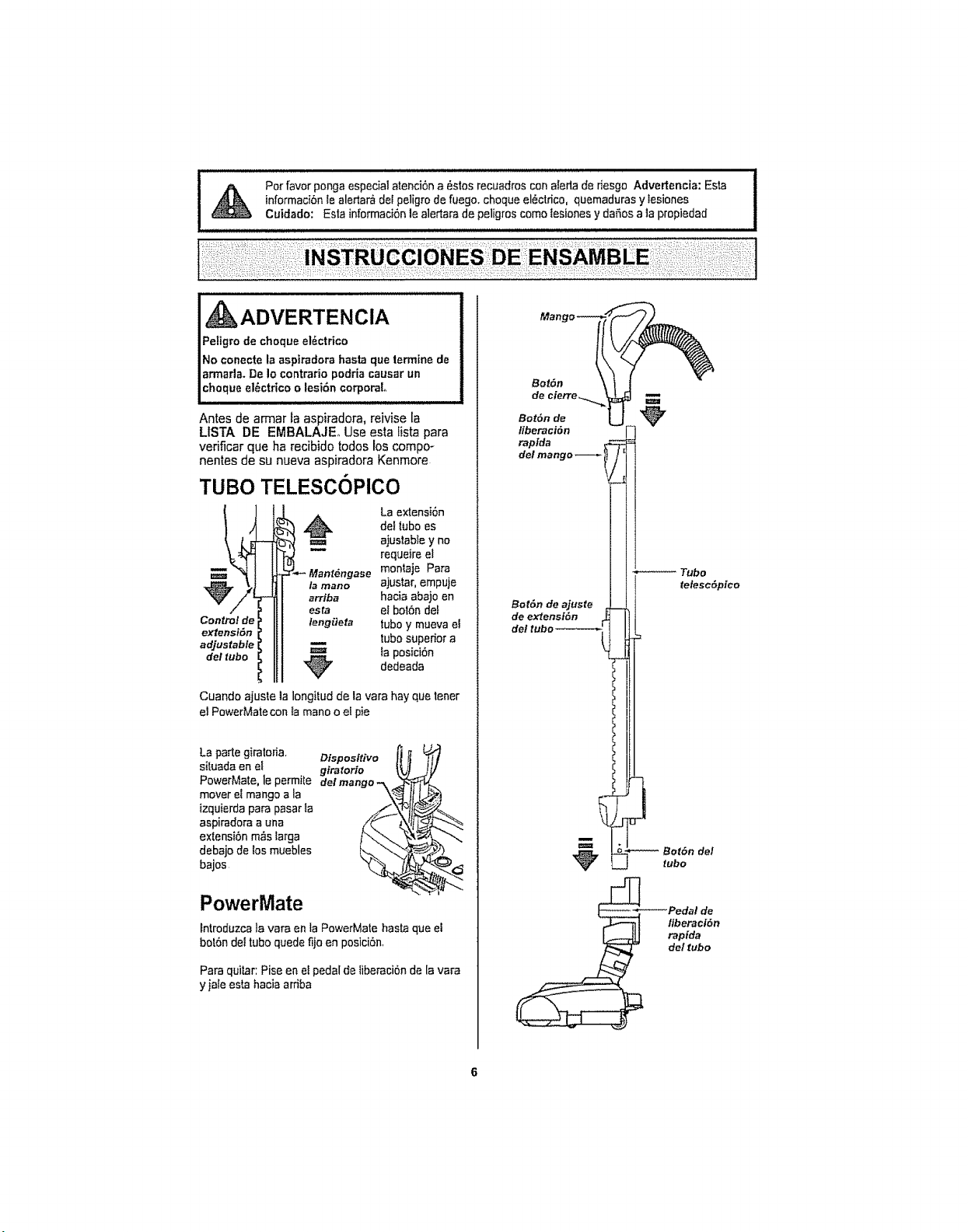
Antes de arrnar la aspiradora, reivise la
LISTA DE EMBALAJEo Use esta iista para
vedficar que ha recibido todas los compo-
nentes de su nueva aspiradora Kenmore
TUBe TELESCOPlCO
Control de
extensi6n
adjustable
del tube
arrtb_
es ta
fenggeta
La extensi6n
del lubo es
ajuslable y no
requeire el
monlaje Para
ajustar, empuje
hacia abajo en
el bot6n def
tubo y mueva el
tubo superior a
ta posici6n
dedeada
Cuando ajuste la longilud de la vara hayque tener
el PowerMatecon Iamane o el pie
La parle giratoria.
situada en el
PowerMate, le permite
mover el mango a la
izquierda para pasar la
aspiradora a una
extensi6n m_s larga
debajo de los muebles
bajos
Dispositivo
glratorio
PowerMate
lntroduzca la vara en la PowerMate hasta que el
bot6n del tube quede fijo en posici6n.
Para quilar: Pise en el pedal de liberaci6n de la vara
y jale esta hacia ardba
Bet6n
Bot6n de
liberaci&n
raptda
del mango
Bot6n de ajuste
de extensi6n
de
telesctSpice
'Pedal de
tfberactSn
rapida
del tube
RECEPTACULO
1 Abra la tapa del recept_culo
2. Examine que la boisa para polvoeste instaiada
correctamente Consu_telos instrvccionesde insta-
laci6n en: CAMBIO DE LA BOLSA.,
3. Examine que el fiffro de segufidad del motor que
este instaladocorrectamente, Consul_elas instruc-
ciones de insta}aci6n en: CAMBIO DEL FILTRO DE
SEGUR|DAD DEL MOTOR.
LA TAPA Y LA CUBIERTA
Es normal que la tape def recept_culo se desprenda
al set abierta m_s de to necesario. Para colocar nue-
vamente la tapa, alinee 1asranuras de la bisagra, in-
s6rtelas y cien'e la tapa.
I, CO'OADO
INunca debe abrir la capucha del contenedor
|estando tatapa abterta, As{ se evitar_ dafios a |a
Icapucha delcontenedor Vie a la _pa °
MANGUERA
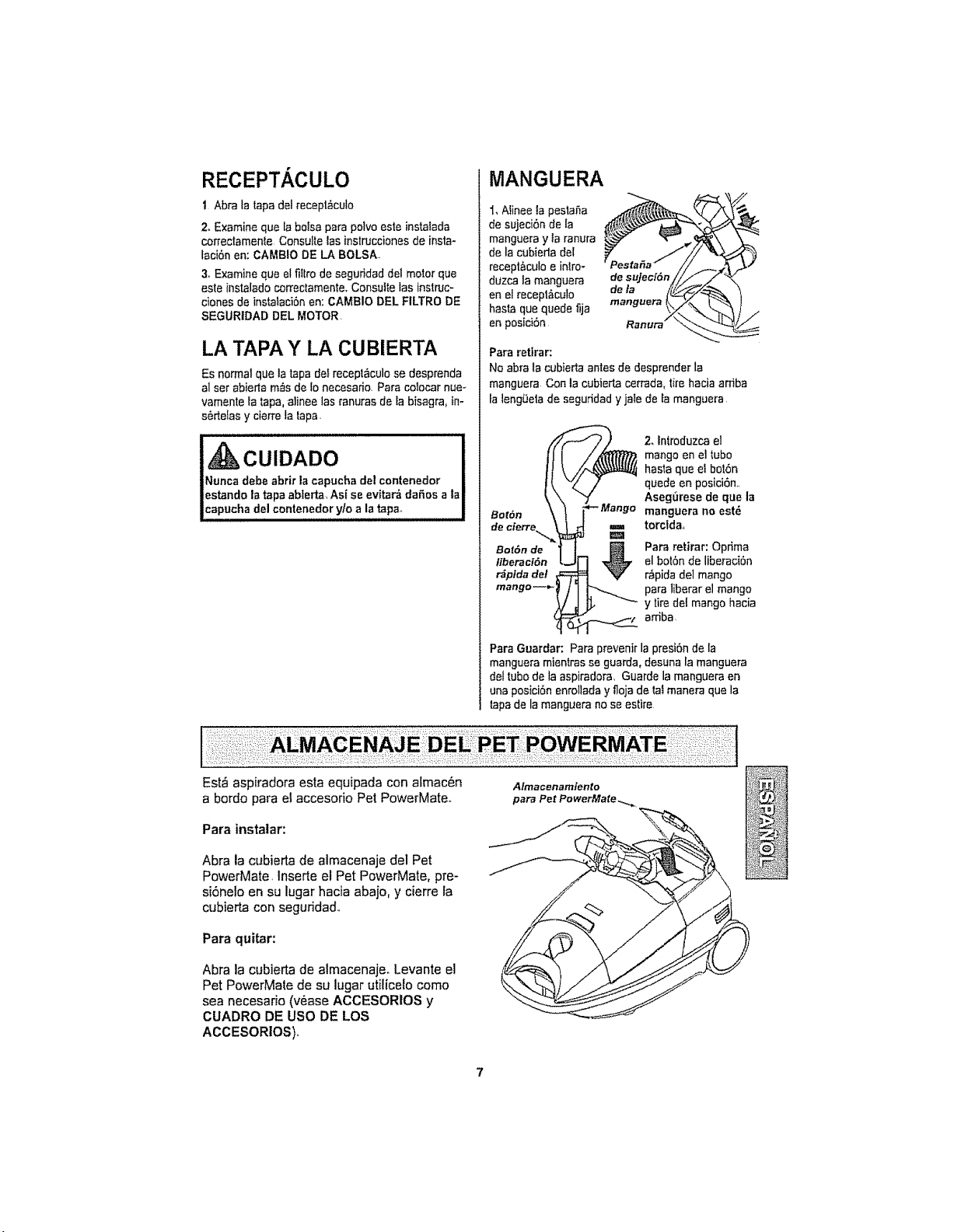
1, Alinee la pesta_a "'_"
de sujeci6n de la
manguera y la ranura
de la cubieda del
recept_culo e inlro-
duzca ia manguera de su]eci6n
en el recept&culo de la
hasta que quede fija mangueral
en pesici6n Ranura_
Para rettrar:
No abra la cubierta antes de desprender la
manguera Con la cubierta cercada, tire hacia arriba
ta ]eng0elade seguddad y jate de tamanguera
_ 2, Introduzca el
mango en el tube
hasta que ei botSn
quede en posici6n,,
Aseg6rese de que la
Bot6n manguera no est_
d___[j_ torcidao
Para retirar: Optima
el bot6n de liberaci6n
r_,pidadel mango
para liberar el mango
y tire det mango hacia
ardba
Para Guardar: Para prevenir la presi6n de la
manguera mientras se guarda, desuna la manguera
del tube de la aspiradora, Guarde la manguera en
ona posici6n enrollada y floja de lai manera que la
tapa de la manguera no se estire
:::::: :: : ::::::::: : ::::::: ::: ; ::: :::::: i ::::::::: _::::::: ::::::: :::;::: ":::;:::: :::::::::::::::::::::::::::::::
:i;:;:_::::::__:iii:ii:_:i:_:i!::::::i:¸:i!:::i:_:_::!::_::_:i:::;:::;iil¸:i!;!;i::;i::::;;:;::i:!iii:!::::i
Est_ aspiradora esta equipada con atmac_n
a bordo para el accesorio Pet PowerMate,,
Para instatar:
Abra la cubierta de almacenaje del Pet
PowerMate. Inserte el Pet PowerMate, pre-
si6ne!o en su lugar hacia abajo, y cierre la
cubierta con seguridad,.
Para quitar:
Abra la cubierta de almacenaje. Levante el
Pet PowerMate de su lugar utilicelo come
sea necesario (v6ase ACCESORIOS y
CUADRO DE use DE LOS
ACCESORIOS)..
Almacenamtento
para Pet PowerMate_,,
CUIDADO
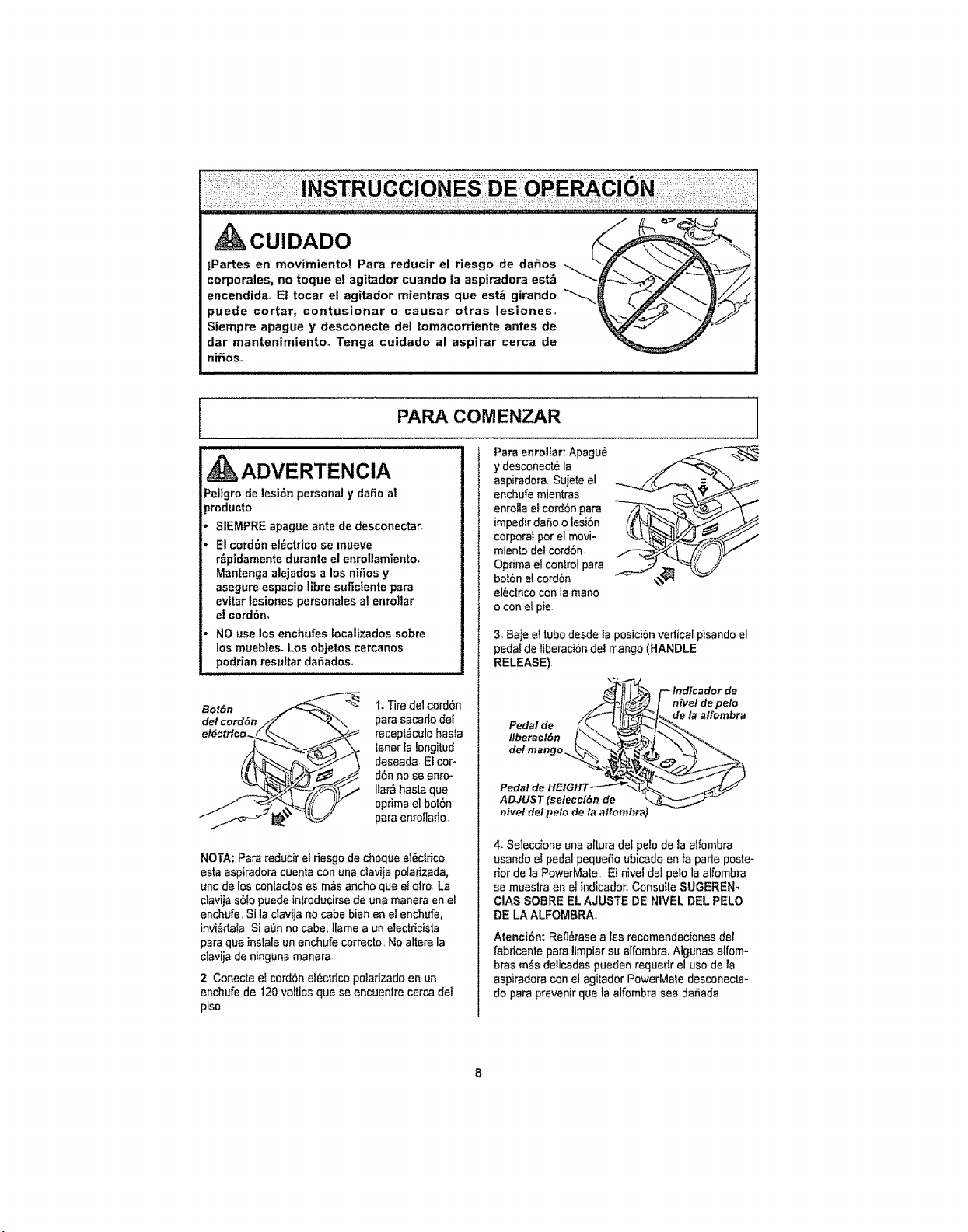
iPartes en movimientol Para reducir el riesgo de da_os
corporales, no toque el agitador cuando ta asplradora est& _'_-_"
encendida., Et tocar el agitador mientras que est_ girando _,
puede cortar, contusionar o causar otras lesiones.
Siempre apague y desconecte del tomacorriente antes de
dar mantenimiento° Tenga cuidado al aspirar cerca de
nifios_
PARA COMENZAR
ADVERTENCIA
Peligm de lesi6n personal y dafio a!
_roducto
SIEMPRE apague ante de desconectar,,
Elcord6n el_ctrico se mueve
r_ptdamente durante el enrollamiento.
Mantenga alejados a los niSos y
asegure espacio libra sufictente para
evitar tesiones personales al enro|lar
el cord6no
NO use los enchufes Iocalizados sobre
los muebtes. Los objetos cercanos
podrian resultar daSados,
Bot6n
1,,Tire de1cord6n
para sacar_ode]
recept_culo basra
tenerla Iongitud
deseada El cor-
d6n nose enro-
iar_ hasta que
optima el bot6n
para enrolado.
NOTA: Pare reducir el desgo de cheque el_clrfco,
asia aspiradora cuenta con una clavija polar;zada,
unode los conlactos es m_s ancho que e]otto La
clavija s6to puedeinlroducirse de una manera en el
enchufe, Si la clavija no cabe bien en e} enchufe,
invi_da_a Si a0n no cabe, ]lame a unelectricista
paraque instale un enchufe correcto, No altere la
clavija de ninguna manera.
2, Conecte el cord6n e}Sctdcopolarizado en un
enchufe de 120voltios qua se encuentre cerca del
piso
Para enrollar: Apagu_ _ .=. -_
y desconect6 la
aspiradora. Sujete el
enchufe mientras v
enrolla el cord6n para
impedir daSo o lesi6n _'
corpora_per el movi-
mien[o delcord6n
Optima el control para
bot6n et cord6n
el_ctdco con la mane
o con el pie
3oBaje eltubedesdeta posici6n vertical pisando el
pedal de liberacibn del mango (HANDLE
RELEASE)
_ F- Indicador de
Pedalde //_'l lt,_h_% de la alfombra
ADJUST (seleccidn de __
nivel de/pale de la affombra)
4. Seleccione una atura del pelode la alfembra
usando el pedal pequeSo ubicado en la parle poste-
rior de ]a PowerMale El nivet de; pelo laalfombra
se muestra en el indicador.Consute SUGEREN-
ClAS SOBRE EL AJUSTE DE NIVEL DEL PELO
DE LAALFOMBRA
Atenci6n: Ret_rase alas recomendaciones del
fabdcante para limpiar su alfombra, Algunas alfom-
bras mrs delcadas pueden requefir el use de la
aspiradora con e] agtador PowerMate desconecta-
do para prevenir que la alfombra sea dafada
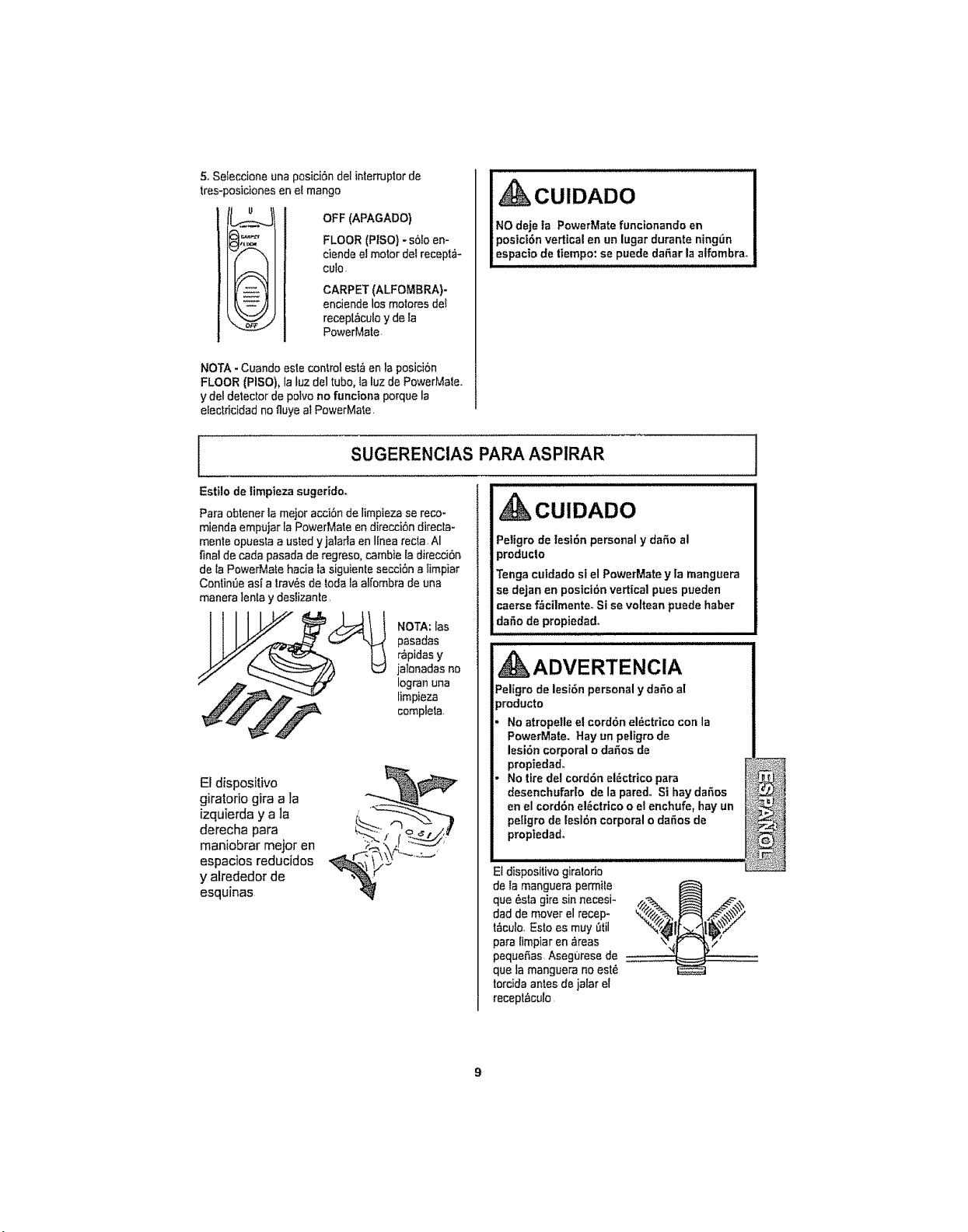
5.Seleccioneunaposici6ndelinternJptorde
tres-_osicionesenetmango
u
OFF(APAGADO)
y,_._ FLOOR(PISO}-sO!oen-
ciendeelmotordeIrecepld-
culo.
!_ _ CARPET(ALFOMBRA)-
'. --":": enciende los motores de!
"_-._ recept_culo y de la
_o,9._ PowerMate,
NOTA - Cuando este control est_ en la posiciOn
FLOOR (PISO}, fa tuz de1tubo, la luz de PowerMale.
y del detector de polvo no funciona porquela
efectdcidad no fluye at PewerMate.
CUIDADO
NO deje la PowerMate funcionando en
posiciOn vertical en un lugar durante ningr3n
espacio de tiempo: se puede debar la alfombra,
SUGERENCIAS PARA ASP1RAR
Estilo de fimpieza sugeridoo A
CUlDADO
Pare obtener la mejor acciOnde limpteza se reco-
mienda empujar la PowerMate endirecciOn direcla-
monte opuesla austed yjalarla en linea recta, AI
final de coda pasada de regreso0cambie la direcciOn
de la PowerMale hacia la siguiente secciOn a limpiar
Contin,3easi a Irav_s de todala alfombra deuna
manera lenta y deslizante,
pasadas
r_pidas y
jalonadas no
Iogran una
limpieza
_k complela
El dispositivo
giratorio gira a fa
izquierda y a la
derecha para
maniobrar mejor en
espacios reducidos
y alrededor de
esquinas
..,_,,_¢_-4_\_\; _--,_.__.,'
Peligro de tesi6n personal y daOo al
}roducto
Tenga cutdado st el PowerMate y la manguera
se dejan en posiciOnvertical pues pueden
caerse f_cilmente. Si se voltean puede haber
:da5o de proPiedad.
kADVERTENCIA
Peligro de lesion personal y dar3oal
_roducto
No atropelle el cordon eldctrico con la
PowerMate. Hay un peligro de
lesion corporal o daOos de
propiedad,
No tire del cordon el_ctrtco para
desenchufado de la pared° S| hay da_os
en el cordon el_ctrico o elenchufe, hay un
pellgro de lesion corporal o da5os de
proptedad,
El dispositivo giralodo
de la manguera permite
que _sla giresin necesi-
dad de mover el recep-
t&culo, Esto es muy Otil
para limpiar en _reas
pequefas Asegurese de
que la manguera no est_
torcida antes de jalar el
recept_culo
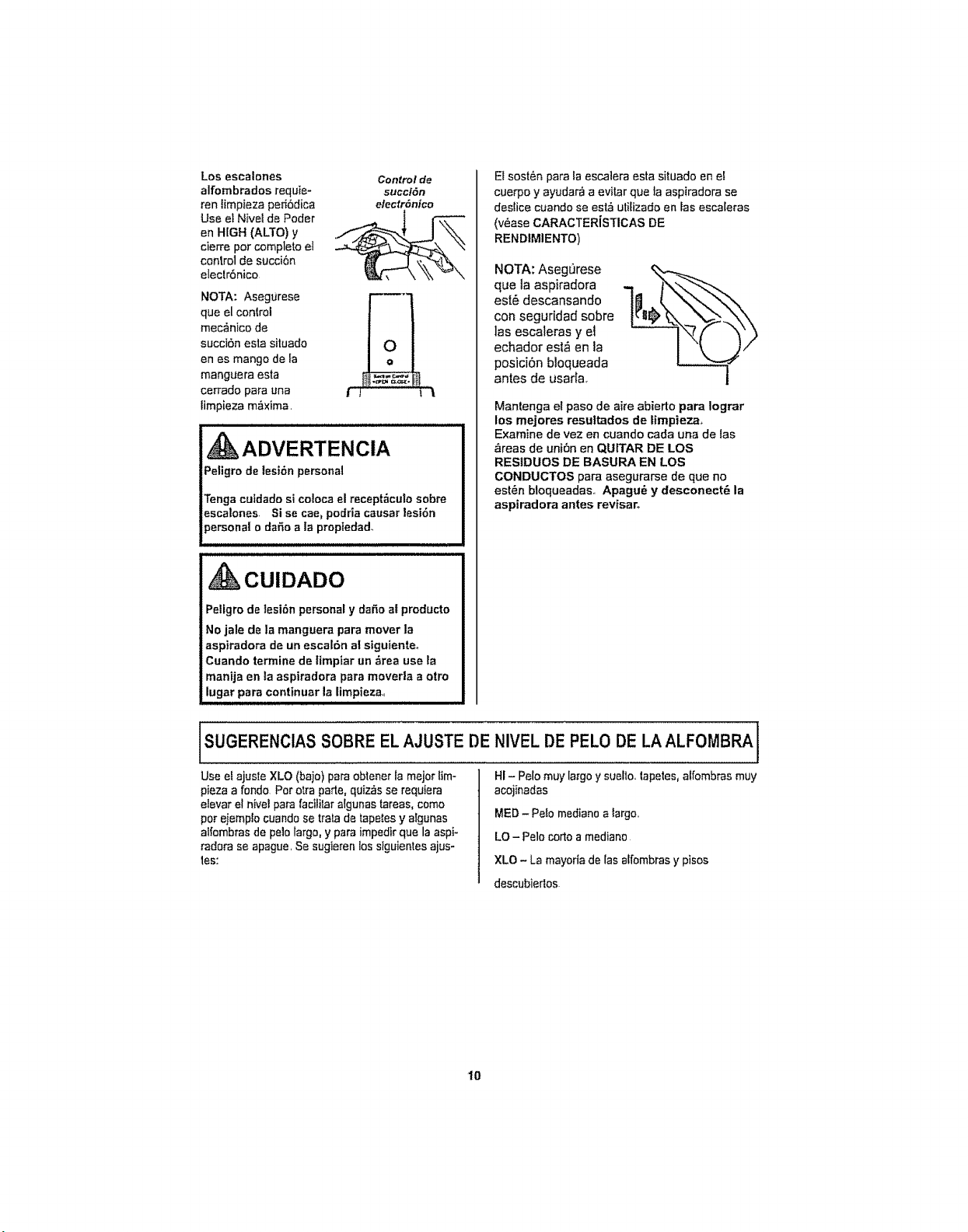
Los escalones Control de
alfombrados requie= succt6n
ran limpieza per_6dica efectr6nico
Use et Nivel de Poder _ l _'-L'L_
en HIGH (ALTO) y
cierre pot completo el
control de succi6n
eleclr6nico
NOTA: Asegurese
que el conlrol
mec_nico de
succi6n esta situado
en es mango de la
manguera esta
cerrado para una f ,f _,1
timpieza m_xima.
, ADVERTENCIA
Peligro de tesi6n personal
Tenga cutdado si coloca el recept_cuto sobre
escalones Si se cae_podrJa causar lesi6n
_ersonal o daSo a ia propiedad.
CUIDADO
Peligro de tesi6n personal y daSa at producto
No jale de la manguera para mover la
aspiradora de un escal6n at siguienteo
Cuando term|he de timpiar un &rea use la
man|ja en ta aspirsdors pars moverla a otto
lugsr para continuar la limpiezm
El sost&n para la escalera ests situado en e!
cuerpo y ayudar_ a evitar que la aspiradora se
deslice cuando se est_ utilizado en Iss esca[eras
(v_ase CARACTERISTICAS DE
REND¿MIENTO)
NOTA: Aseg0rese
qua la aspiradora
est@descansando
con seguridad sobre
las escaleras y el
echador est_ en la
posici6n bloqueada
antes de usarfa
Mantenga el paso de aire abierto palra Iograr
los mejores resuttados de timpieza.,
Examine de vez en cuando cada una de las
_,reas de uni6n en QUtTAR DE LOS
RESIDUOS DE BASURA EN LOS
CONDUCTOS para asegurarse de que no
est@n bloqueadas.. Apagu@ y desconect_ la
aspiradora antes revisaro
SUGERENCIAS SOBRE EL AJUSTE DE
Use e_ajuste XLO (bajo) para obtener la major lim-
pieza a fondo Pot otra parle,quiz_,sse requiera
alBvsr el nivelpara facililar algunas tareas, como
perejemp!o cuando se trata de tapates y aSgunas
a_fombrasde pale largo, y para impedir que la aspi-
radora se apague. Sesugierenlos sfguientes ajus-
tes:
I
NIVEL DE PELO DE LAALFOMBRA I
HI- Pelo muy largoy sueflo, tapetes, slfombras muy
acojinadas
MED - Pelo mediano a largo..
LO- Pale corto a mediano
XLO - La mayoria de [as affombras y pisos
descubiedos
10
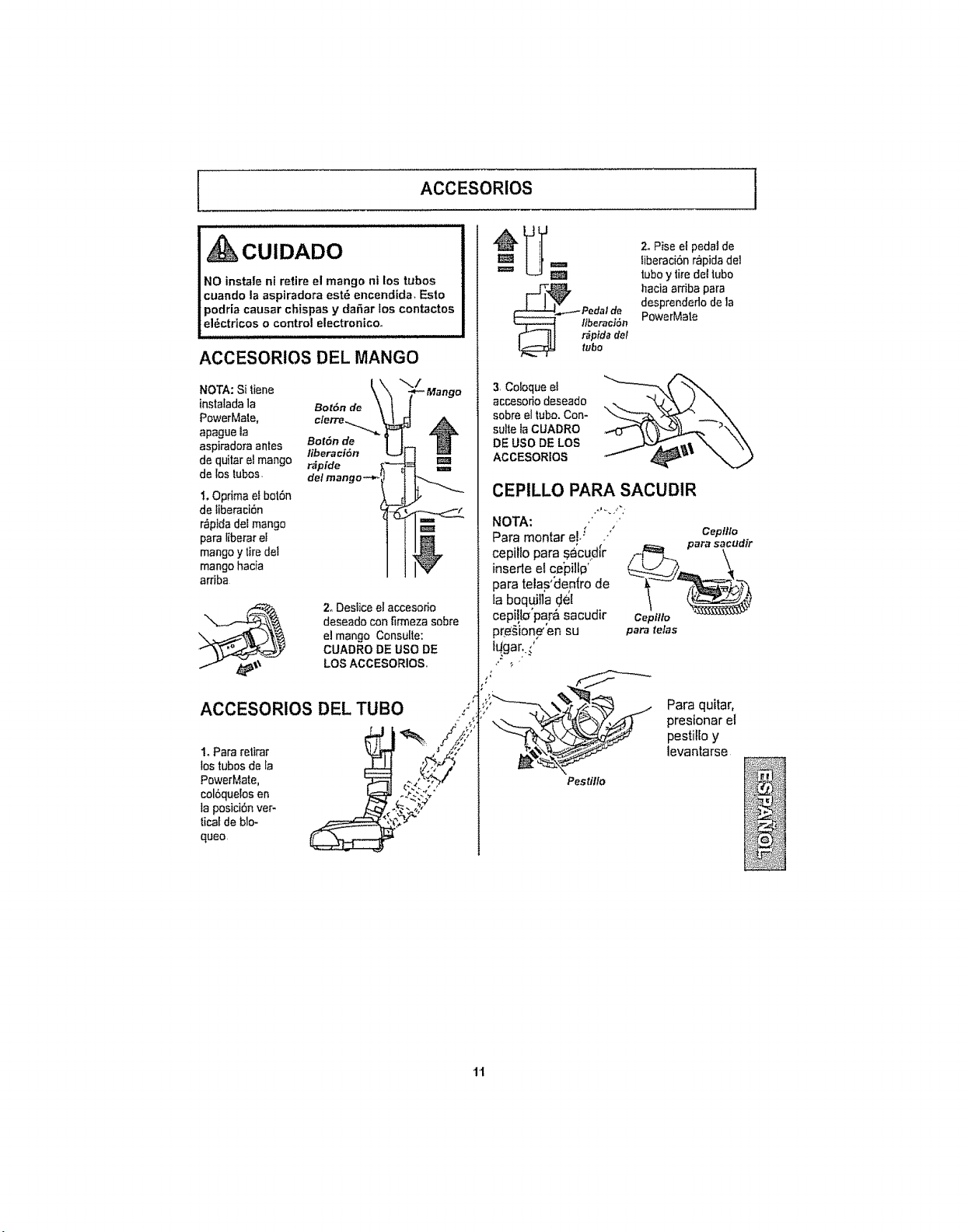
ACCESORIOS
CUIDADO
NO instale nt retire el mango ni los tubos
cuando la aspiradora est6 encendida, Esto
podria causar chispas y da6ar los contactos
el6ctrtcos o control electronico.
ACCESORIOS DEL MANGO
NOTA: Si _,iene \\.
instalada la Bot6n de
PowerMale, c,,erre._...._ _
apague la
aspiraclora antes Bot6n de ]
liberaci6n L.
de quitar el mango r_pide
de los tubos, del mango -._
1.Opdma efbot6n
de Iiberaci6n
r_pida del mango
para liberar ef
mango y tire del
mango hacia
arriba
./
*_ Mango
Z Destice el accesorio
deseado con fkmeza sobre
el mango Consulte:
CUADRO DE USO DE
LOS ACCESORIOSo
ACCESORIOS DEL TUBO
t Para retirar
los tubosde la
PowerMate.
col6quelos en
la posici6nver-
|icat de blo-
queo,
i=,
2. Pise et pedal de
_iberaci6nr_pida de1
tuboy tire del tubo
hacia amba para
desprenderlo de la
PowerMate
3,Cobque el
accesoHodeseado
sobre el tubo.Con-
suite laCUADRO
DE USO DE LOS
ACCESORIOS
CEPILLO PARA SACUDIR
NOTA: , /
Para rnontar el.:
cepillo para _'cud[r
insede ef ce'pillo'
para telas'_eg(ro de
ta boquJ!la (JeE
cepi!b'par& sacudir cept//o
pre_ion_'en su para telas
IL_gar..,'
Cepillo
Pestillo
Para quitar,
presionar el
pestilfo y
levantarse
i
"1"1
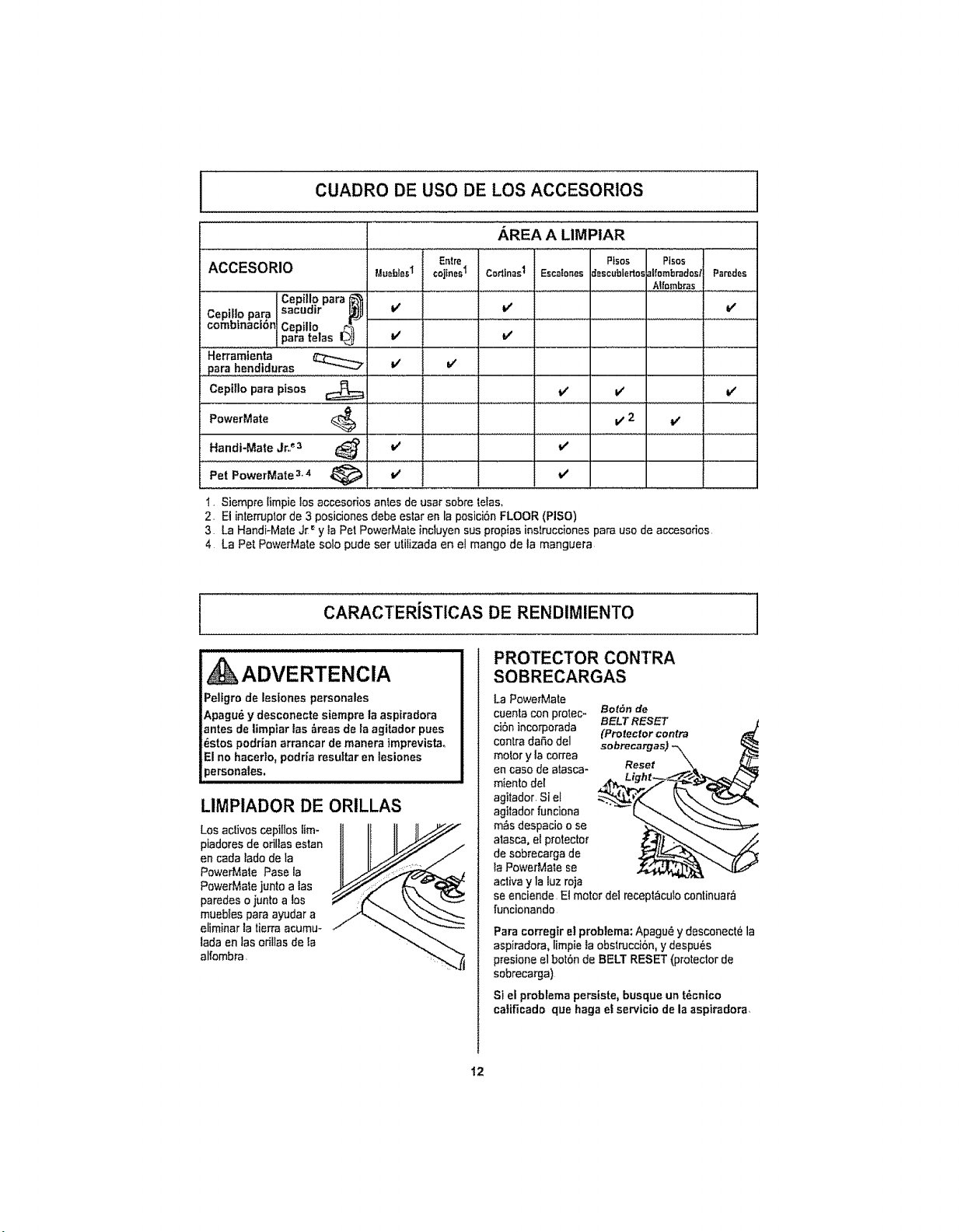
CUADRO DE use DE LOS ACCESORIOS
ACCESORIO
AREA A LIMPtAR
Entre Pisos Pfsos
Cepillo para _t
Cepil]o para sacudir _
combinaci_n Cepillo
para telas L_J
! Para hendtduras
Cepitlo para pisos
PowerMate
Handi-Mate Jr.._3
Pet PowerMate 3.4
MueWesI
v'
v'
V v'
V 2 v'
v'
v'
cojinesI CodlnasI Esca!ones8escubiertos]lfornbrados/Paredes
.... Aifombras.
v' v'
v'
v'
v'
1, Siempre limpie Ios accesorios antes de usarsobre telas.
2, El interrupter de 3 posiciones debe estaren la posici6n FLOOR (PISO)
3 La Handi-Mate Jr _y ia Pet PowerMate incluyen sus propias instrucciones para use de accesorios,
4 La Pet PowerMate solo pude ser utilizada en el mango de ta manguera
I CARACTERiSTICAS DE RENDIMIENTO
, kADVERTENCIA
Pelfgro de lesiones personales
Apagu_ y desconecte siempre la aspiradora
antes de |impiar los _roas do la agitador pues
_stos podrian arrancar de manera imprevista.
Elno hacerlo, podria rosuitar en Iosiones
personafes.
LIMPIADOR DE ORILLAS
Los activos cepillos tim- It II II II/._"//'"
piadores de odllas eaton
en coda lade de la
PowarMate Paso la
PowerMate junto a los
paredes o juntoa los
mueb_espara ayudar a __ "--..._.__'._
eliminar la tiorra acumu-
lada en las orillas de ta
Blfombra
PROTECTOR CONTRA
SOBRECARGAS
La PowerMate
cuenta con protec- BetSn de
ciSnincorporada BELTRESET
contra daSo del (Protector contra
motor y la correa
en case de atasca- Reset
miento del
agilador. Si el
agilador funciona
m_s dospacio o so
atasca, el protector
de sobrecarga do
la PowerMate se
activa y la luz roja
se enciende El motor de] recept_cufo continuar_
funcionando
Para corregir e! problema: Apagu_ ydesconect_ la
aspiradora,limpie la obstrucci6n, y despu_s
presione el bot0n de BELT RESET (protector do
sobrecarga)
Si el problema persiste, busque un t_cnico
catificado que haga el servicio de la aspiradora_
12
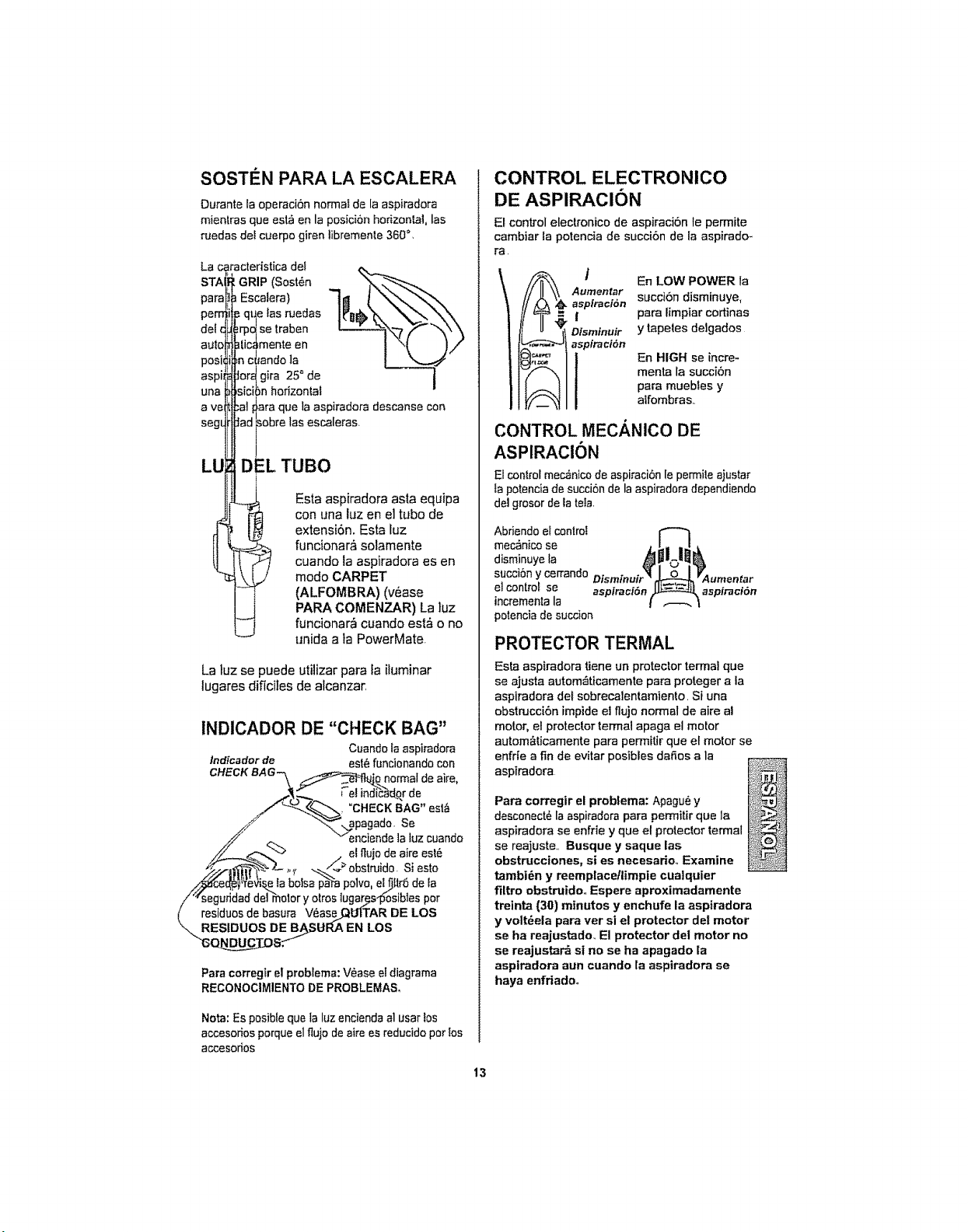
SOSTEN PARA LA ESCALERA
Durante la operaciEn normal de la aspiradora
mientras qua est_ en la posiciEn horizontal, los
ruedas del cuerpo giren libremenle 360_,
La caracteristica del
STA GRIP (Sost_n "--_
para Escalera)
peru .=qt_e las ruedas
delc ;rpdlsetraben
auto ]tic,monte en
posb =nc_andola
aspiJ Jor_ gira 25° de ]
una ,sici)n horizonlal
s
ave _al !=araque la aspiradora descanse con
segL Jad _obrelos escaleras
LU D :.LTUBa
Esta aspiradora asta equipa
con una luz en el tube de
ii extensiEn. Esta fuz
funcionar& solamente
cuando la aspiradora es en
mode CARPET
(ALFOMBRA) (v_ase
PARA COMENZAR) La ]uz
funcionar,_ cuando est& o no
unida a ta PowerMate
La luz se puede utilizar para la iluminar
lugares dificiles de alcanzar,
INDICADOR DE "CHECK BAG"
Cuando la aspirad0ra
lndicador de est_ funcionando con
CHECK BAG_ __0_qarmal de aire,
_.__.._ ;"elind_dqr de
_/_-'_., "CHECK BAG" est&
f "_ apagado. Se
/_" eneiende la luz cuando
_./-2_Z- ,_, -_,._obstruido. Siesto
i'Wseguridad del motor y otros lugar_sl_osibles par
( residues de basura V_ase_U|TAR DE LOS
"_RESIDUOS DE B_SURA EN LOS
"s_s.f
Para corregir el problema: Vease eldiagrama
RECONOCIMIENTO DE PROBLEMA&
Nota: Es posible qua la luz encienda al usar los
accesodos porque el tlujo deaire es reducido par los
accesodos
CONTROL ELECTRONICO
DE ASPIRACION
El control electronico de aspiraciOn le permite
cambiar la potencia de succi6n de la aspirado-
ra.
I En LOW POWER la
Aumentar succi6n disminuye,
aspiractEn
I para limpiar cortinas
Dfsmtnuir y tapeles delgados
aspiraciEn
En HIGH se incre-
menta la succi6n
para muebfes y
alfombras,.
CONTROL MECANICO DE
ASPIRACION
El control mec_nico de aspiraciEn le permile ajustar
ta potencia de succion de la aspiradora dependiendo
del grosor dela tela,
Abriendoelcontrol I""-_&_L|_
mec_nico se
disminuye fa
succiEn ycerrando Disminutr_.( O=L._L_O,_Aumentar
el control se aspiraci6n_ aspiractSn
incrementa la
t .--.\
potencia de succion
PROTECTOR TERMAL
Esta aspiradora tiene un protector terrnai que
se ajusta autom_ticamente para proteger a la
aspiradora det sobrecalentamiento. Si una
ebstrucciEn impide et flujo normal de aire al
motor, el protector termal apaga el motor
autom&ticamente para permitir que el motor se
enfrie a fin de evitar posibles da_,os a la
aspiradora
Para corregir el problema: Apagu_ y
desconect6 la aspimdora para permitir que la
aspiradora se enfrie y qua et protector termal
se reajuste.. Busque y saque los
obstrucciones, si es necesario,. Examine
tambiEn y reemplaceflimpie cua|quier
filtro obstruido,. Espere aproximadamente
treinta (30) minutes y enchufe la aspiradora
y voltEela para ver si el protector del motor
se ha reajustado. El protector del motor no
se reajustar& si no se ha apagado la
aspiradora aun cuando la aspiradora se
haya enfriadoo
13
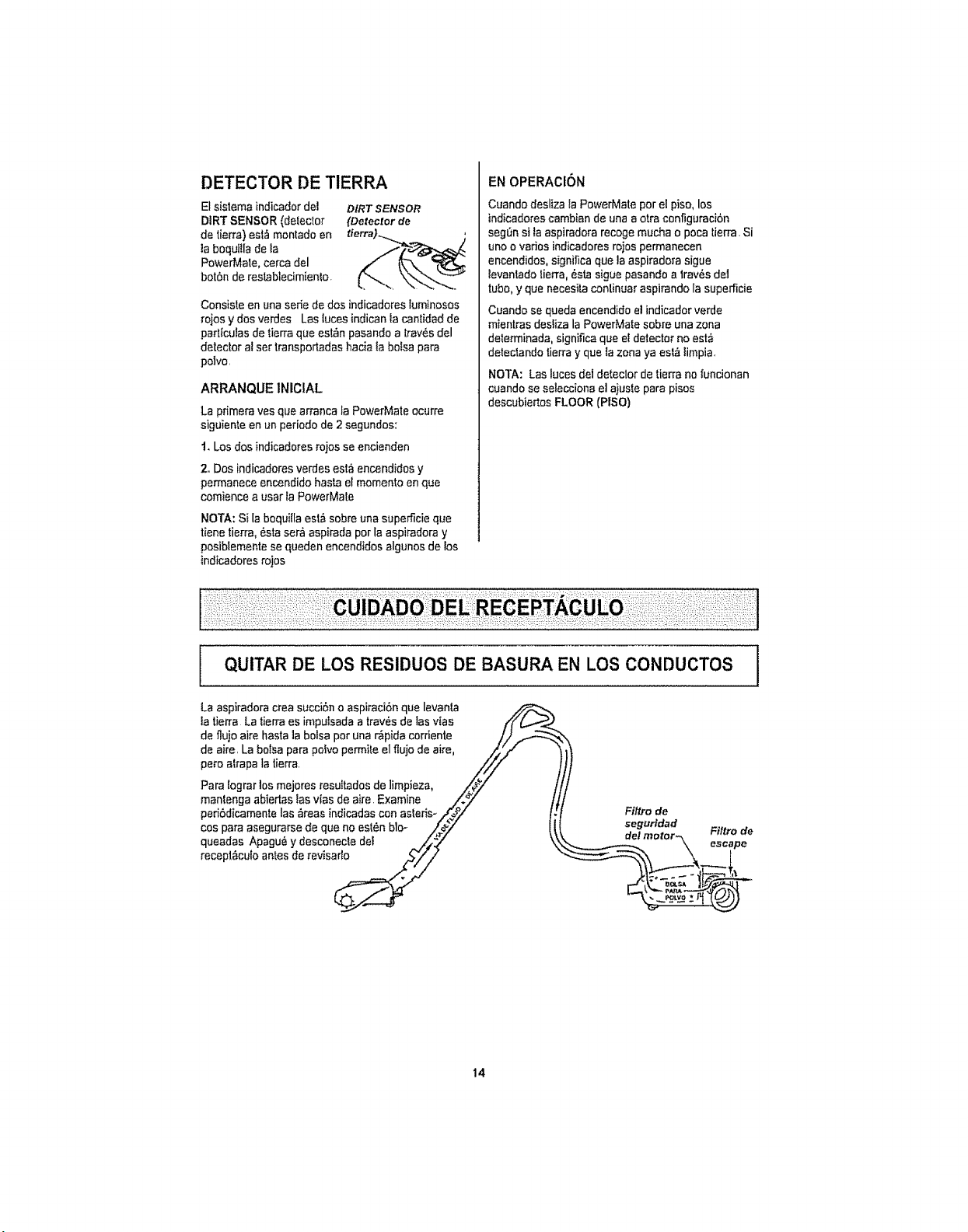
DETECTOR DE TIERRA
El sistema indicador de1
DIRT SENSOR (detector
de tien'a)esl,_montado en
laboquilla de la
Powe_.,late,cerca del
bot6n de restablecimiento.
DIRT SENSOR
(Detector de
Consiste en una serie de dos indicadores luminosos
rajas y dos verdes Lastuces indicanla cantidad de
parflculas de tierra que est_n pasando a lrav6s del
detector al ser transportadas hada ta bolsa pare
polvo.
ARRANQUE INIClAL
La pdmera yes que arranca la PowerMate ocurre
siguiente enun periedo de 2 segundes:
t. Los dos indicadores rajas se encienden
2,.Dos indicadores verdes est_ encendidos y
permanece encendido haste el memento enque
comience a usar la PowerMate
NOTA: Si laboquitla esl& sabre una superScie que
tiene tierra, 6sta ser_ aspirada per la aspiradora y
posiblemente se queden encendidos algunos de los
indicadores rajas
EN OPERAClON
Cuando desliza la PowerMate per el piso, los
indicadorescambian de una aotra cenfiguraci6n
seg_n si ta aspiradora recoge mucha o poca tierra. Si
uno o varies indicadores rajas permanecen
encendidos, significa que ]aaspiradora sigue
tevantado lierra, 6sta sigue pasandoa trav6s de1
tube,y que necesita conlinuar aspirando la superficie
Cuando se queda encendidoel indicador verde
mientras desliza la PowerMate sabre una zona
determinada, significa que eFdetector no esta
detectando tierray que tazona ya est_ timpia,
NOTA: Las luces deldetector de tierra no funcionan
cuando se selecciona el ajuste pare pises
descubiertos FLOOR (PISO)
I QUITAR DE LOS RESIDUES DE BASURA EN LOS CONDUCTOS
La aspiradora crea succi6n o aspiraci6n que levanla _
la tierra La tierraes impulsada a trav6s de las vies //('(._._
de fiujo aire basra la balsa per una r_pida corriente /.}
de aire. La botsa para pobo permile elflujo de aire, _',../ '
pete atrapa la tierra. ///(
,t'. f
Para lograr los mejores resu[tados de limpieza, _#_/" j
mantenga abierlas las vlas de aire. Examine /=.._7" ,/
peri6dicamente las 6reas indicadascon asleris- ./_,_/" I,
cospa,aase,o sode noest nb,o- 11
queadas Apagu6 y desconecle del _/_._/ \
recepl6culo antes de revisa_
Filtro de
seguridad
14
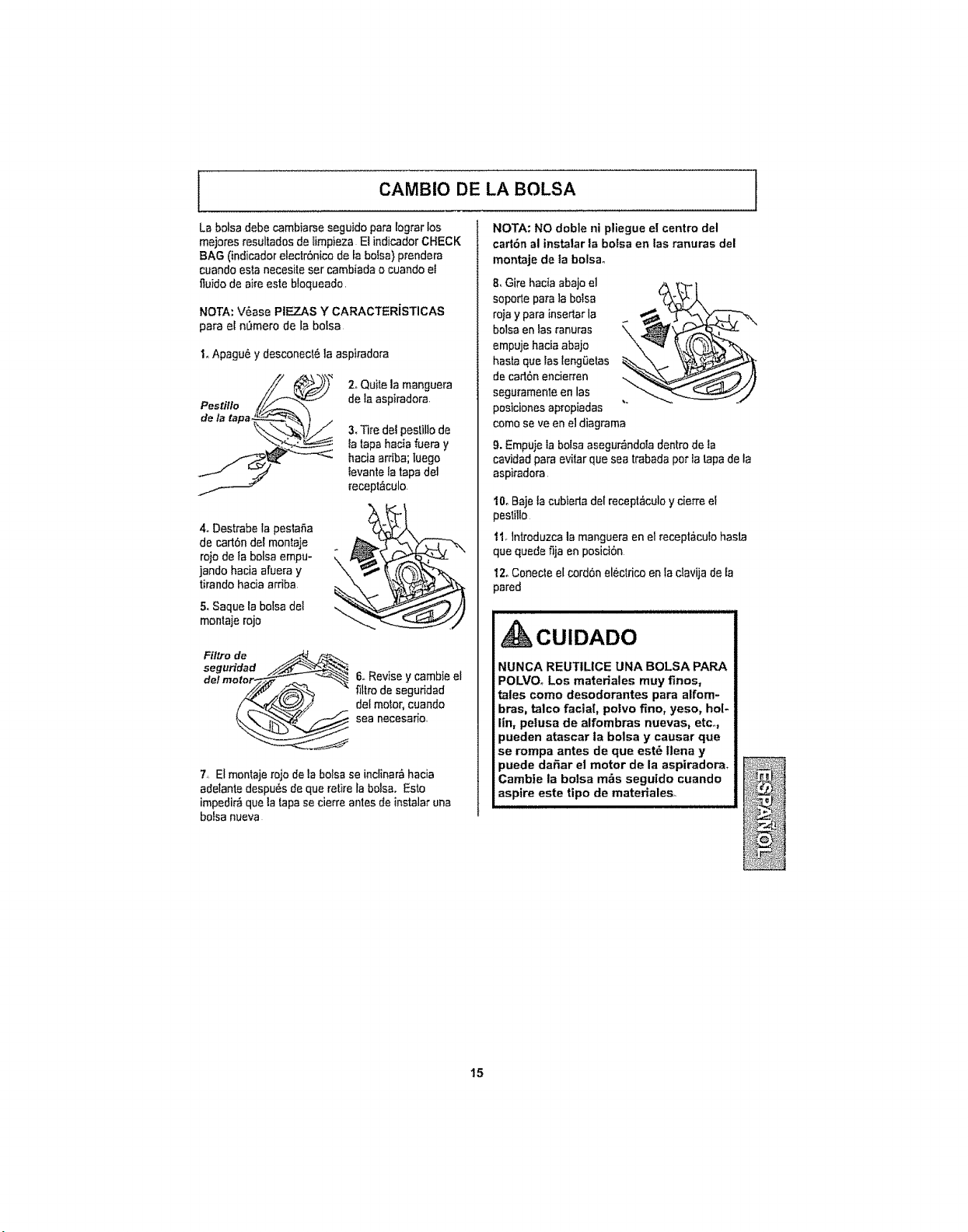
CAMBIO DE LA BOLSA
]
La bolsa debe cambiarse seguido para lograr los
mejores resultados de limpieza El indicador CHECK
BAG (indicadoretectr6nico de ta bolsa) prendera
cuando esla necesile ser cambiada o cuando el
fluido de aire este bloqueado.
NOTA: V6ase PIEZAS Y CARACTERiSTICAS
para el n0mero de la bolsa
I,,Apagu& y desconecl6 la aspiradora
2oQuite la manguera
de la aspiradora.
3, Tire del peslillode
fa tapa hada fuera y
hacia arfiba; Iuego
tevante la tapa del
recept&culo.
4. Destrabe la pestaSa
de carl6n del montaje
rojo de la belsa empu-
jando hacia afuera y
tirando hacia arriba.
5, Saque la bolsa del
montaje rojo
Ffl_o de _-_
segu_dad __
de!mo_
6,,Revise y cambie el
filtrode segufidad
del motoq cuando
sea necesa_o,
!,, El monlaje rojo de la bolsa se inclinar_ hacia
adelante despu_s de que retire la bolsa. Esto
impedir&que la tapase cierre antes de instalar una
bolsa nueva
NOTA: NO doble ni pliegue el centre del
cart6n al instalar la botsa en las ranuras del
montaje de la bolsa°
8, Gire hacia abajo el
soperle para la bolsa
rojay para inserlar la
bolsaen las ranuras
empuje haciaabajo
hasla quelas leng0etas
decarl6n encierren
seguramente en lax
posiciones apropiadas
come se ve en el diagrama
9.Empuie la bolsa asegur_ndola dentro de ta
cavidad para evitar que sea trabada per fa tapade la
aspiradora
I0o Bajeta cubierla del recept#_culoy cierre el
peslillo
t I_lntroduzca la manguera en el recept&cufo hasta
quequede fija en posiciOn
12oConecte elcord6n eleclrico enla clavija de la
pared
ill i illn, ii, i ,in iiil,lllllll J/IJlJ
CUIDADO
NUNCA REUT1LICE UNA BOLSA PAR.A
POLVO, Los materiales muy fines,
tales come desodorantes para alfom-
bras, talco facial, potvo fine, yeso, hot-
lin, pelusa de alfombras nuevas, etc..,
pueden atascar la bolsa y causar que
se rompa antes de que est_ llena y
puede da_ar el motor de la aspiradora.
Cambie la bolsa m&s seguido cuando
aspire este tipo de materiales.
15

1
LIMPIEZA DEL EXTERIOR Y DE LOS ACCESORIOS
I,Apagu_ y desconecte eI cordSn electdco de la cla-
viia de la pared NO rocie agua sabre la aspira-
dora,,
2. Para limpiar et exterior o reducir la electricidad
est&tica y acumulacien de polvo, limpie la
superficie exterior de la aspiradora y los
accesorios Use un trapo suave y limp|o, mejeio
en una soluci6n de agua y detergente liquido, y
expdmalo seco. Sequela despu&s de limpiar
_CUIDADO
No use los accesorios si est_n mojados,. Los
accesorir, s que se utilicen en &teas sucias,
debajo de| refrigerador, no deben usarse en
otras superficies sin antes ser lavades.
Podrian dejar marcas_
i
I CAMBIO DEL FILTRO DE SEGURIDAD DEL MOTOR ]
_ADVERTENCIA
Peligro de cheque e|_ctrico
Apagu_ y desconect_ la aspiradora. No opere
|a aspiradora sin el filtro de seguridad del
motor,. Asegeurese de que el filtro est6 seco e
lnstalado adecuadamente para impedir que el
motor fa!le y/o que se produzca un cheque
et_ctricm
FILTRO DE SEGURIDAD DEL
MOTOR
ELECTROSTATlCO
Esle filtro se |iene que cambiar cuando est_ sucio
Oebe cambiarse peri6dicamente segOnlas condi*
ciones de use Elfiltro no se puede lavar pues
perderia su capacidad para atrapar polvo,
NOTA, Vease PIEZAS y CARACTERiSTICAS
para el n_mero del filtro de seguridad del motor.
I. Para quitar la balsa, siga las instrucdones en
CAMBIO DE LA BOLSA..
2, Levante el dispositivo (_"__#-.J.Li j'_,_,_2._-_-__
de retenci6n de goma y __;,_ ",_
saque el filtrode seguri-
dad come se ve en e!
diagrama
_dd_eyoma" _
_3, Reemplace el filtro,
¢_"*'_. _ instale la superficie
Jj _L'_-;%-_%. bl&nca de el lade de Ia
_&=-'_"\?"Xt"botsa de polvo
_"_ _I_ des_iza.,oes_ee.I_s
_,_----_ t'_"% "cost|Has de la cavidad
debaja del dispositivo
de retenci6nde goma.
4, V_ase CAMBIO DE LA BALSA para cambiar ia
balsa
16
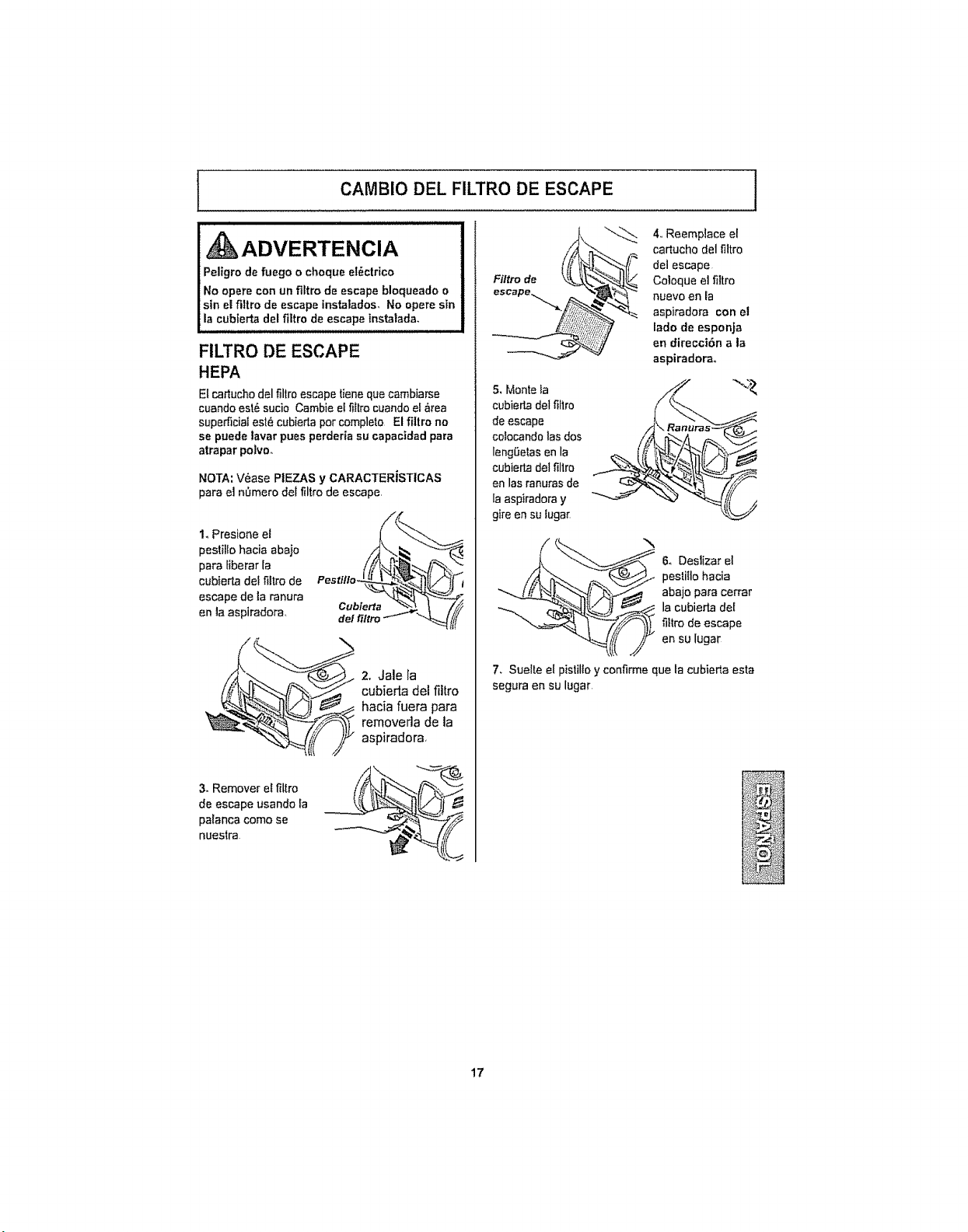
CAMBIO DEL FILTRO DE ESCAPE ]
FILTRO DE ESCAPE
HEPA
Etcar_uchodel filtroescape tiene que cambiarse
cuande est_ sucio Cambie ei fittracuando ei _rea
superficiaI est_ cubieda per complete El filtro no
se puede tavar pues perderia su capacidad para
atrapar polvo°
NOTA: V_ase PIEZAS y CARACTERiSTlCAS
pare eJ hi, mere del filtro de escape.
I. Presione et
peslilto hacia abajo
para Iiberar [a
cubierta de{ fittro de
escape de la ranura
en la aspiradora..
Pestillo__
_ 2.. Jale [a
cubierta dei filtro
hacia fuera para
aspiradora
3. Remover el ffltro
de escape usando fa
paEancacome se
nuestra
4,,Reemplace el
cartucho del filtro
del escape
Caloque el fiitro
nuevo .81"1IB
aspiredora con el
lade de esponja
en direcci6n a la
aspiradoreo
5, Monte la
cubierta delfiltro
de escape
cotocando las dos
lengSelas en la
cubierta del fillro
en las ranuras de
la aspiradora y
gire en su luga_
_.,
& Deslizar el
pestitlo hacia
abajo para cerrer
la cubierla de[
filtro de escape
en su lugar
7_ Suelte el pistille y confirme que Ia cubierta esta
segura en su lugar
17
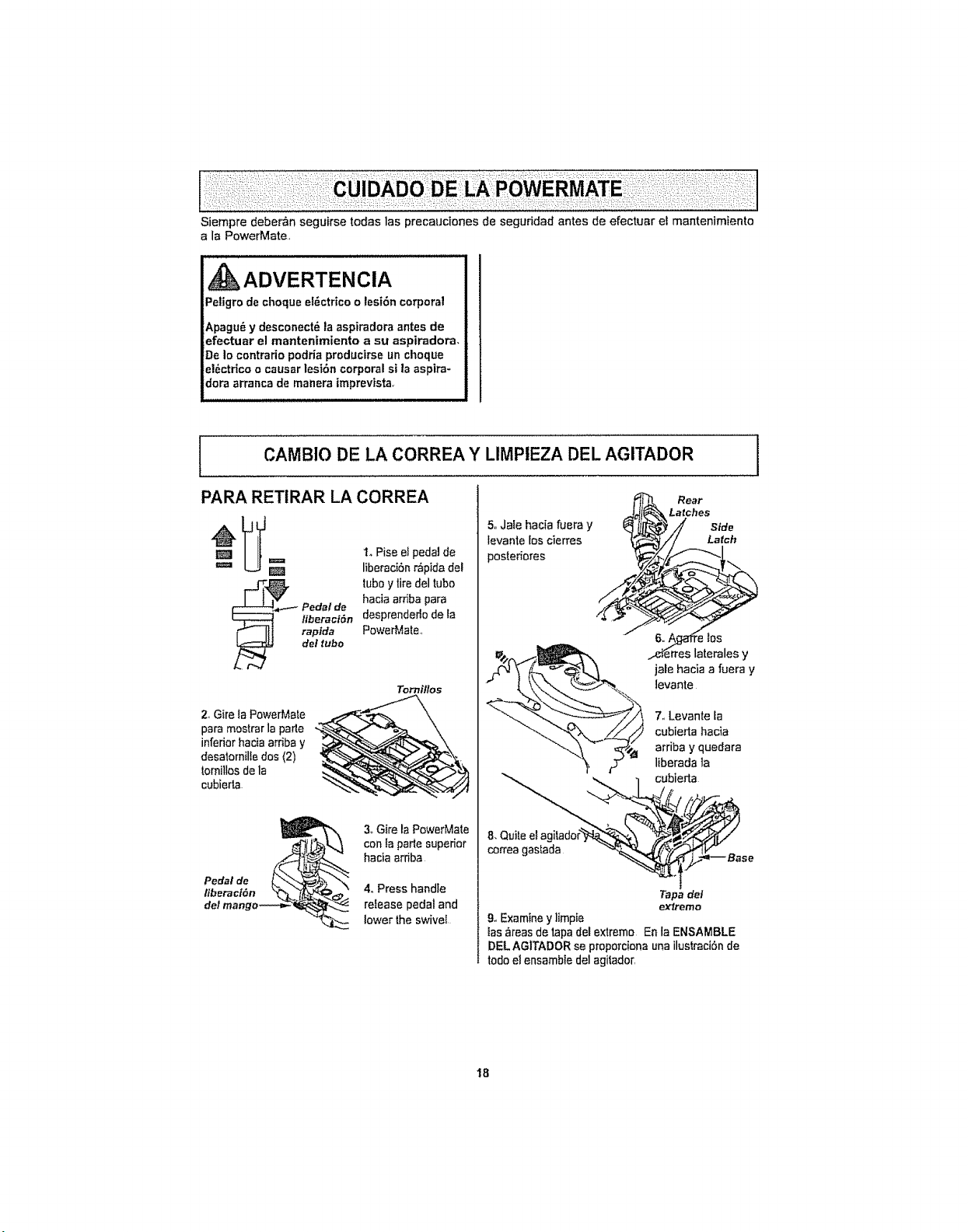
Siempre debe_n seguirse todas las precauciones de seguridad antes de efectuar el mantenimiento
a la PowerMate,
Petigro de cheque e!#,ctricoo lesi6n corporal
Apagu_ y desconect_ ta aspiradora antes de
efectuar el mantenimiento a su aspiradora,
De Io centrario podria producirse uncheque
el_ctrico o causar lesi6n corporal si la aspire-
dora arranca de manera imprevtsta,
CAMBIO DE LA CORREA Y LIMPIEZA DEL AGITADOR
PARA RETIRAR LA CORREA
= I_Piss el pedal de
=== I_ liberaci6n r,_pida del
[J-_ tubey tire del tube
Pedal de hacia ardba para
liberacl6n desprendedo de la
r_ If! rapida PowerMate,
del tube
Torn#los
2. Gire ia PowerMate
para mostrar la parle
infedor hacia ardba y
desatornilIe dos (2)
tomillosdela
cubierta
3_Gire la PowerMate
con la parle supedor
hacia ardba
4,,Press handle
refease pedal and
lower the swivel
5. Jafe hacia fuera y
levante los cierres
poster;ores
/
jale hacia a fuera y
levante
7. Levante fa
cubierta hacia
arriba y quedara
liberada la
correa gastada -'._',e,,,_ se
Tapedel
extreme
9.,Examine y limpie
las _reas de tapa del extreme En la ENSAMBLE
eEL AGITADOR se preporciona unailustraci6n de
lode el ensemble del agitado_
18
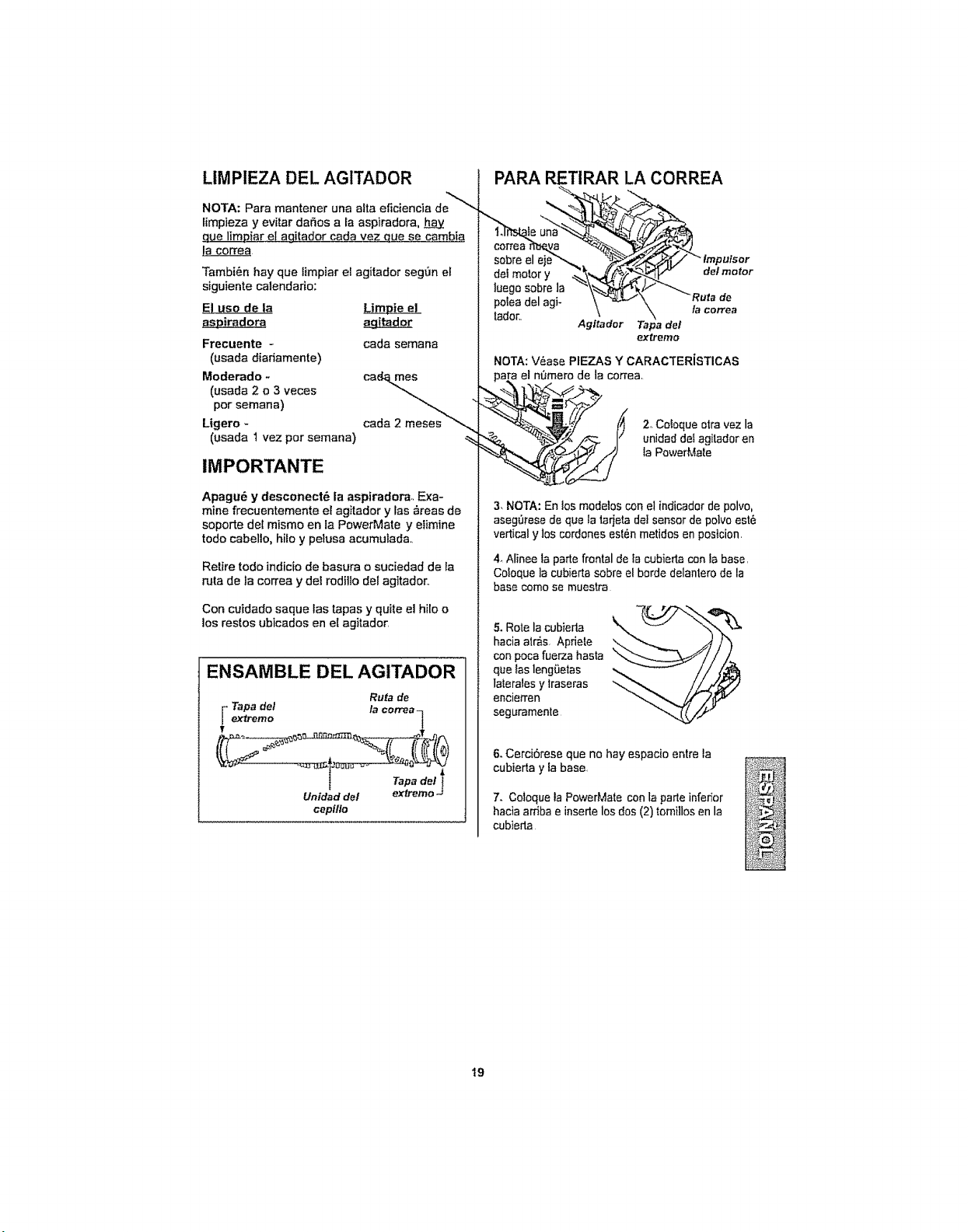
LIMPIEZA DEL AGITADOR
NOTA: Para mantener una alta eficiencia de_,
limpieza y evitar da_os a la aspiradora, h_.a.y
cue limDiar et ag.ilador cada vez c_uese cambia
Tambi_n hay que limpiar el agitador segOn el
siguiente calendario:
E_EIuse de la Limie_
as&&Diradora agLitador
Frecuente -
(usada diariamente)
Moderado -
(usada 2 o 3 veces
per semana)
Ligero -
(usada 1 vez per semana)
cada semana
,%
IMPORTANTE
Apagu6 y desconect6 la aspiradora,, Exa-
mine frecuentemente et agitador y las _reas de
soporte del mismo en la PowerMate y elimine
todo cabello, hifo y pelusa acumulad&
Retire todo indicio de basura o suciedad de la
ruta de la correa y del roditlo del agitador,.
Con cuidado saque las tapas y quite el hilo o
los restos ubicados en el agitador
ENSAMBLE DEL AGITADOR
Ruta de
_ apa del la correaq
extremo
Tape det_
Untdad del exfJ-emo -J
cepillo
PARA RETIRAR LA CORREA
correa rr_e_a -_._--._..__,_-_,"_
sobre el eje_,_. "_2_'_/ "_tmpulsor
luege sobre la "_\_%_,4kF "_ _
polea del agi- \ "_:#_'_ "Ru,a de
lador. - '_ \ ta Gorrea
Agitador Tape del
extreme
NOTA: V&ase PIEZAS Y CARACTERiSTICAS
para el n0mero de la correa.
"-_. "_/.._ _ I/ unidad del agitador en
__ la PowerMa[e
3, NOTA: En los modelos con e! indicador de polvo,
aseg0rese de que la tarjetadel sensor de polvo est6
vertical y los cordones es{_n metidos en posicion
4. Alinee la parte frontal de la cubierta con la base.
Coloque la cubierta sobre elhorde delantero de la
base come se muestra
5. Rote la cubieda
hacia alr_s, Apriete
con poea fuerza hasta
que {asleng_etas
lalerales y traseras
encierren
seguramente
6.Cerci6rese que no hay espacio entre la
cubierta y la base.
7. Cotoque la PowerMale conla parte infedor
hacia arfiba e insertelos dos (2)tomillosen la
cubierta
19
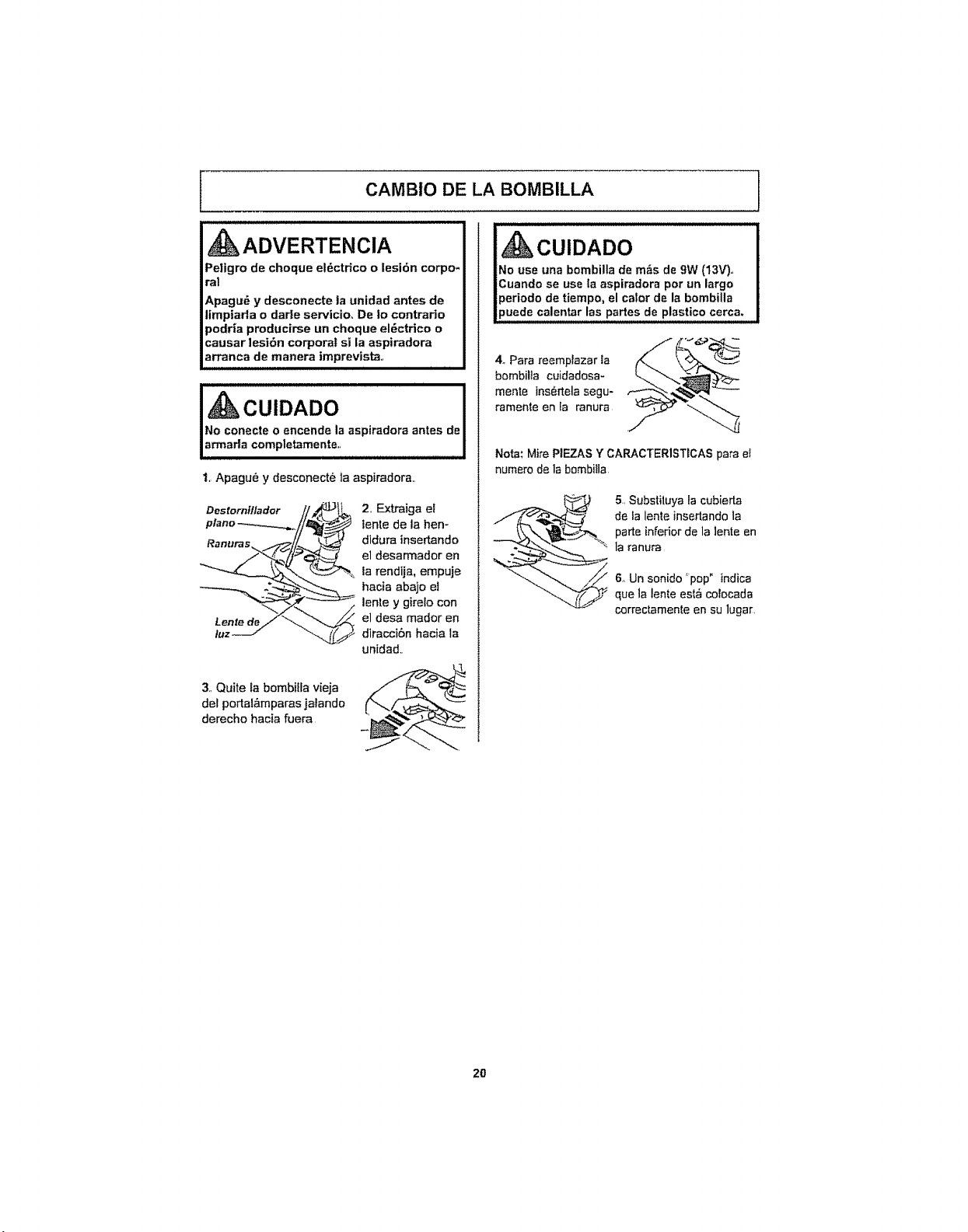
CAMBIO DE LA BOMBILLA l
ADVERTENCIA
Pe]igro de cheque el6ctrico o lesi6n corpo-
ral
Apagu_ y desconecte la unidad antes de
limpiada o dade servicioo De |o contrario
podria producirse un cheque el6ctrieo o
causar lesi6n corporal si la aspiradora
arranca de manera imprevista,,
u_JJNu= LNULNNU=L
No conecte o encencte la aspiradora antes de
armarla completamente.,
1, Apagu_ y desconect_ la aspiradora,.
Destornilladar
Ranuras_..
Lenfe de
luz
2, Extraiga el
lente de la hen-
didura insertando
el desarmador en
la rendija, empuje
hacia abajo el
lente y gireto con
el desa mador en
diracci6n hacia la
unidad,.
3,,Quite ta bombiila vieja
det pertal_mparas jalando
derecho hacia fuera
tiempo, elcater de labombilla
Juadecalentarfas partesde plasticocerca.
4_Para reemplazar ta
bombilta cuidadosa-
mente ins_rtela segu-
rameate en la ranura
Nora: Mire PIEZAS Y CARACTER1STDCASpara e_
numero de la bombiIla
5,,Substiiuya la cubierta
de la lente insertando la
parte inferior de la lente en
la ranura
6oUn sonido 'pop" indica
que la lente esta co_ocada
correctamente en su lugar,
2O
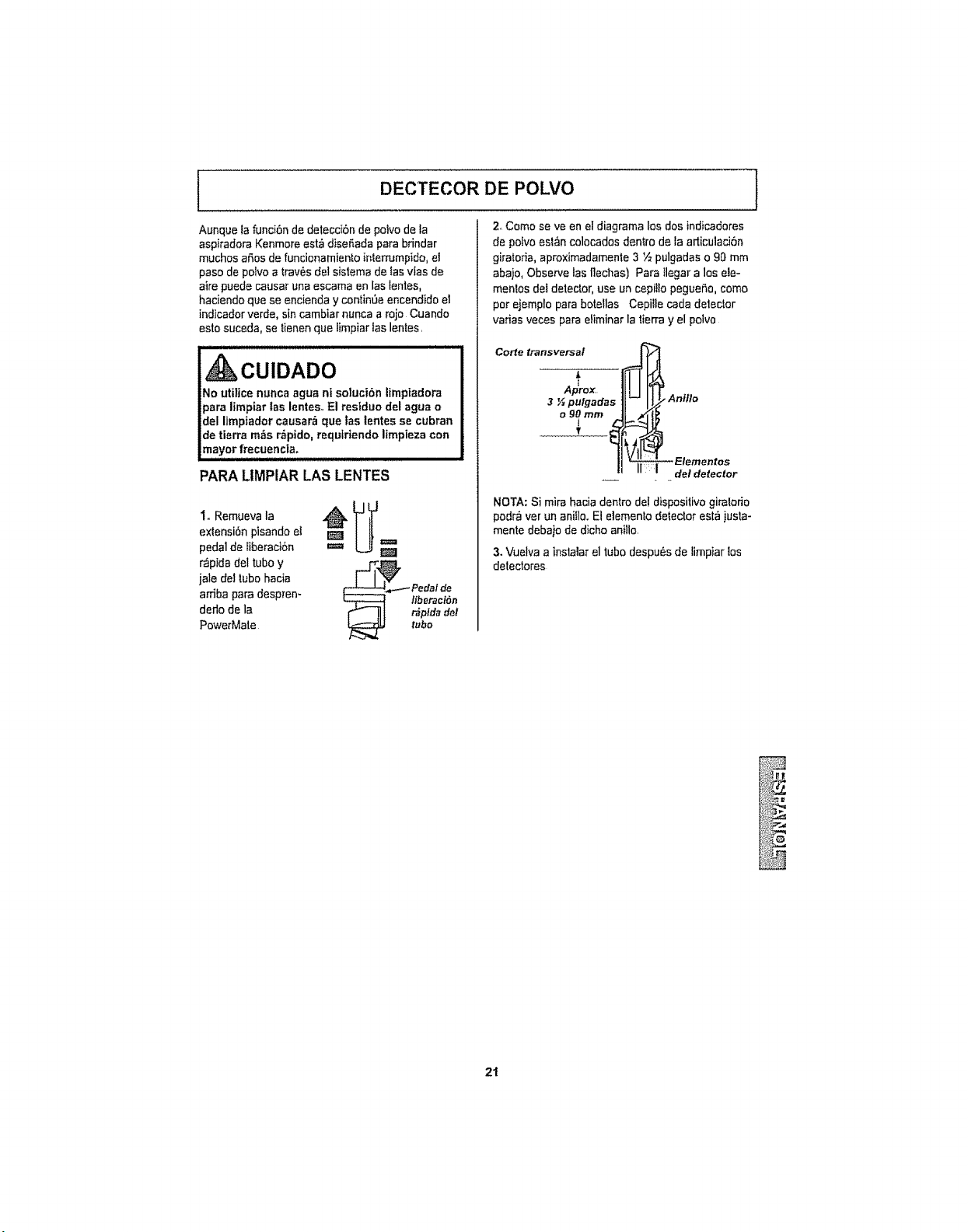
DECTECOR DE POLVO
Aunque la funci6n de detecci6n de polvo de fa
aspiradora Kenmore est_ diseSada pare brindar
muchos aSosde funcionamiento interrumpido, el
paso de polvo a trav6s del sistema de tas vfas de
ake puede causar una escama en las lentes,
hacienda que se endenda y continOeencendido el
indicador verde, sin cambiar nunca a rojo Cuando
astosuceda, se tienen que limpiar las lentes.
No utilice nunca agua nt solucibn limpiadora
para limpiar las lentes,,El residue del agua o
del limpiador causar_ que las tentes se cubran
de tierra m_s r_pido, requiriendo limpieza con
2 Come se ve en el diagrama los dos indic.adores
de poivoest6n colocados dentro de la articulad6n
giratoda, aproximadamente3 ½ pulgadas o 90 mm
abajo, Observe las flechas) Pare Ilegar a los ale-
mantes det detector, use un cepitlo pegueSo, come
per ejemplo para botellas Cepille cada deteclor
varias veces para etiminar la tierra y el poivo
Corte transversal ,,_j
3 g pulgadas 11-- IJ.
II I1-t
1
mayor frecuencia.
PARALIMPIAR LAS LENTES
extensi6npisando el
pedal de liberaci6n
r,_pidadel tube Y _I_1_ ,_._
jale del tube hacia " _ Pedalde
arriba para despren- _ liberact6n
derlo de la _ 11l _p_d.det
PowerMate _ tube
•Antflo
Elementos
del detector
NOTA: Si mira hacia dentro del dispositivo giratorio
pod_ vet un anillo, El elemento detector est_ justa-
mente debajo de dicho anillo,
3.Vuelva a instalar el tubedespu6s de limpiar los
detectores
2t
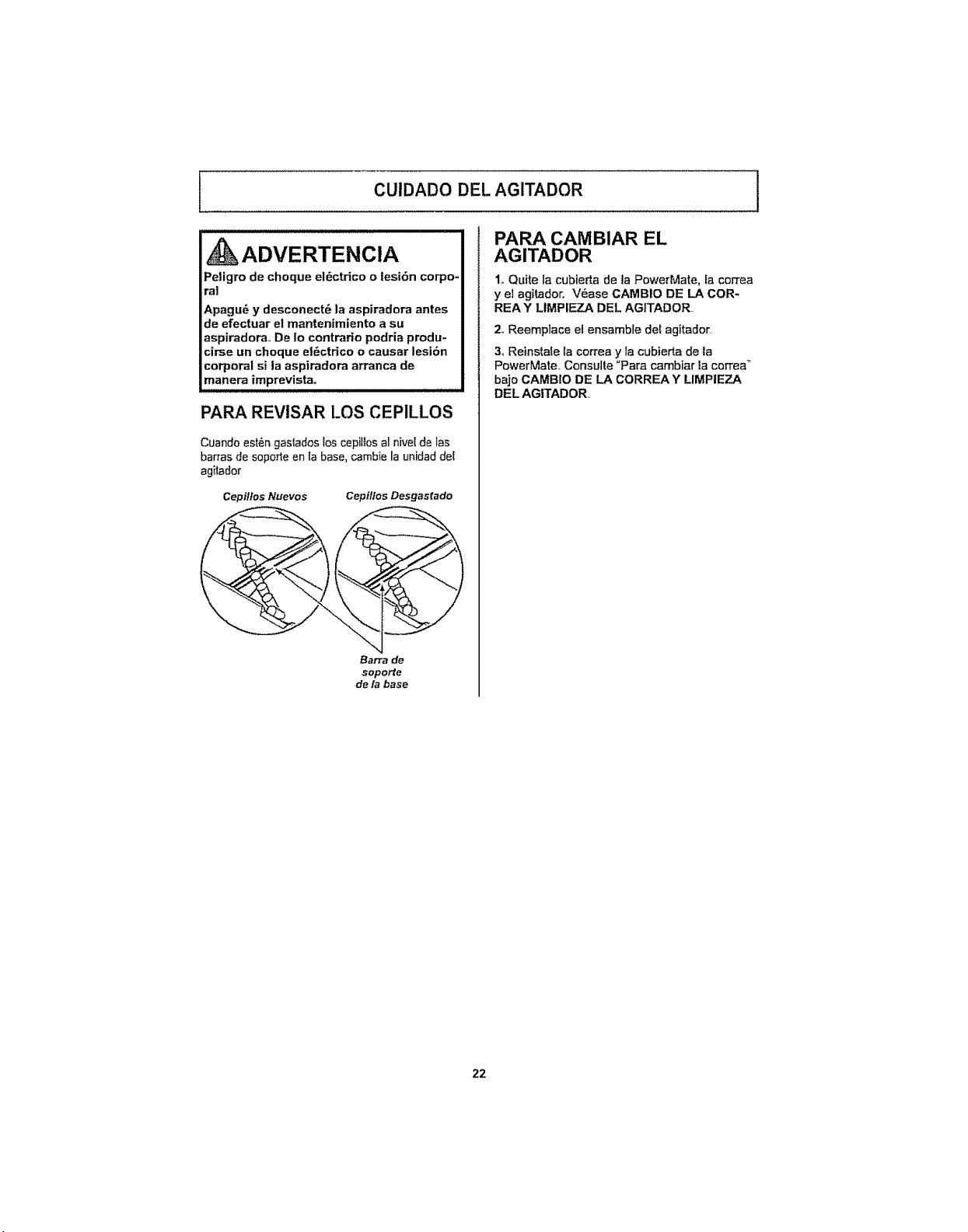
i CUIDADO DEL AGITADOR
_ADVERTENCIA
Peligro de choque el_ctrico o lesi6n corpo*
ra!
Apagu6 y desconect6 la aspiradora antes
de efectuar el mantenimiento a su
aspiradora., De Io contrario podria produ-
cirse un choque el_ctdco o causar lesi6n
corporal si la aspiradora arranca de
manera imprevtsta.
PARA REVISAR LOS CEPILLOS
Cuando est_ngastados los cepillos al nivel de Ias
barras de soporte en la base, cambie la unidad del
agitador
Cepi/Ios Nuevos Cepillos Desgastado
Barra de
soporte
de la base
PARA CAMBIAR EL
AGITADOR
1. Quite la cubierta de la PowerMate, fa correa
y el agitador. V6ase CAMBIO DE LA COR-
REA Y LIMPIEZA DEL AG|TADOR
2oReemplace el ensamble del agitador
3. Reinstale la correa y la cubierta de la
PowerMate_ Consulte "Para cambiar la correa _
bajo CAMBIO DE LA CORREA Y LIMPIEZA
DEL AGITADOR..
22
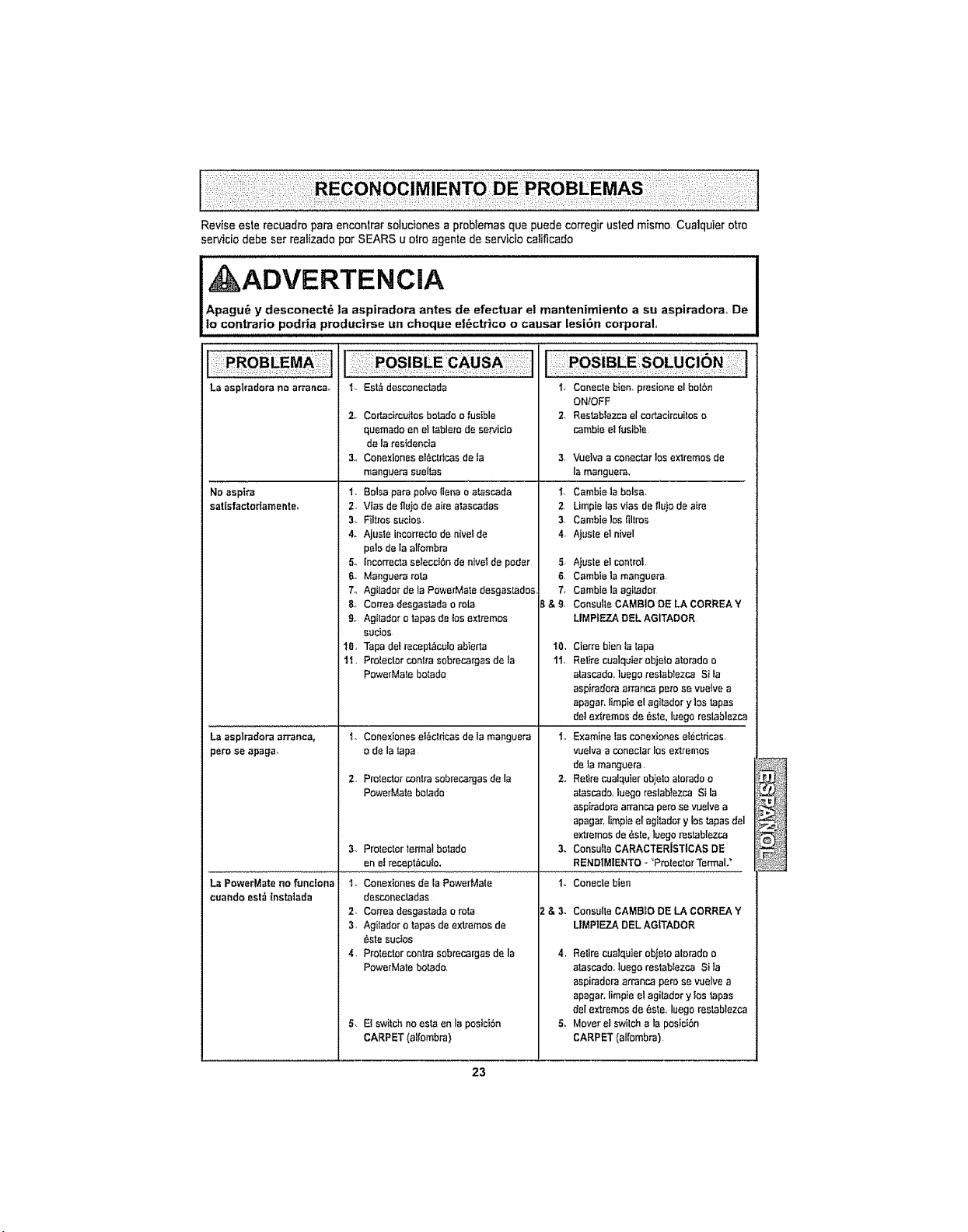
Revise este recuadro pare encontrar soluciones a problemas que puede corregir usted mismo Cue]quiet otto
ser,_icio debe ser realizado por SEARS u otro agente de servicio calificado
, ADVERTENCIA
Apagu_ y desconect_ ]a aspiradora antes de efectuar el mantenfmiento a su aspiradorao De
io contrario podria productrse un cheque et6ctrico o causar lesi6n corporal
La asplradora no arrancao
No asptra
satisfactodamenteo
La asplradora arranca,
pete se apaga.
La PowerMate no funciona
1. Est,i desconecierJa
2,. Cortacircuitos bo_do o fusible
quemado en el tsblero de sen,'ido
de la restdenc}a
3., Conexiones et_cfffcas de la
manguera sueffas
1. Balsa pacepotvo _lena oatascada
2, V_as de fluio de aire atascadas
3. Filtros sucios.
4. Ajusle incorrecto de nivelde
pelode laalfomb_
5, incorrectaselecci6nde niveIde poder
6. Manguera rata
7., Agilador de la PowerMate desgastados,
8_ Correa desgastada o rola
9, Agilador o tapes de los extremos
sucios
I0, Tapa detrecept_cuIoabierta
I'I,Prolectorcentresobrecargasde la
PowerMate batado
i, Conexiones ei6ctdcas de la manguera
o de la tape
2. Protector conlra sobrecargas de la
PowerMate bo{ado
3. Protector termal botedo
one! recept_,culo.
I, Conecte biee_ presione el helen
ON/OFF
2, Restablezca el coftacircuitos o
cambie elfusible
3. Vueiva a conectar los extremes de
la manguera,
i, Cambie ]a balsa,
2 Limpie las vlas de fluto de aire
3. Cambie las filtros
4 Ajusle el nivel
5. Ajusle el co_rot,
6, Camblela mangue_
7, Cambiela agitador
B & 9, Consul[eCAMBIO DE LA CORREA Y
LIMPIEZA DEL AGITADOR
I0, Cierre bien la tape
11. Retire cualquier objeio atoradoo
alascado, luegorestabtezca Si ia
aspiradora aIIanca pete se vuelve a
apagar, timp}e el agi_dor y bs tapes
del extremos de _ste, bego reslablezca
i,, Examine fas conexianes electdcas_
vuelva a coneclar los extremes
de la manguera,
2, Retire cualquier objeto atorado o
atascado, luego reslab_ezca Si la
aspiradera arranca perose vuelve a
apagm',limpie el agita,dot y los tapas del
extremes de _sle, luego reslablezca
3. Consulte CARACTERISTICAS DE
RENDIMIENTO - _Proteclor Terrnalo"
I, Conextones de Is PowerMate 1,. Coneele bien
cuando est_ lnstalada desconectades
2, Correadesgastada o rata
3, Agitader o tBpas cteextremes de
_.stesucres
4, Protector centre sobrecargas de la
PowerMate be_do.
5. Elswitch no esta en la posiciEn
CARPET (alfombra)
2&3. Consulte CAMBIO DE LA CORREA Y
LIMP|EZA DEL AGITADOR
4, Retire cualqUierobletoaterado a
atascado, luego reslablezca Si Ia
aspiradera arranca pero se vuelve a
apagar, limpie el agitador y los tapas
del extremes de 6s_e,luego restablezca
5,, Mover elswilch a la posici6n
CARPET (alfombra)
@
23
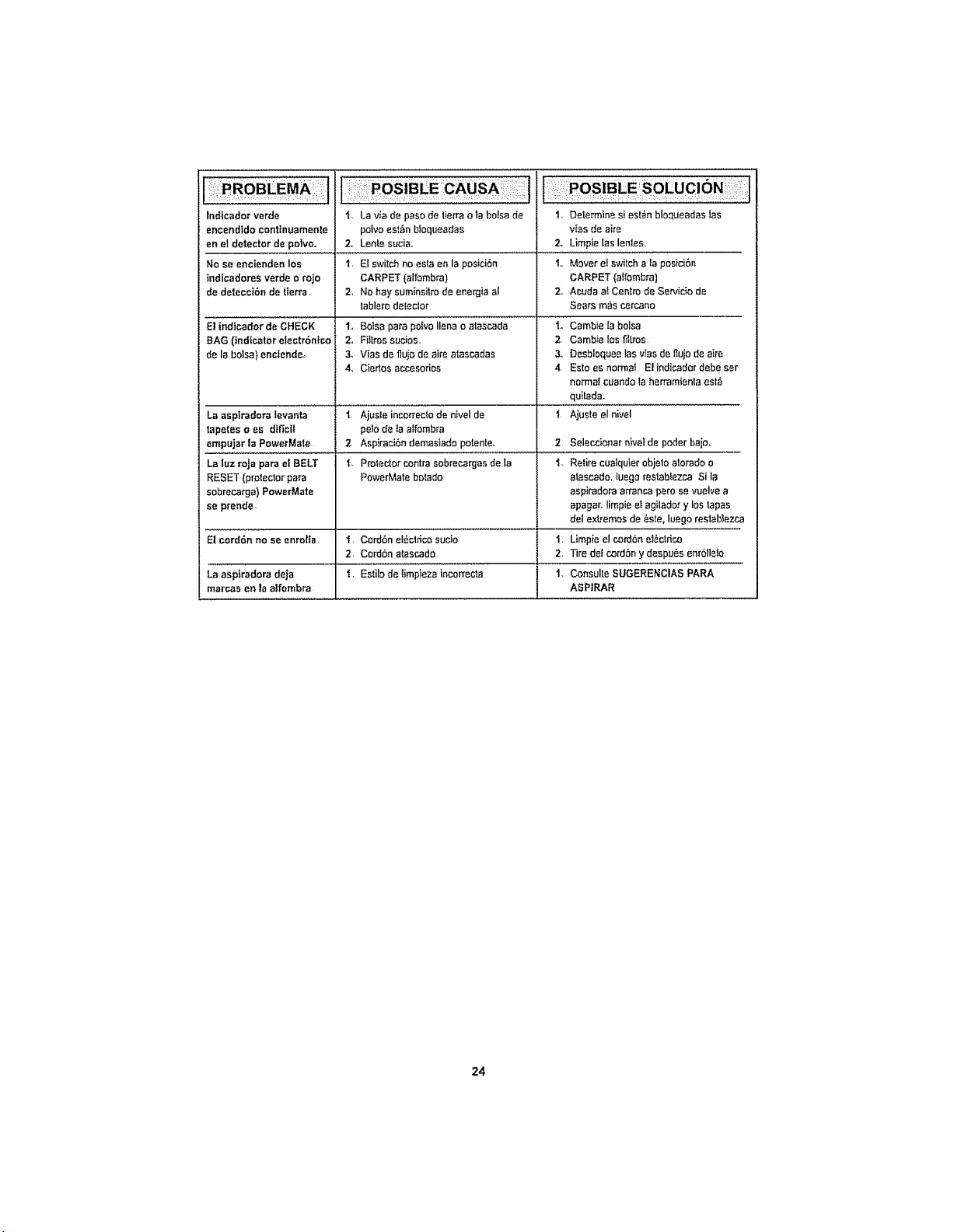
Indtcador verde 1, La via de paso de lierra o la bolsa de
encendido conttnuamente polvo est_n bloqueadas
en el detector de polvo, 2. Lente st_cia.
No se encienden los I El switchno esta en la posicihn
tndicador_s verde o rojo CARPET {alfombra)
de deteccIBn de tferra 2, No hay suminsitrode energia al
lablerodeleclor
1, Determine si est_n bloqueadas las
vtas de aire
2, Limpie las lenles.
1. Mover e! switch a la posici6n
CARPET {alfombra)
2., Acuda ai Centre de Servicio de
Sears m,is cercano
El indtcador de CHECK
BAG (indicator electr6ntco 2o Filtrossu,_;ios,
de la bolsa) enclende, 3, Vias de fluio de aire atascadas
4_ Ciedos accesodos
La asplradora levanta i Ajusle incorrectode nivel de
tapetes o es dtfietl peto de ta alfombra
empujar la PowerMate 2 Aspiracihn demasiado potente,
I.,Boisapa,apolvoll_r_"_'_'i_'gd_.... i_Cambielabolsa
2, Cambie los filt_os
3, Desbloquee las vias de_Iujode aire
4, EsIo es normal El indicader debe ser
norma! cuando la herramienla es{_
quilada.
t Ajuste el nivel
2 Seleccionar nivel de poder bajo,
LB |uz roJa para el BELT i, Protector contrasobrecargas de la i, Relire cua{quier ebjelo atorado o
RESET (protector para PowerMate botado alascado, luego reslablezca Si la
sobrecarga) PowerMate aspiradora arranca pare se vuelve a
se prende, apagar, limpie ef agilador y los lapas
del extremes de ,_sle, luego restablezca
El cord6n no se enrolla i Cord6n el6ctdco sucio i Limp{e el cord6n el_cldco
2. Ccrdbn atascado 2, iqre de_cordony despu_s enrb!le!o
La aspfradora deja t, Estik) de limpieza incorrec_a 1, Consulte SUGERENCIAS PARA
marcas en ta alfombra ASPIRAR
24
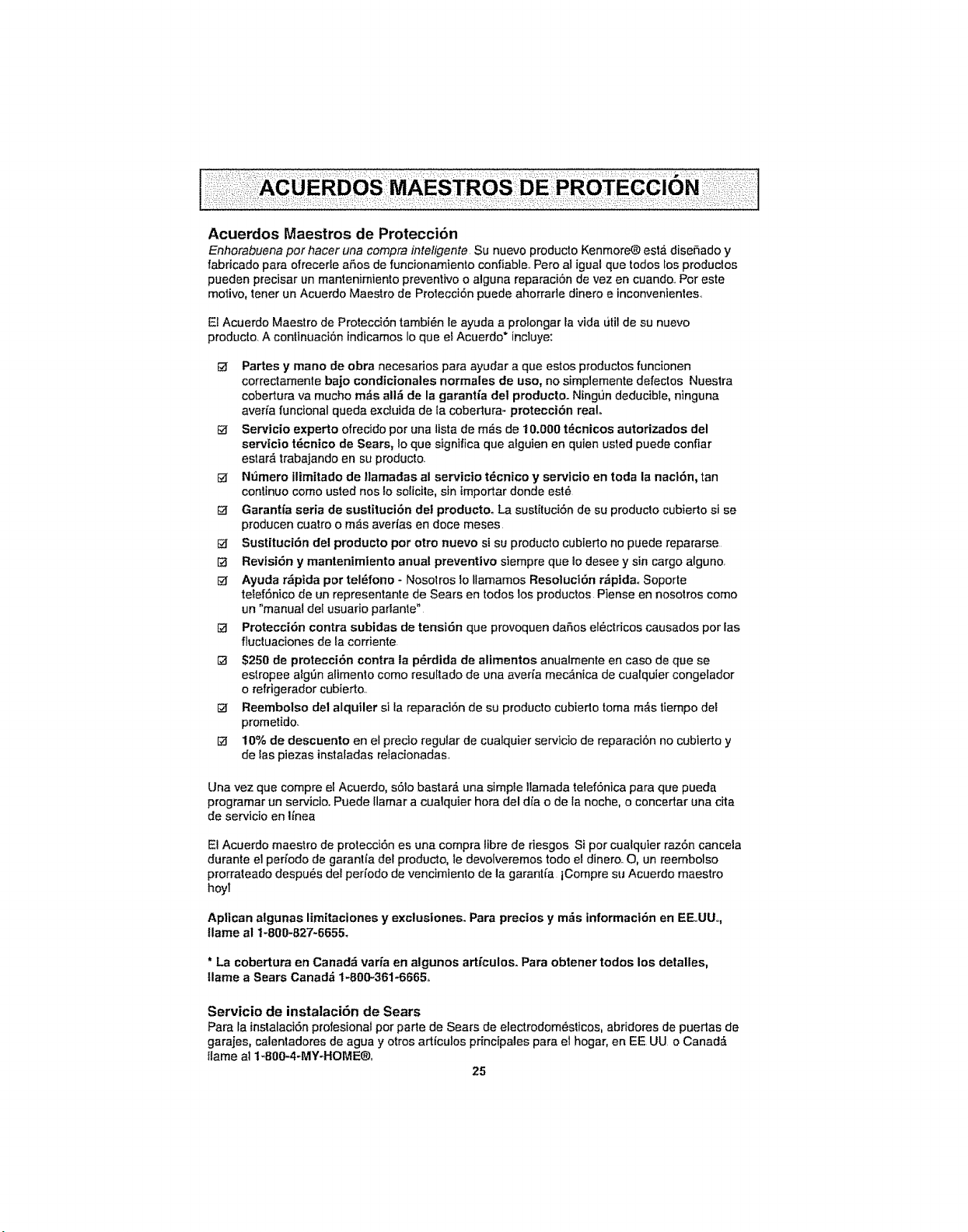
Acuerdos Maestros de Protecci6n
Enhorabuena per hacer una compra inteligente Su nuevo producto Kenmore(_ est,. dise£|ado y
fabdcado para ofrecede aSos de funciortamiento confiable. Pero al igual que todos los produclos
pueden precisar un mantenimiento preventive o alguna reparaci6n de vez en cuando.. Per este
motive, tener un Acuerdo Maestro de Protecci6n puede aherrade dinero e inconvenientes.
El Acuerdo Maestro de Protecci6n tambi_n Ie ayuda a prolongar la vida Litil de su nuevo
producto. A continuaci6n indicamos Io que e$Acuerdo* inciuye:
Partes y mane de obra necesarios para ayudar a que estos productos funcionen
correctamente bajo condicionales normales de use, no simplemente defectos Nuestra
cobertura va mucho m_s all_ de la garantfa del producto. Ningr_n deducible, ninguna
avefia funcional queda excluida de la cobertura_ protecci6n realo
_f Servicio experto ofrecido per una lista de m_s de 10.000 t_cnicos autorizados del
servtcio t_cnico de Sears, Io que significa que alguien en quien usted puede confiar
estar& trabajando en su producto.
N_mero ilimttado de llamadas al servic|o t_cnico y servicio en toda la nacl6n, tan
continue come usted nos to solicite, sin importar donde est_
Garantfa seria de sustituci6n del producto. La sustituci6n de su produclo cubierto si se
producen cuatro o m,_s averias en doce meses.
Sustituci6n del producto per otto nuevo si su producto cubierto no puede repararse
RevisiOn y mantenimlento anual preventive siempre que Io desee y sin cargo alguno.
Ayuda rzlpida per tel_fono - Nosolros 1oflamamos Resoluci6n r_ptda. Soporte
te_efSnico de un representante de Sears en redes los productos Piense en nosotros come
un "manual dei usuario parlante"
Protecci6n contra subidas de tensi6n que provoquen daSos el_ctricos causados per las
fluctuaciones de la corriente.
$250 de protecci6n contra ia p_rdida de alimentos anualmente en case de que se
estropee alg_n alimento come resultado de una averfa mec,_nica de cuatquier congelador
o refrigerador cubierto..
Reembolso del alquiler si la reparaci6n de su producto cubierto toma m_s tiempo dee
prometido_
[_ 10% de descuento en el precio regular de cualquier servicio de reparaci6n no cubierto y
de Ias piezas instaladas relacionadas.
Una vez que compre et Acuerdo, s61o bastard, una simpIe tlamada telef6nica para que pueda
programar un servicio. Puede llamar a cualquier hera del dia o de la noche, o concertar una cita
de servicio en Iinea
El Acuerdo maestro de protecci6n es una compra libre de riesgos Si per cualquier raz6n cancela
durante el peri'odo de garantia del producto, te devolveremos todo el dinero. O, un reembolso
prorrateado despu_s del pefiodo de vencimiento de la garantia tCompre su Acuerdo maestro
hey!
Apt!can atgunas lim[taciones y exclusiones. Para precios y m_s informacl6n en EE.,UU,,,
llame al 1_800-827-6655.
* La cobertura en Canada varfa en algunos artfculos. Para obtener redes los detalles,
Ilame a Sears Canad& t-800-361-6665..
Servicio de instalaci6n de Sears
Para la ins_alaciSn profesionat per parte de Sears de electrodom_stices, abridores de puertas de
garajes, calentadores de agua y otros articulos principales para el hogar, en EE UU o Canad_
!tame al 1-800-4-MY=HOME®.
25

Get it fixed, at your home or ours!
Your Home
For expert troubleshooting and home solutions advice:
manage home
www, managemyhorne.com
For repair - in your home - of all major brand appliances,
lawn and garden equipment, or heating and cooling systems,
no matter who made it, no matter who sold it!
For the replacement parts, accessories and
owner's manuals that you need to do-it-yourself
For Sears professional installation of home appliances
and items like garage door openers and water heaters
1-8OO-4-MY-HOME ® ca,anytime, day or night
(1-800-469-4663) (USA.. and Canada)
w'ww,sears, corn w'_w.,sears ,,ca
Our Home
For repair of carry-in items like vacuums, lawn equipment,
and electronics, call anytime for the location of the nearest
Sears Parts & Repair Service Center
1-800-488-1222 (US.A) 1-800-469-4663 (Canada)
www,,sears,,com www.sears.ca
To purchase a protection agreement on a product serviced by Sears:
l m800-827-6655 (U.,S.A,,)
Para pedir servicio de reparaci6n
a domicilio, y para ordenar piezas:
1-8BB-SU-HOGAR®
(l-888q84-6427)
1-800-361-6665(Canada)
Au Canada pour service en franqais:
1-800.LE.FOYER Mc
(1-800-533_6937)
www.sears ca
S@ /fs
© SearsBrar_ds.LLC
_ SM
® RegisteredTrademark l Trademark I Service Mark of Sears Brands. LLC
® Marca Registrada t T_Marca de Fabdca ! su Marca de Servicio de Sears Brands. LLC
_CMa_ue de commerce t _,_DMarque d6pos_e de Sears Brands, LLC