IMPORTANT: Remove leftover food, bones, toothpicks, and other hard items from dishes. Remove labels from containers before washing.
Make sure when dishwasher door is closed, no items are blocking detergent dispenser.
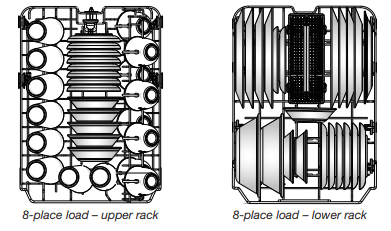
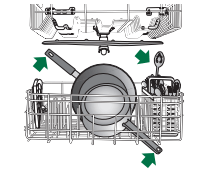
Items should be loaded with soiled surfaces facing down and inward to the spray as shown in the graphics above. This will improve cleaning and drying results. Angle dirtiest dish surface downward, allowing space for water to flow up through rack and between dishes.
Avoid overlapping items, like bowls or plates, that may trap food.
Place plastics, small plates, and glasses in upper rack.
Wash only items marked “dishwasher safe.”
To avoid thumping/clattering noises during operation, load dishes so they do not touch one another. Make sure lightweight load items are secured in racks.
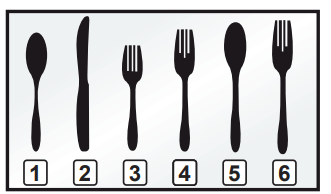
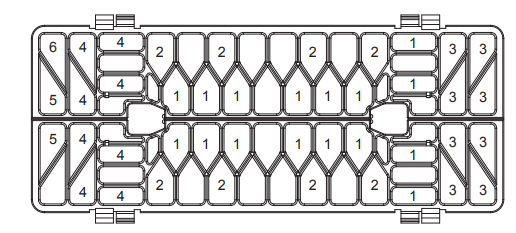
Use slots in the covers and suggested loading patterns to keep your silverware separated for optimum wash.
1. Spoons 2. Knives 3. Salad forks 4. Forks 5. Large spoons 6. Large forks
If your silverware does not fit into the designated slots, lift and slide covers off to remove them and mix silverware types to keep them separated.
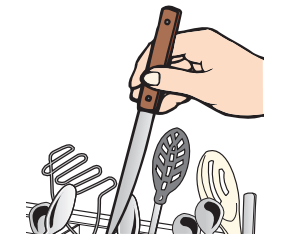
When loading silverware, always place sharp items pointing down and avoid "nesting" as shown.
Silverware basket styles vary by models
2. Check that all arms spin freely
Items in the rack can block the spray arms.
3. Add detergent
Premeasured Detergents
High-quality premeasured tablets and packs are recommended for improved performance.
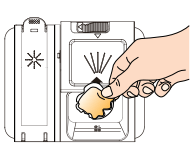
Quality tablets and packs have been proven better than powder, liquid, or gel detergents at reducing filming on dishes. Using tablets and packs over time will start to reduce or eliminate white film. They are suitable for all water hardness and soil levels. Also, by using a rinse aid, you can minimize repeat buildup of white film (not all packs and tablets contain rinse aid). Always place premeasured detergents in main compartment and close lid.
NOTE: Follow instructions on the package when using other dishwasher detergent types. See the complete User Instructions for more details about powders, liquids, and gels.
Use automatic dishwasher detergent only. Add detergent just before starting a cycle.
Fresh automatic dishwasher detergent results in better cleaning. Store tightly closed detergent container in a cool, dry place.
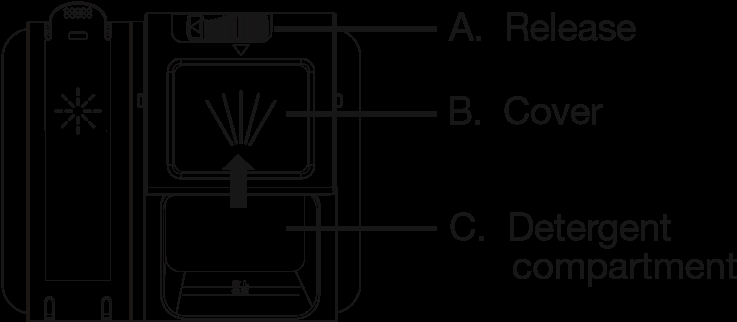
Close the detergent dispenser by sliding cover (B) over detergent compartment (C).
Open the detergent dispenser by sliding release (A) to the left and the cover (B) will automatically slide open.
4. Add rinse aid
Your dishwasher is designed to use rinse aid for good drying performance. Without rinse aid, your dishes and dishwasher interior will have excessive moisture. The heating and drying options will not perform as well without rinse aid.
Rinse aid keeps water from forming droplets that can dry as spots or streaks. It also improves drying by allowing water to drain off of dishes after final rinse. Rinse aid does not adhere to dishware, and when used, it is dispensed during each cycle.
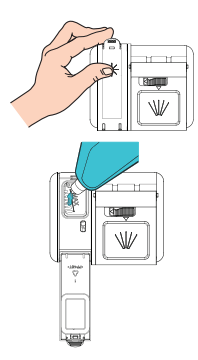
To add rinse aid, open the dispenser lid by gently pushing in the center of the lid with your thumb while lifting up on the edge.
Pour rinse aid into the opening until the indicator level shows that it is full. Do not fill the reservoir above the full level indicator. Excess rinse aid can cause suds and water to overflow during the wash cycle.
Close dispenser by pushing down gently on the lid until it clicks into place.
5. Select a cycle
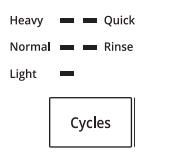
Press the Cycles button to scroll through the available cycles. The indicator light next to the cycle name will illuminate when that cycle is selected.
NOTE: Heavier cycles and options lengthen cycle times. Choose a cycle appropriate for the food soils and dishes that you load. See the cycle descriptions in the Cycle Guide.
6. Select options
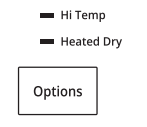
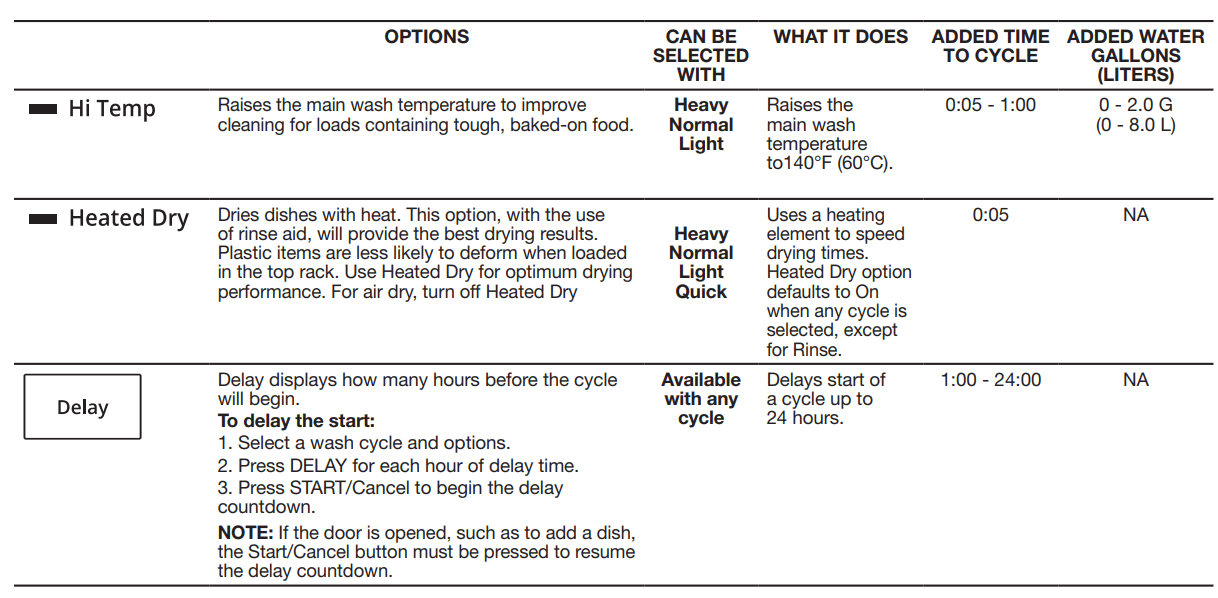
You can customize your cycles by selecting options. Press the Options button to add Hi Temp wash or Heated Dry to the cycle. The indicator light next to the option name will illuminate when that option is selected. Continue to press the button until each option is selected or deselected as desired. Not all options are available for every cycle. If an invalid option is selected for a given cycle, the lights will flash. Adding options may increase the cycle time.
7. Start or resume a cycle
NOTE: If needed, run hot water at the sink nearest your dishwasher until the water is hot. Turn off water. With door firmly closed press the START/Cancel button.
IMPORTANT: If the door is opened for any reason after the cycle is started (even during the delay time), the Start/Cancel button must be pressed again after the door is closed. If Start/Cancel button is not pressed, the cycle will not resume.
8. Follow the progress of your dishwasher
The display will indicate the time remaining to complete the cycle. When the cycle is complete, the Complete light will remain on until the door is opened and closed or the Start/Cancel button is pressed.
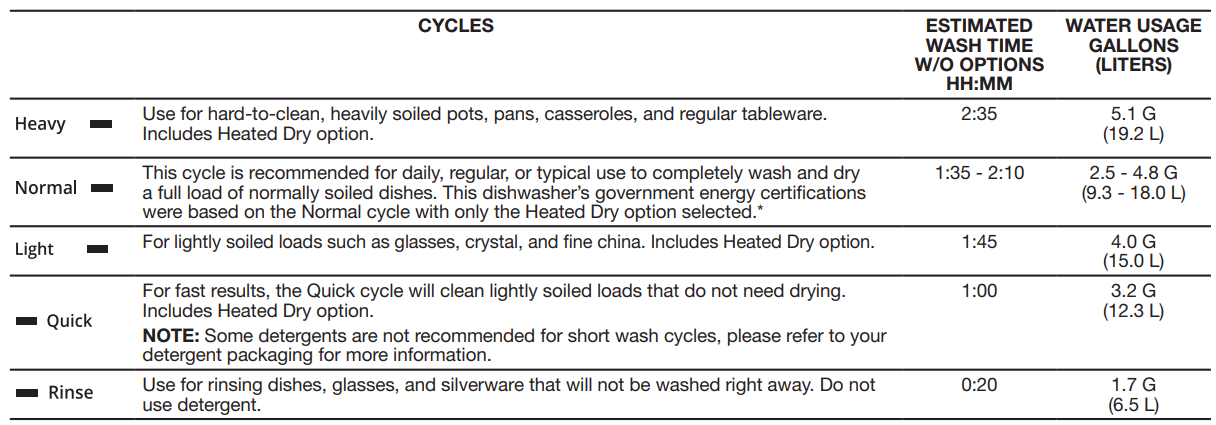
CYCLE GUIDE
IMPORTANT: The sensor in your dishwasher monitors the soil level. Cycle time and/or water usage can vary as the sensor adjusts the cycle for the best wash performance. If the incoming water is less than the recommended temperature or food soils are heavy, the cycle will automatically compensate by adding time, heat, and water as needed.
The dishwasher remembers the cycle and options selections from the most recently completed cycle. To run the same cycle and options as the last time, press the START/Cancel button twice—once to wake up the controls, and again to start the dishwasher
*No other washing and drying temperature options were selected, and the diswasher was not subjected to truncated testing. Rinse aid was not used, and there was no detergent used in the prewash.
Control
Purpose
Comments
Press to start or resume a wash cycle.
If the door is opened during a cycle or the power is interrupted, the cycle will not resume until the Start/Cancel button is pressed again.
Press and hold to cancel wash cycle.
With the door closed and the cycle or delay running, press and hold the START/Cancel button for 3 seconds. The dishwasher will start a 60-second drain. Let dishwasher drain completely.
Press and release once to temporarily interrupt the cycle without canceling
With a cycle running, press and release the START/Cancel button once. This will interrupt the cycle without canceling. Opening the door will also interrupt the cycle in the same way. Close the door and press START/Cancel again to resume the cycle.
Use to avoid unintended use of dishwasher between cycles, or cycle and option changes during a cycle.
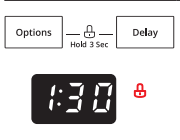
Use the Control Lock option to avoid unintended use of dishwasher between cycles or cycle and option changes during a cycle.
To turn on Control Lock, press and hold both OPTIONS and DELAY for 3 seconds. The Control Lock indicator light next to the time display will turn red indicating that it is activated. When the lock indicator is lit, all buttons are disabled. If you press any button while your dishwasher is locked, the light flashes once. The dishwasher door can still be opened and closed while the controls are locked.
To turn off Control Lock, press and hold both OPTIONS and DELAY for 3 seconds. Control Lock indicator light will turn off.
DISHWASHER CARE
Cleaning the Exterior
Clean the exterior of the dishwasher with only a soft, damp cloth and mild detergent. Avoid using abrasive cleaning products on the exterior of the dishwasher.
Cleaning and Maintaining the Interior
Many detergents may leave white spots or a white residue on dishware and on the interior of the dishwasher. Over time this residue can become unsightly and could affect dishwasher performance. Use of a dishwasher cleaning product such as affresh® Dishwasher Cleaner can help to remove the residue. Monthly use of affresh® Dishwasher Cleaner is recommended to help maintain the dishwasher. Follow package directions.
NOTE: Whirlpool recommends the use of high-quality premeasured detergent tablets or packs and the use of rinse aid for dishwasher cleaning and daily care.
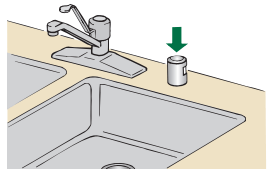
If you have a drain air gap, check and clean it if the dishwasher isn’t draining well.
To Reduce Risk of Property Damage During Vacation or Extended Time Without Use:
When you will not be using the dishwasher during the summer months, turn off the water and power supply to the dishwasher.
Make sure the water supply lines are protected against freezing conditions. Ice formations in the supply lines can increase water pressure and cause damage to your dishwasher or home. Damage from freezing is not covered by the warranty.
When storing your dishwasher in the winter, avoid water damage by having your dishwasher winterized by authorized service personnel.
TROUBLESHOOTING
First try the solutions suggested here. If you need further assistance or more recommendations that may help you to avoid a service cal
Please include a daytime phone number in your correspondence.
If you experience
Recommended solutions
Dishwasher does not run or stops during a cycle
It is normal for certain cycles to repeatedly pause for several seconds during the main wash. Is the door closed tightly and latched?
Is the right cycle selected?
Is there power to the dishwasher? Has a household fuse blown or has a circuit breaker tripped? Replace the fuse or reset the circuit breaker. If the problem continues, call an electrician.
Is the water shut-off valve (if installed) turned on?
Dishes do not dry completely
NOTE: Plastic and items with nonstick surfaces are difficult to dry because they have a porous surface which tends to collect water droplets. Towel drying may be necessary.
Use of rinse aid along with the Heated Dry option is needed for proper drying.
Proper loading of items can affect drying.
Glasses and cups with concave bottoms hold water. This water may spill onto other items when you are unloading the dishwasher. For improved results, place these items on the more slanted side of the rack.
■ Unload the bottom rack first.
Noise
NOTE: Common noises:
Surging sounds can occur periodically throughout the cycle while the dishwasher is draining.
Normal water valve hissing may be heard periodically.
A normal snap sound may be heard when the detergent dispenser opens during the cycle or when the door is opened at the end of the cycle.
Improper installation will affect noise levels.
Be sure the filters are properly installed.
A thumping sound may be heard if items interfere with the wash arms. Readjust the dishware and resume the cycle.
Spotting/Filming
Liquid rinse aid is necessary for drying and to reduce spotting.
Use the correct amount of detergent.
Confirm that the cloudiness is removable by soaking the item in white vinegar for 5 minutes and dry the item. If the cloudiness disappears, it is due to hard water. Adjust the amount of detergent and rinse aid. See the “Dishwasher Care” section. If cloudiness on glass does not come clear, it is due to etching.
Be sure the incoming water temperature is set at 120°F (49°C).
Try using the Hi Temp Wash option.
To remove spotting, run a vinegar rinse through the dishwasher.
Wash and rinse the affected dishware and load into dishwasher. Remove all silverware and metal items. Put 2 cups (500 mL) of white vinegar in a 2-cup capacity measuring cup and place upright in the lower rack. Run a Normal cycle with the Heated Dry option turned off and no detergent. See the “Dishwasher Care” section in full User Instructions.
Dishwasher does not clean completely
Be sure the dishwasher is loaded correctly. Improper loading can greatly decrease the washing performance. See the “Operating Your Dishwasher” section.
Check filter to ensure it is properly installed. Clean it if needed. See the “Filtration System” section in the full User Instructions for details.
Select the proper cycle for the type of soils. The Heavy wash cycle can be used for tougher loads.
Be sure the incoming water temperature is 120°F (49°C).
Use the proper amount of fresh detergent. More detergent is needed for heavier-soiled loads and hard water conditions.
Scrape food from dishes prior to loading (do not prerinse). Suds can come from:
Using the incorrect type of detergent, such laundry detergent, hand soap, or dish detergent for hand-washing dishes.
Not replacing the rinse aid dispenser cap after filling (or refilling) the rinse aid dispenser.
Using an excessive amount of dishwasher detergent.
Dishwasher does not drain
Be sure the cycle has been completed (the Complete light is on). If it has not, you will need to resume the cycle by closing the door and pressing Start/Cancel.
If dishwasher is connected to a food waste disposer, be sure the knockout plug has been removed from the disposer inlet.
Check for kinks in the drain hose.
Check for food obstructions in the drain or disposer.