www.philips.com/welcome
55BDL5057P
V1.01
User Manual (English)

55BDL5057P
ii
Safety Instructions
Safety precautions and maintenance
WARNING: Use of controls, adjustments or procedures other than those specied in this documentation may result in exposure to
shock, electrical hazards and/or mechanical hazards.
Read and follow these instructions when connecting and using your display:
Operation:
• Keepthedisplayoutofdirectsunlightandawayfromstovesoranyotherheatsources.
• Removeanyobjectthatcouldfallintoventilationholesorpreventpropercoolingofthedisplay’selectronics.
• Donotblocktheventilationholesonthecabinet.
• Whenpositioningthedisplay,makesurethepowerplugandoutletareeasilyaccessible.
• Whenturningoffthedisplaybydetachingthepowercord,wait6secondsbeforere-attachingthepowercordfornormaloperation.
• EnsuretheuseofanapprovedpowercordprovidedbyPhilipsatalltimes.Ifyourpowercordismissing,pleasecontactyourlocalservicecenter.
• Donotsubjectthedisplaytoseverevibrationorhighimpactconditionsduringoperation.
• Donotknockordropthedisplayduringoperationortransportation.
• Fordoorsorcoversinstendedtoberemovedbyoperatorforinstallationofaccessorydevices.instructionsshallbeprovidedforthecorrectremoval
andreinstallationofthedoor.
Maintenance:
• Toprotectyourdisplayfrompossibledamage,donotputexcessivepressureontheLCDpanel.Whenmovingyourdisplay,grasptheframetolift;do
notliftthedisplaybyplacingyourhandorngersontheLCDpanel.
• Unplugthedisplayifyouarenotgoingtouseitforanextensiveperiodoftime.
• Unplugthedisplayifyouneedtocleanitwithaslightlydampcloth.Thescreenmaybewipedwithadryclothwhenthepowerisoff.However,never
useorganicsolvent,suchas,alcohol,orammonia-basedliquidstocleanyourdisplay.
• Toavoidtheriskofshockorpermanentdamagetotheset,donotexposethedisplaytodust,rain,wateroranexcessivelymoistenvironment.
• Ifyourdisplaybecomeswet,wipeitwithdryclothassoonaspossible.
• Ifaforeignsubstanceorwatergetsinyourdisplay,turnthepoweroffimmediatelyanddisconnectthepowercord.Thenremovetheforeignsubstance
orwater,andsendtheunittothemaintenancecenter.
• Donotstoreorusethedisplayinlocationsexposedtoheat,directsunlightorextremecold.
• Inordertomaintainthebestperformanceofyourdisplayandensurealongerlifetime,westronglyrecommendusingthedisplayinalocationthatfalls
withinthefollowingtemperatureandhumidityranges.
- Temperature:0-40°C32-104°F
- Humidity:20-80%RH
IMPORTANT:Alwaysactivateamovingscreensaverprogramwhenyouleaveyourdisplayunattended.Alwaysactivateaperiodicscreenrefresh
applicationiftheunitwilldisplayunchangingstaticcontent.Uninterrupteddisplayofstillorstaticimagesoveranextendedperiodmaycause“burnin”,
alsoknownas“after-imaging”or“ghostimaging”,onyourscreen.Thisisawell-knownphenomenoninLCDpaneltechnology.Inmostcases,the“burned
in”or“after-imaging”or“ghostimaging”willdisappeargraduallyoveraperiodoftimeafterthepowerhasbeenswitchedoff.
WARNING:Severe“burn-in”or“after-image”or“ghostimage”symptomswillnotdisappearandcannotberepaired.Thisisalsonotcoveredunderthe
termsofyourwarranty.
Service:
• Thecasingcovershouldbeopenedonlybyqualiedservicepersonnel.
• Ifthereisanyneedforrepairorintegration,pleasecontactyourlocalservicecenter.
• Donotleaveyourdisplayunderdirectsunlight.
Ifyourdisplaydoesnotoperatenormally,havingfollowedtheinstructionssetoutinthisdocument,pleasecontactatechnicianoryour
localservicecenter.
55BDL5057P
iii
Read and follow these instructions when connecting and using your display:
• Unplugthedisplayifyouarenotgoingtouseitforanextensiveperiodoftime.
• Unplugthedisplayifyouneedtocleanitwithaslightlydampcloth.Thescreenmanybewipedwithadryclothwhenthepoweris
off.However,neverusealcohol,solventsorammonia-basedliquids.
• Consultaservicetechnicianifthedisplaydoesnotoperatenormallywhenyouhavefollowedtheinstructionsinthismanual.
• Thecasingcovershouldbeopenedonlybyqualiedservicepersonnel.
• Keepthedisplayoutofdirectsunlightandawayfromstovesoranyotherheatsources.
• Removeanyobjectthatcouldfallintotheventsorpreventpropercoolingofthedisplay’selectronics.
• Donotblocktheventilationholesonthecabinet.
• Keepthedisplaydry.Toavoidelectricshock,donotexposeittorainorexcessivemoisture.
• WhenturningoffthedisplaybydetachingthepowercableorDCpowercord,waitfor6secondsbeforere-attachingthepower
cableorDCpowercordfornormaloperation.
• Toavoidtheriskofshockorpermanentdamagetothesetdonotexposethedisplaytorainorexcessivemoisture.
• Whenpositioningthedisplay,makesurethepowerplugandoutletareeasilyaccessible.
• IMPORTANT:Alwaysactivateascreensaverprogramduringyourapplication.Ifastillimageinhighcontrastremainsonthe
screenforanextendedperiodoftime,itmayleavean‘after-image’or‘ghostimage’onthefrontofthescreen.Thisisawell-known
phenomenonthatiscausedbytheshortcomingsinherentinLCDtechnology.Inmostcasestheafterimagewilldisappeargradually
overaperiodoftimeafterthepowerhasbeenswitchedoff.Beawarethattheafter-imagesymptomcannotberepairedandisnot
coveredunderwarranty.
EU Declaration of Conformity
ThisdevicecomplieswiththerequirementssetoutintheCouncilDirectiveontheApproximationoftheLawsoftheMemberStatesrelatingto
ElectromagneticCompatibility(2014/30/EU),Low-voltageDirective(2014/35/EU),RoHSdirective(2011/65/EU)andRadioEquipmentDirective(2014/53/
EU).
ThisproducthasbeentestedandfoundtocomplywiththeharmonizedstandardsforInformationTechnologyEquipment,theseharmonizedstandards
publishedunderDirectivesofOfcialJournaloftheEuropeanUnion.
Warning:
ThisequipmentiscompliantwithClassAofEN55032/CISPR32.Inaresidentialenvironmentthisequipmentmaycauseradiointerference.
Federal Communications Commission (FCC) Notice (U.S. Only)
NOTE:ThisequipmenthasbeentestedandfoundtocomplywiththelimitsforaClassAdigitaldevice,pursuanttopart15ofthe
FCCRules.Theselimitsaredesignedtoprovidereasonableprotectionagainstharmfulinterferencewhentheequipmentisoperated
inacommercialenvironment.Thisequipmentgenerates,uses,andcanradiateradiofrequencyenergyand,ifnotinstalledandusedin
accordancewiththeinstructionmanual,maycauseharmfulinterferencetoradiocommunications.Operationofthisequipmentina
residentialareaislikelytocauseharmfulinterferenceinwhichcasetheuserwillberequiredtocorrecttheinterferenceathisown
expense.
Changesormodicationsnotexpresslyapprovedbythepartyresponsibleforcompliancecouldvoidtheuser’sauthoritytooperatethe
equipment.
UseonlyanRFshieldedcablethatwassuppliedwiththedisplaywhenconnectingthisdisplaytoacomputerdevice.
Topreventdamagewhichmayresultinreorshockhazard,donotexposethisappliancetorainorexcessivemoisture.
ThisdevicecomplieswithPart15oftheFCCRules.Operationissubjecttothefollowingtwoconditions:(1)Thisdevicemaynotcauseharmful
interference,and(2)thisdevicemustacceptanyinterferencereceived,includinginterferencethatmaycauseundesiredoperation.
55BDL5057P
iv
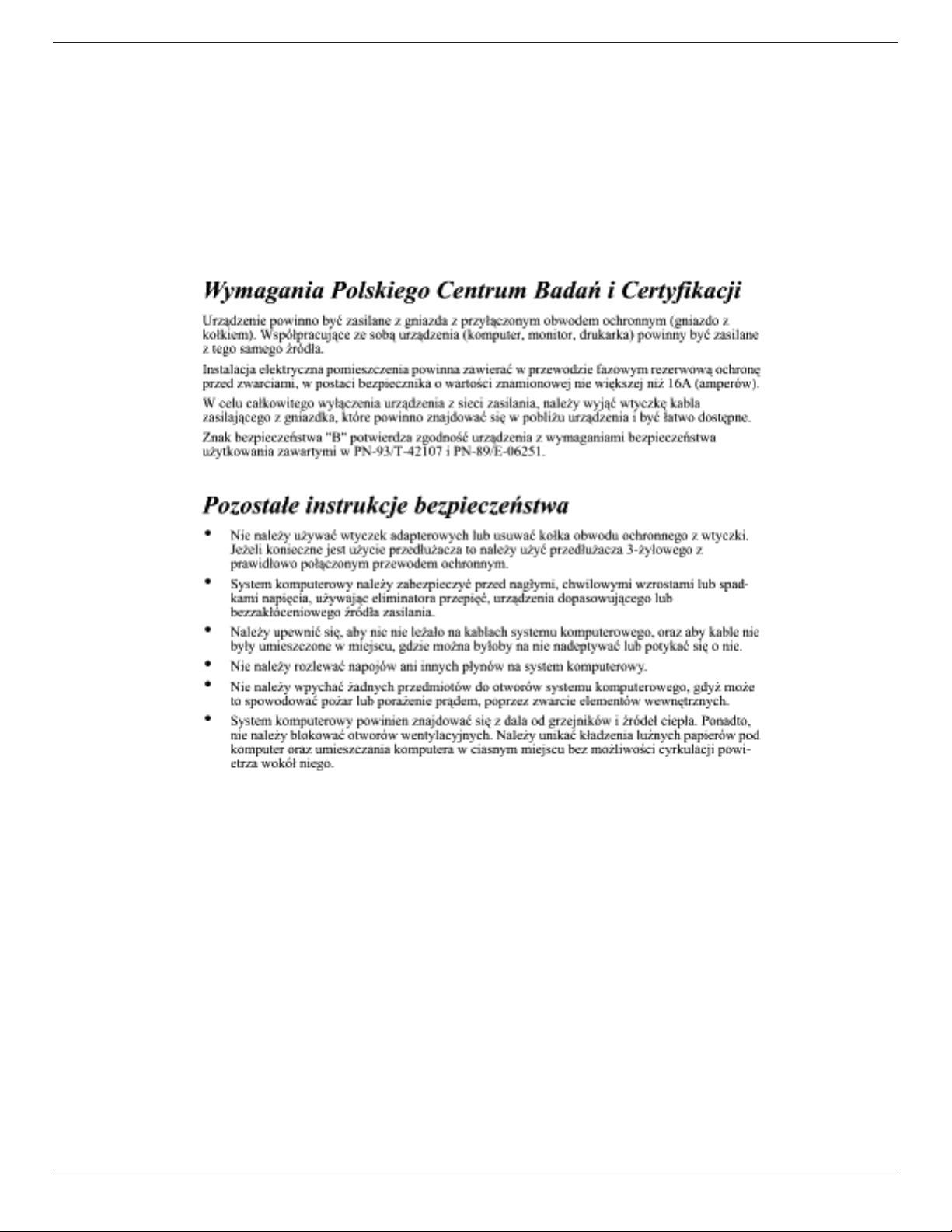
Polish Center for Testing and Certication Notice
Theequipmentshoulddrawpowerfromasocketwithanattachedprotectioncircuit(athree-prongsocket).Allequipmentthatworkstogether(computer,
display,printer,andsoon)shouldhavethesamepowersupplysource.
Thephasingconductoroftheroom’selectricalinstallationshouldhaveareserveshort-circuitprotectiondeviceintheformofafusewithanominalvalue
nolargerthan16amperes(A).
Tocompletelyswitchofftheequipment,thepowersupplycablemustberemovedfromthepowersupplysocket,whichshouldbelocatednearthe
equipmentandeasilyaccessible.
Aprotectionmark“B”conrmsthattheequipmentisincompliancewiththeprotectionusagerequirementsofstandardsPN-93/T-42107andPN-89/
E-06251.
Electric, Magnetic and Electromagnetic Fields (“EMF”)
1. Wemanufactureandsellmanyproductstargetedatconsumers,which,likeanyelectronicapparatus,ingeneralhavetheabilitytoemitandreceive
electromagneticsignals.
2. OneofourleadingBusinessPrinciplesistotakeallnecessaryhealthandsafetymeasuresforourproducts,tocomplywithallapplicablelegal
requirementsandtostaywellwithintheEMFstandardsapplicableatthetimeofproducingtheproducts.
3. Wearecommittedtodevelop,produceandmarketproductsthatcausenoadversehealtheffects.
4. Weconrmthatifitsproductsarehandledproperlyfortheirintendeduse,theyaresafetouseaccordingtoscienticevidenceavailabletoday.
5. WeplayanactiveroleinthedevelopmentofinternationalEMFandsafetystandards,enablingustoanticipatefurtherdevelopmentsinstandardization
forearlyintegrationinitsproducts.
55BDL5057P
v
Information for U.K. only
(A)
(B)
WARNING - THIS APPLIANCE MUST BE EARTHED.
Important:
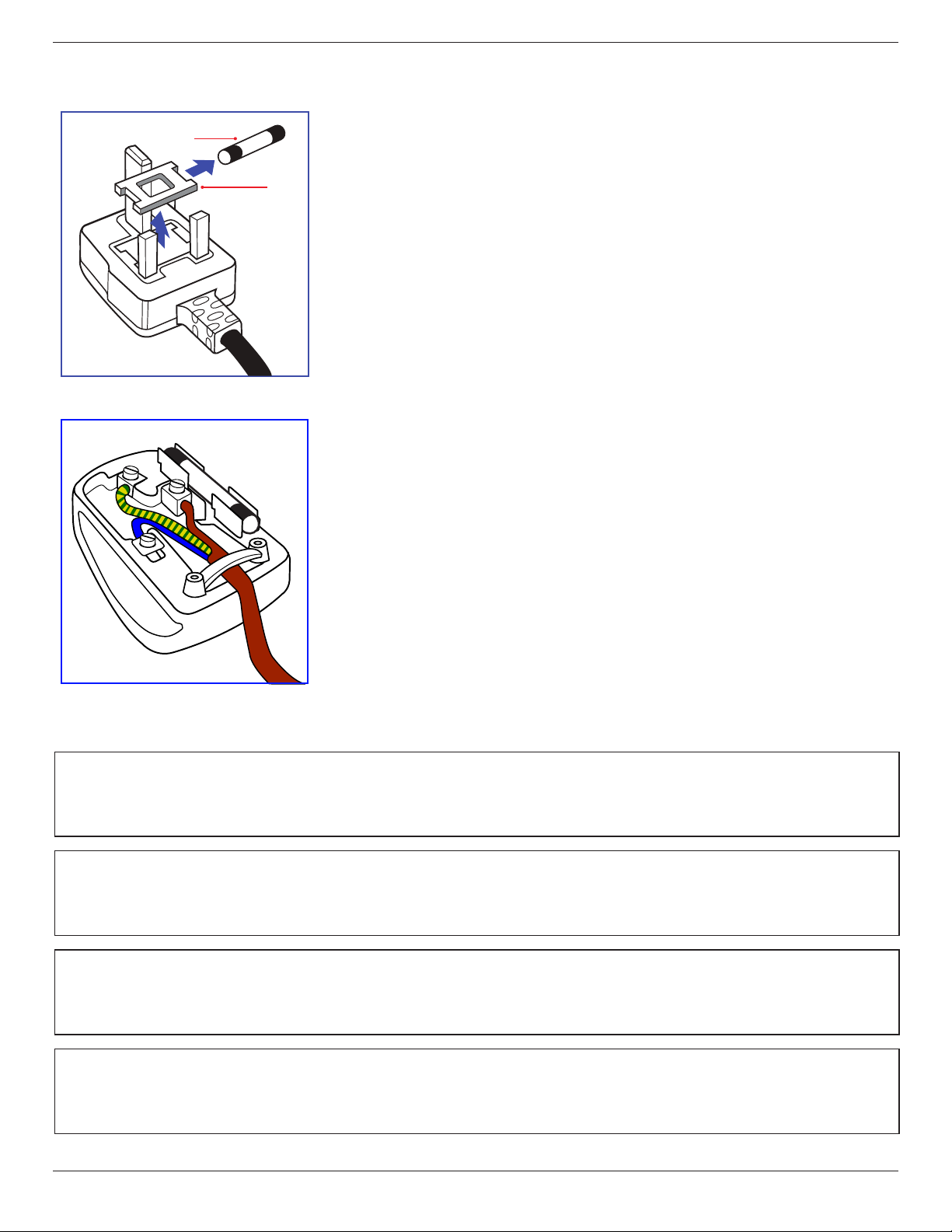
Thisapparatusissuppliedwithanapprovedmoulded13Aplug.Tochangeafuseinthistypeofplug
proceedasfollows:+
1. Removefusecoverandfuse.
2. FitnewfusewhichshouldbeaBS13625A,A.S.T.A.orBSIapprovedtype.
3. Retthefusecover.
Ifthettedplugisnotsuitableforyoursocketoutlets,itshouldbecutoffandanappropriate3-pin
plugttedinitsplace.
Ifthemainsplugcontainsafuse,thisshouldhaveavalueof5A.Ifaplugwithoutafuseisused,thefuse
atthedistributionboardshouldnotbegreaterthan5A.
NOTE: Theseveredplugmustbedestroyedtoavoidapossibleshockhazardshoulditbeinserted
intoa13Asocketelsewhere.
How to connect a plug
Thewiresinthemainsleadarecolouredinaccordancewiththefollowingcode:
BLUE-“NEUTRAL”(“N”)
BROWN-“LIVE”(“L”)
GREEN&YELLOW-“EARTH”(“E”)
1. TheGREEN&YELLOWwiremustbeconnectedtotheterminalintheplugwhichismarkedwith
theletter“E”orbytheEarthsymbolorcolouredGREENorGREEN&YELLOW.
2. TheBLUEwiremustbeconnectedtotheterminalwhichismarkedwiththeletter“N”orcoloured
BLACK.
3. TheBROWNwiremustbeconnectedtotheterminalwhichmarkedwiththeletter“L”or
colouredRED.
Beforereplacingtheplugcover,makecertainthatthecordgripisclampedoverthesheathofthelead
-notsimplyoverthethreewires.
North Europe (Nordic Countries) Information
Placering/Ventilation
VARNING:
FÖRSÄKRADIGOMATTHUVUDBRYTAREOCHUTTAGÄRLÄTÅTKOMLIGA,NÄRDUSTÄLLERDINUTRUSTNINGPÅPLATS.
Placering/Ventilation
ADVARSEL:
SØRGVEDPLACERINGENFOR,ATNETLEDNINGENSSTIKOGSTIKKONTAKTERNEMTTILGÆNGELIGE.
Paikka/Ilmankierto
VAROITUS:
SIJOITALAITESITEN,ETTÄVERKKOJOHTOVOIDAANTARVITTAESSAHELPOSTIIRROTTAAPISTORASIASTA.
Plassering/Ventilasjon
ADVARSEL:
NÅRDETTEUTSTYRETPLASSERES,MÅDUPASSEPÅATKONTAKTENEFORSTØMTILFØRSELERLETTEÅNÅ.
55BDL5057P
vi
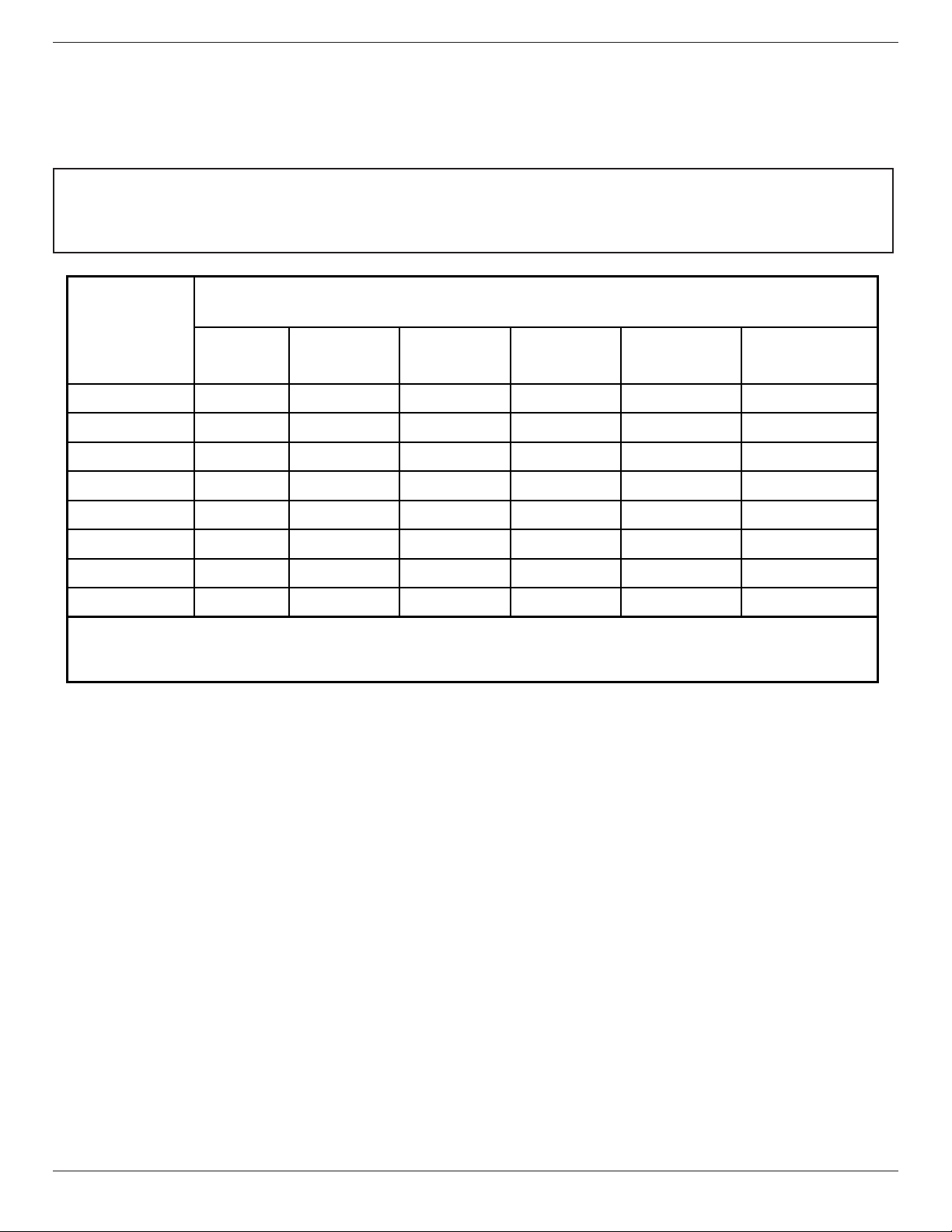
China RoHS
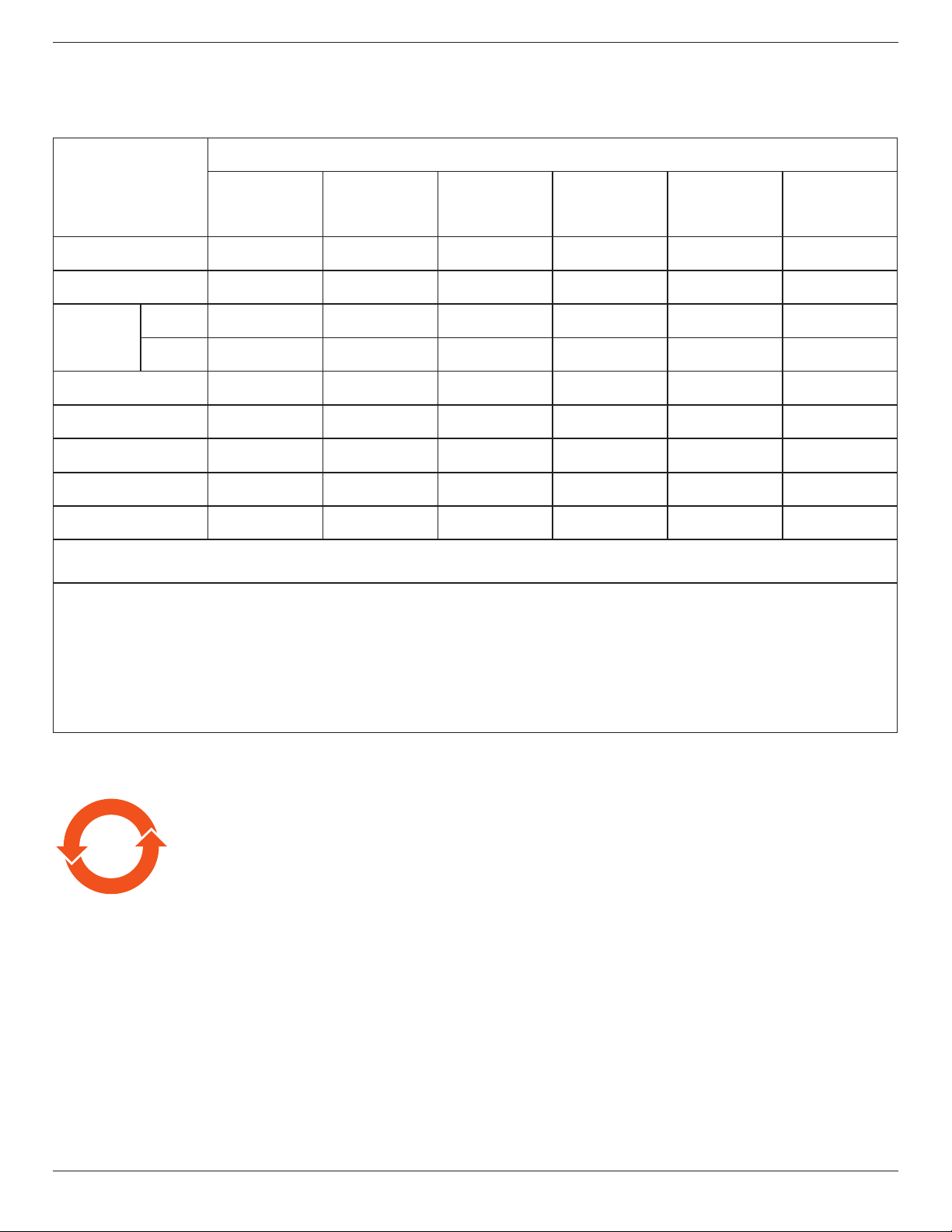
电子电气产品有害物质限制使用标识要求 (中国RoHS法规标识要求) 产品中有害物质的名称及含量。
零部件名称
有害物质
铅
(Pb)
汞
(Hg)
镉
(Cd)
六价铬
(Cr (VI))
多溴联苯
(PBB)
多溴二苯醚
(PBDE)
塑料外框 O O O O O O
后壳 O O O O O O
LCD
panel
CCFL X X O O O O
LED X O O O O O
电路板组件* X O O O O O
底座 O O O O O O
电源线 X O O O O O
其他线材 X O O O O O
遥控器 X O O O O O
*:电路板组件包括印刷电路板及其构成的零部件,如电阻、电容、集成电路、连接器等。
本表格依据SJ/T 11364的规定编制。
O: 表示该有害物质在该部件所有均质材料中的含量均在 GB/T 26572 标准规定的限量要求以下.
X: 表示该有害物质至少在该部件的某一均质材料中的含量超出 GB/T 26572 标准规定的限量要求.
上 表 中 打“ X”的部件中,应功能需要,部分有害物质含量超出GB/T 26572规定的限量要求,但是符合欧盟
RoHS法规要求(属于豁免部分)。
备注:上表仅做为范例,实际标示时应依照各产品的实际部件及所含有害物质进行标示。
10
環保使用期限
此標識指期限(十年),電子电气產品中含有的有害物質在正常使用的條件下不會發生外泄或突變,
電子电气產品用戶使用該電子电气產品不會對環境造成嚴重污染或對其人身、財產造成嚴重損害的期限。
55BDL5057P
vii
《废弃电器电子产品回收处理管理条例》提示性说明
为了更好地关爱及保护地球,当用户不再需要此产品或产品寿命终止时,请遵守国家废弃电器电子产品
回收处理相关法律法规,将其交给当地具有国家认可的回收处理资质的厂商进行回收处理。
娤⌈
㨢᳸$䵥ᵥ⍿Ʋ◦䏝㯹䉭❁ᳫ濕媣ᵥ⍿⊭侻廞ノ㒞䵽䏳ⴰㄮƲ◦店䢋⾃濕⊭侻斾堿䏦ヵ
⪷ⴰㄮ悅⊔⩜⊭圊䕂㉨㑻Ʋ
單元
限用物質及其化學符號
鉛
(Pb)
汞
(Hg)
鎘
(Cd)
六價鉻
(Cr
+6
)
多溴聯苯
(PBB)
多溴二苯醚
(PBDE)
塑料外框 ○ ○ ○ ○ ○ ○
後殼 ○ ○ ○ ○ ○ ○
- ○ ○ ○ ○ ○
電路板組件 - ○ ○ ○ ○ ○
底座 ○ ○ ○ ○ ○ ○
電源線 - ○ ○ ○ ○ ○
其他線材 - ○ ○ ○ ○ ○
遙控器 - ○ ○ ○ ○ ○
備考1.〝○〞係指該項限用物質之百分比含量未超出百分比含量基準值。
備考2.〝-〞係指該項限用物質為排除項目。
液晶面板
警語 : 使用過度恐傷害視力。
注意事項 :
(1) 使用30分鐘請休息10分鐘。
(2) 未滿2歲幼兒不看螢幕,2歲以上每天看螢幕不要超過1小時。
警告使用者 :
此為甲類資訊技術設備 , 於居住環境中使用時 , 可能會造成射頻擾動 , 在此種情況下 , 使用者會被要
求採取某些適當的對策 .
Turkey RoHS:
TürkiyeCumhuriyeti:EEEYönetmeliğineUygundur
Ukraine RoHS:
ОбладнаннявідповідаєвимогамТехнічногорегламентущодообмеженнявикористаннядеякихнебезпечнихречовинвелектричномута
електронномуобладнанні,затвердженогопостановоюКабінетуМіністрівУкраїнивід3грудня2008№1057

55BDL5057P
viii
End-of-Life Disposal
YournewPublicInformationDisplaycontainsmaterialsthatcanberecycledandreused.Specializedcompaniescanrecycleyourproducttoincreasethe
amountofreusablematerialsandtominimizetheamounttobedisposedof.
PleasendoutaboutthelocalregulationsonhowtodisposeofyourolddisplayfromyourlocalPhilipsdealer.
(For customers in Canada and U.S.A.)
Thisproductmaycontainleadand/ormercury.Disposeofinaccordancetolocal-stateandfederalregulations.Foradditionalinformationonrecycling
contactwww.eia.org(ConsumerEducationInitiative)
Waste Electrical and Electronic Equipment-WEEE
Attention users in European Union private households
Thismarkingontheproductoronitspackagingillustratesthat,underEuropeanDirective2012/19/EUgoverningusedelectricaland
electronicappliances,thisproductmaynotbedisposedofwithnormalhouseholdwaste.Youareresponsiblefordisposalofthis
equipmentthroughadesignatedwasteelectricalandelectronicequipmentcollection.Todeterminethelocationsfordroppingoffsuch
wasteelectricalandelectronic,contactyourlocalgovernmentofce,thewastedisposalorganizationthatservesyourhouseholdorthe
storeatwhichyoupurchasedtheproduct.
Attention users in United States:
PleasedisposeofaccordingtoallLocal,StateandFederalLaws.Forthedisposalorrecyclinginformation,contact:www.mygreenelectronics.comorwww.
eiae.org.
End of Life Directives-Recycling
YournewPublicInformationDisplaycontainsseveralmaterialsthatcanberecycledfornewusers.
PleasedisposeofaccordingtoallLocal,State,andFederallaws
AsanENERGYSTARPartner,wehavedeterminedthatthisproductmeetstheENERGYSTARguidelinesforenergyefciency.
Restriction on Hazardous Substances statement (India)
Thisproductcomplieswiththe“E-Waste(Management)Rules,2016”CHAPTERV,rule16,sub-rule(1).WhereasNewElectricalandElectronic
EquipmentandtheircomponentsorconsumablesorpartsorsparesdonotcontainLead,Mercury,Cadmium,HexavalentChromium,polybrominated
biphenylsandpolybrominateddiphenylethersbeyondamaximumconcentrationvalueof0.1%byweightinhomogenousmaterialsforlead,mercury,
hexavalentchromium,polybrominatedbiphenylsandpolybrominateddiphenylethersandof0.01%byweightinhomogenousmaterialsforcadmium.
exceptofexemptionssetinSchedule2oftheRule.
E-Waste Declaration for India
Thissymbolontheproductoronitspackagingindicatesthatthisproductmustnotbedisposedofwithyourotherhouseholdwaste.
Insteaditisyourresponsibilitytodisposeofyourwasteequipmentbyhandingitovertoadesignatedcollectionpointfortherecycling
ofwasteelectricalandelectronicequipment.Theseparatecollectionandrecyclingofyourwasteequipmentatthetimeofdisposal
willhelptoconservenaturalresourcesandensurethatitisrecycledinamannerthatprotectshumanhealthandtheenvironment.
FormoreinformationaboutE-wastepleasevisithttp://www.india.philips.com/about/sustainability/recycling/index.pageandtoknow
whereyoucandropoffyourwasteequipmentforrecyclinginIndiapleasecontactonbelowgivencontactdetails.
Helplinenumber:1800-425-6396(MondaytoSaturday,9a.m.to5:30pm)
CentralizedE-wastecollectioncenter
Address:TPVTechnologyIndiaPrivateLimited,
59,MaheswariNagar,1stMainRoad,MahadevapuraPost,WhiteeldRoad
Bangalore,Karnataka,PIN:560048,Tel:080-3023-1000
E-mail:[email protected]
55BDL5057P
ix
Batteries
For EU: The crossed-out wheeled bin implies that used batteries should not be put to the general household waste! There is a
separate collection system for used batteries, to allow proper treatment and recycling in accordance with legislation.
Please contact your local authority for details on the collection and recycling schemes.
For Switzerland: The used battery is to be returned to the selling point.
For other non-EU countries: Please contact your local authority for correct method of disposal of the used battery.
According to EU directive 2006/66/EC, the battery can’t be disposed improperly. The battery shall be separated
to collect by local service.
Após o uso, as pilhas
deverão ser entregues ao
estabelecimento comercial
ou
e/ou baterias
rede de assistência técnica
autorizada.
Information for EAC
Month and year of manufacturing please refer information in Rating label.
Name and location of manufacturer ООО “Профтехника”
Адрес: 3-й Проезд Марьиной рощи, 40/1 офис 1. Москва, 127018, Россия
Importer and information
Наименование организации: ООО “Профтехника”
Адрес: 3-й Проезд Марьиной рощи, 40/1 офис 1. Москва, 127018, Россия
Контактное лицо: Наталья Астафьева,
+7 495 640 20 20
nat@profdisplays.ru

55BDL5057P
x
NOTICE
SOFTWARE END USER LICENSE AGREEMENT
THIS SOFTWARE END USER LICENSE AGREEMENT (THIS “AGREEMENT”) IS A LEGAL AND BINDING AGREEMENT
BETWEEN YOU (EITHER AN INDIVIDUAL OR ENTITY) AND MMD MONITORS & DISPLAYS NEDERLAND B.V., A DUTCH
LIMITED LIABILITY COMPANY, WITH ITS PRINCIPAL OFFICE AT PRINS BERNHARDPLEIN 200, 1097 JB AMSTERDAM, THE
NETHERLANDS AND ITS SUBSIDIARY COMPANIES (INDIVIDUALLY AND COLLECTIVELY “MMD”). THIS AGREEMENT GIVES
YOU THE RIGHT TO USE CERTAIN SOFTWARE (THE “SOFTWARE”) INCLUDING USER DOCUMENTATION IN ELECTRONIC
FORM WHICH MAY HAVE BEEN PROVIDED SEPARATELY OR TOGETHER WITH A MMD PRODUCT (THE DEVICE”). BY
DOWNLOADING, INSTALLING OR OTHERWISE USING THE SOFTWARE, YOU ACCEPT AND AGREE TO BE BOUND BY ALL
OF THE TERMS AND CONDITIONS OF THIS AGREEMENT. IF YOU DO NOT AGREE TO THESE TERMS AND CONDITIONS, DO
NOT DOWNLOAD, INSTALL OR OTHERWISE USE THE SOFTWARE. IF YOU ACQUIRED THE SOFTWARE IN TANGIBLE MEDIA
E.G. CD WITHOUT THE OPPORTUNITY TO REVIEW THIS LICENSE AND DO NOT ACCEPT THESE TERMS, YOU MAY RECEIVE
A FULL REFUND OF THE AMOUNT, IF ANY, THAT YOU PAID FOR THE SOFTWARE IF YOU RETURN THE SOFTWARE UNUSED
WITH PROOF OF PAYMENT WITHIN 30 DAYS FROM THE DATE OF PURCHASE.
1. Grant of License. ThisAgreementgrantsyouanon-exclusive,nontransferable,non-sublicensablelicensetoinstallanduse,onthe
Device,one(1)copyofthespeciedversionoftheSoftwareinobjectcodeformatassetoutintheuserdocumentationsolelyforyour
personaluse.TheSoftwareis“inuse”whenitisloadedintothetemporaryorpermanentmemory(i.e.RAM,harddisk,etc.)oftheDevice.
2. Ownership. TheSoftwareislicensedandnotsoldtoyou.ThisAgreementgrantsyouonlytherighttousetheSoftware,butyoudonot
acquireanyrights,expressorimplied,intheSoftwareotherthanthosespeciedinthisAgreement.MMDanditslicensorsretainallright,
title,andinterestinandtotheSoftware,includingallpatents,copyrights,tradesecrets,andotherintellectualpropertyrightsincorporated
therein.TheSoftwareisprotectedbycopyrightlaws,internationaltreatyprovisions,andotherintellectualpropertylaws.Therefore,other
thanasexpresslysetforthherein,youmaynotcopytheSoftwarewithoutpriorwrittenauthorizationofMMD,exceptthatyoumaymake
one(1)copyoftheSoftwareforyourback-uppurposesonly.YoumaynotcopyanyprintedmaterialsaccompanyingtheSoftware,nor
printmorethanone(1)copyofanyuserdocumentationprovidedinelectronicform,exceptthatyoumaymakeone(1)copyofsuch
printedmaterialsforyourback-uppurposesonly.
3. License Restrictions. Exceptasprovidedotherwiseherein,youshallnotrent,lease,sublicense,sell,assign,loan,orotherwisetransferthe
Software.Youshallnot,andyoushallnotpermitanythirdparty,toreverseengineer,decompile,ordisassembletheSoftware,excepttothe
extentthatapplicablelawexpresslyprohibitstheforegoingrestriction.Youmaynotremoveordestroyanyproductidentication,copyright
notices,orotherproprietarymarkingsorrestrictionsfromtheSoftware.Alltitles,trademarks,andcopyrightandrestrictedrightsnotices
shallbereproducedonyourbackupcopyoftheSoftware.YoumaynotmodifyoradapttheSoftware,mergetheSoftwareintoanother
programorcreatederivativeworksbasedupontheSoftware.
4. Disclaimer. THESOFTWAREISDESIGNEDTOASSISTYOUINTRANSFERRINGMATERIALINWHICHYOUOWNTHE
COPYRIGHTORHAVEOBTAINEDPERMISSIONTOGRABANDTRANSFERFROMTHECOPYRIGHTOWNER.UNLESSYOU
OWNTHECOPYRIGHTORHAVEPERMISSIONTOGRABANDTRANSFERFROMTHECOPYRIGHTOWNER,YOUMAYBE
VIOLATINGCOPYRIGHTLAWANDBESUBJECTTOPAYMENTOFDAMAGESANDOTHERREMEDIES.IFYOUAREUNCERTAIN
ABOUTYOURRIGHTS,YOUSHOULDCONTACTYOURLEGALADVISOR.YOUASSUMEFULLRESPONSIBILITYFORTHELEGAL
ANDRESPONSIBLEUSEOFTHESOFTWARE
5. Open Source Software. (a) Thissoftwaremaycontaincomponentsthataresubjecttoopen-sourceterms,asstatedinthe
documentationaccompanyingtheDevice.ThisAgreementdoesnotapplytothissoftwareassuch.(b)Yourlicenserightsunderthis
Agreementdonotincludeanyrightorlicensetouse,distributeorcreatederivativeworksoftheSoftwareinanymannerthatwould
subjecttheSoftwaretoOpenSourceTerms.“OpenSourceTerms”meansthetermsofanylicensethatdirectlyorindirectly(1)create,or
purporttocreate,obligationsforMMDwithrespecttotheSoftwareand/orderivativeworksthereof;or(2)grant,orpurporttogrant,to
anythirdpartyanyrightsorimmunitiesunderintellectualpropertyorproprietaryrightsintheSoftwareorderivativeworksthereof.
6. Termination. ThisAgreementshallbeeffectiveuponinstallationorrstuseoftheSoftwareandshallterminate(i)atthediscretionof
MMD,duetoyourfailuretocomplywithanytermofthisAgreement;or(ii)upondestructionofallcopiesoftheSoftwareandrelated
materialsprovidedtoyoubyMMDhereunder.MMD’srightsandyourobligationsshallsurvivetheterminationofthisAgreement.
7. Upgrades. MMDmay,atitssoleoption,makeupgradestotheSoftwareavailablebygeneralpostingonawebsiteorbyanyothermeans
ormethods.SuchupgradesmaybemadeavailablepursuanttothetermsofthisAgreementorthereleaseofsuchupgradestoyoumay
besubjecttoyouracceptanceofanotheragreement.

55BDL5057P
xi
8. Support Services. MMDisnotobligatedtoprovidetechnicalorothersupport(“SupportServices”)fortheSoftware.IfMMDdoes
provideyouwithSupportServices,thesewillbegovernedbyseparatetermstobeagreedbetweenyouandMMD.
9. Limited Software Warranty. MMDprovidestheSoftware‘asis’andwithoutanywarrantyexceptthattheSoftwarewillperform
substantiallyinaccordancewiththedocumentationaccompanyingtheSoftwareforaperiodofoneyearafteryourrstdownload,
installationoruseoftheSoftware,whicheveroccursrst.MMD’sentireliabilityandyourexclusiveremedyforbreachofthiswarranty
shallbe,atMMD’soption,either(i)returnofthepricepaidbyyoufortheSoftware(ifany);or(ii)repairorreplacementoftheSoftware
thatdoesnotmeetthewarrantysetforthhereinandthatisreturnedtoMMDwithacopyofyourreceipt.Thislimitedwarrantyshallbe
voidiffailureoftheSoftwarehasresultedfromanyaccident,abuse,misuseorwrongfulapplication.AnyreplacementSoftwarewillbe
warrantedfortheremainderoftheoriginalwarrantyperiodorthirty(30)days,whicheverislonger.Thislimitedwarrantyshallnotapplyto
youiftheSoftwarewasprovidedtoyoufreeofchargeonanevaluationonlybasis.
10. NO OTHER WARRANTIES. EXCEPTASSETFORTHABOVE,MMDANDITSLICENSORSDONOTWARRANTTHATTHE
SOFTWAREWILLOPERATEERRORFREEORUNINTERRUPTED,ORWILLMEETYOURREQUIREMENTS.YOUASSUMEALL
RESPONSIBILITIESFORSELECTIONOFTHESOFTWARETOACHIEVEYOURINTENDEDRESULTS,ANDFORTHEINSTALLATION
OF,USEOF,ANDRESULTSOBTAINEDFROMTHESOFTWARE.TOTHEMAXIMUMEXTENTPERMITTEDBYAPPLICABLELAW,
MMDANDITSLICENSORSDISCLAIMALLWARRANTIESANDCONDITIONS,WHETHEREXPRESSORIMPLIED,INCLUDINGBUT
NOTLIMITEDTOTHEIMPLIEDWARRANTIESOFMERCHANTABILITY,FITNESSFORAPARTICULARPURPOSE,ANDACCURACY
ORCOMPLETENESSOFRESULTSWITHRESPECTTOTHESOFTWAREANDTHEACCOMPANYINGMATERIALS.THEREISNO
WARRANTYAGAINSTINFRINGEMENT.MMDDOESNOTWARRANTTHATYOUWILLBEABLETODOWNLOAD,COPY,STORE,
DISPLAY,TRANSFER,AND/ORPLAYSECURECONTENT.
11. LIMITATION OF LIABILITY. UNDERNOCIRCUMSTANCESWILLMMDORITSLICENSORSBELIABLEFORANY
CONSEQUENTIAL,SPECIAL,INDIRECT,INCIDENTALORPUNITIVEDAMAGESWHATSOEVER,INCLUDING,WITHOUT
LIMITATION,DAMAGESFORLOSSOFPROFITSORREVENUES,BUSINESSINTERRUPTION,LOSSOFBUSINESSINFORMATION,
LOSSOFDATA,LOSSOFUSEOROTHERPECUNIARYLOSS,EVENIFMMDORITSLICENSORSHAVEBEENADVISEDOFTHE
POSSIBILITYOFSUCHDAMAGES.INNOEVENTSHALLMMD’SORITSLICENSORS’AGGREGATELIABILITYFORDAMAGES
ARISINGOUTOFTHISAGREEMENTEXCEEDTHEGREATEROFTHEPRICEACTUALLYPAIDBYYOUFORTHESOFTWAREOR
FIVEPOUNDSSTERLING(5.00).
12. Trademarks. CertainoftheproductandMMDnamesusedinthisAgreement,theSoftware,andtheprinteduserdocumentationmay
constitutetrademarksoftheMMD,itslicensorsorotherthirdparties.Youarenotauthorizedtouseanysuchtrademarks.
13. Export Administration. Youagreethatyouwillnotdirectlyorindirectly,exportorre-exporttheSoftwaretoanycountryforwhich
theUnitedStatesExportAdministrationAct,oranysimilarUnitedStateslaworregulationrequiresanexportlicenseorotherU.S.
Governmentapproval,unlesstheappropriateexportlicenseorapprovalhasrstbeenobtained.BydownloadingorinstallingtheSoftware
youagreetoabidebythisExportprovision.
14. Governing law. ThisAgreementisgovernedbythelawsoftheNetherlands,withoutreferencetoitsconictoflawsprinciples.This
AgreementshallnotbegovernedbytheUnitedNationsConventiononContractsfortheInternationalSaleofGoods,theapplication
ofwhichisexpresslyexcluded.AnydisputebetweenyouandMMDregardingthisAgreementshallbesubjecttothenon-exclusive
jurisdictionofthecourtsoftheNetherlands.Ifforanyreasonacourtofcompetentjurisdictionndsanyprovision,orportionthereof,to
beunenforceable,theremainderofthisAgreementshallcontinueinfullforceandeffect.
15. General. ThisAgreementcontainstheentireagreementbetweenyouandMMDandsupersedesanypriorrepresentation,undertaking
orothercommunicationoradvertisingwithrespecttotheSoftwareanduserdocumentation.IfanypartofthisAgreementisheldinvalid,
theremainderofthisAgreementwillcontinueinfullforceandeffect.ThisAgreementshallnotprejudicethestatutoryrightsofanyparty
dealingasaconsumer.
55BDL5057P
xii
Open source licenses statement
Disclaimer regarding services and/or software offered by third parties
Servicesand/orsoftwareofferedbythirdpartiesmaybechanged,suspended,orterminatedwithoutpriornotice.MMDdoesnotbearanyresponsibility
inthesesortsofsituations.
Third Party (Open) Source Software
Thisproductmaymakeuseofthirdparty(open)sourcesoftwareandtheuseofthisthirdparty(open)sourcesoftwaremaybesubjecttotermsand
conditionsofsuchthirdparty.Incaseopensourcesoftwareisused,MMDprovidessourceattribution,whereapplicable.Whenrequiredbythetermsof
theopensourcelicense,MMDpublishedtherelevantpartsofthesourcecodefortheproductonhttp://licenses.cmnd.io.MMDherebyofferstodeliver,
uponrequest,acopyofthecompletecorrespondingsourcecodeforthecopyrightedopensourcepackagesusedinthisproductforwhichsuchoffer
isrequestedbytherespectivelicense.Thisofferisvaliduptothreeyearsafterproductpurchasetoanyoneinreceiptofthisinformation.Toobtainthe
sourcecode,pleasewriteinEnglishto[email protected]
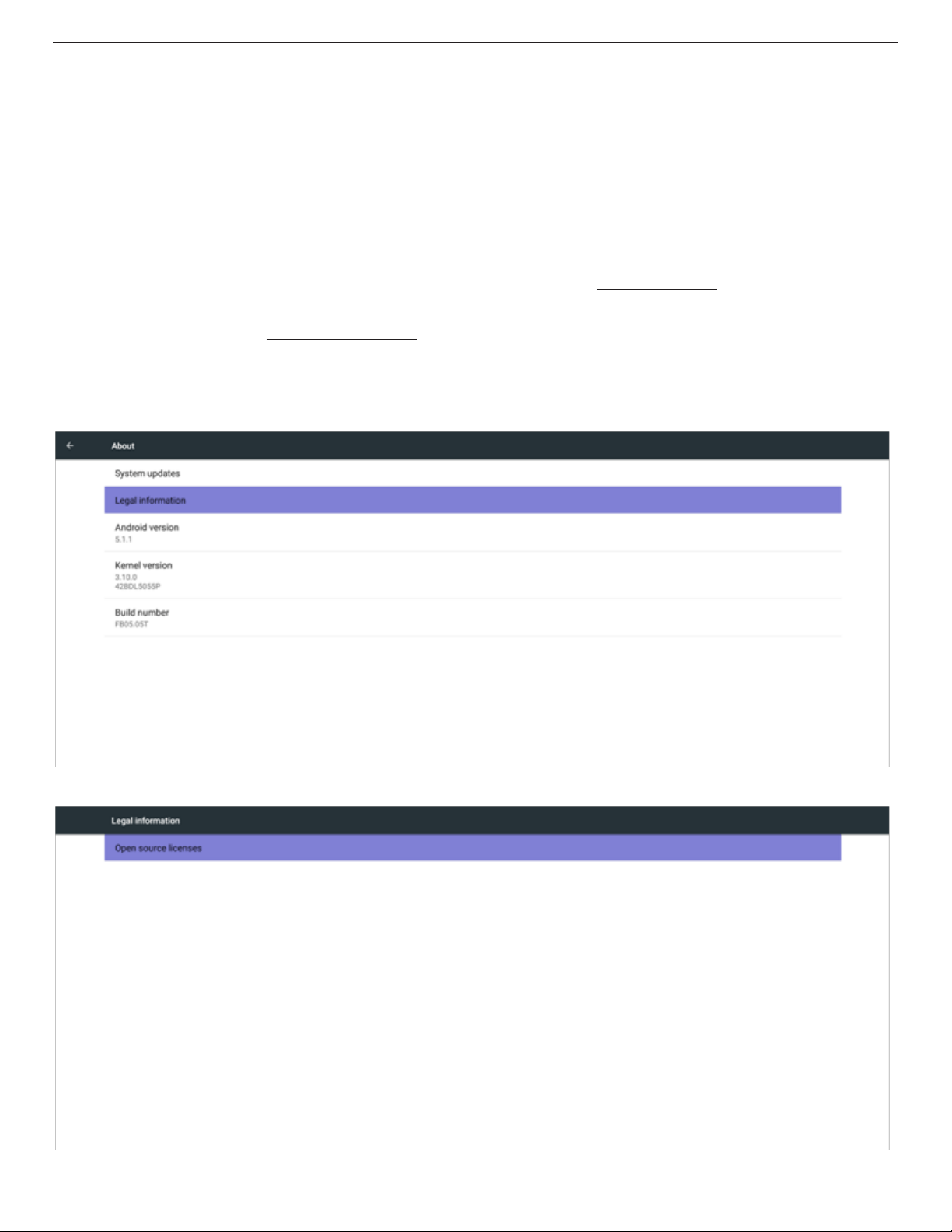
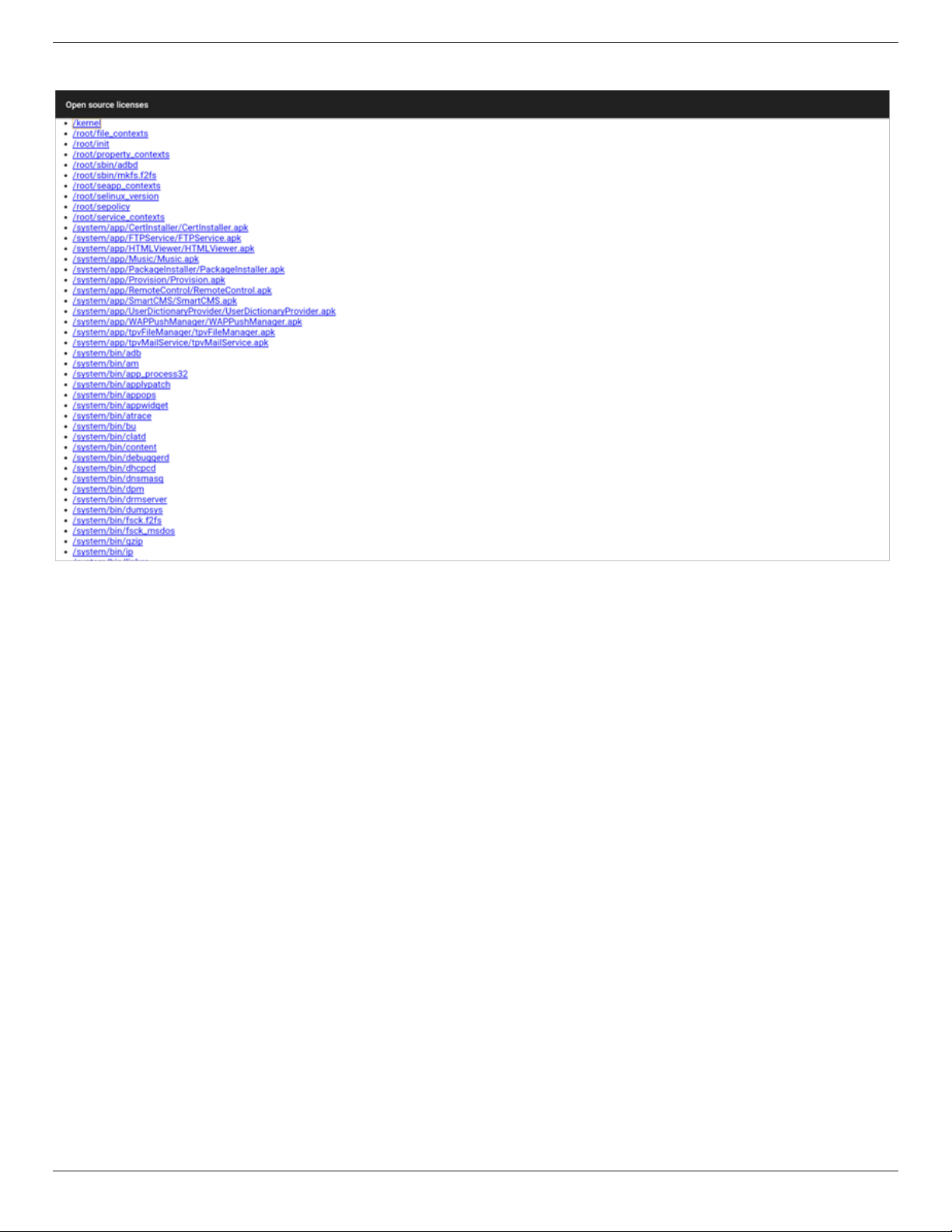
YoucanndthedetailedinformationinAndroidOSD.
Step1:
Step2:
55BDL5057P
xiii
Step3:

55BDL5057P
xiv
Table Of Contents
1. Unpacking and Installation .......................................................1
1.1. Unpacking.........................................................................................1
1.2. PackageContents........................................................................1
1.3. InstallationNotes.........................................................................1
1.4. InstallingandRemovingTableStands(optional)........2
1.5. MountingonaWall....................................................................3
1.6. MountinginPortraitPosition................................................4
1.7. OperatingInstructionsofEdgeAlignmentKit............5
2. Parts and Functions ...................................................................6
2.1. ControlPanel.................................................................................6
2.2. Input/OutputTerminals.............................................................7
2.3. RemoteControl...........................................................................8
3. Connecting External Equipment.......................................... 13
3.1. ConnectingExternalEquipment(DVD/VCR/
VCD)...............................................................................................13
3.2. ConnectingaPC.......................................................................13
3.3. ConnectingAudioEquipment...........................................14
3.4. ConnectingMultipleDisplaysinaDaisy-chain
Conguration..............................................................................15
3.5. IRconnection..............................................................................17
3.6. IRPass-throughConnection...............................................17
4. Operation ................................................................................. 18
4.1. WatchtheConnectedVideoSource............................18
4.2. ChangePictureFormat.........................................................18
4.3. Overview.......................................................................................18
4.4. MediaPlayerintroduction:...................................................19
4.5. Browsermanual.........................................................................21
4.6. PDFreaderplay.........................................................................24
4.7. CMND&Play.............................................................................25
4.8. CustomApp................................................................................26
5. Signage display ......................................................................... 27
5.1. Setting..............................................................................................27
5.2. Ethernet..........................................................................................27
5.3. Proxy................................................................................................27
5.4. Datausage....................................................................................28
5.5. More…...........................................................................................28
5.6. SignageDisplay...........................................................................29
5.7. SystemTools................................................................................38
5.8. CloneMediaFile.......................................................................39
5.9. Display...........................................................................................39
5.10. Storage............................................................................................39
5.11. Apps.................................................................................................40
5.12. Security...........................................................................................40
5.13. Date&time.................................................................................40
5.14. Developeroptions...................................................................40
5.15. About..............................................................................................40
5.16. Supplementary...........................................................................41
6. OSD Menu ............................................................................... 44
6.1. NavigatingtheOSDMenu..................................................44
6.2. OSDMenuOverview...........................................................44
7. USB device compatibility ....................................................... 53
8. Input Mode ............................................................................... 55
9. Pixel Defect Policy .................................................................. 56
9.1. PixelsandSub-Pixels...............................................................56
9.2. TypesofPixelDefects+DotDenition....................56
9.3. BrightDotDefects...................................................................56
9.4. DarkDotDefects.....................................................................57
9.5. ProximityofPixelDefects...................................................57
9.6. PixelDefectTolerances.........................................................57
9.7. MURA.............................................................................................57
10. Cleaning and Troubleshooting .............................................. 58
10.1. Cleaning..........................................................................................58
10.2. Troubleshooting.........................................................................59
11. Technical Specications ......................................................... 61
55BDL5057P
1
1. Unpacking and Installation
1.1. Unpacking
• Thisproductispackedinacarton,togetherwiththestandardaccessories.
• Anyotheroptionalaccessorieswillbepackedseparately.
• Duetothesizeandweightofthisdisplayitisrecommendedfortwopeopletomoveit.
• Afteropeningthecarton,ensurethatthecontentsarecompleteandingoodcondition.
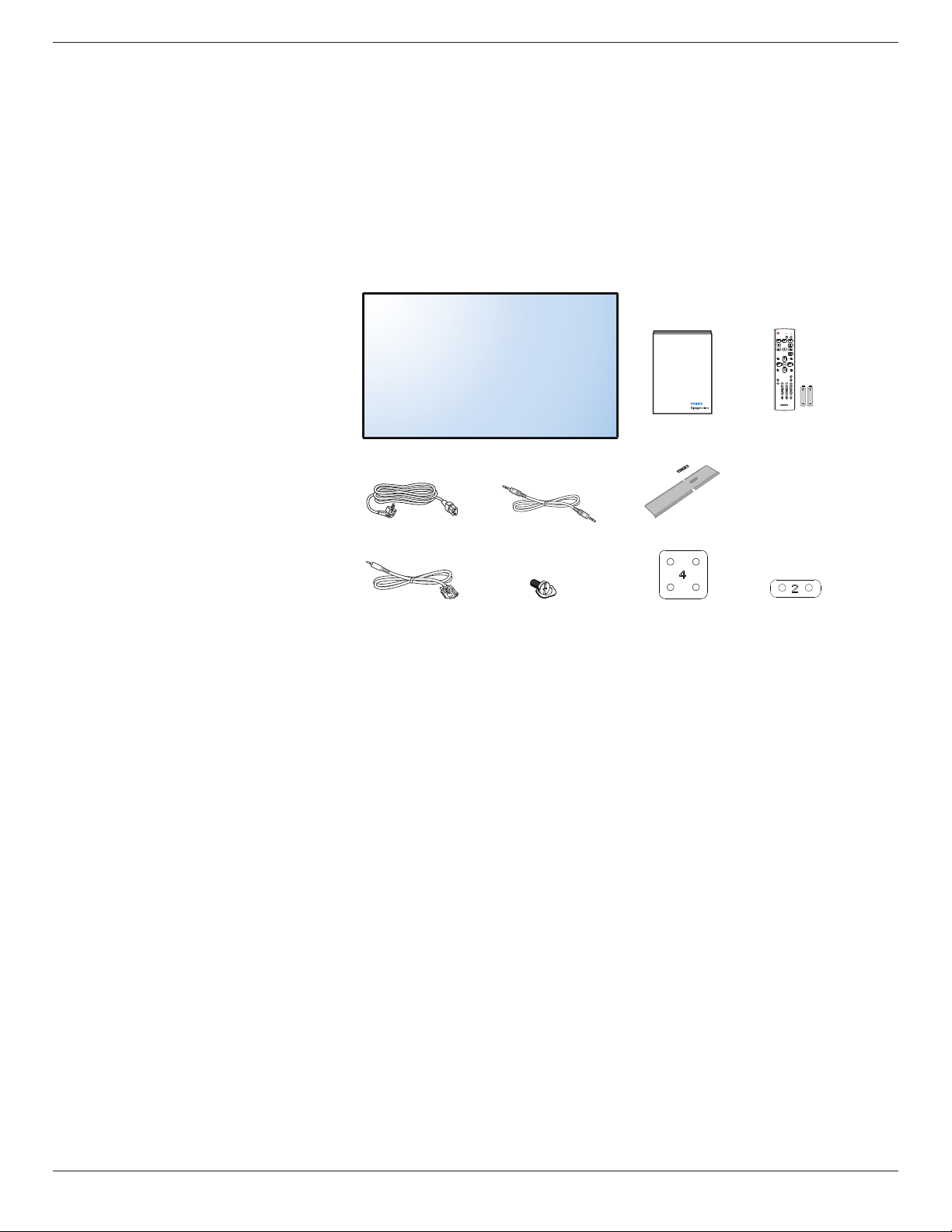
1.2. Package Contents
Pleaseverifythatyoureceivedthefollowingitemswithyourpackagecontent:
• LCDdisplay
• Quickstartguide
• RemotecontrolwithAAAbatteries
•
Powercord
•
RS232cable
•
RS232daisychaincable
• Logoguider&logo
• EdgeAlignmentKit-1:2PCS
• EdgeAlignmentKit-2:1PCS
• ThumbScrew:8PCS
* The supplied power cord varies depending on destination.
Power Cord
Logo guider & Logo
Quick start guide
Thumb Screw
Remote Control
and AAA Batteries
RS232 Daisy Chain Cable
RS232 Cable
FORMAT
SOURCE
INFOLIST
OPTIONSADJUST
VOL
NORMAL
ID
ID SET ENTER
Edge Alignment Kit-1
Edge Alignment Kit-2
* Differencesaccordingtoregions
Displaydesignandaccessoriesmaydifferfromthoseillustratedabove.
NOTES:
•
Forallotherregions,applyapowercordthatconformstotheACvoltageofthepowersocketandhasbeenapprovedbyandcomplieswiththe
safetyregulationsoftheparticularcountry(TypeH05W-F,2Gor3G,0.75or1mm
2
shouldbeused).
• Youmightliketosavethepackageboxandpackingmaterialforshippingthedisplay.
1.3. Installation Notes
• Duetothehighpowerconsumption,alwaysusetheplugexclusivelydesignedforthisproduct.Ifanextendedlineisrequired,pleaseconsultyour
serviceagent.
• Theproductshouldbeinstalledonaatsurfacetoavoidtipping.Thedistancebetweenthebackoftheproductandthewallshouldbemaintained
forproperventilation.Avoidinstallingtheproductinthekitchen,bathroomoranyotherplaceswithhighhumiditysoasnottoshortentheservicelife
oftheelectroniccomponents.
• Theproductcannormallyoperateonlyunder3000minaltitude.Ininstallationsataltitudesabove3000m,someabnormalitiesmaybeexperienced.
55BDL5057P
2
1.4. Installing and Removing Table Stands (optional)
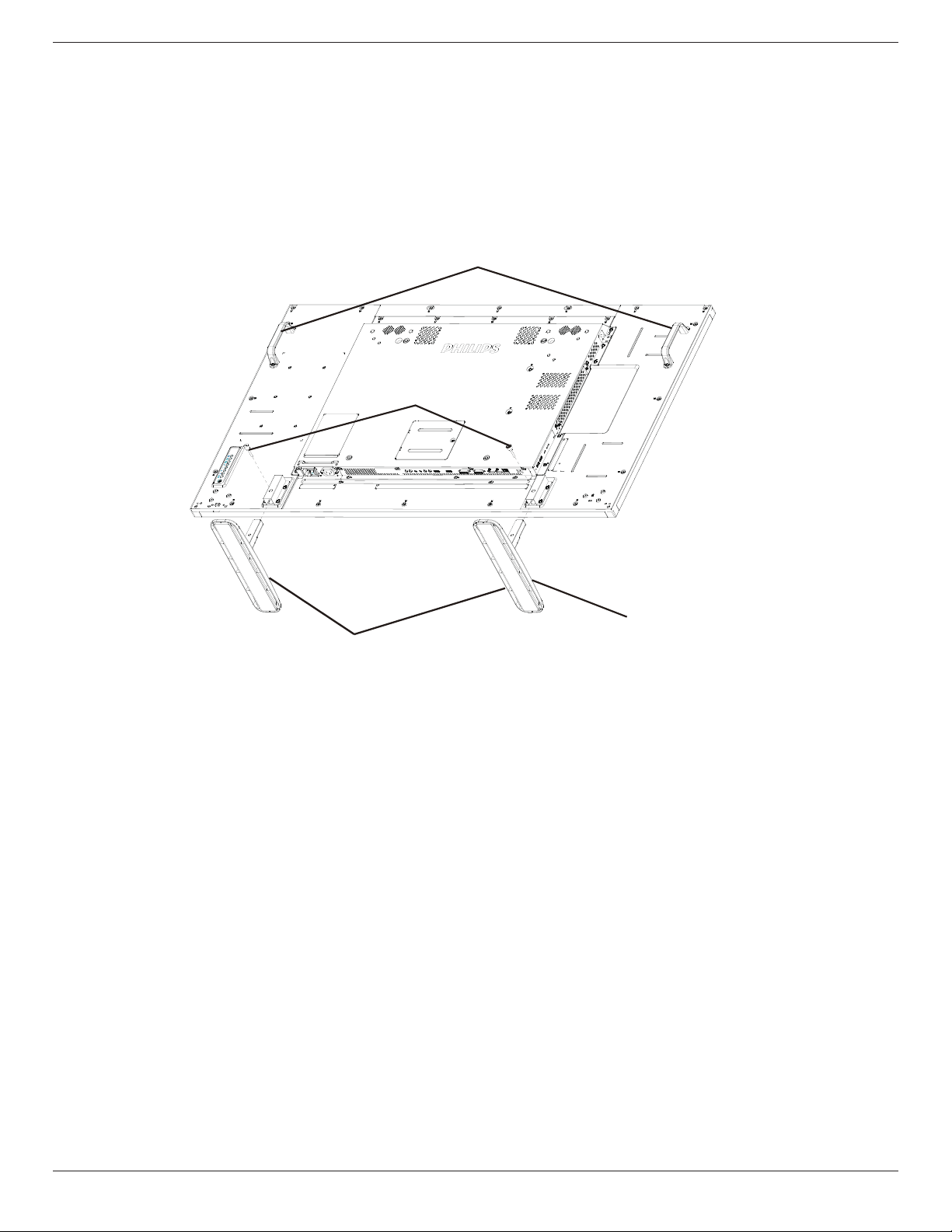
To install table stands:
1. Ensureyourdisplayispoweredoff.
2. Spreadaprotectivesheetonaatsurface.
3. Grabthecarryinghandlesandplacethedisplayface-downontheprotectivesheet.
4. Afterinsertingthestandintheguideblock,tightenthescrewsonbothsidesofthedisplay.
NOTE: Thelongersideofthestandshouldfacethefrontofthedisplay.
Table stand
Longer portions face the front
Carrying handle
Thumbscrews
To remove table stands:
1. Poweroffthedisplay.
2. Spreadaprotectivesheetonaatsurface.
3. Grabthecarryinghandlesandplacethedisplayface-downontheprotectivesheet.
4. Removescrewsusingascrewdriverandplacetheminasafeplaceforreuse.
55BDL5057P
3
1.5. Mounting on a Wall
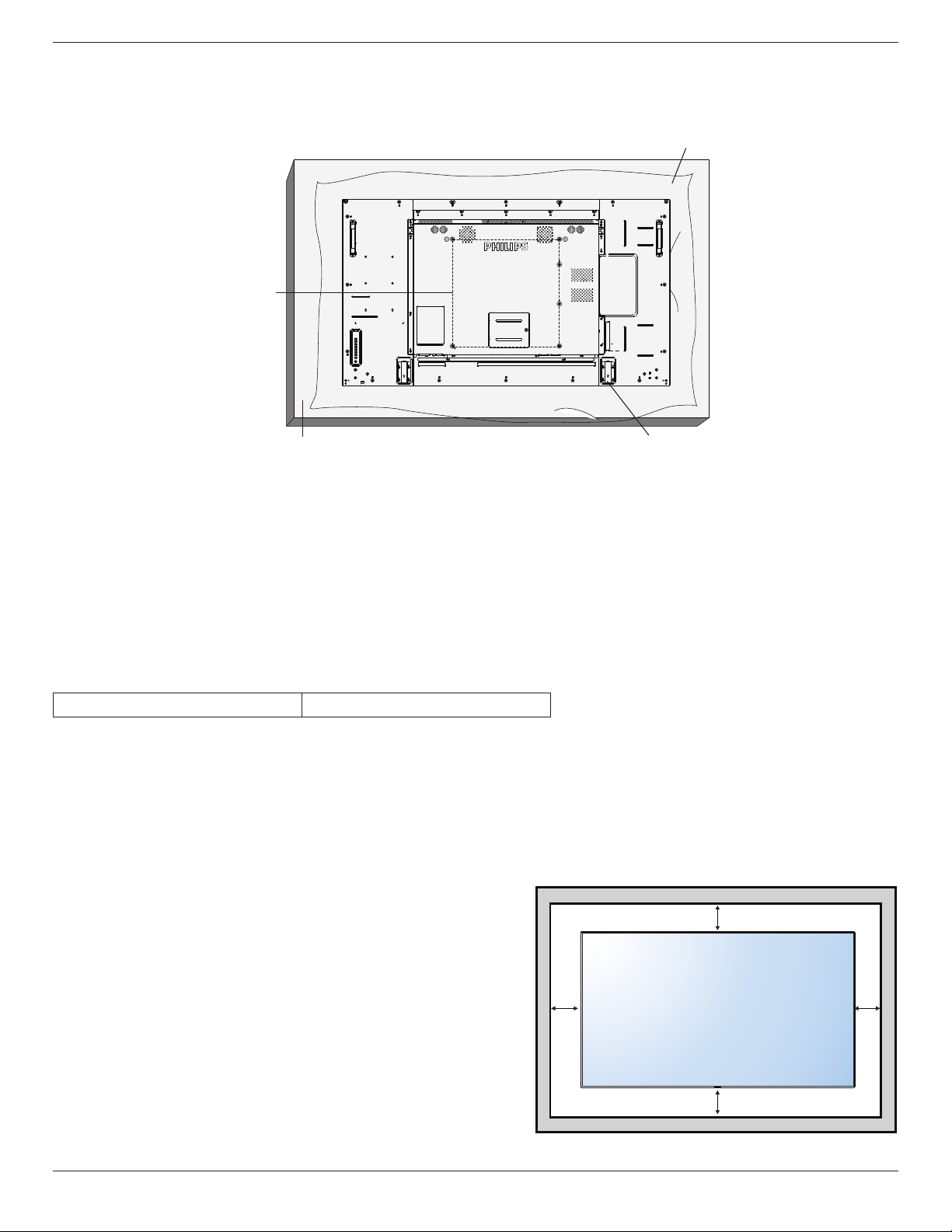
Tomountthisdisplaytoawall,youwillhavetoobtainastandardwall-mountingkit(commerciallyavailable).Werecommendusingamountinginterface
thatcomplieswithTUV-GSand/orUL1678standardinNorthAmerica.
Protective Sheet
VESA Grid
Tabletop standTable
1. Layaprotectivesheetonatable,whichwaswrappedaroundthedisplaywhenitwaspackaged,beneaththescreensurfacesoasnottoscratchthe
screenface.
2. Ensureyouhaveallaccessoriesformountingthisdisplay(wallmount,ceilingmount,tablestand,etc).
3. Followtheinstructionsthatcomewiththebasemountingkit.Failuretofollowcorrectmountingprocedurescouldresultindamagetotheequipment
orinjurytotheuserorinstaller.Productwarrantydoesnotcoverdamagecausedbyimproperinstallation.
4. Forthewall-mountingkit,useM6mountingscrews(havingalength10mmlongerthanthethicknessofthemountingbracket)andtightenthem
securely.
5. Unitwithoutbaseweight=25.2kg.Theequipmentanditsassociatedmountingmeansstillremainsecureduringthetest.ForuseonlywithULListed
WallMountBracketwithminimumweight/load:25.2kg.
1.5.1. VESA Grid
55BDL5057P
400(H)x400(V)mm
Caution:
Topreventthedisplayfromfalling:
• Forwallorceilinginstallation,werecommendinstallingthedisplaywithmetalbracketswhicharecommerciallyavailable.Fordetailedinstallation
instructions,refertotheguidereceivedwiththerespectivebracket.
• Tolessentheprobabilityofinjuryanddamageresultingfromfallofthedisplayincaseofearthquakeorothernaturaldisaster,besuretoconsultthe
bracketmanufacturerforinstallationlocation.
Ventilation Requirements for enclosure locating
Toallowheattodisperse,leavespacebetweensurroundingobjectsasshowninthe
diagrambelow.
100 mm 100 mm
100 mm
100 mm
55BDL5057P
4
1.6. Mounting in Portrait Position
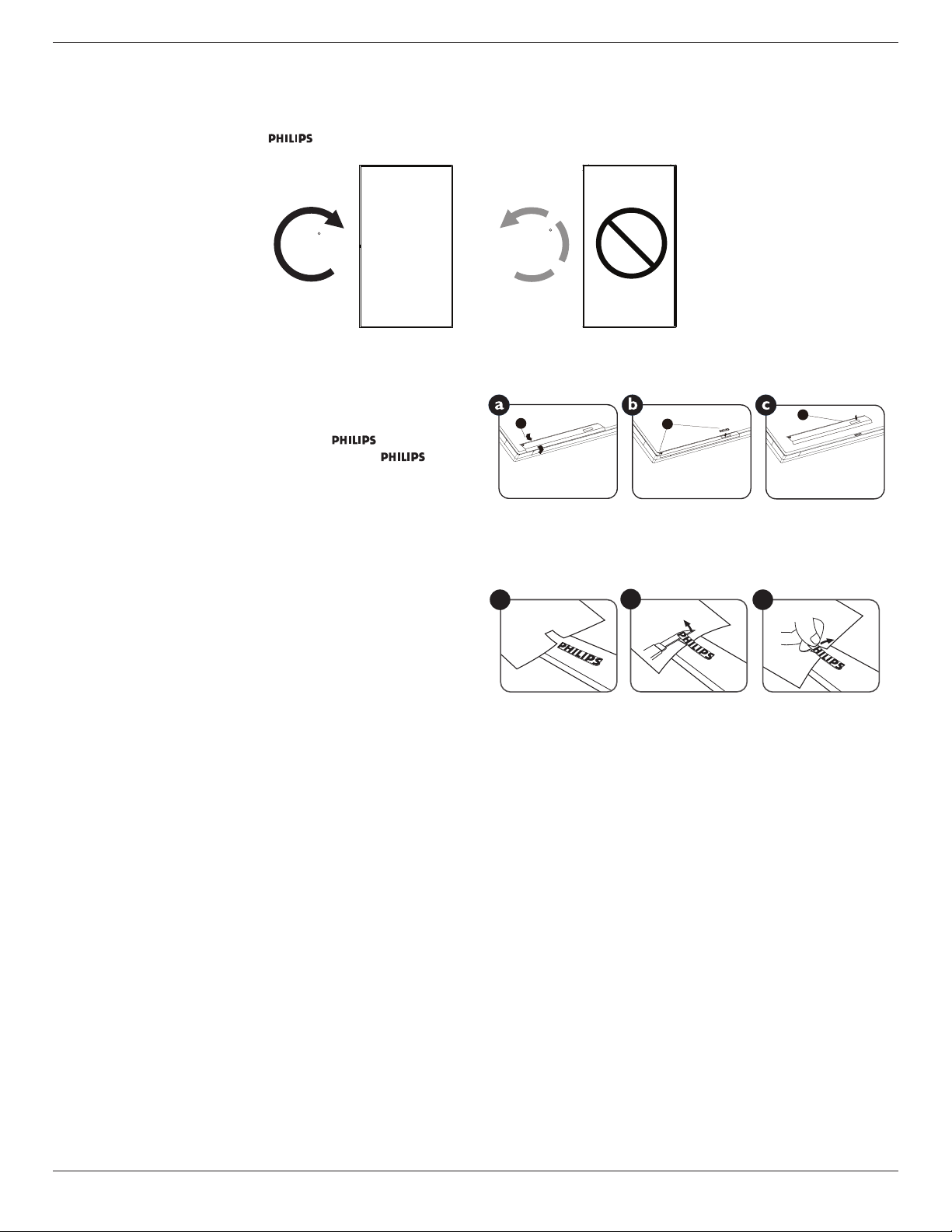
Thisdisplaycanbeinstalledinportraitposition.
1. Removethetablestand,ifattached.
2. Rotate90degreesclockwise.The“ ”logoshouldbeontheLEFTsidewhenfacingthedisplay.
90
90
1.6.1. How to use the logo guider for portrait position
1. Puttheguideronthelower-leftcornerofthefrontbezelofthedisplay.
Folddownbothofitsedges.
2. Peelofftheprotectivelmatthebackofthe“ ”logosticker.
Holdandpresstheguiderwithyourlefthand.Putthe“ ”logo
stickerwithitsadhesivesidedownintothelogoholewithyourright
hand,andpresstomakeitsticktightlyontothefrontbezel.
3. Removetheguider.
1
2
3
1.6.2. How to remove the logo
1. Prepareapieceofpaperwithacuttingareaoflogoasaprotectorto
preventthefrontbezelfromscratching.
2. Usingaknife,carefullyremovethelogostickerwiththepaperplacing
beneath.
3. Tearoffthelogosticker.
1
2
3
NOTE: Wheninstallingthedisplayonawall,pleaseconsultaprofessionaltechnicianforproperinstallation.Weacceptnoliabilityforinstallationsnot
performedbyaprofessionaltechnician.
55BDL5057P
5
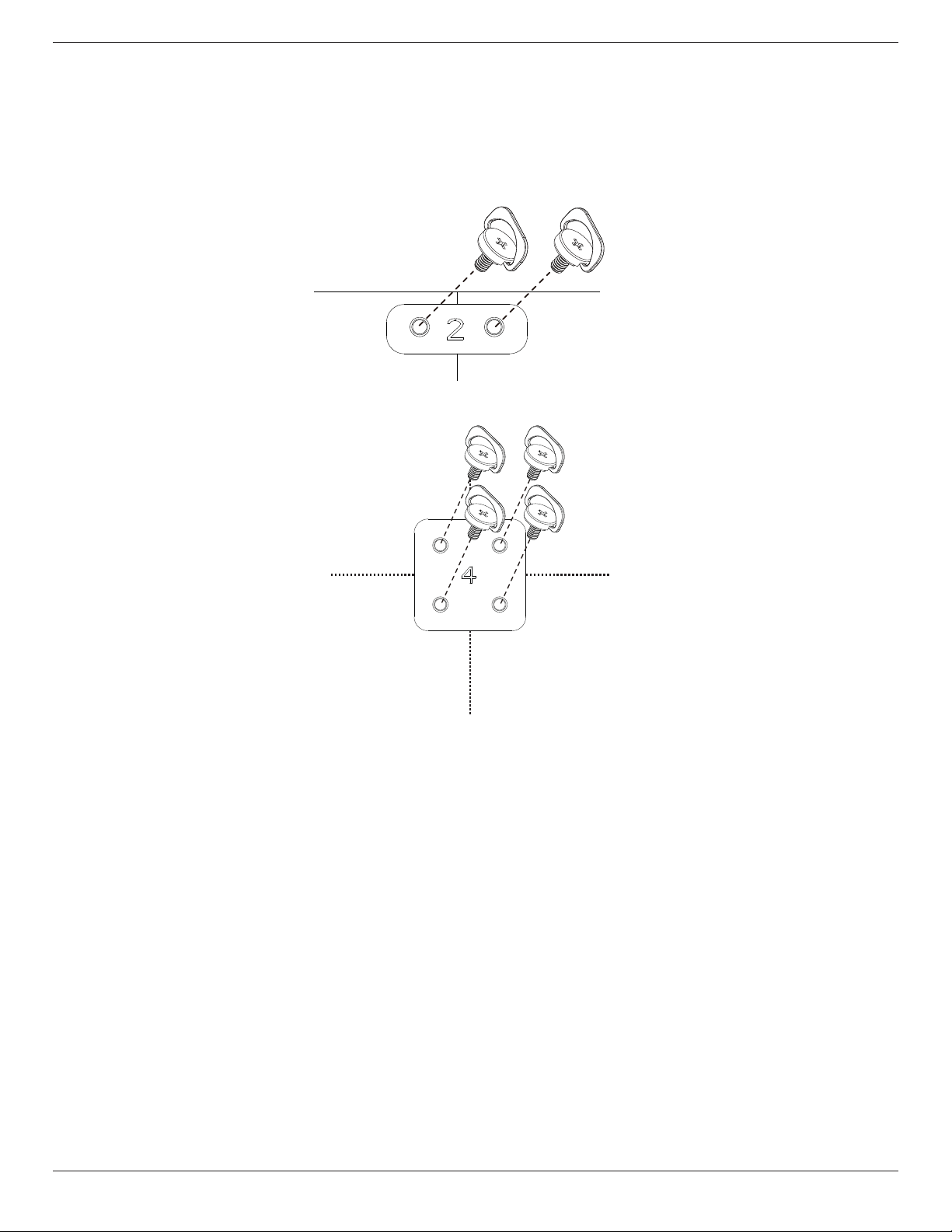
1.7. Operating Instructions of Edge Alignment Kit
1.7.1. Installing Edge Alignment Kit
• Using“EdgeAlignmentKit-1”onadjacenttwodisplays.
• Installthe“EdgeAlignmentKit-1”with2PCSofM3screw.
• Using“EdgeAlignmentKit-2”onadjacentfourdisplays.
NOTE: Wheninstallingtheedgealignmentkit,pleaseconsultaprofessionaltechnicianforproperinstallation.Weacceptnoliabilityforinstallationsnot
performedbyaprofessionaltechnician.
55BDL5057P
6
2. Parts and Functions
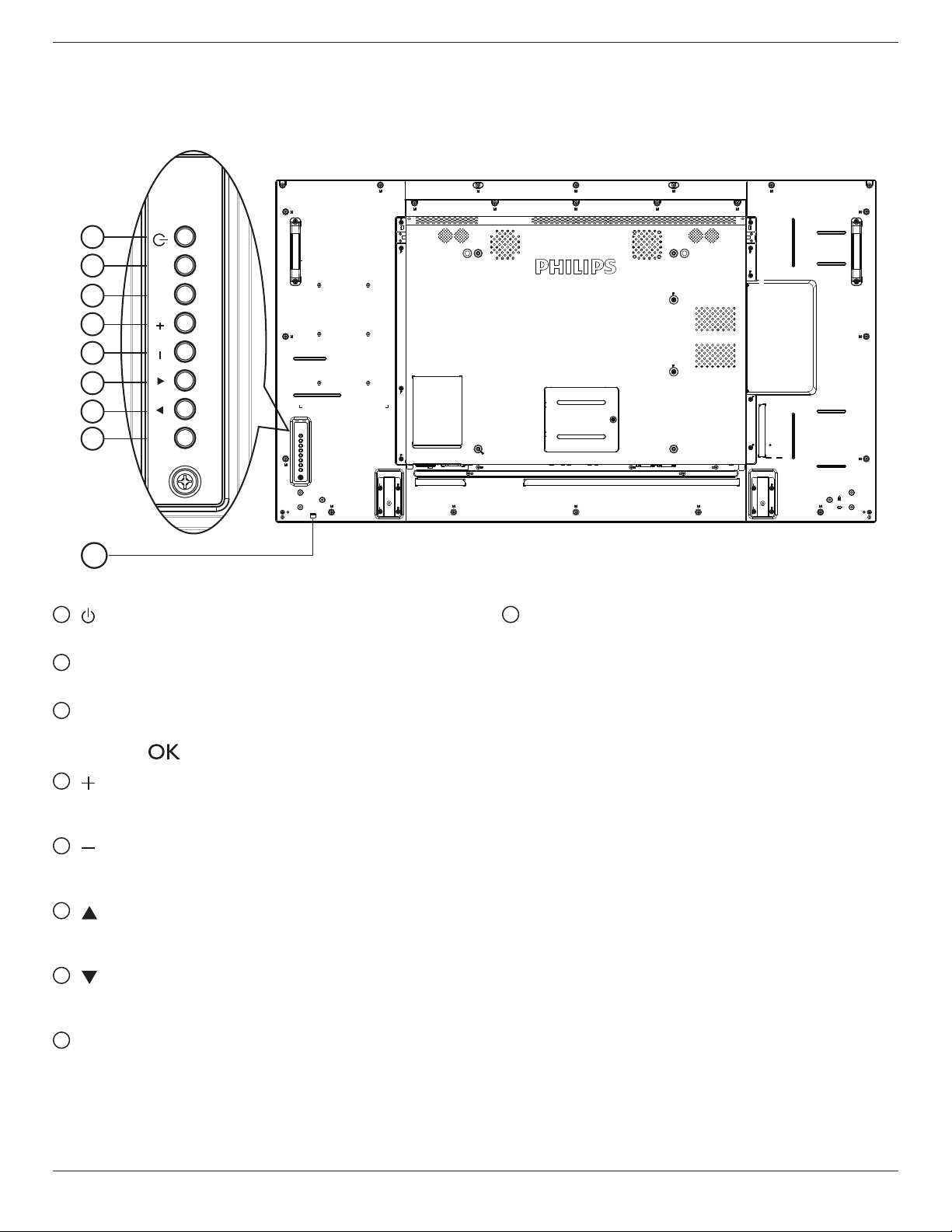
2.1. Control Panel
9
1
2
3
4
5
6
7
8
MUTE INPUT
MENU
1
[ ] button
Usethisbuttontoturnthedisplayonorputthedisplaytostandby.
2
[MUTE] button
SwitchtheaudiomuteON/OFF.
3
[INPUT] button
Choosetheinputsource.
• Usedas[ ]buttonintheOn-Screen-Displaymenu.
4
[ ] button
IncreasetheadjustmentwhileOSDmenuison,orincreasethe
audiooutputlevelwhileOSDmenuisoff.
5
[ ] button
DecreasetheadjustmentwhileOSDmenuison,ordecreasethe
audiooutputlevelwhileOSDmenuisoff.
6
[ ] button
MovethehighlightbaruptoadjusttheselecteditemwhileOSD
menuison.
7
[ ] button
MovethehighlightbardowntoadjusttheselecteditemwhileOSD
menuison.
8
[MENU] button
ReturntopreviousmenuwhileOSDmenuison,ortoactivatethe
OSDmenuwhenOSDmenuisoff.
9
Remote control sensor and power status indicator
• Receivescommandsignalsfromtheremotecontrol.
• IndicatestheoperatingstatusofthedisplaywithoutOPS:
- Lightsgreenwhenthedisplayisturnedon
- Lightsredwhenthedisplayisinstandbymode
- LightsamberwhenthedisplayentersAPMmode
- When{SCHEDULE}isenabled,thelightblinksgreenandred
- Ifthelightblinksred,itindicatesthatafailurehasbeen
detected
- Lightsoffwhenthemainpowerofthedisplayisturnedoff
* Using IR sensor cable for better remote control performance.
(Please refer to the instructions of 3.5)
55BDL5057P
7
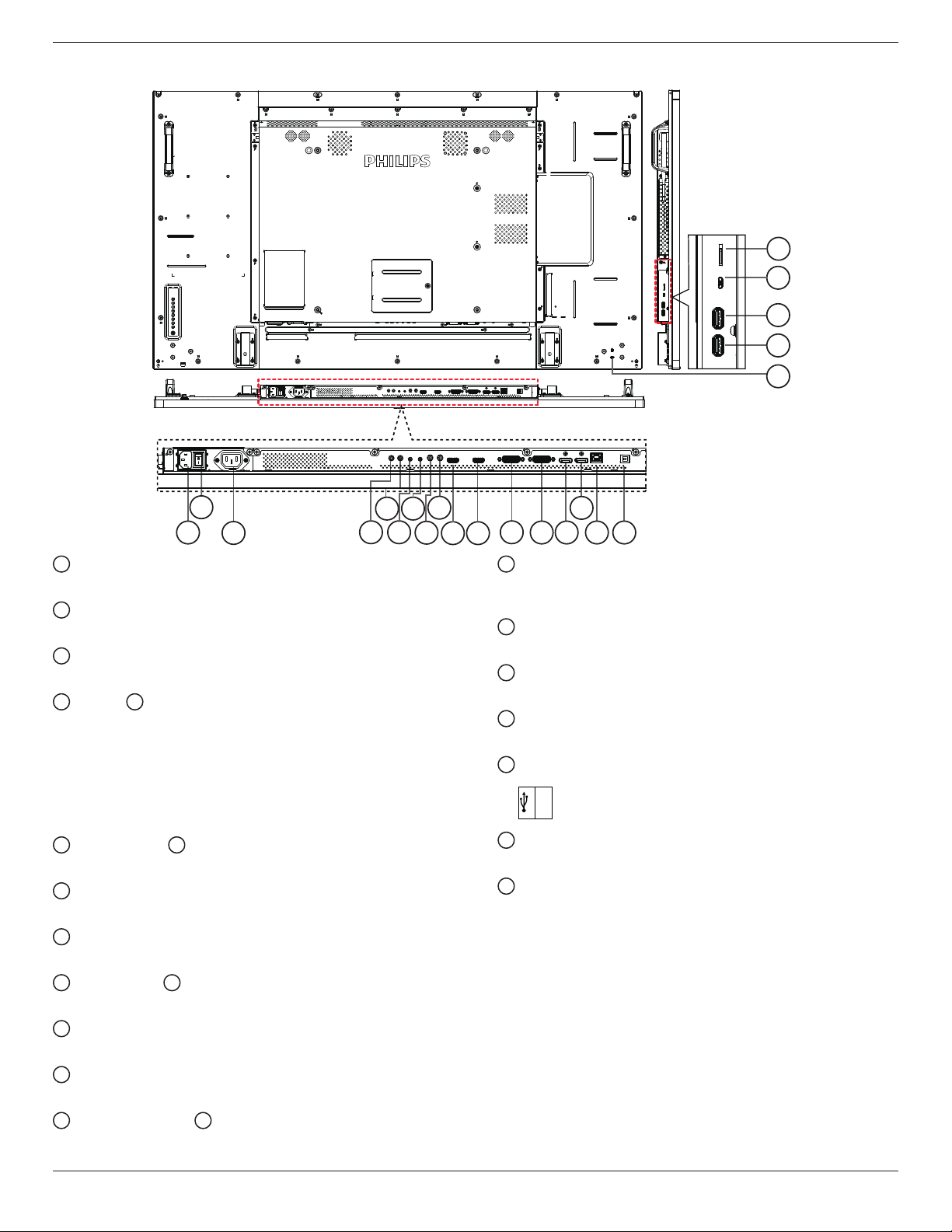
2.2. Input/Output Terminals
1
3
2
10
9
8
6
11
12
13 14
15
16
75
4
21
22
19
20
17
18
1
AC IN
ACpowerinputfromthewalloutlet.
2
MAIN POWER SWITCH
Switchthemainpoweron/off.
3
AC OUT
ACpowersupplytotheACINjackofamediaplayer.
4
IR IN /
5
IR OUT
IRsignalinput/outputfortheloop-throughfunction.
NOTES:
• Thisdisplay’sremotecontrolsensorwillstopworkingifthejack
[IRIN]isconnected.
• ToremotelycontrolyourA/Vdeviceviathisdisplay,refertopage
14fororIRPassThroughconnection.
6
RS232C IN /
7
RS232C OUT
RS232Cnetworkinput/outputfortheloop-throughfunction.
8
LINE IN
AudioinputforVGAsource(3.5mmstereophone).
9
AUDIO OUT
AudiooutputtoexternalAVdevice.
10
HDMI1 IN /
11
HDMI2 IN
HDMIvideo/audioinput.
12
DVI-I IN
DVI-Dvideoinput.
13
DVI OUT / VGA OUT
DVIorVGAvideooutput.
14
DisplayPort IN /
15
DisplayPort OUT
DisplayPortvideoinput/output.
16
RJ-45
LANcontrolfunctionfortheuseofremotecontrolsignalfrom
controlcenter.
17
USB PORT
Nofunction.
18
SECURITY LOCK
Usedforsecurityandtheftprevention.
19
USB PORT B
ConnectyourUSBstoragedevice.
20
USB PORT A
USB
5V/2A
21
MICRO USB
ConnectyourUSBstoragedevice.
22
MICRO SD CARD
ConnectyourMICROSDCARD.
55BDL5057P
8
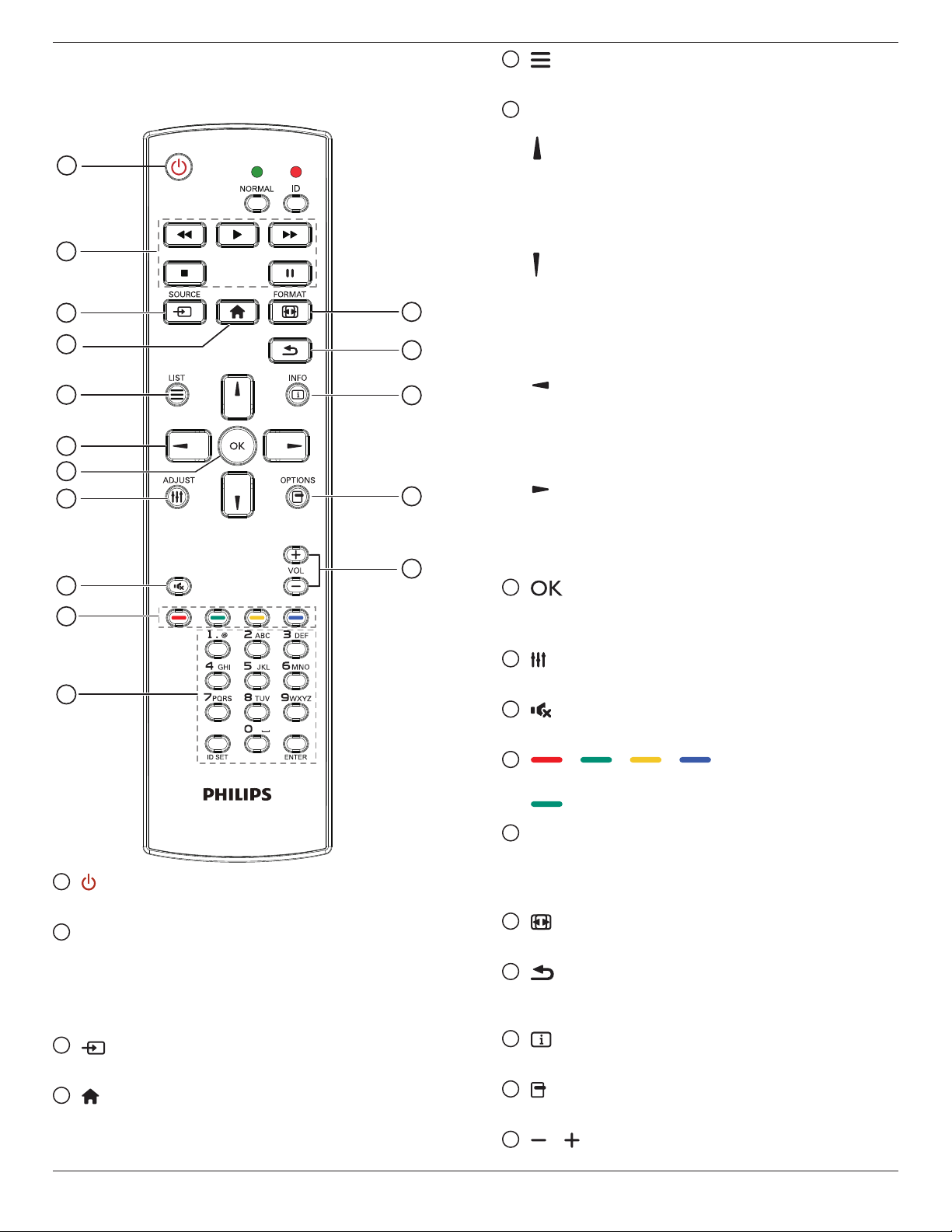
2.3. Remote Control
2.3.1. General functions
1
2
3
4
5
6
7
8
10
9
12
14
15
11
13
16
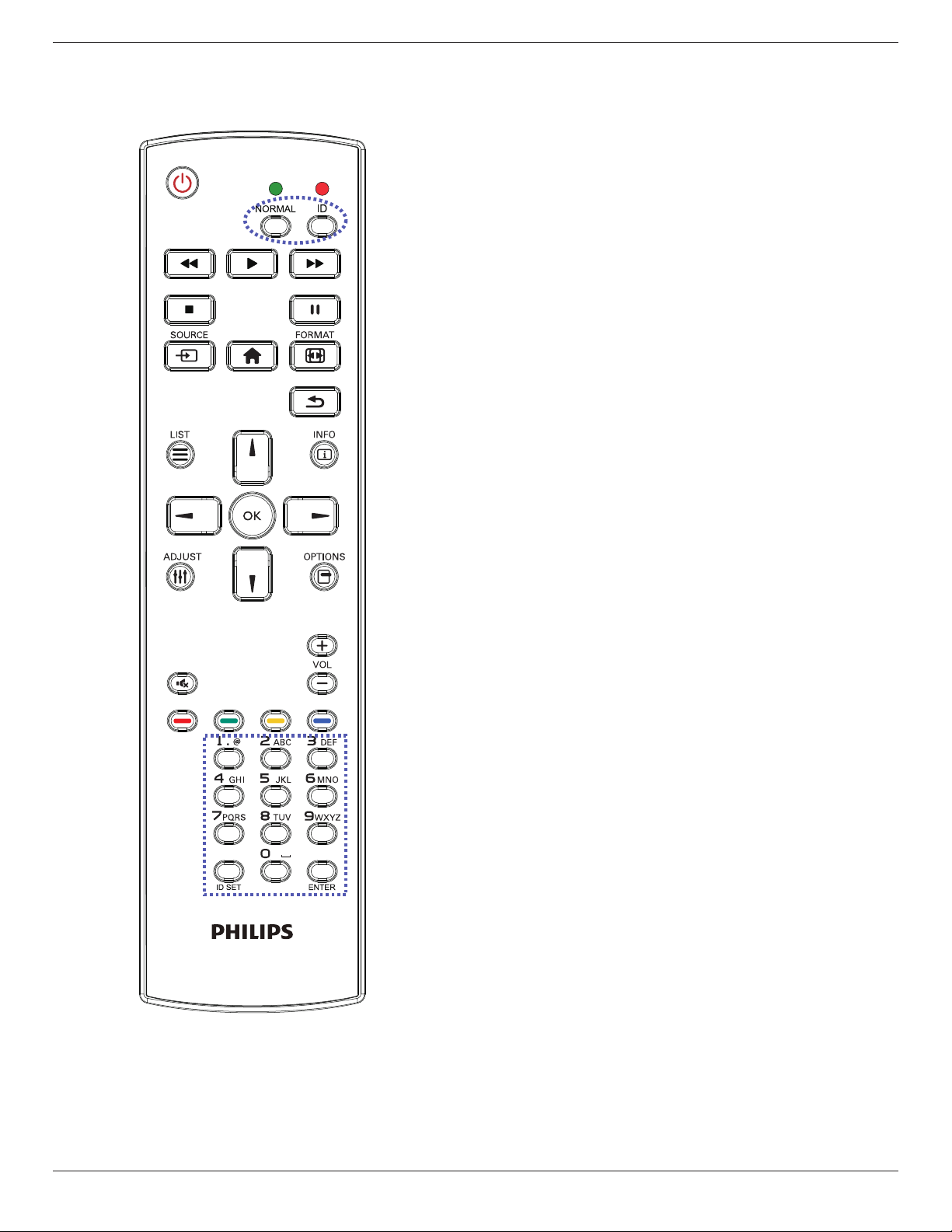
1
[ ] POWER button
PowerON/OFF.
2
[PLAY] buttons
Controlplaybackofmediales.(forMediaInputonly)
Freeze feature
Pause:Freezehotkeyforallinputscontent.
Play:Unfreezehotkeyforallinputcontent.
3
[ ] SOURCE button
Root Menu:GotoVideosourceOSD.
4
[ ] HOME button
Root Menu:GotoMainMenuOSD.
Others:ExitOSD.
5
[ ] LIST button
Nofunction.
6
NAVIGATION buttons
[ ]
Root Menu:GotoSmartpictureOSD.
Main Menu:Movethehighlightbaruptoadjusttheselecteditem.
IR Daisy Chain Menu:IncreasecontrolledGroupIDnumber.
[ ]
Root Menu:GotoAudiosourceOSD.
Main Menu:Movethehighlightbardowntoadjusttheselected
item.
IR Daisy Chain Menu:DecreasecontrolledGroupIDnumber.
[ ]
Main Menu:gotopreviouslevelmenu.
Source Menu:Exitsourcemenu.
Volume Menu:DecreaseAudioVolume.
[ ]
Main Menu:gotonextlevelmenuorsetselectedoption.
Source Menu:Gotoselectedsource.
Volume Menu:IncreaseAudioVolume.
7
[ ] button
Root Menu:GotoIRdaisychainOSDinPrimary/Secondarymode.
Main Menu:Conrmanentryorselection.
8
[ ] ADJUST button
GotoAutoAdjustOSDforVGAonly.
9
[ ] MUTE button
ToggleAudioMute/Unmute.
10
[ ] [ ] [ ] [ ] COLOR buttons
Choosetasksoroptions.(forMediaInputonly)
[ ]
HotkeyforWindowselectionfunction.
11
[Number/ ID SET/ ENTER] button
Entertextfornetworksetting.
PresstosetthedisplayID.Referto2.3.2. ID Remote Control
formoredetail.
12
[ ] FORMAT button
ChangeImageZoomMode[Full][4:3][1:1][16:9][21:9][Custom].
13
[ ] BACK button
Returntothepreviousmenupageorexitfromtheprevious
function.
14
[ ] INFO button
ShowInformationOSD
15
[ ] OPTIONS button
Nofunction.
16
[ ] [ ] VOLUME button
Adjustvolume.
55BDL5057P
9
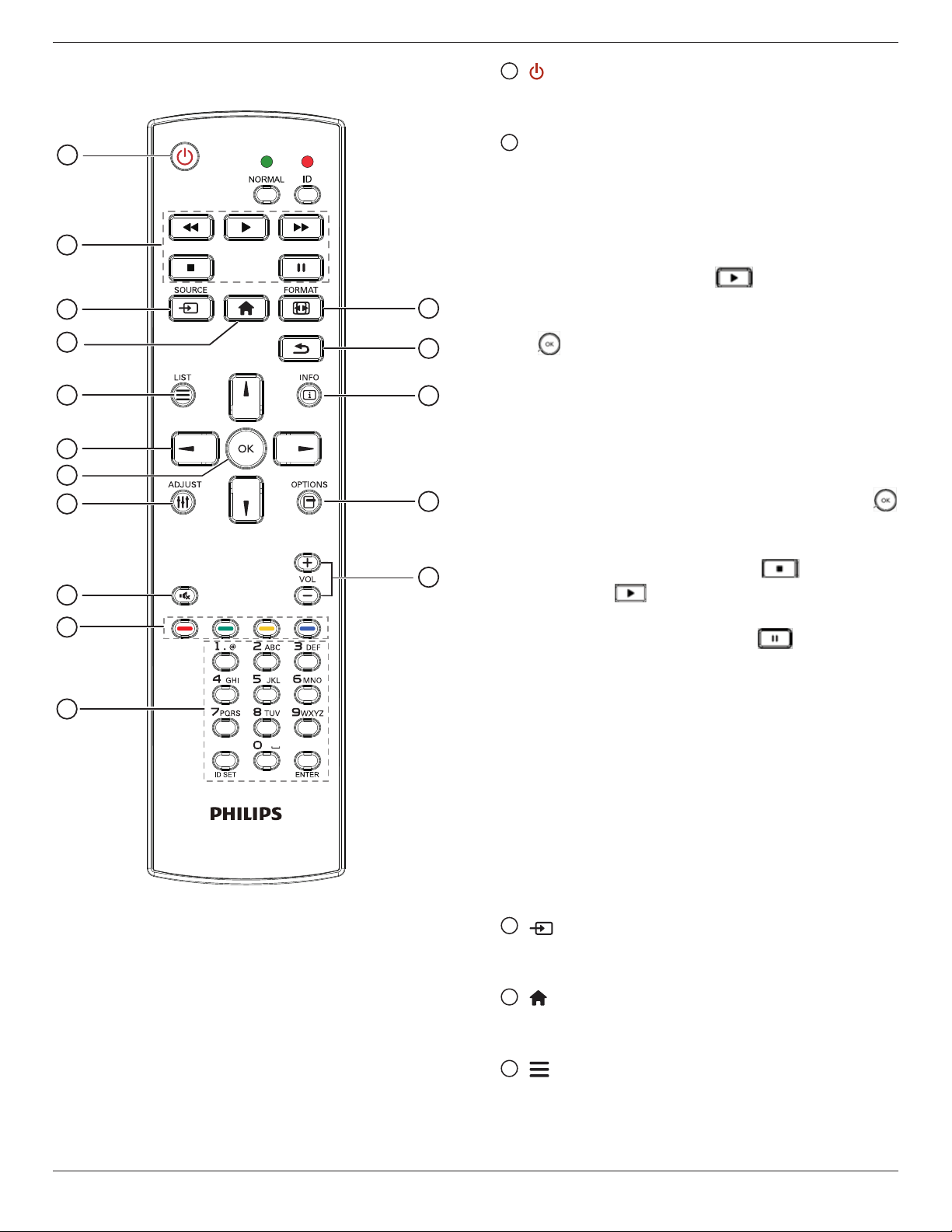
2.3.2. ID Remote Control
YoucansettheremotecontrolIDwhenyouwanttousethisremote
controlononeofseveraldifferentdisplays.
Press[ID]button.TheredLEDblinkstwice.
1. Press[IDSET]buttonformorethan1secondtoentertheID
Mode.TheredLEDlightsup.
Pressthe[IDSET]buttonagainwillexittheIDMode.TheredLED
lightsoff.
Pressthedigitnumbers[0]~[9]toselectthedisplayyouwantto
control.
Forexample:press[0]and[1]fordisplayNo.1,press[1]and[1]for
displayNo.11.
Thenumbersavailablearefrom[01]~[255].
2. Notpressinganybuttonwithin10secondswillexittheIDMode.
3. Ifanerrorpressingofbuttonsotherthanthedigitsoccured,wait
1secondaftertheredLEDlightsoffandthenlightsupagain,then
pressthecorrectdigitsagain.
4. Press[ENTER]buttontoconrm.TheredLEDblinkstwiceand
thenlightsoff.
NOTE:
• Press[NORMAL]button.ThegreenLEDblinkstwice,indicatingthe
displayisinnormaloperation.
• ItisnecessarytosetuptheIDnumberforeachdisplaybefore
selectingitsIDnumber.
55BDL5057P
10
2.3.3. Remote Control buttons on Android
source
1
2
3
4
5
6
7
8
10
9
12
14
15
11
13
16
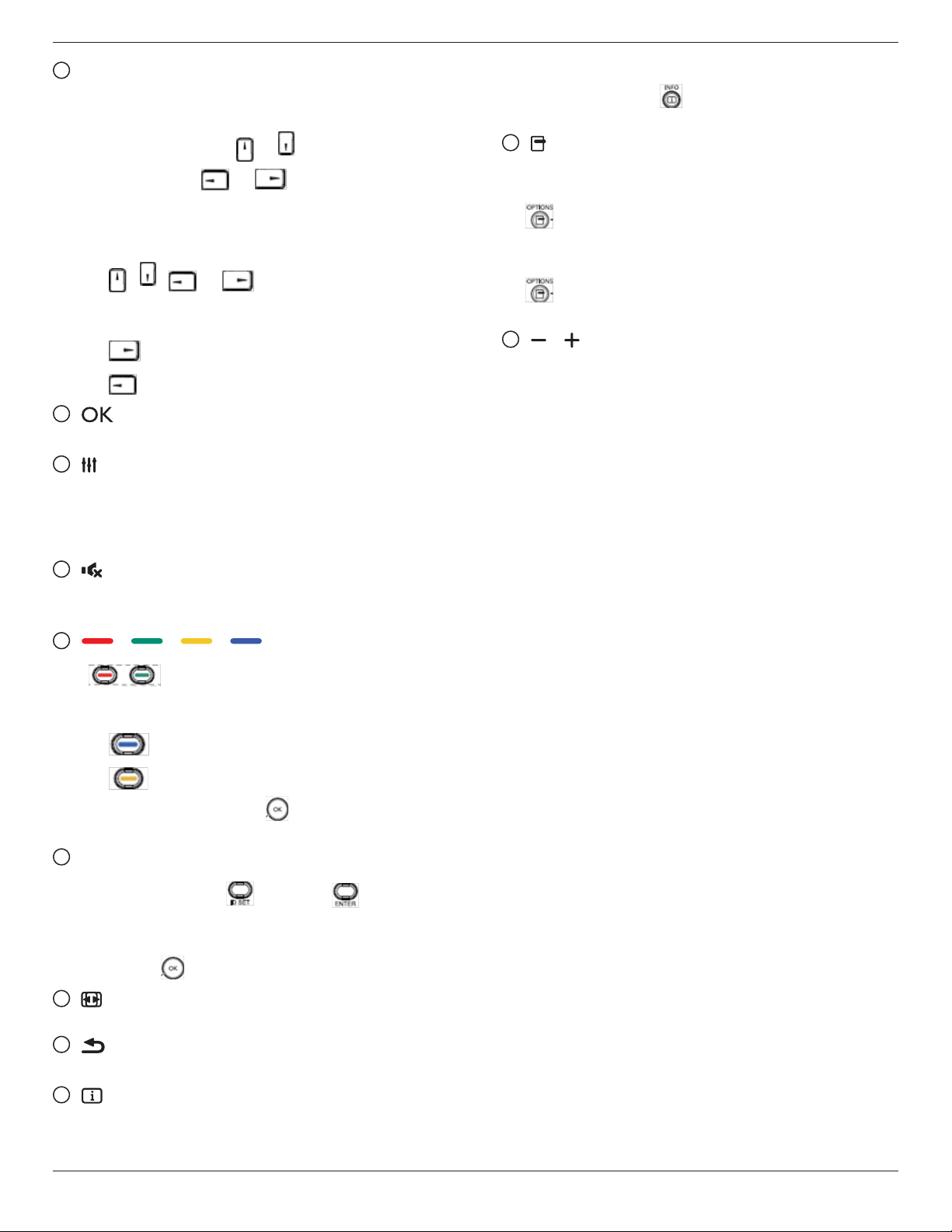
1
[ ] POWER button
Turnthedisplayonorputthedisplaytostandby.
ThebuttonisonlycontrolledbyScalar.
2
[PLAY] buttons
1.Controlplaybackofmedia(video/audio/picture)les.
Thereare4waystoplaymediales.
1)FileManager
FindthemedialefromtheFileManagerandselectittoplay.
2)MediaPlayer->Compose->editornewaddplaylist->
chooseanymediales->press toplaythemediale
directly.
3)MediaPlayer->Play->choosenon-emptyplaylist->press
toplayallthemedialesintheplaylist.
4)SetmediaplaylistinBootonSourceorSchedulebyOSD
menu.
2.PlayPDFle
Thereare3waystoplaymediales.
1)FileManager
FindthepdflefromtheFileManagerandselectittoplay.
2)PDFPlayer->Play->choosenon-emptyplaylist->press
toplayallthePDFlesintheplaylist.
3)SetpdfplaylistinBootonSourceorSchedulebyOSDmenu.
3.WhenplayingPDF,videoormusic,press tostopplaying.
Thenifpressing again,playingwillbestartedfromthe
beginningofthele.
4.WhenplayingPDF,videoormusic,press buttontopause
playing.
5.Allmediaorpdflesshouldbeputatthefolder,whichisnamed
“philips”withsub-folder,undertherootdirectoryofthespecied
storage(internal/USB/SDCard).Allsub-folders(video/photo/music/
pdf)arenamedbymediatypesandshouldn’tbechanged.
videos:{rootdirofstorage}/philips/video/
photos:{rootdirofstorage}/philips/photo/
music:{rootdirofstorage}/philips/music/
pdfs:{rootdirofstorage}/philips/pdf/
Notethattherootdirectoriesofthreestoragesare
Internalstorage:/sdcard
USBstorage:/mnt/usb_storage
SDcard:/mnt/external_sd
3
[ ] SOURCE button
Chooseinputsource.
ThebuttonisonlycontrolledbyScalar.
4
[ ] HOME button
AccessOSDmenu.
ThebuttonisonlycontrolledbyScalar.
5
[ ] LIST button
1.Inthecontentofthewebpage,movethefocusuptothenext
clickableitems.
2.Movethefocusuptothenextcontrolorwidgetsuchasbuttons.
55BDL5057P
11
6
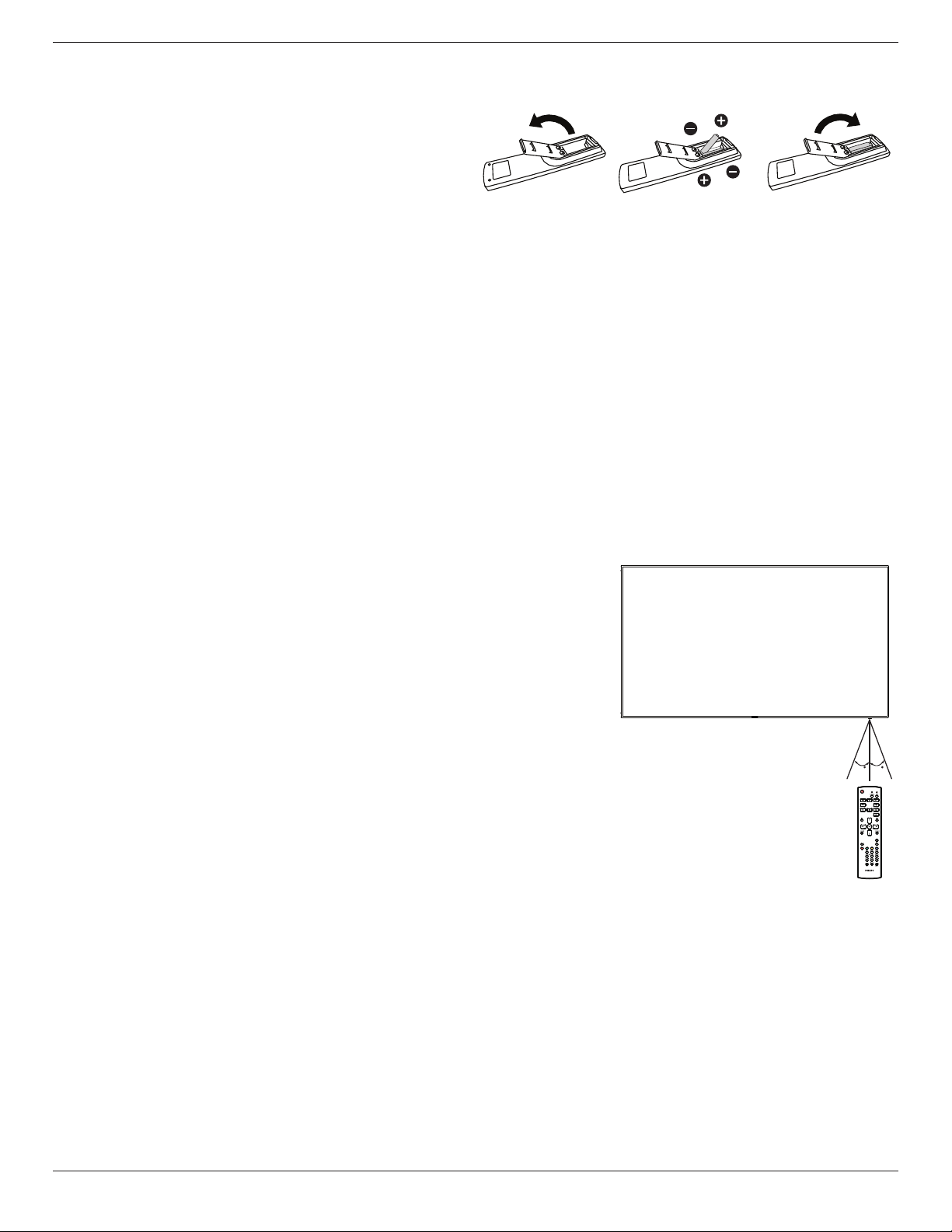
NAVIGATION buttons
1.Navigatethroughmenusandchooseitems.
2.Inthecontentofthewebpage,thesebuttonsaretocontrolthe
scrollbarofthescreen.Press or isformovingverticalscroll
barupordown.Press or isformovinghorizontal
scrollbarleftorright.
3.ForPDFles,
»
whenzoomin/outhasbeenperformed,
Press , , or toadjustthepositionofthe
screen.
»
whenzoomin/outhasbeennotperformed,
Press togotothenextpage.
Press togotothepreviouspage.
7
[ ] button
Conrmanentryorselection.
8
[ ] ADJUST button
1.Inthecontentofthewebpage,movethefocusdowntothenext
clickableitems.
2.Movethefocusdowntothenextcontrolorwidgetsuchas
buttons.
9
[ ] MUTE button
Presstoturnthemutefunctionon/off.
ThebuttonisonlycontrolledbyScalar.
10
[ ] [ ] [ ] [ ] COLOR buttons
1. :NofunctiononAndroidsource.Thesetwobuttons
areonlycontrolledbyScalar.
2.ForPDFles,
press buttontoperformzoom-in;
press buttontoperformzoom-out.
Afterzoom-inorzoom-out,press buttontorevertthepdfle
totheoriginalsize.
11
[Number/ ID SET/ ENTER] button
1.NofunctionsforIDSET andENTER onAndroid
source.ThesebuttonsareonlycontrolledbyScalar.
2.ForPDFle,enterthepagenumberbypressingnumberbuttons
andthenpress buttontojumptothespecicpage.
12
[ ] FORMAT button
Changepictureformat.ThebuttonisonlycontrolledbyScalar.
13
[ ] BACK button
Returntothepreviouspageorexitfromthepreviousfunction.
14
[ ] INFO button
1.Displayinformationaboutcurrentinputsignal.Itisshownby
Scalar.
2.MediaPlayer->Compose->editornewaddplaylist->choose
anymediales->press toshowtheinformationofthe
chosenmediale.
15
[ ] OPTIONS button
OpentoolboxinMediaPlayerorPDFPlayer.
1.MediaPlayer->Compose->Editornewaddplaylist->press
toopentoolbox.Toolboxwillbeslidefromtheleftsideof
thescreen.
2.PDFPlayer->Compose->Editornewaddplaylist->press
toopentoolbox.Toolboxwillbeslidefromtheleftsideof
thescreen.
16
[ ] [ ] VOLUME button
Adjustvolume.ThebuttonsareonlycontrolledbyScalar.
55BDL5057P
12
2.3.4. Inserting the batteries in the remote control
Theremotecontrolispoweredbytwo1.5VAAAbatteries.
Toinstallorreplacebatteries:
1. Pressandthenslidethecovertoopenit.
2. Alignthebatteriesaccordingtothe(+)and(–)indicationsinsidethe
batterycompartment.
3. Replacethecover.
Caution:
Theincorrectuseofbatteriescanresultinleaksorbursting.Besuretofollowtheseinstructions:
• Place“AAA”batteriesmatchingthe(+)and(–)signsoneachbatterytothe(+)and(–)signsofthebatterycompartment.
• Donotmixbatterytypes.
• Donotcombinenewbatterieswithusedones.Itcausesshorterlifeorleakageofbatteries.
• Removethedeadbatteriesimmediatelytopreventthemfromliquidleakinginthebatterycompartment.Don’ttouchexposedbatteryacid,asitcan
damageyourskin.
NOTE: Ifyoudonotintendtousetheremotecontrolforalongperiod,removethebatteries.
2.3.5. Handling the remote control
• Donotsubjecttostrongshock.
• Donotallowwaterorotherliquidtosplashtheremotecontrol.Iftheremotecontrolgetswet,wipeitdryimmediately.
• Avoidexposuretoheatandsteam.
• Otherthantoinstallthebatteries,donotopentheremotecontrol.
2.3.6. Operating range of the remote control
Pointthetopoftheremotecontroltowardthedisplay’sremotecontrolsensorwhenpressinga
button.
Usetheremotecontrolwithinadistanceoflessthan8m/26ftfromthedisplay’ssensor,anda
horizontalandverticalangleoflessthan30degrees.
NOTE: Theremotecontrolmaynotfunctionproperlywhentheremotecontrolsensoronthe
displayisunderdirectsunlightorstrongillumination,orwhenthereisanobstacleinthe
pathofsignaltransmission.
3030
55BDL5057P
13
3. Connecting External Equipment
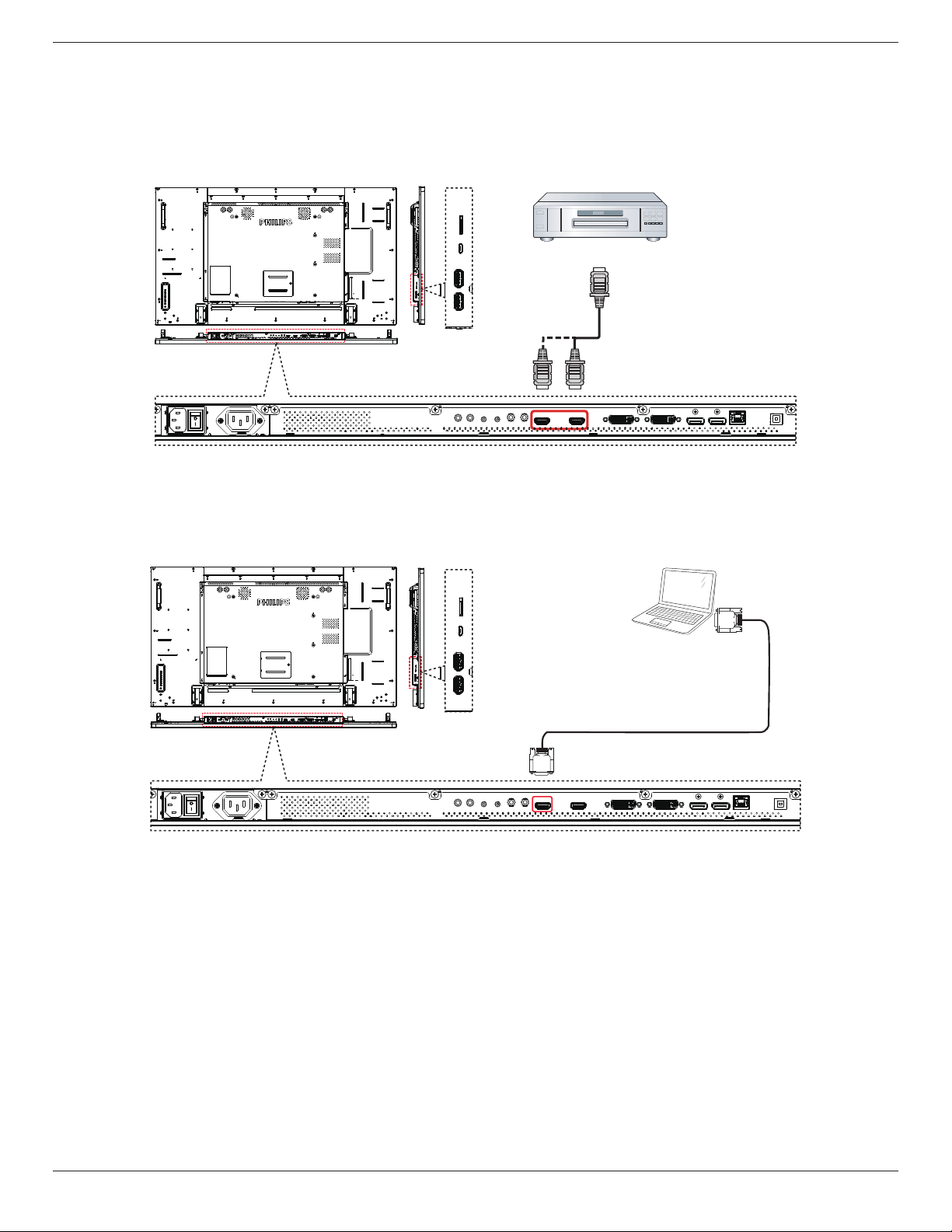
3.1. Connecting External Equipment (DVD/VCR/VCD)
3.1.1. Using HDMI video input
DVD / VCR / VCD
HDMI Out
[HDMI IN]
3.2. Connecting a PC
3.2.1. Using DVI input
PC
DVI Out
[DVI IN]
55BDL5057P
14
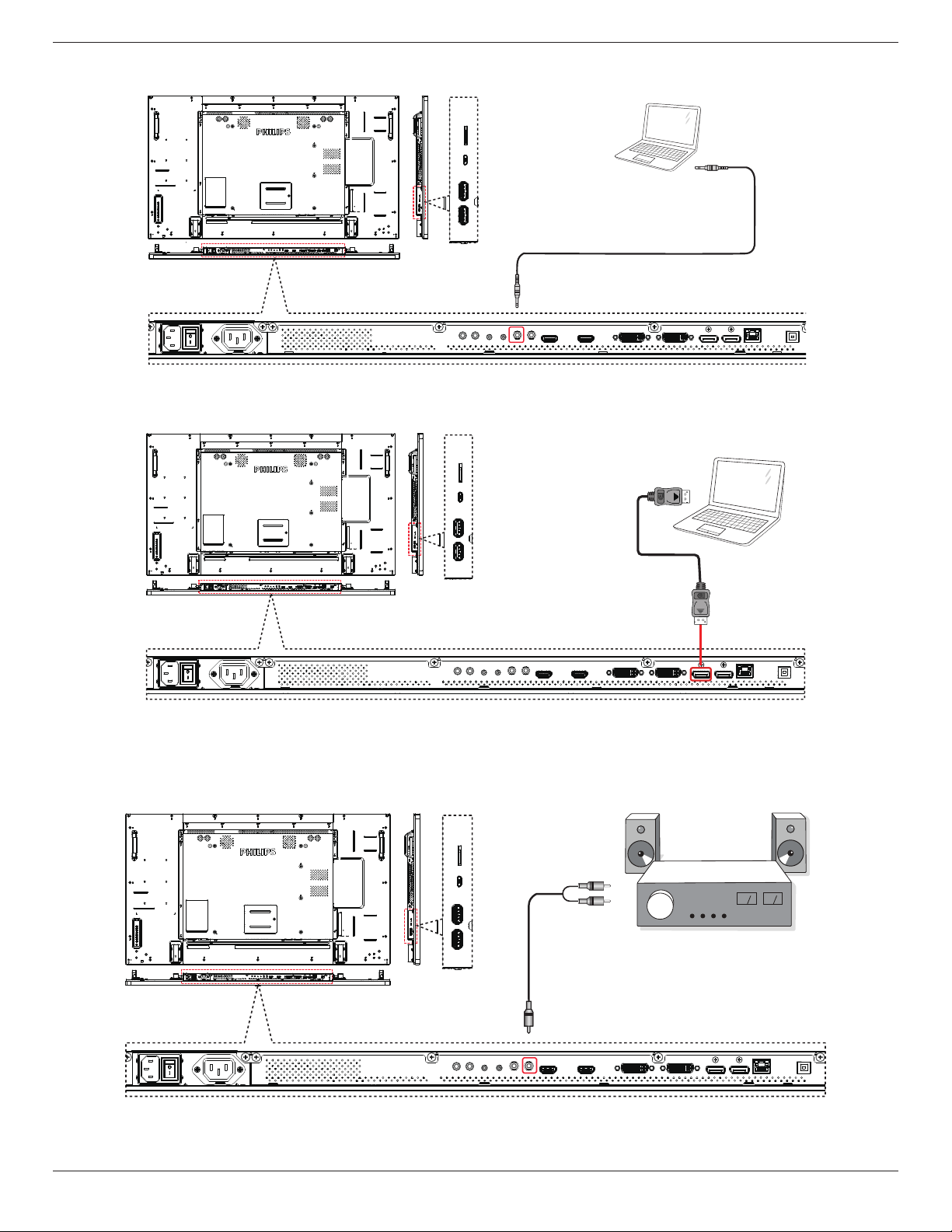
3.2.2. Using Video Source input
PC
[VGA AUDIO IN]
Audio Out
3.2.3. Using DisplayPort input
PC
DisplayPort Out
[DisplayPort IN]
3.3. Connecting Audio Equipment
3.3.1. Connecting an external audio device
Stereo Amplifier
[AUDIO OUT]
Audio In
55BDL5057P
15
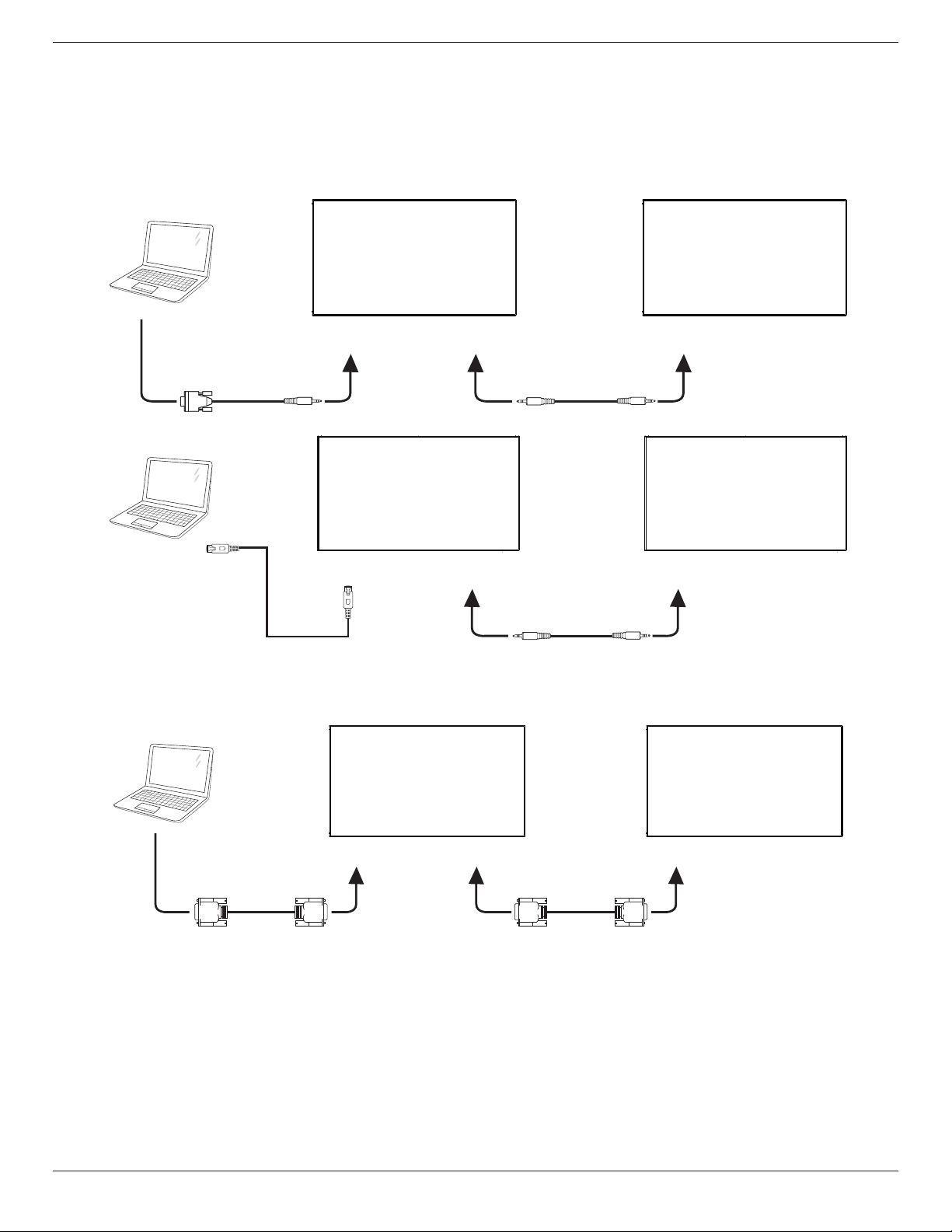
3.4. Connecting Multiple Displays in a Daisy-chain Configuration
Youcaninterconnectmultipledisplaystocreateadaisy-chaincongurationforapplicationssuchasavideowall.
NOTE: Maximum25displays(5x5)canbeusedinaDVIdaisy-chainconguration.ForVGAdaisy-chain,Maximum9displayscanbeused.
3.4.1. Display control connection
Connectthe[RS232OUT]connectorofDISPLAY1tothe[RS232IN]connectorofDISPLAY2.
DISPLAY 1
PC
DISPLAY 2
[RS-232C IN]
[RS-232C]
[RS-232C OUT] [RS-232C IN]
DISPLAY 1
PC
DISPLAY 2
[RJ-45] [RS-232C OUT] [RS-232C IN]
[RJ-45]
3.4.2. Digital video connection
Connectthe[DVIOUT/DVI-IOUT]connectorofDISPLAY1tothe[DVIIN]connectorofDISPLAY2.
PC
[DVI IN]
[DVI]
[DVI/VGA OUT] [DVI IN]
DISPLAY 1 DISPLAY 2
55BDL5057P
16
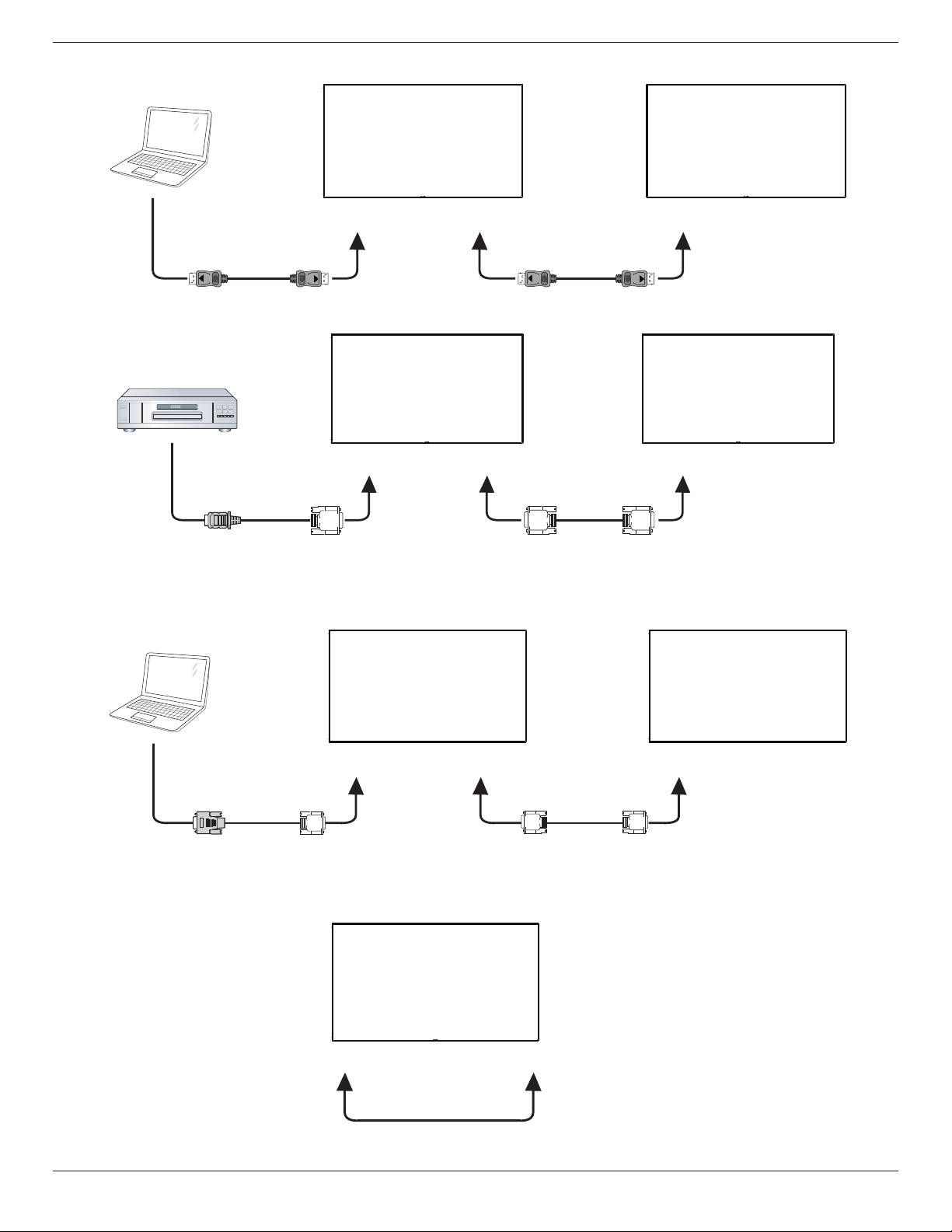
Connectthe[DPOUT]connectorofDISPLAY1tothe[DPIN]connectorofDISPLAY2.
PC
[DP IN]
[DP]
[DP OUT] [DP IN]
DISPLAY 1 DISPLAY 2
Connectthe[DVIOUT]connectorofDISPLAY1tothe[DVIIN]connectorofDISPLAY2.
DISPLAY 1 DISPLAY 2
[DVI IN]
[HDMI]
[DVI OUT] [DVI IN]
DVD / VCR / VCD
3.4.3. Analog video connection
Connectthe[DVI-IOUT]connectorofDISPLAY1tothe[DVI-IIN]connectorofDISPLAY2.
PC
DISPLAY 1 DISPLAY 2
[DVI-I IN]
[VGA]
[DVI-I OUT] [DVI-I IN]
3.4.4. OPS video connection
ConnectOPSOUTconnectortoHDMI1/HDMI2connectorandthenselectthecorrespondingHDMIinputsourceforOPSvideo.
HDMI 1/HDMI 2 IN [OPS OUT]
55BDL5057P
17
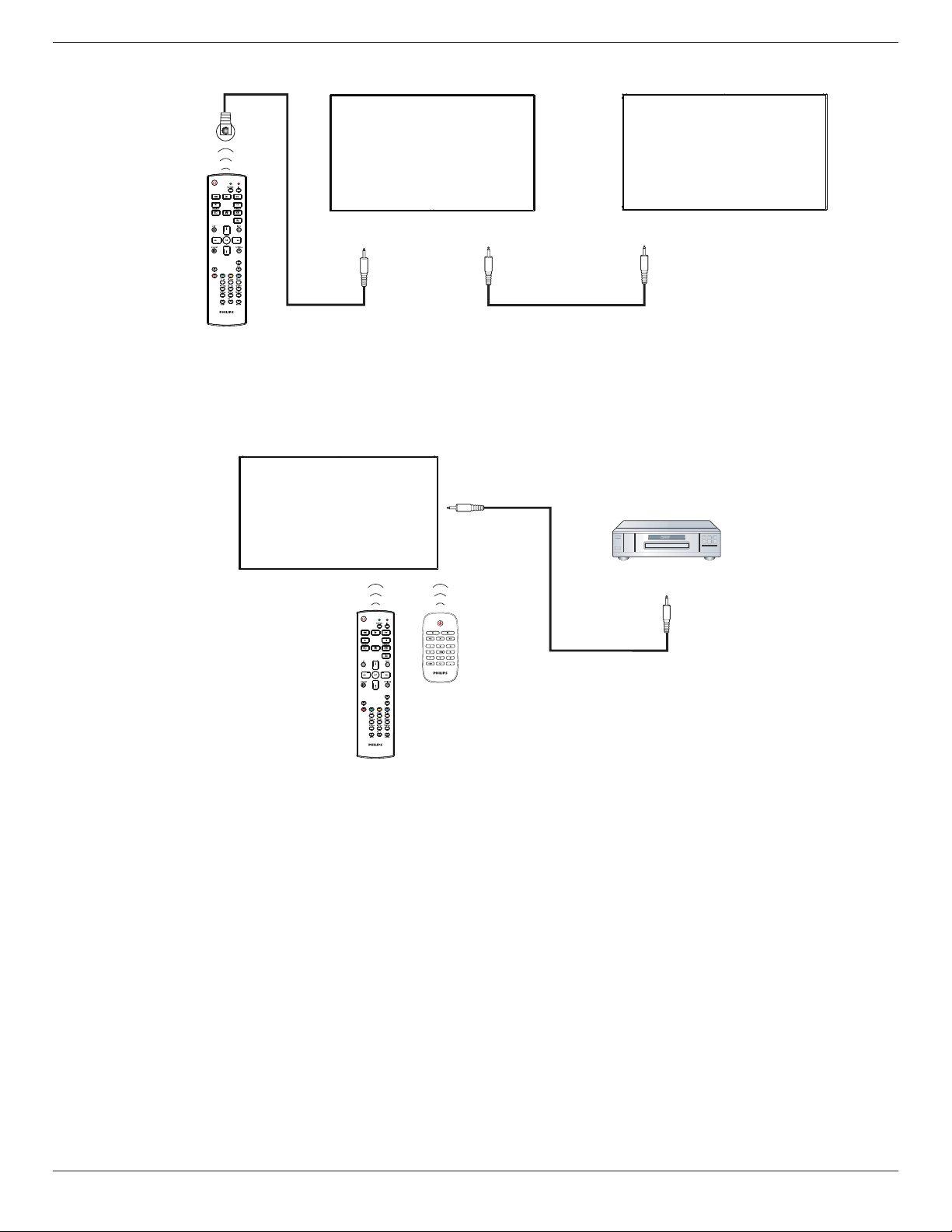
3.5. IR connection
[IR IN]
External
IR Receiver
[IR IN]
[IR OUT]
DISPLAY 1
DISPLAY 2
NOTE:
1. Thisdisplay’sremotecontrolsensorwillstopworkingifthe[IR IN]isconnected.
2. IRloopthroughconnectioncansupportupto9displays.
3.6. IR Pass-through Connection
DVD / VCR / VCD
(DVD / VCR / VCD)
Remote Control
[IR OUT]
[IR IN]
55BDL5057P
18
4. Operation
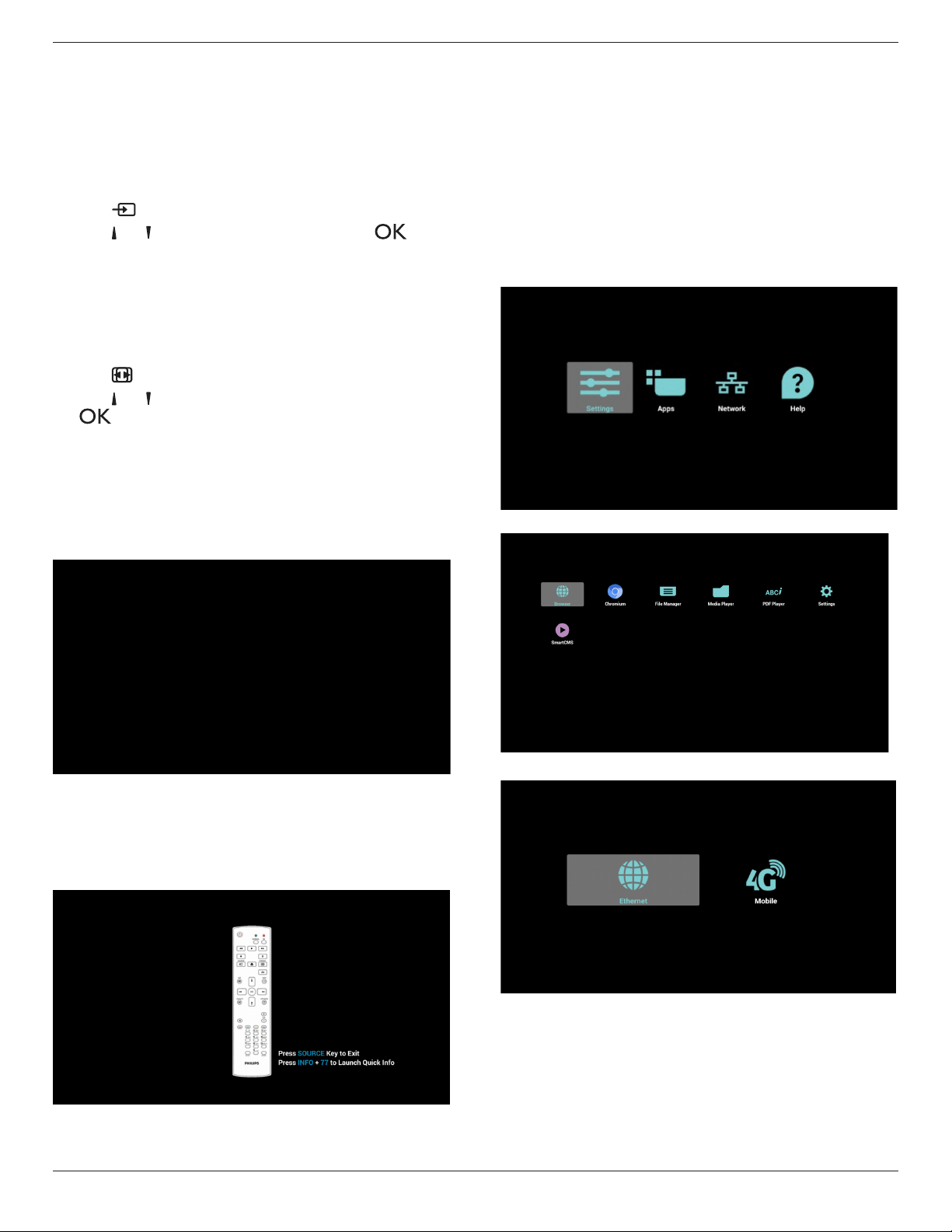
NOTE: Thecontrolbuttondescribedinthissectionismainlyonthe
remotecontrolunlessspeciedotherwise.
4.1. Watch the Connected Video Source
Seepage13forexternalequipmentsconnection.
1. Press
[ ] SOURCEbutton.
2. Press[ ]
or[ ]buttontochooseadevice,thenpress[ ]
button.
4.2. Change Picture Format
Youcanchangethepictureformattosuitthevideosource.Eachvideo
sourcehasitsavailablepictureformats.
Theavailablepictureformatsdependonthevideosource:
1. Press[ ] FORMATbutton.
2. Press[ ]
or[ ]buttontochooseapictureformat,thenpress
[ ]button.
• PCmode:{Full}/{4:3}/{1:1}/{16:9}/{21:9}/{Custom}.
• Videomode:{Full}/{4:3}/{1:1}/{16:9}/{21:9}/{Custom}.
4.3. Overview
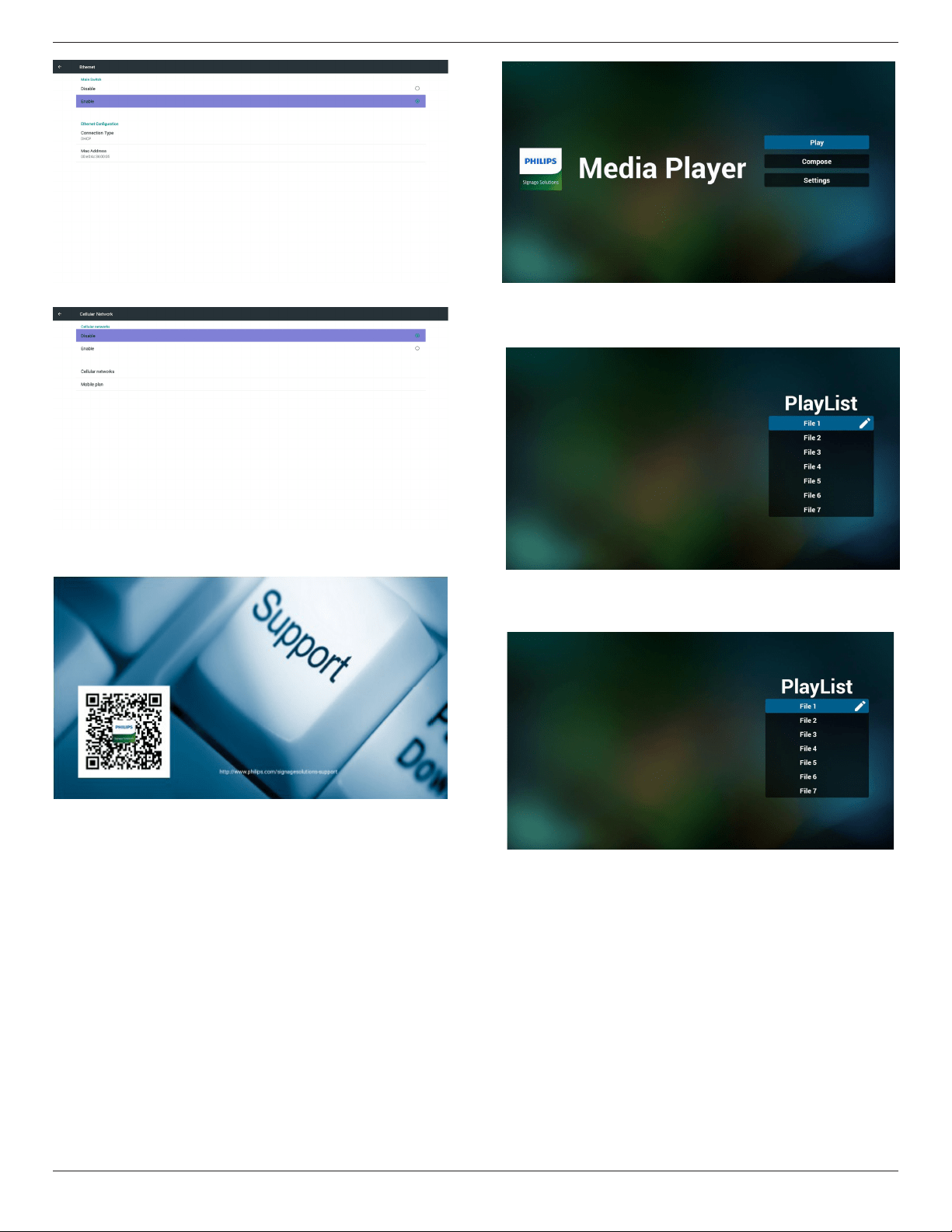
1. AndroidPDlauncher:
• AndroidPDlauncherisblackpage,asbelow:
• Everyappsleavebypressbackkey,thescreenwillgotoandroid
PDlauncher.
• WhenyoureturntoandroidPDlauncher,thescreenwillshow
hintimage,thehintimageonlyshow5second,asbelow:
• Thehintimagewillnotifyyoucanpresssourcekeytochange
source.
2. Adminmode:
• Youcanpress“Home+1888”tostartupadminmode.
• Adminmodewillshowfouricons:“Settings”,“Apps”,“Network”
and“Help”.
• Whenyouleaveadminmode,systemwillreturntolastsource.
1)Homepageofadminmode,thispagehasfouritems:“Settings”,
“Apps”,“Network”and“Help”.
Settings:gotosettingsapp.
Applications:showallapps.
Network:setEthernetandMobilenetwork(optional).
Help:displayQRcode.
2.)Applicationpage:
3
)
Networkpage
4
)
Ethernetpage
55BDL5057P
19
5)CellularNetwork(Optional,ifdevicehasGSM/LTEmodule)
6)Helppage:
DisplayQRcodepage.
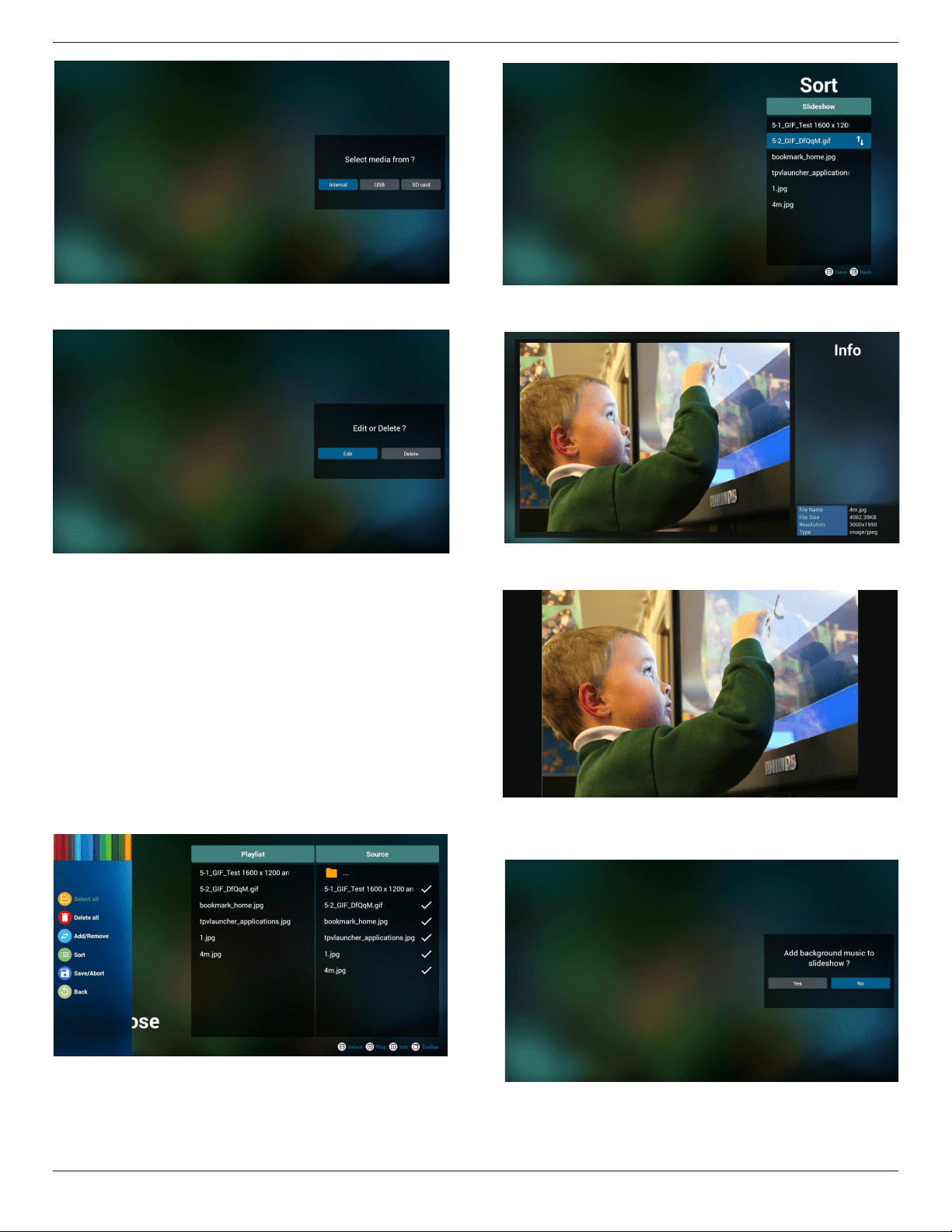
4.4. Media Player introduction:
1. HomepageofMediaPlayer,thispagehasthreeitems:“Play”,
“Compose”and“Settings”.
Play:selectplaylisttoplay.
Compose:editplaylist.
Settings:settingplayproperties.
2. Select“Play”onhomepage,rstyoushouldchooseoneplaylistto
playbetweenFILE1andFILE7.
Thepenciliconmeanstheplaylistisnon-empty.
3. Select“Compose”onhomepage,rstyoushouldchooseone
playlisttoeditbetweenFILE1andFILE7.
Thepenciliconmeanstheplaylistisnon-empty.
4. Ifanemptyplaylistischosen,theappwillguideyoutoselectthe
mediasource.
Allmedialesshouldbeplacedin/philips/ofrootdirectory.
Forexample,
-videosin/root/philips/video/
-photosin/root/philips/photo/
-musicin/root/philips/music/
55BDL5057P
20
5. Youcouldeditordeleteanon-emptyplaylist,justchoosethe
desiredplaylistwhichiswithpencilicon.
6. Onceyoustarttoeditaplaylist,youwillseebelowscreen.
Source-lesinstorage.
Playlist–lesinplaylist.
Thereare4iconswhichmaptothekeysofremotecontroller.
Optionkey–launchslidebar
Playkey–playmediale.
Infokey–showmediainfo.
Okkey–select/unselectle.
6-1Intheslidebar,ithelpsyoutodothefollowing:
-selectall:selectallstorageles.
-deleteall:deleteallplaylistles.
-add/remove:updateplaylistfromsource.
-sort:sortplaylist.
-save/abort:saveorabortplaylist.
-back:return.
7. Ifyouchoose“Sort”intheslidebar,youcanchangetheorderof
lesonebyone.
8. Pressinfokeyafteryouchoosedesiredle,youwillgetthedetail
information.
9. Pressplaykeyafteryouchoosedesiredle,youwillplaythemedia
ledirectly.
10. Ifyoumakeaplaylistwithallimagesles,beforesaving,theapp
willaskyouifyouwanttohavebackgroundmusicwhileplaying
slideshow.
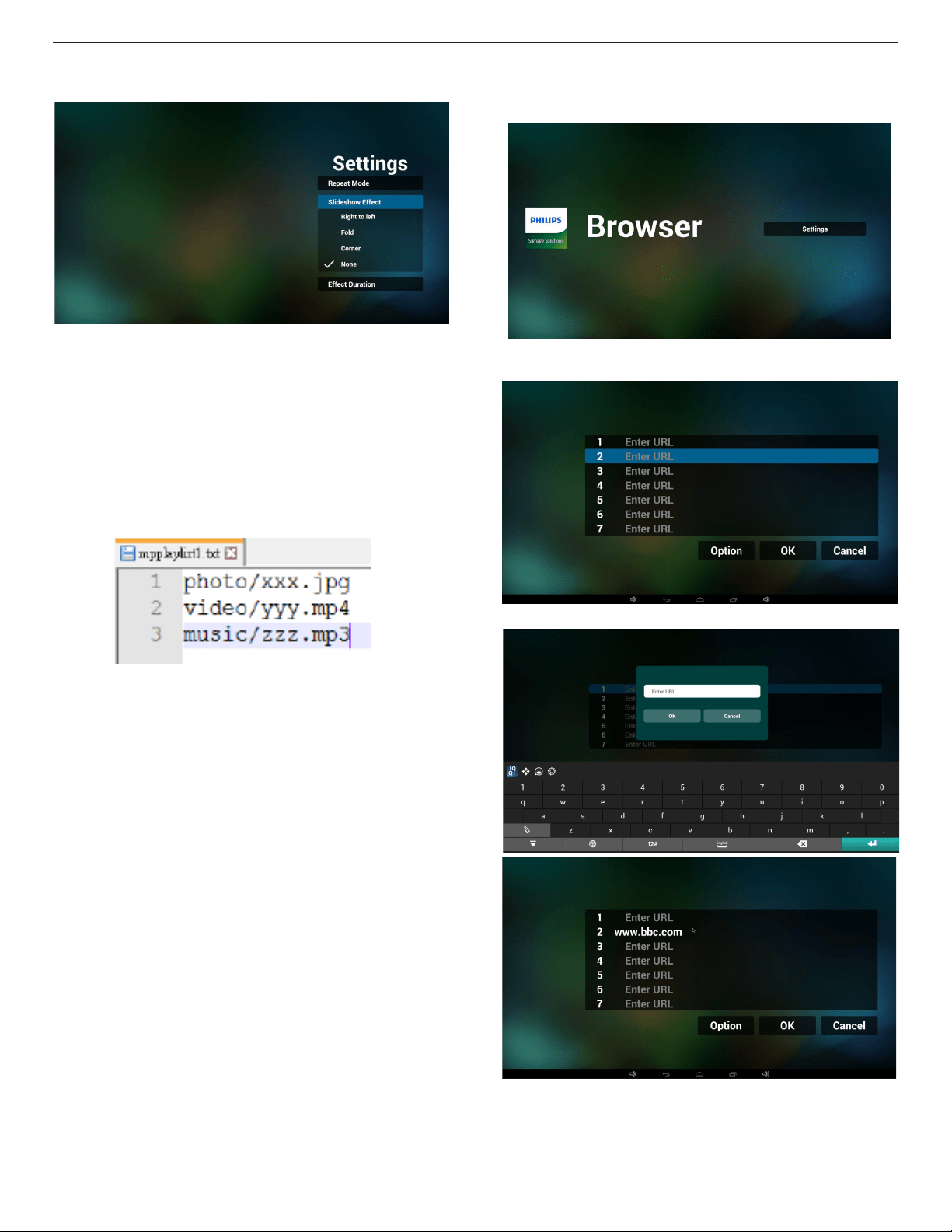
11. Select“Settings”onhomepage,thispagehasthreeparts,“Repeat
Mode”,“SlideshowEffect”and“EffectDuration”.
RepeatMode:playmode.
55BDL5057P
21
SlideshowEffect:photoslideshoweffect.
EffectDuration:photoeffectduration.
12. MediaHotkey
Play:Playbackle.
Pause:Pausele.
Fastforward:forward10second.
Rewind:back10second.
Stop:Stopleandreturntostart.Ifthegifle,itlikethepause.
13. Importtextle
Step1.Createmediaplayertextle.
- Filename:mpplaylistX.txt,“X”meansplaylist
number(1,2,3,4,5,6,7).Ex.mpplaylist1.txt,mpplaylist2.txt
- Content:
Note:ifplaylistlecontainsvideoandmusic,whenthepdplays
musicle,thescreenwillbeblack.
Step2.CopympplaylistX.txtto“philips”folderofinternalstorage.
YoumayuseFTPtodothis.
- Filepath:/storage/emulated/legacy/philips(forDL,PL)
Ex./storage/emulated/legacy/philips/mpplaylist1.txt
Step3.Preparemedialesto“photo”,“video”and“music”folder
under“philips”folder,internalstorageonly.
- Ex./storage/emulated/legacy/philips/photo/xxx.jpg
/storage/emulated/legacy/philips/video/yyy.mp4
/storage/emulated/legacy/philips/photo/zzz.mp3
Step4.Startmediaplayerapp,itwillautoimportmediaplayertext
le.
Note:Oncetheplaylistle(text)isimported,ifanuserchange
playlistbyremotecontroller,thischangewillnotbewritten
toplaylisttextle.
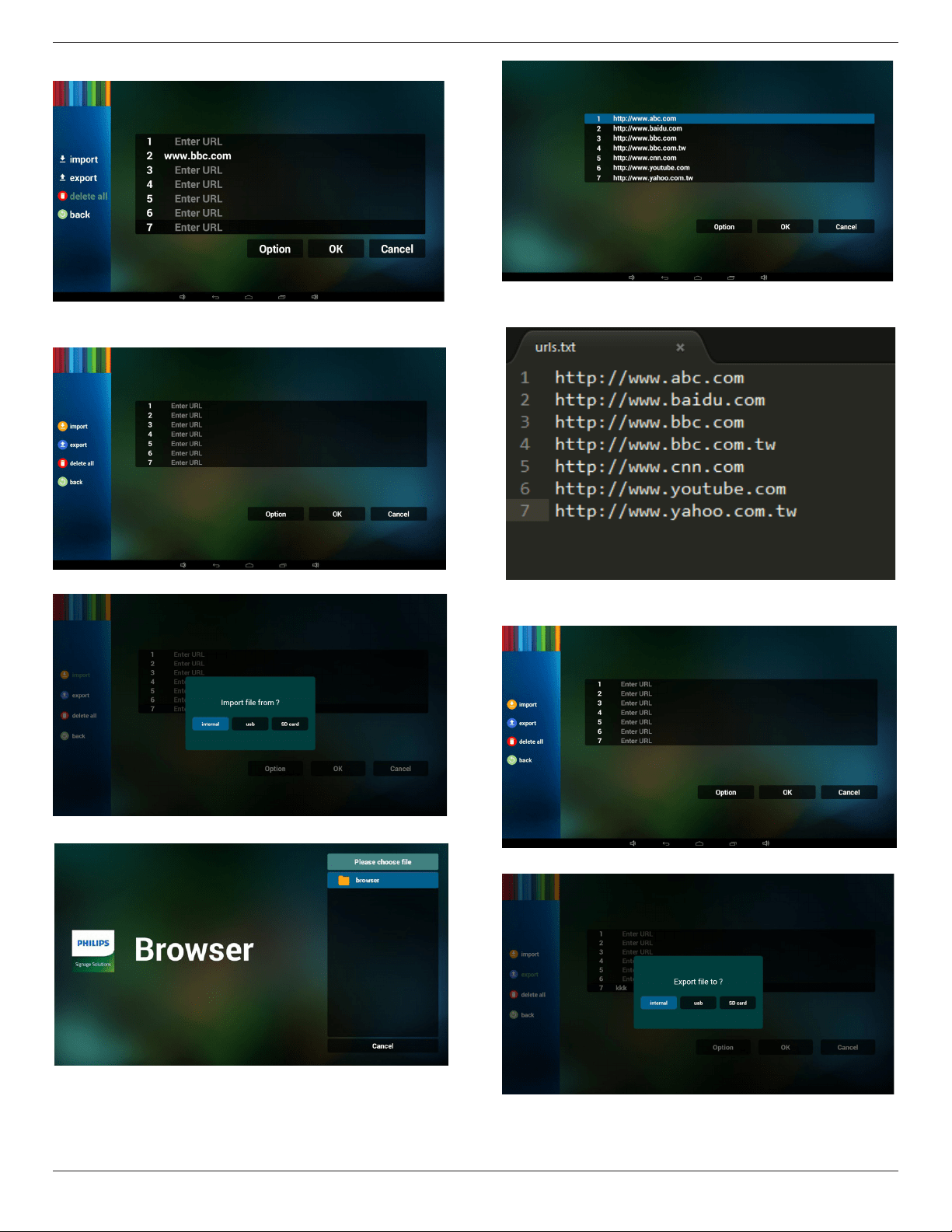
4.5. Browser manual
1. HomepageofBrowserapp,thispagehasoneitem:“Settings”.
PressSettingsthenenternextpage.
2. Userscanchoose1~7.
Pressanyonewillshowadialog.
3. EnterurlandpressOKthendatawillsaveonList
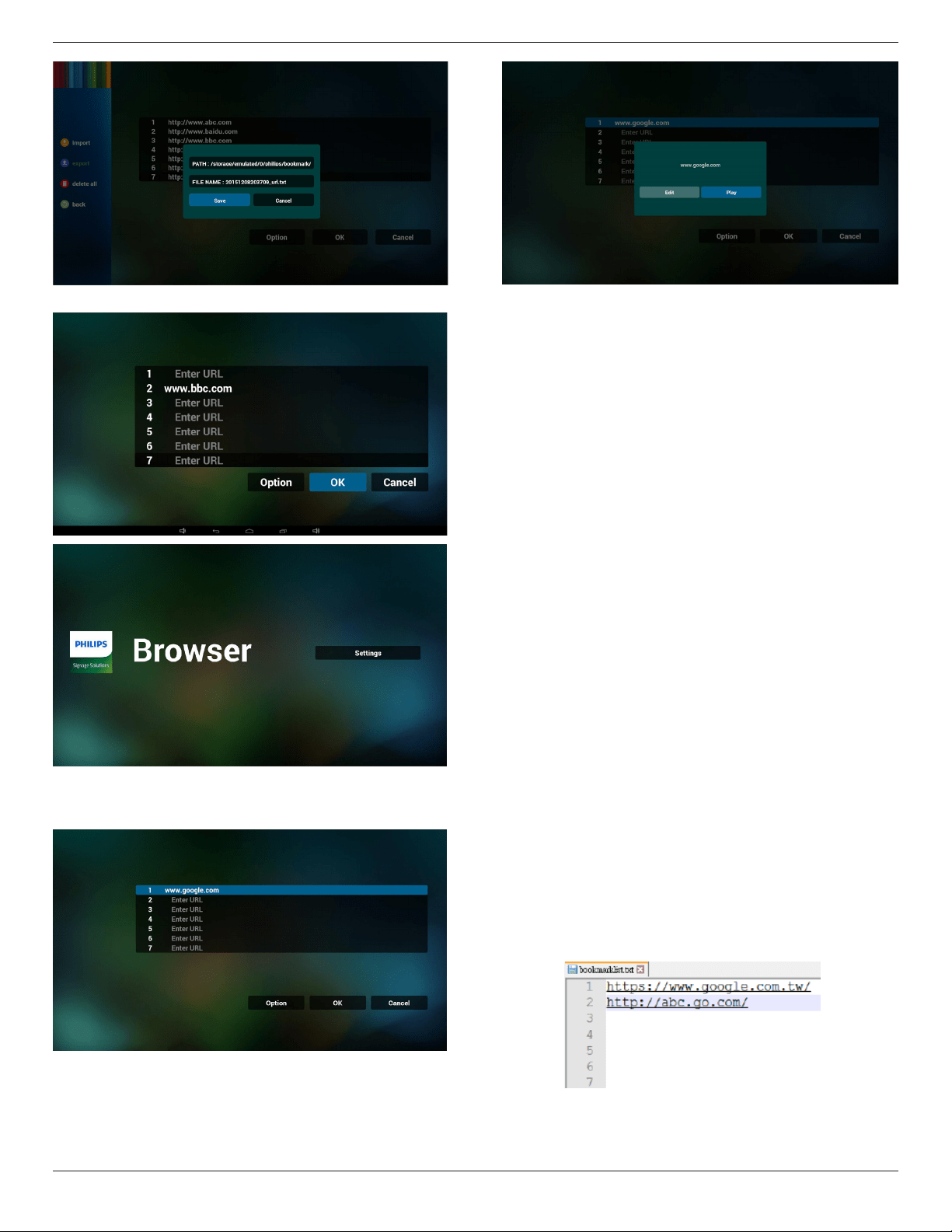
4. Press“Option”thenleftsidewillpopupalist
Import:Importurllistle
Export:Exporturllistle
Deleteall:Deleteallurlrecordonrightside
55BDL5057P
22
Back:leftsidelistwillbeclosed.
4.1Import
• Clickimport
• Choosestorage
• Chooselecontainsurls
• Importleandurlwillshowonlist
• Fileformatforimport
Formatshouldbelikebelowwithleextension“txt”
4.2Export:
• Clickexport
• Choosestorage
• Dialogshowspathlewillbesavedandle’sname.
Press“save”buttonthenurlsonlistwillbesaved.
55BDL5057P
23
5. PressOKthenurlrecordswillbesaved
.
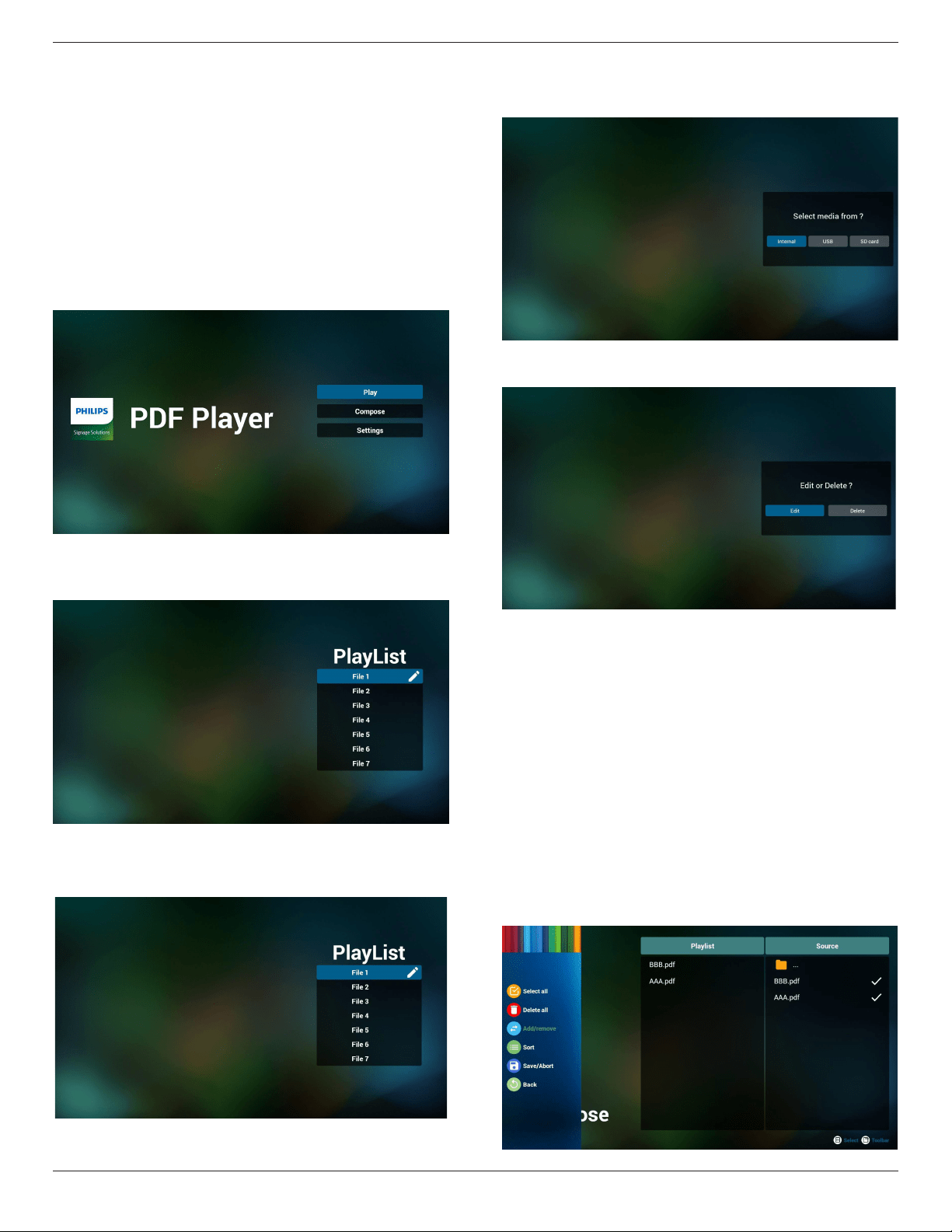
6. Onurllistpage,ifyouselectnon-emptyitem,itwillshowadialog
toaskeditorplayurl.Ifpress“Edit”,itwillshowediturldialog,if
press“Play”,itwillshowwebpageofitem’surl.
7. OSDmenuinteractionwithBrowser
7.1Bootonsource
• SetOSDmenu=>Conuration1=>Bootonsource=>
InputbeBROWERPlayListbe0.
ThenPDwillshowBrowserafterreboot.
• SetOSDmenu=>Conuration1=>Bootonsource=>
InputbeBROWERPlayListbe1.
ThenPDwillshowwebpagewith1stUrlinBrowserapp.
7.2Schedule
SetOSDmenu=>Advancedoption=>Schedule=>
Ontime1,Offtime2,InputbeBROWSER,anydayyouwantof
week,andPlayList.
Finallychecktherightbox.
ThenPDwillshowwebpagewithUrlinBrowserappattime1and
nishattime2.
8. Ofinebrowsing
WhenUrl1hassetaddress,anduseosdscheduletoopenUrl1
webpage,browserappwillautosaveUrl1addresshomeweb
pagedatatolocalstorage.
IfnetworkisdisconnectandOSDscheduleopenbrowserapp,
browserappwillautoopenUrl1addresshomepageinlocal
storage.IfbrowsercannottondUrl1addresshomepagedatain
localstorage,thescreenwillbeblack.
Note:
a.BrowserapponlycansaveUrl1addresshomepagedata,other
Url2toUrl7cannottosave.
b.Localstorage:/storage/emulated/legacy/Download/
OfineBrowsing
c.IflocalstoragehasUrl1addresshomepagedata,thesettings
pagewillshow“Clearcache”button,pressthisbuttoncanclearUrl
1addresshomepagedatainlocalstorage.
9. Importtextle
Step1.Createbrowsertextle.
- Filename:bookmarklist.txt.
- Content:
Step2.Copybookmarklist.txtto“philips”folderofinternalstorage.
YoumayuseFTPtodothis.
- Filepath:/storage/emulated/legacy/philips(forDL,PL)
55BDL5057P
24
Ex./storage/emulated/legacy/philips/bookmarklist.txt
Step3.Startbrowserapp,itwillautoimportbrowsertextle.
Note:Oncetheplaylistle(text)isimported,ifanuserchange
playlistbyremotecontroller,thischangewillnotbewritten
toplaylisttextle.
4.6. PDF reader play
1. HomepageofPDFPlayer,thispagehasthreeitems:“Play”,
“Compose”and“Settings”.
Play:selectplaylisttoplay.
Compose:editplaylist.
Settings:settingplayproperties.
2. Select“Play”onhomepage,rstyoushouldchooseoneplaylistto
playbetweenFILE1andFILE7.
Thepenciliconmeanstheplaylistisnon-empty.
3. Select“Compose”onhomepage,rstyoushouldchooseone
playlisttoeditbetweenFILE1andFILE7.
Thepenciliconmeanstheplaylistisnon-empty.
4. Ifanemptyplaylistischosen,theappwillguideyoutoselectthe
mediasource.
Allmedialesshouldbeplacedin/philips/ofrootdirectory.For
example,
-pdfsin/root/philips/pdf/
5. Youcouldeditordeleteanon-emptyplaylist,justchoosethe
desiredplaylistwhichiswithpencilicon.
6. Onceyoustarttoeditaplaylist,youwillseebelowscreen.
Source-lesinstorage.
Playlist–lesinplaylist.
Thereare4iconswhichmaptothekeysofremotecontroller.
Optionkey–launchslidebar
Playkey–playmediale.
Infokey–showmediainfo.
Okkey–select/unselectle.
6-1.Intheslidebar,ithelpsyoutodothefollowing:
-selectall:selectallstorageles.
-deleteall:deleteallplaylistles.
-add/remove:updateplaylistfromsource.
-sort:sortplaylist.
-save/abort:saveorabortplaylist.
-back:return.
55BDL5057P
25
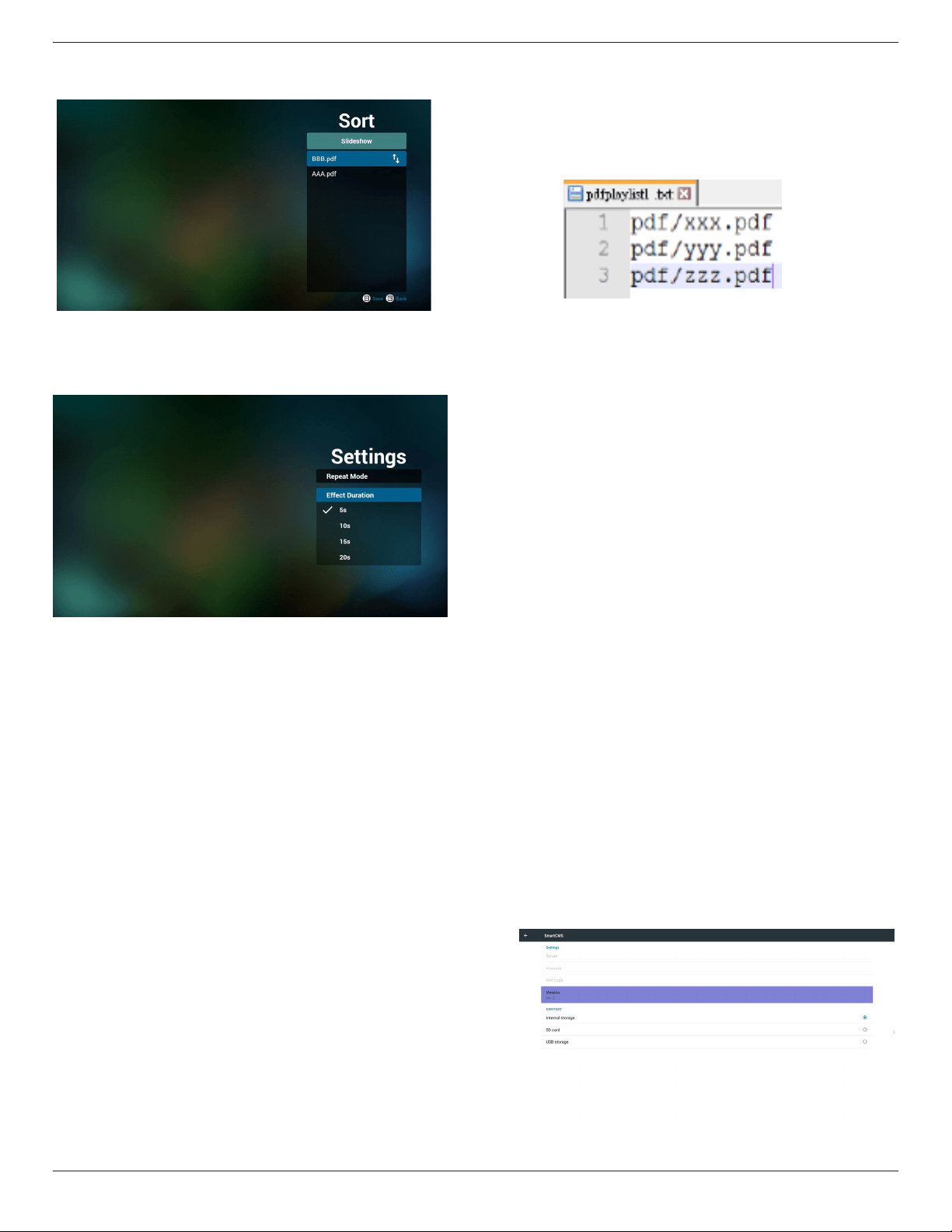
7. Ifyouchoose“Sort”intheslidebar,youcanchangetheorderof
lesonebyone.
8. Select“Settings”onhomepage,thispagehastwoparts,“Repeat
Mode”and“EffectDuration”.
RepeatMode:playmode.
EffectDuration:photoeffectduration.
Media Hotkey:
Play:Playbackle.
Pause:Pausepage.
Fastforward:gotonextpage,ifthepageisendofthele,itwillgo
tonextle.
Rewind:backtolastpage,ifthepageisrstofthele,itwillbackto
lastle.
Stop:returntorstpageofle
Color Hotkey:
Blue:Zoomin.(+10%)
Yellow:Zoomout.(-10%)
OK:Restorezoom
Arrow keys:
Up/Down/Left/Right:Adjustpage.(Whenthepagehaszoomedin/
out)
Left:PreviousPage.(Whenthepagehasnotzoomedin/out)
Right:NextPage.(Whenthepagehasnotzoomedin/out)
Combination key:
Numberkey+OKkey:selectspecicpage,andpressokkeyto
changepage.
-Pressnumberkey.
-PressOKkey,thebottomofthepagewillshowthepagenumber,
ifpagenumberovertotalpagenumber,itwillnotchangepageand
showcurrentpagenumberatthebottomofthepage.
9. ImportTextFile
Step1.Createpdfplayertextle.
- Filename:pdfplaylistX.txt,“X”meansplaylist
number(1,2,3,4,5,6,7).
Ex.pdfplaylist1.txt,pdfplaylist2.txt
- Content:
Step2.CopypdfplaylistX.txtto“philips”folderofinternalstorage.
YoumayuseFTPtodothis.
- Filepath:/storage/emulated/legacy/philips(forDL,PL)
Ex./storage/emulated/legacy/philips/pdfplaylist1.txt
Step3.Preparepdflesto“pdf”folderunder“philips”folder,
internalstorageonly.
- Ex./storage/emulated/legacy/philips/pdf/xxx.pdf
/storage/emulated/legacy/philips/pdf/yyy.pdf
/storage/emulated/legacy/philips/pdf/zzz.pdf
Step4.Startpdfplayerapp,itwillautoimportpdfplayertextle.
Note:Oncetheplaylistle(text)isimported,ifanuserchange
playlistbyremotecontroller,thischangewillnotbewritten
toplaylisttextle.
4.7. CMND & Play
1)Server
SetupCMND&Playserveraddress
2)Account
SetupCMND&Playaccount
3)PINCode
SetupCMND&PlayPINcode
(4)Version
Therearetwooptions,Ver.2andVer.3
Ver.2
use2.0/2.2agreement
Ver.3
use3.0/3.1agreement
(5)Content
Thereareinternalstorage/SDcard/USBstorage3optionsfor
selecting.
WhenVer.2,Server/Account/PINcodewillbegrayandunavailable.
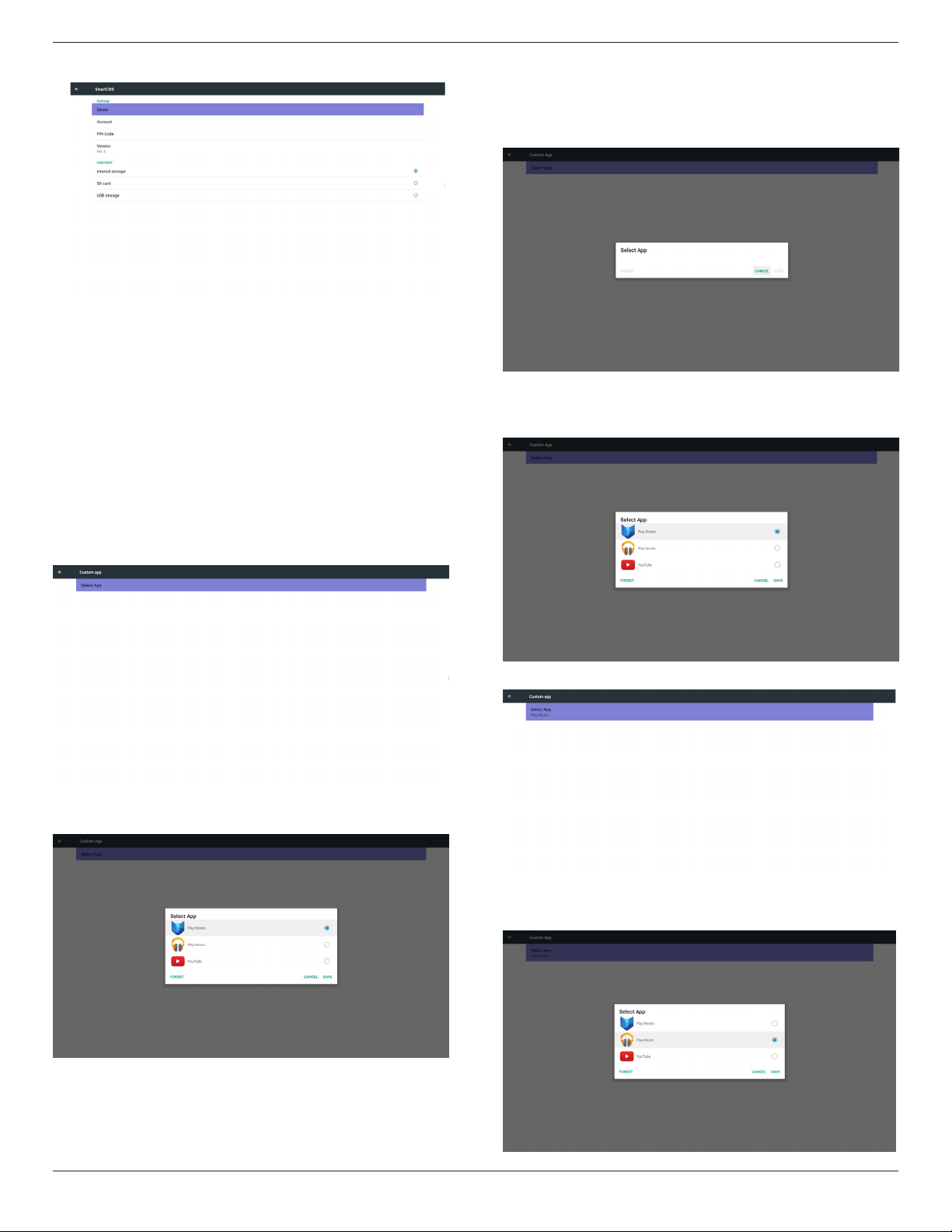
55BDL5057P
26
WhenVer.3,Server/Account/PINcodeisavailable.
4.8. Custom App
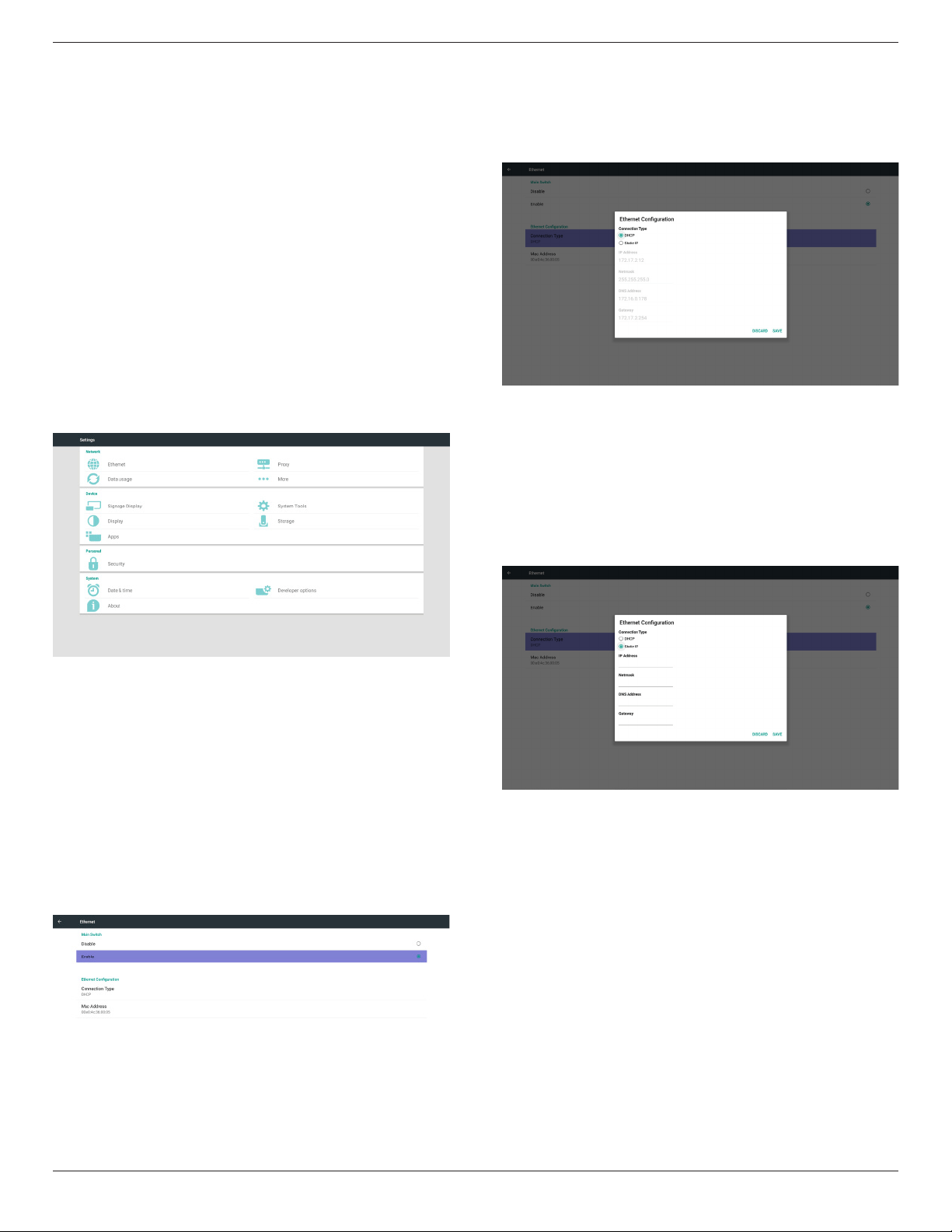
UsercansetuptheapplicationforCustomerSource
Note:
(1)OnlydisplayUserInstalledapp.
(2)Willnotshowupsystempre-installapp.
4.8.1. OSD Menu operation:
RCU:Source->Custom
IfsetupcustomerAPK,PDwillopencustomerappwhenswitchsource
toCustomermode.
IfnosetupcustomerAPK,PDwillshowBlackscreenwhenswitch
sourcetoCustomermode.
4.8.2. Function Introduction
Save
SelecttheApp,clicktheSavewillperformthefunctionofstorage.
Forget
AfterpresstheForget,canremovepreviouslystoredinformation.
Cancel
Don’tdoanychange,directlyclosedWindows.
Ifnocustomerinstalledapk,thelistwillbeblank.
Thelistwillbeblankand“Save””Forget”willbegrayanduseless.
Ifcustomerinstalledapk,usercanselectcustomerinstalledapkinlist
• Case1:NotsetupCustomAppcase.
Customerappwillshowupandfocusonrstitemautomatically.
Aftersetup,thesettingscreendisplaytheappname.
• Case2:SetupCustomAppcase(thereisentitycircletotheright
oficon)
55BDL5057P
27
5. Signage display
5.1. Setting
Mainitems:
(1)Ethernet
(2)Proxy
(3)Datausage(Showupwhen4Gmoduleconnected)
(4)More(Showupwhen4Gmoduleconnected)
(5)SignageDisplay
(6)SystemTools
(7)Display
(8)Storage
(9)Apps
(10)Security(Showupwhen4Gmoduleconnected)
(11)Date&time
(12)Developeroptions
(13)About
5.2. Ethernet
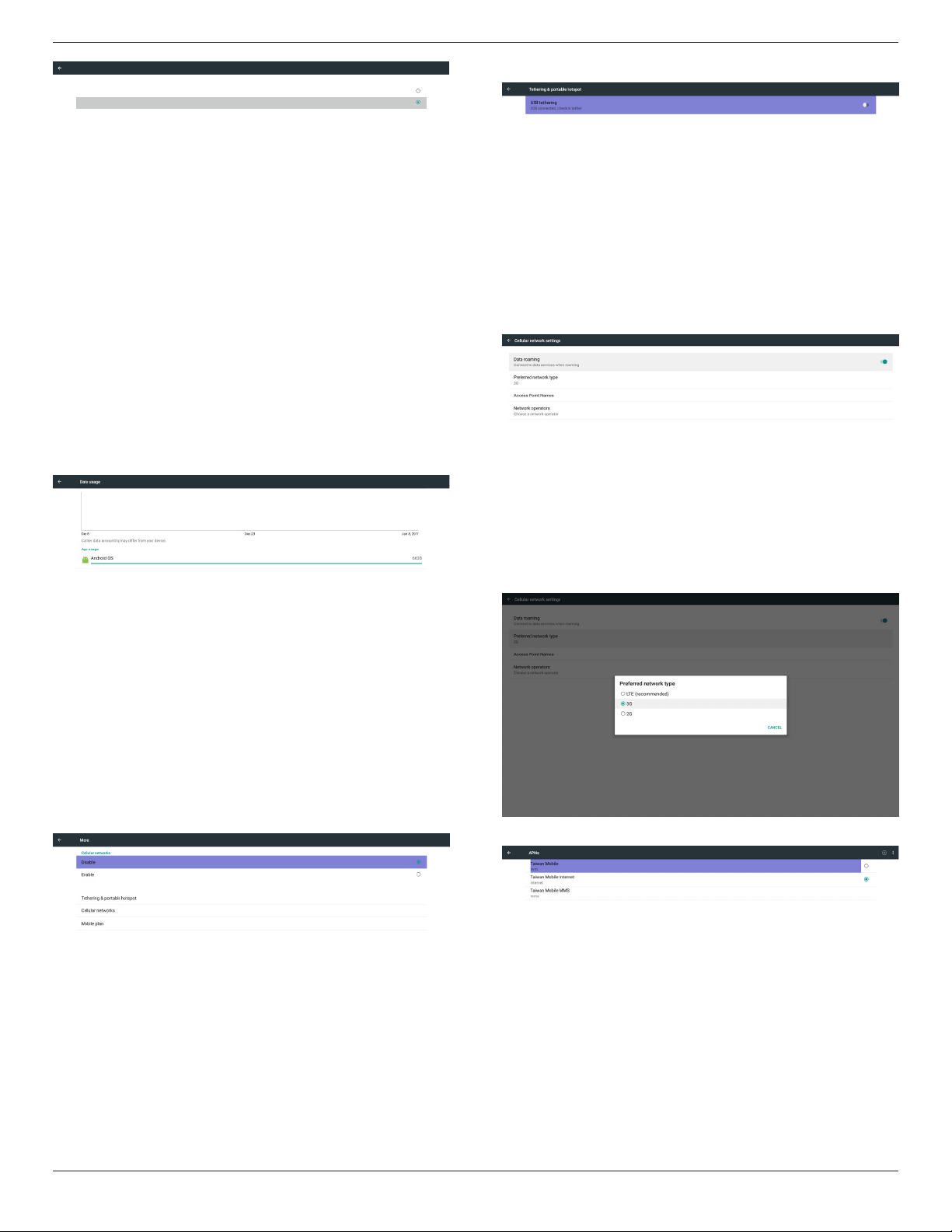
Enable/Disabletoturnon/offEthernet
AfterenableEthernet,thesettingswillshow:
(1)ConnectionType(Availableconnectiontype:DHCP/StaticIP)
A.DHCP
B.StaticIP
C.IPAddress
D.Netmask
E.DNSAddress
F.Gateway
(2)MacAddress
Note:
Ethernetwillbedisabledautomaticallywhenwionandconnectto
network.
5.2.1. DHCP
DHCPmode:
(1)CannotmodifyIPAddress,Netmask,DNSAddressandGateway.
(2)Ifconnectsuccessfully,itwilldisplaycurrentnetwork
conguration.
5.2.2. Static IP
InStaticIPmode,usercaninputIPAddress,Netmask,DNSaddressand
Gateway
Note:
IPaddress,netmask,DNSaddressandgatewayaddressinputlimitation
(1)Format:
I. number0-9
II. decimalpoint“.”
5.3. Proxy
BrowserconnecttoProxyserverandaskProxyservertoconnect
somewebsiteonInternet.
Enable/Disabletoturnon/offProxyserver.
• Click“Enable”toswitchproxyfunction“ON”
• Inputthe“Proxyhostname”.(ProxyserverIPaddress)
• Inputthe“Proxyport”.(Proxyserverportnumber)
• Selectan“Type”.(Proxyservertype.)
• Done.
- Iftheproxyserverisneedanauthenticationtoconnect,please
“checkon”theAuthenticationandinputUsername&Password.
- Iftheproxyserverisnotneedanauthenticationtoconnect.
55BDL5057P
28
Proxy hostname
Proxy port
Type
HTTP
Proxy settings
Authentication
Username
Password
Authentication
Main Switch
Disable
Enable
Proxy
Note:
• ProxytypeinHTTP,HTTPS,SOCKS4,SOCKS5aresupport.
• Onlysupporttheconnectionthroughtheproxyserverwith
TCPport80&443&5228.
• ProxyserverwithauthenticationonWindowsSeverSeriesis
notsupport.
5.4. Data usage
Onlyshowupwhen4Gmoduleconnected.
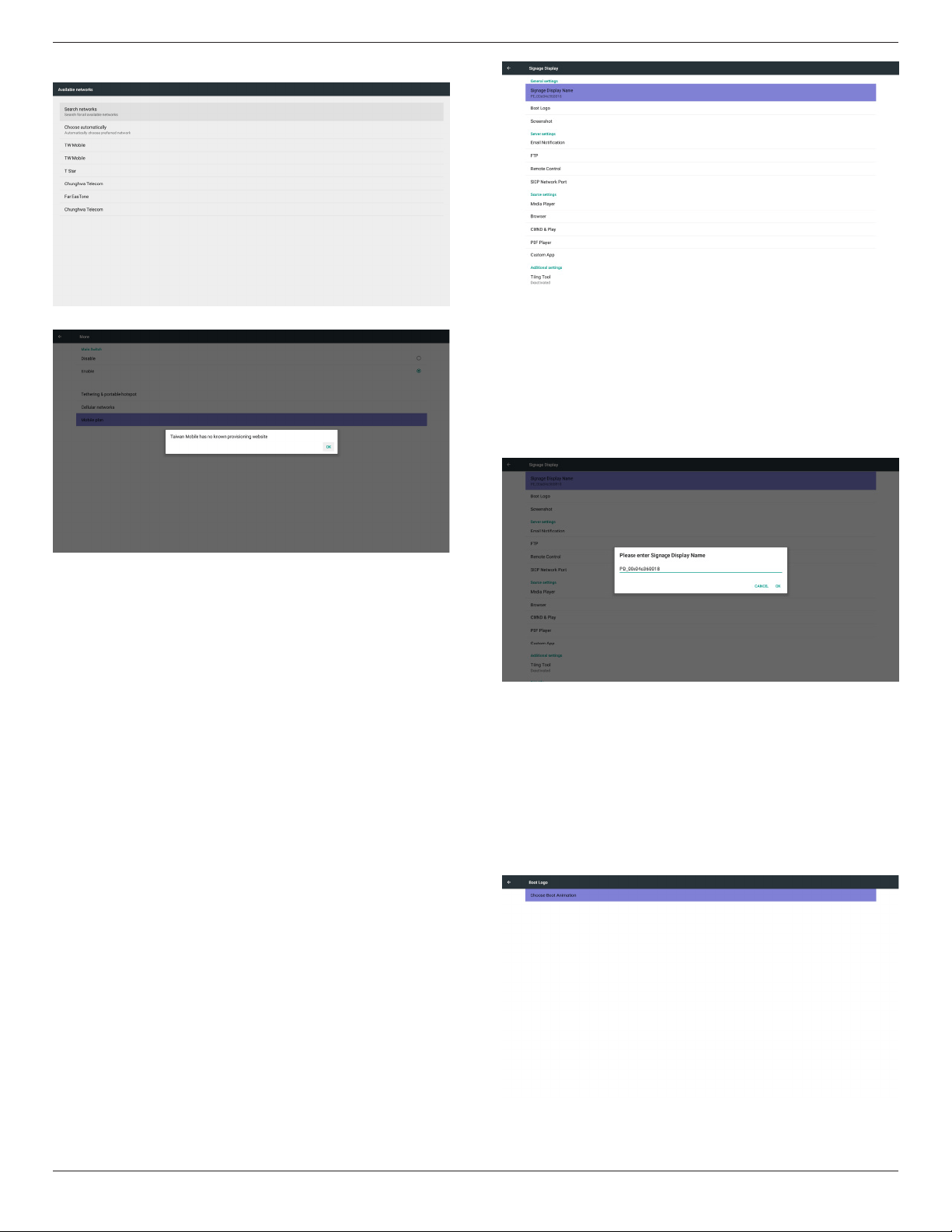
5.5. More…
Enable/Disabletoturnon/off4Gnetwork
Note:
(1)Onlyshowupwhen4Gmoduleconnected
(2)Networkinfowillbedifferentduetodifferentcarrier
Tethering&portablehotspot
Cellularnetworks
Preferrednetworktype
AccessPointNames
55BDL5057P
29
Networkoperators
Mobileplan
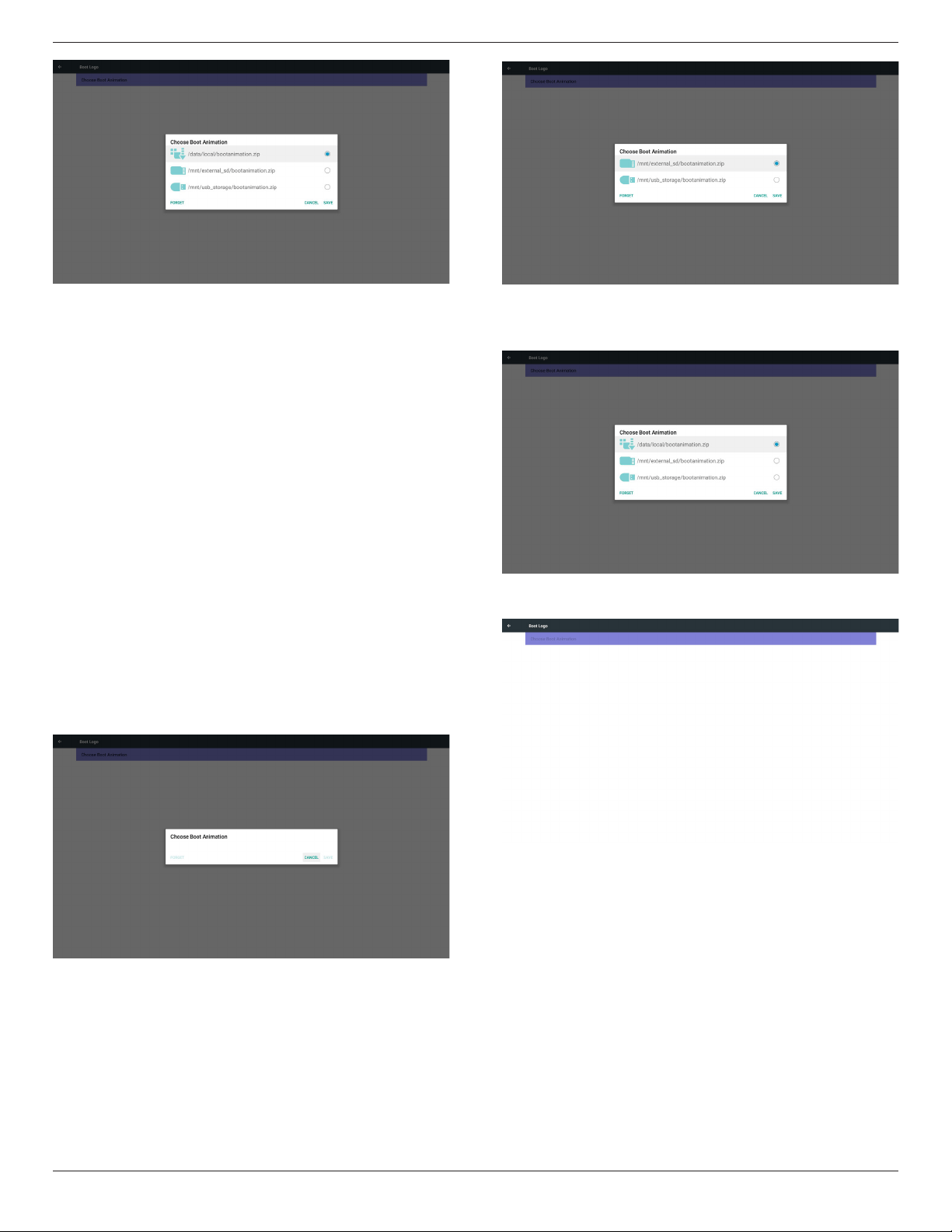
5.6. Signage Display
Divideinto4groups:GeneralSettings/ServerSettings/SourceSettings
/Security
(1)GeneralSettings
A. SignageDisplayName
B. BootLogo
C. Screenshot
(2)ServerSettings
A. EmailNotication
B. FTP
C. RemoteControl
D. SICPNetworkPort
(3)SourceSettings
A. MediaPlayer
B. Browser
C. CMND&Play
D. PDFPlayer
E. Customapp
(4)Additionalsettings
A. TilingTool
(5)Security
A. ExternalStorage
(6)Other
A. TeamViewerSupport
B. PlatformWebAPI
5.6.1. General Settings
1. SignageDisplayName
SetupPDname“PD_”+EthernetMacAddress.
Note:
Inputlimitation:
(1)length:Max36characters
(2)format:nolimit
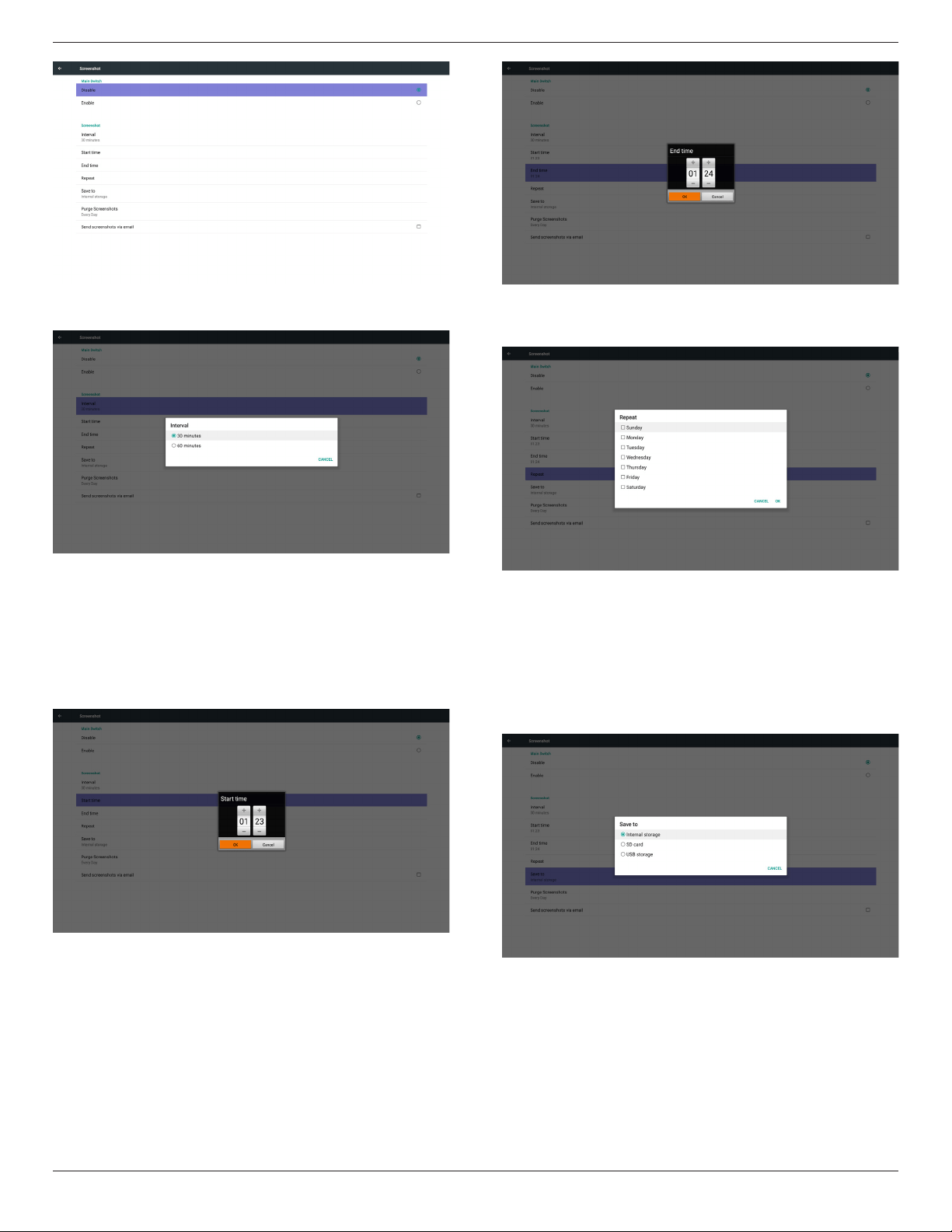
2. BootLogo
1)ScalarOSDmenutocontrolAndroidbootlogoenable/disable
ScalarOSDmenuoperation
RCU:Home->Conguration2->Logo->On/Off/User
Inusermode,usercanchoosetheirownbootlogoanimationle.
Note:
(1)Bootanimationlename:bootanimzation.zip
(2)Willpop-upawindowforusertoselectUSBandSDcard.No
priorityissue.
2)Whenbootlogoselected,PDwillcheckifthereisbootanimzation.
zipunderUSBandSDcard.
55BDL5057P
30
Functionintroduction:
a. Optiondescription
/data/local
UsecustomizedbootanimationlewhichiscopiedfromSDcardor
USB
/mnt/external_sd
UsebootanimationsleunderSDcard
/mnt/usb_storage
UsebootanimationsleunderUSB
b. Save
PresssavekeytosaveSDcardorUSBbootanimzation.zipto/data/
localandsetitasbootlogo.
c. Forget
PressForgetkeytodelete/data/local/bootanimzation.zipandnot
showbootlogo.
d. Cancel
Closedialoguew/ochanges.
Scenariointroduction:
Case1
Theuserdon’tsettlecustomizedbootlogo.PDdoesnotndany
bootanimzation.zipleunderSDandUSB.Thelistwillbeblank.Save
andForgetbuttonwillbegrayanduseless.
Case2
Theusersdonotsettlecustomizedbootlogo.PDnd
bootanimzation.zipleunderSDandUSB.Thescreenwillshow
bootanimzation.zipandselecttherstleautomatically.
Case3
Theusersettlecustomizedbootlogo,thescreenwillshow/data/
local/bootanimzation.zip.
3)IfOSDmenuLogoitemisOnorOff,theuserscannotchoose
bootanimationinAndroidsettings.
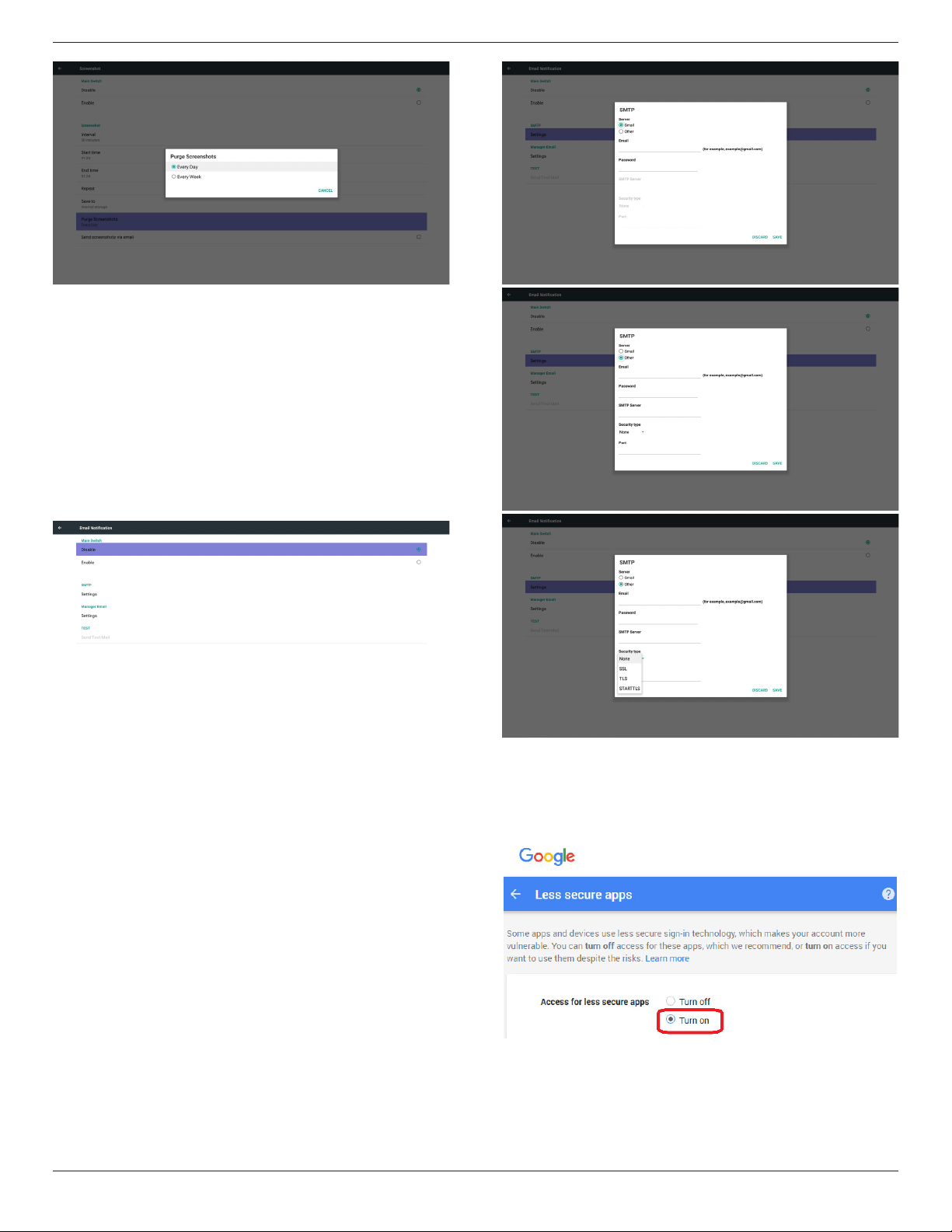
3. Screenshot
ViaEnable/DisabletocontrolscreenshotOn/Off.
AfterEnable,usercansetscreenshottimeslotandsavepath.
Note:
Timeslotofdeletionandscreenshot:
(1)Willdeletepictureatinitialtime0sec.
(2)Willscreeshotatrst40sec.
55BDL5057P
31
1)Interval
Setupintervaltimeframe.30minsor60mins.
2)StartTime
Setupscreenshotstarttime.
Note:
(1)Ifnostarttime,thescreenwillshowcurrenttimeautomatically
(2)JustpressBackkeytoexitdialogforSetup
(3)StarttimecannotbenewerthanEndtime.ItwillshowError
toast.
3)EndTime
Set up screenshot End time
Note:
(1)IfnoEndtime,thescreenwillshowcurrenttimeautomatically
(2)StarttimecannotbenewerthanEndtime.Itwillshowerrortoast.
4)Repeat
Setscreenshotrepeatcycle.Usercanchoosescreenshottimeframe.
(Multipleselection)
5)Saveto
Setupscreenshotsavepath.Internalstorage,SDcardorUSB
storage.)
Note:
picturestoragepath
(1)Inrootofinternalstorage/usbstorage/sdcard,PDwillcreate
folderautomatically.
(2)Thepicturewillsavetophilips/Screenshot/.
6)PurgeScreenshots
Setuppurgetimeframe.OnedayorOneweek.
55BDL5057P
32
(7) Sendscreenshotsviaemail
Aftercheckthisitem,itwillsendscreenshottoemailofadministrator
Pleasereferto6.2.1Emailnotication
Note:
PleaseconrmEmailsettingisdone.
Eachscreenshotwillbesentimmediately
5.6.2. Server Settings
1. EmailNotication
ViaEnable/DisabletocontrolEmailOn/Off)
AfterEnable,usercansetupEmailnoticationconguration.
1)SMTP
SetSMTPconguration)
UsercansetGmailaccountorothermailaccount.
UsercanselectothermailaccountandsetupSMTPserver,Security
typeandportitem
Note
Passwordinputlimitation
(1)Length:6-20characters
(2)Format:nolimit
(3)unavailableport:5000
Gmailsafetysetting
IfGmailisnotworkingwhensettingiscomplete,pleasetestGmail
accountviaPCandlinkbelowURL
https://www.google.com/settings/security/lesssecureapps
Andconrm“Accessforlesssecureapps”itemisTurnOn
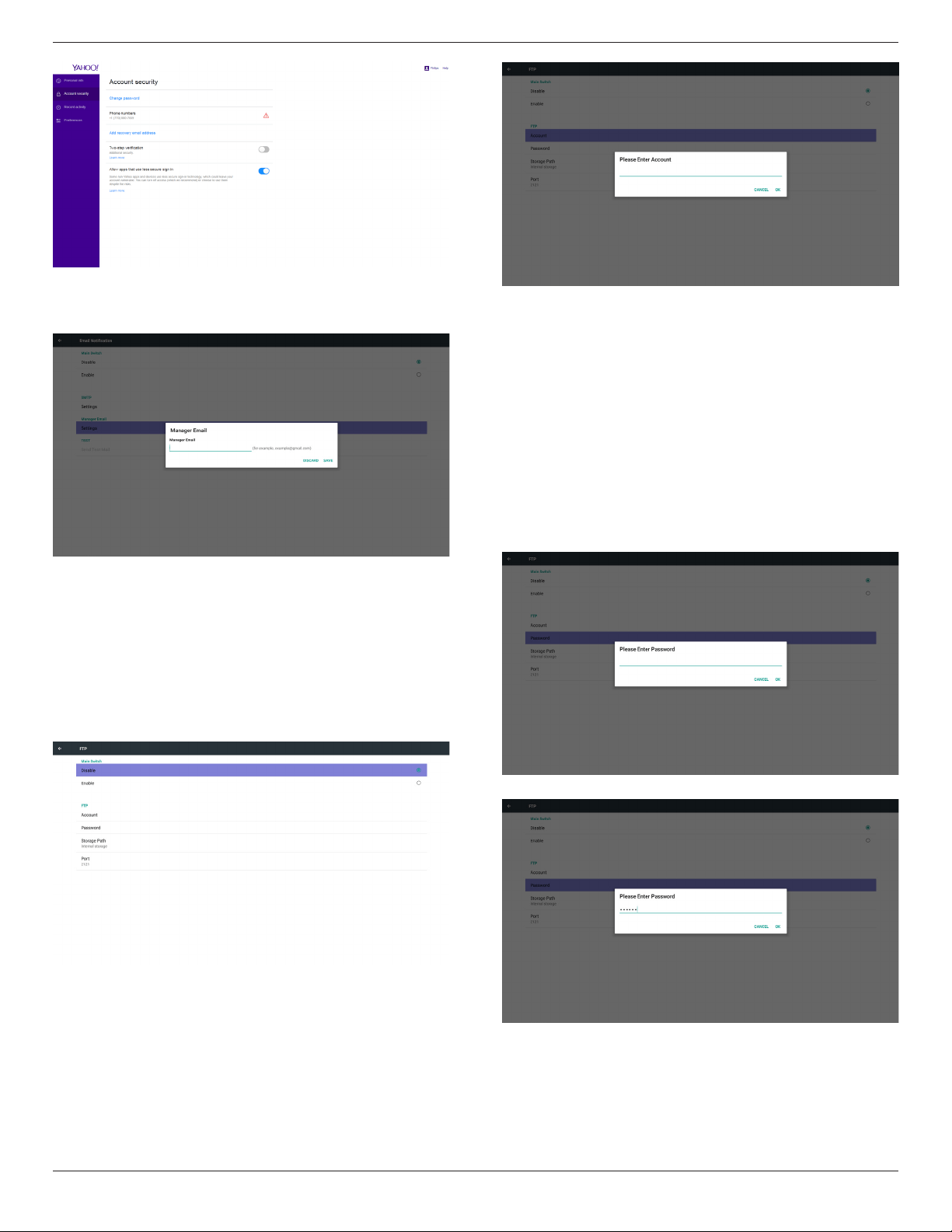
YahooEmailSecuritySetting
IfYahooEmailisnotworkingwhensettingcomplete,pleaseconrm
“Allowappsthatuselesssecuresignin”itemisenabled.
55BDL5057P
33
2)ManagerEmail
Email
SetupReceivermailaccount
3)Test
SendTestMail
TotestGmailaccountreceive/sendfunction.
Note
(1)WhenEmailisDisable,“SendTestMailButton”buttonwillgray
out
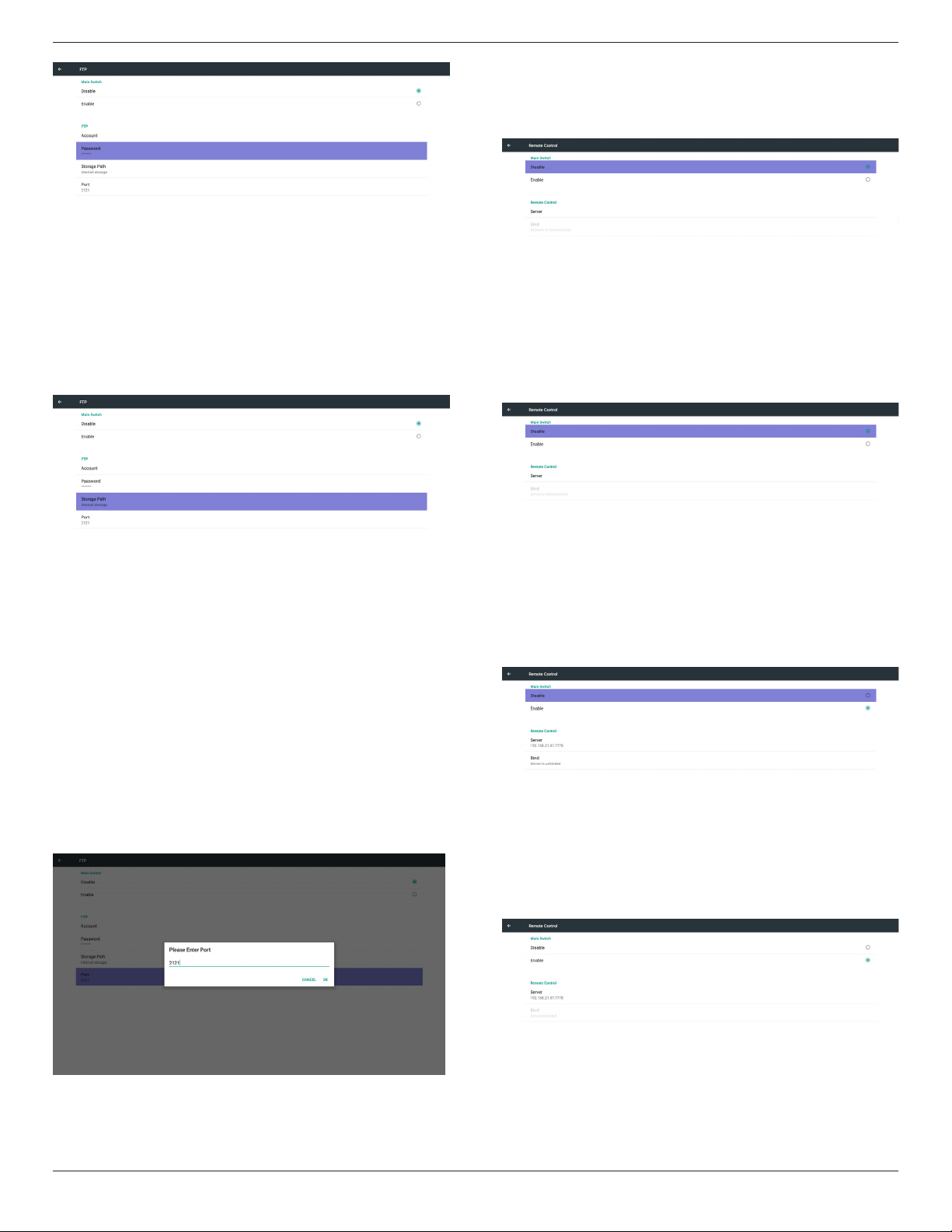
2. FTP
ViaEnable/DisabletocontrolFTPOn/Off.Aftersetup,PDcanshare
FTPles.
1)Account
SetupFTPaccount
Note:
Inputlimitation
(1)Length:4-20characters
(2)Format:
I. Englisha-zandA-Z
II. Number0-9
2)Password
SetupFTPpassword.
Note:
Inputlimitation
(1)Length:6-20characters
(2)Format:
I. Englisha-zandA-Z
II. Number0-9
FTPpassworddisplay
(1)Willshow“*”symboltoinsteadpasswordifsetuppasswordvia
remotecontrol.
(2)Aftersetup,thepasswordtextwillshowas“*”symbol.
Beforepasswordinput:
Afterpasswordinput:
Setupcompletedscreen:
55BDL5057P
34
3)StoragePath
Showdefaultpath:Internalstorage
Note:
CanonlydisplayInternalstorage,cannotbemodied.(Onlyshow
path)
4)WillshowServerisunbindedifRemotecontrolserverfeedback
unbindedstatus.
5)Port
SetupFTPportnumber.Default:2121
Note:
Inputlimitation
(1)Length:Max5characters
(2)Range:1024~65535
(3)Format:Number0-9
(4)Unavailableport:5000
(5)Theportnumbermustmorethan1024
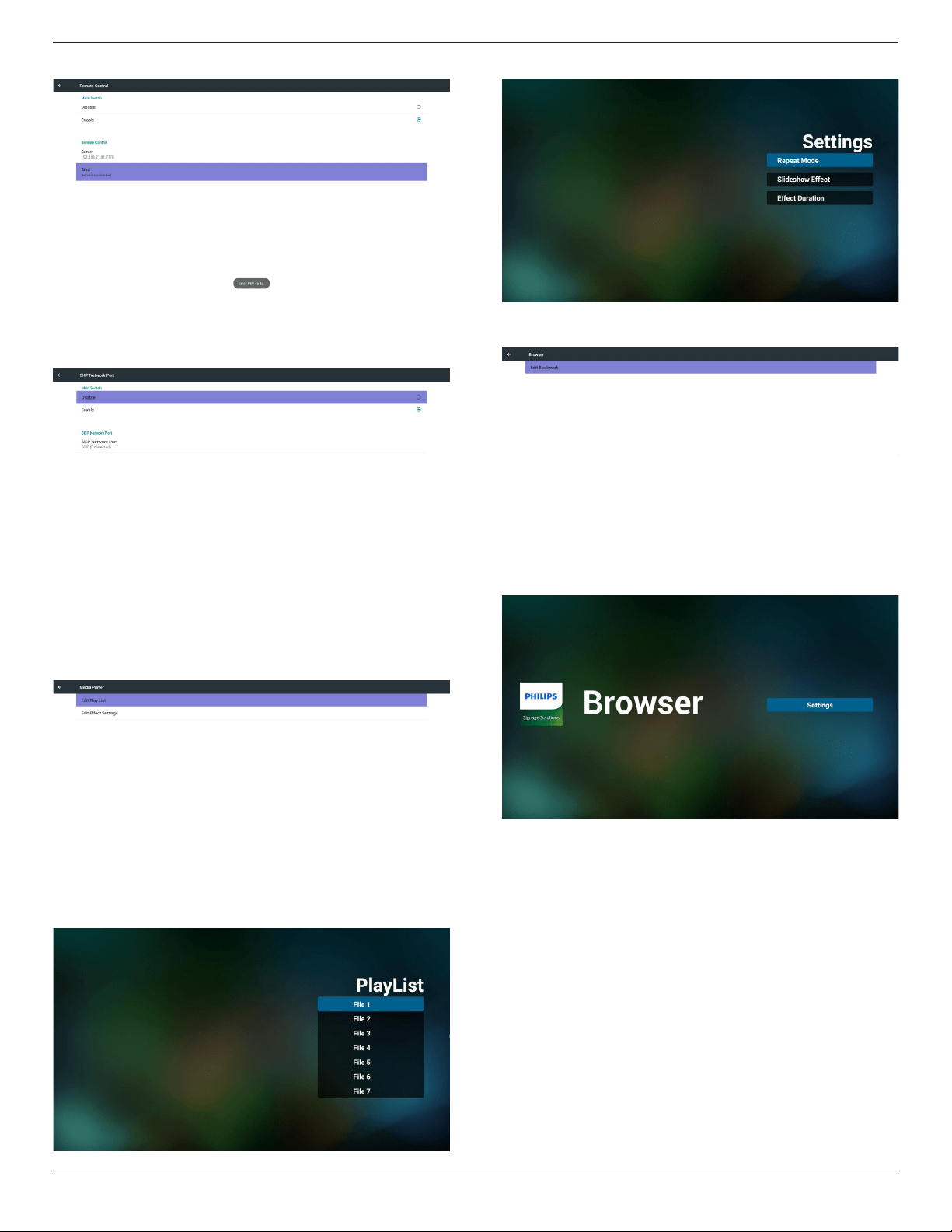
3. RemoteControl
ViaEnable/DisabletoControlRemoteControlOn/Off
UsercaninputServeraddress.Ifserverdoesnotregistered,itwillask
userforPINcode.
Bindstatus:
(1)Willshownetworkisdisconnectedifnotyetconnectstonetwork.
(2)WillshowServerisdisconnectedifnetworkconnectedbut
remotecontrolserverdisconnected.
(3)WillshowServerisunbindedifRemotecontrolserverfeedback
unbindedstatus.
(4)WillshowServerisbindedifSeverbindedsuccessfully.
55BDL5057P
35
(5)WillshowErrorPINcodeifinputincorrectPINcode.
4. SICPNetworkPort
ChangeSICPNetworkPort.
Portrangeis1025~65535.
5.6.3. Source Settings
1. MediaPlayer
CanEditMediaPlayerplaylistandeffectsettings.
(1)OpenMediaPlayerPlayerListeditpage.
(2)OpenMediaPlayerslideshoweffecteditpage.
2. Browser
CaneditBookmarkconguration.
(1)OpenBrowsersettingpage.
3. CMND&Play
1)Server
SetupCMND&Playserveraddress
2)Account
SetupCMND&Playaccount
3)PINCode
SetupCMND&PlayPINcode
(4)Version
Therearetwooptions,Ver.2andVer.3
Ver.2
Use2.0/2.2agreement
Ver.3
Use3.0/3.1agreement
(5)Content
Thereareinternalstorage/SDcard/USBstorage3optionsfor
selecting.
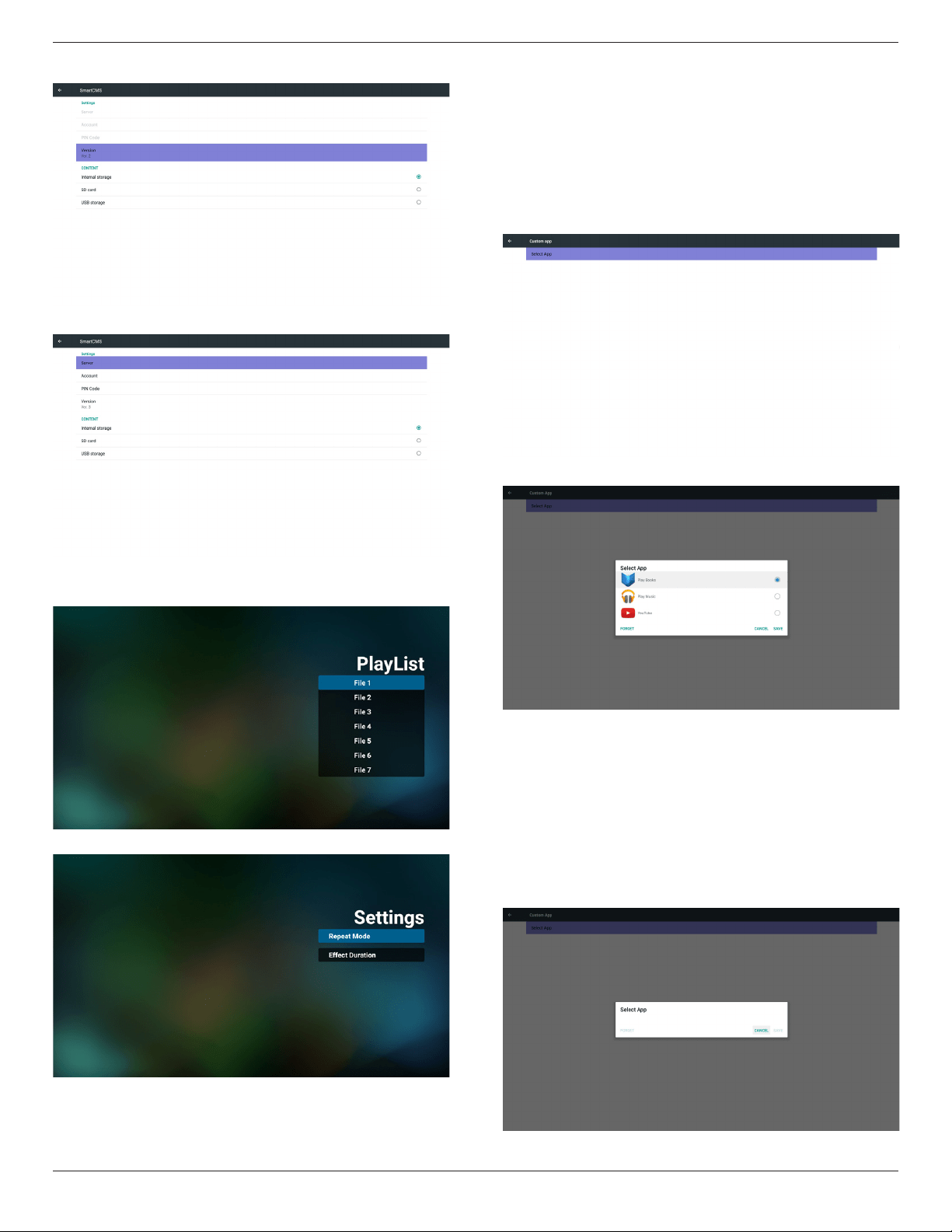
55BDL5057P
36
WhenVer.2,Server/Account/PINcodewillbegrayandunavailable
.
WhenVer.3,Server/Account/PINcodeisavailable.
4. PDFPlayer
(1)OpenPDFPlayerPlayerListeditpage.
(2)OpenPDFPlayereffecteditpage.
5. CustomApp
UsercansetuptheapplicationforCustomerSource.
Note
(1)OnlydisplayUserInstalledapp.
(2)Willnotshowupsystempre-installapp.
ScalarOSDmenuoperation
RCU:Source->Custom
IfsetupcustomerAPK,PDwillopencustomerappwhenswitchsource
toCustomermode.
IfnosetupcustomerAPK,PDwillshowBlackscreenwhenswitch
sourcetoCustomermode.
Functionintroduction
(1)Save
SelectAppandpressSavekeytosaveit.
(2)Forget
PressForgetkeytocleanpreviousstoreddata
(3)Cancel
Nochange,closewindowdirectly
Ifnocustomerinstalledapk,thelistwillbeblank.
Nooptionforchoose.SaveandForgetkeywillbegrayand
unavailable.
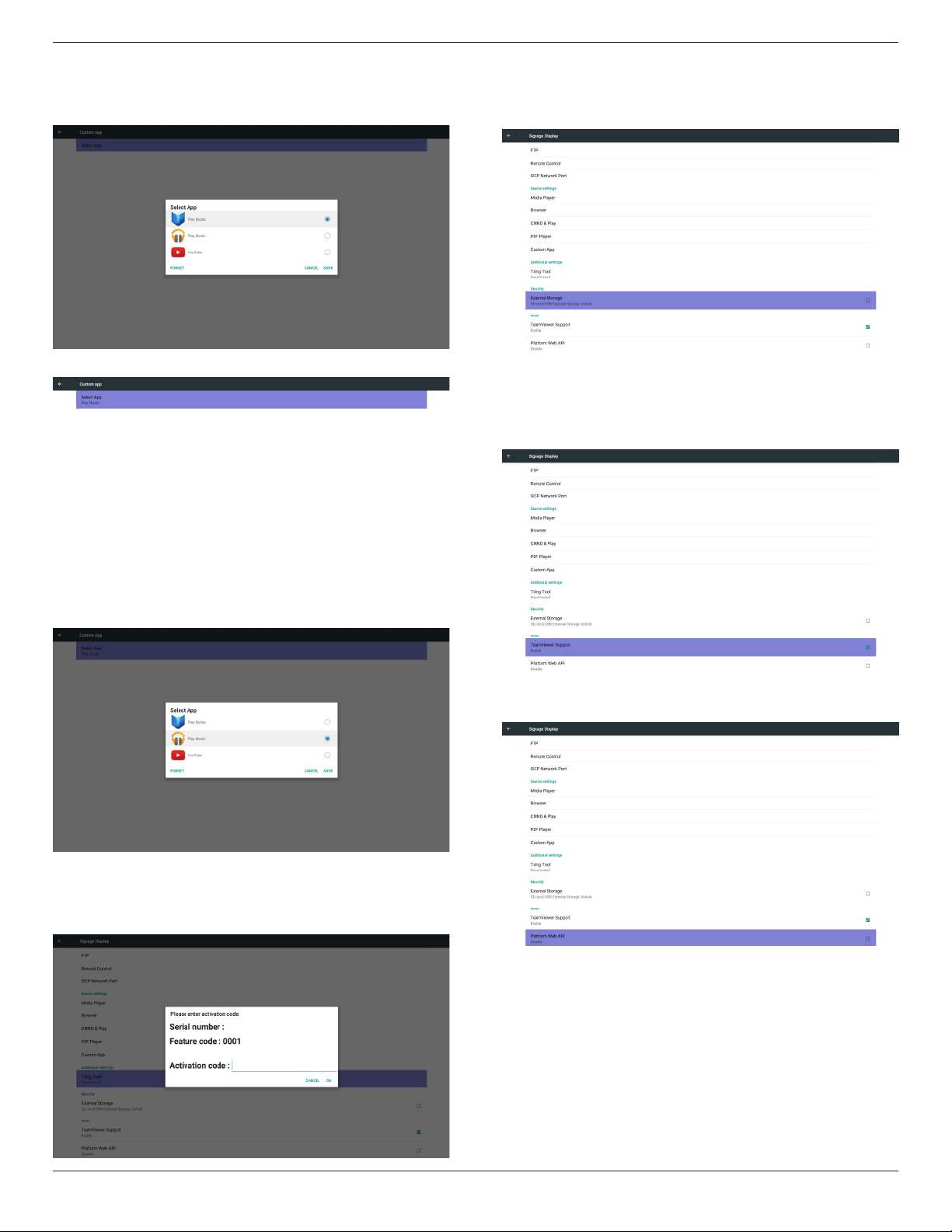
55BDL5057P
37
Usercanselectcustomerinstalledapkinlist
Case1.NosetupCustomApp
Screenwillshowavailableappsandfocusonrstappitemautomatically.
Aftersetup,itwillshowAppname
Case2.SetupCustomApp.(thereisacheckedcircleonright)
5.6.4. Additional Settings
Whenthecustomerpayment,cangetactivatecode,aftersuccessful
input,canenablethefunctionoftilingtool.
5.6.5. Security
1. ExternalStorage
Lock/Unlockexternalstorage.
5.6.6. Others
1. TeamViewerSupport
Enable/DisableTeamViewersupport.
2. PlatformWebAPI
Enable/DisablePlatformWebAPI.
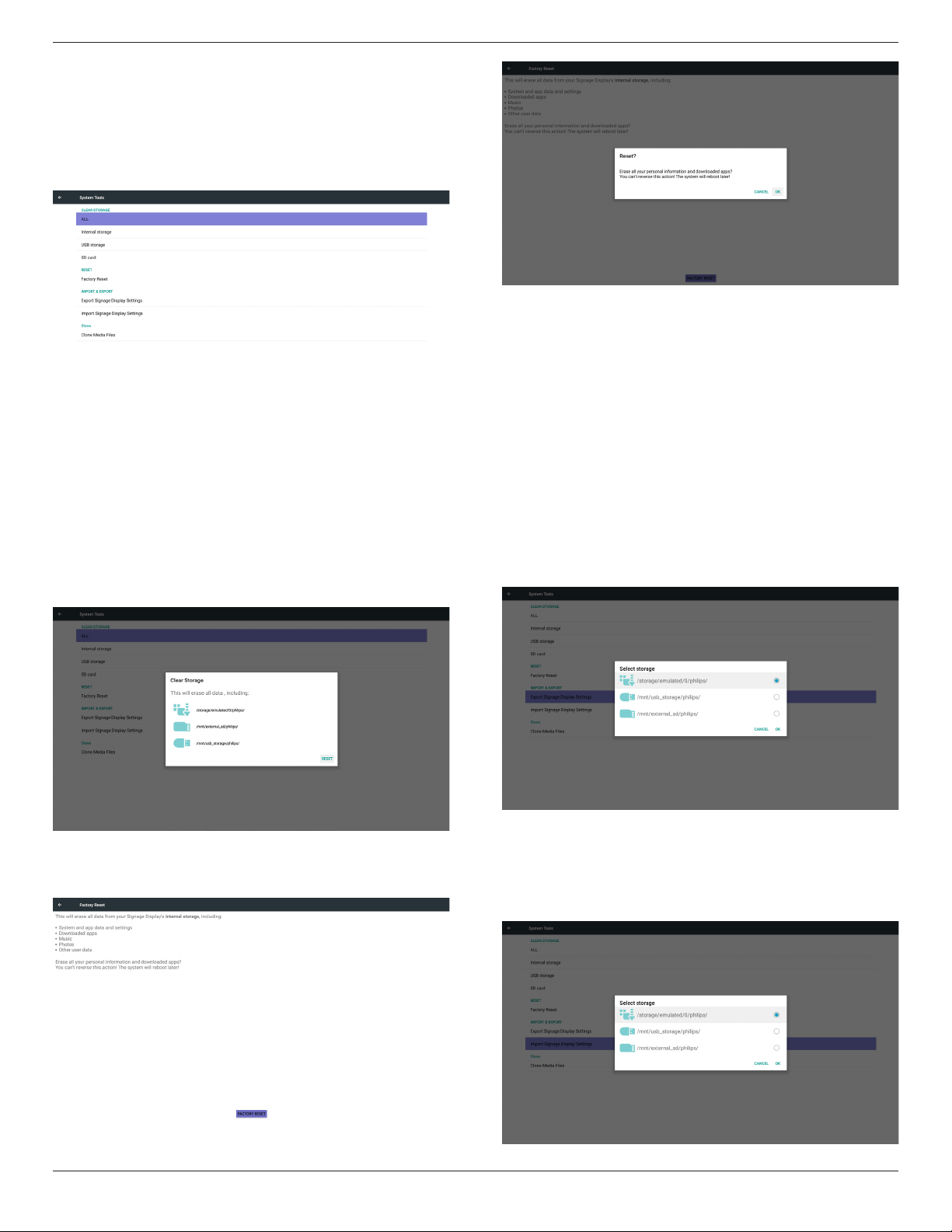
55BDL5057P
38
5.7. System Tools
Systemtools4mainfunctions:
(1)ClearStorage
(2)FactoryReset
(3)Import&Export
(4)CloneMediaFiles
5.7.1. Clear Storage
ThepurposeistoclearalldatainPhilipsfolders.
Dividedinto4mode:
(1)ClearallPhilipsfolders
(2)OnlyclearPhilipsfolderunderInternalstorage.
(3)OnlyclearPhilipsfolderunderUSBstorage.
(4)OnlyclearPhilipsfolderunderSDcard.
Pop-upthewindowtodisplayallfolderswhichcanbeclear.
5.7.2. Factory Reset
FactoryResetcanrecovertoFactorydefaultsettings.
PressOKtoexecuteResetfunctionautomatically
.
5.7.3. Import & Export
ThefunctionofImport&ExportPDsettings.
Notes.
(1)Settings.db(Savedlename:settings.db)
(2)WillsavetoPhilipsfolderinstorage
5.7.3.1 Export Signage Display Settings
WillexporttoPhilipsfolderunderUSBorSDcard
(1)Exportsettings.db
(2)Export3
rd
partyapktoPhilips/app/
Note:
IfnoPhilipsfolderexistsinUSBorSDcard,itwillbecreated
automatically.
Listallavailablestorage(internal/SD/USB)
5.7.3.2 Import Signage Display Settings
Importsettings.dbfromPhilipsfolderunderUSBorSDcard.
(1)Importsettings.db
(2)Autoinstall3
rd
partyapkfromPhilips/app/
Listallavailablestorage(Internal/SD/USB)
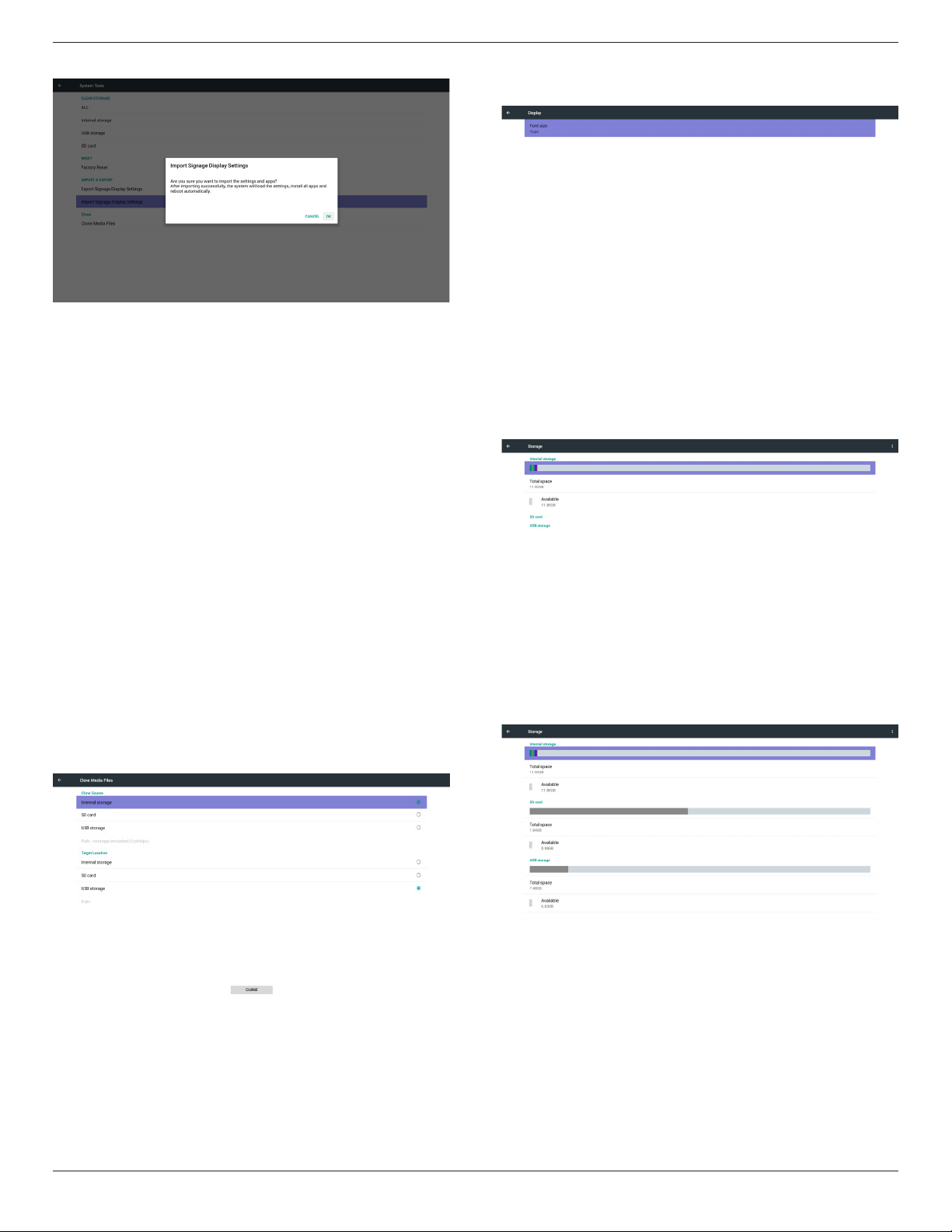
55BDL5057P
39
Shownoticationdialogbeforedatabaseimport
5.8. Clone Media File
ClonemedialefromInternal,SDorUSBPhilipsfolder.
1.TheclonedfoldernameunderPhilipsfolder
(1)philips/photo
(2)philips/music
(3)philips/video
(4)philips/cms
(5)philips/pdf
(6)philips/browser
2.Theclonedleextensionnameis“.cms”
CloneSource
(1)Internalstorage
(a)checkFTP
(b)check/Philips/
(2)SD/USB
Filesunderroot
TargetLocation
(1)Internalstorage
Saveto/Philips/
(2)SD/USB
Savetoroot
5.9. Display
Usercanmodifythefontsize,canchoose:Small/Normal/Large/Huge
5.10. Storage
DisplaycurrentPDAndroidstorageinformation.
Note
(1)UseroptionkeyonRCUtoshowsettingoption
SDCARDandUSBSTORAGE:
NeedtoinsertSDcardorUSB,theinformationwillshowuptotal
spaceandavailableofSDcardorUSBstorage.
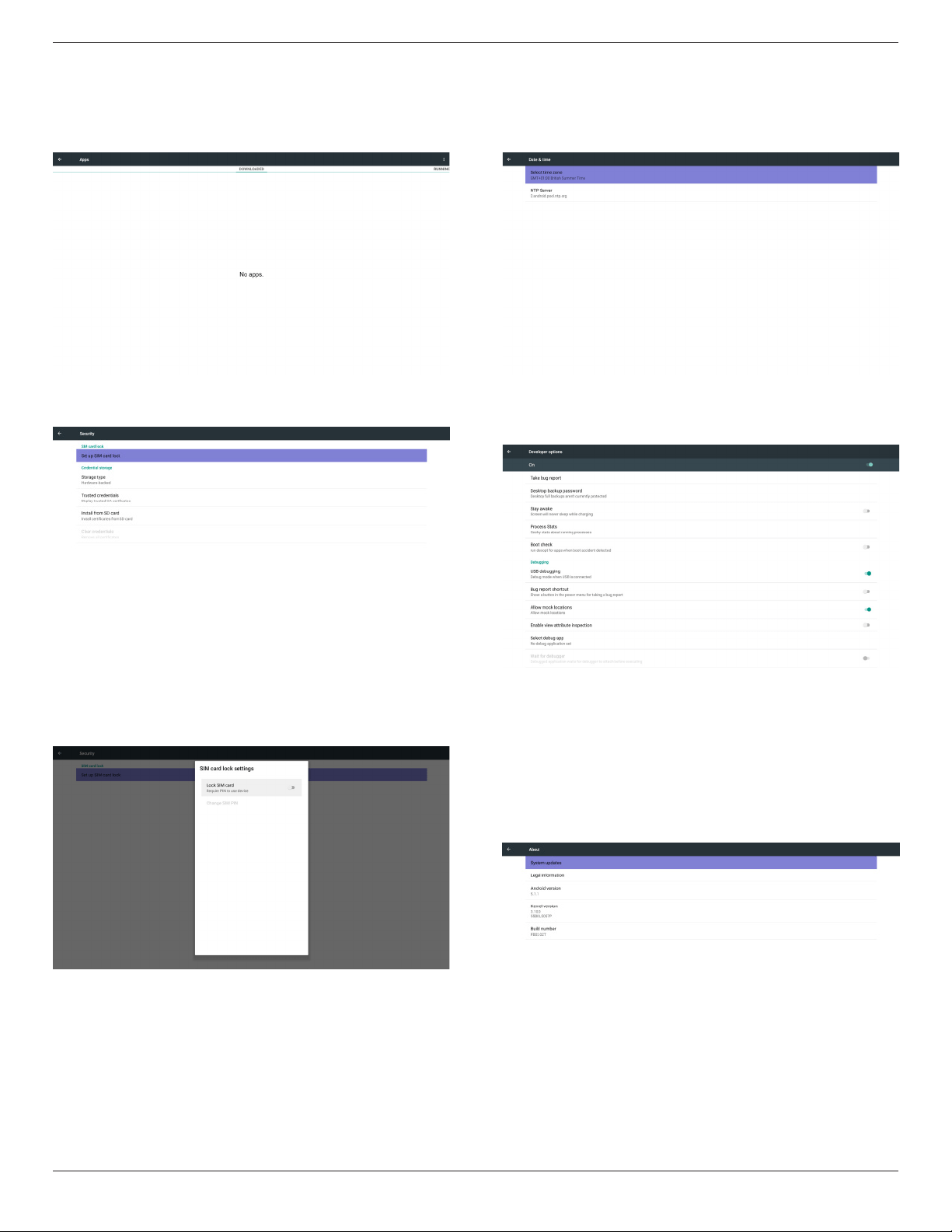
55BDL5057P
40
5.11. Apps
Displayapplicationsinformation.
Note
(1)UseroptionskeyonRCUtoshowsettingoption.
5.12. Security
1. SIMcardlock
Setup/DisableSIMPINcode.
Note:
(1)Onlyshowupwhen4Gmoduleconnected
2. Credentialstorage
(1)Storagetype
(2)Trustedcredentials
(3)InstallfromSDcard
(4)Clearcredentials
5.13. Date & time
ViaScalarOSDmenutocontrolAutoTimeOn/Off.
Note:
AddnewNTPservertodisplaycurrentserverIP
.
5.14. Developer options
Androiddeveloperoptions.
5.15. About
MaininfoinAbout:
(1)Systemupdates
(2)Legalinformation
(3)Androidversion
(4)Kernelversion
(5)Buildnumber
5.15.1. System updates
1. Willautomaticallysearchupdate.zipinUSBorSDcard.
Willbeshowninlistforuserselectioniffound
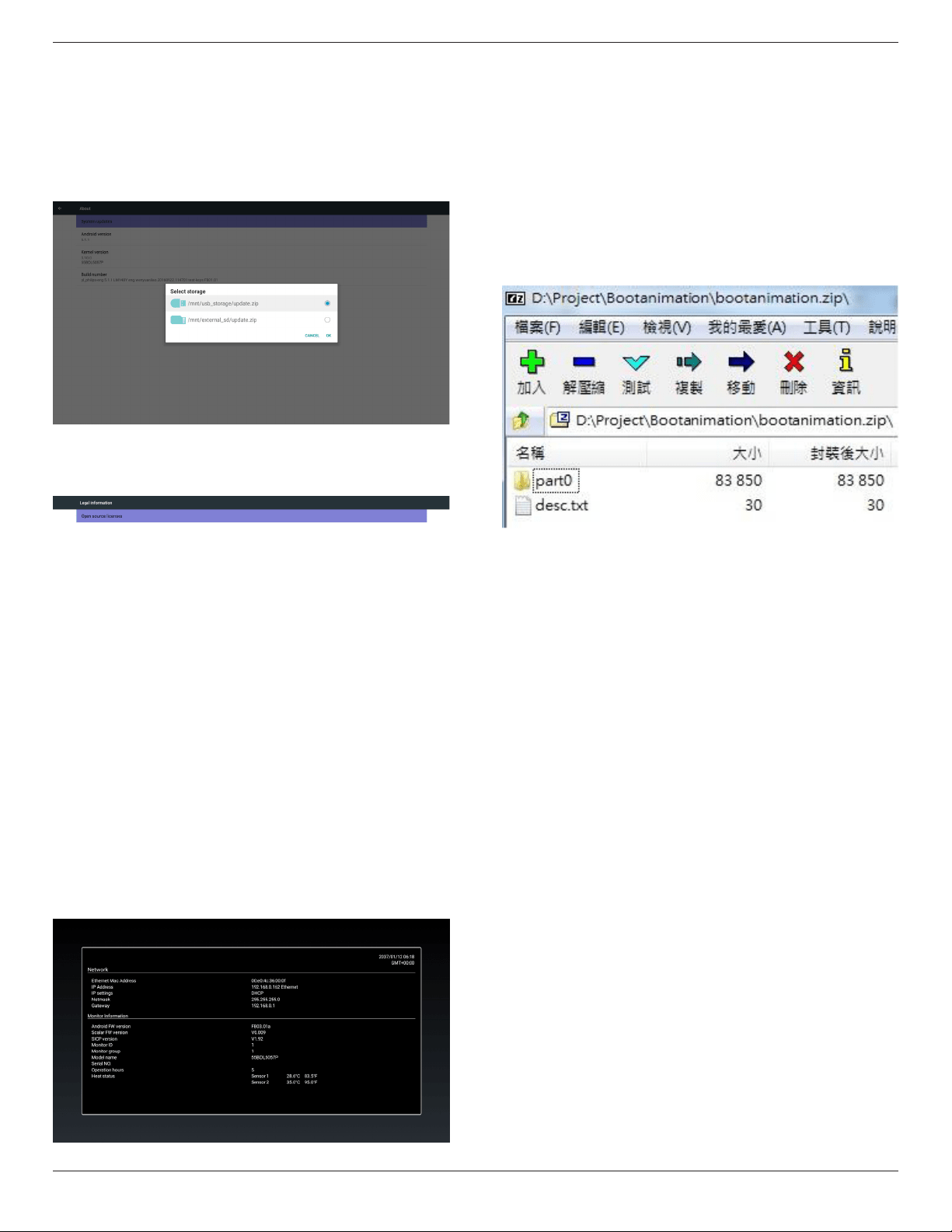
55BDL5057P
41
2. Afterselectupdate.ziple,PDwillrestartandstarttoupdate.
3. Ifnotfoundupdate.zip.ThedialogisnocontentandtheOkbutton
willbegrayanduseless.
Note:
(1)OnlysupportAndroidFullimage.
(2)Filenameshouldbeupdate.zip.
(3)Theleshouldbelocatedinrootofstorage.
5.15.2. Legal Information
Showtheopensourcelicenses.
5.16. Supplementary
5.16.1. Quick Info
Youcanpress“Info+77”tostartupquickinfo.
Quickinfowillshow“Network”and“MonitorInformation”,asbelow:
Note:
Operationhours:Itisupdatedeveryminute.
Heatstatus:Itisupdatedevery5seconds.
5.16.2. How to custom an Android boot
animation?
1. Overview
TheAndroidbootanimationisusedscripttoloadPNGleswhen
thedeviceboots.Itiscontainedwithinanuncompressedziplecalled
Bootanimzation.zip.
2. InsidetheBootanimzation.ziple
TheBootanimzation.zipasfollow:
• Theimagefolder(ContainsPNGimagesnamedinincremental
numbers)
• Thedesc.txtle
(1)Theimagefolder
ThesecontainPNGimagesnamedinnumbers,startingfrom
somethinglike0000.pngor0001.pngandproceedingwith
incrementsof1.Therehastobeatleastonefolderandthereisno
knownupperlimittothenumberoffolders.
(2)Thedesc.txtle
Thisledeneshowtheimagesinthefolder(s)aredisplayedduring
thebootanimation,inthefollowingformat:
- WidthHeightFrame-rate
- modeLoopdelay-timeFolder1
- modeLoopdelay-timeFolder2
Anexampleofadesc.txtleis:
- 1920108030
- p10part0
- p00part1
a.Therstline
1920and1080denethewidthandheightofthescreen
resolution.
30istheframerateinfps(framespersecond)i.e.numberof
imagestodisplaypersecond.
b.Thesecondandthirdlineshaveasameformat.
Therst‘p’denesplaymodeisimmediatelystopplayingwhen
bootcomplete.
Thenumberafter‘p’denesrepeatmode
- specifying0wouldmakethepartloopindefinitelytillthe
devicehasbootcomplete.
- specifying1wouldmakethepartplaybackonce.
Thenextnumberdenesthedelaytime(ms).Forexample,ifset
10,whenallimageleshasbeenplayback,systemwilldelay10ms.
Thepart0andpart1areimagefoldername.
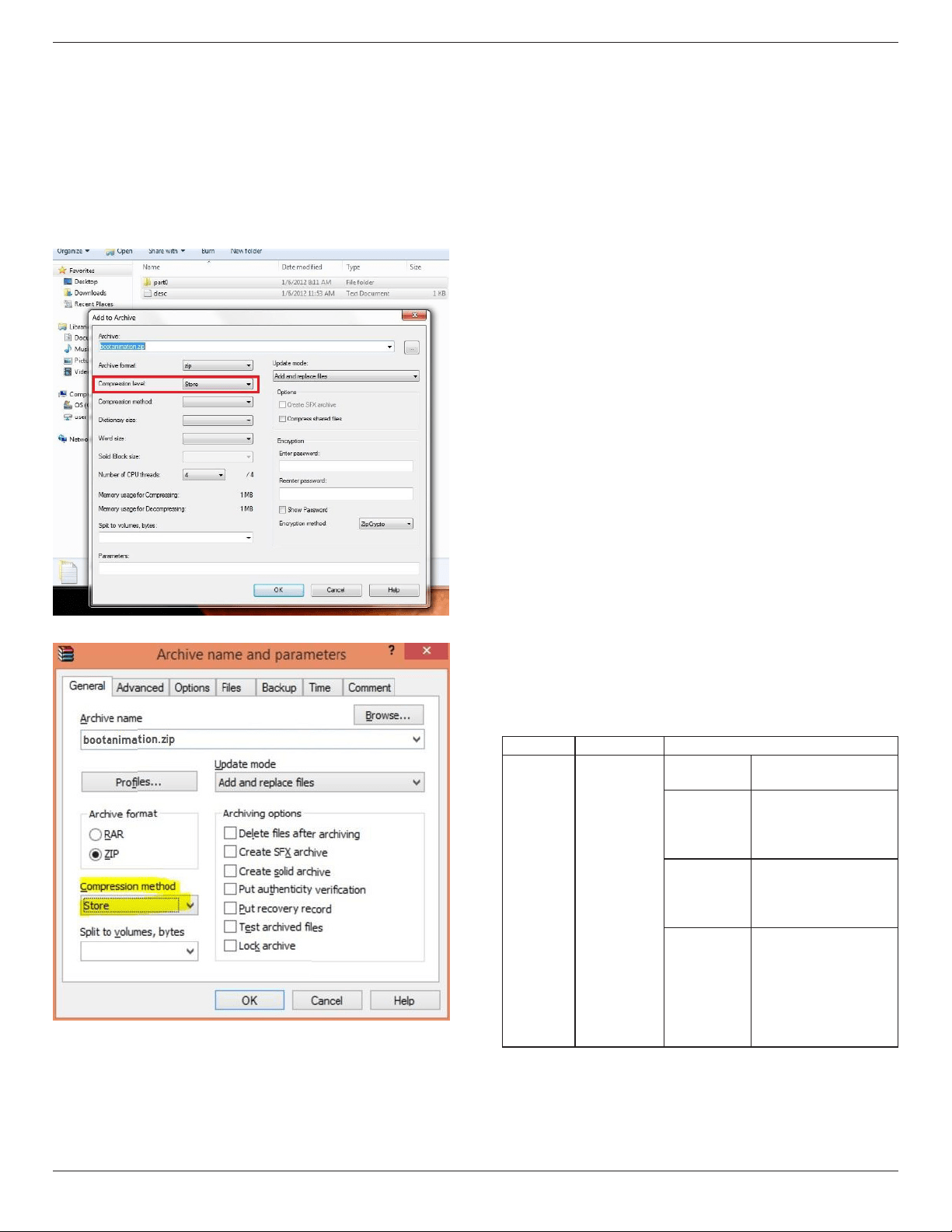
55BDL5057P
42
Theaboveexample,thebootanimationwillplayataresolutionof1920
by1080pixels,ataframerateof30fps,startingwiththecontentsof
part0folderandafterplayingtheminoneloop,switchingtocontents
ofpart1folderandplayingthemcontinuouslytillthedeviceboot
complete.
3. Ziple:
Selecteverything(imagefoldersanddesc.txt)insidetheBootanimzation
folderandzipthemintoanewuncompressed zip archiveusingyour
favoritecompressionutilitylike7ziporWinRARandsoon.
Ifusing7zip,setcompressionlevelto“Store”
IfusingWinRAR,set“Compressionmethod”to“Store”
orelsebootanimzationWON’Twork
4. Applythecustombootanimzation
Procedure:
(1).Putyourcustombootanimztion.zipleintoexternalSDcardor
USBandplugintoPhillipsPDplatform.
(2.)MakesuretheLogooptionisenabled.
PressHomekeyonRCU:OSDmenu->Conguration2->Logo
->set“on”
(3.)Presscombinationkey“Home+1888”onRCUtogotoAdmin
mode:
Settings->SignageDisplay->GENERALSETTINGS->BootLogo
(4).Thesystemwillndthebootanimzation.zipinexternalSDcard
orUSBautomaticallyandcopyitto/data/local
(5.)Oncestep1~4hasbeendone,restartthesystem.Thenew
customizedbootanimationshouldbedisplayedduringboottime.
5.16.3. How to Install Android app?
Thereare3waystoinstallyourownandroidapp.
(a)ViaFileManagerinAdminMode
1.Ifyouhaveapkalready
1.1copyyourapktoUSBdiskorSDcard,andthenplugthem
intoPhilipsAndroidSignageDisplay.
1.2GotoAdminMode>Apps>FileManager
1.3UsingFileManagerandndoutyourapkandthenyoucan
install.Justpress“ok”ontheselectedapk.
2.DownloadapkbyChromiumbrowser,andthengoto<internal
storagepath>/Download/byFileManager.
2.1Therestofstepsisthesameasabove.Pleasenote,eachmodel
mayhavedifferent<internalstoragepath>.
(b)ViaAdbShell
1.MakesurethatyourPCcanconnecttoPhilipsAndroidSignage
Displayusingadb.
2.Prepareyourapkinafolder(forexample,C:\apkfolder)onPC.
3.Executethefollowinginstructionbycommandlinetool.
C:\apkfolder>adbinstall-rapk_name.apk
(c)ViaCustomizedIntent
1.Ifyoudevelopanapkwhichcandownloadanyandroidapp,then
yourapkcanissueacustomizedintent.
2.Givingtheapknameandthepathitwasstored.Thesystemwill
helpyoutoinstallbyprogram.
Description Intent Parameters
SwUpdate
php.intent.
action.
UPDATE_APK
lePath
Theabsolutelepath
includingthelename.
Keep
Indicatethatyouwant
tokeeptheleornot
afterupdating.Thedefault
valueisfalse.
packageName
Thetargetpackage
youwanttolaunch
automaticallyafter
updating.
activityName
Thetargetactivity
youwanttolaunch
automaticallyafter
updating.Butifcurrent
topactivityisnot
activityName,nothing
happened.
Forexample,
Intentintent=newIntent();
intent.setAction(“php.intent.action.UPDATE_APK”);
intent.putExtra(“lePath”,“/sdcard/Download/apk_name.apk”);
intent.putExtra(“keep”,true);
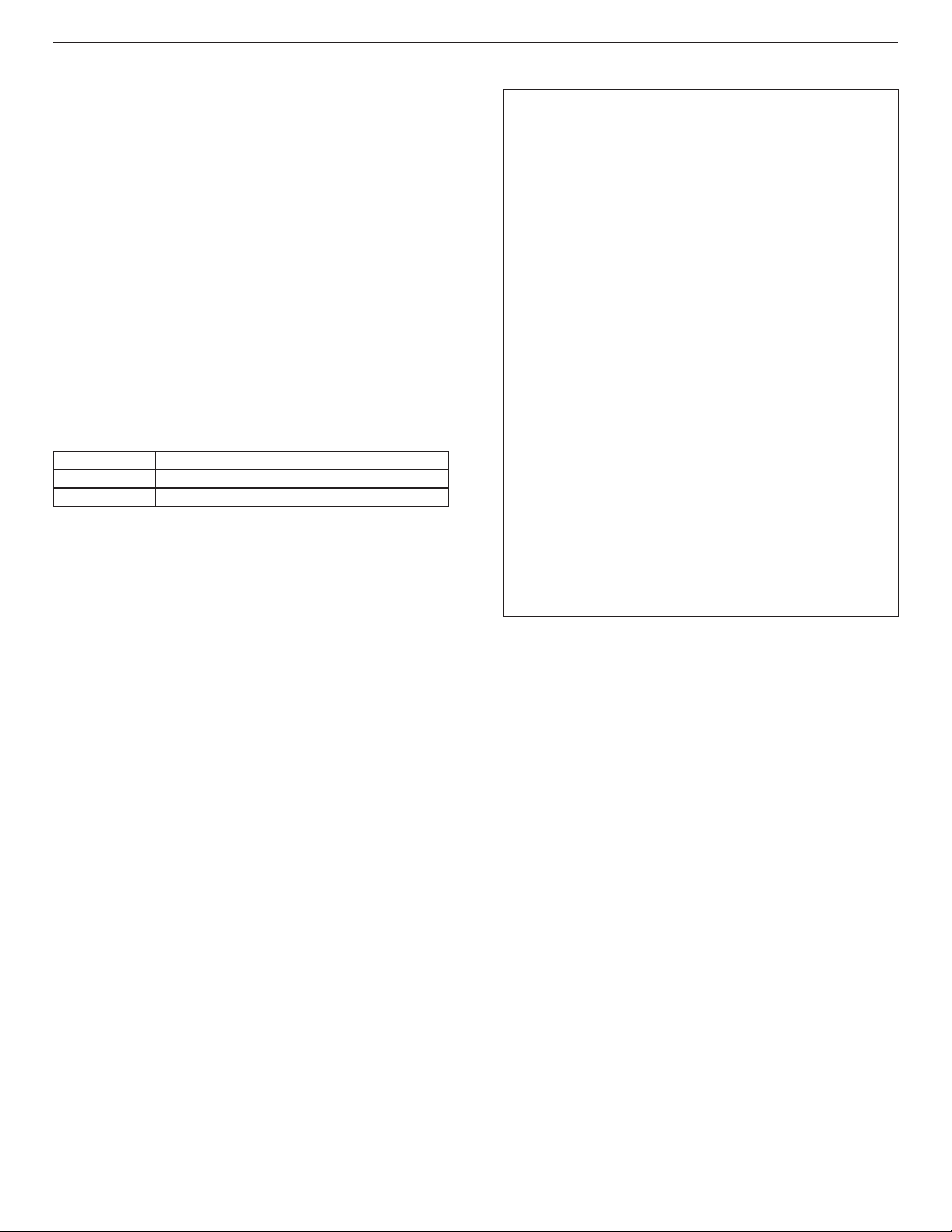
55BDL5057P
43
intent.putExtra(“packageName”,“com.example.apk_name”);
intent.putExtra(“activityName”,“com.example.apk_name.MainActivity”);
sendBroadcast(intent);
5.16.4. How to connect with platform Web API?
PDhasalocalwebservertoprovideWebAPIforcustomergettingPD
informationinJSONformat.
1. APIsspecications
- Protocol:HTTP
- Method:GET
- Domain:localhost
- Port:9988
- URI:/platform/getinfo
2. APIRequestURL
- http://localhost:9988/platform/getinfo
3. APIResponse
- Status
Status Code Description
Success 0 Requestsuccess
Error 1 Requestfailure
- ResultinJSONformat
• interfaces:listallofnetworkinterface’sMACaddress
• family:theaddress-familywithinanIPv4orIPv6
• mac:networkinterface’sMACaddress
• ip:networkinterface’sIPaddress
• currentip:currentIPaddressofdevice
• sn:serialnumberofdevice
• model:modelnameofdevice
• version:versionofWebAPI
- JSONsample
{
status:"success",
code:0,
decsription:"success",
result:
{
"version":"1.0",
"currentip":"172.17.3.4",
"sn":"123456",
"model":"PDModelName",
"interfaces":[
{
"family":"IPv6",
"ip":"fe80::84ea:d74b:1167:aa69",
"mac":"a4:4e:31:9c:79:e0"
},
{
"family":"IPv4",
"ip":"172.17.3.4",
"mac":"a4:4e:31:9c:79:e0"
}
]
}
}
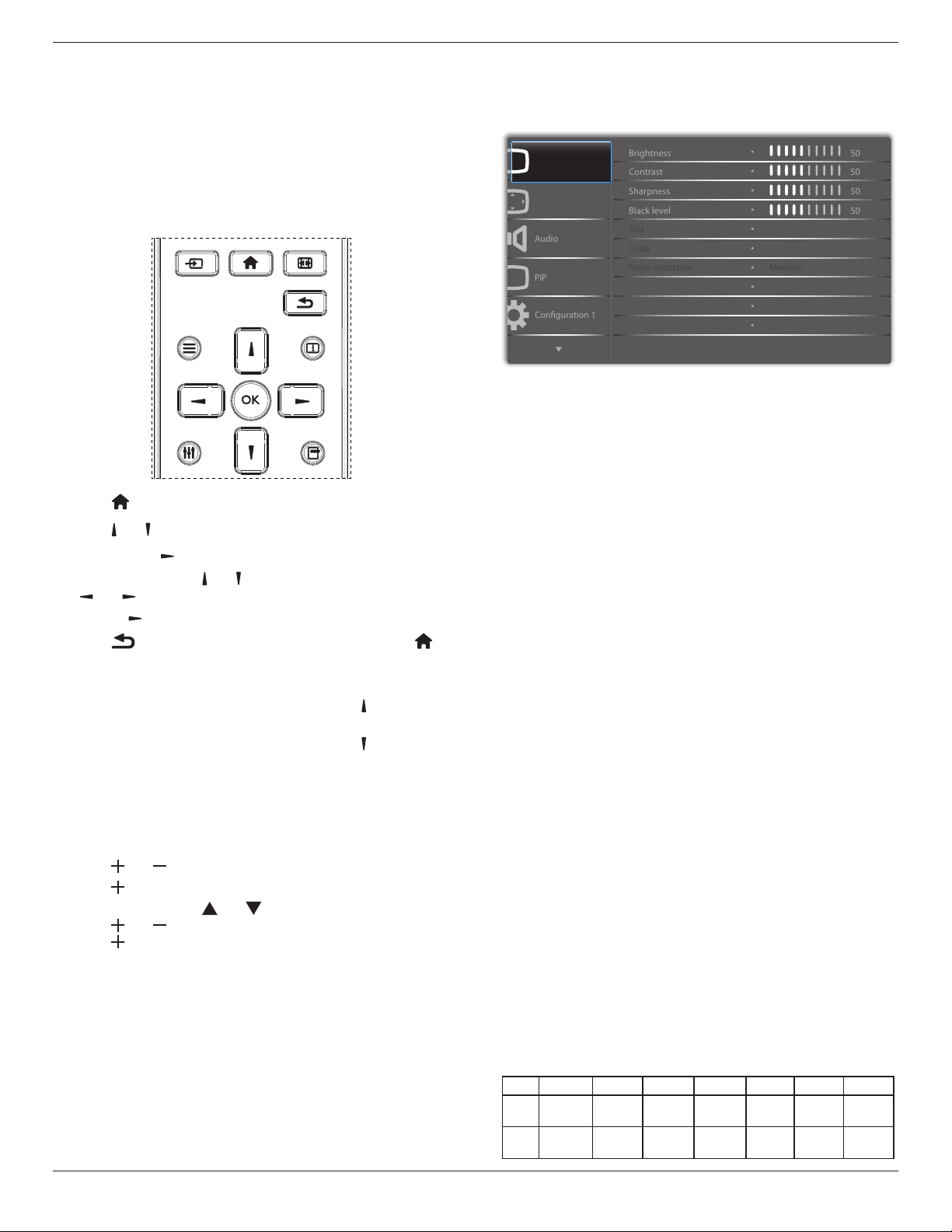
55BDL5057P
44
6. OSD Menu
AnoverallviewoftheOn-ScreenDisplay(OSD)structureisshown
below.Youcanuseitasareferenceforfurtheradjustingyourdisplay.
6.1. Navigating the OSD Menu
6.1.1. Navigating the OSD menu using the
remote control
FORMAT
SOURCE
INFOLIST
OPTIONSADJUST
1. Press[ ] buttonontheremotecontroltodisplaytheOSDmenu.
2. Press[ ] or[ ] buttontochoosetheitemyouwanttoadjust.
3. Press[OK]or[ ] buttontoenterthesubmenu.
4. Inthesubmenu,press[ ] or[ ]buttontotoggleamongitems,press
[ ]
or[ ]buttontoadjustsettings.Ifthereisasubmenu,press
[OK]or[ ]buttontoenterthesubmenu.
5. Press[ ]buttontoreturntothepreviousmenu,orpress[ ]
buttontoexittheOSDmenu.
NOTES:
• WhenthereisnoOSDmenuonthescreen,press[ ]todisplaythe
menuof{Smart picture}.
• WhenthereisnoOSDmenuonthescreen,press[ ]todisplaythe
menuof{Audio source}.
6.1.2. Navigating the OSD menu using the
display’s control buttons
1. Press[MENU]buttontodisplaytheOSDmenu.
2. Press[ ]or[ ]buttontochoosetheitemyouwanttoadjust.
3. Press[ ]buttontoenterthesubmenu.
4. Inthesubmenu,press[ ]or[ ]buttontotoggleamongitems,
press[ ]or[ ]buttontoadjustsettings.Ifthereisasubmenu,
press[ ]buttontoenterthesubmenu.
5. Press[MENU]buttontoreturntothepreviousmenu,orpress
[MENU]buttonseveraltimestoexittheOSDmenu.
6.2. OSD Menu Overview
6.2.1. Picture menu
P
Audio
PIP
Screen
Picture
Conguration 1
Contrast
Sharpness
Color
Tint
Brightness
Black level
Gamma selection
Color temperature
Color control
Noise reduction
50
50
50
50
Native
Native
Medium
Brightness(Picture)
Adjusttheoverallimageandbackgroundscreenbrightness(backlight).
Contrast
Adjusttheimagecontrastratiofortheinputsignal.
Sharpness
Thisfunctionisdigitallycapabletokeepcrispimageatanytimings.
Itisadjustabletogetadistinctimageorasoftoneasyoupreferandset
independentlyforeach
picturemode.
Black level
Adjusttheimagebrightnessforthebackground.
NOTE:sRGBpicturemodeisstandardandcannotbechanged.
Tint(Hue)
Adjustthetintofthescreen.
Press+buttontheeshtonecolorbecomesgreenish.
Press-buttontheeshtonecolorbecomespurplish.
NOTE:VIDEOmodeonly.
Color(Saturation)
Adjustthecolorofthescreen.
Press+buttontoincreasecolordepth.
Press-buttontodecreasecolordepth.
NOTE:VIDEOmodeonly
Noise Reduction
Adjustthenoisereductionlevel.
Gamma selection
Selectadisplaygamma,It’srefertothebrightnessperformancecurveof
signalinput.Choosefrom{Native}/{2.2}/{2.4}/{sgamma}/{D-image}.
NOTE:sRGBpicturemodeisstandardandcannotbechanged.
Color temperature
Itisusedtoadjustthecolortemperature.
Theimagebecomesreddishasthecolortemperaturedecreases,and
becomesbluishasthecolor.
CCT
10000ºK 9300ºK 7500ºK 6500ºK 5000ºK 4000ºK 3000ºK
X
0.279±
0.030
0.283±
0.030
0.299±
0.030
0.313±
0.030
0.346±
0.030
0.382±
0.030
0.440±
0.030
Y
0.292±
0.030
0.298±
0.030
0.315±
0.030
0.329±
0.030
0.359±
0.030
0.384±
0.030
0.403±
0.030
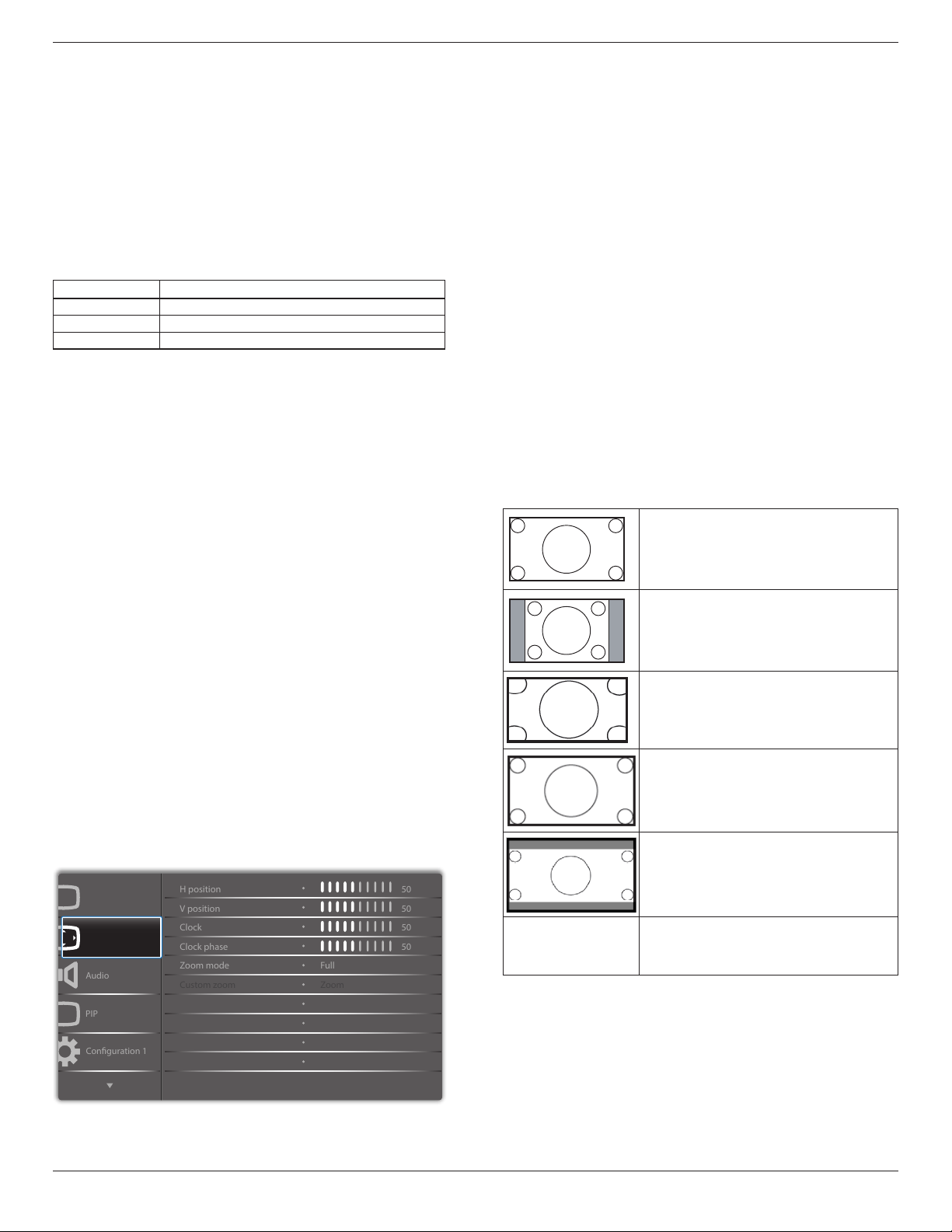
55BDL5057P
45
Color control
Thecolorlevelsofred,green,andblueareadjustedbythecolorbars.
R:Redgain,G:Geengain,B:Bluegain.
Smart picture
PQsetting
PCmode:{Standard}/{Highbright}/{sRGB}.
Videomode:{Standard}/{Highbright}/{Cinema}.
Smart Contrast
Autodetectblackdataandwhitedataoncontentandsetsuitable
backlight.
Surface Ratio Backlight Setting
5%-90% (MaxBacklight-MinBacklight)*SurfaceRatio/100
<5% MinBacklight
>90% MaxBacklight
Smart power
SmartPowercontrolisnotrelativetobrightnesscontrol:
1. InitialsettingBrigthness
70(intherangefrom0-100)
Powerconsumption70%ofmaximumpowerconsumption
2. SmartPower
OFF:noadaptation
MEDIUM:80%ofpowerconsumptionrelativetocurrentsettings
HIGH:65%ofpowerconsumptionrelativetocurrentsettings
3. Panelsaving/BrightnessON:40%ofmaximumpowerconsumption
Thecontrolssettingsshouldonlybevisibleonitsowncontrols.It
shouldnothavesecondaryeffectsonothercontrols
(eabrightnesssettingchangeswhensmartpowersettinghas
changed).
Overscan
Changethedisplayareaoftheimage.
ON:Settodisplayareaabout95%.
OFF:Settodisplayareaabout100%.
Picture reset
ResetallsettingsinthePicturemenu.
Select“Yes”andpress“SET”buttontorestoretofactorypresetdata.
Press“EXIT”buttontocancelandthenreturntothepreviousmenu.
6.2.2. Screen menu
P
Audio
PIP
Screen
Picture
Conguration 1
V position
Clock
Zoom mode
Custom zoom
H position
Clock phase
Auto adjust
Screen reset
50
50
50
50
Action
Action
Zoom
Full
H position
ControlHorizontalImagepositionwithinthedisplayareaoftheLCD.
Press+buttontomovescreentoright.
Press-buttontomovescreentoleft.
V position
ControlVerticalImagepositionwithinthedisplayareaoftheLCD.
Press+buttontomovescreentoup.
Press-buttontomovescreentodown.
Clock
Press+buttontoexpandthewidthoftheimageonthescreenthe
right.
Press-buttontonarrowthewidthoftheimageonthescreentheleft.
NOTE:VGAinputonly.
Clock phase
Improvesfocus,clarityandimagestabilitybyincreasingordecreasingthis
setting.
NOTE:VGAinputonly
Zoom mode
PCmode:{Full}/{4:3}/{1:1}/{16:9}/{21:9}/{Custom}.
Videomode:{Full}/{4:3}/{1:1}/{16:9}/{21:9}/{Custom}.
*Zoom mode setting is by input. If input in multi-windows, the setting
will apply for windows with the same input.
And the INFO OSD will show the latest setting.
Full
Thismoderestoresthecorrectproportions
ofpicturestransmittedin16:9usingthefull
screendisplay.
4:3
Thepictureisreproducedin4:3formatand
ablackbandisdisplayedoneithersideofthe
picture.
1:1
Thismodedisplaystheimagepixel-by-pixel
onscreenwithoutscalingtheoriginalimage
size.
16:9
Thepictureisreproducedin16:9formatand
ablackbandatthetopandbottom.
21:9
Thepictureisreproducedin21:9formatand
ablackbandatthetopandbottom.
Custom
Choosetoapplythecustomzoomsettingsin
theCustomZoomsubmenu.
Custom zoom
Youcanusethisfunctiontofurthercustomizethezoomsettingstosuit
theimageyouwanttodisplay.
NOTE: Thisitemisfunctionalonlywhenthe{Zoom mode}issetto
{Custom}.
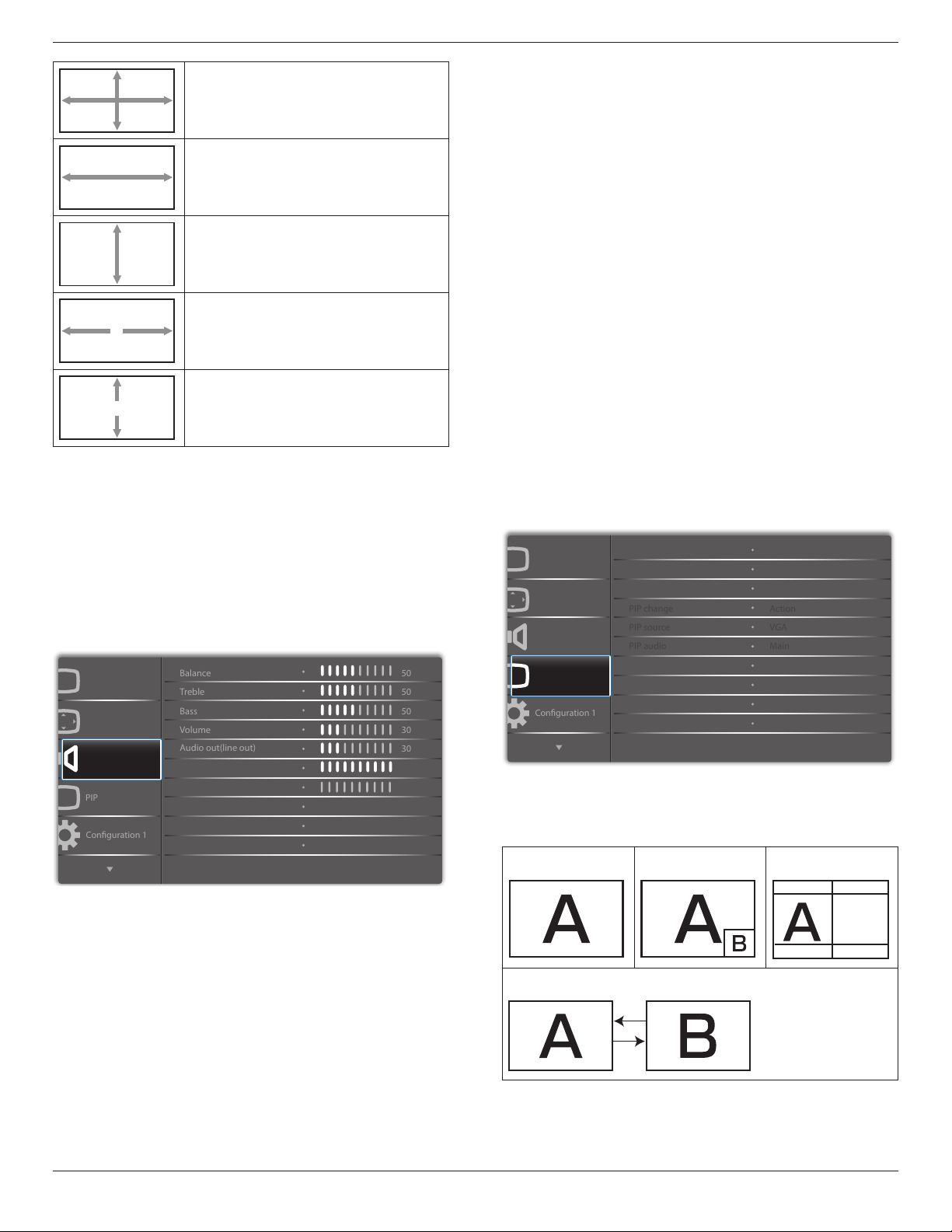
55BDL5057P
46
Zoom
Expandsthehorizontalandverticalsizesofthe
imagesimultaneously.
H zoom
Expandsthehorizontalsizeoftheimageonly.
V zoom
Expandstheverticalsizeoftheimageonly.
H position
Movesthehorizontalpositionoftheimageleft
orright.
V position
Movestheverticalpositionoftheimageupor
down.
Auto adjust
Press“Set”todetectandadjustHposition,Vposition,Clock,Phase
automatically.
Screen reset
ResetallsettingsintheScreenmenutofactorypresetvalues.
Select“Yes”andpress“SET”buttontorestorethefactorypresetdata.
Press“EXIT”buttontocancelandthenreturntothepreviousmenu.
6.2.3. Audio menu
P
Audio
PIP
Screen
Picture
Conguration 1
Treble
Bass
Maximum volume
Minimum volume
Balance
Volume
Audio out(line out)
Mute
50
50
50
30
O
O
30
0
100
Audio source
Sync.Volume
Analog
Balance
Adjusttoemphasizeleftorrightaudiooutputbalance.
Treble
Adjusttoincreaseordecreasehigher-pitchedsounds.
Bass
Adjusttoincreaseordecreaselower-pitchedsounds.
Volume
Adjusttoincreaseordecreasetheaudiooutputlevel.
Audio out (line out)
Adjusttoincreaseordecreaselineoutoutputlevel.
Maximum volume
Adjustyourownlimitationforthemaximumvolumesetting.Thisstops
thevolumefrombeingplayedtooloudly.
Minimum volume
Adjustyourownlimitationfortheminimumvolumesetting.
Mute
Turnthemutefunctionon/off.
Audio source
Selecttheaudioinputsource.
Analog:audiofromaudioinput
Digital:audiofromHDMI/DVIaudio.
Displyport:audiofromDP.
Sync. Volume
Enable/disableaudioout(lineout)volumeadjustabilitytosyncwith
internalspeakers.
Card OPS audio
SelecttheanalogordigitalaudiomodeforcardOPS.
Audio reset
ResetallsettingsintheAudiomenutofactorypresetvalues.
6.2.4. PIP menu
PP
Audio
PIP
Screen
Picture
Conguration 1
PIP size
PIP position
PIP reset
Sub mode
PIP change
PIP source
PIP audio
Small
Bottom-Right
O
Action
VGA
Main
Action
Sub mode
Selectthesubmode.
Choosefrom:{Off}/{PIP}/{Quick swap}/{PBP}.
Off PIP PBP 2Win
Sub Win1
Input
Quick swap
Switchmainontopor
subontop.
PIP size
SelectthesizeofthesubpictureinthePIP(Picture-in-Picture)mode.
Choosefrom:{Small}/{Medium}/{Large}.
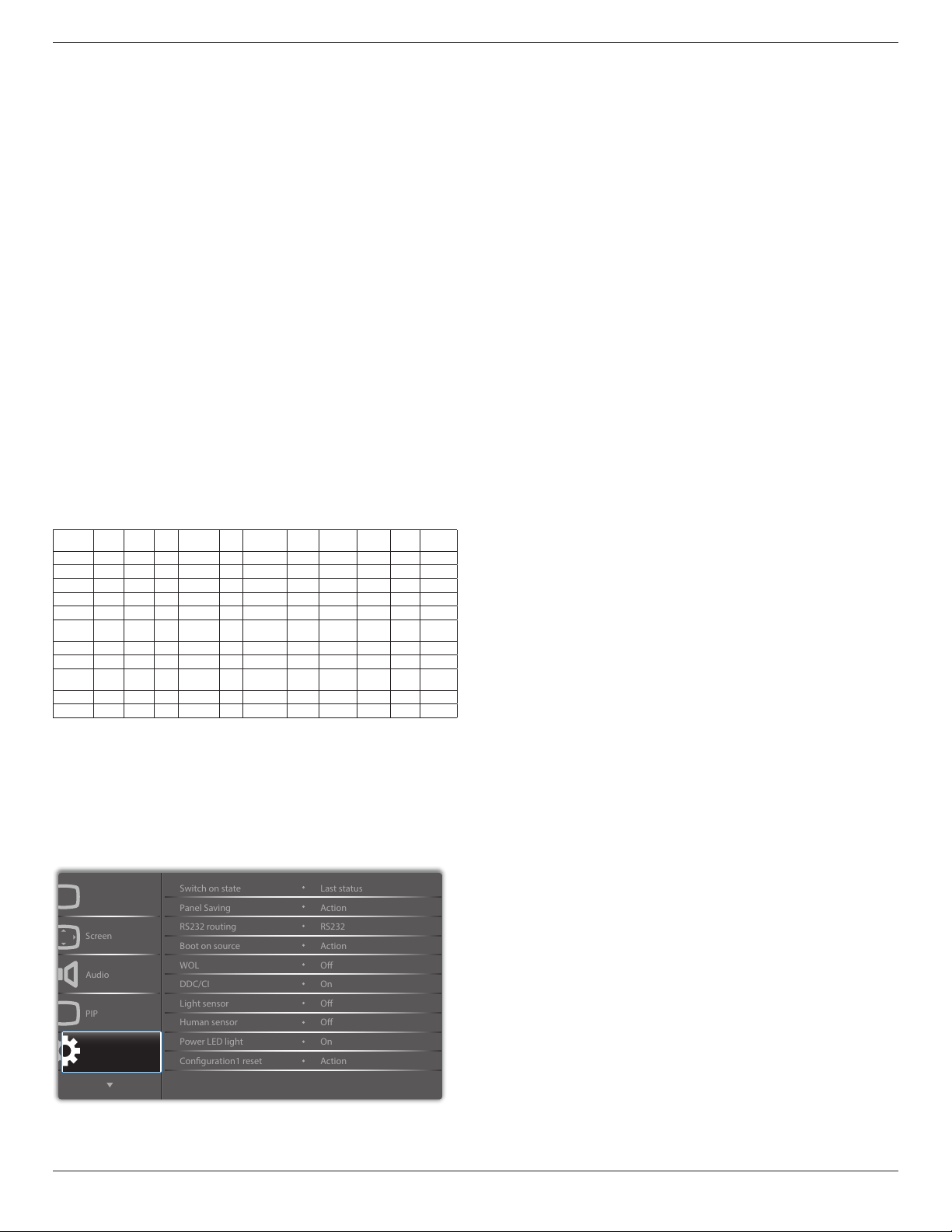
55BDL5057P
47
PIP position
SelectthepositionofthesubpictureinthePIP(Picture-in-Picture)
mode,{Bottom-Right}/{Bottom-Left}/{Top-Right}/{Top-Left}/{Center}/
{Custom}.
PIPposition/Customfeature:
Left/Right{0-10}:adjustPIPwindowsfromLefttoRightcorner.
Up/Down{0-10}:adjustPIPwindowsfromUptobottomofscreen.
Size{0-10}:adjustPIPwindowsize.
WhenPIPsubwindowmovingtotheborderofscreen,corresponding
settingofpostion/sizewillbexedandcannotadjust.
PIP change
ExchangeMainandPIP / PBP / Quick swapinputsignal.
PIP source
Selecttheinputsignalforthesubpicture.
PIP audio
SelecttheaudiosourceintheSubmode.
•{Main}-Selectaudiofromthemainpicture
•{Sub}-Selectaudiofromthesubpicture.
PIP reset
ResetallsettingsinthePIPmenutofactorypresetvalues.
• ThePIPfunctionisavailableonlyforcertainsignalsource
combinationsasshowninthetablebelow.
HDMI1 HDMI2 DVI DisplayPort VGA MediaPlayer Browser SmartCMS
PDF
Reader
Custom CardOPS
HDMI1
O X X O O X X X X X X
HDMI2
X O X O O X X X X X X
DVI
X X O O O* X X X X X X
DisplayPort
O O O O O O O O O O O
VGA
O O O* O O O O O O O O
Media
Player
X X X O O O X X X X X
Browser
X X X O O X O X X X X
SmartCMS
X X X O O X X O X X X
PDF
Reader
X X X O O X X X O X X
Custom
X X X O O X X X X O X
CardOPS
X X X O O X X X X X O
(O:PIPfunctionavailable,X:PIPfunctionunavailable)
• TheavailabilityofthePIPfunctionwillalsodependontheresolution
oftheinputsignalbeingused.
Note:Touchfunctionisonlyforsinglefullscreen.Multiplescreentouch
eventwillbeincorrectcorresponding.
6.2.5. Configuration1 menu
P
Audio
PIP
Screen
Picture
Conguration 1
Panel Saving
RS232 routing
WOL
DDC/CI
Switch on state
Boot on source
Light sensor
Power LED light
Conguration1 reset
Human sensor
Action
RS232
Last status
Action
O
On
O
O
Action
On
Switch on state
Selectthedisplaystatususedforthenexttimeyouconnectthepower
cord.
• {Power off}-Thedisplaywillremainoffwhenthepowercordis
connectedtoawalloutlet.
• {Forced on}-Thedisplaywillturnonwhenthepowercordis
connectedtoawalloutlet.
• {Last status}-Thedisplaywillreturntothepreviouspowerstatus
(on/off/standby)whenremovingandreplacingthepowercord.
Panel saving
Choosetoenablethepanelsavingfunctionsandthusreducetheriskof
“imagepersistence”or“ghost-imaging”.
• {Brightness}-Select{On}andtheimagebrightnesswillbereduced
toanappropriatelevel.TheBrightnesssettinginthePicturemenu
willbeunavailablewhenselected.
• {Pixel shift}-Selectthetimeinterval({Auto} / {10 ~ 900}Seconds/
{Off})forthedisplaytoslightlyexpandtheimagesizeandshift
thepositionofpixelsinfourdirections(up,down,left,orright).
ActivatingPixelShiftwilldisableHPosition,VPositionandZoom
ModeintheScreenMenu.
RS232 routing
Selectthenetworkcontrolport.
Choosefrom:{RS232}/{CardOPSRS232 (OPS model only)} / {LAN
-> RS232}.
Boot on source
Choosetoselectsourcewhenbootup.
Input:selectinputsourcewhenbootup.
Playlist:selectplaylistindexforMediaplayer,Browser,PDFplayer.
0:noplaylist.SameasswitchsourcefromOSD.1~7:playlistnumber.
WOL
ChoosetoturnonoroffthewakeonLANfunction.
Choosefrom:{Off}/{On}
DDC/CI
ChoosetoturnonorofftheDDC/CIcommunicationfunction.(*VGA
supportonly)
Select{On}fornormaluse.
Light sensor (require Philips accessory CRD41 External
Sensor Box)
Choosetoturnonoroffbacklightadjustmentaccordingtoenvironment
brightness.
Choosefrom:{Off}/{On}
Human sensor (require Philips accessory CRD41 External
Sensor Box)
TheHumansensorcandetectifpeopleapproachthedisplayornot.
Thedisplaywillturnoffbacklightifdetectnothinginsettingtime.
Thedisplaywillbacktobacklightonwhenpeopleapproachit.
Theoptionsare:
• {Off}(Default),{10Min.},{20Min.},{30Min.},{40Min.},{50Min.},{60
Min.}
Power LED light
ChoosetosetpowerindicateLEDonoroff.
Choose{On}fornormaluse.
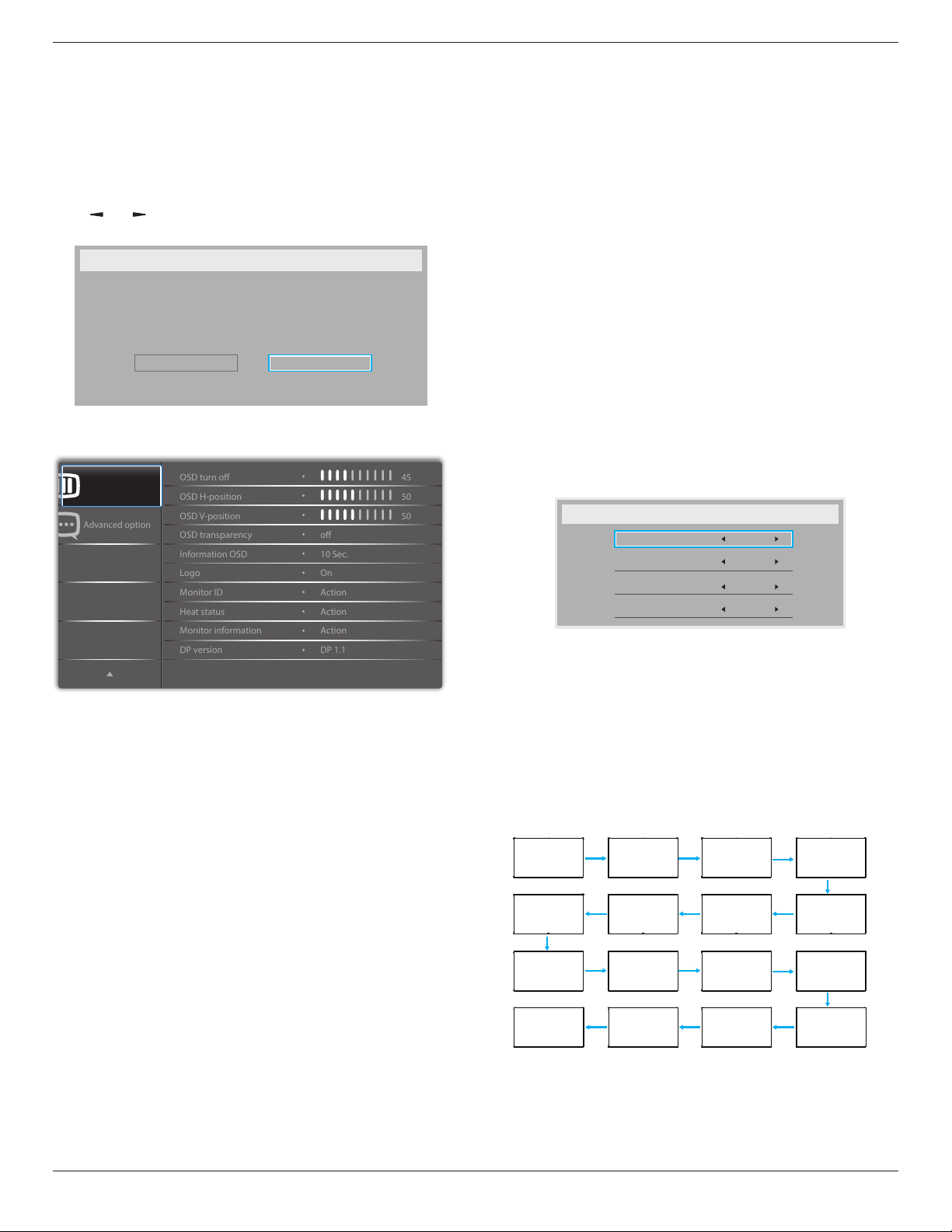
55BDL5057P
48
Conguration1 reset
ResetallsettingsinConguration1menutothefactorypresetvalues.
Factory reset
ResetallsettingsintheOSDmenusof{Picture},{Screen},{Audio},{PIP},
{Conguration1},{Conguration2},and{Advanced option}tothe
factorypresetvalues.
Androidsettingswillalsoresetwhenfactoryreset.
Press[ ]
or[ ]buttontoselect{Reset},andpress[OK]buttonto
dothereset.
Factory reset
Cancel
Reset
6.2.6. Configuration2 menu
Advanced option
Conguration 2
OSD H-position
OSD V-position
Information OSD
Logo
OSD turn o
OSD transparency
Monitor ID
Monitor information
DP version
Heat status
50
50
45
o
Action
Action
Action
10 Sec.
On
DP 1.1
OSD turn off
SettheperiodoftimetheOSD(on-screendisplay)menustaysonthe
screen.
Theoptionsare:{0 ~ 120}seconds.
*{0}doesnotdisappearautomatically.
OSD H-position
AdjustthehorizontalpositionoftheOSDmenu.
OSD V-position
AdjusttheverticalpositionoftheOSDmenu.
OSD Transparency
AdjustOSDtransparency.
• {Off}-Transparencyoff.
• {1-100}-Transparencylevel1-100.
Information OSD
SettheperiodoftimetheinformationOSDisdisplayedontheupper
rightcornerofthescreen.TheinformationOSDwilldisplaywheninput
signalischanged.
TheinformationOSDwillremainonthescreenwith{Off}selection.
Theoptionsare:{1 ~ 60}seconds.
Logo
ChoosetoenableordisablethepictureofLogowhenturnonyour
display.
Theoptionsare:
• {Off}
• {On}(Default)
• {User}
1. IfLogosettoON,bothscalarPhilipslogoandandroidanimation
Philipslogowillshow.
2. IfLogsettoOFF,neitherscalarPhilipslogonorandroidanimation
logowillnotshow.
3. IfLogosettoUSER,customlogooptioninandroidisnotset,then
therewillbenobootlogowhenpoweron.
4. IfLogosettoUSER,customlogooptioninandroidisset,therewill
beonlycustomlogowhenpowerup.
*LogowillNOTrotatewithrotationsetting/detection.
Monitor ID
SettheIDnumberforcontrollingthedisplayviatheRS232C
connection.EachdisplaymusthaveauniqueIDnumberwhenmultiple
setsofthisdisplayareconnected.MonitorIDnumberrangeisbetween
1to255.
Theoptionare:{Monitor group}/{Tiling matrix}/{Auto ID}
Monitor Id
Monitor Id
Monitor group
Tiling matrix
Auto ID
1
1
1
End
• {Monitor group}
Theoptionsare:{Off}/{1-254}
• {Off}–{Monitorgroup}arenotsupported.
• {1-254}–{Monitorgroup}aresupported.Thedefaultsettingis
1.
• {Tiling matrix}
Tilingmatrixnumberrangeisbetween1to15.1isdefaultsetting.
The{Auto ID}setupfunctionenablessettingup{Monitor ID}of
connectedmachineaccordingto{Tiling matrix}settings.
Example:Tilingmatrixsetsas4
1 2
5 6
3
4
7 8
9 10 11 12
13 14 15 16
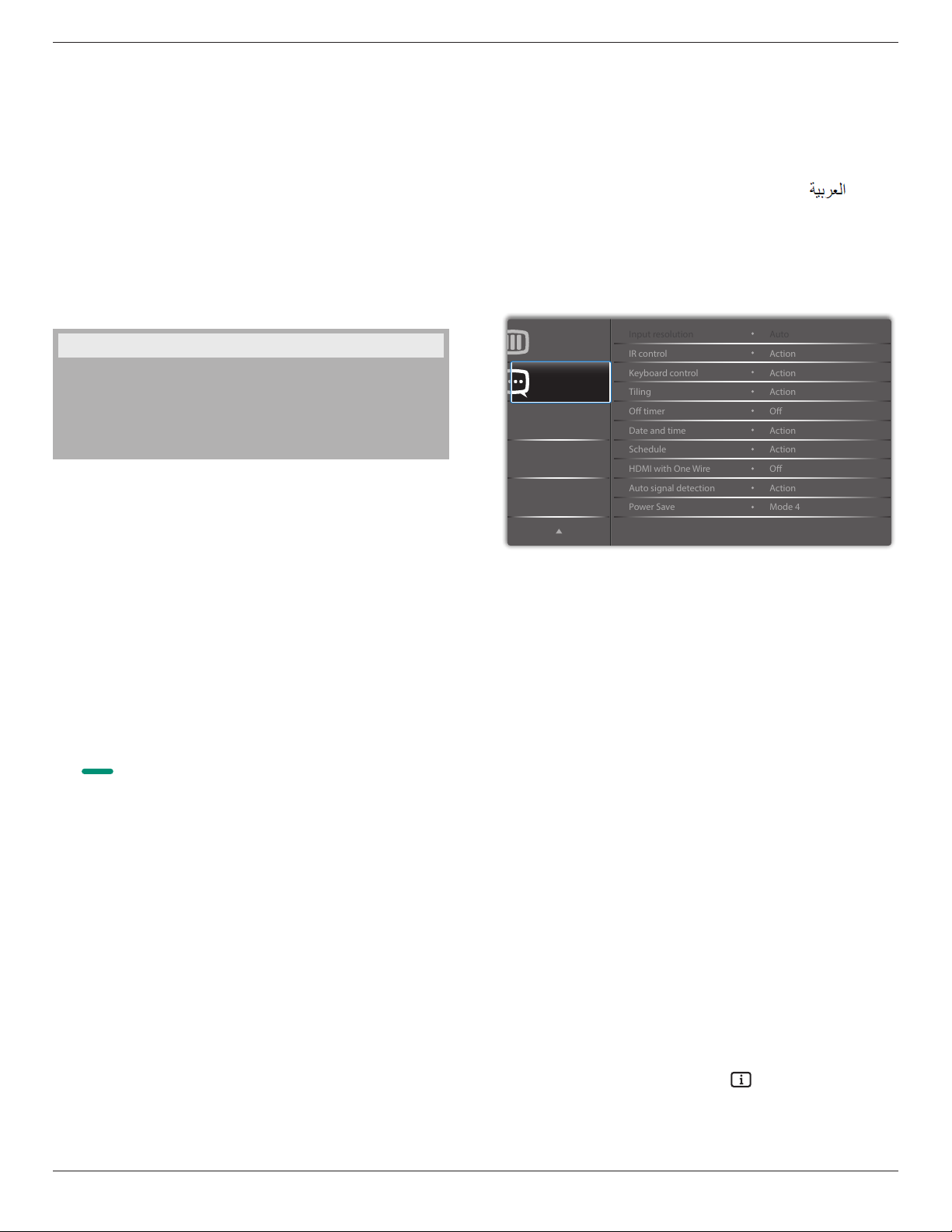
55BDL5057P
49
• {Auto ID}
Theoptionare:{Start}/{End}.Thedefaultis{End}.
• SwitchtoStartoptiontosetupIDsofmachinesbackward
fromcurrentone.
• Oncethesetupiscompleted,theoptionexitstoEnd
automatically.
• Tousethisfunction,serialconnectallmachineswithRS-232
cableandsettheirControlportstoRS-232too.
Heat status
Thisfunctionallowsyoutocheckthethermalstatusatanytime.
Monitor information
Showsinformationaboutyourdisplay,includingmodelnumber,serial
number,operatinghoursandsoftwareversion.
Monitor information
Model name
Serial no
Operation hours
SW Version
55BDL5057P
CNCA123456789
46H45M
V0.300
DP version
DisplayPortsupportmode.
Theoptionsare:
• {DP 1.1}(Default):DP1.1singlestream(clonemode)
• {DP 1.2 SST}:DP1.2Singlestream(clonemode)
• {DP 1.2 MST}:DP1.2Multi-Stream
*NOTE:
TheDPversionmustbesetthesameforalldaisychaindisplays.
Window selection
Selectthewindowforadjustingsetting.Theselectedwindowwillbe
highlightgreenborder.
WindowselectionwillsettoMainafterpoweron.
Theoptionsare:
• {Main}(Default),{PIP}
• [ ]
HotkeyforWindowselectionfunction.
Rotation
SettherotationofMain/Sub/OSD
AutoRotate: Off/On Default: Off
OSDRotate: Landscape/Portrait Default: Landscape
ImageRotate:
All: Off/On Default: Off
Main: Off/On Default: Off
Sub: Off/On Default: Off
AutoRotate:{Off},{On}whenvalueisOn,automaticallydetectwhether
thePDrotation,OffissetbyOSD.
OSDRotate:{Off},{On}whenvalueison,OSDrotate90°,Offis
restored.
All:{Off},{On}whenvalueison,allWindowscreenrotate90°,Offthe
referencesetindividualwindow.
Main:{Off},{On}whenvalueisonn,Mainwindowscreenrotate90°,
Offisrestored.
Sub:{Off},{On}whenvalueison,Sub1Windowscreenrotate90°,Off
isrestored.
*WhentheMain/Subsourceisthesame,rotationisgivenpriorityto
withSub.
*NotsuuporedDe-Interlacingfunctioninrotationmode.
Language
SelectthelanguageusedintheOSDmenu.
Theoptionsare:English/Deutsch/
简体中文
/Français/Italiano/Español/
Pyccкий/Polski/Türkçe/
繁體中文
/
日本語
/Português/ /Danish/
Svenska/Finnish/Norsk/Nederlands.
Conguration2 reset
ResetallsettingsinConguration2menutothefactorypresetvalues.
6.2.7. Advanced option menu
Advanced option
Conguration 2
IR control
Keyboard control
O timer
Date and time
Input resolution
Tiling
Schedule
Auto signal detection
Power Save
HDMI with One Wire
Action
Action
Auto
Action
Action
Action
O
O
Action
Mode 4
Input resolution
SettheresolutionoftheVGAinput.Thisisonlyrequiredwhenthe
displayisunabletodetecttheVGAinputresolutioncorrectly.
NOTE: ThisitemisfunctionalforVGAinputonly.
Theoptionsare:
• {1024x768/1280x768/1360x768 / 1366x768}
• {1400x1050/1680x1050}
• {1600x1200/1920x1200}
• {Auto}:Determinestheresolutionautomatically.
Theselectedsettingswillbecomeeffectiveafterturningoffthepower
andturningitonagain.
IR control
Selecttheoperationmodeoftheremotecontrolwhenmultiple
displaysareconnectedviaanRS232Cconnection.
• {Normal} -Alldisplayscanbeoperatednormallybytheremote
controlunit.
• {Primary}-Designatethisdisplayastheprimarydisplayfor
remotecontroloperation.Onlythisdisplaycanbeoperatedbythe
remotecontrol.(Inprimarymode,IRkeywillalwaysbeprocessed
regardlessthemonitorid/groupsettings).
• {Secondary}-Designatethisdisplayasthesecondarydisplay.This
displaycannotbeoperatedbytheremotecontrol,andwillonly
receivethecontrolsignalfromtheprimarydisplayviatheRS232C
connection.
• {Lock All}/{Lock all but Volume}/{Lock all but Power}/{Lock
all except PWR & VOL}-Locktheremotecontrolfunctionofthis
display.Tounlock,pressandholdthe[ ]INFObuttononthe
remotecontrolfor6(six)seconds.
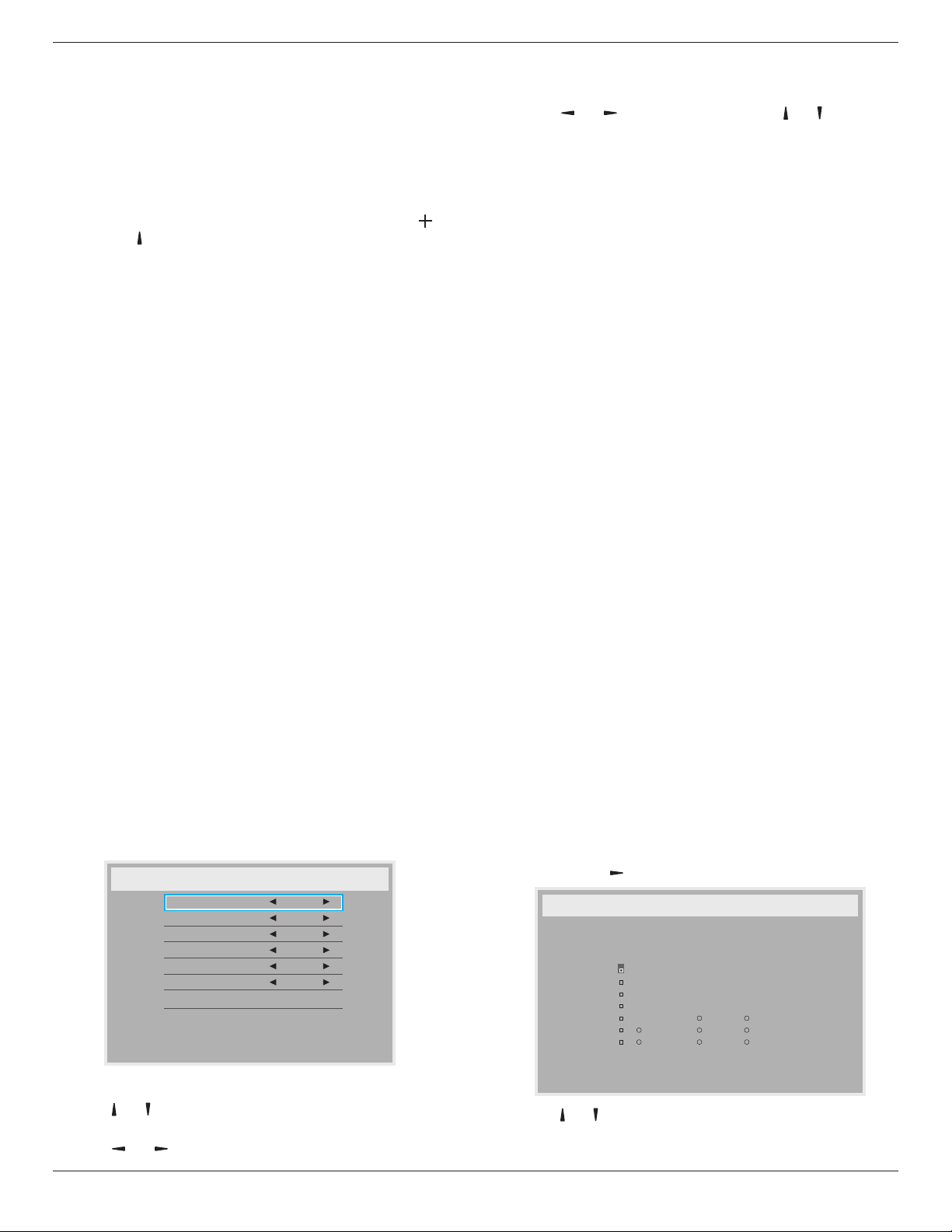
55BDL5057P
50
Keyboard control
Choosetoenableordisablethedisplaykeyboard(controlbuttons)
function.
• {Unlock}-Enablethekeyboardfunction.
• {Lock All}/{Lock all but Volume}/{Lock all but Power}/{Lock
all except PWR & VOL}-Disablethekeyboardfunction.
NOTE: “KeyboardControlLockMode”Thisfunctioncompletely
disablestheaccesstoallKeyboardControlfunctions.To
enableordisablethekeyboardcontrollock,pressboth[ ]
and[ ]buttonsandholddowncontinuouslyformorethan3
seconds.
Tiling
Withthisfunctionyoucancreateasinglelarge-screenmatrix(video
wall)thatconsistsofupto150setsofthisdisplay(up to 10-sets on
the vertical and 15-sets on the horizontal sides).Thisfunctionrequires
adaisy-chainconnection.
• Switch on delay:Setthepower-ondelayingtime(inseconds).The
defaultoption{Auto}allowsasequentialpowering-onforeach
displaybytheirIDnumberwhenmultipledisplaysareconnected.
Theoptionsare:{Off(0)/Auto(1)/2-255}
• Brightness:{Normal}/{ACS}
• {Normal}:Adjusttheoverallimageandbackgroundscreen
brightness(backlight).
• {ACS}:Applybrightnessvalue(backlight)whichisadjustedby
MICtool.Thedefaultvaluebeforeadjustmentisthesameas
OSDbrightnessvalue,e.g.,70)
• Type:{Manual}/{Tilingtool}
• Source resolution:{FullHD}(Default)/{4K}
• H monitors-Selectthenumberofdisplaysonthehorizontalside.
• V monitors-Selectthenumberofdisplaysontheverticalside.
• Position-Selectthepositionofthisdisplayinthescreenmatrix.
• Frame comp. -Choosetoturntheframecompensationfunction
onoroff.Ifselected{Yes},thedisplaywilladjusttheimageto
compensateforthewidthofthedisplaybezelsinorderto
accuratelydisplaytheimage.
NOTE: Doesn’tsupportscreenformatfunctionintilingusingcascade
mode.
Off Timer
Setautomaticallypowerofftime(inhours).
Date and time
Adjustthecurrentdateandtimeforthedisplay’sinternalclock.
Date and time
Year
Month
Day
Hour
Minute
Daylight saving time
Current date time
2015 . 01 . 01 22 : 41 : 00
Press [OK] to set clock
2015
1
1
22
40
Auto Sync No
1. Press[OK]buttontoenterthesubmenu.
2. Press[ ] or[ ]buttontotogglebetween{Year},{Month},{Day},
{Hour},{Minute},and{Daylight saving time}.
3. Press[ ]
or[ ]buttontoadjustallsettingsexcept{Daylight
saving time}.
4. Press[OK]buttontoenterthe{Daylight saving time}submenu.
5. Press[ ]
or[ ]buttontoselectitem,press[ ] or[ ] buttonto
adjust.
The Daylight saving time denition and behavior:
Thecurrentimplementationofdaylightsavingisaremindertoolfor
thecustomerwhichdoesn’tknowhowtoadjusttheclockfordaylight
savingonandoff.Itdoesnotadjusttherealtimeclockautomatically.
Problemisthattherearenostablerulesperregion,orcountrywhento
adjusttheclock.Tosolvethistheusermustbeabletosetthedaylight
savingstartenstopdate.Whendaylightsavingcorrectionison(user
selectable)thentherealtimeclockshouldbeadjustedatthemoment
intimesetinthedaylightsavingonandoffdate.Atdaylightstartdate
theclockshouldbeputforward1hourat2o’clock.Atdaylightstop
datetheclockshouldbeputback1hourat2o’clock.
Theexistingdaylighton/offmenuitemshouldbereplacedwiththe
followingmenustructure:
• Menuitem<Daylightsavingsetup>openssubmenucontainingthe
followingitems:
• Menuitem<Daylight-savingstartdate>Selectionitem<1st,2nd,
3rd,4th,last>Sundayofselectionitem<1-12month>
• Menuitem<Daylight-savingstopdate>Selectionitem<1st,2nd,
3rd,4th,last>Sundayofselectionitem<1-12month>
• optional
• Menuitem<Correctiontime>Selectionitem<0.5,1.0,1.5,2.0>
hour
• Menuitem<Daylightsavingcorrection>Selectionitem<on,off>
when“daylightsaving”is“on”therealtimeclockwouldhavebeen
adjustedautomaticallyforwinterandsummertimewhenpassingthe
criticalmomentintime(egmarch29,2009,02.00o’clock:timewillbe
set1hourlaterorOctober25,2009,02.00o’clock:timewillbeset1
hourearlier)
Schedule
Thisfunctionallowsyoutoprogramupto7(seven)differentscheduled
timeintervalsforthedisplaytoactivate.
Youcanselect:
• Thetimeforthedisplaytoturnonandturnoff.
• Thedaysinaweekforthedisplaytoactivate.
• Whichinputsourcethedisplaywilluseforeachscheduled
activationperiod.
NOTE: Werecommendyoutosetupcurrentdateandtimeinthe
{Date and time}menubeforeusingthisfunction.
1. Press[OK]or[ ]buttontoenterthesubmenu.
Schedule
Today
1
2
3
4
5
7
6
2015 . 01 . 04 SUN 04 : 14 : 01
On
:
_
:
_ _ _ _
O
Input
WED
SAT
MON
THU
SUN
TUE
FRI
Every week
Clear all
playlist 0
2. Press[ ] or[ ] buttontoselectascheduleitem(itemnumber1~7),
andthenpress[OK]buttontomarkittheitemnumber.
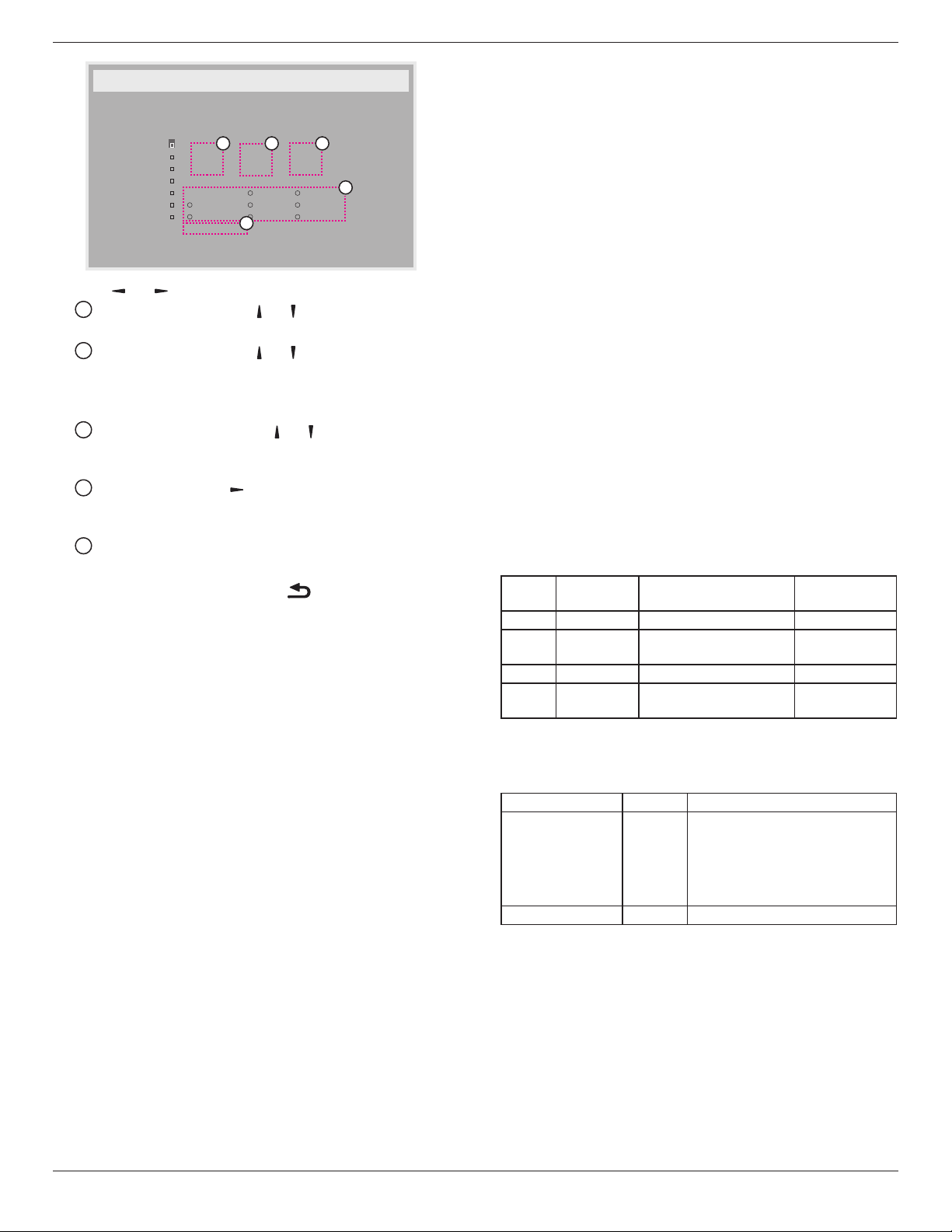
55BDL5057P
51
Schedule
Today
1
2
3
4
5
7
6
2015 . 01 . 04 SUN 04 : 14 : 01
On
:
_
:
_ _ _ _
O
Input
WED
SAT
MON
THU
SUN
TUE
FRI
Every week
Clear all
playlist 0
4
1
32
5
3. Press[ ]
or[ ]buttontoselecttheschedule:
1
Power-onschedule:Press[ ] or[ ]buttontosetthehour
andminuteforthedisplaytoturnon.
2
Power-offschedule:Press[ ] or[ ] buttontosetthehour
andminuteforthedisplaytoturnoff.
Selectorleaveanempty“__”forboththehourandminuteslotif
youdonotwanttousethispower-onorpower-offschedule.
3
Input-sourceselection:Press[ ] or[ ] buttontoselectan
inputsource.Ifnoinputsourceisselected,theinputsource
willremainthesameaslastselected.
4
Dateschedule:Press[ ]buttontoselectwhichdayina
weekthisscheduleitemwillbetakeeffect,andthenpressthe
[OK]button.
5
WhenInput-sourceselecttoUSB,enabletoaccessplaylist
setting:
4.
Foradditionalschedulesettings,press[ ],thenrepeatthesteps
above.Acheckmarkintheboxnexttothenumberoftheschedule
itemindicatesthattheselectedscheduleisineffect.
NOTES:
• Iftheschedulesoverlap,thescheduledpower-ontimetakespriority
overscheduledpower-offtime.
• Iftherearetwoscheduleitemsprogrammedforthesametime,the
highestnumberedscheduletakespriority.Forexample,ifschedule
items#1and#2bothsetthedisplaytopoweronat7:00AMand
offat5:00PM,thenonlyscheduleitem#2willtakeeffect.
HDMI with One Wire
CECcontrol.
• {Off} -DisableCEC.(Default)
• {On}-EnableCEC.
Auto signal detection
Choosetoletthedisplaydetectanddisplayavailablesignalsources
automatically.
• {Off}-Onceasignalisconnected,itcanonlybeselectedmanually.
Iftheselectedinputisnosignal,setthedisplaytodisplaytheimage
automaticallyaccordingtothesearchorderofeachoption.
Theoptionsare:{All} / {Failover}
• {All}:DP -> HDMI1 -> HDMI2 -> DVI -> VGA->MediaPlayer->
Browser->SmartCMS->PDFReader->Custom.
• {Failover}
- Failover1:User-denedsetting.Default:HDMI1.
- Failover2:User-denedsetting.Default:HDMI1.
- Failover3:User-denedsetting.Default:HDMI1.
- Failover4:User-denedsetting.Default:HDMI1.
- Failover5:User-denedsetting.Default:HDMI1.
- Failover6:User-denedsetting.Default:HDMI1.
- Failover7:User-denedsetting.Default:HDMI1.
- Failover8:User-denedsetting.Default:HDMI1.
- Failover9:User-denedsetting.Default:HDMI1.
- Failover10:User-denedsetting.Default:HDMI1.
Power Save
Mode1[TCPoff,WOLon,autooff]
Mode2[TCPoff,WOLon,autoon/off]
Mode3[TCPon,WOLoff,autoon/off]
Mode4[TCPon,WOLoff,noautoon/off]
Powersavemodes
Mode1:DCoff->Poweroff.LED:Red.
PowerSave->Poweroff,LED:Red
Mode2:DCoff->Poweroff,LED:Red.
PowerSave->PowerSaving.LED:Orange.Canbewakeup.
Mode3:DCoff->Backlightoff,LED:Red
PowerSave->Backlightoff,LED:Orange.Canbewakeup.
Mode4:DCoff->Backlightoff,LED:Red
PowerSave->Willnotenterpowersavemode.show“nosignal”only.
RCUPower
ButtonOff
NoSignal Android
Mode1 DCOFF DCOFF boardpoweroff
Mode2 DCOFF whensignalisback,system
wakeup
boardpoweroff
Mode3 BacklightOFF BacklightOFF keeppoweron
Mode4 BacklightOFF BacklightON,showno
signal
keeppoweron
FollowingtableistheactionforAndroidboardwithdifferentpower
mode.
DCoff/on:presspowerbuttonbyRC
PowermodeinOSD Mode1/2 Mode3/4
DCoff shutdown 1.ThecurrentsourceAPK(such
asMediaPlayer,Broswer,PDFor
SmartCMS)willbeclosed.
2.Androidsystemwillgotothe
defaultblacklauncher.
DCon Bootup 1.Androidsystemreboots
Scalar FW Update
UpdatescalarFWbyUSB.
USB cloning
CopyPDsettingsfromonesettoanother.
Import:Copysettingsfromletodisplay
Export:CopyPDsettingsintole.
*CloneddatastoresinUSB.
*PIP/PBPstatuswillbeappliedafterACoff/onaction.

55BDL5057P
52
OPS setting
SetOPSstatus.
• {Always off}-DisableOPS
• {Always on}-EnableOPS(Default)
*OPSmodelonly
Advanced option reset
Resetallsettingsexcept{Date and Time}intheAdvanced optionmenu
tofactorypresetvalues.
1. Press[OK]or[ ]buttontoenterthesubmenu.
2. Press[ ]
or[ ]buttontoselect{Reset}andpressthe[OK]
buttontorestoresettingstofactorypresetvalues.
3.
Pressthe[ ]buttonorselect{Cancel}andpressthe[OK]
buttontocancelandthenreturntothepreviousmenu.
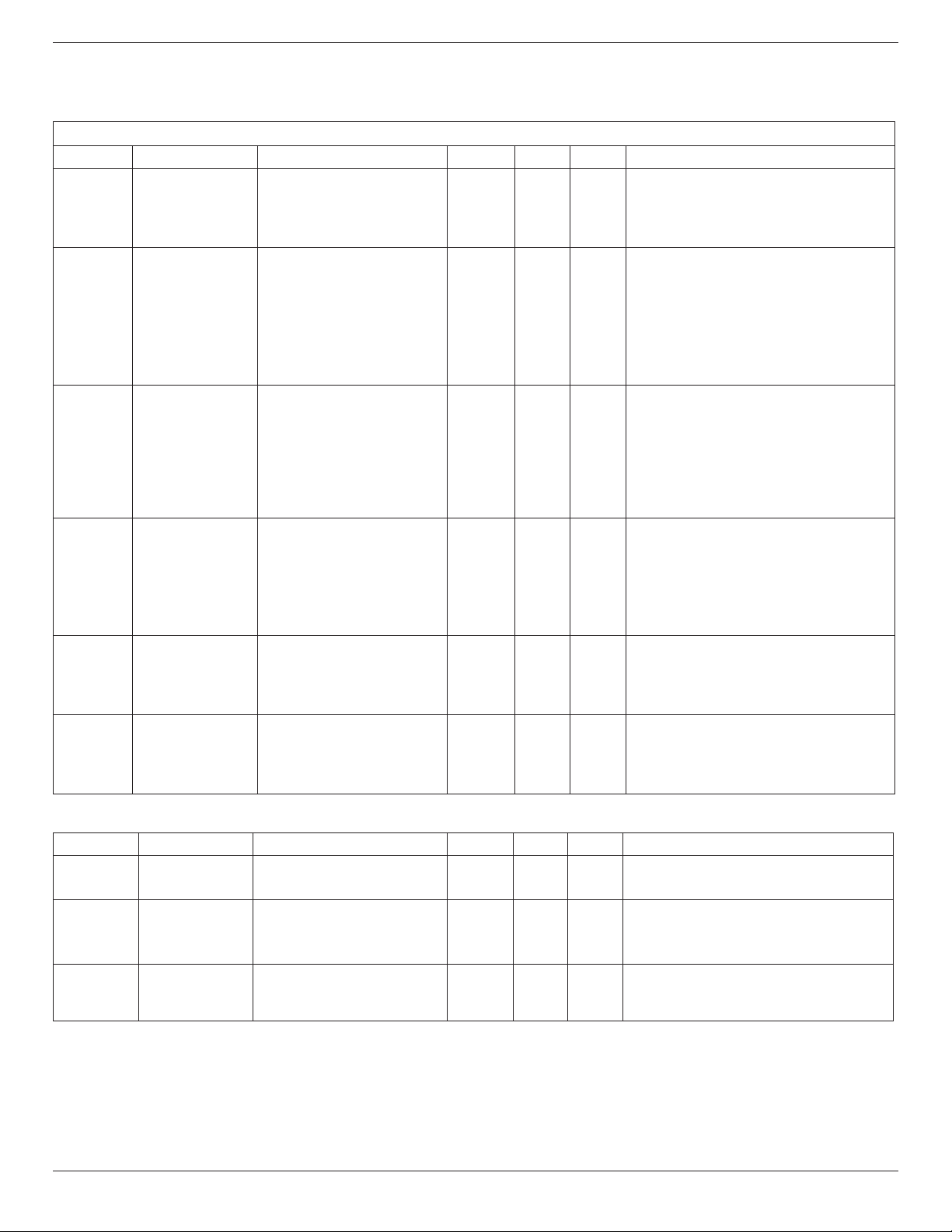
55BDL5057P
53
7. USB device compatibility
USB Multimedia Codec Formats
Video Decode
Type VideoCodec Container Decode Encode Channel
Remark
MPEG1/2 MPEG1/2 FileFormat:DAT,MPG,VOB,TS V
SupportedImageSize:48x48pixelsto1920x1088pixels
MaximumFrameRate:30fps
MaximumBitRate:80Mbps
AudioCodec:MP2,MP3
MPEG-4 MPEG4
FileFormat:AVI,MKV,MP4,MOV,
3GP
V
SupportedImageSize:48x48pixelsto1920x1088pixels
MaximumFrameRate:30fps
MaximumBitRate:38.4Mbps
AudioCodec:MP2,MP3,AAC,PCM,
(1)NotsupportMSMPEG4v1/v2/v3
(2)NotsupportGMC(globalmotioncompensation)
H.263 H.263 FileFormat:3GP,MOV,MP4 V
SupportedImageSize:SQCIF(128x96),
QCIF(176x144),
CIF(352x288),4CIF(704x576)
MaximumFrameRate:30fps
MaximumBitRate:38.4Mbps
AudioCodec:MP3
(1)NotsupportH.263+
H.264 H.264
FileFormat:AVI,MKV,MP4,MOV,
3GP,TS,FLV
V
SupportedImageSize:48x48pixelsto1920x1088pixels
MaximumFrameRate:30fps
MaximumBitRate:57.2Mbps
AudioCodec:MP2,MP3,AAC,PCM
(1)NotsupportMBAFF
GOOGLE
VP8
VP8 FileFormat:WEBM V
SupportedImageSize:48x48pixelsto1920x1088pixels
MaximumFrameRate:30fps
MaximumBitRate:38.4Mbps
AudioCodec:OggVorbis
MotionJPEG MJPEG FileFormat:AVI,MOV V
SupportedImageSize:48x48pixelsto1920x1088pixels
MaximumFrameRate:30fps
MaximumBitRate:38.4Mbps
AudioCodec:MP2,MP3,AAC,PCM
Audio Decode
Type AudioCodec Container Decode Encode Channel Remark
MPEGAudio
MPEG1/2/2.5Audio
Layer1/2/3
Decode:MP1,MP2,MP3 V 2
BitRate:8kbps~320Kbps,CBRandVBR
SamplingRate:8KHZ~48KHz
Windows
MediaAudio
WMAVersion4,4.1,
7,8,9,wmapro
Decode:WMA V 2
BitRate:8kbps~320Kbps
SamplingRate:8KHZ~48KHz
Non-supportWMAPro,losslessandMBR
AACAudio
MAIN,ADIF,ATDS
HeaderAAC-LC
andAAC-HE
FileFormat:AAC,M4A V 5.1
BitRate:N/A
SamplingRate:8KHZ~48KHz

55BDL5057P
54
Image Decode
Type ImageCodec Photo Decode Encode Channel Remark
JPEG JFIFleformat1.02 FileFormat:JPG,JPEG V Decode:Resolution48X48to8176X8176
(1)NotSupportNon-interleavedScan
(2)SoftwaresupportSRGBJPEG
(3)SoftwaresupportAdobeRGBJPEG
BMP BMP FileFormat:BMP V MaximumSupportedImageSize:4096x4096pixels
GIF GIF FileFormat:GIF V ResolutionNoRestriction
PNG PNG FileFormat:PNG V ResolutionNoRestriction
NOTES:
• Soundorvideomaynotworkifthecontentshaveastandardbitrate/framerateabovethecompatibleFrame/seclistedinthetableabove.
• VideocontentwithaBitrateorFrameratelargerthantheratespeciedinthetableabovecancausechoppyvideoduringplayback.
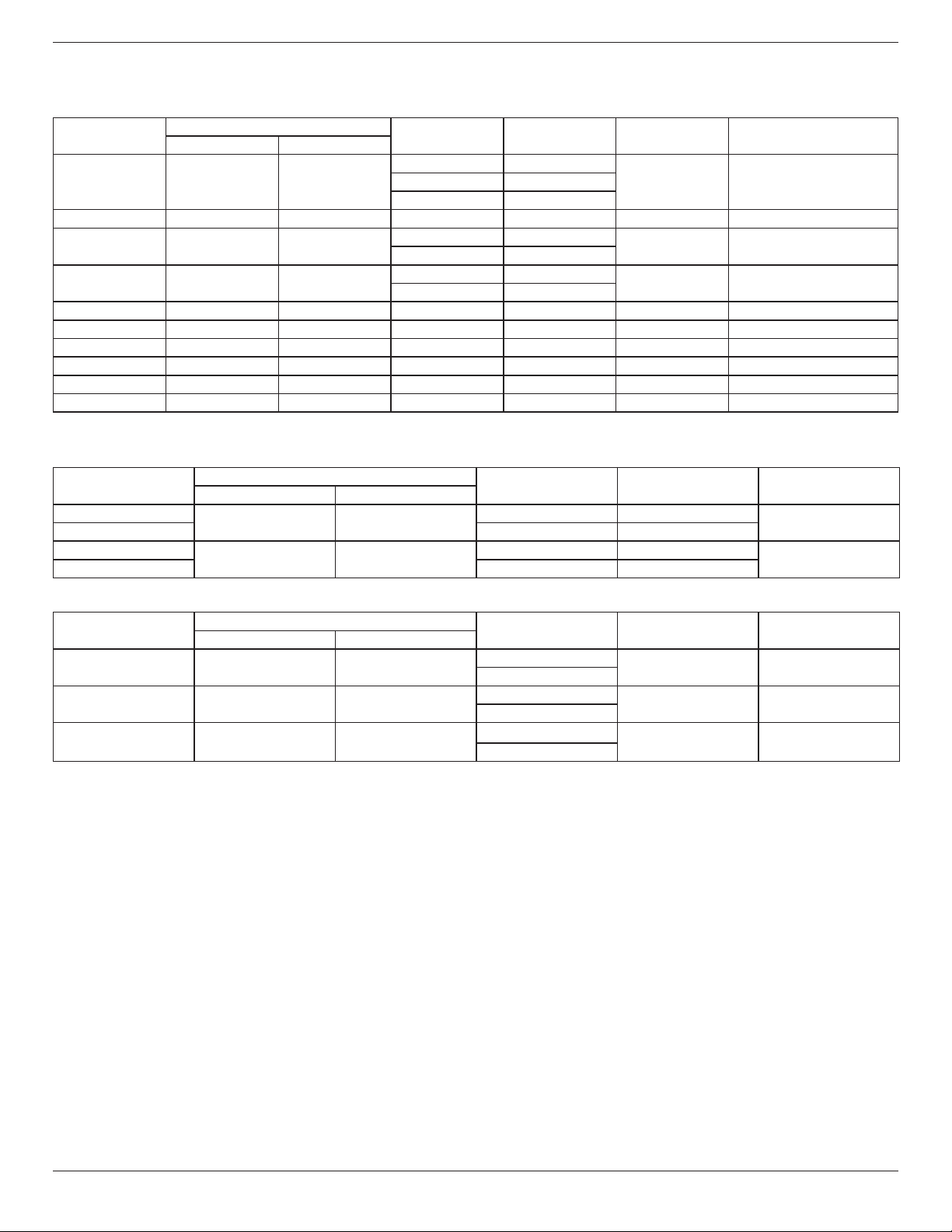
55BDL5057P
55
8. Input Mode
VGA Resolution:
Standard
Resolution
ActiveResolution
RefreshRate PixelRate AspectRatio StandforMode
HPixels VLines
VGA 640 480
60Hz 25.175MHz
4:3 VideoGraphicArray72Hz 31.5MHz
75Hz 31.5MHz
WVGA 720 400 70Hz 33.75MHz 16:9 WideVideoGraphicArray
SVGA 800 600
60Hz 40MHz
4:3 SuperVGA
75Hz 49.5MHz
XGA 1024 768
60Hz 65MHz
4:3 ExtendedGraphicArray
75Hz 78.75MHz
WXGA 1280 768 60Hz 79.5MHz 5:3 WideXGA
WXGA 1280 800 60Hz 79.5MHz 16:10 WideXGA
SXGA 1280 1024 60Hz 108MHz 5:4 SuperXGA
WXGA 1360 768 60Hz 85.5MHz 16:9 WideXGA
UXGA 1600 1200 60Hz 162MHz 4:3 UltraXGA
HD1080 1920 1080 60Hz 148.5MHz 16:9 HD1080
Note:1280x768/60HzcanbesupportedbutnotshowninEDIDtable.
SD Resolution:
StandardResolution
ActiveResolution
RefreshRate PixelRate AspectRatio
HPixels VLines
480i
720 480
29.97Hz 13.5MHz
4:3
480p 59.94Hz 27MHz
576i
720 576
25Hz 13.5MHz
4:3
576p 50Hz 27MHz
HD Resolution:
StandardResolution
ActiveResolution
RefreshRate PixelRate AspectRatio
HPixels VLines
720p 1280 720
50Hz
74.25MHz 16:9
60Hz
1080i 1920 1080
25Hz
74.25MHz 16:9
30Hz
1080p 1920 1080
50Hz
148.5MHz 16:9
60Hz
• ThePCtextqualityisoptimuminHD1080mode(1920x1080,60Hz).
• YourPCdisplayscreenmightappeardifferentdependingonthemanufacturer(andyourparticularversionofWindows).
• CheckyourPCinstructionbookforinformationaboutconnectingyourPCtoadisplay.
• Ifaverticalandhorizontalfrequency-selectmodeexists,select60Hz(vertical)and31.5KHz(horizontal).Insomecases,abnormalsignals(suchas
stripes)mightappearonthescreenwhenthePCpoweristurnedoff(orifthePCisdisconnected).Ifso,pressthe[INPUT]buttontoenterthe
videomode.Also,makesurethatthePCisconnected.
• WhenhorizontalsynchronoussignalsseemirregularinRGBmode,checkPCpowersavingmodeorcableconnections.
• ThedisplaysettingstablecompliestotheIBM/VESAstandards,andbasedontheanaloginput.
• TheDVIsupportmodeisregardedassametothePCsupportmode.
• Thebesttimingfortheverticalfrequencytoeachmodeis60Hz.
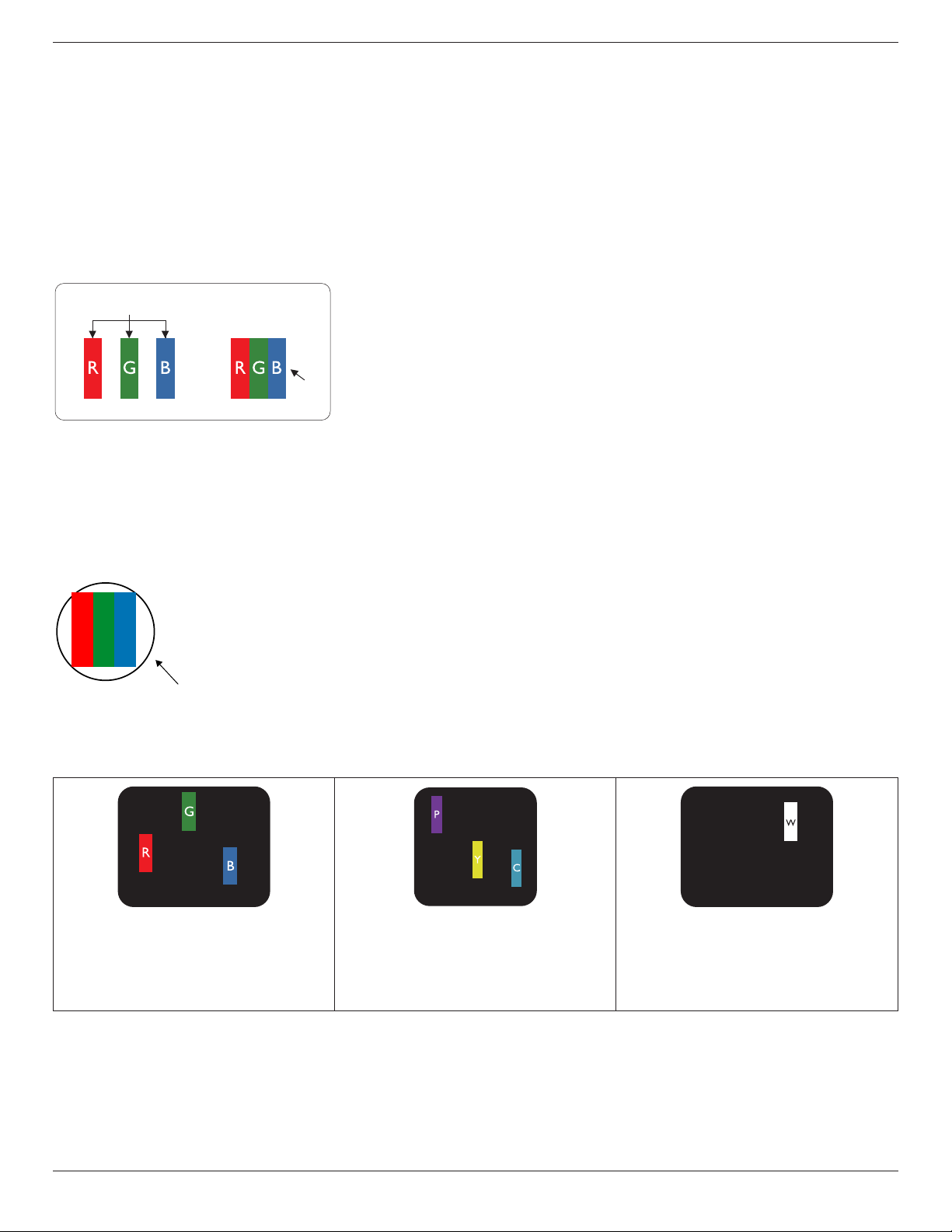
55BDL5057P
56
9. Pixel Defect Policy
Westrivetodeliverthehighestqualityproductsandusesomeoftheindustry’smostadvancedmanufacturingprocesseswhilstpracticingstringentquality
control.However,pixelorsub-pixeldefectsonthePDP/TFTpanelsusedinPlasma-&LCD-displaysaresometimesunavoidable.Nomanufacturercan
guaranteethatallpanelswillbefreefrompixeldefects,butPhilipsguaranteesthatanyPlasma-&LCD-displayswithanunacceptablenumberofdefects
willberepairedduringthewarrantyperiodinlinewithyourlocalguaranteeconditions.
ThisnoticeexplainsthedifferenttypesofpixeldefectsanddenestheacceptabledefectlevelfortheLCDscreen.Inordertoqualifyforrepairunder
warranty,thenumberofpixeldefectsmustexceedacertainlevelasshowninthereferencetable.IftheLCDscreeniswithinspecicationawarranty
exchange/claimbackwillberefused.Additionally,becausesometypesorcombinationsofpixeldefectsaremorenoticeablethanothers,Philipssetseven
higherqualitystandardsforthose.
9.1. Pixels and Sub-Pixels
subpixel
pixel
Apixel,orpictureelement,iscomposedofthreesub-pixelsintheprimarycolorsofred,greenand
blue.Manypixelstogetherformanimage.Whenallsub-pixelsofapixelarelit,thethreecolored
sub-pixelstogetherappearasasinglewhitepixel.Whenallaredark,thethreecoloredsub-pixels
togetherappearasasingleblackpixel.Othercombinationsoflitanddarksub-pixelsappearas
singlepixelsofothercolors.
9.2. Types of Pixel Defects + Dot Definition
Pixelandsub-pixeldefectsappearonthescreenindifferentways.Therearethreecategoriesofpixeldefectsandseveraltypesofsub-pixeldefectswithin
eachcategory.
Dot denition = What is a defective “Dot”? :
Oneormoredefective,adjacentsub-pixelaredenedasone“dot”.Theno.ofdefectivesub-pixelsarenotrelevanttodeneadefectivedot.Thismeans
thatadefectivedotcanconsistofone,twoorthreedefectivesub-pixelswhichcanbedarkorlit.
RR G B
Onedot=OnePixel;consistsofthreesub-pixelsofRed,Green,andBlue.
9.3. Bright Dot Defects
Brightdotdefectsappearaspixelsorsub-pixelsthatarealwayslitor“on”.Thesearetheexamplesofbrightdotdefects:
Onelitred,greenorbluesubpixel Twoadjacentlitsubpixels:
Red+Blue=Purple
Red+Green=Yellow
Green+Blue=Cyan(LightBlue)
Threeadjacentlitsubpixels(onewhitepixel)

55BDL5057P
57
9.4. Dark Dot Defects
Blackdotdefectsappearaspixelsorsub-pixelsthatarealwaysdarkor“off”.Thesearetheexamplesofblackdotdefects:
Onedarkdot Twoadjacentdarkdots=1pairofdarkdots Twodarkdots,specicationsdenesthe
minimumdistancebetweendarkdots
9.5. Proximity of Pixel Defects
Becausepixelandsub-pixelsdefectsofthesametypethatarenearbyoneanothermaybemorenoticeable,Philipsalsospeciestolerancesforthe
proximityofpixeldefects.Inthetablebelowyoucanndspecicationsabout:
• Allowedamountofadjacentdarkdots=(adjacentdarkdots=1pairofdarkdots)
• Minimumdistancebetweendarkdots
• Totalno.ofalldefectivedots
9.6. Pixel Defect Tolerances
Inordertoqualifyforrepairduetopixeldefectsduringthewarrantyperiod,aPDP/TFTpanelinaPhilipsPlasma/LCD-displaymusthavepixelorsub-
pixeldefectsexceedingthetoleranceslistedinthefollowingtable.
BRIGHTDOTEFFECT ACCEPTABLELEVEL
1litsubpixel 2
BLACKDOTEFFECT ACCEPTABLELEVEL
1darksubpixel 10
TOTALDOTDEFECTSOFALLTYPES 12
NOTE:*1or2adjacentsubpixeldefects=1dotdefect
9.7. MURA
Darkspotsorpatchesmayoccasionallyappearonsomeliquidcrystaldisplay(LCD)panels.ThisisknownwithintheindustryasMura,whichisaJapanese
termfor“unevenness.”Itisusedtodescribeanirregularpatternorareainwhichunevenscreenuniformityappearsundercertainconditions.Muraisa
resultofthedeteriorationoftheliquidcrystalalignmentlayerandismostcommonlycausedbylong-termoperationunderhighambienttemperatures.It
isanindustry-widephenomenonandMuraisnotrepairable.Itisalsonotcoveredbyourwarrantyterms.
MurahasbeenaroundsincetheintroductionofLCDtechnologyandwithscreensgettingbiggerandinoperation24/7,manydisplaysarerunninginlow
lightconditions.ThisalladdstothepossibilityofMuraaffectingdisplays.
HOW TO SPOT MURA
TherearemanysymptomsofMuraandalsomultiplecauses.Severalofthesearelistedbelow:
• Impuritiesorforeignparticlesinthecrystalmatrix
• UnevendistributionofLCDmatrixduringmanufacturing
• Non-uniformluminancedistributionofthebacklight
• Panelassemblyinducedstress
• FlawswithintheLCDcells
• Thermalinducedstress-hightemperatureoperationoverlongperiodsoftime
HOW TO AVOID MURA
AlthoughwecannotguaranteethecompleteeradicationofMuraeverytime,ingeneraltheappearanceofMuracanbeminimizedbythesemethods:
• Lowerthebacklightbrightness
• Useascreensaver
• Reducetheambienttemperaturearoundtheunit

55BDL5057P
58
10. Cleaning and Troubleshooting
10.1. Cleaning
Caution When Using the Display
• Donotbringyourhands,faceorobjectsclosetotheventilationholesofthedisplay.Thetopofthedisplayisusuallyveryhotduetothehigh
temperatureofexhaustairbeingreleasedthroughtheventilationholes.Burnsorpersonalinjuriesmayoccurifanybodypartsarebroughttoo
close.Placinganyobjectnearthetopofthedisplaycouldalsoresultinheatrelateddamagetotheobjectaswellasthedisplayitself.
• Besuretodisconnectallcablesbeforemovingthedisplay.Movingthedisplaywithitscablesattachedmaydamagethecablesandthuscausere
orelectricshock.
• Disconnectthepowerplugfromthewalloutletasasafetyprecautionbeforecarryingoutanytypeofcleaningormaintenanceprocedure.
Front Panel Cleaning Instructions
• Thefrontofthedisplayhasbeenspeciallytreated.Wipethesurfacegentlyusingonlyacleaningclothorasoft,lint-freecloth.
• Ifthesurfacebecomesdirty,soakasoft,lint-freeclothinamilddetergentsolution.Wringtheclothtoremoveexcessliquid.Wipethesurfaceof
thedisplaytoremovedirt.Thenuseadryclothofthesametypetodry.
• Donotscratchorhitthesurfaceofthepanelwithngersorhardobjectsofanykind.
• Donotusevolatilesubstancessuchasinsertsprays,solventsandthinners.
Cabinet Cleaning Instructions
• Ifthecabinetbecomesdirty,wipethecabinetwithasoft,drycloth.
• Ifthecabinetisextremelydirty,soakalint-freeclothinamilddetergentsolution.Wringtheclothtoremoveasmuchmoistureaspossible.Wipe
thecabinet.Useanotherdryclothtowipeoveruntilthesurfaceisdry.
• Donotallowanywaterordetergenttocomeintocontactwiththesurfaceofthedisplay.Ifwaterormoisturegetsinsidetheunit,operating
problems,electricalandshockhazardsmayresult.
• Donotscratchorhitthecabinetwithngersorhardobjectsofanykind.
• Donotusevolatilesubstancessuchasinsertsprays,solventsandthinnersonthecabinet.
• DonotplaceanythingmadefromrubberorPVCnearthecabinetforanyextendedperiodsoftime.
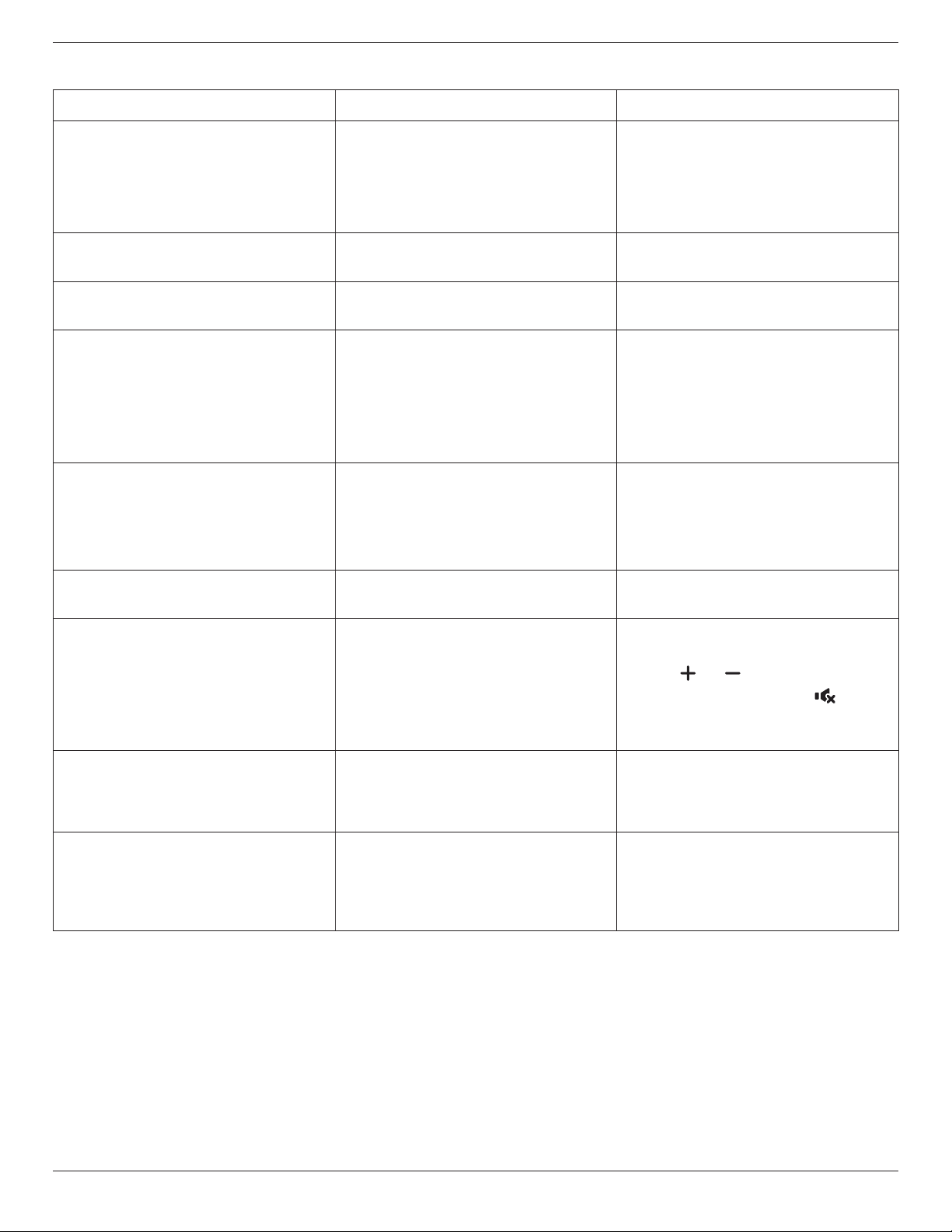
55BDL5057P
59
10.2. Troubleshooting
Symptom Possible Cause Remedy
No picture is displayed 1. Thepowercordisdisconnected.
2. Themainpowerswitchonthebackofthe
displayisnotswitchedon.
3. Theselectedinputhasnoconnection.
4. Thedisplayisinstandbymode.
1. Pluginthepowercord.
2. Makesurethepowerswitchisswitchedon.
3. Connectasignalconnectiontothedisplay.
Interference displayed on the display or audible
noise is heard
Causedbysurroundingelectricalappliancesor
uorescentlights.
Movethedisplaytoanotherlocationtoseeisthe
interferenceisreduced.
Color is abnormal Thesignalcableisnotconnectedproperly. Makesurethatthesignalcableisattachedrmly
tothebackofthedisplay.
Picture is distorted with abnormal patterns 1. Thesignalcableisnotconnectedproperly.
2. Theinputsignalisbeyondthecapabilitiesof
thedisplay.
1. Makesurethatthesignalcableisattached
rmly.
2. Checkthevideosignalsourcetoseeifit
isbeyondtherangeofthedisplay.Please
verifyitsspecicationswiththisdisplay’s
specicationsection.
Display image doesn’t ll up the full size of the
screen
1. Thezoommodeisnotsetcorrectly.
2. ScanModemaybesetincorrectlyto
underscan.
3. Iftheimageexceedsthescreensize,Scan
ModemayneedtobesettoUnderscan.
UsetheZoommodeorCustomzoomfunction
intheScreenmenutonetunedisplaygeometry
andtimefrequencyparameter.
Can hear sound, but no picture Improperlyconnectedsourcesignalcable. Makesurethatbothvideoinputsandsound
inputsarecorrectlyconnected.
Can see picture but no sound is heard 1. Improperlyconnectedsourcesignalcable.
2. Volumeisturnedallthewaydown.
3. {Mute}isturnedon.
4. Noexternalspeakerconnected.
1. Makesurethatbothvideoinputsandsound
inputsarecorrectlyconnected.
2. Press[ ]or[ ]buttontohearsound.
3. SwitchMUTEoffbyusingthe[ ]button.
4. Connectexternalspeakersandadjustthe
volumetoasuitablelevel.
Some picture elements do not light up Somepixelsofthedisplaymaynotturnon. Thisdisplayismanufacturedusinganextremely
highlevelofprecisiontechnology:however,
sometimessomepixelsofthedisplaymaynot
display.Thisisnotamalfunction.
After-Images can still be seen on the display
after the display is powered off. (Examples
of still pictures include logos, video games,
computer images, and images displayed in 4:3
normal mode)
Astillpictureisdisplayedforanoverextended
periodoftime
Donotallowastillimagetobedisplayedfor
anextendedperiodoftimeasthiscancausea
permanentafter-imagetoremainonthedisplay.

55BDL5057P
60
How to setup the settings in the menu to
control all the monitors at the same time and
individually via RC?
DaisychainedbyRS232andnoIRcable 1.Therstdisplaysetsas“Primary”onOSD
(Advancedoption/IRcontrolitem),otherssetas
“Secondary”.
2.ThesetupOSDwillshowonTop-Leftofdisplay.
(ToggleMENUwillshowagainifitdisappear)
3.Defaultsetting:IDNO:0,GPNO:0,thissetting
cancontrolalldisplaysbyIR.
The“+”,“-”canchange“IDNO”tocontrol
signaldisplayby“MonitorID”.
The“UP”,“DOWN”canchange“GPNO”to
controlmulti-displayby“GroupID”.
*TherstdisplayalwaysbecontrolledbyIR.
How is the RC working? Daisychain:noRS232connectedandIRcable Noneedsetting,justtoconnectwithIRcables
andcontrolbyIR.
*Thiswayhasout-of-synchronizmphenomenon.
SuggesttouseabovesettingwithRS-232cable.
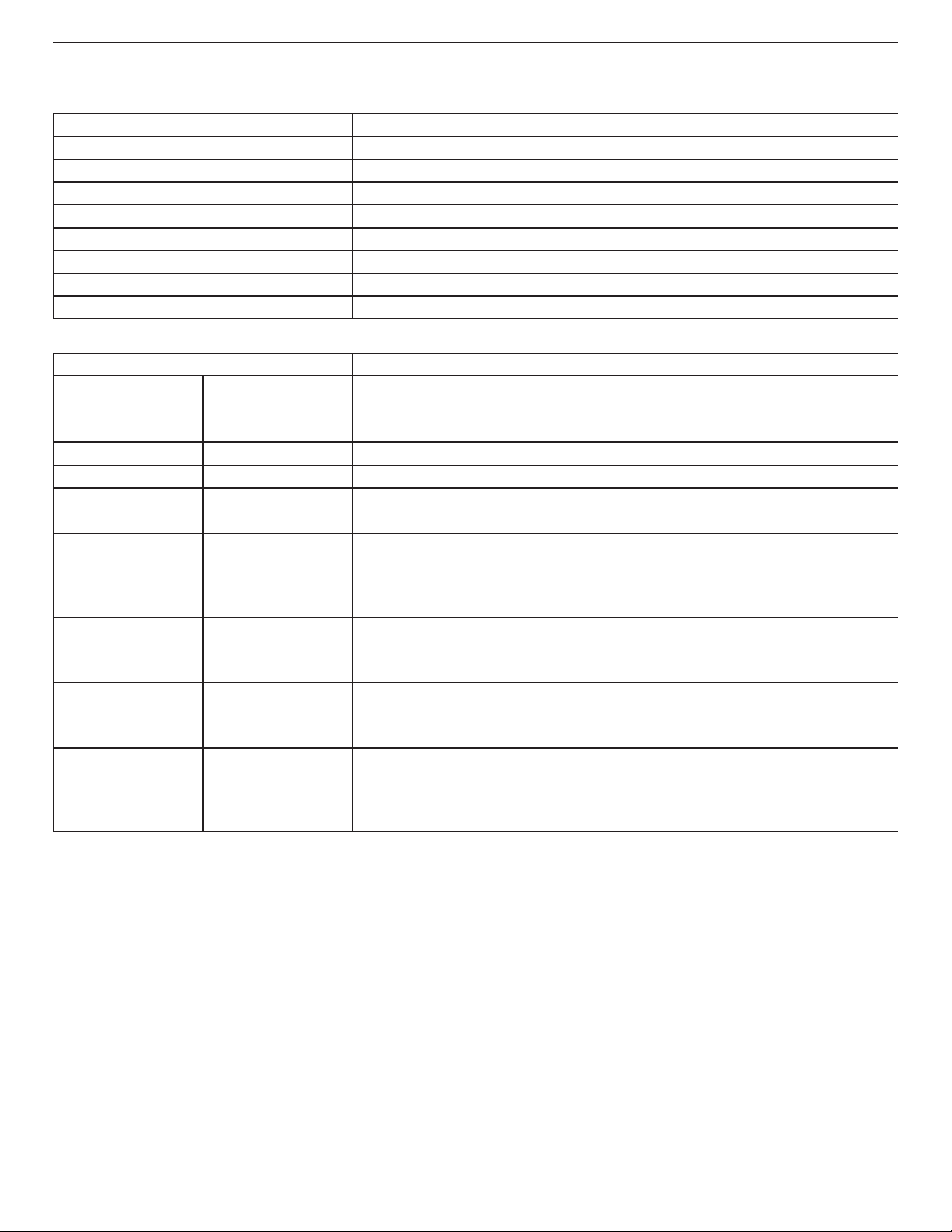
55BDL5057P
61
11. Technical Specifications
Display:
Item Specications
ScreenSize(ActiveArea) 1387.80mm(54.6’’diagonal)
AspectRatio 16:9
Numberofpixels 1920(H)x1080(V)
Pixelpitch 0.630(H)x0.630(V)[mm]
Displayablecolors 10bits(D),1.07Billioncolors
Brightness(typical) 700cd/m
2
Contrastratio(typical) 1300:1
Viewingangle 178degrees
In/Out Terminals:
Item Specications
SpeakerOutput InternalSpeakers 10W(L)+10W(R)[RMS]/8Ω
1Way1SpeakerSystem
82dB/W/M/160Hz~13KHz
AudioOutput 3.5mmphonejackx1 0.5V[rms](Normal)/2Channel(L+R)
AudioInput 3.5mmphonejackx1 0.5V[rms](Normal)/2Channel(L+R)
RS232C 2.5mmPhonejackx2 RS232Cin/RS232Cout
RJ-45 RJ-45Jackx1(8pin) 10/100LANPort
HDMIInput HDMIJackx2
(TypeA)(18pin)
DigitalRGB:TMDS(Video+Audio)
MAX:
Video-720p,1080p,1920x1080/60Hz(WUXGA)
Audio-48KHz/2Channel(L+R)
SupportsLPCMonly
DVI-I(DVI-D&VGA)
Input
DVI-Ijack DigitalRGB:TMDS(Video)
AnalogRGB:0.7V[p-p](75Ω),H/CS/V:TTL(2.2kΩ),SOG:1V[p-p](75Ω)
MAX:720p,1080p,1920x1080/60Hz(WUXGA)
DVI-I(DVI-D&VGA)
Output
DVI-IJackx1(29pin) DigitalRGB:TMDS(Video)
AnalogRGB:0.7V[p-p](75Ω),H/CS/V:TTL(2.2kΩ),SOG:1V[p-p](75Ω)
MAX:720p,1080p,1920x1080/60Hz(WUXGA)
Displayportin/out DisplayportJackx2
(20pin)
DigitalRGB:TMDS(Video+Audio)
MAX:
Video-720p,1080p,1920x1080/60Hz(WUXGA)
Audio-48KHz/2Channel(L+R)
SupportsLPCMonly
55BDL5057P
62
General:
Item Specications
PowerInput 100-240V~,50-60Hz,6.0A
PowerOutput 100-240V~,50-60Hz,2.5A
PowerConsumption(Max) 245W
PowerConsumption(typ.) 110W
PowerConsumption(Standby&Off) <0.5W(RS232inactive)
Dimensions(WithoutStand)[WxHxD] 1228.6x699.4x71.1mm
Weight(WithoutStand) 25.2Kg
GrossWeight(WithoutStand) 31.6Kg
Product Fiche :
Item Specications
EnergyEfciencyClass B
VisibleScreenSize 138.7cm/54.6inch
OnModePowerConsumption(W) 123W
AnnualEnergyConsumption(kWh) 179kWh
StandbyPowerConsumption(W) 0.50W
OffModePowerConsumption(W) 0.50W
DisplayResolution(Pixels) 1920x1080p
NetworkStandby(W) 0.69W
Environmental Condition:
Item Specications
Temperature Operational 0~40°C
Storage -20~60°C
Humidity Operational 20~80%RH(Nocondensation)
Storage 5~95%RH(Nocondensation)
Altitude Operational 0~3,000m
Storage/Shipment 0~9,000m
Internal Speaker:
Item Specications
Type 1Way1Speaker
Input 10W(RMS)
Impedance 8Ω
OutputSoundPressure 82dB/W/M
FrequencyResponse 160Hz~13KHz

2017 © Koninklijke Philips N.V. All rights reserved.
Philips and the Philips Shield Emblem are registered trademarks of
Koninklijke Philips N.V. and are used under license from
Koninklijke Philips N.V.
Specications are subject to change without notice.