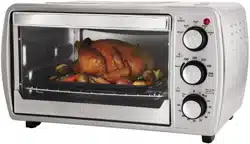
User Manual Convection Countertop Oven
IMPORTANT SAFEGUARDS
When using electrical appliances, basic safety precautions should always be followed including the following:
- READ ALL INSTRUCTIONS, PRODUCT LABELS AND WARNINGS BEFORE USING THE TOASTER OVEN.
- Do not touch hot surfaces, use handles or knobs. Always use oven mitts when handling hot materials and allow metal parts to cool before cleaning. Allow the unit to cool thoroughly before putting in or taking off parts.
- When the unit is not in use and before cleaning, unplug the toaster oven from the wall outlet.
Note: Make sure the oven is turned off before unplugging.
- To protect against risk of electrical shock, do not immerse the appliance in water or any other liquids.
- Close supervision is always necessary when this or any appliance is used near children. This appliance is not for use by children.
- Do not operate this or any appliance with a frayed or damaged cord or plug or after the appliance malfunctions or is dropped or has been damaged in any manner. Return appliance to the nearest authorized service facility for examination, repair or adjustment.
- Do not use attachments not recommended by the manufacturer; they may cause fire, electric shock or personal injury.
- Do not use outdoors or for commercial purposes.
- Do not use this appliance for other than its intended use.
- Do not let the cord dangle over the edge of a tabletop or countertop or touch hot surfaces.
- Do not place the appliance near a hot gas or electric burner or in a heated oven.
- Extreme caution should be used when using containers constructed of material other than metal or glass.
- A fire may occur if the toaster oven is covered or touching flammable materials, including curtains, draperies, walls, etc., when in operation. Do not store any items on top of the appliance when in operation.
- When using toaster oven, pull the unit out a minimum of 6 inches away from walls on all sides. Remove cords from other products from behind toaster oven.
- Do not store any materials, other than manufacturer’s recommended accessories, in this unit when not in use.
- Do not place any flammable materials in oven, such as paper, cardboard, plastic or any materials that may catch fire or melt.
- Do not cover the crumb tray or any part of the oven with metal foil. This will cause overheating of the appliance.
- Oversized foods or metal utensils must not be inserted in the appliance as they may create a fire or risk of electrical shock.
- Do not clean with metal scouring pads. Pieces can break off the pad and touch electrical parts involving a risk of electrical shock.
- Use extreme caution when removing tray or disposing of hot grease.
- To turn this appliance off, press Stop/Cancel button twice.
- To disconnect, press Stop/Cancel button twice to turn unit off, then remove plug from wall outlet.
- Extreme caution must be used when moving an appliance containing hot oil or other hot liquid
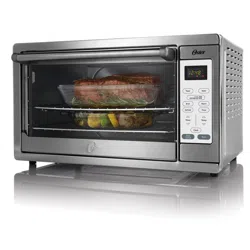
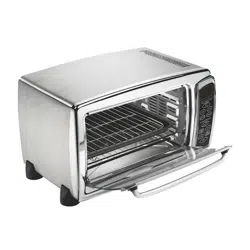
Features of Your Toaster Oven
(See Figure 1)

- Removable Wire Racks/Broil Rack
- Time Display
- Control Buttons
- Two Rack Positions
- Easy Clean Interior Walls
- Glass Door
- Internal Removable Crumb Tray
- Baking Pan
1. Function Buttons – (See Figure 2)
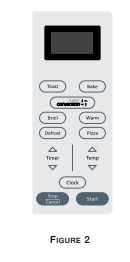
Bake – Convection (Fan Bake), Broil.
Toast – Select to toast bread, bagels, etc.
Pizza – Select to bake up to 16” pizza.
Defrost – Select to defrost foods.
Timer 
 – Adjusts time, temperature or toast shade
Temp 
 – Adjusts temperature.
Stop/Cancel – Stops heating or cancels function.
Start – Starts baking/cooking process.
Clock – Sets the Oven Clock.
NOTE – Oven is on when display icons are illuminated and flashing. Pressing Stop/Cancel button twice turns off unit.
Preparing To Use Your Toaster Oven for the First Time
If you are using your toaster oven for the first time, please be sure to:
Remove any stickers from the surface of the oven.
Open oven door and remove all printed documents and paper from inside the toaster oven.
Clean the rack, tray, and pan with hot water, a small amount of dishwashing liquid and a non-abrasive sponge or cleaning pad.
DO NOT IMMERSE THE BODY OF THE UNIT IN WATER.
Dry the unit thoroughly before using.
Select a location for the toaster oven. The location should be in an open area on a flat counter where the plug will reach an outlet.
Plug the toaster oven into a 120 Volt AC electrical outlet.
Using Your Toaster Oven Setting the Clock
Push the Clock button. The clock will flash.
Use the arrow keys to set the hour. Push the Clock button again.
Use the arrow keys to set the minutes.
Push the Clock button once more or the start button and the time will be set.
Preheating the Oven
Place oven rack into the desired position before heating the oven. (See “Positioning Rack” Section)
Push the Bake button.
Use arrows to set desired temperature.
Push Timer  down button until seven (7) minutes is displayed.
Push the Start button.
To Use the Bake Function
Place oven rack into the desired position before heating the oven. (See “Positioning Rack” Section)
Arrange food on the wire rack or in the baking pan.
Push the Bake button. Use the Temperature arrow keys to select desired temperature.
Use the Time arrow keys to select desired time.
Push the Start button.
NOTE – Upper and lower heating elements will cycle ON and OFF to maintain the desired temperature, and may not glow.
When baking is completed, open door fully and remove food carefully
To Use the Convection Fan Bake Function
When you select the Convection Bake the convection fan will turn on and circulate air allowing the food to cook evenly and faster.
Place oven rack into the desired position before heating the oven. (See “Positioning Rack” Section) Arrange food on the wire rack or in the baking pan.
Push the Convection Bake button until “Convection Bake” lights up on display. Use the Temp arrow keys to select desired temperature.
Push Timer arrow keys to select desired time.
Push the Start button.
NOTE – Both heating elements will cycle ON and OFF to maintain the desired temperature, and may not glow.
When baking is completed, open door fully and remove food carefully.
To Use the Broil Function
Place the pan into the guide rails below the rack and place the food on top of the rack. (See “Positioning Rack” Section)
Place broil rack in oven.
Push Broil button until the word “Broil” lights up on display.
Push Timer arrows to select the desired time.
Push the Start button.
NOTE – The top heating element will cycle ON and OFF to maintain desired temperature, and may not glow.
When broiling is completed, open door fully and remove food carefully.
WARNING: DO NOT LEAVE TOASTER OVEN UNATTENDED.
To Use the Toast Function
Place oven rack into the desired position before heating the oven. (See “Positioning Rack” Section)
NOTE – Different types of bread require different settings. Lighter breads and waffles require a lighter setting. Darker breads, muffins, and English muffins require a darker setting.
Arrange food on the wire rack.
Push the Toast button. Use arrows to select Toast Shade.
Press the Start button.
When toasting is completed, open door fully and remove food carefully.
To Use the Pizza Function
Place oven rack into the desired position before heating the oven. (See “Positioning Rack” Section)
Arrange pizza on the wire rack.
Push the Pizza button and 20:00 default time will appear. Use arrow keys to adjust the time as desired. Push the Start button.
NOTE – The Pizza function temperature is set at 400°F and cannot be adjusted. If different temperature is desired, cancel Pizza function and use Bake function. For 2 Pizzas: Place the 2 pizzas on the wire racks. Cook the pizzas for about one-half the recommended time, and then switch the rack positions to allow the pizzas to uniformly cook top and bottom.
Defrosting Function
When defrosting do not preheat oven. Temperature Control is already set to 150°F.
Push the defrost button. Use arrow keys to adjust time. Allow 15 to 20 minutes per side for meats or fish to defrost. Always cook food promptly after thawing.
Push the Start button.
Positioning Rack
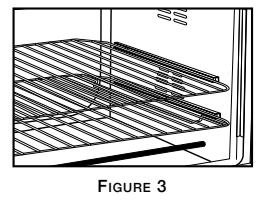
To accommodate a wide variety of foods, the oven has 2 racks and two (2) rack positions. (See Figure 3)
Positioning of the rack will depend on the size of the food and desired browning.
Before removing the rack, allow the unit to cool.
PLEASE NOTE – For best toast and pizza results, position the rack in the top rack position.
Positioning Pan
- To accommodate a wide variety of foods the oven has two pan positions. The pan can be placed on top of the rack or inserted into the guide rails below the rack. (See Figure Below)
- Before removing the pan allow the unit to cool.
- Positioning of the oven pan will depend on the desired cooking method. For baking, place the pan on top of one of the racks. For grilling or broiling, insert the pan into the guide rails below the rack and place the food on top of the rack.

Cleaning Your Toaster Oven
Before cleaning your OSTER™ Toaster Oven, press Stop/Cancel button twice, unplug it and allow it to cool. To clean, wipe with damp cloth. DO NOT IMMERSE IN WATER! Make sure to use only mild, soapy water. Abrasive cleaners, scrubbing brushes and chemical cleaners will damage the coating on this unit. Empty crumb tray frequently to avoid accumulation of crumbs. Toaster oven racks are dishwasher safe (top of dishwasher only)
Storing Your Toaster Oven
Allow the appliance to cool completely before storing. If storing the toaster oven for long periods of time make certain that the toaster oven is clean and free of food particles. Store the toaster oven in a dry location such as on a table or countertop or cupboard shelf. Other than the recommended cleaning, no further user maintenance should be necessary.
Troubleshooting
Overcooked / Undercooked Foods
- Incorrect temperature or time setting
- You may have to adjust the time and temperature to desired taste.
- Because your toaster oven is smaller than your regular oven, it will heat up faster and generally cook in shorter periods of time.
- Rack placement
- Refer to “Positioning Rack” Section, Page English-4. Rack may need to be adjusted to accommodate food type.
Burnt Smell
- Food build-up inside oven, on heating elements or in crumb tray.
- Refer to “Cleaning Your Toaster Oven” Section, Page English-5.
Oven does not turn ON
- Unit is unplugged
- Plug the toaster oven into a 120-volt AC electrical outlet.
- Set timer knob and temperature knob to desired setting. Both must be turned on to operate the toaster oven.
- Press Start.
Only one heating element is heating up
- Function setting selection determines which heating element will operate.
- When toasting, make sure the oven is not set to broil setting.
Heating elements do not stay ON
- Heating elements will cycle ON and OFF to maintain proper heat.
- Be certain that function is as desired.
- Heating elements may not glow.
Cannot change function button