1
Form 72-905F
INSTRUCTIONS
Visit www.GoPresto.com
©2023 National Presto Industries, Inc.
Estas instrucciones también están disponibles en español.
Para obtener una copia impresa:
• Descargue en formato PDF en www.GoPresto.com/espanol.
• Envíe un correo electrónico a [email protected].
• Llame al 1-800-877-0441, oprima 2 y deje un mensaje.
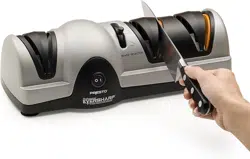
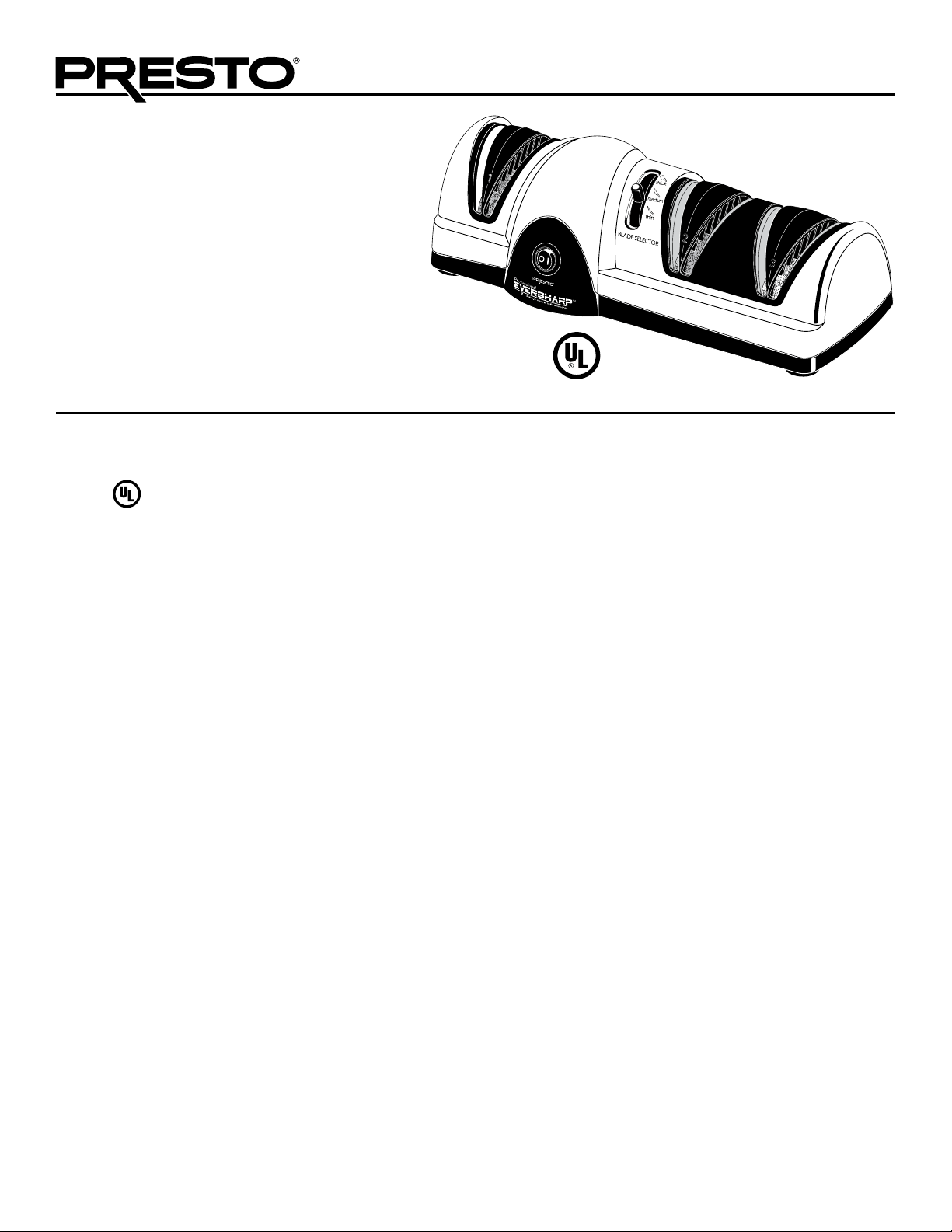
Professional EverSharp
®
three-stage electric knife sharpener
• Three-stage sharpening system provides professional
results at home.
• Blade selector adjusts guides to optimum sharpening
angle for thick, medium, and thin knives.
• Extra-fine grit ceramic wheel assures precision honing.
This is a
Listed appliance. The following important safeguards are recommended by most portable appliance manufacturers.
IMPORTANT SAFEGUARDS
To reduce the risk of personal injury or property damage when using electrical appliances, basic safety precautions should always be
followed, including the following:
1. Read all instructions before using this appliance.
2. To protect against the risk of electrical shock, do not put the knife sharpener in water or other liquids.
3. This appliance is not intended for use by children, or by persons with reduced physical, sensory, or mental capabilities, or lack
of experience and knowledge. Close supervision is necessary when any appliance is used near children. Children should be
supervised to ensure that they do not play with the appliance.
4. Turn the appliance OFF, then unplug from the outlet when not in use, before assembling or disassembling parts, and before
cleaning. To unplug, grasp the plug and pull from the outlet. Never pull from the power cord.
5. Avoid contact with moving parts.
6. Do not operate any appliance with a damaged cord or plug, or in the event the appliance malfunctions, or is dropped or
damaged in any manner. Return the appliance to the Presto Factory Service Department for examination, repair, or electrical or
mechanical adjustment.
7. The use of accessory attachments not recommended or sold by the appliance manufacturer may cause fire, electric shock, or
injury. Use only genuine Presto
®
accessory attachments and replacement parts.
8. Do not use outdoors.
9. Do not let the cord hang over edge of table or counter, or touch hot surfaces.
10. Do not place on or near a hot gas or electric burner, or in a heated oven.
11. Do not use the knife sharpener for other than intended use.
12. Carefully route the power supply cord to avoid damage from the knife blades while sharpening.
SAVE THESE INSTRUCTIONS
THIS APPLIANCE IS FOR HOUSEHOLD USE ONLY.
2
Important Cord Information
This appliance has a polarized plug (one blade is wider than the other). To reduce the risk of electric shock, this plug is intended to
fit into a polarized outlet only one way. If the plug does not fit fully into the outlet, reverse the plug. If it still does not fit, contact a
qualified electrician. Do not attempt to modify the plug in any way.
A short power supply cord is provided to reduce the risk of becoming entangled in or tripping over a longer cord. An extension cord
may be used if care is properly exercised in its use. If an extension cord is used, the marked electrical rating of the extension cord
should be at least as great as the electrical rating of the appliance. The extension cord should be arranged so that it will not drape over
the countertop or tabletop where it can be pulled on by children or tripped over unintentionally.
Connect the power supply cord to a 120VAC electrical outlet only.
Getting Acquainted
Your Presto
®
Professional EverSharp
®
electric knife sharpener is a three-stage sharpening system which will sharpen knives of alloy,
carbon, or stainless steel. It is designed to sharpen kitchen knives and most sporting knives.
Do not attempt to sharpen scissors, serrated electric knives, or any blade that does not fit freely in the blade guides.
If your knife is very dull, you will probably use all three stages. If a bit dull, use Stages 2 and 3.
Frequently, you will use only Stage
3
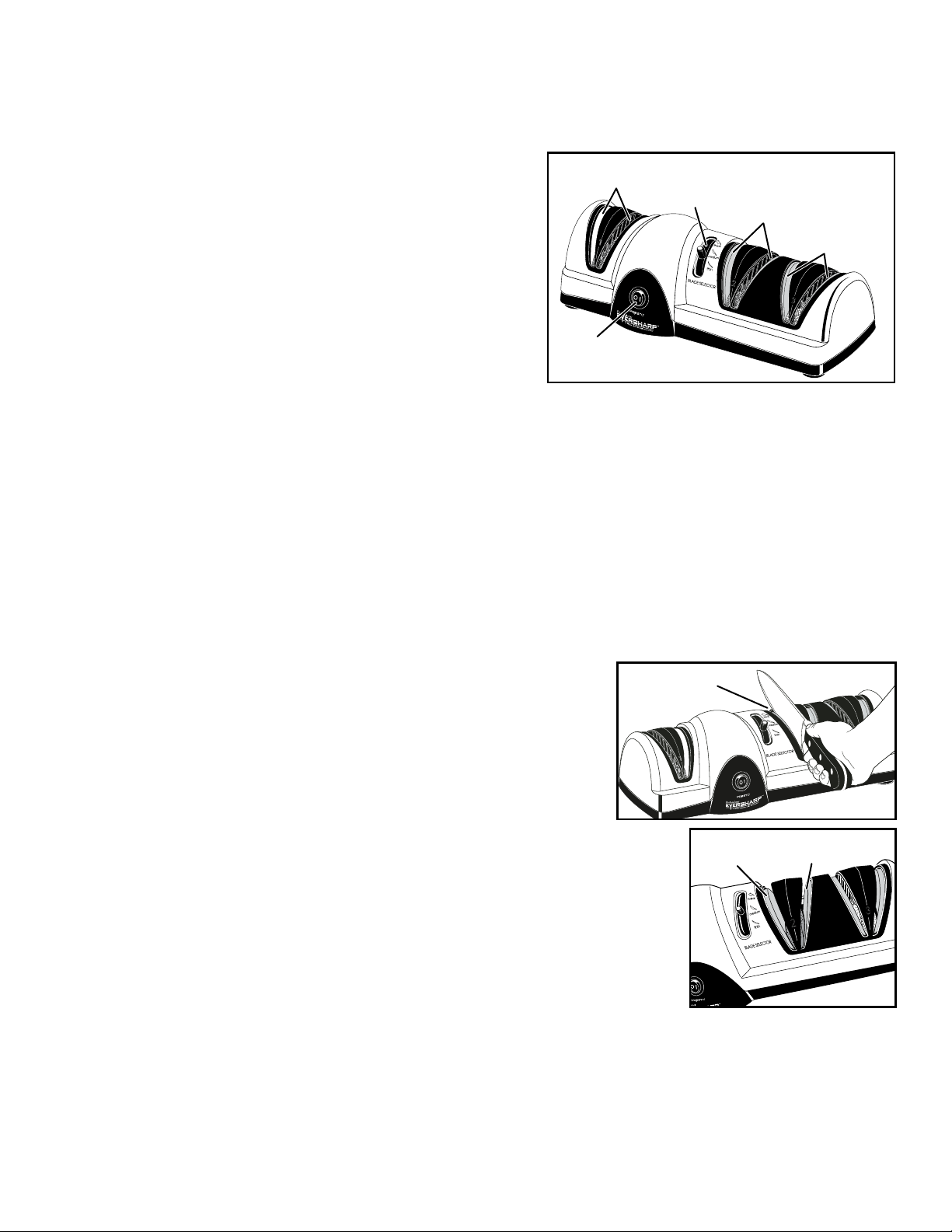
to maintain your knives in razor-sharp condition. The blade selector (Fig. A) adjusts the guides to an optimum sharpening angle for
thick, medium, and thin knives.
How to Use
1. Place the knife sharpener on a stable surface.
2. Determine the type of knife being sharpened and then move the blade selector to the appropriate position (Fig. A).
For thick knives, such as hunting knives and cleavers, move the blade selector to the top position.
For medium knives, such as utility, slicing, chef ’s, and Santoku knives, move the blade selector to the middle position.
For thin knives, such as fillet, paring knives, and other light blades, move the blade selector to the bottom position.
You will feel the stop points for each position. When you move the blade selector lever, the orange adjustable blade guides in
Stages 2 and 3 will also move so they are at the optimum sharpening angle for the type of blade selected. In Stage 1, the blade
guides are in a fixed position.
3. Turn the unit ON by pressing the symbol “l” on the ON/OFF switch (Fig. A).
4. Evaluate the condition of your blade to determine which sharpening stage
to start with:
• If the blade is very dull, or if you are sharpening the knife for the first
time, begin with STAGE 1: COARSE GRINDING. This is the stage
located to the left of the ON/OFF switch. It is the coarsest and most
aggressive stage, and will remove more material from the knife blade
than the other stages. It is a fixed stage with no adjustments, as it places
the same angle on all blades in preparation for the sharpening stations
found in Stages 2 and 3.
NOTE: Do not use Stage 1 when sharpening serrated blades.
• If your knife is a bit dull, begin with STAGE 2: PRECISION
GRINDING. This is the stage located directly to the right of the blade
selector. It continues the grinding by giving the blade a precision edge.
Stage 2 is an adjustable station which further refines the sharpening angle. After completion, your knife is sharpened to the
optimum angle dictated by the width of the blade.
• If your knife just needs a little touch-up sharpening, begin with STAGE 3: FINE HONING. This is the stage located on the far
right and is the stage most frequently used. It is also an adjustable station, completing the knife sharpening process by honing
and polishing the knife to an exact razor-sharp edge.
Stage 1
(coarse grinding)
ON/OFF
switch
Fig. A
Stage 2
(precision grinding)
Stage 3
(fine honing)
Blade selector

3
5. Begin sharpening. The sharpening procedure is the same for each stage.
Sharpening Procedure:
Begin by placing the heel of the knife in the left slot of the stage in use (Fig. B).
The side of the blade should rest against the outside face of the blade guide slot
and the cutting edge should make contact with the sharpening wheel (Fig. C).
CAUTION! Never insert the tip of the knife into the blade guide slots first and
push through. This could damage the knife sharpener and your knife.
Using only light downward pressure, slowly pull the knife straight toward you
through the slot, except when sharpening the tip of the blade. To sharpen the tip,
lift up on the knife handle as the curved portion of the blade is drawn through
the slots.
NOTE: The greater the curve on the blade, the more you will need to lift up
on the handle. Certain blades may not have a curve and therefore it will not be
necessary to lift up on the handle as you draw the tip through the slots. If the
motor slows while pulling the knife, apply less downward pressure.
Draw the knife through the left and right slots three times, alternating passes
between the two slots. Allow approximately one second for each two inches of
blade when drawing the knife through the slots. For example, if sharpening a
knife with a 6-inch blade, you should take approximately three seconds for
each pass.
6. Before using the knife to slice food, always wipe the knife blade with a damp
cloth to remove any metal filings that may have been deposited during the
sharpening process.
CAUTION! To avoid injury, handle knives with extreme care.
7. If knife does not easily slice food, repeat Stages 2 and 3. Do not run fingers along edge of knife to check sharpness.
8. When sharpening is complete, turn the unit off by pressing the symbol “O” on the ON/OFF switch. Metal filings may be present
on the table or countertop and may be wiped clean with a damp cloth.
Questions and Answers
How often should I sharpen my knives?
Use Stage 3 to hone the knife prior to each use if you want to maintain a razor-sharp edge. After extensive use, if you have honed the
knife and it no longer slices food with ease, run the knife through Stages 2 and 3.
How can I tell if my knife is sharp?
Use it to slice food. If it does not slice the food with ease, it needs additional sharpening. Repeat Stages 2 and 3. If the knife is
extremely dull, repeat Stages 1, 2, and 3. Do not run fingers along the edge of the knife to check sharpness.
How do I get an even edge on my knife?
To get an even edge when sharpening, be sure to place the knife in the slot so the side of the blade rests against the outside face of the
blade guide (Fig. B) and the cutting edge makes contact with the sharpening wheel (Fig. C) as you’re drawing the knife through the
slot. The outside face of each sharpening slot acts as a guide to ensure that the knife is positioned at the perfect sharpening angle.
Allow adequate time for sharpening. When drawing the knife through the slots, allow approximately one second for each two inches
of blade. For example, if sharpening a knife with a 6-inch blade, you should take approximately three seconds for each pass. Pulling
the knife through too quickly may result in an uneven edge. When sharpening the tip of the blade, lift up on the knife handle slightly
as the curved portion of the blade is drawn through the blade guides.
NOTE: The greater the curve on the blade, the more you will need to lift up on the handle; the less the curve, the less you will need
to lift up on the handle. Certain blades may not have a curve and therefore it will not be necessary to lift up on the handle as you draw
the tip through the slots.
Fig. C
Outside face
of left slot
Outside face
of right slot
Blade against outside face of left slot
Fig. B
4
My knife is not sharp and I’ve gone through the whole knife sharpening procedure twice. What am I doing wrong?
Although unusual, there are times when you will have to repeat Stages 1, 2, and 3 more than once. This may occur during the first
sharpening of a knife that has been improperly sharpened by another process previously. It may also occur when sharpening knives of
tempered steel which have extremely hard blades, such as some hunting knives.
To sharpen these types of knives with this knife sharpener, simply continue to repeat Stages 1, 2, and 3 until the knife cuts food easily.
Depending on the condition of the blade, you may have to repeat the process several times. In extreme cases, this could be 10 times
or more. This extended process will only be necessary the first time you use the knife sharpener for this type of knife. Thereafter, you
will be able to sharpen your knife following the normal sharpening procedure.
Sometimes the sharpening wheels stall when I am drawing the knife through the blade guide slots. What causes this?
The knife sharpener is designed so that very little effort is needed to draw the knife through the slots. If too much downward pressure
is applied to the knife as it is being drawn through the slots, the sharpening wheels may stall.
Sometimes the adjustable blade guides move when I am sharpening the knife. What causes this?
If, while drawing the knife through the blade guide slots, too much pressure is applied against the face of the blade guide, the blade
guide may move. Apply less pressure while sharpening.
Can I sharpen serrated knives with my knife sharpener?
Yes, with the exception of electric serrated knives or knives serrated on both sides. To sharpen non-electric serrated knives, use only
the slots in Stages 2 and 3 and only sharpen the smooth side of the knife blade (the side without the grooves or scallops). Draw the
knife through the slots using very little pressure.
NOTICE: Each time the serrated knife is sharpened, a portion of the serration is removed. Over a long period of time, the serration on
the knife may be completely removed and you may have a knife blade similar to that of a utility knife.
Occasionally I see sparks when sharpening my knives. What causes this?
Knives with high carbon content (usually higher quality knives) will sometimes spark when they come in contact with the sharpening
wheels. This is normal.
Care and Cleaning
Always unplug the knife sharpener before cleaning.
The outside surface of the knife sharpener may be cleaned with a damp cloth. Do not use abrasives. Never immerse the knife
sharpener in water or any other liquid.
Do not use any type of lubrication with the knife sharpener.
Your knife sharpener has two special receptacles on the bottom of the unit for collecting metal filings from your knives. Occasionally
empty these receptacles by removing the red plastic plugs on the bottom of the unit and shake out the metal filings that have collected
inside. This should be done about once a year under normal usage.
Consumer Service Information
If you have any questions regarding the operation of your Presto
®
appliance or need parts for your appliance, contact us by any of
these methods:
• Call 1-800-877-0441 weekdays 8:00 AM to 4:00 PM (Central Time)
• Email us through our website at www.GoPresto.com/contact
• Write: National Presto Industries, Inc., Consumer Service Department
3925 North Hastings Way, Eau Claire, WI 54703-3703
Inquiries will be answered promptly by email, telephone, or letter. When emailing or writing, please include a phone number and a
time when you can be reached during weekdays if possible. When contacting the Consumer Service Department, please indicate the
model and series numbers for the knife sharpener. These numbers can be found on the bottom of the knife sharpener. Please record this
information:
Model _______________ Series _______________ Date Purchased _______________
5
Presto
®
Limited Warranty
(Applies only in the United States)
This quality Presto
®
appliance is designed and built to provide many years of satisfactory performance under normal household use. Presto pledges
to the original owner that should there be any defects in material or workmanship during the first year after purchase, we will repair or replace it at
our option. Our pledge does not apply to damage caused by shipping. Outside the United States, this limited warranty does not apply.
To obtain service under the warranty, please call our Consumer Service Department at 1-800-877-0441. If unable to resolve the problem, you
will be instructed to send your Presto
®
appliance to the Presto Factory Service Department for a quality inspection; shipping costs will be your
responsibility. When returning an appliance, please include your name, address, phone number, and the date you purchased the appliance, as well
as a description of the problem you are encountering with the appliance.
We want you to obtain maximum enjoyment from using this Presto
®
appliance and ask that you read and follow the instructions enclosed. Failure
to follow instructions, damage caused by improper replacement parts, abuse, misuse, disassembly, alterations, or neglect will void this pledge. This
warranty gives you specific legal rights, and you may also have other rights which vary from state to state. This is Presto’s personal pledge to you
and is being made in place of all other express warranties.
National Presto Industries, Inc.
Eau Claire, WI 54703-3703
©2024 National Presto Industries, Inc. Form 72-905F
The Presto Factory Service Department is equipped to service Presto
®
appliances and supply genuine Presto
®
replacement parts.
Genuine Presto
®
replacement parts are manufactured to the same exacting quality standards as Presto
®
appliances and are engineered
specifically to function properly with its appliances. Presto can only guarantee the quality and performance of genuine Presto
®
replacement parts. “Look-alikes” might not be of the same quality or function in the same manner. To ensure that you are buying
genuine Presto
®
replacement parts, look for the Presto
®
trademark.
Canton Sales and Storage Company, Presto Factory Service Department
555 Matthews Drive, Canton, MS 39046-3251
Product Registration
IMPORTANT: Please go online and register this product within ten days of purchase. Proper registration will serve
as proof of purchase in the event your original receipt becomes misplaced or lost. Registration will not affect warranty
coverage, but it may expedite the processing of warranty claims. The additional information requested will help us
develop new products that best meet your needs and desires.
To register the product, visit www.GoPresto.com/registration or simply scan this QR code. If you do not have
computer access, contact the Consumer Service Department at 1-800-877-0441 for assistance with registration.