User manual Washer
Installing your washer
Important note to installer
Please read the following instructions carefully before installing your washer.
These instructions should be retained for future reference.
We recommend you hire a professional to install this washer.
Installation Flow chart
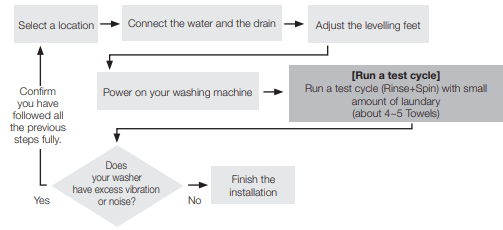
STEP 1 Selecting a Location
Before you install the washer, make sure the location:
- Has a hard, level surface without carpeting or flooring that may obstruct ventilation.
- Is away from direct sunlight.
- Has adequate ventilation.
- Is not exposed to freezing temperatures (temperatures under 32 °F or 0 °C).
- Is away from heat sources such as a furnace, water heater, etc.
- Has enough space so that the washer doesn’t rest on its power cord.
STEP 2 Connecting the water supply and drain hoses
Connecting the water supply hoses
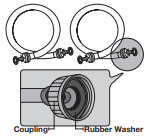
1. Connect the ends of the water supply hoses to the HOT and COLD faucets.

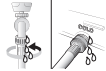
2. Tighten the fittings by hand until they are snug, and then tighten them an additional two-thirds of a turn with a plier.

3. Place the unconnected ends of the hoses into a bucket and open the faucets connected to the two water supply hoses for 10 or 15 seconds to remove any foreign substances from the hoses. Close the faucets before continuing.

4. Connect the ends of the water supply hoses to the water supply intake connections at the back of the washer.
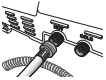
5. Tighten the fittings by hand until they are snug, and then tighten them an additional two-thirds of a turn with a plier.
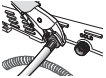
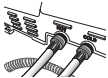
6. Turn on the HOT and COLD water supplies and check all the water supply intake connections and the faucets for water leaks.
Connecting the drain hose
The end of the drain hose can be positioned in three ways:
In a Wall standpipe or Floor standpipe
The height of end of standpipe must be no lower than 39 in (99 cm) and no higher than 96 in (245 cm).
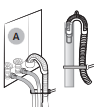
If drain pipe are built into the wall with water valves (A), fasten the drain hose to the water hose.
In a laundry tub
The height of the tub must be no lower than 39 in (99 cm) and no higher than 96 in (245 cm).
Assemble the supplied Hose guide at the end of the drain hose, and put the hanger on laundry tub.
And fasten the drain hose to the leg of laundry tub.
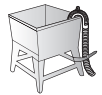
 Connect the hose guide (A) within 3~5 in (7.6~12.7 cm)* from the end of the drain hose. If the drain hose is extended beyond the end of the hose guide, mold or microorganisms could spread inside the washer.
The Drain Hose can be installed up to 96 in (245cm) above the floor, but the draining capability can be reduced at this height. This can cause the washer to have an odor because of water remaining in the drain system.
If the drain hose is installed below 39 in (99cm), water can drain during wash cycles due to a siphon effect. If this occurs, it causes the Tap cold LED on the washer to flash.

STEP 3 Leveling your washer
See if the washer is level by checking the position of the tub:
1. Slide the washer into position.
2. Open the lid of the washer, and pour the water into the tub to just below the pulsator level.
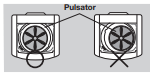
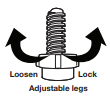
3. If the washer is level, the pulsator will be centered in the washer as shown in the figure. If the pulsator is not centered, level your washer by turning the front leveling feet clockwise or counterclockwise as necessary.
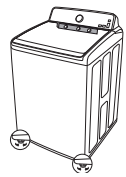
Turn the front leveling feet clockwise to raise the washer, and counterclockwise to lower the washer.
STEP 4 Powering your washer
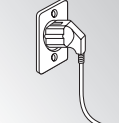
Plug the power cord into a 3-prong, well grounded 120 volt 60 Hz approved electrical outlet protected by a 15-amp fuse or comparable circuit breaker.
Your washer is grounded through the third prong of the power cord when plugged into a three-prong grounded electrical outlet.
Test run
Make sure that you have installed your washing machine correctly by running a Rinse+Spin cycle after installation is complete. See Step 5 below.
STEP 5 Running a test cycle
Run a test cycle as follows to make sure your washer is properly installed.
- Load about 6 pounds of laundry into the tub.
- Press the Power button to turn on your washer.
- Select the Rinse+Spin cycle by turning the Cycle Selector.
- Press the Start/Pause button to start the test cycle.
- The washer should not rock or vibrate excessively when water is supplied or when washing or spinning, and should drain well during the spin cycle.
If water leaks while water is being supplied or drained, check the water connections. Refer to Step 2, “Connecting the water supply and drain hoses” on pages 14~15 for instructions.
If the washer rocks and vibrates excessively, level your washer again. Refer to Step 3, “Leveling your washer” on page 15 for instructions.
Operating instructions
 WARNING: To reduce the risk of fire, electric shock, or injury to persons when using your appliance, follow basic precautions, including the following:
Loading your washer
- Fill the tub with dry, unfolded clothes evenly around in order to enhance washing efficiency and prevent excess wear, or wrinkling of the load.
For optimal washing performance, make sure the laundry is piled up evenly.
- Wash delicate items such as bras, hosiery, and other lingerie in the Delicates cycle with similar lightweight items.
- When washing big bulky items or a few smaller items that don’t fill the tub completely – a rug, a pillow, stuffed toys, or one or two sweaters, for example – add a few towels to improve spin performance.
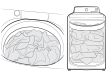
During the spin cycle, the washer may add additional water to redistribute the clothes and correct an imbalance inside the drum.
- To ensure good cleaning results when washing heavily soiled loads, do not overload your washer
- Inflatable items may cause damage to the laundry or the machine during the wash or drying process.
- Regardless of the size, blankets or quilts are safer and cleaner to wash one item at a time. Two different-sized blankets in the same load may compromise the drying performance due to unbalanced loads.
To input a blanket
Fold the blanket into the blanket-specifi c net as shown, and then insert in the tub below the plastic area of the tub.

Make sure the laundry is inserted completely.
- Any exposed part of the laundry may cause damage to the machine or the laundry itself, or a water leak.
- Do not overload the tub. Make sure no part of the laundry is exposed outside of the tub.
To add a forgotten item:
1. Press the Start/Pause button to pause the washer.
2. Wait for the door to unlock automatically, and then open the door.
3. Add the item, close the door, and then press the Start/Pause button. The cycle will resume.
Starting Your Washer - Basic Steps
- Load your washer.
- Add liquid (or powdered) detergent and additives to the dispenser.
- Select the appropriate cycle and options for the load.
- Close the lid.
- Press the Start/Pause button.
- The Wash Indicator light illuminates.
- Before your washer starts to fill, it will make a series of clicking noises to check the door lock and do a quick drain.
WARNING: Do not place anything on top of your washer while it is running.
Washing a load of laundry
Overview of the control panel
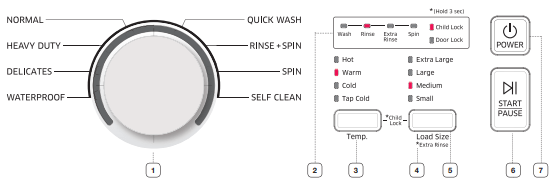
 Cycle Selector
Select the appropriate cycle for the type of load.
The cycle you select determines the tumble pattern and spin speed for the cycle.
NORMAL - For most fabrics including cottons, linens, and normally soiled garments.
HEAVY DUTY - For sturdy, colorfast fabrics and heavily soiled garments.
For bedding, use the waterproof course and the appropriate load size.
DELICATES - For sheer fabrics, bras, lingerie, silks, and other handwash-only fabrics. For best results, use liquid detergent.
WATERPROOF - For waterproof or water-resistant items. (less than 12lbs)
- Do not wash waterproof items and non-waterproof items together.
- Check the specification label on the fabric item and see if the item is waterproof. Do not wash non-waterproof items with the WATERPROOF cycle.
- Use the waterproof course for waterproof or water-resistant items such as plastic mats, ski pants, raincoat and comforters which hardly absorb water.
- For bedding, use the waterproof course and the appropriate load size.
QUICK WASH - For lightly soiled garments needed quickly. Quick Wash takes between 33 to 48 minutes depending on amount of laundry.
RINSE + SPIN - Use for loads that need rinsing only or to add rinse-added fabric softener to a load.
SPIN - Drains the water and spins at a high speed.
SELF CLEAN - Use to clean dirt and bacteria from the tub. Regular use (after every 20 washes) is recommended. No detergent or bleach is needed.
 Display
Provides instructions and diagnostics while keeping you updated on the cycle status.
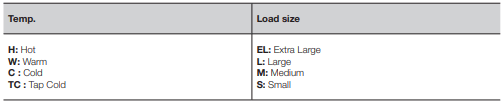
 Temp. selection button
Press this button repeatedly to cycle through the different water temperature options.
Hot - Whites and heavily soiled, colorfast items.
Warm - Colorfast items.
Cold - Brightly colored, very lightly soiled items.
Tap Cold - Cold water with no warm water added.
If you select the Hot or Warm options, make sure that the cold and hot water supply hoses are attached correctly.
If the hoses are connected incorrectly, the washer will stop the cycle.
 Select Cycle Option
Press this button to select different cycle options.
Extra Rinse - Select to add an additional rinse at the end of a wash to remove laundry additives and perfumes more thoroughly.
To select Extra Rinse, press and hold the Load Size button for approximately 3 seconds.
 Load Size selection button
Press the button repeatedly to cycle through the different spin speed options.
Extra Large - For heavy loads.
Large - For moderate loads. This setting is best for most loads.
Medium - For light loads.
Small - For very light loads.
 Start/Pause selection button
Press to pause and restart cycles.
 Power button
Press once to turn your washer on. Press again to turn your washer off. If the washer is left on for more than 10 minutes without any buttons being pressed, the power automatically turns off.
Child Lock
Child Lock disables the buttons on the control panel and prevents children from playing with the washer.
Activating the Child Lock function
Press and hold the Temp. and Load Size buttons simultaneously for approximately 3 seconds.
• All buttons and controls on the panel are disabled except for the Power button.
• The Child Lock icon blinks.
Using the Child Lock function
If the lid is opened when the Child Lock function is on, the Hot LED illuminates and an alarm sounds.
- If the water level in the tub is above the safe water level, the Hot light illuminates on the LED display and the washing machine starts to drain after 30 seconds.
- If the water level in the tub is above the safe water level and the Child Lock function is turned on while the door is open, the Hot, Tap cold, Extra large, and Small lights illuminate on the LED display even if the power is turned off and the washing machine starts to drain.
- If the power is off and the lid is opened while the water level in the tub is above the Reset water level, the Hot, Tap cold, Extra large, and Small lights illuminate on the LED display and the washing machine starts to drain. When the draining operation finishes, the power is automatically turned off again.
- If you activate Child Lock while the washing machine is running, the Start/Pause button will not work.
- After the compulsory drain, the Hot, Tap cold, Extra large, and Small lights blink at 1 second intervals and the product enters the Hot, Tap cold, Extra large, and Small light mode. (When the product is in the Hot, Tap cold, Extra large, and Small light mode, only the Power button works.)
- To cancel the Hot, Tap cold, Extra large, and Small light mode, you need to turn the power off and then on again.
- To cancel the Hot light mode, deactivate the Child Lock function. To deactivate the Child Lock function, press and hold the Temp. and Load Size buttons simultaneously for at least 3 seconds.
Adding laundry when Child Lock is on
- To add laundry, deactivate the Child Lock function. To deactivate the Child Lock function, press and hold the Temp. and Load Size buttons simultaneously for at least 3 seconds.
Deactivating the Child Lock function
Press and hold both the Temp. and Load Size buttons simultaneously for approximately 3 seconds.
- When you deactivate the Child Lock function, the Child Lock light turns off.
- The Child Lock function prevents children or the infirm from accidently operating the washer and injuring themselves.
- If a child enters the washing machine, the child may become trapped and suffocate.

- Once you have activated the Child Lock function, it continues working even if the power is turned off.
- Forcing the lid open can result in injury or damage to the product.
ATC (Auto Temperature Control)
The ATC function controls wash water temperature.
By reacting to changes in external and internal temperatures, the ATC function maintains the correct wash temperature for each cycle, providing the best washing performance while using the least amount of energy.
New washers must reduce the amount of energy usage as a first priority. When you use the most commonly used wash cycles, Normal and Heady Duty, you will notice more cold water entering the washer as an energy saving step. This is normal.
In the Normal and Heavy Duty cycles, the hot water temperature is similar to acceptable adult bathwater temperature and warm water temperature is similar to comfortable swimming-pool water temperature.
If you want to wash clothes at different water temperatures, you should choose a different cycle, and then choose a specific temperature (Hot/Warm/Cold/Tap Cold)
Features
Automatic dispenser
Your washer has separate compartments for dispensing detergent and color-safe bleach and fabric softener. Add all laundry additives to their respective compartments before starting your Washer
The automatic dispenser MUST ALWAYS be in place before you start your washer.
DO NOT open the automatic dispenser when your washer is running.
- Never exceed the manufacturer’s recommendations when adding detergent.
- This compartment holds liquid detergent for the main wash cycle, which is added to the load at the beginning of the cycle.
- When using powdered detergent, remove the liquid detergent compartment from the detergent drawer. The washer will not dispense powdered detergent from the liquid detergent compartment.
To add detergent to the automatic dispenser:
- Open the dispenser drawer.
- Load the recommended amount of liquid (or powder) detergent into the detergent compartment before you start your wash.
- Close the drawer slowly and smoothly to avoid spilling, splashing, or premature dispensing of the contents.
It is normal for a small amount of water to remain in the dispenser compartments at the end of the cycle.
Do not put chlorine bleach in the dispenser drawer.
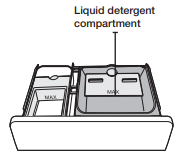
Loading the Liquid (or Powder) detergent compartment
- Pour the recommended amount of laundry detergent directly into the detergent compartment before starting your washer.
- If you are using color-safe bleach, add it with the detergent to the detergent compartment.
When adding color-safe bleach with detergent, it is best if both laundry products are in the same form – liquid.
When using powdered detergent, remove the liquid detergent compartment from the detergent drawer. The washer will not dispense powdered detergent from the liquid detergent compartment.
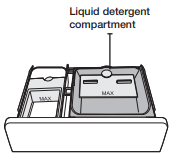
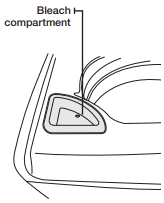
Loading the Bleach compartment
(Liquid chlorine bleach only)
Add chlorine bleach to the bleach compartment.
DO NOT exceed the bleach compartment.
- Avoid splashing or over–filling the compartment
- Never pour undiluted liquid chlorine bleach directly onto the load or into the tub. It is a powerful chemical and can cause fabric damage, such as weakening of the fibers or color loss, if not used properly.
- If you prefer to use color–safe, non–chlorine bleach, add it to the appropriate detergent compartment. DO NOT pour color–safe bleach into the Bleach compartment.
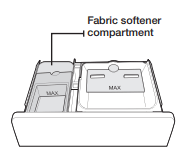
Loading the Fabric softener compartment
1. Pour the recommended amount of liquid fabric softener into the softener compartment. For smaller loads, use less than one capful.
2. Dilute the fabric softener with water until it reaches MAX FILL in the compartment.
3. The dispenser automatically releases liquid fabric softener at the proper time during the rinse cycle.
- Use the softener compartment ONLY for liquid fabric softeners.
- DO NOT use the Downy Ball* in the fabric softener compartment with this washer. It will not add fabric softener at the appropriate time. Use the detergent compartment.
- Do not use liquid fabric softener that is too sticky as it may not mix with the water sufficiently.
* Brand names are trademarks of their respective manufacturers.
Maintaining your washer
Cleaning the exterior
Turn off the water faucets after finishing the day’s washing.
This will shut off the water supply to your washer and prevent the unlikely possibility of damage from escaping water. Leave the lid open to allow the inside of your washer to dry out.
Use a soft cloth to wipe up all detergent, bleach, or other spills as they occur.
Clean the following as recommended:
Control Panel – Clean with a soft, damp cloth. Do not use abrasive powders or cleaning pads. Do not spray cleaners directly on the panel.
Cleaning the interior
Clean the interior of your washer periodically to remove any dirt, soil, odor, mold, mildew, or bacterial residue that may remain in your washer as a result of washing clothes.
Failure to follow these instructions may result in unpleasant conditions, including odors and/or permanent stains on your washer or laundry.
Hard water deposits may be removed, if needed. Use cleaners labeled “Washer safe”.
Storing your washer
Washers can be damaged if water is not removed from hoses and internal components before storage. Prepare your washer for storage as follows:
- Select the Quick Wash cycle and add bleach to the automatic dispenser. Run your washer through the cycle without a load.
- Turn the water faucets off and disconnect the inlet hoses.
- Unplug your washer from the electrical outlet and leave your washer lid open to let air circulate inside the drum.
- If your washer has been stored in below–freezing temperatures, allow time for any leftover water in your washer to thaw out before use.
Preserving the top cover and the front frame
Do not place any heavy or sharp objects or a detergent box on the washing machine. They can scratch or damage the top cover of the unit.
Since the entire washing machine has a high-gloss finish, the surface can be scratched or damaged. Avoid scratching or damaging the surface when using the washing machine.
Cleaning mesh filter
Clean the mesh filter of the water hose once or twice a year.
- Turn off the washer, and then unplug the power cord.
- Close the faucet.
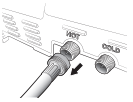
- Loosen and disconnect the water hose from the back of the washer. Cover the hose with a cloth to prevent water from gushing out.
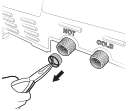
- Use pliers to pull out the mesh filter from the inlet valve.
- Submerge the mesh filter deeply in water so that the threaded connector is also submerged.
- Dry the mesh filter completely in a shaded area.
- Reinsert the mesh filter into the inlet valve, and reconnect the water hose to the inlet valve.
- Open the faucet.
If the mesh filter is clogged, the “Tap Cold LED” flashes on the washer’s display screen.
Cleaning the dispensers
The automatic dispenser may need to be cleaned periodically due to laundry additive buildup.
1. Pull the dispenser drawer straight back until it stops.
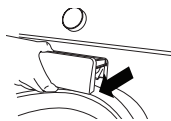
2. Tilt the dispenser drawer upward and remove it.
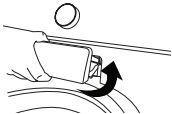
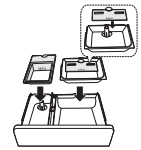
3. Remove the insert from the left compartment. Rinse the insert and the drawer with warm water to remove traces of accumulated laundry products.
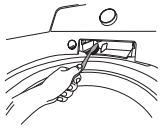
4. To clean the drawer opening, use a small, non-metal brush to clean the recess. Remove all residue from the upper and lower parts of the recess.
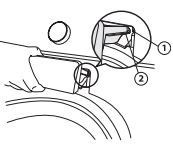
5. Re-install the insert in its proper compartment. To reinstall the drawer, place the dispenser drawer rail (1) on top of the compartment rail (2). Tilt the dispenser drawer downward slightly, and then push the drawer in firmly and slowly
Troubleshooting
Check these solutions if your washer…
will not start.
- Make sure the lid is closed.
- Make sure your washer is plugged in.
- Make sure the water source faucets are open.
- Press the Power button to turn the Washer on.
- Press the Start/Pause button to start the cycle.
- Make sure Child Lock is not activated. See page 20.
- Before your washer starts to fill, it will make a series of clicking noises to check the lid lock and do a quick drain.
- Check the fuse or reset the circuit breaker.
vibrates or is too noisy
- Make sure your washer is set on a level surface. If the surface is not level, adjust your washer’s feet to level the appliance.
- Make sure your washer is not touching any other object.
- Make sure the laundry load is balanced.
stops
- Plug the power cord into a live electrical outlet.
- Check the fuse or reset the circuit breaker.
- Close the lid and press the Start/Pause button to start your washer. For your safety, your washer will not spin unless the lid is closed.
- Before your washer starts to fill, it will make a series of clicking noises to check the lid lock and do a quick drain.
- There may be a pause or soak period in the cycle. Wait and it may start.
- Check the screens on the inlet hoses at the faucets for obstructions. Clean the screens periodically.
fills with the wrong temperature water.
- Turn both faucets on fully.
- Make sure the temperature selection is correct.
- Make sure the hoses are connected to the correct faucets. Flush water lines.
- Disconnect the hoses and clean the screens. The hose filter screens may be plugged.
- As your washer is filling, the water temperature may change as the automatic temperature control feature checks incoming water temperature. This is normal.
- While your washer is filling, you may notice just hot and/or just cold water going through the dispenser when you have selected cold or warm wash temperatures. This is a normal function of the automatic temperature control feature as your washer determines the temperature of the water.
Lid locked or will not open.
- Press the Start/Pause button to stop your washer.
- It may take a few moments for the lid lock mechanism to disengage.
does not drain and/or spin.
- Check the fuse or reset the circuit breaker.
- Straighten the drain hoses. Eliminate kinked hoses. If there is a drain restriction, call for service.
- Close the lid and press the Start/Pause button. For your safety, your washer will not spin unless the lid is closed.
load is too wet at the end of the cycle.
- Use the High spin speed.
- Use high efficiency detergent to reduce over–sudsing.
- The Load is too small. Very small loads (one or two items) may become unbalanced and not spin out completely.
leaks water.
- Make sure all hose connections are tight.
- Make sure the end of the drain hose is correctly inserted and secured to the drainage system.
- Avoid overloading.
- Use high efficiency detergent to prevent over–sudsing.
has excessive suds.
- Use high efficiency (HE) detergent to prevent over-sudsing.
- Reduce the detergent amount for soft water and small or lightly soiled loads.
- Do not use a Non-HE detergent.
Has an odor
- Make sure you are using HE detergent. Excessive suds collect in nooks and crannies and cause mold.
- Run cleansing cycles to sanitize the machine periodically. (Silver Care, Sanitize, or Self-Clean depending on the model)
- Dry the interior of your washer after the total cycle has finished.
Information codes
The Washer may display information codes to help you understand what is occurring with your Washer better.
Hot LED Flashes
- Lid is open when washer is running.
Close the lid tightly and restart the cycle. If the code reappears, call for service.
Warm LED Flashes
- Communication error between SUB PBA and MAIN PBA.
Call for service.
Cold LED Flashes
- A button is not working properly.
Call for service.
Tap Cold LED Flashes
- The Water Level sensor is not working properly.
- When the Tap Cold LED is flashing, the washer drains for 3 minutes. During this time, the Power button is inoperative.
Call for service.
Extra Large LED Flashes
- Your Washer has tried to fill but was unsuccessful.
- When the Extra Large LED is flashing, the washer drains for 3 minutes. During this time, the Power button is inoperative.
Make sure the water faucets are open all the way. Check for kinked hoses.
Check the inlet screens on the fill hoses.
If you use a Flood Safety Device, remove the device and connect the water hoses directly to the unit.
- Check if the hot water supply hose is connected.
You must connect the hot water supply hose because hot water is supplied by the Auto Temperature Control (A.T.C.) function.
Large LED Flashes
- Your Washer has tried to fill but has not reached the proper water level.
- When the Large LED is flashing, the washer drains for 3 minutes. During this time, the Power button is inoperative.
Call for service.
Medium LED Flashes
- A fault is detected in the water level sensor.
Call for service
Small LED Flashes
- Your washer is not draining. It can also mean that the unit senses a small clog while draining.
Do the following:
1) Turn off the unit and turn it on again.
2) Select only the Spin Cycle.
3) Press the Start/Pause to drain the water. If it still does not drain, call for service.
Hot & Warm LEDs flash
- Unbalanced load prevented your Washer from spinning.
Redistribute the load, and then press the Start/ Pause button.
Hot & Cold LEDs flash
- Motor not running properly.
Restart the cycle by presssing the Start/Pause button. If the code reappears, call for service.
Hot & Tap Cold LEDs flash
- Mems sensor is not working properly.
Call for service.
Hot & Extra Large LEDs flash
- Door lock is not working properly.
Close the lid tightly and restart the cycle. If the code reappears, call for service.
Hot & Large LEDs flash
- Door lock is not working properly.
Close the lid tightly and restart the cycle. If the code reappears, call for service.
Hot & Medium LEDs flash
- LEDs flash Thermistor is not working properly
Call for service.
Hot & Small LEDs flash
- The temperature of the supplied water is so high.
Ensure that the cold water tap and the hot water tap are connected correctly. If the code reappears, call for service.
Appendix
Fabric care chart
The following symbols provide garment care direction. The Clothing care labels include symbols for washing, bleaching, drying and ironing, or dry cleaning when necessary. The use of symbols ensures consistency among garment manufacturers of domestic and imported items. Follow care label directions to maximize garment life and reduce laundering problems.
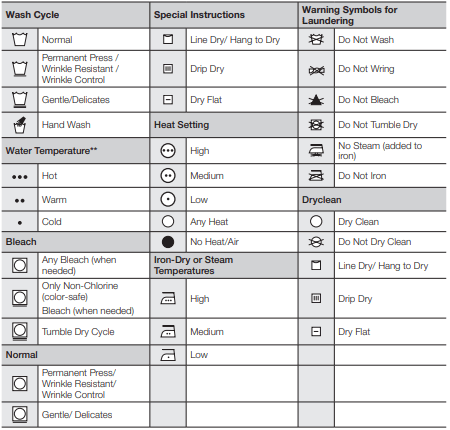
** The dot symbols represent appropriate wash water temperatures for various items. The temperature range for Hot is 105° - 125 °F / 41° - 52 °C, for Warm 85° - 105 °F / 29° - 41 °C and for Cold 60° - 85 °F / 16° - 29 °C. (Wash water temperature must be a minimum of 60 °F / 16 °C for detergent activation and effective cleaning.) The clothes washer cannot ensure these temperatures because the actual temperature of the water entering your washer depends on water heater settings and regional water supply temperatures. For example, cold water entering the home in the northern states during winter may be 40 °F / 4 °C which is too cold for effective cleaning. In this situation, you will need to adjust the water temperature by selecting a warm setting, adding some hot water to the MAX FILL line, or using your Washer’s heating option, if available.
Cycle chart
Use this chart to set the best cycle and options for you laundry.
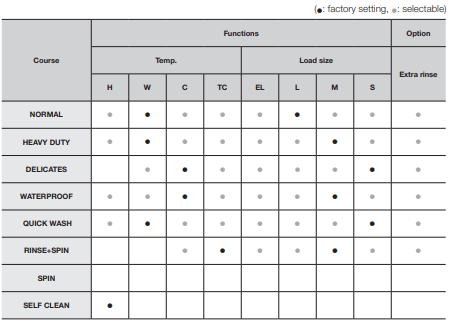
∙ Select Extra rinse option when using fabric softener.